#hardware-archived
1 messages · Page 28 of 1
 zealous dune
 wooden ruin
Any alternatives to Yellow since it looks like CM4 is impossible to order?
 winged knoll
Loads of them
The channel history has a long long long set of recommendations (since this is asked about daily) - search for tiny and you'll find a load
 cold moon
wooden ruin
Any alternatives to Yellow since it looks like CM4 is impossible to order?
cold moon
wooden ruin
Any alternatives to Yellow since it looks like CM4 is impossible to order?
Lenovo m910q is popular
wooden ruin
I have a 24 core server I am already running, might look into running it on that if possible
cold moon
wooden ruin
I have a 24 core server I am already running, might look into running it on that...
One reason not to do that is if your server dies it takes your smart home with it
But you can easily run haos in a vm or just the container minimal install and it’ll work fine
 uncut badger
good 😉 24 cores would be a little overkill for HA
wooden ruin
Lol
Can the full HA setup be run from containers?
I'll be digging into the docs here soon also
wooden ruin
Are add ons more like applications themselves that can then integrate with HA? So if I went the container path, I would need to setup those manually?
zealous dune
Exactly
 next sigil
Hi All - Just asked a sill question in General RE: hardware, not seeing the "hardware" channel (Im clever like that). So thought Id carry on here.
In short, ive just discovered HA while looking at ways to maximise my Solar Array and Storage with Grid Sellback, i come across this Video
https://www.youtube.com/watch?v=vmeEd2ljXtQ
and have started down the rabbit hole. I have a fairly mature home-lab, 2 x HPE DL380 Gen 9s and a Dell R720XD, a mix of ESXi, Proxmox and Windows Server Core with Hyper V, I've started an install on my ESXi host and got the basics running, but all the servers are part of my development environment, so they get chopped and changed and rebooted, powered down etc frequently. I'm wondering if it's worth getting a dedicated box to run HA on so its "always on" but im not sdure of what sort of resources would be required.
I've got a lenovo M700 spare and an older Mac Mini that could both be used, I'd like to keep power usage to a minimum but want it to be capable, would either of these be more suitable than the other? presumably running as HA OS - Will it run as a base install on either bit of hardware? or will it nneed to be ontop of a hypervisor?
Any advice appreciated 🙂
zealous dune
If they're as powerful or better than an Rpi4 they'll do just fine
next sigil
The M700 is a 6th gen i3, and 4gb of ddr3, its a bit long in the tooth but its low power use
I basicly dont want to be in the position of setting things up, then having to migrate to a "better" device in the future if it can be avoided now by spending a few quid
Theres quite a lot more ive descovered since I started looking that are being added to the "I want to try that!" list 😄
uncut badger
you might want to put more ram into that m700, cpu wise it'll work just fine
even a 6th gen i3 should be beating a raspberry pi
zealous dune
I run my HA on a J3455 with 20 docker containers, the M700 is fine
next sigil
Thats good to know, it SHOULD take up to 16gb ram, its just got a single slot, so ill have to get huting on ebay for a module
zealous dune
Unless you want to go crazy on video processing and encoding
next sigil
i cant see there being a huge amount of video to be honest, I tend to use the R720 for most of my usual stuff, it runs Plex etc and my IP camera CCTVs record direct to a NAS and are decoded as needed when the 720 is powered on
zealous dune
You're rine then, even the ram should be enough, you can always upgrade if it becomes an issue
next sigil
I'm very torn between "I want all the toys" and "Why is electric so expensive?" 😄
zealous dune
My server ran on 4 gb for awhile until I got container happy with it, now it's at 12
next sigil
Fair enough, ill give the M700 a whirl then, thank you 🙂
zealous dune
Low power use is more important than all the toys since it'll run 24/7 and probably won't ever utilise the toys
next sigil
Yeah, thats what im aiming for tbh, most of my stuff can be switched off at night, or when im away, so i try to keep the 24/7 stuff as low power as possible, thus the cctv to the synology and looking at HA to its own device
 sly dust
next sigil
i cant see there being a huge amount of video to be honest, I tend to use the R7...
sly dust
next sigil
i cant see there being a huge amount of video to be honest, I tend to use the R7...
I run HA on a 2 core 6GB VM on a 7 years old Synology NAS. Your M700 will be fine.
next sigil
Thanks
 tacit burrow
yeah the m700 will be fine. either native, or via proxmox etc.
 ocean wolf
Any idea if there's any difference between ESP32-C6 and ESP32-H2 other than the WiFi in C6?
The H2 is considered a low power controller; if I do not use WiFi in the C6, should I expect the same power consumption?
Trying to figure out which of the two is better for me, considering that I do not intend to use WiFi, but the C6 is a bit cheaper than the H2 for some reason
zealous dune
H2 has the wifi radio removed for lowest power consumption and it should've been the cheaper option
Power consumption also depends on the firmware and the dev board components
ocean wolf
zealous dune
H2 has the wifi radio removed for lowest power consumption and it should've been...
So even if I do not use WiFi, or maybe even somehow disable it, the C6 will probably consume more power.
Correct?
 rich venture
ocean wolf
So even if I do not use WiFi, or maybe even somehow disable it, the C6 will prob...
rich venture
ocean wolf
So even if I do not use WiFi, or maybe even somehow disable it, the C6 will prob...
if you wont use wifi why use esp device?
i would use rp2040
 oblique robin
Anyone use water leak sensors tied into HA? Looking to throw a bunch under my sinks and by my water heater
ocean wolf
rich venture
if you wont use wifi why use esp device?
i would use rp2040
I'm new to this field, and I'm not sure that I even need/want wifi in the long term, but since I know nothing about this field, having the extra capabilities could be helpful
rich venture
ocean wolf
I'm new to this field, and I'm not sure that I even need/want wifi in the long t...
What do you want to make? Is it battery powered and that's why power consumption is a concern?
 olive jasper
Hi!
So I have currently a few MiLight () Limitless led, miboxer) bulbs and both WiFi bridge and radio controllers for them.
They work great, and have been for like 4 years. Now a new room appeared that I need to set up for automation.
Currently Miboxer (the company that makes these lights) has a confusing amount of offerings. They still do their own 2.4ghz communication but they also seem to be adding new ones that use ZigBee for communication.
Miboxer offers a lot of different bulbs and there is an open source controller for them that can track the state of the bolbs when switching from the wireless remotes.
It is important to me that those remotes work without HA or internet access.
Mi boxers also seems to offer a combined ZigBee + 2.4Ghz bolb but I'm unsure if that can track state back to HA.
But in the meantime I have heard a lot of things about Matter and Thread as well but I'm not sure what those are for. Are they for complex smart devices like TV/Microwave etc that can have more processing power?
The devices I want to controll remote:
- 2 lamp bulbs
- 2 strips of LEDs
- and a few other things that are gonna be DIY
(Please ping if you reply)
 midnight raptor
ocean wolf
I'm new to this field, and I'm not sure that I even need/want wifi in the long t...
midnight raptor
ocean wolf
I'm new to this field, and I'm not sure that I even need/want wifi in the long t...
What people use instead of wifi is Zigbee and Zwave devices. You can access them from a usb adapter ($30) which connects to Home Assistant via something like Zigbee2Mqtt
uncut badger
zigbee tends to be far lower battery usage than wifi. and almost instant wakeup. (ditto with zwave, but I don't have personal experience with it.)
ocean wolf
rich venture
What do you want to make? Is it battery powered and that's why power consumption...
It's not going to be battery powered, I'm mostly trying to figure the ups and downs of each of my options
ocean wolf
midnight raptor
What people use instead of wifi is Zigbee and Zwave devices. You can access the...
I know, that's why I raised that question, wanted to know whether there'll be any power consumption differences between H2 which doesn't support WiFi and a C6 with WiFi disabled (on not in use)
midnight raptor
ocean wolf
I know, that's why I raised that question, wanted to know whether there'll be an...
afaik the power consumption isn't the issue. Rather it is undependable nature of wifi itself. Either of these is a major step up
cold moon
All the protocols have issues. Wi-Fi is fine for certain things and a poor choice for others
Same with zigbee, same with zwave
 drifting ember
uncut badger
zigbee tends to be _far_ lower battery usage than wifi. and almost instant wakeu...
drifting ember
uncut badger
zigbee tends to be _far_ lower battery usage than wifi. and almost instant wakeu...
battery powered wifi? 🤮
ocean wolf
midnight raptor
afaik the power consumption isn't the issue. Rather it is undependable nature o...
I understand, but again, it'll mostly be a temp setup before I commit to a serious relationship with one of those, maybe even to Matter, depends on how solid it'll be by the time I'll be ready to work on it
midnight raptor
ocean wolf
I understand, but again, it'll mostly be a temp setup before I commit to a serio...
My recommendation would be to do what I did and order the Home Assistant Skyconnect for $30. It supports Zigbee and Matter, plus has guaranteed updates from HA directly.
 orchid orbit
For people running HA (and maybe Frigate) on a SFF PC: how bad is the power consumption compared to, let's say, RPI4? Looking at dell optiplex micro with i3-8100T and 8GB RAM. Specs mention a 65w power supply - but what would the average consumption be? Is it 20w? 50w?
zealous dune
CPU TDP is 25-35W, average consumption depends on the load and additional components
Rpi4 TDP is declared at 6W but that's not accounting the SSD and connected peripherals
 golden thorn
I expect the lows of a machine like this (pretty much all modern intels) to be able to reach 7-10w or so in idle but the ceiling is higher.
I'd expect less than 20w in mostly idle mode. If it's too much you can play around with the cpu governor and it'll still be faster than the pi
winged knoll
Plus you have to factor the experience. If that Pi is running at 100% all the time your experience is going to suffer.
orchid orbit
as in losing the SD cards all the time?
valid point, at 10 euro a pop it can ramp up quickly
winged knoll
Well, nobody should run on SD cards
But any system running at 100% CPU all the time is going to be painful to interact with
If you're thrashing the crap out of it with Frigate you may learn to hate it
orchid orbit
Frigate is a distant dream, and right now I am on RPI2 so anything would be an improvement
zealous dune
there's also the point of having a real computer or a toy
how much do you expect to pay for that dell
winged knoll
I'd 100% recommend some small form factor PC or old laptop over an educational toy
orchid orbit
I see a refurbished one for 200 euro
orchid orbit
I am in NL, things tend to get expensive here
golden thorn
I've seen similar machines for 50-60€ on eBay so I wouldn't pay more than this but that depends on location.
With your prices it might be cheaper to buy in another country
orchid orbit
alright, I'll take that into consideration, thanks
 south ridge
hello i want to find a good siren and a good camera for my home assistant i am in greece and i use wifi and zigbee
 pseudo flicker
Wondering if anyone has found a 20A smart plug or outlet with energy monitoring capabilities? I bought some but they trip at 1,800w or so
winged knoll
What country?
rich venture
pseudo flicker
Wondering if anyone has found a 20A smart plug or outlet with energy monitoring ...
if you are switching 20 amps i would reccomend a contactor and a current clamp energy meter
uncut badger
far far safer
Especially as, I suspect, that draw is by something with a motor. which can be iffy. (if it's a heater, less so)
rich venture
uncut badger
Especially as, I suspect, that draw is by something with a motor. which can be i...
thats why you have to look at contactor ratings
AC-1 Non-inductive or slightly inductive loads, example: resistive furnaces, heaters
AC-2 Slip-ring motors: switching off
AC-3 Squirrel-cage motors: starting, switches off motors during running time
those are the most common ones
uncut badger
Gotta be careful with the angry pixies.
rich venture
uncut badger
Always nice to see people who can do more than regurgitate the warnings they've heard 😄 (I was regurgitating. I've got a vague idea of the problems, but that's it.)
rich venture
uncut badger
Always nice to see people who can do more than regurgitate the warnings they've ...
i wouldnt have known about them either but i salvaged some contactors and noticed some were ac1 and some ac3, didnt know what it was so i googled it, now i know
uncut badger
😄 The internet is so useful for people with that kind of curiosity
 raw thistle
I have an RPi4. I'm currently powering it from mains, but I'm interested in instead powering it from a Baseus 100W power bank that I own. I'd want to have the battery receiving power from mains while outputting power to the RPi. I'm just not sure if this is sustainable. Will the RPi draw more power than the power bank receives? Will doing this cause damage to the power bank?
I can provide a link to the power bank I'm referring to, but didn't want to do so unprompted.
Yes, I realize that 100W is supreme overkill for an RPi4.
Perhaps I could also power my router with it. 🤔
golden thorn
Will the RPi draw more power than the power bank receives?
Depends how much current your PSU has, the charge the bank can handle, how full it is, etc.
Will doing this cause damage to the power bank?
Maybe. Depends how smart the charging circuit is but use like this will degrade it faster than what's it's designed to be used for.
rich venture
raw thistle
I have an RPi4. I'm currently powering it from mains, but I'm interested in inst...
you wouldnt damage rpi but damage to powerbank is possible
just get rpi ups shield and be done with it
https://geekworm.com/products/raspberry-pi-4-x703-18650-ups-shield-with-auto-power-on-function
raw thistle
rich venture
you wouldnt damage rpi but damage to powerbank is possible
That's what I thought. Charging while drawing probably isn't super great for the cells.
golden thorn
Depending on how it's designed you'll pull the power directly from the PSU
raw thistle
rich venture
just get rpi ups shield and be done with it
https://geekworm.com/products/raspbe...
Unfortunately, that's not really an option since I keep my RPi in an Argon case. There's not room for that addition.
and I don't just want it as a UPS to prevent damage to the RPi. The goal is also to provide power for an actually meaningful period of time in case of a power outtage. At 20,000 mAh, I think this battery bank could provide power for a fair bit of time.
rich venture
raw thistle
Unfortunately, that's not really an option since I keep my RPi in an Argon case....
how about this one? https://raspberrypi.dk/en/product/ups-hat-for-raspberry-pi-no-battery/
from what i see that case has passtrough for gpio
easy no mod option would be to just buy a commercial ups and save yourself some trouble
raw thistle
rich venture
how about this one? https://raspberrypi.dk/en/product/ups-hat-for-raspberry-pi-n...
I appreciate the recommendations, but I'd really just like to know if using the battery I already own is feasible.
Rather than spend more money.
rich venture
raw thistle
I appreciate the recommendations, but I'd really just like to know if using the ...
does it output on charge ports while charging?
raw thistle
Yes
rich venture
then yes
raw thistle
Longterm though? Like will doing this likely just kill the battery within a month?
rich venture
depends on charge circuit used
best case: charges battery only when needed, bridges output ports and input port when plugged in
worst case: trickle charges battery, boost circuit always connected to battery, this can cause battery to expand and 🔥
raw thistle
So basically, if I'm going to do this, I should keep an eye on the battery to make sure it doesn't start expanding?
rich venture
yes
raw thistle
Thanks
rich venture
raw thistle
So basically, if I'm going to do this, I should keep an eye on the battery to ma...
one thing
can you check on battery what chemistry its using
it can be: li-ion, lipo, lifepo4
raw thistle
"polymer lithium battery". It also says it has a power conversion rate of >=75%, if that matters.
rich venture
yikes
thats the most dangerous one
raw thistle
So don't do this?
 raw thistle
Okay. Thanks. I definitely don't want to risk an explosion. Power outages are rare, but I figured since I have this spare battery I'd check if it was a good use for it.
rich venture
when power cuts off then its ok to use it to power your pi
otherwise you dont need it nor want it there
raw thistle
Got it. I'll probably get a proper UPS someday, but it's just not in the finances right now.
Thank you
 torpid dawn
(please redirect me if there's a more appropriate channel)
How do you all have your wireless (BLE/zwave/zigbee/matter) hardware set up, especially if your HA machine isn't in an ideal location? My HA box is in the basement, and i worry about connectivity issues haveing 2 floors above it. Maye this is not an issue at all, ut if it is, how do i approach this? So far, the best solution i've gathered is maybe a minimal POE rpi with https://github.com/custom-components/remote_homeassistant, having all of the wirelss adapters on it?
winged knoll
You can get PoE connected Zigbee coordinators
torpid dawn
Sweet, haven't heard of those yet, and looks likea good solution for that. What about ble? trying to find an equivalent, i see this: https://www.creatingsmarthome.com/index.php/2023/03/27/guide-bluetooth-proxy-to-home-assistant-using-esphome/
zealous dune
That's it
Not that board but the general idea. Any ESP32 can be a proxy and you can have multiples
torpid dawn
Sweet, way less complicated that i was imagining it. Thanks!
(going to ignore matter since idk when that'll make its way into my home)
 pallid prairie
finally up to the software part of my life, installed HAOS, Sonoff thing, Zigbee2MQTT, added 50 lightbulbs before I realized I should name them room by room instead making a clusterfuck
 mossy canyon
Any suggestions for water shutoff valves? I have zigbee currently setup, but I have a zwave dongle if I... have to....
The only ones I keep finding are tuya
uncut badger
are you wanting one that gets plumbed in, or one which adds onto your existing valve? if the latter, is it one of the quarter turn handles, or a twiddly tap style? (I don't actually have an option I know anything about, but the answers are important for anyone else answering you)
mossy canyon
Either plumbed in or the quarter turn ones are fine. I'm physically changing my plumbing around, so I can install whatever I need.
uncut badger
I would suggest having 2. one entirely manual, one remotely controlled.
cold moon
Zooz titan
mossy canyon
Well if that's the case then I'd probably just go with one of the quarter turn ones, valves aren't cheap 🙂
mossy canyon
cold moon
Zooz titan
Looks nice but is expensive. I can get 2-3 reasonably priced ones for that
cold moon
Ok
uncut badger
(the manual one is in case something goes wrong with the remote one.)
(I may be paranoid about water)
mossy canyon
uncut badger
(the manual one is in case something goes wrong with the remote one.)
Yeah, but with the ones that just control a manual valve I can always just rip the auto one off and manually actuate the valve 🙂
I really want to use a bunch of these for my floorboard heating in my cabin, so I'd have to buy like... 10-15 of them, hence why I don't want them to be SUPER expensive
cold moon
Sounds like you’re talking about TRVs but that’s not what you asked for
I’ve heard the aqara ones are pretty decent
mossy canyon
TRVs are the valves on right next to the floorboard heaters right?
Yeah, I thought about those, but the problem is that my floorboard heaters are wired... effectively in series. So if one of the TRVs ever closed completely, it'd stop the heat to every other room in the house
cold moon
Used for floor heating etc I believe
mossy canyon
not wired, plumbed
So I was just going to re-do the plumbing and plumb in bypass valves
I think I'd still need the TRVs as well
cold moon
Out of my comfort zone I’ll let someone else jump in
I’d probably ask on Reddit or the forums
That stuff isn’t discussed here often
mossy canyon
It's like 6 buttons in one? (not really buttons but can effectively do the same thing)
And it's only 20 bucks?
cold moon
The magic cubes are cool
They do way more than 6 things
There’s a newer blueprint for the cube you linked
I have them in multiple rooms and toggle lights with a shake of the cube among other things
mossy canyon
Do I need to worry about stuff like that? Shouldn't HA just automatically use the latest "software" for anything I pair?
cold moon
Blueprints are templated versions of automations
You linked the new cube t1 pro
I linked the original blueprint made for the original cube
A separate blueprint that does the same thing should be used not the one I linked if you buy the new gen of the cube
mossy canyon
How do I choose which blueprint is used?
cold moon
You find it online and add it
It’s linked in the link I posted if you just read a bit
Or just don’t use a blueprint but this is one of the few times a blueprint is very useful
mossy canyon
It's so cheap, I'll buy one and play with it
rich venture
mossy canyon
I really want to use a bunch of these for my floorboard heating in my cabin, so ...
mossy canyon
Yeah that's essentially one of these https://en.wikipedia.org/wiki/Thermostatic_radiator_valve
Right?
just a smart one
rich venture
mossy canyon
just a smart one
it mounts onto same interface
but instead of room temperature actuating it it actuates based on if input is energised
mossy canyon
Smart input or physical input?
rich venture
it can be smart if you use a relay board to actuate it
mossy canyon
Ah ok, so a phyical input.
rich venture
my brother has bunch of them mounted on manifolds to controll in floor heating
mossy canyon
Yeah, I do need SOMETHING like that, but I ALSO need the valve actuators we were talking about above because of how my heaters are plumbed.
Right now my heaters are plumbed one to another to another. So say if the room where the 1st heater is "too hot" I can't turn it off completely because it'd turn every other one off in the house as well.
rich venture
mossy canyon
Yeah, I do need SOMETHING like that, but I ALSO need the valve actuators we were...
can you provide a example of how they are plumbed?
mossy canyon
It's dumb the way it was plumbed
Essentially just "series" but in plumbing instead of wiring
I'm going to change it to be essentially in "parallel" instead. With one "bus" copper pipe and a valve to turn individual heaters on and off. (It's a normal way of plumbing them, it's just more expensive than the way mine are done.)
I technically don't NEED the ball valves and actuators, but if I ever need to fix something it'd be much nicer to be able to isolate a single heater instead of draining the entire system
rich venture
mossy canyon
I'm going to change it to be essentially in "parallel" instead. With one "bus" c...
idk, normal plumbing here is to have 2 lines, hot and cold return
mossy canyon
Here let me find the wiki
Here's a good explanation
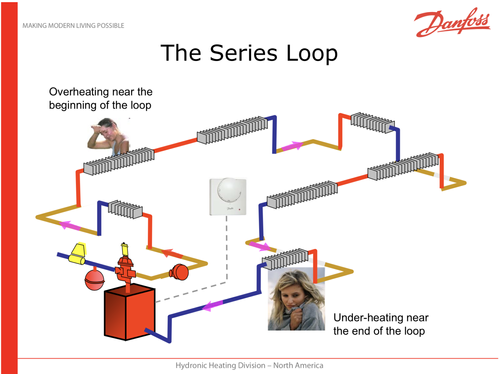
This is the way mine is plumbed currently
The output of one heater goes into the input of another. So if you turn the first one off, no other heaters get hot water.
rich venture
mossy canyon
https://images.squarespace-cdn.com/content/v1/534b2fdae4b0bf294b4e7c6e/153245628...
idk how someone could find this plumbing method not dumb
rich venture
no valves = no controll
mossy canyon
You got it!
Hence why I want to change it
My bedroom is the FIRST heater. Which means my bedroom gets VERY hot
I guess technically I don't need smart ball valves to turn them on and off, just smart regulators like the ones you posted.
I still want manual ball valves, but they don't need to be smart
rich venture
mossy canyon
I still want manual ball valves, but they don't need to be smart
for what?
mossy canyon
Maintenance, ability to isolate a heater from the system.
Saftey (if there's a leak I can turn individual heaters off)
Ball valves are like 10-15 bucks, no reason NOT to put them in if I'm doing something like this
rich venture
mossy canyon
Ball valves are like 10-15 bucks, no reason NOT to put them in if I'm doing some...
you could use this kind of valves, here they are used for radiator balancing which is essentially what you will be doing
https://termometal.hr/upload/catalog/products/2041/thumb/prigusnica-radijatorska-ravna-itap296_395x395r.jpg
 mossy canyon
Yep! I believe those need to be installed on the valve side of the "bypass". Like, there is a bypass pipe that goes around the heater. If any particular heater gets turned off completely, the hot water will go through this bypass pipe, but you need to somehow make this bypass pipe "harder" for water to flow through so that the water will flow through the radiator when asked, so you install these balancing valves.
They're basically just flow restrictors IIRC.
You make a good point, I should really be asking like european forums because boiler heating is much more common over there
rich venture
mossy canyon
They're basically just flow restrictors IIRC.
one problem that i can see is that your pump might not be powerfull enough to push trough x bypass valves
mossy canyon
since buildings are much older.
We'll see, I don't really think it'd be an issue. Someone much smarter than me designed the pump and bypass valves lol
rich venture
mossy canyon
since buildings are much older.
thats not the reason
rich venture
yea
mossy canyon
Yeah heat pumps are popular over here because they can do both heat and AC
rich venture
and my ac is not central air, its mini split
mossy canyon
Mini splits are becoming more popular over here
I'm still debating getting one installed
Question: Does your mini split have a big air handler thing in each room that it goes to?
rich venture
mossy canyon
Question: Does your mini split have a big air handler thing in each room that it...
no, i have it in my living room
i think you might be referring to multi split where bunch of indoor units get connected to one outdoor unit
mossy canyon
rich venture
no, i have it in my living room
i think you might be referring to multi split wh...
Ah, over here the "Multi splits" are still called "mini splits"
And yes, that's what I was referring to
The thing is, I believe mini splits exist with only a single air handler unit, and then they have like, pipes that come off of this unit that can fit in walls and push high pressure air out of them.
And that's the type I want, but I can't... find them, or even see if they exist.
So you just have to run like... what is effectively a vacuum cleaner hose in your wall.
rich venture
mossy canyon
So you just have to run like... what is effectively a vacuum cleaner hose in you...
no that doesent exist
mossy canyon
Hm
rich venture
you would have to run refrigirant lines to each room
mossy canyon
For the multi splits you have to do that
cold moon
they're still called mini splits you're just referring to ductless vs non-ductless ones
mossy canyon
Non ductless lol
rich venture
or another option is to use heat pump monoblock and have fan convector in each room/zone
mossy canyon
Are they actually called "non ductless"?
cold moon
nah i just derped
mossy canyon
ducted?
cold moon
ductless vs ducted w/e
mossy canyon
interesting, thanks, I'll look
I'd prefer that kind (becuase I really don't want to run refridgerant lines to all 5 zones I want cooled.)
cold moon
if your ducts are in an uninsulated attic then ductless mini split is the way to go
mossy canyon
Nope, they'd all be in insulated walls.
My house is small, most of them would be running through the basement
rich venture
mossy canyon
I'd prefer that kind (becuase I really don't want to run refridgerant lines to a...
 mossy canyon
Pretty much, yes
rich venture
mossy canyon
I'd prefer that kind (becuase I really don't want to run refridgerant lines to a...
tbh refrigirant lines arent that hard to run, but having a condensate return is harder since they have to be sloped
mossy canyon
Yeah, the issue with the refrigerant lines is that I don't have the tools to purge them (and cut them/flare them), and I don't want to have large coils of lines outside each air handler. So if I get a ducted system, that's not a problem. 🙂 And I want to install it myself obviously because contractors are a ripoff.
rich venture
mossy canyon
Yeah, the issue with the refrigerant lines is that I don't have the tools to pur...
vacuum pumps are under 100$
cutting/flaring tools are 25$
manifold and hoses are 30$
mossy canyon
True enough, I'll look into it 🙂
mossy canyon
Honestly, I just really don't want the air handlers in my rooms 🙂
rich venture
understandable
mossy canyon
The rooms are just really small and all the wall space is pretty much already taken up
I could put them high up on the wall in some of the rooms, but in other rooms I have tall furniture
Unrelated question: All of my wireless sensors are reporting super high battery usage, do they just use terrible batteries from the factory or am I doing something wrong?
I've had them installed for like a week and many of them are down to nearly 50%
I'm not replacing batteries every.... month. I'll find other solutions if that's the case
rich venture
what kind of sensors?
rich venture
model
mossy canyon
Ugh, I need to search better before I buy.
Any suggestions for replacements?
I'm going to put zigbee hubs near all of them so the mesh is stronger, maybe that'll help
rich venture
mossy canyon
Any suggestions for replacements?
i suggest letting them go to 0, then changing battery and see if battery life improves
mossy canyon
Will do
rich venture
and bulk packs of cr2032 are cheap, dont buy them one at the time
mossy canyon
That link you posted says one thing, but then most of the comments are saying "Mine are good for 1-2 years."
cold moon
zigbee battery reporting, especially zigbee 1.2 aqara stuff, cant really be trusted
plus they often ship with shit batteries
rich venture
mossy canyon
That link you posted says one thing, but then most of the comments are saying "M...
you dont know how long they sat in the amazon warehouse
mossy canyon
Ahhhhh ok, yeah I just saw a comment saying that the reported battery percentage is often bad
I'll see how long it takes for them to die
I hope they're good because I definitely didn't just buy like 6 of them....
lol
Another question: Thoughts on zigbee vs zwave? I have both dongles, but so far I've only connected zigbee. I've tried to stick with just zigbee devices for now. I was wondering if there were any reasons one would choose zigbee vs. zwave.
cold moon
there are lots of reasons to pick one or the other or use both
zwave has the zwave alliance that products must pass checks for
and has "s2" security which confirms packets get received which is very useful for certain things like sirens
water leak sensors
etc
usually people say "zwave just works" but tbh both do
also depends on the hardware choices
mossy canyon
So zwave is fancier, got it 🙂
cold moon
zwave basically has no rgbw-cct bulbs that are worth buying
and zigbee basically has one manufacturer that isnt a chinese company designing+making light switches for the U.S. market (inovelli blue is the exception)
so if you want dumb bulbs and smart switches/dimmers you buy zwave or pay double for inovelli blue to do the same w/ zigbee
mossy canyon
Ahhh, interesting. Yeah I was thinking about looking into smart switches, because lots of the lights in my house are in fans, and they aren't normal bulbs so therefore can't be smart.
cold moon
well fans are another beast
and if the fan doesnt have a traveler wire / separate controls for the lights and fan then you basically just get a switch that turns the fan+lights on/off only with no speed control or individual control for light/fans
some people buy rf bridges or ir bridges and mimic button presses on remotes
and the smart switch needs to be able to support a fan, most dont and cant handle the inrush current
mossy canyon
Yeah so funny story right
I have two identical fans in my big room. One is wired with separate switches for lights and fan. The other is wired with one switch that turns power off completely, one switch for the light, and you have to turn the fan on with a remote
Whoever built this house was an idiot
cold moon
houses are built like shit in the us
mossy canyon
I almost wonder if the one switch that turns the power off completely was supposed to be a switch for the fan, but they screwed up the wiring.
cold moon
unless it's a custom builder and you have fuck you money
mossy canyon
Yeah, I used to frame houses when I was younger, I'm well aware of the corners cut
cold moon
gross
rich venture
cold moon
unless it's a custom builder and you have fuck you money
yup, otherwise you get contractor grade™️ stuff
mossy canyon
Yeah my whole extended family are contractors. (I don't talk to them anymore cause they're not great people lol)
I really wanted to build my own house but I was forced to move when house prices were just ginormous.
I am very happy that this home automation stuff is still relatively cheap. At least the DIY stuff is. The purpose built, "smart" apple homekit stuff always seems to be more expensive
Oh I just figured out why the batteries all look like they're dying. They're just calculating battery percentage as a linear correlation to voltage.... which.... is not great. Especially when you set 100% to be what the battery ships with, which will immediately nosedive as soon as you use it at all.
The battery voltages are very much leveling off
 devout parrot
fans are a whole situation. 3 of mine are on RF remotes and one of them is a pull chain. Single wall switch for all of them. I haven't bothered to smart-ify any of them yet tbh.
mossy canyon
devout parrot
fans are a whole situation. 3 of mine are on RF remotes and one of them is a pul...
I really wonder why contractors were so dumb when they installed them. Like every, single, house I've gone into has fan wiring that is just a mess.
The contractor who built my mom's house installed two switches for the fans, one for lights one for fan, but the fans themselves don't have pull chains, and he THREW AWAY the remote controls, so the fans are stuck on "super turbo mode"
I haven't been able to find replacement remotes :/
devout parrot
I think the wiring is always a mess because they want to cut corners and have the electricians do as little as they can get away with.
mossy canyon
Just FYI, I think they have devices you can install ABOVE the fan to make the fans remote controlled
Even if there is only one switch controlling it
rich venture
mossy canyon
I haven't been able to find replacement remotes :/
i havent found anything that i am not able to controll by ir with my phone
mossy canyon
rich venture
i havent found anything that i am not able to controll by ir with my phone
That's a good point.... I should try that
devout parrot
Yeah you can add remote modules and it's actually pretty easy.
mossy canyon
Maybe with a smart remote as I have an iPhone and it doesn't have IR like that
rich venture
my redmi note 9 pro has it
mossy canyon
Yeah a lot of the android phones/tablets do. A smart remote could do the same thing but I'd have to figure out the right codes to make them work..... hmmm
Related question: How do the HA ir blasters work? How do you program them with the right codes?
Do they "learn" like other smart remotes? Or do you just say "hey I want to control X or Y device, go lookup the codes"
devout parrot
Fan remotes are pretty cheap and shouldn't have to be the original brand, typically they run on 315 or 433 MHz, you'd just have to mess around with the dip switches to find the right combination.
rich venture
mossy canyon
Do they "learn" like other smart remotes? Or do you just say "hey I want to cont...
both
mossy canyon
rich venture
both
Cool, that's honestly the best. Especially for weird things.
mossy canyon
devout parrot
Fan remotes are pretty cheap and shouldn't have to be the original brand, typica...
OH REALLY??? So I may just be able to buy a generic remote and it may work? interesting
generic fan remote
rich venture
mossy canyon
generic *fan* remote
do you know the manufactuer?
mossy canyon
Uh, yeah let me go find the reddit post where I asked online and someone found it for me
(I'm not kidding.)
devout parrot
I have a Broadlink RM3 and I'm pretty sure the only way to get the codes into HA is manually via "learning", so I haven't messed with that yet because half the reason I have it is because the kids keep losing the actual remotes.
mossy canyon
ah crap all the reddit search websites are going to be dead because reddit killed the API 😦
mossy canyon
Any suggestions for weather stations?
zigbee or zwave, doesn't matter (if these exist)
devout parrot
Ecowitt. WiFi, integrates with HA, local push. If you want to you can even forgo the WiFi connected base station and just integrate the station directly with rtl433.
mossy canyon
Yeah it seems like weather stations are a bit of a pain
so ecowitt stuff can directly recieve RF transmissions?
does RTL-SDR do the same thing (as I've seen someone recommend that to do similar)
I'm not interested in having my weather station's data broadcast to the internet and sold, so yeah, local integration is a must
devout parrot
I mean you can always firewall it off from the internet, but yeah.
The station uses 433 MHz to send data back to the base station. Rtl433 is a software that you use to interpret the 433 MHz data from a compatible SDR. And then I think you use mqtt to bring that data over into home assistant.
mossy canyon
So, if I choose to use ecowitt, do I need one of those recievers? If so, could you suggest one?
devout parrot
This works with most other weather stations too, including plenty that don't come "smart" in the first place.
mossy canyon
I found one weather station that people are saying works with HA via ecowitt. So, by saying that, they're saying they're nabbing the communications out of the air using a reciever?
devout parrot
There's a proper Ecowitt integration, they're probably talking about using that since the unit is manufactured by Ecowitt.
mossy canyon
So how are they getting the info locally?
devout parrot
Via the integration. It's local push, means that the Ecowitt device can push data directly to home assistant over LAN.
mossy canyon
ahhhhh ok that's fine
I was just confused
I thought I needed those recievers to intercept the communication between the station and the display/base unit
Although, TBH, that would be nice since I wouldn't need the base unit
devout parrot
there's a station outside, that station transmits to the base station over a 433 MHz signal, the base talks to home assistant.
mossy canyon
Yes, but what we were talking about before is a reciever (plugged into HA) that talks to the outside station directly (or rather, just listens.)
mossy canyon
Ok, I understand better now. I can use the reciever likely on most weather stations, even some non smart ones, but some stations, specifically ecowitt ones, I can just grab the data from the base station over wifi
or ethernet rather
devout parrot
Right. And yeah there are also probably cheaper options if you just go the rtl433 route.
mossy canyon
Yeah but then I need to figure it out. That is the option I WANT to go though because the inside base stations for the cheap weather stations are always just... awful
Cheap, light, terrible
Ok, so now, can you point me in the direction of a reciever for the rtl433 route?
cold moon
433 mhz esphome yaml example: https://dpaste.org/Z0qus images of esp32 wiring using nodemcu wroom32: https://imgur.com/a/PdPiTcy https://github.com/dbuezas/esphome-cc1101/tree/main
you can make your own too
mossy canyon
Making it sounds cool but I'd likely spend more money on the little project boards than just buying a purpose built one
cold moon
the project i did above was $7 in parts
mossy canyon
I did just buy like 15 of those d1 mini boards. Or at least some clone on amazon
 sleek bay
im looking to integrate a SIM900a module, tried ESPHome, it does not have support for it
for some some reason i must use software-serial but the module works
have all the commands listed, writing the code is basically copy paste...
question is, how would i integrate that into home assistant? do i need to write custom devices in home assistant?
i need bidirectional communication between the ESP and home assistant
any tipps would be good (my cpp knowledge is limited however im excellent at js and py)
here is the flow
run serial read, send (and parse) all data to home assistant
on home assistant request run serial commands
thats it
rich venture
sleek bay
here is the flow
run serial read, send (and parse) all data to home assistant
on...
What are you trying to achieve?
Do you want to send sms msgs to your phone?
sleek bay
rich venture
What are you trying to achieve?
Do you want to send sms msgs to your phone?
send, receive, call, hang up
rich venture
sleek bay
send, receive, call, hang up
Maybe this helps https://www.home-assistant.io/integrations/sms/
sleek bay
rich venture
Maybe this helps https://www.home-assistant.io/integrations/sms/
does not say a word about SIM-900a
also no call support
sleek bay
looked on fiverr if someone can do this but meh, cant find
sleek bay
cold moon
preying on poor people desperate to try to make a living
yeah, true...
 worthy horizon
Hey guys, did anyone install ha on homey hardware already?
I starten with ha few months ago, needed 433hz support and thuis bought homey pro.
I am not impressed. Yes its sleek, polished, but no dashboard, needs internet for many tasks, and only supports things it supports really, not much tweaking.
I'm pretty sure there is a market for it, but it's not me.
So since the hardware is decent enough, did someone install ha on homey pro box already?
cold moon
What lol
devout parrot
Yeah I don't know that that's even possible. You'd be better off returning it or flipping it.
 gentle fossil
You get far better ha machines for that money 😂
devout parrot
Yeah for $400 you could get a decent SFF PC, every dongle you could ever need, and have enough left over to make a nice start on buying up whatever smart home hardware you're into.
 balmy merlin
I am looking for light switches. I need a few that are motion or occupancy and light switch. I've been looking for some with bathroom vent fan timer, but I can work around that if I get good occupancy sensor in the switch beside it.
 kindred kiln
Don't suppose anyone has messed around with Ultraloq "U-Bolt Pro" models? Comes with 6-in-one unlock options including Z Wave.
I have support ticket open because it initially worked (with the app), but while trying to get Z Wave going, the lock no longer shows up on their app and I literally can't do anything. Factory Reset doesn't work... Reinstall of app doesn't work. Etc.
Anyway. If others happen to have experience with this and found a solution would love to know!
cold moon
balmy merlin
I am looking for light switches. I need a few that are motion or occupancy and l...
No good ones exist yet. Inovelli has one on a kickstarter that looks promising but it’s like a year away
mossy canyon
Does zwave need a good "network" like zigbee does?
mossy canyon
That's unfortunate
Some of my devices I could only buy in zwave (my front door lock) but everything else I have is zigbee
Eh, whatever, more smart outlets for me
On zigbee or zwave surge protectors, can you control each plug individually?
 gloomy spoke
There's no generic answer to that
mossy canyon
Hm, interesting
cold moon
Mostly no
gloomy spoke
Did you have products in mind?
mossy canyon
No, I just saw one and was wondering
cold moon
I think the zooz zwave one does individual
mossy canyon
That's literally the one I saw
Unsure why I'd need that many smart controlled plugs in one place though
cold moon
Hopefully you didn’t buy a Schlage zwave lock
mossy canyon
I didn't but why is that?
I was looking at that one for a possible replacement for my basement door, should I not consider it?
cold moon
August and Schlage zwave locks are to be avoided per the zwave js maintainer
They don’t follow the spec and are generally really bad at joining a mesh / have communication issues
mossy canyon
Good to know, thanks!
cold moon
Kwikset are the most well liked
They also include smartkey aka you can rekey them all to match without needing a locksmith
mossy canyon
Wonder how that works
Rekeying locks isn't typically super hard, you just gotta have the pins which is expenstive to buy a set (of security pins)
cold moon
I have three but I’ve never tried
I put all the keys in a bag and just use smarts
It’s on the list
gloomy spoke
I got one of them stuck in a state where no keys worked. Luckily, I found a video that shows how to disassemble it and fix it
mossy canyon
There wasn't a manual reset on the pcb somewhere?
cold moon
there isnt a youtube video of someone doing it?
gloomy spoke
Yes, there is
You put the key in, turn it, stick the little tool into a slot, remove the key, stick in the new one, turn it back the other way
mossy canyon
Question: Why are people reflashing zigbee smart plugs to work with HA? My zigbee plugs just... worked... out of the box?
cold moon
they arent
mossy canyon
Did I get lucky and buy the right ones the first time?
cold moon
are you talking about sonoff s31 wifi plugs?
mossy canyon
the s40s, yes
cold moon
and confusing them with sonoff s31 zigbee plugs?
mossy canyon
uh
cold moon
same thing with the s40 variant
mossy canyon
NO i would definitely not ever do that ever nope that's not what I was doing
cold moon
those are worse tho
mossy canyon
hits back back back
cold moon
the best thing to do with smart plugs with energy monitoring (which the s40 dont do) is buy wifi s31 plugs and flash them to esphome
my reasoning for that is: why add a bunch of traffic on your zigbee mesh when its throughput is 192kbps*2
mossy canyon
OH that's why people do it
cold moon
with that being said, you can get away with energy monitoring plugs on a zigbee mesh and seems they work fine for most people without flooding the mesh
mossy canyon
Can you disable energy monitoring on plugs that have it?
cold moon
however with zwave it's much more common to shoot yourself in the dick and fuck up your mesh adding energy monitoring to it
you ask sweeping generalizing questions that are crazy for IoT hardware
mossy canyon
lol
cold moon
there is no specification that lets you make these assumptions
mossy canyon
I'm new, it comes with the territory
There should really be a guide of "common pitfalls with HA" somewhere on this discord 🙂 Pitfalls such as "don't use energy monitoring on zwave networks."
cold moon
Even with a strong mesh, badly configured devices can be the death of a Z-Wave network. Unfortunately, many devices come with a pretty bad default configuration, which can quickly be a problem in medium to large networks. Z-Wave is not made for high throughput, yet it is possible to generate a constant network load of 5-10+ messages per second, which is absolutely devastating. A message flood like this can cause the controller to get jammed, preventing it from responding/acknowledging commands. However, many devices handle a missing acknowledgement by re-transmitting their last command, making the issue even worse.```it's pinned in #zwave-archived
i think you just never go to other channels
mossy canyon
Well I am in the "buying hardware" stage of my network 😉
cold moon
ok i'll bite
Questions about a hardware device (not their integrations with HA, and not the thing that HA calls devices)? Someone might have the same device and be able to help you out! If you've got a Z-Wave or Zigbee devices, see zwave and zigbee, cameras for cameras, and diy for making your own stuff (or if you're asking about Tasmota or ESPHome).
this is the channel topic for this channel where it points users to other channels for specific questions about hardware
including what to buy
mossy canyon
Ah, I didn't know zigbee and zwave channels existed!
 atomic marsh
Anybody know if american WiZ bulbs work with 220v?
 timid ether
Hey guys, does anyone else have a Mitsubishi A/C (acquired 2014+)? I am wondering which WIFI-Extension to buy as there seem to be a variety available
 nimble furnace
Hi, does someone know if there is a integration for iopool (EcO Start)? It's a hardware smart solution to monitor pH, temperature etc.
atomic marsh
Hey, I'm getting one of these from your recommendation, but could I ask you a couple of questions ☺️
devout parrot
atomic marsh
Anybody know if american WiZ bulbs work with 220v?
No.
atomic marsh
devout parrot
No.
Is this a "They don't work." or a "Nobody knows." ?
devout parrot
mossy canyon
Can you *disable* energy monitoring on plugs that have it?
You can disable the power monitoring entity in home assistant yeah.
devout parrot
atomic marsh
Is this a *"They don't work."* or a *"Nobody knows."* ?
They won't work. They're rated for 120v, pretty sure they'd burn up if you put them on 220.
atomic marsh
devout parrot
They won't work. They're rated for 120v, pretty sure they'd burn up if you put t...
I'm asking because I'm seeing a lot of bulbs "rated" for one voltage but with the same internals for all regions
I looked through the fcc and eu reports etc. but I can't tell if they're the same internals or not
Same thing with the Ikea Tradfri, they use the same model number for 110v and 220v bulbs, but on the sites they only claim either rating
mossy canyon
devout parrot
You can disable the power monitoring entity in home assistant yeah.
Does that help reduce traffic over the mesh? Or does it basically just ignore the output from the plug?
 glossy prism
Disabling the entity would just make HA ignore it. It wouldn't disable it on the plug itself
 sand pier
Hey all, can someone recommend me some hardware to replace my Dell Wyse 5020? It was great but starting to notice a bit of a slowdown with Frigate, maybe because I cant use hardware acceleration. Not sure.
Something with quicksync, similar form factor, I guess I would run Unraid on it and install HA via that.
Ideally low power as it will run 24/7
cold moon
atomic marsh
I looked through the fcc and eu reports etc. but I can't tell if they're the sam...
the wiz bulbs are shit regardless so save yourself the trouble
atomic marsh
cold moon
the wiz bulbs are shit regardless so save yourself the trouble
I asked you once about this actually, why do you hate them
I'm comparing them vs the tradfri and the nanoleaf essentials or matter
 empty whale
This may be a silly question, but does anyone know what search terms and/or brands I can use to look for lamps/light fixtures that plug directly into an outlet? I want to use an outlet quite high up on a wall in conjunction with a Zigbee (e.g. Hue) light bulb, but I'm going crazy trying to find a search term that doesn't just return either kid's night lights or lights that literally just light the outlet itself. I'm referring to something like this, but obviously a little prettier preferably.
https://i.imgur.com/cOiSx5d.jpg
 atomic marsh
The wiz are by far the cheapest per lumen
devout parrot
empty whale
This may be a silly question, but does anyone know what search terms and/or bran...
You want a sconce light.
 empty whale
devout parrot
You want a sconce light.
empty whale
devout parrot
You want a sconce light.
I do, but most of these are made to be wired in, and looking for 'outlet sconce light' mostly just returns ones that have an outlet on them as well
empty whale
atomic marsh
<@200261077840166912> why can't you just use a smart bulb + any e26/27 whatever ...
That is exactly what I'm looking for, but I'm having trouble finding a good search term for it. Socket receptacle? Outlet receptacle?
Btw, I know this is only tangentially related to HA, so I appreciate you guys helping a lot
atomic marsh
empty whale
That is exactly what I'm looking for, but I'm having trouble finding a good sear...
I typed "e26 socket plug direct"
empty whale
That's a good one, thanks
atomic marsh
Just put in the socket type and your country plug or whatever
 devout sequoia
Looking to dip my toes into the HA world. I have several tp link kasa devices and also Reolink cameras. Anyways I'm looking at a T730 Thin client as a piece of hardware to try it out on? Or are there other devices one may recommend in 2023. I'm not a fan of PIs and would prefer something x86
It'd be ~$100 for: HP T730 Thin Client - AMD RX-427BB / 8GB RAM/128GB SSD
 sudden minnow
That looks to have Windows Embedded, at least the one I found, You would be better with something you can install HAOS on. I have a Dell 3040 from ebay and that works really well.
 wooden reef
i want to control the fan regulator from home assistant what will i need? I saw a youtube video and it said i can use relays to control switches on off, but can't find anything for fan regulator
devout sequoia
sudden minnow
That looks to have Windows Embedded, at least the one I found, You would be bet...
The seller lists it as '(No OS)' so I'd think it's just a blank SATA drive?
sudden minnow
Probably be fine then.
wooden reef
wooden reef
i want to control the fan regulator from home assistant what will i need? I saw ...
@winged knoll is it clear now?
winged knoll
I have no idea what "fan regulator" means
The fan in a computer, in a car, in a house?
wooden reef
winged knoll
The fan in a computer, in a car, in a house?
ceiling fan
the fan speed controller
sudden minnow
This article might help you https://thesmartcave.com/smart-ceiling-fan-control/
 bitter shale
atomic marsh
Hey, I'm getting one of these from your recommendation, but could I ask you a co...
bitter shale
atomic marsh
Hey, I'm getting one of these from your recommendation, but could I ask you a co...
yes of course.
devout parrot
wooden reef
the fan speed controller
So you want either an RF remote kit and some kind of smart RF blaster you can integrate into HA, or something like the Sonoff ifan04 flashed with Tasmota.
atomic marsh
bitter shale
yes of course.
Okay, they're just about performance difference between the models:
-
Single/lightly threaded performance between n100 and 1235u/1260p
-
DDR4 vs DDR5 on the 1235u and 1260p
I'm mostly wondering if the p-cores are worth it, otherwise I'd get an eq12 pro with an n305
bitter shale
@atomic marsh Depends on what you will be running on the host. In my case, the host CPU utilization is about 2.5% steady state. That's with HAOS VM, Plex, InfluxDB, Scrypted, HomeBridge, Grafana, tailscale, etc. Even with a Frigate VM (with coral TPU) with one camera feed, the host CPU was about 3%. So CPU, in my case, is not even a remote bottleneck. RAM, though, was. I upgraded my host to 64GB as 16GB wasn't enough for everything.
I don't think DDR4 vs DDR5 makes much any difference. CPU/memory performance for my workloads isn't even a remote issue.
I like the i5-1240P model for the 2.5GbE and other internal upgrades.
If you will be running Frigate with a ton of camera feeds, then CPU would be more of an issue
The lower end Beelink models like the N100 have much less robust cooling. So I might have concerns about pushing the N100 CPU into throttling due to the cheaper cooling. The higher end models have much more robust cooling.
atomic marsh
bitter shale
<@95863165992062976> Depends on what you will be running on the host. In my case...
That's very interesting, I thought they'd push it
My use case is almost exactly like yours, file server/Plex, home assistant, seedbox (constantly >200mbps), backup
I won't have cameras, but I just had the thought of running discord on the server and streaming my audio/webcam to it; saves 1gb ram + 5-10% cpu utilization on the gaming pc
And I'm developing an embedded device + app server so I have several containers I'd run on it, plus I keep coming up with ideas
Being constrained by ram is my 2nd biggest surprise, Should I go for 32gb single stick with 2 slots
@bitter shale can I ask, what took up the most memory
 silver kayak
weird I was just looking at your beelink post online @bitter shale and debating if beelink is right for me.. My first setup (other than playing around on a VM on my main gaming rig)... Can't decide if its worth the money for my first setup.. I want to do frigate and coral with probaby 4-5 cameras... Was trying to decide do i go cheap to learn and upgrade or just get the better stuff now.. Opened discord and saw you and Jess talking about the same models hah.
that timing was really bizarre
cold moon
atomic marsh
I asked you once about this actually, why do you hate them
[11:20 AM]metsfan: just for turning on. yes
[11:20 AM]metsfan: and it was even worse than that... could be up to like 5-10 seconds```Hmmmmmmmm
cold moon
kind of a problem
atomic marsh
Is this router dependant or do they just suck
cold moon
if you want smart bulbs and you want the best get hue not wiz
atomic marsh
cold moon
if you want smart bulbs and you want the best get hue not wiz
They're like 5 times the price
cold moon
then dont buy the rgbw-cct ones
atomic marsh
cold moon
```[11:20 AM]Smart Home Sellout: ah i remember now.. metsfan didnt you return yo...
Would this change with the matter firmware
cold moon
the ikea bulbs seem okay but they are basically slightly worse in every way
atomic marsh
Cause I've heard better things
atomic marsh
cold moon
the ikea bulbs seem okay but they are basically slightly worse in every way
How so?
cold moon
not as good of colors, worse overall life expectancy, less lumen options
atomic marsh
Also philips hue's cri is 80, the ones I picked are all 92-94
cold moon
plus generally hue are gold standard in terms of being a part of the zigbee spec
cold moon
atomic marsh
Also philips hue's cri is 80, the ones I picked are all 92-94
not sure about that number
atomic marsh
cold moon
not as good of colors, worse overall life expectancy, less lumen options
Can't imagine hue having better colors
cold moon
i personally buy white+ambiance or just white hue bulbs due to cost
and use rgbw led strips for bias lighting and colors
atomic marsh
There's worse variation on these bulbs, and also some smart assistants set weird colors on them
But I can calibrate them, and control will be standard with HA
atomic marsh
cold moon
not sure about that number
It's from the energy star tests
In any case, I definitely can't afford hue's price
cold moon
i'm speaking from personal experience + what i've read here from way too many people
not what is on the box
atomic marsh
cold moon
the ikea bulbs seem okay but they are basically slightly worse in every way
Worse how?
Don't know what to look for tbh
cold moon
[1:08 PM]Jess: Also philips hue's cri is 80, the ones I picked are all 92-94
[1:09 PM]Smart Home Sellout: plus generally hue are gold standard in terms of being a part of the zigbee spec```Oh I thought you were talking about the wiz
cold moon
ikea likes to fuck up the firmware on devices it seems
so there's lots of quirks / custom configs to override their issues
compared to the.. zero of hue
atomic marsh
Life expectancy won't be a problem, I'm gonna run two bulbs at reduced power most of the time
cold moon
but people generally seem to like them for the price vs perf
atomic marsh
And only rarely at max
cold moon
i still will point back to saying that rgb(w) led strips are the way to go
for rgb funziez
atomic marsh
Won't work 😦
I want two ceiling bulbs, two desk bulbs, and two bulbs each for two of these lamps
https://johnlewis.scene7.com/is/image/JohnLewis/240227468?$rsp-pdp-port-640-82$
Can't light all this with stripts
cold moon
the strips are in addition to, not replacing existing lighting options
atomic marsh
cold moon
the strips are in addition to, not replacing existing lighting options
As in regular/tunable bulbs for main lighting work + strips for color?
cold moon
correct
atomic marsh
Hmm
atomic marsh
I'll have to see where I'd put thdm
atomic marsh
It's just a bedroom/office with not many surfaces
atomic marsh
cold moon
you ever walked into a fully blue room?
That's why I wanted those floor lamps, some color combinations to achieve a good spectrum
 round bone
I will choose gate motor to open / close car gate for yard soon. Gate is already there, but need to buy gate motor which will move gate left / right.
Do I correctly understand I can buy almost whatever gate motor and later on plug some device into it which will connect with Home Assistant and send signals?
Or is it a bad idea and I should choose right gate motor instead of buy extra plug-in device later? The second options sounds better, but I can be wrong.
What is the name of the standard? How to choose? Any hints?
PS I am buying gate motor first time and I know nothing about it right now.
if this matter I am in EU
mossy canyon
round bone
I will choose gate motor to open / close car gate for yard soon. Gate is already...
They have "smart" devices that connect to normal gate/garage door openers that will work fine with HA. It depends on your level of techyness.
 hexed galleon
Any suggestion on what hardware (no pi4) I can purchase for HA
I would purchase it on the US so it can be Amazon or eBay it's ok
I got recommended a USFF not sure which one
cold moon
hexed galleon
Any suggestion on what hardware (no pi4) I can purchase for HA
I would purchas...
hexed galleon
Seems good gotta try that
cold moon
It be like that
I bought from that exact link and it was new old stock never been used even tho it says refurb. Not sure if that’s their entire stock or if some is actually refurb
tacit burrow
if you only plan to run HA, you can probably get a cheaper SFF machine, with only 8gb of ram, and smaller disk maybe.
I have two of those SFF and love 'em
 vocal lava
Does anyone know if its possible to use an raid reader to tell if a person wearing a ring with a raid chip is in the room or not? Playing around with the idea of locking certain features/commands unless an "authorized user" is in the room and this seems like it may be cheaper than using cameras with facial recog.
devout parrot
You mean RFID?
rich venture
vocal lava
Looks like the autocorrect got to my post lol
RFID is really short range and for long-ish range you need a massive reciever
vocal lava
I was thinking of trying to mount a reader to the doorway and basically having it set a bool on if I was in the room or not. Think that would work?
rich venture
vocal lava
I was thinking of trying to mount a reader to the doorway and basically having i...
have you seen how humongus and expensive rfid readers capable of that are
its much easier and cheaper to use espresence
devout parrot
hexed galleon
Seems good gotta try that
You could also go a little cheaper and grab one of these.
https://www.ebay.com/itm/185924474047?mkcid=16&mkevt=1&mkrid=711-127632-2357-0&ssspo=P0rHIj_mRXa&sssrc=4429486&ssuid=pdUrRvrNTKu&var=&widget_ver=artemis&media=COPY
That's what I run all my stuff on.
vocal lava
rich venture
have you seen how humongus and expensive rfid readers capable of that are
its mu...
It looks interesting, but I was hoping for something smaller that I could imbed in a ring or something that I always have with me so it wouldn't rely on something I may or may not have with me
rich venture
vocal lava
It looks interesting, but I was hoping for something smaller that I could imbed ...
you could use a smart watch like Xiaomi Mi Band
vocal lava
Issue is anything on my wrist gets in the way at work so I don't wear a watch as I would end up taking it off consistently.
round bone
mossy canyon
They have "smart" devices that connect to normal gate/garage door openers that w...
Thank you, althought this is very general answer. I know there are devices, but I am asking about details like name of the standard or name of the device which I can plug-in into motor gate. What standards are compatible each other. How to choose right motor gate and device which I can plug-in for smart home.
sand pier
What are some good intel nuc alternatives?
round bone
sand pier
What are some good intel nuc alternatives?
https://eu.protectli.com/product-comparison/ fanless but not cheap
I would say not expensive too
 limpid vector
Afternoon everyone - I'm going to start by saying I'm sorry...
I've been scrolling the internet over the last few days to find the "perfect" motion sensor. I keep reading conflicting articles. Does anyone have any personal recommendations regarding Motion Sensors and Smart Switches (No neutral)?
The second thing I want to ask..., what's the deal with Zigbee products? Is this still the right path to go down? Currently, all my devices are working using wifi.
 outer knotBOT
Looking for advice about a device to buy? Remember to provide guidance on:
- Which country you're in
- What your budget is
- What protocols you prefer (eg Zigbee, WiFi, Z-Wave)
- Any features you want (such as power monitoring, dimming, etc)
winged knoll
For Zigbee motion sensors the Linkind and Aqara (P1 and OG) are good
For Zigbee mmWave Aqara is good, and some of the Tuya are too apparently
Zigbee is more mature than Matter/Thread
cold moon
mmWave technically Wi-Fi too cuz fp2 is Wi-Fi not zigbee
limpid vector
sand pier
What are some good intel nuc alternatives?
I'm a newbie on the block just starting. So I didn't have a clue what to buy. In the end I went and bought this (Link below). So far, so good. I'm just not sure how long it will last me. https://www.amazon.co.uk/gp/product/B0BNKTSH5Y/ref=ppx_yo_dt_b_asin_title_o07_s00?ie=UTF8&psc=1
limpid vector
winged knoll
Zigbee is more mature than Matter/Thread
So I've ordered the SkyConnect. Was this the right thing to do? 😂
winged knoll
If you're going to use ZHA it's fine
limpid vector
Don't know where I'm going at the moment! 😂 Trail and error. Honestly, thanks for your help! I'm sure I'll be back!
winged knoll
#zigbee-archived can help with Zigbee stuff
 pallid mason
winged knoll
<#551843655682490399> can help with Zigbee stuff
pallid mason
winged knoll
<#551843655682490399> can help with Zigbee stuff
sorry did not see that channel
sand pier
rich venture
https://www.servethehome.com/introducing-project-tinyminimicro-home-lab-revoluti...
Thank you!
 upper wave
Hi, I'm looking for a reliable smart uk power strip with 6 sockets that works either over wifi or zigbee, integrates with nome assistant and tracks power consumption of each devices. Anyone knows something like that?
I'm based in HK (hence the uk plug requirement but to be honest, I'd be fine with any type of plugs as long as it's 220v)
The TP-Link Kasa HS300 would fit the bill perfectly but it's US only with 110v and the uk version only has 3 sockets instead of 6
 teal badger
Hi guys, i have a old IPAD2, With IOS 9, someone already reused it to do a HA panel ?
 sterile forge
Hey, did you ever find out? Looking to get one myself
cold moon
teal badger
Hi guys, i have a old IPAD2, With IOS 9, someone already reused it to do a HA pa...
save yourself the trouble and get an android tablet running fully kiosk
ipad2 will work decently well as a frisbee
 drifting grove
sterile forge
Hey, did you ever find out? Looking to get one myself
drifting grove
sterile forge
Hey, did you ever find out? Looking to get one myself
i changed my mind prob gonna do a geothermal unit with mulltizone control
cold moon
oh you rich rich
teal badger
cold moon
save yourself the trouble and get an android tablet running fully kiosk
Ahah ok thanks ! 🙂
drifting grove
cold moon
oh you rich rich
me?
drifting grove
bro im 16 lmfao im just thinking about building a shed house
drifting grove
cold moon
and multizone units arent cheap either
i might be doing that custom
cold moon
a shouse if you will
you should be able to make your own with esphome and some relays
and electronic dampers
but you'd have to do some math to make sure you have the right duct size etc you cant just start closing ducts willy nilly
fancy units will have multi speed motors but older or cheaper ones just have one speed and it will kill the motor if you have it pushing air through too little ducting (like when using zones)
so you cant just yolo it.. do some research and see what options you have
drifting grove
ill be talking to some architects about fancy stuff
cold moon
16 years old talking to architects?
are your parents adopting?
i've got a few good years left
cold moon
i'm just messing with you dude
drifting grove
my grandpa knows about house stuff ill ask him about it
cold moon
cool
 normal frigate
Hi you all, is this the right place for questions regarding ESP home ?
gloomy spoke
normal frigate
like this one with public chat options
gloomy spoke
Just like this one
winged knoll
It's all Discord
You join, you read the rules, you do any required onboarding, you chat
normal frigate
thanks
 sleek apex
Anyone migrate from a Zigbee usb dongle to the HA skyconnect? Is it difficult?
golden thorn
You make it sound as if the SkyConnect isn't a Zigbee USB dongle as well. #zigbee-archived might be a better fit, btw
winged knoll
#zigbee-archived is a better fit 😉
 kindred sail
Anyone here using zigbee Xfinity xhs2-ue door/window sensors successfully? I'm having issues where If the door stays open, it becomes unavailable until reset. My other one just straight up stopped reporting, but HA is reading everything the same, like it's online.
cold moon
that's using rf shit right?
kindred sail
Zigbee
cold moon
interesting
kindred sail
Perhaps it's interesting, but I'm sad.
tacit burrow
cold moon
save yourself the trouble and get an android tablet running fully kiosk
What’s the cheapest android table that I can run kiosk in that doesn’t suck. Hidden charging wire/wireless too
cold moon
I think guys are using the new wireless charging fire tablet
But the older or cheaper models with a PoE to usb splitter / adapter work fine
They go on sale for $75 on Amazon
I have the 2022 model iirc
tacit burrow
Can’t get fire here
cold moon
Then you use fire toolkit to remove amazon bloat
And install play store
Well
Find a way.. probably double for a google equivalent
Maybe those Samsung tab A?
Either way some android tablet with fully kiosk browser to remotely manage and automate
Like screen on when motion detected etc
There’s some aliexpress options
But don’t buy one with some old ass android version and shit cpu
tacit burrow
My fridge has touchscreen . I wonder if I can root it
tacit burrow
Is kiosk mode HA an app, or just a browser in fullscreen with escapes locked down a bit?
cold moon
tacit burrow
Is kiosk mode HA an app, or just a browser in fullscreen with escapes locked dow...
It’s an android app that takes over the device and gives you options for control. It can either launch an app or a browser on motion hence the name
It’s also an integration in hass providing all kinds of sensors and entities
I’ll pm screenshots
tacit burrow
yeah my phone app does that, kindof useful. googling for a tablet.
Looks like geo-locking fiire hd is a super pain
zealous dune
when they don't list the CPU model it is not good
tacit burrow
buying a fire hd 10 here in AU is at least double that price
even from fleabay reseller
zealous dune
look for teclast or lenovo tablets
cold moon
there's lots of reddit posts with links to the tablet they used too
there are some really neat 20inch+ giant touchscreen ones
if you're gonna spend $$ might as well get something fun
cold moon
eh
tacit burrow
my wife hates tech
tacit burrow
and tablet on the wall will be pretty visible
cold moon
they can look very nice on the wall
tacit burrow
I'm already on second wife, that's enough for a lifetime! 🙂
cold moon
https://dakboard.com/site back when i fucked with raspis these were popular
you can DIY with an old screen but really needs an IPS display for side angle viewing which is $$
still cool but hass is next level these days
 gloomy musk
Hi! I just replaced the recessed lights in my living room with hue lights, and am looking for a good light switch that i can use to control them, to replace my current switches.
Not a fan of the look of the aurora, but it does do what i want.
The runlesswire click seems okay but expensive for what it is
inovellis look really nice but unavailable
Lutron divas seem like they would be good, IF i could get them to work with the hue lights. (Connect the wires so its always on, and then power the lutron? Would that even work?)
Ideally though I don't want my switches to break if HA or my internet dies, so im kind of leaning towards the runlesswire since they just directly control hue lights.
Any other ideas/recommendations?
cold moon
inovelli blue is the answer man
gloomy musk
would they be able to control my lights with HA or my internet down?
cold moon
are you using hue hub or zigbee2mqtt/zha?
gloomy musk
hue hub is all i have right now, if i need a zibee/zwave hub i can get one
cold moon
if you are using zha/z2m you can "bind" lights to a switch so they always work whether home assistant is down or not
cold moon
gloomy musk
hue hub is all i have right now, if i need a zibee/zwave hub i can get one
zigbee coordinator*
the downside to binding is you cant override the binds
so like.. say you want the switch to turn lights to 30% after 10pm or w/e you cant do that
gloomy musk
cold moon
so like.. say you want the switch to turn lights to 30% after 10pm or w/e you ca...
dang
cold moon
because the switch is bound to the lights to always go 100% or w/e you set it to
so you could still use a motion sensor to trigger lights dimmer at a certain time
or whatever
but not the switch if bound
so you have options
gloomy musk
is that specific to the blues/zigbee?
cold moon
i wouldnt touch the aurora it's a silly device and decora style paddles are much nicer
and the runlesswire thing i literally have never seen used or suggested
cold moon
gloomy musk
is that specific to the blues/zigbee?
binding is part of the zigbee protocol and devices have to support them
luckily all hue devices support all zigbee things (maybe one outlier or two but they are the gold standard for adhering to zigbee spec so you chose well with your lights)
and the inovelli blue also supports binding
if other zigbee light switches existed that werent random chinese designed + manufactured questionable quality devices then i'd suggest those as alternatives
for the us - zigbee has a wide range of bulb options and a complete lack of options for light switches sans inovelli blues
gloomy musk
got it, then dang maybe ill just put an order in and wait, it would be fun to use the light bars for garage/lock/etc status
gloomy musk
even if they are bound would i still be able to control the light bar/scene button in HA?
cold moon
$65 vs $50 isnt terrible
cold moon
gloomy musk
even if they are bound would i still be able to control the light bar/scene butt...
bound just means the light switch will always talk directly to the light(s)
no other limitations
gloomy musk
got it cool!!
gloomy musk
cold moon
https://www.amazon.com/Inovelli-2-1-Smart-Switch-Dimmer/dp/B0BG329SH3
how did i not find this
thats the same price as the runlesswire anyway
cold moon
idk shit about that reseller or whether they're selling the old generation that was recalled
i assume no but buy at your own risk
the recall was for poor reception / antenna design iirc not like fire hazard
so worst case you send it back to amazon
gloomy musk
got it, yeah amazon is good with returns
cold moon
well it's a third party seller so not really
but yeah
if defective they'd prob work with you
anyways
you cant just add that to the hue hub
you'll need a zigbee coordinator
gloomy musk
also, i have two switches for the same light. since its all hue lights can they both be invovelli blues? Or does one still need to be the white one?
cold moon
you can either buy a usb one plugged into your server or haos box or you can buy a PoE one
are you asking about a three way setup?
w/e the manual says man
cold moon
yep
if you have PoE setup and want to place your coordinator centrally located i'd personally buy this https://tubeszb.com/product/cc2652p2-based-zigbee-to-poe-coordinator-2022/
and then i'd use https://www.zigbee2mqtt.io/ to control it and the devices
@gloomy musk in case you walked away
gloomy musk
oh thanks! tho dont have POE set up anywhere ATM
cold moon
okay then a usb coordinator plugged into a usb extension cable then into your haos box / server
assuming you arent runnning synology and a docker container cuz i think they have issues with usb passthru
gloomy musk
unraid -> vm, usb passthrough should work fine there
cold moon
reason for extension cable
unraid usb passthru is fine
if you want to do some research between zha vs z2m and you decide on ZHA then you can buy this: https://www.home-assistant.io/skyconnect/
otherwise i'd buy https://www.zigbee2mqtt.io/guide/adapters/#recommended one of the cc2652p options here such as the sonoff P dongle (not to be confused with the E dongle, different chipset)
the electrollama and slaesh are popular too
or tube's from the link i sent before but non-poe version
gloomy musk
damn theres a lot to this stuff
cold moon
not really i just like giving people enough info to make an informed decision
i can make the choices for you
 keen charm
Need to upgrade from a rPI-3. Do I go for a NUC 12 i3, or an Asus pn64 i3?
cold moon
post the stats dont make us google
gloomy musk
cold moon
i can make the choices for you
nah i really appreciate the info, ill do some reading and learn more about zigbee, like i said ive only ever just use the hue hub, and my other devices connect to HA in different ways
cold moon
a lot of the info, especially from youtube videos, is either outdated, wrong, or both
so idk the best way to actually suggest making an informed decision between zha vs z2m without just dumping a bunch more info on you
i've helped people with zha and i personally use z2m and i can definitively say that z2m is easier to use although harder to setup / onboard
at least in terms of automating off of button presses, entities, and zigbee groups and the overall ui/ux of it
keen charm
The nuc & asus have the same cpu, but the asus is ddr5... In many respects they are the same, I'd use the same drive for both. But I am not familiar with the two platforms, so I don't know if one is better supported than the other
gloomy musk
cold moon
i've helped people with zha and i personally use z2m and i can definitively say ...
once its all set up, is one better than the other in terms of speed/reliability?
cold moon
not really
some say z2m supports more devices or gets support for new devices faster but it really just depends. if a person goes into #zigbee-archived and talks to one of the devs of ZHA (which they are very active) and submits the proper shit on github / works with the devs then sometimes devices actually end up with zha support before z2m (this was the case with the aqara pet feeder around xmas)
although technically z2m had beta support at that time
the actual... does a light or switch or sensor work reliably thing doesnt matter whether zha or z2m tho.. that has to do with whether or not the device is shit
there is a z2m product page for devices and zha doesnt have that at all and that is a big selling point
tells you how to pair it, factory reset it, control it, advanced config options
cold moon
keen charm
The nuc & asus have the same cpu, but the asus is ddr5... In many respects they ...
any more m.2 slots or anything for future expansion you might use? also is this for haos directly or for proxmox to virtualize or?
iirc ddr5 is damn near still beta (from a mobo bios/uefi firmware perspective)? maybe that's more for high end ryzen builds etc though
keen charm
I want to try proxmox, but it's likely to be primarily HA running on it
cold moon
i see
and ram frequency and everything else are identical same as cpu?
i suppose i'd buy the nuc if price was the same over the asus just in terms of nuc being pretty damn reliable and asus hardware kind of getting worse every year
keen charm
That's fair. The nuc is actually cheaper, but the asus has better networking
cold moon
if you're using haos you're not gonna be going >GbE for anything that it uses
or at least you shouldn't be
it's not meant to be an all-purpose hypervisor/nas type OS like some want to use it for with plex etc
keen charm
I work with large server deployments for a living, so at home I just want something that works, so NUC sounds like a good match
cold moon
cool
keen charm
There was some software I saw a while back that could do object recognition in video streams. I was tempted to try that
cold moon
that's what we're doing in #cameras-archived with frigate
i just started playing with it myself
keen charm
Frigate was the name yea 🙂 figured if I get a nuc, there will be spare cycles for something like that
keen charm
Is there some spec for that I should look for?
 left hound
is this thy right channel to ask about smart light switch choices?
rich venture
keen charm
Is there some spec for that I should look for?
you can also buy coral tpu card for 25$ and get much higher performance than igpu
they say that with coral tpu you can process 100 frames per second
cold moon
rich venture
you can also buy coral tpu card for 25$ and get much higher performance than igp...
coral tpu hasnt been available for $25 for like 3 years
left hound
I'm looking to replace some wall switches with smart but I want to add some "virtual switches" so I can say turn a two gang two switch physical into a 4 smart switch 2 gang plate where the extra 2 would control another smart switch like an outlet..
rich venture
doesent that fit in the same slot nvme drive fits?
tacit burrow
That would fit in your m910q too 🙂
cold moon
yeah usually it's just the e key in stock that needs an adapter for most people
devout parrot
left hound
I'm looking to replace some wall switches with smart but I want to add some "vir...
You want something that supports detached relay mode.
Shelly 1 or Sonoff Mini EXTREME
left hound
ok ty
 primal geyser
Hardware for doing paging / intercom?
cold moon
why phrase it like we're a search engine 😦
primal geyser
Trying to be brief and to the point. For starters, does HA have any capabilities that would allow me to press a button and record something that could then be played back immediately as a page?
I guess I could playback to any media device
cold moon
yep
whenever my mailbox is opened all the homepod minis in the house play the old "you've got mail" AOL sound bite lol
primal geyser
Right. I’m aware of that. Was thinking of a scenario where I press a button, say something, and the audio devices play it back when I release the button.
cold moon
you're aware of my automation to play aol's you've got mail? burn the witch . jpg
primal geyser
Lol, I’m aware that you can have a static recording (mp3, etc) and play it back with an automation
I’m asking if you can have a device (tablet, etc). that records a clip and then makes it available for playback instantly rather than pre-recorded clips
devout parrot
Looks like people have done something kind of like that with SIP clients, but that wouldn't be like a broadcast message, someone would have to answer on another tablet or something.
The other way to do that that I can think of would involve recording the clip, saving it to a location on your HA server over nfs or something, and then running a script that would play it back, which is too many steps.
I just use the tts service for that kind of stuff.
primal geyser
TTS might be my best option for now. Thanks!
 wise vector
Will a 2010 MacBook Pro run hass fine?
cold moon
Probably
What gen intel is that?
I’d definitely swap to an ssd if there isn’t one tho
wise vector
cold moon
What gen intel is that?
Lemme check
tacit burrow
Yup, it'll be totally fine https://support.apple.com/kb/sp583?locale=en_GB
2.4GHz or 2.66GHz Intel Core 2 Duo
wise vector
Can you run off a usb stick?
I don’t have a ssd
The computer has no storage drive
The hdd died
tacit burrow
It's crappy. Only ~2 times rpi4 (single thread), and maybe a little wose for multithread
cold moon
Sounds like a not great hardware option
tacit burrow
Not great. I wouldn't buy one for HA. But if you have one lying around, meh.
tacit burrow
Nah, ditto.
cold moon
So by the time he buys an ssd and a usb to Sata adapter it’s even less worth it
tacit burrow
Go spend $50 on a used PC bro. Or $150 and get something good.
cold moon
$130
wise vector
Oh it’s not 2010
cold moon
That m910q went down
tacit burrow
incooooooming.
wise vector
MacBook Pro (13-inch, Mid 2012)
Processor 2.9 GHz Dual-Core Intel Core i7 Memory 8 GB 1600 MHz DDR3 Graphics Intel HD Graphics 4000 1536 MB
tacit burrow
That would be totally fine to run HA. Overkill even. I ran it on something like that.
wise vector
Don’t have the MacBook in front of me
tacit burrow
The MacBook Pro (13-inch Mid 2012) is a Mac laptop with an Intel Core i7-3520M processor. The MacBook Pro (13-inch Mid 2012) with an Intel Core i7-3520M
cold moon
I don’t want to do it for you lol
Derp
Still no ssd I’d imagine
2012 was a dark time
tacit burrow
yeah 5400rpm disk https://support.apple.com/kb/sp649?locale=en_GB
Or solid state option
cold moon
So get a cheap Kingston a400 or better ssd to use
tacit burrow
he MacBook Pro uses a pre-installed MacOS X 10.7. 3 (11D2097), 2.3 GHz Intel Core i7 3615QM “Sandy Bridge” processor, which is the second generation of Core processors.
tacit burrow
They are absolutely a great option if you want to spend $130 (and especially if you want to run proxmox etc). Otherwise you could probably get something a little cheaper with less ram
cold moon
All the ram
tacit burrow
If you were a brokeass student or something, you could probably get something for like $90. But don't.
cold moon
The thin clients aren’t terrible but I hate to suggest them when mini pcs aren’t a ton more
tacit burrow
https://www.ebay.com/itm/185941689108 is the same box with 8GB of ram for $80 for example
cold moon
That is cheap
tacit burrow
That seller looks like they've got lots of decent stuff, and 99.2% positive feedback across 75K items.
cold moon
The market is getting flooded with these
Prices are going down quite a bit over the past few months
devout parrot
Gotta go for the maximum ram. You probably won't use it but you just have to.
tacit burrow
They're probably getting EOL from lots of offices
cold moon
Idk why we’re stuck getting 8th gen tho
gloomy spoke
I wonder how much of a driver the home automation market is for those things
cold moon
I’d think 10th or newer would be out there for cheap
tacit burrow
We're so small compared to hundreds of office bots
cold moon
gloomy spoke
I wonder how much of a driver the home automation market is for those things
I think it’s more than just a blip
All the YouTubers made videos on them
tacit burrow
yeah, but you remember there's tens of thousands of office drones
tacit burrow
Yeah. I really like being able to power up/off the m910q remotely via intel management. Super handy because mine is on a shelf I can't reach without a ladder, or a blind reach from a chair.
gloomy spoke
they're awesome and 100000 better than a Pi or equivalent for someone who just wants to have a Linux server
cold moon
Yea
tacit burrow
like 5 times the speed/usefulness at about the same price
and only ~10W at idleish. Not enough to worry about.
drifting grove
Hey guys, so after yesterdays fun filled mess with my pi400, you got me on a mission to find an alternative to raspberry pi to install and run my HA. I was looking at things like orange pi, zima board and all those single board pc. Any advice on what I’d be best to go with? Also, budget is necessary, cheaper the better.
tacit burrow
@drifting grove and @wise vector :
https://www.ebay.com/itm/185941689108 is the same box with 8GB of ram for $80 for example
or $130 for one with 16GB if you plan on running more on the box. HA itself doesn't need much.
tip" make sure you've got a displayport cable
drifting grove
So running it on something like that one won’t matter that it’s an older wifi antenna or the Ethernet not being gigabit?
My setup will be ethernet, so wifi wouldn’t matter anyhow, but I’m more curious about the Ethernet and if it’ll be sufficient for years to come
tacit burrow
The ethernet is gigabit, and you can remove the wifi if you want (I replaced it with a second (2.5gbe) ethernet). It's m.2 a+b
drifting grove
Ok cool. So I can do something like that one or a dell wyse, dell 3040 etc then
I’d imagine it would be a smoother performance then raspberry pi’s
tacit burrow
My onboard is "Ethernet controller: Intel Corporation Ethernet Connection (2) I219-LM"
root@pve1:~# ethtool enp0s31f6
Settings for enp0s31f6:
    Supported ports: [ TP ]
    Supported link modes:   10baseT/Half 10baseT/Full
                            100baseT/Half 100baseT/Full
                            1000baseT/Full
I've got both a 6500t and 7500t (4 x Intel(R) Core(TM) i5-7500T CPU @ 2.70GH)
i5-7500T is 4-5 times faster that rpi4 - https://www.cpu-monkey.com/en/compare_cpu-intel_core_i5_7500t-vs-raspberry_pi_4_b_broadcom_bcm2711
drifting grove
That should work great. I just want to sorta set it and forget it for years. And like you mentioned yesterday, an sd card isn’t the best option
tacit burrow
And my cheapo m.2 2.5gbe worked fine too
root@pve1:~# ethtool enp1s0
Settings for enp1s0:
    Supported ports: [ TP     MII ]
    Supported link modes:   10baseT/Half 10baseT/Full
                            100baseT/Half 100baseT/Full
                            1000baseT/Full
                            2500baseT/Full
was about US$20 in my local https://www.ebay.com.au/itm/195459464287
drifting grove
Wow, that’s awesome. This is a far better option it seems
tacit burrow
AFK now, cook dinner.
drifting grove
Ty
tacit burrow
np
I run proxmox, and a few things, it's lovely. I actually have two of them, and can live-migrated VMs or containers between them. Mwahahah
drifting grove
Nice
 potent seal
Why isn't there a nice UI to add a extra local drive and mount it as media like it is for the network storage?
winged knoll
Not really #hardware-archived related, but ... because HAOS doesn't support that (yet?)
Feel free to help develop such a feature 😉
potent seal
How is it not supported when you have the option to move data drive? (which moves a lot, but not everything)
winged knoll
Because ... it isn't
Moving all the data is relatively simple compared to supporting random mounts
winged knoll
Englsh please @drifting grove
potent seal
@winged knoll What do you mean with random mounts? Network Storage only define about 3 specific ones. Same could go for "Local Storage"
winged knoll
#hardware-archived message @potent seal
If you think it's so easy, please make it so 😉
potent seal
Easy for someone who knows it for sure 😂 That someone is not me. I have many ideas i want to implement, but to hard to understand how it all is glued together
winged knoll
Pretty sure you'll find a few stale PRs as it's turned out to be harder than you think to do it in a way that doesn't enable people to shoot themselves in the foot
winged knoll
potent seal
Easy for someone who knows it for sure 😂 That someone is not me. I have many id...
And yet, you're posting as if it's clearly a trivial feature to add...
potent seal
Put it behind a new "advanced" toggle. "Shot yourself in the foot" toggle
winged knoll
And then people will, and will come here to complain
If you want freedom to do what you want, don't use HAOS
potent seal
winged knoll
And yet, you're posting as if it's clearly a trivial feature to add...
Of course, in my mind it's trivial since for me a simillar feature with the Network Storage, that can mount a NAS to /media already exists
potent seal
Rome was, wasn't it? 🏛️
 frozen rapids
Is rpi4 2g enough to run HAOS?
I just started using it with HAOS and not sure it will be powerful enough in the long run
winged knoll
Yes, to start with
frozen rapids
okay thanks
 mossy gulch
Hi Guys, I have a question relating harware but also OS i think, im trying to get some bios information, and see that you can use dmidecode to see if its avaiable, so ultimately i am trying to get it from node red, and am after the serial number of the device if possible, but dmidecode is not installed natively, is there another way to achieve this, i have tried to search the OS git, but there is just one referecen saying that it wouldbe cool to include, but nothing furhter, seaching serial brings a bunch of unrelated issues :p anyone with any direction that i can look at?
I am running the Generic X86-64 build
uncut badger
I mostly control my bulbs (zigbee). and have a switch (zigbee) beside the actual switch (which I've stuck a cover on. can be used, but the zigbee switch is a lot easier) A large part of this is due to a lack of a neutral in my wall boxes. But also allows for, for example, night time "get to the bathroom to pee without being blinded" lighting. turning on only one of multiple bulbs, at a low level.
cold moon
Adding motion sensors or other sensors to automate lights on is so much better than only relying on switches
uncut badger
😄 I'm using motion sensors and the like too. The buttons are mostly for overriding.
cold moon
Nice
uncut badger
some people like turning lights out when they leave the room, for example. or for task lighting
cold moon
I looked at my switch automations the other day.. I haven’t touched most of them in months
uncut badger
(the FP2 is neat 😄 )
cold moon
You misspelled expensive
uncut badger
main button I use is the "switch everything off while I'm in bed" button.
uncut badger
it is pricy, yes. but it's nice.
the home kit integration isn't perfect, but it mostly does what I need
cold moon
uncut badger
main button I use is the "switch everything off while I'm in bed" button.
I use a zwave scene controller light switch for this in my room
It replaces a normal switch and gives me a bunch of buttons
uncut badger
I've got the old ikea 5 button for that
just stuck to my bedframe so it's where my hand would naturally fall
cold moon
Yea I’m not a fan of the battery powered remotes replacing real mains switches
devout parrot
uncut badger
main button I use is the "switch everything off while I'm in bed" button.
I use an NFC tag on my nightstand for that. Shuts off the lights I want to shut off and arms the security system, makes sure the door is locked and all that