#hardware-archived
1 messages · Page 10 of 1
 ruby rain
 jagged crypt
widdin, i think the polite answer is "you probably can, but there are far easier ways to run HA, that can be almost as inexpensive"
ruby rain
Sure, but as the ATV is just laying around I don't mind trying it out. I have a dev-background so it's not a new area 😄
jagged crypt
@tender aurora the afidus says 5 second intervals can go for 39 hours, 1minute intervals mean 25 days. Lithium batteries are impacted by the cold, so swapping out every 2-3 weeks.
Widdin, if you have the background to install linux on it, go for it and try it out
 zealous dune
all you need to have is at least python 3.9
ruby rain
Cheers (y)
zealous dune
and reasonable amount of ram (2gb) and storage
jagged crypt
github reference - https://github.com/kdrapel/x96mini_linux if that's your box
ruby rain
Yeah the x96 is 2gb ram and 16gb storage (32 is prolly recommended but it will do for now)
jagged crypt
I had issues with doing much on a pi3b+, so the 2gb ram is important
and by "much" it was fine when i was just watching lights and remotes. I added a few containers of addons and it crapped out. Though i think the pi3b is 1gig of ram.
ruby rain
👍 , I'm just going to try HA out with a few amount of devices. Just got into the "smart home" thingys 😄
jagged crypt
VM in something works pretty well also if you have the infrastructure
i swapped out the pi3b for a vm in a proxmox + lenovo tiny
zealous dune
if you got the device and skills use it, once you know you're into the smart home thingy you'll easily upgrade
 minor cairn
Hi all
I just migrated my HA to a VM under TrueNAS Scale (KVM), they just released a version that has USB Passthrough (I have a Conbee II device for Zigbee). But for some reason it is not working. I do see the device listed in the hardware section. But I have doubts if it's working properly. Is there a way to check via CLI in Home Assistant if there are any issues with the device?
minor cairn
I tried doing hw info, but it outputs a big list and there is no unix piping in this environment it seems to do less
Should I move this conversation to #installation-archived ?
 dry skiff
I have just picked up a raspberry pi 4 for cheap, would it run HA well? I'm currently running it in a truenas container on an old gaming computer
 winged knoll
It'll run it fine, particularly if you use an SSD
dry skiff
Is that recommended over a microsd?
winged knoll
Yes
SD cards aren't designed for the abuse they get in a Pi, unless you buy one designed for it
Typical SD cards will fail without warning, leaving you with a dead system
dry skiff
I see, I will get an SSD now then, as its black friday, is there anything I need to look out for?
winged knoll
#installation-archived can likely advise you on adapters known to work with HAOS
dry skiff
Thank you 👍
 spare fjord
On that subject, a question about SSDs in HAOS on RPi4 - is it possible to use both the SD card and external (USB) SSD at the same time? I can see the option to move storage to the new drive, but in reality I'd have been quite happy just sticking the camera footage on it and leaving the rest on the SD card (which is a high endurance job and seems to work ok).
Was hoping to see a second mount point for the SSD that I could point stuff at
...but it seems that things don't work like this.
 still sapphire
https://imgur.com/a/cedQHXJ < inside a Tuya Zigbee water leak sensor (the sensor itself is basically just a long cord with two side by side electrodes on the end). Of note: the Tuya zigbee chip physically looks an awful lot like an ESP, and also: the PCB appears to have space for a reed switch, and my deduction is that this is essentially an adaptation of a door/window sensor. Which explains why it has a tamper switch which (at least in z2mtt) isn’t even exposed.
(It seems to trigger pretty reliably — if I bridge the electrodes with a moist finger I immediately get a notification from the HAss app that it’s wet.)
 bitter dove
Hey there, just joined, I was looking at the forums but wondered if someone could help me more here. I am just now getting into HA, but I am looking into building a server system with Zigbee, Zwave, and a Frigate/Coral NVR setup. I am hoping to reuse a couple Samsung 960 pro m.2 drives if I can just as I have them, and maybe even a 1070 graphics card for hardware acceleration on the Frigate/Coral NVR side. I am wondering what kind of compact builds and motherboard setups people might recommend for this? Currently only have a few Utech Zwave Ubolt Pro smart locks for the house/detached garage. I was hoping to have a setup for home security with wifi failover to cellular data SimCard. I have a couple extra newer ASUS routers lying around as well so I am wondering if I can use those over other options. I plan to mostly have POE cameras and still havent bought a doorbell cam but that will likely be the first one aside from the current Blink camera I have but maybe reuse somehow. I know this is a very open ended subjective question as to what to use but I would appreciate any insight. I am thinking something with multiple m.2 connectivity would be a good start and maybe thinking about storing video on a NAS hybrid 3.5" hard drive if that even makes sense still? I have a 2TB seagate sitting around that I could put to use for more long term video storage. I plan to eventually get more cameras so I know the hardware might come into play more then.
 sand pier
Would a Crucial BX500 be an acceptable purchase to run HA + Frigate? It's cheap and it looks like it would fit inside my existing case.
I need to increase my storage so I can record using Frigate.
zealous dune
why not, its an ssd
 vapid flume
I’m still waiting for my coral
Seems to be stuck in shipping in one location for a week now
bitter dove
yeah I opted for the USB one for now
I am pricing some stuff out on Newegg right now but I think I might just be making this also a media center PC
Mini ITX case, an m.2 adapter because I've actually got two 512gb 970 samsung pro m2's sitting here and an m.2 adapter. I am going with a ddr5 mobo too just to keep it somewhat future proof
maybe I need to make a separate raspberry pi the interface for communicating with all the cameras just in case I need to make this modular in some capacity. Wondering if there is a way to leverage this PC for all the hardware acceleration etc but still have a main smaller pc run all the home automation and sensors etc. just in case the larger one would need rebooting more often being a media center as well?
zealous dune
overengineering alert!
if you expect to frequently reboot your server you dont have a server
bitter dove
It started with me trying to reuse stuff I have but yeah
Probably better to keep a media center PC separate of the server yeah?
zealous dune
that should be separate yes, different roles
bitter dove
whats a good Mini ITX mobo you think for server?
zealous dune
not a simple question
bitter dove
I am going to buy a x16 pci e m2 card
zealous dune
youd need to pick the processor first
winged knoll
And a budget
zealous dune
judging by the wishlist its quite big
imo you don't need to future proof home servers, using last gen is good enough unless you're doing some freaky camera/video stuff
winged knoll
These days vaguely recent gen is often good enough
bitter dove
Yeah I am going more budget now
zealous dune
i've been looking into upgrading my J3455 but then got to my senses since it still works fine
bitter dove
shopping the black friday deals. Its easy to go overboard.
winged knoll
My mini-PC server has an 8th gen i5 in it, and it's still pretty much overkill
bitter dove
If I wasn't trying to go smaller form factor I would just treat this as an opportunity to use my old ATX size mobo build for it but maybe better I just reserve that for a media center pc
zealous dune
what;s that link rosemary always posts about enterprise home server syndrome
wouldnt doing it the other way round be more traditional
bitter dove
Current items for the build thus far: https://www.newegg.com/white-thermaltake-core-v1-snow-edition-extreme-mini-itx-cube-chassis/p/N82E16811133282?Item=N82E16811133282
That processor should be compatible I think, I am usually an intel guy
"Supports AMD Ryzen 5000 Series / 3rd Gen Ryzen and 3rd Gen Ryzen with Radeon Graphics Processors"
Is there a good lower power consumption or variable power supply yall recommend?
zealous dune
that depends on the case
bitter dove
Its that first one, thermaltake mini itx
"Standard PS2 PSU (not included) Power Supply
zealous dune
never heard of PS2 PSU
bitter dove
ATX PS/2. This is by far the most popular PSU form factor and is often called the “standard ATX PSU”
zealous dune
heard of ATX PSU
bitter dove
Yeah im not sure where the nomenclature comes from but heres some interesting info https://www.silverstonetek.com/en/tech-talk/10055?page=1
The PS/2 is the form factor part following ATX, its like a subcategory form factor, I guess PS/3 is even shorter at 100mm vs 140mm
You think a 500w will handle a 1070 gtx card?
nevermind it says 450 to 500w so I might want to go a little bigger considering all the other components
zealous dune
always overshoot on expected power expenditure by 20%
bitter dove
I probably wont overclock the card, but it does already have a waterblock and I'll prob just do a cheap liquid cooler to it because I can
 severe flume
Anyone using the 5 button ikea remote?
The middle button long press isnt working for me
 hollow lance
zealous dune
what;s that link rosemary always posts about enterprise home server syndrome
hollow lance
zealous dune
what;s that link rosemary always posts about enterprise home server syndrome
Frenck’s liberal use of commas elevates my blood pressure
jagged crypt
severe flume
Anyone using the 5 button ikea remote?
The middle button long press isnt working...
yes, the middle long press is "different" then the long press on the other 4 buttons. I have a couple of them, I put together a blueprint to do double press on the middle, then i was forwarded this blueprint - https://epmatt.github.io/awesome-ha-blueprints/docs/blueprints/controllers/ikea_e1524_e1810/ - which i think works, but was more complex then needed for my use.
jagged crypt
I need to put my blueprint up somewhere, but happy to share it if you want
severe flume
jagged crypt
yes, the middle long press is "different" then the long press on the other 4 but...
It shows triggerd but nothing is happening🤔
jagged crypt
forgot to ask ZHA or ? (I'm using ZHA)
jagged crypt
do you see this in the device logbook (minus the "tradfri 02")
Tradfri 02 Move To Level With On Off event was fired with parameters: {'level': 254, 'transition_time': 0}
that's the long press sequence of the device
severe flume
No
jagged crypt
not sure if this impacts it, but is your firmware on it up to date? ZHA can update it. Mine are all "Firmware: 0x23080631".
severe flume
jagged crypt
do you see this in the device logbook (minus the "tradfri 02")
```
Tradfri 02 Mo...
Similar shows on other buttons
Not the middle
jagged crypt
the top button should be "step_with_on_off" for a short press, and "move_with_on_off" for a long press
"step" and "move" for the button button short/long
severe flume
Yup
jagged crypt
if you aren't gettting the "move to level with on off" with a long press, then it's something with the remote i think
i had some that acted odd, and then worked, you could pop the battery but don't expect it to fix
severe flume
By you the middle button shows same as top button?
As the top button has those 2 stuff and long press works
jagged crypt
  - conditions:
    - '{{ command == ''move_to_level_with_on_off'' }}'
    sequence: !input power_long
  - conditions:
    - '{{ command == ''step_with_on_off'' }}'
    sequence: !input dimup_short
  - conditions:
    - '{{ command == ''move_with_on_off'' }}'
    sequence: !input dimup_long
make more sense with that?
severe flume
This makes sense and matches with top button
jagged crypt
the "move_to_level" should be a long press on the center, hold it longer and see what you get
jagged crypt
this is why i swapped to wanting to use double-taps for stuff
jagged crypt
i think that blueprint I linked to will do double tap for you
jagged crypt
nope, but i can give you mine, hold on one second
severe flume
Thanks
jagged crypt
severe flume
oh woops i didnt read the requirements
severe flume
no thats what i relized now
jagged crypt
yeah, too long to paste in, you can try the one you have first, and then if that doesn't work, grab the one i just posted and insert it
severe flume
ok thanks will try
jagged crypt
you may need to download it manually and either paste it into the blueprint/automation directory, or copy it over
jagged crypt
no problem, I just went through it, and was pointed to that blueprint after i put mine together (from a different example)
jagged crypt
I haven't gotten around to adding double clicks on the other bits, and i need to put it up on github or something
 glossy raft
Hi, i dont know if this is the right channel. But i got a QNAP with a APC SmartUPS C1500 connected to it. I can only read the battery percentage and battery status. Is there a way to also read the load of the UPS?
In home assistant ofc
jagged crypt
graxo, maybe? how are you reading the data right now?
you could obviously add an inexpensive power meter plug inline, but I assume you mean retrieve it from the UPS directly
glossy raft
jagged crypt
graxo, maybe? how are you reading the data right now?
With NUT (Network UPS Tools)
severe flume
Blueprints look pretty cool first time using it😀
glossy raft
jagged crypt
you could obviously add an inexpensive power meter plug inline, but I assume you...
Yes, i got a tapo switch between it, that read the usage. But with the load on the ups i can calculate the “uptime” before it goes out of battery
severe flume
Is it as simple as editing what you did to middle buttun to other buttuns to add double click?
jagged crypt
Nochlab, I have 4 of those tradfri 5-button units
Noch, yah, deal with the timestamp and the timeout, add inputs at the top
lots of cut-n-paste mostly
severe flume
Oh nice will try tomorrow
I got myself a usb remote as a 1 device to rule all works really well now looking to use these ikea ones for fewer devices
jagged crypt
what usb remote did you get?
severe flume
I also got a zwave keychain with 6 buttuns but doesnt look so nice to leave around the house
jagged crypt
Graxo, looks like you should be able to pull more info from NUT if the UPS supports them
Nochlab1, I also managed to get some of the 4 button Strybar units for $7 in the scratch/dent/return section locally, but i like the feel of the round Tradfri ones much better
jagged crypt
yah, was about to ask if you were the one that was asking about it
that's working for you?
jagged crypt
using the dongle for longer range?
severe flume
Ye
Just a few close rooms not the whole house so works
I didn't end up getting the philips hue tap maybe later will get
jagged crypt
interesting to see how that works for stuff
severe flume
I would use the dial to control volume but dont have a place for one yet
jagged crypt
yeah, the synfondisk volume didn't work well
severe flume
Aha
jagged crypt
it's also only the dial and a button, the five button becomes more versatile and the loss of "analog" volume isn't actually that bad
jagged crypt
i think i read that different hardware acts slightly differently
(the synfondisk thing, not a general statement)
severe flume
I just started with this but my next plan will be trying to 3dprint a enclosure for the keyboard remote with a esp32 and small display to show a few set temperatures but lets see if that happens
jagged crypt
yeah, I want to try esp32+eink display for kitchen
severe flume
It should be cool
It seems possible with esphome will find out in a few months
Hopefully shorter
spare fjord
I've got a LilyGo device, with eink + ESP32, and the screen on it (or at least, how it's driven) isn't great, as over time the screen stains badly. TBH, I've not spent time trying to sort it out properly. I've also got a smaller (2.9", I think) waveshare screen, with an ESP8266, and that one works an absolute treat. Partial screen refreshes work very well on it, with zero artifacts and little flickering on update.
Both work ok with ESPHome though, which makes integration easy enough.
 weary tangle
Hmm would a NUC with this CPU actually be an upgrade over RBPI 3 model B+ ? https://www.intel.com/content/www/us/en/products/sku/65697/intel-core-i33217u-processor-3m-cache-1-80-ghz/specifications.html
Only 0.4 GHz more then the Pi, 2 less cores 🤔
weary tangle
So is it worth the upgrade? Ofc the extra memory is nice but my bottleneck is CPU atm
I dont need a lot but just some more
winged knoll
It should be an upgrade - the lesser cores means it may not be a massive upgrade, but it should be better
weary tangle
I hope so thank you 🙂 Will be nice to free up my Pi again
spare fjord
What's availability of Pi4s like now?
weary tangle
Non existent
spare fjord
I do worry a little that if mine fails, I'm going to have a pretty miserable time sourcing another quickly...
winged knoll
To be honest, most second hand PCs from the last decade are better
 peak talon
Better to go with cheap mini pc which are better for the value - see topton from aliexpress or equivalent
winged knoll
Though, the biggest failure point is likely to be the SD card, not the Pi itself
spare fjord
winged knoll
To be honest, most second hand PCs from the last decade are better
Better performance, yes. Better power consumption? I'd doubt it...
winged knoll
You'd be shocked
weary tangle
I mean mini pc is like what 40-70 watt at most
winged knoll
I run HA on a 9 year old i5 laptop that draws not much more than a Pi4
Even better, being a lot higher power it spends more time at idle, so overall the power usage is the same, if not lower
weary tangle
Just avoid servers with dual cpu and a lot of disks to power and u save a ton of power
winged knoll
Modern CPUs are very power efficient compared to older ones
spare fjord
To be fair, my Pi was running until yesterday on a 64GB SD card (a max endurance one, to be fair) - I've only swapped to an SSD last night to get a bit more headroom for video clips generated by Frigate (and a general concern that the SD card clearly won't last forever). I wouldn't need any more storage in a SFF PC than what a single modest SSD could offer.
peak talon
weary tangle
I mean mini pc is like what 40-70 watt at most
This one takes 13W with pfsense and almost 6-7 w on idle - Intel N5105. Also suitable for HA https://www.aliexpress.com/item/1005003744743799.html?spm=a2g0o.productlist.0.0.552d2fedislfFs&algo_pvid=76cf84d0-5a56-489e-8251-31b8af0135e2&algo_exp_id=76cf84d0-5a56-489e-8251-31b8af0135e2-5&pdp_ext_f={"sku_id"%3A"12000030077420144"}&pdp_npi=2%40dis!CZK!9163.18!4581.59!!!!!%40210318c216693011915296147e0e6d!12000030077420144!sea&curPageLogUid=Az6LTy0XGmiJ
weary tangle
Thanks I just need something quick tho so buying from my locl craiglist
spare fjord
Nice. Actually, that might make a good pfsense box with those NICs
peak talon
yep - these are are sold as pfsense boxes - you might want to watch STH channel to see review of these. They actually come with 2.5g eth ports - all four
spare fjord
👍
What's the perf difference between the two CPU options - generally, I'd steer clear of celerys, but a router (or HA) isn't going to tax overly. Would it do hardware accelerated video decoding too?
4 x 2.5Gb good - they are literally outside my house in the rain digging in fibre as we speak 🙂
peak talon
weary tangle
Thanks I just need something quick tho so buying from my locl craiglist
Use spare laptop/desktop till that time. or even free cloud VMs - Oracle cloud offers 4 vcpu with 24 g RAM 🙂
peak talon
spare fjord
What's the perf difference between the two CPU options - generally, I'd steer cl...
N5105 is enough, N6005 is higher turbo frequency. not sure about the video decode if you are planning for frigate. Well, these processors run for ages, so in the future you might still get 2.5gb usage. Anyway for now any NAS connected to your network can enjoy this higher speeds
spare fjord
Nice. Definitely going to look into this.
 low dock
Any recommendations for temperature and/or light sensors? I want lights to turn on automatically when it gets to a certain darkness in a room. And also see what the temperature is in other spaces that aren't where the thermostat is.
Edit: I am in the US and would be looking probably between $20-$40, depending on the features. I guess I am looking more for any good brands and whether I should be looking at Zigbee, Zwave, or cloud based. I don't have any Zwave or Zigbee devices currently, but would be open to anything.
 outer knotBOT
Looking for advice about a device to buy? Remember to provide guidance on:
- Which country you're in
- What your budget is
- What protocols you prefer (eg Zigbee, WiFi, Z-Wave)
- Any features you want (such as power monitoring, dimming, etc)
 civic kraken
Zigbee is nice for cheap sensors. The Xiaomi temperature ones are good
low dock
civic kraken
Zigbee is nice for cheap sensors. The Xiaomi temperature ones are good
Would those be the Aqara sensors? Don't see many online that say Xiaomi, but a lot of Aqara coming up in my searches.
civic kraken
yes
low dock
civic kraken
yes
Great, thanks! Do I need the Aqara Hub, or some sort of Zigbee hub connected to my HA?
outer knotBOT
There are three Zigbee options with Home Assistant (regardless of how you install it). These are:
zha is actively developed as part of Home Assistant Core, using the zigpy stack, the UI also being part of Home Assistant. The EmberZNet based sticks are recommended (though the HUSBZB-1 uses an older chipset), but there are other options including the CC2652 based sticks. There is no list of supported devices, as any standards compliant device should work. Devices that require extra support are listed, and adding unsupported devices is documented.
Zigbee2MQTT is very actively developed and can run in an add-on, in a Docker container, and natively. As of 1.15 has a native UI, and it also uses MQTT for control and configuration. It supports mostly TI based sticks, with the recommended option being the [CC2652 based sticks](#zigbee-archived message). If you want to use an EmberZNet stick see this issue. The known working devices are well documented (which usually includes how to pair them so you don't have to find the manual), and adding unsupported devices is also documented.
deCONZ is relatively stable and mature with its own UI (and Discord server). It can run in an add-on, in a Docker container, or natively. Only the ConBee range of sticks and RaspBee GPIO boards are supported. Known working devices are documented, and how to request support for a new device is documented too (you can't add unsupported devices yourself).
winged knoll
You want a suitable USB stick and one of those ☝️
And by one of those I mean ZHA or Zigbee2MQTT
civic kraken
I used to have the Xiaomi hub but moved to zha at some point and I only use it as a light/speaker
winged knoll
I went with a CC2652 based coordinator and Zigbee2MQTT, but having the choice is great
low dock
Awesome, thank you @civic kraken and @winged knoll!
winged knoll
#zigbee-archived has a bunch of pinned messages to help explain things
 vivid robin
I'm in North Dakota, USA. Temps can get as cold as -52°C (-60°F) and as hot as 44°C(110°F). My budget is irrelevant for a product that will last a long time. I just recently got myself a Zigbee adapter (CC2652P) and attached it to my Home Assistant box. I'm running HaOS on a Minisforum U820 (via a recommendation in here) bare metal so it has no lack of capability. I have no real preference on protocol, so WiFi, Bluetooth, etc. would be all the same to me as long as it works and integrates with HA. I am interested in the SensorPush HTP.xw, but I also want to avoid buying devices where data has to be sent to the "cloud". I don't need an LCD screen. I don't really care about lighting controls. How well is the SensorPush HTP.xw supported natively by HA? What other outdoor rated temp/humidity/pressure sensors would you recommend?
Initially, I was looking at Aqara, but I haven't seen any of their outdoor rated gear.
civic kraken
The regular Aqara temp sensors seem to handle -30°C just fine, but I'm not sure but the extremes you reach there
Could be worth a shot
vivid robin
All of the Aqara stuff I've found is Indoor use only.
civic kraken
Specwise yes, but they can handle the Finnish winter
 gloomy spoke
Temps can get as cold as -52°C (-60°F) and as hot as 44°C(110°F).
It's almost like nature is shouting humans should not live here!
vivid robin
It definitely keeps the undesirables away/low crime rate.
jagged crypt
spare fjord
Better performance, yes. Better power consumption? I'd doubt it...
10-15watts for a i5-6500 lenovo thinkcentre tiny m900 unit. There are a number of these devices all with similar power consumption. The PSU is 65watts, i've seen it peak at 30watts when booting. 15 watts is running two virtual machines, HA, and a dns/dhcp server on another vm in proxmox. Not doing video. 16gigs ram.....
spare fjord
jagged crypt
10-15watts for a i5-6500 lenovo thinkcentre tiny m900 unit. There are a number ...
Impressive. The question regarding video was for cameras. This doesn't need anything special, but hardware h.264 decoding takes nearly all of the workload off Frigate, and combined with a Coral for object detection, leaves Frigate with relatively little left to do, so very efficient, even for multiple cameras.
jagged crypt
i don't have any experience with camera processing, so did want to put that disclaimer in there
spare fjord
YEah, fair enough. TBH, it's quite hard to know what works and what doesn't from just reading specs - you either need to try it yourself, or talk to someone else who's tried it. e.g. The RPi4 supports hardware decoding of h.264, but right now it's broken following an updated kernel back in the summer. Hopefully the fix will see the light of day at some point.
jagged crypt
btw, forgot to mention these i5-6500t units (Dell, hp, lenovo) are all about $150 on ebay
usually with 8gigs ram/ 128gig ssd (nvme in my case, sometimes sata)
that owncloud link is the past week of power usage on my server
jagged crypt
I added another 8gig sodimm for $20 to get a 16gig ram box
yeah, another user in Australia picked them up
and i found out about the servers from a friend who lives in london and has 1/2 dozen of them in his house for stuff
https://www.servethehome.com/introducing-project-tinyminimicro-home-lab-revolution/ is a link to a description and range
spare fjord
I wonder if they'll run Zwift.... 😉
spare fjord
YEah, mostly for my son to be fair - fortunately, Zwift's graphics peaked in about 1998 so it's not too taxing even on modest hardware 😉
jagged crypt
i use trainerroad on the phone + netflix on the roku 🙂
spare fjord
British Cycling (our governing body here) and the clubs all tend to use Zwift for training, so it's quite unusual to see kids using anything else. I'd be quite open to something different though - get fed up of it after hours staring at the screen!
jagged crypt
if you haven't looked at trainerroad.com you should. It has training plans and adapts dynamically as you do good/bad on the plan you are on. Do an FTP test, select what you want to build (sprinting, climbing, endurance, etc) then after every ride, it adjusts future rides it has planned for you. Choose a couple fixed a week, and dynamically add as needed.
doesn't have any gamification of things, and you can run it on phone, or laptop, and watch something else while it beeps at you to change power, or ride in ERG mode on a smart trainer.
jagged crypt
you can try monthly and see if it's something that works for you (or your son)
it actually pre-dates zwift by a couple years
back to HA, poke at the desktop servers on ebay, you should find stuff easily
spare fjord
Thoughts on: https://www.ebay.co.uk/itm/115120453845 ?
Definitely looks good value for money
jagged crypt
couple generations behind on the cpu, no?
https://www.ebay.co.uk/itm/225206962789 you can add sodimms for ram
spare fjord
YEah, probably (hence the low price)
jagged crypt
or https://www.ebay.co.uk/itm/185617403960 and be done
i've got 70 quid to ship to the US, I assume it's cheaper for you
spare fjord
Showing £135 shipped here (163usd)
jagged crypt
that's not horrible for 16gigs ram, and 256 ssd (the m900's are m.2 & sata)
spare fjord
No, it's very reasonable indeed.
jagged crypt
https://owncloud.dhp.com/index.php/s/YqPZ7eFilK7fMgk my m900 unit with a pi3b in FLIRC case on top of it, on top of a tower case for a bad size comparision
you get remote management (console) with the i5-6500 also
spare fjord
That's useful for headless use
jagged crypt
yeah, though i think you need a display port dummy, or have it plugged into a monitor to work
spare fjord
(to be fair, HassOS has been good on the RPi. I can't remember when I last had to plug a screen / kbd into it)
jagged crypt
i run proxmox on mine, makes it simple to do OS snapshots (ZFS) and run other things on the mostly idle box
dell 3040m and 3050m are similar style boxes
the dells look slightly higher priced in the UK for some reason
the lenovos have a small power brick, and input is the lenovo "yellow rectangle plug" fyi
spare fjord
Thanks. Not used proxmox but sure I could figure it out.
jagged crypt
it's an opensource hypervisor (qemu/kvm on the backend, ubuntu linux os)
still sapphire
My wall mounted tablet is currently powered via a smart plug and a good quality fairly low power old phone charger, so I can keep the battery cycling. Is there a product I could integrate in the wall that directly goes from 230V to a switched 5V output at fairly low amps?
jagged crypt
like a usb charger? 🙂
still sapphire
Yes, except with WiFi or zigbee driven switching built in and ideally as a module rather than plug-in.
jagged crypt
rig something like a relay inline with a junction box with usb ports?
 worthy dawn
Should an android tablet running 7.1.1 be able to log into HA from internet browser?
jagged crypt
not sure if you could reflash this - https://sonoff.tech/product/diy-smart-switches/micro/
winged knoll
worthy dawn
Should an android tablet running 7.1.1 be able to log into HA from internet brow...
You wanted #frontend-archived
jagged crypt
jasper, https://www.amazon.com/Bryant-Electric-USBB2028AC-Wall-Mount-Receptacle/dp/B08BW2RMFX something like this works?
still sapphire
Well, I’d need a European version of it rather than US, but maybe. There’s a couple of ways I can think of to DIY it by chaining together various modules — I was kind of just hoping for a module the size of, like, a Shelly where I could put 230V mains wires in one set of connectors and get a home-assistant controlled 5V output on the other set, without doing anything myself.
jagged crypt
yeah, i was looking for wall mount wireless charging as a tangental solution
still sapphire
Yeah, with a supplemental qi receiver on the tablet it could even work! I’m not entirely sure if want the extra heat, though.
After all, the whole point is to keep the battery in good shape 🙂
jagged crypt
qi charging is lower power, but yeah, at the same point, what your expected lifecycle on any of these units?
still sapphire
Honestly, the one I have is a not-really-branded model that cost 110 euros. So the lifespan is not the most important thing financially speaking.
jagged crypt
if you are going to environmental, then you need to figure out replaceable battery, or if "removable" panel is an actual requirement
still sapphire
It’s just weird, so many people seem to be doing this, and yet there aren’t really turn key solutions, or at least not for this subset of the problem. I’m sure there are systems that solve all the problems as long g as you pay them 2 grand.
(I’ve seen iPad-specific mounting systems including power, for instance)
jagged crypt
market size for people looking for wall mount tablets probably doesn't support anything fancy. So 3d printed "cottage industry" is the solution.
you could look at MS surface products, they have a "kiosk" mode for battery charging, and find something to mount them. I have one of these for my older Surface Book 2, basically a vesa mount -> laptop. But they have other units for the the GO, and PRO. Then you are using VESA mounting options to get it to the wall, and run power through their holder.
https://www.verticaldocks.com/products forgot the url
still sapphire
Yeah, especially for the 13” class, second hand Surfaces might be a decent idea. Although ideally one of the ones that don’t have too many spicy pillows.
jagged crypt
risk with all of these items. Your other option is just a desktop mount instead of wall mount
 gloomy oak
Can anyone explain Tuya Zigbee? I thought Tuya was wifi but I'm looking for some RGB downlights and would rather not go wifi but see a lot with both the Tuya and Zigbee branding on them.
zealous dune
tuya is company, zigbee is communication standard
what if i told you there are also Bluetooth Tuya devices
and even RF ones
gloomy oak
So if I get something labelled as both Tuya and Zigbee, I don't have to worry about setting up localtuya, etc. I can just ZHA it and I'm good to have local control?
zealous dune
no but potentially yes
although Zigbee is a standard Tuya didn't get the memo so many devices need extra code to work in ZHA
gloomy oak
I see. That is undesirable.
 glossy prism
Quite
zealous dune
not to mention their lights are mostly crap
gloomy oak
Ya, I saw them because I need 10-12 depending on lumen output and wasn't too thrilled about paying $100+ CAD each but I think I better or re-evaluate if I really want them RGB.
zealous dune
you most likely don't unless you organise parties
even if you do you can get away with a couple rgb ones for "ambiance"
most use i got from my rgb lights is showing off to guests what my house can do but that got old fast
gloomy oak
They're for my basement where my daughter practices dance and her favourite part of class is the "disco dance party" light show so...
I also have my office in the same room so figured CCT changing at least would be valuable.
Right now I have 2" glare bombs so need to replace them with something, figured might as well get some added dance fun for the daughter while I'm at it.
Probably will just get a similar party light that they have in her class and dumb lights or just CCT changing ones.
zealous dune
CCT is really good to have
the thing is when you get a combo of RGB+CCT you lose some lumen power since the space goes to RGB LEDs
and most Tuya downlights I've tried have mediocre to poor light already
gloomy oak
Do you know of some good brands with tunable white I can search up?
zealous dune
not one I use, I ended up with wifi Yeelight ceiling lights
gloomy oak
I have heard that brand in some YouTube videos I've watched over the years. Do you firewall block them and they still work locally?
zealous dune
yes, they get discovered in HA after enabing LAN control in their app
gloomy oak
In a quick search, I didn't see many Yeelights in Canada but I'll search more when I have a bit more time. Thanks
zealous dune
probably not widespread there
jagged crypt
us amazon - https://www.amazon.com/Sengled-Required-SmartThings-Control-Changing/dp/B092D72L6M 6 pack of sengled 60watt color zigbee bulbs $80
philips hue "white ambience" lights are cold/warm tuneable though it looks like those are closer to $22 each right now
(I haven't used the sengleds, just was eyeing them)
if you want to go tastmota wifi - https://www.amazon.com/dp/B09D6HR559 - $15
 cold moon
jagged crypt
us amazon - https://www.amazon.com/Sengled-Required-SmartThings-Control-Changing...
cold moon
jagged crypt
us amazon - https://www.amazon.com/Sengled-Required-SmartThings-Control-Changing...
Singled bulbs don’t act as repeaters so not great
 hushed rapids
anyone know if a Dell Wyse 5020 is a practical platform for home assistant?
im specifically looking at this one
cold moon
hushed rapids
https://www.ebay.com/itm/185528872316?chn=ps&_trkparms=ispr%3D1&amdata=enc%3A1RF...
Thin clients aren’t a bad idea- certainly faster than a pi
hushed rapids
and certainly cheaper
lol
i just want to know if specifically the 5020 is suitable?
cold moon
The actual specs aren’t listed I’d have to google it
jagged crypt
I suspect $35 is too much....
here's the 5060 info - https://forums.servethehome.com/index.php?threads/15-dell-wyse-5060-thin-client.34846/page-3
5060 has displayport, 5020 has dvi, so i assume it's quite a bit older
Looks like:
- AMD G GX-415GA 1.5 GHz
- 4 GB DDR3-SDRAM 1600 MHz
- 32 GB Flash
 patent quartz
Hey everyone,
My washing machine just broke down and I wanted to look for a new one that is a bit higher quality but also has good (preferably non-cloud) HA Integration. It's on another floor so getting notifications when it's done would be great.
I found this thread and only Miele seems to be a good way to go? Or are there any other recommendations?
https://community.home-assistant.io/t/washing-machines-with-good-ha-integration/355643/13
(I'm in Germany, by the way)
(I know, great timing just for Black Friday ...)
zealous dune
not the good way but a way, none of the appliances I've dealt with have good smart features imo
patent quartz
The most important thing to me would be the notification and potentially water/power consumption. But the latter is significantly less important
zealous dune
not whether it has local control?
zealous dune
manufacturers don't
 gloomy elbow
I have a dumb washing machine and a smart plug with power monitoring that with HA sends me notifications,
zealous dune
= smart washing machine 😉
 stark meadow
outer knotBOT
stark meadow
outer knotBOT
Please use imgur or other image sharing web sites, and share the link here.
Image posting is blocked in most channels to discourage people from sharing text as images. Sharing text as images assumes that everybody sees the world as you do, which isn't the case. Some people are colour blind, or have visual impairment that means they can't make sense of an image of text.
winged knoll
You may also want to ask in #diy-archived and tell people where in the world you are
 stable condor
Hi folks, I'm running a new HA instance on RPI using the official image. I have a pi rack that has an OLED capability: https://github.com/UCTRONICS/U6143_ssd1306
I have two questions.
- Does the official image handle things like Fan speed/throttling on the Pi?
- Is there a way I can run the script above? I'm OK making my own addon down the road to do something like that, but just wanted to see if there was an easy way to do it on the host
Thanks! I'm coming from an installed Proxmox VM so I might have a few other questions!
stable condor
Appreciate it 👍
still sapphire
jagged crypt
risk with all of these items. Your other option is just a desktop mount instea...
Yeah. Something like a pi zero W with a portable monitor should already get you quite a ways once you figure out the power story. Or one of the competitor-pi’s. By the time the lack of support hits you, with a bit of luck the real pi’s are available again.
cold moon
https://www.amazon.com/Aqara-MCCGQ11LM-Window-Sensor-White/dp/B07D37VDM3 aqara sensors down to $13.99
 tired forge
I am considering migrating to an odroid installation. Would the N2+ 4GB be powerful enough to handle home assistant os, influxdb, grafana, mqtt, or is that asking too much?
 quartz anvil
I asked status few weeks ago from m.nu where I preordered one skyconnect. At that time, they said that manufacturing should be ready at 15.11 and then import to Europe and delivery early Dec.
 cunning horizon
I want to get into esphome and was planning to buy a ESP32 NodeMCU board. Now that thing is available with CH340 or CP2102 - which one should I get?
 fluid bloom
I'm looking at buying a few zigbee switches/outlets to propagate my zigbee signal through the house. Are there any specific models that are recommended? I feel like 95% of the time for searches it comes back with wifi or plugs instead of outlets.
zealous dune
Cause they have very different names across the world
still sapphire
cunning horizon
I want to get into esphome and was planning to buy a ESP32 NodeMCU board. Now th...
Not very important. If you have multiples it’s nice to have them the same so you don’t need both drivers on your PC (but you totally can, I have them all), but for ESPHome you basically use the serial usb connection only when it is brand new and you install it for the first time.
After that you just update over the WiFi and the thing is just not used.
still sapphire
zealous dune
Cause they have very different names across the world
And to bounce off of that, not just different names, the actual sockets are different as well, and if you want to sell sockets in a given country of a given type you don’t necessarily also have authorization to sell in another country.
(I vastly prefer plugging smart plugs into dumb sockets, because those dumb sockets will last 3-4 decades and it’s… it remains to be seen whether any smart sockets will last that long.)
(Also, athom ESPHome and even more so zigbee versions of smart sockets for Dutch/German Schuko plugs are very compact.)
zealous dune
Meanwhile I'm ditching smart plugs and installing smart outlets because stuff sticking out of walls is not nice
fluid bloom
I'm definitely on the smart outlet side... I want things to look as clean as possible
Or smart switches with dumb outlets
But not the plugs... just not a fan
zealous dune
They serve their purpose but somewhere out of sight
The worst thing is a kettle on a smart plugs protruding from the wall, it's so 2019
fluid bloom
Are there any recommended zigbee switches or outlets? I see a few from enbrighten. I know the lutron caseta are great for plugs, but are expensive and require their own hub, which doesn't help propagate the zigbee network like I want.
gloomy elbow
What country are you in? What's your budget? Do you need dimming switches or just switches, or switches which also do fans and/or dimming?
still sapphire
The thing is… with or without a smart plug in between, there’s still a socket and a plug. At least in this country those definitely look industrial either way.
I could see it for the UK actually, those sockets are pretty nice, even with a plug in them.
Maybe if you replace all your appliance plugs with schuko side entry plugs, a schuko socket covered with a nice quality side entry plug actually looks p good.
civic kraken
Since we are on the topic of plugs... Is Tuya "garbage tier should avoid at all costs" or "somewhat works but not great"? I'm looking at some cheap plugs for energy measuring (EU) and all of the ones on Amazon seem to be Tuya...
fluid bloom
Country: us
Budget: I'd prefer around or under $40 outlet/switch. Probably leaning towards outlets because I can do lutron later on for switches. But open to both
Dimming switches preferred if going with switched.
gloomy elbow
civic kraken
Since we are on the topic of plugs... Is Tuya "garbage tier should avoid at all ...
Garbage to avoid at all costs unless you want to spend plenty of time working around their "quirks", and/or to try (and maybe fail) to flash them with Tasmota/ESPHome
civic kraken
Thanks, that's unfortunate
still sapphire
civic kraken
Since we are on the topic of plugs... Is Tuya "garbage tier should avoid at all ...
Tuya WiFi: don’t bother unless you can flash them to tasmota. Tuya zigbee: they work, but I wouldn’t trust the enery monitoring circuitry.
I have a bunch of athom ESPhome that I rather like. They come with ESPHome from the factory.
(And they’re cheap as)
(I paid 57 euros for a pack of four on Ali with 15 days delivery)
civic kraken
thanks, that looks like an interesting option
cunning horizon
still sapphire
Not very important. If you have multiples it’s nice to have them the same so you...
Ty! Do you know if I can connect two urat devices to the same esp32 nodemcu and have all the sensors show up in esphome? I am trying to do both these things in one device:
https://www.youtube.com/watch?v=KgteNZP4McM
https://www.youtube.com/watch?v=kf-g4oc2wdE
One is a CO2 sensor the other is a Air Quality sensor
still sapphire
I don’t know what urat is but in general, sure they can do multiple things at once. They’re pretty much full featured computers after all.
Look at the video for the Bruh multi sensor — that’s been sort of the gold standard for multiple things on one esp for a while (although the exact sensors he uses are a little outdated now).
 versed helm
Hey, I need some advice.
I have some WS2811 LED lights, but I need a ZigBee controller for them. Can anyone recommend something?
winged knoll
I'm not sure there are any Zigbee controllers for addressable LEDs
zealous dune
a WLED controller is best
 torn escarp
Hi, anyone tinkered around with these yet? NSPanel/Pro-type device that looks like it's neither ESP32 nor Android-based:
 ornate wyvern
Hi @everyone, could someone recommend me a good vacuum robot fully integrated with HA, with mop, auto-clean base and if possible without 3rd party cloud or I'm asking to much 😄 😄 ?
zealous dune
roborock s7 max
 tacit burrow
@jagged crypt did you have a solid pic on a second NIC that plugs in that slot on motherboard for the thinkcentre? I'd like to get rid of the usb-eth (and probably buy a new one, move the old one elsewhere)
tacit burrow
btw did the "fake screen" work for you to keep the remote-desktop alive? impact on power?
jagged crypt
@tacit burrow not sure on the second nic, would go back to doing vlans to "solve" it probably. I have to move the box and set it up on a monitor to test the dummy video, so not yet, ask me again this weekend, when i have a chance to futz with it.
 distant dove
Hey All,
I am looking to add some LED strips to the top and bottom of my kitchen cabinets. I don’t need anything special, like individually controlled LEDs. Everything will be the same color.
I’ve been searching, but have not found solution that doesn’t reach out to the internet for control.
Can anyone please recommend a set that works with HA and doesn’t reach out to the internet?
gloomy elbow
#zigbee-archived or #zwave-archived, the first is cheaper.
 primal solstice
You could also build your own, using the WLED project, will allow for local only control. https://wled.me/
civic kraken
WLED with some basic 5050 led strips is where I would go. Cold white for the kitchen
cold moon
He could also use sk6812 ww/cw/amber instead of rgb with wled and have multiple color temps
they work with wled as well you just use them as if they are rgb
 pure mist
I want to set up a security camera with Home assistant and I see a ton of recommendations for PoE cameras. Might be a dumb question but I couldn't find the answer anywhere. Do people just have stupid long ethernet cords running taped up on their walls around the house? And what about outdoors? Y'all got an ethernet port outside or something?
glossy prism
I don't have interior cameras, but I ran Ethernet up into the attic and then to the eaves where my outdoor cameras are at
I imagine most people who have interior PoE cameras do something similar if they're ceiling mounted (@pure mist pinging in case this gets buried)
 orchid mesa
Hi, i’m searching for a 1-phase energy meter which is capable of handling more than 16A. I have some shelly devices, but it seems like they can’t handle this much current.
 warm topaz
Anyone know of a rack mount power strip that can be controlled by HA? Ideally looking for something like this, https://www.amazon.com/gp/product/B0002GL50Q/ref=as_li_tl?ie=UTF8&tag=pinstackcom-20&camp=1789&creative=9325&linkCode=as2&creativeASIN=B0002GL50Q&linkId=ba3ae84665551ca32c6de95bebeabf31
pure mist
glossy prism
I don't have interior cameras, but I ran Ethernet up into the attic and then to ...
Thanks!
 olive orchid
Is this any good ?
AK1 Mini PC Windows 10 Pro,Win10,... https://www.amazon.sa/dp/B08Y5GCSBJ?ref=ppx_pop_mob_ap_share
I use it to watch movies it usually hangs behind my tv and its on all day
Could i maybe use it for both home assistant and watching movies?
 abstract moat
Does this work with HA?
https://a.aliexpress.com/_mN9RgHq
 zealous wyvern
Anyone know of a good outdoor smart plug that has energy monitoring?
outer knotBOT
Zucram Looking for advice about a device to buy? Remember to provide guidance on:
- Which country you're in
- What your budget is
- What protocols you prefer (eg Zigbee, WiFi, Z-Wave)
- Any features you want (such as power monitoring, dimming, etc)
 tacit warren
So far I've only attached one WiFi device to my network, a Ledvance (Tuya) LED strip that came with the apt. i bought.
Although tedious to find the best way to implement it to HA, which is also a bit technical. Everything is set up and i can quickly onboard more now.
So far I've had 0 issues with the LED Strip, and the cheap price is alluring...
Before i invest in 4-5 more, does anyone think this is a very bad idea despite my small sample size of success?
The network in sum won't be very large, it's just an appartment, and my router doesn't handle more than 6-7 other devices/IPs.
Mostly I'm just worried perhaps the devices can't handle a router upgrade down the road, seeing as these WiFi devices specify some Gens as incompatible
 karmic solar
I would personally stay away from Tuya and any other device which relies on a cloud-service to function. (where possible)
As you say your network experiences handing multiple devices are you able to utilise something like Zigbee?
tacit warren
I have both Z-wave and Zigbee controller. The Tuya WiFi LED Strip is simply because its very discounted right now. It doesn't rely on cloud right now to function, i believe. HA talks to the device directly, but, if i delete it from the proprietery LEDVance app, the private key for the strip resets, so technically i guess its not cloud-less because the connections are still open, it probably phones home to the Ledvance servers still. There are methods, i think flashing firmware, that makes it 100% cloud-less, i just didnt do it already. There might be some caveats to flashing it but from what i can recall for my device it was possible.
I had forgotten that though, so you reminded me, thank you! Ill look into it again
 polar crest
i have 2 different humidity and temperature sensors, but when i plug the battery their still "on" on HA, any ideas why?
tacit warren
karmic solar
which LED strip is it? 😮
Its the LEDVance Smart+ WiFi strip:) Hmm yeah, the LED controller and the strip it self isn't soldered, so its possible to use whichever controller
 spiral charm
Suggestions for good HA smart outlets?
I've got ones from Meross, but they're awful at connecting. I have Wyze, but they rely on the cloud. I have iDevices for outside, but whenever they're unplugged, I have to factory reset them.
Need a good brand for indoor and outdoor.
 ebon holly
spiral charm
I've got ones from Meross, but they're awful at connecting. I have Wyze, but the...
ebon holly
spiral charm
I've got ones from Meross, but they're awful at connecting. I have Wyze, but the...
I have had good luck with the Lowes Z wave outlets. I believe they were made by Jasco at some point. I use Aeotec Outlets on the wall now instead of in wall as I can move them around and re-purpose them in HA quickly.
I’m looking to either buy or create a dedicated touch screen for my living room to always display HA. I do not want it wall mounted all the time but a dock would be neat. I’m thinking an Android tablet may be the cheapest and best route but I’ve always had a distaste for Android after disastrous disjointed update experiences in the past.
 keen trail
Anyone aware of a high quality, high cri tunable white smart bulb? Can be any protocol, zigbee, zwave or wifi but must be high cri at least 90+ preferably 95+
ebon holly
keen trail
Anyone aware of a high quality, high cri tunable white smart bulb? Can be any p...
LIFX has the best color I’ve ever seen in a bulb and I’ve tried them all at this point
cold moon
hue just released a new generation of bulbs with up to 1600 lumen that might be better than previous
idk if any smart bulbs or strips have high cri tho.. seems that is still an analog only thing
keen trail
cold moon
hue just released a new generation of bulbs with up to 1600 lumen that might be ...
You can get alot of high end spot lights and strips with high cri
But they tend to come with proprietary systems with built in drivers which can be replaced with smart drivers
But that doesn’t solve the problem for existing fixtures
cold moon
you dont mean smart lights or individually addressable strips correct?
that is what i was saying
keen trail
ebon holly
LIFX has the best color I’ve ever seen in a bulb and I’ve tried them all at this...
Will try them
cold moon
analog led strips can be used with a controller to make them "smart" but they still arent addressable
keen trail
Right I don’t need addressable
Sorry for confusion
Im looking for screw in bulbs which are smart on that that they don’t require an external driver
Ie hue or lifx
cold moon
do you have a way to test the actual cri?
https://www.athom.tech/blank-1/15w-color-bulb people say these look good but no CRI ratings
keen trail
No, only tha I know it when I see it
I don’t necessarily care about the cri for the sake of cri
cold moon
they can be flashed with esphome, wled, etc and integrated with home assistant easily
spiral charm
ebon holly
I have had good luck with the Lowes Z wave outlets. I believe they were made by ...
Haven’t done much with Zwave, I’m currently migrating from HomeKit to HA. Do I need to buy any antenna to use Zwave?
I’m using HaOS in a VM.
cold moon
you need a zwave controller such as an aeotec or zooz 700 series stick
and buy a usb extension cable because usb ports and rack etc cause interference
keen trail
cold moon
do you have a way to test the actual cri?
I’ll check it out. I don’t need RGB, just just a tunable light
Tunable white
cold moon
so use the usb extender to move the zwave usb stick away from rack / usb ports
cold moon
keen trail
I’ll check it out. I don’t need RGB, just just a tunable light
they're rgbw-cct so they do all the things
i have a couple of their gu10 versions and they work/look great
keen trail
K will check one out.
I have the Shelly gu10 and the work great but the light quality is not great
cold moon
i'd suggest flashing it to wled instead of tasmota just cuz i prefer wled
they sell one preflashed wled but it's out of stock
BLACK2022 <- 12% off athom site
gloomy spoke
like I said: #diy-archived
 fallen cloud
Not sure if the right channel but: what video doorbells are worth looking at, would prefer if it works local with homeassistant too, so far found ezviz, foscam and unifi, but still need to look deeper in their specs to see if they're any good
 indigo garden
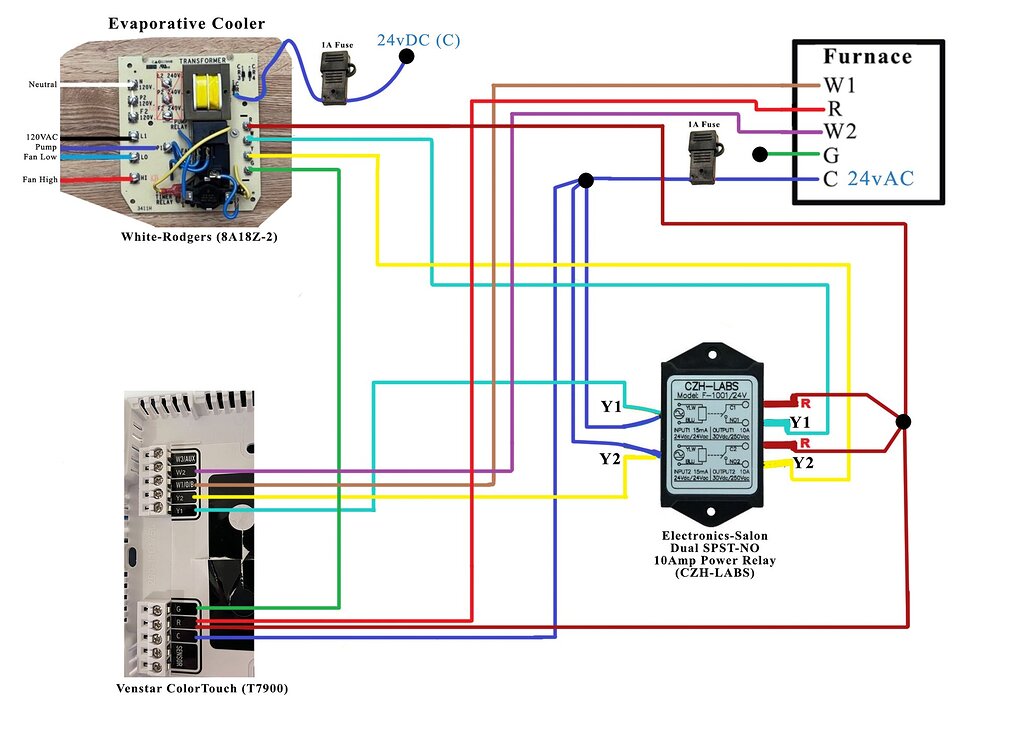
Hey guys. I run an evaporative cooler, and a heater. I want to connect them both. I was looking at this guide. https://community.home-assistant.io/t/tutorial-configuring-an-evaporative-cooler-i-e-swamp-cooler-with-the-modern-venstar-colortouch-thermostat-which-features-a-local-api-that-can-then-be-easily-integrated-into-home-assistant/413514
I don't understand the diagram here. Could someone explain why a relay is needed? Not an electrician. https://community-assets.home-assistant.io/optimized/4X/6/5/3/6534e8748ef7a932c0f30b280e6e5e6a3791c44a_2_1035x739.jpeg
 void hollow
cold moon
do you have a way to test the actual cri?
void hollow
cold moon
do you have a way to test the actual cri?
I've found CRI to be pretty hit and miss
I used to work in film and television
And worked with lights worth $10k + each,
So I've got a pretty colour critical eye
But I've found Philips LEDs to be very good even though their CRI is only >=80
And a lot of CRI 85 & 90 lights to be far worse
winged knoll
Let's face it, if CRI is self reported then some companies are absolutely going to fudge things
void hollow
Plus the lower the CRI the more varied two lights with identical CRI values can be
It's basically a tolerance measure.
Like how you end up with a box of off brand Lego and only 1/4 pieces fit with 1/4 of the other pieces
 vestal dove
Does anyone have recommendations for a (preferably Zigbee) dimmer switch that is only a battery powered switch to send a signal and doesn't contain the dimmer circuit itself? I can't find any...
winged knoll
I've also got one of https://www.zigbee2mqtt.io/devices/WXKG06LM.html, but it's not as reliable
vestal dove
indigo garden
Hey guys. I run an evaporative cooler, and a heater. I want to connect them both...
While I can't say anything for certain as I have no experience with those devices I would guess the current drawn is bigger than the output can handle/ the needed voltage is different or the signals need isolation because of the internal circuitry
vestal dove
winged knoll
<https://www.zigbee2mqtt.io/devices/WXKG16LM.html>
So you use a normal switch with a long press for dimming? I thought maybe a switch with a dedicated dial or something exists
winged knoll
Well, it's just a remote... you can do whatever you want in HA
I use https://www.zigbee2mqtt.io/devices/TERNCY-SD01.html for when I want a dial
https://www.zigbee2mqtt.io/supported-devices/#e=battery&s=dimmer has a few options for you
vestal dove
winged knoll
<https://www.zigbee2mqtt.io/supported-devices/#e=battery&s=dimmer> has a few opt...
That looks really good actually, thank you very much
winged knoll
as always, avoid anything in there that's Tuya
I think that list happens to be Tuya free though
vestal dove
winged knoll
as always, avoid anything in there that's Tuya
Can't I "just" reflash the esp inside?
winged knoll
With their WiFi junk... maybe, if it's old enough, but not for Zigbee
outer knotBOT
@vestal dove When using Discord's Reply feature it defaults to pinging the person you reply to, which can get frustrating for the target. Use Shift + click on the Reply option, or click @ ON to @ OFF to stop this - on the right side of the compose bar.
You have to change this every time (thank the Discord devs for that).
winged knoll
Little to none of the new Tuya WiFi stuff can be reflashed any more
vestal dove
Good point with the zigbee
vestal dove
zealous dune
https://docs.libretuya.ml/
So now newer stuff works as well? Cool
winged knoll
Well....
vestal dove
XD
zealous dune
some of it, it's not universal since it depends on which module is inside
 heady stag
Can I transfer the HASS card from a Pi3 directly to a Pi4 and expect it to work?
I've given it a go and it doesn't show up on the network under any name so I'm wondering if it's something wrong or if it's just a matter of that's not something that can be done.
winged knoll
More for #installation-archived - but no
cold moon
Any cyber Monday deals you guys are gonna jump on?
tacit warren
I've ordered a ZigBee PoE Coordinator which i can connect to the router, and it got me thinking... The Aeotec Z-stick i have in my server, is it possible to insert to router/other device, and have homeassistant from a different box - access it in the same way that it will be able to acess the ZB PoE coordinator?
winged knoll
You wanted #zwave-archived for that question, but yes you can run the Z-Wave JS server on a remote computer
tacit warren
Appologies! I was thinking mostly about the concept of accessing the radio over LAN, like with the PoE Coordinator i just plug in the router. So my curiousity is not about running z-wave js remotely on a PI or something else, but if the USB device can be made accesible over LAN in any easy way. But things are never easy.
I just found out about ESP32 and other words too big for me, so i think i can find my answer
winged knoll
There is no commercial network Z-Wave "hub" like that
cold moon
winged knoll
That's... not much help here
cold moon
i dont think zwave js supports that yet tho
winged knoll
That's basically a PC, with a Z-Wave stick
Heck, I'd not be surprised to find out it's a Pi/Pi-clone
tacit warren
I see! From what i see i guess that the PoE controller i mentioned is built in with some sort of 'serial port over tcp' magic. That concludes my journey, if i decide so - i might go with a Pi next to my router:)
Thanks for the help
tacit warren
cold moon
you can use ser2net to make a "remote" zwave stick basically
Thanks for the links
jagged crypt
vestal dove
Does anyone have recommendations for a (preferably Zigbee) dimmer switch that is...
 stark sun
is the amazon fire tablet line good for home assistant dashboards?
stark sun
anything as cheap?
cold moon
 lunar delta
they're ok if you can root them
lunar delta
they're ok if you can root them
Root isn’t necessary just fire toolbox 🧰
Then fully kiosk browser app to add functionality and hass integration
stark sun
cool, I ended up just buying 2 fire 10s
hopefully they are good enough and I didn't need to get the fire 10 plus
cold moon
I think the plus just includes wireless charging
And a bit more ram that you don’t need
indigo garden
Question: If a device has support for Z-Wave, and I have a Z-Wave dongle setup with my HA, is the device inherently supported? Is it a common protocol?
I ask because a lot of these z-wave devices I'm looking at have their own software/app, and I'm wondering if that app is required or if I can skip it and hit the device straight to HA.
E.G. https://www.amazon.com/Repeater-Existing-Regular-Required-SmartThings/dp/B07T4G24TL
gloomy spoke
ZWave is a standard and any ZWave device should be compatible. The only consideration is that different countries/regions use different frequencies and you need to buy devices/dongles that support your region
indigo garden
Sounds good. Does the same go for Zigbee if I have a dongle for that?
I'm looking at putting together a network that will involve both
gloomy spoke
Zigbee is the opposite - same frequency worldwide, but devices don't all play well together
indigo garden
Ah. Well, hopefully my case works. I'm getting a presence detector (Aqara FP1) which people say works with HA, and a zigbee dongle recommended on HA's site.
gloomy spoke
#zigbee-archived can help more
indigo garden
Thank you for your help!
 sage helm
CO optional…
 hard bison
Anyone using Shelly Vintage ST64 smart light bulbs? Do they also have a buzzing sound - I already bought some Xiaomi light bulbs but they have a constant buzzing when not on 100% brightness... I wonder if this is the same for all bulbs?
zealous dune
no, depends on the bulb's hardware and your hearing sensitivity
 supple lily
Hey, I’m in Australia so 240v and I want to use clamp on hardware because it’s a rental to give me energy usage for my house. Any links for hardware that might be useful for me?
 lilac nova

 unreal shuttle
Wondering if anyone has experience with a Lidl Zigbee lamp, it seems to use module TS0504B but I can't set any color temperature, the RGB works, but quite dim, when I set the "normal" white color it can go very bright. Relatively new to all this so maybe there's something I need to fix?
Maybe relevant, I'm using the sonoff ZBDongle-E
winged knoll
More for #zigbee-archived really, at least if you tell people over there whether you're using ZHA or Z2M
unreal shuttle
Sorry, thanks!
civic kraken
That's probably why they thought it was a good idea to go with a known brand Honeywell first
 limber ridge
anyone have the kasa wifi bulbs? wondering how they work compared to the kauf
 burnt chasm
Is there any way to test the bluetooth integration ?
or rather : do I need specific extra things for it to work without digging too deep into the technical wizardry of HA ?
I'm running HA in a vm using proxmox. The hardware itself is an intel NUC.
While looking at the vm-configuration I noticed an unspecified usb device, which appeared to be the bluetooth chip (the other two are zwave and zigbee sticks in usb-ports on the nuc itself).
If I open the console in proxmox I can execute the 'bluetoothctl' command and I get a never ending list of Id's which appear to be bluetooth devices in range.
By setting a bluetooth speaker to 'scan' mode I saw what looked like a new device Id with the name of the device scroll by, which to me kind of showed that the bluetooth transmitter is indeed working.
Unfortunately this is where my experiment kind of ended, because I don't know if and how I can use the bluetooth feature at all for anything practical.
I was trying to follow this, but I am not able to make sense of what it is asking me to do (and it's over a year old so likely out of date for various reasons) :
https://marklewis.blog/2021/02/25/home-assistant-bluetooth-speaker/
It is where I discovered the bluetoothctl command, but as I've said ... that's about it.
 shut vine
Anyone experience with the TV02 Tuya radiotar? Are they working okay with zigbee2mqtt?
winged knoll
You'd be better asking the people in #zigbee-archived
 hardy valley
Does anyone have a 3 gang switch and how do they display it on a Dashboard. I can see all 3 toggles in devices.
 mossy sleet
any luck with this? I am interested as well
 cedar bay
mossy sleet
any luck with this? I am interested as well
cedar bay
mossy sleet
any luck with this? I am interested as well
That's been a minute, lol. But never did get very far with it. I experimented with a github project called EnigmaIOT that does the ESP NOW to MQTT gateway. IIRC it had a huge codebase and the latest releases didn't include binaries and I had trouble getting it to compile. I only got so far with the now-2-year-old release's binaries. If you find something that works and easier to get going let me know! https://github.com/gmag11/EnigmaIOT/blob/master/docs/howto.md
mossy sleet
cedar bay
That's been a minute, lol. But never did get very far with it. I experimented wi...
Thanks. Will do.
cedar bay
mossy sleet
Thanks. Will do.
FYI, I was mainly interested in saving as much power as possible for battery-based projects and utilizing deep sleep timers and hardware-activated wakes to trigger MQTT messages.
 astral plaza
Hello everyone! Does anyone know how to get woox smart siren to work with HA alarm?
zealous dune
Integrate it into ha, create an automation to trigger the siren
 glad silo
Any brands you guys recommend(possibly that support hackable firmware) for smart bulbs, that I can lookout for to wait until they have matter bulbs(or buy one in the rare case they have a matter smart bulb)
burnt chasm
glad silo
Any brands you guys recommend(possibly that support hackable firmware) for smart...
Philips/Signify says on their site that they will be adding Matter-support to the hub they use to control their Hue-series smart lights, which to me suggests that they won't be adding Matter to the lights themselves.
I wouldn't be surprised if other brands are going to use a similar route to integrate matter into their systems (ie : 'force' you to use their hub for matter support).
glad silo
burnt chasm
Philips/Signify says on their site that they will be adding Matter-support to th...
I doubt it, wiz for example is getting updates for it to work matter as the bulbs have the wifi chipsets in them
But ye im mainly just looking at recommendations, not just signify products. If other manufacturers have better products or even ones which allow flashing custom firmware I would wanna have a look and maybe buy them.
I only really know of signify products so to know of other products is good and they might have advantages in terms of pricing, features, lifespan etc
jagged crypt
if you are running HA, what does "matter" get you? Other than potentially more available hardware to interface with?
glad silo
Mainly it would be nice to be on the open standard and I’ve heard it has improvements, not to mention I’m also looking towards some dev(also it’s supposed to be compatible with multiple devices which would mean I wouldn’t have to buy a zigbee or zwave dongle)
So it’s also future proofing in that way
jagged crypt
you haven't actually told me what you get out of that?
you need to buy a dongle, and right now the "matter" dongle is a zigbee dongle
you can order the HA dongle and get zigbee now, with promised matter later if you are concerned in the short term.
jagged crypt
glad silo
I have my reasons, however, my reasons shouldn’t really matter trust me as I say this I already have my mind up and I’m just looking for some recommendations for matter or even lightbulbs brands that’s all. I’m not interested into buying into zigbee etc, this could be compared to me asking if they have any recommendations for libraries for a language and you asking me to justify why im using that language(like any recommendations for a http library in Zig?like yeah it’s interopable with c, that’s cool, maybe I also like syntax, like yeah you could use C but maybe Zig would be a useful tool )
jagged crypt
see above, that's all I have for now, perhaps others will have other recommendations
Is there anything that is actually certified for "matter" yet?
glad silo
jagged crypt
Is there anything that is actually certified for "matter" yet?
Yea a few
You should be able to see it right there
But ye I’m excited to see some implementations of matter and actually see them being used in the wild
The thread system seems quite interesting, similar to zigbee and I’d really have to take another good look at the standard specification
Also it’s all based on ipv6 afair so it will mean more devices
 jagged crypt
btw - https://xyproblem.info/
glad silo
Thank you “panzer”, I also really recommend you to read it
jagged crypt
how about we both agree to stop being sarcastic?
burnt chasm
glad silo
I doubt it, wiz for example is getting updates for it to work matter as the bulb...
I hope we get true matter support, because it is supposed to be a more open standard. However the industry does want to lock us into their ecosystem .
I haven't found any competitor to Hue that had the same kind of range in bulbs. Most will do the big E34 (?)threads and there are light strips, but the tiny e14 bulbs I haven't seen yet.
I would love to have alternatives to Hue too, but I wouldn't want them to have WiFi at all.
Innr is compatible with Hue.
I wonder if they will do matter on their own. I've got a few sockets from them because they were a better form factor and not as expensive as the Hue equivalent.
I really hope matter does take off
 vivid sky
I'm relatively new to the home automation scene and I've used multiple types of bulbs, wifi, hue and bluetooth. After testing a couple of switches I don't know why anyone would use bulbs unless you want color.
I guess if you wanted something fancy looking for light switch but then you could just use relays I guess.
astral plaza
zealous dune
Integrate it into ha, create an automation to trigger the siren
Yeah, obviously. Thanks for nothing:)
zealous dune
you're welcome
winged knoll
Wireless connection: Zigbee 3.0
A better channel to be asking in would be #zigbee-archived
burnt chasm
vivid sky
I'm relatively new to the home automation scene and I've used multiple types of ...
I like the dimming of the lights.i don't know if those switches can do that.
Another benefit is that you don't need a certified electrician to make your home smarter
vivid sky
You do have to get dimmable lights for switches that can dim LEDS. I guess the certified electrician is a point I do forget about being I don't need one.
 waxen monolith
hi averyone
everyone
i want to install hassOS on my old PC, running MX Linux. following this instruction https://i12bretro.github.io/tutorials/0670.html
but the OS Agent 1.4.1 makes an error
winged knoll
That's not HAOS, that's Supervised, which ... is a trap
Also, you said MX Linux... that's not Debian Bullseye, and only Debian Bullseye is supported
burnt chasm
vivid sky
You do have to get dimmable lights for switches that can dim LEDS. I guess the c...
Also not everyone is comfortable doing these kinds of things even if there is no law against such DIY modifications to your home.
vivid sky
burnt chasm
Also not everyone is comfortable doing these kinds of things even if there is no...
That's understandable for sure.
 shy sparrow
A question on the skyconnect, if I may.
There seems to be a lot of effort going into making it multiplex zigbee with thread to allow it to be a multi-purpose device - which for a new user I get, it seems like a great idea.
However existing users are already likely to be using a zigbee stick that we're assumably happy with (i am). Will there be a version of the skyconnect firmware for these people that is only thread and doesn't carry any overhead for zigbee? or will the device be able to be otherwise configured to use thread only?
Thanks
 obtuse tree
Installed a ZigBee 3 rgb bulb white is really bright at 100% but when with a color is very dim, any ideas
glossy prism
That's generally the case with any light tbh
obtuse tree
So expected behavior, ok
zealous dune
and different colors reach different brightness levels
obtuse tree
Smart wise ZigBee 3 rgbw
zealous dune
and you got a cheap one 😄
gloomy elbow
And if it's just RGB not RGBW then it would just be turning all the lights on (I think, from memory)
obtuse tree
Just testing stuff before rolling out big build
I ain't got the cash to roll out hue everywhere in 1 go
I think it was rgbw
winged knoll
There's other brands that are still good, but if you buy RGB-CCT or RGBW you make tradeoffs
gloomy elbow
Cheap vs frugal, roll out slowly with higher quality
winged knoll
Innr bulbs get good feedback, and the Tradfri CCT bulbs are good
obtuse tree
Yeah lights are really the last on the smartening of the house
zealous dune
you'll roll out when this one dies within a year anyway 😄
gloomy elbow
Innr work/partner with Hue so that's not a surprise to me
I like my Tradfri CCT bulbs.
obtuse tree
Hue is great but in Greece soooooooo expensive
zealous dune
it's not just Greece, its expensive everywhere
obtuse tree
Well I was able to get temp door sensors and a crap load of other stuff instead of 1hue rgb
Lol
Hue will be rolled out but slowly,as I like the dimmer switch as well
winged knoll
You probably want the #ios_and_mac-archived app
glossy raft
winged knoll
You probably want the <#551871772484698112> app
Thanks, ill delete and repost my message
 cobalt nebula
Anyone knows the best place to buy esp8266 or esp32 for cheap while still being delivered fast?
civic kraken
Where are you located?
jagged crypt
jan, amazon worked for me in the USA
burnt chasm
obtuse tree
Hue is great but in Greece soooooooo expensive
true ... but I've yet to replace a single bulb.
I started with just the basic starter set (the hub and a couple of lights).
Also : the 'warm white' versions tend to be cheaper, although the full colour ones, because realisticly only few people need blue or red coloured lights in their entire house.
(I also have yet to replace any of the basic led lights in my house, but I did it as I wanted the convenience that the smart lights offer)
obtuse tree
@burnt chasm Yeah I will eventually move everything to hue, as it does appear to be the best, but will be done over time, I am working on the core system HA and everything else, door, windows sensors, cameras, etc
having a cheap bulb is a nice holding place
 pseudo flicker
Question after looking for half a day. Does anyone have any experience with motorized ball valves for automated water control?
cobalt nebula
civic kraken
Where are you located?
germany
civic kraken
When we ordered a raspberry we got one from berrybase and they have ESP32's for a decent price too. There are probably a lot of other German diy focused stores around too
China is still cheaper but not by much
 ruby harbor
Are there any cheap boards I can add a camera to like the ESP32 but it does not have wifi/blue tooth?
I am trying to find some way to to make a cheap PoE camera with no wifi/blue tooth with greater then 2 MP resolution.
 surreal burrow
can anyone recommend a camera such that i can check on my cats while im away? are there any that can be remotely moved etc?
burnt chasm
surreal burrow
can anyone recommend a camera such that i can check on my cats while im away? ar...
I'm assuming you're want to control it with HA ?
'cause I've seen pan+tilt enabled cameras, but from what I understand they all require the app to do the magic.
Foscam has a few, but I don't know what the support is like in HA.
A remote camera is on my wishlist for my HA automations as well, but I haven't found one that would suit me yet (almost everyone needs some sort of mobile app to work ... )
ruby harbor
surreal burrow
can anyone recommend a camera such that i can check on my cats while im away? ar...
I found this website but I don't know if this is the best option or if it will work for you. https://www.arducam.com/product-category/cameras-for-raspberrypi/raspberry-pi-camera-pant-tilt-zoom-ptz-camera/
I kind of wonder wonder if a tiny wifi control drone can be more of what you want. OpenVPN into your house network. Then access some device on the network to control the drone. Fly it around seeing its video feed.
It would probably be easier to use multiple cameras
surreal burrow
hmmm the situation here is a bit weird, basically my parents really want me to have a tilt/pan camera while im gone for 6 days (and friends come in to check on my cats)
but after that my parents get the cats back, and i guess i'd give them this camera as well because i dont have much need for one
they'd probably use it in their doorway or something
and they do have a synology server for our family business, i can easily use that afterwards to make use of it for them
so i suppose the camera doesn't strictly need to be HA compatible, but i do want it to be "privacy friendly" in the sense that i don't want images of our homes getting sent to some data center. i have a unifi dream machine router so i am comfortable setting up a VPN
burnt chasm
that's been my main reason to be extra careful when looking for 'security' cameras.
the cheap ones feel like they may have security/privacy issues and an app isn't adding to my confidence in that matter either.
of course a DIY approach could work, but then it would lack the bit of polish that commercial products do have.
ruby harbor
burnt chasm
that's been my main reason to be extra careful when looking for 'security' camer...
I am trying to figure out how to do the the DIY approach. Then make that entire system wired only and never connect it to internet.
2 MP seems not good enough quality for a security camera.
I was thinking 12 MP but the cameras I have seen are $85 each.
winged knoll
Higher MP gives you better image quality... during good lighting conditions. You get worse image quality in low light.
ruby harbor
winged knoll
Higher MP gives you better image quality... during good lighting conditions. You...
So if I want to see in the dark, I want low MP? An IR 2 MP camera will do better then an IR 5 MP camera?
winged knoll
Well, IR changes the game
If you're lighting it then you get higher quality images with good light, whether IR for IR capable cameras, or "normal" light
Honestly though, I doubt you'll care much as you go past 4 MP
civic kraken
low light performance comes down to the sensor size rather than MP most often
winged knoll
That too, it's a factor of the size of the photocell
Honestly though, I doubt that 12 MP is likely to be a useful "upgrade" over 4 or 5 MP
ruby harbor
How far would IR lighting on the cheap 5MP IR cameras even be able to reach into a yard?
civic kraken
5m maybe. That's what I would say about our Reolinks
15 feet if you like freedom units instead
winged knoll
A separate IR illuminator would make a big difference
ruby harbor
I am guessing something like this would have good illumination and image quality? https://www.uctronics.com/arducam-for-raspberry-pi-noir-5mp-ov5647-camera-module-motorized-ir-cut-filter-for-daylight-and-night-vision-2239.html
What frame rate does ESP32 allow cameras to operate?
 royal rock
Hi guys. I got this issue with home assistant regarding restart, i am using sensor who is reading my hot water meter and sends data to hassio. but every time i restart, i get wrong reading value from the meter but after that the readings are with no error until next restart. hope you catch my drift
surreal burrow
https://www.memoryexpress.com/Products/MX00115354
could this one work for:
1- checking on pets via VPN (a few weeks)
2- front and back door security via internal network (users have a synology router)(remainder of lifespan)
"d-link DCS-8526LH"
winged knoll
ONVIF Profile S, RTSP
So, probably yes
surreal burrow
What do those mean?
winged knoll
Those are good signs for local (non cloud) camera streaming
Google can explain far more
burnt chasm
surreal burrow
What do those mean?
from what I understand "RTSP" is a protocol for streaming video.
It will be a bare bones stream (so little or no camera control), but it does mean you don't have to depend on some sort of cloud service for it to work ... once you get it configured that is.
Usually you do have to enable the feature in the app.
😦 ... just checked the manual from that website. And it is as I kind of suspected.
You do need the app and an account to use the app.
It doesn't even tell you how to get to the stream without the app ... 🙄 (the best is : "You can also use an ONVIF compliant device to control your camera’s settings without using the mydlink™ app." yet no info on how you can enable this ... )
So either the website isn't telling us everything (always a possibility as it is a localised website) or (as likely) they really really want you to buy into their cloud-subscription.
It's very likely that all the smart features are linked to their cloud-service.
Also (and IMHO as important) the device is dated (released in 2020 ), no firmware updates of any kind to be seen.
chances are the device will be out of support 'real soon' (yes ... I am cynical and a bit paranoid, but given the subject I'd argue it is warranted)
I wish companies were more open about such things instead of trying to upsell subscriptions to services they can't even guarantee to be available in 5 years (never mind 10 or more ... )
Also : Profile M is the profile you'd want if you want access to security features (like object recognition ...) and it is a 2022 spec.
Profile S is just video-streaming, but a lot of features are listed 'C' (Conditional) instead of 'M' (mandatory) ...
None of the standards appear to include firmware updates ...
Reminder :
https://imgs.xkcd.com/comics/standards.png
 surreal burrow
Ty for digging all of that info up 🙏🙏
Sucks that all these stupid companies need to do this crap, I'm paying for the camera aren't i
 rugged cosmos
Hi, is there a esp32 board with Bluetooth classic capability? To be able to use Bluetooth proxy not only for BLE.
Or there is a way to extend the Bluetooth range? (Not BLE)
spiral charm
Any good suggestions for cheap outdoor z-wave outlets?
surreal burrow
surreal burrow
can anyone recommend a camera such that i can check on my cats while im away? ar...
starting to think the tp-link tapo c200 might be my answer
burnt chasm
surreal burrow
Sucks that all these stupid companies need to do this crap, I'm paying for the c...
the real price is your privacy and the data you generate while using their product andat the very least they want your email so they can sell it to spammers.
Anyways ... that c200 does sound tempting, doesn't it ?
Notice how they refer to hardware versions of their products ... and how few if any webshops will give you that info 🙄
The C210 appears to be the newer version :
https://www.tp-link.com/en/home-networking/cloud-camera/tapo-c210/
No matter support for their cameras yet though :
https://www.tp-link.com/en/technology/matter/
surreal burrow
oh dang, i think i didnt see that c210 because im in canada lol
 fallen jay
Hi, can you recommend a cheap smart watch which is integratable into Home Assistant? I want to track my heart beat and sleep. And I want an automation like: Start vacuum at 8 o'clock only if I'm not sleeping.
Thank you very much.
 gentle fossil
I can only speak for the apple watch, while there is no way to connect it to HA directly you can transmit Health data to HA and also receive notifications/actions and infos for complications on it
gentle fossil
burnt chasm
No matter support for their cameras yet though :
https://www.tp-link.com/en/tech...
matter supports camera streams? new to me
hollow lance
gentle fossil
I can only speak for the apple watch, while there is no way to connect it to HA ...
You can? How?
The health data, I mean
gentle fossil
 pallid shell
Hey guys, is it worth upgrading to an old Intel NUC-NUC6i5SYH with a i5-6260U 8 GB ram. At the moment i'm using a Raspberry Pi 4 Model B 8gb variant with an SSD.
pallid shell
Yes, it's only for HA. The CPU performance with the i5-6260U google says that its a lot faster. But my question is do i really need it. The Intel NUC is second hand and it's a ok price.
zealous dune
if you don't have it and you already got a working one you don't need it
pallid shell
Ok , thanks
 frigid light
Does anyone use the Sonoff s-mate with home assistent? And if so, do you have full functionality?
I am currently on smartthings (with ewelink, yeelight and google home integration). My s-mate does not show up in google home or smartthings and i am not able to make the automation I want with the s-mate in ewelink, because frankly ewelink is a automation pile of garbage.
So I am curious if switching to HA would solve my issues.
 zenith coyote
Anyone had luck finding Raspberry Pi 4's ? Seems like the market is completely bare with no ETA on restock.
zealous dune
frigid light
Does anyone use the Sonoff s-mate with home assistent? And if so, do you have fu...
No there is no full functionality for it in HA
frigid light
zealous dune
No there is no full functionality for it in HA
Is there any function at all? Trough the cloud?
Because now it doesn't even show up in smartthings.
jagged crypt
pallid shell
Hey guys, is it worth upgrading to an old Intel NUC-NUC6i5SYH with a i5-6260U 8 ...
With the resale on the PI4, you could potentially sell the pi4 get the nuc and make a profit 🙂 Power usage may be 5watts more on the nuc.
burnt chasm
gentle fossil
matter supports camera streams? new to me
my mistake ... I thought it was an open standard for all devices in a smart home.
Saves me looking for things that won't exist 🤦♂️
 keen flame
Three hours into it and no luck: How can I get HomeAssistant OS (running on an Odroid N2+ if that matters) to mount a USB drive for media?
I found a udev rule but I can't get it to read/install udev rules from the USB: https://gist.github.com/eklex/c5fac345de5be9d9bc420510617c86b5
I'm trying to get root access to whatever might be above HassOS but that isn't working either: https://cln.io/blog/ssh-access-to-the-home-assistant-host/
HAOS automatically detects USB, and I can confirm it sees my little thumb drive, but that doesn't allow me to do anything with it: https://www.home-assistant.io/integrations/usb/
keen flame
keen flame
I'm trying to get root access to whatever might be above HassOS but that isn't w...
Turns out that little addon created a file but left it blank! Manually putting my key in allowed me to access root. 🙂 In case anyone needs that in the future.
 full rampart
I am looking for an io homecontrol (that somfy wireless network thing) hub, ideally low power and fully local, to connect to an Atlantic heat pump. I am having difficulties finding where to buy some of them so that I can compare prices and not only the things instructions manuals share.
I've been searching for hubs based on reading about the integrations. Is there any kind of place I should be searching for hubs at instead of amazon?
 lavish heath
I bought 2 Lenovo Thinkcentre M73 with i7 CPU and 8GB of RAM, 109 euro on ebay germany
Proxmox running HA vm, Ubuntu VM with emoncms, Debian VM with knxd
and probably more to come 🙂
already recovered 2x RPi 3B
when HA is stable also a RPi 4 4GB
I was inspired by Andreas Spiess: https://youtu.be/rXc_zGRYhLo
full disclosure, there was a 512GB SSD in it, Zheino S3, some cheap Aliexpress SSD. Replaced it with a Crucial MX500 1TB to sleep better ;-). Maybe it's just fine, but I fear reliability of an unknown Chinese SSD
lavish heath
zenith coyote
Anyone had luck finding Raspberry Pi 4's ? Seems like the market is completely b...
Forgot to tag you :-). Read above please
jagged crypt
when HA is stable?
@lavish heath we've been talking about these - https://www.servethehome.com/introducing-project-tinyminimicro-home-lab-revolution/ - for a short bit here
lavish heath
jagged crypt
when HA is stable?
Haha, I mean when the VM is stable ;-). But running a few days now, looks good. Quicker than the RPi4. Only have to see if I can pass the zigbee stick through. Motherboard supports vt-d, so should be no issue. I even think for USB devices vt-d isn't needed.
jagged crypt
you don't need vt-d i don't think
i'm using a sonoff-e stick proxmox and ha with passthrough, took 30 seconds
jagged crypt
shouldn't matter, from my understanding of what's going on
i have m900 with i5-6500 unit, came with samsung ssd
nvme
lavish heath
i7-4765T CPU @ 2.00GHz with 2,5" Crucial MX500
I think these M73's are from 2015 or so
so pretty old but still way faster than a RPi4
esphome compile times 2-3 times faster
lavish heath
yes happy I stumbled on the video of Andreas Spiess. Also what to do with 3 RPi 3B's 😄
jagged crypt
mine has a 65watt psu, but hovers around 15 or less - https://owncloud.dhp.com/index.php/s/fgn1Zrx1w8gPczf
zealous dune
everyone is switching now although we've been preaching the same here forever. used pc/laptop > rpi toy
jagged crypt
no $35 pi's anymore either
lavish heath
3 VM's on it, consuming between 11 and 13W
jagged crypt
i have two vm's, the other is just doing DNS/DHCPD, full centos8 vm, but 99% idle
lavish heath
yes when you are installing new VM's etc, then goes to 25-40W
cold moon
lavish heath
yes happy I stumbled on the video of Andreas Spiess. Also what to do with 3 RPi ...
3 printers for 3 pi duh
jagged crypt
sell them for a profit, or hmoney will buy 3 more 3dprinters
cold moon
I live next to a microcenter I can still get pi’s lol
I only use them for 3d printers now tho. One is a backup pihole in case server dies
lavish heath
I have only one Ender 3 with already a Pi 3B, also having a few Zero2W's laying aroud. I was testing those for emonCMS hosts etc, but they run hot
this tiny pc is way better and since I have a patch rack in the garage, why would I bother it's not fanless
lavish heath
in the house, fanless is nice, Pi's can serve for Octoprint and co
knxd on debian 11.5 is consuming 0.2-0.25% of CPU 😄
I used to have a dedicated RPi 3B for that...
cold moon
https://github.com/petersem/posterr this is a good use for a pi too
lavish heath
I'm also researching power supplies/UPS at the moment
lavish heath
In this rack, so many AC to DC converters. Why not take one big high efficiency one and then multiple DC-DC buck converters to 20V, 12V, 9V and 5V
maybe use old powertool batteries, have 4x 20V 2Ah laying around, doing nothing since all are 4Ah and 8Ah now
cold moon
lavish heath
In this rack, so many AC to DC converters. Why not take one big high efficiency ...
Cuz then you have a bunch of not so low voltage wires hoping the $3 Chinese bucks don’t die lol
cold moon
lavish heath
maybe use old powertool batteries, have 4x 20V 2Ah laying around, doing nothing ...
Lots of people harvest 18650 batteries from stuff like that
lavish heath
haha no thanks, when they burn, they damage the connected equipment
I wanted to keep them powertool battery and see if I can take 20V from the charger pins directly through some XT60 connector or similar.
Then I keep protection circuits etc intact
cold moon
Yea
lavish heath
I could even use it for the newer/better batteries
since I have two double chargers = 4 batteries
cold moon
I’ve seen 3d printed holders for people doing that
lavish heath
https://www.mini-box.com/OpenUPS this one's nice, but one per voltage, expensive 🙂
cold moon
I’ve seen guys taking used server psus since they’re dirt cheap on eBay etc for like a bench psu
lavish heath
yes but I'm really looking into efficiency, 95% etc
but also read something funny about power factors. Apparantly a low power factor power supply is kinda free energy, since power companies charge real power W and not apparent power VA
my SMA solar inverter does this trick at night, 0.08 power factor
and of april this year till now, 7kWh import for 4400 kWh export
39VA but 0W at the moment
cos phi 0.08
so you actually want to build a superbad power supply 😄
for all your low power standby machines. Wifi AP's, routers, thin clients running24/7
Here is explained how/why SMA does it: https://files.sma.de/downloads/Q-at-Night-TI-en-12.pdf
severe flume
I am looking to use a st7789v display with a esp32 but it only works at 135x240 if i do 240x240 it crashes saying "E][display:022]: Could not allocate buffer for display!"
On esphome it says supported
Unless i need a specific esp32 with more memory? And if so does anyone know which
Thanks
 high oar
any advice on what the cheapest wifi or zigbee energy monitoring plugs would be?
jagged crypt
in the US? how many? I bought these - https://www.amazon.com/Sengled-Compatible-Required-Appliances-Certified/dp/B092DBFFB - with a coupon for $45, and a 2 pack for $26. Zigbee, works with no hassle in ZHA. I also picked up some pre flashed with tasmota (wifi) sonoff S31's on ebay for $19/each. I have a friend in the UK who uses these guys - https://www.athom.tech/blank-1/us-v2-plug-for-esphome for esphome/tasmota plugs. They have EU/UK/US plugs, all pretty inexepensive.
obviously my friend in the UK, uses the UK plug, not the US plug 🙂
 iron arch
Hey I used the Nuki Opener for some time now but it started to fail so i thought ok maybe a reconfiguration works well so i started the reconfig. BUT they seem to stoped the Support of my Intercom (TCS ISW3030) so i thought well just give them a call and let them push the old config back on my device. But the support says they are unable to do so... so now my Question is dose someone of you guys have the same Intercom as i do and knows a different solution to make the intercom smart (next to ring because i dont like amazon knowing when im in my apartment or not).
full rampart
Hmn... I think I may need a better AP than a pi 3b for my ESPs...
 drifting grove
Newbie asking questions here. I got my hands on a used Raspberry Pi 3 (new ones aren't available atm) with a 16GB memory card. Do you think that's enough to setup my first server? Or should I just go and buy a 32GB card? What exactly is the disk space needed? I'm planning to control my heat pump, Verisure and a Danfoss floor heating thermostat initially.
full rampart
drifting grove
Newbie asking questions here. I got my hands on a used Raspberry Pi 3 (new ones ...
It's way more than enough unless you want to keep states forever like me in which case it's at least enough for a month or few.
However, if you want an SD card to last, beware that some brands last less until first corruption. And generally a proper SSD will last even longer than a good SD card.
 mighty rover
is zigbee or zwave better if i need window sensors and remote switches? Reed from Smart Home Solver told me one of the two was getting antiquated but I cant remember which
i have a friend coming from the states to me in mexico and i want to find a good hub for home assistant
drifting grove
full rampart
However, if you want an SD card to last, beware that some brands last less until...
Thanks! I'm just getting started so this is good for learning. I'll upgrade my hardware once I'm able find a new Raspberry Pi 4.
full rampart
drifting grove
Thanks! I'm just getting started so this is good for learning. I'll upgrade my h...
Home assistant doesn't use a lot of RAM for what it does, but some integrations may. I got my 3B running home assistant and traefik, sometimes even esphome. The speed of the card and the computer you run home assistant on are particularly noticeable when loading statistics in my experience.
distant dove
Does anyone know if these LED strips can run WLED or are worth getting? They would be under $20 with the current coupon. https://tinyurl.com/Govee-LED-Strips
civic kraken
I wouldn't bother with 30leds/meter (3.2 feet?) and I'd seriously consider RGBW (with a white LED) strips instead of just RGB. You can also buy the controller and the strip separately
distant dove
civic kraken
I wouldn't bother with 30leds/meter (3.2 feet?) and I'd seriously consider RGBW ...
Thank you for the input! I am trying to find something for some cabinets. Dig-UNOs are sold out atm, so I was looking for a local turnkey option.
gloomy elbow
I'm looking to add some fun cabinet lighting, ideally USB powered (in an IKEA Kallax, should that help anyone make recommendations). I was originally thinking small round puck lights in each cube, but the ones I had in mind (IKEA Ledberg, I was going to take it apart and try and wire it to ESPHome) are no longer sold. I plan to place these centre-front of the cubes as I have lights behind each cube already.
Would you look for a LED strip with a decent #zigbee-archived controller, pick up some puck lights and try to wire them into a decent controller, or something else? I'd prefer Zigbee or ESPHome, and I'm in the UK.
These are what I'm eyeing up right now: https://www.amazon.co.uk/gp/product/B09HY98GF3/
winged knoll
I have one of https://www.zigbee2mqtt.io/devices/YSR-MINI-01_rgbcct.html that I'm still to get around to setting up
 runic tinsel
mighty rover
is zigbee or zwave better if i need window sensors and remote switches? Reed fro...
runic tinsel
mighty rover
is zigbee or zwave better if i need window sensors and remote switches? Reed fro...
The Zwave support in HA is now excellent. Those devices tend to be a bit more premium, are more or less guaranteed to work with each other and the firmwares present configurations in a very easy to read manner. Zigbee devices can be much cheaper, although once you try to find something high quality that works it often costs75% of zwave. They are not guaranteed to be compatible, so you have to be careful what you buy. I have both. I’ve ended up with Zigbee for lights, sensors and buttons/switches and Zwave for smart plugs and things that get wired behind the light switches like dimmers etc
winged knoll
gloomy elbow
I'm looking to add some fun cabinet lighting, ideally USB powered (in an IKEA Ka...
I'd also suggest looking at WLED
runic tinsel
I would say that in Europe the Zwave selection is not so wide as in the US.
gloomy elbow
winged knoll
I'd also suggest looking at WLED
Oooh, good idea!
I forgot about that 😂
winged knoll
https://www.aliexpress.com/item/1005003776848515.html if you want something "pretty"
gloomy elbow
I'll be shoving the controller into the nerd's nest known as "that space I made to shove devices and cables into", so I don't mind not pretty 😄
(Well, I want the lights to be pretty.)
civic kraken
With closed cabinets I just use some dumb battery power PIR led bar thingies. Open the door and they just light up and that's all I need
gloomy elbow
These are permanently open and behind me on all my videos (which there are a lot of). So sadly that won't work. I wish!
 tawny moss
I'm looking to replace my WiFi meross powerstrips by some zwave or zigbee ones (haven't decided yet which one between the two I'll choose)
Do you have any brand recommendations? Power measurement would be nice, 4 plugs and I live in Europe
 jaunty panther
(I'm only using this chat since I am new and this is an active channel rn... Sry in advance) Where would I see people talking about the new update?
civic kraken
gloomy elbow
These are permanently open and behind me on all my videos (which there are a lot...
Yeah I figured. Need that cool RGB too
winged knoll
jaunty panther
(I'm only using this chat since I am new and this is an active channel rn... Sry...
You'll see it all in the #beta channel
civic kraken
jaunty panther
(I'm only using this chat since I am new and this is an active channel rn... Sry...
People only talk about updates when they go wrong 😛
gloomy elbow
jaunty panther
(I'm only using this chat since I am new and this is an active channel rn... Sry...
If you mean the #beta, try that channel. Otherwise #general-archived 🙂
jaunty panther
So is 11.5 a good one?
winged knoll
The latest stable would be a topic for #general-archived
jaunty panther
Ok
winged knoll
It's got nothing to do with hardware 😉
jaunty panther
Thanks
jaunty panther
winged knoll
It's got nothing to do with hardware 😉
Lol... Sorry
winged knoll
gloomy elbow
These are permanently open and behind me on all my videos (which there are a lot...
You got me down a rabbit hole, and I found https://www.aliexpress.com/item/1005004770570289.html
 trim needle
can anyone recommend an intercom system?
i'm trying to stay away from the typical so that it's not succeptible to eavesdropping
just trying to come up with a solution for home because i've got sickly family
this way i can put a speaker in each room and if they need something just say it over the system and wherever i'm at i can know what they need
gloomy elbow
winged knoll
You got me down a rabbit hole, and I found <https://www.aliexpress.com/item/1005...
Thank you for doing my shopping for me! 😄
gloomy elbow
trim needle
this way i can put a speaker in each room and if they need something just say it...
Honestly I'd pick up HomePod Minis and use Siri's Intercom if you want something family friendly that just works
trim needle
gloomy elbow
Honestly I'd pick up HomePod Minis and use Siri's Intercom if you want something...
appreciate the response and understand your basis, i'm just really against having anything that reports back home or processes/pre-processes data and sends it over
same reason i'm waiting for HA to have better voice options lol
gloomy elbow
I think you may struggle to be honest. I'm sure some people have something set up, but your problem will be finding the speakers with a decent microphone array built in
trim needle
very fair opinion 🙂
i'm thinking maybe put BT speakers and mics in each room
i could identify the room based on which mic signals back to the server
if a few happen to overlap it'll still at least work
gloomy elbow
Did you try searching the forums to see if anyone has already done this? I suspect someone has and has mentioned what hardware they used 🙂
trim needle
i just thought about it today 🙂
 elfin robin
Anybody in here have a good suggestion for an Exterior lux/temp/motion sensor that is both rated for cold weather (into negative F), as well as Zigbee?
battery powered
tawny moss
😫 Looks like the only eu zigbee powerstrips that I could find with 4 plugs and power monitoring, only has 3 plugs manageable and one always on? Bruh...
burnt chasm
lavish heath
so you actually want to build a superbad power supply 😄
lol ... you can bet that ones enough people discover that 'trick' the companies will find a way to get their money ...
It's also not exactly good if you are too much out of phase.
Heck ... they might think you are cheating if your power consumption is too far below average.
tl;dr;
it's a cheat and it kind of works, but just hope it doesn't get too popular.
keen flame
Has anyone successfully mounted a USB drive into HA? I'm having a hell of a time getting it to read files correctly.
 cinder solstice
I have a question about new bluetooth proxies + devices + integration interplay between them - is this the right channel to discuss that topic?
essentially I got blackadder's gl-s10 BTProxy working in home assistant and now I want to go one step further to control lights that i know work via bluetooth
the lights in question are SHOPLED generic looking things: https://a.co/d/6JSZHb2
 long bramble
Does anyone have a low profile solution for mounting a sonoff mini to din rail. I would like to tidy up the upstairs lights and centralise the minis
full rampart
I just spent hours trying to figure out why my esphome devices weren't connecting to the "new" AP. They weren't seeing it because they aren't scanning channel 13.
Does anybody know if the hardware in esp8266 can connect to channel 13?
glossy prism
Is your 2.4GHz band set to 20MHz width?
full rampart
Perhaps I should check that too.
I don't seem to find channel width using nmcli and I wanted to be resting a fair three hours ago. I'll keep digging in the evening.
glossy prism
Check your wireless router and/or AP settings?
full rampart
It's a soft ap using a dongle because for some reason the integrated WiFi of the pi3b started throwing a tantrum.
glossy prism
Oh that definitely changes things then
The ESPHome devices aren't connected to your LAN?
indigo garden
Hey guys. I plugged a USB Speaker/mic combo into my RPI4, then rebooted the hardware.
The speaker shows as an output, but the mic doesn't show up as an input. Any ideas?
indigo garden
It's this one: https://www.amazon.com/gp/product/B09FJ7LWX4/ref=ewc_pr_img_4?smid=A294P4X9EWVXLJ&psc=1
This is what I'm seeing: https://imgur.com/a/hC9FE7r
jagged crypt
did you verify if it shows up on your pc?
indigo garden
jagged crypt
did you verify if it shows up on your pc?
Yes. This is a device speaker/mic combo that is known to work with Home Assistant, and both input and output show on a normal computer.
I'm unable to solve this as of yet
jagged crypt
does it show up from the cli with "arecord -l" ?
parsing the google results (hit and miss) - https://pimylifeup.com/raspberrypi-microphone/
indigo garden
jagged crypt
does it show up from the cli with "arecord -l" ?
How do I run this from within Home Assistant?
jagged crypt
you said on a rpi4, and showed a screen shot of tiny bit of a config, wasn't sure
you obviously can see the usb device if you have the speaker option, my guess is some simple config is needed to define the microphone.
indigo garden
I wouldn't have any idea what that would be
jagged crypt
https://www.youtube.com/watch?v=BLJR_v3IFwk has some config help with the same anker
did you reboot the pi after plugging in the usb ?
indigo garden
Yes, and that's the video I've been following. It just worked for him where it doesn't for me.
See 5:47
That's what I screenshotted
jagged crypt
reboot and try again
indigo garden
I've tried that a half dozen times now 😅
jagged crypt
i figured, but had to ask
indigo garden
Fair enough. I just have no clue what's going on.
 summer igloo
Does anybody else have issues turning fairy lights on and off using a smart switch? Or, even better has a solution for issues like this: / https://community.home-assistant.io/t/failing-to-control-31v-led-fairy-lights-using-a-zigbee-switch/496936
burnt chasm
summer igloo
Does anybody else have issues turning fairy lights on and off using a smart swit...
I've got a simple zwave switch and I'm using a basic automation to control a few of my hue lights.
The hard part was discovering what events to listen to.
I used the development - event tab for that.
The concept is this :
= trigger on event
= check status of light
= if on then turn it off
= if off then turn it on
Of course you could simply use the 'toggle light' function if if is just a single light
indigo garden
indigo garden
Hey guys. I plugged a USB Speaker/mic combo into my RPI4, then rebooted the hard...
If anyone has an answer here, it'd be greatly appreciated. I'm completely lost on where to go next to try and solve this.
 rough parrot
Hi there, hope someone can advise what is going on with my HAOS on Raspberry Pi. Works great for a few days, then the web interface just stops loading and both lights on the pi (red and green) stay constantly lit.
I'm not any type of coder or programer, it's like reading Klingon. I see it says out of memory tho.
Can someone guide me what I need to do to get it working again? A reboot always does the trick, but after a 2 weeks of reboots, I need another solution.
Thanks
jagged crypt
well the big words "OUT OF MEMORY" should be a clear indication of whats going on
you either need to remove things from your HA install (too many add-ons) or upgrade to a different host (pi, pc, etc)
you decided to add influx/grafana addons, which are killing your pi. Uninstall them, you should be fine.
rough parrot
Will try! Thank you
rough parrot
Done.
While I'm here, I tried searching this server to no avail, what does device descriptor read/64, error -71 mean?
Says USB,. But I do not have any usbs plugged in, just HDMI and power
jagged crypt
keyboard, mouse? no idea without more context
gloomy elbow
Did you already look at https://zigbee.blakadder.com/plugs.html ?
lavish heath
Looking into UPS'es for the modem/router etc, found this thing. https://nl.aliexpress.com/item/1005004805831973.html?spm=a2g0o.productlist.main.1.d9111220TwhXri&algo_pvid=9618daa8-65d5-444b-821d-ef50e172647e&algo_exp_id=9618daa8-65d5-444b-821d-ef50e172647e-0&pdp_ext_f={"sku_id"%3A"12000031234568107"}&pdp_npi=2%40dis!EUR!72.23!36.11!!!!!%40211beeec16701089597391047d0725!12000031234568107!sea&curPageLogUid=37VrUETHoLO6
Don't know if anyone here has one?
gloomy elbow
You can still check that website, just open the sidebar 😉
full rampart
glossy prism
The ESPHome devices aren't connected to your LAN?
I have a separate WLAN for the esp devices, isolated from my main LAN. Home assistant being what is connected to both. So far I use the pi 3B's WiFi as an access point for that one. But it's proven unreliable. I unplugged it before sleep and plugged it in a few hours ago. The integrated WiFi of the pi works again. I have a few spare access points, though I'm reticent to dedicating some of my ubiquiti hardware to the IoT WLAN. Mostly because of watts and watt hours.
jagged crypt
rough parrot
https://imgur.com/a/NvlcSdx
google says bad power
rough parrot
Interesting. It's the stock canakit plug. 5v / 2.5a
jagged crypt
full rampart
I have a separate WLAN for the esp devices, isolated from my main LAN. Home ass...
if you are insistent on using a different wireless network for IOT, read up on using VLAN's in Ubiquiti. You can define different networks and networks for the the IOT devices. This doesn't require any new gear to purchase, then a more complex configuration.
full rampart
Maybe I wasn't clear enough. All my ubiquiti gear is my spare gear. It's older nanostation stuff. 10/100 stuff when my main LAN is 1000 and my uplink 300. And it's not like I think I necessarily need to buy hardware for this, but I need to test the power usage of the access points I got around. VLANs sound like a good idea, though. For now I'll put the new AP configuration on backlog as I have more urgent matters to cater to.
 tough quiver
How do I find out which ports are being used on the host? I can't load Unifi anymore because it says that port 10001 is already in use.
 crude flax
Hello, I have since tonight the problem that my Home Assistant OS VM no longer starts. Also no access via SSH. I can only get to the Proxmox console via SSH.
Help, what can I do now?
winged knoll
Hello I have since tonight the problem
full rampart
tough quiver
How do I find out which ports are being used on the host? I can't load Unifi any...
You may want to read into netstat. Perhaps netstat -punat may help?
quartz anvil
I have a fresh HAOS installation on RPI4 and problems with Wifi hw. I have tried to wake it up with nmcli etc but not working.
 wise gorge
sensor:
- platform: serial
serial_port: /dev/ttyUSB0
name: smartmeter
Shouldn't this be enough to get the usb m.bus device pop-up under "hardware" ?
quartz anvil
quartz anvil
I have a fresh HAOS installation on RPI4 and problems with Wifi hw. I have tried...
nmcli radio says WIFI-HW missing, WIFI enabled
nmcli dev status wlan0 wifi disconnected.
any ideas?
winged knoll
quartz anvil
I have a fresh HAOS installation on RPI4 and problems with Wifi hw. I have tried...
You wanted the #installation-archived channel
winged knoll
wise gorge
sensor:
- platform: serial
serial_port: /dev/ttyUSB0
name: smartmet...
No, if it hasn't already found the hardware, configuring an integration to use it won't help
quartz anvil
I guess I have already installed this and now want to connect wifi. HW seems to be missing. Maybe it is installation issue then.
winged knoll
You should try reading the channel topic 😉
wise gorge
winged knoll
No, if it hasn't already found the hardware, configuring an integration to use i...
Ah, I read in a thread that this configuration was crucial to get the device. I see the device in my linux os, and it is recommended hardware from HACS developers. How do i get HA to also detect this as a device / serial unit?
quartz anvil
winged knoll
You should try reading the channel topic 😉
whatever 🙂
winged knoll
wise gorge
Ah, I read in a thread that this configuration was crucial to get the device. I ...
How are you running Home Assistant?
 unborn igloo
Hey has anyone the Bosch twinguard smoke detectors? i am just wondering how to connect them, do I need an extra Bosch bridge or can I somehow "directly" connect them to home assistant?
 forest goblet
Would an 8th gen i5 be enough for homeassistant as well as 4k streaming?
winged knoll
Should be fine
forest goblet
Feels so weird to me that CPU only processing has gotten that good for video playback, just a little bit ago trying to watch something right in VLC on a laptop could be laggy if it was 1080 and a good bitrate.
to say nothing of kodi+steamlink streaming to a dumb tv needing an unreasonable amount of beef.
winged knoll
Well, unless there's transcoding involved streaming has next to no CPU impact
You can stream 4K content from a Pi
forest goblet
0_o. There must be an absurd amount of overhead involved in steamlink streaming then because even Kodi, resource hog though it can be, used to run on a literal xbox.
Well, spiffy. Found a guy selling a secondhand HP Prodesk mini with an 8th gen i5, 8gb ram, and a 256gb ssd for a sane price compared to intel NUCs. Even better than I could do putting one together myself actually. It'll make a great little low-draw box.
tawny moss
forest goblet
Well, spiffy. Found a guy selling a secondhand HP Prodesk mini with an 8th gen i...
Nice, I bought a HP ProDesk 600 G2 USFF with a Celeron G3900T, less powerful than yours but it was 110€
winged knoll
@drifting grove I'd recommend you look to Zigbee, that's 100% local. Of course, you need working Internet access to install and update HA (and any other software)
drifting grove
winged knoll
<@456226577798135808> I'd recommend you look to Zigbee, that's 100% local. Of co...
Yes, I understand HA would periodically require internet for updates... Thanks for pointing me to Zigbee but that come with some price overhead for the bridge
winged knoll
Bridge ... we don't need not stinking bridges...
outer knotBOT
There are three Zigbee options with Home Assistant (regardless of how you install it). These are:
zha is actively developed as part of Home Assistant Core, using the zigpy stack, the UI also being part of Home Assistant. The EmberZNet based sticks are recommended (though the HUSBZB-1 uses an older chipset), but there are other options including the CC2652 based sticks. There is no list of supported devices, as any standards compliant device should work. Devices that require extra support are listed, and adding unsupported devices is documented.
Zigbee2MQTT is very actively developed and can run in an add-on, in a Docker container, and natively. As of 1.15 has a native UI, and it also uses MQTT for control and configuration. It supports mostly TI based sticks, with the recommended option being the [CC2652 based sticks](#zigbee-archived message). If you want to use an EmberZNet stick see this issue. The known working devices are well documented (which usually includes how to pair them so you don't have to find the manual), and adding unsupported devices is also documented.
deCONZ is relatively stable and mature with its own UI (and Discord server). It can run in an add-on, in a Docker container, or natively. Only the ConBee range of sticks and RaspBee GPIO boards are supported. Known working devices are documented, and how to request support for a new device is documented too (you can't add unsupported devices yourself).
winged knoll
If you want something that's 100% local then you're going to have to accept that you can't just buy the cheapest Tuya crap you can find
drifting grove
I see!... starting to realise that 😐
winged knoll
On the up side, it means you also don't discover the hard way that buying cheap is a waste of time and money 😉
drifting grove
yap! that is something i try to avoid... wasting money on cheap promises that wont work for me
still, I saw some folks on youtube that after integration with tuya cloud they are able to configure 'local tuya''
winged knoll
So... don't buy Tuya 😉
drifting grove
they bring some keys from cloud into HA
but anyway... i think it always requires cloud 1st setup
winged knoll
Honestly, Tuya is the brand that's most often recommended to avoid on this server
civic kraken
zigbee
winged knoll
Also
I answered that already...
Zigbee is cheaper than Z-Wave, devices aren't region locked, and it's (relatively) higher bandwidth than Z-Wave
drifting grove
for my first project I would like to be able to control a power socket to power on/off a heater once temperature is bellow/above threshold