I've been using Studio Code Server addon for a while now and it's been fine, after a reconfigure and reinstall of it I can't access it now. I use apache reverse proxy with a custom subdomain and everything else works great. I've got websockets pointed correctly and everything. I can see in the home assistant log when a websocket connection opens and exits gracefully but vscode server just times out... Is there any way to tell it where to go? People have suggested modifying configs for persistent cookies and such but I've never had to do that before
#add-ons-archived
1 messages · Page 70 of 1
 steel nymph
accessing it on homeassistant.local:8123 and loading VSCS works fine and dandy as well suggesting that the actual HA config is OK
 raven tinsel
apache is a know issue
not sure why
there are issues open for it
any other reverse proxy works
steel nymph
there are a lot of people talking about port 1337, I do not have that forwarded or mapped or proxied or anything, could that be it ?
logs say HTTP server listening on http://0.0.0.0:1337/ and so I go to http(s)://myhaip:1337 and get refused
steel nymph
guess it's time to do some nginx migrating
 hazy void
Hi I'm using the zigbee2mqtt ha addon. Unfortunately device gets unknown in HA after I change the friendly name in z2m. Not sure if this is HA or z2m related. Did anyone have this issue lately?
raven tinsel
there are a lot of people talking about port 1337, I do not have that forwarded or mapped or proxied or anything, could that be it ?
It isn't forwarded, no need to either. If you are reverse proxying it, you can access it directly in thehassionetwork (that is how Home Assistant accesses it too)
steel nymph
ok great, I'll just move everything over to nginx which will run better anyways and I should have done that a long time ago
thanks for the input, I read over the github issue and the one over on the vscode side and see that it's a ton of people and nginx migration really is the only way to get around it right now, or downgrading, but downgrading is for wussies
 lusty socket
does anyone know how why is frigate's debug viewer locekd to 5 fps ?
 viscid orchid
I thought we established that you weren't using addons
lusty socket
i switched back to haos
 outer sphinx
since addons are basically containers, anyone knows how to access the container ?
i tried to ssh to my home assistant and typed docker to see if it's available but apparently not (:
 sly kindle
@outer sphinx you need the ssh add-on from the community repo, not the official repo
The one with the protection mode toggle.
Then you can turn off protection mode and use docker commands
outer sphinx
thank you i'll try that 👍
@sly kindle
that worked thank you (:
also @raven tinsel
thank you for adding zsh ❤️ 🙃
 spring carbon
I still have the problem with my add-ons not being up to date. but cant show changelog and showing a green jigsaw puzzle as icon. Do more people have this issue? My node red has this for instance. im afraid when removing it and reinstalling that i lose all my flows
Reinstalling the add-ons seems to fix this. but i wonder what causes it
zwave2mqtt isnt even in the addon store anymore so reinstalling it cant be done
when adding this repository i get the error that it invalid https://github.com/zwave-js/zwavejs2mqtt
It seems that those add-ons are gone in the store. i tried ssh and typ: "ha addons install node_red" and the response is: "Addon node_red with version latest does not exist in the store"
Did the standard repository change?
Can some one here please open his home assistant with core version 2022.4.5 and HA OS 7.6 and confirm that node red is still in their add-on store? then i know if its me or a global error
my addons store looks like this https://photos.app.goo.gl/AduobbnZj7EjrfTt9 i think i miss allot of basic addons in here.
node-red version 11.1.0 is installed but its nowhere to be found in the store. and it has an update when i look on the github page
 fiery prism
spring carbon
node-red version 11.1.0 is installed but its nowhere to be found in the store. a...
fiery prism
spring carbon
node-red version 11.1.0 is installed but its nowhere to be found in the store. a...
You can either wait for the next stable supervisor release which should fix this or join the beta program (on the Supervisor System page) and install the 2022.04.2 beta version of the supervisor that fixes this. It is very stable. I’ve had no issues.
spring carbon
if im correct this is a known issue?
fiery prism
Yes.
spring carbon
ok thanks thats a relief
i will just wait for the next release then
thanks for the reply
spring carbon
Maybe it could be an idea to let people know in the notifications when such an error exist. So that people get notified about problems like this directly from within HA
 azure crypt
stupid question, but where can I find where this is defined, so i can get rid of errors like this in my log?
22-04-17 15:32:06 WARNING (MainThread) [supervisor.addons.options] Option 'require_ssl' does not exist in the schema for Node-RED (a0d7b954_nodered)
22-04-17 15:32:06 WARNING (MainThread) [supervisor.addons.options] Option 'web' does not exist in the schema for SSH & Web Terminal (a0d7b954_ssh)
22-04-17 15:32:06 WARNING (MainThread) [supervisor.addons.options] Option 'vnc_password' does not exist in the schema for deCONZ (core_deconz)
22-04-17 15:32:06 WARNING (MainThread) [supervisor.addons.options] Option 'ssl' does not exist in the schema for Nextcloud Backup (229cc4d7_nextcloud_backup)
22-04-17 15:32:06 WARNING (MainThread) [supervisor.addons.options] Option 'certfile' does not exist in the schema for Nextcloud Backup (229cc4d7_nextcloud_backup)
It tells you in each warning. The first one is Node red. The next one is SSH & web terminal, etc...
So go to each addon and remove the option listed in the warning from its configuration.
azure crypt
fiery prism
It tells you in each warning. The first one is Node red. The next one is SSH & w...
Thx. For some I'd found it, but like deconz didn't show it until i went digging in the yaml config part, that threw me off.
 dusty pier
Hi, I am debugging some JavaScript from dashboard where is used button_card and there is this code return entity === undefined || Math.round(entity.attributes.brightness / 2.54);. Is correct say if entity, this mean entity specified in config dashboard entity: switch.light_bedroom strict equal to "undefined" and if false then then return what is behind operator ||, but what return if is true ?
viscid orchid
that's a #frontend-archived question
 slender trench
Any motioneye users in here?
 dense spadeBOT
Don't ask to ask, just ask your question. Then people can answer when they're around.
When you do ask a question, try to provide as much background detail as possible. Ask yourself these questions first so that others don't have to:
- What version of the Home Assistant are you running? (remember, last isn't a version)
- What exactly are you trying to do that won't work?
- Is the problem uniform or erratic?
- What's the exact error message?
- When did it arise?
- What exactly don't you "get"?
- Can you share sample code, ideally with line errors where the error occurs?
Command '.ask' was invoked by: tom l
slender trench
anyone having issues with the motioneye add on not showing menu icons around the cam feed?
ok that issue fixed. now the data folder isnt retaining my custom actions
ok figured that out. the docker container is being recreated each restart retaining only the camera configs
 tender breach
Heya, I'm trying to make an ad blocking VPN with Adguard home and wireguard, but I'm having some trouble. I've managed to get wireguard working fine on its own, but I can't link it to Adguard home. (Both are add-ons)
Is there anyone that could help me with that?
slender trench
is there a way to stop home assistant from recreating the addon docker image on restart
tender breach
is there anyone that can help me link the wireguard addon to the adguard home addon?
(if so, please ping me)
 vocal seal
for the noob, can anyone tell me how to reach the IP address or other local address for Samba share. It used to work prior to recent updates. I have tried to add the IP addess in URL settings but still no joy..😫
 verbal hazel
Hi guys. I've just setup wireguard on my main HA instance which is home assistant operating system and this acts as wg server. I've added three peers - first is my mobile phone, second is my laptop and the third is another HA instance which i plan to move to friend's house, but now i'm testing it. It's installed at hp t630 in docker. While all of the peers have internet connection, HA on docker seems like have no connection with the internet. But outside the docker ping for example is working. What am i missing?
sly kindle
@vocal seal you don't enter the ip address in a browser. What are you trying to access it from?
vocal seal
File explorer, turns out the IP address has changed. my bad... got the folder to open
vocal seal
sly kindle
<@965565123559313408> you don't enter the ip address in a browser. What are you ...
Thanks, got it sorted
 whole palm
Hi, i've got a weird problem. My HomeAssistant instance was running great, until a combination of upgrades tanked it last week. I've got it mostly back up and running, but I am unable to SEE my /config from File Editor or Code Studio. If I log in using the Samba add-on, I can see all the files there (/config, /config/www, et al). I'm currently on 2022.4.5, OS 7.6 and running a supervised install on Rpi4.
- Try to find an answer by searching the archives of the forum: https://community.home-assistant.io/ — what I have come across here is mainly people who don't know how to find configuration.yaml, as opposed to finding it after it has gone missing
- Try to find an answer by searching the Web: https://www.google.com/ - no better luck here or on Reddit
- Try to find an answer by reading the manual: https://www.home-assistant.io/docs/, haven't seen it cover this particular issue
- Try to find an answer by reading the FAQ: https://www.home-assistant.io/faq/ - haven't seen it cover this particular issue
- Try to find an answer by inspection or experimentation. -- I have tried removing both add ons and adding them back, I've tried rebooting the core, and the host
- Try to find an answer by asking a skilled friend. -- don't have any HA friends 😦
 unreal tide
Hi, not sure if this is the right channel, but I'll start here. the upgrade to 2022.4 has either corrupted my database or found an existing issue, but basically the database scheme update fails. I am running MariaDB and database repair and optimization ops are failing as well. Is there a safe way to truncate the records in the states and events tables and start fresh so I can at least get the database schema update complete? - thanks!
whole palm
whole palm
Hi, i've got a weird problem. My HomeAssistant instance was running great, until...
Inexplicably, my files have appeared again! Is it preferred I remove my chat post since there's no action requested on it?
 woven glen
Hello, I'm trying to figure something out with the current Grocy 0.17.0. There was an issue that in order to get the API to work you had to change your port for it to bypass ingress... However it is unclear if that has been resolved or not. I'm able to access Grocy just fine, but I don't seem to have ability to do anything with this setup. I even installed the Lovelace Grocy Chores card (since that is what I want to use) along with card-tools via HACS and I can't get any cards to show data from within the Grocy API. I can call the API just fine when I just use Grocy's own API tools though... @chrome mulch
viscid orchid
whole palm
Inexplicably, my files have appeared again! Is it preferred I remove my chat pos...
Just leave it as evidence that the world is mysterious
 alpine lichen
Hi there, I get a really lot of those Messages in the MQTT-Log:
1650329656: Socket error on client <unknown>, disconnecting. 1650329657: New connection from 172.30.33.10 on port 1883.
Any hints what could cause this... It is happening every second.
The system somehow feels slow
The Core CPU Usage is 17% right now (normal much less).
The watchdog is disabled...
Is there a way to see what component uses this IP address internally?
 modern hinge
Thanks to everyone that replied and/or contacted me. 👍
- I've now found what the problem was.
REF:
"Unable to check for updates"
"You do not have any integrations that provide updates."
 fathom phoenix
sso
 vagrant thorn
Is it possible to create something similair to addons in case of running only a core install?
I'm able to run for another container with for example vscode server.
However, I'm mainly looking for a way to get a sidebar item for it + some integration.
viscid orchid
A panel_iframe?
vagrant thorn
mmm maybe, might be a good idea.
Gotta figure out authentication though 🤔 .
Thanks for the suggestion
 weary stratus
Hi guys, i am trying to run a roon extension (deep harmony) as a HA addon. This extension doesn't provide access to internal configuration just run and forget it. But it appears HA supervisor is removing an addon and recreate it when restarting the addon so all my settings are lost after addon restart. Is it possible to prevent the supervisor from cleaning up the image, just restarting it?
Oh, and the extension is available as docker imahe so basically i'm just starting a docker image using addon functionality. Docker image available here: https://github.com/Khazul/roon-extension-deep-harmony-release
 dire coyote
im struggling with arlo
sly kindle
@dire coyote #integrations-archived
@weary stratus do you have a link to the add-on that you made? https://developers.home-assistant.io/docs/add-ons/
 next finch
Just upgraded z-wave js to 0.1.56 this morning and now all my z-wave entities are unavailable. Integration says the devices are "not ready". Rebooted host, restarted addon. Nothing incriminating in the addon log. Am I the only one??
sly kindle
@next finch I just now updated and things look ok here
Do you need to wake any of these devices?
next finch
sly kindle
<@801901564330639402> I just now updated and things look ok here
tried waking them all up. no dice.
Curiously the front door lock reports whether its locked or unlocked, but i can't control it. Its an S0 device. Everything else I have shows unavailable and uses S2 security.
Restored 0.1.55 and all is well again. Curious if anyone else runs into this, and if they're running S2 devices.
 barren tree
Is there a documented way to get the 'Lets Encrypt' add-on to automatically renew an SSL certificate, short of rebooting my home assistant periodically?
 gritty urchin
I'm trying to add the ultimate node red flow to schedule and control heaters. I feel really silly, but how to I get the control panel in lovelace? https://flows.nodered.org/flow/25857cba1ab7e34309133ac8354004c6
weary stratus
sly kindle
<@456226577798135808> do you have a link to the add-on that you made? <https://d...
Yes, here it is: https://github.com/posixx/hass_addons/tree/master/deepharmony
 sullen night
Is it possible that you can't seamlessly upgrade an locally build addon (build.json) to a pre build image based addon? (so "image" option added in config.json and build.json removed in an update)
See also this screenshot: https://snipboard.io/1ACOlR.jpg
After refreshing the page it thinks it installed the new version: https://snipboard.io/DAKnje.jpg
An uninstall/reinstall/reconfigure is needed to make it work again.
weary stratus
@sullen night: that's not the problem. Even when stopping and starting the addon, all settings are lost. The supervisor lists:
22-04-20 09:43:53 INFO (SyncWorker_1) [supervisor.docker.interface] Stopping addon_121b755a_deepharmony application
22-04-20 09:43:53 INFO (SyncWorker_1) [supervisor.docker.interface] Cleaning addon_121b755a_deepharmony application
22-04-20 09:43:54 INFO (SyncWorker_5) [supervisor.docker.addon] Starting Docker add-on 121b755a/amd64-addon-deepharmony with version 2.6.7
So my guess is the "Cleaning addon_121b755a_deepharmony application" is recreating the addon/image which causes the reset of all settings.
weary stratus
barren tree
Is there a documented way to get the 'Lets Encrypt' add-on to automatically rene...
You can run the "Start Addon" service every sunday for example. I have setup an automation which runs every sunday ar 4AM first starting the let's encrypt addon, wait 5 minutes, then restarting addons which use LE certificates.
sullen night
weary stratus
<@444491815849164800>: that's not the problem. Even when stopping and starting t...
Oh no i was not replying on your issue, sorry. This is an issue which i have currently with my addon.
weary stratus
Oh sorry:-)
dense spadeBOT
@jovial wraith posted a code wall, it is moved here --> https://hastebin.com/huyonikala
weary stratus
In supervisor code i see the remove_container argument is set to True: https://hastebin.com/huyonikala
So if we could call stop with remove_container=False my problem is solved
 rose smelt
Will the removal of SMBv1 from windows 11 affect the official Samba plugin? (https://techcommunity.microsoft.com/t5/storage-at-microsoft/smb1-now-disabled-by-default-for-windows-11-home-insiders-builds/ba-p/3289473)
sly kindle
@rose smelt It hasn't been enabled by default in quite a while
 neat ridge
Hey iv just noticed that on the ewelink addon that it gives you the option to control home assistant devices via there app and the nspanel has anyone been able to get that to work if so how?
sly kindle
That's not active. And is it even needed?
 winged lodge
I guess it'd be nice if the Adguard addon would map its config directories and other things into /config like a lot of other addons do. To fix things exploding into a bootloop.
 tidal tulip
Hi, I want my HA (running on rpi4b) to be accessible from the internet with a SSL/TLS certificate. Is the Let’s Encrypt addon enough? I’ve heard a lot about Nginx, but I don’t know if I would really need that.
I have my own domain where i have an A record pointing to my IP. I don’t want DuckDNS or something like that.
sly kindle
@tidal tulip with your own domain you can use one add-on
The nginx proxy manager add-on
It will also handle the LE certificate
gritty urchin
I feel a bit silly for asking. I'm trying to install the ultimate node-red thermostat (https://flows.nodered.org/flow/25857cba1ab7e34309133ac8354004c6). I installed all the flows and packages to node red, configured the nodes. But how do I add the thermostat to lovelace?
tidal tulip
@sly kindle Oke thanks! But what would be the benefit of nginx? Is it better and safer instead of the Lets Encrypt addon? I know nginx has LE build in. Just wondering what would be the best and why
sly kindle
You would be using a reverse proxy, so it can be used with other servers:ports you might run anywhere on your network now or in the future. You wouldn't forward 8123 because that would be handled by the proxy. You would only need 80 and 443 and everything else would be behind those
The LE addon is fine, but you'll need to create an automation for cert renewal
weary stratus
Using NGINX proxy manager rfc2136 dns-based renewals fail. That's why i use Letsencrypt plugin. If you have port 80 open for http challenge NGINX proxy manager will be fine
tidal tulip
I can’t decide which add on to use, lol 😅
Im only running ha os with add-ons. But nginx sounds more secure
I also can forward port 443 to internal 8123
weary stratus
I also can forward port 443 to internal 8123: bad idea, then your access is not encrypted!
viscid orchid
the port number itself doesn't dictate security
weary stratus
well if you forward 443 to 8123 it is unencrypted for sure
Hello,
could you help me with my own add-on?
I put props to map in config.json with share:rw or sth like that
but in bashio (run.sh) I have no access to the share folder or... I don't know the correct location.
what should I do more to have access to this folder?
8123 is the standard homassistant port. Whats the point of a proxy then if that should work
viscid orchid
the port number doesn't say anything about whether the connection is SSL
weary stratus
wireguard site2site vpn ? did anyone configure this sucessfully to connect from one HA to another HA ?
but port 8123 does, as it is unencrypted default homeassistant port
so if you forward 443 to 8123 it will be unencrypted. https://external.url will not work as browser expects https
viscid orchid
it does not
if you provide HA an SSL cert/key, you can continue to use port 8123 with SSL
you have to specify the port, but 🤷
I used a non-standard SSL port for a long time
 latent ether
Ok, so I now have my reverse proxy server working, but when i log into hasio via the reverse proxy i get Unable to connect to Home Assistant.
weary stratus
that scenario is not what DutchOx is talking about. But yes if you modify HA config it can be done.
 upper trail
HI, anyone using almond as a voice assitant in their HA setup? I am using the default disk image and installed it from the web ui. I can see my microphone and speaker but using the wake word "Computer" doesn't produce any interaction. Tried checking logs but noting odd there. Not sure what I am missing
(Edit: moved this message from #integrations-archived because this seems a better place to ask. Sorry for the noise)
 mild ember
Hey guys so I migrated HA from proxmox to a vm on Unraid and restored from a backup. The only problem I have is LMS addon will no longer start due to permission issues. For now I have a seperate lms container running and thats fine. Start Logitech Media Server... [22-04-20 19:05:41.4582] main::init (390) Starting Logitech Media Server (v8.2.0, 1627922070, Tue Aug 3 11:37:35 CEST 2021) perl 5.028001 - x86_64-linux-gnu-thread-multi [22-04-20 19:05:41.4607] Slim::Utils::PluginManager::init (74) Failed to load plugin downloader: Can't locate Slim/Utils/PluginDownloader.pm: /config/lms/cache/InstalledPlugins/Slim/Utils/PluginDownloader.pm: Permission denied at /usr/share/perl5/Slim/Utils/PluginManager.pm line 69. [22-04-20 19:05:41.4686] File::Next::__ANON__ (217) Warning: /usr/share/squeezeboxserver/Plugins: Permission denied at /usr/share/squeezeboxserver/CPAN/File/Next.pm line 217. [22-04-20 19:05:41.4689] Slim::Utils::Prefs::Namespace::savenow (337) Error: can't save /config/lms/prefs/server.prefs: Permission denied at /usr/share/perl5/Slim/Utils/Prefs/Namespace.pm line 326.
tidal tulip
weary stratus
so if you forward 443 to 8123 it will be unencrypted. https://external.url will ...
So that is why nginx would be safer?
weary stratus
tidal tulip
So that is why nginx would be safer?
No. If you are using HA configuration for SSL it will be the same as using nginx. I think LE + NGINX is a lot easier to manage instead of configuration within HA
 last ravine
I've just updated Studio Code Server (5.0.0) and would like to see the integration to ESP Home. I've made the changes to ESP Home, restarted both, can edit the ESPHome yaml files (but could before) and presumably I can do something new? Maybe 'Install', I don't know...... what extras do I get and how can I see them? thanks
 leaden vine
Hope there's someone who can help Granny out with this:
How is it possible to reload or restart the NGINX Proxy addon service by command line?
Thanks guys!
barren tree
weary stratus
You can run the "Start Addon" service every sunday for example. I have setup an ...
Thanks. I knew I had to be missing something obc8
 silk root
need help with mosquito broker found this error in logs
1650546301: New connection from 172.30.32.2 on port 1883.
1650546301: Socket error on client <unknown>, disconnecting.
1650546421: New connection from 172.30.32.2 on port 1883.
1650546421: Socket error on client <unknown>, disconnecting.
1650546541: New connection from 172.30.32.2 on port 1883.
1650546541: Socket error on client <unknown>, disconnecting.
1650546661: New connection from 172.30.32.2 on port 1883.
1650546661: Socket error on client <unknown>, disconnecting.
1650546748: Saving in-memory database to /data/mosquitto.db.
1650546781: New connection from 172.30.32.2 on port 1883.
1650546781: Socket error on client <unknown>, disconnecting.
Did you put mqtt:// in front?
 pine swallow
anyone know where i can learn how to use mosquito broker to publish a packet to control light bulb ?
pine swallow
silk root
```
1650546301: New connection from 172.30.32.2 on port 1883.
1650546301: Socket...
i get this too
silk root
pine swallow
i get this too
what I have read by french mentioned it as normal
pine swallow
ahh okay
 fresh hamlet
anyone know how to have the custom:button-card display the state of a sensor unit as say $10,000 instead of 10000$
 regal osprey
should the addon bug be fixed in the latest update (2022.4.6)?
i got the green puzzel pieces and no more official addons in the store. this happend after 2022.4.* (not the big one). i read somewhere online that is a bug that was already fixed in the latest beta builds (i think supervisor beta). but i cant find it anymore.
sly kindle
are you on 2022.4.5?
regal osprey
no 2022.4.6
sly kindle
cleared cache?
regal osprey
yes
sly kindle
I'm on 2022.4.6 and it's fine but never had this issue in the previous versions either
regal osprey
https://github.com/home-assistant/core/issues/70371 i got the exact same issue as him. but earlyer as 2022.4.6
na never mind exact same. he said. it was working on 20.4.3. thats somewere around i would estimate it
regal osprey
ou is the supervisor version nummber not the same as the one big version nummber on settings -> info?
i found i. true im to on supervisor-2022.04.0
sly kindle
You have a version for HA core, a version for the Supervisor, and if running it a version for HA OS
These are all on the system tab
You can join the beta from the system tab, then reload the supervisor, and the su beta should appear as an option
regal osprey
i think i will wait than. i just thoght if it was fixed already in beta. than it would be in the next update. so i was exited when i saw the update now. after i dident fixed it, i thoght i need to do somthing. but i think the update was jus HA core. and no supervisor than.
sly kindle
It's up to you. There is no HA core beta available right now, so you would only be getting the new supervisor version, but earlier. You could then leave the beta and you would still have the newer su version
regal osprey
and if i leave it i will just have that one beta build until the next update. with the next updates everything is stabel agin right? i just want to be sure. had to mutch trouble with beta in my life xD
sly kindle
yes you will only have the su beta after you leave, and all updates after leaving would be the usual
regal osprey
where can i see if a HA OS beta is avilable? becase it says that i will get the beta for that to
sly kindle
It might show as available, but you would have to choose to install it
same for core, but there won't be one showing for core
So you can ignore those if they appear as available
You can't ignore the su update though
regal osprey
ah ok i see thx
i will try
i actually can evan choose the supervisor update.
ok i updated and have still the problem...
i think i found the problem. in the repo list, i just got: https://addons.community obviusly i just got community addons. whats is the repo for the offical ones?
sly kindle
what's in the su logs?
The official is simply included and can't be added as far as i know
sly kindle
yeah, it's trying but can't
regal osprey
but why? the server is up. i mean its avilable to you.
 edgy dune
Hi, i'm unable to setup ssl certs for my home assistant after a week now, i have tried using nginx proxy manager for easy gui, but the problem always was with some "internal error/my domain is already in use. I configured using plain NGINX Home Assistant SSL proxy but it failed, what am i doing wrong? Copied from #general-archived.
I've set my router to port forward 443 and the internal ip and port corresponding to my HA instance and nothing.
But the connection works, because if i switch the port forward to 8123 i can reach it through my domain name(unencrypted) and with the usual example.com:8123
 wanton sentinel
Hello i am trying to add zigbee2mqtt. and after i add the repo nothing shows up in the addons
https://github.com/zigbee2mqtt/hassio-zigbee2mqtt
wanton sentinel
Installed it using a phone where it did show up
 zinc dust
Hi, can anyone advice me on this: I just restored my HA with a backup, but now the Deconz add-in won't start because of some error. I tried reinstalling it, but I get the error:
Can't install homeassistant/amd64-addon-deconz:6.12.0: 404 Client Error for http+docker://localhost/v1.41/images/homeassistant/amd64-addon-deconz:6.12.0/json: Not Found ("no such image: homeassistant/amd64-addon-deconz:6.12.0: No such image: homeassistant/amd64-addon-deconz:6.12.0")
which is strange because the docker image is on the registry just fine.
viscid orchid
It's usually a DNS issue or lack of storage space on your device
zinc dust
I'll look at that thx
edgy dune
edgy dune
But the connection works, because if i switch the port forward to 8123 i can rea...
I run my IP through my ISP provided DDNS service, than it is connected to my domain through CNAME record and assigned a (www).example.com
IDK what is up with nginx proxy manager...
btw i'm not using any dns challenge
 hollow shoal
Hello - I just upgraded to 22.4.6 from 21.8 (I know...) - and while everything basically went smoothly, I show a HACS update available from 1.16 to 1.24.5. However, every time I try to update, it just reverts back to 1.16. In custom_components, I see the hacs/ subdirectory deleted, then it re-appears, but it's still 1.16, with the same old modification dates from back in November. I'm running HA via docker on Ubuntu with config/ mounted from my home directory. Any help is appreciated...
viscid orchid
edgy dune
btw i'm not using any dns challenge
Where does your cert come from?
hollow shoal
hollow shoal
Hello - I just upgraded to 22.4.6 from 21.8 (I know...) - and while everything b...
Fixed w/ manually re-installing hacs latest. No idea why automatic upgrade didn't work
sly kindle
@hollow shoal for future reference, HACs isn't related to #add-ons-archived
pine swallow
hi does anyone how to use mosquito broker to publish a packet to control light bulb on and off ?
 nimble dragon
Hello everybody
is it possible from the Nginx Proxy Manager addon to add a reverse proxy?
 frozen coyote
Hi, it's not possible to view .storage folder on Studio code serveur on HA (add-on)
nimble dragon
frozen coyote
Hi, it's not possible to view .storage folder on Studio code serveur on HA (add-...
yes it is, just open folder and write /config/.storage
 valid dock
Hey guys, I am having some startup problems with the influxdb addon. Any recent news about bugs with new hassio updates or does an expert on the topic has time to help me with it? 🙂
sly kindle
nimble dragon
is it possible from the Nginx Proxy Manager addon to add a reverse proxy?
Yes, that's what it is for primarily
frozen coyote
nimble dragon
yes it is, just open folder and write /config/.storage
How to write ?
nimble dragon
frozen coyote
How to write ?
File -> Open Folder
nimble dragon
sly kindle
Yes, that's what it is for primarily
I see. How would I create a rule such as: server { listen 80; listen [::]:80; location / { proxy_pass http://5.8.8.8; } }

 neat rover
I just installed Bluetooth Presence Monitor Hass.io Add-on but I can't find a way to configure how long it takes to do scans, isn't it possible with the add-on?
 digital loom
Hello everyone, I added Scrypted to my HAOS install to get my cameras in HSV. It seems to have a bit of a CPU footprint on the NUC. Do you have any idea how I could optimize this (or another way to have HomeKit Secure Video through HA) ?
 pulsar nimbus
Hi, did the serial node for NodeRed break not too long ago? It no longer sees my serial device.
verbal hazel
Guys, I have something like this in logs:
2022-04-22 20:36:44 WARNING (MainThread) [homeassistant.components.http.ban] Login attempt or request with invalid authentication from 172.17.0.2 (172.17.0.2). (None)
172.17.0.2 - it is a node red docker container
How can I whitelist it or make it work in any way?
valid dock
verbal hazel
How can I whitelist it or make it work in any way?
https://www.home-assistant.io/docs/authentication/providers/
Auth providers. You can whitelist e.g. your local network
verbal hazel
valid dock
https://www.home-assistant.io/docs/authentication/providers/
Auth providers. Yo...
i whitelisted 172.17.0.0/24
and still not working :<
Login attempt or request with invalid authentication from 172.17.0.2 (172.17.0.2). (None)
valid dock
verbal hazel
Login attempt or request with invalid authentication from 172.17.0.2 (172.17.0.2...
have you allowed bypassing the login page allow_bypass_login: true ?
verbal hazel
nope
valid dock
and restartet hass?
verbal hazel
i'll check bypass login and tell you if it helped
verbal hazel
valid dock
and how do you want to connect to hassio. via the rest api? or via the website?
Now it says: Login attempt or request with invalid authentication from 192.168.2.4 (192.168.2.4).
And this is my wireguard subnet
I use webstocket
websocket*
 uneven vessel
Hey everyone. I was hoping to get some help with creating an addon. I saw someone created a sonarr and radarr addon for home assistant. I asked the person that made those addons if they could also make another one for prowlarr which goes well with the other services but he declined to do so and told me to do it myself. So now i was hoping i could get some help in doing so. Im trying to wrap my head around how to do it so i started by forking his repo, i think thats what i was supposed to do and then i made changes to the image that was being pulled and the ports being used. Is it safe for me to try and install this as an addon or is there a potential i could kill my home assistant install if its not right?
This is teh addon im trying to use as a template https://github.com/lbouriez/addon-sonarr
this is what ive done. https://github.com/ikrowni/addon-prowlarr
ive never used github so im still trying to figure that out as well
 finite elm
Hi I have a RPi 3B+ and using, among others, espHome AddOn. When I want to compile something I have to be extremly cautious with loaded AddOns and so on. Otherwise the memory is full and HA stuck. Is there any option of using more swap (via USB/SDcard) for this case? Ah Using HaOS as well.
mem free at normal usage is about 260 MB
 hallow vector
question about the file editor add-on and git. How do I supply my username/password? I'm using a locally hosted git repo
I just didn't see this in the docs. Maybe I need to use an ssh key, but not sure where to store it
 zinc terrace
Is there a way to copy text from the SSH & Web Terminal add-on? I've seen some mention of needing to hold down the option button, but that doesn't work for me. I'm experiencing the same behavior described here:
https://github.com/hassio-addons/addon-ssh/issues/78#issuecomment-514013371
 fallow wyvern
Good morning, how can I install the Custom Template Card in Home Assistant Docker Container ?
 real tangle
fallow wyvern
Good morning, how can I install the Custom Template Card in Home Assistant Docke...
real tangle
fallow wyvern
Good morning, how can I install the Custom Template Card in Home Assistant Docke...
this one? https://github.com/iantrich/config-template-card ? install HACS or follow the guide on the github page
fallow wyvern
Yes, this one. Can I download HACS in the Docker-Container version of Home Assistant?
real tangle
fallow wyvern
Yes, this one. Can I download HACS in the Docker-Container version of Home Assis...
so to download HACS follow the user guide here and select the container > container tab: https://hacs.xyz/docs/setup/download (if you use portainer you can open a console in the container and just enter that command)
fallow wyvern
Wow that was easy, thank you!
 worldly nebula
I have the problem that with the Unify controller my devices keep dropping out and going into integration mode. I then have to connect to the device via ssh and set the inform url. Does anyone have a solution to this problem?
 foggy palm
Hey all, does anyone know if it's possible to disable the DEBUG LOG on the webserver in ESPHome?
 icy plover
duckdns config
get the following errors trying to install duckdns
Invalid config for [http]: not a file for dictionary value @ data['http']['ssl_certificate']. Got '/ssl/fullchain.pem'
not a file for dictionary value @ data['http']['ssl_key']. Got '/ssl/privkey.pe'. (See /config/configuration.yaml, line 186).
Integration error: lets_encrypt - Integration 'lets_encrypt' not found.
 fresh leaf
Hi, I'm trying to install Mosquitto broker 6.0.1 on my new raspberry pi zero 2 w, but when I try to start Mosquitto broker it tells me "Image homeassistant/aarch64-addon-mosquitto:6.0.1 does not exist for addon_core_mosquitto". How can I fix it?
zinc terrace
Is that a valid version?
fresh leaf
I think yes
zinc terrace
Check dockerhub or wherever that add-on is archived
 hybrid wadi
fresh leaf
hybrid wadi
fresh leaf
I have to type this command "ADD file:ca9d8b5d1cc2f2186983fc6b9507da6ada5eb92f2b518c06af1128d5396c6f34 in / " on the terminal?
hybrid wadi
no.
What needs to be done is figure out why docker in the supervisor thinks the image does not exist.
fresh leaf
Ah ok
hybrid wadi
My link proves it does exist, so something is going wrong.
fresh leaf
hybrid wadi
What needs to be done is figure out why docker in the supervisor thinks the imag...
But how can I do thet?
hybrid wadi
That's the million dollar question, isn't it? I'd start with checking the supervisor logs, and see if they give any more information about the failure.
fresh leaf
Ok but can I install Mosquitto broker via SSH?
fresh leaf
hybrid wadi
That's the million dollar question, isn't it? I'd start with checking the superv...
The logs are empty because I cannot even start the addon
hybrid wadi
No, I mean the logs from https://my.home-assistant.io/redirect/supervisor_logs/
fresh leaf
ERROR (SyncWorker_5) [supervisor.docker] Image homeassistant/aarch64-addon-mosquitto:6.0.1 does not exist for addon_core_mosquitto
That's the error
hybrid wadi
try restarting the supervisor (with the "restart supervisor" button on the same page), and see if it gives any warnings or errors related to docker.
(you will need to refresh the logs after the supervisor restarts)
 ebon lodge
What's the right channel to ask PyScript scripting questions?
How do I listen to a button click using PyScript? I'm spending too much time on this. @event_triggers are ok but assuming this is a @state_trigger, I can't get a script to trigger on a button click
hybrid wadi
ebon lodge
What's the right channel to ask PyScript scripting questions?
I'm not really sure there is a right channel for that. If there was, it ought to be under Releated, like #node-red-archived, but...
 queen comet
Does anyone know what URL the motioneye addon is at for the integration? Or how to make it auto-integrate again…?
 zenith glen
Issue with SSH & Web Terminal, need some help. After the recent install with HA, the CLI is not user-friendly. When I do right-click, I see like https://imgur.com/a/Ly4ZS4l. https://pastebin.com/SXncJePJ is the configuration of the addon
 outer flower
is there a way I can use the nest thermostat with home assistant without a fee?
hybrid wadi
zenith glen
Issue with `SSH & Web Terminal`, need some help. After the recent install with H...
Per Frenck, Hold down shift (or option on mac) when you want to copy, or paste. That prevents tmux from getting in the way.
pine swallow
HI anyone know how to use mosquitto broker under configuration - publish a packet to control light bulb ? i have tried to put in the topic and payload however unable to ON & OFF the light
Message 0 received on zigbee2mqtt/bulb/set at 1:46 PM:{
"state": "OFF",
}QoS: 0 - Retain: false
zenith glen
hybrid wadi
Per Frenck, Hold down shift (or option on mac) when you want to copy, or paste. ...
thanks it's working , but can I disable tmux itself ?
 desert lintel
Hello, is there a way to add a custom port forwarding entry into an addon? I need that so my node-red addon gets data on some specific udp ports
 fresh onyx
hi all, trying to install UniFi controller addon but getting a 500 Server Error, do you think this is related to the GitHub packages issue ("Update - GitHub Packages is now experiencing degraded availability. We are continuing to investigate.
Apr 25, 10:02 UTC)
specific error when trying to install is "(Client.Timeout exceeded while awaiting headers)"
fresh onyx
fresh onyx
hi all, trying to install UniFi controller addon but getting a 500 Server Error,...
yes it is. All working normally now
 halcyon saffron
heya, i'm not seeing the update to UniFi Network Application (running .23 and i can see in github that .25 is out, published 6 days ago) known problem?
then again, i'm also have that issue that i cna't update to 2022.4.7 so it might have something to do with that
woohoo, i managed to update to 2022.4.7 just now, but add-on still dosen't see any update, oh well.... (that would be version 2.1.1 of the addon i think)
 drifting quest
Hello Im having issues with the OpenThread addon
I always get a 502 bad gateway
Any idea?
 oblique dagger
hi.
please help with ffmpeg.... https://i.imgur.com/uicebjG.png
preview is ok, camera is working ok on VLC
however card is throwing a codec error
the camera is directly connected to network.
when it is connected via NVR, the stream is showing fine.
sly kindle
@oblique dagger#cameras-archived
sly kindle
drifting quest
Hello Im having issues with the OpenThread addon
what open thread add-on?
drifting quest
One addon from this repository: https://github.com/home-assistant/addons-development
drifting quest
sly kindle
what open thread add-on?
I bought a usb with open thread firmware but it seem something is missing to set up that stick
sly kindle
but any add-on which shows 502 bad gateway probably is not running and you would check the addon logs
drifting quest
I cant check the logs im not running a supervisor official installation and i have that problem
But I can try in other raspberry with an official installation
sly kindle
If you're not running with a supervisor then how are you making use of any add-on?
You can't expect an install that is incompatible with add-ons to work with any of them
drifting quest
I didnt explain well
i have the home assistant supervisor on open media vault and the supervisor is not a supported installation
 drifting quest
Just like that, when I refresh never shows the logs
sly kindle
It has to be running first, for those to be visible. If it isn't running at all, you would check the supervisor logs
To possibly get a hint about why it would not start
drifting quest
I had many addons started and any one of those show me nothing on logs
I dont know why but they work
Actually I dont have home assistant logs
lusty socket
hi, how do i use home assistant wireguard addon as a client ? (i want it to connect to n exinsting server)
 devout apex
Nevermind I fixed it
sly kindle
lusty socket
hi, how do i use home assistant wireguard addon as a client ? (i want it to conn...
it can't be used as client
viscid orchid
this is all about #integrations-archived , not addons
 fiery marten
viscid orchid
this is all about <#672220541343760384> , not addons
fiery marten
viscid orchid
this is all about <#672220541343760384> , not addons
ahh! sorry about that!
 trail steppe
Are add-ons only supported in Home Assistant OS installs, as implied here: (https://www.home-assistant.io/docs/glossary/#add-on)
I'm running a Docker install and don't see any mention of add-ons under Configuration (was expecting Configuration->Add-ons & Backups)
viscid orchid
Yes
trail steppe
Got it. This page https://www.home-assistant.io/getting-started/configuration/ (Advanced Configuration) implies that they are available for anything but Core installs. I'll open a ticket to clarify the docs.
trail steppe
Thanks!
pine swallow
hi may i know how come my zigbee2mqtt doesnt have a devices.yaml
external_converters: []
devices: devices.yaml
groups: groups.yaml
even i have put this in the config
fiery prism
pine swallow
even i have put this in the config
Now look at the supervisor log and see the warnings you have caused with that config. Those options go in config/zigbee2mqtt/configuration.yaml now.
halcyon saffron
Did you manage to solve this? i'm having the exact same issue and it's driving me up the walls to put it mildly
drifting quest
sly kindle
To possibly get a hint about why it would not start
I solved the issue of logs
 stuck marlin
Hi I cannot access hass via nginx. on port 80 I get no data was sent error and on port 443 ERR_HTTP2_PROTOCOL_ERROR. Im running hassOS in Vm according to default settings. Im using nginx as community addon and cert were generated using lets encrypt addon. How can I solve this? Thanks for help.
 prisma tendon
anyone have any xp with the VLC addon?
prisma tendon
im trying to feed a udp stream into it, from my pc
 real bridge
Hey ive got a question to Motioneye:
I only have two sensors in my list,
sensor.ip_webcam_audio_connections
sensor.ip_webcam_video_connections
but not the motion detector sensor, how can i add that?
I have it enabled in the motion eye camera settings
 hidden sable
I just installed the duckDNS addon and use it to generate related SSL keys, now I see updated keys appearing in my ssl folder, but the DDNS doesn't work yet. The duckdns page tells us to add http and the ssl paths to configuration.yaml, but I think that was changed recently. Is that correct? How can I troubleshoot this?
sly kindle
@hidden sable nothing was changed recently. You need to configure Home Assistant as described.
hidden sable
Strange, I thought it was part of the move away from YAML towards UI. When I add the HTTP lines to my config, I can't access the dashboard. I'll look into it tonight, thanks.
nimble dragon
Hello everybody,
I'm trying to use this docker container to bridge an appliance to the MQTT broker https://hub.docker.com/r/demydiuk/ewpe-smart-mqtt
but I can't get it to connect as it says "unauthorized"
I'm running hassio OS
--network="hassio" \
-e "MQTT_SERVER=mqtt://192.168.178.87" \
-e "MQTT_PORT=1883" \
-e "MQTT_USERNAME=xxxxxxx" \
-e "MQTT_PASSWORD=xxxxxxxxx" \
-e "MQTT_BASE_TOPIC=ewpe-smart" \
-e "NETWORK=192.168.178.79" \
-e "DEVICE_POOL_INTERVAL=5000" \
--name ewpe-smart-mqtt \
demydiuk/ewpe-smart-mqtt:latest

> ewpe-smart-mqtt@1.0.5 start
> node index.js

2022-04-27T14:53:48.367Z [info]: Trying to connect to MQTT server mqtt://192.168.178.87 ...
2022-04-27T14:53:48.444Z [error]: Connection refused: Not authorized```In home assistant you need to add to the configuration.yaml some code lines (https://www.home-assistant.io/integrations/http/) You need to add http: use_x_forwarded_for: true
trusted_proxies:
 drowsy tendon
I am not seeing Grafana and influxDB on the addon , does anyone know why?
Is Grafana has been removed from addons , i am not seeing then anywhere I look for
 marsh pawn
so i set up the duckdns add on with lets encrypt, and i can access via https using my browser, desktop and mobile, but the app wont load anymore. how can i fix this
sly kindle
@marsh pawn configure the app to use the https://duckdns address
 frank plinth
drowsy tendon
I am not seeing Grafana and influxDB on the addon , does anyone know why?
frank plinth
drowsy tendon
I am not seeing Grafana and influxDB on the addon , does anyone know why?
I have also noticed that several add-ons are missing from the Official add-ons section of the Add-on Store (e.g., Z-Wave JS to MQTT, Portainer and Studio Code Server, in addition to Grafana/influxDB, which you mentioned).
I noticed after upgrading to the just-released beta, but I wonder whether it's actually a larger issue?
sly kindle
Portainer is gone
others require advanced mode to be enabled
And those listed don't belong to the official add-on repo, but the community add-on repo
Are you missing the repo itself?
 frank plinth
sly kindle
others require advanced mode to be enabled
frank plinth
sly kindle
others require advanced mode to be enabled
Weird, I know I used to have the Community Add-ons repository added, but it had disappeared.
I managed to add it back, which is letting me update my already-installed community add-ons.
Many thanks!
 blissful smelt
hi, i'm pulling my hair trying to make duckdns work, could someone assist me to try find where my config is wrong?
stuck marlin
drifting quest
In home assistant you need to add to the configuration.yaml some code lines (htt...
I did that
blissful smelt
blissful smelt
hi, i'm pulling my hair trying to make duckdns work, could someone assist me to ...
current situation:
-
i can connect with https:// homeassistant .local:8123
but it still says it's not secure -
can't connect from app, even with ⬆️ link
-
with https:// my domain .duckdns.org:8123/ i get ERR_TIMED_OUT
sly kindle
@blissful smelt it won't be secure using the local address
the certificate is valid for the duckdns address, and not the internal ip. In a browser, you can click on advanced and continue
That is expected with the default config
The app can't do this. So you would need to use the duckdns address in the app
 ionic wigeon
Just updated from 9.5.1 samba to 9.6 and now no longer working receiving this log message
interpret_interface: Can't find address for wlp1s0
added interface lo ip=::1 bcast= netmask=ffff:ffff:ffff:ffff:ffff:ffff:ffff:ffff
added interface lo ip=127.0.0.1 bcast=127.255.255.255 netmask=255.0.0.0
sly kindle
what network adapter is HA using at Configuration > Settings > General ?
@ionic wigeon
ionic wigeon
Shows Auto Configure
Detected:
And that option (Auto Configure) is checked
Might further be worth noting that I have #default_config in configuration.yaml commented out and do NOT have 'network:' in the configuration.yaml file...
 tribal estuary
is it possible to have z-wavejs2mqtt and zigbee2mqtt work at the same time?
 weary swift
hello, my node-red (as add-on in HA) stoped to see HA entities. What can be the reason for that ?
i use home assistant pallets in node-red
 mystic surge
@ionic wigeon did you manage to solve it? I have the same problem.
marsh pawn
How do I keep home assistant local on http while having remote be https. The ducksdns extension causes my local connection to be seen as having an invalid certificate
raven tinsel
marsh pawn
How do I keep home assistant local on http while having remote be https. The duc...
Use the NGINX proxy instead
it allows you to keep HA in HTTP, while the proxy adds HTTPS to it for the outside world
that way you have both available
ionic wigeon
mystic surge
<@603312091436154911> did you manage to solve it? I have the same problem.
I have not solved it as of yet, though did create both a forum post ( https://community.home-assistant.io/t/samba-9-6-upgrade-killed-samba/416362 ) and a GitHub Issue: https://github.com/home-assistant/addons/issues/2447
 forest axle
Hello,
I have a LG WebOS smart TV linked to my HASS. I made an automation to turn on a plug when my xbox is turned on, which then turns on a few fans plugged into that smart plug. However, I added my tv as condition. The tv has to be on before the automation is triggered. Now my actual question smile I see that my TV stays on all the time. I turn it off with the remote so it's still stand by but so is the xbox as that does actually show on or off state. The tv shows as media player. I tried to press the power button for the tv in home assistant when it's off but that doesn't do anything. If the tv is on and I tab the power button the tv turns off but still shows as on in home assistant. Anyone know what I could do? Tried readding it as integration but hasn't worked so far
ionic wigeon
Looks like https://github.com/home-assistant/addons/pull/2353 created by @weary stratus maybe have created issue(s). Please let me know if more info is needed and I'll do my best to assist.
 olive seal
is Portainer not a thing anymore/
?
A bunch of my add-ons didn't get restored when i recovered my HA setup from a full backup. I went to install Portainer to see if they were sitting there orphaned in the background or something, but couldn't find it to install.
drowsy tendon
Number of addons are seem missing, since last update. Hope Hass team is working on it. I used to have grafana and influxDB they disappeared
olive seal
Also, I've restored my old MariaDB and phpmyadmin add-ons from my last full backup, and I'm getting this error from phpmyadmin: ERROR 1045 (28000): Access denied for user 'service'@'172.30.33.5' (using password: YES)
MariaDB is working fine though.
 formal pumice
Good Afternoon. If I'm running frigate as an addon, is it possible to hide it from the side panel, so that not all users have access to it?
mystic surge
ionic wigeon
Looks like https://github.com/home-assistant/addons/pull/2353 created by <@45622...
It looks like we're doomed. HA team is pulling the plug on the "unsupported" installs.
ionic wigeon
mystic surge
It looks like we're doomed. HA team is pulling the plug on the "unsupported" ins...
Right. Let's intentionally break things for users. Even removing the interface: option to take away our ability to manually configure. Guess I'll be rolling back... Hoping they can re-introduce interface: option at the least to give users CHOICE vs. forcing them to do whatever the code determines...
mystic surge
fingers crossed
sly kindle
@mystic surge@ionic wigeon just curious, if you are running your own OS, why not use regular old samba the way you normally would on such systems?
Assuming you went with that choice to run other things, and have more control
ionic wigeon
TBH, I'm a knowledgeable NOOB, and FAAAR froma Linux expert. I started w/ HA 3+ years ago on an RPi3 and quickly found it underpowered / SD Card limited, so purchased an i5 NUC on eBay and used JuanMTech's YouTube video to set it up (https://www.juanmtech.com/how-to-set-up-hassio-in-docker-and-in-an-ubuntu-server/). Being FAAR from an expert, I have no deep knowledge of containers, docker, ubuntu, etc. I have no want to spend dozens of hours learning, I just want a powerful system for my HA to run on, and, if ever I want to have my NUC do more, the ability to not jail it into solely HassOS. This is why I run an 'unsupported' system and have for years. I further have no real desire to tear the whole thing down (and honestly haven't found a great Debian start-up guide to do so)... @sly kindle
sly kindle
ouch...giving me shivers and flashbacks with that link
There is an image for NUC, which eventually became the "genericx86-64" image
But probably not when that guide was created.
But such an install is exactly for experts, and not the other way around
And you say you don't want it "jailed", yet here you are
ionic wigeon
Much as it may, it still 'works' great (until this Samba update). Really what users like me (guessing a majority of HA users [ somewhat knowledgeable tinkerers ] ) want is a simple to follow guide on how to setup HA from scratch (or better yet an upgrade path from where I'm at). I don't want to limit my NUC to only HA, but am far from an expert to set Debian / HA from scratch. Kinda leaves a vacuum for users like me it feels. I'm told to either have more knowledge to do expert setup, or keep training wheels on NUC and ONLY run HA.
Also trying to ensure the WAF somewhat remains, as spending time on HA vs. what she wants me to work on is most important factor 😉
sly kindle
You "run other things" on HAOS using add-ons. That's the limit. It's not training wheels.
On your everyday OS, you would simply install samba (some OS's even offer it during setup)
ionic wigeon
And therein lies the rub, for me it's not 'simply' install samba on my OS, it would be hours for me to figure it out and hope not to brick my current setup
sly kindle
That guide did so much damage. The ecosystem was always powered by Docker, but the guide makes it sound like docker was some other alternative.
Users would come in here and say "I run Hassio, but in docker"
ionic wigeon
Not disagreeing with you - but there, from what I recall, were at the time no great guides put out / supported / created by HA that showed users how to install via anything but RPi / SD card - so I was left with that (and still am).
TBH, not sure I could find a HA published guide for users like me today on how to setup / install HA on my current setup via Debian (or other method that HassOS for the entire NUC). Forgive my nomenclature if I'm off, again, not an expert here
sly kindle
There were no guides because it was never the intent.
The project is an ecosystem targeted at specific SoC boards.
A "supervised" install is a copy of that ecosystem on some other OS
It can't be stopped.
It can only be supported/unsupported
ionic wigeon
But, to me, supported currently only leaves users on an underpowered and subject-to-failure SD Card RPi or have a NUC-like device used only for HA
sly kindle
What else are you using the NUC for?
ionic wigeon
Currently nothing, but prefer the flexibility to do so in the future if needed/wanted
sly kindle
So, nothing for years
but maybe some day
when you decide to look into how to install software
raven tinsel
If you are in need for that flexibility or want to go that route, we have other installation methods for those purposes (e.g., Home Assistant Core or Home Assistant Container)
sly kindle
Too advanced
ionic wigeon
TBH, your comment comes across as condescending vs. helpful @sly kindle . It's, further TBH, the same ton Tom_I took in the forum to my post re: this same issue. I'm sorry I'm not an expert, but do my best to be helpful in the forums and elsewhere. I'm simply not an expert and don't choose to spend my time to be, but still want some flexibility with the $400 NUC I purchased.
sly kindle
@ionic wigeon I know it does, sorry. It's been years of trying to get people to understand
raven tinsel
but still want some flexibility with the $400 NUC I purchased.
Sure, we have solutions for that; which are more fitting in that case.
You install a managed solution, which you want to manage... those two mix pretty badly
ionic wigeon
Certainly appreciate your time here today, just trying to find the best method to run HA and leave some future flexibility. Realize my install method is currently unsupported, so really just trying to figure / find the best way forward
raven tinsel
its not meant to be condescending in any way though
The install method is supported, the things you've done with it are not (hence it renders your install into become unsupported)
That said, you are welcome to run something unsupported; but that is something for you to decide.
ionic wigeon
Right. And, unfortunately, I'm just not knowledgeable enough to know best way to make it back to supported w/out spending hours / starting over.
Also get I'm somewhere b/w Frenck (clearly an expert) and my mom (where's the power button?!?)
sly kindle
@ionic wigeon If I were running on a NUC, and wanted the add-on ecosystem, I would go with a VM of HAOS
raven tinsel
Don't get me wrong... but that installation method your running, needs expert knowledge. It is warned for in our documentation as well. Installing such a thing without having that; will always lead to these kind of problems.
We have 4 installation methods. Of which Supervised might as well be the most complicated one (well might be... it is)
ionic wigeon
Appreciate the help guys and will research these options. I knew this day was coming, just trying to prolong the inevitable time / research / work to retool the whole setup...
sly kindle
Unfortunately the guide @ionic wigeon used was kind of the nexus of all this business. The supported/unsupported status came after it
ionic wigeon
Yeah, sad I fell on the wrong side of that fence... 😉
Now will need to find a new guide to get me back on the right side but sounds like my entire install needs scrapped and rebuilt
raven tinsel
ionic wigeon
Yeah, sad I fell on the wrong side of that fence... 😉
Meh, agreed that sucks
raven tinsel
ionic wigeon
Now will need to find a new guide to get me back on the right side but sounds li...
The good news is though; that can be done using backups 🙂
ionic wigeon
TY. Will look for some guide(s) to assist. Thought I read somewhere that restoring backup from one 'type' of install into another isn't recommended.
raven tinsel
If you go from Supervised -> OS, or OS -> OS, or Core -> OS, or Core -> Supervised, or Container -> OS, or Container -> Supervised
Those backups are compatible those routes
sly kindle
ionic wigeon
TY. Will look for some guide(s) to assist. Thought I read somewhere that resto...
To put it simpler, your "type" is the one with the add-on ecosystem. The backups will work with any other installation that is using that ecosystem
marsh pawn
im having a little trouble with the nginx add-on for home assistant.
i set everything up as it says, duckdns generates the fullchain.pem and privkey.pem, added my domain into the nginx settings, removed the certificates from the config.yaml, added in the following to the yaml
http:
  use_x_forwarded_for: true
  trusted_proxies:
    - 172.30.33.0/24```
but my home assistant is still only accessible from http on both public and privateanyone have any idea what i did wrong
marsh pawn
nvm i had to forward the port in my router settings that nginx is using, that just wasnt in the documentation
forest axle
forest axle
Hello,
I have a LG WebOS smart TV linked to my HASS. I made an automation to tur...
Anyone got an idea?
 opaque musk
Where do I find my home assistant IP to use as my adguard DNS? Every number I have tried has failed to work.
sly kindle
@forest axle there is no add-on being referenced here and this is the #add-ons-archived channel. It sounds like you want #automations-archived
@opaque musk several ways, but one is to check the host card at Supervisor > System > Host
opaque musk
It ended up being this issue. Going into the AdGuard Addons tab then the network card, hitting save, and restarting AdGuard resolved the issue.
 brisk edge
The addon repository at https://github.com/hassio-addons/repository shows up as "unknown" in the Addon Store. I cannot download AppDaemon or VSCode! Running latest Hass OS.
The community addons store is missing on two of my active HA installs. Is this a common issue? This is causing me a time crunch because I need to get dashboards set up in AppDaemon by the end of the day.
raven tinsel
The community addons store is missing on two of my active HA installs. Is this a common issue?
There is an issue open on the supervisor of repositories/stores dissappearing
I hope that would be solved though, solution is to re-add it for now
brisk edge
raven tinsel
I hope that would be solved though, solution is to re-add it for now
I get the following error: /contains duplicate items: ['https://github.com/hassio-addons/repository'] for dictionary value @ data['addons_repositories']. Got ['https://github.com/esphome/home-assistant-addon', 'https://github.com/hassio-addons/repository', 'https://github.com/hassio-addons/repository']/
brisk edge
Ok I will have to uninstall node red as well
brisk edge
"Repository is in use for installed addons..."
raven tinsel
you can't remove stores if it still has add-ons nowadays
brisk edge
Will back up first
raven tinsel
hmmm
@lime girder Sorry to interrupt, you looked at this the other day; I don't know the exact status
Is this resolvable for a user without going through the re-install path?
 lime girder
yea this is an issue I'm looking into. those repos still seem to be getting removed for people and that should never happen
I've never personally had to remove the repo first though
after seeing that error if you refresh is it there?
that's what happened to me on my system
brisk edge
raven tinsel
add it again afterward
Thanks for the help! Got access to the addons again on both HA instances. My primary instance didn't have the repo saved anymore for some reason, so I didn't have to uninstall anything.
formal pumice
Can frigate be hidden from media, or can media be locked that some users do not have access to it?
Having the motion detection from the cameras work really well. Having wall tablets be access cctv clips is less desirable.
hybrid wadi
formal pumice
Can frigate be hidden from media, or can media be locked that some users do not ...
With respect to locking media for specific users:
You can't. You can hide the media panel from specific browser instances though, which would likely be good enough for a wall tablet scenario.
To do that, simply long press on the the words "home assistant at the top of the sidebar, until everything starts jiggling around, and then you clan click to remove specific panels.
tidal tulip
weary stratus
so if you forward 443 to 8123 it will be unencrypted. https://external.url will ...
I’ve set it up this way and I can confirm it works
🙂
 random delta
hello, can anyone help me i got an errror :
ERROR (MainThread) [supervisor.store.repository] Can't remove built-in repositories!
but i can not delete the wrong repository.
 eager holly
Successfully setup rtsptoweb and my camera is live feed without delay, very impressive, but one thing, it only works on LAN network, I couldn't get it work on outside network, I already done port forwarding home assistant and Im able to access the dashboard but the camera just not load
Any idea?
 hollow imp
Nginx Proxy Manager tries to renew certs that don't appear in the UI, and not used by any host. I created them earlier, deleted in the UI, now I see in the addon log that the addon tries to renew them, but runs into an error. Where could I delete these certs, and stop the addon from renewing them?
Challenge failed for domain 1.asd.com

Failed to renew certificate npm-12 with error: Some challenges have failed.```is it safe to delete the npm-12 folder in the addon's docker container?
on this path: root@a0d7b954-nginxproxymanager:/etc/letsencrypt/archive/npm-12
formal pumice
hybrid wadi
With respect to locking media for specific users:
You can't. You can hide the me...
Thanks for the information Thats a shame as I really want to integrate frigate into home assistant much more tightly than I currently have, but having the recordings accessible by all users isn't ideal, especially if some of those users are children using the app on their phones. We have a camera over a cot but the positioning see's some of the bedroom floor and wardrobe space. 😦
 young wing
OK, thanks
drowsy tendon
frank plinth
I managed to add it back, which is letting me update my already-installed commun...
How did you get it back?
 untold cobalt
My addons are using 15.2% RAM (added them all up in the addons screen), Core is using 34.5% and supervisor is using 6.1%. That's 55.8% total. "top" is showing ram usage at about 90%, so what's using the other 35% ?
frank plinth
drowsy tendon
How did you get it back?
Configuration > Add-ons > Add-on Store > Triple Dot Menu > Repositories, and add the URL of the Home Assistant Community Add-ons repository:
 feral elbow
can anyone help me with esphome? trying to connect one of these https://esphome.io/components/sensor/radon_eye_ble.html the logs never show the "[D][radon_eye_ble:017]:" But I do see the MAC. If I put the MAC into the config I never get any readings. because I didn't get the first log makes me think something is wrong.
viscid orchid
feral elbow
can anyone help me with esphome? trying to connect one of these https://esphome...
You probably want this: https://discord.gg/2YUVVQ5z
drowsy tendon
frank plinth
https://github.com/hassio-addons/repository
😀 got it thanks
feral elbow
viscid orchid
You probably want this: https://discord.gg/2YUVVQ5z
thanks
 delicate torrent
Silly question, but I hope someone can help: the SSH & Web terminal addon has "Has the option to access the Docker instance running on the host system." in its readme, but I can't figure out how to enable this. Anyone know?
 queen edge
That just means that when you open the terminal you are actually in the docker instance, not the system itself (to my knowledge)
 lapis fulcrum
Agreed, It lets you into the terminal for the docker container for HA.
 ionic carbon
delicate torrent
Silly question, but I hope someone can help: the SSH & Web terminal addon has "H...
ionic carbon
delicate torrent
Silly question, but I hope someone can help: the SSH & Web terminal addon has "H...
Disable Protection mode, if you run any docker command in the terminal it will tell you
 ember lagoon
Hello i have a problem with my samba share add-on could anyone help me?
ember lagoon
I found the problem 🙂 but still thanks for this discord server
 swift gulch
I have Unifi controller on HA OS. During a storm the Power was on/off several times and the controller stopped working. HA seems to be running as some scheduled actions have run but I cannot access HA or another webserver running on a Win machine. Can I expect to access HA if I pull the Pi out and add a monitor and keyboard? Other suggestions to regain access?
viscid orchid
that's more of a #general-archived question
swift gulch
Just asking if the webserver will be available with a monitor attached?
viscid orchid
No. You will get a shell
swift gulch
Thank you - I tried restarting it and now no ping response either - I guess its reload / restore time. Hopefully the Pi itself wasn't injured!
silk root
All my add-ons inclduing grafana, maria -db, mosquito-mqtt, are being forced shutdown without any reason
OS Version: Home Assistant OS 7.6
Home Assistant Core: 2022.4.7
silk root
when I try to reboot host from ssh
➜  ~ ha host reboot
Error: System is not ready with state: shutdown
 stuck canyon
Corrupt db?
silk root
stuck canyon
Corrupt db?
how to check that?
stuck canyon
Can you see the home-assistant.log either via console or ssh?
silk root
stuck canyon
Can you see the home-assistant.log either via console or ssh?
where it is located, I mean in which folder?
found it in Config folder
silk root
now HA is inaccessible it will remain so until I restart
stuck canyon
Do you have a console?
silk root
Can't ssh when it is inaccessible
sly kindle
@delicate torrent you turn off protection mode in the add-on option
Oh someone already said the same
delicate torrent
Docker from web & ssh
 little rivet
Hope this is the right place. Looks like I upgraded SAMBA add-on, and now its broken. I swapped it for the fork found in this chat and added the interfaces parameter along with my ethernet adapter (eth0). Samba now starts fine, but then crashes with "open_sockets_smbd: No sockets available to bind to.". Am I missing a step?
I'll add that I also see "interpret_interface: Can't find address for eth0" despite that being the interface I see in the terminal with the "ip link show" command
stuck canyon
No sockets to bind to usually means that it is already running in some form. Maybe reboot the whole shebang?
"ps ax | grep smb" should show you if it is running
little rivet
hmm.. let me try that now
Sadly, this is not the issue. no instance of samba running in either docker instance or on the ubuntu host.
I'm certain it's related to the issue @acoustic charm was working to solve.
little rivet
SOLVED - I needed to add the interface "eno1" to the config, rather than the interface identified in the home assistant instance "eth0". All is working now.
silk root
stuck canyon
Can you see the home-assistant.log either via console or ssh?
Does Home assistant log survive host reboot?
fiery prism
No and yes. The previous core log is saved to home-assistant.log.1
 stuck jolt
Hello, I've a problem to load studio code server web gui. I will get this error message:
An unexpected error occurred that requires a reload of this page.
The workbench failed to connect to the server (Error: Time limit reached)
I didn't change anything on home assistant regather than install all updates.
 tame dagger
On the samba addon can i enable winbind somehow?
silk root
fiery prism
No and yes. The previous core log is saved to `home-assistant.log.1`
that is changed on each reboot?
fiery prism
On every restart of the core (Home Assistant) the previous log is copied to log.1
silk root
right now I can ping my loca ip of rpi4 running HAOS
response time of 3ms average
but can't access it from web broswer or ssh
This site can’t be reached192.168.1.246 took too long to respond.
Try:
Checking the connection
Checking the proxy and the firewall
Running Windows Network Diagnostics
ERR_CONNECTION_TIMED_OUT
opaque musk
After restarting my HA core, my adguard home addon dashboard isn't loading in the HA interface. I've tried restarting the addon, but nothing is making it appear anymore. I'm running the latest version of the addon. Any ideas?
zinc terrace
I'm trying to visit the frontend of z2m but I get an error like this in my browsers console:
https://mydomain/api/hassio_ingress/asdfasdfasdfasdf/scripts/vendor.asdfasdfasdfasdf.js net::ERR_ABORTED 404 (Not Found)
Seems like accessing it via my internal URL works. No idea what would cause this to have just started happening
Works fine on another computer
 frosty sluice
Can no t isntall Mqtt broker error Failed to install add-on
Can't install homeassistant/armv7-addon-mosquitto:6.0.2: 500 Server Error for http+docker://localhost/v1.41/images/create?tag=6.0.2&fromImage=homeassistant%2Farmv7-addon-mosquitto&platform=linux%2Farm%2Fv7: Internal Server Error ("Get "https://registry-1.docker.io/v2/": context deadline exceeded")
silk root
fiery prism
On every restart of the core (Home Assistant) the previous log is copied to log....
How to compare the log with time. I know from my sensor history graphs when HA become inaccessible and access was restored. So I need to know what event happened at the very particular moment.
After access is restored all my add-ons are off even though many of those have watchdoh enabled.
 cerulean chasm
Hi everyone, im trying to use this addon : Home Assistant Add-on: Git pull. But I always receive this message : The project you were looking for could not be found or you don't have permission to view it. When I use git command directly in Hassio TTY everything work. Also I double check the certificat in the addon to be the same as I use in my TTY
 steep zealot
Dear all, I am struggling a bit with entities_globs syntax to exclude specific units of measure from the #influxdb
Is there a way to exclude whole measurement based on unit of measure if they are categorized in influxdb by unit?
So far I was able to use things such as sensor.*_battery to remove large groups of similar variables
I also removed almost everything but the sensor domain, but still have a very large DB I'd like to shrink down
Second option would be to split the retention policy and have some sensors store into a short and some longer RP, but wasn't able to find any information how to do that and for example split my long term enviromental sensors to 52w (for able) while leaving some other stuff to only 7 days
The continues query option is a bit too dificult for my level at this time.
fiery prism
silk root
How to compare the log with time. I know from my sensor history graphs when HA b...
Every log entry is timestamped.
 twin token
Is there a way to get this addon https://github.com/hassio-addons/addon-spotify-connect without the normal HomeAssistant operating system?
I installed Home Assistant via Docker Compose
raven tinsel
twin token
I installed Home Assistant via Docker Compose
No. Add-ons are not available on Home Assistant Container installation types
twin token
But HUCS and ESP Home are 2 Addons witch are possible to install via docker container
raven tinsel
I think you are confusing regular docker containers with add-ons
ESPHome as a regular Docker container available as well.
If you want to know if the project you like to add provides a Docker container, please consult the documentation of that specific project
 limpid yarrow
I could not help myself and installed 2022.5 beta 5 and now Zwave2MQTT says it needs a newer version but I can't figure out how to update it. Can someone help me?
Retrying setup: Z-Wave JS Server version is incompatible: 1.15.0 a version is required that supports at least api schema 16
add-on store has not "check for updates/refresh" option and checking from within zwavejs2mqtt doesn't find any updates
limpid yarrow
do i remove the addon in order to update it? will I lose all my configuration if i do so?


 limpid yarrow
I have it in the add-on store however it doesn't find anything, and the zwavejs2mqtt addon is not even there
sly kindle
That's in the community add-on repository. Are you missing the whole repo?
limpid yarrow
how do i paste an image in here?
sly kindle
You can use a image sharing site and paste the link
But it's not needed. Are you missing the community add-ons?
limpid yarrow
what is the repository name? i have 4 but none reference zwavejs2mqtt directly
limpid yarrow
that did it! why was it no longer there?
sly kindle
some bug. it's not known, but adding it back is the way for now
limpid yarrow
i did notice a while back that i seemed to have lost addon in the store...
it was after an update i believe or a restore... probably when my zigbee mesh exploded after 2022.4
thank you for your help!!
dense spadeBOT
@pastel hare posted a code wall, it is moved here --> https://hastebin.com/ujagahadom
steep zealot
steep zealot
Dear all, I am struggling a bit with entities_globs syntax to exclude specific u...
Sorry to repost the question, but would love an answer if anyone can offer any help
 vernal axle
so I installed the ssh add-on... but for the life of me I cant get it to connect to anything but the terminal in the browser... how does one get it to actually work with normal openssh clients or putty etc
viscid orchid
You specify a port in the config page
vernal axle
thanks @viscid orchid ... the network section of the config is pretty non-obvious.... that header on that will tweak most people
but that only appears to get you into the ssh addons container not the actual root haos
viscid orchid
that's true of all the addons
if that's what you're trying to do, I'd first ask "why?" and then say that's not the way to do it
vernal axle
I want to actually poke at things and look at how things are working so I can contribute my own patches
viscid orchid
to what?
in almost all cases, if you're contributing to or developing for HA, you should set up a devcontainer
HA OS isn't a development environment
vernal axle
neither is docker
vernal axle
and I need to do things like fix the docker configs so its not constantly stepping on my network configuration
viscid orchid
ok
vernal axle
so there is no way to get the ssh addon to access the docker host?
sly kindle
@vernal axle The ssh addon is for manipulating HA and provides the custom cli for starting, stopping, checking logs, etc. The host system is read-only. It has ssh available on port 22222 but you need to setup authorized keys
vernal axle
sly kindle
<@355050556580036618> The ssh addon is for manipulating HA and provides the cust...
thanks for the heads up. i was digging for some docs on this but all incould find was put an authorized_keys file on a usb key. is there a more direct route via the console?
vernal axle
sly kindle
<@355050556580036618> no, You'll need physical access to setup ssh to the host
yeah thats what i was reading earlier… i do have physical access, but dont keep usb drives laying around.
 crimson moth
Google Drive Backup Current version: 0.106.2. shows Google drive Full - It is Empty. I have stopped and restarted add on
sly kindle
@crimson moth does the add-on show 0 backups in Google Drive?
@vernal axle it's only for importing the file to the system. It doesn't stay connected. You don't have a USB thumb drive?
How?
vernal axle
@sly kindle its called networks and pxeboot
sly kindle
@vernal axle Generate the files using the ssh add-on and ssh-keygen. Connect keyboard and monitor. Enter login to get to the host console, copy the authorized_keys file to the correct location.
vernal axle
@sly kindle thats simple enough whats the correct location? seeing as how /root/.ssh is ro...
 quartz wave
is there an addon or simmular that lets me "explore" my MQTT traffic? i know i can use desktop or phone programs for it, but i'm not currently at home
it be cool to have some webui that i can expose in HA to listen to my mqtt traffic
 rare mortar
Hi all, new-HA-starter here. does anyone have added the Raspberrymatic repository to their Add-on store? I tried yesterday, following the Documentation but I get an unknown error everytime. when checking the logs this is the only related output
2022-05-02 15:01:49 ERROR (MainThread) [homeassistant.components.hassio.handler] Timeout on /supervisor/options request
2022-05-02 15:01:49 ERROR (MainThread) [homeassistant.components.hassio] Failed to to call /supervisor/options -
I'm just using a fresh 2022.04 HassOS installation on a Pi.
vernal axle
sly kindle
<@355050556580036618> Generate the files using the ssh add-on and ssh-keygen. Co...
got it figured out, thanks.
for those that are wondering (and not sure why this isnt documented) but you can just add your standard authorize_keys file to /mnt/overlay/root/.ssh/ (login to console as root, cd scp your_other_host:/path/to/authorized_keys /mnt/overlay/root/.ssh/. done... reboot box and ssh will be listening on 22222
 tropic heron
Hi all. I am stuck with the installation of Node exporter for Prometheus. I can see the metrics on port 9100 but I am unable to retrieve the data in a prometheus database or in a grafana dashboard. Happy if someone can help 🙂
 honest flicker
I have been running HA in Proxmox for over a year now and I have been always struggling with memory creep. By using glances I see that MariaDB is consuming 12.3gb and the more I allow the VM the more it uses. The VM starts at about 5gb and creeps upto 20gb over the course of the week, I restart and it starts all over again. Could it be a Proxmox config issue? What info do you need from me to help troubleshoot, I finally have some time to try and figure this out.
honest flicker
quartz wave
it be cool to have some webui that i can expose in HA to listen to my mqtt traff...
I use the ZeroTier add-on to extend my HA network to my PC while away from home and connect to MQTT Explorer just like I would as if I was at home on my local network.
silk root
what is this ```Error fetching addon info: Unknown error, see supervisor logs
did you try tailscale?
 calm grotto
hello. I had HA running on a pi and it crashed. I just started over and I'm stuck with 1 issue so far which is for esp32 home. I have an esp32 chip handling 4 thermometers. how do I download the settings or project into the add-on for esp32? the chip shows in devices and services and is showing my thermometers fine. but i cannot update or make any changes within ha because its not reading the chip.
 leaden pebble
having an issue with HA and the Adguard community addon. HA is on Raspberry 4b. Whenever I try to set the dns on a client it will not connect to the internet
 warped moon
Hey everyone, hoping someone here uses Ad-Guard and uses the DNS and DHCP option in it. im having issues with DNS resolution 🙂
@leaden pebbleok that weird lol wrote my post then saw yours lol
it looks like youre having a different issue - outside DNS correct?
leaden pebble
i'm not sure what the issue is, thats why i'm here lol
warped moon
when you do that, do you see the requests from the device you want to use showing up in the adguard query page?
leaden pebble
no it is all zeros
silk root
can I restore just selected addon from a backup?
silk root
silk root
can I restore just selected addon from a backup?
anyone?
 lost oasis
Hi, I have a problem with Zigbee2mqtt. I have already installed this add-on and modified the configuration file. I also installed a mochitto. In the configuration file for zigbee, I set the server to "mqtt: // core-mosquitto: 1883" and the port to "/ dev / ttyACM0" but it's returning the error "Error while opening serialport 'Error: Error: No such file or directory, cannot open /dev/ttyACM0'"
 quiet flint
is there a add-on which i can cast my music to my old af speakers using my pi's headphone jack (don't even say mopidy idk how to install it )
 left cosmos
quiet flint
is there a add-on which i can cast my music to my old af speakers using my pi's ...
left cosmos
quiet flint
is there a add-on which i can cast my music to my old af speakers using my pi's ...
Try Plex, plays pretty much everything everywhere
left cosmos
HA has an integration, but you can install it on a machine where you host your media
quiet flint
left cosmos
HA has an integration, but you can install it on a machine where you host your m...
can't i install it on ha
leaden pebble
i downloaded the HA community addon.. HA is installed on my raspberry pi 4b.. yes i have a fiber gateway, and a router, but i do not want network wide ad blocking... for example, i had a pihole before and all i needed to do was add the pihole dns in the device's network settings.. but trying the same with adguard isnt working
quiet flint
dm i need help
left cosmos
If you like to do video transcoding this server should have some power.
quiet flint
left cosmos
If you like to do video transcoding this server should have some power.
i want to make my pi like a crome cast audio but runing with ha
left cosmos
Then you need to look for something else
quiet flint
can i do the same with plex ?
left cosmos
No
quiet flint
oh
left cosmos
There is a google cast integration, try that one
Did you setup your HA as an access point?
left cosmos
What do you mean? Btw, this is not an add-ons but an integration
left cosmos
Yes
quiet flint
i can't install
left cosmos
Why not? Don’t have a configuration section in HA?
quiet flint
???
quiet flint
left cosmos
Why not? Don’t have a configuration section in HA?
i don't understand what your saying
left cosmos
What type of HA installation do you have?
quiet flint
left cosmos
What type of HA installation do you have?
os
left cosmos
Look at what is available in your installation in the comparison table https://www.home-assistant.io/installation/
left cosmos
Yes, so you need to go to configuration section, select integration under devices and services and search for google cast
quiet flint
🤦🏻
left cosmos
Need to go, hope you manage this
 mossy orbit
Hi Folk, did i dream or has the Home Assistant configuration checker stopped working?
I dont know if i read somewhere that it would no longer work
stuck canyon
Is it possible to get a full window (ie: without HA borders) in any of the add-ons that use a web interface? Specifically, Studio Code Server?
 edgy trout
g'day guys, I'm trying to upgrade Z-Wave JS 2 MQTT after upgrading to Core 2022.5 but it appears that my homeassistant instance no longer has the Community Addons Repository. Can someone please point me to the correct URL to be using ?
edgy trout
edgy trout
g'day guys, I'm trying to upgrade `Z-Wave JS 2 MQTT` after upgrading to `Core 20...
nvm, got it sorted out
 tropic patio
I used the Mosquitto Broker add on when I first started using HA several years ago and accessed it through the Add-ons section of the front end. The documentation now seems to suggest that access should be through the Integrations section. Have I understood this correctly? Is there a non-destructive way of migrating the MQTT portion of my configuration?
stuck canyon
You’ll need an MQTT server and that is what the add-on provides. The integration is the HA interface to the server.
silk root
why after a restart non of my add-on has started up except which I manually started https://i.ibb.co/Tmbqwmy/image.png
I have both "start on boot" and "watch dog" enabled https://i.ibb.co/ThB3zDJ/image.png

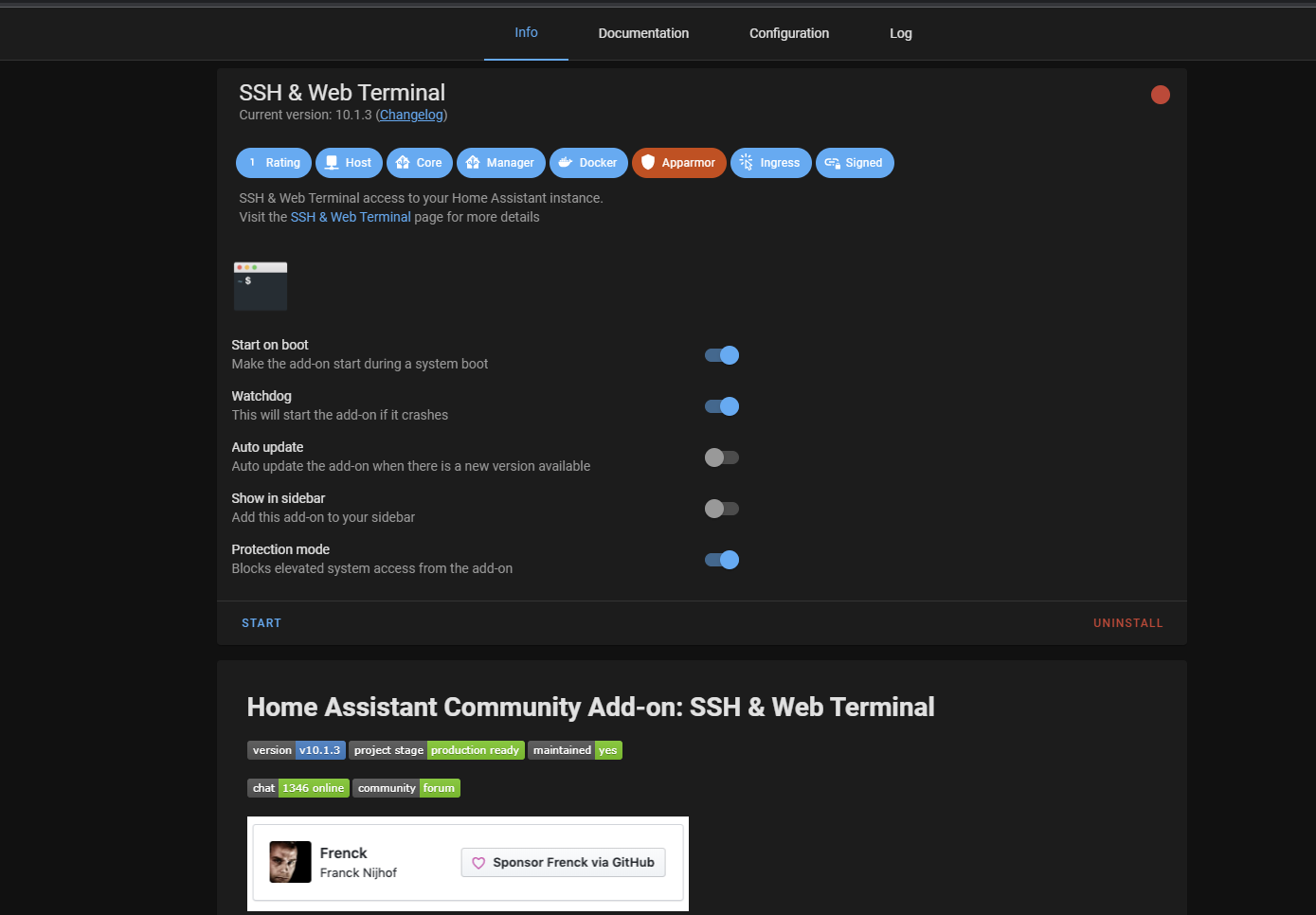 sly kindle
Don't use watch dog. If you have an addon that is crashing all the time then you would figure out the reason instead.
silk root
sly kindle
Don't use watch dog. If you have an addon that is crashing all the time then you...
HA becomes inaccessible and only way to gain access is to either wait for at least 12-15hours and hope access is restored. or physically restart the system. after which all add-ons are disabled.
sly kindle
Your installs...both of them...seem to have nothing but problems
Start over and pick one. Don't try to juggle backups back and forth between them.
sly kindle
Yes it can be an issue with anything
sly kindle
You can't use them either
silk root
sly kindle
You can't use them either
without knowing what is causing the issue how can I fix it? If it is SSD, I can for the warranty claim, if there is a issue with the add-on I can avoid installing it etc
HOSt log is same as console?
twin token
Is the Spotify Addon working for someone?
 shadow agate
good morning
after upgrading to 2022.05 the add on Samba share (version 9.6.1) no longer is able to start with this error:
[12:11:10] FATAL: No supported interfaces found to bind on.
anyone with this also?
I see that this is part of this commit
https://github.com/home-assistant/addons/pull/2457
shadow agate
found the solution, not a very clear on, it's more like a FU for part of the community but the way things are going, we all know where the end will be
thank you all for time and support
 buoyant marten
@lime girder I setup amr2mqtt a few days ago to grab data from my electric meters. Was working great at first.. but is now only getting regular readings from my solar production meter, and not my main consumption meter. Any tips for troubleshooting?
lime girder
buoyant marten
<@378913215624511489> I setup amr2mqtt a few days ago to grab data from my elect...
Any errors in the logs?
buoyant marten
Add on logs show… blank. So I guess not?
lime girder
Wait blank? Like literally nothing there? That doesn't sound right... There should always be some stuff at startup. Maybe there's a UI issue? If you do ha addons logs e9a81774_amr2mqtt in the cli do you see anything?
 elfin idol
I got Unifi Network Application working, but got a question regarding certificates. My homeassistant got one generated by letsencrypt and that one is places in /ssl/ but i want to use that one for the unifi app as well, but how to do that?
lime girder
buoyant marten
Add on logs show… blank. So I guess not?
Well anyway I had some issues with dropped connections but never to one meter. Like I had to replace the antenna at one point because the one I had kept dropping connection and requiring me to manually unplug and plug it back in (I updated the docs to mention this and the one I replaced it with). But when that happened it was all meters disappeared and then all came back
 jaunty inlet
anyone actualy get the zigbee 3.0 usb dongle plus working with zigbee2mqtt on a recent fresh install ? ive flashed to latest firnmware and the unit is visible and comunicates in ssh and in home assistant but for the life of me I cannot get the zigbee2mqtt to start sucessfully without the Error: spawn udevadm ENOENT
lime girder
If one is still working and others aren't then I'm less sure. In the latest version I did add support for setting the symbol length from the suggestion of others. I guess setting that higher can allow you to see more types of meters but comes with increased cpu overhead for processing. So could try adjusting that option higher one step at a time to see if there's a point where it keeps seeing your meter while minimizing cpu overhead
Under the hood it's just rtlamr (https://github.com/bemasher/rtlamr) and rtl_tcp (https://manpages.debian.org/testing/rtl-sdr/rtl_tcp.1.en.html). So if you want to play around with those and find there's an argument to either you need to make your meter work let me know and I can add support for it.
 icy surge
Anyone having issues with the Google Assistant Addon?
Error 400: invalid_request

You can't sign in to this app because it doesn't comply with Google's OAuth 2.0 policy for keeping apps secure.

You can let the app developer know that this app doesn't comply with one or more Google validation rules.
Request Details
The content in this section has been provided by the app developer. This content has not been reviewed or verified by Google.
If you’re the app developer, make sure that these request details comply with Google policies.
redirect_uri: urn:ietf:wg:oauth:2.0:oob
 whole tinsel
I had to revert the update on zwavejs however now I want to try the update again and it's not showing. I tried a restart of core and reloading the supervisor and checking for updates. Is there another way to get it to update?
buoyant marten
lime girder
Under the hood it's just rtlamr (<https://github.com/bemasher/rtlamr>) and rtl_t...
Thanks... Could actually be a bad meter; apparently the utility has been having trouble reading it too. It's odd though, it's essentially brand new. And when I was debugging it was working great!
buoyant marten
buoyant marten
Thanks... Could actually be a bad meter; apparently the utility has been having ...
Is there a way to log into the container and run rtlamr commands directly?
 worldly quartz
hi there, "Terminal & SSH" does not start crond.
how can i autostart it?
actually i want to run ssh 8123:172.33.30.3:8123 user@myserver.tld -N
on boot time
how do i instruct duckdns client to ONLY update ipv6?
since my ISP does not give me a dedicated IPV4 adress...
 quasi rapids
Hi all,
I just migrated from an SD card to an SSD, so i thought time to move from the default Sqlite DB to MariaDb (MySql)
Is there a way to migrate contents from the old SQLite DB into the new MariaDB (I am running the Homeassistant Operating System)
I only really care about the energy statistics though
stuck canyon
worldly quartz
hi there, "Terminal & SSH" does not start crond.
how can i autostart it?
If you're talking about the add-on, there is a switch toggle on the front page of it, for "Start on Boot".
stuck canyon
worldly quartz
actually i want to run ssh 8123:172.33.30.3:8123 user@myserver.tld -N
on boot ti...
You're trying to do a tunnel?
stuck canyon
worldly quartz
how do i instruct duckdns client to ONLY update ipv6?
since my ISP does not giv...
How often does your IPv6 change?
 fallen blade
I'm getting owned by a problem with the mqtt add-on. I have been using anonymous logins forever and yesterday it updated to 6.1.1, which doesn't allow anonymous logins. I am ready to roll up my sleeves and accept the username/password on all my devices. But all the devices seem to "connect" just fine, but they don't get any messages. I have them all using the same username/password.
I first tried putting it in the config for the mqtt add-on, but the docs said not to.
So I added a homeassistant user/password.
I tried connecting on the command line with mosquitto_pub. First, I reverted to a backup and allowed anonymous logins and used mosquitto_pub/mosquitto_sub to publish and subscribe to some test messages. That all worked.
I then updated to 6.1.1 and tried the same test with username/password and it seems like it is publishing (no error messages) and it is connecting (no error messages). But it doesn't have the message.
I have also tried using the wrong password with mosquitto_pub and it fails authentication.
So I am pretty sure the username and password, as well as the server is right. But the pub/subs are being swallowed somewhere. Does anyone have a guess as to what I might be missing?
I think maybe my next step is to make another broker on another machine and see if I can do username/password there.
(I have home assistant blue)
I knew it. As soon as I asked, I would figure it out. The customize.active was true and it had some permissions set in /share/mosquitto. I guess they limited it so only anonymous could read/write anyting? IDK. Neat.
 queen light
Anyone having trouble with zwave js to mqtt after the latest update? It said version 0.38 needs to be installed but I have 0.37. GitHub shows 0.39 is the latest. It didn't auto update.
buoyant marten
buoyant marten
Thanks... Could actually be a bad meter; apparently the utility has been having ...
Weird... looks like the meter actually is sending data, it's just not updating
 brisk nebula
queen light
Anyone having trouble with zwave js to mqtt after the latest update? It said ver...
brisk nebula
queen light
Anyone having trouble with zwave js to mqtt after the latest update? It said ver...
Found on hassio forum
onlize
1d
I found the solution and fixed my problem.
In Add-ons, I checked and the repository was not there. (I understand now what @freshcoast was talking about → thank you for your patience). I added “GitHub - hassio-addons/repository: Home Assistant Community Add-ons 78” repository.
After reboot, the repository appeared in my HA, and it had an update for the Z-Wave JS MQTT add-on.
I updated the add-on, and because I restored my HA, I had to update it to 2022.5 again, and it looks like everything works.
Thank you for your help.
Allowed my update and now zwave works
twin token
Is the Spotify Addon working for someone?
 desert surge
can someone help me with a esphome configuration. I have a wemos d1 mini and servomotor. I can control from HA with a slider to turn but how can I press a button and the servomotor to rotate and push a button and after that to come back to 0 ?
fiery prism
desert surge
can someone help me with a esphome configuration. I have a wemos d1 mini and ser...
quiet flint
hi i can't find plex media server add on on the addon store
 calm tulip
if you serach for it under configuration / Devices & Services ( integrations ) you should find it
quiet flint
calm tulip
if you serach for it under configuration / Devices & Services ( integrations ) y...
ok
quasi rapids
quasi rapids
Hi all,
I just migrated from an SD card to an SSD, so i thought time to move fr...
Anyone willing to take a look at this? :)
 grand tapir
hello , I have problem with last update Zigbee2mqtt
After install 1.25.0, in sidebar menu , if i click on Zigbee2mqtt, the display page is totaly blank.
If re-install 1.24.0, it's work perfectly
version installed is 1.25.1-1 of Zigbee2mqtt
It's not a browser cache problem
Ok, I have found a problem
The version 1.25.1-1 is not **HAProxy **compatible
 sly canopy
Hi guys, can anyone tell me if you get an error when starting Let's Encrypt in HA? I want to encrypt my dynamicdns but when I start the plugin, I get an error.
Logger: homeassistant.components.hassio
Source: components/hassio/websocket_api.py:120
Integration: Home Assistant Supervisor (documentation, issues)
First occurred: 17:41:49 (3 occurrences)
Last logged: 17:42:26
Failed to to call /addons/core_letsencrypt/stats - Container addon_core_letsencrypt is not running
this is the problem, and whenever I want to boot, it shuts down automatically.
 latent kestrel
Is there any reason why the zwave2mqtt addon is not appearing anymore in hacs after I unstalled it?
sly kindle
You don't find any add-ons in HACs
HACs is for custom integrations
Add-ons are software outside of HA
 atomic robin
Hello i have a question i am setting up aqualogic on home assistant i am able to talk with rs485 server and view pool temp and all but home assistant does not see anything all sensors say no entitie
 tardy anvil
My Shelly RGBW2 with esphome likes to randomly go from low brightness to FULL BRIGHTNESS, and it's especially annoying in late evening. The logs in esphome for the device don't say anything about it changing brightness. The end of the log just says:
[01:13:56][C][api:139]:   Address: danas-ceiling-light.local:6053
[01:13:56][C][api:143]: Using noise encryption: NO```(more lines above that, but nothing about brightness or about reboot reason)
 gilded totem
Hello, many mounth ago i have create an addon using /dev/ttyUSB0 (on Raspi4 standart configuration), it run very well. I must create a new Home assistant system, i copy/paste all my addons directory on new Raspi, and on seriel opening i have this message :
ERROR:root:Unable to open serial port: [Errno 1] could not open serial port /dev/ttyESB0: [Errno 1] Operation not permitted '/dev/ttyUSB0'
i have the same release of H/A/ in both rapsi; what is the problem ?
 sudden geyser
hey guys, that green button 'Check Home Assistant configuration' am i right, is it not there anymore?
fiery prism
Yes it is. Developer Tools / YAML
sudden geyser
O great thanks Tom
dense spadeBOT
@gentle sparrow posted a code wall, it is moved here --> https://hastebin.com/uliqipoquh
 gentle sparrow
Good evening one and all, Is there anyone that can help with my setup of the Network UPS Tools Add-on?
I have 2 UPS plugged into the dedicated Home Assistant PC and i have set them up according to the documentation
but they dont connect, I just get a Opps Something went wrong error
Please help
pleas see above Pastbin for settings 🙂
 quartz dagger
Hello, is there any support for the ESP32-WROVER-IE for ESPHOME? I tried to get the board to work using esp32dev for board type and it did not like that. I hope I didn't get an unusable board :_(
https://www.espressif.com/sites/default/files/documentation/esp32-wrover-e_esp32-wrover-ie_datasheet_en.pdf
 topaz ferry
Does anyone know how to install vscode as an HA Addon? I've looked at a few methods but they no longer work - I'm running HASSOS on a VM, so its AMD64 not arm.
viscid orchid
What is stopping you?
topaz ferry
https://community.home-assistant.io/t/home-assistant-community-add-on-visual-studio-code/107863 this doenst seem to work anymore.
https://github.com/hassio-addons/repository doesnt seem to have vscode anymore.
oh
im dumb
it does have it
viscid orchid
It's called Studio Code Server now
oblique dagger
hi. Is there a way to pair bluetooth speaker?
many guides online on what to do with your speakers, but could not find info how to pair
viscid orchid
You seem to have a pathologically broken installation
 weary plaza
I've done a lot of downloads, I've tried many versions, I've tried many devices, they can't all be faulty, I did everything step by step.
viscid orchid
This is the official repo: https://github.com/home-assistant/addons
weary plaza
thank you
zinc terrace
I'm getting an error I think is due to a device I had reflashed but is using the same names:
Platform mqtt does not generate unique IDs. ID switchbot_<MAC>_linkquality already exists - ignoring sensor.lower_bed_switchbot_linkquality
After some Googling it seems like deleting the mosquitto DB would fix this. I'm wondering if this is generally safe and also wondering where it even is on my fs cuz I can't find it
sly kindle
@zinc terrace if you're using the add-on you can uninstall it and reinstall
zinc terrace
Just using the mqtt add-on, which is why I asked here. Wasn't sure if there was a better place to ask
 wicked knot
why is there no more tailscale in the new HA version?
viscid orchid
 wicked knot
viscid orchid
wicked knot
viscid orchid
damn i dont have it, why?
viscid orchid
wicked knot
viscid orchid
<https://github.com/hassio-addons/repository#installation>
thanks, got it, guess something went wrong with my config then
 worldly creek
Does anyone know if some changes where made on the mqtt add-on recently? Im not sure when I updated, but I suspect I might have done it last week around the same time as new HA release.
Now it seems like all my MQTT stuff that connects without login stopped working.
I can see stuff like this in the logs error: received null username, clientid or topic, or access is equal or less than 0 for acl check
But I've set customize to "false" and that should disable ACLs, right?
seems like I'm not the only one https://github.com/home-assistant/addons/issues/2483
 finite ravine
Hello everyone! I would like to inform you that diyhue is now officially suppoting the HA addon, previously added by Max as a community contribution. You can find the repo at https://github.com/diyhue/hassio-addon Have a great day!
sly kindle
@zinc terrace I was referring to that add-on. Uninstall it and then reinstall it. That will get you a new mosquitto.db
@worldly creek try the same for your issue. I had the same error which appears to have been a stale device in the db
zinc terrace
sly kindle
<@438530264751276032> I was referring to that add-on. Uninstall it and then rein...
The mosquitto broker? I actually connected to the docker container and deleted the db that way and it didn't work so I'm not sure if that's the issue. But I'll try
sly kindle
Yeah
worldly creek
@sly kindle my problem seems to be related to the latest version of the add-on. Anonymous logins stopped working. I downgraded to 6.0.2 and now everything works again.
wicked knot
having some issues with tailscale, any other alternative? i cant have a dedicated IP thanks to my isp provider
 dapper elk
For some reason my zwavejs2mqtt is stuck on 0.37 instead of 0.39. It seems due to it all my zwave devices won't work in HA. Does anyone know how to force the update? Running on pi4 with core-2022.5.3 on the beta channel
hybrid wadi
wicked knot
having some issues with tailscale, any other alternative? i cant have a dedicate...
While I'm a bit of a Tailscale fangirl, If you cannot get it working, try looking at the ZeroTier addon. While it works in a fundementally different way, the overall experience it supposed to create is rather similar.
wicked knot
hybrid wadi
While I'm a bit of a Tailscale fangirl, If you cannot get it working, try lookin...
thanks i will try this!!😎
weary stratus
Hello!
I am in a tricky situation in gaining remote access to HA and I was wondering if anyone can help me.
I followed the video posted by Everything Smart Home. I port forwarded 443 and 8123, got duckdns domain, installed duckdns and ngnix add on. Added "http:
use_x_forwarded_for: true
trusted_proxies:
- 172.30.33.0/24" as stated in the NGNIX add on to my config.
But... I can access the external URL only from http and not https. What am i doing wrong? Any help will be greatly appreciated as I am really losing my mind trying to figure this out.
 eager pawn
how can i set up ssl for remote access? i'm was able to configure remote access with duckdns but i'm not sure how i can configure for ssl. thanks in advance!
 crisp sky
Got a fresh install of HA and trying to install mqtt broker but running into this error - any ideas?
Can't install homeassistant/aarch64-addon-mosquitto:6.1.2: 404 Client Error for http+docker://localhost/v1.41/images/create?tag=6.1.2&fromImage=homeassistant%2Faarch64-addon-mosquitto&platform=linux%2Farm64: Not Found ("manifest for homeassistant/aarch64-addon-mosquitto:6.1.2 not found: manifest unknown: manifest unknown")
 rapid sphinx
Im using HASS.Agent and Mosquitto and I am struggling to get my PC to appear in HA via HA OS
I can see my device in MQT explorer but it has not appeared under devices nor developer Tools
I am unsure if its a config issue and how to identify
rapid sphinx
I have resolved, please ignore
 steel schooner
can someone help me with an issue im having with mqtt.js and mosquitto broker add on
i think the problem is with mqtt.js because I dont have that issue with node red or mqtt in python
I am trying to make the lights in the room mirror content on the screen
like it will be a similar color to the colors on the screen
and i am using mqtt to send color updates which will be read by node red and then the room lights will be set
mqtt.js connects to the mqtt broker but doesnt not send or recieve any message
it doesnt connect if the password is incorrect so I dont think its a authentication error
import * as robotjs from "robotjs";
import * as mqtt from "mqtt";
const client = mqtt.connect("mqtt://192.168.1.102:1883", {
  username: "----------",
  password: "----------",
  clientId: "mqttjs_1",
  reconnectPeriod: 1000,
});
client.on("connect", () => {
  client.on("packetsend", (packet) => console.log("send", packet));
  client.on("message", (t, p) => console.log(p.toString(), t));

  console.log("connected");
  let displayCoords = [2560, 1440];
  let capturesize = [250, 250];
  let captureCoords = [
    displayCoords[0] / 2 - capturesize[0] / 2 + 1920,
    displayCoords[1] / 2 - capturesize[1] / 2 + 0,
  ];
  const mode = (a: any[]) =>
    //@ts-ignore
    Object.values(
      a.reduce((count, e) => {
        if (!(e in count)) {
          count[e] = [0, e];
        }
        count[e][0]++;
        return count;
      }, {})
    ).reduce((a, v) => (v[0] < a[0] ? a : v), [0, null])[1];
  while (true) {
    let a = robotjs.screen.capture(
      captureCoords[0],
      captureCoords[1],
      capturesize[0],
      capturesize[1]
    );
    let c: [number[], number[], number[]] = [[], [], []];
    for (let i = 0; i < a.width; i++) {
      for (let j = 0; j < a.height; j++) {
        let l: number = parseInt(a.colorAt(i, j), 16);
        c[2].push(l & 0xff);
        c[0].push((l >> 16) & 0xff);
        c[1].push((l >> 8) & 0xff);
      }
    }

    let msg = JSON.stringify({ r: mode(c[0]), g: mode(c[1]), b: mode(c[2]) });
    console.log(msg);
    client.publish("screenlights", msg, { qos: 0 }, (err) => console.log(err));
  }
});
@steel schooner posted a code wall, it is moved here --> https://hastebin.com/horabigage
steel schooner
thats my entire code
send {
  cmd: 'publish',
  topic: 'screenlights',
  payload: '{"r":28,"g":28,"b":28}',
  qos: 2,
  retain: false,
  messageId: 23804,
  dup: false
}```this is what is printed to stdout
steel schooner
interesting
does mqtt have a rate limit
it doesnt work unless the qos is 1
only if qos is 1
 heady gate
did the Bitwarden RS addon go away? I can't seem to find it.
heady gate
got it now! Thanks!
 haughty sigil
Does anyone have a docs, article blog post, or anything for running addons as containers with HA Container/Core?
haughty sigil
nvm. i found what i was looking for https://github.com/home-assistant/architecture/blob/master/adr/0014-home-assistant-supervised.md
sly kindle
@haughty sigil the majority of add-ons are already based on containers. You would simply find the container and add it to your install/compose
haughty sigil
@sly kindle can I make the addon container available to HA Container? Where are the docs for making your own addon container?
I work with docker everyday btw. I just wanna learn about how its different (if at all) for hooking into a an HA instance
haughty sigil
thanks! this is awesome. looks like there's no way to hack on addons. Looks like i'm going to need supervised or OS. thank you so much
 ember garden
Anyone ever have an issue with deconz where a sensor shows up fine in deCONZ but it shows up as 'not reachable' in Phoscon?
This particular sensor needed a custom DDF xml file to get it work. Funny thing is that it worked fine for a few weeks and now it never shows anything other than 'not reachable' in phoscon
ember garden
Is deconz considered old and junky at this point? I'm using a conbee II
finite ravine
anyone here with experience in Ingress support for addon?
my addon is accessing javascript resources in the HTML with a path starting with “/”.
apparently, it makes the browser access the root url (http://ha:8123/<my_resource>) instead of using the ingress url first
anyone know how to esolve it in HA ?
zinc terrace
Sometimes when I go to a tab in my browser with an add-on (Node-RED, VS Code, etc) the add-on seems to need to reload. Does anyone know why that is?
I'm assuming this is due to the fact that the browser is "disabling" that tab temporarily to save memory? If so does anyone know a way to prevent that? I use Chrome
 somber jetty
does anyone know a way to amplifi alien router into HA been looking everywhere and cant find nothing
 obsidian path
Hello. How can I find how up to date the Zigbee2mqtt addon is compared to the project? I just paired a new plug and it is reported as not supported.
Zigbee2MQTT:warn 2022-05-12 10:48:52: Device '0xa4c13826f20df4fd' with Zigbee model 'TS011F' and manufacturer name '_TZ3000_kx0pris5' is NOT supported, please follow https://www.zigbee2mqtt.io/how_tos/how_to_support_new_devices.htm
But on the project github it seems that it is. That device is listed in the tuya.js file.
obsidian path
Problem solved. It looks like I had an old version of the addons. It now all works
 wild snow
I'm looking for some help with the Nextcloud Backup addon. I have it set to do automatic backups for it seems to only save the automatic backups locally and not on my nextcloud server? Is there a setting I missed?
silk root
when starting mosquito broker I see this error. "Port '8884' is already in use by something else on the host."
 silent sphinx
I'm attempting to get an SSL certificate using the letsencrypt add-on. I have a domain pointing to my home assistant instance via google domains ddns (which is set up through the google domains integration which is only half working, but that's an issue for another time...). Letsencrypt runs smoothely until it gets to the point where it is actually making the challenge. It requests an acme challenge file from the device, which I am able to access myself while the challenge is running; however, the logs still say that the request failed:
Timeout during connect (likely firewall problem)
Hint: The Certificate Authority failed to download the challenge files from the temporary standalone webserver started by Certbot on port 80. Ensure that the listed domains point to this machine and that it can accept inbound connections from the internet.
Some challenges have failed.
I've tried looking at the port forwarding settings, but clearly the instance is accessible publicly. I've also tried looking for reasons certbot wouldn't be working, but that only leads me to forum threads mentioning firewall issues. I'm not aware of any default firewall in home assistant OS, so if someone else has information on that, it would be helpful as well. In any case....Is there any reason that letsencrypt wouldn't be able to access the url? Anything else I can try in order to debug this?
 strong silo
Do you have your external port 80 forwarded to port 80 on your Home assistant instance?
strong silo
silent sphinx
I'm attempting to get an SSL certificate using the letsencrypt add-on. I have a ...
Do you have your external port 80 forwarded to port 80 on your Home assistant instance?
silent sphinx
strong silo
Do you have your external port 80 forwarded to port 80 on your Home assistant in...
Yeah
strong silo
silent sphinx
Yeah
assuming you also have external 443 to internal 8123 of your home assistant?
silent sphinx
strong silo
assuming you also have external 443 to internal 8123 of your home assistant?
No, is that something that's necessary for the challenge to function?
strong silo
silent sphinx
No, is that something that's necessary for the challenge to function?
not sure if is needed for challenge but it definitely needed for access after cert is created. its up to you what external ports you will use for accessing but as 443 is a default port for https it is just easier to use it. I did three setups like that in the past and always before I started let'sencrypt I always had external port xxx (in my case always 443) forwarded to ip address of your home assistant port 8123. Then you can try to access it but you will get cert error. once you can access with cert error then try to run lets'encrypt.
silent sphinx
strong silo
not sure if is needed for challenge but it definitely needed for access after ce...
Got it, I'll try that. Thanks for the suggestion!
 empty steeple
Hi there,
I am having trouble getting the nginx addon to work. I set it up using a self-signed cert in my local network and set it up with x_forwarded_for and 172.30.33.0/24 ans trusted_proxies subnet. I still get nothing but 400 errors and an error logged into the home assistant log for reasons that are just oblivious to me. I am using haos btw.
(To be precise, it is the addon NGINX Home Assistant SSL proxy)
Thats my config:
domain: <domain>
hsts: max-age=31536000; includeSubDomains
certfile: hass-self.crt
keyfile: hass-self.key
cloudflare: false
customize:
  active: false
  default: nginx_proxy_default*.conf
  servers: nginx_proxy/*.conf
http:
  use_x_forwarded_for: true
  trusted_proxies: 172.30.33.0/24
According to the log the proxy is definitely running, no logged errors in the nginx log
viscid orchid
The http: part doesn't belong there. That goes in configuration.yaml
 fierce osprey
Can AdGuard be used to block websites for a particular computer? It seems to require you to set your computers to use a certain DNS server, but my computer is running Cisco Encrypted DNS and a Roaming Security client, which bypasses all local DNS settings...
I can't the settings in my software (work administrator managed)
fierce osprey
i managed to do this via the etc/host file, not ideal as it's user-editable, but works
 snow agate
desert lintel
Hello, is there a way to add a custom port forwarding entry into an addon? I nee...
snow agate
desert lintel
Hello, is there a way to add a custom port forwarding entry into an addon? I nee...
Did you manage to figure it out? I think I might have a similar issue.
 velvet wolf
Hi all.
My name is tomer and I'm the developer of Broadlink Manager.
I'm in the proccess of creating addon for it (Will be mi first) and I need help with Env vars.
Can someone please point me on how to add it?
 neat wharf
Hi im just starting with grafana but where can i find or change the grafana.ini file?
 scarlet tusk
I read that the addons are containers.. Only need to add the nre service in docker-compose? O wanna install the ssh&terminal addon.. I dont find it in docker hub
fiery prism
velvet wolf
Hi all.
My name is tomer and I'm the developer of Broadlink Manager.
I'm in the ...
viscid orchid
scarlet tusk
I read that the addons are containers.. Only need to add the nre service in dock...
If you're using a container install of HA you cannot use addons. And you certainly don't need an SSH addon or separate SSH container, since you have SSH access on your host
velvet wolf
fiery prism
Try <#673545314900377620>
Thanks,
Just did.
 urban pumice
just got into situation where it would be useful to have multiple instances of one addon
I'm setting up snapcast clients, and want one to play out of a speaker over bluetooth and the other out of the builtin audio ouptut
so that's two snapclient instances with their own audio setup and running in two different processes
I could put a lot more work into the snapclient addon to make it accept options as lists, launch multiple instances with s6 etc, but at the end of the day that just goes against what docker and s6 want
I think for now I'll just duplicate the addon directory and change the slug, its so much less work 😄
 stuck spoke
really need some help with the zwave js to mqtt add on
it disapeared and completely bricked everything when i updated z wave
 dry mortar
I am using zigbee2mqtt and mqtt is getting signal and recording action changes in the log, but none of the entities that are auto created in HA are updating. Anyone experience this or know how to fix it
 violet niche
I have an unusual problem in that I don't quite understand how to fix it. In Node-Red I downloaded someone's code so I could try to understand how it works. One of the things it had in the flow was a "chatbot-telegram-node" I did not have this in my Node-Red. I kept getting this warning message "Flows stopped due to missing node types......chatbot-telegram-node" I looked up this info and I found out how to install this node. But I'm still getting this warning that is stopping my flows. How do I get around this?
 oblique rose
Anyone can help me with one issue. I'm unable to access the add-on store because the frontend doesn't load. I'm unable to get new updates also. I've checked the supervisor log: and there is a warning 'Updater.fetch_data' blocked from execution, no supervisor internet connection".
viscid orchid
Appears to be a network issue
violet niche
Any Node-Red ninjas out there today?
viscid orchid
violet niche
@viscid orchid how can I delete subflows. I'm thinking something in there is causing my node-red to stop?
viscid orchid
#node-red-archived can help
violet niche
Ok, so your saying just dig through the online documentation? I assume #node-red-archived is the node-red documentation.
Duh, I'm sorry> I just noticed the # node-red group.
velvet wolf
Hi,
Just released "Broadlink Manager" as an add-on.
Add this repo to your add-ons store and that's about it (:
https://github.com/t0mer/broadlinkmanager-docker
dense spadeBOT
@weak siren posted a code wall, it is moved here --> https://hastebin.com/ebofazivot
stuck spoke
What a worthless group of "help"
Nobody answered or helped
theres more mods than users
 half blade
You should definitely ask for your money back
stuck spoke
I've got a new challenge for this group
i have installed the hacs from ssh
but cannot find it when adding integration
 proper vigil
stuck spoke
but cannot find it when adding integration
proper vigil
stuck spoke
but cannot find it when adding integration
Did you clear your browser cache?
stuck spoke
i got it working
installed into wrong directory
new question on Dyson TP07 hook u
up
cannot find the wifi ssid and password anymore (also, the manual was thrown out...). Cloud version does not work, and the TP07 only has a MAC Address and some random numbers on the inside below the filter.
What are my options to hook into it. There is a way to clone the library and search for the devices, but I do not know what the hell that means: "If you want to manually set up Dyson Local, you need to get credentials first. Clone or download https://github.com/shenxn/libdyson, then use python3 get_devices.py to do that. You may need to install some dependencies using pip3 install -r requirements.txt."
Any help would be appreciated. Thank you!
 coarse temple
Anyone who has integrated a zigbee lock who can help me?
I'm having the problem that its connected to deconz but wont show up in HA as a device.
viscid orchid
#zigbee-archived would be better
coarse temple
@viscid orchid thank you!
 obtuse widget
Hope someone cares to listen here. I recently discovered the following:
- Appdeamon 3 is deprecated and won't work anymore on the current HA.
- Appdeamon 4 is broken and won't display camera or entitypicture because of a version mismatch that none of the devs wants to fix. This is already for over a year and won't be fixed.
- Homepanel project is abandoned since 2020 and won't work anymore in current HA.
What other possibilities do we have as HA users who want to use touch panels? Most HA users want that possibility. But now there is none. Now what? Domoticz suddenly starts to look VERY tempting. I hope something will be done on this situation very soon, or users will leave HA. This is NOT a good sign!
 young sage
what is the difference between Tailscale integration and the Tailscale addon? I couldn' find any information
viscid orchid
Addons provide a service through additional software while the integration allows HA to interact with it.
In this case, the integration says:
This integration monitors your Tailscale network, it DOES NOT make your Home Assistant accessible via Tailscale VPN
young sage
~~OMG.. that solves a lot of problem for me since I'm trying to control something in another country.
So I could SSH from my HA (via Terminal Add-On) to a Tailscale-Device outside my local network, IF I'm using the Integration
But if I'm using the Add-On, which is isolated from other Add-On's, I can't do the stuff mentioned above~~
Hell, I could even set up the Bitwarden in that case
ooh
gotta start reading some books..
 topaz zealot
is it possible to get the mosquitto add-on to allow anonymous mqtt connections? (ie, no user/pass supplied). i'm upgrading from an ancient install to haos, and i have an old esp device i don't want to reflash that uses anon mqtt. allow_anonymous doesn't seem to be an option anymore
 midnight schooner
for mosquitto, if i disable listening on non-SSL ports, i'll have to set up encryption keys, right?
 spare moon
When i browse to the Addons page in HA theres a tab for log, but in only shows recent messages. I need to capture a debug dump over an hour or so and save it for later analysis.
Can I find an adons log on disk somewhere?
viscid orchid
you can use ha addons logs slug_name
ha addons logs core_samba
it tells me that several addons that are definitely installed either don't exist or aren't installed, so I don't know what it's really doing
spare moon
Where would i run this command?
viscid orchid
ssh
spare moon
Thanks so far! It looks like its truncated though. I need a complete debug log over several hours to analyze later
 chrome parcel
Hello, I need help with mariadb addon
I have this error:
2022-05-17 10:30:15 0 [Note] InnoDB: Completed initialization of buffer pool
2022-05-17 10:30:15 0 [Note] InnoDB: If the mysqld execution user is authorized, page cleaner thread priority can be changed. See the man page of setpriority().
2022-05-17 10:30:15 0 [Note] InnoDB: Starting crash recovery from checkpoint LSN=55435875341
2022-05-17 10:30:15 0 [Note] InnoDB: 1 transaction(s) which must be rolled back or cleaned up in total 6 row operations to undo
2022-05-17 10:30:15 0 [Note] InnoDB: Trx id counter is 12907837
2022-05-17 10:30:15 0 [Note] InnoDB: Starting final batch to recover 8 pages from redo log.
2022-05-17 10:30:15 0 [Note] InnoDB: 128 out of 128 rollback segments are active.
2022-05-17 10:30:15 0 [Note] InnoDB: Starting in background the rollback of recovered transactions
2022-05-17 10:30:15 0 [Note] InnoDB: Removed temporary tablespace data file: "ibtmp1"
2022-05-17 10:30:15 0 [Note] InnoDB: Creating shared tablespace for temporary tables
2022-05-17 10:30:15 0 [Note] InnoDB: Setting file './ibtmp1' size to 12 MB. Physically writing the file full; Please wait ...
2022-05-17 10:30:15 0 [Note] InnoDB: File './ibtmp1' size is now 12 MB.
2022-05-17 10:30:15 0x7fb8ebd13b20  InnoDB: Assertion failure in file /home/buildozer/aports/main/mariadb/src/mariadb-10.4.19/storage/innobase/btr/btr0cur.cc line 313
InnoDB: Failing assertion: btr_page_get_next(latch_leaves.blocks[0]->frame) == page_get_page_no(page)```how to fix it?
 cobalt tundra
Is there a way I can run a Matrix homeserver from a Raspberry Pi 3 running HAOS?
sly kindle
All other software in HA OS is added through add-ons
Are you referring to this? https://github.com/hassio-addons/addon-matrix
cobalt tundra
Thanks for your speedy response! I have tried installing that add-on, but I can't seem to get it to do anything other than act as a Riot client
The documentation is sparse, but it does mention: "You can connect via your own clients, or via the Riot web client provided from this add-on." This seems to imply that the Riot client is not the only function and that it can also act as a homeserver
 candid vessel
Is anyone aware of an "anatomy of an AppDaemon app" guide? I'm a bit puzzled about the difference between a module and a class.
I'm currently controlling my solar inverter via 3 different AD apps (python scripts), each with its own class and module. Since they call the same APIs, and may call common functions it seems a bit cumbersome to do it this way.
viscid orchid
you'll probably get better responses here: https://discord.gg/5r48BhVt
 valid mantle
hello, who can help me? problem with node "http in"
i want send data in GET request to Node RED, node is "http in", but page need login and password, how disable this?
 weak siren
Hi guys, I am trying to get the demo addon hello world to work but It refuses to work
I quatruple checked the folder, file name and content
The only output I get is: https://hastebin.com/ebofazivot
I guess it happens to something regarding the S6-overlay V3 upgrade ...
Any suggestion?
Please use @weak siren if so
 waxen igloo
I have a question about disabled integrations. Actually I disabled the Frigate integration (not addon) in the past. Now I wanted to reinstall, so I went to HACS, installed it, but I cannot add this integration again. I cannot find it in the list of installed integrations presented (even with "show disabled integrations") and also I cannot add it again through "add new integration". What can I do? Actually the integration is in the custom_component folder
 steep birch
I've just updated zigbee2mqtt to the latest version. But now the frontend is somehow not loading, I just get a blank screen. I've rebooted HA & z2m but that didn't help.
marsh pawn
can anyone tell me what the major difference(s) are between the plex media server and plex nas addons?
marsh pawn
no, it was in HA Add-ons by alexbelgium
 subtle vortex
When using Adguard Home, is it expected that the IPs that are provided to use on my home router include 172.30.32.1? It does provide me the IP of my HA instance also.
silk root
how to resolve this samba error https://ibb.co/6WMG3NB
secondly I should I connect vscode over ssh? https://www.homeautomationguy.io/home-assistant-tips/using-visual-studio-to-edit-your-home-assistant-configuration-yaml-file-over-ssh/
following the guide but stuck here
Setting up SSH Host 192.168.xx.xxx: (details) Initializing VS Code Server
 rain kraken
Hii, i am working on a project and was wondering if it is possible to connect The Home Assistant to the Xampp database. I am using a shelly sensor btw.
 sudden laurel
silk root
how to resolve this samba error https://ibb.co/6WMG3NB
sudden laurel
silk root
how to resolve this samba error https://ibb.co/6WMG3NB
If you're finding the vscode/samba/ssh stuff complex, just install the "Studio Code Server" add-on and use it from the web UI. It really works amazingly well for what it is.
silk root
sudden laurel
If you're finding the vscode/samba/ssh stuff complex, just install the "Studio C...
it isn't complex, I currently do it by opening configration.yaml from samba share in windows, what I would like to do it over the ssh from within the vscode
sudden laurel
I understand -- just saying, the vscode built into the UI is fantastic and all the native auto complete stuff etc Just Works(tm)
ionic carbon
silk root
it isn't complex, I currently do it by opening configration.yaml from samba shar...
That example you are following is based on running Container and using SSH to the base OS, not sure how it's addon related
If you are trying to use the SSH addon as the destination it won't work as VSCode Remote doesn't support Alpine
 limpid tusk
I just migrated from an rpi3 to a VM running on a Mac. Everything is working great with no config changes except for MQTT. I keep on getting a connection refused error when zigbee2mqtt is trying to connect to mqtt broker. I'm sure the username/password is correct (since it's just a restore) but even create a new one that is just user1 / 12345. The error is
Zigbee2MQTT:info 2022-05-19 13:41:00: Connecting to MQTT server at mqtt://core-mosquitto:1883
Zigbee2MQTT:error 2022-05-19 13:41:00: MQTT failed to connect: Connection refused: Not authorized
It seems like a user/pw authentication error but I'm sure they are correct. Anything else it might be? I even uninstalled / reinstalled MQTT broker
 shell furnace
modern hinge
Thanks to everyone that replied and/or contacted me. 👍
- I've now found what ...
shell furnace
modern hinge
Thanks to everyone that replied and/or contacted me. 👍
- I've now found what ...
How did you resolve that update issue?
 steel tapir
Is this the right place to ask why aircast wouldn’t work on rpi 3 ?
 bronze grotto
what is the advantage of using bitwarden over home assistant
 uncut timber
Quick question. Does anyone know where I can find the deconz config files?
trying to fix a broken installation
 vestal agate
i'm going to take a guess to see if this goes in here. I've got a BlueIris instance sending the parameter &ALERT_JPEG which is a base64 encoded image over MQTT. When i look at the raw data with mqtt explorer it looks like the message is truncated. How would i go about verifying the maximum message size set in the config for the mqtt addon?
Message #zigbee-archived
vestal agate
limpid tusk
It seems like a user/pw authentication error but I'm sure they are correct. Any...
it could be a firewall issue
weary stratus
Hi, I have a problem with setup the mqtt bridge to the supla cloud . There is no information about mqtt errors in the logs (I set it to debug). The problem is that there are no messages in the broker (add-on)
weary stratus
wrong file name: was name.config I corrected it to name.conf
I've just tried to update HACS, it's been a while since I've ventured to that side of the dashboard. Update requested then it says it needs to restart, it does. But comes back to the same screen suggesting it needs updating?
 uneven granite
Hey all. I tend to not make a habit of upgrading, but I'm doing some spring cleaning before I add another batch of devices in the following weeks and I've gone and updated Hassos and core to latest. I now get this on the zwavejsmqtt addon:
"Retrying setup: Z-Wave JS Server version is incompatible: 1.15.0 a version is required that supports at least api schema 16"
Any help available>?
Actually, sorry it's been a long time. It's not the mqtt version of the addon.
 fervent jay
Hello, the Studio Code Server addon is not opening for me anymore since last update, anyone else having this?
sly kindle
@fervent jay took a while but mine started
fervent jay
ok thanks
sly kindle
I also clicked away and back
 shell dirge
Hello, I have a quick question, does anyone have a Wyze lock (the zigbee version not the new bluetooth one) working with the zigbee2mqtt addon? when i attempt to add it, it says its unsupported and removes itself from the network
 shell bolt
re: SSH & WEB the ZSH keyboard commands I am unable to mark a text line to copy / paste. A right-click menu does open but then Firefox's right click menu overtakes it. Is copy paste possible in the terminal?
 olive geyser
Using the ngnix proxy addon and I’m getting a 400 bad request when trying to access from the external url. I have both the lan and docker subnets trusted.
Oddly in the hass ui, it says external access disabled
Under system -> network
 karmic flower
Bonsoir cela fait plusieurs fois que j'essaie d'installer influxdb mais je ne le trouve pas dans les modules complémentaires et je ne vous pas comment faire