#add-ons-archived
1 messages · Page 62 of 1
 rustic lichen
Hey is anyone else still having issues with duck dns??
I still cant even ping my subdomain
 sly kindle
 glossy rune
Does DuckDNS support `!secret`?
glossy rune
Does DuckDNS support `!secret`?
ssh:
  username: '!secret sshuser'
  password: '!secret sshpass'
You need quotes or single quotes around the whole thing as shown here
 lilac jacinth
Hi all, sorry but how can i edit mosquitto dockerfile to implement this fix?
https://github.com/home-assistant/addons/pull/2137/commits/cc089696d4b170816698ebd26d2b1831cb248a21
for the other two files i think i just can access with portrainer console and edit them then restart, but for the dockerfile i don't know how
sly kindle
Did you enter your password within single quotes?
 winter raven
https://community.home-assistant.io/t/home-assistant-community-add-on-unifi-controller/56297
Does this means that I can run unifi controller alongside home assistant?
glossy rune
@rustic lichen I can help you with DuckDNS, just message me when you are back around and we can talk about it here in the chan.
@sly kindle yo, so I just saw your messages. The quotes allowed me to save the configuration in the add-on, but then it says it doesn't see a valid corresponding secrets.yaml entry. However, I most definitely have it there. Is there something I need to wrap in quotes there too? The example entry doesn't have quotes. I just have it like duckdns_token: 394k034kf9sdkblahblah-blah-blah within secrets.yaml
 raven tinsel
winter raven
https://community.home-assistant.io/t/home-assistant-community-add-on-unifi-cont...
raven tinsel
winter raven
https://community.home-assistant.io/t/home-assistant-community-add-on-unifi-cont...
yes
raven tinsel
My name... that I got from my parents @ birth
glossy rune
Ahhhhhh, cool
I have a friend with that name thats why I asked.
@sly kindle I saw that, lmao
@sly kindle All joking aside, I was asking about SSH and secrets, but Im applying that to DuckDNS now. And will do SSH next.
Any chance that you know exactly how secrets.yaml is even protected? Cus it's just right there in the same folder. I remember making files like this coding webapps for API keys, but those files were a little different.
winter raven
raven tinsel
yes
So i don't have to install unifi controller but the add on is enough?😍
raven tinsel
winter raven
So i don't have to install unifi controller but the add on is enough?😍
Yes
sly kindle
glossy rune
Any chance that you know exactly how `secrets.yaml` is even protected? Cus it's ...
I was going to say, secrets is really about sharing your configuration publicly in one way or another
winter raven
raven tinsel
Yes
Thanks
So I can use it as a normal unifi controller for my unifi access points?
sly kindle
So I can easily do something like this to share my config here in discord:
ssh:
  username: '!secret sshuser'
  password: '!secret sshpass'
  authorized_keys: []
  sftp: false
  compatibility_mode: false
  allow_agent_forwarding: false
  allow_remote_port_forwarding: false
  allow_tcp_forwarding: false
Yes (repeating now :D)
glossy rune
@sly kindle Wait, really? I thought it was like... for potential hacks. I guess that makes sense. I just interpreted "security" different on the page that mentions it. So Im not really fucking up if I don't use it then.
sly kindle
Some users also have their configuration on github, or they have youtube channels, etc
glossy rune
Ohhhhhhh, yeah, ok. Im not a "content creator" (except for my data that is harvested by big tech) so I didn'treally think of that perspective. OK, so are there any other built-in security features that I should utilize? I'm just paranoid now that I have DuckDNS working, lmao.
sly kindle
A good username and password for each user, and you can also make use of MFA within a user's settings panel
Still, secrets should work. It sounds like you make not have it configured correctly?
 amber quest
how to turn off decimal places in a graph ? grafana
 fiery prism
amber quest
how to turn off decimal places in a graph ? grafana
fiery prism
amber quest
how to turn off decimal places in a graph ? grafana
Override: Standard options > Decimals
glossy rune
If !secrets works for DuckDNS's token field, then should it also work for it's domain field and certfile and keyfile fields? Or not necessarily? Im trying to understand why !secrets works for some fields and not others.
Maybe the devs specfiiccally implement it for specific fields?
I think I figured it out. ITs different depending on the addon.
And the expression.
 crisp depot
Hey Guys. i have a small question. I have Hass.os. i have the DiyHue addon. when i add a light to diyhue it shows as a plug in the hue app. what can i do. i want it as a dimmable light. thanks in regard
amber quest
where can I enable proxies ? grafana
amber quest
guys :/ web (iframe) -> web proxy -> homeassi
 zinc zinc
Hello, I am using a traccar add-on. Can I set my history to not be saved?
 azure bronze
hi guys
I'm having problems with mosquitto
it seems that the server starts without errors
but it doesn't open the mqtt port
and all my devices can't connect
any idea on what's going on ? I always used mosquitto without problems
azure bronze
in the supervisor log I see this error
21-08-16 22:26:14 ERROR (MainThread) [supervisor.services.modules.mqtt] There is already a MQTT service in use from core_mosquitto
what does it mean?
 weary stratus
Hi everyone, is this the right place to ask for support for frigate nvr? I've been googling for a couple of evenings now and can't get it to work
glossy rune
*pokes "the guy" in #add-ons-archived *
I have ZwaveJS installed. 100% it's there. However: 2021-08-16 16:36:37 ERROR (MainThread) [homeassistant.components.hassio] Failed to to call /addons/core_zwave_js/stats - 404 Client Error for http+docker://localhost/v1.41/containers/addon_core_zwave_js/json: Not Found ("No such container: addon_core_zwave_js")
When I try to add the Integration I get Failed to connect and I saw that in the log.
No idea what to do to address this.
Except uninstall and reinstall, but I was havin this problem for days in another entirely different Home Assistant installatio.
ZwaveJS is definitely started
its somekind of websocket prob if i had to guess
 formal furnace
Greetings all!
Best practices for utilizing persistent folders for portainer?
I made a folder for portainer but I guess I'm suffering permissions issue
 viscid orchid
you can make a directory wherever you want, but I believe that you'll need to specify it by the path that Docker sees - /mnt/data/supervisor/homeassistant for your config dir, for example.
I use this for one of my volume mounts:
- /mnt/data/supervisor/ssl:/home/rcoleman/ssl:rw
@formal furnace
viscid orchid
I'm running HA OS
and you posted in #add-ons-archived , so I assumed that you're using the Portainer addon
formal furnace
Just making sure we're on the same page
viscid orchid
but I'm running containers from the command line
formal furnace
I guess looking at your folder layout, I assumed
And yanno what they say about assuming
😂😂😂
That's my fault
viscid orchid
indeed
formal furnace
Maybe it's the :rw ?
I blv I'm pointing it at /share
Yup. Telling me that share is a R/O fs
@viscid orchid can you confirm that /share is a RO fs ?
viscid orchid
If you’re just using /share and not the path I provided above, you’ll get that
That’s why I gave you the path to use
formal furnace
But I have nothing in /mnt/data
viscid orchid
docker does
that's why I gave you the path
and explained why
you can try it, or...
formal furnace
So I'm reading now before you sent
I didn't understand what you were saying
But yes docker sees it at /mnt/data/blah/blah
I was stuck on that part
formal furnace
I know but it wasn't translating for some reason
But thanks for your time and patience!!
glossy rune
I have ZwaveJS installed. 100% it's there. However: 2021-08-16 16:36:37 ERROR (MainThread) [homeassistant.components.hassio] Failed to to call /addons/core_zwave_js/stats - 404 Client Error for http+docker://localhost/v1.41/containers/addon_core_zwave_js/json: Not Found ("No such container: addon_core_zwave_js") When I try to add the Integration I get Failed to connect . The add-on is running.
Its not due to DuckDNS or SSL because this is the same issue I was having before I reinstalled Home Assistant. Everyone from #zwave-archived has told me to come here and ask.
I dont need the problem solved. i just need an idea on where to look.
What it might be.
Zwave-Legacy worked.
I guess Ill try the forum. If anyone reads this and knows please @ me. Thank you
 austere elm
@glossy rune same issue here man...except for I have also tried the zwavejs2mqtt addon and that is having similar issues
glossy rune
@austere elm I think you also need ZwaveJS for that to work but I could be wrong
austere elm
I'm using the instructions provided here by Aeotec: https://help.aeotec.com/support/solutions/articles/6000246297-setup-home-assistant-with-z-stick-gen5-
glossy rune
@austere elm Are you seeing this same exact error? 12021-08-16 19:31:27 ERROR (MainThread) [homeassistant.components.hassio] Failed to to call /addons/core_zwave_js/stats - 404 Client Error for http+docker://localhost/v1.41/containers/addon_core_zwave_js/json: Not Found ("No such container: addon_core_zwave_js")
austere elm
no, sorry...bit misleading
2021-08-17 10:13:05 DEBUG (MainThread) [homeassistant.components.zwave_js.config_flow] Failed to connect to Z-Wave JS server: Cannot connect to host a0d7b954-zwavejs2mqtt:3000 ssl:default [Connect call failed ('172.30.33.0', 3000)] is what I'm seeing
I haven't quite got my logging working
 graceful bear
So I'm trying to use HA on my rpi3 to dim a meanwell LED driver via PWM... I downloaded pigpio and I got it to load the entity but the slider doesn't actually do anything...
 royal moss
I'm trying to install add-ons, what does it mean when ad-guard home asks for host, port, username and password? I'm not sure what to put for host and port.
 tired mantle
Hey Everyone, is anybody an expert on the Unify Addon? I had to migrate my HAOS 32bit to 64bit last night in order to update the Unify Addon to Version 1.0.0. After the Udpate the Addon did not work anymore and I had to re-install it. TBH I forgott to pull my site configuration before the HAOS migration and since the addon didn't work anymore with 1.0.0 I had no chance to get it. So after the re-install I need to provision all AP again since they are bound to the old controller. Now they are stuck in a "isolation / restarting" loop and I don't get them to connect anymore. Any guidance?
tired mantle
tired mantle
Hey Everyone, is anybody an expert on the Unify Addon? I had to migrate my HAOS ...
ok. Found a solution .
- Reset Device with the button on the back
- SSH into device with default login after reset
- run "sudo syswrapper.sh restore-default" to really reset everything
- ssh again after reset
- run set-inform http://ip-of-host:8080/inform
Magic
 round goblet
Afternoon All from the UK.... Is there an upgrade path from Zwave to Z-Wave JS yet...?
 warm sundial
austere elm
no, sorry...bit misleading
`2021-08-17 10:13:05 DEBUG (MainThread) [homeassistan...
warm sundial
austere elm
no, sorry...bit misleading
`2021-08-17 10:13:05 DEBUG (MainThread) [homeassistan...
the port is not active by default, you need to type 3000 into the port box under config
lilac jacinth
hi, sorry but where are stored the dockerfile for each addon? Thanks
i'm using HassOS in a VM, i've searched on addons directory but it is empty
viscid orchid
That’s only for local addons. The Dockerfiles are only accessible through the VM console/host, and you can see them on their respective GitHub repos. You shouldn’t play with them, if that’s your intent
lilac jacinth
viscid orchid
That’s only for local addons. The Dockerfiles are only accessible through the VM...
I need to apply a pr for mosquitto to enable sql authentication so i can use meross lan and have everything local
viscid orchid
Then you should make it a local addon and edit there
Similar to a custom_component
lilac jacinth
Oh ty, ill look into that
 viscid orchid
The latter
But seriously, do the local addon
Oh, sorry. Yeah, you can get to /addons from ssh
Or samba, or whatever
lilac jacinth
Ty really helpful
viscid orchid
Np. Documented here: https://developers.home-assistant.io/docs/add-ons/tutorial
lilac jacinth
worked just fine, copied directly the directory i needed on addons and boom
viscid orchid
the only annoyance is that it's a separate addon install and I don't think it will share any data with the non-local version
usually isn't a big deal
lilac jacinth
not a problem with MQTT
rustic lichen
glossy rune
<@402983362781904897> I can help you with DuckDNS, just message me when you are ...
Hey sorry for the late response but I would love help
viscid orchid
make sure you rebuild the container with the button there if you make any changes
lilac jacinth
viscid orchid
make sure you rebuild the container with the button there if you make any change...
you mean to reload?
 viscid orchid
then you're not using the local addon
see my earlier pic showing "Local addons" in the addon store
 thick ibex
I read Add our Home Assisant add-ons repository to your HassOS instance. and then a few lines under i read: NOTE: Do not add this repository to HassOS, please use: https://github.com.....
Whats the difference between HassOS and HassOS in these two lines?!
viscid orchid
they're the same - it's just telling you to add the repo address that's mentioned, and not the repo you're currently viewing
 rugged lily
I am using esphome and I recently started seeing can't connect to esphome app to 'device name Ip time out trying to connect to 'ip' port 6053
Any suggestions to further troubleshoot?
 nocturne flax
Is there somewhere where someone has found a solution to the problem where the unifi controller is not accessible anymore?
lilac jacinth
viscid orchid
both of my local addons have a rebuild button
maybe a bug where homeassistant recognize that as an official addon?
viscid orchid
I don't know. This is a super-simple one that I'm using
could be something in config.json
 vocal juniper
is there a tasmota channel or server?
viscid orchid
lilac jacinth
What about https://discord.gg/jvTDU8ZF
viscid orchid
Or that 🙂
thick ibex
viscid orchid
they're the same - it's just telling you to add the repo address that's mentione...
cool
 magic mist
Anyone else have an issue with the 1.0 release of the Unifi Controller Add-On? I can't connect to the WebUI. Nothing in the logs.
magic mist
nocturne flax
Is there somewhere where someone has found a solution to the problem where the u...
Yes, me too. I can't get to the Web UI.
The release notes mention something about a self-generated SSL cert being applied during the migration. I wonder if that's the problem. The Unifi Web UI requires it. I always got the cert warning in Safari, but I was able to bypass it.
nocturne flax
magic mist
The release notes mention something about a self-generated SSL cert being applie...
According to the guy who made it it has something to do with the engine of mongodb
and the build for arm
magic mist
The issue page on GitHub has a few things to try. The suspects are the MongoDB migration and the SSL config. One person edited the config YAML, removing the SSL and KeyFile lines and it worked. Another person did a Unifi backup (not a container, "add-on" backup from HA), removed 0.23, installed 1.0, and restored the Unifi backup.
magic mist
nocturne flax
According to the guy who made it it has something to do with the engine of mongo...
BTW, the latter solution worked for me - take a backup from within the Unifi controller, uninstall the add-on, install the latest (1.0), and then restore from the backup.
glossy rune
Is it possible to update individual docker containers via SSH? If so, is there a general write up somewhere about this? I've read some of the docker docs and have done the pull but I'm not sure A Where they install too, I've looked and can't find them, and B if there is anything else I am supposed to do. I did the pull and it extracted and whatnot, but the add-on version # has not changed. I am doing this in an attempt to fix a weird issue I've yet been able to get help with. ZWaveJS is installed, and the logs say that it's successfully running, but when I try the Integration it always says Failed to connect and homeassistant.log says its related to connection to the docker container.
Both me and another lad hav the same issue so we are trying to work together. If anyone is able to help me you'll be helping 2 people and I can guarantee that you will receive extra karma points from god him/her/itself. I spoke to him personally about this. You're welcome. 🙂
Basically at the point now where if someone helped me I'd PayPal you a damn tip, lmao
 lapis radish
Hey guys, im trying to install the ledFX add on in home assistant but its not showing up for me
I have the community addons repo
viscid orchid
I only see it in the Edge repo
lapis radish
What is the edge repo?
viscid orchid
weary stratus
idk if this is the right place but why would i get a 502 from a freshly installed plugin?
viscid orchid
You didn’t start it
weary stratus
it is tho?
lapis radish
I dont understand why it would be in edge, it hasnt been edited since january
viscid orchid
Check the logs
viscid orchid
lapis radish
I dont understand why it would be in edge, it hasnt been edited since january
Read all the disclaimers
lapis radish
And I cant even add it becuase I already have the community addons repo
lapis radish
It says duplicate error
lapis radish
contains duplicate items: ['https://github.com/hassio-addons/repository'] for dictionary value @ data['addons_repositories']. Got ['https://github.com/esphome/hassio', 'https://github.com/blakeblackshear/frigate-hass-addons', 'https://github.com/hassio-addons/repository', 'https://github.com/sabeechen/hassio-google-drive-backup', 'https://github.com/hassio-addons/repository']
I am though I added it directly from the link on the page
weary stratus
weary stratus
it is tho?
https://foxxything.com/images/node-red.png
also, like in the supervisor logs?
viscid orchid
I don’t think you read far enough
sly kindle
@weary stratus do yourself a favor and turn off watchdog and auto update
viscid orchid
 weary stratus
sly kindle
<@456226577798135808> do yourself a favor and turn off watchdog and auto update
weary stratus
sly kindle
<@456226577798135808> do yourself a favor and turn off watchdog and auto update
k. . . idk what watchdog was but autoupdate seemed nice but oki
sly kindle
Seems nice until you automatically get an update which breaks something
lapis radish
Hmm why is it saying mine is duplicate then
viscid orchid
No idea. What are you adding?
lapis radish
https://github.com/hassio-addons/repository-edge
When I remove my hass community addons and try to add edge it just adds the normal ones too
Hmm nvm somehow I reloaded and was able to install it..
viscid orchid
heed all the warnings and disclaimers, there's undoubtedly a reason that it's in the edge repo
may not work at all, may set fire to your cat
lapis radish
It seems to work, but I have to specify an audio source
I didnt even know you could source audio into home assistant
weary stratus
Hi
How do I remove add ons through the CLi?
Cheers
viscid orchid
Available Commands:
  changelog   Show changelog of a Home Assistant add-on
  info        Show information about available Home Assistant add-ons
  install     Installs a Home Assistant add-on
  logs        View the log output of a running Home Assistant add-on
  rebuild     Rebuild a locally build Home Assistant add-on
  reload      Reloads/Refreshes the Home Assistant add-on store
  restart     Restarts a Home Assistant add-on
  start       Manually start a stopped Home Assistant add-on
  stats       Provides system usage stats of a Home Assistant add-on
  stop        Manually stop a running Home Assistant add-on
  uninstall   Uninstalls a Home Assistant add-on
  update      Upgrades a Home Assistant add-on to the latest version
ha addons uninstall <slug>
viscid orchid
I'm just going to stick this here because I'm happy that I figured out how to use yq:
ha addons | yq eval '.addons[]|select(.installed == "true")|.slug' -
 cold slate
I am trying to build an add-on for babybuddy (https://github.com/babybuddy/babybuddy) and I was able to start the add-on successfully and open the web page externally. But if I enable ingress mode the page doesn't load. Can anyone help me on how to troubleshoot this and how can i know if the web page is supported by ingress mode?
 keen spruce
Hi, I am having a problem with an addon as well as a basic feature which are both not working.
The addon is File Editor and the feature is Terminal in the home assistant webpage.
The problem is that for both these tabs, when I click on them in the left toolbar, they stay black and blank, nothing happens. I found that they both rely on Ingress to be working, which may be the problem.
I have searched the web and FAQ for this problem but it seems like I am the only one who just doesn't see anything.
Hopefully you people here could help me with this.
Thanks in advance.
keen spruce
thanks that was it. it just doesn't work on firefox I guess.
viscid orchid
cold slate
I am trying to build an add-on for babybuddy (https://github.com/babybuddy/babyb...
#devs_add-ons-archived would be better for this
 lone rivet
DNSMasq, anyone know how to configure it to a rDNS? If it used a /etc/dnsmasq.conf I could make it do a reverse lookup by IP number.
 soft nimbus
hey friends, I run HA Core and want to use ESPhome. I have tried installing ESPHome Core on the same box, but it doesnt have a way to support https. How can I install ESPHome in HA core so that I get it inside the HA Interface?
vocal juniper
stupid question I have this in my config file for mqtt (and probably other configs of add-ons) certfile: fullchain.pem keyfile: privkey.pem require_certificate: false is there a nice way to create these cert files? Or do I get them just by setting ssl to true?
vocal juniper
b00m ... /ssl vs /config/ssl ... that's just me being stupid
 viral oyster
Howdy y'all, setting up my first HA today, following along with ESH videos but when following the steps to install Maria, I lose history and logbook when pasting the recorder in the config file. Wondering if anyone might know what I might be missing, I have changed the password to match the Maria configuration
graceful bear
In pigpio do you select pin# or gpio# for pins?
weary stratus
Hi! I just tried out the Plex Server add-on. It starts ok, but I can't bring up the web ui. Any ideas?
It appears to start up ok based on the logs.
Any known issues with the web ui that needs special attention from the user?
Is there anything I should be aware of when trying to access via https from the supervisor interface?
weary stratus
I solved it!
 daring brook
Is there some issue with the latest core-ssh versions and ssh add-ons like Terminal & SSH and Web & SSH? I get the following types of errors in logs when trying to set up either of these add-ons.
21-08-19 17:00:48 WARNING (SyncWorker_5) [supervisor.addons.options] Option 'ssh' does not exist in the schema for Terminal & SSH (core_ssh)
21-08-19 17:00:50 INFO (SyncWorker_5) [supervisor.docker.addon] Starting Docker add-on homeassistant/aarch64-addon-ssh with version 9.1.3
21-08-19 17:00:54 WARNING (MainThread) [supervisor.addons.options] Option 'ssh' does not exist in the schema for Terminal & SSH (core_ssh)
21-08-19 17:01:20 WARNING (MainThread) [supervisor.misc.tasks] Watchdog found a problem with core_ssh!
21-08-19 17:01:20 WARNING (MainThread) [supervisor.addons.options] Option 'ssh' does not exist in the schema for Terminal & SSH (core_ssh)
21-08-19 17:01:20 INFO (SyncWorker_6) [supervisor.docker.interface] Cleaning addon_core_ssh application
21-08-19 17:01:20 WARNING (SyncWorker_6) [supervisor.addons.options] Option 'ssh' does not exist in the schema for Terminal & SSH (core_ssh)
21-08-19 17:01:22 INFO (SyncWorker_6) [supervisor.docker.addon] Starting Docker add-on homeassistant/aarch64-addon-ssh with version 9.1.3
21-08-19 17:01:26 WARNING (MainThread) [supervisor.addons.options] Option 'ssh' does not exist in the schema for Terminal & SSH (core_ssh)
daring brook
I am also getting YAML errors in the Config files when changing parameters; I have watched three different YouTube how tos and the same thing is happening every time. Changes to the Network tcp/22 setting are not being saved despite setting 22 at "host" and there are sometimes log messages about needing to login but the username and password have been set. And yes, I restart the add-on after changing parameters. Is this just a crap add-on or a genuine bug?
 neat lily
Anyone here successfully updated to the new ESPhome 2021.8.0 and upgraded a device as well?
I tried, but after I upgraded one device (ESP12e), the device works fine, but the integration show it as unavailable. Restarts doesn't help. The other, not upgraded devices are all available in HA.
Then I tried to restore the old ESPhome from the snapshot but that didn't work. https://pastebin.com/1LVCEBXd
Tried two snaphots, from last night and the one made at the upgrade. Same error.
Suggestions?
Hmm, if I manually re-add the device integration, it works. Then I get a duplicate device, both with same name. One with entities and one with no entities.
It seems the integration loses some info in the upgrade?
 vast sand
anyone else missing half the add-ons? I only have Official add-ons left
this happened when I upgrade from 2021.8.6 to 2021.8.7, upgrading to 2021.8.8 didn't fix it
neat lily
All expected add-ons showing here, both official and community. In Dashboard and in Add-on Store. Running 2021.8.8.
 shrewd gorge
Hi! Can anyone tip me of the best local tuya guide. I have looked at yt-vids before but it seems complicated and boring 😄 is there any better solution to get tuya devices local?
neat lily
neat lily
Hmm, if I manually re-add the device integration, it works. Then I get a duplica...
After restart, next upgrade went fine. Recommendation: Upgrade HA (restart), upgrade ESPHome, restart HA, upgrade devices. Seems to work better.
 quiet ice
Can anyone tell me how to recall the name of a sensor in tts spek? Service example: tts.google_say
date:
entity_id: media_player.sliving room
message: hunt (entity name)
 quasi jolt
can someone tell me how to get the command line interface of esphome working
I installed it through the add on store
but when I try to run esphome in terminal I get a command now found
sly kindle
What are you trying to do?
 dawn dirge
Looking for an addon that allows for better area establishment. The default circle really doesn't work for my implementation. Looking for something where I could establish a geofence or something like it on the map.
viscid orchid
That wouldn’t be an addon, and would be a feature request for the forum
 dense spadeBOT
If you have a feature request for the frontend you can open one here, for Home Assistant itself please post on the forum. All other feature requests should be made to the developer of that custom card/component.
Command '~features' was invoked by: RobC
viscid orchid
I suspect that you’ll already find requests for non-circular zones
quasi jolt
sly kindle
What are you trying to do?
build my config via command line
viscid orchid
probably because you're trying to use an SSH addon which knows nothing about the other addons that you may have installed
the ESPHome addon creates an esphome directory in your config directory and you can edit in there all you want
quasi jolt
ok, but the esphome homepage describes running commands like I described above
on that page they have a thing where they say this: "Now run esphome sonoff_s20.yaml compile to validate the configuration and pre-compile the firmware."
question is where do you run that command
I tried googling but didn't find a thing
quasi jolt
viscid orchid
the ESPHome addon creates an `esphome` directory in your `config` directory and ...
I am not trying to edit it, I am trying to run the compiler
in the command line
viscid orchid
you can't do that
use the UI
or you can install ESPHome somewhere else and not use the addon
quasi jolt
viscid orchid
or you can install ESPHome somewhere else and not use the addon
Ok then out of curiosity where does the add on stores it's binaries
viscid orchid
Not directly accessible without logging directly into the host OS or spawning a shell in the container
If you want to do those things, you should really consider it the addon is the right choice for you
quasi jolt
I am just learning about home assistant because before this all my stuff was just my own scrips running on a pi
So far it's interesting
Thank you for the explanation
sly kindle
@quasi jolt addons are containers where everything is already done
there's no need for those steps
weary stratus
I've gotten the Plex Server add-on to work now on my RPi4, but realize that mounting a network resource is not that straight forward in Hassio. Are there any plans to make this easy or should I fall back to running Plex Server on a separate RPi unit?
viscid orchid
if you're doing any transcoding, you should use a more powerful machine anyway
But I'm not aware of any official plans to support mounting network drives. It can be done, but as you say, it's not straightforward and not encouraged
weary stratus
viscid orchid
But I'm not aware of any official plans to support mounting network drives. It ...
What is the reason it is not encouraged? Security reasons or?
raven tinsel
it requires modifying functionality manually, which renders a system unsupported, thus not encouraged.
 hallow shuttle
Help I cannot install addon with home assistant running in docker
 autumn cave
InfluxDB not showing up in the Add On Store, any suggestions?
weary stratus
raven tinsel
it requires modifying functionality manually, which renders a system unsupported...
Have I understood it correctly that the right way to use hassio with the Plex Server add-on is to attach a USB hard drive to my RPi4 then?
viscid orchid
hallow shuttle
Help I cannot install addon with home assistant running in docker
That's normal - you don't have the Supervisor or addons if you installed Home Assistant as a container
hallow shuttle
viscid orchid
That's normal - you don't have the Supervisor or addons if you installed Home As...
can i install the addon myself
viscid orchid
You can install whatever software you want on your machine. It just won’t be an addon
hallow shuttle
viscid orchid
You can install whatever software you want on your machine. It just won’t be an ...
so i need to link it with homeassistant myself?
viscid orchid
Yes
hallow shuttle
viscid orchid
Yes
so is there any addon for minecraft i can install separately
viscid orchid
Again, not an addon. Just a container or native install. You’d need to Google for what you want
daring brook
daring brook
21-08-19 17:00:48 WARNING (SyncWorker_5) [supervisor.addons.options] Option 'ssh...
Nobody got any ideas about thus log? Specifically "Watchdog found a problem with core_ssh!"
viscid orchid
Do you have ‘ssh’ in your addon config?
That appears to be what it’s complaining about
rustic lichen
Hey has anyone used the shairport sync media player (https://github.com/parautenbach/hass-shairport-sync) add on before? I am a little confused on the setup
 covert arch
first off: this is a #integrations-archived question as this is a custom component and not a addon
second: you usually need to compile shairport yourself with the needed features
third: yes it works like a charm for me.
rustic lichen
okay could you help me in the #integrations-archived chan?? I have shairport compiled on a separate pi I just cant seem to get the mqtt integration in ha working
rustic lichen
yeah I have mosquito installed as an add on
and I have a mqtt integration but it wont connect to the shairport server
rustic lichen
okayyyyy so once I have the mqtt broker in ha installed and shairport compiled what else am I missing
I also have this in my ha config file
- platform: shairport_sync
name: Shairport Sync Player
topic: general.name
covert arch
rustic lichen
thats what it said in the shairport config
"topic = NULL; //MQTT topic where this instance of shairport-sync should publish. If not set, the general.name value is used"
covert arch
that is not what it says but does not matter
use topic: shairport
go to dev tools in HA where you can listen to mqtt topics
input # in the field and listen
rustic lichen
okay do I need to put shairport as the topic in the shairport config??
covert arch
yes
rustic lichen
okay so then in dev tools I use the mqtt:dump service?
rustic lichen
events tab?
covert arch
stream to your shairport now
covert arch
look for errors on your HA startup
look for errors in your mqtt addon
look for errors in shairport
that is very sparse information you give me here to work with
rustic lichen
okay so I now have a shairport entity but i get no controls or metadata
no erros in ha startup
"shairport-sync[2394]: Failed to create secure directory (/home/shairport-sync/.config/pulse): No such file or directory"
I get that error in shairport
in the mqtt the client gets connected the throws a socket error then reconnects and repeats this
covert arch
you compiled with pulse?
yeah then the mqtt connection is not working between shairport and mosquitto
check user/pass/whatever
sly kindle
By default mosquito sets up your ha users and pass as a credential which other clients can use to authenticate to the broker
rustic lichen
so I have to setup authentication in the mosquito add on?
oh wait do I have to add my ha user and pass to the shairport mqtt config?
is that what you mean?
 topaz kindle
I've looked in the forums, discord and web search:
is https://community.home-assistant.io/t/community-hass-io-add-on-google-assistant-webserver-broadcast-messages-without-interrupting-music/37274 still the best/preferred method for TTS (via Broadcast) for Google devices; or is there something that I'm not finding with my searching?
Long story short: have been using the Nabu Casa TTS for a while, but tired of it stopping playback of media; using google broadcast would not result in this, but there doesn't appear to be an official method to do so?
sly kindle
rustic lichen
oh wait do I have to add my ha user and pass to the shairport mqtt config?
Right.
 wooden zinc
I have two Local Bytes tasmota smart plugs. They are both configured the same, under the same user and password however one continues to give me "Connect failed to ...:1883, rc 5. Retry in 60 sec" They have the same password but my mosquitto broker rejects this one device.
I am at my wits end.
Nevermind. Turns out your MQTT Topic can't be the same for two devices.
vocal juniper
I just kicked tasmota after 24 hours and moved to esphome
 timber sparrow
added https://github.com/zigbee2mqtt/hassio-zigbee2mqtt but it dosnt show up under add-on. reloaded. restarted supervisor and rebooted host but still nothing
what do i do?
sly kindle
cleared browser cache?
 patent copper
There will be a separate "section" for addons from the new repo you added, just beneath the official addons..... Tried scrolling to the bottom? Sorry for asking the really stupid questions.... 😉
timber sparrow
valid question but no there is nothing
and i cant post a screenshot to show you it seems
it works in Edge so it must be a cache issue then... never had that before on HA
sly kindle
@timber sparrow you don't have to clear the whole cache. a hard refresh of the page you are on will do
And this is pretty common in HA
sly kindle
There is a lot of aggressive caching, so if you are ever missing something in the frontend, just spam ctrl+r or ctrl+shift+r a few times
To start with anyway...it's not always the problem, but easy to check
 west zephyr
DuckDNS doesn't appear to be making any files when I added the integration and set it up
any ideas on what to do?
It's saying I need to setup home assistant to pick up SSL certificates - I presume this would be handled through another integration right?
found the error in my log
req: Hit end of string before finding the equals. problems making Certificate Request
west zephyr
ok so I just updated my home assistant
and then redid everything
and now it works ..
¯_(ツ)_/¯
west zephyr
Is there a pi-hole addon for home assistant?
I saw the integration to control another pi hole device, but I'm curious if there's a way to actually sideload pi hole ontop of home assistant
fiery prism
There was but it was depreciated in favour of using AdGuard https://community.home-assistant.io/t/home-assistant-community-add-on-pi-hole/33817 Which is much better, apparently. I don't use either.
 dull jewel
Hey all, just updated ESPHome and now getting a "Failed to start: see supervisor" error. No persistent notifications in supervisor, and nothing in the logs aside from the same error message.
 fickle scaffold
i got a problem with my terminal
everything is the same grey color so i cannot read anything
fiery prism
fickle scaffold
i got a problem with my terminal
everything is the same grey color so i cannot r...
And you were told the answer yesterday, #frontend-archived message
fickle scaffold
yes, but i did already install the new terminal, still doesnt work....
fiery prism
That's not the new addon.
fickle scaffold
im sure it is, i can send you a screenshot
it is working fine when im conntected via ssh
and it is also working in hassio, the only problem is that the colors are all grey
fiery prism
There is no such thing as hassio. There hasn't been for over 18 months. Can you open the SSH & Web Terminal web UI?
 fickle scaffold
when opening web ui exactly the same thing happens
fiery prism
And this is the SSH & Web Terminal addon? Can you open the web page for any other addon?
What errors do you see in your supervisor log?
 graceful belfry
Hi, since upgrading to HA core-2021.8.8 I get 401: Unauthorized when trying to open an add-on's web UI. Can anyone help?
 lyric lagoon
Since upgrading to HA 2021.8.8 I get Uncaught (in promise) TypeError: Failed to fetch dynamically imported module: .../api/hassio_ingress/NMvvjapCtu0oWSMyK8BE_0Xg7tEl3IkicEz2unTtVjY/c.d4c4b8d5.js when i click on install, logs or validate in esphome
Also other add-ons throw the same error
lyric lagoon
graceful belfry
Hi, since upgrading to HA core-2021.8.8 I get 401: Unauthorized when trying to o...
At this point I think this version is having problems with addons
fiery prism
Mine are all running perfectly.
lyric lagoon
fiery prism
Mine are all running perfectly.
Also esphome with ingress?
fiery prism
YEp.
lyric lagoon
fiery prism
YEp.
sly kindle
@graceful belfry Firefox?
 umbral ermine
I'm trying to get an Insteon KeyPadLinc message from a button press. I've implemented the insteon-MQTT (I-M) add-on as I replace an existing Mac Indigo Insteon installation, and managed to get everything working with the exception of the KeyPadLinc, where I’m about to give up.
I’m able to send a message TO the KPL and control the button LEDs, but I can’t get a message FROM the KPL. I’ve used I-M to define scenes, & pressing a button executes the scene, but there is no message from the KPL. I've searched everywhere for what I am surely missing, without luck. Hoping someone here might have a pointer or two.
viscid orchid
you may want to look into the built-in Insteon integration that communicates directly with the PLM: https://www.home-assistant.io/integrations/insteon/
or file an issue on their repo: https://github.com/TD22057/insteon-mqtt/issues
vocal juniper
lol?
    host: addon_core_vlc
    # docker exec -it addon_core_vlc /bin/bash
    # cat /data/secret
password: ...```what is that?
vocal juniper
how to get the password from the vlc add on that you need for vlc_telnet 🙂
the docs are very very silent here
 dusky perch
Hey there,
I tried to use portainer to create docker containers. I wanted to run CUPS with it. But every time when I want to create an container it gives me this error
Failure
starting container with non-empty request body was deprecated since API v1.22 and removed in v1.24
I did no changes to portainer. I just used a fresh install.
I used this "tutorial" https://community.home-assistant.io/t/setting-up-local-usb-printer-with-cups-via-portainer/204112
I even tried to use an vanilla ubuntu container. But still this error....
 shell bolt
Not sure if this belongs in Zigbee or here. Is there a way to configure the Deconz add-on to see a networked Conbee II. The Deconz Integration managed to find the Conbee but the device field in the config won't take an IP
umbral ermine
viscid orchid
you may want to look into the built-in Insteon integration that communicates dir...
thanks. i think i’ll try both. maybe the built-in will give some insight
 rough mantle
@graceful belfry @lyric lagoon @sly kindle the '401: Unauthorized' errors on Firefox go away (at least for me) when you disable the "Enhanced tracking protection" https://support.mozilla.org/en-US/kb/enhanced-tracking-protection-firefox-desktop
See this issue: https://github.com/home-assistant/frontend/issues/7090
 slim brook
Question about Grafana Add-On... have it working perfectly with InfluxDB, but I would like add Dashboard that is built for Prometheus. Seems like this datasource comes OOTB with Grafana, but HomeAssistant might be blocking it. What is the recommended way to add a Prometheus datasource using the Grafana Add-on in HA?
 nocturne moth
Can anyone help me understand how to get a ESP-01S chip that just put a binary sensor using MQTT and I flashed it with Arduino but I would like to use it in Home Assistant but I have not figured that part of it out yet.. I have been able to get it to work in node red with mqtt-in and notify my cell phone when ever it goes off but I would like to be able to see it it the Overview page... Can anyone please help me?
fiery prism
Try #diy-archived as this has nothing to do with the channel you posted in. Please read the channel descriptions before posting.
nocturne moth
did not really see what a good channel would be for this
Any suggestions. I am completely new at this.
fiery prism
The second word of my sentence contains the suggested channel.
weary stratus
Am trying to update the Zigbee2MQTT repository to the newest branch. Get a strange error while adding the repos. url...
expected a URL @ data['addons_repositories'][2]. Got 'zigbee2mqtt/hassio-zigbee2mqtt/zigbee2mqtt/hassio-zigbee2mqtt'
Must be doing something stupid?
No worries, restarted HA and now it worked. Sorry
 icy abyss
Hello I wanted to ask if there is a problem with the mosquitto mqtt server addon. After installing and following the documentation I created a new HA user named mqtt with same password.
I reconfigured my HA mqtt integration to point to it.
That worked.
As soon as i enter the same ip and credentials in tasmota its not able to connect:
In HA log i see
1629638637: New connection from 192.168.1.204 on port 1883.
1629638637: Socket error on client <unknown>, disconnecting.
tasmota tells me:
14:22:54.072 MQT: Connect failed to 192.168.1.3:1883, rc 5. Retry in 10 sec
 mild glade
hi! is it normal that the grafana addon cant install plugins direct from the internet by entering the plugin id? i constantly get a "bad gateway" error when trying...
weary stratus
rough mantle
<@!541923612098035733> <@!171160142883192832> <@!331814478238842882> the '401: U...
wow, thanks, that worked! Looking for a solution for ages...
 quasi rapids
Hi friends, i just migrated to a 64bit version of HomeAssistant.
However i can't seem to connect to the unifyaddon using the webbrowser
I'm getting a ERR_SSL_VERSION_OR_CIPHER_MISMATCH
Addon info:
Add-on: UniFi Controller
Manage your UniFi network using a web browser
Add-on version: 0.23.2
There is an update available for this add-on!
Latest add-on version: 1.0.0
Please consider upgrading as soon as possible.
System: Home Assistant OS 6.2 (aarch64 / raspberrypi4-64)
Home Assistant Core: 2021.8.8
Home Assistant Supervisor: 2021.06.8
Please, share the above information when looking for help
or support in, e.g., GitHub, forums or the Discord chat.
I do get the following warning in the logs:
[cont-init.d] unifi.sh: executing...
Importing keystore /tmp/tmp.Itn7HDtpca to /usr/lib/unifi/data/keystore...
Warning:
The JKS keystore uses a proprietary format. It is recommended to migrate to PKCS12 which is an industry standard format using "keytool -importkeystore -srckeystore /usr/lib/unifi/data/keystore -destkeystore /usr/lib/unifi/data/keystore -deststoretype pkcs12".
[cont-init.d] un
 bold basin
I'm trying to get dasshio working but no matter what I do I get the error requests.exceptions.ReadTimeout: HTTPConnectionPool(host='192.168.86.3', port=8123): Read timed out. (read timeout=2)
I even forked the repo and hardcoded my my (192.168.86.3) to try and get it to work but it still times out
(default is hassio:80)
raven tinsel
the add-on runs InfluxDB 1.x
InfluxDB 2.x works with tokens
InfluxDB 1.x works with username/password
the add-on runs InfluxDB 1.x
what token?
mild glade
mild glade
hi! is it normal that the grafana addon cant install plugins direct from the int...
noone?
west zephyr
fiery prism
There was but it was depreciated in favour of using AdGuard <https://community.h...
So I noticed that AdGuard requires a static IP, but I don't have a static ip address. Is there a way to make it work with the part of duckDNS where it's constantly updating?
quasi rapids
Hi all, is there anyway i can fix ERR_SSL_VERSION_OR_CIPHER_MISMATCH when trying to access to a restored version of the Unify plugin?
It seems to load fine when i reinstall it from scratch, but i need the data inside of the snapshot
raven tinsel
That is fixed in the latest version of the UniFi integration add-on
 storm crest
Hello everyone. I want to start using a mqtt broker. Currently I have Home Assistant running on a Pi3, do I need another one for just mqtt? I'm a bit confused on what ip address to use for the mqtt broker but I did't find any answer online
viscid orchid
no, just install the Mosquitto addon
this page is linked from the MQTT integration page: https://www.home-assistant.io/docs/mqtt/broker
fiery prism
west zephyr
So I noticed that AdGuard requires a static IP, but I don't have a static ip add...
A static local network address for the device running Home Assistant,
west zephyr
gotchu I see, but if I restart my router, it could potentially mess up the address assigned to the device right?
fiery prism
No. That's why you assign a static IP address in home Assistant, not reserve an IP address in your router.
 charred rose
I have been searching the forum and googling how to setup Home Assistant with Let's Encrypt with EasyDNS. I have found a number of hits on other DNS providers but not enough information on how to use it with EasyDNS. I have run across information about using an 'Acme' script. I just couldn't find enough to build on. Any help would be appreciated.
lilac jacinth
iHi, sorry i wanted to know if it's possible to access externally to the influxdb addon? I'm trying to configure opnsense telegraf to send data to the homeassistant influxdb but without success. I keep getting "context deadline exceeded (Client.Timeout exceeded while awaiting headers)"
I've tried a windows client called influxdb studio but even that won't connect
I'm missing something?
without ssl it can connect but it doesn't have autorization
lilac jacinth
resolved the autorization problem but the SSL not working is really strange
it's a let's encrypt certificate so in theory it should work
 fast rampart
@raven tinsel when using the Wireguard addon, it automatically creates the qrcode.png for devices. Any chance of getting imgcat available in your ssh-addon so that we can easily get the qrcode on screen instead of having to install configurator or scp the file off of it? imgcat isn't available as a alpine package unfortunately so that's not an option. Or is there a different command already available that can do this?
fast rampart
west zephyr
gotchu I see, but if I restart my router, it could potentially mess up the addre...
Setting a DHCP reservation on your router will make sure that home assistant will always get the same IP address via DHCP. A reboot of home assistant or your router shouldn't change that. If your router dies and the DHCP lease expires, your home assistant will be without an IP address though.
Setting a static IP address on home assistant will make it so that home assistant will never ask your router for an IP address and just use whatever you have configured statically. The downside is that there's a slight risk that the router will hand out the IP address that home assistant is using to another device. Most routers are somewhat smarter than that and the chance is roughly 1 in 250 to begin with.
Most DHCP leases are 24 hours and since your home assistant is always-on, there's almost zero chance of it expiring and getting a new IP address suddenly. Even if you reboot your router, home assistant will hold on to the lease and do a DHCPRENEW when it's a few hours from expiring.
If you really need a static IP address in Home Assistant, you could always do both. Set a DHCP reservation in your router and configure the IP address statically. That should cover most bases.
raven tinsel
fast rampart
<@!243794953032040448> when using the Wireguard addon, it automatically creates ...
I have no plans on providing it. You can freely modify the add-on using it configuration, which allows for extra packages and extra command to modify everything to your liking
 onyx olive
What is the purpose of Name and Location in zwavejs2mqtt?
 waxen granite
can someone point me to the correct channel to get support on the mosquitto mqtt and paradox ip150 addon.
viscid orchid
onyx olive
What is the purpose of Name and Location in zwavejs2mqtt?
to annotate the nodes in the zwavejs2mqtt UI and to initially populate the corresponding HA fields
onyx olive
Will it overwrite stuff in HA if I put something there now?
viscid orchid
if it hasn't been modified in HA, generally yes. you can try it
onyx olive
I've already set custom names for all the nodes in HA. Can't see that updating name or location changed anything.
If it doesn't require a reboot or something that is
viscid orchid
then you've modified them in HA, so it won't update them
onyx olive
Ok. Goodie.
 stark grove
How do I disable Auth for Mosquitto broker please? Have a world of issues getting z2m to load it's webui. Seems to work alright otherwise...
lilac jacinth
stark grove
How do I disable Auth for Mosquitto broker please? Have a world of issues gettin...
Auth if i remember is not mandatory by default settings, the problem could be elsewhere
lilac jacinth
amber quest
how to enable proxy for grafana ?
you mean access to grafan trough reverseproxy or access an external db trough proxy?
stark grove
Thanks. I really don't know where to start looking. I have reinstalled both Mosquitto and z2m, restored a backup and then at it again...The integration seems to run happily, which I am thankful for, but can it be repaired?
I'm about to scrap the thing and start over, but would rather not if it can be salvaged... I have been running in circles for hours...
lilac jacinth
stark grove
Thanks. I really don't know where to start looking. I have reinstalled both Mosq...
Sorry can't help there. I don't have any zigbee stuff
 vestal sail
Wondering why pihole was removed in favor of adguard from the add-on store
west zephyr
fast rampart
Setting a DHCP reservation on your router will make sure that home assistant wil...
Random question can I just leave it on the ip address it's already assigned?
sly kindle
west zephyr
Random question can I just leave it on the ip address it's already assigned?
yes
sly kindle
vestal sail
Wondering why pihole was removed in favor of adguard from the add-on store
it was difficult to maintain as an add-on https://community.home-assistant.io/t/home-assistant-community-add-on-pi-hole/33817
But anyone is free to pick it up and make their own if so inclined
 supple viper
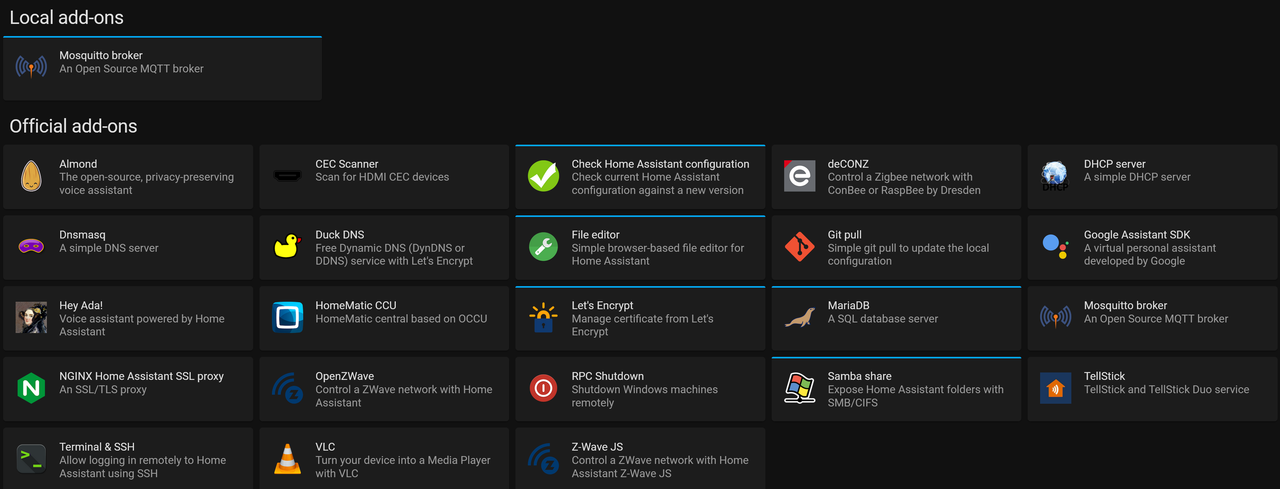
good afternoon to all. I am having trouble displaying several addons on the add-on store i am only displaying 26. I am trying to add node red to HA . Have the github repository https://github.com/hassio-addons/repository. but still can not get several of the add-on to display. Can some help
thanks
fiery prism
Which ones are missing?
supple viper
looking for node-red
but in the github page i see a lot that are not showing like addguard, aircast, airsonos just to mention a few
i am running on RPI

 sly kindle
That's the problem then
supple viper
do you know how to add the even if i adding the github link on the addo repositories
sly kindle
is the repo listed when you click on the 3 dots in the upper right corner and then "repositories"
If it is in the list, reload the add-on store from those same 3 dots

and then if it is still not visible, do a hard refresh of the page
ctrl + shift + r
supple viper
ok, i have done the 3 dots let me do the restart
ctrl + shift + r. Did the trick thanks
why did it not work before, I restarted HA?
sly kindle
whenever you seem to be missing something that you think should be visible, spam that same key combo first
there are often cache issues
supple viper
i will do that Thank you very much
sly kindle
And it's the easiest to rule out, as long as you remember to do it
supple viper
i am starting to play whit node red so i just learn something new thanks again
 novel birch
Hi, can someone help me with tellstick config
I'm trying to add device with protocol: sartano, model: elro and ther is code: option - when added I'm getting info like:
"Failed to save add-on configuration, does not match regular expression."
viscid orchid
~share your addon config
dense spadeBOT
Please use https://paste.ubuntu.com/ to share code or logs. Please don't use Pastebin, since it can randomly add spaces to the main view.
Command '~share' was invoked by: RobC
novel birch
  - id: 3
    name: lampka Tii
    protocol: sartano
    model: elro
    code: '1000001000'
this part is working fine:
  - id: 2
    name: salon galeria
    protocol: arctech
    model: codeswitch
    house: B
    unit: '12'
but documentation is linking to this post
https://developer.telldus.com/wiki/TellStick_conf
and there they showing that protocol with code -strange
viscid orchid
yeah, I see that
novel birch
without quotes is the same
viscid orchid
just guessing based on the error about a regular expression
novel birch
🙂 I always have such a sh1tty issues 😄
and now how to's
I found in docs this
Option: devices.code (optional)
A number series based on ones and zeroes often used for dip-switch based devices.
but how to use it in configuration
lilac jacinth
vestal sail
Wondering why pihole was removed in favor of adguard from the add-on store
Adguard home is just better overall
novel birch
viscid orchid
just guessing based on the error about a regular expression
Ok, got it when protocol: sartano there is no need to add model: elro, just
  - id: 3
    name: lampka Tii
    protocol: sartano
    code: '1000001000'
 modern niche
During the next WTH, I'm going to ask for an iperf server addon.
fiery prism
You're assuming there is going to be one...
viscid orchid
WTH is the next WTH
 winged cliff
I'm having a bit of trouble finding what I want in the add-ons. I'm not even sure the add-ons are the area I want it from? I have HA-OS installed, and it's in a pi machine that has a display attached to it. I want the display to be rendering the local home assistant portal, so I can change lights, etc, from a touch screen on the wall with the PI in it. ... am I going about this all the wrong way?
Google has been ... less than helpful with search terms such as "Home Assistant Kiosk" pointing to Fire Tablets or iPads, and Home Assistant X Window nothing that seemed correct.
fiery prism
winged cliff
I'm having a bit of trouble finding what I want in the add-ons. I'm not even sur...
Yes you are. There is no way to do this using Home Assistant OS. You need an installation that has an OS that supports a desktop environment. Supervised, Container, or Core.
winged cliff
fiery prism
Yes you are. There is no way to do this using Home Assistant OS. You need an ins...
Awesome, thank you for that direction. I can work with that!
 dreamy stream
Hi all, any feedback on the Tor add-on for remote access to HA? Vs DuckDNS or Nabu Casa.
dreamy stream
Can you put the .onion address into the external URL for use on the ipad?
thick ibex
nextcloud addon says: Fail to upload snapshot to nextcloud (HTTPError: Response code 413 (Request Entity Too Large)) ! stuff like client_max_body_size 2M i have changed
 vast arch
hassos 2018.8.8, mariadb addon. I've been noticing this message every 30 seconds, exactly, for a few days now. Not sure when it started because due to the nature of hassos the home=assistant.log file get clobbered every restart.
Traceback (most recent call last):
File "/usr/local/lib/python3.9/site-packages/sqlalchemy/engine/base.py", line 1865, in _safe_close_cursor
cursor.close()
File "/usr/local/lib/python3.9/site-packages/MySQLdb/cursors.py", line 83, in close
while self.nextset():
File "/usr/local/lib/python3.9/site-packages/MySQLdb/cursors.py", line 137, in nextset
nr = db.next_result()
MySQLdb._exceptions.ProgrammingError: (1064, "You have an error in your SQL syntax; check the manual that corresponds to your MariaDB server version for the right syntax to use near 'LIMIT 1' at line 1")```
The part that's especially curious. aside from the every 30 seconds like clockwork, is the "...syntax to use near 'LIMIT 1'". I don't have any SQL queries in any of my automations/templates/entities so I have no idea where this is coming from. I enabled `debug` level logging for `sqlalchemy.pool.impl.QueuePool` but wasn't helpful. Not sure how to proceed with determining the source of this query. fleet heron
Hi everyone, I'm getting ugly clicks in sound with the Spotify add-on. The system audio log says: D: [alsa-sink-USB Audio] sink.c: alsa_output.usb-SABAJ_AUDIO_Sabaj_A3_AMP-00.analog-stereo: Found underrun 9654 bytes ago (16794 bytes ahead in playback buffer). This is the latest stable version of everything, on a Raspberry 4 and an external USB amp.
Hah
I'll try using an USB 2 port...
Nope, clicks again
Ok, looks more like a supervisor thing
 soft iris
I am facing a problem while installing numpy in appdaemon. Can you help me?
No module named 'numpy.core._multiarray_umath'
This is the error
 analog surge
hello guys, I have a problem with my HA, the devices are constantly turning on and off from the mqtt server, it's not due to the WIFI but something with the server, as practically all devices do that... any tips ? I already deleted the mosquito and installed it again and it remains the same...
fast rampart
Anything interesting in the logs? (either the MQTT addon logs or the home assistant logs)
analog surge
fast rampart
Anything interesting in the logs? (either the MQTT addon logs or the home assist...
1629972471: New client connected from 192.168.0.238 as projetorgaragem (p2, c1, k30, u'admin').
1629972501: Socket error on client projetortraseiras, disconnecting.
fast rampart
analog surge
1629972471: New client connected from 192.168.0.238 as projetorgaragem (p2, c1, ...
so it looks like 30 seconds after connecting, it disconnects on a socket error. Are you connecting the client on the correct port? There's multiple options (websocket, ssl, no ssl, etc.) so you could try one of the other MQTT ports available.
analog surge
fast rampart
so it looks like 30 seconds after connecting, it disconnects on a socket error. ...
I use the default port 1883
fast rampart
analog surge
I use the default port 1883
If your device supports websockets, try 1884 on the device. have you checked if it's trying to use SSL or not?
analog surge
fast rampart
If your device supports websockets, try 1884 on the device. have you checked if ...
but it worked a long time with this configuration what is the reason for failing now?
charred rose
I need some help with Nginx. Specifically using the Acme.sh to update .TXT records on EasyDNS for Let's Encrypt. I have searched and searched and found many articles on Let's Encrypt, Nginx. But nothing that I can use to understand or figure out how to get Let's Encrypt do the DNS Challenge with EasyDNS.
 burnt mountain
Not sure if this is the right group but I wa working on setting up ha with the wireguard integration. I have the server set up but I need to find the ssl file with the qr code to set up my peer. How do you normally view files on a Raspberry pi notably the qr code to set up the peer?
I am running it on a headless Raspberry pi
burnt mountain
I have file editor in my ha instance... Added and configured wireguard but when I go into file editor there is not ssl folder with the file for the qr code
viscid orchid
Go up in the directory tree
 pastel tangle
assuming you have enforce_basepath: false otherwise it won't let out of of /config
I think it's true by default
but could be wrong
burnt mountain
That's right I cannot get out of config
pastel tangle
then just change the setting and restart it
viscid orchid
Indeed
burnt mountain
I am sorry but I don't know where you are talkong
pastel tangle
the configuration page of the addon
burnt mountain
OK I am in config and do not see add on
pastel tangle
Supervisor --> File Editor --> Configuration
burnt mountain
Doh OK got it thank you
thick ibex
are there appdaemon dashboard layoutfiles shared somewhere?
viscid orchid
You may get more help here: https://discord.gg/G3MA9uTt
 upper hemlock
Hi Guys.
Am i stupid or is the Homematic CCU addon an absolute mess?
vocal juniper
Influxdb. I am currently using all the "autogen" stuff. I have a plugin for getting all sorts of stuff from ESXi ... this sensor is reporting me all storts of stuff: sensor.esxi_datastore_datastore1 in the attribute section name: datastore1 type: vmfs free_space_gb: 65.87 total_space_gb: 110.25 connected_hosts: 1 virtual_machines: 2 unit_of_measurement: Free (GB) friendly_name: ESXi datastore datastore1 any idea how I can get these to influxdb/grafana?
I just need to click the field name in grafana 🙂
weary stratus
for the ssh host, what is the expected value?
viscid orchid
For..what?
weary stratus
in the ssh add-on. there is a value labeled as "host". what is expected to go there
weary stratus
https://imgur.com/a/umriylq <-- this thing
 raven nest
Has anyone successfully been able to forward IP (subnets) using the Tailscale community addon?
viscid orchid
weary stratus
https://imgur.com/a/umriylq <-- this thing
It’s says it’s the port number
weary stratus
what would the username be for it then?
weary stratus
i did but dont see anything about what im asking
viscid orchid
It’s a username. Mine is rcoleman. You can use that, but it would be weird
Which addon are you talking about?
weary stratus
the ssh one .-. also i ctrl+c ctrl+v the pass but https://imgur.com/a/vPR5cSG
viscid orchid
There are two
weary stratus
Terminal & SSH
viscid orchid
root, then
viscid orchid
The other one lets you specify a username, hence my confusion
weary stratus
i only saw the one
 full garnet
is it possible to set a custom netbios name in the samba share extension?
My goal is to be able to do \\homeassistant in explorer
sly kindle
@full garnet is that your current hostname?

works fine here, but I've changed mine
what is your hostname at the supervisor > system > host card?
full garnet
It's homeassistant
but I can't connect with it
I can only connect with the ip
it works, homeassistant needed to be in caps for some reason
full garnet
I didn't add my local ipv6 range to allow_hosts, which was causing the addon to deny my connections (which I only saw when turning on compatibility mode for some reason). I don't know why it worked with caps before, i guess thats just windows things.
anyways, it works now :)
 wooden gate
hello i'm trying to change ip adress of a camera added tru motioneye
but in the gui is not possible do they store the stuff somewhere else?
 latent drift
wooden gate
hello i'm trying to change ip adress of a camera added tru motioneye
but in the ...
latent drift
wooden gate
hello i'm trying to change ip adress of a camera added tru motioneye
but in the ...
motionEye stores camera ip/ports in netcam_url parameter in a series of files named camera-N.conf (N is the camera number) in its configuration directory.
It is editable neither in the motionEye UI, nor via HomeAssistant.
So you'll need to either manually find/edit that file, or delete and re-add the camera.
fickle scaffold
esphome is not showing my esp32 connected via cable, can anyone help?
 austere oyster
Hey,
i am using Grafana but from time to time, i cant see the graphes in my lovelance, only after i open grafana and go back to my lovelance dashboard.
Looks like some sort of right-Problem. Is there an "show graphes anonymus" ?
Thanks
storm crest
fickle scaffold
esphome is not showing my esp32 connected via cable, can anyone help?
probably you need to flash if for the first time using usb from your pc. After that you can do it with wifi
 sinful cloak
Is it possible to install add-ons manually into the containerized version?
soft nimbus
anyone using room-assistant?
 river temple
Hello. I have been looking at adding ac remote function to my hass. I currently have hardcoded mqtt commands to use ac remote function but those are not quite dynamic
I have been reading about climate and hvac documentation of hass
I am using universal remote with tasmota to control my ac
I think i should explain in integration
viscid orchid
Yeah, this doesn’t sound like an addon
river temple
Yep sorry just found that on the documentation
 hard tapir
ipv6
viscid orchid
No
fiery prism
sinful cloak
Is it possible to install add-ons manually into the containerized version?
No, you go to Docker Hub and look for an equivalent.
 digital grotto
austere oyster
Hey,
i am using Grafana but from time to time, i cant see the graphes in my love...
digital grotto
austere oyster
Hey,
i am using Grafana but from time to time, i cant see the graphes in my love...
you have to allow anonymous access to grafana
`env_vars:
- name: GF_AUTH_ANONYMOUS_ENABLED
value: 'true'`
and there was some setting in the grafana ui to be changed which i cannot remember
or maybe not? 😄
but yeah anonymous access is what you need, try googling it maybe 🙂
https://community.home-assistant.io/t/tutorial-to-fix-401-unauthorised-error-with-grafana-for-mobile-devices/242622 i used this guide to get it working 🙂
 drifting charm
Hi all, I'm having an issue with the Grocy add-on and SSL. I believe the nginx reverse proxy configuration in the current addon isn't suitable for web-browsers.
Is there a way to change such an nginx file within a pre-built addon? Any way to access the docker command line for that container to be able to cp the nginx config out, tweak to change cipher and then cp it back in...?
 jolly pier
I maybe found a race condition if you want to call it that.
 quartz sedge
hi there.. i have some trouble updating some addons like deCONZ, NGINX and DuckDNS.. when it pops up i press "update" than it displays a message saying "core_NAME OF THE ADD ON" and stops there..
sly kindle
@dusty granite there's #node-red-archived channel for that
 dusty granite
Oh, I missed that, ill delete it
 wet jungle
Hello, I'm having an issue with home assistant and the Tasmota add on. I added a switch running Tasmota 9.5 and when I select the device and turn it on and off via home assistant it also turns off another switch
It seems like the switches are synced
but if I go into the web front end for the switches I can turn them on or off without affecting the other switch
feels like a MQTT issue but I have no idea where to start
austere elm
Hi folks, how does one view add-ons logs?
viscid orchid
in the tab in the addon called "Log"
austere elm
Thanks @viscid orchid. Okay, and, to view the container logs that the add on is running in? Is that the supervisor log?
latent drift
Is there any way for a user to navigate to a "sub-page" of an add-on directly? i.e. I want to visit "/foo/bar" on my addon, /<addon_slug>_<addon_name>/foo/bar does not do what I might have expected.
 burnt inlet
I've been using the Unifi addon for a couple of weeks now, version 1.0.0. It seems that it's ignoring the max memory usage (default is 1 gb) and it keeps using more and more until I restart the addon. Anybody else having the same problem? I've now set the max memory usage manually to 1.5 gb to test if that works...
timber sparrow
This might be because i dont know anything about docker. But can someone tell me how to access the OTAU folder in the deCONZ addon when im not using Docker? My HA runs on a rpi4.
Or just point me in the right direction because everything i google seems to relate to running it in Docker
sly kindle
@timber sparrow you are using docker if you are running home Assistant OS, but this is handled for you
Why do you need to do with OTAU?
timber sparrow
I want to upload the Hue firmware files
sly kindle
Probably better off asking in the deconz discord
timber sparrow
Okay thanks
sly kindle
 tawny geode
Hi everyone. I'm having trouble logging into home assistant after intalling the duckdns add on. I can access home assistant externally but when I try to log in it says unable to connect. Logging in on the app or mobile browser works and logging in locally with https works too. Its only logging in externally on desktop. Any ideas?
Ok this seems to be an issue only in safari on mac
 wicked vessel
Hi, anyone using Frigate NVR with Reolink RLC-410 cameras?
 mental juniper
Hi, has anybody tried the option ipv6 with URL to update the ipv6 address in DuckDns?
 oblique nimbus
Hi, does anyone have ReefAngel running on home assistant?
Also, does anyone have a TMT wifi camera running on home assistant?
mild glade
hi! does anyone have unifi-controller addon running with config.gateway.json additions?
dense spadeBOT
@latent wren posted a code wall, it is moved here --> https://hastebin.com/miricidiwi
 latent wren
Hi, HassBot thought my post is a code....
https://hastebin.com/miricidiwi
sly kindle
@latent wren anything over 15 lines is "code"
or a wall
it should really say "posted too much"
latent wren
Hi, I have installed Motion Eye twice:
first) as MotionEye-OS on other RasperryPi
second) as addon in my HomeAsstiant Installation
In the MotionEye-OS I can connect to a network drive (Synolgoy NAS).
in de HA-Addon, with the same credentials and settings, I can?t:
" Accesing network drive failed: count mount network drive"
any idea why this works only in the MotionEye-OS Configuration?
motionEye Version|0.42.1| // |Motion Version|4.3.2| //|OS Version|Linux 5.10.17-v7l|
PS. First I?ve installed Motion Eye on the seperate Raspi. now I want it integrate in my HA-Confiugraiotn as add-on
 tiny forge
Trying to add a new Schlage BE469ZP Lock with Zwavejs2mqtt. My lock is included but as Security = None and Manufacturer = Unknown. I have the latest updates.
latent wren
Add-On MotionEye:
After trying to change debug_level in configuration, I can't start MotionEye anymore :(, get Bad Gateway
Logs: https://hastebin.com/onefekupow.yaml
Does I have to reInstall the add-on?
 noble axle
I was wondering if it's possible to detect the door's open/closed status with frigate (or any other way). I have a camera pointed at the door and want to see if there's a way to analyze part of the picture to see if the door is open or closed.
 echo saddle
Can someone please take a look and help to find what's causing error in Supervisor regarding this (custom) add-on? https://github.com/weetmuts/wmbusmeters/tree/master/ha-addon
Except that message, add-on is working fine... ```
21-08-31 13:19:11 WARNING (MainThread) [supervisor.store.data] Can't read /data/addons/git/cada3e3b/.circleci/config.yml: Invalid Add-on config!. Got ordereddict([('version', 2), ('jobs', ordereddict([('amd64', ordereddict([('machine', ordereddict([('enabled', True)])), ('steps', ['checkout', ordereddict([('run', ordereddict([('command', 'if [[ ! $CIRCLE_BRANCH ]]\nthen\n DOCKER_TAG=release-$CIRCLE_TAG\nelse\n DOCKER_TAG=latest\nfi\nsudo docker login --username=$DOCKERHUB_USER --password=$DOCKERHUB_PASS\nsudo docker build --pull -t $DOCKERHUB_REPO:$DOCKER_TAG-amd64 -f docker/Dockerfile .\nsudo docker push $DOCKERHUB_REPO:$DOCKER_TAG-amd6...
 dark yoke
It looks for files named config.[yml|yaml|json] and asumes those are addon configuration files
So it think you have multiple add-ons
echo saddle
It could have been situation like that (as I was changeing repos for testing), but now in HA (and in add-on store with all listed repos) I have only 1 visible
is it possible there's other registry/list that's not visible in UI?
 void imp
Is there a way to allow non-admin users to see a particular add-on in the sidebar?
Edit: found an FR for it on the community forum. I guess not right now
echo saddle
I've checked using ha supervisor info there's only 1 occurance of this addon and 1 repo with it
maybe it's something within the file
(as this addon is quite new)
 prime widget
hi All, am I able to get some help with the tailscale addon? i'm not able to use the subnet routing.. it says ip forwarding isn't enabled
 last nebula
does anyone know how to get the letsencrypt addon to use tls-alpn-01 challenge instead of the http-01 challenge? My ISP blocks port 80 but I totally have 443 open.
 dim fog
You might be able to start it up and jump into the container to make necessary changes, temporarily at least
dim fog
last nebula
does anyone know how to get the letsencrypt addon to use tls-alpn-01 challenge i...
looks like 443 should work
 minor crypt
Is there anyone that could point me to a guide on how to install addons without supervisor? I have my homeassistant running on a raspberrypi4 in a docker container.
viscid orchid
you don't. addons require the supervisor
minor crypt
viscid orchid
you don't. addons require the supervisor
Is this possible to do on a rpi4 in a docker container, preferably with a simple docker-compose file? So that i can still use duckdns etc.
viscid orchid
no, addons require the supervisor
and you can't add supervisor to a non-supervised installation
I see you have exactly the same conversation going on in the other server, so let's just keep it there
dense spadeBOT
@worthy moss posted a code wall, it is moved here --> https://hastebin.com/edatedozot
 worthy moss
Hi,
Not sure why the Bot thought that was code.
I used this Everything Smart Home walkthrough https://youtu.be/AK5E2T5tWyM and other documentation to set up DuckDNS and LetsEncrypt on my RPi HA instance. It works using the DuckDNS domain from inside and outside my network. This is great, but now I am trying to set up DuckDNS to use an alias so that I can use my personal domain name.
I am having trouble getting it to work. After reading several simlar issues, I have exausted what I can find on web.
Is anyone able to use this feature succesfully. Any guidance you can throw my way?
dense spadeBOT
Rule #6: Please do not post codewalls (text longer than 15 lines) - use sites such as https://paste.ubuntu.com/ (just not Pastebin).
Please take the time now to review all of the rules and references in #rules.
Command '~codewall' was invoked by: RobC
worthy moss
Sorry. I forgot the line limit. I was trying to be thorough with information.
 strange storm
How do i downgrade an add-on to an older version? After updating my UniFi Controller to 1.0.0 it stopped working. 😦 (Edit: Never mind, looks like it is fixed by uninstalling and reinstalling the addon...)
viscid orchid
yes, that's to accommodate a change in the database
in the future, downgrading an addon can only be done by restore that addon from a backup
 rough cedar
wicked vessel
Hi, anyone using Frigate NVR with Reolink RLC-410 cameras?
rough cedar
wicked vessel
Hi, anyone using Frigate NVR with Reolink RLC-410 cameras?
Yes, I do
wicked vessel
rough cedar
Yes, I do
Cool, I actually got it working with rtmp stream. Now I'm trying to get the Frigate Notification to work, for some reason it doesn't trigger at all.
rough cedar
I use this blueprint: https://community.home-assistant.io/t/frigate-mobile-app-notifications/311091
wicked vessel
That's the one I'm using, and Im 95% sure I did the settings correct
But I might be missing something
rough cedar
Do you have telegram installed on your phone and connected to your home assistant?
 lavish ginkgo
Does anyone have recommendations for Hue hub emulation software for zigbee2mqtt? Looking to get hue sync back from when I converted from the hue hub.
noble axle
Hi, I have a stop sign in my garage that I am trying to detect. Sometimes, in frigate's web UI, I can see a blue box around the stop sign showing above 80% probability when the door is moving. However, it isn't ultimately detected. I am using a mask to only monitor the top right corner. Is there a way to fix this?
Specs:
system: rPi 4, camera: 1920x1080
Photos: https://imgur.com/a/yHplu0t
 rigid forge
morning all
Anybody present with detailed knowledge of Grocy Add-on? I would like some advice on how to clean up possible duplicate barcodes from the grocy-add on. As of now, the add-on will not start because of this.
 thick oar
Hi All, is anyone able to help me trouble shoot why my samba share is not working any more? I restored a snapshot and now my networked drives don't work.. using a Rpi 4 and windows 10
I can however get access via my android phone
 halcyon saffron
anyone migrated a influx db from addon to external db? Mine is getting pretty big soautomatic backups are getting rather large...
 restive lily
does anyone know if there is an addon that would allow me to connect and rtl-sdr radio directly to usb on my home assistant server and be able to get radio messages for power/gas usage into home assistant?
fiery prism
restive lily
does anyone know if there is an addon that would allow me to connect and rtl-sdr...
restive lily
sorry, I should have report back. I found this one: https://github.com/jdeath/RTLAMR2MQQT that works. Still trying to figure out why my daily meter isn't counting up but the meter value itself is working
and my daily/monthly meters are working as well now
finally worth that $40 I spent
 old cliff
Hi HA Family. Been gone a bit. Back now. This is about SSL, Duckdns and the HA App (iOS)
I've installed both lets encrypt and duckdns add-ons
I've configured and started successfully (it didn't error out) the duckdns add-on
I'm not sure if I need to also use/start the let's encrypt add on, but I can't seem to figure it out.
The docs don't include any information that duckdns is a supported DNS provider, so any variable names needed seem to need to be 'guessed'?
Even if it was, it's configuration (let's encrypt" is asking for the keyfile location, but I don't know where that might be.
Oh, when I add the domain (with subd from duck) to the HA app, it says its invalid
What am I missing? Thanks
 quick trench
you need the domain name of your ddns account, you don't need letencrypt because it's built into the ddns addon
old cliff
I populated the domain both in the duckdns addon and in my app, but the app reports invalid
the error is that the certificate is invalid
is there a port or something I need to add to the url when setting it up for the mobile app? All duckdns is doing, it seems, is routing the domain to my external IP address, which I can do without it. What then routes it to my HA installation?
docs ask for 'http' lines in configuration.yaml and they aren't added there automatically. When I add them myself, general configuration fails also
sly kindle
@old cliff when you add them and restart, you can only access using https://
And yes you'll need port forwarding
443 to 8123
old cliff
@sly kindle that's what I thought too. And tried both http and https
old cliff
well... that's a little cryptic too
if I add an "external" url to the app, I can no longer add a internal url
and the external url is what fails
old cliff
when I add the https://local.homassistant:8123 it runs fine
I can run everything fine except adding it to the app. I'm already there
old cliff
no
old cliff
sly kindle
And what do the duckdns addon logs say about the certificate?
old cliff
there is no port forwarding instructions in either the duck nor the lets encrypt docs
old cliff
yeah, I dumped that but it might have hinted to the forwarding part, is why I mentioned it
sly kindle
You need to forward a port
sly kindle
You should be looking at the logs on the add-on page not the home assistant
You don't want KO
You want OK
old cliff
["status"]    "invalid"
["error","type"]    "urn:ietf:params:acme:error:unauthorized"
["error","detail"]    "Incorrect TXT record \"\" found at _acme-challenge.XXXXXXXXX.duckdns.org"
["error","status"]    403
["error"]    {"type":"urn:ietf:params:acme:error:unauthorized","detail":"Incorrect TXT record \"\" found at _acme-challenge.XXXXXXXXX.duckdns.org","status":403}
["url"]    "https://acme-v02.api.letsencrypt.org/acme/chall-v3/ERASED/ERASED"
["token"]    "XXXXXXXXX"
["validated"] "2021-09-03T13:48:42Z")```no idea what the problem is 😦
yea, I was on the addon logs. still 30 lines.
sly kindle
Share your addon config?
old cliff
  accept_terms: true
  certfile: fullchain.pem
  keyfile: privkey.pem
token: XXXXX
domains:
  - XXXXX.duckdns.org
aliases: []
seconds: 300
Restart the addon and watch the logs again
old cliff
but it seems if port forwarding is required than there is no sense fighting this until I figure out how that gets done
same logs - roughly 30 lines
they don;'t populate while I'm watching the page
page stays blank until refresh or nav away and back
old cliff
so the KO is about line 10 and the last 3 lines suggest validated maybe
but navigation via a browser still fails not-private
gimme a min to clean and I'll share the entire log result
sly kindle
The certificate is never going to be valid for the local address
And for the duckdns address it will be valid but you won't be able to use it until you forward the port
old cliff
I'm not navigating to the local addr
sly kindle
You don't have any other choice right now until you forward the port
https://your_local_ip:8123
You'll see a warning in the browser. That's normal
old cliff
not sure why I need that local_ip:port thing. I am accessing it fine locally using the homeassistant.local:8123 route
no warning
sly kindle
That's just a friendly name for the same thing. That's the local address
old cliff
but it sounds like there will be no way to test that the duck dns stuff or the cert stuff is working until I get a port forwarded - that sound right?
sly kindle
@old cliff uninstall the addon and then reinstall it
here's what you want to see in the logs https://i.imgur.com/HzxQbyJ.png

 tulip oriole
has anyone had an issue where the broadlink rm pro doesnt work in alexa theuser defined devices dont show up?
old cliff
@sly kindle and this is before any concern with port forwarding, right?
sly kindle
port forwarding would be the last thing to do, and that is only so you can actually reach your duckdns address from outside
sly kindle
getting the certificate doesn't require port forwarding
because you are using dns challenge method
old cliff
ok - done. Same log
I restarted HA after uninstalling also
trying again. duckdns has now provide me with a totally different token than before.
that seems to have worked.
I don't know why that happened. when I first added the domain it provided me a token, which I copied carefully.
Now at the top of my domain list, there is a token that doesn't resemble the other at all.
that one works, so far
thanks for the help thus far. Sorry it seems to have been a waste of effort
old cliff
A while back there was a snapshot to google drive add-on. Anyone know where to get that, if it's still available? If not, what are people doing to back up configs? thx!
rigid forge
Looking for a grocy expert...anybody around?
old cliff
@viscid orchid Thanks! Dunno why I didn't just do that, but I guess I figured I had to get it from inside HA or something. 😦
dense spadeBOT
@tame quail posted a code wall, it is moved here --> https://hastebin.com/oluzekunis
 tame quail
Hi, I try to update any node package from manage-palette of the node-red plugin 10.0.0 but I keep getting this error with all packages.
What can I do ?
logs here 😉 -> https://hastebin.com/oluzekunis
 somber siren
WireGuard
I've been running the WireGuard supervisor add-on for a couple months. I recently started experiencing issues with packet loss while connected through the VPN.
I've rebuilt the tunnels but every time I start the VPN, the endpoint settings disappear and I lose all connection. As soon as I stop the VPN, the endpoint repopulates as it should. I can not edit this info.
Any suggestions?
tame quail
tame quail
Hi, I try to update any node package from manage-palette of the node-red plugin ...
ok I removed all config and the issue was the node-red-contrib-dns plugin
weary stratus
Is there an issue with the jupyterlab addon? I get git errors all the time… I don’t understand what I misunderstood but I just want to create some notebooks and look at my data.
 thorn hinge
for the airplay add-on is it capable of starting the device? Turning it on etc? I'm trying to get it to start up my shield when I cast to it but not sure I'm missing something
nvm it just started working
of course
maybe a timeout or something
 scenic crescent
AdGuard issues , running AdGuard for a long time already on HA. My router gives the IP for HA as the DNS server via DHCP to my clients. Works fine, sometimes our connection suddenly stops and I get DNS error. I could fix it and give the clients a secondary DNS but then the internal DNS rewrites won't work. I can't access HA anymore, not even via the IP adres, so I suspect something is stalling inside HA.
I have to restart HA to get it working again. Mostly okay, sometimes I need to give a secondary DNS to HA (since HA uses itself as the DNS server, which I think is the problem..)
Any ideas? Possible to overwrite the DHCP dns server that HA gets from my router?
 smoky parrot
Hi - are the snapshots created with a google drive addon just a zip file containing all the files and folders in the HA /config folder? If I was to create a zip file containing the same manually is it likely i could restore it with this addon to a fresh HAOS install?
scenic crescent
@smoky parrot yes, the gdrive addon is the same snapshot as the snapshots from HAOS
 tough delta
Trying to renew my letsencrypt certificate using my custom domain using the addon, but it is saying port 80 already in use and won't start. Using the add on RP4. This worked without issue for the first like 3 times renewing months ago but now something is using port 80. Yes, have nginx, yes port 80 says "disabled".
21-09-04 09:12:04 ERROR (SyncWorker_3) [supervisor.docker] Can't start addon_core_letsencrypt: 500 Server Error for [...] start: Internal Server Error ("driver failed programming external connectivity on endpoint addon_core_letsencrypt (<logid>): Error starting userland proxy: listen tcp4 0.0.0.0:80: bind: address already in use")
How can I figure out what is using it. The error message provides no assistance unfortunately.
tough delta
scenic crescent
<@!758436864704774185> yes, the gdrive addon is the same snapshot as the snapsho...
He was saying just manually zipping things, not using the HAOS Backup/snapshot. Is the backup just zipping files or does it do more? I would think it does more than just zip things up, but could be wrong...
viscid orchid
They’re tar files containing a bunch of gzipped tar files + a JSON file describing the contents.
 buoyant barn
I can no longer connect to my samba share, logs show its up and running but I time out connecting to it
 white bison
Esphome tries to resolve a xxx.local address. However it can't be resolved. Why? should I add an entry in the hosts file? where? Can I hardcode the ip-address in the xxx.yaml file? How? Because Esphome can't resolve the ip address the device is stated as 'offline' . I can read the output of the webserver when I enter the ip-address in a webbrowser. The device is a DSMR P1 meter.
shell bolt
Hello. I am trying to setup NUT but having possible driver issue. Logs do not show a failure but say data is stale. How can I list the installed devices on the CLI ? Hardware command scrolls a list but there is no pagination |more
 hardy void
Hi guys, I want to debug some mqtt issue. in the past I could subscribe to a topic from the lovelace gui but I cant find it anymore
 amber epoch
@hardy void its under Configuration -> Integrations -> mqtt -> configure
hardy void
Thanks!
 obsidian hull
hello friends
i have successfully installed adguard and it seems to be working nicely
only issue i have is i cant access my home assistant anymore
😆
i have https enabled in hass
if i manually specify google dns on my computer i get access again, so its something with adguard but im not sure whats causing it
digital grotto
can you access it via the ip?
obsidian hull
ill test
now it seems to work
i didnt change anything yet
just enabled adguard again after disabling it
🤔
well
digital grotto
you are using homeassistant.local probably? thats a mdns adress which should not rely on standard dns
digital grotto
still what address are you using to access it?
obsidian hull
the same external one
digital grotto
ah ok
could always check the request log of adguard to see whats happening when it doesnt work
obsidian hull
i did, nothing abnormal
digital grotto
interesting
 warped tulip
Hi Trying to install Hacs and getting this
ystem information
IPv4 addresses for enp0s20f0u2: 192.168.4.188/22
IPv6 addresses for enp0s20f0u2: fd17:2791:c1:1:b566:f549:9ff3:930e/64, fe80::c022:df5f:fc3:9328/64
IPv4 addresses for wlp2s0:
connected.
HTTP request sent, awaiting response... OS Version: Home Assistant OS 6.3
Home Assistant Core: 2021.9.3
Home Assistant URL: http://homeassistant.local:8123
Observer URL: http://homeassistant.local:4357
503 Service Temporarily Unavailable
2021-09-05 17:56:24 ERROR 503: Service Temporarily Unavailable.
 wooden echo
Hi all, hoping somebody can help me here. I've been trying to get a more reliable database up & running since my sqllite was corrupted everytime I restore a snapshot and I don't want to lose my statistics (for energy management comparison purposes).
So I setup mariadb to work with homeassistant. Unfortunately after a couple of days I restarted the mariadb addon. When I did this I started to get the following error in home assistant:
Logger: homeassistant.components.recorder
".....This Session's transaction has been rolled back due to a previous exception during flush. To begin a new transaction with this Session, first issue Session.rollback()...."
I already googled the hell out of it and have even followed up with a tip to completely truncate all of the tables in the homeassistant db using phpmyadmin. When I cleared all the tables the error went away but it came back after an hour or so.
I don't want to reinstall mariadb because I use the nginx proxy manager and cannot afford to lose the data there.
Does anyone have any tips for me please? Ironically I just want to have a stable database.. that seems to be an impossible chore.
Everytime I restart home assistant it's coming back with these error messages.
 graceful marlin
Hi, was just wondering about the new UniFi Controller update.... i guess its no use having it while i'm running HA in a Raspberry 4B right?
Or is there some other way to make it run the new update despite that anyone knows about?
I mean, everyone want to run the latest update right? 🙂
viscid orchid
You haven’t said what’s wrong, but the solution is probably uninstalling and reinstalling the addon
graceful marlin
Ahh sorry, the new Unifi update stops support for 32 bit OS/Hardware and will only support 64 bit... since i'm running a Raspberry 4B i have 32 bit version of HA so i cant install the newest 1.0 update for Unifi Controller
graceful marlin
i've read that you cant install 64 bit version of HA on a Raspberry 4..... maybe i just misread something 🧐 😅
viscid orchid
That is incorrect
graceful marlin
I have no ide where i got that from 😂
Thanks for correcting me 😋
 fierce osprey
Any good add ons that could help me monitor my home network health? My Google WiFi has no logging so I wanted to have some kind of historical record using home Assistant
 pure flame
hey folks! just stumbled over the home assistant tor addon - i have adguard and wireguard already installed (ads filtered on home network, and external access via mobile phone is also possible and filtered).
but now i'd love to have this traffic routed to the tor network.
is that possible with the tor addon?
 sly sorrel
Hello everyone. Is there a add on for some type of ip plan
viscid orchid
What is an ‘ip plan’?
sly sorrel
Basically a site where you can plan out up addresses for hosts. One option is gestioip
 meager quartz
Good morning to anyone where it's the morning 😁 i have an issue with mosquitto add-on, i can see that anonymous: true is no longer supported since 6.0, is it possible to re-enable this on my system? and if so how? i just moved from venv to supervised, and was previously using mosquitto installed on host system, but now want to have it all integrated but i have so many mqtt devices that aren't using user/pass
weary stratus
Hello Everyone, i have a problem with the modbus integration after the last update. i get duplicat addresses, but i need the duplicate addresses. i use it for my thermostat. if for example register 1914 is 2 then i need input register 1901 for current temp and 1901 for target temp, but if register 1914 is 7 then i need 1901 for current temp and 1902 for target temp. But 2 time 1901 is not allowed anymore. what can i do to fix this?
 wet silo
i have HA installed on bare metal NUC x86-64 and i have a docker run command, and i cant for the life of me figure out where to input it, i have tried the ssh addon and the portainer. anyone able to tell me where to run this command to add another docker container addon that isnt in hacs?
 manic vault
Anybody come across this message.....
"The client and server don't support a common SSL protocol version or cipher suite."
I'm getting when trying to start TasmoAdmin. Its been working fine for ages and now I can't start it, I have deleted duckdns and reinstalled it, incase it was an ssl key error but that hasn't worked...I've also cleared the browser cache but nothing gives
sly kindle
@wet silo ther aren't any addons in hacs
To use docker commands you want the SSH & Web Terminal add-on
with protection mode off
 unkempt wedge
having some issues with the MQTT broker addon. I'm able to get the add on going, but i cant seem to pub/sub anything to / from it. I see device connected messages but not seeing anything else. Any thoughts ?
 rough garnet
Hey, possibly something really obvious, however I'd like to be able to specify different zones to have different colors (this is using the LIFX integration on NodeRed), is this possible in 1 call service node? If so, what would be the formatting? Thanks!
Currently I have it set like this in different nodes for each color
"zones":["0", "1"],
"color_name":"red",
"brightness":255
}``` vestal crescent
Can someone help me with the unifi controller add-on? I've tried accessing it for the first time in awhile but it refuses to log. There is nothing in the unifi log that shows anything wrong but the supervisor logs show this.
21-09-07 21:12:31 WARNING (MainThread) [supervisor.addons.options] Option 'certfile' does not exist in the schema for UniFi Controller (a0d7b954_unifi)
21-09-07 21:12:31 WARNING (MainThread) [supervisor.addons.options] Option 'keyfile' does not exist in the schema for UniFi Controller (a0d7b954_unifi)``` dim solstice
just installed adGuard on home assistant, internal ip 10.0.0.25, put that as dns ip in my orbi setup, but I have no internet :/ what am I doing wrong?
dim solstice
zyxel T-50 in DMZ so all traffic is send to orbi, and the orbi has the dns set to 10.0.0.25
 hard cobalt
When I disable SSL for an add-on is it unencrypted even if I have SSL on for the whole home assistant?
sly kindle
Are you going through HA to reach it?
hard cobalt
Yes. Only forwarding port 8123.
sly kindle
Then you are good
hard cobalt
Nice! Thanks!
 jolly vector
Hi. I need help
I have problem with telegram.
Because telegram web is blocked in our country
Expert guide me to solve it to divert HA traffic from other country using addons vpn
Please guide me ,which addon i should use
 dusk jungle
Sooo any luck with the H.265 streaming option for newer 4k cameras? (hopefully this is the right channel)
wet silo
sly kindle
To use `docker` commands you want the SSH & Web Terminal add-on
i tried that but when i typed docker it said it isn't available
sly kindle
There are two ssh add-ons. Look at the name
viscid orchid
You’d need to read the next sentence too
sly kindle
If yours doesn't have a protection mode option it's not the right one
wet silo
sly kindle
If yours doesn't have a protection mode option it's not the right one
so not Terminal & SSH? as it doesn't have a protection config tag
sly kindle
You answered your own question
The name of that add-on does not match the name of the one I mentioned
wet silo
sly kindle
You answered your own question
so where do i find this other version, it isn't under community addons or add on store
sly kindle
It is indeed in the community add-ons
wet silo
well looks like i am blind and impatient, thank you i will look into this
sly kindle
 sly kindle
@jolly vector zerotier one, wireguard, or tailscale...I don't know which would better help with telegram
jolly vector
I think its for remote access.
Is it able to change country location ?
Because telegram is blocked in our country
sly kindle
maybe go with a different notification integration?
sly kindle
@faint berry anything you find on this page https://www.home-assistant.io/integrations/ is an integration, not an add-on. Add-ons are templated docker containers which offer various additional servers/services
That said, we've got an #energy-archived channel
 faint berry
sly kindle
<@!476062573066846238> anything you find on this page <https://www.home-assistan...
faint berry
sly kindle
<@!476062573066846238> anything you find on this page <https://www.home-assistan...
thanks
sly kindle
Probably the best place for this question, assuming you don't have a problem with the integration and HA
 odd belfry
Hi all. When I upgrade past my current core 2021.8.8 my iOS add on fails to start and none of my phone sensors work. Does anyone have any suggestions on where to start looking? I’ve rolled back 2021.8.8 and the log there doesn’t show any issues other than samba being broken.
odd belfry
The app on the phone works. But the iOS integration in HACs no longer starts in homeassistant. From the phone, In homeassistant, anything from my phone shows as an error.
odd belfry
Sorry, my bad. It is not HACs. It is the configuration —> integration. The iOS integration does not finish loading and all references to sensor.iphone show as unavailable. Prior to update of core it works perfectly. After upgrade of core past 2021.8.8 it fails.
sly kindle
@odd belfry I would check in #ios_and_mac-archived
Have you removed it from integrations?
And then re-added it
odd belfry
Thanks @sly kindle Yes, I tried removing it, along with all entries in Lovelace interface. Then restart and re-add. Same result. It never finishes startup
@sly kindle My system has been built over several years and likely has deprecated stuff still in there. I am considering starting from scratch and adding everything back. But that will be a HUGE job.
sly kindle
Yeah check in that channel just in case. Power users and devs of the iOS app might know something
The mobile integration seems ok for my Android on the latest version. I don't see anything wrong with the iOS devices but I'd have to ask family when they're around
odd belfry
@sly kindle Thanks. Will try the other forum.
 night bluff
Afternoon all - Anyone know of any issues with DuckDNS right now?
https://pastebin.com/SMKk1NfS
It seems to be having issues with the DNS-01 challenge validation???
Config: https://pastebin.com/wHxRDmiM
It USED to work - and now it doesn't....
I was using LetsEncrypt on it's own, but I got tired of having to switch Ports 80/443 to the HASS R-Pi for it to work, and DuckDNS didn't require any ports open to work.
But now it's NOT working (DNS-01 challenge failing) and seems to be failing back to the HTTP-01 challenge which requires ports open which I don't HAVE open...
Needless to say - this became apparent because my normal external web access STOPPED working because the SSL cert had expired!
 peak lance
Having issues with the Remote Backup addon
It wored flawlessly for months but stopped working some time ago.
The private key is in the ssl folder and i can ssh to the destination without issues ssh -i id_rsa_unraid root@192.168.37.5
The config looks like this
https://paste.mtrhd.net/ParleGrangers
last nebula
Ok got a question about lets encrypt addon. Is there a way to change the challenge from http-01 to the TLS-APLN-01? My ISP blocks port 80 but port 443 is open.
last nebula
A while back I was able to forward port 80 to port 8100 and then change the config in the letsencrypt addon to forward 80 from the container to 8100 and it worked. Now it nolonger works
 lilac fractal
How can I enable the WatchDog feature on my own Supervisor Add-on?
I tried reading this page https://developers.home-assistant.io/docs/add-ons/configuration/, tried adding ingress , watchdog and ports in the config.json and added Express inside my addon, listening to port 8089 and endpoint POST /health. All I was able to do, was to enable the Show in sidebar feature, which I don't want/need for this addon, but I'd like my addon to restart automatically in case it crashes..
dark yoke
You should only do that while debugging
You need to enable advanced mode to see that option
lilac fractal
Did you answer to me? I have Advanced mode enabled. I do see the "Watchdog" for the other add-ons, but I'd like to have it enabled for my add-on as well. Now I'm not even seeing the switch on the info page -> what should I do to get it there?
For what it's worth, here's my config.json https://pastebin.com/9NVxat96
lilac fractal
nvm, it was the startup: once that I had to change to startup: application
 rotund wharf
Hello
I'm trying to connect on Tasmoadmin but I've got some trouble :
https://xxx.xxx.xxx.xxx:9541/start , I've got a message with this error: ERR_SSL_VERSION_OR_CIPHER_MISMATCH.
This is new, because a month ago tasmoadmin works fine , I checked my logs, thats, clean. an idea?
thanks
night bluff
did anyone have any clue as to my earlier question regarding DuckDNS not working properly?
 azure agate
Has anyone had third party add-ons simply disappear on them?
azure agate
I figured it out
weirdly enough a restart fixed it
then added this to the repository in the supervisor
night bluff
happy someone is getting a win 🙂
azure agate
night bluff
happy someone is getting a win 🙂
I'm a noob or I would help you out
might even give some troubleshooting a try later, but I need sleep
 zenith glen
Hello ! I am new to HA and just installed on proxmox as a VM . I am able to connect to front end and installed addon SambaShare to ssh to the server , I am getting error as
waiting for connections
my_name_register_failed: Failed to register my name HOMEASSISTANT<20> on subnet 192.168.50.100.
standard_fail_register: Failed to register/refresh name HOMEASSISTANT<20> on subnet 192.168.50.100```can someone help me what can be wrong here , the username by default is homeassistant and I gave the pwd I set for it
 young shoal
Not sure if this is the right channel, but does anyone know why bluriris nvr addon would be connecting, but not adding devices or entities?
viscid orchid
Is it an addon?
young shoal
yea, i reinstalled on debian and restored my backup and it stopped working..
 wintry vessel
I'm getting an lsb-release error with motioneye. Anyone ever seen this before?
sly kindle
@young shoal where's the repository for this addon?
young shoal
sly kindle
<@652535080656568361> where's the repository for this addon?
Sorry didn’t follow up it was a hacs repo. Turns out the update for it broke it. I rollback fixed it up. Thanks!
sly kindle
Yeah, nothing in HACs are addons. Those are "integrations"
young shoal
yea i realized shorty after I posted..
 next geode
Hello! Can someone help me figure out why I can't connect to my Samba Share add-on? From the log, it looks like I successfully log into it from my computer (Windows 10), but then my computer says that Windows cannot access the location because the network path was not found.
check_ntlm_password: authentication for user [homeassistant] -> [homeassistant] -> [homeassistant] succeeded
Processing section "[config]"
Processing section "[addons]"
Processing section "[ssl]"
Processing section "[share]"
Processing section "[backup]"
Processing section "[media]"
 trail mason
hey all. no idea where to ask, so I'll ask here.
I have an app which I want to "integrate" into home assistant. It relies on a database however, so it's usually ran with docker compose and seperate containers. Is this possible with addons, or can it only be a single container
sly kindle
@trail mason There are already a few add-ons which require mariadb
nginx proxy manager is one, bookstack is another
trail mason
thnx, ill look at them
night bluff
night bluff
I was using LetsEncrypt on it's own, but I got tired of having to switch Ports 8...
Solution for those who are having similar problems and do a search : https://github.com/home-assistant/addons/issues/1331#issuecomment-780495261
 spring carbon
i dont know my credentials for motion eye anymore how do i reset them?
i have removed the add-on and reinstalled it but it keeps the credentials somewhere saved
 idle condor
How do I get a secure connection to my addons ESP Home. When I go to ESP home and ADD NODE it reports limited functionality?
I am operating HA OS in a VM on Ubuntu20.04 machine
spring carbon
its not a very clean way but i made a snapshot off motion eye edited the file in the snapshot and loaded it back in.
weary stratus
I have troubles getting the sensors in my companion app working with a NGIX reverse proxy setup (core_nginx_proxy). I managed to make my homeassistant accessible from the internet through nginx reverse proxy in the browser and i can connect with the app as well, both from outside of the home wifi and within the home wifi (different adresses, without/with nginx). The UI in the app is working as expected and I can switch on and off things and see updates. However sensors from the phone (e.g. proximity sensor) are only updated on the server when I am in the home wifi (no SSL, no NGINX), not when i am on mobile data. I also tested to expose port 8123 to the internet (non encrypted, not using NGINX) which works as well, but obviously not ok for long term. I use the default configuration for nginx as it comes with the add_on (https://github.com/home-assistant/addons/blob/master/nginx_proxy/data/nginx.conf) which should have websocket forwarding already activated, but i suspect that something in the NGINX configuration is not working as required. Any advice what to check next?
(p.s. i also asked for help yesterday in the app channel: #android-archived message but after testing the global access with the app without nginx and ssl i am rather sure that this is caused by some problem in my nginx setup)
modern niche
Anyone know if an add-on exists that allows for the creation/storing of backups onto Remote Storage (i.e. NFS, CIFS, etc.). I'm aware of the Google Drive add-on but I'd rather keep my data away from "the cloud"
trail mason
is it possible to reach an addon which uses ingress, when home assistant is shut down (as in home assistant core, not hassos)?
also, why doesn't home assistant use any swap space?
Doing basically anything on a pi 3b+ is impossible, because it runs out of memory
 mental harbor
Can anyone give me any suggestions to setting the drive for MotionEye Addon to use a mounted disk? I tried using a symlink but it's giving me errors. Setting a root directory just sets the directory within the hassio drive.
viscid orchid
trail mason
is it possible to reach an addon which uses ingress, when home assistant is shut...
I don’t think so. It needs to use HA for authentication and routing
 rancid marsh
Has anyone experience with deCONZ addon? I need to edit the general.xml but cant find it on the filesystem. Where does HA store addon files? Thanks in advanced
 spice lava
Hello.
For Terminal and SSH I'm trying to add my key but I get an error:
Failed to save add-on configuration, Invalid list for option 'authorized_keys' in Terminal & SSH (core_ssh). Got {'authorized_keys': 'ssh-rsa (REDACTED MY PUBLIC KEY)', 'apks': [], 'password': '', 'server': {'tcp_forwarding': False}}
tried without quotes, single quotes, and double quotes.
 jaunty jasper
Im trying to run a shell command via hassio.addon_stdin passing it to core_ssh addon. It seems to accept it and doesnt generate an error, but at the same time the command is not running and tehres nothing in logs. Am I using this wrong?
data:
addon: core_ssh
input: "touch /config/FOO"``` fathom plaza
Hi ! Do you know where i can find a tutorial on ZeroTier for a beginner ? ( in french if possible)
he has a raspberry Pi with Hass.io and he has some difficulty understanding the GitHub of ZeroTier.... Thank you
 mild ember
Did some poking around but didnt find anything thought I check. Is there a logitech media server add-on (official or not) for Hass?
 ornate sapphire
I'm hoping for some help with using my own domain name with duckdns. I'm getting the following error when lets encrypt is validating the alias host I set up. https://pastebin.com/Mq1mj47H
@jade wing you mentioned that I should use it directly, and not via duckdns, I was before, as I was manually using Lets Encrypt to authenticate via port 80..
 jade wing
DNS problem: NXDOMAIN looking up TXT for _acme-challenge.my.domain.ca is a thing you probably want to look into though - is the add-on creating/updating that?