#add-ons-archived
1 messages · Page 48 of 1
 fresh jacinth
 weak bay
Can you use HA secrets in addons?
 sly kindle
@weak bay yes
weak bay
I have password: !secret password but when saving the config it puts quotes around the line
sly kindle
yeah
weak bay
I think its still borked. Windows might be trying to use credentials that i did not explicitly tell it to save.
Its "currently mapped" but I cant see it in explorer
Found it removed it. Tried using the new credentials but windows says mapped. Cant even find it using net use
Im trying to set up the samba addon. should it be?: Folder: \\x.x.x.x\config
Seems to be I needed to log out of my windows account. So its solved now.
 empty bluff
If I'm running HA on a Pi4, is it possible to run InfluxDB + Grafana on an always on Windows 7 machine on the same network? I'd like the data, but I'm concerned about the performance of the Pi.
 green pine
Guys, any idea how to add timestamp to a notification message?? im using:
data_template:
message: 'The washing machine finished at {{ states.sensor.time.state }}. Move the laundry over!'
title: "Laundry Done"
but get no time in the notification when it comes through
 viscid orchid
It should work. Further discussion in #integrations-archived , and please specify the service you’re using
 covert arch
If I'm running HA on a Pi4, is it possible to run InfluxDB + Grafana on an always on Windows 7 machine on the same network? I'd like the data, but I'm concerned about the performance of the Pi.
@empty bluff grafana is perfectly fine when run on the pi, its more about influxdb which works better on x86 as you mentioned. yes, this is possible
 summer snow
So, my HACS is without add-ons, I suppose it's because I'm running HA in docker on ubuntu server. Can I install ESPHome and how? Not very experienced on the latter.
 cunning wolf
Also, if you chose an installation method that doesn't include the Supervisor, you don't have addons.
summer snow
Ok, is there a way around it, or a way I can integrate ESPHome without supervisor?
summer snow
Although it's saying my install is supervised
https://imgur.com/a/ZDkiFFG
cunning wolf
If you read Ludeeus' links, you'll see that you don't need an add-on to use ESPHome devices. They 'just work'.
The add-on is to manage the config/updates of the devices... but honestly, I'd recommend doing that from a real computer, not from your HA host.
 dark yoke
Although it's saying my install is supervised
https://imgur.com/a/ZDkiFFG
@summer snow Then just install the add-on
cunning wolf
If you want to go the route of connecting your ESP devices to your server and compiling on there every time you need to make a change.
After the initial setup, you can do OTA updates anyway, meaning it's often easier to just do it from your main computer.
summer snow
@dark yoke I would but... https://imgur.com/a/8wRttu1
cunning wolf
Do you have advanced mode enabled?
summer snow
I'll have a go on the links Ludeeus provided
cunning wolf
Well what's your goal? Just to get your ESPHome devices talking to HA? Or to do all management from your HA instance?
dark yoke
You are missing the repository that has it https://github.com/hassio-addons/repository
cunning wolf
Then you don't need the addon at all.
From the ESPHome docs: https://esphome.io/components/api.html
If you add that to your config for the device, it'll just talk to HA.
summer snow
You are missing the repository that has it
https://github.com/hassio-addons/repository
@dark yoke Alright, thank you, I have them added now
@cunning wolf thank you, I have all the information I need now
"atleast" for now 🙂
empty bluff
Thanks, @covert arch I’ll do some digging.
 mild ember
anyone have a proper entry for stab for the samba add on? Im able to mount the share but when I try to save from vscode it says I dont have permissions.
 marble vale
Hi all.
Is this the right place to ask about the OpenZWave addon?
Looking for a way to change the resolution it opens embedded in Ingress
viscid orchid
I don't think you can. You'd be better off using the desktop ozw-admin app anyway
marble vale
Thanks for the tip, works great
I don't think you can. You'd be better off using the desktop ozw-admin app anyway
@viscid orchid
 tired swift
I keep getting this error in my log:
MySQLdb._exceptions.IntegrityError: (1452, 'Cannot add or update a child row: a foreign key constraint fails (`homeassistant`.`states`, CONSTRAINT `states_ibfk_2` FOREIGN KEY (`old_state_id`) REFERENCES `states` (`state_id`))')
And a larger copy of the log in the HA GUI: https://pastebin.com/YVwvSnmr
I have removed and reinstalled MariaDB three separate times now in just over a week. It's okay for about a day and then starts dumping this in the log
I think it is the source of my HA being really unreliable, often taking a few seconds to turn on the lights which used to be almost instantaneously. I have no idea what more to do than keep reinstalling the addon. Any pointers?
viscid orchid
if you're using an SD card, that could be going bad. I've never seen that error with the MariaDB addon
viscid orchid
SSD?
tired swift
Yeah sorry
viscid orchid
no idea, then
tired swift
shyte 😕
viscid orchid
I know there were a bunch of recorder: changes a few releases ago
tired swift
I made that file quite minimal, I thought it could be a misconfiguration in either the recorder or the history integrations so I basically emptied that out and reinstalled after that with no luck.
On the community it happed a few times too, with no clear answer on what to do about it
https://community.home-assistant.io/t/mariadb-how-to-delete-and-start-from-scratch/219253/8
https://community.home-assistant.io/t/mariadb-recorder-purge-foreign-key-errors/242302
viscid orchid
seems unlikely to be something that you caused
tired swift
Yes, whenever a purge is executed this will happen. I delete the whole DB and recreate everytime this happens. Hoping for a solution soon.
tired swift
That was my next step but I read I best check here first before raising an issue.
I see that last thread I linked is quite recent (as in a couple of hours) so that might be a lead.
Thanks for the listening ear RobC 😉 I'll try my luck there!
viscid orchid
could be. posting an issue on the forum and hoping for a solution soon isn't a strategy 🙂
tired swift
It's not the exact same error as I'm experiencing but it seems there's going on, there is an active issue on GitHub: https://github.com/home-assistant/core/issues/42402
I'll post my findings there too.
viscid orchid
ah, there was a discussion about a long-running purge issue here yesterday
tired swift
Hopefully more data will help some of the guys much smarter than me.
 dense spadeBOT
@frosty saddle posted a code wall, it is moved here --> https://paste.ubuntu.com/p/7pHDtvZkP5/
 frosty saddle
I'm struggling to make an esp32-cam work with the esphome add.on. I have flashed the esp with the bin using the espirif esp32-cam from the drop down in esphome. this makes a config like (see above)
but looking in the doc for esphome, under esp32-cam there is another configuration yaml https://esphome.io/components/esp32_camera.html
I'm unsure how to use them both ?
I've tried adding both after each other in the yaml of the cam in esphome, but that seems to not work
any help would be highly appreciated 😄
I'm a bit lost
tired swift
Maybe this helps @frosty saddle ?
lol @ that blog title, this is what it is about: A ESP32Cam/ESP8266 PIR driven HomeAssistant automation.
It has some example config that might help.
I think you need to combine both codes you linked. The first is just to run ESPhome on the board, the second is the actual config for the ESP32 camera component that needs to be added to the board
frosty saddle
Maybe this helps @frosty saddle ?
@tired swift Thanks, it actually looks like the config I'm using now. I must be doing it wrong 😄
I'll try a bit more and see what I get
[20:59:51][E][esp32_camera:093]: Setup Failed: ERROR
I still get this
not much to debug from there, only that one error @ 20:59:51:E
dense spadeBOT
@frosty saddle Rule #6: Spam will not be tolerated, including but not limited to: self-promotion, flooding, text walls (longer than 15 lines) and unapproved bots.
Please take the time now to review all of the rules and references in #rules.
Command '.rule6' was invoked by: mono
tired swift
Yeah that's not a whole lot. It's out of my ballpark too (I've maybe done two basic ESPhome boards). Might try the ESPHome https://discord.gg/KhAMKrd Discord?
cunning wolf
The bot already moved one of your codewalls. Don't do it again.
tired swift
Stay out of it @cunning wolf, I only pasted a link.... #shushbot
cunning wolf
Stay out of it? Rules are rules.
And if you scroll up a little and look at the context, you'll see the bot's command wasn't targeted at you.
cunning wolf
But while we're on the topic of bot commands and rules...
dense spadeBOT
@tired swift Rule #3: Do not insult, belittle, or abuse your fellow community members. Any reports of abuse will not be taken lightly and will lead to a ban.
Please take the time now to review all of the rules and references in #rules.
Command '.rule3' was invoked by: mono
tired swift
Touché. Lesson learned.
 versed notch
Hey guys, when trying to start Nginx Proxy Manager I get a: Port '443' is already in use by something else on the host.
I've been looking all around my Home assistant. Is there a way for me to figure out what uses this port?
dark yoke
NICE!
@sly kindle look at that error! 👆
as for finding out... any other proxy addon maybe?
docker ps might say something about it
versed notch
let me take a look
sly kindle
@versed notch what addons are you running?
versed notch
AdGuard Home - 53 (web interface disabled)
CEC Scanner -
Check Home Assistant (off)
Duck DNS
File editor
Let's Encrypt - 80 (off)
MariaDB (3306 disabled)
Nginx Proxy Manager - 443,80,81 (off, gives the said error)
SSH & Web Terminal - 22
Samba share - 139
sly kindle
did you set accept terms to false in duckdns?
dark yoke
That will not use 443, it uses DNS-01 challenge
sly kindle
oh right
versed notch
I've tried launching it with a couple of addons disabled
sly kindle
you're running HA OS or something else?
dark yoke
If those are all your add-ons, it's not an add-on that occupies it
versed notch
HA OS, correct
Yeah, that's why I'm so confused
When scanning the ports with an app called fing I see 53, 22, 8123 and 139 just fine
sly kindle
netstat -tulpn | grep LISTEN in the ssh addon terminal?
dense spadeBOT
@versed notch posted a code wall, it is moved here --> https://paste.ubuntu.com/p/fMnHyG7k8w/
versed notch
Line 8
Proto Recv-Q Send-Q Local Address           Foreign Address         State       PID/Program name
tcp        0      0 127.0.0.1:443           0.0.0.0:*               LISTEN      -
 steady star
I'm trying to set up the mariaDB addon for HA so that is uses that instead of SQLlite. So far I've installed the addon, set a password and started it. Will it automatically transfer existing data and start using it or does more need to be done?
cunning wolf
@steady star You need to update your recorder settings to point it at the DB of your choice.
dense spadeBOT
Command '.recorder' was invoked by: mono
versed notch
oh holy crap could it be node-red?
Cause I once installed that
It has come down to me using:
grep -wr -e '443' /*
I get quite the amount of results for node-red
But it's not installed anymore
/config/node-red/node_modules/url-parse/dist/url-parse.js:    return port !== 443;
/config/node-red/node_modules/requires-port/index.js:    return port !== 443;
/config/node-red/node_modules/requires-port/test.js:  it('does not require port 443 for https', function () {
/config/node-red/node_modules/requires-port/test.js:    assume(required('443', 'https')).false();
/config/node-red/node_modules/requires-port/test.js:    assume(required(443, 'https://www.google.com')).false();
@versed notch data does not get transferred. You'll start new history
@versed notch have you rebooted since uninstalling node-red?
versed notch
I should have
I just reinstalled it to take a look
Removed all the added things to the node-red palette. Removed all flows, etc, wiped all settings. Uninstalling it now. Rebooting as well
steady star
I've got the mariaDB addon installed and working. I wanted to take a look at the database with mysql workbench but when i try to connect using my RPi's IP and port 3306 it fails to connect
versed notch
Hmm, still Port '443' is already in use by something else on the host.
changing it to 444 works, but then the add-on doesn't seem to properly work
 hoary current
hey guys getting problem with MQTT mosquito and zigbee2mqtt
I keep getting authentication fail
1605044999: New connection from 172.30.33.1 on port 1883.
[ERROR] Auth error with test
1605045000: Socket error on client <unknown>, disconnecting.
despite I created a user test in the configuration of HA
and I didnt changed any configuration on the mosquitto addon
dense spadeBOT
@hoary current Please DO NOT cross post. Read the channel description, post it and wait for folks to respond.
Command '.crosspost' was invoked by: mono
cunning wolf
Which thing is failing to connect to MQTT? HA or z2m?
hoary current
z2m
and im at the version 1.16.1 of z2m
jeez its working now
I was not using the forked version
😦
versed notch
Does anyone have any idea what things could use up the 443 port?
 steady bobcat
Could be anything, really. Lots and lots and lots of things use 443
versed notch
I mentioned them earlier, but these are my current addons. I'm trying to get the Proxy Manager to work
AdGuard Home - 53 (web interface disabled)
CEC Scanner -
Check Home Assistant (off)
Duck DNS
File editor
Let's Encrypt - 80 (off)
MariaDB (3306 disabled)
Nginx Proxy Manager - 443,80,81 (off, gives the said error)
SSH & Web Terminal - 22
Samba share - 139
steady bobcat
Wait... what am I doing here? I thought I'd muted this channel. I'm leaving this for someone who uses add-ons.
versed notch
Weird flex
versed notch
Depends, I believe I'm running a basic setup
My guess is the configuration.yaml
I'm willing to just shut off parts of how I've set up my system in order to discover the source of my problem
steady bobcat
I'd say Let's Encrypt might be a suspect since that is all about SSL - which used port 443. But I don't know what the LE add-on itself is actually responsible for.
versed notch
It mainly operates on port80 once you turn it on
You can have it run and help you set up the SSL by just forwarding port 80
 stone owl
Hey. This is my first time here, so be kind :-)
I run the Tellstick add-on on a separate host so I need to publish ports 50800 and 50801 from the docker container to the host. When I do this via Portainer everything work fine until I restart the addon in Supervisor. Any suggestions on how to make the published ports stay published permanently?
dark yoke
If it's not in the add-on options, you cant
stone owl
Ok, thanks. Too bad, though. In configuration.yaml it is possible to put the name of the host but the addon does not publish the ports.
 balmy dagger
In Visual Studio Code, is there any way of displaying the current state for an entity_id? Or something similar, so you don';t have to keep switching back to the Developer Tools?
dark yoke
yes
 empty patio
Im having trouble with the homeassistant homematic add-on (https://github.com/home-assistant/hassio-addons/tree/master/homematic)
The documentation seems to be lacking. I have a HM-Mod-RPI-PCB Module installed on my pi, but i am not sure how to configure it for the add-on
Does anyone have any info on that?
 paper inlet
i installed a addon thru the supervisor, and I need to set a env var for this addon. where do i set this in this case?
viscid orchid
if it's not in the addon config or referenced in the documentation, then you can't
paper inlet
so i should just install the addon manually and have a process manager like pm2 ideally in that case?
thats how i did it once, but now went by installing th addon with the supervisor
viscid orchid
you could theoretically install an addon as a "local addon" and make changes to it
I'm not sure what you're describing there...
cunning wolf
If you're using an add-on, you have the config options the add-on's author chose to expose. If you don't like that, you run the same software yourself without Supervisor managing it.
 weary stratus
I need to deploy several Pis with HAOS, so I would like to configure as less as possible manually. Is it possible to configure e.g. the Mosquitto Broker AddOn via e.g. configuration.yaml or the WLAN settings without USB/SD and modify a file somewhere?
dark yoke
set up one, clone the SD card, they are now identical
versed notch
@sly kindle I've found the issue I think. It was Adguard, secretly using the 443
 ruby crater
Hey, using the DuckDNS addon - for some reason when I go to the https version of my duckdns domain, I get my HA instance as expected. However, for some reason the http version gives me my router home page.
How can I prevent the http page and force the https so people can't see my router crap from the internet? thanks! :)
Portforwarding 80external to 80internal fixed my issue :)
 lofty junco
@ruby crater the order of the router firewalll rules will screw you over, too. I had the same issue and knew for a fact that I had 80 and 443 forward to the internal reverse proxy. Turns out that UniFi like to play games and put their rules with higher precedence.
ruby crater
Oh goodie. Thanks I'll keep an eye out for that :)
mild ember
anyone hav a proper config for an fstab entry for the samba addon? Im able to save my config using other methods and different os but in linux when i mount from ftab I dont have write permissions
viscid orchid
Here's what I used:
//192.168.1.169/config /mnt/hassio/config cifs vers=3.0,user=xxx,pass=yyy,uid=1000,gid=1000,noauto,x-systemd.automount,x-systemd.mount-timeout=120,_netdev 0 0
I suspect that there are more options there than are necessary, but I was playing around with it
 bitter falcon
If I have my HA on a VM what is the best way to integrate Ada? Anyone have any experience? I was thinking a wifi speaker/mic but I'm not clear on making the connection
weary stratus
Hi, i have error 401 Unauthorized in "HOME PANEL" add-ons, any idea ? How can i resolve the problem, thanks for support ....
weary stratus
polux
 covert hare
Hello!
I'm trying to use secrets in zigbee2mqtt add-on
i'm doing as in the documentation but says it's invalid configuration, and cant figure it out >.<
user: '!secret mqtt_user'
password: '!secret mqtt_password'
cunning wolf
No quotes around it
cunning wolf
You normally just do some_key: !secret some_key_value
covert hare
IMPORTANT: Don't forget the quotes!
cunning wolf
Ah. Maybe different for add-ons then 😦
covert hare
even all my validators saying that my config file is valid
cunning wolf
Have you restarted HA since adding those secrets? Nothing will know about them until you do.
covert hare
of course it's been around for months now
only i'm migrating to another zigbee stick so i modify the config now
cunning wolf
Then I'm not sure. I just use the plaintext values in my config. They're not secrets that would help anyone - my MQTT server isn't accessible outside my home network.
 slim island
I have HA at home and I have 2 s20 with tasmota in a store, what is the best way to connect them, without having to place another HA? i was thinking for mqtt. it's possible?
sly kindle
@tight hare you want version 1.6.2 I believe
just run the install script again
or leave beta, update HACS, then join beta again
 tight hare
thanks
slim island
@sly kindle I have the mosquito addon, and I use the nabu cloud.
is there a way to interact like that or do I need something else?
Tuas
Thanks
viscid orchid
@tight hare This should be in #beta. Also, HACS isn’t an addon and doesn’t manage addons
tight hare
ok, will do, thanks
 tranquil warren
Hello. Is this a good place to ask if an integration exists? I would like to know if there is something that monitors for changes in a webpage. I am looking into the RSS feedparser integration for what I can, but some pages I would like to monitor do not support RSS at all, and I would like to be able to keep track of at least when the page was last updated.
cunning wolf
#integrations-archived have their own channel.
tranquil warren
thank you
 obtuse kernel
Has HACS stopped working for anyone else? My HACS still shows in the menu and all addons are inside it but all my dashboards are saying the custom integrations from HACS don't exist.
viscid orchid
HACS isn't an addon and doesn't manage addons
it sounds like you're talking about Lovelace plugins that you may have installed via HACS?
once you install it with HACS, HACS is completely out of the picture
if so, you want #frontend-archived
obtuse kernel
Yeah that's what I meant. Still, everything installed via HACS is not working. Only things done via HACS, nothing else
viscid orchid
 late vigil
My Go Control TBZ48 Thermostat shows up as an unknown device in openzwave. In the ZWave integration, I was able to update the manufacturer_specific.xml file to correct this issue. Is there a way I can do the same with OZW?
 fierce osprey
one of my first questions here was "can i control the motion detection schedule on my Ring camera from HA" -- and I've finally done it with the excellent Ring API add-on from tsightler
just wanted to share my appreciation 🙂
(the original problem was, the motion detection events from the Ring integration don't work unless Motion Alerts/Detection is ON for that camera. the workaround was to control the modes, and set certain cameras to no motion for one mode, and motion for another)
 frank wasp
Is there anything new about the deconz addon update? There's already a new stable version
 fair onyx
Hi, I'm using @raven tinsel bitwarden add on but I cannot create my account, when I click on "Register" and enter all my informations (email, password, etc..) when I click on the Submit button, it does nothing.
Does anyone has an idea ?
fair onyx
the register page : https://i.imgur.com/94NeURZ.png

 meager lake
Has anybody experienced any weirdness setting up home assistant in a LXC?
Like specifically phantom tty devices that make addons crash?
 sand portal
Hello, anyone here useing the Plejd plugin? I can't get it to work, if anyone could help me out it would be greatly appreciated.
[22:40:29] INFO: Starting the Plejd service...
[22:40:29] INFO: Verified permissions on startup script
[22:40:29] INFO: Executing startup script
[22:40:29] INFO: Wrote plejd.json
[22:40:29] INFO: Running add-on
starting Plejd add-on v. 0.4.7
plejd-api: login()
plejd-api: logging into Testsystem
error: unable to retrieve session token response: Error: Request failed with status code 403
(node:3297) UnhandledPromiseRejectionWarning: unable to retrieve session token response: Error: Request failed with status code 403
(node:3297) UnhandledPromiseRejectionWarning: Unhandled promise rejection. This error originated either by throwing inside of an async function without a catch block, or by rejecting a promise which was not handled with .catch(). (rejection id: 2)
(node:3297) [DEP0018] DeprecationWarning: Unhandled promise rejections are deprecated. In the future, promise rejections that are not handled will terminate the Node.js process with a non-zero exit code.
fair onyx
@raven tinsel Do you have any idea what's causing this issue (with BitWarden)?
 raven tinsel
no
fair onyx
uhmmm
After the installation I only have to go to myip:7277 and click on "Create an account" right ?
I only disabled ssl in the config but I don't think it would change anything
 rain wind
Hi can anyone help me with nginx proxy manager?
Im getting a SSL error handshake when trying to connect to my server (im on cloudflare)
rain wind
nvm port forwarding error
 fervent elbow
i just moved, so I had to do a fresh install on my Intel NUC. Prior to the move, I was able to set up port forwarding on my Comcast router and used DuckDNS to access HA remotely and do some light location-based automations. . . . Now I'm stuck at port-forwarding. I now have a Tenda AC23 router connected to a CenturyLink router. I've tried port forwarding on both routers. https://canyouseeme.org/ says my port 8123 is closed. netstat says my HA instance is "ESTABLISHED." Help
 hoary dome
I see on forum people user !secret in there files and then the password.
what is this doing? also does this work inside the Samba ADD-on?
dense spadeBOT
Rather than putting sensitive information (passwords, locations, etc) into your configuration, you can store them in secrets to make sharing easier.
Command '.secrets' was invoked by: mono
cunning wolf
@hoary dome ☝️
 nocturne grotto
copy pasting from zigbee
I'm running zigbee2mqtt in the supervisor, and when I click the webui, I get "Loading devices takes too long time" - something tells me its an internal routing/port issue, does this sound familiar to anyone?
weary stratus
Hi guys, I started today working for the first time in hassio. I wanted to add Samba share to my add ons. i cloned : https://github.com/home-assistant/hassio-addons but it displays the following:
20-11-14 13:22:26 ERROR (MainThread) [supervisor.utils.json] Can't read json from /data/addons/git/e724ce20/repository.json: [Errno 2] No such file or directory: '/data/addons/git/e724ce20/repository.json'
this is not my fault right? And maybe other options to clone samba share and duck dns?
sly kindle
@weary stratus you cloned? You didn't use the addon store to install samba?
weary stratus
Yes I cloned. I go to supervisor > add on store > manage add on repositories and added : https://github.com/home-assistant/hassio-addons. it said not a valid add-on repository. but adding for example https://github.com/jkeljo/hassio-addons is not a problem
sly kindle
If you're not seeing the core repository, which already has samba available, then you have other issues
I would reflash and start again
weary stratus
Okay i will try that, thank you !
 dark arrow
Maybe enabling advanced options in settings could help
I know that some of the addons are hidden until you switch that option
 cobalt ice
I don't get it, grafana started to crash different browsers on different computers. It loads half of the panels and then crashed. Restarted everything, still happened. Suddenly it worked again, then it happened again. No clue what's happening. Didn't change anything on grafana for months.
cunning wolf
When does it crash? As soon as you load the dashboard? After some hours? What are you doing when it crashes?
'it crashes' isn't useful for troubleshooting.
Also, you probably want to check the Grafana GitHub page for issues. If the add-on is working, it's not a HA issue. https://github.com/grafana/grafana/issues
fair onyx
Hello, I'm trying to access my HA instance with duckdns and with local url depending on my connected network (android app) and currently my https url with duckdns works fine outside the network and the "ip url" works in local network but I have to add an exception because the ssl cert. isn't for the ip but for the duckdns domain.
I've been told to create a reverse proxy to access the local url (ip) with https in the android app, however I have no clue how to do that.
Could someone help me ?
Thanks 🙂
cunning wolf
Start by installing the 'nginx proxy manager' addon and following the instructions it gives.
weary stratus
Hi All, suddely all my addons are giving me 401 unauthorized, anyone know what could be causing this as I have not got a clue ?
fair onyx
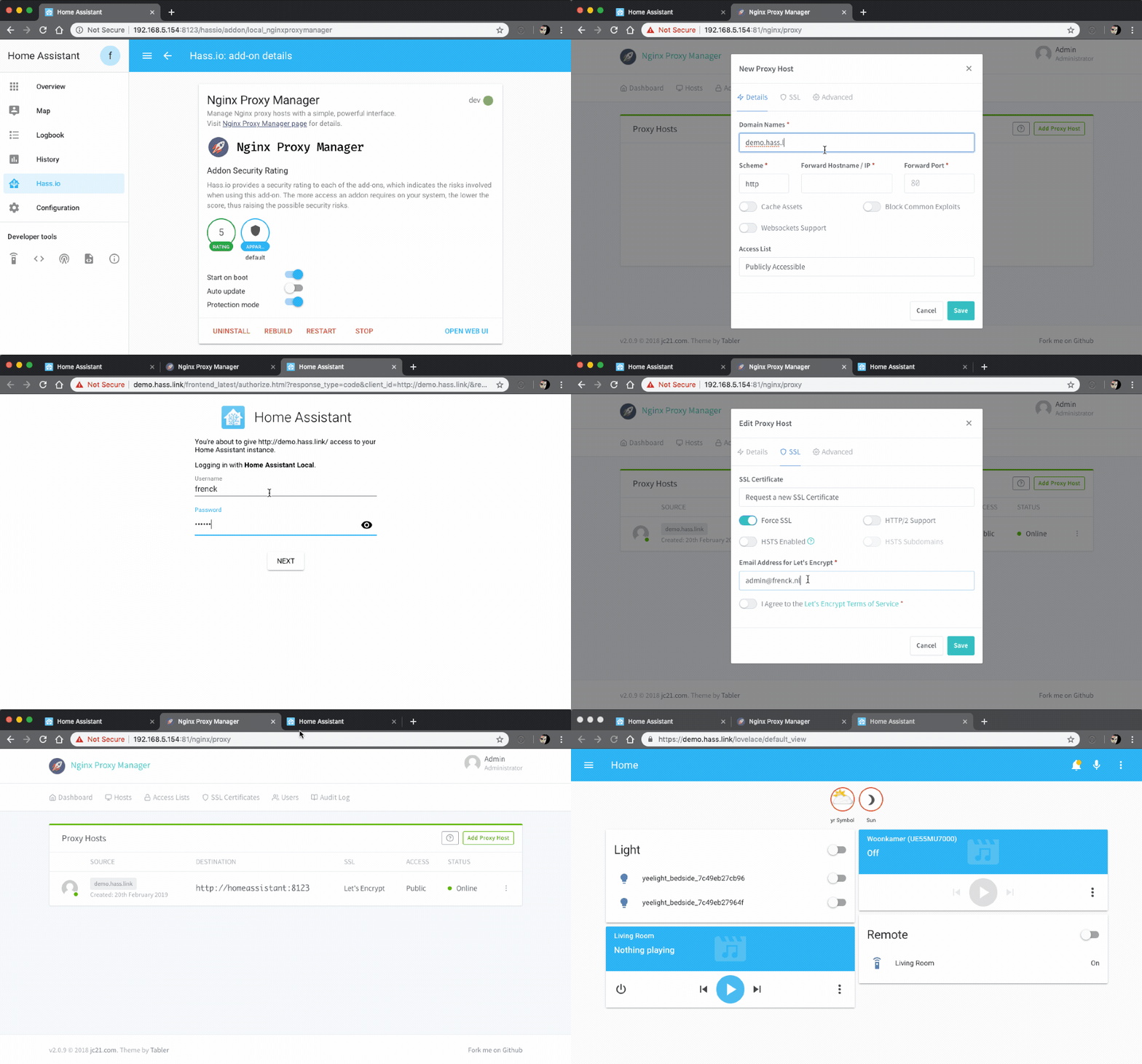
Okay, I installed the Nginx Proxy Manager and added a new host but when I try to access my host (internal.ha) firefox tells me "Unknown Host".
I forwared ports 80 and 443 to my home assistant IP.
fair onyx
I can see the congratulations page when entering my pi address -> https://i.imgur.com/qZ3PmDh.png
My hosts list -> https://i.imgur.com/OGbnjmh.png
When trying to access the host -> https://i.imgur.com/ajNeoWd.png


My ports forwarding -> https://i.imgur.com/ptK7XBS.png
 sly kindle
@fair onyx your server is still going to be at ip_address:8123
not sure what the internal.ha is about. What hostname do you see in the supervisor > system > Host card?
fair onyx
I tried to follow what was in the GIF below the addon description (https://raw.githubusercontent.com/hassio-addons/addon-nginx-proxy-manager/master/images/screenshot.gif)
And here's "Host System" content -> https://i.imgur.com/riq65TA.png
 dark arrow
How did you guys configure let's encrypt certs on HassOS. I've tried with Let's Encrypt Addon, added certs to configuration.yaml but everytime I've do that, home assistant does not even boot. (Probably because it couldn't find specified files) I've added next lines to config: http:
ssl_certificate: /ssl/fullchain.pem
ssl_key: /ssl/privkey.pem
but this does not work. Is some other way "the recommended way" of doing that?
sly kindle
@fair onyx "demo.hass.link" should be your domain
and your hostname is raspberrypi
so raspberrypi.local:8123
@dark arrow got a screenshot of your http config?
or, do you know that once you add those lines, you can only use https:// to connect?
and http:// won't work?
 fair onyx
@sly kindle so something like that ?
https://i.imgur.com/Gf4bFke.png

with my duckdns domain and the raspberrypi hostname ?
sly kindle
@dark arrow no you've got the paths right
fair onyx
Okay so again, everything works fine outside my local network
fair onyx
Well looks like everything works like a charm now.
Thanks a lot
cobalt ice
When does it crash? As soon as you load the dashboard? After some hours? What are you doing when it crashes?
@cunning wolf I edited my text before you replied but you probably already read it. 🙂 sorry for that.
ofc i checked github grafana page.
dark arrow
@dark arrow no you've got the paths right
@sly kindle but then port changes to 443 right? There is no more 8123 port? or am I wrong?
okej, nevermind. works with 8123 port but on https
sly kindle
@dark arrow if you're forwarding 443 to 8123 then you can leave the :8123 off the end of the domain
if you do 8123 to 8123 then you need it
cunning wolf
443 --> 8123 = bae
dark arrow
thanks, that works. It works outside of the network, it works on my computer when I enter the address as https//my.domain.com:8123, but when I do the same on home assistant app (android or ios) I get this error:
 distant bay
Hello, I would like to use mini-graph-card addon from HACS. I installed it from HACS. Restarted my HA. I added a new lovelace card and used type: custom:mini-graph-card, its says : "No card type configured."
cunning wolf
Cards aren't addons. Try in #frontend-archived
 hidden dock
Is there an add on for X10 in HassOs? Or some workaround like there is in venv?
viscid orchid
There’s a thread about it here: https://community.home-assistant.io/t/is-there-an-addon-for-heyu-x10/33625/32
Or you can just run your own container: https://github.com/kevineye/docker-heyu
 mellow ridge
Anyone solved this "cannot reconnect" popup with Visual Studio Code? Only seems to have started happening since I setup remote access and duckdns.
What's that site to share logs? I can't remember.
 glossy hearth
Hi everyone!
I'm trying to edit a ESPHome sensor yaml. That is from the HA ESP addon. Once I click 'save' at the bottom right, I get - 'An error has occurred saving mysensor.yaml'. Anybody ever got that problem and what could be causing it?
 calm yarrow
Hello pals! I am trying to use Assistant Relay BETA but Node keeps running out of memory when starting. Thoughts on how I should increase the max heap size when I'm installing this as an add-on in Home Assistant supervisor?
<--- JS stacktrace ---> FATAL ERROR: CALL_AND_RETRY_LAST Allocation failed - JavaScript heap out of memory Aborted (core dumped) npm ERR! code ELIFECYCLE npm ERR! errno 134 npm ERR! assistant-relay@4.0.0 dev: `babel-node server/index.js ` npm ERR! Exit status 134 npm ERR! npm ERR! Failed at the assistant-relay@4.0.0 dev script.
 manic fox
@glossy hearth have you checked whether the mysensor.yaml was correct - it should indicate in red x before saving. or maybe you are running out of storage. Do you know how to access the dockers? you could debug from there
glossy hearth
Hey! Thanks for the reply, no I’m just starting out with docker (and personally not very thrilled about it). The yaml file is correct. I have the File Editor add on installed as well - I can edit the config file for the node and then go back to ESPHome and upload and run it successfully. But if I try to edit it from within ESPHome I can’t save it
sly kindle
There's also an esphome discord. https://discord.gg/3fnbhDs
There is one docker.
There are multiple containers.
glossy hearth
I’m a member of that group but I think it’s a HA issue
I get how docker works, I’m just failing to see the point of it, but that’s a topic for another time 🙂
manic fox
the editing that you are doing in the esphome - is run within the container which is actually running esphome. so technically not a HA issue. checking the logs from that container should give you idea whats going wrong
glossy hearth
Aha! Ok. I’ll do that
sly kindle
Everything within the esphome container (and any add-on) is isolated
glossy hearth
But just to mention I am running the HA in a container.
manic fox
HA is running is a different container
glossy hearth
Oh I see. Thanks
sly kindle
Yes, All add-ons are containers
And HA is a container
The supervisor container ties them all together
glossy hearth
Gotcha. That gives me a starting point for some troubleshooting
manic fox
just do a docker ps | grep esphome this will give you some container id. docker logs -f <first couple of chars for container id>
glossy hearth
Thanks 🙏🏻. I’ll do that when I get back in front of the pc
 timid estuary
Hi all. After upgrading to the latest beta, the official MQTT addon fails to start. claiming that the port is used ("Port '8884' is already in use by something else on the host."). Tried going back to a week old snapshot - still the same. How can I figure out what is using the port and fix it?
manic fox
you may have another MQTT running which is using this port. change the port number to something else
timid estuary
I don't have any other mqtt running. It's the only one. And till today, it worked perfectly
manic fox
well the system does not lie 🙂 there is a program being run, do netstat -ap | grep 8884 to check. but iti will not be conclusive.
 sharp reef
I have a problem with the mqtt addon: HA, my devices and (for testing) mosquitto_sub can successfully connect to the mqtt addon.
However I don't see any messages with the addon.
If I switch to mosquitto on a different server, then I can successfully see the messages from the devices
manic fox
didn't understand what do you mean by "don't see any messages with the addon" are you checking the logs OR the topics?
sharp reef
topics
manic fox
are there any errors or disconnections in the MQTT logs?
sharp reef
no, just "new client connected from XXX.... as XXX (p2,c1,k06)"
and also "new connection from XXX"
manic fox
so the messages must be there, how are you checking? use the tool like MQTT explorer to check all the topics at one shot
sharp reef
I'm using mosquitto_sub on a linux machine
I'm running now mqtt explorer, but there isn't any topic there
manic fox
well - thats strange, just double check the config whether you have not given the other mqtt server info
sharp reef
i just ran wireshark: the device is publishing the data to the broker, and I'm getting a tcp ACK
it looks like it is just not forwarding the information to the clients
manic fox
in your integrations - is the Ip address of the MQTT same as the machine where \you are running?
sharp reef
it got autodiscovered in HA, but the devices and both clients (MQTT explorer and mosquitto_sub) are referring to the same IP (HA)
manic fox
so if you use manually put any random message in random topic from developer tools -> MQTT - does it show up in MQTT explorer
sharp reef
mqtt/publish -> service not found
but I've reinstalled the integration (with reboot) and now I'm getting at least $SYS as topic in the mqtt explorer
manic fox
ah sorry - didn't realize the option of the MQTT is removed from developer tools and now is in the MQTT integration itself - go to Integrations -> under MQTT click on "configure". form there you should be able to publish a package
sharp reef
ah sorry - didn't realize the option of the MQTT is removed from developer tools and now is in the MQTT integration itself - go to Integrations -> under MQTT click on "configure". form there you should be able to publish a package
@manic fox yeah did that. But it just says that it can't find the service mqtt/publish
manic fox
something wrong with you add-ons - uninstall and install again
sharp reef
same issue
device connected
mqtt explorer connected
mosquitto_sub connected
manic fox
hmmm. so using the external Mqtt as integration works fine?
sharp reef
didn't try it for the integration yet, but for the device and mosquitto_sub it is working yes
manic fox
can you not have the mosquitto_sub connected - just kill that program temporarily? just wanted to check, if thats introducing anything
sharp reef
I dont see any messages in mqtt broker
manic fox
so you have killed the mos_sub and restart the Mqtt add-on?
 fair lotus
Any idea if I can export a Deconz add-on to run in a separate container (outside of HA)? I'm using supervised HA in a VM and want to export my light control because HA frequently screws up on me and I don't want to lose control over all my lights in the future.
manic fox
restart of HA does not restart add-ons - unless you are saying that you rebooted the system
sharp reef
you are right, sorry my fault
but still not working.
I might have an idea.
I dont use any logins, but I've enabled anonymous connections.
According to the logs anonymous can only write, if there are logins available. Maybe the doc is wrong and anonymous can't ever write
manic fox
🤦♂️
change the MQTT config to true.
since it is controlled in HA domain - you don't have to supply any creds
sharp reef
yeah, but since i left "logins: []" I thought, that it is counted as "empty"
manic fox
so it works now?
sharp reef
restarting the addon right now. Had do install the smb addon to create the acl
manic fox
okay best of luck - go to go now
 vivid quarry
Hey guys, I'm trying to install "Assistant Relay for Hassio" from here https://github.com/Apipa169/Assistant-Relay-for-Hassio but when I try and add it to Repositories under Supervisor it says it's not a valid add-on repository. How am I already stuck at the very 1st installation step?
viscid orchid
adds fine for me
vivid quarry
this is for Home Assistant on a Pi4; is this not compatible? I get easily confused between all the different flavors of Home Assistant, Hassio, HA Core, etc. I have whatever the "easy" one was which I think is Home Assistant; where I wiped an SD card and downloaded an image and installed with etcher. No docker, no home assistant install onto an already existing raspberryOS either
viscid orchid
I don't think the platform has any impact on whether you can add the repo
you're using Home Assistant OS
vivid quarry
This is very weird. Like I don't know how I can be messing up going to Supervisor, then clicking the 3 dots in upper right corner, clicking Repositories, then copying pasting https://github.com/Apipa169/Assistant-Relay-for-Hassio into the popup window
viscid orchid
remove the leading https://
 surreal stirrup
Sorry to repost, I put this in #general-archived, was told to ask here:. I have been running Home Assistant for half a year or so for my alarm. All has been well. We are running on an Rpi, and have installed DuckDNS and NGinx per https://help.konnected.io/support/solutions/articles/32000023964-set-up-hass-io-with-secure-remote-access-using-duckdns-and-nginx-proxy?gclid=CjwKCAiA-f78BRBbEiwATKRRBLL6gzPz1XjTQ16gBgVlNh7w-HtzQaEmDWl2C2FVdcI2VXqLKnhiXBoCSx4QAvD_BwE
We are now on a trip, and halfway through the trip have lost remote connection, mostly.
i was able to confirm it is an expired certificate. Had been updating our renewing automatically prior. Neighbor rebooted it for me, no improvement. Family back home now, so I can walk wife through any attempt. So, how do I force a certificate renewal on this setup. Or what diagnostics can I walk her through remotely?
vivid quarry
@viscid orchid when I remove the leading https:// I get a different error
"expected a URL @ data['addons_repositories'][3]. Got 'github.com/Apipa169/Assistant-Relay-for-Hassio'"
viscid orchid
oh, sorry. paste exactly this: https://github.com/Apipa169/Assistant-Relay-for-Hassio
vivid quarry
back to where I was; Not a valid add-on repository.
vivid quarry
FWIW I haven't updated HACore from 0.117.5 to 0.117.6 yet, nor have I updated OS from 4.15 to 4.16. Maybe I'll try those first then retrying? Or should that have nothing to do with this
viscid orchid
shouldn't be related
look at the supervisor logs
I see this:
20-11-15 17:26:40 INFO (MainThread) [supervisor.store.git] Cloning add-on https://github.com/Apipa169/Assistant-Relay-for-Hassio repository
20-11-15 17:26:41 INFO (MainThread) [supervisor.store] Loading add-ons from store: 122 all - 2 new - 0 remove
20-11-15 17:27:19 INFO (MainThread) [supervisor.store.git] Removing custom add-on repository https://github.com/Apipa169/Assistant-Relay-for-Hassio
20-11-15 17:27:19 INFO (MainThread) [supervisor.store] Loading add-ons from store: 120 all - 0 new - 2 remove
if you're out of space, then it probably can't clone it
vivid quarry
are the supervisor logs the "Logs" under "Configuration"
vivid quarry
ok it's not disk space; I'm using 17%
oh what the hell, I returned back to the repositories page and now it's already sitting there as successfully added
shrugs
thanks for helping me muscle through this dumb thing; glad I got past step 1
viscid orchid
np, I understand that it can be frustrating
timid estuary
Back to my previous question about MQTT add-on that can't start. something is running and listening on the same port. Tried to figure our what it is: it seems it is th docker-init process. Anyone seen this before?
mellow ridge
Anyone solved this "cannot reconnect" popup with Visual Studio Code? Only seems to have started happening since I setup remote access and duckdns.
Visual Studio Code config -
packages: []
init_commands: []
viscid orchid
@timid estuary How did you install Home Assistant?
dense spadeBOT
Hass.io was the old name for the appliance like install option, that uses Docker. It is now simply called Home Assistant OS (see #330990055533576204).
Command '~hassio' was invoked by: RobC
viscid orchid
first
timid estuary
0.117.5
I have duckdns, file editor, influxdb, samba, ssh, zigbee2mqtt, google drive backup and tautuli
viscid orchid
and the Mosquitto addon log is what's telling you that something is already listening on that port (1883)?
timid estuary
The add on won't start. I can see the error on the supervisor log, or if I try to start the add-on manually, an error pops up
something is already listening on 8884 & 8883
viscid orchid
did you configure those ports into the addon?
timid estuary
I'm using the defaults. Just checked now, 1883 is also taken
viscid orchid
oh, I see. I didn't realize that it also listed on 8883/8884
did you install by flashing an image to the RPI?
timid estuary
originally yes, but that was months ago. It's a stable RPI install that run my home for the last year. I've tried to update to the latest beta, and the problem started. I restored a week old snapshot, but problems stayed.
viscid orchid
0.117.5 isn't a beta. So you rolled back?
viscid orchid
if the problem happened when you updated to the beta, which is weird, then I recommend posting to #beta
timid estuary
I'm not sure it was the reason, but that was the only things I've done. I'll do that. Thanks!
viscid orchid
you may also want to uninstall, reboot the Pi, and re-install the addon
hidden dock
Hey everyone. I'm running HassOS in a Windows VM and am trying to get HeyU operating. It appears to have built, but when I try to test it, I get a connection refused connecting to port 8080 failed. I'm assuming its either because I either have the wrong port mapped for the CM17a or there's some sort of port forwarding issue with VM. Any thoughts?
 coarse quest
I had trouble getting MariaDB to work on my setup. The instructions don't specify if I can use a new username that was not created as a user for Home Assistant. Should I have created a new user in Home Assistant and used that for MariaDB or should I be using my Home Assistant login info for MariaDB?
so far I am using my Home Assistant login info which is how I got it to work
sly kindle
@coarse quest it's whatever you set as "logins"in the addon config
and whatever is there should also be under "rights"
coarse quest
so it's normal to leave the username as homeassistant?
sly kindle
you can change the username 'homeassistant' to whatever you want
just make sure to use that in the rights as well, and in your recorder: config
I left it. But I don't know if that's normal
coarse quest
Ok, it's working with a new username and password. I'm not sure what I did wrong before because initially the only thing I changed was the password and I added that to the configuration.yaml after the 2nd reboot. Anyway I got it working and that's the important part.
ty
btw, what is the filename of the mariadb database and where is it stored?
late vigil
My Go Control TBZ48 Thermostat shows up as an unknown device in openzwave. In the ZWave integration, I was able to update the manufacturer_specific.xml file to correct this issue. Is there a way I can do the same with OZW?
 digital hawk
hi all... anyone online who could help me with question about HA File Editor in combination with Git?
Probably stupid question but I was messing around in File Editor -> Git option; a bit worried I somehow accidentally uploaded/pushed/commit my config file to Github which contains passwords. Did some checking: Do I understand correctly this would only be possible ifI would have added SSH key to File Editor config? (don't have that)
cunning wolf
You can push to GitHub using username/password too, not just SSH.
But if you haven't entered either, you probably haven't pushed there.
You can check by going to your repo on GitHub.
digital hawk
I don't have a Github account, but I thought it could also be done anonymously? (I have no Github experience).
(I feel like a newbie)
viscid orchid
not possible
digital hawk
ah ok! thanks for your help 🙂
cunning wolf
Automations are not add-ons. Nor are the RSS and Telegram integrations.
You've already been told to ask integration questions in #integrations-archived 🤷♂️
dense spadeBOT
@cold shoal Please DO NOT cross post. Read the channel description, post it and wait for folks to respond.
Command '.crosspost' was invoked by: mono
 cold shoal
ok. deleted
digital hawk
Just a small addition to my earlier question: Reason I was trying Git options in File Editor was because when I opened the file manager earlier to select a file to edit I got a screen which asked me to select "Branch" (with pulldown menu and + sign). This screen disappeared and then it showed the file menu as it should. Probably a bug I guess. Perhaps to do with growing DB size (10 Gig now) on my RPI4.
cunning wolf
It doesn't sound like a bug. It sounds like you clicked the wrong thing (again)
digital hawk
lol 🙂 I am pretty sure that time I didn't 🙂 it's because of that strange screen why I tried to reproduce how I got it (read: mess around in git options file editor)... but couldn't reproduce it unfortunately.
did notice I was on 5.0.0 so perhaps time to update...
 hallow mason
I'm trying to load the add on store but it's continuously loading
digital hawk
A restart of HA sometimes does magical things...
cold shoal
I am asking about duckDNS addon. Hope this is the correct place. If i am using the addon itself and do its configuration as explained in addon documentation itself (i,e in config window of addon itself), i dont need to edit config.yaml and do edits there like mentioned in this link. is that right ? https://www.home-assistant.io/integrations/duckdns
 vital brook
question about presence ble "monitor" addon. I have my watch in configuration but doesnt seem to get monitored. in log there is line:
[-] 0.2.200 15-11-2020 10:32:29 PM [CMD-NAME] D9:86:46:23:B2:9E Amazfit Bip Watch Unknown
that is not my given name, it has figured it out itself, and it's followed by unknown, any idea what it means?
my configuration line is:
- 'D9:86:46:23:B2:9E bipxm'
and same format for my iphone above it works without issues
cold shoal
I am asking about duckDNS addon. Hope this is the correct place. If i am using the addon itself and do its configuration as explained in addon documentation itself (i,e in config window of addon itself), i dont need to edit config.yaml and do edits there like mentioned in this link. is that right ? https://www.home-assistant.io/integrations/duckdns
Also lets say i am not using https for time being, (for some reason). i need to set terms to false..right?
`lets_encrypt:
accept_terms: false
certfile: fullchain.pem
keyfile: privkey.pem
token: ABC
domains:
- ABC.duckdns.org
aliases: []
seconds: 300`
cunning wolf
@vital brook Don't worry about the log entries, that's just showing all of the information it 'hears'. If information about your known devices get sent to the right topics in MQTT, you're okay 🙂
vital brook
well, i worry because it doesnt detect it being "home" or even show consideration probability, as it does for phone, it is constantly "away"
but these lines show up
four times in last 30min, but still no confidence of presence
cunning wolf
I misunderstood, sorry. Has that device been paired to something else? And is it a standard Bluetooth Low Energy device or does it work as a beacon?
vital brook
i put it under static, it is paired to my phone
cunning wolf
Hmm, I'm not sure. If you watch your MQTT topics for monitor, do you see that MAC address?
I have a long list of all the MAC addresses mine has seen, even if I didn't give them a static rule.
vital brook
checking, i'll run it's sync with phone and see if that makes difference in behaviour
it again sees it in the addon log but reports nothing to mqtt, even tho it's the same mac.
also reports samsung s7 even tho it's bluetooth is toggled off (ble is separate?)
but also doesnt report s7 being present, because it's bt is off, i guess
s7 acts as expected.
cunning wolf
Ignore the addon logs. Ignore the topic you chose (/bixpm). Just search your MQTT broker for the MAC address of your Amazbit.
You can see I have lots of topics for devices monitor has seen. I don't have these in my static devices: http://prntscr.com/vjp9ai
You should have one for your Amazbit if it's seen it before.
vital brook
hmm where is that, your mqtt broker root or what topic?
my monitor addon conf is set to: topic_root: presence
so when i monitor presence/# i should see all it reports, i monitor # to check but nothing outside normal shows up. My addon doesnt report random mac's like that to broker as on your screenshot
cunning wolf
Maybe we have different settings. I don't use the add-on, I run monitor directly on a Pi. I'm not sure why you don't see the tracker, sorry.
vital brook
yeah, wonder if the watch is some extra tricky ble to monitor
 candid imp
If I am using the mqtt integration from Configuration > MQTT, do I need to reference mqtt: in my configuration.yaml at all?
viscid orchid
no
 lucid iron
hi all. I forgot the admin pwd for the motioneye add-on. I followed instructions on ccrisan github faq to try to recover it, but it does not work. my 'motion.conf' file shows '# @admin_password ', which I think means the admin pwd is blank. am I right? But, if this is the case, I get a 'credential' error when trying to loging as 'admin', and I can't remember whether I created a separate admin user and pwd (motion.conf shows 'admin' as the only admin user). any ideas/suggestions on what else to check?
 raw pier
Hi folks, I'm using an add on (added files manually to custom_components) for a Personal Weather Station (SmartWeatherUDP). Recently all the readings stopped working after months of working fine. All the interface elements say "Entity not available: sensor.(sensorname)". Is there a basic way to troubleshoot or reinstall this? eg what's the equivalent of reboot or uninstall/reinstall for this case?
viscid orchid
restarting HA should be enough
this is not an #add-ons-archived , but an #integrations-archived
a custom_component is an #integrations-archived
and review your HA logs
raw pier
ah...thanks. I am still trying to grok that part. HA has been restarted several times. Will check logs and move to integrations channel. Tnx
dense spadeBOT
@cold shoal posted a code wall, it is moved here --> https://paste.ubuntu.com/p/5xFpKjWFm6/
 jade wing
@cold shoal Integrations aren't add-ons, please pay attention which channel you're in - and also re-read #rules 😉
vital brook
hmm, ble monitor addon has crashed again, last 4 lines in log are:
´
./support/btle: line 352: printf: write error: Broken pipe
./support/btle: line 352: printf: write error: Broken pipe
./support/btle: line 352: printf: write error: Broken pipe
./support/btle: line 399: printf: write error: Broken pipe
´
thoughts?
wonder if the watchdog tick can understand such crashing..
 hidden gate
Hi guys, my MariaDB addon didn't want to start after upgrade of HA to latest version. So I uninstalled it and installed again but still doesn't want to start correctly. Google didn't help. I'm running HA in VirtualBox. Am I missing something? Here are the error log lines:
2020-11-16 21:59:39 0 [ERROR] Could not open mysql.plugin table. Some plugins may be not loaded
2020-11-16 21:59:39 0 [ERROR] Can't open and lock privilege tables: Table 'mysql.servers' doesn't exist
2020-11-16 21:59:39 0 [Note] Server socket created on IP: '::'.
2020-11-16 21:59:39 0 [ERROR] mysqld: Can't create/write to file '/data/databases/core-mariadb.pid' (Errcode: 117 "No error information")
2020-11-16 21:59:39 0 [ERROR] Can't start server: can't create PID file: No error information
urgh... so the issues are with almost all addons... issues with installing and uninstalling... it looks like something broke in the update or is not compatible... so I need to reinstall HA from scratch...
cunning wolf
Or restore a snapshot.
You have a snapshot... right?
I doubt there's an issue in HA that causes many add-ons to fail at once. That feels like the kind of thing that would've been picked up in beta testing.
 shadow zephyr
I'm about to set up mpd and mopidy. I we installed https://github.com/bestlibre/hassio-addons mopidy and the mpd integration. Tts works, but I just like to play a local mp3 and mopidy does not sees it. Tried to set config local/media_dir without success. I am a bit lost where to look for help at all. Is it a recommended player addon? It's github said it is not maintained anymore...
hidden gate
@cunning wolf thanks for reply. I'll make a fresh new VM and restore settings from snapshot. I've noticed that addons settings changed format from JSON to YAML. Which is cool, but I'm afraid there will be more changes. So I'll go slow on it and restore it selectively one by one. I was upgrading from 0.106.2 to latest 0.117.6. Plugin for checking the configuration for the upgrade was not working. Some rsync problem. I've made a screenshot of that if you're interested. Anyway thanks a lot 🙂
cunning wolf
YAML and JSON are exchangeable. They represent exactly the same information 😉
hidden gate
I know 🙂 It's just how they are shown in the GUI. I've done several reinstalls already in past (SD cards on RPi), so now I'm keeping copy of text of all add-on settings in OneNote 😉
That's how I noticed 🙂
I knew something serious is not working in HA after upgrade. I installed Portainer and it couldn't see any containers... Luckily it's not a big deal to get the new HA up and running 🙂
MariaDB (and also Samba) addon is now running fine 🙂
cunning wolf
Hurrah for snapshots
 cunning rain
OK so... Bitwarden question, I went and lost my admin token, I just assumed it popped it up every time in the log file, but no. So I'm trying to put things like ADMIN_TOKEN: '12345678' in the configuration, but no dice. Any suggestions? I disabled new signups long ago, and now I need to turn them back on
Of course I have no clue,but apparently I can start the docker container with options...to reset the admin token or set it to something
starting points? any suggestions?
I would assume that I could have just shoved stuff like that in the config next to keyfile: privkey.pem
but it seems like no
OK so F-it, I'm gonna export my vault and reinstall.
 tender needle
Hey everyone! I'm trying to get the Nginx add-on setup, but am being met with this error when it starts:
nginx: [emerg] PEM_read_bio_DHparams("/data/dhparams.pem") failed (SSL: error:0909006C:PEM routines:get_name:no start line:Expecting: DH PARAMETERS)
I've tried running this command in the terminal in the VSCode add-on, but Nginx still doesn't seem to find the dhparams.pem file.
openssl dhparam -out /data/dhparams.pem 2048
Is there something I'm doing wrong??
tender needle
Ok, so I uninstalled the NGINX Home Assistant SSL Proxy add-on and installed the Nginx Proxy Manager add-on instead. That worked for me and looks like I could use that to open up some other options in the future.
 chrome laurel
I'm trying to migrate from the Vera Integration to the OpenZWave addon and integration. I have installed Mosquitto locally and was able to bridge it to my other MQTT broker (mosquitto running on a synology) and changed the MQTT integration to point at the local instance. My other MQTT devices are now working again. I was able to get OpenZWave installed and running using a Nortek HUSBZB-1 and was able to get a light switch paired to it. The integration shows that its healthy and shows the USB stick as a device, but doesn't seem to be pulling in the light switch. I've tried restarting the OZW, Mosquitto, and HA server a couple times, and even reloaded and completely dropped and readded the OZW integration. I'm sure that I'm missing something stupid, but I've been googling for about 5 hours and can't seem to figure out what I'm missing.
hidden dock
Hi everyone, I'm trying to install HeyU in a VirtualBox and I get a Could not resolve host: Post error
Anyone know what that means? Is it a serial forwarding issue? Is it a network issue?
I've been following this tutorial
It does say connection refused
hidden dock
I noticed I could also use Mochad, but it doesn't appear to be an integration. Is it an addon?
 safe forge
anyone have a good solution for automatically backing up HA snapshots to a local NAS?
i found this for backing up to Google Drive but I don't use Google Drive and prefer not to add another account to my repertoire
 wheat forum
Hello everyone, did someone try to update node-red today and got it not starting?
dark yoke
yes, upgrade it again
wheat forum
ok thanks @dark yoke Ill wait 🙂
dark yoke
click 3dots -> reload in the store and it show
wheat forum
thanks
tight hare
anyone here experience with DSSvoIPNotifier addon ?
got this error:
13:32:07.206 pjsua_call.c .....Unable to create media session: No active media stream after negotiation (PJMEDIA_SDPNEG_ENOMEDIA) [status=220048]
looks like the addon cannot connect to the .wav file to me, this is on HassIO
 ripe isle
hey im trying to install the ledfx addon but i cant find it... Can someone help me? https://github.com/hassio-addons/addon-ledfx
 oak bolt
Any sign of a PS5 add-on yet?
 snow quiver
Hi everyone! I'm trying to use the mosquito addon and to connect to it via secure websocket (I need to connect from a website which is on https in a browser). The problem is that I'm getting the error WebSocket opening handshake was canceled and I have no clue how to tackle it. I tried with other public brokers with wss and it seems to work but with my own I'm getting the error. It works to connect with non secure websockets but not with wss. Any ideas? My config looks like this:
- username: homeassistant
password: mypasswd
anonymous: false
customize:
active: false
folder: mosquitto
certfile: fullchain.pem
keyfile: privkey.pem
require_certificate: true``` steady marsh
Hello I installed the influxDB add-on and i was wondering if it is possible to add other data then from home assistant to a db if so is there a url to send the data to?
covert arch
Any sign of a PS5 add-on yet?
@oak bolt I think you might search for a integration?
- the ps5 was just released days ago, I'd expect a PS4 integration with maybe ps5 support
- installing a PS5 via add-on would be awesome but that's only possible in at least 10 years
oak bolt
@covert arch yes, integration, sorry.
 woven thorn
Hi
I have a HM-MOD-RPI-PCB and HmIP-RFUSB module. My HA runs on a Nuc via Proxmoxx. My problem is that HA does not show my USB device in hardware, although it is passed through.
Is only the installation of the Homatic CCU add-on sufficient or do I have to run RaspberryMatic / debmatic at the same time?
 scenic crescent
Is it possible to block YouTube ads on mobile with the AdGuard add-on?
tight hare
anyone here experience with DSSvoIPNotifier addon ?
got this error:
13:32:07.206 pjsua_call.c .....Unable to create media session: No active media stream after negotiation (PJMEDIA_SDPNEG_ENOMEDIA) [status=220048]
looks like the addon cannot connect to the .wav file to me, this is on HassIO
@tight hare
This seems to be the main issue:
19:30:12.179            pjsua_app.c  .Turning sound device -99 -99 OFF
19:30:13.589            pjsua_app.c  .....Call 0 state changed to EARLY (183 Session Progress)
19:30:13.590            pjsua_app.c  ........Turning sound device -99 -99 ON
19:30:24.885            pjsua_app.c  .....Call 0 state changed to CONNECTING
19:30:24.885           pjsua_call.c  .....Unable to create media session: No active media stream after negotiation (PJMEDIA_SDPNEG_ENOMEDIA) [status=220048]
19:30:24.885            pjsua_app.c  .....Call 0 state changed to CONFIRMED
19:30:24.968            pjsua_app.c  .....Call 0 is DISCONNECTED [reason=488 (Not Acceptable Here)]
19:30:24.968     pjsua_app_common.c  .....
  [DISCONNCTD] To:
 tacit cargo
anyone else having trouble with hacs?
 vital bronze
Hello, after updating Home Assistent i cant see the offical Addons anymore. Someone the same Problem?
 tepid copper
Hi! I'm wondering if it's possible to remotely add media to the home assistant folders through the Nabu Casa interface? I know you can add it while on the same network using the Samba share add-on, but I need to be able to do this while on a separate network and I can't change the ports. Any help would be amazing 😁
sly kindle
@tepid copper you just want to upload a file to the media folder?
tepid copper
yeah I need to upload it to the /share folder for plex, but I need to do it while on a different network
vital bronze
well then nevermind.
tepid copper
@vital bronze did you update to Home Assistant Core 0.118.0, and Operating System 4.17?
vital bronze
0.188.0 and Operating System is HassOS 5.5
tepid copper
i'm not on those versions rn, so I can't help atm. sorry
sly kindle
@tepid copper you could upload a file using file editor or vsc add-ons but I don't think that would work well for anything large
tepid copper
I'll be uploading some pretty large videos
sly kindle
or you could expose samba over the internet...really wouldn't advise that...but you can't use nabucasa to do that
plus, the nabucasa remote is a relay with limited bandwidth...it will be even slower
This really wasn't meant to become anyone's media center/server
tepid copper
hmm. I can't expose any ports / network access points, so I probably won't be able to expose samba
haha yeah that makes sense. I was testing things out with the plex media server plugin
I'm testing out the fie editor rn. Doesn't look like it gives you any upload progress bar?
tepid copper
i'm having problems using the vs-code plugin where it keeps needing to refresh to connect
are you normally only able to access it through the local network? / are there problems with using nabu casa + vs code?
sly kindle
no that should work. any add-on which has the ingress feature can be opened
 sinful holly
it too have isues loading vs code, but normally works after a reload so i just pegged it as 'not broken enough to bother do anything, yet'
 supple spire
I'm messing around with the influxdb/grafana addins. Trying to get a Year over Year view of temperature. I see how to do a timeshift on an entire panel, is there a way to get the timeshift only on an individual entity query?
cunning wolf
You might have better luck in #analytics-archived. That's where the data boffins live.
supple spire
Oh shit I didn't even realize there was a data boffin cavern.
 grizzled bay
I enabled the SSH & Terminal addon & my SSH connection attempts are being refused & the Terminal tab on the left is blank when I load it 😦
can't post any screenshots it seems.. 😕
I just updated HA too so everything restarted.. & just also restarted that addon.. no change 😭
 candid path
guys! Just switched from Windows to Linux to get used to it. I use the Samba add-on to access my HA config files, but I can't access them on my linux (mint) machine. Can anyone help me?
on my linux machine, I open the file manager and go to " network " , the I can see a folder called " homeassistant "
I enter my credencials and after that it asks me for an " password for admin on homeassistant.local "
I'm stuck here
grizzled bay
this SSH & Terminal addon is bein' really janky.. it didn't work for awhile.. then did start working for a short while.. now it doesn't work again 🤔
when it isn't working it keeps saying Connection Failed. FlowSocketConnector: Failed to connect to target address. Windows error 10061: No connection could be made because the target machine actively refused it
sly kindle
@grizzled bay add-on logs?
grizzled bay
add-on logs?
@sly kindle I think I may have been impatient.. it takes awhile to start up & initialize after HA reboots ? 🤔
dense spadeBOT
@grizzled bay posted a code wall, it is moved here --> https://paste.ubuntu.com/p/PbrzcFKHzX/
sly kindle
@grizzled bay yes. docker has to start, then the add-on containers need to start
You shouldnt be rebooting very often though
digital hawk
Goodmorning! I am trying to push branche through File Editor in HA; when I select push I first got just a small dark window saying "/config /config". Forgot to init/commit. When I did init and commit and then push I get "No remotes configured for /config /config". Any suggestions?
digital hawk
I understood I can do all this through File Editor, am I misunderstanding and do I have to setup repository through SSH first?
covert arch
git remote add origin http://url I don't use the file editor but I believe you need to make your repo aware of remotes via cli yes
digital hawk
ah ok thanks! also noticed I forgot gitignore (stupid me). working on it now. I have no github account yet but want to set it up at moment it is required. Since I forgot gitignore, and no username/password was asked yet, I assume I can't have uploaded anything to github yet correct? first time I'm doing this as you can see 😉
covert arch
if you did not add a remote yet (and assuming you didn't do a clone to begin with) - you only commited to your local repository
be careful, you will push old commits to Github - remove the repo and start again
digital hawk
ah ok! what do you mean with clone? I have been messing around in File Editor git options to try and understand how it works...
covert arch
cloning is the general command to replicate a remote repository on your local machine, if you didn't use it then this does not matter in this case
digital hawk
I haven't had an account on github yet so it should be impossible I have already had some sort of connection with github yet correct? I assume an account would be required to upload anything to github I understood earlier...
(thanks very much for helping btw)
covert arch
I'd assume you start off with your own config and don't replicate someone else's smart home, yes
digital hawk
only working on my own smart home 😉
last question: at what point is username/password for github required? I expected it to be asked somewhere, will File Editor ask when push works? Or do I need to do that in SSH also? So I know when things are "really" put online...
covert arch
I mainly use GitLab, not GH and there I use ssh keys to push to my repos, should be possible with Github too - just setup the repo on cli and editor shouldn't have to worry about user/pw I believe
digital hawk
Ok, but in that case I would have to enter the ssh keys in file editor correct? Else username password would be required I assume...
digital hawk
I mean, there has to be authenication to an account at some point before you can place something or am I really not understanding it? 😉
covert arch
yes, there are multiple methods available to do this... username/password or key-auth are only 2 of them, with 2FA on your online account you want key-auth
digital hawk
okay great! thanks very much for your help, really helps understanding the system for me as a newbie on this subject! Only thing I am wondering about, although not applicable in my case: You mentioned clone/replicate. Just for me to understand how this works: I assume you mean when you use configuration or file of someone else from his/her repository. But in case I would make changes to that configuration or file on his/her repo, that would be impossible wouldn't it? As I or they would have to login with their (the owners) account.....
covert arch
well yes but no...
- you can
clonea foreign copy to your local machine, - make edits to your liking,
- add your own repo to the
remotes(git remote add) - push changes to your own repo
- make a PR to the original repo
digital hawk
Okay I understand (where PR stands for Pull Request I assume). Ok thanks again for your great help! Hope I won't be a newbie anymore soon. Really thought I could do all this in File Editor but now I understand better... thanks again.
though=thought
 devout yew
Just went though my supervisor logs and removed a bunch of config parameters which are not used anymore. Problem I see now... I use MariaDB addon for the Nginx Proxy Manager and I removed the not working anymore host parameters. But I still left the grant: one under rights: According to the DOCS in github it just wants a username and a database there, but how do I give it the rights then? For Proxy manager I needed grant: ALL PRIVILEGES ON in the past and I guess still need it
 icy pollen
Hi, I am trying to get remote acess to home assistant using DuckDNS. I can use my duckdns domain to access homeassistant when im on my local network but when Im on cellular data it doesn’t work. I tried configuring http and also using nginx. In both cases the duckdns url only works when I am connected to my local network.
cunning wolf
Sounds like maybe your router has loopback (so asking for it on your WiFi doubles you back to your internal IP even though it's a public domain) and you haven't set up proper port forwarding on your router.
What port forwarding rules have you set up?
icy pollen
Im currently trying to use nginx so im fowarding 443 to 443
cunning wolf
And does nginx see traffic on your external port 443?
icy pollen
how do i check that?
cunning wolf
🤷♂️
icy pollen
sorry english is not my first language so just to be sure, are you asking me if nginx is supposed to be accessed by port 443 or if its detecting that im trying to?
cunning wolf
The latter
Also, which port is HA listening on? The default is 8123 and most people don't change it.
So you should have something like this: https://www.yourdomain.com --> router (forwards 443 to 443) --> nginx (forwards 443 to 8123) --> local Home Assistant host
icy pollen
HA is on 8123
Once I got a notification that I was tryng to login with invalid credentials, so I think maybe it detected once (but maybe it was a notification from when I was connected to my local network and I only saw it afterwards)
Besides that theres nothing on nginx log about traffic so im not sure
devout yew
Don't forget this:
http:
ssl_certificate: /ssl/cert.pem
ssl_key: /ssl/privkey.pem
use_x_forwarded_for: true
trusted_proxies:
- 127.0.0.1
- 172.30.33.0/24
The cert is not what I mean, but all below
icy pollen
Im trying to use nginx instead of configruing http so that I can still acess it at local ip
but ill try it just to see what happens
cunning wolf
Yeah, the trusted proxies will matter if you're using a proxy, otherwise HA can't tell where it's really coming from.
devout yew
If you don't set these it will never be able to detect that you are coming through a proxy.
cunning wolf
These bits are how it knows you're forwarding through a proxy:
  use_x_forwarded_for: true
  trusted_proxies:
    - 127.0.0.1
- 172.30.33.0/24```And make sure nginx is adding the X-Forwarded-For header properly.
It doesn't come from the client, it's added by nginx so HA can see nginx's IP and the original IP.
icy pollen
i added this to my config and it still doesnt work, should i use this ips or should i change them
cunning wolf
The IP's depend on your network. 127.0.0.1 is okay (it's the local loopback) but the others depend on your host.
icy pollen
whats the second one suposed to be? my home assistant ip?
devout yew
The Docker IP
icy pollen
Im using hass os. is it the ip I use to access HA localy?
cunning wolf
It's the IP of the container your nginx add-on is running in.
icy pollen
how do I find it?
devout yew
The mentioned one should be right. These settings do not magically make it work, they just fix problems you will have later.
Do the certs work? Aka did you hand the (sub)domain in Proxy manager one?
icy pollen
Im not sure. From what I understood from the addons docs nginx should automatically use the certificates generated by the duckdns addon.
cunning wolf
Which nginx add-on are you using? I prefer the nginx proxy manager one. It only took a few minutes to get it set up after following the gif in the readme.
It also grabs its own certs.
icy pollen
NGINX Home Assistant SSL proxy
cunning wolf
Yeah, I'd recommend the other one 🙂
icy pollen
Ok ill see if im able to setup the other one
cunning wolf
But... it might not be your problem. Try to isolate the problem.
If you change your router to forward 443 to 8123, does it reach HA?
icy pollen
No
devout yew
then.... we have another problem
icy pollen
well I think it doesnt
it didnt when I was using http instead of nginx let me check
icy pollen
i meant like the htpp section of the config.yaml
devout yew
I see
icy pollen
Yeah changing the fowarding doesnt work
why was it supposed to work, isnt nginx expecting 443?
devout yew
Tbh I made things a lil different anyways. I have a domain, added some subdomains and all CNAMEd to one DDNS url.
icy pollen
Well I’ll try using the other nginx addon and see if it works
sly kindle
@icy pollen If using NPM add-on, I would set the duckdns addon to not handle the retrieval of the cert and let NPM do it.
Then you don't need the ssl_ lines under http:
Though, that switches out dns-01 cert auth for regular auth which requires port 80
icy pollen
Im trying to setup the other nginx now and its asking me for a login, what is this login supposed to be?
nevermind I found it on NPM website
icy pollen
Im trying to use NPM and im folowing the gif in the addon page, and its not even working in http
i think theres somethin wrong with my router
also , im using a hassos in a VM. is the issue possibly related to using a VM?
sly kindle
no. A VM is fine
what does your proxy config look like
and what did you decide in terms of ssl cert? duckdns handles it or NPM?
icy pollen
my config looks right based on that picture
I was following the gif so I didnt setup ssl yet.
And it didnt work with http.
But as for what will handle ssl I dont know how to properly setup with NPM but I wouldnt mind using it. The letsencript email, do i need to create an account somehow or should I just type my email on the textfield
@sly kindle I think the problem is with my router I just used a site to test open port and its saying that 443 and 80 are closed.
ok I just found out tha ISPs in brazil close all ports below 1024 in residential internet plans
is it possible to use another port?
scenic crescent
@raven tinsel for the Unifi add-on (I just installed it yesterday). I got a notification that the Unifi controller has an update. Can I do this manually or has it something to do with the add-on itself? Do I wait for the add-on to be updated or how does it work? Thanks!
raven tinsel
add-on updates needs to be shipped
scenic crescent
@raven tinsel perfect, then I'll keep my hands off. It's insane how much add-ons you have to maintain. Thanks for your hard work, really appreciated!
icy pollen
Hi was here earlier Im having trouble trying to get remote acces to HA using duckdns and Nginx.
Some people tried to help but then I found out the my isp blocks ports 80 and 433. I was wondering if its possible to use other ports for remote access.
icy pollen
@devout yew
how would I set this up?
I should foward external 8443 to local 443?
cunning wolf
Just stick with 8123 externally, then it's easy to remember since you'll know it's the HA port 🙂
But yes... pick a high-numbered external port and forward it to 443 internally.
icy pollen
I tried that using NGINX Home Assistant SSL proxy because its simpler to use
but it still doesnt work
at least now when I test the port it says open
im not sure what to try now
icy pollen
is there anything else i could try?
cunning wolf
What says the port is open?
icy pollen
A couple websites I found on goole to test if port is open
cunning wolf
Ok, so your requests are getting to something. Any activity in the HA logs when you try to log in on cellular data?
icy pollen
No
cunning wolf
What do you see in the browser when you try it?
icy pollen
Well the message changed a couple times while I was trying different fixes sometimes it was
Error because took too long to respond
And sometimes connection refused
icy pollen
Im not trying random stuff, it changed like when using HA http config then NGINX then the other nginx addon and then trying other ports
I just dont remember what message happened at which time
cunning wolf
Which means those messages are useless if you don't know what they related to.
What message do you get now when you try?
icy pollen
oh wait I tried reseting my router and now redirecting 8123 to 443 works
dont know what was happening
thanks for all the help
 timber sparrow
So a while back i saw this guy on twitter that had a "thrashday addon" in HA and it was basically just a calendar reminder that told him on specific dates that tomorrow was trashday and he had to remember to put out the bins. I found the addon but it seems that i need something called HACS before i can install it. That seems like an awful lot of hoops to jump through to have something that simple. Can that really be true? Is there no such addon on the addon store?
viscid orchid
It’s not an addon, it’s an integration
dense spadeBOT
Home Assistant Community Store is the successor to the old Custom Updater, and can do so much more - you should check it out. They even have a Discord server for issues with HACS itself.
Command '~hacs' was invoked by: RobC
viscid orchid
You’re probably taking about this: https://github.com/bruxy70/Garbage-Collection
HACS is an easy way to install it, but there are manual instructions there too
timber sparrow
still seems like an awful lot of work to install HACS just for this? i would also need an github account it seems
so there are basically 2 addon stores for HA?
or 3 rather
dense spadeBOT
Command '~addons' was invoked by: RobC
Some integrations are added with YAML, some in the UI. Check the documentation for your integration to see which method it uses.
Command '~integrations' was invoked by: RobC
timber sparrow
im not gonna install it if i need to do it manually
viscid orchid
Ok
timber sparrow
and risk it breaking on updates and having to fiddle around with it
timber sparrow
what is the reason something like this isnt on the addon store?
timber sparrow
why not?
viscid orchid
See the links above
timber sparrow
Add-ons allow the user to extend the functionality around Home Assistant by installing additional applications.
viscid orchid
Addons are separate software. Integrations communicate directly with HA
timber sparrow
yeah why not?
viscid orchid
🤷♂️
There are tons of custom components
It’s up to the dev and to the HA core team to decide whether to pull it into the Core
timber sparrow
they really arent making it easy for regular people to use this software
timber sparrow
and that attitude from you when i come here for help isnt helping either
timber sparrow
👋
sly kindle
installing HACs is simple. It would be better to understand the terms and differences first
timber sparrow
it might be but when i run in to problems i will come here and get 0 help from guys like him
sly kindle
HACs it's just a UI storefront for all the custom integrations that aren't official integrations
It isn't an add-on
You aren't running into problems.
timber sparrow
alright i just dont like stuff that isnt official and breaks with the next update
thanks for the explanation it makes much more sense now
cobalt ice
I don't get it, grafana started to crash different browsers on different computers. It loads half of the panels and then crashed. Restarted everything, still happened. Suddenly it worked again, then it happened again. No clue what's happening. Didn't change anything on grafana for months.
@cobalt ice was working 2 days, now the crashes are back. hmmmmmm
it just crashes every browser. no clue why.
 gray kettle
hi guys i want to install the spotify connect addon , but i dont have the supervisor addon page , is there a workaround ?
dark yoke
Without the supervisor you can't have add-ons
gray kettle
arent most addons based on docker images ?
gray kettle
ah thanks , i'll install the docker image then
gray kettle
if i install the normal spotify addon in HA , will i be able to use spotify connect to play music on it ?
dark yoke
It will not start
 vivid monolith
hey, I don't really understand the docs for the flux plugin: it says I can set a brightness value, but is this value then constant the whole day or will it slowly dim the lights to this value, having full brightness during the day?
cunning wolf
flux is an #integrations-archived, you should ask over there
vivid monolith
ok!
 ashen quest
hey guys, is it possible to pipe the information glances provides out via mqtt? (am using glances add-on in hassio)
viscid orchid
you could use the Glances integration and publish it yourself. Instructions on how to do that via the addon are in the addon docs:
dense spadeBOT
@viscid orchid posted a code wall, it is moved here --> https://paste.ubuntu.com/p/7WRDt97r2Y/
viscid orchid
@ashen quest
dense spadeBOT
@viscid orchid Rule #6: Spam will not be tolerated, including but not limited to: self-promotion, flooding, text walls (longer than 15 lines) and unapproved bots.
Please take the time now to review all of the rules and references in #rules.
Command '.rule6' was invoked by: mono
cunning wolf
🤣
cunning wolf
No... but you did 😦
viscid orchid
all the time
tender needle
Ugh... This isn't an add-on. I meant to post this in templates... 🤦🏻♂️🤦🏻♂️
sly kindle
at least you caught it ⭐
 tall jasper
Another NOOB question ... is there a way to install VS Code (add-in) into a Home Assistant Core installation? I am running HA under a python venv based on these (https://www.home-assistant.io/docs/installation/raspberry-pi/) instructions. I'm guessing it's not as simple as extracting the GIT into my ~/.homeassistant/custom_components directory? or is it?
gray kettle
The spotify add-on , whats its purpose ? cant use it with spotify connect !?
 pallid osprey
Regarding the Grafana addon--the docs say As the addon now supports both Ingress and direct access, the default admin user has a password of hassio. Please ensure to change this.. But I'm not sure how to, given this error in the Grafana UI:
Change Your Password
You cannot change password when ldap or auth proxy authentication is enabled.
Any suggestions?
 dusky nacelle
Folks, I have an instance of HomeAssistant running on a Pi4 with Rasberian. It was installed using the IOTStack and is on a docker image.
I have not seen any home assistant updates in the supervisor section like I normally do for my other home assistant instances running on home assistant OS.
Should I be updating HomeAssistant in a different way or should I expect to see updates here?
manic fox
yep - docker pull
dusky nacelle
Thanks @manic fox, however looks like when I call docker-compose pull it updates a few other containers but not HomeAssistant.
manic fox
so you are on Supervised? is yes, you will get better assistant in #330944238910963714
dusky nacelle
There is a container running called homeassistant/armv7-hassio-supervisor.
I think that means I have Supervised.
thanks. Let me try that server...
 lost sonnet
Hey @sour oar , so you have to add a USB media keyboard and leave it plugged in to learn the sendevents command or can you remove it afterwards?
 glad cosmos
anyone awake?
viscid orchid
Clearly not
gray kettle
i dont have the supervisor addon page , but want to add duckdns and letsencrypt addons. its not under normal integration nor HACS ?
viscid orchid
HACS doesn’t support addons.
If you don’t have a supervised installation, then you need to manually install whatever other software you want to use
weary stratus
Hiya - does anyone have any time to help with the mosquitto add-on? Having MQTT #sadtimes 😦
dense spadeBOT
@peak sluice Don't ask to ask, just ask your question. Then people can answer when they're around.
When you do ask a question, try to provide as much background detail as possible. Ask yourself these questions first so that others don't have to:
- What version of the Home Assistant are you running? (remember, last isn't a version)
- What exactly are you trying to do that won't work?
- Is the problem uniform or erratic?
- What's the exact error message?
- When did it arise?
- What exactly don't you "get"?
- Can you share sample code, ideally with line errors where the error occurs?
Command '.ask' was invoked by: mono
hidden dock
Does anyone know how the check Home assistant configuration addon works? I have it enabled and started and I was going to update to HassOS 4.17 and Homeassistant 0.118. Is it supposed to tell me something ahead of time? Or am I supposed to push a button before I update?
dense spadeBOT
Always run the configuration check command when you make changes. Don't trust the UI check - it misses some problems.
Command '.check' was invoked by: mono
cunning wolf
That explains how to run it.
As for how... the command line one creates a new environment with the new version of HA and checks that your config files are still valid in that environment.
The UI check... it doesn't do as much, so it'll miss stuff.
hidden dock
Cool I'll give it a try
So when it says command completed successfully I assume I'm good to go to update?
Nice
 simple bridge
The ozwave addon is being really unstable for me. The VNC server keeps randomly stopping on me
I just tried adding a node and it shut down.. in the log it just says
[15:17:08] INFO: Ensure upstream MQTT server has the correct OZW status
[cont-finish.d] mqtt.sh: exited 0.
[cont-finish.d] done.
[s6-finish] waiting for services.
[s6-finish] sending all processes the TERM signal.
[s6-finish] sending all processes the KILL signal and exiting.
It also just quits on me for no reason, even when I'm not clicking on anything..
viscid orchid
You should try the desktop version of OZW-admin
And it sounds like you either don’t have the MQTT broker running or it has stale data in it
simple bridge
Appears to be running
viscid orchid
And all this would be better in #zwave-archived
 atomic stone
I'm finally having a go with matrix, it seems so great. I have the add on installed
I have a matrix.org account and I use that for other reasons, but for this server I want it to not be bridged with matrix.org
where are the instructions for non-joined local account management with this add on?
 wintry nymph
Hi everyone, im trying to figure out how to add another volume (/dev/i2c-1) to the default appdaemon add-on. I'm using home assistant supervised. I am pretty new to docker and am not sure how to proceed. Can anyone offer some insight?
viscid orchid
I don’t think you can
wintry nymph
so maybe then create a custom version of the addon?
with the new mapping in the dockerfile?
manic fox
for the ad-guard add-on, I have given the DNS server in my router to point to HA. But I can still seee all the ad in youtube - browsers etc . whats the correct way tp configure ad-guard?
dark yoke
Pay for Youtube premium
manic fox
🙂 to prevent that was the whole idea of ad-gurard 🙂
dark yoke
AFAIK that does not work
manic fox
but Pi-hole was able to block that
I am talking about a browser. on mobile app - I can understand probably
 left galleon
dark yoke
Pay for Youtube premium
left galleon
dark yoke
Pay for Youtube premium
and lose features? 😄
 tender fractal
ripe isle
hey im trying to install the ledfx addon but i cant find it... Can someone help ...
tender fractal
ripe isle
hey im trying to install the ledfx addon but i cant find it... Can someone help ...
Did you have any luck with this? I'm trying the same but it's not showing up when I search.
@ripe isle - found it. Have to add the edge repo: https://github.com/hassio-addons/repository-edge
safe forge
having trouble installing add-ons from github repos, getting the error below, tried multiple repos. Any ideas?
 ---> Running in 509eeb45c513
fetch http://dl-cdn.alpinelinux.org/alpine/v3.12/main/armv7/APKINDEX.tar.gz
WARNING: Ignoring http://dl-cdn.alpinelinux.org/alpine/v3.12/main/armv7/APKINDEX.tar.gz: temporary error (try again later)

ERROR: unsatisfiable constraints:

  rsync (missing):
    required by: world[rsync]
  sshpass (missing):
    required by: world[sshpass]
even apk update fails with the same error
installing from the standard add-on store works just fine
 buoyant thunder
I have an issue of getting the USB serial port for ESPHome. I use HA image in RPi. I hooked up esp32-wroom to RPi and I can see the device /dev/ttyUSB0 but I can not find the USB serial port in ESPHome web interface.
viscid orchid
Try here: https://discord.gg/Hz4sbZjf
buoyant thunder
Thanks @viscid orchid
buoyant thunder
@viscid orchid Can you help me to restart the esphome docker with --device=/dev/ttyUSB0 ?
viscid orchid
If you’re trying to do that to the addon, you can’t
buoyant thunder
Hmmm, OK. Even though I am in the host machine via ssh, I can not really restart the container with the new option? I am not following the detail of how the docker addon works in HA.
buoyant thunder
OK but I do not know what the default options the existing container (e.g., esphome) are used. Maybe, it does not anything?
viscid orchid
ESPHome has instructions on their site
weary stratus
just installed Plex, and opened forwarded the port 32400 so i can access it remotely. However, it shows up as a non-secure connection. Is there a way to enable SSL in HassOS or in the Plex server?
buoyant thunder
@viscid orchid Can you please take a look at the error message while running the esphome docker image? https://paste.ubuntu.com/p/XGQbXNhK6N/
viscid orchid
It looks like you’re trying to do the thing I said you can’t do
Good luck with that
buoyant thunder
Sorry. I thought that you said that I can run it with such an option. If not, there is no way for the rpi image environment?
viscid orchid
No
You can run your own container with whatever options you want
It you’d have to work through that yourself
buoyant thunder
Can you please guide me how to go through it if I need to rebuild something on it?
cunning wolf
No
buoyant thunder
If you don't mind, can you tell how and/or why it does not work on the manual option to the addon docker container?
cunning wolf
You used the image. You can't do Docker containers manually. It's that simple.
wintry nymph
Can anyone help me with some docker stuff? Ive been trying to figure out how to add /dev/i2c-1 mapping to the appdaemon add-on but can't figure out how to get it to stick. I have been able to duplicate the image with portainer and add the mapping there but then once I go back into home assistant and restart the addon for any reason the mapping goes away. Can someone help guide me through the process of either editing the existing official appdeamon addon so it has the /dev/i2c-1 mapping to /dev/i2c-1 on system or if it's not possible to help guide me through doing the same thing with a custom addon version of the appdaemon addon.
I have portainer and am running home assistant supervised ontop of raspbian. I already tried creating a custom version of the appdaemon addon by adding "devices": ["/dev/i2c-1:/dev/i2c-1:rwm"] to config.json however I ran into an error that said "'/bin/bash -o pipefail -c apk add --no-cache --virtual .build-dependencies gcc=9.3.0-r2 libc-dev=0.7.2-r3 libffi-dev=3.3-r2 patch=2.7.6-r6 python3-dev=3.8.5-r0 && apk add --no-cache py3-pip=20.1.1-r0 python3=3.8.5-r0 && pip install --no-cache-dir --prefer-binary --find-links "https://wheels.home-assistant.io/alpine-3.12/${BUILD_ARCH}/" -r /tmp/requirements.txt && cd /usr/lib/python3.8/site-packages/ && patch -p1 < /patches/force_recompile.patch && patch -p1 < /patches/hassio.patch && find /usr/local ( -type d -a -name test -o -name tests -o -name 'pycache' ) -o ( -type f -a -name '.pyc' -o -name '.pyo' ) -exec rm -rf '{}' + && apk del --no-cache --purge .build-dependencies' returned a non-zero code: 45"
buoyant thunder
@cunning wolf I am sorry for my ignorance. I am just curious what mechanism makes it impossible to find a workaround.
cunning wolf
You chose the option with the least control. The mechanism doesn't matter.
You can't do what you're asking.
If you're not happy with it, pick another installation method.
But please stop nagging people for answers. You've been told it's not possible already. Give up.
buoyant thunder
Again, I am sorry. I did not mean to give you guys any bad impression or such. It just came out of my curiosity. Why is the image build so limited... Anyway, thanks for all the inputs.
cunning wolf
It's limited because it's supposed to be the 'beginner' option. You don't need to know how to do all the fancy system stuff.
It's like installing Windows vs installing Linux.
buoyant thunder
Well, I am very curious of the system.
cunning wolf
Curiosity is fine but that information is all explained in the documentation about the install types.
And there aren't many people on Discord that could tell you exactly why things work the way they do, apart from the developers. Most of us are just volunteers, and many of us don't know the code.
buoyant thunder
I did not know what distribution of developers and users in Discord. I thought that you guys (e.g., @cunning wolf and @viscid orchid) are developers in HA.
cunning wolf
No. There are 6000 people online now. HA has 6/7 core developers and then a few hundred people that contribute to the code. So most people don't see/understand the code 🙂
A lot of people here are quite technical. Maybe they work in IT. But they don't always know the internals for HA 🙂
buoyant thunder
I have been playing with the frontend codes in HA and slowly moving on the backend codes and I was curious how this lightweight docker containers are amazingly integrated to the core container.
 green spade
Wow that Z-wave graph addon is badass
PS If anyone ever has an authentication problem with the Spotify addon, make sure your password doesn't have a pound sign (#) in it. Took me forever to figure out what was going on. 😁
safe forge
safe forge
```Step 4/20 : RUN apk add --no-cache jq sshpass rsync
---> Running in 509eeb45...
anyone seen this before? i'm racking my brain on this one
add-on im trying to install is here:
https://github.com/Sarabveer/rsync-snapshot-backup
green spade
Anybody try that Matrix local private messenger out? Giving it a try
 sour oar
lost sonnet
Hey <@!255752721360093184> , so you have to add a USB media keyboard and leave i...
sour oar
lost sonnet
Hey <@!255752721360093184> , so you have to add a USB media keyboard and leave i...
i believe you have to leave it plugged in.
weary stratus
Anyone had an issue where the "enable dhcp server" button is unclickable in adguard?
Something's breaking somewhere but nothing in log from what i can see
 urban vault
Anyone knows if the DuckDNS add-on can also be used for DynDNS?
Duck DNS
Current version: 1.12.4 (changelog)
Free Dynamic DNS (DynDNS or DDNS) service with Let's Encrypt support.
Visit Duck DNS page for details.
Here it says nothing about Dyn: https://github.com/home-assistant/addons/tree/master/duckdns
 open bronze
Hey guys, quick question about https://github.com/jcwillox/lovelace-paper-buttons-row (unofficial lovelace add-on). I’ve setup a few buttons embedded in an entity row, they show up and work fine on my computer, but don’t show up at all on the Home Assistant Android app. If someone uses this add-on, can you tell me if it just doesn’t work on mobile?
Well, it works on a mobile browser, just not in the app 😦
Nevermind, completely killing the app and relaunching it did the trick.
chrome laurel
Hey guys, having a weird issue with the OZW add-on. It is connecting to the local Mosquitto broker, I can see that in the Mosquitto logs. Using MQTT explorer to view that broker the OZW add-on isn't publishing any topics to MQTT. Is there something that I'm missing?
chrome laurel
Think I figured it out. I think it the ACL for Mosquitto was borked.
 stuck phoenix
how good bitwarden_rs addon to use as our personal password manager, this time i am using keepass but looking to bitwarden it also looking very promising. so any expert want to recommended any one out of these two or any other good alternate, thanks
cunning wolf
You want to store all your passwords within something that could be corrupted/deleted?
stuck phoenix
i have two hard drive's sync with each other as well as i take backup frequently on usb's. so it is very rare all thing breakup same time. if it generate one database file. i can easily backup frequently on two live server working in my home.
this implementation give me peace of mind that my critical data is not stored by any third party.
 sacred hearth
Hi, i have a problem with autocomplete not working i Visual Studio Code addon. Anyone got a solution?
cunning wolf
The add-on has a troubleshooting section. It mentions looking at the logs.
Check those and see what it's saying.
pallid osprey
Hey all, I could use some help figuring out how to get zigbee2mqtt working. I sort of set everything up a while ago and forgot about it, but there are some errors in the addon log:
Zigbee2MQTT:info  2020-11-24 16:26:47: Started frontend on port 8099
Zigbee2MQTT:info  2020-11-24 16:26:47: Connecting to MQTT server at mqtt://core-mosquitto
Zigbee2MQTT:error 2020-11-24 16:26:57: Not connected to MQTT server!
Zigbee2MQTT:error 2020-11-24 16:27:07: Not connected to MQTT server!
As far as I know I have mosquitto configured correctly as the mqtt broker because I'm using it successfully with IOTLink
Okay I think I just need to configure zigbee2mqtt correctly. Playing around w/that...
I think I got it. What threw me was what user/pass I should use in the configuration. I just copied that from the mqtt config, but it's the homeassistant user whereas most guides suggest that you should create a separate user for mqtt?
cunning wolf
No need to have separate users. You're the only person using it, right?
It just overcomplicates things when you start setting up new credentials for every service or device that needs to use it.
pallid osprey
Yeah exactly, I didn't want to do that unless it was needed or there was a reason for it
Thanks
pallid osprey
Hmm, all three of my light bulbs joined but only one was recognized (manufacturer/model)
 little meadow
Posted in front-end before I saw this channel. Apologies. I don't see any Official Add-ons in my supervisor Add-on Store. Is there a way I can bring them back?
cunning wolf
So... delete the crosspost from the other channel? 🤷♂️
dark yoke
#330990055533576204 / #330944238910963714 would be the correct place
dense spadeBOT
Not sure which install you're using? If you have system_health enabled you can check Configuration -> Info, or see the following.
-
If you're using HassOS, flashed an image, or booted a VM with an image you're using #330990055533576204
-
If you installed Linux and then ran a script to install HA and have add-ons then you have #330944238910963714
-
If you're running
dockercommands or use a Docker manager and have no add-ons then you have #449717345808547842 -
Finally, if you use
pipto install or upgrade you have #551864459891703809
Having difficulty chosing an install method? See this blog post for guidance.
Command '.which' was invoked by: Ludeeus
dark yoke
But the way to solve it, is so involved that I'm not willing to say how, a fix for it is comming, but not sure how long that will take, current best workaround is a reinstallation if it's a new setup
little meadow
dark yoke
But the way to solve it, is so involved that I'm not willing to say how, a fix f...
Thanks. Understood. Is there something I should make sure I don't do in the future to keep it from disappearing?
dark yoke
It happens when there is a network issue during first boot and/or while pulling git updates from remote
safe forge
having issues with DNS on my custom HA add-on, cant do any lookups despite the dockerfile/config looking basically identical to an add-on that is working fine
dense spadeBOT
@safe forge posted a code wall, it is moved here --> https://paste.ubuntu.com/p/N2rzZMqs9P/
safe forge
been poking at this for hours and i dont understand whats going on... any ideas?
atomic stone
I'm trying to start influxdb ... I just intsalled it
it says "Port '8086' is already in use by something else on the host."
which is surprising because docker ps on hass os shows that port is not in use
so I could adjust the port, but what is using it exactly?
atomic stone
so it shows pid 0 for that port
which I conclude means the influxdb and hassos are natively incompatible by default
viscid orchid
Seems...unlikely 🙂
atomic stone
I agree, yet the evidence seems to say so
viscid orchid
It’s not. I’m using it
safe forge
im using the influx add-on and its exposing port 8086 no problem
viscid orchid
Are you using Home Assistant OS or Supervised on something else?
atomic stone
I'm using hass os, I only install official or community addons
I just checked each of them to ensure none list 8086 and indeed none do
viscid orchid
I would restart the machine
atomic stone
hassio or supervisor?
viscid orchid
The machine running HA
atomic stone
that's fair, I'm rebooting the host os now
now it boots
it appears the 8086 port is now not in use by the host system like it was on the previous boot
great for me, but not as great for hass os
I am curious why this happened
why does hass os use reserved ports seemingly at random?
I'm in the wrong channel for that tho, ty you @viscid orchid
viscid orchid
It doesn’t.
You’re making more of this than needed. It’ll probably never happen for you again
It’s not like it’s a normal occurrence. Yours is the first instance I’ve heard of
safe forge
seems to me that 8086 is not a reserved port 🤷🏻♂️
viscid orchid
It’s not, of course
safe forge
k why does DNS not work in my custom container
ive tried both alpine and ubuntu and seeing the same issue so its not a stack problem
only weird thing with my DNS is that it's Pi-Hole running from a container inside hass OS (with host networking) so my DNS IP is the same as my hass IP.. but that shouldnt be an issue right?
viscid orchid
No idea. It sounds like you built your own addon
safe forge
all my other official add-ons work just fine
sorta-- i'm trying to install this one:
and in my debugging process i ended up forking and playing with it, but no luck
viscid orchid
#devs_add-ons-archived might be a better place for that
safe forge
its a super duper simple docker container, just basic alpine plus a few packages
oh snap didnt know that channel existed!
 lofty thicket
I just installed my second homeassistant. Since I'm using old android phone here as hotspot (untill I get decent router, but still on 4g connection), I installed zerotier one addon
But cannot get it to work
Addon does start
I can see it in Zerotier central
But I get unknown physical IP
and cannot connect to it. Anyone has some experiance with this? It's latest homeassistant clean install, nothing on it but zerotier
I get full log of this in addon: INFO: Starting ZeroTier One...
weary stratus
Hi, I'm using the Tellstick addon to manage my Nexa devices. With the addition of "Areas" in HA I now want to assign Areas to my Tellstick/Nexa devices but there is no way to do that. I think that it is because all Tellstick devices only are entities, not devices, in HA. Has anyone managed to assign Areas to Tellstick devices?
 solar locust
I'm considering adding the mariaDB to my HAOS installation to support Nginx. Other than installing the add-on, how do I migrate the current SQLite data?
 pallid zephyr
I don't think there is a HA tool to do that. Either you should start from scratch with MariaDB, or you can try using an external tool (https://pypi.org/project/sqlite3-to-mysql/ for instance)
solar locust
@pallid zephyr Thanks.
ripe isle
is there a way to let my rgb react to music?
 dense bronze
I'm trying to setup Samba, I have set a password and when I do \<ip_address>\ (yes I put in the right IP address) I get a login prompt but the username and password aren't accepted, even if I copy and paste from the config
Yes the computer I'm connecting from is an allowed host
solar locust
I've setup MariaDB, DuckDNS, and NGINX add-ons on HA 118.3, HAOS 4.17. All three appear to be functioning correctly with both external and internal URLs being accessible. However, this error appears repeatedly in the HA log:
2020-11-25 10:17:49 ERROR (MainThread) [aiohttp.server] Error handling request
Traceback (most recent call last):
  File "/usr/local/lib/python3.8/site-packages/aiohttp/web_protocol.py", line 314, in data_received
    messages, upgraded, tail = self._request_parser.feed_data(data)
  File "aiohttp/_http_parser.pyx", line 546, in aiohttp._http_parser.HttpParser.feed_data
aiohttp.http_exceptions.BadStatusLine: 400, message="Bad status line 'invalid HTTP method'"```Any ideas on what would cause this error?
 haughty raptor
Anybody using UniFi controller Add-on on RPi4 Raspbian 64bit?
stuck phoenix
In my home assistant I have samba share running. One of my phone app is able to access only http(webdav) or https(webdav) or ftp or sftp(ssh file transfer). Is there any way we can access samba share file with any of these predefined transfer protocol? i do not want to run ftp server due to some reason. so i have to stick to samba share in server side. i want to use keep2android app & it support only these protocol https://nd.nl.tab.digital/s/snkqskY5wQrFJ6P . so main goal is how it read file from samba share network location
cunning wolf
All of the things you just mentioned are different protocols. You can't use one to access another.
sly kindle
@stuck phoenix There are plenty of samba client apps for your phone to choose from
stuck phoenix
any good app which works for keepass password manager, on web search i found the most recommended for it keep2android. keep2android only support these protocol https://nd.nl.tab.digital/s/snkqskY5wQrFJ6P . if i am not able to find any way then i will put database file on google drive with local phone key file.
 final hawk
Does anyone know if there's a way to adjust grafana background transparency?
 low cedar
Hello guys, I am new and searched on the internet but could not find any answer. I have Ring Alarm and I have installed HomeAssistant on virtual machine. I try to install ring-mqtt but how can I install it? https://github.com/tsightler/ring-mqtt
I used the docker option docker pull tsightler/ring-mqtt but it does not install
 lone dagger
Hi all. I've got the DuckDNS add on set up but it seems that the SSL certificate isn't working as https://my-domain.duckdns.org doesn't work but http://my-domain.duckdns.org:443 does
Can anyone think of the reason for this?
cunning wolf
'doesn't work' isn't much help to anyone. What's the actual error/problem?
lone dagger
sorry, you're quite right...