#add-ons-archived
1 messages · Page 18 of 1
 icy haven
 supple grove
No. What I'm saying is that the addon will not successfully start if the MQTT server or the coordinator is not reachable.
icy haven
Will deleting a device from Zigbee Home un-pair it?
supple grove
I don't use ZHA but I guess so. At least from ZHA's side.
icy haven
I don't see any way to delete a device from Zigbee Home😵💫
supple grove
https://user-images.githubusercontent.com/1335687/87851960-c6f3bc80-c8cb-11ea-8007-bb7fdc6f0a14.png
I just googled remove zha device
 humble quest
After yesterdays update my Nginx gives a bad gateway 502.
Saw this is the logs:
Logger: homeassistant.components.hassio
Source: components/hassio/websocket_api.py:138
Integration: Home Assistant Supervisor (documentation, issues)
First occurred: 7 december 2023 om 18:25:43 (3 occurrences)
Last logged: 12:39:04
Failed to to call /addons/core_nginx_proxy/stats - Addon is not installed
Failed to to call /addons/core_nginx_proxy/stats - Container addon_core_nginx_proxy is not running
Failed to to call /addons/core_nginx_proxy/stats - 404 Client Error for http+docker://localhost/v1.43/containers/addon_core_nginx_proxy/json: Not Found ("No such container: addon_core_nginx_proxy")
 quick trench
Try reinstalling the addon
humble quest
quick trench
Try reinstalling the addon
i have done that, also reinstalled and restarted HA. No joy
quick trench
sounds like a dns issue then
if the addon is installed and running, HA when accessing it shouldn't have problems.
check the supervisor logs, it might give you more incite. That looks like an HA core log
humble quest
quick trench
check the supervisor logs, it might give you more incite. That looks like an HA...
2023/12/08 12:40:46 [error] 142#142: *1 upstream prematurely closed connection while reading response header from upstream, client: ****************, server: .duckdns.org, request: "POST /api/webhook/19039485f59e966569780085fd56eb314adf7614f3e911c0fcd6b4238cc449bb HTTP/1.1", upstream: "http://****************3/api/webhook/19039485f59e966569780085fd56eb314adf7614f3e911c0fcd6b4238cc449bb", host: "***.duckdns.org"
quick trench
Is your other duckdns addon working?
humble quest
s6-rc: info: service s6rc-oneshot-runner: starting
s6-rc: info: service s6rc-oneshot-runner successfully started
s6-rc: info: service fix-attrs: starting
s6-rc: info: service fix-attrs successfully started
s6-rc: info: service legacy-cont-init: starting
s6-rc: info: service legacy-cont-init successfully started
s6-rc: info: service legacy-services: starting
s6-rc: info: service legacy-services successfully started
[12:46:15] INFO: OK
NOCHANGE
[12:51:16] INFO: OK
Seems it works yes
no cpu usage though
when i go to the domain it does say Unable to connect to Home Assistant.
Retrying in 57 seconds...
humble quest
quick trench
Is your other duckdns addon working?
i reinstalled duckdns, but i cant configure it now. Mislukt om add-onconfiguratie op te slaan: Missing required option 'domains' in Duck DNS (core_duckdns). Got {'domains': [None, '.duckdns.org'], 'token': '*************', 'aliases': [], 'lets_encrypt': {'accept_terms': False, 'algo': 'secp384r1', 'certfile': 'fullchain.pem', 'keyfile': 'privkey.pem'}, 'seconds': 300}
humble quest
I added the domain and token, but still says i didnt
quick trench
well, it looks like you added it incorrectly
the yaml error is saying that it got None
for your domains
so, you did somethign wrong with the yaml
humble quest
I used the standard configuration screen. I had duckdns working for more then a year before this patch aswell
this all happened after the new core update. Since then i have the issues
It seems i have more broken addons now
Starten van de add-on is mislukt
Image ghcr.io/esphome/esphome-hassio:2023.11.6 does not exist for addon_5c53de3b_esphome
i just reverted back to an backup and updated that one, everything works now
 viscid holly
Hi, I'm having some issues with duckdns I had a working setup for a while but it's recently stopped working. I've confirmed port forwarding is configured correctly on my router as I'm able to hit the log in page when I access it via my external static ip directly
does anyone have any ideas on how best to debug
 jade wing
Start by checking your hostname still resolves to the WAN IP shown in the router's admin page
viscid holly
okay I used https://www.whatismyip.com/dns-lookup/ and entered my duckdns url which returned the correct want ip
but on visiting the url I just get this:
jade wing
And that IP matches what is shown in the router's admin page?
 river wharfBOT
Please use imgur or other image sharing web sites, and share the link here.
Image posting is blocked in most channels to discourage people from sharing text as images. Sharing text as images assumes that everybody sees the world as you do, which isn't the case. Some people are colour blind, or have visual impairment that means they can't make sense of an image of text.
viscid holly
jade wing
And that IP matches what is ***shown in the router's admin page***?
yes
in incognito I get a ERR_CONNECTION_TIMED_OUT in chrome on desktop
jade wing
viscid holly
I've got port forwarding set up to pass 443 and 8123 incoming tcp connections to [ha-local-ip]:8123
jade wing
So use that site to test 443
viscid holly
it says port 443 is open on your url
jade wing
Ok, now test when not connected to your home WiFi
viscid holly
sorry just to clarify, I used my wan IP in https://www.yougetsignal.com/tools/open-ports/
jade wing
Yes
viscid holly
when I'm not on my network, https://www.yougetsignal.com/tools/open-ports/ when I enter my home internet's public ip it still says 443 is open
when I try the duckdns url via firefox I get SSL_ERROR_ACCESS_DENIED_ALERT
from my mobile hotspot
 jaunty drum
unable to get NodeRed to start now with new HA Update
 civic yoke
I am trying to trouble shoot MQTT and Mosquitto Broker. The logs for Mosquitto Broker show this:
2023-12-09 08:42:23: New connection from 172.30.32.2:58096 on port 1883.
2023-12-09 08:42:23: Client <unknown> closed its connection.''
Where is that coming from?
 elder schooner
That's from HA or one of the other add-ons
civic yoke
Thanks. Is that an error?
elder schooner
No
civic yoke
ok. thanks again
I am having heck getting MQTT plugin to show up in appdaemon. It used to be there but no longer is
I'm not sure where the problem lies.
 last citrus
Is there like an add-ons page that shows a list of all addons you can install. I use home assistant core, not HAOS.
 viscid orchid
You can't install any addons with Core
last citrus
Not according to this message:
https://discordapp.com/channels/330944238910963714/332167321311510530/1182995830463021096
The only ones I can see that would be useful so far is VLC, zigbee2mqtt, and possibly almond or something.
viscid orchid
That isn't running addons in core, which isn't supported
It's running running whatever the addons run manually.
Which is the same as just googling for whatever you want to run
supple grove
That might've been too vague and worded badly. What I meant is that the software in those addons is usually available as docker image that you can run on its own independent from the supervisor. Unfortunately some addons aren't that trivial or possible such as the google drive backup for example.
last citrus
The problem is that I don't entirely know where I want to go to get started. I installed HA core, but that was the easy part. I would like to get more familiar with it before I start dropping a bunch of money on things - such as a Zigbee PoE bridge.
last citrus
supple grove
That might've been too vague and worded badly. What I meant is that the software...
I understood what you meant. I am just bad at communicating myself.
From my perspective, "manually" installing the addons via containers is the same to me as whatever HAOS does.
viscid orchid
ok
you're going to confuse yourself and others if you talk about installing addons outside of the HAOS ecosystem
last citrus
last citrus
The problem is that I don't entirely know where I want to go to get started. I i...
This is what you'd call a zigbee coordinator switch, right?
viscid orchid
it's not any sort of switch. It's a Zigbee coordinator
last citrus
And its function is to add Zigbee hardware to the HA host, right?
viscid orchid
yes
last citrus
So I like the idea of using a PoE device as I can move it to a central location. First, does HA connect to it directly?
viscid orchid
Please follow up in #zigbee-archived , since this is all unrelated to addons
last citrus
k. sorry
viscid holly
I've had a bti of an unreliable experience with duckdns as of late. I have a static IP and a subdomain from a domain I own but am struggling to finish the setup of the letsencrypt addon. Could anyone advise on how to configure the "Challenge" parameters?
 brittle night
suggests you move to cloudflare instead
viscid holly
haha, I feel like it goes against the whole everthing local spirit
I know letsencrypt means handing over authority somewhat but yeah...
brittle night
viscid holly
haha, I feel like it goes against the whole everthing local spirit
i'm not suggesting you use cloudflare to proxy all of your data.. just to use cloudflare as your ddns provider and nameservers
you just use that integration once you have cf as your nameservers for your domains/subdomains
viscid holly
and CF give out the valid certs for your domains?
brittle night
nah you still need nginx with certbot built in or LE or something
cf = where i buy my domains / move domains to + update with ddns clients (like the cloudflare integration link above) or in my case running a docker container which updates IPs in cloudflare if my WAN IP changes
viscid holly
do they support reverse proxying like with nginx
for use with hosting multiple websites from a single wan IP
brittle night
you can do wildcard subdomain and then not have to keep adding cnames* records as you add subdomains
brittle night
viscid holly
do they support reverse proxying like with nginx
well that's something you setup with nginx
viscid holly
yeah that makes sense
brittle night
and this doesnt mean you have to proxy all your traffic through cf. you can just.. not make the cloud orange
and just use them for your domains basically
viscid holly
with a free ssl cert?
brittle night
yeah
icy haven
I got a konnected.io alarm pro setup through ESPHome add-on and want to setup a zone for a temperature sensor and setup a door chime using the piezo buzzer on output 1. Is that done through the alarm-panel-pro.yaml in ESPHome?
river wharfBOT
@icy haven ESPHome is a system to control your ESP8266/ESP32, with a native integration for Home Assistant.
You can find their documentation here, and get help with ESPHome itself here in the #diy-archived channel (#integrations-archived for the Home Assistant side integration with it). They also have their own Discord server too.
 crimson ocean
Are there add-ons for SSH, can be this helpful for my automation project?
 latent sky
anyone here use letsencrypt?
 quartz finch
yes?
However, I am using it in Nginx proxy manager
Any here using https://github.com/jcwillox/hass-auto-backup ? I try to make the first backup, but it seems to fall with timeout, because it says another backup is already in progress. I have just stopped used Google Backup, because I ran out of space.
And now I want to only use the NFS share I have added under backup shared, which already have some backup in it.
 severe linden
Hi, im trying to get samba share to work. I am able to ping homeassistant and i can access other network drives. But homeassistant does not show up. Does anyone know how to fix this?
supple grove
Check the addon logs
river wharfBOT
@severe linden I converted your message into a file since it's above 15 lines :+1:
severe linden
supple grove
Check the addon logs
This is what is in the log
 stuck shard
Anyone else have a problem with Wireguard from 0.9 to 0.10? just doesn start up after update. I reverted back to 0.9 and all is good again.
 whole hedge
stuck shard
Anyone else have a problem with Wireguard from 0.9 to 0.10? just doesn start up ...
whole hedge
stuck shard
Anyone else have a problem with Wireguard from 0.9 to 0.10? just doesn start up ...
how did you revert?
im using raspi 3b+ which i believe is armhf and no longer supported.
stuck shard
I made a backup prior to updating , and then just restored from backup when it wasnt working anymore.. I did see the no more supporting of ARM and I386... but never in my wildest dreams thought my NUC I7 is not going to be supported.. Shows you.
whole hedge
gotcha, im restorign a backup from a few days ago. guess thats the way it goes.
stuck shard
whole hedge
gotcha, im restorign a backup from a few days ago. guess thats the way it goes.
Makes me wonder what hardware you must have ...I must add that Im running it in proxmox with I440FX machine type.. Would changing it to Q35 make a difference? >>Drop support for armhf & i386 @raven tinsel (#271) <<
 karmic rover
#add-ons-archived regarding the Docker Wyze Bridge, the Tutk protocol / API used by the app and the add-on, does it have provisions for enabling filesystem access to the cameras (to the video folders at least)?
whole hedge
stuck shard
Makes me wonder what hardware you must have ...I must add that Im running it in ...
looks like i was wrong in my understanding of the recent update. a fix has been pushed, in case youve not caught it yet.
stuck shard
whole hedge
looks like i was wrong in my understanding of the recent update. a fix has been ...
Ok. 😀. Updated to 10.1. Wire guard working again. Thanks @raven tinsel👍👌
 lilac ermine
Hi. My homeassistant is running local and is accessible from internet with duckdns (without ssl, so just port 8123). I want to play around with the uptime kuma addon, wich is currently also running but is only accessbile from my lan but not via duckdns. What do i have to do for exposing the addons port 3001 to the interwebs
 covert quartz
Where do i even start with a local IP in a different range to what i run mass Port scanning my Mosquitto broker?
 solid grove
Hello,
I'm running the cloudflared add-on to access my home assistant instance remotely at homeassistant.mydomain.com. I am wondering if it's possible (and if so how) to** access the internet through that tunnel** (for a situation, for example, in which I'm in another country and I want to access something on the internet that's not available in the country I'm visiting but is available in my home country) as opposed to additionally opening ports on my network and setting up a separate VPN.
Thank you very much!
(Please ping reply)
quick trench
solid grove
Hello,
I'm running the cloudflared add-on to access my home assistant instance r...
setup an iframe card that links to google in a dashboard.
elder schooner
Or a Firefox add-on for HAOS
 shut fiber
Hello, I wanted to install the let's encrypt addon to be able to put my own domain name on my home assitant, I followed the dns configuration for the provider njala but I only have an empty page, my subdomain doesn't work, I wonder what I forgot.
My conf :
domains:
  - ha.domain.com
email: email@domain.com
keyfile: privkey.pem
certfile: fullchain.pem
challenge: dns
dns:
  provider: dns-njalla
  njalla_token: {my-token}
thank for your help
 placid mist
Hey, seems I'm not the only one with this issue as I've seen many posts with no final answer.
I'm running HA 2023.12.1 using VMWare and seems I cannot install any of the official addons. What I get is the below any ideas or suggestions would help. I have tried to power it on and off again. As well as a fresh install both seem to have this issue.
Can't install homeassistant/amd64-addon-matter-server:5.0.1: 500 Server Error for http+docker://localhost/v1.43/images/create?tag=5.0.1&fromImage=homeassistant%2Famd64-addon-matter-server&platform=linux%2Famd64: Internal Server Error ("Head "https://registry-1.docker.io/v2/homeassistant/amd64-addon-matter-server/manifests/5.0.1": read tcp 192.168.255.100:59878->54.236.113.205:443: read: connection reset by peer")
 rich onyx
InfluxDB question for the group.
I've discovered that most of my temperature entities are using the measurement °C whereas I have a handful using ºC. Now at a quick glance, those may look the same, but I assure you they are not. The latter, I can type with ease on my Mac keyboard (option-zero), the former I cannot.
I don't actually care which one I go forward with, but can I somehow get InfluxDB to recognize these two as the same measurement, or can one group of them be changed all at once?
Edit: It's very noticeable in Node-Red where the font used underlines the symbol I can type:.
elder schooner
#analytics-archived might be able to help
 weary stratus
Hi - maybe here someone can help me - im trying to integrate rss feeds in HA and currentyl tried gpodder. Buz that seems to have problems already for a year - or id didnt find a workaround 😦
So the problem is you cannot create an account on gpodder, which is required for the plugin to work, also there is no option for an alternative local server. But maybe there is an alterantive local solution all together? What are you using to stream podcasts in Homeassist to Sonos, Kodi or Android TV?
 mental epoch
Hi, I switched from a container installation to hassos in a kvm to have it a bit easier with matter/thread. I am also trying different add-ons atm. One thing I see with Adguard and the sshd add-on, they dont open a port on the hassos vm vnet network adapter. Btw the vm is on a network bridge and has an IP from the router. I can also go into the vm via 'virsh console'. What is needed that these add-ons open a port? Any hints?
Uhh after a while port 53 is now listening. Not sure why.
 stiff obsidian
Hello, I am running yesterdays development build on the rpi5. How can I force install add-ons on dev builds?
brittle night
stiff obsidian
Hello, I am running yesterdays development build on the rpi5. How can I force in...
i think you want #devs_os-archived and or #devs_add-ons-archived
tis a silly place
 drifting beacon
hello i need some help i set the port of the Portainer docker to same as my homeassistant and i cant acess homeassistant every time i want to start it homebridge comes up
fixed i just changed the port in the config
 potent bronze
probably a really stupid question - but i run HA via docker,
i really want to install this add-on - https://github.com/tradel/hassio-addons/tree/main/abode2rtc
is that totally impossible?
elder schooner
Add-ons only with HAOS or Supervised. But you can use most software as a container and manage it yourself
 eager drum
Dear Community,
I've been trying to get the Vaultwarden to run on my Pi4 HA Server but I can't get to the WEBUI "ERR_CONNECTION_REFUSED" the port is open - I've tested it with telnet 7277 and it work, there seems to be an issue with the NGIX (in my opinion) but I'm possibly wrong.
My config:
ssl: false
certfile: fullchain.pem
keyfile: privkey.pem
log_level: debug
elder schooner
Vaultwarden requires a SSL connection afaik
 weary yew
Hello,
I'm trying to create a node-red flow that sends data to discord if wifi is connected, as this homeassistant will be used in a place where no lan will be present. I have configured HA to connect to my hotspot, when it is present. How can I create a flow in node-red to detect wifi connectivity changes?
elder schooner
weary yew
Hello,
I'm trying to create a node-red flow that sends data to discord if wifi ...
#node-red-archived would be the right channel for that
weary yew
I'll repost there then, thanks
eager drum
elder schooner
Vaultwarden requires a SSL connection afaik
I can dissable it and use http
I have an reverse proxy running so I don't need https for Vaultwarden...
river wharfBOT
@livid thunder I converted your message into a file since it's above 15 lines :+1:
supple grove
Please show ha network info and run nslookup ghcr.io 1.1.1.1
river wharfBOT
@livid thunder I converted your message into a file since it's above 15 lines :+1:
supple grove
Can you also try nslookup ghcr.io 192.168.2.254?
Also check supervisor logs via ha supervisor logs
 livid thunder
supple grove
Can you also try `nslookup ghcr.io 192.168.2.254`?
Also check supervisor logs vi...
livid thunder
supple grove
Can you also try `nslookup ghcr.io 192.168.2.254`?
Also check supervisor logs vi...
nslookup ghcr.io 192.168.2.254
Server: 192.168.2.254
Address: 192.168.2.254#53
Non-authoritative answer:
Name: ghcr.io
Address: 140.82.121.34
_ _
Checking logs next*
I don't see anything interesting in the logs sadly, though I have no idea how to scroll further up or see older events. I tried outputting the log but can't (same read-only filesystem error): ha supervisor log > /supervisor.log
Edit: I do see the same errors in the logs that I posted earlier regarding Can't install zigbee...
brittle night
Name a better duo impact and trying to help with haos dns issues 
supple grove
livid thunder
I don't see anything interesting in the logs sadly, though I have no idea how to...
You can either put them into/config or do something like this: <#installation-archived message>
livid thunder
Brilliant, one sec
supple grove
Another way would be to use docker logs directly like docker logs -t hassio_supervisor.
livid thunder
supple grove
You can try if you get more info via docker pull ghcr.io/hassio-addons/node-red/amd64. Otherwise I'd check the host logs via ha host logs.
Not sure why the connection is reset at the moment.
livid thunder
ha host logs -> https://dpaste.org/5j3oP
docker pull ghcr.io/hassio-addons/node-red/amd64
Using default tag: latest
Error response from daemon: manifest unknown
supple grove
Sorry that should've been docker pull ghcr.io/hassio-addons/node-red/amd64:14.1.5.
I can't see much in the host logs. You might need to use ha host logs -n 10000 or so to get more lines.
livid thunder
Sorry that should've been docker pull ghcr.io/hassio-addons/node-red/amd64:14.1.5.
https://s3.amazonaws.com/i.snag.gy/3zVBOb.jpg
livid thunder
We couldn't get it to work sadly, but nevertheless a big thanks for your time and effort @supple grove! 🍻
 soft vale
Hey all i wanted to setup vaultwarden, after I installed it on my HA Instance i recieved this Failed to to call /addons/a0d7b954_bitwarden/stats - Can't read stats from addon_a0d7b954_bitwarden: Expecting value: line 1 column 1 (char 0)
any ideas
?
weary stratus
I am trying to use the promtail addon and to connect it with my grafana cloud. But I cannot understand how to generate a valid url
If you use the Loki add-on, this will be http://39bd2704-loki:3100 (unless you enabled ssl, then change it to https). If you use Grafana Cloud then the URL will look like this: https://<User>:<Your Grafana.com API Key>@logs-prod-us-central1.grafana.net/api/prom/push (see here for more info).
but the link for more info does not work anymore
can someone provide me an example of a url? I have already generated a API Key
 narrow sandal
Possibly a quick question. I'm looking to getting Garmin Connect integration added, but it needs HACS to help w/install. If HACS is an integration, don't I find it by going to Settings > Devices & Services > + Add Integration?
 spare depot
Any known issues with add-ons when moving HAOS to use https/ssl?
elder schooner
narrow sandal
Possibly a quick question. I'm looking to getting Garmin Connect integration ad...
This channel is about #add-ons-archived . That is something for #integrations-archived
narrow sandal
elder schooner
This channel is about <#672220642099200000> . That is something for <#6722205413...
Ahh.. Ok, thanks for the heads up 🙂
 heady wraith
the nginxproxymanager addon isn't working, anyone know where i can find the docker-compoe file? or does it grab a copy each time?
 bitter skiff
heady wraith
the nginxproxymanager addon isn't working, anyone know where i can find the dock...
bitter skiff
heady wraith
the nginxproxymanager addon isn't working, anyone know where i can find the dock...
What does "isn't working" all involve?
heady wraith
bitter skiff
What does "isn't working" all involve?
I just tried adding it to my HA and on start it just crashes
bitter skiff
What's the log say
heady wraith
well it could be this >Dec 14 14:54:03 HomeAssistant addon_a0d7b954_nginxproxymanager[608]: [14:54:03] ERROR: #033[35mThis add-on now requires the MariaDB core add-on 2.0 or newer!#033[0m
Dec 14 14:54:03 HomeAssistant addon_a0d7b954_nginxproxymanager[608]: [14:54:03] FATAL: #033[31mMake sure the MariaDB add-on is installed and running#033[0m
bitter skiff
That looks like it
spare depot
Just setup Let's Encrypt and the cloudflared add on is now broke.
I have correct proxies setup in the configuration.yaml.
spare depot
400 Bad Request
spare depot
Fixed it was related to having to sections of http: in the config file.
1 for the ssl sert and 1 for the proxy config was screwing things up.
The configuration check should look for duplicate entries and notify you of duplicates.
jade wing
That's a well known flaw in the UI check and why many of us recommend the command line. It's a fundamental problem that's not easy to fix
jade wing
#devs_add-ons-archived can help there
spare depot
jade wing
That's a well known flaw in the UI check and why many of us recommend the comman...
There is a command line config checking option?
river wharfBOT
To check your configuration use the command for your install method:
spare depot
opps forgot to hit the ping off button.
 neat rover
I'm having problems with cloudflared addon today... I can't reach my instance from my .tk domain.... could it be that the freenom domains finally went caput for real?
jade wing
Does your domain still resolve correctly?
neat rover
I checked right now with is down or me website and nslookup and both say caput 😦
jade wing
That doesn't tell you whether it resolves, just that you can't reach HA
neat rover
how can I check that then?
neat rover
I actually went to the freenom website to see if I have to renovate it or something, but it doesn't show up any domains on my name
neat rover
jade wing
`nslookup yourhost.example.net`
oh yes, I sad that I checked both, the website and the nslookup
it says it can't find it and returns NXDOMAIN
neat rover
yeah, so looks like finally freenom took down the DNS servers?
jade wing
My own FreeNom domain still shows, but it expires next week, so we'll see what happens there - I moved DNS to Cloudflare ages ago though
If it's not showing in your account then you don't have the domain any more
neat rover
with the freenom domain? I wouldn't mind to do extra work to not change the domain as it's gonna be in multiple places
jade wing
Well, try to register it again?
Probably you can't as they shut down registrations ages ago
neat rover
how long do they last? I think I registered it last summer
neat rover
jade wing
Probably you can't as they shut down registrations ages ago
yeah, I also tried to see if it was available, but it doesn't allow to check those
jade wing
neat rover
yeah, I also tried to see if it was available, but it doesn't allow to check tho...
They're good for 12 months
Or you can just buy one
neat rover
jade wing
My own FreeNom domain still shows, but it expires next week, so we'll see what h...
so when you say you moved DNS to cloudflare is because you're using a different domain or what do you mean?
neat rover
jade wing
Or you can just buy one
yes, I think I'm gonna have to do that, but I wanted to avoid to change the domain in automations, integrations, alexa and who knows what else
jade wing
Nah, I just wanted to have all my DNS in one place
I use CF for my blog domain and my personal one too, and other things
neat rover
any suggestions of a trustworthy place to buy domains? I've never done that before and I'm gonna go on holidays until next year on Monday 🤦♂️
jade wing
Cloudflare
neat rover
oh ok
jade wing
Cheap, trustworthy, and you're already using them 😄
I only had the FreeNom domain for testing and mucking about, so if it vanishes I don't care
Everything that matters uses a domain that's paid for
neat rover
I'm really tempted to buy a .uk as is the cheapest 😆
would be a bad idea to buy a .com? I mean, I guess bots would try more domains with .com than .uk or things like that?
 cursive bear
Would someone be so kind and update the influxdb addon to include the latest chronograf version 🙂
 jolly iris
anyone else not able to ssh into their HAOS box (not web ui) after installing?
i enabled a password as per a thread's suggestion, changed tcp forward to yes, no dice
trying again, just saw different instructions in the docs
supple grove
Check the addon's logs
jolly iris
[12:46:31] WARNING: SSH port is disabled. Prevent start of SSH server.
what's interesting is how it mangled the authorized_keys value
removed the double quotes around the key, and then this:
authorized_keys:
-
ssh-rsa
just tried setting the network port
there we go
now to fix the keys 🙂
good stuff
and now we have scp! woot!
thanks for the suggestion
quick trench
jolly iris
authorized_keys:
- >-
ssh-rsa
that's normal yaml
- says the next line is a string
it makes it easier, because you don't need to include the quotes
and if you do have >- and the quotes, that's your problem
cursive bear
cant really blame people for not knowing scalars
- would be newlines to spaces with no line break at the end
quick trench
not sure what you mean by scalars
cursive bear
its the multi line stuff
https://yaml.org/spec/1.2.2/#23-scalars
no idea why they didnt call it something sensible
quick trench
yeah, odd that they used the term scalars when it's not just numbers
I see where they get it from via their definition, but it just seams stupid to go against all math
viscid orchid
Doesn't everybody do sentence math?
A sentence multiplied by a sentence is a manifesto, right?
Single thing vs complex data structure is their differentiator, I guess
quick trench
Seems like they choose a name and stuck with it
maybe we should all start using that to confuse the shit out of everyone
why didn't they just call it attribute like any normal formatting language
attribute, value
cursive bear
the available combinations of interpretation formats are like freaky
i think they try their best on the part about being confusing already
mental epoch
Hi everyone… I need a little help debugging the esphome add-on. I am running HAOS but the HA is behind a reverse proxy with tls termination. When I use the esphome dashboard and try to update a board I get an empty screen and the add-on log says:
HTTPServerRequest(protocol='http', host='192.168.0.59:8123', method='GET', uri='/info?configuration=esphome-web-cc7bb0.yaml', version='HTTP/1.1', remote_ip='0.0.0.0')```
Does the browser/dashboard try to connect to the HA instance or is this HA core trying to connect to the add-on?is this failed communication between the containers? Do I need to open the esphome port to the outside of HAOS?
mental epoch
the supervisor also shows: [supervisor.api.ingress] Ingress error: 403, message='Invalid response status', url=URL('http://172.30.32.1:64074/run')
 gaunt schooner
i only want local tls so i can try out the assist stuffs from browser. i have a public domain on cloudflare if needed. im currently accessing my haos box at http://home-assistant.lan. the docs for http -> ssl: https://www.home-assistant.io/integrations/http#ssl_certificate say not to use LE addon but to use nginx:
Path to your TLS/SSL certificate to serve Home Assistant over a secure connection. If using the Let’s Encrypt add-on this will be at /ssl/fullchain.pem. We recommend to use the NGINX add-on instead of using this option.
the nginx addon says:
Make sure you have generated a certificate before you start this add-on. The Duck DNS add-on can generate a Let's Encrypt certificate that can be used by this add-on.
so thats confusing but also is it possible to be able to access my hoas with a valid cert athttps://home-assistant.lanlocally?
 worthy quest
how can you integrate several window sensors for one thermostat with better thermostat ?
elder schooner
With a binary sensor group helper
worthy quest
ok thanks i try it
jolly iris
quick trench
that's normal yaml
thanks a lot, it's been working well since 🙂
now i just have to figure out which solution i'm going to try to make it secure so i can use mic + assist :/
 west yarrow
Hello all, bit of a newbie here. Have not had any problems until I went to install the file editor add on, and receive an error " Can't install homeassistant/amd64-addon-configurator:5.7.0: 500 Server Error for http+docker://localhost/v1.43/images/create?tag=5.7.0&fromImage=homeassistant%2Famd64-addon-configurator&platform=linux%2Famd64: Internal Server Error ("Get "https://registry-1.docker.io/v2/": read tcp 192.168.1.37:56442->34.226.69.105:443: read: connection reset by peer") "
Not sure how to resolve this error
HA is installed in a VM linux kernal version
 silk crater
Hello everyone.
I would like to introduce a new add-on.
https://github.com/hsakoh/switchbot-mqtt
This is an add-on that allows you to control "all" SwitchBot via WebAPI.
It is detected as a device with MQTT integration.
It is possible to control scenes and virtual infrared devices.
It is a turnkey solution, so there is no need to write complex YAML configurations or scripts in the device setup.
Some devices have not yet been tested on real devices, but I would appreciate your feedback after trying it out.
 stone vapor
this may be a little out of scope to this discussion, but still relevant. I run HA through a VMware VM on a Windows OS machine, could I install the NUT (network ups tools) servers on the Windows side and then have the NUT addon in HA "point" to the Windows NUT server? or is this going to have networking issues?
I know the NUT server can be run through the Windows side (documented here: https://community.home-assistant.io/t/monitor-a-ups-attached-to-a-windows-machine/444595/16)
west yarrow
Trying to install DuckDNS add-on and running into this error " Failed to install add-on
Can't install homeassistant/amd64-addon-duckdns:1.15.0: 500 Server Error for http+docker://localhost/v1.43/images/create?tag=1.15.0&fromImage=homeassistant%2Famd64-addon-duckdns&platform=linux%2Famd64: Internal Server Error ("Get "https://registry-1.docker.io/v2/": read tcp 192.168.1.37:33596->3.219.239.5:443: read: connection reset by peer") "
any help would be much appreciated
I get similar errors when trying to install some other add-ons
 summer current
for addons in the home-assistant/addons repository, are the images updated only when the version is bumped in the config file? it seems like letsencrypt was updated with porkbun support a few days ago, but it's not working - it seems like it's using an image prior to the porkbun extension being installed 5.0.6 instead of 5.0.7
would updating https://github.com/home-assistant/addons/blob/master/letsencrypt/config.yaml#L2 to 5.0.7 trigger a new image to be built?
supple grove
You can read the workflow file: https://github.com/home-assistant/addons/blob/master/.github/workflows/builder.yml
summer current
[12:49:11] INFO: Skip build, found armhf-addon-letsencrypt:5.0.6 on dockerhub
so it does require the version to be updated
 lapis wyvern
hey, I use the juypiter py add on, but I am wondering if there is a way to expose the jupyer server directly without having to go through the HA proxy?
I use some external tools to integrat with jupyiter and would love to not have to go through the proxy.
 vapid sail
Hi guys, so with the recent changes in state history and statistical, i should remove the purge days of 90 days I had … and also disable the 5 days purge automation of some too verbose entities… Right ?
vapid sail
Oups sorry wrong #channel… I wanted to post that in general… 😉
 turbid minnow
is there some way to get the LetsEncrypt add-on to actually honor propagation_seconds values > 120sec? If I set it to 300, it just hard caps it to 120... which then fails.
 wintry cedar
Hello, does anyone have a solution for this problem?
Thank you 🙂
Hardware: Raspi 4
Add-On: Unifi Controller
Exception in thread "external-cmd1" java.lang.NullPointerException: Cannot invoke "com.ubnt.data.Device.getString(String)" because "<local5>" is null at com.ubnt.service.devmgr.vA.ÔÓö000(Unknown Source) at com.ubnt.service.devmgr.wA$_oo.run(Unknown Source) at java.base/java.util.concurrent.ThreadPoolExecutor.runWorker(ThreadPoolExecutor.java:1136) at java.base/java.util.concurrent.ThreadPoolExecutor$Worker.run(ThreadPoolExecutor.java:635) at java.base/java.lang.Thread.run(Thread.java:833)
:118 TCP candidates not supported yet :118 TCP candidates not supported yet :118 TCP candidates not supported yet :118 TCP candidates not supported yet :118 TCP candidates not supported yet :118 TCP candidates not supported yet :118 TCP candidates not supported yet :118 TCP candidates not supported yet :1023 Permanent error code on channel bind request: 403 - Forbidden IP :1023 Permanent error code on channel bind request: 403 - Forbidden IP :1023 Permanent error code on channel bind request: 403 - Forbidden IP :484 All TURN channel bindings failed
wintry cedar
I got it fixed.
Idk if it was the reinstall, or that i set
System -> Advanced -> Inform Host -> Override to the IP-Adress of the Pi
But I think it was the second option.
 humble plover
Very minor addon but I can't seem to get it to work. I have a small 0.91" LED that I've integrated into an RPi 4 with a POE hat. I can't seem to figure out how to download the following via SSH. Admitted NUB. https://learn.adafruit.com/circuitpython-on-raspberrypi-linux/installing-circuitpython-on-raspberry-pi
I think I figured out SSH, but get errors for "apt-get"
viscid orchid
Doesn't look like any sort of addon
viscid orchid
#diy-archived but you're aren't to be able to do any of that in the ssh addon
humble plover
Thank you for that information.
 hybrid hazel
I'm trying to get some buttons to toggle some lights (plus do smooth dimming and stuff) using AppDaemon/ControllerX, but it does absolutely nothing. Nothing happens.
Using SkyConnect and ZHA. IKEA round tradfri buttons. ControllerX installed through HACS. Light entities do exist, I checked.
I can see an event happening in AppDaemon when I press the button. I can toggle the lights manually in Home Assistant.
One thing I have noticed is that I can't see any references to ControllerX in my AppDaemon environment.
bedroom_deur:
  module: controllerx
  class: E1810Controller
  controller: 00:0d:6f:ff:fe:06:82:da
  integration: zha
  light: light.linkind_plafondlamp_licht

bedroom_bed:
  module: controllerx
  class: E1810Controller
  controller: 58:8e:81:ff:fe:43:09:07
  integration: zha
light: light.slaapkamer```I double checked the IEEE addresses
controllerx.py  cx_devices
cx_const.py     cx_helper.py
cx_core cx_yersion.py ```It appears to be properly installed
I'm not convinced that ControllerX is actually running
AppDaemon is running
 azure heron
Spotcast will not start music on two of my echos
 stark wagon
Using the mqtt add-on with custom, correctly placed and seemingly populated mosquitto.conf, results in a Client <unknown> disconnected due to protocol error. failure trying to connect to TTN MQTT endpoint. If I open the terminal add-on, mosquitto_sub with the same info from the conf works perfectly.. Info: HAOS on Intel NUC i5, Core 2023.112.3, Sup: 2023.11.6 OS 11.2. are mqtt ACLS likely to be at all involved here?
river wharfBOT
@stark wagon I converted your message into a file since it's above 15 lines :+1:
 tired basin
Someone has problems sending to telegram ?
2023-12-18 22:52:47.717 ERROR (SyncWorker_4) [homeassistant.components.telegram_bot] Error sending message: Unauthorized. Args
#chatid censored#, 'Xxxx'), kwargs: {'parse_mode': 'Markdown', 'disable_web_page_preview': None, 'disable_notification': False, 'reply_to_message_id': None, 'reply_markup': None, 'timeout': None}
tired basin
2023-12-18 23:26:10.754 ERROR (SyncWorker_8) [homeassistant.components.telegram_bot] Error sending message: urllib3 HTTPError HTTPSConnectionPool(host='api.telegram.org', port=443): Max retries exceeded with url:
Nobody can help?
viscid orchid
It's not an addon
stark wagon
Using the mqtt add-on with custom,
stark wagon
viscid orchid
It's not an addon
Hi. Are you referring to mqtt?
viscid orchid
What?
stark wagon
You said "It's not an addon." To which "addon" (that its not) are you referring?
viscid orchid
Telegram
stark wagon
Ah cool - Sorry
viscid orchid
My post is above yours
stark wagon
I see now - good luck!
 pine seal
Hey fellas.
I can't figure out 1 thing.
I have MariaDB and phpMyAdmin addon installed...
I can access MariaDB through phpmyadmin on HA....
I had the impression that I could use a computer on the same LAN as HA.... simples go to the site on port 3306 (maria's default port) on any browser and voila. But it´s not the case.
http://10.10.10.10:3306/
http://10.10.10.10:3306/phpMyAdmin
Neither worked, what am I missing?
 winged lodge
Port 3306 is the MariaDB data port. It's not gonna respond to HTTP requests.
phpMyAdmin runs on some web server, using a different port. Try 80 or check the config of whatever you set up.
pine seal
any idea on how to do that? port 80 does do anything and phpaddon doesn't have options on that
only "LOG LEVEL" and "upload limit"
 inland oriole
My addons say they are not started (they are because i can access some directly on the network) anyone shed some light on that?
elder schooner
Have you just restored it from a backup?
inland oriole
yea recently
elder schooner
The host system needs to be rebooted after a restore
Settings -  - Restart HA - Advanced options - Reboot System
inland oriole
i have done several restarts is that the same?
doing a specific reboot now rather than a restart
jade wing
Restart != Reboot
inland oriole
yea was sure i tried a reboot, thansk anyway its fine now
river wharfBOT
@slow dragon I converted your message into a file since it's above 15 lines :+1:
 jade bay
I’m using Nginx proxy manager with duckdns to access Radarr, ombi etc externally. I cannot however get it to work for jellyfin. Any ideas?
 floral quail
Hi everyone, im trying to make work traccar addon. When my client on cellphone trying to connect to HA traccar server i always get this : 2023-12-20 13:56:19 WARN: Unknown device - Alex (127.0.0.1)
2023-12-20 13:56:19 INFO: [T43952591: osmand > 127.0.0.1] I follow all the step provided to troubleshoot but same think happend
 hybrid jackal
Does anyone have a repo for another vaultwarden addon?
The "official" community version has not received support for passkeys yet
elder schooner
Yes. The repo of alexbelgium seems to be version 1.30.1
https://github.com/alexbelgium/hassio-addons (have not tested this Vaultwarden add-on myself)
hybrid jackal
It seems alright at first glance
I'm not sure what the bash scripts are doing exactly in its Dockerfile, but at least it's not installing any extra dependencies like the other one
I'm not gonna do it. It'd be a pain to go back and forth between the "official" and this one and I also have no idea how the migration would work.
It's just a bit disappointing, because normally addons are plug and play:/
 lavish wraith
Hi, I'm new to Home Assistant, so please bear with me. I'm attempting to connect my Tautulli notification agent to MQTT in Home Assistant. Home Assistant Operating System (HAOS) is running on a VM on my server, while Tautulli is directly installed on a Windows Pro "server". Everything is operating within my home network.
I've created a new user named 'mqtt-user' for the MQTT broker. In the 'Listen to a topic' section, I'm using hash symbol. I've triple-checked the username and password. Unfortunately, I'm not receiving anything in the listener.
MQTT Details:
- Local IP address for the VM: xxx.xxx.x.109
- Port: 1883
Tautulli Details:
- Local IP address for the server: xxx.xxx.x.108
I'm reaching out here because I've experimented quite a bit with different settings. Any guidance on how to resolve this issue would be greatly appreciated.
Mainly followed these two guides:
https://www.youtube.com/watch?v=dqTn-Gk4Qeo&t
https://www.reddit.com/r/homeassistant/comments/861x1i/comment/dw31eve/?utm_source=share&utm_medium=web2x&context=3
silk crater
lavish wraith
Hi, I'm new to Home Assistant, so please bear with me. I'm attempting to connect...
I think the problem should be diagnosed step by step.
-
Where are the values for the username and password used for the MQTT connection?
Is it the user you created with HomeAssistant User? (https://i.imgur.com/iYGEt72.png )
Or did you specify the username and password in the "Login" section of the add-on configuration? -
Can you connect using another Pub/Sub client such as MQTT Explorer (https://mqtt-explorer.com/ )?
https://i.imgur.com/fLIOBca.png
 steep plaza
If I have two HA servers on the same network, can they both have Samba Share running without conflict? It seems that the second server is throwing an error because it can "see" the first server: "query_name_response: Multiple (2) responses received for a query on subnet 192.168.86.45 for name WORKGROUP<1d>.
This response was from IP 192.168.86.42, reporting an IP address of 192.168.86.42."
jade wing
Make sure you name your hosts differently
steep plaza
Do you mean the name of the HA server? They are different, one is HomeAssistant and the other is HassBerry
jade wing
Then that's probably all you can do
lavish wraith
silk crater
I think the problem should be diagnosed step by step.
* Where are the values fo...
Hi thanks for trying to help. First i created the user in HA, then i used that login to configure MQTT. Lastly, i used it in Tautulli. I tried using MQTT Explorer and that seems to be working!!
So i suppose the problem should be with my Tautulli configuration. But i am using the same values for everything. The only thing i a m unsure about is the version for the MQTT protocol.
lavish wraith
silk crater
I think the problem should be diagnosed step by step.
* Where are the values fo...
You help made me realize that something was wrong with Tautulli. I ended up restarting it and it ended up working 🤷♂️ .
Thanks for the help 🙂
 mental pond
Can I get an SSL cert for my HA installation if I dont use cloudflare? I wanna use tailscale, but still generate a certificate and access my HA from the domain name, but DONT want it exposed so billy bob joe can access my stuff
 gilded tulip
Hellooo
Do someone know how to edit a component? I tried to create a custom component with same files, but doesnt work...
Any ideas? Its for spotify.
 dawn grotto
I'm having trouble groking why theres the Multiprotocol addon and also the opentrhead border router addon, is that only for non skyconnect devices?
It seems like Multiprotocol embeds the same thing the standalone openthread br addon also provides
elder schooner
The OT add-on just provides Thread capabilities, as the Multiprotocol add-on provides Thread and Zigbee.
The Zigbee only and Thread only firmwares/add-ons are more stable than the Multiprotocol one. That is still experimental
 obtuse shadow
is there a way to access the addoncontainers e.g. shell into them?
dawn grotto
obtuse shadow
is there a way to access the addoncontainers e.g. shell into them?
SSH addon then just docker exec in
supple grove
You need the community SSH addon with disabled protection mode.
obtuse shadow
ah 😄
 violet turtle
Hi,
I've setup HA using docker so add-ons are not supported but can I still add Icons to the left sidebar to embed things like mqtt-explorer? I've tried panel_custom but looks like its only for HA links
weary stratus
mental pond
Can I get an SSL cert for my HA installation if I dont use cloudflare? I wanna u...
Hi nitro,
I succeed to use tailscale with a certificate (simple+wildcard) generated by Nginx Proxy Manager using DNS challenge on a personal domain. This certificate is configured in HA. And with a A dns record pointing to the tailscale ip (100.x.x.x) I can access HA with valid ssl.
Example:
ha.mydomain.net > local ip (using AdGuard addon, configured as internal in HA app)
ts.ha.mydomain.net > 100.x.x.x (configured as external address)
It's working great, just that Tailscale android client is consuming a bit more battery.
I don't know if it solve your problem but it may give you some hints.
Cheers!
mental pond
weary stratus
Hi nitro,
I succeed to use tailscale with a certificate (simple+wildcard) genera...
Appreciate all the details, I ended up getting help from a few others last night and that’s exactly what I ended up doing lol
I didn’t think anyone would actually follow up or I would’ve notified that i solved it
I did that right before bed and when I tried to shut off my lights I noticed my zigbee coordinator is no longer setup and is erroring after doing all that so I got a new issue
 velvet haven
Terminal & SSH add on reports vulnerable to Terrapin vulnerability according to their scanner. Does the addon simply need a bump/rebuild to pickup patched openssh?
jade wing
Terrapin is a man-in-the-middle attack; the flaw allows an attacker to corrupt data being transmitted
Frankly, if somebody can MITM you on your home network you've got bigger problems than that
 gloomy adder
I'm trying to open studio code server and terminal but they both give me the error 401: Unauthorized
velvet haven
jade wing
> Terrapin is a man-in-the-middle attack; the flaw allows an attacker to corrupt...
No doubt - I was just checking daemons on my network with their scanner and noticed the addon reported this. Figured worth a mention rather than a GHI given the context, just wanted to understand the flow in which a fix might get picked up
gloomy adder
gloomy adder
I'm trying to open studio code server and terminal but they both give me the err...
anyone?
nvm
used differnet browser and it works 🥳
jade wing
velvet haven
No doubt - I was just checking daemons on my network with their scanner and noti...
I'd start by checking to see if there's any existing issue (open or closed) about it, and if not open one
velvet haven
jade wing
I'd start by checking to see if there's any existing issue (open or closed) abou...
Thanks, I've opened an issue as I did not find one when I searched previously
jade wing
gloomy adder
do i need to port forward for duckdns
You need to port forward if you want to access anything from outside your network
gloomy adder
jade wing
You need to port forward if you want to access anything from outside your networ...
i get 400 bad request invalid header when i try to connect to my thing now
through duckdns
jade wing
thing?
gloomy adder
like
home assistant
raspberry pi
when i connect to it through my duckdns ip i get that error
im on my home network but i did the port forwarding
jade wing
Are you forwarding directly to HA, or through a proxy?
gloomy adder
um
jade wing
Have you tested it from outside your network?
gloomy adder
no
jade wing
Test it from outside your network
gloomy adder
jade wing
Are you forwarding directly to HA, or through a proxy?
idk im just following the guide in the duckdns addon config
gloomy adder
jade wing
Test it from outside your network
will do 👍
jade wing
gloomy adder
sorry i always do this
wait i realised i forgot the port at the end
💀
can i make it so i dont need the port
jade wing
Sure, forward port 443 to port 8123
gloomy adder
not sure what you mean by that
wait nvm
wait so would it be like
Start port: 443
Finish port: 8123
jade wing
Ah... Sky
gloomy adder
oh no
does it not work or someth
we only just got it and it seems to have a weird UI
jade wing
Well, I suppose at least it's not horribly overpriced crap 😄
jade wing
You're going to need a better router (which means changing ISP), or you need a proxy server (to run on port 443)
Or ... just remember to use the port
mental pond
Getting this with zigbee2mqtt when trying to start:
Zigbee2MQTT:error 2023-12-22 16:55:53: Error: Failed to connect to the adapter (Error: SRSP - SYS - ping after 6000ms)
    at ZStackAdapter.start (/app/node_modules/zigbee-herdsman/src/adapter/z-stack/adapter/zStackAdapter.ts:103:27)
    at Controller.start (/app/node_modules/zigbee-herdsman/src/controller/controller.ts:132:29)
    at Zigbee.start (/app/lib/zigbee.ts:60:27)
    at Controller.start (/app/lib/controller.ts:101:27)
    at start (/app/index.js:107:5)
any ideas...?
jade wing
#zigbee-archived can help with Z2M
mental pond
my b
jade wing
You'll need to tell them what adapter that is
mental pond
didnt see the zigbee specific channel..
 clear merlin
#node-red-archived Hi, since a while each time I restart ha (or simply the node-red addon), the "node-red-home-assistant-websocket" palette dispear from nodered. I have to re-install it manually. Any idea of the probel ? Thx
Edit: Just tried on a brand new instance of HA... Same problem. Nobody has this issue ?
elder schooner
#node-red-archived might be able to help
 round turret
How can i deleete retained messages in EMQX? when doing it in the dashboard i get a 404 error and when sending a empty message to the topic it doesn't delete ether.
also tried to edit the setting so the messages get deleeted after a sec but theyre still there.
covert quartz
Somehow i broke DuckDNS and now cant access outside the home and get "You have configured an HTTPS certificate in Home Assistant. This means that your internal URL needs to be set to a domain covered by the certficate." in my settings
 amber river
with wireguard, is it possible to access the HA interface? From what I've tried so far it seems that I can access everything on LAN, except for the RPi running HaOS
It seems to me that it's working like this https://i.imgur.com/8dAmHC1.png
like, the container running wireguard won't let me access the ip of the RPi that running home assistant, it can only access stuff that's on the LAN but not on the RPi
weary stratus
hey, so i want ti ubstakk an addon named piper but it asks for a host and a port what do i type there
thanks in advance
mental pond
Can you get Alexa voice control working with HA devices using Tailscale and NOT Cloudflare?
weary stratus
i have a google nest mini is there any way i can use home assistant voice assistant there for free?
 ripe python
hello dear community, and merry christmas to you all!
i'm in the process of installing zigbee2MQTT (previously i only used ZHA, which was much easier to set up.
Now I'm following these instructions:
https://github.com/zigbee2mqtt/hassio-zigbee2mqtt#installation
I have already installed the add-on, but now I have to configure it and I'm having problems with that.
It says "if you use the Mosquitto-Broker-Add-on". now I have started the Mosquitto-Broker-Add-On by mistake, contrary to the instructions. Just as a hint for the further process....
I know what I have to enter under "serial", but what under "mqtt"? I have now entered the data here 1to1 (password and user changed of course).
after I have entered all this data, I start the add-on, wait briefly and go to "open web UI" but it keeps deactivating itself. I get a message that it has not yet been started and I am asked if I want to start it.... then nothing happens and it is still deactivated.
viscid orchid
Please don't spam the channel
river wharfBOT
Please use a code share site to share code or logs, for example:
- https://dpaste.org/ (select YAML for the language, and consider picking a longer expiry)
- http://pastie.org/ (select YAML for the language)
- https://paste.debian.net/ (you guessed it, select YAML as the language)
Please don't use Pastebin, since it can randomly add spaces to the main view. Please also don't share text as images since it makes it harder for people to help you. Remember that others may have colour blindness, impaired vision, etc.
viscid orchid
You just pushed everyone's conversations into oblivion
ripe python
viscid orchid
You just pushed everyone's conversations into oblivion
i don't understand this statement. you pointed something out to me, and i corrected or condensed it. Does this mean that either when I scroll all the way down and a conversation is no longer on the screen, it has faded into the background, or that I have pushed it into the background simply by asking the question? But then the three people who asked their question before me would have done the same.
 red hawk
Has anyone here been able to change the default .wav files for the Assist Microphone addon? I have tried several version of '/media/sound.mp3 (and .wav)' on the configuration menu with no luck. I am running a supervised HA on an Dell Elitedesk. Any help would be greatly appreciated
 muted thistle
Hello, world!
I have one question about the MQTT add-on - I have a few Sonoff S31 devices with Tasmota 12.3.1 running perfectly fine on my network, but I needed a few more, so I got some, flashed them with Tasmota 13.3.0, but my Home Assistant won't recognize them.
Is there something I can do to make them discoverable? I don't believe I ever turned discoverability off, but I could be wrong.
 surreal kraken
Hey. First off...I never did anything with Add-ons, so apologize if it's a stupid error. Basically there is this one addon called fitbit-2-mqtt which seems really good for tracking the amount of water you drank using Fitbit and a NFC-tag. Sadly it seems to have a bit of outdated code, given my google searches. I already tried asking copilot but it wasn't really helpful.
All the code to the addon is at https://github.com/Pukimaa/ha-addons (Just https://github.com/maxime1992/fitbit-2-mqtt + a repository.yaml so I can add it to HA easily).
I get the error s6-overlay-suexec: fatal: can only run as pid 1 when trying to run the addon.
viscid orchid
surreal kraken
viscid orchid
<https://developers.home-assistant.io/blog/2022/05/12/s6-overlay-base-images/?fb...
Thank you!
 topaz night
Heeello everybody! I would like some help with developing my first addon for HomeAssistant: basically I'm trying to add support for my thermostat. Right now I'm just trying to make a demo addon which exchanges data with HA, but I cannot find a way to do that. Specifically, I'm looking for a way to send temp/humidity to HA and a way to send commands back to the addon. Is there an example or a docs page that could help me? 🙂
 jaunty lodge
Is there any way to get a 1 second scan interval for Network UPS Tools? Having a 10s scan interval misses short power fluctuations that last a couple of seconds and I'd really like to see those.
viscid orchid
topaz night
Heeello everybody! I would like some help with developing my first addon for Hom...
It sounds like you want an integration and not an addon
 eager quartz
Is there any way to stop the Zigbee2MQTT addon to make OTA updates show as notifications on my settings? For various reasons I cant update them all and I prefer to not have these as notifications showing there
 raven tinsel
eager quartz
Is there any way to stop the Zigbee2MQTT addon to make OTA updates show as notif...
raven tinsel
eager quartz
Is there any way to stop the Zigbee2MQTT addon to make OTA updates show as notif...
Disable the update entities you are not interested in
eager quartz
Ok thanks!
topaz night
viscid orchid
It sounds like you want an integration and not an addon
Woah, thanks a lot!
 peak lance
Hi, how can i access the MariaDB Addon in HA Blue? I'd like to do a mysql dump of it
raven tinsel
peak lance
Hi, how can i access the MariaDB Addon in HA Blue? I'd like to do a mysql dump o...
Install the phpMyAdmin add-on?
peak lance
raven tinsel
Install the phpMyAdmin add-on?
That could work yeah. I'd rather use the CLI though. Automating backups and whatnot.
peak lance
There's no mysql or docker tools by default. Hmm, maybe i need to run the terminal outside protected mode
peak lance
raven tinsel
the Advanced SSH & Webterminal add-on has the CLI available
That's what i'm looking for then. Thank you!
raven tinsel
No problem!
weary stratus
Failed to save add-on configuration, Missing required option 'domains' in Duck DNS (core_duckdns). Got {'domains': [None, 'hassxaros.duckdns.org'], 'token': 'e8eaea7f-ed26-462d-b84d-b58d46f8d5fb', 'aliases': [], 'lets_encrypt': {'accept_terms': False, 'algo': 'secp384r1', 'certfile': 'fullchain.pem', 'keyfile': 'privkey.pem'}, 'seconds': 300}
is there any way i can fix this error when seting up duck dns

 solar haven
Hi guys. So i reinstalled HomeAssistant for a fresh start. Now i have Zigbee sensors and they show up in Zigbee2MQTT. Tho they don't show as entities. Anyone sees what i am missing?
elder schooner
Either the MQTT integration in HA is missing or the HA discovery settings in Z2M are incorrect. #zigbee-archived can help with that.
solar haven
Hmm check i go to there!
 tired rain
How do I use a switch case with esphome? It doesn't like the colons
ERROR Error while reading config: Invalid YAML syntax:

while scanning a simple key
  in "<unicode string>", line 136, column 15
could not find expected ':'
  in "<unicode string>", line 138, column 23
 civic mulch
Hope I can get some help here with NGINX
Have it already installed. I want NGINX to "listen" on a special port and forward it then to the http-node of node-red. Node-red uses port 1880 and I will not forward this port also within my router. I know how to do this in a nginx configuration file, but I cannot find some. On a similiar raspberry (without HA) theses configurations are under /etc/nginx.
Is this possible at all what I want?
 young parrot
Hi All - Having a problem accessing my HA files via Samba Share. Is the password requested when I enter \\<IP_ADDRESS> into my file explorer the same password as I use to log in to HA? 'Cuz it aint working for some reason...
nm, it is not
it's in the Add-on Configuration page. Thanks!
 tardy lance
im using this addon: Advanced SSH & Web Terminal
Having issues addin 2 public keys ....
Anyone have a working example ???
1 works fine...
tardy lance
authorized_keys:
- >-
"ssh-ed25519
AAAAC3NzaC1lZDI1NTE5xxxxxxxxxxxxxxxxxxxxxxxxxxxxxxxxxxxxxxxxxxxxxxxQ
pxxxxxxxxxxxxxxx@xxxxxxxxxxxxxxxx, "ssh-ed25519
AAAAC3NzaC1lZDI1NTExxxxxxxxxxxxxxxxxxxxxxxxxxxxxxxxxxxxxxxxxxxxxxxxx
xxxxxxxxxxxxxxxxxx"
viscid orchid
Right, so you didn't make a list
tardy lance
How do i do that then ?
viscid orchid
List items start with -
You have one big item there
I guess. You didn't format it properly here either
river wharfBOT
To format your text as code, enter three backticks on the first line, press Enter for a new line, paste your code, press Enter again for another new line, and lastly three more backticks.
```yaml
example: here
```
Don't forget you can edit your post rather than repeatedly posting the same thing.
viscid orchid
I told you what was wrong
tardy lance
ok got it now...
" - >-" before on each line....
Thanx for point out towards the list... cya
 ebon viper
Hello, I have an issue, where I've enable advanced mode on my profile, click on settings and i still dont see the addons menu
im running my homeassistant on a container in synolog DSM
elder schooner
No add-ons with a container install. They are available for HAOS and HA Supervised only.
ebon viper
ah ok. gotcha. thanks!
 mental rampart
Hey. I’ve not touched my HA install in a few months and decided to update things today. All seemed to go ok but I can’t seem to load anything in the HACS section. I’m on 1.26.2 of HACS. However when I click it, nothing happens. Also I see an error at the top of the HACS page. “You have 1 Lovelace elements that are not loaded properly” not sure if this is something to do with the issue.
I’m trying a full reboot first
viscid orchid
HACS is an #integrations-archived not an addon
mental rampart
viscid orchid
HACS is an <#672220541343760384> not an addon
Thanks.
river wharfBOT
@hot skiff I converted your message into a file since it's above 15 lines :+1:
supple grove
How is this related to #add-ons-archived?
 hot skiff
didnt see the integrations chat sry
 final hawk
Hi folks, I'm running HA Container and wanted to see if anyone could cast light on how to get the Silicon Labs Multiprotocol add-on from a container so that I could my SkyConnect to work with Thread. I've managed to get the image build all the way through to line 133 of the Dockerfile, but can't fathom out how to get over this error. Is there an easier way to get the SL multiprotocol add-on as an individual container?
#0 25.31 Linking build/debug/zigbeed
#0 25.33 /usr/bin/ld: missing --end-group; added as last command line option
#0 25.49 /usr/bin/ld: /usr/lib/gcc/x86_64-linux-gnu/10/../../../../x86_64-linux-gnu/lib/../lib/libcpc.so: undefined reference to pthread_create' #0 25.50 /usr/bin/ld: /usr/lib/gcc/x86_64-linux-gnu/10/../../../../x86_64-linux-gnu/lib/../lib/libcpc.so: undefined reference to pthread_join'
#0 25.50 collect2: error: ld returned 1 exit status
#0 25.51 make: *** [zigbeed.Makefile:155: build/debug/zigbeed.out] Error 1
elder schooner
final hawk
Hi folks, I'm running HA Container and wanted to see if anyone could cast light ...
You don't get add-ons with HA Container. Those are for HAOS and HA Supervised only. #zigbee-archived or #thread-archived might be able to help you.
final hawk
I know, I was trying to use the Dockerfile from the add-ons repos as a starting point, so I figured I'd start here. Managed to find someone else who had built an image but still having issues. No worries though, I'll figure it out.
elder schooner
If it is possible to get Multiprotocol running without the add-on, #zigbee-archived or #thread-archived are the channels, which might help. There are the experts for this.
 vast glen
Тоже очень инетерсно, будет ли снова работать данный аддон или нет
 buoyant sage
hi all,
 fiery prism
vast glen
Тоже очень инетерсно, будет ли снова работать данный аддон или нет
fiery prism
vast glen
Тоже очень инетерсно, будет ли снова работать данный аддон или нет
English only please.
viscid orchid
 slender nebula
Hi,
what do you prefere. Zigbee2mqtt, zwavejsui and mqtt in a own lxc container, or as ha addon? Ha run on a proxmox in a vm
viscid orchid
Random questions?
 ancient sparrow
If you aren't running https://github.com/gabe565/CastSponsorSkip you're missing out
 livid spruce
Hey folks. Is there some trick to get the iOS Files app to play nicely with the Samba Share add-on? Third-party apps seem to have no problem and I managed to get the Files app to work at least once in the past, but I’m really struggling with it at the moment.
Here’s the error I see in the logs:
idmap range not specified for domain '*'
 frail plank
Does anyone have diyhue working? I cannot get it to link with the hue app.
 safe drum
I am trying to get Nut Server working, I have enabled it, and added username / password, and started NUT successfully, based on the logs, but the nut integration does not seem to connect?
Any ideas on how to move forward?
safe drum
safe drum
I am trying to get Nut Server working, I have enabled it, and added username / p...
NVM, figured out that instead of using localhost, you need to use the specific host listed in documentation
This is not clear, and kind of weird...
river wharfBOT
@fallow swan I converted your message into a file since it's above 15 lines :+1:
 inner finch
my influxdb has grown quite big (20gb) and I'm trying to clean it up. i've seen a lot of posts about setting up the retention policies to consolidate older data, but most of them are how to do it from a supervised install and i'm on HAOS. anyone know of a good link to point me at to figure this out? I don't mind doing some work but I'm a bit lost at the moment and need some help being turned in the right direction
it's on the influxdb v1 not v2
I'd really like the ability to view certain things year over year so I don't want to just set retention to 365 days, but I don't need millisecond data points for stuff that old either
jolly iris
heya - has anyone set up duckdns+letsencrypt and then their UI wouldn't load?
going to the standard https://local-ip:8123 won't load at all
sorry if this is something that's been discussed often but the google results i'm finding aren't leading to anything that's helping
hmm i take that back, homeassistant.local works, just not the ip anymore
fiery prism
The IP does work (if you use https) but you have to add a browser security exception as the SSL certificate is for the domain, not the IP address.
jolly iris
ah i get connection refused on 8123
fiery prism
https, not http
also when you say "duckdns+letsencrypt" do you mean two addons? Because DuckDNS already includes LetsEncrypt.
jolly iris
ah, yep
and i tried via https on 8123 with the ip, i can try it again just to make sure i didn't fat finger it
jolly iris
hm damn
now mobile just won't work
tried https://<lan ip>:8123 and also with the domain, it says it could be invalid/pretending
 sinful wigeon
Hello, so i am trying to add ngxin reverse proxy to my setup, i am following the instructions but when i try to reach to the https end point nothing happens.
My system runs on Vbox and i use port 4443 to access from the web which works just fine with http, removing nginx and using only duckdns with https also works.
I cant understnad what i am missing with nginx
viscid orchid
when i try to reach to the https end point nothing happens
literally nothing?
sinful wigeon
litterly nothing
dead response
Well to be accurate once i got the message for Secure Connection Failed: Error code: SSL_ERROR_RX_RECORD_TOO_LONG
 silver karma
I am not sure if I am in the correct channel. I have a question about AppDaemon.
I want to have a home assistant entity value as a value inside the app.yaml, is that possible?
viscid orchid
I suggest their server: https://discord.gg/dzTfAb5d
silver karma
Oh, sorry then!
inner finch
jolly iris
hmm i take that back, homeassistant.local works, just not the ip anymore
ping homeassistant.local and see what IP you get, if you haven't set a static IP, maybe the IP just changed?
 bleak herald
i can't figure out on how to install the mushroom lovelace i tried via HACS ans manual but still won't show
 shut smelt
I was searching. Something made reference to an pi-hole add on. I can’t seem to find it. I’m using the raspberry pi HA specific OS. Would that limit me from finding and adding it?
Ahhh! I see. Pi-hole add on is deprecated and adguard is the suggested alternative
bleak herald
elder schooner
<#460846676358332417> for Mushroom
thanks
jolly iris
inner finch
ping homeassistant.local and see what IP you get, if you haven't set a static IP...
same ip, but things seem to be working now that i use the subdomain
 ashen juniper
Is this or #zigbee-archived better to ask about issues with zigbee2mqtt
elder schooner
 sleek ivy
Hello everyone, maybe someone can help me before I give up. I have a problem with the two addons Piper/Whisper. Both can be installed, but I do not get a "green" status that they have started successfully - the start simply does not work. I am using HA-OS on a ProxmoxVE-KVM and I have read that they do not seem to install on this platform, is that true? So far HA has been running for 2 years without any major problems and I am very happy with the system. However, I wanted to tackle the "Year of the Voice", but without these addons this is a long way off.
elder schooner
#voice-assistants-archived might be able to help you
 obsidian steeple
could someone give me any pointers how to debug what's wrong with my esphome installation, it was working fine until recent upgrades, it installs ok but the webui isn't loading anymore, I get 502 error if I leave running for longer time
 noble orchid
I'm running HassOS on an rpi3 and trying to troubleshoot an integration that relies on the MQTT REST API endpoints. I have the mosquitto broker addon started and the MQTT integration configured.
For some reason, I'm always getting a 404 with a GET to /api/services/mqtt but I can still POST to /api/services/mqtt/publish without issue. I haven't had any luck googling my way to a resolution; anyone have any idea how I can un-bork this?
 scenic igloo
.....Ensure your Home Assistant device has a static IP and static external DNS servers! This is important! You WILL end up having issues if you skip this step.
Change this setting in Network: Open your Home Assistant instance and manage your systems network configuration. (Settings → System → Network → Configure network interfaces → Your Interface → IPv4 → Static)
Please note, setting a fixed IP in your router is NOT static.
Click the Home Assistant My button below to open the add-on on your Home Assistant instance.
Open this add-on in your Home Assistant instance.
Click the "Install" button to install the add-on.
Start the "AdGuard Home" add-on.
Check the logs of the "AdGuard Home" to see if everything went well.
Click the "OPEN WEB UI" button and log in with your Home Assistant account.
Ready to go!
no
not ready to go
its static, yes. but thats about it
my external dns server (my ISP) sucks because i have no DNS option
i think i posted something like this a few months back
but not had chance to use HA much due to work
anyway...
DNS is a no go
for my router
i have DHCP options for my LAN but this wont help and all i want to do is assisgn the adguard server address to my ISP settings
how do i go by doing this?
 modern niche
Anyone know why the Addon: Zwave JS UI has stopped pulling updates from the upstream project? My installation is quite a bit behind the Zwave JS UI project. According to addon's Info page, it seems the addon has gone stale.
 north horizon
Hi im just added my fire tv stick with the adroid debug bridge. Is it possible to use the fire tv as a media playback device to stream radio to it for example?
 fresh ridge
Hello everyone, I installed Music Assistant Beta a while ago, I kept upgrading both the addon and the HA system, but I cannot seem to use it reliably with **google cast **devices, particularly Google Nest Hub. It sometimes works ok for 1-2 songs, then gets jammed, sometimes it starts with a veeeery slowed down version of the song, most times it simply ignores my request, I restart the addon and 1/2 attempts it works again, but never for more than 4-5 songs, **is this addon really working for anyone here with google cast? **or is it actually only in testing mode and I should not expect it to be reliable anytime soon? Or am I doing something wrong? I have everyting up to date and the problem persists for months now, today's test makes it look like it actually got worse.
 short field
Hi peeps! i have added the spotify addon to my HA. linked my spotify acc as well, but as sources i can only choose devices like my TV or echo show 5 devices, i cant select my pc as source. Is there a way around? Thank you all in advance 🙂
 meager owl
how to resolve this error in frigate
There was an error getting usage stats. This does not mean hardware acceleration is not working. Either your GPU does not support this or Frigate does not have proper access to get statistics. This is expected for the Home Assistant addon.```

Following added to Config:
```ffmpeg:
  hwaccel_args: preset-vaapi```

Camera shows black screen with this message "No frames have been received,Check Error logs"Using Proxmox with HAOS & Frigate as addon + Coral
 tawny hatch
Well, the error you posted says that the associated behavior is expected with the Hass addon, so...
 carmine hemlock
I installed a custom card via HACS, is there anything else I need to do after modifying the .js file? Do I need to recompile anything?
 dusty hazel
Hi All, I had a zigbee device OTA update running ( triggerd via HA update notification screen in settings) when the zigbee usb dongle got unplugged. The device got stuck in "updating" state (whiel fully working). I removed and readded it. It has since updated fine, however in the HA update screen there is unclearable notification that an update is running (for an entity which no longer exists, since it got removed and then readded).
how do i clear that update notification?
viscid orchid
carmine hemlock
I installed a custom card via HACS, is there anything else I need to do after mo...
I believe that you can just reload the page in the browser
 clever citrus
can i ask about hacs addons here?
fiery prism
HACS does not have anything to do with add-ons. You had to tick a box to say that you understood that when you installed it. You obviously should not have ticked that box and should uninstall it now.
Or go to #integrations-archived and ask there
meager owl
tawny hatch
Well, the error you posted says that the associated behavior is expected with th...
but camera feed is black screen
tawny hatch
yeah, but the error you posted was just about getting usage stats of the GPU, and the error itself says that it's supposed to happen
possibly because HassIO doesn't have nvidia or amd drivers, possibly not
so the error in question is unrelated to black screen
especially since it's just saying "I can't see what the gpu is doing", not "the GPU isn't working"
even if it's related, it unfortunately doesn't point to what's going on
 terse mason
Hi folks! I switched to HA Core on Docker, everything works like a sharm including the addons but I still need to understand how to change the configuration. Can you tell me where I can find the options.json file of each addon?
jade wing
If you're running Container then there's no add-ons
You only get add-ons with HAOS and the cursed Supervised install
terse mason
jade wing
If you're running Container then there's no add-ons
I installed the addons as containers but now I need to configure them and I miss this part

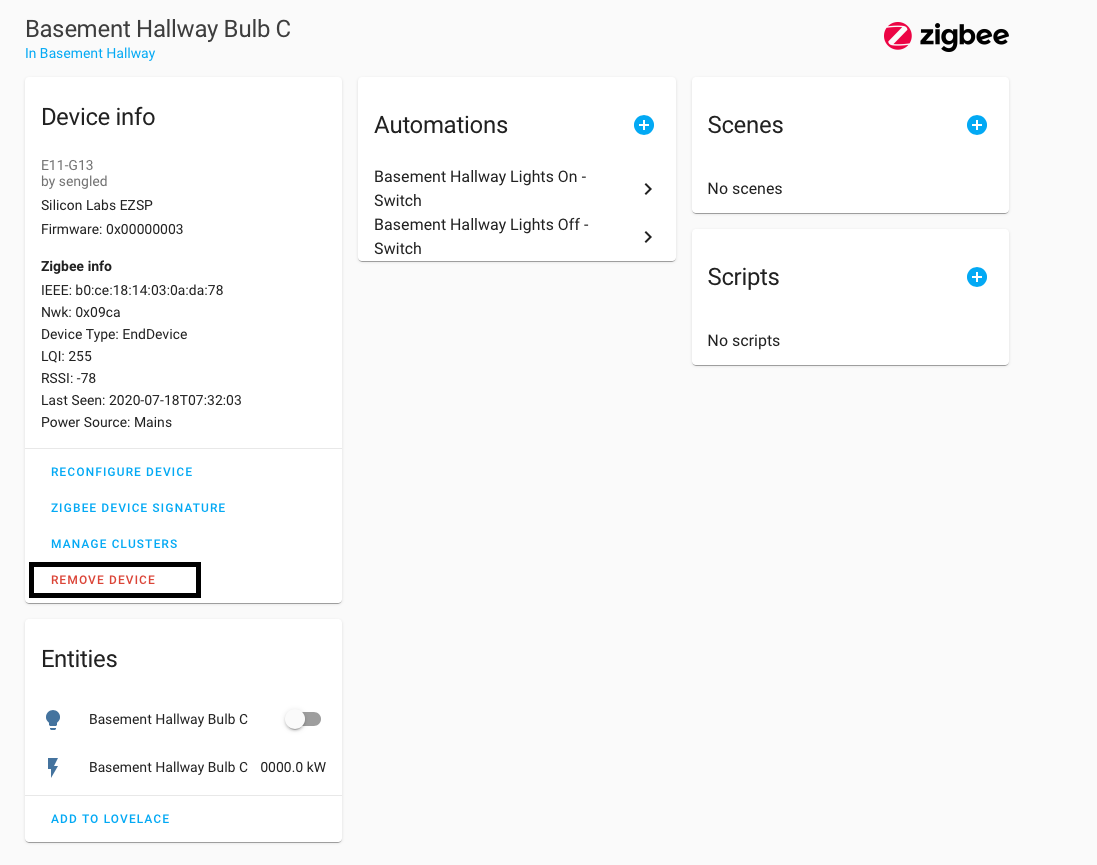


 river wharfBOT
An add-on is a Docker container with tweaks to allow it to be configured in the Supervisor UI. It is only available in the Supervised installs (#330990055533576204 and #330944238910963714) since if you've used any other install method you're able to install software already.
jade wing
Configuring other software is done following the instructions for it... and that's a topic for #general-archived not here
terse mason
jade wing
You ... you don't have add-ons
I have Configurator, ESPHome, Grafana... this are add-ons
elder schooner
Docker containers is not equal add-ons
If you are not running HAOS or Supervised, you cannot use add-ons - as Tinkerer said
 pliant steeple
does anyone use (or know of anyone who uses) the Sure PetCare addon? (i think this is the right channel to ask on, apologies if not)
bit of a longshot that they do, but thought it worth asking in case they're having trouble with it.
bitter skiff
Are you saying you're having trouble with it? If so, it's best to describe your issue. Even if people aren't using it, they may be able to steer you in the right direction.
pliant steeple
bitter skiff
Are you saying you're having trouble with it? If so, it's best to describe your...
no, i wanted to ask whether they were having trouble with it and, if so, what trouble. from what i can see, they probably would be. i'm fixing the underlying cause, but wanted to check to see whether what i'm doing will fix their problem or if there's more broken than i know about to fix.
bitter skiff
GitHub issues would probably be the best place for that
pliant steeple
[i'm not (yet) using HA — that's coming — but i've been using the API implemented by rene castberg's sure_petcare addon for other purposes for some years now. which is how i know that it's broken, and why.]
pliant steeple
bitter skiff
GitHub issues would probably be the best place for that
nah, i'll ping rene a pull request when i've pushed my fix. there have been no recent issues opened on rene's repo about it, so i suspect no-one is watching that repo.
 oak shoal
hey, did you ever get this working?
tawny hatch
if I'm using the DHCP server add-on and the DNS server add-on, I can have a completely internal network connected to HAOS without it bridging ETH0 and ETH1, right?
pliant steeple
tawny hatch
if I'm using the DHCP server add-on and the DNS server add-on, I can have a comp...
if you want to avoid bridging interfaces, at minimum you'll need to assign each interface its own subnet and configure a router. docker containers are a complication, though. AIUI, each add-on runs in its own container, which is fine, but the router will need to run somewhere that can see both physical interfaces and also the virtual interfaces created for each docker container. that might involve additional subnets.
a lot depends on how you're running HA.
tawny hatch
Bare metal
pliant steeple
if docker's not involved, then that should be a lot simpler to get running. you'll need to configure the host OS's kernel to enable forwarding (ie routing). if your subnet assignments, DNS and DHCP configuration are right, then it should just work. but it's not a trivial thing to set up.
where's your internet coming in, and in what form?
(pppoe terminated on that linux box [ie, which has a public IP], a consumer-grade router doing NAT connected to one of those ethernet interfaces, or...?)
tawny hatch
So!
I misrepresented what I was trying to do
It's HAOS, currently on a pi, soon an optiplex
HA needs to reach the Internet on one interface, cameras should be isolated from the Internet on the other
Got it running for now tho and it looks like everything is isolated, tho
So my b, but thank you for answering anyway!
pliant steeple
np
it feels like you're trying to do too much with the one machine. there's no reason in principle why that shouldn't work, but it makes your whole network infra more brittle. if that machine goes offline or its configuration breaks for any reason (including OS and HA upgrades!), your whole network, likely including internet access, breaks.
tawny hatch
Nah
It's not controlling the Internet
It's just serving as an NVR
So the cameras get their own space
That's basically it
(and I have to do more with one box because this is going to someone besides me when I'm done making it....)
pliant steeple
no, but if it's serving DNS and DHCP, then clients attached elsewhere will likely lose internet access even if there is still layer 3 availability to the internet
tawny hatch
It's only serving DNS and DHCP to clients that shouldn't be on the Internet
Everything else is served by the router
pliant steeple
you can just limit the dhcpd to the link that isn't internet connected, or else you can statically configure the few devices connected to eth1 (if internet is on eth0). DNS doesn't need to be on the same subnet as devices, so you don't need DNS on the machine at all.
pliant steeple
tawny hatch
Everything else is served by the router
don't forget that, in this scenario, you now have two routers on your main LAN, but your main internet router doesn't know about the second router. devices connected to the main LAN would either need static routes configured for the IOT subnet, or you would need to run a routing daemon (eg RIP) on the HA machine and every LAN client. in that particular respect ipv6 is a bit easier (but more complicated in other respects).
tawny hatch
There's only one router serving all Internet devices, tho
pliant steeple
if you don't need connectivity between main and IOT LANs, then you don't need any of that, but nor would you need to bridge the connections, either. just run a dhcpd for the IOT LAN on the HA/NVR box.
pliant steeple
tawny hatch
There's only one router serving all Internet devices, tho
not if you introduce an extra subnet.
worked example: say your main lan is 192.168.1.0/24. the internet router is 192.168.1.1 and serves DHCP addresses from that subnet and provides DNS. the HA box eth0 is 192.168.1.2. so far, so easy. the IOT LAN is 192.168.2.0/24. HA's IOT IP is 192.168.2.2 on eth1 (nothing on 192.168.2.1). HA serves DHCP on eth1.
this will work ok, but there is no way for 192.168.1.0/24 to get to 192.168.2.0/24 or vice versa, meaning the IOT LAN gets no NTP, no DNS etc. and maybe that's okay, too, if the HA box runs DNS and NTP on HA, and IOT devices configured to get time and DNS from the HA box.
the complication comes when you want to route traffic between 192.168.1.0/24 and 192.168.2.0/24. if you don't need that, no problem.
especially with ipv4, having the extra router required to do that is a challenge because you have a flat or chained network structure, rather than a tree as would classically be the case.
pliant steeple
this is what my home network looks like:
i have a single router (called gw, a netgate SG1100 with 2 physical ethernet interfaces in use), plus a couple of managed ethernet switches configured with 4 VLANs (trusted, IOT, IOT-jailed, guest). gw is configured with those same 4 VLANs on its local physical interface, so there are 4 local interfaces on gw. my internet modem is PPPoE connected to gw's external physical interface, so gw has 5 logical interfaces. (it has a sixth for its VPN server, but ignore that.) my wifi AP is separate, and serves an SSID for each VLAN.
gw runs DNS, DHCP4 and DHCP6. from my ISP, i have public, globally routable subnets 203.0.113.0/29 and 2001:db8:42:d0::/60 on gw's WAN interface. each of the 4 local interfaces get 192.168.δ.0/24 (NAT'd) and 2001:db8:42:dδ::/64 (not NAT) where δ is the local subnet number.
gw routes all traffic between local subnets, or out to the internet as appropriate, and firewall rules determine which subnets can talk to which, and on what ports etc.
all this sounds more complicated than it really is. there is 1 router, 1 DHCPd, 1 DNS, and devices get attached to whichever VLAN/subnet is appropriate for the device (my NVR is multihomed via VLANs, so is on the IOT-jailed and trusted networks, but only to offload CCTV traffic from crossing the router).
gw takes care of all IP connectivity, and HA (which will run in a VM) can get as many v4 and v6 addresses from gw as it needs. my NVR is a dedicated machine anyway (and it needs to be). if I needed a v6 prefix for Matter devices, its gateway can have one from the /60 pool, and v6 just takes care of router discovery automatically.
this is a very flexible arrangement with as many subnets as i could possibly want, with the bonus of having GUAs for all ipv6 devices — except android devices, because lorenzo colitti is an egomaniac who refuses to implement a fully-compliant v6 stack for android.
pliant steeple
pliant steeple
this is what my home network looks like:
i have a single router (called gw, a n...
@tawny hatch
 desert plover
Tring to configure Traccar via HA with webhooks, I can either get the traccar client talking to HA device tracker or the traccar client talking to traccar server addon via webhooks automation but i cant get them working both at the same time. essentially I just want a tracker that is on par with life360 - live location, history and push notifications when entering and exiting a geofence that intergrates well with HA vi nabucasa
river wharfBOT
@civic hull I converted your message into a file since it's above 15 lines :+1:
peak lance
Is it a known error with Node Red removing the "node-red-contrib-home-assistant-websocket" on restarting the Addon?
raven tinsel
peak lance
Is it a known error with Node Red removing the "node-red-contrib-home-assistant-...
That node is managed and shipped by the add-on
and thus not meant to be managed manually
peak lance
I know. But suddenly it's removed if i restart the Addon
raven tinsel
Yes, because it goes back to the shipped version
as per above
We've had quite an issue with shipping NodeJS based add-ons the past few weeks. Earlier today I've finally fixed that
The Node-RED add-on is pending shipment (probably tomorrow, as I've started my second beer, so not shipping anymore)
I did prep everything already
Once that is out, everything should be latest greatest and business as usual again.
sorry for the delays
peak lance
Aaah i see.
Thank you!
Seems like all the "Server" on all node is changed. Can i change that on all nodes without having to go through them all?
Maybe just delete the unused servers
raven tinsel
peak lance
Seems like all the "Server" on all node is changed. Can i change that on all nod...
That question is probably better asked in #node-red-archived
I'm not a Node-RED guru/heavy user.
 tired plume
has anyone had success adding onvif cameras to motioneye? I've got some D-Link DCS-8302LH cams. just enabled onvif in the My Dlink app, and am trying unsuccessfully to now add a network camera to motioneye via URL
http://[ip address of camera]:554
Have also tried using rtsp instead of http, adding /1 at the end, and adding /onvif1 (all thing suggested by random internet posts)
Most tutorials I'm finding say to run onvif discovery, but I don't see anywhere in the motioneye web ui to do that
username admin, password: device "PIN" from the packaging.
Update: have successfully added one of the cams to another app via onvif, so confirmed username, password. Url is [ip address of camera]:80 no idea where I got that other port suggestion from but it’s discoverable and working fine.
Motioneye won’t see anything at that url, though.
any help would be greatly appreciated. Am frustrated noob. Thanks!
 civic hull
river wharf
<@968922690092167190> I converted your message into a file since it's above 15 l...
civic hull
river wharf
<@968922690092167190> I converted your message into a file since it's above 15 l...
Solved. The folder "config" is "mapped" to addon_configs/94e386ba_day_ahead_opt
 ionic plinth
Anyone who is an advanced camera+frigate user? I have a simple RTSP camera which in the past I would toggle power on & off with a smart plug based on our presence and use the third party app to manage notifciations and recordings. What's a recommended way to implement that the camera + frigate get enabled when we are out of the house? I don't want to hear my RPI5 fan the whole time and I don't want the camera being on at home.
raven tinsel
peak lance
Is it a known error with Node Red removing the "node-red-contrib-home-assistant-...
I've just shipped v1.7.0 of the Node-RED add-on
peak lance
raven tinsel
I've just shipped v1.7.0 of the Node-RED add-on
I'll upgrade when I feel adventurous then 😃
 forest girder
ionic plinth
Anyone who is an advanced camera+frigate user? I have a simple RTSP camera which...
forest girder
ionic plinth
Anyone who is an advanced camera+frigate user? I have a simple RTSP camera which...
If you're using the Frigate addon, you could just stop the addon with a service call when someone is home?
ionic plinth
forest girder
If you're using the Frigate addon, you could just stop the addon with a service ...
Do you know of any good documentation to put me on the good wzy?
forest girder
ionic plinth
Do you know of any good documentation to put me on the good wzy?
It should be as simple as 2 automations, one when zone.home becomes 0, run start, another when zone.home becomes >0, run stop
ionic plinth
Yeah and include power on the camera on the smart switch!!
forest girder
This will make your Frigate entities unavailable in HA whilst it's stopped
ionic plinth
Thanks alot!
 fleet badge
Is there a addon that is a configurable http proxy so i can include other websites into the authenticated ha environment?
forest girder
fleet badge
Is there a addon that is a configurable http proxy so i can include other websit...
What do you mean by include other websites? There's reverse proxies like nginx?
fleet badge
Is there a nginx addon?
forest girder
 compact oyster
hey, am I missing something about addon auto-updates? I have them enabled for most of my addons, but HA is still asking me to confirm.
 carmine needle
I am using Zerotier One to connect to my HA from outside - just saw this:
" Drop support for armhf & i386 #212 "
-two questions: 1) Why? 2) Is this a general Zerotier-thing? Cause I have a lot of armhf RPis on Zerotier!
bitter skiff
Maintenance is becoming painful for those architectures, many dependencies are removing support and it is something that is being dropped across the board for HA, not just Zerotier.
bitter skiff
It also only impacts a device that's running HA OS/Supervised, if your ARMHF boards aren't running the add-on via HA, then this doesn't impact them
carmine needle
bitter skiff
It also only impacts a device that's running HA OS/Supervised, if your ARMHF boa...
Thanks!
vast glen
fiery prism
English only please.
вы расист?
elder schooner
vast glen
вы расист?
He is not a racist, just enforcing the rules here. English is the universal language most people understand and can help with.
viscid orchid
And this is explicitly an English server. There are others for other languages
raven tinsel
vast glen
вы расист?
Last warning, English only. Thanks! 👍
 eternal surge
Sorry for the long intro... I currently have a few set ups. The main one runs HA and ZWaveJS UI in docker containers (“docker-HA” and “docker-JS”) at IP address 10.10.0.14. To state the obvious, the docker-HA zwave service communicates with docker-JS via the URL:port of docker-JS (e.g. ws://10.10.0.14:3000).
The others (for testing purposes) run in VMs and on bare metal (pi), are all HAOS, and are all on the same 10.10.0.1 network. For all of them, I can configure their HAOS zwave services to communicate with docker-JS at ws://10.10.0.14:3000. But…
I also have an instance of HAOS on a pi (pi-HAOS) running the ZWave JS UI add-on (add-on JS) at IP 10.10.0.55. Separate zwave dongle and devices as the main instance mentioned above. Add-on JS is configured the exact same way as docker-JS, but if I try to configure the zwave service on one of my test versions of HAOS to communicate with 10.10.0.55:3000, it fails to connect.
I’m wondering if there’s a way to allow the zwave service of a different instance of HA (on the same network) communicate with add-on JS in the same way as I can with docker-JS?
elder schooner
Yes, but you have to open a port in the networking section of the add-on's settings page.
Enable "Show disabled ports", enter the desired port number, save (the lower save button) and restart the add-on.
You should be able to connect to the addon via the HA IP and port.
eternal surge
trying that now, thanks
High five. I swear I thought I'd done that but must not have restarted. Also, when I did that I was using port 3030. I guess I thought port 3000 was already open by default. In any event, that did the trick. Thanks a bunch.
Maybe a follow up (though I think I know the answer): is there any way to configure the service to work with two URLs? Or have two Zwave services running at the same time?
The way I currently accomplish that is via Remote Home Assistant. That allows me to have my second instance (for a garage apartment and workshop) show up in my main instance as if they were all on the same device. Wondering whether there's another solution.
Oh wow, I can! Sorry, got a little ahead of myself.
elder schooner
You should be able to add a second Z-Wave integration pointing to the other Z-Wave JS server
eternal surge
This is great! Don't know why it took me so long to realize this. Thanks a ton!
 timber umbra
Can anyone help me with the cloudflared add-on? I'm trying to add an additional host for my mqtt broker on port 1883, using the additional hosts config option, but no matter what I try, it doesn't seem to create the DNS record on my cloudflare account and nothing in the logs is obviously mentioning the additional host ip/hostname
viscid holly
Hi, does anyone know how I can force a cert renewal for the duckdns addon - I'm guessing the addon should do this automatically but when viewing the cert details via chrome, it shows as being 2 days expired...
viscid holly
viscid holly
Hi, does anyone know how I can force a cert renewal for the duckdns addon - I'm ...
On closer inspection I hadn't edited the letsencrypt config to accept the terms... stupid mistake but leaving it here in case it helps anyone
viscid holly
viscid holly
On closer inspection I hadn't edited the letsencrypt config to accept the terms....
rebooting to hopefully pick up the new cert - duckdns logs show the current cert is valid till april, but browser is still receiving the old cert somehow
Managed to get my desktop to pick up the new cert but my phone is still seeing the old cert, even after deleting browser history and rebooting - any ideas? It's an android phone running the latest version of android / chrome. Also getting an SSL error in HA app.
 tropic cobalt
I'm trying to follow this guide on how to make my first add-on: https://developers.home-assistant.io/docs/add-ons/tutorial/
But when I hit "install" on the add-on in Home Assistant, I receive "Failed to install add-on" "Unknown error, see supervisor"
What might be causing this issue? This error message isn't particularly specific.
viscid orchid
#devs_add-ons-archived can help
tropic cobalt
viscid orchid
<#673545314900377620> can help
Oh, I missed that channel. Thanks.
 rugged oracle
Is it possible to install previous version of Add-In - Studio Code Server ?
bitter skiff
Restore a backup
rugged oracle
LOL, no backup 🙂
 sharp anvil
Hey everyone,
I've recently installed HA on a Pi4 8GB running on a 128GB Micro SD. It's runing only HA. I've been having problems with not seeing any add-ons in the store ever since I've installed it. Not even the ones that should come with a fress HA install. I've tried adding the standard repository but it says that's it's already added. Even though I'm not seeing it in the list of repositories.
The PI is running on DHCP, could that be the problem? I hear a lot about people running it on static with 8.8.8.8 DNS. I tried to put my first installation of HA on static but then I wasn't able to access it anymore and the PI didn't get a connection. Maybe I need to make a DHCP reservation for it when trying to get that to work?
I'm very new to this stuff as well.
Feel free to ping me as well when responding, I don't always see a response right away :)
elder schooner
Adaptive Lighting is no add-on
 heady isle
my bad, shall move query
sharp anvil
sharp anvil
Hey everyone,
I've recently installed HA on a Pi4 8GB running on a 128GB Micro ...
Just adding on to this, when trying to add the repository it says this:
Failed to to call /store/repositories - Can't add https://github.com/hassio-addons/repository, already in the store
Even though the add on store is completely empty
 dusky oar
Is anyone here running music assistant as their main music source?
dusky oar
I have questions with trying to use music assistant to build out a local multi room music system that suport Spotify connect
 oak jasper
Hello Guys, during start of Whisper, log files shows that my CPU (i7 4785t) doesn't support Advanced Vector Extension (i7 4785t), even if Intel CPU ark shows it as supported technology, any ideas why this is happening ? Thx
fleet badge
Hi, I have forked a apache addon to make a apache http proxy inside home assistant. But if i want to open the web UI home assistant states that the addon isnt running yet.
I have the same error with the orignal addon. (but it worked just 2 hours ago)
 valid dune
Hey y'all, I have an nginx/duckdns system going for over a year now and suddenly (nothing was updated) I can only access my homeassistant url from outside my home network and my instance can't connect to any online services and add-ons anymore. I don't even know what to look up to start, any help would be appreciated!
 velvet crescent
using custom:secondaryinfo-row addon thingie, i lose the title in the entity list, is that fixable with yaml ? 🙂
elder schooner
Not an add-on
 tame raptor
Hello everyone !
I own an UPS connected to a Raspberry Pi 3B+ via USB and integrated into Home Assistant via the NUT integration.
I would like the status changes of my UPS to be detected more quickly. Currently, with the NUT addon, the minimum value is 10 seconds. I would like to reduce it to, for example, 5 seconds.
I have thought of two solutions:
-
Create an automation that runs every 5 seconds and refreshes the state of my UPS sensor (but I don’t know how the conflict with the 10 seconds of the addon is managed)
-
Change the “scan interval” value (but I don’t know how to do it, the addon doesn’t offer this option)
Are my solutions possible? If not, are there other methods?
Thank you 🙂
river wharfBOT
@digital roost I converted your message into a file since it's above 15 lines :+1:
forest girder
Seems like there's an open issue for it: https://github.com/home-assistant/addons/issues/3380
Why is it you want to use ECDSA?
 digital roost
No particular reason except that I like to use whatever the default is unless there's a reason not too. Switched it to RSA and it works fine. Thanks!
 keen sluice
Greetings,
I am unable to make the Nut Add-on work with the Integrations. I can see the APC UPS in the hardware tab in HA, I can't seam to add it into the integration. After I add the username and password I defined in the conf, the Host is set to 'localhost' and port is set to '3493', I receive "Failed to connect".
elder schooner
keen sluice
Greetings,
I am unable to make the Nut Add-on work with the Integrations. I can...
Use the host a0d7b954-nut
It is not localhost, because it is running in a different container
keen sluice
Chnaging the localhost to a0d7b954-nut worked. ARGH!! Days I've been working on this. Many thanks.
I'm not getting much in the way of sensors, only battery charge, input voltage, load, status and status Data. I might need to play with config to see if I receive more sensor infomation.
 haughty patrol
Hello, Wallpanel addon completely freeze my dashboard. I cannot do anything. Please help me. How can I remove that addon?
elder schooner
If you have no access to the UI, you can list the add-ons from the CLI using ha addons list and look for the slug of that add-on.
After that you can uninstall it with ha addons uninstall <insert slug here>.
haughty patrol
elder schooner
If you have no access to the UI, you can list the add-ons from the CLI using `ha...
Thanks. I can click 3-dots menu after few times I restart HA. It's OK now.
elder schooner
That add-on seems be be removed from the add-on store
 fathom sage
hey there! looking for a tad of help in this channel 🙂
I'm trying to set up srv-record on dnsmasq, but I'm struggling badly to do so:
I have HA running on a rasppi, IP 192.168.0.25, and a server with a bunch of things on different ports on 192.168.0.3.
dnsmasq has been set up as the defult dns server in my network, so now when I do nslookup serverxyz.myddns.com I do get 192.168.0.3 correctly.
However, for example one of the things running is on port 8083, so to access it I'd have to call to serverxyz.myddns.com:8083. I understand srv records are to provide with a way to overcome this, and be able to do thing1.serverxyz.myddns.com ....
But I am not finding out how to put this entry on the Services part! :/
 coral cliff
Good Evening I’m having problems to configure duckdns I’m getting this failure by safing the Add-on configuration , Missing required option 'domains' in Duck DNS (core_duckdns). Got {'domains': [None, 'my-domain.duckdns.org'], 'token': 'tokenfromduckdns', 'aliases': [], 'lets_encrypt': {'accept_terms': False, 'algo': 'secp384r1', 'certfile': 'fullchain.pem', 'keyfile': 'privkey.pem'}, 'seconds': 300}.
I changed here the token and subdomain
elder schooner
Looks like you didn't accept the LE terms
coral cliff
Same problem with when I set true for accept terms
Got it there was a x at domain for nothing in standard…
 restive eagle
Hello - I am running into a challenge with a broken NAS, the supervisor, and the Frigate media folder. I have searched through the HA forums and github issues on related topics, but haven't managed to find a solution to my exact problem yet.
My NAS suffered a HDD failure, and I am not able to replace it right away. I had a Network share set up, using the HA system tool, and had a share set for frigate, which was working. After the NAS failure, I have not been able to create a new share that frigate can use, nor have I been able to direct it to a local folder.
Currently, I have uninstalled Frigate, rebooted, deleted any frigate folders in /mnt/data/superviser/mount/ and /mnt/data/superviser/media. When I try to create a new network share, I would get the following error in the Hosts log file:
Jan 09 21:52:49 homeassistant systemd[1]: Mounting Supervisor cifs mount: frigate...
Jan 09 21:52:49 homeassistant mount[2123942]: error 2 (No such file or directory) opening credential file /mnt/data/supervisor/.mounts_credentials/frigate
Jan 09 21:52:49 homeassistant systemd[1]: mnt-data-supervisor-mounts-frigate.mount: Mount process exited, code=exited, status=2/INVALIDARGUMENT
Jan 09 21:52:49 homeassistant systemd[1]: mnt-data-supervisor-mounts-frigate.mount: Failed with result 'exit-code'.
Jan 09 21:52:49 homeassistant systemd[1]: Failed to mount Supervisor cifs mount: frigate.cd ..
fleet badge
Oke i got the addon running at http://ha:3000 but the web ui gives 502: Bad Gateway webui: http://[HOST]:[PORT:3000]
 shut gate
Hi! I'm in process of migrating my existing HA install to HASS OS. Almost everything went smoothly, except migration of deCONZ. I installed the addon, moved the dongle, restored configuration from backup, but I can't add it to the integration. No matter what I do, what address I enter, I always get "Couldn't get an API key" error. I tried the host's IP address, the address discovered by integration, the address shown in Phoscon,nothing works
shut gate
shut gate
Hi! I'm in process of migrating my existing HA install to HASS OS. Almost everyt...
Turns out I had to remove the previous hub (it had identical ID)
 tropic root
anyone know why when setting up integration for NUT, "failed to connect" error keeps coming up? NUT server log shows no errors
bitter skiff
Right, because the connection failed. What host are you using to connect to it
compact oyster
Hey, any idea why HA is not automatically updating my addons?
Auto-update is enabled, but I still get a notification to confirm the update
https://i.imgur.com/8L0tLDh.png
 bitter skiff
Auto-update runs every 16 hours... and that version was released 3 hours ago
So... patience
 modest slate
Hello ... I do have a question for which I could not find an answer anywhere.
I have installed HA in a RPI, with Mosquitto addon and Wireguard addon
I use wireguard to connect to a server hosted in the OHV cloud ... it is an star network rooting across different sites.
The wireguard addon in the HA installation acts as a client ... it triggers the connection to the net star center
All this works ... I can ping from my remote sites to the HA Wireguard IP ... but ....
it seems that the Mosquitto server does not bind to the Wireguard IP
Sensor <-> Remote-router as server ( -------- VPN tunnels through star host ------) <---> Wireshark HA as client -- Mosquitto
192.168.227.20 192.168.228.8
If I listen in the VPN tunnel I can see the traffic:
13:56:46.287452 IP 192.168.227.20.49770 > 192.168.228.8.1883: Flags [S], seq 23593417, win 5840, options [mss 1460], length 0
13:56:46.287666 IP 192.168.227.20.49770 > 192.168.228.8.1883: Flags [S], seq 23593417, win 5840, options [mss 1460], length 0
13:56:46.303223 IP 192.168.228.8.1883 > 192.168.227.20.49770: Flags [R.], seq 0, ack 23593418, win 0, length 0
13:56:46.303354 IP 192.168.228.8.1883 > 192.168.227.20.49770: Flags [R.], seq 0, ack 1, win 0, length 0
the question is ..... how can I ensure that the Mosquitto is accepting connections incoming on the wireguard interface (192.168.288.8) ?
As I said ... I've fighting this for days now ... I would appreciate any help
compact oyster
bitter skiff
So... patience
Ah! I've been monitoring my HA pretty closely these past few days and manually updating things as they popped up, thinking the auto-update mechanism didn't work. That's good to know, thanks.
 deep pike
Hi - i'm pretty new in the home assistant world but really like it so far - as part of my basic setup i wanted to install mediola2mqtt (https://github.com/andyboeh/mediola2mqtt) in order to control my elero shutters - i know that the project is not active anymore but i hoped it would still work - i worked based on the install explanation - meaning i placed the files in the addon folder - found it in the addon store (local) but when i try to install it i get the following error messageThe command '/bin/ash -o pipefail -c pip3 install paho-mqtt' returned a non-zero code: 1 - is there a way to fix this or maybe anyone has another idea to control my eleros
 remote seal
Anyone had issues updating Unifi?
Mine is stuck from 2.8 to 3.0.2 - it's like a never ending update.. Nothing happens
Just says Another job is running for job group addon_a0d7b954_unifi
 exotic rampart
remote seal
Anyone had issues updating Unifi?
exotic rampart
remote seal
Anyone had issues updating Unifi?
nope
remote seal
Waited an hour and now it suddenly works.. No clue what kept it waiting
 regal blade
I am new, what do I do if I don't get "Add-ons"?
viscid orchid
you install whatever software you want in whatever way you want
regal blade
viscid orchid
you install whatever software you want in whatever way you want
I can't use add-ons, I can't find them in settings
viscid orchid
I was just answering your question
how did you install HA?
if you installed HA using a container install, then you don't get addons. So...
you install whatever software you want in whatever way you want
just not via addons
regal blade
on ubuntu, i use "pip install homeassistant"
viscid orchid
right, and you don't get addons with that
elder schooner
Same applies to that installatiom
viscid orchid
that's not a recommended way to install it if you don't know what you're doing, either
regal blade
mmm
river wharfBOT
The topic of this channel is:
HA OS Add-on support! Additional, standalone, applications that can run on Home Assistant OS. Your user profile needs to have Advanced Mode enabled for some add-ons to be visible in the store.
regal blade
What do you recommend?
supple grove
I'd recommend docker. If you absolutely need addons then use HAOS. Either as VM or bare metal.
 signal hill
Is there anyone who can help me troubleshoot my wireguard addon?
modest slate
signal hill
Is there anyone who can help me troubleshoot my wireguard addon?
What is your issue ?
weary stratus
Hi, I'm facing an issue with my Flet app (a Python based framework powered by Flutter). It runs well as a Docker container on Windows, but I'm struggling to get it to work as a Home Assistant add-on. It seems to be related WebSocket session handling. The page works for the first user, but subsequent connections from other devices give an endless loading screen or base64 decode error message. I'm just port forwarding. Any pointers would be appreciated
 trim hedge
I have an interesting issue... remotely (via nabu casa) at work I can access HA but not any of the add-on pages, like z2mqtt, vsc, but also not the add-on page in configuration... anyone has any clue where to begin with troubleshooting?
on generic internet (like my phone) I CAN access the add-on's
velvet crescent
so using the mariadb add-on, it seems to work fine for the monentary energy in my devices but i do not get anything anymore for the accumilated power usage .. anyone know anything about this? 🙂
 lament ridge
hi i have the pi 5 and i like to use the gpio pins for the homematic RPI-RF-MOD. i changed the config file but it didn't work. is this possible.
elder schooner
HAOS for RPi5 has not been released as stable. So: 
jade wing
There's also not been native GPIO support for years
lament ridge
But on the raspberry 3 and 4 it works.
jade wing
You're using a pre-release of HAOS for the Pi5? Then raise an issue about that.
 sick raft
Hi guys, I am trying to setup home assistent os as a thread board router but It seems like its not working properly, when I open webgui I can see that there are devices connected to each other, but when I try to add nineleaf essential light bulb using matter it just wont connect, threre are no errors in official matter addon logs and I cannot see them bulbs in home assistent core
is this the right channel?
Iam using conbee II for zigbee and skyconnect with addon OTBR
jade wing
#matter-archived can help with matter
sick raft
jade wing
<#1049765219565576234> can help with matter
thank you 🙂
floral quail
Are you aware if the Kasa doorbell KD110 working with Kasa add on ?
 fierce osprey
anyone else have problems updating the AppDaemon Add-on in HA from 0.16.0 to 0.16.2? The app completely stopped working for me and I had to rollback/restore.
error was something like appdaemon s6-rc-compile: fatal: invalid
something to do with overlay
 winter totem
Is anyone else having issues with controlling the govee H6163 strips over Govee2MQTT?
Workaround for the time being: H6163 Strips controlled via govee HACS integration, Bulb controlled over MQTT, both added to a group.
 weak lake
Greetings all. Can I use the let's encrypt addon with godaddy domain registrations? I can manually publish the record in the zone for the DNS challenge. Googling has resulted in a bunch of stuff for cloudflare setups, but nothing yet on a generic how-to I could apply to godaddy. any and all help is appreciated. thanks.
winter totem
weak lake
Greetings all. Can I use the let's encrypt addon with godaddy domain registrati...
Why use godaddy in the first place? if I were you I'd just use cloudflare tbh, makes the process so much easier.
weak lake
welp, mostly as I've paid for several years already at godaddy and I'm locked in presently.
winter totem
weak lake
welp, mostly as I've paid for several years already at godaddy and I'm locked in...
Oh, oh no...
Godaddy is such a slimy company sorry that you're stuck there. As far as external access via godaddy I am not 100% sure however I would be happy to help.
weak lake
not interested in external access at all. just want to get the let's encrypt cert for my domain.
addon I'm setting up has an iOS companion app that requires a cert, so I've gotta do something to make that work.
winter totem
weak lake
not interested in external access at all. just want to get the let's encrypt ce...
SSL right?
weak lake
yes
i could, i guess, do a self signed cert, but that makes a mess for iOS devices as I have to manage the trust relationship on each device. with a let's encrypt ssl certificate that issue is closed.
 crystal mango
Hi,
I have install the AppDaemon and I want to change the logs file but I have an error when I start the add-on while the file exist
FileNotFoundError: [Errno 2] No such file or directory: '/addon_configs/a0d7b954_appdaemon/logs/appdaemon.log'
winter totem
I am having an issue with hass-favicon, I am not sure how to add the icon to my local directory. Any help would be greatly appreciated.
jade wing
I am having an issue with hass-favicon,
 foggy shuttle
Hi. Auto-update of Silicon Labs Multiprotocol made the update to 2.4.3. It's not z2m compatible and broke my zigbee network:
- Note to devs : regarding semver, a patch or minor update shall not break compatibility. This is a highly problematic issue that has dramatic issues for the user experience, please be careful to not reiterate that.
- Question : how can I revert an addon to a specific patch version?
jade wing
Restore a backup with the old version
foggy shuttle
jade wing
Restore a backup with the old version
Auto-update made a backup of 2.4.2 version of the addon, I could restore it. Thanks for the advice!
 spring osprey
I followed the same and it worked. Thank you!
 misty flower
Starting the night before last my MQTT broker went offline and now will not start. I receive the following error.
Logger: homeassistant.components.hassio
Source: components/hassio/websocket_api.py:138
Integration: Home Assistant Supervisor (documentation, issues)
First occurred: 8:48:39 AM (1 occurrences)
Last logged: 8:48:39 AM
Failed to to call /addons/core_mosquitto/start - Port '8884' is already in use by something else on the host.
When I change all MQTT related ports in the configuration it will start.
Any ideas what might be causing it?
jade wing
Find what other add-on is using that port
 scarlet forum
foggy shuttle
Hi. Auto-update of Silicon Labs Multiprotocol made the update to 2.4.3. It's not...
scarlet forum
foggy shuttle
Hi. Auto-update of Silicon Labs Multiprotocol made the update to 2.4.3. It's not...
The same happened to me, and the backup restore also worked.
BUT, to reiterate, please follow semver!, it would've been no problem if this were a major update, as then there wouldn't have been an auto-update. Minor, and especially patch, updates aren't supposed to break stuff on purpose.
spring osprey
An issue has been created for the Multiprotocol v2.4.3 addon. https://github.com/home-assistant/addons/issues/3408
 idle falcon
Hi everyone! I am just starting with Sonoff and the whole configuration today and directly ran into the 2.4.3 problem. As this was the first version I ever installed, I have no older ones in a backup. Is there any chance to install an older version of the add on?
misty flower
jade wing
Find what other add-on is using that port
I disabled all other add-ons and rebooted the host. All are shut down and still receiving the same error when trying to start MQTT.
 frank sable
please please help. I cant add any devicces to ESPHOME. I click new device -> continue and then it just gets stuck on initizing and spins
idle falcon
idle falcon
Hi everyone! I am just starting with Sonoff and the whole configuration today an...
found a solution. could download an older version from Github, uploaded the ZIP to the addons folder and unzipped it. after that, it came up as "local addons".
frank sable
frank sable
please please help. I cant add any devicces to ESPHOME. I click new device -> co...
No idea what to do. Every video I have watched they just click add device and it prompts a window. Mine just gets stuck on initizialing
 sly kindle
@frank sable Do you have an existing ESPHome device?
frank sable
No I’m trying to set up my first device
I tried the web version too so now I have a web version showing on my devices
@sly kindle any idea what I can try?
sly kindle
You don't configure a device from the Devices and Services page. You do this from the ESPHome dashboard. Is that running? As an add-on or elsewhere on your network?
frank sable
Yes I have ESPHome addon downlaoded. Thats where im trying to add device. I click "New Device" from there and it just spins
Id send you a picture but this server has that disabled for some reason
river wharfBOT
Please use imgur or other image sharing web sites, and share the link here.
Image posting is blocked in most channels to discourage people from sharing text as images. Sharing text as images assumes that everybody sees the world as you do, which isn't the case. Some people are colour blind, or have visual impairment that means they can't make sense of an image of text.
sly kindle
frank sable
Id send you a picture but this server has that disabled for some reason
Because the channels become flooded with pictures of text. You can share a link to an image as shown above
But a picture of that isn't necessary. What do you see in the add-on logs?
frank sable
right now it just has this repeated like 50 times:
2024-01-12 12:55:13,100 INFO 304 GET /devices (0.0.0.0) 3.37ms
heres my log when I restart: https://justpaste.it/bz8it
and heres my log when I click add new device: https://justpaste.it/evu0l
@sly kindle
sly kindle
check secrets for duplicates https://community.home-assistant.io/t/esphome-add-new-device-stuck-at-initializing-popup/368945/10?u=cogneato
frank sable
That was it. Thank you so much
weary stratus
how do i find the hostname to the mqtt broker addon
elder schooner
On the add-on's information page
winter totem
Adguard home isn't working, I configured static IP and everything.
 runic fable
Is there any way I can soft link a folder that is in /addon_configs/ towards for excample /config/media ?
I have access to console through ssh
I need to get access to the paperless folder so I can back up any scans to my offsite nextcloud/truenas server via syncthing or something else
 hybrid escarp
anyone have a guide for including HACS on the Balena device?
elder schooner
HACS is not an add-on
jade wing
Depends on what you mean by "Balena device"
#integrations-archived for HACS itself, but maybe #general-archived for "including HACS"
hybrid escarp
Balena-homeassistant
jade wing
WTF is that
hybrid escarp
I don't know, I'm new to discord
jade wing
Well, you just want to follow the HACS docs for installing HACS
#integrations-archived can help with that,
Your install method is probably going to cause you pain though
hybrid escarp
thanks. The docs don't help when you are talking about Balena
viscid orchid
the only thing I know by that name is the app that flashes images
hybrid escarp
totally aware that the install is different, I was hoping someone blazed that trail already
jade wing
Three, maybe
hybrid escarp
thats fair
jade wing
still, you get no add-ons, and support is going to be limited
#integrations-archived can get you started
hybrid escarp
I might be managing 3 instances and Balena is the best for fleets
hybrid escarp
thats fair as well
viscid orchid
In any case, there are clear instructions for installing HACS in an existing installation, which entails downloading some files into the config directory and installing it from Settings->Integrations. if you want to try to then package that whole thing up for installing on a bunch of machines, I guess you could
make a backup of that, restore it "n" times
hybrid escarp
with Balena, one doesn't simply download to the config folder... queue Sean Bean...sorry I'm new to Discord so don't know how gifs work
jade wing
I've continued over in #integrations-archived since that's more relevant 😉
 limber pawn
Hi! I would like to move my Plex Server from a really old and tired HW to the same machine as my HA installation runs on.
Installation went fine, but how do I add my media folders that are stored on my Synology NAS to my Plex installation on my HA installation? Seems that I only can add local folders?!
Unfortunately I can't add a screenshot if it
 cobalt ice
limber pawn
Hi! I would like to move my Plex Server from a really old and tired HW to the sa...
cobalt ice
limber pawn
Hi! I would like to move my Plex Server from a really old and tired HW to the sa...
-> config/storage add network storage ?
 remote osprey
why wuld someone want balenda intergrated with ha... (rhetorical question)
limber pawn
cobalt ice
-> config/storage add network storage ?
Sounds about right, but I feel so stupid. I do not find the entry where I can add network storage, I have never really needed to do this, since my current PMS is running on the actual NAS where the media is stored: https://postimg.cc/sM106zZM
But yes, I understand that I need to mount/point to the network share, but I do not see where and the Plex documentation don't really point me in any direction
limber pawn
Solved it! Needed to add that folder in Home Assistant. Thanks!
 nova acorn
Hello,
since I updates to the new NGINX Proxy Manager 1.0.0 it keeps crashing with the following error:
[13:20:35] INFO: Starting the Manager...
[1/13/2024] [1:20:35 PM] [Global ] › ℹ info Using Sqlite: /config/database.sqlite
Uncaught SyntaxError: Invalid or unexpected token
FROM
internalCompileFunction (node:internal/vm:73:18)wrapSafe (node:internal/modules/cjs/loader:1274:20)Module._compile (node:internal/modules/cjs/loader:1320:27)Module._extensions..js (node:internal/modules/cjs/loader:1414:10)Module.load (node:internal/modules/cjs/loader:1197:32)Module._load (node:internal/modules/cjs/loader:1013:12)Module.require (node:internal/modules/cjs/loader:1225:19)require (node:internal/modules/helpers:177:18)appStart (/opt/nginx-proxy-manager/index.js:7:30)Object.<anonymous> (/opt/nginx-proxy-manager/index.js:43:2)Module._compile (node:internal/modules/cjs/loader:1356:14)Module._extensions..js (node:internal/modules/cjs/loader:1414:10)Module.load (node:internal/modules/cjs/loader:1197:32)Module._load (node:internal/modules/cjs/loader:1013:12)Function.executeUserEntryPoint [as runMain] (node:internal/modules/run_main:128:12)node:internal/main/run_main_module:28:49[13:20:35] INFO: Service Nginx Proxy Manager exited with code 256 (by signal 5)
Is it only on my installation or in general?
raven tinsel
nova acorn
Hello,
since I updates to the new NGINX Proxy Manager 1.0.0 it keeps crashing w...
Might be upstream related to: https://github.com/NginxProxyManager/nginx-proxy-manager/issues/1769
You could try deleting the database (it is new anyways), by going into the add-on configuration folder (addons_config/xxx_nginx_proxy_manager)
 wintry wren
@raven tinsel there is no db file, so probably this is the issue...
raven tinsel
wintry wren
<@243794953032040448> there is no db file, so probably this is the issue...
There is never a db file when starting from scratch, should not be an issue at all
wintry wren
but then which db I should delete when there is no db file 🙂
raven tinsel
@wintry wren I was responding to Flo... I have no idea what your issue is about
wintry wren
and I am having the same issue and there is no db file
raven tinsel
do you have a keys.json file?
wintry wren
yes, keys.json is there
wintry wren
nope, still the same
raven tinsel
Hmm
@wintry wren Let's start from scratch, to see how it behaves.
Can you uninstall the add-on, remove all the contents from addons_config/xxx_nginx_proxy_manager, install the add-on again and start?
This will give me a hint about existing data causing issues or a general problem in this version. (trying to cut away possible areas that may cause this)
wintry wren
still the same
raven tinsel
ok, which architecture are you running?
wintry wren
raven tinsel
ok, which architecture are you running?
x86_64 ..some old celeron - the one on which was last time an issue due missing AVX2 😛
raven tinsel
ok thanks 👍
Yep been able to reproduce
Hmm
somewhere on x64 it started to write invalid keys files

Pulled the release, investigating further.
wintry wren
wondering why it doesn't like it. at least it looks ok...
ah, I see 🙂 echo instead of cat 😛 so the file is ok
raven tinsel
Yeah sorry
but still it collapses on the import
return require(keysFile);
Hmm could also be the node env
Found the issue
it is my bad in my last patch
I've pulled v1.0.0 for now, will ship v1.0.1 asap (takes 2 hours ish)
wintry wren
leaving tomorrow to a vacation. probably it is not a good idea to touch anything 😄
elder schooner
Isn't vacation meant to update everything in a smarthome? 
wintry wren
cannot leave without updating everything!
raven tinsel
Shipped v1.0.1 to address the issue
 strong dagger
can grafana addon connect to the mariaDB on the same HAOS to pull sensor data?
wintry wren
raven tinsel
Shipped v1.0.1 to address the issue
back in business 😛 thanks!
 rich harbor
NGinx re-configging; Any tips for the migrations? Just screenshot all existing setting and re-add? More clever ways?
Already update and rolled back, was by accident 🙂 Auto Update was on on the Add-On was afoobar again this morning 😦
Thank God for backups
Any way to hide the pending update for nginx so i don't install it by accident again?
elder schooner
There is an option to skip an update in the update notification
rich harbor
i dont see it. I thought that skip was only for HA or HAOS updates
Not in info, not under notiofication 3 top icons nor when i expand it.
Guess i just bite the bullet tomorrow and upgrade it then. Needs to be done anyway. And if it fails i can always rollback again.
 candid trench
hello, I was working with the letsencrypt addon, but made a mistake and deleted my cert. now when I go to re-generate it says that it's not up for renewal yet and exits. I know with certbot on a linux box I can add --force-renewal to the command line, is there a way to do it in HA
I do have a shell on the system if I need to do it that way
candid trench
huh, I just deleted the addon and reinstalled and it let me request a new one
 edgy stag
Hi @raven tinsel / guys - where are the SSL certificates saved in the last version of the nginxproxymanager add-on? in /root/ssl/nginxproxymanager I only seem to find the old version ones...
edgy stag
OK I found them... but I have an issue with adguard fetching the cert...
Previously adguard would fetch the cert from /ssl/nginxproxymanager/live/npm-46/fullchain.pem
Now I've updated to the new location /addon_configs/a0d7b954_nginxproxymanager/letsencrypt/live/npm-1/fullchain.pem
However adguard cannot get it and displays the error message: reading cert file: open /addon_configs/a0d7b954_nginxproxymanager/letsencrypt/live/npm-1/fullchain.pem: no such file or directory
Maybe there's a permission issue?
 frail nimbus
Hello, yesterday I was trying to use a FIDO2 key (google titan) with vaultwarden installed on home assistant, but when I went to set the key there was a message saying that the mobile app isnt supported, only the web app and the browser extension are. is there any way to use fido2 on the mobile app?
tropic cobalt
How do I use the OpenVPN functionality for the Qbittorrent add-on? Mullvad provides an OpenVPN file configurator, but I don't follow how to get the requested info from that.
tropic cobalt
The OpenVPN config file from Mullvad (the Linux one) includes four files: mullvad_ca.crt, mullvad_ch_zrh.conf, mullvad_userpadd.txt, and update-resolv-conf. I'm guessing that in the config for the Qbittorrent add-on, I should direct to mullvad_ch_zrh.conf. Is that right? I don't think I need to provide OpenVPN login info.
tropic cobalt
That doesn't seem to be working. I paid for Mullvad, but while "Connection Status" shows as "Firewalled", "External IP Address" still shows the same IP as before.
I found these instructions from Mullvad on how to connect using terminal (which I think would apply to all of my external connections to Hass rather than just through Qbittorrent, which isn't my preference, but is acceptable): https://mullvad.net/en/help/how-use-mullvad-cli, but when I type "mullvad" into the Terminal & SSH add-on, it returns "bash: mullvad: command not found".
tropic cobalt
Ugh, I just learned that Mullvad no longer support port forwarding, so I need to request a refund and find a different option.
tropic cobalt
Alright, I decided to look at ProtonVPN instead. They provide this page that walks you through getting the config file and the password and username. https://protonvpn.com/support/linux-openvpn/
It's still not working though. 😭
I mean, the add-on works, but it still shows my external IP address as being the same as before.
Wait though... the log for the add-on says "VPN is up and running with ip <ip>, based in country : <country>". So it is working?
But in the add-on itself it still says the external IP is the same as always. I'm very confused.
Is there any way to test it?
 tender crypt
Hi, I try to install DIYHue on my HA VM but I got the following error
The command '/bin/bash -o pipefail -c mv /diyhue/BridgeEmulator/web-ui/ ./web-ui/' returned a non-zero code: 1
Do you know how to fix it ?
weary stratus
Hi any Growatt integration expert onboard, that could me help out?
jade wing
#integrations-archived is the channel for integrations
When you're over there just ask the question... that way you'll get more useful replies 😉
weary stratus
ok thanks for the hint
 dark barn
Hello all,
Just a question, I have HA installed on a RaspPI5, and Studio Code Server doesnt start anymore? Are there some known issues?
starting
Add-on: Studio Code Server
Fully featured Visual Studio Code (VSCode) experience integrated in the Home Assistant frontend.
Add-on version: 5.15.0
You are running the latest version of this add-on.
System: Home Assistant OS 11.4 (aarch64 / raspberrypi5-64)
Home Assistant Core: 2024.1.3
Home Assistant Supervisor: 2023.12.0
Please, share the above information when looking for help
or support in, e.g., GitHub, forums or the Discord chat.
24-01-15 11:43:35 WARNING (MainThread) [supervisor.addons.addon] Timeout while waiting for addon Studio Code Server to start, took more than 120 seconds
24-01-15 11:49:07 WARNING (MainThread) [supervisor.addons.addon] a0d7b954_vscode is already running!
24-01-15 11:51:07 WARNING (MainThread) [supervisor.addons.addon] Timeout while waiting for addon Studio Code Server to start, took more than 120 seconds
supple grove
What do the addon logs say?
river wharfBOT
@dark barn I converted your message into a file since it's above 15 lines :+1:
supple grove
Maybe you could try to set a higher log_level?
My log looks like this. Might be helpful to compare.
[14:01:06] INFO: Starting code-server...
s6-rc: info: service init-mosquitto successfully started
s6-rc: info: service legacy-services: starting
s6-rc: info: service legacy-services successfully started
[2024-01-15T13:01:07.260Z] info  Wrote default config file to /root/.config/code-server/config.yaml
[2024-01-15T13:01:07.577Z] info  code-server 4.20.0 d0215eca8804d0be5d3551c39404e336032c3141
[2024-01-15T13:01:07.578Z] info  Using user-data-dir /data/vscode
[2024-01-15T13:01:07.594Z] info  Using config file /root/.config/code-server/config.yaml
[2024-01-15T13:01:07.595Z] info  HTTP server listening on http://0.0.0.0:1337/
[2024-01-15T13:01:07.595Z] info    - Authentication is disabled
[2024-01-15T13:01:07.595Z] info    - Not serving HTTPS
[2024-01-15T13:01:07.595Z] info  Session server listening on /data/vscode/code-server-ipc.sock
 odd kestrel
How can I make the duckdns addon generate certificates for the device's ip.
I have the duck dns addon working letting me connect to https://mydomain.duckdns.org but when I connect to the devices local IP via https firefox says that the connection isn't secure because home assistant is giving a cert for mydomain.duck dns which doesn't work for the devices IP address
jade wing
You can't
You can move SSL to a proxy server so that remote access uses SSL and local access can go direct
odd kestrel
How can I do this
jade wing
Many ways, but the NPM add-on is probably the simplest
 tropic spoke
I've installed the Mosquitto add-on and the docs say it should get discovered automatically, but it is not for me. Anyone know what I need to do?
 edgy dune
How to make Wireguard peer devices visible to HA
 earnest kelp
Hello, how does it look like with Apple HKSV support?
Thanks
||(pls ping with reply)||
 tame latch
Is anyone having problems generating lets encrypt certificates in nginx proxy manager 1.0.1? I got 4 generated yesterday. Now it just keeps throwing an error. Looking at logs it says that log from certbot is written to file but i cannot find it.
 quartz mango
tame latch
Is anyone having problems generating lets encrypt certificates in nginx proxy ma...
quartz mango
tame latch
Is anyone having problems generating lets encrypt certificates in nginx proxy ma...
I can't get it to add the lets encrypt cert either. Does the same internal error message and fails. When I restore back, I'm able to renew the cert. Not sure where to start yet
tame latch
quartz mango
I can't get it to add the lets encrypt cert either. Does the same internal error...
Are you using duckdns?
quartz mango
quartz mango
I can't get it to add the lets encrypt cert either. Does the same internal error...
Yes
tame latch
https://downforeveryoneorjustme.com/duck-dns
Eh looks like their dns server might be the cause
quartz mango
Those jerks
When I use the DuckDNS DNS challenge I get: "The resolution lifetime expired after 5.402 seconds: Server Do53:127.0.0.11@53 answered The DNS operation timed out." So looks like that's definately the issue
 ornate sapphire
So did something change with the DuckDNS cert renewal?
I'm getting errors with my renewal
ok.. looks like was down.. and the Cert renewals are affected.
 patent mica
I added ESP32 as bluetooth proxy (reinstalled it actually) and its not showing up on the ESPHome dashboard. any thoughts?