#add-ons-archived
1 messages · Page 9 of 1
 obsidian pawn
 weary stratus
Hey there,
on Hassio, I get this error, whem checking for DHCP Servers in AdGuardHome.
Hassio got a static ip.
Any ideas what to do
I am using the servers network interface. not hassios or adguards
 obsidian bluff
Quick question: do home assistant add-ons have their own backup functionality for their own data, or is that somehow provided by HA itself?
 bitter skiff
obsidian bluff
Quick question: do home assistant add-ons have their own backup functionality fo...
bitter skiff
obsidian bluff
Quick question: do home assistant add-ons have their own backup functionality fo...
That would not be the function of an add-on itself, but the supervisor (HA itself). Youcan make a full backup, including all addons, or a partial
weary stratus
NEED HELP. I just moved from (dieing) SD to SSD by making complete fresh install on SSD an restoring FullBackup from SD. Worked like a charm except my Add-Ons. None of them got restored. Add-On Menu is empty. Installing and configuring them all new will take hours...
Made some (hard) reboots..doesn't work
 still kelp
Hi all, have home assistant running on an old raspberry 3 and try to install MQTT. Installed the Mosquitto Add-On, added a new local user for this purpose, saw the MQTT integration and configured it. Is there any way to test whether it is actually working?
I tested the following from the docs (https://www.home-assistant.io/integrations/mqtt/)
"Another way to send MQTT messages manually is to use the “MQTT” integration in the frontend." which seemed to work. I have an ai-on-the-edge ESP running but nothing happens when I try "MQTT discovery"...
weary stratus
weary stratus
NEED HELP. I just moved from (dieing) SD to SSD by making complete fresh install...
Made a partitial Backup of the Addons from SD, restored it in SSD System. Now everything seems to work... seems like this is a bug
 pallid elk
Hi I just wondered if anyone has seen an issue when trying to install an addon like this:
Can't install ghcr.io/mcinnes01/amd64-addon-grafana-loki:1.0.0: 500 Server Error for http+docker://localhost/v1.41/images/create?tag=1.0.0&fromImage=ghcr.io%2Fmcinnes01%2Famd64-addon-grafana-loki&platform=linux%2Famd64: Internal Server Error ("Head "https://ghcr.io/v2/mcinnes01/amd64-addon-grafana-loki/manifests/1.0.0": denied")
I'm running a supported supervised install on debian and have plenty of addons installing fine, but I'm noticing this on a few. I acutally forked the original version of that addon and built the artifacts in my own github registry to verify if it was just that the registry was private but weirdly I can download the docker images no problem without logging in so it seems like they are public as expected.
still kelp
Seems that I solved my MQTT issue... No idea how...
 dusty granite
Hello, I've been looking around quite a bit online but can't seem to find the answer. Please don't tell me to install supervisor or OS, it doesn't suite my use case. I want to know how I can install/use add-ons for Docker version of HA. I'm specifically trying to get the cloudflared add-on to work
 supple grove
You can't as an addon is a docker container build specifically to work with HA. You can however install and configure the software it uses yourself. They're mostly available as container as well
dusty granite
Hmm interesting, seems like it's been done in the past. Looks like I can run the add ons as seperate containers and configure them to work together
 stiff grove
Getting an error trying to run AdGuard home telling me port 53 is already in use. How do I see what is using port 53 and fix this?
supple grove
netstat. You can also try nmap from another host not it might nit be bound to the outside. I'd start with docker ps it's probably a container using it and HAOS isn't fun to troubleshoot
stiff grove
It was adguard running itself. Uninstalled and reinstalled and it started up by its not functioning correctly
 livid atlas
I have a problem with tailscale addon.. i wanted to use in combination with remote-home-assistant to link 2 instances located in different houses, however on my main node i'm not able to start tailscale addons.
Tailscale dashboard says node is online but addon on homeassistant doesn't start.
Thanks to anyone in advance that could help me
supple grove
Check the logs
livid atlas
Only error i can recognize is related to "dns" and "dns-os"
supple grove
Can you share them?
livid atlas
2023/03/06 11:57:59 health("dns-os"): error: getting OS base config is not supported
2023/03/06 11:57:59 health("dns"): error: getting OS base config is not supported
2023/03/06 11:57:59 control: controlclient: restarting map request for "dns" health change to new state: getting OS base config is not supported
2023/03/06 11:57:59 control: controlclient: restarting map request for "dns-os" health change to new state: getting OS base config is not supported
 shy stone
I use ESPHome from within Home Assistant.
How can I use integrations with 3rd party software, e.g. ESPHome components from Github, like for example this one here?
https://github.com/KinDR007/VictronMPPT-ESPHOME
 final jay
I have a question about a custom lovelace card called "Config Template Card" card. I'm attempting to add it as a resource but the documentation says to install a javascript file but the card's repo only contains a typescript file. Any guidance on how to proceed would be much appreciated! Repo in question: https://github.com/iantrich/config-template-card
 river wharfBOT
Home Assistant Community Store allows for easy installation and management of custom unsupported integrations. They even have a Discord server for issues with HACS itself.
final jay
Gosh, it's so easy. Thanks.
I looked for it on HACS but couldn't find it. I guess I'm a bit inexperienced with it as well.
Ah wait. Perhaps I have to add it as a repo...
Found it. Thanks for being a rubber ducky.
 dusky sparrow
did you find a solution? My Yellow is on the way, and I wanted to do the same...
 viral fractal
dusky sparrow
did you find a solution? My Yellow is on the way, and I wanted to do the same...
viral fractal
dusky sparrow
did you find a solution? My Yellow is on the way, and I wanted to do the same...
Sadly not yet. Therefore I am currently still using a separate Raspberry Pi 1 for Raspberrymatic. All my research has pointed to nothing yet 🤷♂️
dusky sparrow
viral fractal
Sadly not yet. Therefore I am currently still using a separate Raspberry Pi 1 fo...
Perhaps HmIP-RFUSB works? no idea...
viral fractal
dusky sparrow
Perhaps HmIP-RFUSB works? no idea...
My research so far indicates that a HM-MOD-RPI-PCB connected to J11 should work „out of the box“. Same with the USB variant. But it does not work for me as it is not getting detected and I have no possibility to configure anything. Maybe I am missing something. If you learn something new please let me know 😊
 surreal basin
I have a question about setting wireguard and nginx, ssl, etc... Been stuck for hours googling and maybe I'm overthinking
I cannot access through wireguard VPN to SSL connections such as my vaultwarden or homeassistant app. Nginx seems to not work for me and i don't know how to fix it or if I should just not use https connections
bitter skiff
Any idea if it's possible to get the logs of a restarted add-on? One of my add-ons was restarted by the watchdog and a standard docker logs <container_name> only yields logs from the currently running container.
livid atlas
livid atlas
2023/03/06 11:57:59 health("dns-os"): error: getting OS base config is not suppo...
I changed dns to 8.8.8.8 and everything worked
 misty yarrow
Hey, this is quite niche so pretty low expectations for support here but I'm struggling as someone who is very new to python. I've forked this add-on to try and push/pull messages over UDP and MQTT to a smart immersion heater. The author of this repo set it up so the IP and MQTT topic for the device is hard-coded. I have two devices, so need to be able to parameterise the devices. I've had a crack at this but it's not working. If anyone feels like having a look through the repo (and my fork and letting me know what I might be missing that would be much appreciated!!!) https://github.com/benholl/tsmart/tree/multiple_devices
misty yarrow
misty yarrow
Hey, this is quite niche so pretty low expectations for support here but I'm str...
equally if anyone has a better solution than an add-on I'm all ears. Others have created node-red flows but I've resisted NR to date in favour of a belief that automations can do it even if it just requires some creative thinking haha
 obsidian stratus
Hi there. After updating HA to 2023.3.1 VScode addon doesn't load anymore when behind nginx reverse proxy. I get this in the logs: https://paste.debian.net/plain/1273291. Has anyone seen this before?
 strong tendon
It’s a long shot but has anyone managed to block all4 ads using either adguard or pihole none of the blacklists online work for all 4 please @burnt glade with reply 🙂 thank you
 sharp marten
Has anyone had this issue with the mosquitto mqtt add-on? This was previously running just fine and I don't think I had changed anything before it stopped working. I have since updated everything, and it is still broken:
2023-03-03 21:24:04: Opening websockets listen socket on port 1884.
2023-03-03 21:24:04: Error: Unable to create websockets listener on port 1884.
[04:24:04] WARNING: Halt add-on
 azure crypt
Umm, what's the difference between the "terminal & ssh" addon, and the "ssh & web terminal" community addon?
supple grove
Different functionality and default settings
 dawn scaffold
Pi-hole
service call pi_hole.enable does not exist. pi_hole.disable, however, works just fine. What up?
 lofty solar
~~My SSH addon now looks like this: https://i.imgur.com/Jwrsj4U.png?noredirect~~
WTF? Is this because I clicked carelessly on supervisor upgrade recently?
NVM, it was a Firefox issue
edit: that's what's happening when "privacy.resistFingerprinting" is enabled
 plush coral
Hi, I have configured Alexa Skill on HAOS, but filters doent work, somebody knows why? I think yaml files are correct
 sly kindle
plush coral
Hi, I have configured Alexa Skill on HAOS, but filters doent work, somebody know...
sly kindle
plush coral
Hi, I have configured Alexa Skill on HAOS, but filters doent work, somebody know...
There is no add-on related to Alexa that I know of. You might rather try #voice-assistants-archived
surreal basin
Can someone help me to use my wireguard with hostnames instead of ips? I also have adguard but can't get to make it work. I need to type ips to connect with wireguard and I'd like to use hostnames. My wireguard server has adguard dns configurated but I believe i need to use reverse dns or something?
 void prawn
I'm having trouble with my AppDaemon app I created to notify me about doors being open. I want to create something streamlined and simple that notifies when any door is open and then also notify after a certain amount of time, but I want to be able to control the amount of time between notifications and I want to be able to set different times per door. I have input my python, YAML, and the log into a pastebin here:
The devices are reporting correctly, they change in my HA UI and they report to the log when they open and close. I am just not getting any notifications pushed to my phone like I used to with the old file I was using and I don't know why this isn't working.
This is the old python file that worked correctly just for reference:
bitter skiff
You're never going to get to line 37.... tracker(...) is only called upon state change, so when it's on it'll create a "timer" and then proceed to never do anything with that value since there isn't an actual timer set like you've got in line 21 of your old version.
void prawn
Ok. . . . so it is starting the timer, but not putting that anywhere so it basically just stops there?
Can I add line 21 form the old version into the code of the new version?
bitter skiff
You should probably update your new version to have the timers map created similarly to your prior door_timer_library. In the new version, it's just a map to a datetime, but the old version actually stores a handle to an AppDaemon timer
That timer is what actually executes the notify if it's elapsed the ttl
void prawn
Would this work?
bitter skiff
At a minimum you'd want to indent line 34, otherwise it's going to start 2 timers
void prawn
I have updated accordingly. Is this all I should need for now to get this working?
P.S. You are the best, by the way!!!
bitter skiff
I can't thoroughly review it at the moment, but that update will at least get notifier triggering after your TTL
So progress was made
void prawn
Ok.. I will test and see! Thank you for your help!!
So far no error. Now to test in about 30 minutes when I head out the door
 wispy kestrel
Hi - I'm new here. Have been using HA for a few months. I'm trying to get multiscrape to pull lunch options off my kids' public-facing site. I think I have the right css selector and have downloaded multiscrape in HACS, added the sensor to my configuration.yaml and restared HA (multiple times), but I'm not seeing the sensor in my entities. Is this the right place to ask for help?
bitter skiff
Sounds like an #integrations-archived, not an addon. You can post there w/ your config and make sure you check your home-assistant.log as well to see if there were any errors loading that platform
wispy kestrel
@bitter skiff - thanks. Is the best way to just search /config/home-assistant.log for multiscrape? (haven't spend time in logs since I've started w/ HA)
bitter skiff
Yeah, I'd start there. Depending on how noisy your log is... you could just try restarting HA and taking a look, the log rotates when you restart so it should be pretty short if you don't have loads of debug logging on
wispy kestrel
I see it:
2023-03-08 14:08:23.760 ERROR (MainThread) [homeassistant.components.sensor] Error while setting up multiscrape platform for sensor
Traceback (most recent call last):
File "/usr/src/homeassistant/homeassistant/helpers/entity_platform.py", line 293, in _async_setup_platform
await asyncio.shield(task)
File "/config/custom_components/multiscrape/sensor.py", line 57, in async_setup_platform
if not coordinator.last_update_success:
Not sure what to do with this, unfortunately. But, appreciate I'm in the wrong spot, so happy to take this to #integrations-archived
bitter skiff
If you could paste that full message (im sure theres more to it) to something like pastebin and share the link over there, that'd be great
wispy kestrel
Thanks!
 slender karma
hi, concerning the MariaDB addon, is there a way to connect to the mariadb server from outside HAss ? I'm trying to connect from my PC to this db
slender karma
I've set as host my hass ip and 3306 as default port but i get a connection refused
slender karma
sorry i haven't seen the textbox on the left to set the exposed port
working like a charm !
void prawn
bitter skiff
I can't thoroughly review it at the moment, but that update will at least get `n...
I am still not getting the notifications. If you can get a moment to take a deeper look and let me know changes to make I will buy you a few coffees.
bitter skiff
Have updated logs?
river wharfBOT
@void prawn I converted your message into a file since it's above 15 lines :+1:
bitter skiff
If 15:21 after we made the changes
void prawn
yes
my doornitfy log is showing the sensors changing state correctly
2023-03-08 15:15:10.341406 INFO door_notify: binary_sensor.upstrs_back_door_sensor has been opened.
2023-03-08 15:15:17.158372 INFO door_notify: binary_sensor.upstrs_back_door_sensor has been closed.
2023-03-08 15:21:52.678528 INFO door_notify: binary_sensor.garage_entry_sensor has been opened.
2023-03-08 15:21:55.860276 INFO door_notify: binary_sensor.garage_entry_sensor has been closed.
2023-03-08 15:22:11.488851 INFO door_notify: cover.garage_door has been closed.
2023-03-08 15:22:56.503470 INFO door_notify: cover.garage_door has been closed.
2023-03-08 15:23:11.478540 INFO door_notify: cover.garage_door has been closed.
It is strange that the cover.garage_door is notifying 3 times in the log when it closes. It isn't logging the open at all
bitter skiff
Does it perhaps not have an on? Is it maybe open?
(I don't have any covers, not sure)
void prawn
That's a good question. It may be open instead of on. . . and that's fine for now. If I can get the notifications working on this python file I can fine tune that issue after that.
bitter skiff
for your time_since_changed.... you can just have it be return self.get_entity(entity).last_changed_seconds
that'll fix your latest error
Well that'll return seconds, / 60 if you're looking for minutes.... line 46 shows you're converting the TTL arg into minutes
void prawn
I want seconds when less than 60 seconds and minutes when greater than 60 seconds
bitter skiff
That sounds confusing 🙂
void prawn
I just don't want to see a fraction of a minute, when it is in seconds
if you have a better way to make that happen, I am all ears. I am not married to any of the code, so I don't mind changing anything if it is better.
bitter skiff
Well... how would you see you knowing whether 5 means 5 minutes or 5 seconds then
void prawn
I also don't want to just have it in seconds and see 120 seconds instead of 2 minutes.
bitter skiff
Having a single value mean two different things isn't a great idea
You could have ttl_min and ttl_sec if that's really desirable, and just ensure you set one of them and use that
void prawn
I see what you are saying. I did have it set up differently and I rely heavily on AI as I don't know python very will. I can read it minimally, but that is about it.
bitter skiff
I'd recommend continuing with what you have currently before adding more features 🙂
Right now, it's in minutes
void prawn
Ok. I changed it to read: return self.get_entity(entity).last_changed_minutes
bitter skiff
can't do that
the property is named last_changed_seconds
You need to do that and just divide by 60
bitter skiff
return self.get_entity(entity).last_changed_seconds / 60
bitter skiff
just keep in mind til you fix that garage door open situation, no timers will execute for it
regular doors might work now though
void prawn
I'm going to go test the regular doors in a second. I do get notifications on the garage door from another automation in HA so that isn't a huge deal at the moment.
no notification for the regular doors either
bitter skiff
check the error log again
void prawn
2023-03-08 15:58:50.465396 WARNING door_notify: ------------------------------------------------------------
2023-03-08 15:58:50.466152 WARNING door_notify: Unexpected error in worker for App door_notify:
2023-03-08 15:58:50.466736 WARNING door_notify: Worker Ags: {'id': 'ade486f877c84b8098344214dea020b7', 'name': 'door_notify', 'objectid': '15f457708ee143bcbaca6f3a815e7c20', 'type': 'scheduler', 'function': <bound method DoorMonitor.notifier of <door_notify.DoorMonitor object at 0xffffafbaf100>>, 'pin_app': True, 'pin_thread': 8, 'kwargs': {'entity_name': 'binary_sensor.garage_entry_sensor', '__thread_id': 'thread-8'}}
2023-03-08 15:58:50.467281 WARNING door_notify: ------------------------------------------------------------
2023-03-08 15:58:50.468121 WARNING door_notify: Traceback (most recent call last):
File "/usr/lib/python3.10/site-packages/appdaemon/threading.py", line 904, in worker
funcref(self.AD.sched.sanitize_timer_kwargs(app, args["kwargs"]))
File "/config/appdaemon/apps/door_notifications/door_notify.py", line 47, in notifier
if elapsed_time > threshold:
TypeError: '>' not supported between instances of 'float' and 'datetime.timedelta'
2023-03-08 15:58:50.468713 WARNING door_notify: ------------------------------------------------------------
bitter skiff
Just use ttl as the comparison on line 47 @void prawn
You don't need a timedelta at that point
void prawn
so threshold = (minutes=ttl)??
this is my line 47 in the code: if elapsed_time > threshold:
here is lines 45 through 51
for ttl in cfg.get("ttl", [self.defaults.get("ttl", 1)]): threshold = datetime.timedelta(minutes=ttl) if elapsed_time > threshold: message = f"The {entity.split('.')[1].replace('_', ' ')} has been open for {elapsed_time}." self.log(f"Notifying {cfg.get('notify_service', self.defaults.get('notify_service', 'notify/notify'))}: {message}") self.call_service(cfg.get('notify_service', self.defaults.get('notify_service', 'notify/notify')), message=message) break
ohhhh . . . I just need to change elapsed_time > threshold to elapsed_time > ttl, correct?
@bitter skiff , I think that is correct. . . . so the next question is do I need to put ttl in quotes since it is referenced as a string above? so line 47 would read:
if elapsed_time > "ttl"
I did it without the quotes and have no errors so far. But I haven't opened a door yet.
bitter skiff
no, you don't want ttl in quotes there
void prawn
good deal! No errors, but no notifications
bitter skiff
new errors?
void prawn
0 errors
nothing in the appdaemon log and nothing in the error log
how can I add a debugging log to the notifier function?
here is the log for the door_noitfy file:
2023-03-08 16:39:49.041726 INFO door_notify: Entities: {'binary_sensor.garage_entry_sensor': {'ttl': [0.125, 2, 5, 10]}, 'binary_sensor.front_door_sensor': {'ttl': [0.125, 5, 10]}, 'cover.garage_door': {'ttl': [0.125, 2, 5, 10, 15, 20]}, 'binary_sensor.upstrs_back_door_sensor': {'ttl': [0.125, 5, 10]}}
2023-03-08 16:39:49.043040 INFO door_notify: Defaults: {'ttl': 0.125, 'notify_service': 'notify/notify'}
2023-03-08 16:39:49.044072 INFO door_notify: Notify Notify Entities: []
2023-03-08 16:46:26.937929 INFO door_notify: binary_sensor.garage_entry_sensor has been opened.
2023-03-08 16:46:33.978524 INFO door_notify: binary_sensor.garage_entry_sensor has been closed.
bitter skiff
self.log(f"In {entity} notifier") after your first line in there
void prawn
after the entity = kwards['entity_name'] ?
bitter skiff
yeah
void prawn
kwargs. . . not kwards
bitter skiff
probably also want to output the ttl and the elapsed_time
self.log(f"TTL: {ttl} - Elapsed Time: {elapsed_time}") before if elapsed_time > ttl
Those are probably equal actually and that's why it's not doing anything
At this point right now you're calling notifier once exactly at the TTL of the first value in the list
void prawn
I just added the recent language and havne't tested yet, but previously adding the notifier gave us this log output:
2023-03-08 16:55:33.007335 INFO door_notify: binary_sensor.garage_entry_sensor has been opened.
2023-03-08 16:55:33.017537 INFO door_notify: In binary_sensor.garage_entry_sensor notifier
2023-03-08 16:55:38.167024 INFO door_notify: binary_sensor.garage_entry_sensor has been closed.
I feel like it isn't using the notify/notify function (may not be the correct terminology)
bitter skiff
Well, you've got a log in there, so it'd either error or log if it made it inside that branch
So fairly confident in saying the elapsed_time <= ttl at this point
(likely = )
void prawn
recent log:
2023-03-08 16:59:09.810937 INFO door_notify: binary_sensor.garage_entry_sensor has been opened.
2023-03-08 16:59:10.005861 INFO door_notify: In binary_sensor.garage_entry_sensor notifier
2023-03-08 16:59:10.008897 INFO door_notify: TTL: 0.125 - Elapsed Time: 0.0035032166666666667
2023-03-08 16:59:10.010353 INFO door_notify: TTL: 2 - Elapsed Time: 0.0035032166666666667
2023-03-08 16:59:10.011692 INFO door_notify: TTL: 5 - Elapsed Time: 0.0035032166666666667
2023-03-08 16:59:10.012764 INFO door_notify: TTL: 10 - Elapsed Time: 0.0035032166666666667
2023-03-08 16:59:15.691672 INFO door_notify: binary_sensor.garage_entry_sensor has been closed.
so change if elapsed_time > ttl: TO if elapsed_time >= ttl:??
bitter skiff
Guess what int(ttl_list[0])*60 is when ttl_list[0] = 0.125? It's 0
So, notifier is being called immediately
void prawn
Should I still get a notificaiton then?
or is it calling notifier before ttl has elapsed and then breaking out and not waiting for the correct ttl?
do I need to delete the 0 within the brackets?
That isn't it. . .that broke it. . .haha!
do I need to enter the number of entities I will have in the array? In this case it is 4, so do I need to input a 4 in the brackets so it is looking for 4 entries?
@bitter skiff , I also have this twice in the code. . . .is that correct?? - see below
self.timers[entity] = self.run_in(self.notifier, int(ttl_list[4])*60, entity_name=entity)
void prawn
@bitter skiff I am getting some notifications for the front door and the back door. The garage entry is not notifying me.
bitter skiff
Those all appear to be set up the same way
except I suppose your garage entry has 4 ttls instead of 3
 elder schooner
My add-on changelogs and documentations aren't loaded anymore since Supervisor update 2023.03.1 . Is it known and/or does anyone else have the same issue?
void prawn
bitter skiff
except I suppose your garage entry has 4 ttls instead of 3
I thought if that and adjusted to no avail. I rebooted the entire server and then updated to the new core update and now it works
void prawn
@bitter skiff whats your coffee link?
 astral tiger
Is there a reason I cannot see this addon in HA? https://github.com/hassio-addons/addon-vscode-remote
tryign to setup remote SSH through VScode
Do I need to do something in HA to make this visible? Seems to be part of the community pack so should be default
bitter skiff
void prawn
<@259533532148269056> whats your coffee link?
Still don't got one 😉 You're good
bitter skiff
astral tiger
Do I need to do something in HA to make this visible? Seems to be part of the co...
Looks like it's only part of https://github.com/hassio-addons/repository-edge
Was never technically released
void prawn
@bitter skiff How do I add a round command to round the minutes to 4 decimal places?
bitter skiff
should just be able to round(the_variable_name, 4)
 ivory geyser
Hello, I’ve been trying to get AdGuard Home to work and I have confirmed that changing the DNS on my Windows PC works, however inserting the IP of my HA yellow device into my router doesn’t
I can only connect to sites using direct IP
Just seems like really weird behavior and the logs doesn’t exactly have anything useful…
ivory geyser
Update: Got it to mostly work with DHCP editing, I think I was accidentally changing the connection modem's DNS....now it seems that my iphone won't send DNS info through AdGuard Home unless private network is off
 charred spindle
Sounds like you're doing it all the hard way. Can't you just say your router's LAN DNS to the IP of your Yellow?
Keep in mind you may need to release and renew (or reboot) your devices to get the new DNS from the router
ivory geyser
It’s been a few hours now, I forced all wifi devices off the internet by turning off DHCP, disabling the wifi entirely, and then turning it back on. That seems like it forced a release and renew for all devices
 merry zinc
ivory geyser
Hello, I’ve been trying to get AdGuard Home to work and I have confirmed that ch...
merry zinc
ivory geyser
Hello, I’ve been trying to get AdGuard Home to work and I have confirmed that ch...
This is very confusing... You would set the DNS of a device (PC, Mobile, etc) to the IP:Port of the device hosting the AdGuard instance.
ivory geyser
It seems like I do in fact get some requests from the phone from ATT and and Apple but that’s it
ivory geyser
merry zinc
This is very confusing... You would set the DNS of a device (PC, Mobile, etc) to...
I meant my router
merry zinc
Or if you want to set it at a network level, you would do the same. Manually set the DNS of the router to the IP:Port of the device hosting your AdGuard insstance
ivory geyser
I am able to change the DNS, and it does work for a few seconds before the router giving up and saying there’s no internet
merry zinc
because its not resolving, it's not making a connection to the DNS, and probably no fallback DNS is being provided
Did you use the correct port? are you using AdGuard in a Container? did you configure the container correctly for port access?
ivory geyser
I am unable to set a port for my DNS server
Default port is set to 53, and I’m running within a Home Assistant Yellow
Like I said before, seems I got it working now with everything using that DHCP server on my router. Just confused as to why my phone seems to bypass the DNS server altogether, even when it’s the only dns server listed in the network configuration
merry zinc
Well I was trying to post a screenshot of what setting needs to be configured, but for some reason you can't post photos in here.. or at least I can't 🤷🏼♂️
thats the DNS that should be configured, at the DHCP level.
ivory geyser
This is what I see, and I just put in the ip of the home Assistant device into the primary dns
merry zinc
Right, that's where it's suppose to go..
But you should set a Secondary, incase the Primary Fails
(the Yellow crashes and burns or whatever)
merry zinc
As for the iPhone. Power cycle it. so it reconnects to the network.
ivory geyser
Yeah, no difference
 covert bobcat
Hello, i am a student and trying to make an add on that runs a server.js with node to start a json server but when i start the add on i cant reach the json server.. Can someone help me out?
supple grove
Share your code/config
void prawn
bitter skiff
should just be able to `round(the_variable_name, 4)`
Would that go after the message line on line 50?
bitter skiff
That should just take place of wherever you want the rounded value
replacing the_variable_name, of course
void prawn
Here is the code I think this applies to. I believe it is the elapsed time I want to round. I'm honestly don't know where to insert thr round command
elapsed_time = self.time_since_changed(entity) for ttl in cfg.get("ttl", [self.defaults.get("ttl", 1)]): threshold = datetime.timedelta(minutes=ttl) self.log(f"TTL: {ttl} - Elapsed Time: {elapsed_time}") if elapsed_time > ttl: message = f"The {entity.split('.')[1].replace('_', ' ')} has been open for {elapsed_time}."
forgive the spelling. I'm typing with one hand while I hold the baby
Would this do it?
elapsed_time = self.time_since_changed(entity) for ttl in cfg.get("ttl", [self.defaults.get("ttl", 1)]): threshold = datetime.timedelta(minutes=ttl) self.log(f"TTL: {ttl} - Elapsed Time: {elapsed_time}") if elapsed_time > ttl: round({elapsed_time}, 4) message = f"The {entity.split('.')[1].replace('_', ' ')} has been open for {elapsed_time}."
void prawn
This code is acting strange. The garage_entry entity doesn't notify it's opening every time (it is sporadic and there's not pattern). I also only get one notification per door opening and not after each ttl. any thoughts on that?
 viscid orchid
covert bobcat
Hello, i am a student and trying to make an add on that runs a server.js with no...
viscid orchid
covert bobcat
Hello, i am a student and trying to make an add on that runs a server.js with no...
#devs_add-ons-archived would be the place for help with addon development
 light pecan
elder schooner
My add-on changelogs and documentations aren't loaded anymore since Supervisor u...
light pecan
elder schooner
My add-on changelogs and documentations aren't loaded anymore since Supervisor u...
Me 2. All my add-ons fail on documentation "Failed to get add-on documentation, Unknown error, see supervisor logs" I can't install any add-ons, just get the spinning wheel. I'm on 2023.3.2.
elder schooner
light pecan
Me 2. All my add-ons fail on documentation "Failed to get add-on documentation,...
I've been told, that it's known and will be fixed in 2023.3.3
light pecan
elder schooner
I've been told, that it's known and will be fixed in 2023.3.3
OK, thanks. I'll quit looking now.
ivory geyser
I just want to add I have figured out what was going on with my iPhone not using the DNS settings I had set. Turns out I had this tweak called MYbloXX, which was labeled to be a system wide ad blocker. Didn't know how it worked and it turns out it was overriding my DNS server that my router was giving out as a way to block ads.
Want to add this in case anyone else was having anything similar, tho I might be literally the only person in the world to have this funky configuration.
I did in fact do everything right, I just had other programs conflicting with each other
 barren moat
Hi Guys, Is there any way to create a switch in HA which will turn on and off a tunnel for my locally hosted service using Cloudflared Add on ?
bitter skiff
barren moat
Hi Guys, Is there any way to create a switch in HA which will turn on and off a ...
Sure can, look at something like this https://community.home-assistant.io/t/how-to-start-stop-add-ons-via-command-in-ha/475153/2
 versed summit
Hi Everyone, Looking for some guidance to add my alarm system to HA. I have used the alarm decoder ad2serial with Vera. Not sure why but can get it to work with HA. Any help would be appreciated.
barren moat
bitter skiff
Sure can, look at something like this https://community.home-assistant.io/t/how-...
Thanks for suggestion, But this thread talks about turning off the add-on it self, what I want instead is creating a switch which can expose and unexposed one of the additional host feature in the Cloudflared add on
additional_hosts:
- hostname: subdomain.example.com
service: http://192.168.1.150:8006
Sorry if could not explain it properly earlier 🙂
 ancient beacon
Is there a way to restart addon throught CLI. I want to restart them once I upload my new SSL certs for the addon
bitter skiff
ancient beacon
Is there a way to restart addon throught CLI. I want to restart them once I uplo...
hassio.addon_restart, will a service call work instead?
Otherwise ha addons restart addon_slug
 uneven spade
I can use camera.snapshot from esp32 cam, but not from my other #cameras-archived which are using WebRTC ?
Could someone enlighten me on this?
ancient beacon
Service call won't work since I'm sending the command through SSH using HA I get an error. I used "docker restart addon_addon_slug
barren moat
ancient beacon
Service call won't work since I'm sending the command through SSH using HA I get...
cross check it again
ha addons restart <add-on name>
replace <add-on name> with the add-on you want to restart
you can get a list of add-on with ha addons list command
 pine narwhal
Is there any way to renew duckdns certificate?
This is the log from the DuckDNS add-on
- Checking domain name(s) of existing cert... unchanged.
- Checking expire date of existing cert...
- Valid till May 8 18:27:41 2023 GMT (Longer than 30 days). Skipping renew!
[23:35:15] INFO: OK
77.105.54.68
NOCHANGE
[23:40:18] INFO: OK
77.105.54.68
NOCHANGE
pine narwhal
How do you mean it doesn't require renewal?
- Valid till May 8 18:27:41 2023 GMT
And my antivirus tells me that there is a problem with the certificate when I access through the browser. I can't access it through the app on my phone.
 mental kiln
[Plex addon], how do you add shares to the file system to use as libraries and is it possible to use hardware transcoding when available? My system has the required hardware. Does this addon pick that up or do I need to configure something with it for the addon to use the gpu correctly?
 tropic pilot
can anyone help me understand how to run an addon in docker? I have ha running with mqtt, vscode and esphome. I want to install this: https://github.com/kdw2060/hassio-addons/tree/master/hass-addon-calendar but i have no idea how to
supple grove
void prawn
I am so close to having this working it isn't even funny. I have had notifications working but the loop wasn't working correctly for each ttl. . . now I'm not getting any notifications but the log is working correctly right up until the notifier function. Any thoughts on how I can get it to notify me as soon as ttl exceeds the ttl set in my yaml configuration? Python code below:
yaml config:
door_notify:
module: door_notify
class: DoorMonitor
log: door_notify
Common configuration for all entities
defaults:
ttl: 0.125
notify_service: notify/notify
Entity-specific configuration
entities:
binary_sensor.garage_entry_sensor:
ttl: [0.00005, 1, 10]
binary_sensor.front_door_sensor:
  ttl: [0.003, 5, 10]

cover.garage_door:
  ttl: [0.003, 2, 5, 10, 15, 20]

binary_sensor.upstrs_back_door_sensor:
  ttl: [0.003, 5, 10]
you'll get more help in https://discord.gg/ewgmJKcE
AppDaemon isn't an official addon
void prawn
Oh nice!!! Thank you!
 fringe iris
I need help, I installed home assistant on my windows 10 pc today and it is working fine until I attempt to install hacs, if you would like to help me, then please dm me. Thank you for your consideration
 limpid canyon
Just accessed Glances on HA only to see addon_core_silabs_multiprotocol pegged at 20% CPU. Seems V high to me for that. I know there's a lot of work being done on this, anyone else spotted this?
 tough breach
Hey does anyone know how to setup nanoleaf lightstrips via thread if so can you help me?
 modest heath
hi, is there someone who could help with wireguard and HA? I already have Wireguard on my VPS on the internet and i just want to somehow connect local HA to make it reachable from outside network. Every "how to" are just manuals for wireguard server in HA (thats not what i want, i have already wireguard server in VPS). Thx
fringe iris
I need help, I installed home assistant on my windows 10 pc today and it is working fine until I attempt to install hacs, if you would like to help me, then please dm me. Thank you for your consideration
I need help, I installed home assistant on my windows 10 pc today and it is working fine until I attempt to install hacs, if you would like to help me, then please dm me. Thank you for your consideration
I need help, I installed home assistant on my windows 10 pc today and it is working fine until I attempt to install hacs, if you would like to help me, then please dm me. Thank you for your consideration
 brave basin
I'm following a tutorial on setting up Grafana, and notice a difference I think happened with a new version. I'm looking for the options for visualization on the right, where it shows little thumbnails of different chart options. Is that still available somewhere?
Like at 17:47 in this video: https://www.youtube.com/watch?v=eJ-XE2tsD4U
bitter skiff
brave basin
I'm following a tutorial on setting up Grafana, and notice a difference I think ...
See where it says Time series?

Click it
 brave basin
Ahh thanks! And any idea where the "auto refresh" went?


 marsh pawn
i am having a strange issue where i am unable to browse the config folder through any add-on. despite this, home assistant boots and works fine, both vscode and file editor seem unable to locate the file structure
marsh pawn
from what i can tell the add ons need elevated access to access the config folder, not sure if that used to be the case, but it doesnt seem to have that access
sly kindle
@marsh pawn if file editor and vscode show the configuration.yaml file, that is the config folder
marsh pawn
No, neither do
I had to use the web terminal and enable elevated access to make changes to the config.yaml since the file browsers aren't working for some reason
 patent magnet
Hi everyone,
after restoring a backup (from last night), my recorder, history etc. is no longer working.
According to the log, the database is not available.
I am using MariaDB and it is showing no error itself.
s6-rc: info: service s6rc-oneshot-runner: starting
s6-rc: info: service s6rc-oneshot-runner successfully started
s6-rc: info: service fix-attrs: starting
s6-rc: info: service fix-attrs successfully started
s6-rc: info: service legacy-cont-init: starting
s6-rc: info: service legacy-cont-init successfully started
s6-rc: info: service legacy-services: starting
services-up: info: copying legacy longrun mariadb (no readiness notification)
services-up: info: copying legacy longrun mariadb-lock (no readiness notification)
[21:54:57] INFO: Using existing mariadb initial system
[21:54:57] INFO: Starting MariaDB```Is this a known issue when restoring HA? Does anybody have a clue how I can fix it?
 storm elk
hello, i'm using HAOS and trying to get the nginx ssl proxy add-on working, but the http integration is blocking the request. i see that i need to add a trusted proxy, but i can't find any way to edit configuration.yaml or the http integration to do so. all the instructions seem to be for if you installed home assistant on a linux box, not using HAOS. could someone help me understand what i'm doing wrong?
storm elk
storm elk
hello, i'm using HAOS and trying to get the nginx ssl proxy add-on working, but ...
install another addon (ssh/terminal) and editing config/configuraiton.yaml seemed to do the trick.
patent magnet
Does anybody know where the mariadb database is being stored? I uninstalled and reinstalled it and my database is gone. I would like to restore my backup of the database but cannot find the folder to copy to
supple grove
You should use the backup functionality of HA for generic backups and PhpMyAdmin or another client to export dumps.
The actual files are stored in /mnt/data/supervisor/addons/data/core_mariadb/ but good luck restoring them without breaking something
patent magnet
Problem is that I used the HA restore and IT broke the DB.
Folder /mnt/ seems to be empty
supple grove
HAOS is full of surprises 🙂
Restoring a broken database backup might be unfeasible. You need proper SSH access
patent magnet
I am running docker, but I do have SSH
supple grove
Huh? You are running HAOS, right?. The SSH addon is just a container that does not give you access to everything on the host
patent magnet
No, HA supervised
Btw, I cannot select to restore the MAriaDB database from BAckups
supple grove
I see. I'm not sure where the supervised version stores its data. Maybe in /var/lib/docker
patent magnet
no such folder either 😦
supple grove
You could try something like find / -name ibdata1 or just check the mounts for the MariaDB container
If all else fails you can just create a VM. Install MariaDB. Restore/repair the files there and then dump the data via a client and import it in HA 😓
 wild basin
https://github.com/fmartinou/hassio-addons/tree/main/tydom2mqtt
Hello, I don't understand how to add this integration it makes me crazy, I tried hacs, integration, add-on it doesn't want it what can I do? please
patent magnet
supple grove
If all else fails you can just create a VM. Install MariaDB. Restore/repair the ...
Question is how to import in HA. Tried to import states.idb via phpMyAdmin and it simply aborted/crashed
supple grove
You import .sql files, not idb
supple grove
wild basin
https://github.com/fmartinou/hassio-addons/tree/main/tydom2mqtt
Hello, I don't u...
Are you running HAOS?
wild basin
yes
wild basin
supple grove
Are you running HAOS?
Version core-2023.3.3
Type d'installation Home Assistant OS
Développement false
Supervisor true
Docker true
Utilisateur root
Environnement virtuel false
Version de Python 3.10.10
Famille du système d'exploitation Linux
Version du système d'exploitation 5.15.84-v8
Architecture du processeur aarch64
Fuseau horaire UTC
Répertoire de configuration /config
patent magnet
supple grove
You import `.sql` files, not `idb`
There are no .sql files in the mariaDB folder
supple grove
patent magnet
There are no .sql files in the mariaDB folder
I didn't say there are. I'm saying that PhpMyAdmin accepts .sql files, not .idb. .sql files contain "instructions", .idb files contain internal data the server process uses.
patent magnet
So I am back to the issue of where those files need to be copied to as I cannot import them directly?
supple grove
wild basin
Version core-2023.3.3
Type d'installation Home Assistant OS
Développement ...
Go here: https://my.home-assistant.io/create-link/?redirect=supervisor_store
Right click the ⋮ on the upper right and click Repositories. Add https://github.com/fmartinou/hassio-addons
Refresh the page, then search for tydom2mqtt and install
supple grove
patent magnet
So I am back to the issue of where those files need to be copied to as I cannot ...
Did you check find or the docker mounts?
patent magnet
find found nothing (executed in HA terminal)
supple grove
Not sure what HA terminal means
patent magnet
The HA addon "SSH & Web Terminal"
supple grove
Wait a minute. Is MariaDB currently installed/running on your host?
patent magnet
Installed yes, but stopped
supple grove
I told you earlier that the SSH addon is not going to work for this. Only certain things are mounted into the container. Use proper SSH on the host
patent magnet
Where do I connect to then?
IP:8123?
wild basin
thanks @supple grove
supple grove
No. 8123 is the (default) port of HA. SSH usually runs on 22 but only you know how your server is set up
patent magnet
Problem is that raspberry pi itself has an ssh server running on 22
supple grove
Why is this a problem? I'm not following
You can probably also do something like this
docker inspect nameoridofmariadbcontainerhere -f '{{ .HostConfig.Binds }} - {{ .HostConfig.Mounts }}'
I connected via SSH but find does not find anything
supple grove
Then check docker ps for the container name and then the command above to see where it mounts its data
patent magnet
Template parsing error: template: :1:14: executing "" at <.HostConfig.Binds>: map has no entry for key "HostConfig"
supple grove
Try just '{{ .HostConfig.Mounts }}' then
wild basin
I want to install the tydom addon, but it asks me for the server's mqqt port and address, what is the way to do?
supple grove
Depends on your setup
patent magnet
supple grove
Try just `'{{ .HostConfig.Mounts }}'` then
Same, but maybe I did something else wrong?
Ah, cannot post a picture or Portainer here
wild basin
I don't have to use mqqt directly linked to tydom?
supple grove
No idea how this specific addon works. I don't use it
wild basin
2023-03-12 00:41:55,391 - mqtt_client - INFO - MQTT error, restarting in 8s...
2023-03-12 00:42:03,403 - mqtt_client - INFO - """"""""""""""""""""""""""""""""""""""""""""""""""""""""""""""""
2023-03-12 00:42:03,405 - mqtt_client - INFO - Attempting MQTT connection...
2023-03-12 00:42:03,405 - mqtt_client - INFO - MQTT host : localhost
2023-03-12 00:42:03,406 - mqtt_client - INFO - MQTT user :
2023-03-12 00:42:03,415 - mqtt_client - INFO - MQTT connection Error : Multiple exceptions: [Errno 111] Connect call failed ('127.0.0.1', 1883), [Errno 99] Address not available
2023-03-12 00:42:03,415 - mqtt_client - INFO - MQTT error, restarting in 8s...
nice..
patent magnet
pi@raspberrypi:~ $ sudo docker inspect 5d4f53b1bb4b757e25116a8acf20b986037d57fd55d0de8e98b68862c02d64ad -f '{{ .HostConfig.Binds }} - {{ .HostConfig.Mounts }}'
[/dev:/dev:ro /usr/share/hassio/addons/data/core_mariadb:/data:rw] - []
pi@raspberrypi:~ $
Do a ls -lhR /usr/share/hassio/addons/data/core_mariadb
patent magnet
That looks promising
/usr/share/hassio/addons/data/core_mariadb:
total 12K
drwx------ 7 root root 4.0K Mar 12 00:33 databases
-rw------- 1 root root  243 Mar 12 00:33 options.json
-rw-r--r-- 1 root root   65 Mar 11 22:37 secret
ls: cannot open directory '/usr/share/hassio/addons/data/core_mariadb/databases': Permission denied
pi@raspberrypi:~ $
I suggest you back up core_mariadb or just databases, make sure the container is stopped and then move the contents of your MariaDB backup in the folder that looks like it belongs. Make sure you restore the permissions or better, work as root for this.
The files should look similar (ibdata1 and so on) so it's hard to miss where to put them
You can then start the addon again and follow the logs with docker logs -f nameofcontainerhere
I'm surprised find didn't find that folder. There should be a ibdata1 in there
supple grove
wild basin
2023-03-12 00:41:55,391 - mqtt_client - INFO - MQTT error, restarting in 8s...
2...
Do you have a MQTT server already? If not you can install the mosquitto addon
wild basin
Ok I install it thanks
patent magnet
supple grove
You can then start the addon again and follow the logs with `docker logs -f name...
I will try and report back 🙂
supple grove
I'm not that hopeful to be honest but let's see
patent magnet
Hmmm. Restarted HA and it is not coming back up. Either it is trying to repair the database and that needs time, or HA is not booting.
patent magnet
Looking good now. Reboot RPi and after a few seconds, HA booted and the data seems to be there. Actually seems like I have the old database plus the data since the backup. Need to check more tomorrow 🙂
Thank you very much @supple grove 🫵👏👏
 real seal
hi, i have a lot of auto detected rtl433 entities. i.e. tire sensors.
how may i delete them?
they are shown as not available
supple grove
patent magnet
Thank you very much <@269690841176604673> 🫵👏👏
Great to hear
brave basin
Does anyone know how I can "invert" the thresholds in a grafana gauge? I want the "red" to be below a number, not above.
Is it just a matter of reversing the colours?
supple grove
Yep
tropic pilot
supple grove
They have docs: <https://github.com/kdw2060/hassio-addons/blob/master/hass-addon...
Not how to run it in its own container
 unkempt flame
Hi all. Im pretty new to HA 🙂 I want to add this to my HA: https://github.com/djerik/wavinsentio-ha but i tells me to add it to "custom_components folder " but dont have that folder? 🙂
bitter skiff
That's not an add-on, it's an integration
Do you have HACS installed?
That'll be the easiest way to get it
supple grove
tropic pilot
Not how to run it in its own container
An addon is a container. Are you running HAOS? What are you trying to do?
weary stratus
hallo I had vlc-telnet happily working then at some point I cannot use it anymore to play files, if I try to add it again I am asked for a password, lost there, been fiddling with the documetnation but cannot get it back on track
tropic pilot
supple grove
An addon is a container. Are you running HAOS? What are you trying to do?
I have HA running via docker compose. There is no supervisor. I’m looking for help to install the calendar addon
weary stratus
the VLC addon is working properly, but I am not sure about the password it is asking for
supple grove
Addon is a HAOS term so that's confusing. You can clone the repo and build the Dockerfile yourself
tropic pilot
supple grove
Addon is a HAOS term so that's confusing. You can clone the repo and build the D...
Any tutorial you know of that’ll explain how to do that?
supple grove
It's pretty much just docker build . inside the directory where Dockerfile is
For compose it's build: .
tropic pilot
I’m new to docker & compose. No idea where to start.
 mortal moth
I am starting my first addon (after the hello_world tutorial). It will use PHP. I am thinking that using PHPs built in web server may be a simple lightweight way of getting up and running.
In my Dockerfile I have RUN apk add --no-cache php8 php8-common
In run.sh I have php -S localhost:8000
In the add-on log I see [Sun Mar 12 18:09:45 2023] PHP 8.0.28 Development Server (http://localhost:8000) started but no further entries after this.
If I do curl http://localhost:8000 from my client (which is running the devcontainer) I see curl: (52) Empty reply from server
supple grove
Try with 0.0.0.0
mortal moth
Same thing with php -S 0.0.0.0:8000
That command shoud result in it also saying where it is listening (e.g localhost:8000) and what the Document root is (https://www.php.net/manual/en/features.commandline.webserver.php). I must be missing something.
mortal moth
Ok - there seems to be an issue with the specific php8 package. If I just add php then it works.
 visual jewel
was wondering if there's anyone around knowledgeable with the RTLAMR2MQTT addon?
or generally ... how to figure out the meter ID of my utility meters
by looking at the nameplates on my meters, nothing really stands out as what I think is the meter ID; when looking at my monthly bill, there is a number on it that matches something on the meter ... it's a 6 digit number and so I think there's a good chance that it is the meter ID. However, I can't figure out what is the protocol for it
 full rune
ZwaveJS2MQTT
 quiet apex
Hello, I am using the EMQX MQTT addon as my broker and have a local and remote zigbee2mqtt instance running. When I restart home assistant, my mqtt devices are all unavailable from both instances. If I restart both Z2M instances, everything comes back up. Searching shows this is related to the birth and lwa messages. I looked at the MQTT integration configuration and auto discovery, birth and will messages are all enabled. Any idea what I'm doing wrong?
viral fractal
viral fractal
My research so far indicates that a HM-MOD-RPI-PCB connected to J11 should work ...
I got my HM-MOD-RPI-PCB working now with Yellow and the RaspberryMatic Add-On! I needed to edit the config.txt which is on a partition usually not available during normal operation. I was able to edit this via the USB-UART interface following this guide: https://yellow.home-assistant.io/guides/use-serial-console-linux-macos/
Once I got access to the config txt, I followed this guide https://github.com/jens-maus/RaspberryMatic/wiki/Installation-HomeAssistant , especially section "Using HomeAssistant OS" where I made sure the following lines in config.txt are uncommented:
enable_uart=1 dtparam=i2c_arm=on dtoverlay=miniuart-bt dtoverlay=rpi-rf-mod
After adding the homematic integration via yaml and using the RaspberryMatic Addon-Hostname as the host I was able to access my homematic entities!
viral fractal
viral fractal
I got my HM-MOD-RPI-PCB working now with Yellow and the RaspberryMatic Add-On! I...
However I now have a different problem: My changes in config.txt seem to somehow cause issues with zha and the onboard Zigbee coordinator. Now Yellow cannot find the appropriate serial device:
FileNotFoundError: [Errno 2] No such file or directory: '/dev/ttyAMA1'
Was my config.txt changes too much? Would it have been enouth to only uncomment the dtoverlay=rpi_rf_mod option?
Or is it impossible to use J11 in conjunction with the integrated Zigbee module?
weary stratus
Hi, I receive always 502: Bad Gateway node red, re-installed it several times.
This is my config
certfile: fullchain.pem
credential_secret: hereIaddedmysecret
http_node:
password: ""
username: ""
http_static:
password: ""
username: ""
init_commands: []
keyfile: privkey.pem
npm_packages: []
ssl: false
system_packages: []
theme: default
bitter skiff
sounds like you have to look at your log
 old verge
I have ssh installed, it shows running, but I am getting "Connection Refused" when I attempt to ssh locally
viscid orchid
did you specify a port?
 quick trench
(in the addon)
old verge
yessir. 22
viscid orchid
and give it a password or key? The logs will tell you what's going on
old verge
No key, but yes a pw
viscid orchid
so...logs
quick trench
also, did you acutally type out 22 in the SSH Port or did you leave it blank because it had a grey 22 in it already?
viscid orchid
the default is to only enable the web terminal
old verge
used the up arrow to set the port, clicked save, then restarted the add-on
quick trench
Then it should be working, check the log for details on why it's rejecting the connection
viscid orchid
if you have a terrible password, for instance
quick trench
Oh? Does this powned too?
viscid orchid
I think so?
viscid orchid
maybe not, I don't know, and the docs don't explicitly say. I also use keys
I'm using a container install now and can't check
 fresh moth
what does it say under the Log tab?
old verge
we aren't even getting to a pw request
just restarted for the umpteenth time... now it's saying FATAL: You need to setup a login!
that's new
grumbles
viscid orchid
Probably the exact same problem it's always been
old verge
still nojoy. thanks, but I give up. this thing is still in alpha testing imho
fresh moth
pretty stable to me, but you do you
viscid orchid
adding more containers isn't supported
the portainer addon was removed a while ago
supple grove
Seems like it looks for the existence of watchtower, ouroboros, and portainer
There's a third party repo that provides portainer as addon if you absolutely have to have it
 rose siren
Has anyone found a solution to “s6-overlay-suexec: fatal: can only run as pid 1” with the ring live streaming add on. I am running HAOS on a re-commissioned old PC not via docker, or similar. Thanks loads to anyone who can point me in a general direction. Every search I’ve done ends up with a docker or portainer solution.
supple grove
You should post the full log, not just one line and maybe a link to the addon
viscid orchid
that just tells me that it either hasn't been updated in a while, or you're not using the latest version
 wind marsh
Can anyone help me here, I receive that message when trying to install my first add-on:
Can’t install homeassistant/aarch64-addon-duckdns:1.15.0: 500 Server Error for http+docker://localhost/v1.41/images/create?tag=1.15.0&fromImage=homeassistant%2Faarch64-addon-duckdns&platform=linux%2Farm64: Internal Server Error (“Get “https://registry-1.docker.io/v2/”: net/http: request canceled while waiting for connection (Client.Timeout exceeded while awaiting headers)”)
If anyone feel helpful, here is the link to the thread where I provide more details:
https://community.home-assistant.io/t/problem-with-dns-configuration/547783/4
brave basin
I've been having problems with my HAOS crashing whenever I access my VSCode remotely (using cloudflare tunnel). I use https, so that can't be the issue, but does anyone have any tips on how to troubleshoot?
supple grove
Check the logs: https://developers.home-assistant.io/docs/operating-system/debugging/#checking-the-logs
Also keep and eye on the system's memory usage. Code Server needs a few resources
 zinc mortar
wind marsh
Can anyone help me here, I receive that message when trying to install my first ...
zinc mortar
wind marsh
Can anyone help me here, I receive that message when trying to install my first ...
I’m also having this same issue. I can’t update any addons or even HA Core.
zinc mortar
zinc mortar
I’m also having this same issue. I can’t update any addons or even HA Core.
Ahhh, looks like Github is having some issues today, that’s likely the issue.
wind marsh
zinc mortar
Ahhh, looks like Github is having some issues today, that’s likely the issue.
I hope it's the reason, I'm about to send the ISP field-tech to look for an issue with the coax infrastructure 😂
wind marsh
zinc mortar
Ahhh, looks like Github is having some issues today, that’s likely the issue.
Do you have a link pointing to that problem?
 wild zephyr
I couldn't find on the addons dot community, does anyone know of an addon that adds Apple MIDI to Home Assistant? tysm!
 full shuttle
I'm trying to rebuild an addon, and when I click Rebuild in the UI, it just gives me an exclamation mark but no error. There are no messages in the log files. What is going on?
If I navigate to the API endpoint it's trying to hit, the page doesn't return anything.
viscid orchid
I suggest #devs_add-ons-archived
 copper cove
Hi all, I'm having issues with the HA add-on NGINX. It seems not to start
[14:12:22] INFO: Generating dhparams (this will take some time)...
Generating DSA parameters, 4096 bit long prime
Can't figure out what is wrong here. DuckDNS is installed and NGINX was required to use Reolink doorbell...
Networking is not my cup of tea, so any help would be much appreciated
sly kindle
Have you clicked on "refresh" on the logs page?
copper cove
yes.... cleared browser cache and more.... but it fails to start....
 jade bay
Hi all, getting a nextcloud error that it can't find the app directory. I was wondering if anyone knows where the config files are that I can completely wipe clean on HAOS? I assumed they'd be in /config/addons_config but I can't see the nextcloud file in there. Thanks
 teal crater
I just installed and configured the Samba share addon. I hit start and it told me to configure a password first. I ddid that and hit start again and nothing happened. I can connect to the share now, but the addon still has the option to start (vs stop), meaning I cannot stop it. I'm not sure if it will persist this way after a reboot yet, but are there any known scenarios that might lead to this, or should it potentially be reported as a bug? Since all I did is configure the password, I'm thinking maybe my password has a character something doesn't like?
ETA: I later installed the AppDaemon add-on and it did the same thing. After that, I migrated from a RPi 3b to a Yellow and all add-ons did that. A couple reboots (not restarts) later (with tinkering in between), it was all working.
 restive lily
anyone use wmbusmeters addon with a nooelec rtl sdr? I'm trying to figure out the path to my usb device.
bitter skiff
restive lily
anyone use wmbusmeters addon with a nooelec rtl sdr? I'm trying to figure out t...
If you go here https://my.home-assistant.io/redirect/hardware/ and click All Hardware you can take a look at all the devices and see their path
Use the /dev/serial/by-id/... path
 frank plover
Hi. If I already have a domain registered (mine is with 123-reg.net) how can I employ that in an attempt to secure external access to my Home assistant instance? ...or must I create a new domain with DuckDNS? Thanks.
 astral whale
Is there any way to add an additional port forward in the official NGINX add-on?
 remote marlin
is anyone of you actually using hass.agent with zigbee2mqtt? it just doesnt connect to my instance, aren't they compatible?
bitter skiff
frank plover
Hi. If I already have a domain registered (mine is with 123-reg.net) how can I e...
I'd recommend looking into https://github.com/brenner-tobias/addon-cloudflared/blob/main/cloudflared/DOCS.md
bitter skiff
remote marlin
is anyone of you actually using hass.agent with zigbee2mqtt? it just doesnt conn...
Why are you trying to connect HASS.Agent to Zigbee2Mqtt?
remote marlin
sorry, confused names, obviously meant mosquitto
bitter skiff
Then yes, they are compatible
remote marlin
when looking into the mosquitto logs, i cant see the request pop up there
bitter skiff
You perhaps haven't exposed the MQTT port of the addon
remote marlin
hm, am using core tho, but the port should be filled properly, at least my device tab says
bitter skiff
As in... you're not using an addon
remote marlin
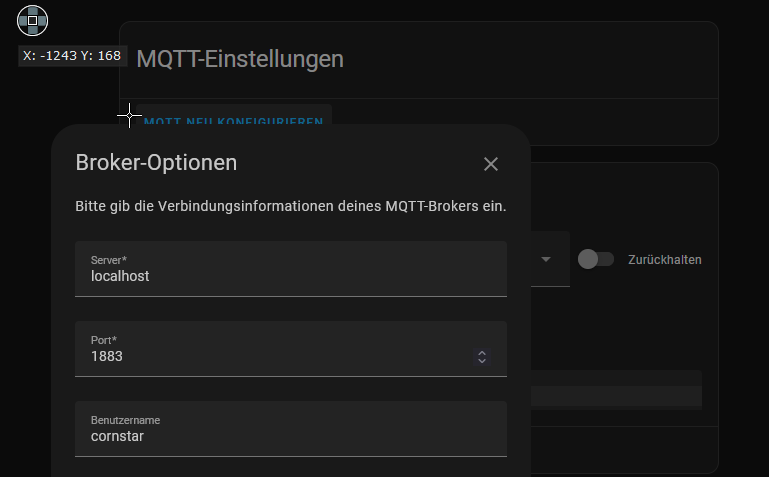 bitter skiff
I'm not sure what I'm looking at
remote marlin
i just hope thats the same representation that you would find in supervisor? basically the configure screen of mqtt in the HA device overview
bitter skiff
How are you hosting Mosquitto
Just as a docker container not part of HA OS?
You need to expose the Mosquitto port 1883 from the container through the host
remote marlin
not even that, manually, no container
bitter skiff
Then UFW or whatever firewall on the box itself?
remote marlin
how would i find out? its a raspberry pi
cornstar@himbeerkuchen:~ $ sudo lsof -i:1883
COMMAND       PID          USER   FD   TYPE   DEVICE SIZE/OFF NODE NAME
mosquitto 1082634     mosquitto    5u  IPv4  xxxxxxx      0t0  TCP localhost:1883 (LISTEN)
mosquitto 1082634     mosquitto    6u  IPv6  xxxxxxx      0t0  TCP localhost:1883 (LISTEN)
mosquitto 1082634     mosquitto    8u  IPv4 xxxxxxxx      0t0  TCP localhost:1883->localhost:44498 (ESTABLISHED)
mosquitto 1082634     mosquitto    9u  IPv6 xxxxxxxx      0t0  TCP localhost:1883->localhost:46199 (ESTABLISHED)
hass      2818070 homeassistant   48u  IPv6 xxxxxxxx      0t0  TCP localhost:46199->localhost:1883 (ESTABLISHED)
node      3761356      cornstar   20u  IPv4 xxxxxxxx      0t0  TCP localhost:44498->localhost:1883 (ESTABLISHED)
so locally the port is fine it seems, right?
remote marlin
like its conf?
bitter skiff
Correct
remote marlin
i cant remember setting much there....
let me find it
but when starting it, it says
1679087024: Starting in local only mode. Connections will only be possible from clients running on this machine.
so apparently thats our reason
bitter skiff
yup
remote marlin
so i add listener 1883 to the conf i guess?
bitter skiff
well, is bind_host or bind_interface set
you'll probably have to specify the local IP after the port
remote marlin
ah oka, i was just reading https://stackoverflow.com/questions/65278648/mosquitto-starting-in-local-only-mode
in the comments it says that bind thingy too
listener 1883
bind_interface eth0
at least a telnet towards that port doesnt state an error, but still mqtt doesnt connect
and a allow_anonymous true did the trick then
thanks for the heads-up!
but apparently i just broke zigbee2mqtt with that -.-
cornstar@himbeerkuchen:/etc/mosquitto/conf.d $ sudo systemctl status zigbee2mqtt.service
● zigbee2mqtt.service - zigbee2mqtt
     Loaded: loaded (/etc/systemd/system/zigbee2mqtt.service; enabled; vendor preset: enabled)
     Active: activating (auto-restart) (Result: exit-code) since Fri 2023-03-17 22:28:51 CET; 2s ago
    Process: 2948744 ExecStart=/usr/bin/npm start (code=exited, status=1/FAILURE)
error 2023-03-17 22:31:10: MQTT error: connect ECONNREFUSED 127.0.0.1:1883
error 2023-03-17 22:31:10: MQTT failed to connect, exiting...
apparently worked without the bind_interface
weary stratus
Hi anyone can help with add users to ftp addon in HA. I'm adding in yaml and nothing works
river wharfBOT
@weary stratus I converted your message into a file since it's above 15 lines :+1:
weary stratus
Athentication faild for "hassio"
weary stratus
Sorry it's a Samba
 tender ridge
Hoi, is there an addon for HA to use a hours watched, as well as how many episodes watched, like how i can see a log of prices and usage for power for X amount of time like a graph for plex?
 kindred timber
Anyone know of signal-k and if an addon port is in the works? Has it been discussed anywhere?
 oak ledge
][D][api:102]: Accepted 192.168.0.130
[10:46:34][W][api.connection:071]: 192.168.0.130: Socket operation failed: HANDSHAKESTATE_READ_FAILED errno=11
Help
What should I do?
ESP 32 error
oak ledge
I solved the problem. I was using space in the name of the ESP 32
 north vault
Is it possible to backup my addons using the google drive add on? What about the data on the MariaDB?
 lucid terrace
how can I set a fixed IP on the nginx addon? There no longer is any relevant input on the "Network" section of the configuration
... or is there another way to use nginx in "bridged" mode so as it does not require it's IP to be cleared on the trusted_proxies: setting on the configuration.yaml file?
lucid terrace
bitter skiff
```
  trusted_proxies:
    - 172.30.33.0/24
```
problem is the subnet changes, requests are now coming from 172.30.32.x ... So I had to widen the mask to /8 to accommodate all possible variations... is this the best practice?
the logs of the "NGINX Home Assistant SSL proxy" are also not helpful at all, will not log / show failed connections or provide any useful debug information
 velvet socket
New add-on: MIDIMonster. I needed a way to send MIDI commands via Home Assistant, so I created an add-on that runs MIDIMonster. It's a bit rough around the edges but it works great for me:
https://github.com/wildekek/ha-addons/tree/main/midimonster
restive lily
anyone here using WMBusMeters with a Nooelec RTL-SDR?
 latent iron
bitter skiff
Any idea if it's possible to get the logs of a restarted add-on? One of my add-...
latent iron
bitter skiff
Any idea if it's possible to get the logs of a restarted add-on? One of my add-...
Did you find an answer to this one? I have the same problem.
bitter skiff
Nope, not sure
latent iron
bitter skiff
Nope, not sure
I found the answer.
Steps:
- connect with SSH to the supervisor as described here: https://developers.home-assistant.io/docs/operating-system/debugging/
- execute
journalctl "CONTAINER_NAME=<YOUR ADDON DOCKER CONTAINER>"
bitter skiff
latent iron
I found the answer.
Steps:
- connect with SSH to the supervisor as described ...
Nice, that works, thanks for sharing!
 void urchin
Does anyone have a grafana panel to Monitor the uptime of shellys? I Do Not get it working... Which fiel Do i need to use? 🤐
supple grove
Where are you storing the uptime? Grafana has to query something
void urchin
I have the influxdb and MySQL as data source... So i can choose state and Filter the uptime entities.. But i dont get the right fiels for any aggregation...
supple grove
How does your query look right now?
Try something like this
SELECT mean("value") FROM "s" WHERE ("entity_id" = 'yourshelly') AND $timeFilter GROUP BY time($__interval) fill(none)
Cant find any entity (except vaccum) within the option 's'. Within 'state' i have the uptime entities but there is 'No Data'...
supple grove
Can you share how it looks in the developer tools' states tab?
 blazing laurel
Hey guys!
Dont know if this is the right subforum, or even the right discord but here goes:
Im running HA on a VM installed on a Lubuntu system. Its running fine, i can access it from local network fine.
My router is an ASUS RT-AC1200 V2 with OPENWRT OpenWrt 22.03.3.
Im trying to get remote access to my homeassistant with a duckdns.org domain, using ddns-scrpits installed on my router.
Im not getting anywhere. I tried tips from a combination of forumposts and guides, and im starting to feel like a complete idiot.
If anyone wanna give it a go i´d appreciate it!
supple grove
I don't see the relation to #add-ons-archived but you could describe where you're stuck in #integrations-archived
blazing laurel
Ill try that, Thanks!
 brittle night
blazing laurel
Hey guys!
Dont know if this is the right subforum, or even the right discord bu...
brittle night
blazing laurel
Hey guys!
Dont know if this is the right subforum, or even the right discord bu...
best bet is to ignore duckdns's existence and use cloudflare. you can use the cloudflare addon in haos to update your wan ip on CF if it changes
if you dont have a domain you can get a free one from https://porkbun.com/event/freeappdevdomain
supple grove
Off-topic but also look into Tailscale
blazing laurel
brittle night
best bet is to ignore duckdns's existence and use cloudflare. you can use the cl...
Thanks for tips, ill check them out if this does'nt work out. My curiosity as to what im doing wrong is to strong to just let go.
supple grove
I respect that
brittle night
duckdns has been failing multiple times in 2023 alone. you can search "duckdns" here and see all the issues
but feel free to enjoy the pain
blazing laurel
well third times the charm, if that´s the case i might as well accept defeat.
sly kindle
blazing laurel
well third times the charm, if that´s the case i might as well accept defeat.
I second the CF option and cloudflared add-on with your own domain. No ports need to be opened
As long as you don't plan on using it to stream media
 flint plank
Good
Can someone help me my zigbee2mqtt is not working properly as the devices are working but it does not open the webpage.
Does anyone know what I do??
sly kindle
Not that they can't, but likely don't want to be dealing with plex servers etc. Against ToS
You can try whatever you want. https://www.cloudflare.com/terms/#:~:text=2.8 Limitation on Serving Non-HTML Content
But yeah everyone creating a free CF account to start their own streaming service is not going to be something they are cool with
 compact terrace
So I have come across the browserless add on. It’s essentially some headless version of chromium running on port 3000 with puppeteer. It seems I can use it with a screenshot API call to take a screenshot of any website and in particular: my HA dashboard to use on Esphome. Problem: I can’t figure how to log into HA, submit the form, etc. You can use curl to post a bunch of data for puppeteer, but I don’t know how to get it to fill the login forms. Does anyone have experience?
This is what I have curl -X POST http://ha.lan:3000/screenshot --output bla.jpg -H 'Cache-Control: no-cache' -H 'Content-Type: application/json' -d '{"url": "http://ha.lan:8123/lovelace/default_view", "options": { "fullPage": true, "type": "jpeg", "quality": 75}, "gotoOptions": {"waitUntil": "networkidle2"}, "authenticate": {"username": "blabla”, "password": "blabla"} }'
I’m guessing the authenticate only works with simple auth, but I am waaay outside my expertise
 errant onyx
has anyone successfully used the mosquitto broker to broker to bridge to adafruit? I can't receive data and I keep getting connected/disconnected every 5 seconds or so
errant onyx
errant onyx
has anyone successfully used the mosquitto broker to broker to bridge to adafrui...
turns out the clientid in mosquitto needs to be unique on the broker itself. the docker image used a value that I guess is shared with someone else (I thought it would be unique per user, so self unique across my own stuff)
supple grove
Check local_clientid and remote_clientid here: https://mosquitto.org/man/mosquitto-conf-5.html
The image does not modify these values unconfigured so they should be default.
 spice bane
hey guys. does someone use esp-home? i accidentally installed nginx next to home assistant on my server and now my webinterface from esp-home is gone but all installed devices are still working. i tryed to remove nginx but the broblem was not solved. its not a big deal for me to reinstall the whole system but i want to get the scripts from my esp devices. is there a way to get them saved before? or maybe someone knows how to fix the main problem.
 supple grove
Can you check the logs or try to restart it from here: https://my.home-assistant.io/redirect/supervisor/
spice bane
here is my current log. i restarted the docker container and the whole computer couple times

looks like some problems with ssl but i never changed a port or even enabled ssl before
i think i got it to work when i totally disable my firewall with sudo ufw disable but i dont know which ports i have to open for esp-home
supple grove
I meant the container's logs. Are you using supervised install?
spice bane
yeah i installed supervised
supple grove
Enable ufw logging and check the logs. I believe 6052 is one of them though
This might also be useful: https://developers.home-assistant.io/docs/add-ons/presentation/#ingress
spice bane
ah thanks for the idea just to check the firewall log file was great xDDD i got it back to work. port 65086 needs to be open aswell
 supple grove
I'd check if that port changes if the addon/host restarts. Not too familiar with how addons talk to HA
flint plank
Good
Can someone help me my zigbee2mqtt is not working properly as the devices are working but it does not open the web page.
Does anyone know what I do??
 wise thunder
Hi! Is there a way to add more local ip addresses to haOS? I have the NPM (nginx proxy manager) running on port 80 & 443. But i would also like to use the guest portal from Unify contoller i have running, currently runs at 8843, that i would like to have running on 443 for a nicely URL where my guests get redirected to. Im also interested in other solutions 🙂
The problem is that the redirect url of the unify controller now is https://<url>:8843/stuffandthings. I can change the port to 443 if i dont use NPM. But then i wont have a ssl cert.
 hollow temple
Has someone an Idea, what I'm doing wrong?
[14:36:00] INFO: Preparing to start... [14:36:00] INFO: Socat not enabled [14:36:00] INFO: Starting Zigbee2MQTT... Zigbee2MQTT:info 2023-03-22 14:36:01: Logging to console and directory: '/config/zigbee2mqtt/log/2023-03-22.14-36-01' filename: log.txt Zigbee2MQTT:info 2023-03-22 14:36:01: Starting Zigbee2MQTT version 1.30.2 (commit #unknown) Zigbee2MQTT:info 2023-03-22 14:36:01: Starting zigbee-herdsman (0.14.96) Error: Reset error: Error: {"sequence":-1} after 2000ms at /app/node_modules/zigbee-herdsman/src/adapter/ezsp/driver/uart.ts:298:23 at Queue.executeNext (/app/node_modules/zigbee-herdsman/src/utils/queue.ts:32:32)
under "serial" i got that config here:
port: >- /dev/serial/by-id/usb-Nabu_Casa_SkyConnect_v1.0_2020d0168718ec11997be99a47486eb0-if00-port0 adapter: ezsp
brittle night
hollow temple
`port: >-
/dev/serial/by-id/usb-Nabu_Casa_SkyConnect_v1.0_2020d0168718ec11997b...
pretty sure the skyconnect isn't an ezsp but not positive. you should ask in #zigbee-archived nvm maybe it is\
hollow temple
brittle night
pretty sure the skyconnect isn't an ezsp but not positive. you should ask in <#5...
ok, thanks 🙂
errant onyx
supple grove
Check `local_clientid` and `remote_clientid` here: <https://mosquitto.org/man/mo...
thanks I did check the manual to try and figure out what was going on with the connection. the problem is that docker will generate the same id for everyone (something like core-mosquitto.adafruit) which is conflicting on the remote system. not sure why the default isn't to generate a unique GUID like you'd have on the clients
errant onyx
wise thunder
The problem is that the redirect url of the unify controller now is https://<url...
maybe I'm misunderstanding something but I'd think nginx proxy should be able have multiple sub domains pointing to various services on the single machine. haven't tried the add on myself yet though
fwiw I'm using the cloudflared addon which has another option listed: https://github.com/brenner-tobias/addon-cloudflared/blob/main/cloudflared/DOCS.md#option-additional_hosts
wise thunder
Yea it does. But i cant just add a hostname it has to include a port. And as unify also adds a port. I got like a double port, if you understand what im saying. So i thought i change the https portal of unify to 443 and NAT the nginx proxy from 443 to 4331. So it would work from the outside.
errant onyx
nginx should be able to just handle it. you'd point all the (sub)domains to the server. nginx listens on 80/443 and then redirects to the other addresses/ports internally
marsh pawn
im having issues with zigbee on my skyconnect specifically when open thread border router is enabled in the silicon labs multiprotocol add on
 mortal panther
Does anyone here have an issue where studio code server does not run on android mobile app?
wise thunder
errant onyx
nginx should be able to just handle it. you'd point all the (sub)domains to the ...
Yes, i understand how a proxy works. The problem is that unify adds the port to the url if its not 443. NPM cant handle that.
 lunar ore
@raven tinsel could you please have a look at the tailscale addon? It hasn't been updated and is currently vulnerable to CVE-2022-41925. There have been multiple pull requests open for months. We just need you to approve any of them. A lot of us are getting desperate 🙂
https://github.com/hassio-addons/addon-tailscale/pull/133
 raven tinsel
I get to it when I get to it
 thick furnace
Hi all. I have little bit problem with InfluxDB. I have entities from my Goodwe Integration, in Homeassistant is all fine, i see changes in entities, in development tools is all fine, when i manually change state of entity, after few sec changes back to the right one. But from 3days ago, i have no record in Influx from this entity, from another entities is all fine. Only 2 entities dont send data to Influx battery_mode_code and interter_mode_code, can anybody help me with this pleas?
lunar ore
@raven tinsel thank you for your reply. Looking forward to when you get to it!
brittle night
lunar ore
<@243794953032040448> could you please have a look at the tailscale addon? It ha...
Thanks for the heads up I wasn’t aware of this. I’ll disable it until he gets to it lol
 cursive tusk
Hey guys. I just switched and migrated to mariadb but my history is kinda weird now? Is that normal?
https://imgur.com/a/Bl9tWii
brittle night
@lunar ore i see you asked the guy submitting the PR how to use his fork. it's pretty simple and outlined in his docs. "Navigate in your Home Assistant frontend to Settings -> Add-ons -> Add-on Store, in the ... menu at the top right corner click Repositories, add https://github.com/lmagyar/homeassistant-addon-tailscale-funnel as repository."
I'm going to give the -funnel fork a chance instead of the non-funnel fork but you can remove -funnel if you just want the regular version
 eternal inlet
did you get anywhere with this @rose wing ? I'm seeing the same problem
 rose wing
eternal inlet
did you get anywhere with this <@193086841241468929> ? I'm seeing the same probl...
rose wing
eternal inlet
did you get anywhere with this <@193086841241468929> ? I'm seeing the same probl...
Yeah, it ended up being in its own Tasmota integration.
eternal inlet
Can you explain more? Do I need another integration?
rose wing
It just added itself iirc.
If you've connected it, check if you now have a Tasmota integration.
eternal inlet
I have a tasmota integration, but it doesn't show any entities
rose wing
That's what mine did, they connected and went into that integration rather than MQTT like my older plugs.
eternal inlet
odd, mine are connecting as I can see it in the console on each switch, but nothing is showing up in the integration or entitiy
mqtt.dump also returns a good set of data when I test it
it feels like the broker configuration is wrong, it isn't scanning for the topic or something
if i listen on the mqtt integration, I see the messages being published by the switches, so they are hitting the broker, feels like the mqtt integration isn't discovering properly...
ok, one has turned up now, but it's not working... will leave for a bit and see if some auto magic happens...
 chilly olive
how to add second device to mqtt?
supple grove
Elaborate

 quasi scarab
I'm having an issue with Studio Code Server using excessive CPU resources. I've been noticing that my Hardware CPU has been pegging out lately. I've been working with Frigate, Deep Stack, and Double Take and have been monitoring my CPU usage. Today, I updated HA,
Home Assistant 2023.3.6
Supervisor 2023.03.2
Operating System 9.5
Frontend 20230309.1 - latest
and now, my CPU is regularly pegging. I traced the problem to Studio Code Server, which is utilizing 47%-73% CPU.
supple grove
Might make sense to investigate the processes in the container with docker stats (use the SSH addon for it) or via the glances addon.
Does restarting the addon fix it?
supple grove
chilly olive
How to add mqtt server? I have mqtt server details, how do I add it?
As the info says, Only a single configuration possible.
Why do you need multiple MQTT brokers? What are you trying to achieve?
 carmine raven
G'day! Any suggestions for a reliable and easy to set up timeseries database? I was tempted by InfluxDB, but I am a bit concerned that it is abandoned since 2021...
chilly olive
supple grove
As the info says, `Only a single configuration possible.`
Why do you need multip...
I need hass agent and supla mqtt
sly kindle
chilly olive
I need hass agent and supla mqtt
Hass agent is a client
And it looks like supla is too. You only need one broker
 young maple
Anyone here using Mariadb with HA notice a recent change that would have impacted direct queries that would have worked last month and no longer do?
 steady niche
I'm trying to set up Frigate and running into the "green image" issue. Where do I check the logs as I see I should be doing?
I have reolink 820a cameras and I have tried to set my config up using https
quasi scarab
supple grove
Might make sense to investigate the processes in the container with `docker stat...
I'm using the HA Operating System. I'll look into the Glance add-on, thanks. No. Restarting has the same effect as stopping/restarting the add-on. Everything will be fine until I open a file. Once I do that, the CPU usage goes way up.
supple grove
The instructions are made with that in mind. You can also run top -c -d1.5 in the terminal of Code Server which is probably even more useful.
Glances is very generic but might still help. You really want something specific for this though.
lunar ore
brittle night
<@422875414277390336> i see you asked the guy submitting the PR how to use his f...
I just came here to tell you you can switch to the guy's fork, but not only did you beat me to it, you were kind enough to give me instructions. Thank you a lot! I have it running since morning 🙂
 tawny breach
I asked this in the frontend channel but thought since I am asking about an add-on, it may be better fitted here.
Is there anyways to change a color light back to standard white, using the mushroom card? If not, how are people accomplishing this? Seems like being able to go back to a standard white light is a valuable feature. I tried playing with the RGBs but couldn't find anything that resembles the standard white light.
supple grove
#frontend-archived was more appropriate. Mushroom Cards is not an addon
tawny breach
supple grove
<#460846676358332417> was more appropriate. Mushroom Cards is not an addon
Thanks
compact terrace
quasi scarab
Home Assistant 2023.3.6
Supervisor 2023.03.2
Operating System 9.5
Frontend 20230...
Maybe this is not in the end the same, but I’ve noticed a few times over the last couple of days that my HA had stopped responding while the machine could still be pinged. I had to hard reboot. I have not investigated any further yet.
quasi scarab
compact terrace
Maybe this is not in the end the same, but I’ve noticed a few times over the las...
I had to hard reboot yesterday morning, before I found that Studio Code was pegging my CPU, because HA wasn't responding.
chilly olive
sly kindle
Hass agent is a client
So how can I add a supla server and have hass agent send information via mqtt?
void urchin
Does anyone know an addon for document Management? I want to have my incoming Letters, invoices,.. OCR Scanned and extracted and at its Best with matched Company or Person... Does anyone have such an addon or know a good Tool?
I have found docspell but Did Not try it out now...
supple grove
Sounds like paperless
void urchin
Yeah, some Tool like this, do you have it Up and running?
supple grove
No I don't use it
 versed marsh
I'm trying to install the Nginx Proxy Manager on my HA instance which is running the appliance but I'm getting this error message when I try to install it:
Failed to install add-on
Can't install ghcr.io/hassio-addons/nginxproxymanager/amd64:0.12.3: 404 Client Error for http+docker://localhost/v1.41/images/ghcr.io/hassio-addons/nginxproxymanager/amd64:0.12.3/json: Not Found ("no such image: ghcr.io/hassio-addons/nginxproxymanager/amd64:0.12.3: No such image: ghcr.io/hassio-addons/nginxproxymanager/amd64:0.12.3")
Rings a bell to anyone?
Not sure why il's looking up localhost
 vital bear
DuckDNS question: I've got it setup to see my duckdns on local, but it breaks when trying to do remote. I'm fairly confident it has to do with my port forwarding, which I tried to setup as (see below). Am I missing something obvious? My networking class for college isn't until a few weeks haha
vital bear
vital bear
DuckDNS question: I've got it setup to see my duckdns on local, but it breaks wh...
Appears I'm not able to send images. I have the global range set to 8123-8123, and the host port also set to 8123. Protocol is TCP/UDP
supple grove
Upload to a image site and post a link to it here instead
vital bear
Will take a look, thanks!
 fervent harbor
hey all switched server to something 12gen based and I can not get frigate to use igpu on my 12th gen any ideas (I do see in hardware info no vga is detected now and just have DEVNAME: /dev/vga_arbiter DEVPATH: /devices/virtual/misc/vga_arbiter MAJOR: '10' MINOR: '127' SUBSYSTEM: misc it might have been this before, just never needed to check before on older celeron based setup as it worked using hwaccel).
fervent harbor
2023-03-25 09:03:02.507804399 [2023-03-25 09:03:02] frigate.util ERROR : Unable to poll intel GPU stats: No device filter specified and no discrete/integrated i915 devices found
weary stratus
I try to add influxDB and run it. It installs , when I start it, I see things happening in the logs, but then nothing more happens (last log message: ... INFO: Starting NGINX ...). So the webserver is trying to start, in order to enable me to push 'open web ui', I guess, but it stalls. Can any of you do me a favor, just try to install and start influxDB addon to see whether it works for you. I need to know whether it is just my installation or an overall problem.
Any advice is welcome!
supple grove
Works fine. INFO: Starting NGINX... is the last message. What happens if you visit InfluxDB from the sidebar?
weary stratus
Thanks for coming back, it says: "Add-on is not running. Please start it first"
Strange ...
supple grove
Strange that the addon's logs don't say anything
weary stratus
So, you get an interactive web page, where you can select "open web ui"?
Anyone else, please?
supple grove
I add it to the sidebar and click there
weary stratus
and it opens?
supple grove
Works fine
weary stratus
Pffffffffffffffff
supple grove
If you check the InfluxDB addon's overview where the Uninstall button is. Does it say it's running? It will show CPU and RAM usage if it is and there should be a Stop instead of Start button. When an addon is stopped the log should also be empty, usually
weary stratus
Let me check
No, it just shows the original screen with "start" on the left, "uninstall" on the right, and on the top right a red dot (indicating add-on is stopped), Pushing START AGAIN, doesn't do anything, logs also don't change any more. All I can do is uninstall, install again, start it, see the logs move on until shows INFO: Starting NGINX again. (endless loop!)
supple grove
Not sure
weary stratus
Wait, same thing happening for other Add-on's as well, so it is not InfluxDB related ... will restart everything and check again!!!
Problem seems solved! @supple grove Thank you very much for taking the time to react!!!
supple grove
No problem
 jaunty elbow
Hello 👋 Has anyone faced issue with the core MQTT addon not starting due to the following error: 2023-03-25 13:51:42: Opening ipv4 listen socket on port 1883.
2023-03-25 13:51:42: Opening ipv6 listen socket on port 1883.
2023-03-25 13:51:42: Opening websockets listen socket on port 1884.
2023-03-25 13:51:42: Error: Unable to create websockets listener on port 1884.
[11:51:42] WARNING: Halt add-on
s6-rc: info: service legacy-services: stopping
There's nothing running on port 1884 and until last night everything was running fine. I have restored a backup, but no luck. MQTT just won't start 🤷♂️
supple grove
How did you check that there's nothing running on 1883-1884?
jaunty elbow
sshd into the VM and ran netstat
➜ ~ netstat -tanp|grep 1883
➜ ~ netstat -tanp|grep 1884
Returns nothing
VM is running bridged with it's own IP, so host machine ports should not matter
Have already tried uninstalling the addon, no change, reverting to default settings (which they were already), no luck.
Tried changing ports from the addon configuration, but that didn't work either, it still defaults to standard (apparently unusable) ports
Not sure if this is caused due to the supervisor update to 10.0rc1
 split stratus
jaunty elbow
Hello 👋 Has anyone faced issue with the core MQTT addon not starting due to the...
split stratus
jaunty elbow
Hello 👋 Has anyone faced issue with the core MQTT addon not starting due to the...
https://github.com/home-assistant/operating-system/issues/2428 I have the same problem, it happened after the OS upgrade. Tried to replace tje add container, but the error remains. Even when port 1884 is disabled the issue remains.
split stratus
jaunty elbow
https://github.com/home-assistant/addons/issues/2904
I am not sure it is an add on issue
jaunty elbow
Most likely it is ha core/supervisor issue
But I am downgrading the OS now as someone had luck with that
split stratus
jaunty elbow
But I am downgrading the OS now as someone had luck with that
Never have done that
split stratus
jaunty elbow
ha os upgrade --version 9.5
got used to that ( I mean the long time to reboot)
I am reverting too
after entering the command
# ha os upgrade --version 9.5
Command completed successfully.
#
It is rebooting now 🙂 and up and MQTT is up and running again!
jaunty elbow
Yep, can report the same
It seems now my Z2m with Skyconnect is borked 😑 what a wonderful day with HA 😅
supple grove
Snapshots/backups are very useful with VMs
jaunty elbow
I do have daily backup on HA, but not on the VM itself
Will do that once I get my NAS with proxmox
supple grove
Wasn't meant as a jab. It's just one of the cool things VMs allow you to do easily and provide a huge benefit
jaunty elbow
Oh wow, what a journey 😂 So the OS 10.0rc1 borked the MQTT, which broke Z2M. Before figuring out that MQTT was broken, tried few things to get Z2M with Skyconnect to run. Tried the SL Multiprotocol addon which apparently automatically flashed the Skyconnect FW. This FW doesn't work with Z2M ezsp as it seems, so needed to flash new Zigbee only FW to Skyconnect. Finally Z2M and MQTT works again and my home is functional 😂
jaunty elbow
supple grove
Wasn't meant as a jab. It's just one of the cool things VMs allow you to do easi...
Didn't take it as one 😅 Yes, indeed it will save a lot of time in the future if something goes wrong. However, in this case there was also hw/fw issue which happened quietly in the background 😅
jaunty elbow
jaunty elbow
Oh wow, what a journey 😂 So the OS 10.0rc1 borked the MQTT, which broke Z2M. Be...
Related to this, has anyone been using SL Multiprotocol + Z2M via tcp socket (port 9999)? Does it give any additional benefits as of now and is it anywhere near stable? Only benefit I see with this is Thread/Matter support, but don't own any Matter devices yet.
 green dune
Anyone familiar TaailScale VPN and Mosquitto MQTT ? I'm trying to get Mosquitto MQTT to connect over Tailscale network. I think I need to add a route but I have not seen any reference to doing that yet. The Tailscale interface and ip don’t seem to be available in the HA user space so I’m not sure how to reference it.
chilly olive
Can someone help me with mqtt? I've been trying to do this for a few days now... I currently have only hass agent connected via mqtt to send information and it works, but I don't know how to add another supla device that has its own broker server.
 uncut flume
My Mosquitto broker won't start anymore since the latest OS version that was released today. The error that I get is: Error: Unable to create websockets listener on port 1884.
Any idea how to fix this?
brittle night
something else trying to use that port?
uncut flume
I didn't install anything... I only updated the OS version today. before that everything ran fine. Any idea where I can check what apps use that port?
Just heard that there are issues with the new OS version and Zigbee2MQTT. I have to downgrade to 9.5
lunar ore
@raven tinsel thank you a lot for updating tailscale, you rock!
raven tinsel
lunar ore
<@243794953032040448> thank you a lot for updating tailscale, you rock!
Not ready to ship yet, will continue tomorrow.
Today I've mostly put in place automated dependency upgrades for almost all add-ons (which is why it bumped on Tailscale)
 violet tapir
hi! I am trying to access the filesystem of the postgresql add-on (https://community.home-assistant.io/t/home-assistant-add-on-postgresql-timescaledb/198176 - running hassos latest version) in order to copy the sqlite database there to migrate it. I cannot find documentation on how to access the data within addons, can anyone point me into the right direction please?
 harsh mortar
Anyone know how to edit files for addons? I'd like to make some changes to the data directory specifically adding a custom_js.html file
 heady lava
any known issues with the add-on screen just being blank when clicking into that part of Home Assistant?
viscid orchid
Clear your browser cache
heady lava
still blank
Uncaught (in promise) SyntaxError: "" literal not terminated before end of script entrypoint.fc042133.js:1214:46481
@viscid orchid
 kindred escarp
harsh mortar
Anyone know how to edit files for addons? I'd like to make some changes to the d...
kindred escarp
harsh mortar
Anyone know how to edit files for addons? I'd like to make some changes to the d...
Have you tried the smb add on?
harsh mortar
I have, with the addons shipped with hassos they're not available in /addons to be edited. @kindred escarp
heady lava
basically, the addon section won't load and no addons will. all giving that same error in Dev Tools.
violet tapir
I installed the samba add-on now. but it doesn't work - no configuration available. and also it's not listed in the installed plugins. but it's there and I can click on start, however then of course it complains about missing username and password, which I cannot set due to the missing configuration. Can I edit a config file somewhere?
violet tapir
violet tapir
I installed the samba add-on now. but it doesn't work - no configuration availab...
I have rebooted homeassistent without success
howewer I can access homeassistant through sftp. but all the directories like /addons /mnt /media are empty. still looking for a way to transfer the sqlite database into the pgadmin addon https://community.home-assistant.io/t/home-assistant-add-on-postgresql-timescaledb/198176. or connect with another pgadmin instance from outside, but I do not see how I can open the postgresql database to the network.
 zinc terrace
Frenck just discovered Renovate? Haha
zinc terrace
wild basin
Where can I find the debug file of a hassio addon?
Are you looking for the logs you mean?
There's a log tab on all add on pages. Otherwise maybe you can provide a little more info on what you're looking to do specifically or what your problem is
zinc terrace
raven tinsel
Today I've mostly put in place automated dependency upgrades for almost all add-...
How are you you liking renovate vs dependabot?
wild basin
I found in the end I had misconfigured the logs ^^
raven tinsel
zinc terrace
Frenck just discovered Renovate? Haha
No, I used it way before dependabot actually, but switched to dependabot later in the process as it had no advantage to stay on Renovate at the time.
So, was very familiar with Renovate, including using it in enterprises
zinc terrace
Last I remember people were moving to renovate for less PRs. I assume github would he working hard to keep dependabot competitive though
I feel like there was change recently specifically to reduce them for dependabot
raven tinsel
I like to use native options if available, hence I switched to dependabot back in the days
zinc terrace
Yeah absolutely
raven tinsel
Well, dependabot isn't actively gaining new features
zinc terrace
That's surprising
raven tinsel
And being able to write your own update logic in Renovate
works very well for my use case now
If it becomes available in Dependabot, I would not hesitate to switch back again
brittle night
Does this mean we should see more frequent updates for addons?
zinc terrace
raven tinsel
And being able to write your own update logic in Renovate
Was just going to ask if it supported things like that
raven tinsel
No, this has nothing to do with releasing.
zinc terrace
brittle night
Does this mean we should see more frequent updates for addons?
Those dep-only updates are always a tease though lol
brittle night
I figured if it made less work for you then maybe you’d be able to use that recouped time for improving them / other projects as well
raven tinsel
yup
zinc terrace
Have you written any custom updates Frenck?
zinc terrace
Any examples you could point me to? Or is it it just in the config files. Sorry, would research more myself but on mobile atm
raven tinsel
One the simpler examples, it updates external repos/dependencies, but also updates version pins of packages in Dockerfiles
and handles base images in the add-ons configuration as well
zinc terrace
That's pretty cool. I gotta add this to my projects. Always thought it would be nice to update versions where I've like parameterized it in a curl call
raven tinsel
Oh, and something dependabot doesn't do, but Renovate does I noticed already...
updating in the weekend 😄
For some reason, dependabot doesn't do normal updates during the weekend
So on Monday morning, when I wake up, my inbox is usually exploded with bumps
zinc terrace
That's cool, so you can specify sources as well. I assume that would be like github releases, npm, etc
brittle night
raven tinsel
For some reason, dependabot doesn't do normal updates during the weekend
Maybe to save us muricas from having to do more over the weekend cuz they’re roadblocked by a bot
Feature not a bug 
raven tinsel
It is annoying, as my monday morning the first 2 hours is wasted on processing notifications and merging dependencies
Which is just an awful and demotivating start of the week
zinc terrace
That's so weird. I would think you could specify when it did the checks
brittle night
Sounds like we need to crowdfund you a peon
raven tinsel
LOL I can also just unsub and leave those dep bumps to rot until I get to them when I move by
But my brain isn't capable of that
zinc terrace
Do you have any projects set to auto merge on a successful build?
raven tinsel
yes
brittle night
Isn’t that what all the betas do?
zinc terrace
That would make sense
raven tinsel
zinc terrace
Do you have any projects set to auto merge on a successful build?
If the project uses semver and a minor bump, or a trusted source, I'll automerge now if the CI passes
e.g., if I bump my base image now, with a new patch version
all add-ons will get a PR, and auto merged when the CI passes
which just saves me creating 40+ PRs manually
raven tinsel
rofl, it doesn't release. I still need to do that manually (I always test each release manually as well)
raven tinsel
zinc terrace
That's cool though. Must be satisfying
🤷♂️ just trying to be more efficient
zinc terrace
Yeah. Too bad I'm in a train cuz I'm motivated to set this up now lol
raven tinsel
I want to create re-usable rulesets at some point, but this, for starters, is good enough
zinc terrace
I was doing that manually for a lot of my personal projects for a while but turned it off cuz that was too annoying. But it was crazy how often stuff broke stating at the latest version. Would have been so annoying to have to do that all at once
zinc terrace
raven tinsel
I want to create re-usable rulesets at some point, but this, for starters, is go...
Will def be using your configs for some examples.
Really liked your HA config checker action btw. Used it a lot to write my own custom one
raven tinsel
Rofl, that thing became so simple/small eventually
right now it is a composite action running a container 🤷♂️
zinc terrace
Only hacky thing I've since come to terms with is I have to manually clone my custom components so it doesn't fail
raven tinsel
oh right, that is still a thing 🙂
zinc terrace
Not sure there's really any way around that, but it's been a while
But I really should focus on getting my integration's tests finished so I can submit the PR. I couldn't get the tests running in intellij and it was bugging me. Still can't figure it out. Have spent a few sessions on it 😑 Everything is finished except that, including brand and docs.
raven tinsel
🤷♂️ Just run pytest from the command line
zinc terrace
Something about that tests/typing.py file is screwing things up
raven tinsel
(at least, that is what I do; don't use any IDE for stuff like that)
zinc terrace
Yeah, just wanted debug lol
I don't usually either but especially while I'm learning things, debug would be helpful
Haven't written python tests in years
Only reason I could attach a debugger to the service while writing the integration was by deleting tests/typing.py lol
Intellij is getting confused because it conflicts with the built in module.
brittle night
i just noticed when doing the tailscale addon update there was no "what's changed" with any details just blank
zinc terrace
But anyways, sorry, well off topic
brittle night
other addons all show the changes
zinc terrace
brittle night
i just noticed when doing the tailscale addon update there was no "what's change...
I really like when there are links to the PRs. Even better when those PRs link to the new release of the underlying lib they are bumping. Frenck is usually good with that.
Yeah some add-ons just don't do it
I'm guessing it's some feature of the update integration
raven tinsel
brittle night
i just noticed when doing the tailscale addon update there was no "what's change...
brittle night
raven tinsel
Odd, it is there: <https://github.com/hassio-addons/repository/blob/master/tails...
the other two addons i just updated did show (zwave js ui and one other)
maybe a browser related issue?
raven tinsel
🤷♂️ could be
brittle night
not worth diagnosing just brought it up in case there was an issue on your end
raven tinsel
hehe the changelog system has been working for years now 😄 I'm pretty confident in that one 😄
(although I have to update Python for it, which it always scary :P)
I touch it the least possible 😛
weary stratus
Hi all, long time user but recently installed AdGuard add-on. Works great but have one issue. I’m using UniFi network gear and has my dhcp server as well. I am pointing dns to my static home assistant IP. It’s working however all of the “clients” on AdGuard show up as 192.168.0.0 — unless I set the dns server manually on a device to point to my home assistant AdGuard IP. I’m sure it’s something stupid I’ve overlooked. Any thoughts? Thanks
On the list of runtime clients, they’re all listed, but doesn’t seem to be resolving for the actual client list
brittle night
weary stratus
Hi all, long time user but recently installed AdGuard add-on. Works great but ha...
Change DHCP DNS* in UniFi to use adguard ip and cloudflare or something as secondary
weary stratus
Thats what I have.. AdGuard then 1.1.1.1 .. clients are connecting properly through AdGuard filtering, but AdGuard itself doesn’t break our individual client ips. All going through 192.168.0.0
 final prism
Anyone update to 3.2.3 Tautulli? Wont start and crashes for me 😦
[10:51:34] INFO: Updating running configuration...
/etc/s6-overlay/s6-rc.d/init-tautulli/run: line 37: TAUTULLI_VERSION: unbound variable
s6-rc: warning: unable to start service init-tautulli: command exited 1
/run/s6/basedir/scripts/rc.init: warning: s6-rc failed to properly bring all the services up! Check your logs (in /run/uncaught-logs/current if you have in-container logging) for more information.
/run/s6/basedir/scripts/rc.init: fatal: stopping the container.
raven tinsel
final prism
[10:51:34] INFO: Updating running configuration...
/etc/s6-overlay/s6-rc.d/init-...
uh
That sounds like a bug that I might have introduced
going to look at it right away
brittle night
Frenck introducing bugs?! Time to go buy a lottery ticket
raven tinsel
lol I do
I'm still just human
Oh right 
I see the issue, will fix it @final prism
@final prism Fixed in https://github.com/hassio-addons/addon-tautulli/releases/tag/v3.2.4
brittle night
Legen… wait for it… dary
weary stratus
I figured it out. Apologies. My router has WAN and LAN settings. The latter of which was sort of hidden. Works great now sorry
brittle night
weary stratus
I figured it out. Apologies. My router has WAN and LAN settings. The latter of w...
Nice
final prism
raven tinsel
<@745003368530837565> Fixed in <https://github.com/hassio-addons/addon-tautulli/...
Yup, that did it! Thank you!
brittle night
final prism
Yup, that did it! Thank you!
curious why you're using tautulli on haos instead of on your server you run plex on
@raven tinsel is there somewhere we can request specific addons from you?
raven tinsel
brittle night
<@243794953032040448> is there somewhere we can request specific addons from you...
Not really, I don't have much room for those
I do have some I want myself still (and also haven't created yet)
raven tinsel
hehe no, I have tons off stuff I still need to do
adding to that, will not solve anything
brittle night
frenck cloning machine inbound
yeah makes sense
it is just nice to have the high security rating for addons
as far as trust goes
makes me feel all warm inside
brittle night
hyperion / hyperHDR
i've used both, currently using hyperHDR, and they both run great as addons instead of needing to run hyperbian or in a container on my server
i have a d1 mini with wled behind my tv and using android hyperion grabber to send data to hyperHDR to control the d1 mini
really fun setup
https://github.com/mjoshd/hyperhdr-ha currenting using this i believe
raven tinsel
brittle night
hyperion / hyperHDR
hehe that is some very specific stuff
brittle night
i figured since you are a wled fanboi you might be a bit more inclined
raven tinsel
hehe no, sorry
brittle night
https://github.com/bradsjm/hassio-addons and this is the hyperion addon i was using before switching
no prob
raven tinsel
These things are cool, but also very fragile
brittle night
howso?
you mean the addon itself or the whole thing requiring a d1 mini etc?
it has been set and forget so far (luckily)
i talked to quindor and he suggested his new dig2go https://quinled.info/quinled-dig2go/ as a decent option for the hardware depending on power needed
raven tinsel
brittle night
you mean the addon itself or the whole thing requiring a d1 mini etc?
The whole thing.. they have low use
raven tinsel
brittle night
i talked to quindor and he suggested his new dig2go https://quinled.info/quinled...
Yeah I have those
Quindor sent them to me, super helpful for testing on my desk
brittle night
sweet
raven tinsel
with various setups
brittle night
holds back asking for a wled integration update featuring cct support
brittle night
i havent looked since the last time we chatted
didnt want to bug you since you said it needs tests done that i cant help with 😦
it's a bummer we're going on 13 months since it was removed but i understand you gotta focus on other things
raven tinsel
Things have review/cycle time too
my last PR for rewriting platform tests took 2 weeks (for a single platform) before it was approved and merged 🤷♂️
brittle night
i asked aircoookie if he could help test like 6 months ago and he said he'd look into it or talk to you or something
i dont really hang out in wled discord anymore but last i checked he wasnt really active anymore
just blazoncek which has an attitude lol
anyways i still appreciate all the things you do. crazy how often your name and a few others comes up with hass stuff
raven tinsel
🤷♂️ Not that hard, I work on HA fulltime
 silk root
raven tinsel
<@435143657541074944> Did you read the documentation?
silk root
raven tinsel
<@435143657541074944> Did you read the documentation?
allow_remote_port_forwarding: true
allow_tcp_forwarding: true
Visual Studio Code Remote - SSH
Setting the following parameters as is shown will allow you to connect to your Home Assistant instance using VSCode Remote - SSH:
 feral hornet
hello, I am under the latest version of HA and the plugin. All my devices are well recognized.
however for floodlights unifi Protect the control entity is not available, only sensors and diagnostics are used.
thanks
brittle night
is it possible to skip esphome addon updates like you can for other updates?
i'm not seeing an option to in the gui
sly kindle
You’re not seeing the skip option when you check the update?
brittle night
No
sly kindle
 brittle night
Only install here
sly kindle
Hmm. Cache issue?
brittle night
I’ll try reloading browser
i dont want to clear cache 😦
doesnt show up on edge or firefox (without clearing cache)
theme is set to backend-selected to rule that out
 lime crescent
Hi all, I just got referred here, I hope someone can help. Here is my post from the integrations channel: #integrations-archived message
(i'll just paste it here: hello guys. I probably just need the pointer to a good tutorial or the right docs but I am really lost on this one: I want to switch my MQTT communication to TLS because I will have a few 'road-warrior' devices that will report to my HA instance from outside my home network. I am running a DynDNS, I have all the knowledge to port forward 8883 to my HA instance, etc.
I even would call myself a pretty technically inclined person, but I cannot for the life of me figure out how to setup HA with core-mosquitto to switch to port 8883 and use TLS for the connection. For my purposes I would not even need cert verification on both ends, PW auth is fine for me, but I want the encrypted channel. If certs can be done easily that is fine too. But I can't figure it out. Also the docs confuse me where to configure stuff, I cannot see any config entries in configuration.yaml etc.
Can someone enlighten me please?^^
[15:36]
I should add: I'm running the HA supervisor VM on proxmox as delivered by HA and have mosquitto running in non-TLS mode within my network for months to monitor and control some power plugs. Everything is up-to-date and latest greatest.)
As far as I could figure it out there is 2 aspects: The mosquitto config itself and the config to connect mosquitto to HA. The latter can be unencrypted as it is literally within the same VM where HA is running.
So I guess what I need to do is tell Mosquitto to accept TLS connections. I tested my device using 1883 and this works fine, but what exactly do I need to do to get to a full MQTTS setup? In my device I can give a root CA, I can tick to enable TLS and set the port to 8883. But what exactly are the settings required for mosquitto?
 silent sage
HI, i am new with AdGuard, and my new installed aduard only listen to 127.0.0.1 (setup on HAOS)
silent sage
silent sage
HI, i am new with AdGuard, and my new installed aduard only listen to 127.0.0.1 ...
google...
errant onyx
@lime crescent is it possible to throw together a VPN instead?
would save you some thinking about how to expose the services securely
errant onyx
maybe not the right channel, but did you get the HA vscode extension to work locally?
lime crescent
errant onyx
would save you some thinking about how to expose the services securely
No that is not practical in this case. But I got it to work now. The huge issue with the current docs is that it completly mixes up 3 things: The MQTT interface of HA, the Mosquitto add-on and the configuration of these 2 entities, which are something completely different
after I figured out that the setup interface in the mosquitto integration actually sets up comms bewteen HA and Mosquitto and has NOTHING to do with the comms between Mosquitto and the actual clients, I was able to follow this external guide http://www.steves-internet-guide.com/mosquitto-tls/ and create the certs, make the settings in the mosquitto add-on GUI and then it immidiately started working
I can actually not believe something so simple is not to be found anywhere for an add-on almost half of all HA installs use^^ But maybe this is just my personal stupidity xD
now I have auth with user+pw over TLS working and just securely forward the port externally directly to Mosquitto and all is well.
 formal spindle
Hi guys, im trying to add service to existing hacs integration. Basically im getting sensor/switch values from rest api ( every 1min). When I change switch status it trigger post request, which change status of remotly device. But the HA entity will change after full cycle (1min). I know that refresh service can help I found this https://community.home-assistant.io/t/manually-refresh-rest-sensor/353208. But how can I implement it into plugin? Is there any developer's documentation for existing hacs/hass methods where can get more knowledge? Or do you know any simple hacs integration where they solve this issue? I will be gladfully for any type of help 🙂
 hidden cove
Hey everyone. I'm trying to migrate data from SqLite to MariaDB but I'm not able to connect to mysql/mariadb from the command line. The addon is running and I can't see any issues from the Log. My installation is a VM installation. I'm probably just too new to HA to get behind the whole supervisor thing. It looks like there's no real mariadb process running in the system so I'm not quite sure on how to connect to mariadb. Any ideas on what I'm doing wrong?
errant onyx
can you connect using phpmyadmin?
hidden cove
never tried - I guess i gotta install that first as an addon, right?
errant onyx
might be worth just to see if you can connect to it. I mean the only config needed for mariadb was like username/pw/access
hidden cove
nevermind - got it working now. I accidentally used the wrong parameter when switching around hostnames. core-mariadb is just working fine.
thanks for helping anyways 🙂
 untold oak
hey, building an addon, but can anyone tell me how to make an optional schema?
it always complaints about the subsection
this doesnt work
schema:
  doorbells:
    - name: str
  mqtt:
    host: str?
    port: int?
    ssl: bool?
    username: str?
    password: str?
  system:
    log_level: match(^ERROR|WARNING|INFO|DEBUG$)
    sdk_log_level: match(^NONE|ERROR|INFO|DEBUG$)?
it compiaits about the missinq mqtt: entry in options, if i define it in options , the n it work, but then its not optional anymore
Failed to save add-on configuration, Missing option 'mqtt' in root in ...
brittle night
untold oak
hey, building an addon, but can anyone tell me how to make an optional schema?
untold oak
ok
 steady echo
has anyone noticed high memory usage on frigate add-on. Frigate memory usage will start climbing to over 6GB and only fixes itself if I restart the add on
 pallid walrus
I have 4 ESP-32 devices flashed with ESPHome. All 4 of them show up in the ESPHome Add-on, but only three of them show up in the ESPHome integration. I've reinstalled it several times but it still does not show up. What am I missing?
raven tinsel
hidden cove
Hey everyone. I'm trying to migrate data from SqLite to MariaDB but I'm not able...
Any specific reason you move to MariaDB? As in, SQLite is recommend, better tested and generally not optimized and performant for Home Assistant
hidden cove
raven tinsel
Any specific reason you move to MariaDB? As in, SQLite is recommend, better test...
Yes, because MariaDB is the better database on a longer term. SQLite is surely good enough but I want a proper database from the get go. Not sure what you mean by „not optimized and performant for HA“
raven tinsel
Yes, because MariaDB is the better database on a longer term.
👆 I wonder what you mean by that? Got an example?
what is the concern in Home Assistant in this case?
As we are actually strongly recommending SQLite
Not sure what you mean by „not optimized and performant for HA“
That MariaDB will perform worse for Home Assistant. It will make your setup slower
Home Assistant is optimized for using SQLite
errant onyx
MariaDB with the recorder config is just about the history data I presume?
raven tinsel
state/event history and long term stats, yes
errant onyx
I guess it'll really depend on how much data is flowing but for a small use it's probably going to be just the default is best
You probably don't want to be loading up an entire dashboard of charts off it but then again you should be offloading the data elsewhere for that anyhow
raven tinsel
You can store data for years without issues
hidden cove
raven tinsel
> Yes, because MariaDB is the better database on a longer term.
👆 I wonder wha...
I need to underline that I'm not trying to tell anyone to move to a relational DB at all. That's just a personal decision and I don't want to say that anything else is bad.
I got a bit of history working with databases and I just prefer real database engines over sqlite for stuff that runs longer and grows over time.
I totally get why SQLite is the default and I'm sure there are tons of situation and reasons where it's better to stay on SQLite (e.g. if you're running on a Pi from an SD-Card which I'm not). But other than that I can't see why Homeassistant should be "not optimized" for SQL but optimized for SQLIte. Can you explain that?
raven tinsel
Hehe yeah, I'm an certified MySQL administrator and developer, I'm well aware of MariaDB and its inner workings 🙂
it was my job for years
I will not run HA on MySQL 🙂
Can you explain that?
HA is specifically developed against SQLite. Everything done to optimize performance, checks and everything else. It aimed towards SQLite
errant onyx
I was gonna say, it's what it's bundled with so they'll optimize against it
raven tinsel
Not just that, backups are bundles with the version "snapshot" of core to match (dbs are not backwards compatible when restoring backups)
and tons of more of those little reasonings
but, that said MySQL is supported; but rarely a better choice
(even when running on an SD card)
Anyways, gotta run, appointment outdoors 👋
hidden cove
especially not a good idea when running on SD Card 😉
raven tinsel
Doesn't matter much anymore
As said, HA optimized for the use of SQLite (including SD cards)
lots has changed over the years
hidden cove
running a rel db engine on SD cards is nothing I would suggest to anyone.
that's a sure SD killer sooner or later (maybe sooner)
raven tinsel
SD cards will die eventually... only way to win this game, is not to play.
Still, even medium sized HA instances on a Pi4, should last years now
errant onyx
SD cards are definitely a losing proposition
I wonder if they would start shipping with eMMC but that's a topic for another day/channel
 idle escarp
Are there any known problems with the api intergration within HA? I have two ttgo t-display (Esp32) devices and I flashed both with multiple codes fro ephome. Everything works, WIFI, sensor, web server, display (without no difference, withou sensor attached no difference) but it cannot do discovery. Even a manual one time out. Settings it to manual IP makes no difference. Rebooted AP and HA (Inc. VM) Changed computers, flashed esphome through webinterface, through esp_flasher, removed the integration, re-added it with different name, I am gettin crazy sinceIjust want the values, two other devices are discoverable if that means something
 vast grove
I am using the influxdb add-on, which creates an HA database. I pointed to an existing influxdb instance I already run on the network. I want to also utilize a different database within that same influxdb instance in order to create "sensor" data. Is this possible?
 fervent raptor
Hello. I need some help. I can't resolve my issue with installation add-ons on HA. That what it paste: "Can't install homeassistant/amd64-addon-configurator:5.5.0: 500 Server Error for http+docker://localhost/v1.42/images/create?tag=5.5.0&fromImage=homeassistant%2Famd64-addon-configurator&platform=linux%2Famd64: Internal Server Error ("Get "https://registry-1.docker.io/v2/": net/http: request canceled while waiting for connection (Client.Timeout exceeded while awaiting headers)")"
 slim ferry
400: Bad Request when I want to access HA via Cloudflare
 tough delta
is the ssl certificate the cloudflared issues downloaded to HA? if so, what is the path? i am connecting locally in some cases using internal dns and not public cloudflared one and believe I need to point my ssl cert paths appropriately. its not in the typical ssl directory
 gray depot
Hey, this may be outside of a lot of peoples wheelhouses too but at this point I am desperate.
So basically my homenetwork is behind CGNAT, so I use cloudflared to have a tunnel and to be able to access my home assistant from remote. Now I'd like to also have a vpn running at home so I can ssh into my home computer when at work. I only have one pi and saw that there is a wireguard addon. So I tried to somehow have the wireguard addon also use the cloudflared tunnel to access the internet. But I am pretty much stumped at how to actually do that. Does anybody have any suggestions for what to try or perhaps even experience?
 river coral
hello, for https://www.home-assistant.io/integrations/hassio how do i activate the default disable sensors?
errant onyx
gray depot
Hey, this may be outside of a lot of peoples wheelhouses too but at this point I...
I don't think you can use cloudflare to expose your wireguard. there's probably an option like tailscale or something though I haven't tried it
brittle night
gray depot
Hey, this may be outside of a lot of peoples wheelhouses too but at this point I...
We actually had this conversation yesterday in #hardware-archived let me find a link
errant onyx
I heard cloudflare has some kind of zero trust thing but not sure how that works without trying it
brittle night
@gray depot #hardware-archived message
gray depot
brittle night
We actually had this conversation yesterday in <#672223433907765288> let me find...
I tried that too but haven't gotten it to work yet :/
gray depot
brittle night
<@138943586061385729> https://discord.com/channels/330944238910963714/6722234339...
thank you! I will have a look!
sorry, the first reply was supposed to be for blue's message
brittle night
./giphy how-dare-you-greta.jif
gray depot
@brittle night what did you end up going for?
I tried setting up something like this but with the homeassistant cloudflared addon https://savjee.be/blog/securely-access-home-network-with-Cloudflare-Tunnel-and-WARP/
I have my laptop connected with warp but still can't reach my home PC
brittle night
gray depot
<@237771007228641292> what did you end up going for?
I tried setting up somethin...
I’m still using tailscale vanilla I was just learning about other options in case others needed help in the future. Case in point - this very conversation
gray depot
hm, yeah setting up a separate vpn client doesn't really work for me bc cgnat and lack of more computers
 solid wedge
Is there a way to build an addon with multiple ingress ports?.... I want to use home assistant to access a bunch of my internal services. I was going to iframe them, but they aren't accessible from outside via URL. So I was thinking about making an addon proxy using ingress. But ingress only allows a single port ... Is there another way to do this? Basically I just want an icon for the services I'm not running as addon's....
Alternative is just to make a custom addon per app I want to proxy
 normal lagoon
Have a question about the mqtt server addon configuration. I have configured server and client certificates and they seem to work fine, but I am still required to enter username and password.
Configuration:
logins: []
require_certificate: true
certfile: server.crt
keyfile: server.key
customize:
  active: true
  folder: mosquitto
cafile: ca.crt
use_identity_as_username: true
debug: true
It doesn't look like use_identity_as_username is an option for the addon, you'll likely need to throw that in a customize config file
 placid galleon
Has anybody else had the zigbee2mqtt addon seemingly die during an HA restart?
More than once now I've restarted HA (not the entire host) and all my z2m entities report unavailable until I've restarted the addon
brittle night
My z2m addon always stays up
 lean fox
no problems with z2m here.
placid galleon
Bizarre, it's only started happening recently too, my stuff has been stable for ages
Tho I did change to EMQX recently but I don't see how that could cause this
bitter skiff
Months ago my Z2M used to do that, it was fixed though. Have you checked out the logs?
placid galleon
I looked at the addon logs before I restarted and there wasn't any errors going on
I just looked at the state history and there is a gap for the last reboot followed by showing as unavailable immediately.
Is there some retain MQTT setting I could be missing?
bitter skiff
Was there anything in the add-on logs before you restarted Z2M?
bitter skiff
In the add-on logs though
placid galleon
Here's 3 random devices after a restart
all zigbee
So it's like not showing sensors that haven't sent an update
But mains-powered stuff is updating right after the reboot
bitter skiff
Ah, so Z2M is running
placid galleon
Yeah, it's seemingly just my battery-powered zigbee devices reporting unknown after a reboot
Which is bad, my furnace is driven off an average of multiple sensors but half of them are zigbee battery powered ones so my average gets skewed after a reboot
bitter skiff
Could see if #zigbee-archived has any thoughts... odd behavior though, my issue earlier was Z2M wasn't starting at all and had an error.
placid galleon
Yah since it's not the whole addon it seems like some z2m quirk somehow
bitter skiff
Suppose there could be differences between brokers as well, as you said you switched, also seems odd though
placid galleon
bitter skiff
Suppose there could be differences between brokers as well, as you said you swit...
I think it might be the broker, if HA restarts and it's the only thing subscribed to those topic I think EMQX drops them immediately.
brittle night
Is there a different last will default on that broker over mosquito?
placid galleon
Good question lol
brittle night
placid galleon
Good question lol
placid galleon
I honestly know very little about EMQX still haha
brittle night
Idk shit about it just a thought since last will and testament is built into brokers
placid galleon
I suspect it could just be a matter of how quickly it deletes data when the last subscriber disconnects
That HA could restart within the default mosquitto window but not the EMQX window
brittle night
Tag me with whatever you figure out I’m curious