#zigbee-archived
1 messages · Page 67 of 1
 molten linden
 digital narwhal
Anyone have any recommendations for an outdoor temperature sensor? It seems zigbee outdoor temp sensors are rare
 summer forge
digital narwhal
Anyone have any recommendations for an outdoor temperature sensor? It seems zigb...
summer forge
digital narwhal
Anyone have any recommendations for an outdoor temperature sensor? It seems zigb...
Not exactly a temp sensor, but if you have a Hue outdoor sensor, it comes with a temp sensor
digital narwhal
Their outdoor motion sensor?
summer forge
Yep
digital narwhal
interesting. It doesn't say it does.
I found other posts about it. Weird they don't advertise it
summer forge
Yeah i know, i didn't know up front either but it was a nice surprise
Don't know the pinpoint accuracy but it always showed what my physical themometer said outside
 signal plinth
Hi, all!
Looking for some help if possible, I've recently moved from Zigbee Dongle-P to SkyConnect. Using ZHA, did the migration, everything went well.
Today I noticed this message in my log on restart [bellows.ezsp] NCP entered failed state. Requesting APP controller restart
There's really no issues that I can see, all my devices are responsive, but I'm not a fan of random errors I don't know the origin of. Is this safe to ignore? Is there something I can/should do to get rid of it?
Thanks in advance
 mellow geode
Did that error only happen once?
signal plinth
@mellow geode it's persistent on every reboot.
I did the move to SkyConnect 3 days ago, I only noticed it today after upgrading Supervisor to 2023.11.6 but I'm assuming the upgrade is just a coincidence.
mellow geode
The SkyConnect is physically plugged into the machine (not ser2net or whatever)?
And what HA version are you running?
signal plinth
mellow geode
The SkyConnect is physically plugged into the machine (not `ser2net` or whatever...
Yes, I run HA on a NUC, SkyConnect is physically plugged in with an extension USB. HA version, Core 2023.11.3, Supervisor 2023.11.6
 pine swan
Can anyone recommend a temperature/humidity or, better, a temperature/humidity/pressure sensor suitable for mounting outdoors in all weathers please?
signal plinth
signal plinth
Yes, I run HA on a NUC, SkyConnect is physically plugged in with an extension US...
Update: I may have found the culprit. I noticed there were two usbs registering as the SkyConnect passing through to my HA container on NUC (possibly left from the migration). I removed one, rebooted and the error disappeared from the logs. Will keep monitoring
 random shell
hi, i have moved ha vm (ova) from one esxi host to another esxi host and reconnected sonoff usb3.0 plus zigbee dongle. all devices now show offline even though they're not. any idea what could i do beside re-pairing all of them? i have Zigbee2MQTT:warn 2023-11-30 20:48:31: Failed to ping '0x00124b0024c8c48f' (attempt 1/1, Read 0x00124b0024c8c48f/8 genBasic(["zclVersion"], {"sendWhen":"immediate","timeout":10000,"disableResponse":false,"disableRecovery":true,"disableDefaultResponse":true,"direction":0,"srcEndpoint":null,"reservedBits":0,"manufacturerCode":null,"transactionSequenceNumber":null,"writeUndiv":false}) failed (Data request failed with error: 'No network route' (205))) Zigbee2MQTT:warn 2023-11-30 20:48:38: Failed to ping '0x00124b0024c8c48f' (attempt 1/1, Read 0x00124b0024c8c48f/8 genBasic(["zclVersion"], {"sendWhen":"immediate","timeout":10000,"disableResponse":false,"disableRecovery":true,"disableDefaultResponse":true,"direction":0,"srcEndpoint":null,"reservedBits":0,"manufacturerCode":null,"transactionSequenceNumber":null,"writeUndiv":false}) failed (Data request failed with error: 'No network route' (205))) in log after start and that's pretty much it
 final aurora
I already bought a Zonnoff Zigbee plus I put it an order for Sky Connect but it looks like I'm going to be waiting for a few months. I know that it's going to support future technologies. That's why I decided to get it. But as far as Zigbee how does it compare is it hard to switch? The Zonoff has an antenna I see the sky connect doesn't. I have Philips Hue lights everywhere so I shouldn't have a problem. But what exactly is the advantage besides future updates and supporting the devs? It's definitely more expensive.
 sour shadow
If you're using ZHA switching is easy enough
final aurora
I'm installing on bare metal Nuc.
sour shadow
Practically the Sonoff E and SkyConnect are near identical
final aurora
Well, that's good. Then future updates will support more products that are super expensive now, matter or thread. I'm not positive what the difference is but I hear it's better than ZigBee. By the time it's updated, they will probably be cheaper and more widely available.
sour shadow
Well... Thread and Matter are still evolving train wrecks standards
Right now they're so far short of "better" it's laughable
However, they're getting better all the time - in another year or two they should be roughly at parity
After that "better" becomes entirely subjective
(also, I doubt very much it'll become cheaper than Zigbee - Zigbee stuff can already be really cheap, but you're getting what you pay for)
final aurora
Hmm, I read an article that it's going to be much better but everything can be biased. I'm happy that the Sky Connect will support it in the future. I hear people plugging them into USB extension cords. That's not necessary right I can just plug it right into my beelink. I'm excited to see what is coming. But Zigbee I have the whole house support and everything works great.
sour shadow
Going to be ... well... maybe, but don't hold your breath 😛
Of course the new thing is "better" than the old thing, that's how they get you to buy all new stuff
I hear people plugging them into USB extension cords. That's not necessary

You really need to read the pinned messages
final aurora
I only have one Zwave device that I won't have anything to run locally in just going to sell it. I bought fire alarms for cheap that are ZigBee.
sour shadow
Those cords are really rather important if you want stable
final aurora
sour shadow
You really need to read the pinned messages
Okay thanks for the advice
 shadow valley
it seems like one of my endpoints is flooding the mqtt server and then the whole network goes down
it's an outdoor philips hue light bulb
it's sending 10+ messages every second for a while. and then after a while with this it seems like it loses the connection to mqtt
these are the flood of publishes:
zigbee2mqtt    | Zigbee2MQTT:info  2023-11-30 15:21:45: MQTT publish: topic 'zigbee2mqtt/0x001788010cfcaff9', payload '{"brightness":223,"color":{"x":0.4691,"y":0.4125},"color_mode":"color_temp","color_temp":385,"linkquality":51,"power_on_behavior":null,"state":"ON","update":{"installed_version":16785162,"latest_version":16785162,"state":"idle"},"update_available":null}'
zigbee2mqtt    | Zigbee2MQTT:info  2023-11-30 15:21:46: MQTT publish: topic 'zigbee2mqtt/0x001788010cfcaff9', payload '{"brightness":223,"color":{"x":0.4691,"y":0.4125},"color_mode":"color_temp","color_temp":385,"linkquality":51,"power_on_behavior":null,"state":"ON","update":{"installed_version":16785162,"latest_version":16785162,"state":"idle"},"update_available":null}'
zigbee2mqtt    | Zigbee2MQTT:info  2023-11-30 15:21:47: MQTT publish: topic 'zigbee2mqtt/0x001788010cfcaff9', payload '{"brightness":223,"color":{"x":0.4691,"y":0.4125},"color_mode":"color_temp","color_temp":385,"linkquality":48,"power_on_behavior":null,"state":"ON","update":{"installed_version":16785162,"latest_version":16785162,"state":"idle"},"update_available":null}'
and then the first error:
zigbee2mqtt | Zigbee2MQTT:error 2023-11-30 15:23:23: Publish 'set' 'state' to '0x001788010cfcaff9' failed: 'Error: Command 0x001788010cfcaff9/11 genOnOff.on({}, {"sendWhen":"immediate","timeout":10000,"disableResponse":false,"disableRecovery":false,"disableDefaultResponse":false,"direction":0,"srcEndpoint":null,"reservedBits":0,"manufacturerCode":null,"transactionSequenceNumber":null,"writeUndiv":false}) failed (SRSP - AF - dataRequest after 6000ms)'
and then these two:
zigbee2mqtt    | Zigbee2MQTT:info  2023-11-30 15:28:14: MQTT publish: topic 'zigbee2mqtt/0x3fff00080000039a', payload '{"child_lock":"UNLOCK","current":4.32,"display_auto_off":"activated","display_brightnesss":1,"energy":459.7,"hysterersis":0.5,"linkquality":114,"local_temperature":22.87,"local_temperature_calibration":1.1,"occupied_heating_setpoint":20,"power":964.5,"power_up_status":"last_state","running_state":"heat","system_mode":"heat","voltage":223,"window_open_check":"enable"}'
zigbee2mqtt    | Zigbee2MQTT:error 2023-11-30 15:28:43: Not connected to MQTT server!
The MQTT part isn't the problem, it's the flood of Zigbee messages
 rapid dawnBOT
@shadow valley To format your text as code, enter three backticks on the first line, press Enter for a new line, paste your code, press Enter again for another new line, and lastly three more backticks.
```yaml
example: here
```
Don't forget you can edit your post rather than repeatedly posting the same thing.
sour shadow
I'd also check the health of your broker
Too many Zigbee messages can't break the MQTT part
shadow valley
so how can i limit the number of zigbee messages? is this a faulty light bulb?
sour shadow
Replace the bulb with one less broken?
shadow valley
i've had this happen to two bulb mounted outdoors. the network was just fine before i put those two up.
even different vendors
so the only thing in common is that they are mounted outdoors....
sour shadow
Also, #zigbee-archived message is no bulb
That's clearly a climate device
Check the reporting settings for it
shadow valley
yeah, but that's the first publish after z2mqtt lost connection to the mqtt broker
sour shadow
So?
That's like saying that because a blue car drove by after your bulb failed it was caused by the blue car
pine swan
Have you tried reconfiguring the device in Zigbee to make sure it's correctly registered?
shadow valley
i never said that. i actually said the opposite. that was just the first publish that failed after the connection to the broker went down (probably due to the excessive publishes by the bulb)
or the first publish where z2mqtt reported that the connection was down
sour shadow
But nothing in what you shared is about a bulb
So... how can we do anything other than question the logic of your statement?
shadow valley
oh? damn. bad paste - sorry
updated the first paste
i really don't understand how that happened
sour shadow
We need more than one entry
rapid dawnBOT
Please use a code share site to share code or logs, for example:
- https://dpaste.org/ (select YAML for the language, and consider picking a longer expiry)
- http://pastie.org/ (select YAML for the language)
- https://paste.debian.net/ (you guessed it, select YAML as the language)
Please don't use Pastebin, since it can randomly add spaces to the main view. Please also don't share text as images since it makes it harder for people to help you. Remember that others may have colour blindness, impaired vision, etc.
sour shadow
Give us enough to show what you're claiming
shadow valley
yeah, it's going at it again now
have to restart z2mqtt first
but very strange that two bulbs from different vendors act in the exact same way. could it be a wiring issue? maybe not getting the voltage required?
reporting tab is basically empty. no endpoint, no cluster, no attribute, 60 min rep interval, max rep interval 3600 and min rep change 0
it seems like it's "flapping" in the mesh somehow
because i see on the device list that the LQI is constantly changing. so much that i'm not able to look at the device when this happens
sour shadow
What bulbs?
sour shadow
Hue should be good, unless you've got a buggy bulb
shadow valley
but the very strange thing is that i have exactly the same behavior from a namron bulb which is also mounted outdoors
i first thought it was that bulb, since namron is namron and philips is philips, so i removed the namron one from the zigbee network. it was stable for longer, but that could just be a coincidence, because now it has started with the philips one as well
is it possible to temporarily block/remove a device from the network?
without having to manually pair it again?
... which involves climbing a 30 foot mast in this case 🙂
pine swan
If it's got an MQTT login and credentials, does it have a web interface you can use to remove them?
I assume they had to be put in somewhere when you installed it
shadow valley
i have the zigbee2mqtt web ui
i can remove it, but then i believe i have to manually pair it again
pine swan
I mean the device? How did it get its topic and credentials when it was installed?
sour shadow
That's Zigbee
pine swan
Hang on. I'm talking crap. I was thinking about one of my devices. It's not Zigbee. I'm an idiot
shadow valley
heheh
seems like i can remove it as long as it's playing nice
and then i can readd it by permitting join again
shadow valley
sour shadow
Hue should be good, unless you've got a buggy bulb
but it couldn't be something else?
sour shadow
Could be many things, but a buggy bulb is the most likely
shadow valley
i just find it a bit strange that two new bulbs from different vendors are behaving in exactly the same buggy way
but yes, i will get them returned
but there's something fishy with the zigbee network. a heater has also been acting up. all of a sudden i couldn't control it over zigbee. i had to manually power cycle it to get it to respond properly
it says publish there. is the error regarding publish onto the zigbee network or is this publish towards mqtt?
 grim igloo
logz
 proven pelican
anyone have a good recommendation for a Zigbee smart air purifier? Or just a decent smart one for HA at all
 sudden yarrow
The IKEA Starkvind is a Zigbee one
 uneven raptor
I am looking for a 2 channel dimmer (behind switch) with zigbee. Anyone have any experience? Any recommendation?
 low mirage
Hello ! I need help with aqara vibration sensor sensitivity . I am trying to change the sensitivity as recommended on https://community.home-assistant.io/t/publishing-to-zigbee2mqtt-aqara-vibration-sensor/235407. But per recommendation I need to keep pressing the connect button on the device every second and I have waiting for almost 120 seconds , but if I hold for 3-4 secs , the device on the z2m console refreshes the page as connecting. I assumed it worked . but the sensitivity value is always null on the z2m logs for the sensor . Any help ? https://imgur.com/a/H5GEhqo
Could you tag me when you respond , at work , can't be active. Thank you!
 solar walrus
In zigbee2mqtt I have never configured the mqtt part of it in the dashboard but my devcies still talk to HA no problem. How? It's not even configured to use a user that even exists.
 ashen bluff
That's what you should do.
If you are not using the Mosquitto broker addon fill in your MQTT details (leave empty when using the Mosquitto broker addon)
https://github.com/zigbee2mqtt/hassio-zigbee2mqtt#installation
It does some magic here: https://github.com/zigbee2mqtt/hassio-zigbee2mqtt/blob/0cbee3322d62b1e7439381bc958fafa639ca31da/common/rootfs/docker-entrypoint.sh#L87
It basically exports a environment variable with connection data gathered via bashio/API and Z2M reads it here: https://github.com/Koenkk/zigbee2mqtt/blob/311ea070b167ddc6d8de1f8922aed0d8b38025d7/lib/util/settings.ts#L394
solar walrus
Thank you so much. This is exactly what I was looking for.
Much appreciated!
I figured there was some black magic happening
 deep light
Long ago, when I used Hubitat, a bunch of recommendations said that I should connect Philips Hue bulbs to the Philips Hue bridge, and then connect the bridge to Hubitat - apparently connecting them directly to Hubitat would not give you full functionality or some such.
I've never used HA before today, so I'd like to ask if this is something I should do for HA as well, or whether it's fine to just connect the bulbs to HA via a Sonoff Zigbee Stick
shadow valley
extension cables?
deep light
shadow valley
extension cables?
?
shadow valley
just what tinkerer said earlier today. "All the usual things apply - channels, extension cables, etc"
deep light
Oh so that wasn't directed to my question. Okay lol
shadow valley
hehe
grim igloo
shadow valley
extension cables?
yes to get away from interference like usb 3.x ports, SSDs, escape network rack, access points, lava, etc
https://youtu.be/tHqZhNcFEvA 30 second video demonstrating it
shadow valley
yeah, but that would be applicable if i had issues with the whole network, but i have single nodes that's struggling for no reason
 proven mason
whats the best way to make my zigbee network reconfigure itself? i moved the radio up a floor a couple weeks and then just now i migrated from the sonoff to the skyconnect.
also my integration entry still shows sonoff, maybe that will update itself?
sour shadow
By this point anything that was going to update routes should already have done so
deep light
I need help configuring Zigbee2mqtt - first time using HA and this is a bit overwhelming. It won't start. I think its because it can't see my Dongle?
[21:55:26] INFO: Socat not enabled
[21:55:26] INFO: Starting Zigbee2MQTT...
Zigbee2MQTT:info  2023-11-30 21:55:28: Logging to console and directory: '/config/zigbee2mqtt/log/2023-11-30.21-55-28' filename: log.txt
Zigbee2MQTT:info  2023-11-30 21:55:28: Starting Zigbee2MQTT version 1.33.2 (commit #unknown)
Zigbee2MQTT:info  2023-11-30 21:55:28: Starting zigbee-herdsman (0.21.0)
Zigbee2MQTT:error 2023-11-30 21:55:28: Error while starting zigbee-herdsman
Zigbee2MQTT:error 2023-11-30 21:55:28: Failed to start zigbee
Zigbee2MQTT:error 2023-11-30 21:55:28: Check https://www.zigbee2mqtt.io/guide/installation/20_zigbee2mqtt-fails-to-start.html for possible solutions
Zigbee2MQTT:error 2023-11-30 21:55:28: Exiting...
Zigbee2MQTT:error 2023-11-30 21:55:28: Error: Error while opening serialport 'Error: Error Resource temporarily unavailable Cannot lock port'
    at SerialPort.<anonymous> (/app/node_modules/zigbee-herdsman/src/adapter/z-stack/znp/znp.ts:146:28)
    at SerialPort._error (/app/node_modules/@serialport/stream/dist/index.js:82:22)
    at /app/node_modules/@serialport/stream/dist/index.js:118:18```
This is the configuration:
```yaml
data_path: /config/zigbee2mqtt
socat:
  enabled: false
  master: pty,raw,echo=0,link=/tmp/ttyZ2M,mode=777
  slave: tcp-listen:8485,keepalive,nodelay,reuseaddr,keepidle=1,keepintvl=1,keepcnt=5
  options: "-d -d"
  log: false
mqtt:
  server: mqtt://localhost:1883
serial:
  port: /dev/ttyUSB0
permit_join: true
frontend: true
well then im kinda screwed because i got a few devices that are orphaned and it still says Sonoff in the zigbee list. when i click on it, the actual address is skyconnect
sour shadow
Have you tried re-pairing them?
proven mason
i have not, but i can begin that process
what about it saying SONOFF in the integration entries?
sour shadow
No idea, don't use ZHA, but probably that doesn't matter
sour shadow
It's just a name
rapid dawnBOT
@deep light I converted your message into a file since it's above 15 lines :+1:
low mirage
low mirage
Hello ! I need help with aqara vibration sensor sensitivity . I am trying to cha...
I have tested again and able to capture z2m logs as well which shows the device is able to reconnect. but still the sensitivity is not reflected.
 plush gazelle
I checked here
https://zigbee.blakadder.com/all.html
But could not found any skeaper
only alarms
any sugestions?
 plain iris
How can I extend my Sky connect coverage? Suppose that my sky connect has a strong link connection up to 10 meters.
How can I extend that signal?
Is it enough to put a device 10 meters away from the sky connect to cover another 10 meters?
Will the middle device replicate the signal from sky connect to the device that is 20 meters distant? Is this that ZigBee works?
 eternal mason
I'm having trouble connecting to a new Hue tap dial switch. I'm using ZHA, and I'm pressing the setup button on the switch, but ZHA doesn't detect the device and the switch doesn't give me any kind of cue it's doing anything
eternal mason
it has 4 buttons on the front
low mirage
eternal mason
I'm having trouble connecting to a new Hue tap dial switch. I'm using ZHA, and I...
I have never used ZHA, I have mine connect with z2m. If it's happening only for one bulb or all hues?
eternal mason
I don't have any bulbs, I'm actually planning on using the buttons for logging diaper changes more easily
Anyways, it was my fault for not responding the instructions properly. Before you hit setup you're supposed to hold button 1 for 3s
 digital kiln
Hey, I havn't got any solution here. Is there any way to see what messages got send through ZHA to a Zigbee LED Controller?
Is there maybe today someone here who can help me?
 plain latch
morning folks
I'm running z2m in HAOS, and it looks like I'm having trouble with DNS resolution when attempting to run OTA updates for some of my IKEA gear: Update of '<device>' failed (getaddrinfo EAI_AGAIN fw.ota.homesmart.ikea.net)
name resolution of fw.ota.homesmart.ikea.net works just fine on the terminal of my local machine
also works in the HAOS terminal
hm, of course it worked fine when I tried again just now
 fresh jackal
digital kiln
Is there maybe today someone here who can help me?
fresh jackal
digital kiln
Is there maybe today someone here who can help me?
I’ve been using a CC2531 to sniff the packets in the air. Z2M has a great write up on how to do this: https://www.zigbee2mqtt.io/advanced/zigbee/04_sniff_zigbee_traffic.html
In particular though what issue are you trying to work through?
proven mason
i migrated from sonoff to skyconnect yesterday and im having a bunch of issues, but one in particular. i have like 30 bulbs going, but 2 were acting weird. i would turn them off with the app and they would come back on in 5 seconds. so i deleted it, and re-paired it (not repaired). seems to be fine. same behavior with another bulb, i tried to repair it, then deleted and re-paired it, but its still happening. the log shows i turn it OFF, but when the light goes on, it doesnt show in the log.
now the issue with the current one is: even though i delete it, when i re-pair it, it assumes its old identity, it even shows back up in all the scenes and automations! i did name it the same thing because i have a particular naming convention.
 olive flower
I keep getting the following exceptions:
zigpy.exceptions.DeliveryError: Failed to deliver packet: <TXStatus.NWK_BT_TABLE_FULL: 210>
and
homeassistant.exceptions.HomeAssistantError: Failed to send request: device did not respond
which seem to correspond to Zigbee devices (lights) experiencing sporadic dropped packets.
What can I do to improve the reliability of my Zigbee network? Is this due to wireless interference? (FWIW I have a Raspbee II.)
The frustrating thing is that almost everything on my Zigbee network works at least some of the time. It's just experiencing lots of random dropped packets, apparently.
proven mason
what channel is your zigbee network?
have you taken into consideration the wifi channel overlap issue?
olive flower
Everything is set to the default channel. I assume WiFi overlap could be an issue, but I don't have a spectrum analyzer, and I don't want to have to redo everything from scratch.
proven mason
dont assume, it is
i did
i had to redo 100 devices because i had the wrong channel
default channel doesnt answer the question
olive flower
The ZHA documentation suggests using the default channel, so it's a bit odd for that to be the issue.
proven mason
and what channel is ur wifi broadcasting
that doesnt make sense
how could they propose what channel to use when they have no idea what ur wifi is?
olive flower
I don't immediately know how to check the Zigbee channel. I'm checking my WiFi channel right now (it might take some digging).
 carmine hamlet
It does an energy scan
olive flower
"Zigbee Settings" is not very descriptive. There are like half a dozen different places that could refer to lol
proven mason
its in the coordinator
its the only zigbee settings
go to CONFIGURE
third item down CHANNEL
below PAN and Extended PAN
olive flower
CONFIGURE is in the integration entity, not in the coordinator entity. Can you see how this would be confusing lol?
Channel 25.
carmine hamlet
proven mason
how could they propose what channel to use when they have no idea what ur wifi i...
I'll reiterate my earlier comment. They do an energy scan to pick the best channel
olive flower
olive flower
Channel 25.
The channel is actually set to "auto", but it has automatically chosen Channel 25.
The ZHA documentation says:
Note! The best practice is to not change the Zigbee channel from the ZHA default.
https://www.home-assistant.io/integrations/zha/#defining-zigbee-channel-to-use
olive flower
olive flower
I don't immediately know how to check the Zigbee channel. I'm checking my WiFi c...
I have an Eero, and I just checked, and the WiFi channel is not user-configurable.
I guess my question might be: should I try physically moving my Zigbee gateway, or something? Or is this just a problem with the RaspBee II (since it lacks a larger antenna)?
carmine hamlet
Other than moving the Pi around, I don't know what more you can do. You have more options with a USB coordinator
olive flower
I was thinking of getting the ZigStar UZG-01 because it has a decent enclosure and a lot of flexibility with IO and power:
But I'm hesitant to replace my existing coordinator, considering how little use I've gotten out of it.
So I guess I'll try moving the Pi a bit further from the Eero.
(I previously had the Hue hub right next to the Eero, and it wasn't a problem.)
carmine hamlet
That Eero may continue to be trouble, as you need to pick a Zigbee channel and stick with it, while the Eero has free reign to do whatever it wants
It really wants to control the channels to manage its mesh
olive flower
The reason I have the Eero is that it had an easy-to-use app. I actually only have one of them, not a mesh network.
carmine hamlet
Then maybe it'll stay on a channel and not be an issue
 naive magnet
hi! i have a question its my first time using zigbee or setting it up, i've bought zigbee thermostats and a sonoff zb bridge (non pro) both from SONOFF
but now my app dosent see the bridge at all to be able to connect it to the app
ewelink app ...
am i doing smthing wrong? been trying for 8h now
i was told to try deCONZ or zigbee2mqtt
but i cant find .apk files for them
 violet dagger
not unexpected since they're not android apps
fresh jackal
yea you have to run them on dedicated server hardware, not a phone. they help translate zigbee into something HA or other services can understand.
unfortunately this sounds like a problem with the sonoff app, or the connection between the sonoff bridge and your larger network
but ultimately I think you'd be better served asking in a more sonoff-specific forum.
naive magnet
violet dagger
not unexpected since they're not android apps
ah, i see, selfhosted apps .... i get it now ..
well issue im having is i need to connect my piece of shit hub to some zigbee app but i tried 10 and no work lol ... so i can than use with home assistant
is anyone able to help meh with this or i should find some other discord server?
violet dagger
is the hub a secret one or does it have a name and a model designation?
naive magnet
naive magnet
hi! i have a question its my first time using zigbee or setting it up, i've boug...
normal SONOFF zb bridge (non pro)
violet dagger
best way is to flash it although it will still remain a bad hub due to wifi and zigbee clashing
naive magnet
how else do i get to zigbee stuff without the bridge ....
shadow valley
this is two messages next to each other in the log from my z2mqtt: https://dpaste.org/7XmCE . for some mysterious reason this heater suddenly decided to set its climate temperature to 17
sour shadow
naive magnet
how else do i get to zigbee stuff without the bridge ....
With any other, actually decent, Zigbee coordinator
The ZBBridge is pretty crap
 pale ginkgo
Hey i'm looking for a (preferably cheap) zigbee temperature/humidity sensor that run on AA/AAA like the tuya TH02Z or WSD500A, but i'd like one that has a SHT** sensor, as those seem to be one of the more accurate once.
I've seen the Tuya SZ-T04 and i'm gonna buy a few of those, but i'd also like to get a few sensors without a screen
 vapid ravine
Hey. Anyone in the UK with recommendations for Zigbee-controlled Fused Spurs? A dumb one looks like this https://www.screwfix.com/p/mk-logic-plus-13a-switched-fused-spur-flex-outlet-white/13479 and they’re ubiquitous in the UK. I’ve got a couple of these that connect to electric heaters mainly. I’d love to automate these, I just haven’t been able to find a reliable solution.
 ivory lotus
Hey y'all, I'm at the end of my patience with one Philips Hue bulb. I've successfully connected 17 other hue bulbs, this one is my 18th and last bulb. I've done factory reset maybe 20 times over the last 6 months and no luck. I bought a small lamp to move out closer to my ZHA dongle and no luck. It's a decorative bulb if that means anything different, but the first 2 paired fine. Does anyone have some advanced troubleshooting advice or experience with these?
vapid ravine
ivory lotus
Hey y'all, I'm at the end of my patience with one Philips Hue bulb. I've success...
Have you checked the zigbee visualisation map? For ZHA, you go from devices to your coordinator, and you’ll see a “Visualisation” tab. Maybe the stubborn lamp sits at the edge and the rest don’t route quite well? I don’t have any Hue hardware myself. IKEA’s Trådfri repeaters are usually recommended for routing. They look and feel like a regular phone charger and you can use them for that, but as long as they’re on the mains they’ll route ZB traffic, too.
ivory lotus
I can't get the stubborn one to connect at all, it never shows up when I try to add the device.
vapid ravine
ivory lotus
I can't get the stubborn one to connect at all, it never shows up when I try to ...
Have you tried bringing the bulb next to your coordinator, just to rule out the distance factor?
ivory lotus
Yup finally got a nightlight today. It's currently about a foot and a half away
vapid ravine
ivory lotus
Yup finally got a nightlight today. It's currently about a foot and a half away
hooray! it was outside of reach then in its initial position. There's an excellent post on interference that you should definitely check out anyway: https://community.home-assistant.io/t/guide-for-zigbee-interference-avoidance-and-network-range-coverage-optimization/515752
and for expanding yοur coverage, you can try adding more routers as I've said. I had read that Hue lamps are quite "chatty" so that might degrade your network's performance, but I don't have any myself to verify.
ivory lotus
Sorry if I was confusing, it's a foot and a half away, did the factory reset, and it still won't show up in ha
 queen abyss
hey guys. I had a hue bulb die on me. I went to remove it from Zigbee2MQTT, but I accidently removed the wrong bulb! (removed family room right, meant to remove living room right). Well, then I went and removed the actual bulb I needed to remove, and added a new one. no problem. However, I cant get the accidently removed bulb to add back to zigbee2mqtt. I lost the toggle for that light in Home Assistant, but, SUPER weird, when I turn the group of lights its used to be attached to on or off, it still responds O_o.
anyone know why/how that bulb is still working even though the entity is gone? anyone know how I can get it added back proper? tried power cycling the bulb by pulling it from the lamp and plugging it back in... no dice
 rigid wagon
my zigbee crashed, it wont start anymore...
Zigbee2MQTT:error 2023-12-02 14:57:34: Please update configuration to prevent further issues.
Zigbee2MQTT:error 2023-12-02 14:57:34: If you wish to re-commission your network, please remove coordinator backup at /config/zigbee2mqtt/coordinator_backup.json.
Zigbee2MQTT:error 2023-12-02 14:57:34: Re-commissioning your network will require re-pairing of all devices!
Zigbee2MQTT:error 2023-12-02 14:57:34: Error while starting zigbee-herdsman
Zigbee2MQTT:error 2023-12-02 14:57:34: Failed to start zigbee```i used channel 20 in the configuration, and my devices are also on channel 20.
i changed to channel 11 in config, and z2m starts again. but then of course no devices connect as they are not on the standard channel.
changing to channel 20 then, saving and restarting, makes things go back to the same error above.
deleted the backup file and now all my devices are gone, gg, have to re-do everything. why does this happen if its a backup. its not a backup then, its a live config being actively used.
shitty design it seems.
well il just use the standard channel 11 re-adding everything, something is broken.
 weak ermine
Hi everyone. I want to install my sonoff usb zigbee (ZBDongle-P) 3.0 to my homeassistant. I wonder what steps I should follow to install this zigbee usb. i used this firmare , https://github.com/Koenkk/Z-Stack-firmware/tree/master/coordinator/Z-Stack_3.x.0/bin . I want to be able to manage all Zigbee devices with this product. Not just sonoff devices. Do you think there is a better firmware?
rigid wagon
and now my lights are not pairing, great, they dont show up anymore.
nothing wants to join anymore.
rigid wagon
finally got devices added again, and now i may not rename a device back to the old device. overwriting not allowed, why.... now have to manually delete everything and also add it back to automations.
what a design...
 clear aspen
rigid wagon
deleted the backup file and now all my devices are gone, gg, have to re-do every...
clear aspen
rigid wagon
deleted the backup file and now all my devices are gone, gg, have to re-do every...
From your own paste, it´s not like z2m didn´t warn you.
Zigbee2MQTT:error 2023-12-02 14:57:34: If you wish to re-commission your network, please remove coordinator backup at /config/zigbee2mqtt/coordinator_backup.json. Zigbee2MQTT:error 2023-12-02 14:57:34: Re-commissioning your network will require re-pairing of all devices!
rigid wagon
clear aspen
From your own paste, it´s not like z2m didn´t warn you.
`Zigbee2MQTT:error 2023-...
its also not like things were working.
 tough prism
rigid wagon
its also not like things were working.
tough prism
rigid wagon
its also not like things were working.
I get that you're frustrated - we've all been there. But this is a place where people come to learn and share knowledge, not read complaints. Please review the clear guidelines in #rules covering when and how to post questions.
carmine hamlet
It also sounds like your coordinator lost its state or became corrupted in some way, which has been known to happen with the Sonoff USB sticks. It may or may not have been recoverable simply by changing the channel on the dongle back to what it was
rigid wagon
carmine hamlet
It also sounds like your coordinator lost its state or became corrupted in some ...
im using the new UZG-01 from zigstar.
decided to get it because i saw that the skyconnect cannot handle too many devices.
and the uzg-01 should be capable of handling 300 devices.
(i have like 60 zigbee devices)
carmine hamlet
That's not a good reason not to pick SkyConnect
There are no practical limits on the number of devices you can support
rigid wagon
i saw a few reports on it, from reddit and googling around, like a month ago.
they then switched to other devices and had those issues solved.
carmine hamlet
ok, fact remains
rigid wagon
well if this thing keeps doing weird, il just try a skyconnect then and hopefully migrate okay
olive flower
tough prism
I get that you're frustrated - we've all been there. But this is a place where p...
Quick thing regarding complaints: when written in a helpful way, complaints can be valid bug reports, but obviously this particular venue is not an issue tracker.
 spare mural
@rigid wagon if you bought the UZG-01 because it was Ethernet, there are two other Ethernet options with the same EFR32MG21 Zigbee controller as the Skyconnect:
https://smartlight.me/smart-home-devices/zigbee-devices/slzb-06m-zigbee-adapter
https://tubeszb.com/product/efr32-mgm21-poe-coordinator/
(Both of those also available in a CC2652P version)
spare mural
Also appears to have released one with the new CC2652P7
grim igloo
spare mural
Also appears to have released one with the new CC2652P7
this is what i am using and am suggesting lately
grim igloo
spare mural
Also appears to have released one with the new CC2652P7
p7 has double the ram and seems to be able to handle bigger network tables and less buffer issues per tube
rigid wagon
spare mural
<@97351838872907776> if you bought the UZG-01 because it was Ethernet, there are...
no, i don't use ethernet, it's connected by usb.
i bought it because negative story's i found about the skyconnect making trouble with 50+ devices, and that it went away for a user who bought the UZG-01 because it supports 300 devices,.
rigid wagon
grim igloo
p7 has double the ram and seems to be able to handle bigger network tables and l...
yeah, so hopefully less drama then the skyconnect when you have a larger network.
i come from smartthings, no idea what the zigbee coördinator in there is capable of. but i know it's laggy with my ~60 devices. if i walk through the living room to the kitchen in the dark, first the living room devices turn on, which takes like 5-8 seconds. im in the kitchen before the living room routines finish, and therefore the kitchen stays dark for a bit, because it's a queued order.
grim igloo
rigid wagon
yeah, so hopefully less drama then the skyconnect when you have a larger network...
i dont know of any limitations of efr32 with network size compared to cc2652p/cc2657p
i believe efr32 can actually handle bigger networks?
grim igloo
rigid wagon
i come from smartthings, no idea what the zigbee coördinator in there is capable...
yes this is why i moved off the fuckin hue hub
i went to z2m with a tube PoE coordinator and have like 52 devices right now working really well for months
rigid wagon
much faster executions?
grim igloo
yeah
i also use zigbee groups in my kitchen and living room now which sends a broadcast across the mesh instead of sending a unicast per device to like 5+ devices
so in my kitchen 11 lights perfectly sync up when motion detects
which wasnt the case with the hue bridge (although at this point it was borderline-overloaded)
rigid wagon
nice to hear. im still in the process of migrating. running 2 zigbee networks atm. one of smartthings, one z2m
grim igloo
yucc
olive flower
grim igloo
i also use zigbee groups in my kitchen and living room now which sends a broadca...
I just opened a new issue regarding ZHA Zigbee groups, if you want to weigh in on it: https://github.com/home-assistant/core/issues/104911
grim igloo
i use z2m and am not a dev sorry
they're pretty active here someone will see it and follow up i'm sure
olive flower
Even if you don't use ZHA, I would be curious to hear your thoughts on the issue (either here or on GitHub).
grim igloo
i dont really understand your logic. zha and z2m both expose a zigbee group as a "collective" light.group_name entity
olive flower
spare mural
<@97351838872907776> if you bought the UZG-01 because it was Ethernet, there are...
Among the reasons I am personally looking at the UZG-01 are the flexibility in terms of power and IO (among other things you can start with USB-C if you don't have a PoE setup and then switch over later if you like) and the fact that the enclosure is more, idk, bookshelf-friendly? (I wouldn't mind a true wall-mount enclosure like you see with Ubiquiti WiFi access points, but the UZG-01 seems flexible enough aside from having exposed ports.)
grim igloo
https://imgur.com/a/F7nGbbd this is what zigbee groups look like in z2m. in my opinion they are much easier to manage this way
olive flower
grim igloo
i dont really understand your logic. zha and z2m both expose a zigbee group as a...
Except that they're not actually light entities, so they're hidden deep within the coordinator interface, and they're just generally inconvenient to deal with compared to group entities.
spare mural
olive flower
Among the reasons I am personally looking at the UZG-01 are the flexibility in t...
Yeah can't argue with that. The SLZB-06(M) would probably be my choice, but has the weirdest shape out of the 3 of them.
olive flower
grim igloo
https://imgur.com/a/F7nGbbd this is what zigbee groups look like in z2m. in my o...
Yeah I get the impression that z2m is less weird than ZHA, as is deCONZ, but also z2m and deCONZ are their own separate platforms rather than being deeply integrated within Home Assistant itself. Basically it would be nice if ZHA kept iterating on being more deeply integrated with Home Assistant, particularly on the GUI level.
grim igloo
they are
it's just a long time in the making
there's a lot of QoL improvements that ZHA has implemented
grim igloo
olive flower
Except that they're not actually `light` entities, so they're hidden deep within...
what do you mean by this? you literally use them as light entities in automations or w/e throughout home assistant
like they dont have a parent device?
olive flower
spare mural
Yeah can't argue with that. The SLZB-06(M) would probably be my choice, but has...
Yes, whereas, e.g., Ubiquiti access points have cord management (and wall mounts) like this: https://ae.tejar.com/media/catalog/product/u/b/ubiquiti_unifi_ap_pro3_-_tejar.png
spare mural
Yeah, I used to have those, and I'm all about every piece of cabling being as invisible as possible in my house. Indeed, every device not needing to be interacted with by humans is disappeared away somewhere where I neither have to look at it, nor hear it.
olive flower
grim igloo
what do you mean by this? you literally use them as light entities in automation...
With ZHA it takes like have a dozen clicks to get through to Zigbee groups, whereas HA groups live in the "Helpers" tab. Yes, they're entities all the same, but they have a separate place in the interface than the bajillion individual lights. Oh, and a nice feature of HA groups is that you can "hide" their member devices in some contexts, which again cuts down on clutter.
olive flower
spare mural
Yeah, I used to have those, and I'm all about every piece of cabling being as in...
I had my Zigbee coordinator in a structured media enclosure with a bunch of other random electronics, but I had to move it because of apparent electromagnetic interference. Devices that are designed to be mounted basically on top of ethernet ports help with putting those devices in places where they might experience less interference and allow for better coverage or direct connection.
spare mural
My network rack is a giant IP54-rated steel box mounted to one of the floor beams in the crawl space underneath my house 😄
Wireless things are kept FAR away from that
(yay, houses from the era of ridiculously small amounts of inside storage space)
olive flower
Whereas I live in a 450sf Brooklyn apartment (truly a mansion by NYC standards).
Though oddly my 450sf apartment—built in 1923!—has a full 8ft of full-height closet space, in addition to a 30in x 30in linen closet (which I instead use for the electronics and the cat box).
spare mural
My (3 bedroom) house is barely more than twice that
olive flower
My parents renovated their 1957 split-level a decade or so ago, and despite ending up with something like 4500sf they actually lost storage space compared to the original configuration. (Why do two people need 4500sf? I dunno, don't ask me...)
(I like to describe their house as a luxuriant 1500sf apartment with 3,000sf of storage.)
(I mean it's cheaper than renting a storage unit.)
Anyway, somewhat more apropos, their house is large enough that they actually do need multiple WiFi access points.
The person they hired to do the data wiring routed two coax cables to like half the rooms in the house but only a single cat5e cable and didn't provide any affordances for easily pulling more cables later down the line.
spare mural
You hate to see it
Person who wired my parent's house went 100% the other way, there were something like 4 network and 2 phone jacks in every room
olive flower
olive flower
The person they hired to do the data wiring routed two coax cables to like half ...
The punchline being that my parents don't own a single television.
I mean also the lighting designer (who my brother described as being insufferably condescending) thought it was a great idea to install literally 70-some-odd badly distributed halogen lights on the eve of halogen bulbs becoming obsolete. Sure, it's nice having the flexility of proper recessed can enclosures, but until my parents spent the money to buy replacement bulbs they had an obscene electric bill and still had dark spots in their living room.
weak ermine
Hi everyone. I want to install my sonoff usb zigbee (ZBDongle-P) 3.0 to my homeassistant. I wonder what steps I should follow to install this zigbee usb. i used this firmare , https://github.com/Koenkk/Z-Stack-firmware/tree/master/coordinator/Z-Stack_3.x.0/bin . I want to be able to manage all Zigbee devices with this product. Not just sonoff devices. Do you think there is a better firmware?
olive flower
spare mural
Yeah, I used to have those, and I'm all about every piece of cabling being as in...
One last thing (it took me a second to upload these), the fact that my apartment is rent-stabilized and wasn't up to code when I moved in has given me the flexibility to do things like building this wainscoting with a massive cord-management trough (which will shortly be covered with a picture ledge): https://www.icloud.com/photos/#06cjxm4LIAE3ET8QYDBUgJVrQ https://www.icloud.com/photos/#05ag4qUIeby-7be8RBXYTtC-A (Apple: oh, you want to share a photo using an iCloud link? Well, that's gonna take like ten minutes to process for literally no reason.)
spare mural
Well 0.5/2 of those links works.
One says "not available", the other is showing a low-res preview
olive flower
spare mural
One says "not available", the other is showing a low-res preview
Hence Apple saying "wait ten minutes for no reason".
olive flower
spare mural
One says "not available", the other is showing a low-res preview
I fixed the broken one.
spare mural
What's wild is it massively crops it vertically, but if I use the browser dev tools I can get the full image: https://i.imgur.com/Kd58iFj.jpg
olive flower
Yeah iCloud web links are super, super weird...
 half cradle
olive flower
Yeah iCloud web links are super, super weird...
half cradle
olive flower
Yeah iCloud web links are super, super weird...
You can do cat5e over coax
With MoCa
olive flower
half cradle
You can do cat5e over coax
My attitude largely has been to ignore my parents IT management, though their IT strategy largely has been "use Apple-branded everything" (said strategy hitting a bump when Apple discontinued their in-house WiFi-router product family). Say what you will about Apple, but at least they have really well-written knowledgebase pages you can send your parents when they ask you to fix something...
half cradle
olive flower
My attitude largely has been to ignore my parents IT management, though their IT...
Good attitude
But moca is isn't bad
olive flower
half cradle
But moca is isn't bad
I'll keep that in mind if the need ever arises!
half cradle
spare mural
Also apparently some madlads have built one into an SFP: https://www.mdslink.com/magic-sfp/
If that suits your particular deployment
mellow geode
olive flower
Except that they're not actually `light` entities, so they're hidden deep within...
HA light groups, Hue light groups, and Z2M light groups (+ probably more) are all light entities. The old-style group entities shouldn't be used anymore and can only be created via YAML.
I'll take a look at your GitHub issue in a second.
mellow geode
olive flower
Yeah I get the impression that z2m is less weird than ZHA, as is deCONZ, but als...
ZHA is still an integration. Not everyone wants to use it, but 23% of users do. ZHA is one of the few integrations that has its own "config panel" in HA though. Everything that ZHA "modifies" compared to most other integrations is on pages that open via ZHA's "configure" button on the integrations page.
The only thing that's different is in the "add integration" dialog. ZHA, Matter, and Z-Wave JS add a button to open their respective pairing dialog there.
mellow geode
olive flower
I keep getting the following exceptions:
```
zigpy.exceptions.DeliveryError: Fai...
Conbee/Raspbee deviecs aren't great, but NWK_BT_TABLE_FULL likely means that you're sending too many broadcast messages.
I guess you're sending a bunch of commands to a Zigbee group in a short time span?
If you only have a few devices in that group, you may want to use a HA light group rather than a Zigbee group.
Multiple unicast messages only destined for those devices might cause less traffic than a broadcast that has to be sent to every device on the network.
You might still be affected by interference. You can download the ZHA diagnostics file (from the integrations page). At the bottom of the JSON file, you'll see a percentage for each Zigbee channel. A number near 100% means a lot of interference.
I've also responded to your GitHub issue now.
olive flower
mellow geode
HA light groups, Hue light groups, and Z2M light groups (+ probably more) are al...
I saw that I was mistaken and corrected my issue.
 raw lynx
So I've got a rgbw LED controller being managed via zha and I was wondering how if at all I can take advantage of the lighting effects it offers such as fade, strobe, random etc.
It has 40 something supported features but I don't seem to be Able to see what they are
ZB-CL01
by eWeLight is what it is I'm pretty sure
olive flower
mellow geode
Conbee/Raspbee deviecs aren't great, but `NWK_BT_TABLE_FULL` likely means that ...
Yeah it seems like my issue with NWK_BT_TABLE_FULL is related to the confusing way the user interface presents Zigbee light groups vs HA light groups. Thank you for the suggested fixes, though!
olive flower
raw lynx
So I've got a rgbw LED controller being managed via zha and I was wondering how...
Digging through the "cluster" interface of various Zigbee devices of my own, it seems like there are a lot of Zigbee light features that are not exposed through the ZHA user interface. They're probably still accessible through, like, scripting and stuff, but that's a bit beyond me as of yet.
raw lynx
Yeah I figured as much, like I wish I could trigger it into a mode and grab the data off of it
You'd think for the most part they'd be universal
Eg color_fade etc
olive flower
raw lynx
You'd think for the most part they'd be universal
Eg color_fade etc
The zigpy "quirks" README links to this 1200-page manual:
https://zigbeealliance.org/wp-content/uploads/2021/10/07-5123-08-Zigbee-Cluster-Library.pdf
The README itself:
grim igloo
Feature not a bug? 
olive flower
raw lynx
You'd think for the most part they'd be universal
Eg color_fade etc
It looks like Chapter 5 has the information you need.
olive flower
Actually there is some GUI for "colorloop" (under "effects" in the color picker), but I haven't fiddled around with it yet.
raw lynx
Is that something I need to enable?
olive flower
If you have the light fixture in a view where it has the little lightbulb icon next to it, if you click on the lightbulb icon or the name next to it, it should open the color picker, and "effects" should be at the bottom of that.
The main place you would see the lightbulb icon is in the Overview dashboard, but it's in other places, too, like the Scene editor.
olive flower
raw lynx
Opening that PDF was an experience
FWIW Chapter 5 is only like 40 pages out of the 1200 total. It's basically just a blurb of what each of the specific raw attributes and commands mean.
olive flower
raw lynx
Opening that PDF was an experience
Here's just Chapter 5 (in case you need it): https://cloud.elsiehupp.com/s/js4XxqX6JPbWyyx/download/07-5123-08-Zigbee-Cluster-Library-Chapter-5.pdf
(It looks like extracting the page subset borked the table of contents. Oh, well.)
raw lynx
Thank you Elsie!
I'll look into it! Hopefully I'm not the only one with this issue
olive flower
raw lynx
Thank you Elsie!
I'll look into it! Hopefully I'm not the only one with this iss...
You’re welcome! I mean my personal Zigbee cluster issue at the moment is that features of my Lutron Aurora dimmers aren’t very well integrated into the user interface, but I will try and post to the community forum as I figure things out.
 heady glacier
I've got a few (not all) Tradfri IKEA light bulbs, being operated by Z2M w/ a Sonoff dongle, that don't return to their proper brightness when being toggles on, or calling turn_on. They turn on, but only barely and still report their brightness in their state object as 255. Even switching them off and on IN Z2M presents the same behavior, so I think I can rule out Home assistant doing anything weird.
Has anybody run into this before? am I missing something stupid?
they do brighten up, if I change their brightness down and then back up
they have a link quality of 120+
and if I cut mains power at the switch, they DO return their last brightness state when powered on again.
 high turtle
Has anyone gotten an aqara double rocker wall switch to work with z2m? I am using switch model WS-USC04 and button presses are not being seen by HA. Everything paired right away without issue but I am not getting any log info from either button press
heady glacier
does the state change in z2m when you press it?
high turtle
No it does not
If I change the state in home assistant, it will change it on the switch (I can hear the relay switch and the status light will go on/off) but nothing if I physically hit the switch
Might be helpful to also note that I can not get the switch to change to “decoupled” mode in HA either
 river umbra
I have that switch, works fine for me in z2m. I changed it to decoupled mode briefly the other day to clean it.
Have you tried a re-interview?
high turtle
I have not as of yet, but today I am going to delete, reset, and repair the switch to see how it goes
 surreal quartz
Hello, I got a BRT-100 Moes TRV and installed Home assistant yesterday but it seems I need to add "local quirks"
Is there a source that explains how to do this like im 5 ?
I installed HA using the image file on ubuntu live
Not even sure what kind of connection I can make towards the server.
 slim cedar
I've just set up my first few zigbee devices with zigbee2mqtt. Everything is responsive with no noticeable latency from the moment I send a command
However the linquality numbers seem low
Should I be concerned about it before expanding my network?
https://i.imgur.com/1o6uL5i.png
sour shadow
Well, if things work then 
slim cedar
Great, thanks!
sour shadow
However, those plugs are known to be pretty terrible routers
Low signal is normal, and actually pretty good for them
They may also just cause you routing problems on your mesh
slim cedar
Ah lol, I see
Hopefully their ZBMINIs are better routers because I have 5 of them waiting to be installed


 slim cedar
Well f* me then haha
I'm gonna have a zigbee dimmer & switch by the front door so they'll be pretty far from the coordinator
sour shadow
Innr are good choices
slim cedar
I actually bought an AduroSmart module for the dimmer and NodOn for the 2ch light relay (because zbmini is only 1ch)
I was mainly looking to stay away from Tuya. I also have 2 moes on the way but I'm planning to return them.
Haven't heard of Innr though, they do look good. I'll keep them in mind for the next lights I choose to upgrade
Any idea why my zigbee2mqtt becomes inaccessible when changing the network channel?
sour shadow
Z2M has a log file
Any time any software doesn't behave the way you expect, check the log 😉
slim cedar
Solved, thank you
river umbra
How do the thirdreality Zigbee plugs stack up? Innr appear to be out of stock a lot of places
river umbra
Great thanks!
sour shadow
They also actively support Z2M by creating support there for their devices
carmine hamlet
and partner with Nabu Casa, and regularly update their firmware (which has added useful features once or twice)
 dire hedge
Any Zigbee (or BT) battery powered smoke detectors out there?
Want one for my 3d printer
sour shadow
Many - the pins have lists of known working hardware
dire hedge
hell yeah, thanks
grim igloo
dire hedge
Any Zigbee (or BT) battery powered smoke detectors out there?
there are also "listeners" that seem to be decent but i personally dont like that option. for zwave, zooz makes a device that connects to the traveler wire of interconnected alarms and therefore you only need one to tie in to an existing entire system. I really like that approach.
I'm also wary of no-name smoke alarm manufacturers and i really try to only buy first alert personally
 oak birch
If I'm running a docker install... do I need to do anything special to get Zigbee up and running, or can I just install the integration?
 left brook
Hello. Has anyone successfully added the UZG-01 v0.3 as a Router in ZHA? I have one running successfully as the co-ordinator on ZHA but unable get the other one to add as a Router with launchpad router firmware. I did find an alternative firmware, but not keen to add a non-official version. Anyone know if this is possible?
deep light
I can't get zigbee2mqtt to change my Aqara H1 switch to decoupled Mode. Every time I try it throws an error saying Publish 'set' 'operation_mode' to 'Bedroom Switch' failed: 'Error: undefined is not a object, got string ("decoupled")'
I did a bit of reading and I think it shouldn't be setting operation_mode, but probably be setting operation_mode_left or _right since its a double rocker switch. How do I fix this?
grim igloo
Tbh that’s a great question for the z2m discord server
rapid dawnBOT
Zigbee2MQTT is a Zigbee gateway that uses MQTT to communicate with HA and supports a range of TI chipset based controllers. Our #zigbee-archived channel is a good place to ask about using it with Home Assistant, but they also have their own Discord server.
grim igloo
deep light
I can't get zigbee2mqtt to change my Aqara H1 switch to decoupled Mode. Every ti...
^
dire hedge
Is it possible to transition my ZHA connected directly to server to Zigbee2MQTT hosted on a pi?
Or will I have to redo everything
 astral seal
You'll have to redo everything
 jade minnow
Hi, i have a question about a sonof zigbee key.
I use a sonof zigbee key with ZHA, i connected a radiator head, but i can't change the target temperature on HA.
I got this in my log
rapid dawnBOT
@jade minnow I converted your message into a file since it's above 15 lines :+1:
@jade minnow I converted your message into a file since it's above 15 lines :+1:
 light shore
Posted this in addon and was recommended to post here
I have a Home Assistant Yellow
I installed the mosquito broker and added in the devices section
I installed the Zigbee2MQTT and added the following config
data_path: /config/zigbee2mqtt
socat:
  enabled: false
  master: pty,raw,echo=0,link=/tmp/ttyZ2M,mode=777
  slave: tcp-listen:8485,keepalive,nodelay,reuseaddr,keepidle=1,keepintvl=1,keepcnt=5
  options: "-d -d"
  log: false
mqtt:
  base_topic: zigbee2mqtt
serial:
  port: /dev/ttyAMA1
  baudrate: 115200
  rtscts: false
  adapter: ezsp
I am getting the following in the logs when I start the addon
[21:31:08] INFO: Preparing to start...
[21:31:08] INFO: Socat not enabled
[21:31:11] INFO: Starting Zigbee2MQTT...
Zigbee2MQTT:info  2023-12-03 21:31:17: Logging to console and directory: '/config/zigbee2mqtt/log/2023-12-03.21-31-17' filename: log.txt
Zigbee2MQTT:info  2023-12-03 21:31:17: Starting Zigbee2MQTT version 1.34.0 (commit #unknown)
Zigbee2MQTT:info  2023-12-03 21:31:18: Starting zigbee-herdsman (0.25.0)
Error: Reset error: Error: {"sequence":-1} after 10000ms
    at /app/node_modules/zigbee-herdsman/src/adapter/ezsp/driver/uart.ts:299:23
    at Queue.executeNext (/app/node_modules/zigbee-herdsman/src/utils/queue.ts:32:32)
Just to be sure, you didn't enable the ZHA integration? It would have shown in the integrations page as something with the word (probably) Silicon in it (or maybe Zigbee)
You also confirmed that /dev/ttyAMA1 is the right path?
light shore
sour shadow
You also confirmed that `/dev/ttyAMA1` is the right path?
I did the ha hardware info command or what ever the command was and there was stuff at AMA0/1/2 but no identifier to say what it was.
Using the terminal in the VSCode Server
➜ /config ls -l /dev/serial
serial0@ serial1@
light shore
As for the ZHA integration is that the out of box Zigbee integration?
sour shadow
Yes
light shore
That was enabled out of box and I use it for a few zigbee devices that actually work... I am trying Z2M because a stupid temp sensor pairs but does not have any entities showing when I pair.
sour shadow
Then you have to disable ZHA
The coordinator can be used by only one Zigbee stack at a time
(and obviously you'll have to re-pair everything)
light shore
➜ /config ls -l /dev/serial0
lrwxrwxrwx 1 root root 7 Nov 14 08:36 /dev/serial0 -> ttyAMA0
➜ /config ls -l /dev/serial1
lrwxrwxrwx 1 root root 5 Nov 14 08:36 /dev/serial1 -> ttyS0
Let me try disabling the ZHA integration
jade minnow
light shore
Posted this in addon and was recommended to post here
how can I do that?
sour shadow
jade minnow
how can I do that?
That message wasn't for you 😉
That was I was told I posted in the wrong place so I came here to post
 dapper yew
I posted this in the integration channel bit was told to come here so hopefully this doesn't constitute as double posting
As mentioned here #integrations-archived message
I have difficulties with my setup and in addition to the original message the LQI now shows 0. I'm new to ZigBee so not sure what the next steps are re troubleshooting this
sour shadow
The usual things:
- USB extension cable for the coordinator?
- Picked a Zigbee channel clear of WiFi (see the pins)?
- What are you (Zigbee) router devices, and how many do you have?
 cerulean vale
What’s the reason the SkyConnect is so tiny compared to offerings from the likes of Sonoff? Is it still as good?
sour shadow
internal vs external antenna, thin case vs thick case
dapper yew
sour shadow
The usual things:
* USB extension cable for the coordinator?
* Picked a Zigbee c...
- Yes
- This was working fine for a couple of weeks but will check
- New setup so only the coordinator (SkyConnect) and the end device
sour shadow
How far apart are they?
Because point to point range is about 6 to 8 meters, assuming that the internal walls aren't stone/brick/concrete/wood/metal
dapper yew
Around 5m and none of that material. Wouldn't the LQI give some indication of the link quality taking distance etc. into account? I had around 170 when first setup but this dropped to less than 100 and now I see 0
I'll go and check the ZigBee channel
sour shadow
LQI dropping like that is probably interference then, or a dead battery
 opaque helm
Every now n then zigbee Iight won't turn on from MQTT integration button. It will if I turn it on from Z2M dashboard but not from HA MQTT button. (I can see it reads on/off on the right side if I turn it on from Z2m dashboard)
It's using ZBMINI light relay switch, so not really smart light bulb
cerulean vale
sour shadow
internal vs external antenna, thin case vs thick case
I figured. Does it affect performance?
sour shadow
Only if you skimp out on routers
 violet wave
@mellow geode https://github.com/home-assistant/core/pull/87546 updated as well as https://github.com/zigpy/zha-device-handlers/pull/1961
please have a look
hopefully this time it will eventually be merged 😅
 rapid reef
Hello, I have a question. I redid my entire Zigbee network in z2m. And i paired everything from the location i put the devices. And pretty much directly after pairing they all worked fine. However i noticed this mornign roughly half a day later a lot of the zigbee sensors are not reporting to any values. Like even my aqara waterleak sensor, i put it under a stream of water to trigger an alarm, but nothing. while me humdity and temp sensor from aqara in the same room 1m away works throughout fine.
Same for my Shades from aqara. They work fine. The aqara temp sensor that is 1m away from it also hasnt reported anything new in the past half day. All my aqara door sensors pretty much dont report anything after a couple of hours after pairing.
What is going on and how do i fix it?
sour shadow
Enable last_seen in Z2M and you'll see when they last reported in
However, did you pair them to a specific router, or let them pick?
rapid reef
i just hit permit to join then i went to the place where i installed them and then put them in pairing mode so they could pick the best
sour shadow
Aqara's original devices pick the first, not the best
Always use the option to force joining through a single nearby router
Like even my aqara waterleak sensor, i put it under a stream of water to trigger an alarm,
If the contacts aren't bridged that achieved nothing, just wet your finger and put it across the two contacts, or put it in a puddle of water
rapid reef
sour shadow
> Like even my aqara waterleak sensor, i put it under a stream of water to trigg...
i mean putting it in a stream of water should have bridged the contacts at latest when may fingers were wet holding it under water
sour shadow
rapid reef
i mean putting it in a stream of water should have bridged the contacts at lates...
rapid reef
what is the expected range of a single zigbee router/host?
sour shadow
Maybe 6 to 8 meters - see the top pinned message
light shore
sour shadow
Then you have to disable ZHA
This fixed the error I was getting, thanks for your help. Now to see if I can get this Temp module working 🙂
cerulean vale
sour shadow
Only if you skimp out on routers
Sorry what does this mean?
sour shadow
cerulean vale
Sorry what does this mean?
Zigbee is a mesh network, if you don't buy enough routers you'll have a bad time
The real world difference in range between internal and external antenna is rarely massive, and if you have enough routers you won't care
cerulean vale
Right yeah. I have 60 Hue bulbs. Those would do it right?
sour shadow
As long as some of them are near (under 4 to 6 meters) to the stick
cerulean vale
They are damn everywhere 😅 thank you
plain latch
rapid reef
i mean putting it in a stream of water should have bridged the contacts at lates...
I'm pretty happy with all my Aqara gear but that leak sensor. That seems to be pretty rubbish
rapid reef
plain latch
I'm pretty happy with all my Aqara gear but that leak sensor. That seems to be p...
you re happy with door sensors?
rapid reef
i know the size is great but sadly they lose shortly after pairing the contact
:/ i gotta try force it through a router
plain latch
I have half a dozen across the house, all of them work fine for me
sour shadow
I have one on every window or door - most are the OG some are the E1 - all work fine
opaque helm
sour shadow
Checked HA's log file?
home assistant button entity for the switch doesn't send mqtt publish to mqtt device for some reason... it's just "dead button", which shows correct state of the switch.
I got around this by using "Call a service MQTT publish" instead HA button entity in automations
yp... got no idea why HA button broke, which is made by MQTT integration
the only MQTT log which i found is:
"WARNING (MainThread) [homeassistant.helpers.service] Referenced entities switch.zbmini are missing or not currently available"
which doesn't make any sense, since everything except button press works jsut fine
mellow geode
violet wave
<@773609067264344105> https://github.com/home-assistant/core/pull/87546 updated ...
It's on my list. I think you should put the HA PR to draft again, as it shouldn't be merged yet (even though it should be reviewed).
Ideally, there would be tests for the quirk to see if the errors are raised properly (when invalid data is intentionally provided).
Patch coverage is high enough though.
plain iris
hi all, is there a way to know if my light bulb is acting like a repeater to extend my zigbee mesh network or if it isn't working as a "repeater"?
 austere patio
plain iris
hi all, is there a way to know if my light bulb is acting like a repeater to ext...
austere patio
plain iris
hi all, is there a way to know if my light bulb is acting like a repeater to ext...
There are very few bulbs that don't act as routers. What brand is your bulb?
plain iris
ledvance
violet wave
mellow geode
It's on my list. I think you should put the HA PR to draft again, as it shouldn'...
Ok I have done that. Anything else I can do to speed up the process ? Catching up with the main branch is really annoying :p
mellow geode
You don't need to pull in the changes all the time.
The HA PR needs to be reviewed by someone else on the ZHA team who can then merge it shortly after the quirks bump is merged. We have two similar PRs for Danfoss TRVs that need the same.
Ideally, we have a quirks bump that switches to the new quirks and then have both TRV HA PRs merged shortly after that.
The HA PRs should/need to be approved before the quirks bump is merged. Even if they're approved, someone with merge permissions for HA has to merge them in a short time span then.
I'm hoping that I'll get to do a proper final review for all four PRs soon
violet wave
thanks !
 ripe osprey
Hey! Most of my light switches in the house are with 3-way switch setup https://www.electronics-project-design.com/images/TwoWayLightSwitch.GIF.
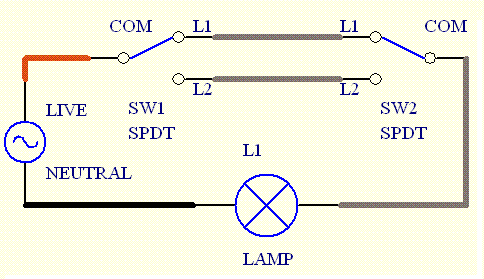
Anyone has any ideas, how i could implement zigbee smart switches in this scenario? Do i buy any 2 zigbee switches, and they will just work?
sour shadow
Buy a switch module, put the module by the light, between the light and the switch
ripe osprey
Any zigbee switch module works or are there special 3-way modules for these cases? And do i need 2 switches per light or just 1?
violet wave
mellow geode
You don't need to pull in the changes all the time.
The HA PR needs to be review...
If I don't it cannot be merged. Some important changes occured recently such as the translations, the quirk_id etc. It's a lot of work to keep up to date with all this
 dusty moss
Hey all! Just received a Tuya Zigbee RGBWW (5 pin) controller. It's working fine with ZHA, with one key issue I'm noticing: the transition between RGB and WW modes seems to get... Halted? E.g. if I'm in WW mode and want to transition to an RGB green, the WW LEDs dim slightly, the RGB LEDs turn on with a very low brightness green, then it stops there. I need to issue the command twice to make it actually go to the selected colour. Is this something that can be fixed with a custom quirk?
Model number is TS0504B, and Zigbee ID _TZ3210_y5rtzkmc. This specific model isn't listed on Blakadder's site yet: https://zigbee.blakadder.com/Tuya_TS0504B.html
It also seems to be a newer model, and it looks closer to https://zigbee.blakadder.com/Tuya_TS0501B.html - except instead of a barrel output, it has the standard 5pin LED strip output. Everything else seems to be working just fine, connection is solid, state updates might be a bit finicky, and it needed a power plug pull after setup (pairing mode is indicated by flashing red LEDs, which turn solid red after pairing/setup, and even in an OFF state it was a dim red. Replugging power fixed this)
proven mason
i have a zigbee bulb that has been working fine for over a year. i switched radios (sonoff zbdonglep > skyconnect) and now its gone haywire. after turning off, it automatically goes back on in a few seconds and HA has no log of it. i have tried different fixtures. i have attempted a repair, a re-pairing, and a re-pairing with a different name. all result in this action. at first i thought it was defective, but what are the chances it went defective at the same exact time i changed the radio???
oak birch
What would cause a couple of buttons to stop working, but sensors continue to update? All the same brand (aqara/xiaomi), all have successfully been added to the network and worked previously.
Replaced batteries because low hanging fruit, but no luck
mellow geode
proven mason
i have a zigbee bulb that has been working fine for over a year. i switched rad...
What bulb model? Are you running Multi-PAN?
 lusty garnet
I have just updated Zigbee2MQTT and now the logs tells me this, can someone help me where to look to get it up running againg ?? https://pastebin.com/4xDdUd2a
sour shadow
Remove the custom converter you added
 crimson parcel
Hey, I need a USB Zigbee Dongle for 3 Floors, like a big range also a good connectivity. If i want to setup the Mesh how do i setup the other Dongles, To the best of my knowledge i can just plug the main one in the HA Host and the other ones just in the powerbrick? Is it correct or what do i need to do?
sour shadow
Yes, assuming the "other dongles" have router firmware on them
You'll need to pair them, obviously
sour shadow
Well, yes, but no, but why not buy some Zigbee plugs instead, ideally Innr
proven mason
mellow geode
What bulb model? Are you running Multi-PAN?
i just have one zigbee and one zwave network
the model is: DOGAIN Zigbee Smart Light Bulbs E12 Base B10/B11 Lights Color Changing Light Bulb
it was on amazon but no longer
my only recourse is to buy six new bulbs and quite honestly thinking about going wifi instead of zigbee becuase im having trouble with everything zigbee
crimson parcel
sour shadow
Well, yes, but no, but why not buy some Zigbee plugs instead, ideally Innr
lusty garnet
sour shadow
Remove the custom converter you added
Then it wont start up, it says something that zigbee-herdsman missing
sour shadow
Assuming it has (mains) power all the time, yes
(other than Sengled bulbs, or two-wire switches and dimmers, all mains powered Zigbee devices extend the mesh)
crimson parcel
Ahh ok thanks so basiclly in some rooms the Plug thats it?
sour shadow
You may want to read the links in the top pinned message, they explain how Zigbee works and cover things you should know
crimson parcel
alr thanks
 olive stag
Hey all,
I've got 2 IKEA motion sensors that trigger a service to turn on a specific light.
For some reason both sensors change state to motion 'detected' about 1-2 every night.
I've pretty much ruled out an automation error. The logs do show a state change....
Does anyone know what might make motion sensors change state to 'detected' even though there is no motion?
Setup:
2 ikea motion sensors on a wall close to the ceiling in a hallway, both facing a different direction.
I've got them connected to HA through a ConBee2 Zigbee stick with the ZHA integration.
HA is running on a VM which is running on a HP prodesk G4 mini. the Zigbee stick is connected with a USB-extension cord about 1,5m away from any other hardware.
so to be clear: both sensors are combined as 1 helper entity but the logs show that both sensors trigger the helper.
 jovial blaze
Quick question re: Zigbee hardware. For anyone using Ikea TRADFRI ON/OFF switches, do they eventually "fall asleep" or something where they require a couple of presses after not being used for a while?
olive stag
jovial blaze
Quick question re: Zigbee hardware. For anyone using Ikea TRADFRI ON/OFF switche...
I've got 2 of these on/off switches and never have to press them more than once.
jovial blaze
olive stag
I've got 2 of these on/off switches and never have to press them more than once.
How often are you pressing them?
olive stag
1 switch is for a walk-in closet which I use daily. the other one not so much (garden lights which are automated)
jovial blaze
Hmm. Interesting. Thanks for the insight
olive stag
my first guess would be a range/reception issue? But i'm nowhere near an expert.... 🙂
oak birch
I'm having some issues where aqara/xiaomi buttons aren't working. I thought it was a sleep thing too, but doesn't seem to be the case
tough prism
A Sonoff motion sensor (SNZB-03) was stuck on Detected and wasn't reverting back to Clear for over 20 minutes. I pressed the reset button which didn't change it. Removed and replaced the battery which didn't fix it. Deleted the device from zha but now trying to re-add it to zha, it's not discoverable. I've tried the device reset button again, then a different battery. Is there anything else I can do to troubleshoot? Or is the device just dead?
tough prism
tough prism
A Sonoff motion sensor (SNZB-03) was stuck on Detected and wasn't reverting back...
I bent the metal tabs to make a better connection to the battery which worked -device is now discoverable and functioning as normal.
 barren forum
Hello I used cc2531 as coordinator, it work well about 3hr but now it not working. I tried reflesh firmware. I using Rpi4, CC2531 is found but won’t pair with any device…
sour shadow
Pull it out, wait 30 seconds, put it back in... ||and pray||
Also:
- it is on a USB extension cable?
- the device you're trying to pair is in the same room, no more than 2 or 3 meters away?
barren forum
sour shadow
Also:
1. it is on a USB extension cable?
2. the device you're trying to pair is ...
- No, directly in RPi 2. Yes, no more than half meter
barren forum
sour shadow
Also, ZHA or Zigbee2MQTT?
Tried both
barren forum
sour shadow
Well, use a cable 😉
ok try
barren forum
ok i used usb extension it work, it find device but device not work
Received message from unsupported device with Zigbee model 'TS0601' and manufacturer name '_TZE200_fsow0qsk'
i can try ZHA
sour shadow
What version of Z2M were you using?
Not that https://www.zigbee2mqtt.io/supported-devices/#s=TZE200 shows it
 harsh current
Hi! I am hoping someone might be able to help me with automation triggers using ZHA and a Hue Dimmer switch. I have successfully paired it and I am receiving different events when listening to the zha_event, but no matter how much I read the forum and a multitude of Reddit posts I cannot figure out how to make the trigger work.
rapid dawnBOT
@harsh current I converted your message into a file since it's above 15 lines :+1:
harsh current
Then I try to trigger it like this:
trigger: event_type: zha_event event_data: device_id: e41dde509ea766649b043e2255b468ea command: on_press
carmine hamlet
I don't see anything obviously wrong with that
why do you think it isn't triggering?
harsh current
Hmmm, I was hoping I had misunderstood something very badly 😄
I have set the action to toggle a light right beside me, but nothing happens and the automation view shows it has never triggered
- alias: 'Tänd taklampan när man trycker på On på Hue Dimmer Switch' id: turn_on_ceiling_light_when_short_press_hue_dimmer_switch trigger: event_type: zha_event event_data: device_id: e41dde509ea766649b043e2255b468ea command: on_press action: - service: light.toggle entity_id: light.livingroom_ball
carmine hamlet
you can try manually firing the event from  -> Events to see if it triggers
otherwise, my guess is that it's either not enabled, or you have an error somewhere in your config and it's not being loaded
harsh current
OMG! I'll go hide in the corner now....
Sometime during my testing I misplaced the ´- platform: event`
Thank you 😳
harsh current
I was doing config checks before reloading the automation config, but it was not showing any errors...
I noticed it when I looked at the automations list and the icon infront of this automation was red
carmine hamlet
that is weird. I get this in my log when I check config, but the UI check says that it's okay (won't prevent HA from starting!):
2023-12-05 11:18:42.611 ERROR (MainThread) [homeassistant.components.automation] Automation with alias 'Tänd taklampan när man trycker på On på Hue Dimmer Switch' could not be validated and has been disabled: required key not provided @ data['trigger'][0]['platform']. Got None
it seems bad that the config check didn't catch that
harsh current
Yes, a bit strange.
carmine hamlet
I suggest filing a github issue for that
I always look at the log, but that should have been surfaced in the UI
carmine hamlet
I mean, I guess it's correct that it won't prevent HA from starting, it just disabled the broken automation 🙂
yes, well, to my manual version of that
harsh current
Yes, it is not a breaking error luckily 🙂
carmine hamlet
I would have expected the UI config check to call out broken stuff that it just disabled 🙂
harsh current
Yes, that would have been nice. I usually just rely on the configuration check in the UI before restarting or reloading.
Ok, I am off to Github, thanks again! I might be back when I want to expand the trigger to handle long and multiple presses as well 😉
carmine hamlet
I really should have seen that
harsh current
😄
You just didn't expect the level of noobness I would bring to the table 😄
I created this issue: https://github.com/home-assistant/core/issues/105097
I hope I managed to explain it clearly
carmine hamlet
sure, looks fine to me
sour shadow
What version of Z2M were you using?
deep light
I added a Philips Hue Smart button to Zigbee2MQTT. The button seems to be responsive now, and clicking it shows me entries in the Z2M log. However, the button does not show up as a device in Home Assistant, and I cannot find it in the list of devices when I try to make an automation - what could I be doing wrong here?
sour shadow
Look at the entities instead
That said, it should show as a device. If it doesn't you need to check HA's log
barren forum
sour shadow
> What version of Z2M were you using?
latest and tried dev branch
sour shadow
latest is not a version numbe
barren forum
Zigbee2MQTT Edge
sour shadow
However, given that it's Tuya, apparently you have a version Z2M doesn't support, or you're on an ancient version
But we'll never know, because you can't/don't want to tell us the version number
barren forum
1.34.0-1
sour shadow
Then it's not an outdated version, it's just Tuya being Tuya
You get to add your own support, or switch to ZHA and hope that it supports it
barren forum
but its Tesla Smart Thermostatic Valve TV500
sour shadow
So?
sour shadow
Received message from unsupported device with Zigbee model 'TS0601' and manufacturer name '_TZE200_fsow0qsk'
That's clearly Tuya
There's dozens of TS0601 - and some of them are even TRVs
barren forum
Well, then I'll have to buy other valves
sour shadow
The Aqara E1 (SRTS-A01) works well in Z2M
barren forum
oh, thank you very much
sour shadow
A search of the server for TRV should find more recommendations
carmine hamlet
I just did a google search for "TS0601"
sour shadow
barren forum
https://www.zigbee2mqtt.io/devices/GS361A-H04.html
That even says Tuya
TuYa GTZ02
Any time you see the white label section 99.9999% likely that's Tuya
100% when it actually says Tuya 😛
barren forum
but my TRV is https://www.teslasmart.com/tesla-smart-thermostatic-valve-tv500 and unsupported...
deep light
sour shadow
That said, it _should_ show as a device. If it doesn't you need to check HA's lo...
I'm not sure exactly what the issue was. I restarted everything, including my HA VM, but it still refused to work. I checked HA's logs, and it turned out that the MQTT Broker was refusing all connections. I double checked the username and password, everything was fine. As a last ditch effort, I deleted the MQTT user and made a new one with a new username and new password, and now everyhing is working. I am stumped.
 cerulean thorn
What do you think will be the "winner" of the zigbee "war", TI or SL? I feel its a battle now with TI pushing the cc2652p7 and SL is lagging a bit behind, but with matter support. If you would invest today in a stick, would you go silicon labs or the newest TI? (And also why would TI not support matter/thread?)
molten linden
Your leaving out Nordic 😂
TI supports thread just not the multi protocol where thread and zigbee run from the same radio. But a recent OpenThread pr from Nordic working off an initial PR from SiLabs added the functionality.
TI also now has the CC2674
cerulean thorn
yeah. but I hope we will soon settle on a standard
even if I have the cc2652p2 (tube) I will upgrade to the cc2652p7 (tube). probably not needed, but fun enough to upgrade a bit. Im just unsure what to do going forward. Would also hope the upgrade of those two sticks would be automatic
grim igloo
cerulean thorn
even if I have the cc2652p2 (tube) I will upgrade to the cc2652p7 (tube). probab...
I have tube’s p7 PoE going strong for months now
molten linden
if you have a 2022 or 2023 p2 poe unit I'm wokring on some upgrade kits, where I'll ship a usb powered board and enclosure that you can use the old p2 module in for a router and slip the new p7 into the ESP32-PoE. I just about have it ready to go for the 2023, the 2022 had a different pin out so need to work on that one a bit still and order PCBs.
grim igloo
Smort
 steady shale
Hey, I have a ZBDongle-E flashed with router firmware, and I have permitted it to join my network. It is causing some issues with my Xiaomi sensors so I want to remove it but it isn't listed as a device in the Z2M console. Has anyone else come across this?
It shows up as a router if I look at the map view
oak birch
Is there a way to force home assistant to reconnect to a zigbee device?
Or actually, If I'm in developer tools, and go over to events, and start listening on zha_event ... I should get SOMETHING right? Temp updating, button press?
molten linden
Depends on the device… button presses yes. Also check ins
oak birch
@molten linden I have two aqara buttons that aren't registering for their respective automations. the button presses don't show up in zha_event, and battery level is unknown in the entity...
Kicker is that they both DID work when I first set them up (in the last couple days), just not sure when they stopped
molten linden
would need more info about setup.. is coordinator on usb extension? Were they paired near coord and then moved? Do you have any other mains powered devices? With more info hopefully can get you some help. I was up to late last night so 🥱😴
oak birch
Coordinator not on usb extension, paired near final site, no other mains powered devices, but only 3 sensors and two aqara buttons in the (fairly small house). Was- running on ZHA, going to try setting up z2m tonight in a docker container to see if that gets me anywhere better
I can put an extension on it, but since they worked when initially connected, I'm not entirely sure that's the issue, but I could just be wrong there.
austere patio
Always use an extension cable. Older Aqara devices require no configuration and just send data one way. If they don't work, it's guaranteed a battery level or interference issue.
oak birch
Okay, I have one handy, so there's no real excuse to not use it... Just replaced the battery, so I'll get it away from the host.
Do I need to delete/re-add the button?
rigid wagon
I have some zigbee plugs connexted to solar panels. It reports watt and kwh though, not minus. Is there a way to get a nice graph of their yearly yield combined?
ashen bluff
Not really zigbee related but:
#add-ons-archived message
#add-ons-archived message
crimson parcel
Hey, i want to buy some light switches, are there some recomendations?
 idle nest
anyone know how to solve that entities are updating forever in zigbee2mqtt.. ? And by forever i mean forever..
carmine hamlet
idle nest
thanks 🙂
uneven raptor
Anyone else have issues with adding/removing entities to a zha group? It has been working fine before but now it's like it's trying to add/remove the entities and the gui is "loading" but after a while it just stops and nothing is added/removed
 proven fog
Since a few month back im having lots of problems with my zigbee devices. Im getting "Failed to send request: Failed to deliver message: <EmberStatus.DELIVERY_FAILED: 102>". If i spam on/off for a lamp it eventually works. Or if i restart HA it works fine for a while then the problem comes back. Im using a SkyConnect and ZHA
deep light
There's no way to manually connect a zigbee Button to a different router, right? The button in my kitchen connected itself to the switch in my office (2 rooms away) instead of directly to the stick (same room) or even another switch in the corridor (closer than the office) and the connection is spotty
rapid dawnBOT
@crimson parcel Looking for advice about a device to buy? Remember to provide guidance on:
- Which country you're in
- What your budget is
- What protocols you prefer (eg Zigbee, WiFi, Z-Wave)
- Any features you want (such as power monitoring, dimming, etc)
sour shadow
deep light
There's no way to manually connect a zigbee Button to a different router, right?...
Yes, you can pair it to a nearby router - how you do that depends on whether you're using ZHA or Zigbee2MQTT
The device may change router itself though
 crystal pumice
i've paired my devices to a specific router each and half of them just end following the route they want
it's how zigbee is supposed to work, afaik
take an available route to the coordinator
sour shadow
Yes, though many devices don't follow the spec and behave strangely (looking at you Xiaomi's Zigbee 1.2 range)
deep light
sour shadow
Yes, you can pair it to a nearby router - how you do that depends on whether you...
I'm using Z2M 🙂
Some of these connections make no sense at all. My stick is in the living room+kitchen. The switch & hue button that's in the same room have connected to the office switch which is on the other side of the flat (perhaps as far away as you can get), and another switch in the living room has connected to the bathroom switch which is 2x farther than the USB stick :/
The three switches with neutral wires that I have, have connected to the stick directly
I'll move to the Z2M dev branch soon - might consider re-pairing everything and try to pair specific devices to specific routers. I don't have any automations running right now anyway so it doesn't really matter
 pure prism
Looking for advice on a Smart Roller Blind Motor. UK Based, No Budget in mind. I have HA SkyConnect and using ZHA. I’ve seen the Aqara Roller Shade Drive E1 but not completely sure if this is supported. Thanks
sour shadow
deep light
I'll move to the Z2M dev branch soon - might consider re-pairing everything and ...
Won't make any difference - the devices pick the routes, not Z2M (or ZHA)
All you can do is pair to a nearby router and then after that it's up to them
 sour gale
I've lately had more and more occurances where when I turn a light on it doesn't use the correct brightness and kelvin values. So the light turns on but the brighness/kelvin is the one that it had been when the light was switched off. and not the one used when calling the "Light: Turn on" service. I'm using ZHA with Sonoff USB Dongle and Philips Hue lights. This is a new problem after years without any problems. Brightness/kelvin values are read from input numbers. When the problem occurs, if I then turn the light back off and on once or twice, it finally changes to the correct brightness/kelvin. No errors seen in UI. How could I debug this? Is there a way to log the zigbee "traffic" in order to see if the values are actually sent out or not?
cerulean thorn
@molten linden Is it the lauchpad firmware that is supposed to be installed to the cc2652p7? I just got one of your delivered a couple of days ago (POE version), but regardless of what boot mode I put it in, I just get the following https://paste.ofcode.org/cBgsX9ih9QL8ir27BHVr8n
deep light
sour shadow
All you can do is pair to a nearby router and then after that it's up to them
Yeah, I tried a couple of times to get the button to pair to the closest router, but it keeps switching to a router that's on the other side of my flat. IDK what to do
sour shadow
You can't "do" anything - that's how Zigbee is designed to work
molten linden
cerulean thorn
<@335253934954512384> Is it the lauchpad firmware that is supposed to be install...
No, there is a P7 variant in the z-stack repo - only on the 20230507 release.
Unit comes flashed with this already
To flash the P7 use https://git.beagleboard.org/beagleconnect/cc1352-flasher the cc2358-bsl.py doesn’t support the p7
pine swan
Does anyone have any recommendations for Zigbee curtain tracks please? Need something battery powered, preferably with a battery that can be removed to charge externally as running power is going to be really ugly
cerulean thorn
@molten linden Great. it worked, but after the flash I cant flash it again with ERROR: Timeout waiting for ACK/NACK after 'Synch (0x55 0x55)' - I even hard booted it. Is it a known issue? (the original flash with the P7 firmware was sccuessful)
molten linden
Hmmm that happens when it can’t detect bootloader mode.
cerulean thorn
strange in the web it it say it boots in bootloader
 outer flame
How would i go about reinstalling my sonoff zigbee 3.0 dongle. it was working fine before and now i can't get it to connect at all. Is there a way to reset it without losing the automations?
pine swan
I'm pretty sure you can back up the pairing info. IIUC, it's stored in the dongle, not HA. I remember reading an article about how to back it up so everything doesn't go to poop if you need to buy a new dongle
cerulean thorn
Is it possible to check if a zigbee 3 device support outgoing assosiations? I have a zigbee dimmer that only have ingoing clusters, but only outgoing. A bit weird since this is a higher quality dimmer, and that makes it not possible to assosiate to a bulb
pine swan
outer flame
How would i go about reinstalling my sonoff zigbee 3.0 dongle. it was working fi...
Are you using ZHA?
outer flame
pine swan
Are you using ZHA?
yes
pine swan
outer flame
yes
outer flame
pine swan
Found it. https://everythingsmarthome.co.uk/easily-backup-migrate-your-zigbee-ne...
well i can't do that backup. so i just uninstalled it and am trying to make it new. but it looks like my dongle might of died. which stinks. but oh well.
pine swan
outer flame
well i can't do that backup. so i just uninstalled it and am trying to make it n...
Can you solder?
pine swan
If the dongle is totally dead, it might be worth checking the USB connector joints haven't cracked off the board
outer flame
oh true. i always have to remove it and re plug it in everytime the computer restarts randomly or a random issue happens. so it could be that. i'll try that right now actually
pine swan
Is it a USB 3 port?
outer flame
yes
but it wouldn't make sense because it still showed up in sooftware. like the virtual machine. it just didn't want to work anymore
pine swan
Put a USB 2 (Important NOT USB 3) extension cable between the dongle and the port. If you keep needing to replug, a new USB cable is a lot cheaper than a new dongle. Also, the RF junk from USB 3 interferes with Zigbee so putting a USB 2 cable in the way gets all that junk away from the dongle and improves your system performance
ashen bluff
pine swan
Put a USB 2 (Important NOT USB 3) extension cable between the dongle and the por...
It's not the cable: <#zigbee-archived message>
outer flame
is there a difference between dongles. i see 2. incase i have to buy one. i see zigbee 3.0 usb dongle plus gateway. which is the one i have. annd i also see a plus-e version
pine swan
I didn't think it was the cause of this particular problem but I thought I would mention it as it's good practice
outer flame
ashen bluff
It's not the cable: <https://discord.com/channels/330944238910963714/55184365568...
makes sense. because it was working fine for a while. just when the computer or virtual machine would restart i needed to unplug and replug
pine swan
Sonoff Dongle?
ashen bluff
outer flame
is there a difference between dongles. i see 2. incase i have to buy one. i see ...
The E uses the same chip as the SkyConnect. Doesn't work well with Z2M
outer flame
they're both sonoff
pine swan
I have the Sonoff Dongle-P and it's been rock solid
outer flame
so i'll probably just buy the same one i bought before
ashen bluff
outer flame
but it wouldn't make sense because it still showed up in sooftware. like the vir...
Try to clear its NVRAM and re-flash.
outer flame
pine swan
I have the Sonoff Dongle-P and it's been rock solid
i think that's the one i have
outer flame
ashen bluff
Try to clear its NVRAM and re-flash.
i tried. and i couldn't reflash it. it kept giving me errors and failed. it would show up in the flasher but would error everytime i tried to flash. and the device was in bootloader mode
pine swan
outer flame
i think that's the one i have
This is the one I have https://itead.cc/product/sonoff-zigbee-3-0-usb-dongle-plus/
outer flame
pine swan
This is the one I have https://itead.cc/product/sonoff-zigbee-3-0-usb-dongle-plu...
yeah that is the one i have
pine swan
Only $17.90 in the Black Friday sale, which is still on. Looks like you got lucky if you order quick
Unless someone tells me they're junk. I'm thinking of getting a pile of Sonoff TRVs from them
outer flame
yeah i ordered one on amazon.
pine swan
Do you have a JTAG box in your kit?
outer flame
no
pine swan
If you know someone who does, it might be worth factory resetting it to scorched earth then putting the bootloader and firmware back on in case it just got scrambled
It's broken anyway, so who cares if you really wreck it?
outer flame
i don't know anybody who's got one. in reality i'd be the guy who would've had it.
yeah i'm gonna try it out on my main computer virtual machine where i test stuff. and see if it works there.
pine swan
I think you're going to be in considerable pain if you have a lot of devices. IIUC, replacing the coordinator will completely break your mesh and you'll have to re-add everything again if you don't have a backup
If you can get it to connect long enough to strike a backup, I think that will save you much wailing and gnashing of teeth
outer flame
good thing is i don't have to many. it's 2 light switches and like 3 wireless buttons. and the automations are super simple stuff
i know if i had more in the future it would be a pain.
i just got to make more backups of the device or something.
pine swan
outer flame
good thing is i don't have to many. it's 2 light switches and like 3 wireless bu...
My count is currently at 52 and I have another 12 devices in the mail. If I lost all my network bindings, I think I would cry
outer flame
pine swan
My count is currently at 52 and I have another 12 devices in the mail. If I lost...
yeah if i had that many i would cry too.
i have like 10 more to add. cause i bought some bundles that were on sale for light switches and a bunch of wireless buttons and motion sensors
molten linden
cerulean thorn
strange in the web it it say it boots in bootloader
it should reset this after each hard reboot (power cycled). the fw update toggle just runs a script that pulls the BSL pin low and then resets the cc2652. If bsl is still enabled after the flash you can toggle it off. and do a soft reset. if all else fails there is a physical button for BSL on the module that can be held while being plugged into PoE - you would want to hold it until a few seconds after the green led on the Olimex ESP32 PoE lights up showing connection established.
cerulean thorn
I tried the button but still same error. Just seems like the app can’t connect the boot loader
molten linden
cerulean thorn
I tried the button but still same error. Just seems like the app can’t connect t...
which firmware file did you use?
 plush stag
outer flame
yeah i ordered one on amazon.
plush stag
outer flame
yeah i ordered one on amazon.
Was it hard to set up?
I want to use my ikea tradfri bulbs and sockets with HA, and from what I've seen was the sonoff 3 plus zigbee something something one of the best
But I'm greener than green at HA
sour shadow
ZHA is really easy to set up
cerulean thorn
@molten linden CC2652R7_coordinator_20230507.hex
molten linden
that's why, sigh this is one me as I don't have good docs yet. but will get there soon. you need the P7 one
cerulean thorn
so I briced it?
molten linden
no but will require some manual work to pull the right pin low. the BSL pins for the P7 and R7 are not shown on the z-stack chart, but I assume the R7 is the same as the R as the P7 is the same as the P.
so to get it to bootloader mode you will have to reset it while holdin GPIO13 low. let me get a footprint up to show you he pins give me a second
cerulean thorn
alright, no worries take your time, its nothing critical
molten linden
basically you want to connect DIO13 to ground when booting the module, best would be a hard boot I think. https://imgur.com/a/bHWB7IT
then you should be able to flash it with the right fw
cerulean thorn
alright, I will try in a bit and let you know
molten linden
the unpopulated pins on the edge are labeled on the bottom side of the board
cerulean thorn
and as I mentioned in the order, its acutally a rumor out there you are selling a TI and SL combo unit. I think its on the HA forum they say that
molten linden
okay I'll for that, not sure where that came from 😂
 ivory raptor
Hey, I have noticed in my zigbee network that if an action is performed a few times in quick succession the entire network becomes blocked for about 30 seconds, i've tested this in both ZHA and Z2M but both are the same. For example if a hue button is pressed ~10 times in quick succession this stops all the other devies in the house from receiving any events. Has anyone else had this issue? I am considering trying a different host device to see if it could be due to the Skyconnect hardware as i've not tryed this yet
 cursive bobcat
what's going on the last weeks and days with the sky connect, zha and zigbee in general, highly unreliable
Error while executing automation automation.movement_movement_kitchen_cabinet_evening_light_on: Failed to send request: Failed to deliver message: <EmberStatus.DELIVERY_FAILED: 102>
I've searchd and read the issue, I'm not alone and apparently it has to solve itself?
austere patio
The error means what it says: a device on your network is unreachable, even after a few retries. Make sure your coordinator is on a USB extension cable and away from USB 3.0 ports, SSDs, etc.
If you have a second coordinator like a HUSBZB-1, a Conbee, or another SkyConnect, send me a PM and I can try to help debug further
ivory raptor
After some further debugging as to why devices stop responding when events are sent in quick succession, it seems to be more of a home assistant issue rather than a zigbee one. If I toggle a light 10 times really fast directly in Z2M all the commands reach the device, if I do the same thing via the entity in HA then the device will pick up some of the events and then stop responding for about 30 seconds.
austere patio
What type of device is it and how are you controlling it? Directly or via a Hue button?
ivory raptor
austere patio
What type of device is it and how are you controlling it? Directly or via a Hue ...
Im controlling 3 'Hue white GU10' in a zigbee group, directly via web interface and with Hue button either has the same issue
austere patio
"Zigbee group" is the problem. Zigbee group commands are network-wide broadcasts and you can only send a few at a time, otherwise the network gets "busy". Move your devices to a normal HA group and they'll work as you expect.
ivory raptor
austere patio
"Zigbee group" is the problem. Zigbee group commands are network-wide broadcasts...
wow, I did not expect this. I thought that a group would cut down the traffic. Thank you so much for the info
Moved from zigbee group to a HA group and it fixed it, thanks again!
 iron mauve
Do Zigbee Device OTA Updates ever work? I swear I've never had one work lol, I usually just end up clicking "skip" until I update HA and have to click skip again. But, wondering if I am doing something wrong. I just added 4 smart plugs (ThirdReality) and they all work great, but of course all 4 show up as having an update. But it doesn't work, and I've never got it to work on my GLEDOPTO devices either.
carmine hamlet
it works fine in Z2M, can't speak for ZHA
iron mauve
I have Z2MQTT. Are you doing the updates in Zigbee2MQTT though or in HA itself?
I think I only use Z2MQTT as a Dashboard, maybe thats my problem
sour shadow
Keep in mind that updates can break devices (tough ThirdReality are an exception)
carmine hamlet
you could also be on an older Z2M that just spins
iron mauve
Def not on older versions of anything. But yeah, fair point Tinkerer
carmine hamlet
I've updated the firmware in ThirdReality plugs many times
iron mauve
Ill try from the Z2MQTT UI instead
carmine hamlet
and yeah, it can break things (and has), so you don't need to update
sour shadow
carmine hamlet
I've updated the firmware in ThirdReality plugs many times
They actively support Z2M though, unlike most
They've apparently got folks dedicated to Z2M support
carmine hamlet
and they update their firmware fairly often
sour shadow
Just wish they sold more stuff over here
iron mauve
At least I get a progress bar with Z2MQTTUI
carmine hamlet
it'll also tell you if it's progressing
that's why I prefer going to the Z2M UI
especially when I kick off like 20 at once
I did find the plug for my chest freezer mysteriously turned off a few days ago, but luckily I have a couple of temp probes that alerted me to that
iron mauve
Maybe you have a default setting to off after a power interrupt?
carmine hamlet
no, I changed that in all the plugs. And I'm pretty sure there wasn't a outage in the ~5mins before I noticed
but it is a possiblity. That's the one "feature" that they added - the ability to specify what to do after a power outage
worth updating for that for sure
that was last year sometime
austere patio
carmine hamlet
but it is a possiblity. That's the one "feature" that they added - the ability ...
Make sure you update the firmware. They had a bug in the first few versions where the firmware advertised support for the attribute, you could write it successfully, but it still retained "off by default" behavior regardless
signal plinth
Hi, all
Looking for some help if possible: I rebuilt my ZHA network from ground up. I have a bunch of these Xiaomi Plugs lumi.plug.mmeu01 that previously would have an option for default behavior (on/off) on power outage. That's gone now and I don't know why.
I did find this start_up_on_off attribute which I think I can change the value off to get the same behavior, but I don't know how to do it.
Value is None when I read the attribute and there's a Manufacturer Code Override option as well
 tropic depot
@mellow geode I thought this was fixed a while back: ^^
mellow geode
huh, seeing the same issue on my mmeu01 and maeu01. Quirk still applies. I'll have a look
for some reason, only the power_outage_memory entity is no longer provided. All others still are
mellow geode
signal plinth
Hi, all
Looking for some help if possible: I rebuilt my ZHA network from ground...
You're on 2023.12.0 already or still on 2023.11.x?
signal plinth
mellow geode
You're on 2023.12.0 already or still on 2023.11.x?
2023.12.0 freshly installed
mellow geode
do you know if it was still present on 2023.11.x?
signal plinth
It was. I've been rebuilding my zigbee network over the past days but when I started I was running 2023.11.3 if memory serves right.
Actually surprised the culprit is the new update, I just updated and then started slowly adding the plugs, I never added 1+1 lol
Thanks @mellow geode!
mellow geode
It's weird though. I don't think it's a zha-quirks issue, but also not sure what changed in ZHA that it no longer creates the entity. but yeah, i'll take a deeper look
For now, you can use the clusters menu (three dots on the device page, manage zigbee device, clusters tab, OppleCluster)
signal plinth
mellow geode
For now, you can use the clusters menu (three dots on the device page, manage zi...
This is awesome, thanks so much! Quick fix 🙂
 naive nexus
Speaking of aqara, I have 2 sensors that won't repair after being dead for a month or two. After I replaced the battery I tried to pair it again to ZHA but nothing shows up
I set ZHA in discovery mode and hold down the button until 3 blinks from the light but nothing shows up in the log or is getting paired. Have tried within 10 cm from dongle
mellow geode
regarding the plug, it seems like it's something with CONFIG_DIAGNOSTIC_MATCH, as STRICT_MATCH works. I don't think we've changed anything there recently though ..
duh, there's something really wrong. Changing TuyaChildLockSwitch to not use quirk_ids affects if the power_outage_memory entity is created.
 true wing
Man! Ubuntu's "I'm going to randomly decide to move the USB device from here to there" just caused me a bunch of pain....finally wrote a udev rule to prevent that from happening!
mellow geode
Are you using ZHA?
true wing
yeah
mellow geode
When did you last (re-) configure ZHA?
true wing
Moved from a HUSBZ-1 about 5 months ago, but haven't done much except update HA since then.
to a SkyConnect
Everything was working well, until I rebooted after a sudo apt upgrade which updated the kernel.
mellow geode
/dev/serial/by-id/xxx should stay the same
true wing
I think the udev rule will accomplish the same. just mapped the id, etc to /dev/zigbee 😉
signal plinth
mellow geode
duh, there's something really wrong. Changing `TuyaChildLockSwitch` to not use `...
I have no expertize to add here but from a noob/enthusiast of this hobby I'm often just amazed at how fast people can spot these things. That would have taken me a month to figure out ahah
true wing
Only thing that still confuses me, is why does my zigbee coordinator still mention the HUSBZ1 in the device info?
EZSP = Silicon Labs EmberZNet protocol: Elelabs, HUSBZB-1, Telegesis by ZHA
My transition to the SkyConnect didn't go very smoothly...but, I managed to force it to use it.
I assume it's some attribute somewhere in .storage that hasn't gotten updated for some reason?
mellow geode
signal plinth
I have no expertize to add here but from a noob/enthusiast of this hobby I'm oft...
heh, I somewhat broke it though. I think the error was introduced with the original quirk class matching. As it was never used, it wasn't noticed. I changed it to "quirk ID" matching and since 2023.12.x, it's now being used for Tuya plugs (and works correctly there).
However, some configuration "entity"/matches that do not use quirk IDs, but just match via model, do not have their entity created now.
It's likely an issue with the strict match rules that appears when one config match/"entity" uses quirk ids. Issue with the "weight" of a MatchRule(?)
rapid dawnBOT
@trail gorge I converted your message into a file since it's above 15 lines :+1:
 trail gorge
I'm not on a congested channel, the network had 0 issues before just that after the update zha itself stopped working
Some other info:
I'm on docker, the container is privileged and also has access to all devices
trail gorge
Looks like it's spam trying to add a new backup?
Adding a new backup NetworkBackup(version=1, backup_time=datetime.datetime(2023, 9, 22, 22, 23, 54, 395974, tzinfo=datetime.timezone.utc), network_info=NetworkInfo(extended_pan_id=b2:e2:b1:98:86:df:25:77, pan_id=0x0CC6, nwk_update_id=0, nwk_manager_id=0x0000, channel=15, channel_mask=<Channels.CHANNEL_15: 32768>, security_level=5, network_key=Key(key=3c:8e:95:2d:7b:2f:a2:f0:a3:b4:d8:8e:23:3c:09:41, tx_counter=28543636, rx_counter=0, seq=0, partner_ieee=ff:ff:ff:ff:ff:ff:ff:ff), tc_link_key=Key(key=5a:69:67:42:65:65:41:6c:6c:69:61:6e:63:65:30:39, tx_counter=0, rx_counter=0, seq=0, partner_ieee=00:21:2e:ff:ff:04:d4:bf), key_table=[], children=[], nwk_addresses={}, stack_specific={}, metadata={'deconz': {'version': 645400320}}, source='zigpy-deconz@0.21.1'), node_info=NodeInfo(nwk=0x0000, ieee=00:21:2e:ff:ff:04:d4:bf, logical_type=<LogicalType.Coordinator: 0>, model=None, manufacturer=None, version=None))
That message is in the log 5236 times in the same second...Going to ask in #integrations-archived as I think that's the right channel for such an issue
 slim wedge
I see Aquara has Zigbee wall switches now - anyone know if they support multi-tap gestures? (Pressing 2x, 3x, etc). I haven’t seen any mention in the manual or marketing materials
https://www.aqara.com/us/product/smart-wall-switch-with-neutral/
mellow geode
signal plinth
I have no expertize to add here but from a noob/enthusiast of this hobby I'm oft...
btw., we found the issue: There are two issues.. Full story here: https://github.com/home-assistant/core/pull/105184
The entity should be back when 2023.12.1 releases, but a "deeper issue" was also found that is yet to be fixed (likely gonna be a small breaking change in some future release).
trail gorge
mellow geode
Updated from 2023.11.x to 2023.12.0?
Yeah, from the latest 2023.11.x, which was I think 2023.11.3, to 2023.12.0, but I think I fixed it in the meantime
I ended up restoring a backup from Dec 4th, reverted to the older docker image too and it worked. Then, I switched back to the new docker image and this time it didn't break
After I reverted it stopped doing 5000 backup attempts in a single second(which is what I assume those logs are from)
huh looks like it died again 😦
Edit: Nevermind, this was unrelated, the above issue seems fixed for now
oak birch
austere patio
Always use an extension cable. Older Aqara devices require no configuration and ...
Good call. Put it on an extender, moved it away, rebooted the machine, and had to resyn. The devices, but it worked
 dusk delta
At the Aliexpress 11/11 sale I bought a Tuya Zigbee Smart Life Wall Socket . I have wired it up temporary to get it paired and test it out before i put it in the box. it paired fine but when I trigger one outlet it turns on/off both no matter what one I click. the touch buttons on the front work right to turn on just the one. Does anyone else have this outlet of know what i need to look at or switch to fix this issue? https://www.aliexpress.us/item/3256804738515007.html?spm=a2g0o.order_list.order_list_main.40.c5b91802dQuL8p&gatewayAdapt=glo2usa
austere patio
trail gorge
Looks like it's spam trying to add a new backup?
```
Adding a new backup Netwo...
Could you send me your /config/zigbee.db file? This many backups isn't right.
cerulean thorn
molten linden
basically you want to connect DIO13 to ground when booting the module, best woul...
It doesnt seem to work. I tried this, but still cant connect the flasher
trail gorge
austere patio
Could you send me your `/config/zigbee.db` file? This many backups isn't right.
I got it sorted out by restoring a zigbee db backup that was in another older backup, though I do still have the broken db if you want it for debugging purposes, but I'm good
thanks for the help though! i'll keep on the old broken db if you do want it
plain latch
I have a bunch of IKEA lights connected via z2m. It seem like they don't remember the brightness they were at when I toggle them off and on again using light.toggle. They seem to come on at a very low brightness, and when we use one of the remotes to turn up the brightness, they go to whatever the next step up from their pre-toggle-brightness was. If I check the brightness level reported in HA's UI after the toggle, that looks like it's at the right level, but the lights clearly aren't
any idea what's up with that, and ideally how to fix it?
molten linden
cerulean thorn
It doesnt seem to work. I tried this, but still cant connect the flasher
I’ll look into the fw projects today maybe my assumption on the R7 bsl pin was wrong.
 graceful acorn
Did any of you have problems with ZHA and Conbee II after 2023.12.0?. I lost all my network
at least, I cannot connect to any device 😒
violet wave
nope, still zigbeeing
graceful acorn
ummm, going to check mi Unifi Wifi channel, just in case, as I also changed it yesterday or the other and maybe that is the problem
naive nexus
naive nexus
Speaking of aqara, I have 2 sensors that won't repair after being dead for a mon...
Someone who has an idea on what I can do to troubleshoot?
austere patio
trail gorge
thanks for the help though! i'll keep on the old broken db if you do want it
I do!
violet wave
@graceful acorn actually I thought I was on 2023.12.0 already but I wasn't
molten linden
cerulean thorn
It doesnt seem to work. I tried this, but still cant connect the flasher
yeah confirmed it's DIO13 per the fw config for the R7 - https://imgur.com/a/uXNrF6R
I'll flash one here with R7 and see if I can get it back and let you know.
P7 Flashed with R7 FW
 minor idol
I have an issue with Xiomi/Aqara
WS-EUK01
cannot change operation mode to decoupled
I've seen there is an issue with latest Z2MQTT, but is there a way to toggle it from the dev console or something
cause I need it urgently
and cannot wait for the next release
 tame relic
Hi guys, I have some issues with my ZHA so maybe someone here can offer an advice. I'm new to ZHA, been using deConz last few years. Anyhow...since I've installed ZHA 2 days ago, I have this weird behaviour of a random device turning on&off several times in a row every now and then. It's not that often, but often enough that it's annoying (let's say every 2hrs different device does this "dance"). Sometimes it ends in an OFF state, sometimes in an ON state. Typically I'm greeted in the morning by at least one device ON that shouldn't be. Log doesn't give any additional info (i.e. Device X turned off). Has anyone seen anything like this or has any idea how to fix the issue? (I thought maybe it's interference with something else, so I tried changing the Zigbee channel, but that did nothing really)
Any suggestion is appreciated. Thanks!
austere patio
What exact devices?
tame relic
Lamps and switches (I think mostly Osram)
 thorny crown
Hi ! i'm sorry if i'm not at the place for this, i updated my home assistant core and home assistant OS to last version, and since, zigbee2mqtt not work anymore, i have the bad gateway error, i've checked password and username its correct, what can i provide to you to have a better idea of the problem ?
thorny crown
sour shadow
> the cause is likely in Z2M's log file
i'm looking at it but i dont see any errors in
it even seems to communicate with my device
sour shadow
Then it's running and the problem is just with the frontend not running
check that your Z2M config has frontend: settings
thorny crown
no it doesnt seems like it, so i add this line ?
sour shadow
https://www.zigbee2mqtt.io/guide/configuration/frontend.html - but the add-on may need something else
thorny crown
it return a 404 page
sour shadow
https://github.com/zigbee2mqtt/hassio-zigbee2mqtt#installation suggests that the add-on does it auto-magically
thorny crown
ok so what should i do ? because it seems like it doesnt in my case
sour shadow
That's fine
Check the actual log file for Z2M though
info  2022-10-04 13:08:34: Logging to console and directory: '/app/data/log/2022-10-04.13-08-34' filename: log.txt
info  2022-10-04 13:08:34: Starting Zigbee2MQTT version 1.28.0 (commit #03ba647)
info  2022-10-04 13:08:34: Starting zigbee-herdsman (0.14.62)
info  2022-10-04 13:08:37: zigbee-herdsman started (resumed)
info  2022-10-04 13:08:37: Coordinator firmware version: '{"meta":{"maintrel":3,"majorrel":2,"minorrel":6,"product":0,"revision":20190619,"transportrev":2},"type":"zStack12"}'
info  2022-10-04 13:08:37: Currently 1 devices are joined:
info  2022-10-04 13:08:37: 0x0015bc001a01e59c (0x0015bc001a01e59c): MOSZB-140 - Develco Motion sensor (EndDevice)
info  2022-10-04 13:08:37: Zigbee: disabling joining new devices.
info  2022-10-04 13:08:38: Connecting to MQTT server at mqtt://192.168.42.30
info  2022-10-04 13:08:38: Connected to MQTT server
info  2022-10-04 13:08:38: MQTT publish: topic 'z2m_test/bridge/state', payload '{"state":"online"}'
info  2022-10-04 13:08:39: MQTT publish: topic 'z2m_test/0x0015bc001a01e59c/availability', payload '{"state":"online"}'
info  2022-10-04 13:08:39: Started frontend on port 0.0.0.0:8080
``` that's from my test box[17:57:00] INFO: Preparing to start...
[17:57:02] INFO: Socat not enabled
[17:57:08] INFO: Starting Zigbee2MQTT...
Zigbee2MQTT:info 2023-12-07 17:57:24: Logging to console and directory: '/config/zigbee2mqtt/log/2023-12-07.17-57-24' filename: log.txt
Zigbee2MQTT:info 2023-12-07 17:57:24: Starting Zigbee2MQTT version 1.34.0 (commit #unknown)
Zigbee2MQTT:info 2023-12-07 17:57:24: Starting zigbee-herdsman (0.25.0)
Zigbee2MQTT:info 2023-12-07 17:57:26: zigbee-herdsman started (resumed)
Zigbee2MQTT:info 2023-12-07 17:57:26: Coordinator firmware version: '{"meta":{"maintrel":0,"majorrel":38,"minorrel":114,"product":0,"revision":"0x26720700","transportrev":0},"type":"ConBee2/RaspBee2"}
it said that my 64 devide are connected
sour shadow
There should be more
thorny crown
Zigbee2MQTT:info 2023-12-07 17:57:26: Zigbee: disabling joining new devices.
sour shadow
Heck do you have the MQTT lines?
thorny crown
Zigbee2MQTT:info 2023-12-07 17:57:26: Zigbee: disabling joining new devices.
oops
Zigbee2MQTT:info 2023-12-07 17:57:26: Connecting to MQTT server at mqtt://192.168.0.39:1883
sour shadow
Then your problem is that it's not yet connected to the broker
Check your broker settings
thorny crown
there is a lot of closed its connection line in it
on log
of the broker
2023-12-07 17:33:05: New connection from 172.30.32.2:44008 on port 1883.
2023-12-07 17:33:05: Client <unknown> closed its connection.
2023-12-07 17:35:05: New connection from 172.30.32.2:38328 on port 1883.
2023-12-07 17:35:05: Client <unknown> closed its connection.
2023-12-07 17:37:05: New connection from 172.30.32.2:34550 on port 1883.
2023-12-07 17:37:05: Client <unknown> closed its connection.
2023-12-07 17:39:05: New connection from 172.30.32.2:44878 on port 1
i only have username and password on broker config and this in customise
active: false
folder: mosquitto
should i erase everything and strat fresh ?..
i dont find anything on this problem
 pulsar walrus
Has anyone managed to bind a hue motion sensor to a light? Everything works perfectly in HA/node-red, but if I try to bind the motion sensor to a light using the OnOff cluster directly in z2m I can only manage to get the light to turn on. Never off. I've tried setting the occupancy timeout to a different value and even setting device specific settings under "No occupancy since". Does the motion sensor simply never send the off command?
graceful acorn
violet wave
<@141159310196604928> actually I thought I was on 2023.12.0 already but I wasn't
it is so weird, I connect the conbee, it gets detected, but nothing is working. First time I see it, was relativevly new to ZHA (some months), starting to thing to migrate to Z2M to test : s
signal plinth
mellow geode
btw., we found the issue: There are two issues.. *Full story* here: <https://git...
Wow this might be the first time I involuntarily found an issue that leads to fix in a later release. Thanks for such a quick answer/solution @mellow geode, you rock!
graceful acorn
Oh, maybe I'm also affected by https://github.com/home-assistant/core/pull/105184
How can I know for sure?
The error that I see is:
2023-12-07 19:48:54.565 DEBUG (MainThread) [homeassistant.components.zha.core.cluster_handlers] [0x5E3D:1:0x0006]: failed to get attributes '['on_off']' on 'on_off' cluster: Failed to deliver packet: <TXStatus.NWK_ROUTE_DISCOVERY_FAILED: 208>
2023-12-07 19:48:54.566 WARNING (MainThread) [homeassistant.components.zha.core.cluster_handlers] [0x5E3D:1:0x0006]: async_initialize: all attempts have failed: [DeliveryError('Failed to deliver packet: <TXStatus.NWK_ROUTE_DISCOVERY_FAILED: 208>'), DeliveryError('Failed to deliver packet: <TXStatus.NWK_ROUTE_DISCOVERY_FAILED: 208>'), DeliveryError('Failed to deliver packet: <TXStatus.NWK_ROUTE_DISCOVERY_FAILED: 208>'), DeliveryError('Failed to deliver packet: <TXStatus.NWK_ROUTE_DISCOVERY_FAILED: 208>')]
mellow geode
You’ll only really notice an issue form that if a config entity is no longer provided in 2023.12.0. Mostly happens on switches
mellow geode
graceful acorn
The error that I see is:
2023-12-07 19:48:54.565 DEBUG (MainThread) [homeassist...
That’s different, network issues
graceful acorn
Umm so weird, it started just after the update to 2023.12.0. All my switches and bulbs went grey and stayed like that since I updated yesterday morning
I've even reflashed the conbee to ensure that it was not locked/corrupted
but seems to be ok the device itself
austere patio
graceful acorn
Umm so weird, it started just after the update to 2023.12.0. All my switches and...
Can you upload a ZHA debug log?
graceful acorn
austere patio
Can you upload a ZHA debug log?
Going to check how to do it
 vapid gyro
Hello, I am running a HA instance for quite some time, but now want to add a few new zigbee devices.
- using an tasmota zigbee2mqtt gateway (WiFi / LAN), added all devices (door/window sensor, aqua sensor, temp/humitidy/presure, termostat, remote switch)
- Set up EMQX as MQTT broker to receive the messages
- MQTT Integration
...
I can see the messages beeing generated by the zigbee2mqtt gateway.
And can listen to the topic from inside HA.
tele/tasmota_C2A35C/#
Created a mqtt: in configuration.yaml and a template sensor where I can see the all the messages coming in.
Clearly it should not end with these messages, I do want the sensors accessable in my HA instance how can I get there?
The examples I found has been zigbee2mqtt add-on, with auto discover, but no eample to access an existing mqtt stream and get the sensor informations out of this.
examples from topic: tele/tasmota_C2A35C/#
{"Time":"2023-12-08T02:57:58","Uptime":"9T01:26:15","UptimeSec":782775,"Heap":136,"SleepMode":"Dynamic","Sleep":50,"LoadAvg":19,"MqttCount":16,"Berry":{"HeapUsed":3,"Objects":44},"Wifi":{"AP":1,"SSId":"IOT","BSSId":"02:1E:42:3B:62:6C","Channel":6,"Mode":"11n","RSSI":100,"Signal":-16,"LinkCount":31,"Downtime":"0T00:03:24"}}
{"ZbReceived":{"0x1C55":{"Device":"0x1C55","Temperature":16.66,"Humidity":56.6,"Pressure":963,"PressureScale":-1,"PressureScaledValue":9631,"SeaPressure":962,"Endpoint":1,"LinkQuality":22}}}
{"ZbReceived":{"0x7749":{"Device":"0x7749","0000/FF01":"01218F0C0328170421A8130521110006240200000103082106020A210000641000","BatteryVoltage":3.22,"BatteryPercentage":100,"Water":0,"Endpoint":1,"LinkQuality":0}}}
{"ZbReceived":{"0xB6C5":{"Device":"0xB6C5","0006!FD":"00","LidlPower":0,"Endpoint":3,"LinkQuality":139}}}
{"ZbReceived":{"0xB6C5":{"Device":"0xB6C5","0006!FD":"00","LidlPower":0,"Endpoint":3,"LinkQuality":136}}}
Any tips how I do get those sensors and actors accessable inside HA?
How to setup autodiscover (topic) on this stream if even possible?
Thank you.
austere patio
I believe you're using Zigbee2Tasmota, not Zigbee2MQTT. You may have better luck with the latter if you're interested in exposing your devices over MQTT.
 steady coyote
Hello, today I get issue with my IKEA STYRBAR button. I have automation from blueprint and everything works nice but today button stop respond. I change batteries and try to pair again. I delete automation and now buttons sometimes work but I have to push many times. I was thinking that meybe that is phisical damage but when I try to reconfigure in zigbee2mqtt dashboard I get that errors:
Failed to configure (Bind 0x842e14fffefbef9e/1 genPowerCfg from '0x00124b0024bce347/1' failed (AREQ - ZDO - bindRsp after 10000ms))
Failed to configure 'IKEA Button STYRBAR', attempt 1 (Error: Bind 0x842e14fffefbef9e/1 genPowerCfg from '0x00124b0024bce347/1' failed (AREQ - ZDO - bindRsp after 10000ms) at Timeout._onTimeout (/app/zigbee2mqtt/node_modules/zigbee-herdsman/src/utils/waitress.ts:64:35) at listOnTimeout (node:internal/timers:573:17) at processTimers (node:internal/timers:514:7))
I don't know what that means. Can somebody help me?
 ripe surge
Hi everyone I'm looking for a zigbee in wall dimmer with certain requirements but I somehow cannot find a product that satisfies my needs. I want one that has one light output, but two switch input. The inputs should be able to be decoupled from the output so home assistent can perform actions when the buttons are pressed (e.g. one switch dims the light connected to the device, the other one controls another light but connected to another device)
Anyone knows if that is possible?
trail gorge
austere patio
I do!
your dms are closed, can't send files here either, can you open them for a sec?
ripe surge
I've looked in the devices listed by zigbee2mqtt but there are so many and I dont know what to look for in the list
 hollow crystal
ripe surge
Anyone knows if that is possible?
hollow crystal
ripe surge
Anyone knows if that is possible?
Does it have to be ZigBee? Shelly DImmer 2 would work with your needs I'd say
ripe surge
That would be the preference, yes and shelly indeed does what I want
I even have some non dimmer shellys but trying to move to zigbee haha
 civic warren
Does anyone have any advice on controlling groups of lights more efficiently since HA doesn't seem to support zigbee groups? My current method of using HA lighting groups for my zigbee bulbs connected via Smartthings frequently experience latency with bulbs within a group changing states sometimes seconds apart. Is it even realistically possible to coordinate a group of zigbee bulbs to work practically simultaneously when I've got almost 50 zigbee lights connected? I'm trying to get a higher wife approval factor here because kitchen lights changing states slowly is driving her nuts.
carmine hamlet
Z2M supports Zigbee groups and they're awesome. Does ZHA not support them?
In addition, it has support for “Zigbee groups” that enable native on-device grouping of multiple Zigbee lights, switches, and fans that enable controlling all entities for those devices in those groups with one command. At least two entities must be added to a Zigbee group inside the ZHA integration
before a group entity is created. There is also support for native on-device Zigbee binding and unbinding (i.e. bind a remote to a lightbulb or group).
🤷
civic warren
I shudder at the thought of migrating 50 bulbs from Smartthings to Z2M/ZHA, but if it's what I would need to do to make the wife happy. . . 🤣
carmine hamlet
ah, I missed the part about going through Smartthings. I would do it immediately
one less cloud thing to break
civic warren
That's honestly a fair point, I'll just have to be super careful porting them over so I can reuse the existing names and not have to rebuild all my settings.
mellow geode
civic warren
Does anyone have any advice on controlling groups of lights more efficiently sin...
If you're using ZHA, you can create a Zigbee group just fine
Settings -> Integrations -> ZHA -> Configure -> Groups at the top
civic warren
mellow geode
If you're using ZHA, you can create a Zigbee group just fine
I'm a bit embarassed that I hadn't thought of just natively using ZHA in the first place. I'm slowly going through and deleting bulbs from ST and bringing them in to ZHA. The first group I moved over is already noticeably faster responding than when they were in ST.
mellow geode
Ah, didn't read the SmartThings part until now
civic warren
It's all good 😂
mellow geode
You might be able to allow joins with ZHA ("add device") and then just remove the devices from SmartThings
They should go to pairing mode and pair with HA.
You still have to rename all the entity IDs to the previous ones though probably
hollow crystal
civic warren
I'm a bit embarassed that I hadn't thought of just natively using ZHA in the fir...
I moved everything over from ST about 2 years ago, haven't looked back (and I felt everything responded quicker too)
oak birch
ZHA has a timeout "consider battery powered devices unavailable after (seconds)" config option in the UI. That's 6 hours, is it possible that older aqara devices don't send a ping within that 6 hour timeframe, and therefore are getting marked "unavailable" and deregistering/syncing/insert propert terminology here?
My system keeps dropping devices. If I go to re-add them, they register just fine as what was previously configured, but I'll go to bed with my buttons and sensors working, and then wake up and nothing works and has to be re-added or I have to press the sync button. NOte: these are ALL aqara/xiaomi battery powered sensors and switches.
Also note... I have no mains powered devices, I DO have my zigbee stick on a USB extender, and all devices (2 buttons, 2 temp/humidity sensors) are within maybe 40 feet of the coordinator.
mellow geode
oak birch
ZHA has a timeout "consider battery powered devices unavailable after (seconds)...
IIRC Aqara devices might be excluded from that timeout
oak birch
Eh. It's not that. I had them configured and working about 5 hours ago, and they are not working now... nothing has changed, nothing has touched even a client device since then
mellow geode
oak birch
Also note... I have no mains powered devices, I DO have my zigbee stick on a USB...
You should really consider at least grabbing one or two smart plugs / smart lights
What coordinator/stick model do you have?
nothing works and has to be re-added or I have to press the sync button
What do you mean by "sync button"?
The timeout also won't impact the functionality of the devices. It'll mark them unavailable sooner in the UI, but as soon as ZHA "hears" them again, they become available in the UI again.
oak birch
Sonoff zbdongle-e
mellow geode
Okay, should be fine. Is it still on the stock firmware?
oak birch
There's a button on each of the devices that you press when adding to a network, I'm calling that the sync button
mellow geode
https://darkxst.github.io/silabs-firmware-builder/ has newer firmware for your stick that might help with some weird network issues
oak birch
Yes stock firmware
The odd thing is that I had my system set up before with a different coordinator and didn't have this issue
That system died, so I figured I'd just buy all new devices
mellow geode
What coordinator was that?
oak birch
One sec
mellow geode
There was an issue at some point where Aqara devices couldn't be directly connected to a TI coordinator or a Silicon Labs coordinator (like you have)
However, I think it should be fixed for Silabs since some time now. (A fix was also attempted for TI coordinators, but I'm not sure it's in Koenkk's "release" Z-Stack firmware yet)
You can still flash the newer firmware from that website, it should be better than the one your stick comes with
oak birch
No idea. I ordered it off aliexpress 6-7 years ago and it doesn't have a label on it, or a case lol
mellow geode
Likely a CC253x then (old TI-based stick that shouldn't be used anymore)
oak birch
Good thing I updated anyway then
I'll give upgrading the firmware a shot. Thank you!
What's the benefit of adding a light or outlet btw? Acts as an additional router?
Wait, I just reread your message above. Can't connect directly, but could connect through another device
 void patrol
I go my tubeszb cc2652p7 today, it was discovered as a ESPHome device and not ZHA or Zigbee2MQTT, it says it came flashed with the latest stable, do I need to flash it with something else?
mellow geode
oak birch
What's the benefit of adding a light or outlet btw? Acts as an additional router...
Yep
mellow geode
oak birch
Wait, I just reread your message above. Can't connect directly, but could connec...
That happenes with some coordinators depending on the firmware version. Aqara end-devices (battery-powered) can only connect through another router without dropping off. If you're connecting them to an affected coordinator, they'll drop off eventually.
That should be fixed on most (Silabs) stick/firmwares now(?)
oak birch
mellow geode
That happenes with some coordinators depending on the firmware version. Aqara en...
That sounds like it though. I'll try updating the firmware, and get an outlet or light...
Do you have a suggestion of alternate battery switches and temp/hum sensors?
mellow geode
Aqara are probably the best. They have newer E1/T1 series for some sensors now, but availablity is limited. They're "Zigbee 3.0" and their network stack is improved a bit. The old/global sensors you likely have are still very good though
oak birch
Cool, sounds like it's still a good fit then, and I have a few options
oak birch
mellow geode
https://darkxst.github.io/silabs-firmware-builder/ has newer firmware for your s...
Wow, that website makes that process wildly easy
mellow geode
Yep, it’s a fork from the work that NabuCasa did for SkyConnect, just other firmware files
oak birch
My machine is in our bedroom at the moment with my 8 month old who wakes up when you fart too loud lol. I'll see if I can sneak that update later, or grab the dongle and do it on my laptop
You don't sound like you think it'll make that big of a difference though, better to just get a main powered device?
I mean, I'll update the firmware anyway, low hanging fruit
cerulean vale
Two years in, I have yet to find a use for ZHA. Nothing ever works properly
So I always go back to using the proprietary hub of whatever device. It’s unfortunate because conceptually I would love to migrate away from the hubs
oak birch
@cerulean vale I went something like 6 years without touching it, and having two buttons and three sensors work flawlessly
cerulean vale
Good for you. I wish I was that lucky
cerulean vale
I guess it depends on the devices. So far the Trådfri blinds, the Hue bulbs and the Schneider smoke detector have all worked much better with proprietary hubs.
The Trådfri remotes i haven’t even managed to pair at all, and the smoke detector always says “15°” so I can’t trust that it’s smoke detecting feature works correctly either
austere patio
What issues do you have with these devices? Hue bulbs are standard light bulbs. If you're having issues joining new devices, you likely have interference issues, which may explain your issues with other devices too.
cerulean vale
The bulbs work well and reliably, they just are a lot easier to set up and can do more things through the Hub.
The Trådfri remotes won’t submit any events at all so can’t be used. Probably incompatible. The Schneider Wiser smoke detector’s temperature entity won’t update even though the device itself checks in regularly.
oak birch
Huh. Can't update my sonoff via the silabs firmware process...
oh just kidding. it just took a few tries
proven mason
Can someone point me the proper way to “re-pair” a device? I migrated from sonoff to skyconnect and it’s 10x worse
Do I legit delete and remove the device first?
If so, do I have to name it something different when it gets connected again?
Otherwise if i use the same name then it goes back to its old role in all the old automations and scenes
proven mason
No amount of deleting and re-pairing makes things work properly. It’ll work for an hour. Maybe a day. But back to shit at some point
With the sonoff I had only a couple misbehaving devices. With the sky connect, those items now work fine and I got 10 others doing wonky shit
This is my third zigbee radio and it’s never the same issues
Now my ikea blinds are messed up. I have four scenes. I go set the levels for each scene. Works fine when I set them. Then I exit out and select a scene to activate and one of them, that was never an issue, doesn’t respond when triggered by the scene
Just brutal
And even though I migrated from sonoff to the skyconnect, HA still shows it as the sonoff
Even each device says connected via “sonoff”
 cerulean flicker
Hi.
Are anyone here familiar with the Frient alarm entery sensor 2?
The device reports on/off, and has its own sensor to show if its open or not.. but that does not update.
REF: