#zigbee-archived
1 messages · Page 65 of 1
 austere patio
 orchid trench
I just want to connect it with the home assistant through ZHA (Sonoff USB ZB-dongle plus), so I can do some projects with it
 mint flume
Yeah I'm an odd one out running HA Core, but it was easier for me since I already had a NAS running a ton of monilithic apps, already behind an nginx reverse proxy, already behind a domain I own, etc.
Building this in Docker instead with all the hardware key interactions, etc would've been more work for me.
 grim igloo
Monolithic app? As in you install everything bare metal not containers?
 signal osprey
is any alternate for zigbee2mqtt in rust language. as this time in my setup home assistant (python), rumqttd (rust), zigbee2mqtt (node ). is any body know anything alternate for zigbee2mqtt in rust language?
austere patio
Nope
mint flume
grim igloo
Monolithic app? As in you install everything bare metal not containers?
Yep lol.
Not everything but most things.
IMO, the argument for containers is not really that strong when deploying a single app on a single machine, and the configuration nightmare they can be is not worth it to me.
I've been SysAdminning for 22 years though, so... Old habits die hard.
grim igloo
depends on the host OS / hypervisor
mint flume
I use Arch, and the community support is so incredible, I've never found it particularly difficult to manage.
grim igloo
with unraid you can do it drunk while asleep and riding a bicycle without a single command line touched
 still barn
anyone have issues with aqara leak sensors dropping offline and unable to get them back online without having to remove/readd?
mint flume
Yeah, if you've got something like TrueNAS that's managing everything for you and you're never actually touching the containers, it's not as bad.
But I also like knowing how things actually work.
still barn
using zha if that matters
i dont have the greatest signal to this sensor, but bringing the sensor close to the extender that it was originally added to and pressing the button on top, does not help it reconnect.
i usually get a few weeks out of the sensor before it goes offline
mint flume
What do the logs say when you wake it up? Does it reconnect?
Do you have any powered Zibee routers between the controller and the battery devices?
still barn
my aeotec zigbee extender is what i used to add the device and is the closest powered device
i got impatient and didnt look at the coordinator logs when i was trying to get it to reconnect before i just ended up removing and readding
mainly just wondering if it was common issue for the aqara leak sensor
all my other aqara sensors have been great
maybe i can just get another extender to beef up my zigbee network or a switch or something
mint flume
still barn
mainly just wondering if it was common issue for the aqara leak sensor
I've had a lot of problems with their stuff when I was on SmartThings and ditched them for Zooz zwave sensors instead. Just started using them again on Home Assistant, and so far so good.
mint flume
still barn
maybe i can just get another extender to beef up my zigbee network or a switch o...
Might not be a bad idea. Or a cheap Zigbee bulb. Most brands extend as well.
The IKEA ones are cheap routers according to folks on Reddit.
still barn
yeah thats a good idea actually
 fresh jackal
Hi @austere patio I'm the dude who just opened the draft ZGP pull. Not to bother, but just a heads up that I'm in here as well if you have any specific questions.
austere patio
Awesome! I'll DM you if you don't mind, this discussion is probably better suited for there
fresh jackal
Absolutely I also figured that'd be easiest.
 sudden yarrow
Did I hear ZGP? 
 carmine hamlet
That's interesting
 dawn holly
Any idea why randomly my zigbee switch stops working. It shows the device firing in the log accurately - one click, double click, etc. If I look at the actual automation while clicking it, I also see the little blue flag pop up on the triggered event but again, home assistant acts like there is no automation to be run, just happily keeps logging the clicks
Also, this is an automation that works flawlessly 99.999% of the time otherwise
 manic plinth
What is the difference between using a normal HA light group and a Zigbee light group? I find that using a HA group is much more reliable & stable as using a Zigbee light group keeps throwing out "Network Busy" errors
grim igloo
It should be the opposite
 mellow geode
manic plinth
What is the difference between using a normal HA light group and a Zigbee light ...
mellow geode
manic plinth
What is the difference between using a normal HA light group and a Zigbee light ...
Keep using that then.
A HA group is like controlling all lights individually: they get individual messages.
Controlling a Zigbee group sends a broadcast message to the whole network (every device) and only lights of the group react then.
In some situations, this is good, in others, it’s bad. It depends on the network size and group size for what you want to use.
You’re using a Silicon Labs coordinator which can’t send as many broadcasts per default as TI coordinators can. The TI/Z-Stsck firmware has that limit somewhat removed, but it can cause other issues.
Silicon Labs coordinator firmware are "compliant" by default.
 hot fable
hey guys, i'm looking at getting an aqara zigbee temperature sensor - is this the one i should be looking for? https://www.aliexpress.us/item/1005004728521481.html
grim igloo
i thought yesterday you were going to get the newer zigbee 3.0 version
grim igloo
I’d check z2m product page
manic plinth
mellow geode
Keep using that then.
A HA group is like controlling all lights individually: th...
I have a relatively small apartment with 12 GU10 bulbs (3 per fixture) and three E27 bulbs, each in their own fixture
Not a big or complicated network by any means
Though still it confuses me that Zigbee throws out "Network Busy" errors if I try to turn two or more Zigbee light groups off in one automation
mellow geode
That's expected, as the broadcast requests risk to flood the network otherwise
hot fable
grim igloo
I’d check z2m product page
https://www.zigbee2mqtt.io/devices/WSDCGQ11LM.html this is the only aqara temperature sensor i can find on the z2m website - for some reason they don't have 4 versions like the door sensors do which seems weird to me
mellow geode
T1 sensor is Zigbee 3.0: https://www.zigbee2mqtt.io/devices/WSDCGQ12LM.html
hot fable
oh, weird how that didn't show up in my search before?
but thanks, i'll check it out!
so i can't find the T1 temp sensor on aliexpress or elsewhere for cheap - what are the disadvantages of getting a non-zigbee 3.0 version?
or are there other non-aqara zigbee temp sensors that people recommend? i only know of aqara since i'm rather new with zigbee so haven't done much except aqara door sensors
 ripe osprey
How cheap of a sensor are you looking for?
hot fable
well the non-3.0 aqara ones are about $12AUD each at the moment, so probably something around there
ripe osprey
But these are Zigbee 3.0 Aqara sensors
https://www.aliexpress.us/item/1005004728521481.html?spm=a2g0o.productlist.main.1.19b545abgTszMg&algo_pvid=e90852cf-ca93-4715-9d80-4c55ece418da&algo_exp_id=e90852cf-ca93-4715-9d80-4c55ece418da-0&pdp_npi=4%40dis!EUR!19.47!9.81!!!20.29!!%402101f49716996760963042151efa33!12000035249513634!sea!LV!0!AB&curPageLogUid=qVU1DFoq1d1i
mint flume
Is there any way to scan Zigbee channels and determine which one would be best to pick?
I have a SmartThings hub I'm working on deprecating, but having it both running and my SkyConnect in the same room is causing a lot of errors in HA.
ripe osprey
mellow geode
T1 sensor is Zigbee 3.0: https://www.zigbee2mqtt.io/devices/WSDCGQ12LM.html
Right here the person wrote it's 3.0
hot fable
ripe osprey
But these are Zigbee 3.0 Aqara sensors
https://www.aliexpress.us/item/1005004728...
i thought the WSDCGQ11LM isn't 3.0?
hot fable
ripe osprey
Right here the person wrote it's 3.0
but the T1 with a code of WSDCGQ12LM is?
ripe osprey
Hmm, just noticed, that mine are also 11LM
hot fable
how have they been? any issues or anything?
ripe osprey
Not a home assistant user yet, just now trying to get a place to set up server and stuff. For now have been using them via Aqara app itself (Needed quick solution for radiators). At first they were dropping signal, but that was due to the range between hub and devices (Approx 8 meters with thick walls in between). I bought some smart plugs for now as a bandaid. No dropouts as of yet
After looking through the net, people only have 2 issues - Battery drainage for some users, and how often data gets sent.
P.S. In case you get these - They send data once an hour, or when a temp change from last reading is 0.5 C
hot fable
i mean, once an hour or every 0.5C isn't too bad
i don't care not knowing that the room is 22.2 vs 22.4
ripe osprey
https://www.aliexpress.us/item/1005002362873744.html
This one has a comment station it works good with Z2M and Home Assistant
 ashen bluff
Everything after the .html can go. Makes for a nicer link.
ripe osprey
Thanks!
ripe osprey
ripe osprey
https://www.aliexpress.us/item/1005002362873744.html
This one has a comment sta...
I can't seem to find the correct model number for these tho
hot fable
ripe osprey
https://www.aliexpress.us/item/1005002362873744.html
This one has a comment sta...
the only downside is i have zha, not z2m
ripe osprey
Oh then i won't be able to assist. I only search for Z2M devices. So better wait for someone else to chime in as well
hot fable
easy, thanks for the suggestions!
 molten linden
Those work with zha as well they are one of the few tuya things that follow the zigbee spec
hot fable
would they be better than just getting the other aqara ones?
i've heard not great things about tuya wifi devices so just want to be sure about it
molten linden
I find they work okay, but aqara have better battery life
hot fable
i think if they're going to be about the same price i'd rather go for the aqara
 drifting flare
hot fable
i think if they're going to be about the same price i'd rather go for the aqara
drifting flare
hot fable
i think if they're going to be about the same price i'd rather go for the aqara
I have 10 of the aqara ones (WSDCGQ11LM) - they are fine, but be aware of the notes in the troubleshooting section here: https://www.zigbee2mqtt.io/devices/WSDCGQ11LM.html#troubleshooting-device-stops-sending-messages-disconnects-from-network
I have 3 in positions where I sometimes find I need to re-pair them (turn on "allow join" in HA and then pressing and holding the button on the sensor)
On tuya vs aqara: I have a tuya vibration sensor and tuya contact sensor. They both work, use cheaper aaa batteries, and are bigger and don't look so nice imo.
Maybe the temp sensors are cheap enough to buy one of both to see what works better for you? 🙂
hot fable
drifting flare
I have 3 in positions where I sometimes find I need to re-pair them (turn on "al...
I'll keep that in mind - thanks for the suggestion!
 prime raft
Hello there - has anyone successfully extended a Hue network with a third-party Zigbee extender, please? I have connectivity issues in one room, at the opposite of the Hue bridge location, and I'm trying to see how I could solve that easily.
Thank you!
 compact oak
Hi, I bought this product (https://www.etsy.com/listing/1568213950/cube-touch-ii?gpla=1&gao=1&), is it possible to pair it with zigbee? It is now configured with Tuya BLE
 fossil loom
hey guys!
https://www.aliexpress.com/item/1005003621037821.html?spm=a2g0o.best.0.0.53882c258WXYCj&mp=1
Any idea if this device supported by Z2M? I couldn't find info about it
sudden yarrow
fossil loom
hey guys!
https://www.aliexpress.com/item/1005003621037821.html?spm=a2g0o.best.0...
If the data on the AliExpress page is correct, it should be compatible.
https://www.zigbee2mqtt.io/devices/ZM85EL-2Z.html
 wide nimbus
I’ve got a bunch of battery powered aqara h1’s and they work fine. I had two of them do this after about a year (until doing the zb pairing dance) and now it’s happened again with one - I use z2m with HA and have automations to a light on per button. This has stopped working and instead, the buttons toggle all lights and switches in the house
Don’t really understand how that’s possible!
 outer pulsar
Hi there, I have a question I can't find a topic for.
I have Hue bulbs and Tradfri rodet dimmers.
I can see them all in ZHA, but I can't get the dimmer to control the bulb. I tried creating a group and adding the bulb to it, then binding the dimmer to said group and reconfigure both devices, nothing works. Is there a definitive guide for zigbee inter-brands setup?
and I'm getting weird errors like that : https://paste.wobak.in/?5e50350e8bba27d7#CFrrZ5sDvsXJnPqsD7LLYFiEfHikV3Dam3jnJcFmvKbT
 winged coyote
Has anyone else had issues with Hue Blooms responding to their Zigbee coordinator? I'm seeing a few posts around talking about connectivity issues with them, so maybe it's just the reality of it, but curious if anyone has found a solution.
mellow geode
Are they the older RGB only ones? (no CCT support)
If so, yeah. They have issues. You can try the firmware updates though. They’re one of the few Hue devices that are TI based
The newer Hue Bloom devices (with Bluetooth) are fine
 loud geyser
Well to elaborate further on this
#zigbee-archived message
I have tried updating all the TRVs to newest firmware via OTP and also updated the Dongle-P to no avail.
Then I found out about report configuration and tried that, but the local_temperature attribute of Aqara TRV apparently is UNREPORTABLE_ATTRIBUTE when trying to conf_report_read and trying to conf_report (min_interval: 30, max_interval: 300, reportable_change: 10) it results in INVALID_VALUE.
Judging by #zigbee-archived message this is well known with Aqara devices so sucks to be me.
Then I decided to just scrap my whole ZHA configuration and set up Z2M which in the end was way less scary than I originally thought, but the problem with horrible report rate of current temperature still persists.
This is critical issue for me, because I have a setup with DIYLESS Opentherm Thermostat connected to gas boiler, which is dynamically set to mirror thermostat (current temp, target temp) of TRV with biggest temp delta and if these values dont update properly the PID modulation of the thermostat connected to boiler controlling boiler temperature goes through the roof and puts a lot of strain on it.
One thing that could potentially work. When playing with the TRVs in Z2M I found that it allows setting local_temperature when Sensor is set to external via mqtt by posting to zigbee2mqtt/{{aqara_trv_device_name}}/set/sensor_temp and the TRVs seem to react to this well so I would need to get additional temperature sensor for each room and patch these two together, but I would prefer to have the TRVs themselves reporting temperature reliably.
I was under the impression that Aqara stuff is pretty popular so surely I can not be the only person with this issue.
ripe osprey
Are there any suggestions for Zigbee 3.0 smart plugs for EU market? I see mostly Aqara ones, however, those are expensive (30 EUR per piece). Are there any good alternatives? (For Z2M systems)
grim igloo
ripe osprey
Are there any suggestions for Zigbee 3.0 smart plugs for EU market? I see mostly...
You can search on z2m products page to see what’s out there
compact oak
compact oak
Hi, I bought this product (https://www.etsy.com/listing/1568213950/cube-touch-ii...
?
grim igloo
you're asking how to join something to a zigbee mesh without supporting zigbee?
ripe osprey
compact oak
?
It's not. It's a Bluetooth device. If you want assistance with that, please check #bluetooth-archived
compact oak
ripe osprey
It's not. It's a Bluetooth device. If you want assistance with that, please chec...
I would like to configure with the zigbee connection
ripe osprey
It doesn't have a zigbee connection. It's a bluetooth device. Zigbee is a different standard, same as Wifi and Bluetooth are 2 different things
compact oak
Ok thx
 snow roost
mint flume
Is there any way to scan Zigbee channels and determine which one would be best t...
snow roost
mint flume
Is there any way to scan Zigbee channels and determine which one would be best t...
if you use ZHA/HAOS it's somewhere in the GUI, otherwise you can energy-scan with zigpy https://github.com/zigpy/zigpy-cli#performing-an-energy-scan
mellow geode
Yeah, you can download the diagnostics file for the ZHA integration and the energy scan will be at the bottom
 vocal canopy
Question: If I'm using ZHA, and migrating to a new machine from a very old configuration, is there any chance of keeping my entities? or should I expect to have to re-pair everything?
grim igloo
vocal canopy
Question: If I'm using ZHA, and migrating to a new machine from a very old confi...
nothing should need to be re paired
vocal canopy
ok, so what's the process? just remove from one machine and install in the other? Do I need to worry about zigbee.db?
grim igloo
you just move the stick over and the restore will put zha just like it was on old machine
vocal canopy
ok, thank you. I guess I'll have to recreate my dashboards and such but.. ah well!
mellow geode
vocal canopy
Question: If I'm using ZHA, and migrating to a new machine from a very old confi...
You'll need to backup your old HA instance and restore the HA config on the new machine again. Keep the Zigbee stick the same.
mellow geode
vocal canopy
ok, thank you. I guess I'll have to recreate my dashboards and such but.. ah wel...
You don't need to do that if you just take a backup of your old Home Assistant instance. That's easy with Home Assistant OS.
vocal canopy
My old instance was HA Core and was from 2021.5.5, which predates the current backup mechanism.
I asked in the installation channel and was advised to not bother trying
mellow geode
Well, the entity configurations are saved in HA's config (/config/.storage). You'll loose them if you set up a new HA instance
vocal canopy
yes, I know this. It seems likely that trying to migrate .storage from my ancient version is likely to cause trouble.. then again, this is just a clean proxmox install and I could just wipe it and try again if I break stuff. 🤷🏻♂️
mellow geode
Yeah, you can try to copy your old /config directory and see what happens.
ashen bluff
I'd at least give it a try as well. It's probably simpler with a docker installation. Maybe don't start with the newest. Lots of breaking changes to read about though
 crystal stratus
Anyone have light strip recommendations. Looking for 10M preferably something that has a silicon sheath so I dont have to keep buying expensive strips when I move places. And ideally zigbee or maybe compatible with those cheap zigbee led controllers
Its for my rental apartment room. The single fixture is dog shit and unfortunately for me is one of those flush kinds with a ring of smd leds otherwise I would have shoved some better bulbs in
 topaz seal
Anyone using the Osram Light Switch Mini? There was a way to turn off broadcast mode, so it doesn't turn on/off all Zigbee devices in the network. Think it was holding the middle and up botton for 3 seconds, but it doesn't work anymore. Got it to work once. Don't remember how anymore
Ah got it somehow. Some weird button combo
topaz seal
Any ZHA developer from Europe here that can help me out writing a quirk?
 left magnet
Hello! I am setting up a bench of zigbee devices with ZHA /raspbee2 on rasberri pi. I have a strange issue: there is a device called LTA001 that keeps appearing in my listed devices. It seems to be a philips hue bulb, but I do not own any! Might be from some neigbour (I live in an apparment), but it should not pair if not in pairing mode, and it should not stay in pairing mode forever, right ? I already removed it 4 or 5 times and it keeps showing up (over a week or so)
grim igloo
left magnet
Hello! I am setting up a bench of zigbee devices with ZHA /raspbee2 on rasberri ...
If it isn’t paired a hue bulb goes into pairing mode on power on
I guess you can join it to a hue hub or secondary coordinator then unplug it if you have one
Wonder if there’s a way to block the ieee tho
grim igloo
i'm curious what @mellow geode suggests about 'rogue' hue bulbs joining the mesh lol
molten linden
I have a rogue Sengled (sometimes 2) that join mine pretty much every time I enable joins. Z2M’s device block just sends a leave command if a device on the block list joins. I kick them off manually or leave the and they still come back as if I just join them they seem to get reset regularly 😂🤷🏼♂️
grim igloo
TIL
ripe osprey
The easiest way would be to let it join and just turn it on and off rapidly, so the person with it unscrews it 😄
 low rock
Hey guys. I need some tips on how to extend the range of an aqara temp/hum sensor.
I want it placed in a room below our carport. Kinda 50/50 under ground. Cant seem to get the signal through.
Theres an Osram wall plug in the carport, just above it. But it doesnt seem to wanna route through that
grim igloo
ripe osprey
The easiest way would be to let it join and just turn it on and off rapidly, so ...
nah man it is a router on your mesh and fucks up your devices (communication) at worst
 sour shadow
low rock
Theres an Osram wall plug in the carport, just above it. But it doesnt seem to w...
sour shadow
low rock
Theres an Osram wall plug in the carport, just above it. But it doesnt seem to w...
Osram's Zigbee 1.2 stuff is bad for your mesh
mellow geode
left magnet
Hello! I am setting up a bench of zigbee devices with ZHA /raspbee2 on rasberri ...
It got your network key once when you were in pairing mode. If you remove it from your network, but the device doesn't receive that message, it'll only get removed from the UI. It still has the network key and can join the network at any time again.
So, you never got it to leave. Ideally, you should see if you can control it (maybe they're switching the light power on/off) and when you can control it, remove it from the network.
grim igloo
Kinda seems like it should error out in z2m or zha vs fall off but still be paired
Is this not up to the coordinator? No way it confirms?
mellow geode
ZHA sends a leave request to the device and it factory resets if it gets that messages.
If it never gets the message though, what should the coordinator do? The bulb still has the key to your network. It can't remove that if it can't communicate with the device.
grim igloo
Makes sense
But to allow it back and able to communicate after the coordinator removing it seems wrong
Can this not be remembered and all communication blocked / ignored from mesh?
mellow geode
You can't block that though. Think of it like a house with a locked door. All devices on your network have the same key. You can only change the lock if you can't get someones key back.
mellow geode
Z2M "works around" it by having a block list and sending another leave request, as soon as it hears communication from a blocked device. It's not guaranteed that the device actually hears that leave request though.
For security, Zigbee isn't great. You network key is always sent (basically almost in clear text) every time a device joins. You just need to listen in.
It's improved with Thread and the pairing codes on the devices.
grim igloo
mellow geode
Z2M "works around" it by having a block list and sending another leave request, ...
Yea this was my next thought
Thx for the clarification
He also could simply be removing it and it then factory resetting and going into pairing mode too tho right?
 potent echo
Hey. I've just moved my Home Assistant. And everything worked fine for like a couple of hours. But after a while zigbee2mqtt stopped publishing messages. I still can recive messages. But I just cant sent any. Any ideas?
failed (Data request failed with error: 'MAC channel access failure' (225))'
mellow geode
grim igloo
He also could simply be removing it and it then factory resetting and going into...
If it's factory reset, then the network key will be removed. Then, it'll only "rejoin" when pairing mode is enabled.
If it seems to rejoin without pairing mode enabled, then the network key was never removed from the device.
grim igloo
Yea makes sense
potent echo
I've disabled WLAN on the new server. All devices are found. All 25-30 of them
mellow geode
potent echo
failed (Data request failed with error: 'MAC channel access failure' (225))'
You have too much interference. Make sure you're using a USB extension cable for the coordinator, place it away from metal/USB 3 SSDs/WiFi APs, ...
potent echo
but it worked? And does it make sense when I still able to receive messages?
grim igloo
potent echo
but it worked? And does it make sense when I still able to receive messages?
https://youtu.be/tHqZhNcFEvA 30 second clip showing interference
mellow geode
potent echo
but it worked? And does it make sense when I still able to receive messages?
Yes. If you have interference, the stick can sometimes still hear messages, but refuses to send any.
potent echo
well well well. If this aint my new SSD i wanted to use as my external next cloud storage that is working against me. This makes a lot of sense. Thank you!
I was like: I hadnt changed anything! Well ofc i did
grim igloo
Make sure to escape a rack or other metal enclosures as well
left magnet
grim igloo
He also could simply be removing it and it then factory resetting and going into...
OK, apparently, I could control the lamp (though, since I don't know where it is I could not verify. I guess I'll have a very surprised neighbour...) , so I took the occasion to remove it again. It might also come back if I am pairing new stuff, I guess
grim igloo
left magnet
OK, apparently, I could control the lamp (though, since I don't know where it is...
Not might, will if it’s online
ripe osprey
mellow geode
If it's factory reset, then the network key will be removed. Then, it'll only "r...
It's a hue device. SInce it connects to HA, it leads me to believe the other person doesn't have a hub and uses it as a standard bulb without realizing it's a smart one. That would be my guess of why it's always in pairing mode
grim igloo
tbh julian knows more than both of us combined about zigbee and hue lol
due to his efforts we (zha and z2m users) get hue device firmware updates
ripe osprey
I'm just guessing, as i also used to have hue standalone lamp with Bluetooth connection. So i was just suggesting on why it might be in pairing mode (Not saying he is wrong on the factors)
left magnet
ripe osprey
It's a hue device. SInce it connects to HA, it leads me to believe the other per...
I it is like ikea bulb, you can pair it to a control button that allows changing color temperature and dimming, even without a hub, so it might make sense to buy such a bulb without a hub. You just can't control it with an app on the phone
ripe osprey
Hue requires the hub for control (Or HA). It only supports connecting to hub or Bluetooth, not possible to connect the switch without a hub AFAIK
mellow geode
You can connect it to just a Hue dimmer. But it won't join other networks then.
 uneven fable
Bit of a strange one. I have 6 Zemismart ZM25RX-08/30 Zigbee blind motors. Have been working a treat, with HA pushing them out (as a group) to both GH and HK. Half of them are inverted but that was done on the motor itself, as far as z2m is concerned they're all open=100.
With a recent update, which I did whilst I was away (whoops!), the Minister for War and Finance has reported that they no longer "Open" or "Close" via HA or GH, but work fine through HK.
Testing shows that I can set to a % correctly in HA/GH/HK, but Open/Close is inverted in HA and GH.
EDIT: Already reported by the looks... https://github.com/Koenkk/zigbee2mqtt/issues/19539
ripe osprey
They are both supported by Z2M, if you are asking about that
https://www.zigbee2mqtt.io/devices/ZNJLBL01LM.html
https://www.zigbee2mqtt.io/devices/E1926.html
uneven fable
It's been a while since I looked properly, but I reckon if you were starting from scratch and the Ikea ones fit/looked ok, just go them. I was retrofitting 6-12 existing blinds, and specifically wanted battery only so was limited in choices.
... and didn't want the chain motor doovers everywhere
ripe osprey
KADRILJ is not a black-out version
However, if you need multiple of them, i would suggest looking for either going with a brand that's already wired, or look into modding the blinds to be wired (YT has them). Batteries last 4-6 months, but over time it's less and less, dropping down to once a month needing to be charged. Modding them to be plugged in at all times will save some nerves (Especially, if they are so high that you need stairs)
ripe osprey
I am using Aqara E1 Thermostatic valves with Aqara themperature sensors
Check DM, sent you some pictures, as there are multiple valve types, and some can be changed to have thermostatic valves attached
 full needle
i set up my hue remote with zha and at first it worked fine - then it stopped working and kind of hung with the red light permanently on the remote (wasting the battery). anyone else had issues like that? it's a hue dimmer v1 like left hand one in this image https://hueblog.com/wp-content/uploads/2021/01/Philips-Hue-Dimmschalter-V2-3.jpeg
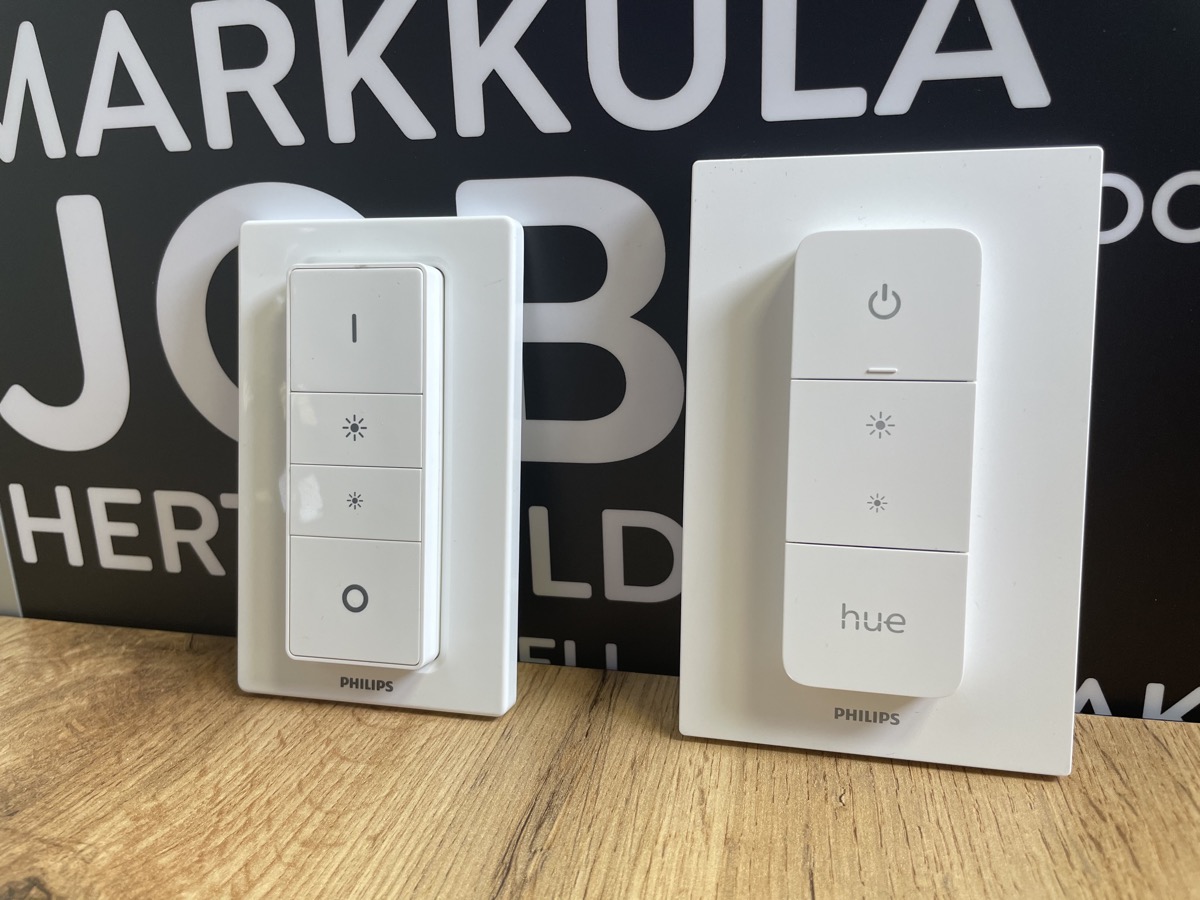
 odd mango
hi. I've moved from zha to z2m and trying to figure it out. The addon is working, I can pair and control the devices. I have installed mqtt integration, however none of the entities show up in HA. What am I missing?
 violet dagger
mqtt configuration in the addon?
odd mango
documentation says I should leave default if I use mqt integration?
Do you have a link to config I could use?
violet dagger
do you have the mqtt addon?
odd mango
mosqquito, yes
when installing mqtt integration, it is asking for broker address and login. What do I specify there?
 opaque helm
Any good alternative to sonoff ZBMINI relay switch?
violet dagger
opaque helm
violet dagger
https://zigbee.blakadder.com/NodOn_SIN-4-1-20.html
It looks like really heavy duty one with 20A... I feel it's kinda too much for a simple 10W light bulb 😜
violet dagger
there's one for that too https://zigbee.blakadder.com/NodOn_SIN-4-2-20.html
 lucid sparrow
kind of a long shot, because I know gx53 isn't a popular light type.. I'm struggling to find zigbee or even wifi bulbs of this type 😐
a russian guy has posted a PCB that you can make yourself, and I have a bunch of those boards, but I'm feeling a bit lazy about building them
ive found this "prios" thing.. but they're all european sites and I don't think im going to get much luck shipping them to Australia .. cant find any on ebay, or aliexpress 😦
 frigid mica
Anyone have a Hue White and Color Ambiance GU10? If yes, pro's / con's? Looking to have it as an indoor spotlight for ambiance.
grim igloo
no iirc their gu10 line are newer?
i got two cheap athom gu10 rgbw for a half bath that work well but not the highest lumen
https://www.athom.tech/blank-1/wled-gu10-rgbcw for $11 a piece and running WLED i'm happy with them. they turn on/off very fast and transitions seem to work well
frigid mica
What about the color
I have all hue so far and I like the color quality
I'll see what the lumen is for the new GU10
250
grim igloo
frigid mica
What about the color
i dont have anything to compare it to honestly
mellow geode
frigid mica
Anyone have a `Hue White and Color Ambiance GU10`? If yes, pro's / con's? Look...
Yeah, I have 2nd gen GU10 bulbs. (the normal sized ones). Colors are great like all Hues. Brightness can be a bit dim if you only have one spot. IMO, it’s fine though.
If you have 2nd gen bulbs, definitely upgrade them to the latest firmware to get rid of power supply noises during idle.
3rd Gen are identical in size, but contain upgraded components. The coil whine is also completely fixed there apparently.
frigid mica
mellow geode
Yeah, I have 2nd gen GU10 bulbs. (the normal sized ones). Colors are great like ...
You have a pic of it being "dim" in 1 spot?
good to know about the coil whine, that would annoy the shit out of me
I'm just putting these in 3 corners of my house
I have an open floorplan and 3 corners I want to illuminate
mellow geode
frigid mica
You have a pic of it being "dim" in 1 spot?
Not at the moment. It’s just a tad dimmer than normal 400 lm GU10 spot.
grim igloo
yolo straight to gen3 then
frigid mica
Seems I might need to buy one just to see the difference
frigid mica
grim igloo
yolo straight to gen3 then
for sure
grim igloo
wonder what the price diff is
grim igloo
julian do you know much about the new hue track light stuff?
mellow geode
No, it’s way too expensive lol
Like, normal Hue lamps are often reduced here (Germany). Track stuff never is I think
grim igloo
but ignoring cost they should be solid as far as zigbee perf and color etc right?
grim igloo
frigid mica
Seems I might need to buy one just to see the difference
buy one of the wled ones too just so i know what i'm missing out on with the fancy hue color 😛
mellow geode
grim igloo
but ignoring cost they should be solid as far as zigbee perf and color etc right...
Yeah, the Hue controllers are standardized for "bigger lamps"
grim igloo
what does that mean :x
frigid mica
grim igloo
buy one of the wled ones too just so i know what i'm missing out on with the fan...
Yeah I might
what pixel do they use?
grim igloo
frigid mica
Yeah I might
they are rgbw-cct
idk
they show up as sengled with mac address in unifi controller
mellow geode
grim igloo
what does that mean :x
just that the "Hue (Color) Engine" (aka controller) is basically the same across many different lamp models
frigid mica
I bet they would be fine TBH, I've never tried WLED bulbs
ah, if they are sengled, then the color is not as great for oranges
grim igloo
they have to be used as a workaround because hass wled integration blocks CCT support https://github.com/Aircoookie/WLED/issues/2500
but you use wled over mqtt so no issues for you i think
frigid mica
oranges and yellows on sengled are more 'warm white and medium white' colors
grim igloo
frigid mica
ah, if they are sengled, then the color is not as great for oranges
ya but i dont have anything to compare them to that is rgbw-cct
grim igloo
mellow geode
just that the "Hue (Color) Engine" (aka controller) is basically the same across...
and this is something inside the device correct? i got confused with controller thinking it was coordinator side
mellow geode
Ah, yeah. Inside the device. Just regarding your question with "Zigbee (performance)"
grim igloo
frigid mica
oranges and yellows on sengled are more 'warm white and medium white' colors
fwiw i just played with them til i got a nice warm white color and then i literally only use them on that preset at boot to turn lights on/off at varying brightness and nothing else lol
 shrewd crypt
I'm having a strange issue witha new GE Lamp Dimmer. In short, when I activate a scene containing this device, HA reports the device is on at 100% as specified, but the light itself does not turn on. I can directly control the device no problem (On/Off/Brightness), it's only the scene that failes to turn it on.
idk if this is the best channel, but it's a zigbee device.
using ZHA, btw
i made a reddit post and got nothing
https://www.reddit.com/r/homeassistant/comments/17sucw0/new_ge_zigbee_lamp_dimmer_does_not_turn_on_new/?utm_source=share&utm_medium=web2x&context=3
mellow geode
Try the following: turn off the light, then do a light.turn_on service call with just brightness and see if the light turns on.
 tawdry furnace
Wondering if anyone here can help with a small but infuriating for my OCD problem in facing with my ZigBee lights,
I've set up a few automations for turning on my lights, the automatons work, but some of the lights don't always go on, some of them flash on, and then go off again,
What I'm struggling to understand is if I set up the automatons through Alexa instead, they have a tiny delay, but always come on,
The lights are a set of 6 ZigBee lights, grouped into one light group
For obvious reasons I'd rather have the lights work directly through home assistant rather than having to rely on Amazon server
 proven mason
im migrating from the sonoff zigbee zbdongle-p to the new skyconnect. what is the best practice here? do i convert my existing infrastucture to the skyconnect, backup, restore on a new box? it should also be said that im migrating hardware too (apu4 to nuc). HAOS for both.
the other option is to restore to the new box, get the old antenna working AND THEN MIGRATE to the skyconnect? and i think theres a middle option: restore to new box and convert to SKY then
so of the three options, whats the best to do a bare metal backup, restore to new bare metal, and convert zigbee?
austere patio
proven mason
the other option is to restore to the new box, get the old antenna working AND T...
First, migrate your existing setup so that all of your old hardware works. Then, migrate to the SkyConnect. There's a button to do this.
proven mason
ok so backup and restore to new host/box with OLD radios
then after its all working, swap the sonoff for the sky?
do i have to do anything special when turning off the old box? or am i legit just taking to dongles and moving them over
and do i do the restore first, then move the dongles?
 oak condor
I have a couple of devices on my zigbee2MQTT network that are having some problems. Is this the right place to ask for help in troubleshooting the issue? I haven't been able to find anything or figure it out.
sour shadow
Yes
oak condor
Thanks. I have Sengled bulb and a Third Reality Button that worked fine for a long time but a couple of months ago they stopped working when my HA server restarted after my weekly update. But, the bulb continues to work fine from Alexa commands. And, they both will work fine as before in about 24 hours. The bulb is on/off through an automation fired by the button. Again zigbee2MQTT and everything is current.
sour shadow
- How many (Zigbee) routers do you have, and are they near (no more than one wall and 6 meters) the button and bulb?
- Have you checked for WiFi interference?
- You've got the coordinator on a USB extension cable?
oak condor
I do have the coordinator on a USB extension. I'm new to zigbee so I'm not all that familiar with all the terms. My coordinator, which I assume is the device that's connected to my HA server is only about 20 feet down the hall from the two devices.
sour shadow
20 feet is fine with one wall, maybe two if they're not brick/stone/concrete
(there's a pinned message that covers the terms)
oak condor
No, it's all indoors. Just drywall.
sour shadow
And the second question?
oak condor
OK. I'll look for the pinned message. How should I go about troubleshooting the potential for WiFi interference?
sour shadow
Again another pin will help you, but a wifi scanner app is needed
oak condor
I have Fing loaded up
I'll use those pinned messages and do some trials. So, in reference to the router devices, I have some Third Reality plugs (outlet). Do those act as routers?
sour shadow
Yes, they do
oak condor
And, that basically extends the zigbee network, correct??
sour shadow
Yes
oak condor
OK. Great. I'll start spreading those around the house. One last Q for now....I also have Phillips Hue lights, but I'm not using them in my HA setup. They don't communicate at all in my HA zigbee network, do they??
sour shadow
Only if you joined them to that mesh (so, if they're connected to the Hue Hub, no)
oak condor
They are connected to the Hue hub for now. Thanks for your help.
proven mason
how long does a restore take, been like an hour
do i refresh the page or wait for the "restore in progress" page to change itself?
 proven pelican
I recently switched from Deconz to ZHA and things seemed a lot better compatability wise. Been running like that for a decent amount of time but I've been seeing stuff about Zigbee -> MQTT. being better Would it be worth the effort to migrate to that?
 desert sleet
Is there a list of devices I can look up?
sour shadow
desert sleet
Is there a list of devices I can look up?
For Zigbee2MQTT yes, for ZHA... sort of, ish
sour shadow
proven pelican
I recently switched from Deconz to ZHA and things seemed a lot better compatabil...
That's on you. Some of us prefer decoupling, some don't.
ripe osprey
desert sleet
Is there a list of devices I can look up?
For Z2M you can check here
https://www.zigbee2mqtt.io/supported-devices/
proven mason
do i hit MIGRATE RADIO?
eventhough its the same radio
and its a restore to new host/bare metal?
this is where i got lost before
proven pelican
sour shadow
That's on you. Some of us prefer decoupling, some don't.
sorry, what do you mean when you say decoupling?
sour shadow
Well, ZHA is all your eggs in one basket
Zigbee2MQTT is another piece of software, that stays running when HA goes down
deCONZ is decoupled from HA
Z2M is decoupled from HA
ZHA is part of HA
proven pelican
ah, ok gotcha
So is there a benefit to decoupling? I honestly just want the best and closest to plug and play option. For example I had a motion detector that didn't work right with Deconz but seems to work fine with ZHA now that I've migrated. But lately I've been having some issues with some new lights I added.
sour shadow
Zigbee2MQTT is another piece of software, that stays running when HA goes down
proven pelican
I am pretty certain it's just interference (which I imagine changing to MQTT wouldn't help) but I figure if it's a better experience over all it's worth switching
sour shadow
Also, you can run it remotely from HA
austere patio
If your issues are feature related, some integrations/addons support different features for different devices
proven mason
so i hit migrate radio
do i want to reconfigure the current radio or migrate to a new radio?
austere patio
If your issues are network related, switching software won't fix them
austere patio
proven mason
do i want to reconfigure the current radio or migrate to a new radio?
What are you trying to do?
proven mason
this is NOT with the sky connect yet, just moving over the sonoff to make sure it all works
we talked like two hours ago
im doing the migration
i did a backup on my old box, restore on the new box, used existing radios
you advised me to NOT do the sky connect just yet
bring over the sonoff and make sure everyone is working
austere patio
Is everything working?
austere patio
Depends on what "doesn't work" means here
proven mason
my zwave and zigbee arent loaded
ok i didnt do anything and it just refreshed and is working
its been about 15 minutes and it finally resolved itself
i didnt know that
ok so expected behavior is that its supposed to just work, this is news to me
so at some point, how do i migrate to the skyconnect?
do i remove the sonoff and plug in the sky and hit migrate radio?
do i need both plugged in at the same time?
austere patio
Hit the button and it'll walk you through the process and tell you when to plug in the new radio
proven mason
for the old to new radio on the new box, right?
things are working, should i wait a day before going to sky connect?
and whats the order?
do i remove the sonoff and plug in the sky and hit migrate radio?
do i need both plugged in at the same time?
sour shadow
The Z2M add-on allows you to set some of that in the add-on UI I believe
Otherwise... probably /config/zigbee2mqtt based on what others have posted
proven mason
would like to move to my new skyconnect from the sonoff (and turn them into zigbee routers)
do i swap the radios and hit migrate? or do i need them both plugged in?
sour shadow
And HA is talking to the same broker?
If you subscribe to zigbee2mqtt/+ in HA's MQTT debug tools (under the MQTT integration) and then use Z2M's UI to control a device, or wake/operate a sensor, do you see any MQTT messages?
Yes
Next test, install MQTT Explorer and use that
Try zigbee2mqtt/# in the HA MQTT tool
 rapid dawnBOT
Please use a code share site to share code or logs, for example:
- https://dpaste.org/ (select YAML for the language, and consider picking a longer expiry)
- http://pastie.org/ (select YAML for the language)
- https://paste.debian.net/ (you guessed it, select YAML as the language)
Please don't use Pastebin, since it can randomly add spaces to the main view. Please also don't share text as images since it makes it harder for people to help you. Remember that others may have colour blindness, impaired vision, etc.
sour shadow
Please.... don't share text as images
rapid dawnBOT
@warm quarry I converted your message into a file since it's above 15 lines :+1:
austere patio
proven mason
do i swap the radios and hit migrate? or do i need them both plugged in?
You start the migration by clicking the button with everything the way it is. It'll reset your old radio then tell you when to plug in your new radio.
sour shadow
33oipYMXSLjc2adXOuWFIK is maybe a problem, but if that's the supervisor then you can ignore it
proven mason
austere patio
You start the migration by clicking the button with everything the way it is. It...
thank youuuuuuuuuuuuuuuuu
shrewd crypt
mellow geode
Try the following: turn off the light, then do a `light.turn_on` service call wi...
Thank you for the suggestion. I tried this and I get the same behavior. HA shows that the light is on at the specified brightness but in reality the light is still off.
mellow geode
Yeah, it was just to reproduce the issue without the scene stuff.
The device firmware doesn’t follow spec then and likely just needs to be added to "force on lights" in ZHA light code
Upload your device signature or device diagnostics here and post the link: https://dpaste.org/
shrewd crypt
ok. let me figure out how to do that
@mellow geode I think I have done it correctly
mellow geode
Yep. Should be fixed by adding the alternative manufacturer name here: https://github.com/home-assistant/core/blob/74c51ec9e0acb5fe6ac8e9b22accf9dfa6b6ddc9/homeassistant/components/zha/light.py#L1075
shrewd crypt
so I am adding that on line 37?
mellow geode
ZHA light code needs to be modified in line 1075.
"Jasco Products" needs to be added to the list. It’s probably not easy to test that change for you though probably
shrewd crypt
oh i see. how the heck do I access this file?
mellow geode
It’s located in a different location depending on how you’re using HA. I think you can just copy the entire zha components folder from GitHub, make the change, then put that folder "zha" in your "custom_components" folder.
Then, you’ll also have to add a version in the manifest.json in the zha folder. Doesn’t matter what you put for version.
It’s not ideal of course, but might be the easiest way to test until the fix is made.
You might be able to find more details by searching "override local component Home Assistant" or something like that.
You can also modify the file directly, but that’s a bit more risky.
shrewd crypt
ok. I think I can figure this out. Thank you.
shrewd crypt
mellow geode
It’s located in a different location depending on how you’re using HA. I think y...
what does it mean to add a version to manifest.json? What do I need to write where?
mellow geode
"Custom components" require a version in the manifest.json.
So you’ll need to add something like "version": "1.0", in the manifest.json of the ZHA component.
I can provide more detailed instructions (/download) to you tomorrow or so otherwise
shrewd crypt
Yeah can I DM you tomorrow?
mellow geode
Yeah
 rapid reef
Hey so i bought Radiator TRV /Thermostats 2 different kind, i bound them in via ZHA but both of them display the temperatur alright but setting temperature to the thermostat does not seem to work with either. Is there some mismatched Input output and how do i fix that
 fathom ginkgo
Anyone familiar with the namron dimmers? I am trying to dim them with a single button push-dim, but I am having some issues. Are they capable of brightness_move?
fathom ginkgo
Anyway, I am fiddling around with brightness_move and I am noticing something very strange. publishing a payload with {"brightness_move": 100} should dim the lights with 100 units per second, aka 0-100% in 1 second I guess. But it dims very slowly, and when I watch the feedback value of the current light value it actually dims super fast.
And opposite if I use {"brightness_move": 1}, then the lights very fast, but the feedback value steps 1% per second.
And I have tested various different values for brightness_move and it seems to be opposite of each other like explained above. What kind of behaviour is this? This can't be right
Btw, I am using Z2M
fathom ginkgo
Okay, I think I got it working pretty good. Using "brightness_move": 50/-50 seems to be a sweetspot
 wide mica
Can anyone confirm if there's a purpose for enabling "permit join" on zigbee2mqtt on a specific routing devices vs. just "permit all"? My understanding is the zigbee mesh is "auto-healing" so joining a device via a specific router doesn't necessarily force it to stay that way.
mellow geode
Older Aqara end-devices join via the first router they see and never switch
For those older sensors, you might want to use that functionality
sour shadow
I use that for every device, they can change later if they want
Saves so much pain when a device joins with a weak signal, or when you're joining Aqara's OG devices
wide mica
true, worth a shot. Having trouble diagnosing an issue with some Sengled bulbs but everything i see online mentions how they are typically pretty solid so feels like its a routing issue on my network.
is there any way to get individual device routing info without reloading the whole map? assume there's no way to update routing info without rejoining the network?
 molten talon
this looks interesting: https://smlight.tech/product/slzb-06m/
claims to work with HA out of the box
 spice portal
Hello,
I did a fresh install of home assistant with the ZBDongle-E,EFR32MG21. It appears automatically in integrations, but doesn't seem to work? I see it in the list of devices in home assitant docs. Tried following a github issues https://github.com/home-assistant/core/issues/94614 and an empty form post https://community.home-assistant.io/t/zha-integration-this-is-a-bug-message/640258 with no success. Anyone know what to do?
bellows.ezsp.protocol] Unknown application frame 0x59FD received: b'3f' (b'023a89fd593f'). This is a bug!
Tried both stable and latest container tags
Found a random pastebin as of aug 2023 at https://pastebin.com/NyTNfeUq
oh, looks like it was from a user in this discord #general-archived message
No one answered him either...hmm...
@hollow shale if you're still there, were you ever able to resolve this issue?
I suppose the current consistency between them and me is the use of a container, so ill try one without that.
 elder surge
(randomly inserting my question) How much would zigbee screw up my 2.4 network if I started using it?
spice portal
iirc its a different band entirely so it shouldn't but I could be wrong
elder surge
Thought it used the same 2.4 as traditional APs?
spice portal
You
does zigbee and wifi 2.4 use the same bands?
ChatGPT
ChatGPT
Yes, Zigbee and Wi-Fi 2.4 GHz do use the same frequency band. Both operate in the 2.4 GHz Industrial, Scientific, and Medical (ISM) radio bands. This means they can potentially interfere with each other, as they share the same frequency range. Zigbee typically uses narrower channels and less power compared to Wi-Fi, which is designed to minimize interference, but it can still be a factor in environments with many wireless devices.
Looks like I did not recall correctly
molten talon
elder surge
(randomly inserting my question) How much would zigbee screw up my 2.4 network i...
It's probably the other way around. You should check in what bands the WiFi router in your neigborhood operate (there are apps for that) and then select the most optimal zigbee band. I had a lot of connectivity issues with zigbee which were all solved when I switched to a less crowded band
molten talon
spice portal
```
You
does zigbee and wifi 2.4 use the same bands?
ChatGPT
ChatGPT
Yes, Zigbe...
please don't copy paste chatGPT answers, it often writes complete bollocks
spice portal
molten talon
please don't copy paste chatGPT answers, it often writes complete bollocks
Disgree for gpt4, but sure I wont from now on.
I did cross reference with this article,
but there were a lot of ads
sour shadow
There's overlap - see the pins - but Zigbee is lower power than WiFi so it won't cause WiFi issues, but will cause Zigbee issues, if you use the same frequencies
spice portal
Hmm, looks like home assistant on rpi works ok. It did detect an existing configuration in the device. So whatever was in the container partially worked.
elder surge
sour shadow
There's overlap - see the pins - but Zigbee is lower power than WiFi so it won't...
I want to try Zigbee but I just got my 2.4 network under control. I don't want to make it worse again.
sour shadow
Are you using 40 MHz channels?
Are you running on more than 3 different 2.4 GHz channels?
If the answer to both is no then you'll be fine - again, look at the pinned image
 fallen kite
Ok, I installed home assistant
I installed home assistant os on a raspberry pi
I have a usb zigbee device connected
it sees it
I've added a zibee device
Now, how do I get the devices out on MQTT?
I don't have the hass.io visible on the left pane of the web interface either..
 hollow shale
spice portal
<@434825782268002304> if you're still there, were you ever able to resolve this ...
hollow shale
spice portal
<@434825782268002304> if you're still there, were you ever able to resolve this ...
I'm still here and I haven't found any additional info on how to resolve this unfortunately.
I'm not 100% sure this still happens though, haven't restarted my Home Assistant in a while.
fallen kite
"~
sour shadow
fallen kite
I don't have the hass.io visible on the left pane of the web interface either..
Stop watching outdated videos from years ago 😉
Now, how do I get the devices out on
carmine hamlet
I'm surprised that video hasn't died of old age. It would be nice if you could mark technical videos like that with an expiration, where it would pop up a warning that it's super old and things may have changed. Same with Github, if they could post a "this thing you're looking at hasn't been updated in 4 years..." message
like is done for addons, where if no changes are made in a year, it's automatically marked as "stale (xxxx)"
ripe osprey
I mean, youtube has a time of "1 year ago" attached under outdated videos 😄
sour shadow
Yeah, but a 1 year old cooking video is likely still good. A 1 year old HA video...
 mighty river
anyone here with a neo coolcam siren?
 astral seal
Color Rendering Index (CRI) is a measurement of how natural colors render under an artificial white light source when compared with sunlight. The index is measured from 0-100, with a perfect 100 indicating that colors of objects under the light source appear the same as they would under natural sunlight.
 lilac rapids
I have this https://zigbee.blakadder.com/Aqara_SRSC-M01.html
I wanted to use it with ZHA, it pairs fine and it works with a Up/down/Stop button
But I cannot set arbritary positions, it exposes a number sensor that shows the numeric position but it is read only.
Anyone know if I can fix this?
elder surge
sour shadow
If the answer to both is _no_ then you'll be fine - again, look at the pinned im...
Not using 40 MHz. I am using 1,6,11 though. I have a lot of wireless devices. Only interested because z-wave is expensive.
left magnet
hello everybody. I continue fighting with my zigbee network 😦 The very frustrating thing is that it worked fine for a year and an half, and then I started loosing connection to devices without really knowing what could have changed. I am using a raspbee II on raspberry pi4 and ZHA (recent migration). It starts to be problematic as I mainly use the zigbee for automating the control of a grow tent for hibernating orchideas. And winter is coming :-(. I tried to put the raspberry further away from other devices than it was. I tried adding more devices acting as repeater. I forced my wify on channel 1 and zigbee on 25. I moved all possible devices to the 5GHz wifi. I do not see a major difference so far. What I desperately miss is a systematic way of investigating signal losses
sour shadow
Not using 40 MHz. I am using 1,6,11
 vale nova
960 fps
I dont think the light flickers but the slomo video does
And I've never noticed any flicking with my eyes
austere patio
left magnet
hello everybody. I continue fighting with my zigbee network 😦 The very frustrat...
Can you upload ZHA debug logs and the diagnostics JSON for the integration?
 shut maple
My device is from Ali and I got it by
carmine hamlet
vale nova
https://discord.com/channels/330944238910963714/397426163649216512/1174281260923...
Please don't use #the-water-cooler to post images.
rapid dawnBOT
Please use imgur or other image sharing web sites, and share the link here.
Image posting is blocked in most channels to discourage people from sharing text as images. Sharing text as images assumes that everybody sees the world as you do, which isn't the case. Some people are colour blind, or have visual impairment that means they can't make sense of an image of text.
vale nova
because there are colorblind people I can't post a video of a lightbulb?
carmine hamlet
See the first line there. People try to post images of text all the time
Anyway, instructions are there
 snow goblet
left magnet
hello everybody. I continue fighting with my zigbee network 😦 The very frustrat...
snow goblet
left magnet
hello everybody. I continue fighting with my zigbee network 😦 The very frustrat...
I had the raspbee ii and switched to the sonoff co-ordinator and now everything works a lot better. My issues were 1 - latency, 2 - scenes never worked.
My only current zigbee issue is with remote switch buttons. The aqara and sonoff zigbee buttons work most of the time, and sometimes they just don't until a few button presses.
 hollow sorrel
Hey! I have some LED lights built into a kitchen cabinet and want to control them via Zigbee. The bulbs themselves are some bespoke thing so I can't get Zigbee bulbs, but there is an "electronic led converter" hidden behind the cabinet that takes in mains power and spits out whatever the LEDs want. I looked into replacing the converter with a Zigbee version but then I thought it might be easier to put a Zigbee switch in series with it. Question 1: is this a good idea, question 2: should I put the switch at the mains end or the led end, question 3: can you recommend a good switch?
https://www.galaxus.ch/en/s1/product/sonoff-zigbee-light-actuator-zbmini-l2-1-fold-smart-home-hubs-24453439 is quite cheap - would this do the job?
astral seal
hollow sorrel
https://www.galaxus.ch/en/s1/product/sonoff-zigbee-light-actuator-zbmini-l2-1-fo...
I have a couple of the zbmini-L2 and they've been solid for me. Do the LEDs not have a switch already or are they just on all the time?
 iron mauve
Hey folks - I've got two Zigbee devices that are just stuck spinning, apparently installing an update. Attempting to do OTA update through Zigbee2MQTT doesn't seem to do anything, powering off device and back on doesn't change what HA is reporting that is "installing an update". One is GL-C-008P (https://www.zigbee2mqtt.io/devices/GL-C-008P.html#gledopto-gl-c-008p) and the other is Innr SP 224 (https://www.zigbee2mqtt.io/devices/SP_224.html#innr-sp%2520224). This has been occuring since the last HA Core Beta Update IIRC (but could have been a zigbee2mqtt update too), about a week or two ago and persists through HA restarts and the like. Here is a picture of what I am seeing: https://imgur.com/a/8eJgp9S
Any ideas?
hollow sorrel
astral seal
I have a couple of the zbmini-L2 and they've been solid for me. Do the LEDs not ...
They are connected to the light switch, so my plan is to leave that on all the time and control the lights by zigbee
astral seal
Are those the only lights on that switch or does that switch also run like overhead lights and stuff?
left magnet
austere patio
Can you upload ZHA debug logs and the diagnostics JSON for the integration?
Hopefully, I understood what you mean correctly.
zha log: https://dpaste.org/xd0bn
diagnostics: https://dpaste.org/yJ0iV
left magnet
I have a question reg. the visualization of the zigbee network in the ZHA integration. The documentation is not very helpful (aka "you can look at it, but if you are not an expert, you will not understand", describes two numbers; one of those should be negative between 0 and -100, while the only numbers I see are positive and between 0 and 255 ... I also see lines of various colour (green yellow red grey). My naive interpretation would be that I shall try to distribute devices in such a way that they are connected to the coordinator via a path of green lines ? Are orange still OK ? Is this true ?
mighty river
Hi there
Any chane you know when conbee III (conbee 3 - for search engine) will be supported in home assistant?
sour shadow
Possibly ZHA already will support it, since it uses a common chipset
But ... based on history, don't buy ConBee 😉
mighty river
Ugh. What do you mean? I am happy conbee II user, never had any issues. Maybe because of that I never looked for known issues
If not conbee, then what?
sour shadow
Well, the ConBee range are known to be overly sensitive to interference, there's currently no reason to expect the 3 to be better
Just buy something EZSP based - there's one list in the ZHA docs
mighty river
Thanks a lot @sour shadow Will do
 plain latch
morning folks
I'm running z2m, and it somehow seems to be reporting that all my devices with available firmware updates are currently in "installing" state
can I reset the update state somehow? that spinner is really distracting while looking at other updates
plain latch
ah, perfect, I love problems that are already fixed by somebody else 🙂
sour shadow
Looks like 1.33.3 should drop "soon"
plain latch
yeah, the tag looks like some automation should be picking it up soon, I'm happy knowing that it'll be fixed with the next update
it's not that any functionality is broken, so nothing urgent 🙂
mighty river
sour shadow
Just buy something EZSP based - there's one list in the ZHA docs
Sonoff ZigBee Dongle Plus ZBDongle-E Adapter
Is this something considered okay? I know sonoff only for not-so-electrically-safe 230v smart switches 😉
sour shadow
That dongle is fine
left magnet
sour shadow
Just buy something EZSP based - there's one list in the ZHA docs
does the raspbee 2 has the same issue as the conbee ?
sour shadow
Probably, and more on a Pi4 or newer
Zigbee HATs can't be moved away from the RF noise of your Pi, they're a terrible idea
ashen bluff
In case you wonder why the pi 4 (or newer) specifically. They have USB 3 ports.
Here's a video demonstration of interference: : https://youtu.be/tHqZhNcFEvA
These past posts (entry point to discussions) might be interesting as well
 crude violet
Is it only me with z2m that after restart of z2m some devices even if they are working via z2m gui appear unavailable in hass. So far 100% becomes available if I rename deivce and back, or from several z2m restarts. Its getting a bit annoying, I am just finishing up this project, with lots of devices, and then I though its final days, now after 1.33.2 this comes out which completly makes everything... 😖
sour shadow
You're using add-ons, specifically the Mosquitto add-on?
crude violet
Nope, z2m in docker and EMQX for MQTT, already encountered mosquitto issue
checked topics of device and it says unavailable inside, so its z2m side which reports unavailable
sour shadow
Ah... weird, not seen that in Z2M
The known problem relates to the Mosquitto broker and a large number of retained messages
crude violet
Yeah encountered that, switched to EMQX 😄
sour shadow
I've got about 100 devices in Z2M, never seen the problem you're describing, and not seen people report it in the Z2M Discord either
crude violet
have u enabled availability?
sour shadow
Of course
crude violet
I have total 500 devices through 6 x z2m instances 😄
sour shadow
That wins the "biggest setup" prize
sour shadow
That explains it 😄
crude violet
yeah ikea lights and motion sensors
I am trying to finish this project, for a month now, every time I am feeling like done its working I am getting hit with something which out of my control 😄
also today z2m crashed with not even full error message, which was really strange
sour shadow
What coordinators are you using?
sour shadow
Ok, so not that then... was afraid you'd say Sonoff 😄
crude violet
Had that at the beginning when didnt knew about the limits of zigbee 😄
hmm why after 180 devices everything started to not work correctly 😄 Also layout of connection map was not great 😄
sour shadow
Yeah, there's an active supporter on the Z2M Discord with a few hundred devices who learned that depending on your devices you may have to split the mesh once you pass 100
crude violet
https://i.imgur.com/egZS1uY.jpg Was fun 😄

poor ikea lights were abused hard which where repeating
sour shadow
I haven't tried graphing my mesh in a long time, not since it basically busied out for many minutes
crude violet
yeah it was running for ages
sour shadow
Yeah, mostly Innr for the backbone here
The Tradfri/Ikea bulbs have a known firmware issue that can cause them to silently stop routing traffic
crude violet
havent encountered that
the only issue I have is sometimes they just dont want to connect and stay like that until power reset
I am sitting now here and thinking how overkill would be place a whole lighting circuit on "smart switch" 😄
grim igloo
sour shadow
The Tradfri/Ikea bulbs have a known firmware issue that can cause them to silent...
all ikea bulbs or specific models/revisions?
crude violet
also I have discovered that tradfri light this one https://d2rbyiw1vv51io.cloudfront.net/web/ikea4/images/626/0962668_PE808185_S4.jpg has two revisions of different firmware without update for old ones
 austere patio
mighty river
Hi there
Any chane you know when conbee III (conbee 3 - for search engine) will ...
austere patio
mighty river
Hi there
Any chane you know when conbee III (conbee 3 - for search engine) will ...
It'll be in the next Beta
austere patio
sour shadow
Well, the ConBee range are known to be overly sensitive to interference, there's...
Conbee III is based on a Silicon Labs chip and is running Silicon Labs firmware. It's running my home right now, no issues yet 😄
mighty river
Thanks!
So you want to say that it is not as bad as they say? 😉
 round grotto
Hey, I have 3 devices (from Z2M) that are shown to be updating in Home Assistant, but they are not because I didnt trigger the update, is this a known bug?
sour shadow
grim igloo
all ikea bulbs or specific models/revisions?
Not sure, it's to do with the version of the toolchain they're built from - when I heard it was all of them, but that was ~2 years ago
 dim ingot
In the Z2M docs - eg https://www.zigbee2mqtt.io/devices/CCTFR6100Z3.html - it talks about some attibrutes which is says " Reading (/get) this attribute is not possible." but I have that TRV and it certainly does show pi_heating_demand and local_temperature in the attributes. Is the doc wrong or is there some nuance of Z2M which I'm not grasping ? Thanks.
sour shadow
That means you can't ask for an update
Sure, the device sends updates, when it wants to. You can't ask it what the current value is
dim ingot
ah, ok. makes sense
 next kraken
Hi - have a Hue Bloom LLC011 and would like to ditch the Hue Hub v1.
I also have a sonoff zigbee hub with Tasmota on it-it runs the majority of my zigbee lights.
How do I pair the bloom with the sonoff/Tasmota zigbee hub.
ripe osprey
next kraken
Hi - have a Hue Bloom LLC011 and would like to ditch the Hue Hub v1.
I also have...
If you disconnect the bulb from the hub, It should go in the pairing mode next time it gets turned on
This should give more insight if you are using ZHA https://community.home-assistant.io/t/best-option-to-connect-imcompatible-hue-lights-to-ha-yellow/548746
next kraken
ripe osprey
If you disconnect the bulb from the hub, It should go in the pairing mode next t...
Thanks
Dont have either of those remotes so will find it hard to place factory reset mode on the bloom lights. Any other suggestion?
ripe osprey
If it's connected to the hub, you can factory reset it inside hue app
next kraken
ripe osprey
If it's connected to the hub, you can factory reset it inside hue app
I’ve tried deleting from hub but seems not enough
ripe osprey
Internet seems full of this bulb having difficulties resetting without a dimmer switch, so your best bet would be to get a dimmer swiitch of sorts, unless someone else has any other ideas
left magnet
sour shadow
Zigbee HATs can't be moved away from the RF noise of your Pi, they're a terrible...
It is a pi4 😭 . I guess I shall try to get a usb dongle from another brand and put it on a usb cable. Sonoff ?
next kraken
ripe osprey
Internet seems full of this bulb having difficulties resetting without a dimmer ...
Thanks for helping. It’ll be good to see if there are any other solutions
sour shadow
left magnet
It *is* a pi4 😭 . I guess I shall try to get a usb dongle from another brand an...
Not the Sonoff P, but otherwise sure
ripe osprey
next kraken
Thanks for helping. It’ll be good to see if there are any other solutions
Just for quick point - Maybe someone in ur life (friends/Work colleagues etc) have dimmer switch that you could borrow for this. That way you don't need to buy it
left magnet
sour shadow
Not the Sonoff P, but otherwise sure
sour shadow
For ZHA, sure
left magnet
Arrived at that point, I wonder how come it actually worked flawlessly for 1.5 years before starting to make problem. 🤷♀️
austere patio
left magnet
Arrived at that point, I wonder *how come* it actually worked flawlessly for 1.5...
Try to first move your network to channel 20
left magnet
austere patio
Try to first move your network to channel 20
wifi on channel 1, zigbee on 25...
austere patio
Right. But from the energy scan in your debug above, channel 26 is nearly 100% utilized. It's right next to 25.
left magnet
how do you see that (not that I don't trust you, but I'd like to learn...)
austere patio
Scroll to the very bottom of your diagnostic info (https://dpaste.org/yJ0iV/raw)
left magnet
I see. interesting 🙂 Is this likely to be neigbours ? I am in an appartment. we had some changes in the house, so we might have some of the newcomers wit a lot of zigbee devices
next kraken
ripe osprey
Just for quick point - Maybe someone in ur life (friends/Work colleagues etc) ha...
I’ll ask around….
austere patio
left magnet
I see. interesting 🙂 Is this likely to be neigbours ? I am in an appartment. we...
Unlikely. I couldn't get the Conbee to show anything above 95% channel utilization unless I tried really hard with another device emitting a test tone. Do you have any nearby AC motors (air conditioners or furnaces)? New TVs? Mesh systems? New power supplies or fluorescent lights?
left magnet
austere patio
Unlikely. I couldn't get the Conbee to show anything above 95% channel utilizati...
No motors, no AC device, no TV (at all), only LED lamps and only one wifi router which didnt move and is 7 metrs away
austere patio
There haven't been any software changes in many months related to device functionality, especially with a Raspbee, so it's very likely something new in your environment
left magnet
"energy_scan": {
"11": 65.88235294117646,
"12": 36.470588235294116,
"13": 25.88235294117647,
"14": 28.235294117647058,
"15": 97.6470588235294,
"16": 35.294117647058826,
"17": 31.764705882352942,
"18": 22.352941176470587,
"19": 30.58823529411765,
"20": 29.41176470588235,
"21": 17.647058823529413,
"22": 44.705882352941174,
"23": 32.94117647058823,
"24": 20.0,
"25": 27.058823529411764,
"26": 97.6470588235294
austere patio
Looks like the noise source on channel 26 (and likely above) is still there and very constant
left magnet
looks like things are changing. I shall maybe try to observe it a bit over time. And I'll get the sonoff coordinator, it cannot harm to have a better one than the raspbee
austere patio
I would try changing the channel to 20 first. You can replace the coordinator but that won't help devices already installed in your home to communicate better, especially if they're struggling due to noise
left magnet
I was thinking to do both at once, coz I am a bit tired of reconnecting everybody 😉 So only do it once
austere patio
Changing channels from the ZHA configuration page should also migrate most devices on your network to the new channel after about an hour, assuming they support channel migration
Switching coordinators definitely won't require re-joining anything, especially if you upgrade your Rapsbee's firmware to the latest version so that a proper backup can be made
left magnet
OK, you won, i change channel now. From ZHA graphical display of the network, are the color of the lines joining devices interpretable (like green good, yellow OK red bad and grey awful)?
mellow geode
not really
It’s supposed to be like that, but you shouldn’t rely on it
It’s also not a live map
left magnet
😢 sad. It looks so nice and easilly understandable
I am lost
I migrated from channel 25 to channel 20. It looks like the devices followed, at least I tested one of each type and could control them. But now there is more on channel 25 and less on channel 20
austere patio
Devices emit noise when they transmit so that's normal. Your network is just further away from the noisy channel 26
left magnet
"energy_scan": {
"11": 38.8235294117647,
"12": 34.11764705882353,
"13": 25.88235294117647,
"14": 28.235294117647058,
"15": 54.11764705882353,
"16": 50.588235294117645,
"17": 32.94117647058823,
"18": 28.235294117647058,
"19": 30.58823529411765,
"20": 21.176470588235293,
"21": 28.235294117647058,
"22": 37.64705882352941,
"23": 31.764705882352942,
"24": 23.529411764705884,
"25": 32.94117647058823,
"26": 97.6470588235294
 rigid wagon
Zoon getting my ugz-01 coordinator. Wonder if opinions on z2m vs zha changed? I found that quite some people said zha wasmt so reliable or stable.
I have like 60 zigbee devices and come from smartthings, so have to choose the best software.
Also is there a way to see what channel fits best to start occupying?
austere patio
The integration has next to no control over your network's reliability or stability, that's entirely determined by your environment and how you join your devices. When you set up a new ZHA network, it will pick the best channel for you.
left magnet
OK, now I need to see how it evolves over time... I fear my aqara temperature sensor did not migrate. In order to check how the devices work, I am looking at the history, displaying the state of swiches and bulb, which shows when they are on / off or unavailable. Wouls there be a better way ?
austere patio
They take up to an hour to potentially migrate. I would just wait an hour or two and see what devices are still reporting.
left magnet
I'll wait a night, since it is 10 pm 😉
 olive flower
ZHA ZigBee Binding?
 tiny timber
Got a new neighbour who has set his 2.4GHz WiFi across channels 5-12 and seems to be broadcasting at high power >_< Guess I need to re-do my ZigBee network. Seems like as good a time as any to retire the Conbee II and set up the Skyconnect that's been sitting in a draw for a year.
Question for everyone here though: stick to ZHA, or move to Z2M? I know Skyconnect isn't officially/stably supported in Z2M yet. Any real benefit of moving to Z2M?
 summer forge
Recently bought a new generic thermostat, but i can't seem to set it up. Doesn't seem to create any entities; https://ibb.co/992XHbV , how can i get it to work?
 grizzled kettle
summer forge
Recently bought a new generic thermostat, but i can't seem to set it up. Doesn't...
summer forge
grizzled kettle
This might be your issue as well:
https://community.home-assistant.io/t/popular-...
grizzled kettle
summer forge
Recently bought a new generic thermostat, but i can't seem to set it up. Doesn't...
summer forge
grizzled kettle
This might be your issue as well:
https://community.home-assistant.io/t/popular-...
That does seem very possible, it's sold by the same brands online shop and it's very recent.
However, two questions; How do i access the config dir of my HA and how do i edit my yaml file? Running HA OS on a VM at the moment
left magnet
tiny timber
Got a new neighbour who has set his 2.4GHz WiFi across channels 5-12 and seems t...
How did you analyze the wifi signal to arrive to this conclusion ? I am exploring all avenues to try get my zigbee network to work again...
 tidal dove
Hello, I’m experiencing an issue with my ZigBee system where it keeps forgetting individual devices. I’m using a Sonoff Plus E Dongle, and I’ve recently learned that it can support a maximum of 32 child devices. Could someone guide me on how to check the current number of child devices connected to the dongle and if I’m exceeding this limit? Thanks in advance for any help!
tiny timber
left magnet
How did you analyze the wifi signal to arrive to this conclusion ? I am explorin...
Just walking around the house using any Wifi Analyser app on your phone. I have Unifi devices, so I used WifiMan.
 ornate sage
Trådfri remote battery reports 128% charged and 25V 🧐
 uneven sonnet
ornate sage
Trådfri remote battery reports 128% charged and 25V 🧐
uneven sonnet
ornate sage
Trådfri remote battery reports 128% charged and 25V 🧐
Have the same issue. There is an open issue on Github for this (https://github.com/home-assistant/core/issues/86880). There is also a manual workaround in the comments (changing a value in zcl-cluster). My workaround is a helper sensor, which just divides the battery value by 2. Works for me until there's a general fix.
 rocky forge
Can some one give me a hand creating a quirk? I have been having a go and it matches the endpoints and gets loaded to the device. My custom cluster is passed on and it shows the 3 attributes I have created. But when I try to read the values of the attributes it reports none. Without the quirk if I use zha_toolkit to read the attribute of the cluster without the quirk loaded it reports a value.
manic plinth
I'm getting this error when I want to restart HA:
The system cannot restart because the configuration is not valid: Invalid config for [zha]: not a directory for dictionary value @ data['zha']['custom_quirks_path']. Got '/homeassistant/zha_quirks/'. (See /config/configuration.yaml, line 28).
 unreal sedge
So after reading through the pinned posts and channel topic, What's wrong with using CC2530's as end devices for stuff like temperature modules?
is it just people wanting to use them as coordinators that's causing issues?
manic plinth
zha: custom_quirks_path: /homeassistant/custom_zha_quirks and this is in config.yaml
mellow geode
Are you using Home Assistant OS?
Then use /config/custom_zha_quirks
Also make sure the custom_zha_quirks folder is created
In your case, the part doesn’t resolve to a folder
manic plinth
It had something to do with the File Editor addon in the end, but thanks for your help
 shadow valley
i have an issue with my namron zigbee heaters that they report bad energy usage values now and then. which then makes the energy dashboard look a bit strange (for instance it reported that one of the heaters had consumed 3.500 kwh just today)
which is impressive, considering that it's a 1000W heater
so i was wondering if it was a way to filter out those bad readings?
i guess i need to create filter sensors?
still barn
does anyone have any aqara zigbee leak sensors that can check to see how they show up on the zha visualization map for me?
for whatever reason the one i have been testing never shows up with a link line
i have been having issues with it losing connectivity so I recently added an aeotec extender nearby to help my zigbee network
 thorny tendon
Hi having problem adding my zigbee device & noticed this crash in the logs
Sonoff zigbee bridge pro - tasmota - ZHA bug
 strong mango
I am having an issue where z2mqtt won't start after doing a hardware swap. Setup the new pc with homeassistant and installed my backup and did all the updates. Wierd thing is all my zigbee Ikea devices and automations are working. No errors in the logs either. I have some new hue switches coming and need to be able to add them.
Can anyone give me a direction here?
Thanks
sour shadow
If Z2M won't start then there's going to be a log about that
strong mango
only have 2 errors in the ha log related to z2mqtt. Both are about blueprints. The zigbee logs shows no errors as well. I get a 502 error and iit refses to start
actually its not even giving the 502 just the turning icon but then it just goes away
The only thing that has changed in the config other then the pc itself is the ip. Which i did make sure to change in the setup. the hardware logs sees the dongle and shows it correctly and that matche the setup as well.
sour shadow
Not the HA log... the Z2M log
strong mango
can i post it here?
rapid dawnBOT
Please use a code share site to share code or logs, for example:
- https://dpaste.org/ (select YAML for the language, and consider picking a longer expiry)
- http://pastie.org/ (select YAML for the language)
- https://paste.debian.net/ (you guessed it, select YAML as the language)
Please don't use Pastebin, since it can randomly add spaces to the main view. Please also don't share text as images since it makes it harder for people to help you. Remember that others may have colour blindness, impaired vision, etc.
strong mango
Ok got it on paste. How to share it here? Just copy the link?
sour shadow
Yes
strong mango
K, one sec
Just restarting to get a clean log. Thanks for your time
Still seems to be a rather large log
sour shadow
That looks no differernt
Also looks like Z2M is running, hence all the herdsman log lines
strong mango
I turned off herdsman and logs
sour shadow
Well, did you look at that before you pasted it?
Because it's pretty much onlyl herdsman
strong mango
Sort of its huge. Lol
sour shadow
105 lines, not huge
strong mango
Is there a way to clear the log?
sour shadow
When Z2M restarts the log is cleared
strong mango
I turned everything and rebooted but same
sour shadow
info  2022-10-04 13:08:34: Logging to console and directory: '/app/data/log/2022-10-04.13-08-34' filename: log.txt
info  2022-10-04 13:08:34: Starting Zigbee2MQTT version 1.28.0 (commit #03ba647)
info  2022-10-04 13:08:34: Starting zigbee-herdsman (0.14.62)
info  2022-10-04 13:08:37: zigbee-herdsman started (resumed)
info  2022-10-04 13:08:37: Coordinator firmware version: '{"meta":{"maintrel":3,"majorrel":2,"minorrel":6,"product":0,"revision":20190619,"transportrev":2},"type":"zStack12"}'
info  2022-10-04 13:08:37: Currently 1 devices are joined:
info  2022-10-04 13:08:37: 0x0015bc001a01e59c (0x0015bc001a01e59c): MOSZB-140 - Develco Motion sensor (EndDevice)
info  2022-10-04 13:08:37: Zigbee: disabling joining new devices.
info  2022-10-04 13:08:38: Connecting to MQTT server at mqtt://192.168.42.30
info  2022-10-04 13:08:38: Connected to MQTT server
That's what a normal log startup shows
strong mango
Will try a reboot again
 lethal sand
hey Tinkerer by your response in #hardware-archived do you mean read the pinned messages like your blog or did you mean ask the question here again
lethal sand
well i am from the netherlands and i wanted to go with zigbee 3.0 and then the cheap ones, but why are they bad, electrically or the smarts perform bad?
strong mango
The log is not clearing on reboot
sour shadow
lethal sand
well i am from the netherlands and i wanted to go with zigbee 3.0 and then the c...
Cheap is often Sonoff or Tuya, and Sonoff are known to be shitty routers, and can fuck over your mesh. Just don't buy Tuya
Instead by Innr
sour shadow
strong mango
The log is not clearing on reboot
Are you sure that the add-on is even trying to start?
lethal sand
how about sonoff? i quite like their name..
strong mango
Yes sir. Can see the icon
sour shadow
Well, if it's trying to start you'll see lines like the ones I shared
lethal sand
i read "just dont buy tuya" i understand the sentence now, thank you but that is unfortunate
sour shadow
Sonoff are known to be shitty routers, and can fuck over your mesh
strong mango
It def is. An icon shows turning in a circle over the start button but then just stops (times out)
sour shadow
Then you need to check the Supervisor logs
strong mango
Mine is a sonoff as well lol
sour shadow
The Sonoff E stick is fine. Everything else they've made is suspect at best, and known to be bad at worst.
strong mango
Supervisor logs show a ton of warnings. No red
lethal sand
i wanted to go with the skyconnect from home assistant, is that bad or smart or not that dumb?
strong mango
What's weird is all my Z2m devices are working
sour shadow
lethal sand
i wanted to go with the skyconnect from home assistant, is that bad or smart or ...
That's a good choice
sour shadow
strong mango
What's weird is all my Z2m devices are working
Then Z2M is running
strong mango
But no interface
lethal sand
do you have any recommendations to cross a backyard? 5/6 meters
sour shadow
Innr, still 😛
lethal sand
but i meant do i just add smart plugs as routers? or any other better method
sour shadow
Tube also sells dedicated router devices
Or you can buy some CC2652 coordinators and flash them with router firmware
lethal sand
a weather proof innr smart plug costs the same and is already weather proof
any advantage from the tube coordinators/routers like signal range?
sour shadow
Plugs aren't weatherproof unless you put them in a suitable enclosure
Dedicated routers tend to be better routers, and have stronger signals
(at least those with external antennas)
lethal sand
thank you
 warped fable
Anyone know of a Zigbee 3 way toggle switch to replace existing?
Only thing I have found is Enbrighten
molten linden
inovelli blue can work in a 3 way
warped fable
Thanks, just looked at them. I should have added I will be controlling a ceiling fan.
that has lights
 ocean storm
Is it possible that skyconnect Zigbee cannot find Xiaomi door sensors? I think about be a Aqara Door sensor instead. Is Aqara a good brand for skyconnect
carmine hamlet
The coordinator (i.e., Skyconnect) isn't the determining factor, it's the software that you're using to control it (i.e., Zigbee2MQTT or ZHA)
mighty river
hi everyone, i set up home assistant today and i am really enjoying it so far! however i have one RGBW contoller with a seperate white channel, but i have no way of controlling the white channel in the interface. also, when i select a color and try to use the dimming function, the color changes to white. i am using ZHA. does anyone know a workaround for these types of issues? the device in question is TS0504B by _TZB210_zdvrsts8
grim igloo
you have discovered tuya lol
grim igloo
mighty river
hi everyone, i set up home assistant today and i am really enjoying it so far! h...
when you run into these issues, usually when buying knock off / cheap stuff like tuya, you will often have to setup a "quirk" to make zha or z2m control it correctly
julian will now explain how or add support for you cuz he's a wizard
i was just gonna link https://pypi.org/project/zha-quirks/ and say have fun :x
mellow geode
mighty river
hi everyone, i set up home assistant today and i am really enjoying it so far! h...
Are you sure the white channel is controllable separately? Looking at Z2M code, I don't see a controllable white channel?
_TZB210_zdvrsts8 is the manufacturer name that responds to RGB mode, not RGBW.
Can you change it on the device? And then (remove +) re-pair the device?
mighty river
wow thanks for all the responses!
i can controll the white channel seperatelly using a remote that came with it
i will try repairing the device and if that doesnt help will look into zha-quirks
thanks for your help :)
grim igloo
@mighty river btw make sure to check out WLED open source firmware for future rgb(w) led projects https://www.athom.tech/blank-1/wled-esp32-music-addressable-led-strip-controller you can buy premade controllers or make them yourself with a soldering iron and $5 microcontroller
mighty river
grim igloo
<@456226577798135808> btw make sure to check out WLED open source firmware for f...
that controller looks really cool, and i will look into making my own controller :)
grim igloo
mighty river
that controller looks really cool, and i will look into making my own controller...
https://quinled.info/2019/06/03/what-digital-5v-12v-rgbw-led-strip-to-buy/ click around on his site. he's got a youtube channel as well and makes his own controllers. he also offers free BOM to make them yourself too. you can do tons of cool shit with wled (and home assistant)
mighty river
sounds great! what yould be a good way to verify if a zigbee device works well with home assistant? are there some manufacturers to generally avoid (like tuya ^^)
grim igloo
sonoff is a bad word for most of their hardware too
philips hue is gold standard for zigbee
but you pay for it 😦
in usa?
for smart plugs with energy monitoring third reality are highly suggested
mighty river
oh no i bought 4 sonoff devices and my coordinator is also sonoff lol
grim igloo
sonoff end devices are usually shit (like sensors)
i used a sonoff p dongle (cc2652p chipset) for over a year without any issues
their e dongle is the efr32 based which i'm guessing you're using with zha
it works fine too but cool kids use a PoE based coordinator these days
https://tubeszb.com/product/cc2652p7-zigbee-to-poe-coordinator-2023/ this is the one i have
@tube here makes them and provides good support
mighty river
woah thats expensive
mighty river
how do you add it into home assistant? i had to pass through the usb device to my docker container
grim igloo
tcp
mighty river
ok
grim igloo
serial:
  port: tcp://10.10.10.100:6638
benefit of a PoE coordinator is mostly for central location
and no more usb port to cause interference
https://youtu.be/tHqZhNcFEvA i'm sure you've seen this 30 second clip and are using a usb extension cable on your sonoff stick
grim igloo
it's a requirement not a suggestion.. go get one lol
mighty river
:D
grim igloo
same for #zwave-archived too
mighty river
regarding the sonoff devices, i did notice the temperature/humidity sensor is way off
grim igloo
it's not just usb 3.x ports either. SSDs also cause a lot of interference and escaping a rack is 100% necessary
mighty river
will have to get a new one
grim igloo
interference is the #1 issue we see here
mighty river
ok good to know
grim igloo
ye
grim igloo
mighty river
regarding the sonoff devices, i did notice the temperature/humidity sensor is wa...
for temp/humidity aqara zigbee 3.0 are probably your best bet
their entire zigbee 3.0 line is really popular
their door/window sensors, motion sensors, temp/humidity
they even sell a $100 zigbee cat feeder with zha/z2m support lol
you can also buy their cheaper older zigbee 1.2 lineup - the door/motion sensors are very popular
on sale they are like $5 each so pretty hard to beat. i have multiple including using one on my mailbox using a hue bulb out front as a repeater
https://github.com/nielsfaber/alarmo you can even make your own alarm system with home assistant and alarmo using the door/window sensors
mighty river
sounds good!
astral seal
Yeah those Sonoff temp/humidity sensors are terrible. Mine do OK for temp but they're terrible on humidity. I've had good luck with their S31 Lite ZB plugs, but ymmv on those some people have had issues with them black-holing routes, maybe that's been fixed with newer firmware idk. I've also got a couple of the zbmini-L2 light switch modules and those work pretty good.
 finite pawn
Is there some way to look monitor or log all the zigbee signals in my zigbee network?
I have these Philips Hue bulbs (7 of them I think) that will be turned off and then every once in a while they will just flash twice for like a tenth of a second each time and then turn off again
astral seal
Is there any easy way to migrate from ZHA to z2m or am I going to be stuck resetting and repairing everything? Wish I'd gone with z2m from the start since it's super easy to write herdsman converters for unsupported devices but live and learn I guess.
topaz seal
Does anyone know how to expose custom attributes from Zigpy to ZHA and can point me in the right direction?
 weary flicker
Hi,
I can't get my sonoff zigbee dongle plus-P to work on homeassistant core. At startup, it is automatically recognized by ZHA. But when I configure it, I get an error message: "Error parsing USB device".
Do you have an idea of the problem?
I have already tried changing the USB port and using an extension cable, without success.
 lean belfry
what does homeassustant skyconnect pop up as in unraid?
it pops up as Silicon Labs CP210x UART Bridge for me
i belive it said something like skyconnect before
lean belfry
unraid wont find it for some reason
weary flicker
it appears like:
/dev/ttyUSB0 - Sonoff Zigbee 3.0 USB Dongle Plus, s/n: 506a63fbfd44ed1197a6c6c90a86e0b4 - ITead
Next I have to choose the type of zigbee radio so ZNP = Texas Instruments Z-Stack ZNP protocol: CC253x, CC26x2, CC13x2 for dongle plus-P
 crisp gull
astral seal
Is there any easy way to migrate from ZHA to z2m or am I going to be stuck reset...
crisp gull
astral seal
Is there any easy way to migrate from ZHA to z2m or am I going to be stuck reset...
Let me know 🙂
mighty river
mighty river
hi everyone, i set up home assistant today and i am really enjoying it so far! h...
@grim igloo regarding this issue i was unable to resolve the issue by repairing the device / trying some reset options suggested in the manual. i have been looking into zha quirks, but i am not sure i will be able to come up with something that will let me control the RGB brightness and white brightness separately since as @mellow geode said there seems to be no support for the white channel to be controlled separately. I think the simplest solution is to return the controller and go with something else.
mighty river
lean belfry
really weird that my homeassistant stick wont pop up
i am relatively new to homeassistant, but Silicon Labs CP210x UART Bridge should be the chip that is used by skyconnect. how are you trying to set up homeassistant? in my case i used proxmox to pass my connector to a vm and from there passed it through to docker
lean belfry
yeah its the chip that skyconnect use
mighty river
i assume you would have to pass the device through to the vm/container you are running homeassistant in as well.
lean belfry
yeah i try to do that
i switched computers
so i had unraid running on another computer
but switched to another one
the unraid sees the aeoteck zwave stick
mighty river
so the skyconnect is not recognised in the new computer? do you see the device with lsusb?
mighty river
:/
lean belfry
what does it pop up as for u?
Bus 009 Device 003: ID 0557:7000 ATEN International Co., Ltd Hub
Bus 009 Device 002: ID 0930:6545 Toshiba Corp. Kingston DataTraveler 102/2.0 / HEMA Flash Drive 2 GB / PNY Attache 4GB Stick
Bus 009 Device 001: ID 1d6b:0002 Linux Foundation 2.0 root hub
Bus 010 Device 001: ID 1d6b:0003 Linux Foundation 3.0 root hub
Bus 008 Device 001: ID 1d6b:0003 Linux Foundation 3.0 root hub
Bus 007 Device 001: ID 1d6b:0002 Linux Foundation 2.0 root hub
Bus 006 Device 001: ID 1d6b:0003 Linux Foundation 3.0 root hub
Bus 005 Device 004: ID 10c4:ea60 Silicon Labs CP210x UART Bridge
Bus 005 Device 003: ID 0658:0200 Sigma Designs, Inc. Aeotec Z-Stick Gen5 (ZW090) - UZB
Bus 005 Device 001: ID 1d6b:0002 Linux Foundation 2.0 root hub
Bus 004 Device 001: ID 1d6b:0003 Linux Foundation 3.0 root hub
Bus 003 Device 001: ID 1d6b:0002 Linux Foundation 2.0 root hub
Bus 002 Device 001: ID 1d6b:0003 Linux Foundation 3.0 root hub
Bus 001 Device 001: ID 1d6b:0002 Linux Foundation 2.0 root hub```Bus 005 Device 004: ID 10c4:ea60 Silicon Labs CP210x UART Bridge that looks good
i use a different coordinator
mighty river
:D
 somber river
I seem to be struggling with signal range out in my garage. I put a lamp out there with zigbee-bulb to extend the range and the light responds to input as expected but I still struggle with getting my Aqara door-sensor to register consistently. Is there anything I'm misunderstanding here or is perhaps my the signal not strong enough for my bulb to route properly?
 austere solstice
Hello, first time posting here: I bought a Nedix ZBSM20WT motion / brightness detector and I'm having trouble getting it work. So far I have concluded that I need to create a custom quirk for it. I searched the zigby/zha-device-handlers repo and found an existing one that looked promising and then copied the file to my /config/custom_quirks folder and updated configuration.yaml to point to it.. but when I went to reload HA, I get the following error:
austere solstice
austere solstice
Hello, first time posting here: I bought a Nedix ZBSM20WT motion / brightness de...
2023-11-18 16:11:31.065 ERROR (MainThread) [homeassistant.config_entries] Error setting up entry ConBee II for zha
File "/usr/src/homeassistant/homeassistant/components/zha/init.py", line 101, in async_setup_entry
File "/usr/local/lib/python3.10/site-packages/zhaquirks/init.py", line 409, in setup
from zigpy.profiles import zgp, zha
austere solstice
austere solstice
2023-11-18 16:11:31.065 ERROR (MainThread) [homeassistant.config_entries] Error ...
any help would be greatly appreciated
astral seal
astral seal
Is there any easy way to migrate from ZHA to z2m or am I going to be stuck reset...
So I've been reading stuff and messing with stuff and looking at the similarities between the backup files for z2m and ZHA, so if I give z2m the same pan ID, extended pan id, channel, and network key as my ZHA install, will it bring the devices over or am I just going to make a worse mess?
molten linden
Technically yes the network will survive but z2m won’t have the records in its db for the devices you have. You could try and permit joins for a while and maybe it will help populate but you will likely have to re-pair devices.
austere patio
weary flicker
it appears like:
/dev/ttyUSB0 - Sonoff Zigbee 3.0 USB Dongle Plus, s/n: 506a63fb...
How are you running HA? This sounds like a USB passthrough issue with a VM, as communication with the radio isn't working.
 hollow escarp
Hi everyone, I'm hoping someone will be able to help me with ongoing issues I'm having with my Zigbee network. I've tried all the troubleshooting steps I've been able to find online, and it still keeps happening, so it's getting quite frustrating!
Every now and then, sometimes hours, sometimes a couple of weeks, it generally seems to happen when there's a lot of commands going on in the network, my Zigbee network becomes unresponsive. The first sign is usually that all my Innr-branded light bulbs start winking every ten seconds or so, which makes something of a disco since I have very many of them. The zigbee2mqtt debug logs don't tell me anything useful I can work out, but I daresay they might tell someone more experienced than me what the issue is.
Once this issue occurs, restarting the co-ordinator (e.g. power cycling it), restarting the add-on (Stop, wait, Start, or using the Restart button) or restarting Home Assistant (either a quick reload, or a Restart, or rebooting the Pi) don't reliably fix the issue in any sequence or pattern I've been able to identify, though eventually after trying them many times it will start running again. In the past, all of them have worked on their own at least once, but they are not reliable repairs.
It feels like the network has become less reliable as it's grown larger (at ~60 devices), but the first instabilities also happened around the time of a house move and it's hard to be sure
My setup:
Pi 4 with 3A official power supply running Home Assistant OS with the Zigbee2mqtt Addon, OS on a SATA SSD with a USB3.0 adapter
A quality CC2652 adapter. Until today, this was an Electrolama ZZH USB one, but today I switched to a new Zigstar UZG-01 ethernet co-ordinator
A Zigbee network of ~75 devices, of which 45 are powered routers, and ~30 are battery devices. Devices include Innr GU10 bulbs (24 of them), Hue bulbs, IKEA buttons and a bulb, and quite a few SONOFF and TuYa TH sensors, motion sensors, door and window sensors etc
... Things I have tried:
- Move co-ordinator away from WiFI interference. I have done this, moving the router so that there wasn't another WiFi device in the same room as the co-ordinator
- More zigbee routers. My network has dozens of routers, spread fairly evenly through a mid-sized house with reasonably low-impedance internal walls
- Avoid USB3.0 interference. I always used the electrolama zzh adapter with a shielded USB cable, at a distance. Now I am on an ethernet Zigbee co-ordinator, the Zigstar UZG-01, nowhere near any USB or WiFi devices, so this is completely eliminated
- Stronger power supply. I always use an official 3A Pi power supply, and tried powering each (and both) of the SSD and Electrolama ZZH from a powered USB hub. None of this seemed to make any difference, and now I'm on the Zigstar, which should eliminate this concern completely
- Updating stick firmware and Zigbee2Mqtt. I've done this multiple times. The add-on is kept up to date and the issue has been recurring over months. Both zigbee co-ordinators have been flashed to the latest firmware, the new UZG-01 was flashed yesterday
Here's a snippet of the z2m debug log at the moment of failure, I'm not sure what the best way to send a larger chunk of logs is but this might help someone. The word "error" does not appear in the file before this.
debug 2023-11-18 13:44:03: Retrieving state of 'kitchen/cooker_hood/downlight1' after reconnect
error 2023-11-18 13:44:06: Publish 'set' 'color_temp' to 'kitchen/all_spots' failed: 'Error: Command 5 lightingColorCtrl.moveToColorTemp({"colortemp":224,"transtime":450}) failed (SRSP - AF - dataRequestExt after 6000ms)'
debug 2023-11-18 13:44:06: Error: Command 5 lightingColorCtrl.moveToColorTemp({"colortemp":224,"transtime":450}) failed (SRSP - AF - dataRequestExt after 6000ms)
    at Timeout._onTimeout (/app/node_modules/zigbee-herdsman/src/utils/waitress.ts:64:35)
    at listOnTimeout (node:internal/timers:559:17)
at processTimers (node:internal/timers:502:7)```If anyone is able to help me fix this once and for all, I would be extremely grateful!
When it gets into this state, the add-on gets stuck in a restart loop with the following messages:
debug 2023-11-18 13:48:25: Loaded state from file /config/zigbee2mqtt/state.json
info  2023-11-18 13:48:25: Logging to console and directory: '/config/zigbee2mqtt/log/2023-11-18.13-48-25' filename: log.txt
debug 2023-11-18 13:48:25: Removing old log directory '/config/zigbee2mqtt/log/2023-11-18.13-29-43'
info  2023-11-18 13:48:25: Starting Zigbee2MQTT version 1.33.2 (commit #unknown)
info  2023-11-18 13:48:25: Starting zigbee-herdsman (0.21.0)
debug 2023-11-18 13:48:25: Using zigbee-herdsman with settings: '{"adapter":{"concurrent":null,"delay":null,"disableLED":false},"backupPath":"/config/zigbee2mqtt/coordinator_backup.json","databaseBackupPath":"/config/zigbee2mqtt/database.db.backup","databasePath":"/config/zigbee2mqtt/database.db","network":{"channelList":[11],"extendedPanID":[221,221,221,221,221,221,221,221],"networkKey":"HIDDEN","panID":6754},"serialPort":{"baudRate":115200,"path":"tcp://192.168.178.72:6638"}}'
error 2023-11-18 13:49:07: Error while starting zigbee-herdsman
error 2023-11-18 13:49:07: Failed to start zigbee
error 2023-11-18 13:49:07: Check https://www.zigbee2mqtt.io/guide/installation/20_zigbee2mqtt-fails-to-start.html for possible solutions
error 2023-11-18 13:49:07: Exiting...
error 2023-11-18 13:49:07: Error: SRSP - ZDO - startupFromApp after 40000ms
    at Timeout._onTimeout (/app/node_modules/zigbee-herdsman/src/utils/waitress.ts:64:35)
    at listOnTimeout (node:internal/timers:559:17)
    at processTimers (node:internal/timers:502:7)
Hi, HA is installed on my NAS (Truenas). It's HA core version. The dongle is plugged into the NAS but is supposed to be set to work on HA.
 plush lichen
hi does anyone have experience adding the
zha:
custom_quirks_path: /config/custom_zha_quirks/ to home assistant on the pi i keep getting a validation error
The system cannot restart because the configuration is not valid: Invalid config for [zha]: not a directory for dictionary value @ data['zha']['custom_quirks_path']. Got '/config/custom_zha_quirks/'. (See /config/configuration.yaml, line 17).
ive been working on this for a few hours and cant find a solution
carmine hamlet
My random guess is to remove the trailing /
plush lichen
carmine hamlet
My random guess is to remove the trailing /
thank you for the suggestion i tried and i receive the same error
mellow geode
Are you running Home Assistant OS?
plush lichen
mellow geode
Are you running Home Assistant OS?
yes directly on a raspberry pi
About
Home Assistant
Core
2023.11.2
Supervisor
2023.11.3
Operating System
11.1
Frontend
20231030.2
mellow geode
To confirm, you created the custom_zha_quirks folder where your configuration.yaml is, right?
If so, try /homeassistant/custom_zha_quirks as a path maybe
plush lichen
ok will give this a try thank you
rapid dawnBOT
@plush lichen I converted your message into a file since it's above 15 lines :+1:
carmine hamlet
That wasn't the suggestion
plush lichen
carmine hamlet
That wasn't the suggestion
sorry maybe i misunderstood. but the original quirks directory i created was at /homeassistant/config/custom_zha_quirks/ this does not work for me. the configuration.yaml file is located at /homeassistant/configuation.yaml
carmine hamlet
you posted:
zha:
  custom_quirks_path: /custom_zha_quirks/
the suggestion was:
If so, try /homeassistant/custom_zha_quirks as a path maybe
plush lichen
I tried creating /homeassistant/custom_zha_quirks/ and updated the location in the configuation,yaml
The system cannot restart because the configuration is not valid: Invalid config for [zha]: not a directory for dictionary value @ data['zha']['custom_quirks_path']. Got '/homeassistant/custom_zha_quirks/'. (See /config/configuration.yaml, line 17).
without the trailing / i get the same error The system cannot restart because the configuration is not valid: Invalid config for [zha]: not a directory for dictionary value @ data['zha']['custom_quirks_path']. Got '/homeassistant/custom_zha_quirks'. (See /config/configuration.yaml, line 17)
 silk vortex
zigbee is great
carmine hamlet
it is pretty great
 finite mantle
how i know the zigbee range from the hub
can i have use zigbee devices on multiple floors with a single hun
hub
Or like my devies is far from hub or the devives having zigbee
 half jacinth
Zigbee has the neat feature of creating a mesh network with devices that can act as routers.
Hue bulbs for example act as routers, extending your network.
finite mantle
lets suppose my hub and a zigbee wall switch on one floor and a wall switch on the upper floor , how this thing works
sudden yarrow
If they are in range it works. If not, you need a routing device between.
 fading moth
I'm using zigbee2mqtt for all my zigbee devices (no ZHA or anything else). I'm debugging an issue and I wonder if there a way to see raw zigbee traffic logs in HomeAssistant?
ashen bluff
Might not be raw but: https://www.zigbee2mqtt.io/guide/usage/debug.html#home-assistant-os-supervised-addon
 serene fractal
Hey
HA restarted and when it came back up none of the devices that are connected through Zigbee and not responding to any of my service calls
How would I resolve this?
tiny timber
Have a new neighbour that's moved in who is broadcasting channels 5-11 2.4GHz on high power by the looks. If this is what the 2.4GHz channels look like in the worst part of my house (closest to adjoining wall), best to keep my 2.4GHz on 11 and move my Zigbee to 11?
 zenith mist
I'm having similar problems with these devices, but I don't turn them off, I set the temperature to a lower state during the night. Still, it heats to something above the set value and when I tap the device I see the "HS" and the manual temperature is set to 21 °C. The app still says it's below the set temperature.
Can anyone recommend reliable thermostats? I could get a good deal for Danfoss_014G2461 ... for ZHA
 delicate beacon
have you ever encountered a situation with zigbee2mqtt where you cant change the state of a switch to off?
delicate beacon
Publish 'set' 'state' to 'ws_1' failed: 'Error: Command 0xa4c1387b55d24c28/1 genOnOff.on({}, {"sendWhen":"immediate","timeout":10000,"disableResponse":false,"disableRecovery":false,"disableDefaultResponse":false,"direction":0,"srcEndpoint":null,"reservedBits":0,"manufacturerCode":null,"transactionSequenceNumber":null,"writeUndiv":false}) failed (Data request failed with error: 'MAC channel access failure' (225))'
the error when i am trying to toggle the switch
restarting docker containers wasnt sufficient
i do see the state
tiny timber
tiny timber
Have a new neighbour that's moved in who is broadcasting channels 5-11 2.4GHz on...
Reporting back. Went with 11 for 2.4GHz and 15 for Zigbee. Took a while to re-pair everything, but seems to be working well now.
mighty river
Reposting from #integrations-archived since it was not the right channel.
Hi guys! My lightbulbs are added via ZHA, and I have little problem with the temperature setting. For some reason, the HA thinks that the minimum temperature is 2000K, whereas the bulbs are rated 2700-6500K. Where can one change this setting in ZHA?
The lights: EMOS GoSmart LED-Kerzenlampe https://amzn.eu/d/haUvPh7
The HAOS and ZHA are the latest versions.
Thanks!
delicate beacon
as per my issue, sometimes it works?! weird very weird.
fading moth
Thank you Impact, zigbee-herdsman logs is exactly what I was looking for.
 small finch
Hey Guys! i have some problems with Zigbee and a Develco ZHA101.. i use Z2M and more than often i have to take the battery out and re pair the device, in Z2M in the map i have connection it says. any idea for further troubleshooting?
ZHEMI101 *
molten linden
you can do this under services - light.turn_on
austere patio
delicate beacon
```
Publish 'set' 'state' to 'ws_1' failed: 'Error: Command 0xa4c1387b55d24c28/1...
"Channel access failure" means there is too much RF noise and the firmware isn't going to send a request
odd mango
hi. Are there any zigbee/zwave/bluetooth radio combo hubs available?
a small lan-connected box I could leave in a convenient place and have my server elsewhere?
 bright barn
Hi guys, quick question: does anyone know how you change the sensitivity of a tuya motion sensor (TS0601)?
 river umbra
odd mango
a small lan-connected box I could leave in a convenient place and have my server...
river umbra
odd mango
a small lan-connected box I could leave in a convenient place and have my server...
Sure, HA on a Pi with several dongles 😉
hollow escarp
hollow escarp
Hi everyone, I'm hoping someone will be able to help me with ongoing issues I'm ...
Is anyone able to help with this recurring network issue? It's just happened again. The logs show "retrieving state of [device] after reconnect" just before the failure, that might be a clue. It does happend a couple of other times without causing an error in the hours before the issue though
 bold parrot
Hi. Anyone tried aqara T2 (lumi.switch.acn047) as dry contact for garage door? Electrician installed it in garage door switch outlet I could see two switches from zha but none of them triggers garage door
hollow sorrel
Hey, I'm using ZHA with a Deconz Congee 2 dongle. I've got a few IKEA repeaters which I've added to ZHA, but I'm not convinced that they are being used. Is there some way to check whether anything is connected to the repeaters?
mellow geode
You can start a refresh of the ZHA network visualization and check it again after 15 minutes or so
You find it when going to settings, integrations, ZHA: Configure, visualization tab at the top
hollow sorrel
"Refresh topology" - this one?
mellow geode
Yeah
hollow sorrel
Ah I thought that was just for updating the ui
So that tells the network to look for better connections does it?
mellow geode
It’s just for the UI. But you can see if other devices connect to/through the added routers
astral seal
it tells the software to rebuild the network map on the UI so you can see whether things are using those repeaters.
As far as better connections go, most Zigbee 3.0 devices will find the best route on their own. It can take a little bit for that to happen though. Some 1.2 devices need to be told "connect through this router".
iron mauve
Is the known issue with devices stuck updating being pushed soon, does anyone know? I thought I read something about it being a known issue after I psoted in here the other day
 stark egret
Is there anyone that would be willing to walk me through doing a zha ota update on a LYWSD03MMC?
I'm all googled out
hollow sorrel
astral seal
it tells the software to rebuild the network map on the UI so you can see whethe...
The problem is that I have 44 devices and the visualisation is a huge spiders web and pretty indecipherable. Is there a way to get a textual list of what devices are connected to what?
astral seal
If you select the router device in the visualization it will light up all its routes and you can try to trace it from there. I'm not aware of any way to get all that rendered in text. Was there a specific issue you were trying to resolve by adding those repeaters?
 sour magnet
so for ZHA vs Zigbee2MQTT can i use both from the same coordinator or do i need seperate ones if i wanted to use both at the same time?
sour shadow
No, you need separate coordinators for each
Like having two people try to drive the same car at the same time, trying to do that is a Bad Idea ™️
sour magnet
I see, i think i will stick to ZHA since its simpler and easier
i only have 4 devices atm but plan to expand so it would be good to investigate more
for mqtt is the paring range really short?
 strong yacht
I use HAOS in a virtualbox VM using Ubuntu as my main OS for that PC. I want to get started with zigbee (because i accidentally bought 5 zigbee smart plugs). Does it matter which gateway that i pick? Skyconnect stick vs Sonoff dongle for example?
sour shadow
Other than don't buy the Sonoff-P no
sour shadow
Known hardware problems
strong yacht
OK. thanks
strong yacht
Ordered the Sonoff-E. long live black friday discounts.
mellow geode
For updating Sonoff-E to newer firmware than Sonoff flashes: https://darkxst.github.io/silabs-firmware-builder/
austere solstice
Is this the right place to get some help on creating a quirk for a zigbee device for ZHA?
sour shadow
Probably
austere solstice
austere solstice
Hello, first time posting here: I bought a Nedix ZBSM20WT motion / brightness de...
I would need help with this
mellow geode
What HA version are you running?
And, post the full exception to https://dpaste.org and send the link here
strong yacht
mellow geode
For updating Sonoff-E to newer firmware than Sonoff flashes: https://darkxst.git...
thanks, i guess... is it recommended to flash other firmware on it? whats the advantage?
mellow geode
Some issues were reported with the firmware that Sonoff flashes. It’s also a bit older
If you don’t have any issues, you can also stay with the one it’s shipping with or upgrade later
Upgrading doesn’t wipe network settings for EZSP dongles.
(For TI dongles, ZHA would ask you to automatically restore a backup)
strong yacht
OK, nice
then i think i'll start by using it as it comes
and if i run into issues i'll flash it
 dawn hatch
hey may some one tell me what "keep time" of a motion sensor stands for?
sour shadow
What sensor?
There's usually both a time the sensor is blind to new motion, and a time after motion is no longer detected that it'll stop reporting motion
dawn hatch
i have a tuya sensor here (https://de.aliexpress.com/item/1005006156805435.html). i have a choice between 30, 60 and 120. i think it is seconds and after this time it changes it state to "clear"?
sour shadow
Most likely, yes
dawn hatch
kk, thank you. so far i only had sensors without these options
sour shadow
Not all sensors can be configured, some are more configurable than that too
 jade minnow
Hi, i have a question about a sonof zigbee key.
I use a sonof zigbee key with ZHA, i connected a radiator head, but i can't change the target temperature on HA.
I ask myself if the sonof key has the right to wright.
do you know how i can check that?
astral seal
What device is the radiator head? Like make and model?
astral seal
So it's not going to be a write permission situation, it's going to be something about the device. So do you have the option to set the temperature and it just doesn't stick or do you not have the option at all?
jade minnow
I have the option and when I change temperature it come back
I have to change it manualy on the head
astral seal
Ok so try to set the temperature from Home Assistant, wait for it to "come back", and then check your logs.
jade minnow
there is nothing in the logs
 vivid oriole
Hello, I'm having difficulties using my SkyConnect ; I have a container installation of HA, I understand that I must map a /dev/tty<something> device, but when I plug in the SkyConnect, I don't see any new TTY device appear ; dmesg shows that the dongle is recognized, but somehow doesn't assign it a /dev/tty* :
[8576448.952565] usb 1-1.3: USB disconnect, device number 7
[8576455.273195] usb 1-1.1.3: new full-speed USB device number 8 using dwc_otg
[8576455.408067] usb 1-1.1.3: New USB device found, idVendor=10c4, idProduct=ea60, bcdDevice= 1.00
[8576455.411803] usb 1-1.1.3: New USB device strings: Mfr=1, Product=2, SerialNumber=3
[8576455.413786] usb 1-1.1.3: Product: SkyConnect v1.0
[8576455.415739] usb 1-1.1.3: Manufacturer: Nabu Casa
I've scouted forums for a solution, in vain. Would you have pointers as to where I should investigate ?
Additional info:
- hardware:
Raspberry Pi 3 Model B Plus Rev 1.3 - OS: Archlinux ARM (https://archlinuxarm.org/)
sour shadow
That may help, but you should really be looking under /dev/serial/by-id/
vivid oriole
Forgot to mention that, but I've already looked there, and there's nothing (not even the /dev/serial folder)
The "hardware" page from HA shows metrics about CPU and memory usage, nothing else ; is that supposed to show more helpful info related to my issue ? 🤔
sour shadow
Then your OS isn't loading the right kernel drivers
vivid oriole
that's what I feared, but I couldn't find which kernel module, for example, I'm supposed to load
is that battle worth fighting, or would you say I'd better switch to another, more mainstream, OS ?
vivid oriole
I'd rather avoid reinstalling the OS if I can help it, and your somebody else will makes it sound like there's hope so I'll wait around 🙂
vivid oriole
Got it ! Here's how:
- according to https://www.home-assistant.io/skyconnect/, SkyConnect relies on
Silicon Labs CP2102N USB-to-UART bridge - the list of USB-serial kernel modules is at
/usr/lib/modules/<KERNEL_VERSION>/kernel/drivers/usb/serial/ - in that folder, there's a file named
cp210x.ko.gz, which matches theCP2102N modprobe cp210xand thendmesgshows:
[8581223.446455] usbcore: registered new interface driver cp210x
[8581223.447863] usbserial: USB Serial support registered for cp210x
[8581223.449241] cp210x 1-1.1.3:1.0: cp210x converter detected
[8581223.459222] usb 1-1.1.3: cp210x converter now attached to ttyUSB0
- device is now available at
/dev/serial/by-id/usb-Nabu_Casa_SkyConnect_v1.0_5695b488db93ed11ab8d82f23b20a988-if00-port0
is there a collaborative documentation on SkyConnect where I could contribute this finding ?
austere patio
The CP2102N serial chip is plug and play with every single Linux system I have tested. I think this is an Arch Linux (ARM)-specific glitch that you signed up for by using the distro 😄
Did you compile your own kernel and mark it as a loadable module as opposed to built-in?
vivid oriole
I did not compile my own kernel, I'm surprised that ArchlinuxARM would deviate from the standard practice in that regards, but 🤷♂️
 sick panther
Heeey all! 🙂 I am kinda new to HA so sorry if this is a dumb question:
I have a few Zigbee thermostats (dunno if thats the right english word for it - the ones that control the heating directly on the radiator with a valve) with integrated temperature sensors. Now i got external temperature sensor cause the integrated ones are often kinda far off from the actual room temp. How can I change that the sensor that the thermostats use are the external ones?
I hope someone understands what I mean and is eager to help me 🙂
I use ZHA and these TRVs: https://zigbee.blakadder.com/Nedis_ZBHTR10WT.html
sour shadow
Don't see anything to suggest those support an external sensor
sick panther
one would think there should be a way to either tell them or make a new "virtual" device which has basicly the same states but uses the temperature value of another zigbee device
astral seal
Not if the device doesn't explicitly support that.
What we can do with Zigbee devices is limited to what the firmware on the device supports.
austere solstice
could you not build an automation that either changes the set temperature on the thermostat up or down depending on another sensor?
astral seal
Yeah that's what I was about to suggest
austere solstice
just ignoring the built in sensor
might need to take the avg temp over some suitable timeframe so that the thermostat is not jumping up or down constantly
sick panther
so basicly an automation that runs like every 5 min and compares the current temp of the external sensor and switched the valve on/off?
austere solstice
well maybe not on/off, just adjust the set temperature on it up or down 1 degree or something
astral seal
So the way the valve works is it opens when the temp is below target, closes when temp is above target right?
Or does it vary the amount of hot water that's flowing through the radiator?
sick panther
astral seal
Or does it vary the amount of hot water that's flowing through the radiator?
based on the variables it gives and "the sound it makes" I would guess this one
austere solstice
I'd say that they usually work by adjusting the flow of hot water to the radiator, hence my suggestion of adjusting the set temp and not just on/off
there is a piston on the radiator itself and the thermostats push on that piston to adjust the flow
sick panther
shouldn't changing "hvac_mode" to "heat" do the trick aswell? If target is highte then sensor -> "heat" and if lower "off"?
austere solstice
at least that's how the ones that I know of are build, (northen europe, might vary elsewhere)
sick panther
i mean... that reads good but i have no clue what it does xD
austere solstice
Do you live in a very cold environment?
sick panther
North Germany - could be worse i guess ^^
austere solstice
ok, so 0...-10 celcius at max?
sick panther
yeah
austere solstice
you might be fine just turning it on/off based on the second sensor
if it was more like -20...-30 i would say not to do it that way
you want consistent heating for a better experience
turning on/off might lead to waves of warm and less warm
or hot / cold if it's really bad
rapid dawnBOT
@sick panther I converted your message into a file since it's above 15 lines :+1:
sick panther
thats a realllllly basic idea
sick panther
austere solstice
turning on/off might lead to waves of warm and less warm
thats fine in that case its the shower
astral seal
I would use the numeric state of the temperature sensor as a trigger rather than using time.
sick panther
i was thinking that could kill the battery if the target temp is reached, cause wouldnt that basicly open close the valve on every 0,1 degree change?
austere solstice
that is why my first suggestion was to use avg temp taken over some timeframe
sick panther
oh another thought i just had : wouldnt that script "fight" with the thermostat automation itself?
austere solstice
that way it wont react too quickly
might be, that is one more reason to just adjust the temperature that is set to the thermostat, and not manually open / close it
austere solstice
probably :)
but should lead to less need to adjust it and that way the battery is not drained as fast
since the thermostat will stop functioning completely when the batteries run out and then you stuck at whatever position it was in
(which might be the closed state)
I have similar thermostats myself, but I have not moved their control to HA for this very reason, I'm just relying on the vendor app and let the thermostats work independedly
sick panther
austere solstice
I have similar thermostats myself, but I have not moved their control to HA for ...
that was my plan aswell but the vendor ready is so far off... since its warm around the radiator it just shuts off way to early... the room is still cold ^^
austere solstice
just adjust the temperature higher?
sick panther
yeah it will eventually reach my target but it takes some time - and if i just go and add like +3 degrees it will (over a longer period) reach a room temp that is +3 degrees higher ^^
austere solstice
For me the longevity of the batteries was first priority, hence my decision, but it does get to -30 celcius during the winter here.. :)
sick panther
but just slooooooowly
austere solstice
true
sick panther
austere solstice
For me the longevity of the batteries was first priority, hence my decision, but...
in that case keep spares 😄
austere solstice
yep, I do :) they do last for 1-2 years in my experience
sick panther
had them for just 1,5 years, atm HA reads 40-60%
austere solstice
have to run now, good luck with it
sick panther
tyvm
astral seal
sick panther
i was thinking that could kill the battery if the target temp is reached, cause ...
Nah you set it up to compensate for that just like a normal thermostat does.
 dusk python
Is there a known issue with HA reporting several zigbee devices as currently updating when z2m simply thinks they have an available update? Seems to persist thru reboots of HA and z2m also.
 quick sleet
Flashing Tasmota using https://tasmota.github.io/install/ (CH340 USB TO TTL) on a Sonoff ZBridgePro, getting "Failed to initialize. Try resetting your device or holding the BOOT button while clicking INSTALL.". What must be the color of the LED before flashing?
For me I'm just getting a solid blue
quick sleet
help none of the past posts work I just want zigbee on my HASSIO 😦 n this board is kinda expensive for me
sour shadow
dusk python
Is there a known issue with HA reporting several zigbee devices as currently upd...
Known bug in Z2M - 1.33.3 will fix it
tiny timber
Hey all! Just recently migrated radio from a Conbee II on channel 20 to a Skyconnect on channel 15. Had to change chanels due to a new neighbour blasting high powered AP across 5-11 bands. After re-pairing everything, I have some problem sensors that keep becoming unavailable. Both motion sensors, one TRADFRI motion sensor and one SML001. I know the SML001 are notoriously flakey and will look to replace, but anything I can try in the mean time?
They were both particularly hard to pair in the first place, not really respecting the "add via this device" for devices very close to them, and both seemed to end up connecting via the coordinator which is a floor away.
 tired dock
MOin, my Homeassistant ZHA integration always enables debug log it self. everytime I'm inside the webinterface I disable the debug log. Any idea how to permantenly disable it?
hollow escarp
Can anyone help me? My zigbee network keeps randomly collapsing, by which I mean it will suddenly stop working completely, and nothing will work until everything has been power cycled, the add-on restarted, etc
hollow escarp
hollow escarp
Hi everyone, I'm hoping someone will be able to help me with ongoing issues I'm ...
More info here
sour shadow
Did you actually check for overlapping WiFi?
Physical distance isn't what you need
There's a pinned image that'll help you
hollow escarp
Yes, my router WiFI Environment scan shows low to moderate noise fairly flatly across all channels
I have not changed to channel 25 (currently it is on 11) and perhaps it is due to noise, but my neighbours are not that close and my WiFi is currently on a distant channel from Zigbee 11 (WiFi channel 11)
I can try migrating to Zigbee channel 25, and then move my router to WiFi channel 6 I guess, is there a recommended guide on doing this? I know I have to re-pair devices, but what's the best procedure for doing that smoothly?
sour shadow
To do that un-pair all the devices, then re-pair routers first, spiraling out from the coordinator
dusk python
sour shadow
Known bug in Z2M - 1.33.3 will fix it
Thanks for the info!
dusk python
hollow escarp
I can try migrating to Zigbee channel 25, and then move my router to WiFi channe...
Channel 25 should just eek you out of the usual WiFi spectrum regardless
hollow escarp
@sour shadow and @dusk python thank you for the advice. I'm most of the way through doing that now. We'll see whether it helps over the next few weeks
 ashen coral
I've been having a problem like this since a power outage a few days ago. ZZH stopped responding to Z2M several times per day and needed a power cycle to resume.
I think I've finally tracked it down to a TRÅDFRI lightbulb which somehow got stuck and started constantly sending announcements 10 times per second.
austere patio
Do you have a packet capture of this?
ashen coral
No, only the z2m log message ```
info 2023-11-20 08:23:05: MQTT publish: topic 'zigbee2mqtt/bridge/event', payload '{"data":{"friendly_name":"Kök Matbord","ieee_address":"0x90fd9ffffe73fab0"},"type":"device_announce"}'
info 2023-11-20 08:23:05: MQTT publish: topic 'zigbee2mqtt/Kök Matbord', payload {"brightness":4,"color_mode":"color_temp","color_options":null,"color_temp":400,"last_seen":"2023-11-20T08:22:48+01:00","linkquality":98,"power_on_behavior":null,"state":"OFF","update":{"installed_version":-1,"latest_version":-1,"state":null},"update_available":null}'```
dusk python
IKEA smart devices and failing in bizarre ways, name a better combo
grim igloo
haha but they're just like hue but cheaper haha 
dusk python
I’ve had several ikea devices fail, like an outlet that wouldn’t stop cycling, sensors that can randomly eat batteries, knobs that stopped sending certain values
A motion sensor stuck on detected
dusk python
grim igloo
haha but they're just like hue but cheaper haha <:smile:723248575148195930>
The sirens call of cheap smart home lol
grim igloo
i've managed to stay 100% tuya and ikea free
grim igloo
also now 100% sonoff free since i moved to a tube PoE coordinator
i believe ikea has some strange quirks with binding too?
mellow geode
ashen coral
I think I've finally tracked it down to a TRÅDFRI lightbulb which somehow got st...
Can you check swBuildId and zclVersion for the affected bulb? (attributes on the basic cluster)
dusk python
grim igloo
also now 100% sonoff free since i moved to a tube PoE coordinator
My biggest regret is the LIFX bulbs, they’ve been outlasted by reflashed tuya bulbs lol
grim igloo
i thought only tier 3 twitch subs bought lifx
dusk python
Lol mine are years old now but they’ve all failed eventually
Before hue entertainment protocol LIFX had the fastest control stack for sound reactive stuff
grim igloo
i dont buy hue rgbw i use wled and led strips for color
dusk python
Heh every bulb in my house is rgb I’m a maniac
grim igloo
it comes down to cost and i cant justify paying $40+ for a bulb
dusk python
That’s where the reflashed tuya have been oddly impressive, I’ve got like 35 of em and not one has died in years