#keyboards
1 messages · Page 1 of 1 (latest)
 hidden spire
 nova pike
hidden spire
Hello, I am wanting to create a push to talk button using the NeoKey Trinkey. I ...
nova pike
hidden spire
Hello, I am wanting to create a push to talk button using the NeoKey Trinkey. I ...
Could you share your code, or link the example you're using?
hidden spire
nova pike
Could you share your code, or link the example you're using?
Sure, using code from here: https://learn.adafruit.com/adafruit-neokey-trinkey/hid-and-cap-touch-example

Adafruit Learning System
Half USB Key, half Adafruit Trinket, half mechanical keeb...it's NeoKey Trinkey!
nova pike
hidden spire
Sure, using code from here: https://learn.adafruit.com/adafruit-neokey-trinkey/h...
Sorry for the late response. I got sidetracked by IRL stuff...
Ah, that example is typical of a lot of macros, but not great for keyboard shortcuts as you may have noticed. The make_keystrokes(keys, delay) helper function releases the keys after the command to press them, and it doesn't run until the key is released. I know the macropad has some examples that do more of what you want, but they tend to have more to dig through than you really need for the trinkey.
If we instead bypass the the helper function, we can instead change the key to send a press command and release command on press and release. If we change the While True: loop to something like the following...
while True:
    if button.value and not button_state:
        pixel.fill((255, 0, 255))
        print("Button pressed.")
        keyboard.press(key)
        button_state = True

    if not button.value and button_state:
        pixel.fill(0x0)
        print("Button released.")
        keyboard.release(key)
        button_state = False
...the code will only press and release the single key, but you can keep it held down for as long as you wish. You lose the convenience factor of the code interpreting different strings and tuples for multiple keypresses, but this will work much better for a push-to-talk hotkey.
hidden spire
nova pike
Sorry for the late response. I got sidetracked by IRL stuff...
Ah, that example...
I am still a tad lost but I do appreciate the help. I did PM you btw
 spice tusk
Has anyone gotten the KeeBoar RP2040 to work with split keyboards?
Preferably in QMK
I saw that this guide: https://learn.adafruit.com/using-qmk-on-rp2040-microcontrollers and that QMK support is very early for the RP2040
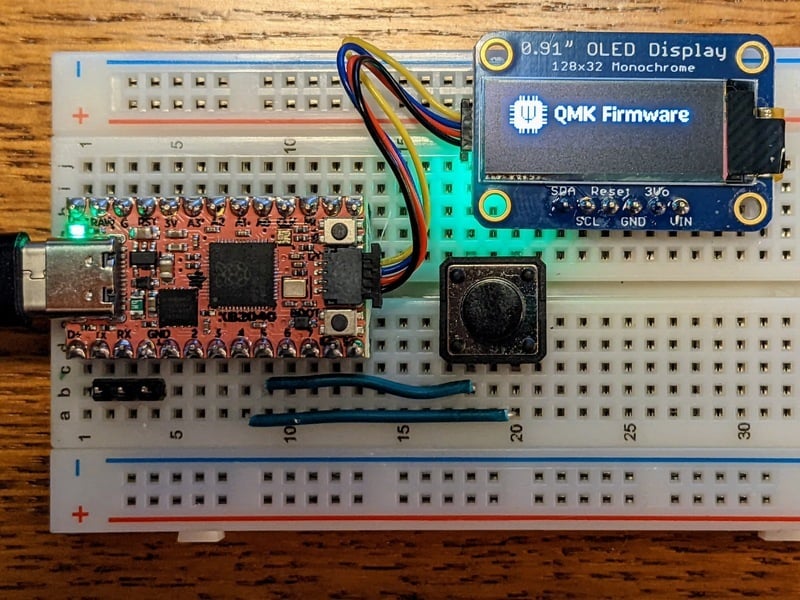
Adafruit Learning System
Build & Install an Open Source keyboard firmware for RP2040 microcontrollers
Is RP2040 QMK support is feature complete and just hasn't been fully tested and/or has bugs, or isn't fully complete yet?
 hexed crescent
RP2040 QMK support is still in development but it should be ready shortly. I have a KB2040 split board working on KMK.
spice tusk
cool thanks!
are you detecting which one is plugged in with KMK, or is that hard coded?
also are the two halves talking over UART, I2C, or something else?
hexed crescent
I have mine set up to work the same whether the left or right is plugged in with USB. Working with UART since I don't have any LEDs connected and it just needs to transmit key presses.
spice tusk
thanks. I am going to try I2C because I want to add LEDs.
hexed crescent
Are you handwiring or using a pro micro compatible board?
hexed crescent
spice tusk
thanks. I am going to try I2C because I want to add LEDs.
I'm looking through the documentation for KMK and I don't think it can use i2c but you can use two wire UART to send and receive data for LEDs.
spice tusk
hexed crescent
Are you handwiring or using a pro micro compatible board?
pro micro compatible
hexed crescent
Mind if I ask which one?
spice tusk
I'm planning on the redox 1.0
hexed crescent
Okay. Gonna look at it real quick, I haven't built one yet.
spice tusk
I'm also working on a handwire numpad, but that's not split and I'm using a QT py SAMD21, but it's not split and I was planning on writing simple firmware from scratch in C++
probably FreeRTOS based as that's what I'm familiar with
hexed crescent
Sounds like a fun project. I was looking at the Redox 1.0 pinouts to see what pins the split connection uses. Since KMK doesn't support I2C you would need to set the tx and rx pins manually using PIO but it's super easy.
nova pike
hidden spire
I am still a tad lost but I do appreciate the help. I did PM you btw
I did get your dm BUT I’m not always around to help. Got busy today and didn’t get to come back to this. My recommendation is to just keep asking questions here or in #help-with-circuitpython, so someone else can pick up where you left off…
hidden spire
Hey y’all. On the macro pad 2040 I’m using the supplied code. Is there a way to universally turn down the brightness?
 winter root
hello, im on the path of making my mech keyboard wireless, im not using qmk, zmk or similar, pure arduino.
i need 19 I/O pins to make my matrix work, looking at the Bluefruit nRF52 Feather im not clear(https://learn.adafruit.com/bluefruit-nrf52-feather-learning-guide/device-pinout), leaving out SDA/SCL pins are there 19 pins free to use?
 royal gulch
looks like it, but read the notes and be careful how you use the pins mentioned there
 wintry skiff
winter root
hello, im on the path of making my mech keyboard wireless, im not using qmk, zmk...
wintry skiff
winter root
hello, im on the path of making my mech keyboard wireless, im not using qmk, zmk...
By the way, unless you current design is a 9x10 keyboard, you can likely reduce the amount of pins by making a square(ish) matrix
Eg if you have a 5row x 14 column design (5x14=70 keys, 19pins), you can achieve a 8x9=72key matrix and save 2 pins (8+9=17)
winter root
wintry skiff
By the way, unless you current design is a 9x10 keyboard, you can likely reduce ...
i though about it as my current layout is actually 5x14 but split (5x7 each half), i want to integrate all keys in one board and use another dummy board or mcp23017 exp for the 4 encoders i have.
circuit wise i think 5x14 is best but i'll try to see if somehow a rearrange works
wintry skiff
i know some people use shift registers, so effectively you can read the data on a row/col with a single pin (ie parallel to serial converter)
you could, for example, use 5 pins for rows, and a single pin for columns (but maybe 7 input register isnt as easy to find)
winter root
the mcp23017 works similar as i2c, 2 pins in the arduino read 16 more but somehow reading the matrix gets really slow
wintry skiff
wintry skiff
i know some people use shift registers, so effectively you can read the data on ...
i guess a shift register with feedback could also implement the row-looping on hardware and you'd only need a pin to control it and a second one for reading the cols 🤣
but, that looping would probably be buggy
royal gulch
winter root
the mcp23017 works similar as i2c, 2 pins in the arduino read 16 more but someho...
it won't work for encoders, you need interrupts for that
winter root
royal gulch
it won't work for encoders, you need interrupts for that
but doable?
the last resort is to use another pro micro and set it as a dummy expansor using i2c
i trying it to be as energy efficient as possible to make battery last
royal gulch
if you are trying to be energy efficient, then why are you using a 25 years old microcontroller
I mean the atmega in the pro micro
wintry skiff
^
royal gulch
all the more reason to use interrupts and to make your mcu sleep most of the time and be woken by interrupts
winter root
im learning, which are better options for this?
as my main board im planning to use the Bluefruit nRF52 Feather plus an expansor as i need close to 30 pins
royal gulch
why so many pins? you mentioned you are using a split design?
that makes it like 20 keys per half?
winter root
split now but i have 2 pro micro, one for each half, i want to unify and simplify
the next iteration will be a 5x14 matrix plus 4 encoders
wintry skiff
rp2040 are easy to find, powerful and chep
royal gulch
winter root
split now but i have 2 pro micro, one for each half, i want to unify and simplif...
pro micro or bluefruit? you mentioned bluefruit earlier?
winter root
im using 2 pro micro right now on the wired split keyboard each takes care of a 5x7 matrix and 2 encoders, they communicate through i2c
i want to unify that as one piece and make it wireless, looking at a boards im leaning towards the Bluefruit nRF52 Feather as it has only one chip and BLE, that covers the key matrix but i need more pins for the encoders, so here im asking if there are better options for what im trying to achieve.
wintry skiff
shift register could save up to 13 pins (scanning columns in serial), but latency + finding 14 input one...
royal gulch
shift registers are very fast
you can make your matrix 10x7 instead of 5x14, that will save you two pins without much inconvenience, you will just stack the halves vertically instead of horizontally
you can use shift registers for inputs or for outputs, there are two kinds
outputs is probably easier
winter root
cool, i'll read up on that, i only knew about pin expansors like the mcp23017
royal gulch
you could probably even use something like a decade counter for selecting the columns
winter root
made it work
multiple encoders over a mcp23017 using only 10k resistors and polling every <5ms to avoid losing steps
i'll jump into the interrupt version today to improve it further, dont know much about interrupts so it'll be fun
key matrix taken care of, encoders taken care of and in theory i have 8 extra pins to spend
 plain magnet
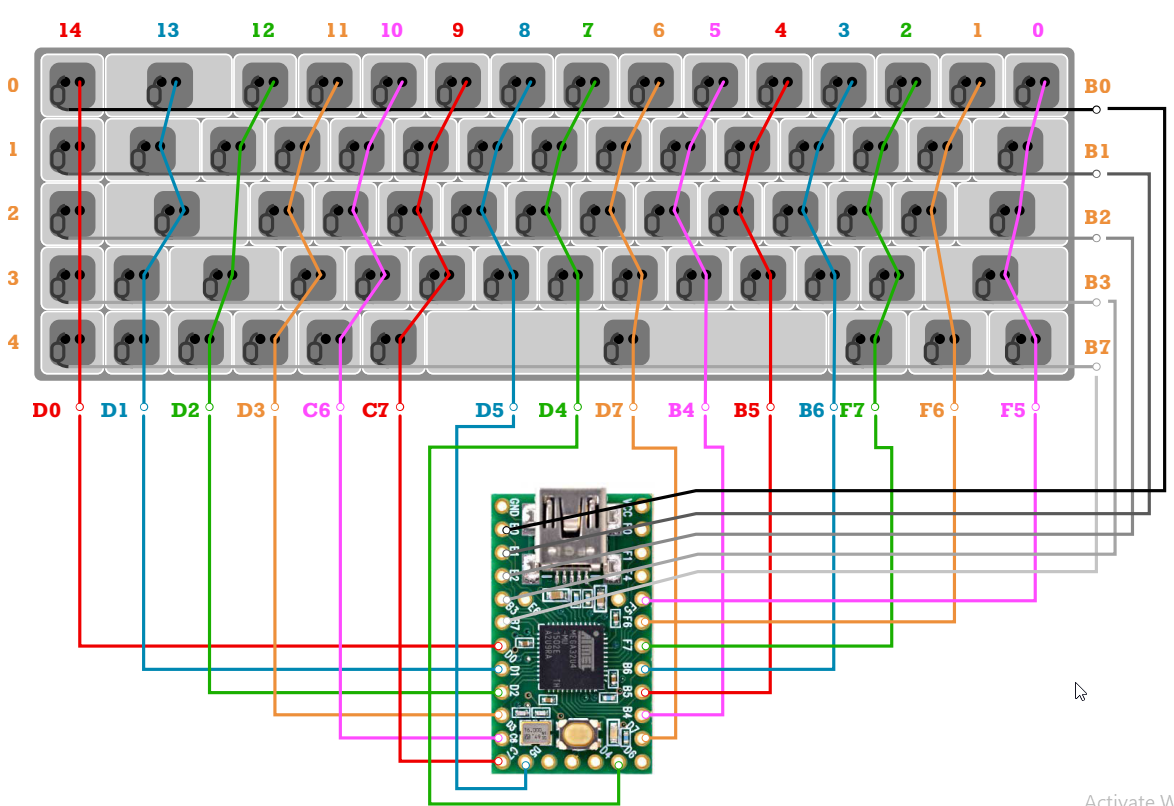
I'm trying to build a 68 key keyboard with the KB2040 from adafruit and am trying to figure out how to match it to this wiring diagram. I know it has plenty of pins, but I'm very new to this space and don't know the best way to go about deciding which pins to use. I would like to use VIA or QMK with it when it's all said and done. Anybody have tips for picking which pins to use? I see GPIO 2-10 which I'm sure I'll want to use - but I need 20 total I believe. Can I use TX, RX, M0, MI, CLK, A0-A3?
 royal gulch
you can use any gpio pins
the tx,rx,etc. are aliases
they point ot the same pins as GP*
 gusty ocean
Hey @earnest dew can the description for the Macropad be updated :p? Just a couple of days ago develop was merged into master so RP2040 and the adafruit Macropad are fully supported by QMK 😛

 earnest dew
hi @gusty ocean thanks, will check this out!
gusty ocean
Amazing thank you! ❤️
 neon osprey
So, got a question for everyone....and If the answer is "Nope, why did you something silly like that..."
Well, that's fair. I had my reasons. It involved a free Seeed XIAO mainly.
...
Sorry, back to the question. I was reading up on all the nice optimizations to keypad and the one thing I couldn't find was...does the new scanner support a duplex matrix?
Specifically, the 'Japanese' style duplex matrix explained here https://kbd.news/The-Japanese-duplex-matrix-1391.html which uses diodes both directions. This requires you to scan Row to Column, then switch and scan Column to Row.

kbd.news
There are two completely different keyboard matrices referred to as duplex matrix. Let's examine the Japanese one, which makes possible to handle 160-200 keys with a single Pro Micro.
neon osprey
neon osprey
So, got a question for everyone....and If the answer is "Nope, why did you somet...
It appears PRK firmware supports this already (due to a heavy adoption in Japan it seems)
Any suggestions?
 solar granite
neon osprey
Any suggestions?
solar granite
neon osprey
Any suggestions?
was there a second question?
neon osprey
solar granite
was there a second question?
- does the built in keypad scanner support this?
- is there another way to do this besides code it all myself?
solar granite
ah. number 2. hmmm. if you had someone to do it for you...
neon osprey
If only I remembered C enough to try to expand the built in type myself
It’s not that I don’t want to. It’s just that built in type looks pretty slick
solar granite
are you making a board? is it for you or someone else?
neon osprey
I made a board for me already. 20 key keypad with rotary encoder and Neopixels behind the keys and encoder.
https://www.seeedstudio.com/seeed-fusion-diy-xiao-mechanical-keyboard-contest.html
Just waiting for it to finish assembly. I picked an XIAO nRF52840 for it for Bluetooth and a built in charge circuit.
My worst case is I swap the brains of it to a Raspberry pico and use PMK. But I’ll try making it go in circuitpython first.
Seeed Fusion is launching the DIY XIAO mechanical keyboard Contest, which will run from July 11th to October 11th, 2022. For this contest, we've prepared $1000 Coupons and Seeed XIAO Pillows as the prizes for 7 winners. Show us your keyboard creations and get started!
My worst case is it’s a very blinky paperweight
solar granite
you made hardware that you did not test first? that sounds progressive.
what do you mean built in type and what is it built into? are those xiaos preprogrammed or something?
That is a neat contest. Did you want the new scanner to support the duplex matrix?
did you design the keyboard with prk?
I feel like qmk, kmk and prk are like AHK (auto hot key) but the software is built into the keyboard instead of in the system. Wow. the ultimate controllers of anything. Ok I am caught up. I have been watching these streamdecks and other keyboards like everywhere. It's the newest craze. I am waiting for more cockpit style and they just make them ai or vr or motion sensing or whatever.
I remember the one that was holographic and sensed your hand motions. Where is it. And the clear phones. why aren't any cases clear? Why aren't circuit boards clear?
neon osprey
solar granite
I feel like qmk, kmk and prk are like AHK (auto hot key) but the software is bui...
Sorry, I was out for the night. Yeah, I designed based on concept. I knew I could program it to work, I just wasn't sure which way I'd end up doing it. It was the only way I could cram enough keys + an encoder into the small XIAO footprint
and yes, *MK are all pretty cool.
As for clear circuit boards...I guess they could find something. The flexible circuits in some things are mostly clear. I expect the reason they haven't is:
- The material needs to tolerate the heat from various soldering techniques (Plexiglass and acrylic are out)
- The material needs to be machinable (drilling, cutting board shapes and cutouts)
- You need to be able to laminate layers together for multilayer boards
- You need to be able to produce it in quantity
- It needs to be affordable (or you need someone rich enough to buy it)
I mean, they have ways to process wood so it's transparent (yes, it's real - https://youtu.be/5qS9AKzXYOY) but it's dang tedius and requires a half dozen different noxious chemicals

Offset your carbon footprint with me on Wren! We'll protect 5 extra acres of rainforest for the first 100 people who sign up! https://www.wren.co/join/xylafoxlin
💸 Support me on Patreon:
https://patreon.com/xylafoxlin
**PLEASE DO NOT TRY THIS EXPERIMENT AT HOME. IT INVOLVES DANGEROUS CHEMICALS THAT CAUSE CANCER IN THE STATE OF CALIFORNIA AND ...
royal gulch
solar granite
I remember the one that was holographic and sensed your hand motions. Where is i...

I will repost this comic every time I will see this bad idea on my TL.
Likes
5767
Retweets
1874

 Twitter
·
Twitter
·


 solar granite
neon osprey
2) The material needs to be machinable (drilling, cutting board shapes and cutou...
solar granite
neon osprey
2) The material needs to be machinable (drilling, cutting board shapes and cutou...
#5 it would sell itself wouldn't it? people love futuristic things.
neon osprey
True, but if your circuit board goes from $0.05 to $5… every other piece goes up too. And given the other trend is to make thing more hacks or repairable but most companies barely label their boards…
solar granite
only certain parts are transparent silly. a mirror wouldn't work very well if the light passed through it
start thinking of solutions not problems.
nobody likes a downer
what else?
one word Apple
trillion dollars
keep buying it
anyone payed 1000 for a phone recently? I thought so.
there is like what? $50 in parts there?
I mean, when you make a million of them
I wish I could make stuff for the people that have so much money they don't know what to do with it. They have things just to better their friends.
 idle silo
I am dismantling a keyboard that was given to me (it lights up but has multiple failed switches and some PCB damage). Can anyone identify this processor that's on it?

I'm going to unsolder all the switches and test them but was wondering whether I could remove and reuse this
 neat fossil
I get no google hits on SE32F09L64 or SE32FO9L64 or 6PCM374C1592
"Cor M0" suggests an ARM Cortex M0 processor
I have no further wisdom.
 echo adder
Anyone have luck putting qmk on a the kb2040?
 subtle shard
how difficult would it be to convert a membrane keyboard to mechanical?
 deep sedge
very. in membrane keyboards, typically the circuit board traces are part of the switch contacts
 tardy basin
subtle shard
how difficult would it be to convert a membrane keyboard to mechanical?
tardy basin
subtle shard
how difficult would it be to convert a membrane keyboard to mechanical?
Not as difficult as you think. Most membrane keebs are diodeless matrices
The membrane sheets attach to the control board using a ribbon cable connector of sorts
You just need to know which pair of contacts short when a button is pressed
Remember, membrane keyboards are the cost-effective version of mechanical keyboards - down to the matrices they use
This guy reverse-engineered the chiclet matrix on the RPi 400's keyboard: https://www.40percent.club/2020/11/raspberry-pi-400-keyboard-matrix-keymap.html
Then proceeded to make a mechanical version: https://www.40percent.club/2020/12/orthopi.html

A blog about small mechanical keyboards.

A blog about small mechanical keyboards.
It's very doable using a multimeter and a continuity test, just that the mapping process takes time
I reckon one could do a mech keys PCB for the old Dell membrane keyboards, it's just your controller will be antiquated and locked down
royal gulch
the mechanics is the hard part, basically build the keyboard from scratch
the microcontroller would be the only part you could reuse, and at this point you can as well just use a microcontroller board with custom firmware, so you can have additional features
tardy basin
royal gulch
the microcontroller would be the only part you could reuse, and at this point yo...
That's completely fair with respect to old Dell keyboards, but for the RPi 400 - that's a rather expensive mainboard to just ditch
Hence the effort given
royal gulch
I'm talking in the context of the original question
tardy basin
royal gulch
I'm talking in the context of the original question
The RPi 400's original keyboard is also membrane-based.
royal gulch
but that's not what the original question was about
tardy basin
Pretty sure the question revolved around the difficulty of converting a membrane keyboard to a mechanical one - we only started talking about the feasibility of leftover parts afterwards
But yes, the Dell controllers are close to worthless for customizability
But other membrane controllers exist - think any other gaming membrane keyboards on the market
Or form factors like the RPi 400
royal gulch
you can always invent a hypothetical situation when a certain thing could possibly make sense, but we are talking about a very particular case here
tardy basin
So reverse-engineering the matrix and making a PCB is a hypothetical answer, even with an example? #keyboards message
 pliant hornet
I've already asked this in the #help-with-projects channel, and they sent me here.
Hello. Im a complete beginner, but for a school project I'm trying to make a fully wireless split keyboard which incorporates a joystick. I was wondering for a start if this is even possible using circuit python. At the moment, I'm looking at using nice!nanos for the micro controllers. Any input or suggestions would be great. Thanks
In particular I'm worried about the fully wireless part, as I haven't found any examples which use circuit python, and it seems like it would be the hardest part to code.
nova pike
pliant hornet
I've already asked this in the <#330406777009209346> channel, and they sent me h...
Theoretically very possible, but there doesn’t seem to be an easy project reference to draw a basis from. KMK (circuitpython based keyboard firmware) does have wireless split functionality, but according to their docs (https://github.com/KMKfw/kmk_firmware/blob/master/docs/split_keyboards.md#bluetooth-split-aka-no-trrs-currently-in-testing) it’s still a work in progress and not fully known stable.
As for the joystick, it would depend on how complex a function you want it to serve, as a digital joystick input would be almost trivial to implement. An analog joystick for consumer control might take a couple extra lines of code, while a mouse-function joystick might be a bit more involved. In any case, all three are supported by circuitpython, though I would need to check the fork of kmkpython to confirm.
GitHub
Clackety Keyboards Powered by Python. Contribute to KMKfw/kmk_firmware development by creating an account on GitHub.
pliant hornet
@nova pike thanks. This information is really useful
 ember prism
Hi, I am using a neokey 1x4 connected via STEMA for a project (Using circuitpython). I was able to connect the board fine, but when I chick on the switches, I register several clicks (I click the first button once, but on my serial I get Button, A Button, A Button A, not a single click. is there any way to adjust or control this?
 abstract laurel
This is the "debouncing" problem. Mechanical switches don't close completely cleanly, but the contacts will bounce for a few milliseconds, creating extra on-off transitions. Usually you'll want to correct for this in software... The simplest method is a short delay before accepting the reading as valid.
ember prism
abstract laurel
This is the "debouncing" problem. Mechanical switches don't close completely cle...
Thanks @abstract laurel, this was helpful. I used a debouncer logic which seems to work. Do you think this is ok or would a delay be better?
abstract laurel
Yep, debouncing logic is even better... Delays have some shortcomings. 👍
 flint perch


 valid gate
Nice! 🔥
 past wraith
is there a technology that remove stabilizers metal wires from shift/space bar keys?
royal gulch
1u keys
past wraith
seems like these still need stabilizers for size above 1.5u/2u
and a 1u space bar is just weird, anyway seems like there's no other alternative than the ugly/hard to place stabilizers...
nova pike
past wraith
and a 1u space bar is just weird, anyway seems like there's no other alternative...
2u space bars are pretty common in smaller ortholinear keyboards, and some boards in that same category use multiple 1u keys to replace what would typically be a larger single key.
royal gulch
I've been using 1u space for over 2 years now and I see absolutely no problem with it
it's rather a waste to have your strongest finger only press one key
two of your strongest fingers, really
past wraith
multiplee 1u spaceboards would be nice is there a ready to run customizable 100$ range keyboard that does this with all the keys of a fullsize keyboard??
royal gulch
um, any keyboard you make is customizable, doesn't have to cost $100
past wraith
I mean like I don't want to fully customize the keyboard to start in this subject. I saw some of the custom keyboards companies providing a base keyboard and keys and 65 of them can be changed later etc
I don't know the technical terms for that though
royal gulch
65 is way too many keys for a keyboard, how do you even reach them all without moving your hands?
past wraith
😕 full keyboard have 101+ keys...
royal gulch
but they are not very good for humans
if future alien archaeologists tried to reconstruct how humans looked like based on those keyboards, they would have us with four rows of tentacles sprouting directly front the fronts of our chests
 fading cloak
104 is best keeb
royal gulch
I'm partial to 43
past wraith
do epomaker count as custom keyboard for the purpose of this channel? Not sure if a moddable keyboard == a custom keyboard
like if it comes with the pcb already in the keyboard and a keyset I have to put on myself with the option to buy another model is that a custom keyboard ?
royal gulch
if you made it, it's diy, the amount of work necessary may vary, but I would say that as long as you need any kind of advice on it, this is the right place
past wraith
so using the technical terms, basically looking for a pre-built custom full-size keyboard that come with nice switches and quality keys that I can change / looking for durability first and the goal is to able to switch keys/switch when they wear and be able to clean the keyboard with a damp cloth (so easily accessible under keys possibly without a lid round each key like a normal keyboard.As a bonus would be nice to have a choice of color (ie: programmable rgb led under each key)
wondering about how the same thing with cherry/mx stuff would cost as well as I have no idea on the price except the low-end stuff
I could link an example product of what I'm looking for but this isn't a mostly electronics project for me, I don't want to surface solder stuff solder headers etc, I expecty the work required for the PCB and case to be mounting/assembly then put on the switches then the keys
and no 3d printing either
fading cloak
Glad I don't do mech keebs, because that's all a PITA. 😅
past wraith
I know it's probably not as custom by the definition of some veterans here but I kinda see it like a good intro to custom keyboards just like arduinos were good for beginners with no soldering required and having lot of safeties in place and a project book etc
 sick otter
Hm, I come from the keyboard space (kinda how I got back into electronics in the first place, building a macropad kit called Puca a few months ago) and I can say that any barebones kit should do if you're into testing switches without the hassle of building a kit.
The price may vary but for a full size, 100 - 150 usd is a reasonable price range.
Any higher and you're diving into enthusiast builds where you pay more for the case and shiny stuff (gaskets, etc) than the innards.
An alternative is to get a cheap full-size enthusiast board that you can open up. Keyboards are pretty much the same inside anyway, which lends to its customizability as the parts are mostly (like 90% with some outliers) compatible with one another.
nova pike
past wraith
so using the technical terms, basically looking for a pre-built custom full-size...
Very few 104-key boards are fully customizable, as they have a pretty standard layout nobody looking for a full-size generally wants to nor needs to mess with. If you want some fully programmable, perhaps give a 60% a chance?
past wraith
my current regular keyboard have glued switches and a plastic printed board on transparent sheet
well I'm a coder so I need the numpad.... I don't know any key I could live without on a standard keyboard besides maybe scroll lock
nova pike
I think a lot of people who do prefer the numpad have a macro pad on the side as well.
sick otter
My current one is a Drop SHIFT, which is a 1800 layout or 96%. Pretty much a full-size minus the home sector.
past wraith
like my current keyboard is very messy but the keys faded out so it's not worth getting a keyboard vacuum cleaner & reusing the keys to clean it with isopropyl because a new keyboard is cheaper
sick otter
Try a Keychron. Those are cheap but well-made.
past wraith
but if I could replace the keys/switches like this it would be worth it
 sick otter
And they have lots of options
nova pike
Oh that reminds me of GMMK, I think they have something close to full-size

Glorious PC Gaming
The best features of its class. Designed to be redesigned. Starting at $79.99. Modular 5-Pin Hotswap. Lubed clear switches. Compact layout. Aluminum Frame.
sick otter
Yup. GMMK too has a good hotswap board
past wraith
the one ion the pic is a ducky, I don't like the regular/vanilla look that many custom keyboard diy kits seems to have
the gmmk aren't full size though
and I'd prefer one without a bevel (easier to clean)
nova pike
past wraith
the gmmk aren't full size though
96% is pretty close LOL
You lose the 6 keys above your arrows
past wraith
no numpad on this one....
sick otter
I think it's a different gmmk.
past wraith
can't do alt 95 or alt 93 for C++ braces without a numpad...
nova pike
Gmmk1 has a true full-size version too
sick otter
Drop has one as well, and actually I like the floating keys on the SHIFT (way easier to clean), but I can't really recommend the price.
past wraith
Don't like the look of epomaker/kludge so far, ducky/gmmk looks better to me (but gmmk seems to be very pricey). Is there a material for the keys that are more durable ?
nova pike
Well, keyboards are a bit of an expensive hobby. Neither board would be something easy to dip into without lots of disposable income haha
sick otter
For keys, you have the usual ABS and PBT, which are pretty durable plastics.
past wraith
I've used a thermaltake ttesports combo for 10 years always rebuying it every 18 months or so because the keys always fade and they added a few features on the last edition that annoy me. Atm I got a business wireless mouse/keyboard shipping because it was an emergency but after that I'd like to get into custom keyboards
nova pike
Oh, if you want to avoid fading legends, double shot PBT trumps printed legends by far.
sick otter
If you want keys that don't fade, get doubleshot ones. Basically the keys aren't printed in.
past wraith
nova pike
Well, keyboards are a bit of an expensive hobby. Neither board would be somethin...
so far a ducky switch swappable key/and cherry mx switches would be about 190$ sure it's a lot but not much more than razer/hyperx stuff and cheap over the liftetime because keys/switches can be replaced
nova pike
Ducky has a full size?
past wraith
I don't know that's why I'm still looking
new to all this but was waiting for my current one to be mostly faded but it happened much sooner than anticipated
I mean some of the keys even the black paint under the letter is completely faded so it's just transparent plastic
nova pike
If you’re okay with gateron brown, a prebuilt gmmk full-size is $110
Comes with gateron brown and basic double shot keycaps
past wraith
And I both a razer once and accidently dropped my gamepad on it and it died, so lost 200$ to a very fragile keyboard...
sick otter
As Hem mentioned, you really have to shell out when you're trying a custom keyboard. It's just how it works especially when you need to experiment on switches and caps.
That alone can make you spend a few hundred
And manufacturers don't always sell barebones boards because they want to use up their own stock
Otherwise, you'll have to go the DIY route
nova pike
@past wraith as someone who is also budget constrained, I would start with a prebuilt configuration, and adjust individual parts on an “as-desired” basis.
sick otter
I recommend that too. I've only had this custom board but I've tested so many configurations on it + modded it to my liking.
nova pike
Going full barebones to start is pricey, unless you have a collection of spare parts to dip into to help offset costs.
past wraith
but you mentionned a full-size prebuilt at 110$ it comes with keys/switch already installed that seems reasonable
then when the keys started to faded or become too dirty to clean that's when I would really start kinda like deffered payments...
nova pike
Yeah, something like that.
past wraith
I guess there is not any keyboard that uses can do IR like a remote 😄 along with other wireless modes
sick otter
You can most definitely mod one but not that I know of out-of-the-box
nova pike
Double shot keycaps shouldn’t fade, and if you want to clean the keycaps you certainly can remove them and clean as needed.
past wraith
back in the 1990s when keyboards were less proprietary without extremely small screws I'd just open the keyboard and throw the plastic shell without the switches/keys into the dish waster in the sink....
then put it back it like it was brand new and they all used a rubber sheet and a printed transparent sheet with circuits on it
sick otter
Oh right. Fair warning since you might end up trying out different keycaps. Don't get into groupbuys. The shortage and covid delays hit those hard with some being more than a year delayed.
past wraith
with the expense you mention I guess I should put it into my retirement instead 🤣
what about having someone manufacture a custom keycaps set with my own designs on the keys?
I mean you can order custom PCBs surely you can order custom keysets ?
sick otter
That's basically what those groupbuys are. Folks design keys and have others manufacture them.
So you'll be lining up with them too. XD
past wraith
oh ok. is drop a 100% groupbuy or do they see actual products ?
sick otter
They have products. They clearly state if it's a groupbuy or preorder.
And they have a much faster production line in general since they own some if not all of it.
past wraith
in that case relegendable seems the way to go
 tired juniper
Do they make SMD keycaps?
sick otter
By smd you mean the LEDs shine through the keys? Yes.
sick otter
Not that I know of since they sit on top of the switch, which are generally (if not exclusively) through-hole.
Or I guess you mean switch terminals
Which, yeah, they're all through-hole as far as I know.
tired juniper
Hmm ok
So you can't put much in the way of Electronics on the back panel of a key board then?
sick otter
Normally, yeah. The backside is pretty bare because even hot-swap sockets, which are techincally smd, are placed on top though you can put them at the underside
tired juniper
Hmm ok
So I'd have to have blank space for an MCU or find something to fill that space?
What about mounting screws on a tighter design? Come up with something better?
sick otter
A lot of customs are run by an MCU and you have options there. Some are surface mount but it's more popular lately to get a microcontroller (like the ones we know and love) and just mount them in like you would a breadboard.
tired juniper
I'm thinking I want to do a bottom side either bare MCU or use one of my rp2040 stamps
sick otter
That should be possible since I don't think there's anything stopping you from actually doing it.
tired juniper
Just gotta find out what layout my target likes.
sick otter
All you really need is enough pins and diode placements to drive a keyboard matrix
Then you can just design a pcb around that.
 sick otter
No idea for that unfortunately, though you can look at open source projects to get an idea. That or open up one since it's pretty easy My guess is right near the usb slot.
sick otter
Now I gtg. Work calls.
tired juniper
The part I'm really excited for is making the aluminum chassis
sick otter
Oh wait. Correction. It is usual for hot swap sockets to be soldered at the underside
tired juniper
Do folks do wireless?
sick otter
Lots do via bluetooth and it's a common option for mainstream boards nowadays.
Latency is fine so that's not an issue. More the battery as some folks don't want to deal with it going bad at some point.
tired juniper
That's fair
sick otter
tired juniper
That's fair
Just to clarify, you can surface mount switches as PCB mount variants exist. But those just have extra legs to stabilize them to the PCB and they still have the same pins that plate mount switches have so they're not really any different.
tired juniper
And that post still sticks through the board, right?
sick otter
Generally, yes. For stability. That's why plate mounts are more popular. Holds the switch better
sick otter
For plate mount switches, search for 3-pin. PCB mount, 5-pin. They still use 2 pins for electrical contact. The extras are just plastic legs for stability.
tired juniper
Hmm a plate mount looks better aesthetically
Has anyone ever made a kb out of copper?
Chassis that is
sick otter
Hmm, I'd like to say yes. Copper plates are definitely a thing. But cases tend to be alum, 3d printed, or any kind of plastic. Brass even I think.
tired juniper
Hm ok
sick otter
You have lots of options for plate material with the sound profile, weight, and feel (flex) being the deciding factor.
tired juniper
I want all metal. Feels classy
tired juniper
where do folks go to find layouts for keyboards? I want to do an 1800 but I need a document that has all the positions of the keys so I can make the PCB
royal gulch
wikipedia?
personally I usually design my own using http://www.keyboard-layout-editor.com/
tired juniper
nice thanks
tired juniper
Is the 1800 not a common layout? That site doesn't seem to have it
royal gulch
no idea what 1800 is
tired juniper
one momenty
fading cloak
Me neither
royal gulch
should be trivial to edit one of the regular layouts in that editor
fading cloak
Basically just a slightly more compact full-size..
tired juniper
Yeah. This is going to be an expensive project though so I'm just concerned about getting it right the first time
royal gulch
http://www.keyboard-layout-editor.com/#/gists/27b5f791bebe406ba2834c15a81cc536 <-- I copied it from that photo, but it has some weird key sizes for the mods
still can't understand why people want keyboards with staggered rows
royal gulch
this is what I'm using right now, after several years trying different things
 tired juniper
Yeah I'm definitely squarely in the target demographic for classic keybaords
royal gulch
or, as we call them down at the ergo discord, the pain rectangles :-)
tired juniper
hehe I haven't had issues yet. I may have to change at some point
royal gulch
yeah, pain was what made me start looking
I learned to properly touch type in the process, and I'm actually faster now, without the pain
tired juniper
I'm a pretty decent touch typer. I have to home in on my home keys visually at first but them I'm usually good
Typed this message and the prior without looking.
fading cloak
I don't touch-type, I'm more a learned by doing typist.
 honest bane
royal gulch
this is what I'm using right now, after several years trying different things
honest bane
royal gulch
this is what I'm using right now, after several years trying different things
how do you do symbols and digits?
I hve a Kinesis split, but I only got it because I broke my elbow a couple of years ago and could not pronate. I learned to touch-type on manual typewriters, I was always careful to have the keyboard lower than my forearms, and I played piano from an early age, so somehow I didn't develop carpal issues, etc.
royal gulch
honest bane
how do you do symbols and digits?
enter and tab double as layer switches on hold, if I hold down tab then asdfg are 12345 and qwert are !@#$%, and with enter held down qwert are f1 f2 f3 f4 f5 and asdfg are navigation keys
esc doubles as shift, and del doubles as right alt (I need that for Polish letters)
honest bane
re ortholinear or not. There were versions of the Stanford SAIL keyboard that had the QWERTY row shifted over half a key instead of a quarter key, like regular. It drove me crazy (in addition to other silly changes in symbol placement).
royal gulch
you have to get used to it of course, but ortho is much more consistent
fading cloak
That would ruin my gaming performance. Lol
fading cloak
On the wrong side.. for me.
royal gulch
well, that's another nice thing about this keyboard, it uses hotswap sockets for the switches, so you can move the keys wherever you want
and the firmware is in circuitpython, so you just edit a file to tell it what key does what
fading cloak
I'd definitely be more comfortable with a standard keeb. Lol
royal gulch
a standard keyboard would also have the arrows on the wrong side for you?
fading cloak
Yes, but I use WASD.
royal gulch
well, wasd is where it's supposed to be, and on top of that, the w aligns with the s
fading cloak
But then Q is offset and the other essential keys are all wrong too.
Subjectively, of course.
royal gulch
I moved q because it's easier for me to move my pinky sideways than upwards
but the moves are so similar, that it takes you like two minutes to get used to it
fading cloak
I use my ring finger for Q. ☺️
royal gulch
and how do you reach g?
fading cloak
Thumb
royal gulch
ouch, I just tried it and I think I hurt my hand
fading cloak
Oh dear
royal gulch
well, whatever works for you
fading cloak
Indeed
Been using plain, old keebs since day 1.
I can't see any reason to change.
I've tried some other designs, but nothing works for me.
royal gulch
I have to admit that I do have problems with games that require you to hold down tab
or enter
fading cloak
Yeah, that's quite a distance.
royal gulch
no, they are right under my thumbs, but holding them down switches layers
fading cloak
Sorry, I meant with a standard keyboard.
tired juniper
where would I go to find a cherry MX red RGB both mechanical drawing of the footprint and an annotated electrical drawing?
Or a Fusion compatible library part, that's what I'm trying to make
valid gate
Pretty cool! This is what I am using:
 hexed crescent
KB2040 seems a little overkill for 17 keys but I like that they're both reverse-mounted.
tired juniper
Something irritating about Cherry is they don't provide full information about their products on their website. For example, this table appears in the cherry mx red datasheet. Yet these product numbers do not appear anywhere else in the site as far as I can tell

 low sundial
Hey all, I've been trying to get the NeoKey 5x6 Ortho Snap-Apart Mechanical Key Switches w/ NeoPixel, and followed the guide for the 4 row 2 column to the letter. Can't for the life of me figure out why the neopixels don't work. button presses work fine
Any advice?
low sundial
After snapping do I have re wire some stuff
nova pike
low sundial
Hey all, I've been trying to get the NeoKey 5x6 Ortho Snap-Apart Mechanical Key ...
Advice: if you have an issue, try to provide as much detail as possible. Pictures, code, source guides, etc. all help make the process easier for those who can offer assistance haha
low sundial
Sure thing will post a pic
low sundial

Yellow is what I have going to the rpi feather just like the instructions - same pins and code, buttons work great neopixels not so much

That's the chuck I took
low sundial
Maybe I have to continue the zigzag like in the pinout page? If so which pins do I need to bridge?
sick otter
The LEDs need to be connected in series so you might have to reconnect them
sick otter
You'll have to bridge a microcontroller pin to the IN pin of the first key of your matrix then the OUT of that key goes to the IN of the next key then so on until you complete the series. It doesn't necessarily have to be zigzag but it is much easier to follow that way.
sick otter
I'm trying to make sense of the schematic to confirm but ideally you should only bridge these pins (assuming the upper left is connected to the microcontroller) since the rest are connected.
 low sundial
Will try, thanks you so much
tired juniper
So I'm looking at the cad files for the full kit macropad. I'm confused, what exactly keeps the plate up?
The video on the product page sort of implies friction? Is that the case?
sick otter
The switches hold it up. Normally for builds like these, you place the switches on the corners first before "mounting" it on the sockets then you fill in the rest.
Some builds do have mounting holes for screws (or it's sandwiched between the case) but it's stable enough to be held up by the switches and the plate is rigid enough (normally the material is FR4) to keep the switches from wobbling.
tired juniper
Ok cool thanks appreciate the info
 rigid bridge
I'm playing around with QMK on the Adafruit Macropad RP2040. I have been unable to change the RGB effect. I added #define RGB_MATRIX_STARTUP_MODE with various effect names to my config.h but it doesn't work. I only get the same effect as without that #define. I haven't used RGB in QMK otherwise so I have no point of comparison.
low sundial
sick otter
I'm trying to make sense of the schematic to confirm but ideally you should only...
Hmm still no dice
 sick otter
Hmm, I wonder. I neglected to mention the VIN previously but it seems to be connected there. I don't have one of those myself so I can't test it out but if it were me right now, I'd take out my multimeter and test for continuity.
rigid bridge
From here:
A weak 2.2K pass-through resistor will shunt data through at the end of each row, so you don't have to do any jumpering unless the matrix is not-rectangular.
rigid bridge
The next page shows that "In" is the data input and "VIN" and "GND" are the power pins.
The jumpers you added to the upper right and lower right are between pads that are already connected by traces on the board.
sick otter
Assuming everything on the top left is connected to the microcontroller correctly for the neopixels, yeah, this should all work even without the bridging. But something definitely isn't coming through.
So my thought process would be to check for continuity just in case, then check the connections between the microcontroller and matrix, check the microcontroller and the power supply.
rigid bridge
Also polarity.
tired juniper
I'm trying to find a keycap retailer or mfr that will sell me the blank keycaps I need for the macropad but also a full Keyset in the same color. I can't remember the profile name but I'm looking for flat topped. Anyone have a good lead?
Black is the color. Preferably with some see thru element
sick otter
I was also looking for colored uniform (probably what you mean by flat here) blank keycaps for my macropad so I'm guessing you're looking for DSA or XDA profile keycaps. KAM is another but that's rare to find in bulk.
I don't remember finding ones with see-through, but the bulk orders come in a variety of colors.
Otherwise you're probably looking for low-profiles (chicklets) that choc switches tend to be used with.
tired juniper
Hmm are they quality? Thanks for the info
sick otter
I've never used them but if they're doubleshot PBT or ABS, you can trust them in terms of durability since it's the same material as most.
tired juniper
Ok coom
Cool
Do you know of anyone who will sell me a custom set for my macropad of blanks AND a full KB set?
sick otter
You can probably try the second-hand market. I think there's a reddit for it.
Otherwise, the Chinese sellers have lots of them in bulk.
tired juniper
Hmmm ok would you trust a Chinese seller?
sick otter
Yeah. Most parts come from there. You just have to deal with the shipping.
tired juniper
I have had good experiences in a lot of areas but there are no doubt issues
Ok thanks
So ali?
sick otter
Sure. There are more specialized sellers, though the names escape me since they're pretty ubiquitous.
tired juniper
Thx
low sundial
I have a ton of the ortho snap mech key switches in various configs (see below) left over from my prototyping. If anyone is in the market, dm me and we can work something out.
(3) 1x1
(2) 2x1
(1) 1x4
(1) 1x5
(2) 1x6
(1) 4x4

 jagged burrow
low sundial
I have a ton of the ortho snap mech key switches in various configs (see below)...
jagged burrow
low sundial
I have a ton of the ortho snap mech key switches in various configs (see below)...
I'm interested, popped you a pm 🙂
jagged burrow
Macropad is all built!
 low sundial
Word!
low sundial
What 3d model is that?
hexed crescent
low sundial
What 3d model is that?
Looks like it's probably this one. I've printed the same model before.

This is a form fitting case I designed for the Adafruit Macropad. Its designed to be used with square keys but will probably work with regular key caps.
Update: Added an STL for the relegendable keycap with slot. It replaces the opaque part of the relegendable keycaps they sell on Adafruit and other sites.
Update 2: Added a version of the cove...
 calm grotto
@low sundial what does the back side of those modules look like? I'm curious
low sundial
We'll take a picture shortly
low sundial
calm grotto
<@373997379533406219> what does the back side of those modules look like? I'm cu...


Got a few pi picos too avail
calm grotto
Sorry I was just curious, don't actually have an application in mind
low sundial
Kk
calm grotto
Ok so I'm trying to make a "keyboard" from a nrf52805 module that will basicly act as 4 hotkeys. I'm aware of i used nrf52840 there are several projects that make use of it, but my application size is at a premium. Anyone know if a Bluetooth keyboard project or library for the nrf52805?
nova pike
calm grotto
Ok so I'm trying to make a "keyboard" from a nrf52805 module that will basicly a...
Im not aware of any arduino or circuitpython builds available for the 52805, but ZMK is built in zephyr so that might work with some tweaking?
Most nrf52 controllers outside of nrf52840 still require development in nordic sdk, hence the lack of people taking up alternate microcontrollers to alleviate their shortages. I think some attention has been placed on nrf52833 recently, but no idea of the status there.
 foggy island
The 840 is actually in stock, or was when I looked last week
Yes, in stock still. Lots of stock
 lunar heron
sorry for the cross post, but I wasn't sure if anyone in here would have some suggestions instead of the general circuitpython channel
but I've been working on a circuitpython firmware for a keyboard I created, and I was hoping to be able to use a stemma/qwiic connector to connect things like addressable encoders, oleds, etc., but I've found when I use anything with i2c, then it drastically cuts the responsiveness of the keyboard part
I know you can only multithread stuff in micro python and not circuit python, but I don't know if there are other ways of getting around some of those limitations
tired juniper
Can you up the bus speed of your I2C?
nova pike
I was going to suggest asyncio, but I guess it also depends on what you’re connecting and how you plan to use it.
I2C outputs can benefit from asynchronous task scheduling if they’re not being updated all the time, but I2C inputs might benefit more from polling an interrupt line.
@lunar heron is this full custom or a KMK derivative?
lunar heron
full custom
the idea is to provide a framework for people that would want to customize a board with i2c accessories that aren't necessarily supported by qmk or whatever
specifically at the moment I was using the adafruit addressable rotary encoders
working on this as a proof on concept

using this pcb

The RP2040 powered pi60 HSE PCB is the perfect way to build your new 60% mechanical keyboard with smooth RGB underglow and hot swap capabilities.
it works pretty well, the way I have it now with two encoders at least
but, the refresh rate of the animations drops off significantly when the i2c is enabled
and any typing over like 60 wpm starts to lag behind
without the i2c, the typing is instant
nova pike
Yeah, unfortunately the time it takes to read from or write to an I2C device is generally not trivial and can really add delays to a single threaded process. SPI devices are better for refresh rate, but you lose the convenience of stemma QT ports. The trade off of pins to data rate is tough…
lunar heron
Any estimates on adding the second core to circuit python?
That seems like the perfect thing to offload
nova pike
Not sure, last I checked, it wasn’t even in scope because not all mcus supported multi core
lunar heron
Seems like something that could be baked into circuitpython and when compiled if a compatible mcu isnt selected then it wouldn’t include the _thread library
nova pike
lunar heron
Seems like something that could be baked into circuitpython and when compiled if...
https://github.com/adafruit/circuitpython/issues/4106 is where to go for multithreaded progress, and it does bring up some fair points regarding keyboard optimization if you haven’t already explored them?

GitHub
The Pi Pico has 2 physical cores, but only one core is usable in CircuitPython. Micropython has limited multicore functionality when used with the pico, allowing the user to start a separate task w...
lunar heron
I'll check that out, thanks
that's interesting that the one developer or whomever specifically states that they believe dual core is not necessary for a keyboard...
which is unfortunate, because I can provide a pretty clear example of why it definitely would be helpful
yeah... unfortunately even the person that was referenced as having "optimized" some stuff for a keyboard wants the multi threading also, and didn't really offer any concrete optimizations
 atomic crane
https://www.tomshardware.com/news/prototype-keyboard-has-a-full-monitor-under-the-keys
Don't quite know what to make of this. 😆
 nova pike
Too aesthetic, perhaps?
calm grotto
Anyone here familiar with Nordic nrf52840 chips / flashing bootloaders?
royal gulch
it's possible with any CMSIS-DAP programmer, and openocd, but I don't know a good tutorial for it
black magic probe works too
nova pike
calm grotto
Anyone here familiar with Nordic nrf52840 chips / flashing bootloaders?
Which board are you trying to update?
 finite rose
openocd has a low level remote protocol that you could probably bridge to circuitpython. it won't be fast but it should work
calm grotto
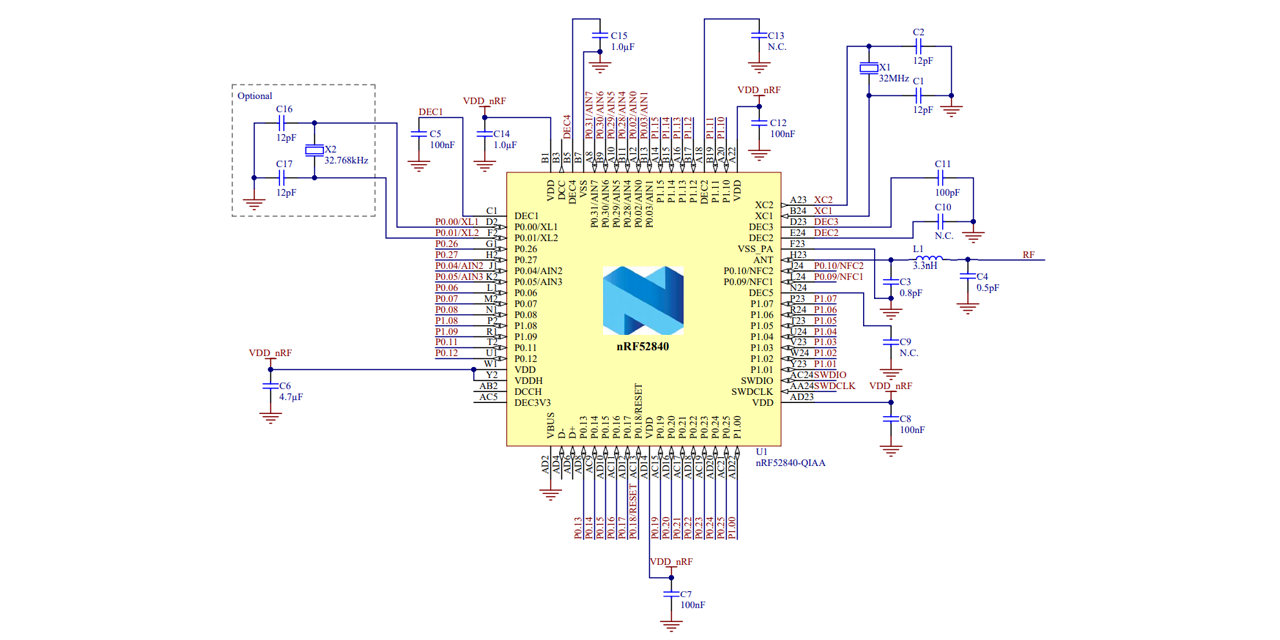
@nova pike E73-2G4M08S1C is the module
It is not on a board, but it is the same as this
https://circuitpython.org/board/bluemicro840/
My understanding is the dev boards come with a bootloader that exposes a USB drive to the host for code updates.
Because I got just the module, I don't have that option.
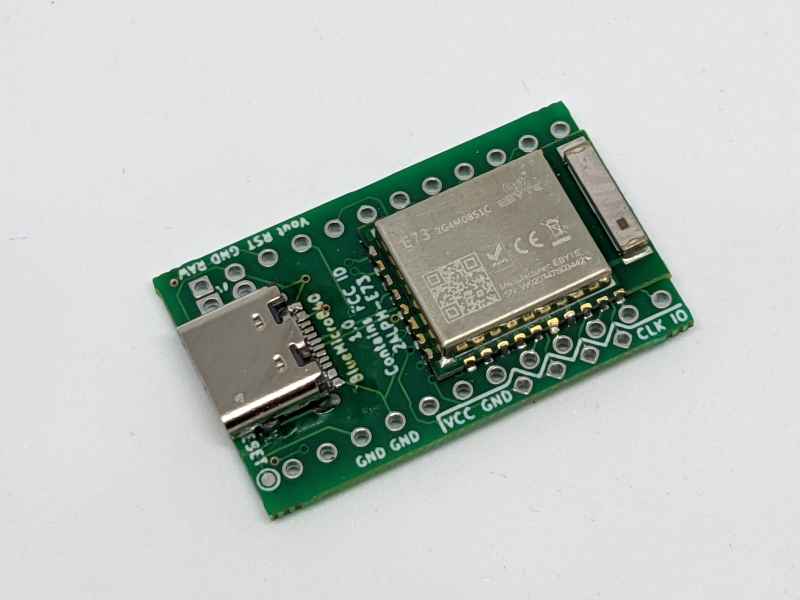
The BlueMicro840 is a nRF52840 controller inspired on the Adafruit nRF52840 feather but with the footprint of an Arduino Pro Micro and a USB-C connector.Many DIY keyboards use the Arduino Pro Micro or the Arduino Micro as their microcontroller. These don’t support BLE communications natively. Bec...
Also I don't have a JLINK, trying to use this guide to get the bootloader flashed via raspi 4B
https://github.com/joric/nrfmicro/wiki/Bootloader
GitHub
Pro Micro-compatible Bluetooth 5.2 board with Li-Po charger and USB-C (nRF52840-based) - Bootloader · joric/nrfmicro Wiki
calm grotto
It seems to be working, but I'm running into errors and lack the necessary knowledge to fix them. I need help from someone with OpenOCD experience
nova pike
calm grotto
It seems to be working, but I'm running into errors and lack the necessary knowl...
Rather than waiting for someone to volunteer their time, you generally get better responses when you directly post the errors or problems you need addressed.
calm grotto
rying to get circuit python onto an nRF52840 module that didn't come with a bootloader
Module is this https://www.ebyte.com/en/downpdf.aspx?id=445
Same as on this dev board https://circuitpython.org/board/bluemicro840/
Using these instructions I got OpenOSD onto my pi 4, using it for programming and I can write a bootloader and verify it, all appears to work
https://github.com/joric/nrfmicro/wiki/Bootloader
Ran the reset run command, plugged it into my computer... and nothing
I swapped out the file they used for the ebyte_e73_tbb_bootloader-0.7.0_s132_6.1.1.hex file from
https://github.com/adafruit/Adafruit_nRF52_Bootloader/releases
Ran the reset run, plugged it into my laptop..... nothing.
As far as i can tell, the usb connection (used for power while programming as well) going to VBUS, D-, D+, and Gnd, is connected properly.
Using the bootloader the guide recommends windows gives a "this device isn't recognized"
Using the bootloader from the adafruit page for the E73 (what is engraved on the module itself) and plugging it into windows gives nothing.
Any ideas?
The BlueMicro840 is a nRF52840 controller inspired on the Adafruit nRF52840 feather but with the footprint of an Arduino Pro Micro and a USB-C connector.Many DIY keyboards use the Arduino Pro Micro or the Arduino Micro as their microcontroller. These don’t support BLE communications natively. Bec...
GitHub
Pro Micro-compatible Bluetooth 5.2 board with Li-Po charger and USB-C (nRF52840-based) - Bootloader · joric/nrfmicro Wiki

GitHub
USB-enabled bootloaders for the nRF52 BLE SoC chips - adafruit/Adafruit_nRF52_Bootloader
 nimble burrow
I honestly have no idea where to ask about this so apologies if this is the wrong place.
I made an arduino project that turns a usb keyboard into a bluetooth one. Heres the code :
#include <BleKeyboard.h>

BleKeyboard bleKeyboard;

typedef struct
{
  uint8_t modifiers;
  uint8_t reserved;
  uint8_t keys[6];
} KeyReported;

KeyReport keyy;

#define RXp2 16
#define TXp2 17

void setup() {
  // put your setup code here, to run once:
  Serial.begin(115200);
  Serial2.begin(115200, SERIAL_8N1, RXp2, TXp2);
  Serial.println("Starting BLE work!");
  bleKeyboard.begin();
}

void loop() {
  // put your main code here, to run repeatedly:
  if(bleKeyboard.isConnected()) {
    if(Serial2.available() > 0) {
      String readC = Serial2.readStringUntil(0xff);
      Serial.println();
      if(readC.charAt(0) == 0x01) {
        Serial.println("keys");
        keyy.keys[1] = readC.charAt(1);
        keyy.keys[2] = readC.charAt(2);
        keyy.keys[3] = readC.charAt(3);
        keyy.keys[4] = readC.charAt(4);
        keyy.keys[5] = readC.charAt(5);
        keyy.keys[6] = readC.charAt(6);
        bleKeyboard.sendReport(&keyy);
      }
      if(readC.charAt(0) == 0x02) {
        Serial.println("modif");
        keyy.modifiers = readC.charAt(1);
        bleKeyboard.sendReport(&keyy);
      }
      }
   }
}
its very simple and i didnt fully finish it but it works well kinda, my issue is that it connects fine to my pc's bluetooth receiver but when i try to connect it to m my phone it doesnt connect it only gets to the pairing part then it just unpairs imediatly.
BLEkeyboard module used : https://github.com/T-vK/ESP32-BLE-Keyboard

GitHub
Bluetooth LE Keyboard library for the ESP32 (Arduino IDE compatible) - GitHub - T-vK/ESP32-BLE-Keyboard: Bluetooth LE Keyboard library for the ESP32 (Arduino IDE compatible)
i can't seem to get my phone connected to any example projects either, i have a poco f3 which supports bluetooth 5.1, Could that be an issue?
 late holly
Does Adafruit have a tutorial for making keyboards using https://www.adafruit.com/product/5074 and Mx style keys / swiches and all Adafruit products? preferably with a kb2040

If you want a nice solid feel to your DIY keeb, this metal plate will let you snap in all your MX-compatible key switches and hold them nice and solid. This is specifically designed for the ...
finite rose
@late holly I don't think so unfortunately
valid gate
Hi guys! I am looking for the Corne keyboard repo to build one myself.
Is this the one? https://github.com/foostan/crkbd Do you have one that you like?
GitHub
Corne keyboard, a split keyboard with 3x6 column staggered keys and 3 thumb keys. - GitHub - foostan/crkbd: Corne keyboard, a split keyboard with 3x6 column staggered keys and 3 thumb keys.
wintry skiff
valid gate
Is this the one? https://github.com/foostan/crkbd Do you have one that you like?
I think so, and you should be able to find the official code for it as "crkbd" on QMK's repo
valid gate
wintry skiff
I think so, and you should be able to find the official code for it as "crkbd" o...
Thank you!
wintry skiff
You may want to use a pro-micro compatible board, but using RP2040 instead (was adafruit's one called kb2040?)
If doing so, the QMK code designed for promicro can be converted to use it with (almost) no rewriting
But way better hardware and roughly same price
valid gate
wintry skiff
You may want to use a pro-micro compatible board, but using RP2040 instead (was ...
Thanks. Yeah, I did that with another split keyboard based on the ferris, called the sweep. It works pretty well.
and I used zmk with CircuitPython, by the way
 plush horizon
valid gate
and I used zmk with CircuitPython, by the way
plush horizon
valid gate
and I used zmk with CircuitPython, by the way
Why not kmk
nova pike
valid gate
and I used zmk with CircuitPython, by the way
How does that work? Does cpy sit on top of the zephyr rtos somehow?
valid gate
plush horizon
Why not kmk
My bad, I meant kmk!
 signal marten
So my kiddo is getting into minecraft, but the controls are rather confusing for a 2.5 year old, she has a hard time using wasd to move without accidentally hitting other keys. Some I’m thinking of building a simplified keyboard for her, maybe just a macropad. But, kids grow fast, and pretty soon she’ll be able to handle a full size keyboard, so i don’t wanna make my solution be overly complicated and take six months to complete. So I figured I would see if anyone else has done any minecraft specific or kid specific builds?
tired juniper
Hmmm I feel like a macropad is a perfect choice
It's already made, there's a thousand code examples
Adafruit sells switches and caps. You could always paint symbols on the caps
 rose orbit
There are caps that have a pop-off clear section you can print legends for
Like so

You could get an ortholinear keypad and break it down to make just arrows and a space and control and shift. Or get the individual NeoKey sockets
And if you want you can just like… hot glue to wood
signal marten
Yeah I was thinking an ortho or macropad would probably be the best route.
The idea of just doing it crude by hot gluing neokeys to a chunk of wood is a pretty good idea too, hot glue is so handy
rose orbit
Mhmm, and you should be able to pull it apart later to either reuse the parts or upgrade to a more permanent solution
atomic crane
signal marten
The idea of just doing it crude by hot gluing neokeys to a chunk of wood is a pr...
Touch Portal?
signal marten
atomic crane
Touch Portal?
Dunno what that is, I’ll look into it
deep sedge
plush horizon
Using a hot swap socket without pcb is a good or bad idea
could you elaborate on what you have in mind?
plush horizon
deep sedge
could you elaborate on what you have in mind?
Like wrapping the wire around it
Glue it down and stick it to the case
deep sedge
plush horizon
Like wrapping the wire around it
Glue it down and stick it to the case
hm, probably depends on the glue. i would suggest at least soldering the wire to ensure a solid electrical connection
plush horizon
deep sedge
hm, probably depends on the glue. i would suggest at least soldering the wire to...
Like glue then a plate with the correct standoff pressing pressure on it?
rose orbit
Absolutely solder wires. Using the sockets when glued to something should be fine
But if you just wrap wires without solder, your connections will eventually get loose and it’ll stop working
plush horizon
rose orbit
But if you just wrap wires without solder, your connections will eventually get ...
Hmm why can't I like fill the space around it with super glue
rose orbit
Because that would probably not hold the wire properly, and might actually get between the post and wire
You need to solder
plush horizon
rose orbit
Because that would probably not hold the wire properly, and might actually get b...
Well the prob is solder creates lots of smoke + mine is currently broke
Can I like bent the steel?
rose orbit
Oof… well, you’d have to replace the soldering iron. And you can get a carbon filter from the Adafruit store and put it on a 120mm fan to suck up the smoke. Anything like wrapping and bending will not result in a mechanically robust connection — something will get loose eventually
plush horizon
rose orbit
Oof… well, you’d have to replace the soldering iron. And you can get a carbon fi...
Would using something to press the steel down and wrap with tape a temporary thing better that just wrap
rose orbit
I mean, it’ll work temporarily, but eventually things will get loose as you type. Soldering is the only way to be confident that it will last a long time (PCB is still ideal, wires could rattle and break over time)
plush horizon
rose orbit
I mean, it’ll work temporarily, but eventually things will get loose as you type...
Even with electrical tape?
rose orbit
Yes, even electrical tape. Nothing is going to work as well as soldering
Tape and glue can always come loose, and with them your wires. Solder can’t pull off
plush horizon
rose orbit
Tape and glue can always come loose, and with them your wires. Solder can’t pull...
Would this works
 rose orbit
Crimp connections might work, but finding ones small enough to work with the sockets might be tricky. Those style are usually fairly tight and shouldn’t wiggle apart easily
plush horizon
rose orbit
Crimp connections *might* work, but finding ones small enough to work with the s...
This?
 rose orbit
I have no idea how big that is compared to the connections on the sockets and wires you’re using, but that would be an option. But I still recommend soldering, it’s the right way to do it
plush horizon
rose orbit
I have no idea how big that is compared to the connections on the sockets and wi...
Also for Neopixel should I buy a external one
Cz my board have one but it's on the board which is gonna be disturbed by tons of wire
rose orbit
If you don’t think it’ll be visible, sure
rose orbit
Definitely should get a new soldering iron and a filter for a fan then to make it permanent
plush horizon
rose orbit
Definitely should get a new soldering iron and a filter for a fan then to make i...
No I mean threading the wire through the holes near the led hole and tie it to the copper then bend it down
It's pretty strong and I use it before
signal marten
While there are ways to connect electrical components without solder, those methods usually take significantly more work. Metals can be pressed together until they effectively pressure weld, but that’s a lot of work. Bulky crimping connectors are pretty reliable, but they are bulky and have a cost for every connection. Plugs and sockets and connectors work well but take space, and you need a crimper. Hand wire wrapping wires is generally not effective for long term use without specialized tools. In the end, solder is the cheapest, safest, most permanent method to splice electrical components. Skipping using a soldering iron in favor of hand wrapping is just giving yourself more work, and keeping you from learning a skill that is crucial to electronics. And it’s much easier to learn to solder on the small temporary projects that are “too easy to bother with solder” than to try and learn it when you are doing a super complicated project later that can’t get away with being solderless.
tired juniper
NASA recommends crimp over solder actually. And SpaceX prefers is too I think. Just 2 cents
Obviously solder has a solid place but crimp is good too
signal marten
Yeah but have you ever actually tried crimp splicing according to nasa specifications? I looked up the specs and tried, and after a gazillion tries I got it. It has rather strict requirements on sizes of wire, length of exposed, if you are supposed to whip it with another wire or not… wire crimping to nasa standards is significantly harder than solder and is a specialized skill harder than soldering. And some components just can’t be crimped nasa style because the components aren’t sized/shaped in a way nasa would allow in the first place.
So like I said, while there are ways to connect electrical components without solder, those methods usually take significantly more work.
signal marten
If you do wanna wrap them by hand though, lineman’s splice is the name of the splice. It’s the same splice they use on electrical lines, hence the name.
tired juniper
Make sure to heat shrink!
rose orbit
I think one of the reasons NASA (and probably most/all aerospace organizations) prefer crimping is because with solder, there’s a risk of tin whiskers forming and creating shorts in space
Especially with lead free solder, which has even more tin than leaded solder
 near sonnet
This looks to be an awesome book on the history of Keyboards coming to a KickStarter in Feb.
https://shifthappens.site/
cc @abstract slate

Shift Happens tells the story of keyboards like no book ever before, covering 150 years from the early typewriters to the pixellated keyboards in our pockets.
The Book looks gorgeous and the website is really fun.
Be sure to try the keyboard layout challenge
https://shifthappens.site/#test-keyboard-layout-knowledge
 winter lily
Hey there, how much would ease of clean be a factor?
When it comes to human input devices, it's inevitable that you'll have to clean it. I'd like to discuss more on that
nova pike
I should clean my keyboard more than I do.
winter lily
I took apart a generic membrane keyboard (logitech) and washed the top housing, while aicleaning the pads.
To be fair it worked fine, I dried some of the spots with long key bars
I don't remember how are they called
Also Chyrosran22 reviewed some 3D printed keyboard with swappable faceplate
And he mentioned that washing the top part is thought of.
I am also concerned with cleanability of other HID devices like mice
Also, I've noticed that almost all of the mechachanical keycaps are female, and almost all of the membrane keycaps are male. (relative to casing)
Is it just how the industry standards evolved?
Although having no support under membrane can leave keys feel mushy, and having too much support on membrane might leave a feeling of plastic rubbing maybe?
rose orbit
If I have the time, I like dismantling my keyboard as much as possible, including the individual switches, for a deep clean and relube
tired juniper
I'm trying to sell a nice keyboard very cheaply but haven't gotten any offers. I should probably clean it
rose orbit
Clean is good for sales
winter lily
Why don't people do diy mice though?
rose orbit
I think the biggest hurdle for that is the shape -- making a shape that feels good in the hand can be hard
Plus weight -- Keyboard weights don't really matter, but a heavy mouse can cause RSI
winter lily
Yeah
But monitors? Although consumerism of those can't be overlooked
The modern screens are so fragile out of the casing
Although some people do re-casing (or whatever it's called)
Sometimes adding missing VESA mounts
rose orbit
Monitor weights aren't terribly important either, so no issue adding a few pounds to make it work better for you
tired juniper
Monitors are also high speed devices in many (all?) cases. The barrier to entry for making one is way higher than a KB
rose orbit
Yeah, there’s a lot more you can do at home for keyboards. Monitors it’s kinda like… maybe get a panel and control board, design a custom case. You can’t really make custom resolutions, sizes, etc.
Keyboards, however, you can customize every tiny detail
tired juniper
Yeah I can make a KB with like 100 dollars of tools maybe 200. A monitor?
rose orbit
You can make a keyboard for nearly free if you’re crafty XD
rose orbit
Keyboard profit margins can be pretty good tho
 royal gulch
I have no idea what "keyboard rgb hole" is
plush horizon
royal gulch
I have no idea what "keyboard rgb hole" is
The transparent litte box near the bottom of the switch
 royal gulch
depends on the switch, but at the first sight, those strips look to be considerably larger than the switch itself
plush horizon
royal gulch
depends on the switch, but at the first sight, those strips look to be considera...
Well it's cuttable and I only want to stuck the first pixel
royal gulch
as long as it fits, I don't see why not
winter lily
rose orbit
Yeah, there’s a lot more you can do at home for keyboards. Monitors it’s kinda l...
Too bad monitor motherboards are strict
They are only designed for their model range
There is almost no way to make a custom firmware and features
such as automatic kvm, usb out for monitor light, or extra pins for ambilight™️ style backlight
Anyways, I prefer quietness in keyboards, as I live not alone.
I have a cherry-picked rubber dome that almost feeds my needs, but I've wanted to make myself a custom keyboard.
Almost all of the switches are louder than rubber dome, although I've heard of some silent mechanical builds that go below hearing level. At least what they have claimed.
Tactiles might be the way
winter lily
If I would build one, I think I would prioritise designing enjoyment first.
Because you know, in terms of layout I'm easily satisfied with ISO/IEC 9995
As a child I really liked drawing alternative keyboard layouts
sick otter
You can go silent with keyboards but the switch is only half of it. The plate material and the pcb design (some folks like to add flex cuts), gaskets (and additional things like foam) do a lot to dampen and modify noise
As for tactiles and linears, lubing really does help with sound. Just straight up makes linears silent and all you hear is the keys bottoming out against the plate.
And keycaps. Less to do with volume, more its character since some profiles and materials make keys sound thonky.
deep sedge
i prefer a solid thonk to click-rattle. though the Model M did also have its appeal…
winter lily
deep sedge
i prefer a solid thonk to click-rattle. though the Model M did also have its app...
Model M was so much about the past. Glad only enthusiasts use this keyboard mechanism
Don't get me wrong, buying a lexmark trakpoint model M is on my bucket list.
rose orbit
hugs Model M tightly
I don't have a huge preference between the Model M's buckling springs and clicky mechanical switches
Altho I like that I can get switches that feel clicky clunky but aren't as loud, so I can enjoy the feel of clunk without driving others insane
winter lily
They're just unique in terms that they are last stand keyboard of previous era
they were designed to feel like a typewriter
rose orbit
And I love typewriters :D
winter lily
and compared to the rest of the industry, this design is so bold no one matched it in a mass-production keyboard
And partially because of their choice we still use stagger key layout
Reminds me of an old joke about cut in half sausages
Although it's kinda soul of doing things pretending there is a restriction without any physical restrictions
rose orbit
Sometimes the restrictions are stuck in our minds
fading cloak
winter lily
they were designed to feel like a typewriter
+look and sound like...
low sundial
I have a ton of the ortho snap mech key switches in various configs (see below) left over from my prototyping. If anyone is in the market, dm me and we can work something out.
(3) 1x1
(2) 2x1
(1) 1x4
(1) 1x5
(2) 1x6
(1) 4x4
low sundial
low sundial
I have a ton of the ortho snap mech key switches in various configs (see below)...
 plush horizon
 plush horizon
wintry skiff
Cute little thing, is it a keychain?
plush horizon
wintry skiff
Cute little thing, is it a keychain?
Yes
near sonnet
This is fun.
A bloke Glarses and his mates from across the pond spite-build a giant full size mechanical keyboard.
Video is very well done.
https://www.hackster.io/news/this-enormous-keyboard-was-a-lesson-in-scaling-a128775ea57f
Need a scaled up Kee Boar @hasty pollen

Hackster.io
In response to a CES exhibit, Glarses built this enormous keyboard and learned lessons in scaling along the way.
rose orbit
This is a thing I’ve dreamt of doing, lol
 hasty pollen
near sonnet
This is fun.
A bloke Glarses and his mates from across the pond spite-build a g...
hasty pollen
near sonnet
This is fun.
A bloke Glarses and his mates from across the pond spite-build a g...
I'm halfway into the video and it's already my favorite build video ever!
valid gate
Awesome!
plush horizon
Is holy pandas worth it
rose orbit
That’s a personal question. Is it worth it to you?
plush horizon
rose orbit
That’s a personal question. Is it worth it to *you?*
Idk
I didn't even buy it yet
rose orbit
You’ll have to try it and decide for yourself — some people might tell you a certain switch is the greatest thing ever, others might tell you it’s garbage… lots of subjective feels about switches
nova pike
plush horizon
Is holy pandas worth it
What kinds of switches have you tried, and what do you like (or dislike) so far?
I’d say for a first foray into mechanical switches, it’s a tad expensive, but definitely worth considering if you have a solid understanding of what switches you like to use.
plush horizon
nova pike
What kinds of switches have you tried, and what do you like (or dislike) so far?
It's my first time
I tried razer green
It's too loud and clicky
sick otter
You're in for a fun ride. There really isn't a switch that's inherently bad or good, but finding the right one for you takes time (and money). You really do have to use them for a while in a variety of cases to know for sure, because, yes, there are samplers out there featuring tons of switches but just pressing down a single switch with your finger usually isn't enough.
rose orbit
Well, some brands are objectively bad, due to design failures or high faults, but most of the popular manufacturers are safe. But what the “best” switch is, that’s highly subjective
nova pike
plush horizon
It's too loud and clicky
My advice would be to test a couple of different switch types at least, so you can at minimum compare some linear tactile and clicky switches. Clearly you’re not a fan of clicky switches, but linears and tactiles too come in many varieties.
Ideally, if you have like a Best Buy or someplace with mechanical keyboards on display, you can go there and press a couple of keys for fun. Otherwise, you can get switch testers of various sizes to compare a bunch of different switches at a price point you’re comfortable with.
rose orbit
Thankfully most manufacturers follow the Cherry standards for colors/types, or at least are similar. So “blue” switches from Kailh and Gateron are similar to Cherry MX Blue, same for red, black, etc.; so if you know you like Cherry MX Reds, then you’d want to look at other “red” switches for similar experiences
sick otter
Though, personally, once you've found a preferred spring weight, you can get pretty close to what you like just by swapping out the springs if you happen to buy a bunch of switches that didn't work out for you.
plush horizon
rose orbit
Thankfully most manufacturers follow the Cherry standards for colors/types, or a...
Should I watch some testing audio too
Like some people do reviews on the switch then upload to YouTube
sick otter
There's a lot more to sound than just the switch. There is a distinct sound difference between linears, tactiles, and clickies, but everything from the keycaps to the materials of the keyboard will affect it drastically.
plush horizon
sick otter
There's a lot more to sound than just the switch. There is a distinct sound diff...
Well how do I judge then
I plan to custom mine and not buy a set
sick otter
By trying it out. There's really no other way.
plush horizon
sick otter
By trying it out. There's really no other way.
The prob is there's no mechanical keyboard store here
sick otter
I have enough switches for three keyboards at this point. Maybe too much but I had to use them for quite a while to figure out if I like them.
plush horizon
sick otter
I have enough switches for three keyboards at this point. Maybe too much but I h...
Well I would like to test
But mechanical keyboard is not mainstream here
So it's rarely possible to get a chance to test one
sick otter
To give an example. My switch journey started from Razer Greens. They were nice at first, but ultimately disliked them not just because they're noisy, but because they're heavy.
So once I got my first custom keyboard, I started experimenting. First with Speed Silvers since it came with the board. Too heavy but they're linear, nice.
Next I swapped them out for Gateron Clears. Super light, but too light that I can't even rest my finger on the keys.
Then I tried tactiles since I had a general idea that I like light switches that have heavier pre-load. Just small batches since I wasn't going to fill a keyboard with those. This is a rabbit hole, but I settled with Hako Violets and ultimately with TTC Bluish-whites; I use these for non-alpha keys now.
Finally, I settled with TTC Gold Pinks for alphas because I really love long springs for their pre-load and feedback, but I need light ones and these are the only linear switches that offer it.
All of these I just took a chance and ordered online. In hindsight, I could have gotten away by swapping out the springs to save on cost but it's that's part of the journey.
plush horizon
sick otter
To give an example. My switch journey started from Razer Greens. They were nice ...
So I just need to make a bet and buy what I think suits me using online reviews?
Cz the site I buy from have all the actuation force and all the infos listed
sick otter
Yes. You can base a lot of decision making on force curves and numbers, but you might not have a personal reference on what those curves mean in the first place.
You'll actually realize that you don't press keys the same way all the time.
 sick otter
Yup and do you know what a bottom out force of 62g feels like?
plush horizon
sick otter
Yup and do you know what a bottom out force of 62g feels like?
Like razer browns?
*Chery mx
Not razer
sick otter
Not even. Cherry browns are one of the lightest tactiles. And they have a design that make them almost feel like linears.
plush horizon
sick otter
Not even. Cherry browns are one of the lightest tactiles. And they have a design...
Well what does it feels like then
I want it to be like hard to accidentally press but not hard when you intended to press it
sick otter
If you're like me, you'll probably like the TTC Gold Pinks. or Bluish Whites if you want some level of tactility.
They have long springs, so it takes some effort to press them before they actuate
but they're still light that they won't fatigue your fingers
but not too light that it just actuates accidentally
plush horizon
Well actually
Should I just not worry and just try it first?
sick otter
Yup. That's the way. You need a baseline first to give yourself an idea of what you actually want.
The numbers only make sense if you've tried it
plush horizon
sick otter
The numbers only make sense if you've tried it
Keycaps doesn't matter too much right
I choosed a PBT plastic keycap
sick otter
It doesn't but the profile of the keycap (its shape and height) will for the character of the sound.
Some of the taller ones make the keys thonky
plush horizon
sick otter
Some of the taller ones make the keys thonky
It's just some normal keycaps that comes with every basic keyboard set
sick otter
Which probably means they're OEM profile or a Cherry-like clone.
plush horizon
sick otter
Which probably means they're OEM profile or a Cherry-like clone.
Yes oem
sick otter
Ah then it's not the thonky kind. Maybe you'll be fine with those, though I personally find it hard to type on them.
rose orbit
Personally I like the heavy, very loud switches 
 tame kernel
I'm looking for a recommendation for a good keyboard with the following properties..
Start with the two must-haves: USB wired, 2 part molded keycaps. If it doeasn't have both these, that's a complete deal-breaker
Low profile is a minus, I much prefer a keyboard that's full height and has a decent amount of "throw" on the keys: current keyboard is about 4mm to 5mm of depression before hitting the endstop. There are not words in the English language to adequately express my level of dislike for those horrible ultra-thin keyboards Apple are so fond of.
Long life is a plus, the current keyboard I have is great, but after only a few years, the left ctrl key has completely given up the ghost. Compare that to a couple of sub-$10 Chicony keyboards I bought in the early 1990's that lasted 25 years or more.
 eager mica
I've been happy with the Keychron ones lately. They're solidly built, and you can get them with or without keyswitches, and the keyswitches are replaceable, so if one wears out, you can swap in a replacement.
sick otter
Yeah. Any of the mainstream customs will do. Though for the keycaps, you're looking for doubleshot keycaps and you might need to order those separately.
eager mica
I also have this one I picked up from eBay, it's apparently made to control an X ray machine or somesuch, but under the hood it's a massive heavy Model M
 tame kernel
Keychron C2 would be the one except .... whatever prompted them to put a USB C connector on it?
The mod bot has gone completely nuts.
eager mica
It's a robust, easy to use connector. They supply a nice cloth covered cable and a USB C-A adapter with it to plug into USB-A ports (that's how I use mine, even though my computer has USB-C ports, they're all full, so the keyboard's plugged into an old USB-A hub.
tame kernel
Trying to explain why USB C isa such a problem and it keeps blocking
OK, so there is a C to A adapter included. Breathes sigh of relief.
eager mica
It's the little things, and I did really appreciate the touch.
I had ignored Keychron for a while because I thought all their keyboards were wireless, so when I found out they made wired ones, I bought one to try out. I really liked it, so I ended up buying a fancier second one for my other computer.
tame kernel
Easy-to-use is a relative term. I suspect we will never see USB C hubs that equate to the ubiquitous 4 port USB A hubs, because they would introduce so many problems. So for that reason, USB C isn't quite all it's cracked up to be.
eager mica
I'm starting to see nifty USB-C hubs like these https://theelectronicgoldmine.com/products/g26729
tame kernel
Those are as common as dirt. I'm talking a hub with the downstream ports all being USB C.
Which would be necessary for USB C to completely take over and replace USB A/B
eager mica
tame kernel
Hummm. Now, what happens when some Apple fanatic takes one of these, plugs it into his Macbook, attaches the power supply to one of the ports on the hub, and a couple of monitors the other connections on the hub? My point being that the downstream ports on this will have to break the "universal connection" paradigm of USB C, leading to a lot of failed user expectations. after all the hoop-la of USB C being the "universal do it all" port.
Tech savvy users like you and I will be just fine with this, but it's the non-tech users I fear for.
rose orbit
I don’t think anything would happen — it won’t power the laptop or attached peripherals
They make USB C hubs with PD pass thru
tame kernel
Yes - PD passthru are very common. And the PD port typically doesn't even act as anything other than a power sink. Try plugging a USB C cable into that port with your phone on the other end. You see the point?
rose orbit
Depends on the hub. And usually your phone would charge and use the hub in that instance
tame kernel
Back to the problem at hand, looking closer at the current keyboard, the keyswitches look like they may be individually replaceable, most likely Cherry blue. It's just not immediately obvious how to get them out of the base.
tame kernel
Major change of plan. After a few minutes work with the soldering iron and solder sucker, I have the one bad switch removed. Are these guys are standard drop-in replacements for two pin "Cherry-style MX" RGB switches? https://www.adafruit.com/product/5123 There's plenty of pictures and videos, but no images of the back view of the switch.

For crafting your very own custom keyboard, a Kailh Blue Linear mechanical key switches is deeee-luxe! With smooth actuation and Cherry MX compatibility, they're lovely ...
rose orbit
Read the description :P
tame kernel
rose orbit
Read the description :P
I'll assume they are OK. Problem is there's a very large web-store run by someone with the initials J.B. that has such switches on it with the phrase "three pin" in their description. So my natural caution sets in thinking there may be two different versions with the two different pin counts.
rose orbit
I haven’t heard of 3 pins… I have seen 4 pin LED switches, but they’re rare — most keyboards use 2 pin switches and separate LEDs
But the description states Cherry Mx compatible
tame kernel
Yup. That's the deal here. LED's are neopixel-ish in that they can change color depending on my mood. The annoying part is that it's the left ctrl key that went. So that's a real bother when doing stuff. Have to change hands for the ubiquitous ctrl c,x,v.
Three-pin description is probably something mis-translated. Maybe referring to the two contact pins and the "alignment" nubbin that sticks out the bottom.
rose orbit
Probably
sick otter
Ah. I know what those 3 pins mean
There are two kinds of switches. 5 pin and 3 pin. In actuality they only use 2 pins because the extras are plastic for mounting
5 pin for pcb mount. 3 pin for plate mount
5 pin can be turned into 3 pin switches by cutting off the extra legs
So really, they're the same as long as you're not buying 3 pin switches for a pcb-mount board
The one thing you have to know is SMD
SMD is a descriptor for switches that have holes for the LED to shine through
So if you have a per-key LED keyboard, make sure you get SMD style switches if you care about the LED
tame kernel
Yup. IME (admittedly limited) SMD switches often have the TLA RGB in their description, presumably to denote they're usable with RBG LEDs
sick otter
I've made the mistake of getting non-SMD switches for my keyboard before... no good. Gave me an excuse for buying a barebones no-LED keeb eventually though.
tame kernel
I just happen to like this particular keyboard. Probably because it has the "mx blue" switches which have a feel I really like. And it's well built, the whole case is aluminium rather than some cheap plastic, so it has a really solid feel to it.
rose orbit
So my keyboard here had very faint arrows painted on, and they’re fading. Gonna try labeling them… opinions on big vs small arrows? Kinda leaning towards small (ignore the crooked, just sitting for now while I decide)
 foggy island
rose orbit
So my keyboard here had very faint arrows painted on, and they’re fading. Gonna ...
foggy island
rose orbit
So my keyboard here had very faint arrows painted on, and they’re fading. Gonna ...
I’d use anime girls holding arrow signs pointing in directions
It’s the only logical choice for RGB keyboards
rose orbit
Not sure I can print them that small, lol
rose orbit
Ideally I’d do laser engraving, but the laser engraver I have access to isn’t accurate enough to be confident it will be where I want it, lol
 misty turret
Hi, which descriptor of usb hid describes scan rate, and how to set this? I found many things in content of keyboard library, but can’t figure out which tells the computer about the scan rate to be used.
Preferably want to make it 8khz scan rate
misty turret
Oh I mean polling rate nvm
 hexed wing
@low sundial Still no shipment at Canada Post. Did you get a tracking number that I can track?
low sundial
Nah just sent it snail mail with stamps. USPS says 6-10 business days. So that puts it out to Feb 22
 ionic veldt
Question: Given that KMK is essentially a set of circuitpython libraries, I was wondering if there is a reason to use it for basic keyboards/macropads over Adafruit's keypad library? They both seem to do the same thing of defining row and column pins and then a keymap. Am I making the wrong kind of comparison? What does KMK offer that other circuitpython libraries does not?
finite rose
ionic veldt
Question: Given that KMK is essentially a set of circuitpython libraries, I was ...
I think KMK is mostly for folks wanting something like QMK. I have custom code on my keyboard that isn't KMK
I don't use fancy tap sequences or anything (but I do have layers)
I did add the ability to load in a key map json
ionic veldt
admittedly I haven't looked deeply into layer maps or tapdance sequences and other features yet, but you would say that KMK offers an easier path to those advanced features?
I used QMK because it seemed like the easiest alternative at the time for creating and uploading basic keymaps (and had a configurator for something more advanced, plus VIA compatibility for certain keyboards). It's got a full toolkit for flashing binaries to 32U4 keyboards. But with circuitpython and the ability to just drag and drop keymaps in plus the cheap KB2040 as a direct 32U4 replacement, I'm not really sure I would go back to QMK either. QMK seemed to bridge the gap for less technically inclined people like me to configure a keyboard (the alternatives at the time for Arduino are kind of hard to read and sometimes hard to understand), but KMK doesn't seem to bridge the gap as much compared to basic circuitpython if that makes sense
finite rose
I think KMK has those advanced features but I haven't used it
I wanted something similar for myself
lemme setup a repo with my code
heh, looks like I did already: https://github.com/tannewt/keebloop/blob/main/code.py
its more complex because my kb is split
so I have two kb2040s talking to each other
(I think I've updated the code a little locally because I have rgb heat map coloring now 🙂 )
ionic veldt
I suppose in this split keyboard instance the KMK code is slightly cleaner? https://github.com/KMKfw/kmk_firmware/tree/master/boards/keebio/nyquist
GitHub
Clackety Keyboards Powered by Python. Contribute to KMKfw/kmk_firmware development by creating an account on GitHub.
Rather than manual coding of uart codes to talk, it's already all wrapped up in a function?
ionic veldt
OK thanks for your thoughts. I'm going to keep diving into this... seems like a lot of possibilities between circuitpython libraries, KMK and even QMK offering RP2040 support now.
royal gulch
i have my own keyboard code as well
it's simpler than it seems, but then it tends to grow as you add ideas
 lusty delta
any1 got matrix on how to solder the macropad that has rotary encoder? I'm not really good at figuring out others people pcb design.
I've found some pcb design,but have hard time trying to find out how to do it in handwired macropad project
lusty delta
royal gulch
you can't read an encoder with a matrix


tysm
got stuck in this circle for too long
now i know what to do
rose orbit
Today I learned the main copier at the school I do IT for uses staples in these disposable spring-loaded cartridges. I plan to try to make a key switch out of them… giant spring keyboard
ionic veldt
Right now, one of the main options for building a wireless circuitpython/KMK keyboard is to use a nRF52840/33 based chip . There are a couple of Pro Micro layout versions of these like the Nice!Nano, but they are extremely expensive. I think that circuitpython bluetooth capabilities for the ESP32S3 is kind of limited right now but is Bluetooth peripheral control for this coming eventually? It would be nice to use a MCU that's half the cost of the Nordic, especially if it can be incorporated in the Pro Micro/Kee Boar form factor
atomic crane
ionic veldt
Right now, one of the main options for building a wireless circuitpython/KMK key...
I'm using the seed xiao nrf52840 board for several ble projects. Tiny with ble and usbc. 👍🏼
ionic veldt
atomic crane
I'm using the seed xiao nrf52840 board for several ble projects. Tiny with ble a...
thanks, that looks good for a numpad/macropad
 agile wharf
I'm using a nrf52840 module and ZMK firmware in a custom keyboard of mine, it was so pleasantly easy to build a custom board for
 rapid jetty
agile wharf
I'm using a nrf52840 module and ZMK firmware in a custom keyboard of mine, it wa...
rapid jetty
agile wharf
I'm using a nrf52840 module and ZMK firmware in a custom keyboard of mine, it wa...
I bought a pre-built inexpensive board that has some sort of STM32 knockoff with closed-source FW and I'm real tempted to try and just replace it with an nRF52
agile wharf
rapid jetty
I bought a pre-built inexpensive board that has some sort of STM32 knockoff with...
would you just remove the clone chip and then wire out the matrix to a dev board?
rapid jetty
agile wharf
would you just remove the clone chip and then wire out the matrix to a dev board...
Pretty much. It has a separate bluetooth module too that could be removed
But then I looked at my project backlog and changed my mind about doing that
agile wharf
oo okay the combo. Yeah it's a good bit of work
rapid jetty
Yeah, mapping out the matrix on a board with black soldermask seemed very not-fun
agile wharf
here's the keyboard project I have on the backburner right now: https://hackaday.io/project/188239-codename-project-plapple

An Apple Keyboard II retrofit. Fitting a new Mechanical Keyboard PCB inside the old case.
rapid jetty
agile wharf
here's the keyboard project I have on the backburner right now: https://hackaday...
Oh that's cool
agile wharf
I'm redesigning the power rail and stuff then maybe calling it good and done. Well need to work on more case adaptor boards too but as for the keyboard pretty close to done
yeah the tldr is just gutting the old keyboard and making my own pcb that fits inside
rapid jetty
For sure, it looks amazing so far!
agile wharf
thank you! debating on selling some in the future but I have other things to focus on x3, you get some lasercut switchplates and not have to use the apple keyboard case if you don't have one
rapid jetty
Using that space for an OLED is chefkiss.jpg
agile wharf
thanks!! an idea floating around was you could maybe make it a functional button but i didn't really want to get into the mech design for that x3
rapid jetty
Understandable- would have to keep a few space screens around in that case
 pastel flower
Rejuvenate/Renew conductive rubber pads for keyboard?
Hi, I bought a Agilent 54622D scope on EBay and the buttons at the bottom of the CRT don't work.
Searching YouTube, the issue identified was that the old rubber conductive pads stop working, so they don't make the connection with the copper pad underneath them.
I've run across this over the years with old keyboards (Commodore).
What is the best way to make the rubber pads become conductive again so that the keypad would work?
royal gulch
replace them?
 delicate trellis
Isopropyl alcohol?
 worldly shore
Could someone help me with KMK? I have a basic understanding and have it working on my 65% but I can't figure out layers and how to get me Function keys programmed.
valid gate
worldly shore
Could someone help me with KMK? I have a basic understanding and have it working...
This is my code. It is a 34 keys split keyboard, but you can see how I defined the layers (see main.py): https://github.com/isacben/Sweep_CircuitPython_Keyboard

GitHub
Code for my Sweep Split Keyboard build. Contribute to isacben/Sweep_CircuitPython_Keyboard development by creating an account on GitHub.
 wind stirrup
I found an interesting project that use a pico, take a USB keyboard (+mouse) as input and pretend to be a PS2 keyboard (+mouse).
https://github.com/No0ne/ps2x2pico
GitHub
USB keyboard/mouse to PS/2 interface converter using a Raspberry Pi Pico - GitHub - No0ne/ps2x2pico: USB keyboard/mouse to PS/2 interface converter using a Raspberry Pi Pico
It is a bit outside of my comfort zone, but very much in the kind of things I am interested in.
I was wondering if the RP2040 Scorpio could be used for this kind of project, especially since it has level convertor on GPIO and PS2 (is supposed to be 5V) where the RP2040 is 3V. But I am a bit confused that on the Scorpio you have to choose the direction (input or output) where this project need bi-directional.
Does that mean it is not a good fit for the Scorpio and I would need to solder a bidirectional thing to a Pico if I want to reproduce that project?
finite rose
wind stirrup
It is a bit outside of my comfort zone, but very much in the kind of things I am...
You could solder a wire to the direction bridge to control it dynamically
hexed wing
I'm slowly trying to design a 'huge' 8 row × 32 col keyboard using four of Adafruit's TCA8418 in 8×8 groupings.
But with my limited knowledge, I think I need four(4) I²C buses.
It is kinda a major extension of John Park's Split Ortho Keyboard but he used two separate I²C buses for the two halves. So I figure I need four(4) buses for my design.
I have a bunch of Adafruit's PCA9548 I²C 16 channel multiplexers but I'm not sure if that would be the solution.
I plan on using a RP2040 based board like JP did in his design so I already have have a couple of RP2040 feathers & a couple of the Kee Boars, I would just have to buy an actual Pico if need be.
So I think I have the processing unit hammered down.
I'm using the NeoKey 5×6 Ortho Snap-Apart Mech Key socket grids to create eight(8) strips of 32 for easy mapping of the keys & LEDs for backlit control. With CircuitPhython, it should be very easy to code the keyboard I will be using MX (or knockoff) Blue switches (I like the dual sound/physical feedback).
The keyboard case & keycaps will be made of modules printed on a resin 3D printer. Lego designed keyboard case with touches of Super Glue so it can't fall apart maybe.
I figure it shouldn't cost me more than USD$1,000 to build and some people spend more than that on just water cooling their overclocked CPUs & Graphics BEFORE lighting up the tower's interior.
I would love it if someone could direct me to some good reading on how to play with the I²C bus as that is really my only real stumbling block to my design. And if I use those strips of 32 sockets, I could easily invert the sockets to get north oriented backlighting instead of the south oriented backlighting that the grids are currently designed to have.
wintry skiff
hexed wing
I'm slowly trying to design a 'huge' 8 row × 32 col keyboard using four of Adafr...
Note: I have no experience with KMK, so i dont know how feasible it is to use custom code for key scanning.... but have played around with QMK enough to have some idea about keyboards
Is there any reason to use that particular hardware? i mean, you could scan the matrix in other ways
- 16x16 matrix would also cover 256 keys, but needing 32 pins instead of 40 (wiring would be a little more confusing) -- you'd be almost in range to use a pico (has 26 GPIOs available)... so you most likely cant use a good old matrix
- Other "helping" hardware, eg: im currently typing from a keyboard i designed and built myself, which scans keys using SPI parallel-in-serial-out shift registers (based on tzarc's ghoul scanning https://github.com/tzarc/ghoul/blob/main/v1.0/ghoul.pdf), with these registers you can scan an arbitrary amount of keys with like 3/4 GPIOs (if you chain together enough of them). You could also use serial-in-parallel-out registers, to drive the 32 columns high/low and then scan the 8 rows with GPIOs
About the I2C stuff, never used any hardware with it, so i cant help with that... But perhaps re-thinking how to scan the keys results in a cheaper and simpler design
 inner lintel
Using the rp2040 macro pad kit to make a macropad made a 3d printed case
 echo adder
inner lintel
Using the rp2040 macro pad kit to make a macropad made a 3d printed case
echo adder
inner lintel
Using the rp2040 macro pad kit to make a macropad made a 3d printed case
What color filament is that?
inner lintel
Orange but it's in purple lighting here's some better photos


And the final product
@echo adder
echo adder
Nice
inner lintel
Thanks!
echo adder
I'm about to start a new build but my eye for flashy color schemes is non-existent
 rich osprey
im
building a sofle!!
 finite rose
rich osprey
im
building a sofle!!
finite rose
rich osprey
im
building a sofle!!
Awesome! I like mine
 waxen sigil
I want to leave this idea here with the more skilled individuals than I. Would love to see a Smart Card add-on unit for my RP2040 macro pad. It would be one less device on my desk and would seem like a nice addition for folks.
ionic veldt
This is NOT my picture, but this is a display that Wuque Studios (A keyboard design group based in China) had out for one of their recent events:

I thought this was wild, even the hotswap sockets are see-through. What I don't know is if this is actually some see-through PCB material, or if somebody hand-laid traces on a piece of plexi/lexan.
 warm lodge
I'm building a lily58 pro... and of course I soldered the board to the bottom :p 😭
warm lodge
Is anyone using a nice nano board with KMK?
I installed circuitython 8.2 but it says that I don't have enough space to copy the kmk firmware.
 daring condor
ionic veldt
I thought this was wild, even the hotswap sockets are see-through. What I don't ...
daring condor
ionic veldt
I thought this was wild, even the hotswap sockets are see-through. What I don't ...
could it just be the same "pcb" material used in cheap rubber dome keyboards, that has been glued to the plexi?
warm lodge
Ahh... from the boards in kmk. "Not enough space to run KMK without compiling"
warm lodge
daring condor
could it just be the same "pcb" material used in cheap rubber dome keyboards, th...
Well, you can do conductive traces on materials like ITO glass that adafruit sells. I was assuming that is what it is.
daring condor
yeah, ive seen ways of doing that on applied science i think it was

I've put enough work into my thermal evaporator project so that I can actually start using it to create thin films. For my first test, I made some aluminum mirrors on glass, and also coated glass with ITO (Indium Tin Oxide), a transparent conductor used in LCDs and OLEDs. The mirrors look nice, but the ITO was not conductive -- more research req...
nova pike
ionic veldt
I thought this was wild, even the hotswap sockets are see-through. What I don't ...
https://www.amazon.com/DUROCK-Mechanical-Keyboard-Switches-Hot-Swap/dp/B0BRF285KS/ref=mp_s_a_1_4?crid=QSIVZMWN92XY&qid=1689738632 for clear hotswap sockets on Amazon.
As for the PCB, it’s likely a single-layer flex circuit adhered to a clear acrylic or polycarbonate. The trace crossings are handled by routing under diodes and surface mount jumpers, and all the components are placed on a single side of the flex circuit. Very cool aesthetic.

DUROCK MX Hotswap Sockets PCB Hot Swap Socket Mechanical Keyboard Switches Hot-Swap PCB Sockets (Clear)
warm lodge
daring condor
yeah, ive seen ways of doing that on applied science i think it was
Closer to home.
https://www.youtube.com/watch?v=mHKuA5OZdmU

We got some new ITO samples, Becky Stern experiments with them by lighting up some LEDs on this clear material!
Subscribe to Adafruit on YouTube: http://adafru.it/subscribe
Join our weekly Show & Tell on G+ Hangouts On Air: http://adafru.it/showtell
Watch our latest project videos: http://adafru.it/la...
 true meadow
warm lodge
Is anyone using a nice nano board with KMK?
I installed circuitython 8.2 but it...
true meadow
warm lodge
Is anyone using a nice nano board with KMK?
I installed circuitython 8.2 but it...
KMK would have to be pre-compiled and all unused modules removed
Though recently we've been receiving reports of wireless split functionality being borked
https://github.com/KMKfw/kmk_firmware/pull/809
Here's a PR with documentation on how to batch-precompile KMK
warm lodge
@true meadow Thanks. I was able to compile the mpys and get the firmware loaded.
Now I'm kinda getting my head around the rest of the config. I have the pins imported from the quickpin for the nice_nano, and I'm figuring out how to know which pins is the lily58 using on this board, and I haven't found a layout for it so I'll guess that would be the next step.
 stiff fossil
ionic veldt
I thought this was wild, even the hotswap sockets are see-through. What I don't ...
stiff fossil
ionic veldt
I thought this was wild, even the hotswap sockets are see-through. What I don't ...
You might be able to get some copper foil with adhesive backing and cut it on a laser cutter or stencil machine, then do a careful transfer onto the lasercut acryllic plate afterwards.
Looks like a pretty nice DIY approach actually, not needing PCB mill to do it
nova pike
Transferring the traces cleanly would not be trivial, but if you need a simple circuit and aren’t terribly space constrained, copper foil tape makes for an easy peel and stick conductor.
I’m more likely to assume that the flex circuit was made professionally by a low volume fab house.
 ruby stirrup
Hi
Can someone recommend an nRF52840 board which would be compatible with KMK (or any other firmware for that matter) to build a wireless bluetooth keyboard? I need a fairly large amount of GPIO for one of my boards, and the ability to make a split board for another project.
the nice!nano is expensive and doesn't have enough available pins for what I want to do
finite rose
ruby stirrup
Hi
Can someone recommend an nRF52840 board which would be compatible with KMK (o...
Do you need a specific form factor?
ruby stirrup
Hi again 🙂
No, no form factor. I'm building everything from scratch (3d design / printing) and handwiring everything.
finite rose
the itsybitsy and feathers are also 21 gpio
https://www.nordicsemi.com/Products/Development-hardware/nrf52840-dk has all pins broken out but is much larger

The nRF52840 DK is a Bluetooth LE, Bluetooth mesh, Thread and Zigbee development kit for the nRF52811 and nRF52840 SoCs.
ruby stirrup
yeah it's huge
so something like this would be suitable?
https://www.adafruit.com/product/4062

The Adafruit Feather nRF52840 Express is the new Feather family member with Bluetooth Low Energy and native USB support featuring the nRF52840! It's our take on an ...
ruby stirrup
I found that one also (available here in France), but it's almost double the cost :p
https://www.amazon.fr/Adafruit-Feather-nRF52-Bluefruit-LE/dp/B071ZSQDSJ/ref=sr_1_5?__mk_fr_FR=ÅMÅŽÕÑ&crid=2HO5ZB6QEWAQL&keywords=Adafruit+Feather+nRF52840+Express&qid=1690403905&sprefix=adafruit+feather+nrf52840+express%2Caps%2C99&sr=8-5

Adafruit Feather nRF52 Bluefruit Le feather nRF52 Bluefruit est une nouvelle carte feather d'adafruit: il s'agit d'une carte programmable compatible avec l'IDE arduino et intégrant un module bluetooth nRF52. Il peut être alimenté en USB ou via une batterie externe (connecteur JST directement sur ...
 red sandal
ruby stirrup
I found that one also (available here in France), but it's almost double the co...
red sandal
ruby stirrup
I found that one also (available here in France), but it's almost double the co...
if you're going to do a big order, check digikey or Mouser. They have a lot of Adafruit stuff. And free, fast shipping after 50€. No customs fees, only VAT added (at checkout). Below 50€ shipping is extremely expensive, though. (To germany. I assume France will be similar)
ruby stirrup
red sandal
if you're going to do a big order, check digikey or Mouser. They have a lot of A...
Nice hint, I'll be having a look over there!
Danke sehr!
wintry skiff
ruby stirrup
Hi
Can someone recommend an nRF52840 board which would be compatible with KMK (o...
as a side note, you dont need a lot of GPIO for driving many keys (would need some extra components tho)
ruby stirrup
wintry skiff
as a side note, you dont need a lot of GPIO for driving many keys (would need so...
Are you meaning IO extenders ?
wintry skiff
i have 29 keys being scanned with like 3 or 4 pins on my custom board 😉
parallel-in -> serial-out shift registers actually
but idea is the same, use an extra IC to help scanning
red sandal
oh, and there are a lot of other resellers of Adafruit products directly in france/EU. They might even be cheaper than those Amazon sellers
ruby stirrup
wintry skiff
parallel-in -> serial-out shift registers actually
but idea is the same, use an ...
It would be a nice challenge to learn all that :p
what IC would be needed?
wintry skiff
im using.. sorry if i got the number wrong: 74HC589ADR2G
 silk kraken
Everything after the 9 is probably just packaging and temperature range.
wintry skiff
also, using funny wiring (ie: square-ing the electrical matrix) would also help having more keys
10x10 = 100 keys, 20 pins
5x15 = 75 keys, also 20 pins
ruby stirrup
wintry skiff
also, using funny wiring (ie: square-ing the electrical matrix) would also help ...
Yup i've seen such tricks. I definitely was going for simplicity here searching for a lot of gpio
wintry skiff
simplest would be to buy something already built 😛
ruby stirrup
well, don't wanna go THAT far :p
wintry skiff
so, you can still throw some extra stuff to the project
ruby stirrup
it's only the second board I'm building from scratch
my first one is a split pro micro board, with an OLED screen and QMK
wintry skiff
this was my first
and i over-engineered some parts, highly under-engineered others lmao
ruby stirrup
lol 🙂
wintry skiff
next idea is (if i can get something working on dev boards first): STM32 with LTDC driving a 4'' display with capacitive touch sensor + ESP32 for WiFI comms (ie: grabbing information from the web to display on the screen)
iot keyboard i guess
currently trying to get my head around .ld files to get tinyuf2 working on the STM 🤣
ruby stirrup
ambitious
I've been eying using some USB HID Raw protocol to have some king of agent on the computer and exchange data with the board
wintry skiff
i know that 😛
ruby stirrup
the digikey hint seems to be a really good one @red sandal , thanks a lot
https://www.digikey.fr/fr/products/detail/adafruit-industries-llc/4062/9843410
ruby stirrup
wintry skiff
https://discord.com/channels/327254708534116352/334905778857050125/1101198547409...
a beauty
wintry skiff
main idea now is to leverage the "i need this from internet" to run within the keyboard (talking with ESP over SPI or whatever, to grab data over WiFi) instead of delegating on the custom program runnin on the PC
anyway, back to the original question, unless you want a ton of keys and/or peripherals, something around 15-20 GPIOs should be more than enough, but i have no idea bout nRF boards so just go with what you've been recommended
but i think you are thinking backwards, first make a good "recipe" of what you want to have on it, and only then look for the "brain" to place at it
ruby stirrup
well 20 available GPIOs are just what I need.
pro-micros are jjust not enough for that.
A full sized board, with a couple of rotary encoders
red sandal
you can use those I2C Seesaw rotary encodes that adafruit has
ruby stirrup
yup that would spare a couple of pins
royal gulch
you can also use shift registers for the main key matrix
ruby stirrup
yeah I'm thinking maybe that would be the best solution, so that I could just free up the main GPIO to add peripherals and use a smaller form factor MCU...
maybe even those xiao ble things ?
I'll leave you for tonight. Thanks to all for your kind help and useful information.
honest bane
ruby stirrup
I'll leave you for tonight. Thanks to all for your kind help and useful informat...
itsybitsy has 21 GPIOs: https://learn.adafruit.com/adafruit-itsybitsy-nrf52840-express

What's smaller than a Feather but larger than a Trinket? It's an Adafruit ItsyBitsy nRF52840 Express featuring the Nordic nRF52840 Bluetooth LE processor! Teensy & powerful, ...
ruby stirrup
honest bane
itsybitsy has 21 GPIOs: <https://learn.adafruit.com/adafruit-itsybitsy-nrf52840-...
Hello Dan, thanks for your advice. But if I use it, I should add some charging circuit, wheras the feather express has it included it seems
honest bane
ruby stirrup
Hello Dan, thanks for your advice. But if I use it, I should add some charging c...
agree, if that's what you want
honest bane
ruby stirrup
Hello Dan, thanks for your advice. But if I use it, I should add some charging c...
there are separate chargers available if Feather doesn't have enough pins: https://www.adafruit.com/search?q=lipo+charger
ruby stirrup
honest bane
there are separate chargers available if Feather doesn't have enough pins: <http...
I'll have a look at that too 🙂 thanks
ruby stirrup
Sorry for another noob question, but if I use a charging circuit, am I still able to use my keyboard as a wired one? Is there some kine of passthrough that would lead the usb data signal through the charging circuit all the way to the MCU?
royal gulch
you would use the usb socket on the mcu, and power the charging circuit from the mcu pins
ruby stirrup
Like I said, a very noob question :p
thank you very much
royal gulch
not all mcus have all the required pins broken out this way, though
considering how you would also like to power the mcu from the battery when the usb is unplugged
I usually use a switch that switches the battery between the charging circuit and the rest of the device
ruby stirrup
I see. when the MCU is unplugged, the switch powers the mcu by linking the battery to the mcu, and when it is plugged, the battery is liked to the charging circuit ?
royal gulch
it's a mechanical on/off switch
the downside is that the switch has to be off for the battery to charge
ruby stirrup
ok I get it.
royal gulch
there is also a way to make an automatic power switching circuit out of transistors, but that's more advanced, and at that point you are probably better off just using a battery charging chip yourself, not a ready module
ruby stirrup
and there are no all in one charging circuits then ? that would also manage the switching ?
royal gulch
I don't know, there might be.
silk kraken
There are chips dedicated to this purpose. Often called BMS (battery management system).
Analog Devices and TI both make a lot of them.
ruby stirrup
thanks
in the end, for the time being and seeing my poor level, I think I should stick with an MCU that includes the battery management part it seems
royal gulch
ruby stirrup
in the end, for the time being and seeing my poor level, I think I should stick ...
that still has the problem of no power switch
ruby stirrup
from what I read, MCUs like the nice!nano have this switching system included, as it can be used wired or not
royal gulch
I suppose for a keyboard you would want it to sleep anyways, and for storage you can disconnect the battery
or you don't use the socket on the feather, and add a switch to the bat pin
ruby stirrup
From this page :
https://www.adafruit.com/product/4062

The Adafruit Feather nRF52840 Express is the new Feather family member with Bluetooth Low Energy and native USB support featuring the nRF52840! It's our take on an ...
the switch seems built-in
royal gulch
I meant a physical on/off switch
ruby stirrup
that would be to completely disconnect the battery, but I don't think I really need that for my keyboard? retail wireless keyboards don't seem to have that?
sick otter
Some technically do. Like some keychrons that hide the feature under a physical bluetooth-functionality switch.
The switch is there to keep the keyboard powered on for wireless use. Otherwise, you'd need to plug a cable to power it.
ruby stirrup
ok
but just for me to understand, when you build a keyboard with a nice!nano for example...
when the keyboard is plugged in USB, the keyboard is operating normally and the battery is charging. also, if bluetooth is switched off, the keyboard is simply using usb-hid to work, isn't it?
when the keyboard is unplugged, bluetooth must be enabled for the board to work and of course it is powered by the battery
sick otter
Yup. That should be the case.
ruby stirrup
ok, thanks
I also had a look at these PowerBoost boards:
https://www.adafruit.com/product/1944

PowerBoost 500C is the perfect power supply for your portable project! With a built-in battery charger circuit, you'll be able to keep your project running even while recharging the ...
but I suppose that data usb data isn't passed through here
sick otter
I tried doing a somewhat similar battery w/ switch setup with a qt py lipo bff and a slide switch. It charges slower compared to the powerboost (you can make it go faster by changing the resistor), but it's smaller and cheaper. And while the board does have its own switch, I hooked up my own so I can switch it on/off outside the case.
https://www.adafruit.com/product/5397
https://learn.adafruit.com/on-slash-off-switches
Is your QT Py all alone, lacking a friend to travel the wide world with? When you were a kid you may have learned about the "buddy" system, well this product is kinda like that! A ...

Works for me since I only have to deal with one port and I can hack together a way to measure battery life.
ruby stirrup
that's realy nice but exists because there is a specific addon for the qt py....
I must be missing something but I've been searching all evening yesterday to find examples of people using regular charging circuits to enable operating off batteries in simple devices but I didn't find anything useful.
most of what I found was creating a charge circuit from scratch, or just using standard circuits WITHOUT the need to be able to plug the MCU itself through USB
I guess this need must be very rare
things like this exist :
https://shop.pimoroni.com/products/pico-lipo-shim?variant=32369543086163

This SHIM provides a convenient way of powering your Raspberry Pi Pico from a LiPo/LiIon battery. You can recharge the battery easily by providing power to the Pico's USB port.
royal gulch
ruby stirrup
that's realy nice but exists because there is a specific addon for the qt py.......

By now, we’ve gone through LiIon handling basics and mechanics. When it comes to designing your circuit around a LiIon battery, I believe you could benefit from a cookbook with direct suggest…
nova pike
https://www.adafruit.com/product/2124 works with itsybitsy.
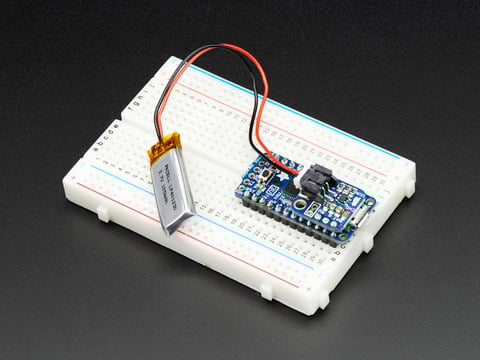
If you have an ItsyBitsy or Pro Trinket you probably know it's the perfect little size for a portable project. This LiPoly backpack makes it really easy to do! Instead of wiring 2 or 3 ...
ruby stirrup
royal gulch
https://hackaday.com/2022/10/10/lithium-ion-battery-circuitry-is-simple/
nice thorough article. thank you very much
royal gulch
Arya has the best articles
ruby stirrup
nova pike
https://www.adafruit.com/product/2124 works with itsybitsy.
that could very well be my solution :p thanks
sick otter
ruby stirrup
that's realy nice but exists because there is a specific addon for the qt py.......
Oh, to be clear I'm not even using it for a qt py. I hooked it up to a larger board; it works anywhere really, I just like the fact that it's small and has castellated edges.
ruby stirrup
sick otter
Oh, to be clear I'm not even using it for a qt py. I hooked it up to a larger bo...
Ok I see.
The thing is, I'm just too much of a noob in electronics to be able to divert things yet :p
I learnt all the theory about circuits in the preparation class for the master's degree, but our teachers didn't really care for real applications :p Thank you, French education system :p
ionic veldt
nova pike
https://www.adafruit.com/product/2124 works with itsybitsy.
This is a pretty neat piece. I ended up using this on top of my NRF ItsyBitsy that I nabbed during JP's stream on sale, plus got some ItsyBitsy to Pro Micro form factor adapter PCBs from Oshpark to integrate into my Maypad numpad. It's a bit kludged so I'm holding out that one day we'll get a Type-C Keeboar NRF w/ Lipoly charger. The NRF feather has all the features but it's just a bit large in form factor for a drop-in keyboard build.
ionic veldt
Not sure if this is allowed here (ad?), but Cannonkeys is releasing keyboard PCBs with RP2040s built in: https://cannonkeys.com/blogs/news-and-updates/introducing-the-bastion-series-of-pcbs. Would be interesting to see a CP port and KMK on these. not sure if that's necessary with VIA/QMK compatibility on them but with 2mb of flash it's possible to port.
finite rose
ionic veldt
Not sure if this is allowed here (ad?), but Cannonkeys is releasing keyboard PCB...
No problem. You could add a board definition for it!
hexed wing
I read somewhere that the RP2040 & KB2040 boards don't play nice with the UEFI boot sequence.
I've just started my 8×32 custom keyboard project which will be the only keyboard connected to my system.
If the UEFI boot commands sent to these boards are not being handled correctly, I'd like to know now so I don't waste any more time & money on the project.
It would be a shame as my design can start as an 8×16 keyboard and additional keyswitch modules can just be added as needed.
It was designed for my Peek & Pock typing style with all the standard 104 characters having their own keys & I can add any Unicode characters easily.
I even worked out how to make backLit keycaps on a credit card sized resin printer.
I would be using those Adafruit 5×6 Ortholinear keyswitch sheets. I already bought enough of those to build the 8×16 size but maybe it's a good thing that I haven't bought any MX blue keyswitches yet.
Each 8×8 grid of keys would be connected to an Adafruit TCA8418 Keypad Matrix and GPIO Expander Breakout. Then each of those would be plugged into a Adafruit PCA9548 8-Channel I2C Multiplexer. Then that would be connected to one of the I²C hubs on the Rpi 2040 based board. The design would allow for Rotary Encoders and anything else that uses I²C. For debuging, I bought an 8×32 LED grid that is controlled over I ²C that would display the up/down status of each key. My design is based on some of John Parks keyboard projects.
I already have all the boards and keyswitch sockets needed, I just need to breadboard it up on a old medium pizza box (long pins go through the cardboard easily).
I have nine(9) MX keyswitches so by just plugging and unplugging the switches, I can test each socket once the wiring is proven. The CP code is dirt simple, even for an old UNIX Systems Administrator like me. I have my Ham Radio licence since the late 80s, early 90s when we still where tested on radios that used tubes.
finite rose
hexed wing
I read somewhere that the RP2040 & KB2040 boards don't play nice with the UEFI b...
I use my CircuitPython + KB2040 keyboard with my UEFI bios (ASUS) and it seems to be fine
one thing we haven't implemented is wake though. So I use my mouse to wake my computer from sleep
hexed wing
So the CapsLock, ScrollLock & NumLock status LEDs work fine? My design would have to understand the UEFI boot sequences that usually make the status LEDs flash twice during boot.
hexed wing
finite rose
one thing we haven't implemented is wake though. So I use my mouse to wake my co...
Ahh so the CP core code for USB is still under development.
Which Discord sub covers this coding?
finite rose
I think status LEDs can be supported
#circuitpython-dev is where we discuss CP development
silk kraken
hexed wing
So the CapsLock, ScrollLock & NumLock status LEDs work fine? My design would hav...
Uhh have fun with that. I worked on firmware at Intel for a year and a half, and I doubt anyone there could explain why it happens exactly.
finite rose

GitHub
Hi, I'm trying to figure out how to make an emulated USB keyboard (using a neokey 1x4) wake the computer it's attached to. I've verified the QT PY RP2040 is getting power and behaves no...
hexed wing
Great... I will subscribe to #circuitpython-dev. I can't contribute but I can just lurk in the shadows
I found a interesting YouTube/article that explains working with the UEFI command processor BEFORE anything else even starts.
 snow matrix
hexed wing
Great... I will subscribe to <#327298996332658690>. I can't contribute but I can...
snow matrix
hexed wing
Great... I will subscribe to <#327298996332658690>. I can't contribute but I can...
We enjoy lurkers as much as contributors. You're still involved, whether you realise it or not!
hexed wing
I lurk really good
snow matrix
Perfect.
 stiff grove
I am using rp2040 qtpy , I want to communicate my microcontroller over usb within my pc. When i try it via usb protocol, I get PermissionError(13, 'Access is denied.', None, 5).
wintry skiff
^ cross posted from #help-with-circuitpython , being helped there
 neon kestrel
can the kb2040 receive power through its stemma qt connector?
neon kestrel
hmm, i guess even if it could, it wouldn't provide 5v out for neopixels
 subtle slate
@neon kestrel I have made a Split keyboard out of two kb2040 so the second hand is only connected via the stemma connector (who has 3.3v) to the first. I tried just in case back then, and since ~a year it manage to ligth about a dozen neopixel just fine, even if they are rated for 5v... So I guess just try too :p
nova pike
subtle slate
<@164917458182864897> I have made a Split keyboard out of two kb2040 so the seco...
This is fine, but be mindful of the power draw over that stemmaQT cable. The wires tend to be pretty thin so longer cables may start losing efficiency under high current loads.
neon kestrel
subtle slate
<@164917458182864897> I have made a Split keyboard out of two kb2040 so the seco...
ooh okay, that's promising
but if i do this, there won't be any power available on the RAW pin, right? (assuming it's not plugged into usb)
nova pike
neon kestrel
but if i do this, there won't be any power available on the RAW pin, right? (ass...
That would be correct.
neon kestrel
hmm
i was planning to use an existing macropad kit so i guess i'll need to figure out which pin it runs everything from
ruby stirrup
hello all
I'm planning on prototyping some boards with smaller footprint MCUs but need a lot of GPIO
Can anyone advise a model of shift register I could use with a XIAO BLE for example ?
or maybe I should use an I/O expander ?
daring condor
how many keys?
how many gpio do you currently have?
have you considered a matrix?
ruby stirrup
I'll be definitely using a matrix, I want to use a xiao ble which has only a few available gpio and I want to make a 100% keyboard
and anyway, I want to fiddle with registers and IO expanders just to know how to use them
 marble wasp
Noob looking for a sanity check on my split kb power design... I have two nrf52840 Feathers, with a battery on the JST connection for each. Can I charge them off one another bidirectionally? I.e., USB<->USB breakouts (for I2C) off 3V and GND?
And can I have them charging in such a way while also having one, or both, halves connected off their integrated USB port to a laptop/charger?
ruby stirrup
marble wasp
Noob looking for a sanity check on my split kb power design... I have two nrf528...
I'm also intereted in the answer to this
wintry skiff
ruby stirrup
hello all
I'm planning on prototyping some boards with smaller footprint MCUs bu...
may i ask what's the point on using a smaller board (less GPIOs) if you need a lot of them?
ruby stirrup
I'm struggling to find wireless boards with good firmware support actually
wintry skiff
specially because:
- smaller boards are probably gonna cost the same (or even more) than the same MCU within a bigger dev board
- the whole keyboard is gonna be much bigger than the development board stuck on it, anyway
im not familiar with wireless stuff, but i dont see a reason why SPI shift registers (or I2C expanders) wouldn't work... im just trying to confirm whether you would actually need/benefit from a smaller (XIAO) board
there has to be some other wireless board (at the very least, i would expect the same MCU on that board, to have several boards designed around it)
ruby stirrup
I know. But I'm looking for well documented things with examples available, and a fimware readily available and adapted to wireless. for the time being, I've seen some good examples of people using the XIAO BLE with ZMK firmware, and the available pins are too few for my project.
wintry skiff
did you try going thru ZMK list of supported devices?
eg nice!nano (no idea whether it is supported by CircuitPy, tho) would have a few more pins, i believe
ruby stirrup
yup
the nice nano is expensive and is only scarcely available from some dealers in europe. I can purchase the xiao at half the price and it is widely available
wintry skiff
avaiability is for sure an issue, but price might not be that bad if you end up having to pay (about) the same price in other components so you can scan that many keys with the pins on the XIAO board
for 100 keys you would need at least 20 pins (10x10 matrix), so i guess it is a fair assumption that you will need some extra hardware anyway
ruby stirrup
actually 1 shift register for less than 1 € + xia ble (11 €) amount to 12 €, a single nice nano is 22 € without shipping
wintry skiff
if you want to add some more devices to the keyboard i would probably daisy-chain several Parallel In - Serial Out SPI registers, you can scan an arbitrary amount of keys with that (using 3 pins iirc)
FYI: depending on which ones you buy, you will also need a pullup (or was it down?) register for each key
ruby stirrup
thank you very much for this
warm lodge
I have a nice lily58 pro with zmk running fine, and today I'll try to put KMK on it. Wish me luck.
I already had KMK on it, so I already did the mpy compilation, but I could never find how to map the keys or even found an example layout of a "big" keyboard (in the sense, or something that is not a keypad or a couple of test switches).
ruby stirrup
good luck :p
what is the MCU of this board ?
why do you want to change your firmware?
warm lodge
I'm using a nice!nano (v2, maybe?). I want to change from ZMK to KMK, so that changing the firmware is as easy as editing a text file.
I found the ZMK wizard quite useful and easy to use, but having it in circuitpython should be just saving the file to relocate a key, and your done.
warm lodge
So far, I got the layout of the columns/rows working fine on one of the split keyboards. I already did the mpy compilation of modules, and tomorrow I'll continue with having what I have so far work with bluetooth, with split, and with the screen.
ruby stirrup
Nice.
Keep us posted
warm lodge
Thanks for asking. I did tried the screen and it doesn't work (I found a bug, where it crashes if debug is enabled).
I tried bluetooth but it doesn't seem to fit in the nice!nano.
Both of these would be nice to have, but not urgent for the project that I'm trying to do. So I'll test it with circuitpython "raw" for the screen, and using kmkpython for bluetooth later.
Tonight I'll test the split keyboard, but this isn't necessary as I need to power both of the keyboards, I got the kit without batteries or the TRS cable. I now have a battery from a local supplies but doesn't fit nicely so I'll leave extra space, but way in the future when I can replace the nice!nano with a pair of itsybitsy nrf.
Separate question, does anyone know how to send a custom char with an HID remapper?
The project I'm doing is to add chars that are needed to write indigenous languages such as choctaw, cabécar or bribri.
Yesterday I got a pi pico from a local store, soldered the second usb and I have the remapper working fine if I want to replace let's say an "a" for a "9".
But I'd like to replace a "1" for a "ʊ".
I have done rubber ducky projects with a playground in both arduino and circuitpython and I know that you can send strings. But using the web config for the hid remapper I only get presented certain options, and none of them looks like a custom char.
It seems quite basic that someone would want to use the HID remapper to send something like an emoji or a unicode char, but I don't see what I'm doing wrong. (hopefully without using mac option or windows alt+ )
honest bane
warm lodge
It seems quite basic that someone would want to use the HID remapper to send som...
HID sends keycodes, so it is simulating keypresses. It is not possible to send Unicode, etc. directly. You have to use whatever mechanism is provided by the host operating system to type unusual characters: AltGr, Alt+, etc.
You can always add software to make this more convenient (to map Unicode to keypresses), but ultimately it is keypresses, and it is going to vary between OS's.
warm lodge
So, I would guess that a send_string in KMK or a Keyboard.print() in arduino, do a match of what you write and then sends several keycodes for what you have?
honest bane
warm lodge
So, I would guess that a send_string in KMK or a Keyboard.print() in arduino, do...
Yes, it has a mapping from character codes to keycodes. But that mapping is rather basic, and is mainly meant to handle characters in the target language alphabet.
royal gulch
warm lodge
It seems quite basic that someone would want to use the HID remapper to send som...
how you send a unicode character depends on the operating system, sadly
on windows you hold down the alt key and type the unicode code point on the numpad, then release alt
on macos and linux you press ctrl+shift+u then type the number then press space or enter
warm lodge
According to the qmk doc, that is not unicode but alt keys (since it's hex, you also need a-f). For unicode (it seems) you need WinCompose. I was also told that some Alt+X combination should do it on windows, but it doesn't seem to work for me.
For mac I had to enable a unicode input in the keyboard config, and it's working fine with option+u then the code.
warm lodge
Yes, I got HID remapper working with compose+u. The problem is now that the compose key can be in several places, but at least it should work for the proof of concept.
Also, some folks want to send a spec for native unicode, which would be extremely cool. But they need a USB-IF member to sponsor.
https://github.com/kiibohd/KiiConf/issues/30

GitHub
Is there a way to assign a unicode code to a key? I actually want to assign an emoji to a key, and figure the easiest way to do that is to assign the unicode code for that emoji, but I'm not su...
And again, the QMK doc for "unicode feature" is quite informative.
royal gulch
most people don't setup a compose key at all
which is a great shame
but I think there is a separe key code for compose
warm lodge
Yes, wincompose is not a popular software to install. I have been using compose everywhere since the 90's as it is needed for spanish when you have us keyboards.
warm lodge
On hid-remapper what they have is a "compose LED" (like on the Sun keyboards)
royal gulch
I mean, I wonder what would happen if you just send that keycode on a computer that doesn't have a compose key setup
warm lodge
You get u####
royal gulch
hmm, it's the win key
it's the menu key, sorry
so disappointing
of course they reused a standard key code for they stupid non-standard key
 fast isle
 fast isle
Anyone here familiar with the mechanicals of the Cherry MX style of switches?
nova pike
fast isle
Anyone here familiar with the mechanicals of the Cherry MX style of switches?
Familiar how? Sometimes, it better to just ask the question outright haha
fast isle
There are four holes on a step cad model I have of the switch, which correspond to the two holes for an LED, and the two holes for a switch diode. These are specified by the manufacturer, but from what I've seen, small shops, and solo makers can either get the unlit type, be it from OEM, or the knock off brands, ones with a simple LED mounted, or clear ones intended to have RGB (maybe neopixel) mounted on the PCB below the switch, but not the ones with a switch diode already.
Seems you have to be big enough to order millions to have integrated switch diodes.
The model I have does have an LED integrated into it, and the holes, as mentioned, but there doesn't seem to be space for a switch diode to actually exist inside of the switch, as the holes for the leads dead end in the bottom section against the top section. I'd have to carve out parts of the switch bottom to put a 1N4148 in there.
fast isle
did some more research... there are... issues with the step file I downloaded. looks like some of the dimensions are off. Pins on the bottom of the switch are laid out on a 1.27mm grid according to the OEM, but it looks like the modeler has laid them out on a different grid. Horizontally, the model has the pins of the switch 6.225 mm offset, but they should be 6.35mm according to the developer documentation on the Cherry MX web site. Yes, I know, 0.075mm is likely in the range of the tolerances of the parts.
warm lodge
Not a fan of the nice!nano for KMK. I have ran out of storage and pystack so many times, that I can either move to ZMK/QMK, or run to get pi pico or itsy-m4...
I would like to get itsy-nrf but my local providers doesn't have them and it will take a while to get them here.
Right now I'm trying to use either layers or combos to print unicode, and I get pystack errors. I don't have any other modules on, not split, not BLE, not oled.
finite rose
warm lodge
Right now I'm trying to use either layers or combos to print unicode, and I get ...
you could do a custom build with a larger pystack. I don't use KMK myself, just simpler custom code
warm lodge
I'll have to test that. For what I'm doing I do need something that can output unicode. (this is for a side project. The keyboard will eventually become my default keyboard)
And in the long run I'd like to have ble+split+sleep.