#help-with-wippersnapper-and-adafruitio
100 messages · Page 8 of 1
 dry vector
 mighty ridge
Yeah, howd you do it ? Are those hats each connected to their own pi zero board ?
@dry vector
dry vector
mighty ridge
Yeah, howd you do it ? Are those hats each connected to their own pi zero board...
Yeah Each hat has its own Pi zero. I modified the standard code and used adafruit io python library to send data. No that difficult after all. I can share my pieces of code.
 modern widget
@obtuse marsh hey - did you ever get your pub/sub working? I'm using an ESP32s2 metro, and it's working for me now (I grabbed the latest minimqtt library - v 5.0.7)
 obtuse marsh
modern widget
<@!409172814021656596> hey - did you ever get your pub/sub working? I'm using an...
obtuse marsh
modern widget
<@!409172814021656596> hey - did you ever get your pub/sub working? I'm using an...
I did! Everything works perfectly.
I have the code on my GitHub: https://github.com/oldblackcrow

GitHub
Just an old newbie maker interested in building Tricorders, CPython, woodworking, and general electronics.
https://youtu.be/TIY0OJ3KWJk - oldblackcrow
 royal rapids
Base64 encoded images only via the image block
 red glen
royal rapids
Base64 encoded images only via the image block
red glen
royal rapids
Base64 encoded images only via the image block
when I upload a BMP image that way I get a question mark in the preview.
red glen
With PNG or JPEG I am able to see the image, but with BMP it doesn't seem to render.
royal rapids
@red glen Does drag+dropping the BMP onto the block work?
red glen
royal rapids
<@!382939733107408897> Does drag+dropping the BMP onto the block work?
it works in that the upload seems to complete successfully, but doesn't work in the sense that I cannot see the image afterward.
looks like this after dropping a bmp file:
 royal rapids
red glen
it works in that the upload seems to complete successfully, but doesn't work in ...
royal rapids
red glen
it works in that the upload seems to complete successfully, but doesn't work in ...
Could you attach a screenshot?
@red glen could you send the BMP here?
red glen
same BMP renders correctly in CircuitPython with OnDiskBitmap.
royal rapids
I'll try to replicate, this may be a bug.
red glen
this is one of the images I tried.
 royal rapids
MQTT ERROR: error saving data on brubell/feeds/button, value cannot be larger than 1024 bytes (1 KB) when feed history is on. 78240 bytes received
You have feed history off, right?
red glen
correct, history off
royal rapids
Ok, replicated the issue. This may be a bug, I'm going file it along w/steps to repro with the IO development team
 red glen
Not directly related to this, but I'm also curious: is it possible download the image directly as binary instead of base64? Like is there some URL I can use like https://adafruit.io/something/something/my_bmp_file.bmp that goes directly to the image file itself? Downloading from a circuitpython device would be a bit easier if not having to convert from base64 after download.
red glen
royal rapids
Ok, replicated the issue. This may be a bug, I'm going file it along w/steps to ...
Thanks for checking into it
royal rapids
red glen
Not directly related to this, but I'm also curious: is it possible download the ...
Unfortunately not since the image block requires base64 data on the feed.
You could add a suggestion for this (https://forums.adafruit.com/viewtopic.php?f=56&t=139746) but I'm not sure if it'd be priority since this can already be accomplished with IO.
I'll follow up with you when I have information from the team regarding the image block bug.
red glen
Oh nice, thank you. I will write up a feature request suggestion. I do think it would would be great to access the file directly, and one step better even would be if PNG and JPEG images could be converted to indexed BMP for use with Circuitpython. I have some PIL based code doing this conversion in my project currently.
 blazing jewel
hey guys , Does anyone know how to show adafruit feeds on django web app interface?
 fossil copper
I cannot, for the life of me, figure out the URL syntax for changing data in an existing feed. I need it to be a simple URL...but I see no examples in the V2 documentation (and the old style syntax doesn't seem to work).
So, say I want to change the latest value of junktest.junkdata for the user experiencestation...it would seem like I need something like:
https://io.adafruit.com/api/v2/experiencestation/feeds/junktest.junkdata/value=100
The documentation says something like this: /api/v2/{username}/groups/{group_key}/feeds/{feed_key}/data, and I've tried every permutation of how to supply the value (quotes, no quotes, quotes on portions, calling it last_value, etc.) .
http://io.adafruit.com/api/v2/experiencestation/groups/junktest/feeds/junkdata/ {what now?}
Does anybody have a suggestion? ...also where/how do I include the x-aio-key thing? If I include it, things seem to break more/differently. I'd prefer for this not to be a public database in the final version. Thanks!!!
 lilac temple
Hello, I have an IOplus account, the space of storage is 5GB. Is there any way to know the remaining storage? Thanks.
royal rapids
@lilac temple Please file a ticket on io.adafruit.com/support
 runic wing
alright, excuse me, im currently having trouble with interfacing between SD Fat library and adafruit's interfacing library
here's the current situation
GitHub
Greetings, im currently doing an arduino project which requires me to display 2 types of data with 2 different I2C Oled Displays with different addresses : 0x3C and 0x3D. When coding them however, ...
so basically adding this SDFat library from greiman somehow interferes with adafruit's capabilities of doing stuff, including displaying stuff on an oled display and also measuring power with the INA219 current sensor
this interference however is not in the code but rather on the performance where basically all functions of components that uses the adafruit library would halt
could anyone look into this?
right, apparently this also applies to the SD library arduino has
it seems like the adafruit libraries that im using doesn't like serial interactions
im currently using :
#include <Adafruit_INA219.h>
#include <Adafruit_SSD1306.h>
this isn't a memory issue because there are no warnings regarding memory usage when uploading the code to an arduino nano
i dont understand, i've made a prototype using the same concept but only using 1 display, 1 sensor, and 1 sd card reader
how come i can't make one using 2 displays, 2 sensors, and 1 sd card reader?
and yes, those displays and sensors have different I2C addresses
royal rapids
runic wing
i dont understand, i've made a prototype using the same concept but only using 1...
please ask in #help-with-arduino
This is the io.adafruit.com chat and that's an arduino q.
runic wing
true, but the library im using belongs to adafruit and the creator of the said library told me to ask adafruit for this problem
 split ocean
Hi, IO experts. 🙂 Question: Is there a way of removing all data from a feed without deleting and recreating it?
nvm, took a look on the IO forum and it appears there's no direct way of doing so.
🙂
 elfin rose
runic wing
true, but the library im using belongs to adafruit and the creator of the said l...
elfin rose
runic wing
true, but the library im using belongs to adafruit and the creator of the said l...
Yeah, right general place, but wrong channel. Adafruit io is their iot web service, not just generic input and output.
So is there like a status/log page or something for my io account? I have a FunHouse logging a bunch of data, but it will only do it for a few hours before it stops recording data. I figured I hit a cap before I redeemed my io+ card, but now I'm puzzled why it's happening and not sure how to troubleshoot it. The board itself keeps running and keeps blinking the activity LED for a moment every 10 seconds while it reports back to Adafruit, so it at least seems to be working here.
elfin rose
I ended up posting on the forum, thinking it seems a bit more lively and better suited to async troubleshooting
royal rapids
elfin rose
So is there like a status/log page or something for my io account? I have a FunH...
io.adafruit.com/monitor would be the spot!
 gray sluice
Can someone please confirm this is the orientation of the axes? https://cdn-shop.adafruit.com/datasheets/BST_BNO055_DS000_12.pdf

 left dragon
looks like, see page 24 https://cdn-shop.adafruit.com/datasheets/BST_BNO055_DS000_12.pdf
 keen dirge
FYI -- the "guide" shows both the old and new breakout. The new (stemma) one has the axes marked and they appear to be different for it. https://learn.adafruit.com/adafruit-bno055-absolute-orientation-sensor/overview
 coarse vale
If you check the Bosch documentation it provides the orientation of the actual sensor chip based on the little dot on it. That's going to work regardless of the carrier board.
gray sluice
Thank you kindly. 🙂
 chrome kayak
does anyone know thevinins voltage?
 upper sorrel
chrome kayak
does anyone know thevinins voltage?
upper sorrel
chrome kayak
does anyone know thevinins voltage?
1.6180339887 V 😋
 sacred depot
How often do I need to create a new aoi.feeds() object in a long running python program, daily, weekly, monthly. My embedded device runs a daemon that in theory never dies.
 ornate pagoda
@sage adder This channel is for Adafruit IO questions. You'd be better served in #help-with-projects . We discourage cross-posting, but in this case, I'm suggesting it.
 wintry nymph
Hello! I was wondering if anyone could help me understand how to upload and download information from the feed? I have some Seeeduinos that I'm teaching some students with, and I want them to be able to measure environmental conditions around their homes and see them on the web in real time. I can share the code I've been trying to figure out how to use for the feed but I feel like I'm missing some fundamental steps in understanding and I can't find much documentation on it. Thank you! 🙂
 graceful sluice
You've read these? https://learn.adafruit.com/adafruit-io-basics-feeds/downloading-feed-data

 verbal heath
Hi. I am using the LightBlue app on my iPhone to send data to Adafruit IO. The problem is that only the first feed that I create gets updated. The remaining feeds show up in the feed list on Adafruit but do not get updated. Do you know what the issue might be?
 hard tulip
Hi all I created an adafruit project about a year ago and I finally decided to come back and try iron out the kinks. I've made progress, I just wanted to know for now.. what is the time in which adafruit forces disconnection/unsubscription if nothing is sent/received from an arduino wifi board? Thanks!
edit: i remember finding the number last year somewhere but I can't find it again for the life of me
mighty ridge
I'm not sure but that's the reason all the mqtt code examples test for connection and then reconnect if it got disconnected.
Also, if you don't use an unique client id you will be disconnected immediately.
@hard tulip
hard tulip
I see, thanks for that. I have tried to make an arduino based roller door opener and sometimes the board doesn't communicate with the server so I thought the connection was always being booted
I think I will try to force a connection in my loops because at the moment it is only connecting at the start once not as my actions are executed
Do I have to execute the subcribe function as well each time I connect, or only the connection? (very new to this) The subscription currently occurs once as soon as the board boots before the setup void @mighty ridge
royal rapids
hard tulip
Do I have to execute the subcribe function as well each time I connect, or only ...
every time you connect to the Adafruit IO broker
hard tulip
royal rapids
every time you connect to the Adafruit IO broker
thank you
verbal heath
verbal heath
Hi. I am using the LightBlue app on my iPhone to send data to Adafruit IO. The p...
Hi, does anyone have experience with this?
mighty ridge
@verbal heathtry watching the adafruit feeds page and look for an error message at the top. the server will put an error message there if there was an illegal request or something.
verbal heath
mighty ridge
<@!718999629659766784>try watching the adafruit feeds page and look for an error...
Thanks! I will have a look
 wheat plaza
Hey, do you guys know what PIR Sensors and NFC Readers are compatible with the Nvidia Jetson Nano?
 hollow horizon
Does any one know how i can display that ShortText on the display?
 hollow horizon
Does any one know how i can display that ShortText on the display?
hollow horizon
hollow horizon
Does any one know how i can display that ShortText on the display?
Or just display adafruit text values
With values i just mean the text
hollow horizon
Because when i try this ``` Adafruit_MQTT_Subscribe *subscription;
while ((subscription = mqtt.readSubscription(5000))) {
if (subscription == &ShortText) {
  String lastread = (char *)ShortText.lastread;

  display.clear();
  display.drawString(0, 0, "Hello world " + String(lastread));
  display.display();
}
}
I get these errors ```Exception (29):
epc1=0x4000e1b2 epc2=0x00000000 epc3=0x00000000 excvaddr=0x00000000 depc=0x00000000

>>>stack>>>

ctx: cont
sp: 3ffffdc0 end: 3fffffc0 offset: 0190
3fffff50:  3fffdad0 3fffff94 3ffee42d 40204466
3fffff60:  3fffdad0 00000000 3ffee7a0 4020144b
3fffff70:  2a02a8c0 00ffffff fe02a8c0 4020406c
3fffff80:  3ffe861b 3ffee618 3ffee768 40201373
3fffff90:  402071d0 00656b6f feefeffe 83efeffe
3fffffa0:  3fffdad0 00000000 3ffee7a0 402048ac
3fffffb0:  feefeffe feefeffe 3ffe84ec 40100e11
<<<stack<<<

--------------- CUT HERE FOR EXCEPTION DECODER ---------------

 ets Jan  8 2013,rst cause:2, boot mode:(3,6)

load 0x4010f000, len 3584, room 16
tail 0
chksum 0xb0
csum 0xb0
v2843a5ac
~ld
Adafruit MQTT demo
Please post this, along with your full code, on the AIO forum https://forums.adafruit.com/viewforum.php?f=56
thanks
 leaden fossil
Can anybody help me with the Adafruit 32x32 LED panel? The brightness of the LED array is less than before even with external power supply. What could be the reason?
 tepid echo
hey yall, I'm trying to connect my keyboard to my adafruit m4 express via a usb breakout. I don't know what pins to use or how to get the pyciircuit to recognize that particular board. I tried out the usb port with other devices and it seems to be working just fine (in their case powering them with a connection to ground and vcc), but the keyboard doesn't show any signs of being on (like caps or num lock)... and d+ and d- i tried connecting to scl and sda, but still nothing and an error too, "no pull-up found." Any help would be awesome

 neat charm
USB is not the same as I2C, so it won't use SDA and SCL.
tepid echo
well, i didnt really understand them from the examples in the datasheet. will it be uart?
neat charm
No, it'll be D+ and D-... it's a specific USB protocol. I'm not completely sure what the support for USB host mode looks like on the M4 Express, or if there is any at all, honestly.
tepid echo
oh ok. I think this might not have it then , although i read usb is supported by the M4. What about the Rx and Tx pins? what uses do they have. The datasheet gave certain cases, but it proves the possibility of others
neat charm
TX and RX will be for serial port / UART interfaces.
(Though the physical pins may have additional functions too.)
tepid echo
oh cool, thx. But so there isn't any way to get this board to work with a usb breakout? Bc this is a school project and it is a requirement
neat charm
I'm just not sure. You'd be looking for "USB host" support to get the board to act as a USB master with the keyboard as a slave. I believe the chip is capable of it, but as for the software libraries... those may not be as friendly or available as you might prefer.
Is there some flexibility in the project requirements? Like using buttons instead of a keyboard, or using a serial connection to a PC with its own keyboard?
tepid echo
well i guess, it says " design a system capable of reading in the keystrokes from a USB keyboard..." -- my pc can be interpreted as part of the system, but that means keystrokes are now an output right, rather than an input?
neat charm
Yeah, it depends on how far "system" implies, heh heh. Depending on the other requirements, you might be happier with a board like a Raspberry Pi with full USB capabilities.
tepid echo
ah lol yh i guess. Thank you! I would have been here for the next couple hrs still trying to turn iron to gold XD
will definitely be back with more questions lol... so thx alot for taking the time
hollow horizon
Does someone know if u can add a textlimit to textboxes in a dashboard?
 ancient summit
Hey, Not sure if this is the right channel but does Adafruit make 1.2-inch 14 segment alphanumeric displays like this? https://www.adafruit.com/product/1912
I have some of the 7 segment ones for time but am looking for the alphanumeric ones and I can only find .52 inch at the largest.

Display, elegantly, 012345678 or 9! Gaze, hypnotized, at ABCDEFGHIJKLM - well it can display the whole alphabet. You get the point. This is a nice, bright alphanumeric display that shows ...
 open zodiac
@ancient summitif they did, you would find it on their www, I guess. AFAIK, they have only 0.64"
ancient summit
open zodiac
<@!228505075251806208>if they did, you would find it on their www, I guess. AFAI...
Yeah I figured if they had it, I'd be able to find it. Shame but thank you!
Figured it couldnt hurt asking
sacred depot
hi
i have a question about how many max Current do we have for 3.3V and the 5V in Adafruitfeather rp2040 board?
i couldnt find for 5V but for 3.3V maybe 500mA?
thank you 🙂
sacred depot
If i need pull up or pull down resistor, can i just use from build in Pull up/down resistor from RP2040 or do we need to make a direct connection from adafruit feather?
or does Adafruit feather rp2040 have build in pull up or pull down resistor to gpio pins? (i hear the I2C deosn have but how about the gpio)
thanks 🙂
 inland violet
@royal rapids I'd like to join the beta.
 open schooner
@royal rapids Can I have WipperSnapper beta? - sorry for DMming you...
Pleeeeeeese
inland violet
thanks!
 limber crypt
@royal rapids Could I please join the WipperSnapper beta also?
 wise lance

@royal rapids This is the rate limit message I told you about, I was able to get it with the second board. I'm not io+ so I'm guessing it's normal for when it does the initial read of the board. Once that is done, it works fine.
royal rapids
@wise lance that makes sense - We should expose how many feeds are in-use. Could you submit an issue to io.adafruit.com/support so we can track this?
wise lance
Will do, thanks.
 faint inlet
hi everyone. I'm using the adafruit matrixportal library and testing some APIs, but I am receiving "Failed to request hostname" error. Any help?
 ebon pivot
Hi. I have a D1-Mini and it won't connect to Adafruit IO. The serial monitor just keeps printing dots. I added " Serial.println(io.statusText());" and now it's printing "Network disconnected" also. Any help?
 mighty ridge
@ebon pivotdid you gifure itout ?
open schooner
@royal rapids - WipperSnapper is working great so far
ebon pivot
@mighty ridge no, I still haven’t. I decided to do something else instead.
royal rapids
ebon pivot
<@401293939161956362> no, I still haven’t. I decided to do something else inste...
Please post on https://forums.adafruit.com/viewforum.php?f=56
and a support engineer will be able to assist
 tired prism
@red glen thank you for the livestream of WipperSnapper! i'm the web and backend programmer, and it's pretty amazing to get to ride along with someone on their first impression.
red glen
tired prism
<@!382939733107408897> thank you for the livestream of WipperSnapper! i'm the we...
For sure! Thank you for all of the work that has gone into it. It's super cool to see it come to fruition and allow folks with very limited experience to achieve such a complex thing!
 severe gazelle
@royal rapids Howdy! Could I be added to the WipperSnapper beta, please?
royal rapids
severe gazelle
<@!311339734339289090> Howdy! Could I be added to the WipperSnapper beta, please...
DM'ing
 sonic cliff
Hi! Trying out WipperSnapper. Docs mentioned it's OK to share info for the beta, so am assuming OK to share here. Are others also trying this?
I want to get it running on a FunHouse on my M1 Mac, but I can't seem to get the FunHouse to appear in bootloader mode so I can load the WipperSnapper uf2. When I hold down Boot0 and then press Reset, the screen goes blank, but no drive shows up. I've tried several times, one press, double press, both while holding Boot0. No luck. Pressing just reset restarts the FunHouse. I noticed there were problems with Mu and the M1, so I immediately thought this might be an M1 issue. Am using the latest BigSur. Thanks!
royal rapids
sonic cliff
I want to get it running on a FunHouse on my M1 Mac, but I can't seem to get the...
io.adafruit.com/support would be the absolute best place for this, but I don't think its specifically a M1 issue.
As for the not being able to reboot the funhouse into bootloader mode - the timing is TRICKY. You'll want to press reset once, then when the LEDS are purple, press reset immediately. You should see the bootloader screen @sonic cliff
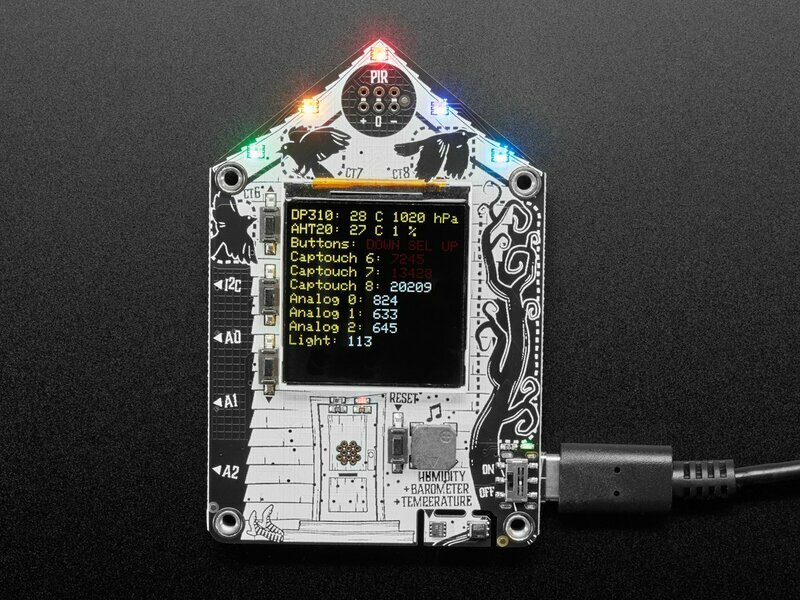
There's some steps describing it, along with what the LCD should look like when it goes into bootloader mode
 sacred merlin
how do I get this dashboard to show longer history: https://io.adafruit.com/andyh13/dashboards/plantmon
Adafruit IO is the easiest way to get your projects onto the Internet of Things!
I tried (gear icon) > edit layout > (second gear icon) and selecting 30 days

but this doesn't seem to have changed anything
graceful sluice
30 days seems to be working here:

 iron gust
I'd like a WipperSnapper beta, please!

 opaque mauve
WipperSnapper invite please
royal rapids
@iron gust @opaque mauve DM'd both of you with instructions
royal rapids
hollow horizon
What's that red bar on the top?
That bar indicates incoming/outgoing data. If its red, there's an error, please check io.adafruit.com/monitor for more detailed error reporting.
 sudden dagger
is it possible to program the adafruit feather m0 with some kind of assembly language?
royal rapids
@sudden dagger Please ask this in #help-with-projects
sudden dagger
k
 strong harness
I'm interested in a WipperSnapper invite
 haughty tendon
I'd like a WipperSnapper beta, please!
 nocturne orbit
I would like a WipperSnapper beta invite, please.
royal rapids
Hi - PM'd all of the above. Check your discord message inbox for further instructions.
 honest seal
I’d like WipperSnapper beta. Thanks!
 deft linden
I would like a WipperSnapper beta invite please!
 tame belfry
Good morning all, I am interested in a Wippersnapper beta invite! Thanks!
 misty leaf
I would like an invite to the Wippersnapper beta. Thanks!
 misty axle
I'd like a WhipperSnapper beta invite. I have a Funhouse, MagTag and PyPortal and an active Adafruit.io subscription
 covert cosmos
I’d like a WipperSnapper beta invite.
 red lotus
I'd like an invite to the whippersnapper Beta - I have several MagTag's that I'd like to try with
 graceful haven
I'd like an invite to WipperSnapper beta. I'm also interested in learning how to add board support.
royal rapids
Sent to all above, please check your discord message inbox for further instructions.
 elder mica
I would like an invite to WipperSnapper beta please, I have a MagTag, a FunHouse, and others, and an AdafruitIO account
 gray bluff
I’d like a WipperSnapper beta invite for my MagTag board
 true bronze
Hi, I'd like an invite to WireSnapper beta. I have MagTag and PyPortal
 buoyant tusk
Would like an invite to WhipperSnapper Beta - Have multiple compatible boards. Thanks
royal rapids
🚀 Messages sent!
tired prism
❤️ the 🐢 as a ✅
 weak vapor
Hello! May I please have an invite to WipperSnapper beta? I have MagTag, PyPortal, and FunHouse. Thank you!
 simple sentinel
I’d love to get an invite to wiresnapper! Being an Adabox subscriber I have the Magtag and funhouse boards
 silk light
I would like a WipperSnapper beta invite for my Metro ESP32-S2.
 orchid otter
I would like a WipperSnapper beta invite
 void sun
hello! If possible, could I get a beta invite for WipperSnapper? I'm happy to see magtag is part of list now. 😄
 whole valve
hello, could I get a wippersnapper beta invite please?
sacred depot
^^ It's turtles, all the way down
 novel goblet
I would love a WipperSnapper beta invite pls.
 surreal sage
I would love a WipperSnapper beta invite. I have the Magtag, funhouse and other devices to test with. Thanks in advance!
 median bone
Can you add me to the WipperSnapper beta please?
 river bobcat
Can you add me to the wipper snapper beta?
sudden dagger
where can i ask questions that are about C but about Adafruit devices and not the arduino?
royal rapids
sudden dagger
where can i ask questions that are about `C` but about Adafruit devices and not ...
sudden dagger
and what is this chanel for?
royal rapids
the io.adafruit.com IoT platform
sudden dagger
oh, ok
royal rapids
Everybody above has been messaged with a WipperSnapper invite, if I missed you please @ me here.
surreal sage
royal rapids
Everybody above has been messaged with a WipperSnapper invite, if I missed you p...
@royal rapidsu my email is jliu@hanwave.net
Thanks!
royal rapids
surreal sage
<@!311339734339289090>u my email is jliu@hanwave.net
Please send your adafruit-io email address via a private message, not in this channel. You may want to delete that message in this channel as it includes your email address.
 edgy meadow
good afternoon guys. I'm using a WEINTEK HMI on the adafruit IO platform. however the values written by the HMI are coming with the variable name together. Does anyone already suffer the same problem?
 royal rapids
you'll want to separate the json data you're sending to IO in the code
edgy meadow
yes, but how do I do it, is it possible to do it within the IO platform? how should the data be sent?
sacred merlin
This works for me: https://github.com/ahepp/plantmon/blob/develop/sensor/plantmon-sensor-post
 solemn marlin
WipperSnapper beta invite help pls, ty!
 nova skiff
I would appreciate WipperSnapper access. I plan on using it to support ham radio stations. I know Lady Ada is a ham radio operator, so she might be interested.
 little sluice
Could I please get an invite to the WipperSnapper beta?
 indigo hinge
I'd like an invite to the WipperSnapper beta. @nova skiff, let's talk about the ham radio aspect (K6VN here)
 small ibex
I'd like a WipperSnapper beta invite. Thank you!
 wooden wedge
What's WipperSnapper?
 robust mural

Adafruit Industries - Makers, hackers, artists, designers and engineers!
Last week, we added two boards to Adafruit.io WipperSnapper – our no-code IoT project interface for adafruit.io. WipperSnapper now supports the Adafruit MagTag 2.9″ and the Metro ESP32-…
"Wippersnapper is a no-code IoT interface for Adafruit.IO – it lets you turn any WiFi-capable board into an IoT device without any programming. Simply select what devices are connected to which pins on the hardware and it will auto-configure the firmware and even create an IO feed for visualization."
wooden wedge
Ohh, cool
 young zealot
I would like a WipperSnapper beta invite please please please 😀 !
royal rapids
sent!
 serene kernel
I'd like a WipperSnapper beta invite please! 🥳
sacred depot
Could I have a WipperSnapper beta invite please! 😝
sacred merlin
So, I'm sending an ADC reading (0-4095) to Adafruit IO. The feed shows the correct reading. The chart on my dashboard shows something else, seeing as the numbers are real and not integral.
I'm assuming this has to do with my not having checked the "raw data only" box? I'm curious though, what exactly is going on?
 robust panther
sacred merlin
So, I'm sending an ADC reading (0-4095) to Adafruit IO. The feed shows the corre...
robust panther
sacred merlin
So, I'm sending an ADC reading (0-4095) to Adafruit IO. The feed shows the corre...
What is the something else you are seeing? Are you using a Gauge? Did you set the min and max values, decimal places, etc?
sacred merlin
It's a line chart, it's just not clear to me why the values have decimal places.
(https://io.adafruit.com/andyh13/dashboards/plantmon , for reference)
Adafruit IO is the easiest way to get your projects onto the Internet of Things!
 robust panther
sacred merlin
It's a line chart, it's just not clear to me why the values have decimal places.
robust panther
sacred merlin
It's a line chart, it's just not clear to me why the values have decimal places.
^^^
sacred merlin
where are the decimal places coming from
they aren't in the data I sent to adafruit.io
the values I am sending are integral values read from an ADC
As I mentioned, the decimal places don't show up in the adafruit.io feed data either, only in the dashboard block as far as I can tell
robust panther
I think integers sent in are converted to floats, so just set the decimal places to 0.
that avoids having to have separate int/float blocks
sacred merlin
Hm, the decimal place values aren't 0 and don't appear random though
Likewise a couple major outliers in the feed have been smoothed substantially in the graph
 indigo light
hi, could I get a Wippersnapper beta invite, please?
sacred merlin
sacred merlin
Likewise a couple major outliers in the feed have been smoothed substantially in...
Anyways, I'd be pretty interested to know how this all works. To be clear, I'm not complaining (I mean, it's free!) I am just curious about how things are happening under the hood. The longer my dashboard history gets, the smaller my outliers are becoming. So some kind of smoothing has to be going on, which is hinted at by the "Raw Data Only" box, but I am having trouble finding an explicit description of the data aggregation procedure.
royal rapids
sacred merlin
Anyways, I'd be pretty interested to know how this all works. To be clear, I'm n...
If you file a ticket via io.adafruit.com/support, I can get someone with more knowledge of how IO's data processing works to assist.
robust mural
hey @royal rapids, are you still sending beta invites? really excited to work with it 🙂
royal rapids
robust mural
hey <@!311339734339289090>, are you still sending beta invites? really excited t...
I believe I sent you one, you may want to check your spam filter to make sure. If not, I can resend.
 barren rapids
Looking to get my hands on an invite to the WhipperSnapper beta - lil' help?
 low hatch
@sacred merlin That graph is at every ten minutes so if you send 1 at 9:05 and 2 at 9:15 the middle value 1.5 ends up on the graph as 9:10's estimate
 eager mantle
Hi, can I have a whippersnapper beta invite please?
 fervent steppe
May I please help with beta testing the WhipperSnapper?
 tacit holly
WipperSnapper beta invite please, thanks!
 hallow swallow
I'd like a WipperSnapper invite please.
 vague crane
I would like to be invited to beya WipperSnapper. E-mail: surfdory@mac.com
 dusky harness
Could I get a WipperSnapper Beta invite please?
royal rapids
vague crane
I would like to be invited to beya WipperSnapper. E-mail: surfdory@mac.com
I've PM'd you, please edit this message to remove your email address!
 pine mango
I would like a wippersnapper beta invite please!
open schooner
@royal rapids - WipperSnapper is* almost* the coolest thing I've ever worked with. Thanks!
royal rapids
Awesome 🙂
royal rapids
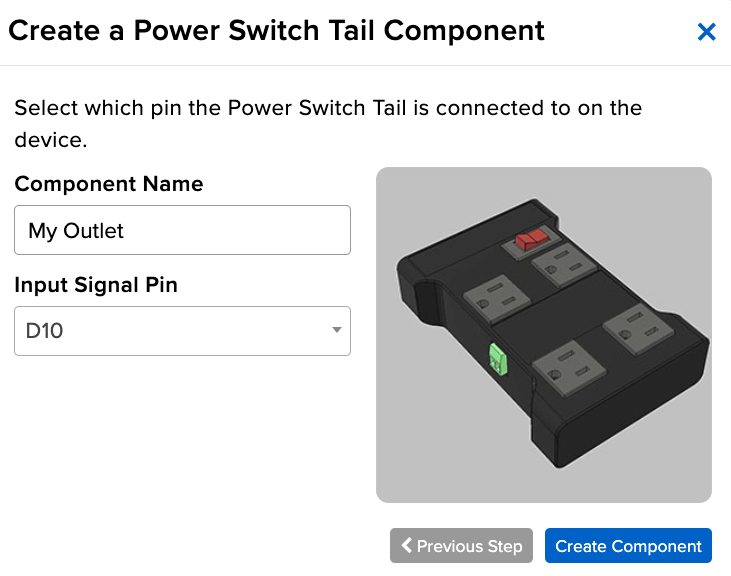
Adafruit Industries - Makers, hackers, artists, designers and engineers!
Adafruit.io WipperSnapper – our no-code IoT platform – got an update this week! We’ve added two new components – a generic relay and a power-switch tail. Both of these compo…
royal rapids
small update, we'll be blogging updates on a weekly basis.
 pine totem
If there is still room, I would like to join the WipperSnapper beta invite. I have the fun house, mag-tag, and pyportal. Thanks.
royal rapids
plenty of room 🙂
 steel trench
I'd like to participate in the WhipperSnapper Beta program. I've got a Grand Central m4 Express and just ordered an Airlift shield from Digikey (I needed some other components). I'm an experienced embedded SW engineer but am also teaching beginner classes at the local hackerspace so looking at no-code solutions is interesting to me and helps with my teaching - learning to look at things from a beginner perspective.
I should also mention that I've got JLink emulator and a Salaee LA so I can perhaps help with bug fixes.
 scarlet pewter
I’d love to have an invite to the Wippersnapper Beta. I have a Pyportal and recently I’ve been experimenting with and comparing all kinds of IoT-focused firmwares for WiFi-enabled microcontrollers, as well as different libraries for building UIs for them.
royal rapids
sent!
royal rapids
Feedback/suggestions via io.adafruit.com/support are appreciated 🙂
 nova agate
I'd also love to get access to the Wippersnapper Beta.
I have a couple of magtags ready for it!
pine mango
Did the instructions get mailed out today to access Wippersnapper?
 dire locust
Hi, “no code” ioT interfaces for my M4 metro Airlift, MagTag and Funhouse…I’m in. Please send me WipperSnapper beta invite!😆
 radiant solstice
I would like to participate in the WipperSnapper beta
royal rapids
WipperSnapper UPDATE: Each device now shows its version number. This version indicates which version of the WipperSnapper beta application is currently running on the device and notify you if you're not running the absolute latest.

 restive vine
Ohhh that’s pretty sweet!
royal rapids
If you're using a version of WipperSnapper older than 1.0.0-beta.3, you'll see "Firmware Unknown". To fix this - you'll need to download the latest version from the WipperSnapper Learn guide's installation page.
Once you upgrade to the latest beta, you'll be able to obtain the latest release from the Device Page by clicking here.

 somber current
I want to monitor sensors in a non-internet environment. So, I am looking at Adafruit Fona. But, also, I'd like to collect the data on Adafruit IO. I've not been able to determine how to bridge SMS into IO. Does this sound like a reasonable approach? Can anyone point me to tutorials or examples that might help? OR suggest an alternative approach.
sacred merlin
somber current
I want to monitor sensors in a non-internet environment. So, I am looking at Ada...
Is there some reason to prefer SMS over data?
Oh, when you say non-internet environment, perhaps SMS is available but data over GSM isn't?
Anyways, the big service I'm aware of for the intersection of telephony/internet is twilio.
Looks like they have a guide on receiving SMS: https://www.twilio.com/docs/sms/tutorials/how-to-receive-and-reply
Learn how to respond to an incoming SMS with a custom message using Twilio's Programmable SMS API
somber current
somber current
I want to monitor sensors in a non-internet environment. So, I am looking at Ada...
Andyh13 - Thanks for info. My current thinking is to move away from Adafruit Fone offering (it seems to be a bit out of date, anyhow) and use a SIM7000a Shield Kit for Arduino. At the time I wrote the above message, I had not read various data options - been reading all afternoon - but it is clear now that the option of data over GSM is way better then SMS, and that is supported.
sacred merlin
somber current
Andyh13 - Thanks for info. My current thinking is to move away from Adafruit Fon...
Yes I think data over GSM is a much better option if available.
I believe the LTE NB-IoT network many IoT devices (including the SIM7ka, it appears) may not be available everywhere SMS is. I am not sure of the details of coverage.
It looks like Adafruit sells an updated Fona module: https://www.adafruit.com/product/3147

This is the version that comes with a FREE Ting 2G Sim Card! Please note if you need to use a 3G network you will need to use an AT&T 3G SIM card as the Ting SIM is 2G only.For those who ...
 proud basin
Hi please help.
I'm getting error
no matching function for call to 'AdafruitIO_ESP8266::feed(String&)'
can i do feedName = "banana"
and AdafruitIO_Feed *ball = io.feed(feedName);
Ah I need a char
bloody cahrs
*chars
How do I covert a string to a char?
graceful sluice
You can't. A string is many chars. You might be able to convert it to a char array
Wow my C is rusty. Google says C doesn't have strings, but char arrays.
proud basin
maybe
proud basin
Should I be able to do AdafruitIO_Feed *ball = io.feed(feedNameChar);?
where feedNameChar is a char with what I want to call the feed.
proud basin
Ah turns out feednames can't have semicolons
 digital meadow
Arduino Strings have a .toCharArray method
proud basin
I used feedName.toCharArray(feedNameChar,feedName.length()+1);
mighty ridge
call also do feedName.c_str(); as long as you don't try to edit it.
proud basin
What's c_str?
sacred merlin
It's built into the c++ std::string, it will return a c style string (const char*)
When people talk about c strings, they mean null terminated arrays of characters
 civic heath
I'm trying to show an image on an IO dashboard. My feed has a data:-url style jpeg in it

if I view the data, select the whole long base64 data, and put it in the address bar, I can see the image

when creating the block in a dashboard, it shows that the "published value" is 0 bytes

and if I create the block, it just shows the placeholder "📷 ?" image
Any hints?
removing the data:image/jpeg;base64, part of the data doesn't make a difference
.. I talked to brentru out of band and he's going to escalate this as a bug.
 odd plaza
Hey guys. I was starting up a bluefruit featherwing that I got (fairly new) and was following the instructions that had this picture

but I don't see the "Board: Adafruit Bluefruit ---" Only Adafruit nRF52932 Feather" (without Bluefruit)

I was wondering if I should go ahead and try to run my first program with what is showing or if I should try to get the bluefruit board library to load
mighty ridge
seems like they might have changed the name. try the Feather nrf52xxx
 odd plaza
mighty ridge
seems like they might have changed the name. try the Feather nrf52xxx
odd plaza
mighty ridge
seems like they might have changed the name. try the Feather nrf52xxx
alright and thank you
pine mango
royal rapids
As for the not being able to reboot the funhouse into bootloader mode - the timi...
This was very helpful. I wished this statement was on the page for the funhouse. "When the LEDs are purple, press the reset immediately." This did the trick, the missing piece of the puzzle. Thanks!
 hot wren
[ removed! ]
neat charm
Yep, you should probably post there instead. This channel is for the Adafruit IO cloud-data service rather than GPIO pins, etc.
hot wren
Hah. Yeah, the scrollback didn't quite look right for what I was trying to ask. Thank you. :]
royal rapids
pine mango
This was very helpful. I wished this statement was on the page for the funhouse....
For the WipperSnapper guide?
 digital kraken
Hello, how can I use more than 5 mqtt subscriptions within my code? It seems that any more than 5 is not working. I have an IO+ account.

Actually I found the answer! the Adafruit_MQTT.h library had MAXSUBSCRIPTIONS set to 5 by default. I changed it to 12.

 sly widget
@royal rapids Hi, I have the following question (and evt feedback): Is it correct that you are the author of the "MagTag Google Calendar Event Display", published on Adafruit.com ?
 sly widget
Msg to Brentru
 uncut hedge
hello, I'm trying to figure out how to pull io.adafruit feed data into excel using read-api. I'm a complete noob at it. Can anyone help?
graceful sluice
Unless excel has added a capability to send headers with requests, I don't think that's possible.
sacred merlin
I would look into whether you can use powershell with excel?
Invoke-WebRequest is roughly analogous to curl on LInux.
I'm not really sure what the end goal is, but it also seems like it would be possible to write a script that fetches a feed as a CSV you can open in excel
or appends new data to a CSV
uncut hedge
Hey so I should've specified, i'm looking to do the retrieval in Query and then that is obviously linked to a workbook. I've done API with Query on a json request, but apparently io.adafruit returns html and I'm not sure how I can set it up to retrieve the data that the feed is collecting. I have the url right, It just returns a few words "element", "html", etc. Not the actual data. I'm assuming this is because I haven't specified where in the html code to pull the data from, i'm just not sure how to do that. I can specify a header, I just don't exactly know what that entails
sacred merlin
hm if the API is returning HTML that sounds like there's an issue with the request
uncut hedge
this would be my url, right? io.adafruit.com/api/v2/myusername/feeds/feedkey
am I missing something to be able to pull the data as a json from io.adafruit?
sacred merlin
presumably "myusername" is replaced with your actual username?
and feed key with the actual feed key?
uncut hedge
correct
sacred merlin
are you sending an X-AIO-Key header?
if the feed is in a group, I believe the feedkey will include the groupname
a public feed of mine returns json without the X-AIO-Key header (you can just visit in your browser and see the json)
uncut hedge
I'm not, but i have the feed set to public
I just tried it again in a new workbook and got it to return some values
which is really odd, cause I copied and pasted
All I see is in terms of data though is "last_value", not the historical log of values. Any idea how I would pull all data up to todays date?
sacred merlin
I think you'll want to review the "Data" and "Pagination" sections of the API guide
I haven't used them myself
GET/api/v2/{username}/feeds/{feed_key}/data
Adafruit IO’s API returns at most 1000 data points at a time. To get more data if your feed is over 1000 data points, you’ll need to “paginate” the data.
uncut hedge
thanks! I really appreciate the help. I'm way out of my league when it comes to this type of stuff 😅
sacred merlin
Well you seem to be doing a great job so far 🙂
 last sandal
Howdy everyone, so I'm following up on a project that uses adafruit crikit, I want to connect 4 peristaltic liquid pumps (6V DC, 5000 RPM) to transfer fluids and control their volumes... Any clue on what's the best way to approach this?
Whatever thoughts you have as well as coding recommendations would be greatly appreciated!!!
graceful sluice
last sandal
Howdy everyone, so I'm following up on a project that uses adafruit crikit, I wa...
You should ask in #help-with-projects
last sandal
ok, thank you
 nimble mango
I have a PyPortal Max and I’m curious about WipperSnapper, how can I try it out?
low hatch
digital kraken
Hello, how can I use more than 5 mqtt subscriptions within my code? It seems tha...
You could also potentially subscribe to /feeds/+ and filter the topic in your code
royal rapids
nimble mango
I have a PyPortal Max and I’m curious about WipperSnapper, how can I try it out?
the titano? Not added to WipperSnapper yet
Regular pyportal works
nimble mango
Doh, sorry for confusing the terminology. Yes. I have both but the PyPortal screen cracked (due to me), and I got a Titano to replace it. Good to know it is not yet covered. Thanks.
royal rapids
nimble mango
Doh, sorry for confusing the terminology. Yes. I have both but the PyPortal scre...
Ok! WipperSnapper doesn't currently make use of the LCD screen so you should be able to use it with the PyPortal. Sent you a PM with instructions.
 nimble geyser
Hi! I'm using this module TTGO T-Call V1.4 ESP32 Wireless Module SIM Antenna SIM Card SIM800L Module (http://www.lilygo.cn/prod_view.aspx?TypeId=50033&Id=1127&FId=t3:50033:3) to send my temperature and humidity data of DHT22 sensor to my Adafruit IO dashboard. I have successfully completed the task using Wi-Fi. Now I want to use cellular data plan to send my sensor data to the Adafruit IO. But, the problem is I haven't found any helpful resources yet. I have tested the example code of my TTGO ESP32 and the GPRS works absolutely fine. It would be really helpful if I could get some help.
LILYGO® TTGO T-Call V1.4 ESP32 Wireless Module SIM Antenna SIM Card SIM800L ModuleProduct DescriptionHardware SpecificationsChipsetESPRESSIF-ESP32 240M...
 terse sage
I have a funhouse and a magtag. May I join WipperSnapper Beta, please?
 cinder reef
Hi, I would like to join WipperSnapper beta. I have a PyPortal Pynt. Thanks!
 languid plinth
Hey folks, I'd like a WipperSnapper beta invite. I have a magtag that is compatible.
 fierce jewel
Hello all,
Hi, I would like an invitation to the WipperSnapper beta please. Many thanks!
I have a new Metro ESP-32-S2 for the WipperSnapper beta.
steel trench
I'd like an invite to the wippersnapper beta. I've been using esphome & homeassistant but I'd like something easier and what you are working on will undoubtedly be easier to set up.
royal rapids
for those who asked for WipperSnapper invites - check your Discord messages (DMs)
 marble marsh
Can I also get a WipperSnapper invite?
 topaz viper
Long time Adafruit IO user and would also appreciate a WS Invite 😀
royal rapids
sent!
 untold sigil
WipperSnapper invite, plz! … Did I do it right? is plz still a thing people say? Get off my lawn! I have at least one of all supported boards, if that matters. (It’s only a mild addiction, I can stop at any time)
royal rapids
yep! did it right - check your DMs
 agile thunder
Anyone familiar with VSCode and Feather RP2040?
I can't seem to get VSCode to detect the Feather?
 sacred obsidian
Hi, I would like an invitation to the WipperSnapper beta please. I have a Adafruit MagTag. Many Thanks
mighty ridge
This channel should be renamed to whippersnapper beta requests
royal rapids
mighty ridge
This channel should be renamed to whippersnapper beta requests
there'll be another method of accessing the beta soon. I'll still provide IO support in here as well as on forums, and io.adafruit.com/support.
 earnest rover
Is it still possible to get a whippersnapper invite?
graceful sluice
This question belongs in either #help-with-projects or #help-with-rp2040-pio
sacred depot
graceful sluice
This question belongs in either <#330406777009209346> or <#803084483975839744>
ah okay. Thank for for the info 🙂
 thorny olive
Hi guys
royal rapids
Adafruit.io WipperSnapper ESP32 support coming very soon!
 restive vine
royal rapids
Adafruit.io WipperSnapper ESP32 support coming very soon!
restive vine
royal rapids
Adafruit.io WipperSnapper ESP32 support coming very soon!
If I have a ESP32-s2 board added to circuitpython, would it be able to work in the beta? Or wait till release?
 mystic wyvern
Can I get WipperSnapper invite? U have a PyPortal and MagTag
royal rapids
restive vine
If I have a ESP32-s2 board added to circuitpython, would it be able to work in t...
You'd need to wait until release, we haven't yet documented the process for adding community boards.
It's simple, though. It'll be a JSON file 🙂
restive vine
Makes sense 🙂
royal rapids
As long as we have platform support for the target hardware, you'll be able to define hardware via a json hardware definition file
restive vine
It’s for a board my company will be selling soon so I thought support would be cool
royal rapids
That'd be awesome - we're looking at getting this out of beta and into people's hands in the near future.
restive vine
🙂 looking forward to it
 restive bobcat
Hey folks, I have been trying to get the time from Adafruit IO using the Time service. I am using the time example from the Arduino Adafruit IO, and this is what it outputs. I am using the Huzzah32 Feather. Anyone have any ideas on what is happening?
 wooden wedge
Is that over a serial connection? Is it the right baud rate?
restive bobcat
wooden wedge
Is that over a serial connection? Is it the right baud rate?
Yes, it is over a serial connection. I will have to check later if I had the baud rate correct.
 unique shard
I have made a code that transforms audio input into patterns on an LED strip using an ESP8266. From there I wanted to upgrade to an ESP32 by adafruit so I bought an ESP32 breakout board which I were not able to upload code to trough my PL2303 USB to UART converter. So in order to save time I ordered the adafruit ESP32 feather board instead which has a microUSB built in for easy uploading. The code now uploads fine but the buttons that I have connected to the ESP32 feather self-trigger. And they self-trigger more if I make a sound in the sound sensor that I have connected to the same ground as the buttons.
Now as of a couple of minutes ago I can no longer upload code to the feather board. It sais Connecting.....___..... and so on untill A fatal error occurred: Failed to connect to ESP32: Invalid head of packet (0x00)
*** [upload] Error 2
 finite karma
Hi there! I have a MagTag and would like to beta test WipperSnapper if possible.
royal rapids
@finite karma Ok! I'll be sending out a batch of invites shortly
 uncut jay
i'm ready to wippersnapper my pyportal, can you get me an invite?
 karmic bolt
Hi, I have the Adafruit Feather Huzzah ESP32 and would like to test out the Wippersnapper beta.
royal rapids
karmic bolt
Hi, I have the Adafruit Feather Huzzah ESP32 and would like to test out the Wipp...
messaged!
 meager flint
can i get a wippersnapper invite for my pyportal?
 tacit tulip
Please siallow me to be your crash test dummy for Whipper-Snapper
 elder leaf
I would absolutely love to be a WhipperSnapper beta tester!
 dreamy turret
ye all got more of those WhipperSnapper betas
 honest crypt
Hello folks, I would like to join the WipperSnapper beta please. Can you help make that happen?
 outer crest
Can I please have a WipperSnapper beta invite. Thank you.
 graceful cosmos
🤞 Whippersnapper beta tester volunteer here!
royal rapids
sent, check your DMs
meager flint
@royal rapids Excuse my ignorance, but what are DMs and will you grant access to the rest of us who have requested a WipperSnapper invitation?
wooden wedge
DMs == Direct Messages, ones between you and one other person
 thin scarab
I want to be inn wippersnappers beta
 spring aspen
 meager flint
@wooden wedge Thanks.
royal rapids
I've sent messages to everyone above. @meager flint - you'd need to add me as a friend before I can send you a direct message over discord.
royal rapids
Hey all, Wippersnapper Beta.4 has been released (and is now download-able on the guide):
Adafruit.io WipperSnapper 1.0.0-beta.4 brings: More resilience around network handling, fixed bugs for magtag support, and the hardware WDT is now utilized
 royal pier
I would like to recieve a WipperSnapper beta invite. Thank you.
royal rapids
As always, let us know about bugs/issues during the beta period by sending an issue over on http://io.adafruit.com/support
Adafruit IO is the easiest way to get your projects onto the Internet of Things!
If you've previously had issues with beta.3 on the magtag - beta.4 should fix those issues. Let us know if it doesn't!
 quick lily
Hey @dim sphinx, I was searching around for anything to do with cameras in this channel and I came across your message about using an esp32cam with Ada IO. I'm planning to do a similar project and was wondering if you managed to fix your problem?
I know it's a long time ago but I just want to make sure it's actually possible before buying the parts since I can't find any reference of it online
meager flint
royal rapids
I've sent messages to everyone above. <@!344995984679632896> - you'd need to ad...
I think I just added you. Thanks
 crisp frost
I'd love to help beta-test wippersnapper.
crisp frost
(I have a Metro ESP32-S2, two FunHouses, a MagTag, and a PyPortal Titano)
royal rapids
@crisp frost Please add me as a friend on Discord so I can send information about the beta securely. Thanks!
royal rapids
cc @civic heath
royal rapids
quick lily
Hey <@!210386586729316354>, I was searching around for anything to do with camer...
er, this ^
civic heath
@dim sphinx I was able to upload jpeg-format images from OV2640 to Adafruit IO but it was with ESP32-S2 and CircuitPython so it doesn't apply directly to your situation. The guide is on the adafruit learn system: https://learn.adafruit.com/circuitpython-webcam-with-ov2640

the main trouble I had was ensuring that I had the correct base64 message encoding, with no trailing newline character (\n), but I also had to remember to turn off logging for the feed & ensure my encoded image was less than the 100kB limit after base64 encoding.
 royal locust
Hello, can I get an invite to the Whippersnapper invite? Thanks!
thin scarab
crisp frost
(I have a Metro ESP32-S2, two FunHouses, a MagTag, and a PyPortal Titano)
Im having poor luck with th pyportal tit and pynt let me know if yours works
quick lily
royal rapids
cc <@!426200547024961539>
Got the hardware anyways and getting the exact same error as cjdavies unfortunately
Connecting to Adafruit IO.....
Adafruit IO connected.
Sending base64 image data to Adafruit IO...
/9j/4AAQSkZJRgABAQEAAAAAAAD/2wBDAD8rLzcvJz83MzdHQz9LX55mX1dXX8GKknKe5Mnw7ODJ3dn8
Guru Meditation Error: Core  1 panic'ed (LoadProhibited). Exception was unhandled.
Core 1 register dump:
PC      : 0x40082574  PS      : 0x00060330  A0      : 0x80082722  A1      : 0x3ffb1df0
A2      : 0x3ffe8090  A3      : 0x00000000  A4      : 0x8008fe1c  A5      : 0x3ffb1d10
A6      : 0x00000000  A7      : 0x3ffb0060  A8      : 0x00e67ec0  A9      : 0x00e67ec0
A10     : 0x00000003  A11     : 0x00060323  A12     : 0x00060320  A13     : 0x00000020
A14     : 0x00000020  A15     : 0x00060a23  SAR     : 0x00000019  EXCCAUSE: 0x0000001c
EXCVADDR: 0x00e67edc  LBEG    : 0x4008d5ad  LEND    : 0x4008d5c4  LCOUNT  : 0xfffffffc

ELF file SHA256: 0000000000000000

Backtrace: 0x40082574:0x3ffb1df0 0x4008271f:0x3ffb1e10 0x4008a329:0x3ffb1e30 0x4000bec7:0x3ffb1e50 0x400d4f67:0x3ffb1e70 0x400d4f75:0x3ffb1e90 0x400d18e7:0x3ffb1eb0 0x400d10c2:0x3ffb1f00 0x400d54ae:0x3ffb1fb0 0x4008fc0a:0x3ffb1fd0

Rebooting...
I'll try with a different camera lib and see if it changes anything
royal rapids
thin scarab
Im having poor luck with th pyportal tit and pynt let me know if yours works
The Pynt and Titano are not currently supported by WipperSnapper. We do have plans to support them soon, though.
 ocean delta
Please include me in the wippersnapper beta. Also, which is the newest and most powerful board to use? And what would I purchase to work with LoRa?
 warped comet
I would like a WipperSnapper beta invite please.
 tardy sky
Please send a WipperSnapper beta invite.
royal rapids
@ocean delta @warped comet @tardy sky Sent, please check your discord direct messages.
restive vine
I’ve not looked too deep, but I was wondering if it’s possible to control neopixel from Adafruit IO? Like if I have an ESP32-s2 connected to Adafruit IO, could I change the pattern or color that way?
royal rapids
@restive vine yeah, there's even a "color picker block" to add to your Dashboard which looks like a NeoPixel
Different patterns could be triggered via different feeds
or, one feed and the device would check data on that feed.
restive vine
Oh this is helpful. I have an idea for a holiday board and I wanted Adafruit IO to be the backbone of it.
royal rapids
Sounds awesome - definitely take a look at the blocks available to you on the Dashboard.
restive vine
Sweet, thanks 🙏
royal rapids
Green lights across 3 platforms - Adafruit.io WipperSnapper beta.8 is out ✅
 steel trench
Is it OK to discuss the wippersnapper beta here? The Adafruit forum for it seems to be more about reporting bugs.
royal rapids
Yeah!
 junior maple
Hey how can I code the py portal
 rancid knoll
Hi. If available, I would like a WhipperSnapper beta invite.
 last turret
Hi. I'd like a WipperSnapper beta invite too
novel goblet
I would like a WipperSnapper beta invite please
 lean mountain
Hello, can I use the "generic" ESP32 module in the breakout board with Wippersnapper? If yes, I'd like to get a beta invite. Thank you
royal rapids
@lean mountain you can not yet.
Only the Feather ESP32 HUZZAH is currently supported, we'll have support for other boards down the line.
royal rapids
novel goblet
I would like a WipperSnapper beta invite please
I've sent one to the email you specified, did you not receive it? I can send it again.
 young kiln
I have a single ESP8266 with a humidity sensor on Adafruit IO and it is working great; but how do I add another Feather sensor module to my network; do they use the same key, feeds, etc? On ThingSpeak they would be on different channels. How does Adafruit do it?
 half shoal
Hello, has anyone had trouble connecting to AdafruitIO while using a DS1307 clock module? I am connected to the network but not AdafruitIO. Scripts with just IO connection and just the clock work separately. Is there any known incompatibility in the setup fxn here? Thanks!
graceful sluice
young kiln
I have a single ESP8266 with a humidity sensor on Adafruit IO and it is working ...
I use one feed per sensor.
open schooner
@royal rapids - how many WipperSnapper invites do you think you've sent out??
Just out of curiosity
 fair sleet
Hullo! I'd like a WipperSnapper beta invite, please
 wanton egret
I'm in this one right now. And having a heck of a time. There's a lot of inconsistency about which libraries are required, and the code that posted, doesn't align with the guide....is Brent active in this server?
https://learn.adafruit.com/diy-air-quality-monitor/internet-connect

Adafruit Learning System
Breathe easy by building an IoT Air Quality Monitor
sacred depot
Hi I'd like a WipperSnapper beta invite, please 🥰
royal rapids
wanton egret
I'm in this one right now. And having a heck of a time. There's a lot of inconsi...
Hi Strada, please post up over on our forums since longer support Qs are easier to solve there (and we'll have more eyes on it) https://forums.adafruit.com/viewforum.php?f=60
lean mountain
royal rapids
<@!510432606438031360> you can not yet.
@royal rapids And what's about ESP8266 HUZZAH, is it supported in Wippersnapper? I have this one only, not the ESP32-based... If yes, I'd like to try the beta Wippersnapper, please send the invite. Thank you
royal rapids
ESP8266 is not supported yet
dire locust
Hi, I am trying to update my metro airlift wippersnapper from beta.3 to beta.9. The metro will not reboot after I drag the beta.9 uf2 file to the board. No luck with beta.8 either. Anyone with issues with beta.9 update?
elder leaf
So I am setting up a Magtag with WipperSnapper. The device keeps dropping offline and coming back online again after loading WipperSnapper and changing the secrets.json. The four NeoPixels are glowing red. When it comes back online briefly the drive opens up again on my laptop it is connected to. What is the likely cause?
Oh I just realized that with it being web connected maybe I should unplug the cable?
Same Red LEDs and the io.adafruit panel shows it as offline
 rancid prairie
Hey all. I just got my first AdafruitIO project up and running using a raspberry pi zero and python. It is pretty simple script that takes temperature data from an MCP9808, and temp + humidity + pressure data from a BMP280. I have the sample rate set to 60 seconds and everything is working in terms of sending data to my AdafruitIO feeds.
The issue I'm having us that the line graph blocks on my dashboard do not display any data from before the time that I opened the dashboard in my browser. eg, if I opened the dashboard at 11:30am, it remains blank until a minute later when the next data point comes in. If I leave it open for an hour, then it will display 60 data points. If I refresh the page, it goes back to being blank and doesn't display any of the data points anymore. This happens with all of my feeds.
I have tried 3 different browsers, same thing happened each time.
Is there something I need to change to fix this, or is this a bug?
Thanks in advance!
 lament sparrow
rancid prairie
Hey all. I just got my first AdafruitIO project up and running using a raspberry...
lament sparrow
rancid prairie
Hey all. I just got my first AdafruitIO project up and running using a raspberry...
if you go in to the edit mode and edit the graph block, what time interval does it show?
 rancid prairie
lament sparrow
if you go in to the edit mode and edit the graph block, what time interval does ...
rancid prairie
lament sparrow
if you go in to the edit mode and edit the graph block, what time interval does ...
Right now I have it set to 1 hour. But I have tried it on every setting between 24 hours and 1 hour.
graceful sluice
Is your feed history enabled?
 rancid prairie
graceful sluice
Is your feed history enabled?
rancid prairie
graceful sluice
Is your feed history enabled?
indeed, feed history is turned on
 rancid prairie
graceful sluice
Is your feed history enabled?
rancid prairie
graceful sluice
Is your feed history enabled?
In my feed itself the historical data does show up, which makes me even more confused as to why its not showing in the chart blocks..
 graceful sluice
This smells like a browser problem. Like, refreshing the page shouldn't change the data that's displayed.
rancid prairie
graceful sluice
This smells like a browser problem. Like, refreshing the page shouldn't change t...
I had that same thought, but I have tried it with brave browser (turned off shields) and regular chrome, also tried it with Firefox on mobile and each time I got the same result.
What browser do you run?
graceful sluice
I'm on Firefox, but not mobile.
rancid prairie
Gotcha, I'll have to download Firefox on the PC tomorrow and give it a try.
royal rapids
dire locust
Hi, I am trying to update my metro airlift wippersnapper from beta.3 to beta.9. ...
please file a bug on http://io.adafruit.com/support
Adafruit IO is the easiest way to get your projects onto the Internet of Things!
royal rapids
elder leaf
So I am setting up a Magtag with WipperSnapper. The device keeps dropping offli...
Please file an ticket on http://io.adafruit.com/support and include your operating system and any other details.
Adafruit IO is the easiest way to get your projects onto the Internet of Things!
elder leaf
royal rapids
Please file an ticket on http://io.adafruit.com/support and include your operati...
Ok it is sent.
royal rapids
Thank you. Helps us triage issues better into one place.
last turret
Hi there. I was wondering if I could get a beta invite to WipperSnapper. Thanks!
 latent rivet
What board do you recommend as a dedicated server? I’m looking at a ESP32, to be the server for 2 ESP-EYE , that I’ll have 2 video steams on one web page (in-house server),
neat charm
latent rivet
What board do you recommend as a dedicated server? I’m looking at a ESP32, to be...
Generally I'd be looking at more of a Raspberry Pi sort of board to do video encoding and streaming.
latent rivet
neat charm
Generally I'd be looking at more of a Raspberry Pi sort of board to do video enc...
So that’s better? I have a Pi4, bit, it’s a whole computer, sooo, I hat would make it better dedicated to just streaming video from a localhost? It kinda gets a bit warm.
 proven saddle
I am having a problem with an ultrasonic sensor and using a Mega with the Adafruit motorsheild. I am using an external interrupt INT2 and I've tried timers 3, 4, 5 and 1. No matter what, it works without the sheild, but jumps around all over the place with. I've considered the interrupt priority as a problem, but although I do know how to bit the SFRs, I'm not sure about directly messing with the priority, if that is even the issue. Suggestions?
graceful sluice
proven saddle
I am having a problem with an ultrasonic sensor and using a Mega with the Adafru...
You should ask in #help-with-projects or #help-with-arduino
 grave hazel
Hello, i have a problem and i dont rly know what the big issue there is, so i made a rubber ducky out of a raspberry pi pico (i did it like in this video https://youtu.be/e_f9p-_JWZw) and now the problem is if i run a code so a .dd file (when i plug it into a pc) it is working but the things it is typing is wrong probably its because i have a german (de) pc and keyboard layout but i already changed it to english us and there was the same problem, does anyone know how to fix this ? maybe its cuz of the keyboard_layout_us data is there maybe a de version? (i am talking from the arduino_hid)
robust panther
grave hazel
Hello, i have a problem and i dont rly know what the big issue there is, so i ma...
Search in #help-with-circuitpython for "ducky", and you'll find a bunch of discussions of non-English keyboard layouts.
nova agate
Anyone know if the location elevation field, ele expects feet or meters?
Assuming meters, but 🤷♂️
neat charm
Yes, it seems to be decimal degrees for lat/lon and meters for elevation, according to https://cdn-learn.adafruit.com/downloads/pdf/adafruit-io-basics-gps.pdf
nova agate
Ty!
 swift rune
Is the AIO Dark Sky integration available when using MQTT & Adafruit_IO_Arduino? I can't seem to get it to respond with any data. I am able to get JSON via HTTP GET. Documentation is unclear. This GH issue makes me think it was never implemented? https://github.com/adafruit/Adafruit_IO_Arduino/issues/87
graceful sluice
swift rune
Is the AIO Dark Sky integration available when using MQTT & Adafruit_IO_Arduino?...
That github issue seems pretty clear. There's also this:
 open schooner
graceful sluice
That github issue seems pretty clear. There's also this:
open schooner
graceful sluice
That github issue seems pretty clear. There's also this:
😦
So sad - I kinda liked Dark Sky - RIP
wooden wedge
Dark Sky went dark a while ago, sadly
 vagrant plover
After Dark Sky stopped accepting new signups, I switched to OpenWeather for my class demos. Not the same, but similar.
 mystic lance
I am getting started with Adafruit IO and following the instructions in "Welcome to Adafruit IO". I am using a Huzzah ESP32. I am trying to edit config.h with the IO_KEY but when I go into my Adafuit account, most of the pages in the IO section give a 404 error. When I click on "My Key" it says "loading..." and when I click on Regenerate it just says "Loading..." again forever. It seems like there is something wrong with my account or with the browser which is Safari. I have logged out and in again, I have rebooted. Ant ideas what to do next? Thanks.
swift rune
graceful sluice
That github issue seems pretty clear. There's also this:
Seems like it should probably be removed from the list of AIO integrations
open schooner
wooden wedge
Dark Sky went dark a *while* ago, sadly
Sniff Sniff
I haven't tried to use it for a while
open schooner
swift rune
Seems like it should probably be removed from the list of AIO integrations
I agree
graceful sluice
mystic lance
I am getting started with Adafruit IO and following the instructions in "Welcome...
You could try including the links you're viewing when you get the 404s. Aside from that, you could try a different browser or platform.
graceful sluice
open schooner
I agree
I was hoping that page was editable, but sadly it doesn't appear to be.
mystic lance
graceful sluice
You could try including the links you're viewing when you get the 404s. Aside fr...
Problem soved: The cause was that my user name included a space. This wasn't a problem with anything else at Adafruit but it does not work for IO. Fortunately I was able to change my user name and keep the same account. All is well. Thank you.
rancid prairie
I'm having an issue with AdafruitIO and hoping someone could help. I'm using CircuitPython. I'm sending temperature data to AdafruitIO once every 60 seconds, it works for anywhere from a few hours to a day or so, but every time it fails and the feed stops populating with new data. I have tried this with raspberry pi's, and now on a raspi pico with esp32 airlift. Different code for each. Is there a way that I can figure out if the data is not sending, or if it's an issue on adafruits side where its not populating the data in the feed for some other reason?
 fervent socket
could you use a try-except block?
open schooner
graceful sluice
I was hoping that page was editable, but sadly it doesn't appear to be.
😦
 soft aspen
I am receiving “503 Service Unavailable” errors from io.adafruit.com this morning, and “Error 525 - SSL handshake failed” errors from status.adafruit.com this morning. Anyone else?
sacred depot
Yep. I'm also receiving the same "503 Service Unavailable" error, I guess the server is probably down for maintenance? 😦
keen dirge
I sent a note to support@adafruit.com
keen dirge
Got a response -- they are looking into it.
sacred depot
Thank you 👍
 urban sigil
Do any of you know if there is a status page where we can find out about these kind of outages? But this discord channel seems good enough, tho. 😉
sacred depot
It's back up and running now 🙂
restive vine
It appears the Adafruit IO outage was linked to a broader outage. Edge Impulse was also reporting an outage
soft aspen
All my IFTTT integrations with Adafruit IO are still failing.
soft aspen
Similar errors for all my IFTTT sends to Adafruit IO
 royal rapids
soft aspen
Similar errors for all my IFTTT sends to Adafruit IO
royal rapids
soft aspen
Similar errors for all my IFTTT sends to Adafruit IO
Please reach out over on http://io.adafruit.com/support and we can look into the issue regarding IFTTT. It may be account-specific.
royal rapids
sacred depot
Yep. I'm also receiving the same "503 Service Unavailable" error, I guess the se...
We experienced network issues this morning that caused IO to reject traffic.
We're continuing to evaluate the root cause, but IO is now fully functional (as of about 6:40am ET).
If you're having continued issues, please contact IO support directly at https://io.adafruit.com/support
royal rapids
urban sigil
Do any of you know if there is a status page where we can find out about these k...
royal rapids
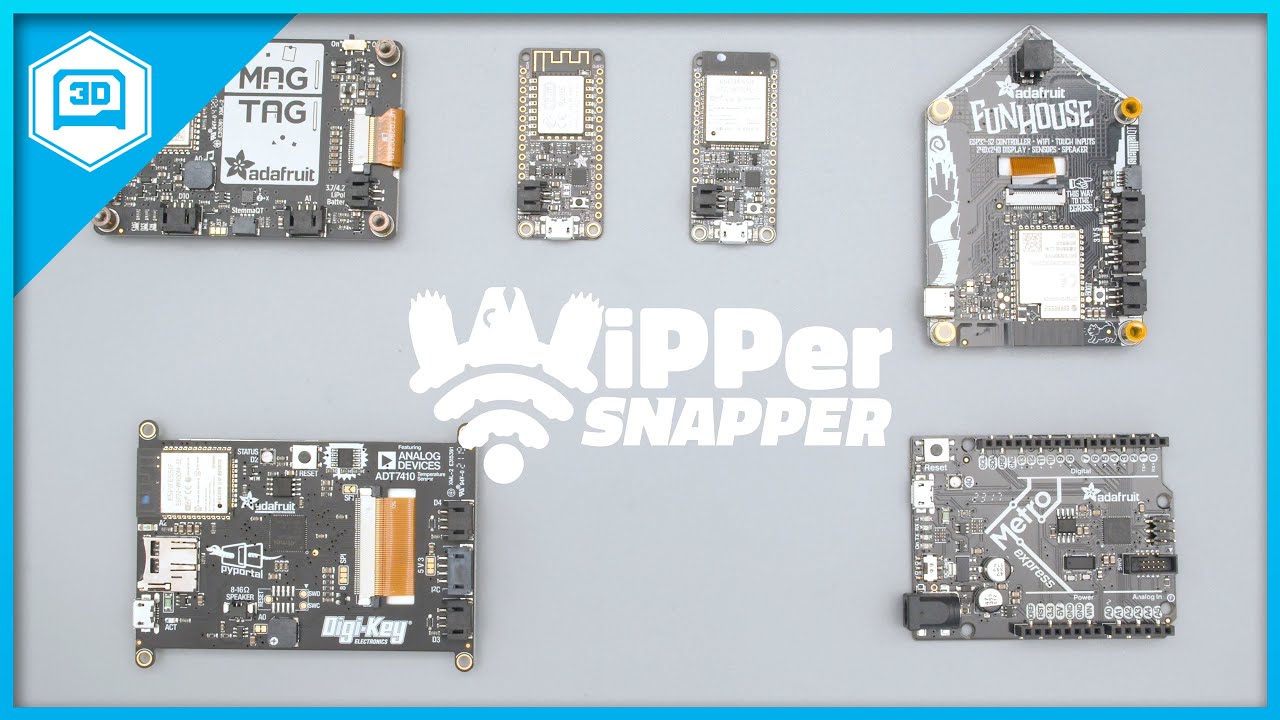
Wippersnapper - Adafruit’s new platform for snapping together an internet-connected electronics project, without writing a single line of code.
https://learn.adafruit.com/quickstart-adafruit-io-wippersnapper/
WipperSnapper is an interface for Adafruit IO, our incredibly easy-to-use IoT platform, designed to turn any WiFi-capable board into an ...
wooden wedge
Congrats!
wooden wedge
I have a WhipperSnapper question: I see peripheral support is currently still limited, but is there a way to add your own stuff until there's support? Like how SquareSpace is all snap-together stuff but you can add your own HTML?
royal rapids
wooden wedge
I have a WhipperSnapper question: I see peripheral support is currently still li...
By stuff, you mean Components/Parts?
GitHub
Tracker for Adafruit.io WipperSnapper Component Requests - GitHub - adafruit/WipperSnapper_Component_Requests: Tracker for Adafruit.io WipperSnapper Component Requests
wooden wedge
royal rapids
By stuff, you mean Components/Parts?
Yes. Like NeoPixels, which were pointed out as not supported yet
royal rapids
If the component is of a analog input, digital input, digital output type, it can be supported. Add a new request to the repo above! But - if the core component is not in yet, such as I2C (work in progress, I'll share more during S&T later 😉 ) and NeoPixels, we can't roll out these component requests yet.
wooden wedge
Gotcha. I'll keep an eye out for additions!
royal rapids
You can't add your own support for it yet because the communication API for the component type needs to be implemented on the Adafruit IO backend, and user's don't have access to that/cant modify it easily
wooden wedge
Ahh
royal rapids
for research purposes - you can see some of the I2C work currently being done in here: https://github.com/adafruit/Wippersnapper_Protobuf/
GitHub
Protocol buffer messages for Adafruit.io WipperSnapper Beta - GitHub - adafruit/Wippersnapper_Protobuf: Protocol buffer messages for Adafruit.io WipperSnapper Beta
wooden wedge
I'm certainly excited for when y'all get I2C up and running!
royal rapids
I am too! It'll open the door for a lot of sensor types. maybe scanning will be up this week.
royal rapids
@restive vine https://github.com/adafruit/Adafruit_Wippersnapper_Arduino/pull/167 https://github.com/adafruit/Wippersnapper_Boards/pull/23
GitHub
Hardware Submission: adafruit/Wippersnapper_Boards#23
Addresses: #162
Screenshot:
What was tested: LED component, hardware registration and configuration
GitHub
Board Name: TinyS2 - ESP32-S2 Development Board
Store URL: https://www.adafruit.com/product/5029
Because you asked how you'd submit a board, here's a hardware definition model PR and the relevant hardware support to get it working with the arduino client
royal rapids
np! I wanted a good example to point people towards
 balmy tiger
can I get an invite to whippersnapper? using magtag
ornate pagoda
balmy tiger
can I get an invite to whippersnapper? using magtag
It's in public beta now, you shouldn't need an invite to begin using it.
 shell star

Adafruit Learning System
New to Adafruit IO WipperSnapper? Start here.
 eternal rune
Hi
Im using C to program an ADXL343 accelerometer into my device
How would I access the D3 bit to turn measurements ON in C

This is how my variables are assigned, but it doesnt work, is there something Im doing wrong with the Bit conversion?
 neat charm
D3 would typically have a mask of 0x08, not 0x03, since that's 00001000 in binary, versus 00000011.
eternal rune
Uh, I might have changed, it was initially 0x08 and that didn't work either
neat charm
How are you using those variables in the code that sets the register?
eternal rune
It's a custom function to config the register
  adxl343_config(iic_addr, adxl343_CTRL_REG1, adxl343_MODE_MASK,
                  adxl343_MODE_STANDBY,
                  adxl343_MODE_STANDBY, adxl343_MODE_ACTIVE); }

void adxl343_active(int iic_addr) {
  adxl343_config(iic_addr, adxl343_CTRL_REG1, adxl343_MODE_MASK,
                  adxl343_MODE_ACTIVE,
adxl343_MODE_STANDBY, adxl343_MODE_ACTIVE); }``` int lbound, int ubound) {
int b = 0;
assert(lbound <= opt && opt <= ubound);
b = adxl343_read_reg(iic_addr, reg);
adxl343_write_reg(iic_addr, reg, (b & mask) | opt); }
Okay, so it looks like the opt parameter is being used as a direct OR of the register, so you'd want to pass in the same 0x08 value for that, too.
eternal rune
It's a very complicated program for a temperature monitoring device, so Im afraid I cant show much of the code but the old accelerometer (MMA845xq) worked perfectly with this code structure.
neat charm
So likeadxl343config(addr, reg1, 0x08, 0x08, 0x00, 0x08)I think. This is a very convoluted API, to be honest.
eternal rune
neat charm
So like```adxl343config(addr, reg1, 0x08, 0x08, 0x00, 0x08)```I think. This is a...
Yea, the code wasn't written by me. My company hired another company to do it for us before I joined and the organization and documentation is really bad.
eternal rune
neat charm
So like```adxl343config(addr, reg1, 0x08, 0x08, 0x00, 0x08)```I think. This is a...
Ill test this and let you know if anything changes, thanks a lot
 still chasm
Not sure if this is the right channel but I have an older Adafruit Feather M0 Wifi with ATWINC1500. I have Arduino IDE working and can push code to the board. The issue I am trying to solve is to get the UF2 bootloader working so I can use other programs like tinygo or assuming circuitPython. They all state once the board is plugged in and I click the reset button twice the board will show up as a USB device on my PC. The PC recognizes when I plug in the device and maps it to a COM port but I don't see any USB devices in File Explorer. So I assume the UF2 support is not working. How can I fix that??
Here is the output from Arduino IDE pushing code to the board correctly.
 graceful sluice
still chasm
Not sure if this is the right channel but I have an older Adafruit Feather M0 Wi...
steel trench
graceful sluice
still chasm
Not sure if this is the right channel but I have an older Adafruit Feather M0 Wi...
steel trench
Are there any plans to add integration with Tasmota or ESPHome?
royal rapids
steel trench
Are there any plans to add integration with Tasmota or ESPHome?
Not currently
 vivid geyser
question for you folks. I wrote a script that grabs input from a couple sensors, and uploads them to Adafruit.IO. It works fine. But when it runs for a few hours, it crashes, and tells me that there is a failed SSL handshake. Here is the really baffling part. It isn't with the first thing it tries to post. I am sending things to 5 feeds. The last time it crashed, it crashed uploading to the 4th feed.
io.publish("FahrenheitTemp", tempsi7021f) io.publish("ReletiveHumidity", humiditysi7021c) io.publish("AirCO2", co2) io.publish("PPM10", pm25Data["pm10 standard"]) io.publish("PPM25", pm25Data["pm25 standard"]) io.publish("PPM100", pm25Data["pm100 standard"])
vivid geyser
152
I think I figured it out. I was leaving the connection to Adafruit.IO open. I added a close, and an open to each cycle (1minute or so per cycle) so that it has a new connection each time. That seems to be working. For now.
We will see what it looks like tomorrow. I never get this to run for more than about 5 hours before it hits an error.
sometimes as little as 20 minutes.
sacred depot
I would like to be invited to the WipperSnapper beta please
 random galleon
It's now in open beta, you don't need an invitation.
Adafruit Learning System
New to Adafruit IO WipperSnapper? Start here.
 drifting heart
I purchased an AdaFruit 24LC32 ([1]), which BTW is actually a 24LC32A - there's an important difference (write protect). I am looking for a Python driver but only found a FRAM driver, which doesn't work ([2][3]). I see an Arduino C++ driver [4]. Is there a Python driver for this device? I've looked but cannot find one. I am running a Pi4. I have other devices on the i2c bus which work. i2cdetect sees the EEPROM at 0x50.
[1] https://www.adafruit.com/product/5146
[2] https://github.com/adafruit/Adafruit_CircuitPython_FRAM
[3]
Traceback (most recent call last):
File "fram_i2c_simpletest.py", line 21, in <module>
fram = adafruit_fram.FRAM_I2C(i2c, address=0x50, wp_pin=eeprom_wp_pin)
File "/usr/local/lib/python3.7/dist-packages/adafruit_fram.py", line 216, in init
with i2cdev(i2c_bus, dev_id_addr) as dev_id:
File "/usr/local/lib/python3.7/dist-packages/adafruit_bus_device/i2c_device.py", line 67, in init
self.__probe_for_device()
File "/usr/local/lib/python3.7/dist-packages/adafruit_bus_device/i2c_device.py", line 171, in __probe_for_device
raise ValueError("No I2C device at address: %x" % self.device_address)
ValueError: No I2C device at address: 7c

If you want to store calibration values, MAC addresses, non-secure access tokens, or other unique identifiers, EEPROM storage is a great option. EEPROM is long lasting, and doesn't need ...
GitHub
CircuitPython/Python library to support the I2C and SPI FRAM Breakouts - GitHub - adafruit/Adafruit_CircuitPython_FRAM: CircuitPython/Python library to support the I2C and SPI FRAM Breakouts

GitHub
Driver for Adafruit's I2C-Based FRAM Breakouts. Contribute to adafruit/Adafruit_FRAM_I2C development by creating an account on GitHub.
vivid geyser
Ok, so I am trying to better understand the adafruit_io module. I went to the ReadTheDocs page, and it tells me I can use adafruit-io.Client like this:
from Adafruit_IO import Client
When I try to do that, it tells me that does not exist. So I loaded the module using *, and then did a dir:
`>>> dir(adafruit_io)
['class', 'file', 'name', 'path', 'adafruit_io', 'adafruit_io_errors']
dir(adafruit_io.adafruit_io)
['class', 'file', 'name', 'version', 'json', 're', 'time', 'AdafruitIO_RequestError', 'AdafruitIO_ThrottleError', 'AdafruitIO_MQTTError', 'repo', 'CLIENT_HEADERS', 'validate_feed_key', 'IO_MQTT', 'IO_HTTP']`
Are the direction wrong, or am I using the wrong thing, or is there something else amiss?
 summer locust
vivid geyser
Ok, so I am trying to better understand the adafruit_io module. I went to the R...
summer locust
vivid geyser
Ok, so I am trying to better understand the adafruit_io module. I went to the R...
from Adafruit_IO import Client works for me. Are you using a linux OS or windows? If you are using Linux try not to confuse python3 w/ python. You can use the command pip3 freeze (on Linux), or pip freeze on (Windows) to view your installed python libraries.
 clever crown
I recently got a MagTag so display a value based on a toggle from a adafruit io dashboard. Though I understand basic programming, I'm new to this world IoT. When working with adafruit io, does the MagTag require arduino or would circuitpython work?
lament sparrow
clever crown
I recently got a MagTag so display a value based on a toggle from a adafruit io ...
circuitpython works with magtag and adafruit io
 cold wedge
I am trying to reuse a featherM0 wifi to access the adafruitio I have been on a year ago but I was using hard coded code and am trying to use the library provided by adafruit but am getting errors and need a second set of eyes to look at this config file:
cold wedge
Sorry, when relooking at the code I saw some errors that I missed in the late night, I will try it again.....
cold wedge
Well, I get a successfulcompile and upload but this code
  // connect to io.adafruit.com
  io.connect();

  // wait for a connection
  while(io.status() < AIO_CONNECTED) {
    Serial.print(".");
    delay(500);
}```just prints a series of periods.
robust panther
drifting heart
I purchased an AdaFruit 24LC32 ([1]), which BTW is actually a 24LC32A - there's ...
We do not have a CircuitPython driver yet.
graceful sluice
cold wedge
Well, I get a successfulcompile and upload but this code
Try adding one of these inside your while loop: Serial.println(io.statusText());
misty leaf
vivid geyser
We will see what it looks like tomorrow. I never get this to run for more than ...
I was experiencing pretty much the same thing. I ended up wrapping my loop in a try/except clause, and under the except clause it just has microcontroller.reset() . So now it still periodically crashes, but it immediately restarts. I'm going on a few months straight without dropping my io stream for more than a minute. It doesn't solve the root problem, but that was beyond my capability.
vivid geyser
misty leaf
I was experiencing pretty much the same thing. I ended up wrapping my loop in a ...
Interesting. I didn't know about the reset function. I will check that out. I have progressed a bit. I have figured out how to check for network connectivity (basicallly ping google DNS), and how to verify if the connection to Adafruit is working. When it isn't I have the error, but even if I put in an io.reconnect() it does not seem to work. I just added a clause to completely disconnect from wireless, and reconnect (even though it works, it could reset the connection), and then re-connect to Adafruit.io. I will see if that fixes it.
misty leaf
vivid geyser
Interesting. I didn't know about the reset function. I will check that out. I...
I'd be interested to see what you come up with. It does bug me a little that my current workaround is just a bandaid
cold wedge
graceful sluice
Try adding one of these inside your while loop: `Serial.println(io.statusText())...
Thanks. I was successful in getting the aht20 to publish. Not sure what I did but fresh rested eyes helped. I'm on Adafruit IO as franklin97355. Thank you and now for outside environment using a BME680.....
vivid geyser
misty leaf
I'd be interested to see what you come up with. It does bug me a little that my ...
I figured out my problem. My code has now been running for 3 days without missing a post with 30 second sleep time. I don't know if you have it already, but I added the 'loop' clause in. Check this page: https://learn.adafruit.com/mqtt-in-circuitpython/advanced-minimqtt-usage. I am curious if that is also your problem. I feel a little silly that I didn't notice that. I read about it early on, and didn't think twice about it. It wasn't until I noticed that all of the sample code has that in it, but not mine. Did some additional reading, and that answered it.
 remote mantle
Hello all, I'm uploading sensor data to adafruit.io every 5 minutes from a huzzah32 running Arduino compiled code. I disconnect and power down WiFi between readings to save power. This seems to work pretty smoothly, but about once a day I have a period where there is no data showing up on the cloud for a few hours. When I look at the serial monitor, the device reports successful connection to adafruit.io and upload of the data as normal for these periods. Anyone seen this issue before?
cold wedge
Question, If I have multiple sensors sending to Adafruit IO (I don't yet) can these use the same AIO key? I'm having trouble logging on with a M0 wifi and get a series of dots and want to make sure I wasn't chasing my own tail, so to speak. Thanks for reading.
graceful sluice
cold wedge
Question, If I have multiple sensors sending to Adafruit IO (I don't yet) can th...
Yes you can use one key for multiple sensors.
cold wedge
OK, I'll look for some other reason, (probably a typo on my part, it has happened)
cold wedge
Trouble with esp32 connecting to Adafruit IO (included config.H too
The example works the same no matter if I edit or try to make it a plain program. * have an ESP32 feather publishing correctly to my dashboard.*
 neon chasm
Hi! I am trying to adapt a pybadge(adafruit) sketch to a esp32 in ARDUINO IDE. The problem is the Arcada library. At some point it uses arcada.timerCallback(...). How can I use something else that works the same for esp32??
I dont know where to ask this...
remote mantle
@cold wedge if you have more than one access point you can try connecting to, I've had cases where an esp32 had a lot of trouble connecting to one and no trouble with another.
remote mantle
remote mantle
Hello all, I'm uploading sensor data to adafruit.io every 5 minutes from a huzza...
Also, if I restart the device it reliably recovers from this. (Not talking about Franklin's issue anymore)
cold wedge
@remote mantle I tried a Feather M0 wifi and got the same outcome.
cold wedge
MQTT worked with the M0 but not the AIO program above.
 robust garden
Hey guys, so I’m trying to send CAN messages using the canio module, but for whatever reason the CAN class seems to be missing from the version of the library I have (I downloaded the latest one). canio.Message is found, but canio.CAN is missing.
I’ve got the Adafruit PyPortal Titano and I’m using CircuitPython 7.
I’m still a beginner when it comes to CircuitPython, Adafruit, etc, so I might just be doing something dumb.
summer locust
👋 Hey all, I'm trying to see if I could send images to adafruit IO w/ my ESP32CAM using MQTT. Is there a tutorial or guide somewhere that I can refer to?
The closest thing I can find is this guide, but it seems to use a raspberry pi instead and use node.js: https://learn.adafruit.com/cloud-cam-connected-raspberry-pi-security-camera
Thank you! 😊
graceful sluice
Did you try reading the API docs? Here's one on publishing image data: https://io.adafruit.com/api/docs/cookbook.html#design-considerations
Basically you're just sending the image to an IO feed as a base64-encoded string.
summer locust
graceful sluice
Basically you're just sending the image to an IO feed as a base64-encoded string...
Ooo thanks, I will take a look
 vagrant fossil
Hi Is the a way to add a static ip
cold wedge
What are you using?
robust garden
robust garden
Hey guys, so I’m trying to send CAN messages using the canio module, but for wha...
Any ideas on this?
graceful sluice
robust garden
Any ideas on this?
You'd have better luck posting this in either #help-with-circuitpython or #help-with-projects. This channel is for Adafruit IO, the IOT solution.
robust garden
Ah ok. My bad
cold wedge
I am using a Feather M0 wifi and wifi101.h to send to Adafruit IO. At times the server (AdafruitIO) gives me notification that The info is offline, not all my feeds but some of it. I have, in the past, checked if my micro was connected but since it is not with my router but the AIO server how do I check and restart the communication if it is corrupt? Thanks.
open schooner
Activity
open schooner
cold wedge
I am using a Feather M0 wifi and wifi101.h to send to Adafruit IO. At times the ...
Restart your MCU. That should restart your script
uncut jay
Hi, does anyone know if right and left volume levels can be controlled individually in bluetooth?
 frail vault
Whippersnapper seems to run surprisingly well on an ESP32-CAM given the small intersection of available GPIOs between the -CAM and the HUZZAH.
 urban trail
Does anyone have an example of creating a working dashboard via the REST API? I'm able to create the dashboard, and a block under that dashboard. But I'm unable to get any feeds associated with the block via the REST API.
graceful sluice
This should return the feeds associates with a block: /api/v2/{username}/dashboards/{dashboard_key}/blocks/{id}
(sample output fragment): "block_feeds":[{"id":1788904}]
remote mantle
remote mantle
Hello all, I'm uploading sensor data to adafruit.io every 5 minutes from a huzza...
Just to update on my issue where my uploads don't appear in the Cloud despite the connection and save completing without error. Putting ESP32 deep sleeps in seems to fix this, similar to how resetting the board would reliably get it out of whatever bad state causes the issue.
urban trail
graceful sluice
(sample output fragment): `"block_feeds":[{"id":1788904}]`
If I configure a block with feeds in the web UI, then I am able to see the block_feeds element with that API call. However I'm unable to populate the block_feeds array from the REST API when creating a new block. I've tried filling the block_feeds element in a few different ways when creating the block. The call to create the block succeeds and I can see a block in the dashboard but it has no feeds associated. When I fetch the block data back using the REST API, the block_feeds section is always empty. I was hoping someone had a simple example showing a complete dashboard creating from the REST API (dashboard, block and feed).
sacred depot
I’m having a heck of a time doing anything with Adafruit.io
I’m using the commands as listed by the read me file. But still callbacks to unused.
Using circuit python with the mu editor
 plush ocean
Hi everyone in this beautiful community. I am trying to install RTOS Nuttx to my Qt PY RP2040, struggling with serial communication. I am using Windows 10 + WSL2 and pico-sdk library. I was stuck with compilation, but I received a verified answer that my progress generates a working file for Raspberry Pi Pico. Nevertheless, it's not working with Qt Py RP2040. Could anyone help me? I would be very grateful.
I received the following answer, which should help me, but honestly, I have no idea how to check whether I am using the correct pins.Probably you are using the incorrect pins when using the serial to get the default nsh, it is very common to happen, users mess with pins and TXD/RXD all the time.
Thank you once more for your time. 🥰'
UPDATE: I had to connect GPIO 1 and GPIO 0 to activate the nsh communication, in case the answer would help somebody 😄
graceful sluice
plush ocean
Hi everyone in this beautiful community. I am trying to install RTOS Nuttx to my...
Wrong channel. Try #help-with-projects
sacred depot
Hi,
I want to configurate SMUX register and I don't know how to switch photodiode (F1 to F8) and gain access to it's value.
Does anyone know how to do it?
I'm using adafruit AS7341.
graceful sluice
sacred depot
Hi,
I want to configurate SMUX register and I don't know how to switch photodio...
Wrong channel. Try #help-with-projects
 quick ether
With the ADS1115 what is the raw output mean? chan.value is what is called but I don't understand what to do with that data. I get the voltage side.
It must mean something. When getting the same voltage the raw is not the same.
Bit output I am thinking. While the raw values are not the same with same voltages I assume they are rounding to two decimal places to post the voltage.
summer locust
Hello 👋. I am getting an MQTT error data missing required value that is showing up on my feed page whenever I try to upload a base64 string from my ESP32 CAM to Adafruit IO.
I am using the following to send my image to Adafruit IO
AdafruitIO_Feed *image_feed = io.feed(IMAGE_FEEDNAME);
String base64Image; //base-64 encoded string to represent a JPG image

...

image_feed->save(base64Image);
- What could be causing this error?
- How do I investigate error messages from Adafruit IO? Is there a log somewhere I can view to get more details?
Thanks! 🙂
graceful sluice
summer locust
Hello 👋. I am getting an MQTT error `data missing required value` that is show...
You make sure your base64Image variable is not null? I don't know of any logging, but you could grab a network sniff to see what's being sent...
summer locust
graceful sluice
You make sure your `base64Image` variable is not null? I don't know of any loggi...
Yup, I double checked the variable by printing it out. I will look into network sniffing, thanks! 🙂
 vast hawk
HI all,
Im having trouble finding examples of how to push to a group feed. ANnone direct me to where I can see an example of this> Trying to set up a weather station example
summer locust
vast hawk
HI all,
Im having trouble finding examples of how to push to a group feed. ANno...
Maybe this tutorial? It is a diy air quality monitor that I use to reference to sometimes https://learn.adafruit.com/diy-air-quality-monitor/overview
Adafruit Learning System
Breathe easy by building an IoT Air Quality Monitor
 sly haven
How does one display temperature in Fahrenheit on an IO dashboard from a Funhouse using Wippersnapper? This seems like an obvious request but I haven't been able to find an answer.
royal rapids
sly haven
How does one display temperature in Fahrenheit on an IO dashboard from a Funhous...
Hi - this is not currently possible but we're looking at ways to do quick unit conversions in future releases (it's still very beta support). Could you add a request for this to this thread: https://forums.adafruit.com/viewtopic.php?f=66&t=180798
sly haven
royal rapids
Hi - this is not currently possible but we're looking at ways to do quick unit c...
That topic is locked and cannot have any replies.
sacred depot
2000 customer service: send complaints to /dev/null 2021: send complaints to a locked thread
royal rapids
sly haven
That topic is locked and cannot have any replies.
I must've locked this by mistake when replying to somebody else. The thread has been unlocked. Sorry!
 young hemlock
anyone know if there are non circuitpython libraries for this sensor

Adafruit Learning System
A sensor to sense the presence of different gasses in the air we breathe.
(only python)
and i also dont really have a circuitpython microcontroller but a LoPy4
keen dirge
Are you using MicroPython? I found this https://github.com/Notthemarsian/CCS811/blob/master/CCS811.py with a google search for "micropython ccs811"
Also you may be better off asking this in #help-with-projects
young hemlock
keen dirge
Are you using MicroPython? I found this <https://github.com/Notthemarsian/CCS811...
i guess so?

 left oriole
Hello all,
I am attempting to publish data to some feeds in my group by publishing a json to the group topic ("/groups/sensors"), but I receive the following error:
"no feeds present in payload, JSON should be in the format: { "feeds": ..., "location": ... }"
I am using the format specified in the mqtt api docs found here: https://io.adafruit.com/api/docs/mqtt.html#publish-to-feeds-in-a-group
The format of my json is as follows:
  "feeds": {
    "sensors.tmp102": "23.500",
    "sensors.ms5611": "24.030"
  },
  "location": {
    "lat": 0,
    "lon": 0,
    "ele": 0
  }
}
which matches exactly to the api docs. I have also tried publishing to a single feed in the json format, with my json formatted as:
  "value": 22.587,
  "lat": 38.1123,
  "lon": -91.2325,
  "ele": 112
}```

with adafruit io showing random characters in the place of the correct data.

Can anyone help? Thankswith adafruit io showing random characters in the place of the correct data.
that sounds weird. are they actually random, or something you haven't looked at closely?
graceful sluice
left oriole
Hello all,
I am attempting to publish data to some feeds in my group by publish...
Also, check your list of feeds to verify the feed keys you're using actually exist. In the attached image, the feed NAME is sensors.tmp102, but the feed KEY is sensors-dot-tmp102.

 safe seal
Hi, folks. I kinda have a newbie question. I have a Trinkey QT2040 with sensors attached. Works great! What can I use to relay/gateway readings from this device via my laptop or say other linux machine via the usb port? I'd like to send them to adafruit.io or similar. Or locally any graph with grafana, etc. What can I use to read its usb serial output basically?
graceful sluice
safe seal
Hi, folks. I kinda have a newbie question. I have a Trinkey QT2040 with sensors ...
"Anything you want to use" is the simple answer. Here's a python fragment that reads from serial:
ser = serial.Serial("COM3", timeout=1) ser.close() ser.open() while True: if ser.inWaiting() > 0: line = ser.readline()
fervent socket
Can you just do
if ser.inWaiting():?
graceful sluice
Maybe. I'm not a python maven
safe seal
graceful sluice
``ser = serial.Serial("COM3", timeout=1)
ser.close()
ser.open()
while True:
if...
Cool, I had no idea I could treat it like a normal serial port. I figured I needed a buffer or something. Thanks this will give me a starting point!
graceful sluice
You're welcome!
neat charm
fervent socket
Can you just do
`if ser.inWaiting():`?
Yep, that'd work too.
left oriole
graceful sluice
> >with adafruit io showing random characters in the place of the correct data.
Sorry, random was a poor choice of words. I'm not sure how to retrieve the actual byte values adafruit io is parsing to have a closer look. The serial output shows the expected value, so I presume the issue is with transmission through the wifi module/ incorrect formatting for adafruit io.
left oriole
graceful sluice
Also, check your list of feeds to verify the feed keys you're using actually exi...
The feed name shows as tmp102 (located in the group sensors) and the key shows as what I was using previously. I will try uploading with "sensors-dot-tmp102" and see what happens. Thanks!
 fervent socket
I think you're in the wrong place. This channel is for adafruit's IoT service called AdafruitIO
 sterile cargo
How can I send data to a server with fona without library?
 tidal orchid
okay
fervent socket
sterile cargo
How can I send data to a server with fona without library?
You'd have to write your own code to mimic what the library you're thinking of does.
 night anchor
fervent socket
I think you're in the wrong place. This channel is for adafruit's IoT service ca...
night anchor
fervent socket
I think you're in the wrong place. This channel is for adafruit's IoT service ca...
thanks
 bitter folio
the jst connector on the feather rp2040 can take up to 5v input voltage?
fervent socket
bitter folio
the jst connector on the feather rp2040 can take up to 5v input voltage?
I'm afraid you're in the wrong place, this isn't for input-output stuff it's for the adafruit IOT service called AdafruitIO.
bitter folio
oook thanks
fervent socket
#general-tech or #help-with-projects is a good place to try
But not both, cross posting is discouraged.
 worn olive
Shot in the dark question: Hi everyone - I have a sensor monitoring program running on a Raspberry Pi (model 3) which has been quite reliable (as in not crashing when running for a period of weeks). I recently added connectivity to Adafruit IO (via these imports): from Adafruit_IO import Client, RequestError, Feed
sorry - hit enter too quickly and noticed that perhaps coincidentally the Raspberry Pi program sometimes crashes after a few days. The Adafruit connection works well - I can see the uploads on my dashboard - but I'm wondering if anyone knows of a possible issue in the Adafruit IO Python library code that could explain this observation?
graceful sluice
sometimes crashes doesn't really provide anything useful for diagnostic purposes. You would get better help if you gave the actual error and better information. Is it always the same error from the same line? Or does one or both vary?
 buoyant prism
worn olive
sorry - hit enter too quickly and noticed that perhaps coincidentally the Raspbe...
buoyant prism
worn olive
sorry - hit enter too quickly and noticed that perhaps coincidentally the Raspbe...
The Pi could lose internet connectivity, or the server might respond with a 503, do you have proper exception handling around the connectivity to the service?
worn olive
Thanks for the comments Coined and Torgny. Coined, regarding your comment, I'm still trying to zero in on the where in the code things fail - actually hangs not crashes - and as it's a pretty intermittent problem so this may take awhile, and Torgny, I have try/except handling around the Adafruit IO calls at the app level and will capture better diagnostic info. Thank you both for your suggestions.
buoyant prism
yup, sometimes you might need to actually just retry the connections
 brisk burrow
Hi guys I have a question. Ive been running a lil code on my ESP8266 which just recieves data from the IO when a specific feed has been updated. However, the io.run() command i excecute every 5 secound is very slow which lags my animated LED strips significantly. Ive read thru the wiki and checked to see in what ways i could speed up the command, but everything i try dosent seem to work. Anyone know how this works?
stuff to do with io.run(busywait_ms,fail_fast);
brisk burrow
Shame
robust panther
brisk burrow
Hi guys I have a question. Ive been running a lil code on my ESP8266 which just ...
if you are fetching every 5 seconds, you may be being rate-limited, if you are using the free adafruit.io
brisk burrow
im fetching every 5 secounds but the actual command takes a long time
it just lags my lights

specificaly this bit here
nvm
the parameters work
something i did last time was wack i guess
robust panther
brisk burrow
the parameters work
did you set fail_fast to true, or false?
brisk burrow
true
idk if thats what is causing it to be fast
but its working
well
also i set busywaittime to 20ms
seems to be not noticable
and still works
sooo
i guess issue solved
or maybe my internet is just faster at 1am
robust panther
I will point the right person to this to see if there's any followup to be done
brisk burrow
cool 🙂 thanks
royal rapids
brisk burrow
Also make sure that the io.run() call is the first thing in your loop() function.
brisk burrow
royal rapids
Also make sure that the `io.run()` call is the first thing in your `loop()` func...
Any specific reason for that?
My io.run() is just in an EVERY_N_SECOUNDS{} function
It works now so should be all good
royal rapids
brisk burrow
My io.run() is just in an EVERY_N_SECOUNDS{} function
Yep! io.run also pings the adafruit IO MQTT server, to tell the server the device is still connected and online. you can think of it like a heartbeat.
IIRC there's no way to set the "MQTT KeepAlive timeout" within Adafruit IO Arduino. It's set (hardcoded) to..
GitHub
Arduino library to access Adafruit IO from WiFi, cellular, and ethernet modules. - Adafruit_IO_Arduino/AdafruitIO_Definitions.h at master · adafruit/Adafruit_IO_Arduino
60000ms which is every 60 seconds.
 deep halo
What is a switch block?
fervent socket
@deep halo it's a built in feature of many languages.
Which language are you using?
safe seal
Hi, friends. I was wondering if someone could point my to reading data from a serial device and sending it to adafruit io. In this example I have a RP 2040 Trinky and a temp/humidity sensor. I've got it displaying output great in MU. But now I'd like to read the serial output and ship it to adafruit.io. Any recommendations on a tutorial for this?
graceful sluice
safe seal
Hi, friends. I was wondering if someone could point my to reading data from a se...
Like one of these?

GitHub
Adafruit IO Python Client Library. Contribute to adafruit/Adafruit_IO_Python development by creating an account on GitHub.
safe seal
graceful sluice
https://github.com/adafruit/Adafruit_IO_Python/tree/master/examples/api
Sort of. I hoped to find one that covered covered reading clean data from the serial device, then sending it. It looks like this one only covers the data you have already acquired. I tried reading from the device with: https://pyserial.readthedocs.io/en/latest/pyserial_api.html but am getting extra characters inconsistently. Especially /b and /n (newline probably?) but there is no rhythm it while the output in Mu looks clean.
graceful sluice
That's one of the worst bits of "API documentation" I've ever seen. God awful. Yeah, \n is newline. \b is backspace, I think
safe seal
graceful sluice
https://github.com/adafruit/Adafruit_IO_Python/tree/master/examples/api
Basically I want my rp2040 to read sensor data, laptop read the data and to act as a relay for lack of a better term, then my laptop to send it to adafruit.io
safe seal
graceful sluice
That's one of the worst bits of "API documentation" I've ever seen. God awful. Y...
It was sufficiently confusing to get it to work at all. 🙂
graceful sluice
safe seal
It was sufficiently confusing to get it to work at all. 🙂
Yeah, that's what I thought. I gave up on it pretty quick.
This looks like it might be a decent starting point, if you're determined to use pyserial: https://stackoverflow.com/questions/676172/full-examples-of-using-pyserial-package

Stack Overflow
Can someone please show me a full python sample code that uses pyserial, i have the package and am wondering how to send the AT commands and read them back!
safe seal
graceful sluice
This looks like it might be a decent starting point, if you're determined to use...
Definitely helps, I can fiddle with the flow control and what not. Do you know what baud I should use? 115200?
graceful sluice
I never fiddled with the rate, but this doc appears to indicate 115200 is correct: https://learn.adafruit.com/adafruit-feather-rp2040-pico/advanced-serial-console-on-windows#install-putty-2977915-7
 safe seal
graceful sluice
I never fiddled with the rate, but this doc appears to indicate 115200 is correc...
safe seal
graceful sluice
I never fiddled with the rate, but this doc appears to indicate 115200 is correc...
Thank you, I really appreciate. I'll give this another shot!
graceful sluice
Good luck!
robust panther
safe seal
Hi, friends. I was wondering if someone could point my to reading data from a se...
Instead of sending over a hardware UART channel, you can use the secondary "data" serial channel, explained here: https://learn.adafruit.com/customizing-usb-devices-in-circuitpython/circuitpy-midi-serial#usb-serial-console-repl-and-data-3096590-12
 forest tangle
Hello, does anybody know how you would upload an image taken from a TTL Serial Camera https://learn.adafruit.com/ttl-serial-camera/overview to Adafruit IO? I'm using the ESP8266 Feather with Arduino. I've gotten the camera to take an image, but I'm not sure how to upload it.

 bitter nacelle
Hey folks! I've got an ESP32-S2 sending temp and pressure data every minute to Adafruit IO. It's fine an overwhelming majority of the time, but every now and again, the handshake will fail, and when it does, the code stops running. It's usually around midnight, so I am assuming that it is server maintenance, or maybe ISP maintenance on my end. Anyway, the question is this: What is the proper way to handle this, so that the thing restarts and goes on with it's life?
 broken mesa
Hi! I'm receiving data from some MQTT topic I'm subscribed to, but whatever text I send i cannot get back more than exactly 115 characters.
#define SUBSCRIPTIONDATALEN 1024 so that shouldn't be an issue. Any idea?
graceful sluice
bitter nacelle
Hey folks! I've got an ESP32-S2 sending temp and pressure data every minute to A...
assuming that it is server maintenance
Probably not, or everyone would be seeing it
graceful sluice
broken mesa
Hi! I'm receiving data from some MQTT topic I'm subscribed to, but whatever text...
What's your code look like?
graceful sluice
forest tangle
Hello, does anybody know how you would upload an image taken from a TTL Serial C...
I'm a little surprised I can't find a learn guide on this. This short paragraph is the best I can see, atm: https://learn.adafruit.com/all-the-internet-of-things-episode-four-adafruit-io/adafruit-io-front-end-dashboards#step-3022339

Adafruit Learning System
All the Internet of Things - Episode Four: Adafruit IO
The Image element is good if you have base64-encoded images in a feed, it will decode JPG files automatically, great if you’re making a remotely viewable camera feed.
buoyant prism
Howdy, I have a dashboard that's displaying PM 2.5 values and temperature and humidity data. Is there any way to add the degree sign and C to the temperature and a % percentage sign to the humidity?

Like, for instance, what would be pretty sweet is if we could toggle to something like static text, but we could use placeholders. Just simple {value} and that's it.
That way we could write {value}°C or {value}% for instance. This would show 22.3°C and 45.1% respectively.
broken mesa
graceful sluice
What's your code look like?
#include "Adafruit_MQTT.h"
#include "Adafruit_MQTT_Client.h"

Adafruit_MQTT_Client mqtt(&client, AIO_SERVER, AIO_SERVERPORT, AIO_USERNAME, AIO_KEY);
Adafruit_MQTT_Subscribe fax_input = Adafruit_MQTT_Subscribe(&mqtt, AIO_USERNAME "/feeds/fax-input");

void setup() {
  mqtt.subscribe(&fax_input);
}

void loop() {
  MQTT_connect();

  oldRead = read;

  Adafruit_MQTT_Subscribe *subscription;
  while ((subscription = mqtt.readSubscription(1000))) {
    if (subscription == &fax_input) {
      read = (char*) fax_input.lastread; // Only getting first 115 chars
    }
  }

  if(!mqtt.ping()) {
    mqtt.disconnect();
  }
}
Ignored non-MQTT parts
royal rapids
buoyant prism
Howdy, I have a dashboard that's displaying PM 2.5 values and temperature and hu...
You'd need to send the value as a string with the "%" sign, such as "45.1%"
There's no way of appending it from the block
We do have a thread for block suggestions, https://forums.adafruit.com/viewtopic.php?f=56&t=130408, feel free to add a post there. We'll be doing a full-read through of the suggestions posted there this upcoming month as we plan development in 2022.
buoyant prism
Thanks. I don't want to dirty my data with text that way. Makes it really hard to read it in and parse it anywhere else.
royal rapids
Understood + agreed. Please add it a suggestion there, it's something I'd like to see too!
buoyant prism
Will do.
royal rapids
I'm interested in this kind of "advanced settings" for blocks and feeds. Things like unit conversions or appending units.
buoyant prism
It's not like it's a super hard thing to implement either.
broken mesa
broken mesa
```cpp
#include "Adafruit_MQTT.h"
#include "Adafruit_MQTT_Client.h"
Adafruit_MQ...
Any idea about why I cannot get back more than exactly 115 characters from the MQTT feed?
buoyant prism
royal rapids
I'm interested in this kind of "advanced settings" for blocks and feeds. Things ...
The topic is locked.
 peak spire
Hi i have a question to the NeoPixel Library. I want to control a Ws2812b strip with my raspberry pi and I already learned the basics of doing that. My question is if somebody does have a .py file with a Rainbow wave effect and if yes if he/her could send me that because I'm not able to do that.
robust panther
peak spire
Hi i have a question to the NeoPixel Library. I want to control a Ws2812b strip ...
Many different animations are available in our CircuitPython animations library. You can use it with adafruit-blinka to use the code directly, or adapt them to your own code. https://learn.adafruit.com/circuitpython-led-animations
a better channel for this is #help-with-linux-sbcs
graceful sluice
broken mesa
Any idea about why I cannot get back more than exactly 115 characters from the M...
I thought I might get an answer for you from the documentation of the Adafruit MQTT library, but unfortunately it appears no documentation exists.
 charred pendant
@ornate pagoda I found another project that references the Image Converter: https://learn.adafruit.com/pyportal-nasa-image-of-the-day-viewer/code-pyportal-nasa-image-viewer
But I don't see the code to call it in the project bundle either. So weird
Oh, it does include the code: https://circuitpython.readthedocs.io/projects/pyportal/en/latest/api.html
So I'm guessing the PyPortal hardware is the only one out there has that ability built into its class
 frozen beacon
This may be a magtag question and not a IO question: how do I do multiple get the value of multiple adafruit IO feeds using the magtag simple interface? My code for a single feed looks like this: (adapted from the twitter example)
from adafruit_magtag.magtag import MagTag
import json

ADAFRUIT_IO_USERNAME = <id>
ADAFRUIT_IO_KEY = <key>
ADAFRUIT_FEED_NAME = <feed name>

def text_transform(val):
    return "temperature: {0:.1f}C".format(float(val))

hdr  = {"X-AIO-Key":ADAFRUIT_IO_KEY}
url  = "https://io.adafruit.com/api/v2/{0}/feeds/{1}/data/last".format(ADAFRUIT_IO_USERNAME,ADAFRUIT_FEED_NAME)
path = ["value",]
magtag = MagTag(headers=hdr,url=url,json_path=path)

magtag.network.connect()

magtag.add_text(
    text_position=(
        (magtag.graphics.display.width // 2) - 1,
        (magtag.graphics.display.height // 2) - 1,
    ),
    text_scale=1.5,
    text_transform=text_transform,
    text_anchor_point=(0.5, 0.5),
)

try:
    resp = magtag.fetch()
except (ValueError, RuntimeError) as e:
    print("Some error occured, retrying! -", e)
magtag.exit_and_deep_sleep(10)
Yeah... kinda vague.
For now I think I can bodge something to bypass this issue, since it's not a critical project.
But thanks anyway 😄
royal rapids
frozen beacon
This may be a magtag question and not a IO question: how do I do multiple get th...
You'll want to create a group of multiple feeds. The HTTP API for groups is documented here: https://io.adafruit.com/api/docs/#groups
frozen beacon
royal rapids
You'll want to create a *group* of multiple feeds. The HTTP API for groups is do...
Duh! of course!
buoyant prism
Can you please move this to #help-with-circuitpython
This channel is for the Adafruit IO API service
 remote glade
OK. Yes, Sorry,
buoyant prism
No worries! I think it's the io that tricks people
 queen belfry
Hello,
I'm a newby with Arduinos and have a problem with my 3.5inch tft lcd shield from WaveShare (ILI9486) . (and I'm sorry for my english)
I can draw something on my Display, I can read my sd-card, i can read if a specific file is on the sd card, but i cannot open it/draw the picture.
Could somebody help me?
My Inclusion
#include <Arduino.h>

#include <SPI.h>

#include <ILI9486_SPI.h>

#include <Adafruit_GFX.h>
#include <MCUFRIEND_kbv.h>
#include <Waveshare_ILI9486.h>

#include <SdFat.h>
#include <Adafruit_ImageReader.h>
My tft and my sd declaring
namespace
{
  Waveshare_ILI9486 Waveshield;
  Adafruit_GFX &tft = Waveshield;
}

SdFat SD;
Adafruit_ImageReader reader(SD);
The Part which is not working:
ImageReturnCode stat;
stat = reader.drawBMP("/logoMuV.bmp", tft, 0, 0);
tft is marked red: "A reference of type "" Adafruit_SPITFT & "" (not constant qualified) cannot be initialized with a value of type "" Adafruit_GFX "". C / C ++ (434)" (translated from German)
fervent socket
queen belfry
Hello,
I'm a newby with Arduinos and have a problem with my 3.5inch tft lcd shie...
Hey there, I'd point you to the #help-with-arduino channel. This channel is for help with the adafruit IoT service AdafruitIO. Common mistake. And your English is fine 🙂
queen belfry
Ok thank you! 🙂
buoyant prism
Are there any weather icons/fonts available for the MagTag for Dark Sky Weather? I've seen usage of https://www.alessioatzeni.com/meteocons/ but they don't look like what's on the IO pages when I click to view a location.
buoyant prism
Do these names correspond to the Dark Sky icon names?
clear-day
clear-night
cloudy
fog
hail
partly-cloudy-day
partly-cloudy-night
rain-snow-showers-day
rain-snow-showers-night
rain-snow
rain
showers-day
showers-night
sleet
snow-showers-day
snow-showers-night
snow
thunder-rain
thunder-showers-day
thunder-showers-night
thunder
wind
I was trying to find any docs on that, but since Apple bought Dark Sky they've taken down the documentation and whatever else.
Oh, I think I found them!
http://erikflowers.github.io/weather-icons/
 molten elk
I just had the same problem occur for me due to a lapsed (1 day) account. I've sent a note to Adafruit IO support but it seems like an auto re-enablement when a user has a valid payment source makes sense? I can log it as a feature request if that is helpful. I'm sure this is an edge case but payment issues do occur.
royal rapids
buoyant prism
Oh, I think I found them!
http://erikflowers.github.io/weather-icons/
This is it!
royal rapids
molten elk
I just had the same problem occur for me due to a lapsed (1 day) account. I've s...
We've responded to this request via IO Support (io.adafruit.com/support), please check your inbox.
I'll bring this edge-case up to the rest of the team, as well.
buoyant prism
phew, yeah, that was a wild search through the archives... do you know if there's any official list for the weather icon names that the API returns?
Also, I think I read that EOL is approaching for DarkSky some time in 2022?
 leaden meteor
Hello! I'm a bit inexperienced with circuitpython and WipperSnapper. I ran a successful test with a feather ESP32-S2 onboarding WipperSnapper and pushing AHT20 readings to my dashboard via i2c.
I want to push all of my other i2c device readings/wing functionality, but I know WipperSnapper is in beta with limited options. It may be my ignorance, but can I run a .py file that also connects to other i2c devices that uplink to IO with additional readings? I might need to brush up on the documentation more.
royal rapids
leaden meteor
I want to push all of my other i2c device readings/wing functionality, but I kno...
You can not do this yet, we'll be adding more I2C wings/devices to WipperSnapper starting this month.
royal rapids
It does, it runs as a "firmware" just like CircuitPython does.
royal rapids
leaden meteor
like an exclusive evironment
yup!
@leaden meteor We're taking component requests (for the time being) over at https://github.com/adafruit/WipperSnapper_Component_Requests/issues/new/choose. Soon we'll have instructions about how users can add their own (this is what we're working on "behind-the-scenes" - breaking a bunch of Wippersnapper's component api apart so its user-contributed as well as adafruit-contributed)
leaden meteor
Oh that's awesome! I'm working on a HUGE adafruit based project, so I wanted to really abstract all of adafruits products/ services and I have so many i2c devices that would help me do quick protypes.
royal rapids
We aren't ready for user-submissions to this yet, we're still finalizing the tools. (Preview of what the format looks like, for the curious: https://github.com/adafruit/Wippersnapper_Components/blob/main/components/i2c/aht20/definition.json)
royal rapids
leaden meteor
Oh that's awesome! I'm working on a HUGE adafruit based project, so I wanted to ...
Perfect - that's the idea 🙂 Let us know on the Component Requests issues tracker which ones you'd like added .
leaden meteor
Will do! Thanks for the direction
royal rapids
@leaden meteor for any other questions, bugs or feature requests (if nobody's around here), feel free to submit over at io.adafruit.com/support
👍
molten elk
I've created a few reactive triggers using a "contains" evaluation. In the Triggers list, they are listed as "If [FEED] is "X"..." but wouldn't a better description be "If [FEED] contains "X"..."?
it's not clear from the trigger list description if it will do what I want it to do
royal rapids
molten elk
I've created a few reactive triggers using a "contains" evaluation. In the Trigg...
Yup, you're correct.
should actually be "if feed's last value is X"
molten elk
royal rapids
should actually be "if feed's last value is X"
contains != is ?
graceful sluice
a = "These are the times"
a.contains("are") == true
a.equals("are") == false
 vestal flume
I bought a funhouse, and set an Adafruit.io account. So i am having problems with step 1. My pc does not recognize the board and i can't find a driver after searching Adafruit instructions for the last hour.
robust panther
vestal flume
I bought a funhouse, and set an Adafruit.io account. So i am having problems wit...
What OS is your PC running?
vestal flume
Windows 10 i know i shouldn't need a driver but i get the little caution symbol all the same.
robust panther
That's odd. You don't need a driver. Could you screenshot the issue?
Try another USB cable, possibly, and also don't use a USB hub, if you are using one.
vestal flume
Tested the cable it is a data and works with other devices, Don't use the hub, ? then what.
 robust panther
does a BOOT drive show up when you double-click?
Did you do this yet? https://learn.adafruit.com/adafruit-funhouse/install-uf2-bootloader
vestal flume
yes
robust panther
yes, BOOT drive, or yes, install UF2 bootloader?
vestal flume
I don't find this clear, yes to holding down the boot and reset button
this is how i got the other device and port to come up in windows
robust panther
unplug and replug the board. Then double-click the reset button. Do you see a <something>BOOT drive?
as a new disk drive?
vestal flume
yes i get that
robust panther
OK, then you can then download the7.1.0 CircuitPython UF2 from here: https://circuitpython.org/board/adafruit_funhouse/ and then drag it to the BOOT drive. After a few seconds, a CIRCUITPY drive should appear, and you're off to the races.
Use the .uf2, not the .bin
vestal flume
good, thank. i started that way, and then saw the wippersnapper and then curffel.
One last, is this the right place to ask this help?
robust panther
for circuitpython in general #help-with-circuitpython is better. If you have adafruit.io issues specifically, this is better, but not as well watched
vestal flume
Ok, thanks.
 frail badge
Hello all. First post. Been watching since tvbgone make.
I'm not sure if this is the correct place. I'm trying to get a new sensor onto the dashboard. I've put in around four hours and read over every reference to it on this discord. I have been running several of another model for quite some time and it's been going great. I'm only at "tutorial success" at this point and no one has made one for the sensor I want to onboard with arduino, only circuitpython. Can I bring it up here?
keen dirge
frail badge
Hello all. First post. Been watching since tvbgone make.
I'm not sure if this is...
This is a good place to ask if you are looking for help setting up your dashboard. if you are looking for help with the arduino code, then #help-with-arduino would be better. Once you post your question it just may take some time before anyone who thinks they can help responds. Good luck!
frail badge
keen dirge
This is a good place to ask if you are looking for help setting up your dashboar...
Thank you. I appreciate the clarification. Sometimes my issues cross over many areas. I will post there.
molten elk
is there a list of i2c components supported by Wippersnapper?
sacred depot
SSL/TLS certificate problems with adafruit_requests. requests.get ->The connection to the server was established, but then stop and result in->RuntimeError: Sending request failed Some solutions on it or a hint how to solve?
keen dirge
molten elk
is there a list of i2c components supported by Wippersnapper?
maybey this https://github.com/adafruit/Wippersnapper_Components/tree/main/components/i2c also at the bottom of this page https://github.com/adafruit/Wippersnapper_Components/tree/main/components/i2c I have no idea how you access them, though....
royal rapids
molten elk
is there a list of i2c components supported by Wippersnapper?
Currently only the AHT20
The repo @keen dirge linked isnt ready for user submissions juuust yet as we're still finalizing the format and tools around it. It's getting close but we have a few more plumbing things to do around this both on the backend and the device-side. 🚧
For now (and the future) - everything in the component picker on the Wippersnapper device page is an available component.
keen dirge
royal rapids
The repo <@!343570430042308609> linked isnt ready for user submissions juuust ye...
Sorry about that. I just saw it in the repo but did not know what to do with it....
hollow horizon
Hello yall, so i have a Wemos d1 mini attached to a 128x64 oled screen, ledstrip and a potentiometer. And i want that if i press a button on the dashboard of adafruit io that it does a pattern on the ledstrips and show something on the oled screen. Everything works but its very inconsistent 2 of the 10 times it works but the other ones it doesnt do anything. Any tips?
Nvm i think i found the problem, i had too many feeds
Its still lagging :/
I have to press the button multiple times for it to work
robust panther
hollow horizon
Its still lagging :/
If you are not polling the button when it is pressed, you might miss it. Take a look at the keypad module, which registers keypresses in the background. That way you will not lose any. But if you are still doing something that takes seconds, it won't interrupt what's happening.
urban sigil
hm... any known issues with io right now? I'm seeing 'MQTT ERROR: error saving data on flaviof/feeds/home-humidity.garage, Invalid stream record type, it should be raw DynamoDB data'
 fast shoal
I'm having issues as well
Whatever was happening seems to be done for me, things are working normally again.
urban sigil
+1
 wind pelican
Hello, I am new to coding all together, so please bare with me as I am still learning. I just got a brand new Trinket m0 and fear I may have broken it already. I was learning how to use program it using Arduino IDE, I copied and pasted the sample code into IDE, hit upload, and now the little red LED light is blinking like it should, but it ejected itself and no amount of unplugging and plugging back in helps. I have also tried double clicking the reset button and it pulled up the bootloader once, and then it disappeared, never to be seen again.
So, Windows still recognizes that there is something plugged in, but the device nor the bootloader is showing.
Im really afraid that I have already fried this thing
The neopixel on it is also a solid pink
so i just happened to be clicking the button several times and the bootloader finally showed up.
 west helm
Yeah, it can take a few tries to get the click pattern dialed in
wind pelican
so I got the bootloader to show, how do I get the trinket itself to show as a usb device so I don't have to keep pressing the button to get to the bootloader?
keen dirge
With an Arduino sketch loaded, it will not show up as a USB device. You need to double tap reset to go back to the bootloader, but you should be able to load a new sketch without manually going to the bootloader
If you put CircuitPython on it, it will show up as a USB device.
@wind pelican these questions might be better in #help-with-arduino if you are using Arduino. This channel is more for accessing the Adafruit IO website
or #help-with-projects if you are looking for more general help.
wind pelican
Oh I am sorry, I will move my questions to that channel.
keen dirge
wind pelican
Oh I am sorry, I will move my questions to that channel.
It is not a problem at all. I just want your questions to get to the best audience! Keep asking!
sterile cargo
hello, I am trying to send data to mysql server but doesn't work
[22:39]
here is my code
[22:39]
import busio
import board
import time
port = busio.UART(board.TX, board.RX, baudrate=115200)
port.write(b'AT\r\n') # verificam conexiunea
time.sleep(1)
print(port.read())
port.write(b"AT+CWMODE=3\r\n") #trecem modulul in modul wifi
time.sleep(1)
print(port.read())
port.write(b'AT+CWJAP="test","12345678"'+b"\r\n") #ne contectam la adresa
time.sleep(1)
print(port.read())
port.write(b'AT+CIFSR'+b"\r\n") #ne contectam la adresa
time.sleep(1)
print(port.read())
port.write(b'AT+CIPSTART=0,"TCP","licenta2022.000webhostapp.com",80'+b'\r\n')
time.sleep(0.5)
print(port.read())
port.write(b'GET /data.php?lat=50&lng=50&Vbat=5&temp=5&umid=2&pres=3&rgas=2&alt=1'+b' HTTP/1.0\r\n\r\n' + b'Host: licenta2022.000webhostapp.com'+b'\r\n')
time.sleep(1)
print(port.read())
[22:39]
can someone help me?
neat charm
There's kind of a million things that might be going wrong there. Do the port.read() commands print out any meaningful errors? Do you see the GET request in your server logs?
hollow horizon
Anyone else experiencing that adafruit io stops working after like 10 min? I have two subscriptions in my loop. And everything works fine in startup but after like ~10 min it stops recieving my commands
The only thing i have in my dashboard is a text box which sends text to adafruit
hollow horizon
maybe the arduino is overflown
or idk how u call that
but the number at my subscription in the loop is 1 cuz normally it has a wait interval of 500 but that fricks up my leds. I constantly need to update the leds but with a interval of 500 it doesn't look good
so i kinda want two loops
one that loops the subscription with a interval of 500ms and another one that does the les script of 1ms interval
sterile cargo
neat charm
There's kind of a million things that might be going wrong there. Do the `port.r...
My esp8266 is broken, I want to buy another, what module just for wifi can I buy?
hollow horizon
Okay so i found a error, this happens after like 5 min. What could be causing it?
 hollow horizon
It did it again, didnt blur it out because i dont think its neccesaray
 hollow horizon
It worked for like 10 hrs now but now it stopped again
 fickle crystal
Hi there! I have an Adafruit Pygamer and am wondering how to change the colours of the 5 neopixels? I would like to change them so that they are displaying 5 different colours (rather than just all red.) And is it possible to keep the neopixels like this while a game file is on loaded on the Pygamer? Thanks
robust panther
fickle crystal
Hi there! I have an Adafruit Pygamer and am wondering how to change the colours ...
You can use the neopixel library and control board.NEOPIXEL, which is a 5-long NeoPixel string. You can do whatever you want with it.
 topaz tartan
Hi, not sure if this is the right channel for my question.
I want to extend a Stemma QT / Qwicc cable from a sensor by soldering an additional 3m of length in between. Is this a problematic length?
ornate pagoda
topaz tartan
Hi, not sure if this is the right channel for my question.
I want to extend a S...
Not the best channel for this. #help-with-projects would be better. We discourage crossposting in general, but in this case it's fine so your question will get answered.
fast shoal
I have a few ESP32-S2 Feathers that I've set up to be air quality monitors, and I've been having an issue where they'll occasionally (usually between 1 day to 1 week of continuous operation) lose the WiFi/Adafruit IO connection (which is reasonable and to be expected), but are not able to reconnect unless I reboot the microcontroller. Has anyone encountered issue like this? If so, how did you work around it? (EDIT: I should have mentioned this is using Arduino)
Usually, once a disconnection occurs, the AdafruitIO library will try to reconnect, but is never able to.
restive vine
fast shoal
Usually, once a disconnection occurs, the AdafruitIO library will *try* to recon...
You could probably add a timeout and instruct it to do a soft reboot of it can’t connect in that timeout period
robust panther
you can do a hard reset with NVIC_SystemReset()
hmm, well, maybe not on ESP32-S2, but there is an equivalent ESP-IDF call
fast shoal
Okay, that's something I can look into
One thing that's puzzling is that I have one other Feather I'm using that just listens for updates to a feed and turns a lamp on and off. This particular board has never had this issue somehow, even though most of the critical code is identical. The only thing that I can think of is that I haven't updated the firmware on that particular device since right after the Feather ESP32-S2 came out. I wonder if something changed in either Adafruit IO or the Arduino core since then to introduce this issue, or if it's something specific to my network setup 🤔
royal rapids
fast shoal
I have a few ESP32-S2 Feathers that I've set up to be air quality monitors, and ...
Chiming in - same idea as what was proposed above, you'd want to do a watchdog timer (WDT) reset if you lose connection (a reference function: https://github.com/adafruit/Adafruit_MQTT_Library/blob/master/examples/adafruitio_secure_esp8266/adafruitio_secure_esp8266.ino#L111)
Adafruit IO WipperSnapper uses the SleepyDog Arduino Library to perform a watchdog reset when it loses connection or if a device gets forcibly disconnected from AIO (https://github.com/adafruit/Adafruit_SleepyDog). SleepyDog is compatible with ESP32-S2 and you'd want to check out the BasicUsage example for implementaiton info (https://github.com/adafruit/Adafruit_SleepyDog/blob/master/examples/BasicUsage/BasicUsage.ino).
fast shoal
Oh interesting. I actually implemented my own timeout after I detect the connection is lost, and then just call ESP.restart()
royal rapids
That's what sleepydog does "under the hood" 🙂
fast shoal
Nice
royal rapids
Nothings changed in Adafruit IO, we have 100% uptime on both IO API and IO MQTT over the past 90 days (https://status.adafruit.com/)
fast shoal
Oh yeah sorry, I think when I said something changed I meant with the Arduino library
royal rapids
Adafruit IO Arduino hasn't been updated in a while
fast shoal
I tried to give it a look, but I didn't see any changes that would cause what I'm seeing
yeah I just saw additions for other boards
royal rapids
The ESP32 Arduino board support package was updated late december (https://github.com/espressif/arduino-esp32/releases), that'd be the best place to start if you're experiencing wifi/networking reliability issues within an existing codebase imo
fast shoal
Oh thanks! That was the next thing I was gonna look into, but it will probably not be until this evening or tomorrow evening before I'll get to hack around on it some more
Also, I will look over the watchdog stuff as well and probably go that route
royal rapids
np, happy hacking and feel free to tag me in here though our AIO support forums are checked more regularly (https://forums.adafruit.com/viewforum.php?f=56)
fast shoal
That actually would make some sense if it was the core. I checked the last time I modified the files on the device I have that is resilient to disconnection, and it was about mid-november
royal rapids
You could roll back the board support package ("core") to the previous version
but I think the watchdog timer is a better route to take here 🙂
fast shoal
I'm probably gonna do both lol, if I can find the time
I'll update the firmware to use watchdog on all of them, but maybe roll back the core on one of them
if I can verify that the issue was introduced between versions that's at least a little bit of a clue
and until then watchdog is a nice failsafe
Thanks for the discussion 
 quaint bobcat
What's a good way to switch between 2 input signals (signals are <7kHz, switched here and there... once a minute) going into 1 input on a feather m4? They do not need to be combined, just switched between 1 or 2. I cannot separate the signals into 2 separate input pins. I found this latching relay module : https://www.adafruit.com/product/2923 . Any better ideas?

A Feather board without ambition is a Feather board without FeatherWings! This is the Latching Mini Relay FeatherWing. It gives you power to control, and control over power. Put ...
neat charm
quaint bobcat
What's a good way to switch between 2 input signals (signals are <7kHz, switched...
Are they analog or digital signals?
 subtle knot
This is probably an idiot question- sorry if it is, but i'm trying to use an ethernet featherwing to interface to AIO and i'm getting a 'SSL/TLS' error- i understand that circuitpython can't do SSL/TLS, but how can an airlift device get around this? and since circuitpython is adafruits flagship platform (i think?) how can it ever work with AIO ? Thanks in advance for any insight!
quaint bobcat
neat charm
Are they analog or digital signals?
These are clock signals, topping off at 7khz. 3vpp.
 floral rampart
subtle knot
This is probably an idiot question- sorry if it is, but i'm trying to use an eth...
floral rampart
subtle knot
This is probably an idiot question- sorry if it is, but i'm trying to use an eth...
To connect to the internet using CircuitPython and the ethernet featherwing, make sure you have all the libraries installed on your feather https://learn.adafruit.com/ethernet-for-circuitpython/overview
The ethernet featherwing is not an airlift though, the name applies only to the WiFi boards using ESP chips.
From the guide:
"Note: SSL/TLS connections are not supported by CircuitPython at this time. You will only be able to make insecure requests to web servers with this library. ESP32 WiFi-based solutions have integrated TLS so please use that if you need TLS connectivity!"
https://learn.adafruit.com/adafruit-io-basics-airlift
"Having WiFi managed by a separate chip means your code is simpler, you don't have to cache socket data, or compile in & debug an SSL library. With AirLift, you can send basic but powerful socket-based commands over 8MHz SPI for high speed data transfer. The ESP32 can handle all the heavy lifting of connecting to a WiFi network and transferring data from a site, even if its using the latest TLS/SSL encryption (it has root certificates pre-burned in)."
robust panther
subtle knot
This is probably an idiot question- sorry if it is, but i'm trying to use an eth...
@floral rampart I have rewritten that warning: "Note: SSL/TLS connections are not supported by the Wiznet5k library at this time...."
 signal remnant
Arduino ide.... using huzzah esp8266, I can get AIO to subscribe to a feed, but I am looking to change the feedname to a variable.
Works: Adafruit_MQTT_Subscribe red1 = Adafruit_MQTT_Subscribe(&mqtt, AIO_USERNAME "/feeds/red1");
Doesn't work: String x "/feeds/red2";
Adafruit_MQTT_Subscribe xxxx = Adafruit_MQTT_Subscribe(&mqtt, AIO_USERNAME x);
signal remnant
I see that AIO_USERNAME and the feed name in quotes are just concatenated, so using a char* of something/feeds/feedname works. but i wanted to use a char* plus some text I got from a variable and having trouble doing that.
sacred depot
Hi all, I happen to want to test the ST25DV16K RFID, for that I have a QT PY RP2040. I would like to ask you a few questions:
1.Is there any library for ST25DV16K RFID in Circuitpython.
2. If not, then should I work on Arduino?
3. I have a conflict with the COM ports, when I work on Arduino, because suddenly my board is connected to a USB, but it doesn't have COM port, which is fundamental in the Arduino IDE.
Can you help me?
buoyant prism
sacred depot
Hi all, I happen to want to test the ST25DV16K RFID, for that I have a QT PY RP2...
Wrong channel. You need #help-with-circuitpython.
subtle knot
@robust panther - I think that's a great way to state it
 loud gyro
My search skills are failing me. I'm trying to find out why IO dashboards on iOS (with Chrome and Safari) devices appear to be so much further "behind" than on Windows (Firefox)? This is baffling, what fundamental thing am I overlooking?
Does this have to do with the way .... no I just tested on a macbook and it's behind too, yet the Windows machine is up to the second accurate.
How is this even possible
mighty ridge
@loud gyrodid you try firefox on macbook ?
i'm pretty sure they run over websockets
loud gyro
mighty ridge
<@!219142476349308928>did you try firefox on macbook ?
Yeah, it's much the same, each widget has different time and they're behind the system clock by 5+ minutes.
mighty ridge
wierd.
royal rapids
loud gyro
My search skills are failing me. I'm trying to find out why IO dashboards on iOS...
This sounds like a bug - could you contact adafruit io support directly via http://io.adafruit.com/support ? Please include your screenshots from iOS browsers
Adafruit IO is the easiest way to get your projects onto the Internet of Things!
royal rapids
https://blog.adafruit.com/2022/02/04/adafruit-wippersnapper-no-code-iot-interface-adds-support-for-more-i2c-sensors-adafruitio-iot-internetofthings-adafruit/ More sensors! DPS310 and BME280!

Adafruit Industries - Makers, hackers, artists, designers and engineers!
We’ve released support for additional I2C sensors (such as the BME280 and DPS310) to Adafruit IO WipperSnapper, the no-code IoT interface for Adafruit IO. You can now pull data from these sen…
more to come 🙂
loud gyro
royal rapids
This sounds like a bug - could you contact adafruit io support directly via http...
Will do
 celest cape
Hello everyone!
I've got an OLED featherwing connected to an rp2040 feather displaying messages, but when I connect a battery to the feather instead of using USB, the connection to the OLED fails saying the wiring between scl and sda isn't solid. If I unplug the battery, everything works again just fine.
Any ideas?
keen dirge
celest cape
Hello everyone!
I've got an OLED featherwing connected to an rp2040 feather dis...
I suggest reposting this in #help-with-projects for a wider audience. this channel is meant for help with the Adafruit IO site.
or #help-with-circuitpython or #help-with-arduino for specific help with the code if that may be the issue
 drifting yarrow
Trying my first WipperSnapper project using an ESP32-S2 and AHT20. WS installed very easily, showed up in the Web console, and let me add the AHT20 at I2C address 0x38. I've confirmed the board is connected by setting up a control over the Red LED, which works from the web. However, I am not seeing any data coming in on the AHT20 feeds. Any ideas of why this might not be showing up? Any debug tips for seeing what is going on in the board?
royal rapids
drifting yarrow
Trying my first WipperSnapper project using an ESP32-S2 and AHT20. WS installed ...
You'd want to open a serial monitor, there's a web-based one here (https://www.serialterminal.com/) and the Arduino Serial Monitor would also be useful.
If you're having any further issues, please post up on the forum - https://forums.adafruit.com/viewforum.php?f=66 since it'll allow us to do multi-step debugging of this issue easily
drifting yarrow
royal rapids
If you're having any further issues, please post up on the forum - https://forum...
Thanks. should have gone there before posting, as there's already a thread on AHT20 problems at https://forums.adafruit.com/viewtopic.php?f=66&t=187631
 sour plume
Does anyone have any example code for the Funhouse that handles mqtt broker or wifi connection errors? I've attempted to use try: and except: and then supervisor.reload() - rebooting the whole thing would be preferable to crashing. I also need to figure it out for esp32s2 feathers, as I built up some thermocouples to monitor fridge/freezer and the wifi drops out once or twice a day so they crash frequently
 west helm
sour plume
Does anyone have any example code for the Funhouse that handles mqtt broker or w...
west helm
sour plume
Does anyone have any example code for the Funhouse that handles mqtt broker or w...
esp32spi.WifiManager will handle reconnecting
sour plume
Thanks - I see that's for using the esp32 as a coprocessor. I do have an airlift so I'll give that a shot
 tired saddle
signal remnant
I see that AIO_USERNAME and the feed name in quotes are just concatenated, so us...
tired saddle
signal remnant
I see that AIO_USERNAME and the feed name in quotes are just concatenated, so us...
I looked at the MQTT lib... appears to be defined as a const... so no option for this it appears.
 weary reef
Hey guys I recently bought a M0, the Proximity Trinkey. It worked when I plugged into a usb slot in my computer but when I started messing with Arduino it started having issues. Now when I plug it in the lights are suck on green instead of the default off unless there’s motion
 languid granite
I have a working feed on IO and am successfully testing it using curl from the command line to send a value as form data, but now I want to send the value from circuit python. I'd rather just use adafruit_requests but I can't find docs on how to send form data using that library. The documentation is confusing to me because it addresses Python, but I'm not seeing a simple example of how to use some kind of adafruit circuitpython library to send my data. Thanks
ok i think i've found it. https://github.com/adafruit/Adafruit_CircuitPython_AdafruitIO/blob/main/examples/adafruit_io_http/adafruit_io_temperature.py

GitHub
Adafruit IO for CircuitPython. Contribute to adafruit/Adafruit_CircuitPython_AdafruitIO development by creating an account on GitHub.
robust panther
weary reef
Hey guys I recently bought a M0, the Proximity Trinkey. It worked when I plugged...
I think it's just because it's not running the factory demo program anymore. The factory demo is here: https://learn.adafruit.com/adafruit-proximity-trinkey/arduino-demo#proximity-trinkey-shipped-demo-3103371-20
 summer echo
hey i recently got a metro mini and i need to directly access the RX pin, how would i go about wiring to it?
neat charm
summer echo
hey i recently got a metro mini and i need to directly access the RX pin, how wo...
That's pin 0 on the headers.
summer echo
oh thank
 jovial hound
I have made a sunrise alarm clock using a Raspberry Pi Zero and a NeoPixel FeatherWing. It uses a JSON file for configuration so that you can set the time each day that you would like the sun to rise, so to speak. I was wondering if it would be possible to create a dashboard on Adafruit IO to be able to set these values and send them to the RPi so that you could change them without SSHing.
jovial hound
jovial hound
I have made a sunrise alarm clock using a Raspberry Pi Zero and a NeoPixel Feath...
Hmm.... It looks like I could just use a trigger in Adafruit IO, in which case I don't even need the Pi Zero.
buoyant prism
jovial hound
Hmm.... It looks like I could just use a trigger in Adafruit IO, in which case I...
Looks like you can subscribe to those events like in here:
https://learn.adafruit.com/adafruit-io-basics-scheduled-triggers/code-with-circuitpython
Also has an API you could pull the data from, that way you'd get exact times.
jovial hound
Thank you. However, the intent is to simulate the sunrise, especially in those dark mornings of early winter. Sometimes called dawn simulation.
buoyant prism
jovial hound
Thank you. However, the intent is to simulate the sunrise, especially in those d...
Well, with the API you could then poll the night before. Kick off the dawn simulation at whatever offset you'd like.
cold wedge
I have an issue with a Feather M0 wifi (WINC1500) that the adafruitio_00_publish sketch refuses to connect. An unlimited string of dots and, if I print iostatus instead says it disconnects from server. I have tried several copies of the example and both 1.8.16 and 2.x.x of the IDE. What should I be looking for?
summer echo
hey i know this is a little bit far out there, but has anyone ever used kitschpatrol's Brain E.E.G library? the hardware seems to be set up correctly, since about every second im receiving packets from the device i have but the library isnt picking up on them
the library calls for the transmission pin to be connected to the RX pin, so I connected it to pin 0; that's the right pin right? (using a metro mini)
sacred depot
I think Pin 0 is pretty close to the right one.
Should be easy enough to confirm on the board itself; if not the schematic.
pinout near top of the directory:
D0 is the pin closest to the corner there and yes it is mapped to RX.
The product page is inconsistent.
The link to find that resource says Open source hardware files on github!
sacred depot
Hello, I would like you to advise me a battery for my QT Py RP2040 microcontroller. The battery should last about 3 months and the microcontroller should sense the temperature of a sensor every 3 hours. In addition I have connected the ST25DV to transmit the data. Do you know of a battery?
neat charm
sacred depot
Hello, I would like you to advise me a battery for my QT Py RP2040 microcontroll...
Ideally you would want to measure the power consumption of your setup and then choose a battery size based on that. Depending on how good your code is about processor sleep modes, the current draw could vary a lot.
sacred depot
The battery I choose, I must connect it to the pins 5 Volts and GND right? Now that battery has to be 5 Volts or I can use a 3.7 Volts? And how does it influence?
neat charm
sacred depot
The battery I choose, I must connect it to the pins 5 Volts and GND right? Now t...
Yes, you can connect a regular 3.7V lithium battery to the 5V pin, but there are some considerations if you also have the USB cable connected at the same time. https://learn.adafruit.com/adafruit-qt-py-2040/pinouts#power-and-usb-3091390-8
sacred depot
Is the diode to protect it if I connect the battery with reverse polarity?
neat charm
No, it's to protect the battery from the USB voltage, which is too high to charge it safely.
neat charm
sacred depot
so that the battery will not be discharged?
No. If you give a battery too high of a voltage, it'll try to recharge itself too fast, and (hopefully) trip its protection circuit before it's actually damaged.
sacred depot
the negative part of the diode I connect it to the 5V pin and the positive part I connect it to the battery or in series with the battery? or how do I configure the diode in the QT PY RP2040?
cold wedge
I am having trouble with AIO connection when I tried to rewrite the sketch I had. I am no longer able to connect either a Feather M0 wifi or a Feather HUZZAH to AIO but the other micro I have is communicating just fine. I can get the Adafruit web test but the AIO publish just returns dots. Is this aio blocking me and how can I test the connection?
royal rapids
cold wedge
I am having trouble with AIO connection when I tried to rewrite the sketch I had...
You may want to try this sketch, https://github.com/adafruit/Adafruit_MQTT_Library/blob/master/examples/adafruitio_secure_esp8266/adafruitio_secure_esp8266.ino
GitHub
Arduino library for MQTT support. Contribute to adafruit/Adafruit_MQTT_Library development by creating an account on GitHub.
note that is for the Huzzah 826, there's one for the Huzzah32 within that examples folder as well.
If you're still experiencing connectivity problems - we may have some follow up steps if you contact our support team via http://io.adafruit.com/support
Adafruit IO is the easiest way to get your projects onto the Internet of Things!
cold wedge
Thanks, I'm new to discord so I (DM?) ed you and want the others know your advice worked a charm
 mortal venture
New to MQTT so apologize in advance. I have WLED firmware that can connect to an MQTT broker but I am not sure of the settings for Adafruit. Get this error in IO

This is the available settings in the firmware
 mighty ridge
@mortal ventureread this page https://learn.adafruit.com/adafruit-io/mqtt-api
 mortal venture
Ok, got that going. The only thing left is when the path is 1 step longer. For example username/feeds/led/mqttDeviceTopic/col/#000000
I tried for example
 sour plume
I'm not sure if you can have a # in your path - that's typically used as a wildcard in mqtt
 bitter parrot
Hi everyone, this is my first message here, so I hope to be in the right place. Firstly I tried to find through all the channels without success. I have an issue in my python application using adafruit_io susbscribed to a feed, since two years ago was working well, but some days ago start failing after two or three days working, the messages never arrives, so I need to restart de application each time it fails, it start working again but after two or three days the same behavior... I read regarding MQTT_CONN_KEEPALIVE and ping() but really did not found how to use it in adafruit_io in Python, the only solution I found and will try since today is the use of QoS, changing from the defaut value 0 to 1, hoping this solve my issue. Is there a change in this behavior?
fast shoal
I've been trying to get the adafruitio_17_time_subscribe Arduino example working on my QT Py ESP32-S2 and am having no luck 😦 I am sure I am setting my wifi/adafruit IO credentials correctly, but for some reason I am never able to connect. Has anyone else run into this?
fast shoal
fast shoal
I've been trying to get the `adafruitio_17_time_subscribe` Arduino example worki...
I was finally able to get this to work, but either something unusual is going on with my network setup, or the comments in the example are incorrect. What worked for me was to change:
while(io.mqttStatus() < AIO_CONNECTED) {
to
while(io.status() < AIO_CONNECTED) {
This is confusing, because of the comment in the line above that:
// wait for an MQTT connection
// NOTE: when blending the HTTP and MQTT API, always use the mqttStatus
// method to check on MQTT connection status specifically
 dreamy plume
hello - I'm trying to match up pins on the Node ESP8266MCU/ MAX 30100 sensor to the do the same project on the Huzzah ESP8266 Feather since it has a batery charger. All the code compiles and connects to wifi, etc etc, but since the pin that gets the data is not correct (works on the Node version not on the Huzzah) the pin is question is "D0" on the Node (going to INT on the MAX30100) the code in the sketch is "pinMode(16, OUTPUT);" but I am not sure which pin that would be on the Huzzah - have tried the one at the same location as the Node but no luck. Here's the Fritzing diagram for the Node:

its the blue wire rightmost in the group of four - going to "D0" on the Node
dreamy plume
is there a cross reference for various board pinouts? that would be a great help
floral rampart
dreamy plume
is there a cross reference for various board pinouts? that would be a great help
You can find the detailed pinouts for the Feather Huzzah in the documentation here: https://learn.adafruit.com/adafruit-feather-huzzah-esp8266/pinouts
Do you have detailed pinouts for the specific board you're currently using? The code would be helpful as well.
Since the pin in question is going to the INT on the sensor, it is not a data pin, but the programmable interrupt. The sensor works on I2C, all you should need for basic functionality are the power, ground, scl, and sda pins.
Also, since you don't have issues with trying to connect to Adafruit IO, your question would be better suited for the #help-with-projects channel.
 hard pelican
So I've made a battery powered iot device with an esp32 triggered by adafruit io. Does anyone have tips to increase battery life? Is there a way to put the board to sleep until an adafruit io signal is received?