#general-tech
1 messages · Page 99 of 1
 icy moth
 barren plaza
Arduino is old enough to drive now, circuitpython isn't even in kindergarten
it'll catch up!
icy moth

GitHub
repo for driver and example code for the AT42QT1070 Acorn module - skerr92/at42qt-acorn
I’ve also got a circuitpython library too
 oak cove
Yep, Im hoping the arduino guys have a new big revision to the arduino ecosystem soon, the ide is quite annoying for example
Was super nice when it came out, but it being written in processing seems to have prevented it from growing modern features
icy moth
Yeah, it needs to modernize
oak cove
Even VIM can have autocomplete
icy moth
I want Arduino to be like JetBrains IDEs
oak cove
If they broke from the Visual Studio style but yes it needs to be a fuller IDE
icy moth
JetBrains just does such a good job with their IDEs
I only with they supported Arduino compiling in CLion
Or maybe the do and I’m just blind
oak cove
And would be cool to on ARM micros say use the fault handlers to return feedback over USB serial from the bootloader (RISC-V would also support this)
Fairly trivial to implement
That way we get something for debug info without the debugger
icy moth
JetBrains Blog
Many developers are playing with Arduino-based projects these days. Arduino is easy to get started with, and the experience of seeing the outcome of your coding efforts in a light blinking or robot mo
 gritty otter
I’m learning Zephyr just so I don’t have to use Arduino again :-p
I use CircuitPython for anything I can. It’s vastly more productive than C or C++ (and c++ is my day job language)
icy moth
Turns out using platform.IO helps bridge between CLion and Arduino
oak cove
Yeah, but platformio cant have stable releases to keep its pants on
gritty otter
Platformio + vscode is where I live when I do zephyr stuff
oak cove
And I have not invested enough time to learn how to disable the autoupdates.
oak cove
gritty otter
Platformio + vscode is where I live when I do zephyr stuff
Really? What does platformio get you over just using west in cli?
icy moth
Wait, you can add the AVR tool parameters for the AVR toolchain right to the cmake
Bypass platformio
gritty otter
I don’t know. It took me 15 minutes to set up a multi-target compilation project. West is probably enough but it was so easy, and the debugger is so good
 harsh venture
Pushing arduino into conventional IDE territory seems counter to its mission.
oak cove
gritty otter
I don’t know. It took me 15 minutes to set up a multi-target compilation projec...
Have you tried west? Short command does the same thing
oak cove
harsh venture
Pushing arduino into conventional IDE territory seems counter to its mission.
Sure, I dont think full IDE is what Id want either, but there are a few improvements I feel they could make to make it a lot better, like auto complete. Going from platformio to arduino is aggravating
gritty otter
No. First thing I tried with platformio worked so I just kept rolling with it. I see the west commands and figure I’ll tear off the band aid eventually but 🤷
icy moth
harsh venture
Pushing arduino into conventional IDE territory seems counter to its mission.
Maybe, but it’s almost necessary if you want more features
harsh venture
yeah autocomplete would be nice
icy moth
Arduino IDE is great for starting out, I’ve never used PlatformIO but I may this weekend
harsh venture
like just having a better text editor in the Arduino IDE would be a huge improvement.
icy moth
I’m needing to get but butt in gear and finish writing some libraries for a board I’ve not even bought the parts to build
harsh venture
But they're a careful balance to play with beginner-focused stuff like Arduino. Too many bells & whistles and you overwhelm people.
 mental imp
Thanks. Sound is the reason I'd have considered it.
oak cove
gritty otter
No. First thing I tried with platformio worked so I just kept rolling with it. ...
Have you tried west? It makes this one easy command to start a project, and one to select the board in the first build
Its the official cli tool for zephyr and its really good
Zephyr has a lot under the hood you can tweak on top of it being easy
gritty otter
I said no :-p
I’m trying to convert an old Particle project I had deeply integrated with their boards. Lots of c++17. Zephyr is pretty bare by default so there have been some pains to get it to compile.
I’m more curious about it now though with your recommendation. I’ll look next time I work on that project.
icy moth
Also realizing that the company I work for only in the last like.. 2 years upgraded to c++14
I’m going to miss my c++19 features
gritty otter
Hey my current company made it to c++11 recently.
icy moth
Defense contractor?
gritty otter
Lolno
oak cove
Many people are still using C11, pretty common
gritty otter
17 has some quality of life improvements for some common template code we have. 20 looks good. 2035 will be a good year 😉
oak cove
Im starting to go all pro rust, there are even compilers for rust validated for industrial or medical use, and everyone who complains about the cargo tool can shush and make a Makefile if they liked it back in the good ol days
oak cove
That or you like using PICs
The newest XC compiler is... not great so C11 in my eyes is the only option
harsh venture
(there's no changes between C11 and C17)
oak cove
Hahahaha Im so tired, I confused C11 with C90 😆
harsh venture
lol
oak cove
oak cove
Many people are still using C11, pretty common
Correction
 woven meadow
Hey! anyone have any idea about the int pin on a adafruit BNO055? or when any library support might be coming for it?
I'd like to use it to wake up an ESP 32 when it detects motion, but I have no idea how to build that without library support.
 fathom wagon
Can someone give me a recommendation for a good solar panel for a pi zero?
 verbal aspen
@woven meadow No idea about library support, but that's the sort of thing you could likely get working with just a few careful register accesses over I2C. The BNO055 datasheet will have all the necessary details for how the interrupt pin works, and setting up a threshold-based motion detection function ought to be well-supported on the chip.
 pine igloo
Where is the best place to ask questions about micropython?
I'm just gonna put it here in the mean time.
I am hoping to run this on an ESP32 Cam Module,
I am going to be using micropython, I am going to determine which GPIO pins I am going to use via a series of API calls, that I have created. These calls aren't very quick and can last up to 7 seconds- bad servers but works for what I need. But there are multiple API calls that I need to make and don't want to wait for the each call to finish. Instead, I would like to do these concurrently, alongside the operations that will be determined by the API call. How would I do this? I have looked at uasyncio, however, this only seems to work when you know how long each call is going to take. In my case I cannot work this out as it varies ±3 seconds. I was hoping that I could somehow do multiprocessing but could find out how to do this in micropython on teh ESP32 cam, any help would be much, much appreciated. Thanks Again,
Please @ me if you reply!
 hearty karma
@fathom wagon It depends on a few things: how much sunlight is available at your location, whether you'll be running it directly from the panel, or using a battery, and how many hours a day you wish to operate the Pi.
fathom wagon
hearty karma
<@!334797740959596545> It depends on a few things: how much sunlight is availab...
I have a big battery that is able to power the pi for a full day at full charge, can I charge it during the day enough for it run 24/7?
The battery's rating is 3.6-4.2 v
hearty karma
Theoretically yes, but it depends on your battery's capacity, how much sun you get in a day, and your solar panel's capacity. A few cloudy days in a row can be problematic.
 clever nexus
As @hearty karma points out, a few cloudy days can be a real problem if your system requires continuous operation.
So how serious is it if the battery goes dead is a major question in solar powered systems.
hearty karma
One I built would just squirrel away its state data in FRAM and wait for the sun to come back, but whether that sort of approach is workable depends entirely on your use case.
 dreamy drum
Odd, the Nordic Power Profiler kit was removed from the Adafruit store? I can't find it any more
icy moth
I don’t think it ever was on the Adafruit store
clever nexus
On a typical year, I ship several hundred units that are solar powered and report that there is a fault on a power line. The SCADA system should typically notify the power company where the fault is located. The unit is backed up for several days and the power company should be able to service the fault well within that time of or least note where to send the service trucks. Consequently, there isn't much downside to the battery going dead.
hearty karma
That's a neat, well defined use case.
woven meadow
verbal aspen
<@!276167816653045761> No idea about library support, but that's the sort of thi...
Thanks! My understanding is that while my ESP board is asleep, it won't be able to run a function like that. I am not familiar with how to program the actual BNO055 chip (I wouldn't even know how to send code to it directly.) The data sheet is a bit above my head. Any suggestions on where to start?
verbal aspen
woven meadow
Thanks! My understanding is that while my ESP board is asleep, it won't be able ...
To clarify, the motion detection would be running on the BNO055 itself rather than on the ESP32. You would just send a couple of I2C register-write commands to the BNO055 ahead of time to set up the detection rule, which is often just as simple as "any acceleration above this value". Section 3.7.2 of the datasheet goes into the different interrupt modes available on the chip.
 near dust
The INA260 can measure up to 15 A, but can the terminal block on this breakout board safely pass 15 A? https://www.adafruit.com/product/4226

This breakout board may well be the last current sensing solution you every need to buy. Not only can it do the work of two multimeters, but it can do it with amazing precision and ...
~And the PCB traces too, I guess.~ Never mind, the PCB traces are gigantic! But the question about the screw terminals remains.
 cold pebble
?showtimes
 worldly shaleBOT
JP's Product Pick of the Week - 4pm ET Tuesdays
3D Hangouts - 11am ET Wednesdays
Show & Tell - 7:30pm ET Wednesdays
Ask an Engineer - 8pm ET Wednesdays
Desk of Ladyada - Random hacker times
John Park's Workshop - 4pm ET Thursdays
Deep Dive w/Scott - 5pm ET Fridays
 spare summit
Does anyone have recommendations for a markdown app for technical notes? I've been using Typora, but I'm getting frustrated at how buggy it is
Also have tried Haroopad, Macdown with similar issues. I hear Quiver might be good?
hearty karma
I've been satisfied with Macdown, myself, but perhaps my demands are simpler than yours.
oak cove
spare summit
Does anyone have recommendations for a markdown app for technical notes? I've be...
Not what you are asking for, but ive been liking notion.so and you can export the files into markdown
Its like latex as a web app for stupid people and while I have annoyances its great for collab
spare summit
Ah, when I said notes I meant more like notes for yourself while working. I keep a big technical journal while I'm working and find Markdown works the best for it.
notion.so seems interesting but not quite what I had in mind
@hearty karma last time I tried using MacDown it did this crazy epilepsy-tier flickering thing every time I scrolled up and down, I guess hopefully they fixed that now?
hearty karma
It does have a somewhat sloppy screen update, I think it's worse on some systems than others.
spare summit
Probably true. Seems a lot of the cheaper apps struggle with cross-platform consistency.
There are big "writer's apps" like Ulysses that would probably be more stable but they're hecka expensive
hearty karma
I used to like OmniOutliner, which was pretty smooth and solid, and worked well for note taking, but I don't even know if it's offered any more.
Ah, it's still offered (not free, alas)
 bleak ospreyBOT
Adafruit is now live! join us on https://youtube.com/adafruit/live

YouTube
Visit the Adafruit shop online - http://www.adafruit.com-----------------------------------------LIVE CHAT IS HERE! http://adafru.it/discordAdafruit on Insta...
 vestal violet
cold pebble
vestal violet
vestal violet
cold pebble
yeah remote connectivity for dealer it looks like
oak cove
Yes
It does phone home
Confirmed in the patent
Wow, it can remotely disable the car...
 grizzled tiger
2nd attempt this time with a different size matrix display purchased! No success AGAIN! where is the demo that’s supposed to run that’s been preloaded on matrix portal not showing up! REALLY SICK of this NOT WORKING! AND CONTINUED WAISTING a TIME AND MONEY! SOMEBODY HELP!
oak cove
vestal violet
I bet newer cars that have cell connections have a system that replaces this, but Im willing to bet the slightest bit of tinkering may show that as a insecure device
vestal violet
Yes a tiny battery Idk what it even is
It just took forever to jump start because I let the battery die on accident
Do u know what it is
The vehicle is a custom vehicle is a 2008 Toyota Sienna
 tight rapids
@vestal violet The vehicle probably was sold via used car dealer that did subprime loans at some point and they installed a remote disable device in case they need to repossess the vehicle: https://www.cbsnews.com/news/car-repossession-device-starter-interrupter-auto-dealer-car-credit-city/

The industry could be reshaped by a repossession device for cars
oak cove
vestal violet
Do u know what it is
Yeah its a device for remote turn off, monitoring security incidents, and some as sky pictured have actual gps
Very common device, and as sky said, from the dealer
vestal violet
It’s got two little black key fob lookin devices with it that stay in the vehicle that Say silencers on it. Car will not start without them in range of the car
It was a vehicle belonging to an older military woman who gave it to the military guy i live with
Can I disable it
oak cove
vestal violet
It was a vehicle belonging to an older military woman who gave it to the militar...
Its probably unrelated to the old owners
But probably yes
Its your car
If it ruined the car when you took it out, that sounds like the ability to sue a dealership
vestal violet
It is my roommates car but he lets me use it 99 percent of the time
oak cove
vestal violet
It is my roommates car but he lets me use it 99 percent of the time
Ah, well I would ask the roommate if they want a tracking device which can remotely disable the car and I think them sleeping on it might solve that problem
 shrewd hemlock
Curious - what might it take to get a laser cutting chat?
 strange night
Does anyone here have experience with lipo batteries and power systems?
oak cove
Almost all of us
icy moth
Yup 👆
 lilac swift
Which STEMMA QT 9 DoF IMU is the best/easiest to use in general?
There are a ton of options
lilac swift
I went with JP's product pick
I'm not sure if the BNO055 is better than the BNO085 but I'm trusting JP
lilac swift
That order was amazing! I got 3/4 freebees and an Adabox discount!
 vernal garden
@grizzled tiger I don't know if someone responded to you on here, but with issues like that, I would recommend posting to the Adafruit support forums at https://forums.adafruit.com.
This is a community of members, just like yourself -- and it sounds like you may need deeper troubleshooting and product assistance, which the support team in the forums is able to provide.
grizzled tiger
@vernal garden I got it resolved and working, talking on a solution to a molex conversion right now. 😊 thanks on another discord group.
pine igloo
Does anyone know if there's a good "getting started" guide for trinket? I'm a programmer, but relatively new to EE stuff. I only ask because I didn't know whether or not the bread pins needed to be soldered on and it took me half an hour of searching to find out, and I'm hoping that this isn't my pace for the whole project.
hearty karma
This one might be what you're looking for https://learn.adafruit.com/introducing-trinket


Adafruit Learning System
CircuitPython or Arduino IDE on this tiny little microcontroller board
That first one is the old Trinket, which is probably not the Trinket you have
pine igloo
It is, I think. The python one looks different
 proper escarp
Packing boards for shipping with a little help from my cat
pine igloo
thanks
I saw this before, but I skipped past it because it didn't talk about the pins
I'll take a closer look
shrewd hemlock
As a fellow developer - you definitely don't want to skip anything when you're starting out 😛
There are a lot of confusing gotchas
pine igloo
Incidentally, I know this isn't exactly adafruit specific, but rather related to the IC itself, but I don't understand why the ATTiny85 has both flash and eeprom
hearty karma
EEPROM is handy for when you just want to update a byte or two at a time, or when you want data that persists when the entire flash is erased.
pine igloo
the flash can only be updated by a full image or something?
hearty karma
More specifically, it can only be erased a "page" at a time.
 wise venture
@proper escarp - I think the cat isn't helping, as much as trying to figure out why all those boxes are going AWAY!
 desert cipher
https://youtu.be/WLP_L7Mgz6M pretty cool

In this video I'll be showing you several different things you can make from old, dead laptops! Also, head to http://squarespace.com/diyperks to save 10% off your first purchase of a website or domain using offer code PERKS
How to wire up laptop screen backlights: https://youtu.be/Y2KK4YiOO1o
DIY Secondary Screen (from laptop screen): https:...
 chrome cloud
Hey
desert cipher
hey
pine igloo
Does adafruit offer anything for C++?
 cloud walrus
@pine igloo Not sure what you mean? Arduino is essentially C++ and most boards are supported by Arduino.
pine igloo
That answers my question that I'm starting to think i didnt really have... anyways thanks.
 elder raptor
Lol, I should solder more often... It's upside down.
It'll work for my project but breadboarding it is a bit awkward.
 inner linden
...did you flip out about it?
elder raptor
Heh, no 🙂
hearty karma
I've made that mistake. Happily, AdaFruit labels the pins on both sides.
cold pebble
I soldered a display (matrix) upside-down, there's no way that was gonna work
 peak spear
My first PCB came out perfect, no errors. However it was an alpha-numeric clock and unfortunately when stuffed the displays were upside down! (Had to redo the font file and reverse my scrolling 🙂 )
shrewd hemlock
Hah I've been there. I got a PCB once where I didn't account for the size of the battery connectors. I soldered them on, shorted the circuit, and burned through both the batteries immediately.
It was supposed to be a badge for defcon but there wasn't enough time to order another PCB. 😦
peak spear
<why I lurk on #help-with-hw-design 🙂 >
proper escarp
burned pcb is a rite of passage, so it should be proudly worn as defcon badge
shrewd hemlock
It was so pretty... https://www.instagram.com/p/B013v6-HAM0/ 😦 (and simple lol)
pine igloo
I am a graphic designer, and for an assignment for my university I would like to edit the animated eye that you can find in the gizmo projects. How can I open and/or edit these to make them in my own style?
 loud brook
Just quick question and hope I don’t sound dumb, but I see that the grand central was advertised as having many options for PWM, but can’t seem to understand what that means, any help?
cold pebble
@loud brook https://learn.adafruit.com/adafruit-grand-central/pinouts lists the many pins that can be used for PWM output.
loud brook
Yeah Ik but I’m wondering what that means
verbal aspen
PWM stands for pulse width modulation. It means the pins can output an oscillating digital signal of a defined frequency and on/off proportion. This is often used to control servo motors or create an analog signal.
cloud walrus
PWM is Pulse-Width-Modulation https://www.embedded.com/introduction-to-pulse-width-modulation/
What he said 😉
 tawny lantern
I recently read about a fan someone made for pi4
is it availalbe on digikey or adafruit site?
like the raspberyt pi 4 official fan?
fathom wagon
Is there any software out there that you can make several images into a slideshow webserver that can be accessed from other devices?
shrewd hemlock
What do you mean by slideshow? Would a Power Point, a gif, or a video work?
spare summit
@pine igloo you're looking for the Uncanny Eyes project? The original guide and customization page is here: https://learn.adafruit.com/animated-electronic-eyes

Adafruit Learning System
Ride the express bus to the Uncanny Valley
pine igloo
I am looking for a way how to design the actual eyes, actually
spare summit
@pine igloo if really want to customize them, to the point of adding new animations, changing shapes, ect, I have a full rewrite of the project that does that https://github.com/hierophect/ExpressionEngine
it's built to animate cartoony style eyes from scratch
takes more work though ofc
spare summit
@pine igloo it's not super duper well documented so if you do happen to try it feel free to reach out
works the best on the SAMD51 in my experience
pine igloo
I was looking at the Playground together with the Gizmo to build a gaming controller for the pc. But whenever I attach the gizmo to the playground. Can I then still use the capacitive touch sensors to make something happen, like keystrokes (click key: F1) for instance?
 broken isle
cool oleds
wise venture
You absolutely can @pine igloo, it was made to do so
pine igloo
That is awesome! Thank you. @wise venture
I have one final question: are there enough outputs to attach 2 joysticks on the Playground? I want to use all capactive touch sensors for touch buttons, and the analog ones for joysticks. But I don’t know if there are enough. Somebody knows? 🙂
icy moth
Today I am turning a Dell computer that should have been speedy into a Dell computer that is actually speedy
Also need to completely format the oem disk to get rid of a bunch of horrible partitions that have no value or use anymore
wise venture
So which Linux distro are you putting onto it?
wise venture
For your question @pine igloo , I really don't know. But there are 7 capacitive touch pads, which I believe some perform double-duty as analog pins
So... PC-DOS 7? 😄
 unkempt comet
re: the arduino IDE conversation from a couple of days ago
and about autocomplete
they're currently working on their theia-based Arduino Pro IDE, which is closed source at the moment
but if you look inside the electron package you'll find they've implemented a standalone npm package called arduino-language-server
pine igloo
So... PC-DOS 7 what does that mean?
unkempt comet
and most of the other features have been implemented as a vscode package
pine igloo
Sometimes I don’t get where this chat is randomly going 😅
unkempt comet
oh that's my fault, i've tried to contribute to a conversation that happened on friday
wise venture
@pine igloo That PC-DOS comment was directed to skerr when discussing upgrading/reinstalling the OS
pine igloo
👍🏼
wise venture
I'm just as fault @unkempt comet, if not moreso. I replied to 2 conversations back to back without disambiguation
icy moth
PC DOS 7 likely windows 7
wise venture
Not quite. I futzed my remembering, and actually meant FreeDOS, and also mixed in a bit of DR-DOS and its successor, OpenDOS. So uhh, yeah. Please disregard anything I might have said that might sound "factual"! 😛
icy moth
lol
 fallow shard
I have to write a paper about a seemingly impossible challenge I had to overcome and it has to use a large amount of descriptive detail. I was thinking of different topics I could write about, and one ridiculously stupid idea came to mind I decided to run with and go REALLY over the top with. I figured y'all would like it lmao.
Enjoy the opening paragraph: The boy sat at his computer. He’d been sitting there for hours, Arduino Uno in hand, staring at the screen. Pages of documentation slowly scrolled by, and although he could see every word in perfect detail, they blurred together in his mind. He couldn’t care less what most of the document said, for he only cared about the parts that specifically applied to the challenge at hand: connecting 2 sabertooth motor controllers to his Arduino Uno, WHILE still allowing it to function with a pair of Electronic Speed Controllers.
bleak ospreyBOT
Adafruit is now live! join us on https://youtube.com/adafruit/live

YouTube
We got our prototype PCBs on friday and put together some boards over the weekend. Two of the ESP32S2 Feathers, the 'plain' one and one with TFT on back. Wit...
 karmic obsidian
DESK OF LADYADA - 'Spressif Sunday - We try out our ESP32-S2 Feathers https://youtu.be/oR7uGy8ea68
We got our prototype PCBs on friday and put together some boards over the weekend. Two of the ESP32S2 Feathers, the 'plain' one and one with TFT on back. Without PSRAM, they're a little limited for CircuitPython but they do work and we were able to verify functionality. We also did a lot of low power testing to make sure we can get the best perf...
elder raptor
Do want that feather!!!
I just finished up my proof of concept for an environmental monitor... I'm using a feather with an add-on STEMMA BME280 sensor and a LC709203F Fuel Gauge / Battery Monitor. It'd be great to have it all in one!
tawny lantern
@pine igloo I meant heat sink for raspberry pi 4
 rugged flare
Which IR should I buy to control air conditioner from arduino?
broken isle
950nm
rugged flare
Link please
cold pebble
how about a I2C-addressable stemma QT device that sits between the processor and the actual stemma QT sensor(s), but it can shut off power to the downstream stemma QT chain for low-power use?
verbal aspen
Nice idea. Could maybe combine it with an I2C multiplexer too, to have a few downstream ports.
pine igloo
I am looking for a microcontroller with many capacitive touch sensors attached to the micro controller itself. The computer has to read it as a keyboard/mouse/controller. Somebody knows something that matches these requirements? 😊
I have found a MPR121, but it needs to be attached to a 3.3V microcontroller. But I don’t know which one would be suitable for the job
icy moth
pine igloo
I am looking for a microcontroller with many capacitive touch sensors attached t...
QtPy has capacitive touch built in
A lot of samd microcontrollers allow for capacitive touch 🙂
pine igloo
I am new to this world, could you send me a link of a QtPy?
I want to put the pcb’s in my playstation controller to make my buttons capacitive touch, so it needs to be small
cloud walrus
What a cutie pie! Or is it... a QT Py? This diminutive dev board comes with our favorite lil chip, the SAMD21 (as made famous in our GEMMA M0 and Trinket M0 boards).For a limited time: only ...
pine igloo
Thank you!
The QT Py looks amazing, it has 6 capacitive touch connectors, but I need about 12 of them. Any tricks to do this without having to connect two separate devices to the pc? Or other possible options with 1 QT Py?
So I need to connect two of those via stemma QT, or are there other smarter/slimmer options?
cloud walrus
Perhaps you should describe your project. The QTPys are not intended to be connected to eachother via the Stemmas connector. That is for attaching I2C sensors to the QTPys. If you need more touch pads, you could add an MPR121 to the QTPy - or possibly just use and FT232H https://learn.adafruit.com/circuitpython-on-any-computer-with-ft232h/overiew to connect an mpr121 to your computer. It will be easier for people to help if you describe the project.
pine igloo
cloud walrus
Perhaps you should describe your project. The QTPys are not intended to be conne...
@cloud walrus I easily develop repetitive strain injuries in my hands, and I want to be able to play games without injuring myself by decreasing the required amount of force to press the buttons on my playstation controller; by replacing buttons for capacitive touch sensors. I need to replace 11 buttons at least, but a little more is always nice such as 13. I will slightly customise the case so it fits. But a small form factor micro controller will be handy.
My plan is to solder wires to the capacitive touch sensors, and put those in the buttons together with a lot of conductive material. So whenever I touch the button (on the outside), the sensor recognises my touch (without me having to press the button).
cloud walrus
@pine igloo That sounds like a great project. I am not familiar with the Playstation at all but I'm sure there are folks here who are and will be able to offer some suggestions. Hopefully you wil get some responses soon.
hearty karma
The aforementioned MPR121 can support up to 12 inputs, so might be a rational choice. There are other CPUs with built-in capacitive touch libraries as well.
 tired harbor
I have a weird question that I'm not sure fits in another channel
I'm trying to develop a product that needs USB Host functionality, and I'm wondering if there are any boards with castellated pads that support it?
hearty karma
A popular chip for USB host duties is the MAX3421E, but I don't know of any castellated boards for it in particular https://blog.adafruit.com/2018/11/05/adding-usb-by-fabricating-a-max3421e-featherwing/

Adafruit Industries - Makers, hackers, artists, designers and engineers!
Hackaday.io user davedarko is designing a FeatherWing add-on board for Adafruit Feather sized microcontroller boards. The board will provide USB connectivity over a SPI bus using the MAX3421E chip.…
pine igloo
cloud walrus
<@456226577798135808> That sounds like a great project. I am not familiar with t...
It will just be a separate device in my playstation controller. It will not be connected to the controller’s pcb in any way
pine igloo
hearty karma
The aforementioned MPR121 can support up to 12 inputs, so might be a rational ch...
I have seen that one, but there aren’t microcontrollers out there with this chip build-in, right? What do you think is a smarter option? QT Py with something (see picture for example) attached via the stemma. Or the MPR121 connected to a micro controller? (If so, which micro controller. Still the QT Py?). I can also use two separate QT Py’s, but I don’t know if that is a great solution.
 ripe cloud
any ETA on when https://www.adafruit.com/product/4407 will come back in stock?

You can now add affordable heat-vision to your project and with an Adafruit MLX90640 Thermal Camera Breakout. This sensor contains a 24x32 array of IR thermal sensors. When connected to your ...
hearty karma
You have two basic choices: either use a microcontroller with built-in touch capability (for example, Microchip's QTouch library), or pretty much any microcontroller with an outboard touch controller. The QT Py is one possibility: I'd look for one that can interoperate with the Playstation nicely.
pine igloo
hearty karma
You have two basic choices: either use a microcontroller with built-in touch ca...
Sorry I am quite new in this world. What do you mean by Microchip’s QTouch library and an outboard touch controller? I have looked it up but it isn’t clear to my what it is. Could you maybe link some suggestions of relevant products? Considering the interoperation, that doesn’t matter that much since I will use the controller just for my pc. I will keep the controller’s electronics separate from my own configuration which I will put inside the controller. So there will be two usb outputs from the controller. Maybe knowing that might make it easier for you to give some advise considering micro controllers?
hearty karma
I don't know what protocol the PC expects to see on the USB end, but what I would probably do is avoid the complexity of a processor with built-in touch and just use the MPR121 along with a microcontroller. I'm guessing the microcontroller is mostly going to be a pass-through so I'd probably choose something small and cheap with solid USB support like a Trinket M0 or ItsyBitsy M0.
pine igloo
hearty karma
I don't know what protocol the PC expects to see on the USB end, but what I woul...
The issue is that the MPR121 solution might not fit inside the limited amount of space of my controller...
hearty karma
Ah, I was unaware of that constraint
pine igloo
Does something like the QT Py exist, but with more capacitive touch sensors?
hearty karma
I'm pretty sure there are such things out there, from several vendors, but I don't know the details. That's why I mentioned the QTouch library, that's what is used to control the built-in capacitive inputs on Microchip products. Other vendors have their own libraries, and you may have to end up learning how to use one of them.
pine igloo
I have seen the Adafruit playground that is super easy for my to setup, but it is too big and doesn’t have enough touch sensors.
hearty karma
Basically, I think you're looking for a microcontroller that a) supports native USB, b) has a small development board available, c) supports multiple capacitive touch inputs, and d) is fairly easy to program.
pine igloo
Another option would be 2 QT Py’s instead of one. But then I have to connect 2 USB C’s, right?
hearty karma
Yes, I think you'd need a USB mini-hub or somesuch.
pine igloo
hearty karma
Basically, I think you're looking for a microcontroller that a) supports native ...
Exactly. And if the programming is complex, I can always hire somebody to do it for me.
But it is just some keybinds, so that shouldn’t be super complex, right?
 lucid latch
yo
pine igloo
One touch should click one button of my keyboard. That is all. And every touch needs another button to be pressed.
lucid latch
so you wanna make a custom controller, right
pine igloo
Yes
lucid latch
like, using capacitive touch inputs instead of normal buttons right
pine igloo
Exactly!
hearty karma
If you could use resistive touch instead, you can get 18 inputs from an ATmega32U4 (Makey Makey style).
lucid latch
also, you want to just hook it up to the usb of your pc and act as a controller?
pine igloo
lucid latch
also, you want to just hook it up to the usb of your pc and act as a controller?
Yes!
lucid latch
I see
there's a few levels of things you need to do tho
i think that first you need to look into the midi controller side of things
pine igloo
hearty karma
If you could use resistive touch instead, you can get 18 inputs from an ATmega32...
Resistive touch needs you to manually contact the ground constantly, right? Or is it that you need enough force to make the button work?
pine igloo
lucid latch
there's a few levels of things you need to do tho
I am all ears ☺️
hearty karma
Yes, you need a ground connection for resistive touch to work. I do not know if that's workable for your use case, just thought I'd mention it in case it was practical and might simplify your build.
pine igloo
lucid latch
i think that first you need to look into the _midi controller_ side of things
What exactly is a midi controller?
lucid latch
"MIDI is a technical standard that describes a communications protocol, digital interface"
pine igloo
hearty karma
Yes, you need a ground connection for resistive touch to work. I do not know if...
It might be possible since you always hold the controller, but might cause some errors during gameplay. So capacitive is my main goal
lucid latch
first you need to solve the driver side of things
once you have that, imo, the easiest way to make a custom controller is thru MIDI
you should search for: MCU-OF-CHOICE to MIDI
pine igloo
I am so sorry but this is like chinese to me 🙈 But I really want to understand this!
pine igloo
Vjoystick helps you with arduino sample code? Or what does it do exactly?
lucid latch
basically its capable of emulating any controller (joystick, wheel, etc)
pine igloo
And by driver side of things you mean the arduino ADE coding?
lucid latch
vjoy is the driver side of things
cause you first need to have the vjoy driver to emulate the controller
pine igloo
Do I?
lucid latch
yeah, eitherway how would you make a controller 😂
pine igloo
Okay I will check a video about vjoystick to understand it better
A micro controller and code would do the job right? 😅
Okay I will check it right now ☺️
lucid latch
nice
pine igloo
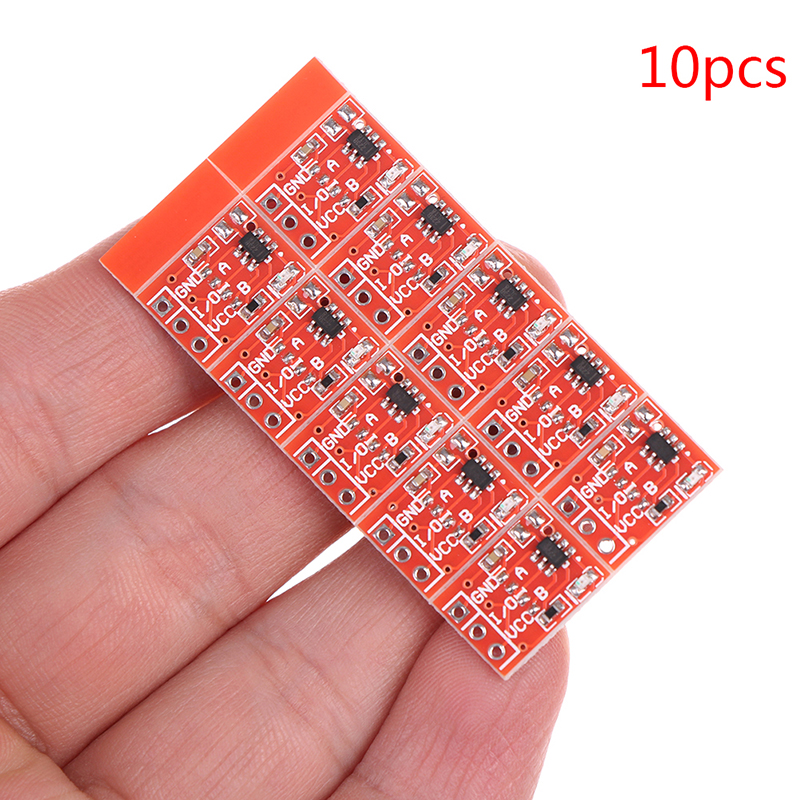
Capacitive touch ☺️
 pine igloo
No
That is way too big
I want it like the QT Py
I will show you, one second

Recap of JP's Product Pick of the Week: the QT Py SAMD21 Dev Board/tiny snack
https://www.adafruit.com/product/4600
From the full broadcast here: https://youtu.be/loiuLm4IgfE
Visit the Adafruit shop online - http://www.adafruit.com
LIVE CHAT IS HERE! http://adafru.it/discord
Adafruit on Instagram: h...
lucid latch
wheres the button
pine igloo
Like this. So I can shape the wires towards the actual buttons
I will fill the inside of the buttons with conductive material
The only issue is that this just has 6 sensors and I need 12
pine igloo
☺️
lucid latch
what does it uses to read the capacitive touch
pine igloo
The little holes
hearty karma
The built-in SAMD21 capacitive touch functionality
pine igloo
Yes
hearty karma
I'm thinking an ItsyBitsy M4 might have enough touch inputs, and may be about the same size as a pair of QTPy boards. However, I'm unable to find documentation on how many touch inputs the ItsyBitsy M4 supports (it uses the more powerful SAMD51)
lucid latch
whats a touch input tho, like, at its core
hearty karma
Some additional circuitry on a GPIO pin.
lucid latch
yeah ofc, what circuitry tho
hearty karma
I think it's a current limited driver and a variable threshold comparator
Or something along those lines
pine igloo
I trust you guys, I don’t understand it yet though. But I will let you discuss for a bit 🙈
hearty karma
The pins can be configured as normal GPIO or touch input, they have circuitry for both. With the SAMD21, there are 6 such pins. With the SAMD51, there are more, but I'm not entirely clear on how many more (apparently some packages have up to 32, but probably not all packages)
lucid latch
yeah, but i bet is just an adc
you don't need anything special, just some adc channels, you could actually cap the buttons and use less than 12 channels for sure
so you could just use any mcu with some adc channels, and make your own capacitive sensors
@pine igloo
pine igloo
lucid latch
so you could just use any mcu with some adc channels, and make your own _capacit...
Could you explain this in layman’s words?
pine igloo
Mcu and adc 😅
pine igloo
Analog and digital confuses me. I know what they mean, but not in this context
lucid latch
the analog signal would be the capacitance value at your fingers
you need to pass that to digital right
like, the mcu needs to read that
most microcontrollers have ADC Channels
pins that can be used to read a analog signal
the signal is just a 0 to Vref expressed in the ammout of bits the ADC Channel is configured
basically you put 1 volt in that pin and you would get 1 volt expressed in a integer value
ya feel me?
pine igloo
Uuuh 😳🤯
lucid latch
😂
pine igloo
Wait I think I do
So you mean I can use anything with the capacitive touch sensors like the QT Py?
Or the Playground, but that is too big
pine igloo
lucid latch
the signal is just a 0 to Vref expressed in the ammout of bits the ADC Channel i...
What is vref?
lucid latch
reference voltage
lucid latch
don't worry 😂
its basically the maximum voltage that the adc input can take
like, it would only read from 0volts to Vref
pine igloo
Like 3.3V or 5.0V
lucid latch
xactly
imo, you should learn to read the adc and from those values trigger midi commands to the pc
then you can tackle the capacitive buttons or something like that
it can be midi or anything that you can use to handle the vjoy driver
ya feel me
pine igloo
Analog to digital is the testing screen with the numbers, right?
lucid latch
mhm?
lucid latch
i don't use arduino, im sorry 😂
pine igloo
I need to chose the right hardware first ☺️
No worries
If I can get the proper hardware I can make it work 👌🏼
What would you pick if you were me?
lucid latch
if you use arduino, you should look for this things: "arduino to vjoy" or " arduino to midi", "arduino adc", "capacitive sensors to arduino adc"
pine igloo
I am so confused haha
lucid latch
i would pick what i'm most comfortable with
pine igloo
I just need hardware, the coding will do the keybinds
hearty karma
As I mentioned previously, I might choose the ItsyBitsy M4 Express for this job https://www.adafruit.com/product/3800
What's smaller than a Feather but larger than a Trinket? It's an Adafruit ItsyBitsy M4 Express featuring the Microchip ATSAMD51! Small, powerful, with a ultra fast ATSAMD51 Cortex ...
pine igloo
hearty karma
As I mentioned previously, I might choose the ItsyBitsy M4 Express for this job ...
How many capacitive touch sensors does it have?
hearty karma
As I mentioned previously, I'm unsure how many it supports.
It could be as many as 17
pine igloo
17 would be awesome!
lucid latch
looks sweet, expensive and overkill tho
pine igloo
I don’t mind the price, I pay for the solution ☺️
lucid latch
rich boy 😂
pine igloo
Haha I don’t have a job 😂
lucid latch
me neither 😂
pine igloo
hearty karma
It could be as many as 17
It has 7 analog inputs. Are these the capacitive touch ones?
lucid latch
send me the documentation ill check it out
 simple linden
Does Raspberry Pi has any sensors on board?
 vagrant gyro
not really. i think there's a CPU temperature, but otherwise nothing.
shrewd hemlock
@simple linden it's pretty easy to add both sensora via USB and from the pins on the pi.
The pi cobbler is a good addon - https://www.adafruit.com/product/2028?gclid=CjwKCAiAi_D_BRApEiwASslbJ71vzFQ7kijSiUU3T3ouiTVknS8umeaP1Yzbt9IVRAAJBfIjqizFMxoCtUcQAvD_BwE

This is the assembled version of the Pi T-Cobbler Plus. It only works with the Raspberry Pi Model Zero, A+, B+, Pi 2, Pi 3 & Pi 4! (Any Pi with 2x20 connector)The Raspberry Pi has ...
pine igloo
I think I will just go for 2 QT Py’s with an micro USB splitter
clever nexus
Be aware the QT Py is very short on RAM. More flash can be soldered on the bottom side.
pine igloo
It’s got enough RAM for 6 keybinds, right?
 ornate pumice
okay quite Noob here. I'm planning on making a gameboy Advance SP using a Raspberry pi 4 4gb. but I need to make it smaller. more compact. would it damage the board if I was to unsolder the ethernet and usbs? but resoldering on a micro usb?
pine igloo
Can I connect this to my QT Py via the cable?
wise venture
I just checked out the "What is QT Py?" video, and seems like there's a hiccup or something around the 30 second mark
https://youtu.be/0Qssr6B6MrU?t=30 "It's like a chiclet, or a<snip>QT Py..."
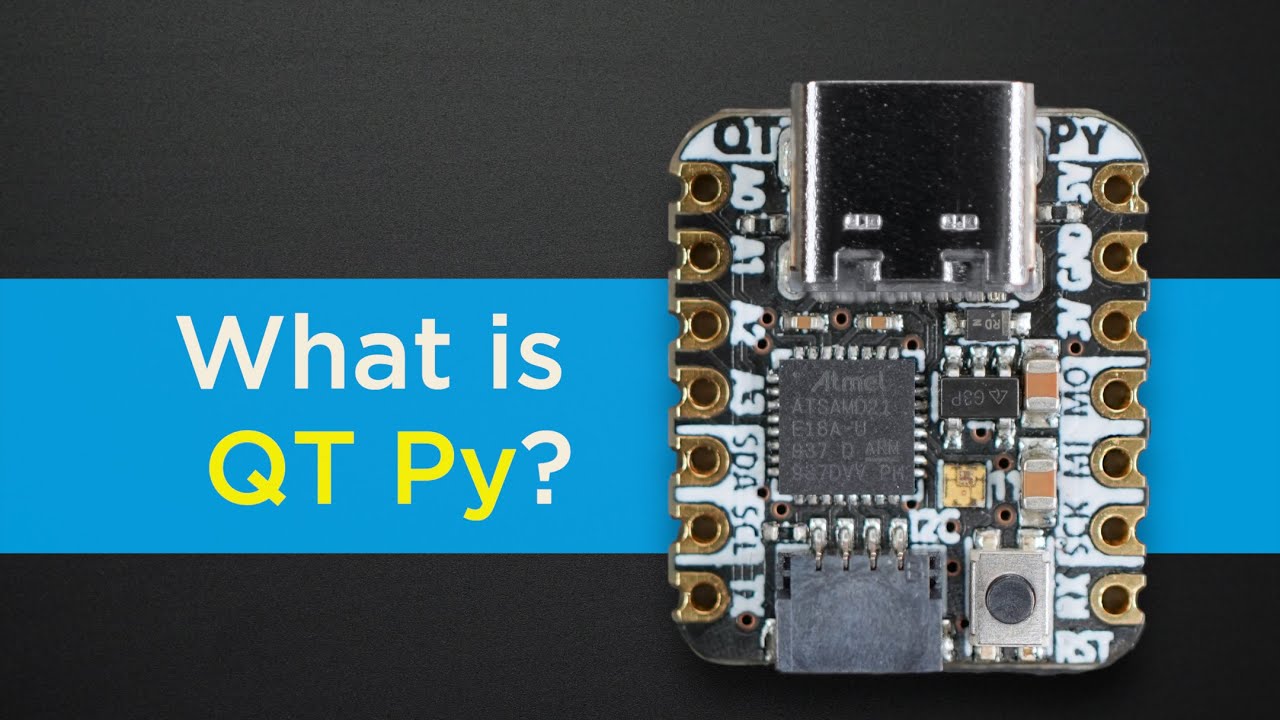
adafruit.com/qtpy
A quick look at the diminutive dev board that does it all – QT Py from Adafruit Industries
Visit the Adafruit shop online - http://www.adafruit.com
LIVE CHAT IS HERE! http://adafru.it/discord
Adafruit on Instagram: https://www.instagram.com/adafruit
Subscribe to Adafruit on YouTube...
I still gave it a 👍 , because I'm not a savage! And also, voiced by Collin, so....
 frosty pulsar
hi could someone help me out with wiring a volume wheel?
im trying to use the adafruit I2S amp
so i want to go from I2S AMP ---->10K POT ----> mini speaker
how do i wire it?
 quartz oyster
As far as I am aware, it's not good practice to put a pot between the amp and the speaker, it would be better to wire the pot as an analog input to the microcontroller and then read that input and use it to modulate the magnitude of the signal being send to the amp
If you do wire it in the way you are talking about, there is a decent chance you'll just burn up the pot
If you want to give it a try anyway, this should work
simple linden
shrewd hemlock
The pi cobbler is a good addon - https://www.adafruit.com/product/2028?gclid=Cjw...
Thanks, ordered sense hat board
 pale sandal
Does anyone know if the ITO coated PET plastic sheet can be vacuum formed and retain the conductive properties of the ITO coating?
hearty karma
I suspect for gentle curves it would be fine, but small radius curves might lead to voids/cracking/delamination/etc.
But I don't know for sure.
oak cove
 keen pulsar
Might just be me
keen pulsar
Might just be me
Small issues at cloudflare today
That is a gateway error so could be on adafruits site, but they are deploying something it seems
bleak ospreyBOT
Adafruit is now live! join us on https://youtube.com/adafruit/live

YouTube
MCP2221A is the product of the week!Check it out here, with a 50% discount during the show: https://www.adafruit.com/product/4471Visit the Adafruit shop onli...
Adafruit is now live! join us on https://youtube.com/adafruit/live
YouTube
MCP2221A is the product of the week!Check it out here, with a 50% discount during the show: https://www.adafruit.com/product/4471Visit the Adafruit shop onli...
Adafruit is now live! join us on https://youtube.com/adafruit/live
YouTube
MCP2221A is the product of the week!Check it out here, with a 50% discount during the show: https://www.adafruit.com/product/4471Visit the Adafruit shop onli...
Adafruit is now live! join us on https://youtube.com/adafruit/live
YouTube
MCP2221A is the product of the week!Check it out here, with a 50% discount during the show: https://www.adafruit.com/product/4471Visit the Adafruit shop onli...
 upper coyote
Bots seem to be hyperactive today. 🙂
 gritty imp
watchdog seems to be triggering HardFault_Handler and dropping into REPL instead of re-running code. Any fix for this? (FeatherS2 here)
dreamy drum
Doh, I ordered a clear acrylic case for my new Clue board but instead of being clear, its opaque making it impossible to read the screen
hearty karma
Is there perhaps a peel-off layer that's making it not-clear?
dreamy drum
doh, you're right
 glossy osprey
Which circuit simulator is good for college student
pine igloo
does anyone here take commissions to design the guts of small hardware projects
upper coyote
@pine igloo Try checking out https://jobs.adafruit.com/ which Adafruit set up to connect people that can help to people who need help. You can post a fuller description of what you want and people can see if they fit, or you can search the people that have posted themselves there. (Uggh. that wasn't a very good description, I've been awake now for over 20 hours, and I think the descriptive part of my brain has decided to take the rest of the night off, but go check it out, it is what you're looking for, it'll have to explain itself).
Find maker jobs in 3D and CAD, Art, Design, Education, Embedded Development, Engineering, Fabrication, Marketing and Communications, and Web Development
pine igloo
upper coyote
<@456226577798135808> Try checking out https://jobs.adafruit.com/ which Adafruit...
thanks a ton thats awesome!
icy moth
I thought I was going to be disappointed by the RadioShack revival but honestly I’m surprised

RadioShack
Radios, Headphones, TV Antennas, Cables & Adapters, DIY Tools & Parts, Electronics Maker Kits.
450+ RadioShack locations across America and more on the way!
You can buy parts for projects
It’s not terribly extensive but I’m really impressed
desert cipher
interesting. bit back to roots
 ebon jacinth
i just accidentally cracked the rear plate on my pygamer enclosure https://www.adafruit.com/product/4238 does anyone know if there are STL files available?

You've got your PyGamer, and you're ready to start jammin' on your favorite arcade games. You gaze adoringly at the charming silkscreen designed by Ada-friend ...
wise venture
Is there a dedicated channel/category to discuss YouTube videos that are part of a series? Like the "STEM chat" series, or the ones with industry leaders, such as the ones with Helen Greiner or Tai Lopez? Or would this be it?
hearty karma
The PyGamer enclosure looks laser cut more than 3D printed, so they'd likely be vector files instead of STL. Unfortunately, I don't know where to find them (I didn't see them on the AdaFruit github).
cloud walrus
@Hugo -- I think this channel would be a good place for that discussion.
wise venture
Awesome, thanks @cloud walrus. I figured as much, but wanted to be certain
cold pebble
there are .ai files for PyGamer acrylic cases here https://learn.adafruit.com/adafruit-pygamer/downloads
bleak ospreyBOT
Adafruit is now live! join us on https://youtube.com/adafruit/live
YouTube
Visit the Adafruit shop online - http://www.adafruit.com-----------------------------------------LIVE CHAT IS HERE! http://adafru.it/discordAdafruit on Insta...
 pearl spire
Hello I am brand new to the electronic world. I have a small project I am working on and I was wondering Who/Where I can ask to help me put together a parts list.
proper escarp
@pearl spire ask your questions here - hopefully someone will help, or at least point you to some resources
pearl spire
Okay Im looking to a make a ft counter in a very small form factor. I was thinking of using a mouse wheel for a rotary encoder an OLED and some kind of micro controller like the trinket.
I just don't know what parts I should buy.
proper escarp
ft counter?
pearl spire
to count feet and display it on the screen.
sort of like this but hand held and very small
proper escarp
For this, you do need
- a wheel
- encoder
- an MCU to process the data
- a screen to show results
hearty karma
Possibly a battery to power it all
proper escarp
there are plenty of dedicated encoders, the only question is price
if price were not an issue, I'd recommend this one: https://www.revrobotics.com/rev-11-1271/

REV Robotics
REV Robotics designs, builds and manufactures robotics parts and components used by students for learning about science, technology, engineering, and math (STEM). Our parts are commonly used within the FIRST Robotics Competition and the FIRST Tech Challenge.
hearty karma
A mouse wheel encoder should work and not be too difficult to adapt electrically (but supporting it mechanically and getting access to the electrical connections might require some ingenuity)
proper escarp
as for MCU and screen, almost any will work as long as it has at least two interrupt pins
pearl spire
this is about the size um shooting for
is there a controller that matches this screen?
proper escarp
any feather
hearty karma
Yes, there are a lot of Feather controllers to choose from, and as a bonus they include battery connectors for easy integration
proper escarp

We love all our Feathers equally, but this Feather is very special. It's our first Feather that is specifically designed for use with CircuitPython! CircuitPython is our ...
hearty karma
That one is a solid choice, and can run either CircuitPython or Arduino code.
hearty karma
The display will work with either of those, but they have different capabilities. For example, the M0 can run CircuitPython, and the Huzzah has WiFi support.
proper escarp
but also: for encoders it is imporatnt to have interrupt-enabled pins, and it seems that esp8266 doesn't have them
hearty karma
The Huzzah is an older design, there are more capable ones available
pearl spire
okay cool
proper escarp
I'd go with m0 or - if you might need to add Bluetooth later - with nRF52840 one
pearl spire
gotcha what about a battery
proper escarp
Adafruit Industries, Unique & fun DIY electronics and kits : LiIon & LiPoly - Tools Gift Certificates Arduino Cables Sensors LEDs Books Breakout Boards Power EL Wire/Tape/Panel Components & Parts LCDs & Displays Wearables Prototyping Raspberry Pi Wireless Young Engineers 3D printing NeoPixels Kits & Projects Robotics & CNC Accessories Cosplay/Co...
hearty karma
This particular one is designed to be narrow enough to fit between the rows of pins on a Feather. For a compact build, it can be handy, but there are others with more capacity (which will therefore offer a longer run time) https://www.adafruit.com/product/3898

Lithium ion polymer (also known as 'lipo' or 'lipoly') batteries are thin, light and powerful. The output ranges from 4.2V when completely charged to 3.7V. This battery has a ...
The one you linked to is a good choice as well
hearty karma
Yes.
pearl spire
Okay ill try and purchase all this and see if I can figure this all out it like a whole new language for me. Thanks for the support.
is there a recommended wiring harness to link the REV encoder to the feather.
proper escarp
REV encoder includes cables terminating in 4-pin "Dupont" (stanrard female header) cables
I'd suggest to start by assembling your project on a breadboard, then it would be easy to plug male the dupont headers into it and then connect to appropriate pins of the feather
 crisp mist
Hello, I was wondering if I could use a cellular network of Adafruit FONA 808 Shield Mini if I’m using a brazilian sim card.
here is the chip model I’m talking about : https://www.adafruit.com/product/2636

Cellular + GPS tracking, all in one, for your Arduino? Oh yes! Introducing Adafruit FONA 808 GSM + GPS Shield, an all-in-one cellular phone module with that lets you add location-tracking, ...
hearty karma
That's an older card that only supports 2G GSM, I don't know which carriers support that any more, or for how long.
crisp mist
oo okay then
thanks
I’m currently searching for a cellular shield so I can use it in my project to send data from long distances. I’m using adafruit feather 32u4 adalogger + adafruit ultimate GPS featherWing. Does anyone have an idea? Idk if I go for cellular shield or try to change the chip for a version which includes both cellular and gps.
 mild thistle
how do sine wave inverters work?
hearty karma
I was guessing you were looking at the 808 because you wanted both GSM and GPS. There are newer shields/breakouts that support more recent cellular protocols, but I don't know which ones might support GPS as well.
There are a few ways sine wave inverters work. Some digitally synthesize sine waves, some are ordinary "modified sine wave" inverters with post-filtering, and some use a ferroresonant transformer to produce a sine wave.
harsh venture
Y'all might find this useful: https://twitter.com/theavalkyrie/status/1349458442734469123

I got tired of not understanding what my GCC linker file was doing. I went on a quest to understand every. single. command. Why each symbol was included.
I present to you: the most thoroughly commented linker script in the world (probably)

 Twitter
·
vagrant gyro
Twitter
·
vagrant gyro
☝️ really cool!
hearty karma
Not just commented, but with references and links
 spice tulip
!product 2636
 radiant groveBOT
Price: $49.95 USD
In Stock: 41
ID: 2636

 ornate pumice
Can one install different OS's on seperate SD card like Amiga and Commodore, then hot swap them out with one another while still keeping retropi games on external hard drive? I'm not good at wording this
like turn off system, swap out amiga for commodore. then boot system back up?
karmic obsidian
WE ARE LIVE! SHOW AND TELL! https://youtu.be/y0PAlNZM4aI

Visit the Adafruit shop online - http://www.adafruit.com
LIVE CHAT IS HERE! http://adafru.it/discord
Adafruit on Instagram: https://www.instagram.com/adafruit
Subscribe to Adafruit on YouTube: http://adafru.it/subscribe
New tutorials on the Adafruit Learning System: http://learn.adafruit.com/
-------...
bleak ospreyBOT
Adafruit is now live! join us on https://youtube.com/adafruit/live

YouTube
ASK AN ENGINEER 1/13/2021 LIVE! #adafruit #askangineer #diyVisit the Adafruit shop online - http://www.adafruit.com-----------------------------------------L...
karmic obsidian
WE ARE LIVE! ASK AN ENGINEER! https://youtu.be/rpMgL30fgX4
ASK AN ENGINEER 1/13/2021 LIVE!
#adafruit #askangineer #diy
Visit the Adafruit shop online - http://www.adafruit.com
LIVE CHAT IS HERE! http://adafru.it/discord
Adafruit on Instagram: https://www.instagram.com/adafruit
Subscribe to Adafruit on YouTube: http://adafru.it/subscribe
New tutorials on t...
harsh venture
Hey folks, just a heads up that me and some of my friends have started an embedded subreddit that encourages original content - come by and show us what you've made, we'd love to see it! https://www.reddit.com/r/embedded_oc/
reddit
 verbal wadi
ornate pumice
okay quite Noob here. I'm planning on making a gameboy Advance SP using a Raspbe...
verbal wadi
ornate pumice
okay quite Noob here. I'm planning on making a gameboy Advance SP using a Raspbe...
Here's a project that requires something similar so you should be fine:
https://www.notebookcheck.net/Raspberry-Pi-The-YARH-IO-Micro-2-transforms-the-popular-single-board-computer-into-a-handheld-computer.514958.0.html
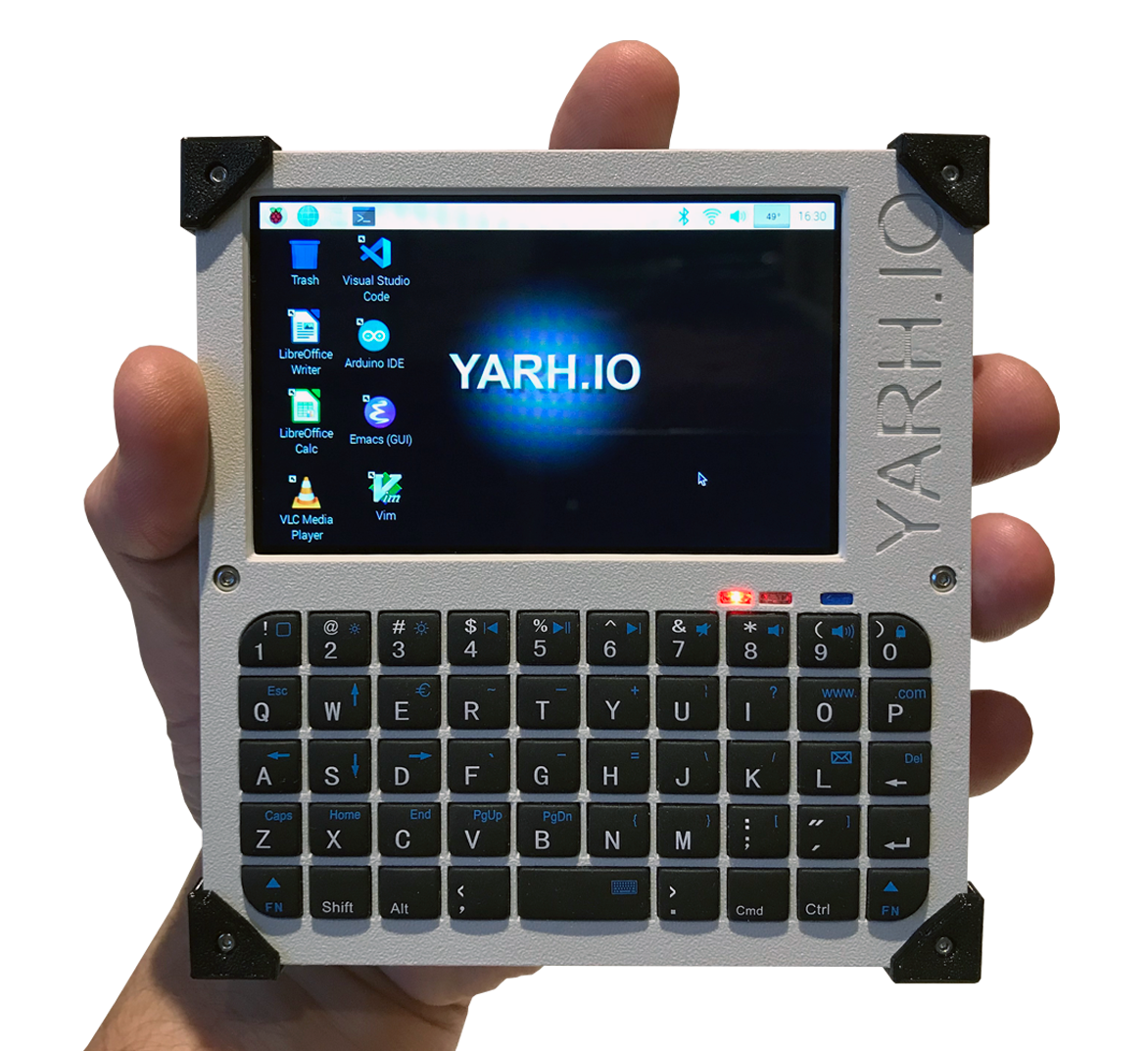
Notebookcheck
 solid geode
So, I bought the RPi HQ camera, and the 6 mm and 16 mm lenses. I can make the 16 mm lens focus, but I can't for the life of me get the 6 mm (wide angle) lens to focus. Am I missing something?
Ah nvm, I had to remove the little extension ring in the back focus ring.
 golden lynx
Are there any plans to update existing feathers to USB-C?
 limber fiber
wise venture
limber fiber
wise venture
The <@&578374950705168386> campaign for the Inkplate 10 (https://www.crowdsupply.com/e-radionica/inkplate-10/) is now live. 9.7" eInk display, built on ESP-32, and compatible with Arduino and MicroPython. I wonder how difficult it would be to add CircuitPython support.... 🤔
 keen lichen
@wise venture we don't support the ESP32 yet because it doesn't have USB
wise venture
Ohhhh, right. I know that I knew that, but it didn't "click" in my brain. Welp, shoot :/
keen lichen
I really do want to do BLE-only workflow though
wise venture
You know, I do believe I may have read something to that effect!
bleak ospreyBOT
Adafruit is now live! join us on https://youtube.com/adafruit/live

YouTube
JOHN PARK'S WORKSHOP LIVE Visualizer Touch Control plus, MakeCode Minute and more!Visit the Adafruit shop online - http://www.adafruit.com-------------------...
 median egret
looking into building a diy smartglass thing, and I'm wondering, alignment issues aside, what're the downsides of using multiple mirrors to allow a larger screen at an angle, such that the box hanging off the side of your head is smaller
 harsh haven
@karmic obsidian Maxim have an interesting new "ultra low power M4 with AI" part described here: https://www.youtube.com/watch?v=r9T9Xwdy-Lw and their evaluation board is in Feather format 🙂 https://www.maximintegrated.com/en/products/microcontrollers/MAX78000FTHR.html

Ben Smith shows us how AI technology can be used to implement flexible radios. Our FM radio receiver can dynamically change to a LoRA radio on-the-fly.
The MAX78000FTHR is a rapid development platform to help engineers quickly implement ultra low-power, artificial intelligence (AI) solutions using the MAX78000 Arm® Cortex® M4F processor with an integrated Convolutional Neural Network accelerator. The
 worn lark
What does everyone use to hold the battery to the magtag?
right now I just have a rolled up bit of kapton tape but that's already loosening and I'm looking for a longer-term adhesive that is still removable if I want to
wise venture
worn lark
What does everyone use to hold the battery to the magtag?
I haven't stuck my battery to the magtag yet, but this seems like something that 2-sided foam tape would be good for, or possibly those 3M command hooks, so you don't end up pulling on the board or the battery when you want to remove it
worn lark
ooh, some of the lighter foam adhesives would prolly do the trick
 main hemlock
i use velcro (generic name is "hook and loop"), but sometimes it's too thick.
i am constantly taking things on and off, so the velcro is good for that. I don't make many permanent things.
harsh haven
worn lark
What does everyone use to hold the battery to the magtag?
I'm using 3M Command Strips (velcro ones) and the fit is fine. If you want more permanent then the Foam tape is a good idea too.
worn lark
harsh haven
I'm using 3M Command Strips (velcro ones) and the fit is fine. If you want more...
my brain must be fried - I didn't even think of velcro, thanks!
wise venture
Are there 2 MEE6s around? For some reason, I thought that was a Discord bot?
harsh haven
Some other servers have MEE6 bots, though I'm not a Bot, last time I checked.
wise venture
Gotcha. Sorry for the confusion and poor eyesight to not be able to tell the difference between human and bot
 quaint rivet
Guys, i wanna ask, are mosfets generally big?
and are there smaller mosfets that can fit in pcbs?
harsh haven
@quaint rivet it depends on how much current you want to switch, you can get for example the BSS138 which is in a tiny SOT-23 package but limited to 220mA https://www.digikey.com/en/products/detail/on-semiconductor/BSS138/244210
Order today, ships today. BSS138 – N-Channel 50V 220mA (Ta) 360mW (Ta) Surface Mount SOT-23-3 from ON Semiconductor. Pricing and Availability on millions of electronic components from Digi-Key Electronics.
quaint rivet
harsh haven
<@!495483784666415124> it depends on how much current you want to switch, you ca...
what about for conventional hobby use where i just want to use it as a switch?
harsh haven
so if your switching current is less than 220mA then I recommend that part above ^^
You can get up to 2.5Amps through this one, in the same sized package. https://www.digikey.com/en/products/detail/diodes-incorporated/DMN3110S-7/2756038?s=N4IgTCBcDaICIFkByBmAjGgDAZQLQHYQBdAXyA
These are surface mount, but there are also small through-hole parts.
 buoyant galleon
Maybe does someone know how much current ws2812b led strips use?
verbal aspen
The maximum at full brightness is apparently around 60mA per LED (20mA per color).
harsh haven
@buoyant galleon the Adafruit NeoPixel Überguide is a great resource for how to implement Neopixels
https://learn.adafruit.com/adafruit-neopixel-uberguide/the-magic-of-neopixels

Adafruit Learning System
Everything you always wanted to know about Adafruit NeoPixels but were afraid to ask
 leaden jetty
Hey all I wanted to share a design link of a model I made recently. It's a 30mm fan cage for the raspberry pi. I haven't really seen any designs that let you just mount a fan on the pi without needing to print the whole case alongside it, so I figured some of you would think it was useful! Feel free to use! https://twitter.com/RockControls/status/1349434431329759232?s=19

A fan holder for your raspberry pi! This fan holder sits in the four mounting holes on the raspberry pi to hold a 30mm fan above the CPU and RAM module. Feel free to use our design for your own projects! @thingiverse https://t.co/AYWSS48cc9
 Twitter
·
Twitter
·
 clear quarry
has any one ever used Unreal Engine 4 Blueprint Visual Programming? 🙂 would it be at all possible to code with UE4 to code for arduino (ESP32)?
bleak ospreyBOT
Adafruit is now live! join us on https://youtube.com/adafruit/live

YouTube
Visit the Adafruit shop online - http://www.adafruit.com-----------------------------------------LIVE CHAT IS HERE! http://adafru.it/discordAdafruit on Insta...
pale sandal
hearty karma
But I don't know for sure.
ok well I think I'll just have to get some and try, thanks.
hearty karma
Let us know what you find out, I'm curious
 thick prawn
I’ve been commissioned to develop some applications and set up a system for someone
I’m wondering how I should charge for my efforts
What should I consider here
hearty karma
You can charge hourly (time and materials) or firm fixed price: some outfits prefer one or the other.
 lilac dust
Hi I'm new here and I have a newbie question
What's the relation between arduino's code and code used with Adafruit's motorshields?
Are they interchangeable?
 lost lily
lilac dust
What's the relation between arduino's code and code used with Adafruit's motorsh...
lost lily
lilac dust
What's the relation between arduino's code and code used with Adafruit's motorsh...
What do you mean by Arduino code? You can utilize Adafruit's motor shields via Arduino code.
lilac dust
well for example, on this website: https://learn.adafruit.com/adafruit-motor-shield-v2-for-arduino/using-dc-motors there is some code such as #include <Adafruit_MotorShield.h> and
#include "utility/Adafruit_MS_PWMServoDriver.h"
and also specificall "myMotor->setSpeed(150);"
and what I mean is that I see that this is involved in controlling a dc motor hooked up to the ada motorshield
But the Arduino website offers different code to control dc motors which doesn't involve using those lines
Like, I dont thinnk myMotor->setSpeed(150); is the usual way to set the motor speed
lost lily
That's because the Arduino website doesn't know you are using the Adafruit motor shield
They assume you connected an Arduino pin to a transistor which drives the motor (or something like that)
Since the hardware configuration is different, the software will be different.
lilac dust
ah I see. I think I understand a little better
Is it true that Ardiuno is coded in C or C++ and adafruit is too?
or, I mean is the example above in C?
lost lily
Arduino is C++ code, so yes
The Adafruit libraries are just like C++ libraries but for Arduino
lilac dust
If you say I can utilize Adafruit's motor shields via Arduino code, but also say that the software will be different, what would be different? The structure? Like, can I use the same commands and functions with an adafruit motorshield vs a naked arduino, but I have to use those commands and functions differently since I'm not doing the normal "Arduino pin connected to transistor" setup?
lost lily
You will still be using the same old Arduino, just that you will use different commands to control the motors.
lilac dust
Ah, so like the adafruit motorshield wouldnt know what to do with analogWrite() for example? I could only use that with the shield removed?
lost lily
Yes. It would most likely do nothing.
lilac dust
Do you know if there is a link to a list of all the commands I can use with this adafruit motorshield, like some kind of code/library documentation? I can only find info about "circuitpython" https://www.adafruit.com/product/1438?iframe=true&width=1280&height=620&gclid=Cj0KCQiA0fr_BRDaARIsAABw4Eu01anChSeys323D0obhLgkPIRlicEGYhRiMrmf3d-jMDZLVclUF1QaAnypEALw_wcB

The original Adafruit Motorshield kit is one of our most beloved kits, which is why we decided to make something even better. We have upgraded the shield kit to make the bestest, easiest way ...
shrewd hemlock

Adafruit Learning System
Stackable, high current DC and Stepper motor shield
There's usually a Learn section at the bottom of each product with documentation
lilac dust
Thank you !
shrewd hemlock
Of course! Good luck!
pine igloo
How can i charge a 330v 100micro farad capacitor?
 real scarab
Put voltage over it.
peak spear
carefully
pine igloo
I dont have anything capable of putting 330v dc out
pine igloo
peak spear
carefully
How bad it shocks?, Probably won't make unconscious or something
peak spear
that voltage can potentially kill if it discharges through you
peak spear
but not even small currents 🙂
icy moth
We regularly pass thousands of volts through static energy, but just 10mA can stop the heart
Kind of crazy eh?
peak spear
i always err on the side of caution when talking about high voltages in here...
icy moth
Other thing that’s interesting is some parts of the body tolerate as much as 100mA if ground is made within close proximity to the entry
peak spear
do not
icy moth
But regardless, in most cases most high voltage applications usually involve large currents
pine igloo
Ok can you now tell me how can i charge it?
I just pulled it off from old camera flash
icy moth
Static electricity is usually around the 3500+ Volts. But current is like... 5uA
pine igloo
I know cameras have built in charging system for that capacitor but i wanna know how can i charge it myself
peak spear
in a camera flash there is a dc to dc converter with a high step up ratio
pine igloo
Ok so...?
icy moth
So buy a dc to dc converter that does like 5V to like.. 200V
Add a 1W resistor (chose the resistor based on how fast you want it to charge)
But honestly using it to make a shocking devices.. not so great
You’re better off using a static energy generator. They are a lot of fun when you “daisy chain” your friends together
My science teacher in middle school had a crank style one. It was a lot of fun to see how many people we could line up and how long we could last lol
peak spear
@pine igloo We'd like to emphasize that what you are asking for is dangerous and advice on how to make dangerous things is not given here.
pine igloo
those photoflash capacitors are really not a toy. they will release enough energy to weld the end of a screwdriver. they will give you a serious burn and potentially cause cardiac arrest
if you want a fun tingly kind of high voltage device do not use a capacitor to store the high voltage, find a very small tesla coil or an ignition coil
pearl spire
Is this the correct orientation to Soldier these together?
And could I test it just like this before soldering? Can this be plugged right into a computer USB to transfer code?
 vocal vapor
https://cdn.discordapp.com/attachments/409358701636485130/800080699293958174/LEDStripDriver2.png
Does it look decent? :3
 shrewd hemlock
@pearl spire Got links to the two things?
pearl spire
We love all our Feathers equally, but this Feather is very special. It's our first Feather that is specifically designed for use with CircuitPython! CircuitPython is our ...
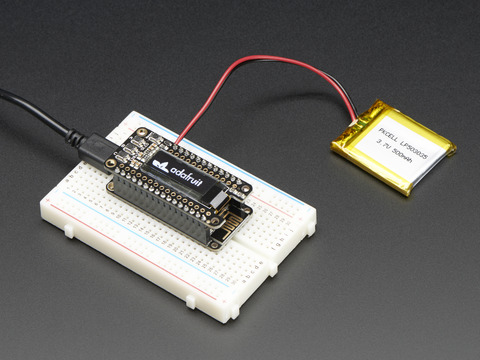
A Feather board without ambition is a Feather board without FeatherWings! This is the FeatherWing OLED: it adds a 128x32 monochrome OLED plus 3 user buttons to any Feather main board. Using ...
shrewd hemlock
Any reason you're not using the header pins on the FeatherWing OLED?
Also this image should help you with orientation:
Looks like yours might be upsidedown
 ornate crescent
Can anyone clarify which interpretation of PMSA300i data is correct? The datasheet says "Data 7 indicates the number of particles with diameter beyond 0.3 μ𝑚 in 0.1L of air", while the data struct in the library says "< 0.3um Particle Count" and the example code says "Particles > 0.3um / 0.1L air:".
verbal aspen
I don't know for sure, but "<" would be unusual, since the detector probably wouldn't be able to sense arbitrarily small particles.
ornate crescent
That's an interesting point because PM2.5 is defined as "diameters less than 2.5 micrometers".
oak cove
ornate crescent
Can anyone clarify which interpretation of PMSA300i data is correct? The datashe...
Which library are you referring to?
Adafruit_PM25AQI?
Sounds to me like there is confusion between the 7th element in the data, and data 7 from what Im reading but I think Im in a different library that what you are referring to
ornate crescent
oak cove
Sounds to me like there is confusion between the 7th element in the data, and da...
Yep Adafruit_PM25AQI
oak cove
Hm, nice catch @ornate crescent, looks like the comment on the struct is incorrect, want to make a pull request?
Not just on that field
ornate crescent
Does ladyada ever sleep? She responded within an hour. Turns out that is a doxygen thing. https://github.com/adafruit/Adafruit_PM25AQI/pull/8

GitHub
SCOPE
Changes comments on the struct
DESCRIPTION
The current struct comments do not match the data sheet. The comment should be changed to say "> 0.3um Particle Count" etc....
oak cove
Ah, good to know
wise venture
ornate crescent
Does ladyada ever sleep? She responded within an hour. Turns out that is a doxyg...
I've wondered the same thing myself! Seems that she and PT get stuff done at all hours of the day and night, and get more done than seems possible in any 24 hour period!
upper coyote
As a fellow Beaver, I can tell you that one of the things MIT teaches, is odd sleep schedules, and working with as little sleep as possible. Ladyada and PT used to be only slightly skewed, but with Covid, I think they are approximately on the hacker's nine to five; that is 9PM to 5AM to increase social distancing at the Factory, distancing in time rather than space.
shrewd hemlock
distancing in time rather than space
🤣 Love it
wise venture
lol, agreed @shrewd hemlock. I suspect @upper coyote is a Physics major?
upper coyote
It's important to always choose the right Axes. 😮
Nope I was a CS major back when it was a "new" thing.
 calm carbon
heya! im a dedicated nerd, and i work in a hardware store. i had a difficult customer ask me for a cat5 splitter today, just like he would use for coax or phone. i told him its a bit more complex than adding a splitter, but not much. go to the local computer store and get a cheap hub or switch. then he made a huge deal about it.
i know it wont work, but it got me wondering... what would happen if i did it? would it fail altogether? or would it just have a bunch of collisions and be slower?
calm carbon
always switch > hub. and i know making a splitter would be stupid. just curious what would happen if i made one now lol
im thinking it might function enough to connect, but it would be horribly slow + unreliable
desert cipher
depends, really. if one is heavy use and ones barely used then it would only somewhat affect thibgs
calm carbon
im thinking it would just cause a bunch of collisions, right? but otherwise function
quaint rivet
Guys, i wanna ask, to those of you who have graduated or the ones who are taking their masters or doctorates
how can you be sure of yourself that you are ready for a higher degree?
 autumn apex
Hi, a few days ago I was talking about like a diy high power stepper driver using TIs predriver ic. Now that ic need to be preconfigured over spi with a few parameters(step mode, max current, decay mode etc) and I firstly wanted to use the atmega328 to do that but now thinking about it its petty wasteful to use that mcu for that purpose, heck maybe even a attiny85 could do the job. But since all the main components are form TI(and samples are free 🙂 ) I want to try using their MCU.
I heard of energia(think its called like that) as a Aruidno IDE for TI
Do I need to flash like a bootloader on them like i need to do with arduino
like what are the requerments for standalone use
cant find much by just googling
icy moth
@autumn apex great questions
I recommend a MSP430 launch pad
If you like Arduino, TI has their own version for the launchpad boards called Energia
autumn apex
isnt energia just the IDE
autumn apex
I know about the launchpad but i want to use the mcu in my board
autumn apex
well im in the process of designing it but i was thinking of using the MSP430G2102
icy moth
Nice, okay make sure to include JTAG headers for doing TIs version of DAP over CMSIS (might have this acronym wrong)
autumn apex
Im just reading the datasheet but it dosent seem to have uart which is a problem so i probably need to chose another one.
yeah my question is about the bootloader, like i know arduino bootloard can be flashed over spi and then i can program it over uart, i cant find anything concrete about ti mcus about that
icy moth
This might be a good option: https://www.digikey.com/product-detail/en/MSP430G2333IPW20R/296-41338-6-ND/5223098
Order today, ships today. MSP430G2333IPW20R – MSP430 MSP430G2xx Microcontroller IC 16-Bit 16MHz 4KB (4K x 8) FLASH 20-TSSOP from Texas Instruments. Pricing and Availability on millions of electronic components from Digi-Key Electronics.
autumn apex
I found MSP430G2553
autumn apex
yeah
so if I order this, how do I go about programming it is what confuses me. Uart?
icy moth
There are some links at the top for the boot loader guide
You will need a USB to serial adapter
So probably FT232R
Or silicon labs
Or even the CH340G or even the CH340C
autumn apex
im probably gonna use the cheaper version 🙂
autumn apex
icy moth
Or even the CH340G or even the CH340C
yep those
c has the crystal integrated right?
icy moth
Yup
icy moth
I personally like the FTDI chips
autumn apex
I like them too, never had trouble with those but again CH340C gives me 12 times more reasons to like them more 🙂
🤑
icy moth
I’m not money conscious in that regard
A lot of people tell me “just use the CH340, it’s cheaper!” But I really love the ease of use with the FTDI chips
autumn apex
well i dont care if part is like .5$ more expensive if it means i get something better but ftdi is 6$ and CH340 is like 0.5$
icy moth
FTDI is $4.5 from Digi-Key
$4.25 if you buy 10, $4 for 100x quantity I believe
But good news is this discussion reminded Me that I need to assemble my MSP432 feather lol
autumn apex
🙂
icy moth
Needless to say the parts have been waiting for a few months 😅
autumn apex
my cnc control unit needs some attention too😂
it became garbage dumping ground after not working on it for a week
icy moth
Understand that 😀
autumn apex
cant remember the name of the youtuber but he explained my room very well : "every part of my workshop that has free space turns into a black hole that sucks all the junk in"
hearty karma
For programming MSP430 chips, you can use TI's programming pod, but all the Launchpads come with a programmer as well, and many of their chips use their "Spy-Bi-Wire" protocol, which only takes two wires. Jumper wires on the Launchpad boards give you access to those, so you can use the Launchpad as a programmer.
icy moth
Me searching through parts hoard: wow I have a lot of “1000x 0.1uF 0603” packs
I should probably just stop buying 0.1uF 0603 until I get through all of these
wise venture
The problem with that @icy moth, that I've had, is that when I need part x, I appear to be all out. Only when the order gets delivered does it appear that they multiply en masse!
icy moth
haha same
digikey needs a feature like "Hey, we noticed you ordered a lot of this item last time, and you're ordering it again... are you sure you need 1000x more when you already bought 1000x?"
 bitter gale
icy moth
You’re better off using a static energy generator. They are a lot of fun when yo...
bitter gale
icy moth
You’re better off using a static energy generator. They are a lot of fun when yo...
@icy moth i mean i usually just recommend a barbecue piezo igniter
icy moth
lol
bitter gale
Definitely not enough to kill ya but it will make your muscles move of you hit them directly
icy moth
very true
also friendly reminder to new people, if you need 0402 but only have 0603, it will fit.. just a little chonky lol
icy moth
Next time I’m gonna get a stencil for this board. Too many solder bridges to eliminate under the FTDI chip
And I need to rebuild the BOM so I have all the parts
will reorder with some fixes and get a stencil. Also need to replace the verticle jst with a 90 degree
clear quarry
i have these LED spotlights all over my house and one day i started to smell burned electronics and i couldn't find the source! but today when i was going down the stairs i noticed the smell again and saw that one of the spotlights were weak in the lighting so i unscrewed it and well is this normal? :S
wise venture
I'm going to go out on a limb and say that no, that's not normal. To my untrained eye, it somewhat looks like something got in there and caused a short, and from there, things didn't get any better
clear quarry
this might be a one off! but i use these all around my house 😐
oak cove
clear quarry
i have these LED spotlights all over my house and one day i started to smell bur...
Ooof the infamous font
oak cove
clear quarry
i have these LED spotlights all over my house and one day i started to smell bur...
Im not sure why, but whenever I see that font on the side of anything, it starts alarm bells. Its not a sign that it is cheap and dangerous, but I have noticed most products from china you could put in the cheap and dangerous category tend to have that font, or a slight variation of it. But there are also a lot of legit stuff that may have it. Interestingly, while I cannot find much concrete info, I am seeing discussion on your issue online https://homefixated.com/cheap-led-light-bulbs/

We do a little research into cheap GU10 LED Bulbs that lead us to a shocking safety issue.
You might check out the video they embedded in the website, Julian Ilett
at least knows what hes talking about, and you might take apart your bulb to see if it matched his findings in terms of the circuit inside https://www.youtube.com/watch?v=keaE7QTKTYE

Help support Julian's LED videos on Patreon: https://www.patreon.com/julian256
This GU10 LED spot light is cheap (£3 including postage) and bright. But it's also lethal! There's a 50% chance of putting live mains within a few microns of the metal casing (which is what you'll be holding when you insert it) and there's no earth to protect you. It...
pine igloo
Has anyone "binned" Pi Zeros? Like test the overclocking abilities of many of them and see which ones reach 1.2GHz. A Pi Zero that can clock that high may help me with one of my projects.
 wise pawn
Hello, may I ask a question about the Adafruit BNO055 sensor?
cold pebble
of course
wise pawn
@cold pebble Thank you kindly. I always like to ask first with such a large server 😄
A friend and I are trying to set the sensor to the NDOF operating mode and we think we've figured out how to do that but we want to confirm that we did it right. We're trying to find a way for the board to tell us what mode it is currently in. We found in the BNO055 library a read8 line but it is private and we're unsure how to get it
Would you have any insights about it?
cold pebble
I don't, but someone here might, give it a little time for folks to see
Arduino? if you don't get an answer here, you could try the #help-with-arduino channel
wise pawn
Okay, thank you.
 lime sandal
@clear quarry watching a bigclive video and he mentioned that gu10 led lamps have a high failure rate due to heating https://youtu.be/klaJqofCsu4?t=294

These fascinating lamps are a result of a collaboration between Philips Lighting and Sheikh Mohammad Bin Rashid Al Maktoum - the ruler of Dubai.
They are designed to be the most efficient available, matching high lumen output with very long life. Once you see the construction and circuitry you'll realise this isn't just marketing spin.
In retu...
wise venture
I was thinking of that same video @lime sandal.
bleak ospreyBOT
Adafruit is now live! join us on https://youtube.com/adafruit/live

YouTube
It's another STEMMA sunday! This weekend we played around with making TikTok timelapses and built ISO1540 and SHT40 breakouts & tested them / wrote some driv...
karmic obsidian
DESK OF LADYADA - STEMMA Sunday - ISO1540 & SHT40 breakouts, TikTok'in, Quad Mics, and some LC709203 debuggin' https://youtu.be/c_0uDYDNDxA
It's another STEMMA sunday! This weekend we played around with making TikTok timelapses and built ISO1540 and SHT40 breakouts & tested them / wrote some driver code. We also went back to our ESP32S2 feather and did some low power testing to figure out why our LC709 was acting weird (it's actually just fine!) We also looked at some quad I2S mic A...
pearl spire
I did a thing now I just have to figure out how to use this encoder. Does anyone have any resources they can point me to so I can learn how to code this thing to read meters 
lime sandal
@pearl spire does that encoder send data like a rotary encoder does?
quaint rivet
guys, quick question, what's the maximum frequency can the 555 produce?
verbal aspen
On the order of 1MHz, looks like, but there are a lot of different chip variations out there with different speed limits.
ornate crescent
karmic obsidian
DESK OF LADYADA - STEMMA Sunday - ISO1540 & SHT40 breakouts, TikTok'in, Quad Mic...
I'm keen for the SHT40 breakout and to see what comes of the esphome port. I've been dreaming of a pure Python version of esphome.
pine igloo
does lamar freed tune into the server?
 scenic warren
karmic obsidian
DESK OF LADYADA - STEMMA Sunday - ISO1540 & SHT40 breakouts, TikTok'in, Quad Mic...
scenic warren
karmic obsidian
DESK OF LADYADA - STEMMA Sunday - ISO1540 & SHT40 breakouts, TikTok'in, Quad Mic...
WRT Home Assistant: there are many ways to connect ESP32x boards to Home Assistant ( I personally use Appdaemon to script all automations with python in Home Assssitant, and a simple REST API call over wifi can be used to post data from the ESP32x to Appdaemon /Home Assistant). Of course ESPHome is another way. I would love to see a tutorial on how to connect BLE boards (like the nRF52840 sense) to Home assistant/Pi. I have not succeeded to get them to talk so far.
 open loom
hello can someone give me a discord nitro
im an egirl
pearl spire
So how do I connect this encoder to this controller?
And does anyone know what this dip switch is for?
Says S and A
verbal aspen
"There is a switch on the side of the encoder and with two options: ‘A’ and ‘S’. ‘A’ is the ABI encoder output mode which outputs the incremental and absolute encoder signals. ‘S’ is the SSI/SPImode used in the manufacturing stageand potential future features. Currently, only the ‘A’ mode is supported. Make sure that theswitch is in the ‘A’ position when using this encoder."
https://www.revrobotics.com/rev-11-1271/ has a link to the datasheet.
REV Robotics
REV Robotics designs, builds and manufactures robotics parts and components used by students for learning about science, technology, engineering, and math (STEM). Our parts are commonly used within the FIRST Robotics Competition and the FIRST Tech Challenge.
buoyant galleon
Hello, I'm thinking about making rgb led tube lights, but am not sure how many WS2812b leds i should use. I want it to be bright, but can't find any good source, because every datasheet writes different amount of lumens... So what do you think, 120 or 240 of them would be better? (Thats in one 1 meter long tube)
shrewd hemlock
@buoyant galleon I'm guessing that's the Lumin8 you're sharing?
This is what the inside of it looks like. There are roughly 120 leds in each row. With 3 rows, about 360 leds.
(The circuit on mine is broken somehow and I'm not sure how to fix it. If you want to have mine - you'd just need to pay shipping and I'll send it to you)
buoyant galleon
@shrewd hemlock In the photo is astera ax1, but it's similar thing. I would of course take yours, but I don't have nearly any skills in pcb fixing :(
shrewd hemlock
There's actually two PCBs. The first - I believe is just the LEDs and the second is everything else.
That ribbon cable there is what separates the two.
Might be able to salvage it 🤷♂️ (if Dog doesn't want the circuit, anyone else is welcome to have it)
near dust
Is USB-C really the nightmare it seems to be? I have a C-C cable where a QT Py mounts as mass storage but HID doesn't work. If I switch to an A-C cable, both mass storage and HID work.
I take it back! Both cables work with HID only sometimes. That sounds like it might be my problem...
buoyant galleon
@shrewd hemlock So im guessing those yellow and red wires are for main power and the ribon cable sends data to the LEDs, but it looks too wide to be only for the LEDs, or maybe those LEDs are some kind of different unusual special leds idk I'm lost
clever nexus
Maybe parallel conductors to handle the current.
shrewd hemlock
The light failed after maybe 5 uses and the Kickstarter founder has dissapeared from the internet. So factor those facts into your analysis of the board 😛
buoyant galleon
@clever nexus I really doubt it, I'm guessing all those LEDs need a lot of current so those small wires are too thin for high current. But also there are addressable RGB LEDs (I'm guessing ws2813 ) and they probably will need only 1 wire for signal, but there's also white warm and white cold LEDs, so they are probably controlled with mosfets so 1 signal wire for each and we have only 3 wires for signal in total. Idk what others wires are for
hearty karma
It might be worth re-seating the flexible cable connector, that might fix it.
buoyant galleon
I agree with you
hearty karma
If not, I'd probably start probing to see what's going on. The worst likely case is the CPU or power supply has stopped working, but since it's connectorized, it would be possible to re-use the housing and LED board, just figure out the pinout and drive it with something else.
It's also possible the LEDs are addressable, and the first one died (I've seen this happen before)
buoyant galleon
I don't really think the LEDs are dead, even if one of them was, others would still work, because from what i can see from other photos, the rgb LEDs have 6 pins so they are probably dual signal LEDs, so if one is broken then others will still work
Im guessing the main controlling board is just dead maybe
shrewd hemlock
@hearty karma Holy moly - that worked
The connectors, even when closed are super lose and you can pull the cable right now
buoyant galleon
@shrewd hemlock congratulations!!! 👏👏👏
shrewd hemlock
I feel bad for the many other backers that are having the issue. Definitely not going to give advise there with my real name attached to dissamble a thing with a massive battery and potentially electrocute themselves.
but eyy, mine works 😄
buoyant galleon
Maybe try glueing the connectors so they won't become loose again
shrewd hemlock
good idea
icy moth
I think I’m gonna use the capacitive touch sensor I made to build a screaming doorbell
shrewd hemlock
Hey all! The Kickstarter I shared on Adafruit's Show and Tell is live! If you're curious about mechanical keyboards, programming, soldering, and/or electronics check it out! -> https://pp2.dev/byoks
(I swear I'll stop posting now 😄 )
icy moth
Also, a little inspiration for those wanting to start selling their designs:
I started a year ago with zero experience designing circuits, zero experience making printed circuit boards.
Now a year later, I’ve made a lot of progress (much thanks to this community). And back in September I took the dive to start developing boards to sell. The first products were actually inspired by the needs of this community.
I’m not selling massive volumes, but this is a lot for me. And I feel like it’s amazing progress for someone with no namesake or no massive following in the maker community.
So if you’re wondering if you should make the jump, why not?
shrewd hemlock
➕ On doing it! I'm always happy to help answer any and all questions
(that ➕ is almost invisiible on dark theme lol)
icy moth
@shrewd hemlock the biggest hurdle is building enough variety, but also delivering quality. A fine balance 🙂
shrewd hemlock
Hah my hurdles have been all the non technical things
Advertising, customer support, story telling, networking
icy moth
I’m decent at story telling, haven’t had any customer support issues (could be a bad thing 😜)
Networking is also tough
I’ve mostly done organic advertising
I’ve not spent any money on advertising
shrewd hemlock
That time I wrote RMA on a box (still don't know what RMA means) and mailed a new kit to a customer because I sent them the wrong thing
icy moth
Maximum OOF
shrewd hemlock
I'm attempting to pursue maker products full time so learning advertising has been a must to increase the $$$
icy moth
I started early with my picking process. Thankfully my military training prepared me for the logistics of everything
I’ve got experience with paid marketing, I just want to do as much organic growth as I can until I’ve plateaued
shrewd hemlock
or you can hire someone to do all that for you 😛
icy moth
Lol
shrewd hemlock
I lucked out. I was career transitioning and needed a temp job. Ended up at an electrical engineering firm putting things in boxes. Ended up getting mentorship from everyone from the guy that boxed things all the way up to the CEO
got free PCB reviews from senior electrical engineers 😄
icy moth
Nice!
shrewd hemlock
So yeah - anyone out there reading wanting to launch their own thing. Ask us questions and doooo it!
clever nexus
shrewd hemlock
https://www.instagram.com/p/BNhb4GUD18D/
RMA = Return Material Authorization
hearty karma
@shrewd hemlock So how does the "Meta" theme work? Does it become an option if unlocked? More to the point, if I back a "basic" keyboard, can I upgrade that if "Meta" becomes available?
wise venture
That's so cool @shrewd hemlock and @icy moth. I'm SO stocked for the two of you! Massive kudos, props and respect.
No to mention, major amounts of respect for taking that dive
icy moth
🙏
shrewd hemlock
❤️
@hearty karma - The basic kit was to make the electronics stuff accessible to everyone and therefore ships with just the navy blue theme. If you select the higher tier you can select any theme that's unlocked.
(I should probably clarify on that. I'm weirdly trying not to look at the Kickstarter today but I'll be updating tomorrow)
pine igloo
Whenever I attached the gizmo to the playground deluxe to play an animation, can I still use the capacitive touch sensors to trigger certain actions, such as keypresses?
icy moth
Are all the pins being used for the TFT?
pine igloo
They are all connected yes
icy moth
Hmm
Potentially not, if all the pins are being used, probably wouldn’t be able to use the touch pins
pine igloo
hmm that is a pitty
is the gizmo in combination with the playground deluxe the smallest possible combo to display one of these eyes?
or the hallowing is probably the smallest, right?
hmm but it doesn't have the IPS display though
icy moth
There’s probably someone who can answer that better.
wise venture
@pine igloo - When you say the Circuit Playground "Deluxe", do you mean the original/Classic (https://www.adafru.it/3000), Express and variants (https://www.adafru.it/3333) or Bluefruit (https://www.adafru.it/4333)?
pine igloo
express
wise venture
You should still be able to use some of the touchpads with the Gizmo attached
pine igloo
but I also needed the QT PY for my project but they are sold out 😦
How long does it take on average for these kind of products?
I wanted to link the https://www.adafruit.com/product/4830 connected to it
Add lots of touch sensors to your next microcontroller project with this easy-to-use 12-channel capacitive touch sensor breakout board, starring the MPR121. This chip can handle up to 12 ...
is that an I2C cable? (sorry I am new to this hobby)
Oh it is stemma QT
wise venture
Timing is a tricky thing. Some products are so popular, like the QT Py, MagTag and such, that whenever there's stock, it gets snagged very quickly.
The best option is to sign up for the in-stock notification on the products
pine igloo
I just did 🙂
wise venture
Welcome to the rabbit-hole of your new hobby! 🙂
pine igloo
thank you 😄
wise venture
I got lucky to snag one on my last order. ONE
pine igloo
I have an injury on my hands so I want to make a capacitive touch controller with capacitive touches, so I need to connect the MPR121 to it.
wise venture
And only reason I got a MagTag, is thanks to Adabox!
pine igloo
is there any way how I can connect the MPR121 to the playground express?
icy moth
Yeah, MPR121 uses i2c so the SDA and SCL pads
pine igloo
Does that also work whenever I have the gizmo attached to it already? 🙂
And what kind of cable do I need to connect them?
icy moth
CPX doesn’t have Stemma (yet) but could easily use the alligator clip version of the MPR121 and do an alligator clip connection with the CPX
wise venture
There are also Stemma-QT to alligator clips
icy moth
That too
wise venture
Which make a solid fit
pine igloo
Could you explain in layman terms how I can attach the MPR121 to the Playground Express while the Gizmo is attached to it? 🙂
icy moth
SPI Stemma connection would be a QT SPI 😉
wise venture
This guide and page are a good help
https://learn.adafruit.com/adafruit-mpr121-12-key-capacitive-touch-sensor-breakout-tutorial/python-circuitpython

Adafruit Learning System
Get a little closer...closer...now touch it!
And I'm checking for connecting to the CPX (Circuit Playground Express)
pine igloo
I want to stay away from soldering anything though
icy moth
MPR121 is such a great chip. I wish the at42qt1070 had more inputs
MPR121 has an alligator clip version
pine igloo
exactly, and it connects via stemma QT
but I don't know what to connect it to, or how I connect the stemma QT to the playground deluxe
wise venture
No soldering necessary @pine igloo, you're good 🙂
icy moth
Add lots of touch sensors to your next microcontroller project with this easy-to-use 12-channel capacitive touch sensor breakout board, starring the MPR121. This chip can handle up to 12 ...
pine igloo
icy moth
https://www.adafruit.com/product/4830
yes this is the one I'll be ordering
icy moth
Stemma QT is i2c
I2c has 4 pins, Vin, GND, SDA. SCL
You would use the Stemma qt to alligator clip cable to attach to the CPX

This cable will make it super easy to use our plug-and-play STEMMA QT boards with boards like Circuit Playground. On one end you get a Qwiic / STEMMA QT connector (technically known as a JST ...
pine igloo
okay, but can I still attach the gizmo at the same time in any way?
icy moth
Looks like you can use it with Gizmo
wise venture
The alligator clips from the cables @icy moth linked can clip on solidly to the head of the screw attaching the Gizmo to the CPX
icy moth
Should still work, at least I would think
wise venture
(just tried with mine to confirm)
pine igloo
omg that is amazing, so I can still make it work!
so I can also solder them to the heads of the screws to make it more compact and solid?
wise venture
And actually, if you're worried about the clips, you can also use a plain/stripped cable on the CPX size, and hold it down with the screw from teh Gizmo
pine igloo
that is even smarter! a tight fit, and no soldering 🙂
wise venture
@icy moth For this I'm outside my comfort zone, since the Gizmo uses the SCL and SDA, having a second device on those pins would still be ok, right?
pine igloo
do you know if makecode will also work for the inputs from the mpr121 if I connect them like that? Or do I have to do arduino coding to make the capacitive touch things work?
wise venture
Looking at this pinout page: https://learn.adafruit.com/adafruit-tft-gizmo/pinouts
icy moth
Dang, you’re right. Maybe a custom CP boot loader is in order to reassign
Assuming the unused pins on the CPX are i2c compatible
I’ve never looked too closely
pine igloo
This is like chinese to me 😅
icy moth
(I know how to do this, there is also great guides on it too)
wise venture
Some of it is to me too @pine igloo, fortunately, there's a great huge friendly and helpful community to help 🙂
icy moth
Maybe @solemn field might have some insight
They might not respond right away, but Kattni is great.
pine igloo
and let's say if I went without the gizmo, what micro controller would you say is the best I can get for the MPR121 with stemma QT?
icy moth
That’s a good question
Qt Py is great, but M0 is definitely limited in what you can do
You would want something with a Cortex M4
wise venture
Something like a Feather maybe?
wise venture
Good call, since the Matrix Portal has the display too
pine igloo
https://www.adafruit.com/product/4745 this one?
Folks love our wide selection of RGB matrices and accessories, for making custom colorful LED displays... and our RGB Matrix Shields and FeatherWings can be quickly soldered together to make ...
wise venture
That's the one. Or the PyPortal could be good too, if you want built-in display
https://www.adafruit.com/product/4444

The PyPortal Titano is the big sister to our popular PyPortal now with twice as many pixels! The PyPortal is our easy-to-use IoT device that allows you to create all the things for the ...
pine igloo
the matrix is a little too big I think since I need to be able to hold it as a controller, like a playstation controller. If I build the housing around it, it might become tricky
wise venture
The Matrix Portal is just the board, not the whole display. The display is a separate 64x32 LED
icy moth

ST takes flight in this Feather board. The new STM32F405 Feather (video) that we designed runs CircuitPython at a blistering 168MHz – our fastest CircuitPython board ever! We put a ...
pine igloo
wise venture
The Matrix Portal is just the board, not the whole display. The display is a sep...
haha yes I get that 😛
icy moth
STM32 feather has a Stemma connector
And it’s fast
Had to hunt for this on the ada shop, but it’s in every Stemma board image lol
wise venture
pine igloo
haha yes I get that 😛
Ok, just making sure! Sometimes, it's hard to tell
pine igloo
I need a Stemma QT connector on a micro controller to connect the MPR121, right? Not the regular Stemma connector?
icy moth
I say Stemma but I mean Stemma qt
wise venture
Would the ESP32 Feather possibly work better, since it has the ram and all?
wise venture
Gotcha
icy moth
It’s why they recommend using psram with it to help out
 rocky bramble
so i am streaming because i got a new circuit playground express. i have found out that if a neopixel flashes green it makes the screen behind my webcam on OBS visible ......like i see the window behind the webcam it is wild . does anyone know why this is a thing is it similar to green screen tech?
pine igloo
It will be a controller for gaming, so it might be handy to have some ram, right?
wise venture
@pine igloo The ram on-board is for the program it would run only, so whether for gaming or other purposes, it wouldn't have an effect
pine igloo
So I should go for the STM32? 🙂
wise venture
From what @icy moth was saying, I'd say so. Then you've got StemmaQT already on-board and ready to go!
icy moth
Unless you want to wait like... probably 3 weeks for the ESP32-s2 feather
That will have Stemma qt as well
😅
wise venture
And since it's a Feather board, there's a whole ecosystem of compatible add-on boards, called "Wings". And not only from Adafruit
icy moth
I’m going to get the ESP32-s2 feather
pine igloo
icy moth
Unless you want to wait like... probably 3 weeks for the ESP32-s2 feather
What will improve?
icy moth
Just Wifi and whatnot
wise venture
My concern for @pine igloo at this point, with the ESP32-S2 feather, is the possible wait time if the timing isn't right to click that "Buy" button
pine igloo
icy moth
Also the tft ESP32-s2 feather
what is that?
icy moth
The metro ESP32-s2 sold out in 4 hours
@pine igloo ESP32-s2 tft feather is a variant of the ESP32-s2 feather that Adafruit is working on
Both are coming soon
And I’m stoked
Mostly because I need it for practice on my own ESP32-s2 boards I’m making
Lol
pine igloo
any fun little attachments that I can add to the ESP32, apart from the MPR121? Like 2 joysticks? or is there an easy way to let a few cool leds go on that tell me I have pressed a button? 🙂
wise venture
I guess the question for @pine igloo is, how soon are you wanting to work on this?
pine igloo
I have vacation in a few days, so I'd love to start working on it by then 🙂
so I will have to order somewhere these days
maybe tonight
it is 03:32 here 😛
icy moth
If you want to start working soon, definitely the STM32 feather
wise venture
In that case, I think I'd go with @icy moth 's original feather recommendation
It'll work for your project, and if you find later you want features from the new boards, they should be compatible
icy moth
Yup! 🙂
pine igloo
and joysticks or leds? 🙂
wise venture
Adafruit Industries, Unique & fun DIY electronics and kits : - Tools Gift Certificates Arduino Cables Sensors LEDs Books Breakout Boards Power EL Wire/Tape/Panel Components & Parts LCDs & Displays Wearables Prototyping Raspberry Pi Wireless Young Engineers 3D printing NeoPixels Kits & Projects Robotics & CNC Accessories Cosplay/Costuming Hallow...
There's a couple ideas there to check out! 🙂
pine igloo
I will try to squeeze it in my playstation controller to change all buttons for capacitive touch buttons
wise venture
Oooh, nice!
I'm curious to see how that works out @pine igloo. And if you end up hitting snags, the #help-with-projects is a great place with lots of knowledgeable folks who can help
icy moth
When you get even a small part of it working, try to get on show and tell
It’s super encouraging and the community (especially Ladyada herself) loves to see everything the community is doing!
pine igloo
awesome!
would the coding be hard to make the capacitive touch trigger a button press on my keyboard?
oh and does the computer recognize the STM32 as a keyboard? (I have heard that is a thing in micro controllers?)
wise venture
It can recognize it as one, yes
There's a several learn guides about it, such as this page from this guide: https://learn.adafruit.com/adafruit-feather-m4-express-atsamd51/circuitpython-hid-keyboard-and-mouse
And it runs CircuitPython, which is an implementation of Python to make it easy and accessible to get going.

 wise venture
And again, if you run into snags, this community is... chef's kiss
icy moth
Perfect representation of all the content to help you with your project 🙂
pine igloo
icy moth
Whoops hit the filter
wise venture
lol, good one! I was worried that was aimed at me in a "Don't overwhelm folks!"
pine igloo
icy moth
https://tenor.com/view/job-love-sad-gif-5860304
It is my girlfriends reaction when she sees my controller 😉
icy moth
Lol, nah just how it feels first looking at the Adafruit learning site hehe
wise venture
lol, is she more of the Atari fan? 2 axis and 1 button?