#tech-support
1 messages · Page 781 of 1
 sterile pivot
 queen inlet
Use a versuon lower than 4.7 @Sith_Emperor_Valkorion#6045 4.7 is bugged as heck
 digital sleet
whens it going to be fixed
 smoky sand
Is the fact that the Red and Yellow flutes do not work a known bug?
digital sleet
theres a double battle that consistently always crashe me. dude this is insae, i mean, no offense but this can be unplayable sometimes
atleast add a tile so i can fight one of them individually
 dusty rover
I made a new safe file so I can do a nuzlock randomizer, I did all the stepsthat suggested me in general, but now I can't randomize since I don't get the decision to randomize any more.'
what do I do now?
 wide tendon
Save the game in the new file, then quit out and start a new game in the same file. Your "first" playthrough can't be randomized
dusty rover
Fixed it already, but thanks anyways
 minor rock
someone remind me again how to do the sprite packs? :/ I r dumb
it goes into graphics/custombattlers correct?
minor rock
okie. Just wanted to make sure ^_^
 forest mortar
hallo everybody, i have atart the game today and i love it. But my Game crashed often. What can I do to fix it?
 steep pond
You can show us an example of a crash and tell us what was happening when it crashes, so we can find out what the problem is
forest mortar
if it come next time i make a screenshozt
 eager coral
it goes into graphics/custombattlers correct?
@minor rock
downloaded the game a week ago but haven't started playing it. Am i supposed to add the new sprite pack into the game everytime one is released?
it goes into graphics/custombattlers correct?
@minor rock
Also, what do you do in that folder? I'm not sure how to add the sprite pack.
One last question: am I supposed to extract the WinRAR Game file everytime i want to play the game? Because it takes forever (about 13 minutes) for the file to be extracted and the game to be run.
 stiff knoll
hello there
i have problem, when i try to fight a trainer in the gym in pewter city, my game crashes everytime
 hollow ridge
go to the pkmn center and rerandomrize the gym type thing.
stiff knoll
how can i do that?
stiff knoll
thank you it worked 😍

 coarse salmon
@eager coral that's what I meant when I asked if you extracted the game folder out of the rar file
You don't want to start the game out of the rar file every time
 lucid coyote
Not sure if the best place to ask but whats the best way to use the sprite packs
nvm used search and found out how
 flint thorn
What do I do about this
steep pond
what caused it?
 hazy marlin
I'm doing a randomizer and it randomized Brocks gym to be normal gym but this message pops up if i go to battle the trainers of there trainers, it happens for both, how do i fix and is there a way that dosent involve starting over?
hollow ridge
go to the pkmn center and rerandomrize the gym type thing.
hazy marlin
ok thank you that fixed it
 cursive hawk
Hi, I tried to start the game, but it even doesn't really start. It shows up a small black window, then it doesn't load anything else... any suggestions?
Win10Pro64bit
 marble talon
run as admin?
cursive hawk
I found out about FAQ to add exception for exe prevention ^^ thx
 mighty estuary
I was trying to save the game and my computer froze up a little and the game crashed
When I tried to start it again I got the following string of messages
Is it all over
Is my save file and all my progress irrecoverable
Is there any way at all to fix this I've spent so many hours on this 😭
It never occurred to me that this might happen and that I would need a backup
Please reach out if there's any way to fix this
I can provide the corrupt files
lucid coyote
Starting to get this error nearly every battle all of a sudden not sure what is going on, any potential ideas, not losing much since I save after every battle now anyways
 chilly kayak
Can you share your pc specs? (cpu, ram, etc)
lucid coyote
1 sec
amd ryzen 3 1200 quadcore
24gb ram
Geforce GTX 1050 Ti graphics
anything else?
went to the game fix man in the pokemon center see if that did anything as well
mighty estuary
are there any suggestions for my problem?
No one at all I can reach out to?
no way to fiddle with the files to uncorrupt them?
lucid coyote
Update man seemed to fix my issue it seems
rather than every 4 battles it was every 40+ battles before getting that eror
 near cypress
need help pls
 fickle ibex
Okay, no need to spam so much.
People that know how to help you will help you when they come online and check this channel. But if nodoby that knows how to help is online right now, you just have to wait 🤷♂️
mighty estuary
I've had the same problem Gali
I've been waiting here for days
Nobody has so much as reacted, it's honestly kind of depressing 😦
sterile pivot
Hey everyone! So, I want to know if there are some things I can do to help smooth out the performance of the game while I'm doing streams....including delving into file editing to do so. I have an older AMD FX-9590 with an NVIDIA 1060 6GB, and 16GB of DDR3 RAM.
I also am aware that the load on streaming will also cause performance lag and isn't entirely the game's fault....so in light of that, I use OBS Studio to do my streams. If anyone knows some good settings for that as well, I'm open to suggestions! I'm looking to enrich the experience for viewers.
 keen goblet
 lyric raven
This happened when I tried to take the revive quest
chilly kayak
Talk to the questman in front of the stairs first or try the scripts fix pinned in #playthrough-talk
lyric raven
Thanks
 charred echo
 tranquil saffron
Set the image to? To extract a zip file, all you have to do is hit OK
Also, your computer looks very old
tranquil saffron
I don’t understand your problem
You might as well search for a video online if you can’t figure out how to extract a zip file
tranquil saffron

Ripped from "Plug and Play Consoles - JonTron" - https://www.youtube.com/watch?v=jHepjitYJmM
DISCLAIMER: I am not Jon, but I love Jon and I do not intend to take any revenue away from him. I want people to enjoy his videos in every way possible. I have sent Jon an email and h...
 twin tapir
Hello! When i start up the game it tells me one of the fonts is missing so is there any way to fix that?
chilly kayak
Game version?
twin tapir
4.7.02
 hearty geyser
How does one update the game but keep their save file?
chilly kayak
Just download the new version and run it
hearty geyser
Oh cool
mighty estuary
@near cypress I've PMed Frog on this matter and got the answer that a corrupted file is probably unrecoverable.
I feel your pain. Same shit happened to me after all
but at least we've finally gotten a conclusive answer
@near cypress NEVERMIND THERE'S STILL A CHANCE
I JUST MANAGED TO RECOVER MY FILE
go to the corrupted save, right-click on it and there should be an option "recover previous versions"
 short basin
Hey all, does the navel rock event (Lugia and ho-oh) event still work) ive been on boon island talking to everyone for nearly an hour (not many folks there) in an attempt trigger it
chilly kayak
You should get the ticket from Chuck
short basin
@chilly kayak ❤️ ~
 carmine matrix
the new version doesn't convert my pokemon of old versions i don't know if i'm doing anything bad or is the game
carmine matrix
the convert option in the fix man doesn't work for me
tranquil saffron
There's a fix for that pinned in #playthrough-talk
hearty geyser
do we just extract the data.rar into where we have IF installed?
chilly kayak
Don't touch data.rar if you downloaded the game after yesterday around 9pm est. The files in it are from an earlier version which is more bugged the main download
minor rock
can we use the last sprite thing with the new version?
chilly kayak
The sprite pack?
chilly kayak
Most of the sprites are already in the game, but sprite pack are always compatible with all versions (except really old versions)
minor rock
oh okie ^_^
carmine matrix
There's a fix for that pinned in #playthrough-talk
i solve it, but there's another problem now
The triple fusions didn't converted (this is Zapmolticuno)
 hot jackal
I'm curious. What are you marking with the heart? @carmine matrix
carmine matrix
The pokemon that are "important" for me, por example, the ones who i used in my team
sterile pivot
what's the most stable version?
chilly kayak
Version 3.1
hot jackal
Isn't that very very very old?
chilly kayak
yeah it's pretty old
It's the most stable by far though
4.6.1 is relatively stable too as far as recent versions go
 viral mesa
my artiquil just turned into this after update
 static escarp
i cant seem to download the game from the mega link
i keep getting error messages
like this
static escarp
tried it on other browsers too
i've tried disabling extensions like it says, it still happens
are there any alternative links to download this game from?
i'm not sure if contacting support will help either because i can download other things from mega
tranquil saffron
You’re just opening the link and that’s happening?
static escarp
yeah after a couple minutes of loading
it happens on all my browsers - chrome, firefox and edge
static escarp
alright i've solved it i think
i needed to download the browser extension
thought i had it already tbh, but oh well
carmine matrix
Sorry if i bother, but i want to know if there's a solution for the triple fusions (they haven't converted), the effort to get all turned onto 9 regigigas :c
 tulip grail
So every time i try to download the update on mega the chrome stop working 
static escarp
@tulip grail i had a similar problem yesterday, try updating/installing the mega browser extension because that worked for me
 still lichen
I have problems after "4.6 to 4.8" ...Kyurem (and fuz) has turn into Stunfisk (?!) and ALL my pokedex entry are "fucked up" with lot of unsprited fuz I never see (I'm sorry if my english is shit but I Don't find the french channel for some unknow reason : if it's a joke this is NOT funny, I didn't have time to remember the names of the French people here <_<)
chilly kayak
On a supprimé le channel français parce que 90% de ce qui était posté dedans était du spam. Sinon pour ton problème avec Kyurem, si tu n'as pas déjà écrasé ta sauvegarde, utilise un DNA reverser sur tes fusions avec Kyurem dans l'ancienne version avant de lancer la nouvelle et elles devraient être converties correctement.
 left peak
Pokémon Infinite Fusion
Exception: RGSSError
Message: failed to create bitmap
EliteBattle_Sprites:365:in `initialize_copy'
EliteBattle_Sprites:365:in `clone'
EliteBattle_Sprites:365:in `update'
EliteBattle_Animations:83:in `animateBattleSprites'
EliteBattle_Animations:61:in `each'
EliteBattle_Animations:61:in `animateBattleSprites'
EliteBattle_Battle:328:in `pbAttackPhase'
EliteBattle_Battle:327:in `times'
EliteBattle_Battle:327:in `pbAttackPhase'
EliteBattle_Battle:238:in `pbStartBattleCore'
This exception was logged in
C:\Users\psamm\Saved Games/Pokémon Infinite Fusion/errorlog.txt.
Press Ctrl+C to copy this message to the clipboard.
OK
I'm getting this error a lot after battle and sometimes crash after a battle. Version 4.8.2
fickle ibex
What battle UI do you use? The simpler ones crash less often from what I know
still lichen
@chilly kayak I always make backups of the savedata in case.
On the other hand, is there a way to fix the pokedex entries?
I played the game so as to never save the game when I came across a pkmn without a custom sprite, but with this bug I have now pokedex full of fusions that I have never seen, nothing corresponds to my part...
left peak
I use the 2nd less complex one - i'll switch it to the simplest one to see if that helps
 unreal patio
Say, question
I noticed that this game doesn't line up with real life time after it first sets it up, is there anyway I can update the time afterwards?
I wanted to nab myself a Pichu, but given how I started the game last night, and now is the evening, I thought if I waited until now I could catch one, but it still says it's 1 am
left peak
if youve reached pewter city you can go to the hotel and sleep
and change the time around a bit there
marble talon
game has its own clock
 signal pollen
Just a general question - if i download the new version 4.8 (I have 4.7 currently), how would i got about transferring my save data or making sure it doesnt get lost?
marble talon
won't affect your save data
Just a general question - if i download the new version 4.8 (I have 4.7 currently), how would i got about transferring my save data or making sure it doesnt get lost?
@signal pollen
just update it
signal pollen
just checking! thank you very much!! :)
unreal patio
ok but I know I put it in #bug-reports-older-versions but...

Any personal solution would be really needed
I can't get the radar without doing this
 midnight lotus
can you play this game on mac?
 flint harbor
yes, if you use Wine
midnight lotus
ok
 sterile osprey
I've just updated my game from 4.8 to 4.8.2 (and now 4.8.3). It detects that I've got an older version of the game, but choosing to convert my pokemon to their correct numbers shuffles pretty much everyone.
If I say no, it still shuffles the trainers and encounters, but it looks like all my pokemon are the same as they were pre-patch. Will this cause any problems in the future or am I good to go now?
 alpine rune
anyone know how to fix this? I got the newest release patch and saved in the s.s anne but now it says my file is corrupted
do i have to redownload the game? :/
 rose wedge
That’s why you should always turn on autosave
alpine rune
i have autosave on and honestly i dont know
i saved in s.s anne, then the game crashed so i boot it back up and it was corrupt
rose wedge
"Don't pray for an easy life, pray for the strength to endure a difficult one" is what i will say for now
chilly kayak
@alpine rune try this to restore an earlier version of your savefile (you will lose some progress though)
 storm seal
i cant get the 4.8 version downloaded.
rose wedge
Newest is 4.8.2
alpine rune
I (with help) got the file back safe and sound
 west raven
I was playing a Randomized save but sometimes, when I encounter Wild pokemons in Route 1, I get this error and it makes grinding absolutely horrible. Is there a way to fix this ?
 runic skiff
hey, i downloaded the new version wanting to start a new game either way, had a look into the graphics and came to realize that i have no custom sprites
pokecommunity said that all packs up to 49(?) where in the game
am i getting something wrong?
 finite kettle
You haven't got a folder named "CustomBattlers" in Graphics? They are not in the regular Battlers folder
 wraith locust
 amber bridge
Is there a way to optimize the game? it feels choppy and laggy (im on medium screen size)
 lone raft
it keeps saying "The script is taking to long. This game will restart."
tranquil saffron
When you do what?
fickle ibex
Happend to me when my Laptop was installing updates at the same time
 glass sapphire
I updated to 4.8.3, and I'm still getting the Rock Smash Crash:
I tried using fixman and re-randomizing encounters; is there something I'm doing wrong?
chilly kayak
It's because of randomized statics
 latent garnet
The link to download the latest version doesn't work for me
The URL says about:blank#blocked
What do I do about it?
glass sapphire
@chilly kayak Got it. I tried using fixman to re-randomize; how do I re-randomize statics?
I tried un-randomizing statics, and it works fine; is there any way to randomize static encounters without causing the Rock Smash crash?
 zealous swallow
Hello, I have something that spawns after the pantheon save (the credits music plays). As you can understand, I am stuck because I just saved my game. If I click on Ok or close the window, the game crashes. How can I fix this ? I updated the game to 4.8.2 and it's not working either. I am really stuck and I want to play to the postgame. That's quite frustrating to have a 33hours save with a lvl 60 team which can't be used anymore.
zealous swallow
I provide you my save
amber bridge
is there a way to optimize the game? its super laggy and choppy. (im using medium screen size and i have a slightly above average pc)
zealous swallow
It was the same for me, I didn't find a solution to make it less laggy. Anyway, I can't play anymore in my save so I can't search for you now 😉
 fossil linden
zealous swallow
fossil linden
zealous swallow
I watched some let's play and I figured out that the generic doesn't run and the house music is playing right after (not the credits music) without displaying anything. If I press a button, I get the screen upper and the game crashes. Can someone try my save in his game and tell me if he has the same thing ? It's a 4.5 version.
 valid bear
@zealous swallowyou can see the credits?
zealous swallow
@valid bear Nop (nether the music)
valid bear
try reinstalling the game, your savefile works fine in mine
zealous swallow
@valid bear Ok, I tried already via mega (I downloaded the 4.8.3 version and copied my save)
valid bear
you marked the correct version for the conversion?
valid bear
Try again, if not i can pass you a save just after the credits, but with the game you have maybe more errors would happend
@amber bridge with ctrl you can toggle turbo mode, other than that i don't know
zealous swallow
Ok fine, thank you, I retry it and let you know
zealous swallow
@valid bear I downloaded the 4.8.2 version, copied my save in the folder "Parties Enregistrées/Pokémon Infinite Fusion" (it's in french). Then I did the conversion from 4.5-4.6. Still, I have the professor that talks to me but it's a dark screen (I only have the dialog). Then, I have my 6 pokemon in the pantheon and after that, it asks me to save or not, the music (not the credits one) plays and if I press one of the Action button, the same error occurs and the game crashes. Maybe, the save is in Appdata and I'm wrong from the start 🤔
valid bear
the black screen in your screenshot happens in my game as well, but the credits go as normal
zealous swallow
Here the file path where I copy the save "C:\Users\lermo\Saved Games\Pokémon Infinite Fusion"
valid bear
if it is where the save is generated it should be the correct path
zealous swallow
It's 1°) a Bootcamp problem (i'm on MAC but I use a BOOTCAMP Windows to run some games) or 2°) some hidden files are still remaining somewhere.
valid bear
try this
zealous swallow
It's working
We didn't figure out the issue but now I can continue to play 🤔 Thank you for your time !
valid bear
if lucky it should be something about the credits scene, good luck with your playthrough!
zealous swallow
Thanks
I have got some other issues but it was only when I toggled the Turbo mode (in fight)
I won't do the Pokemon League anymore xD
tranquil saffron
@chilly kayak I have 3 badges and a guy said the trainer house is unlocked, but there's still a person blocking it
chilly kayak
Can you post a screenshot?
chilly kayak
Lol
 cinder palm
is there any settings I can use to make the current build lag less when the map changes?
tranquil saffron
What do you mean?
You mean when it stutters for a millisecond when changing areas?
cinder palm
feels like the character stay frozen for 1 second
going from pewder city to route 3 have some frozen moment, but no problem going from route 3 to pewder for example
tranquil saffron
I see it stutters for less than a millisecond, and no, there's no way to fix that
cinder palm
tranquil saffron
Oh, that shouldn't happen
zealous swallow
It seems to be the route music that makes some times to load
cinder palm
could it be caused by the way I unzip the game? as in the "e" in pokemon is messed up into some Chinese character or something
zealous swallow
It looks like an encoding issue. Maybe your operating system or your game (try a re-download). I'm not a specialist ^^
latent garnet
if i'm going to apply the bug fixing patch, does it have to be the latest version or can it be anything from 4.8?
cause i currently have 4.8 but i see a download for 4.8.2 and i want to know if i have to have that first
 visual furnace
Musics aren't playing in a few places such as Pokemon Center and Cerulean City. Although I've seen it reported a few times, I found no solution. From examining my files, I'm wondering if it has to do with language locales messing up the file names. Anyone can confirm me the name of the Pokemon Center music file?
tranquil saffron
@latent garnet Get 4.8.2 and then apply the 4.8.3 patch
latent garnet
alright, currently extracting
 blissful dagger
ok so i'm having quite the issue.... i have reloaded the game multiple times, and am still getting these errors. i will explain the scenario. i was playing on the latest version, and it crashed. i then read that there were multiple crashes so i thought i would go back to a previous version. i deleted 4.8 and then loaded in 4.5. now i am getting these errors. i load up the game and get the first end of file error. press enter 5 times and the game loads and immediately get the second end of file error, followed immediately after the game starts to load i get the corrupt save file error, and then the no method error. if anyone has any idea what this is or how to fix it, please let me know. thanks ahead of time.
sterile pivot
There have been many errors popping up since the release of 4.8, I think it's safe to say these really need to be addressed. I'm hoping to stream this sometime today.
 autumn jewel
when i press the link to download the game this is what pops up
 pearl fern
requests are vanishing in #sprite-requests. i confirmed with@hot ember that they didnt delete one they had requested from me and yet its gone, along with another one for someone else i just finished and cant find the request for. not sure if its the right channel to ask about this but ?? do we have a rogue serial request deleter?
tranquil saffron
They're probably just making a new request, which deletes the old one because you're only allowed to have one request at a time
 uncut yew
so i added the 4.8.3 patch by replacing the data folder like it said and no wi get this error https://i.gyazo.com/thumb/1200/4ae6748add89e8d968ded62acb31614a-png.jpg , is something just broken forever now? even if i put the 4.8.2 data folder back in, it's still broken

welp, game is now corrupt so i guess i just lost all that progress :(
latent garnet
@tranquil saffron hey so i updated my game and all my pokemon are different
oh wait they aren't on
if i open the game from 4.8.2 with the patch applied, it says i have to convert my pokemon, and they all become different
oh ok, nvm
i just don't convert
so i can do quests now?
also, do i need to keep my previous folder?
steep pond
which folder do you mean?
steep pond
assuming the 4.8.2 folder contains the Audio, Data, Fonts, and Graphics folders, you can get rid of the old one
latent garnet
alright, and this won't mess with my save?
steep pond
nope. your save is hidden away in Users/yourname/Saved Games/Pokémon Infinite Fusion
latent garnet
cool.
 hazy jungle
Hello I am currently running Infinite Fusion 4.5 (not patched) through wine on my computer, but it is so slow that I get the "script is taking too long" error constantly. I don't know what is wrong I played Pokemon Insurgence (another rpgmaker game) without errors. Any help?
marble talon
infinite fusion is probably more larger than insurgence, so that's probably why
also for a stable verison you should play 4.6.1
visual furnace
I still haven't received any reply regarding my music not playing
#tech-support message
marble talon
I still haven't received any reply regarding my music not playing
#tech-support message
@visual furnace press f1 and make sure all boxes in the first tab are checked (it's in japanese for some reason)
visual furnace
All the boxes are checked. It's only a few areas where music doesn't play (and there's a lot of them around Cerulean City)
visual furnace
I can try, but this was already a fresh download :I
Yep, just finished redownloading, no changes at all
 quartz trench
any way to get pokemon to come out faster on mobile?
or get random mode to work on mobile?
flint harbor
@visual furnace are you playing on windows pc?
visual furnace
I am
flint harbor
Hmm, no idea then. The only thing I can think of is to replace the weird encoding whenever "pokemon" is mentioned in the music files with "é"
Just the ones with weird encoding though
visual furnace
The é appear correctly in my file names. Although I did try to extract it via an online website, which actually removed the é from file names. And of course, it wasn't working :c
I tried something to fake my system locale, and although the é in the window name was now correctly displayed, songs still didn't play
flint harbor
In that case, I would try to replace the é with the original weird encoding
visual furnace
I did try to replace some file names and see if that would change anything, but wasn't successful
flint harbor
Did you rename it to the original file names (not where the online website removes the é)?
visual furnace
Hmm. Actually, I just got a success
flint harbor
oh, nice
visual furnace
Route 3 - Pokémon HeartGold-SoulSilver.mp3. I was successful by removing the accent from the é for that file
That said, the file name for what I believe is used for Pokemon centers is messed up beyond recognition. And I'm still unsuccessful for many other musics
Cerulean City. There's like 5 files that could fit for this. Only one of them has an accent, and even after removing it, it still doesn't work
........... Uuuuh for that last one, I was actually editting the files from the wrong folder. Me having a lot of folder windows opened, with one of them being an older version :I
Just got successful with Cerulean City
Okay. Yeah, encoding/locale turned out to be the whole problem
Looking more into it, I see that "Pokémon" were all converted into "PokNon", which is why changing the locale to English also didn't work. The 4.1 version I have, files correctly come out under the name "Pokémon", and now it works if I play with English locale. If I change the names to "Pokemon", it works with my default Japanese locale
And looks like the Pokemon Center file that looked messed up... Was just not used at all?
flint harbor
Maybe. Not all music files in that folder are used.
steep pond
try updating WINE if you haven't already. I've heard that helps
 jaunty atlas
Idk if this is for here or somewhere else but kyogre/farfetched ice bean just lagged my game hard
 plain steppe
whenever i try to open the game it comes up with this
i edited something in the files and now i can open the game but its just a black screen
i think its to do with the library but idk what to change it to
chilly kayak
did you modify the game.ini file?
The game uses the japanese dll. Second line should say
Library=RGSS100J.dll
Also the dll should already be in your game's folder
plain steppe
before i modified it, it came up with the top screenshot
let me check the folder thing
which folder would the dll be in?
wait i see it
i redownloaded
thank you
omg its finally working
 pallid fern
Big brain
 tight acorn
Hello, if I could request some assistance with the sprite and icon packs on that Google Drive link, I have a question: must I download each of the 58 Sprite packs and add them to the CustomBattler folder in order to have a visual for those Pokemon in game? I noticed when I go to add them that they are typically replacing no previous files of the same name, so I'm a little confused about the situation there. Thanks!
Or are the custom sprite packs just replacements for standard battlers taken from the original Pokemon Fusion system?
plain steppe
help its broken again
steep pond
@tight acorn easiest thing to do is download the Sprite Pack 1-57 package from #announcements , then download pack 58. The game includes algorithm-generated sprites for every fusion in the Battlers folder, but the game will read from the CustomBattlers folder instead when possible, since custom sprites tend to be less ugly.
tight acorn
@steep pond Thanks so much! That combined 1-57 package is a lot more convenient
 uneven monolith
help its broken again
@plain steppe hi i have the same problem
plain steppe
i fixed it by copying everything into a different folder
uneven monolith
it didnt work
i open the game and it stays black and the version thing
its the first time i try to play the game
queen inlet
Download 4.7 from #announcements that at least works
uneven monolith
thx
 glass sedge
is there a reason my game crashes so often?
twin tapir
Also certain moves that should've been learnt by a certain level don't show up. For example a fused gyarados that should've learnt waterfall by lvl 21 still hasn't and the move still doesn't show up with the move reminder npc. Dk if it's a problem with my game or just something that hasn't been implemented so i was wondering if other people were facing similar problems.
tight acorn
Also certain moves that should've been learnt by a certain level don't show up. For example a fused gyarados that should've learnt waterfall by lvl 21 still hasn't and the move still doesn't show up with the move reminder npc. Dk if it's a problem with my game or just something that hasn't been implemented so i was wondering if other people were facing similar problems.
@twin tapir I actually came here to ask a similar question but Re: Nidoking and Earth Power. Gyarados and Waterfall I don't think applies. He didn't start learning Waterfall via level up until Gen 8 which this game isn't based off of in my understanding. Instead is a hm/tm
twin tapir
@twin tapir I actually came here to ask a similar question but Re: Nidoking and Earth Power. Gyarados and Waterfall I don't think applies. He didn't start learning Waterfall via level up until Gen 8 which this game isn't based off of in my understanding. Instead is a hm/tm
@tight acorn ahh okayy, it was happening to a few of my other pokemon as well cause they weren't really learning moves related to their types (even at level 25+). But thanks for the info :))
 burnt iris
I always get an error notification when I start the game which says that the end of my RGSS100J.dll file is reached. What should I do about it?
After the Titlescreen it says that my safe file is corrupt and that the previous one will be loaded instead but after this screen the game crashes
tranquil saffron
@chrome pewter Is your Clefairy holding and everstone or eviolite? Because those both prevent evolution
 chrome pewter
@tranquil saffron Ohh yes it is, alright that was the problem. Thank u 😄
tranquil saffron
@chrome pewter Also, don’t ask questions in suggestions
chrome pewter
@tranquil saffron Idk why but my head thought that means questions, sorry. Won't happen again xd
viral mesa
i have all 8 badges and cant wonder trade without buying them
nvm update man fixed it
pallid fern
always try update man first
 median jetty
jaunty atlas
median jetty
jaunty atlas
how do you put in your custom sprites
hollow ridge
Go in #announcements , open the link with last sprite pack update, download them, extract from zip (right click on zip file and extract in current folder), select all the sprites (click on the first one, scroll to the bottom, click shift + the last sprite, and they all will be selected) and move them into Custom Battlers folder, u can find it in the game folder or just search for it in a search bar
tranquil saffron
They just meant custom sprites in general, plus the sprite pack’s sprites are all already in the full download
 fierce brook
what can i do if i have lags but any other little game has over 140 fps
glass sedge
Is there a reason my game crashes so often?
tranquil saffron
Because the game has some bugs
tranquil saffron
My Absol fusion levelled up to lvl 52, but he didn't learn night slash even though he's supposed to
Also the move reminder can't teach him night slash
 glossy trench
Hey Guys i'm having a Problem with getting my amor fossile from the fossil lab.
First the lady is saying this:
than this happens
 distant halo
I was in the middle of doing the rocket sewers and I saved while coming up but it is continuously crashing with this message
sterile pivot
The armor fossil thing cant be fixed
You could try talking to the fixer NPC at the 2nd floor of the pokemon center i guess
And select fix game
But there is another place where you can revive fossils later in the game
distant halo
I tried the fix game thing in my case but my game is still giving this error
glossy trench
same here
tranquil saffron
Do you have the latest game version, 4.8.3?
 proven sonnet
chilly kayak
proven sonnet
chilly kayak
memory error
 charred skiff
is there a way I can remap buttons? I don't have arrow keys on my keyboard :/
charred skiff
so I have to start the game first?
finite kettle
yes
charred skiff
I literally just downloaded it lol
pallid fern
Is your keyboard in a language other than english?
charred skiff
nope, its just a 60% keyboard so it doesn't include the arrows, numpad, and function keys
coarse salmon
you could use a virtual keyboard to get to the remapping option
win 10 got it pre installed, not sure about other OS
wait, IF would lose focus if you use it..not sure
 austere sun
hey every time i beat camper jeff ( the last trainer b4 vermillion city) I get a critical error C0000005, anyone else have that? Ive restarted it and done different setups but its happened like three times in a row
charred skiff
For some reason I cant unfuse pokemon
 hot gate
keep getting this error when a pokemon faints
the numbers and such are usually different depending on the move and fainting pokemon, but it results in the pokemon sprite not doing the fainting animation and just staying on screen
speculation: it might be when a status effect tries to proc on a fainted pokemon?
charred skiff
So I saw that a new sprite pack came out. How would I add it to my game?
finite kettle
You download it and drop the contents into the CustomBattlers directory in Graphics
marble talon
@charred skiff you put everything in the sprite pack folders in the custombattlers folder inside the graphics folder
charred skiff
so the Sprite Pack 59 folder goes in the CustomBattlers?
marble talon
yeah
hollow ridge
the things inside do
marble talon
i don't think having the folder inside the work
charred skiff
like this?
marble talon
i think you gotta copy and paste everything inside the sprite pack into the custom battlers
without the folder
also you're not on 4.8.3
charred skiff
inside the 59 pack is more folders tho. Do I just copy and paste everything even the stuff in the regional variants and the other ones
hollow ridge
like this?
no
charred skiff
also you're not on 4.8.3
@marble talon so im on the wrong version?
I dragged the 4.8.3 patch into the data folder yesterday
marble talon
that's not how you're supposed to do it
charred skiff
:/ dang I guess I messed stuff up
marble talon
you're supposed to replace all the folders in 4.8.2 with the 4.8.3 folders
charred skiff
😬 so how do I fix my game and make it up to date while keeping all my saved data
marble talon
it automatically keeps your save data
just do what i said above
download and unzip the patch, move all the folders into your game folder and replace everything it tells you to
marble talon
did you put the data folder into the folder with game.exe and all the files and stuff
charred skiff
4.8.2
charred skiff
it launches. like I can play it
charred skiff
yeah
charred skiff
heres whats in the graphics folder
marble talon
copy pasting corrections will fix the sprites with the with the wrong number
that's normal
charred skiff
so do you want me to do that?
marble talon
yeah, but i doubt that will add new custom sprites
charred skiff
I can just copy and paste all the new sprites in the current custom battlers
charred skiff
usually it will say "do you want to replace". so I guess if that doesn't happen then it didnt work
oop
only 65 are different
there needs to be a tutorial on this lol
I still kinda need help with the sprite pack so if anyone has ideas
marble talon
replace them
charred skiff
what about the ones that didnt get replaced
marble talon
then they're correct file name
charred skiff
I have alll of these ones left
marble talon
i guess try copy pasting the doubles ones
charred skiff
there is not a folder called doubles
 dire rain
digital sleet
dire rain
digital sleet
i have version 4.7.0.2
how do i switch to newest version without losing my save
marble talon
just download it, saves are stored in a seperate folder
digital sleet
fr?? awesome!
pallid fern
nonono I mean in the folder with the game lol
@charred skiff doubles are just a pokemon fused with itself
charred skiff
oohhhh
pallid fern
So a bulbasaur double would be 1.1.png
charred skiff
so I can put those in with all the other ones
charred skiff
it doesn't need a specific folder?
Like it doesn't need a "doubles" folder it can go in "custom battlers"
pallid fern
Nope dont think so as long as its named correctly
charred skiff
so does the same go for the folder name corrections?
because I noticed that the name has a parentheses
like (was this..) or (resized)
would it still work or do I have to take out the parentheses
pallid fern
I have no clue
marble talon
you have to take out the parentheses and rename it to the head number.body number.png
steep pond
the part in parentheses is to let you know what incorrect sprite you need to delete
The Doubles folder contains all the sprites for which there are multiple options. Maybe someone made two versions of a fusion. Maybe two people did two versions of the same fusion. Maybe seven different people made a sprite for Charbasaur. Delete the ones you don't like, remove the letter from the end of the remaining sprites' filenames, and move them into CustomBattlers, overwriting what's already there.
hazy jungle
Is there any way to skip the celadon sewers section? I reliably get the game to crash on the one double battle at the end (crashes as soon as I knockout a pokemon) Other battles work fine.
steep pond
In Options, try changing the Battle UI to classic (or to something else if you're using classic) and try again
charred skiff
oh snap I didnt know that there were multiple of the same sprite lol
I just put em all in there
oops
I clicked replace on all the duplicates so it should be fine
hazy jungle
Ok so currently I have tried all 3 battle UI, turning off custom sprite, using the "fix game" man in the pokemon center. Still haven't found out how to make it work.
hazy jungle
Never mind I just found the WTW
chilly kayak
How did that happen?
chilly kayak
did you close the game while saving or something the last time you played?
 lapis rune
no?
at least i dont think i did
i closed it in pokemon center if that has anything to do with it
chilly kayak
the game autosaves when you heal, so maybe that's what
lapis rune
i saved in the center of pokemon center
where the pokeball button is
i can post rest of errors if u need em?
chilly kayak
and you didn't close the game when speaking to the nurse?
lapis rune
no
chilly kayak
no need for the rest of the error. It's just your basic cannot read from file stuff
lapis rune
ah k
well ill start anew
ig all make copies of savefiles from now on
just to make sure
chilly kayak
you could try the restore previous versions option when you right click your file
lapis rune
thx anyway
chilly kayak
np
tranquil saffron
This guy doesn't actually disappear once he gives you the item, plus you cannot interact with him anymore
 spice bluff
Version 4.8.2 - Trying to start a new game with randomiser - keep getting the error "The script is taking too long. The game will restart." pressing A on this message results in an application error prompt "??????" and the game application closes. Apologies if this is a common question, I scrolled up a bit and couldnt find anything.
sterile pivot
Script taking too long is usually your machine's fault
The game has pretty bad optimization, so weaker PC's struggle running it
Id say try closing anything else that is running in the background also change the game window size to a smaller one
If that does not work then idk
spice bluff
Thanks - tried closing as much as possible and running it on small. It uses 27% of CPU at maximum, and a negligible amount of other resources. So doesn't appear to be maxing anything out.
sterile pivot
You still getting the error?
spice bluff
yea still getting the error
 gilded quarry
soooo i can just fuse swinub/machamp or something like this and get some fissure no guard ohko's?
charred skiff
are you able to change the battle theme song
marble talon
yeah
i'm not sure what the names of the songs are
you'd have to find the kanto and johto songs for wild and trainer battles
i want to do that too but idk the filenames
 eternal berry
Is there a file for the speed up button so I can make the game faster
eternal berry
Yeah I want to speed it up more than that though
 strong ridge
Why?
The game already runs into more glitches with the current speed. Why would you want to risk more issues
eternal berry
It just feels kinda slow to me I grinding takes way to long
eternal berry
?
steep pond
There's no speed-up function beyond Ctrl
coarse salmon
cheat engine can do it
 shell bridge
I have this problem what I need to doing for resolute the problem ?
steep pond
@shell bridge @austere sun What is the context? what happens that triggers the crash?
 little badge
Getting this on launch, both pre patch and post patch.
 edgy torrent
Got this while fighting a wild pokemon
oh ok.. uhm
It dissapeared after the end of the fight
edgy torrent
My game crashed when a wild pokemon released itself from a Pokeball (no error log popped up this time)
shell bridge
WHo can help me for my question
 snow wind
So I started a randomized run yesterday and I set my wild spawns to Area. Today, I go back to the same grass patches as yesterday and the spawns are different. Is this supposed to happen?
chilly kayak
Encounters change depending on the time of the day (in-game time)
 frank cloak
Hey I've just updated the game after quite a few patches (4.5.9 to 4.8.3) and I've just looked into my box and the legendary trio fusions have all become the wrong pokemon I believe they were all fusions with the kanto starter lines and roserade. Is there a fix for this? Sorry if its been said anywhere else I tried searching but nothing came up.
I told the game what version my save file came from and tried speaking to the guy in the Pokemon center but that didn't fix it
 summer parrot
do I need the version directly before the latest to apply the most recent patch?
sterile pivot
Download the 4.8.2 full version then install the patch found in the announcements channel. @summer parrot
summer parrot
I have 4.6.0.1, if I download 4.8.2 will it carry over my save files?
hollow ridge
Yes
 queen saddle
can he get help ?
shell bridge
You can help me for my question ?
edgy torrent
@shell bridge Im not really sure but that probably has to do with the username you inputed on the game, maybe try a new one
shell bridge
Wait
shell bridge
I re download the game
shell bridge
I re downoad and he is good
 hexed gyro
Hi im trying to play the game but every time i download the mega file, the file will not load or extract. Am i doing something wrong?
 plush arrow
Hoi ! I have just installed the 4.8.2 version with its patch, and before I even tried to launch the game I replaced the older sprites with the newest (with the sprite packs 1-57, 58 and 59). After that I tried to launch the game and it just doesn't launch : no error message, not a crash report, not even a single thing that tell me the game doesn't launch itself, unless the fact that I don't see it launched x) If someone has a solution that would be really cool, thx !
Also I'm wondering if this comes from the sprites's change :/
Nvm, i was just dumb and renamed the game file ._.
 gilded prairie
Could someone please go to a point after the credits scene for me please and thank you.
sterile pivot
here
gilded prairie
Thank you
 gentle zinc
how do I do the game in full screen need help have a 50 inch 4k TV
marble talon
@gentle zinc you can't, doing alt + enter messes up the zoom
gentle zinc
ty
hollow ridge
can you click c?
sterile pivot
hollow ridge
try redownloading the game, or go to a older version.
marble talon
it looks like you're missing some files
wait it says failed to load bitmap
idk what that means
sterile pivot
can i add the files somehow?
cause i had a bunch of probs just getting to this point
tranquil saffron
What files? The game downloads with everything needed to play it
marble talon
maybe not
i didn't read it closely and i didn't see failed to load bitmap
idk what that means though so maybe it is there
sterile pivot
knuckles do you know what the bitmap thing means?
tranquil saffron
No
marble talon
probably anyone who knows about pokemon essentials games does (like frog)
sterile pivot
who is frog?
marble talon
creator
sterile pivot
of PIF?
sterile pivot
well its not like i can just ask him
which means i may have no hope
i am gonna redownload it and see what happens
tranquil saffron
@chilly kayak
sterile pivot
oh wait i am dumb this is the official discord
marble talon
what did you think it was
sterile pivot
a tribute one i dont know i am just a bit stupid
sterile pivot
nevermind! everyone is sunddly works?!
tranquil saffron
What?
marble talon
🤷
 red chasm
I am trying to swap out data files but keep getting next volume required box what do i do?
red chasm
Rock smash is crashing the game any fixes?
chilly kayak
Turn off random static encounters
chilly kayak
Update man -> randomizer settings
hollow ridge
(the update man is in the Pokemon Center upstairs)
red chasm
Awesome thank you
gentle zinc
how do I tie a controller for the game
hollow ridge
Afaik you cant. 🤔
finite kettle
maybe, just maybe, you can set the controls ingame to them, if the game interprets them as keyboard keys
coarse salmon
mapping keyboard keys to your controller via third party programs, there's some free ones
queen inlet
XPadder
red chasm
i use joy to key ive been playing with my switch pro controller with it
 proud panther
trying to start a new game, I got this message. any help?
 hasty crescent
help!!!!!!!!!!!!!!!!!!!!!!!!!!!!!!
steep pond
@proud panther make sure that in C:\Users\yourname\Saved Games there is a folder called "Pokémon Infinite Fusion". If it's not there, create a folder by that name. If that doesn't work, I'd try redownloading the game.
@hasty crescent, you gotta give us some kind of context for that error. Do you get that error when you try to open the game, or when you open a saved game, or some other time?
 wet solstice
It’s just been on this screen for the past 10 minutes
hollow ridge
Try CTRL+F5
hollow ridge
then click ok
wet solstice
It just came up with it again
hollow ridge
what browser are you using?
wet solstice
microsft edgew
hollow ridge
huh, for me this is what it says
wet solstice
I’m pressing the download link is there something else aswell
The other links did nothing well not to the game I’ll just wait for a newer version to come out 😂😂
Thanks for the help though
marble talon
@wet solstice do you have the mega browser extension? i've heard that sometimes it won't work unless you have it
 lyric saddle
I get this message whenever I catch a pokemon
Pokémon Infinite Fusion
Exception: RGSSError
Message: failed to create bitmap
EliteBattle_Sprites:365:in `initialize_copy'
EliteBattle_Sprites:365:in `clone'
EliteBattle_Sprites:365:in `update'
EliteBattle_Animations:83:in `animateBattleSprites'
EliteBattle_Animations:61:in `each'
EliteBattle_Animations:61:in `animateBattleSprites'
EliteBattle_Animations:224:in `wait'
EliteBattle_Animations:223:in `times'
EliteBattle_Animations:223:in `wait'
EliteBattle_Scene:999:in `pokeballThrow'
This exception was logged in
C:\Users\trevo\Saved Games/Pokémon Infinite Fusion/errorlog.txt.
Press Ctrl+C to copy this message to the clipboard.
OK
 spiral spruce
is there a work around on the rock smash encounter crash?
sterile pivot
Dont randomize static encounters
And it wont crash (thats what i heard have not actually tested it)
sterile pivot
Go in any heal center and take the stairs then check if you have that option on or off by talking to the update man. @wet solstice
 mortal copper
I am trying to do the randomized version of the game but I keep getting this error. It errored after it asked how I wanted to randomize wild pokemon
marble talon
how is the window size that big
sterile pivot
depends on monitor size
wet solstice
i have it in a folder what do i do
sterile pivot
extract it
if its still in a rar
if you have already extracted it from the rar
you can play it by running the Game.exe file
edgy torrent
Looks like one of the game files might be missing a few variables @mortal copper Maybe try redl the game or play on an older stable version
wet solstice
Where do I extract it
 rich vessel
How do I put in the new patch? I have 4.5.9
marble talon
rich vessel
How do I put in the new patch? I have 4.5.9
download 4.8.2 from #announcements, download the 4.8.3 patch, move all the folders and stuff into the 4.8.2 folder and replace everything
rich vessel
Ok
sterile pivot
Every time I catch a pichu my game crashes
 tame gorge
what does this mean??
sterile pivot
Can someone help with my pichu problem
marble talon
sterile pivot
Can someone help with my pichu problem
the latest version is kind of unstable, the crashes happen and there's no fix right now
sterile pivot
Ok I just thought it was weird that it only happened when the pokeball clicks on pichu
marble talon
it's random, it was just a coincidence
sterile pivot
Ok
 steep harbor
Hello. Where can i find pack of new sprite ?
hollow ridge
steep harbor
thx a lot
 dusty bear
hello how can i play the game im not very good at computers lol
sterile pivot
Did you extract the game ?
If not download and install winRAR (just google it) . Extract the 4.8.2 full version using winRAR. Then download the 4.8.3 patch ( found in #announcements ) and install it too. @dusty bear
sterile pivot
yeah I guess
sterile pivot
It works for me.
 plain plover
i will get the error message quick
sterile pivot
What's the error message ?
sterile pivot
Try to search on the internet how you could fix that error.
Or just try another browser.
You are using google chrome right ?
sterile pivot
Well you are missing that file.
sterile pivot
try running it with admin rights
dusty bear
wait its working when i tried with owner permission
thank you
so to download sprites i just download it and it works or do i need to go through a proccess
sterile pivot
you have to move the sprites manually and overwrite
plain plover
@sterile pivot yep
dusty bear
ight to where?
sterile pivot
some in custom battlers some in icons
plain plover
sterile pivot
You are using google chrome right ?
yes
dusty bear
oml this game is alot of work to get running
@sterile pivot i really dont want to screw this up so can i just highlight all the icon items and put them in?
sterile pivot
yeah in the icons folder
sterile pivot
What do you mean by reset ?
dusty bear
just close it and open it again
sterile pivot
yeah
dusty bear
okay
would i do like doubles and all that in icons to
i put icons in icons already
where do i put the rest sorry if im annoying you
sterile pivot
personnaly I put all the sprites first then doubles then corrections in the custom battlers folder . I skipped other and regional variants.
dusty bear
okay where do i put it all in icons?
or do i have to manually open everything and figure it out
sterile pivot
you put the sprites in there just select all and put them in custom battlers some will probably be overided so click replace
dusty bear
ohh smart
sterile pivot
There are 3 icons files in the doubles folder I think so be careful
dusty bear
what if i just download a whole bunch of sprite packs and just put only icons
sterile pivot
I'm talking about the last sprite pack 59.
dusty bear
out of all of them and save time
ohhh
i think i did it
i started the game
yo so i can use like a speed up mod right? it wont break the game?
sterile pivot
Because I think the custom sprites are already in the 4.8.2 full version but the 59 sprite pack got released after. So it may not be in it yet.
dusty bear
so basically they already put sprites from the last pack in
sterile pivot
maybe maybe not just be safe and install it it wont hurt
dusty bear
im sorry if im annoying this is my first time downloading a pokemon game or any tbh i just use steam
can i press alt + enter to enter fullscreen still?
sterile pivot
Ive heard it's buggy
sterile pivot
have fun
dusty bear
will do
sterile pivot
@dusty bear you can also press ctrl to speed up the game
dusty bear
thanks but i knew
 fleet ravine
Hey, I got a quick question, if that's okay.
Can the 'Doubles' folder within each Sprite Pack be left as is, and the game picks up on the different variations, or should I pick the variation I want and only use that one, renaming files as necessary?
EDIT: Nevermind, just saw the Readme file contained in the folder. Didn't see it at first due to the large amount of files :)
dusty bear
can pokemon evolve while fused
marble talon
dusty bear
can pokemon evolve while fused
dusty bear
k
 carmine gust
chilly kayak
carmine gust
chilly kayak
Turn off random static encounters
tranquil saffron
chilly kayak
Turn off random static encounters
You can do that?
chilly kayak
Randomizer options
strong ridge
There's an other soft-fix for it. Or rather a band-aid
plain plover
hello i cant download this
fickle ibex
Did you use the download link in #announcements ?
sterile pivot
Did you try to download it with a new browser ?
sterile pivot
Are you running your browser with admin rights ?
plain plover
whats that?
sterile pivot
right click the shortcut of chrome and run as administrator
red chasm
Are we able to randomize static incounters
red chasm
cool
spiral spruce
be warned. there is a bug with randomized static encounters and rock smash.
red chasm
dang ok thx
 teal radish
i've recently finished the main game on 4.6.0 since i heard the most recent version had problems crashing a lot, but decided that i wanted to upgrade to 4.8.2 before doing the post-game. problem is that after downloading the new version, i can't get the game to open at all - whether i patch it over the old version or just run it seperately, the file just opens, shows a black screen and immediately closes a couple of seconds later, no error log or anything. does anyone know how to fix this?
i have noticed that game.exe has a different logo in 4.8.2 compared to the RPG Maker default in 4.6.0, not sure if that makes a difference
sterile pivot
Did you download the 4.8.2 full version found in #announcements and installed the 4.8.3 patch ? @teal radish Try to run it with admin rights too.
teal radish
i downloaded the version that was on the pokecommunity page so it's 4.8.2 so far
fickle ibex
Definetly try what Emelric suggested then
teal radish
you mean running as administrator? i'll give that a go
nope, same issue unfortunately
sterile pivot
I would do a fresh install again using https://mega.nz/file/k4USxZ6I#UubbnR5tvoIOU2wmu1hBmIZTWzR_8NsS-VMeHM0fKl4 then https://mega.nz/file/pk9gjJQa#OzuARx30RujDmGXbf2LerkRxFOlxN_yZR3bKP8fLqfE.
teal radish
i should say i haven't downloaded the 4.8.3 patch at all, i'm just trying to get 4.8.2. working atm
fickle ibex
It might work with 4.8.3 tho
The whole point of that patch is to make evetything work better as far as I know
teal radish
ah i see, i probably won't have time to download it again today but i will give that a try tomorrow
chilly kayak
No, but you could use the pokeradar to figure out if you've seen everything there is to see on a route.
 flat laurel
hey all; hope this is in the right place. is having held items diappear when fusing/un-fusing a known issue? if so, is there a save editor or some such I could use to get those items back? enjoying the playthrough so far but I've lost my exp. share and amulet coin
sterile pivot
Probably a known issue I've heard several ppl talking about it in here just remember to unequip everytime before fusing/unfusing. I wouldn't edit the save unless it is done by Frogma (if that's even possible) but he seems really busy. Losing the exp.share is not a big deal you can buy it at will by progressing the story . Warning spoilers (|| In Saffron city after beating Silph Co reenter the building and talk to the receptionist to the left. You can also get an exp all before beating Silph Co but you need to fuse 20 times and talk to an NPC in the Gate between Fuchsia and Route 15 ||) I don't know about the amulet coin tho it's probably buyable somewhere. @flat laurel
flat laurel
thanks! I appreciate that. looks like I won't need to start over 😄
chilly kayak
Have you checked your bag? Normally held items are automatically sent back to the bag when you fuse.
hasty crescent
steep pond
<@!481078574736998402>, you gotta give us some kind of context for that error. D...
when i open the game i get that error
@steep pond
marble talon
that's from a week ago
teal radish
sterile pivot
I would do a fresh install again using https://mega.nz/file/k4USxZ6I#UubbnR5tvoI...
i gave this a go, but still getting the black screen issue unfortunately. can't get into the game at all
sterile pivot
Can you try moving out your savefile from users/(your username)/Saved games/Pokemon infinite fusion/ Game.rxdata. Maybe your save is not compatible or something like that. @teal radish
teal radish
i'll give that a try, though if that is the case would there be a way to recover it? really don't want to lose all my progress
sterile pivot
I don't know if it would even do a thing. But if it works well I don't think you would be able to recover it.
teal radish
just tried it, still got the same issue unfortunately
sterile pivot
You was playing just fine with 4.6 right
teal radish
yeah, i was previously on 4.6.2 and played all the way up to the end of the main game with no major issues
sterile pivot
If you switch back to 4.6.2. Does it work ?
teal radish
i initially wrote over it so i'll have to redownload but i'll give it a go
sterile pivot
Did you install 4.8 in the same folder ?
teal radish
i initially had it in its own folder, then moved the contents over to the original
that said, i know that's not the issue since this time i deleted and redownloaded from scratch, and i still had the same problem
sterile pivot
Well I would download 4.6.2 back so you can keep playing.
teal radish
yeah, i'll do that, shame i can't access the newer pokemon though
i wonder what the issue is
sterile pivot
And wait for Frogma input.
You can't even launch the new version so yeah that's a problem.
 sterile pivot
Any error message ?
teal radish
nope, still just black screen and then it closes itself
same with the 4.6.2 patch
it's weird, i never had any problems with it until i tried to update the version, now i can't even play the version i originally played
sterile pivot
The game crashes on startup after briefly showing a black screen: Add the game as an exception to the Data Execution Prevention - DEP:
Open Start Menu or Control Panel. Search for 'Advanced System Settings'. It can also be found under 'System' in the Control Panel. A new window should have opened, press the tab on the top that says 'Advanced'. The first option should say 'Performance', click 'Settings'. This should open another new window, click the tab at the top of this new window that says 'Data Execution Prevention'. You should see an option named 'Add...' below a large box. Click it, then navigate to the Infinite Fusion folder, once inside single click on the application that begins the game (Game.exe), then press open. Press apply or OK at the bottom of the window, and restart/start up the game.
(Copy paste from the Fandom pokemon infinite fusion site.)
teal radish
this looks promising, thanks, i'll give this a go!
yes, that did the trick, thank you so much for all the help!
only problem is if i load my old file with it all of my pokemon seem to have changed into other things, is that fixable?
sterile pivot
With the newest version ?
teal radish
yeah
sterile pivot
Try running it with the 4.6
teal radish
just checked, the pokemon are what they're supposed to be on that version
i don't know if the pokemon centre guy who says "fix game" can help restore the old species on the new version, or if i'll have to choose between keeping my old pokemon and playing the new version
i'll do that if i have no other option, but ideally i'd like to be able to continue post-game on the old version
i'll back up the save and see if the update man will help
sterile pivot
I don't know anything about that fix game option.
teal radish
looks like i'm all good, i just loaded the save itself and it's giving me a window talking about fixing my pokemon by reecalculating the pokedex numbers
yep, all sorted, thanks again for being patient with me!
sterile pivot
Have fun !
 wary forge
this happens everytime i try to choose a starter on randomizer dont know if it happens on regular or not but does happen on randomizer with pretty much everything randomized
wary forge
thx
but now when i get the pokemon i dont get the one its showing and i get another random pokemon
chilly kayak
Oh it might be because of the randomized gift pokemon. try with this instead
 dusky phoenix
Exception: RGSSError
Message: failed to create bitmap
LukaUtilities:202:in initialize' LukaUtilities:202:in new'
LukaUtilities:202:in skew' EliteBattle_Sprites:368:in update'
EliteBattle_Animations:83:in animateBattleSprites' EliteBattle_Animations:61:in each'
EliteBattle_Animations:61:in animateBattleSprites' EliteBattle_Scene:1777:in pbShowCommands'
EliteBattle_Scene:1776:in loop' EliteBattle_Scene:1806:in pbShowCommands'
jaunty atlas
Is this common in the 4.8.2 version where it will appear caught and then not actually be caught so you need to use another ball or something else and use your ball even though it is clearly caught
sterile pivot
That does not happen on Classic UI
How do you download this game on a mac
Is it any different>
?
You need Wine
Or whatever its called
Wine?
Whats that?
Ello?
Its a program that lets you run windows stuff
You shoulld know it better than me i dont have a mac
WineHQ
Open Source Software for running Windows applications on other operating systems.
like 1st thing that came up on google
when i typed Mac Wine
 dusky bridge
 late bear
My game crashes in randomizer at starters
 potent rapids
Hello! So, very new here, been loving the game so far...but have just hit a snag in the Celadon Sewers that I'm worried has ruined my save file. Found someone else on reddit got help here a year ago to fix the same problem, hoping it will work for me, too. Basically, every time I load the save file, I get a short dialogue from Ericka, and then hit with this:
marble talon
what is she talking to you about?
potent rapids
She's saying, "Team Rocket's Base has to be somewhere around here!"
spiral spruce
try using version 4.8.3
spiral spruce
it did fix some bugs
marble talon
if you had to choose which path you wanted to go through and you went back to heal your pokemon that'l happen
marble talon
spiral spruce
it did fix some bugs
it caused more bugs than it fixed
potent rapids
It is, and I'm afraid I did leave the sewer to heal a few minutes before we reached the second valve room.
marble talon
well
there's nothing you can do
someone else had that issue
someone fixed it but they're offline rn
@lament coral can fix it (sorry for the ping)
potent rapids
So should I just look for when they're online? I'm still new to Discord, not quite sure how this works
marble talon
potent rapids
So should I just look for when they're online? I'm still new to Discord, not qui...
yeah, just type their name like you're pinging them, if there's a green icon that means they're online
ping them if you see them online
potent rapids
Will do...thank you for the help!
 lament coral
I've dev mode.
lament coral
No it's not
hollow ridge
Another Treasure i must hunt for!
lament coral
For debug you've to beat the game and turn it on. I've it the whole time online without the item = dev mode
Also not obtainable.
 acoustic tapir
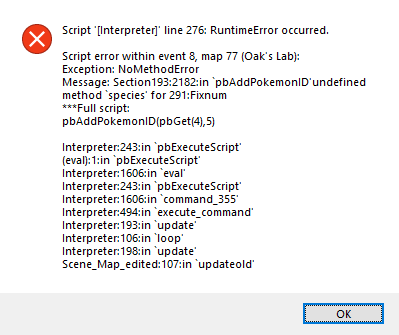
 flint rose
thanks bro
 golden urchin
Hi, I usually just play fire red rom hacks but I cant figure out how to run infinate fusion on the app that I use (RetroArch). If anyone has any systems that they use then please let me know.
 plain scarab
Oh! its a standalone thing, you dont need an emulator
sterile pivot
Ye just play it like a regular PC game, you run the Game.exe
This game is not a rom hack after all
golden urchin
Oh thx
sterile pivot
without playing a randomizer what options can you set with debug to encounter the most wild fusions
chilly kayak
If you set $game_switches[828] to true you'll get a permanent fusion incense (every wild pokemon will be fused)
sterile pivot
I was playing around with that setting before and I encountered fusions about half the time. Same with re-enabling Force Fuse Next Pokemon each time. I tried to see if they were self fusions but when using splicers on them it gave the option to fuse not unfuse. Any ideas?
chilly kayak
That's because self-fusions can't be encountered in the wild (outside of randomizer).
Basically how wild fusions work is that first the game rolls if it's going to be a fusion (something like 20% chance normally, fusion incense makes this 100%). Then it generates 2 pokemon from the route's encounter data and fuses them, but it uses the base form instead if they're the same species. So the less variety a route has the less you're actually likely to encounter a wild fusion.
sterile pivot
Ah that makes sense, thank you!
tranquil saffron
It seems starters don't appear in viridian river anymore after catching Mew?
 craggy frigate

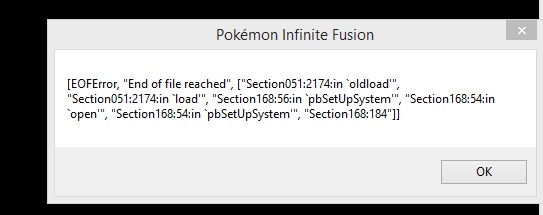
 tranquil saffron
I’m not sure if that’s true, and if it is I think it’s a glitch
west raven
I'm playing in 4.6.2 and I get this error whenever I try to open the map (with Fly or Teleport for example) and that's indeed very annoying. Do you know if there's a way to fix that ?
chilly kayak
@west raven You probably installed a patch on an incompatible version
tranquil saffron
@chilly kayak Do I need to flip some of these to have debug in a new file?
tranquil saffron
I have debug on right now, that's how I accessed this screen
Kazi just hacked them into this so I don't have them if I restart
chilly kayak
Yes but it's the item activates the switch that makes it so that you get debug in a new file
tranquil saffron
I like the name of this one
chilly kayak
But it's still off for you since you hacked it in without using the boots
tranquil saffron
No, I used the boots to access this
chilly kayak
Like used the item from the bag to turn on debug mode or just pressed f9?
tranquil saffron
Both
chilly kayak
Check switch 842
hollow ridge
I think it's just the normal essentials font.