#support
1 messages · Page 157 of 1
 wintry yoke
 gilded kayak
nobody here plays the game unironically
(other than the people on the sidebar u can clearly see playing the game)
 viscid lantern
im playing leagues as we speak! 
gilded kayak
😲
 leaden trail
I don't think I've logged in in the better part of a year lol
 fast ivy
Hello, I am having an issue where the floors on the way to the doom entrance show this blanked out screen but once I enter the area before doom everything works fine. I've been messing around with Blindfold, Skybox and I'm not quite sure where the issue is. Also my GPU is on when this issue occurs. When GPU is off, this is not an issue. Any help is appreciated. Thanks.

 fast ivy
Hello, I am having an issue where the floors on the way to the doom entrance sho...
fast ivy
fast ivy
Hello, I am having an issue where the floors on the way to the doom entrance sho...
I solved the issue. It has to do with the Low Detail plugin.
 haughty pumiceBOT
Many plugins from the pluginhub break the client in subtle or not-so-subtle ways, including causing issues like client freezes. We do not support pluginhub plugins because we do not make or quality control them, and do not recommend their use.
Run the RuneLite (safe mode) shortcut, or with a Jagex account, first run the RuneLite (configure) shortcut and tick the Safe mode box, then launch RuneLite via the Jagex launcher.
This temporarily disables the GPU plugin and all hub plugins which will allow you to confirm the issue is caused by one of those plugins and isn't a core RuneLite issue.
If the issue is caused by a hub plugin, you should isolate which plugin it is and then uninstall the plugin.
 plucky cargo
Hello , is there any way to fix Runelite freezing (can be 1h gameplay or 12h), closing and stating an OpenGL error on event viewer? Been happening for a while and its driving me nuts I've tried everything
leaden trail
That sounds like you probably want to roll back your GPU drivers to an older version
plucky cargo
leaden trail
That sounds like you probably want to roll back your GPU drivers to an older ver...
Really? I am new to PC , I dont know how to delete the ones I have
It was fine from july 2025 til January 2026 lol
 heady trout
Hi, my runelite is crashing and only on the last phase of Wardens in TOA. The only thing that updates in the client logs is in the screenshot.
GPU drivers up to date, had 15GB + of ram available at the time, game is otherwise smooth. No recent plugins installed, even removed some that were enabled during previous runs that worked fine. This happened only yesterday and today and only at Wardens final phase in TOA.
 haughty pumiceBOT
 solid mesa
Increase your heap space
heady trout
Any reason I'd need to do that out of the blue? Ive ran TOA a ton before this with no issue
solid mesa
You probably installed more plugins or have a plugin using lots of heap
heady trout
I guess one could have updated, but I havent installed more.
leaden trail
Plugins update all the time
 minor lintel
is there a list of bot commands in each channel in this discord?
solid mesa
If you type / it should show all of them

 arctic grove
i'm playing on cachyos with niri window manager. every time i open runelite (both through bolt and the AUR installation), it doesn't allow me to fullscreen properly. the window in which the game operates never changes it's resolution no matter how much i mess around with the actual system window itself

this is how the game looks like when i fullscreen the window
 keen pumice
Why does runelite say incorrect email/password when I entered the credentials on the jagex website correctly?
gilded kayak
keen pumice
Why does runelite say incorrect email/password when I entered the credentials on...
your account is probably too new for the old login system we use
you probably need to put that username & password, into the Jagex Launcher
and use the Jagex Launcher to launch RuneLite
keen pumice
ok?
gilded kayak
ok?
 obtuse narwhal
why does the bolt of cloths now show as i have them like the rest of the requirements?
 gilded kayak
cuz those are banknotes
obtuse narwhal
how do i exchange or can i not?
gilded kayak
basically just a piece of paper that says u own 5 of them
you can yes
deposit them into your bank, or use the item on the banker
obtuse narwhal
okay thank you
 vapid kayak
anyone around to help me with some kind of bug
leaden trail
Just post your issue
vapid kayak
i used a plug in to show someone a certain pattern with tile markers, i used w as my bind key but now it prioritizes the w as a bind key and cant use my w in chat, uninstalled the plug in but still can't use my w
leaden trail
Restart your client
 fickle sigil
Hello 🙂 , I created a GitHub OAuth token with the scopes user:email and read:user, but I'm unable to link it to my Discord account. with /gauth can some one tell me what I am doing wrong?
 zealous cedar
run /ghauth without a param
fickle sigil
fair^^
fickle sigil
zealous cedar
run /ghauth without a param
Stuck on Thinking it seems
zealous cedar
maybe try again in a minute
 agile river
anybody knows if update to clue helper for master clues on league is being done soon-ish?
i just found out the hot-cold clues are different ID on leagues so the plugin is not recognizing them
agile river
i see well you see... i might or might not have 10 of them on the ground rn lol
thats gonna be some stone age clue doing
solid mesa
If you know how to build runelite from source you could do them now
 tulip otter
Hey, is there a way to change the size of the icons on the side? I’ve tried changing DPI settings by right clicking runelite in properties and changing display scaling (windows) and it makes a lot of things bigger but those icons are so tiny
haughty pumiceBOT
solid mesa
You can adjust the scale
tulip otter
Amazing!! Thank you
 empty minnow
turn off the show updates setting
 nocturne egret
Hi all, my client is randomly being "suspended" and my pc gets stuck on like 1 fps until i force close runelite through task manager, is anyone else having this problem? plz send help
 hollow egret
Hey guys, so after some conversation here, i was told that even tho i was getting errors from built in aswell as hub plugins, the sudden freezing of rl client was due to a driver issue cause of ai making the new drivers, i went back like a whole 4 months and its still crashed what can i do now? its not crashing as often but im still dropping frames for example like when tekton goes into enraged phase, or when moving towards ice demon room, or when big mutts come out, today it actually fully frooze and slowed down the whole pc after completing a tob? i dont even know whats going anymore feels like ive tried so many things and nothing is working
haughty pumiceBOT
@hollow egret Please refer to this flowchart for further troubleshooting.
 delicate bobcat
nocturne egret
Hi all, my client is randomly being "suspended" and my pc gets stuck on like 1 f...
delicate bobcat
nocturne egret
Hi all, my client is randomly being "suspended" and my pc gets stuck on like 1 f...
Do you use 117 HD? Have you tried disabling all hub plugins?
 thorn folio
Hi everyone, I checked my hotkeys and keybinds, but I cannot type apostrophes ‘’’ on my MacBook. I care about grammar, so I would appreciate help fixing this.
thorn folio
Also, how can I get these vertically above each other? I did it a while ago, but it broke now. I am checking settings, but unsure
 haughty pumiceBOT
You can configure horizontal/vertical orientation, infobox groups or split infoboxes into new groups with the menu options opened with Shift + right-click. https://runelite.net/img/blog/1.6.28-Release/infobox.gif

 oblique plume
The flip option
thorn folio
That was quick, tyvm
thorn folio
thorn folio
Hi everyone, I checked my hotkeys and keybinds, but I cannot type apostrophes ‘’...
Any idea about this?
oblique plume
If irs not bound to a key idk
haughty pumiceBOT
If one of your keys isn't working in game, you've most likely bound it to a feature of a plugin. The Debug Helper hub plugin can show what keys are bound to what plugins.
thorn folio
haughty pumice
If one of your keys isn't working in game, you've most likely bound it to a feat...
Does not seem like it, no?

 solar owl
nocturne egret
Hi all, my client is randomly being "suspended" and my pc gets stuck on like 1 f...
solar owl
nocturne egret
Hi all, my client is randomly being "suspended" and my pc gets stuck on like 1 f...
If youre using an nvidia gpu, rollback your driver to November
 round jacinth
thorn folio
Does not seem like it, no?
round jacinth
thorn folio
Does not seem like it, no?
The way Mac does its icons is confusing. Idk what toggle chat chat toggle’s S thing is
 cosmic thistle
been having a really weird issue with runelite, every time i do any sort of action (eat piece of food, get an xp drop, chop a tree etc) my game has little microstutters
these stutters get worse and the amount of time my client freezes for seems to get longer the longer i have the client open.
i dont think its a ram issue? i have 32 gigs and runelite isnt using super much and most of it is never being used when playing runescape even for longer periods of time
it happens even with a default runelite profile with no plugins turned on and the gpu plugin turned off aswell, honestly not sure whats causing it
(technical details
playing on arch linux
gpu: rx 7600
cpu : rzyen 5 5600
have tried java 11,21 and some other versions none of them seem to change anything)
kindof hard to get an example of but i can try and send some kind of video
this is a recent issue , havent changed any components or drivers on my computer, just installed updates as they happened
zealous cedar
did you try safe mode?
zealous cedar
just safe mode
cosmic thistle
will try 1sec
feels like it doesnt
but sortof hard to tell unless i have my game open for a little while
does actujally feel pretty normal tho
wait no it does
just started again
zealous cedar
this video you sent looks normal to me
cosmic thistle
if i mean yea i genuinely cant record in enough fps for it to show
if i have my client open for a full day it gets pretty bad i think it would be really obvious even on a 60 fps video
im honestly guessing its not a runelite thing and some sortof kernel or driver issue
was hoping someone else had noticed and figured out a way around it
 haughty crater
My league tasks are not getting updated at: https://oldschool.runescape.wiki/w/Demonic_Pacts_League/Tasks
Does somebody now how to fix it ?

Old School RuneScape Wiki
This page will contain a list of all the tasks in the Demonic Pacts League. Completing tasks during the league allows players to earn league points and unlock relics and areas containing new content and tasks. Tasks span five difficulty levels: Easy, Medium, Hard, Elite, and Master. Completing a task...
leaden trail
Do you have wiki sync installed and enabled?
 limpid agate
having issues where runelite is randomly crashing. Seems to happen very often when fighting eclipse moon, but also happens randomly when doing anything else. How do i diagnose this?
 dusk plume
I need some assistance if anyone can help. I changed my username on my iron to my old mains user and my collection log and stuff is all mixed up when I use in the ingame commands.
gilded kayak
the in-game commands for collection log* come from  plugins
so you'll need to bring that up with whichever plugin you are using
but we offer plugin hub devs the ability to differentiate outside of username, so i'm surprised thats happening
 exotic thicket
hi guys - I am new to runescape, is there a way to show NPC's name , but not monsters?
I put * on NPC indicator but now it shows everything
leaden trail
Monsters are considered npcs
exotic thicket
leaden trail
Monsters are considered npcs
is that a way to show just NPCs but not monsters?
Or this is not important at all?
leaden trail
There's not a distinction between the two in game really
exotic thicket
leaden trail
There's not a distinction between the two in game really
okay , thank you bud
haughty crater
leaden trail
Do you have wiki sync installed and enabled?
Thanks was on a different pc and it was not installed
 main tulip
what might be the cause of this fps drop?
the right one is the safemode but im still getting microstutters
with plugins i get -50fps drops
 narrow surge
main tulip
what might be the cause of this fps drop?
narrow surge
main tulip
what might be the cause of this fps drop?
does it still happen if you don't have discord open?
main tulip
lemme test
main tulip
narrow surge
does it still happen if you don't have discord open?
yea still happens
leaden trail
main tulip
what might be the cause of this fps drop?
Probably item charges improved
At least for the worst of it
main tulip
leaden trail
Probably item charges improved
tried that already its not that
i disabled every single plugin hub plugin 1 by 1 but still getting stutters
leaden trail
But did you restart after disabling them?
main tulip
i didnt but shouldnt the safe mode do the trick? since im getting stutters there too
leaden trail
Can you post your logs?
haughty pumiceBOT
To find the logs, you can do one of the following:
- If your client failed to open, click the
Open logs folderbutton. - Open the screenshot directory by right-clicking 📷
Camerabutton, navigate 1 directory up, then open logs folder. - Navigate to
%userprofile%\.runelite\logson Windows or$HOME/.runelite/logson Linux and macOS.
Upload the log files named client and launcher by dragging them to Discord. If there are files prefixed with jvm_crash dated from today, upload them too.
leaden trail
Why are you circumventing the Jagex launcher auth 🤔
main tulip
wanted to track my hours via steam
main tulip
should i disable that?
 tidal magnet
was getting some crashes lastnight - runelite just completely closes, today played a bit but then started crashing while doing echo hunleff - tried updating drivers and what not and the issue got worse.. I have a fresh crash log (cleared logs & cache) and a really old one I can drop in channel if anyone can look
while back someone told me to put some argument in the configure but it looks like it magically disappeared and I can't find what it was, also 😐
fresh
tidal magnet
stutters for like 2 seconds zero fps and crash 😐
 gilded kayak
does event viewer say anything that would suggest it's just the gpu driver crashing
a lot of the time it clearly blames the gpu driver
tidal magnet
Faulting application name: RuneLite.exe, version: 0.0.0.0, time stamp: 0x93addee2
Faulting module name: nvoglv64.dll, version: 32.0.15.9576, time stamp: 0x69a7bb53
Exception code: 0xc0000005
Fault offset: 0x0000000000a746c7
Faulting process id: 0x362c
Faulting application start time: 0x01dcd5cebac35023
Faulting application path: C:\Users\Kirby\AppData\Local\RuneLite\RuneLite.exe
Faulting module path: C:\Windows\System32\DriverStore\FileRepository\nv_dispi.inf_amd64_b3b480d8d7b7542c\nvoglv64.dll
Report Id: 1ff52116-f324-4550-a2cf-cce777e97764
Faulting package full name:
Faulting package-relative application ID:
loooks like it
its fresh driver install 😐
Faulting application name: RuneLite.exe, version: 0.0.0.0, time stamp: 0x93addee2
Faulting module name: nvoglv64.dll, version: 32.0.15.9576, time stamp: 0x69a7bb53
Exception code: 0xc0000005
Fault offset: 0x0000000000a746c7
Faulting process id: 0x468c
Faulting application start time: 0x01dcd5d03645887e
Faulting application path: C:\Users\Kirby\AppData\Local\RuneLite\RuneLite.exe
Faulting module path: C:\Windows\System32\DriverStore\FileRepository\nv_dispi.inf_amd64_b3b480d8d7b7542c\nvoglv64.dll
Report Id: 144781c1-ee75-4aeb-a0f2-72a4b4cc81f9
Faulting package full name:
Faulting package-relative application ID:
gilded kayak
yeah fresh driver is probably not what u want since i'm fairly sure humans dont really write the drivers anymore
u want something stable since in their defence, we aren't using the latest and greatest option for this browser game
leaden trail
That looks like your GPU driver is to blame yeah
tidal magnet
well I was running on...
591.86-desktop-win10-win11-64bit-international-dch-whql yesterday and nearly 3x 6houred
so maybe I'll go back to that
but at end of night had a couple crashes - chances its related to the echo hunleff fight itself pretty low?
gilded kayak
i wouldn't* think so unless it's something the fight is doing causing the crash
but i could not speak to that gpu code might as well be in 2 different languages squashed together
to me
 gleaming moat
dumb question but, I accidentally closed my infoboxes while trying to move them, I cannot for the life of me figure out how to open them back up. Is there a hotkey or setting?
empty minnow
You "closed" them?
gilded kayak
maybe u reset them to top left?
gleaming moat
yea, as in I don't have infoboxes
 gilded kayak
i wonder if something is stacked wrongly due to your resource pack
which infobox are u expecting right now
gleaming moat
yep, I turned off fixed resizable and it was hidden behind my inventory.
gilded kayak
yippee
 wooden flame
is it possible to offset any of the metronome plugins?
so like want you act on the beat instead of after it
I tried tick beats and found it messed up my actions signifiacntly because I was aiming for the beat so I'd be pre/post tick 50/50
 inland pawn
Would anyone know why runelite might get stuck at loading please wait, when trying to login? I downloaded it on a new device, imported my profile, and it gets stuck after pressing play at the login screen. I tried on the official client and it works fine but whether I use default profile or my own profile it gets stuck when I log in.
 gilded kayak
does the tab load?
zealous cedar
I definitely patched out that wmic thing so this isn't that
gilded kayak
ah very good then
 delicate olive
i assume the client cant identify which beginner clue is which until its read?
zealous cedar
yeah
delicate olive
darn, i was hoping i had some setting wrong, thanks for confirming
zealous cedar
yeah its sort of silly since the clue plugin cant identify them
 crisp dune
Yeah both beginner and master clues can only be recognized after they're read
 void heath
is there a way to share my runelite settings safely with a friend?
leaden trail
We ask that people not do that because 1) you can leak webhooks/api keys etc and 2) it inevitably ends with them showing up in here asking why their client is doing something it's been configured to do
 mossy swan
don’t attach your settings
 nimble lodge
can anyone help me find any plugin that may be causing my fps to stutter whenever im gear swapping or doing general pvm content? would be much appreciated for any help
solid mesa
Item charges improved?
nimble lodge
i tried that already
haughty pumiceBOT
@nimble lodge Please refer to this flowchart for further troubleshooting.
hollow egret
im seeing alot of people talking about stutters and random crashes, is it possible that leagues is making this worse, and somehow the plug ins are getting emssed up and causing things to crahs or stutteR?
 warped prairie
what plugin shows league relics like this? might be 3rd party idk

 winter snow
It's base game, there's an option to toggle it in the game settings under the Leagues section
warped prairie
winter snow
It's base game, there's an option to toggle it in the game settings under the Le...
hmm
 winter snow
Yes, that one.
warped prairie
yeah it doesnt show
not sure if maybe one of my other plugins might be overwriting it, but I only have a small handful of 3rd party ones

 viscid lantern
warped prairie
yeah it doesnt show
viscid lantern
warped prairie
yeah it doesnt show
you have to enable it on mobile first, the setting doesnt work on desktop
warped prairie
viscid lantern
you have to enable it on mobile first, the setting doesnt work on desktop
oh that's weird, but alright. is that the only setting that's like that?
viscid lantern
yep
warped prairie
viscid lantern
and then it should work on desktop
nah doesn't work. toggled it on the setting, logged out, logged into desktop, and it didnt work
viscid lantern
then its probably a hub plugin hiding it
haughty pumiceBOT
To enable safemode
Windows
Run the RuneLite (configure) shortcut from the windows start menu
Tick the Safe mode box, save, launch RuneLite the way you normally do.
Mac
In Terminal, run
/Applications/RuneLite.app/Contents/MacOS/RuneLite --configure
Tick the Safe mode box, save, launch RuneLite the way you normally do.
viscid lantern
can do that to verify that ^
warped prairie
viscid lantern
can do that to verify that ^
I deleted the shortcut just to kill an old habit. do you know where that shortcut pointed to?
this is where im currently at
 viscid lantern
I think runelite.exe --configure
warped prairie
gotcha, I just realized it's in my recycle biin too :)
warped prairie
viscid lantern
I think `runelite.exe --configure`
so how do I boot up runelite in safe mode when i need the jagex launcher first? I toggled the safe mode flag but running RuneLite or RuneLite (safe mode) doesn't seem to work. the former just looks normal and the latter doesnt let me authenticate
viscid lantern
launch it from the jagex launcher
warped prairie
viscid lantern
launch it from the jagex launcher
gotcha, then I dont think it works

 viscid lantern
does it say Safe Mode in the window title?
if it does then idk, the bar might just be broken then
warped prairie
viscid lantern
does it say Safe Mode in the window title?
it does, and it is what it is
not the end of the world, just a convenience. thx for the help :)
 sacred osprey
o/ hi all, my client has been crashing a lot lately is someone able to help me out?
keen pumice
I need help scaling on HiDPI
 oblique plume
stretched mode plugin?
keen pumice
oblique plume
stretched mode plugin?
where?
oblique plume
runelite
keen pumice
oblique plume
runelite
thats what I'm running
oblique plume
yea so you can configure the plugin to stretch your screen
keen pumice
OK
keen pumice
oblique plume
yea so you can configure the plugin to stretch your screen
it was a built-in plugin
The side is insanely small
 oblique plume
for the sidebar you have to use the scale param in the launcher config
haughty pumiceBOT
keen pumice
oblique plume
for the sidebar you have to use the scale param in the launcher config
alr, but thx for help!
 idle osprey
It appears hot cold steps for master clues have a different clue id than normal and strange device pop up / helper isnt working. has anyone figured out a work around for this?
league specific hot cold step
 empty minnow
It'll be fixed in the next release of runelite
idle osprey
fantastic, I'll stall my clues till then tyvm
 timid garden
hello gamers, how do I put skill icons/reg icons next to my ground items ?
oblique plume
maybe the loot filters plugin does that
timid garden
I don't see an option for it ._.
empty minnow
Loot filters definitely does that, it's not just a box you check though
Loot filters setup is very detailed
wooden flame
@wintry goblet could you update max skill trim? Low prio obv but it's been broken for a while
haughty pumiceBOT
Support for hub plugins should be directed to the author of the plugin.
You can find the support link by searching for the plugin in the Plugin Hub panel and clicking the ? button on the plugin, or by right-clicking the plugin in the plugin panel and clicking the Support menu option.
plucky cargo
hey is there a setting to stop this from happening when i zoom out ? playing fixed stretched mode

 oblique plume
you can disable it yea
plucky cargo

 obtuse dawn
Does anyone use the camera points plugin? Mine just randomly stopped working
I usually get this but now the plugin has changed?

like what is this
 solid mesa
Yes the plugin got updated
haughty pumiceBOT
Get support for the Camera Points Plugin Hub plugin here: https://runelite.net/plugin-hub/show/camera-points.
You can also find the support link by searching for the plugin in the Plugin Hub panel and clicking the ? button on the plugin, or by right-clicking the plugin in the plugin panel and clicking the Support menu option.
 normal bay
@obtuse dawn if you restart runelite, it should recover your old camera points & show things more similarly to how they worked before
 wary owl
does runelite store your profiles anywhere other than .runelite\profiles2? like online anywhere (not seeing on runelite website)? I was hopping between two profiles a few minutes ago and when I changed back to my "typical" profile both profiles were completely overwritten with settings I have never seen before and if I try to restore them by importing from profiles2, both profiles are now the overwritten "new" profiles that I didn't set up...
would love to be able to import "yesterday's" version of my old profiles if possible?
round jacinth
wary owl
does runelite store your profiles anywhere other than \.runelite\profiles2? like...
the stuff online is not your settings like tile markers or npc indicators, its just loot tracker and farming timers, not settings
it's only in profiles2 folder
wary owl
round jacinth
it's only in profiles2 folder
is it possible to like search my computer's memory for the version of the file in profiles2 from yesterday?
round jacinth
not really no
windows doesnt really do that for you out of the box without some settings you specifically would turn on and even then i dont know if it would catalog the diff of .runelite
wary owl
got it, thanks. so even if I'm logged into runelite, the cloud sync setting doesn't backup my profiles anywhere other than locally in profiles2 folder? if i have to remake all those profiles it is what it is but trying to avoid that :/
round jacinth
 needs to be enabled for the settings to be stored in cloud too
without that on then you're only telling the website your kc/ge history/farm timers
wary owl
i have cloudsync enabled
round jacinth
did you lose all your settings or only some of them
haughty pumiceBOT
To find the logs, you can do one of the following:
- If your client failed to open, click the
Open logs folderbutton. - Open the screenshot directory by right-clicking 📷
Camerabutton, navigate 1 directory up, then open logs folder. - Navigate to
%userprofile%\.runelite\logson Windows or$HOME/.runelite/logson Linux and macOS.
Upload the log files named client and launcher by dragging them to Discord. If there are files prefixed with jvm_crash dated from today, upload them too.
wary owl
i lost 2 profiles - they were like completely overwritten with plugins/settings i have never used before
wary owl
haughty pumice
To find the logs, you can **do one of the following**:
- If your client failed t...
im new here, are you asking me to send these to you?
oblique plume
they could say something
wary owl
those profiles at the top of the client.log file ('3rd' and '3rd Resizeable') are the ones that i lost about 45 mins ago
oblique plume
you have a ton of connection errors
and it looks like youre running multiple clients
 calm stirrup
Hey all, been having a weird issue recently with my RL client (as of just the last 3-4 days, if I'm recalling correctly). I get a weird stuttering issue where my game tanks to <10 FPS and my whole computer is very laggy (mouse pointer struggles to move on the screen). The way I've been "fixing" it short term is by clicking the close on RL and getting to the Are you sure you want to exit? prompt 4-5 times and then everything goes back to normal (aka click Close -> Cancel, Close -> Cancel, ...).
I'm on Windows 11 and haven't installed anything on the computer since the stuttering started happening (both on RL and the PC in general).
Any ideas what is going on or any logs I can provide to try to diagnose?
oblique plume
so i feel like i can see one of them clobbering another when it loses the connection
its hard to follow whats actually going on due to all the spam
but when youre reimporting its getting your settings back so are you sure theyre not there
wary owl
oblique plume
but when youre reimporting its getting your settings back so are you sure theyre...
i was having internet connectivity issues this morning but nothing out of the ordinary. and have only been playing on 1 account today ( so 1 client). i'm not sure what you mean about reimporting - when i reimport these 2 profiles they are both the same "new" profile with plugins and settings i've never used
sorry about the spam i appreciate you trying to read through it anyways
am i correct in saying runelite does not back up profiles anywhere other than locally in the runelite/profilesv2 folder, even with cloudsync active?
oblique plume
2026-04-27 12:25:56 PDT [AWT-EventQueue-0] INFO  n.r.c.plugins.config.ProfilePanel - Importing profile from C:\Users\rgoul\.runelite\profiles2\3rd Resizeable-446027199100.properties
2026-04-27 12:25:56 PDT [pool-3-thread-1] INFO  n.r.client.config.ConfigManager - Finished importing 6791 keys
thats not the default profile amount of keys
so theres settings in there
wary owl
yes but these are not my settings. these profiles were completely overwritten with new plugins and settings i have never used or seen before
like i was chopping ironwoods and all of a sudden when i changed back to my usual profile blindfold plugin is on, tiles marked everywhere, infoboxes galore, interface styles set to like that old shiny gladiator version. stuff that i have simply never set up. which is why im simply trying to find yesterday's version of my profile, or any version from the last month or so, to restore that
oblique plume
there is no "backup"
its written to disk and synced to the cloud
you lost connection to the cloud so it failed to sync, but that means it just rolls back to whatever state the cloud was in the next time it launches
it doesnt make anything up
wary owl
okay thank you
oblique plume
the only way for it to behave like you say is if someone else is signed into your rl account and is modifying the same synced profile as you
and youre pulling those changes
wary owl
i'm not sure what to say. i realize this is an extremely weird issue. i've played for several years and never had anything like this happen
doesn't make any sense to me either :/
calm stirrup
calm stirrup
Hey all, been having a weird issue recently with my RL client (as of just the la...
Sorry, scrolled up and saw how to grab log files. Looks like this warning is specifically spammed a lot, not sure how problematic it is:
2026-04-27 12:58:23 CDT [Client] WARN  n.runelite.client.eventbus.EventBus - Uncaught exception in event subscriber
java.lang.NullPointerException: null
    at io.cbitler.stealingartefacts.StealingArtefactsPlugin.onGameStateChanged(StealingArtefactsPlugin.java:132)
    at net.runelite.client.eventbus.EventBus$Subscriber.invoke(EventBus.java:70)
    at net.runelite.client.eventbus.EventBus.post(EventBus.java:223)
    at net.runelite.client.callback.Hooks.post(Hooks.java:217)
    at client.gn(client.java:53207)
    at hh.ad(hh.java:801)
    at client.ir(client.java:9221)
    at sw.agt(sw.java:447)
    at sw.az(sw.java)
    at sw.run(sw.java:58274)
    at java.base/java.lang.Thread.run(Unknown Source)
Thats fine
haughty pumiceBOT
Many plugins from the pluginhub break the client in subtle or not-so-subtle ways, including causing issues like client freezes. We do not support pluginhub plugins because we do not make or quality control them, and do not recommend their use.
Run the RuneLite (safe mode) shortcut, or with a Jagex account, first run the RuneLite (configure) shortcut and tick the Safe mode box, then launch RuneLite via the Jagex launcher.
This temporarily disables the GPU plugin and all hub plugins which will allow you to confirm the issue is caused by one of those plugins and isn't a core RuneLite issue.
If the issue is caused by a hub plugin, you should isolate which plugin it is and then uninstall the plugin.
 red cipher
MacOS Macbook Pro 2016 running High Sierra. New to OSRS, first time downloading. Through Jagex launcher official client launches well, when attempting to launch Runelite prompted with photo attached below.
No VPNs
New admin Mac user account
Runelite alone won't launch either
 haughty pumiceBOT
The latest RuneLite launcher requires MacOS 11 (Big Sur, 2020)
If you have 10.12-10.15 ((High) Sierra, Mojave, Catalina) (2017-2019) use launcher 2.7.6 https://github.com/runelite/launcher/releases/download/2.7.6/RuneLite-x64.dmg
If you have 10.11 or older (El Capitan, Yosemite) (2014-2015) use launcher 2.4.2 https://github.com/runelite/launcher/releases/download/2.4.2/RuneLite-x64.dmg
gilded kayak
Download that one instead
hollow egret
calm stirrup
Sorry, scrolled up and saw how to grab log files. Looks like this warning is spe...
ive been scrolling through the cord and alot of people are having this issue myself included, im wondering if its the new leagues fucking with the game, i had stutters preleagues but now its full on 10 fps freezing like you said, i was recommended by some to check logs for error and althought it would temp helpthe issue would return. I repsoted and they informed that the new drivers are mostly ai made so to downgrade drivers as far as i felt comfortable doing, so ive rolled it back by a whole eyar and its still happening, so iguess my last resort is to run in safe mode as recommended to try to truly diagnose
hollow egret
hollow egret
ive been scrolling through the cord and alot of people are having this issue mys...
i did wanna say tho if it happens to u mid dangerous activity like a raid tho, id suggest the keyboard shortcut (ctrl+winkey+shift+b) that resets your graaphics card cycle and snaps out of the freeze
hollow egret
hollow egret
ive been scrolling through the cord and alot of people are having this issue mys...
thought id share my similar experience since our messages here get lost in others and sometimes get missed,
 brave carbon
Hello all. Recently (5-6 days now) the RL Client on my MacBook has been crashing, seems it may be graphics related as I'll get a graphical freeze 1/2 the time, the other 1/2 it will just crash. It happens fairly frequently, around once every hour or two. Most commonly it seems to be when loading in new areas ie. running, teleing, going through doors to instanced areas, etc. I tried updating both RL, and my Mac, and have everything on the latest software. No new plugins, and this has been ongoing since I've been on Leagues. I see some people above have had similar issues. I have client log files ready to go, have not tried safe mode as I've been unable to launch in safe mode. Any other suggestions?
Running MacOS Tahoe 26.4.1 on a 2021 MacBook Pro M1
gilded kayak
do you have that macos official™ crash log
brave carbon
Not quite sure what that is? I'll post screens of what I have though. I can include the client log file too.
 gilded kayak
usually when an app crashes on macos there's a popup from apple with a billion things about it
brave carbon
Nope, no MacOS popup. It seems to be client side.
I did find an error in the logs though, showing Map Loading Errors
right before crash
gilded kayak
then u can post the client.log
brave carbon
gilded kayak
your hub plugins are running out of memory
gilded kayak
ram memory as we only allocate a reasonable amount for the client
we don't let it take whatever it wants
haughty pumiceBOT
gilded kayak
ctrl+f memory
u dont have that many hub plugins so it's not impossible that one of them is leaking
but if so you'll need to bump the limit for the future debugging
so either way look at that page
brave carbon
That's interesting, only have four programs running, a web browser (with 4 tabs none of which are ram consuming), Jag Launcher, Discord, and RL
gilded kayak
gilded kayak
we don't let it take whatever it wants
.
brave carbon
I'll look into the link. Thanks for providing that
 quick dome
Anyone ever had Gauntlet Performance Tracker randomly start showing up even though you’ve never installed the plugin?
solid mesa
Don't post the same question in multiple channels
 crimson cape
Is there any way to fix this? i need to use the stretched mode plugin to scale UI but whenever i resize the window it has a 25% chance of it doing this,
Seems to happens with both gpu and 117 but not when both are disabled and doesn't happen with stretch mode disabled with either so its something to do with stretched mode specifically
3/4 of the frame is frozen but the top left 25% continues to render the only thing that gets rid of it is spamming the side bar a few times which isn't ideal

 cyan fjord
is this a currently known bug perhaps or oversight to any degree? in the past when you held down e.g shift and right clicked a client it would register/carry over, now that seems to require pressing shift again per re-focus of a client 🤔
also happens for ctrl carry-over
nimble lodge
this feature does not work when i enter a bank, the overlays come back and show up in my inventory when im doing non bank standing activities, does anyone have a fix for this?

@winged flame ive asked github if youre going to resolve this issue with this specific feature.
round jacinth
cyan fjord
is this a currently known bug perhaps or oversight to any degree? in the past wh...
I think key listeners are listening for the key press and release, going into focus with it being hold isn’t accounted for? I haven’t checked but seems reasonable to be that way
cyan fjord
Turns out it might be a windows 11 patch that broke it recently
gilded kayak
amazin
winter snow
I always just assumed it was a quirk of the OS, since so many other applications also don't handle held modifier keys properly when receiving focus
And it's been that way for years
 brazen quail
Anyone having issues for 117HD lagging af? like fps goes to 15 from 300?
once I turn it off it's fine
 torn oxide
Hi, why is the HiScore plugin for RuneLite no longer worker?
winter snow
Seems fine to me
torn oxide
So odd! It works fine now, thanks
crimson cape
lol
 worldly fern
just dced out of nowhere into login screen with failed to login message and couldnt log back in because my account was still logged in
round jacinth
I think that means you’re internet had an interruption with jagex
oblique plume
if it says youre still logged in that could be a world crash i think
round jacinth
not if they xlogged because of a dc
worldly fern
At my wits end with this. At random times I just instantly DC with the message “Failed to Login. Please try again”. No attempt to reconnect. Just…
 Reddit
this is basically what's happening to me every 2 weeks or so
 harsh falcon
heya guys a quick question how can i get value of my seed vault displayed i think ive turned the plugin off somehow
round jacinth
bank plugin does that
winter snow
It's also part of Dude, Where's My Stuff if I'm not mistaken
harsh falcon
cheers
oblique plume
dude, wheres my seeds
warped prairie
is there a way I can help with fat fingering my buttons, whether that's a simple hover indicator or bigger icons?

I fat finger equipment and prayers a lot
oblique plume
not afaik
warped prairie
oof, kind of surprising given it sounds like a simple feature on paper
oblique plume
making them bigger is banned, idk what a hover indicator would even be
warped prairie
could just be the clickbox/background changes color
oblique plume
the instant inventory plugin shows updates to them before the tick processes, so you can see fi you clicked it sooner i guess
warped prairie
that helps a bit ty. to clarify, I was thinking of something like this where each box is highlighted on hover. just something small like that for better feedback
 oblique plume
im not aware of a plugin that does that, but theres like 2k plugins so there could be one
warped prairie
yeah... i tried to look lol
solid mesa
warped prairie
could just be the clickbox/background changes color
Prayer Markers can outline the click box
 lucid trench
Hi can anyone help me
i tried to sign into runelite and when i restarted i get this
i managed to open runelite and sign out we fixed it and i could restart so i tried to sign in again and now i just can tgbet it to open even in safemode
 haughty pumiceBOT
To find the logs, you can do one of the following:
- If your client failed to open, click the
Open logs folderbutton. - Open the screenshot directory by right-clicking 📷
Camerabutton, navigate 1 directory up, then open logs folder. - Navigate to
%userprofile%\.runelite\logson Windows or$HOME/.runelite/logson Linux and macOS.
Upload the log files named client and launcher by dragging them to Discord. If there are files prefixed with jvm_crash dated from today, upload them too.
lucid trench
appprently its my gpu plugin
haughty pumiceBOT
Delete your %userprofile%/.runelite/cache folder or run this command in command prompt run as Administrator:
rmdir /s "%userprofile%\.runelite\cache"
delete the okhttp folder in there
lucid trench
i deleted it still wont open
gilded kayak
can u post the client.log again
lucid trench
leaden trail
It's a file permissions issue probably
There's two days in that log
Run RuneLite as administrator once, then once you're at the login screen close it and set it to run not as admin and you should be good
lucid trench
doesnt work as adm
leaden trail
Do you have some sort of antivirus installed?
lucid trench
thats how i fixed it before then i tried to sign into runelite again and it broke now i cant even get to log in screen
no
oblique plume
what about the launcher log
oblique plume
running as admin attempts to auto fix that
lucid trench
soon as u mentioned file permission it got me thinking
oblique plume
so if it didnt work it would be nice to know why
leaden trail
If you manually mess with permissions of files you're obviously going to break things
lucid trench
its worked like that for years i lkost my runelitem profile once and thought that was the fix
oblique plume
if anything thats exactly how it breaks
cuz if it cant write to it then you will never have your settings saved
lucid trench
so now im on an old profile it seems... i backed my profile up on my desktop before just incase this happened
leaden trail
That's definitely not the fix to losing your profile
I mean if you had it set to read only then yes it's going to be an old version because the client won't be able to write changes to it
lucid trench
Appreciate the advice
 deep shuttle
anyone know how to turn off the popup for gauntlet performance? the only other way i can turn it off is by fully disabling the entire gauntlet plugin
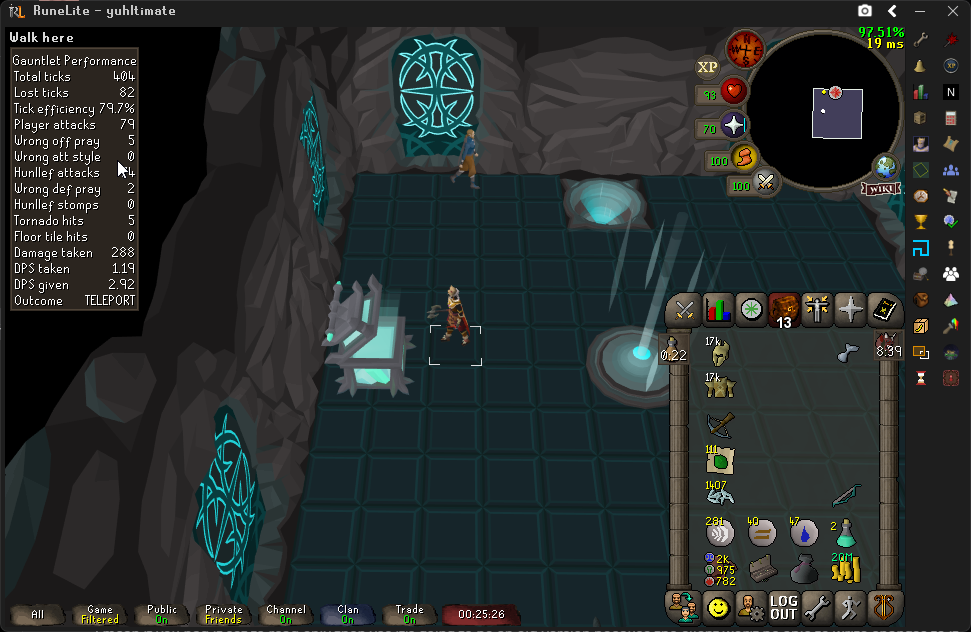
this thingy
gilded kayak
can't right now i believe
some guy really really really really wanted to combine the plugins together and apparently they made it so u cant remove this overlay in the lobby
 jolly raven
anyone know what plugin this is randomly started showing up ?
 gilded kayak
some task plugin i would guess
it's probably dynamically loading the task b/c nothing comes up when i search all of the plugin code
deep shuttle
Do you thing that issue would probally be fixed in the next week or two?
gilded kayak
it better be lol
deep shuttle
i know its bad to put a timeframe on somethin just wanted to ask
gilded kayak
or i'm gonna bash that guy
deep shuttle
send him to arma GWD with no items
 eager aurora
Hello, I am getting semi-frequent crashes in Nightmare, array out of bounds. (+12 players)
gilded kayak
dont use the kbd crossbow
but i guess u say it's 12 people so thats a problem
u might not be the one using it
eager aurora
Possibly. I'll check if safe mode fixes things.
 sharp cedar
hello i have moved my entire runelite folder (the one you find when you right click the screenshot icon) and when i went to relaunch from the jagex launcher all my plugins and data were not on the current client
the folders full of the data still exists in a different location but not on the client the jagex launcher opened
now i have moved the folders BACK to the original location but none of my plugins or data are on the client when i relaunch it
so my question is, is there a way to make runelite recheck files for the plugins i am "missing"
oblique plume
Delete the one it created then put the folder you moved out, back again
You likely didnt replace and instead just added when you put it back
 warped void
Anyone could help me out.
When i'm at the arraxyte the web tunnel has no option to enter. I have tried a new profile but that did not help.
 viscid lantern
did you start night at the theatre and then not complete it?
warped void
I did..
viscid lantern
yep that would do it
warped void
Damn.
viscid lantern
got to finish the quest first
warped void
Appreciate it.
Wait I did finish it.
Nvm. I needed to enter the normal way instead of using the leagues tp. 👍
oblique plume
Interesting
I saw a post saying they finished it too but it was closed
Maybe they also are tping right in
viscid lantern
might be a quest state thing then, ive seen more people say this on leagues
well you got in, goodluck farming the bluetooth hally 
sharp cedar
oblique plume
Delete the one it created then put the folder you moved out, back again
just to clarify
you mean the folder where runelite is or the data is?
becuase i have already moved the folder with the data back to its original location and made sure to click replace files here
oblique plume
the original location
if you didnt have the client closed when you did this then that would also explain why replacing didnt work
so if you dont have the backup in a clean state you would have to import your profiles from before into the client again
haughty pumiceBOT
sharp cedar
oh thank god
i still had my old profile folder so i imported from there
thank you for help
dusk plume
gilded kayak
the in-game commands for collection log* come from <:pluginhub:12643142922918953...
Do you know which plugin handles the !log command? I've tried about everything I can from my end - can't figure out how to reset it
 coarse surge
dusk plume
Do you know which plugin handles the !log command? I've tried about everything I...
coarse surge
dusk plume
Do you know which plugin handles the !log command? I've tried about everything I...
iirc, !log used to be handled by collectionlog.net, which has since been archived by the developer. Since then I know at least the RuneProfile plugin has incorporated the same functionality in the command, although Im not sure if others are using it too
dusk plume
coarse surge
iirc, `!log` used to be handled by collectionlog.net, which has since been archi...
Ahh it's rune profile I've got to resync
Idk how to clear the data though I'll look around thank you for your insight here
I appear to have broken something by name changing - I'll contact the plugin creator and see how to wipe my previous data
 dusk plume
coarse surge
iirc, `!log` used to be handled by collectionlog.net, which has since been archi...
dusk plume
coarse surge
iirc, `!log` used to be handled by collectionlog.net, which has since been archi...
In the event that it comes up again, I needed to log onto my OLD account (with the previous name) and resync there, then go on the iron and resync to rune profile, and it's fixed now.
 hearty ember
Hi, I have a question about Runelite third party Plugin development, is this the correct chat to ask in?
mossy swan
hearty ember
Hi, I have a question about Runelite third party Plugin development, is this the...
 nocturne arch
Im just tryna full screen lol
tidal magnet
Still getting runelite instant closes (sometimes crash file, sometime pop up, sometimes nothing)
Always steady 15% gpu usage, spike to 100% runelite close, no other application issue
Have tried so many things I am fried - looks like only thing that reliably works is disable GPU plug-in (I think, at least acts more stable) but idk if I can play like that
Might be copium too but if I close opera gx and discord and only have runelite running it seems to last longer intervals - all three have hardware acceleration off
Is there a specific older driver y’all recommend for an Asus rog strix 3090 white oc that I can downgrade to? The issue shows up in event viewer (sometimes) I’ve tried multiple but no luck as of yet
 warped elbow
Sorry if this is in the wrong place, but I'm having an odd issue after a power outage. When I try to launch RuneLite through the Jagex Launcher, I immediately get a message about the process returning an unknown error code and the launcher closes. When I use it to launch the official client, it works fine. I've tried reinstalling the launcher, but still getting the same issue. I'm not really sure if this is a launcher issue or something corrupted due to the computer suddenly losing power or what. Appreciate any help.
gilded kayak
warped elbow
Sorry if this is in the wrong place, but I'm having an odd issue after a power o...
your assumption is probably correct, does runelite launch normally
if you run the runelite.exe by itself
if the answer is no nothing happens, just run the runelite installer again overtop of your existing install, link is in #welcome
warped elbow
Is the .exe the one in appdata/local/runelite? Sorry if that sounds very stupid, it's been so long with the Jagex accounts I've totally forgotten.
gilded kayak
ye
warped elbow
Yeah, nothing happens when trying to launch it. I'll try reinstalling and see. Thank you.
Yep, that did it. Seems like everything's working fine now. Thank you again. I'm relieved it was such an easy fix.
 twin vault
I lose some data while switching between two different RL config profiles. Can't remember some of the others, but one example is the Saved Banks plugin. I lost a bunch of snapshots I had taken.
Anyone know why this might have happened, where they might be recovered, or how to avoid it in the future?
leaden trail
Post your logs
haughty pumiceBOT
To find the logs, you can do one of the following:
- If your client failed to open, click the
Open logs folderbutton. - Open the screenshot directory by right-clicking 📷
Camerabutton, navigate 1 directory up, then open logs folder. - Navigate to
%userprofile%\.runelite\logson Windows or$HOME/.runelite/logson Linux and macOS.
Upload the log files named client and launcher by dragging them to Discord. If there are files prefixed with jvm_crash dated from today, upload them too.
 calm radish
Anyone else getting connection lost every few seconds? UK world
deep shuttle
felan whenever the fix is in you mind @ ing me if its not too much LOL
i refuse to do CG if that thing is gonna pop up
 brazen hamlet
Hi, im having random issues with Runelite, whether I teleport or leave and re enter wintertodt
I haven't played in a long time; I don't know if there might be a plugin or other thing causing the problem
round jacinth
What type of issues?

 whole sigil
ik its been ages but i was back from my break and decided to see if i can recover the files. i got a couple data recovery tools and managed to recover a lot of what was on my ssd, and i got the whole .runelite folder. used disk drill to get my profiles folder back and dmde to get all of my cas screenshots, etc. didnt have to pay for any of that too :)
 pseudo quartz
whole sigil
ik its been ages but i was back from my break and decided to see if i can recove...
pseudo quartz
whole sigil
ik its been ages but i was back from my break and decided to see if i can recove...
Actually nice to hear, glad you tagged me with the update!
 cursive berry
I can't turn on the GPU plugin for some reason
haughty pumiceBOT
To find the logs, you can do one of the following:
- If your client failed to open, click the
Open logs folderbutton. - Open the screenshot directory by right-clicking 📷
Camerabutton, navigate 1 directory up, then open logs folder. - Navigate to
%userprofile%\.runelite\logson Windows or$HOME/.runelite/logson Linux and macOS.
Upload the log files named client and launcher by dragging them to Discord. If there are files prefixed with jvm_crash dated from today, upload them too.
keen pumice
brazen hamlet
Mines crashed too until I found out it was the firewall blocking it.
brazen hamlet
gilded kayak
as far as we know that's just a gpu driver bug
oblique plume
looks like its really old
turn down the settings in the gpu plugin
could help
its probably memory starved
cursive berry
cursive berry
I can't turn on the GPU plugin for some reason
I reset my computer and it works now
 steel osprey
ge prices arn't showing when looking up any item
round jacinth
restart your client
whole sigil
pseudo quartz
Actually nice to hear, glad you tagged me with the update!
tyty <3
 austere trellis
any idea why im constantly dropping from 165fps to like 120?
happens with both gpu and gpu (legacy)
Gpu settings
 austere trellis
Gpu settings
austere trellis
austere trellis
Gpu settings
Running on a ryzen 7 5700X and a rtx 5070, so that shouldnt be the problem
gilded kayak
we use the browser version of the game so it's very common the latest drivers cause you issues
but i would probably say to test a fresh profile with no plugins, and gpu first
austere trellis
on a fresh profile i think i dont have fps drops, not noticable enough attleast
is there any way to figure out which plugin is causing this?
gilded kayak
not really no
austere trellis
is there any way to check which account i have used to log into runelite? or is it tied to jagex launcher account now?
im gona try the old classic reinstall
gilded kayak
into runelite yeah the  tab, but if you mean into the game inside runelite, probably no
the default uninstall process doesn't delete your plugin settings tho
cuz people secretly dont want that
austere trellis
gilded kayak
the default uninstall process doesn't delete your plugin settings tho
I was able to reproduce the problem by spam klicking 'pass barrier' in tob, afte reinstall i tried spamming it again and i didnt get any fps drops (yet attleast)
gilded kayak
interesting
 gentle crest
Hi, I just joined the disc. I submitted a plugin hub pr (#11614, Persistent Bank) about a week ago and was wondering what the typical review timeline looks like for new plugins because I've never made one before. No rush, just curious
gilded kayak
i don't really understand why a regular person would need this? it just looks like it's for tracking bots
gentle crest
gilded kayak
i don't really understand why a regular person would need this? it just looks li...
I guess the average player may not need it, but I always kind of liked grinding gp post max and I have 11 accounts on my Jagex launcher with items spread out all over them between osrs and rs3 even. I always thought it would be nice to 'know' what my total bank value is combined (-RS3 since it is not Runelite) -> And then also I have been making my own like tracking app that is kind of a CML/Temple + tracking in one hybrid.

But the plugin displays the info stand on its own -> and not selling/publishing the app or anything
gilded kayak
the queue is in a weird place rn since we're currently catching up on the sea of AI submissions
gentle crest
Ah, no worries and no rush. Thanks for the response
 obsidian steeple
Is anyone else's XP Updater not working? Neither my WOM or Temple are being updated on logout
 quiet bronze
was just wondering if anyone knows what causes the skybox to not load during tob sometimes. using skybox+ground object hider to hide bloat floor, it seems that every 2nd raid causes the skybox to revert to "overworld" instead of "cave sky" color - in the past, we solved this by unchecking "hide unrelated maps" in the GPU plugin settings, but this has since stopped being the fix. please @ me if anyone knows
 broken bough
restarted my computer and some of my settings got turned off, now i can turn on gpu
it just turns it off
happened like a couple of times before
 fathom kraken
Is there a chat command for your pb of the Infinte Jads challenge?
 fossil summit
No idk, but there’s one for the original 6
 scarlet ermine
Anyone ran into ground items double tapping hot key not working?
 buoyant jewel
is this client side or game? https://imgur.com/bE0FnP3
takes 12-15 seconds before i can click the button, and at corp my fps drops to 10. (Leagues)
If I log out and go to any non-league world, takes 6 seconds for button to pop up and it doesnt lag at corp nor my frames drop
 tidal magnet
crashing and out of ideas
two most recent jvm crash files - sometimes one isn't generated
 minor raven
Updated my Google account linked email from @hotmail.com to @gmail.com which @hotmail.com was the original runelite account login info. Now when I login to Runelite with my new @gmail.com account its as if that runelite account is brand new. If there is a way to allow me to login to runelite with my @hotmail.com acount i believe that would solve the issue
 hardy phoenix
Can anybody help with a setting I must have changed accidently please?
My ground items seem to just all read "----" instead of what the item is.
Same with any tile markers I've had previously with text in. They just read "-----"
The final thing that seems to have changed is the info boxes seem to have gone tiny (info on bolts / KPH etc which is usually just above chatbox.
I've attached a pic of the ground items plugin settings which I don't think I've changed anything on. Anyone got any ideas? TIA.


 rocky tiger
hardy phoenix
Can anybody help with a setting I must have changed accidently please?
My grou...
rocky tiger
hardy phoenix
Can anybody help with a setting I must have changed accidently please?
My grou...
Check Overlay settings under main RuneLite settings. Might be infobox size or a font issue. Could try a reset at bottom to start.
hardy phoenix
rocky tiger
Check Overlay settings under main RuneLite settings. Might be infobox size or a ...
A reset of that sorted it. Thanks so much.
 azure lark
hello i cant start my runelite on the jagex launcher

 sharp goblet
 chrome yew
jvm keeps crashing after around 15 min. Fatal EXCEPTION_ACCESS_VIOLATION in C2-compiled xe.ao(II)V
setup: RL 1.12.24, launcher 2.7.7, bundled Temurin 11.0.30+7, Win11, 9950X3D, RX 9070 XT, GPU plugin on.
any ideas on what to do?
oblique plume
minor raven
Updated my Google account linked email from @hotmail.com to @gmail.com which @ho...
it associates who you are to the email reported by the google auth, if you have a machine you signed in on thats still reporting the hotmail email then you can take its session file and use it
otherwise i dont believe you can get the hotmail back
you can reimport the profiles you have and that should bring over most if not all the data from the hotmail too
haughty pumiceBOT
 sonic idol
Hello i am looking for the collection log plugin by evansloan, version 2.2.4. did it get taken away?
leaden trail
I think that's the one that shut down a while back
empty minnow
buoyant jewel
is this client side or game? https://imgur.com/bE0FnP3
takes 12-15 seconds befor...
The startup lag is probably tasks tracker, not sure about the corp lag
 wintry warren
Hi, i’ve been having ongoing connection issues while playing. I’m getting frequent ping spikes, tick loss, and packet loss. I recently upgraded my WiFi thinking it was a network issue on my end, but the problems are still happening, so I’m starting to wonder if it could be device side (Macbook M1) or client side instead. Has anyone experienced something similar or have any suggestions on what I should check next?
oblique plume
theres a mac tick fixer hub plugin which says that macs have bad network stability in osrs because of the power saving done by the OS, and the plugin tries to fix that
wintry warren
oblique plume
theres a mac tick fixer hub plugin which says that macs have bad network stabili...
I've installed that a few minutes ago, but i still seem to be having random fluctuations in ping. I'll also give it a try while doing content
 dry drift
hey
i was deleting some things in my file explorer, and it appears that i have deleted something related to runelite, which reset all my runelite settings and deleted plugins that i had installed.
is there a way to restore/undo this and get my old settings back?
oblique plume
restore it from the recycle bin
dry drift
these are the 3 things in my recycle bin, when i search "rune". i restored them, and opened the runelite again via jagex launcher, but it didnt restore anything.
any other possible fix to try?
 oblique plume
thats not where your settings are
buoyant jewel
empty minnow
The startup lag is probably tasks tracker, not sure about the corp lag
Might be that in general then, tried a different profile and everything worked fine
oblique plume
so deleting those didnt change your settings
dry drift
im not sure what to look for
i think i deleted my profile in the .runelite folder. when i enter profiles2, i only see new ones
oblique plume
that is where your settings are saved so that makes sense
dry drift
is there a way to restore it ? i did not see anything in the recycle bin.
oblique plume
if its not there then no
dry drift
i dont understand why that got deleted tho, i only deleted stuff from the download section in the files explore.
keen pumice
Hello runescapers!
If I enabled the option "Remember Username". Would I able to get into the game with ProtonVPN on, whenever I open the game?
oblique plume
that has no impact on whether a vpn works or not
 deep pendant
is there anyway to send notifications to two seperate discords with the dink plugin?
oblique plume
yes
haughty pumiceBOT
Support for hub plugins should be directed to the author of the plugin.
You can find the support link by searching for the plugin in the Plugin Hub panel and clicking the ? button on the plugin, or by right-clicking the plugin in the plugin panel and clicking the Support menu option.
oblique plume
they prob explain it
 warm tangle
hey guys, sorry if this is a stupid question but #faq said to drop things like this in here - usually runelite drops a patch every two weeks from what I can see on github, but it doesn't seem to have come out this time? I'm anxiously waiting on that fix to hot/cold steps in leagues, and wondered if there's any reason that this patch seems to be delayed - thanks in advance for your time
zealous cedar
the last few weeks of game updates have been so small we don't need to release to fix anything
so we don't usually if we don't have to
 wooden viper
Hi there, can i get some help with this problem, already tried the instructions on the troubleshooting page and still the same problem
 rocky tiger
wooden viper
Hi there, can i get some help with this problem, already tried the instructions ...
rocky tiger
wooden viper
Hi there, can i get some help with this problem, already tried the instructions ...
Does this open in a web browser? The client is failing to connect. https://static.runelite.net/bootstrap.json
It’s text that starts with { "artifacts": [ { "diffs": [ if it’s anything else let me know
wooden viper
rocky tiger
Does this open in a web browser? The client is failing to connect. https://stati...
it does not
rocky tiger
Is there an error page like cloudflare or a block?
Or is it just timing out and nothing
wooden viper
timing out, says to check the firewall and connection
rocky tiger
What is your ISP and has it worked in the past? You could try restarting computer.
wooden viper
rocky tiger
What is your ISP and has it worked in the past? You could try restarting compute...
yeah havent changed ISP didnt have any problem in the past
im going to restart the router and pc
rocky tiger
Are you able to connect to a phone hotspot just long enough to load client? If restart doesn't work.
rocky tiger
If your plan has hotspot you can connect a usb cable.
 winged spruce
My GPU plugin is not working today, it just turns straight back off. I've reset to default settings and still the same.
Running Ubuntu, KDE Plasma, runelite installed through flathub and is up to date
oblique plume
Flatpak update
wooden viper
rocky tiger
If your plan has hotspot you can connect a usb cable.
didnt work, wont even show up on all the ports and adaptors
rocky tiger
Does this cloudflare test load? https://cloudflare.manfredi.io/test/
Bootstrap is on cloudflare
As for usb hotspot usally shows up on iphone if you connect usb while hotspot setting page is open
wooden viper
rocky tiger
Does this cloudflare test load? https://cloudflare.manfredi.io/test/
nope
rocky tiger
Then your isp has a problem with cloudflare
Try changing dns to 1.1.1.1
(cloudflares dns)
winged spruce
oblique plume
Flatpak update
No updates available 🤔
 oblique plume
Not for runelite, flatpak itself
This happens afaik when gpu drivers update
But flat doesnt have that yet
wooden viper
rocky tiger
Try changing dns to 1.1.1.1
changed it but it just says no internet, maybe im doing it wrong tho
might just need to contact my ISP
minor raven
oblique plume
it associates who you are to the email reported by the google auth, if you have ...
No i did a factory reset on pc and thought it would have been backed up on my runelite profile but i also just recently messed that up
rocky tiger
wooden viper
might just need to contact my ISP
Does https://www.cloudflare.com/ open? Like half the internet runs on cloudflare.
Make employees, applications and networks faster and more secure everywhere, while reducing complexity and cost.
wooden viper
yeah that one does
oblique plume
It was but you just cant sign into it anymore because you changed your email
I dont think there's a way to prevent that though
rocky tiger
wooden viper
yeah that one does
This feels like something for your ISP. I don't think cloudflare is blocking you. They would show an error page not just time out.
wooden viper
rocky tiger
This feels like something for your ISP. I don't think cloudflare is blocking you...
im going to contact them if they can help me fix it, thanks so much for your time!
rocky tiger
wooden viper
im going to contact them if they can help me fix it, thanks so much for your tim...
So https://runelite.net/ also not loading? It's also behind cloudflare.

RuneLite
A popular free, open-source and super fast client for Old School RuneScape
wooden viper
also not loading
rocky tiger
wooden viper
also not loading
https://chatgpt.com/ load? That's another site behind cloudflare.
wooden viper
yeap that does
 marsh scroll
I was having issues with loading things eariler, it's fine now. I think cloudlfare dns was having some issues https://downdetector.com/status/cloudflare/
rocky tiger
wooden viper
yeap that does
That's a test page that shows how you are connecting to RL net.
wooden viper
rocky tiger
https://runelite.net/cdn-cgi/trace work?
nope just sends me into time out
rocky tiger
You could try searching for your own IP address on https://www.projecthoneypot.org/search_ip.php to make sure you are not on a blacklist.
Lookup information on a specific IP address. Discover if an IP is a spam harvester, spam mail server, or dictionary attacker.
wooden viper
damn that wont eeven load
rocky tiger
wooden viper
damn that wont eeven load
That site is not on cloudflare. So your ISP is having connection issues to specific IP ranges or something.
wooden viper
i guess i just need to wait till they fix it
rocky tiger
Should still call them. Try going to random sites and see which are not loading and give them a list.
wooden viper
Will do that
 warm canyon
Hello, is there any way to make the close "X" button not ask "Are you sure you want to exit?" and just close instead
round jacinth
don't be logged in
warm canyon
:/
round jacinth
you should log out before exiting the client anyways
warm canyon
I'm playing at work just looking to close instantly. I have an office but if somebody walks in I would like a one click close...
oblique plume
Isn't that a setting under "runelite"
zealous cedar
im pretty sure it is a setting
warm canyon
I'm having trouble finding it. It is also my first time playing runescape lol
round jacinth

 round jacinth
ok
those things on the right side are plugins, plugins have settings
at the top search for runelite
runelite has its own settings and in those settings you have the thing in my screenshot
warm canyon
perfect!!! exactly what I needed. thank you for the help
warm canyon
That's they can't see the screen unless they take a few steps in so just hearing a single click doesn't do anything
and i'm IT so nobody knows what I do anyways lol
calm stirrup
Might be a dumb question, been trying to fix a stuttering issue I've been encountering since leagues started and trying all kinds of different things, definitely seems GPU-related though, regardless.
Anywho. I'm using 2 clients right now for two separate accounts. It looks like one of them has the 'set default profile' button, but the other one doesn't? (attached picture of client #1 on my iron, client #2 on my main, both routing through the Jagex Launcher via the same Jagex account).
Edit: I may have fixed the stuttering thing with a nvidia driver update, at least it's not doing a constant stutter when moving around anymore.

 gilded kayak
are you not logged into the game on account 2
calm stirrup
gilded kayak
are you not logged into the game on account 2
lmao, that would be it... 🤦♂️ sorry about that
gilded kayak
i feel like we wanted to make it work in the login screen when it's populated with the login name via the jagex account
but maybe it broke
or we didn't do that
 twin lichen
having stuttering / fps drops recently, maybe just since leagues started? seems there are a bunch of others in this server having the same, unsure if it's a runelite issue or a server issue, but any way to fix?
round jacinth
you could make a new profile with just gpu enabled and see if it behaves
twin lichen
just tried that, thanks. not a noticable difference in fps. maybe 2-3?
round jacinth
restart the client after making the new profile
twin lichen
only have gpu and fps control, but unticked everything in fps control besides showing fps in corner
kk
round jacinth
and be in the same area as you're having issues
twin lichen
same area, same fps
round jacinth
with that fresh profile with only gpu on?
twin lichen
i am using bolt launcher, but i havent had any issues with it until leagues started. really not sure what's going on. lots of people just in the past few weeks saying that they've had fps issues
twin lichen
round jacinth
with that fresh profile with only gpu on?
yes
twin lichen
i actually havent updated my drivers recently
twin lichen
im very confused as well haha
i appreciate it, i dont think my hw is bad. it's a laptop gpu but it's solid enough that i can play cyberpunk and shit. 1650ti. sure it's old but it shouldnt be struggling to play runescape lol
is there a way to maybe give runelite more ram?
round jacinth
yes but if a fresh profile is behaving the same as a loaded up one it wont help
twin lichen
where should i be checking to diagnose? like, ram and gpu usage, possible bottlenecking etc. im having a hard time believing it's my hardware but i DO believe there's a high chance im just having a linux moment.
god damnit nevermind i just figured it out lol
i was set to power saver
im on a laptop and it was throttling literally everything
delicate bobcat
twin lichen
where should i be checking to diagnose? like, ram and gpu usage, possible bottle...
can you post your client log?
haughty pumiceBOT
To find the logs, you can do one of the following:
- If your client failed to open, click the
Open logs folderbutton. - Open the screenshot directory by right-clicking 📷
Camerabutton, navigate 1 directory up, then open logs folder. - Navigate to
%userprofile%\.runelite\logson Windows or$HOME/.runelite/logson Linux and macOS.
Upload the log files named client and launcher by dragging them to Discord. If there are files prefixed with jvm_crash dated from today, upload them too.
plucky cargo
hey is there anyway to stop floors from flickering? mostly in CG but in random other places too
 zealous cedar
i thought for sure that was fixed
plucky cargo
it mostly happens when running to the tile or zooming in/out
standing in place is fine
zealous cedar
looks ok to me
 plucky cargo
would i have a setting on or something that you dont? my pc specs are fine
zealous cedar
which gpu plugin are you using
plucky cargo
gpu (legacy) ive been having runelite crashing opengl issues so i recently switched over
zealous cedar
try the normal one

 earnest iris
Is there a reason why idle notifier doesn't work when cutting uncut dragonstones, it works for other gems, but not dragonstone, am i missing something?
gilded kayak
the plugin uses a list of animations so it's possible nobody ever added that animation
since cutting the other gems used to be a profit but i think dragonstone was never one
earnest iris
ah cool makes sense
gilded kayak
yeah i was right
 earnest iris
surprised it hasn't been noticed sooner with leagues out
solid mesa
You can use the action progress plugin and it'll work and has a notify when finished option
earnest iris
amazing thanks, i'll do that
 dense oak
just started having an issue where my client does not receive input whilst I am in combat
it seems to be getting worse and happening across multiple machines
any pointers?
thanks
leaden trail
does it happen in safe mode?
haughty pumiceBOT
To enable safemode
Windows
Run the RuneLite (configure) shortcut from the windows start menu
Tick the Safe mode box, save, launch RuneLite the way you normally do.
Mac
In Terminal, run
/Applications/RuneLite.app/Contents/MacOS/RuneLite --configure
Tick the Safe mode box, save, launch RuneLite the way you normally do.
dense oak
leaden trail
does it happen in safe mode?
it does not, any way to diagnose what profile or add-on is causing the issue?
leaden trail
!flow
haughty pumiceBOT
flowchart: Please refer to this flowchart for further troubleshooting.
leaden trail
You can follow that although it can take a bit of time to narrow it down
dense oak
leaden trail
You can follow that although it can take a bit of time to narrow it down
thanks
 wet scroll
I'm not sure if this is a good place for me to ask such a thing, but is there any chance that there's a plugin that will hide the player's projectiles without hiding any other projectiles?
tidal magnet
tidal magnet
crashing and out of ideas
still crashing - latest and greatest log..
could it be hardware related even thought it only seems runelite is affected? I have tried multiple drivers
zealous cedar
this doesnt really look like the type of crash we see when its a driver issue
tidal magnet
sometimes its the second I press play sometimes its 2 hours in
I keep trimming plugins just incase
zealous cedar
maybe run memtest?
tidal magnet
safe mode I played 30 minutes but don't know how long I should give a true test, kinda hard on the eyes
okay been a decade since I've done that, memtest86 still recommended?
zealous cedar
yea
 naive jewel
would anyone happen to know why my ground items are making this black hole?
 zealous cedar
no thats not stock behavior i dont think
naive jewel
ive reset it twice now
tidal magnet
is it transparency stacked per item
naive jewel
I dont see that in ground items settings
empty minnow
is your highlight color slightly transparent?
naive jewel
would it be for default items?
tidal magnet
yes
naive jewel
opacity is set at 255 for all highlights
tidal magnet
unless you have those on highlight
tidal magnet
can uncheck highlight tile box
empty minnow
most people set a hide under value so it doesn't highlight random stuff like 50 million seeds
naive jewel
oh ok, it just started doing this a couple days ago, weird.
i didnt change anything tho
tidal magnet
did you always have highlight tile on
uncheck highlight tile under groundmarker plugin
 lament anchor
was there ever a fix for this? I started getting this issue all of a sudden just last week and I haven't been able to find anything that makes it work again, not even the potential fix with custom window chrome seems to work for this.
 west totem
Is there anyway to get the bank tags for an item that I accidentally removed from placeholders? I upgraded my rune pouch which had like 10 tags associated, and cleared the bank space but forgot to copy the tags over
west totem
west totem
Is there anyway to get the bank tags for an item that I accidentally removed fro...
I found a solution using leagues profile, could go into league, get free rune pouch, store in bank and tags are all there
 sinful grove
RL on apple silicon no longer using gpu plugin to render vertical layers (ground floor when on 2f of redwoods) and more it seems
 zealous cedar
maybe you turned on hide lower planes in the low detail plugin?
sinful grove
zealous cedar
maybe you turned on hide lower planes in the low detail plugin?
We love user error. (I am so sorry)
It’s been a while since I booted up rs on the laptop 😭
 fresh cosmos
is there a way for me to check what google account im logged in under without signing out? im not logged in with any account on runelite.net
mossy swan
fresh cosmos
is there a way for me to check what google account im logged in under without si...
check the panel
fresh cosmos
thanks brother
fresh cosmos
mossy swan
check the <:info_icon:938514423155400804> panel
sorry about the spam of questions, but how do i sync plugins between computers? i logged in with the same account, but i dont have the plugins 🙁
mossy swan
!transfer
haughty pumiceBOT
 dusky nacelle
do u know if theres a way to make friendly players invisible and enemies highlight red box or soemthing
keen pumice
haughty pumice
**transfersettings**: <https://github.com/runelite/runelite/wiki/FAQ#i-want-to-t...
Why do we get google sign-in when we literally import the settings from the menu?
fresh cosmos
empty minnow
What
i have linux installed onto a usb. when i sign in with my account it doesnt transfer the plugins for nuttin
empty minnow
fresh cosmos
i have linux installed onto a usb. when i sign in with my account it doesnt tran...
Did you enable cloud sync?
fresh cosmos
empty minnow
Did you enable cloud sync?
thats what i was asking how to do -.-
empty minnow
fresh cosmos
thats what i was asking how to do -.-
That is in the link
Just click the on your profile you want to sync
fresh cosmos
on the site?
empty minnow
fresh cosmos
this looks like i need to transfer my .runelite folder
There are two options, read the other option
 frigid dawn
does anyone know why my fps will drop to about 10-15 occasionally and it will stay that way until i restart
 jade nacelle
I had to factory reset my pc. After resetting it, I reinstalled runelite and logged into runelite with the same email that I had used before. However, none of my settings/plugins/etc. are still there. Any ideas? I did have cloud sync enabled prior to the reset.
haughty pumiceBOT
jade nacelle
round jacinth
You maybe didn’t have it enabled
I had it enabled because it was all synced to my work computer when I logged into it there as well. This was a couple months back though and I no longer have access to that pc either l0l. All I had to do was login to the work pc though and everything synced immediately. When logging into the account this time around on this pc, none of the settings/plugins are syncing. Nor is it even showing those profiles. It does have 2 "default profiles" but neither of them have the correct settings.
plucky cargo
hey is there a way for items stacked up in piles to stop flickering? a setting perhaps
 empty minnow
no
Something Jagex would have to fix
but not sure there's really a great way to fix that unless they make every rune slightly a different size
plucky cargo
okay well atleast its good to know its not on my pcs end 🙂 tyvm!
 sullen shell
are config changes meant to be visible here after saving? the second i launch jagex launcher the settings seemingly reset

mainly trying to increase heap space

the launcher log seems to have the xmx line, but it doesn't look like it translates to the actual client and i don't know why
 zealous cedar
that seems right, try relaunching the client

 zealous cedar
hmm its definitely working for me
enable the "debug" option, launch the client, and then upload launcher.log here
sullen shell
just to confirm for my own sanity, is it normal that the runelite config option always re-launches with "nothing" checked/saved?
 zealous cedar
no, thats not normal
zealous cedar
might be a file permissions thing, it should show something in launcher.log about it?
 zealous cedar
oh you installed runelite into program files?
sullen shell
well no that's the weird thing...
zealous cedar
it kind of looks like you did
sullen shell
oh i guess it is, i feel like i had a separate issue way back in the day when it wasn't
but yeah it is lol
zealous cedar
go to control panel and just uninstall runelite totally there
sullen shell
k back to my games or something again
zealous cedar
go to #welcome and download runelite again and install it, it should default to localappdata
sullen shell
ok thats saves at least now lol
im far from knowledgeable but curious if the below is odd

xmx2048m is clearly in the config (and it at least saves now)
but immediately below something allludes to xmx768m still being used
not sure if it's relevant at all though
the mem seems like it at least gets past the normal ~768500 or whatever when it used to hard freeze in civitas/priff/some of the denser areas
zealous cedar
this launch at 21:29:43 CDT looks ok
sullen shell
I'll let it simmer for a bit
the underlying issue im sure is plugin related but i am far too unmotivated atm to dig through that
will report back 🫡 appreciate the help
zealous cedar
the log line you are looking at is the jvm arguments for the launcher, not for the client, its separate
sullen shell
noted
zealous cedar
if you look at the "Running process: " line you see it passes -Xmx2048m
or well, it passes both, but it passes -Xmx2048m last so it is what it uses
sullen shell
yep i do see that now
and i think that would be consistent with what im seeing in the game itself (getting above that default 768500)
hollow egret
gilded kayak
but i would probably say to test a fresh profile with no <:pluginhub:12643142922...
Is this method the same as running it in safe mode to test for stuttering and what not?
mossy swan
hollow egret
Is this method the same as running it in safe mode to test for stuttering and wh...
yes but you get to have gpu on
hollow egret
cool will try it rn
hollow egret
mossy swan
yes but you get to have gpu on
so amde a new profile but all the same plug in are still on side bar and what not
op nvm they dissapeared
also quick question, someone mightve answered this before but just because the error line doesnt show up in logs doesnt mean its not a hub plug in causing it right?
hollow egret
trying it rn at cox where i usually get stutter when entering a new room or anything loads, hasnt stuttered at all and have gone through 4 rooms or so( very awkward without plug ins lol)
how do i go about it now? do gpu plug in setting have anything to do with it?
switched back to reg profile and its stuttering again
seems to happen as its loading new rooms
haughty pumiceBOT
@hollow egret Please refer to this flowchart for further troubleshooting.
hollow egret
ok i think im currently in the part where i have to duplicate the profile, so ill try that as well
ok so diabled over bottom half of plug in hubs and it stopped stuttering!
now i just gotta isolate it yeah?
im confused tho in flow chart it says enable half of the ones i just diabled and then ill only have one left? or does it mean enable until i see which one causes stuttering
mossy swan
hollow egret
im confused tho in flow chart it says enable half of the ones i just diabled and...
the latter, it’s a binary search to find the bad plugin
so you enable half, if it starts again you know it’s in that half and can disable half from those again and repeat
hollow egret
Ah i see ok thanks man i appreciate it
sorry about the rambling just been so frustrating
mossy swan
no worries, sorry i haven’t been able to reply much
hollow egret
nah youre good bro your info is appreciated
mossy swan
we should make a clear explanation pic of what the binary search thing means
we should do a lot of things but nobody likes writing documentation
hollow egret
yee would be huge for future referance
i feel you must be alot going on in here everyday huh
mossy swan
yeah, everyone helping here is doing it just for fun, so nobody does the boring stuff
hollow egret
i see, its always hard to be the voice of reason in any space haha but takes a real one to call it out gj man!
hollow egret
so i was able to isolate it to tile packs
i diabled and enabled a couple times to test and it stutters soon as i turn it on
mossy swan
guess you should report it to the dev
haughty pumiceBOT
Get support for the Tile Packs Plugin Hub plugin here: https://runelite.net/plugin-hub/show/tile-packs.
You can also find the support link by searching for the plugin in the Plugin Hub panel and clicking the ? button on the plugin, or by right-clicking the plugin in the plugin panel and clicking the Support menu option.
hollow egret
will do thank you
deep pendant

anyone have a clue why my lvls are sending to one discord with dink
but not the other?
 violet pier
Hello, I have managed to hide member actions when using the skill calculator. can someone help me restore it to it's default setting please?
mossy swan
have you tried logging in to a members world?
violet pier
I am f2p, can I send a screenshot of what it says?
This is under fletching for example. It is only trying to show my f2p actions. i remember hitting something once but can't for the life of me find it again to turn it back
 empty minnow
Have you checked the skill calculator settings?
 rare iris
anyone experience sudden issues with tick loss on runelite since yesterday? Thought itd resolve overnight but I tried on two PCs and both having the same lag. Does not seem to be pc or internet dependent since other games were fine

also tried different worlds and servers
zealous cedar
Looks like the issue is your internet
rare iris
reset router and having zero issues on other games though oddly enough
(league of legends) lol
15ms ping no spikes
 covert plaza
having same problem newb
rare iris
made sure windows, graphics card are updated too
 timid rock
anyone got any idea why i'm getting this error on jagex launcher:
05/02/2026 07:08:54 DEBUG - WebGetConnection.748d04f5 - WebGet error 'https://account.jagex.com/.well-known/openid-configuration' (172.64.147.164:443): (953) (22) (Socket error)
i can load the url in a browser
this is on a mac with personal hotspot
round jacinth
rare iris
anyone experience sudden issues with tick loss on runelite since yesterday? Thou...
I did.

I got off last night because of it
I went from arc raiders no lag to osrs with packet loss. Makes no sense, but it isn’t runelite.
You can run a similar command in terminal and confirm that.
!testping
haughty pumiceBOT
open command prompt, type this in:
ping -t oldschoolXXX.runescape.com
where the XXX is your world minus 300, for example world350 = 50
 rotund basin
rare iris
reset router and having zero issues on other games though oddly enough
rotund basin
rare iris
reset router and having zero issues on other games though oddly enough
Same problem here. Was doing radiant contracts yesterday so obviously connection was fine, today can’t even do cow boss with 50% tick loss
gilded kayak
do what the bot posted above and see if you have the same timeouts as zom
round jacinth
I am in Michigan with Comcast
I am still getting the issues this AM

no pvm for me today 😄
zealous cedar
sometimes they intentionally drop icmp
i have noticed
if rl reports loss% then it is probably real though
rotund basin
timing out here as well. So is this an ISP issue?
 round jacinth
the ms hasn't popped up in the top right on my mac yet but seeing a disconnect in my top left of screen at farming guild im thinkin i dont need that metric to see that it's still happening
rotund basin
or Jagex issue? Pinging 8.8.8.8 demonstrates no packet loss
round jacinth
as stated, i was playing arc raiders fine last night and when i went to osrs it was disconnecting, so it's something from me to jagex or my isp to jagex
it's not a runelite issue
round jacinth
round jacinth
the ms hasn't popped up in the top right on my mac yet but seeing a disconnect i...
it showed up

 cedar grail
round jacinth
I am in Michigan with Comcast
cedar grail
round jacinth
I am in Michigan with Comcast
Having same issue in MI with Comcast as well
round jacinth
i connected to a vpn and the issues are gone
cedar grail
Ooo good to know. Ty sir
rotund basin
Also Michigan, also Xfinity/Comcast so guess that's the issue. I'll try a VPN
warped prairie
Could I use wildcards for ground items so Ballista * would check for limbs and spring?
gilded kayak
yes
but i think u want the * to be touching maybe
it might not matter but if it does, then thats the reason
warped prairie
If I had to guess it doesn't matter but you're right
 cold sandal
 gilded bridge
omg
i found my michigan laggers
i'm so glad to hear it's not just me
was starting to get severely mad lol
i spent hours last night and this morning running every test and troubleshooting known to man
the issue appears to be fixed as of like 10 mins ago though
dry drift
how to fix menu entry swapper not working when i set my cat to chase, but first option is walk here
dry drift
theres no setting for cats
gilded kayak
 dry drift
ahh ty fixed
 forest shore
hi all, how can i delete all of the ground markers i have marked?
and not only the ones in render distance
round jacinth
You go to the areas with the markers
forest shore
yeah its annoying to do that
so i was wondering if i could just clean it all :p
i have a bunch of tiles i want to delete from the barracuda trials
leaden trail
No
 rigid quartz
my true tile and my character isn't in the same place even after 1 mins

 last bay
tunnels at araxxor are not clickable for some reason. Have not changed any settings since last time i came here. Anyone know how to fix this?
 solid mesa
You need to finish A Night At The Theatre
last bay
its completed
solid mesa
Is there some other quest you have in progress? Its a jagex leagues bug
last bay
solid mesa
Is there some other quest you have in progress? Its a jagex leagues bug
yeah weird
empty minnow
I think the evil eye teleports you into the quest cave
 heavy whale
anyone else having trouble staying logged in? it keeps disconecting me from the servers
 grim flint
I've been having bad input lag on mac today and activity monitor shows 120% or more cpu usage. it usually runs smooth
rigid quartz
Whenever I teleport via a lever or portal my true tile doesn't stay in sync with my player
grim flint
nimble lodge
i input'd 56834,56832,45443,56833,56837,56836,56835,56840,56838,56839 to hide doom's floor but its not working
any fix?
mossy swan
i’m guessing that’s not allowed
nimble lodge
no my friend has it
and its on the offical osrs wiki so i dont think thats the case
frigid dawn
why are my frames dropping like this at random and then they will stay that way until restart
 round jacinth
grim flint
round jacinth
grim flint
looks like network lag
round jacinth
frigid dawn
why are my frames dropping like this at random and then they will stay that way ...
some hub plugin probably
haughty pumiceBOT
@frigid dawn Many plugins from the pluginhub break the client in subtle or not-so-subtle ways, including causing issues like client freezes. We do not support pluginhub plugins because we do not make or quality control them, and do not recommend their use.
Run the RuneLite (safe mode) shortcut, or with a Jagex account, first run the RuneLite (configure) shortcut and tick the Safe mode box, then launch RuneLite via the Jagex launcher.
This temporarily disables the GPU plugin and all hub plugins which will allow you to confirm the issue is caused by one of those plugins and isn't a core RuneLite issue.
If the issue is caused by a hub plugin, you should isolate which plugin it is and then uninstall the plugin.
grim flint
how do you do that on mac?
 smoky saddle
Anyone know how to disable the performance overlay for the Gauntlet plugin? I like that it's tracking run history and the side panel, but I don't like the overlay showing after every run... Can't seem to find an option to disable that
This thing
 empty minnow
smoky saddle
Anyone know how to disable the performance overlay for the `Gauntlet` plugin? I ...
empty minnow
smoky saddle
Anyone know how to disable the performance overlay for the `Gauntlet` plugin? I ...
you can't currently
smoky saddle
empty minnow
you can't currently
Who's the dev for it? I need to 1v1 them in PvP arena for this
haughty pumiceBOT
Get support for the The Gauntlet Plugin Hub plugin here: https://runelite.net/plugin-hub/show/the-gauntlet.
You can also find the support link by searching for the plugin in the Plugin Hub panel and clicking the ? button on the plugin, or by right-clicking the plugin in the plugin panel and clicking the Support menu option.
empty minnow
you can leave feedback there, but I think multiple people have already ^
smoky saddle
Cheers
round jacinth
empty minnow
you can leave feedback there, but I think multiple people have already ^
Please fix this. this is horrible. I'm releasing myself from CG prison until you change this.
lol
solid mesa
Ahead of my time

Also its wrong bc they copied the code from gauntlet performance tracker but somehow changed attack delay from eating to be lost ticks
round jacinth
i think its been ai'd
empty minnow
can confirm. Emojis are present in the README
smoky saddle
Yeah the stats seems wrong for mine. Says I have 5 incorrect offensive prayers but I'm pretty certain I only missed 1 due to purple special. Unless it's including hits on minions
smoky saddle
empty minnow
can confirm. Emojis are present in the README
Yeah... This made me wanna hurl
grim flint
I could really use some help with this issue.... it's not a network issue. Something is causing runelite to use an absurd amount of cpu power and its causing bad input lag
i tried running a new profile with no plugins and that makes it run perfectly. but i can't figure out what plugin(s) is causing the issue
haughty pumiceBOT
Please refer to this flowchart for further troubleshooting.
 lofty grove
smoky saddle
Who's the dev for it? I need to 1v1 them in PvP arena for this
lofty grove
smoky saddle
Who's the dev for it? I need to 1v1 them in PvP arena for this
i opened a pr with a button to toggle it off but who knows if hes ever going to merge it
twin lichen
runelite bug or vanilla bug?

 stiff jacinth
twin lichen
runelite bug or vanilla bug?
stiff jacinth
twin lichen
runelite bug or vanilla bug?
sir that's a crab
twin lichen
ohhhh
ty

interesting tho, tiles are just... tilted?? lol
never seen this before
 bright narwhal
I've had clan members screenshotting this too
What does this shape mean??
Tried to post illuminati pyramid gif
solid mesa
Its a GPU bug but Adam doesn't know what causes it
bright narwhal
If you turn it horizontally it could be the number of open PRs graph over time (hehehe couldn't resist) https://github.com/runelite/plugin-hub/pull/11342
 devout torrent
Hi there, I keep getting big lag spikes when either loading new chunks or looting monsters. Very painful when trying to do trials. is there anything to help smooth these? - I am using GPU plugin, not sure what else might be causing issues
 glacial geyser
devout torrent
Hi there, I keep getting big lag spikes when either loading new chunks or lootin...
glacial geyser
devout torrent
Hi there, I keep getting big lag spikes when either loading new chunks or lootin...
check if it happens in safe mode
rigid quartz
I have found a bug
 stable heart
Hey lads, i am looking to get into plugin development, and wanted to start with a utility plugin for nex. How would I go about finding npc id's and animation id's so I can track the fight?
haughty pumiceBOT
@stable heart Jagex's third party client guidelines: https://secure.runescape.com/m=news/third-party-client-guidelines?oldschool=1
Additionally, these features have been rejected or removed from RuneLite: https://github.com/runelite/runelite/wiki/Rejected-or-Rolled-Back-Features
rocky tiger
Most plugins that would help in a boss fight would not be allowed.
stable heart
Oo I see, it specifically notes the thing I wanted to go for (melee attack counter) lol. Alright thanks for the heads up!
dusky nacelle
hello how do i setup world hopper to use only F2P total worlds? Doesnt seem to work for me
viscid lantern
 viscid lantern
rightclick "region filter" and hit reset
dusky nacelle
still seems to be hopping to non-total worlds
leaden trail
Can you show your settings?





 tame field
does anyone know of a plugin to combine duplicate chat messages?
tame field
ohhh so if i hit the collapse option it should be good?
round jacinth
sure
 paper cloak
Any idea why my runelite freezes?
 inland shoal
paper cloak
Any idea why my runelite freezes?
inland shoal
paper cloak
Any idea why my runelite freezes?
are you using 117hd?
paper cloak
inland shoal
are you using 117hd?
No
inland shoal
i am noticing freezing myself only when using it, once its off theres no issues
rigid quartz
When I teleport using levers or portals my character doesn't move with the tile it stays put
Anyone seen this?
zealous cedar
could be lag
rigid quartz
Na I can make it happen everytime
Nothing wrong unless I do a certain action
Very strange
zealous cedar
try safe mode?