#tools-and-devops
1 messages · Page 11 of 1
 rough marlin
I'm leaning toward docker atm but I'm not sure how to handle stuff like pyc when mounting volumes
rough marlin
wrap the run in a shell script which calls pyclean or whatever it was?
 tawdry needle
tbh i don't think i've ever had an issue with that
rough marlin
the more complex I make the stub/script the closer it gets to being a subpar replacement for pre-existing tools
tawdry needle
personally i think pyenv is a lot easier
rough marlin
oh, my bad
tawdry needle
containers are a separate headache
rough marlin
I confused pyenv with pdm
tawdry needle

GitHub
Simple Python version management. Contribute to pyenv/pyenv development by creating an account on GitHub.
pyenv install 3.8:latest ; pyenv install 3.9:latest; pyenv local 3.8 3.9 or something like that
rough marlin
yes I think I'll try this, ty
that's exactly what I need
docker is overkill for my current usecase
though idk, maybe a docker option for some of the builds might be nice
switching branches causes weird dependency issues now and then
tawdry needle
i still think pyenv + tox is a good and very well-established solution
i also suggest that hatch is a great dev tool here. it's like tox + setuptools or poetry rolled together
rough marlin
I am absolutely going to use it for other projects, and I appreciate the recommendations
Also this is a slightly off topic throwback to a prior conversation I think we had, but have you seen anything related to testing shared behavior among types implemetning a Protocol?
tawdry needle
no, i think the main problem we got to is that there's no easy way to enumerate programmatically all types that implement the Protocol
so i was thinking of alternative designs that involve subclassing and/or registration, which should make it easier to find and iterate over the relevant classes
you can have something like this in your core system:
_known_plugin_classes = []

def register_plugin(cls):
    _known_plugin_classes.append(cls)
    return cls

def list_plugins():
    return list(_known_plugin_classes)
then you can define your things this way:
@register_plugin
class MyPlugin:
    ...
and in your test suite you can enumerate them all easily:
@pytest.parametrize("plugin_cls", list_plugins())
def test_plugin_behavior(plugin_cls):
    ...
not sure if that's what you had in mind
 latent mantle
probably an old question by now, but how do i manage python versions and environments with jenkins? the pyenv plugin hasnt had any commits in 4 years so i would rather not touch it, should i just use docker?
 restive jasper
pyenv itself is alive, you can use it as a command
latent mantle
that solves one problem, but how do i make sure that jenkins uses the activated environment?
 rapid sparrow
latent mantle
probably an old question by now, but how do i manage python versions and environ...
rapid sparrow
latent mantle
probably an old question by now, but how do i manage python versions and environ...
using docker is great for CI. makes it a bit more agnostic
recently docker added very awesome features that made it even more awesome for CI
rapid sparrow
latent mantle
probably an old question by now, but how do i manage python versions and environ...
docker-compose.yml
version: '3.8'
services:
  postgres:
    image: postgres:13.6
    environment:
      POSTGRES_USER: ${PG_USER:-postgres}
      POSTGRES_PASSWORD: ${PG_PASSWORD:-password}
    healthcheck:
      test: [ "CMD", "pg_isready", "-U", "${PG_USER:-postgres}" ]
      interval: 3s
      timeout: 3s
      retries: 5

  redis:
    image: redis
    healthcheck:
      test: [ "CMD", "redis-cli", "--raw", "incr", "ping" ]

  migrate:
    <<: *app
    command: sleep 3 && echo "finished migrating"

  shell:
    build:
      context: .
    depends_on: &depends_on
      redis:
        condition: service_healthy
      postgres:
        condition: service_healthy
      migrate:
        condition: service_completed_successfully
    environment:
      PEASANT_REDIS_HOST: 'redis://redis:6379/0'
      CELERY_LOGLEVEL: DEBUG
    command: bash
Behold. Health check awaiting of services being up in docker compose
u can run your tests like docker-compose run shell pytest
and being confident that postgres and redis will be raised in advance and being ready to be used before tests started
latent mantle
im contemplaying using docker for this entire project
im using fastAPI and i just realised that i was installing everything in the global scope because each step sh in jenkins starts a new shell session
rapid sparrow
our company uses docker-compose for CI (and dev env) across all backend microservices 😄
very pleasant experience.
latent mantle
i havent used docker much, where do i build the image exactly?
like, should building be a step in the pipeline?
rapid sparrow
latent mantle
i havent used docker much, where do i build the image exactly?
the script above assumes Dockerfile will be present in same folder as docker-compose.yml and will capture current available context
ARG PYTHON_VERSION
ARG DJANGO_VERSION

FROM python:$PYTHON_VERSION as dev_env

ARG PYTHON_VERSION=3.10
ARG DJANGO_VERSION=4.0

ENV PYTHONUNBUFFERED 1
ENV PYTHONDONTWRITEBYTECODE 1

WORKDIR /code

RUN echo "$DJANGO_VERSION"
RUN pip install Django==$DJANGO_VERSION

COPY requirements /code/requirements
RUN pip install -r requirements/requirements.txt
RUN pip install -r requirements/requirements.dev.txt

RUN sh -c "$(curl --location https://taskfile.dev/install.sh)" -- -d -b /usr/local/bin

CMD bash
smth like this to write
rapid sparrow
latent mantle
soooooo uhhh, no image registry needed? :/
image registry is not strictly necessary but it should be present as a... best practice to speed up CI by caching in a reliable way (optionally)
Great as external cache storage
 worthy jolt
please is thier gmail web scrapper for python
 astral apex
There is not
But there is an API: https://developers.google.com/gmail/api/guides

Google for Developers
 fluid crypt
Hey, I have been seeking a good log manager tool for python apps that I'm running at several places! Thanks in advance
 indigo zenith
fluid crypt
Hey, I have been seeking a good log manager tool for python apps that I'm runnin...
indigo zenith
fluid crypt
Hey, I have been seeking a good log manager tool for python apps that I'm runnin...
You may want to elaborate on what you mean by that. Writing logs? Parsing them? What problem are you trying to solve that makes you think you need a special tool?
tawdry needle
maybe something like datadog?
rapid sparrow
fluid crypt
Hey, I have been seeking a good log manager tool for python apps that I'm runnin...
Loki+grafana can serve as lightweight first default for free
 stark raft
I'm wondering what the best way to handle optional dependencies in a library?
Is it better do this
try:
    import websockets
except ImportError:
    websockets = None

def use_websockets():
    if websockets == None:
        raise ImportError("Websokcets not installed, run pip install package[websockets]")
or
def use_websockets():
    try:
        import websockets
    except ImportError:
        raise ImportError("Websokcets not installed, run pip install package[websockets]")
 cedar mason
from selenium import webdriver
from selenium.webdriver.firefox.service import Service
from webdriver_manager.firefox import GeckoDriverManager
service = Service(GeckoDriverManager().install())
n = webdriver.Chrome(service=service)
n.get("https://google.com")
how can i resolve this?
/home/cabral-boop/Documents/python3/codigos/whtasapp.py:5: DeprecationWarning: Firefox will soon stop logging to geckodriver.log by default; Specify desired logs with log_output
service = Service(GeckoDriverManager)
Traceback (most recent call last):
File "/home/cabral-boop/Documents/python3/codigos/whtasapp.py", line 6, in <module>
n = webdriver.Chrome(service=service)
File "/home/cabral-boop/.local/lib/python3.10/site-packages/selenium/webdriver/chrome/webdriver.py", line 45, in init
super().init(
File "/home/cabral-boop/.local/lib/python3.10/site-packages/selenium/webdriver/chromium/webdriver.py", line 51, in init
self.service.path = DriverFinder.get_path(self.service, options)
File "/home/cabral-boop/.local/lib/python3.10/site-packages/selenium/webdriver/common/driver_finder.py", line 43, in get_path
if path is None or not Path(path).is_file():
File "/usr/lib/python3.10/pathlib.py", line 960, in new
self = cls._from_parts(args)
File "/usr/lib/python3.10/pathlib.py", line 594, in _from_parts
drv, root, parts = self._parse_args(args)
File "/usr/lib/python3.10/pathlib.py", line 578, in _parse_args
a = os.fspath(a)
TypeError: expected str, bytes or os.PathLike object, not type
restive jasper
@cedar mason not quite clear, but why do you use Chrome() class together with GeckoDriverManager() ?
Gecko engine is inside Firefox, not Chrome
 hazy current
i got destroyed in two git commands
git stash
git stash clear
It gave no warning for unapplied stash
rapid sparrow
hazy current
i got destroyed in two git commands
```sh
git stash
git stash clear
```
It gave ...
get used to git commit more often 😄 instead of abusing stash
i use stash as last resort only for temporal purposes when i need to rebase code with stuff from master or smth
not using stash for more than 30 seconds pretty much
 obsidian marsh
how do you include a custom directory in setuptools? i have an include directory for headers with an extension but it doesnt get copied to the build
indigo zenith
!rules 9
please delete your message
hazy current
rapid sparrow
get used to git commit more often 😄 instead of abusing stash
Well maybe soneome might have opened issue or something kinda. If i were able to add this feature i would have loved to do it.
rapid sparrow
hazy current
Well maybe soneome might have opened issue or something kinda. If i were able to...
should not your stash being still saved?
have u checked git stash list ?
oh right.. u cleared
nvm
🙈 why did u use clear at all
rapid sparrow
hazy current
Well maybe soneome might have opened issue or something kinda. If i were able to...
u could start using more meaningful stashing 🤔
saving with msgs
and deleting depending on lack of need one by one
rapid sparrow
hazy current
Well maybe soneome might have opened issue or something kinda. If i were able to...
naa@naa-MS-7C89:~/repos/pet_projects/experiments2$ git stash push -m "456.txt"
Saved working directory and index state On master: 456.txt
naa@naa-MS-7C89:~/repos/pet_projects/experiments2$ git stash list
stash@{0}: On master: 456.txt
naa@naa-MS-7C89:~/repos/pet_projects/experiments2$ git stash pop --index 0
On branch master
Changes to be committed:
  (use "git restore --staged <file>..." to unstage)
        new file:   456.txt

Dropped refs/stash@{0} (1291664cee42d36d3ad125d7d294283755d0ca52)
naa@naa-MS-7C89:~/repos/pet_projects/experiments2$ git stash list
saved meaningfully with msg
autoerased from stash with using pop
looks very safe approach to me for heavy stash usage 🙂
rapid sparrow
===
or even using apply + drops for even more safety 🤔
pop is kind of more preferable for autoerasing though
 desert rapids
I'm looking for some thoughts on how to implement some simple structured logging throughout my application.
I'd prefer to stick to the standard library if possible, I'm looking at the pattern found https://docs.python.org/3/howto/logging-cookbook.html#implementing-structured-logging:
import json
import logging

class StructuredMessage:
    def __init__(self, message, /, **kwargs):
        self.message = message
        self.kwargs = kwargs

    def __str__(self):
        return '%s >>> %s' % (self.message, json.dumps(self.kwargs))

_ = StructuredMessage   # optional, to improve readability

logging.basicConfig(level=logging.INFO, format='%(message)s')
logging.info(_('message 1', foo='bar', bar='baz', num=123, fnum=123.456))
My problem with this, is that you have to carry around this _ callable to wrap the log messages in.
Looking at the logging flow here https://docs.python.org/3/howto/logging.html#logging-flow, it seems the way to automate this, would be to alter the LogRecord creation process, by defining a new LogRecordFactory https://docs.python.org/3/howto/logging-cookbook.html#customizing-logrecord
Has anyone been down this road before?
I'm trying to work out if this is a good approach or if this will give me any headaches e.g. interfering with logs emitted by upstream dependencies.
I think all the downstream logging would be affected, but its my application so I'm happy with that.

Python documentation
Author, Vinay Sajip ,. This page contains a number of recipes related to logging, which have been found useful in the past. For links to tutorial and reference info...
Python documentation
Author, Vinay Sajip ,. Basic Logging Tutorial: Logging is a means of tracking events that happen when some software runs. The software’s developer adds logging call...
desert rapids
desert rapids
I'm looking for some thoughts on how to implement some simple structured logging...
hmm, LoggerAdapter might be another approach: https://docs.python.org/3/howto/logging-cookbook.html#using-loggeradapters-to-impart-contextual-information
Python documentation
Author, Vinay Sajip ,. This page contains a number of recipes related to logging, which have been found useful in the past. For links to tutorial and reference info...
hazy current
rapid sparrow
🙈 why did u use clear at all
Earlier I thought to continue working with another branch. then i stashed and then thought to finish this one adn cleared stash
 orchid bramble
I installed PyQt6 through pip3 but PyCharm didn't detect it and installed the same once again, will there be two copies of the module?
rapid sparrow
orchid bramble
I installed PyQt6 through pip3 but PyCharm didn't detect it and installed the sa...
You probably installed to global python environment
But pycharm auto creates sub .venv as far as I know
U can verify that by running
which python3 outside and in pycharm, it should show different paths
So yes, u installed twice. Just in two different python environments
Global and project local
orchid bramble
rapid sparrow
Global and project local
Thanks and I just noticed that
 rare anvil
Is there like a leetcode/codewars equivalent for git. I wanna do like practice problems for making sure im good at git
 thorny shell
https://github.com/benthayer/git-gud ? I know nothing about it

GitHub
Wanna git gud? Then get git-gud, and git gud at git! - GitHub - benthayer/git-gud: Wanna git gud? Then get git-gud, and git gud at git!
 tiny jungle
GitHub
A Git Murder Mystery. Contribute to nivbend/gitstery development by creating an account on GitHub.
thorny shell
only murders in the repo
rapid sparrow
rare anvil
Is there like a leetcode/codewars equivalent for git. I wanna do like practice p...
https://learngitbranching.js.org/
Magnitudes better option
There is a whole interactive tutorial with super visual explanations.
@thorny shell @tiny jungle
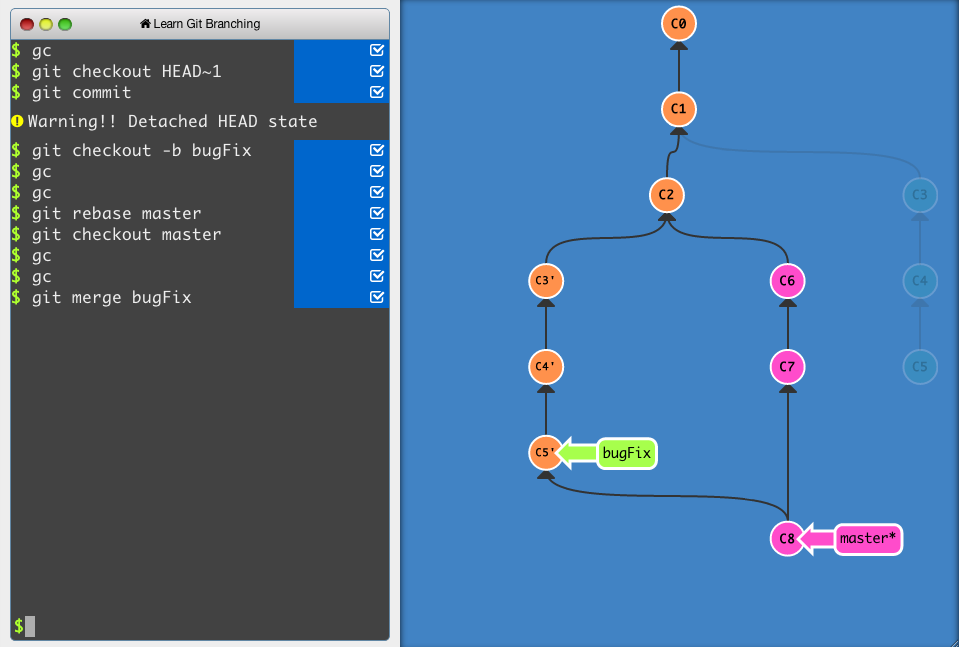
An interactive Git visualization tool to educate and challenge!
orchid bramble
How do I remove the Python which came with MinGW
thorny shell
If you can't figure out how to remove it, it should suffice to simply rename the executable from (say) python3.exe to python3-mingw.exe or similar. That way you won't accidentally run it.
thorny shell
orchid bramble
How do I remove the Python which came with MinGW
^^
restive jasper
or edit PATH variable
orchid bramble
I deleted MSYS2 itself, Thanks anyway
thorny shell
that's even better! 🙂
 heavy knot
git commands require me to copy and paste the long auth token again and again
is there a short cut?
 brazen forge
what auth token? 
heavy knot
yk github ended support for user id and password... now it asks for a token key instead of pwd
brazen forge
are you on Windows?
thorny shell
in theory your git client should cache that token for you so that you don't have to type it on the command line. In practice, I can't remember how to make it do that
heavy knot
linux
heavy knot
thorny shell
in theory your git client should cache that token for you so that you don't have...
hmm... but that's related to the client, im using linux terminal
brazen forge
on Linux, I think GIt only supports storing the credentials in a plaintext file using the store mode
thorny shell
heavy knot
brazen forge
https://git-scm.com/book/en/v2/Git-Tools-Credential-Storage
ah ig it'll work just lemme test
rapid sparrow
heavy knot
git commands require me to copy and paste the long auth token again and again
is...
generate ssh key, be a normal person 😄
ssh-keygen
add public key into account settings
and everything will be without password/tokens
as long as u did not set password during ssh-keygen command creation
new repos clone with git clone git@github.com/Org/repo.git
repos u already downloaded switch to new one via git remote set-url git@github.com/Org/repo.git
new intiailized repositories without set remote url, initialize via git remote add origin git@github.Org/repo.git
rapid sparrow
heavy knot
does this work with remotely accessing a repo?
yes. it is meant for this
heavy knot
alr
heavy knot
rapid sparrow
new intiailized repositories without set remote url, initialize via `git remote ...
is it Org? (capital O) or org?
rapid sparrow
rapid sparrow
`ssh-keygen`
if u are at windows, this command is accessable in git bash
rapid sparrow
heavy knot
is it `Org`? (capital O) or `org`?
just user/org.
When u check code/clone hint command u can check correct command when choosing SSH
 heavy knot
hmm ok
brazen forge
git@github.com:user/repo.git
heavy knot
@rapid sparrow
when using git pull:
git@github.com: Permission denied (publickey).
fatal: Could not read from remote repository.
Please make sure you have the correct access rights
and the repository exists.
might be a stupid mistake
i havent worked with git much
rapid sparrow
heavy knot
git@github.com: Permission denied (publickey).
fatal: Could not read from remote...
have you added generated public key
content of id_rsa.pub into your account settings?
heavy knot
ah im sorry im sorry
heavy knot
rapid sparrow
have you added generated public key
content of id_rsa.pub into your account sett...
where's this file? (linux)
ah i got it
i did some wandering around in the docs and generated a new SSH
https://docs.github.com/en/authentication/connecting-to-github-with-ssh/generating-a-new-ssh-key-and-adding-it-to-the-ssh-agent
and the command goes like ssh-keygen -t ed25519 -C "your_email@example.com"
the SSH key's like
-----BEGIN OPENSSH PRIVATE ------
shit from another universe
-----END OPENSSH PRIVATE KEY-----
but when i add it to the acc settings it says that its not a valid OpenSSH format
where do i go wrong?
@rapid sparrow
rapid sparrow
heavy knot
<@370435997974134785>
i said u need to add id_rsa.pub, the public key to settings, not private key (which is id_rsa)
heavy knot
oh... um...
when i generated the key
it asked for a filename
i wrote pass
and it created 2 files
pass and pass.pub
i need to enter the pass.pub content?
or some other-worldly file?
uhoh the pass.pub file
i catted the pass file by mistake
my bad
yup it works now
tysmmm
umm.. it doesnt
rapid sparrow
heavy knot
i need to enter the pass.pub content?
yes
rapid sparrow
heavy knot
yup it works now
great
rapid sparrow
heavy knot
umm.. it doesnt
whhich is new error? 🙂
heavy knot
heavy knot
git@github.com: Permission denied (publickey).
fatal: Could not read from remote...
..
rapid sparrow
heavy knot
but same error
have u craeted them via notepad?
rapid sparrow
lets walk it command by command
heavy knot
ohk
heavy knot
umm
heavy knot
docs say to use this thing: ssh-keygen -t ed25519 -C "mail.com"
rapid sparrow
heavy knot
docs say to use this thing: `ssh-keygen -t ed25519 -C "mail.com"`
Argh.
who you are going to listen, some docs or me? 😄
heavy knot
what is the difference between it and keygen?
its the github official docs
but ok.
as you say master.
heavy knot
rapid sparrow
cat `pass2.pub`
hmm done
rapid sparrow
heavy knot
hmm done
copy printed content to your account settings into SSH keys
heavy knot
alr done
rapid sparrow
okay, now run git clone suggested_command_at_interface_of_repository
heavy knot
ok....
┌──(env)─(risen㉿kali)-[~/_Twilight]
└─$ git clone git@github.com:Risen57/song-recognition.git
Cloning into 'song-recognition'...
git@github.com: Permission denied (publickey).
fatal: Could not read from remote repository.

Please make sure you have the correct access rights
and the repository exists.
i used the SSH command provided at the interface
hey ducky? are you scratching your hairs rn? im sorry im a stupid noob
rapid sparrow
heavy knot
hey ducky? are you scratching your hairs rn? im sorry im a stupid noob
a moment. in the middle of a working day after all 😅
heavy knot
alr np
take your time
i moved the ssh keys a lil bit
im still in the same folder as the key files
heavy knot
lemme do it all over again
heavy knot
rapid sparrow
MOVED!?
wha?.....
rapid sparrow
do the commands i asked and nothing else 😄
rapid sparrow
rapid sparrow
MOVED!?
P.S. moving/copying files may disrupt it, because they must have certain file path and right permissions 400.
So... great relying on ssh-keygen to provide correct ones
with customization via config file, different file paths can be used of course
heavy knot
ok now...
i did the same steps again
i swear i did nothing other than following your commands master
but the error persists
heavy knot
the ssh key was
ssh-rsa idkman= risen@kali
heavy knot
rapid sparrow
write me `cat ~/id_rsa.pub` response
above 👆
rapid sparrow
p.s. content of id_rsa.pub is not a secret and can be printed freely
heavy knot
rapid sparrow
and `ls -la ~/.ssh`
┌──(env)─(risen㉿kali)-[~/_Twilight]
└─$ ls -la ~/.ssh
total 12
drwx------  2 risen risen 4096 Aug 29 19:49 .
drwx------ 42 risen risen 4096 Aug 29 20:13 ..
-rw-r--r--  1 risen risen  142 Aug 29 19:49 known_hosts
ok....
heavy knot
rapid sparrow
write me `cat ~/id_rsa.pub` response
....
rapid sparrow
heavy knot
```
┌──(env)─(risen㉿kali)-[~/_Twilight]
└─$ ls -la ~/.ssh
total 12
drwx------ 2...
id_rsa file is not present, u changed ssh-keygen command to smth else
rapid sparrow
heavy knot
the file needs to be at `~`?
file needs to be at ~/.ssh/id_rsa and ~/.ssh/id_rsa.pub
ssh-keygen automatically creates them there
u made some not intended input into the command ssh-keygen
heavy knot
where?
rapid sparrow
how do u write ssh-keygen ?
heavy knot
rapid sparrow
how do u write `ssh-keygen` ?
ssh-keygen
file: id_rsa
blank
blank
heavy knot
alr
rapid sparrow
or write full path ~/.ssh/id_rsa if from another folder
heavy knot
rapid sparrow
cd ~/.ssh
nah im in this folder now
what do i write in the filename? blank?
rapid sparrow
heavy knot
what do i write in the filename? blank?
blank will work too
rapid sparrow
First time ssh https://www.youtube.com/watch?v=IJNR2EpS0jw 😅

Get our latest mobile game!
Apple - https://tinyurl.com/dumbwaysapple
Google Play - https://tinyurl.com/dumbwaysandroid
Download the song: https://itunes.apple.com/gb/album/dumb-ways-to-die-single/id575962249
or http://soundcloud.com/tangerinekitty/tangerine-kitty-dumb-ways-to
Find us on Facebook:
https://www.facebook.com/dumbwaystodie
© Me...
heavy knot
youre right
rapid sparrow
just kidding
rapid sparrow
heavy knot
now can i go back to my projs folder?
sure
heavy knot
alr
rapid sparrow
git remote -v btw, command to confirm u correctly changed remote url to ssh one
heavy knot
workssss
heavy knot
rapid sparrow
`git remote -v` btw, command to confirm u correctly changed remote url to ssh on...
oh yea ik that
rapid sparrow
heavy knot
workssss
🎉
rapid sparrow
heavy knot
and pardon me for my stupidity
everyone does those mistakes first time
rapid sparrow
tbh.. you are also going in a future having mistakes with correct file perms probably
warning in advance, they must have rights 400
heavy knot
why to use keygen instead of what the docs suggest?
rapid sparrow
and folder ~/.ssh must not be changed in file perms too
heavy knot
rapid sparrow
warning in advance, they must have rights 400
hmm
heavy knot
rapid sparrow
and folder ~/.ssh must not be changed in file perms too
alr alr
rapid sparrow
heavy knot
why to use keygen instead of what the docs suggest?
i have no idea what they suggest. They follow probably some more new trend solutions / latest news
i suggested just stable normal more old option
rapid sparrow
heavy knot
hmmm... youre right
also, just in advance i want you to show next level of usage
rapid sparrow
u can create ~/.ssh/config file and regulate, which id_rsa to which account
heavy knot
rapid sparrow
also, just in advance i want you to show next level of usage
lol
oh... nice
i have only one acc lol
rapid sparrow
~/.ssh/config
Host gitlab.com-dd84ai
  HostName gitlab.com
  User dd84ai
  IdentityFile /home/naa/.ssh/id_rsa.dd84ai
  IdentitiesOnly yes

  Host gitlab.com-shapevpn
  HostName gitlab.com
  User novoselov.aa.dev
  IdentityFile /home/naa/.ssh/id_rsa.shapevpn
  IdentitiesOnly yes
git clone git@github.com-dd84ai:darklab8/darklab_shapevpn.git
if u will change domain by adding suffix like in your settings
it will use another set of non default id_rsa file
that's for future when u will start having multi accs 🙂
heavy knot
heavy knot
another thing
im using venv and i have my files inside it .... how should the upload structure be?
like
env/
  default files -> gitignored
  file.py
am i right?
heavy knot
rapid sparrow
that's for future when u will start having multi accs 🙂
hmm i see
rapid sparrow
heavy knot
im using venv and i have my files inside it .... how should the upload structure...
what?
heavy knot
to manage the proj packages im using python venv
rapid sparrow
venv folder is supposed to be fully ignored. u aren't intended to have any files (besides libraries) inside
heavy knot
oh....
umm
so it doesn't affect libraries if its alongside the code files in the proj folder?
rapid sparrow
not understanding question
heavy knot
umm
i mean
this is my proj file: proj
so i can have files like:
proj/
  main.py
  env/ (untouched and gitignored)
right?
rapid sparrow
heavy knot
this is my proj file: `proj`
so i can have files like:
```
proj/
main.py
env...
what is content of ls proj/env/ ?
rapid sparrow
oh, we mistook each other then.
env and venv are two entirely different things. 🤔
heavy knot
┌──(env)─(risen㉿kali)-[~/_Twilight/song-recognition]
└─$ python3 -m venv env

┌──(env)─(risen㉿kali)-[~/_Twilight/song-recognition]
└─$ ls
env  module.py

┌──(env)─(risen㉿kali)-[~/_Twilight/song-recognition]
└─$ ls env
bin  include  lib  lib64  pyvenv.cfg
ah lol
rapid sparrow
heavy knot
ah lol
wait... that's venv that u named as env
heavy knot
venv is the command and env is the name i give to my virtual enfironment
rapid sparrow
okay, u are needing fully ignoring it
heavy knot
rapid sparrow
wait... that's venv that u named as `env`
yea ik env is used for env vars but yea i manage it like this
rapid sparrow
venv/env is for full .gitignore
heavy knot
ohk
so...
if there's a proj folder where you have the env files, the packages downloaded in the env will effect all python files in the proj folder?
rapid sparrow
heavy knot
if there's a proj folder where you have the env files, the packages downloaded i...
kind of?
when u download packages from activated venv, they will download only to venv(env) folder
but if u did not pin versions
they will affect your working code in different ways
beginner nice option to pin dependency versions is to use requirements.txt and constraints.txt file
which u will install as pip install -r requirements.txt -c constraints.txt
write package names without version into requirements.txt
heavy knot
hmm yea ik that
heavy knot
but listen to me ... lets take a scenario...
proj folder/
env folder/, files
i activate the venv
and do pip install pyaudio==0.001 (just an example)
so when i code in my code files which are outside the env foder
the version of pyaudio used
will be 0.001 right?
rapid sparrow
heavy knot
will be 0.001 right?
as long as u have source ven/bin/activate (linux command, for windows is different) activated and run them as python3 file_name.py
or you invoke python to run your code as env/bin/python3 your_file.py
then yes
heavy knot
alrrrr
thank youuuu
you may leave now. im done
(linux command, for windows is different) activated and run them as python3 file_name.py
yea ik
buh-bye
rapid sparrow
heavy knot
thank youuuu
u a welcome
if only i was smart enough to get how it all works in Java 😅
in comparison to python it is soo confusing there
i need more time to spend figuring it out
heavy knot
yea thats true
 royal urchin
Hey, question: When you are building a package with optional "extras", where is the preferred place to put unit tests for the extras?
My package structure is:
/
|- pyproject.toml
|- api    # main source code
|- cli    # extra/optional functionality
|- tests  # tests for api
|- cli_tests  ???
should the tests for the extras be in a different folder than /tests?
 young summit
royal urchin
Hey, question: When you are building a package with optional "extras", where is ...
young summit
royal urchin
Hey, question: When you are building a package with optional "extras", where is ...
In my opinion these tests should go in /tests as normal. My reasoning being that often with extras you will have core functionality that is only adjusted by the extra rather than added and those tests should still be located next to the other tests for that functionality, but they can be marked as tests for "extras functionality".
young summit
Precisely.
 daring escarp
I’m gonna use both Next js and django for a project. Should I use a separate container for each or one?
 dire thorn
rapid sparrow
<@527078921431285780> scam detected
dire thorn
rapid sparrow
<@527078921431285780> scam detected
Ok dw deleted
rapid sparrow
dire thorn
Ok dw deleted
<@&831776746206265384> Impersonating moderators 😅
 rapid sparrow
dire thorn
Im not you pinged me at first
rapid sparrow
dire thorn
Im not you pinged me at first
https://www.youtube.com/watch?v=ukTnyciSDwk But you chose missleading nickname in order to be pinged and mistaken for moderator 😉
 dire thorn
?\
 zenith basalt
 daring escarp
Hi guys, I need some help with docker compose. I'm using it to create two containers one for django and another for next.js. The next.js one is successfully exposing the port since I can see something at localhost:3000, however, this isn't working for the django one where it is supposed to work at localhost:8000. Can someone help?
royal urchin
daring escarp
Hi guys, I need some help with docker compose. I'm using it to create two contai...
What does your docker-compose.yaml look like?
tawdry needle
daring escarp
Hi guys, I need some help with docker compose. I'm using it to create two contai...
by default, docker compose sets the host name of each service to be the name of the service, so if the backend service is called backend the the base url will be http://backend:8000/
 inland bough
hi folks,
when is there way to create mandatory directories for my app packaging it into pip module ?
or maybe setuptools got this feature ?
astral apex
inland bough
hi folks,
when is there way to create mandatory directories for my app packagin...
Can you explain a bit more about what you're trying to do?
tawdry needle
inland bough
hi folks,
when is there way to create mandatory directories for my app packagin...
are you talking about creating a config dir?
astral apex
I think they want poetry init
rare anvil
I might just be slow, but I do git revert, and now I get this popup in my terminal. I want to accept it, I tried wq, I tried q, it just says "recording" and I can't exit the terminal to accept the commit. What do I type to exit this bruh
 brazen forge
rare anvil
I might just be slow, but I do git revert, and now I get this popup in my termin...
brazen forge
rare anvil
I might just be slow, but I do git revert, and now I get this popup in my termin...
first type : and then type wq then press Enter
also, if you're using VS Code as your primary code editor, look into configuring git to use VS Code as its editor
rare anvil
legend tysm
inland bough
astral apex
Can you explain a bit more about what you're trying to do?
maybe I run too far ahead, I tried to "pre-install" localizations like /var/somedir by tools like pip but I rethink this and application installer should do this
 willow pagoda
inland bough
maybe I run too far ahead, I tried to "pre-install" localizations like /var/some...
willow pagoda
inland bough
maybe I run too far ahead, I tried to "pre-install" localizations like /var/some...
im not entirely sure what you're trying to do, but when i tried adding gettext localizations for my package, i went with bundling .mo files directly inside the package (a.k.a. data files) and using importlib.resources to access them
astral apex
willow pagoda
im not entirely sure what you're trying to do, but when i tried adding gettext l...
 is the way
willow pagoda
(though technically i couldnt entirely depend on importlib.resources since gettext required a directory)
 swift sable
For those that were here when I asked about why my docker container with gunicorn and flask was running fine on ubuntu with python 3.9 and 3.10 and red hat with python 3.9 but failing on red hat with python 3.10. I finally found the issue. Running gunicorn with the --reload flag will for some reason autokill the container on red hat 8.8 with python 3.10 but not on ubuntu or with python 3.9. There were no resource problems with number of workers or anything else. Well, that was fun...
 alpine horizon
is anybody here familiar with AWS Cloudflare? I have a server there, and for some reason when a web-reqeust takes more than 60 seconds it returns 504 (I know for sure that AWS is causing this, its not happening within Python itself), is anybody familiar with this, and with how I can increase the timeout?
restive jasper
alpine horizon
is anybody here familiar with AWS Cloudflare? I have a server there, and for som...
504 is a timeout triggered by your server - nothing to do with Cloudflare.
524 is a timeout triggered by Cloudflare.
brazen forge
do you mean AWS Cloudfront?
alpine horizon
brazen forge
do you mean AWS Cloudfront?
yeah could be
I literally dont know what either are
restive jasper
oh if it is Cloudfront that's another story
alpine horizon
I tested running the server on my localhost and it works perfectly (with the same exact API calls that I did b4), its just when I interact with it trough AWS
brazen forge
alpine horizon
brazen forge
https://docs.aws.amazon.com/AmazonCloudFront/latest/DeveloperGuide/http-504-gate...
so I gotta adjust the timeout value trough CloudFront, I see
thanks
restive jasper
I think 60 seconds is maximum value
brazen forge
Hi, this counts as an advertisement and so violates rule 6. Please remove your post.
I'd suggest posting about your framework on Reddit, specifically in r/Python, to get some feedback.
General advice: Asking for stars and contributors, much less asking people to maintain your project, generally doesn't work and is frowned upon in the broader open-source community.
 coral pewter
Oh, missed one bit. Apologies for the inconvenience.
brazen forge
thanks for removing your post and good luck on getting help for your project!
coral pewter
You have a point and thank you 🙂
rare anvil
What are the best practices when it comes to resolving merge conflicts? Say you have 2 people working on a single file, person A merges into main, then person B merges into main, how are you supposed to maintain functionality in the file? kinda seems like the wild west
rare anvil
oh facts haha
thorny shell
see if their work fundamentally conflicts with yours. (I.e., they've made all the subscriptions free, but you were increasing the charges for some customers). In that case, you've got a real, non-technical problem, that nobody here can help you with.
But if they don't conflict fundamentally, maybe just put your work aside, and redo it starting with their work.
It's not as hard as it sounds, since you've already done the work, you just need to find a way to do it that doesn't touch the conflicting lines
restive jasper
rare anvil
What are the best practices when it comes to resolving merge conflicts? Say you ...
git will warn you if there are conflicts, and you will have to resolve it manually if it can't be resolved automatically.
Fundamental measures to reduce merge conflicts is to merge more often. Merge as often as you can.
tawdry needle
rare anvil
What are the best practices when it comes to resolving merge conflicts? Say you ...
unfortunately that's up to you. sometimes it is indeed unavoidable to work through a hairy merge conflict, eg if combining two feature branches that happened to touch the same parts of the code. but yeah in that case there's really nothing you can do other than do your best to ensure that it's correct. a good test suite is very beneficial here, if you are confident in your test coverage then you should be able to run the tests before committing the merge and use that to increase your confidence that you did it correctly
tawdry needle
restive jasper
`git` will warn you if there are conflicts, and you will have to resolve it manu...
merging often can help, but sometimes it's unavoidable if a big refactor gets merged in while you're trying to work on the part of the code that got refactored
in that case, my strategy is usually to make a separate branch that i can work on temporarily without messing up my original work branch. then it's a matter of resolving the conflict manually, either by actually merging and triggering a conflict, choosing hunks, etc., or by manually copying or rewriting sections of code
ultimately it's up to you to decide what constitutes a successful and correct merge
however a good merge tool can definitely help with the process, ive come to enjoy sublime merge quite a bit
thorny shell
I always "resolve" the really hairy merges the way I mentioned above: I put my work aside, bring everything up to date, then simply re-do the work.
 cedar nacelle
Im looking for tool in python that would listen to git commits and run jobs after. Something like github actions but for home use. And doesn't need to have a yaml driver config.
This is pretty easy to write, but just want something ready made if possible. Any ideas ?
restive jasper
git hooks
rapid sparrow
cedar nacelle
Im looking for tool in python that would listen to git commits and run jobs afte...
could u describe usage case better
what are intended final actions/purpose
 misty oyster
Is Docker considered devoops?
thorny shell
yes
restive jasper
no
thorny shell
there you go!
misty oyster

thorny shell
thank you, come again
restive jasper
misty oyster
Is Docker considered devoops?
Why do you ask?
Docker is a tool. Everyone nowadays use it, even developers.
DevOps thous is a methodology
misty oyster
Because I want to ask opinions on something I found related to Docker and want to discuss it.
restive jasper
It's quite strange to compare a tool and a methodology
misty oyster
So this is the appropriate channel?
restive jasper
Just ask a question. I don't have any chance do answer without knowing what the question is.
misty oyster
It's not a question, I've been trying the new watch feature from Docker and was wondering if other people are using it in their projects.
restive jasper
Great. Why just don't ask about it?
Basically you want to ask a question, but ask a different question instead. Why?
misty oyster
To see if this is the right channel for it.
thorny shell
"Ask for forgiveness, not permission"
restive jasper
Well yes this channel is a good candidate for Docker questions. However, regarding "watch" feature developers are more likely to use it.
rapid sparrow
misty oyster
Is Docker considered devoops?
DevOops 😅
thorny shell
oops, I did it again
rapid sparrow
misty oyster
Is Docker considered devoops?
it is essential brick for DevOps engineer stack of unstruments
but it is common for Backend devs to learn too in order to have proper dev env (Docker is kind of superior and more fully encompassing alternative to venv)
Frontend devs tend to not need it, unless they start learning some backend
rapid sparrow
thorny shell
oops, I did it again
 ancient python
Hi, can someone help me why I cannot find Python extension in Visual Studio?
 cedar nacelle
rapid sparrow
could u describe usage case better
cedar nacelle
rapid sparrow
could u describe usage case better
I have notes that i take in mkdocs. when i commit them i want something to checkout the build locally (parhaps on a NAS), build the doc and place it on my nas web server. so a pip install able thing to do that would be nice. And it just needs to be able to run a job.
rapid sparrow
cedar nacelle
I have notes that i take in mkdocs. when i commit them i want something to check...
Is this web server a Linux machine?
cedar nacelle
rapid sparrow
Is this web server a Linux machine?
absolutely
a linux machine
and a web server 🙂
rapid sparrow
cedar nacelle
absolutely
Great. Then I recommend Ansible as main deployment tool.
For running command locally can be useful to augment it with Taskfile.dev
rapid sparrow
cedar nacelle
and a web server 🙂
Ansible is tool to write yaml playbook for remotely configuring servers (including building stuff at current machine and copying from it)
Taskfile.dev is yaml makefile with ability to chain commands
Technically u can do it with just Ansible, this tool has everything for that
cedar nacelle
rapid sparrow
Ansible is tool to write yaml playbook for remotely configuring servers (includi...
Hmm. was thinking of something simpler. I think the NAS is not able to do ansible
rapid sparrow
Book to learn 🙂
 rapid sparrow
cedar nacelle
Hmm. was thinking of something simpler. I think the NAS is not able to do ansib...
rapid sparrow
cedar nacelle
Hmm. was thinking of something simpler. I think the NAS is not able to do ansib...
Ansible is agent less, it works over SSH connection. It requires I think python installed eventually at target server for its fully working though
rapid sparrow
cedar nacelle
Hmm. was thinking of something simpler. I think the NAS is not able to do ansib...
Taskfile.dev then
Very simple tool
rapid sparrow
cedar nacelle
ok

Task is a task runner / build tool that aims to be simpler and easier to use
intiailly it is like just makefile, to have simple CLI interface to maintanance/build commands (but with yaml)
but u can chain them and reuse across its tasks internally
so in the end everything can grow in complexity and being multi staging to acomplish everything in one command 😄
So, simple, yet powerful to go within reason beyond simple
i like to put into Taskfile, commands to build/run/test/lint projects 🙂
interesting to reuse then Taskfiles in CI
cedar nacelle
rapid sparrow
i like to put into Taskfile, commands to build/run/test/lint projects 🙂
Yeh this looks perfect.
cedar nacelle
rapid sparrow
interesting to reuse then Taskfiles in CI
actually it will be difficult to use this on the NAS as well. the NAS does not have any dnf, yum, apt, or apk tools. but i did find something that is just pip installable

pypyr technical documentation
Use the Python API to run task-runner pipeline workflows from your own code in a few simple lines.
rapid sparrow
cedar nacelle
actually it will be difficult to use this on the NAS as well. the NAS does not ...
🤔 oh
i thought u will be using it at dev machine
building at your side and copying with rsync or smth
if u want to simplify deployment at Linux machine
then u should look into using Docker/Docker-compose you know
it will make easy buildable locally, as well as easily deployable to remote machine
it will become just a matter of installing at target machine Docker and running docker run your image_name
cedar nacelle
rapid sparrow
it will become just a matter of installing at target machine Docker and running ...
I dont think the NAS will run docker either and wanted something that is python importable into a project to use other ways. Also while looking at apps on the NAS, it has something called GitBucket. https://github.com/gitbucket/gitbucket

GitHub
A Git platform powered by Scala with easy installation, high extensibility & GitHub API compatibility - GitHub - gitbucket/gitbucket: A Git platform powered by Scala with easy installation,...
cedar nacelle
rapid sparrow
🤔 oh
It really is a rabbit hole inst it? you go, ill do this, will take me 5 minutes and then ill take the trash out. 5 days later the trash still not out.
cedar nacelle
Nah, it failed to run on the NAS. its pretty old NAS has an Intel Atom 2 core 1.2 Ghz. pypyr looks good though..
rapid sparrow
cedar nacelle
Nah, it failed to run on the NAS. its pretty old NAS has an Intel Atom 2 core 1...
hmm... okay, so you are limited to running either as pur pip package then?
or running as binary
you know.. if u a running mkdocs, it is just static assets
there is cheaty way to use python default http server i think to serve them
rapid sparrow
cedar nacelle
Nah, it failed to run on the NAS. its pretty old NAS has an Intel Atom 2 core 1...
https://docs.python.org/3/library/http.server.html
python -m http.server --bind 0.0.0.0 --directory /tmp/ 80
Python documentation
Source code: Lib/http/server.py This module defines classes for implementing HTTP servers. Availability: not Emscripten, not WASI. This module does not work or is not available on WebAssembly platf...
that's all that is necessary to serve static files 😄
i could compile even more lightweight golang static asset server
that will be just a smal lbinary file then with no dependencies
cedar nacelle
rapid sparrow
https://docs.python.org/3/library/http.server.html
`python -m http.server --bind...
You misunderstand. The NAS can do a web server. i just want something on the NAS to look at git, that has Markdown mkdocs project. in order to make the static files, a simple runner will need to do mkdocs build to build the static files on the NAS. I need a job runner not a http server.
i thought gitbucket may have a runner. but it wouldnt even stand up on my crappy NAS 🤣
anyways ill make a small runner that just polls the git repo for changes and runs the command to make the static files when a push happens.
 delicate jewel
can someone help me here https://discord.com/channels/267624335836053506/1147721586821038243 , nginx is giving me problems on digital ocean vps
 main meteor
Y'all I'm dying inside. I just can not get conda to update past a certain version.
I try to update conda, it just tells me I need to update it, but also the most up-to-date package is installed.
I try to update python, it tells me there are conflicts with the version of conda I have
Collecting package metadata (current_repodata.json): done
Solving environment: done

==> WARNING: A newer version of conda exists. <==
  current version: 23.1.0
  latest version: 23.7.3

Please update conda by running

    $ conda update -n base -c defaults conda

Or to minimize the number of packages updated during conda update use

     conda install conda=23.7.3

# All requested packages already installed.```So I try to force conda=23.7.3 and I get compatibility issues, as I'm running python 3.7 right now.
to be incompatible with the existing python installation in your environment:

Specifications:

  - conda=23.7.3 -> python[version='>=3.10,<3.11.0a0|>=3.9,<3.10.0a0|>=3.11,<3.12.0a0|>=3.8,<3.9.0a0']

Your python: python=3.7```Again, conda update python results in # All requested packages already installed
Trying to force a version of python results in a wall of text too large for my console about all the incompatibilities.
So my answer now is to just completely uninstall everything and reinstall from scratch, but that makes me really wonder:
Why is my package manager unable to handle this? Isn't the right way to update python to go through the package manager?
cedar nacelle
main meteor
Why is my package manager unable to handle this? Isn't the *right* way to update...
Unless you are overlapping technologies; like java and python, or node.js and python, you should not need conda. Even if you do overlap them you will never learn about the language stack (python stack or the Javascript stack) if you keep putting it off by using conda. I would suggest trying it without conda. It's not hard. Start with a terminal and do python -V. then make a virtual env with it. python -m venv sandbox then activate that sandbox source sandbox/bin/activate or sandbox\Scripts\activate.bat if windows. then do pip install <package> for each package you need. then run python <myscript>
there are a number of tutorials here https://docs.python.org/3/tutorial/index.html go though number 12.
 waxen elk
So, like I have a problem with a repository clone where I am trying to get the following to happen like what happens with fresh clones where:
.git/objects contains only 2 folders, info, and packs.
I then add some files and commits. I then try to compress the "database" of objects and also try git repack -A -d and the result is still with 258 folders which I would like to have drop back down to 2 folders. What should I do now to get that result again? Those 2 actions seems to for some reason keep those other randomly named folders in that folder which makes it harder for me to upload the entire .git folder to a vps of mine where I could then do git reset --hard on the vps to get the actual files in the repository from that .git folder.
Yes, I use the .git folder as a way to much easily deploy my python code to my vps. 😄
Edit: seems the issue was that my editors created unreachable commits, trees, and blobs and pruning them helped.
restive jasper
You shouldn't mess with .git internals
waxen elk
restive jasper
You shouldn't mess with `.git` internals
lol cleanining up unreachables is not messing with it, especially when it sometimes does not notice that it's unreachable at first for it to automatically clean them up for me with repack -A -d.
Which seems to have been the case here.
I just had to manually use git fsck --full --unreachable followed by git reflog expire --expire=now --all and git gc --prune=now.
(Which is not the same as going in and manually deleting them.)
tawdry needle
cedar nacelle
Unless you are overlapping technologies; like java and python, or node.js and py...
i don't really agree with this take. they're different tools. i wouldn't really want to try to ship a reproducible environment using venv
that said, @main meteor i find that micromamba is very well-behaved nowadays and i haven't even installed on conda on my newest computer
the extra benefit is that you "upgrade" it like any normal piece of software, no more of this weird self-upgrading business
tawdry needle
main meteor
```UnsatisfiableError: The following specifications were found
to be incompatibl...
it looks like the new version of conda doesn't support python 3.7, which is what's in your env. upgrade python first, then conda
main meteor
Yeah that's what I figured, but I couldn't manage to update python without running an installer.
In the end, I just nuked it and reinstalled
I'm sure there is some truth to learning environment management, but that has to be the most frustrating and boring part of programming
The actual code I am writing works on something like 3.4+, I was just trying to get my Spyder to work right again. I made some progress in that it no longer crashes on debug
But I still can't see inside the objects properly in the variable explorer like I could two weeks ago and I have no idea what changed
tawdry needle
main meteor
Yeah that's what I figured, but I couldn't manage to update python without runni...
which installer? if you're using miniconda it shouldn't be a problem
cedar nacelle
tawdry needle
i don't really agree with this take. they're different tools. i wouldn't really ...
what do you mean ship ?
tawdry needle
the #1 conda rules i follow are: only use miniconda, never install anything into the base env
tawdry needle
cedar nacelle
what do you mean ship ?
well, distribute the specification for
main meteor
Interesting. I stuck with miniconda, but I am definitely not using the env management tools
cedar nacelle
tawdry needle
well, distribute the specification for
conda is not shipable .
main meteor
Everything is in the base environment
tawdry needle
main meteor
Everything is in the base environment
this is going to fuck up your day every time
conda env create isn't that hard!
what's worse is that the big "anaconda" distribution actively encourages it
main meteor
Yeah but getting Spyder to run inside of an environment
tawdry needle
should be easy enough if you're using the command line
conda activate myenv; spyder or something like that
that said this is spyder's fault for not supporting external kernels/envs easily
ideally you'd install spyder once, globally
then set a different python per project
but afaik you have to manually go into settings and change it, there's no way to "switch projects" like that
main meteor
Are there other debuggers that do?
tawdry needle
debuggers specifically? or development environments in general?
there's pycharm but that's a seriously heavy-duty program. what i tend to do is use ipykernel to register my project env with jupyter, and i have a single central jupyterlab installation that i use to do my work in notebooks
vs code i believe also has support for switching python interpreters based on the current project, somehow
apparently the next major spyder release will include some kind of per-project python settings, they said something about it in a github issue that i follow
main meteor
Hrm. Lots of my co-workers are using jupyter notebooks too
I guess I should go read up on what the hell they are about
But gosh they have a lot of words they use that mean nothing out of context
Won't catch me dead running electron, so vs code is out
cedar nacelle
tawdry needle
well, distribute the specification for
i dont understand how conda can somehow distribute a specification better than requirements.txt. Can you explain what you mean by this?
willow pagoda
tawdry needle
vs code i believe also has support for switching python interpreters based on th...
yup, you select the venv/conda interpreter you want per workspace and any packages used by the python extension (linters/formatters) will come from it, plus pyright knows about the modules for type checking, and new terminals will activate the environment by default (although its somewhat finicky, they dont persist across restarts and last time i tried the extension kept invoking the wrong activation script for conda in powershell)
cedar nacelle
main meteor
Won't catch me dead running electron, so vs code is out
why do you say that?
 little jay
Where can I ask for help regarding pip in VS Code terminal
main meteor
Because I have a somewhat unreasonable grudge against JavaScript and I refuse to run it on a desktop.
It already owns the web because you have no other choice. I'll be damned if I let that cancer into my computer
little jay
Thank you
cedar nacelle
main meteor
It already owns the web because you have no other choice. I'll be damned if I le...
My take on IDE's is that most are implemented in java (for cross platform reasons) which is a hog of resources (at least in the past) vscode is not java though its cross plarform.
https://survey.stackoverflow.co/2023/#section-admired-and-desired-integrated-development-environment
its not too shabby
It is a bit of a hog at times though. but there is so much good.
cedar nacelle
tawdry needle
i don't really agree with this take. they're different tools. i wouldn't really ...
For this. I stick by my advice to learn the tool stack rather than using coda. If you use conda and you get into trouble, you have no idea what happened to get you there. either does anyone else. So your stuck.
 tired moth
hi i have an error with a library can someone help me?
tired moth
ok sorry
tawdry needle
cedar nacelle
For this. I stick by my advice to learn the tool stack rather than using coda. I...
I'm not sure what point you're trying to make here, conda is a separate tool stack that serves a separate purpose
In general (or at least in theory), conda package builds have better reproducibility. And until very recently it was the only reliable way to get cross platform builds of complicated scientific libraries. for a basic project that just uses python, conda and pip requirements are not that different. i agree it's useful and good to learn to work with venvs but conda isn't some bad thing that only lazy stupid people use, it's a very effective tool in its own right
the real alternative to conda now is docker
main meteor
Aright, I've done a bunch of reading up on the differences and I can say... Conda is way more than I really need.
But that virtual environment managing seems super handy too, and I should be using it.
Thanks for the guidance.
cedar nacelle
tawdry needle
I'm not sure what point you're trying to make here, conda is a separate tool sta...
I wasn't inferring anything other than conda is not a good tool to keep using in the long run. The majority of users of conda have done some udme course and use conda because the instructors there think (like you do) that conda is less complex to ship to the user. But conda is not something you deploy in dockers or anywhere else. When you advance as a programmer you need to shed off these tools that do not advance your skills. pip is an excellent tool all by itself and is way easier to ship in a github project with a requirements. file.
cedar nacelle
main meteor
Aright, I've done a bunch of reading up on the differences and I can say... Cond...
Thats cool. Yeh if you have a problem with pip its usually solvable and more people can help too. I had no idea about conda.
 latent trellis
Hi, im trying to use poetry on my raspberry pi 4B but whenever i run poetry install it just hangs on resolving dependencies and doesn't continue further
i've tried disabling the parallel installer too but the same issue persists
 thorn portal
have you increase the verbosity to see what's happening under the hood?
that and incrementally reduce the number of dependencies you have in order to pinpoint what package is giving you grief
latent trellis
let me try that
it gets stuck at this

i disabled all dependencies (except python) and it runs fine, as soon as i enable any dependency it craps itself 😛
 civic knoll
hello, i'm trying to shift from python setup.py sdist bdist_wheel to python -m build, and in my file setup.py, I have lines like:
with open("requirements.txt", encoding="utf-8") as f:
    install_requires = [str(req) for req in parse_requirements(f)]
setup(
    ...
    install_requires=install_requires
)
with python -m build, I got the error : ```bash
File "/home/user/git/test/.venv/lib/python3.10/site-packages/setuptools/build_meta.py", line 335, in run_setup
exec(code, locals())
File "<string>", line 19, in <module>
FileNotFoundError: [Errno 2] No such file or directory: 'requirements.txt'
It seems that with `pyton -m build`, it tries to find the file requirements.txt from the current folder of the file build_meta.py, do you know how to tell it search the file from the root dir ? (I can put the absolute path, it works, but obvisouly, we should not do it)hmm, it doesn't even tell you there is a conflict / why it's stuck, how odd.
thorn portal
latent trellis
i disabled all dependencies (except python) and it runs fine, as soon as i enabl...
wait.. any? can you try just pip install flask?
willow pagoda
civic knoll
hello, i'm trying to shift from `python setup.py sdist bdist_wheel` to `python -...
i think its more likely that when it built the source distribution, the requirements.txt wasn't copied into it - can you run python -m build --sdist and check for requirements.txt inside it? if its not there, you'll need to configure setuptools to include it (for example with MANIFEST.in)
to clarify the process, build by default creates a source distribution then builds the binary distribution (wheel) from that sdist, going through the same build process as end users of your sdist - seeing an error like that is ideal because it tells you something is wrong with the sdist
(though its not a substitute for testing the installation afterwards, for that you'd use something like tox or nox afaik)
astral apex
I'd recommend the pyproject.toml over creating a manifest
https://setuptools.pypa.io/en/latest/userguide/datafiles.html#package-data
willow pagoda
astral apex
I'd recommend the `pyproject.toml` over creating a manifest
<https://setuptools....
hmm, how would you include a file from the project root?
assuming that's where they have requirements.txt
 slim maple
willow pagoda
assuming that's where they have requirements.txt
slim maple
willow pagoda
assuming that's where they have requirements.txt
Sorry, I didn't follow the conversation, but why would you need requirements.txt? 🤔
willow pagoda
shrug, thats how they specified their requirements
slim maple
You can declare all the metadata (and dependencies) in pyproject.toml
willow pagoda
migrating to pyproject.toml would be pretty cool, but i dont know their users, perhaps they dont want to make a breaking change to their installation procedure
 rancid schoonerBOT
pyproject.toml lines 11 to 21
[tool.hatch.build.targets.sdist]
# limit which files are included in the sdist (.tar.gz) asset,
# see https://github.com/pydantic/pydantic/pull/4542
include = [
    '/README.md',
    '/HISTORY.md',
    '/Makefile',
    '/pydantic',
    '/tests',
    '/requirements',
]```im curious how setuptools supports it, other than manifest.in
astral apex
They're using Setuptools
slim maple
I'd say generally during installation you should just copy the package (i.e. wheel), unless you're using something else besides python
astral apex
what
slim maple
astral apex
They're using Setuptools
It's time to stop 😛
astral apex
slim maple
It's time to stop 😛
Is it?
And you can still use a requirements.txt with a pyproject.toml, at least with setuptools
https://github.com/letsbuilda/anubis/blob/main/pyproject.toml#L4
https://github.com/letsbuilda/anubis/blob/main/pyproject.toml#L14-L20
rancid schoonerBOT
pyproject.toml line 4
dynamic = ["dependencies", "optional-dependencies"]```
`pyproject.toml` lines 14 to 20
```toml
[tool.setuptools.dynamic.dependencies]
file = ["requirements/requirements.txt"]

[tool.setuptools.dynamic.optional-dependencies]
dev = { file = ["requirements/requirements-dev.txt"] }
tests = { file = ["requirements/requirements-tests.txt"] }
docs = { file = ["requirements/requirements-docs.txt"] }```oh shoot thats cool
slim maple
astral apex
And you can still use a `requirements.txt` with a `pyproject.toml`, at least wit...
Didn't really work with setuptools, it's cool that it supports pyproject too 👀
willow pagoda
does that make setuptools auto-discover it for the sdist too?
astral apex
willow pagoda
does that make setuptools auto-discover it for the sdist too?
That I don't know
astral apex
slim maple
<@285152779465654272>
I can't believe you write docstrings for everything, good...
Ruff screams at me if I don't
willow pagoda
specifying wheel as a build requirement toml [build-system] requires = ["setuptools", "wheel"] build-backend = "setuptools.build_meta"

astral apex
willow pagoda
specifying `wheel` as a build requirement ```toml
[build-system]
requires = ["se...
I just copy pasted from somewhere
https://packaging.python.org/en/latest/tutorials/packaging-projects/#creating-pyproject-toml doesn't have it, so it's probably not needed
thorny shell
I've never had ruff nag me about missing docstrings.
slim maple
thorny shell
I've never had ruff nag me about missing docstrings.
Because you didn't enable all the checks
thorny shell
I have had "pydocstyle" nag me, but I deal with that by uninstalling it 🙂
astral apex
thorny shell
I've never had ruff nag me about missing docstrings.
Did you enable all rules?
thorny shell
astral apex
Did you enable all rules?
aw hell no 😉
astral apex
thorny shell
aw hell no 😉
dew it
slim maple
do it
willow pagoda
setuptools used to recommend it, but they dont anymore
https://setuptools.pypa.io/en/latest/userguide/quickstart.html#basic-use
The backend automatically adds
wheeldependency when it is required, and listing it explicitly causes it to be unnecessarily required for source distribution builds. You should only includewheelinrequiresif you need to explicitly access it during build time (e.g. if your project needs asetup.pyscript that importswheel).
thorny shell
I write a lot of little throwaway scripts (most of them for this very Discord platform we're using now!) and I don't want to be nagged about docs for them.
slim maple
Well, disable docstring checks then
There's a lot more rules that are not enabled by default
thorny shell
maybe I'll browse 'em. Right now I'm using it for the autoformatting
slim maple
[tool.ruff]
# Enable the pycodestyle (`E`) and Pyflakes (`F`) rules by default.
# Unlike Flake8, Ruff doesn't enable pycodestyle warnings (`W`) or
# McCabe complexity (`C901`) by default.
select = ["E", "F"]
ignore = []
That's the default ^
See the full list here: https://beta.ruff.rs/docs/rules/
thorny shell
I just ran ruff rule --all and am drowning
thorny shell
well I don't want to keep drowning 🙂
civic knoll
astral apex
And you can still use a `requirements.txt` with a `pyproject.toml`, at least wit...
thx a lot, this works, should move to pyproject.toml, but the requirements files are kept
I need to do some research on how to move other dynamic part in the setup.py to pyproject.toml too
 willow pagoda
does that make setuptools auto-discover it for the sdist too?
willow pagoda
willow pagoda
does that make setuptools auto-discover it for the sdist too?
https://setuptools.pypa.io/en/latest/userguide/pyproject_config.html#dynamic-metadata
based on this page near the bottom, i think the auto-inclusion of requirements.txt from file = was only introduced last january
prob worth writing down requires = ["setuptools>=66.1.0"] in the build system table
willow pagoda
astral apex
The whole point is to move away from dynamically generated metadata
hmm given that most keys can be dynamically set in pyproject.toml, i dont think thats part of its purpose - most of its benefits come from it being an agreed standard across backends
though avoiding the need to execute an arbitrary python script is an arguable benefit too
 prisma pawn
Hey
rapid sparrow
!rule 6 9 , this stuff is not welcome here. <@&831776746206265384>
rancid schoonerBOT
6. Do not post unapproved advertising.
9. Do not offer or ask for paid work of any kind.
 dawn gulch
having trouble with initial setup of cpython and clion. Is there a tutorial around that goes through the basics. initial google didnt find anything. Setting up run configuration, makefile application, custom build target and anything else I haven't run into yet.
 proper dune
has someone tryed kobf to create a kubernetes operator with python ?
tawdry needle
dawn gulch
having trouble with initial setup of cpython and clion. Is there a tutorial arou...
clion? or pycharm? it's very likely that all the decent python jetbrains plugin features are locked away behind a pycharm license
brazen forge
proper dune
has someone tryed kobf to create a kubernetes operator with python ?
do you mean kopf?
if so, no, but I've looked into it to convert an almost-operator to an actual operator
looks interesting
slim maple
proper dune
has someone tryed kobf to create a kubernetes operator with python ?
I recently saw an operator written in python that allows you to share secrets between namespaces: https://github.com/zakkg3/ClusterSecret
GitHub
Kubernetes ClusterSecret operator. Contribute to zakkg3/ClusterSecret development by creating an account on GitHub.
And it is using kopf
brazen forge
this looks neat for image pull secrets
slim maple
brazen forge
this looks neat for image pull secrets
Yeah, but it depends on how you organize your namespaces
brazen forge
true, but without this you have to create image pull secrets for each namespace individually
slim maple
Yep
brazen forge
helm (et al.) does make this simpler, if you're already using it
slim maple
Some engineers I had to work with prefer to create a namespace for each app, which is nonsensical 🙂
delicate jewel
can someone please help me here https://discord.com/channels/267624335836053506/1149210522500202536, nginx can serve html but cannot serve static files in django, (it has to do with permissions),static files is in the same directory, but nginx cannot somehow access it and linux commands is not my strong suit. I have attached the logs
Discord
Discord is the easiest way to communicate over voice, video, and text. Chat, hang out, and stay close with your friends and communities.
I dont want to blindly copy commands that will mess up the whole system or open up security issues
alpine horizon
I made a feature-branch from master, but I realized that I want to reset the changes on some files that I already commited a long time ago (to the feature-branch) before I merge it with master,
what would be the best way to do this? (rollback those files to the latest commit on branch master)
rapid sparrow
alpine horizon
I made a feature-branch from `master`, but I realized that I want to reset the c...
i often do that
git checkout master -- path_to_folder/or_file
makes feature branch files or folders reseted according to chosen path
u then need to commit reseted files
alpine horizon
rapid sparrow
`git checkout master -- path_to_folder/or_file`
oh very cool, I just discovered yesterday that you can use checkout with a file-name, but didnt know you can do branch + file-name
rapid sparrow
alpine horizon
oh very cool, I just discovered yesterday that you can use `checkout` with a fil...
 alpine horizon
rapid sparrow
alpine horizon
rapid sparrow
btw it worked great, thank you
rapid sparrow
alpine horizon
btw it worked great, thank you
👍 😊
 tropic spear
Someone have hands on working with prefect cloud for gcloud vm instance?
 proud pendant
is there any git tool out there that can show the history of a specific range of lines in a file?
tawdry needle
alpine horizon
oh very cool, I just discovered yesterday that you can use `checkout` with a fil...
i've been enjoying the newer command git restore --source=<branch> -- <files ...>
checkout is a mess, it does two unrelated things. it's been split into switch and restore commands. i think they are technically still considered experimental, but i recommend using them instead of checkout.
brazen forge
proud pendant
is there any git tool out there that can show the history of a specific range of...
git log -L<start>,<end>:<file>
proud pendant
brazen forge
`git log -L<start>,<end>:<file>`
thank you!
alpine horizon
tawdry needle
`checkout` is a mess, it does two unrelated things. it's been split into `switch...
good to know
I feel like there are many ways to do some things in Git, more than necessary
 placid glen
In what way the CI/CD of gitlab and Jenkins are complementing each other ?
rapid sparrow
placid glen
In what way the CI/CD of gitlab and Jenkins are complementing each other ?
they are replacing each other. if u have one, u don't need another one (p.s. choose Gitlab, it is far better)
 mossy mirage
does anyone know a language server for inline sql strings?
 keen eagle
Not sure if I'm in the correct channel but I'm trying to install pip to python to do something but when I paste the command pip install pynbs or mcshematic which r off of github and already downloaded it gives me 'pip' is not recognized as an internal or external command, operable program or batch file but wheni run py -3.11 -m pip install pip it says requirements already satisfied so would that mean it's already downloaded. If so why is it giving me an error.
Also should I be using python editior even afte I installed it to command prompt for windows and I did check the correct box off which installed it along side just it's not letting me install things through pip.
If I'm in the incorrect channel I'll repost this to the correct one
indigo zenith
keen eagle
Not sure if I'm in the correct channel but I'm trying to install pip to python t...
indigo zenith
mossy mirage
does anyone know a language server for inline sql strings?
You mean a Discord server for help with SQL? Check on Disboard for the specific flavor you are looking for (Postgres definitely has a dedicated server). There's also a data engineering server. But if you're using SQL in Python I would just try #❓|how-to-get-help
astral apex
indigo zenith
You mean a Discord server for help with SQL? Check on Disboard for the specific ...
He means a https://en.wikipedia.org/wiki/Language_Server_Protocol
They're the things that do syntax highlighting
The Language Server Protocol (LSP) is an open, JSON-RPC-based protocol for use between source code editors or integrated development environments (IDEs) and servers that provide "language intelligence tools": programming language-specific features like code completion, syntax highlighting and marking of warnings and errors, as well as refactorin...
mossy mirage
astral apex
He means a https://en.wikipedia.org/wiki/Language_Server_Protocol
They're the th...
yeah sorry, like for use with neovim.
 frigid oar
my setup.py whl is 20kb, but when I package from a (setuptools) pyproject.toml file I get a 20mb file
is it possible to make a setuptools based whl from a pyproject.toml file without including the dependencies or do I have to use poetry or hatch?
rare anvil
Is there a nice git playground to see what happens to the branch model w certain commands?
willow pagoda
rare anvil
Is there a nice git playground to see what happens to the branch model w certain...
ive heard learngitbranching be recommended a few times, but i havent tried it myself
https://learngitbranching.js.org/?NODEMO
An interactive Git visualization tool to educate and challenge!
willow pagoda
frigid oar
is it possible to make a setuptools based whl from a pyproject.toml file without...
wheels dont normally vendor dependencies unless the developer explicitly copies their source/binaries
have you tried inspecting the wheel archive? unintended files tends to mean a build misconfiguration
frigid oar
willow pagoda
have you tried inspecting the wheel archive? unintended files tends to mean a bu...
I've tried several permutations of the [tools.setuptools] section of the pyproject files (getting the same behavior from three different repos). I've tried python3 -m build and python3 -m pip wheel --no-deps and they always build a huge whl file.
here's one example: https://github.com/nrgpy/nrgpy/blob/master/pyproject.toml

GitHub
Python tools for NRG data files. Contribute to nrgpy/nrgpy development by creating an account on GitHub.
build even throws the optional dependencies into the whl....
willow pagoda
frigid oar
I've tried several permutations of the [tools.setuptools] section of the pyproje...
is the v2.0.0 wheel on pypi the same as what you've built?
im looking at that build and most of the weight there is in docs/, with some stray tests/ and venv/ files
frigid oar
right, yea, i don't want those!!
i must say for pyproject.toml being the new standard for creating python packages the documentation is scant... how do i "ignore" those directories?
willow pagoda
the core metadata spec is defined here
https://packaging.python.org/en/latest/specifications/declaring-project-metadata/
but controlling the files included in your distributions is specific to the build system you're using, i.e. setuptools
https://setuptools.pypa.io/en/latest/userguide/package_discovery.html
im curious why their auto-discovery isnt handling your layout properly...
i can reproduce it myself with nearly empty docs/, nrgpy/, tests/, and venv/ directories
willow pagoda
frigid oar
i must say for pyproject.toml being the new standard for creating python package...
ah, this section in your pyproject.toml disabled auto-discovery and enabled custom discovery toml [tool.setuptools.packages] find = {} but since you didnt define any inclusion/exclusion rules in the [tool.setuptools.packages.find] table, it defaulted to including every directory it could find that had a .py file
remove that section, delete your build/ directory, and then python3 -m build
kind of annoying that build/ has to be manually cleaned up for this change, but ive only had to do that once before
 sly crypt
Hello, I'm trying to squash down a huge git history. At the moment the history has more than 200 hundred commits and a bunch of merge commits as well.
Whenever I specify a head number, the amount of commits that I want to squash throws me an invalid option fatal: invalid upstream 'HEAD~201' error.
rapid sparrow
sly crypt
Hello, I'm trying to squash down a huge git history. At the moment the history h...
Try squashing in smaller portions 🙂
sly crypt
rapid sparrow
Try squashing in smaller portions 🙂
Well, my plan is to split them down to one commit.
rapid sparrow
sly crypt
Well, my plan is to split them down to one commit.
I suspect merge commits make unclear picture where to travel back in 201 commits to select one
rapid sparrow
sly crypt
Well, my plan is to split them down to one commit.
Try selecting by commit full hash directly
sly crypt
rapid sparrow
Try selecting by commit full hash directly
Could you elaborate?
rapid sparrow
sly crypt
Could you elaborate?
Use commit hash like fgt5ghtxhkltsxhys457862getug instead of Head~201
Find commit hash in history 🙂
sly crypt
rapid sparrow
Use commit hash like fgt5ghtxhkltsxhys457862getug instead of Head~201
so I have to get the commit hash of the commit which I want to merge everything into?
rapid sparrow
sly crypt
so I have to get the commit hash of the commit which I want to merge everything ...
Yup
May be
sly crypt
rapid sparrow
Yup
I am getting noop
frigid oar
willow pagoda
kind of annoying that `build/` has to be manually cleaned up for this change, bu...
ok, i'll give that another go
i had done testing locally deleting the find = {} line, with the same results. but maybe i didn't delete the build directory? thanks!
rapid sparrow
sly crypt
I am getting `noop`
Perhaps u could try at this point just
Copying current folder of code
Resetting hard to 200 commits back
Deleting everything
Putting saved folder back
And committing? 😅
Squash manually 😁
sly crypt
rapid sparrow
Perhaps u could try at this point just
Copying current folder of code
Resetting...
well, yes.
rapid sparrow
It looks like merge commits potentially create problems...
@sly crypt when I work in feature branches I update with commits from master by using rebase, thus having no merge commits and easy squashing back to master
In general though, master is meant never rebased or squashed (in terms of never changing existing commits in master) though. It is meant to be protected branch
It is fine having merge commits in it
sly crypt
rapid sparrow
It looks like merge commits potentially create problems...
<@535155458143420476>...
so like: git reset --hard HEAD?
rapid sparrow
sly crypt
so like: `git reset --hard HEAD`?
yeah except to your 200 commits back

Stack Overflow
I am working on a feature branch.
Made several commits. Squashed commits.
Pushed changes to remote branch. Got conflicts.
Merged changes from master, resolved conflicts on feature branch.
git fetch
but could we could just try experimenting different methods in temporal branch
regrading squashing with merging commits 🤔
sly crypt
rapid sparrow
yeah except to your 200 commits back
they're still there tho.
rapid sparrow
sly crypt
they're still there tho.
no, if u reset --hard SelectedCommitHash
u delete all commits in front of the selected commit locally
after u force pushed them to remote, they will be forever gone
actually..
sly crypt
rapid sparrow
no, if u reset --hard SelectedCommitHash
u delete all commits in front of the se...
well I just want to have an empty branch, just copy the stuff over, and commit.
rapid sparrow
sly crypt
well I just want to have an empty branch, just copy the stuff over, and commit.
🤔 actually...
sly crypt
so I've got a brand new branch with one commit, containing the same stuff.
rapid sparrow
u could try git reset --soft HEAD~200 too
it will cancel 200 commits without deleting their code
so one commit will be left to commit them back
sly crypt
my project history is really messy, and I decided to clean things up.
sly crypt
rapid sparrow
u could try `git reset --soft HEAD~200` too
git reset --soft HEAD~200
fatal: ambiguous argument 'HEAD~200': unknown revision or path not in the working tree.
Use '--' to separate paths from revisions, like this:
'git <command> [<revision>...] -- [<file>...]
perhaps u will just link the project and we find how to rebase it with checking on practice
instead of having this hypotetical situation 😄
sly crypt
rapid sparrow
perhaps u will just link the project and we find how to rebase it with checking ...
github repo link?
rapid sparrow
sly crypt
github repo link?
yes
sly crypt
rapid sparrow
yes
GitHub
AI agent. . Contribute to Hadhzy/slodon development by creating an account on GitHub.
rapid sparrow
sly crypt
https://github.com/Hadhzy/slodon
 create mode 100644 slodon/slodonix/systems/windows/utils.py
 create mode 100644 slodon/slodonix/systems/x/__init__.py
 create mode 100644 slodon/slodonix/systems/x/keyboard_map.py
 create mode 100644 slodon/slodonix/systems/x/readme.md
 create mode 100644 slodon/slodonix/systems/x/structures.py
Successfully rebased and updated refs/heads/main.
and quickly made it...
here is how..
git log --pretty=oneline -n 200 i used this command to find back in history commit hash of more ancient commit
then i used regular console to launch git rebase -i 677e6ed279dc2b1ec632462e0ddb4238ffeb7692
then i used nano, with Ctrl+S command to replace all pick with squash and then changed back first commit to pick
saved, resolved single merging conflict
git add for conflicted file, git rebase --continue to continue
finished rebasing
now i could just git push --force-with-lease
sly crypt
so I would have the same functionality but only one commit?
rapid sparrow
sly crypt
so I would have the same functionality but only one commit?
actually scratch method above, found simpler
a moment
git log --pretty=oneline -n 250 found first commit hash
git reset --soft 3ed82c24c526664044f55461ad52bc924bdaf60c reseted softly to first commit
git commit -m "squash" and commited everything back squashed
git push --force-with-lease
done 😄
thorny shell
What I do in this situation is find a commit whose tree I like, then construct a new commit, with the right parents, using git-commit-tree
that's a plumbing command
I think what Darkwind is doing is equivalent
rapid sparrow
in git u can achieve same result in many ways 😄
thorny shell
yeah -- dunno if that's a feature or a bug 😐
sly crypt
rapid sparrow
`git log --pretty=oneline -n 250` found first commit hash
`git reset --soft 3ed8...
well the main branch is behind
 rapid sparrow
sly crypt
well the main branch is behind
rapid sparrow
sly crypt
well the main branch is behind
this is not command i recommended to use
thorny shell
sly crypt
well the main branch is behind
you didn't use --force-with-lease. That's why it failed.
sly crypt
thorny shell
you didn't use `--force-with-lease`. That's why it failed.


this is the whole stuff I used it first.
thorny shell
I haven't read enough scrollback to comment further
rapid sparrow
sly crypt
i assumed u would wish to squash main to main
u did not specify anything about wishing to squash branch
print results of git status and git remote -v
and specify more exactly what u wish
sly crypt
rapid sparrow
and specify more exactly what u wish
I forked the upstream and tried to update it with the squashed commits.
I don't want to do this directly to the main.
rapid sparrow
u lost me at upstream word.
rapid sparrow
and actually forked is reserved word for git as well.. so i got confused further. i thought u wish squashing your own repo
okay, u lost me after word "i ..."
sly crypt
rapid sparrow
and actually forked is reserved word for git as well.. so i got confused further...
you are right, Im trying to squash my own repo.
rapid sparrow
shrugs. i can't read your mind what u did before that and what is your exact situation (it is kind of enough trying to dig requirements out of u that u aren't telling)
i told u enough to squash your local branch
you are on your own further 😄 feel free to question someone for your new problem
sly crypt
rapid sparrow
you are on your own further 😄 feel free to question someone for your new proble...
well, I'm trying to squash 200 commits together.
You recommend doing this directly in the main branch.
rapid sparrow
my real recommendation is actually not removing git history at all
bad or not, it is a history somewhat proving your work on the project
without it, people could assume u just stole it from someone else
sly crypt
rapid sparrow
my real recommendation is actually not removing git history at all
I feel like that 200 is too much compared to the actual project state.
rapid sparrow
sly crypt
I feel like that 200 is too much compared to the actual project state.
i had worse. commiting often is fine like that (for single contributor project)
rapid sparrow
sly crypt
I feel like that 200 is too much compared to the actual project state.
if u wish having beautiful history, make better meaningful SemVer tags and releases of your projects with good changelogs
sly crypt
rapid sparrow
if u wish having beautiful history, make better meaningful SemVer tags and relea...
okay, thank you for your advice.
tawdry needle
@sly crypt do you still need git help?
sly crypt
tawdry needle
<@535155458143420476> do you still need git help?
well, I decided to keep the history as @rapid sparrow suggested.
tawdry needle
i see. yeah usually you don't need to squash, although it can help make your history more understandable later
sly crypt
tawdry needle
i see. yeah usually you don't _need_ to squash, although it can help make your h...
👍
thorny shell
I commit so frequently, and with such dumb log messages ("aaargh why won't this f****ing work") that it's best that I squash those all away
rapid sparrow
I squash when I work in branches with others.
Somehow I can't care about it when I am single repository contributor. No point 😅
I bring enough complexity with choices in other stuff. For certain things today I just wish things to be simple
Using requirements.txt instead of poetry/pipenv and etc
Using just master branch for git
Using a bit less array of different dependencies
frigid oar
willow pagoda
ah, this section in your pyproject.toml disabled auto-discovery and enabled cust...
closing the loop on this
ensuring i had this section configured like this in the pyproject.toml fixed it (and all tests still pass!):
[tool.setuptools]
packages = ["nrgpy"]
i wanted to use setuptools instead of poetry because while poetry is a powerful tool, it doesn't feel like a pure python solution. setuptools is much easier to configure on a device (especially when working with windows os, where the path is your enemy...)
thanks again for your guidance!
tawdry needle
frigid oar
closing the loop on this
ensuring i had this section configured like this in th...
i recommend hatch if you want something that is more "batteries included" than setuptools, but still sticks closer to PEP standards and doesn't feel like it's taking over your project
(to poetry's credit, they predate the PEP standards and were a big motivation for getting them standardized)
frigid oar
tawdry needle
i recommend hatch if you want something that is more "batteries included" than s...
i'll checkout hatch, and flit has also been recommended to me for straightforward package mgmt.
tawdry needle
yeah, flit is good as a straightforward setuptools alternative
 full elm
how necessary are threads when making a simple command line program?
tawdry needle
full elm
how necessary are threads when making a simple command line program?
not at all, avoid it until you need it (you'll know)
even single-threaded concurrency is hard, OS-level concurrency with threads is even harder
(python kind of saves you because of its "global interpreter lock" that prevents python code from executing in two threads at once, but it's still hard)
 edgy basin
guys how do i change my working directory in github actions
indigo zenith
edgy basin
guys how do i change my working directory in github actions
working-directory per https://docs.github.com/en/actions/using-workflows/workflow-syntax-for-github-actions#jobsjob_idstepsrun
Or you can cd whatever && whatever

GitHub Docs
 knotty osprey
What's the best, 12-factor compatible way to organize dependencies for multiple python docker containers? I'm using poetry for dependencies, should each python module use their own pyproject.toml? Or should I divide dependencies into groups based on their usage and poetry export the relevant requirements.txt the the module directories?
thorny shell
honestly I'd do whatever seems simplest and easiest
I love the 12-factor idea, but I don't think most organizations closely follow it
knotty osprey
thorny shell
honestly I'd do whatever seems simplest and easiest
Yeah, since I'm workin on a small personal project, I wanna stick as close as possible to it for practice
thorny shell
good!
I barely use docker, so i'm just making this up, but: I'd make one separate python project for each container, and I'd use poetry in each (that's just personal preference; plain old pip and requirements.txt is fine too). Some of the dependencies might well be the same from one project to the other; I'd just let that be.
 elder yew
thorny shell
I barely use docker, so i'm just making this up, but: I'd make one separate pyth...
elder yew
thorny shell
I barely use docker, so i'm just making this up, but: I'd make one separate pyth...
have you tried pyenv? Just wnat to know your opinion
thorny shell
Geez, I misread (I thought you said "pipenv"). I use pyenv fairly often; it's pretty good.
tawdry needle
elder yew
have you tried pyenv? Just wnat to know your opinion
i use pyenv, it does the job
elder yew
tawdry needle
i use pyenv, it does the job
same here, one "drawback" for me is the case whe nI create virtualenv and install e.g. aws + one more pkg and after one week when I do pip list 50 dependency pop up -> do not know what was pirmary pgk. I beleive that pipenv solve this issue
rapid sparrow
i used it. prefering to avoid now. it looks to me to much dangerously complicating by shell things further. No big point to use it
i just create venvs with necessary python versions each time 😄
and for global python installed things, i have special venv in my user folder ~. that i use to install global stuff and to make available, and hooking stuff from it via aliases
Thus my system python remains always clean
willow pagoda
elder yew
same here, one "drawback" for me is the case whe nI create virtualenv and instal...
pyenv doesnt make that easier, but i do use the pipdeptree package for figuring out which packages arent dependencies
elder yew
willow pagoda
pyenv doesnt make that easier, but i do use the `pipdeptree` package for figurin...
good to know, will check it out, thnx for hint with pipdeptree
tawdry needle
elder yew
same here, one "drawback" for me is the case whe nI create virtualenv and instal...
Well you still need to manage your venvs and dependencies as before. Pyenv is just for reliably installing python. But if you want a tool that manages venvs for you, hatch and poetry are generally better than pipenv
I also use pip-compile which generates a lockfile that includes the provenance of each dependency
 heavy nebula
hey does anyone know why i cant use the fuctions open form the pil lib?
this is the code

and this is the error
tawdry needle
heavy nebula
show your code
also: how did you install PIL? the current "maintained" version of PIL is called pillow on PyPI: https://pypi.org/project/Pillow/
 heavy nebula
tawdry needle
show your code
heavy nebula
tawdry needle
show your code
the code is in the link
tawdry needle
i see, thanks
heavy nebula
tawdry needle
also: how did you install PIL? the current "maintained" version of PIL is called...
will try
tawdry needle
heavy nebula
will try
how did you install PIL?
state what you tried before trying other things
heavy nebula
tawdry needle
state what you tried before trying other things
pip install pillow
on the terminal
tawdry needle
heavy nebula
pip install pillow
okay, you just said "will try" but it looks like you already did that
from PIL import Image should work. however if you're not using a venv it's very possible that some packages are messed up from repeatedly installing and uninstalling things over time.
it looks like you're using pycharm. try creating a fresh "virtual environment" for your project using pycharm, and only installing the packages you need for your project in it
put a file called requirements.txt at the top of your project and list your packages in there. pycharm will recognize this and offer to install the packages for you.
if you only need pillow, you can just put this in the file and not add anything else:
pillow
 heavy nebula
tawdry needle
okay, you just said "will try" but it looks like you already did that
heavy nebula
tawdry needle
okay, you just said "will try" but it looks like you already did that
ooo is there something from tkinter called image too? i think they are conflicting
tawdry needle
heavy nebula
ooo is there something from tkinter called image too? i think they are conflict...
that's very possible, good thinking. usually import * is considered a bad idea for this reason
heavy nebula
so i will only import what i need
tawdry needle
one option is to write
from PIL import Image as PILImage
from tkinter import Image as TkImage
but usually i would just write this:
import PIL
import tkinter

window = tkinter.Tk()
image = PIL.Image.open(...)
or in this case maybe you just need from tkinter import Tk. there's no single correct version, just avoid * imports imo
heavy nebula
tawdry needle
or in this case maybe you just need `from tkinter import Tk`. there's no single ...
cant use that because i use other things too
like photoimage
tawdry needle
heavy nebula
cant use that because i use other things too
it's OK to import multiple things, e.g. from mymodule import A, B, C, D
heavy nebula
tawdry needle
one option is to write
```python
from PIL import Image as PILImage
from tkinter ...
if i put like this i will need to add the tkinter. (....) in everything i need right?
the second one
tawdry needle
heavy nebula
if i put like this i will need to add the tkinter. (....) in everything i need r...
yes, tkinter.Tk() etc.
 willow pagoda
heavy nebula
tfff
willow pagoda
heavy nebula
tfff
judging from their source code, PIL doesnt import the Image module by default so you'll need to explicitly import it, i.e. import PIL.Image
heavy nebula
willow pagoda
judging from their [source code](<https://github.com/python-pillow/Pillow/blob/1...
it resolved but now says this

i resolve ittttt
thx everyone
final code > https://paste.pythondiscord.com/CG2Q
heavy knot
can i remove names and emails from a git history id like to preserver the commit messages and stuff but not the names (im not stealing anything its my own name)
 deep estuary
not easily no
not without rewriting history which in turn mucks up a lot of other stuff git
you can use https://git-scm.com/docs/gitmailmap to re-attribute commit names/e-mail addresses but by design it is "old email -> new email" so old data still exists
heavy knot
oh thats neat cool thank you
 restive spear
Does anyone know if it's possible to make an arbitrary executable an entry point in a pip package? Like say compiled C or shell ?
rapid sparrow
restive spear
Does anyone know if it's possible to make an arbitrary executable an entry point...
i think it is possible. psycopg2-binary package does exactly i think
psycopg2 library with compiling requirements and C compiler is required to build it
psycopg2-binary is provided as a more clean for usage with everything precompiled
willow pagoda
Any suggestions for smoothly working around "broken" wheels? I need to install numpy and Pillow to my Raspberry Pi 4, and I found out that the Python 3.11 wheels provided by piwheels.org (numpy, Pillow) had some odd incompatibilities with my newly-flashed Bullseye installation (numpy 1.25.2 required glibc 2.34 rather than 2.31, and Pillow 10.0.0 couldnt find libtiff despite libtiff5-dev being installed) which were resolved by compiling their source distributions. I'm not sure if there's an option to replace the cached wheels with my source-built ones, so for now I'm in the process of running pip wheel --no-binary :all: numpy Pillow so I can manually install those wheels when I need them. I'm also not sure if poetry install would take kindly to me installing these dependencies via pip.
I guess I could edit /etc/pip.conf and remove piwheels.org outright to avoid their wheels, but it feels a bit overkill. Maybe there's a way to remove that index just for my 3.11 install?
Update: the resulting wheel for numpy had the wrong architecture in the filename (aarch64 instead of armv7l), but otherwise it worked without any fuss. poetry install wanted to overwrite numpy/Pillow so I installed the rest of the dependencies by hand, sidestepping poetry.
Followups:
#tools-and-devops message (wrong architecture name for pydantic-core)
#tools-and-devops message (resolved with 64-bit OS)
restive spear
rapid sparrow
psycopg2-binary is provided as a more clean for usage with everything precompile...
Let me be explicit so I know we both understand each other. I mean like this in setup.py
setup(
    ...
    entry_points = {
        'console_scripts': [
            'foo = package.module:func',
        ],
    }
)
We can use this for non python scripts or a generic executable?
I'd rather not have to make a wrapper .py just to do a subprocess.run but I think it's in evitable
willow pagoda
restive spear
We can use this for non python scripts or a generic executable?
https://packaging.python.org/en/latest/specifications/entry-points/
according to the packaging specification, entry points have to reference a Python object so i doubt it'll work for any executable
 charred socket
Hey all, I have created a basic application that has been uploaded to Github. Everything I have coded does work, but it's missing a fair few features and I'm not sure if it's suitable for it to be released as an application.
Not sure if I can submit the actual .exe file but the source code is here:
https://github.com/harveywalker500/DivePlanner
GitHub
A series of tools and formulas to assist in dive planning. - GitHub - harveywalker500/DivePlanner: A series of tools and formulas to assist in dive planning.
restive spear
willow pagoda
<https://packaging.python.org/en/latest/specifications/entry-points/>
according ...
gotcha, thank you. Wrappers it is.
tawdry needle
restive spear
We can use this for non python scripts or a generic executable?
do you want this to be something installed for end users, or just a script for use within your project?
tawdry needle
willow pagoda
Any suggestions for smoothly working around "broken" wheels? I need to install n...
is there an env var or cli flag that can control this?
restive spear
tawdry needle
do you want this to be something installed for end users, or just a script for u...
End users
brazen forge
!cban 769179044532060181 You've already been told not to ask for this. The fact that you keep spamming multiple channels for this tells us that you don't intend to participate in this community within the rules.
rancid schoonerBOT
:incoming_envelope: :ok_hand: applied ban to @alpine wind permanently.
 kindred spoke
Does anyone know if it's possible to specify a minimum python version specifically for dev dependencies in poetry?
Currently, I have a framework that targets >=3.7 but most things like black require >=3.8
The system works on 3.7 so I don't really want to bump the version just for the dev dependencies (We also still have some 3.7 environments running)
I realise this might actually be the wrong channel to ask this 😅
I have found the answer, there is a python = "xyz" option per dep
astral apex
kindred spoke
Currently, I have a framework that targets `>=3.7` but most things like black re...
You would have to do it individually, but you could use black>=23.0.0; python_version>=3.8
kindred spoke
Yeah
kindred spoke
Another question, it's been a while since i've used poetry, but does anyone have any idea why running Pytest with poetry causes:
================================================================================================================= test session starts
platform linux -- Python 3.10.12, pytest-7.1.2, pluggy-1.3.0 -- /usr/bin/python3
cachedir: .pytest_cache
rootdir: /home/chillfish8/work/otel-processing
collected 0 items / 1 error
__________________________________________________________________________________________________ ERROR collecting tests/test_integration_loader.py
ImportError while importing test module '/home/chillfish8/work/otel-processing/tests/test_integration_loader.py'.
Hint: make sure your test modules/packages have valid Python names.
Traceback:
tests/test_integration_loader.py:1: in <module>
    from observeigent.integrations import load_integrations, _INTEGRATIONS
observeigent/__init__.py:4: in <module>
    from observeigent.core import (
observeigent/core.py:8: in <module>
    import zstandard
E   ModuleNotFoundError: No module named 'zstandard'
!!!!!!!!!!!!!!!!!!!!!!!!!!!!!!!!!!!!!!!!!!!!!!!!!!!!!!!!!!!!!!!!!!!!!!!!!!!!!!!!!!!!!!!!!!!!!!!!!!!!!!!! Interrupted: 1 error during collection !!!!!!!!!!!!!!!!!!!!!!!!!!!!!!!!!!!!!!!!!!!!!!!!!!!!!!!!!!!!!!!!!!!!!!!!!!!!!!!!!!!!!!!!!!!!!!!!!!!!!!!!
=================================================================================================================== 1 error in 0.22s ===================================================================================================================
make: *** [Makefile:21: test] Error 2
(I truncated the error trace a bit so i have room to send)
Poetry has the dependency installed
[tool.poetry.dependencies]
python = ">=3.7"

zstandard = "^0.21.0"
opentelemetry-api = "1.20.0"
opentelemetry-distro = "0.41b0"
opentelemetry-exporter-otlp = "1.20.0"
opentelemetry-exporter-otlp-proto-http = "1.20.0"
opentelemetry-proto = "1.20.0"
opentelemetry-sdk = "1.20.0"
opentelemetry-semantic-conventions = "0.41b0"
opentelemetry-util-http = "0.41b0"
opentelemetry-instrumentation-logging = "0.41b0"
opentelemetry-instrumentation-urllib = "0.41b0"
opentelemetry-instrumentation-urllib3 = "0.41b0"
opentelemetry-instrumentation-requests = "0.41b0"
opentelemetry-instrumentation = "0.41b0"
It's not specific to zstandard btw, it can't load any third party module that should be installed
The env info is
Virtualenv
Python:         3.10.12
Implementation: CPython
Path:           /home/chillfish8/.cache/pypoetry/virtualenvs/observeigent-S77-nFX_-py3.10
Executable:     /home/chillfish8/.cache/pypoetry/virtualenvs/observeigent-S77-nFX_-py3.10/bin/python
Valid:          True

System
Platform:   linux
OS:         posix
Python:     3.10.12
Path:       /usr
Executable: /usr/bin/python3.10
is this when running pytest as poetry run pytest …?
kindred spoke
yeah  doesn't work with just
 pytest either tho
I can see the dependencies in the packages folder though 
brazen forge
kindred spoke
Another question, it's been a while since i've used poetry, but does anyone have...
the output of pytest here shows it's using /usr/bin/python3
kindred spoke
That is true, I'm not sure why that is
Hmm, pytest has been installed globally
oh... This might be because pytest for other projects just got installed globally because of some wonky dependencies
Oh my god I'm dumb
pytest = {version = "^7.4.2", python = "3.8"}
Was the dep
I forgot to add >=
-_-
So it was just... not installing pytest
brazen forge

 brazen forge
well, remove pytest from system
rapid sparrow
kindred spoke
oh... This might be because pytest for other projects just got installed globall...
i did not even install python3-pip 🙂 no system pip, no problems!
willow pagoda
tawdry needle
is there an env var or cli flag that can control this?
--no-index seems to be incompatible with --index-url in that the latter is ignored, so i guess that wont work either... --no-binary might work as a temporary workaround, and at least the downsides would be probably better than removing the piwheel index
dont see much else on the pip docs though
 scarlet warren
I'm having some issues installing Ansible via pip (in both global and venv environments). My Issue is I get:
snowy@debian:~$ python3 -m pip install --user ansible
error: externally-managed-environment

× This environment is externally managed
╰─> To install Python packages system-wide, try apt install
    python3-xyz, where xyz is the package you are trying to
    install.

    If you wish to install a non-Debian-packaged Python package,
    create a virtual environment using python3 -m venv path/to/venv.
    Then use path/to/venv/bin/python and path/to/venv/bin/pip. Make
    sure you have python3-full installed.

    If you wish to install a non-Debian packaged Python application,
    it may be easiest to use pipx install xyz, which will manage a
    virtual environment for you. Make sure you have pipx installed.

    See /usr/share/doc/python3.11/README.venv for more information.

note: If you believe this is a mistake, please contact your Python installation or OS distribution provider. You can override this, at the risk of breaking your Python installation or OS, by passing --break-system-packages.
hint: See PEP 668 for the detailed specification.
snowy@debian:~$
I'm not really sure where to go from here. I could try removing the --user flag I guess but my understanding is it sets up the [package to be only accessible to my user, enabling multiple users to have different package versions. Maybe --user isn't required for a venv (makes some sort of sense). then then if I install the package in a venv then I'm not sure how my Semaphore instance ould get access to it, maybe I'd need to pass the python venv into the docker container
willow pagoda
scarlet warren
I'm having some issues installing Ansible via pip (in both global and venv envir...
i dont usually encounter that error myself so it confuses me that --user wouldnt resolve it, but regardless if you use a venv you wont need to install your packages system or user-wide
or alternatively you can use their own index to install ansible through apt
https://docs.ansible.com/ansible/latest/installation_guide/installation_distros.html#installing-ansible-on-debian sh deb http://ppa.launchpad.net/ansible/ansible/ubuntu MATCHING_UBUNTU_CODENAME_HERE main sudo apt-key adv --keyserver keyserver.ubuntu.com --recv-keys 93C4A3FD7BB9C367 sudo apt update sudo apt install ansible
willow pagoda
willow pagoda
Any suggestions for smoothly working around "broken" wheels? I need to install n...
the resulting wheel for numpy had the wrong architecture in the filename (
aarch64instead ofarmv7l)
this just happened again with pydantic-core 2.6.3, somehow they're getting confused between the RPi4B's 64-bit architecture and the 32-bit OS that i flashed (the RPi imager lists a 32-bit image as the default)
scarlet warren
willow pagoda
or alternatively you can use their own index to install ansible through apt
<htt...
tried this and it's telling me I have a broken python3-resolvelib package and updating/upgrading doesn't fix it. Tried a (re)install and nada
scarlet warren
willow pagoda
i dont usually encounter that error myself so it confuses me that `--user` would...
Tried installing globally after removing --user and I get the same error.
It really shouldn't be this hard and I don;t know why it is
willow pagoda
you sure you dont want to install it via their official package index / pipx?
scarlet warren
Never used pipx before so I'm hesitant to use it.
Using the index gives me this
snowy@debian:~$ sudo apt install ansible
Reading package lists... Done
Building dependency tree... Done
Reading state information... Done
Some packages could not be installed. This may mean that you have
requested an impossible situation or if you are using the unstable
distribution that some required packages have not yet been created
or been moved out of Incoming.
The following information may help to resolve the situation:

The following packages have unmet dependencies:
 ansible-core : Depends: python3-resolvelib (< 0.9.0) but 0.9.0-2 is to be installed
E: Unable to correct problems, you have held broken packages.
snowy@debian:~$ sudo apt install python3-resolvelib=0.9.0
Reading package lists... Done
Building dependency tree... Done
Reading state information... Done
Package python3-resolvelib is not available, but is referred to by another package.
This may mean that the package is missing, has been obsoleted, or
is only available from another source

E: Version '0.9.0' for 'python3-resolvelib' was not found
snowy@debian:~$
oh i missed your earlier message, yeah that seems weird
you can read about pipx here
https://github.com/pypa/pipx#overview-what-is-pipx
should be installable from your package manager, i.e. sudo apt install python3-pipx
in short, it lets you install command line applications while handling virtual environments for you: sh pipx install ansible ansible ...
no messing around with system distributions like python3-resolvelib above
scarlet warren
Okay well that's off the table because pip is required to install pipx and pip isn't wokring. I could try a full re-install of the OS (which would be the 4th or 5th time this week) but I can't see why that would change anyhting
nowy@debian:~$ python3 -m pip install pipx
python3 -m pipx ensurepath
error: externally-managed-environment

× This environment is externally managed
╰─> To install Python packages system-wide, try apt install
    python3-xyz, where xyz is the package you are trying to
    install.

    If you wish to install a non-Debian-packaged Python package,
    create a virtual environment using python3 -m venv path/to/venv.
    Then use path/to/venv/bin/python and path/to/venv/bin/pip. Make
    sure you have python3-full installed.

    If you wish to install a non-Debian packaged Python application,
    it may be easiest to use pipx install xyz, which will manage a
    virtual environment for you. Make sure you have pipx installed.

    See /usr/share/doc/python3.11/README.venv for more information.

note: If you believe this is a mistake, please contact your Python installation or OS distribution provider. You can override this, at the risk of breaking your Python installation or OS, by passing --break-system-packages.
hint: See PEP 668 for the detailed specification.
/usr/bin/python3: No module named pipx
snowy@debian:~$
oh i think i meant to suggest sudo apt install pipx, not python3-pipx
at least that one shows up on ubuntu
scarlet warren
okay thta's doing somehting, hopefully pip is functional enough for pipx to work
willow pagoda
it relies on venv so if that works, you'll be running a user copy of pip rather than system pip
scarlet warren
Okay that all seems to have worked
snowy@debian:~$ pipx install --include-deps ansible
  installed package ansible 8.4.0, installed using Python 3.11.2
  These apps are now globally available
    - ansible
    - ansible-community
    - ansible-config
    - ansible-connection
    - ansible-console
    - ansible-doc
    - ansible-galaxy
    - ansible-inventory
    - ansible-playbook
    - ansible-pull
    - ansible-test
    - ansible-vault
⚠️  Note: '/home/snowy/.local/bin' is not on your PATH environment variable. These apps will not be globally accessible until your PATH is updated. Run `pipx ensurepath` to automatically
    add it, or manually modify your PATH in your shell's config file (i.e. ~/.bashrc).
done! ✨ 🌟 ✨
snowy@debian:~$ pipx ensurepath
Success! Added /home/snowy/.local/bin to the PATH environment variable.

Consider adding shell completions for pipx. Run 'pipx completions' for instructions.

You will need to open a new terminal or re-login for the PATH changes to take effect.

Otherwise pipx is ready to go! ✨ 🌟 ✨
snowy@debian:~$
Hopefully my Semaphore instance doesn't ahve issues with this
willow pagoda
willow pagoda
Any suggestions for smoothly working around "broken" wheels? I need to install n...
didn't find an answer for my initial question, but the easier solution for me was flashing a 64-bit version of Raspberry Pi OS (Lite) so i could take advantage of aarch64 wheels from pypi.org
(this also solved my various annoyances with building a docker image that wasn't prepared to build wheels, and for some reason fixed my raspberry pi undervolting...?)
 novel sinew
Can anyone help me with pyenv/pyright issue?
Even though I've created .python-version with pyenv local myenv, PYENV_VERSION env var is not set and I get complaints in import stataments (Import "..." could not be resolved). Only after manually setting the PYENV_VERSION env var it works ok...but I could swear that it worked automatically if .python-version file is present...any ideas?
alpine horizon
wth is this?
$ !9
mkdir sample_project
Poetry is so much enjoyable
After pipenv
Poetry SHOWS WHY dependencies aren't resolved, and possible paths to fix that right away!
😍 🤗
For this reason alone i am already in love
Also... some additional thought. Each time when i return to my throughly mypy'ed projects, i am actually enjoying working with python in general 🤔
there is like nothing to guess, it is... like.. nice python to work with.
too bad i am a single static typed python dev at my company
willow pagoda
alpine horizon
wth is this?
```shell
$ !9
mkdir sample_project
```
seems like a #unix question but its apparently known as "history expansion"
https://www.digitalocean.com/community/tutorials/how-to-use-bash-history-commands-and-expansions-on-a-linux-vps#getting-familiar-with-more-advanced-history-expansion
alpine horizon
willow pagoda
seems like a <#491523972836360192> question but its apparently known as "history...
I suspected it was from the history
alpine horizon
rapid sparrow
Poetry is so much enjoyable
poetry is pretty cool until you have dozens of dependencies, and then it takes several minutes to resolve ...
willow pagoda
does poetry take advantage of data-dist-info-metadata? or does it always download the entire wheel to determine its dependencies
alpine horizon
willow pagoda
does poetry take advantage of [data-dist-info-metadata](<https://peps.python.org...
I want to believe it does the former, but the other day it took more than 120 seconds for it to fail with an error so idk
 analog kettle
I have a docker compose. two of the containers have databases associated with them, and the data stores for those databases are in mounted volumes. I want to add another container to the compose, but I want all the existing containers to persist. How can I do this without losing anything?
I know I won't lose the mounted volumes regardless, but I'd feel better if everything persists.
rapid sparrow
analog kettle
I have a docker compose. two of the containers have databases associated with th...
docker-compose up new_service_name 🙂
optionally u can define new service in a second docker-compose2.yml
and hook it to use same network as first one via external network defining
at the end of file
default network
  name of network from first compose (bridge network is always created in any compose by default even if not defined!)
  external true
then raising second secontainer will be just a matter of docker-compose -f docker-compose2.yml up without touching first compose at all
analog kettle
rapid sparrow
`docker-compose up new_service_name` 🙂
optionally u can define new service in...
great--thanks!
 short seal
Hi, im trying to scrape this website for it's track names https://getsetbet.com.au/racing
using this ClassName selector element = driver.find_element(By.CLASS_NAME, "e17e4d890 exx10s30 css-lz7t06-Text-Text-Link-Link-MeetingItem-MeetingItem__MeetingName-MeetingItem ea6hjv30")
but i keep getting Element not found: Message: no such element: Unable to locate element: {"method":"css selector","selector":".e17e4d890 exx10s30 css-lz7t06-Text-Text-Link-Link-MeetingItem-MeetingItem__MeetingName-MeetingItem ea6hjv30"}
any help would be great
 cerulean hollow
Does anyone have some good books for learning system design (preferably with a DevOps/SRE focus)?
thorny shell
I'd bet they don't exist -- the field moves too fast
indigo zenith
short seal
Hi, im trying to scrape this website for it's track names https://getsetbet.com....
Assuming you have the class name right, you probably aren't giving it enough time to load. Is this Selenium? It has methods to wait for an element
proper dune
I'm writing a kubernetes operator with python and i want to share it live here, can any <@&831776746206265384> grant me the permission to stream my IDE in the Live-Coding channel?
 limber cradle
proper dune
I'm writing a kubernetes operator with python and i want to share it live here, ...
limber cradle
proper dune
I'm writing a kubernetes operator with python and i want to share it live here, ...
If there's a mod in the VC with you, you can request stream permission from them, otherwise we don't grant it
 vast forge
Alright so argon2 works on local but won't work on Vercel serverless functions
it's simple login
from flask import Flask, send_from_directory, request
import pymongo
import argon2
import os
from datetime import datetime
app = Flask(__name__)

ph = argon2.PasswordHasher()

client = pymongo.MongoClient((os.environ['MONGODB_URI']))
db = client['Track01']

# To expose the main page
@app.route('/')
def root():
    return send_from_directory('./client/dist', 'index.html')

# To expose all the assets
@app.route('/<path:path>')
def assets(path):
    return send_from_directory('./client/dist',path)

# Backend functions to fetch
@app.route('/time')
def gettime():
    return str(datetime.now().strftime("%H:%M:%S"))

@app.route("/login")
def login():
    user = request.args.get("user");
    pas = request.args.get("pass");
    job = request.args.get("job");
    hpas = ph.hash(pas);
    users = db.users
    entryform = {
        "user": user,
        "pass": hpas,
        "job": job
    }
    entry = users.find_one({"user":user})
    if not entry:
        users.insert_one(entryform)
    else:
        if entry['job'] != job:
            return ["nope","Wrong job"]
        try:
            ph.verify(entry['pass'],pas)
            if ph.check_needs_rehash(entry['pass']):
                entry['pass'] = ph.hash(pas);
                users.update_one({"user":user},{"$set":{ "pass": entry['pass'] }},upsert=False)
            return ["yep",str(entry['job'])]
        except argon2.exceptions.VerifyMismatchError:
            return ["nope","You mistyped it maybe? Try again"]

# if __name__ == "__main__":
#     app.run(debug=True)
trying to run it on vercel serverless just gives this

if i use just mongo with plaintext it works so it must be an issue with vercel using argon2
vast forge
funnily enough bcrypt works so
deep estuary
probably the underlying algos yeah
knotty osprey
Im having a ton of trouble getting PyCharm to connect to the debugger from within a docker container. The error:
twitz-api-1  | Could not connect to 172.17.0.1: 40965
twitz-api-1  | Traceback (most recent call last):
twitz-api-1  |   File "/opt/.pycharm_helpers/pydev/_pydevd_bundle/pydevd_comm.py", line 463, in start_client
twitz-api-1  |     s.connect((host, port))
twitz-api-1  | ConnectionRefusedError: [Errno 111] Connection refused
twitz-api-1  | Could not connect to 172.17.0.1: 40965
twitz-api-1  | Traceback (most recent call last):
twitz-api-1  |   File "/opt/.pycharm_helpers/pydev/pydevd.py", line 2172, in main
twitz-api-1  |     debugger.connect(host, port)
twitz-api-1  |   File "/opt/.pycharm_helpers/pydev/pydevd.py", line 660, in connect
twitz-api-1  |     s = start_client(host, port)
twitz-api-1  |         ^^^^^^^^^^^^^^^^^^^^^^^^
twitz-api-1  |   File "/opt/.pycharm_helpers/pydev/_pydevd_bundle/pydevd_comm.py", line 463, in start_client
twitz-api-1  |     s.connect((host, port))
twitz-api-1  | ConnectionRefusedError: [Errno 111] Connection refused
From what I understand, this is trying to connect to the local debugger from within the container and failing? I'm not sure how to fix it, been poking at it for a couple hours.
I created this configuration via Python's Docker Compose interpreter tool and it seems to work fine for running the program remotely. It's only connecting to the debugger that's giving me issues.
Rather than dump all of my configuration here, is there any information that might help?
rare anvil
I've got two branches, feature (light blue) and bugFix (dark blue). I just made a merge of bugFix into feature, but there was a bug I missed and I made a commit to fix it (. What do I do to move this commit into the bugFix? Should I undo the merge commit then add the bug fix I missed into bugFix then remerge?
 rapid sparrow
rare anvil
I've got two branches, feature (light blue) and bugFix (dark blue). I just made ...
rapid sparrow
rare anvil
I've got two branches, feature (light blue) and bugFix (dark blue). I just made ...
U could fix your options with cherry picking, it allows grabbing any commit to anywhere,
But ideally I think
U could rebase bug fix branch with feature branch commits
Rebasing updates branch with commits, but in comparison to merge it is not creating extra noise with additional extra commits
Hmm... u already have merging commit of it into feature branch though, so rebase is not an option I think
Just plug your problem with cherry-pick then
git checkout bugFix
git cherry-pick hashOfMissingCommit
rare anvil
Ah ok thanks!
 strong bison
Could anyone text on the roadmap for devops, I hear there r different kinds but which would be safe to go with??
rapid sparrow
strong bison
Could anyone text on the roadmap for devops, I hear there r different kinds but ...
Learn using some linux, like ubuntu/debian
learn some coding, to the level of writing simple backends/getting hang of some OOP stuff
learn docker => Docker Deep Dive
learn using terraform => like with terraform up and running (and preferably pulumi too)
Learn using AWS. 😄 using combination of all previous tools
Learn using CI tools like Github/Gitlab
Get a hang of kubernetes and its ecosystem
read Google SRE books in addition
read Code Complete by McConnel for general software education
rapid sparrow
strong bison
Could anyone text on the roadmap for devops, I hear there r different kinds but ...

roadmap.sh
Community driven, articles, resources, guides, interview questions, quizzes for DevOps. Learn to become a modern DevOps engineer by following the steps, skills, resources and guides listed in this roadmap.
continue learning, get hang of some monitoring, logging systems
of AWS ecosystem in general
EC2, ECS, EKS, WAF, SQS, SES, IAM, VPC, Cloudwatch, ECR
Optionally if u a living in place where GCP or Azure are more common, u can replace AWS with them 😉
rapid sparrow
rapid sparrow
Learn using some linux, like ubuntu/debian
learn some coding, to the level of wr...
For coding part, Python is good.
Scratch Ruby, ruby is dead
Golang is magnificient, but recommending learning as second language (not as first)
Typescript is quite often asked and often pushed too. Could be a choice too
Rust... i would not recommend Rust for devops 🤔 too much. Golang is way more superrior for DevOps in my opinion
okay, Python or Typescript for first language recommending
Golang for second then
Java and C# can be used too, but that depends on your previous desires and other present inclinations and etc. Golang is significantly better in comparison to both though though
Each tech is a bit of an iceberg though, beware that 😄

Iceberg of kubernetes for example
strong bison
rapid sparrow
Optionally if u a living in place where GCP or Azure are more common, u can repl...
M focusing on the North American job markets especially Cad
rapid sparrow
strong bison
M focusing on the North American job markets especially Cad
Verify job requirements then, u may find smth like azure and .net may be more demanded
In general AWS is safe bet though, because half of market and usage belongs to it
I would not have risked tying my career with .net at any cost though
Too much windows (at minimum too much windows legacy)
DevOps engineering is about Linux systems first for 99.9%
That is the point to preferably installing Linux as main OS / dual boot OS eventually. Getting more practice with it is good 😊
And having OS significantly closer to your server OSes
rapid sparrow
rapid sparrow
Rust... i would not recommend Rust for devops 🤔 too much. Golang is way more su...
Kind of pondering if may be it is actually good idea to learn rust eventually though if u a DevOps engineer
Hmm... probably not. Too low support in DevOps ecosystem at this point of time may be. May be a year or two later
It is quite fast catching up though.
Yeah, no point now I think
heavy knot
scarlet warren
Okay that all seems to have worked
```py
snowy@debian:~$ pipx install --include-...
is this problem only for 3.11.x?
sly crypt
What is the best way of implementing a workflow which can test a cross-platform Python package? The server which empowers the actions is ubuntu-latest and it's throwing an error when it's testing my Windows part of the project.
The error is Module has not attribute windll.
This is what mypy gives me.
rapid sparrow
sly crypt
What is the best way of implementing a workflow which can test a cross-platform ...
GitHub actions offers widows runtimes too
Otherwise... python is pretty much not cross platform at all. Only real option compiling it at desired platform
 flat lotus
rapid sparrow
For coding part, Python is good.
Scratch Ruby, ruby is dead
flat lotus
rapid sparrow
For coding part, Python is good.
Scratch Ruby, ruby is dead
Ruby is not dead
rapid sparrow
flat lotus
Ruby is not dead


 coral furnace
I am getting an issue in my code that is trying to read a psd file without opening photoshop but psd_tools cannot find the layer I want and gives me an error. How can I fix it. (already checked if there is any layer name typos and capitals)
 south marsh
I'm moving over to pyproject.toml from setup.py, but I'm running into an issue:
structure:
src
- mypkg (I wish I could remove this double folder but pyproject.toml doesn't seem to allow that)
  - data
    - sample.csv
  - a.py
  - b.py
pyproject.toml
toml:
...

[tool.setuptools.packages.find]
where = ["src"]

[tool.setuptools.package-data]
"mypkg.data" = ["*.csv"]
Yet for some reason, pkg_resources.resource_filename("mypkg.data", "sample.csv") returns None. What am I doing wrong? (installed with pip install -e .)
 dusty forum
With python and textual, you can create some great 21st Century console apps far beyond what was possible using curses. I wanted to try writing something using textual, so I dug up an old project of mine, a logfile merging utility to scroll through multiple log files collected at the same time, side-by-side, merged by timestamp. Reads from multiple common timestamp formats, and can also read directly from a gzip'ped file.
Ever wanted to look at multiple log files at once? log_merger uses textual to lay out multiple log files merged into a consolidated timeline. Files too wide to view in your terminal window? Pass in a --width argument to view across all logs with a horizontal scrollbar. Great for those times when you are limited to working in an SSH terminal session, but need to view multiple logs at once. Repo: https://github.com/ptmcg/log_merger Installable from PyPI using pip install log_merger, then just run using log_merger command.


GitHub
TUI utility to view multiple log files with merged timeline - GitHub - ptmcg/log_merger: TUI utility to view multiple log files with merged timeline

GitHub
Textual is a Rapid Application Development framework for Python. Build sophisticated user interfaces with a simple Python API. Run your apps in the terminal and (coming soon) a web browser! - GitH...
astral apex
south marsh
I'm moving over to pyproject.toml from setup.py, but I'm running into an issue:
...
You do know that pkg_resources is deprecated, right?
Would you be able to migrate to importlib?

The docs confused me, so I went source diving --
https://setuptools.pypa.io/en/latest/pkg_resources.html#resource-extraction
https://github.com/pypa/setuptools/blob/main/pkg_resources/__init__.py#L1211-L1215
https://github.com/pypa/setuptools/blob/main/pkg_resources/__init__.py#L397-L407
And... I'm not sure
Looks like resource_filename calls a function that will try to import the given package?
It might work if you added an __init__.py, not sure.
But seriously
Give importlib a try
The code is quite literally 15 years newer, (2020 vs 2005) and actually currently maintained
astral apex
south marsh
guess I'm relying on too old SO posts for how to deal with data files
Yeah, check it out, https://docs.python.org/3/library/importlib.resources.html#module-importlib.resources
Not much for examples though. Checkout that "migrating" page, it's got some decent explanations -- https://importlib-resources.readthedocs.io/en/latest/migration.html
And here's how I used in in last year's PyWeek: https://github.com/letsbuilda/slayer-in-the-shadows/blob/main/src/slayer_in_the_shadows/assets.py
south marsh
wait so importlib.files() needs cleanup that can't be done with GC, even if you don't call open()?