#discord-bots
1 messages · Page 140 of 1
 shadow vigil
 slate swan
kinda ,yes
 maiden fable
or your condition
 glass quail
🤔 yeah I’ll have to look at a guide to walk me through it lol
maiden fable
You should see their API (if they got any) or search YouTube I am sure there are some
slate swan
maiden fable
~~or your condition~~
im yet more devastated
maiden fable
You're welcome
 gleaming herald
what would happen if bot commands do not have timeouts?
maiden fable
Wanna join me in completing IT Project?
slate swan
maiden fable
Wanna join me in completing IT Project?
what topic? ill assume MySQL
maiden fable
gleaming herald
what would happen if bot commands do not have timeouts?
They will go on and on and on and on and crash/block yr bot
maiden fable
slate swan
what topic? ill assume MySQL
You assumed right
Completed the Python one now copying the MySQL one
glass quail
maiden fable
You should see their API (if they got any) or search YouTube I am sure there are...
I see, I am guessing they may have a guide on their API ?
maiden fable
glass quail
I see, I am guessing they may have a guide on their API ?
Probably
gleaming herald
maiden fable
They will go on and on and on and on and crash/block yr bot
could you give an example?
slate swan
maiden fable
You assumed right
Completed the Python one now copying the MySQL one
nice nice i can help when im home at 9:30
maiden fable
gleaming herald
could you give an example?
of?
glass quail
maiden fable
Probably
Okay I’ll try that out
maiden fable
slate swan
nice nice i can help when im home at 9:30
Lmao its more of- Copy from the docx file the teacher sent ezzz
gleaming herald
maiden fable
They will go on and on and on and on and crash/block yr bot
this
shadow vigil
glass quail
I see, I am guessing they may have a guide on their API ?
i think you can search for music bot but replacing youtube with that website
maiden fable
What kind of example u talking about here?
gleaming herald
a command with no timeout
glass quail
shadow vigil
i think you can search for music bot but replacing youtube with that website
True, that’s what I was just thinking. Thank you!
gleaming herald
and how it will block the bot
shadow vigil
shadow vigil
i think you can search for music bot but replacing youtube with that website
in short debugging the code so it fit the ToS
maiden fable
It can crash the bot if the command takes too much resources
It can block the event loop of the bot which will render the bot unresponsive. Though it hardly happens, it will happen when u use sync libraries like time, requests etc
shadow vigil
glass quail
True, that’s what I was just thinking. Thank you!
glad to help
gleaming herald
maiden fable
It can crash the bot if the command takes too much resources
It can block the ev...
right, makes sense
slate swan
maiden fable
Lmao its more of- Copy from the docx file the teacher sent ezzz
🗿 i made a whole fkin package last year, paid off with full marks
really had second feelings that its more advanced than taught and will get rejected
maiden fable
slate swan
🗿 i made a whole fkin package last year, paid off with full marks
Me who is copying 5 A4 sheets from the same docx file, being used by 5 more people
slate swan
lol it works that way most students in my class did same
slate swan
is it python mysql bindings or just raw sql
maiden fable
MySQL.connector
slate swan
 throw some asyncio and run_in_executor in it
maiden fable
Bro, my peers and teacher already think I am some Python god so no thanks
shadow vigil
maiden fable
Bro, my peers and teacher already think I am some Python god so no thanks
The same happened to me in high school the teacher started targeting me when he found out I am a python programmer
ngl it was so so easy but for them, it's deadly hard
slate swan
maiden fable
Bro, my peers and teacher already think I am some Python god so no thanks
my teacher made me write practicals for others 
the examiner was in next room and he was like
help others if you're done
maiden fable
Nice
 shrewd apex
maiden fable
Bro, my peers and teacher already think I am some Python god so no thanks
shrewd apex
maiden fable
Bro, my peers and teacher already think I am some Python god so no thanks
hunter flex 
maiden fable
Its kinda weird but okay if u think like that
shrewd apex
🗿it was a joke bruh
 primal token
maiden fable
Bro, my peers and teacher already think I am some Python god so no thanks
primal token
maiden fable
Bro, my peers and teacher already think I am some Python god so no thanks
🙇♂️
maiden fable
I am at that point of my life where jokes are serious and seriousness is joke
slate swan
maiden fable
I am at that point of my life where jokes are serious and seriousness is joke
whats life?
maiden fable
you joke
shrewd apex
maiden fable
I am at that point of my life where jokes are serious and seriousness is joke
jee char gaya kya?
maiden fable
slate swan
slate swan
whats life?
nice nickname lol
 warped mirage
I need some help
So a basic command, wc_set, one option, and yea it posts in a specific channel what the user said in that option. and like a list of available things, if its in the list, then it sends, if not, then it says this item doesnt exist on the list. and obvs lower or caps doesnt matter, as long as spelling is correct
slate swan
So- what is the actual issue?
warped mirage
slate swan
So- what is the actual issue?
Im not sure how to make it
slate swan
What have you tried so far?
warped mirage
Idk just made the basic so async def and that
 sick birch
warped mirage
Idk just made the basic so async def and that
sick birch
warped mirage
Idk just made the basic so async def and that
Let's see it
slate swan
warped mirage
Idk just made the basic so async def and that
Try split the issue up into smaller steps then. How are you going to define your list? How can you compare the user's input to your list to decide whether it's a valid choice? Then think about how you'd like your bot to respond in each case.
sick birch
 First steps would be to create a function definition.
Show us what you've got so far and we'll go from there
warped mirage
sick birch
Show us what you've got so far and we'll go from there
Ok
warped mirage
sick birch
<:this:470903994118832130>First steps would be to create a function definition.
@client.tree.command(description="Set your wc country")
async def wc_set(interaction: discord.Interaction):```This is all I have atm
sick birch
That's a pretty good start, you've got a slash command that takes no arguments
So you want 2 arguments:
- the channel to post it to
- a list of things they can say
Start off with the channel, as that's the easiest. See what you can come up with
warped mirage
Well. Not quite. the only option they have is the country. it will automatically send the thing into a specific channel i have
sick birch
Ah, you want it to be a pre-selected channel?
sick birch
Alright, no prob. Just one argument then:
- a list of things they can say
let me find the appropriate docs, it's been a while since i did this. give me a sec
warped mirage
Correct, in other words. just one country lmfao
sick birch
warped mirage
Correct, in other words. just one country lmfao
Ah here's an example
@app_commands.command()
@app_commands.describe(fruits='fruits to choose from')
@app_commands.choices(fruits=[
    Choice(name='apple', value=1),
    Choice(name='banana', value=2),
    Choice(name='cherry', value=3),
])
async def fruit(interaction: discord.Interaction, fruits: Choice[int]):
    await interaction.response.send_message(f'Your favourite fruit is {fruits.name}.')
As noted in the docs, however, there are 2 better ways to do it
The easiest way would be to use a Literal, the best way (while not as easy, still pretty easy, however) would be to use an Enum
warped mirage
hmm
Let me explain what i mean
choices = ["England", ""... and so on]
if msg doesnt equal choices, sends a ephemeral, this doesnt exist
if choice equals in the message, then send to channel. idk how to explain
I am making a command for world cup. so whichever team wins. but only the team that are in group stages. if not in it. then the country doesnt exist in world cup.
sick birch
I get what you're saying - this is exactly what you need
warped mirage
Oh ok
sick birch
warped mirage
choices = ["England", ""... and so on]
if msg doesnt equal choices, sends a eph...
Also you can't send an ephemeral message saying "this country doesn't exist" because discord will force you to pick a valid choice
warped mirage
Oh. nvm i made a mistake
sick birch
It's impossible to pick something that's not an choice you've defined
warped mirage
I meant country is the option. and u write a any country. I was confused sorry
for example
sick birch
warped mirage
I meant country is the option. and u write a any country. I was confused sorry
Ah, so you can input any string?
warped mirage
/wc_set country: england
sick birch
No options to choose from?
warped mirage
sick birch
Ah, so you can input any string?
Yes. but it must be in the list. so like yk. if it doesnt exist then no
kinda confusing
sick birch
I don't see why you can't use a option for that
warped mirage
Idk, i guess I just want it that way lol. itll be better for me
sick birch
The UI is very nice for it - discord shows you all the options you can choose from and you just need to point and click
Much easier on your end as well because you don't have to handle the case of "user picked an invalid option"
Because it's impossible to pick an invalid option
warped mirage
I mean that would be easier for me to understand. But whatever works.
sick birch
warped mirage
I mean that would be easier for me to understand. But whatever works.
Give it a shot. Typehint your 2nd argument (after the interaction) to something like country: Literal["England", ...]
Just make sure you
from typing import Literal
at the very top
warped mirage
sick birch
Just make sure you
```py
from typing import Literal
```
at the very top
@client.tree.command(description="Set your wc country")
async def wc_set(interaction: discord.Interaction, country: Literal["Netherlands", "Ecuador", "Senegal", "Qatar", "England", "Wales", "Usa", "Iran", "Saudi Arabia", "Mexico", "Poland", "Argentina", "Tunisia", "Denmark", "France", "Australia"]):``` Lets keep this for nowOh that is quite a lot
warped mirage
ye, there is a bunch lmao
sick birch
it should work but I would recommend changing it to an Enum later on
warped mirage
Okay
sick birch
class Country(enum.Enum):
  Netherlands = 1,
  Ecuador = 2,
  ...

@client.ree.command(...)
async def wc_set(interaction: discord.Interaction, country: Country):
  ...
When you switch later on
sick birch
Does the wc_set function have anything in it's body?
warped mirage
Like wdym
sick birch
@client.tree.command(...)
async def wc_set(interaction: discord.Interaction, country: Country):
  ... # anything here?
Just put some placeholder like:
await interaction.send(f"The country you chose was: {country}")
So i need an if statement, if the country doesnt equal to what is in the literal, nothing happens. if it does. then it sends message
if country != Literal:
        await interaction.response.send_message("This country is not in the world cup..", ephemeral="True")
    else:
await interaction.send(f"The country you chose was: {country}")```This would work?
sick birch
You just need
await interaction.send(f"The country you chose was: {country}")
A user can only pick from the options you give them
warped mirage
Wait what are we doing
sick birch
So you don't need to worry about handling that
warped mirage
Im confused
sick birch
@client.tree.command(description="Set your wc country")
async def wc_set(interaction: discord.Interaction, country: Literal[...]):
  await interaction.send(f"The country you chose was: {country}")
oh
warped mirage
I wanted to do like this lmao. so any string
 sick birch
Oh you want them to be able to pick 3 different countries?
warped mirage
Only 1. for example lets take wc1 as an example. when u click on it. no options get shown. U write any string. but if it doesnt exist on the list of countries, then send message lol
 naive briar
Use autocompletes
sick birch
What we're doing here is when you click on wc1, it shows a list of options you can pick from
warped mirage
oh, i thought something else
sick birch
 warped mirage
is it possible to do what i said or not really
sick birch
Random image i found online
Demonstrates it pretty well
What code do you have so far? It should actually work right now
warped mirage
same what u showed
sick birch
sick birch
```py
@client.tree.command(description="Set your wc country")
async def wc_set(i...
This?
warped mirage
yh
sick birch
Sync your command, and run it in discord
It'll be easier to understand once you can actually see it
 gilded lily
I just had a funny idea for a project. An Eliza like discord bot that just replies with generic leading questions and is named "Professor R. Duck"
 fading dirge
how do I enable slash commands on my bot?
slate swan
fading dirge
how do I enable slash commands on my bot?
Create new slash commands by using the @app_commands.command decorator (assuming you're using dpy), then you have to sync the new slash commands to your bot.
fading dirge
slate swan
Create new slash commands by using the `@app_commands.command` decorator (assumi...
its my first time doing that, how can I sync the new slash commands to my bot
slate swan
fading dirge
its my first time doing that, how can I sync the new slash commands to my bot
By using app_commands.CommandTree.sync(), you can pass a guild object to sync commands to a single guild or leave it empty to sync commands globally.
Remember to only sync when you actually need to though 🙂
 normal ginkgo
warped mirage
normal ginkgo
warped mirage
@sick birch
@client.tree.command(description="Set your wc country")
async def wc_set(interaction: discord.Interaction, userchoice):
choices = ["dawda", "fwqfwffw"]
if userchoice not in choices:
await interaction.response.send_message("This team is not in the list", ephemeral=True)
else:
await interaction.response.send_message(f"I have selected your team as {userchoice}")
channel = await interaction.guild.fetch_channel(232323131313)
await channel.send(f"{interaction.user.id} Chose {userchoice}")
open(f"./choices/{interaction.user.id}", "w").write(userchoice)``` would this work? topaz helm
 shrewd merlin
anyone know the code off the top of their head to make a scheduled event happen each day?
sick birch
warped mirage
```py
@client.tree.command(description="Set your wc country")
async def wc_set(i...
It should. Though you didn't end up going with the other method?
sick birch
shrewd merlin
anyone know the code off the top of their head to make a scheduled event happen ...
!d discord.ext.loops.Loop
warped mirage
sick birch
It should. Though you didn't end up going with the other method?
yeah ill just stick with the options
sick birch
!d discord.ext.tasks.Loop
 unkempt canyonBOT
class discord.ext.tasks.Loop```
A background task helper that abstracts the loop and reconnection logic for you.

The main interface to create this is through [`loop()`](https://discordpy.readthedocs.io/en/latest/ext/tasks/index.html#discord.ext.tasks.loop "discord.ext.tasks.loop").But I need help
sick birch
With?
slate swan
can someone help me please
im making a very simple but i keep getting an error message
warped mirage
sick birch
With?
so it also sends in a channel
sick birch
slate swan
im making a very simple but i keep getting an error message
Let's see what you made and the error message
slate swan
sure on seck
sick birch
warped mirage
so it also sends in a channel
That is what you want yeah?
 warped mirage
sick birch
That is what you want yeah?
warped mirage
sick birch
That is what you want yeah?
Ye, channel Id
sick birch
So what's the issue?
sick birch
slate swan
!intents are required on version 2.0 and above
unkempt canyonBOT
Using intents in discord.py
Intents are a feature of Discord that tells the gateway exactly which events to send your bot. Various features of discord.py rely on having particular intents enabled, further detailed in its documentation. Since discord.py v2.0.0, it has become mandatory for developers to explicitly define the values of these intents in their code.
There are standard and privileged intents. To use privileged intents like Presences, Server Members, and Message Content, you have to first enable them in the Discord Developer Portal. In there, go to the Bot page of your application, scroll down to the Privileged Gateway Intents section, and enable the privileged intents that you need. Standard intents can be used without any changes in the developer portal.
Afterwards in your code, you need to set the intents you want to connect with in the bot's constructor using the intents keyword argument, like this:
from discord import Intents
from discord.ext import commands

# Enable all standard intents and message content
# (prefix commands generally require message content)
intents = Intents.default()
intents.message_content = True

bot = commands.Bot(command_prefix="!", intents=intents)
For more info about using intents, see discord.py's related guide, and for general information about them, see the Discord developer documentation on intents.
slate swan
sick birch
!intents are required on version 2.0 and above
version 2.0 of repl?
warped mirage
sick birch
So what's the issue?
idk, how to do.
sick birch
slate swan
version 2.0 of repl?
Version 2.0 of discord.py
slate swan
sick birch
Version 2.0 of discord.py
oh right, how do i get that?
sick birch
warped mirage
idk, how to do.
Looks like you're already doing it no?
        channel = await interaction.guild.fetch_channel(232323131313)
        await channel.send(f"{interaction.user.id} Chose {userchoice}")
You're already on it
Which is why you're getting that error
They made intents require on versions 2.0 and above
slate swan
oh right, so how can i fix it?
sick birch
If you'll look at the embed it should have a code snippet showing how to include intents in your code
Also make sure to enable it in your developer dashboard
warped mirage
@client.tree.command(description="Set your wc country")
async def wc_set(interaction: discord.Interaction, country: Literal[...]):
await interaction.send(f"The country you chose was: {Literal}")
channel = await interaction.guild.fetch_channel(232323131313)
 await channel.send(f"{interaction.user.id} Chose {Literal}")
Should be fine I think
sick birch
warped mirage
```py
@client.tree.command(description="Set your wc country")
async def wc_set(i...
This is the other method that was better. Much simpler. It should work, and the only thing you need to fix is the indents
The indents look a bit messed up but I'm not sure if it's just discord screwing it up
After that just sync your command like usual and it should work
slate swan
so how should i change line 4 to use intent?
sick birch
slate swan
so how should i change line 4 to use intent?
!intents
unkempt canyonBOT
Using intents in discord.py
Intents are a feature of Discord that tells the gateway exactly which events to send your bot. Various features of discord.py rely on having particular intents enabled, further detailed in its documentation. Since discord.py v2.0.0, it has become mandatory for developers to explicitly define the values of these intents in their code.
There are standard and privileged intents. To use privileged intents like Presences, Server Members, and Message Content, you have to first enable them in the Discord Developer Portal. In there, go to the Bot page of your application, scroll down to the Privileged Gateway Intents section, and enable the privileged intents that you need. Standard intents can be used without any changes in the developer portal.
Afterwards in your code, you need to set the intents you want to connect with in the bot's constructor using the intents keyword argument, like this:
from discord import Intents
from discord.ext import commands

# Enable all standard intents and message content
# (prefix commands generally require message content)
intents = Intents.default()
intents.message_content = True

bot = commands.Bot(command_prefix="!", intents=intents)
For more info about using intents, see discord.py's related guide, and for general information about them, see the Discord developer documentation on intents.
sick birch
Like in that little code box
sick birch
slate swan
im rlly bad at python, i never use it,
No worries take a stab and it and come back if it doesn't work, I'll try to guide you through it
slate swan
thnx
i replaced line 4 of my code with this, intents = discord.Intents(messages=True) but not sure how to add client to this because the rest of my code uses client
sick birch
What do you have currently?
sick birch
Text, please
slate swan
sure
it jsut says name "client" is not defined
because i replaced the client bit with intents = discord.Intents(messages=True)
sick birch
Can you show us the entire code you have at the moment?
slate swan
sure
import discord
import os
intents = discord.Intents(messages=True)
@client.event
async def on_ready():
print("We have logged in as {0.user}".format(client))
@client.event
async def on_message(message):
if message.author == client.user:
return
if message.content.startswith("$hello"):
await message.channel.send("Hello")
client.run(os.getenv("TOKEN"))
sick birch
Yeah it doesn't look like you have a client
You need to define your intents alongside your client, and then pass in your intents to the client
slate swan
yeah it isnt defined anywhere
sick birch
intents = discord.Intents.default()
intents.message_content = True

client = discord.Client(..., intents=intents)
is how people usually do it
slate swan
okay thnx, btw what should i put in place of the elipse
or is that mean to stay like that
sick birch
!d discord.Client
unkempt canyonBOT
class discord.Client(*, intents, **options)```
Represents a client connection that connects to Discord. This class is used to interact with the Discord WebSocket and API.

async with x Asynchronously initialises the client and automatically cleans up.

New in version 2.0.

A number of options can be passed to the [`Client`](https://discordpy.readthedocs.io/en/latest/api.html#discord.Client "discord.Client").oh right thnx
slate swan
sick birch
The arguments that go here
can you help me
sick birch
I can try
slate swan
 sick birch
Doesn't seem like you have the console module installed
Try python -m pip install console
 sick birch
Does your python project use a virtual environment?
slate swan
sick birch
Does your python project use a virtual environment?
huh?
sick birch
slate swan
huh?
Are you using pycharm, perhaps?
slate swan
i dont know im new to this i made it into a exe file now it does this
sick birch
Made what into an exe file? And how?
slate swan
sick birch
Made what into an exe file? And how?
a py file to exe
sick birch
Ah that would explain it
slate swan
i did pip install pyinstaller
sick birch
Yeah pyinstaller/py2exe will usually do that. We don't recommend using it
sick birch
Probably just an issue with pyinstaller. Don't know if it's fixable
Why not just leave it as a .py file?
slate swan
sick birch
Why not just leave it as a .py file?
because i dont want people stealing my product
sick birch
slate swan
because i dont want people stealing my product
Converting to an .exe isn't going to stop that
slate swan
sick birch
Converting to an .exe isn't going to stop that
how can i then?
sick birch
You can't
Unless you put your application server-side and only have a frontend user interface. Even then it's possible
slate swan
sick birch
Unless you put your application server-side and only have a frontend user interf...
is there anyway?
sick birch
slate swan
is there anyway?
No
slate swan
obfuscate?
sick birch
Nope
 reef trail
sick birch
Nope
reef trail
sick birch
Nope
uh yeah he can
sick birch
reef trail
uh yeah he can
No. There is no way to make something 100% hidden once you've distributed a file to a user.
It's only a matter of time and determination
reef trail
thats why you use actual good obfuscating methods
sick birch
Doesn't matter. Still reversible.
Better yet, make your software open source! Distribute the Python file
reef trail
theres pros and cons to open source
reef trail
no need to say the same thing twice 
slate swan
i don't see the point of encrypting a single python file 
 pliant gulch
sick birch
Or you're a corporate company
pliant gulch
sick birch
Or you're a corporate company
I wouldn't even bother, slap a license on it and it's done. Bc other companies need to follow the laws as well as you, so add a copyright, etc. If they steal it, sue for damages
sick birch
 void flax
sick birch
Unless you put your application server-side and only have a frontend user interf...
void flax
sick birch
Unless you put your application server-side and only have a frontend user interf...
if they hack the server?
slate swan
what if the world collapss , there's no end to what ifs
 night crater
Unless your Adobe, people are not going to care about your random python app and steal it
 edgy thorn
question
how do you get a discord bot to just simply send a message to a specific channel without waiting on any sort of discord event
slate swan
with commands you can define a channel and make it send to there
on phone so can't send code soz
sick birch
edgy thorn
how do you get a discord bot to just simply send a message to a specific channel...
When do you want it to send?
edgy thorn
sick birch
When do you want it to send?
when a variable produced by the internal python script is produced
basically just on command
just a one way message to discord
sick birch
Should be easy to just do it inside the command then
@bot.command()
async def my_command(ctx: commands.Context, ...) -> None:
  ... # do whatever

  channel = bot.get_channel(123) # your ID here
  await channel.send("Hello, world!")
ok I'll give that a try ty!
 tranquil badge
    @commands.hybrid_command(name='img', description='High quality images of the ships.')
    async def img(self, ctx: commands.Context, ship: str):
        rank_list = [i[0] for i in sql_rank_obj()]
        res = [i for i in rank_list if i.lower() in ship.lower()]
        s_obj = sql_ship_obj()
        if len(res) == 0:
            s_obj = ShipData(ship).s_obj
            ship_embed_title = f"{customemoji(ctx, s_obj['rarity'])} {s_obj['name']}"
            col = int(s_obj['colour'], 16)
            embed = discord.Embed(
                title=ship_embed_title,
                colour=col)
         embed.set_image(url=get_ship_image(s_obj['number']))
            await ctx.send(embed=embed)
"TypeError: list indices must be integers or slices, not str"
pretty much anything that is s_obj['blah']
gives me that type error
It works with my currently running bot but the hybrid command conversion seems to have broken it
sick birch
tranquil badge
pretty much anything that is `s_obj['blah']`
s_obj seems to be a list
tranquil badge
yea
tranquil badge
let me check through my sql queries
so would i add the [0] to every instance basically?
oh adding it worked
but
it returned everything for the first item in the list
tranquil badge
@sick birch how would i go about doing s_obj[<row of item>]? Like grab the row it came from
sick birch
Just like that
s_obj[0] would get everything in the first row
s_obj[1] would get everything in the second row
etc
sick birch
tranquil badge
the input of the user determines what row
Say row was the user input, you could do something like s_obj[row]
sick birch
tranquil badge
just unsure how to define
You could get it from a command:
@bot.command()
async def get_row(ctx: commands.Context, row: int) -> None:
  # use row here
 sick thicket
If I'm using pycord, how can I add descriptions to subcommands? There's no mention of it in the docs and there's no description parameter to that decorator
https://guide.pycord.dev/interactions/application-commands/slash-commands
 hushed galleon
sick thicket
If I'm using pycord, how can I add descriptions to subcommands? There's no menti...
hushed galleon
sick thicket
If I'm using pycord, how can I add descriptions to subcommands? There's no menti...
i would assume giving it a docstring would automatically set the description, since that's been a common convention with regular commands from discord.py, and also their example shows it
https://github.com/Pycord-Development/pycord/blob/master/examples/app_commands/slash_groups.py#L17-L20
unkempt canyonBOT
examples/app_commands/slash_groups.py lines 17 to 20
@math.command()  # Create a slash command under the math group
async def add(ctx: discord.ApplicationContext, num1: int, num2: int):
    """Get the sum of 2 integers."""
await ctx.respond(f"The sum of these numbers is **{num1+num2}**")```ah
hushed galleon
it also appears from their source code that all the same slash command parameters, including description, should be supported
but its quite concerning that their documentation completely omits the SlashCommandGroup.command() decorator
sick birch
Well Pycord isn't really known for being good at anything really
slate swan
@sick birch best way to check for a certain permission without doing it with a decorator?
sick birch
Why not decorator?
 torn sail
slate swan
there surely has to be a way no?
torn sail
slate swan
there surely has to be a way no?
You can use the guild_permissions attribute on a member or use channel.permissions_for(member) these return a discord.Permissions object
slate swan
torn sail
You can use the `guild_permissions` attribute on a member or use `channel.permis...
can you provide some psuuedocode?
 trim shadow
hello, how can has param like that?
 torn sail
slate swan
can you provide some psuuedocode?
torn sail
slate swan
can you provide some psuuedocode?
if member.guild_permissions.ban_members: …
slate swan
and just pass a member object
slate swan
@sick birch How can I implement a guild set prefix thing?
sick birch
slate swan
<@432643355634171905> How can I implement a guild set prefix thing?
!d discord.ext.commands.Bot.get_prefix
unkempt canyonBOT
await get_prefix(message, /)```
This function is a [*coroutine*](https://docs.python.org/3/library/asyncio-task.html#coroutine).

Retrieves the prefix the bot is listening to with the message as a context.

Changed in version 2.0: `message` parameter is now positional-only.As this is run on every message I would recommend you use some sort of caching system
slate swan
what if I want something like prefix, but just some type of bool statement per guild?
sick birch
slate swan
what if I want something like prefix, but just some type of bool statement per g...
I'm not understanding, could you give an example?
slate swan
sick birch
I'm not understanding, could you give an example?
say I wanted a command to not be useable in a certain channel of a server
sick birch
You'd just create a check for that
return True/False depending on if that command should be run
slate swan
it could be different for each guild though
sick birch
slate swan
it could be different for each guild though
Same concept. Just use a database
 orchid ledge
how do I add choices to slash pycord?  cant find anything and tried different ways
shrewd apex
orchid ledge
how do I add choices to slash pycord? <:pepethink:1035951539539419226> cant find...
choices for?
orchid ledge
example :
I do /hello then I get like a field I need to click on then I type in it
shrewd apex
just add a parameter typehint it str
 fierce light
anyone know how to change the default help command for discord.py interactions??
 upbeat gust
fierce light
anyone know how to change the default help command for discord.py interactions??
upbeat gust
fierce light
anyone know how to change the default help command for discord.py interactions??
there isnt one??
 loud junco
wdym i dont quite understand
 loud junco
naive briar
You return value before closing the connection
loud junco
naive briar
You return value before closing the connection
i shouldnt do that?
i need to return after closing it?
naive briar
The rest of the function wouldn't be executed after you returned a value. So, in your case, the connection wouldn't be closed
loud junco
naive briar
The rest of the function wouldn't be executed after you returned a value. So, in...
oo
so return after close right?
naive briar
Eh, yeah


 shrewd apex
just var[0] is enough
naive briar
You should consider keeping the connection in your bot instance so you don't have to keep connecting to it every time you need to do something with the database. Like Asher said
shrewd apex
imagine connecting to db and closing everytime so inefficient 💀
loud junco
shrewd apex
imagine connecting to db and closing everytime so inefficient 💀
but how
add bot= blahblah on top?
shrewd apex
bruh literally just do in setup_hook bot.db = connect()
and u can use bot.db anywhere now
loud junco
shrewd apex
and u can use bot.db anywhere now
import asyncpg
import discord
from discord.ext import commands

bot = commands.Bot(command_prefix="...", intents=discord.Intents.default())

@bot.event
async def setup_hook() -> None:
    # this override's Bot.setup_hook and is triggered before the bot starts.

    # creating a database pool
    bot.db_pool: asyncpg.Pool = await asyncpg.create_pool("PGSQL SERVER URL HERE.")

    # example to making a query to the database anywhere in your code ->
    async with bot.db_pool.acquire() as connection:
        await connection.execute(
            """SQL QUERY HERE"""
        )
        # creating a connection cursor if needed
        async with connection.cursor() as cursor:
            await cursor.fetch("FETCH QUERY...")
```this thing?yeah but aquire thingy is not needed
loud junco
@bot.event
async def setup_hook() -> None:
    bot.db_pool: asyncpg.Pool = await asyncpg.create_pool("PGSQL SERVER URL HERE.")
```this is fine?yeah
loud junco
how do i use it tho
loud junco
shrewd apex
in cogs it will be self.bot.db_pool
but how do i use it to fetch stuff
 cloud dawn
loud junco
```py
@bot.event
async def setup_hook() -> None:
bot.db_pool: asyncpg.Pool =...
cloud dawn
loud junco
```py
@bot.event
async def setup_hook() -> None:
bot.db_pool: asyncpg.Pool =...
No, I recommend checking out the docs.
Create a connection pool.
Can be used either with an async with block:
async with asyncpg.create_pool(user='postgres',
                               command_timeout=60) as pool:
    await pool.fetch('SELECT 1')
Or to perform multiple operations on a single connection:
async with asyncpg.create_pool(user='postgres',
                               command_timeout=60) as pool:
    async with pool.acquire() as con:
        await con.execute('''
           CREATE TABLE names (
              id serial PRIMARY KEY,
              name VARCHAR (255) NOT NULL)
        ''')
        await con.fetch('SELECT 1')
Or directly with await (not recommended):
pool = await asyncpg.create_pool(user='postgres', command_timeout=60)
con = await pool.acquire()
try:
    await con.fetch('SELECT 1')
finally:
    await pool.release(con)
i read this before
they say its not efficient
cloud dawn
Who's saying that?
Connection pool can be used to manage a set of connections to the database. Connections are first acquired from the pool, then used, and then released back to the pool. Once a connection is released, it’s reset to close all open cursors and other resources except prepared statements.
bruh discord bot if u create a pool and close for every action with db then it's gonna be significant lags moving on
better to make a persistent pool and use that throughout the bot
cloud dawn
shrewd apex
bruh discord bot if u create a pool and close for every action with db then it's...
You're supposed to create a pool for a specific thread not create a pool for your whole process.
shrewd apex
cloud dawn
You're supposed to create a pool for a specific thread not create a pool for you...
yeah so the bot runs on a single event loop no?
async def setup_hook():
    bot.db = await asyncpg.create_pool()

async def foo(bot):
    await bot.db.fetch()
so what should i follow 💀
shrewd apex
i dont see a problem with using a async context manager but i would go with the second one
loud junco
i just put query in the () of await bot.db.fetch()?
shrewd apex
yeah
cloud dawn
shrewd apex
```py
async def setup_hook():
bot.db = await asyncpg.create_pool()
async de...
More isn't always better, most people aren't handling the connections. Pool isn't a magic class that just allows multiple connections.
shrewd apex
cloud dawn
More isn't always better, most people aren't handling the connections. Pool isn'...
no its using a single pool to execute and no connection is left open after usage if u use properly
cloud dawn
If you make a pool which in this Discord bots case you should, should still be acquired and release the connection back to the pool.
cloud dawn
shrewd apex
no its using a single pool to execute and no connection is left open after usage...
shrewd apex
the context manager is just a fall back safety measure to automatically code the cursor/connection
shrewd apex
cloud dawn
If you make a pool which in this Discord bots case you should, should still be a...
yeah that can be done to u could make seperate functions for that but personally i have worked without it and haven't faced a issue yet
cloud dawn
Well I strongly disagree how you handle that connection. Postgre is amazing but you should handle it properly.
loud junco
i dont think its bot.db cuz db is not defined
 naive briar
You didn't define it 🤷
 placid skiff
lmao why do people keep defing the db connection in their bot instance
cloud dawn
placid skiff
lmao why do people keep defing the db connection in their bot instance
If set up in the setup hook I think it's a pretty valid place if disconnects and errors are handled properly.
shrewd apex
cloud dawn
Well I strongly disagree how you handle that connection. Postgre is amazing but ...

Stack Overflow
What are the use cases for acquiring a connection from a pool and then calling execute on the connection rather than calling execute on a pool object directly?
In the docs for the Pool class, this
only valid argument i found till now yet
shrewd apex
placid skiff
lmao why do people keep defing the db connection in their bot instance
well yeah it also works if its done along with starting the bot with a context manager along with the db
loud junco
placid skiff
lmao why do people keep defing the db connection in their bot instance
i dont even know which to follow 💀
loud junco
naive briar
You didn't define it 🤷
how do i even define it 💀
fierce light
upbeat gust
there isnt one??
damn alr thanks!
upbeat gust

 loud junco
slate swan
Why are you linking discord py to your db 😭
loud junco
slate swan
Why are you linking discord py to your db 😭
they tell me to keep the connection in my bot instance so i don't have to keep connecting to it every time i need to do something with the database.
upbeat gust
loud junco
Well did you set bot.db?

 shrewd apex
loud junco
;-;
shrewd apex
loud junco
;-;
var[0]

 shrewd apex
can u show me the db and whats arg here?

 loud junco
shrewd apex
can u show me the db and whats arg here?
loud junco
shrewd apex
can u show me the db and whats arg here?
.
shrewd apex
hmm
shrewd apex
loud junco
i have no idea what is happening
well since u only need one row for starters use only fetchrow that way u wont get it in a list
and can u actually just do dict(var[0]) for me once
loud junco
shrewd apex
and can u actually just do dict(var[0]) for me once
huh
shrewd apex
loud junco
huh
just do once
loud junco
await ctx.send(dict(var[0]))?
shrewd apex
yeah

 shrewd apex
can u hardcode it once and check first time i am encountering such a situation as well
naive briar
 shrewd apex
just use this SELECT * FROM match WHERE matchid = 'channelid'
loud junco
shrewd apex
just use this `SELECT * FROM match WHERE matchid = 'channelid'`
ok
but its integer
it will become string 💀
shrewd apex
yeah the ' was only for demo
loud junco
ik
shrewd apex
u put it without '
 loud junco
shrewd apex
replace $1 with *
loud junco
shrewd apex
replace $1 with *
ok
loud junco

 shrewd apex
now u can either hardcode this or
(f"SELECT {arg} FROM match WHERE matchid = $1", id)
but idk how valid/robust this is or if its allowed in general
u can test it ig
loud junco
shrewd apex
now u can either hardcode this or
(f"SELECT {arg} FROM match WHERE matchid = $1"...
💀
ok
shrewd apex
loud junco
ok
tell me if it works tho
loud junco
shrewd apex
now u can either hardcode this or
(f"SELECT {arg} FROM match WHERE matchid = $1"...
but its not outtputing the value
its outputting the whole continent 💀
larger than russia
oo because im using SELECT *


 shrewd apex
bro y str
(f"SELECT {arg} FROM match WHERE matchid = $1", ctx.channel.id)
@loud junco
also even if u are doing str y like that 💀put it in the {}
placid skiff
don't use f strings for queries
loud junco
placid skiff
don't use f strings for queries
so what should i do
shrewd apex
ik
shrewd apex
shrewd apex
now u can either hardcode this or
(f"SELECT {arg} FROM match WHERE matchid = $1"...
.
hardcode it
loud junco
shrewd apex
hardcode it
but how ;-;
loud junco
placid skiff
don't use f strings for queries
how do i make channel id a condition
placid skiff
wdym?
placid skiff
db query take a tuple as parameter
db.execute("SELECT var1 from table1 where key=?", (value))
okok thanks
 vale wing
placid skiff
db query take a tuple as parameter
```py
db.execute("SELECT var1 from table1 whe...
vale wing
placid skiff
db query take a tuple as parameter
```py
db.execute("SELECT var1 from table1 whe...
Depends on lib, asyncpg just *args
Not the tuple
shrewd apex
vale wing
Depends on lib, asyncpg just *args
well technically thats not a tuple just redundant parantheses
code and words don't match
vale wing
*args is argument list, you don't parse arguments to it as tuple but it is a tuple after parsed
shrewd apex
ik i was talking about (value)
vale wing
Ah yes
loud junco
placid skiff
db query take a tuple as parameter
```py
db.execute("SELECT var1 from table1 whe...

 loud junco
shrewd apex
in asyncpg its $ for placeholder so $1
loud junco
shrewd apex
in asyncpg its $ for placeholder so $1
$1, $2 and so on?
shrewd apex
duh

 shrewd apex
loud junco
how do i make it output False
shrewd apex
loud junco
how do i make it output False
i would use dataclasses for more refinement but u can use dict(var[0])["matchstarted"]
loud junco
shrewd apex
i would use dataclasses for more refinement but u can use dict(var[0])["matchsta...
what is dataclasses
shrewd apex
loud junco
how do i make it output False
loud junco
shrewd apex
u can do var[0]["matchstarted"] as it is
ok thanksssssssssss
loud junco
shrewd apex
google it
if i change the fetch keyword to execute then i can use INSERT right?
shrewd apex
loud junco
if i change the `fetch` keyword to `execute` then i can use `INSERT` right?
yes
loud junco
shrewd apex
yes
ok thanks
orchid ledge
anyone has an example to a command with options like that:
/hello [123] [456] ...
and the Bot responds (sends) an embed like that:
Hello!
.... : [123]
.... : [456]
slate swan
orchid ledge
anyone has an example to a command with options like that:
/hello [123] [456] .....
What do you mean by 123?
orchid ledge
its just an example
slate swan
A little more details will help
orchid ledge
for choice / option and im bad in explaining in chat
slate swan
Ok like
orchid ledge
where are u from?
slate swan
When you do /hello there some option will pop bup with 123 456
slate swan
slate swan
When you do /hello there some option will pop bup with 123 456
And u choose one of them ig?
orchid ledge
no where u can type in whatever u want
orchid ledge
slate swan
Do u know how to create slash command?
yeah haha, I had that already in the past but I cant remember... I still know the basics but not shi like that
slate swan
As example:
@bot.tree.command(name="hello")
async def hi(interaction: discord.Interaction, msg: str):
  embed=discord.Embed(title="Hey", description={msg})
  await interaction.response.send_message(embed=embed)
@orchid ledge
shrewd apex
slate swan
As example:
```py
@bot.tree.command(name="hello")
async def hi(interaction: disc...
f"{msg}"
u put it in a set
shrewd apex
mhm
orchid ledge
slate swan
As example:
```py
@bot.tree.command(name="hello")
async def hi(interaction: disc...
I don’t use tree I use pycord xd
slate swan
orchid ledge
I don’t use tree I use pycord xd
That @slash.slash maybe
slate swan
bot.slash_command

you're running main.py from a path that doesn't point to it directly
slate swan
slate swan
make file called __init__.py in the folder


 slate swan
wdym?
slate swan
slate swan
wdym?
O I didn't know he did that
which causes change in package levels
yooo i know what did i do wrong
slate swan
slate swan
i was running embed.py instead of main.py 🤦♂️
💀
Thank you for help guys
Is this your bot?
Damm verified congrats
Hmm personally I don't use sql so can't help sorry
Im a mongo db user 💪
placid skiff
print result in the console and let's see if it has some values
also you should not use f-strings for queries
They're not safe, db methods takes a tuple for variable values:
db.execute("SELECT var1 FROM table1 WHERE key1=? AND key2=?", (value1, value2))
 coral mirage
can some one help me please?

I'm trying to add help command to my menu command. This is a select option so when ever a user clicks help the help command response. How it's possible?
slate swan
coral mirage
I'm trying to add help command to my menu command. This is a select option so wh...
Can you show the full code
coral mirage
sure
slate swan
Ye, also using class it's way more easy
coral mirage
slate swan
Ye, also using class it's way more easy
I'm having problems to paste for some reason
placid skiff
probably you're returning an embed but you're not sending it in the send method
coral mirage
give me a momemt
placid skiff
!d discord.TextChannel.send
unkempt canyonBOT
await send(content=None, *, tts=False, embed=None, embeds=None, file=None, files=None, stickers=None, delete_after=None, nonce=None, allowed_mentions=None, reference=None, ...)```
This function is a [*coroutine*](https://docs.python.org/3/library/asyncio-task.html#coroutine).

Sends a message to the destination with the content given.

The content must be a type that can convert to a string through `str(content)`. If the content is set to `None` (the default), then the `embed` parameter must be provided.

To upload a single file, the `file` parameter should be used with a single [`File`](https://discordpy.readthedocs.io/en/latest/api.html#discord.File "discord.File") object. To upload multiple files, the `files` parameter should be used with a [`list`](https://docs.python.org/3/library/stdtypes.html#list "(in Python v3.11)") of [`File`](https://discordpy.readthedocs.io/en/latest/api.html#discord.File "discord.File") objects. **Specifying both parameters will lead to an exception**.

To upload a single embed, the `embed` parameter should be used with a single [`Embed`](https://discordpy.readthedocs.io/en/latest/api.html#discord.Embed "discord.Embed") object. To upload multiple embeds, the `embeds` parameter should be used with a [`list`](https://docs.python.org/3/library/stdtypes.html#list "(in Python v3.11)") of [`Embed`](https://discordpy.readthedocs.io/en/latest/api.html#discord.Embed "discord.Embed") objects. **Specifying both parameters will lead to an exception**.
 coral mirage
placid skiff
you're passing `content` in your send method
coral mirage
placid skiff
you're passing `content` in your send method
I'm trying my select menu to respond help command.
slate swan
coral mirage
This thing kinda weird
slate swan
Can you tell what actually you want it to do?
coral mirage
I didn't use classes cause I'm still learning.
coral mirage
slate swan
Can you tell what actually you want it to do?
Yes, so basically I just want my select menu to respond when user clicks help example
slate swan
Oh ok
there is one more params in select option is value
U can set the value as 1, 2, 3
Is it possible to add animated emoji's in a message my bot sends via a link>?
slate swan
slate swan
Is it possible to add animated emoji's in a message my bot sends via a link>?
A bot can use animated emojis already no need to use link
coral mirage
slate swan
Is it possible to add animated emoji's in a message my bot sends via a link>?
yeah its depending where you get the emojis
 gloomy cloak
slate swan
That \@slash.slash maybe
gloomy cloak
slate swan
That \@slash.slash maybe
hi
if pinging me annoys you i can leave the server?
slate swan
slate swan
U can set the value as 1, 2, 3
Then u can check if value is 1:
Then send a embed or if value is 2 the. Send another thing
it will be select.values
Giving you quick examples
coral mirage
slate swan
U can set the value as 1, 2, 3
dang, I need to head to work I'm a little late. Spooky thanks a lot. I will check on it at night. I work today 😦
all daaaayyyy 😢

 slate swan
discord.SelectOption(label="Miscs",
                           value="4",
                           description="Shows some fun or useful command :)"),
      discord.SelectOption(label="End Interaction",
                           value="5",
                           description="Ends the interaction between user.")
    ])
  async def slct3(self, interaction: discord.Interaction, select):

    if select.values[0] == "1":
       #send different embed
@coral mirage
coral mirage
This is what I want to pop up when user click help. To jump to another command.
 coral mirage
slate swan
```py
discord.SelectOption(label="Miscs",
value="4",
...
coral mirage
slate swan
```py
discord.SelectOption(label="Miscs",
value="4",
...
I'll save it and loot at it thanks mate!
slate swan
U r welcome :]
It may look different as because i used classes but works the same
maiden fable
lol
gloomy cloak
yeah
i don't mind it but i get it can be annoying for some people
and \ doesn't even prevent the ping lol
slate swan
gloomy cloak
and \ doesn't even prevent the ping lol
It does
Xd sorry tho
@gloomy cloak
gloomy cloak
@Spooky.exe
slate swan
O nvm
slate swan
Yep
gloomy cloak
slate swan
Xd sorry tho
no no np i literally don't mind
placid skiff
maiden fable
lol
Yo hunter
maiden fable
hi
 jolly rapids
Can someone tell me how to send an embed with d.py? I tried .send(embed=embed) which results in discord.errors.HTTPException: 400 Bad Request (error code: 50006): Cannot send an empty message
maiden fable
show the embed variable
jolly rapids
i also saw on stackoverflow that it was changed to .send({embeds: [embed]}) but that results in NameError: name 'embeds' is not defined
jolly rapids
maiden fable
show the embed variable
wdym?
this?
        title: @blu#3821: Lorem ipsum dolor sit amet, consectetur adipiscing
        description: Lorem ipsum dolor sit amet, consectetur adipiscing elit. Donec quis purus convallis, blandit lectus a, commodo augue. In pharetra eros ut metus hendrerit, ac maximus ante eleifend. Proin fermentum sit amet enim eu lobortis. Sed ultrices lobortis sapien, in cursus ex pellentesque ut. Sed molestie at nunc sit amet pretium. Suspendisse a nulla lobortis, semper est quis, aliquam dolor. Nam vitae pretium orci, quis volutpat mauris. Suspendisse non posuere elit. Suspendisse aliquet neque ut turpis scelerisque tincidunt in vitae diam. Integer ut erat faucibus, cursus purus eu, vehicula ex. Nam nec lacus placerat diam condimentum consectetur. Integer in molestie nunc. Morbi facilisis lorem eu urna rutrum scelerisque. Suspendisse potenti. Pellentesque finibus magna aliquam ipsum mattis venenatis. Donec sit amet mollis orci, id porta leo.
        color: #007bff
        url: https://discordapp.com/channels/845364558805336104/1045011044470358066/1045016395898966056
        timestamp: 2022-11-23 16:42:04.248000
        author: EmbedProxy(name='blu#3821')
        footer: EmbedProxy(text='Discord #test')
wait what is this
jolly rapids
naive briar
https://tenor.com/view/seriously-seriously-cat-cat-really-cat-really-look-cat-lo...
how's a cat gif supposed to help xD
naive briar
Stackoverflow isn't always the answer
jolly rapids
maiden fable
wait what is this
i printed the values so i can make sure they're not empty
jolly rapids
naive briar
Stackoverflow isn't always the answer
true
maiden fable
You can simply do
embed = discord.Embed(title=..., description=...)
await ctx.send(embed=embed)
And yea, please don't search stack for dpy questions
Most of them are old since v2 was released only a few months back
jolly rapids
maiden fable
You can simply do
```py
embed = discord.Embed(title=..., description=...)
await ...
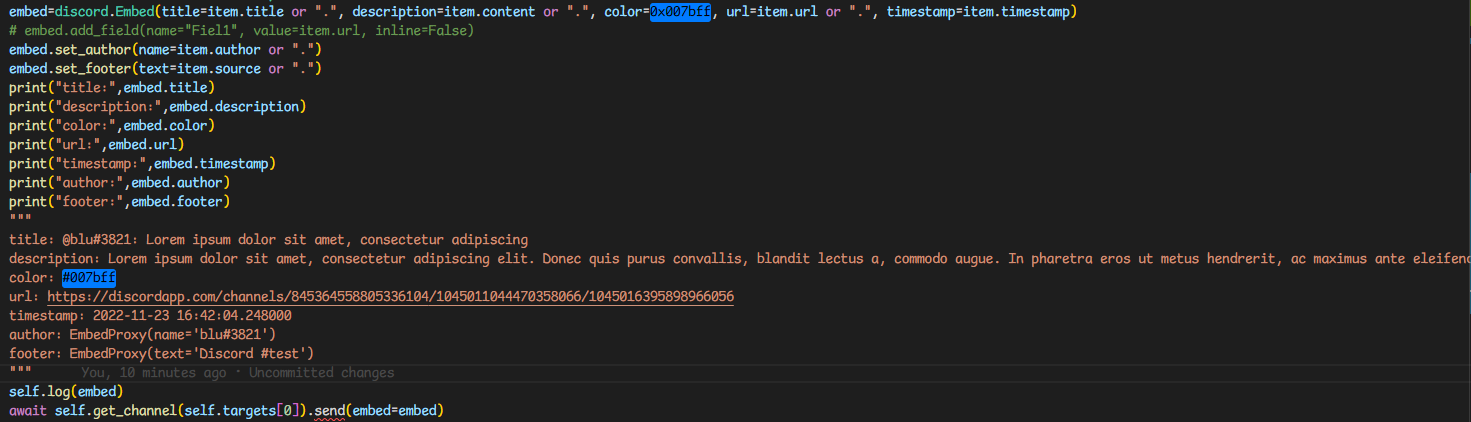
this is the full embed code
slate swan
jolly rapids
i also saw on stackoverflow that it was changed to `.send({embeds: [embed]})` bu...
thats discord,js, atleast learn what library you're using
maiden fable
calm down sarth
jolly rapids
slate swan
thats discord,js, atleast learn what library you're using
ah yes, sorry haha didn't check the tags ^~^
does the message need to have content besides the embed?
maiden fable
nah
slate swan
not really
jolly rapids
hmmm. then idk what it complains about
because when i send the embed alongside a "." i get the dot in discord but no embed
maiden fable
What is the module version?
jolly rapids
with a embed generator like https://cog-creators.github.io/discord-embed-sandbox/ i can send static embeds just fine to that channel
jolly rapids
maiden fable
What is the module version?
2.1.0
maiden fable
hm
 lime lance
hi one question in discord.py
how can i convert this to an a leaderboard
{1032230667897024622: 1, 615253982721343488: 2}
maiden fable
Can you paste the code here please? @jolly rapids
jolly rapids
maiden fable
hm
which fields does an embed need to be sent? maybe it's complaining because i didn't add any field
    async def send_news(self,item:NewsEntry):
        embed=discord.Embed(title=item.title or ".", description=item.content or ".", color=0x007bff, url=item.url or ".", timestamp=item.timestamp)
        # embed.add_field(name="Fiel1", value=item.url, inline=False)
        embed.set_author(name=item.author or ".")
        embed.set_footer(text=item.source or ".")
        print("title:",embed.title)
        print("description:",embed.description)
        print("color:",embed.color)
        print("url:",embed.url)
        print("timestamp:",embed.timestamp)
        print("author:",embed.author)
        print("footer:",embed.footer)
        """
        title: @blu#3821: Lorem ipsum dolor sit amet, consectetur adipiscing
        description: Lorem ipsum dolor sit amet, consectetur adipiscing elit. Donec quis purus convallis, blandit lectus a, commodo augue. In pharetra eros ut metus hendrerit, ac maximus ante eleifend. Proin fermentum sit amet enim eu lobortis. Sed ultrices lobortis sapien, in cursus ex pellentesque ut. Sed molestie at nunc sit amet pretium. Suspendisse a nulla lobortis, semper est quis, aliquam dolor. Nam vitae pretium orci, quis volutpat mauris. Suspendisse non posuere elit. Suspendisse aliquet neque ut turpis scelerisque tincidunt in vitae diam. Integer ut erat faucibus, cursus purus eu, vehicula ex. Nam nec lacus placerat diam condimentum consectetur. Integer in molestie nunc. Morbi facilisis lorem eu urna rutrum scelerisque. Suspendisse potenti. Pellentesque finibus magna aliquam ipsum mattis venenatis. Donec sit amet mollis orci, id porta leo.
        color: #007bff
        url: https://discordapp.com/channels/845364558805336104/1045011044470358066/1045016395898966056
        timestamp: 2022-11-23 16:42:04.248000
        author: EmbedProxy(name='blu#3821')
        footer: EmbedProxy(text='Discord #test')
        """
        self.log(embed)
        await self.get_channel(self.targets[0]).send(embed=embed)
Fields are optional.
jolly rapids
then idk anymore
maiden fable
Can you print item?
jolly rapids
sure 1 sec
well, not really ```
[Discord] '==='
[Discord] <db.struct.news.NewsEntry object at 0x7f9432f910>
[Discord] '==='
!d sorted sort the dictionary on basis of values and iterate over them
unkempt canyonBOT
sorted(iterable, /, *, key=None, reverse=False)```
Return a new sorted list from the items in *iterable*.

Has two optional arguments which must be specified as keyword arguments.

*key* specifies a function of one argument that is used to extract a comparison key from each element in *iterable* (for example, `key=str.lower`). The default value is `None` (compare the elements directly).

*reverse* is a boolean value. If set to `True`, then the list elements are sorted as if each comparison were reversed.

Use [`functools.cmp_to_key()`](https://docs.python.org/3/library/functools.html#functools.cmp_to_key "functools.cmp_to_key") to convert an old-style *cmp* function to a *key* function.even pprint only prints the definition
naive briar
What error did you get exactly
jolly rapids
jolly rapids
Can someone tell me how to send an embed with d.py? I tried `.send(embed=embed)`...
^
maiden fable
okay so weird request but can ya try commenting out the self.log line?
jolly rapids
sure
slate swan
any chance that you are selfbotting? asking cuz embeds are not sendable by normal users
but discord.py doesnt allow that anymore so that should not be the case
jolly rapids
slate swan
any chance that you are selfbotting? asking cuz embeds are not sendable by norma...
not this time ^^ Bluscream#8895 is a bot acc
slate swan
ah alright, that might have been the issue if you were
shrewd apex
jolly rapids
https://i.imgur.com/vKefDNX.png
whats self here?
maiden fable
that's what I also wanted to ask
that's why asking if its a class method
Also, r u subclassing commands.Bot or smth?
shrewd apex
and whats self.log ? post the whole error if u can please
shadow vigil
i saw someone made a discord bot in a server but it's a user account that's breaking the tos right?
maiden fable
mhm
slate swan
those method look valid there, atleast as per vscode theme syntax highlighting
missing attributes are highlighted white instead of yellow
slate swan
shadow vigil
i saw someone made a discord bot in a server but it's a user account that's brea...
automating your account in any way is against ToS
maiden fable
slate swan
those method look valid there, atleast as per vscode theme syntax highlighting
m...
they do but the issue is with those methods is what I think is the root cause
Since everything else seems to be in place
slate swan
yeah
shadow vigil
slate swan
automating your account in any way is against ToS
got the answer that i wanted thx
the admins in the server are not doing anything even tho they know its a bot
slate swan
skill issue
maiden fable
-> Leave the server
-> Report the server
-> Sit back and enjoy
maiden fable
or should I say, report the specific user and the server (for not taking actions)
Totally not a devil thought
maiden fable
Lmao
I remember a person getting banned in dpy server for self botting cz he forgot to make it so that only he can run the commands.
Some helper ran !help and his ID sent the help embed 🤣
shrewd apex
maiden fable
I remember a person getting banned in dpy server for self botting cz he forgot t...
pfft
imagine reaction of the guy who sent !help
slate swan
how much of a boomer do you have to be to use ! prefix for yourself
maiden fable
I suspect if he was online at that time
Lmao he prolly left the PC on/user a VPS and came back only to find a server missing and a DM from R. Danny
slate swan
can anyone help me with how sharding works ?
maiden fable
To shard your bot:
bot = commands.AutoShardedBot(
    command_prefix="?",
    description="An AutoShardedBot.")
What is it?
Sharding is a nice way to split your bot to smaller, more manageable parts. It is recommended to only use this feature with big bots (1000 guilds or more).
Note that you are required to use this when your bot reaches 2000+ guilds.
docs: https://discordpy.readthedocs.io/en/latest/ext/commands/api.html#discord.ext.commands.AutoShardedBot
Tbh you can simply think of it as a commands.Bot alternative for big bots. No need to handle the underlying IPC since dpy does that for u
slate swan
@client.event
async def on_member_join(member):
    channel = discord.utils.get(member.guild.channels, name="👋┇welcome-wagon")
    await channel.send(
        f"{member.mention} has arrived! \nWelcome to Supernova! \n<https://cdn.discordapp.com/emojis/1021425058054410280.gif?size=44&quality=lossless> Check [#888401895973089280](/guild/267624335836053506/channel/888401895973089280/) \nNavigate the server  [#1021842239749619732](/guild/267624335836053506/channel/1021842239749619732/) \nJoin our games [#888403619119001651](/guild/267624335836053506/channel/888403619119001651/) \nGrab ping roles [#1021908586852515971](/guild/267624335836053506/channel/1021908586852515971/) "
    )
Lemme guess
The event doesn't get triggered
slate swan
i hate discord.utils.get 
maiden fable
Bad typings 😭
slate swan
maiden fable
To shard your bot:
```py
bot = commands.AutoShardedBot(
command_prefix="?",
...
nah but its a more specific use case
and i might not even need it
maiden fable
slate swan
nah but its a more specific use case
Wym
slate swan
slate swan
```py
@client.event
async def on_member_join(member):
channel = discord.util...
how can I make it so the url shows the animation instead of just the url
cos basically i want 2 scripts to run a single bot
on different pc's
then i need to do like
/command [specific pc running the program]
maiden fable
Ah
slate swan
but it only works on the person who most recently ran the script
maiden fable
Well you gotta implement that logic yourself
AutoShardedBot is different from your usecase, yes
slate swan
maiden fable
Well you gotta implement that logic yourself
AutoShardedBot is different from yo...
i saw a stack overflow post telling me that that was it lol
maiden fable
Nah
 hollow bridge
slate swan
how can I make it so the url shows the animation instead of just the url
hollow bridge
slate swan
how can I make it so the url shows the animation instead of just the url
instead of the url use <:emoji_name:emoji_id> ,
slate swan
maiden fable
Nah
Stack Overflow
I have written a Discord bot using JDA (Java-Discord-API), which is added to one of my servers.
I know that the bot is using OAuth to make sure the source of the commands (in this case my Java code...
i mean idk what this is abt then
maiden fable
slate swan
how can I make it so the url shows the animation instead of just the url
remove the <> from around the gif link
slate swan
hollow bridge
instead of the url use <:emoji_name:emoji_id> ,
But they are animated emojis.
Does it have an efffect?
hollow bridge
slate swan
But they are animated emojis.
yeah thats fine bots should be able to send them
maiden fable
slate swan
https://stackoverflow.com/questions/69796271/simultaneously-running-separate-pro...
Is the code base of the two instances same or different?
slate swan
the code is exactly the same
slate swan
hollow bridge
yeah thats fine bots should be able to send them
My friend sent me a message with multiple emojis. How to I add them?
maiden fable
slate swan
the code is exactly the same
May I ask why would u need to run two instances of the same bot?
slate swan
maiden fable
May I ask why would u need to run two instances of the same bot?
wanna try make a bot that gets like sys info from all my friends
like to show stats and stuff
i've been identifying each user like this tho which could be it ?
maiden fable
Hm
Well you can kinda do that, but you won't have control as to which bot will receive the command and which will not
You can either add a command arg to show the stats of friend1's pc and use if statements to control the response but I don't see any other way for this
slate swan
make a webserver and make your friends run a websocket client instead of the bot
when asked for stats that client can send the stats to the server
maiden fable
so like discord-ext-ipc right?
slate swan
maiden fable
Hm
Well you can kinda do that, but you won't have control as to which bot will r...
i mean i've been using this to get each users different "id"
class BOT(commands.InteractionBot):
    def __init__(self, **options):
        super().__init__(**options)
        self.ip_addr = IP()
        self.identifier = os.getenv("username")

bot = BOT(status=disnake.Status.do_not_disturb, activity=disnake.Activity(type=disnake.ActivityType.watching, name=""))

@bot.slash_command()
async def listusers(ctx):
    await ctx.channel.send(
        embed=disnake.Embed(title=f"The identifier for {os.getenv('username')}:", description=bot.identifier)
    )
await ctx.response.send_message("Checked all available users:\n_ _")```#hm
slate swan
and to execute commands u need the arg of the user
slate swan
well the same as before
it only runs if you specify the id of the script that last ran it
@bot.slash_command(description="Gets the system information.")
async def sysinfo(ctx, user):
    if user == bot.identifier:

        cpu, ram, disk, ramusage, gputemp= getsysinfo()
        #embed
        embed = disnake.Embed(title="System Information", description="user's system information", color=0x00ff00)
        embed.add_field(name="CPU", value=cpu, inline=True)
        embed.add_field(name="RAM", value=ram, inline=True)
        embed.add_field(name="Disk", value=disk, inline=True)
        embed.add_field(name="RAM Usage", value=ramusage, inline=True)
        embed.add_field(name="GPU Temperature", value=gputemp, inline=True)
        await ctx.send(embed=embed, ephemeral=True)
    else:
await ctx.send("user not found.", ephemeral=True)```this is an example command
maiden fable
Mhm
slate swan
but say me and my friend both run it, and my friend was the latest person to run it, it only registers if i do his identifier
and if i do mine it says user not found
slate swan
the pc name
slate swan
maiden fable
can u print what is `bot.identifier`?
if thats what u want
maiden fable
Hm
Tell me something.......
Why are you using kinda complex logic?
Why not just check in each command invocation if user is the same as the PC's name and if it is, then send else do nothing
slate swan
maiden fable
Why are you using *kinda* complex logic?
Why not just check in each command invo...
as in the user that sent the command ?
maiden fable
slate swan
```py
@bot.slash_command(description="Gets the system information.")
async def s...
like here
you are specifying the user arg
slate swan
yea
maiden fable
Why not do something like
if user == getenv("username"):
    # send the message
and don't add that else clause because in case one bot falls back to the else clause but the other doesn't (the if statement is true), then it will send a double response
Are you running the other instance on yr friend's machine?
maiden fable
I understand ya now
slate swan
me and my friend are running the program and i wanna check his stats
i'll need to specify his pc instead of mine
maiden fable
If u r invoking the command with the user being the same as his PC's name, then u should use the if statement I sent above.
Basically move the if statement from the bot's init to the command (the condition, not the identifier thingy)
slate swan
but then that would break this command
maiden fable
Which one?
slate swan
slate swan
```py
class BOT(commands.InteractionBot):
def __init__(self, **options):
...
^^ list users
maiden fable
Well if that is your concern then don't move the if statement from the init but implement the if logic for the sysinfo command
slate swan
but would that fix the problem of the bot only listening for the most recent user ?
slate swan
i mean could u try ?
maiden fable
What?
slate swan
my fix aint working
maiden fable
Hm lemme get the code
@bot.slash_command(description="Gets the system information.")
async def sysinfo(ctx, user):
    if user == os.getenv("username"):

        cpu, ram, disk, ramusage, gputemp= getsysinfo()
        #embed
        embed = disnake.Embed(title="System Information", description="user's system information", color=0x00ff00)
        embed.add_field(name="CPU", value=cpu, inline=True)
        embed.add_field(name="RAM", value=ram, inline=True)
        embed.add_field(name="Disk", value=disk, inline=True)
        embed.add_field(name="RAM Usage", value=ramusage, inline=True)
        embed.add_field(name="GPU Temperature", value=gputemp, inline=True)
        await ctx.send(embed=embed, ephemeral=True)
Something as easy as this lol
maiden fable
What in the
maiden fable
How r u invoking the command?
slate swan
i think
maiden fable
?
slate swan
slate swan
and running the bot
the reason it only works for 1 person
maiden fable
No like what are the arguments u r passing
slate swan
maiden fable
No like what are the arguments u r passing
for what
async def sysinfo(ctx, user):
this ?
maiden fable
what? Are you literally typing [bot.identifier]?
slate swan
no lol
but like the pc users name
like if my windows pc account was called 'slikc'
i'd do /sysinfo slikc
maiden fable
and is the value the same as what is returned by getenv("username")?
slate swan
yea
maiden fable
That's hella weird. Should have worked
Tbh the only thing left is using a websocket
Create a websocket and use that to request data based on the username. You will have to run the bot only on one pc and run a websocket on another
maiden fable
I don't see any other way out of something like this
slate swan
but like i'm certain there must be a way to use it using discord.py itself
maiden fable
Nope, the library doesn't provide anything like this
slate swan
like theres no way theres 0 workaround for 2 people running one bot ?
maiden fable
No
slate swan
usually there is for that kinda thing
maiden fable
The closest was AutoShardedBot but that doesn't reallu suit your use case, does it?
maiden fable
Well we can try replacing commands.Bot with commands.AutoShardedBot and see if it fixes the issue
So how sharding works is:
Suppose your bot is too big... then the bot is split across various systems/machines that is you can run the same codebase on various machines and the bot will work like normal
maiden fable
But that won't work for one server bots
maiden fable
It works for bots in 1000 or smth more servers
Because dpy creates "groups" of servers
Like, the events by Group 1 will be received by Shard1, the events from Group 2 will be received by Shard2 and so on
slate swan
oh
maiden fable
This is also one of the reasons why some big bots like Dyno are sometimes shown offline in some servers but online in others
 silent portal
When I pass in datetimes in a loop.task, does it run 1x on that datetime?
 fading marlin
yes
maiden fable
Hm?
slate swan
when the bot takes more than 3 seconds to execute the command, it doesn't reply
maiden fable
Yup that is a slash command issue
slate swan
and gives this error disnake.ext.commands.errors.CommandInvokeError: Command raised an exception: InteractionTimedOut: Interaction took more than 3 seconds to be responded to. Please defer it using "interaction.response.defer" on the start of your command. Later you may send a response by editing the deferred message using "interaction.edit_original_response" Note: This might also be caused by a misconfiguration in the components make sure you do not respond twice in case this is a component.
slate swan
maiden fable
Yup that is a slash command issue
oh fine i can just do regular commands then ig
maiden fable
use interaction.response.defer() and then edit using interaction.edit_original_response(...) or send using interaction.followup.send(...)
slate swan
oh okay
 dry kelp

 brittle ocean
@bot.event
async def on_message(self, message=str):
    # if message.author == self.user:
    #     return
    # else:
    bannedmsgs = None
    bannedmsgs = (bad_words.values() for x in bad_words.values())

    await print("you said a bad word")


asyncio.run(on_message(self=database_functions.user_id, message="test"))
with bad_words being:
bad_words = {
  "verybad": ["test", "test2"]
}
which outputs:
TypeError; Object NoneType can't be used in 'await' expression
please help? I dunno what i did wrong
it does print "you said a bad word" though
sick birch
dry kelp
Either your hardware doesn't support virtualization or it needs to be enabled in BIOS like the error says
sick birch
brittle ocean
```python
@bot.event
async def on_message(self, message=str):
# if message.a...
It's just print("you said a bad word")
You don't await print statements
brittle ocean
oh ok thx
dry kelp
sick birch
Either your hardware doesn't support virtualization or it needs to be enabled in...
done
sick birch
slate swan
is it self.stop in my class?
Yes
slate swan
[2022-11-23 16:07:43] [INFO ] discord.gateway: Shard ID None sessio n has been invalidated.
started getting this message after upgrading my discord.py version
anyone know how to fix?
 merry sail
slate swan
```[2022-11-23 16:07:43] [INFO ] discord.gateway: Shard ID None sessio n has bee...
merry sail
slate swan
```[2022-11-23 16:07:43] [INFO ] discord.gateway: Shard ID None sessio n has bee...
is it interrupting your bot execution?
coral mirage
maiden fable
wait what is this
That HTML
slate swan
sick birch
Yes
Does that each person can click it once only
sick birch
No you'll have to use interaction_check for that
slate swan
How so
sick birch
And some sort of way to store state on who's clicked and who hasn't
dry kelp
sick birch
No you'll have to use `interaction_check` for that
i've managed to do that docker
I made everything run with 1 command. Bot, web, db
sick birch
Yeah that's pretty common, we do it with most of our bots
dry kelp
which is really nice. No need to create the virtual env manually it will do that
and also migrating the db is automatically
sick birch
yup
dry kelp
so i truly prefer docker than pm2
Beside this i got 1 question
for some reasons when i run the bot web api on the vps if it's not me running it that will return a internal server error
so i suppose something has to do with localhost
@sick birch
sick birch
dry kelp
for some reasons when i run the bot web api on the vps if it's not me running it...
Check the server logs for errors
dry kelp
1 sec
i left it turned on lol
Yeh but if i run it it will work
oh nvm it erroed me

If i give u the OAuth2 link could u test it? I think it's because there's already a value inside of the db and it will just override

@app.get("/api/v1/auth")
async def auth(code: str):
    global AUTH_REQUESTS
    AUTH_REQUESTS += 1

    async with await exchange_code(code) as oauth_response:
        if oauth_response.status != 200:
            logger.error(f"A Error has happend: {await oauth_response.text()}")
            raise HTTPException(status_code=400, detail="Bad request")

        json = await oauth_response.json()
        me = await fetch_me(json["access_token"])
        userResponseJson = await me.json()

        oauthUser = OAuth2User(
            id=int(userResponseJson["user"]["id"]),
            token=json["access_token"],
            expires_in=json["expires_in"],
        )
        await oauthUser.update_or_create()
        await oauthUser.save()
        return {"status": "OK", "user": userResponseJson["user"]}


register_tortoise(
    app, config=TORTOISE_ORM, generate_schemas=True, add_exception_handlers=True
)
multiple objs returned yes
sick birch
dry kelp
multiple objs returned yes
Looks like you already got it
Further questions should be directed towards #web-development
dry kelp
sick birch
Looks like you already got it
yep
 vivid gate
where can i ask something for normal python, not related to discord ?
sick birch
vivid gate
where can i ask something for normal python, not related to discord ?
sorry wrong mention #❓|how-to-get-help
 ionic garden
so what's the convention for dbs in discord bots
i'm thinking of having a global module w/ the db cursor and stuff
and have the cogs, etc. all interact w/ that module
sick birch
ionic garden
so what's the convention for dbs in discord bots
i'm thinking of having a global...
You're already there!
ionic garden
ok cool
sick birch
Create a file with all of your database models and functions
pliant gulch
Not sure if I'm quite the fan of making it a global module
It should at the very least be bounded to the bot instance
Make sure it's concurrent as well
ionic garden
concurrent?
ionic garden
pliant gulch
It should at the very least be bounded to the bot instance
why this?
pliant gulch
ionic garden
concurrent?
Yea making it asynchronous since database operations should be I/O
pliant gulch
ionic garden
why this?
You want only the bot to know what's in the database & when to use it
ionic garden
how would the cogs access it then?
pliant gulch
If it's bound to the bot it'll be available through the bot. And every cog instance is given the bot instance
So that would be un-effected
ionic garden
ok that's good
 woven flint
i need help
this is my file structure: bot.py colors.py economy,py tools/ fun.py mod.py
in mod.py, i have the following line from ..colors import palette. i am making a discord bot so i actually kind of use this file by running bot.py but whenever i do, it gives me this error: ImportError: attempted relative import beyond top-level package
sick birch
You were told not to impersonate a self bot by a staff member.
 simple niche
Sorry
slate swan
woven flint
**i need help**
this is my file structure: ```
bot.py
colors.py
economy,py
tools...
Can you show what colors.py contents
shrewd apex
woven flint
**i need help**
this is my file structure: ```
bot.py
colors.py
economy,py
tools...
add a init.py in tools
__init__.py
sick birch
They were helped already - this is why we don't crosspost
shrewd apex
ah


 slate swan
 severe mural
look code
severe mural
look code
whats the prob
slate swan
severe mural
also u put * here it's totally useless
slate swan
severe mural
problem error
- the command name you use in the code is
suggestion(not suggest) - stop implementing normal command logic in application commands ( in the except )
interaction.response.send_message returns None, not a Message
slate swan
slate swan
1. the command name you use in the code is `suggestion` (not suggest)
2. stop i...
yep
maiden fable
Nice
vale wing
severe mural
look code
Smh requests in async app, use aiohttp
To get you quickstarted
async with aiohttp.ClientSession() as session:
    r = await session.get(url)
you can't edit a interaction message.
you need to get the mssage from channel history manually and edit it
Hey!
I am trying to make a discord bot using MongoDB (im new dont judge)
Code:
https://hastebin.com/tukugoyapu.py
What im trying to do is:
It searches for a data entry and returns the value
Hastebin is a free web-based pastebin service for storing and sharing text and code snippets with anyone. Get started now.
instead of message vars you can use await interaction.edit(...)
slate swan
slate swan
instead of message vars you can use `await interaction.edit(...)`
in the firstembed variable
!d nextcord.Interaction.edit is there an edit?
unkempt canyonBOT
await edit(*args, **kwargs)```
This function is a [*coroutine*](https://docs.python.org/3/library/asyncio-task.html#coroutine).

This is a shorthand function for helping in editing messages in response to a component or modal submit interaction. If the interaction has not been responded to, [`InteractionResponse.edit_message()`](https://nextcord.readthedocs.io/en/latest/api.html#nextcord.InteractionResponse.edit_message "nextcord.InteractionResponse.edit_message") is used. If the response [`is_done()`](https://nextcord.readthedocs.io/en/latest/api.html#nextcord.InteractionResponse.is_done "nextcord.InteractionResponse.is_done") then the message is edited via the [`Interaction.message`](https://nextcord.readthedocs.io/en/latest/api.html#nextcord.Interaction.message "nextcord.Interaction.message") using [`Message.edit()`](https://nextcord.readthedocs.io/en/latest/api.html#nextcord.Message.edit "nextcord.Message.edit") instead.cool
 supple thorn
the raspberry pi zero run a discord bot that doesn't have that much features or users using it right
slate swan
supple thorn
the raspberry pi zero run a discord bot that doesn't have that much features or ...
What type of features?
supple thorn
slate swan
What type of features?
just some basic stuff like some arithmetic commands and a slap command
coral mirage
anyone awake?
coral mirage
I'm back after 12 hour shift
coral mirage
 topaz pumice
yes
topaz pumice
yes
You know Python?
topaz pumice
coral mirage
You know Python?
yes
topaz pumice
ok
coral mirage
topaz pumice
ok
It's about Discord Bot. That's cool?
topaz pumice
coral mirage
It's about Discord Bot. That's cool?
ok
coral mirage
topaz pumice
ok
Great, If I want a user to create a profile in my bot. How I can add the coding? If user tries to create a nation again, how I can send a return that he already has a profile.
topaz pumice
coral mirage
Great, If I want a user to create a profile in my bot. How I can add the coding?...
create a global list variable, add user, and the info
coral mirage
topaz pumice
create a global list variable, add user, and the info
Thanks!
coral mirage
topaz pumice
create a global list variable, add user, and the info
One more question.
How I can add in my both time and math like a economical way of math.
slate swan
coral mirage
Great, If I want a user to create a profile in my bot. How I can add the coding?...
I'd create a database file and search through that file when a player tries to create a profile. If they don't exist in the DB, add them to it and create their profile. If they do exist, respond telling them they already have a profile.
topaz pumice
coral mirage
How I can add in my both time and math like a economical way of math.
pleae elaborate
coral mirage
topaz pumice
pleae elaborate
I ment bot no both
topaz pumice
datetime.now?
coral mirage
slate swan
I'd create a database file and search through that file when a player tries to c...
Data Base? hmm That sounds interesting . I will look up to that as well.
Thanks
coral mirage
topaz pumice
datetime.now?
So, basically I want every hour to remove something from a user and/or add something from the user. Like money or points.
topaz pumice
make a time.sleep(1000*60*60) on a repeat loop
coral mirage
do I have to import anything for the economic and time?
topaz pumice
import time, datetime
topaz pumice
yes
 frail tapir
slate swan
I'd create a database file and search through that file when a player tries to c...
frail tapir
slate swan
I'd create a database file and search through that file when a player tries to c...
ye
coral mirage
slate swan
I'd create a database file and search through that file when a player tries to c...
Hey delliott, do I keep the file under the same folder of my main.py?
slate swan
coral mirage
Hey delliott, do I keep the file under the same folder of my main.py?
Yes
Also did u fix the problem of your dropdown box?
coral mirage
slate swan
Also did u fix the problem of your dropdown box?
I'm on it. I'm creating a bot game call Global Supreme Leader. As part of my first project.
slate swan
coral mirage
I'm on it. I'm creating a bot game call Global Supreme Leader. As part of my fi...
Cool
coral mirage
slate swan
Cool
Yes, I love Game Development. I heard is one of the hardest career. Yet, I'm still down to explore this area. If it doesn't work. I'll stick with Data Analysis.
slate swan
Yep, game development is actually pretty hard
coral mirage
slate swan
Yep, game development is actually pretty hard
why?
what's so bad of being creative and be enable to create whatever comes in your imagination?
coral mirage
slate swan
Yep, game development is actually pretty hard
What career will you recommend?
slate swan
coral mirage
What career will you recommend?
Umm.... Ig ask to #career-advice
I am tooo bad at picking things
 polar dawn
Is it possible to logs in a channel when a person in other server executes a command?
slate swan
polar dawn
Is it possible to logs in a channel when a person in other server executes a com...
yes, use bot.get_channel to get the channel and .send to send the message
slate swan
polar dawn
Is it possible to logs in a channel when a person in other server executes a com...
Yes
polar dawn
slate swan
yes, use bot.get_channel to get the channel and .send to send the message
ight thx
polar dawn
slate swan
Yes
oky
slate swan
Also there is an event for it too.
coral mirage
slate swan
Umm.... Ig ask to <#470889390588035082>
Thanks mate!