#technical-chat
4 messages · Page 58 of 1
 gritty pawn
 plucky ivy
my graphics settings dont seem to save
 chilly badge
@bright elk I just wanted to make a helpful suggestion with the limited information provided. If you use any third party programs i.e. Voice modifications, Boosters, or Mixers - If you've had a recent update to any of these programs sometimes, the game or windows will divert to default settings. You will need to set up the input/output selections once more.
 bright elk
it randomly started working again, but thanks anyways
 tepid plaza
Still no fix for voice comms, tried almost everything . icon doesnt appear nor i hear anyone. again did everything mentioned on technical page and steam pages. would like if theres any other thing out there to try
 gloomy shell
would like to play the game i paid money for - can u plz remove global queues for backing line ? I see it as the greatest outrage .....
 light rivet
Someone y'day spoke to me with a chat to voice application via the in game comms. Any guide on how to do it?
 humble cedar
Uh, why is there a floating camp fire in Viper Pit?
 livid terrace
Does anyone know why I can see what's in my stockpiles at seaports/depots ? The "Tab" doesn't work at all in my game :\
 terse flume
Is there any way to Demote/Restart my Rank any way, cuz i'd like to start again as Recruit
livid terrace
Does anyone know why I can see what's in my stockpiles at seaports/depots ? The "Tab" doesn't work at all in my game :
Nobody ? any idea ?
 severe crescent
bug report it
livid terrace
ok thx
 hushed tinsel
Voice is not working basically at all since last update.
When connecting to shard (any map), I will get msg "Connected to Local Voice Channel" and "Connected to Squad Voice Channel," yet I am unable to send voice nor hear any voice.
Edit: I am able to hear and send voice through Squad Voice Chat sometimes after joining a new shard. It seems to be random so far whether I will be able to hear & send voice chat after joining a shard or not.
Both my Input and Output device are correct, and have been restarted and tested.
I have tried the following:
- Reconnecting (No change)
- Verifying Game Files (No change)
- Deleting and re-verifying the VIVOX files (No Change)
I have also attempted to see if "Fixing Issues with SIP ALG" does anything, however with the link provided I am unable to get any of the tools to work.
(And besides, isn't that a modem/firewall issue? My issues started after the last update)
Also, I should've mentioned but pressing any voice chat key does nothing.
Also maybe worth noting: When joining a new map, I connect to local chat very quickly (within 1 second of joining), but connecting to squad takes 10-15 seconds.
...okay I give up.
See everything I posted above? That's all fuckin' null and void.
It seems to be very rarely I can join a new shard of any map and I will sometimes get only Local back, sometimes only Squad back, sometimes both and mostly neither.
It doesn't matter what map/shard it is, I can join the Home Island/Deadlands/Callahan's Pass/Whatever and sometimes get both or neither or one or the other.
actually, I have noticed a pattern
when I join a shard, if it repeats "connected to squad voice channel" multiple times that means I'll usually have both voice chats back, but it will take a long time before I am able to connect and have this message appear (15+ seconds)
(example below, this is after connecting and waiting 30 seconds a random region).
tepid plaza
Same with me except i dont hear at all nor speak. rest all same. i believe it is the update as my icon least showed before it happend.
 marble heart
Hi, i dont know why i open my game right now and this message comes, but i never change my account
 obtuse quarry
I'm getting this error message, it won't let me play, it's been a while since i was in the game so maybe a bug hapenned
It's making me sad because i really like the original concept when i first played and now that i want to try it again with the new updates i just can't.
 sturdy crow
I've been having errots a lot
Fatal error: [File:Unknown] [Line: 198] Unreal Engine is exiting due to D3D device being lost. (Error: 0x887A0005 - 'REMOVED')
War_Win64_Shipping
War_Win64_Shipping
War_Win64_Shipping
War_Win64_Shipping
War_Win64_Shipping
War_Win64_Shipping
War_Win64_Shipping
War_Win64_Shipping
War_Win64_Shipping
War_Win64_Shipping
War_Win64_Shipping
War_Win64_Shipping
War_Win64_Shipping
kernel32
ntdll
I keep crashing because of this
hushed tinsel
I am still having this issue https://discordapp.com/channels/203512636556574720/374272127953666048/778133790773346346
I do have a small update though: When I start the game and join the home island, I get an error [6] 3-1001
I am getting a new error.
I tried to set my "input" and "output" device to "default system device"
Doing this gave me the following errors:
Voice Chat Error [5] 5
Voice Chat Error [7] 5
Voice Chat Error [4] 4
Voice Chat Connection Lost. Reconnecting...
Voice Chat Error [2] 2-3084
repeat above until I changed to a different device and reconnected
Also, now whenever I try to reconnect regardless of device, I get the [2] 2-3084 error.
I get a new error on restarting the game.
[6] 3-5025
hushed tinsel
The error sequence described in https://discordapp.com/channels/203512636556574720/374272127953666048/778866405843927060 occurs whenever I try to reconnect with any audio device now.
 neat vigil
Is this the place or is there another, to ask for technical clarification of game mechanics? As the wiki doesn't cover it and there is no in game info on how exactly garrison and bunker supplies differ
I'm lead to believe that GS is an area of effect thing, but I'm unsure what objects directly bunker supplies stop decay on. Is it ONLY bunkers (i.e not treches)? Do they need to be connected to the main bunker base structure? Do upgraded bunkers count (i.e at or rifle garrisons etc)?
 sly mortar
@hushed tinsel Something is preventing Vivox from receiving your login token. Are you in a region which would be blocking Vivox from working due to censorship laws or anything like that?
hushed tinsel
I live in Massachusetts, so no.
Again, this started happening after the latest update.
sly mortar
Could you try the stuff on this page: https://www.vivox.com/gamers/help/22

The voice & text chat platform that's trusted by the world's biggest gaming brands - now available for free.
hushed tinsel
@sly mortar neither SIP ALG test works for me
for the one that requires Java and using Internet Explorer, I have Java installed and am using Internet Explorer yet it doesn't work (still says Java is required)
For the HTML5 one, I get an error 700.
The domain the test environment is running on isn't permitted. Please contact the test provider. For more information, or to contact us click here. (700)
(that's the HTML 5 one)
hushed tinsel
How long does that one usually take?
sly mortar
You need to hit enter before it starts working
sly mortar
Ok so that's your issue
sly mortar
Do you have admin access to your router?
hushed tinsel
yea
sly mortar
I'll take that as a yes
hushed tinsel
although it's comcast so i bet it's going to be really difficult to do LOL
i tried port forwarding a year ago with this router and it was a massive undertaking
hushed tinsel
it's supposed to be easy
sly mortar
It's on the admin panel for your router at 10.0.0.1
hushed tinsel
but that's a different story
sly mortar
I think it's under Advanced Settings
hushed tinsel
let me show you why i couldn't do it
idfk why im on low security but whatever i live in bumfuck nowhere you'd have to pull up my driveway to try to do funny stuff lol
sly mortar
Low Security is good
hushed tinsel
i havent touched this in over a year lol
sly mortar
The higher securities block a ton of stuff through the router firewall
Which is both good and bad
hushed tinsel
anyway in case you cant guess,
the xfinity website / myxfi didn't let me port forward
hushed tinsel
that's what i'm supposed to do but after 3 calls with tech support i still got no dice
so i gave up LOL
just used a VPN hacky workaround
which took less time than a single one of those tech support calls
sly mortar
as expected
hushed tinsel
anyway, time to figure out how to disable SIP ALG
hopefully it's not that hard
hushed tinsel
fun fact
the option to disable SIP ALG has been removed from the Arris TG1682G
so if i want to disable this i'm probably going to have to call comcast
@sly mortar fun fucking times

 ionic elbow
Does anyone know what it takes for the Deploy Point to work from Home World? It is upgrade to T3 and the point installed and still can't spawn? Is this a bug?
 old tiger
game is laggin liek crazy. Please look into it. Seem to be global
 inner basin
The devs are looking into it.
 ornate plume
I can't rotate structures! I rebind it but nothing happens. Pulling my hair out!
inner basin
@ornate plume Try resetting ALL keybinds at the bottom of the binding menu
 fathom hamlet
nothing seems to help
 slate pulsar
@sly mortar Hey, can you help me again? I gave up last month trying to fix the crashing issue because I had irl stuff I had to do.
I'm pretty sure it's just because Unreal Engine hates AMD.
terse flume
when is vc gonna be fixed for good? itÄs better but still is fucked like half of the mine
time*
 small talon
Where is @haughty kindle? I am here to request a faction change due to joining the 75th Ranger Bat on the collie side.
ModMail....
Oh nevermind, I fiigured it out
 harsh sonnet
alt left click is making me crash when dropping items
 quaint yacht
Hey guys, I got a new graphics card and Foxhole is fine for the first 5 seconds when I spawn in but then runs at 1 frame per minute. If I move another window infront of foxhoel the frame updates that spot
any ideas?
Oh! I figured it out.
I have an AMD Radeon RX 5600 XT and the Radeon software that came with the drivers has this thing called "Radeon Anti-Lag" that's suppose to reduce input lag
Turning the Anti-Lag off fixes the issue
 versed cargo
 polar river
hi, i have problem with joining server. Everytime i try to join it keeps throwing me out with "VAC check failed, restard steam and try again". Is there someone that can help ?
i've tried uninstalling game, restarting pc, checking files
 prisma acorn
@polar river on steam right click the game, go to properties and click verify integrity of files
 fading oxide
Someone can help me with an error? today I tried to play the game but when I click "play" this error appears, I already tried restarting the PC, the router, steam, the game, verified game files integrity, and firewall, I dont know what to do.
 fading zenith
Hi. I buy the game 1 hour ago, install and try to play. When i click "Deploy" got the VAC check failed. Please restart steam and try again.I restarted the steam not work, verify game files not work, Restart PC not work. Reinstall not work too. Sometimes i can play few minutes and get kick after but every time ended like this in maximum 5 minute. Any idea or working solution?
 clear iris
That happened to me.
It worked after not opening the program for a year and a half.
So just give it time.
We’ll get there.
inner basin
fading zenith
Hi. I buy the game 1 hour ago, install and try to play. When i click "Deploy" go...
You got an antivirus? Try turning that off
inner basin
polar river
hi, i have problem with joining server. Everytime i try to join it keeps throwin...
If you have an antivirus please turn it off, it may interfere with the Steam VAC service
fading zenith
@inner basin No. Only have windows defender on PC. So that not solve the problem sadly 😦
And every other VAC use game working without problem.
 strong wadi
Had that issue the other day. Reinstalling the game and restarting your PC should help.
 gray ermine
Can't rebuild a bridge blueprints disappear instantly and then say too soon if you reattempt! SW of Solas
 lost jungle
@gray ermine Use a hammer not a CV.
strong wadi
I thought with the advance building tech you can use the CV.
lost jungle
You can't, but I went and checked and it is also just broken in general
inner basin
@gray ermine @lost jungle
Devs recommendation is to back all players and vehicles away, then try again. There is a bug whereby the bridge blueprint will immediately be destroyed if there is an entity in the way.
lost jungle
Good to know! Ta
 idle wagon
Bluetooth headphones crash this game so fucking hard it's unreal
Every time they connect or disconnect while the game is running I have to hard restart my PC
The game window overrides everything else in a frozen state
For some reason it freezes in a state it was in minutes ago
Alt tabbing, alt f4, running task manager does nothing
PC must be hard restarted
I've had this bug for months and I would REALLY like it to be fixed, thanks
 craggy torrent
Im trying to join locked squads in foxhole
It would seem I am able to join the squads-based on the fact I can see squad chat
however end up with Voice Error 6
as well as the sqaud thing on the rightside not changing
I've tried reconnecting audio devices
but that doesnt seem like the problem
 past wind
im stuck at loading screen after closing the game because it didint let me deploy
 kind condor
uhhhhh?
past wind
yea im having same issue atm too it was fine earlier today
 graceful tartan


 devout harbor

 normal pewter
trying to join foxhole but after main menu when i click play it says Failed to download profile (1). Please contact support if issue persists.
nvm, pc restart seems to have fixed it
 warped socket
Since the last war started I am having major problems getting into the game. From Home Island it goes into the loading screen, then I either get a connection time out menu that sends me back to the deploy screen, or I get a "Unreal Process has crashed" With a message that says "Fatal Error line 163 A FRenderResource was deleted without being released first" Any suggestions to fix?
terse flume
I couldn't join the game for some reason.
inner basin
warped socket
Since the last war started I am having major problems getting into the game. Fro...
Try verifying the game files through Steam.
inner basin
terse flume
I couldn't join the game for some reason.
If you still have this problem, you'll have to explain the problem further. Any error messages appearing?
terse flume
Mine fixed on its own.
 light ivy
Having the same issue.
 frozen idol
Okay thanks!
 manic whale
wtf I just bought the game and I have this error aswell
 mental loom
its fixed
terse flume
Still showing for me.
<@&213133977681264640> Can someone explain me why i have this problem?
sly mortar
@terse flume restart steam fully please
terse flume
Okay
sly mortar
Hard kill it with task manager, then re open
frozen idol
It worked for me!
terse flume
Everything works now, thank you @sly mortar.
sly mortar
Yeah that generally does it.
inner basin
 drifting hatch
Is this just power supply issue?
drifting hatch
Is this just power supply issue?
Uh what is it that I am looking at?
A crash log?
drifting hatch
Ya
I think we got it semi figured out
It's most likely the ram and power supply
 gloomy shard
Looks like someone is stuck in purgatory
sly mortar
@burnt hound need to reconnect to the game
 burnt hound
10-4
terse flume
Just thought id fire up Foxhole after a few months, cant seem to hear any ingame voice chat, anyone got a clue why?
Already played around with my Sound devices, but doesnt i cant hear anythin on all of them
 minor gate
terse flume
Already played around with my Sound devices, but doesnt i cant hear anythin on a...
minor gate
terse flume
Already played around with my Sound devices, but doesnt i cant hear anythin on a...
check the voice settings
old tiger
terse flume
Just thought id fire up Foxhole after a few months, cant seem to hear any ingame...
Me too. Help
terse flume
Check in game voice setting Refresh everything then set Communcation setting from your headset to default system that’s usually how I fix that issue
If that doesn’t work I don’t know.
I’ll get screenshots if you can’t figure it out
terse flume
Ill give it a shot tomorrow, i was about to get off thanks for the heads up, ill let you know the outcome
hELLO
i need some help, actually i cant speak with my microphone.
how can i debug that ?
i already test the micro with teamspeak and its work
terse flume
Sometimes i'm running and i just stuck in middle of the road even there's no objects or smth like that and other players just run past me
But i can't move
i'm just bugging
Anyone have an idea to debug sound issue ?
i cant speak to no one , its sad
 valid vector
@terse flume what type sound/microphone device are you using?
inner basin
@remote cargo I can try to help. Can you try to startup Foxhole again so it can generate crash logs? Then post here or DM me the most recent crash log in this folder: C:\Users\[USERNAME]\AppData\Local\Foxhole\Saved\Logs
 remote cargo
Yes thanks! I'll do that tomorrow first chance i get
terse flume
its JBL flip - connected with jack
Its work with teamspeak, i test it
@valid vector its not JBL flip but this one : https://fr.jbl.com/casques/JBL+TUNE500BT.html?dwvar_JBL TUNE500BT_color=Blue-GLOBAL-Current&cgid=headphones
Le casque JBL TUNE500BT diffuse sans fil le son puissant Pure Bass de JBL pendant 16 heures. Saisissez-le et remplissez votre journée de musique !
light ivy
Connection error while travelling to uh, Linn of Mercy and I can't deploy anymore, it gives me an error saying Profile(1) couldn't be downloaded.
 exotic coral
I cant hear anything at all, from the in game menu music to me shooting my pistol
old tiger
<@&440174949647515652> need to reach out to players whose are experiencing this problem here on FOD and Steam. This audio issues seem to be rampant this war.
 grand silo
What's going on?
old tiger
Lot of players are experiencing audio issue -mainly local VC and such
I did have an issue as well after the new war began but it was solved quickly. However, a numbers of people seem to still experience this issue
 fiery cedar
Hello, I am one of those experiencing this issue
what do I do about it?
The other night I played for 6 hours without issue
remote cargo
apparently in the few months time that i uninstalled the game, something has been patched in that allowed me to play and log in again so apologies for my complaint
bright elk
So my game has recently been taking a while to load up things like the home region and getting into a region and it's gotten so bad the game gets a connection to server error
It doesn't always have a connection to server error but it happens a lot
 vagrant timber
Hi!
I've issue with Foxhole voice I can't hear neither talk with them in-game
Please help me solve the problem thank you so much ❤️
 soft moat
Have you tried "Reconnect" button?
vagrant timber
Steam voice is also enabled via settings.
vagrant timber
Reinstalling the game to see if the voice fixes.
vagrant timber
@grand copper Reinstalled once but didn't got properly formatted - Deleted all the files using IObit and reinstalled again but im at deployment pressing T or G. A voice icon doesn't appear above my head 😦
The settings were reset upon second reinstallation.
If somebody is comfortable accessing my PC to examine the settings please send me a message.
vagrant timber
yes absolutely, other games work not sure whats causing the problem
@grand copper Do you have 2 minutes to watch my stream so I can show you all the settings?
 deep zephyr
Hey, tried to get into Foxhole just now, a message saying that i was playing with an Alt account appeared, saying that i needed to type "AGREE", well i did, and now this message pops up everytime i try to enter.
What's going on exactly ? i've been playing as a Colonial for the past month and since the start of this war
 serene stump
Every time I close foxhole, it still runs despite me repeatedly using steam to try to close it. It appears in task manager when first using it, but after either closing foxhole or using task manager to force close foxhole, it continues to run in the background. Sometimes if I try to reopen foxhole, it will pop back up in task manager after it gives an error about the game running already.
This is getting frustrated to deal with, especially since it is acting in a fashion I cannot control.
@deep zephyr that's just the server having an issue loading your profile. waiting a bit or closing and reopening should help fix it.
inner basin
deep zephyr
Hey, tried to get into Foxhole just now, a message saying that i was playing wit...
Some players are getting a warning message indicating that a VAC ban has been issued incorrectly. This means that Steam is having issues authenticating your account, which may or may not actually be related to VAC.
Please try restarting your computer and try again. You can also try clearing your steam cache by right clicking Foxhole in your library > properties > local > Verify integrity of game files. If that does not work, you could try the troubleshooting steps outlined in this post:
vagrant timber
@deep zephyr It happened to me as well but as I ran it as an administrator the game was just fine.
vagrant timber
vagrant timber
<@!359748699800207360> Reinstalled once but didn't got properly formatted - Dele...
Wondering as if someone could help me fix my voice in Foxhole... - Submitted a support ticket aswell to Foxhole community for assistance.
 floral linden
@vagrant timber
- Close Steam and Foxhole
- Go to C:\Program Files (x86)\Steam\steamapps\common\Foxhole\War\Plugins\VivoxCoreUE4Plugin\Source\ThirdParty
- Delete VivoxCoreLibrary
- Reopen Steam, and verify the game files.
- Restart your computer.
vagrant timber
@floral linden Unfortunately, It didn't work. If you've a few minutes to remotely control my PC for troubleshooting?
floral linden
I merely copy pasted a solution written else where. You'd be better served asking another for that.
Wish I could help more, best of luck.
vagrant timber
I set up my steam voice - while testing i can hear myself clearly and a hotkey is setup on T.
@floral linden
Does greyed out voice icon means its disabled?
floral linden
Grayed out means that user is not currently talking
vagrant timber
I can't see them talking as well. I'm a voicemeeter user so here's my voice settings. In my opinion - There could be a setting that I'm missing like it's not a problem even after reinstallation it doesn't work.
 dark trellis
 silent fable
@community - pls help with this message "Failed to download profile[1]"
silent fable
@community - pls help with this message "Failed to download profile[1]"
try to relog in steam
 hearty mulch
@silent fable just close the game then start it back up again, usually works for me
 naive solar
my buddy has a round circle with a red line if he wants to choose Warden's roles
 steady robin
Quick question, does the Foxhole wiki have accurate information about vehicle stats?
 jaunty cloud
No
The wiki is incredibly outdated, and without a concerted datamining effort the information on vehicle stats will remain almost impossible to discover.
 opaque eagle
lost jungle
opaque eagle
lost jungle
They're up to date, not sure why people think they're miles off
The only stat we can't work out is Armour, but that's not on the Wiki either
 proven maple
Hey for the past few days, I have been unable to hear in game voice chat. but i can see people have been talking. what should i do?
 indigo lion
hello, well, i have a problem with voice chat, its a bug where people in squad and world hears me out all laggy and choppy, what could it be???
 granite storm
internet connection?
this could be always diffrent depending on your internet provider
 rugged mist
hi guys i have a question , normally when the new war start u can choose the faction right ?? bcs for what i remember i can't choose faction this war and was directly inside the warden faction ... is possible ?
lost jungle
It's not a new war yet, this is the resistance phase.
rugged mist
ok so when the war start i can change faction ??
lost jungle
yes
rugged mist
ok ty mostly ❤️
 half vessel
Has anyone gotten the follow feature in #updates to work, as far as I can see everyone shares the posts manually and it doesn't work in my server.
rugged mist
little question , why i selected collie on role but my name still blue ? O_o
rugged mist
but i remove warden role , and he still sayng i ahve warden roleee hahahaa that's is like a cursed ^^
soft moat
soft moat
rugged mist
but i remove warden role , and he still sayng i ahve warden roleee hahahaa that'...
I don't think so
rugged mist
ok nvm i keep like this and gg ^^
 quartz quest
How do i change the filters to the servers i want to join?
sly mortar
@quartz quest there is only a single set of servers, which you join by clicking play, selecting a faction, then clicking deploy
quartz quest
Okay so how do i use the minimap? I saw on a help page somewhere that it was disabled due to some servers being in hardcore and that you can filter the servers to join.
sly mortar
Minimap only opens when you are in a vehicle
quartz quest
Damn it okay ty for your help
 alpine fossil
might of been old stuff or whatever
 warm moon
We have 2 collie alts on wardens side sabotaging
how can we take care of this please
screenshots can be provided
sly mortar
?modmail
 languid thistleBOT
Contacting Developers via Mod Mail
:arrow_right: For issues involving other players, such as griefing, votekick abuse, spying, alt accounts, or ban appeals please report the player using the external tool. You can find it by pressing Esc, and then Report Player. Alternatively you can find it by going to this link:
https://clapfootgames.freshdesk.com/support/tickets/new
The developers are trying to move away from Discord-based moderation, and this tool is just the first step. It will help them to track the kinds of issues players are having in-game, so that they may address them in a more permanent way.
Note that if you do not wish to provide an email, please use report@clapfootgames.com
:arrow_right: If you require urgent response, such as servers are down, or a game-breaking bug, please ping @moderators in the #344873396850655235 channel
:arrow_right: If you would like to make a report to the developers directly, you can send a direct-message to the modmail bot named "Clapfoot Support" at the top of the member list. Response times may vary.
 sly mortar
Please Direct Message Clapfoot Support, or make a ticket on the Freshdesk.

 regal oyster
hey im new to the game and i accidentally joined the wrong team my friend is on, could i get some help please?
inner basin
regal oyster
hey im new to the game and i accidentally joined the wrong team my friend is on,...
Please send a ticket using this site: https://clapfootgames.freshdesk.com/support/tickets/new
Ask for a faction unlock.
Clapfoot Inc.
languid thistleBOT
 Papa Pakistan#8763 was yeeted out of here (banned) | Troll.
 obtuse bay
I am having problems with launching the game because allegedly there's a 208 Bytes update that just wouldn't get updates
 zealous bridge
I'm having a problem
its asking me to type ACCEPT because i'm using an alt account even though im really not
inner basin
zealous bridge
its asking me to type ACCEPT because i'm using an alt account even though im rea...
If you're seriously not alting, then I would not worry. You can always ask the devs to look into it by DM'ing @haughty kindle
inner basin
obtuse bay
I am having problems with launching the game because allegedly there's a 208 Byt...
Restart Steam? Clear the downloads cache? Reinstall Foxhole? a couple suggestions off the top of my head
obtuse bay
so even though I had steam closed Foxhole was open in the background effectively not allowing the update to take place, after I turned it off it started working normally again, thank you
 midnight copper
So even though I thought I could get chat unbanned by getting upvotes in intel chat, they removed it too and now I am stuck with no chat and poor comms, atleast let me do Logistics! I was banned wrongly by a lot of people for teching superior snipers cause they love their puny little carbines which are very very bad.
 west frost
#648664327292846090 don't work for me
terse flume
"Fatal error: [File:Unknown] [Line: 198] Unreal Engine is exiting due to D3D device being lost. (Error: 0x887A0006 - 'HUNG') foxhole" Hello guys. How can I solve this crash? I don't be able to play more than 5 minutes. Then my screen freezes and I get the error that I typed.
terse flume
 dull wagon
https://steamuserimages-a.akamaihd.net/ugc/1664607529363166278/749F9E5D926207E9F...
dull wagon
https://steamuserimages-a.akamaihd.net/ugc/1664607529363166278/749F9E5D926207E9F...
Hey @Namarie. Did you able to solve this problem?
terse flume
No
 wicked terrace
Is their a colorblind support mode?
inner basin
west frost
<#648664327292846090> don't work for me
The React+ bot was down during that time. I think it should be working now 🙂
west frost
thx
inner basin
Seems to still be down 😉
 remote tartan
absolutely do "Tech Talk" on dev stream, we want to hear about bug fixes and mechanics improvements.
terse flume
sly mortar
<@456226577798135808> What graphics card do you have?
I have Nvidia GT755 M With sli support. I was able to play this game last year. But now... .
terse flume
I cannot solve this situation. What is the problem?
sly mortar
@terse flume alright, could you update your graphics drivers and make sure your other drivers are up to date?
 sour violet
Getting Voice Chat Error [2] 2-5006
terse flume
terse flume
I cannot solve this situation. What is the problem?
I tried lowering the resolution and playing with it. Worked. Then I got it back to high resolution. There was no problem. Thx for help!
terse flume
Hey guys, I got a pop up saying that I was using a duplicate account or somthing? when I try to log in I get a message "Failed to download profile(1)"
Ive tried completely loggine out of steam and starting again, no change
 young walrus
you can check your output volume
 proud ravine
This probably means absolutely nothing, but it popped up when switching regions, so maybe look into it somehow
 karmic whale
just some windows defence guidelines just allow access
its not something nasty just your defender acting aggresive
proud ravine
Good news, game did not break when allowing access.
karmic whale
😄
proud ravine
100% Microsoft going hard on that Trojan that was out before.
karmic whale
Just plain old Firewall 😄
proud ravine
Interesting read, if one is curious.
https://www.geekwire.com/2020/microsoft-unleashes-death-star-solarwinds-hackers-extraordinary-response-breach/

GeekWire
Analysis: This week Microsoft took a series of dramatic steps against the recent SolarWinds supply chain attack. In the size, speed and scope of its actions, Microsoft has reminded the world that it can still muster firepower like no one else as a nearly-overwhelming force for good.
terse flume
foxhole isnt launching from steam, ive tried all the basics like validating and uninstalling then reinstalling, tried restarting pc and steam launches other games just fine. I played it yesterday without a hitch
 raw widget
im having the same issue, says its an invalid platform when i go to launch
also wont let me validate game Files
This error message means that the game is not supported on the operating system that you are currently using. You can check each game's system requirements and compatible operating systems on that game's Steam Store page. gotta love windows 10 updates
sly mortar
Could you make sure that Windows Defender isn't hitting it?
Because that sounds a bit like Windows Defender is Quarantining it
raw widget
i have mcafee
sly mortar
Having McAfee doesn't mean Windows Defender isn't running
But McAfee could also be killing it randomly
 vestal lynx
Hey guys, sorry in advance if the answer has been posted somewhere els already.
I seem to be having an issue with loosing Connection to the Host when it comes to joining the Main Campaign. I seem it be fine in the Training area/Home Isle but when i attempt to join the Main Map ill either connect for a few mins and then loose connection to the host or i will loose connection as its attempting to connect me to the Main Map.
Some help would be very much appreciated, I've already tried to re-install the game, restart my router, verify the integrity of the game files (no issues found), add an exception for my firewall/ virus software with no avail.
ive also just noticed that i appear to have Voice Chat Error (2) 2-5006 as well lol
 shell patrol
792727295509004339
@terse flume
User is messaging people about a steam verification scam. @elder oracle
 quick wyvern
 shell patrol
Also @grand silo maybe, sooner the accounts are rooted out the better I'd think.
sly mortar
Dealt with.
 sweet copper
Hi, I can't send a message to the ModBot report.. Is that is normal ?
grand silo
The bot is working for me
 devout breach
Hi there, I just downloaded the game and it won’t actually run
sly mortar
@devout breach when is the issue happening? Trying to start it from steam, does it crash later on?
devout breach
trying to start from steam results in it loading for half a second then not actually starting
@sly mortar
sly mortar
Does it open at all in task manager?
devout breach
I was missing a dll, downloading and installing it didn't fix the problem, but I put the file directly in with the opening application and it worked.
sly mortar
huh, weird.
 sudden cobalt
Good afternoon, I am going to show you a problem that I am experiencing in these days in game.
I start the game and once in the game the screen becomes colored (brown / green / blue etc ... in a single color, that is only one of these colors that covers the entire screen equally. And I am forced to close the game from management activity This can happen from a few moments after my initial island spawn to up to 1 hour of gameplay.
I enclose the error that sometimes the game gives me.
sly mortar
@sudden cobalt could you try verifying the files through steam>
sudden cobalt
Done but nothing...
sly mortar
hmm
Could you go to C:\Users\[USER]\AppData\Local\Foxhole\Saved\Crashes and DM me the the War.log from the latest folder in \Crashes
 narrow kernel
Hi there, i'm asking for a friend cause i tried getting them on, they play from AUS but can't seem to get into any of the regions without being d/c soon after. Do we have any answers to that? Would it be a personal issue client side or what?
sudden cobalt
@sly mortar I'm sorry if I didn't reply immediately but didn't see the message.
 icy loom
I am in CASC squad and for some reason I see and hear what squad pars is saying/writing. I logged out and back in but problem did not go away. How do I fix it?
 short pond
Hello. For some reason I am unable to add roles to myself on the discord. Any help is appreciated.
I reacted to them above 🙂
sly mortar
The bot is currently doing weird stuff due to the latest discord API update. Please use ?colonial, ?warden, or ?neutral (to remove roles)
short pond
Thank you!
sweet copper
Hello, a friend of mine have an issue with the game launching. When he wants to start a game, a message is appearing "failed to download profile[1]"
Anyone got this issue before ? I don't know how to help him
 light hornet

my friend gets this error while he tries to open the game. But he has dx12(he has 4gb ram and intel i3 370m and he is using intel hd graphics(i3)
west frost
#648664327292846090 still don't working for me
 plucky talon
sly mortar
The bot is currently doing weird stuff due to the latest discord API update. Ple...
plucky talon
sly mortar
The bot is currently doing weird stuff due to the latest discord API update. Ple...
.
you have to do the command
midnight copper
I am having trouble getting my comms rating from Very bad to a good rating
and I can't get upvotes as for an obvious chat ban
midnight copper
<@&448665379196108815>
 hot oak
Please do not ping mods for this. They are only here to help with discord-related issues. If you are having problem with an in-game system, use the support tool and wait patiently for a response from a developer

Clapfoot Inc.
 analog sphinx
FPS drops below 10 in Saltbrook town...always! No problem in other areas
 low idol
I'm getting this trying to execute the game. I've had to relog 3 times and then i get this message below saying I'm an alt...
sly mortar
Go to task manager, click "more details" and find Foxhole, likely in the Background Processes area
It didn't close properly for some reason
So now when you restarted it the game believes you're running a second copy somehow, and that triggered the detection.
low idol
Found it now, thanks. Yeah and it also says 'failed to download profile' after ACCEPT on that warning
 coral nova
hey uh i picked colonials and all my friends decided to go wardens can i please not be colonial
or can a dev or something put me on warden or allow me to pick teams again
sly mortar
?modmail @coral nova
languid thistleBOT
Contacting Developers via Mod Mail
:arrow_right: For issues involving other players, such as griefing, votekick abuse, spying, alt accounts, or ban appeals please report the player using the external tool. You can find it by pressing Esc, and then Report Player. Alternatively you can find it by going to this link:
https://clapfootgames.freshdesk.com/support/tickets/new
The developers are trying to move away from Discord-based moderation, and this tool is just the first step. It will help them to track the kinds of issues players are having in-game, so that they may address them in a more permanent way.
Note that if you do not wish to provide an email, please use report@clapfootgames.com
:arrow_right: If you require urgent response, such as servers are down, or a game-breaking bug, please ping @moderators in the #344873396850655235 channel
:arrow_right: If you would like to make a report to the developers directly, you can send a direct-message to the modmail bot named "Clapfoot Support" at the top of the member list. Response times may vary.
coral nova
thank you sir ICanari
 real surge
hey, so, idk what the issue is, but every time I try to go into Solas Gorge I get CTDs
sly mortar
@real surge could you go to C:\Users\[USER]\AppData\Local\Foxhole\Saved\Crashes and DM me the War.log file from the latest Crash file?
sly mortar
It's literally "War.log"
 fervent remnant
Barbed wire isnt getting rendered for me . Anyone else facing the same issue?
 azure latch
what is error 2-5006?
coral nova
How long does it usually take for a dev to respond to a ticket
 potent fiber
quick question @polar hingeTeam So, What is the deal with tech my clan has been scrambleing looking for a definitve answer we have been out today grinding scrap for 2 hours and had 0 drops yesterday was no problem, Is the tech Staggered if one side is more advanced then the other? How does that work? Is it population based?
 plucky stream
Seems you pinged the wrong person @potent fiber
You should ping a person in particular, not the role because it's not pingable, example like @hot oak (sorry,using you as example)
 robust zenith
One or more items are not reservable
why?
Then why i don't have warden role here on discord
 timber matrix
@sinful pewter yeah you have to not click deploy for about 5 minute
 sinful pewter
nvm it just fixed it self
timber matrix
it resets when you click it
sinful pewter


 agile forum
 glossy marsh
I CAN'T LOG IN
glossy marsh
I CAN'T LOG IN
did you have more than one game running at the same time?
lost jungle
You can log in just fine, just type Accept in the box like it asks.
 knotty bison
Hey. My game crashes on start but I don’t use AMD I use intel HD graphics.
Any advice?
Never mind. Restarting steam fixed it!
Nevermind, game wouldn’t start and is crashing again.
sly mortar
@knotty bison could you go to C:\Users\[USER]\AppData\Local\Foxhole\Saved\Crashes and DM me the War.log file from the latest Crash file?
 twilit dust
Need my light tank prototype to be replaced. The game bugged out and its disappeared now. worked 2 days to get the thing so really frustrating when something like this happens...
timber matrix
@twilit dust they dont do that
 dawn loom
What's going on with this update breaking so many mics?
 odd acorn
i cant play the gameeeee 😦
odd acorn
glossy marsh
https://gyazo.com/054520b669c4a3a25515b14132986a5d
i have the same problem. somehow my game doesnt close correctly
twilit dust
@timber matrix that's not a viable response because it 100% factually happened. I have 5 eye witnesses because me and a group of guys were working on it together.
timber matrix
@twilit dust They dont spawn in vehicles
twilit dust
I didnt say it spawned in a vehicle. I put it in the vehicle and when I got dropped due to the game bugging out it was gone from my inventory
I was on my way to the production factory to make it and then got F'd
@timber matrix
languid thistleBOT
Contacting Developers via Mod Mail
:arrow_right: For issues involving other players, such as griefing, votekick abuse, spying, alt accounts, or ban appeals please report the player using the external tool. You can find it by pressing Esc, and then Report Player. Alternatively you can find it by going to this link:
https://clapfootgames.freshdesk.com/support/tickets/new
The developers are trying to move away from Discord-based moderation, and this tool is just the first step. It will help them to track the kinds of issues players are having in-game, so that they may address them in a more permanent way.
Note that if you do not wish to provide an email, please use report@clapfootgames.com
:arrow_right: If you require urgent response, such as servers are down, or a game-breaking bug, please ping @moderators in the #344873396850655235 channel
:arrow_right: If you would like to make a report to the developers directly, you can send a direct-message to the modmail bot named "Clapfoot Support" at the top of the member list. Response times may vary.
azure latch
<@&440174949647515652>, DM bot does nothing, and not much point submitting a ticket if I cannot log on to the website. Cannot type in #344873396850655235, so just going to have to do it here.
Attempting to reset password, when I get the shown error
sly mortar

Clapfoot Inc.
That opens it directly to a submit a ticket screen, does not ask for account
I don't even have an account there
azure latch
So, I don't need an account to view tickets then?
sly mortar
Any responses to tickets will go to the email you input, if you checked the "I would like a response to this ticket" option.
azure latch
okay, got it thanks, sorry for the ping >_<
 proven bridge
@community i really need to talk to someone about a voice chat bug
<@&213133977681264640> i tried using mod-mail but not gotten a response
hot oak
@proven bridge Please be patient. It can take up to 3 days for a response. While waiting, please read the pins
There are a number of troubleshooting steps you can go through
proven bridge
@hot oak thanks, will do.. i just feel like its probably a simple bug i can look at... i just dont know what the error code is linked to
sly mortar
What's the error code @proven bridge, I may have an answer to it
proven bridge
voice chat error [2] 2-5031
sly mortar
Hmm, any other error codes? That's a code saying that Vivox is cancelling it's own error.
proven bridge
nope. when i joi the game my chat box just repeats it over and over along with a line saing voice chat connection lost. reconnecting....
sly mortar
Do you use a VPN or anything?
proven bridge
nope.. i am connecting via my phone, but that has never caused my any issues with anything else
sly mortar
Phone tethered to your PC?
proven bridge
yup, usb
sly mortar
Hmm, that could be causing it actually.
proven bridge
its the ony factor i can think of
sly mortar
Are you able to test it on another network?
proven bridge
the voice chat system is a plugin right?
proven bridge
is there any way i can run it externally?
sly mortar
No
proven bridge
i might be able to get more useful data from it standalone
sly mortar
Not possible
Vivox is a UE4 plugin that gets applied to the game engine.
Which allows for proximity voice
proven bridge
can i not run it in UE?
sly mortar
No
proven bridge
damn
sly mortar
It's part of the game's core systems, if you run another game that uses Vivox they will not connect, and are likely to give you different errors.
So, are you able to check it on a different network?
proven bridge
i can give it a shot... my wifi is awful and the reason for the phone :p
give me 5 mins
yup, just hates the phone network... thats a real pain...
i wonder if using a VPN might solve the issue
sly mortar
Maybe, but I don't think so
 frosty wasp
what do I do after I go to display tab?
sly mortar
tell me the Device Name
frosty wasp
AMD Radeon R7 Graphics
sly mortar
Cool
frosty wasp
So its very out-dated?
sly mortar
Do you have a Display 2 tab?
frosty wasp
the drivers?
sly mortar
No
frosty wasp
DirectX features?
sly mortar
These tabs. Do you have one named Display 2
proven bridge
@sly mortar thanks for the help
sly mortar
Alright, so you don't have a discrete GPU. Hmm.
 subtle idol
Hello, I'm having issues with Foxhole local voice chat (Vivox, maybe?) not working. How can I fix this issue?
frosty wasp
I can tell you what it says when I bootup foxhole
sly mortar
@proven bridge one more test I'd like you to do --- https://support.ringlogix.com/index.php?/Knowledgebase/Article/View/167/38/sip-alg-detector Click the download link for "Client Based Testing" and run the software. Once it's open, press "Enter" once and send me a screenshot of what it says.
@subtle idol what error code are you getting?
frosty wasp
"AMG Radeon R7 Graphics"
"Installed: Crimson ReLive 16.12.2"
"Recommended: 19.11.1"
analog sphinx
subtle idol
Hello, I'm having issues with Foxhole local voice chat (Vivox, maybe?) not worki...
Refresh > Reconnect, if it still doesn't work you can only restart the game and steam or wait for it to work again.
sly mortar
R7 200?
frosty wasp
Not sure
sly mortar
Can you send me a screenshot of the Display 1 tab
subtle idol
I boot up game, select faction, get on the "lobby area" and hold my local voice chat key and no sound comes out
sly mortar
Make sure all your audio devices are correctly set in Settings -> Voice please
subtle idol
sly mortar
Make sure all your audio devices are correctly set in Settings -> Voice please
Done
sly mortar
@frosty wasp https://www.amd.com/en/support download and run the "Auto-detect and install updates for radeon" thing
@subtle idol alright, press the reconnect button, and see if it works then
sly mortar
Well, you wouldn't be able to hear yourself, can anyone else here you?
sly mortar
Ah, that might be the issue, Set both "Output device" and "Input Device" to Default System Device
sly mortar
Install the recommended version, do not factory reset
frosty wasp
Hopefully I didnt mesd up
subtle idol
sly mortar
Ah, that might be the issue, Set both "Output device" and "Input Device" to ``De...
Nothing too. No icon appears on top of my character's head.
sly mortar
Click "Refresh Devices" after you do that
subtle idol
sly mortar
Click "Refresh Devices" after you do that
Nothing as well. Tried it 3 times now
sly mortar
Alright, now that those are done the more technical things can be done.
Go here: https://support.ringlogix.com/index.php?/Knowledgebase/Article/View/167/38/sip-alg-detector
Download the Client Based Tester
Run the tester
Once it's running, press "Enter" once
Then send me a screenshot of what it says
frosty wasp
@sly mortar how long can this take to download
And can I restart my laptop during the download
sly mortar
No, you cannot restart your laptop during the download
And it will take as long as it takes to download
That is dependent on your internet and other factors
frosty wasp
Well my laptop has the 100% disk thing going on I think
sly mortar
100% disk thing?
frosty wasp
so gonna take prob a few hours
I dunno 1 time I used it had 100 disk cause it was so long and it fixed with a restart
sly mortar
In task manager?
frosty wasp
Yes
sly mortar
Oh, that's not an issue
that just means the disk is slower than your internet
You just need to wait
frosty wasp
But a progress bar should be there, right?
sly mortar
For the download?
frosty wasp
yes
sly mortar
Send me a screenshot of the download program
frosty wasp
Nvm it just fibished
Well not finished but downloading the build
"Downloading packages" yeah its downloading now
subtle idol
It doesn't download that client based tester
I verified the game integrity files and it had to do 2 small patches
sly mortar
Right click on "this link" and open in a new tab
subtle idol
Did that and nothing happened. 3rd mouse even
sly mortar
this is the detector
just downloaded it
Yup, that's your issue
SIP ALG blocks VoIP from connecting in most cases
You need to turn it off in your Router's Control Panel
subtle idol
Where can I access it?
sly mortar
depends some on your router, but 10.0.0.1 is pretty common for accessing the admin panel
You need the router's admin password + username though
subtle idol
Is there another way?
sly mortar
No
 south spire
i try again the game and suddenly appear like this
Fatal error: [File:Unknown] [Line: 198] Unreal Engine is exiting due to D3D device being lost. (Error: 0x887A0006 - 'HUNG')
south spire
sly mortar
Try lowering your graphics settings
it happend when i click foxhole and unreal engine comes out
sly mortar
Does the game start at all?
south spire
sly mortar
Does the game start at all?
No
 empty jetty
There is a problem with the Invisible Structures and the Sinkhole at Trench need to be address.
 real valve
How do you change your profile details like skin and gender?
timber matrix
@real valve at the home islands, theres this barrack looking structure. Press e near them and they will give you the option
inner basin
replace corn with chocolate
 limber wolf
I have an issue my game will crash frequently and give me this message
sly mortar
@limber wolf Could you try lowering your graphics settings?
limber wolf
ok ill try and play for a little bit and see if it crashes
craggy torrent
Hey
I've been getting a ton of connection to server timed out
even with decently high internet speeds
problem started occuring as of last updatre
when we got the speedtruck/waterLUV
Problem seems to be excertabated if foxhole is tabbed out
 fluid iris
I discovered why my game kept crashing. Unreal engine crashes if you have a dedicated graphics card and use the other one for another application. My game would crash when I would play a video in my browser using my internal graphics card for example. While foxhole ran on the other one.
quick wyvern
are the graphic cards from the same or different manufacturers?
 daring pewter
thats never happened to me
I run foxhole on my nvidia card and browsers on my intel integrated
 left moat
How to fix a problem that I can't hear voice chat, but others can hear me. It had been working a few hours earlier . I tried uninstalling game / VivoxCoreUE4Plugin/ reconnect voice chat and nothing. Pls help
limber wolf
my crashing issue is solved but the names in the game are too small my resolution is 3840 2160 and I play in windowed fullscreen this has worked for me for over 30 hours i switched to fullscreen once and know no matter what settings i do the names are still too small I have deleted the game entirley and reinstalled nothing fixes this PLEASE HELP
 proud peak
I have 2 steam account. one account have many game, but not have foxhole. another account have foxhole but less game.
After I play another game, I run Foxhole with first account.
When I choose Faction, It notice 'Family share do not exist'. So I realizing that I logged in with a different account, and logged in with second account
But It doesn't exist that I play Foxhole with Alt account warning.
It said "if you want to play foxhole, check this rule and type 'ACCEPT' to play". But it doesn't work
So I can't play foxhole.... plz Help this problem
<@&213133977681264640>
karmic whale
@proud peak try restarting your PC.
If thats not working please contact @haughty kindle per PM
left moat
<@&213133977681264640> FYI
karmic whale
O_o
terse flume
how i can join to toutorial
 trail depot
terse flume
how i can join to toutorial
trail depot
terse flume
how i can join to toutorial
Usually you just have to re-log or give it a minute
 whole marlin
Any reason the vehicles I drive flip all over the place when driving?
sly mortar
@silver storm what error code are you getting
trail depot
 silver storm
what do the diffrent error codes mean
silver storm
what do the diffrent error codes mean
Don’t know the difference but most your seeing in chat are for voice errors
 warm whale
says this everytime i deploy to a region
 open loom
I did'nt play for about 6 months. got on last night and chose a faction like it prompted me too. Now i get this and I cant play. I only have one steam account so whats going on? i paid for this game
sly mortar
@open loom type ACCEPT into the box and you'll be able to play.
open loom
i did
sly mortar
And it didn't let you in after typing ACCEPT and clicking OK?
open loom
correct.. let me try again and see exactly what it says 1 sec
severe crescent
dealing with sort of thing should really be in #technical-read-first⚠
open loom
:failed to download profile if the issue persists visit the support page it says but i cant find anything about that
sly mortar
Restart steam fully
open loom
i posted there aswell nothing yet tho
sly mortar
Close it with task manager (and the game), and then re-open it
open loom
i uninstalled the game closed steam still nothing
sly mortar
Fully close steam with task manager, restart it, and then try again
open loom
ok 1 sec
limber wolf
can someone please help me with the issue I posted earlier.
sly mortar
@limber wolf did you lower your graphics, and did it continue crashing?
limber wolf
ah not the crashing issue that was fixed
my names appear too small
the name and crosshair are too small for me too see
sly mortar
what monitor resolution?
limber wolf
3840 2160
sly mortar
so 4K, alright
What's happening is that Foxhole's max resolution is 1920 x 1080, so it's stretching those pixels across the screen. My recommendation is to play windowed most likely, or try in fullscreen borderless and see what happens.
limber wolf
ok i have put it inot 1920 by 1080 and played in windowed mode the game looks fine but the names dont change no matter what i do,
I have even deleted the game and re installed it
nevermind the names just changed but the screen is too small
THANK YOU SO MUCH IT WORKED
YOU DESERVE A RAISE
sly mortar

 leaden wigeon
<@&374193809174822912> why can't you use spoilers?
sly mortar
Because they're disabled
leaden wigeon
Yeah but why?
sly mortar
Because they're annoying to deal with en mass.
leaden wigeon
🤔 that's...odd
grand silo
It's moderation policy
 high frost
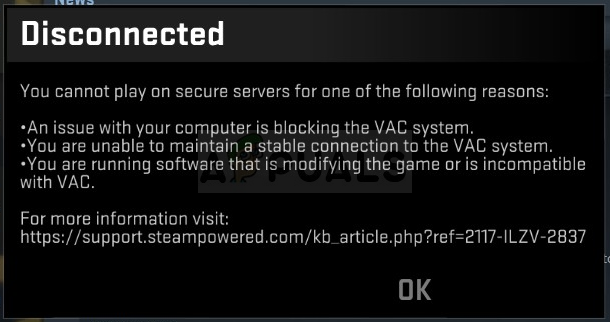
Anybody know what the VAC check failed error is? I know I haven’t been banned, because I’m no cheater.
sly mortar
@high frost verify the game files
it means that for some reason steam is having trouble checking the integrity of the game files, and verifying should fix it
high frost
Game files successfully verified, exact same error.
severe crescent
get upvotes
high frost
Where?
 bronze marsh
is there a software that can detect voice and automatically press a button ?, i kinda wanna turn foxhole ptt into voice activity.
quick wyvern
voice recog + scripts?
 uncut turtle
Noise gate?
 weak jasper
Would anyone know the reason behind why squad mute is disabled after entering a new region?
 deep osprey
Guys I'm trying to do 40mm in mass production but it tells me I need prototype kits, I don't think I need prototype kits to do that right? i trying re log but the problem still, i try do other items but still tell me i need prototype kits
high frost
Does anyone know how to fix the issue that makes aiming difficult? It's like whenever I press rmb, there's maybe a 40% chance it registers and aims whatever it is.
This also applies to rotating blueprints and making map posts, so I'm not entirely certain it's not a problem with my mouse, but I want to see if anyone else has encountered it.
In fact, the only gun that doesn't have that problem is the RPG, which is very strange.
odd acorn
fix the godd damm voice chat error
 formal lance
Do the devs know the VOIP has been down for 2 days?
Before you ask yes we tried reconnect
And yes it's more than one person
odd acorn
i have it 2 times a day
 raven berry
I have a problem with running the game, what have I just installed it and when I start the game it shows that VCRUNTIME140_1.dll is not on the computer
uncut turtle
Check the integrity of the game files with steam
inner basin
raven berry
I have a problem with running the game, what have I just installed it and when I...
Please refer to this pinned message: #technical-chat message
raven berry
thanks, but in game when j click "Play" it print "failed to download profile[1]
raven berry
thanks it works 👍
 opal fractal
Can't post a photo to the discord?
 unborn shale
Hi guys. Anyone know what makes this? I have internet connection >.>
sly mortar
@unborn shale fully restart steam
bronze marsh
i've tried to fully restart steam, still doesn't work :<
sly mortar
You're still getting Failed to download profile [1] after killing steam with task manager, and re-opening it?
sly mortar
@terse flume 6-0 means that you're not getting connection to Vivox's servers
5006... who the fuck knows?
This should fix 5006 -- #technical-chat message
remote tartan
ok got it thanks!
 toxic trail
I'm waiting 12 hours to respond from the moderation, form ModMail!
 thin elbow
How do I get faction unlock
toxic trail
?
explain pls
@thin elbow
You just pick Colonials or Wardens
If you want to change factions during the war, write to moderation
Use Clapfoot Support
The
What?
remote tartan
<@&448665379196108815> I submitted this 22 hrs ago
sly mortar
You're going to have to wait for a response. Which, due to when the devs are in office working, is probably going to be sometime on Monday.
remote tartan
can i ask you a question?
sly mortar
What's the question?
remote tartan
do devs keep a excel spread sheet of bugs and QOL improvements?
sly mortar
Don't know
karmic whale
The devs work with a jira like board. If that does say something for you 😁
remote tartan
yup cool, atlassian product
 dire badge
"Playing with an alternate account" wth ?
I start it from my one and only steam account. Or does it mean someone else on the same public IP also plays?
timber matrix
@dire badge you'll be fine, as long as you dont actually alt onto the other side
pretty sure that happens alot to guys who dont actually alt
 tawdry night
Happens constantly to me due to my bad internet
 latent sparrow
Can someone help me please.
I've tried restarting the game
restarted steam
restarted my computer
verified the game files
none of them worked
sly mortar
@latent sparrow kill steam with task manager and re-open it please
Something on your PC is preventing foxhole from accessing the steam API - be that steam being weird or an antivirus or something.
latent sparrow
I was running the game fine but then suddenly I glitched through and fell off the map in foxhole. I tried to restart the game and this problem occurred ever since. I tried turning off my firewall aantivirus and everything as well as closing steam with task manager but to no avail
 tired garden
Hi all!
My game crash when i try to deploy somewhere when i am on the home region, the game stay on the loading screen. That happen only on some region not all. And when i want travel i'm crashing on the travel.
Yesterday i can't travel in loch mor region and today it's Umbral.
dire badge
timber matrix
<@!116991584242761737> you'll be fine, as long as you dont actually alt onto the...
?? Alt the other side? I have 1 account. How can i alt anything?
latent sparrow
I tried reinstalling the game and the problem still persists. Is there anything that I can do?
latent sparrow
sly mortar
Something on your PC is preventing foxhole from accessing the steam API - be tha...
I tried doing this but the problem still persists
timber matrix
?? Alt the other side? I have 1 account. How can i alt anything?
@dire badge yeah dude ur fine. That warning comes on sometimes even if u dont alt.
 olive depot
how do i change my characters gender
actually i cant change anything for my profile\
timber matrix
@olive depot there are these barrack looking encampments at the home region. You can edit your character there
idle wagon
daily check in #1 Foxhole still crashes any time i connect or disconnect any bluetooth headphones. Please Fix.
I hope to have as few daily check ins reporting this issue as possible
sly mortar
If you give next to 0 actually usable info, how do you expect them to fix anything?
idle wagon
Ive never recieved any response so how do i know what info to give/
I can tell you whatever you want to know
idle wagon
as far as ive tested it doesnt matter but here are some examples
Skullkandy Sesh earbuds, Jlab Icon earbuds are the ones i currently use
not headsets earbuds btw
sly mortar
Model numbers
idle wagon
looking them up, one sec
Sesh model # S2TDW-M003
Jbuds Air Icon model number was a bit harder to find but this one was associated with it on amazon: B07RB37JTB
model numbers are a bit tricksy since theyre often not even included in the product manual
but name alone should get you to them with a quick googling
I recently discovered that by connecting both sets at the same time and then disconnecting one of them, the game does not crash
so the error could have to do with not having any bluetooth connection at all
the game does not crash with an error message though, it simply freezes and I have to do some gymnastics to get task manager open and kill the game
sly mortar
Alright, first thing to try, could you make sure your bluetooth drivers are up to date?
Because unless it's just those specific ones that do it, I was able to connect 2 different BT headphones to my PC while the game was running, and disconnect them, and it didn't crash.
idle wagon
yup already checked those and there are no updates
at least according to device manager
sly mortar
Try windows update. It has a better brain
idle wagon
Ok I downloaded a bunch of drivers and updates, none that specifically mentioned bluetooth but hoping for the best regardless
so far it appears to have worked, will check back in a few days to see if it was a fluke
marble heart
can a mod come online to the warden faction?
inner basin
marble heart
can a mod come online to the warden faction?
What is the issue?
 edgy dune
Brrrrr
inner basin
explore beyond limits
 simple phoenix
<@&213133977681264640> i still have that problem with the screen in the game updating only when game is alt/tabed out of how do i fix that graphic card drivers are all updated
sly mortar
@simple phoenix could you try switching to windowed full screen mode and see what happens?
simple phoenix
@sly mortar works for now thanks , i didn't play the game for half a year because of that.
terse flume
I'm not sure what to do. I've played for a total of 17,5 hours and out of nowhere it stopped working when internet disconnected for a moment. After that, I noticed my VPN was still ongoing so I cut that off and this happened again. Now it seems to be like this permanently and I can't seem to get out of this issue.
Done it all:
Uninstalled 3 times
Ran as administrator
Turned off Firewall to check
Restarted the computer
Deleted all files and validated through Steam
None of these seems to work and now I can't get back in.
It also asked me a second time on choosing factions, which was very odd. Then when I tried starting the game through files directly rather than Steam client, it gave me green text with "War" and something about optional parameters.
terse flume
sly mortar
<@456226577798135808> try fully restarting steam
Will try that. Just before doing it, I saw someone earlier up in chat having the same issue.
What is "steam API" and how could I manage fixing it if it now would be the similar issue instead?
sly mortar
The steam API is steam's background service. When the game pulls your profile from steam, it does so through the Steam API. If something is blocking the steam API, you won't be able to play since the game needs data (like your name, steam ID, and such) from Steam to be able to connect you
terse flume
sly mortar
So kill it with task manager and restart
Did so. Seem to still get the message when launching from menu.
sly mortar
Did you launch the game through Steam or the .exe?
terse flume
sly mortar
Did you launch the game through Steam or the .exe?
Through Steam. Shall I try the .exe instead?
terse flume
sly mortar
Is your VPN enabled / disabled?
Right now it's disabled. What happened was my wireless cut off for 5 minutes while playing.
After a couple times of trying I got back in and played like usual. Then noticed I still had my Express VPN on and decided to turn it off (only using for online browsing). Then the game booted me off right after and since then I can't get back.
sly mortar
Try turning your VPN back on and then run the game.
terse flume
sly mortar
Try turning your VPN back on and then run the game.
Odd, I got in now. Is it just Steam API that perhaps got confused from my VPN? Will this issue be nulled if I turn the game off after playing normally afterwards?
sly mortar
Did you turn the VPN back on before you got in?
terse flume
sly mortar
Did you turn the VPN back on before you got in?
I turned it back on after you told me, earlier it was off. So yes, turned it on before I got in
sly mortar
Alright, so it sounds like someone in the path between you and steam is blocking access to the Steam API.
Could be your ISP, could be government, or something else.
terse flume
sly mortar
Could be your ISP, could be government, or something else.
My bets would be through the school I'm connected, it's wireless for all dorms residents. it hasn't been an issue before though. Will play as usual, turn the game off after a while and after exiting steam, I'll turn off VPN. If I get another issue, I'll come back. Thanks for the help though.
sly mortar
Yeah, the school blocking a Steam connection seems likely.
 valid surge
when i type in the game it will not sent it
sly mortar
@valid surge what is your comms rating
sly mortar
Did you get chat restricted ever?
timber matrix
valid surge
but I wrote Chinese and then I can not write anymore
check your setting... it may have changed ur language or smth to chinese
inner basin
valid surge
but I wrote Chinese and then I can not write anymore
In the chat settings (the settings cog above the chat box), make sure you have English checked
 wind linden
Hello there, after little break I joined Wardens, and after few hours found out that clan I would like to join is on opposite side. Could anybody explain me step by step how can I change it? I wrote already to "Clapfoot Support" Bot but no sure is that a way?
timber matrix
Yeah they should answer you
valid surge
when i try to make a feedback, the bot always type"stop spamming spaceboy. and its a year ago it also say it.
 broken hazel
I just died out of nowhere in a partisan setting, no sound effects, no gunshots, no AI in the vicinity, actually nothing
I just vanished
 barren onyx
Is there a way of finding your ping?
floral linden
Say "Bayonets vs Grenade Launchers" in world chat. How many MS it takes for a reply is your ping.
 inner bloom
i keep getting a message "vac check failed, restart steam" when i try to log on. it worked earlier today, i think a steam update may have happened when i was gone. i restarted steam a couple times, still get message.
 vernal timber
where do we report stuck trucks again?
sly mortar
Appuals.com
Valve Anti-Cheat is a software used by Valve games to check your setup to see if you are using any hack or third-party program which might make your
@vernal timber Type !unstuck while in the drivers seat of the truck
 austere zinc
sly mortar
<@!287444891380744202> https://appuals.com/how-to-fix-the-vac-authentication-err...
austere zinc
sly mortar
<@!287444891380744202> https://appuals.com/how-to-fix-the-vac-authentication-err...
THIS WORKED! THanks
 spice pasture
b
 brittle brook
How do I add a flare lads?
brittle brook
I thought we were friends, brother
Do I have to do it in a different chat or something
 worn oasis
brittle brook
I thought we were friends, brother
worn oasis
brittle brook
I thought we were friends, brother
lol
I don't really know
It's been a long time since I teamed myself
inner basin
@brittle brook @worn oasis ?warden not !warden
worn oasis
inner basin
<@!351503804694396949> <@!601305730573926401> `?warden` not `!warden`
a bit late off the draw there, bud
inner basin
idk, your last message made it out to be that you guys were confused
 pine leaf
inner basin
<@!351503804694396949> <@!601305730573926401> `?warden` not `!warden`
pine leaf
inner basin
<@!351503804694396949> <@!601305730573926401> `?warden` not `!warden`
How do you remove roles?
with a command?
inner basin
Just type the command I think?
oof that didn't work
You are stuck as Colonial or Warden, never neutral now 🙂
 fossil hatch
modmail is offline?
 uneven lagoon
guys how do i activate foxhole rich presence?
sly mortar
@uneven lagoon Rich Presence got disabled because people were abusing it
uneven lagoon
sly mortar
<@!278268352420511744> Rich Presence got disabled because people were abusing it
is there a way to activate it or is disabled forever?
sly mortar
Disabled forever. People were using it to figure out how many players were on each map and plan attacks accordingly
uneven lagoon
oh ok
sly mortar
It may come back in the future? I don't know
 vivid kite
Can I get permissions again in game feedback don't know why I banned the first time
 proper tiger
Hello 😀 , I can't play the game x.x, it keeps saying "Failed to download Profile[1]"
proper tiger
please help 🥺
sly mortar
@proper tiger Kill steam with Task Manager and restart it
@vivid kite ask me again on 4/22
vivid kite
Why was I reven revoked
sly mortar
Not following channel guidelines / shitposting
vivid kite
Probably me saying why did the collies get MHt early again
Mentioned it was a slightly baised move but people have say way worse imo
Wasn't really shitpostong in anyway
proper tiger
sly mortar
<@!419605942200434698> Kill steam with Task Manager and restart it
Didn't work 😕
sly mortar
Try verifying your game files, and if you’re using a VPN, disable it and try then
I’d you aren’t using a VPN, it’d be helpful to try with one
proper tiger
Didn't work either x.x
proper tiger
I guess I'll wait for the next update maybe then it'll work
sly mortar
@proper tiger Could you try the stuff in this message: #technical-read-first⚠ message
proper tiger
Thanks 🙂
 harsh dagger
The copy steamid64 is for verification here right? so we can see who's collie/warden?
If so where are you supposed to paste it?
inner basin
harsh dagger
The copy steamid64 is for verification here right? so we can see who's collie/wa...
🤔 what?
Who is verifying what
harsh dagger
inner basin
harsh dagger
https://discordapp.com/channels/203512636556574720/529929825910259712/5299357806...
Oh that's for faction unlocks.
If you want the Colonial/Warden role on this server, type ?warden or ?colonial
harsh dagger
Yeah but it seems to cut off and not tell where you're supposed to paste it haha
oh thanks
inner basin
👍
 latent bluff
Devstream Bingo Cards! https://mfbc.us/m/vrfume Come get you February 9th Devstream Bingo Cards!
myfreebingocards.com
Play virtual February 9th Devstream By Orbital Bingo with your friends for free on any device. Customize the bingo cards and generate printable or virtual bingo cards for free.
 dreamy tundra
where is stream?
 hushed inlet
https://www.twitch.tv/foxholegame @dreamy tundra

Twitch
Foxhole is a massively multiplayer game where you will work with hundreds of players to shape the outcome of a persistent online war.
 arctic mirage
Ive been getting the error "Failed to download shard info [Error: 1] - please try refreshing. If the issue persists, visit our support page." for a while now, restarting computer verifying files or redownloading the game hasn't done anything and i haven't seen this on the support page, anything i can do>
sly mortar
@arctic mirage Fully restart steam, if that doesn't work, ping me
arctic mirage
Alright thanks, I'll have to try that in the morning
arctic mirage
@sly mortar Still getting the same error message
terse flume
check integ of game files? ¯_(ツ)_/¯
arctic mirage
Tried that, from what I can see people have been getting this error for awhile but I can't find any consistent solutions
sly mortar
@arctic mirage try the stuff in this message: #technical-read-first⚠ message
It’s a network error so there’s so many things that could be causing it
arctic mirage
Hm, okay
arctic mirage
Seems like it was a weird firewall issue
 native scarab
Do we know if the storms will have a significant impact on performance? i'm asking because I have a lower-ish -end PC and each and every time the teams announces a visual update or in this case, many many particles to be added to the game, I always fear it would be the last straw for me rendering the game decently.
 ruby island
i would assume not as from what i can tell it just changes the ground and some visual effects of the rain or snow falling
probably not going to use a whole lot of resources
dreamy tundra
DEV MAN GIB DEVBRANCH!!!!!
worn oasis
Yes
 ember scarab
How do I fix failed to download profile for the foxhole devbranch?
ember scarab
oh okay thank you
 empty maple
When i try to go to a Internal or DevBranch game it says "Failed to download Profile[1]" Help>
timber matrix
empty maple
When i try to go to a Internal or DevBranch game it says "Failed to download Pro...
devbranch is not up yet
 jovial nacelle
devbranch?
jovial nacelle
ok ty
 magic wigeon
de nada
 inland pelican
<@&213133977681264640> I’m trying to get this game running on a new laptop. When I try to deploy to an area, my game gets stuck on the loading screen. I can hear sound effects and nearby players can hear me, but I only see the “arms race” screen. After a few minutes the game crashes (I didn’t get a chance to record the exact error message). I’ve tried uninstalling and reinstalling the game.
sly mortar
Could you reload it until you get the crash error message again
inland pelican
Sure. Give me a few minutes.
Oh, I also got a “your soldier is no longer where you were” message when trying to deploy to the home island. Works the second time I try though.
Ok, this time I got to see a frame of me spawning in, then a “connection lost: your connection to the host has been lost” message. That’s different from what I got last time though.
And it didn’t crash the game
Trying again.
Here’s the crash message from trying to spawn in again:
The UE4-War Game has crashed and will... (message cut off)
Fatal error!
sly mortar
Could you go here: C:\Users\[USER]\AppData\Local\Foxhole\Saved\Crashes and open the newest folder and DM me the file within it called War.log
sly mortar
@glossy marsh Devbranch is not yet open
glossy marsh
when is it open?
glossy marsh
thanks @sly mortar
glossy marsh
Still can't get into the server
why can't i get onto the dev branch
can you help @sly mortar
sly mortar
Did you set yourself to devbranch on steam
sly mortar
On the main menu set the shard you're joining to devbranch in the top right hand corner of the screen
sly mortar
What is it telling you when you try to connect
sly mortar
Restart your PC
sly mortar
Do you use a VPN?
glossy marsh
whats that
don't think i do
could it be my bullguard
anti virus
I really don't know what is going on
sly mortar
Antivirus could do it
glossy marsh
tried switching it off but i haven't recieved the 2 gb update at all
sly mortar
Restarting steam should force it to see the update
sly mortar
Seems like it's an issue on Steam's end that you haven't gotten the update, so nothing we can do
west frost
bot down #game-feedback-archive
 tardy pond
Alright, I've done everything in the support section that I could find, but I still get this screen every time I have booted up foxhole.
Other games on steam seem to work and I've looked for any quarantined items in my files but nothing
Does this happen if the anti-cheat program is missing? If so, what is it called?
(This is also a problem with vanilla/non-devbranch)]
<@&213133977681264640>
 frank zealot
@tardy pond Seems like a network issue, can you try using your mobile network to see if you can load the news&highlights?
tardy pond
Except it isn't
karmic whale
Are you using a custom DNS Server?
karmic whale
What OS are you using?
karmic whale
At your own risk try using
- Win + R
- type "cmd"
- type in the new windows "ipconfig /release" (You will loose Internet connection at this point)
- Type "ipconfig /renew"
- Type "ipconfig /flushdns"
Keep in mind this is at your own risk. This asks your Router for a new IP Address within your network and clears your local DNS cache
tardy pond
Ah
Is this on the router or on the computer's side
Bc if it is router, I don't think it is that
karmic whale
Its local on your computer
tardy pond
Ah
karmic whale
Thats why I asked after your OS 🙂
karmic whale
No Problem 😛
tardy pond
So what can go wrong with a DNS flush?
Bc knowing my luck, I suspect something might go wrong along this
karmic whale
Nothing, if something fails a complete PC restart should do wonders.
tardy pond
Restart? Or reset?
karmic whale
Restart, Power Off, Power on the OS needs to boot
tardy pond
Ok
Alright, going to try this
Actually, wait, lemme try something else before I go into this. I accidentally reset my firewall settings so I am going to see if this will help
If not, then I'll be moving forwards
karmic whale
xD
tardy pond
Sigh I am a fucking boomer ain't I
karmic whale
This is not rocket science this is actual pretty basic
karmic whale
Just for clarification. DNS or Domain Name Service is a Service which translates "google.de" into a IP: "8.8.8.8" Your PC connects also not with the actual Domain on the Server but with the IP Address.
To make this more seemless and easy on your PC your PC "remembers" IPs to Domains in a Cache Table.
the flushdns command deletes this table and forces your PC to ask for each IP by domain the main Server again.
tardy pond
Ok, odd
I did the process and I didn't loose connection
And still nothing
Lemme guess, restart?
karmic whale
Then you didnt do it correctly. /release lets you lose the IP your Router has given your PC per DHCP and renew lets you PC ask the Router for the IP the PC has been given.
but flushdns should be enough
Then I dont know what the problem could be as it works correctly on my end.
So its not a Server issue but a client issue.
tardy pond
Yes