#avatar-dynamics
1 messages · Page 18 of 1
 pearl ingot

 devout star
I've never used it, but it's been there forever.
 little owl
triggers are useful in traditional animators. You can set them and then they'll be automatically turned off when they are used in a transition. But due to their nature where they may be turned on and then immediately turned off, it doesn't really make any sense to sync them through avatar parameters
 turbid badger
 clever echo
Is this trigger parameter type for the new avatar dynamics?
clever echo
Is this trigger parameter type for the new avatar dynamics?
its an animator thing
reminder that animators have existed in unity for years
they arent magical things created by vrchat
 robust pecan
Doodly doo
 sonic narwhal
Hey, I tried physbone-ing a cape and it looks fine in Unity, but VRChat makes it look like an invisible camel lump. Anyone here know how I can fix this?
 fresh helm
need visual example of the issue and how it's setup in Unity
turbid badger
robust pecan
Doodly doo
nope not really
you can use fixed joints since those are still allowed...?? for some reason..?
but that system is old and pretty bad
its how people did it before those constraints existed
robust pecan
turbid badger
you can use `fixed joints` since those are still allowed...?? for some reason..?
So fixed joints which I presume as you said are old
would be more perfomance intensive and harder to deal with
are allowed on Quest?
fun
Guess I'll have to look into that
turbid badger
robust pecan
So fixed joints which I presume as you said are old
would be more perfomance int...
i didnt make the rules, complain to tupper or smtg
robust pecan
turbid badger
i didnt make the rules, complain to tupper or smtg
I'd love to
They make a lot of weird decisions from my perspective
some I've later found to be less weird but it'd still be nice to actually have a discussion
or at least more output for their reasoning as they seem to give very little without being directly asked
turbid badger
robust pecan
turbid badger
vrchat.canny.io
Trust me I use it
Even there they don't give much in the like of responses
sonic narwhal
fresh helm
need visual example of the issue and how it's setup in Unity
Well in Unity, it looks like this


Then in VRChat, it looks like this
 fresh helm
I think it's inside that green collider there
also based Blazblue model
you can go into play mode in Unity and have a good close look at it
could prob just make the cape's collider radius smaller to fix it honestly
sonic narwhal
fresh helm
could prob just make the cape's collider radius smaller to fix it honestly
Again, in Unity, it works just fine. But I could try messing with the cape collider
 north hatch
is there a setting to make dynamics grabbable or poseable only by me?
sonic narwhal
Would the default colliders have anything to do with it? I never really touched those
fresh helm
Nah, shouldn't
it's probably just Unity having a Unity moment and for some reason the colliders on there are all slightly smaller than ingame :^)
sonic narwhal
fresh helm
it's probably just Unity having a Unity moment and for some reason the colliders...
Well that's annoying lol
 simple elk
🔨 derp nm collider
 next mauve
Okay, I'm looking for "Is this possible?"
I essentially want to make a gun that someone else can pick up from me and fire.
- Picking up the gun is easy, give it a phys bone and as much stretch as possible.
- The difficult part is making it fire when they pull the trigger.
Since I don't have access to their gesture parameters, I need a way to guess if their finger is curled. Right now my thought is to use a Contact Receiver and check for proximity. Essentially once it is grabbed, check to see a change in distance with the index finger. Once the distance meets a threshold, trigger the gun to fire...
I'm just looking to see a sanity check if there is an easier way to do this. I know I could easily make a second custom avatar that passes a "Trigger is squeezed" value, but I want this to work for anyone, regardless of avatar.
 jolly crane
next mauve
Okay, I'm looking for "Is this possible?"
I essentially want to make a gun that...
jolly crane
next mauve
Okay, I'm looking for "Is this possible?"
I essentially want to make a gun that...
your main problem is that the other person cannot rotate the gun
the grabbing is only position
unless you had 2 physbones, and made it a 2 handed weapon
but that's still not perfect
next mauve
jolly crane
your main problem is that the other person cannot rotate the gun
Hmm.. I did not think of that...
Maybe it's possible to pick up two objects at the same time? ... then you could interpret the orientation...
(I don't think you can actually pick up two objects with one hand at the same time though... )
 onyx vapor
next mauve
Hmm.. I did not think of that...
onyx vapor
next mauve
Hmm.. I did not think of that...
Random out of the box idea. You could maybe add multiple contacts to act as kind of axis detection. Then when one of those detects a finger, you know roughly which direction the hand is and can manually animate it's rotation based on that. It would be jank.
next mauve
onyx vapor
Random out of the box idea. You could maybe add multiple contacts to act as kind...
Ah true! I do have collision with not just the hands but also the fingers.. not sure how to get that mapped to 3D rotation though...
I'm sure some mad scientist on here will find a way... if not maybe something will click in my project..
Thanks for the feedback!
onyx vapor
So like, have a contact on the front middle, if finger collides with it you know the gun is held straight/ normal - do nothing. Another contact at the front right side - if that is touched then you know you need to rotate the gun about 45deg to line it up.
It would need a lot of contacts to make it accurate, too many, but thought it was an interesting idea
next mauve
Right, you could also quickly spin the object until you get the correct contacts... the problem is that it would be super janky and not update very well when the other person spins their hand... like it might flip around for a few seconds before aligning somewhat correctly...
You could also use the new distance detection with this ... but that would also get really complicated....
I think this is definitely something people are going to want.. I'd like to find a way to make it happen.
 modest tusk
you could use the built in avatar->avatar colliders on the fingers and palm to collide with the physbone on the gun, provided that they grab the handle correctly
i did something like this to get a pseudo-DPS effect on something else
although that was attached to a parent and not floating somewhat freely so idk how well that’d work
next mauve
Hmm... what happens if you have two overlapping grabbable physbones? Does the other player grab both at once? Or just whichever it considers "closer"?
I'm thinking about the possibility of grabbing two physbones and using that to determine the rotation.
Kinda like how a two handed weapon would work...
modest tusk
it’s whichever is closer
next mauve
Darn... -.-
modest tusk
if you want people on quest to be able to pick it up too you might have a hard time getting that component value down
modest tusk
modest tusk
you could use the built in avatar->avatar colliders on the fingers and palm to c...
doing it like this does get rotation kinda down, tested by me, but idk how well it does on a free bone
next mauve
Yeah, I'm not focused on getting this to work for quest, I just want it to work at all...
modest tusk
i can’t see it being done with physbones just cuz they don’t do good with rotation
well
with only physbones
next mauve
I'm up for any solution... like... for example, we can calculate the distance from one collider to each of the fingers and wrist.. using avatar interactions... but I'm not exactly sure how to use that to actually determine where the gun needs to go.
modest tusk
honestly
try making a physbone in the handle of the gun, but with a smaller radius than the handle
you want it to fit inside the hand and palm colliders that come on the avatar, but you don’t want the physbone slipping through the cracks in the colliders
i’ve done it before for diff applications, but if done correctly it’ll rotate the physbone along with the hand
next mauve
Every avatar hands are different sizes and shapes though..
next mauve
Some have their thumb in a totally different position
Hmm.. I'm still thinking using the "distance" to each digit might be the most reliable choice... but its only distance, not direction... and we can't really do calculations in vrchat...
turbid badger
one thing you could try is to orient it using 3 contacts and getting the values of them into a blend tree using proximity
from that u should be able to detect the axis based on the distance to the large colliders
maybe long capsules
using the hand collider
although i think this is too complicated for an avatar
and i would recommend just making it so you can holster and unholster with contacts or physbone
 dark drift
is there a guide for somewhat world-constrained objects? Ie if I want an interactive prop like ball or bottle. I have some ideas but why not ask first.
 torn tendon
For some reason my physbones (I converted them in Unity) are grayed out for people and they can’t manipulate them.
Do you guys know why? (I have the “Is grabbing?”) on.
little owl
they need a radius
 rain edge
Hey everyone, still trying to get a custom to the new Dynamic/Phys bones system released no so long ago and appear to be having an issue one of my avatars I am working on for a friend.
Having issues with hair and cloth sticking out for no apparat reason after being converted from base Dynamic Bones to Phys Bones.
Doesn't appear to be any colliders pushing these parts you can see in the screenshots up. However, we wanted to know if there's any particular reason why this would be happening?
Help would be much appreciated!

 jolly crane
rain edge
Hey everyone, still trying to get a custom to the new Dynamic/Phys bones system ...
jolly crane
rain edge
Hey everyone, still trying to get a custom to the new Dynamic/Phys bones system ...
well the first problem I can see is that massive collider under the floor
you don't need huge sphere colliders for floors anymore, you can use Plane physbone colliders
rain edge
Awesome! That's a change I can adopted no sweat!
little owl
it'd be good to change to a plane collider but that's certainly not the problem you're having
rain edge
I've seen same recommendations from other people regarding that. Plane Collider for the floor it is.
little owl
the problem is because you have physbones inside colliders on the body
rain edge
 rain edge
little owl
the problem is because you have physbones inside colliders on the body
rain edge
little owl
the problem is because you have physbones inside colliders on the body
You may be onto something there...
This is a live view of all the dets
little owl
first thing to try would be to make a curve on the radius so that the first bones have a smaller collider
physbones behaves differently because it's made out of capsules instead of spheres, which makes for significantly better collision against small objects like hands but when you put physbones inside a large collider they tend to be pushed very strongly out rather than being brushed away
rain edge
So there might be a collider inside lifting up one of the first bones on the front and back cloth?
rain edge
little owl
physbones behaves differently because it's made out of capsules instead of spher...
True true
little owl
yes, clearly
rain edge
Looks like you're right. This is clearly different from the OG Dynamic Bones we're use too. I'll try and make a few edits on the offending colliders.
They're really not needed there anyway.
There's already colliders surrounding the legs/body to stop the parts clipping through the body.
little owl
It's good to get your latest stuff up to date and using physbones as it should be used, however the team is well aware of this particular issue so a solution to that is on the way. No need to panic and reupload everything
 hushed trail
hey to budge in a bit - i had to put a position constraint component on the plane/floor collider, otherwise it would strictly be beneath my avatar instead of strictly on ground-level
rain edge
little owl
It's good to get your latest stuff up to date and using physbones as it should b...
I've got copies. Happy to edit any way possible 😄
No panic, if it breaks? Well I just revert to a previous backup.
I'm trying your recommendations though. Modifying the sizes and some colliders and removing a few I can see bunched up near the bits.
rain edge
@little owl Looks like you were right on the money
Adjusting the sizes, removing some colliders and modifying the collisions has fixed it.
Not sure why this avatar has almost 15 to begin with? Time to optimise manually.
Really appreciate your help!
 snow spire
So question, is it true you need to animate Parent and/or rotation constraint to do something like this?
https://twitter.com/necuroN/status/1521780649069522945?s=20&t=mf8ClnkNWDvMB_EY84IKmA


 remote ferry
snow spire
So question, is it true you need to animate Parent and/or rotation constraint to...
remote ferry
snow spire
So question, is it true you need to animate Parent and/or rotation constraint to...
Not quiet sure why that is tagged as physbones tbh
But yes
You would have to animate a parent constraint for that
snow spire
Alrighty, thanks
 mellow hawk
I feel like you could do this by monitoring a phys bones {parameter}_Stretch driver. At X stretch turn off one sword and turn on a duplicate parented to a hand.
Would take up more tri's then parent constraints tho would be quest compatible.
dark drift
I've placed contact reciever on random object. When Reciever Type (variable) set to Constant it works just fine, debug capsule lits green and debug console shows True. But if I select Proximity capsule starts blinking (still blue=inactive) and var is always 0.0
looks like capsule doesn't work for proximity, sphere works ok
simple elk
capsules dont really work too well - yep 🐇
next mauve
turbid badger
one thing you could try is to orient it using 3 contacts and getting the values ...
Yeah. This is where our conversation was headed... definitely seems overly complicated for what it is.. but it would work... hmm..
Also, good idea with the blend tree. I was thinking of using just animations, but a blend tree would be much cleaner.
Also, as a reminder, the theme was to allow someone other than the avatar player to pick up your weapon and use it.
torn tendon
what makes physbones shake in that really gross way when i move
turbid badger
torn tendon
what makes physbones shake in that really gross way when i move
stuttering?
what do you mean shake?
torn tendon
not so much shake
cant think of a better word though
it reaches the point i set for the angle limit thing and then just shakes
kinda bugs me out
turbid badger
torn tendon
it reaches the point i set for the angle limit thing and then just shakes
oh that happens for me sometimes
do you have any Scale value for your armature or bones?
Scale does not like to cooperate with physbones
like at all
torn tendon
no
i think i just dont udnerstand physbones good enough yet
is there any kind of ingame debug for physbones or something
turbid badger
yes and no
you can test in unity with much better view
but in vrchat the only option you have is Physbone view in Avatar Overlay
but it only shows your colliders
nothing useful
 green robin
Question would it be possible to make audio play on the movement of a bone like for example a bell, Would I need to set up a float that plays the audio at a set angle
Or would it be better to just have a sender/receiver set up that just plays the audio on contact?
mellow hawk
I believe that with the phys bone angle driver is updated if just the transform changes.
So something like a cat bell would play if the avatar moves or is hit.
 naive thicket
On the VRChat docs, there is an implication that a contact receiver can set a parameter to a specified value, but the values it sets seems to be predetermined? Am I missing something or is that just how it works? I was hoping to be able to set an int parameter to 2 upon contact.
 toxic dawn
How do I make it so the hands wouldn't go throurugh the fabric by using physbones?

 harsh copper
just
dont use physbones on the bones that should cover the hands
only add physbones lower
Any update on physbone component parameters being animatable?
 vale tapir
do yall have any advice on optimizing a skirt for the new physbone features? I'm trying to make it stiff instead of floaty.
 late bridge
hit the play button and just start messing with the sliders. once its at a point you are happy with, copy it, hit the play button again, and paste values
 worn mica
Imma ask here by any chance, anyone has a bow prefab that works with physbones?
torn tendon
so im trying to work on a headpat thing for my avatar.. but is it normal for a float value to not have "equals" instead of just greater and less?
 dark drift
It is but why would you need float variable at collision for this?
torn tendon
dark drift
It is but why would you need float variable at collision for this?
i was following a video that told me it "needed" to be a float for some reason?
if theres another way i should go about this id love to know!
simple elk
int / bool & float work now, use bool for that one
dark drift
Make var constant (bool), in animator default empty state, if var goes true goto play sound after that (exit time 1) go back (if head still being patted it will play again but it wont allow spaming). I'd do smth like this
torn tendon
ahh thank you both !!
mellow hawk
Floats were the only way to contacts before in the beta, so a lot of videos got outdated after the update.
Best to read the bottom of the component tool tip, will tell you what it needs for that interaction type.
 gusty whale
I have a small issue that I need some help with. I have some avatars that, when I put them into VRC, the physbones kind of spasm, and it's only in VRC that they do. I test them in Unity, and they're fine.
mellow hawk
Check to see if you have a colder inside the bones radius
 stark pond
has anyone figured out how to get physic bones to interact with blend shapes (IE constraint the blendshape value based on the stretch value)
gusty whale
mellow hawk
Check to see if you have a colder inside the bones radius
I tried that, and I'm not finding any colliders.
 rain ice
stark pond
has anyone figured out how to get physic bones to interact with blend shapes (IE...
rain ice
stark pond
has anyone figured out how to get physic bones to interact with blend shapes (IE...
Idk about editing the blendshape itself, just make it into an animation and mess with the parameters in your fx layer
mellow hawk
stark pond
has anyone figured out how to get physic bones to interact with blend shapes (IE...
You can assign a parameter for the phys bone to the value of. When you set the Parameter field the component will generate three drivers: {parameter}_IsGrabbed, {parameter}_Angle and {parameter}_Stretch
Using these drivers you can control anything on your avatar animation controller. So you could use these drivers to control an animation that had a blend shape.
rain ice

I have these all set up to play my existing hand gestures, they could be set to anything
torn tendon
I bow to you genius
simple elk
Not sure why you have them all in one layer, only one of them can be active at once
turbid badger
^^^
just make one layer per gesture per hand if you want full control and using Write Defaults
otherwise u need to do all left and right hand gestures in a layer for each hand
 rugged pendant
When I'm on PC, and a Quest user grabs my PhysBones and drags them, I can't see it. Is that normal and something I can't fix? Or did I mess something up with the avatars? The PC and Quest version all have the same components, except the Quest version has a few less PhysBones and a Quest-compatible shader.
gusty whale
Does anyone have a solution for spasming physbones?
 leaden crypt
has anyone ever resolved using physbones with skirts? i was trying to figure out why skirts keep clipping through the legs and i found out that even as hinge-type joints the physbones just pass through or ignore the colliders outright

 soft sorrel
Just a question how come only 8 phys bone pieces
torn tendon
Hey is it just me or is there a delay in the phybones now
 faint atlas
so im playing around with avatar dynamics, and i want an animation to play for both users when 2 of the same avatar come into contact, with a custom sender and receiver.
i was under the impression that simply making a sender and receiver on both, while disallowing self, would make it work, but this seems to fail and acts like the sender is self interacting regardless when in play mode
also tested by disabling sender on 1 and recevier on the other and it did work, so the issue is definitely related to it not disallowing self properly.
 dense bridge
OOP Wrong channel sorry
 sudden urchin
What's the performance cost in practice for Contacts. (Not performance rank)
torn tendon
Also immobile isn’t doing anything anymore
It no longer have any effects anymore, even if I put it on 1.
 errant notch
torn tendon
It no longer have any effects anymore, even if I put it on 1.
errant notch
torn tendon
It no longer have any effects anymore, even if I put it on 1.
They changed a bit of ho it works
Maybe you switched the setting
torn tendon
@errant notch I didn’t touch anything
Even in vrc all my stuff is jiggly
I can’t seem to remake my old physics
It’s all weird movements that I can’t seem to fix, and there is this half second delay
Ya this update kinda broke all of my models
 jaunty sorrel
Anyone aware of any avatar dynamics driven keyboard systems
I had an idea of using physbones to make a keyboard


basically index finger + bone = keypress
 short narwhal


Finally got my #AvatarDynamics #VRChat Keyboard Packaged and ready for Release. Updated it a bit and fixed quite a few bugs with syncing, It is now available on https://t.co/J9d9v2a7mt on the Avatar 3.0 Prefabs tab as "Yash's Avatar Dynamics VRC Keyboard" HAPPY TYPING!
Likes
387
Retweets
103
 Twitter
·
jaunty sorrel
Twitter
·
jaunty sorrel
Could use this to drive character emotes better than the ingame system
of course yash did it
yash is the best
❤️
sudden urchin
Hi, did the SDK break Phys Bone colliders by not letting you change their Height value anymore?
 austere surge
^what they said
sudden urchin
https://vrchat.canny.io/sdk-bug-reports/p/1194-bug-sdk-capsule-colliders-missing-height-setting
Canny post is up

 jaunty vortex
Using a slightly older sdk since new one doesnt have the collider height; anyone know whats causing this?
 sudden urchin
I have a tap work well with that
I have a setting of 3 that a pat seems to consistently hit too
 ornate olive
does anyone know why this happened? everytime i switch between tails the physbone does this and sometimes all of them does the same thing. in the video only one tail that does this
 rich dust
is there a way to make a toggle for how stiff dynamic bones are? like just use a radial puppet to make dynamic bones move differently
 turbid fulcrum
naive thicket
On the VRChat docs, there is an implication that a contact receiver can set a pa...
turbid fulcrum
naive thicket
On the VRChat docs, there is an implication that a contact receiver can set a pa...
If you're still trying to solve this, you can make a local variable that sets a synced one to whatever value you want upon activation if you want to do that
turbid fulcrum
jaunty sorrel
Ooooo that's kinda nice! Are the bones rigged at all or just to put the contacts in them?
 minor rose
turbid fulcrum
If you're still trying to solve this, you can make a local variable that sets a ...
minor rose
turbid fulcrum
If you're still trying to solve this, you can make a local variable that sets a ...
That or replace the integer = 2 animation condition into a boolean = true with a unique name, that will save parameter memory.
turbid fulcrum
Oh yeah that too, but only if the result doesn't need to be synced. It wouldn't work if the change has to be persistent since late joiners wouldn't see it
For animations that only play once it would work
remote ferry
naive thicket
On the VRChat docs, there is an implication that a contact receiver can set a pa...
They removed that feature
It used to be a thing in the beta
 civic ridge
hey so i made a buzzer and im trying to make it so when someone presses the button then it plays a buzzing sound, but it doesnt work. this is how i set it up, what am i missing? audio source i just put on the button itself but its off by default in the hiarchy
 jolly crane
civic ridge
hey so i made a buzzer and im trying to make it so when someone presses the butt...
jolly crane
civic ridge
hey so i made a buzzer and im trying to make it so when someone presses the butt...
you have "parameter" set as "1", do you have a parameter called "1" in your FX controller? how do you have the toggle set up for it in the FX controller
the contact receiver is simply to drive a parameter, you specify the name of the parameter you want to modify in that slot
civic ridge
i have no idea what the name of the parameter is. the buzzer is on a world constraint i spawn when i point
jolly crane
you need to define a parameter
call it like "Buzzer" or something, and put it in the Parameter slot of your receiver
in your FX controller, add a Bool called "Buzzer", and then set up a toggle using it
civic ridge
oh i had no idea about this bool thing how do i do that?
jolly crane
do you know how to set up toggles normally?
civic ridge
yea
jolly crane
okay, it's literally the same thing
it's just the receiver driving the parameter, rather than you doing it manually through a menu
you don't need to specify it in your avatar's expression parameters file, it only needs to exist in the FX controller
civic ridge
https://i.imgur.com/sRg8r0h.png like this?
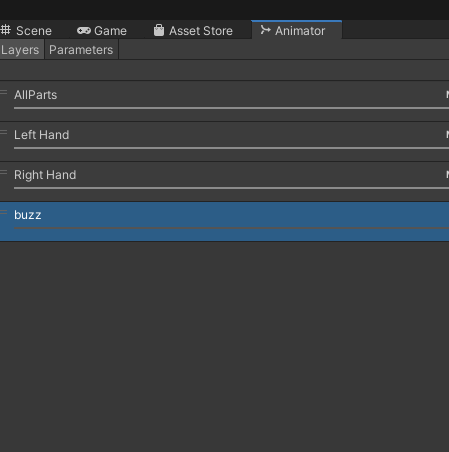 jolly crane
that's the first step. don't forget to set the layer weight to 1
civic ridge
ok done, anything to put in mask?
jolly crane
no
you don't need masks in the FX controller unless you're doing very specific things
civic ridge
I see, so now it should work?
jolly crane
did you add the parameter in your FX controller, and set up a toggle for your thing?
civic ridge
civic ridge
https://i.imgur.com/sRg8r0h.png like this?
in the parameter i wrote the same name as what i wrote here
in the FX layer is my own custom hands layer where i just made that
jolly crane
eh
turbid fulcrum
It will work with both
jolly crane
they duplicated the default Gesture controller to make their FX controller, which is very common
civic ridge
all this is confusing me ima just upload it real quick and test lol
jolly crane
that is completely unrelated to the contact
civic ridge
ok so still doesnt work. i think its something i need to do with the audio
jolly crane
can you show how you made your toggle in the FX controller
jolly crane
to me it sounds like you literally skipped the entire logic part of it
civic ridge
idk i just tried to follow what he said the best i could
thats how i normally do it
jolly crane
ok, never put the same controller in Gesture and FX
dark drift
Can't I animate VRC Contact Reciever? Allow Self Filtering to be precise
jolly crane
two completely different layers for completely different things
civic ridge
i only do that so when im playing an animation its not doing that specific finger pose
turbid fulcrum
dark drift
Can't I animate VRC Contact Reciever? Allow Self Filtering to be precise
If not you could have two of the same with different self/other options and toggle between them
jolly crane
you can have a different set up in each layer to do that, but you should not have the same controller in both slots
that is really bad practice
your FX layer should not contain humanoid bone animations
such as the animations for finger movement
civic ridge
I see, but does this have anything to do with the contact receiver issue?
dark drift
turbid fulcrum
If not you could have two of the same with different self/other options and togg...
And can I somehow just disable some of my default colliders then? My thing uses feet as source so it'd be easier to disable my feet colliders. Animation I mean
jolly crane
did you set up a toggle like this?

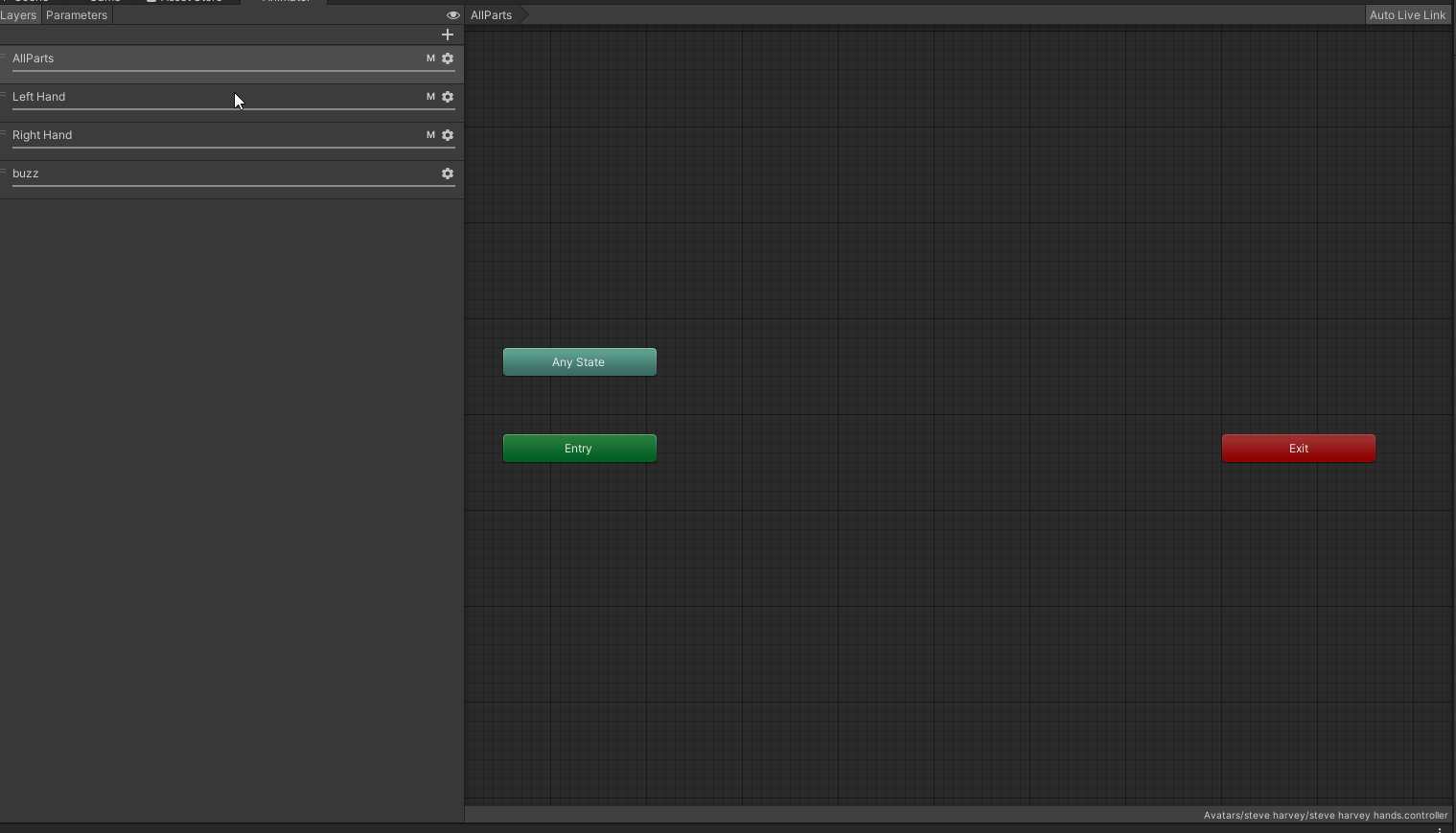 jolly crane
okay so you lied earlier when you said you knew how to make toggles
one moment

My products : https://gumroad.com/shadethebat
How to create toggles for VRChat with SDK3.0 :
- Toggle on and off
- Material swap
- Bones position / rotation
this video covers 3 different types of toggles, the first one (simple object toggle) is the one you care about
you're basically going to be setting up a toggle for the gameobject with your audio source on it
civic ridge
jolly crane
okay so you lied earlier when you said you knew how to make toggles
i didnt lie i thought he meant just putting the animation on the finger poses
jolly crane
but rather than using a menu parameter for it, you will use the parameter used in your contact receiver
no, that's not related at all
you could call that "gesture based" toggles, but those should also never be mixed with the finger animations
for gesture based things, you set up things in your FX controller separately from the finger movement, and you just drive transitions based on the GestureRight or GestureLeft parameters
civic ridge
ok thank you i'll follow this video yo sent
so it cant work with gesture based toggles with the finger animations?
dark drift
dark drift
And can I somehow just disable some of my default colliders then? My thing uses ...
ok, I just moved my colliders on empty object and created second object with other settings. Still less messy
jolly crane
civic ridge
so it cant work with gesture based toggles with the finger animations?
not sure what you mean by that. essentially, your Gesture controller should contain nothing but transform animations
for example: hand poses, tail control, ear control, etc
FX should contain only non-transforms (like toggling objects, blendshapes, material swaps) or transforms that are not part of your armature. note that if you do that, you need to be careful about masking layers
dark drift
civic ridge
so it cant work with gesture based toggles with the finger animations?
different animation controllers like gestures or fx created just for convenience, in fact you can place whatever wherever if its separate layer.
civic ridge
Ok I understand now my way of doing it was just unorthadox
jolly crane
the Playable layers get compiled into a single animation controller at runtime, they are each set up with different settings
each one has a purpose
there are some things that can be done in one layer or another, but there's a "way" to do things for a reason
jolly crane
civic ridge
Ok I understand now my way of doing it was just unorthadox
yes, you basically carried over old 2.0 SDK techniques into 3.0, and it doesn't quite work the same anymore
turbid fulcrum
dark drift
And can I somehow just disable some of my default colliders then? My thing uses ...
I don't think you can disable them in animations, what are you trying to do?
civic ridge
funny thing is i never used 2.0
civic ridge
ok assuming i set it up right how do i setup the audio source correctly so that when someone presses the button then it activates the audio source
dark drift
turbid fulcrum
I don't think you can disable them in animations, what are you trying to do?
I solved it the other way. I have some toggle that reacts to players nearby so I want the ability to enable/disable it for myself
jolly crane
have the object for your audio source disabled by default, and make animations to disable/enable said object
turbid fulcrum
dark drift
I solved it the other way. I have some toggle that reacts to players nearby so I...
Oh nice
jolly crane
put both of those animations in your new layer in FX, and transition between them based on the parameter you madef
turbid fulcrum
Make sure to have "play on wake" toggled on
civic ridge
ok and then will i still have the ability to play it when i strike a certain finger pose or its in the expressions menu
jolly crane
I thought you were just trying to play an audio clip when a contact receiver is touched
civic ridge
right
jolly crane
you can make it trigger via doing those other things, it's just a little more setup in the FX controller
you can make it work however the hell you want
it's just about getting the animator logic right
civic ridge
yea the concept in the video you sent is new to me so im a bit slow in that matter
 gilded elbow
hello, my avatar hair move naturally with physbone in unity- but when in vrchat it's completely different and super jiggly
why?
jolly crane
are you sure you set it up with physbones and not dynamic bones?
the dynamic bone to physbone conversion can be pretty weird
gilded elbow
im 200% sure
further more, i didn't changed anything on my avatar, it worked perfectly
today i started to play in prison escape, and i noticed how my hair were super jiggly
it wasn't like this yesterday.
even though i haven't made any change on my avatar ..
or vrchat settings
my avatar is fully made of physbone, there's no dyanmic bones..
and from the value in the settings, everythings should be fairly immobile , when i move in unity, my hair are immobile a lot, while in vrchat it's chaos
i don't understand what's happening
civic ridge
ok i decided im sticking to the toggle system where i put animations on the finger poses because i wasn't able to learn the right way, sorry sacred i tried. the contact receive is registering its just the audio source thats not activating
gilded elbow

that's my vrchat settings, it's all jiggly, but.. it's the same when i click on convert all to physbone, it's all jiggly too
so no matter my settings in vrchat it's the same
my avatar is fully made of physbone, not a single dynamic
those are my settings in unity.. Please help >o<
 simple elk
Angle is really small and immobile high
jolly crane
@gilded elbow you really should get rid of that large collider
you can use a a plane collider if you want stuff to collide with the floor
simple elk
That pic of settings means you have physbones off
jolly crane
no?
simple elk
there is no limit
jolly crane
no limit means you can have as many bones as you want. they also have the auto conversion disabled, which means that dynamic bones will not get converted, but Physbones on avatars will still work
simple elk
right now you will see everyone that has dynamic bones
gilded elbow
so.. what should i do..?
i'll disable my big giant collider
but im not sure it would stop my hairs from being suepr jiggly
simple elk
🤢 dynamic bones , rather have em badly converted then have it on that one cpu core
ornate olive
ornate olive
does anyone know why this happened? everytime i switch between tails the physbon...
no one?
 tacit stirrup
any simple more straight to the point explanation about the immobile thing change?
turbid fulcrum
I think you can choose if moving with the joystick affects it or not
dark drift
isnt it other way around? If you dont use immobile as a parameter for your physbones at all, then you can use it for joystick movement only
ornate olive
do you know what, i'll just figure it out myself
simple elk
how are these the same , the long is the new sdk - wich has zero setting for lenght on capsule, small is the old sdk setting , if i copy the old capsule values to the new it will be small 🔨 
 jolly crane
simple elk
how are these the same , the long is the new sdk - wich has zero setting for len...
jolly crane
simple elk
how are these the same , the long is the new sdk - wich has zero setting for len...
check the Height value using the debug inspector
there is a bug where the height field is not visible with the normal inspector
simple elk
yeh i see it
used the height setting on multiple avs , this sdk made that one go poof - debug its back
 sinful pumice
How do I add a prop that other people can grab? I want to add some guitar tabs as toggle able props, but i want to be able to move them, and let other people move them as well
jolly crane
sinful pumice
How do I add a prop that other people can grab? I want to add some guitar tabs a...
that's a pretty challenging thing to do. when you grab a bone, it's just basically creating an IK chain that aims to the point you grabbed it from. you can't control the rotation of it
so people wouldn't be able to really grab them and manipulate them properly
you can *sort of * do it better by having a second physbone that you can grab to rotate the object around, but it's a bit jank
sinful pumice
I remember there was a pcvr avatar with interactive chips, how was that done?
 frank minnow
physbone capsule colliders have lost their "height" parameter. is this intended behaviour?
 frank minnow
simple elk
how are these the same , the long is the new sdk - wich has zero setting for len...
frank minnow
simple elk
how are these the same , the long is the new sdk - wich has zero setting for len...
ah, i'm not the first to notice this.
frank minnow
jolly crane
check the Height value using the debug inspector
how is this inspector accessed?
jolly crane

 unkempt gyro
Dunno if I should ask here instead of #avatar-help but just in case... when using Custom on the Colliders section of the avatar descriptor, my right foot goes way off in the distance, though oddly, it's perfectly fine in automatic. Any ideas why this is?

It isn't just the foot either, it seems to happen with the hands too
pearl ingot
Do VRC Contact receivers work in worlds blueprints?
can i use them to detect player hands entering a volume in my world etc
simple elk
worlds dont do dynamics yet
mellow hawk
unkempt gyro
Dunno if I should ask here instead of <#730948173379535022> but just in case... ...
The custom colliders are mirrored off the avatar, it does not update when you move the avatar itself. If you change the value for any colder not mirrored and change back, should fix it.
unkempt gyro
mellow hawk
The custom colliders are mirrored off the avatar, it does not update when you mo...
Huh. Weird. Thanks for the fix.
torn tendon
gilded elbow
that's my vrchat settings, it's all jiggly, but.. it's the same when i click on ...
vrc broke the phybone. there nothing you can really do
also update your sdk
torn tendon
Is there any way to make immobile useable again?
gilded elbow
torn tendon
vrc broke the phybone. there nothing you can really do
what do you mean? it's like this for everyone? the problem came from vrchat, not me?
torn tendon
gilded elbow
what do you mean? it's like this for everyone? the problem came from vrchat, not...
Ya the vrchat update did it
gilded elbow
torn tendon
Ya the vrchat update did it
when did they updated it..?
gilded elbow
Ohh.. i see..
torn tendon
I can’t seem to remake my old settings since the update
gilded elbow
Thank you ! i'll just wait till they fix it then
torn tendon
gilded elbow
Thank you ! i'll just wait till they fix it then
Ya this was intentional. idk why they thought this would make things better, but it didn’t.
They probably won’t even fix it
gilded elbow
im not sure in what way it could be better though..
torn tendon
Ya it just made things more aids
gilded elbow
the only difference it made for me, is even though everything was fine in unity, it wasn't the same in vrchat anymore
torn tendon
gilded elbow
the only difference it made for me, is even though everything was fine in unity,...
Because you didn’t update
I know, that’s why I can’t remake anything, nothing works how it supposed to
Immobile isn’t really usable anymore
 fierce forge
Does anyone know how to properly configure grabbable "props" using physbones
i have it like half working rn
torn tendon
gilded elbow
the only difference it made for me, is even though everything was fine in unity,...
You need to update your sdk
Then it will show the new dum stuff
gilded elbow
I see~ thank you :3 i'll update i hope i can still make my physbone working afterward x3
torn tendon
gilded elbow
I see~ thank you :3 i'll update i hope i can still make my physbone working afte...
You can try. Immobile doesn’t really work that well anymore
It also adds an delay for some reason
gilded elbow
i was mainly using immobile.. but i gues.. we can do the same without it.. maybe
sudden urchin
How about examples of your setup and what is wrong with it not working consistently
Especially since there’s 2 immobiles now
torn tendon
sudden urchin
How about examples of your setup and what is wrong with it not working consisten...
I can’t really do an example of the new immobile
It basically dose no effect
But the first immobile setting has a delay before it dose anything. Like it won’t jiggle or do anything after like an half a second.
Also it doesn’t behave like it dose before
 blissful garnet
jolly crane
blissful garnet
jolly crane
Just came here to ask about this
fierce forge
is there anywhere to download the avatars from the dynamics hub world? im interested in looking into how the Valentine's one works
torn tendon
Hi there, was wondering if it’s possible to have a toggle that works as an on/off button for avatar receivers. Example: receivers are default on, but when you have the toggle set on, receivers don’t react to interaction.
simple elk
yep just toggle the gameobject/component
 steel thistle
That was what I answered them in #avatar-help
 silent palm
Can you animate values of a Physbone component?
I.e. adjusting gravity value with an animation
I want to make a kite that falls a little then gets lifted back up
 next portal
I played around with that a little, and it appears to me that the physbone components only take into account the values at runtime, and changing them with an animation appears to do nothing.
I made an animation that oscillates the gravity value of a physbone component between 1 and -1, and it had zero effect on the movement of the bone.
turbid badger
this new update broke all avatars that previously used Immobile to some degree
because now its a different calculation
i thought this stuff was already out of beta
why are they making breaking changes that require re-re-re-updating avatars...?
 lone geyser
and how many of us give feedback on beta stuff?
compare that to the now vast populous of players using it, gives a ton more feedback that they're acting on actively
also found this ref sheet, use it as a basis
 turbid badger
lone geyser
and how many of us give feedback on beta stuff?
turbid badger
lone geyser
and how many of us give feedback on beta stuff?
funnily enough theres new bugs that didnt exist in beta i think
one of them being sometimes people have to pause and then unpause their interactions in order to be able to interact with certain people
even if their settings allow for it
and its something they have to do, not you
and happens only when you join the instance, and for no one other than late joiners
lone geyser
theres new bugs now cause not enough ppl tested beta to find these out then
turbid badger
but this didnt happen in full lobbies during the beta
and i played on the open beta for about 2 weeks
lone geyser
and now with a thousand times more testers, new scenarioes come up that they can fix
and improve
im personally glad about this minor fix for world-movement immobile, simplifies it more
turbid badger
me too but could they not break a lot of other things in the process?
is there no configuration that could have been preserved (default for older components)?
also my tail keeps jittering as it moves for whatever reason
lone geyser
could be colliders that need to be tweaked
and hey, they're doing the best they can with the most popular vr socializing game, for free, for all vr platforms, with 10k-20k players daily and a small team of devs
turbid badger
that literally does not magically deflect valid criticism
lone geyser
how should they not break a lot of things while fixing other things, then?
just saying "stop breaking stuff" doesnt magically fix it
errant notch
VRChat is a relatively tiny team of people. They're not going to find and fix every bug before releases
lone geyser
there will always be bugs, and we should be grateful for the massive improvements we've gotten thus far since 2017
 scenic steppe
Im having an issue where my model ears do inside of the head during an emote. The emote only changes transform.
Phys Bone are on
Is animated is toggle on
No gravity or limits settings
No colliders
Works fine with dynamic bones or no bone movement add on
Any ideas how to fix this with phys bones on?
 turbid badger
lone geyser
just saying "stop breaking stuff" doesnt magically fix it
turbid badger
lone geyser
just saying "stop breaking stuff" doesnt magically fix it
easy. by keeping the original configuration still available and applying it by default to the older components like I already stated
 dusty saddle
Is there any obvious reason why 1 set of bones don't want to stretch while others do? 😮 even though the "Max Stretch" is set?
turbid badger
dusty saddle
Is there any obvious reason why 1 set of bones don't want to stretch while other...
the way that stretching works is that it only moves bones, so if you painted weights on the root bone instead of the end bone, it will not stretch
 dusty saddle
Actually I fixed it, hah. So this is one set of phys bones only for dynamics proximity receiver. I forgot to add the empty game object to ignore list of the phys bone on the parent
But thank you for your answer! 🙂
The parent seems to win in some settings
faint atlas
im playing around with avatar dynamics, and i want an animation to play for both users when 2 of the same avatar come into contact, with a custom sender and receiver.
i was under the impression that simply making a sender and receiver on both, while disallowing self, would make it work, but this seems to fail and acts like the sender is self interacting regardless when in play mode
any way to fix this or is it a bug?
 humble wind
 onyx vapor
silent palm
Can you animate values of a Physbone component?
onyx vapor
silent palm
Can you animate values of a Physbone component?
Yes but you will need to turn the phys bone off then on (after some delay)to get it to take on the new values
 brisk latch
Does anyone know how blendshape animations would work with the new avatar dynamics? For example if I have sleeves i want to be able to pull them up and down
 oblique tartan
anyone know if the new bones are broken at the moment cant move anything
short narwhal
brisk latch
Does anyone know how blendshape animations would work with the new avatar dynami...
basically you can control anything with the Avatar Dynamic stuff if it's an animation clip
 fluid summit
We need dynamics on all avatars it’s will be so cool
 pulsar parcel
i want to have just a single head root to move every chain of hair, but in doc it says that using humanoid bone can cause issues, how can i make it work?
dark drift
pulsar parcel
i want to have just a single head root to move every chain of hair, but in doc i...
Just create extra bone parented to head and parent hair to it.
onyx vapor
silent palm
So you can’t actually animate the values
you can animate the values, and they will change, but the changes wont "take effect" until the bone is turned off then back on again. This is in the documentation as a way to change phys bone properties through animation, but it notes that this (then turning the bone off/on trick) is not fully supported and may break in the future
silent palm
Ah I see
 bitter pilot
how do i fix the slow-motion physics, and the chest just sinking in
 hearty wing
How do I manually move physbones in Unity with my mouse? I feel like it’s something basic I just whooshed over my head along the way.
sudden urchin
hearty wing
How do I manually move physbones in Unity with my mouse? I feel like it’s someth...
Play Mode
Game Window
Make sure the Camera you're looking at is the Main Camera (tagged as Main too)
Click and drag.
 hardy estuary
Is there any way to turn off /turn on the phys bones. Example i have a toggle for a partial face mask and when the mask is on i don't want the hair behind it to move and clip through so i normally turned the Dynamic bones off. It says in the doc that you can't animate the properties so how can i achieve this ?
jolly crane
hardy estuary
Is there any way to turn off /turn on the phys bones. Example i have a toggle fo...
they said properties, not the physbone itself
you can either disable the phybone component or the object it's on
you could also try just setting angle limits for the hair
hardy estuary
well.... they also says that turning off the bones Might work but if problem occur later they will not fix it so i was looking for the official way to do it
angle limits wont work as it would look too stiff when the mask is off
documentation : However, if you animate a property of a PhysBone component and then animate the component off and then on, you may get the behavior you want. Be aware that this is not a support method of animating these properties, and will not be supported in future changes. (In other words, it might break. If it does, we're not going to try to fix it.)
jolly crane
you misunderstand
animating physbone properties won't do anything unless you turn the component off and on again
that's what that bit is saying
but turning off a physbone is fine
 lilac ruin
anyone know why a contact receiver would work fine in editor but once in game it will just behave completely differently. mostly just flashing the animation for a single frame before returning to its original position...
ive got other ones working perfectly fine... but this one is just not working
 dapper coral
I updated models and now I need to update them again because the new immobile type changed the immobile calculation? looks odd now
dark drift
lilac ruin
anyone know why a contact receiver would work fine in editor but once in game it...
i had some troubles with capsule recievers and proximity, replaced them with spheres
lilac ruin
I tried both on this layer and man it just refuses to do what its doing in the editor. so frustrating
and im just using On Enter for simplicities sake
dark drift
well try constant then if it fits you, empty state (if is collide)> animation <(exit time 1)
lilac ruin
https://gyazo.com/17882efa35686a5de766d6057363b19d just will not stick lol

constant wont work for this
dark drift
why not, with this setup it just catches moment of contact and playnaimtion regardless. you just wont be able to use speed or whatever is added to onenter
lilac ruin
doesnt constant need the collider inside the sphere the entire time to be in the next animation?
dark drift
of course not, think of it as play dance button in round menu, its active for 0.3 sec but animation plays till the end
lilac ruin
im just using a simple setup with any state
 dark drift
once again, any state - transition to animation if contact - animation - transition to exit (if youre using anystate, i'm just more used to use empty state as default) with exit time 1. try this
maybe its because of anystate tho, cause you may be restarting animation or switching it to another one right after starting it, i don't know where your colliders are
lilac ruin
ive got 4 other contact receiver setups almost exactly like this using any state working as intended... its just these damn glasses... I am using the same parameter on two different receivers, one on the hip, one on the eyes. one is only active at a time tho based on the state
thats the only difference here is the 2
changing them to constant is actually making it react in editor like it is in game.
dark drift
i guess this is what happening, you touch your face, val goes true with on enter, then it instantly goes false (zero? dont remember what it operate with) and your anystate instantly swithes to default animation
lilac ruin
thats what seems to be happening I just dont know why
dark drift
i mean that how it suppose to work
replace anystate with empty state and make exit time 1 transitions back to it from animations (if you need to play them just once)
or instead of empty state use glassses off
just dont link anything to anystate
lilac ruin
ill try it
welp. without anystate it just refused to transition at all then crashed my unity. im done for the night ive been banging my head against this for hours lol
dark drift
Well im sorry 
lilac ruin
lol its fine, its just one of those things. like its working just fine on other layers but these glasses, I just wanna be able to grab them off my waist and put them on my damn face! 
dark drift
Should then set chain of animations aren't you?
Like glass on waist - if touch waist - glass in hands- if touch face - glass on face and backwarda
lilac ruin
yea thats what I tried before it crashed my unity lol
lilac ruin

thats what I had
im gonna remove the 2 triggers using the same parameter and simplify the transitions just to see whats going on here
yea nothing... no transition

aand crash again...
 normal urchin
what are some good values for a cloth cape?
dark drift
lilac ruin
aand crash again...
If you using collision as the source then you dont need exit time, glasses stay in hand unless they brought close to eyes. Also are you using same var for both waist and eyes collider?
lilac ruin
I took out the waist trigger completely just incase it was causing some weird conflict
normal urchin
and one more thing. I want the cape to rest on the ground, but not when I'm in the air. Is there any way I can do that?
dark drift
normal urchin
and one more thing. I want the cape to rest on the ground, but not when I'm in t...
Theres grounded avatar parameter, you can use it to disable floor collider
normal urchin
awesome, thanks
dark drift
Probably
 molten blade
is there any reason that a a receiver on proximity mode would not change the parameter values, yet changing it to static mode allows it to display 1.0 or 0.0 (because I have it on a float as that is the value I need it to be)? In the unity editor it seems to work fine, but not while in game.
molten blade
dark drift
Capsule had this behavior for me
it is a capsule, going to test that now
is there a cany for that I can vote on?
dark drift
Dunno, probably, common problem
molten blade
yup, working
 oak frost
i cannot, for the life of me, figure out how to make my avatar's hair not do this

its like the hair hits the collider and then juts outwards. no amount of gravity fixes it
this didnt happen with dynamic bones - if a bone hit the collider it would kinda just slide off
dark drift
Try smaller angles
little owl
get the latest SDK and set your colliders to treat physbones as spheres, that setting is brand new specifically to solve that problem
it allows hair to wrap around shoulders better, and is how dynamic bones worked
 warm mortar
Can you create extra global physbone colliders so I can interact with other players physbones? Say like a stick or something?
oak frost
little owl
get the latest SDK and set your colliders to treat physbones as spheres, that se...
oh my lord
thank you so much
 buoyant oyster
I heard some avatar have arm vibration issue with PhysBones. Sample movie: https://twitter.com/_kitsune_tsuki_/status/1521473941298368512
I investigated and found the conditions. That happens if
- It has additional bone chain(s) on LowerArm.
- and Hand bone is not the first child of LowerArm. (This causes warning message on Builder view of VRChat SDK)
- and VRCPhysBone moves additional bone chain from its root. (in other words, VRCPhysBone RootTransform is first child of LowerArm)
I guess some part of IK solver treats the additional bone as the Hand, and calculates LowerArm rotation with the result of VRCPhysBone movements, then the arm vibrates.
I haven't post to Canny yet because it might be a "specification" (or RIG requirements), not a "bug". But actually some creators get troubled with this issue and it's hard to find the source of the problem from its behavior. so I think we need some improvements. But what is suitable request in this case? Any suggestions?

 simple elk
2 can be fixed in unity , sort bone script , it leads to wierdness if you ignore bone order
 oblique tartan
is it just me or everyone else but i cant touch or move anything on my avi now but eveyone else can to me it was working fine before
 delicate forge
when wanting to set up a capsule collider i can no longer define the height, please fix

 lean quarry
For some reason, my contact receiver is not getting any information of it being touched.. Can someone please help?
simple elk
delicate forge
when wanting to set up a capsule collider i can no longer define the height, ple...
sdk broke it, enable debug to get it back
 lean quarry
For some reason, my contact receiver is not getting any information of it being ...
lean quarry
lean quarry
For some reason, my contact receiver is not getting any information of it being ...
Anyone know if I'm doing anything wrong?
simple elk
wich kind are you using, capsules arent trustworthy
lean quarry
simple elk
wich kind are you using, capsules arent trustworthy
ah ok then
let me try with spheres
nope! still nothing
no reaction at all
lean quarry
simple elk
wich kind are you using, capsules arent trustworthy
please help
steel thistle
lean quarry
please help
Check if tag is correct, parameter is correct
lean quarry
steel thistle
Check if tag is correct, parameter is correct
the tag and parameter are both names Pat
steel thistle
lean quarry
the tag and parameter are both names Pat
Are there any sender with tag Pat?
lean quarry
steel thistle
Are there any sender with tag Pat?
It's the first receiver that I've put on the model
steel thistle
Receiver expects a sender to have the same tag to get the contact. If you use custom tag then you need to add sender with matching tag. Other people's avatars also need the same tag to interact with your receiver.
Otherwise, just use tags provided such as Hand tag to get contact info with the hands instead.
lean quarry
steel thistle
Receiver expects a sender to have the same tag to get the contact. If you use cu...
oh! that type of tag! They both have the tag hand
steel thistle
lean quarry
oh! that type of tag! They both have the tag hand
Then check if the parameter is changed after the contact.
lean quarry
steel thistle
Then check if the parameter is changed after the contact.
it does not
Oh! Now it does! It did not show up when I did it with the 3.0 avatar emulator
 frigid trench
Reposting because wrong channel before oops
Hey people! 👋
So after asking left and right a bunch of people and myself noticed that the last update changed the behavior of PhysBones.
Using the new SDK or not; it seems that now the value of the "Spring" slider affect differently the physics.
In other words now stuff tend to wiggle forever, which wasn't the case 2days ago.
Even after reading the patchnote ||unless I didn't understand correctly something in it||, it seems this isn't mentioned anywhere.
So I was curious if this is intended or not? Or if there was any words about it that I missed?
 wooden patio
frigid trench
*__Reposting because wrong channel before oops__*
Hey people! 👋
So after askin...
wooden patio
frigid trench
*__Reposting because wrong channel before oops__*
Hey people! 👋
So after askin...
I've noticed a change in the behaviour as well,
When the patch for the phys bones came out I updated my avatar and now a lot of the bones act differently from before..
Which is honestly quite annoying...
 rare lake
wooden patio
I've noticed a change in the behaviour as well,
When the patch for the phys bon...
rare lake
wooden patio
I've noticed a change in the behaviour as well,
When the patch for the phys bon...
it's happening to me too and yea its a bit frustrating, I took the time to perfect my values when physics bones first came out and now they dont act as they once did. I have to go back into unity and alter each avatar one by one to get the original look and its quite time consuming. I'm hoping for an official answer to this topic because i'd hate to fix everything and then the next update is... "haha yea oops we messed up, we're reverting the bones to what it should have been"
 ionic hound
frigid trench
*__Reposting because wrong channel before oops__*
Hey people! 👋
So after askin...
ionic hound
frigid trench
*__Reposting because wrong channel before oops__*
Hey people! 👋
So after askin...
yes they changed it, which is annoying to do that 2 weeks after release.
tho after fixing a bunch of avatars i figured out that the only values affected are "pull", "spring" and in advanced "momentum".
it almost fixed itself to put these values more into the center, for example:
if the bone doesn't pull at all i changed the "pull" value from 0.05 to 0.1 or 0.2.
if the bone doesn't stop to flipping around i put "momentum" from 0.9 to 0.7.
frigid trench
ionic hound
yes they changed it, which is annoying to do that 2 weeks after release.
tho aft...
This is also the way I've been "fixing" it so far yes; making the sliders less extreme on whichever side of the bar they are and it kinda goes back to how it was before.
Only annoying thing is that it makes us re-upload avatars and I don't want to be dramatic but since this wasn't in the patchnote if this happens every update that's gonna be not fun to deal with 😬
wooden patio
In my case what I noticed by working on some phys bones I did didnt cover the length I set before anymore, changing the endpoint position has fixed some issues for me
This fixed the ears that were messed of for example

 crisp valve
how do i add physbones on my VRoid avatar?
short narwhal

Did this video help you? Consider sending me a tip on Ko-fi! https://ko-fi.com/sippbox
The Avatar Dynamics update recently dropped for VRChat, and with it brings the highly anticipated replacement for dynamic bones, PhysBones! With Physbones, you can apply secondary motion to parts of your avatar, such as hair or skirts, making avatars much mor...
crisp valve
i tried it before but i couldnt find teh hair root on my vroid avatar
i cant find the parent bone of my vroid avatar hair
mellow hawk
Make a new game object, parent all the things you want to move, add a phys bone component to that game object.
mellow hawk
crisp valve
<@144149882460962816> how do i go about doing thsat tho
Open the hierarchy, navigate to the part where you want to add phys bones, right click the parent game object, new empty game object, name it, drag and drop all the game objects you want to move into that component, add a vrc phys bone component to the new game object, play around with it till it looks nice, done.
Bonus points, making another game object lower in the hierarchy and use the root bone part of phys bones, map that to the new parent object you made earlier to stay more organized.
crisp valve
ty
dark drift
what is typical velocity for onenter for punch/stab
2 works
maybe for smaller avatars it wont tho?
crisp valve
@mellow hawk i tried it but when i added physbones on the new game object the hair wouldnt move
mellow hawk
Do your child objects have grandchildren objects in them?
Example: tail 1, tail 2, tail 3 etc?
crisp valve
im doin hair
mellow hawk
fair enough, but do the parts of the hair have child objects inside them or is it just one object?
crisp valve
what happens if they do
mellow hawk
Could you send a screenshot of your hierarchy?
crisp valve
one moment
@mellow hawk can isend it to u some other time i have to do something now
thansk for the help tho
mellow hawk
For sure, always open to pings and dms
crisp valve
thanks
 hasty flower
So I'm working on the hair for my VRoid model and so far I've pretty happy with the results but the only nitpick I have currently is that the lighter-color hair clips into the bangs when there is forward momentum. Is there an easy way to prevent this from happening? My initial thoughts are to try and use limiters so that it can't move backwards but I figured I'd ask here if there is a better way.

How the model normally looks for reference:
 hasty flower
Yeah limiters seem to be working. I need a separate script for each bang (mainly because the VRM converter is jank) but it's working. I'm open to any better ideas or suggestions if anyone has em 🙂
 elder prairie
is it possible to have a player picked up with the new bones? you can pose bones but can you do it with the "root" of the player?
 novel iris
Does anyone have some good values for phys bones for tails?
simple elk
using av3 emulator?
mellow hawk
This would work in game.
simple elk
try av3 , its not gonna talk to your controller on descriptor
 carmine bear
how does one make a grabbable prop, like a sword?
 lusty grove
I have this tiny bit of an issue with phys bones, I installed the latest sdk, and when using physbones colliders shape type: Capsule, it doesn't show the height of the capsule, unlike in sipboxx video, anyone with the same issue ?, pic for reference:

in sipboxx video:
 simple elk
sdk broke it, enable debug to get it back
 simple elk
last time i tested it , av3 emulator does not work with 'colliders' thats on descriptor have to fake em

if you are using a capsule one, try sphere
capsule arent reliable, sphere should behave
 noble kelp
Anyone know how i could make something disappear after being grabbed and pulled
torn tendon
This was happening to me too a bit earlier, then I did something, now it's working again! I don't really know what I changed, but I'll let you know if I recall!
Alright, found it!
lilac ruin
dark drift
If you using collision as the source then you dont need exit time, glasses stay ...
Just as a follow up from yesterday I deleted the receivers, parameters and transitions. Remade it all but gave the hip and eye receivers different parameters and now its working 🤷♂️ it must have just got bugged out at somepoint...
torn tendon
What I did is, I added the AnimatorController before going into PlayMode, adding the AC after going into PM doesn't seem to get the job done, although, the value changes!!!
Didn't test it in-game yet!
torn tendon
gl
 lilac badger
Uhh quick question, if my hair bones have collision On will they interact with the Descriptor's head collider? or do I need to add one manually?
 fervent nimbus
yo wtf

where did the capsule height go
it's gone
it's just radius now
is this a bug?
pls help ;w;
mellow hawk
It's a bug with the new sdk, enable debug for now
 mellow hawk
Inspector > top right > three dots > debug
torn tendon
no need to define the params under Receiver on the Expression Parameters synced parameters list right?
 grizzled barn
Copying over the Phys Bones settings for my avatar and for some reason, a value of "1" for colliders always creates this insanely huge collider and I have to set it to 0.0014 ish in order for it to be a useable size. This only happens for avatars I export from Blender as FBX. If I grab the same avatar as FBX directly from Gumroad and place the same collision value (1), it's normal size. Why are my Blender FBX exports not working with the native collision values in Phys Bones? Anyone seen this or have any ideas?
 torn tendon
Try Apply Scaling FBX All or FBX Units Scale

 ancient carbon
Question I didn't touch my physbones on my avatar but the grab broke, has anyone had this or know a fix? Should I try to reimport the sdk?
Even testing grab in unity doesn't work
torn tendon
did you try augmenting your Collision Radius?
grizzled barn
torn tendon
Try **Apply Scaling** ``FBX All`` or ``FBX Units Scale``
Thank you SO much 😄
torn tendon
Any idea why this works in Unity but not in VRChat?
 limpid ravine
Tried again with setting up the phsybone gesture toggle for my tongue and it still doesn't seem to work as intended  It seems to work as a toggle but the phsybones seem all wonky where they don't move fluidly like all the other bones are
errant notch
torn tendon
Any idea why this works in Unity but not in VRChat?
You don't need to add parameters from PhysBones into your avatar synced parameter list
silent palm
Newest SDK fucked my dynamics and I have no clue how to fix em -.-
torn tendon
errant notch
You don't need to add parameters from PhysBones into your avatar synced paramete...
Unless I choose to set it to Local Only... But even if I don't do that, and remove it from the synced parameters list, it does literally nothing
 errant notch
torn tendon
Unless I choose to set it to ``Local Only``... But even if I don't do that, and ...
errant notch
torn tendon
Unless I choose to set it to ``Local Only``... But even if I don't do that, and ...
Why set it to local though
torn tendon
I'm not trying to start an argument, just looking for a solution.
errant notch
The solution in your situation should be to not have Local Only on
What collision tag does the capsule have?
torn tendon
errant notch
The solution in your situation should be to not have Local Only on
as I said I did try it without Local Only to fit your fancy, also I use Hand and Finger as Tags
torn tendon

 errant notch
The param there is EyeIsTouchedL1 but in your animator it's EyeIsTouchedL?
torn tendon
it seems to be working when using a bool param, with Receiver Type set to Constant
torn tendon
errant notch
The param there is `EyeIsTouchedL1` but in your animator it's `EyeIsTouchedL`?
EyeIsTouchedL is the Float ver, and EyeIsTouchedL1 is a bool
errant notch
So it works with bool but not proximity?
torn tendon
yes
errant notch
Were they both set up this same way (I see local only is unchecked here)
torn tendon
No. I just uploaded another version with my preferred setup (Local Only, Param is listed in the avatar synced parameter list)
and it works just fine
Anyway, thanks for your help...
errant notch
So then maybe something is wrong with local only synced
Which, again, I can't see a reason you need local only on
torn tendon
errant notch
Which, again, I can't see a reason you need local only on
Because I want to, and it should work just fine anyway, here, found it, it's just a sdk bug... https://feedback.vrchat.com/avatar-dynamics-reports-and-feedback/p/1181-proximity-contact-does-not-work-with-capsules
Now that I changed my Contact Receiver to Sphere, it works just fine...
 vestal otter
the other chest dont work for some reason

i have the script in it
but it just doesnt show up
i also attached the root transform
all the other bones are working fine and was able to rig them up
but for some reason this one doesnt seem to work
anyone know the reason?
n vm
found the reason
silent palm
silent palm
Newest SDK fucked my dynamics and I have no clue how to fix em -.-
Update: Got it fixed and even more optimized! VRChat breaking things teaches me to learn new things if that's any upside. :-)

 dawn sonnet
Pretty sure it's telling you it'll have a value of 1 when being interacted with?
Binary system.
 cedar marsh
dawn sonnet
Pretty sure it's telling you it'll have a value of 1 when being interacted with?
cedar marsh
dawn sonnet
Pretty sure it's telling you it'll have a value of 1 when being interacted with?
ok
How would I go about making animations or facial expressions when bones are pulled or interacted with
Because I can't figure out how to go about doing
Also I've been struggling trying to figure out how to make the receivers.. incenters and I don't know how I would go about making the toggles I try to look at tons of tutorials but they weren't very helpful
All I know is it some sort of float but I do not know how to make it so it gets interacted or makes certain things happen when interacted with
turbid badger
fingers crossed that tomorrow or the next day they will fix the bug that randomly makes it so you cant interact with people until you both toggle your interactions off and on again
turbid badger
cedar marsh
How would I go about making animations or facial expressions when bones are pull...
incredibly easy
whateverPhysboneObject_Stretch
and check something like > 0.5
or if u want to make a more complex animation, like you pull it and it gets gradually expressive
u use the parameter in Motion Time, or a blend tree
turbid badger
cedar marsh
Also I've been struggling trying to figure out how to make the receivers.. incen...
that is also pretty easy
if u use a bool just check (false) or (true) in your animator
if using floats, u can use the value to determine how deep they are in the contact, for stuff like big button presses and nose boops
u do all the toggles and animations just as u would for any other parameter
vote on these if you havent already btw
https://feedback.vrchat.com/avatar-dynamics-reports-and-feedback/p/can-only-grab-one-part-of-the-same-physbone-hierarchy-at-a-time
https://feedback.vrchat.com/avatar-dynamics-reports-and-feedback/p/11922-bug-physbones-interactivity-seemingly-disabled-until-allowpause-interactio
https://feedback.vrchat.com/avatar-dynamics-reports-and-feedback/p/1181-add-option-to-ignore-collisions-with-root-for-better-db-conversion
https://feedback.vrchat.com/avatar-dynamics-reports-and-feedback/p/1184-physbones-freeze-in-whatever-position-they-were-in-when-disabled
https://feedback.vrchat.com/avatar-dynamics-reports-and-feedback/p/request-possibility-to-move-players-around
https://feedback.vrchat.com/avatar-dynamics-reports-and-feedback/p/1181-add-support-for-multiple-root-transforms
 thorny isle
 wall of links
 fringe iron
question! What does it consider physbone components? I removed the 'too many bones' warning, but im not sure what its seeing as a component
I didnt add any interactions, just a dynamic bone conversion
turbid badger
oooo i had a great idea
i could make it so that a text pops up saying you cant interact with my avatar by using a big contact
and if i use a non synced parameter it will be local to the player touching it
so people stop bugging me about the pesky bug
thorny isle
turbid badger
i could make it so that a text pops up saying you cant interact with my avatar b...
 i shall not be blinded by your contact when in the debug overlay

turbid badger
thorny isle
<:Gun:863661253473075232> i shall not be blinded by your contact when in the deb...
it will be so big that you will be inside of it so
thorny isle
turbid badger
it will be so big that you will be inside of it so
you still see it from the inside 
 tardy light
my hole model i shaking does anyone know what causes this?
turbid badger
thorny isle
you still see it from the inside <:Confused1:863656475952021514>
doesnt work for me it just goes away
thorny isle
turbid badger
doesnt work for me it just goes away
 the contact or can’t see inside?
cause at least the head ones you can see from the inside, first person view
cedar marsh
turbid badger
whateverPhysboneObject_Stretch
If you could so kindly show me a video or a gift like seeing how things work so I can put it together cuz I'm still need to most of this stuff especially with a blend trees j
tardy light
its only doing that ingame not in unity tho
turbid badger
tardy light
its only doing that ingame not in unity tho
did you update your sdk?
they changed how physbones work again last update
tardy light
i think so never had a problem like this ever
the model is like flickering
ok fixed it dont know tho haha
turbid badger
oh my god
i am dying of laughter
so.... vrchat like
they limited the radius value for contacts, right?
did you know they only limited the positive value???
🤣
this is seriously hilarious i didnt expect that to work
please never patch ty
thorny isle
a lot of physbone stuff go wacky if it’s negative
inside collided freak out if too close to the center of the physbone, unless the physbone radius is negative
then it’s calm and doesn’t freak out , but slightly inverted and not grabbable
turbid badger
aw it doesnt work too good on negativ
 noble tide
turbid badger
did you know they only limited the ***positive*** value???
noble tide
turbid badger
did you know they only limited the ***positive*** value???
known this since the beta
if you mess with negative values in a certain way you can turn a capsule into a coin, flat sides included 😉
turbid badger
noble tide
known this since the beta
if you mess with negative values in a certain way you ...
can u make it still work with senders with negatives?
noble tide
id assume so but not entirely sure
worth a shot though since we dont have any box or plane shapes
turbid badger
noble tide
worth a shot though since we dont have any box or plane shapes
i tried a lot of different things but i couldnt get it to respond in unity
trying to make it so i can tell people when interaction is off
 wooden ginkgo
if I dont set endpoint length in physbones does the last bone get ignored like with dynbones?
 stuck badge
So i have been messing around with the Avatar Dynamics for my Couch avatar, and managed to do something pretty cool imo. People are able to open the doors, and turn on the different switches to enable most of my functions. And if they pull the gray thing on the bottom it resets everything.


I am wondering though, i would like to have some sort of a Hue silder that people can mess around with.
Currently i have it set so the handle has a Sender and then i added a bunch of receivers on the different colors.
But i have no idea if it's possible to do something with blendshapes or whatever.
 turbid badger
no because of this absolutely annoying bug with dynamics
plus gotta get the based quest users to figure it out some day
elder prairie
dont know if i should ask this here or the osc, but can osc detect if bones are interacted with, specific pulled. so like can i get like the angle and distance from on bone to another?
 lofty walrus
am i going insane, or is the height option for the physbone capsule collider no longer available in the new sdk?
...maybe i need my coffee
jolly crane
lofty walrus
am i going insane, or is the height option for the physbone capsule collider no ...
it's a bug
switch to the Debug inspector to see it

 obsidian granite
is there any world with many dynamic avatars?
noble kelp
anyone know how to make something toggle off after being pulled
 deft dove
noble kelp
anyone know how to make something toggle off after being pulled
deft dove
noble kelp
anyone know how to make something toggle off after being pulled
You could probably utilize the _isGrabbed or _Stretch parameters of the PhysBone component to trigger an animation in your FX layer that turns what you want off.
torn tendon
Does anyone know how to make a physbone for hanging sleeves? I’m kinda new to this 
deft dove
torn tendon
Does anyone know how to make a physbone for hanging sleeves? I’m kinda new to th...
Have a child bone of the upper arm for the sleeve with an endpoint bone at the same position as the wrist (or where ever the sleeve ends). Have a PhysBone component on the sleeve bone and use angle limits to make sure the sleeve doesn't clip through the arm.
Bam, dangling sleeves.
torn tendon
deft dove
Have a child bone of the upper arm for the sleeve with an endpoint bone at the s...
thanks! would you mind teaching me how the measurements work? the video tutorials confuse me
deft dove
torn tendon
thanks! would you mind teaching me how the measurements work? the video tutorial...
As in the angle limits? You could probably use Trigonometry for that, but I would recommend just trying out small values and seeing what works.
torn tendon
deft dove
As in the angle limits? You could probably use Trigonometry for that, but I woul...
ahhh okay thank you!!
 jovial copper
Avatar dynamics doing weird shit with an arm ... video shows 1. Physbones autoconvert vs. 2. Dynamic bones original. The World is a little dark but you can see my controller, its not the tracking, its the avatar
 gray vector
is there a on release function that can play an animation?
deft dove
gray vector
is there a on release function that can play an animation?
You can transition to an empty state when _isGrabbed is true, then transition to a state with the animation you want when _isGrabbed becomes false again.
gray vector
deft dove
You can transition to an empty state when _isGrabbed is true, then transition to...
is there any videos on this?
deft dove
gray vector
is there any videos on this?
No idea.
gray vector
also how do i put a physbone on one bone that doesnt have any children
cause I cant put it on the chest
that will bug it out
errant notch
gray vector
also how do i put a physbone on one bone that doesnt have any children
Create a child bone
gray vector
errant notch
Create a child bone
on the bone i want to move?
so i give it a child with no weightpaint right
gray vector
huh
deft dove
You could also manually define the endpoint in the PhysBone component.
cedar marsh
turbid badger
whateverPhysboneObject_Stretch
how would i go about at pls like me know
i been you find out for last 2 hours
been srawing around with it
turbid badger
you just type in a parameter name and it will write to Parameter_Stretch as a float
and you use this in the animator
jovial copper
After way to long time I finally found out that its a weird and maybe very rare bug (and a way to fix it)
I dont have any scripts of the humanoid armature (checked that multiple times)
The faulty script was this one:

as soon as i disabled it - everything worked well. I tried to change everything. delete and made a new script, disabled collision grab/posing no radius but as soon as there was a script on that bone it made whoopwhoop ingame
i moved the script to the next bone. Chain1_3 ... this fixed it.
Thats defintly a bug and seems to have something to do with the position of that specific bone. idk. i fixed it. hopefully its rare enough so that nobunny else runs into that
 turbid ice
got a question about the 3 extra parameters that are made with physbones (_isgrabbed, _stretch etc). the documentation mentions that they dont need to be defined as synced parameters in the vrcexpressionparameter object, but where would i put them so that i can use them? directly into the parameter tab on the FX layer or whatever layer i'd need them on? asking since im used to the av3 parameter setup before physbones and im confused where i can put these parameters to use them.
 finite crystal
What settings do you normally use for hair
 west axle
torn tendon
Because I want to, and it should work just fine anyway, here, found it, it's jus...
west axle
torn tendon
Because I want to, and it should work just fine anyway, here, found it, it's jus...
omg this is what i was having troubles with for so long, thanks for linking this
so frustrating when you think you're doing something wrong but its literally a bug instead
sudden urchin
turbid ice
got a question about the 3 extra parameters that are made with physbones (_isgra...
You can define them on any layer you're using them on, whether FX or Gesture or Action etc.
Always remember, when you upload the avatar the SDK will merge all your layers into one super animator.
turbid ice
sudden urchin
You can define them on any layer you're using them on, whether FX or Gesture or ...
thanks for the headsup! 😄
torn tendon
west axle
so frustrating when you think you're doing something wrong but its literally a b...
ikr!
west axle
very much appreciate your find
 prime hemlock
west axle
so frustrating when you think you're doing something wrong but its literally a b...
prime hemlock
west axle
so frustrating when you think you're doing something wrong but its literally a b...
Yeah I've had something like this happen. It sucks
 molten mauve
help: I don't see height option for physics bone colliders when in capsule mode

sdk is in the most recent version
 vital shore
Best way to disable physbones temporarily for an animation, and reset them to their starting pose? I am losing my mind, because I did this before but lost the data.
 storm stirrup
How do I use regular dynamic bones instead of converting them to ohysbones
 snow marlin
 avatar creators try to adapt to change challenge (impossible)
 void cobalt
I'd like to thank dynamic bones for their contributions up to this point.
Now send them away forever, because physbones have no expectations of me paying for them ;3
west axle
Though intimidating, physbones are so powerful
snow marlin
they're just bouncing there... menacingly
 autumn fossil
how do we export an avatar with physics bones? with the vrcsdk, right?
 gritty valley
 ember goblet
you don't. physics bone only works internally. it doesn't stay with the avatar.
 modest wind
Running into a weird issue with physbones. I've got one set on my chest so that a ribbon parented to it can flop around, but doing so causes my head to be subject to physbones even though it's part of the ignore list. Any idea what's going on here?

 rose lantern
modest wind
Running into a weird issue with physbones. I've got one set on my chest so that ...
rose lantern
modest wind
Running into a weird issue with physbones. I've got one set on my chest so that ...
https://docs.vrchat.com/docs/physbones#humanoid-bones
you shouldn't use humanoid bones as the root for physbones
 thorny dome
snow marlin
<:vrcPerfVeryPoor:608446622321344531> avatar creators try to adapt to change ch...
thorny dome
snow marlin
<:vrcPerfVeryPoor:608446622321344531> avatar creators try to adapt to change ch...
Frankly I personally have loved the change lol! Much more to work with, also the added benefit of not being a total frame killer? What???
 desert jewel
Which angle do i have to limit so the tail doesn't go into the body anymore
 void cobalt
I have an avatar set of wings with these states
No Wings OR Wings
I put physbones on each of the wings roots, and they work if the wings are on by default.
Problem is, if the wings are off/turned off and you turn them back on, they have an eternal physics conniption fit.
Based on my troubleshooting I suspect the way they are hidden and revealed via scaling to 0 and back is the reason this happens, and if that's the case, then is there an alternative method I can use to toggle the wings on and off or some workaround to make the scaling method behave with the physbones?
little owl
desert jewel
Which angle do i have to limit so the tail doesn't go into the body anymore
Just reduce the slider until it can't anymore. There is no "which angle" to control, there's only one angle and that affects all directions in angle mode
If you want the end of the tail to not be limited as much as the start of the tail, you can use a curve so you apply a lower angle to the startt
little owl
void cobalt
I have an avatar set of wings with these states
No Wings OR Wings
I put physbon...
Scaling to 0 breaking stuff is a known bug, should be fixed eventually. But in the meantime you can just scale to 0.0001 instead
void cobalt
little owl
Scaling to 0 breaking stuff is a known bug, should be fixed eventually. But in t...
All right, thanks.
 hollow birch
I cant change the height on the capsule collider

 crimson berry
hollow birch
I cant change the height on the capsule collider
crimson berry
hollow birch
I cant change the height on the capsule collider
you need to change mode from normal to debug to see it
 hollow birch
thank you
 mild stirrup
recently i saw a vid of someone that had a sword that they could de-attach from their body and move around or just let it float, and they could also put it back in place with proximity, how do i do that?
i have a toaster laptop avi and i want people to be able to take out the toasts and put them back in
mild stirrup
also i there a way to give the colliders specific sizes? or off set them? so they are not like this

 placid ginkgo
is that normal if only sdk is import?

have this problem and not know why or how to fix
 mellow hawk
placid ginkgo
have this problem and not know why or how to fix
mellow hawk
placid ginkgo
have this problem and not know why or how to fix
Did you move your avatar after you made your collider's? If so just edit and undo edit them to fix that.
placid ginkgo
the yellow moves diffrent then the body
i did change nothing get update of the ava load it in unity then upload
mellow hawk
Is it only the right hand, or is it both hands?
placid ginkgo
both hands and dynamics on up from neck
turbid ice
Is there any particular reason as to why sometimes physbones just don't work at random times? Example: when I load in initially I can't be interacted with externally (I can interact with myself but others can't interact with me and I can't interact with converted avatars), but if I swap avatars a couple times (between my current fully physbone one to a converted one and then back to the physbone one) it works again. It happens every time I play pretty much and it's kinda annoying since I have to swap avatars 2-3 times before dynamics decides to work
 safe wind
So, I'm having an issue with a couple of my tails. They don't retain there shape when I unrestrict the angel.
See in the first picture, this is how this tail is supposed to rest.
However in the second picture when I set limit to off so it can naturally swing, it moves and rests elsewhere, anyway I can change this?


All the other tails have the same settings. Gravity is off
mellow hawk
Try messing around with the Pull force. More pull, more it wants to be at rest pose. Could also try Stiffness to reduce the angle of movement.
placid ginkgo
placid ginkgo
have this problem and not know why or how to fix
still look for a why and how to fix
dark drift
turbid ice
Is there any particular reason as to why sometimes physbones just *don't work* a...
common problem, usually disabling/enabling interactions in quick menu helps, no need to change avatars
 twilit dune
Can anyone help me with the physbone angle parameter please?
I have set the parameter "MovementValue", and can see the MovementValue_Angle parameter available in the animator.
For some reason though, I can't get it to trigger an animation though when - for example - the angle goes above a certain amount.

 twilit dune
Nevermind, I figured it out~
You can't use them on sub-animators. XP

 mellow hawk
Do you have bones on the fbx?
 fiery brook
Can anyone help me
I was trying to publish my avatar with phys bone
And it said that I have to much transforms
 lyric compass
I think I figured out why physbones are vibrating like this in some worlds. It gets worse the further away you get from 0,0,0 in unity.
This video demonstrates physbones vibrating in a hat.
- Physbones Enabled via a toggle - Work fine in my world where spawn is very close.
- Physbones Disabled via toggle - Works fine when located far from spawn
- Physbones Enabled via toggle - Start to vibrate when located far from spawn
Note: My physbones are not attached to the actual head bone in my avatar because they tend to break if you do that. The way VRChat "hides" your head from first person is by scaling down the head bone, and if physbones are attached to bones that are too small they break.
What I have is a dummy headbone parented to my neck bone with a rotation constraint to the real head bone.
Now question is how do you prevent them from vibrating further away from 0,0,0? 🤔
Seeing as the physbones for my coat doesn't vibrate it's gotta be some settings right?
Here are settings for the center and the brim of the hat respectively


Actually the coat does vibrate a little bit but not as bad as the hat
 compact mulch
does anyone know how to have late-joiner sync on physbones? i have an avatar that has a facemask setup thru grabbable physbones and seemingly if i join a world and later move the mask, later joiners that join after ive moved it will see the mask as in its original position unmoved.
lyric compass
Tried to disable my head collider but that wasnt it 🤔
 lyric compass
Seems to be testable in Unity if I move my avatar out 30000 meters away so I guess I just gotta keep changing stuff until it stops hmm

 bitter girder
is it possible to set "Allow Posing" to a toggle? I tried and it only works on my tail
mellow hawk
I think you need is animated on to do that. Not sure.
bitter girder
I have is animated on for my ears tho hm
 lime lion
So now that the new dynamic bones broke everything
i'm trying to figure out how to fix the problem where i can't turn off specific toggles to have physics on (I used to have a toggle for physics, and not it doesn't work at all and stays on all the time), any ideas on how to fix this?
For example, I could choose to turn off my tail bones so it doesn't move around at all (it would look stiff), and I also had a toggle that could turn it ON and make it have normal physics.
But now it's broken and it remains ON all the time no matter what I do to it in the toggles menu..
 brazen seal
any way to avoid this from happening? i want it to only move in one straight line so i changed the limit to an angle of 0 but, it seems to also stretch when pulled to any other direction.
prime hemlock
lime lion
So now that the new dynamic bones broke everything
i'm trying to figure out how ...
If your avatar is still using dynamic bones but just converted there is nothing you can do because any animation references to dynamic bone scripts are no longer referenceable after the auto conversion. Aka phys bone conversion breaks toggles and other db animations. Only thing you can do is find a way to reference the new script (which might actually be possible with a custom keyframe), not use converted physbones in your settings, or remake the avatar with phys bones.
prime hemlock
prime hemlock
If your avatar is still using dynamic bones but just converted there is nothing ...
But I have no idea what the reference would be called. I haven't touched phys bones yet. Could probably ask someone who has animated them what the ref looks like
I'm gonna legit try this method actually and I'll report back
prime hemlock
Yep that's what I'm gonna try doing!
 dire gate
Dumb question but is it possible to make grab-able objects that can be grabbed by other users
normal urchin
So uhh
I am once again asking for good values I can use for a cape
It’s a long cape that goes past the avatar’s feet
And since I have it connected to the arms at the ends, I want it to be able to naturally drape down
lofty walrus
normal urchin
So uhh
It's kind of not possible to provide because it all depends on the amount of bones and how well they are weight painted. Plus your other dependency for having it connected to the arms. You may have to play with curves
normal urchin
I’ve messed with the gravity value but it’s quite tedious considering it’s about 7 modules I have to edit, so I’m wondering if anyone’s found some good success
normal urchin
lofty walrus
It's kind of not possible to provide because it all depends on the amount of bon...
The bones and weights are fine
I’m only looking for values with physbones
nothing to do with the model itself
lofty walrus
However, I will advise that you find a looping walk animation and play it in unity. Adjust the PB in play mode for real time updates
normal urchin
When I said it’s connected to the arms, I meant it in the sense that the 2 ends of it are tied to the upper arm, so I can raise my arms and the caps stretches out
lofty walrus
Just remember to copy the settings before you turn off play 😀
normal urchin
I suppose I can play around with it more
If someone has some values that have worked for them, reply to this with a ping and let me know. Thanks
 rugged solar
This says capsule, but there's no height options, and it appears to stretch to infinity, am I missing something?

 warm mortar
Can you create extra global physbone colliders so I can interact with other players physbones? Say like a stick or something?
lofty walrus
rugged solar
This says capsule, but there's no height options, and it appears to stretch to i...
It's a bug. Switch your inspector to debug and it will show
lofty walrus
warm mortar
Can you create extra global physbone colliders so I can interact with other play...
Simple answer is yes. You can create an empty child object and add a receiver component to it. Set that component to interact with anything
 finite plume
Is there a way to toggle off phybones?
warm mortar
lofty walrus
Simple answer is yes. You can create an empty child object and add a receiver co...
How would I set it to interact with anything? Having it set to receiver type constant?
lofty walrus
Select all of the options you want it to trigger with - hands, fingers, head, etc etc
warm mortar
But will that cause me to interact with other peoples physbones or only the ones I list on my own avi?
lofty walrus
Remember, a receiver is not the sender
warm mortar
So for instance, say I have a knife and I want to be able to move another persons hair with it
lofty walrus
warm mortar
So for instance, say I have a knife and I want to be able to move another person...
ok, so you are talking about physical movement and not triggering animations or anything. If your knife has bones on it, then I think all you need to do is give it the PB component, set the Endpoint position (if needed), select allow Collision and set a radius
 warm mortar
But doesn't normal collision only apply to colliders you add to it?
I'll give it a shot thought because it's the only thing I have left to test
I'm talking about global phys bones like your fingers that can apply collision to anything by default
including other people
lofty walrus
warm mortar
But doesn't normal collision only apply to colliders you add to it?
well, in that example, anyone can interact with my tie. Although I never tried having my tie touch someones hair Oo
warm mortar
Yeah that's kinda what I'm trying to do
I'm thinking they forgot to add a system like that
warm mortar
lofty walrus
well, in that example, anyone can interact with my tie. Although I never tried h...
This is because they're using global phys bones to grab your tie
I'm trying to figure out if we can apply or mimic those global phys bones
lofty walrus
warm mortar
I'm thinking they forgot to add a system like that
Try it the same way, just dont give any movement to the knife bones. Maybe it's it's stiff, it will work the same way?
if it even interacts at all
warm mortar
I guess I'll give it a shot, I've been trying to use colliders to do it this whole time but maybe using phys bones instead might work
lofty walrus
oh, pb colliders are local only and need to be assigned to the bone on the avatar - so those wont work
@warm mortar @ me if you try it and it works. I'd be curious
warm mortar
Will do
 teal pelican
I'm working with contacts. I set a constant parameter with the name of "boops". I went to the FX layer and have tried a Int "boops", Bool "boops" and Float "boops".
Animation Controller Parameter Not Found:'boops'
Despite when building & testing looking at debug. 'boops' appears as a bool under param list.
Parameter - The parameter updated on the animation controller. This parameter DOES NOT need to be defined on the synced Avatar Parameter list. The parameter can be a Float, Bool, or Int, depending on the Receiver Type used.
Am I doing something wrong?
lofty walrus
You need to add a parameter with the same name in the parameters tab if the animator menu (where you made the layer) and set it as a bool, int it whatever
teal pelican
lofty walrus
You need to add a parameter with the same name in the parameters tab if the anim...
this parameter DOES NOT need to be defined on the synced Avatar Parameter list
I've tried that too, still doesn't work.
 willow spoke
i went to upload an avi to vrc and it continuously spits out this error in the thousands anyone have a fix?
 normal urchin
lofty walrus
It's kind of not possible to provide because it all depends on the amount of bon...
normal urchin
lofty walrus
It's kind of not possible to provide because it all depends on the amount of bon...
So, I played with curves on the actual bone colliders and everything wokred out in a decent manner. Thanks for the help!
lofty walrus
teal pelican
> this parameter DOES NOT need to be defined on the synced Avatar Parameter list...
That warning is for the parameters menu you need to create typically if you are setting up the menu wheel
normal urchin
rugged solar
hi Fiy
lofty walrus
This is where you need to place the parameter
 lofty walrus
teal pelican
I have it there.
lofty walrus
teal pelican
I have it there.
Can you take a screenshot of your layer, parameter and contact receiver component?

 lofty walrus
lol. time for photoshop


 teal pelican
teal pelican
teal pelican
 jolly crane
could be a Write defaults issue on your controller
teal pelican
Write defaults all off.
lofty walrus
Also, in the layer - and there are multiple ways of doing this, but this works for me. I usually do anystate to the default, then toggled
jolly crane
you wanna double check? since it's on by default when you create a state
 jolly crane
lofty walrus
Also, in the layer - and there are multiple ways of doing this, but this works f...
jolly crane
lofty walrus
Also, in the layer - and there are multiple ways of doing this, but this works f...
not a good idea
any state is worse for performance
teal pelican
 jolly crane
the way they have their toggle already set up is the optimal way
lofty walrus
teal pelican
Write defaults all off.
Did you set the transitiion conditions?
 jolly crane
teal pelican
jolly crane
teal pelican
and is that on every layer of your controller?
you cannot mix WD settings within the same controller
teal pelican

 teal pelican
jolly crane
you cannot mix WD settings within the same controller
teal pelican
jolly crane
you cannot mix WD settings within the same controller
Yes.
lofty walrus
hmm....
teal pelican
It worked earlier thats the thing, Then I saved went to dinner, came back
and its not working at all
jolly crane
is your FX controller in your avatar descriptor?
teal pelican
 teal pelican
Toggles a particle for a brief second. Its a little hit marker like from cod lol
When you boop the nose
lofty walrus
ok, stupid question... but only cause I've done it before. Did you make a duplicate and set a sender/receiver on the dupe, but forgot to put it on the main?
teal pelican
 teal pelican
lofty walrus
ok, stupid question... but only cause I've done it before. Did you make a duplic...
teal pelican
lofty walrus
ok, stupid question... but only cause I've done it before. Did you make a duplic...
wym?
I dont have any dupes
jolly crane
some people still duplicate avatars when they make animations
lofty walrus
jolly crane
some people still duplicate avatars when they make animations
I do it. Old habits. I also dont trust unity lol
jolly crane
so they're saying that if you do that, it's possible you added the receiver on the clone, not the original
normal urchin
got the cape working with very minor clipping
 teal pelican
jolly crane
some people still duplicate avatars when they make animations
teal pelican
jolly crane
some people still duplicate avatars when they make animations
Oh I do that for making them, but Im on the original and everything is on it.
jolly crane
lofty walrus
I do it. Old habits. I also dont trust unity lol
no reason to do it really. if the pose ever gets stuck you just hit Reset pose in Pumkin's avatar tools
jolly crane
I mean like, there's no reason to do a duplicate at all
all you need is a dummy controller to make animations with
teal pelican
Ive had it break to a point pumpkins couldn't even reset it before.
jolly crane
was your avatar unpacked?
teal pelican
Yeah
jolly crane
there you go
one of the many reasons you never unpack
after unpacking, that thing in the scene has no relation to the original FBX
it couldn't be reset because it didn't have a reference as to what it should be like
lofty walrus
normal urchin
got the cape working with very minor clipping
Great! Now check out Tuppers video on setting the "Z" axis on the bones so you can really make use of the limits in PB so you can kill that clipping
teal pelican
I dont get why this doesn't just register though its weird asf.
normal urchin
I'm testing how it is in game now
lofty walrus
jolly crane
after unpacking, that thing in the scene has no relation to the original FBX
never knew that
normal urchin
but i'll check that out, thanks for the tip
jolly crane
could be that your animation's paths are wrong, are you sure you had the root of the avatar selected when you made the animation?


 jolly crane
there might be a space at the end of the name
jolly crane
both on the receiver and controller?
teal pelican
mhm i ctrl+a and ctrl+c/ctrl+v'd just to be safe even
Like I said it worked, I saved closed turned off pc to go to mothersday dinner came home and now its not working
normal urchin
alright, working pretty well so far
