#avatar-dynamics
1 messages · Page 12 of 1
 keen sluice
your settings must be weird or you have a weird setup
 simple elk
duplicate av remove all your colliders, try to see if vibrating go away  bet its something too close
 oak barn
diven, if it was fine before 30th of april update and no longer is while i have not touched the physbones or colliders
keen sluice
simple elk
duplicate av remove all your colliders, try to see if vibrating go away <:ratl:1...
or the collision radius is too big
oak barn
then vrchat changed something xd
keen sluice
that wouldnt really matter much
oak barn
i mean, if i changed nothing it means they changed stuff no
keen sluice
And that doesnt really matter
If it was a widespread issue for all physbones in general then itd be an issue
Cause like none of my avatars new or old have that issue
Even with colliders
 stiff glen
I haven't seen that on any of mine either, except when I did something obviously wrong
oak barn
i mean heres the settings for the tail
keen sluice
Have you considered just redoing the physbone from scratch
Are you even on latest sdk
oak barn
i mean heres something similair i guess
keen sluice
oak barn
i mean heres something similair i guess
Thatd likely be because the root is also colliding
Which cant really move the root away from it
oak barn
 keen sluice
The only time mine would ever jitter is when I playspace directly to where the root of my tail collides with the floor
Or the bone is incredibly short to the point the slightest movement causes a big change
 keen sluice
Just try redoing the physbone component entirely from scratch
One setting at a time seeing what causes it
oak barn
hmm like thulen said it was immobile mostly
or not
its still doing it
what if
i make the radius smaller
 fair galleon
Why are contacts not centered anymore
 stiff glen
centered on what?
I can see the Z position of the game object is not 0, is that what you mean?
fair galleon
thats not what i meant but i figured out the issue, the gizmo thing moves with children for some reason, i swear it didnt in the past
 stuck bane
fair galleon
thats not what i meant but i figured out the issue, the gizmo thing moves with c...
stuck bane
fair galleon
thats not what i meant but i figured out the issue, the gizmo thing moves with c...
You may have it set to "center" rather than "pivot"
Iirc keyboard shortcut for it is Z. It's easy to change by accident
stiff glen
is that why I keep changing it accidentally?!?
fair galleon
stuck bane
You may have it set to "center" rather than "pivot"
oh my god that makes so much sense, tysm
 hearty kraken
Hello, I'm trying to make a meauseremnt for punch force using contacts and "OnEnter". I've set min velocity to 30 and can barely reach it when using all my human force (contact is big enough to not miss it), but when I slightly touch it > it reaches 30 velocity. Can I somehow debug at which velocity contact was hit, to adjust it easier?
stuck bane
hearty kraken
Hello, I'm trying to make a meauseremnt for punch force using contacts and "OnEn...
Iirc the velocity is m/s if that helps
So 30 m/s is easy to reach if you have a very short distance to go, but if you go from a far distance you can't maintain that speed
Well really it's more that the computer only measures so often, so if youre really close to the contact, you can easily reach two measurements from outside to inside that seem like 30 m/s when they really aren't
hearty kraken
stuck bane
Well really it's more that the computer only measures so often, so if youre real...
Uuh not sure if i get it right. My contact is for something like boxing machine, so size of the contact is same as average head's size
I'm standing still nearby contact, barely touch it and it counts it as 30m/s hit
And same conditions but using all my forces > you should be lucky to hit it🤷
hearty kraken
stuck bane
Iirc the velocity is m/s if that helps
But this actually helps a bit to understand what I should put in there, thank you xd
stuck bane
hearty kraken
Uuh not sure if i get it right. My contact is for something like boxing machine,...
Honestly something I've used instead which I much preferred was a proximity contact and some AAPs to measure the time between two thresholds being reached. The idea is that once the contact is touched, it sets off a timer, then once you get close enough to the center, the timer stops. Then the time should give you an idea of how hard the punch was.
Hold on I'm still figuring out the math
hearty kraken
Thought of that too 🤔
But I used two OnEnter contacts with 0 min velocity and they were on certian distance
I've encountered a problem that sometimes punch is way too fast so timer stays at 0
stuck bane
hearty kraken
I've encountered a problem that sometimes punch is way too fast so timer stays a...
You'd need a larger distance between thresholds then, since it's capped by your framerate
hearty kraken
Yeah, both larger distance and larger size of contact
stuck bane
Well it's worked fine for me
I did this to create a "punch doll" that multiplies the effects of a physbone depending on how hard you punch
It increases the weight of a rotation constraint beyond 1 with the physbone as a source
hearty kraken
Your method sounds better than mine actually, so I'll give it a try, thank you a lot for sharing it 🙏
 undone topaz
does anyone know of a good way to keep "rebake offsets when unfrozen" in a parent constraints position synced correctly for remote users?
 topaz moon
I heard you can manually set up some syncing between unsynced objects for quest/pc avatars.
I managed to get it this way due to me having 2 physbones for my tail. One with OSC leash and a parameter, and one without, since i can't just animator toggle the OSC leash on and off. I'd need to modify the osc module for that sadly.
undone topaz
but thats with physbones you said?
 limpid gull
How would you make it to where someone else can grab a prop off of your avatar and then move away from you with it?
The most I can gather would be obviously a physbone and then set a really high stretch amount for a container bone and then no stretching for the endpoint object
 stray juniper
can someone with a decent chunk of freetime hold my hand thru setting up some animator controllers? i'm trying to set it up so my toggle to turn on my eye emissive makes a spooky screen effect, i have the assets/anims set up, but actually making the parameters/controller is starting to get really lost on me..
 wary hare
Hey question does anyone know how to add multiple animations for FX layers
Because I want to have my gesture 2 animations
Or do I just have to make animation that does both at the same time
stuck bane
wary hare
Hey question does anyone know how to add multiple animations for FX layers
Beca...
If you want multiple animations to play at the same time, you can use a Direct Blendtree, or multiple layers. You can also combine animations together.
As in what you said - creating an animation that does both
Many ways to go about it
wary hare
Is there any way to make my animations instant because nobody explains it in any tutorials
keen sluice
wary hare
Is there any way to make my animations instant because nobody explains it in any...
exit time or transition duration
wary hare
keen sluice
exit time or transition duration
Thank you I'll try to fix it with that information
Oh and it's tweaking out
keen sluice
thats vague
wary hare
Basically I probably messed something up and I'll figure it out
And as soon as I say that it works now
Actually I guess not only one of them works
And I figured out why
wary hare
IDK anymore mann
keen sluice
dont know what your toggle looks like
wary hare
keen sluice
dont know what your toggle looks like
The fx layer or the animation itself
keen sluice
both
wary hare
One sec
It also does a weird thing when I first load it which you will see in the video
Yay, my video clipper crashed
I can't even record it it keeps on crashing
I'm going to try one more time and if not I'll just do screenshots
keen sluice
you do realize windows comes with one right?
wary hare
keen sluice
you do realize windows comes with one right?
That's the one I'm using
It crashes about 10 seconds in
keen sluice
idk why you arent just using screenshots
wary hare
keen sluice
idk why you arent just using screenshots
It shows the motion that it's having issues with easier but one second I'll just use screenshots instead
keen sluice
I dont need to see you moving your mouse
wary hare
keen sluice
I dont need to see you moving your mouse
Not really that, I was trying to show that it was weirdly moving when I first start it


 keen sluice
does the animation even do anything between the start and end
wary hare
keen sluice
does the animation even do anything between the start and end
No, but it didn't work if I didn't do this like how it is now
Or it worked less to be more correct
wary hare
keen sluice
also you didnt show the transition
One sce
wary hare
keen sluice
wdym "less"
If I didn't do it how it is now it would just not do some of the animations and I don't know why
 keen sluice
what about the idle
wary hare

 keen sluice
what does it do when you try to toggle it
wary hare
to idle?
keen sluice
what does it do when you toggle it
wary hare
Toggle what tho
keen sluice
the broken toggle?
wary hare
Switch to a different gesture
keen sluice
yes but what does it do in the animator
wary hare
Change to a eyes and mouth
keen sluice
what is it doing here
 keen sluice
when you do a toggle you can see the animator change in playmode
like yknow what is transitioning
wary hare
It does nothing there is literally nothing in it
keen sluice
wdym theres nothing in it
wary hare
There's no animation or motion so it's going to do nothing
keen sluice
the only way that can keep moving like that is because its somehow repeatedly transitioning out and back
or
the one specific animation
is in fact not the same keyframe twice
wary hare
keen sluice
is in fact not the same keyframe twice
I can try reverting them to the original ones
keen sluice
cause you have yet to show me the stuff for the broken one
wary hare
And unity crashed as soon as I tried to take a screenshot
I'm just going to give up on this for a bit probably go to sleep and eventually find out that it's probably something stupid that I did
 low wadi
Is this where I would ask questions about setting up constraints?
Trying to see how well a skeleton handles in vrc since it has a lot of twist bones(uppertwist1, uppertwist2, foretwist1, foretwist2. Just for one arm) and I don't want to rerig the models that use the skeleton because the skeleton is too cool looking
Is there a way to just take the constraints from blender and shove them into unity?
keen sluice
low wadi
Is there a way to just take the constraints from blender and shove them into uni...
no
stiff glen
Twist bones are pretty easy - just make sure you restrict to the correct axis, and use about 50% weight.
forearm uses the wrist as source, upper arm uses the lower, etc.
ah it's the Y axis on mine
(had to start Unity to check)
low wadi
stiff glen
Twist bones are pretty easy - just make sure you restrict to the correct axis, a...
This skeleton is weird
ForeTwist1 is a child of the upper arm
Foretwist2 is a child of foretwist1
You need to use another rotation constraint to link foretwist1 to the forearm
stiff glen
ohhhh, why would you do that...
low wadi
I am trying not to do any major modifications to the skeleton
stiff glen
I think it'd annoy me. But yeah, multiple rotation constraints seems really tricky here
low wadi
And I have tried that and it makes it look a bit different then it should be
low wadi
stiff glen
I think it'd annoy me. But yeah, multiple rotation constraints seems really tri...
Do you want the model so you can see what I mean
stiff glen
it'd probably annoy me 🙂
low wadi
I'll dm you the blend file
stiff glen
not saying I'll look 🙂
low wadi
It's wack
stiff glen
but I am really curious now
oooh you are going to have quite a time dealing with this
low wadi
stiff glen
oooh you are going to have quite a time dealing with this
I can get it working fine in blender but not with the vrc constraints
 ember trout
I am having some awful local physbones jitter I have been unable to fix for several months now and want help fixing.
What it isn't:
- A collider too close
- Me not usng the Ignore Other Physbones checkbox (happens regardless of this)
- Earrings not ignored (they are)
A video is provided detailing things. Please @ me if you have a solution.
 dark drift
you want to show physbone setup/hirerarchy/gizmos
oak barn
ah the something u said weeks ago xd
 fair sundial
ember trout
I am having some awful local physbones jitter I have been unable to fix for seve...
fair sundial
ember trout
I am having some awful local physbones jitter I have been unable to fix for seve...
are you using angle limiters? sometimes those can get a bit iffy
its kinda hard to tell what the problem is without more info yeh x-x
gizmos, physbone components
ember trout
fair sundial
are you using angle limiters? sometimes those can get a bit iffy
No, I don't think so, but that's because the dynamics work as intended in editor only.
I am using the earrings' included dynamic settings, though.
I also have constraints helping to pin them to the ears so they don't float away when the ears twitch.
fair sundial
Oh, that's probably it
I know physbones can behave a little odd when paired with constraints
fair sundial
ember trout
No, I don't think so, but that's because the dynamics work as intended in editor...
do you have the physbone component's "Is Animated" checkbox enabled?
fair sundial
ember trout
I also have constraints helping to pin them to the ears so they don't float away...
Do you mean float away as in a lack of gravity? That can just be fixed in the physbone component itself
Which would be much easier than having to constrain it
ember trout
fair sundial
do you have the physbone component's "Is Animated" checkbox enabled?
No, as the issue did not get fixed regardless of when it was.
fair sundial
Can you send an image of the component?
ember trout
fair sundial
Do you mean float away as in a lack of gravity? That can just be fixed in the ph...
Not lack of gravity, as in the earring mesh moves out too far from the ear model. It is due to how the avatar base is set up, bone wise, and has nothing to do with the phys.
ember trout
fair sundial
Can you send an image of the component?
Hang on a hot min.
fair sundial
Are the earrings a separate armature?
To be honest you'll probably have to fix that rig in blender so it doesn't act all wonky
ember trout
The earrings are affixed to the ears, but are made up of seperate bones, if that's what you mean.
ember trout
They are parented to the nearest ear bone.
ember trout
fair sundial
Can you send an image of the component?
Here's the phys. Identical for both earrings.

So, yes, turns out I did have that checkbox ticked and was using angle limiters.
If it helps, none of my friends can see the issues I have, last i checked, so what the video shows is all on my side.
fair sundial
Interesting
ember trout
Yeah.
ember trout
I will get back to you.
fair sundial
Mhm
fair sundial
ember trout
Here's the phys. Identical for both earrings.
Is animated is checked too right?
ember trout
fair sundial
Is animated is checked too right?
No, but I will have that checked.
I am going to leave one earring at what I have already, as a baseline, so if anything changes the local jitter, we can see.
Ok, so, current phys for the ace heart earring are as follows.

Results are a nill in terms of zero jitter. Video to show the result.
It has lessened a smidge when compared to the earring on the left, but not by much.
fair sundial
Hm
fair sundial
ember trout
It has lessened a smidge when compared to the earring on the left, but not by mu...
Just to test, try disabling the constraint
ember trout
fair sundial
Just to test, try disabling the constraint
Ok.
But I know it will let the earring float away from the ear, meaning I must have one of some sort on the earring.
ember trout
No, I get it, I'm just not happy at the possibility that it might.
fair sundial
Yehh..
ember trout
So, turns out it's the constraint. But I need it in order to stop the floating away you can see in the video. What do I do?
ember trout
I just... Hate that it's my constraint causing the, as I need that for my earring to not float way, but otherwise don't know what to do to mitigate this, whether it be the floaty earring (the avatar base maker told me to constrain it to the mesh to fix it flying away), or the jitter when I have the earring constrained.
stiff glen
you could put the body and earring into Blender and combine them there, then re-export and forget about needing constraints.
ember trout
I unfortunately don't know Blender, and the body modl was made in Maya.
So, I want non-Blender solutions to avoid having to convert the model from Maya to Blender.
stiff glen
probably you're stuck with constraints then
ember trout
Yeah, I figured, but constraints give me horrid local jitter.
So I need a way to correct the jitter.
Which has been my issue from the start.
 sullen ledge
ember trout
So, I want non-Blender solutions to avoid having to convert the model from Maya ...
sullen ledge
ember trout
So, I want non-Blender solutions to avoid having to convert the model from Maya ...
Maya still has to put out a FBX file, which Blender can just import
ember trout
I do not own Maya, so I cannot utilize any of its features.
And if you import a Maya model into Blender, the bones get a weird orientation.
If someone ever says that the model they've imported into Blender has every bone sticking out of the mesh, it's likely made in Maya.
fair sundial
ember trout
I just... Hate that it's my constraint causing the, as I need that for my earrin...
Only other thing than editing it in blender would be to try unpacking the prefab and moving it manually which may cause further issues
But shrug
ember trout
I unfortunately do not know how to use Blender.
simple elk
ear have bones? create a gameobject in one - drop earring in it & adjust , no reason to have constraints unless you going to move them around to other places
(gameobject cause you might need to move it abit)
oak barn
ok my jitter seems gone
told you it was vrc breaking it
xd
that last update fixing my very annoying jitter on the tails and breast
now please never touch physbones again tyvm xd
- Fixed a couple PhysBone jitter issues, related to gravity falloff and frame timing code.
well i didnt have gravity falloff so i guess it was frame timing code that caused my jitter
 tame heart
Anyone have any idea why contact points might break specifically for me, i have a contact point behind the back to grab a hammer and others using the avatar it works for them. All the fingers on my index controller respond correctly i can make a fist all the buttons work .I've run a vrchat file repair and verify .
tame heart
after 5ish hours of learning unity the issue was gestures ws turned off
 small cypress
😭
oak barn
ok then
jitter still here
idk how
but
earlier today i didnt have it
and now i do again
not touched the avatar
 woeful sand
Hiya. I have a question regarding VRChat's SDK in Unity's Play mode.
For some reason I can't move my avatar's physbones in Play mode. I'm using the Game camera (tagged Main Camera), but it's not letting me drag the physbones when left-clicking with my cursor.
If I put Gesture Manager on my avatar and enable Clickable Contacts and trigger contacts fine, but I can't move any physbones. Does anyone have any suggestions or tips?
I tried testing with some of the other (lite) avatars in my scene, but it doesn't want to work.
But when testing it in an entirely different avatar project, it does work.
 frozen roost
so quick question when you set your Phys bones to immobile they aren't supposed to move right? I have them set to 100% immobile (All motion) but 5% of the physbones starts moving when I move or when I start frantically moving my hand.
here are the settings
 stiff glen
woeful sand
Hiya. I have a question regarding VRChat's SDK in Unity's Play mode.
For some re...
stiff glen
woeful sand
Hiya. I have a question regarding VRChat's SDK in Unity's Play mode.
For some re...
are you clicking on stuff in the Game view or Scene view?
keen sluice
woeful sand
Hiya. I have a question regarding VRChat's SDK in Unity's Play mode.
For some re...
Do you have multiple active cameras?
oak barn
hmmm
yesterday when i got on vrchat, my tails and stuff all behaved normally
in the evening, the jitter was there again
today i got on, again no jitter, went to the same worlds i was in in the evening and had jitter in, today no jitter, lets see in a few hours
cus then its something that happens overtime
needs more investigation
oak barn
so far didnt see jitter, was alone by myself switched avis a lot aswell
tried mutliple worlds
 rotund lodge
oak barn
needs more investigation
rotund lodge
oak barn
needs more investigation
Would you describe it like your avatars phys bones were almost vibrating?
oak barn
people could barely see it, but now its even worse as before and people now see it
its so bad i have to make a toggle to turn my tails off
oak barn
rotund lodge
Would you describe it like your avatars phys bones were almost vibrating?
it is now actually pain to look at even for others xd
oak barn
ok so most of the day it was fine and no jitter happened, then i joined a world and suddenly the jitter started, i restarted my game and theres jitter now
i have no possible clue what is causing it
because one day i get no jitter at all for like 8 hours
and sometimes it appears after a while on the other day, or it starts as soon as i start the game
its very inconsistent
i switched avatar and world and now it doesnt jitter anymore
mhmmm
maybe its certain age worlds being wonky?
guess not hmm
guess its a certain sdk
 sturdy coral
oak barn
maybe its certain age worlds being wonky?
sturdy coral
oak barn
maybe its certain age worlds being wonky?
Some worlds might have strange colliders
oak barn
i dont think its worlds
its something with sdk
cus some models dont have it
but newer ones do
but then again some older ones have the jitter too

 wet night
A very silly question but is there a way to trigger contact event to the remote person that hits the contact but nobody else?
 late compass
I'm having a very weird issue, this is 100% a bug.
https://awo.oooooooooooooo.ooo/i/zgylefdnen25l4p.gif

The head is a constraint, and the rest of it very obviously has physics, but.. its kinda stiff, and the overlay shows the physbones in the complete wrong place?
dark drift
constraint applied after physbones. physbones dont care about movement, caused by constraints
 worn mica
wet night
A very silly question but is there a way to trigger contact event to the remote ...
worn mica
wet night
A very silly question but is there a way to trigger contact event to the remote ...
Yes but only by using very silly tricks like the selective animation package by VRLabs that make use of FinalIK
wet night
worn mica
Yes but only by using very silly tricks like the selective animation package by ...
Thanks, I'll look that up.
 vital hull
how do i sync phys bones between pc and quest? ive noticed most my avis when someone grabs my stuff on pc it moves for pc but not quest, and the other way too
worn mica
vital hull
how do i sync phys bones between pc and quest? ive noticed most my avis when som...
To sync properly they need to be exactly the same 1:1. That's the easiest way to make sure their network IDs are the same.
 tropic zealot
Hey, so a long time ago, I seem to recall that if you had a physbone chain, it was not possible to dynamically elongate that chain (as in, increase the distance between its member points) through animation.
Is that still true? Or was that fixed/changed at some point?
 shy dragon
Can anyone tell me how to make a contact toggle where it toggles on when it goes in.. but has to be touched again to toggle it off?
Like, I want to be able to touch something.. and it toggles on but I have to touch it again to turn it off
keen sluice
shy dragon
Can anyone tell me how to make a contact toggle where it toggles on when it goes...
convert it to a switch
 shy dragon
keen sluice
shy dragon
keen sluice
Can I perhaps see how those states work because I'm not sure how to go about it 🤔
keen sluice
the bottom has the condition of if contact is on and the parameter driver parameter is true
the top has the condition of contact true and parameter driver parameter false
then you just put a parameter driver on the top and bottom state


when you enter the contact it sets the parameter driver parameter to either on or off
then when it leaves it can only go to the other state
you then just use the parameter driver parameter to control your toggle
shy dragon
keen sluice
the bottom has the condition of if contact is on and the parameter driver parame...
so like this? or am i not understanding something

because the contact receiver is always on, i only have one bool
keen sluice
you need a second bool which is the parameter driver parameter
shy dragon
keen sluice
you need a second bool which is the parameter driver parameter
what would be the second bool then?
Like i have two layers set up
one is the actual toggle
and the other is the layers to control that bool
keen sluice
whatever you want to name the bool?
the contact has a bool and the parameter driver has one
you literally just do 2 conditions
the transition from wait to on checks if the bool if off
the transition from wait to off checks if the bool is on
on parameter driver the bool to on
off parameter driver the bool to off
shy dragon
ahh i really feel like im missing something
i tried following along with sippbox's tutorial but that is for something else - but i tried understanding the logic through that but im still having a hard time
i apologize. i appreciate it either way I think im just not getting something 🥹
keen sluice
use a parameter driver
shy dragon
shy dragon
so like this? or am i not understanding something
yep, i do have that on the "on" state and the "off" state here
keen sluice
shy dragon
yep, i do have that on the "on" state and the "off" state here
that only has one condition not two
shy dragon
keen sluice
that only has one condition not two
right but i dont understand the second condition 🙏
keen sluice
I just said
the contact has a bool
then
you have a second bool you parameter driver
like the images I put is just checking for if Im doing a specific gesture
then I have the UI bool get parameter driven
shy dragon
keen sluice
like the images I put is just checking for if Im doing a specific gesture
Right but I'm not like.. checking for anything i think like that? and i think thats where im getting confused
keen sluice
you need 2 bools in order to convert a contact into a toggle
shy dragon
keen sluice
you need 2 bools in order to convert a contact into a toggle
instead of "gesture 7" what would this extra bool be doing?
false or true when the contact bool is "on"
keen sluice
gesture is your contact bool
shy dragon
right, which is like this?
 keen sluice
and driver is what is controlling the other toggle
shy dragon
keen sluice
and driver is what is controlling the other toggle
the other toggle?
keen sluice
whatever the hell you are wanting to toggle
shy dragon
okay im still not understanding because thats what "nightsister" is. thats whats toggling.
i apologize that im not getting it for some reason. thank you so much either way. 🙏
ill keep trying thank you.
keen sluice
nightsister is your contact bool yes?

 keen sluice
you dont use that for the toggle
you use the parameter driver parameter for the toggle
you then use parameter drivers to switch it on and off
all the contact is doing is changing the bool so it switches states to then parameter driver
shy dragon
ohh so would I change the parameter on the receiver then to the contact bool?
shy dragon
keen sluice
whichever bool you arent using for your toggle would be the contact bool
i apologize, usually im not this confused over stuff like this.
thank you, ill keep trying to reread everything! 🙏 thank you so much
 whole onyx
is it possible to make animation activation gradual?
head has hand receiver (oval mesh)
i want to do it like this - when i bring it up for the first time - blendshape activates at 10%, when i touch it for the second time - up to 20% and so on
is it possible?
I was told that I can use the parameter driver, but I can't understand anything about it, and how to connect it with the animation and the receiver
 stuck bane
whole onyx
is it possible to make animation activation gradual?
head has hand receiver (ova...
stuck bane
whole onyx
is it possible to make animation activation gradual?
head has hand receiver (ova...
floats are between 0-1, so if you want it to increase incrementally, you need to add that percentage of 1 (so 20% would be 0.2)
you should have it transition between a waiting state and a state that increases the parameter. the conditions should be waiting for the contact to be touched, then waiting for it to not be touched (so it doesn't spam)
if you have one for decreasing/resetting, do the same transitions but with the respective parameter for its contact and to a different state with different parameter driver settings (but from the same "waiting" state)
then you just need to either use a blendtree or an animation with motion time to set the value of the blendshape from the parameter
 daring walrus
Does anyone know how to fix this? i imported the new avatar and its just jank
 stiff glen
Probably you didn't set "apply scalings" to FBX All when exporting from Blender, and all your contacts/physbones are scaled up 100x
daring walrus
Ah that worked ty!
tropic zealot
What's the order of operations for constraints and physbones? Myself and a couple friends are both noticing unexpected behavior with systems that involve combinations of constraints and physbones, and it's making us wonder if something odd is happening where - say - a physbone system is running its calculations before its parent (a constraint or another physbone system) animates the former. Particularly noticeable with A) gravity ("Why is my thing 'falling' sideways?") and colliders ("Why is my thing getting pushed, the collider is over there?")
dark drift
constraints run on top of everything, physbones are not aware of their existence/effects
 rugged oasis
can phys bones be added in blender or should i/do i have to add them in unity
stiff glen
you add the bones in blender but the physbone component is done in Unity
dark drift
are you using motion time? show layer setup, keyframes of animation and radial puppet
 oblique nest
did a custom animation for an afk animation for the first time, anyone have any idea why the tail doesn't want to conform to my will and why the blendshapes dont work in play mode? 🥹 i'm using gogo loco
(i'm not sure if this is the intended purpose of "is animated" because it definitely doesnt want to animate LOL)
dark drift
how is your afk setup itself looks like, i mean animators. dont forget that different playable layers exist for specific parts/goals so humanoid bones go to first four (for afk its action layer ie overriden animations) while nonhumanoid bones and everything else like blendshapes goes to fx, so in fact you should have two separate animations in different controllers that activate simultaniously.
oblique nest
ahhh gotcha, dunno i was just using the base gogo loco action layer
figured it had something to do with the fx layer but i wasnt sure LOL
i'll probably mess with it later since it's late, you think i'd have to copy gogo loco's afk setup over?
dark drift
well in the end just a toggle, but with AFK as a parameter. i got no experience with loco or vrcf
oblique nest
you're right LOL i got it set up and working, still nothing for the tail though
simple elk
Did you put that in FX?, cause it wont move your tail anywhere else when it detect afk
oblique nest
it works if i disable the physbone, but i thought i could have it animated that stinks
yup
fx and gesture
simple elk
also dont use vrcfury/gogo so got no idea if that mess things up ,otherwise its just [ wait ] < false afk true > [ tailstuff ] (animation on loop)
oblique nest
yea, seems like gogo works just fine in tandem with the simpler afk trigger i did for the fx/gesture layer! the tail animates too, but only if i disable the physbone... i imagine the "is animated" doesn't work for animating every bone in the tail?
i sent early oops
never really tried doing it before so honestly i'm not sure if it's possible or not
simple elk
'is animated' works for every bone in the physbone component, used it a few times
oblique nest
whaa, thats weird i can't really get it to budge
??? okay somehow i fixed it by spamming the "is animated" toggle in play mode?? 🥹 no idea what that was all about
i even recorded it that was weird, i just have to do this every time i enter play mode
 near hornet
does anyone know a fast way to add a bunch of emotes to an avatar like i see a lot of avatars that im pretty sure are made by different people but all have thhe same emote folders with like tf2 and fortnite and meme emotes and i want to find that and put it on my avvatar
and individualy putting every emote takes forever
oblique nest
honestly i wonder where they get those emotes too
i dived to find they were from someone named coffee, but i couldn't find the exact file with everything
 radiant laurel
Yo has anyone found a fix for VRC blendshape toggles breaking when you add any animation to GogoLoco with blendshapes? They toggle on, but I can't get them to toggle back off
I have this cute animation that I made and want to use for the avatar select menu but it uses blendshapes for my avi's facial expressions and blinking and such. When I add it, I can no longer toggle my VRC blendshapes off anymore in the expressions menu ;-;
Is it best to avoid ever using animations which use blendshapes for that reason?
 fallow nacelle
radiant laurel
I have this cute animation that I made and want to use for the avatar select men...
fallow nacelle
radiant laurel
I have this cute animation that I made and want to use for the avatar select men...
do you have write defaults on or off?
radiant laurel
fallow nacelle
do you have write defaults on or off?
What should they be?
fallow nacelle
radiant laurel
What should they be?
on
radiant laurel
Let me check
 fresh bone
near hornet
does anyone know a fast way to add a bunch of emotes to an avatar like i see a l...
fresh bone
near hornet
does anyone know a fast way to add a bunch of emotes to an avatar like i see a l...
put emotes in sub menu, put them in action layer too, add transitions so they equal the desired number when on and not when off, make the max emotes number higher if youre planning to use more than 8
 steady grotto
Hey y’all!! Is there any way to set up a toggle to toggle between two different gesture sets?
simple elk
add a bool or int parameter required on all gestures to allow 2nd set (or more)
exsample - GestureLeft = 1 + Bool True
 hybrid marsh
I wonder of LayerControl would've worked here, i remember that even if you turn off a layer, the TrackingControls on that layer still work for some reason (not 100% sure if i remember correctly)
simple elk
thats +1 layer, preferable you want as little layers as possible , 3 first in fx i avoid cause of mmd stations likes to disable them ( 0 - 1 - 2 )

can be in a blendtree but i find those to be wierdly snappy - too fast
hybrid marsh
Oh no i know that part, i also have only 3 layers with a ton of gestures on them, i was wondering if it was possible. If i remember my testing correctly, turning off a layer did not stop the TrackingControls from working
which i found weird
steady grotto
simple elk
thats +1 layer, preferable you want as little layers as possible , 3 first in fx...
the visuals were incredibly helpful!! very easy!!! Thank you!! <3
 copper fable
can you sit in your own station?
stiff glen
no
copper fable
thank you
 stray sequoia
Do we not have Development Advanced anymore…? Dang. Does anyone know how to get “the rate of change of a float value”? I want something to happen specifically when a certain float is changing quickly.
stiff glen
hybrid marsh
Is it possible to create a blendshape, and drive the blendshape's animation from 0 to 100 in correlation to a physbone Stretch value? It sounds possible, but i never tried
i'd assume you need to create an animation with the blendshape that turns it from 0 to 100, and then put that into a blendtree with the physbone in question?
simple elk
yes just use a float as motion time
dont think ive ever tried it in a blendtree , that would need 2 animations ( 0 and other 100 ) , motion time only need one
there
hybrid marsh
simple elk
there
The animation being played here in Ear_Stretch is the facial animation, right?
simple elk
just some blendshapes
had a old exsample of stretch but it also does animation on avatar + blendshape
hybrid marsh
Oh nevermind, i found what i was looking for from Llindy, she made an example.
thanks still!
stiff glen
I have a few of these in blendtrees, exactly as Thulen says, two animations.
I do exactly this too - I have a "wincing" blendshape activate when my ears are pulled
copper fable
is physbone collision only recognising the finger? is head or foot or other collision ok?
dark drift
between players? only fingers/palm
vrcf can borrow colliders from fingers to other body parts
copper fable
dark drift
vrcf can borrow colliders from fingers to other body parts
vrcf? i don’t know it, i’m sorry
copper fable
dark drift
between players? only fingers/palm
what is other solution?
i want the head interaction for a squish physbone.
stiff glen
there isn't another solution
copper fable
ah i understand. thank you
dark drift
@copper fable vrcfury
copper fable
dark drift
<@768462197630042122> vrcfury
thank you :)
 compact sorrel
I am trying to set up a fishing rod using parameters controlled by Phys Bones but I seem to be struggling to understand them, I have the name in the bone and the use of [name]_[parameter] but nothing, I have them in the Expression Parameters, and a debug menu to track the numbers and I am seeing no change, what might I be doing wrong or not understanding, I just wanna fish


 molten jetty
hybrid marsh
Oh nevermind, i found what i was looking for from Llindy, she made an example.
molten jetty
hybrid marsh
Oh nevermind, i found what i was looking for from Llindy, she made an example.
Oh hey, Zyrexal! Hope you’re doing well over in the LPD!
hybrid marsh
molten jetty
Oh hey, Zyrexal! Hope you’re doing well over in the LPD!
Oh hi Zy! Going super well!
molten jetty
hybrid marsh
Oh hi Zy! Going super well!
Happy to hear! I sadly got removed for inactivity, but I got busy irl lol.
 ruby tendon
I need help with my avatar. I don’t know how to animate it just yet. I did put an animator script on the avatar itself however, it does not show it animated at all and does not show up a emote wheel or anything like that on the avatar’s hand wheel
stiff glen
Do you have a humanoid rig? You shouldn't need to manually add the animator if so
 pure cosmos
ruby tendon
I need help with my avatar. I don’t know how to animate it just yet. I did put a...
pure cosmos
ruby tendon
I need help with my avatar. I don’t know how to animate it just yet. I did put a...
you might not have the humaiod rig
ruby tendon
pure cosmos
you might not have the humaiod rig
Ya it says it’s non humanoid, then click on the body and the animation is set to the head not the body. But then I just set the rig to humanoid but it doesn’t seem to fix the issue any tips?
simple elk
your animator looks like this ? your menu wont show up
 pure cosmos
was it just me or something appeard here and then disappeared?
 hearty sun
pure cosmos
was it just me or something appeard here and then disappeared?
hearty sun
pure cosmos
was it just me or something appeard here and then disappeared?
no someone is like spamming stuff everywhere
and the bot is removing it
pure cosmos
OHH
 unreal quiver
I'm looking for a way to create physbone chains in a closed loop. Imagine a chain that is connected to your torso on one side and the wrist on the other side. I'm trying it with vrc constraints right now, but nothing seems to work, the phys bones just work as usual like an open chain when I go into play mode. Google doesn't deliver anything useful as well. Has anyone got something like this to work yet and can tell me how to do it?
stiff glen
Physbones are one direction chains, you can't pin the end
 lyric glade
Oh, okay then

One of the things I'm doing to this avatar is anchoring Ryoma's shoulderpads to his upper arms so that the former move with the latter.

Because that isn't a thing with the avatar I've been using, resulting in stuff like this:


Ough, the colours make it hard to read...

Okay, well I fixed the hierarchy, so how do I get rid of this error?

I've gotta save the avatar configuration somehow
How do I save it?
 rare sun
lyric glade
How do I save it?
rare sun
lyric glade
How do I save it?
Scroll down on the menu were you assign bones. And press the save button. I dont remember its exact name but yea
lyric glade
rare sun
Scroll down on the menu were you assign bones. And press the save button. I dont...
Uh... where?
Is it this?
 simple elk
since you have alot of _End bones im guessing your fingers got it , remove them vrchat wont like it and your colliders get all wierd , dont recommend ever exporting with endbones you can use other ways if a endpoint is needed
 neon garden
Hey guys just a quick question, does anyone know how to have like dynamics sync up on other peoples game? Like for example I’ll press like a button on my side and it does something but sometimes for the other person that’s watching, they won’t see it,
simple elk
parameter driver set a bool to true , so it can synch properly
 flint scroll
heya, working on an avatar animation thing and was wondering b/c there's lots of moments where the character grabs part of the microphone... Would there be an easier way to get all of this to line up without changing the actual animation in blender so much?

 mossy rampart
flint scroll
heya, working on an avatar animation thing and was wondering b/c there's lots of...
mossy rampart
flint scroll
heya, working on an avatar animation thing and was wondering b/c there's lots of...
scaling the arm length to be closer to the original model for the animation might work
flint scroll
mossy rampart
scaling the arm length to be closer to the original model for the animation migh...
already tried that and it just looked weird.
mossy rampart
flint scroll
already tried that and it just looked weird.
it might just take editing the animation then 😔
 warm canyon
Hi everyone, Im not too sure if this s the correct place to ask this
I have made an avi for a friend. but when she moves her arms you can see body clipping through clothes. I have tried fixing this for so long but its super time consuming
Is the better method to use shape keys or somehow mask apart of the body that is covered by clothing?
What do you all suggest, and how do i do it?
warm canyon
stiff glen
always better to delete if you can 🙂
thank you ! fortunatly i know how to do that haha
warm canyon
stiff glen
shape keys work pretty well
would you know how to apply these Shapekey/Blendshape to the specific clothing? I do have a toggle to toggle clothing.
stiff glen
warm canyon
would you know how to apply these Shapekey/Blendshape to the specific clothing? ...
Assuming you already have body-shaping shape keys on the body mesh, you animate them in the same way you animate any other property change
if you don't already have them, got to Blender and make them
warm canyon
stiff glen
Assuming you already have body-shaping shape keys on the body mesh, you animate ...
oh for sure okay i get you thank you!
 balmy onyx
quick question , how to test the phys bone in unity?
dark drift
they just work in playmode?
 shy ore
anyone know if it's possible to have squish physbones actually scale the bone down? I have naively just tried to animate the bone scale down to zero as {parameter}_Squish reaches 1.0, but that does not work, the bone just gets permanently squished as soon as you press down xd
keen sluice
make whatever not part of the bone
shy ore
ohh like one bone that does the squish, a separate bone that affects the mesh? I will try that
 long sage
dark drift
they just work in playmode?
long sage
dark drift
they just work in playmode?
-# sobbing at the most passive aggressive answer of all time 😭
stiff glen
it's true though?
keen sluice
long sage
-# sobbing at the most passive aggressive answer of all time 😭
cry about someone getting the answer I guess?
long sage
keen sluice
cry about someone getting the answer I guess?
bro could've worded it so much better
legit removing the question mark at the end makes it so much nicer like damn
one more keystroke just to look elitist
it's so much easier to be nicer
keen sluice
long sage
one more keystroke just to look elitist
cry about it Ig?
like it wasnt even a message directed to you
long sage
keen sluice
like it wasnt even a message directed to you
nor was my message to that person
yet u replied
keen sluice
long sage
nor was my message to that person
You went ahead and started crying after a person got the answer they wanted
And checking my notes
Over a question mark
 grizzled bloom
Would it be possible to make a Bullwhip with physbones?
stiff glen
sure
 serene sedge
Hey, im having an issue where my contact reciever isnt cooperating with the animator controller i put on my bee pet.
My guess is that its cause i have no avatar descriptor on it and im only using the animator controller, but im rly not sure..
Looks like the parameter in the controller matches the one in the reciever aswell.
Help is greatly appreciated! ^^

 fleet spindle
it's not in the avatar's main FX layer
 stiff nimbus
Has vrchat recognized the capacitive trigger-touch release input for gesture controls being disorderly? I'm curious if there's a technical reason for the issue or if it's just a bug left unpatched
it causes like every avatar that has variable trigger inputs to do a full send every time the touching the trigger is released and it's super awful.
Does it on the Vulper model too
 dusky crest
Has anyone figured out a way to measure rotation with a contact linearly? I can put a contact on the joint like a lever, but the circular motion is not linear. Is there any combination of constraints that might be able to convert it to linear? (a contact sender and receiver closer and further apart)
keen sluice
dusky crest
Has anyone figured out a way to measure rotation with a contact linearly? I can ...
convert it to linear by using a constraint
 mystic wing
What physbone settings do y'all recommend for hair?
keen sluice
physbones are mostly up to you to figure out since every avatar is unique
mystic wing
keen sluice
physbones are mostly up to you to figure out since every avatar is unique
Alrighty, is there a way to test out the physics of the model in Unity without booting up VRChat?
stiff glen
mystic wing
Alrighty, is there a way to test out the physics of the model in Unity without b...
go into play mode, grab the avatar and move it around
mystic wing
stiff glen
go into play mode, grab the avatar and move it around
The play button at the top?
 warped lodge
Is there any good tutorial for fixing the short skirt clipping issue?
stiff glen
unless you built yours in exactly the same way as a tutorial has, probably this is going to be more generic than specific: better weight painting, playing with physbone settings such as angle limiters, set bone roll properly, etc.
warped lodge
stiff glen
unless you built yours in exactly the same way as a tutorial has, probably this ...
Alright then 💔
https://signyamo.blog/phys-bone_skirt/
I was following the tutorial above ↑ and the bones on both sides lifting sideways as the legs lifting, constraints and phys bone rotation limits couldn't help much either orz
 runic berry
I cant find any way to punch or let others touch a physbone.
In theory all im missing is a way to add velocity to a physbone from an animation, the rest can be handled with collider senders
stiff glen
you probably want to use contacts for that. there's a fun punchable system out there which does this well
runic berry
stiff glen
you probably want to use contacts for that. there's a fun punchable system out ...
*Yeah im tempted to buy it and reverse engineer it *
runic berry
Yeah but the actual physics is in the ragdoll system
and all I have figured out from the punching one is that it uses this
 stiff glen
yeah but the contact part isn't, if that's what you want
I should put this thing on an avatar again, it's been a while
keen sluice
its just 4 contacts set to on enter with a specific velocity
stiff glen
pretty much, yep
runic berry
keen sluice
its just 4 contacts set to on enter with a specific velocity
yeah, and they trigger the animator to run some math stuff, that sends a velocity data to these animations
 keen sluice
thats entirely just sending force to the rigidbody
keen sluice
you can just animate a physbone rotation
runic berry
Cuz the animations use a configurable Joint, and TBH its very confusing and only has documentation on Unitys side
 stiff glen
The creator of that is sometimes seen around here
runic berry
A little update got the configurable joint to act like a physbone!
So Ill be able to make everything else work
mystic wing
How would I set up a hue slider? I'd like to create a mask for it, but I don't know what that looks like. What colors do I use?
simple elk
quest shader mask exsample, then just animate the color for it

note pc dont need a color in the mask texture , quest shader does
mystic wing
ohh, okay
what if what I don't want to change color aren't emissions? (i.e. specific accents on the avatar)
keen sluice
you dont exactly have decals
simple elk
hue shift , my picture just have the emission as exsample, anything with a mask slot can be changed

just be aware if you have multiple materials this wont work for quest its gonna change them all
maybe if hue shift is off, eh dunno barely use the quest shader and more then 1 material
mystic wing
Yea, I do use five materials. Two of them I am using for the hue slider.
It's fine if I have to make two separate sliders. As long as I can get it to work for both PC and Quest.
Would it still work then?
stiff glen
if you use the same materials, sure, it'll work exactly the same
and you can do it with one slider, just use the same variable in the animator
mystic wing
I'm using poiyomi for PC and toon standard for Quest :')
stiff glen
those may have different parameters, but you can just make one animation to do both
mystic wing
Hm, I am not familiar with animations. Ah well.
stiff glen
there are tutorials. you hit record, change multiple parameters
 silk stone
question: I'm trying to create the animation for a furry avatar, where if you tilt the head to the side, one ear will tilt down, and one up.
The animations and the contacts/receivers are easy, already did that, but I'm confused as to WHERE to attach the contacts/receivers to.
I tried putting a "Sender" to the Head-bone, and "Receivers" to the Neck-bone (but Head and Neck move together, so it doesn't work). Tried putting Receivers on the Upper-Chest bone, but this way it moves around TOO much..
stiff glen
yeah I'd put those on the chest (or upper chest) bone
silk stone
stiff glen
yeah I'd put those on the chest (or upper chest) bone
well that's whta I did, and it makes them flop around too much. I tried comparing it to what I saw on another avatar (the khn fu cat), where looks much smoother, but I don't own the base
stiff glen
do you have the contact receiver in proximity mode? Are you using that parameter for the offset time of the animation?
silk stone
yes, proximity, but that's not the point: the point is that the contact receiver itself, when attached to upper chest, physically flops around too much when my avatar just walks or moves.
that's why I was asking if there was a better or smarter way to attach it. Like, maybe some rotation constraints between upper chest and head, or something
stiff glen
hmm maybe I'm not sure why it would move weirdly?
silk stone
dunno, maybe the bone is weird
stiff glen
I'm not sure what look you're going for but what I do for characters with slightly longer ears is put some gravity on the physbones with a threshold so it doesn't affect them until you tip your head sideways, then it pulls down a little
I can dig out the settings if needed
silk stone
hmm... I might've figured it out. IU just underestimated how much the head naturally tilts forward on my avatar (Canis woof) when I'm just standing straight, compared to the other furry avatar I was using as reference (the Khn-Fu cat)... so I just need to move the contact senders a bit forwards, and play around with their relative sizes.
stiff glen
ahhh
yeah I figure something like this will take a bunch of playing around with position to get right
 patent eagle
Hello,
how can I implement a throw system?
stiff glen
iirc VRLabs has a prefab that could get you started, haven't tried it myself though
 jolly path
anyone know how i would go about adding the sort of led lighting that runs throughout her outfit?

 mystic flume
i can't get this shit fixed bro idk what i should do

 prisma tinsel
jolly path
anyone know how i would go about adding the sort of led lighting that runs throu...
prisma tinsel
jolly path
anyone know how i would go about adding the sort of led lighting that runs throu...
Scrolling emission map, can use Poiyomi to set it up.
prisma tinsel
mystic flume
i can't get this shit fixed bro idk what i should do
Looks like the shirt is not rigged to your avatar at all.
 runic wasp
this might be a stupid question but how do you make it where the phys bone is only on the bone i put phys bones on


i only want them on the body turn
ive watched multiple tutorials and none make it clear to me
stiff glen
you mean not on its children also? That's not really how it's supposed to work, but you can use the "ignore transforms" slot for that
runic wasp
thx
 night burrow
keen sluice
night burrow
night burrow
keen sluice
night burrow
parameter driver just acts as a toggle parameter but controlled via animation states
when an animation state is entered that has the parameter driver
sets the parameter selected to whatever value you put
you can make this parameter synced and saved
 signal sail
@jolly path sure
signal sail
jolly path
anyone know how i would go about adding the sort of led lighting that runs throu...
Yh.. I can help with that
 nova vale
Hey anyone else having problems with the contact system suddenly not working for avatars with 3.10, i can see the two contacts interacting but the debug menu is not reporting anything, tried it on several different known good working configs and then updated and had the same issue. Anyone know of any fixes. edit: Going back to 3.9 VRCSDK fixed it and also resolvled the issue with being unable to delete collision tags that was also occuring because of this.
 frozen coral
nova vale
Hey anyone else having problems with the contact system suddenly not working for...
frozen coral
nova vale
Hey anyone else having problems with the contact system suddenly not working for...
Assuming this is referring to the debug menu in Gesture Manager, a quick test of this on the SDK's sample avatar in 3.10 is showing no issues for me. If you're still seeing this problem, please consider reporting it on Canny ideally with clear repro steps and/or a video of the issue happening in the SDK so we can look into fixing it in the SDK for everyone. Thank you!
patent eagle
is there an alternative to https://github.com/VRLabs/Rigidbody-Throw if i want something to be throwable?
GitHub
System for letting you throw physics objects. Contribute to VRLabs/Rigidbody-Throw development by creating an account on GitHub.
keen sluice
patent eagle
is there an alternative to https://github.com/VRLabs/Rigidbody-Throw if i want s...
youd have to make it yourself
patent eagle
keen sluice
youd have to make it yourself
yes.
I tried a particle system, but for some reason.
It works in the editor: The object flies in the wanted direction.
But not if I try this in VR
nova vale
patent eagle
yes.
I tried a particle system, but for some reason.
It works in the editor: The...
I was actually thinking on this the other day, i spent a good deal of time working the rigidboy throw and honestly love it. But was just curious what other pathways exist for this other than rigid body being tracked locally and synced for the remote viewer.
 spiral hemlock
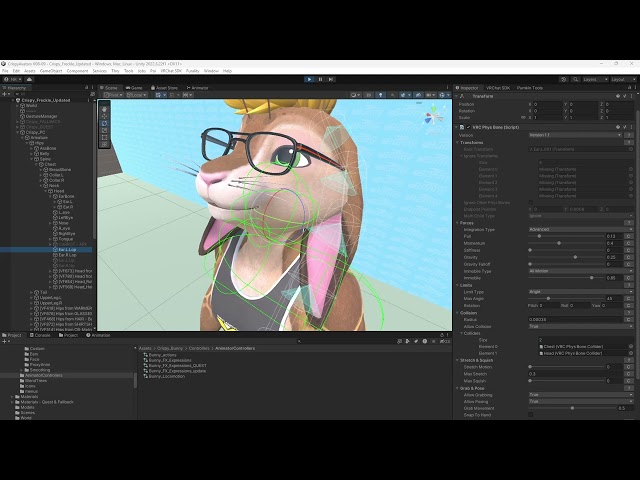
I'm having some issues with jitter on my Physbones while using gravity and colliders.
The ears have gravity on them and are prevented from passing through the shoulders by a collider (on the chest). When touching the collider they barely jitter, maybe they don't jitter at all, its hard to tell. But the more they rest against the collider as the head goes back the more they jitter. Its something I've noticed on multiple avatars and I'm honestly unsure if this is a recent bug or if its always been this way.
Any ideas on a fix or ways to minimize it? This is my base, and I would love to put an update out but this is something I need to fix first.
 stiff glen
I'd consider using limiters, if you don't already... oh a lop, ok that's harder
spiral hemlock
I'll make a canny. I have no idea if this can be fixed at VRChats end or if its something I can fix by doing something different.
 stiff glen
ooh is that a factor in jittering physbones?
simple elk
was something about it a long time ago it doesnt like super tiny things
stiff glen
that makes so much sense
simple elk
you are trying to move like 0.000x <>
stiff glen
I've never encountered it 'cause I don't have the scaling issue
simple elk
immobile can do funny things too,if i use it it will have a curve
night burrow
keen sluice
parameter driver just acts as a toggle parameter but controlled via animation st...
Thank you ! I couldn’t figure it out in the end but I appreciate it. ✨
 heavy bear
Asking here, cause I tried looking for it but I couldn’t figure it out, is there a max 16 tag per contact or just overall? Cause I wanna make a good dynamic system for an avatar, but I wanna make sure I can actually use it properly
 near fossil
heavy bear
Asking here, cause I tried looking for it but I couldn’t figure it out, is there...
near fossil
heavy bear
Asking here, cause I tried looking for it but I couldn’t figure it out, is there...
Per contact
 bronze siren
Are there any tools that make resizing/making/placing colliders easier? Avatar Dynamics Overhaul is ripperino
keen sluice
Never even heard of avatar dynamics overhaul
bronze siren
https://dreadrith.gumroad.com/l/ADOverhaul was a superb tool

Gumroad
IMPORTANT: The tool requires a license key and is a DLL. You'll find your license key through product's content view or entered e-mail.License is valid for ONE device, transferable.Incompatible with Mac and Linux.Now compatible with Unity 2022! EZ PZ AVATAR DYNAMICS LESS GOPre-release purchase. Not everything is implemented. Some things may be u...
Trying to make colliders is such a pain having to use the transform box
bronze siren
bronze siren
https://dreadrith.gumroad.com/l/ADOverhaul was a superb tool
Ahhh, found https://github.com/luneSnowtail/VRCNimbatTools which is Exactly what I was looking for
GitHub
NimbatTools is a plugin for unity that gives vrchat avatar creators more power, flexibility and speed to craft their creations - luneSnowtail/VRCNimbatTools
stiff glen
oh that's a good way to do it
 vital arrow
spiral hemlock
I'm having some issues with jitter on my Physbones while using gravity and colli...
vital arrow
spiral hemlock
I'm having some issues with jitter on my Physbones while using gravity and colli...
it's a recent bug. I downgraded my vrc sdk to version 3.7.6 and it doesn't have this issue
simple elk
cant use that soon, better figure out why their scaling isnt 1.1.1 , 0.000x is way too tiny
 deft cipher
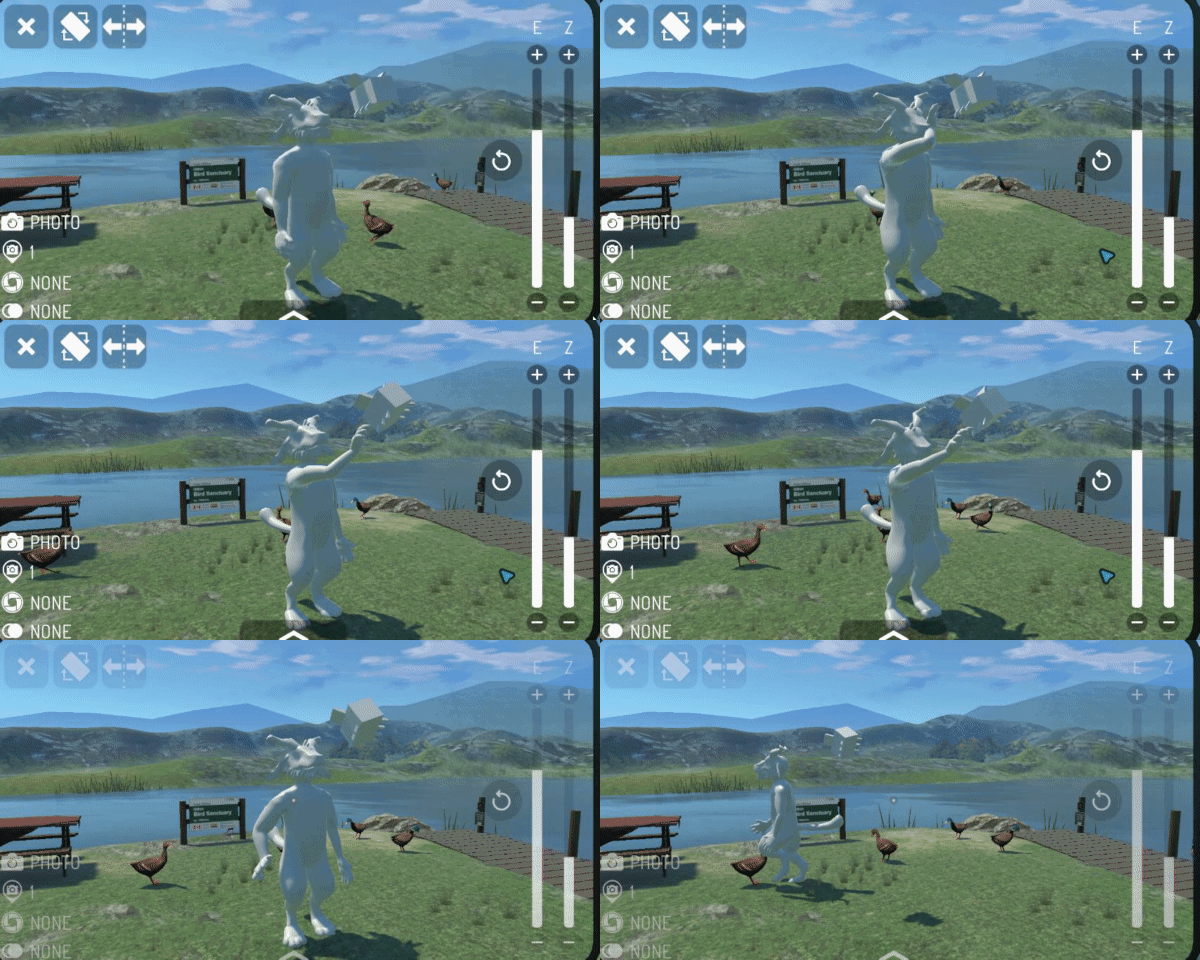
I figured out how to do correctives with contacts and receivers in unity for vr. It wasn’t as complex as i thought.
 light prism
 deft cipher
I think I have a method I like for correctives, just need to work having the shapekeys blend/transition better.
Now there'll be less crunching hips and butt
 pearl ingot
runic wasp
pearl ingot
runic wasp
Add all of it's children to the exception list, you'll also need to add an end length it can't be zero due to not having any animated children of it's own
(a phys bone needs some kind of length for the physics to effect it at all)
stuck bane
deft cipher
I think I have a method I like for correctives, just need to work having the sha...
something I also like to do is add intermediate bones with constraints. For example, I made a kangaroo/dragon hybrid avatar for my friend, and the tail has a REALLY thick base, so whenever it moved around there was lots of "crunching" at the base. Easy solution was to just add bones around the base and rotation constrain them with 0.5 weight to the first tail bone
copper fable
what are the settings for a physbone that only moves when grabbed?
keen sluice
copper fable
what are the settings for a physbone that only moves when grabbed?
immobile
copper fable
keen sluice
immobile
yeah… so how will pull and spring values apply?
keen sluice
copper fable
yeah… so how will pull and spring values apply?
like how they normally would?
copper fable
keen sluice
like how they normally would?
does the pull and spring values only apply when returning to rest position? (when the object is let go)
if yes, how does grab value (the one that is 0 - 1) affect this ?
keen sluice
pull
how much/quickly it tries to return to normal
spring
how much it bounces
copper fable
keen sluice
pull
how much/quickly it tries to return to normal
spring
how much it bounces
i know that.
my question is how does grab value affect it returning to rest position (+ the pull and spring)
copper fable
ah okay thank you
that clears things up
only affecting the grab, not affecting the return to rest position motion
 violet hound
sorry sent this in the wrong channel originally
i know they just announced this but does anyone know if item contacts can interact with avatar contacts? id like to use the gold plated lighters contact tag to light an asset on some of my avatars
violet hound
violet hound
sorry sent this in the wrong channel originally
i know they just announced thi...
in case someone comes with the same question
the answer is yes and the lighters contact sender tag is either "flame-sensitive" "flame" or "Fire" i just tried them all
 shy berry
Hello does anyone know how to know what contact sender/receiver the items that vrchat have? like the campfire has apparently a contact sender parameter "fire"
recently there's a new item which is the lighter i wanted to know if there's a sender parameter it sends
stiff glen
I'm assuming it's one of these, so "fire": https://creators.vrchat.com/common-components/contacts/built-in-contact-tags#object-traits
When working with Contact Senders and Receivers, the VRChat SDK offers a number of built-in contact tags that you can use. Using these tags is optional, and you can type in whatever text you'd like for your tags instead if you'd prefer, but using the built-in tags makes it easier to create contacts that are compatible with avatars and worlds tha...
 vocal frigate
For anybody looking at this, it's actually "Fire" because it IS case sensitive
 bitter python
Can avatar dynamics be animated? Specifically angular limits
stiff glen
physbone limits? yes - but they won't take effect unless you disable the physbone component, change it, then re-enable.
bitter python
stiff glen
physbone limits? yes - but they won't take effect unless you disable the physbon...
I see! Thank you. It will be fun to figure out how it works with late joiners and saved parameters..
keen sluice
bitter python
I see! Thank you. It will be fun to figure out how it works with late joiners an...
have it be off by default then enable after a couple frames
stuck bane
bitter python
Can avatar dynamics be animated? Specifically angular limits
I'm pretty sure it works without disabling the component, but that could have changed. From my memory, you only need to disable the component in order to animate force properties
 neat oasis
hello! i need a bit of help understanding how to animate in general for the game in a sense using props. like if i make a cat in blender i have no idea how i would be able to animate a simple head bob or how people make the animated contact for like dead pats and i'm not sure how to even google around for references for that! please help-
stuck bane
neat oasis
hello! i need a bit of help understanding how to animate in general for the game...
Look up tutorials for animating in Unity or Blender. If you animate in Blender you can export the fbx with the animations embedded, then just duplicate them with ctrl+D to extract them.
neat oasis
stuck bane
Look up tutorials for animating in Unity or Blender. If you animate in Blender y...
Ohhh interesting!! Thank you!! I'll absolutely look into that!
hybrid marsh
neat oasis
hello! i need a bit of help understanding how to animate in general for the game...
a working system is divided into 3 things.
- animator
- animations
- components with their own logic such as physbones/contacts
Animations are simply keyframes that make things happen in a certain order (such as move a bone from X to Y position, or turn a physbone on/off)
Then, it's just a matter to put these animations in the right order into the animator to make sure they play when certain conditions are met (This is a very simplified version)
learn something simple first such as making an animation, and simply triggering it when a conditions is met, such as toggles, and go from there.
neat oasis
Ohhhh!! Thank you so much for that info!! I'll try it out then! It's a system that seems so interesting and expansive! Try a few basic animation tutorials and such!!
 hollow stone
How do I breathe
 random merlin
 scenic wasp
breathing animation in additive layer
 opal quarry
I'm trying to turn off the fire with water to test the water tag on my avatar and it isnt working, does anyone know if the campfire is broken?

 frozen coral
opal quarry
I'm trying to turn off the fire with water to test the water tag on my avatar an...
frozen coral
opal quarry
I'm trying to turn off the fire with water to test the water tag on my avatar an...
The campfire item doesn't support being extinguished like that, sorry!
scenic wasp
Wait, there is a way to extinguish it?
frozen coral
scenic wasp
Wait, there is a way to extinguish it?
No, you can't extinguish the campfire in any way.
fallow nacelle
frozen coral
No, you can't extinguish the campfire in any way.


 left thunder
Anyone know how to fix this? I put a bone in the chest area but its still showing up
 stiff glen
left thunder
Anyone know how to fix this? I put a bone in the chest area but its still showin...
stiff glen
left thunder
Anyone know how to fix this? I put a bone in the chest area but its still showin...
is it the actual chest bone? Like, in the right place in the spine hierarchy?
left thunder
stiff glen
is it the actual chest bone? Like, in the right place in the spine hierarchy?
Yeah this is what I'm seeing right now, yet that issue still pops up
 stiff glen
from what I can see here, that looks pretty good
left thunder
Ah okay, but I still see that error while trying to make the avatar
nvm I fixed it
Anyone know how to fix the grayed out standard shader so I can make this avatar quest compatible?
 stiff glen
left thunder
Anyone know how to fix the grayed out standard shader so I can make this avatar ...
stiff glen
left thunder
Anyone know how to fix the grayed out standard shader so I can make this avatar ...
replace the material - that one is embedded in your model file and can't be edited.
left thunder
stiff glen
replace the material - that one is embedded in your model file and can't be edit...
Replace as in how? Delete them or drag the working texture into my assets?
stiff glen
make a new material and drag it into the slot inthe mesh renderer.
 boreal walrus
Is it possible in any way to get the velocity of something via dynamics and drive an animation from it? Context is I'd like to implement shaking sounds to my little props (via osc but by grabbing a nonsynced parameter) but am uncertain as to if this is possible.
stiff glen
you can get the velocity of yourself via animator parameters.
for other objects you'd have to get that from a collider they enter
vocal frigate
boreal walrus
Is it possible in any way to get the velocity of something via dynamics and driv...
You can also use physbone angle or stretch (I recommend stretch, I use it for my sword's swing to trigger sounds and effects)
 supple gale
left thunder
nvm I fixed it
supple gale
left thunder
nvm I fixed it
hhow did you fix it?
supple gale
how do you fix this?
 stiff glen
supple gale
how do you fix this?
stiff glen
supple gale
how do you fix this?
Go into the rig setup in Unity and make sure those bones are in the proper slots.
If the bones don't exist, you'll have to go back into blender and fix the rigging
supple gale
ok
 tired drift
when i toggle off the physbone objects this number doesn't go down. do i need to delete them entirely?

by toggle off i mean this

(not trying to make a "toggle" i just want to disable these physbone components entirely without deleting them in case i decide to toggle them on in the future)
stiff glen
tired drift
when i toggle off the physbone objects this number doesn't go down. do i need to...
delete - anything disabled but still on the avatar may be enabled at runtime and thus counts against this statistic.
tired drift
ah
is there a way i can just detatch it from the avatar so i dont have to delete it? i'm not very knowledgable with the unity side of things
stiff glen
if you want to "save" it, make a new empty game object, copy/paste the component to that, then drag that game object into your project, it'll become a prefab.
I actually prefab all my physbones so I can just drop the prefab onto avatar variants and not have to change all of them if I want to update
 honest zealot
Hello im going to need assistance with physbones for quest is there a video or i can get a run down for it
stiff glen
you could start here: https://creators.vrchat.com/common-components/physbones
PhysBones are a set of components that lets you add secondary motion to objects on avatars and in worlds, permitting you to add motion to things like hair, tails, ears, clothing, wires, plants, and more! Using these well will make your avatars seem more dynamic and real, and your worlds more immersive.
 proper ermine
When I upload my Vroid avatars to Unity I always get this I cant seem to remove
Weird black under the pant and shirt
Since mobile avatars can only use a few shaders idk what to do lol

 rich tulip
proper ermine
When I upload my Vroid avatars to Unity I always get this I cant seem to remove ...
rich tulip
proper ermine
When I upload my Vroid avatars to Unity I always get this I cant seem to remove ...
the black is likely because those parts require transparency
you'd need to cutout the black parts in blender with the knife tool
proper ermine
rich tulip
you'd need to cutout the black parts in blender with the knife tool
Sadly I dont know blender
No easy way to fix in Unity?
rich tulip
not that im aware of
theres plenty of how-to videos on the basics of blender though and its been discussed in #avatar-help a few times (which is the channel you should've been asking this in)
stiff glen
proper ermine
Sadly I dont know blender
No easy way to fix in Unity?
Unity cannot be used to edit meshes.
 proven grove
rich tulip
not that im aware of
proven grove
rich tulip
not that im aware of
Face it, lots of it is outdated
stiff glen
Nothing related to this topic has changed in years though
pearl ingot
What would be the easiest way to detect that a worn avatar has not moved (with analog stick) for a certain length of time. I want to make a sign saying to wake me up...
dark drift
VelocityScalar
pearl ingot
dark drift
VelocityScalar
Right but what's the most reliable way to do a timing method?
dark drift
smth like any state -(if velocity>0)->empty reset state->15m empty anim without exit time->afk anim. unless you need late joiners
rare sun
stiff glen
Nothing related to this topic has changed in years though
Yea. Only main part of blender tutorials that differ between major versions is kinda only the shader node system caue geonodes work diffrently
rare sun
proven grove
Face it, lots of it is outdated
Wrong
 dark spindle
yo yo anyone know if its possible to have the same animation that i trigger by pyhsbone_is grabbed be affected by a toggle?
stiff glen
sure, that's easy, just make another transition with the new conditions
dark spindle
stiff glen
sure, that's easy, just make another transition with the new conditions
in a new layer basically set up a toggle with it or?
stiff glen
you don't want to run the same animation at the same time in different layers, so I'd probably just add conditions to the existing one... but that's very generic advice not knowing anything about your project
 still basalt
im new to avatar making and im already trying to do next level stuff at beginner level 😭
i have a scythe i bought from booth i tried to follow youtube videos but its not the same because it has effects and sound, spin animations and im so lost
dark spindle
stiff glen
you don't want to run the same animation at the same time in different layers, s...
im having troubles making the animation stay at said state after pulling on the pyhsbone what´s the setup for that are there any tutorials out there? or do ya perchance know?
stiff glen
not sure what you mean?
Also it's very rare I'll have a tutorial link, I don't exactly keep a list of those, and don't really use them myself.
 waxen flax
my quest physbones arent working at all

im not over htel imit so idk what else can be the issue
please help its a commision D:
keen sluice
you sure those are the only physbones?
waxen flax
keen sluice
you sure those are the only physbones?
yes, can others just not show up there or smth?
keen sluice
waxen flax
yes, can others just not show up there or smth?
Bullshit like vrcfury
waxen flax
keen sluice
Bullshit like vrcfury
hm its mosly basic toggles except for some prefabs, ill try removing extra prefabs 1 by one to see if any caused it maybe
 rose relic
does anyone know the exact ordering between contact/constraint/animator updates?
frozen coral
rose relic
does anyone know the exact ordering between contact/constraint/animator updates?
All avatar dynamics components update their states after animators have run earlier in the frame.
Constraints update either before or after physbones depending on the parent/child relationships between them. Contacts update after both physbones and constraints.
One edge case exists for constraints where they may update after contacts if needed to maintain a technique used by some older avatars to hide content in first person by constraining it to the avatar's head bone.
rose relic
frozen coral
All avatar dynamics components update their states after animators have run earl...
i think i might be noticing the edge case getting triggered in the following scenario:
the object has a deactivated (by turning off component) parent constraint targeting a child of the head bone. this somehow causes a separate position constraint on the same object to be evaluated after contacts. does this sound plausible to you?
mystic wing
Yo, how exactly should I go about adding a contact thingy that activates a sound? I am making a plushie prop where if you boop it, it makes a sound. Not sure how to set that up.
stiff glen
same as any other toggle, just turn on/off the game object with the AudioSource component.
mystic wing
I'll inquire about it more thoroughly once I actually finish this model. Never added a custom contact before.
mystic wing
K, how exactly do I work with contacts?
frozen coral
rose relic
i think i might be noticing the edge case getting triggered in the following sce...
If your position constraint depends on the result of your parent constraint, then yes, that would make sense.
rose relic
frozen coral
If your position constraint depends on the result of your parent constraint, the...
but this happens when the parent constraint is turned off?
frozen coral
Yes. We pre-sort constraints on avatars once because avatars may toggle them every frame which can cause performance issues if we were to sort them again every time.
rose relic
I see. Thank you!
mystic wing
Hey, how do I go about setting up this contact correctly? I'd like for it to trigger a sound effect upon contact.
 stiff glen
mystic wing
Hey, how do I go about setting up this contact correctly? I'd like for it to tri...
stiff glen
mystic wing
Hey, how do I go about setting up this contact correctly? I'd like for it to tri...
Put a parameter name in there, it'll be set when the contact is active.
mystic wing
stiff glen
Put a parameter name in there, it'll be set when the contact is active.
K, I named it "boop". What do I do next?
stiff glen
use it in your animator logic
mystic wing
stiff glen
use it in your animator logic
I apologize, I do not know what that is.
stiff glen
You can use this as a parameter for animator transitions. If you don't know how to use the animator, probably watch some tutorials on that.
 nocturne shoal
Hey so let's say hypothetically that I have a physbone, but the collision radius in the settings for the physbone is not the size of the object I want to move with the physbone (I want the physbone to move when touched). Is there a way to use something like a sphere Collider instead as the collision box for the physbone?
stiff glen
no - physics colliders and physbones don't interact
stuck bane
nocturne shoal
Hey so let's say hypothetically that I have a physbone, but the collision radius...
no, but if you want to use a sphere collider you can just increase or decrease the collision radius to match the size you need
be sure to use curves to change the size over the length of the physbone chain for precision
nocturne shoal
I just gave up and settled tbh
 lost sun
There's no way to influence the expressions menu during runtime is there?
Want to dynamically show settings for connected haptic stuff depending on stuff fed via OSC
stuck bane
unfortunately no, but I wish we could. The best you can do is use menu parameters to "lock" a menu from opening
 digital crescent
it seems contact receivers with one custom tag ignore senders with multiple custom tags
is this intended? dont see anything mentioning that on the website
frozen coral
digital crescent
it seems contact receivers with one custom tag ignore senders with multiple cust...
A contact receiver should trigger if the incoming contact sender has any tags that match it. So in your case the single tag on the receiver should be the same as any of the tags on the sender. For self collision on an avatar Content Types needs to include Avatar, and Allow Self should be ticked.
If that's how yours is set up and you're confident the contact still isn't triggering, feel free to open a report on Canny with the ID of the avatar and we can take a look. https://feedback.vrchat.com/avatar-30
rose relic
how exactly is constraint execution order determined? in particular,
i would assume it's not multithreaded?yes but unrelated to questions below- is it presorted? can the order ever change after an avatar is loaded?
- if it's presorted, does the sorting take into account which constraints are enabled by default to break ties for cycles?
- do constraints on a parent object always execute before constraints on its child objects? if not, when would the reverse happen?
mystic wing
How do I use this rotation constraint? I'd like the sleeve bone to rotate slightly along with the hand.
 stiff glen
like that but click "activate"
mystic wing
Ah, right, thank you!
frozen coral
rose relic
how exactly is constraint execution order determined? in particular,
1. ~~i woul...
- Constraints run in parallel where their dependencies allow it, and sequentially otherwise.
- Yes, constraint dependencies are pre-sorted. The order will never change after the avatar has loaded. This is done for performance reasons.
- It does not.
- The parent will always run before the child, unless you have a cyclic dependency of constraints where the parent indirectly depends on the result of the child, in which case the order is undefined. If that's the case you should update your hierarchy to break the cycle. We recommend never using constraint cycles, as does Unity in their documentation for their own constraints system.
rose relic
frozen coral
1. Constraints run in parallel where their dependencies allow it, and sequential...
i have a constraint cycle A -> B -> C -> A, if i change it to A -> B -> C -> D where D is a child of A, would that be considered as breaking the cycle?
frozen coral
Probably yes, since D can unambiguously run at the end in that case.
rose relic
Great. Thanks!
Wait... Actually that doesn't make sense. It's still the case described in point 4 again.
Is there really no way to force one constraint run before another in a cycle?
But in this case D does not have a constraint so it's fine probably? I should just try it out tomorrow...
frozen coral
In the example you've given, I'd expect D to be at the end of the chain, since none of the other constraints need to run after it. Would be best to just try it!
rose relic
frozen coral
In the example you've given, I'd expect D to be at the end of the chain, since n...
So the change did fix my problem, but i flipped my arrows in my previous message, so it's actually
A <- B <- C <- D where D is a child of A, would this be considered as a cycle? can I expect C <- D to run first?
Also i still cannot make sense of the behavior of my previous setup:
A <- C1
B <- C2,C3
C1,C2,C3 <- D
D <- B
B is a child of A
Constraints on A, B are off by default
Animator has 3 states, in state 0 constraints on A, B are not animated, in state 1 animated off, in state 2 animated on
In game the states go from 0 > 1 > 2 > 1 > 2 > 1 > 2 ....
The really bizarre part of this is that the constraint on B seemingly executes before the constraint on A if and only if it's the first time entering state 2.
This seems inconsistent with predetermined order?
Sorry for the long post...
frozen coral
rose relic
So the change did fix my problem, but i flipped my arrows in my previous message...
I think we're getting to the limit of how much I can accurately help ad-hoc over Discord 😅
If in your case C uses the result of D, B uses the result of C etc. then that's still a cycle, because D needs to both run before A (since A needs D's result) and after A (since D is a child transform of A). That would mean the ordering is undefined.
If you think there isn't a cycle and there's a bug with constraint order then please feel free to open a Canny report with an avatar ID that demonstrates it. Bugs with ordering usually appear as constraints lagging behind/jittering as they move around.
rose relic
frozen coral
I think we're getting to the limit of how much I can accurately help ad-hoc over...
understandable 😅
one last question though. when you say the ordering is undefined, can i assume that it's still deterministic, and everyone sees the same ordering?
frozen coral
When running in-game, the ordering should remain constant after the avatar loads and should currently be the same for everyone. Again though, cycles are undefined behavior, so nothing can be promised about how they behave. It would be best to design your hierarchy to not have any constraint cycles in it.
rose relic
Thanks! Good to know.
Unfortunately cycles can't always be avoided...
 calm owl
while constraints are one per gameobject, you can have all of your vrcconstraints on one gameobject. This fixed most of my jittering and constraint depth issues
patent eagle
Hello,
for a rpg group, I needed a hide toogle for my avatar.
This makes my avatar invisible and everthing works as it should.
Can I also use this toggle to mute myself?
Can I use Parameter drivers for "Voice" and/or "MuteSelf" ?
patent eagle
I have voice mod,
can voicemod interact with OSC?
 crude drum
patent eagle
I have voice mod,
can voicemod interact with OSC?
crude drum
patent eagle
I have voice mod,
can voicemod interact with OSC?
Yeah, the default avatar parameters like Voice and MuteSelf are read-only, so you can’t control them from an avatar toggle or parameter driver. The only way to automate muting like that would be through OSC or an external tool. I’m not 100% sure if Voicemod can directly interact with OSC though — you might need a bridge script or middleware for that.
vocal frigate
patent eagle
Hello,
for a rpg group, I needed a hide toogle for my avatar.
This makes my avat...
You can move your head bone (or entire body) far into the sky via an animation and your voice will go with it (thus making people unable to hear you)
 trim geyser
Is there a way to make a physbone "twist" instead of the usual wobble
stiff glen
limit its movement to just the twisty axis?
trim geyser
like a constraint on the bone itself or with the Limits on the physbone component
stiff glen
the physbone limiters. I haven't tried this, just speculating on what might work
trim geyser
hmm i needed it twisting on its y-axis which i could get yet but i might try rotating the bone itself and retrying with the limits
ah maybe endpoint position has what i need to do in unity cause it is just a single bone, was just confused on how to approach it cause my method in blender is different.
stiff glen
ah yeah, with just one bone you'll definitely need to increase that a little
 willow kindle
https://taeliouwolf.gumroad.com/l/PullCord
how would i replicate this

Gumroad
A rigged pull-cord setup with Physbone for any time you need to quickly pull in emergencies :3Includes:Rigged pull cord with Physbone setup. Allowing you to pull and stretch it out in-game. 1 material, 368 triangles. Blender, Substance Painter, and FBX files. Quest Compatible. This asset can be used on Quest as long as you change all the materia...
like what physbone settings would i need
 weary granite
Hi all,
hoping to get some help on this goal.
I have made an avatar with an equippable gun. I also have an animation that I made in blender that raises the arm into a firing position.
The goal is to have a "desktop mode" option for the gun. This would enable a desktop user to activate a menu in vrc to activate the blender pose.
I can add this to the avatar with VRC fury, and the pose for holding the gun works.
However, it also disables all other animations. In particular, it disables the desktop walking animation.
Is it possible to add the animation in such a way that it only affects the hand and arm, while leaving other bones "free" to be affected by other animations? Perhaps by making the pose only override certain bones, or behave additively?
stiff glen
VRC Animator Tracking Control
weary granite
Yes, I have tried setting this to only affect certain bones. I'm not sure if VRCFury interferes with that, but unless I am missing a step it seems to have no effect
 oblique junco
anyone know why i cant grab this phys bone?

or does anyone know a world where i can visualize the physbones so i can know whats going on
because the only worlds ive seen that let me see bones only show the main body bones
the grey circle is the collision ive set
nvm im just never gonna use physbones for this
stiff glen
sus.
 fluid niche
Hello, I don't know If I'm on the good channel for this kind of topics (at my first guess it is but maybe not)
I search to add a way to grab an object and using it on an avi
Like actually the object got physbones, the handle of the object got a constraint to the hips (like it's on a belt).
And I was wondering if there is a way to make it grabable by his own Avi, to be able to just move it around ^^
My first guess was a change of constraint but that's a bit an on/off situation, I would love to see if their is something more fluid.
If you got video that already show this kind of topics you can send me them 🙂
 wet socket
hi guys, anyone have any idea why my constraints are doing this to my avatar? i recently added rotation constraints to the legs, hip, spines, chest and neck bones, but only the leg ones work properly, the rest make my avatar look really weird in play mode?
also theres this massive "armature" bone, but i dont think it would be the cause of this


 grand sable
Yo ive had the idea of a throwable prop using FinalIK, but saw that VRCRaycast is a direct replacement and id like to utilize it. I have not played around with FinalIK at all and am new to it. What are some things youd recommend me have a look at? Is there any video tutorials anybody can suggest?
To explain what im trying to achieve: I want my prop to be held and thrown into a direction, then stick in whatever it collides with
dark drift
@grand sable im yet to see any kind of finalik guide. throwable prob is acheived with this https://github.com/VRLabs/Rigidbody-Throw or https://github.com/VRLabs/Rigidbody-Launcher
GitHub
System for letting you throw physics objects. Contribute to VRLabs/Rigidbody-Throw development by creating an account on GitHub.
GitHub
Launch an object with collision against the world. - VRLabs/Rigidbody-Launcher
grand sable
This looks perfect. So FinalIK isnt even needed for it then id assume?
grand sable
hmhm i see
Thank you very much for linking! Ill have a look through these examples 🙂↕️
patent eagle
is it possible to use gogoloco fly, without a active mirror?
dark drift
it relies on mirror collider so no
patent eagle
dark drift
it relies on mirror collider so no
Can't i just change the collision layer back to normal or local player?
patent eagle
dark drift
it relies on mirror collider so no
I found a solution that fits my needs:
I added this collider to the "Collider" object.
Seems working fine

 dark drift
@patent eagle afaik layer override is a disabled unity 2022 feature (when they originally forgot to do so we got avatars that can trap other people), we only supposed to have global collision matrix decided by devs (well, worlds can go beyond but not change existing layers). tho maybe i missed something if youre saying it is working (make sure world doesnt have its own mirror tho).
originally mirror is working since for whatever reason mirror layer does collide with playerlocal layer
patent eagle
dark drift
<@278225939530514452> afaik layer override is a disabled unity 2022 feature (whe...
i can indeed confirm that the world has no mirror an i dont have any personal mirror active
patent eagle
I'm unable to find something in the docs about this, was there something offical?
 blazing quartz
Idk if anyone is familiar with jiggle physics for VRChat if anyone knows how to put ass physics on a avatar for VRChat please LMK I been having issues any help will be very much appreciated:)
stiff glen
oh - I didn't see you asked here too, I'd have replied here if I noticed.
simple elk
only asked it 5 places 
stiff glen
sighs
 blissful cairn
why are these numbers out of bounds?
 simple elk
doesnt matter it will be 0 in play mode
i get random numbers too in a blendtree before it
 stiff glen
Yeah it seems to just make stuff up. doesn't really affect anything though.
blissful cairn
contacts arent working correctly
how can i see what the output value is of this?

what is the islocal from

what is the connector called for onenter
i dont understand any of this
is islocal the output of the receiver?
how to activate a contact sender with a contact receiver?
how to make a counter with a contact
stiff glen
blissful cairn
what is the islocal from
it's a variable that VRChat sets for you, though it's a boolean normally, true or false.
you can sorta cast it into a float though
blissful cairn
is the islocal from a contact?
stiff glen
it's from VRCHat
This document requires knowledge about Unity's /Documentation/Manual/AnimationParameters.html">Animator Controllers and /Documentation/Manual/class-AnimatorController.html">Animation Parameters.
blissful cairn
whats all of this
 stiff glen
You cropped that too close so I don't know what component that is
Contacts are a system that allows avatars and worlds to detect collisions with other contacts. You can use collisions to drive avatar and world behavior to perform all sorts of custom interactions.
blissful cairn
 stiff glen
right so, see the documentation link I provided
blissful cairn
its somehow connected here but i cant find out where
 stiff glen
contacts set parameters you can use in your animator
you have to add the parameter to the animation controller
When used on an avatar, a Contact Receiver will respond to contact signals by setting Animator Parameter in the avatar's animator.
blissful cairn
whats damage
 stiff glen
it's a tag
When working with Contact Senders and Receivers, the VRChat SDK offers a number of built-in contact tags that you can use. Using these tags is optional, and you can type in whatever text you'd like for your tags instead if you'd prefer, but using the built-in tags makes it easier to create contacts that are compatible with avatars and worlds tha...
blissful cairn
i think a vrcsdk update broke it this is what it is on a working version and its called custom
 stiff glen
that's fine - the new stuff has some pre-defined settings, but the actual tag name is the same
blissful cairn
the one in the new sdk doesnt work so idk what broke
stiff glen
dunno without you doing some debugging, the settings look equivalent
blissful cairn
yeah its some sort of sdk update that broke it ill give up because i got no idea how this was even made
stiff glen
by "broke" what do you mean?
blissful cairn
that the contacts or animation system doesnt work anymore as in the pre 0.3.9
works in this version
 stiff glen
wow that's quite old. Okay but "doesn't work" is also very vague - can you be more specific?
blissful cairn
but ofc new avatars require a new version which has it broken
stiff glen
is it not setting your animator variable when you expect? Under which exact conditions?
I use this thing often, haven't had any issues with 3.10
blissful cairn
it just doesnt work anymore the contact turns green ingame but it does nothing
stiff glen
ok so you didn't do any debugging?
stiff glen
in the unity editor? is the contact setting the animator parameter?
blissful cairn
its the same as the old one
stiff glen
not what I asked
did you test in unity in play mode, watching that all parts of the process happen as expected?
blissful cairn
it doesnt work in that because it requires vr to move the hand
stiff glen
it doesn't require that - you can make a game object with a contact sender on it to test that
blissful cairn
so i have been uploading new versions with changes constantly for 10h now
stiff glen
oh, what changes have you tried?
blissful cairn
changing the size of the collider changing the position redoing it 1000x nothing worked
stiff glen
ok so you don't know which parts of this work and which don't, okay
blissful cairn
the beginning part is where it has to activate a sender
that part already doesnt work
maybe it cant activate a sender if the sender itself is animated as a active gameobj since one of the updates
stiff glen
not sure what you mean here
blissful cairn
there is 4 contacts one is a sender that then goes to a receiver that then activates another sender that then goes to another receiver
stiff glen
okay this sounds complicated, you'd have to check each part of that, I again suggest testing in unity in play mode
blissful cairn
im gonna install a different system which will take up most the paremeters on the avatar but since this one no longer works and idk how to create something that is effcient like the old one i dont know what else to do but to give up on this
stiff glen
no idea what "system" you mean, but each part should be testable independently, it probably isn't very complicated
blissful cairn
would this make it stay always on?
 stiff glen
what part of that?
blissful cairn
thats after the receiver got activated
stiff glen
you'd have to show, but I mean what part of this image are you calling "this" when you say "will this..."
blissful cairn
i dont want to use the islocal thing because maybe that broke
stiff glen
isLocal is true for you the person wearing the avatar, and false otherwise
it has not changed at all a long time
blissful cairn
its somehow a float value here
stiff glen
yeah because whoever made that chose to use a float. So true will be (around) 1, and false (nearly) zero
no idea why you'd make it a float though.
blissful cairn
what happened here?
 stiff glen
haha
blissful cairn
did my unityproj corrupt
stiff glen
you could try restarting
blissful cairn
i narrowed it down to the IsLocal paremeter
the islocal is a float because its used in that way but vrc 3.10.2 doesnt output it as a float anymore so it just breaks
but the function requires a islocal float
stiff glen
IsLocal should be a bool... but you can use a float and it ought to work depending how how you do the comparisons. But I don't see why you would use it as a float unless it's in a blendtree.
blissful cairn
what is the * in global parameter is that a universal making it all global parameters?
 stiff glen
what component is this?
blissful cairn
how can i see parameters change live values in play mode?
im trying to debug more
blissful cairn
stiff glen
what component is this?
this was apparently a thing to make all parameters global
stiff glen
that doesn't really answer my question, but okay.
in play mode you can use a tool like Gesture Manager or AV3 emulator to watch the parameters on the avatar or in the animator
blissful cairn
i got av3 emulator
stiff glen
it's the one I prefer too
blissful cairn
can a parameter read from an object?
i need to replace a function that uses an animation to drive a parameter but this doesnt work anymore so need a different way for a parameter to read a value
stiff glen
what do you mean "read a value"?
blissful cairn
i need to use the animation to enable object that then gets read by a parameter and that paremeter uses the true or false value then to do things
stiff glen
if you are using an animation to enable an object then you can set a parameter on that state with VRC Avatar Parameter Driver
blissful cairn
can i do that for a blendtree?
so when value in blendtree is a certain number then do a true or false
stiff glen
nope, can't put that component into a blendtree
stiff glen
what?
blissful cairn
yeah in the emulator it disconnects it in the debug
this is it normally

this is in the debug
 stiff glen
Do you have VRCFury involved here?
blissful cairn
so it all works now after reverse engineering ans 2 days of work
this animator method was responsible for breaking it all

 wild estuary
Hello humans, I have a general direction question. I have face tracking and fix ears on my avatar. I would like them to wag when I smile. Is the approach making a new layer in fx, wait for smile to be >.5, and playing animation? Tried editing the face track driver and it only played the first key
stiff glen
Yep - that's what I would do, add another layer and use a blendtree to run those animations
dark drift
why a blendtree. idle <-(smile>0.5)->wag. dont forget isanimated checked for ears physbone
im so fast
wild estuary
dark drift
why a blendtree. idle <-(smile>0.5)->wag. dont forget isanimated checked for ear...
v2/MouthSmileRight would be the parameter?
and I did forget to check as animated 😔
dark drift
beats me, imagine having ft. you should check the path in the avatar parameters and not omit path or spaces, being just 'v2' (of what?) and not idk, 'vrcft v2' looks sus
wild estuary
I got it

works in gesturemanager
the blendtree was too smooth unless ppl would want a gradual animation, but that's only for static poses
 shadow flax
Can somebody help me with avatar contacts? For some reason, it doesn't want to work despite it set up correctly
stiff glen
no, I mean, ask specific questions, not re-ask the generic one
shadow flax
I don't know what to say. I did all the steps provided by a tutorial video found online, and it's not working when I enter test mode
stiff glen
well we can't help without specifics, "it doesn't work" tells us nothing about the problem
shadow flax
What do you want me to say? Like I'm using the contact sender that's set to hand, and the contact receiver responds to hands and fingers, but when I move the test sender into the receiver, it doesn't play the animation and audio I've set it to play.
stiff glen
That. That is way more info than "it doesn't work"
shadow flax
I've set up the animation to play in the FX layer, but for some reason, it doesn't work
stiff glen
Probably it's best to debug each step. First verify when you move the sender into the receiver, the variable is changing as expected.
shadow flax
How do I do that?
stiff glen
I do this in play mode with AV3 emulator (gesture manager works), watching the variable change in the animator or avatar parameters
shadow flax
It doesn't seem to activate
stiff glen
Got the spelling of the variable correct? Case too?
shadow flax
Yes
stiff glen
Got the right settings? Like allow others vs. allow self?
shadow flax
Yes
stiff glen
and the right tag?
shadow flax
I'm pretty sure, yes
stiff glen
that's about all I can think of
stiff glen
huh!
 lapis eagle
I need a quick suggestion. Im making an avatar who is a drone, and im using a Contact Receiver to detect when someone punches it, so that the drone gets disabled (can be useful if someone gets a bit annoying with the avi). But idk what I should put as minimum velocity, so that it doesn't trigger on a light tap.
stuck bane
lapis eagle
I need a quick suggestion. Im making an avatar who is a drone, and im using a Co...
afaik the velocity is in m/s, so you could always take a video or set a timer of you moving your fist a certain distance to get an idea of how fast a punch is
maybe somewhere around 0.7? vrchat scale can also be a bit odd since many people wear avatars much larger than the average person, so they can punch much faster relative to world scale
lapis eagle
I've currently set it to 1,5... I thought maybe that could work?
simple elk
create a temporary ball or something that only respond to you , slap it ingame , you might be able to animate to change velocity trigger too
simple elk
not like id trust unity testing but velocity is animatable
dark drift
@lapis eagle walking is 2, running ie top fwd speed is 4. given world settings are default.
thus having speed below 4 usually makes not much sense for a random running around
 harsh copper
I am noticing that Physbone gravity doesnt work quite weill when constraints are involved, I have a chain of physbones at the end of a bone chain that is constrained to another bone chain (The physbone bones are not constrained to anything, just parented to a bone chain that is constrained)
And for some reason this causes the physbone to think gravity down direction is at a 45 degree angle.
Is there something I am missing here?
dark drift
nothing, just stuff works in a certain order with constraints being calculated last. so physbones when theyre doing their math dont care about the constraint part ie act as if its off, then constraint grabs the whole result and moves/rotates it however
harsh copper
so theres nothing I can really do to fix it in my situation..
dark drift
if you need random angles then afaik not, if its always from 90 to 45 then just rotate constrained thing initially
 amber dust
hiii really simple question: does disabling a physbone prevent it from moving?
stiff glen
yes
stiff glen
the entire chain is disabled
I mean, a disabled game object is disabled, so if the child bone is on a disabled parent, yup, it's disabled too
amber dust
oooop, i mean can i just disable some child bones to prevent them from moving w the rest of the physbones?
stiff glen
Sure, you can disable anything you want
it might look weird though, or disable anything related
you could also use curves in the physbone component, nearly all the values can use curves.
or, add those transforms to the physbone's "ignore transforms" box
 flint siren
Anyone know how to close a mouth for a neutral position? Do I not have enough geometry?
 keen sluice
you just kinda drag the top lip and bottom lip together
flint siren
keen sluice
you just kinda drag the top lip and bottom lip together
Ok. I thought as much, but kept getting a deformed lip and thought maybe I was doing something wrong. Just trial and error, I guess.
stiff glen
proportional editing can help here too
flint siren
Anyone know how to fix this?

The bottom layer becomes invisible the second another object is overlayed on it.
Not sure what setting I may have checked on or off by mistake.
 chilly tide
flint siren
Anyone know how to fix this?
chilly tide
flint siren
Anyone know how to fix this?
Your avatar mesh might be inside out.
to see if thats the case, turn this on

if the avatar turns red, its inside out. fix it with this in edit mode

 tall jungle
Small question, can anyone here specifically fix meshes/topology? I’d love a quote to possibly fix topology on a sculpt I made that I can’t quite figure out how to fix myself sobbb I’ve no idea where to even look for assistance like this or if I’m even asking for the correct thing. Apologies if this question happens to not be applicable etc.
stiff glen
Head over to the VRC Traders discord to commission people, you'll just find scammers here.
chilly tide
tall jungle
Small question, can anyone here specifically fix meshes/topology? I’d love a quo...
I know a fair bit of retopology and can offer free suggestions on this. What do you have?
 dusk brook
flint siren
Anyone know how to fix this?
dusk brook
flint siren
Anyone know how to fix this?
Looks like it could be a normals or backface culling issue, try selecting the mesh and recalculating normals (Alt + N > Recalculate Outside), then check the material settings and turn off backface culling.
If it still happens, the visor/object on top might have a transparency or blend mode setting that’s hiding the mesh underneath.
 edgy bluff
Is there a way to see what's driving specific blendshapes ? Like which animations My issue is that for some reasons a few of my blendshapes are not moving when some of my expressions are active, and when I try using the slider in play mode I can't. Thank for the help ^^
stiff glen
edgy bluff
Is there a way to see what's driving specific blendshapes ? Like which animation...
nope. What I do is disable all the animator layers, then turn them on one at a time to see which affects it.
 tepid temple
(I'm using the vrcfury gestures to make my expressions not the animator)
I'm having expression overlap and it looks really weird idk how to fix that and make it so that it only shows one expression at a time
limpid gull
tepid temple
(I'm using the vrcfury gestures to make my expressions not the animator)
I'm hav...
VRCF Gestures has exclusive tags
 haughty bone
I've found a non-tech use for raycasts
The plug now dynamically finds floor level, rather than using player Y height

works great on flat surfaces, slightly falls apart when on a steep slope, or when it gets stuck on a ledge, since the plug is the arbitor for the entire power cord
dark drift
yep finding floor levels for tails was its main usage since beta testing
stiff glen
oh - guess I need to do something with that now, I totally forgot about that use-case
stuck bane
haughty bone
works great on flat surfaces, slightly falls apart when on a steep slope, or whe...
not going to be perfect but you could do a raycast at your feet and at the plug and then parent the collider to one and set the other as an aim constraint source
that will make it slope as an average between the two points
and also set the aim constraint source as the object for the world up (object rotation up world up type) so that it rotates with the angle of the floor
 red tulip
Any1 know if it’s possible to use osc values to change a blend shape? I’m using touch designer to get my music to have bass and treble volume OSC values and I’m trying to map said values to an emission parameter
stiff glen
you can use OSC to set an avatar parameter, and then use that parameter to do whatever you want.
 idle vale
haughty bone
I've found a non-tech use for raycasts
The plug now dynamically finds floor leve...
idle vale
haughty bone
I've found a non-tech use for raycasts
The plug now dynamically finds floor leve...
That is seriously awesome
Does anyone have advice for making physbones a little more bouncy? I'm working on something and when the avatar, say, hits the ground after jumping, the physbone just goes down and then back to rest position. I'd love it if it would yo-yo a bit before coming to rest, but not sure which setting to tweak
stiff glen
Spring - Amount bones will wobble when trying to reach their rest position. Only available in Simplified Integration Type.
Momentum - The amount bones will wobble when trying to reach their rest position. Only available in Advanced Integration Type. Despite the description being the same, the effect is slightly different from Spring.
idle vale
Ah