#avatar-general
351 messages · Page 8 of 1
 fluid grotto
 neon finch
i'll make another tutorial about transforms soon(TM)
Gotta work on Commissions for some people first
 silver mango
Nice okay. I look forward to ur next vid. Seriously good info, keep it up ^^
silver mango
Ehh it's fine really, no worries. You're explaining it very well
 lime plume

silver mango
Lol it took me quite long to figure out that FX stands for facial expressions
 stiff zealot
I was about to put my facial expressions on the gesture layer, but I figure you know more about that shit than I do, Moon
 odd plaza
K so that fist gesture issue was that now I gotta squeeze trigger on my index where before I didn't have to
stiff zealot
so I'll do it on fx layer like you said
 visual dagger
pretty sure FX stands for effects, as in Special FX
stiff zealot
^
visual dagger
but most avatars will probably only use it for facial expressions, so that works too
stiff zealot
looking at the docs, I thought facial expressions should be on gestures, and dances should be on actions, but there's probably a reason for putting everything on fx that y'all figured out already
visual dagger
well, the docs specifically say what each layer is for, and non-transforms (like blendshapes) only go on FX
stiff zealot
ah, right, transforms vs blendshapes, how annoying
 sand wren
well like i mentioned before
you can be lazy and put the same animator in both slots
but evenually you need to split them up
if you wish to do more than gestures
I'll show you why
@stiff zealot
#avatar-help message
 magic sleet
Does avatar 3 allow for an upper chest bone?
 rain marlin
hey guys, hand gestures enable/disable anymations on the new 3.0 or not? or you can put it like that
sand wren
??
stiff zealot
I see
so it'd be better to make menus with facial gestures that completely ignore your hand gestures
rain marlin
like for example in the past i had that when i put the victory hand emote, a hat would spawn
i can keep doing that?
 upper remnant
yes you can still animate using gesture inputs
rain marlin
nice, and can you put the old movement animations?
upper remnant
you can do left and right now
rain marlin
because theyre super horrible with my avatar now
upper remnant
if you have them, yeah
sand wren
i have an avatar that opens the wing based on which hand does the gesture
rain marlin
i do not
rain marlin
and you cant just, use the default old ones?
sand wren
also you will have to override the hand gestures anyways
or at least the animator layer
 full sedge
man, params are getting filled up fast.
sand wren
yea
but
theres cool stuff u can do
like swap out gesture sets with the menu
or have gestures that change based on the weight value
for example a Fist closing
could go from O shape to fist shape
so its an actual animation not just transition
stiff zealot
I mean, it's got programmatic values now, so you could do meme shit like an 8x8 array for 64 gestures
sand wren
sure
also Gesture is usually used for transform animation
so if u wanna make ur tail rotate, ears move, or wings open
stiff zealot
I was just hoping I could make a menu for facial gestures that completely ignores anything related to the old hands system
sand wren
thats the goto animator
i mean u can
just drive parameters with buttons and shit
don't need to use gestures
but i still do because its way more convenient
stiff zealot
okay, great, that's basically what I was getting at lol
 jade forge
- We have added a "Mute" button to the bottom button on the left hand ("X") what is on odyssey?
stiff zealot
time to sketch out how I want this to work on paper
then get to work, lol, pseudocode for avatars
 unborn lava
I'm finally starting to understand the new SDK and i've never felt smarter in my entire life lmao
stiff zealot
it reminds me of labview
sand wren
i mean
technically you can make a programming language on an avatar
i already did that before
you use toggles to create a binary instruction
and then you execute it
its not like a full on C# hack or anything
its animator driven
so on opcode 0b01 i can print characters
just shows the character i use in a text box
0b02 i can move things
so on
@stiff zealot
sand wren
its kinda like remember someone that made powerpoint turing complete
stiff zealot
yeah, that makes sense
stiff zealot
nice
 bold jewel
LOL i got too crazy with the dynamic bones and made my model drop down from a medium rating to a poor rating
oh well
sand wren
if ur collisions are > 0 it is already low rating
stiff zealot
yeah, even if you just make it so a ponytail bounces off the back of your head, you are at low
bold jewel
yeah i'm uploading a miku so she's got giant ass ponytails LOL
visual dagger
most people use way more dynamic bones than they actually need though
bold jewel
i think i ended up using 11? i probably could have done without the bang bones
visual dagger
there's some videos showing redoing a skirt with like 2 bones instead of 300
bold jewel
ooh
yeah my model's skirt has like 5000 bones and i didnt even touch it with dynamic bones
 rich snow
the dynamic bones thing doesn't really make it easy to remove extra bones though 😛
in order to make my ears work properly, I have to add two seperate dynamic bone components for each ear root, and copy the settings across
 toxic kraken
I wish I could see how the avatars in the ava3.0 demo world work
rich snow
I can't use the common root bone of both, because there's no way to exclude it, and it makes them slew incorrectly if I use it.
 bright pendant
a couple avatars i had broke, and a few i uploaded the other day broke. for some reason some avatars now are not showing a neck bone and counts the torso as the entire neck in how it moves heh
 valid patrol
Are there any good tutorials on expressions menu stuff yet? kinda sorta dont know what to do after learning how to make a blendshape activate.
rich snow
what do you mean?
valid patrol
Youtube tutorials
rich snow
on doing what?
valid patrol
on anything to do with expressions menu
rich snow
er...
silver mango
woop woop some updates on the new fullbody calibration coming soon ™️
hopefully something about the hmd placement while calibrating
rich snow
perhaps having a specific intent will help you find videos
visual dagger
some of the info is outdated because of recent updates but https://www.youtube.com/playlist?list=PLYeEcl-XxYVmXyXtQ0c33jXB54nklug2n
rich snow
"how to make good expression menu"
valid patrol
ooo thanks
visual dagger
at some point I'll make updated videos if it cools off enough here I can turn off my AC to record more 😛
toxic kraken
https://cdn.discordapp.com/attachments/557030674809225216/741405663372247110/unknown.png Is that tutorial how people do stuff like this?
 naive kestrel
Yo
rich snow
-sigh-
perhaps they should make the documentation on av3 a mandatory popup when installing the av3 sdk
toxic kraken
The documentaion doesn't help much when you're a noob dude
 strong gulch
He do be got a point though
rich snow
during the beta, the documentation walked you through everything
valid patrol
no
visual dagger
not really
valid patrol
no they didnt
visual dagger
that's why i made videos
rich snow
man, I must have had a fever dream then lmao
stiff zealot
moon just updated his tutorial as well and pasted it here 15 minutes ago
strong gulch
@visual dagger link needs
stiff zealot
rich snow
having never used animators before, and only referencing the documentation 🤔
visual dagger
@rich snow yes, obviously some of us figured it out
doesn't mean the documentation works well enough for everyone
rich snow
sorry, I'm just a bit frustrated
visual dagger
most of the documentation just tells you what things do, not how to actually make them work
rich snow
They provide a sample, though, for the actions layer, which is what most people seem to be trying to use
visual dagger
which is true of pretty much anything like this, some people learn better with examples
strong gulch
@rich snow who isn’t? Lol this is a difficult update for the majority of current users 3:
rich snow
Honestly, I like the update 😛
toxic kraken
I like it too but I'm bad at learning stuff
visual dagger
yeah, there are some examples, but it takes some digging to even find that those exist since the documentation doesn't reference it last i checked
rich snow
It seems like most people look at it, and see that their weird animation shim hacks don't work anymore, and say the update is garbage and should be rolled back
visual dagger
haven't read through all of the docs recently though, it maybe better now
toxic kraken
So far I've mostly managed to get my facials from my 2.0 avatar to a menu on my 3.0 but I'm now trying to figure out how the face blending stuff works
strong gulch
I also like it. But I wish they had made the av3 avatars able to download so we could get a look under the hood
strong gulch
The test ones that is
visual dagger
true enough, most of the 'broken' avatars were hacked together and not done right to begin with
rich snow
a lot of this stuff applies to unity to though :3
strong gulch
Oh nice!
toxic kraken
It would be so helpful if I knew what it was supposed to look like in a finished avatar
rich snow
since it's now properly using the animation system in unity, instead of that weird hacky shit
visual dagger
If I had a distributable avatar I would use it for the tutorials and then make the download available
but I don't have the time to make a model from scratch
rich snow
so look up examples of doing this stuff for unity, but keep in mind the limitations of the layer you're working in, as specified in the documentation
valid patrol
Whats a good size for images that you put on the expression menu?
rich snow
the stock ones are 256x256
visual dagger
@valid patrol there are icons in the sdk for examples
strong gulch
Uh 500x500 is the biggest I’d use
rich snow
256x256 seems adequate, or 512x512 as Alkumist said :3
valid patrol
Epic
rich snow
make sure it has a transparent background
valid patrol
I know that
rich snow
preferably full alpha, so the compression actually works properly on it
 vernal timber
Why isn't the documentation properly done?
All it says is stuff about avatars 3.0, but not details on anything like how 2.0 is.
silver mango
Whatcha looking at?
The documentation is pretty well done but requires you to know a thing or two about the other 90% of unity that 2.0 didn't use
visual dagger
it's like the difference between something that's been around for awhile and something that came out yesterday..
 dim geode
Do you need to remove the old SDK before you import the 3.0 SDK?
silver mango
New project Zeo
dim geode
mkay
vernal timber
@visual dagger the open beta was out for a while with 3.0
That should've been enough time.
 rigid bronze
That's the thing, it didn't come out just yesterday. It has been out a while
I'm trying to set up a wiki
dim geode
Can you still upload 2.0 avatars or will they stop working?
 agile basalt
i have a question, currently my flick select is turned off, and im on vive, what is my select button? trigger / presing in the touch pad, both doesnt work
and if i go on desktop i cant even turn flick select back on
visual dagger
lol, you should have seen the docs at the begining of the beta
if you think its bad now..
silver mango
You can still use 2.0 avatars. The only thing that has changed for them is the way FBT calibration works and even that u can revert back to how it was
dim geode
Alright
rigid bronze
I'm just trying to find a simple tutorial, the current docs/ URL suggests coming here, and the Discord suggests going to the docs site.
silver mango
If you're having a hard time with the docs, some youtubers have started tutorial series, like Moon. https://www.youtube.com/channel/UC6pqxF0s6FSu6oVm-70lzqQ
They cover a lot of of the stuff mentioned in the docs
visual dagger
silver mango
I urge you to read the docs though, there are some really, really important bits mentioned here and there that will come and bite you in the ass
visual dagger
just keep in mind, both have some info from the beta and aren't fully updated yet
rigid bronze
The problem is, the beta docs are 404ing.
silver mango
I watched ur video's Demo. really good
rigid bronze
So only the release docs are available.
visual dagger
thanks
rigid bronze
And the release docs literally say: https://i.imgur.com/ZBCiIzW.png
visual dagger
hasn't been updated yet
 rigid bronze
So, is there a link to the current av3 SDK?
silver mango
On the website
visual dagger
also #announcements
vernal timber
You log into the website and go to the download section.
rigid bronze
Thanks
fluid grotto
So, is there a link to the current av3 SDK?
@rigid bronze vrchat.com then downloads
rigid bronze
Thanks.
vernal timber
@rigid bronze vrchat.com then downloads
@fluid grotto He's gotta login first.
Then he goes to the downloads.
rigid bronze
Yeah, I got it.
vernal timber

fluid grotto
You log in automatcially for me at least lol
vernal timber
Well cookies expire.
silver mango
I'm giving up on the new calibration for now. I just can't get the HMD placement right for avatars smaller than me really
swapped back to old calibration and no problems
Like making the height proportional in addition to the limbs would fix it but yea giant loli's isn't really nice
neon finch
how the hell do i go back to the old menu, i hate this peice of shit new menu, thumpstick and A to jump
fluid grotto
You can rebind your Controls if you don’t like them.
 novel saddle
Pretty sure that only works in SteamVR for rebinding
fluid grotto
That is true
neon finch
the action fuckin menu needs to go its sooo badly placed into the game and i really dont like it i want the old version back
 hasty marsh
bruh we need a avatars 3.0 playlist xD for all the basics lol
neon finch
then fuck this game if it does no body wants it
 merry swan
 same
same
hasty marsh
what i dont like is that the exit button its up, it should be down like when you press "Back"
 thorn dove
they just gotta fix their shit
hasty marsh
makes mopre sense
fluid grotto
I can understand you are angry but come on man lol
neon finch
ruin the game yeah for a lot of people
fluid grotto
It’s just a menu
neon finch
thats not the point everytime im in game it pops up becoz its set to thumpsticks
so fuckin anoyin
novel saddle
then rebind it in SteamVR
stiff zealot
man, there's a couple of avatars in the 3.0 beta hub that would be perfect examples if their menus were available as sample downloads
visual dagger
unlimited animation potential and its ruined by a menu that works better than the original! oh no...
merry swan
rebind is hard
novel saddle
True
stiff zealot
specifically one that has a bunch of nested menus with all the original animations within them
fluid grotto
You can change all of your VRChat Controls in the steam menu
 tepid perch
Is avatar 3.0 for the quest? If so what do the parameters look like or are they changed
thorn dove
it shouldnt have to be rebound for it to work properly lol
fluid grotto
Is avatar 3.0 for the quest? If so what do the parameters look like or are they changed
@tepid perch yes it works on quest just fine
neon finch
thats like me buying a car taking it to get fix and they change everything!
novel saddle
in #announcements "We plan on adding some additional solutions to Oculus binding methods in future releases. If you are running into major issues with Oculus bindings on PC, please try running through SteamVR as a temporary workaround."
tepid perch
Ok cool, but all the restraints are still the same?
stiff zealot
except in this case, the car is something you get for free with millions of other drivers
merry swan
IF you were new , you wouldnt know it changed , cause it changed now 'i hate it' , well back in my days!
fluid grotto
Quest limits are the same as always. But they can use parameters and stuff
visual dagger
it's more like getting a new car and you're mad it's not the old one
thorn dove
they should just make it so u can use the old or new version (if thats possible)
stiff zealot
speaking as a programmer, that's anathema
 opaque forge
Sorry for the basic question but as someone who uses index, question about oculus rift. When you toggle the gesture lock, do a rift user's hands stop moving? Or does it just disable the other animations that go with hands, like facial stuff, like it does for index users?
neon finch
yes have to menu layouts the old and the new its that fuckin simple
opaque forge
Okay, thanks
stiff zealot
eventually the old menu would break because something under the hood would change to continue improving the new version
so the devs would have to actively support both versions
that's where things stop being "simple"
neon finch
wwll they gonna have to change somthing to make it work for everybody
 glass plinth
The index hand controls overide hand gestures in game. thats why locking the gesture allows you to keep using your hands. this is not the same for other controllers
visual dagger
plus the old menu doesn't support blending and radials and such that make new animation setups actually function
neon finch
its in a state right now and to me i cba playin when i cant play it
pointless untill the change it
stiff zealot
or you could just rebind it and you wouldn't even notice?
fluid grotto
Everyone on beta loved the changes. I didn’t hear any of this hate until it went live. Their feedback would have been more helpful in beta.
thorn dove
i heard from some of the beta testers that they didnt even listen to them tho but idk I feel like some of this stuff had to have been brought up before it went live right?
thorn dove
then do new bugs appear once they release it or something?
 gentle stump
lots more people using and finding new wasy to break stuff lol
visual dagger
if you have 100 people testing you find some bugs, if you have 10,000 people using it you find more bugs
fluid grotto
Nope. Just don’t have many testers I suppose. Or people who don’t mind reuploading content that gets broken
visual dagger
plus a lot of complaints I've seen aren't bugs, it's people that don't like the new menu, or they have hacky broken avatars that don't work anymore
fluid grotto
Hm. Ironically not liking the new menu is the only legitimate criticism I’ve seen so far. Can’t say that’s not legitimate feedback. Just that no one in Beta said they didn’t like it
That and oculus can’t rebind I suppose
stiff zealot
better examples would be nice
fluid grotto
Index gesture lock already has a canny so they are aware of it
visual dagger
i have a rift and don't care to rebind, i think the new bindings are better from a usability point of view
 narrow dune
well the people who went out of their way to test are probably going to be biased
stiff zealot
the avatar 3.0 demo hub has some really fleshed out menu examples that would be nice to have as menu files
visual dagger
but i'm not stuck in a certain way of doing things
 restive rivet
i heard from some of the beta testers that they didnt even listen to them tho but idk I feel like some of this stuff had to have been brought up before it went live right?
Devs were pretty active in the beta chats, so... not exactly true
fluid grotto
They are user made so you’d need their permission
stiff zealot
yeah, I don't mean those specifically, I mean the devs making one and putting it out there
since all the examples we have are single layer menus
stiff zealot
^
restive rivet
They are easy to do yeah but examples don't hurt
 indigo forum
its kinda annyoing all oculus binds are kinda taken by this update. When i use playspace mover i either jump or toggle my mic
fluid grotto
You can rebind your Controls
If you are using playspace mover you are using SteamVr already. Rebind them.
restive rivet
Tbh I preffer not using the thumbstick click at all (you know how index controllers en up for Pavlov players) but it's unfortunate that you cannot change it yet if you don't use steamvr
stiff zealot
I like one of the avatars in the demo map, they have a nested menu for all the default gestures, a nested menu for every default emote, a sample menu for up/down/left/right puppet motion, and a sample menu for toggling an item on and off and toggling afk on and off
fluid grotto
I can send you examples of that if you want
stiff zealot
if the devs put out a sample menu like that in the sdk, it'd be stellar
indigo forum
yeh i probably will, but the thumbstick clikc is also a bit special. Maybe its just my controller, but sometimes when i turn and i suddenly press it it opens up the menu and i cant turn. I know that is maybe a bit harsh.
fluid grotto
Yeah I moved jump back to stick and made menu A instead
restive rivet
I may keep the menu just as the B long press and just bind the gesture toggle to A
stiff zealot
also yeah, Adeon, sorry, had to step away, but I'd appreciate an example expression menu if you have one you are willing to share
 gloomy stirrup
It broke most of my models IK's that i dont have access to anymore D:
I hope it fixes later on but idk what happened
 queen comet
ive tested avatar3.0, i can import avatar3.0 and dynamicbone script. but everything else will destroy the dynamicbone script and the sdk. rly good programmed i must say, now i cant update my over 40 avatars
 bitter escarp
did you just import the new AV3SDK into the old sdk2 project, oof
queen comet
no i made new project
bitter escarp
hum
check the .net framework version
it gets set false often by unity
dynamic bones work fine in my av3 project
queen comet
cleany new project with nothing inside, then imported the new sdk. restarded project. then importet dynamicbone script. then restarded project. then imoortet 1 avatar, and everything proken. btw just importet justice wolf
bitter escarp
yeh
check the .net framework
also I keep reading "retarded" but u say "restarded"
😵
gloomy stirrup
i cant do any work on the broken ik models because no more files sadly but it all happened with the update
bitter escarp
wait for an update, they just made an announcement that stuff will get fixed
gloomy stirrup
i hope so i will thanks lol
 hasty hemlock
and not that it solves our problem but definitely work on the future keeping better backups
 real tusk
Imagine releasing an update that’s basically splitting peoples hairs and opinions
queen comet
i fuking hope they fix the sdk, otherwise im considering moving to cvr
queen comet
not for me
queen comet
cant
bitter escarp
you cant read?
visual dagger
I think my next tutorial video is going to start with "if you want to update your avatar to 3.0 for no reason, dont"
queen comet
if just the sdk is inside and the dynamic bone script with only the fbx from the justicewolf it will still kill itsself
bitter escarp
3.0 is amazing, so many cool new things, update!!! I highly suggest it
Karin, did u check .net framework? I asked 3 times now
visual dagger
only update if you actually plan on learning the new sdk and using new features
not 'just because'
bitter escarp
should be in the player settings
queen comet
??
bitter escarp
its in the build settings
has nothing to do with programming
its just the unity setup lol
 pseudo geyser
if anyone can show me how to set up there new menu like leviant did i will give headpats
 jolly oxide
neon finch
jolly oxide
neon finch
Idk why when I make something and upload it to my account it wont show up in game, but it shows up on the websitwe
jolly oxide
i know some people were asking about index gesture toggle
you can make it like the old way with that
neon finch
can someone please tell me why that happens?
jolly oxide
infact you can edit the bindings to w/e you wnt for eveyr button
stiff zealot
should be 4.0 equivalent, mono, and .net 4.x, just like the screenshot
queen comet
it is
stiff zealot
if .net is correct and you have unity 2018.4.20f1, then unity and .net shouldn't be the cause of the errors
queen comet
the old 2.0 sdk works i can upload shit with it. with all my stuff
stiff zealot
yeah, 2.0 works
queen comet
only 3.0 sdk destroys everything
i can now hope that they roleback to 2.0 cuz 3.0 9s bulshit
stiff zealot
by process of elimination if you have the right unity and .net versions, the issue has to be the sdk itself, dynamic bone, or your avatar, just to be sure, your avatar is an fbx and not a unitypackage, right?
a unitypackaged avatar might have scripts from sdk2
visual dagger
just to be clear, you can't just import an avatar into 3.0 and upload it as is
stiff zealot
which you would then have to delete and replace with sdk3 scripts
queen comet
only fbx as test imported and it destroys itsself
visual dagger
you have to actually setup the avatar with the new stuff
queen comet
i did, with no shaders, no dynamic bone
only the sdk shit
i dindt imoort scrips or shaders
only sdk 3.0 the 1 fbx and it kills itself
queen comet
idk, i cant log 8n sdk sdk anymore, i cant make setting, i cant update at all cuz it dedtroy itself by removing shit from the setting menu
restive rivet
Something is really wrong with your project, the sdk3 is not a time bomb
queen comet
on top i have the field vrc sdk and when i klik it i have only utilitys and then delete player shit
its a clear project
all the shit works in my old project
only the new destroys itsself, everytime i make new project
stiff zealot
I've seen that happen before, with the sdk not letting you log in or open the build panel
usually making a new project and reimporting the sdk fixes it though
it's unity being weird with imports
no idea why that isn't working for you
you might have a weird edge case and might have to wait for an update for sdk3
visual dagger
problems like that happen if you have an animation controller in the default animator, since that can't be there anymore
stiff zealot
if they are just importing an fbx on a new project, they technically shouldn't have any controllers
visual dagger
also the old descriptor has to be removed and a new one added
bitter escarp
eh, I updated, uploaded, dynamic bones and everything, tons of AV3 features used, all works fine
queen comet
ive did many times. make new project then import sdk then import fbx then cant upload cuz compiler error then restart unity then sdk destroyd
bitter escarp
then read the errors
stiff zealot
copy and paste the errors here, yeah
queen comet
how im supossed to fix the errors 9f it keeps happening??
stiff zealot
you could have very well found a real bug
might as well report it
paste the error here
bitter escarp
by reading them?!
queen comet
cant cuz are no longer shown and i dont want to make new project again
bitter escarp
if you refuse to read what the system tells you, what your issue is, nobody can help you
queen comet
i make call so u can see
upper remnant
screenshot uncropped unity 🧠
bitter escarp
@queen comet stop calling me on discord
im not gonna call with u and help lol
im in a call with a friend
stiff zealot
don't screenshot
queen comet
ok then stop telling me shit
bitter escarp
pc be like
"yo this is your problem: "
karin be like
"lets not read it"
stiff zealot
you can copy and paste it
paste that output here
instead of screenshotting it
example
visual dagger
pretty sure at this point karin is just trolling
stiff zealot
you click "console" right next to project
queen comet
zero be like: lets be an asshole
stiff zealot
then you click the error
visual dagger
has a problem, won't say what it is
stiff zealot
then in the box below you select, copy and paste it here
visual dagger
has errors, won't share them
stiff zealot
Destroy may not be called from edit mode! Use DestroyImmediate instead.
Also think twice if you really want to destroy something in edit mode. Since this will destroy objects permanently.
UnityEngine.Object:Destroy(Object)
VRC.Core.UpdateDelegator:OnEnable()
bitter escarp
im trying to help, not telling you "shit", have some decency @queen comet just give up, if u cant fix this simple stuff u wont be able to make anything anyways, yikes
stiff zealot
that's the example error from my screenshot
upper remnant
okay lets calm down
stiff zealot
do the same with your error
neon finch
i downloaded vrchat sdk 3 and went into examples and was immediately overwhelmed
upper remnant
try moons new tutorial
stiff zealot
said tutorial
Tupper also has a text guide on the forum
and Demo has some video guides, they are from beta though
all 3 are good resources
neon finch
tupper guides https://ask.vrchat.com/c/avatars/avatars-3/37
Should be pinned but whatevs
"hurr It'S in #avatar-development-links "
neon finch
smh my head
 charred lynx
stiff zealot
charred lynx
stiff zealot
yeah it's a good tutorial
neon finch
❤️
stiff zealot
teaches basic avatar importing, old style gesture overrides, and basic hand overrides, good shit
neon finch
Soon i will probably record the toggles and other stuff
 wintry breach
Would it be good to use moon's tutorial on puppets to figure out how to make my tail move?
stiff zealot
Karin, did you manage to find the error log output, lol
queen comet
Could not set Runtime Animator Controller. The controller Kitsu L7 AOC is an AnimatorOverrideController with no AnimatorController to override.
UnityEngine.GUIUtility:ProcessEvent(Int32, IntPtr)
stiff zealot
nice
 forest lintel
Hey guys, just joined and don't mean to repeat a question that's already been asked but have they addressed VRoid avatars being messed up? Love everything else about the update but my dang legs are all jacked up 
stiff zealot
let's see
neon finch
I sadly don't have enough experience with VRoid so i can't help sadly
stiff zealot
okay, can you select your avatar, and then screenshot the right side panel for me?
want to make sure your avatar didn't drag over the override controller
visual dagger
problems like that happen if you have an animation controller in the default animator, since that can't be there anymore
stiff zealot
yep
forest lintel
Gotcha, gimme jusssst a sec
stiff zealot
you want to have absolutely nothing from the old setup at all, so we just want to be 1000% sure
forest lintel
and no worries! @neon finch
let me know if that shows everything you need to see
kind of a scuffed screenshot 😅
stiff zealot
oh, sorry, I was directing that at Karin to make sure their animation override controller wasn't in the descriptor
I unfortunately haven't used VRoid either, so I'd have no idea where to start helping you
😔
forest lintel
Ahh damn 😭 lol no worries I'll figure it out eventually 😅
stiff zealot
oh wait
you said vroid avatars are messed up
is it an existing sdk2 avatar in game?
if so, check #announcements
the devs mentioned something about sdk2 avatars using the wrong animation set
and that they are working on a patch to fix it and other issues
 mossy jacinth
Does anyone have a tutorial or can explain/show me how to swap gestures with the new sdk?
stiff zealot
 lofty prism
@mossy jacinth I'd check this guy out.. he's the only one I have found that has something like that. There is a part 2 as well https://www.youtube.com/watch?v=hNrKasW8zTk&list=PLYeEcl-XxYVmXyXtQ0c33jXB54nklug2n&index=2&t=0s
stiff zealot
Moon's tutorial covers how to bind gestures to your hands if that's what you are asking about
lofty prism
@visual dagger I see you LOL
visual dagger
🙂
mossy jacinth
and be able to toggle to sad ones
stiff zealot
yep, Demo's is the only video tutorial for that atm
visual dagger
@mossy jacinth part 2 shows facial expressions
visual dagger
are you wanting more like a toggle to change which face expressions are attached to hand gestures?
visual dagger
yeah, that has a few different things in it though
mossy jacinth
at 17sec
 silver adder
Heh, working on upgrading one of my original SDK2 avatars. I managed to make it so that a parameter causes the model to swap to an entirely different animation set.
visual dagger
yeah, so they're using toggles to change which facial expressions activate based on hand gestures
visual dagger
so say, finger-point does a different expressions based on which toggle is active
visual dagger
no tutorials i know of for that specifically
 rigid pulsar
does anyone have a avatar 3.0 avatar world yet with cool avatar 3.0 models
visual dagger
heh
rigid pulsar
showcase world you mean error bot world xd
rigid pulsar
avatar 3.0 showcase world has all error bots went i change into them
visual dagger
are you on quest?
mossy jacinth
maybe turn off the size limit
rigid pulsar
size limt and no i am a htc vive user
i cant wait to s ee ukon / ooka miko avatars in avatar 3.0 stuff
 winter ether
vrchat devs i love you for making it so that you can animate the viewpoint
that was so sexy of you vrchat devs
upper remnant
can you still do that?
i recall the state behavior for remeasuring was temporarily removed last patch
does the uh, pose space or whatever one work well for it?
 raw sonnet
Any SDK 3 tutorials
upper remnant
@raw sonnet https://youtu.be/aNUHpFFEZzo
 royal shadow
Anyone have a parameter Custom viseme setup?
Want to be able to lower viseme intensity during emotes
upper remnant
@royal shadow you can try this as a basis. you will probably need to edit transitions
royal shadow
oo?
royal shadow
🙏 it's fine, easy to clean
Thank you
 late patio
does anyone know were i can get the godking/godqueen avatar
 eager horizon
So a few peoole told me that now we can have virtually infinite amount of gestures and animations
But I cant seem understand how that would work
upper remnant
every separate parameter value can transition you to a different state
you have 16 synced parameters, and as many local parameters as you want
eager horizon
Like. Whats even the point of submenus. Wont you pretty much run out of parameters before you can fill more than one? Or am I missing something here?
upper remnant
each parameter can hold 255 values
eager horizon
Whats the difference between the synced and local
visual dagger
local is local, synced is what other people can see
eager horizon
So locals can pretty much only be used for logic?
visual dagger
yeah
upper remnant
yes local logic that only happens for the person and their copy of your animator
which doesn't need to be synced
eager horizon
Well than I am still confused. So its pretty much imposible to saturate like two whole submenus because youre gonna run out of synced parameters
visual dagger
as long as they have different parameters, yes
valid patrol
different parameters...
upper remnant
you have 255 values within each parameter. you do not need to use unique parameters to cause a state transition
visual dagger
it depends on what you're doing with them
valid patrol
I have 3 toggles right now, they all play an animation of just a blendshape set to 100.
eager horizon
So lets say I have 3 radial menus that all controll different shape keys. Can I use the same parameter for all of them?
visual dagger
not if you want them to work individually
valid patrol
I think I understand it
upper remnant
not at once, since a parameter can only be driven to one value at a time.
all 3 controls would work to cause parameter changes and state transitions
 earnest bear
hmm me and my freind cannot hear eachtother in vrchat
visual dagger
if your parameter is set to 1, all places that look at the parameter will see 1
eager horizon
So i guess for something like toggling clothes a single parameter can be used
upper remnant
yes for exclusive things
eager horizon
But not for blendi g shape keys and such. That will fill up your parameters quickly
Didnt every submenu have its own set of parameters in the beta?
upper remnant
depends on how you drive those shape keys
visual dagger
only 1 parameter list is allowed
eager horizon
@upper remnant well how can I make it as effective as possible while still allowing me to blend all the shape keys with ine another
upper remnant
so with the puppet controls? and you want to use 2 controls at once?
and no gestures?
mossy jacinth
@visual dagger Thanks for the help I got smth working :D
upper remnant
since you want to have control over 2 values at the same time you need 2 parameters, each a float, maybe more depending on what control you are using. you might also need an int parameter if you are driving something on entry of the control. to maximize what you can do with both of them open at the same time, you should have the transitions be conditional depending on which other control you have open
neon finch
I've noticed there is no sleep emoji anymore with this update, feels bad :/
upper remnant
so if your first control changes one parameter, you can use that as a condition in your other control
so that they transition with the right context
also look at this re: gestures
valid patrol
what does calm, excited, shy, confident do?
visual dagger
its supposed to control how often you blink and how much your eyes move around instead of looking directly at someone near you
valid patrol
does one control blink and the other control looking?
visual dagger
yeah
shy/confident is how much you make eye contact
calm/excited is blink frequency
valid patrol
is excited more or less
visual dagger
more
valid patrol
thanks
 cursive path
is it correct that I should put my avatar descriptor to z=0 for better full body calibration? or (for a human avi) is it ok to just put it between the eyes
silver adder
Anyone know if it's possible to play an AudioSource through a particle system in VRChat? I know it's possible with scripts outside of VRChat, but not sure if it's possible within VRChat's limitations.
stiff zealot
shy/confident is how much you make eye contact
I've noticed after looking at myself in the mirror my eyes look away after a certain amount of time
even when sent to confident 100%
is there any way to force eye tracking to be 100% on?
mossy jacinth
Wait me blind
Anyone know if it's possible to play an AudioSource through a particle system in VRChat? I know it's possible with scripts outside of VRChat, but not sure if it's possible within VRChat's limitations.
@silver adder
Sorry for double ping. I am blind. A oartical system is for particals. If you want audio you need to use a animation to turn it on. If you don't want to have the particals on all the time you need a animation anyway
strong gulch
no new av3 sdk? ok :3
silver mango
" - mood_happy mood_surprised mood_sad mood_angry are in a blend tree using the VRCFaceBlendH and VRCFaceBlendV parameters for a Two-Axis Puppet menu"
Does this mean these two parameters can be used to make a Two axis puppet menu blending facial expressions?
silver adder
Tfw you have to restart Steam before the update shows up...
silver mango
Cuz i have been using 2 extra custom ones and didn't know these 2 params can be used for that
 open fog
Does anyone know how AV3 behaves with Quest? Like, if I make my Quest version of my avatar, do I need to use the exact same setup I used for the PC version for things to sync properly?
silver adder
I don't have a Quest, but i would assume it would function the same as PC.
open fog
That's not what I was asking
Obviously the system will work the same way on Quest as it does on PC, but with the entire menu being so customizable, I could have an entirely different setup on the Quest avatar than I have on the PC avatar. How exactly would that behave for Quest players when I do stuff in the menu on PC?
Does the setup have to be identical for actions to sync properly with Quest players?
silver adder
That's what i meant. You shouldn't need any special configs for Quest.
 fallow sequoia
@open fog its best to have the layers synced between Quest and PC, but you could reduce the animation keyframes or things like that.
open fog
@silver adder The point was that I want to know how it would behave if there's a difference between the setup on PC vs Quest, like, if I set it up slightly different for Quest than how I do it for PC, how will that behave?
I'm not asking about the setup process itself
My Quest avatars for example are not identical to the PC versions. They usually don't have blendshapes due to decimating (am not good enough to preserve those), they usually lack props for performance reasons and those avatars that do have blendshapes usually require slightly different animations
fallow sequoia
they'll get out of sync if your animation graphs diverge. its similar to what happens when you use IsLocal.
@open fog you'd just want to have duplicate layers, but on the Quest you could have blank animations that are the same length as your pc-only blendshape animations
 cinder arrow
Really freaking wish they'd reimplement Avi scaling, it worked just fine with Josh's tool.
visual dagger
it broke things for a lot of people so they removed it until it works properly
cinder arrow
Not sure what all the issues were, I got it to work perfectly fine in all versions, and Josh's and Miss Stabby's versions of the scale feature worked incredibly. Never even noticed any of the tracking issues, not to say that they didn't exist of course
upper remnant
@silver adder if you mean play a sound when the particle dies, that is possible
silver adder
I mean when one emits.
upper remnant
If it's on emit then you just need to enable the audio source at the same time
silver adder
Thing is, this is for a rapid-fire weapon. And if i do that the sound will get restart/cut itself off each time it fires, not very good.
upper remnant
Ah. Well, how fast is rapid fire?
silver adder
Roughly 0.111 seconds between each shot.
 burnt tartan
if its rapidfire maybe go into audacity and try to change the length so it loops the audio to the same pace??? idk just my guess
upper remnant
Yeah pretty much. If you're shooting particles in a loop, your audio source for firing should also be a loop.
burnt tartan
so make the audio 0.111 seconds lul
upper remnant
You can enable a different audio source when starting and stopping
burnt tartan
ye
like, put an echoed version of the gunshot so when it ends the audio doesn't abruptly stop, and it sounds more natural
silver adder
I'll try that tomorrow, about to go to bed.
neon finch
-fucking dies in 3.0-
bold jewel
i feel like preparing models for vrchat in unity is like. 30% active work 70% loading screens LOL
idk if it's just b/c i'm using a pretty crappy computer
visual dagger
probably
 tall vine
any one find a way 2 disable avatar 3.0 wheel menu?
 craggy stump
no its not just you, i have an i7 9700k and gtx 1070 and it takes over an hour to import my avatar into unity
also an hour for it to set up the rigging process in unity
and another hour to apply the rig
lol
its annoying
tall vine
locking gestures is now in a sub menu rather than a one click button is there a reason it cant just be on one hand and not both?
 deft lodge
his avatar probably just has an insane amount of polys, bones or materials those tend to get processed by unity for a long time
visual dagger
i have a pretty heavy avatar and i did a new unity project, imported the sdk, dynamic bones, and the avatar, set it all up for 3.0 and uploaded it in less than 20 minutes
this is while recording it all for a tutorial video
deft lodge
how many polys tho? i'm just curious
visual dagger
i have a pretty good computer, but i'm not buying 1 hour for each thing
with everything on, it's 114,000 polys
the unity package is 129mb
deft lodge
yeah, okay - my pc is pretty bad though but anything that get's almost close to 70,000 causes quite a bit of slowdown in unity up to like a minute or so depending on the amount of materials (Slowdown as in long loading times)
visual dagger
yeah, some slow downs are expected.. i'm just saying an hour on a 9700k is a bit far fetched
either everything is running on a normal spinning HD, or something else is wrong with that computer
neon finch
New tutorial on Toggles and world objects! https://www.youtube.com/watch?v=lhTCOXvlSW4
novel saddle
Thanks 🌙
 opaque panther
I saw your video earlier for toggles, great stuff
 white osprey
ummm does anyone know how to do emotes now?
I tried using the action layer that came as an example since that one looked like it had the emotes and placed it in the slot for the action layer and well didnt work
hasty hemlock
 digital parcel
In the avatars 3.0 update did the default hand position for oculus controllers finally get fixed? It looks like the wrist finally matches the correct oculus pose. Can anyone confirm?
There was nothing in the patch notes about it so Im curious if it did get changed or if I am seeing an issue with my avatar rig.
neon finch
yes!
If you reupload with the newest version your default hand poisition should be fixed, if not use the locomotion override called "vrc_AvatarV3HandsLayer2"
its provided in the examples3 folder within the newest SDK
digital parcel
okay thanks. good to know it was fixed finally
neon finch
Yea, i kinda yelled at hackspanner a bit to fix it :V
and then he did, hack is amazing!
 random flare
.-. soo how do I put controllers on my avatar with this new descriptor?
nvm
its just more hidden now
 viral lion
I love the max avatar download size limiter. I set it to 75mb max download size.
 sharp scroll
Did " moods" get removed some where in beta time line? Kinda liked that feature(what they talked bout in preview video). Having hand gesture sets behind overall mood of avatar. Did see the puppet menu in docs.. but thats not the same as what got explained.
strong gulch
do we still need two key frames in the animations? i thought i saw one that worked with single keyframe animations
 glad kayak
I think two is still recommended.
strong gulch
k
 quaint harbor
Quick question with modelling. If I have model that has separate objects for clothing etc, texture them separately, and then merge them onto the body to reduce the poly count. Will the textures stay on their corresponding piece? Blender is what I use.
visual dagger
the only way to reduce poly count is to 'merge' vertices by removing parts of the clothes/body/whatever overlaps, if those faces are removed they won't map to a texture anymore so you'd have holes in the clothes
simply put, no you can't merge them to save polys
if the clothes are exactly the same shape/size you could just use 1 and change the textures using animations
quaint harbor
Hmmm I'll play around and see what I can do.
 silent pewter


 neon finch
Hey guys, I don't know much on programming and stuff, but I used to play another social game that ran off unity called whirled
In whirled I was able to make an avatar that included feed of my webcam
Do you guys think since this is also based on unity that I could incorporate my webcam into an avatar?
I know it would have no use since I'm wearing a vr headset, but I just want to know if I can
rain marlin
next video on my channel!
@neon finch hey man, didnt knew you were here, your videos are saving my life, thx!
 crude willow
Can some one explain me the benefits
 queen palm
5000x more customisation
rain marlin
everything
crude willow
Because as far as I know the just make customisation easy for lazy ass people that don't want to learn unity
crude willow
And broke everything in process as allways
queen palm
with 2.0 you could have like 8 gestures (without information about which hands are doing which gestures) and 8 dance animations or something like that
rain marlin
now you can have diferent animations per hand, tons of emotes and etc etc etc
queen palm
with 3.0 depending on your setup you can have like 200
rain marlin
way batter in any way basicaly
crude willow
Ok that's cool
queen palm
like in 2.0 I had a pen on my avatar
crude willow
But people don't realize you can't have 200 different animations
rain marlin
you can
queen palm
and I set it to show the pen and draw when I do point animation
rain marlin
thats what we said
crude willow
Like sure you can have like 200 blend shape expressions
But you can't have 200 props
Or like song
queen palm
you could
crude willow
Or shader effects
rain marlin
you could tho
queen palm
but my problem with my 2.0 pen is that it would appear whenever i pointed and regardless of which hand I pointed with, it'd always draw with the right one
crude willow
This probably gives opportunity for new types of crashers
queen palm
there was no way to change it
crude willow
XD
rain marlin
yeah, but if they wanna crash you
they will
no matter what
1 animation 1 billion
hasty hemlock
they also an option to set the max file size it'll attempt to download an Avatar
queen palm
with 3.0 i can actually toggle which hand i have my pen on and now i can use the gesture weight parameter to make it so i can draw by pressing the trigger
crude willow
Ok that's kinda cool
rain marlin
thats fucking amazing
queen palm
and if someone really wants to crash you then they can write a vertex shader that's like while(true) { gl_Position.y *= 1.5; }
crude willow
They could just expanded the gesture override and make something like fist_L fist_R
Long time ago
queen palm
that wouldn't be a good system
it would be more convoluted and not allow that much more customisation
just moves the problem by having 16 gestures instead of 8
crude willow
So if I get it right they just made like inventory system
It's not even allways left hand right hand
It's still 8
But you can toggle
queen palm
its not 8
menus can have max 8 items
but those items can be submenus
that also have 8 items
crude willow
Yea as I said
queen palm
and those items can still be submenus
queen palm
yes if you set it up to not disable locomotion and didn't open it on your walking hand
or at least that's what its like with WMR controllers
crude willow
Ok so can you have like gesture animations library
queen palm
idk maybe other controllers have a dedicated walking joystick that vrchat supports
crude willow
Because of course everywants to just make gesture and make a sound and not look trough menu for like minute before you find it
Like before I didn't use emote what so ever
neon finch
Wait, no IK Follower?
restive rivet
If you organize the menus properly it will end up being muscle memory, not spendong 30 minutes to find something
Ok so can you have like gesture animations library
Yeah that's relatively easy
 leaden crest
I saw a few systems built by VRLabs from a video my friend sent me such as a grab kit and proximity sensor, are they available for the public or somewhere I can get them?
restive rivet
I think it's a Patreon thing
neon finch
leaden crest
oh it is, thank you
neon finch
eager horizon
so I saw someone changing their avaatars height a while back, how was this done? can we just move the viewpoint in real time without problems?
restive rivet
Not exactly in real time but we used to be able to resize avatars and at the end move the viewpoint to the correct spot. It's not possible right now, though, it was buggy and it got temporally removed
eager horizon
oh
I see. I saw a video of someone moving the viewpoint in real time
well I will just wait
it doesnt matter if the viewpoint adjusts in real time
but I am curious how full body would work with that
neon finch
can you have over 16 parameters?
eager horizon
only for logic
restive rivet
If you're smart about it, 16 is a lot
neon finch
hm
eager horizon
any parameter that the menu doesnt use doesnt have to be written in the expressionparameters
but yes you can do a lot with single parmeter
exaple, a single parameter can hold up to 255 different clothes
neon finch
i was experimenting with using a float to scroll through outfits but this wouldnt sync on the network, well, the param did, but the state of the animator did not
restive rivet
A friend managed to control all their puppet blend trees with only two parameters and another that tells what puppet is currently active, there's many cool tricks to save space
neon finch
is there a way to sync animator state?
eager horizon
I think that will be fixed, hopefully. because they promissed this to be all synced
restive rivet
Animator states don't sync I think, but parameters do, so if you base all the transitions on synced parameters you'll be in sync
neon finch
right now im considering a button that like force syncs somehow
eager horizon
I haave found that a lot of my animations just dont sync to people that get in the world afterwards or enable my avatar mid animation
neon finch
well demi not quite
like for my thing if the param is over .5 it goes to the next outfit, the param is sync'd, but the current position through my outfit list is not
eager horizon
yeah, I have my tail size on a radial puppet and anyone who joins afterwards doesnt have the size synced for example
restive rivet
Weird, are you using any unsynced param to get there?
eager horizon
even though I am using synced parameters
neon finch
the param is sync'd but the position through transitions in the animator isnt
eager horizon
I think its a bug but I am also new to the system so IDK
neon finch
the reason toggles work best is bc they actively point directly to a specific state regardless of when ppl join
but like if you had something based on 2 different toggle orders that might not show up right too
eager horizon
what if you just set up a force sync that plays like every 30 seconds or something?
would that help?
neon finch
but what would the force sync do exactly? if the animator plays locally it'd just sync to whatever ppl see locally anyway
eager horizon
IDK how but do something like set all puppets to 0 and than back to the value you had them at in a split second so its unnoticeable
thats the only way that I can think of
restive rivet
For something like outfit toggles I'd rather just use actual toggles, syncs instantly and is easier to organize
neon finch
but the vaue it was at would be equal to whatever the desync'd value was on their end
yeah im thinking i basically need to do straight toggles
restive rivet
I did it for mine and I had no problems so far
restive rivet
Holy shit
I saved a ton of space by indexing my texture but that's cause I use flat colors mostly
How big are your textures' resolutions?
neon finch
i have a few 4ks. i use UTS2 so if i wanna use a shade map its basically gotta be as large as the original texture, and i do prefer shade maps to single color or gradient shadows
restive rivet
If the base textures don't have a lot of colors (less than 200 for example) I'd try indexing them, or overriding the resolution to one that's lower but not low enough to be noticeable
Cause 50MB is not atrocious but it's a bit big
neon finch
i think its ok for having as many outfits as i do
 candid forum
4k textures are almost entirely useless unless you spend a lot of time staring very closely at yourself
They're very taxing on performance
neon finch
i use negative mipmap bias for quality reasons so the 4k shows through more often
candid forum
You could probably cut those resolutions in half and save tons of filesize and frames for people and not notice too big a difference
Unless you have an extreme amount of detail in your textures
 dapper hearth
I love looking closely at extreme texture detail
What even is the point of VR otherwise?
candid forum
The thing is that once you get a few people in a room with huge textures like that it starts hitting your computer hard
If you got like 5 people maybe a few more then you might be fine
dapper hearth
@restive rivet Indexing?
candid forum
I think he means compressing?
Yeah do those methods if you need high quality looking stuff lol
hasty hemlock
Detail Maps can be used so it doesn't look blurry when you stick your nose in it
candid forum
I have a wooden shed in my map that uses like garbage resolution textures, but it has specular and normal maps and it looks really nice
That single shed alone bringing it from all it's textures 4k brought my world from 261mb to its current like 60?
But yeah use the tools available to you to make good stuff, doesn't need to be super high resolution textures
That just uses lots of vram ;-;
hasty hemlock
yes like you don't need to uniquely texture all of your environment assets
neon finch
ya all my tex are crunched except 1
candid forum
I figured all that out myself trying to make my map smaller lol I got it tho thank you
restive rivet
@restive rivet Indexing?
It makes a list of all the colors and saves wjat pixels have what color, instead of saving the color of every pixel individually. I do it with GIMP, image > mode > indexed.
hasty hemlock
excellent that you already figured out a lot of that
restive rivet
4k textures are almost entirely useless unless you spend a lot of time staring very closely at yourself
Tbh, I use a single 8K texture. With 16 textures inside
candid forum
I tend to do things through trial and error cus I'm stubborn
Ah if you atlas and do it like that, then that's understandable
hasty hemlock
restive rivet
I think every single section was like 1024px
I'd have to check but it was enough quality to be alright at medium distance
Half of it was even okay-ish at further distance
candid forum
Yeah that's a decent way to keep good resolution and atlasing is super helpful for material costs cus those are a bitch too
restive rivet
Ah rip I can't send the pic
neon finch
alright i came up with a sync'd way to do all my outfits
instead of 2 axis puppet, radial, and just go from any state to an outfit based on float value ranges
this is 'sync'd because it will hit the right state from the start
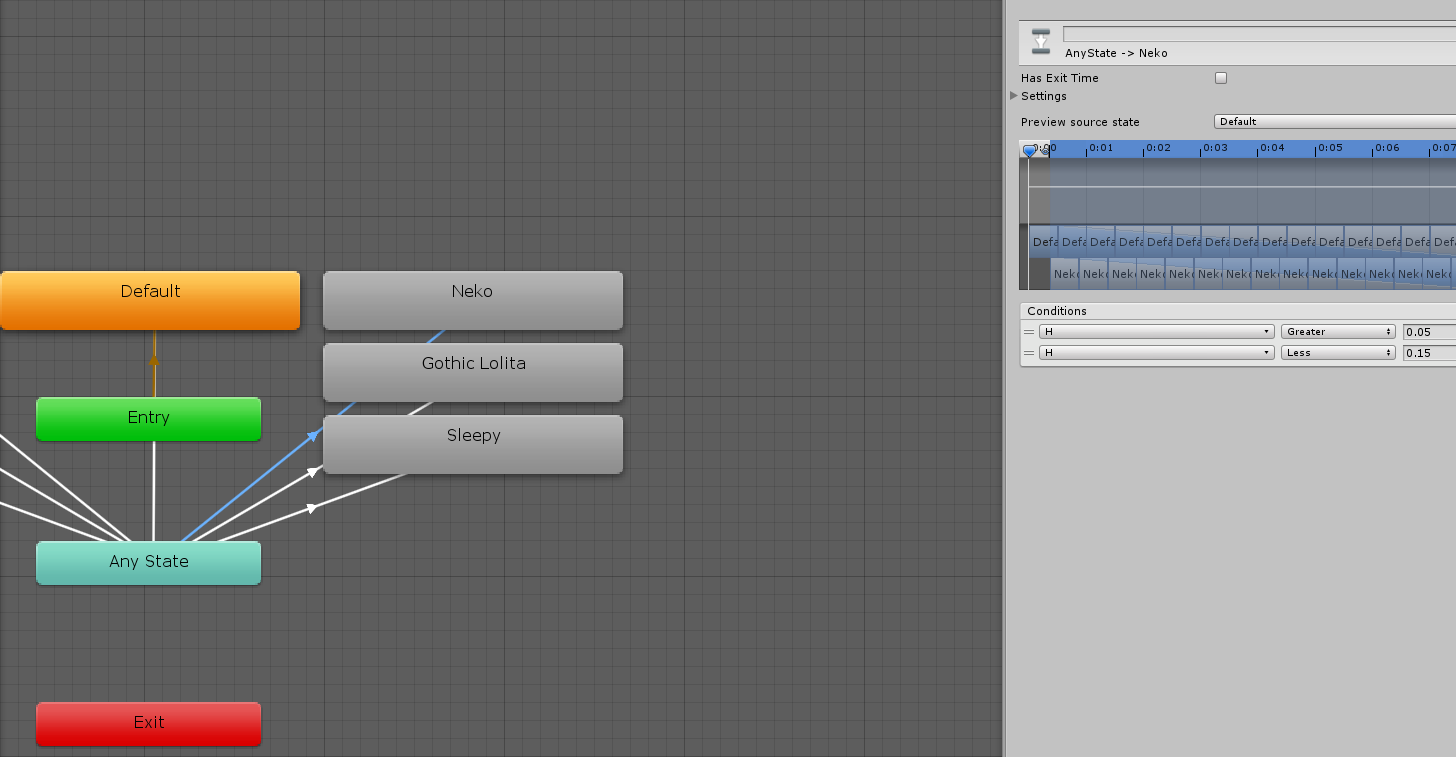
H is a float param
restive rivet
Here's what I did
https://cdn.discordapp.com/attachments/277243165478748160/741642428594782338/unknown-55.png
Ignore the size lmao I had the wrong compression, ended up at 5mb

Oooo
 final turtle
8k textures oof
restive rivet
A single 8k atlas, it's different
candid forum
That's pretty well done ✅
hasty hemlock
that's a lot of wasted space as you could move 2 textures to the top and cut the texture in half as rectangles are okay
restive rivet
Thank you ^^
candid forum
Yeah what are the blank ones?
candid forum
Ah alright
final turtle
I don't know, my old GPU shitted bricks whenever someone with 8k textures joined
candid forum
They probably didn't have just 1
They probably had 8k on like 16 different materials
God that's a nightmare
hasty hemlock
and most of them look like you could accomplish it with a color mask
restive rivet
If your clothes, body, face, hair and complements all have 8k textures... Big fat megarip
restive rivet
True, I'll look into it
candid forum
Well that would just be color changing
You seem to have slightly different lines and things
restive rivet
I may make a recolorable one, but some have different things on them so those would have to stay as textures
candid forum
It'll be extra work but one thing I always do for the sake of others is have a heavily optimized version of my avatar
Meaning no dynamic bones or colliders, no weird gifs or animated clothing, lower resolution textures and it's been pretty helpful in more than one instance
restive rivet
With so many unoptimized stuff out there, I try my best to optimize stuff as much as possible. I limited the dynamic bones as much as possible but a tail without dynamic bones looks a lil bit like shit lmao
All the clothes share the same mesh and texture for example, when I want a shirt with no arms I just use a shapekey to hide them
candid forum
Yeah 😂
final turtle
As long as it isn't 500 bone transformations with 300 collisions or something lmao
hasty hemlock
then you can just add a wiggle idle animation
candid forum
I worked on a model for so long and forgot to atlas stuff and I still haven't gone back to do it, it's only 13 materials so it isn't garbage but still
neon finch
im surprised that as 'unoptimized' as i am (using tesselation, 50 MB, 4k textures, tons of transforms and collision checks) i've yet to drop my own frames ever, and i play on a laptop, and yet, some randos in medium avatars with broken hacky SDKs drop me sometimes
restive rivet
People out there with like 60 materials be like
Haha upgrade pc
neon finch
i have a feeling you need to do something really bad to cause issues
i have something like 50 materials and 40 skinned meshes
restive rivet
Holy shit why so many
candid forum
Oh lord
neon finch
i seem to be a combination of things
neon finch
its for all the outfits and to customize them together
restive rivet
Oh god but that's A LOT of outfits
Some things gotta be sacrificed to not blow computers up
final turtle
I mean, it's unoptimized if you were to enable all of those things at the same time, which you probably aren't doing
candid forum
Hopefully that wouldn't be possible lol
hasty hemlock
like you might want to make your outfits into bigger chunks or have multiple avatars
restive rivet
Well that's true, but 40 is a lot agshfhf
neon finch
yeah, definitely not
i actually did this to avoid redundant uploads for slow net friendos
candid forum
Yea just for filesize purposes I'd have different avatars with different sets of outfits
I mean I guess yeah
neon finch
re-using parts on different uploads means re-downloading them
final turtle
50 MB isn't that bad right? If you forget the blendshape normal things you could get stuff over 200MB lmao
restive rivet
You have a point ngl
neon finch
50 MB is pretty big, i used to be way lower, but it adds up as i add outfits
candid forum
I don't understand why the default filesize limiter in 3.0 is 200mb that's so astronomically large, and I feel like it gives some people the impression that that's ok
restive rivet
Wait how can blendshapes push it to 200 what
candid forum
For Hecks sake turn blendshape normals to legacy
restive rivet
We had a big argument yesterday cause someone said this game is shit cause 200 is "TOO LOW"
What. The. FUCK
candid forum
Calculated makes it basically upload the avatar 1 time for every viceme
candid forum
So you get an avatar with 10x the filesize in some cases
neon finch
i need to audit my FBX filesize because
 foggy pelican
@restive rivet When unity calculates the blendshape normals (set to that by default) the blendshapes can be absolutely massive because basically a bunch of junk is added to the blendshapes.
restive rivet
Oh god
neon finch
oh oh, by the way, for people who dont know
candid forum
It also fucks with some avatars faces when they speak they might get dark for seemingly no reason
Its the blendshape normals doing that
neon finch
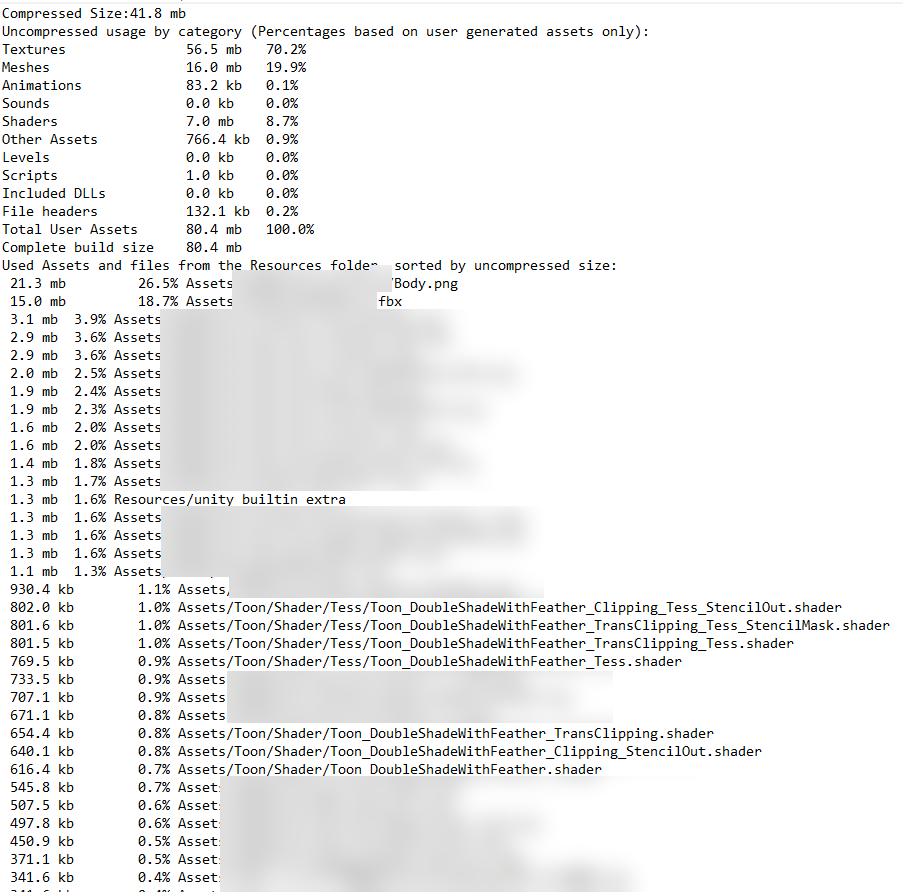
you can see the filesize contribution for everything on your avatar after uploading by checking the unity editor log
candid forum
And that's the filesize that people will download right?
restive rivet
Hopefully this will make people be careful about it, I had no idea how much my avatar weighted till now
I think so
candid forum
Yeah I've told as many people as I could, all my friends about that and it's saved us all a shit ton of time
foggy pelican
My avatars are all fairly small in download size. I also set the limit to like 80 MB immediately as much higher is pretty pointless imo
neon finch
https://i.gyazo.com/06307482093a8bd695f9868008a3f6fa.png the top size is the size people download, compressed size.
 restive rivet
It's important to note that this is not the size in memory, though
foggy pelican
I'm aware
restive rivet
Insane shaders and stuff may blow it up
candid forum
I don't know why it's not legacy by default, Ive yet to have an issue using legacy, and only issues with calculated
neon finch
that 21.3MB body is my only uncompressed 4k tex
those sizes are the uncompressed sizes tho
uncompressed as in not crunched
candid forum
All of my avatars filesizes are below 6mb ayyyy
neon finch
is there a way to check size in memory?
foggy pelican
Unity profiler
Note that crunch compressed textures use the same amount of space on the system RAM / VRAM as they did when they weren't crunched
candid forum
Yeah that thing will show you exactly what impact your avatar has in action
foggy pelican
Crunch compression just makes download faster
candid forum
Yeah so think of it as a zip file
neon finch
ya
candid forum
In the end it's still a 4k texture with impact
neon finch
the profiler accounts for a bunch of stuff though
turning the object of my ava on and off only removes "2" textures (obviously not true)
VRAM usage changes by about 55MB
neon finch
also says 0 draw calls....
candid forum
Remember switch blend shape normals to legacy and atlas materials pls thank u
neon finch
unity...