#udon-general
59 messages · Page 61 of 1
 vagrant schooner
 floral dove
Like if displayName.Equals("TheSoup")
vagrant schooner
what would i put the string node into?

 cold raft
something like this
 vagrant schooner
thank you
 dapper lion
whats the benefits between "swapping and teleporting a object pool" rather than using vrcobjectpool
 timber lion
I do have this problem. For now I just double check on the website to copy-paste / proofread patron names that have punctuation. Meanwhile working on an automated char replacement table for all these strange bois
 stark adder
timber lion
I do have this problem. For now I just double check on the website to copy-paste...
stark adder
timber lion
I do have this problem. For now I just double check on the website to copy-paste...
Yea I guessed.. I am kinda similar on it.. I can't imagine how painful it must be with 400+ people jeeez.. How do you deal with name changing ? I am guessing you just update the world with new patreons once a week or so ? I did that for a few months but then I just replaced it with automatic bot that does it all for me cause it was pain doing it with just about 100 patreons..
timber lion
Google survey to get patrons vrc names when signing up. Then an editor script to load them into the world and format the UI. Half of it is still done with direct messages though because I just like to say hello and thanks + other circumstances. It's not that bad. Sorry everyone for clogging up the recently updated row, that's why I mass upload on Monday mornings
stark adder
timber lion
Google survey to get patrons vrc names when signing up. Then an editor script to...
Ah yea I usually try to say hello and thanks too but then direct them to my discord bot to link their discord with VRChat, thankfully I do not have to upload the world cause I figured a way to get tons of data into VRChat from outside so I just do that.
Do you upload only recent/most played worlds with new patreons or all of them ? I am guessing just recent/most played otherwise it would really be pain updating it weekly with the amount of worlds you have. At least for me it would with my crappy connection to VRChat servers :/
timber lion
That's nice but I haven't found a way to list everyone's name via web that works with allow untrusted urls off
Most recent worlds within reason. Will start doing flair enabled ones only probably
 fiery yoke
timber lion
That's nice but I haven't found a way to list everyone's name via web that works...
fiery yoke
timber lion
That's nice but I haven't found a way to list everyone's name via web that works...
Avatar Pedestal Preview Image.
timber lion
Hey that's genius
stark adder
timber lion
That's nice but I haven't found a way to list everyone's name via web that works...
Yea Avatar Pedestals work perfectly you can transfer 1600*900*3 bits
timber lion
Might start doing that
fiery yoke
You only have so much data, so you need a few of them xD
stark adder
fiery yoke
You only have so much data, so you need a few of them xD
🤔 You can fit about 1000 people on there 😄
130K characters +-
stark adder
timber lion
Might start doing that
But yea be careful as quest has only 128*96 which means that you need to transfer the string of patreon to quest using manual Sync variable.
And sadly it also means that there needs to be at least 1 PC user in the history of the instance to download the list and send it to Quest
I have example here https://github.com/Miner28/AvatarImageReader (Slightly outdated just for concept)
timber lion
Oh so quest pedestals can't hold as much
Is that just a resolution thing? I didnt know there was a difference, never messed with pedestals
stark adder
Its to save VRAM probably.. That is my guess
stark adder
timber lion
Is that just a resolution thing? I didnt know there was a difference, never mess...
Yea so we figured out that when taking a world image in Unity the image takes is taken 1600x900px that is uploaded to VRChat and PC uses that as the avatar image
(pixel perfect). But for Quest it seems when they download the image through API they get 128x96px one it seems (down-scaled terribly) To upload the image though its best to use API and directly upload image through it.
I mean it is understandable I guess ? If Quest would download 200 1600x900 images in some avatar worlds they'd probably die real hard
stark adder
It works for Quest too but.. Yea has some issues as I said  Not sure what's the percentage of PC/Quest in your worlds. If there is at least 1 PC in each world's history. Also what I do is a BACKUP system basically it is backup patreon list which I update once a month which is used by Quest/PC if they are unable to download it.
timber lion
Yeah that is nice
 scarlet lake
I know im probably missing something but I cannot seem to find the option to create a Udon# script in my project, only C#, this is with the latest sdk3 for worlds and unity 2018.4.20f1
fiery yoke
Well...have you imported UdonSharp? 😅
scarlet lake
there is a separate package?? omllll
fiery yoke
UdonSharp is a C# to Udon compiler made by the community Member Merlin. It is not an official product of VRChat, so it is not included in the SDK. You need to download and import it yourself :P
scarlet lake
Ohh ok that makes much more sense now, I kept seeing it in tutorials with no explanation of how they got it and saw nothing about it in the official VRC docs
thanks ill have to look up the github or whatever it is for it now since I cant graph for my life
floral dove
scarlet lake
thanks ill have to look up the github or whatever it is for it now since I cant ...
It's linked in the pins on this channel
 dull gust
I have this Avatar that keeps sending me to my homeward why is that?
floral dove
dull gust
I have this Avatar that keeps sending me to my homeward why is that?
This channel is for questions about Udon, you can visit #faq to learn where to ask other questions
dull gust
Thank you
scarlet lake
How to read right controller joystick position
 vocal copper
Is it permitted for world creators to add malicious / game breaking logic to their world targeting other users? For example using UDON to target users based on their username and to not render anything for them. That way when the users join their world then these users will continuously fall and will have to restart the game?
cold raft
dunno feel free to read the ToS yourself
vocal copper
Well there is Section 12 Prohibited conduct
"f. upload to the Platform any software code, routine, or instructions that interfere with, or otherwise attempt to impair, the operation of the Platform, any user’s enjoyment of the Platform, or any ..."
My point is what would happen if world creators use their public worlds to just introduce game breaking behaviour?
stark adder
vocal copper
My point is what would happen if world creators use their public worlds to just ...
Your content will be removed
But I doubt that if you use it to just deal with very few number of people that are crashing other people in your world or using racial slurs or similar stuff anyone will do anything about it. As of now there is absolutely NO way to deal with those people and VRChat support just ignores them.. Cause there's too many of those 🙂
fiery yoke
vocal copper
My point is what would happen if world creators use their public worlds to just ...
People wouldnt go to those worlds then. At least those people that have a problem with it.
vocal copper
The thing is that I wasn't going to that world anyway. But having to restart my game I think is a stretch. Do I have to double check what world is a friend trying to invite me from every single time? My point is that they don't only make it inaccessible they lock you in continously falling loop. On purpose. There shouldn't be such a public world ever. That is abusing a vetting process where their world got made public and after the fact they introduced a malicious under the radar behaviour
scarlet lake
I guess if you find one like that, report it. World like that shouldn't make it out of labs.
fiery yoke
vocal copper
The thing is that I wasn't going to that world anyway. But having to restart my ...
Well thats a problem in how VRChats community labs system works, because you only need to get it through the process once, and you can then make any modifications, without having to go through it again. Which is reasonable for people that make frequent updates, but bad for people that abuse that fact. Ultimately you can always send a ticket/email to moderation@vrchat.com or use their new fancy ticket system (not sure).
Its not strictly forbidden afaik, but its definitely not "allowed" either. There is always a golden rule on the internet: Dont be a dick.
scarlet lake
please i have bug on vrchat can you help me ?
cold raft
maybe if you explain the bug
scarlet lake

In the begin, i saw the bug of new feature. It's not properly counted down and is stuck for a while on 3/3.
So i am forced to unfavorite another avatar, then it finally count down. I can add next avatar, but still wrong counted.
The bug fixed itself at later time with another avatar, because the counter is there correct counted.
Not sure the bu...
this
its happening on me
vocal copper
That is an almost 3 years old video of 6 and a half minutes long video in another language. Buy the fact that it's a 3 years old I mean that even if the symptoms are similar, the cause and details of the behaviour might have changed. Devs really really like details because they might be hint towards the root of the problem. Further I have no idea what the fav limit was back in 2018. Probably you would be better off crating a fresh video specifying exactly what we are looking at. What we should see and what we see instead. Then probably should head to https://vrchat.canny.io/bug-reports and raise it as a new bug.
 vapid jay
any way to VRCInstantiate something inside a specific transform, like the original Unity Instantiate?
cold raft
eught?> what?
 cunning mist
vapid jay
any way to VRCInstantiate something inside a specific transform, like the origin...
cunning mist
vapid jay
any way to VRCInstantiate something inside a specific transform, like the origin...
Once you instantiate it, reference that object's transform to set position and parent it. If in Graph, just drag out from the node to reference it and get it's transform. If in U#, say 'transform mything = VRCInstantiate(thingyes). transform;'
Then just reference mything.
 twilit epoch
I want to have a Audio Source to play, when the player is joining the world. I know that there was smoething like OnNetworkReady. But i can't find it anymore. Does anybody could just tell me the nodes to use? Thanks 💯
cunning mist
Players joining a world actually fire an event called OnPlayerJoined. Just do Audiosource.Play on that event and you've got it all set up 👍
vocal copper
fiery yoke
Well thats a problem in how VRChats community labs system works, because you onl...
What do you mean by "new fancy ticket system"?
 dapper finch
I read the wiki and I did exactly what it told me to but I'm still getting errors when I importing it... Some of it say I'm missing a Microsoft code analyzer.. someone says I'm missing a directory
And I tried everything to make this work and I did not understand why I'm getting so many different errors in trying to import an udon sharp list
If anyone had this problem before can you I would appreciate some help with the situation
cold raft
while usage of udon# is accepted, its a 3rd party addon that not maintained or supported by the devs
hence why Momo pointed you to the UdonSharp community instead
floral dove
dapper finch
I read the wiki and I did exactly what it told me to but I'm still getting error...
Sorry, Dragon Tamer - we can't offer support for UdonSharp here. You can try the Discord linked from that wiki.
dapper finch
Ok
 warm blade
Can i ask a unity world question in here ?
scarlet lake
I don't see why not :p
warm blade
Well you never know xD . the issue im having is an pain in the b** "error"
 floral dove
warm blade
Well you never know xD . the issue im having is an pain in the b** "error"
floral dove
warm blade
Well you never know xD . the issue im having is an pain in the b** "error"
Are you logged in? What are you trying to do?
warm blade
floral dove
Are you logged in? What are you trying to do?
Well i login trough the Control panel. But as soon i as i try to upload it, "says that error msg" when its at the end where the upload screen should be
floral dove
warm blade
Well i login trough the Control panel. But as soon i as i try to upload it, "say...
Is your SDK up-to-date? Can you upload on your account with another project?
warm blade
floral dove
Is your SDK up-to-date? Can you upload on your account with another project?
My SDK should be upto date - ill try to upload another
warm blade
warm blade
My SDK should be upto date - ill try to upload another
So it will let me upload a new project
scarlet lake
have you tried reimporting the SDK? Like deleting it from the project and reimporting it? Sometimes it can break~
warm blade
scarlet lake
have you tried reimporting the SDK? Like deleting it from the project and reimpo...
Yeah ive done that a few time aswell. D: , even removed the VRCSDK and the mega. and so on
scarlet lake
could it be an asset that is interfering with the sdk? do you have any errors on your console?
warm blade
scarlet lake
could it be an asset that is interfering with the sdk? do you have any errors on...
well so i thought aswell, but the only error is the login auth. but atm im trying to export my world. and put it into a new project xD
scarlet lake
I will keep my fringers crossed fren
 spare parrot
I've been trying to get my mirror toggle work, but it just doesn't. everything is the exact same way the toggle on the sample scene (except of course the game object is my big mirror) but when I go and test the world, it doesn't work. What should I do?
 earnest dagger
what is udon
 dawn forge
?whatisudon
 hidden martenBOT
VRChat Udon is a programming language built by the VRChat Development Team for use in VRChat worlds! It enables complex behaviors and logic in VRChat worlds. Read more about Udon in our documentation: https://docs.vrchat.com/docs/what-is-udon
VRChat
What’s this Udon thing anyways? VRChat Udon is a programming language built completely in-house by the VRChat Development Team. It is designed to be secure, performant, and easy to use via the VRChat Udon Node Graph, a built-in visual programming interface that uses nodes and wires (we call them “no...
scarlet lake
not sure if goes here, or other channel. But anyone know a good c# course on udemy or similar site that would mesh well with unity and udon for beginners? There's so many and I have no idea.
 pallid mango
Am I allowed to have a second event, that just does the last few actions of a much bigger event?

 grand temple
That should work, but make sure you're on the latest SDK as there were some bugs related to that fixed very recently
 twilit breach
How do you go about replacing a stations sit animation?
cold raft
The station has a property for animation overwrite in the unity inspector iirc
scarlet lake
Does anyone know why this is happening all of a sudden? I wasn't getting these errors before.. the triggers still work, but I am confusion.

 slate salmon
Hi, I just tried to use the keyboard udon example from https://github.com/CampbellCrowley/VRC-UdonSharp-Keyboard it works really well with windows build, but it seems it fails to work with Quest build.
What it was supposed to do is to send a network Event

GitHub
A keyboard for VRChat Udon written in U#. Contribute to CampbellCrowley/VRC-UdonSharp-Keyboard development by creating an account on GitHub.
grand temple
input fields don't work on quest
if you really want to dig into it, it should be possible to modify that prefab to not use an input field
grand temple
yes, but it would likely not work. You'll have to replace it with something else
depends how the prefab works, I don't know
slate salmon
actually it was just to facilitate the input, but I can rewrite it to not need input fields, thanks for the quick and expert advice 🙂
I needed it for an escape room coding to exit so input fields are not really needed
slate salmon
@grand temple thanks it works perfectly. I replaced every reference to input field with a private string and it is completely working from quest 🙂
grand temple
neat
 onyx tendon
question. does vrchat allow the use of vpns?
scarlet lake
onyx tendon
question. does vrchat allow the use of vpns?
yes, not sure why your asking here tho
onyx tendon
scarlet lake
yes, not sure why your asking here tho
oh wrong channel. my bad
scarlet lake
no problemo
onyx tendon
thanks though
 haughty nacelle
If I delete and reinstall VRC Ya think Id need to log back into it or would it be saved onto the pc when I load it up?
cold raft
prob re login
 acoustic vale
Any way to apply an image effect shader to every player in the world? Example the world is under the sea and I'd like a slight underwater effect?
acoustic vale
I've seen a few worlds that let you adjust bloom, colour temperature etc. But not sure if that's the same thing as just putting a shader on the view?
cold raft
thats post proccessing
acoustic vale
Ye, i saw the unity documentation for OnRenderImage & Graphics.Blit() but just a bit stuck on how to apply this in Udon
^ something else cool I'd like to write is a night-vision shader
haughty nacelle
I've discovered that it won't let me unfavorite avatars so I uninstalld vrc and re downloaded it and it's still not letting me unfavorite things. And I've discovered that me expressions are grayd out??????
I honestly have no idea on what's happening?
floral dove
haughty nacelle
I've discovered that it won't let me unfavorite avatars so I uninstalld vrc and ...
This channel is for questions about our scripting language - check #faq to learn where to ask other questions
haughty nacelle
floral dove
This channel is for questions about our scripting language - check <#38156539791...
Ty
 chilly crater
This is equivalent to transform.parent = null; , right?
 stark adder
Pretty sure yea
 celest iron
Im trying to make graph that checks if post-processing is enabled or disabled for player and keeps it disabled in both cases. Would I go about the same route of checking object like in late joiner or what?
 tribal meadow
OK I screwed this up royally, and edited the wrong script...attempted to rename/reimport and I have two scripts in the assets folder with the same Serialized Udon Program Asset ID....how do I assign one of them a different ID number?
 tribal meadow
Removed both versions of the script, tried to re-import it from the package, the modified one still comes back...I even deleted the files via file manager....I guess the only way is to manually put the script back the way it was?
scarlet lake
So I was trying to do something to an object like move it up and down with a slider. And when I searched about it, everything wanted me to write a script in c# and then put some udon behavious. Do you need to use c# scripts along with udon, or can you do anything you want with just the udon graph system?
 void ridge
tribal meadow
Removed both versions of the script, tried to re-import it from the package, the...
void ridge
tribal meadow
Removed both versions of the script, tried to re-import it from the package, the...
I don't follow what the problem is exactly, but if you duplicate a graph asset (or any asset, really) it will create an identical asset with a new ID
If you then delete the original asset, you effectively have the same asset with a different ID
tribal meadow
It's not doing that for some reason for me. I've even re-imported it from the original git hub download, and it' keeps coming back. This must be a Unity bug.
tribal meadow
I'll take another stab at it tonight when I have more time
twilit epoch
spare parrot
I've been trying to get my mirror toggle work, but it just doesn't. everything i...
Is it working now? Just a button to turn it on & off?
warm blade
Does any know where there is a quest supported video plyer?
scarlet lake
warm blade
Does any know where there is a quest supported video plyer?
nah but I know a person who made a video playing world for quest and they might be up for questions
its this guy who sent this random message I picked #quest-general message
"literally"
warm blade
scarlet lake
nah but I know a person who made a video playing world for quest and they might ...
Thanks for the info 😄 ill ask him a few then 😄
scarlet lake
np
fiery yoke
Generally Video Players work for Quest. However they only work with links to direct media files like .mp4. Furthermore Quest only supports certain codecs/formats, so it is really really limited. You cannot play Youtube videos from youtube urls or Streams.
pallid mango
Were synced animator states going to be a thing? I recall a sync animations checkbox in an earlier SDK
fiery yoke
Supposedly. They were "Coming Soon" for a while. Until even VRChat had to admit that that "soon" was a bit of a stretch.
You can technically make your own scripts to sync animation state, but its...well inconvenient
pallid mango
What does it involve, on a high level?
I might be able to figure it out if pointed in the right direction
Also are UdonBehavior arrays not allowed?
fiery yoke
pallid mango
Also are UdonBehavior arrays not allowed?
Well...UdonBehaviour[] doesnt work, due to a very particular bug in the code generation and how the UdonVM interprets stuff.
You can however use an object[] and cast when necessary.
fiery yoke
pallid mango
What does it involve, on a high level?
What?
pallid mango
You said manual animation sync was possible but incovienient
fiery yoke
Well yeah essentially you just have a script with a bunch of synced variables that are updated by the owner with the animator values.
 ashen verge
is it normal for an int value to be sent on noteoff messages along with note on while they are disabled and only taking ints from a noteon event? cuz i'm pretty sure it's either that or i'm somehow adding 1 to my 1 making a 2 for number of notes pressed even though i only hit key once and it released another noteon message when releasing key.. uhh
spare parrot
twilit epoch
Is it working now? Just a button to turn it on & off?
I got the button to work it U#, but for some reason it turns the mirror off and on for everyone in the world instead of just one player
 wanton palm
Is there any way to play a video at a certain framerate? I'm trying to use udon video player for a video that I encoded to be 1/5 frames per second but in vrchat it goes very fast
ashen verge
you could try using some image rendering method that takes int as input and just use it to control each keyframe on an animation? i guess lol
pallid mango
what is the proper way for a pickup to reference the player currently holding it?
cold raft
The owner, I am pretty sure the owner is set to who is holding it ( or last interacted with it)
 cold raft
I dont know that property
pallid mango
How do you get a player's current view position (for raycasting)
cunning mist
pallid mango
How do you get a player's current view position (for raycasting)
OnPickupUseDown only ever fires for the person who is locally pressing that pickup, so you're safe just accessing the local player for that one. To access their head for raycasting, use GetTrackingData from that player to get position and rotation. To get the actual direction the player is looking in for the Raycast, just multiply their head's rotation by Vector3.Forward.
 floral dove
pallid mango
floral dove
pallid mango
currentPlayer and getOwner should both return the same player
cunning mist
floral dove
currentPlayer and getOwner should both return the same player
With getOwner being a check on the network data, would currentPlayer technically be more efficient? Or do they reference the same information?
scarlet lake
can someone help me on how not to gte headaches on my oculus quest 2??
floral dove
scarlet lake
can someone help me on how not to gte headaches on my oculus quest 2??
this channel is for discussion of our Scripting system for VRChat. Visit #faq to learn where to talk about other things
scarlet lake
oh sorry
floral dove
cunning mist
With getOwner being a check on the network data, would currentPlayer *technicall...
as far as I can tell, currentPlayer checks the sync component on the Pickup and returns its owner. There's a separate path for non-synced Pickups that get the VRCPlayerApi component on the VRCHandGrasper object currently holding the pickup. In either case, the method incurs a single GetComponent call. I suppose you could make a non-synced pickup and then want to use the .currentPlayer property, so that might be the 'most correct' way since it would work in either case.
However, you're making fewer calls if you check the owner of the Pickup directly instead of calling on its currentPlayer, so for a synced pickup, that may be a more performant route.
pallid mango
How do I connect a layermask?
 cunning mist
Gotcha. And this was entirely out of curiosity, though mostly because I wanted a reason to use one over the other.
scarlet lake
I'm gonna ask it again cause there wasn't an answer last time. So I was trying to do something to an object like move it up and down with a slider. And when I searched about it, everything wanted me to write a script in c# and then put some udon behavious. Do you need to use c# scripts along with udon, or can you do anything you want with just the udon graph system?
cunning mist
pallid mango
How do I connect a layermask?
Layermasks would be variables, so just make a public one, set it in the inspector, and connect a reference.
 pallid mango
thanks
cunning mist
scarlet lake
I'm gonna ask it again cause there wasn't an answer last time. So I was trying t...
Anything functionally is possible in both UdonGraph and UdonSharp. It largely just becomes preference. I use both for tutorials, but I work much faster with my keyboard than my mouse, so I tend to use UdonSharp. What you're describing can definitely be done in UdonGraph though!
scarlet lake
Good, I suppose. Now I just need an udon graph course. Cause I have no idea what anything does or what to use when I think of what I need.
I was doing a c# course because of that, and all I got out of it was WAH WAH WAH WAH as the guy talked ant not really taught me anything
the fundamentals course was basically assuming I knew everything about c# already, so it wasn't helpful at all
cunning mist
VRChat has some good tutorials on breaking down what Udon is and how it works, and I have some walkthroughs for setting up some basic things using the system.
https://docs.vrchat.com/docs/what-is-udon
https://youtu.be/ibDu0dCeUE8
VRChat
What’s this Udon thing anyways? VRChat Udon is a programming language built completely in-house by the VRChat Development Team. It is designed to be secure, performant, and easy to use via the VRChat Udon Node Graph, a built-in visual programming interface that uses nodes and wires (we call them “no...
With the recent Udon updates, some of the basics have changed, so here's my most basic tutorial redone with the new editor, and not recorded at 2am! If I get enough requests, I'll redo my "Contextual Buttons" video as well, which will give me an excuse to just rename them "Event Buttons" which actually makes sense.
00:00 - Intro
00:20 - Udon Gr...
scarlet lake
I watched all that stuff, but to make anything from my own, it isn't a big help. I know what I want to do but I have no idea what things to use to do it.
Sure I can follow along to make a door that slides up and down when you get close to it. But I'll have to look further to find out what everything means/does. To know what I need when I need it.
More research on my part, is all. But good to know I don't need to make c# scripts as well as udon graphs.
pallid mango
cunning mist
Layermasks would be variables, so just make a public one, set it in the inspecto...
I made it a public varible but it still won't connect, wrong color?

Trying to connect it to Physics.Raycast
cunning mist
scarlet lake
I watched all that stuff, but to make anything from my own, it isn't a big help....
The idea for your system actually has a good number of basic, though not exactly intuitive things. In order to make a slider do something, that slider needs to have an UdonBehaviour target in it's OnValueChanged section, and from the drop down use SendCustomEvent so we can call an event we want, which I've called "SetPosition". Hopefully this should help you get a start 👍
 scarlet lake
Oh it's not something I want to do, just an example
cunning mist
pallid mango
I made it a public varible but it still won't connect, wrong color?
Oh uhhh
So it's looking for an int lol
 scarlet lake
I saw momo typing and I thought I would say that I watched all the udon videos last night and your voice in each is completely different. It made me laugh.
pallid mango
cunning mist
So it's looking for an int lol
...Oh.
cunning mist
That one wasn't intuitive lol
floral dove
scarlet lake
Oh it's not something I want to do, just an example
The closest thing we have to an Udon Graph Course would be the UdonExampleScene and docs: https://docs.vrchat.com/docs/udon-example-scene
And our Learning Udon playlist: https://www.youtube.com/playlist?list=PLe9XHNvXcouQjg5GULWGLj1tMzeythnQi
floral dove
scarlet lake
I saw momo typing and I thought I would say that I watched all the udon videos l...
yeah, still finding my voice. Also experimenting with different mics and noise removal, etc.
scarlet lake
yea I watched all of those, I might use the sliding door thing but as for knowing what to use when. I dunno. I'll have to look at a page that says what each thing does what. I guess.
cunning mist
I do all my noise removal in post, outside of literally turning off my fan
scarlet lake
I have a sound booth for my recording. With good mic. No removal necessary.
cunning mist
And yeah, you're never going to feel like you know more than half of what is out there. Programming will always be a deeper rabbit hole than you expect it to be. All you have to do is go far enough down to know what you need to and not a foot more or you'll literally just fall down and go insane
scarlet lake
like my next thing will be rock skipping, that should be interesting
cunning mist
scarlet lake
like my next thing will be rock skipping, that should be interesting
JokerIsPunk actually just showed off his rock skipping world during this Sunday's community meetup. It might be worth asking them a few things, and I'm pretty sure they also use Graph.
Here's the part of CyanLaser's stream where we went to his world.
https://youtu.be/Ik-HC5NGeQc?t=4400

Community Meetup discord: https://discord.gg/KEdTDFq24T
VRChat Discord: https://discord.gg/VRChat
Every Sunday at 1 pm PST/4 pm EST the VRChat world developer community get together to show off what they are working on. See some of the interesting new worlds people are creating and will hopefully release soon.
CyanLaser#4695
scarlet lake
Then my next idea is to rock skip, but have it 3d print on someones 3d printer, then launch at them when completed
cunning mist
Beautiful
scarlet lake
fortunately I have a friend with 3d printer so it will be fun
tho it could be used for evil, printing knives to launch at people
 rough geyser
So I'm working with this graph to check whether or not a bool value is true or false, and when the button is pressed the values are flipped so that users can deafen their voices when the button is pushed, and undeafen when it's pushed again. Anyone know what could be wrong with this graph?
 floral dove
rough geyser
https://gyazo.com/16be02bf3ecf6efbfeadb75ff90cfc51
floral dove
rough geyser
https://gyazo.com/16be02bf3ecf6efbfeadb75ff90cfc51
what is happening when you use the graph vs what you expect to happen?
btw, you've over-complicated your logic quite a bit. Since you're already branchin on 'OnOrOff', you don't need to check the value of that variable and flip it in order to set it to the new value. In the 'Set OnOrOff' nodes after your branch, you can just use the built-in checkbox to set whether the new value should be true or false. That will be a good start towards making your graph a bit more straightforward and readable.
 sullen grove
I want to use Udon to rotate an object when someone picks it up and rotate it back when they drop it. I played around with the nodes but do not see an obvious way to rotate something. Does Udon support this?
floral dove
sullen grove
I want to use Udon to rotate an object when someone picks it up and rotate it ba...
how about Transform.Rotate?
if you're using a VRCPickup component, you may want Rigidbody.Rotate instead
sullen grove
Thanks. Let me try that.
rough geyser
floral dove
what is happening when you use the graph vs what you expect to happen?
Well, to be honest, nothing happens x'3 That's the main issue, but let me try and clean that up and see if that fixes it (If I can find it)
sullen grove
@tidal night Did not think of trying a generic Transform. This looks very promising. Thanks.
rough geyser
floral dove
what is happening when you use the graph vs what you expect to happen?
https://gyazo.com/bee70a6e4e43712e881fef35184efd8a This is what just the "Set OnOrOff" node has, no checkbox, I know that it's in the variable field but I want it to "flip" every time the button is pressed. https://gyazo.com/e31bfa26e3396e3f91e18edab5689212


I just expect that when I hit the button, the player who pushes it will have their voices muted to a lower radius, and when pushed again, it will reset to the default VRC values. It does nothing, currently. I'm actually trying your below right now, loading in currently.
floral dove
ah right - you can use bool const nodes to make it clearer then:


 tidal night
sullen grove
<@745034040155045999> Did not think of trying a generic Transform. This looks v...
tidal night
sullen grove
<@745034040155045999> Did not think of trying a generic Transform. This looks v...
Excuse me why did you ping me?
rough geyser
floral dove
ah right - you can use bool const nodes to make it clearer then:
Didn't seem to change anything, I might have to drill down a little with some of the stuff for players. See what's going on is I currently have a Trigger box that collects the player ID of the person who steps into the trigger box, setting their voice low. However, there is a huge inconsistancy of how often this works so I wanted to try and make a button that gets the player ID and then changes it manually that way, instead of relying on inconsistant trigger box events. Would the problem lie in the instance I'm using for the "Set VoiceDistanceNear" area, with "Get LocalPlayer"?
floral dove
Yes, that's likely. Take a look at the docs - this changes how you hear other player's voices - so it looks like you're changing how the player hears their own voice, which won't do anything.
https://docs.vrchat.com/docs/player-audio
rough geyser
That would make a little more sense then...
Let me do some digging here.
I need to find out how to get the playerID of the person who hits the button, is the primary thing.
floral dove
sounds good. The UdonExampleScene used to have an example of this but it was dropped in the UnU merge. You may be able to grab the example from an older VRCSDK package if you have one.
floral dove
rough geyser
I need to find out how to get the playerID of the person who hits the button, is...
rough geyser
floral dove
https://docs.vrchat.com/docs/getting-players#get-playerid
Searched that, but I can't seem to find one that gets the ID of the person who hits the button specifically, unless I'm missing something with "GetPlayerID" or being forced to use Player Tags somehow for it.
floral dove
rough geyser
Searched that, but I can't seem to find one that gets the ID of the person who h...
When someone presses something and fires 'Interact', it only happens on their machine so they are the LocalPlayer. You may want to read through the networking docs.
rough geyser
Hm. Aighty. I'll go take some looksies in on it, see if I can't find something around that might do it.
I know I have the other one currently set to a networked event and that functions properly with the trigger box, so might try that.
 feral merlin
I am brand new to udon and need some help
I have 2 buttons, one for an optimized mirror, and one for a high quality mirror
I want the lq button to activate the lq mirror and the hq button to activate the hq mirror. however, if the lq mirror is active and the hq button is pushed, i want it to deactivate the lq mirror. does anyone have a good way of doing this?
floral dove
Give each button a reference to both mirrors, have the LQ button turn LQ mirror on and HQ mirror off. Have HQ button turn HQ mirror on and LQ mirror off.
feral merlin
floral dove
Give each button a reference to both mirrors, have the LQ button turn LQ mirror ...
Could you help me troubleshoot this?

This is what I have now
floral dove
Ok, instead of always flipping the state of setActive, have this program always do SetActive(true) for the HQ mirror and SetActive(false) for the LQ mirror.
feral merlin
But I DO want the button to disable the mirror if it is active
I.e. the HQ button is pressed while the HQ mirror is active, it disables the HQ mirror
floral dove
Ok
So then have this graph SetActive on the LQ mirror to the opposite of the value you're using for the HQ mirror.
feral merlin
But then wouldn't the LQ mirror turn on whenever you want to turn off the HQ mirror?
fiery yoke
On the HQ Button: Always turn off LQ, Toggle HQ (like youre doing it already)
Then vice versa on the LQ button
That will ensure that there is always just one mirror on at a time at maximum, and clicking the button for the mirror that is already on, will turn it off.
feral merlin
Yeah that's what I was thinking, I just don't know how to implement that
I know virtually nothing about Udon and just followed a youtube tutorial to even set up that button
fiery yoke
Well you basically just need a another SetActive node with a const boolean that is false.
Then you feed in the LQ to that SetActive node
feral merlin
But the interact event can only go to one thing right?
fiery yoke
You can either use a block, or use the arrow that comes out of the other SetActive node (which is what I would recommend)
feral merlin
Yeah when I move the arrow to another set active it gets rid of the first one
fiery yoke
There is a white arrow that points to the right, at the right side of the SetActive node. Essentially the one on the left is an "Input" and the one on the right is an "Output"
feral merlin
Right
fiery yoke
It goes through the input, then does whatever that node tells it to do. And then continues through the output.
floral dove
BTW you can check out the UdonExampleScene and docs for lots of examples of how the different nodes work: https://docs.vrchat.com/docs/udon-example-scene
VRChat
This scene is ready to Build & Test or Publish, and it demonstrates many common interactive items. Prefabs These objects show off some of the Prefabs included with the SDK which demonstrate default interactions with the VRChat components for Avatar Pedestals, Stations and Mirrors. AvatarPedestal...
 fiery yoke
Yeah that should work
feral merlin
Sweet!
Then just duplicate this and switch the variables for the LQ mirror button yeah?
 valid basin
How do i keep pickups from being taken outside of a certain room?
 hallow sable
does anyone here use NorixWolfe's
Udon Video Player
had a question about using it on lights?
bc it comes with a video render for lights.asset but idk how to use it
 torn pendant
Hi does any body know how to set up a simple
on player local - if player enters collision -Audio plays.
audio plays locally
pallid mango
torn pendant
Hi does any body know how to set up a simple
on player local - if player enter...
 fiery yoke
You can simplify that a little bit by using VRCPlayerApi.get_isLocal
 torn pendant
thank you
torn pendant
pallid mango
im confused where do i get the branch?
pallid mango
I just hit space bar and type branch. Make sure the cursor isn't hovering over a node or the search feature is filtered to methods of what you were pointing at.
Branch is Udon’s 'If'. I've never seen it called Branch before Udon
torn pendant
ohhh found thank you!
floral dove
pallid mango
Branch is Udon’s 'If'. I've never seen it called Branch before Udon
It's odd from a C# POV but typical for flow control: https://docs.unrealengine.com/4.26/en-US/BlueprintAPI/Utilities/FlowControl/Branch/
Branch
fiery yoke
Technically an "if" usually causes a branching in the flow of execution. The CPU then has multiple "paths" to go down. Thats why its called a Branch.
pallid mango
I think it's a more suitable name. I just have years of thinking of it as an if
This is my first time working with node / flow visualization. Finding it hard to keep things organized once it gets big. Are there best practices for when you get a really big graph?
It seems to get unmaintainable to me
fiery yoke
Well ideally Sub-graphs
but those have not been addressed at all since forever, so no idea if thats even still on the "SoonTM-List"
pallid mango
I'm guessing that's like make group in blender shader nodes?
Turns it into a black box?
fiery yoke
Well not quite, but yeah. Essentially its what allows whats called "Abstraction".
When you build a machine that takes some input and produces some output, then you dont need to know what the machine looks like on the inside or how it works, when you want to use it in a bigger machine. So you hide the implementation and only the interface remains.
floral dove
pallid mango
This is my first time working with node / flow visualization. Finding it hard to...
Groups and comments, splitting into smaller re-usable graphs when possible. You can see the Udon Sync Player graph for some big groups, it check out the Sketchbook Jam programs which were split up a bit and heavily grouped.
pallid mango
Are there downsides to splitting things into multiple udonbehavoirs? (1 behavior with 2 events vs 2 behaviors with 1 event)
fiery yoke
Well performance. But unless you notice performance being bad you should never really optimize for it, unless you can definitely predict that performance is going to be an issue with your implementation.
Ideally you should always do what makes sense to you.
pallid mango
And are custom events the main way to 'send information' to other behavoirs? I've been relying heavily on it, not sure if there is meant to be a different way
fiery yoke
pallid mango
And are custom events the main way to 'send information' to other behavoirs? I'v...
Nope that is exactly how they are meant to be used. Besides variables.
pallid mango
Ok. Feeling a little more confident then that I'm not doing everything wrong
 hearty isle
Hello,
Is there a guide located anywhere or a script or setting to add sound boost pads in SDK3 worlds? The areas where you stand and it boosts your mic volume and range, used for DJ like events?
dapper lion
hearty isle
Hello,
Is there a guide located anywhere or a script or setting to add sound bo...
https://twitter.com/GuriboVR/status/1407043519986941956 highly suggest checking this out

Added privacy channels/zones to BetterPlayerAudio for #VRChat. Coming soon. #MadeWithUdon https://t.co/P3ds9TBTLP
Likes
134
 Twitter
·
hearty isle
dapper lion
https://twitter.com/GuriboVR/status/1407043519986941956 highly suggest checking ...
Twitter
·
hearty isle
dapper lion
https://twitter.com/GuriboVR/status/1407043519986941956 highly suggest checking ...
Sadly this is showing "coming soon" but my little show is tonight, I forgot my map maker hasn't worked with udon sound stage volume yet! Wops.
dapper lion
still highly suggest you check it out, the mic system works pretty well
hearty isle
dapper lion
still highly suggest you check it out, the mic system works pretty well
In current form?
dapper lion
yes, not sure whats incomplete about it? zones should also be easy to set up. i think theyre just building the prefab for it
 sharp vigil
I hope I'm not interrupting anything, but I'm working on a world with slime enemies and I was able to program them well enough to the point where they will die after being attacked with swords. But instead of just having them do the die animation and just sitting there I'd like them to despawn if that makes sense. I don't want a bunch of slime corpses all over my map so is there an inverse to this spawning that would assumedly get rid of objects after a certain trigger. Preferably it would be for udon graph as that's already what I used to program all the health and animation for the enemy.
hearty isle
dapper lion
yes, not sure whats incomplete about it? zones should also be easy to set up. i ...
Oh i see now I found the github makes more sense.
Thank you
floral dove
sharp vigil
I hope I'm not interrupting anything, but I'm working on a world with slime enem...
You can call SetActive(false) on their GameObjects to hide their renderers and colliders. We don't recommend spawning/destroying objects as they will not sync.
sharp vigil
What if I didn't need it to sync. The instantiate handles spawning just fine for spawning local items, and thats all I intend it to, but what about locally getting rid of them too. I was just wondering if there is a counterpart to the instantiate function that would do the inverse.
cunning mist
That would be Destroy
Please don't Instantiate and Destroy 😦
These are not what we would call "efficient" or "performant" things for you to do.
sharp vigil
Hmm if thats the case I guess Iook for workarounds. I just figured instantiating and destroying the enemy one by one would be more performant than having a ton of prespawned slimes. But now that I think about it I could probably set them to be inactive once they die and while there meshes aren't rendered have them move back to a spawning area to effectively "spawn" which would just be setting them active again
floral dove
sharp vigil
Hmm if thats the case I guess Iook for workarounds. I just figured instantiating...
you're making a 1-player world with enemies? If you're using Instantiate, then nothing about the enemies will sync for other players.
You can use an ObjectPool to manage them instead: https://docs.vrchat.com/docs/network-components#vrc-object-pool
cunning mist
Object pools would be phenomenal for this, though if you're going for single player then VRC's Object Pools are networked only, so you'd have to make your' own.
sharp vigil
Ok I think I got ideas on where to go from here thanks you two. Oh and I've been using tutorials on youtube from you two to learn udon and U#, Im already 2nd week in and I've been learning a ton, super helpful, thanks again. 😄
spare parrot
I really don't understand why, but I can't get a simple mirror toggle to work normally. I thought I had gotten it to work, bu using a scrip that came with udon sharp, but that was a global toggle, so not what I want, since mirrors should really be local. When I tried making the toggle from scratch following tutorials, it didn't work. Basically when i went to test it, it just wouldn't show my button as a thing I could interact with, even tho I had set up everything exactly the same way as in the tutorials (I had a collider, all the nodes were correctly connected, ect) and when I tried the script that came with the sdk3 (ToogleGameObject) it wouldn't work either (Wouldn't make the button intractable). I have no idea what I'm doing wrong or how to fix this.
floral dove
spare parrot
I really don't understand why, but I can't get a simple mirror toggle to work no...
Does the one in the UdonExampleScene work correctly for you?
To make an object Interactable, it just needs a collider on its GameObject and an Interact event in its program.
 opal dew
disappointed to discover lightmapping is not yet exposed in Udon :C
 wanton oxide
what do you need it for?
cause so far i've found workarounds for all my lightmapping needs, maybe one of them is useful to you :P
 atomic sinew
Is the player names exposed in udon? For example using name plates tracking data
atomic sinew
sorry kinda typo, i mean player name plates*
dapper lion
could do the head bone and use some contrainer magic and some other tracking magic
 tropic atlas
so I'm using udon sharp, how do I execute a method in there?

 coarse parrot
tropic atlas
so I'm using udon sharp, how do I execute a method in there?
coarse parrot
tropic atlas
so I'm using udon sharp, how do I execute a method in there?
Put method name in that input. Your method have to be declared as public void MethodName()
tropic atlas
just figured that out, is it possible to pass in a variable too?
coarse parrot
Currently no way to do that. You may have to link caller game object to that udon behavior so it can read the parameter from the caller object.
 chilly aspen
Is there a way to change font type using rich text? <font="Arial">Hello World!</font> works in the editor, but when I build/test it doesn't work.
cold raft
maybe that font is not actuall loaded by vrc
floral dove
chilly aspen
Is there a way to change font type using rich text? <font="Arial">Hello World!</...
Did you get any errors?
It looks like that tag is not supported for UI text: https://docs.unity3d.com/Packages/com.unity.ugui@1.0/manual/StyledText.html
But it is supported for TextMeshPro fields: http://digitalnativestudios.com/textmeshpro/docs/rich-text/
Rich text documentation for TextMesh Pro.
 copper thicket
i have current question:
i'm trying to make a visualizer for the audio source that hat 3D blending and i'm using GetSpectrumData to get the results but problem is it includes falloff so the results get "quieter" as a get further from the source (seems to be a unity behaviour)
i tried to make a dummy audio source that would have 2D blending and would output to nothing, that is having it output to audio mixer i've created but what i see is that vrchat takes control over the output variable because i end up hearing both 3D and 2D sound (failed workaround)
is there any other way to get it working?
 half walrus
I just started with Udon today, but I wanted to do a simple bring key to lock to open mechanic. But I don't quite know where to start with it.
pallid mango
Under what conditions would you make a udon variable that isn't public? Just curious about the use-cases
Is it even possible to assign scene content to variables if they aren't public?
fiery yoke
pallid mango
Under what conditions would you make a udon variable that *isn't* public? Just c...
Public Variables are:
a) editable in the inspector
b) serialized into the UdonBehaviour component.
Make of that what you want.
pallid mango
Yeah in my head it’s sort of required to be useful but maybe I’m just not thinking about it right
floral dove
half walrus
I just started with Udon today, but I wanted to do a simple bring key to lock to...
how about here: https://docs.vrchat.com/docs/getting-started-with-udon
 snow arrow
Is there a way to separate audio areas in a map so that I can have avatar voice only audible while you're in a say box collider? Not sure if theres a tutorial for this somewhere.
I was led to believe this was possible
torn pendant
onplayerEntertrigger doesnt seems to work on vehicles like planes if your riding them.
anybody knows a simple way to activate this.
PlayerLocal on vehicle- on enter trigger collision - plays audio.
dull gust
Will Udon make shaders more compatible for quest?
chilly crater
If I want to set a Vector3 array of saved positions that won't change for the life of the world instance, should I do an IsMaster check when I set it?
I was going to UdonSync it so newjoiners will get those values too.
Or would it be more network performant if I make each object a child of a unique parent and set their localposition to 0,0,0 when reset is called?
 junior hornet
hey everybody, I just started to learn udon. Is there anyway to communicate between udon scripts? e.g. in Unity, I could have monobehavior A & B. Monobehavior A could call into public functions of B, along with arguments, as long as it had a reference to the gameobject. From what I can tell, Udon seems to provide no real way of doing this. There is the SendCustomEvent, but it has no way to pass arguments.
wanton oxide
are you using udonsharp?
if yes, you can do exactly what you can do with monobehaviours
including parameters
if no, use udonbehaviour.setprogramvariable
you'll be able to set public variables on the target udon behaviour (no function parameters tho)
junior hornet
I just started using udonsharp, how would you be able to do this? Doesn't the udonbehavior hides the undonsrharp underneath?
I wouldn't be able to do something like UdonBehavior.MyMethod()
wanton oxide
udonsharp has some magic under the hood compiler stuff
that makes it so you can do just that
wanton oxide
np
junior hornet
System.Exception: 'UdonBehaviour' does not contain a definition for 'FooBar'
Ya... no go
am I suppose to cast it something specific first?
junior hornet
ok, I see, you need to have established references to your UdonSharpBehaviors.
 quaint crystal
hey, does anyone have a tutorial on how to make a player able to interact with another player on touch
dapper lion
wdym?
dapper lion
i dont think theres a tutorial for that. itd be a bit of complex setup to go over
 fading cipher
It's ocnfirmed to one day
dapper lion
thatd be a weird system
fading cipher
Not that specific system, per say
quaint crystal
is there at least a combat tutorial
fading cipher
But player trackers or player "variable holders" are confirmed to be supported natively in the SDK one day
And you could totally use that system to write a player-based trigger system
dapper lion
fading cipher
But player trackers or player "variable holders" are confirmed to be supported n...
wait what, brooooo. thatd be too easy lol.
fading cipher
It's not impossible to write either- we use player trackers for everything right now...
dapper lion
ye player tracking is fun
quaint crystal
is there a tutorial for one of those?
quaint crystal
thanks
dapper lion
i also made a "no more bs" toggle system that could be used for global events... but pooling trackers for clients so it does the triggering would be the part i wouldnt know how to do
 fading cipher
😆
ashen verge
each time a midiNoteOnEvent is triggered it does what it's supposed to do but it also is done again on note off event though i'm not accepting noteoff messages, it's all hooked into noteOnEvent but fired on press and release. any ideas how to fix that?
-- do a velocity!=0 check from midi note on event before continuing code.. oof
 sick tangle
dose doing toggles with boolean not work anymore or am i being dumb cuz i cant seem to get it to work anymore
cunning mist
Works fine, are you making sure to use UnaryNegation on it's present value?
sick tangle
idk what unary UnaryNegation is but i know the way i have been doing it forever now is just not working anymore
floral dove
ashen verge
each time a midiNoteOnEvent is triggered it does what it's supposed to do but it...
some midi software & devices send note off events as 'note on' events with a velocity of 0, it's a bit up to the creator of the midi signals 🤷
floral dove
sick tangle
idk what unary UnaryNegation is but i know the way i have been doing it forever ...
How are you doing it? It's not working in the client or in the editor?
sick tangle
it is just the basic vrchat sdk 3 stuff in the animator
its just a idle state and transitions to the toggle witch is set to true and then transitions back to the idle witch is set to false i have been doing it on the past 5 avatars i did and now it just wont work
 floral dove
sick tangle
its just a idle state and transitions to the toggle witch is set to true and the...
floral dove
sick tangle
its just a idle state and transitions to the toggle witch is set to true and the...
ah - this channel is for questions about Udon, our scripting language for worlds. It looks like you're looking for help with Avatars. You can try #avatar-help
sick tangle
o crap you right my bad sorry
floral dove
no wonder Unary Negation left you like WUT
 idle flare
Have been banging my head for hours cause I cant get a simple button to work in this project. I do not know why but when I go into runtime the buttons clear out their stuff and come back after going out. I know the Udon portion itself is working tho since using CyanEmu I can play it. Just dunno why my buttons are all screwed up or idk
idle flare
yea its the same thing and I dont know why my buttons are shoving out stuff during runtime
grand temple
Could you share any details about how it's set up?
idle flare
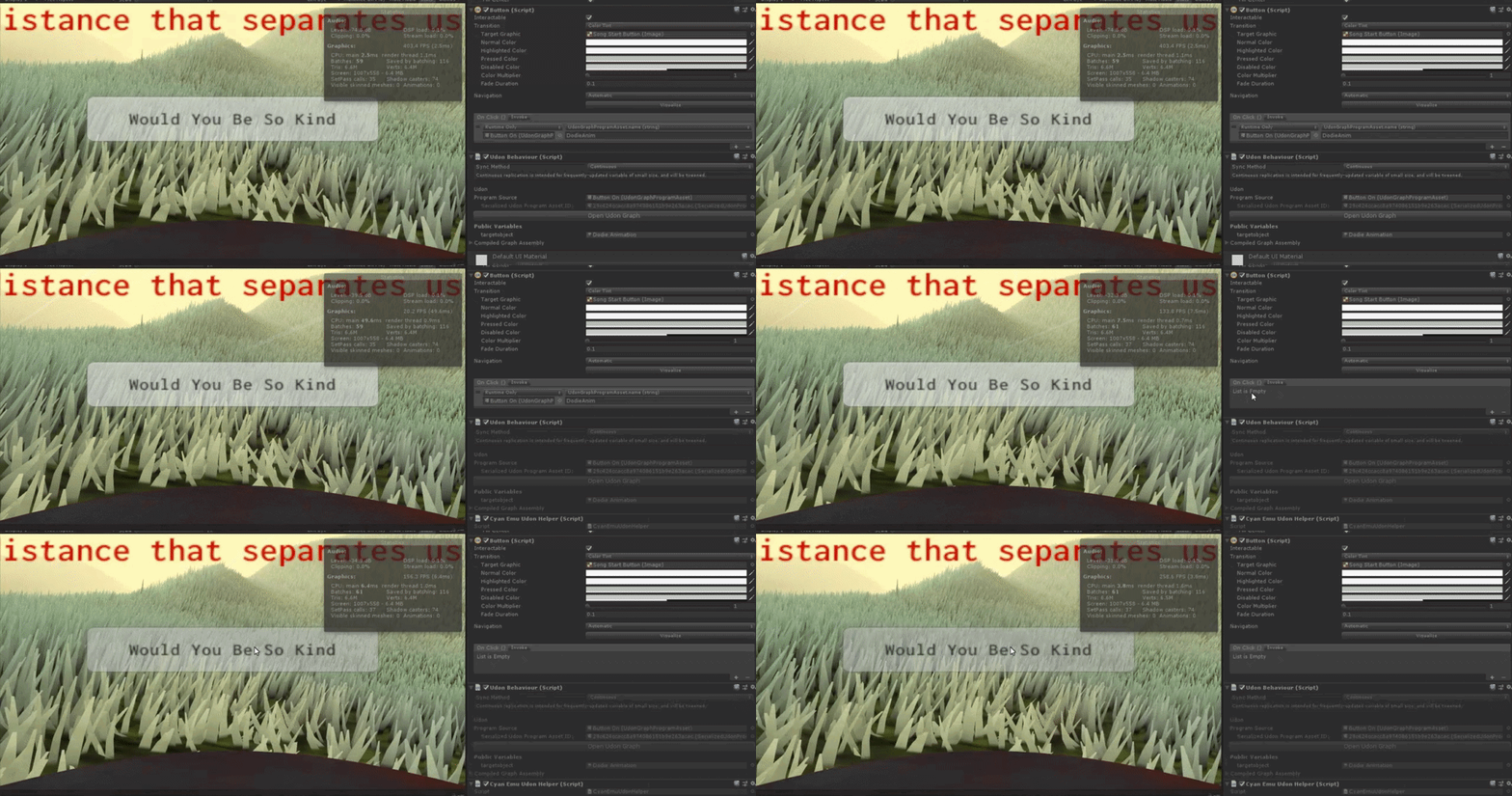

as simple as it needs to be I think but ye, can see in that gif how when I click play it says Ive got nothing attached to button
grand temple
the button isn't set up correctly. you currently have it set to "udongraphprogramasset.name" which is not something you can modify. You probably want sendcustomevent instead
 chilly crater
The script has to be on an object, right?
grand temple
for some reason the target is locked on the udongraphprogramasset, not sure how that happened but try replacing the thing on the left
ohh I think you dragged it from the assets tab. That's not what you want. Instead you should drag the gameobject that the script is on
idle flare
ahh, havn't viewed this project in ages and updated my sdk and it put it as that :shrug: Gonna try that.
chilly crater
I love UI buttons. You can have ALL of the button events on one script.
idle flare
grand temple
ohh I think you dragged it from the assets tab. That's not what you want. Instea...
Wow so much time wasted, need to get some sleep xd. Thank you ❤️
 prime fossil
how do i check the instance type in udon / udon#
like private, frtiends+ etc
cant find any enums in the udon# code
cold raft
Dont think that is exposed, as it should not matter
prime fossil
sad
 zenith quarry
If I've got some complex motion (eg for a flight simulation) that I have expressed in pure math, is there an Udon node where I can simply write out the equations? Or do I have to break the whole lot down into a huge network of those Single nodes (multiplicator, subtraction, etc) and wire them together?
prime fossil
can udon interact with the vrchat webapi?
cold raft
Not that I know of
cold raft
zenith quarry
If I've got some complex motion (eg for a flight simulation) that I have express...
There is no node parsing math equations, do yes you need a whole lot of single nodes or use udonSharp if you have some experience with programming
prime fossil
how powerful are web requests in udon
can i get & post to external uurls? i saw a google analytics plugin but didnt look at that code yet
cold raft
I doono I never tried, but I afaik the functionality is limited to protect the users
zenith quarry
Can you mix udonSharp with the nodegraph (the U# in just one node), or is it all one or the other?
The only other node-coding system I know is NodeRed, which is Javascript based, so you can always put Javascript in a node if the node graph would otherwise be too complicated.
Nodes work for some things, and code works for others, so you kind of need a mixture, IMO
cold raft
udonSharp nodes are entire udon behaviours, so they come in place a a graph, but you can have multiple udon behaviours in your world some can be graph other can be udon sharp
zenith quarry
Can they share variables and call out to one another, or do I have to pass things through on the state of a GameObject.?
In particular, with flight, you've got a whole set of velocities and orientations that need to be numerically integrated, but all that comes out of it is a single velocity vector per frame, so it's a very self-contained piece of mathematics that's not doing anything awkward, such as collisions.
grand temple
you can interact between udonbehaviours with sendcustomevent and setprogramvariable. Once it's been compiled there is technically zero difference between an udonbehaviour that was made by U# or graph
however, U# does some stuff behind the scenes that allows you to call an event with parameters, which isn't something that udon natively supports. But U# makes it happen by just compiling it down to setprogramvariables and then a sendcustomevent, and you don't have to worry about how it happens. But it means that the graph can't really interact with those special events with parameters, it is exclusive to U#
zenith quarry
Hah, there's hope. I got the SpinningCube Usharp example to spin round a different axis. (It seemed to kick up the Microsoft Visual Studio as the editor whether I wanted it or not). This establishes for me that it's technically straightforward. (much more so than I anticipated).
Now I've got to find someone to hire to help knock something up because I haven't the time to teach myself everything from scratch. where's a good place to find people who can do vrchat worlds? freelancer? or is there a better place?
fiery yoke
zenith quarry
Hah, there's hope. I got the SpinningCube Usharp example to spin round a differ...
Depending on the complexity of what youre trying to make I would be willing to help. Also you can set which editor you want to use in the Unity Settings under Tools I think
grand temple
you can always ask questions here, plenty of people willing to help
though this channel is usually for more beginner questions. There's also merlin's Udonsharp discord which is where more technical questions are usually asked. Though it's really all the same people
zenith quarry
thanks for the offers. I'm not at that stage yet. (and haven't got any funds yet). But I'm just trying to evaluate different platforms for an application. I have to make sure I don't choose some framework where I'd hit a brick wall of some unsolvable problem further down the line, and that I am able to reasonably predict how much time everything is going to take.
This is why most commercial projects are so conservative in their choice of tech and stick only with what they know-- predictability of completion is more important than cost.
fiery yoke
Well VRChat is not necessarily a "good choice" then I would argue. VRChat focuses on letting users create worlds to explore and interact with, but its not a full VR GameDev platform with all kinds of features required to make a flawless and fully custom experience. (my own opinion)
grand temple
Udon's main limitation is performance, it's a couple magnitudes slower than regular C# in unity. The other is that you can't just import any library you want, you basically have to create everything from scratch. Then there's a couple tiny things like it only has arrays, not lists. It doesn't have raw web access. It can't read/write files on the user's PC, it can't persist between sessions, stuff like that. Depends how forthcoming you're willing to be with your idea but we could easily tell you if it's possible or not. Might be a hard no, might be a "if you put enough work into it, sure", might even be easy, idk
fiery yoke
Also additionally you cant customize the render pipeline, you can only partially customize the physics system, there is some limitations and problems you have to accept or deal with, like the interaction raycasts being blocked by every layer except MirrorReflection and other stuff
grand temple
the main advantages of developing in vrchat is that you can easily share and you don't have to deal with accounts, security, avatars, etc. Just focus on the world and that's all
fiery yoke
Yeah its ease of testing/deployment and network capabilities is certainly the main argument.
But then again its not really a GameDev platform, but just a social platform with limited UGC elements
grand temple
yeah that's a fair way of describing it. Though "limited" is maybe a stretch, it is pretty capable for what it is
fiery yoke
well yeah limited is relative
Compared to other UGC games/applications its definitely in the higher range. But compared to the basis of what youre building on (Unity) its very limited 😛
grand temple
yeah, pretty much. Had to remove a lot for the sake of sandboxing
wanton oxide
idk tbh, with some small things still missing (mainly, no way to talk to the outside world and no permanent data) i'd say vrc def gives me the most freedom of any of those platforms
tho one of those is already confirmed to be added which is great
 autumn cargo
hey guys, it send the custom event even when it's false any guesses?
 fiery yoke
IsValid is not meant to be used to check a boolean. Use a "Branch" node.
IsValid checks whether or not an object is valid at all. Booleans are always valid.
copper thicket
copper thicket
i have current question:
i'm trying to make a visualizer for the audio source th...
bump
fiery yoke
Unfortunately thats a Unity thing. Unity can only read the audio data that is actually going to the mixer. And because VRChat overrides the Master Mixer with their own, you dont really have any control over that. So yeah. Too bad.
zenith quarry
fiery yoke
But then again its not really a GameDev platform, but just a social platform wit...
The trick is to know precisely what the limitations are, and the requirements of the application, so that when they fit you can do it and not be stuff with over-engineered solutions.
I think a lot of GameDev expands to fill the capability of the platform, so obviously if it's on a more capable platform it will look as though that application couldn't have been done on something simpler.
A less capable platform is a good thing because it avoids feature creep.
fiery yoke
Well first and foremost you should know the exact requirements of your project. Which is often hard to predict / figure out at the start.
ohh yeah you said that~ skipped over that
 hushed gazelle
Just want to double-check, is this the right way to set up an audio source playing for everyone when someone joins a map?

Or can I just do it straight from OnPlayerJoined to the AudioSource?
fiery yoke
Yes. Everyone receives the OnPlayerJoined event. Another thing you should note is that you receive OnPlayerJoined events for players already in the instance when youre joining them. Which makes sense, because from youre perspective they are joining you. But that means that you have to be aware of that fact.
 inner sorrel
I can't quite figure how to implement text advancement in my udon script. You can't have flow going into an interact event. Is there a way to have the flow pause until the next interaction?
 hushed gazelle
Is there anything I can do to mitigate a stack of the audio source firing off repeatedly on-join in a busy room?
@inner sorrel, just make the next interact trigger a custom event. It's not like it'll fire any other way.
If you've got a set of strings to iterate through via the same button, make an array of strings, and increment it every time that button's hit.
inner sorrel
Thank you! I'll try that out.
grand temple
hushed gazelle
Just want to double-check, is this the right way to set up an audio source playi...
the network event is unnecessary, it will cause everybody to send a network event to everybody else. If you have 10 people in the instance, you'll get the sound 10 times
fiery yoke
grand temple
the network event is unnecessary, it will cause everybody to send a network even...
actually 100 times as it is n ^ 2
grand temple
no
hushed gazelle
Do I need to do anything to mitigate a stack of local calls for all the existing players for the newly-joining player?
fiery yoke
Oh yeah that would be if it was over-synced youre right. In this case its just n
grand temple
just remove the network event
hushed gazelle
Done already.
grand temple
do the audiosource play directly from onplayerjoined
 grand temple
then that'll work
hushed gazelle
Cool, Helper made it sound like there was an extra step to avoid it doing something like playing once for each existing player for the one who just joined, so I was a little confused.
pallid mango
Yay chat delay
fiery yoke
hushed gazelle
Cool, Helper made it sound like there was an extra step to avoid it doing someth...
It has to do with 2 factors.
a) If you play an Audio Source that is already playing, it will not do anything. If you actually want to play sounds, while the audio source is already playing a sound you need AudioSource::playOneShot, which will instantiate AudioSources on the fly and remove them after they are done playing.
b) The audio source plays before you can really even notice it, because the OnPlayerJoined events happen really really early. Like basically while youre still joining the world.
pallid mango
hushed gazelle
Is there anything I can do to mitigate a stack of the audio source firing off re...
.Play does not stack. It will interrupt itself. PlayOneshot stacks.
pallid mango
.PlayOneShot is also a good game recommendation
 broken bear
For pc/quest synch I understand the hierarchy has to be exactly the same in both projects, but does that allow for making some objects inactive in one project? Or does it need to have the same active objects? I’ll have to strip components of a lot of objects and child objects if I can’t just disable the parent
 feral valve
how can I swap a material on something when someone clicks a collider?
grand temple
feral valve
how can I swap a material on something when someone clicks a collider?
In the SDK there is an example program called "ChangeMaterialOnEvent" which does that, though it just accepts a generic event rather than an interact
feral valve
and whats a generic event, or is there a way to change it
grand temple
yeah just swap it out for an interact
if you're going to modify anything that comes with the SDK, just make sure to copy it over into your own folders so it doesn't get overwritten the next time you import the SDK
pallid mango
And I learned the hard way that you actually need to copy it and modify the duplicated one. Just moving it out of the SDK folder won’t stop it from getting replaced on update
Copied, but moved the original out and used it, kept the back up as original. Original file gets replaced no matter where it is.
Rip
floral dove
yeah - Unity's meta files follow things around. Helpful if you move files and then import a new package.
pallid mango
Everything goes on the cloud now
chilly crater
Is the testbuild with multiple clients broken? I'm occasionally joining the world and both clients are in their own world.
pallid mango
Tested with 4 clients and it worked
chilly crater
I've done about a dozen and I get a few where they get exclusive instances.
Can I code so bad that it breaks?
pallid mango
Is that above your player limit?
chilly crater
No, It should be the default
Yeah, something is wrong. I'm getting ~50/50 shot of them getting their own instance.
Either that or the loading process borked because of my bad coding.
 west star
I’m trying to change the color of an object based on the particle colliding with it, but I can’t find any way to tell the node which particle system it is colliding with. Does anyone happen to know how to plug in the particle system instance to the "Particle Get startColor" node, or a better direction I could go in?
 pallid mango
This is sloppy but you could add all of the particle systems as public gameobject variables and fill them in and then run a for loop checking each one until it equals the gameobject reference coming out of the event node
The event node is outputting which system collided
west star
pallid mango
This is sloppy but you could add all of the particle systems as public gameobjec...
I thought about doing that, but I couldn't figure out how to put the variables into the branch nodes properly.
pallid mango
For loop with a array of gameobjects that contain particle systems.
floral dove
west star
I’m trying to change the color of an object based on the particle colliding with...
doesn't this event fire on the Gameobject with the Particle System in question?
https://docs.unity3d.com/2018.4/Documentation/ScriptReference/MonoBehaviour.OnParticleCollision.html
if so, you could just create a variable with a reference to that Particle System, or use GetComponent, but that will be less performant.
west star
floral dove
doesn't this event fire on the Gameobject with the Particle System in question?
...
I'm sure that is firing, I just don't know how to tell the object to set the color to the particle's color.
floral dove
here's how to get the startColor of the particleSystem:
 floral dove
Yeah, there's a lot of them. All the UnityEngine nodes follow the same path as they do in the Unity documentation, so if you look up how to do it in Unity, you can generally apply that knowledge to the graph.
inner sorrel
Do the "SendCustomEvent" nodes trigger events across all udon programs in the instance, or do I heavily misunderstand what that means?
floral dove
inner sorrel
Do the "SendCustomEvent" nodes trigger events across all udon programs in the in...
Runs the event 'eventName' on the target UdonBehaviour. If instance is left blank, it points to one of its own events.
inner sorrel
Thank you, I must've missed it while reading the documentation.
west star
floral dove
here's how to get the startColor of the particleSystem:
So this works, but I have to set that particle system variable node myself. Is there a way to set that off the collision event itself?
floral dove
that's why I asked doesn't this event fire on the Gameobject with the Particle System in question?
you replied that it's firing - but the important part of the question is that the event would be firing on the Gameobject which has the ParticleSystem on it already, right?
west star
The particle system and the object to change color are on different objects. should they be under the same umbrella then?
chilly crater
Is there some disconnect on test builds? I have a synced object not really syncing. https://puu.sh/HRuNV/e169e50c18.png

Whelp, second client just disconnected. are the servers acting up?
floral dove
west star
The particle system and the object to change color are on different objects. sho...
the docs are your friend here: When OnParticleCollision is invoked from a script attached to a GameObject with a Collider, the GameObject parameter represents the ParticleSystem
(from https://docs.unity3d.com/2018.4/Documentation/ScriptReference/MonoBehaviour.OnParticleCollision.html)
chilly crater
chilly crater
Is there some disconnect on test builds? I have a synced object not really synci...
Nevermind, saw this is a problem in the feedback site. https://feedback.vrchat.com/sdk-bug-reports/p/sdk862-offline-test-option-is-broken-with-multiple-clients upvoting.
floral dove
chilly crater
Nevermind, saw this is a problem in the feedback site. https://feedback.vrchat.c...
most of these issues have been fixed. The canny can't be moved until we address all the issues - one of the drawbacks of reporting lots of things at once. I haven't seen an issue with a synced object not syncing in recent local test builds.
chilly crater
floral dove
most of these issues have been fixed. The canny can't be moved until we address ...
Whelp, back it being my codes fault.
It wasn't so much the syncing, I noticed it was the tracking data. Where that item was, it was stuck at 0,0,0.
torn pendant
im trying to set a game object active with all its hierachy enable if i choose to enable them.
it seems like its local only so if i try to interact it only activate for me how to sync it to the enter players?
 west star
You'll probably need to use a "SendCustomNetworkEvent" with the target of all. https://docs.vrchat.com/docs/udon-networking
VRChat
The three main concepts used for networking in Udon are Variables, Events and Ownership. Variables are containers for values - like a number, a set of colors or a 3D position.Events are things that happen at a moment in time.Ownership is the system that decides which user can update a variable, wh...
floral dove
I only recommend using Network Events for momentary effects. If you want to change something and have it stay that way for people that join your world later, you'll want to use a Synced Variable. Explanations are on the same page that Laughless linked above.
 latent cypress
I can't for the life of me figure out how to use udon input events in a u# script, anyone have any advice? I'm trying to use the InputJump event, I looked for an example of any of the input events being used in u# but couldn't find anything.
coarse parrot
latent cypress
I can't for the life of me figure out how to use udon input events in a u# scrip...
Declare with
public override void InputJump(bool value, VRC.Udon.Common.UdonInputEventArgs args) {
  // Handle jump event
}
ah thank you!
 fast nebula
Does VRSDK3 have the VRC_PlayerAudioOveride, im just trying to make a club world where you can have a dj but i cant find the script or anything equivalent to it.
dapper lion
fast nebula
Does VRSDK3 have the VRC_PlayerAudioOveride, im just trying to make a club world...
https://twitter.com/GuriboVR/status/1407043519986941956 something like this maybe?
Added privacy channels/zones to BetterPlayerAudio for #VRChat. Coming soon. #MadeWithUdon https://t.co/P3ds9TBTLP
Likes
142
Twitter
·
 runic sonnet
Wat is udon anyway?
 dim horizon
Vrchats own scripting system for worlds. Only part of SDK3
floral dove
?whatisudon
hidden martenBOT
VRChat Udon is a programming language built by the VRChat Development Team for use in VRChat worlds! It enables complex behaviors and logic in VRChat worlds. Read more about Udon in our documentation: https://docs.vrchat.com/docs/what-is-udon
VRChat
What’s this Udon thing anyways? VRChat Udon is a programming language built completely in-house by the VRChat Development Team. It is designed to be secure, performant, and easy to use via the VRChat Udon Node Graph, a built-in visual programming interface that uses nodes and wires (we call them “no...
 open estuary
Hello hello !
I'm trying to fix a udon graph which do when click on a UI Button :
Toggle On/off Global(not local) a animator parameter for an animator for play animation door open/close
And when a player join, update the animation parameter to the same as other player currently in the world
Can someone DM for explain me ? :x
cunning mist
open estuary
Hello hello !
I'm trying to fix a udon graph which do when click on a UI Butto...
Combine these two 👍
https://www.youtube.com/watch?v=O3VeBzV9HgI
https://www.youtube.com/watch?v=YuWbH5c9CBI

So this took me longer than it should have.
Time to toggle objects again, but this time, for everyone! You'll see that syncing is a little bit more complicated than it was in SDK2, so to set everything up we have to tell every player to toggle that object, but also catch up anyone who joins in after the button was pressed!
All assets are availab...
(Sorry, accidentally recorded this one in 1080p, whoops)
Two of my oldest videos, Contextual Buttons and and Door Animations, have both grown rather outdated, so I've combined the two into a brand new video to go over them!
Full Tutorial Playlist:
https://youtube.com/playlist?list=PLwEtUGCdQX7HMkFCVxiNvO4DS2CmHWbe6
00:00 - Intro
00:42 - Animat...
 rough beacon
i know how to sync object the old way using udon. how do you sync object now from a toggle system?
floral dove
rough beacon
i know how to sync object the old way using udon. how do you sync object now fro...
if you just want to sync the transform and rigidbody of the object, you can use the new VRC Object Sync component.
rough beacon
very useful info. hmm. i was close but may have use wrong part
this what i did wrong. LOL! i want to use other one 🙂

thank you for your help 🙂
open estuary
cunning mist
Combine these two 👍
https://www.youtube.com/watch?v=O3VeBzV9HgI
https://www.yo...
It worked ! i missed the part of "ismaster" and the two possibilty with the network custom events ! Thank you !
feral merlin
Trying to set up an avatar changer that changes your avatar when you walk over a box collider but it doesn't appear to work
I have it set up like this

Any idea how to fix it?
tribal meadow
OK, so going to attempt this again after giving it a break...(fresh start yay!) This is my previously working script for a synced set-material before the network update. What do I need to do to have this work again? Is it a simple fix or more involved?
 floral dove
feral merlin
I have it set up like this
floral dove
feral merlin
I have it set up like this
That looks good - is your collider a 'trigger' collider? Is your Pedestal variable set in the inspector? You can add a Debug.Log in to make sure the event is firing and your pedestal is set.
feral merlin
floral dove
That looks good - is your collider a 'trigger' collider? Is your Pedestal variab...
This is all in the same game object
 floral dove
Ok - collider and pedestal reference look good. I do notice that this is a prefab, though. I recommend you unpack it as prefabs and UdonBehaviours don't always play nice. Next, add a debug.log before or after your call to SetAvatarUse to see if this event is firing in the client.
You can learn more about debugging here: https://docs.vrchat.com/docs/debugging-udon-projects
Oh yeah - one more question - are you testing in the client or with a tool like CyanEmu?
floral dove
On a US keyboard, it's usually in the upper-left with ~ on top and ` underneath
 floral dove
ok - so it looks like the event is firing
do you have a valid blueprint ID set in the avatar pedestal?
floral dove
aha!
feral merlin
Now just gotta make a button to disable the collision avatar changer since I know those can get annoying if not properly maintained
floral dove
tribal meadow
OK, so going to attempt this again after giving it a break...(fresh start yay!) ...
Welcome back! I can help you with this today if you can describe what it is you want to do. I'm taking a guess based on the graph that you want an Interactable object that people can "Use" to toggle an array of Renderers between two materials, is that right?
tribal meadow
sort of...basically, I have an object with a mesh renderer, and a bunch of different materials I want to set it to...There's quite a few of them, and a button for each different material. I'm not quite sure what I need to change. I'm looking at the U# script for both the synced toggle, and the set material script, and I'm almost wondering if it would be easier to modify it that way instead.
basically have it do set-material script, but have it so everybody sees it, not just the button pusher.
floral dove
tribal meadow
sort of...basically, I have an object with a mesh renderer, and a bunch of diffe...
So you want a program that you can put on an object which has a material. When they Interact with that object, you want to change an array of Renderers to use that material?
tribal meadow
basically yes....it's for a stage background..... would this possibly work? I took the synced toggle, and replaced the Toggle with SetMaterial, or is this going about it the wrong way....
oops too long
 floral dove
tribal meadow
basically yes....it's for a stage background..... would this possibly work? I ...
floral dove
tribal meadow
basically yes....it's for a stage background..... would this possibly work? I ...
I can't offer support for UdonSharp here. When you say "basically yes" - is there something I missed? I can help you out if you can describe what you want to do but I haven't gotten that from you yet.
tribal meadow
ok, so this is the control panel, so what I want to happen, when one of the buttons is pressed the objects material switches. Currently it only works locally, but I need that to be global so everyone can see the change (including late joiners)

this is the local only graph
 floral dove
Do all of these buttons change the material on a single Renderer?
tribal meadow
yes, correct.
floral dove
ok, cool. Let me whip something up...
tribal meadow
I appreciate the help
This will give me a better understanding moving forward, there's a few other ones I have that are simular but I've disabled them for now as they aren't as critical
dapper lion
tribal meadow
ok, so this is the control panel, so what I want to happen, when one of the butt...
i got you, ive been working on something similar for another project and made "no more bs toggles" that can be set up to be synced and late joiner friendly if you wanna give them a go?
tribal meadow
sure!
dapper lion
hopefully it helps
tribal meadow
I'll take a look thanks
floral dove
Ok - video first, then explanation, then unitypackage with full working demo.
tribal meadow
oh wow awesome
floral dove
@tribal meadow - so you can see in the video above two clients side-by-side. Each one can click on either of the buttons to change the material on the target object.
tribal meadow
yes that's exactly what I'm trying to do
floral dove
I split the logic up into two programs - a MaterialChangerButton, and a TargetRenderer.
The MaterialChangerButton graph looks like this:

This graph has a public 'target' GameObject and a public 'myIndex' int which you can set in the inspector.
The first group is just a way of automatically getting the UdonBehaviour component from the 'target' GameObject and logging a warning if it doesn't exist. You could drop it altogether if you instead made the 'targetUB' UdonBehaviour a public variable and also set it, this is just a pattern that I use a lot to automatically set things whenever possible.
The bottom group is where the action happens:
When a player Interacts with this object, we check that their Player object IsValid, then have them become the Owner of the object, change the 'materialIndex' variable on the targetUB to the index set in the inspector (just 0 for the first material, 1 for the second, etc), call RequestSerialization to have that object share its updated materialIndex variable with everyone else, and then call Refresh on it to make it change for this player, who is the owner.
Here's the graph for the TargetRenderer.
It has a public array of Materials that you can set in the inspector, a synced materialIndex int and a renderer.
It uses the same pattern as the other graph to get a reference to its own renderer on Start,
Then when the Refresh event is called, it simply checks its materialIndex variable, gets the target material from its Materials array, and sets that material on the Renderer.
When OnDeserialization is called, we simply call Refresh. This will happen for the non-owners of the object whenever materialIndex is changed, or when someone joins the World.

To be really safe, we should really check that materialIndex is not larger than the Length of our materials array when we go to get our material from the array.
tribal meadow
ok, so the first graph is the one your button would be set to, to tell it what background to switch to, and then it calls on this other script to actually do the changing (if I'm understanding correctly)
floral dove
here's what the safety check on the materialIndex looks like:

and finally, here's the whole scene and graphs in a unitypackage you can import
floral dove
tribal meadow
ok, so the first graph is the one your button would be set to, to tell it what b...
That's correct.
tribal meadow
OK I thnk that kind of explains it better now...I really appreciate the help
I know of a few others trying to get this as well, so is it ok if I share these? (and literallys) as well?
floral dove
you're welcome! The whole OnDeserialization vs Owner logic flow thing is more complicated than I'd like. We actually have some changes coming that will make this sort of graph muuuuuch easier. Probably about 3 weeks away.
Yes, you're welcome to share this example scene.
tribal meadow
aah ok good to know...one other question, and probably been answered a million times, if I have an 'empty object' that contains a bunch of other objects, if I place the sync object on that, does everything in that empty object become synced, or do I still need to do it on each individual item?
floral dove
The Object Sync component will automatically sync the Transform (position, rotation scale) and Rigidbody (physics) of the object you put it on. If you add other GameObjects as children of this objet, they will move along with the parent.
https://docs.vrchat.com/docs/network-components#vrc-object-sync
tribal meadow
ok gotcha, so if these need to be moved individually, they should each have their own, but if they are to move as a group, they can be set to the parent
floral dove
tribal meadow
ok gotcha, so if these need to be moved individually, they should each have thei...
yep, exactly!
tribal meadow
Ends up I had a lot more wrong than just the script but it appears to be working now! Thanks Momo!
 compact snow
Hi guys, sorry I'm sure this has been asked a million times but, I'm using the player trigger enter/exit events in an attempt for the avatars hands to trigger things, but it only seems to trigger from the players capsule (which means actually walking over it?). Am I being a dumbo? Is there any kind of collision detection for the limbs?
fiery yoke
compact snow
Hi guys, sorry I'm sure this has been asked a million times but, I'm using the ...
No there is not.
The best alternative is making a sphere collider objects, whos positions you set every frame using PlayerAPI.GetBonePosition
compact snow
fiery yoke
No there is not.
The best alternative is making a sphere collider objects, whos ...
Ah perfect workaround thanks
 sleek wind
i've been running into the issue of harry's 8ball prefab bugging out with the audios. it only plays collision sounds, but completely ignores sink sounds, cue hits and so on. i've gone in and checked the files and if everything is set correctly but i can't find anything wrong with it. does someone have a hint of an idea what is going on?
fading cipher
Back again with more Vive controls confusion (pretty much every time I have to touch them lol)
Trying to make something turn a color when the player presses their grab trigger, but I thought that input drop is the one called when they press the grab trigger right?
Yeah so pressing the grip button runs InputDrop. Does that mean releasing the grip button re-runs InputDrop with a value of false?
public override void InputDrop(bool value, UdonInputEventArgs args)
{
  if (userIsVive)
  {
    if (value) fingerIndicatorMat.color = Color.red;
    else fingerIndicatorMat.color = Color.white;
  }
}``` This isn't working :/Ah shoot I didn't differentiate between the hands, that might be my issue
 native rampart
I'm using UdonSyncPlayer to play a youtube video, but for some reason it seems to be playing at 30fps or lower, when the youtube video is 60fps
fiery yoke
Thats because YoutubeDL doesnt go higher than 720p30fps in VRChat
 winged estuary
How is it that it says there are 18 public lobbies yet the only one is an empty room...
 chilly aspen
I have a textBox in my scene and a file in my assets folder called HelloWorld.txt. Does pseudo code like below exist for Udon?
textBox.text = OpenFile("C:/Users/Clearly/UnityProject/Assets/HelloWorld.txt").text;
 waxen breach
hey im trying to set a bool on a animator. Ive tried SetBool on it and it does not seam to work. i did on both udon graph and udon# to see if i did something wrong on one. Am i doing something wrong here?

 torn pendant
you can also choose an alternative like using the setpos of the door
instead of manually animating it.
waxen breach
if im thinking right that should just immediately move it to a spot?
torn pendant
there is also a way to make the transition smooth

These features are currently available only on our Open Beta version - check our Discord for more information.
Learn how to make doors that automatically open and close to let players through. This tutorial will use the Udon Graph to work with Player Triggers, Haptics (aka controller vibration) and controlling Animators with Udon.
Music i...
something like this.
you can take this as a reference
waxen breach
i did the animator part of that tutorial but for some reason it does not set the animator bool when in game or when using CyanEmu.
hushed gazelle
If I set a gameobject's owner does that automatically propagate to everything inside it?
grand temple
ownership is per gameobject, not per component. So if you're asking if you have multiple udonbehaviours, yes they will all transfer
however if you're asking about children of that gameobject, then no those are separate and will not transfer
hushed gazelle
The latter, and cheers.
twilit epoch
How are you doing guys? So i want a video player that has some buttons on the side. Every button has a different URL. Also ownership should be transfered to whoever it is pushing. it kinda looks like this

The problem is, that i don't know how to do it.
And everyone in the room should be able to change urls etc. if its possible.
stark adder
Def possible
You want manually synced Url
Array with VRCUrls and the buttons on the side will represent a index of Url in the array
When you click one of the buttons you need to 1. Transfer ownership to person who pressed it 2. Set the sycned URL to the url of the button 3. RequestSerialization and then your system to load, play etc
torn pendant
i am making a toggle-able for everyone and late joiners.
it complicates things when the game object was active but sounds and functions where not functioning. but to me everything seems fine.
 floral dove
torn pendant
i am making a toggle-able for everyone and late joiners.
it complicates things...
floral dove
torn pendant
i am making a toggle-able for everyone and late joiners.
it complicates things...
If you want something to work for late joiners, you need to use a Synced Variable instead of a Network Event.
https://docs.vrchat.com/docs/udon-networking
VRChat
The three main concepts used for networking in Udon are Variables, Events and Ownership. Variables are containers for values - like a number, a set of colors or a 3D position.Events are things that happen at a moment in time.Ownership is the system that decides which user can update a variable, wh...
 tawdry gust
Is there some trick to getting Stations to work with Local Testing and multiple clients?

whenever I have more than 1 local client, Stations don't seem to know who to grab. I've ended up with 3 local testing clients glued to the same chair, unable to leave.
fiery yoke
No. There isnt :) (afaik)
 slim hound
It will work so long as you login to a different account for each client
wanton palm
Does anyone know how to set a video playing by default in merlin's usharp video player?
tawdry gust
@slim hound Is there a way to do that in the Unity editor? Or do I run multiple copies of the editor or something?
slim hound
You need multiple VRChat accounts
When you launch to test you login with one and on the next logout and into a different account
tawdry gust
Ah, it will let me logout while maintaining its connection to the local test, I C.
That's pretty do-able.
Thanks!
sharp vigil
I've been trying to transition from udon graphs to udon sharp, and I've found that a visual studio editor is not the best program for coding into. What does everyone suggest when coding with csharp
grand temple
Jetbrains rider is usually nicer in some cases, but it's just minor things. If you are having trouble with visual studio you'll probably have trouble with everything
Are you sure that autocomplete was hooked up? Maybe you just weren't making use of the features fully
sharp vigil
Nah it was just really laggy for a while for some reason, but I think I got it working better now
 whole rain
How do you get Auto-complete/Intellisense working in VS Code anyway? I already have a C# addon but it of course doesn't do anything when working with Udon Sharp
 unborn hornet
If you open a script from within unity (generally double clicking on the CS file) having VSCode as your target editor, it should load it up correctly if you have the csharp extension installed.
tropic atlas
so I used a video player prefab and found that it have a url length limit, is there a reason for it or is it just arbitrary?
cold raft
I never ran into that limit
acoustic vale
something a bit crazy need opinions:
In Udon I can use the Video Player and an AudioSource to read the spectrum data. If I was to upload a youtube video that creates very specific spectrum data, could I use this to in theory program a world? Imagine you want the world to be in a specific setup, you upload a 10 second youtube video with specific audio. Load it into the video player then the spectrum data is read and the world is modified? 🤔
very very basic example, morse code
cold raft
Yes you can
Sending data through video streams has been done before, but I think most people encode it in the pixels rather than audio
grand temple
tropic atlas
so I used a video player prefab and found that it have a url length limit, is th...
The limit for continuous synced strings is 127 characters, but the networking update from a couple months ago added manual sync, where the limit is way way higher, like 60k or something. So you probably just have an old prefab from before that update
grand temple
acoustic vale
something a bit crazy need opinions:
In Udon I can use the Video Player and an ...
you can, but the problem is that the spectrum data only provides what the audiolistener actually hears. Meaning you can't just mute it or put it far away, the player has to actually listen to it. That's why most people just do pixels. You can transfer more data with pixels too.
tropic atlas
grand temple
The limit for continuous synced strings is 127 characters, but the networking up...
That's great so if I just increase the limit probably nothing will break right?
grand temple
you'd have to edit the prefab to also call requestserialization whenever the URL changes
but I would really just recommend getting an updated prefab. It's more than just that
acoustic vale
grand temple
you can, but the problem is that the spectrum data only provides what the audiol...
ah true, my use case for this at the moment is a programmable lightshow
this assumes you can read specific pixel data from the video player*
grand temple
yes, you can get the pixels from the texture
acoustic vale
Ooh nice
 dawn plover
Hello! Is it possible to change the interaction text from script for an interact object? For what I've seen it's possible for pickups, but I didn't find anything else
 frozen bobcat
does anyone know how to do
var a = true
a = !a;
in udon?
 frozen bobcat
Ah thanks so much @bleak echo
 bleak echo
np!
I'm trying to take the active state of objects in a game object array, and put them into an array of booleans.


By selectively deleting parts of the graph, I have concluded that the issue happens in the Boolean[].set

am I using the wrong component?
pallid mango
What behavior are you seeing?
This graph can error if the gameobject array is longer than the Boolean array
Since you are getting the length of the gemeobject array but iterating across the Boolean array
Be sure the Boolean array has the length you expect it to have
I don’t know if that is your error but it is a hole
frozen bobcat
does anyone else having issues with the AVPro video player repeating the first few seconds of the video link?
bleak echo
pallid mango
What behavior are you seeing?
The udon behavior just halts (on the Boolean[].set).
The boolean array started out as an empty variable. I guess I need to initialize it first (with the length of the game object array)? I'll look into that. I think you pointed me in the right direction.
bleak echo
frozen bobcat
does anyone else having issues with the AVPro video player repeating the first f...
Consider using TechAnon's player. It's quest compatible and works great.
pallid mango
bleak echo
The udon behavior just halts (on the Boolean[].set).
The boolean array started o...
If it’s public it is initialized on the editor. If it is private it is initialized in the constructor node
bleak echo
It's private and synced
pallid mango
You need your lengths set before you address elements yes. It’s not a list
frozen bobcat
bleak echo
Consider using TechAnon's player. It's quest compatible and works great.
can i still use more then one audio source and video screen?
bleak echo
Yes, its very modular
frozen bobcat
oh i need to get my hands on that
bleak echo
Vrcprefabs, I think it's on the essentials tab
bleak echo
frozen bobcat
oh i need to get my hands on that
Go on the database, then udon pefabs, then just search for tech
 neon rain
How do you get a text field to show a player's name? It should always show the player's name and not change, but it actually shows the last player to join.
 frozen bobcat
this right ? https://architechvr.booth.pm/items/2536209

--- Version 2.0 is almost ready. Read the update post here: https://gumroad.com/architechvr/p/architechtv-2-0-coming-soon --- Ready-made TV Prefab for VRChat w/ Udon. Requires SDK3.0[Udon] (last tested w/ v2020.4.4p1) and UdonSharp[U#] (last tested w/ v0.18.8). View the README.md file in the package
bleak echo
Yeah
frozen bobcat
okay cool thanks again
bleak echo
Look in the prefabs folder and there's also a scene for examples
frozen bobcat
nice
bleak echo
neon rain
How do you get a text field to show a player's name? It should always show the p...
Maybe use the player ID, to keep track of things.
bleak echo
uhmm.... How exactly do I initialize to a specific length? There's no input for length on the initialize component.

@pallid mango sorry to ping you, but if you have any final tips for me, I'd appreciate it
fading cipher
Does checking the value of a bool not work in LateUpdate?
pallid mango
Late update does not have any unique restrictions. It just happens after the frame is drawn new gameobject positions for the frame are updated instead of before
Useful for things like updating cameras so they aren’t 1 frame behind
floral dove
bleak echo
uhmm.... How exactly do I initialize to a specific length? There's no input for ...
Use a const Boolean[] node
pallid mango
floral dove
Use a const Boolean[] node
Does that stand for constant, or constructor?
floral dove
pallid mango
Does that stand for constant, or constructor?
I was talking about the constant, which appears as 'const' in the graph. The constructor should work as well - 'ctor' in the graph I think.
pallid mango
Ok wow, that was my confusion. I had only been creating constants, so I just thought const was Udon's constructor.
frozen bobcat
okay sorry for all the question is there a proper way to sync to sliders togeter with out creating a update loop
for example if i move a slider on the left side of the room the one on the right side will update it's value and vice versa
fiery yoke
Sliders have an OnValueChanged event, where you can then do SendCustomEvent to an UdonBehaviour. You dont need an update loop for that at all.
frozen bobcat
no so i have one slider that updates world volume right
which is static meaning that it's fixed in the world by the screen and you have another volume slider that is not static it moves with the control panel that the player can pick up and i want them both to be able to adjust world volume but be in sync
fiery yoke
Yes. Both of them have to send an event to an UdonBehaviour when their value changes. Then the UdonBehaviour can get the current value of the slider and set the others slider value to that value.
frozen bobcat
so the onvalue change only fires when player changes the value
fiery yoke
Yes the OnValueChange event fires when the value changes. Who would have thought.
Ohh I see what you mean
frozen bobcat
yeah that's the loop i was talking about
fiery yoke
You mean a feedback loop
Well yeah then you need to add a little bit of logic to defend against that.
 robust kayak
Hey im new to Udon and im trying to set something to active when two other objects collide (kind of like picking up food with the fondue sticks in B club). Would someone be willing to point me in the right direction? Ive been looking around but I cant really find an answer
floral dove
robust kayak
Hey im new to Udon and im trying to set something to active when two other objec...
Udon nodes are mostly wrappers around Unity Methods, so find the Unity Method > Find the same node in Udon
robust kayak
ohh i was looking all over the vrchat docs not the unity ones thank you
floral dove
Sure thing - VRChat docs are great for learning about our networking, Graph, and special components like Pickups, Stations, Portals etc - for the rest, check the 2018.4 version of the Unity docs I linked to above 👍
bleak echo
@floral dove @pallid mango Thank you, I'll try that now. That should be the final piece of the puzzle. The length is known when that component is called, so I guess const works, but it's good to know how to do it in case I have to deal with a dynamic array.
 robust kayak
floral dove
Sure thing - VRChat docs are great for learning about our networking, Graph, and...
robust kayak
floral dove
Sure thing - VRChat docs are great for learning about our networking, Graph, and...
sorry to be a bother again but i wrote some simple code and it doesn't seem to be working, im just trying to get the object to destroy (or disable) what it touches for now but it doesn't seem to work
public class toggleOnCollide : UdonSharpBehaviour
{
    public void OnCollisionEnter(Collision col)
    {
        Destroy(col.gameObject);
    }
}
try logging col to see if your collision is even happening, first
also - it's not recommended to Destroy GameObjects in VRChat - Instantiation and Destruction aren't synced, so if you use this approach your world will look different for each player.
robust kayak
floral dove
also - it's not recommended to Destroy GameObjects in VRChat - Instantiation and...
It's mostly just to see if it works, im not gonna destroy it in production. I'll try a console log though.
native rampart
is there a way to see whether a user has Allow Untrusted URLs set?
floral dove
native rampart
is there a way to see whether a user has Allow Untrusted URLs set?
the video player will log a VideoError when trying to load it - I don't remember offhand which one, maybe AccessDenied?
 native rampart
ahh, thank you!
robust kayak
robust kayak
It's mostly just to see if it works, im not gonna destroy it in production. I'll...
update on this, OnTriggerEnter works while OnCollisionEnter didn't
bleak echo
Actually no, the constructor and the constant create a NEW Boolean[].
and even creating a new Boolean[] and copying to the original Boolean[] variable, it still gives me an error.
I have tried everything I could think of

Test - initialize and set
Test 1 - set only
Test 2 - just initializing
(Test 3/unnamed group - ignore that, idk, I've messed with it a lot.)
Test 4- creating new boolean[] and copying to the original (I tried both with and without initialization)
All of the tests give me errors of this kind:
Object reference not set to an instance of an object
.
All I want to do is:
set my private synced boolean[] variable to a certain size so that I can then assign values to it.
floral dove
robust kayak
update on this, OnTriggerEnter works while OnCollisionEnter didn't
if that's the case - then you had 'Is Trigger' checked on your Collider and yes, you need to use Trigger events in that case: https://docs.unity3d.com/2018.4/Documentation/ScriptReference/MonoBehaviour.OnTriggerEnter.html
native rampart
an udonbehaviour has to be on the same gameobject as the VRCUnityVideoPlayer in order to receive things like OnVideoError, right?
floral dove
bleak echo
.
All I want to do is:
set my private synced boolean[] variable to a certain siz...
try this:

application/vnd.unity.graphview.elements AN1X247bRBh+lZWvPdH8c55IewFsi1ZUgLQ0N2gVzTEYvDayncIqzZP1gkfiFZgcmnbXZmttEwgoURSP7fF/+A6//3z3xyp7Y8plyKY/rrK4LMtvzV06yGamKYwtw/zmvu3C3Zd1XQZTfdE05j7Ls2Xh0zVAI9cEFJJSaMSUV8gwbJFg3OoAnhoi0sW/1m3RFXWVTVfZ79kUAQY2wQQLopUiCgjPs/u0zimecEIVphKwppKv86yqfXh9fdWm8LK01YfvbZ7Fsv5tf+52d+Vsk0m7TWVZFd39d/bn4LrZLr9VVlRtZyoXrq+yKU6bt11TVIv96Sxb58+5bVefyc12Mb+4a13dlIXNL2ahaVPWlynXzSe/+GpZdssmXFZh2TWmzC++X9qycN+E+x/qX0J1aaU03HEBmrKAlX5rU9Hbzwtr37fjxvXSlG34f8Z1ijZWdZWiut3E9RHBXrwJVTe/6UzTHQgVwUuvDSAfHEHMGYoUS6wSGKR1ihnBzQChmBYTkh4nMOXAxXs+gWITkB+ti4eEekihTDHCIxCNIrMWMakZslZYpJwM2gdvrAnZY6I9zuomdPP30nFIa9TO/bSoGE5LkG1amHOQXCqgfZ3wgkePCUeMy/SjXUTGUoG8It5hEwyT/i3u60jmuI9aMoEI4QExqyUyESKC4KLSETgF2SvCmeFtlCw/jyXnS/oeEHu2NZnPXVc3872jXVcdJfOn7G0MiAZgyzkfgq18RMaeux3f0fZl32Z63KIT3K/4y7o5lG4UjQYmAwETlQYDkGLLbCJ2tUv69onBIOIgvPYGGbmRmGgw0jGGpCGaGxCCMqCDhLfOee8iIGFZklwVJLIMNAIeBaQktAN1TMKfoBn481h5gojgHCN6jNevh6xKq+TATEokFUlwkIIhA5wjIBZHin3gSg06MEwYoYnXkm5HWrkFrtT/Fuf/c74ySr8XqWWvQrXofnqg4h/mpxEqMDRoELbpHpFKYcWTwOy696n5aRRYEjtP8aoyqlwbhD/hdoeyBSWUdSYgrEVETEBAVmmT/hnqouchMNsvG1MDNqfwRGpBMBVAt692zytZPspBTlTbM5OuAavdPWzH8dTn5Lx35tDq3fL+YJfDEwcPbjogQhohbBqvEYeYiKSNR8alSYj7NN3Y1ChidB8RhJPBgT2tJuvWgiohQQ3Z98hu56OgOuTzZy6tK7yermD9z07lR9Pq15s9XlSLogpXwS43kHxVL+aDQJvVhT/AbNTw1YPZ3wzYAPppnI0B9cnk+nb9Fw==
you can copy & paste that into a graph^
I run that program and get this - it's setting the array and then logging the index and value of each member
 floral dove
native rampart
an udonbehaviour has to be on the same gameobject as the VRCUnityVideoPlayer in ...
floral dove
native rampart
an udonbehaviour has to be on the same gameobject as the VRCUnityVideoPlayer in ...
that's correct
bleak echo
floral dove
try this:
thank you so much, I'll try that
bleak echo
floral dove
you can copy & paste that into a graph^
and that is really helpful
frozen bobcat
someone please help when i build and test word it works fine but when i publish when i try to visit the world it loads but then loads again and takes me to vrc home what is goin on
floral dove
frozen bobcat
someone please help when i build and test word it works fine but when i publish ...
Check your logs for some more information
 sweet spoke
am i doing something wrong here? im trying to make a teleporting elevator, but it is not triggering when i build and test...

also, is it possible to detect when a player crouches instead of jumps?
floral dove
sweet spoke
am i doing something wrong here? im trying to make a teleporting elevator, but i...
- Only one flow can go into each flow port - (does one of them delete when you reload the program?)
- You need to feed the VRCPlayeApi object into the Teleport node.
I'd recommend going through the docs and examples to learn the basics of how the Udon Graph works: https://docs.vrchat.com/docs/udon-example-scene
frozen bobcat
floral dove
Check your logs for some more information
https://gyazo.com/ad4170e53e43cca9e330e7afe840193f
like not really sure what's the issue nor how to fix tbh
 sweet spoke
i noticed the need to connect the api player to instance, but it still does not work. i dont see any AND gates, is it possible to require both being in the trigger and doing the input?
currently testing with a while gate...
 floral dove
sweet spoke
i noticed the need to connect the api player to instance, but it still does not ...
floral dove
sweet spoke
i noticed the need to connect the api player to instance, but it still does not ...
check out the PlayerTrigger examples in the UdonExampleScene for some working setups that you can base yours upon.
floral dove
frozen bobcat
https://gyazo.com/ad4170e53e43cca9e330e7afe840193f
like not really sure what's t...
here's a hint - maybe you set a resolution too large?


 grand temple
I assume you're testing this with just a single player in the instance, right?
None of the serialization events happen when there's nobody to send it to
 placid kelp
Should the UserName be different?
grand temple
no, that's not the problem
the second should work if you have multiple users in the instance
but you probably want this to still work when there's only one, so just go with the first. Is there a problem with that?
placid kelp
Wouldn't this work if we were to test 2 clients with the same ID?
placid kelp
This is the process for network sync variables
grand temple
I guess, but you're not really changing any variables here so I'm not sure what you're trying to accomplish
 shadow idol
how i can enable it?
 grand temple
go to the settings tab and find "allow untrusted URLs" in the top left
placid kelp

If i have a script like this
I want all users to run Event A1 at the same time, but it doesn't work
grand temple
do you have any synced variables?
I don't think it will do serialization if you don't
placid kelp
If the synchronized variable doesn't change, is not serialize it?
ex) Player1 : 1 / Player2 : 1
grand temple
I'm not sure, it probably does
just to be clear.... this is way overcomplicating it and the only reason you'd do this is if you absolutely need the lowest latency possible. Are you sure you can't just send a network event and be done with it? It's higher latency (about half a second) but wayyy simpler
feral merlin
So got a quick question
I have avatar changers in my world that play a sound and change your avatar when stepped on

The only issue is that you can hear it whenever ANY player steps on one
How do I limit the sound effect to only play when the player steps on one?
grand temple
check if the playerapi is local and use a branch to stop if it's false
feral merlin
How would I go about that? I am a complete baby when it comes to udon
grand temple
add a new node, search for playerapi then search for islocal
plug the player that you get from onplayertriggerenter into that
and then plug the result of that into a branch node
feral merlin
This?
 grand temple
yes
 grand temple
yes, now you need a branch
feral merlin
Pardon my inexperience but what's that?
grand temple
it's a node, search for it
it would go right after the onplayertriggerenter, before doing anything else
feral merlin
Like this?
 grand temple
yes, but don't forget to plug something into setavataruse
since you're already making sure that the player is local, it's safe to just use networking localplayer
 grand temple
yep
feral merlin
Sweet, I'll give it a spin now
Hmm... is there a delay between all this happening?
The avatar changing seems to take longer now
grand temple
it should be the exact same
feral merlin
I'm probably just imagining it then
grand temple
udon runs on the main thread so if it takes time to do something, it will completely freeze the game to do so
feral merlin
The sound does play at the same time and that happens in the graph after the avatar change so it would make sense that it's the same as before lol
Well, thank you much for helping out a newbie
vagrant schooner
Is it possible for udon to change the hitbox size?
grand temple
you can't change the real hitbox but depending on what you want there's plenty of other things you could do
like if you want to be able to crouch under things, you could dynamically scale the collider of the ceiling
or if you're trying to make a combat system with accurate hitboxes you could just make your own and ignore the built in ones
vagrant schooner
i was hoping to make it like, if you are small, then you can fit in between close objects
 twilit trout
New to Udon, what do you use instead of coroutines to create events that happen over several frames?
grand temple
you can use sendcustomeventdelayed
grand temple
yes, unity has the Mathf library and udon can make use of it https://docs.unity3d.com/ScriptReference/Mathf.Lerp.html
 grand temple
what do you need to know?
twilit trout
Well, I can't find info on the concept on the documentation, so I'm wondering where to start
grand temple
it's pretty straightforward. You make a custom event, give it a name, then any of the "sendcustomevent" type nodes can make that event happen in various ways. You can do sendcustomevent to just do it locally and immediately, sendcustomeventdelayedseconds, sendcustomeventdelayedframes, and sendcustomnetworkevent which will make it happen for other players
placid kelp
grand temple
just to be clear.... this is way overcomplicating it and the only reason you'd d...
That's when need immediate synchronization. It has to do with object pooling
If the variables are not synchronized, an error may occur on the next call
pallid mango
Is this exposed in Udon? If not what is the easiest way to duplicate it's behavoir? https://docs.unity3d.com/ScriptReference/MonoBehaviour.InvokeRepeating.html
grand temple
just do sendcustomeventdelayedseconds and have it repeatedly call itself
scarlet lake
Stupid question but I thought I fixed this but the doors in my world do not sync globally. Someone told me toggle sync object position on the udon behavior but I do not see that. Can someone provide a screenshot of where this is?
dapper lion
scarlet lake
Stupid question but I thought I fixed this but the doors in my world do not sync...
go to "add component" and look up "vrc object sync"
scarlet lake
Is that it? Do I add it to the toggle button with the udon behavior, or the door with the animator?
dapper lion
the thing that needs its "rotations" and "position" synced
if you need per say a roation. you can use eular stuff. but that might take a bit to learn compared to the old object sync
pallid mango
grand temple
just do sendcustomeventdelayedseconds and have it repeatedly call itself
Man my questions always have obvious answers
frozen bobcat
okay so my world is only 22.41mb but quest users can't enter world does anyone have a fix for this
dapper lion
@frozen bobcat whats in it? anything serialized? audiolink?
placid kelp
ok changing the question, if I have 3 objects and when one of the players presses the button, I want to activate one of the inactive objects and move it in front of the player who pressed the button. What should I do?
floral dove
frozen bobcat
okay so my world is only 22.41mb but quest users can't enter world does anyone h...
Did you publish it for Android?
placid kelp
(probably) I found a 'gameobject' are no synced. so will be bypass in other ways
frozen bobcat
yeah i did it publish just fine
native rampart
is there any way to scroll up in the shift-`-3 log
native rampart
if you load a URL in a video player, and then load the same URL again after that, does it stay cached or does it download the whole thing again?
fiery yoke
native rampart
is there any way to scroll up in the shift-`-3 log
open the quick menu
native rampart
is there any way to pause a video?
fiery yoke
Yes. using videoplayer.Pause()...
native rampart
oh my gosh. I seriously went in looking for that, and managed not to see it
but I just checked again and it's there.
well, thank you :)
feral merlin
Can someone help me set up teleporters?
frozen bobcat
floral dove
Did you publish it for Android?
i was able to push to android successfully
feral merlin
Okay so I set up a teleporter system but need help

I don't want to rotate the player at all when teleported. How do I preserve the player's current rotation value?
grand temple
you can just get the player's rotation
from the playerapi
there are some situations where this will not preserve rotation perfectly, but it's good enough. It's only wrong if you twist and tilt your head in a particular way
feral merlin
The issue that I'm trying to fix is that if you walk into it backwards it starts teleporting you back and forth like crazy
So how do I set it up to get the player's rotation?
 grand temple
networking get localplayer
or since you're already checking if they're the local player, you could also plug in the player from onplayertriggerenter. It's the same thing
torn pendant
hi im having trouble finding information or anything that could help me learn about player anchor.
for example i have a hat item in a world then player can pick it up put in the head and follows even when the player move.
cold raft
You can get the tracking data of a player, I think you need that and update the position of the head each frame based on tracking data
 pallid remnant
is there a way i can force a player to sit on a chair in interact in sdk2?
sweet spoke
sweet spoke
also, is it possible to detect when a player crouches instead of jumps?
Anyone know this?
pallid mango
grand temple
networking get localplayer
Related question I want do the opposite: I have a teleporter doorway And if they sidestep into it I’d like them to pop out of the destination rotated sideways. I’ve done pretty much every rotation operation I can think of I thought I would just divide the player rotation by departure object rotation and then multiply it by destination rotation but it didn’t work
grand temple
don't divide by it, multiply by the inverse
pallid mango
Quaternions, man
pallid remnant
pallid remnant
is there a way i can force a player to sit on a chair in interact in sdk2?
there is
but is there a way to force them off 🤔
valid basin
So it turns out there are now Quest worlds popping up with working youtube players, how does this work? Does anyone have info how to replicate ?
pallid mango
I believe that was always possible, wasn’t it?
 obtuse agate
valid basin
So it turns out there are now Quest worlds popping up with working youtube playe...
obtuse agate
valid basin
So it turns out there are now Quest worlds popping up with working youtube playe...
I think they’re just general video player. As far as I know YouTube video can’t be loaded on quest because youtube-dl doesn’t work. My quest compatible world has a list of “YouTube videos” but they are actually mp4 files on my personal website
valid basin
obtuse agate
I think they’re just general video player. As far as I know YouTube video can’t ...
interesting! thanks
obtuse agate
I’ve seen quest worlds use Dropbox as video storage
pallid mango
And to be clear the whole YouTube-DL situation is Google’s fault.
fiery yoke
pallid mango
And to be clear the whole YouTube-DL situation is Google’s fault.
Im not a lawyer, and I sure as hell dont know the full Youtube ToS, but Im pretty sure that Youtube/Google/Alphabet doesnt really like the idea of third party software that is intended to download directly from their CDN. So its really not their "fault".
pallid mango
If YouTube were owned by a different company we’d have an easy to use api to play YouTube videos in social vr platforms. It’s their fault it doesn’t exist.
fiery yoke
But then they couldnt enforce ads :P
pallid mango
If they made it they could find a way to do it
But they didn’t provide a solution at all so other people did
pallid mango
As Google, if you aren’t going to provide a way to property watch YouTube videos together online on external services in a way that works with your ads and everyone can use it fairly, and are going to leave it up to end users to make those tools… they should have expected ads would be the first thing to go in the user-made solution. YouTube-DL couldn’t serve syched ads even if it wanted to. Only Google could have made that service.
floral dove
Even Vimeo makes you sign into an account to load videos through their SDK
fiery yoke
The full player mesh is on MirrorReflection
chilly crater
I'm doing an OnPostRender texture grab from a camera and comparing the color of a pixel.
Is mirror reflection localplayer only?
fiery yoke
yes
chilly crater
mmkay. that works out better.
Okay, it works now, thanks.
I just have to figure out the most optimal pixels to compare for the camera.
dawn forge
Heya, probably overthinking here. But some questions:
-
When a player spawns, isn't there an accessible gameObject of that player's transform and other data? Or we do just fetch all of that from the VRCPlayerAPI? I can't recall but I watched a friend spawn new players in CyanEmu and it activated/created gameObjects for each spawned player, so it could be instantiating them on player join?
-
Is tags the best option for handling player specific data, or should I just have a gameObject behave as a datasource that is sync'd that holds the player and "arena match" data? (I thought about writing a very simple Udon SQL engine that I could toy around with very basic statements to manipulate data in said datasource).
 zealous mason
Is there any method to see how long an object has been interacted with? for instance I got a object that i want to click and do something, but i would like to click it for longer and have something else happen. sorta how right click works on touch screens
floral dove
dawn forge
Heya, probably overthinking here. But some questions:
1) When a player spawns, ...
You can't get the player's transform directly, but you can get position and rotation from the PlayerApi object. CyanEmu does not reflect the way things work in-client.
floral dove
zealous mason
Is there any method to see how long an object has been interacted with? for inst...
Not directly, but you can use the InputUse event's boolValue to detect press & release and count time between the two
zealous mason
@floral dove oh snap, that sounds perfect, thank you momo!
sweet spoke
hello, im new to using udon, but ive looked at the example scenes, and ive read the docs on the nodes im trying to use. to the best of my understanding the layout i have should work, but it simply is not. anyone mind takeing a look and helping me figure out what is wrong?
im trying to make an elevator script, when the player is an the collision area, and jumps, they will be teleported to the destination
 pallid mango
The white arrows should always be used. That is the order of instructions.
Green nodes are starting points. Your starting point for Jump has a white arrow output that isn't being used - this means it's not doing anything. it needs to be connected to it's first instruction.
sweet spoke
so where should i connect input jump into? someone told me i shouldnt have two likes going into the same block and that it will not work...
so, i tried it out, and it worked once, but now it will not take me back up...
pallid mango
I would create a bool varible. It does not need to be public. The output of InputJump should go to a Set value and carry over JumpInput's bool to it so the value is saved to a parameter whenever they press or unpress jump.
now you have that varible to use in your other event when they are staying in the trigger, and you can check if the bool is true
I'll scratch it up if you like
sweet spoke
i think i get what you are saying, give me a minit to try it out, i need to learn...

good?


 flint urchin
To the post above the one above; Almost, unless the gameObject is set to only interact with the local player, you need to add a local player check
pallid mango
Typically, SetProgramVarible is only needed to set varibles on other udon scripts. To set a varible within the script itself, you can just use the Set command. created by holding CTRL and dragging a varible out of it's floater. (if you don't hold ctrl, you create a get value. hold ctrl, you make a set value)
but what you did still works!
flint urchin
Also, in the picture (to Aaronstar) you use while, use branch instead.
While is only used if you want something to happen over and over if the input is true
Which is not something you’d want to do when teleporting someone
pallid mango
(Branch is If in the node world)
sweet spoke
oh, the and gate is called logicaland, good to know. i was looking for that for so long...
pallid mango
i have a habit of minimizing my nodes, so any unused connectors are not visible
probably should not do that when giving examples
sweet spoke
so im realising not all results will come up when searching, sometimes you need to know the parent result to find the actual node you want...
pallid mango
Right, node search is two-phased. first you search the class, then you search the methods of that class
so for logicalAnd, first it's boolean, then and
(the class is the small text at the top of the nodes)
sweet spoke
yea
pallid mango
An option for a global search would be handy, but in reality the list is insane.
almost all of UnityEngine and MonoBehavoir is in there
You can use Unity's monobehavoir documentation for most of Udon - since except for the VRC classes, it's all the same
sweet spoke
hm, so if someone is holding jump they will be quickly moved back and forth...
also, is it possible to get other inputs then jump like crouch?
pallid mango
I don't think crouch is in the input event system, but there are ways to detect it
 serene moat
you can do a global search by pressing tab
pallid mango
serene moat
you can do a global search by pressing tab
godsend
sweet spoke
sweet spoke
hm, so if someone is holding jump they will be quickly moved back and forth...
well, just fixed this by moveing the destinations out of the collider on the other end. not quite what i wanted, but it works
sick tangle
dose anyone have a good guide or vid to how to make something change with a slider new to udon trying to make a hue change and post processing panel
sweet spoke
is there a way to create a new gameobject from a prefab in udon?
fading cipher
@sweet spoke you're looking for VRCInstantiate, but that word is all I can give
Can probably search the discord for the word and see if there's an example someone posted helping someone else out
torn pendant
need help with udon.,
simple structure.
on interact - > use station like sit.
 knotty umbra
What does udon stand for?
grand temple
it's a type of noodle from Japan
dawn forge
VRChat wants to boost your appetite as you work with node graphs, it's their lingo of saying the node branches are Udon noodles.
But I stick with UdonSharp, I like stay sharp with my C# coding.
zealous mason
Does the event of 'inputuse' always run like event update? or only when used? Perhaps there's some examples I can look at?
cold raft
Update is run every frame, other events are not and instead only ran when thier corresponding event happens
zealous mason
alright, thank you. Just trying to figure out how to check if the button is released if the event isn't running 🤔
grand temple
it sends you an inputuse when the state changes, and it gives you the value. It will give you a false when you release
zealous mason
oh so it only happens for one shot? one for button down and one for button up? Thats perfect, thank you very much!
pallid mango
knotty umbra
What does udon stand for?
I want someone to make a recursive backronym for what Udon stands for. I can’t think of anything though. Obviously the U stands for Udon.
Tried to get something meaning “Udon isn’t an abbreviation” but i couldn’t do it