#udon-general
59 messages · Page 56 of 1
 fading cipher
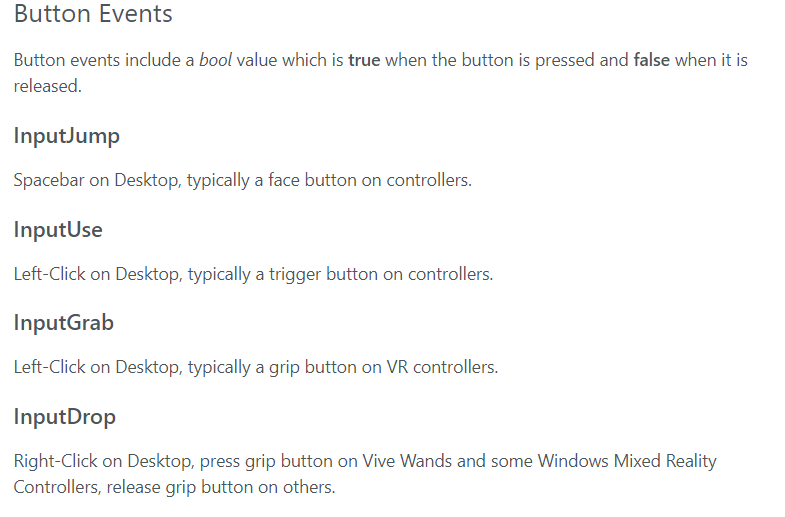
vive users only call InputDrop when they press grip? So... am I supposed to be able to check to see if a user is a Vive user so I can know to check for Drop instead of Grab, because I'm pretty sure if I just swap my whole system to use Drop it won't work for anyone other than Vive...?
 vagrant schooner
Is there a way to replicate the key detection from sdk2 in udon. In sdk2, you can make it so the world would detect if you press a button on the keyboard or a left click. How do i replicate that in udon?
 grand temple
vagrant schooner
Is there a way to replicate the key detection from sdk2 in udon. In sdk2, you ca...
grand temple
vagrant schooner
Is there a way to replicate the key detection from sdk2 in udon. In sdk2, you ca...
yes, make an update loop and branch if input.getkeydown is true
vagrant schooner
thank you, it worked
 storm sable
Does anyone have any ideas?
 errant pilot
storm sable
Does anyone have any ideas?
errant pilot
storm sable
Does anyone have any ideas?
You can pull a key press or button press related to when opening the menu. OnKeyDown or OnButtonDown i believe is the line. I could be wrong, however.
storm sable
But what happens if a player changes their menu button? Is there a way to get the current menu triggering button?
errant pilot
I dont actually think you can change your menu button on vrc? Even then, most people keep it the same.
 dapper lion
you can use a 3rd party app to switch keys around but vrc will not change keybinds. the desktop keybinds panel is super outdated as well
storm sable
Well, if vrc then still receives the same button, then it is easier than I thought. Thanks!
Does anyone then know, which KeyCode will be sent for headsets?
dapper lion
ummm.... there was an input doc made by merlin and 1 by phasedragon. but to be honest 🤔. both of them are semi wrong
i think i had the keycodes for the menu button saved somewhere
 fiery yoke
The thing is that the OEM can use any coding and any protocol they want to. There is no standards regarding these kinds of inputs. So you have the OEM I/O interface, the Software Drivers and finally the Unity Engine Input Manager, that sit between your code and the actual device.
There is no real standards on these mappings or button names so yeah...
storm sable
So the best way to detect the menu is CheckSphere? Is there then a better way to check regularly rather than in Update or recursively through SendCustomEventDelayedSeconds?
errant pilot
What he said ^. Most worlds usually have an option to map it yourself
dapper lion
Oculus_CrossPlatform_PrimaryIndexTrigger“ i think is the menu button in vr?
dont quote me as ive been fighting with the vr input system for about 3-4ish months and honestly. i havent gotten very far vr wise lol
ok so question. has anyone been successful in applying the vrc interact highlights onto players?
 scarlet lake
my friend needs assistance, she has loading colliders for her map but they triggered on ALL players, she looked online but all methods do not work, is there a new way to make colliders Local Only
fiery yoke
If they are using the recommended OnPlayerTriggerEnter method, then just do a Branch and check if the player -> isLocal
 glass totem
Hi anyone knows how to put out the selfie camera?
 fiery yoke
glass totem
Hi anyone knows how to put out the selfie camera?
fiery yoke
glass totem
Hi anyone knows how to put out the selfie camera?
You can only do that in VR. Plus this is the wrong channel to ask that see #user-support-old
glass totem
Sorry, so it means Desktop Steam version VR won't work? Thanks!
scarlet lake
fiery yoke
If they are using the recommended OnPlayerTriggerEnter method, then just do a Br...
this the block i need?
 fiery yoke
scarlet lake
this the block i need?
fiery yoke
scarlet lake
this the block i need?
yes. Plug in the player you get from the event node, and then branch out of true
 fiery yoke
ye
scarlet lake
awsome thanks
 chilly crater
Are UI sliders local only or can they be synced? I'd like to feed the float value into another script.
 torpid frost
So I got some questions, what exactly is udon? Ive been gone for almost 2 years, and if I have nonspecific avatar creation questions, where do I go? Ping me if you reply to me
dapper lion
this is a world scripting thing. avatar stuff is done in #avatar-help
!whatisudon
I don’t know the command lol
 unborn hornet
?whatisudon
 hidden martenBOT
VRChat Udon is a programming language built by the VRChat Development Team for use in VRChat worlds! It enables complex behaviors and logic in VRChat worlds. Read more about Udon in our documentation: https://docs.vrchat.com/docs/what-is-udon
VRChat
What’s this Udon thing anyways? VRChat Udon is a programming language built completely in-house by the VRChat Development Team. It is designed to be secure, performant, and easy to use via the VRChat Udon Node Graph, a built-in visual programming interface that uses nodes and wires (we call them “no...
 spare flame
chilly crater
Are UI sliders local only or can they be synced? I'd like to feed the float valu...
spare flame
chilly crater
Are UI sliders local only or can they be synced? I'd like to feed the float valu...
Pretty sure the Udon example world that comes with the SDK has a UI slider that is synced between clients
 floral dove
chilly crater
Are UI sliders local only or can they be synced? I'd like to feed the float valu...
floral dove
chilly crater
Are UI sliders local only or can they be synced? I'd like to feed the float valu...
like @spare flame said - the UdonExampleScene comes with an example for this. Since you're learning Udon and asking questions here, I highly recommend you go through the examples in that scene - we demonstrate how to do a lot of typically-asked things.
 broken bear
Is there a graph example of using a local variable between two graphs (setting a local variable that multiple graphs can test and/or toggle)
I understand I can use groups within the same graph and different functionality, but I’m trying to use a local variable for multiple purposes and trying to avoid a large single graph asset (variable is a int identifying different locations in the map)
floral dove
broken bear
I understand I can use groups within the same graph and different functionality,...
I don't believe we do this in any of the examples, but the approach would be to use UdonBehaviour.GetProgramVariable and UdonBehaviour.SetProgramVariable to read and write the target variable.
you just need a reference to the UdonBehaviour and the name of the variable.
broken bear
Thanks, I’ll give it a go tonight
Abstraction is a simple on area enter to set bool on one graph, and a second graph to read bool and trigger animation
Use case is an int, aiming to make a by-trigger-area player count. Would best practices be to have a master variable graph that is just used to hold local variables and let other behaviors read/write to it?
floral dove
sure, that sounds like a good way to centralize the variables
fading cipher
Hey y'all, pretty sure InputManager.GetLastUsedInputMethod() is completely broken. Is that just no longer supported or something?
 void ridge
broken bear
Use case is an int, aiming to make a by-trigger-area player count. Would best p...
void ridge
broken bear
Use case is an int, aiming to make a by-trigger-area player count. Would best p...
If that UB gets halted for some reason--those variables can still be read via GetProgramVariable, right?
fading cipher
I'm checking for vive users and it's false 100% of the time
fading cipher
Okay I am back with proof!
I had a Vive user test my world... the below code is in the top most part of a script's Update method:
VRCInputMethod inputMethod = InputManager.GetLastUsedInputMethod();

if (inputMethod == VRCInputMethod.Vive) viveSwipeCube.material = trueMat;
else viveSwipeCube.material = falseMat;
trueMat is red, falseMat is green.
And here's what they saw...
So in conclusion. VRChat thinks that Vive users are only Vive users when they're moving, 50% of the time
50% of the time, you're always on Vive? 
I need special controls for vive users, so this is forcing me to make a fallback "button press" which is a sad and disappointing way to get around this bug...
floral dove
fading cipher
I need special controls for vive users, so this is forcing me to make a fallback...
what is the value when it's not VRCInputMethod.Vive? Is it VRCInputMethod.ViveAdvanced?
fading cipher
oh shit that exists? Let me log that
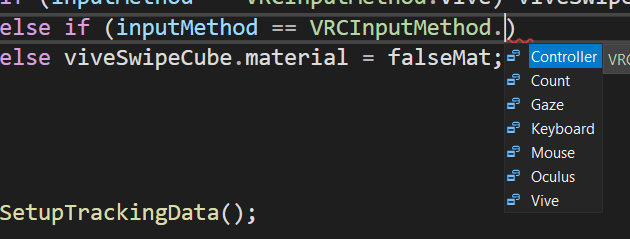
Uhh, how am I supposed to be able to check? Is that not supported by us? https://i.imgur.com/hOomafr.png
 floral dove
fading cipher
oh shit that exists? Let me log that
floral dove
fading cipher
oh shit that exists? Let me log that
these are the possible types - when an event is received by an InputController, it changes the 'last method' property

Can you just log the actual enum each frame?
fading cipher
Yeah, but I'm not sure if I can get a Vive user to dig through their logs for me now 😬
Let me get it uploaded to a world then reach out to my tester. Can I @ you back when I get an answer?
floral dove
sure, thanks for asking
fading cipher
@floral dove yeah uh it looks like it should be working?

But obviously the fact that you can see it's green in the background is proof enough that it isn't reading that correctly
floral dove
Hm - you could move this check to LateUpdate. How are you logging? Why does it swap between listing the enum string and the int value?
fading cipher
I'm just logging right after I get it. The swapping appears to either be an issue with it being in Update, or an issue with VRC itself.
I added a check for an int cast of the enum just in case that's an issue
//This checks to see if you're on Vive. Currently broken??
            VRCInputMethod inputMethod = InputManager.GetLastUsedInputMethod();

            Debug.Log("Current input method is: " + inputMethod);

            if (inputMethod == VRCInputMethod.Vive || (int)inputMethod == 4) viveSwipeCube.material = trueMat;
else viveSwipeCube.material = falseMat;```Just got a confirmation that it's still giving the false material @floral dove
Oh der let me throw that code in late upate now
floral dove
FYI - doing + with strings will allocate a new string for each + you have. You can save a lil memory and make things cleaner by using string interpolation:
Debug.Log($"Current input method is: {inputMethod}");
fading cipher
🥴 Ah, I always see people do that and don't really know what I'm seeing, so I just ignore it
floral dove
super helpful if you're logging a bunch of items in one line: https://docs.microsoft.com/en-us/dotnet/csharp/language-reference/tokens/interpolated

String interpolation provides a more readable and convenient syntax to format string output than traditional string composite formatting.
fading cipher
I'll remember that, thanks!
Aaaand, my vive tester says they've got a red cube after shifting to late update!
@floral dove thanks for that! I guess comparing the controller check fails in Update now
floral dove
hm. Comparisons can be funky - it may work better to cast inputMethod to an int and then compare that int instead.
 fierce verge
I have an animation that I want to start using a UI button, I am a complete noob to udon tho
 cold raft
sounds like a fun challenge
fierce verge
So I have these lamps that flicker, I have an animation, how do I start it using a button (it also has to be synced)?

I have this but I'm new to the udon stuff so could anyone help me out?
 fierce verge
I tried this but it doesnt work 😦
 cold raft
well one way to start an animation is to use a variable in your animation controller, like state == 1, make your animation controll so that it starts flickering when state == 1
Then in udon, get the animator as input and set variable state to 1 when the button is pressed
fierce verge
okay let me try that
 valid basin
how do i enable/disable postprocessing with udonsharp?
trying to make a button for this but getting errors
 fierce verge
cold raft
well one way to start an animation is to use a variable in your animation contro...
fierce verge
cold raft
well one way to start an animation is to use a variable in your animation contro...
okay now Im confused
wai I have an animation trigger, how do I trigger that using udon @cold raft
cold raft
@valid basin maybe just put your post proceessing under an empty game object and disable that gameobject instead
valid basin
@cold raft wouldn't i still have to disable the post processing layer on volumes like water etc?
in my mind, by for example toggling that game object, when the player enters a volume that does have it enabled, it will pop on. Is that correct?
cold raft
i dunno i am not expert on post procession tbh :/ i am going by the basis that objects that are disabled arent there
valid basin
seems so odd that i cant really find answers on google or in this discord with search
almost every world has it these days
including classics like black cat
fierce verge
@cold raft could you help me out
ive tried this but I just cant seem to get the toggle in the animator top switch
 cold raft
that seems good a first glance, does your animation controller trigger off the boolean start?
cold raft
valid basin
including classics like black cat
yes so maybe it really is just that simpel as toggling the parent gameobject
fierce verge
@cold raft I changed it to this but it doesnt work as of now
 cold raft
i dont know what button onPointerClick does, i think you needed the interact like you had before and check your animation controller rather than udon script
fierce verge
cold raft
i dont know what button onPointerClick does, i think you needed the interact lik...
hmmm but that doesnt do anything when I click it
cold raft
so your udon scripts sets boolean start to true or false, are you sure that toggling that variable actually causes your animation controller to start animation? becuase to my knowledge start is not some maniacal keyword it just a variable
fierce verge
@cold raft I have this parameter that I want to toggle called "Start
 cold raft
so that does not seem like a parameter, instead you need a transition from any state to discolight, and on that transition you put a condition that start equals to true
so your animation controller starts at entry, and uses transition to go to other animation states, on those transition you can put conditions like checking a variable
fierce verge
cold raft
so that does not seem like a parameter, instead you need a transition from any s...
ehrmmmm I dont fully get it
cold raft
so in your controller "discolight05" is probaly an animation of flicking light right?
fierce verge
yes
cold raft
now your controller starts in entry and needs a way to get to discolight05
fierce verge
the discolight state can get removed
the new state is the one that enables the animation
cold raft
so you add a transition (right mouse click on entry, then add transition and then click on discolight) this will create a new arrow
then click the newly created arrow and in the inspector add a condition
oh new state already enabled the light?
fierce verge
okay so wait a condition from entry to new state
cold raft
yes
i am not sure if new state does anything, i never really use it, i always make condition between animations like between any state or entry and disco light
fierce verge
I have this, how do I add a condition

 oblique crypt
Hey, does anyone know why this button program is turning the button itself off, rather than the door it is connected to in Public Variables and in the script?
 cold raft
fierce verge
I have this, how do I add a condition
cold raft
fierce verge
I have this, how do I add a condition
So here you are already setting the boolean "start", when you press the button on intact, the "start" of the animation controller goes from true to false to true etc
now inside the transitions of your animation controller (those arrows between the blocks) you have to check that it will only go to that state is start equals true and it will leave that state if start equals false
fierce verge
cold raft
So here you are already setting the boolean "start", when you press the button o...
It doesnt show anything?
 cold raft
oblique crypt
Hey, does anyone know why this button program is turning the button itself off, ...
cold raft
oblique crypt
Hey, does anyone know why this button program is turning the button itself off, ...
i dont see why sorry
cold raft
fierce verge
It doesnt show anything?
so between entry and strobe you have 3 arrows, so there are 3 ways to from entry to strobe, probaly of those is missing the condision so it instantly fires, also there is no transition out of strobe so it likely only plays it once and then stays stuck in the that state
fierce verge
cold raft
so between entry and strobe you have 3 arrows, so there are 3 ways to from entry...
I cant make a transition back from strobe to entry
cold raft
indeed so you likely need two animation states (next to entry and any state that are provided by default) you need one like Strobe on, and Strobe off
from entry transition to strobe off (no condition) from strobe off transition to strobe on (condition start equals true) from strobe on transition to strobe of (condition start equals false)
oblique crypt
cold raft
i dont see why sorry
No worries, thanks for replying 🙂
fierce verge
cold raft
indeed so you likely need two animation states (next to entry and any state that...
Like this, and add a modifyer to the right top?
 cold raft
yes looks good, but in the inspector you have the section called condition (list is empty) add a new entry there to check for variable start
fierce verge
like this?
 cold raft
yes but i am kinda surprised there is no equals false or equals true in there, maybe it works poorly with booleans maybe you should use an interger with a number rather than a boolean, i honestly never tried making an animation with a boolean 😄
maybe you got to click on that + first
broken bear
If I want to change the value of a bool or int in an animator, do I have to use an udonbehavior to test and set it? In avatar3 we have a component to set parameter values within the state machine
fierce verge
cold raft
yes but i am kinda surprised there is no equals false or equals true in there, m...
so should it work now?
cold raft
only one way to fin out 😄
fierce verge
hahaha true
fierce verge
cold raft
only one way to fin out 😄
doesnt do anything yet
cold raft
well atleast we are on the right track
fierce verge
hahahah yes
cold raft
so those animation states, like strobe on or strobe off, i those correctly set toggle the light?
fierce verge
ehrrmmmm
So I have my animation only set to strobe on
strobe off doesnt have any animation
cold raft
so the most simpel scenario to start with would be to have strobe on just enabled the light in 1 frame nothing else, and to have strobe of just to disable the light in 1 frame, then the button should toggle it or off (not strobing but that can be added later)
fierce verge
ahhh so I can see if its on or off
cold raft
yes that be the most simpel scenario, if we get that working then you can extend on a working base
fierce verge
yes lemme try
SO I got the first frame set to ON and the second frame to OFF
So I have the condition that the strobe turns OFF when I enable the "Start" parameter
but it doesnt do anything yet
fierce verge
cold raft
yes that be the most simpel scenario, if we get that working then you can extend...
So it doesnt pickup the button, or the udon isnt working
the animator works
Or should I use this to trigger something within the udon?
 cold raft
oh intresting its a ui button, in my head it was one of those cubes people put in thier worlds to interact with
then i do think on interact is not the right event,
errant pilot
You have to use send custom event
Im unsure how to do it with a graph, but to receive the custom event, its the custom events string name you define under the button.
 cold raft
i would suggest to put your udon behaviour on a normal 3d cube to and test if that works so you can atleast get that part sorted out, then all that is left is getting the graph right
fierce verge
okay
errant pilot
Change "UdonGraphProgramAsset.name" to "Udon.SendCustomEventString()"
And you should be set
cold raft
but dont you only need SendCustomEvent when you want to synch interactions across the network?
errant pilot
Well yes, but its used for UI buttons too.
fierce verge
cold raft
i would suggest to put your udon behaviour on a normal 3d cube to and test if t...
yes that works
errant pilot
We are just sending a Custom Event locally
cold raft
fierce verge
yes that works
Nice things finely start working 😄
now the ui button, i have to admit i am no expert on this i am still strugglnig a bit myzelf with those >.<
fierce verge
hahaha Im a totally new with udon so Im already glad we got this up and running
So now I need a custom event
and how do I link that to the button
errant pilot
errant pilot
Change "UdonGraphProgramAsset.name" to "Udon.SendCustomEventString()"
This
For your UI button
Then in your program, just make sure you just point to the object your trying to mess with instead of doing interact. The UI has its own code to mess with Interact.
 errant pilot
I am unsure if you have to define it in the graph, but in U# you have to make sure that you grab the component of the Button and define using the UI.
🤔
Maybe you had it right the first time. Since its a string lol
errant pilot
So for the button is it pointed to the gameobject that has the udon script attached with?
fierce verge
I have the udon on the button itself
dapper lion
question. did you put the actual button where “syncedtoggle” is or did you put in the script?
it looks like you put in the script whoch will not let you do much at all
dapper lion
so what is the button in hoerarchy?
dapper lion
if the button has the script. you must put the actually gameobject/button with said script into the “onclick” and set a custom event for it. as it appears youre using an event name
errant pilot
^
dapper lion
does tjat make sence?
errant pilot
Change the buttons gameobject to the actually Button itself.
Aka change "SyncedToggle" to "Strobe"
fierce verge
dapper lion
does tjat make sence?
not really
fierce verge
errant pilot
Aka change "SyncedToggle" to "Strobe"
just change the name?
dapper lion
no you need the game object
no scripts of that magnitude or really any at all will work by itself
fierce verge
my script is on the button
dapper lion
and what is the button set to?
 dapper lion
do you know what your button is set to?
ok so thats not the “sendcustomevent” event so that wont do anything
fierce verge
yeah but I cant select anything else as function
dapper lion
name it back to “syncedtoggle” so no one here gets more confused
fierce verge
okay xD
dapper lion
you need to set the button, as the button
do not set the button, for the script
as the script
where is vowgans ui tutorial video lol
errant pilot
I honestly think U# is simpler to understand than the graph, but thats just me lol
dapper lion
but you have an event name. right? and you have the udon behave set up. right? how do you set the button to find that udon behave?
fierce verge
dapper lion
as the script
so do you mean the script shouldn't be on the button?
fierce verge
so my Udon is all setup and working
all I need to do is link the UI button to the graph
dapper lion
correct
 dapper lion
yes. and how do you send a custom event on “basic” ui? not udon
fierce verge
uhm
dapper lion
i believe in you
dapper lion
yes. that is your input. what is next?
errant pilot
In my experience, if this is the first time using Udon and world making, start with interacts instead of diving straight to UI
Buut we are here for help. Change your Button variable so it doesnt confuse Unity
fierce verge
but UI is the thing I need the most
fierce verge
so the button is now called Strobe_button
errant pilot
That works!
fierce verge
errant pilot
Should be a private variable defined as a Button.
in udon?
dapper lion
so in “onclick”, that game object it asks for should be the same game object that has uour udon behave
dapper lion
“sendcustomeventname” or something close to that (under udon)
fierce verge
wait
I can also set it to interact
if I give my graph the interact function would that work?
dapper lion
i think so. but dont quote me
fierce verge
let me try the custom event first
dapper lion
i dont really see why not
fierce verge
YES
that works
but I only have one lamp working
can I just add multiple animator inputs?
fierce verge
so if I copy paste the object the button is linked?
because the lamp that should strobe is just an input in a public variable
also how do I now sync this so the animation plays for everyone?
fierce verge

So this took me longer than it should have.
Time to toggle objects again, but this time, for everyone! You'll see that syncing is a little bit more complicated than it was in SDK2, so to set everything up we have to tell every player to toggle that object, but also catch up anyone who joins in after the button was pressed!
All assets are availab...
dapper lion
our saviour
fierce verge
xD
I mean so I could just add that
but first
how do I make it so all the other lights with the same animation also start playing?
dapper lion
i cant really go over how to do that as i havent touched a graph in a while and im not at home. the best i can suggest is copy and paste what you have untill you have the amount you need
errant pilot
Well toggles yes, but animations, no
dapper lion
no. 1 graph with 10 varibles
fierce verge
yeah
dapper lion
you can toggle an animator globballly
fierce verge
but how do I combine them into one instance?
fierce verge
dapper lion
you can toggle an animator globballly
how?
dapper lion
uh. give me 10ish hours so i can tell you more accurately when im at a computer lol
fierce verge
xD
errant pilot
Well the syncing variables and stuff along with animations comes with the UnU update
fierce verge
I mean Im okay with multiple variables but idk how to combine them into like one instance
 hazy shell
anyone knows how to fix it :(
 errant pilot
You could make them into an array
fierce verge
hmmmm
errant pilot
hazy shell
anyone knows how to fix it :(
Check column 100 or around there for debugging.
fierce verge
what type of array should I use :/
dapper lion
@hazy shell are you using usharpplayer 0.3.2?
hazy shell
 dapper lion
thats udonsharp and does not answer my question
errant pilot
Well depends. An array is a collection of variables acting the same. So if you got multiple integer variables, you can make a list of those into an array
hazy shell
oh sorry
errant pilot
But if its like one gameobject, one integer, and one float, you cannot make an array
fierce verge
theyre all identical
hazy shell
dapper lion
thats udonsharp and does not answer my question
i think its the JTplaylist
errant pilot
Also I have no idea the syntax of defining an array variable at all lol
But yes you could make an array of those variables if you just want things cleaner
fierce verge
So I got like 10 animator variables, but when I create a node and click variable I get like 20 diffrent options xD
errant pilot
I know how to define an array in python, just not Udon or C#
fierce verge
 dapper lion
@hazy shell well you need usharpvideoplayer for jtplaylist to even be useful so that may be issue 1
hazy shell
dapper lion
<@!625181932128305154> well you need usharpvideoplayer for jtplaylist to even be...
ok i get it ill try importing the usharpvideoplayer
:>
thank you so much
dapper lion
question. what were you going to use the justificationplaylist for?
fierce verge
if I put my animator on an empty gameobject with all the lights under it
would that also work?
errant pilot
public float[] values;
This an example of an array from unity's documentation. But its under monobehavior so unknown if it will actually work.
errant pilot
fierce verge
if I put my animator on an empty gameobject with all the lights under it
Possibly. If you want multiple lights to turn on and off at the same time you could just put all them in a parent and mess around with the parent and its children.
fierce verge
yes
trying that right now
okay now it isnt working at all wtf
Why does my Udon graph get reset very time?
VRC.Udon.Editor.ProgramSources.UdonGraphProgram.UI.GraphView.UdonNode.RestoreInputs () (at Assets/Udon/Editor/ProgramSources/UdonGraphProgram/UI/GraphView/GraphElements/UdonNode.cs:499)```@errant pilot could you help me out? I've seem to have broken it :<
errant pilot
fierce verge
<@!194245779718799361> could you help me out? I've seem to have broken it :<
Well whatever you did to the graph, revert it lol. Im unsure
fierce verge
yeah I think reverted it but it doesnt work

so the animation works but in VR the button doesnt do anything
nvm I found it
im dumb
errant pilot
Lol ok
 dawn forge
fierce verge
yeah I think reverted it but it doesnt work
dawn forge
fierce verge
yeah I think reverted it but it doesnt work
What did you do to resolve?
fierce verge
I had some mistakes with names
 reef idol
i just wanna ask.. How To set Very poor in oculus quest?
fierce verge
what?
 waxen breach
reef idol
i just wanna ask.. How To set Very poor in oculus quest?
waxen breach
reef idol
i just wanna ask.. How To set Very poor in oculus quest?
Im not sure what you mean by that. If its about avatars ask in #avatar-help
scarlet lake
Heyo, I hope this is the right place to ask, but after the latest update, playermods seemed to have stopped working for me and my world got screwed up. Setting the jumpheight and movement speeds has no effect. OnPlayerJoined also doesn't trigger in vrchat. Everything works using cyanemu but not in game. I set up a new project and same results. Using udon with Udon sharp. Everything on the latest version.
fierce verge
How do I make it so my Unity Video Player syncs with players?
dapper lion
@fierce verge look up vowgan again lol. thats a very evil task to make work and i highly suggest looking for a prebuilt videoplayer like architechtv or usharp
fierce verge
shis
dapper lion
@scarlet lake do you have any console errors? do you have vrworldtoolkit imported?
dapper lion
the 1 that comes with the sdk should be synced. but its extremely basic and probs not designed for multiplayer at all in mind
fierce verge
Im using the unity one not the AVPRO
dapper lion
architechtv is probs the most self-handling videoplayer to use but its udonsharp
wait. the unity providedvideoplayer or the vrcsdk provides unity 1?
fierce verge
vrchat sdk one
theres 2
one is unity based the other avpro
I need dunity because avpro doesnt work for my light setup
dapper lion
that 1 should sync i think? I don’t know. no one should he using that one so I have no idea if it syncs
scarlet lake
dapper lion
<@456226577798135808> do you have any console errors? do you have vrworldtoolkit...
No errors in console, testing with cyanemu, and everything works as expected. I can boot up my pc here in a bit, and import the vrworldtoolkit
dapper lion
what is your setup?
fierce verge
https://www.youtube.com/watch?v=MVa4raBlUT8 this is my world right now
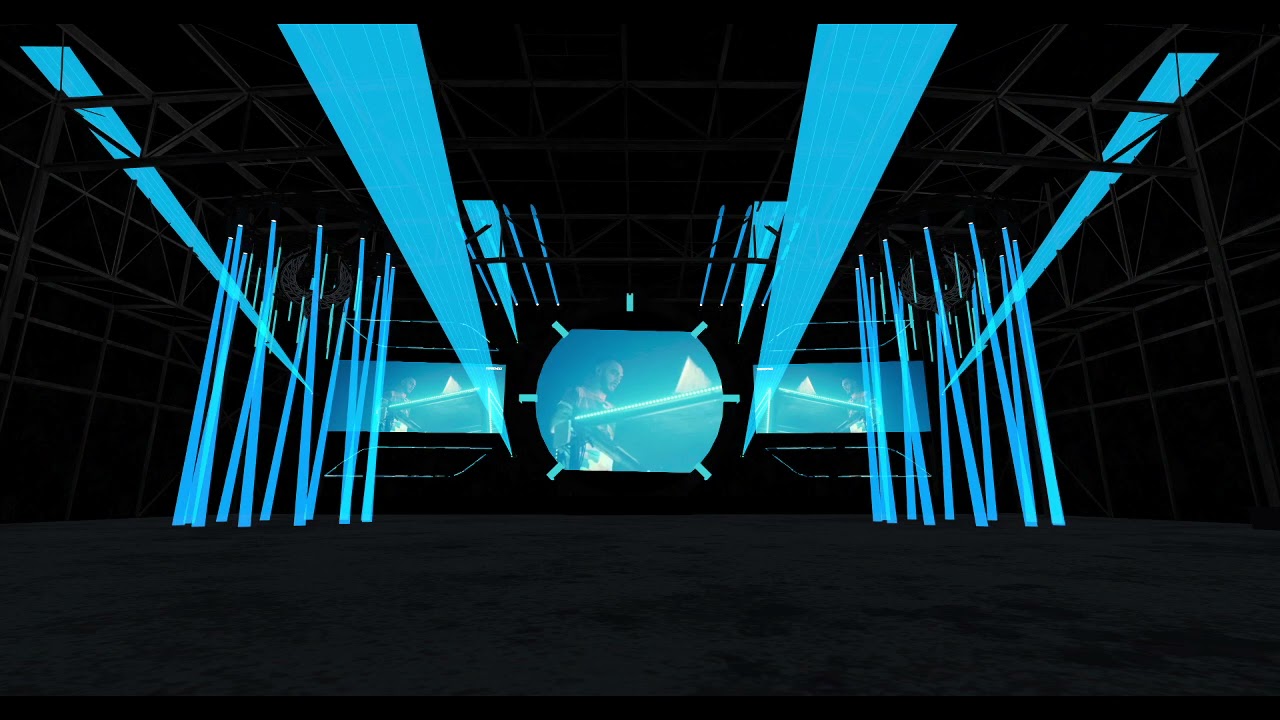 dapper lion
it is trying its best to load lol
fierce verge
xD
dapper lion
im just going to assume its like audiolink but instead of audio sources youre using the actual video?
fierce verge
yeah but mostly for the color
if you cant see the video maybe click it, its a hidden video so it might not show in discord
dapper lion
ok it loaded but at 144p lol
fierce verge
xD
dapper lion
ok ic what youre trying to do. so no avpro then.... I guess 🤔 try the udonsharp videoplayer? another thing you could do is set a camera that only renders whats on the avpro screen and apply the rendertexture onto those lights so you have light stream capibilties
and it should be optimized as long at the camera is only seeing the avpro screen
fierce verge
yeah but I would like to work direct instead of using camera
this one is linked to the material
AVpro uses a custom shader that I cant modify
with the unity one I was able to make the lasers and movinghead beams transparent
dapper lion
its a material override. im wondering if avpro can be set to a texture override as well
thats good
fierce verge
I mean this one is workign great, only I think it doesnt sync
I tought it did but when I tested a few minutes ago it didnt
:/
dapper lion
well i still suggest finding a prebuilt. they usually are set up to sync by default
and have a little more control
fierce verge
wot
and now it syncs
POG
mys trobes now work
awesome
only need to make syncs for the diffrent light animations
scarlet lake
dapper lion
<@456226577798135808> do you have any console errors? do you have vrworldtoolkit...
Alright, just double checked, I have 0 errors anywhere. Imported the worldtoolkit and it says no errors no warnings in last build
dapper lion
did you build again after importing?
scarlet lake
Yup
dapper lion
may i see your scene descriptor

 dapper lion
plz hold. downloading
try using the graph playermods. its been like 7 weeks since ive messed with playermods on udonsharp
ik they work well with graph tho
scarlet lake
Soo uhhhh
I'm feel kinda dumb now
I accidentally had an empty gameobject in the reference camera slot, set it back to none, and it all works now, fml man...thanks for your help though
dapper lion
wait. how does that even work lol
scarlet lake
Idk lmao
dapper lion
well thats good then lol
scarlet lake
Thanks again lol
 native estuary
Huh guess I'll need to add some checks for that
dapper lion
doesnt your toolkit already ask that the reference cam has the main camera added?
or am i thinking of some other toolkit
 craggy gulch
hey Team, the "Sit" action on a mesh - can that be made to be active or not active with Udon? like if you wanted to temporarly remove chairs
dapper lion
@craggy gulch you can either disable the collider components or the vrc_station components
native estuary
It doesn't account for having a gameobject with no camera component set currently
 normal yarrow
That moment when you try to do subtractive lighting

(Any idea how i can fix this?)
dapper lion
thats a lot of near by reflection probes lol. ok, so is everything baked?
dapper lion
ok. so how many realtime lights are effecting the ring area?
 dapper lion
what are the intensity of the reflection probes. are they baked?
normal yarrow
The probes are baked
dapper lion
what are the shaders of the ring area?
normal yarrow
Bakery/Standard
dapper lion
um ok. have you tried any other shaders?
what happens if you lower the 4 lights intensity?
normal yarrow
Doesn't seem to really change anything.
dapper lion
is the area set to static?
dapper lion
did you bake any gi?
 dapper lion
was any of the gi white colored?
normal yarrow
I don't think so
cold raft
thats a lot of seats, i hope they all have stations on them 😄
cold raft
when your world has more seats than the maxium allowed number of players of 80 😄
dapper lion
oh god you just made me think of stations 😬
ok. did yiu check the instensity of those reflections? double check your gi as well
start turning things off until it is not white
dapper lion
yea id just start turning off probes and realtime stuff until it stops being white
if it is still white. than that means it has to be gi
normal yarrow
If I remove all the baked data, it looks more like this.
 dapper lion
image is a bit too big. is it still white?
normal yarrow

How's that?
When I remove it, it looks normal, albeit the whole map is now being lit in real time.
And of course for performance reasons, that's not ideal.
dapper lion
i feel like some of those areas you want realtime are set to static
normal yarrow
 dapper lion
try baking without reflections. that is a lot of reflections for 1 area
normal yarrow
Alrighty
Maybe it was because of the reflections being set to Custom rather than Baked?
dapper lion
depends. but in reality reflections should always be set to baked unless they are very-very needed
which in this cause. i dont think so
imo you have quite a few of them lol
 normal yarrow
 errant pilot
How come your using experimental mode?
normal yarrow
Wanted to see all the options I could tweak with.
dapper lion
optix 7? why are you using that?
normal yarrow
Cause I got an RTX card
dapper lion
so dont use “adjust uv padding” for now. what are your ambients?
dapper lion
it should be under backface gi
normal yarrow
I'll check after this next bake I'm doing is done

Okay, looks better, though perhaps I can lower the brightness a bit.
Actually, if I disable the lights, it's still lit, I'm assuming because of the light probes?
 normal yarrow
Turns out I can disable light probes for these objects.
Looks much better now

@dapper lion 👌🏽
dapper lion
cool
 lean jetty
Hello.
I have one question regarding the method.
"SendCustomNetworkEvent (VRC.Udon.Common.Interfaces.NetworkEventTarget.All," Timer ");"
So I'm trying to call the "TimerCount" method
On Unity, it says "The referenced script (Unknown) on this Behavior is missing!".
By the way, the details of the Timer method are as follows.
Is there any fundamental mistake? .. ..
By the way, "SendCustomNetworkEvent (VRC.Udon.Common.Interfaces.NetworkEventTarget.All," Timer ");" is declared in "private void Update {}".
If you don't have enough information, I would appreciate it if you could tell me.
- I am a Japanese who does not speak English, so I use a translator.

 ionic jackal
yeahhh thats a mess
if(Timerswitch) { currentTime += deltaTime; if(currentTime>timerSec) { currentTime = 0; Debug.Log(); TimerSwitch = false; } }
@lean jetty maybe you were thinking of something like this? ( I'm on mobile sry)
lean jetty
@ionic jackal
Thank you for your reply.
The While statement and its conditional expression are strange.
So that's it,,,
"SendCustomNetworkEvent (VRC.Udon.Common.Interfaces.NetworkEventTarget.All," ○○ ");"
I was able to call other methods with the above function,
Only the Timer method didn't work. .. ..
I tried using the syntax you provided,
The result was the same.
Below is the entire source code.
Sorry for the messy code,
I would appreciate it if you could give me some advice.
ionic jackal
@lean jetty so "TimerCount" gets called but "Timer" doesn't?
lean jetty
Yes, it is also not called and an error occurs.
ionic jackal
@lean jetty have you tried using different method name for "Timer"?
lean jetty
@ionic jackal I'll give it a try!
ionic jackal
@lean jetty and you should fix TimerCount() too
actually if you want a timer that goes off after x seconds, you should create a global variable then add&check time on that every update
lean jetty
Is it added and confirmed every time it is updated?
In the Update function
When I wrote the program in the current Timer method, it worked fine, so
After all, it is necessary to constantly monitor. .. ..
I don't know how to make it a method
I'd be happy if there was something like an example sentence, but ...
lean jetty
[English]
I managed to solve it (; ∀;)
I was making a fundamental misunderstanding.
"Update ()" in Unity is "one frame at a time"
"While {};" finishes the process within that one frame, so
It wasn't a timer in the first place.
As you say,
Always monitor in "Update ()"
If you incorporate processing such as always calling according to the state
It worked well.
Thank you very much.
I will only share which code was used (; ´ ・ ω ・)
[日本語(Japanese)]
なんとか、解決させました( ;∀;)
根本的な勘違いをしていました。
Unity内の「Update()」は「1フレームずつ」で
「While{};」は、その1フレーム内で処理を終わらせてしまうため、
そもそもタイマーになっていませんでした。
おっしゃる通り、
「Update()」内で常に監視をし、
その状態に応じて常に呼び出すなどの処理を組み込むと
しっかり動作してくれました。
ありがとうございました。
どのコードでまとまったのかだけ、共有させていただきますね(;´・ω・)
Thank you so much !!
ありがとうございました!!
 halcyon aspen
I am having issue with my udon sdk. either i get a broken script or no control panel when the script is fixed so I can upload or test world.
I tried go back to the old one but its the same. Anyone had this issue? do I have to keep on reinstalling it until it works?
I did removed the things I was going to add just in case it was that.
Also tried creating a new project but the same happened there.
cold raft
Look at your console, in such cases you probably got errors preventing the udon ui controllers panel from beeying build
halcyon aspen
I am getting these up

 lilac wasp
quick question, is vrcplayertags synced in any shape or form?
halcyon aspen
no idea
 fickle stirrup
@lilac waspnope as i know
lilac wasp
thanks
cold raft
halcyon aspen
I am getting these up
UdonSharp fixed this, get v0.19.7 and first delete Assets/UdonSharp/Plugins folder, also get latest SDK3 first and install that
halcyon aspen
Will do
So I deleted the udonsharp I had so I wont have any duplicates got v0.19.7 but...

I am having a record in errors
 left elk
Haiai
Is there any video players that are Quest compatible?
ionic jackal
Unity dropdowns options are made with List<>, but UdonSharp doesn't support List<> Types 

halcyon aspen
Yet with alot udon fancy stuff like real time clock use udonsharp. I will just restart my world since I still have the main assets that dont use udonsharp and go through what could break it.
cold raft
Noo i didnt say you to delete it, just the plugin folder and then install the latest udon sharp
udonsharp started using a different version of the harmoni.dll its in thier changelist history
ionic jackal

What did this actually change? I still needed to wait x seconds to use RequestSerialization() after using SetOwner()

 raven peak
ionic jackal
What did this actually change? I still needed to wait x seconds to use RequestSe...
raven peak
ionic jackal
What did this actually change? I still needed to wait x seconds to use RequestSe...
You cant do that if you are using the “on request ownership” event. it takes a second to confirm the user actually takes ownership.
If that event is not there the user instantly takes ownership and can also request serialization.
ionic jackal
raven peak
You cant do that if you are using the “on request ownership” event. it takes a s...
Ohh so maybe they meant RequestSerialization() in OnOwnershipTransferred() works now! I should try it out thankyou
raven peak
ionic jackal
Ohh so maybe they meant RequestSerialization() in OnOwnershipTransferred() works...
If you are using OnOwnershipRequest() (sorry went to check the proper name for the event) that wont work. You take ownership locally which will fire the onownershiptransferred() event.
Other players wont see the change till the current owner fires the onownershiprequest() event to confirm the change. then other players will see the ownership change.
If the current owner declines it it will stay the same for other users but locally for the person that requested. The onownershiptransferred event will fire twice. First for when setting ownership locally to themself. Then a second time changing it back to the original owner.
If you dont use the onownershiprequest event it doesnt go through that process and you can set ownership then request serialization.
ionic jackal
Ok... I'm not sure if I understand 100%... so if I dont override OnOwnershipRequest(), and call RequestSerialization() right after SetOwner() will it work?
I'm not sure what the patch changed still...
raven peak
ionic jackal
Ok... I'm not sure if I understand 100%... so if I dont override OnOwnershipRequ...
That should work.
The update should make taking ownership smoother.
You can also have other users set ownership to other users.
ionic jackal
raven peak
That should work.
actually... if onownershiptransferred() gets called twice locally, wouldn't the second RequestSerialization() work correctly with other users?
raven peak
no.
Since the onownershiprequest event needs to confirm the switch you are serializing data before the original owner has confirmed the switch. Which will make other users drop that data. If that event is not used the players know there doesnt need to be any confirmation so they take the ownership change and serialization data.
The onownershiptransferred only fires twice if they try and take ownership and get declined by the owner. The other players will not fire the event at all.
ionic jackal
so after the owner confirms the switch, then after that all the other users onownershiptransferred() is called right?
ionic jackal
oh, so its not called again locally?
raven peak
Nope. Locally it expects to take ownership. But if declines it fires the event again to change it back.
ionic jackal
ohhh
I thought if it triggers again locally then I could trigger RequestSerialization() there
raven peak
The process is very quick so a timer for .5-1 second to compensate for extreme network lag. Then check if you are still owner should work.
ionic jackal
yeah... I was thinking of just removing the timer if it triggered again locally
raven peak
A bit of give and take. If you want to be able to decline ownership you got to give it some time to resolve. If you want to make changes right as you take ownership you cant use the network decline feature.
raven peak
I feel like my wording is not the greatest but hope it helps.
ionic jackal
I just drawing what I thought 

Anyways the REAL problem is that I can't edit unity dropdown items on runtime, since U# doesn't support Lists 😂
 unreal grail
I am getting a whole lot of console spam saying "Deferred event 7" "We are over BPS". Help?
 rancid thicket
Hello, so i was never able to get a reply back from anyone or find any details about this avpro prefab video player i had asked about yesterday which kinda told me i was asking a stupid question so i used about 30 different avpro video screens and they all worked! Once, after you hook them up to a toggle script then they will turn one once then the second time they will play very choppy and without sound. It took me quite awhile to pinpoint that down as i had these screens hiding everywhere and ding different things. I finally found in the unity asset store an avpro video player for $400, funny i thought that was a simple question. Im running into another issue with the sunc scripts as well, ive used the included on in the sdk which did nothing and ive built one using this tutorial, https://www.youtube.com/watch?v=tu9_Lpwhw48. Now this script works with things like point lights but things like cancases and screens it seems to flash them on/off. Does anybody have a sync script that actually works or can point me why this ones not working? All the help would be greatly appreciated as the VRChat user support email wont reply.

Add networking to your world music controls
Unity Project Source https://www.dropbox.com/s/x3922f2dgu5haqf/AudioControls-master.zip?dl=0
floral dove
rancid thicket
Hello, so i was never able to get a reply back from anyone or find any details a...
Does the one included in the UdonExampleScene not work for you?
dapper lion
the udonexample synctoggle has been hit or miss (2months ago) when i tried it out
floral dove
Do we have a toggle in the Example? Thought the program itself was specifically for sync so it was always on. It's one of the few examples I didn't make so I forget some details
dapper lion
I don’t know. its been 2 months. syncing is hard sometimes— who knows
rancid thicket
floral dove
Does the one included in the UdonExampleScene not work for you?
Unfortunatly not, i would put a point light in the target variable but then when i render and click the button, the button disappears not the point light. Theres another toggle sync script by vowgen that im going to try today.
 slate night
Where can I download free vrchat sdk3 models
 cunning mist
👋
slate night
cunning mist
👋
You have some prefabs?
cunning mist
That was replying to Raydog since they mentioned me
slate night
Oh
cunning mist
What is it that you're looking for? There's some good packs out there for some demo things, furniture by SpookyGhostBoo, Prefabs by JetDog...
Then the VRC Prefabs list has a crap ton of stuff
slate night
Prefab list?
cunning mist
 mighty fjord
Been messing with some UI stuff lately, but I noticed that none of the transitions are called when hovering over the UI elements in Desktop mode, though they are completely functional
There are a few exceptions, like when you hold tab or if the UI elements are on the UI layer so that you can interact with them when using your quickmenu
Was wondering if I should do manual UI checks using raycasts as a substitute for this issue or if there's any good way around it
 hazy shell
anyone knows why my 3.0map has been successfully uploaded but i cant enter my map
like it sends me back to my home right after i enter the map
 sharp grove
Why cant I unfavorite avatars when I click unfavorite???
 distant ore
Anybody know how VRC network pickup objects? Lets take a cube for example. When a player picks it up, does it destroy the object and instantiate a local version of the object on someones hand or is it something else?
Thanks id advance!
grand temple
no, the object doesn't get destroyed or anything. It's all the same object
distant ore
Right then how does vrc network it? As far as i know, each networked object has to have a networked identity. These cannot be parented into one another. So how does vrc handle parenting pickup to players hands?
grand temple
SDK2 breaks when reparenting stuff, but SDK3 handles it totally fine, doesn't care about hierarchy one bit
that being said, when you hold something it's not actually being reparented. It's just being moved by a script
This channel is for questions about udon, vrchat's scripting system. You might try over in #user-support-old
 tawny gull
Sorry
fading cipher
Out of curiosity, do we know if Udon actually keeps references to components as such, or does Udon turn a reference into a component into a reference into the entire game object?
I'm often trying to preserve memory by referencing specific scripts instead of the entire game object, but does Udon even care?
fiery yoke
What?
fading cipher
For instance if all you need to access in a Game Object is its TestScript, then you'd do public TestScript objectScript instead of public GameObject object and needing to GetComponent on it in start or something
I've been told it preserves memory to only reference a component of an object if that's all you need instead of referencing the entire object
A small scale fix, but good coding practices are good coding practices y'know?
fiery yoke
If you store a reference to any object then it is always a direct reference. If you store a reference to a component directly then ofcourse youre only storing one reference. But the memory you're preserving there is minuscule. Its mostly about if it makes sense or not. If you never need to access anything else on the object and you dont destroy the component ever and create a new one, then sure you can just store a direct reference.
fading cipher
Yeah, my question was whether or not Udon supports that, or if it turns a direct reference into a component into a game object reference anyway
I've been working with someone else lately and often when I suggest good coding practices his response is "well udon is inefficient so it probably wouldn't help"
lol
fiery yoke
When you store a reference to any object in an UdonBehaviour it is serialized (if it is being serialized) into the UdonBehaviour component. That is handled by Unity.
I dont know if you fully understand what a "reference" is, but it basically just is a means to refer to some object in memory. Its quite abstract, but Udon doesnt really do anything special or changes the fundamentals of .NET :P
fading cipher
Ah, that's kind of what I figured, but glad I have a confirmation.
I probably don't understand what a reference is in terms of how .NET operates; everything I know about programming and the jargon is self taught, so I'm bound to have plenty of holes here and there lol
fiery yoke
Same, it just takes a while to get a hang of everything and how it works under-the-hood.
Computer Science is quite a rabbit hole
fading cipher
That's why they prefer you know it in school, because school info dumps you lol
fiery yoke
Modern programming is essentially the product of 60+ years of the smartest people on earth collaborating.
Its essentially an Abstraction Onion. Layers upon layers of encapsulation and abstraction.
fading cipher
Yeah that's a great way to put it
 stark adder
Why is Quest Avatar image 128x96 pixels 
rancid thicket
cunning mist
https://vrcprefabs.com/
Thanks brother! I actually just went through your sync tutorial and it worked flawlessly, your also the on i heard mention in a video that the avpro needed a license and once I replaced all the screens with unity prefabs they all worked as expected. Im sure there is but next thing i wana figure out is how to use 1 screen and 1 audio source for all the different select able video links. I have toggles for each individual screen since 1 screen only has 1 input field in the inspector. Probably inefficient but works for now.
cunning mist
AVPro actually only doesnt need a license, vrchat made proxies for us to use so we dont have to buy anything for it.
fiery yoke
Well if you actually want to use the Pro version in the Editor then you need to buy it.
But if you only want to test the AVPro player in VRChat then yeah you dont need to.
cunning mist
In other words, my statement stands.
fiery yoke
Yeah was just providing supplementary info 😛
rancid thicket
Ah good to know, and that repository is gold so many example to pick apart and learn from, thanks alot its exactly what i was looking for.
 errant ivy
help.. when i interact with the object(cube) which i put this script in. the trail wont clear.

ok i fix the problem. I didn't set the public variable object. lol

 charred stump
Does Udon do anything different compared to "modding" the game compared to for example lua?
floral dove
charred stump
Does Udon do anything different compared to "modding" the game compared to for e...
?whatisudon
hidden martenBOT
VRChat Udon is a programming language built by the VRChat Development Team for use in VRChat worlds! It enables complex behaviors and logic in VRChat worlds. Read more about Udon in our documentation: https://docs.vrchat.com/docs/what-is-udon
VRChat
What’s this Udon thing anyways? VRChat Udon is a programming language built completely in-house by the VRChat Development Team. It is designed to be secure, performant, and easy to use via the VRChat Udon Node Graph, a built-in visual programming interface that uses nodes and wires (we call them “no...
floral dove
Udon is the way to write your own interactivity and scripts for VRChat worlds. Modding the game breaks TOS, and is not a good topic for discussion on this Discord.
charred stump
floral dove
Udon is the way to write your own interactivity and scripts for VRChat worlds. M...
I used modding as an umbrella term, been playing too much FiveM, my bad 😅
floral dove
charred stump
I used modding as an umbrella term, been playing too much FiveM, my bad 😅
np!
distant ore
grand temple
that being said, when you hold something it's not actually being reparented. It'...
Right. So when a player grabs an object, the player has authority over the object and then is able to send Command to the server to move the object with their hands?
grand temple
There is no central server that hands out authority. If you take ownership of an object, you will be able to move it however you see fit and you will then tell all the other players where it is. If they agree that you are the owner, they will accept your position and move the object. From what I understand there is a central server that acts as a router between clients, but it only deals in traffic, not game logic
distant ore
Ahh I see . Is there a doc somewhere that I can read more about VRC networking architecture?
It is rather different than what I had imagined it to be hehe
floral dove
distant ore
Ahh I see . Is there a doc somewhere that I can read more about VRC networking a...
This doc explains how to use the different network methods and objects in your world: https://docs.vrchat.com/docs/udon-networking
VRChat
There are four ways you can synchronize data and events in your world: 1. Continuous Variable Use this when you have a variable that you want to update frequently, and it's ok if it sometimes doesn't update to save bandwidth for other things. This will sync for late joiners. Example: A tree that g...
distant ore
Thanks guys!
 limber jackal
Is there anyway in a video player setup to check beforehand if a link entry is a valid piece of media without playing it and checking for a video error?
floral dove
limber jackal
Is there anyway in a video player setup to check beforehand if a link entry is a...
No - we need the user to try to resolve it in order to know if it is resolvable for that user
Each user can have different whitelist settings, firewalls, geo-blocks, etc.
limber jackal
that makes sense. thanks
stark adder

 stark adder
Jesus Fing crist can you somehow make it so the stupid Canny doesn't send you email whenever somethign gets updated state ?
floral dove
sorry, all done now. Is there not an option for that in your settings? Mine look very different so I'm not sure what's exposed to regular users.
stark adder
 grand temple
the email has an unsubscribe button
stark adder
Oh ups 😄 I never open the emails so never noticed that 😄
 night viper
Is there a limit on how many "InputUse" events we can have on a world? Seems like if I add more than 4 graphs with "inputUse" it breaks VRChat in some strange way. I can call the events in the current world, but if you join any other world that uses "InputUse" (including the same world, like in my video) you will not be able to use it until you restart VRChat. No matter what world you join. Is this a known bug? (tested it with "GetMouseButtonDown 0" to see if the mouse was still working and it was")
stark adder
When Testing something for which you need 10 players but you don't wanna ask people to join and help you becasue you know best what you need to do
 scarlet lake
not sure if a good place to ask this, but how do people make hats as a pick up item? this one world i was in had this hairclip you could use and it would go on your avatars head, is there a way to do that with udon i was thinking?
stark adder
 stark adder
BTW is it known bug that if you're below Y 0 you cannot interact with your Menu ?
cunning mist
Have you tried this in multiple worlds? It sounds like you may have some collider issues.
ionic jackal
https://feedback.vrchat.com/vrchat-udon-closed-alpha-feedback/p/calling-vrcavprovideoplayer-stop-should-cancel-loadurl
Does anyone have a workaround for this..?
stark adder
cunning mist
Have you tried this in multiple worlds? It sounds like you may have some collide...
No that's why I'm asking if its a known bug or I'm doing something wrong.. Should have specified it bit more.. Though no idea what collider or whatever could be causing it 🤔
cunning mist
ionic jackal
https://feedback.vrchat.com/vrchat-udon-closed-alpha-feedback/p/calling-vrcavpro...
Does turning the component off and on again stop the URL from loading? Dumb but might do it.
grand temple
stark adder
BTW is it known bug that if you're below Y 0 you cannot interact with your Menu ...
I know for sure that being below Y 0 won't break your menu. If you're not sure about colliders, you can always go to window > analysis > physics debugger then enable collision geometry and mouse select. This will allow you see and click on all colliders in your world even if they don't have an associated mesh renderer
stark adder
hmm
ionic jackal
cunning mist
Does turning the component off and on again stop the URL from loading? Dumb but ...
doesn't seem to work thanks for the suggestion
stark adder
Nothing seems weird
stark adder
grand temple
I know for sure that being below Y 0 won't break your menu. If you're not sure a...
I think I found it.. Not by Physics debugger but.. Using other tools.. Basically it was cause by collider that was at 3.4e+10 😄
grand temple
oh yikes
stark adder
The collider was not meant to be there in the first place.. 😄
 winter parcel
Is there any tutorials to follow in order to make UdonSyncPlayer Prefab asset from Master only to anyone?
floral dove
winter parcel
Is there any tutorials to follow in order to make UdonSyncPlayer Prefab asset fr...
The version included with the current Open Beta Release had a checkbox for this.
winter parcel
is it painful to change over to beta? =/
dapper lion
no. i mean to update the sdk is a little wild but downloading the open beta is easy. the instructions are in #open-beta-info
winter parcel
Thanks, might try
dapper lion
does having muliple moving rigid bodies with sync position on slow down all udon scripts in a world in some way? like would a loop slow down for syncing the positions of a cube that follows someones bones?
was having a bit of a party where there was 230 synced objects that were also scripted to be audio reactive and follow players around and there were some function scripts that were refusing to fire when they needed to in the loop
 thorn yarrow
can someone help me with a trial map?
 cerulean cedar
is it possible to change the skybox and lighting via trigger on the 3.0 sdk?
limber jackal
Is there any way to determine a youtube video's length from a VRCUrl in udon?
dapper lion
yes you can
limber jackal
Do you know where you do it? i couldn't find anything in VRCUrl or AVPro video player but i may be missing something
dapper lion
if (url.GetUrl().Get().Length >= 2802808)
{ do something }
well thats how ive been able to do it. idk what youre using it for but i just use it to make sure people dont put massive links that are possibly malicous
limber jackal
oh i mean the length of the video the URL is playing, not the length of the URL itself
dapper lion
oooohhhh
limber jackal
the merlin video player seems to have something like this

oh wait im dumb, i can just download that and figure out how it was done. never mind 😂
dapper lion
ok, was about to say we'd be here for a bit lol
but i mean, in reality youd just get a float time and then track videostartglobal and do networking.getservertime so basically sync up with people and then pull time stamp data from the video itself
 quick junco
I'm trying to get my mirror to close and run a closing animation when someone steps out of the vicinity (kind of like in just b club world) and it just never works! I've fiddled with this for about 2 maybe 3 hours now and it's hard to figure out and I tried looking up tutorials and it's just... not what I'm doing and won't fit.

(I will try to do one when I'm opening it too but I'm guessing it's the same)
night viper
Your bool string is empty (the name) and also, it is not connected to any instance (animator)
 rough geyser
Someone able to help me with an Udon question on some behaviors that are going a little jank?
I have a toggle button that turns on and off a "zone" that sets voices inside of a trigger down to a low value, so that they're quiet to others farther away, and then when the button is pressed, those same players inside the trigger will be set to the normal value of VRChat (25). For some reason in testing, I have to apparently toggle the button twice for the voices to be set low, and then push the button twice again in order to get them set to normal, would there be a reasoning for this? I have the Udon graph for reference.
quick junco
night viper
Your bool string is empty (the name) and also, it is not connected to any insta...
oh?
 simple shell
Hi there. I was wondering is there a way to make all players in a trigger have loud, mono voice? I'm talking like non-spacial audio. Think discord call. I'm building a world for my talkshow and I'm trying to prevent viewer audio dissonance.
night viper
quick junco
oh?
The bool name is empty, and the SetBool has no reference to an animator instance
 quick junco
what should I put in the name
night viper
The same name you have on your animator Parameter* (like this one, the "Fire" is a bool)

 night viper
It should, note that the name of the parameters are case sensitive, so any space and CAPITAL letters will matter. Has to exactly the same
quick junco
it's really weird, for some reason when I walk in it runs the animation and closes the mirror and then when I walk out then back in nothing happens anymore
cunning mist
quick junco
it's really weird, for some reason when I walk in it runs the animation and clos...
You likely can't use Spaces in your variable names, try removing it and seeing if that works.
quick junco
oh well It's the name of the animation tho
cunning mist
Oh wait I see
You're just setting the Value to be true, using the checkmark. You need to grab the feed from your UnaryNegation and use that again for the SetBool Value.
 cunning mist
👍
quick junco
it still does the same thing
it just repeats itself while I'm in the cube for activation
until I walk out then it stops
and I walk back in and it doesn't do it anymore or toggles at all

idk if that has anything to do with it
night viper
quick junco
idk if that has anything to do with it
That animator doesnt have any transitions. Are you familiar with Animators?
quick junco
no
 abstract mesa
so I am very new to udon and have a question. I am working on a light cycle combat game for VRChat. and I created my vehicles with bones in the handles with the intent that the player would push their handles forward and back from each other much like tank steering in order to steer. I want to figure out how to attract the handles to the hands, rotate the bones accordingly, and find the rotation between the bones to to initiate the turn. with the turn being stronger the further the two handles are from one another along the Z and deciding the direction based on which handle is forward
 narrow dragon
혹시 한국 분들중에 아바타 설정 잘 만지시는분 계시면 DM좀 보내주세요 ㅠㅠ
 spare flame


Try to make toggle feature like button, but it won't work for both branch.
this is what I intend to code
bool isPushed;
bool isMaster;

void Start() {
  isPushed = false;
  isMaster = false;
}

void Interact() {
  if (isPushed) { isPushed = false; } else { isPushed = true; }
}
So I made this last week to toggle an animation on off on a buttonpress, now how do I make it so it only plays the animation once for each press?
 fierce verge
How do I make a delay within the graph?
cold raft
@spare flame
if (isPushed) { isPushed = false; } else { isPushed = true; }
can be shorted to
isPushed = !isPushed
also in grapth ui
Set isPushed, with as Value Get isPushed -> unary
 pure smelt
Which node should be used to distinguish between big and small?
And what should I do to sync the pickup object?
dapper lion
to sync pick ups. you need to add an empty udon behave component and click on “sync position”

 hoary echo
fierce verge
How do I make a delay within the graph?
hoary echo
fierce verge
How do I make a delay within the graph?
You need to use an Update event, and set a delay using Time Since Level Load. So, if you want a 5 second delay, you'd have a float called Delay = Time Since Level Load + 5, and then on the update use a branch to see if that Time Since Level Load is greater than Delay
fiery yoke
hoary echo
You need to use an Update event, and set a delay using Time Since Level Load. So...
Udon has a function now called SendCustomEventDelayed that you can use instead (I think)
hoary echo
WHAT
fiery yoke
Not sure if it is in live or on some open beta, but it definitely exists
hoary echo
Amazing, that will make some things so much easier
fiery yoke
Its not a replacement for Coroutines tho
 lost widget
whats a good guide to get started in making a avatar for VrChat
fiery yoke
lost widget
whats a good guide to get started in making a avatar for VrChat
Wrong channel. Ask in #avatar-general
lost widget
thank you
 west mural
fiery yoke
Not sure if it is in live or on some open beta, but it definitely exists
west mural
fiery yoke
Not sure if it is in live or on some open beta, but it definitely exists
it's live
fiery yoke
ahhh right. Thanks
limber jackal
Does anyone know how to set variables in an udon behaviour at editor time? Like for example having a custom editor on a component with a reference to an udon behaviour and when u press a button it sets variables on the udon behaviour. It works on other components but .SetProgramVariable doesn't seem to work in the editor
fiery yoke
limber jackal
Does anyone know how to set variables in an udon behaviour at editor time? Like ...
I dont think VRChat officially supports it. They made it simpler to do and exposed a lot of Editor functionality, so it is possible. Its just that they dont document it, so I cant link you anything. UdonSharp lets you do it and provides some documentation on how to do it. I havent done any editor scripting with pure Udon in a while, so thats all I can tell you. Maybe someone else has more explicit info.
limber jackal
I think i actually just stumbled on the way to do it looking through all the different interfaces. For anybody else who needs to do this its UdonBehaviour.publicVariables.TrySetVariableValue to set in editor
i was close but had myself confused because i used non-public serialized variables and of course the public variables thing wasn't setting them
 wet tundra
So I gather the Udon Assembly runs in some sort of VM, how does this access/sets Unity objects and properties? through reflection?
limber jackal
i would imagine so. When udonsharp stuff breaks, i tend to see a lot of reflection errors come up in the console
 serene moat
It uses delegates that point to a large set of generated methods that wrap the translation of heap values
the reflection errors are from Unity or Mono blowing up while loading assemblies
wet tundra
I see, interesting, why going through its own language then if its a set of delegates at the bottom of it?
serene moat
so that you can do useful things with it, just being able to call delegates doesn't do much if you can't branch or move variables
wet tundra
sure, how is it performance wise?
fierce verge
hoary echo
You need to use an Update event, and set a delay using Time Since Level Load. So...
Thanks!
fierce verge
https://www.youtube.com/watch?v=gWKJzgf72-M I cant find anything like these SendCustomEventDelayed?

NOTE: This video was uploaded just before the Open-Beta that released yesterday. The "SendCustomEventDelayed" node is now two separate nodes. Hopefully this doesn't confuse anyone!
If VRChat does regular Open-Betas, than you're getting regular Open-Beta coverage for the SDK! This one gives us the ability to delay an event we call, so now we can...
 vagrant coral
Do you have the latest SDK?
vagrant coral
should just be able to search for "send delayed" and it should pop up
Yes you can, unless you are on a very old version
VRChat
If you need to update your SDK, it is important that you follow these steps to ensure the update proceeds properly and you don't have any old/conflicting files. Version Control If you know how to use it, you may find it beneficial to use version control software like Git to manage your project. You ...
vagrant coral
but just to be safe always keep a backup before you update it @fierce verge
vagrant coral
In the VCRCSDK folder there is a version.txt that should show your current version
but for that update thing we are talking about very very old projects
vagrant coral
like a year ago
fierce verge
yea I saw it
vagrant coral
yes i dont think we had the delayed back then ^^
fierce verge
explains why I cant find certain stuff xD
vagrant coral
Now then! Question: Is there a way to make a layer completely invisible for players and player cameras? I made a new layer and turned it off in the main camera culling but that only worked for desktop. Mirror reflection is second best but that appears in the players camera. 🤔
fierce verge
vagrant coral
Now then! Question: Is there a way to make a layer completely invisible for play...
I got the delays working! Thank you soo much!, also Im sorry I dont have an answer to your question
vagrant coral
good stuff ^^
fierce verge
Why isn't this working, when I press the button the animation fires one time as it should be, but when I press the button again it doesnt work, it's like the animation is stuck in the ON state?

I just turned the loop back on for the animation and it is indeed stuck in the ON position?
grand temple
this is just a random guess, but make sure the eventnames are the same. It's possible you pressed enter and that added a newline to one of them. You can just select the entire box with ctrl A then copy and paste into the other box to make sure they're 100% identical
also try adding a debug log to the second event to make sure that's actually happening
fierce verge
grand temple
this is just a random guess, but make sure the eventnames are the same. It's pos...
they are the same
fierce verge
grand temple
also try adding a debug log to the second event to make sure that's actually hap...
where do I see this?
grand temple
add a debug.log node and then you can find your logs by going to appdata/locallow/vrchat/vrchat
oh and another possibilty, expand the "settings" of the transition. You may not want exit time if you want the transition to happen instantly
fierce verge
like this?
 fierce verge
ahhh
but wait
the ON and OFF functions in the animator work
for some reason it just stays on the ON state
so my Udon isnt toggling it off, or its not picking it up?
grand temple
you could try running it in play mode to see what it does
fierce verge
my play mode doesnt really work that well since I always test in VR xD
grand temple
though I don't think you even want to turn the bool on then off. Instead you could use an animator trigger, which is just like a bool except it turns itself off automatically when it's been used
grand temple
same way you added a bool to the animator
except it's called trigger
and it's represented by a circular toggle box instead of a square
grand temple
use that instead of the "start" bool
fierce verge
from off to on?
grand temple
yeah
grand temple
yes, animator.settrigger
and then for the transition back, just get rid of all parameters and use exit time 1 and transition duration 0. That will make it transition back immediately when the ON animation has finished playing
fierce verge
Like this?
 fierce verge
grand temple
and then for the transition back, just get rid of all parameters and use exit ti...
fierce verge
grand temple
and then for the transition back, just get rid of all parameters and use exit ti...
ATM it doesnt do anything
quick junco
can I add an animation to two different objects, one being a mirror (which I have done) and the other is when you click the button the button goes to the right of the mirror
 supple flicker
Has the new udon update come out?
cunning mist
supple flicker
Has the new udon update come out?
Not yet! Keep an eye on the Open-Beta that presently uses it, as well as official announcements for when the patch comes live!
stark adder
No point DMing you Momo this time but this is one of the world with the magic button pressed but sadly still crashes basically every time (TOS TEST WORLD)

 white night
is there a collection of recommended Udon Ressources? I know a bit c#, but this whole component Interaction Visual Scripting thing is weird to me.
dapper lion
udonsharp wiki. thehelpfulhelper has some github works for udon. jetdog also has a pretty good example line up for udonsharp as well
fiery yoke
Most of my stuff is outdated at this point unfortunately 😅
dapper lion
oh... well its still a relic that may aid in some weird way
cunning mist
white night
is there a collection of recommended Udon Ressources? I know a bit c#, but this ...
There's also the VRCPrefabs Database. They have an Udon tab with a lot of things that could help.
https://tinyurl.com/vrcprefabs
 ashen cosmos
Is anyone else having issues with the vrc world sdk? The control panel disappears from my project after awhile and I have to start a new one each time
hoary echo
CHeck the console for errors, usually it's another script causing issues
broken bear
Is there a way to set a world portal to a specific instance Id?
 dark gale
Is there a good available udon world menu prefab for turning things on and off?
limber jackal
anybody know what this error means? A bunch of buttons stopped working and I get this on the world master's screen as soon as a second player has joined
 floral dove
limber jackal
anybody know what this error means? A bunch of buttons stopped working and I get...
floral dove
limber jackal
anybody know what this error means? A bunch of buttons stopped working and I get...
You're sending too much data
limber jackal
do you mean like too many synced variables/synced object transforms?
floral dove
limber jackal
do you mean like too many synced variables/synced object transforms?
yes, exactly. You can read about the limits of the current system here: https://docs.vrchat.com/v2021.2.1/docs/networking#data-and-specs
The Udon Networking Update is currently in Open Beta and allows better control over how much data you send.
limber jackal
Is there a standard way to debug which udon behaviours in your scene are sending data over the network? I cut down on bandwidth everywhere and with no difference so im guessing I might have a custom network event calling itself somewhere
floral dove
limber jackal
Is there a standard way to debug which udon behaviours in your scene are sending...
if you switch to the Open Beta, you can use the new Networking Debug tools: https://docs.vrchat.com/docs/udon-networking#debugging

you don't need to upgrade your SDK, you can just switch your client in Steam
limber jackal
ohhh alrighty that's very helpful. thank u
is there a way to scroll in these shift ` debug menus? im testing stuff in desktop mode and can't figure it out
limber jackal
dark gale
Is there a good available udon world menu prefab for turning things on and off?
I think Udon and UdonSharp both come with udon scripts for toggling objects although its synchronized across all players. You can also turn objects on and off with UI toggles without having to write any udon if you use the UI's built in dynamic events in the inspector if that's what you're asking
 white grove
Anyone know why im getting this error when trying to Build & Test when i do have a VRCSceneDescriptor? Using the Examples scene for testing. Didnt change anything with it. Also reinstalled unity and the SDK 3

 final anchor
probbaly shouldve added this here but so im trying to upload a 2d image as an avatar and i have it all set but when im about to publish it as android it says avatar uses unsupported shader even tho it is from the path it wants me to use and no matter what shader im using it just will not work
i really need help on this
limber jackal
white grove
Anyone know why im getting this error when trying to Build & Test when i do have...
Make sure the scene with the descriptor is actually open in the unity editor. it has to be opened and the gameobject its attached to needs to be active for vrchat sdk to recognize it I believe
limber jackal
final anchor
probbaly shouldve added this here but so im trying to upload a 2d image as an av...
you can only use shaders from the VRChat shaders directory. and you can't make your own custom ones and put them in that directory either. Any other shader than the ones provided by vrc will be unsupported on avatars and won't let you upload
white grove
@limber jackal what do you mean by open?
 limber jackal
oh you do have it open in this picture. I just meant visible in the heirarchy or scene explorers. In that case I would close and reopen the vrchat sdk tab, and if that doesn't refresh it, then save and completely reopen your unity project in case something broke somewhere
make sure you have no errors in the console too. other random stuff might be breaking it
white grove
I have 0 console errors and ive closed both the VR Chat SDK tab and refreshed unity. also reinstalled the SDK and well as unity.
limber jackal
Is this your first time trying to upload the world? or are you updating an existing one?
my only other idea is if you're making a brand new world, or you haven't uploaded this yet, close the vrchat sdk, detach the pipeline manager and remove that component. then make sure the one that gets generated automatically is empty and detached, then reopen the sdk
white grove
For the SDK 3 yes not for SDK2
final anchor
limber jackal
you can only use shaders from the VRChat shaders directory. and you can't make y...
I am using the vr chat shaders under vrchat mobile and they still wont work
limber jackal
oh weird. I think it can still end up unsupported if you're using the wrong color space or something in the project settings under the player tab or if the shaders have been modified in any way. maybe reinstall the SDK completely from the latest version
white grove
Well looks like i found the issue... So i could log into VRC just fine but did notice until today that there was a message saying that i need to update something and when i did, it said i could now access VRC worlds...
🙃
stark adder
What's the startup parameter to load into specific world ? 🤔 It was like --world-url= or something
cunning mist
stark adder
What's the startup parameter to load into specific world ? 🤔 It was like --worl...
vrchat://launch?ref=vrchat.com&id= Then put the world link at the end.
stark adder
👍 thanks
 dapper lion
are you trying to mimic audiolink?
 solid sluice
i create mine, i don't like to use someone else code
dapper lion
well what i meant is a highly suggest checking out how they did it! you seem to have relatively close the same idea it appears
solid sluice
dapper lion
well what i meant is a highly suggest checking out how they did it! you seem to ...
Do you know how to create a sleep on Udon? becouse
-Screen.sleepTimeout = 1;
is not working
dapper lion
i dont think thats on udonsharp
as i said. audiolink and maybe BPA can be a good reference resource for you
solid sluice
solid sluice
Do you know how to create a sleep on Udon? becouse
-Screen.sleepTimeout = ...
That's C#
 flint urchin
There is no sleep method for Udon. There is however SendCustomEventDelayedSeconds and SendCustomEventDelayedFrames that can be used, but that too has it's drawbacks
dapper lion
not all C# works for udon
flint urchin
You can look at what's exposed via the exposure tree https://github.com/MerlinVR/UdonSharp/wiki/class-exposure-tree
Also, you should join the U# discord if you want support for U#
dapper lion
@final anchor this is udon. close and reopen unity and ask in #avatar-help
 hallow pumice
I believe this is an Udon-related question, but also a vrc dev question. I'm not 100% certain, but I'd like to start here and get some feedback if possible.
The vrc website provides the user with the ability to create a pre-defined instance of a world. You can invite yourself to that instance using the "invite me" link. If the instance already exists, you can enter that instance by following the link and using the "invite me" link. This is a direct link to a pre-existing world with people already in it (unless you are the first).
What I want is the ability to use the "invite me" link for a pre-configred instance from within another world. I'm guessing this means that the host of that world would need to set it up by plugging in the link much the same way you would plug in a link for a youtube video. Once the host sets this up, any user in that world would only need to press a button to get an invite to the new instance. The purpose for wanting to have this ability is to make it easy to move between two instances in the event that one of those instances becomes too full. This option would make it easy for guests of one instance to move to the other instance where the room may not be so full and is therefore less laggy.
Is this possible? It seems like it would be. If so, can you provide me with any information as to how I can create this capability for my world build?
grand temple
Maybe I'm misunderstanding, but isn't that exactly what portals are for?
floral dove
hallow pumice
I believe this is an Udon-related question, but also a vrc dev question. I'm no...
We're working on enabling this sort of functionality via the Persistence project that we described in our last Dev Stream. I don't know of a very slick way to do this for now, the approach I could think of would be to make a function that takes all the variables you want to sync from one instance to the next and serializes them into a string, which you can copy to your clipboard. Then you open a new instance and paste your clipboard into a field which deserializes all that data and turns it back into proper synced variables.
hallow pumice
grand temple
Maybe I'm misunderstanding, but isn't that exactly what portals are for?
A portal can only open a new instance. Portals cannot open a doorway to an existing instance.
grand temple
One option is to have a discord server where you post links to the different instances
floral dove
Ah, that's a much easier way
grand temple
If you want to keep it entirely ingame, another option, albeit more difficult for you, is to have bot accounts which sit in those instances and are on blue status. People can request invite and they'll get the invite back automatically
hallow pumice
floral dove
We're working on enabling this sort of functionality via the Persistence project...
Is it possible to discover the link code from the "invite me" link on the website?
grand temple
what do you mean "discover"? You would just share the URL of that website directly, or the short link alternative that it gives you
hallow pumice
grand temple
If you want to keep it entirely ingame, another option, albeit more difficult fo...
That's not a bad idea. I would still love to have the link option, but I'll look into using this one as well.
hallow pumice
grand temple
what do you mean "discover"? You would just share the URL of that website direct...
The "invite me" link seems to be the point where you get the in-game invite from yourself. I want to set up that trigger inside the game so that any user can activate a button from an in-world menu without visiting the website.
grand temple
oh, you want vrchat to launch a web browser link. That's not an option for most people, it's a specific feature only allowed for vket
however, you can put the link in an inputfield and then people could click on the inputfield, copy it, and then paste it into their own browser
hallow pumice
grand temple
however, you can put the link in an inputfield and then people could click on th...
No, not exactly. What I'd like to do is make it so that if you click a menu button in the world, you get the invite to a new instance, the same way you'd get an invite to an instance by using the "invite me" link on the website. They wouldn't need to go to the website or use a browser. They would just get the invite in the game by using the in-world menu button.
grand temple
Yes, I understand that's what you want but unfortunately that's not available to most users
I'm just trying to suggest a workaround
hallow pumice
grand temple
Yes, I understand that's what you want but unfortunately that's not available to...
Alright. I understand. I just wanted to be sure you were seeing what I was hoping for.
broken bear
One similar thing I was looking to do was to have a hub and a portal to a specific instance Id, this allows me to whitelist the portal to that instance id. The id could be set up in advance under an invite+ type. Manual Discord link sorta does that I guess but would that allow link share to non-whitelisted and bypass the invite+ by the discord join?
 torn grove
Anyone know good example vids or guides on how to utilize the InputEvents in SDK3 for the player? I want to be able to detect when they are gripping their right hand, and are holding the grip for a few seconds straight without releasing.
Is there an easy way to do this with C#?
Also, is there an easy way in a C# script to detect whether its just being run from inside of Unity, vs being run as an actual game world? (Since if I just assume its a game instance I instantly encounter a bunch of null ref errors when trying to do stuff like access the list of players and etc)
grand temple
I'm not sure if there are any videos about it, but at the very least I do have a package here
torn grove
Do you have an example line of code of just like, how you hook into the input arg? Im just not sure where the hook itself goes in a C# script
grand temple
and for the other question, actual C# will not run in vrchat. Everything has to be Udon. However there is a project called udonsharp that compiles C# into Udon, and that also adds all the necessary things you need for visual studio to recognize the events and help with autocomplete
torn grove
grand temple
and for the other question, actual C# will not run in vrchat. Everything has to ...
Wait what? Why not?
grand temple
because that would have massive security holes, like writing to files
This is what it looks like in Udonsharp
    {
        Debug.Log($"InputUse {value}");
}```Okay, thats what I am looking for, so I have to snag that package then. That should be what I am looking for
grand temple
it's on github, by merlin
torn grove
For GetPickupInHand does it just return null if there isnt a pickup in said hand?
grand temple
correct
floral dove
torn grove
Okay, thats what I am looking for, so I have to snag that package then. That sho...
If you're new to creating with Udon, I recommend you read through the docs to learn how things work, how to test, what you can do, etc.
https://docs.vrchat.com/docs/getting-started-with-udon
https://docs.vrchat.com/docs/using-build-test
https://docs.vrchat.com/docs/input-events
torn grove
Okay thats what I was assuming, quick sanity check then, in case I might be missing an edge case here:
-
Player's velocity magnitude < 0.01 (so probably standing still)
-
GetPickupInHand (right) returns null
-
I have set "IsGrippingRight" to true via hooking into that event, and when they stop gripping I set it to false
-
I use the delta value to increment a timer (and timer gets reset back to zero if they release grip of course)
-
If this latest increment pushed it over a timeout (I think Ill go with 3 seconds), I fire off my function
Is it safe to assume those are enough guard clauses to basically listen for "Player stands still and holds down their right grip for 3 seconds without interacting with anything"?
torn grove
floral dove
If you're new to creating with Udon, I recommend you read through the docs to le...
Yeah I read through em all, Im a C# dev though so its looking like Im gonna be using udon sharp. It looks like it has what I need
grand temple
read through the U# docs as well, it's not 1:1. U# only supports a subset of C#, so it doesn't include things like lambdas or custom classes or custom structs
torn grove
Yeah that makes sense
grand temple
torn grove
Okay thats what I was assuming, quick sanity check then, in case I might be miss...
You'll want to use InputGrab then, not InputUse. And just keep in mind input events don't fire when the menu is open, just something to be aware of. I think that'll work though
torn grove
And just keep in mind input events don't fire when the menu is open
Thats good, and yeah thats an edge case I didnt think of but thats behavior I probably want? Hmm
Actually, what happens if they hold down grip, but then open their menu?
That wouldnt fire off the release event would it?
grand temple
it might send a release event, I can't remember
torn grove
Good to know, Ill have to test, cause Id prolly want to also kill the timer if they open their menu
What I basically want to do is provide an easy way to, at any time, summon a menu interactable to any player that performs some kind of simple action. Holding down the right grip for 3 seconds while standing still seems easiest, and Ill give some feedback via pulsing vibrations as they hold
The worlds Im working with are quite large so, even just planting static menus in spots would likely not be sufficient, traveling from one end of the map to the other could take several minutes so, being able to summon the menu "on the fly" is sort of straight up necessary.
grand temple
yeah that's a good idea. I hadn't considered that method
torn grove
Im thinking I want some functionalities to do stuff like "teleport to instance owner", "ping other players", and then the usual basic stuff like audio controls, change your running speed, etc
grand temple
There are two common ways of summoning something: one, put a pickup on the player's shoulder so they have to reach up and grab it, two: pull back or push forward on right stick and hold for a moment
torn grove
If they have the gesture menu open, will that block the events for holding stick forward/etc?
grand temple
it will, yes
torn grove
Sweet, yeah holding the stick forward seems good too, I like that
How viable is it to do a simple test for projecting a vector straight up above the players head, and detecting if it collides with any mesh? Im thinking I want to have a very simple way to detect "Is indoors" for any given map I make. I have a lot of these maps where players can move between outdoor / indoor settings, and being able to naturally scale an "ambient" sound based on outside vs inside sounds really nice
grand temple
yeah that's easy, just run an update loop and do a raycast from the player's head straight up
you can get the player's head position by doing networking.localplayer.gettrackingdata
 silver plover
Isn't udon noodles with beef?
floral dove
silver plover
Isn't udon noodles with beef?
?whatisudon
hidden martenBOT
VRChat Udon is a programming language built by the VRChat Development Team for use in VRChat worlds! It enables complex behaviors and logic in VRChat worlds. Read more about Udon in our documentation: https://docs.vrchat.com/docs/what-is-udon
VRChat
What’s this Udon thing anyways? VRChat Udon is a programming language built completely in-house by the VRChat Development Team. It is designed to be secure, performant, and easy to use via the VRChat Udon Node Graph, a built-in visual programming interface that uses nodes and wires (we call them “no...
silver plover
Oh
simple shell
Hi there. I was wondering is there a way to make all players in a trigger have loud, mono voice? I'm talking like non-spacial audio. Think discord call. I'm building a world for my talkshow and I'm trying to prevent viewer audio dissonance.
hallow pumice
If anyone has any good tutorials on how to troubleshoot errors, I would definitely like to look them over. I'm not blocked, but I'd also like to clean up my code.
dapper lion
@simple shell have you tried guribos "better audio" github yet? theres a lot of audio editing stuff in there
simple shell
No, did not know about it
dapper lion
i highly suggest checking it out
simple shell
Thanks @dapper lion
floral dove
hallow pumice
If anyone has any good tutorials on how to troubleshoot errors, I would definite...
Have you read through https://docs.vrchat.com/docs/debugging-udon-projects
VRChat
What is Debugging? Debugging is how you learn about what's going on under the hood in the VRChat client and your world. It's a key skill to develop for programming in general, and for building your worlds. VRChat Logs When you use the VRChat client, it saves logs about things that happen like worlds...
hallow pumice
floral dove
Have you read through https://docs.vrchat.com/docs/debugging-udon-projects
no. but i will. thank you
torn grove
@grand temple I think I got it working! The in game debug log is super handy for quickly iterating work too, Im really loving this
private VRCPlayerApi LocalPlayer;
    private void Start()
    {
        var players = new VRCPlayerApi[VRCPlayerApi.GetPlayerCount()];
        VRCPlayerApi.GetPlayers(players);

        foreach (VRCPlayerApi player in players)
        {
            if (!player.isLocal)
                return;
            LocalPlayer = player;
            break;
        }
    }

    [SerializeField] float HoldTriggerThreshold = 3f;
    private void Update()
    {
        // Not holding button down at all
        if (!HeldDown)
            return;

        // Already over threshold, dont refire event
        if (HeldTime > HoldTriggerThreshold)
            return;

        // Reset timer if player moves while holding button
        if (LocalPlayer.GetVelocity().magnitude > 0.01)
        {
            HeldTime = 0.0f;
            Debug.Log("Player Moving, resetting timer");
            return;
        }

        HeldTime += Time.deltaTime;

        // Not enough time has passed yet to fire event
        if (HeldTime < HoldTriggerThreshold)
            return;

        // Event is ready to fire!
        Debug.Log("Held for three seconds!");
    }

    private bool HeldDown = false;
    private float HeldTime = 0.0f;
    public override void InputUse(bool value, UdonInputEventArgs args)
    {
        if (args.handType == HandType.LEFT)
            return;

        if (args.eventType == UdonInputEventType.AXIS)
            return;

        if (value)
        {
            HeldDown = true;
            Debug.Log("Hold Started.");
        }
        else
        {
            HeldDown = false;
            HeldTime = 0.0f;
            Debug.Log("Hold Ended.");
        }
    }
so I asked this earlier, but I'm going to ask this again as I have been given no leads on how to tackle this and it is vexing me. I'm also gonna post related pics this time too incase they help.
So I have a light bike combat minigame I'm making and can't figure out how to get the turning system to work. I made the vehicles with bones for each handle. My hope is to have the bones aim to the hands position but only along the local X axis for their rotation. The distance the bones have rotated differently from each other would provide a float value that would initiate my turn function. My current only idea for how to interpolate this distance is to put a sphere between the handles that aims at each which would then take its euler y rotation for the float. however I'm sure there is a better method that I am not seeing, and I'm not even sure if the method I suggested would work.


as an example
a turn life this would be achieved by the rider pushing their left hand forward and their right back

this has been stumping me for the last few days
torn grove
@abstract mesa I think you only need the value of one of the bones really, I would effectively speaking ignore whichever bone is being pushed "out" and only care about bones being pulled "in", and just use whichever one is being pulled "in" the most.
Unless you want to do logic for stuff like when the user pulls both in they pop a wheelie or something
abstract mesa
torn grove
<@!298549423401730051> I think you only need the value of one of the bones reall...
oh! thats an excellent idea! thank you! you wouldn't happen to also know what functions I would use to have the bones aim to the hands would you? I am very new to udon and this is my first project with it
torn grove
@abstract mesa Not certain, no, but you can get the players hand positions via .GetTrackingData(VRCPlayerApi.TrackingDataType.RightHand) etc
abstract mesa
do you know if those positions are local or global?
torn grove
No idea sorry, havent used it yet
Id expect global?
I would probably use a physics uh... spring I think?
Attach one end of the spring or whatever its called, to the handle, and then when the player is grabbing, attach the other end of the spring to their hand, this will "pull" the handle to their hands but support if they move their hand to a position the handle physically cant go to, it will pull towards it best it can
then you can simply just attach the wheel + handle meshes all together as one single physics object, and then place a... pivot constraint I think its called? At the point you want it to pivot on
then when the player moves both their hands while gripping, it will naturally just use the physics engine to figure out the rotation of the whole thing
Also this has the handy functionality of the system as a whole working as expected if they release one hand and keep driving just one handed, it will "just work"
abstract mesa
ah I see, btw thank you so much for the advice!
torn grove
Spring Joint I think is what you wanna look up
Also I think you can add stuff like a natural resistance and a spring back on pivot constraints, so if the player releases the handles the wheel will naturally ease back to being centered on its own, stuff like that
abstract mesa
still gonna be a bit to figure out, but at least I have a solid direction to go in now
torn grove
So how exactly do interactable objects get handled in the world? Is there an easy way in my code to have an object only visible and relevant for the active player?
fading cipher
VRCPickups have a function or something that returns the player holding it
So you could see if that’s local player, and enable its mesh renderer, else disable it
torn grove
Its not a pickup unfortunately
So what I want to achieve is just having a menu for the local player really, that they can summon to their position
I have the logic done to trigger the menu summon, but not exactly sure on the mechanics of what makes a menu influence all players, vs just the local player
I want a gameobject, basically, that only the local player can see and interact with
So when they summon their menu its not something the other players can see or interact with or etc, it just exists for that player
Is there an easy way to achieve this?
Or is this actually the "Default" behavior and you have to opt into making objects synch with other players?
torn grove
Oh okay so after testing this out with a gameobject, its position is just not updated for other players. That looks like it will work fine then. I can just put the gameobject somewhere not visible in the world to start and then just summon it to the player, which should theoretically "just work", only they will see it and interact with it, which is what I want. Sweet
 stark fiber
What are the use cases for a VRC_Station's "Player Mobility" being set to "Mobile"?
oblique crypt
hey, does anyone know why I can't run two video players simultaneously? When I have both enabled, only one shows, and when I disable that one, the other one shows. I've tried having both as Render Texture and tried one as Render Texture, one as Material Override and nothing?

 fading cipher
torn grove
Oh okay so after testing this out with a gameobject, its position is just not up...
fading cipher
torn grove
Oh okay so after testing this out with a gameobject, its position is just not up...
That’s what I do for my menu! By default, nothing is synced in the world unless you specifically tell it to be
 lime sentinel
Quick question, is there currently an actual way to send a network event to one specific player, like "OnPlayerJoined" ? The only thing I've found so far would be a bootleg option of making that player owner of the UDON GameObject you want to interact from and sending a network event to the now proclaimed owner.
fiery yoke
lime sentinel
Quick question, is there currently an actual way to send a network event to one ...
No. And yes, thats how people usually work around that limitation lol.
lime sentinel
Bootleg it is then
oblique crypt
oblique crypt
hey, does anyone know why I can't run two video players simultaneously? When I h...
So the website says "A given user is only permitted to handle a new video player URL once every five seconds." and that if you want multiple, to time them to play one after the other, including for new users joining. How can I do this? So "OnPlayerJoined" event. Is there a command for starting the video player? I can't drag the video player script into the node graph, and the only things I can find are VRCVideoPlayer and VRCVideoPlayer[] and it's labelled as BaseVRCVideoPlayer which is assume is the old video player?
ionic jackal
oblique crypt
So the website says "A given user is only permitted to handle a new video player...
I not sure about Udon graph, but I used VRCAVProVideoPlayer class in U# and giving them a five-second delay in between worked for me 👍
 silver atlas
Does anyone have a link to the Udon debug console prefab I see in a bunch of worlds?
fiery yoke
?whatisudon @tiny depot Youre welcome.
hidden martenBOT
VRChat Udon is a programming language built by the VRChat Development Team for use in VRChat worlds! It enables complex behaviors and logic in VRChat worlds. Read more about Udon in our documentation: https://docs.vrchat.com/docs/what-is-udon
VRChat
What’s this Udon thing anyways? VRChat Udon is a programming language built completely in-house by the VRChat Development Team. It is designed to be secure, performant, and easy to use via the VRChat Udon Node Graph, a built-in visual programming interface that uses nodes and wires (we call them “no...
abstract mesa
what does allow ownership transfer exactly do?
fiery yoke
Its meant to automatically transfer ownership on collision. Imagine having a bowling alley, where the pins are synced. If the pins are owned by someone else, than the bowling ball, then they will act strangely, when the ball hits them.
fading cipher
Has anybody had issues with running SendCustomEventDelayedFrames() to run a method over and over while waiting for a bool to be true, but when the bool is true it continues failing the check and gets stuck running the method indefinitely?
An extension of this issue seems to be that visiting an old version of the world (in my case, moving from private test world to the live public one) continues running the old method over and over even when the old world doesn't even have the method the event is running


_LateJoinerGrabs() doesn't even exist in the old version of my world, but it continues spamming the else statement every 20 frames in logs
 wanton oxide
I am working on this code with @fading cipher , made a bug report too
It should be completely impossible to get this inside the debug log in a world that does not even have this code present
Seems to me like the Udon VM isn't actually being reset when moving between two worlds?
Sounds like a pretty severe bug if that is indeed the case
We have reproduced this issue multiple times now across completely different setups
This is on live btw
fading cipher
ah yeah we're not on beta o/
fiery yoke
Ohh yeah I can definitely see that being a bug. SendCustomEventDelayed might or might not be implemented using actual Coroutines, which could then easily be fixed by using StopAllCoroutines. Seems to be an oversight if you ask me.
fading cipher
What's weird is that joining any world from this one stops the spam as usual
wanton oxide
How could it be running across different instances tho
Because even if using coroutines, i would assume that the actual code needs to be present for it to run
fading cipher
It only specifically happens when you revisit an old version of the world that has the same script and mostly the same code, but the new delayed event that's being rerun isn't in the old world's script blah