#udon-general
59 messages · Page 55 of 1
 rotund lion
So each number is set up to a plane on it and they toggle on and off based on where the slider is.

I have the code as 1010 as of right now. There is a button that sends a "Check" event to the object that blocks the path.
The screenshot above all this is on the barrier
as of right now when I put in the code with the sliders and hit the button to check, the barrier doesn't move.

Its the big triangle thing, the rest is all other stuff I got to work earlier.
All the variables in the graph screenshot are in the different positions so A11 is the 1 in position one A20 is the 0 in position 2 etc.
My thought process was that if all four of the numbers are turned on then it should go through the graph just fine, but if one of the numbers were wrong, the bools would all be set to false and the barrier wouldn't open.
but now the barrier just doesn't ever open, and I have no idea what to try because I spent hours last night trying to reconfigure and redesign the graph with no difference.
rotund lion
Nevermind, It was something with the button that sends the custom event, All working properly now!
 unreal grail
If a person who owns an object leaves the instance, it transfers to the instance master. So...which happens first: OnPlayerLeft or OnOwnershipTransferred?
 muted spoke
hey, when I try to press play in my world I will get a message that "all compiler errors have to be fixed before you can enter play mode!" I already know that my QvPens are causing this does someone know how to fix it?
 dawn forge
unreal grail
If a person who owns an object leaves the instance, it transfers to the instance...
dawn forge
unreal grail
If a person who owns an object leaves the instance, it transfers to the instance...
That's a good question, I am gonna try this out in my editor while quick. My theory is that it'll be Transfer before the person leaves, so there is no "gap" in ownership.
dawn forge
muted spoke
hey, when I try to press play in my world I will get a message that "all compile...
Can help if you share the console log with the error messages.
muted spoke
okay give me a sec ^^
muted spoke
dawn forge
Can help if you share the console log with the error messages.
you mean the editor log right?
unreal grail
other question: is there a way to send a debug message to all players? right now I have a script with a synced string that fires a debug log when it's changed, but I was wondering if there's a built in one.
muted spoke
Btw it already complains even though it is just in the project and not even in the scene
dawn forge
muted spoke
you mean the editor log right?
Yes, and it looks like you're missing UdonSharp, have you installed that? Your QvPen should have a readme to ask for a specific version of UdonSharp.
Select the tag version that it needs or the latest and download the unity asset. https://github.com/MerlinVR/UdonSharp/tags
assets\QvPen\Udon\Eraser.cs(1,7): error CS0246: The type or namespace name 'UdonSharp' could not be found (are you missing a using directive or an assembly reference?)

GitHub
An experimental compiler for compiling C# to Udon assembly - MerlinVR/UdonSharp
muted spoke
Thank you!
I'm trying udon for the first time so yeah didn't know that
also I can't read that xD

 fiery yoke
Google Translate is astonishingly good at translating Japanese
dawn forge
unreal grail
other question: is there a way to send a debug message to all players? right now...
If you're wanting to send a Debug message to all players, you'll need to Deserialize the debug string on the script, and then fire off debug log event taking in the deserialized variable.
Edit: I am still a newbie too, correct me if I am wrong anybody.
Edit2: I try to keep the networking minimal as possible, so when I don't need debugging, make the objects inactive and or setup a bool checkbox to prevent serialization/deserialization.
And yeah I am fairly new to Udon in general, especially Unity. I am transitioning from writing business apps in C# to Unity game development!
unreal grail
Yeah, the plan is to use the networked debug string while testing, and remove it later
unreal grail
(Sorry for all the questions.) Does SendCustomNetworkEvent also call the event locally? Or does it need to be called separately for the sender?
 grand temple
yes it does
 acoustic delta
fiery yoke
Google Translate is astonishingly good at translating Japanese
acoustic delta
fiery yoke
Google Translate is astonishingly good at translating Japanese
Ehh, I have seen some pretty horrendous translations specifically when it comes to Japanese...
fiery yoke
Astonishingly good for the fact that Japanese is completely different than english. Like completely absolutely different.
acoustic delta
Yes. It is fine if you are just using Google Translate to understand a document, but please be careful if you are writing a Japanese text in a world, or sending something to someone else in Japanese
fiery yoke
Yeah nah was just talking about getting a general feel for what some instructions are trying to tell you.
 native estuary
Deepl is much better for japanese
 austere brook
I just started messing around with udon and im trying to get both a low quality and high quality mirror working
but is there a way that when either 1 of the button are pressed the other deactivates?
cus rn if you press both of them it goes all flashing n stuff and in vr that aint rly a thing that you want
Rn i got this

found a video instead xd
 slate mesa
Anyone have success getting deterministic physics to work for multiple networked clients? I'm trying to set up a system where when the owner of an object drops it, a snapshot of its physics state (position, velocity, rotation, angular velocity) gets sent so that other users see the same thing (albeit with a delay). So far with two clients on my own computer I've gotten very good agreement most of the time, but when I tested it with someone else we saw completely different things. I'm on current patch but don't mind switching to the networking beta if it addresses this
grand temple
unity physics is not deterministic. In order to do that, you'd have to make your own physics system. That's exactly what the pool table does
slate mesa
Ah I see. Thanks for the insight! I guess now I have to decide if that's worth it 
 native fern
What is the intended use of this function? I can't wrap my head around it. To me it looks like it just subtracts one value from the other...

 hushed gazelle
@austere brook You could do it with an animator and toggle between the mirror-enabled animations by setting a shared int value.
Also out of curiosity is there a native node/method for "Is this value contained in "ARRAY OBJECT" that doesn't involve a for loop?
dawn forge
hushed gazelle
Also out of curiosity is there a native node/method for "Is this value contained...
No native method within Unity. You just have Array.find method from .net
 brittle stump
so I'm having trouble with late joiners being able to hear the user on the amplifer.

 solid sluice
Any one knows how to use a Trigger?
i wanna play a animation when the user made contact with the object
 last swift
I made a backup of my project before making those changes and now opening the backup it tells me it was made in a different version of Unity which is absolutely not the case. If I go ahead and open it anyways I get an error with the CyanEmuPlayerController saying The type or namespace name PostProcessing does not exist in the namespace UnityEngine.Rendering
 tired crag
Hello, would anyone know where I could have some canvas menus for udon please?
fiery yoke
You have to be a little more specific than "canvas menus"...
tired crag
Post process management menus
 dapper lion
booth.pm , but i think the current post proccess prefab costs money
id just wait for the menu update. theres little to no reason to have a pp menu anymore
tired crag
https://booth.pm/en/items/1517875 that one ?

Name:[VRC World PostProcessing UI コントローラー スクロールバー付き Prefab] *含まれていないLua 機能 ビネット、 被写界深度、 モーションブラー、 画面の色、 ChromaticAbereration、 スリープ+スライダー、 コントラスト+スライダー、 ブルーム+スライダー 使用方法: Reference Camera にPostProcessLayerスクリプトを追加,Trigger->this,Layer->Everything Prefabをシーンに入れます 欲しいものを作る,プレハブを破ることができます
dapper lion
might be, doesnt say if its sdk 2 or 3 so who knows
tired crag
Well I tried it on SDK3 but it doesn't work :/
dapper lion
you can probs reverse engineer it into sdk3 if it is sdk2. since its a pretty good base menu for pp
ive not messed with pp values or any of that yet so i cant really help much
theres probs a C# manual somewhere explaining how tho
tired crag
Yeah I know I was using it at the time I was on SDK2
Hmm i see
But suddenly the reverse engineering is done where and how?
dapper lion
udon
so like. what do you need to recreate in order to make this asset function correctly
im sure youtube may be able to assist you. vowgan has some useful videos on UI
tired crag
I have already watched all of Vowgan's videos, but I found an alternative that's good, thank you anyway
dapper lion
what was the alternative?
tired crag

English Descriptions Below Newest version:v1.1 本アセットはVRChatワールド作成者向けに、ハプティック(触覚)なスイッチ及びスライダーを作成するためのモデルとU#スクリプトを提供するものです。 もちろんモデルのみまたはスクリプトのみの利用も可です。 クレジット表記は必須ではありませんがあると嬉しいです。報告いただけるともっと嬉しいです。 本アセットはVRCSDK3+U#専用です。
dapper lion
that stuff does pp?
dapper lion
thought you had to make your own scripts for these lol
well thatll make a lot of people happy. theres been 100s of people looks for a pp UI editor
tired crag
No no I tried in game and it works nicely, because I only interact with VR and not in desktop, so I'm going to have to do the interaction for desktop, that's the only negative point of this prefab
Yep
dapper lion
why would they do that lol
tired crag
No idea xD
dapper lion
that should be easy tho. its probs just needing some kind of “interact()” private where the actual event is
tired crag
Yes
dapper lion
or is there an event on the scripts you can already just call for?
tired crag
No idea, I just know that there are 2 buttons that work in desktop, I'll just re-learn them and change their empty
last swift
So the issue for me was that there was some unknown bug that was preventing me from updating the world through VrChat. I tried fixing it but made things worse. I am now going to a backup that still works and I don't have a lot of changes to make so that's good. So a lesson for anyone reading this, make frequent backups and replace them as you progress. It's the only true way to know you're not going to get screwed by some mystery issue
 hoary echo
And for the love of god, don't put your backup on the same physical disk as your live data
dawn forge
I use OneDrive 100GB for $2 a month, worth it
hoary echo
Same, more or less, 100Gb google drive for $2.79 (CAD)/month + a home NAS
Ain't nobody got time for data loss
 dusty ridge
Question: what exactly is Udon?
fiery yoke
?whatisudon Your welcome @dusty ridge
 hidden martenBOT
VRChat Udon is a programming language built by the VRChat Development Team for use in VRChat worlds! It enables complex behaviors and logic in VRChat worlds. Read more about Udon in our documentation: https://docs.vrchat.com/docs/what-is-udon
VRChat
What’s this Udon thing anyways? VRChat Udon is a programming language built completely in-house by the VRChat Development Team. It is designed to be secure, performant, and easy to use via the VRChat Udon Node Graph, a built-in visual programming interface that uses nodes and wires (we call them “no...
dusty ridge
Oh I see
 little stream
Are there any plans to integrate udon with unity's new visual scripting system?
dawn forge
Question: Since Udon is technically a VM running within Unity and is the housekeeper, does it provide and statistics of how it is doing in CPU/RAM/Number of running threads? Like a top command/Task manager? And any limitations of how much scripting can run at an instance?
 ivory shoal
how in the hell do i debug this
 fiery yoke
How the hell did you even manage to get that
That seems to be an internal error. Which means that you provided Udon with something it couldnt handle. No idea what you did tho.
ivory shoal
no clue
is there a max length limit on strings? i am syncing a very long base64 string
fiery yoke
Ahh
yeah
Now I remember that error
Essentially the network serializer just gives up if you try to sync a string thats too long
"what is too long?" you ask? Well its complicated
ivory shoal
i need to synchronize the positions of 70 balls
 ivory shoal
how low is it?
fiery yoke
¯_(ツ)_/¯
VRChat
There are four ways you can synchronize data and events in your world: 1. Continuous Variable Use this when you have a variable that you want to update frequently, and it's ok if it sometimes doesn't update to save bandwidth for other things. This will sync for late joiners. Example: A tree that g...
fiery yoke
They say roughly. No idea how roughly
dapper lion
try delaying the position sync a little bit. like an update process
ivory shoal
126 characters
fiery yoke
You can send it in packets. But that gets hella complicated.
ivory shoal
why is udon built like we're living in 1996 and the dialup internet is a brand new thing
dapper lion
omg that image just loaded in lol
dawn forge
Ouch... might just split it up into a few, then concat after deserialization?
fiery yoke
ivory shoal
why is udon built like we're living in 1996 and the dialup internet is a brand n...
Because there is thousands of users that dont pay a cent. And bandwidth aint free after all.
dapper lion
cus latency
ivory shoal
but meanwhile something like roblox has no trouble syncing the position of thousands upon thousands of bricks being physics simulated by a remote player/server
or neos which just does it more directly
fiery yoke
Roblox gets a share of robux sells and neos doesnt have nearly as big of a userbase (yet).
dapper lion
I don’t know if this is a good idea for 70 balls but you could calculate everything locally. and then sync everything via an event with the owner but im not sure with 70 balls lol
roblox also uses different techniques to get stuff between players
ig itd be like how jars worlds kind of handle things locally until the game/match finishes
local-ish
fiery yoke
That is exactly what the 8 ball tables do
It runs on a self-made deterministic physics engine
ivory shoal
ok if i split it into 4 strings it should hopefully be under 100 characters each
fiery yoke
It only syncs which ball has been hit were and the rest is calculated locally.
Now that I write that out loud. Why are you even trying to sync the balls?
They shouldnt need to be synced individually
ivory shoal
it synchronizes the positions of balls as well
ivory shoal
it's not fully deterministic
fiery yoke
Ohhh late joiners
ivory shoal
different framerates, hardware
dapper lion
frame rate def makes the balls react weird
fiery yoke
You can use delta time to rule that out
dapper lion
cut corners and then put the corners back on later
ivory shoal
well if you just use delta time and move the ball in its velocity direction 2x more on 30fps than 60fps, then it'll be 2x more inside of the ball in a collision and there's your non-determinism once again
fiery yoke
A good non-deterministic physics engine can account for those things.
But again. You need to have them synced for late joiners.
ivory shoal
i just find it pretty ridiculous that roblox in 2007 had better bandwidth limits than a VR platform in 2021
fiery yoke
I mean I dont know the full picture. Maybe there is other motives/reasons.
dawn forge
Well you're looking at Roblox which was written in C++, and introduces a Lua interpreter. C++ is more closer to the machine and has less abstractions than Unity, since they baked their own game engine to focus on Roblox. Unity and it's C# scripting also has to go through some hoops, and is beefy to accommodate different kinds of games people will make. Also the choice that Photon networking is being used by VRC, kind of introduces its own limitations and or VRC imposed these limitations to help not overload their servers.
I still wonder though how Empyrion was able to achieve a massive physics and change in networking, since they use Unity as well, so I am kind of pointing the finger at Photon/VRC.
ivory shoal
im pretty sure Unity supports the ability to write C++ modules and use them as dynamically linked libraries
Roblox was also based on an engine called Ogre3D at the time
dawn forge
Yeah it has IL2CPP and can do that and is much faster than going through Mono. I didn't know about Ogre3D. Now I am curious, gonna read up on it.
unreal grail
If you call GetPlayerByID with an invalid integer, what does the method return?
fiery yoke
Probably null. But I would suggest trying it out.
 scarlet lake
Is there anyway to check how many hours you've played in vrchat?
I'm using a vrchat account
 stark adder
So U# discord died.. So I'll ask here.. Does Udon have problems with Arrays with size of 0 ? 🤔
scarlet lake
wrong channel?
dawn forge
@scarlet lake Yeah, you're not using Steam?
austere brook
scarlet lake
Is there anyway to check how many hours you've played in vrchat?
Cnat you do that on steam, or are you using vrcha ton quest?
scarlet lake
yeah I'm not I made a vrchat account
dawn forge
stark adder
So U# discord died.. So I'll ask here.. Does Udon have problems with Arrays with...
I haven't had an issue at all. I always "validate" my variables by doing if array.length == 0 || array == null
scarlet lake
on quest
stark adder
dawn forge
I haven't had an issue at all. I always "validate" my variables by doing if arra...
🤔 Any idea what this could mean that ?
 scarlet lake
That's too bad I guess
dawn forge
stark adder
🤔 Any idea what this could mean that ?
You're dealing with a null array. It has not been instantiated. You doing Udon Graph or UdonSharp?
stark adder
U#
dawn forge
I'd do a pre-check in your script before diving in. Here is what I do, this method is called on Start()
 stark adder
I think I even know which script but.. Which Array ? I am pretty sure I am instantiating all arrays
dawn forge
Ermm... no stacktrace so can't help. If you run it in Unity Editor with Cyanemu, it'll spit out the stack and the culprit array.
stark adder
I'll try it..
dawn forge
But you can do something like I did above, check all arrays after getting them instantiated, so the game doesn't have a fit later, and you can address them right away.
That's if you're pulling component/gameObject and or game data that will automatically be defined, not by you of course.
stark adder
Its not doing it CyanEmu
dawn forge
Want to do a quick desktop conference?
stark adder
Also I should not that I am on Network Beta Update
stark adder
dawn forge
Want to do a quick desktop conference?
Sure
dawn forge
Another word for Screensharing, I almost said video earlier heh
 tribal meadow
I've run into a bit of a snag with a script I am using that boosts audio. When you bring any object into the voice region, such as a control panel, the scripts for those objects no longer function...could this be prevented with layers, or is there another way to prevent this behaviour?
I'm assuming how it works is that you are already 'colliding' with the voice region box, so it won't let the avatar collide with a second object, such as a button.
 fallen chasm
I've had this issue in the past when I was attempting to create a volume that triggers something to turn off when the player left it. Basically, every trigger/interact inside the trigger volume didn't work, as you describe. My solution was to compare positions instead.. lemme grab a screenshot for ya...
tribal meadow
yes basically
 tribal meadow
so in your case, you made it so the position of the avatar would do the operation rather than a button?
fallen chasm
yea, if a player's distance is 'less than or equal to' the position of a target object, you can set another target object to active
fallen chasm
I'm pretty sure I reworked this to toggle based on proximity rather than just disable, so the middle variable called "DisableTarget" should just be "ToggleTarget" or something
tribal meadow
ah ok...I see
fallen chasm
on an unrelated note... I too have a noodly question for anyone who might be able to help me out.

This plays a sound when a player teleports... pretty straightforward, but it seems to repeat the sound for everyone on each person's teleport
I've set the sound output to 3d, attached it to the player head and made it fairly small, but I still hear other peoples teleport sound
So I guess I'm wondering if there's another way to output the sound that only affects the player who triggered it...
 paper gate
onplayertriggerenter runs when ANY player in the instance enters that trigger
gotta check if localplayer only
paper gate
sure thing
 paper gate
dont think so...
i dont really use the graph though but you need to check if the vrcplayerapi from onplayertriggerenter is the local player
if it is, then you run the rest of the logic
fallen chasm
ok, I'll mess around with it and will report back when I find some guinea players to test with
dapper lion
technically
 agile vigil
I want to do more work on my Bakugan VR world since I kinda fell off of that. First off I want to make it so that Bakugan balls open when they're on a Gate Card. In my world I have it set up so that the Gate Cards are planes. How would I go about scripting that?
At the same time though I also want to make it so that they only open when the magnet is touching the card
dawn forge
By using an Udon Script? No
 brazen cove
is there a way i can update a published world with a new / different unity (not sure what the word would be called) saved file? Unity keeps trying to build and publish what I've worked on into a new world instance instead of my previous one. So I decided to start over. However my world is already published and I don't want to have to wait and try to get the new one published just to update the world.
stark adder
Go ontk VRChar website and copy world ID of your world
And put it into the world is slot in unity
It's on the object where you have scene descriptor
stark adder
brazen cove
is there a way i can update a published world with a new / different unity (not ...
^^
 viscid reef
you can grab your world id's from content manager tab in the vrcsdk window in unity
brazen cove
Thank you so much! @stark adder and @viscid reef
fiery yoke
Close enough
stark adder
viscid reef
you can grab your world id's from content manager tab in the vrcsdk window in un...
Oh lol forgot about Content Manager 😄 Welp.. Both work I guess 😄
But yea Content Manager being a lot easier and faster 😄
brazen cove
 could you show me a screenshot of what it looks like in the scene descriptor? I can't find where to put it
@stark adder
stark adder
brazen cove
<:vrcBlush:585749769721348098> could you show me a screenshot of what it looks l...
Can't at the moment.. electricity is out rn.. in about 10 min it should be back up
brazen cove
no worries! thanks again for your help!
viscid reef
its on a separate component called pipeline manager, which will be on the same object as the scene descriptor
brazen cove
blueprint ID?
viscid reef
yes
stark adder
Yea click detach there
brazen cove
omg yay thanks!
brazen cove
it worked!
 mossy anvil
can you pass parameters in send custom event
somehow
also is there any plan on allowing UI Toggle to access boolean of an udon behavior
slate mesa
@mossy anvil passing parameters in custom events isn't supported atm, and there's no way to get variables in a different udon behavior
hoary echo
You can totally get/set variables from one udon script to another, using udonbehevahior.get/set variable (That may not be exact, not at my PC at the moment)
Not my SS, but this is it:
https://aws1.discourse-cdn.com/business5/uploads/vrchat/original/2X/6/6fd7dd5bebef710bd13a77365ea784748e4b0fe9.png

 void ridge
hoary echo
You can totally get/set variables from one udon script to another, using udonbeh...
void ridge
hoary echo
You can totally get/set variables from one udon script to another, using udonbeh...
What about timing? Specifically, if I do SetProgramVariable for some UB, and then send a custom event to that UB to reference the newly-set variable, is it guaranteed to happen in that order?
void ridge
Or does it do something silly like queue up both those actions to happen on the next frame in some arbitrary order
hoary echo
It happens in the order you set it
I have a script that does that exact thing, sets a variable, then calls a network event
void ridge
Yeah, I'm essentially worried that it works the same way as syncing variables and sending network events, which are in no way guaranteed to happen in any order
(yet)
fiery yoke
As long as its local it happens on the main thread synchronously
hoary echo
I have a simple script that when you pick up object A, it sets a variable on object B, then calls a network event on object B that references the newly set variable. Seems to work reliable, I haven't had it not pick up the new variable once, yet, in my testing
void ridge
hoary echo
I have a simple script that when you pick up object A, it sets a variable on obj...
Are you setting a synced variable on object B? If so, you must also be taking ownership of that object, right? And is the network event targeted at the owner, or all?
hoary echo
Not a sync'd variable, but setting the variable is done via network event. So basically Action on A --> Send networked event to all --> Set Variable on object B --> Call networked event on object B... I think, I don't have it in front of me, haha, I'll verify once I'm done work in a couple hours
 pallid mango
Will worlds have a fixed number of saved parameter bits like avatars do or will it be a little more open ended? asking to plan how crazy i can get with it
(Refering to world-uuid based save states)
 left oyster
Hi! Is NDI transmitting on local possible from a camera in the world? 👀
 floral dove
pallid mango
Will worlds have a fixed number of saved parameter bits like avatars do or will ...
floral dove
pallid mango
Will worlds have a fixed number of saved parameter bits like avatars do or will ...
TBD - we'll announce details as we get them figured out.
floral dove
left oyster
Hi! Is NDI transmitting on local possible from a camera in the world? 👀
we don't have NDI output built in.
left oyster
I tried a library called KlakNDI, and it worked on other projects of mine, but not in my world. Do render textures need to be configured on an special way in order for them to work correctly?
floral dove
left oyster
I tried a library called KlakNDI, and it worked on other projects of mine, but n...
the Klak scripts are not supported in VRChat - you need to build any custom scripts in Udon.
left oyster
floral dove
the Klak scripts are not supported in VRChat - you need to build any custom scri...
Ok, thanks for the answer!
 formal leaf
uh is there any tutorials anywhere for global pickups for udon?
dapper lion
so for the pickup to be global/synced. you just add an udon behaviour to the pick up and then tick “sync position” and itll sync its position with everyone in the room
formal leaf
legend
no
and vrc is strict about it afaik
you will get banned if u are caught with emm regardless
hell u might get banned from mentioning it in this channel
dapper lion
technically theres ways you can fake dyn bone touching via shaders to using bone tracking and sphere colliders inside of a world. but it doesnt really matter since theyre adding ambas bones and they are so much better than dyn bones.
floral dove
We'll have support for this with our upcoming Physics Bones system - but that's outside the scope of this channel, which is specifically for Udon, our system for building interactive worlds.
?whatisudon
hidden martenBOT
VRChat Udon is a programming language built by the VRChat Development Team for use in VRChat worlds! It enables complex behaviors and logic in VRChat worlds. Read more about Udon in our documentation: https://docs.vrchat.com/docs/what-is-udon
VRChat
What’s this Udon thing anyways? VRChat Udon is a programming language built completely in-house by the VRChat Development Team. It is designed to be secure, performant, and easy to use via the VRChat Udon Node Graph, a built-in visual programming interface that uses nodes and wires (we call them “no...
stark adder
?whoisudon
 dim shard
Is there anything in the list that shows the order in which the events occur?
ex: OnEnable, Start, OnPlayerJoined, OnDeserialization
stark adder
Well..
OnPreSerialization->OnPostSerialization -> OnDeserialization (Only other clients)
Update -> LateUpdate
dim shard
Thanks.
Is Start and OnEnable the reverse of Unity's execution order?
https://docs.unity3d.com/2018.4/Documentation/Manual/ExecutionOrder.html
 grand temple
no, OnEnable happens before start, just like unity
formal leaf
also are there video players that work with quest and pc for udon or somethin
 silent trout
Hey there, I'm trying to have a trigger in a room, so I made a cube, disabled the mesh renderer added box collider and checked IsTrigger.
The trigger works like expected, however I have buttons and a video player in that room, and to interact with the buttons in VR mode, you gotta put your hands into the button. That's not the case when I disable the trigger object.
You also can't interact with the video player while inside the trigger.
Is there any way to fix this behaviour, or maybe even a better way than a trigger covering the whole room?
grand temple
yep, if you set the trigger to the mirrorreflection layer it won't interfere with other interacts
silent trout
oh right, layers are a thing.
I'll test that right now, thank you :)
dim shard
Hmm?
Which is the correct information...
#udon-general message
#udon-general message
grand temple
why not try it yourself?
dim shard
I want an official document of the event execution order, but I will try it myself for the time being.
silent trout
grand temple
yep, if you set the trigger to the mirrorreflection layer it won't interfere wit...
That worked, thank you so much!
 chilly crater
Is there any way for layers to have a rigidbody collide with the environment, but not players?
Well, set objects to environment, and then make a layer that only touches environment?
grand temple
yes, you can make a custom layer and if it is not set to collide with playerlocal, it won't affect the player
chilly crater
Sweet, now I can use my cheese idea and not have it interfere with players.
Have a rigidbody parented to the AI with a game object parented to said rigid body at a distance away. The trigger has a lookconstraint to watch the cube. Now when the AI goes up/down ramps, the rigidbody goes up/down and makes the triggers tilt up/down accordingly.
hushed gazelle
Just on the topic of Avatar Dynamics, will Udon be able to interact with them?
 raven peak
hushed gazelle
Just on the topic of Avatar Dynamics, will Udon be able to interact with them?
raven peak
hushed gazelle
Just on the topic of Avatar Dynamics, will Udon be able to interact with them?


Medium
If you missed it, we recently held a Developer Stream on our Twitch channel. Let’s go over what we talked about — ’cause there’s a LOT!
muted spoke
so, how would I make a mirror with one that is high and one that is low? I already have 2 mirrors and 2 buttons but how would I do the switching etc. in the graph?
I already have this for my high mirror but who would I do that sot switch between my high and low mirror with 2 buttons
 muted spoke
Oh okay I have no idea how to do that 😅
mossy anvil

GitHub
VRChat Udon sharp script that lets you change reflect layers (layermask) of mirrors on fly. No need to have 1 million duplicates for each mirror settings anymore. - abbeybabbey/UdonChangeReflectLa...
muted spoke
Okay thx I will try to figure it out
mossy anvil
probably can be converted to graph
but i can't seem to be able to find UnityEngine.UI.Toggle variable in udon graph
 cyan venture
In the Udon assets I purchased, it says "Press the "Force Compile Script" button", but I can't find the relevant button. What should I do in this case?
I would be grateful if you could help me with this.
fiery yoke
Thats an UdonSharp feature which has been made obsolete by now. If you dont have UdonSharp installed you need to get it first.
cyan venture
Thank you for your reply. I have installed the latest version of UdonSharp. In this case, can I ignore the Force Compile Script press?
fiery yoke
Yes. It was necessary back when scripts were not compiled correctly after an import but that is not the case anymore.
cyan venture
I see! Thank you very much for your kind and quick reply.
hoary echo
void ridge
Are you setting a synced variable on object B? If so, you must also be taking ow...
Sorry, totally forgot to respond yesterday, but, you can ignore me. I don't know how much cider I was drinking that night but the script only worked local, and was NOT sync'd, and was needlessly complex for what my intended use was.
muted spoke
Btw I got it to work like this

and the script for the low button is the same jist the low is not high and high is now low ^^
 west mural
what's the difference between these two nodes ?

 errant pilot
Looks like ones a boolean and the other is not
 eager olive
Hmmm, might just be a visual glitch? One has the checkbox to let you change the value, the other one seems to require a node to set the value. If both actually accept a boolean they should at least behave the same, right?
void ridge
It's a visual glitch, from my experience
well, not exactly visual, but, it's limited to the graph. the resulting assembly should be the same
just use a Const bool and forget about it
chilly crater
I'm probably going to explain this wrong. But I have trigger colliders for my NavMeshAgent. The world has ramps. And the triggers don't really like the ramps and stay level. I have a rigidbody parented to the Agent that "detects" the floor with a parented cube (the white one) in front of it. The trigger parentObject has a look at Constraint to change the angle of the triggers.

Is there an easier way to do this? Because my way isn't 100% foolproof either. The rigidbody sometimes falls through the wall/floor if it pressed into it too far.
Or it can rarely fall off a platform.
hushed gazelle
Why do you need a rigidbody on a collision box that just acts as a trigger?
 rocky prairie
does anyone know why my script isnt working. Im sure im just missing something simple

do i have to attach it to anything?
i have this same script in another project and it seems to work
floral dove
rocky prairie
do i have to attach it to anything?
That looks fine - is that program on an UdonBehaviour in your scene? Is there a reason you're not using the VRCWorld prefab?
rocky prairie
it is not on an udon behavior, i think that is what i was missing lol
thank you lmao
yep, i got it working after i added an udon behavior 😅 ty
chilly crater
hushed gazelle
Why do you need a rigidbody on a collision box that just acts as a trigger?
The rigidbody falls down to floor, the white cube is parented to the rigidbody. there's a lookat constraint on the trigger parent so it adjusts the rotation.
The navmesh agent goes up and down ramps, and the triggers don't rotate at all.
so it can't "see" while on ramps
hushed gazelle
If all it has to do is detect the floor, why is it not a plane or a sphere?
Hell, just put it at the root of your NPC at ground-level because if that's not touching ground then it's airborne anyway?
 opal dew
Hi all, hoping someone can help. I'm almost close to the end of a world project and I suddenly started last night getting:
[UdonBehaviour] Could not load the program; the UdonBehaviour on '<component>' will not run.
on every component that uses a simple shared script for sending networked button events to controller scripts (made either with vanilla Udon or U#). Screenshot below.
Now pretty much every interactive component of my world is broken. :(

I was in the middle of trying to debug another component where for some reason its push buttons (using a different script) wouldn't work in VR mode, only desktop. And now nothing works at all. 🥲
opal dew
Oh.. interestingly its working on a.. random selection of the controls. None of them are that different from each other other than the targetEvent values are different.
opal dew
No, but running in Cyan EMU, its failing at the first step when it checks 'serializedProgramAsset', its finding its null and aborting.
That's from looking inside the UdonBehaviour.cs's LoadProgram() method
If I clear everything out of the Assets/SerializedUdonPrograms folder, will it regenerate them?
opal dew
It did rebuild them but.. still not working :/
Yeah, its as though some of my buttons can't find their serialised copies of the program while others can
scarlet lake
How would one make a teleporter in Udon?
dapper lion
i have a simple teleport prefab you can use
scarlet lake
That would make it a bit easier.
 fierce verge
How do I make an AVPRO video screen transparent?
opal dew
Further to my questions earlier, I've reverted to an earlier version in my git-repo and I'm going to slowly work through bit by bit to see if I trigger whatever corrupted my files before, again.
fierce verge
Does anyone know how I make it so the UnityVideoPlayer and AVPro VideoPlayer use the same inputfield?
 rocky token
how do u sync pick up objects so everyoen sees them get grabbed
 tropic nymph
Hi, im new to VRC and Udon but i was wondering if theres anyway i can use udon along with Bolt Visual Scripting? Im still learning udon but it would be much easier if i could somehow transfer the Udon events into Bolt.
floral dove
tropic nymph
Hi, im new to VRC and Udon but i was wondering if theres anyway i can use udon a...
Sorry, Bolt is not compatible with Udon.
tropic nymph
Damn, thats unfortunate
fiery yoke
?whatisudon @glossy agate youre welcome
hidden martenBOT
VRChat Udon is a programming language built by the VRChat Development Team for use in VRChat worlds! It enables complex behaviors and logic in VRChat worlds. Read more about Udon in our documentation: https://docs.vrchat.com/docs/what-is-udon
VRChat
What’s this Udon thing anyways? VRChat Udon is a programming language built completely in-house by the VRChat Development Team. It is designed to be secure, performant, and easy to use via the VRChat Udon Node Graph, a built-in visual programming interface that uses nodes and wires (we call them “no...
 glossy agate
Oh that’s actually pretty cool, thanks
hoary echo
Before I spend any more time on this, can anyone confirm if using StaticBatchingUtility.Combine is possible in U#?
Use case is I'm trying to add some instantiated objects to static batching at runtime, as currently once you hit a certain number of objects, CPU frametime goes nuts.
opal dew
I've seen a few things around in different worlds that suggest its possible to redirect the desktop view to a specific camera/texture/etc, how is that done with Udon?
stark adder
Now happens basically every single time I upload my world.. What the HELL ?

I always have to upload my world in 3-5 parts..
Also the world is uploading about 100KB/s even though I got 50mbps upload..
floral dove
opal dew
I've seen a few things around in different worlds that suggest its possible to r...
The way I know to do this is not specific to Udon - you can add a camera to your scene that targets a RenderTexture, then make a ScreenSpace Canvas with a RawImage that shows that RenderTexture - this will show full-screen on Desktop and output to the Desktop Window in VR (for recording or spectator view). If you're going to do this, I recommend you let the user turn it on themselves, and give them an easy way to turn it off. Once it's been activated in Desktop mode, it's very hard to use your menu or read things in the world.
opal dew
@floral dove I'm working on a TV Studio World so that sorta thing would be super handy. :)
grand temple
you can make a camera render directly to the screen without any render textures. Render textures will add to the cost and memory usage. All you need to do is set the camera to target eye: none (main display) and not have a render texture set. These type of cameras normally get disabled so people don't make them by accident, but if you make an animation or udonbehaviour or anything that just re-enables the component, it will work
opal dew
Hmm, interesting!
chilly crater
How performant are raycasts?
Trying to find the position of the ground in front of a NavMeshAgent. Want to set an object at the raycast hit and use said object as a lookatConstraint target.

 upbeat field
Is there a way to make an object in VRChat to make an API call (REST/SignalR/WebSocket) to a server? I'm thing of things so such as real time integration with the real world. Maybe an object would change color based on the result, etc.
stark adder
Normally no but there is a workaround someone found using Video Player 🙂
opal dew
 nimble marten
guys what is vrchat sdk failed to create file record
nimble marten
guys what is vrchat sdk failed to create file record
During it doing what? Uploading?
nimble marten
opal dew
During it doing what? Uploading?
yes
opal dew
chilly crater
How performant are raycasts?
Raycasting is a super common operation for games so I'd imagine its highly optimised in Unity.
opal dew
nimble marten
yes
I've not seen it before, but the things I would check are 1) Hard drive space and 2) Could be network issues as weekends are often busy times for VRC
nimble marten
opal dew
I've not seen it before, but the things I would check are 1) Hard drive space an...
i have 3 TB free space XP
opal dew
Maybe the second then... :D;;;
opal dew
nimble marten
i have 3 TB free space XP
One last thing to check. Do you have any programs that might be syncing your data to a cloud store or trying to backup your work while you do it?
I've had those fight with my authoring tools before because they start trying to backup files its trying to work with and they fight over read/write access.
nimble marten
opal dew
One last thing to check. Do you have any programs that might be syncing your dat...
nope
opal dew
That's all I've got I'm afraid!
nimble marten
thanks
floral dove
nimble marten
thanks
What's the file id? I may be able to help.
 harsh pulsar
hello , how to set owner of a pickup object in UdonSharp?
floral dove
harsh pulsar
hello , how to set owner of a pickup object in UdonSharp?
You can learn about the current networking system here: https://docs.vrchat.com/docs/networking
VRChat
There are three ways you can synchronize data and events in your world: 1. Variable Use this when you have a value that you want to synchronize across all players in your world. You will update the value on one player who 'owns' the object with the variable, and listen for the updates on all other ...
harsh pulsar
ok thanks
opal dew
I've got a control panel with buttons that all have the same script on to call another script. But for some reason, a random selection of buttons aren't lighting up. This script is used all over the place on various other buttons and works fine.
For example, Tape 2, 3 and 6 for some reason work, 1, 4, 5 and 7 don't.

And the script for these buttons is just this:
public class ButtonInteract : UdonSharpBehaviour
{
    [SerializeField]
    public bool IsLocalOnly = false;
    [SerializeField]
    public UdonBehaviour ParentObject;
    [SerializeField]
    public string EventName;

    public override void Interact()
    {
        if (IsLocalOnly)
        {
            ParentObject.SendCustomEvent(EventName);
        }
        else
        {
            ParentObject.SendCustomNetworkEvent(NetworkEventTarget.All, EventName);
        }
    }
}
I can't see any errors in the build console, test console (where they do work in 2D mode) or log for VRC
2D Mode:

3D :/

And here's the one next door working
 chilly crater
Is it possible to get player information from raycasts?
Or is this one of those protected things, and only bool statements if it is on the player layer.
cyan venture
Thank you for all your help and support.
I have placed several "UsharpVideo(https://github.com/MerlinVR/USharpVideo)" in my world, is it possible to treat them as separate playback devices?
For example, player A plays video A, player B plays video B and so on.
And if this is not possible, is it possible to project the screen in several places at the same time?
If you know how to do this, I would be very grateful if you could answer me when you have time.
 unborn hornet
@cyan venture If you are looking for a ready-made solution, I have a free prefab that supports multiple video players out-of-the-box. DM if you are interested.
opal dew
So.. at this point I think what I've discovered is that Udon has a maximum limit of how many times a single script can be instanced in a world and... it isn't that many :|
 lyric widget

The vrchat login screen disappeared while trying to test the world. What should I do?
dawn forge
Check your console and post a screenshot of errors if any in #user-support-old there is an error occurring not allowing the sdk to continue running.
cyan venture
unborn hornet
<@!309113835518951434> If you are looking for a ready-made solution, I have a f...
Thank you, I DM you.
 paper galleon
Are there Udon Supported pens besides QV?
I'm finding a lot of issues with the QV pens (Having to manually edit them to turn them local, quest support not working, editor crashes)
Its just a huge mess so I'm looking for alternatives
 broken bear
unu sdk gives a new pen, that's the best hope right now, couldn't find one that worked in both environments consistently
dapper lion
qv pens have always had issues that theyve refused to ever fix. i suggest using the dpens or the "air pens" from techanon
 rancid thicket
So I discovered the ease of getting into world creation in vrchat this past week and my mind has been coming up with ideas left and right. I ran into an issue with one of my ideas where the web panel component has been removed and was wondering if there is a alternative being worked on since this feature was removed 3 years ago. My idea was a fandom world for crypto (not for buying or selling just themed). I thought it world be neat to have charts around and unique implementations of graphs, even have different animations trigger when crashes happen. Maybe im asking a bit much but that's just one idea of many that would need the use of something like this.
 sudden badger
When will the udon dungeon come back?
 rough geyser
So I'm looking at making it so that people who are in a "Box" trigger can't be heard (Which I have accomplished) but don't want them to be able to hear anyone else on the outside of it, would this be a possibility with anything in PlayerAPI for Udon? Or would it require something more than that? I need it so that ONLY the players in the interior of the trigger get set to the far range.
 visual thunder
Is there a way to have people spawn randomly on multiple pre-defined empty gameobjects when they first join the instance?
Meaning, even if alot of people join at once, they dont spawn ontop/inside of each other and it doesnt affect their performance to the point to where they crash
 mighty fjord
Could have them teleport to a random one on start instead of spawning directly
 restive veldt
is there a way to edit the local players left and right eye camera settings? I need to make something only show up in a players left eye.
floral dove
rancid thicket
So I discovered the ease of getting into world creation in vrchat this past week...
Check pins - no plans for web requests right now.
 ionic jungle
Does anyone know how to hide the taskbar while in full screen (windows not vr mode)
last swift
Does anyone know how you would be able to set the player as a child of an object when they spawn in?
last swift
how do you get the player ID from someone that just joined? I feel like I'm getting close but I get an error from the following code void OnPlayerJoined(VRCPlayerApi player){ Debug.Log("Custom Log, The player ID is " + player.GetPlayerId()); }
 grand temple
there is no GetPlayerId(), it's just .playerId
I would recommend making sure you've got a programming environment that is fully set up and connected to unity, it will give you very helpful autocomplete and it will tell you if something like that doesn't exist
last swift
yeah I definitely need that setup. I'm using Visual Studio Code, is there some documentation on setting it up?
grand temple

Visual Studio Code can replace MonoDevelop as the editor for Unity
last swift
thanks
stark adder
rancid thicket
So I discovered the ease of getting into world creation in vrchat this past week...
It is possible to get data from outside using images.. you can use video player to get the images in then just decode the pixels into bytes and then into text.. :) works like a charm.. people are starting to even find ways to transfer data out of VRC.. There's also one more way to get data into VRC limit about 90000 characters :)
^^ but using images that you decode in VRC is currently probably the only way to get data into VRC from outside.. :) Works amazing though for stuff that don't need to update every few seconds.
rancid thicket
stark adder
It is possible to get data from outside using images.. you can use video player ...
Ah very interesting, i knew there was something the modding community was working on. That may actually work, Would you happen to know of any examples or rooms i can visit to play with their setup?
stark adder
GitHub
Contribute to Miner28/AvatarImageReader development by creating an account on GitHub.
GitHub
A demonstration on how you get CRUD API communication working in VRChat - schleepy/vrc-udon-api
rough geyser
How does one synchronize animation events, graph wise? I'm trying to wrap my head around being able to synchronize an animation event but just am not getting close to understanding it.
stark adder
rancid thicket
Ah very interesting, i knew there was something the modding community was workin...
The first thing I posted works only from outside to inside and the second works both ways. :) But slow
rancid thicket
stark adder
The first thing I posted works only from outside to inside and the second works ...
Dude this is so cool!! Thanks ill play around with it tomorrow, much love!!
 twin charm
Is it possible to teleport a single player when they enter a certain area?
opal dew
twin charm
Is it possible to teleport a single player when they enter a certain area?
Sure. There is a function to teleport on the vrcplayerapi class.
 vapid kettle
is persistence coming in the coming weeks to udon?
vapid kettle
what is UnU?
stark adder
vapid kettle
uhh dope
 oak sphinx
cannot find custom override empty people show it in videos but I've no idea where to find it every time they show it where to find it it looks completely different to what I'm looking at
 stark adder
oak sphinx
cannot find custom override empty people show it in videos but I've no idea wher...
stark adder
oak sphinx
cannot find custom override empty people show it in videos but I've no idea wher...
You are in #udon-general.. Where you want to go is #avatar-help
 sonic dust
Is there function to get "transform" of player?
floral dove
sonic dust
Is there function to get "transform" of player?
you can get the position and rotation, but you cannot get or manipulate the actual transform
sonic dust
😩
 final tapir
Hewo ^^ I have a question for you... Why when I want to publish in SDK on "Build & Published for Windows" my 3D model I have the little screen load and just after I have this error : FileNotFoundException : ???

 hoary echo
Uncheck the "Future Proof Content" option in the SDK settings
final tapir
I have uncheck the "Future Proof Content" in the option... the loading screen is gone now but I have again the same error... :/
final tapir
Well I don't think I have missing scripts in there, I have just retry it in a New project but nothing change..
muted spoke
Hm okay
I had a same issue with avatars were I had a missing script
Just look through your world an see if there is one

 muted spoke
hmm
restive veldt
Hey, is there a way to convert a string to a URL? I have a VRC Url Input Field, and i want to be able to set the url via a udon graph to some string.
fiery yoke
There is a reason why URLs arent just strings. VRChat designed the Video Player in a way that requires the user to manually insert a URL OR that the world creator puts in a URL in the editor. You cant do it at runtime.
restive veldt
Alright, so instead i will use a Url[] for storing urls instead of a string[]
fiery yoke
Yeah you can store urls in a VRCUrl[] array. You just cant create them at runtime.
restive veldt
Huh, i wonder why we cant use strings for urls.
fiery yoke
Its a security/privacy concern. Video Players communicate with the Web, which is inherently dangerous as clever people come up with clever mechanisms to abuse this which turns it into an attack vector. Minimizing the risk of abuse by limiting the runtime creation of VRCUrls to input fields is a simple but effective strategy.
 urban tinsel
Is there a way to make players spawn in specific spots upon world entry based on their name
So person Foo, spawns in one spot, person Bar spawns in another specific spot, and person test spawns in a third spot, and always those spots, so good can't spawn where bar spawns and so on?
fiery yoke
Yes there is a way to do that. But you have to remember that people can always change their name (every 3 months) so theres that
 tacit pasture
has list<> been implemented yet by any chance?
fiery yoke
No. But maybe at some point in the future. Udon wasnt necessarily built with Generics in mind I reckon.
tacit pasture
aight ty, what would you say is the best way to go around this then with arrays if im planning on adding and removing in player joins?
grand temple
The max amount of players you'll get will be the soft cap * 2 + 2, so if you set 40 you'll have up to 82. Just make an array with that length and you don't need to resize or recreate it
tacit pasture
ah yeah i guess i could do that, besides constantly resizing
 elfin kestrel
I've been looking through youtube and this server to find out how to make the player teleport to different areas.... No success. What video would be recommended to follow?
dapper lion
like force some other player to teleport or like a portal teleporter?
elfin kestrel
interact teleporter
or just colliding with the object teleports you
either way works
dapper lion
i got something that does both
grand temple
@elfin kestrel all you need to do is on interact > teleportplayer > plug in networking.localplayer
elfin kestrel
I've been given some files, if that doesn't work then i'll be sure to try that too. Thank you both!
 ionic jackal
Hello! does anyone know how to get a event, or check if the local player sat on a station in udon?
floral dove
ionic jackal
Hello! does anyone know how to get a event, or check if the local player sat on ...
unborn hornet
Hey Momo, you mentioned to me yesterday that the AVPro version was updated recently? Is it a different version than 2.0.7f1-ultra? If so is it on a public build? I checked live, current beta, and unu and they all had that version.
 devout shard
i made a account but when i go on vr it says its incorrect i can log in on pc but not vr i can change password log in on vr website but not the game
unborn hornet
 pearl ledge
do raycasts work with udon? I've been trying to use one but can't seem to get it to work properly.
unborn hornet
Yea. Physics.Raycast.
https://docs.unity3d.com/ScriptReference/Physics.Raycast.html
Works mostly the same.
chilly crater
Did I set this up right? Input Event isn't firing when I look down while holding it.
 chilly crater
Once I use the interact button to reload, i'm now allowed to reload by looking down.
Is this an ownership issue?
ionic jackal
@floral dove My station interaction disappears when I put both station&udon components 😢
 oblique crypt
hey, super beginner question here - I'm trying to get the sit working, but it's coming out all wrong. first I had the enter point for the chair on the ground, but large avatars sat above the top of the box collider (aligned to the top of the stool), small avatars on the ground, and medium just below.


then I moved the enter to the top of the box collider/stool, and everyone sat above.
now I've moved it to somewhere in the middle, and the small avatar sits fine, medium sits just above, and large sits above also?
is the enter maybe meant to be on the floor, but the collider prevents them from sitting on the floor, and my collider is just configured wrong?


(sorry for all the messages, I thought it would be easier to send all the pictures at once rather than wait for someone to ask what x looks like, then y etc)
 ionic jackal
@oblique crypt http://vrchat.wikidot.com/world-component:vrc-station#toc4
I think number 4 is what your looking for
broken bear
If I wanted a room-based player count I plan to use area triggers, but leaving by closing client or exiting the world doesn’t run an area trigger, what should I use instead to cover clients closing
dapper lion
what do you have currently? do you have an event for when a player removes itself from the collider? is it blocked off collider? are you able to set it up as a trigger event system?
ionic jackal
Why does station interaction disappear when I put both station&udon components 
floral dove
ionic jackal
Why does station interaction disappear when I put both station&udon components <...
Take a look at the UdonExampleScene, it has an Interactable station you can look at for reference.
 balmy fiber
Is there any way in Udon to detect if a player has an object in his fov?
fiery yoke
There are the events called OnBecameVisible and OnBecameInvisible that fire when ANY camera renders a renderer.
pearl ledge
is there any way to have a custom network event affect only a single object? I'm using the same CustomNetworkEvent for two instances of the same object, and when called from the second object, it triggers the event on the first.
fiery yoke
Youre doing something wrong then, since events always only effect one object directly.
Its probably calling the event on the other objects indirectly
pearl ledge
hmm ok thanks, I'll take another look at that
Turns out it was something else entirely, never would have guessed. Thanks!
ionic jackal
@floral dove Ohhh UseAttatchedStation!! Thank you!
 pulsar gate
what's udon lol-
scarlet lake
idk either
pulsar gate
oh
fiery yoke
?whatisudon @pulsar gate Youre welcome
hidden martenBOT
VRChat Udon is a programming language built by the VRChat Development Team for use in VRChat worlds! It enables complex behaviors and logic in VRChat worlds. Read more about Udon in our documentation: https://docs.vrchat.com/docs/what-is-udon
VRChat
What’s this Udon thing anyways? VRChat Udon is a programming language built completely in-house by the VRChat Development Team. It is designed to be secure, performant, and easy to use via the VRChat Udon Node Graph, a built-in visual programming interface that uses nodes and wires (we call them “no...
pulsar gate
ohhhhh
 rancid swift
Is there anything special about setting the volume for an AVPro video player? I'm setting .volume on the audio sources connected to the AVPro speakers, and if I read it back it's set correctly, but the actual playback volume is always 100%... worked fine with built-in player, but I might have broken something when I switched them...
dapper lion
should same way
unborn hornet
Yea, nothing special about that, it'a all just audio sources. i'd say take a close look at your object refernces in any scripts you have and make sure everything is connected up correctly.
rancid swift

this should make the audio "wobble", right?
or am I using it wrong?
cause this is playing at a constant volume for me
logging the float that get's calculated gives me the right values though
using the same script, but replacing the player with the standard unity one behaves as expected
ionic jackal
Is there any examples on using the Udon component with the Animator component?
 fading cipher
Is there anywhere I can go to get an idea of what shader effects and stuff quest does and doesn’t support?
dapper lion
not exactly except the unity docs
just make sure the shader compiles and it should be fine. lag should be determined by the creator testing it
errant pilot
fading cipher
Is there anywhere I can go to get an idea of what shader effects and stuff quest...
To be safe, use only the vrchat lite shaders. They are all compatible with quest.
fading cipher
Oh awesome, do those come with the SDK naturally?
rancid swift
rancid swift
using the same script, but replacing the player with the standard unity one beha...
figured it out, for anyone wondering: with AVPro you have to call .Play() on the audio source after changing its volume property
no idea why, any slightly annoying, since it causes a slight stutter on volume changes...
actually, scratch that, setting "Play on Awake" is enough
ionic jackal
Adding an Udon behaviour Component to a Gameobject, that has an animator seems to cancel out its Transform Animations.
Does anyone else have this problem?
rocky prairie
can you change scenes during runtime with udon?
 queen panther
No
rocky prairie
damn
floral dove
ionic jackal
Adding an Udon behaviour Component to a Gameobject, that has an animator seems t...
Yes, that's a known issue. Best to put the UdonBehaviour on a child object of the Animator for now. It's registering the "OnAnimatorMove" event, which makes Unity think that the UB is controlling its root transform.
 mortal star
How frequency is scaled for playHapticEvent? is it in Hz or.?
rough geyser
So...
I started up a project again,

And I get this error in the compiler.
Anybody have an answer?
The VRCHat SDK doesn't let me upload, also.
unborn hornet
is there ANY way to get the VRChat logs off of a quest2?
I need to debug udon crashing that is only happening on quest.
grand temple
I can't help with getting logs, though I know it's something about ADB. But I can say the most common reason an udonbehaviour would be crashing on quest only is because of input fields. Doing anything with them or maybe even just having them as a reference seems to crash quest
ionic jackal
@floral dove Ok  so I guess triggering animation events using U# public functions not possible right now...
Is there a workaround for this issue?
grand temple
yes there is a workaround https://ask.vrchat.com/t/fix-for-animator-apply-root-motion-position-and-rotation/296

VRChat Ask Forum
Ever wondered why your Animator breaks and stops updating position and rotation when there is also an UdonBehavior on the same game object? Basically, udon is set up in such a way that instead of applying the position and rotation directly to the game object (ApplyRootMotion), it feeds the values into Udon itself in the Animator’s targetPositio...
OnAnimatorMove is meant for the animator to send position data directly to the script and then the script can choose what it wants to do with it. So if you want the default behavior all you do is onanimatormove > get target position > set transform position
ionic jackal
grand temple
yes there is a workaround https://ask.vrchat.com/t/fix-for-animator-apply-root-m...
Thank you! I figured it out! I guess its more like a feature than a bug 😂
grand temple
yeah, the only "bug" really is that the udonbehaviour has to have onanimatormove registered at all times, so the animator sees that and refuses to do anything without being told
fading cipher
So I’ve always wondered, what exactly is going on when I’m being sent a networked message in an udon world extra fast? Like in Murder 4 when you die before you see a killer touch you with a blade. Normally I would expect networking to wait until the moment I’m hit or even after, but it seems like there’s some sort of network “force rapid change” that a person can send, am I getting that right?
grand temple
That's because networking events have a lower latency than synced position. So on the killer's side, they've already touched you and they send a network event which you receive before you see them touching on your client
 edgy quartz
Just getting into unity for the first time and with Udon being the newest tool I thought it best to start learning that for sk3. There are a few YouTubers about with good videos but I've only found one subreddit and here on discord (rip r/UdonVrc )
Anyone know any groups talking specifically Udon other than here?
My experience so far, lighting, switches and models.
Thanks
dapper lion
theres an udonsharp discord and a vrcudon server as well if thats what youre looking for
edgy quartz
Everything and anything please, I'll take whatever I can get, you wouldn't have invites?
fiery yoke
You cannot post invite links to other servers here. Gotta google it yourself ¯_(ツ)_/¯
edgy quartz
Sir yes sir! no problems
fading cipher
So that’s what it’s called, a “Network Event?”
I’ll keep that in mind
How much overhead does a Network Event have compared to things like the normal positional updates of stuff?
grand temple
network events are pretty cheap. You can send 100 all at once without too much issue
fading cipher
So why don’t people try using network events to animate things’ positions so you get perfectly timed positional changes instead of using the normal system?
fiery yoke
fading cipher
So why don’t people try using network events to animate things’ positions so you...
Well an event is just that. It happens once and its a single named event. You cant give it any arguments (remember that UdonSharp uses tricks to call methods with arguments, but those tricks cant be used for networking stuff).
fading cipher
Ohhh okay
 stoic mountain
Is there some place where I can learn more about the 'ownership' concept ? I realize I need a better grip of what it implies for script execution, collision & such to solve my bugs
fiery yoke
I think this would be your best bet since VRChats Networking Structure is based on Photon
https://doc.photonengine.com/zh-cn/pun/current/gameplay/ownershipandcontrol
However there is significant differences that you only really learn by experience over time
stoic mountain
Oh. Well I guess that's a start, but im afraid having inaccurate docs may end up bringing more confusion in the end. :s
Not like I have any better source for now ...
fiery yoke
Well yeah. Ownership is relatively basic for the most part. But it gets complicated once you get into the details.
stoic mountain
Maybe I should focus on the parts that dont behave as I expected instead of trying to go for the bigger picture.
For instance, Im assuming that udonbehaviours are running on all clients unless the code has condition that prevent it. But im not sure wether the events (interaction, trigger entry ...) are fired for all clients or only the master, if not that would explain some of my problem, but I also have some stuff that do work for non-master players so im a bit confused.
raven peak
stoic mountain
Maybe I should focus on the parts that dont behave as I expected instead of tryi...
Yes it all runs locally unless you have conditions checking if you are the master or owner of something. Interaction and trigger events also fire locally. So only the local player can use interact and if you want to sync the interaction you have that user send a network event. For triggers it does only happen locally but you can have synced objects like pickups or players able to trigger it. So the event is local but the things triggering it can have its position synced.
Due to some optimization on vrcs side i would not always rely on triggers syncing with synced objects from a distance or fast movements. So you can check if the object entering is you locally or a object you own and then send a network event to tell everyone something entered.
stoic mountain
Ah !
Your explanation made me realise something that could explain the behaviors I dont understand.
Synced Variable : I used them without really understanding how the sync is triggered, but now I realize it wouldnt make much sense if any client could broadcast the value to be synced at any point. So I assume there's a rule to that, and the rule would be that only the owner would be able to broadcast a change in value ?
raven peak
stoic mountain
Synced Variable : I used them without really understanding how the sync is trigg...
Are you on live or the network beta. Synced variables behave differently between them
stoic mountain
live I think
raven peak
Ok so synced variables will send data about every .2 seconds even if its not changed. The owner of the object is on control of syncing. The owners will fire the preserialization event before sending the data out where you can change the value to whatever you want and it will be what everyone receives. Then the other users will get the deserialization event where they get that value.
If you want to mess with synced variables i would suggest checking out the #udon-networking has a option to manually update the synced variable.
I also have some prefabs to try and teach people some basics in udon. https://github.com/jetdog8808/Jetdogs-Prefabs-Udon

GitHub
A compilation of prefabs and other useful items for vrchat users. - jetdog8808/Jetdogs-Prefabs-Udon
stoic mountain
raven peak
If you want to mess with synced variables i would suggest checking out the <#821...
Yeah, manually control of synced variables sound sweet to me
stoic mountain
raven peak
I also have some prefabs to try and teach people some basics in udon. https://gi...
I knew I had seen your name somewhere before :D thanks for your work !
raven peak
👍
stoic mountain
Ill give the beta a try, hopefully I can send sync updates from non-owners, that would easier to manage
raven peak
I usually create a object pool to give everyone ownership if separate objects so they can sync all they want. Another option in the beta is to have a player take ownership then send the sync data they set out to everyone.
stoic mountain
well if changing owner ship is simple enough, its already good. Thanks for your help :)
 shell swallow
Hopefully this is the right place. Whenever I try to Build & Test my world from unity, it just opens VRChat and goes to my home world. Does anyone know why?

I'm using the unity version 2018.4.20f1
 spare flame
Are you logged in on the same account in both the SDK and in-game?
 pallid roost
Is there any way to make HTTP requests to fetch data currently? Like if I wanna pull a list of usernames from api I host.
fiery yoke
None that are supported by VRChat no.
pallid roost
Hmmmm, unfortunate.
Is a bit of a pain to reupload every time I want to update an allowed users list. 🤔
fiery yoke
There was an "interesting" idea however. Using avatar thumbnails. You basically upload an avatar with a custom image via API, then the thumbnail of that avatar is loaded onto avatar pedestals in worlds, which are accessed by Udon. The texture is then converted in Udon into usable data. The process is quite elaborate, but its a way of automatically updating in-world "stuff" remotely without reuploading the world.
That is more "supported" than abusing Video Players at least...
shell swallow
I wasn't, now I am, it still just opens VRChat but now in steams game theater. Not sure if that's related.
pallid roost
Huh. That is indeed a workaround.
It would just be nice to have a way to provide a config on load to override default things. Like maybe set a different autoplay song or change a userlist or something.
fiery yoke
Yeah maybe at some point in the future. But not currently no.
pallid roost
Alright, cheers.
shell swallow
i think it tries loading the world, flashes black, and then just loads the home one
raven peak
pallid roost
Huh. That is indeed a workaround.
It would just be nice to have a way to provide...
one thing i do is use a youtube playlist url. it wont play all the videos but will will play the first in the playlist. so all i have to do is update that first video. https://twitter.com/jetdog8808_dev/status/1364412795895173123

#VRChat put together a prefab I can drop into my world that will load a image that I can update without updating the world. https://t.co/gP3Z4YVc5h
 Twitter
·
pallid roost
Twitter
·
pallid roost
Hmmmmm smart. That might work for what I want 🤔
spare flame
shell swallow
i think it tries loading the world, flashes black, and then just loads the home ...
Did you restart your editor after switching accounts in-game?
shell swallow
I wasn't logged in in the editor, I didn't switch game accounts. But yeah, I did.
shell swallow
I have a theory that it was because my Windows drive only had 4 GB of space left, even though the world (& maybe vrchat?) were on a different drive. Gonna test that.
floral dove
Heya - this channel is for questions about Udon. You can read through #faq to learn about where to post other questions. Cheers!
chilly crater

Am I doing something wrong?
I'm getting a wrong format error
  An exception occurred during EXTERN to 'SystemSingle.__Parse__SystemString__SystemSingle'.
      Parameter Addresses: 0x00000008, 0x00000007

  Input string was not in a correct format.
----------------------
This didn't work, neither did completely reinstalling all of steam
Ohh i fixed it by reverting the VRChat client path to the original, though I don't remember changing it. Noice.
unborn hornet
chilly crater
Am I doing something wrong?
What exists in the timecounter variable? The error is saying that the text provided is not in the format of a float. Make sure that var is not empty/null.
chilly crater
There was more format errors from pulling from text sheets. Now I'm setting variables and have the UI update from the variables. And do the math from the variables.
stark adder
raven peak
one thing i do is use a youtube playlist url. it wont play all the videos but wi...
Though not compatible for quest is it ? 🤔
dapper lion
id assume it is qc since the autoupdate calenders work flawlessly (unless rate limited) on quest
id jusf add an extra button, like the calenders, that reloads the videoplayer if the image was never loaded
 lost sun
Imma ask a theory question. Would there be a way to add a spotify player to a vrchat world with udon?
fiery yoke
To communicate with spotify you would need to send direct API requests over the web. That is not something you can do with Udon.
chilly crater
Am I totally messing up with my math somewhere?

copy/pasted variables from the other udonbehaviour.
floral dove
chilly crater
Am I totally messing up with my math somewhere?
Hm - i'm not seeing any Single (aka float) members on this graph - are you sure this is where the error about converting Single to String is coming from?
raven peak
stark adder
Though not compatible for quest is it ? 🤔
Correct. From my understanding quest doesn’t use youtube dl, it requires a direct mp4 link.
floral dove
raven peak
Correct. From my understanding quest doesn’t use youtube dl, it requires a direc...
that's right. We don't have a way to load and launch the utility on Quest
floral dove
chilly crater
Now the text isn't updating at all.
Just to make sure - you're testing this with at least two Players? If so, I recommend you add some Debug.Log messages in your flows to make sure the events are firing as you expect
fading cipher
What's the recommended "default material" to use for Quest since Standard isn't supported? https://i.imgur.com/6WdMekF.png
ohhh I found it
standard lite
scarlet lake
anyone know where i can get kova's physical buttons
there used in the just b world
unreal grail
When you're dealing with player IDs, does the count start at 1 or 0?
dapper lion
0 iirc
pearl ledge
is there any way to sync created objects? say I wanted to create projectile based weapons, are there any established ways to sync those fired projectiles?
 true ore
i'm finally trying to dive into udon, but can't get past importing the package. i get a bunch of errors like this, and i can't find any info about how to fix them... CS0234: The type or namespace name 'VRC_WebPanel' does not exist in the namespace 'VRCSDK2' (are you missing an assembly reference?)
chilly crater
How would I go about making a UI Canvas overlay for VR?
 chilly flint
How to can I play vr chat on pc?? Steam
 proper nova
quien habla en español 😦
rough geyser
Would there be a reason that my Udon graph would not be properly toggling on and off objects due to packet loss or something? I have a trigger that turns a zone on, triggering another off, and then on another button press reverse the latter. For some reason it doesn't work the first time I push the button, but after the second, it works. Then later after several uses, it stops functioning. Any ideas what this could be from?
fading cipher
pearl ledge
is there any way to sync created objects? say I wanted to create projectile base...
No
The only way to set up item spawning and network syncing is to pool the item beforehand, so the world always has those objects and they’re just being grabbed from somewhere way off in the world, used for whatever, then sent back into the pile instead of being destroyed
There’s an issue where instantiated objects can’t send their Network IDs to other players so two different players instantiating the same thing would have different IDs for it, and therefore wouldn’t be able to move each other with network messages
So for all intensive purposes, instantiating is client side only
fading cipher
true ore
i'm finally trying to dive into udon, but can't get past importing the package. ...
You’re looking for VRCSDK3. 2 isn’t udon.
mighty fjord
unreal grail
When you're dealing with player IDs, does the count start at 1 or 0?
Player IDs start at 1, if you try to get a player using ID 0 then you'll get nothing
 slate socket
 unborn hornet
true ore
fading cipher
You’re looking for VRCSDK3. 2 isn’t udon.
unborn hornet
true ore
fading cipher
You’re looking for VRCSDK3. 2 isn’t udon.
well yes of course, but this was vrcsdk3, i wasn't sure why it was calling on 2 in that error message. i even downloaded it again to make sure, and both times tried my best to totally wipe 2 out of the project.
fading cipher
You should probably just create a new project and drop your base world assets in there, I'm not sure if there's a clear way to wipe out SDK2 and bring in SDK3
true ore
well i might have to rebuild the library then. because it's too large a project to try to perfectly rebuild elsewhere. most of the scenes in it haven't had any vrcsdk2 elements attached to it yet but some have, and for a variety of reasons they need access to the same resources so they're one project.
although rebuilding the library never seems to fix stuff. and this will take hours.
@fading cipher i see that in the parent folder there's something called VRC.SDKBase.Editor.BuildPipeline, is that something that needs deleting too before one updates to udon?
all i did was delete the vrcsdk and example folders, and their meta files
fading cipher
Im not quite sure, @floral dove would probably know
floral dove
fading cipher
Im not quite sure, <@!98313818857275392> would probably know
nbd, but please don't ping me or other mods /devs when we're not in an active conversation. We have weekends too!
fading cipher
Oh my bad! I always see you in chat so I figured you were available for that
floral dove
That said, SDK2 only adds files into the "VRCSDK" and "VRChat Examples" folders, so deleting those two should be enough to remove the actual SDK from your project. However, if you have SDK2 components left in your scenes, that may cause issues as those references won't resolve once you remove SDK2.
floral dove
fading cipher
Oh my bad! I always see you in chat so I figured you were available for that
Yeah, I mostly help out during working hours while waiting for things to compile, render, etc.
floral dove
np - I appreciate that you were just trying to help out. I was actually in the community Avatar Roundup watching people show off their cool Avatars, and jumping between Discords to see what was going on when I noticed I had a ping here. So I'm not like...fully disconnected or anything.
fading cipher
welp
I'm not gonna ping you lol
Someone posted a discord crasher in #udon-showoff
fiery yoke
SDK2 also leaves a scripting symbol in the Project which can also cause problems. Not sure on the terminology there.
scarlet lake
im working on some ui u# scrips and i need some help please dm me if your free Thanks in advance
fiery yoke
@scarlet lake If you have a general question post it here.
scarlet lake
1.i cant click on the ui in game
2. would this work
 fading cipher
So I had asked this once before and I'm going to browse my history to see where it was that I saw it, but I'm also reading that it's against the rules with avatars so I'd like to check first...
I'm trying to see if there's a good way to attach some sort of sphere to player heads in my Udon world that will cover and hide their nametags. Is this going to be against ToS and get my world kicked from Labs?
Actually I guess I'd best attach it to their hip bones and just offset it above their head but same difference
@dapper lion may I friend you so I can pop in DMs to ask about this? I remember you answering when I brought this up a couple months ago.
chilly crater
scarlet lake
1.i cant click on the ui in game
2. would this work
VR/Desktop? Does the canvas have a VRC UI Shape component?
If it is still on the UI layer, it only works if you open the menu.
Here's a Vowgan video https://www.youtube.com/watch?v=FWU7ckfkUrw

Interacting with modeled buttons is fine, but when you have a lot of buttons and such all in one place, you may want to integrate them with Unity's UI system. Here's how you go about doing a basic UI setup with custom events!
00:00 - Intro
00:35 - UI Canvas Setup
05:40 - U# Slider Script
10:24 - Slider in VRChat
12:30 - U# Button Script
15:27 ...
scarlet lake
ong i forgot about layer big thx
true ore
fiery yoke
SDK2 also leaves a scripting symbol in the Project which can also cause problems...
scripting symbol? not sure what this means.
fiery yoke
I think its called a Scripting Define Symbol
true ore
where's it found?
chilly crater
Is it best practice to only have the master set synced variables?
 abstract mesa
is there a car prefab that exists for udon?
chilly crater
abstract mesa
is there a car prefab that exists for udon?
https://github.com/kurotori4423/KurotoriUdonKart This is more of a gokart type deal.

GitHub
VRChat kart system by UdonSharp. Contribute to kurotori4423/KurotoriUdonKart development by creating an account on GitHub.
But I have seen people replace the body of the vehicle.
abstract mesa
ah thank you
chilly crater
Here's the link to the googledoc with a bunch of prefabs and must haves: https://docs.google.com/spreadsheets/d/e/2PACX-1vTP-eIkYLZh7pDhpO-untxy1zbuoiqdzVP2z5-vg_9ijBW7k8ZC9VP6cVL-ct5yKrySPBPJ6V2ymlWS/pubhtml#
abstract mesa
I'm hoping to use it for rideable light cycles that you can possibly kill one another with
thanks! this is awesome!
chilly crater
NP
stark adder
floral dove
nbd, but please don't ping me or other mods /devs when we're not in an active co...
Lol in that case it seems like you're rendering or compiling very very often 
floral dove
fading cipher
Someone posted a discord crasher in <#657394924433571870>
If this happens, you can always tag (at)ActiveChatMods and someone can take care of it.
fading cipher
Sweeping in to save me again, thanks!
Is there no built-in unlit material for Quest users?
chilly crater
Isn't there Standard Lite?
If I have a synced variable set in the script, can I leave it in for everybody and will get ignored if they aren't the owner?
If a script sets a synced variable is what I meant.
grand temple
not directly. Synced variables are synced between all players. But it's entirely up to you how that variable gets used. You could totally check if you're the owner rand just use a different variable instead
chilly crater
oh okay, I totally read that wrong.
I had EVERY synced variable preceded by a If isMaster check.
time for a lot of... fixing... Yay.... Sometimes I really hate noodlegraphs
grand temple
what do you mean by preceding the variable itself? like doing something with the variable or setting the variable?
chilly crater
If a variable was going to be set, I had a check if you were the master before it. and everything was routed around that.
Now that I know that ANYONE can set a synced variable, things will be easier.
My current project works wonderfully when I'm all alone in the world. with other players? it goes.... yeah... it goes wrong.
And navmeshagents only have to have the instance owner set destination, and the object sync will take care of the rest, right?
Yeah, that would make sense. I have a randomrange for wanderpoints...
grand temple
No no you're misunderstanding again. I mean everyone sees the variable get synced, but only the owner is able to set it
chilly crater
OH
grand temple
The master is the default owner, bit you can set owner to anybody else
chilly crater
if I set the owner of an object, does it also set the children?
grand temple
No
grand temple
they won't be able to set it, yes. But if the real owner sets it at the same time then it will be set anyway, yes
chilly crater
Okay, now I don't have to rewrite everything. Thanks.
I should probably rewrite it anyway... I got a little lazy towards the end. doing get variables from other variables to do stuff. Prefabs.
So I should save the ismaster checks for stuff like network events (to save how many are sent out at once), navmeshagent stuff, and randomranges
grand temple
I wouldn't recommend relying on ismaster at all. If it's something like setting a synced variable or moving a synced object, just check isowner
chilly crater
thanks
grand temple
but that's not because it will overwrite what the owner is doing or anything, it's just because if it's an expensive operation there's no point in doing it
chilly crater
networking.isowner or playerapi.isowner
grand temple
networking.isowner will always check the local player. playerapi.isowner allows you to check if another player is the owner
chilly crater
thanks again
 pliant storm
anyone know how to make clickable links in udon? like bringing up a webpage?
grand temple
that's not a feature available to everyone. It's only whitelisted for vket
pliant storm
ah
fading cipher
chilly crater
Isn't there Standard Lite?

Standard light is still pretty shaded
I'd like it to just be smooth, as unlit usually is
true ore
@fading cipher even after rebuilding the library and starting a new scene, it's fine until i import sdk3 and then i get those sdk2 referenced error messages. bizarre! i've now copied all the project's asset folder into a brand new project and we'll see if that helps at all.
fading cipher
Here's hoping!
fading cipher
Do VRChat's Input events not support Vive Wands?
I've had 2 players now that can't control my system that use Vive Wands
 strong remnant
Hi, I have started playing VRC for 3 months and I'm loving it! I have a bit of a problem regarding world creation. So I made this chess board where you have a button to reset the chess pieces' position and the problem is that sometimes it doesn't work e.g. all players in the instance have to press it for the board to be reset or non-masters can't reset it even if i put synced on Udon Graph. I am not very good at programming stuff but this was all i can do. Is there any way to fix this?
 true ore
fading cipher
Here's hoping!
true ore
fading cipher
Here's hoping!
worked! something hidden about the old project was breaking it.
cyan venture
Thank you for all your help and support.
I would like to set the voice attenuation in SDK3, is there any component like "VRC_PlayerAudioOverride" in SDK2?
broken bear
does OnPlayerTriggerEnter or Exit get called if you teleport a player within or to an area trigger, what about respawn?
harsh pulsar
yes it works and respawn is just teleport to Respawn Point so it works too
fading cipher
private void PlayHapticEvent(string eventName)
{
  if (string.Equals(eventName, "Hover")) localPlayer.PlayHapticEventInHand(VRC_Pickup.PickupHand.Right, 0.1f, 0.2f, 0.5f);
  else if (string.Equals(eventName, "Press")) localPlayer.PlayHapticEventInHand(VRC_Pickup.PickupHand.Right, 0.1f, 1f, 1f);
}```Why does Hover vibrate harder for Oculus users than Press?
 desert frost
Hey - apologies if this is a stupid question, but I've been using a bool variable to track the state of an object and noticed that there's no way, when setting its value, to provide a direct value to it via checkbox unlike other Set nodes. (e.g. Animator SetBool) In order to get the behaviour I want, I find myself having to create variables with the value of true and false and then feeding them into the input, which feels like a bit of a roundabout way of doing it. I've attached a picture of what I mean below. Did I miss something or is that how you're meant to actually do it?
 floral dove
desert frost
Hey - apologies if this is a stupid question, but I've been using a bool variabl...
floral dove
desert frost
Hey - apologies if this is a stupid question, but I've been using a bool variabl...
You can use a bool const to provide a direct true/false value
desert frost
floral dove
You can use a bool const to provide a direct true/false value
D'oh I don't know how I didn't spot that before when it took literally a few seconds to find it. Thanks!
unreal grail
So I'm testing a cross-platform world, and the quest users seem to see pickups differently. like, they see the book as the gun, the gun as the coffee cup, etc.
it's like the objects arent synced
can that be fixed
 dawn plover
Hello! Is there any way to reset the SendCustomEventDelay timer or I have to use the old timer system with Update? For context, I want a textbox appear when someone is joining the world with their name written, and after 5 seconds from the last notification the box disappear. I have all the logic for the other stuff, but I was wondering if I can use SendCustomEventDelay instead of a custom timer with Update
Oh, nevermind, I've just found a solution, I'll just increase an int every time someone join and decrease it in the event delay, so if it's not equal to 0 it doesn't call the event
 dense halo
this is more general unity questions, but is there a way to toggle Update() in a script? From what I understand you can set the whole script as "enabled = false", but that would disable all mono-behaviours
spare flame
dense halo
this is more general unity questions, but is there a way to toggle Update() in a...
Per VRChat documentation: "We do not permit scripting via MonoBehaviors on any content in VRChat." https://docs.vrchat.com/docs/frequently-asked-questions#when-can-i-start-scripting-in-the-sdk
VRChat
Why can't I upload content yet? You must obtain at least "New User" Trust Rank in our Trust and Safety system in order to upload content. You can get this by just spending a few hours in VRChat, hop some worlds, and make some friends. Give it some time and you'll be able to upload content in no time...
unreal grail
Help?

 copper ocean
Am I understanding it correctly that video players can be used in SDK3 Quest versions of worlds if the VRC_SyncVideo component is disabled?
Does accessing bunnyCDN direct links via video player with Allow Untrusted URLs work on Quest?
floral dove
copper ocean
Am I understanding it correctly that video players can be used in SDK3 Quest ver...
Yes, that should work
 delicate umbra
Hi ! I just found a tutorial for Udon sliding door. It work buuuut my door is now in an infinite looping slide open
floral dove
delicate umbra
Hi ! I just found a tutorial for Udon sliding door. It work buuuut my door is no...
hm - could be the animation on your door is set to loop? We'd need some more info about how you made things to help.
delicate umbra
floral dove
hm - could be the animation on your door is set to loop? We'd need some more inf...
sure i can take screenshot wich one part ?


 floral dove
delicate umbra
floral dove
delicate umbra
Hm - you're missing the name of the target parameter on your Animation.SetBool node
 delicate umbra
mmmh lets try that
delicate umbra
floral dove
Hm - you're missing the name of the target parameter on your Animation.SetBool n...
like that ?
 delicate umbra
like that ?
delicate umbra
delicate umbra
like that ?
ok even if its @floral dove it still looping =/
floral dove
Does it work the way you want if you play the scene in Unity and check / uncheck the 'isOpen' parameter in the target animator?
delicate umbra
floral dove
Does it work the way you want if you play the scene in Unity and check / uncheck...
well yeah it does slide open, but then it goes back to close and back open. As i said in a loop
floral dove
Ok - then the problem is not with Udon but rather with your animator setup. Make sure you follow the instructions in the video closely and have your Animator set up the same.
 floral dove
not your Animation but your Animator. If you're new to working with Animators in Unity, these resources may help you understand the systems better so you can fix your setup:
https://docs.unity3d.com/2018.4/Documentation/Manual/class-AnimatorController.html
https://learn.unity.com/tutorial/animator-controllers?uv=2018.4

 floral dove
what does the condition for door close -> open look like?
delicate umbra
here
 floral dove
Hm - that looks ok, nothing obviously wrong. It may help to make a new scene and try making your animations and controller again, following the directions here closely: https://youtu.be/95jRByYHE4Y?t=688

These features are currently available only on our Open Beta version - check our Discord for more information.
Learn how to make doors that automatically open and close to let players through. This tutorial will use the Udon Graph to work with Player Triggers, Haptics (aka controller vibration) and controlling Animators with Udon.
Music i...
delicate umbra
floral dove
Hm - that looks ok, nothing obviously wrong. It may help to make a new scene and...
i guess ill do that. Pretty sure thats the tutorial i follow earlier
floral dove
In that tutorial, you test that your Door Animator is working before you add Udon to set its animator parameters. Make sure to pay attention to details, don't skip steps!
delicate umbra
but then then what do i do did i lost everything i done on that world because that door doesnt work ?
floral dove
delicate umbra
but then then what do i do did i lost everything i done on that world because th...
No - but perhaps in following the steps again you can figure out why your door isn't working, and then fix it in the world you've already built.
delicate umbra
in that world there is currently 2 mirror does that can cause interference ?
delicate umbra
floral dove
No - but perhaps in following the steps again you can figure out why your door i...
so im watching the tutorial again while waiting for my test world to load. You did 2 chair to do an arch then put a plane under the arch and said that if the player step on it go through the arch then leave the plane area it would close. Do you need the plane always because there wasnt one in my previous world
floral dove
That trigger area is how I controlled the Udon methods, but it sounds like you were stuck at the part where you set up your Animator
delicate umbra
ok i finish the video i actually prefer with the pressure plate either way so i think i follow your way
delicate umbra
floral dove
That trigger area is how I controlled the Udon methods, but it sounds like you w...
Still got no dice, the animation work fine, but nothing else
oblique crypt
ionic jackal
<@!327032672989741056> http://vrchat.wikidot.com/world-component:vrc-station#toc...
Thanks so much for this - apologies, only just got round to trying it. unfortunately it still doesn't like me? I tried the tutorial way - using the fixed_seat controller in the animation slot, but doesn't seem to do anything? After adjusting the seat position, it is still way off. Perfect for some avatars, completely wrong for others. I tried following the readme for the fixed_seat, and using the prefab, but it didn't work either - says "scripts missing" for three scripts, and can't find any to plug in, despite extracting it all in the right place. Also you have to adjust your mesh to the seat_square, which meant dragging the mesh of my chair (sibling of the prefab) into the ground, so the seat lined up with it, then dragging the prefab as a whole back up above ground. There is no highlight, so it can't be selected to test. the prefab collider is above ground and everything, but it defaults to its centre being in the seat (rather than the top of it aligning with the seat). Reshaping the collider hasn't made a difference 😦
Anyone else has this issue? Sorry for the wall of text - super grateful for your help so far ajaja - it's for a uni project. Wish they taught this stuff!
fading cipher
If it’s where it works for some avas and not for others, I think it’s something to do with the bad avas’ rigs
fading cipher
I can’t remember if I’ve asked this before, do Vive wands trigger input events differently than other VR controllers?
 pastel gyro
hello ,i am wondering how you make visual effects possible with vrchat ...can it work with a normal script or i need to do something specific ??
dapper lion
define what you mean by “visual effects”. do you mean post processing?
pastel gyro
no ,i meant how (for example you turn out murderer in vrchat murder 2 or 4) and you have that effect on your screen telling you are the murderer.
dapper lion
oh like a screenspace shader or a inverted box that goes over your head?
pastel gyro
yes
dapper lion
so what exactly are you trying to do?
pastel gyro
when you first enter the world you would have that effect happen
dapper lion
hmm. so you could make a animation start locally that plays when you enter. so itd mainly be a custom that fires when join occurs
pastel gyro
ok ,thank you
 north berry
Quick question, OnPlayerConnected is triggered when the host loads into a map as well right? or only on players who connect afterwards?
OnPlayerJoined*
dapper lion
ummmm. ive never used “OnPlayerConnected” but “OnPlayerJoined” will trigger something if called yes
so for a global connect system, youd get the player joined id and send a custom event on all clients thatll trigger an animation to tell people who joined
and ofc sync
actually... you dont need to sync anything
everyone gets client notices by default
north berry
i'm using Udonsharp so 'onplayerconnected' shows up as it's part of unitynetworking. onPlayerJoined is the VRC/Udon specific. Equivelant of that. hence the quick mistake there.
north berry
in any case. i just needed to know if it worked for the host too or only for client users is all. thank you. :3
 hushed shore
I'm trying to use H265 codecs on videos, according to unity's documentation and AVPro's documentation, this should be supported. Yet when I try to use it, it simply doesn't want to play it within VRChat. Any idea how to resolve this? Or am I going to be stuck with H264 ?
dapper lion
try a lower quality video first and try again
 dapper lion
thats very odd. what avpro player are you using currently?
hushed shore
its from the proxy of the most recent public SDK
h265 is so much better in regards of compression, would be a shame if i cant use it, as it will literally more then double the space used
dapper lion
that may be the case. what happens on default unity videoplayer component?
dapper lion
ive never actually tested h265 before as it doesnt work on quest so im curious
hushed shore
both supposedly support it
dapper lion
hmm. im assuming windows 10 is being used?
dapper lion
thats odd then. id send a canny actually unless the video doesnt play in unity its self
have uou tested in unity alone yet?
hushed shore
h265 should work through the default player on quest, since the android version that quest is running is above 6?
unity alone doesnt work either
also had an issue with VP9/Vorbis, though I would get video, the audio would be scrambled to a very loud static noise for like 10 seconds and then fully cut out. Made a canny of that, no replies (this was back in december)
dapper lion
last time i checked. that wasnt the case. but the docs are super old so who knows
hushed shore
VP8 didnt work either 😂
dapper lion
thats sounds like a vlc issue. did you use vlc in anyway?
hushed shore
so far the only codec that seems to work is H264, which.. would require me to buy more NVMe SSD's for my server in the datacenter, and i rather not. Rather have over 2k video files taking 30GB of space instead of 60GB
not to mention the bandwidth
and as mentioned before, I've listed VP9/Vorbis months ago in canny, but no response whatsoever
VP8* my bad
dapper lion
compress the videos more if possible?
hushed shore
I can try, but 0.6mbit.. a calculator could almost handle that one
same issue with 0.2mbit with performance preset for encoder and 80kbit audio
i really doubt its a quality issue
dapper lion
ok. but does h265 work in unity editor by itself?
dapper lion
that may be a avpro or unity itself issue
does default unity video component not work as well?
 honest badger
Trying out a very simple U# script which I also tried as a Udon graph so that if you press a key it switches the player's display to another camera. Works in editor but not in game?
dapper lion
do you put a rendertexture over the users display?
 serene moat
hushed shore
nope doesnt work either for some reason
serene moat
hushed shore
nope doesnt work either for some reason
h.265 support is in Unity 2019.4 and on. Unity 2018.4 only supports h.264 https://docs.unity3d.com/2018.4/Documentation/Manual/VideoSources-FileCompatibility.html. Though even with Unity >=2019.4 you need the HEVC extensions from Microsoft to decode the video which almost no one will have installed. AVPro has the same requirement for HEVC extensions to decode h.265 video when it's using Media Foundation, which is what VRC makes it use
honest badger
@dapper lion If I point the cameras to a render texture on a surface I can see them switching but I'm looking to switch the player camera view ideally
 fickle stirrup
@honest badger to override player's camera, make an empty game object with Camera inside, with Depth parameter to -1 (or 2, not remember), disable this gameobject and camera, then in game enable it, desktop will not be able to move this camera (so need to make a script for that) and vr players would be able to rotate the camera via real-head (but can be possible to lock/prevent that, somehow)
honest badger
@fickle stirrup Gave that a go but the same thing. Works in editor but not in game. I also tried rendering the camera to a texture and i can see it enable and disable but won't replace the player one. I think that I'll go with plan b for now which is switching out a render texture on an object in the scene.
fickle stirrup
@honest badger related to render texture, i think that's about to put a World Canvas in front of the player's camera and display the image. and not remember but maybe need to keep enabled camera object but disable it's root and Camera Component. but it should work if uploaded disabled and enables in game via udon. and have Depth property which overrides player's camera
 edgy ingot
anyone have any luck getting multiple ht8b tables running in the same room?
edgy ingot
edgy ingot
anyone have any luck getting multiple ht8b tables running in the same room?
the tables themselves fully function but the material change that gets called on getting score affects all tables
fading cipher
So what does that audio support mean in #announcements?
hushed shore
@serene moat Ah thanks, that actually explains everything xD
 sharp snow
i cant use my 'right hand controller' when i join the game directly in steam (with steamvr)
but when i go to steamvr home then go inside vrchat, i have the both controllers
 lusty fjord
it is really hard to get used to this game i might quit today
sharp snow
lusty fjord
it is really hard to get used to this game i might quit today
u need to do some settings
lusty fjord
oh i dont know how sorry if i sound like a noob
sharp snow
u could just ask @lusty fjord
 waxen breach
Hey im trying to setup a object that is pickup able but once it touches the remover it will force the player to drop it and disable the object. Is anyone able to help me with the part that forces the player to drop the item?
 hoary echo
What you have there should work, when you set an object inactive, it'll just pop out of existence from someone's hand. Or are you looking to have it so it actually leaves the players hands, falls to the ground, then disappears?
waxen breach
I was looking to have it fall a bit. The item would be placed in a trash can so the object i would want to fall a bit so the player does not see it disappear.
west mural
i don't think you need the network event, since that OnTrigger should be called for everyone if the objects position is synced
then just set pickupable on the pickup component to false
and call a Delayed Event to disable / teleprot the object into a trashcan
waxen breach
hoary echo
What you have there should work, when you set an object inactive, it'll just pop...
also in testing it seams like you are still holding the object after its disabled. I have to hit drop for it to stop showing me holding the object.
hoary echo
Hmm, that is a bit strange. I use this logic in a few of my earlier worlds (putting a key in a door), and it instantly pops the key out of the player's hand. What about if you have the player manually drop the object into the garbage can, and have a trigger volume that disables the object at the bottom of the can?
waxen breach
here is a video showing what happens.
hoary echo
Ahhh
Ok, that makes sense, I never tested on desktop
I'm out of ideas on this one, then! My gut reaction is that you might have to deal with that as a side effect, unless someone more experienced knows a way around it
waxen breach
i was hoping that forcing the player to drop the object would fix it
but dont know how to do it in c#
unborn hornet
VRC_Pickup.Drop()
 rough beacon
is there anyway to take this and give a object a limit? if not i do have a work a round!
 rough beacon
i want make sure this dont happen
 void ridge
rough beacon
is there anyway to take this and give a object a limit? if not i do have a work ...
void ridge
rough beacon
is there anyway to take this and give a object a limit? if not i do have a work ...
Sure, the best solution probably depends on what you're doing. But one fairly simple way I can think of is, add an integer variable that starts at 0, and after every Instantiate call, add 1 to that integer. Then you have a count of how many have been spawned. Now, just add a Branch node that blocks the execution of Spawn when the integer is above a certain number
You should also note, these objects that you're instantiating aren't synced for other players
rough beacon
i like that idea. thank
well. i dont want synced to other play as a spam safety. they can crash there own pc...
later on i will add synced after i fix the spam
void ridge
It's not yet possible to sync instantiated objects (last I knew) but it will be very soon
rough beacon
🙂 i am ok with that. to tell you the truth, no one really come to my world for popcorn. they want to watch movie 🙂
dapper lion
ok, ngl. a lot of people got mad at my movie theater for not having popcorn. so please make sure you have popcorn lol
dapper lion
ok, so i hav a question. will pickups desync if an object child is moved from parent to parent between quest and pc instances?
floral dove
dapper lion
ok, so i hav a question. will pickups desync if an object child is moved from pa...
can you describe this in more detail? Do you mean that you have a child object on different parent objects in your Quest and PC versions, or that you're reparenting an object while in the instance? Is the pickup the child object, or are you moving an object which is a child of the pickup? Are you synchronizing this move somehow?
dapper lion
the object pick up will be a child of whatever touches/collides with the pickup
 novel tulip
With the SDK 3 worlds, is there a way to playtest them without restarting the client (like an avatar, just reload) or do I need to close and open the client every build?
raven peak
novel tulip
With the SDK 3 worlds, is there a way to playtest them without restarting the cl...
local testing no, building and publishing yes you just create a new instance.
floral dove
dapper lion
the object pick up will be a child of whatever touches/collides with the pickup
Pickups manage and sync their own positions in the current networking setup - are you saying that when a pickup collides with another object, you want to set the parent of that pickup to the new object and sync the position of that new parent object instead?
dapper lion
yes
floral dove
Ok - then you'll need to sync the new parent object instead, and use a Custom Event or a Synced Variable to actually change the parent of the Pickup for each player in the instance.
novel tulip
raven peak
local testing no, building and publishing yes you just create a new instance.
thanks! thats what i assumed
floral dove
If you want the effect of having the pickup follow a new Transform instead of the user's movements, you could instead just set its Transform to the position and rotation of the "Parent" object, offset by some amount, each frame.
dapper lion
oh, that makes sence
rancid thicket
Ok so I'm approved to upload my first world and tried twice so far, started doin a lil research and I'm wondering if its because I'm using the avpro instead of the other prefab screen. I heard when I started doing this adventure that avpro requires a license but after testing it and finding it was working I thought i might have misunderstood. But now I saw something about avpro will work in editor mode without a license. Would this be the reason I'm not able to upload and/or will I be wasting my time uploading just to find out my screens don't work?
lusty fjord
how do u pick up a player if u dont have a vr headset. i only have a windows 10 pc.
dapper lion
@lusty fjord make platform with a stick pickup as the parents. then make a localposition set up that transforms the player to stay on that platform. then pick up stick and move players around
novel tulip
whaaa
I need to add a newline to UIText and "\n" definitely doesnt work. I've also tried using the Convert.toChar node and setting 10 and 13 (\n\r) and concat with existing text. I'm at a loss
grand temple
\n is an udonsharp thing. If you're using graphs, you literally just hit enter. It won't display the lines but they'll be there, and you can scroll up and down with arrow keys
novel tulip
weird. Basically I want to print live info to a UI text object, so concat a "string" node with just enter in it would work?
grand temple
not the word "enter" to be clear, but by actually pressing enter that will make a newline
novel tulip
Right lol
grand temple
the text boxes in graphs only display one line at a time, but they support multiline input
novel tulip
good lord.
I guess i should just use udon# tbh
I come from C#, .net and java so graph editors are not my favorite
grand temple
I think the real solution would be to whitelist stringbuilder
novel tulip
That would be so nice honestly. I wanted to try to force myself to use the graph editor to lean udon but i am so frustrated right now I cant explain how many hours of screaming you've just saved me
 lusty trench
 magic needle
with?
 lyric mason
?
unborn hornet
Classic
fiery yoke
Love it, when people ask to ask
scarlet lake
having trouble negating isNight ... it seems to just stay the default (false) despite the Set isNight. Anything I'm doing wrong? https://i.gyazo.com/c6884221528413defc0cf20c7a2fffa5.png
 floral dove
scarlet lake
having trouble negating `isNight` ... it seems to just stay the default (false) ...
floral dove
scarlet lake
having trouble negating `isNight` ... it seems to just stay the default (false) ...
I recommend you don't branch out and then merge again like this in the current SDK. Use two separate "Set isNight" nodes to set the value.
I've got a fix for this issue, actually working on it right now - so I'll test to see if it works for your case.
scarlet lake
thanks, using two separate Set isNight fixes it
 storm sable
I'm trying to detect, if the user has opened his menu by calling every now and then Physics.CheckSphere(playerHead.position, 5, MASK_UI_LAYER). At the moment I test in LateUpdate with a counter every few frames, because it is not necessary to respond immediatly. Is there a better way to test e.g. every second if the user has opened the menu? I was thinking about SendCustomEventDelayedSeconds and then inside the called function enqueuing iteself again, but I feel weird creating "recursiveness" like this. Or is there maybe a whole different way to detect the user opening their menu?
 neat acorn
how do I make the video player flipped when looking in a mirror?
 errant ivy
Can anybody gimme a small idea of what is (OnPickupUseDown) and (OnPickupUseUp) Event.
 grand temple
when you have a pickup component on your object, this allows players to grab the object. When they click their trigger while holding the object, udon will receive OnPickupUseDown. When they release the trigger, udon will receive OnPickupUseUp
errant ivy
grand temple
when you have a pickup component on your object, this allows players to grab the...
hmm. thx i got it.
dapper lion
does "allow transfer ownership" cause unusual client behaviour when testing 2 clients locally?
grand temple
It's pretty buggy on live at the moment and will cause too many extra ownership transfers that may result in clients disconnecting, yes
It received a bit of an overhaul in the latest Udon networking update beta, it should behave much better
dapper lion
currently testing on live! also my first time acc using the test feature so im just curious why 1 client would "unusual" itself and the other is fine but i think i found the issue that may be causing the "unusualness"
grand temple
for now, just disable ownership transfer on collision. It is not recommended
dapper lion
all ownership was disabled. but i think it was a synced position spam (messing with physics currently
dapper lion
what normally stops a pick up from being manipulated in desktop mode?
fading cipher
Anybody here ever written their own grab system instead of using VRCPickup?
floral dove
dapper lion
what normally stops a pick up from being manipulated in desktop mode?
I believe you need allow manipulation on, and you need to not be using a gun or grip setup
grand temple
I'm not entirely convinced that there's much of an advantage to making your own though
dapper lion
i acc just attempted to remake the grab system just now because i cant manipulate the object lol
did the little rotation floats and keybinds but it does not budge in hand
do children solidify manipulation?
they do! why
fading cipher
I'm having grabbing issues with multiple different objects that I think would be resolved with my own system
Plus I can make it communicate with a custom object pooling/networking system
grand temple
You're gonna have trouble with sync if you don't use pickups. They'll float behind the players
dapper lion
nvm, what causes manipulation to void?
 twin drift
I have a large collider to detect when a user is in a room, however when it's enabled none of my interactable objects are interactable in VR (although they are in desktop) Is there anyway around this?
grand temple
twin drift
I have a large collider to detect when a user is in a room, however when it's en...
set the layer to mirrorreflection
 wanton oxide
grand temple
You're gonna have trouble with sync if you don't use pickups. They'll float behi...
wanton oxide
grand temple
You're gonna have trouble with sync if you don't use pickups. They'll float behi...
nah
you can use trackingdata
fading cipher
^ bocud already helped me out with this for having player indicators
dapper lion
could work
grand temple
sure, that's actually what I'm doing in hook junkers. It's a lot more complicated though
fading cipher


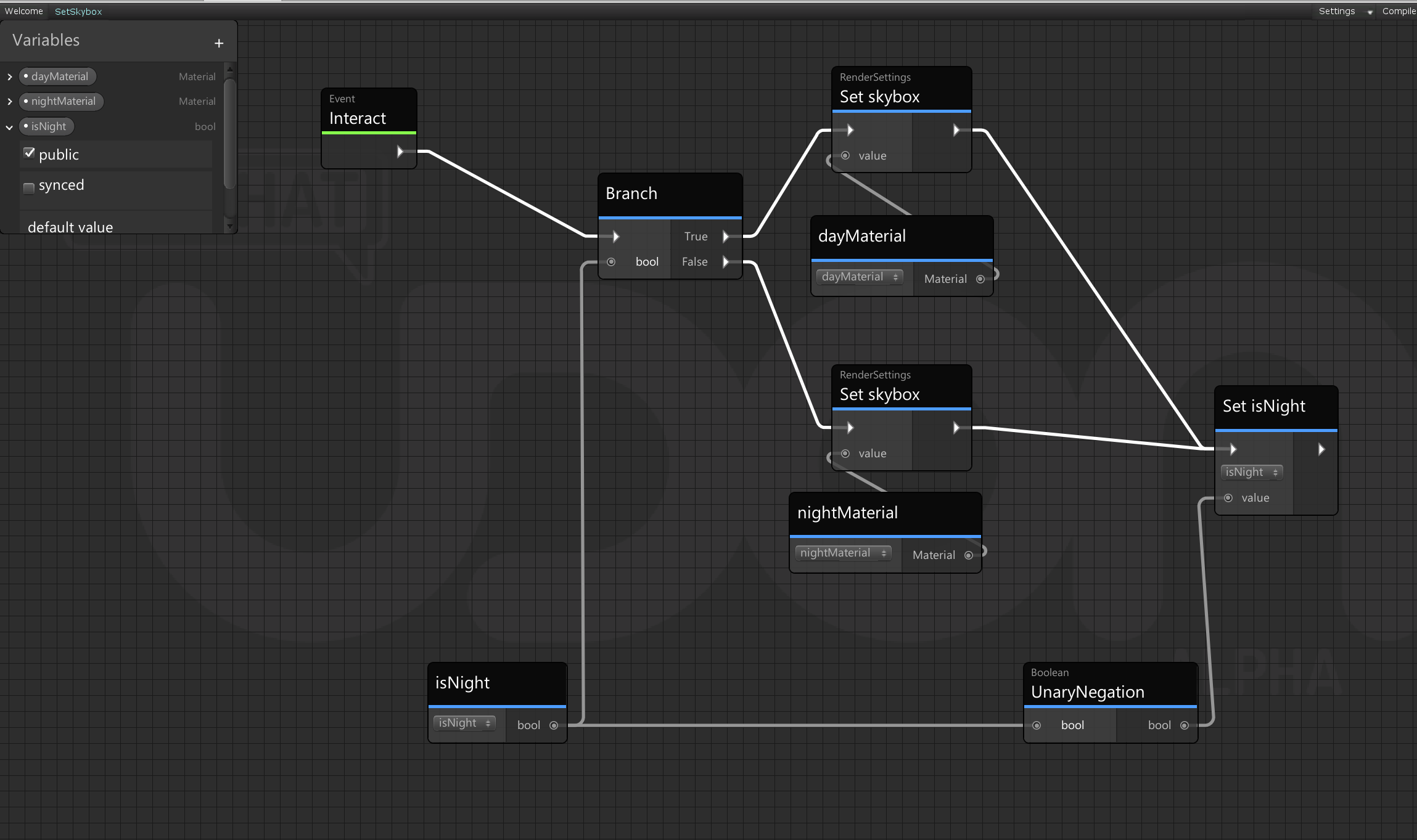
 twin drift
grand temple
set the layer to mirrorreflection
twin drift
grand temple
set the layer to mirrorreflection
Thaaaank you!
dapper lion
so... are there any known reasons why desktop manipulation would not be present?
fading cipher
@dapper lion I haven’t had the ability to grab any of my VRC pick ups with desktop in that month or so that I’ve been tinkering around
That’s part of the reason I want to remake the system, instead of debugging something broken I might as well make my own
dapper lion
i kind of made my own but it doesnt flow right. but this is literally for a stick rotating, thats all i care about lol
fading cipher
Yeah I need a full on sword-grabbing system
Not to mention I will eventually have custom swing animations for desktop users, which again I know I could do with "using" vrcpickups but I feel like syncing a single "grabbed or not" value and using tracking data would be way more efficient instead of syncing its position like usual
dapper lion
ok nvm, i think the latest client might have a pick up bug
yea, i just went to 3 other worlds where i knew you can manipulate objects. is that a desktop setting?
fading cipher
Quick note, I've mentioned this before but never got a response... I think VRC's Input Events are bugged for Vive players but I need to do a bit more testing on my end
I have yet to have a single vive user successfully open my menu, which requires a grip and a swipe, but I need to throw in some debugs and specifically get a Vive user to test with me
Unless the issue is that Vive users can't "grip" without also "use"ing? because that's the whole thing, you have to grip without squeezing use (for most people you'd be pointing your finger doing this)