#udon-general
59 messages · Page 53 of 1
 glad stump
Checking float Sync also calculates all players individually. How do I synchronize Random.range?

 worldly tapir
Does this happen for all at the same time? Maybe then only set when player is owner?
glad stump
Both the owner and the non-owner display a different numbers.
 hushed gazelle
I've got this same problem too. As far as I can tell, this should locally set a random number to a synced value and then call that synced value during the customevent for every other player. But it's individually randomized.

It's set to Synced: None, would Linear or Smooth help at all?
glad stump
That's right. It's randomized unconditionally.
hushed gazelle
Sooo, is there a sane/proper way to sync a random float in udon then?
 stark adder
Wait for Network Upgrade and Manual Sync 😄 Right now well.. You gotta sync it and waste bandwidth 😄
 void ridge
Sending a float with every network update isn't the worst thing. At huge scales, like if this is a program attached to a ton of objects, then yeah maybe
I have a script that does something like that. 3 random integers for something like 20 objects. I tested it with 80 people connected and it was fine.
However, if you're really interested, I think there does exist a strategy wherein you use the server time to generate random values
 floral dove
if you want this - please file a Canny. Not sure what you mean about the MIDI spec, though - there's very clearly a separate 'Note Off' message with its own Status byte: https://www.midi.org/specifications-old/item/table-1-summary-of-midi-message
 sharp briar
Is there a way to do a timer with graphs, I remember people talking about it awhile ago and noone knew
 fiery yoke
Ofcourse there is. It depends on what you want to do tho.
sharp briar
I want something to turn off a few seconds after a player touches it
And then turn back on a time after
fiery yoke
In synchronous computing, a computer processes instructions one after another, until all instructions in that frame are processed. This is what a frame is. Its all of the instructions from start to finish that need to be processed. The time that took is stored in Time::deltaTime. Delta Time is the time, the last frame took. So if you want to know how much real time has passed you can add the Delta Time to an accumulator every frame.
Another and more simple way is to use Unitys timeSinceLevelLoad which counts the real time that has passed since the world was entered.
sharp briar
So this is to track timing in the game, I would want the graph to look at timeSinceLevelLoad and then use that information to do the timing things I want?
worldly tapir
floral dove
if you want this - please file a Canny. Not sure what you mean about the MIDI sp...
I already filed a Canny under Bugs, because that's what the SDK2 version is. together with the suggestion for Udon: https://feedback.vrchat.com/bug-reports/p/1061-missing-midi-off-interpretation-double-onnoteon-messages
Yes, there is a Note Off message. However, most modern MIDI devices use a MIDI On message with a velocity of 0 instead.
To this, the MIDI spec states "A receiver must be capable of recognizing either method of turning off a note, and should treat them identically."
-> Source: The official MIDI Detailed Specification, page 10, under the Title "NOTE-OFF". The Document can be found here: https://www.midi.org/specifications/midi1-specifications/m1-v4-2-1-midi-1-0-detailed-specification-96-1-4 (You may need to create an account to view the document)
In Udon, since we have velocity, we have the means to implement this ourselves, yes. But as said in the post I made earlier, it incites hacky flow merging and noone has made a MIDI spec compliant map with this in mind yet. Should I create a new Canny specific to the Udon request then?

The MIDI Association
fiery yoke
sharp briar
So this is to track timing in the game, I would want the graph to look at timeSi...
Well yeah if you want to wait 5 seconds at any point you can store the current real time, then compare the current real time to the saved value by subtracting the actual current time from the saved time.
sharp briar
That's a little more confusing then I expected it to be but I think I can work with this information
fiery yoke
Its not
What time is it right now for you?
Lets say its 13:26:31 and you want to wait 5 seconds. Then you just add 5 seconds to that value so 13:26:36, then you check every "frame" if the current time is that time.
Thats literally how humans check how much time has passed since a given point in time :D
You subtract the time of when you started counting, from the current time.
sharp briar
Mhm
 serene moat
There's also SendCustomEventDelayed for seconds/frames
fiery yoke
Isnt that in the beta?
serene moat
it's on live
fiery yoke
Ahh right, got a little confused with the networking beta.
Yeah they added that to make exactly this kind of thing easier.
But it has a few gotchas
floral dove
worldly tapir
I already filed a Canny under Bugs, because that's what the SDK2 version is. tog...
Thanks for the details - yes please make a Canny on the Udon boards - SDK2 is not getting new features.
fiery yoke
so both ways have their pros and cons.
worldly tapir
aight, will do, thanks :)
 stoic mountain
how do you get which hand player used to interact with an object ? (udonSharp)
floral dove
stoic mountain
how do you get which hand player used to interact with an object ? (udonSharp)
that info is not available through the Interact event
stoic mountain
sadness
Ill just get the closest hand
floral dove
however, you could use the InputUse event to figure out what hand just triggered the 'Use' event that caused an Interact
 azure rover
question, since sending inputs from UI is handled by unity's internal Events system (like when you click on a button or drag a slider) do you even need to use udon to then handle the subsequent reactions?
floral dove
if you want to react to input using UI Events, you don't necessarily need Udon for that, no: https://docs.vrchat.com/docs/ui-events
azure rover
that makes things a little bit easier since there's some things i dont necessarily need udon for
the biggest problem i have right now is that I cant use custom classes
i created a scriptable object that has the audio track of a song, its title, the composer name and the cover art
but this wont work with udonsharp
 floral dove
Right - you could write an Editor script that loads a scriptable object's info into an UdonBehaviour's program variables instead.
floral dove
Video Players are meant for playing videos. We have several security measures in place to keep them from being used as a generic web query system, and discourage circumventing them, or discussing that here, thanks.
 shut patrol
floral dove
Video Players are meant for playing videos. We have several security measures in...
shut patrol
floral dove
Video Players are meant for playing videos. We have several security measures in...
Okay, sorry
floral dove
shut patrol
Okay, sorry
np
 dapper lion
ok, so i have a parent that is a pick up that is synced that has another synced pick up for its child. does the child need to be synced as well or can the parent just be the sync?
floral dove
you can just sync the parent
unless you want the child to moved and synced separately. Maybe describe what you're doing with a little more detail?
dapper lion
ok, so i want a pick up that can be moved by itself. and then have another pick up (the parent) move both itself and that other pick up
cus rn, both child and prent were synced and the child was stuttering like bananas trying to keep position
 grand temple
the stuttering is probably caused by them having two different owners
dapper lion
but i think they both have to in order for the child pick up to be moved to a different location for everyone right?
grand temple
yeah, if the child ever moves independently of the parent then it would need to be synced
if you do onpickup > take ownership of child, that should prevent the stuttering
though if this is specifically for something like a gun with a foregrip, I don't think this is the best approach
floral dove
Yes, that's a good point. When you call SetOwner on an object, it will only change Ownership of the target UdonBehaviour, not any UdonBehaviours which may be children of the target.
void ridge
floral dove
Yes, that's a good point. When you call SetOwner on an object, it will only chan...
Been wondering this for a while, thanks
Assuming the inverse is also true, that when you set a child's ownership it doesn't affect parents or above in heirarchy
floral dove
correct
dapper lion
so like. what would happen if the children were set to sync, but the parents were not set to sync. how would that work?
floral dove
I think the children would move to their new locations, and then jitter and fight against the parents when the parents were moved.
void ridge
floral dove
I think the children would move to their new locations, and then jitter and figh...
Family gets like that sometimes.
dapper lion
that sound does not play on discord
dapper lion
ok, so idea: if i make an object that isnt synced. but whatever it touches and rechilds its self is. then that means i could just use 1 unsynced object that picks up 2 synced objectS?
also, that audio is most likely broke
 dapper haven
i dont think so, i think its just a discord bug
 topaz scaffold
I'm trying to create a system where, similar to the default vrc home, the player walk near a mirror to have it automatically appear. My simple udon program works, but the mirror toggle is synced across every player in the world while I want it to be local. what am I missing?

 paper gate
you need to check if the VRCPlayerApi from the OnPlayerTriggerEnter is the local player
That event runs when ANY player in the lobby enters the zone by default
topaz scaffold
thanks for the help, Im completely new to this, I suppose this is how you check?
https://i.gyazo.com/6e8f74f25d8aed4062839f6c676e07da.png
 paper gate
It looks sound to me but I dont use the graph so not 100% on that
 honest hornet
Question guys Why cant quest 2 players see most of skins in vrchat?
 gilded sandal
honest hornet
Question guys Why cant quest 2 players see most of skins in vrchat?
gilded sandal
honest hornet
Question guys Why cant quest 2 players see most of skins in vrchat?
this channel is for udon questions, and this is an avatar question btw
gilded sandal
yes it is necessary, because you won't find your answer here :v
and the name calling is uncalled for, but if you want an actual answer there is plenty of people in #quest-general to help you
honest hornet
bru just move on stop worrying about me and worry more about ya self bru now just stop talking before we get yelled at smh
dapper lion
@honest hornet they are literally trying to help you find a place where youll get an answer
dapper lion
no lol
worldly tapir
@dapper haven try using a sound that does not declare itself as a trojan in its metadata. Other than that, this is not the meme channel, please respect that.
 grim pebble
I'm currently working on an invisible wall who's purpose is to appear when a button is pressed. The only problem is that I don't know how to make it so the invisible wall appears not just for one player (local) but for everyone (global).
 wanton kernel
What am I doing wrong I go to test world no errors I can see just hear a bling noise when I hit build n test n then I get sent home
 unborn hornet
grim pebble
I'm currently working on an invisible wall who's purpose is to appear when a but...
unborn hornet
grim pebble
I'm currently working on an invisible wall who's purpose is to appear when a but...
Simple answer: UdonBehavior -> SendCustomNetworkEvent
Less simple answer: synced variable that tracks the state of the wall
The latter works for late joiners but is a bit more complex to implement than the network event.
 normal yarrow
Has anyone had issues with the SDK3 control panel make Unity freeze up for a while every time it's clicked on?
 scarlet lake


What could I be doing wrong here?
Im trying to have pressing the white rectangle, button_odyssey, load a certain youtube url into the video player, quad.
 steel nova
there doesnt seem to be any documentation on vrc's PlayerApi nodes; what would be the best way to label certain players with a bool and reference those players in SetVoiceGain?
floral dove
steel nova
there doesnt seem to be any documentation on vrc's PlayerApi nodes; what would b...
We've got seven pages on the PlayerApi nodes 😉
https://docs.vrchat.com/docs/players
VRChat
You can interact with Players in your world through the VRCPlayerApi. Each Player has a VRCPlayerApi Object, and your world fires the OnPlayerJoined / OnPlayerLeft events on any UdonBehaviours that listen for them when a player joins or leaves. This page includes info on using some general nodes. Si...
steel nova
okay; it says player tags are broken, is that still true? what would be the best way to mimic that without?
floral dove
Unfortunately yes. You could have a sort of Manager object that one player owns which manages the states for the other players
normal yarrow
Why SDK3 😔

Every time I click on the Control Panel or off of it, it makes Unity non-responsive for a little while.
normal yarrow
Seems like no one else has experienced this, at least from searching on Google.
scarlet lake
normal yarrow
Why SDK3 😔
No, i've had this happen, but it was only briefly yesterday, not sure on the cause of it.. but it persuaded me to put Ryzen master in creator mode.. just figured a few mhz increase might sort it out.. has not happened since, might just of been random.
normal yarrow
Interesting
 dim horizon
That has been happening to me for at least a year, even with sdk2.
 onyx granite
normal yarrow
Seems like no one else has experienced this, at least from searching on Google.
onyx granite
normal yarrow
Seems like no one else has experienced this, at least from searching on Google.
I get this off and on, usually when the vrc servers are acting up (coincidence? idk)
Has anyone encountered an issue where 'sitting' in the VR prefab chair seems to break held object manipulation in desktop mode? IE, 'Allow Manipulation When Equipped' seems to become unchecked on all vrc_pickup objects after sitting down.
dapper lion
if “allow manipulation” is untouched for the pickup. it will default to still allow it even tho it doesnt have that checked until its disturbed in some way usually. so probably that chair just resets it so you can no longer manipulate it
onyx granite
option is checked in unity. very odd behavior
dapper lion
are the objects with vrc_pickup children of a parent or something weird?
onyx granite
nope, pickup is on the parent which is scene level same as the chair. hmmm
normal yarrow
Huh really?
 somber hawk
normal yarrow
Seems like no one else has experienced this, at least from searching on Google.
somber hawk
normal yarrow
Seems like no one else has experienced this, at least from searching on Google.
I definitely have this happen regularly enough
normal yarrow
Ooh, good to know then
scarlet lake
how can i make it so when i join my own world it says world creator on my head
somber hawk
scarlet lake
how can i make it so when i join my own world it says world creator on my head
There's lots of ways you could, but generally you'd have a script somewhere that would detect you and put that object there, matching off your username since I think that's the only value you can pull via the API useful for that kind of thing
scarlet lake
ok
somber hawk
Then I think you'd use the player API (https://docs.vrchat.com/docs/player-positions) to get the position of the player and place the identifier there. I'm not sure if there's a way to parent it in the hierarchy of the player so it follows them or if you need to manually do it. Someone else might have better info than me 🙂
onyx granite
What is the global equivalent to EventInteract>SetActive? Trying to make a button that shows an object for everybody instead of just the person who clicks it.
grand temple
oninteract > sendcustomnetworkevent "name of your event"
then
name of your event > setactive
onyx granite
thank you much!
normal yarrow
Dang, even a day later Unity's still freezing when I click on the VRChat SDK.
 grizzled trout
normal yarrow
Dang, even a day later Unity's still freezing when I click on the VRChat SDK.
grizzled trout
normal yarrow
Dang, even a day later Unity's still freezing when I click on the VRChat SDK.
by any chance you using the androied build side of things?
 normal yarrow
It's alright
Anytime I click on (or off) the VRChat SDK control panel, Unity becomes non-responsive. That's pretty much the issue I got here.

I can't seem to figure out what's causing the issue, whether if it's on my end or it's on the SDK's end.
 twilit breach
Can't tell if this is a me issue or a few updates back. Had an older world which used right thumbstick up to jump and it isn't working now. I was recently messing with my controller bindings so I'm unsure if I unbound my thumbstick and thats what caused it, or if the recent input update legacied Oculus_CrossPlatform_SecondaryThumbstickVertical. Any possible confirmation if the aforementioned input is still working?
grand temple
Oculus_CrossPlatform_SecondaryThumbstickVertical is definitely still working
dapper lion
what is the menu button called on quest?
twilit breach
thanks phase, I got a weird controller re-bind so it was hard for me to test on my end cuz I can never guarantee if I messed it up or not
normal yarrow
🤔
I tried removing the SDK and reimporting it and unfortunately that didn't fix the issue.
grand temple
dapper lion
what is the menu button called on quest?
Menu button on an oculus headset running oculus build is "Fire2". But an oculus headset running in steam will report "Fire1". The menu button is not currently supported by the input actions system so there's no better way to get it. So If you need a general purpose tertiary button for your world I would recommend just making a system so players can rebind it to whatever they want
dapper lion
hmm ok, cus im using “joystick2” currently and thats the mutr button. “joystick0” is jump and joystick 1 and 3 do nothing as far as ive seen. and 4 does something but i cannot remember
i have not see any “fire1” or 2 in graph
joystick 0 and 2 however are the menu buttons on pcvr tho. so i assume they are miss matched
grand temple
here it is all mapped out. As you can see it's very inconsistent between each controller https://docs.google.com/spreadsheets/d/1_iF0NjJniTnQn-knCjb5nLh6rlLfW_QKM19wtSW_S9w/edit?usp=sharing

Google Docs
VR controller summary
The method of getting input that is documented in this sheet is being superseded. In open beta 2021.1.4 (march 6th), VRChat has introduced a new method of getting input. That new input system will be more reliable and more future-proof. Please refer to documentation here: <...
dapper lion
ive seen this. but ive not seen any of these in the graph editor
grand temple
These are all strings that you have to manually put into Input.GetButton and Input.GetAxisRaw
dapper lion
oh. ok then
 trail shard
What node would I use to have the script pause for a certain amount of time before executing the next part of it, and how do I despawn an instantiated object?
grand temple
you can't pause a script, but you can sendcustomeventdelayed. It will execute a certain event after that time. Despawning can be done with gameobject.destroy
trail shard
ok, instantiation is local correct?
trail shard
Ok, I'm looking at the documentation it says if you want to make a synced object spawn you need to use an object pool. Is it possible to just have that object pool contain infinite versions of whatever object you're spawning?
grand temple
by definition, an object pool is a finite number of objects
you just enable and disable the ones you want
trail shard
Ah, makes sense.
I'm trying to dip my toes into the water with an udon version of the combat system I told you about yesterday phase, I'm assuming for latency reasons a synced gameobject wouldn't be the best way to do projectiles, raycasting isn't an option, and the current combat system uses particles. Should I go with particles or gameobjects?
grand temple
local gameobjects are probably the way to go, yeah. The problem with particles is that you can't find out where they collided so you can't play a sound effect
particles also have very low quality physics
trail shard
I don't need physics on the particles because there's no bullet drop, and since local gameobjects don't sync on the network i don't think it'd be possible to do hitreg on them right?
grand temple
physics != gravity
and local != not synced
you can have something be local just calculated on everybody's computer separately
 grand temple
no, you gotta make a new custom event called destroy
 grand temple
yeah
trail shard
sweet, gonna test it out 1 sec
Ok so between firing the first one and the destroy event I can fire as many as I want, but once the destroy event goes i can't fire any more
grand temple
yeah your script is probably crashing. Do an isvalid check before calling destroy
 grand temple
wait networking destroy? Err I don't know about that. Use gameobject destroy
trail shard
well it isn't a gameobject
grand temple
so do rigidbody.gameobject
if you destroy the rigidbody that's not going to destroy the gameobject
trail shard
a rigidbody get gameobject?
grand temple
yeah
trail shard
even when i do that one the only thing that comes off it is a networking destroy
grand temple
oh sorry it's unityengine.object > destroy
grand temple
probably not, given that you're gonna have hundreds to thousands of these
trail shard
hmm...yeah idk why it doesn't have a destroy option for this bleh
grand temple
like this?
trail shard
Oooh I had to make a new node
I was just trying to do it off the rigidbody get gameobject
hmm nope still doesn't let me shoot after the 5 seconds
should i put in an isvalid?
grand temple
did you get rid of the isvalid?
trail shard
Ye
grand temple
then ye
trail shard
Thought you changed your mind on it lol
grand temple
the isvalid is always necessary
 grand temple
plug in the right object to isvalid but then yes
trail shard
shweet
grand temple
if you ever try to do something to an object that is null, not there, invalid, or otherwise protected by VRC, then it will immediately crash the script. Isvalid is a catch-all to make sure that yes, the object is valid and doing stuff with it won't crash your script
trail shard
Hmm ok so when I shoot a bunch at once when the destroy script runs it only destroys the most recent from what I can tell
yeah, then after the destroy script runs i can't shoot again lol
grand temple
oh yeah you'll have to keep an array of gameobjects. At that point why not just have a pool
trail shard
aight i'll look into pools then
main issue i can see is if lots of people use the pool at once then it could potentially run out of objects in the pool, unless it's possible to just set it to a massive amount that would never realistically run out
grand temple
I can't imagine you'd need more than 50 objects
trail shard
so it's come to my attention that the particles actually use an animator and not physics
so would that be better or worse than gameobjects
grand temple
huh? You can drive particles by an animator but they still have physics
trail shard
it's not using any physics forces to move it's just using an animator to make them go forward
grand temple
particles don't use rigidbody physics, but they do have physics. Otherwise how would they collide with things?
trail shard
I don't know exactly how it works this is my first time messing heavily with this stuff. Maybe I'll try it both ways idk
 rich jacinth
I can't get my VRC to use my Midi piano.
Anything to try?
Details I got:
I opened VRC, turned the midi on, went to a midi world, and nothing responded.
normal yarrow
Just curious, how many audio sources can I have playing in a world at once?
I want to simulate a radio playing from many speakers in a large store, but I also want spatialization from each speaker.
dapper lion
in theory: 256, but technically limited to 8 at a time
normal yarrow
Makes sense.
dapper lion
would have to mess with priority after that
normal yarrow
I notice some of my speakers do not play the music while some do.
Also in the same spots.
dapper lion
thats how audio gets clapped out of existence
normal yarrow
Ah
dapper lion
if the speakers are in hearing range, you can only do a sertain amount
 dapper lion
then technically youd be safe going over 8
normal yarrow
How do I change that?
dapper lion
those may be a bit close for comfort
you can call via avpro or vrcaudio to have more audio sources via a videoplayer
normal yarrow
I could do that, though I believe in this store we're going to have TVs (in a electronic section) that plays commercials that'll go out through an audio source as well.
So I'm not sure if I'll be dealing with the "one-video-at-a-time" limitation there.
dapper lion
in theory. you can have multiple videoplayers. but have it so they delay after eachother so “rate limited” errors dont occur
normal yarrow
I see.
So I could have the speaker music keep playing while also having the TVs play their videos?
Though I wonder how I'd get the speaker music working like that, since I assume it only works with videos.
 fading cipher
Okay I'm finally tackling something I've been putting off forever and I have like 5 loops and probably more coming... I'm not very well-versed when it comes to looping through things and comparing certain objects in different arrays... Does anybody have a U# example or fully put together script that will create a list of all players in the room that automatically updates/removes players as more join/leave?
I'm currently trying to wrap my brain around the best implementation of this I can come up with myself: creating a list of strings and each time a player joins, you get a new list of all the players in the room, compare each of their usernames to the already known list of player names, then find the one that's new and add that to the end of the known list of player names
Except lists don't actually exist so it's a bunch of looping and re-creating of arrays
The part where lists don't actually exist is where I'm struggling trying to re-implement a list using arrays 😅
I guess I can work on extracting thryallo's code for this, but he's a slightly better programmer than me and I struggle wrapping my head around his implementations lmao
normal yarrow
You know what, to make things easier on myself, I might just get rid of every other row of speakers and just increase the rolloff of the remaining ones.
floral dove
fading cipher
Okay I'm finally tackling something I've been putting off forever and I have lik...
Why not just create an Array of Players and update it whenever people join / leave? https://docs.vrchat.com/docs/getting-players#getplayers
VRChat
These nodes are useful for getting an individual Player, a group of them, or all of them. GetPlayerCount intGets the actual number of Players in the instance when it is called. GetPlayers VRCPlayerApi[]This is how you get all the Players in your world so you can go through them in a For Loop and app...
fading cipher
@floral dove I spent a looong time messing around with some code I managed to find about this, and got myself a bigass todo list for stuff tomorrow xD for the most part, it will be stemming from an array of objects created and named after each of the players in the game, yeah
Idk why I felt like I needed to loop a billion times over when I first tried to do it from scratch lol
normal yarrow
Okay so my ears get obliterated when I have the video player go through all the store speakers.
Interesting, so adding the reverb filter made it this way.
If I remove it, the 3D spatialization comes back.
unborn hornet
Audio be funky sometimes
normal yarrow
Okay it seems like even with this method, not all the speakers are playing. Sadge moment
normal yarrow
Yeah so this is gonna be more complicated than I thought.
 wispy atlas
normal yarrow
I want to simulate a radio playing from many speakers in a large store, but I al...
wispy atlas
normal yarrow
I want to simulate a radio playing from many speakers in a large store, but I al...
have you tried using a reverb zone in combination with the 3D audio sources?
normal yarrow
I have not, no.
Even if that were to work properly, I'd still have the issues of not every single speaker playing audio.
At least within VRChat itself.
wispy atlas
I don't think you need every single speaker playing audio if you want the audio to feel like it's in a large space
 viscid reef
how many audio sources do you have?
wispy atlas
having a few audio sources with the reverb zone effect applied is pretty good
viscid reef
yeah.. thats probably too many lol
normal yarrow
Yes, it is a lot.
viscid reef
unity has a limit on how many audio sources can be active simultaneously
the default is 32 iirc, not sure what its set at for vrchat
normal yarrow
Yeah I don't have the issue in Unity's player, but in VRChat, the issue is present.
wispy atlas
you could activate and deactivate the audio sources based on proximity to the player as they move around the area and use audio source 3D volume curves to fade the ceiling speakers in/out
normal yarrow
Oh?
If I use the audio from the video player, at least it won't restart when deactivated and reactivated.
But I notice that the audio freezes and stutters until I walk back to the first trigger I activate.
Like going from one trigger to another.
wispy atlas
hang on lets roll back a bit
are these audio sources all playing the same audio file?
and is it local or streamed?
normal yarrow
Streamed, and it's all supposed to play the same audio.
I do have a local file I can use though.
wispy atlas
one idea that comes to mind is that you could just use the audio files as a 2D source for when the player is wandering around the area, with a reverb filter or reverb zone applied (or even baking the reverb effect into the audio file itself) to make the space feel large and then spatially blend it to 3D when the player comes into close proximity with the video player
but you wouldn't have those individual 3D audio sources on the ceiling
normal yarrow
Yeah I suppose so.
I wanted to have that immersion of passing through all the speakers, y'know?
wispy atlas
yeah i get you
sometimes doing the most realistic implementation might not be the most immersive experience
normal yarrow
Basically I'm using the video player as more of a radio.
And I would use that "radio" to route it to all the speakers.
But yeah, I suppose that makes sense.
wispy atlas
you could attach an audio low pass filter component to your audio source and adjust the curves to make the audio sound like it's coming through a radio when the player is walking around and coming from the video player when the player is near
unless you already have the audio file sound like it's coming from a radio already
normal yarrow
There's no physical video player to pass through, if that makes sense.
I hid it under the map.
I'm using KMRT Radio tapes for this.
So they sound like they're coming from a tape, I suppose.
wispy atlas
yeah i'm listening to some KMRT tapes now
normal yarrow
Though if I was using tapes uploaded from YouTube (through the video player script), I wouldn't be able to pre-bake reverb into it.
wispy atlas
yeah, it would be realtime
normal yarrow
Do audio mixers work in VRChat now?
I remember a while ago when I tried using 'em, it didn't work for me.
wispy atlas
reverb filter audio components and reverb zones work
normal yarrow

wispy atlas
in Unity editor the audio mixer reverb effect works, but when uploaded to VRChat it doesn't work
normal yarrow
Yeah that's what I expected
wispy atlas
also, an audio source has to be non-spatialized 3D audio for the reverb zone to work
so an audio source that doesn't have the VRC spatial audio component attached
one other method, if you choose to play an audio file locally, would be to encode your stereo audio file into an ambisonics audio file
normal yarrow
Huh. I don't think I've ever done that before.
wispy atlas
it requires a bit more effort than working with stereo or mono audio files, but the immersive effect it can give is quite strong
a major drawback though is that it will feel 'attached' to your head, like normal 2D audio, but the spatial image can be perceived when rotating one's head
wispy atlas
Here's a good brief overview of ambisonics (you can ignore the marketing of the plugin)
https://www.youtube.com/watch?v=mcUwiYwgBHw
normal yarrow
Sure thing
So, with ambisonics, I can fake the speakers sounding like they're above in the ceiling?
wispy atlas
technically yes, but it won't be as good as real-time spatialization from the VRC spatial audio component
normal yarrow
Ah, so should I not bother with it?
wispy atlas
i wouldn't say don't bother with it, it's just an option if nothing else works
normal yarrow
Gotcha
wispy atlas
it's quite a good audio technology for VR immersion
normal yarrow
Ooh man, this is not as easy as I thought it would be, lol.
wispy atlas
yeah that's usually how it goes haha
normal yarrow
I would've tried making triggers that just disable/enable speaker objects, but I realize that would only make the music restart everytime a speaker is activated.
wispy atlas
For now if you just want to get audio into your world, I would use a 2D audio source and apply a audio reverb filter component
normal yarrow
Yeah, I guess that'll work for now.
wispy atlas
having 47 audio sources would just be wild
normal yarrow
Until I can get a better solution implemented.
normal yarrow
For sure
fading cipher
When you first join a room that already has players in it, does OnPlayerJoined() get called for each player already in the room, or if you want to do things involving players already there when you joined, do you need to use GetPlayers() in your Start() method?
grand temple
onplayerjoin will happen for all the players, even if you're a late joiner
I may be wrong but usually start is too early for networking stuff so I wouldn't recommend running getplayers that early. Just run getplayers during onplayerjoin and you're good
fading cipher
Oh no so I'm not running GetPlayers at all, currently I'm just using OnPlayerJoined to set things regarding that specific player (for each player to track others in the area via a list)
But if I'm a late joiner, will OnPlayerJoined run on my client for each player already in the room so the list gets populated?
Or maybe as a workaround, is OnPlayerJoined run on my own client regarding myself when I join a room, so I can check to see if the player that's joined is my own localPlayer and run GetPlayers there?
I'm trying to not run GetPlayers every time someone joins/leaves, and only add/remove from the list when a specific PlayerJoined/PlayerLeft is run so there's less overhead (and less programming for me cleaner code 🥴 )
grand temple
yes, if you are a late joiner you will receive an onplayerjoin event for every player
fading cipher
woot
that's cool, I wouldn't have expected that without being told
I kinda partly thought by reading thryallo's code because he doesn't have an "initial populate list" setup, but I thought maybe I was missing something
 runic raft
I have a qustion. I experiment with a flipbook animation(on/off) and I got it work with my first frame but I dont get how to get the other gameobjects (for example each gameobjects is active for 1second or for 15/1seond or 30/1second) . Maybe someone can give me an advise how to handle these several objects as on/off animation.
 grizzled trout
runic raft
I have a qustion. I experiment with a flipbook animation(on/off) and I got it wo...
grizzled trout
runic raft
I have a qustion. I experiment with a flipbook animation(on/off) and I got it wo...
i am mostlikely wrong with what you need but my advice would be to put all the gameobjects in an empty and then give the empty an animator and make the animations of each object turning on and off or you can just make the aimation of it all playing like you want
rather then having bunch of animations controled by coed have one long one that just starts when you push the button
 ionic remnant
I have a quick question. I've been trying to get a button to show up only if you have a certain username. For example: My username is Coco! and can see the button, but my friend having the user SminkyCrow can't see it, is that possible in any way? I've attempted to create something like that but I currently don't have that with me atm.
wanton kernel
Ok so how do I import my project into blender?
 spiral briar
Does any one know how many hours/ uploads is needed to get trusted user
 twilit epoch
I want to step on a cube or any object and after that it should play an audio source. But how?
Event OnPlayerTriggerEnter first?
wanton kernel
spiral briar
Does any one know how many hours/ uploads is needed to get trusted user
Might vary but im trusted n got 1800 hrs n 2 avatars n 1 world uploaded I think after the 1st i upload I became trusted but also got over 1000 freinds
runic raft
grizzled trout
i am mostlikely wrong with what you need but my advice would be to put all the g...
Hey "Stray with npc energy" sound good your advise but I don't know how to do it 🙂 ... I am fresh with udon and never did animation of objects before ... I created as you said a empty game object I copied all my single frame game objects into the empty ... and through it on an UDON graph but then I am lost ... I don't know the names of the functions how to give it an animator and how to trigger it on an of .... I would like to start trigger it not with a button i would like to start trigger it with an BOX trigger but the BoxTrigger i figured myself ... but this animator approach is completely new to me ...
runic raft
twilit epoch
I want to step on a cube or any object and after that it should play an audio so...
i did this function yesterday .... i hope the graph helps you ...

 slate mesa
Any idea why this block might be causing problems? It's coming from the standard SliderSync, so the top/bottom are just the owner/deserialization blocks. The slider instantiates fine, but after sliding immediately breaks

I know that it's something about this part because if I remove the "Set bounciness" blocks it functions fine
floral dove
slate mesa
Any idea why this block might be causing problems? It's coming from the standard...
What breaks about it? Do you get any errors?
slate mesa
The UI text target stops updating, although I'm not getting any errors in the unity console
floral dove
can you zoom out a bit to show the context?
slate mesa
This is a zoomed-out view. It also definitely fails to set the bounciness on the box collider, just judging by in-game behavior

Also using this to set the initial value, which seems to work fine

I'm not sure if there's a way to set a reference to a physics material directly, since it's a subcomponent of the collider, but if it's possible I can try that
floral dove
slate mesa
Also using this to set the initial value, which seems to work fine
Hm - the logic looks good, but I know that sometimes the graph miscalculates the order of operations when reusing nodes. Try duplicating the DieCollider > GetMaterial nodes as well as the sliderValue node so each "Set bounciness" node has its own copy.
slate mesa
Wow, that fixed it! Thanks! Now to comb through my other scripts and double-check node reuse
floral dove
Yay! And also, damn - I really don't want the graph to do that. But also, yay, that looks reproducible - which means I can work on fixing it 😉
 frank parcel
is possible to make Global object with pure Udon that following player?
grizzled trout
runic raft
Hey "Stray with npc energy" sound good your advise but I don't know how to do it...
https://www.youtube.com/watch?v=TfyL99fA_vU&list=PL8KgUGVwBd_HjEGo6_5UriffNxLzyZeX-&index=30 this mignt help. sorry for such a delay
floral dove
frank parcel
is possible to make Global object with pure Udon that following player?
yes - set its transform.position each update based on the player's position
scarlet lake
seems like users dont get the light from from their hand/controllers to triggers in my world. did i miss something or mess something up ?
 dense python
guys how can i take the animation out of this catogery? i cant copy paste it
 floral dove
scarlet lake
seems like users dont get the light from from their hand/controllers to triggers...
floral dove
scarlet lake
seems like users dont get the light from from their hand/controllers to triggers...
Does the world work for you when you build & test?
floral dove
dense python
guys how can i take the animation out of this catogery? i cant copy paste it
you may have better luck in #avatar-help if you're working with avatars, this channel is for discussion of Udon worlds
scarlet lake
i havnt been using vr lately and these reports come from vr users
dense python
ok thx
scarlet lake
in desktop it works fine
floral dove
scarlet lake
in desktop it works fine
what method are you using to Interact with the objects?
scarlet lake
I have to check rq, i know everything is an udon trigger
yeah its just an udon behavior script
floral dove
what does the graph look like? Provide as much info as you can about the object, graph etc if you want us to be able to help
scarlet lake
I dont think the graph would really help here since that is where the interaction behavior is defined and this is related to pointing at the trigger object.
fiery yoke
Most likely your Trigger is overlapped by another
For some reason this behaves differently for PC / VR users
scarlet lake
what do you mean overlapped ?
fiery yoke
If a trigger collider is "contained" within another you cannot interact with it
scarlet lake
the triggers are all working just fine
the only issue is there is no pointer laser like there should be
 maiden vale
Hi I'm relatively new to udon and to vrchat but I found a world for quest where someone was able to get the vrchat keyboard to popup when I selected a input field, does anyone know how I could do that?
Like what event would I use to call the keyboard you use when searching for worlds or players
scarlet lake
You can't actually, but you can make your own Keyboard and do inputs
Like, have bunch of buttons that just do SomeText.text += "A";
A = Corresponding letter of the key
dapper lion
so sdk2 is the only way to get that keyboard to appear?
maiden vale
But I found a world that can do it and it uses udon with udon#
I found the person who made it and tried reaching out on twitter, found their prefab for their player, but it uses udonsharp so I cant load it into my project without that too, and I'm trying to do this with just the graph
floral dove
maiden vale
But I found a world that can do it and it uses udon with udon#
Input Fields don't work with the built-in keyboard in Quest afaik - if you've seen otherwise, please share the world / prefab so we can check it out!
dapper lion
@floral dove they do on most sdk2 text boxes. i just assumed it was blacklisted on sdk3 to prevent stuff from happening
my theory was it was a component. but id like actual closure to this as well
floral dove
Yeah, SDK3 input boxes don't work on Quest afaik
normal yarrow
Okay so it seems like the SDK freezes Unity because there's a lot of objects in the map.
frank parcel
@floral dove can you give me an example for that..? i`m stuck with that problem and im feel like hell..
fading cipher
Could you use Unity’s Projector component to project effects directly onto a player’s avatar?
My main use for this could be for projecting slice effects if a player is damaged by a weapon or something along those lines
grizzled trout
hi, might be wrong chat but is there a prefab for the climbing thing?
void ridge
grizzled trout
hi, might be wrong chat but is there a prefab for the climbing thing?
CyanClimbing, but it's SDK2, not SDK3
grizzled trout
Dang i see
void ridge
@dusk lance do you know if anyone's created an SDK3 version of climbing? It must be possible and probably way simpler to pull off with Udon
grizzled trout
Yeah i would think so, but my skils are still limited
floral dove
frank parcel
<@!98313818857275392> can you give me an example for that..? i`m stuck with that...
Sure - a graph like this will move the transform of the attached GameObject to its owner's position each frame:
 frank parcel
@floral dove thanks!!
normal yarrow
Turns out the model I had in the map had around 3000 useless empties, welp
floral dove
you'll need to figure out how you want to manage ownership, but hopefully that puts you on the right track. You can learn more about ownership here: https://docs.vrchat.com/docs/networking
normal yarrow
Got rid of them and now the SDK is now much more responsive in Unity.
maiden vale
https://vrchat.com/home/world/wrld_1b9dd9f5-3380-4944-9f8d-25049e9e9845 it's called iwsd room, if you click on the url field below the tv the vrchat keyboard comes up like it does in the menu

v2․5 Twitter ID˸@ChiuGameProject Tag˸#IwsdRoom
grizzled trout
so not sure how to prhase this but here it goes, i want to make it so when a hand tuches a button(in vrchat world not like irl buttons) it telports the person who tuched it
 cursive nova
does someone know how to make it so the gravity follows the twisted corridor?
 grizzled trout
cursive nova
does someone know how to make it so the gravity follows the twisted corridor?
grizzled trout
cursive nova
does someone know how to make it so the gravity follows the twisted corridor?
i think there is away to have the corridor turn to give the same effect. i am pretty sure changing the derection of gavaty cant be done
cursive nova
then how did the Majoras mask developers make that?
actually, doesn't matter
thanks
grizzled trout
cursive nova
then how did the Majoras mask developers make that?
ether like i said they world turnd or maybe becuse it is not vrchat
cursive nova
welp there goes that idea for a world, but thanks
grizzled trout
Rip
cursive nova
well, I don't think unity in general can do that
grizzled trout
i know the feeling
i think it could be done in unity but vrchat is a slightly difrint thing
from, my understanding anyways
cursive nova
well, I gave up now
grizzled trout
sorry
cursive nova
not your fault
grizzled trout
i know just been there having a cool idea for a world and then finding it cant be done
 fickle stirrup
@cursive nova you can force players to sit in Chairs and make your own "player controller" and "physics" calculation for those chairs, and use input events to move the chairs https://docs.vrchat.com/docs/input-events (but this will have some limitations, such as animations/etc)
cursive nova
yeah no thank you, to much for my one braincell...
grand temple
The simplest way is to just rotate the corridor around the player. It won't line up in multiplayer but it'll get the point across
 acoustic vale
Think I may have been confusing myself with object ownership, for example if I had a tennis game:
- player1 swings racket at the ball, on collision
Networking.SetOwner(VRCPlayerApi player1, GameObject obj); - player1 sees ball flying through the air, player2 would see a network delayed ball
- player2 swings racket at the ball, on collision
Networking.SetOwner(VRCPlayerApi player2, GameObject obj); - repeat
You'd want to set ownership or the ball would travel through the racket and not be effected by player2?
Or have i been misunderstanding???
I get this from "Only the Owner of an object can change its values"
grand temple
acoustic vale
Think I may have been confusing myself with object ownership, for example if I h...
Yes, that's correct. Technically if the ball is owned by player A and it flies into player B's racket without transferring ownership, it would get hit because player A sees the two collide but it would have a lot of latency for player B.
fading cipher
By setting B as the owner on collision, does that mean A would then immediately get the delay at the moment it’s supposed to collide? 🤔
grand temple
that being said, tennis is a worst case scenario on so many fronts. I have serious doubts that will work very well because you will be right at the intersection of jank coming from VR, Unity physics, and VRChat networking all at once.
acoustic vale
Yeah i getcha, was just as a terrible example for player ownership 😛
grand temple
ok, phew 
these are not unsolvable problems if someone really knows what they're doing (that's how ht8ball became a thing) but it's much harder than just slapping together some rigidbodies and calling it a day
 dusk lance
void ridge
<@!80868230259806208> do you know if anyone's created an SDK3 version of climbin...
dusk lance
void ridge
<@!80868230259806208> do you know if anyone's created an SDK3 version of climbin...
I only know of one that has been made public, but it isn't free. Look up "HeroesNFools" on patreon. There are others being developed but no idea when they will be public ready.
void ridge
Hmm OK. @grizzled trout ☝️
stark adder
(a)VRChatDevs is there any chance of getting read/write enabled on Avatar Pedestal image 🤔 would be very useful for reading some pixel information from the image
 paper galleon
^
acoustic vale
Think I have a cool idea not already in VRChat: So originally I was thinking about creating a full body skateboard, the problem is in RL your foot is not raised on the board so it doesn't seem too practical. So then I got thinking about hoverboards, snowboards, etc.
Some how track foot vive trackers to align the hoverboard, bind an accelerator to a controller button. 🤔
this is where I google it and it already exists 😛
grand temple


Hey stations are fixed on the open beta so they're actually usable! This is a basic U# adaption I did 2 months ago of some stuff I was experimenting with for the avatar flight systems before they got nerfed. It uses the hip rotation for control.
#MadeWithUdon #UdonSharp https://t.co/UbbesxZLvY
Retweets
185
Likes
569
 Twitter
·
Twitter
·
it uses the hip tracker
acoustic vale
Oh that's amazing with the particles 😮
acoustic vale
I'm thinking more something like actual snowboarding though, not sure how Unity likes object sliding down stuff though
Oh it already exists as well lol
I have no idea what he's saying but looks neat https://www.youtube.com/watch?v=7AE2Lf5Qk_o
寒すぎてジェイソンステイサムになったわね
スノボワールド↓
SNOW PARK[UDON] — by hamuheri
https://vrchat.com/home/world/wrld_e1d9a41c-99d3-4585-81e4-ce5eb006679e
Twitter: https://twitter.com/HakaseYuniAI
grizzled trout
@dusk lance @void ridge thanks for your help ,i will look into it
scarlet lake
On a collision, how do I check if the collided gameobject has a specific udon script attached?
In c# something like:
OnCollisionEnter(other) {
    if (other.gameObject.GetComponent<Script>() != null) { ... }
 mighty fjord
scarlet lake
In c# something like:
```csharp
OnCollisionEnter(other) {
if (other.gameObje...
mighty fjord
scarlet lake
In c# something like:
```csharp
OnCollisionEnter(other) {
if (other.gameObje...
Something like this?
 scarlet lake
Yeah but that only checks if it has a UdonBehaviour Type right?
and not a specific udon type?
grand temple
udonsharp is able to identify by class name so there must be something exposed to do that, but I'm not sure what it is. programSource would be one way but that's not exposed. Maybe udonsharp builds in some kind of identifier automatically
mighty fjord
Could set up some way to identify it, like storing some form of variable on the behaviour and getting it
stark adder
grand temple
udonsharp is able to identify by class name so there must be something exposed t...
UdonSharp is magic.. 😄
normal yarrow
For some weird reason, when I point a Unity video player to an audio source, the spatialization feels like it's boosted up by a lot. I could hear the music very far away from the map, which is not what I want.
 tall vault
U# implements its own internal type ids and generates its own assembly for GetComponent calls for types derived from UdonSharpBehaviour
Easiest thing to do if you want to check for a specific type you've created is to create a uniquely named boolean variable on your behaviour that you can test for with GetProgramVariable
grizzled trout
hi, i am trying to find out how to make it so when a players hand touches the button i have set up it triggers stuff. i have no idea how to get it to detect the hand tucvhing it. any advice is welcom
dapper lion
theres a button prefab that work when you physically touch them
im not sure where the link for them are but “architect anon” has touch controled buttons for udon on the vrcprefab spreadsheet
grizzled trout
dapper lion
im not sure where the link for them are but “architect anon” has touch controled...
cool i will look for it
scarlet lake
I'm trying to copy the "ui button anyone" example for one of my own variables, I've pretty much copied it 1:1 (i think) but sometimes my int is returning null?
I've added a bunch of logging text to confirm that this is the case:

 grand temple
Combining flow together like that can be buggy. Try having a custom event and then calling sendcustomevent from multiple different sources
scarlet lake
What do you mean exactly?
Like that?

So interesting thing
pointsToAdd is set to 10 in the variable in the udon behaviour

But right now I got 1 ... which is the default value ?


I'm very confused what's going on
 slender heron
are there any good pen prefabs for SDK 3.0?
dapper lion
i suggest using architect anon's pens prefab
slender heron
where would i find that?
stark adder
stark adder
(a)VRChatDevs is there any chance of getting read/write enabled on Avatar Pedest...
.
floral dove
slender heron
are there any good pen prefabs for SDK 3.0?
There's a basic pen included in the Udon Networking Update beta, works for late joiners. It's barebones for now but could provide a solid base upon which to build. Just be sure to copy it out of the UdonExampleScene, the prefab version is not up to date.
 scarlet lake
grand temple
Combining flow together like that can be buggy. Try having a custom event and th...
scarlet lake
grand temple
Combining flow together like that can be buggy. Try having a custom event and th...
Ah I split up the text setter part into a new udon script, and coupled it with an event, now it works to 90% thanks. 😄
Now I think everyone except the host has the previous value, and not the latest
 past sand
was told to ask here. but i need some help to make a button animate on click once
scarlet lake
hack lol, works
 grizzled trout
slender heron
are there any good pen prefabs for SDK 3.0?
grizzled trout
slender heron
are there any good pen prefabs for SDK 3.0?
https://booth.pm/ja/items/1555789 this is a pretty good one, most people use it
past sand
can anyone help me with animating a button?
floral dove
past sand
can anyone help me with animating a button?
please don't ask the same question over and over 🙂
You can learn how to do things in Udon here: https://docs.vrchat.com/docs/getting-started-with-udon
grizzled trout
so i downloaded this prefab from the google dox and i am kinda struggling with what i need to do to get my button working, it seems like some of the stuff is unrelated , there is no document or anything saying how to use it
dapper lion
https://www.google.com/url?q=https://architechvr.booth.pm/items/2668806&sa=D&source=editors&ust=1617412288336000&usg=AFQjCNHLQgVIeJ5a0-s-4MdT_mPtHsCuEg these are the ones im refering to. ive used them and they work pretty well
for touch controls
grizzled trout
ooh thanks
grizzled trout
dapper lion
https://www.google.com/url?q=https://architechvr.booth.pm/items/2668806&sa=D&sou...
that is for sdk 3 right? just making sure
never mind heh
dapper lion
yes, it requires udonsharp
 junior moat
Helloooo i have a question
Parameters used on Expression Menu can only be int and float? Im trying to make a toggle button with bool but doesn't work
dapper lion
i thinks thats for avatars
junior moat
yeah i mean a menu button/control
ints use too much space in the ExpressionParameter object thing, bools are lighter
 fluid mica
My world pick-ups which have box colliders applied as well as all of the correct settings (vrc pickup, udon behavior, rigid body) and are hiarchied within a "pickup" empty object to reference the object turn off button seemingly have a mind of their own. They will slowly but surely start freaking out for apparently no reason whatsoever which cause them to fling out of bounds, re-spawn and eventually do the same thing endlessly. They are all gravity related objects sitting on-top of a mesh collider applied desk. Any clue at if that is what is causing it or something else?
unborn hornet
slender heron
are there any good pen prefabs for SDK 3.0?
mmmm soon™
frank parcel
how to teleport non local player?
scarlet lake
fluid mica
My world pick-ups which have box colliders applied as well as all of the correct...
I don't think this is Udon related, it just sounds like the mesh collider of the table is interacting with the objects collider.. could try just turning off the tables mesh collider and using a box collider instead or a plane collider.. depending on what the model actually looks like, you could also reference a material property and use rubber etc if it still happens but doubt it will by using a standard collider.
 gleaming fractal
udon is responsible for midi support too right?
I strangely remember midi sending to be capable across instances.. or am I wrong?
so far im not seeing anything across instance sadly other then streams
stoic mountain
how do you get the camera orientation of a player (vr or non vr) ? Is the head bone rotation reliable ?
frank parcel
Why can't this graph teleport players?

 terse frigate
frank parcel
Why can't this graph teleport players?
terse frigate
frank parcel
Why can't this graph teleport players?
Because your telling the Teleport Box to tp player to the players current position.
frank parcel
no
instance is local player. and position fromanother gameobject
on trigger event not working
terse frigate
frank parcel
on trigger event not working
See if you can TeleportTo > Vector3 Jail.
terse frigate
From what I can see on that graph
frank parcel
?
jail transform is not current players transform
and that graph even not play audio source.. hmm
i dont know why
terse frigate
Yea, OnTriggerEnter > Transform Player Position > Jail Position
frank parcel
yes but i think on trigger event not called
because audio source is not playing
terse frigate
That depends then if your Objects Colliders are triggers. Check IS TRIGGER
terse frigate
Here, This is how you Teleport.

Interact > Udon Behaviour Send Custom Event on your Button or Trigger
On Trigger Enter > Udon Behaviour etc etc
 west plover
Given Canny is down: how come get/set of gameObject.tag is not exposed?
azure rover
how do you create global pickup objects?
i used the vrc pickup script but quickly realised that this is local only, so how would i make objects global?
 terse frigate
azure rover
how do you create global pickup objects?
terse frigate
azure rover
how do you create global pickup objects?
Make them Public Variables in Udon
terse frigate
west plover
Given Canny is down: how come get/set of gameObject.tag is not exposed?
Could you give more context or an example please ?
azure rover
terse frigate
Make them Public Variables in Udon
not sure i follow, how exactly and where exactly do i make them public variables
ohh, as in the world descriptor?
terse frigate
azure rover
not sure i follow, how exactly and where exactly do i make them public variables
Objects as are they are, (GameObjects) are global objects. Scripts that are on Objects are local can be recalled to other objects if they are Public Variables in Udon Graph.
The other thing you can do is save the Pick Up as a prefab and when you need another one, just spawn the prefab.
grand temple
azure rover
i used the vrc pickup script but quickly realised that this is local only, so ho...
To sync the position of an object like a pickup, just add an udonbehaviour component and enable sync position. Also disable ownership transfer on collision
 true ocean
Hi, i'm new to udon but i'm able to program. Is there a way I can pass variables through custom events? If not, how would I go about doing something similar?
 distant mulch
I'm having an issue compiling, dispite Udon Sharp being installed.


Already tried re-installing it.
And I have already re-installed the VRC SDK.
I have also tried re-installing unity 2018.4.20f1

 proven spade
I'm in the very beginnings of making a password saving/loading system (mostly as an experiment), and I'm not sure how to assign a variable (like money/currency just as example) to the local/client player. What should I do to achieve this?
A friend of mine had the idea of assigning variables per player name (if accessable), but I'm not sure if that's how I should go about it.
unborn hornet
true ocean
Hi, i'm new to udon but i'm able to program. Is there a way I can pass variables...
If you are using udon graphs, you would, in sequence, call the UdonBehavior -> SetProgramVariable node and then the UdonBehavior -> SendCustomEvent node. You will need to make sure that the targeted UdonBehavior contains both the specified custom event as well as the variable name that is being assigned to.
 woeful bane
anyone knows how to put vrchat in full screen?
distant mulch
woeful bane
anyone knows how to put vrchat in full screen?
You can't edit the user's window size with Udon.
unborn hornet
woeful bane
anyone knows how to put vrchat in full screen?
Wrong channel for that question, but the answer is to hold SHIFT while booting the game in desktop mode, then making sure that the "Windowed" checkbox is NOT ticked.
If you have any general VRChat questions not related to udon, please use the #user-support-old channel.
distant mulch
anyone know what's going on with my thing?
dapper lion
@distant mulch you made sure this wasnted pirated or the jank version right?
distant mulch
No, I just used the SDKs from VRChat, and Unity Community.
dapper lion
i meant the 8ball
distant mulch
Oh. No, I had it working. It came from the actual website.
unborn hornet
Have you restarted Unity since re-installing the SDK?
distant mulch
Yes
dapper lion
ht8b is usally not a googd sign unless youre using my old revision. which is forever declared broken
distant mulch
I've even tried removing ht8b, and it still won't let me upload the world.
dapper lion
ohhhh, did you "compile all udonsharp dcripts"?
distant mulch
I can't.
I also tried deleting all objects...
Still nothing..

It won't work empty.
dapper lion
show me your console
your assets has something. and im like 90% its just compilation issue with udonsharp needing a manual compile
 dapper lion
hmm... try finding an udonsharp script and telling it to "compile all udonsharp scripts". if that is greyed out or not existent. please reimport the latest udonsharp for the sdk and reload unity
distant mulch
 distant mulch
in the assets?
dapper lion
yesh
 dapper lion
you must find an udonsharp script. those are editor .cs scripts
it will have a U# file icon
those icons say "C#"
distant mulch
It should be in the udon sharp folder...
Is it possible that unity is trying to run U# with C#?
dapper lion
yes and no. yes for vrc's sake, no, because it needs C# to know how to run it to begin with. lemme fine screenshot or photo of what you must look for

something with that logo
distant mulch
yea... I get the icon... But nothing in the Udon sharp folder has that icon.
distant mulch
So it won't be in the udon sharp folder?
dapper lion
yesh, possibly in the udonsharp examples but not in the dirrectory
 dapper lion
ok, there should be thing in inspector so you can "complie all..."
 dapper lion
 dapper lion
thats what it should look like
 haughty wing
So I tried to put on this avatar for quest, it was bigger then the map and it crashed, loaded it up again and I cant change my avatar at all, what’s going on??? Did I break it?
hushed gazelle
Anyone know what generally causes the audio bug that makes players sound like they're talking right in your ear?
azure rover
this is not a udon question specifically, but i wrote a script to scoll text if it exceeds the bounding box of the panel/canvas/object that houses it, and i wrote it as a normal c# script, not through udon and/or udonsharp, but it doesnt seem to work ingame. does that mean that i have to use udon for all scripts of all objects or did i break something?
tall vault
VRC doesn't support regular C# scripts, everything scripting wise has to be done through Udon (Udon's graph editor or U# being the most common ways to develop with Udon) or must be a component whitelisted in the VRCSDK
azure rover
:[
 ancient ibex
hello, is the midi support for udon capable of things like sysex, general midi, mt-32 etc?
 karmic yew
hi, I have a fresh computer and I get some warnings when I press start. I couldn't diagnose the problem.

I have put the VRCWorld to the scene and created a spawn point and drag that to the spawn reference on VRCWorld
I dont spawn on that point, can not move or rotate
azure rover
dunno why the bot removed my message, i wanted to ask if youtu.be links are whitelisted, (https://docs.vrchat.com/docs/www-whitelist)
grand temple
karmic yew
hi, I have a fresh computer and I get some warnings when I press start. I couldn...
Those warnings are normal, you can disregard them
grand temple
karmic yew
I dont spawn on that point, can not move or rotate
it sounds like your spawn point is below the world's respawn height. You can adjust that in the vrcworld
karmic yew
I'm experiencing same things on the "UdonExampleScene" aswell
Is there a library that VRchatsdk needs? I have installed .net 4.8
 cinder marten
Question
Would anyone happen to know how to write something in UdonSharp that accomplishes the same effect as this flickering light script I have?

I really want to add this to my world, but VRChat doesn't support scripts
 oak trail
You could just use an animation to control the flickering effect.
Nearly every property of an object can be animated, not just movement.
 restive veldt
How would i use a raycast with udon? I've done it before with C#, but cant figure it out here.
grand temple
What issue are you running into? Are you unable to add the node, can't figure it out, something's breaking ingame, or what?
azure rover
:( ?
 azure rover
oh im a fool
Hosted services like YouTube and Vimeo will only work in the client
terse frigate
Is there a better way to spawn multiple of the same item without just having separate spawns and just copy paste the nodes?
 tribal meadow
Hey guys, hope there is an easy way to do this (crosses fingers) I am trying to create a control panel that operates items globally, I have a button, and a script, but how do I link the two together? The tutorial I found online, talks about 'triggers' and naming the trigger so it activates via a string, but I don't see a way to do that with the Udon script.
 grand temple
You need to create a custom event in the.udonbehaviour. Then make the button do sendcustomevent to the udonbehaviour and give it the exact name of the event you made
 azure rover
although this doesnt strictly fall under udon, i cant get a videoplayer to instantly play a video without manually pressing a play button
ive got auto-play ticked, and i even created an override in OnVideoReady to just... play, but i haven't had success with getting it to work.
before i go any further, is it okay to ask for help when using udonsharp here or is it just strictly shadergraph udon
grand temple
tribal meadow
no, not a string variable. A custom event inside the graph. Search for it
It should be a node that takes a string and outputs white flow lines
tribal meadow
ok, so I would have to add that into the actual udon graph I'm trying to run, I was hoping I could avoid that, otherwise I'm going to end up with like 30 of these things by the time I'm done, but if that is how it works...
I'm trying to avoid making 'cubes' for buttons because if I move or rotate the canvas, they all get skewed to hell and look terrible :)
 main verge
Just ran into a problem, Everything with UdonBehavior couldn't load, and when I tried going into the world, it sent me straight back to Home, any help? I was uploading a world to Android, and this happened

 tranquil summit
does anyone have any good methods of switching skyboxes in udon? i've got something in place atm but it requires you click the buttons twice, and after a while the skyboxes just stop loading if an instance has been open too long

 void ridge
frank parcel
void ridge
frank parcel
Yes, that will transfer ownership of those two objects
frank parcel
okay... something else is bugged then
 raven peak
frank parcel
raven peak
frank parcel
is the user setting ownership for them self or to someone else?
in live only the local user can set ownership to themselves cant set it to other people.
if you want a user to set it to another user then check out the #udon-networking . its supported in their.
frank parcel
it`s user setting ownership
But the ownership is not moving.
I think it's a bug somewhere else, so I'm going to look at the logs...
 native rampart
When people say that it can take a moment to change ownership, and that you can't change variables until it's happened...
does that mean that if you change a variable, it won't propagate until those few moments have passed
or does it mean that if you try before those moments have passed, your changes won't EVER propagate (unless you make more)
native rampart
for that matter, just in general, what happens if a non-owner tries to change a variable
frank parcel
is there simple way to calculate how many players in trigger?
scarlet lake
What type of algebraic equation is 2x+5?
fiery yoke
scarlet lake
What type of algebraic equation is 2x+5?
First degree polynomial. But this is not #math-questions. This channel is for questions about Udon.
?whatisudon
 hidden martenBOT
VRChat Udon is a programming language built by the VRChat Development Team for use in VRChat worlds! It enables complex behaviors and logic in VRChat worlds. Read more about Udon in our documentation: https://docs.vrchat.com/docs/what-is-udon
VRChat
What’s this Udon thing anyways? VRChat Udon is a programming language built completely in-house by the VRChat Development Team. It is designed to be secure, performant, and easy to use via the VRChat Udon Node Graph, a built-in visual programming interface that uses nodes and wires (we call them “no...
frank parcel
raven peak
is the user setting ownership for them self or to someone else?
i`ve solved it.
Ownership does not seem to move while the object is not active.
raven peak
ya that would be a issue
 obsidian prism
Oh Mei.
 ancient spindle
hey guys, this might seem like a broad question, but how would i go about making like, an egg hunt game in udon?
my vision for it is there will be set spawn points, and only (15 for example) objects spawn, (1 at each spawn point) and for every one found, it adds a point (out of 15) to a global counter (that everyone sees, which means each objects found needs to be synced to current and new joiners).
i would prefer the udon graph method (just cuz i need to learn how to do it) but a U# example would work as well :p
obsidian prism
mmm...
ancient spindle
main reason i ask is because well.. i have never really made a point system/counter before xD
obsidian prism
Well - IMO,..,.,
Would be easiest to build it with fixed locations, and variable contents.
Sorta like chests in the form of "the sink", "the closet", "Under the stairs" etc.
points then would be easy.
box = 0/1, point = Box +1 = true
ancient spindle
obsidian prism
Sorta like chests in the form of "the sink", "the closet", "Under the stairs" et...
the reason i'm aiming for random location spawn is to add variety to "new games" so people dont know where everything is after completing it once.
im adding this feature to a maze game im in the process of updating :p
obsidian prism
Well for anything to spawn you need a location possibility.
thats for any game.
However... I did do something in starcraft 2 SCEdit long ago...
I created an XY random spawn of an NPC, which then wandered on a variable generated by usernames.
(to create random)
Those npcs were then triggered to turn into hidden objects, cloaked at a location
Computers cant random very good - you need human input
gtg - hope thats useful.
if not... sorry.
hushed gazelle
Out of curiosity networking/resouces-wise, is there any difference between using UdonBehaviour SetProgramVariable and Set [VARIABLE] for a variable in the same script?
 dawn forge
@ancient spindle I am going to share my script on how I deal with random spawns, will share shortly.
ancient spindle
dawn forge
<@!367945165802962945> I am going to share my script on how I deal with random s...
Random object spawns? Or player spawns?
(Dunno if they are more similar than they are different. XD)
dawn forge
It can apply to both haha
worldly tapir
You might want to move to #user-support-old , this channel is for questions regarding the udon programming language.
 warm oriole
worldly tapir
You might want to move to <#337672341041446912> , this channel is for questions ...
warm oriole
worldly tapir
You might want to move to <#337672341041446912> , this channel is for questions ...
Good thing I came to take a quick look. Gonna do It. Thx for the advice!
terse frigate
Anyway to simplify this ? Thankss

Have tried a FOR but the issue there is I can't delay the spawning of the ball so It just doesn't explode and fly everywhere
dawn forge
I am using UdonSharp, but generally speaking you should be able to leverage delta time and do an if statement if that delta time has reached equal or more than the delay time you set, then reset the delta time to zero.
grand temple
terse frigate
Anyway to simplify this ? Thankss
Two ways: Either you can store your strings in an array and then iterate through the array with string[] getvalue or you can use getprogramvariable, which takes a generic string as a way to get a variable. You can dynamically generate your string by doing string concatenation
terse frigate
grand temple
Two ways: Either you can store your strings in an array and then iterate through...
Cheers 🙂
 vagrant coral
is the heap size project wide or just the udon behaviour?

UdonVM i guess is "Virtual Machine" so it should be behaviour based?
 fair terrace
Anyone good at creating worlds and feel like taking up a "pro bono" project?
stark adder
vagrant coral
is the heap size project wide or just the udon behaviour?
I think Its behaviour but I'm not 100% sure
stark adder
vagrant coral
is the heap size project wide or just the udon behaviour?
Also I recommend importing UdonSharp from what I heard it changes the Heap size so you might not have this issue 🤔
true ocean
I am not familliar with program variables so i'd appreciate if someone could help me fix this
on one script, I have this

on another, I have this

buuut I always get an error
"Object reference not set to an instance of an object"
the UIObj is what the first script is attached to
oh and drinksNames and drinkStock on the first script are string[] and int[] variables
and i'm essentially trying to copy a variable over to the other script
vagrant coral
stark adder
Also I recommend importing UdonSharp from what I heard it changes the Heap size ...
Yea, I had a go at sharp for this new project but I never coded before and Usharp kept holdning me back, Noodels are my jam 😉
stark adder
So you have it in project imported 🤔
fickle stirrup
@true ocean when you select an object with this script, the public variables are shown in the Inspector panel and you have an UdonBehavior variable that requires you to put the object with UdonBehavior in that field, the error is due to the fact that this field is empty, but the script is trying to get/set its variables
true ocean
it is set

I tried setting it again and I still get that error
the error is on the line beginning with tillText.txt = drinknames[currentIndex]
scarlet lake
Does anyone know how I should go about doing this in the udon graph?
void Update()
{
transform.position += Time.deltaTime * transform.forward * 2
}
stoic mountain
just checking : is there a difference between Networking.IsMaster and Networking.localPlayer.isMaster ?
stoic mountain
scarlet lake
Does anyone know how I should go about doing this in the udon graph?
void Updat...
Any particular reason you want it to be in udongraph instead of c# ?
scarlet lake
When I have it on the object and upload it to vrchat it does nothing, but it works in the editor
It works in unity but not vrchat
stoic mountain
Are you familiar with "udonsharp" ?
scarlet lake
I'm trying to use that but I import it and I get 197 errors
stoic mountain
-> https://github.com/MerlinVR/UdonSharp
this is what allows to use C#. If you're creating your script like this :
public class MyClass : MonoBehaviour { }it wont work
with udonsharp properly installed you can have :
public class MyClass : UdonSharpBehaviour { }
and then do your stuff in c# which I recommend to do if you're already familiar with that
scarlet lake
All I did was put the files in my project and got almost 200 errors
and all of them are from one script
stoic mountain
Did you use the .unitypackage ?
scarlet lake
I can't find anything with one
scarlet lake
Yeah
unborn hornet
 fair terrace
does anyone know of an udon-compatible keypad system that works on a per-instance basis and not a "baked in" code? or if what I'm looking for is even possible?
stoic mountain
unborn hornet
I think that explains why I prefer to stick with c# :p
unborn hornet
Well, yea. Not everyone is comfortable with U# tho.
It's good to learn proficiency in both.
stoic mountain
I think its a great tool to attract new persons to game logic and coding in general
karmic yew
Hey, how can I call a custom method from one of my scripts within udon graph?
karmic yew
I'm not able to drag and drop custom scripts/components into udon graph
so I couldn't use "get component"
karmic yew
Do I have to create every behaviour in udon graph? Can't I create them in custom scripts and call them with events?
unborn hornet
To pass data between udon graph and some other behavious (be it graph, udonsharp or whatever) you need to use a combination of SetProgramVariable and SendCustomEvent.
The target behaviour must have the specific variable and event present in order to receive and act upon the data.
Also, to be clear just in case: you cannot use custom C# scripts. To make udon with code, you need to use udonsharp, which is a subset of C# that compiles into actual udon.
karmic yew
@unborn hornet thanks a lot I will look into those
main verge
Hey so, I still have this problem that I still haven't found a fix for, Everything with UdonBehavior couldn't load, and when I tried going into the world, it sent me straight back to Home I was uploading a world to Android, and this happened.

 sweet sluice
How do I change shadow quality or graphics quality levels in a world with Udon? the only QualitySettings method Udon seems to support is GetQualityLevel
Please ping
 native estuary
sweet sluice
How do I change shadow quality or graphics quality levels in a world with Udon? ...
native estuary
sweet sluice
How do I change shadow quality or graphics quality levels in a world with Udon? ...
You can't
Alternatively you could just change the stuff in your world like lights and such to create your own quality settings
sweet sluice
alright 👍
 rough geyser
So I'm working with a spawning system in my world and I know the Networking beta is live at the moment but cannot be asked to swap over to a non-live branch at the moment (Not enough hard drive space!) and I was hinted at a Udon behavior that is able to synchronize spawned objects, or at least, "Pooled" objects into a scene. Neither one of these I've been able to find answers on. Would anyone be able to help at all? I'm fine with either one, though the pooling option definitely sounds appealing.
floral dove
rough geyser
So I'm working with a spawning system in my world and I know the Networking beta...
Here's the info on the new object pool, only works in the new beta though: https://docs.vrchat.com/docs/udon-networking#vrc-object-pool
VRChat
There are four ways you can synchronize data and events in your world: 1. Continuous Variable Use this when you have a variable that you want to update frequently, and it's ok if it sometimes doesn't update to save bandwidth for other things. This will sync for late joiners. Example: A tree that g...
rough geyser
Ye, I'd be looking for something current, at least for now. That or I'll just bite the bullet and try to suffer through learning again, but, bleh uwu
Udon Behaviors still are not my forte ahahahaha.
floral dove
You can't synchronize Instantiated objects, so you'd start with all of them existing but inactive, and turn them on with synced variables. Much easier to do in the beta but possible on live.
rough geyser
Ah that's fair. Thought I could do it via Unity scripts but the behaviors kept throwing errors after compiling them out. Might just see if I can squeeze a little more room out of this SSD to get a backup of this current world made.
Regardless, thanks~
 waxen kiln
so i've been using CyanEmu for testing my game world for the entire development process, and everything works perfectly fine, but now the first time i try to load the world in vrchat, all post processing effects and ALL udon behaviors are not working at all. but still, everything works in the editor, just not in the client?
floral dove
waxen kiln
so i've been using CyanEmu for testing my game world for the entire development ...
CyanEmu is no replacement for using Build & Test - you need to do this regularly while making your world because there are differences between that tool and the client.
waxen kiln
i understand that, but these are very basic udon functions that should 10000000% work flawlessly
floral dove
waxen kiln
i understand that, but these are very basic udon functions that should 10000000%...
Start by looking at what errors you get in the client: https://docs.vrchat.com/docs/debugging-udon-projects
VRChat
What is Debugging? Debugging is how you learn about what's going on under the hood in the VRChat client and your world. It's a key skill to develop for programming in general, and for building your worlds. VRChat Logs When you use the VRChat client, it saves logs about things that happen like worlds...
waxen kiln
aparently its something to do with my behavior that sets a bool to true on an animator, which, again, works perfectly in the editor.

at VRC.Udon.Wrapper.Modules.ExternUnityEngineAnimator.__SetBool__SystemString_SystemBoolean__SystemVoid (VRC.Udon.Common.Interfaces.IUdonHeap heap, System.UInt32[] parameterAddresses) [0x00000] in <00000000000000000000000000000000>:0 ```makes no sence
says its not set to an object when it is definetly
floral dove
The animator is assigned correctly in the Inspector for this UdonBehaviour?

 floral dove
Is it possible that something is changing or destroying the object the Animator is on at runtime? Your setup looks ok from what I can see.
waxen kiln
i know that for this specific animator, i can almost guarantee there is nothing referencing it other than this behavior, but i suppose i can try to duplicate it and delete the old one to break any possible references
floral dove
May be easier to just call Debug.Log with the Animator just before SetBool is called, that way you know if it's the Animator that is null
slate mesa
I see that VRC Pickup has an interaction proximity that I can set/get in an udon graph, but it doesn't seem to change anything in game (using a vive) and I see that it's not mentioned in the documentation. Am I missing something or is yet to be implemented?
floral dove
slate mesa
I see that VRC Pickup has an interaction proximity that I can set/get in an udon...
If you've got an UdonBehaviour on this object, its proximity may be overriding the pickup's
slate mesa
Interesting. It just so happens to be the case that I'm trying to modify it on multiple objects, some of which have UdonBehavior as well. Does that mean I should set the proximity on both of them in that case? I also only seem to see the proximity show up in the inspector if I have an interact event, is that anything more than a toggle on whether or not its interact proximity is public?
floral dove
The fields for proximity, interact text etc always exist but they're hidden unless the program has an Interact event. I don't know the details of which proximity wins out between pickup and UB without digging into the code - I can do that tomorrow but yes, try changing it on both for now.
slate mesa
Hmm, it doesn't look like I can directly set/get proximity on an UdonBehavior script directly. Would SetProgramVariable be the block I'm looking for?
floral dove
slate mesa
Hmm, it doesn't look like I can directly set/get proximity on an UdonBehavior sc...
This should be available in the Inspector once you've added an Interact event
waxen kiln
i just dont understand, after testing some other behaviors in the client they also dont work, for no aparent reason
teleport functions halt
even the most basic gameobject setactive functions halt
something is going horribly wrong during packaging
floral dove
Does the UdonExampleScene work as expected when you Build & Test?
waxen kiln
yes the example scene and all its components work
floral dove
Ok good - so your SDK is fine and CyanEmu isn't interfering there.
Maybe there's something pooping the bed in your scene? You could start a new scene and move things over a bit at a time to see what works.
waxen kiln
i have a feeling that as this point thats gonna be all i can do to try to fix this
ive been working no stop on this world for two weeks straight with practically no breaks, considering how many components are in this world, i dont even know how long itl take to slowly transition everything to a new scene
but il make it work
eventually
 true tangle
Hello, I'm having a little issue with some avatar in my world, they seems semi-transparent, do someone know the cause of it ?
floral dove
waxen kiln
ive been working no stop on this world for two weeks straight with practically n...
Hopefully, you find something early on that breaks the scene when you bring it over, then you can remove it or fix it. Highly recommend you Build & Test often when developing your world to avoid situations like this. You can learn more here if you need: https://docs.vrchat.com/docs/using-build-test
rough geyser
Okay so, like, somewhat progress and some digging into Unity has led me to this, and I know I gotta learn it regardless since the new Networking is coming out, but I'm working on making an object pool but I'm TOTALLY lost as to where I need to follow this Udon graph for its flow on making a simple cube spawner -- Any help for the idiot? ;w; https://gyazo.com/6e9c464f5217d6f864e6f18fea138c6c

 grand temple
The object pool is a separate component provided in the networking update. That's not a tutorial to make your own object pool, it is explaining how the object pool works. It also glosses over some very complicated details that are not possible to recreate in udon.
rough geyser
Bleh uwu
Dang you Udon.
Cause then my thing is that, I see it all over the place where people are making "Spawnable" items, that's what I'm trying to accomplish. Looking for current SDK stuff without the beta into account, that's about it haha ^^;;;....
If worse comes to worse I'll just make invisible objects somewhere but it's more a preference thing than anything. Udon's just very new to me and barely know how to lay stuff out properly.
karmic yew
Is it possible to create coroutines in Udon?
or to use plugins like tweens (doTween, Itween etc)?
slate mesa
floral dove
This should be available in the Inspector once you've added an Interact event
Ok I'll try this out later once I get the chance. Thanks!
scarlet lake
Is there a way i can import udon into sdk 2
floral dove
scarlet lake
Is there a way i can import udon into sdk 2
Sorry, no - Udon is for SDK3 only
scarlet lake
k thx for answearing
 cunning mist
karmic yew
Is it possible to create coroutines in Udon?
cunning mist
karmic yew
Is it possible to create coroutines in Udon?
No to both unfortunately.
karmic yew
cunning mist
No to both unfortunately.
Thanks :/
raven peak
karmic yew
Is it possible to create coroutines in Udon?
While not coroutine we do have this. Could make a looping custom event.

 ripe wave
Hey everyone, this might not be udon related but I was hoping someone here could point me in the right direction. Basically I've seen worlds that have video/stream players and lights in the scene that react to what's on the player, I'm wondering how it's done or if someone here has any reference that could be helpful to me, thanks in advance!
dapper lion
@ripe wave highly suggest checking this out https://www.google.com/url?q=https://github.com/llealloo/vrc-udon-audio-link&sa=D&source=editors&ust=1617741632296000&usg=AFQjCNESHeM1v4sdhxlg8TStBk7TtbQEvA
dawn forge
Send Custom Event does not allow arguments to be supplied with it? Huh?
I am using UdonSharp and want to run a method on a script in a different gameObject, how would I achieve?
 willow tartan
otherGameObject.GetComponent<YourComponentClass>().SomePublicMethod(args); if you're doing U#
note that GetComponent is a bit slow so it's best to do it ahead of time if possible
floral dove
@dawn forge - change the variable instead, check for changes on that variable in OnDeserialization
dawn forge
Thank you both! I appreciate it.
main verge
Still can't continue work on this world I was doing due to this error, I'm still fairly new to Unity and Udon as a whole, and I don't want to mess things up even more since I don't have enough knowledge to fix this problem: (For How this error occurred, I was switching to Android, uploaded the world and then got this error, and I can't go inside the world, it just sends me back to the Home world)
 ripe wave
dapper lion
<@!309782310901776395> highly suggest checking this out https://www.google.com/u...
ripe wave
dapper lion
<@!309782310901776395> highly suggest checking this out https://www.google.com/u...
Thank you for that, since you were so quick on that, do you have any idea if somebody has managed to read data from a camera with udon? for example get pixel data from a render texture?
fading cipher
Is anybody aware of anyone attempting to do Bomberman in VRC?
I feel like once I hit a stopping point on my current scripts, I'd absolutely love setting up and playing Bomberman in this game
The main challenge is that most people make the killer have priority due to Networking lag, but in Bomberman everybody is a killer, so that might make for a lot of "how'd that guy kill me?" situations
true ocean
I just started unity and am having errors i've not had before, can anyone help?
 floral dove
fading cipher
Is anybody aware of anyone attempting to do *Bomberman* in VRC?
floral dove
fading cipher
Is anybody aware of anyone attempting to do *Bomberman* in VRC?

Bomberman in VRChatǃ Play with up to 12 friends and blow eachother upǃ
fading cipher
Woot, so somebody has done it
I might still try it anyway because it sounds like a fun challenge, but good to know I have someone to look at in case maybe I can try making a slightly different experience
slate mesa
slate mesa
I see that VRC Pickup has an interaction proximity that I can set/get in an udon...
@floral dove Following up on this, it turned out to be a misunderstanding of how the VR interactions worked. I did some testing on PC, and it would appear that pickup proximity is working normally, and that UdonBehavior's interact proximity doesn't override VRC Pickup's proximity. On the vive it seems there are two interaction methods, one where you point at objects (similar to interacting with UI) and one where you move your controllers near things. It would seem that proximity just affects the pointing-at-objects behavior, and I wasn't noticing that because I was interacting with a small object that's hard to point to. Is there a way of adjusting the other type of interaction behavior programatically?
floral dove
slate mesa
<@!98313818857275392> Following up on this, it turned out to be a misunderstandi...
thanks for the follow-up. I don't know of any way to adjust that, sorry.
slate mesa
No worries, luckily this isn't actually a problem for what I'm making
 fathom parrot
so im testing my new udon world. not sure if its world related but uhhh the hell is it changing my messages to? It should say "I made amazing come see!" not Irnaderlookingcornsee
 main verge
Still can't continue work on this world I was doing due to this error, I'm still...
main verge
main verge
Still can't continue work on this world I was doing due to this error, I'm still...
Update on this, Tried a few methods of my own, It didn't fix but I noticed that its only in this one scene that the problem is at, The rest of the scenes with Udon in the Project are all fine, Still need some help fixing this problem though.
 lusty elk
had a quick question about this, if i wanted to make a world, does VRC accept custom scripts (C#) or does it have to be done all through udon scripts?
dapper lion
via udon. but there is something known as "udonsharp" that may help you out
floral dove
lusty elk
had a quick question about this, if i wanted to make a world, does VRC accept cu...
You need to use Udon. If you're familiar with C#, you can use UdonSharp which uses a C# syntax and works in VRChat
lusty elk
alright, thanks!
 slim crow
no
oops, hit a keybind lol
Is there a way to get attributes of different objects through Udon scripts?
Such as, for example, the URL of a video player, or something like that?
slim crow
Through either U# or the editor
 brazen cove
Is there a reason unity would keep crashing when i go to publish a world? I can build and test a world perfectly fine, but I cannot build and publish it without all of unity crashing. I have even restarted a new file and have the same results. There are also no errors on the console.
slate mesa
If you have an input field is there a built-in way to have a keyboard pop up if the user is in VR?
ancient spindle
hey guys, i made a simple hologram display with buttons for controls on the bottom. im wondering how to go about iterating through a list of materials (thats how the display works) to show content based on like, arrow functions, and then be able to do a specific action based on whatever material is active on the object at the time.
while also syncing the actions to all players in the world. xD
anyone got any input on how to go about this?
 floral dove
ancient spindle
hey guys, i made a simple hologram display with buttons for controls on the bott...
floral dove
ancient spindle
hey guys, i made a simple hologram display with buttons for controls on the bott...
Break it down into tasks - start with an array of materials that uses a synced integer to set the active material.
You can learn about syncing variables here: https://docs.vrchat.com/docs/networking
VRChat
There are three ways you can synchronize data and events in your world: 1. Variable Use this when you have a value that you want to synchronize across all players in your world. You will update the value on one player who 'owns' the object with the variable, and listen for the updates on all other ...
 paper harbor
Does anyone know how to make a gameobject (microphone) that a player holds that will increase their voice distance and volume. and then lowers when they let go of it? I've been looking for tutorials everywhere and there is nothing documented for something like this at all. I host parties with some of my friends and when it gets to be a 40 player room its too hard to talk over people if everyones voice is the same volume. unless there is a microphone or zone u stand in that boosts ur mic.
slate mesa
@paper harbor https://docs.vrchat.com/docs/player-audio seems like a good place to start
VRChat
Players have two sources of audio: the voice coming through their microphone, and sounds attached to their Avatar. With Udon, you can change how a Player hears other players' voices and avatar sounds. For example, this graph makes it easier to hear another specific Player, boosting their audio by 5 ...
Then if you have a VRC Pickup on whatever mic object you have, you can set the behavior you want on pickup and reset it on drop
paper harbor
what links up to the instance on the left? i have the vrc pickup for the arrow link above it.
 floral dove
paper harbor
what links up to the instance on the left? i have the vrc pickup for the arrow l...
floral dove
paper harbor
what links up to the instance on the left? i have the vrc pickup for the arrow l...
What shows up if you hover over the port?
Also, the docs that TwoHoleStraw will explain what that function does and the inputs it needs
slate mesa
That looks like the screenshot from the documentation. From the VRCWorld Udon graph, I'm pretty sure that's supposed to be a Networking.GetLocalPlayer instance
paper harbor
Ok i understand now, i am missing a few steps before even getting to audio. i need to first just reference that im "getting players" which im assuming would be instance down the chain of things, correct?
floral dove
To change a user's audio settings for everyone, you'll everyone to reference the player that's holding the object, not the local player
paper harbor
reading through the documentation and seeing your suggestions. i still dont understand 😦
dapper lion
@paper harbor i high suggest looking into better player audio functionalities! https://github.com/Guribo/BetterAudio/releases/tag/BPAv0.4
GitHub
Demo: https://twitter.com/GuriboVR/status/1371191149742940164
Fixes
fixed issue with multiple microphones being used at the same time
previously all but the last user stopped being affected as so...
paper harbor
dapper lion
<@!683223558612320281> i high suggest looking into better player audio functiona...
I will! thanks 🙂
 rough lily
I'm encountering an issue where the UI buttons I made for mirror toggles are working for desktop users but not VR users. Anyone have guesses on the cause?
viscid reef
make sure the ui canvas isnt inside any colliders such as walls etc. if you have trigger colliders put them in mirror reflection layer.
rough lily
this is how they're set up atm. it's so odd because it works fine for desktop users. there are no colliders near it https://i.imgur.com/Vu9YSzL.png
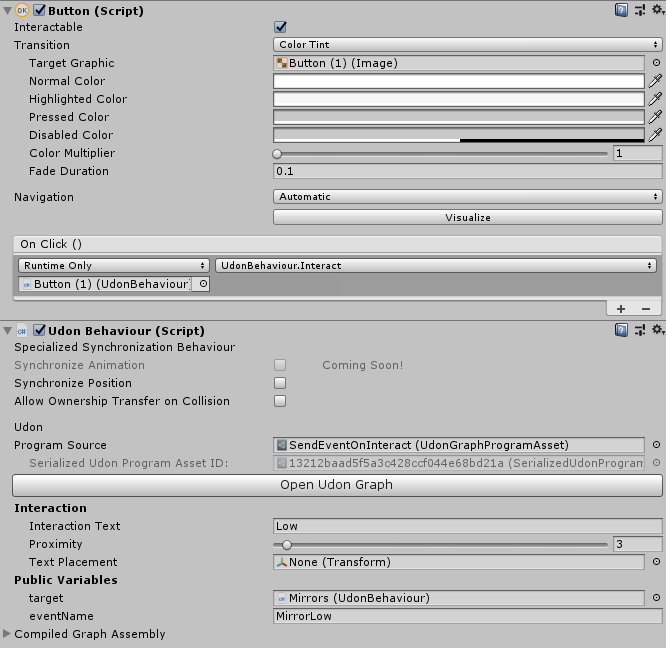 rough geyser
Anyone know what this error could be caused by? It's with Bakery, so I'm trying to figure out what might be the issue. I should mention I also get these errors too.
https://gyazo.com/1f6c8c159c3c862c5d69bf35d3686b1f

 rough geyser
Fixed it, API updater had to be ran again...Why, Unity? -w-;
fair terrace
Can anyone point me to a good complete pool (billiards) table/game?
 honest forge
hey guys i can't find the VRC_trigger script thingy and a couple more scripts. what can i do or what should i download ?
dapper lion
@honest forge udon doesnt have that. the closest thing to that would be cyans trigger stuff that isnt even out as far as im aware
 royal goblet
Is this the right place to ask for Udon features, or is there a features request tracker somewhere?
- Could we please have Coroutines (I saw the
SendCustomeEventDelayedSeconds/SendCustomeEventFramesbut it isn't anywhere near as easy to implement a simple lerp) - on the subject of which... please can DoTween (or other tweening library be included as a supported scripted asset?
FinalIK is supported but in Udon (at least using UdonSharp) I can't get a reference to its components, i.e. a public reference to LookAtIK I get the error "Udon does not yet support variables of type 'LookAtIk' yet"
Finally, a question... is it possible to hook into the scripts that run avatar random eye movements. They look very similar to the excellent RealisticEyeMovements Unity asset (and the set-up is nearly identical to that asset). If RealisticEyeMovements can't be added to the whitelist, is there a way of using that functionality on world NPCs (as opposed to SDK3 Avatars)
dawn forge
royal goblet
Is this the right place to ask for Udon features, or is there a features request...
Fingers crossed for answers, but your best bet is tossing in a Canny post and share the link for other people alike to upvote it.
ancient spindle
simple question. i have a list of materials i want to use on an object, and i want to cycle through them with a click of an in-world forward/backward button that displays it on the object.
how do i go about doing that xD
i found it easier to get tangled in the udon graph, but trial and error is really getting to me. though i have U# imported as well, if thats easier as far as help goes.. lol any and all help is appreciated
floral dove
ancient spindle
simple question. i have a list of materials i want to use on an object, and i wa...
Create a synced integer variable that acts as an index into the materials array. When the integer changes, get the new material from the array and apply it to your target item.
You can learn more about using variables here: https://docs.vrchat.com/docs/networking#using-variables
tranquil summit
any idea why whenever i set values in the udon graph they get reset back to zero when i load the script?
 pliant spade
Can udon change someones avatar?
floral dove
tranquil summit
any idea why whenever i set values in the udon graph they get reset back to zero...
How are you setting values? And what do you mean by 'load the script'?
tranquil summit
i was just typing them into transform set rotation, and i mean like, loading the scene, reloading the script in the udon graph, entering playmode, etc
im trying to make a graph script to summon a hand-held settings menu when you click the button, but i can't get it to spawn the correct rotation and i think it might be because it's clearing the values for w/e reason, but i could very easily be doing something wrong
stoic mountain
How is avatar siting height calculated relative to the station entry point ?
floral dove
tranquil summit
i was just typing them into transform set rotation, and i mean like, loading the...
Hm - those should save right away. Do you have any errors in your console?
tranquil summit
Nope
floral dove
Do you have this issue when changing values in graphs in the UdonExampleScene? If so, I'd recommend re-importing the latest SDK.
tranquil summit
Oh wait hold on I think I’m just stupid lmao, i was overwriting the values from something else by accident
dawn forge
Does a script exist yet in the Unity Editor to "sanitize" methods in creator written C#(U# scripts)? I heard that methods not starting with "_" are exploitable as in being forcefully executed? If not I may write one.
unborn hornet
Public methods that dont start with _ are network callable.
Private methods or methods that do start with _ are not.
 pastel gyro
i need help with figuring out how to make a udon graph on a onscreen damage effect (2d picture ,when you get shot and your screen goes black) when touching or getting hit with a certain object ....sorry for my bad english ,would still appreciate the help 
hushed gazelle
Is there a good/proper way to sync a random number across all players?
I've tried generating a number and writing it to a synced value, but the value seems to just be randomized for every individual player.
floral dove
hushed gazelle
I've tried generating a number and writing it to a synced value, but the value s...
Can you share your graph? This should work, maybe you're not doing what you think.
hushed gazelle
@floral dove The network event is to trigger the other players using that generated value

The value itself looks like this.
 raven peak
hushed gazelle
<@!98313818857275392> The network event is to trigger the other players using th...
raven peak
hushed gazelle
<@!98313818857275392> The network event is to trigger the other players using th...
Well one issue is the number is going to be delayed sending to other users. And only the owner can set the synced variable.
hushed gazelle
So something like this then?
 raven peak
That should help with syncing the right number but there will be about a .2 second delay till everyone gets the number.
Live uses continuous sync sending the variable every .2 seconds.
hushed gazelle
I take it that the Beta version has a fix?
raven peak
It introduces manual sync. So you can take ownership set the variable then request serialization sending it to everyone.
hushed gazelle
Ahh, lovely. I'll just wait for that then.
raven peak
You can try it in #udon-networking just not in live yet.
 restive dust
If I use VRCPlayerApi.GetTrackingData() to get the Local Player's tracking data, does that put even the slightest load on the network? I'm assuming it doesn't because it's the Local Player's tracking data, but I'm wondering if I might be missing any information here.
stark adder
Its only local so no
 fast prairie
after making a 'budget' xsoverlay wrist thingy in udon I realised canvasGroup is missing from udonsharp to do an easy alpha transition. Is it available in udon graphs? I've never used graphs so wouldn't even know where to look
dapper lion
you should be able to change alpha via udonsharp. i can’t remember exactly how but you should be able to
fast prairie
eep. more things to learn. ty. I'll give it a shot
edit: looks like only CanvasScaler and CanvasRenderer are exposed in both. Will probably cheese it by shrinking and setting inactive
floral dove
@fast prairie - CanvasGroup is not available in Udon Graphs. It's a tricky one for us to add because it's actually sealed away by Unity. You can use an Animator to change its properties though, and control that Animator through Udon.
 hallow pumice
I don't know if this is an udon question or if it's just a setting in unity. I want to set the map to adjust the volume of other players based on their distance from you. Does anyone know where I might find that information? I'm not sure what terms to use for my searches. So far, I can't seem to find it.
dapper lion
@hallow pumice i highly suggest checking this reference out! https://github.com/Guribo/BetterAudio
GitHub
'Better' audio for UDON (VRChat) based worlds. Inc. speed of sound, sonic booms, doppler, occlusion, reverb, ... - Guribo/BetterAudio
i also have a simple graph audio example if youd prefer graph
hallow pumice
dapper lion
i also have a simple graph audio example if youd prefer graph
I would appreciate any resources you can give me to help me understand how this works. Merci beaucoup!
I also found another link, in case anyone else is looking for this: https://medium.com/vrchat/vrchat-the-sound-of-progress-3c4ab4fb5472
fading cipher
Is there a bug with attempting to set the position of a prefab directly after spawning it?
When I don't set its pos and leave it at the prefab pos, it's there, but if I attempt to set its position to anything, even with transform.Translate(), it just zeroes out its pos instead
 vernal maple
I have a quick question about Bloom, as I have seen worlds use a slider to control it.
How does one actually modify the post processing volume? Udon sharp is yelling at me.
native estuary
You need to use an animator with animations to control it
vernal maple
And a slider would function with that?
native estuary
Hmm I don't actually have a direct answer to that on what the best way in sdk3 would be since I haven't had to deal with it in a while and I think the UI events to directly do it aren't whitelisted anymore that you would use in sdk2
Someone else might have a more complete answer
vernal maple
I'm curious how Room of the rain and Midnight Rooftop do it.
But yeah, PostProcessVolume and PostProcessProfile both give errors.
native estuary
Yeah they aren't whitelisted in Udon yet
That's why it needs to be proxied trough animators
vernal maple
Having a bit of trouble targeting the bloom property in the animator now. Might just go with a low bloom, medium bloom, high bloom profile instead for now. :<
Hmmm, the weight property might work
native estuary
Yeah that's the commonly used property to blend between different profiles with different values
vernal maple
Okay, so we've got 11 states for the slider, 0.1 steps, running an animation with 0 speed. Lets test this puppy.
fast prairie
floral dove
<@!264873527511875584> - CanvasGroup is not available in Udon Graphs. It's a tri...
Thank you. Saved me a bunch of time
native estuary
Nice
 chilly crater
I have a dynamic bone swinging a trigger collider around with two box colliders on a cowbell. The sounds play if I leave on awake, but the trigger enters aren't firing.

Did I graph this wrong, or do Dynamic bones do something with trigger colliders
grand temple
Put a kinematic rigidbody on the collider that is moving
chilly crater
.... oof I can't believe I forgot that...
thanks for that, testing now
it works. Thanks for pointing out the obvious
 glad ridge
Who is udon
floral dove
?whatisudon
hidden martenBOT
VRChat Udon is a programming language built by the VRChat Development Team for use in VRChat worlds! It enables complex behaviors and logic in VRChat worlds. Read more about Udon in our documentation: https://docs.vrchat.com/docs/what-is-udon
VRChat
What’s this Udon thing anyways? VRChat Udon is a programming language built completely in-house by the VRChat Development Team. It is designed to be secure, performant, and easy to use via the VRChat Udon Node Graph, a built-in visual programming interface that uses nodes and wires (we call them “no...
 merry light
Hello!
So I'm trying to setup a button in Udon, when a user clicks it that user gets their Voice settings updated (https://docs.vrchat.com/docs/player-audio) These ones.
Trying to setup a DJ Booth where a user can play music through their PC so I just want a button instead of a mic they actually hold.
Problem is that when I use the Interact Event nothing happens. I was using GetLocalPlayer which I assume only applied the settings to themselves only locally.
 amber ingot
floral dove
?whatisudon
amber ingot
floral dove
?whatisudon

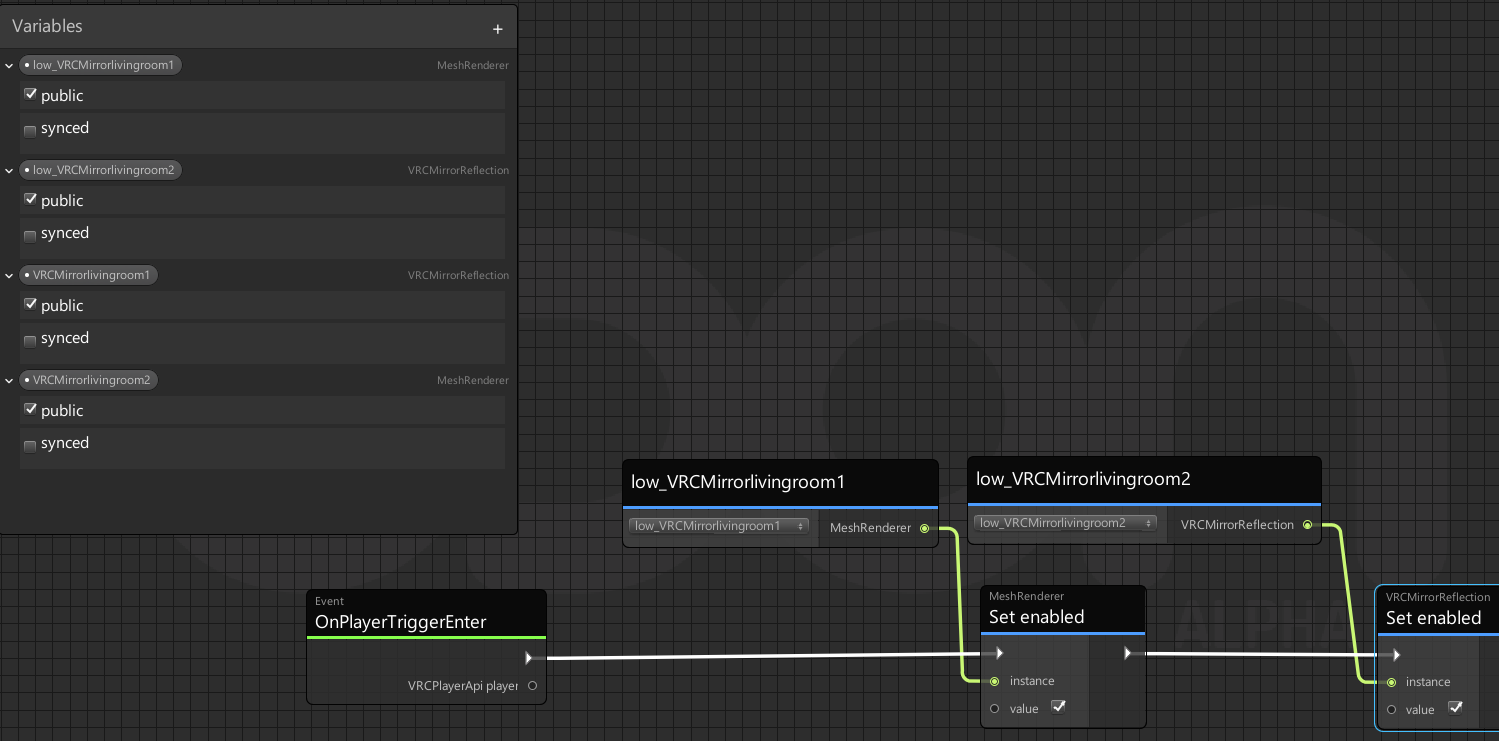
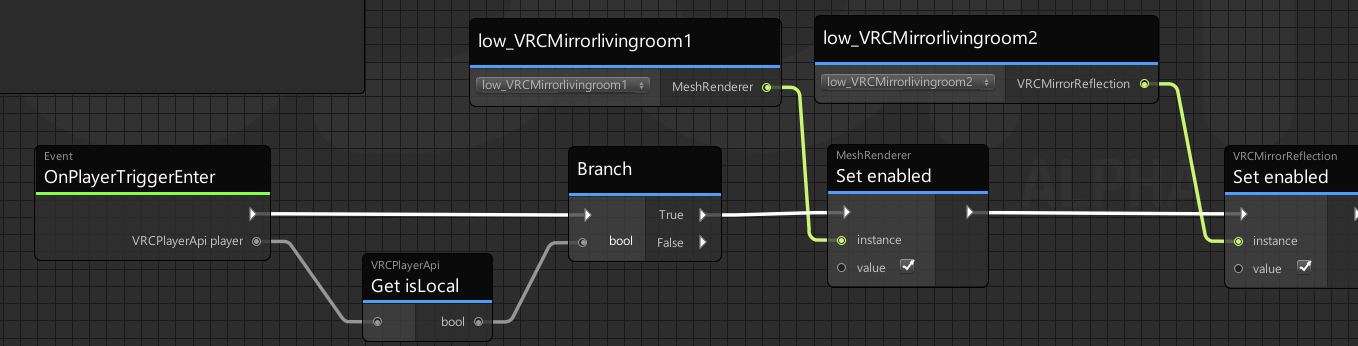

Whyisudon?.
void ridge
merry light
So I'm trying to setup a button in Udon, when a user clicks it that user gets th...
Every connected and connecting player needs to set these values for the player's voice you want changed. I believe this means you need to sync the player ID of the player who pressed the button, and then all players need to receive that player ID and act upon it.
I can think of a pretty complicated way to do that. I don't know if there's a better one.
 mint whale
I'm trying to use Udon Graph to sense a collision - basically throwing a dart at a target. But I don't want the dart to stick if it hits the wall, only the target.
The behavior I'm using is: Upon collisionEnter, set rigidbody constraints to FreezeAll. But I want to specify that the FreezeAll behavior should only be triggered if the collision is between two particular colliders. Any examples of this behavior you can point me to?
slate mesa
mint whale
I'm trying to use Udon Graph to sense a collision - basically throwing a dart at...
The behavior should be on one of the two objects involved, so you should be able to use the collider return to check for the other. I haven't done this myself, but maybe you could keep a list of acceptable colliders in the UdonBehavior, then check the object from the collider return against all of those
How do you get a player's name in Udon? I see methods for getting player ID in the PlayerApi, but I'm not sure where to go from there
fiery yoke
slate mesa
How do you get a player's name in Udon? I see methods for getting player ID in t...
VRCPlayerApi::displayName
slate mesa
fiery yoke
VRCPlayerApi::displayName
Ah, perfect. Turns out I just missed that one in the list. Thanks!
 sleek grotto
I cannot get a vimeo video to play using the VRCUnityVideoPlayer. I do have Vimeo Pro account and the video is fully public. I can get the same video to play from YouTube but need it to be on Vimeo to be able to have cross world support for PC and Quest. Anyone have suggestions for what could be wrong?
I am using the full URL like this: https://vimeo.com/516801382

Aerobics video with glitching for The Machine Stops, and interactive theater VRChat prototype made as part of the 5th Wall Forum by team Houdini. Video created by…
Here is the Udon script
 dapper lion
@sleek grotto from my testing. vimeo seems to only work for avpro videoplayers
sleek grotto
dapper lion
<@!378105363741933568> from my testing. vimeo seems to only work for avpro video...
Thanks!
sleek grotto
dapper lion
<@!378105363741933568> from my testing. vimeo seems to only work for avpro video...
And you do need to purchase the AVPro plugin from Asset Store in order to use it with the VRC SDK, correct? That would be both the Windows and the Android player respectively.
dapper lion
no! and even if you wanted to use your own version. use the demo avpro... the vrcsdk provides avpro 2.0.7
and if youre unable to figure out avpro. i highly recommend hosting your video media on dropbox
fair terrace
Can anyone help me find a chess game for an Udon / SDK3 world?
sleek grotto
dapper lion
no! and even if you wanted to use your own version. use the demo avpro... the vr...
Thanks literally! ❤️
floral dove
sleek grotto
I cannot get a vimeo video to play using the VRCUnityVideoPlayer. I do have Vime...
FYI if you want the video to work for Quest users, you need to use the full path to the .mp4 file
fading cipher
Is there a known bug with using SetParent() in Udon? This code runs perfectly fine in-editor, but I'm getting some funky behavior with one of my game objects' transform, and the only time I'm interacting with that transform is when I assign it a child via SetParent.
paper galleon
Did you publish it or just build it?
 tight kernel
paper galleon
Did you publish it or just build it?
tight kernel
paper galleon
Did you publish it or just build it?
 floral dove
tight kernel
floral dove
tight kernel
those are both harmless warnings that snuck back into the SDK, nothing to see here 😅
do you get any errors in your console when you try to visit it after uploading?