#udon-general
59 messages · Page 38 of 1
 normal yarrow
 dapper lion
@normal yarrow whatre you trying to do? the reverb bubble will be somewhat bigger than it appears, if you use a direct game object = it will act opon player voices
normal yarrow
Just have reverb for entrance music.
(And also speaking with a microphone in hand)
dapper lion
ah, well you should be able if you just want the speakers, make the main audio sources have the reverb (making sure theyre children of the main source) and it wont effect players, if thats what youre wanting
i didnt quite read too much so im not 100% of whats going on, but ik the basics for it
normal yarrow
dapper lion
is it set to toggle via some kind of collision or announcment?
normal yarrow
So far there's no toggles on it.
dapper lion
then when one is added, would that be your main method of audio matrixing?
normal yarrow
I suppose? I basically just want the EntranceMusic object to always be reverberating, and the player audio to only reverberate (and be audible throughout the whole map) when holding a mic near their face.
 void ridge
I saw a tip that when you're using Update to transform stuff continually, it's important to use Time.getDeltaTime * [whatever the framerate should be] in order to make sure that transforms look the same on different devices
- Is that true, and how important is it?
- is 30 the right number for VRChat (assuming I want the product to be 1)?
- am I otherwise doing it rite?
 rancid swift
Yeah, Update is called at the framerate the game is running at, and deltaTime will scale accordingly (i.e. for someone with 45 fps it will be twice as high as for someone with 90 fps, but Update will be called half as often)
for 2. : that's (probably) the wrong way to think about it. If you don't multiply the value and just let it accumulate, it will reach 1 after exactly 1 second, regardless of fps
so the factor ("30" for you) simply defines the speed, there's no "right" value
if you multiply by pi*2, you'll get one rotation per second (if my math is right)
void ridge
yeah, you're right. I'm defining my speed in another way, though, which I've hidden out of frame on purpose 😛
rancid swift
(in radians, 360 for degrees obv.)
void ridge
I guess my question is really just, how frequent "should" Update be firing? Isn't that supposed to be a constant target? For Unity? For VRChat?
rancid swift
No, that depends on multiple factors
i.e. which VR headset, or which display on desktop
vsync on/off etc...
if you want to sync your rotation to actual elapsed time, there's no need for that
and if you want to sync to game speed, then just leave out deltaTime - but then it'll be different for every player
void ridge
Hmm ok
So to get an idea of how important this is: if I were rotating an object using only Update, and two players were connected, if one was running 45Hz and the other 90hz, the transform of that object would quickly get out of sync between them?
normal yarrow
🤔
void ridge
Or wait, is this where ownership comes into play? Meaning, everybody gets the transform of that object synced according to the simulation of the owner?
rancid swift
If you have "Synchronize Position" enabled, then yes, the owner's values will override other players'
but then you should only update the rotation if you're currently the owner as well
otherwise you'll get hitching
for everyone who's not the owner
in general though, anything that you can calculate client side, you should, as to minimize network traffic and delays
so if you just want synced rotation, it might work to sync once using some custom event and then continue spinning locally only (without "Synchronize Position") but stepped with deltaTime so it keeps in sync
void ridge
stepping with deltaTime seems like a smart thing to do for the sake of smoothing things out, but it still feels like a concern if transforms can get out of sync. Seems like asking for a problem
like if I have moving colliders (used as triggers, for example), I need all players to have the same position of those colliders all the time
rancid swift
moving colliders are tricky because of network delay, but in general a local solution shouldn't get out of sync either
Unity is pretty smart in handling deltaTime
even with temporary freezes and such it should not get out of sync
void ridge
Thanks for your help @rancid swift. I'm reaching the stage of learning where I have like 10x more questions than answers 😅 I could go on but I should actually just get back to tinkering for a while
 raven peak
void ridge
Thanks for your help <@!310817976507039744>. I'm reaching the stage of learning ...
raven peak
void ridge
Thanks for your help <@!310817976507039744>. I'm reaching the stage of learning ...
I have some udon prefab examples if you want to look through them.
void ridge
I'm finding the VRChat "docs" and "ask" sites not to be reliably helpful 😕
Sure Jetdog, where?
raven peak

GitHub
A compilation of prefabs and other useful items for vrchat users. - jetdog8808/Jetdogs-Prefabs-Udon
recently expanded to some udonsharp examples.
you can go to releases and get the unity package.
void ridge
Awesome. I see what this is. This will be helpful, thank you!
normal yarrow
Hm, I can't figure this out.
@raven peak Would you know what I need to do to disable reverb for the player voice audio?
raven peak
normal yarrow
<@!177222201567608832> Would you know what I need to do to disable reverb for th...
you might have to add a reverb filter to all the audio sources you want to have reverb on. that would remove the reverb zone for players.
normal yarrow
Ooh
Yeah that would make more sense then.
I only need it for the entrance audio source (and eventually for microphone speaking as well)
The latter might be more tricky for me.
Hm.. the reverb doesn't seem to happen when I stop the audio.
normal yarrow
Okay I just discovered Unity's Audio Mixer window.
But it looks like it doesn't work in VRChat.
 celest olive
Are Set-nodes still bugged to reset to their default values at times?
I'm trying to make a toggle system right now, and the isActive node's boolean value keeps resetting to false - which of course breaks one half of the toggle :/
in fact this seems to be the only way to toggle right now - which feels remotely unreliable, when thinking about players spam-clicking the parent object. (Might be an unnecessary worry, however)
 jagged crow
hey I dropped an udon video player in my world and the video plays but I've got no audio. halp
(using the avpro player)
dapper lion
@jagged crow is camera have audio listener? and if unpossible, try merlin or beta video player
 compact stirrup
celest olive
Are Set-nodes still bugged to reset to their default values at times?
I'm trying...
compact stirrup
celest olive
Are Set-nodes still bugged to reset to their default values at times?
I'm trying...
I'm experiencing the same bug in my scripts, it's driving me insane!
since you're also seeing it, it definite makes me think it's bugged/still bugged
jagged crow
dapper lion
<@!195561036273680384> is camera have audio listener? and if unpossible, try mer...
which camera?
im testing it in-game
dapper lion
the reference one, but you may have better luck using a different video player
jagged crow
was hoping to use livestreams though
dapper lion
um, the default avpro one doesnt support livestreams... might be why no audio
jagged crow
VRChat
Using the Prefabs The easiest way to put a Video Player in your Udon world is by using one of the Prefabs, which you can find in Assets/VRChat Examples/Prefabs/VideoPlayers.Both of these prefabs will play a video of your choosing, synchronized for everyone in your world. They won't loop - the graph ...
that says it does support livestreams o.O
dapper lion
oh youre not using the avpro one then
jagged crow
wuh
dapper lion
either way, it sounds like your ref cam needs some lovin/ needs audio listener
dapper lion
then the video player doesnt have assigned speakers, or have the volume set to an audible decibol
jagged crow
I didnt change anything from the built in prefab, I'd assume that has the audio levels set properly?
dapper lion
@jagged crow open your dms, theres a few better udon players that support multi stream such as twitch and marksworth
jagged crow
dapper lion
seems correct, but it doesnt appear to be assigned
jagged crow
dms should be open btw
dapper lion
check the videoplayer and make sure it is tailored to the speaker
jagged crow
normal yarrow
Is there a way to compare int values in Udon?
I can only seem to use branches for bools
celest olive
normal yarrow
Is there a way to compare int values in Udon?
Integer -> Equality or Integer -> GreaterThan / LessThan
Depending on what you need.
The output is a boolean, so you still need to use a branch, however it's just your generic if (x>y) statement x)
normal yarrow
Ahh alright
 pallid roost
How do people configure Post Processing effects via UI?
I have a post processing profile running, and it works fine, but I want users to be able to go to a UI and move a slider for how much brightness they're wanting etc.
 viscid reef
@jagged crow are you testing it with a specific livestream? or is there no audio with any video what so ever? there is a rare bug that affects some users, where audio doesn't play on certain video/livestreams, which is related to the sampling rate set on your audio output device and the sampling rate of the video.
viscid reef
dapper lion
either way, it sounds like your ref cam needs some lovin/ needs audio listener
the reference camera is just used to copy the settings from that camera component and post processing if you have it, it doesnt actually use that gameobject as your player's camera. In fact, when the game loads an instance, all audio listener objects are automatically stripped from the scene, except for the players one. Having it or not having it has zero effect.
dapper lion
@viscid reef the listener can be modified as per reference differing, correct?
thats what ive witnessed when using it and editing it to bend to audio everything
omg i cant english
 bleak echo
I imported the Udon QV pen asset package (from the 3rd download button here: https://booth.pm/en/items/1555789 ).
Doing so, I came across the error:
"Assets\QvPen\Udon\Pen.cs(1,7): error CS0246: The type or namespace name 'UdonSharp' could not be found (are you missing a using directive or an assembly reference?)"
What am I missing in my project?
 fickle swift
You need UDON sharp
bleak echo
thank you, how/where do I get it?
I see there is a github for it...
I see some instructions here on how to install it, so I'm going to try that.
Thank you once again.
viscid reef
dapper lion
<@!57330469510840320> the listener can be modified as per reference differing, c...
you're doing it through the vrc player api, which modifies the default one that comes with your default player perspective
dapper lion
interesting
viscid reef
or rather, the player api modifies the remote audio objects from your perspective locally, the audio listener has no inherent properties
dapper lion
interesting, that means i can use the audio listener properties on anything according to what ive read then?
viscid reef
what? it has no properties. there can only be 1 audio listener in a scene, and it will always be on your player perspective.
when you modify other players audio through the api, what it does is that from your perspective, it is changing the settings on the audio sources attached to their avatars so that your audio listener perceives them differently
of course, i could be wrong as i'm not too familiar with udon, so if someone else knows better feel free to correct me
dapper lion
udon ca corralate with audio now, according to what ive read, but i just follw the unity preference tab
as audio listeners follow the over rulling
 earnest frost
I'm trying to create my first world, and using 3.0. I had a couple issues; one was trying to find the VRCWorld prefab mentioned in the instructions (I think I found something similar named "VRCSDKWorld" but not sure that's the intended prefab).
The other is I'm having a compilation warning:
The referenced script on this Behaviour (Game Object 'VRC_PlayerVisualDamage') is missing!
when I try to build my world. Build and upload doesn't work with a message about insufficient user trust level (I have enough for avatars but apparently not enough for worlds 3.0?). Testing locally button doesn't seem to do anything even if I force non-vr. So I'm stumbling on figuring out how to do a test run.
I'm a reasonably experienced developer, just new to vrchat and somewhat new to unity.
dapper lion
@earnest frost that seems odd, try clearing he pipeline and try again
earnest frost
dapper lion
<@!773995474255740948> that seems odd, try clearing he pipeline and try again
"clearing the pipeline" - how do I do that? I tried restarting Unity, with no improvement. I'm not getting any console messages when the local run fails to start, either.
dapper lion
is clear on play turned on? make sure thats off
ok, so in the scene descriptor, there should be a pipeline manager added, tell it to detach whatever it has. and then try to private upload, if you get any compiling issues, check console again
 native estuary
From their description it just sounds like they are trying to submit to community labs which needs more trust than avatar uploads
Clear on play doesn't really do anything
dapper lion
that is true, but if test a build doesnt work, then somethings jot right
clear on play clears the previous build errors, i wouldnt normally have that off to see previous errors and see what changes
earnest frost
With "Clear on Play off". I cleared the blueprint id. "Build & Test" still does nothing; it's like clicking a button that's not hooked up. "Build & Publish for Windows" runs but when I get the enter-information screen, stuff isn't working like I'm used to for an avatar. I do now see an actual stacktrace when the build and publish tries to show me that info screen.
Ex [HTTPRequest]: CallCallback - Message: 1: Object reference not set to an instance of an object at VRCSDK2.RuntimeWorldCreation+<>c__DisplayClass35_0.<Start>b__2 (VRC.Core.ApiModelContainer`1[T] c) [0x00001] in C:\Users\jenny\dev\world1\Assets\VRCSDK\Dependencies\VRChat\Scripts\RuntimeWorldCreation.cs:111
at VRC.Core.APIUser+<>c__DisplayClass356_0.<FetchCurrentUser>b__1 (VRC.Core.ApiContainer c) [0x00021] in <18a0696dc3e4415e82226d9d2af87119>:0
native estuary
https://github.com/oneVR/VRWorldToolkit/releases
Import this and check VRWorld Toolkit > World Debugger
earnest frost
I managed to import it. I'm not sure how to check what you're suggesting though (literally what do I click on where?).
oh! that's the menu name.
I didn't realize it adds a menu. :)
 peak zealot
How would I have known this was whitelisted? Is everything in UnityEngine whitelisted? I can't find a list of whitelisted functions, just components.
earnest frost
native estuary
https://github.com/oneVR/VRWorldToolkit/releases
Import this and check VRWorld T...
World Debugger tells me 0 errors and 0 warnings during build, although I can see warnings in the console (no build errors though). It found a couple suggestions and I let it autofix those; it didn't fix my issue for upload.
I still end up at this screen with the boxes disabled and unable to enter anything. Ticking the box to say I have rights to upload enables the "Upload" button only but does not let me type in a world name or do anything else. The box for community labs is also disabled UI.
dapper lion
tell the cam to display on display 2, and try there
earnest frost
display 2? how/where?
native estuary
earnest frost
World Debugger tells me 0 errors and 0 warnings during build, although I can see...
You might have dropped the wrong prefab in the scene
I added detection for it to the next version of the world debugger but it's not in yet
earnest frost
Wrong prefab is likely.
native estuary
VRC something something
dapper lion
vrcworld?
earnest frost
I ended up using VRCSDKWorld because I couldn't find VRCWorld anywhere in the 3.0 imports.
earnest frost
got it. Where do I find the right one?
native estuary
Search doesn't find vrcworld?
viscid reef
VRChat Examples/Prefabs/VRCWorld.prefab
earnest frost
I am not sure where to add via a search box. My menus obviously don't have all the expected components, but "add component" worked okay on an existing object... I'm not sure how to find a prefab that way though. Where's unity's higher level search box?
 native estuary
When you added VRCSDKWorld in to your scene you basically added the whole upload screen into it
So when you actually try to upload because there's two upload screens the correct one doesn't display right
earnest frost
That makes sense on why it breaks. I'm still struggling with how to fix it... aha. Thank you for the screenshot, Temporal - that's what I needed.
Found, added, retesting.
native estuary
As long as you removed the wrong upload screen from your scene
And the world debugger didn't say anything was wrong
It should work now
earnest frost
Upload is successful. Thank you all! I should be fine from here.
native estuary
Yay
earnest frost
(And yes I removed the bad one.)
 vague agate
Hello everyone
Currently udon still doesn't support sync array, right?
I'm trying to synchronize the playerid numbers using an int array.
If you have a good idea, please help me😂
rancid swift
vague agate
Hello everyone
Currently udon still doesn't support sync array, right?
I'm tryin...
I tried using a string as a makeshift 'char[]', but Udon chokes on non-printable characters apparantly. I'm using 24 Vector4 variables now (I think those hold the most data of the syncable types, aside from strings) but that's probably stupid. Oh and apparently strings have a length limit of about 50...
(Otherwise I'd just serialize my data as readable text)
vague agate
rancid swift
(Otherwise I'd just serialize my data as readable text)
Thank you so much for the reply.😆
But I didn't understand because I wasn't good enough. I'm sorry. Could you tell me in more detail? Please
What does it mean to use 24 vectors?
And what is that mean serialize your data?
How can this content be used for synchronization?😂
rancid swift
Well what are you trying to synchronize?
(Oh and 24 just cause I have my world limit set to 24 players, so the hard limit is 48 and I store two player's data per Vector4)
void ridge
How do I disconnect individual noodles in an Udon graph 🙃
I've just been doing Disconnect All because I can't figure it out 😂
 cunning mist
You should just be able to grab the noodle again and drag it into the void.
void ridge
ohhhhhhhh you can grab the noodle by its length 🤦♀️
Assumed you could only interact with it on either end. Thanks!
void ridge
Is there a faster way to test that doesn't require me to repeatedly load up and close the VRChat app? Even if I can just leave the app open and load up the new World data as I build it...
It's just making answering the "does my code work yet?" question frustrating
 cold raft
You can simulate a lot right in the editor if you install a 3rd party unity package for it
native estuary

GitHub
CyanEmu is a VRChat client emulator in Unity. Includes a player controller with interact system. Works with SDK2 and SDK3. - CyanLaser/CyanEmu
cold raft
Ah yes I forgot the link
void ridge
Thanks! I'll check that out for sure. But since I'm still curious, is there a way to just launch a local world test from an already-running client?
native estuary
Not really
But honestly CyanEmu basically replaces the need for in client local testing
cold raft
Your local test build does not show in the world list unlike you test avatars
void ridge
This seems like a kind of annoying bug. Anyone familiar with this?
the default value and all configured default values of Set nodes for my variable will update unexpectedly change when I remove a noodle
I didn't see any description that matched on the canny board, but I'm also not really literate enough to be sure what I'm seeing yet 😛 I'd like to report it unless this is already known
cold raft
I don't know I stopped using the graph editor
raven peak
void ridge
This seems like a kind of annoying bug. Anyone familiar with this?
I dont know for sure but i think i remember some people talking about non public variables dont keep the set values in graph.
Also if the code doesnt require vrc classes you could just run it in editor without the cyanemu.
All unity engine nodes will run fine.
void ridge
raven peak
Also if the code doesnt require vrc classes you could just run it in editor with...
Right, this part I knew, thank you.
 mighty fjord
One workaround for the bools changing is to use constant bools in the graph
void ridge
Yep, that's exactly what I did 😛
Well, maybe not exactly. Is there a smarter, more general way to get a constant value for a variable?
A unary negation node with its default value just seemed to work offhand, so I went for it
fickle swift
Make a variable and make a default value for it.
mighty fjord
Yeah, if you go to 'bool', there should be a node called 'const bool'
 brisk tiger
So im in a server with guns and shit but there is latency, will this be fixed so i dont have to shoot in front of them? Or will i always have to aim in front of the player
 lyric hamlet
 quartz meadow
anyone know of a tutorial / prefab to look at for an udon picture camera? a Camera that can take still images?
wait nvm, I found something in the jetdogs prefab pack
 steel bronze
so I need help with an udon world I'm making, I have gliders you can use to glide around an island and I need a way to spawn new gliders in when you click a button. If someone can help me learn how to set this up I would really appreciate it
quartz meadow
isnt instantiating objects with scripts broken atm?
I would almost suggest having a pool of items and have them teleport in position as needed, and be stored far away when not used
 fossil marten
There is a issue makes u not able make accounts
steel bronze
would you know how to set that up?
 grand temple
@steel bronze There are two different types of object pools, and the type where you can click a button and it spawns an object would technically solve your problem, but currently there isn't any good public prefab. However, there is another type of object pool that would probably solve your problem even better. That is the type where it gives a new object to every player in the instance. And that type is exactly what "simple object pool" is. You can find it at vrcprefabs.com/browse in the udon section
steel bronze
I'll have to check it out thank you
grand temple
it will require a lot of adapting but in the end, it will allow players to have their own personal glider that they can activate at any time. You could put the activating or grab button on the shoulder
steel bronze
I'm completely new to udon so I'm just a little confused on this honestly
would it be possible for you to help me set this up @grand temple?
 rancid cedar
So im trying to run a test build of my world and it's just getting stuck in a load loop
i've had it running pretty well for a while now, published and everything
dapper lion
@rancid cedar did it log you out lad?
 tawdry surge
Is material swapping going to be better than object swapping? Is material swapping buggy in Udon I guess is the better question.
 grizzled trout
moarlikwly qrong place but somehow i got a visule thing with my world. one eye everthing looks warped
dapper lion
@grizzled trout quest?
grizzled trout
dapper lion
<@!355808531930284034> quest?
yeah
dapper lion
@grizzled trout riiight, id go ask in quest, im not 100% good at quest optmizations but if you over load a scene or not set the ref camera correctly. i belive it is the right eye that acts funky
grizzled trout
Ooh oof i forgot to mess with the light thing, i fixed it XD
grizzled trout
i had to redo the HDR
dapper lion
interesting
grizzled trout
yeah idk why it it dose the same with pc if you goof it up
 hardy fog
Does this drop any pickups a player might have?
 fiery yoke
Little bit inefficient, but yeah it should :P
tawdry surge
I've just started messing with Udon today and I was wondering what would be the most efficient method to have a button that cycles toggling through a list of objects but also changes it's own material for each of those objects.
I've been messing with it doing it the way I know might work but would probably be the most inefficient way. I'd like to learn the right way.
fiery yoke
You have an array of objects an array of materials and an index that increments, and loops back to 0.
Exact implementation depends on what exactly you want to do.
tawdry surge
I'm going to decipher that message one day and it'll be amazing. I just know it.
I'm converting this world to SDK3 as a start. I know Aev's already done it, but that's my goal for now.
void ridge
Is there a prefab for swimming/flying somewhere I can look at? The kind where you're not explicitly picking up an item that pulls you around (like the water bee, etc.)
I'd also be satisfied with knowing how to attach things that people grab over either shoulder, like in Rapunzel's climbing or Hook Junkers
Answered my own question. I found that gigantic google sheet with the list of prefabs collections O_O
Input!
void ridge
@grand temple in Hook Junkers are the grappling guns staying with the players' shoulders just by Update-->Player's Transform + an offset? Or is there some special way that objects are attached to players?
grizzled trout
can somone help me? idk what happend but this keeps comming up and nothing changes , i did everything i could think of, even restarted my pc
grand temple
@void ridge yeah that's pretty much all there is to it
 indigo finch
I have a world with a lot of synced objects (around 600), and when I first started making it, it was laggy for about 30seconds while all the pillows loaded in. I wanted to spread this out at the time (to reduce the lag spike), but couldn't find a way to do so. About a month ago, VRChat did an update that makes it take WAY longer for the objects to sync. Now, if your late to join, it takes half an hour if not more for all the pillow's positions to sync up to where they are meant to be.
I have been working on a script that moves the pillows slightly on the host's end to try and force it to update their locations to speed this up, but I was wondering if there is another, better method to force VRChat to resync their positions and rotations?
fiery yoke
Use less synced objects :^)
No but seriously thats quite a lot of data. 600 Rigidbody/Transform Components essentially.
indigo finch
While I do agree with you that less would make more sense, the entire point of the world is the extreme amount of pillows to play with. I did try increasing it to 1000, but that was too much
If a group of people join as a group at the start, then there is no problems, as the pillows origonal spot is basically correct for all of them. The problem is when someone else joins later, they will see a pillow on the ground, pick it up, but for everyone else they took a pillow from a wall.
 vapid tapir
hey, i'm trying to make a simple thing where the sword of a character switches positions.
When not in use, the sword stays on the back of the character.
When in use, the sword is held in the right hand.
How could I accomplish this? afaik, making a simple "0-1" parameter toggle looks like the way to do this.
fiery yoke
vapid tapir
hey, i'm trying to make a simple thing where the sword of a character switches p...
Ask in #avatar-help this is for Udon related questions.
vapid tapir
oh oke
grizzled trout
not sure if this is a problem for this channel or somother but i have this problem, it keeps locking on this, i am using the sdk 3 and yeah idk whats going on
dapper lion
what version unity? ive never seen that when it is packaging
grizzled trout
dapper lion
odd, was this world uploaded before?
grizzled trout
yeah i uploded it twice but i made a few changes the second and thred time
dapper lion
wait, you may be timing out, unless this is consistent? iirc this is what appears when youre uploading from the upload screen
when you click cancel, sre you logged out of the sdk?
grizzled trout
it seemse consistent .i have done everthing, i even made a new porject and re done the world
dapper lion
restart pc as well? but you do log out when you click cancel, correct?
dapper lion
that means you timed out when uploading, but it shouldnt be consistent
im not sure what might be the matter, check console for compule errors
grizzled trout
i am not sure what that means
dapper lion
thats for canceling the upload process, which it wasnt going to be able to do anyway
make the console only show reds, keep it open, and try to build and publish
grizzled trout
ok
 vast solar
Not really udon related but I'm new and I'm wondering does it cost any money to make a world?
grizzled trout
it is free to make worlds unless you are paying somone to do it for you, or paying somone to make moddels
grizzled trout
dapper lion
make the console only show reds, keep it open, and try to build and publish
a few reads show up but this one keeps forming
vast solar
grizzled trout
it is free to make worlds unless you are paying somone to do it for you, or payi...
Thanks for the reply!
grizzled trout
vast solar
Thanks for the reply!
glad to help
grizzled trout
dapper lion
make the console only show reds, keep it open, and try to build and publish
Asset bundle upload failed: Failed to delete previous incomplete version! (C:/Users/user/AppData/Local/Temp/DefaultCompany/my world _2/wrld_fdb4372a-32ed-43fa-a318-6d104d70d8fe_6_2018.4.20f1_4_android_Release.vrcw) => [id: file_46d9cf6d-4880-407f-8d28-5ef4a3c8a7a3; name: World - the nuxus - Asset bundle - 2018․4․20f1_4_android_Release; mimeType: application/x-world; extension: .vrcw; ownerId: usr_45e18fa6-c1d3-4681-9d5d-9e747fc0675f]
UnityEngine.Debug:LogError(Object)
VRCSDK2.<>c__DisplayClass34_0:<UploadFile>b__1(ApiFile, String) (at Assets/VRCSDK/Dependencies/VRChat/Scripts/RuntimeAPICreation.cs:264)
VRC.Core.ApiFileHelper:Error(OnFileOpError, ApiFile, String, String) (at Assets/VRCSDK/Dependencies/VRChat/Scripts/ApiFileHelper.cs:1427)
VRC.Core.<UploadFile>d__22:MoveNext() (at Assets/VRCSDK/Dependencies/VRChat/Scripts/ApiFileHelper.cs:422)
UnityEngine.SetupCoroutine:InvokeMoveNext(IEnumerator, IntPtr) (at C:/buildslave/unity/build/Runtime/Export/Coroutines.cs:17)
this is the red one
ApiFile file_46d9cf6d-4880-407f-8d28-5ef4a3c8a7a3: Error: Failed to delete previous incomplete version!
Cannot delete against anything but the latest version of this file˸ 3‚ 2
UnityEngine.Debug:LogError(Object)
VRC.Core.ApiFileHelper:Error(OnFileOpError, ApiFile, String, String) (at Assets/VRCSDK/Dependencies/VRChat/Scripts/ApiFileHelper.cs:1425)
VRC.Core.<UploadFile>d__22:MoveNext() (at Assets/VRCSDK/Dependencies/VRChat/Scripts/ApiFileHelper.cs:422)
UnityEngine.SetupCoroutine:InvokeMoveNext(IEnumerator, IntPtr) (at C:/buildslave/unity/build/Runtime/Export/Coroutines.cs:17)
actuualy there was 2
native estuary
Might wanna just detach from your world id and upload to a new one
From that it looks like the servers being on fire broke your current one a bit
grizzled trout
Ooooh i dint know there was a server problem, i will delet it and wait till tomorrow
native estuary
It's the holidays and the servers been struggling all weekend
grizzled trout
makes sense
native estuary
And seemingly some regions are more affected than others
grizzled trout
maks sense as well
hehe good thing i was working in this new world rather then this other one
 honest wigeon
I want to play a local video file. Is that possible?
native estuary
Not currently with sdk3 afaik
 storm whale
I think unity video player is supposed to be able to
Although if it's anything somewhat big you should really have it streamed
 tall vault
SDK3 video players currently only support URLs
native estuary
storm whale
I think unity video player is supposed to be able to
Unity video player isn't whitelisted in sdk3
 hushed shore
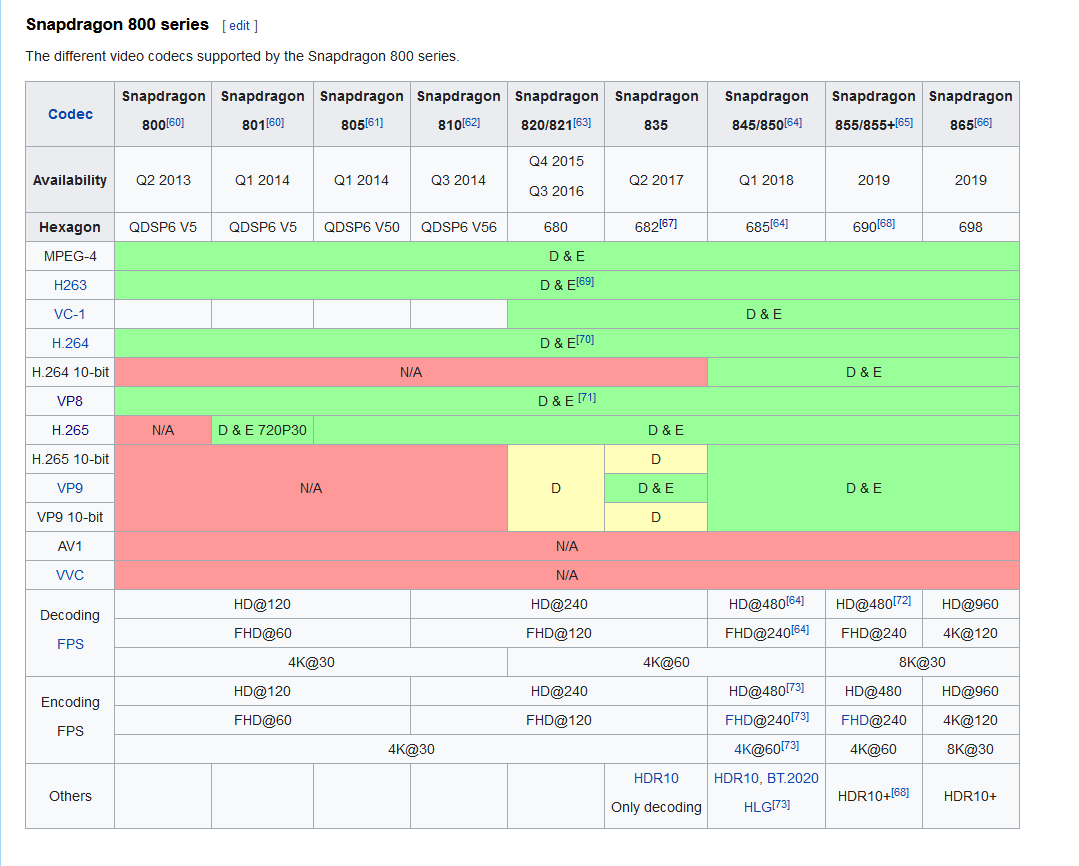
In regards of SDK3 video playing and Quest/Quest2 performance, does performance favor mp4/h.264 or webm/VP8. File size wise, VP8 seems slightly smaller and the compression result seems better quality. But does it give a lower load on the SoC of the Quest/Quest2?
viscid reef
its all running off hardware decoders so it shouldnt make any difference as long as they are within the decoders specifications
quest is snapdragon 835 in this image https://nyanpa.su/i/xAp01PRU.png
 sly knoll
Hello! I was wondering if there is any pens prefab that is compatible with udon.
fickle swift
Yes.
 vernal maple
Got a quick question. It appears Udon doesn't support a TextMesh, what other options do I have for displaying text in the world that can be manipulated via scripting?
native estuary
Normal unity ui text
vernal maple
With a Canvas and such?
native estuary
Yeah
vernal maple
Bleh, okay, TextMesh seemed easy but I'll look into it. Thanks
native estuary
Otherwise it's pretty easy but scaling it properly can be a bit annoying
cold raft
textmeshpro works fine in udon
vernal maple
The threads on the ask site was leading me to believe it was requested, not actually implemented. Lemme try that first.
quartz meadow
textmeshpro also avoids weird pixelation issues in the default text mesh. I would try using that instead
vernal maple
Assets\Riney Scripts\TextAreaTestScript.cs(11,4): System.NotSupportedException: Udon does not support variables of type 'TextMeshProUGUI' yet
Erm
Now where am I going wrong? D:
tall vault
Only TMPro.TextMeshPro is supported
vernal maple
(Bleh, so I overcomplicated it. Thanks.)
tall vault
They really should have added support for the rest though, it was dumb on their part
cold raft
well with every varient you support you u have to test it. so by keeping support limited it really cuts down testing times
cold raft
nicd e
 steel nova
how does VRC interpret midi? Can you send global midi across all instances of a world?
dapper lion
no, instances are defined (nct) as "its own universe"
 candid topaz
[Question]: Would anyone know a graph process for keeping track of players who enter the world and adding it to a text based list, like on a board? Formatted so each player appears in order top to bottom.
rancid cedar
So this compiles, but doesn't seem the work the way I'd expect. It doesn't reset the velocity and also breaks the script so it can't run again
all three variables are public
Do i need to declare a vector for the new velocity? i thought leaving it all zeros with no input might be fine
Fixed it, was using an instance type on the GetComponent node, switched it over to this one
steel nova
okay, if its a local instance based thing; how does one pipe midi into vrc? can you get float values off of note velocity?
 wild cedar
I would also like a followup on kye's question
 nova stag
hey guys Im trying to stream 3 live streams into my sim \
is that possible>?
I can get one successfully
I should say on start up
dapper lion
technically, but i dont think there is a prefab aval to do so as you need like 3 seperate rt and controllers to send the video plugin,
nova stag
so even with 3 separate prefabs you would need the other stuff to have them all load on start up?
(what I think im hearing)
plugging in the URLS manually in world works fine
dapper lion
theyd need to be seperate materials with different "remotes"
nova stag
aahh
dapper lion
unless you use the default unity one, but no one likes that one
viscid reef
maps in vrchat will only load 1 video url per 5 seconds
if you have multiple video players, you need to stagger the loading
nova stag
ahh so I would have to set that up either in theit object or in the coding
is what im hearing
viscid reef
VRChat
Using the Prefabs The easiest way to put a Video Player in your Udon world is by using one of the Prefabs, which you can find in Assets/VRChat Examples/Prefabs/VideoPlayers.Both of these prefabs will play a video of your choosing, synchronized for everyone in your world. They won't loop - the graph ...
see section on rate limiting
nova stag
ahh ok
viscid reef
A given user is only permitted to handle a new video player URL once every five seconds. This is a global limit across all video players. This applies to the default URLs as well as those set with LoadURL and PlayURL.

With a single video player, this isn't an issue-- but if you have multiple video players, you need to ensure that a request isn't sent too quickly after a previous request.

This also applies to late-joiners. If you have 2 video players running in your world, a late-joiner will see that they must send out two video requests. Unmanaged, they will attempt to do so simultaneously, and will fail. In cases where you have more than one video player playing simultaneously in a world, you'll have to account for this.
I saw thank you
is there a command to stagger this?
im newer to unity
or a component to add?
viscid reef
unless someone has made a prefab for this purpose, you're going to have to write your own behaviors or modify existing behaviors to handle this
nova stag
lol got it
nova stag
ok ive found someone who made a spawn script
I may be able to delay spawning as needed
excited
 proven musk
(Please ping me if you have a reply) I'm interested in a prefab for the Udon Cube world from the Virtual Market. Is there anywhere I can buy/obtain it? Or how can I make my own?
 mortal star
Hai, is tracking head position always above player position?
I'm trying to detect distance between a capsule (or an edge) that is generated from player head position and player position
mortal star
I'm not sure how to properly go about that
I got working a script that detects if a collider is within a sphere but I don't know how to make it calculate that within a capsule. I could spam loads of spheres and check if one of them is colliding but that feels excessive
vernal maple
I have a question, but it's more of the understanding of how something works, not how to actually implement it. So Synced Variables. The owner of the object containing the synchronized variable is the only one who can manipulate that value and send that new value to all clients, correct? (Which in turn means I would have to create owned objects for every "Player" present in the room to pass data around.)
So as an example, player joins the world, pushes a button to create a new object, gets assigned owner, and with that object, they can input things such as a name with Sync, that all players would then be able to read but not write from that object?
fiery yoke
vernal maple
I have a question, but it's more of the understanding of how something works, no...
Sort of yeah. Some people have already made prefabs and systems to handle that.
But Networking in Udon is not very straightforward and has a lot of quirks...
The way it generally works is that the Owner of an object serializes all of the object data and sends it to all other clients every "network frame". Then the other clients deserialize the data. Ofcourse it gets tricky when the owner changes
vernal maple
Right right. Many thanks. <3
fiery yoke
@vernal maple ohh also currently you cannot instantiate network objects, so you need to use a tactic called object pooling, to have synced vars per player.
As I said...many quirks
vernal maple
In essence, I need to have a bunch of copies in existence already?
fiery yoke
Yeah. Distributing them is the hard part
vernal maple
For the most part, all game assets should "exist" when the world is started. 6 score cards, 5 dice. Just need to assign them their owners.
vernal maple
So I need help with setting owner.
Networking.SetOwner(Networking.LocalPlayer, PlayerCard);
This is what I currently have to assign a score card to a player who pushed the button.
But players aren't seeing the correct data when the owner gets passed, instead they see their own name.
 shut patrol
vernal maple
But players aren't seeing the correct data when the owner gets passed, instead t...
shut patrol
vernal maple
But players aren't seeing the correct data when the owner gets passed, instead t...
Are you updating the label during the OnOwnershipTransfer event?
vernal maple
I hope not. I applied a timer of 2 seconds before assigning anything, should that be long enough?
shut patrol
I don't think the timing is reliable enough, as sometimes network connections can slow down. Try to change it according to the event, it is called always when the owner of the object is assigned. However, this might not work for the master, because by default the master is the owner of all objects.
But in general, specifically for the master, you can make a custom network event
vernal maple
My current goal was to use a button to assign an object that exists to a new person, that way when they made modifications, the synced variables should be seen across all clients. But as it stands, I don't believe I've fully grasped ownership yet.
shut patrol
Hmm, i don't remember exactly, but the photon network system may have some limitations on the transfer of the owner of object. For example, only the master can appoint the owner of an object. But i may be confusing something, need to refresh my memory.
vernal maple
I may have discovered something wrong in my own code, but I'll post more if I need more help. A new test has shown myself and another able to click the button, and the value changed appropriately.
(All of this just to make Yahtzee! xD)
shut patrol
I'll get better, not the master but the current owner. Okay, good luck with development 😄
quartz meadow
proven musk
(Please ping me if you have a reply) I'm interested in a prefab for the Udon Cub...
Try contacting the author directly
 dawn plover
Hello! So, as I was saying in another channel, I've noticed in the logs of VRChat a lot of errors and eventually found out what was causing it, and as they said to me, I've put too many object with synced variables. The problem is, I don't need all those variables to be synced, but only if someone use it or they change the value (the script is just an automatic chair correction based on the avatar, so I'll just need to sync the variable if someone interact with the chair), is there a way to do that? I'm trying to think a way to do that but so far I don't have any idea :/
 vernal iris
Hi there, i'm new to making worlds and I have a difficulty..
I know how to toggle a simple mirror, but I don't know (yet) how to switch the quality like in all other worlds, do someone have a tutorial/video or else that work with SDK3 to help me on this?
fiery yoke
dawn plover
Hello! So, as I was saying in another channel, I've noticed in the logs of VRCha...
There is something planned for that. But currently you cant no.
dawn plover
fiery yoke
There is something planned for that. But currently you cant no.
Oh, that's a shame :/ well, I guess I have to go back to regular chairs then, so much work for nothing 😩
void ridge
vernal iris
Hi there, i'm new to making worlds and I have a difficulty..
I know how to toggl...
I might be wrong, but I think the answer is as simple as choosing which layers to reflect, which is a drop-down menu in the Mirror Reflection component of the VRCMirror prefab
I don't know what most of these layers are, but if I'm guessing, Player and PlayerLocal are what you want. That's what most worlds call "Low Quality" mirror.
native estuary
void ridge
I don't know what most of these layers are, but if I'm guessing, `Player` and `P...
You never want playerlocal that's first person view with head squished down for yourself you want mirrorreflection
void ridge
Like I said, I'm guessing 😄
native estuary
Easy mistake if you don't know the layers
vernal iris
void ridge
I might be wrong, but I think the answer is as simple as choosing which layers t...
oh I think I didn't explain correctly, I mean having to buttons to toggle ON/OFF each mirrors but without having both ON at the same time
void ridge
Oh, well that's just a matter of getting the logic right
Probably use Unary Negation at some point to make sure the enabled/disabled of the two are always opposite
native estuary
I made this example a bit ago for someone else
You want to toggle the mirror you want to activate and disable the one you don't want on
void ridge
It also depends on how you want to design the control interface. Do you want to cycle through off/HQ/LQ? Or do you want separate buttons for the three alternatives?
vernal iris
okay i'll try this, thx everyone !
native estuary
Please don't do cycle mirrors, I hate having to go trough HQ mirror to get to LQ mirror in populated instances
void ridge
Yeah, actually I agree with that 😄
native estuary
With my above example though you don't need three buttons for HQ/LQ/off just two
void ridge
I think 1 is leaving out a step, though, which is that those targetGameObject and disableGameObject variables must be public, and you need to assign them different (i.e. reversed) values for two different buttons
 opaque sage
LQ should always be a separate button that teleports every player into a circle so they see each other. Cus LQ mirrors are so immersion breaking.
void ridge
Oh, right, nice. Yeah it says "toggle this one, but regardless, disable the other one"
opaque sage
Options are always good, but i'd rather not use the mirror at all then be floating in nothingness with other characters. That's just so weird and wrong. 
void ridge
People gotta see themselves in mirrors. It's not about just seeing others
native estuary
Also speaking of the mirror layers
https://github.com/oneVR/VRWorldToolkit/releases
If you get my world tools you get the layer explanations right in the mirror inspector
cunning mist
^ Do this
void ridge
fair enough. Gotta get around to setting up literally just downloading CyanEmu too 😛
dawn plover
dawn plover
Hello! So, as I was saying in another channel, I've noticed in the logs of VRCha...
I've found a way to make it work, but I have to ask, if I use a lot of Synchronize Position on empty objects without colliders or rigidbodies, it will be a performance killer? I mean, how the Synchronize Position work? It's just updating every frame even when the position doesn't change or only when the position has changed?
 fierce verge
does anyone know how to make a spotlight or a lamp have a texture or a certain color from a texture?
 limpid monolith
Whats udon
dapper lion
its a coding language for vrchat @limpid monolith
thats about it, its just semi more moldoble for the game since its not only event systems
void ridge
It's also a wheat noodle 🍜
dapper lion
wheat
 tribal meadow
I'm hoping someone has an easy solution to what I'm trying to do. Currently I have toggles for an object that makes it appear and disappear globally...it works, but when I have the object reappear, it comes back to it's last position, I want the position to reset back to the original point....how do I make it do that?
cunning mist
@tribal meadow When re-enabling the object, you want to essentially respawn it as well, correct?
 rain wagon
When wanting to build and test something on unity, it asks me I have to play longer, how long is that?
oh sorry wrong chat
tribal meadow
cunning mist
<@!262743084826230784> When re-enabling the object, you want to essentially resp...
yes
cunning mist
When you turn the object off, set the position of the object to be (0, -1000, 0).
The object is synced presumably, so when it reenabled VRChat will automatically respawn it since it's below the respawn height.
tribal meadow
Thanks I'll give that a try
is there a particular command in the Udon graph that sets the position?
(sorry I'm a real newbie at this)
cunning mist
I believe you're looking for Target -> Transform.SetPosition
 unreal grail
Hello, I created an enum called DoorType in my U# script, and got the following error:
Assets\UdonSharpScripts\TriggerAnimation.cs(9,11): System.NotSupportedException: Udon does not support variables of type 'DoorType' yet
Does Udon/U# support enums?
tall vault
Not user defined ones
unreal grail
Is there any kind of workaround?
I'm really just tyring to make a dropdown box in inspector
tall vault
You can store constants in your behaviour
public const int DoorTypeEnum_Option2 = 1;
public const int DoorTypeEnum_Option3 = 2;```You can also use the enum in a custom editor if you enclose the enum in preprocessor checks and store the selected value as an int to use in the behaviour.
// In behaviour code
public int doorType;

// Around custom inspector code
#if !COMPILER_UDONSHARP && UNITY_EDITOR
enum DoorType {}
myBehaviour.doorType = (int)EditorGUILayout.EnumPopup((DoorType)myBehaviour.doorType);
#endif```ohhhhhh. That's nifty. Let me try that
tall vault
Just make sure you don't use the enum in your behaviour code or it won't work
unreal grail
But it will work to at least give me a drop down in inspector, right
tall vault
Yeah for a custom inspector it'll work since it's just regular C#
unreal grail
Please forgive me if this is a dumb question—is there a specific place where custom inspector code should go?
tall vault
If you put your editor class in the same file as your behaviour or in a separate file that isn't in an Editor folder you should have the preprocessor defines around the editor class, otherwise you can put the editor class in a seperate file under a folder called Editor
unreal grail
Alright. I haven't done anything with custom editors yet, but I'll give it a shot
tribal meadow
cunning mist
I believe you're looking for Target -> Transform.SetPosition
Thanks Vowgan I'll try this
tall vault
Check out https://github.com/MerlinVR/UdonSharp/wiki/Editor-Scripting for more info
cunning mist
👍
@unreal grail For UdonSharp specific questions you should check out Merlin's discord, linked in the pinned messages. They have a full wiki on the Github that can explain the editor scripting setup.
unreal grail
Awesome. Thank you
unreal grail
Hm. I can't get the custom inspector script to work
jagged crow
is there any way to automatically load data from the user?
like a file, or their clipboard, or anything like that
for saving persistent values cross-session
only solution I've come up with so far is a classic video game password system but that's not the most user-friendly thing
unreal grail
Still can't get the custom inspector script to work, I get
cannot convert type 'System.Enum' to 'int'
cunning mist
Again Dorktoast, U# questions should be taken to Merlin's discord
cold raft
really? i though it was fine to ask them here aswel, there a lot of helpfull and knowledge people here
tall vault
You can, but you'll get help from more U# oriented people in Merlin's discord server
 last briar
jagged crow
only solution I've come up with so far is a classic video game password system b...
last briar
jagged crow
only solution I've come up with so far is a classic video game password system b...
well... there is basically only one hacky solution to that, involving videoplayers and a webserver...
 hushed gazelle
Okay, am I missing something basic here preventing this script from working? It a sphere collider that SHOULD detect when a player (well a surrogate test object at the moment) enters its radius and swaps materials on a model for something more detailed, but it's not even outputting its debug confirmation.
I'm just testing it by trying to brush this sphere collider against it;
fiery yoke
The sphere is not a trigger. And either one of them needs a Rigidbody.
hushed gazelle
Ahh, doh. And the second sphere is my player surrogate. The detection sphere is a trigger.
fiery yoke
Ahh right I missed that
hushed gazelle
Just a sanity check on my part; I should be using the Player layer to detect VRChat players, correct?
fiery yoke
You can put the Surrogate on PlayerLocal, but OnPlayerTriggerEnter/Exit will react to both Player and PlayerLocal
hushed gazelle
Cheers, just making sure.
 frozen ravine
I have a small question, there's a small bug with the favouriting and unfavouriting and I have no idea what to do, It doesn't let me favourite of unfavourite whatsoever.
dapper lion
@frozen ravine in what form exactly? this doesnt seem udon related
frozen ravine
Apologies, I only saw question as if asking questions like these, but it doesn't let me favourite nor unfavourite, when I try to unfavourite it says "Favorite" and when I look at it, it's still there
dapper lion
@frozen ravine thats called “latency lag” or yoy just ran out of slots and it hasnt had time to load and tell you
 glossy hornet
is it possible to switch the player cam to another external cam for effects like rotating around a special object ? i tried to just make a seat for that but most avatars just start clipping throuh the cam while moving so i would like to temporarily disable the normal vrccam and use an external one
frozen ravine
dapper lion
<@!738996807069204540> thats called “latency lag” or yoy just ran out of slots a...
Ohh, I powered it off for a bit and going to turn it on again in a bit just to see
fiery yoke
glossy hornet
is it possible to switch the player cam to another external cam for effects like...
Possible yes. Supported no.
glossy hornet
mh what about replacing the player avatar with a 1 polygon dummy avatar
ive seen hacked clients that forced you to switch your avatar so something like that should be possible
fiery yoke
Well you can force someone into an avatar, but I would recommend to stay away from that since its not "intentional".
hushed gazelle
Lol, no. Key word there; Hacked.
Also forcing someone's perspective is a really bad idea for VR players.
fiery yoke
Well you never want to take away the ability to look around
But forcing their perspective to be in a certain spot isnt too bad
glossy hornet
oh thats not a problem there is no fast movement its pretty comfortable but most avatar still clips though it like the rex avatars
fiery yoke
In general there is no supported way to give someone a "third" person cam
glossy hornet
there should be a parameter to adjust the clipping pan parameter to prevent that
but ive seen a udon world that sells an asset doing exactly that
fiery yoke
The keyword there was "supported"
cunning mist
You can actually just render over the player's camera, no need to disable it.
glossy hornet
but as far as i understand its only working on desktop
fiery yoke
Yes Vowgan. You can. But I talked to TCL and he clearly stated that its not "supported"
cunning mist
I disabled that in VR because people were getting sick, otherwise yeah it does "technically" work in VR.
glossy hornet
i thought about a plane in front of the player which displays the movement of an external camera but that feels.. kind of wierd
fiery yoke
You can do it. But I would not recommend doing it, and it might break at any point.
cunning mist
What's the specific use case?
glossy hornet
do you know cutscenes some games have where the player stands on one spot and the camera is moving over to a special place to show the next step?
something like that
hushed gazelle
Yeah, no, that's just gonna make people puke.
cunning mist
Yeah, that can function, but if you make it vr compatible than people will leave the instance instantly
fiery yoke
There is ways to pull that of in VR
hushed gazelle
Build to the idea that your player(s) is/are physically in that location and how they could notice where to go next from whatever they've just done.
glossy hornet
i dont think motion sickes should be a big issue because people also using like rollercoasters without problems
cunning mist
It's not motion sickness, it's body displacement.
fiery yoke
There is legitimate reasons to have an "external" camera override in Udon Worlds. So its a shame its not a supported feature. Would make a canny, but cant be bothered right now
hushed gazelle
The problem also is it'll probably obfuscate access to the menu, and that'd almost certainly be a bit of a no-no.
fiery yoke
Well simple fix is having a "Panic" button that takes you back to your home world
but not even thats a feature
Instead the current panic button just hides all avatars
glossy hornet
ive seen a horror map before where you just sit on a bench and that bench moves you arround though the entire story, never heard people complaining about it
hushed gazelle
People can get off the bench at any time though because it's just a seat.
 slim hound
Also for a world like that most people will sit down as there is no interaction
glossy hornet
yea but if something like external cams would be supported you could just teleport the player to a seat and stop the animation when the player leaves the seat
cunning mist
I made a system for a third person camera a while ago. Essentially, you just render another camera with a higher priority without a render texture and it will automatically render to the screen. I kept the menu working by then layering another camera on top with "don't clear" checked for the background, and only rendering the various UI layers. This camera I then tracked to the player's head and rotation, so matter where the external camera is, the menu is still usable like normal.
hushed gazelle
I think you're not fixing the right problem here @glossy hornet because if you have to physically drag the player over and rub their nose in where to go next, then you're not giving good direction to your player.
cunning mist
^^
hushed gazelle
Stop trying to make a 3rd person action game and remember you're building a VR game.
fiery yoke
Youre not building a VR Game. Youre building a VRChat world. If you want to make a VR Game then pickup an actual VR SDK :P
cunning mist
The number one complaint of almost all bad, cheap vr games is that they'll occasionally take control of the player's camera. In VR, hella bad.
Ignore Helpful.
dapper lion
i dont think anyone notices that toggles exist so vr and single rendering can co exist
fiery yoke
All Im saying is: VRChat is not a game engine period.
hushed gazelle
There are dozens of games that say otherwise.
cunning mist
That's massively under appreciating what VRChat can be Helpful, I think the platform is perfect for game development.
fiery yoke
And I think the polar opposite.
cunning mist
Unfortunate for you.
fiery yoke
I think VRChat is perfectly suited for making interactive experiences and worlds
hushed gazelle
What exactly is the difference between a "VRSDK" and a game built on UDon when they're calling the EXACT same processes?
The whole point of Udon is to access actual Unity calls.
glossy hornet
btw could that higher priority camera be used to render a hud on the player screen? ive made something like that before but it was only working on desktop
fiery yoke
The point of Udon was (and is) to make building interactive worlds easier and give you more tools to do so
cunning mist
Yes, it would. You'd likely want a custom layer for that hud and just render that, but that would be an easy way to do that.
fiery yoke
You cannot even have a "save game" in VRChat worlds. It is not a game engine. It is merely a service you can use to dabble your toes in game development and learn how to use Unity.
cunning mist
Latching a UI canvas to the player's vision in VR is how you would normally do it, but it's not ideal.
slim hound
@glossy hornet You should avoid doing that as any player with their stream camera out will make it so they can't see properly in VR unless you are completely overwriting the VRC player camera
cunning mist
Since this isn't Udon specific, Helpful do you want to move to General or the likes?
hushed gazelle
Honestly I think a UI overlay in VR's a bit of a copout. Look at what you're trying to display and try to bring it into the "physical" world if you can.
cunning mist
Wait how does that affect the stream cameras?
slim hound
It causes your VR view to become zoomed in and focused from one of your eye views
cunning mist
I'm not familiar with using any of the cameras extensively.
glossy hornet
uh about that save game stuff ive got an idea while experimenting with a local webserver on my computer, maybe if you just write a custom webserver (shouldnd be to hard) you can trick the movie player to save a game state, dont know if that idea is working but ive got somehting in mind that i would like to try later
fiery yoke
Yes. We've been over that many times
glossy hornet
ive noticed strange stuff while loading different files as url into the movie player 😄
cunning mist
There's been some attempts at save data systems, but the most functional is definitely to build a string with all the information and have the player save it locally. It's not ideal, but can be used well.
fiery yoke
There is global limit to HTTP GET requests from Video Players. You have a 5 second cooldown. VRCUrls cant be dynamically generated, by design, and all ways around those safety meassures will be fixed at some point. So you can only send one character every 5 seconds. Thats 0.2 bytes per second
glossy hornet
my idea was a bit different, just let the server create a 0 sec video with just one frame that just based on some color codes that could be picked up by an invisible camera
fiery yoke
The Video Player is not meant to be abused for simply getting data in and out of VRChat and if that can be abused in any way, you can be sure that VRChat will patch it when necessary. Thats half the reason it got revamped for SDK3
cunning mist
True
glossy hornet
i guess the reason for not be able to save stuff in vrchat is because photon api dont support it, not sure why it should be an issue to make a workaround. it wont harm anyone and i dont see a way that could be abused
fiery yoke
Saving data, means writing to the hard drive. And writing to disk is always risky.
Unless you mean that they should save it server side
at which point: No.
glossy hornet
yea but its not written on a player localy its written on an external webserver so the player itself has nothing to do with it
fiery yoke
They are already storing the entirety of Worlds and Avatars
Saving a bunch of save-data for different worlds per User would inflate the Data immensely
Also just to throw this in here: Everything I say is my opinion and what I think. Im not stating facts.
glossy hornet
yea but the idea ive got has nothing to do with vrchat or there server infractructure, its just an modified custom webserver that stores on a external webspace some data
everything vrchat had to do with that entire progress is that frame which is displayed on the movie player
fiery yoke
Ohh boy now youre involving a third-party server
tall vault
It's likely that they don't want to store arbitrary third party data on their own servers to keep costs to a minimum, hopefully they'll add some kind of web request API that lets you communicate with a third party server to get data in a standardized format that they can filter like JSON
fiery yoke
Well yeah that would be the most reasonable approach
glossy hornet
since you are able to input custom urls you could simply use your player id as example, start a http request to the webserver like www.somesite.com/(playerid).mp4, the server gets that request and prepares a custom frame for you, and to save you can do the same maybe with something like (playeid).value1.value2.mp4 etc
fiery yoke
You cant
You cannot build Urls dynamically
thats the point of the VRCUrl class
Also playerId is useless
its just an "index"
the only identifier is the displayName
and for steam accounts that can change easily
And even for VRChat accounts you can rename yourself
tall vault
fiery yoke
Thats the whole point of VRCUrls tho
Its a security feature
it prevents you from leaking user information
tall vault
Not really, it's an API for accepting and filtering URLs
The Allow Untrusted URLs option is what prevents that
fiery yoke
The HTTP request gets sent directly from your IP. If the get request then also contains the username, then you have both the Username and IP. Thats a little bit much information youre leaking there.
Im almost 100% certain that disallowing runtime construction of VRCUrls outside of VRCUrlInputFields is a very intentional design decision
The URL has almost no "url" checks. It doesnt make sure its in a certain format or anything. its literally just a string-wrapper
tall vault
It does domain whitelist checks
fiery yoke
Im pretty sure that the VideoPlayer does that
not the VRCUrl class
the url class is just a container that holds a string
Again the Video Player is meant to play Videos.
tall vault
Alright yeah it doesn't do whitelist checks
Regardless, it doesn't prevent data leakage
glossy hornet
ive already streamed videos from my local webserver to the movie player for everyone. my local ip is not on the whitelist but its working
tall vault
You can target specific usernames with a pregenerated list of VRCURLs
glossy hornet
you are right the ip adress is displayed on my webserver but to be honest the players on that world couldnd do anything to prevent that even if they wanted
except maybe disable untrusted url
fiery yoke
Its not about preventing it, but about minimizing attack vectors.
glossy hornet
yea but if i could do that so everyone else could do that too
all you need is a video player and maybe be master of the lobby depending on which world you are
fiery yoke
Well thats what the allow untrusted URLs option is for
if you enable that
its your own fault.
tall vault
Not much of a "security feature" then
fiery yoke
If you disable "Allow Untrusted URLs" youre safe
tall vault
Exactly, that's the security feature
glossy hornet
never meet someone who actually enabled it
fiery yoke
Yeah. The rest is minimizing attack vectors.
tall vault
They really need a permission prompt before entering world or world safety settings, and an Udon permissions API to check if a feature has been blocked by the user so worlds can gracefully degrade instead of making core APIs a pain in the ass to use.
glossy hornet
i dont really think thats a big security issue at all, i mean you leaking youre ip adress in almost every game you play online and every website you visit. what are you going to do with the ip? locating an 100km wide area where the player is? doing ddos attack? its not like 20 years ago where you just could a ping of death. every router has security features, every operating system also has security features at least of updated from time to time. if you just want to troll someone you just could crash them, most people these days have fast connection and unless you have a gigabit internet speed or a root server that ddos attacks wont affect you anyway that much. why should someone do that anyways there is no point in it. if you leak your ip and got your remote desktop connection without a password open to the internet its your own fault
tall vault
I think it's to deal with things like GDPR in some countries (when it comes to preventing username leakage)
cunning mist
Leaking an IP address should be avoided by any developer. Saying "others do it too" isn't an excuse at a corporate level.
glossy hornet
but thats how the internet works if you want to avoid gdpr or leaking youre ip adress yo are always free to use a vpn like everyone recommends
its true on a corporate level you propably want to avoid it to leak the server ip adress to the public but on customer level its not a big deal
cunning mist
Again, that excuse doesn't hold up on a corporate level. Think "would this excuse work in court"
quartz meadow
Hiding your IP from the main server generally isn't realistic, but it should inaccessible to other players if possible
 rotund veldt
^ players should never be able to see information about other players
the internet is a bad place. imagine your a kid and some random dude comes up and says "i know you live in (insert city/state here)", that could be a pretty scary situation. however, that is the information an IP address reveals
an IP address is literally step 1 to doxxing
dapper lion
correct
rotund veldt
you can say "oh its just an IP, what are people going to do with it?" and you'd be somewhat right that most people can't do anything with an IP
however, its $5 to buy a booter online and pretty much all residential IPs will succumb to a DDoS from even the shittiest booters
and that is just the beginning
ISP doxing has been a thing for a very long time, where you social engineer the ISP support to reveal the customer info belonging to the account
people do this shit literally all the time
as somebody who has worked with ISPs, they dont give a fuck about protecting your information
so, you would be right to assume MOST people can't do shit with an IP, but you are wrong to say that nothing can be done
additionally, most commercial off the shelf routers are dogshit and vulnerable to various attacks such as NAT hole punching to expose internal services
i can literally show you a proof of concept for NAT pinholing using Udon HTTP requests to your router
to expose RDP of your desktop to the internet
(assuming your router has UPnP enabled, which most do by default, and assuming you have RDP enabled)
just a reminder that not only can your client request things to the internet via HTTP, it can request things that are inside your own network
and most people who are toxic in games arent toxic because there's a "a point in it"
they do it to just fuck with people
you honestly should always have untrusted URLs turned off.
 unborn hornet
rotund veldt
as somebody who has worked with ISPs, they dont give a fuck about protecting you...
unborn hornet
rotund veldt
as somebody who has worked with ISPs, they dont give a fuck about protecting you...
VPNs ftw
rotund veldt
absolutely
VPNs solve literally everything i just mentioned
but of course, a VPN shouldn't be necessary for most people and basic sanitization/URL filtering protection should be sufficient
unborn hornet
Quite
It'd be nice if a user could specify their own whitelist domains for just their client (probably through a conf text file).
rotund veldt
it would yeah
i like the idea of world specific permissions that somebody mentioned before
basically requesting the user to whitelist a domain
for a specific world
dapper lion
that would see like a lot of work
 native estuary
Pretty sure it has been discussed as part of the upcoming UI update before
 crystal osprey
i am building a world and i need some advice on where i can find a working EQ Visualizer
quartz meadow
I may be wrong but I usually see shaders handling that stuff
steel nova
steel nova
okay, if its a local instance based thing; how does one pipe midi into vrc? can ...
bump
jagged crow
last briar
well... there is basically only one hacky solution to that, involving videoplaye...
Wait.. is that still in the game? I thought the whole reason they removed video players was to fix that
dapper lion
correct
crystal osprey
@quartz meadow shaders? how can that work correctly ? wouldn't that just be random movement with out a script ?
if it is a shader where can you find it i have been looking for a couple of months with no luck
dapper lion
theres been shaders on avatars that follow world audio, not sure how they work but ive seen proof of concept
quartz meadow
I'm still new to shaders myself but I seen it done. You can actually do a whole lot with shaders besides shiny textures
crystal osprey
i have seen one EQ script but it is for unity and not sure if it would work with VRChat
jagged crow
jagged crow
Wait.. is that still in the game? I thought the whole reason they removed video ...
Ah reading on that more it looks like it wouldn't be an option for per-user save data anyway, since you can't generate unique urls for each player
crystal osprey
can you use a avatar shader in a world?
dapper lion
yea
quartz meadow
Yeah, if its a shader file
dapper lion
i suggest using optimized ones
quartz meadow
You can.also adapt a lot of c# unity scripts to u# as well
crystal osprey
there is the Poiyomi that has flipbook sprite sheets
steel nova
does anyone know anything about MIDI to a vrc world??
 edgy moss
SO i know how to create a basic avatar pedestal, but how would I go about assigning an avatar to an object? So when the player clicks this cube, they become this avatar
dapper lion
so in the pedestal thing, yoh should be able to copy the avatar ID in your sdk and paste them in the pedestal avatar conponent
(nct)
 scarlet lake
Trying to use Silent's Glass shader but the Refraction only seems to warp the reflections rather than what you see through the glass
that's not right, right?
dapper lion
thats what refractions are ? right?
like in visible trig, the pin point math is from incident reflections and not output
dapper lion
ah i see, I don’t know if that shader can do that
dapper lion
i see, well there should be an absorbtion option so it warps at angles, if im understanding correctly
 vestal sluice
hey quick question, does anyone have experience working with udon powered karts like this one:
https://github.com/kurotori4423/KurotoriUdonKart
I researched for a long time through the #world-development channel & google but to no avail found anything that would help in modifying or building a new version for these new VRCSDK3/Udon worlds, any help on refurbishing this I'd appreciate !
GitHub
VRChat kart system by UdonSharp. Contribute to kurotori4423/KurotoriUdonKart development by creating an account on GitHub.
 dark raft
Do the VRCPlayerApi combat-related methods work? e.g. CombatGetCurrentHitpoints , CombatSetCurrentHitpoints. Honestly I don't care if the rest of the methods do much, I just want to use the hitpoints to store an arbitrary synced 32-bit value per player
tall vault
They're exposed, but I doubt that the value you store in there is synced to other clients
hardy fog
dark raft
Do the `VRCPlayerApi` combat-related methods work? e.g. `CombatGetCurrentHitpoin...
I'm doing one hit kills in a world I'm making, but it would be cool to do health values like that. Vowgan did some work with this in a stream, that might help. https://www.youtube.com/watch?v=uwgggPSCmEU&t=1440s

This may be a short or long stream, first time I'm doing this on Youtube. I'll be making a projectile weapons system with UdonSharp for VRChat, hope you enjoy!
void ridge
Could someone get me started with Screen mode interactions? What kind of inputs can I use from screen mode's keyboard/mouse inputs?
Like in Climbing Trials, E and Q are pretty customized actions. Is that hacky, or is there input for that?
 bleak widget
What would be the best way to get the local player audio listener?
edgy moss
@dapper lion thank you! 😄
cunning mist
Getting key inputs is just a branch check for Input.GetKeyDown and then selecting the key you want.
quartz meadow
vestal sluice
hey quick question, does anyone have experience working with **udon powered kart...
this has been broken by udon updates (I couldn't get them work right). I am building mine from scratch (its good to do this since ytou learn a lot anyways).
I highly suggest you pick up Udonsharp and look up some general unity vehicle tutorials (just code in u# instead of c#, most of it will be the same). its not too bad
void ridge
This doesn't seem to be working for me. What am I missing? I'm also not really understanding who this script is running for. Is it the network owner of the object the udon behavior is attached to?
 exotic shale
So i wanna put a small image on these monitors using a world space canvas but when i build the world it doesn't load the images for some reason?
unreal grail
Hello, I am getting this error:
Assets\UdonSharpScripts\InitializeCharacter.cs(128,40): System.NotSupportedException: UdonSharp does not currently support node type DeclarationExpression
The section in question is:
{
// Calculates the Atribute Mods per D&D 3.5e rules: 10 or 11 = +0, 12 or 13 = +1, 8 or 9 = -1, etc.
if (int.TryParse(attribute, out int temp))
{
return $"{(temp / 2) - 5}";
}
else
{
Debug.LogWarning($"Could not parse {attributeName}, you suck", gameObject);
}
return string.Empty;
}``` willow tartan
which is line 128?
unreal grail
if (int.TryParse(attribute, out int temp))
I swear...is there an easier way to store variables than to have a bunch of text meshes with strings?
I hate this so much
 open ermine
do you need to do anything to enable video players from a fresh start of a 3.0 world?
whenever i hit play my unity package crashes with a video player on
dapper lion
@open ermine define: “unity package”. do you mean the project?
open ermine
yeah the entire application
dapper lion
whatre you trying to play?
open ermine
the world
upon hitting play w the world it crashes the player im using in udonsharp
disabling the player and hitting play works fine
dapper lion
are there any errors readible?
open ermine
nope
dapper lion
what player you using?
open ermine
USharpVideo merlins
dapper lion
what version of usharp, video player, and unity are you using?
open ermine
most recent versions of usharp and the video player + 2018.4.20f
dapper lion
hmm, so 0.3.0 or is it 0.3.1 for the videoplayer?
open ermine
0.3.0
dapper lion
is there any links discharging for the video player?
open ermine
wdym
dapper lion
like did you put any links into any of the components?
open ermine
yeah i threw one in
dapper lion
what was it?
open ermine
hazbin hotel
dapper lion
i can’t remember but is that a hidden video or blocked anywhere. age restricted? copyright enabled?
open ermine
age restricted
dapper lion
well that video wont work either way, but if its youtube, it shouldnt have caused a crash, but you can try playing it with no link
open ermine
worked w another video odd
dapper lion
I guess 🤔 age restriction was a crashible offense
open ermine
for unity tho?
dapper lion
I guess 🤔? i mean it shouldnt crash, but I guess 🤔 it did? cus either way it wasnt gonna worm
hushed gazelle
Is it not possible to change an image's Source Image with Udon? Looking through the nodes available for UIImage and can't see anything like "Set Source Image".
dapper lion
i think there is, but it might be broken, as the udon worlds ive seen with weekly image changers all went black like a month ago and never returned
hushed gazelle
All I wanted was a menu with buttons that change icons depending on state, but I guess I'll just have to fudge it with separate buttons that toggle on/off.
dapper lion
oh yea, toggles would do that
open ermine
seems it was the auto play feature in play mode causing a crash
dapper lion
i thouvht you ment updatible photographs
hushed gazelle
Nah, I just wanted to update the sprites on my buttons rather than just turning off the whole button and enabling another in its place.
dapper lion
oh so like a system switch?
i believe theres a way to switch between menus using one trigger, but idk
open ermine
any idea? @dapper lion
void ridge
but when I cut the first bunch of stuff out (notice the noodle from Update), everything after that branch works as expected
void ridge
not using U# oh, sorry, didn't realize I was derailing 😬
 rose shadow
using sdk everytime i try to upload I get this error
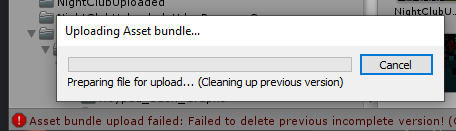
ive tried delete the cache in the location and reinstalling sdk3
rose shadow
ya i detached that
hushed gazelle
@rustic mango Udon doesn't really like branching outputs together like that in my experience.
open ermine
v0.19.0
rose shadow
even a full sdk with registry edits didnt do shit may just be something jacked with my unity project
dapper lion
@open ermine ??!!!???! hmmmmmmm ok, that could be a problem, are you sure theres no new videoplayer from merlin yet?
the videoplayer mightve gotten a little funky
@rose shadow if its the project, try a fresh project abd adding the scene back in
rose shadow
ya I may have to do that since ive tried everything for the sdk. When i do a build and test locally it loads up fine. Its only during uploading im having issues
 rustic mango
hushed gazelle
<@!149693904734650369> Udon doesn't really like branching outputs together like ...
rustic mango
hushed gazelle
<@!149693904734650369> Udon doesn't really like branching outputs together like ...
You got the wrong Joker lol
hushed gazelle
Whoops, sorry my bad!
void ridge
heh
rustic mango
no worries, it happens lol
 jaunty schooner
Are things like this still necessary to sync variables between users with Udon? I found this old example and I don't know if I should follow it, or if syncing has been fixed and simplified now. This seems really complicated for a simple synced button toggle.
Here's the same thing but for multiple buttons:
cunning mist
Networking is hard
jaunty schooner
Well yes, but one would think Udon would handle the hard stuff like network events arriving out of order behind the scenes. Which is why I am wondering if they have updated it since then, and if all that is no longer necessary for most things. I get that like if you're making a fast paced game, maybe you'll have to dig deeper. But a simple global toggle button should not require all that.
unreal grail
System.Exception: Method is not exposed to Udon: UnityEngine.GameObject[] FindGameObjectsWithTag(System.String)
I am going to SCREAM
Everything I know about code efficiency is not applicable and it drives me up a wall. Storing a single variable in the world, which should be as simple as declaring that variable, requires me to have a text object that I write a string to and read it when needed
I can't declare my own enums, I can't find objects with a tag, I can't use node-type declarations...
grand temple
What do you mean storing a variable requires all that? You can declare variables within udon just fine
unreal grail
But i can't call them from other scripts.
quartz meadow
yes you can
the udonkart prefab is kinda broken now but you can still learn a shit ton from it. Go through how its set up, there are plenty of ways to connect things together
obviously networking needs to be improved but once you understand the basic premise of master/other users, local vs synced, you will be fine
@unreal grail
unreal grail
@quartz meadow Do you have a link to this? Went searching, I can only find udon "kart" worlds
quartz meadow
its kinda broken due to udon updates but the methods used are still relevant now
GitHub
VRChat kart system by UdonSharp. Contribute to kurotori4423/KurotoriUdonKart development by creating an account on GitHub.
essentially, you have to reference other scripts / objects in a certain way
for example, I use a master script with all the main variables, and a bunch of sub scripts that work with the master script
of course how you choose to set it up is up to you
unreal grail
This doesn't make sense at all.
quartz meadow
load up the test world and slowly take apart the kart, you will see what was done. there are probably better examples out there but this is what helped me personally learn a lot
unreal grail
public VehicleHandle VRHandle;
public UdonCarThrottle throttleF, throttleB;```

This would throw an exception that ```UdonCarSeat``` and ```vehiclehandle``` and ```UdonCarThrottle``` are not whitelistednope, cause of one thing
those are the names of scripts
if you have a built udon# script, and you reference its exact name, it will get passed
unreal grail
When i try to do that, I get exceptions
quartz meadow
you using u# or udon graph?
unreal grail
U#
quartz meadow
tbf I don't know how it plays with udon graph
how do you have it referenced?
can you post a screenshot?
unreal grail
Last time I did this, and I was referencing a DoorType script, I got the following:
Assets\UdonSharpScripts\TriggerAnimation.cs(9,11): System.NotSupportedException: Udon does not support variables of type 'DoorType' yet
quartz meadow
can you post the actual offending line of code?
unborn hornet
UdonSharp can work with udon graph through normal customevent and programvariable means. Just reference the graph with an UdonBehavior type.
Just as a note.
unreal grail
public DoorType doorType;
quartz meadow
let me show you what I have
vestal sluice
I'm glad you're talking abt this right now, I've been playing around with it for a few days and I did learn a lot from the sample U# scripts it came with. I even made my own model for a new cart based off this one. I'm interested to see what you think
quartz meadow
in script "Local_KartConfigurator" I reference a script "Kart_Controller" like this
that kart controller script holds all the main variables, like kart speed and stuff
if I want to modify a variable in that script from this script, I do this
I am changing a variable called "Kart_Volume" from the local_kartconfigurator script by referencing the external variable to the name of the external script as I defined in the beginning
keep in mind capitalization matters
in this case, I am modifying a float variable, but its in an external script
and another note
when you define the external script as a public variable as in my first picture, in the unity editor you will see this
you have to define the gameobject that the script you want to access is attached to
you can just drag it on
there are technically better ways of doing this but tbh this works really well
shut patrol
Does anyone know how ui and OnMouse... events work in VR? The ui works in a very strange way, like there is a response, but no events are given. And I don't know if the OnMouse... events work.
fiery yoke
@shut patrol Not sure how VRChat handles the UI raycast stuff, but I think that they dont handle it properly, if there even is a "proper" way. I dont think that Pointer Move events are triggered correctly. Only when you press the trigger does it set it or something.
shut patrol
fiery yoke
<@!496020285745659904> Not sure how VRChat handles the UI raycast stuff, but I t...
Hmm, this is interesting, it will be necessary to look at this, thanks
fiery yoke
I have a pretty narrow grasp on the Unity EventSystem stuff, but I think that VRChat does not handle all of it correctly, which leads to this wonky behaviour with OnMouse events
 fiery glen
I have a question. How do I get the user player name and display on text?
private VRCPlayerApi _localPlayer;
void Start()
{
_localPlayer = Networking.LocalPlayer;
GameObject.Find("Text (1)").transform.GetComponent<Text>().text = _localPlayer .displayName;
}
this code will not show in vrchat
shut patrol
fiery yoke
I have a pretty narrow grasp on the Unity EventSystem stuff, but I think that VR...
In Unity itself, EventSystem and OnMouse events are two different systems, they do not overlap. But I do not know about how this is implemented in vrc. Everything is somehow mixed up here, I have not figured it out yet
fiery yoke
Ohh right
in that case the mouse is probably just forced into the middle of the window
shut patrol
fiery glen
I have a question. How do I get the user player name and display on text?
priva...
You can try using Debug.Log () and console to see what happens at each step
fiery glen
shut patrol
You can try using Debug.Log () and console to see what happens at each step
This is console error.
Udon runtime exception detected!
An exception occurred during EXTERN to 'VRCSDKBaseVRCPlayerApi.__get_displayName__SystemString'.
Parameter Addresses: 0x00000005, 0x0000000F
shut patrol
fiery glen
This is console error.
Udon runtime exception detected!
An exception occurred...
This can happen if you run the world in the Unity editor, because PlayerApi and Networking do not work in the editor
 acoustic vale
I'm still learning, this is more of a "can it be done" question: Is it possible to make some kind of programmable screen, e.g 512x512 pixels that can be refreshed 24fps and be performant?
acoustic vale
^ probably a stupid idea, but thinking of just using blocks and changing the colours?
tall vault
Getting VRChat in general to run at 24fps can be difficult in some worlds xD
You could use a ui canvas and draw sprites on it to reduce your object count
acoustic vale
Oh okey, i assume the UI canvas is still 3D and not tied to view? also probably way less intensive than spawning 262144 blocks 😛
tall vault
Yeah it can be used in world space
acoustic vale
Oh nice, i'll give that a look now
acoustic vale
ignore offset, yeah 1980x1080 sprites chugs hard
fiery yoke
What exactly are you trying to do?!
acoustic vale
Build a programmable screen
fiery yoke
Why?
acoustic vale
Why not? 😛
fiery yoke
well...most people would probably user a Texture and then use SetPixels
acoustic vale
Ah okey, i'll look into that then. thanks for the help 🙂
hushed gazelle
Okay, can someone tell me what I need to do to get a UI button working? Do I specifically need an udon script ON the button and can't just direct the button to a central script?
acoustic vale
Had a play around but can't seem to get access to Texture2D to modify pixels. I'm assuming this isn't supported in Udon? ( from googling )
 exotic gate
I'm having trouble uploading my world. I get to the configure world menu in unity but it won't let me edit anything withing in the menu, such as the world name and player capacity
Was wondering if I could get some help, this is my first world 
hushed gazelle
@exotic gate when in doubt, check your error logs.
exotic gate
I get multiple errors that read: "Assertion failed on expression: 'task.rasterData.vertexBuffer == NULL'"
I can edit it when I normally hit play but I can't when I go to upload it
exotic gate
Has anyone else had this problem?
rose shadow
My uploads still wont work get stuck on cleaning up previous version https://prnt.sc/wd34oh

I have tried reinstalling sdk clean with regedits, detatching the pipeline, clearing cache and no matter what It leads me back to this same error
raven peak
acoustic vale
Had a play around but can't seem to get access to `Texture2D` to modify pixels. ...
The issue is you cant create a new texture2d you can only edit a preexisting one.
acoustic vale
raven peak
The issue is you cant create a new texture2d you can only edit a preexisting one...
Yeah, i got to the point where i could setPixels/getPixels onto an existing texture but was causing VRChat to be non responsive
raven peak
What are you wanting to program into the screen?
acoustic vale
Literally just want to make it as generic as possible so I can use it later on to render stuff into it. E.g images, videos, games, etc
raven peak
I would just use a render texture for most of that.
acoustic vale
Sorry a bit of a n00b, is a render texture different to using Texture2D?
seems so: https://docs.unity3d.com/Manual/class-RenderTexture.html
thanks for the help so far guys 🙂
 raven peak
Texture 2d is more for static images. Rendertexture is used for dynamic images.
 mild fern
so i have a question when would i use this?
like i don't understand what it is and what i would do with it :o?
raven peak
mild fern
so i have a question when would i use this?
Do you know how network ownership works?
 raven peak
Vrc is a peer to peer network where players are sending information to each other. There is no central server controlling the instance. When you have ownership of a object you are sending all the sync information to the other players.
mild fern
ohhhh okay!
so in a two player game world i would want the person who is interacting with the objects to send the sync information
raven peak
So when you have some physics interactions like hitting cubes with a bat. you want the user hitting the box to take ownership so the physics look correct and there is no delay.
mild fern
thank you so much jdog! also thanks for the prefabs you make i use em alot for understanding stuff 🙂
raven peak
👍
 frigid cargo
Why no chat box for PC
opaque sage
Not really a question for this channel, but welcome to VRChat
A general chat box would completely ruin the VR part and it's immersion.
dapper lion
good question, but this might be a weird place to ask
acoustic vale
Just an update here, I don't think TextureRender is what I'm after, looking at tutorials I still need to use Texture2D to perform drawing on pixels 🤔
frigid cargo
opaque sage
A general chat box would completely ruin the VR part and it's immersion.
Its kinda hard for a PC user when have no micro or headphone with micro
dapper lion
not to keep this in here... but adding a messaging app probs would do anything to the immersion if at all
frigid cargo
I see
opaque sage
frigid cargo
Its kinda hard for a PC user when have no micro or headphone with micro
It is not a sittuation that can't be changed.
Dont forget while desktop mode is supported, the game is primary about vr
If you dont wanna talk that's fine too, mute's are welcomed aswell but a chat just doesn't fit at all.
dapper lion
interesting
cunning mist
(Watch me make this magically relevant to Udon)
While VRChat doesn't have a native messaging system for players, some people have made in-world messaging systems that work pretty reliably. FairlySadPanda has her "UdonChat" system, which I highly recommend for anyone looking for in-world messaging for any purpose.
https://drive.google.com/file/d/1-Gor_hpMwyrnx9BxTbRWJjYyFZKuSw9J/view
Google Docs
frigid cargo
waste 135 bucks for a micro, aa
dapper lion
@frigid cargo you do not need an indoor shotgun mic
@cunning mist when did that come out? been trying to find something close to that for ever
cunning mist
Originally back in July and it's been updated a couple of times. It's a part of the VRCPrefabs database, there's a lot of other stuff there you should totally check out as well!
https://vrcprefabs.com/
dapper lion
interesting, ty 👌🏻
 livid gate
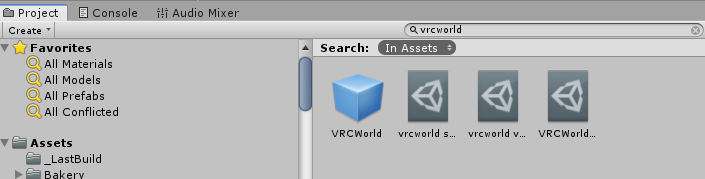
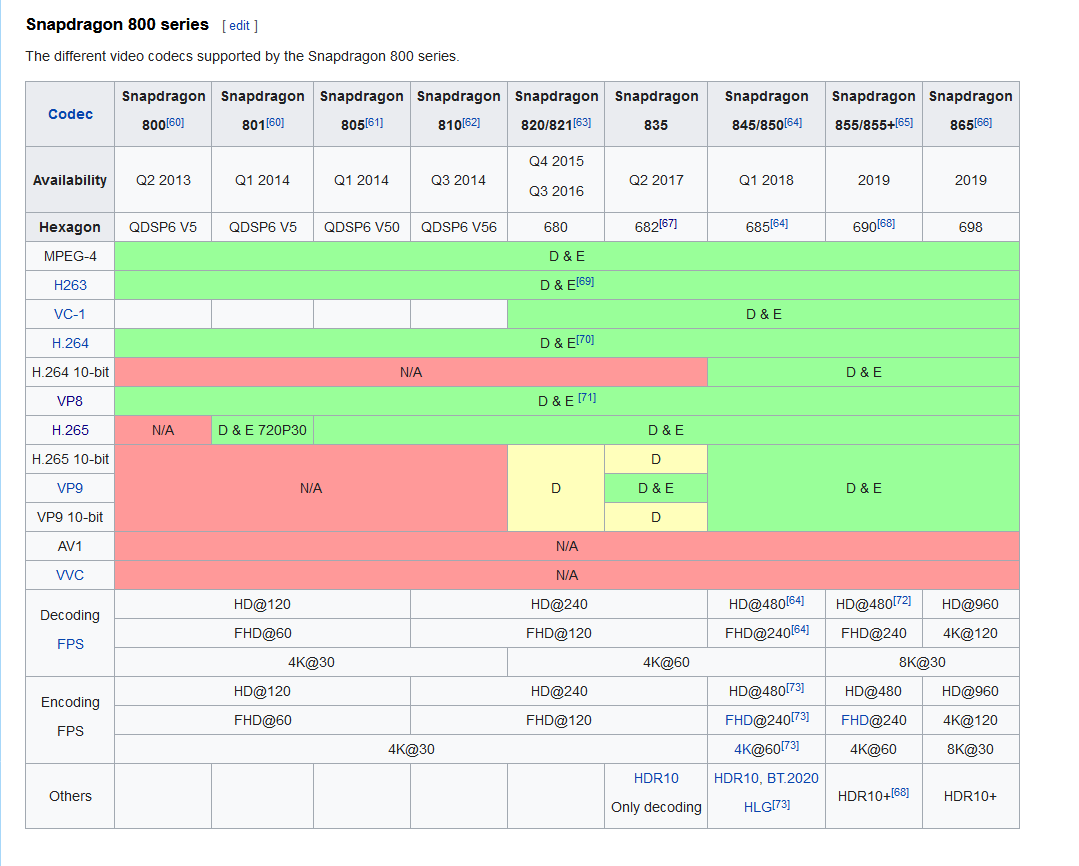 fiery yoke
@dapper lion I also have a chat system that does not use a synced var per player, but its currently still under construction. Been wrestling with Udons Networking since it existed...
dapper lion
very cool, would love to see to it
hardy fog
I saw some cool event system plans on Youtube that would make a good chat system. It would be fun to text someone in VR
dapper lion
thats what im sayin
fiery yoke
Well the problem is that either:
a) You have a synced string for every potential player, which wastes a lot of bandwidth, since they will be synced at all times.
or
b) pass ownership around, but that gets janky quick and there is some bugs/wonky VRC behaviour that makes it even harder.
So yeah. Networking is hard.
dapper lion
agreed, imagine how cross instancing would work (nct)
void ridge
I'd love some really carefully scripted "explain like I'm five" videos on networking.
I always feel like I'm on the edge of really grasping it, but I think I'm missing a really basic way of conceptualizing it.
It seems like all of multiplayer is built on top of the fact that games were originally built as single-user simulations
So everything defaults to just "great, cool, I'm simulating this now"
"Oh, wait, you wanted me to synchronize this? Shit, buddy, you shoulda said so."
"I have like a dozen follow-up questions about what you mean by 'synchronize'."
fiery yoke
There is many different networking architectures and problems to solve. There is no way to dumb it down a lot. Unless youre specifically talking about VRChat's networking
void ridge
Yeah, I guess I shouldn't say 'explain like I'm five.' It's not about dumbing it down, it's about establishing a basic framework for understanding.
dapper lion
i mean, if there was a dumbed down version, itd be a playlist lasting 45 hours
just for the basic understandin
void ridge
I think that's an overexaggeration. Don't underestimate the ability of a good teacher.
fiery yoke
Well the gist of it is that multiplayer games are just local simulations. The thing that you usually call "synchronization" is a replication protocol. You try to get the same thing happening on both ends, while respecting both ends inputs.
In normal server-client architectures, all clients send their inputs to the server, the server calculates the results, and sends them back to all clients.
In P2P like VRChat everyone sort of is the server for their own objects. If you own an object you provide everyone with the data about that object.
Its basically a shared load. There is no central authority.
Thats pretty much all there is to it foundationally
void ridge
Right, except the minor detail of instance Master 🙂
fiery yoke
The instance master has no special role
they are just the default owner when there is no other owner
void ridge
(which is a role, and they're the only one who has it, which is sort of, uh, special 😝 )
fiery yoke
Well its not like a server, since the instance master can be any client
role in networking means some party that has a special privilege or specific tasks
object owner for example in this case would be a networking role
the instance master is just the default owner
void ridge
You are technically correct, which is the best kind of correct.
fiery yoke
But ofcourse the juicy details of that networking architecture makes it complicated.
And ofcourse the implementation details...which aren't open-source and undocumented. So yeah.
Good luck :)
 twin drift
Is the MirrorSystem prefab referenced in the Udon Readme no longer included in the SDK?
dapper lion
no, but i have it somewhere if you need
twin drift
I'd appreciate it if you did! New to Udon and it seems like something simple to tear apart and learn from
quartz meadow
It should be in the udon example scene
acoustic vale
when spawning objects into the world, is there a way to keep them synced between players?
rose shadow
@dapper lion I think something in my build has to be causing the error. I may just have to rebuild my world from scratch. I hope maybe the vrchat devs may find a fix from my error log.
appreciate all the help you tried so far though
dapper lion
ok, hopefully it doesnt occur again
rose shadow
ya i have no clue what is causing it im gonna make edits to my second private world and see if i can upload there
I may have to reinstall unity if that is the case
dapper lion
i dont think unity would be the issue, but it is possible
rose shadow
because its getting stuck on the asset bundler part
which im assuming is a unity thing
dapper lion
bundling iirc is the sdk trying to do that
rose shadow
im gonna try removing the VRCworld and adding a new one
maybe somehow thats bugged idk
dapper lion
make a game object, and add component “vrc scene descriptor”
rose shadow
if this test doesnt work ill try that next thanks
its just weird because its only the uploading that has issues local testing works fine
ya that didnt work gonna try your fix
dapper lion
ok, well i mean, when yoy test, it doesnt upload it, so whatever its trying to do in the upload process is obviously kaput or something
how you tried 1’s debugger yet?
rose shadow
no do you have a link to that?
never heard of it
no dice on your idea still get this
 dapper lion
i would say yes, but mobile discord wont let me send it
dapper lion
wrll check the message board here
cus this discord has it pinned, i just cant check cus mobile discord is basically like having a quest 1
native estuary
You might have to contact #vrchat-support with that issue for them to fix it server side
rose shadow
Ya I sent out a ticket so im waiting
nothing to stress over now Ill just wait untill they get back to me. Worse case senario Ill lose like two weeks of work but have a build back up which had most of my map built. I can always load that into a new project and restart.
rose shadow
I got a pic of the logs too

At this point im 90% sure its a server sided related issue so ill just have to wait for support but I appreciate all you guys do to try and help out the community. Have a great new years eve tommorow
 twilit tusk
I am uploading a world using the world 3.0 udon SDK and I ran into an issuehttps://cdn.discordapp.com/attachments/337672341041446912/793957527531421736/unknown.png

That has happened 3 times now and I have already fully restarted my pc and my router.
twin drift
Do Udon Behavior components cache values? I have 2 seperate buttons, each spawning a different object. When I click a button it's supposed to disable the other's object if it's enabled. This works fine however the other button now has to be clicked twice (as if it's not rechecking the "activeSelf" value) in order to turn on
scarlet lake
hey
is anyone else having problems logging in with steam
i got off to go shower and now it wont let me log back in through steam
ping me if you have any suggestions
 restive dust
You can probably get some help with that in #user-support-old . This channel is for Udon related questions.
mortal star
I'm blind... I don't see why is the first one not working
        float inputGrabRight = Input.GetAxisRaw("Oculus_CrossPlatform_SecondaryHandTrigger");
        float inputGrabLeft = Input.GetAxisRaw("Oculus_CrossPlatform_PrimaryHandTrigger");

        float inputGrabLeft = Input.GetAxisRaw("Oculus_CrossPlatform_PrimaryIndexTrigger");
        float inputGrabRight = Input.GetAxisRaw("Oculus_CrossPlatform_SecondaryIndexTrigger");
pk, I swapped their order and now suddenly works
unborn hornet
You are assigning two things to the same variables.
The latter value overrides the former
mortal star
i meant pairs, I had the second pair commented out
unborn hornet
Ah
fiery glen
how can get player name and display on ui text?
public override void OnPlayerJoined(VRCPlayerApi player)
{
GameObject.Find("Text").transform.GetComponent<Text>().text = player.displayName.ToString();
}
this code not working.
grand temple
Assuming you have an object named text, I don't know exactly why that wouldn't work but I can tell you that's not a very good way to do it either way, and there are several reasons why it might break
The way you should do it is to have a public Text variable. When you have a public variable, it will show up in the inspector and then you can drag and drop the specific object into it.
It would be something like
public Text display;
Override void onplayerjoined (vrcplayerapi player)
{
display.text = player.displayname;
}
twilit tusk
why?
vernal maple
Quicky question. Need to know how to detect OnPlayerJoin and Leave with U#. Figured it out finally after finding scripts
jaunty schooner
So I'm still not clear on syncing. If I want a variable to sync among all players, do I just have to click sync for the variable, or is that broken, and may desync in some cases and be different for different players due to network events being lost and such?
Like, I would expect the game to sync all the variables around the room master's perception of the world. But if it's not doing that, then what exactly is Sync doing? How is it Syncing? And when might it fail to do so?
grand temple
It's about the owner of the object, not the master of the instance. But by default, the owner of all objects will be the master anyway
One situation where it might fail is if the different clients disagree on who the owner is, but that's mostly a late joiner problem. If you see the ownership transfer happen, you should receive synced variables from the new owner
 hollow juniper
What do i need to tick to make an object pickupable from anywhere and not have a snap point?
jaunty schooner
fiery yoke
<@202163004245016586> ohh also currently you cannot instantiate network objects,...
What do you mean when you say "You cannot instantiate network objects?" I understand instantiation and object pooling and how they differ, but what do you mean when you say you can't instantiate network objects? Can you instantiate non-networked objects? And if so, in what way do networked objects differ and what happens if you try to instantiate them? Are you perhaps suggesting an instantiated object will ignore you if you enable position sync?
grand temple
If you want to work with synced variables, two events will be super useful: onpreserialization will fire on the owners client right before they send out synced variables and ondeserialization will fire for everyone else right after they receive synced variables. This happens roughly 5 times per second
Network instantiating is hard because everyone needs to agree on what the network ID of the object is
jaunty schooner
Why not ask the master to instantiate the object and pick an id for it?
grand temple
They don't give us the ability to change network ID ourselves. But I'm assuming it's either a complicated problem they haven't put in the time to solve or they don't want to solve it because pooling is better anyway
void ridge
Is it possible to do a cheap, slow version of the "sync position" tick box on an Udon Behavior?
grand temple
Sure, sync a vector3 and quaternion
void ridge
Like, just use a custom network event on a slower timer to update the position and rotation of an object
cool
grand temple
You can't send variables with network events so you wouldn't really be able to use that to sync position
unborn hornet
You'd sync the two variables as mentioned, then have a network event triggered that would manually update the target's pos/rot with the synced variable information.
jaunty schooner
Can't send variables with network events? What do you mean? How could you make a card game if the master can't send which card was selected at random from a deck?
grand temple
You can send the network event itself, but let's say you had a deck of 52 cards you would need 52 different events ready to be networked. You can't just send one network event with an int to identify the card
jaunty schooner
That's insanity!
unborn hornet
Welcome to Udon 2020
jaunty schooner
I find that hard to believe... But if that's true... Hmmm... What if instead of having 52 network events, you have 6 and you send the value using binary and recombine it on the other end to get your integer?
void ridge
hahaha
That also seems insane, but I'm laughing because I was thinking the exact same thing
unborn hornet
Shit man, if it works, it works.
void ridge
I have a strong feeling it not works
I dunno why network events would be guaranteed to arrive at the same time (on the same frame)
jaunty schooner
I assumed these network events would have to have some kind of ID. Otherwise how do you know which network event is a 1 and which is a 52?
Ah but difference in time is an issue...
grand temple
Events are identified by a string, it's just the name of the event
jaunty schooner
Ah that makes some more sense.
I know a bit about that cause I made an SDK2 world just before switching to Udon.
And also Avatar 3.0 stuff.
But even Avatar 3.0 has integers!
grand temple
52 events isn't that big of a deal. The overhead is that events are sent as a string and so when it gets received, it will compare the event name against all the events on that behaviour to find the correct one. So the more events you have on one behaviour, the more cpu overhead when receiving network events. Also the length of the name of the events is a factor
It's also worth noting that if you care about security, modded clients are able to call network events super easily. Synced variables are a bit trickier
void ridge
"security" in this context just means people not cheating at whatever game you made though, right?
jaunty schooner
I'm getting more and more confused.
We can't send the value 52 to a user without sending it as a string, but we can sync a variable? So why not sync the card number that was selected?
void ridge
I really feel like VRChat networking needs a really killer graphic for dummies (I am one of these dummies)
jaunty schooner
Sigh... All I wanted to do was detect when my players hit a building and make it progressively get more damaged in a way all players can see...
grand temple
You could sync the card as a synced variable, but then you have a constant overhead of sending it 5 times per second. Plus network events are way faster, like half a second vs the multiple seconds of a synced variable
 halcyon falcon
quick question, wtf is Udon
grand temple
Just have a network event for each damaged state of the building