#udon-general
59 messages · Page 26 of 1
 floral dove
 icy gale
i've tried that a few times, someone on reddit said to delete vrcsdk and reimport it
didn't work 😦
 native estuary
@icy gale search your scene for t:pipelinemanager you might have multiples messing with the sdk
icy gale
😮 i have two!
native estuary
Remove the wrong one, should work normally afterwards 👌
icy gale
thankyou!!
native estuary
No worries
icy gale
I must have tried to add my own scene descriptor, found out about the prefab, and deleted the old scene descriptor without deleting the pipeline manager that it created
native estuary
https://github.com/oneVR/VRWorldToolkit/releases
Feel free to check out my world tools the world debugger included finds a lot of possible problems in scenes including this one and offers a one click fix for them 😉
icy gale
lol you should join the vrchat team
native estuary
I wish 😅
 daring copper
are public synced variables object based? like if i have an udon behavior with a synced variable, and 2 objects that use that udon behavior, are the references to the public variables on the respective objects unique?
 fiery yoke
Yes
Two UdonBehaviour's can run the same program, but they are still seperate instances
daring copper
cool, thanks
fiery yoke
Sort of. It hasnt been "adjusted" to work with SDK3 particularly. But there still is some functionality
 normal sable
How do I clear the test-build cache? It keeps loading up an old test I built hours ago regardless of which unity project I have open. Or is there something wrong with the servers or such?
fiery yoke
@normal sable Yeah its currently a bug. Delete the "Unity", "VRCHTTPCache", "Cache-WindowsPlayer" and "Cookies" folder in "C:\Users\YOUR_USER_NAME\AppData\LocalLow\VRChat\vrchat"
normal sable
Okay thank you!
 scarlet lake
For spookality, are you supposed to fill out the submission form before making the world or after?
Also, with the VRChat username. Are you supposed to put in the username you can change or the one you can't?
Don't know where else to ask this.
 errant pilot
I would make the world first before submitting it to be reviewed.
 atomic sinew
How come when i import the sdk3 world, it does this? Assets\VRCSDK\Dependencies\VRChat\Editor\Components\VRCPlayerStationEditor.cs(9,30): error CS0234: The type or namespace name 'VRC_Station' does not exist in the namespace 'VRCSDK2' (are you missing an assembly reference?)
 native fern
Does anyone know where I could get all the controller rotation offsets? I am trying to use the hand tracking data but as it is right now it is useless as it apparently is different for each controller (index, vive wands etc.). Ideally I'd like to have the rotation/position of the laser pointer which is both avatar and controller independent...
 dense halo
Can you have a dynamic array as a public variable in an udon sharp script? Such as an array of gameobjects?
native fern
sadly that is not an option for me, i want the user to press all the buttons on the controllers at the same time... which will make them drop the pickup if I used them
dense halo
@tropic canyon as in an array that can be changed in size.. So you can add in as many references to game objects as you want in a list. Rather than saying there are "5" game objects, you make it dynamic and you don't have to define how many, and you want you can keep adding them.
 tropic canyon
List's aren't available atm
but you can store any predetermined size
so if you initialize it with 5 things and you want to add another you need to initiliaze a new array of gameobjects of size 6 and copy the first 5 from the old array
(being quite slow)
native fern
U# example for array size increasing:
        // increase the length of the _targetsIds array by 1
        var targetCount = _targetIds.Length;        // get the current array length
        var newIds = new int[targetCount + 1];       // create a new empty array that is longer (!)
        _targetIds.CopyTo(newIds, 0);               // copy the old array elements to the new array (starting at index 0 in the new array)
        _targetIds = newIds;                        // replace the current array with the longer one, has a new ('empty') array element in the end
Yes, but you can't have that as a public variable,. so you'd be able to add in the GameObjects through unity, without it being set as a static array.
Plus that leads to a lot of memory allocation.
Actually you can't even define public static arrays as variable for UdonSharp to use can you?
native fern
it works with both public and private arrays...
static is atm not possible
only catch with public ones is, they usually get initialized with the length 0
I am using them quite frequently, the only thing that can be problematic in my experience so far is doing this every update with many large arrays
it is easier/more performant to keep track of the number elements inside it and have empty space in the end rather then reallocating every time you add/remove an element
basically oversizing a bit
depends on what you need or how you use it
native fern
you would just do public GameObject[] interactableObjects; for that... In the editor you see a 0 afterwards. When you set it to something >0 you get to see the elements like in your picture...
you can 'resize' this array at will at runtime using the shown method
native fern
says it is in progress... https://vrchat.canny.io/vrchat-udon-closed-alpha-feedback/p/video-player-support
tropic canyon
the editor will treat it as a list so you can just drag it onto the missiles thing and it'll add it to the array
 flint urchin
@scarlet lake Video players should hopefully hit open beta within the next 2 weeks
dense halo
@native fern OOhhhh THanks! I think it was there the whole time when I was testing, my dumbass just couldn't see it.
What's the best wait to setup a wait function?
As "UdonSharp does not currently support node type YieldReturnStatement"
Or is it better to just use a fake timer on update?
 hearty linden
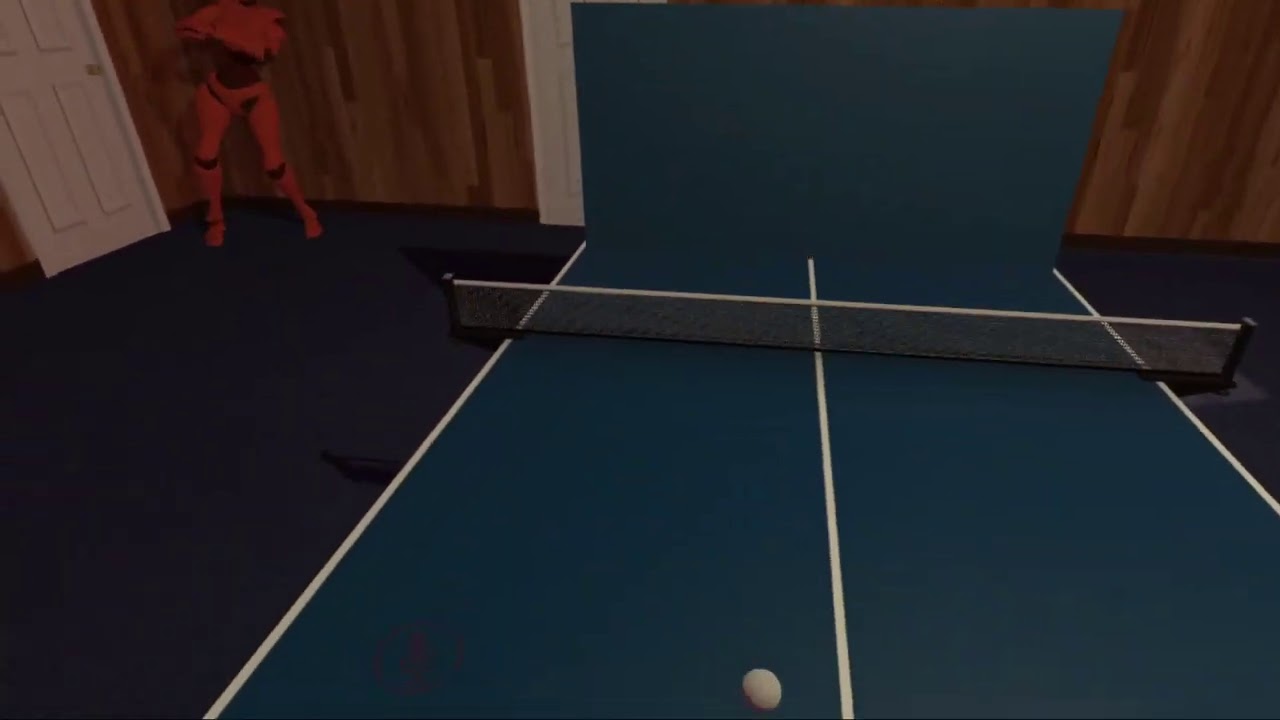
Is making a ping pong table with working networking physics something that's viable with Udon in VRChat? I have a setup that feels good when I test alone. Physics seem to work well. But when I tried it with another user the physics seemed to get wonky. Was only able to multiuser test it once though and I had a few friends in the test world at the time.
native fern
@dense halo np, for now you have to use one of the update methods to implement waiting. I tend to store the start time and check how much time elapsed. When it is longer then my wait duration I call another method that does whatever i want. I prefer it over adding deltatime to a variable and checking that against the wait duration...
@hearty linden make it a rather big table or tennis I guess... the issue is that you will always see the ball fly past the other player and suddenly it will teleport back to the player and come towards you again due to constant ownership transfer and network delay
fiery yoke
VRChat is relatively bad when it comes to latency. Its around 200 milliseconds at all times.
native fern
in the eu it is upwards of 600ms total
hearty linden
I thought it might be something like that. bummer
fiery yoke
Which in itself isnt too bad, but without any lag compensation its noticable.
hearty linden
this it what it looks like with just me testing. https://www.youtube.com/watch?v=XMukzlv2h70&feature=youtu.be
 fiery yoke
I wanted to work on some Lag Compensation prototypes
native fern
lag compensation wouldn't be able to handle the current situation sadly
fiery yoke
ofcourse it would
fiery yoke
Possibly. Will take a look at how viable it is
native fern
in my experience everything i do appears around 1 second later on a second client. There is no way you can predict 1 second into the future when you have something like a shooter or ping pong
hearty linden
Yeah when I was testing with a friend the ball seemed to float around a bit randomly.
Maybe I can figure out how to make a single player version. Though don't think I would be able to figure out making even a simple ai player
native fern
you can make a wall that the ball can simply bounce off of
like in real table tennis training
hearty linden
was thinking of that too. maybe that would still be fun enough to play
native fern
it would be authentic xD
hearty linden
Does VRChat have plans to get the latency into more reasonable numbers eventually? Is it on the roadmap or is it just inherent?
floral dove
sure @pulsar iris that would be possible
 pulsar iris
I'm sure it'd be popular lol
Ive been dying to see some bending stuff in VRchat after using the Earthbending mod in Blade and Sorcery
 vapid kettle
I can see it being possible with spawning prefabs with animation from the user's position on different keys pressed / making a menu that follows the user
pulsar iris
I was thinking in VR lol
vapid kettle
yeah in vr
pulsar iris
Button presses kinda take away from it
vapid kettle
I doubt that's possible, haven't heard about that being integrated
floral dove
Pinning this message since it's being asked both here and in general every hour or so, understandably:
There's a new issue that popped up Friday where the Unity Editor is launching the same world over and over. To fix it, manually clear your VRChat Cache, located in C:\Users[Username]\AppData\LocalLow\VRChat\vrchat. You can find it quickly by pasting this into your Windows Explorer address bar: %AppData%..\LocalLow\VRChat\vrchat\
Delete the following folders inside that folder:
- Cookies
- HTTPCache
- Unity
- VRCHTTPCache
- HTTPCache-WindowsPlayer
- Cache-WindowsPlayer
Do not delete other files (like config.json or output_log.txt), you might need those.
floral dove
floral dove
There's a new issue that popped up Friday where the Unity Editor is launching th...
pulsar iris
Momo, would gesture based earthbending be possible?
floral dove
sure!
pulsar iris
Aw sick
vapid kettle
it would be good if you guys put a statement about it somewhere and tag everyone so they'd know about it because the pinned messages don't appear for everyone unless you seek for it
floral dove
@vapid kettle it was posted in #announcements on Friday
native fern
is that a one-time fix or do you have to do it every time you want to test?
floral dove
@native fern I'm not sure, just running into myself now. You may want to delete it every time until we get a fix out.
vapid kettle
oh I haven't seen that, it is really hidden behind the big chunk of text
native fern
I see. I didn't see the news and saw myself forced to upload every time 
native estuary
@floral dove if you don't mind also pinning that in #world-development since it's also been asked there a million times already
 bleak widget
I have a graph that is supposed to teleport a list of pickups, with a synced position, to a set position on an interact event. However, it seems that it only items that player1 picks up will get teleported on interact, not objects that player2 picked up. I thought that this may have been an ownership thing like synced variables but setting the network owner of the object didn't change the behavior. I'm not sure how to fix this issue
hearty linden
@native fern here is playing against a wall. Works pretty well. I might have to play with physics materials a bit. https://www.youtube.com/watch?v=mXDnuDVCMHo&feature=youtu.be
 native fern
nice, just like I remember it  👍
👍
 grand temple
@bleak widget it's definitely an ownership issue, but simply changing ownership immediately before setting position won't fix it because it takes a moment before the ownership transfer can complete. I would recommend either waiting for half a second after taking ownership or sending a network event so that everyone in the instance moves the objects so they whoever is the owner will get it done
bleak widget
Ohh I didn't know it took time for that to happen
I will play around with it a bit and see what I can make work
 brittle zealot
I'm a Unity developer who just started getting into VRChat and I'd like to try my hand at making some maps in Udon. Anyone got any recommended tutorials or references for someone already experienced in Unity/C# to get started in Udon?
 inner cobalt
Not sure how to word this, does udon have a way to access the player's speech? Got an AI controlled NPC I'd like to consider making responsive to voice commands spoken out loud. Or even anything that lets me know if a player is speaking?
fiery yoke
@inner cobalt
Nope. At least not yet.
inner cobalt
bummer
floral dove
@brittle zealot - if you're comfortable with C# development, then I recommend you read the gettings started docs here to get your environment all set up: https://docs.vrchat.com/docs/getting-started-with-udon
Then install UdonSharp: https://github.com/MerlinVR/UdonSharp
FYI UdonSharp is not officially created nor supported by VRChat, but I have no qualms recommending it.
floral dove
Yep - the graph is great for beginners who are not ready to write code by hand, but a C# programmer will probably find it quicker to pick up U#, which uses C# syntax to compile Udon-Compatible code. Just remember that it's not full C# / .NET, you have to work within the sandbox of Udon.
brittle zealot
My first plan is to try to do something stupidly ambitious, immediately hit a wall due to SDK limitations, then figure out what I can do instead
 flat musk
I cant seem to build and test any changes, it just gives me the prior version of the world.
fiery yoke
look at last pinned message
flat musk
that is helpfull thank you
 quartz gale
Really really new to Udon and have only ever done a mirror toggle Button, How can i make a button Play a short sound every time you push it?
flat musk
Well first I would learn how the basics of C# works
because you will need to understand variables and how to set the audio to said variable on the interact event
brittle zealot
Can we use TextMeshPro for UI Canvases?
 severe tree
Is it not doable to use an UdonBehavior type array or is this just some weird bug I'm running into?
I'm curious as to why it's exposed as a variable option if it won't compile anyways if this is intentional
brittle zealot
Another question: I've loaded up the SDK with the example project. I've created a new scene and put a SceneDescriptor in, with the spawn points, but whenever I do a test build, VRChat launches the example scene instead of the one I have open. Neither scene is in Unity's Build Index. How can I change what scene it builds?
severe tree
check the pinned messages. You probably need to clear your cache
brittle zealot
Ah, okay
severe tree
You'll need to clear it every time you want to test the world too. At least I have
brittle zealot
Thankfully, doing it once seemed to work. I'll probably have to do it again if I test anything different.
severe tree
Glad it worked 👍
brittle zealot
Managed to make my version of Hello World: The Yeet Button
https://streamable.com/ym14ax

 normal jolt
now make it a companion cube
video screens coming back sounds nice
I hope there are a lot of options via Udon
brittle zealot
@normal jolt Ask and ye shall receive.
https://streamable.com/8363qn

Also apparently I do need to clear my cache every time I change anything. That's rather annoying. It looks like it was just reported today, any chance of a fix any time soon? I don't know how quick the turnaround time is on these sort of things
 foggy fulcrum
I see my world for half a second and get sent home any solutions?
 gloomy nymph
The caching issue was just introduced with a recent patch, I was wrestling with it on Friday night
floral dove
@brittle zealot we're working on a patch, should be early this week afaik
brittle zealot
Awesome. Just started getting involved in VRChat so I didn't know what the patch iteration time was
 fathom raven
hello, is there a way to access gameobjects tags in Udon? Thanks 🙂
quartz gale
Im making an audio trigger and im not very sure what i did wrong
native estuary
@foggy fulcrum disable error pause in your console for starters (not sure if you solved it already)
 idle aurora
Is udon its own scripting thing?
I got into a AP Computer science class and i wanna know if this would help me learn more about udon for my world
errant pilot
Udon is its own computer language @idle aurora . Its still in the works, but most code is written itself compared to using nodes. Unless you want to program using assembly, which is difficult, you should stick with the graph or us U#, which is a C# compiler for Udon
idle aurora
I have no clue what you just said so im gonna assume that this class might help
oh btw
how do i like use Udon to start?
Like do i have to import a package to my world?
errant pilot
Only the VRCSDK3 package
And programming background wont hurt you in learning udon, its just a different language mean different ways of it functioning
idle aurora
Oh i see i see
Thank you
So to put Udon in my world, I just need to drag/open the thing while my world is open?
Oh but wont that mess up my world?
scarlet lake
Does screen space overlay UI work in udon or do people use something else?
Also, what do people do to change the environment. Is it just teleport + destroy?
errant pilot
@idle aurora importing any package does not effect the world at all. And its best to import it before you start building. But importing it after wont make any difference
@scarlet lake Yes a world space canvas works with Udon. Just be sure to add the vrc ui shape component if you have buttons on it. And what do you want to change the enviroment? Lots of options with udon
idle aurora
so do i just import the udon package into my world?
errant pilot
Yep
scarlet lake
@errant pilot Thanks for the reply. I should probably rephrase the second question: What do people usually do when they want to change the scene of the map?
errant pilot
Setting game objects active, instantiate, ect.
idle aurora
alright plz dont let me lose my work
 fresh cave
errant pilot
fresh cave
errant pilot
Wait you already have the vrcsdk in your project? Is it the SDK2?
scarlet lake
In udon, how do you know what would be local and what would be global before testing?
brittle zealot
Can I use TextMeshPro in UI canvases? Would that work in VRChat?
errant pilot
Everything is local unless specified @scarlet lake
fiery yoke
Well not quite
things like OnPlayerJoined are local. But they happen for everyone.
So there are some things that are global, or appear global.
idle aurora
I mean i have uploaded this world multiple times
I havent threw in the sdk3
but yes im sure thats the sdk2 (no idea)
idle aurora
So am i just screwed or...
Can I not update my world to SDK3 If its already got an SDK?
errant pilot
@idle aurora Well SDK2 is not at all compatible with SDK3 so you can't update it to udon, you have to make a new project for that to work. If it is an earlier version of SDK3, then you have to delete it from your project first, then import it
dense halo
When I move an object that has interaction scripts on them, I seem to be unable to click them after they've moved.
Lastly how does, "IsPlayerGrounded" work?
fiery yoke
- What exactly do you mean with move? Move in the scene? Or move them in the hierarchy?
- IsPlayerGrounded tells you if the player is grounded :P I think its a CapsuleCast or SphereCast, but could be any other method as well. Definitely not just a raycast straight down tho, since that wouldnt work.
severe tree
Alright I have a question, udon graph is compiling "OK" however the public variables aren't exposing themselves. It's refusing to let me see the variables and change their values.
I have tried:
- Restarting the editor
- Removing udon behavior from object and reattaching the script
- Deleting the problematic variable and recreating
- Duplicating the udon graph
- Deleting graph and rebuilding
- Deleting Library folder
and so far haven't gotten it. No public variables are exposing regardless of the type. Only started today when I opened the project.
nevermind. After deleting the Library folder I just had to copy the entire graph, delete all the nodes, and then paste them back in
idle aurora
Can I just transfer my project to a new project like my buildings and everything but transfer it without a SDK
put in the SKD3
Then transfer my project to that?
severe tree
As long as you remove all the old scripts from SDK2 you can port everything as is from the old project
so if you have objects that toggled or were pickups for example, if you remove the scripts from them then you can just port all the assets (aside from the SDK) and then port the scene to the new project
idle aurora
I never did anything with scripts
i dont know anything about em lol
I know triggers like 1 trigger
severe tree
So you never had any toggles or pickups or anything like that?
idle aurora
Here
Yes I can pick up somethings
And I can hover over a item and it says a text
Like this
you can pick these up
severe tree
Anything that made it work with SDK2 you'll need to remove the components for. So all the objects that you can pickup you'll need to remove the Pickup component and etc...
severe tree
All the triggers that use something from the SDK somehow
Like you don't need to remove the colliders, but all the VRChat components will need to be removed
severe tree
Once you remove them all you can port it to udon easily enough
severe tree
pretty much yep. Once all that's gone and you port it into a new poject that has SDK3 it should all be ready to be added back through Udon instead.
idle aurora
do you mind calling me and teaching me incase?
Im super sorry but I just dont feel confident to do that on my own
I trust you tho
er, guiding me plz
severe tree
Give me a minute and I'll help you out
idle aurora
Thanks so much
dense halo
@fiery yoke
- When I change the object with the interaction script's transform, specifically it's Y, I don't seem to be able to click to interact afterwards.
- I've tested using it and it doesn't seem to work as I expect. I stand still in my world, and it continues to give false back, saying the player is not grounded....
brittle zealot
Can Worlds contain TextMeshPro UIs or only default Unity UI elements?
scarlet lake
How to I optimise lights?
fiery yoke
You bake them.
severe tree
Anyone got any workarounds or ideas as to why I can't seem to have any kind of array of UdonBehaviors? Is it just a bug? If it's not a bug why would it be exposed as a variable option at all if it'll just refuse to resolve itself.
fiery yoke
@severe tree Yeah those arent a thing yet (for whatever reason)
severe tree
That's a shame. Know of any workarounds yet or are we just waiting on it
fiery yoke
Well I know a way to do it in UdonSharp
but I have no clue how that works in the graph
you can just have a generic array of objects
and then cast them to UdonBehaviours
severe tree
Yeah I haven't looked at UdonSharp yet, not very familiar with C# so figured that the graph would be easier but that's about the only thing I've run into that's got me beat at the moment lmao
brittle zealot
Is there a way to restrict avatars of a certain size from a game world? I have an idea that might break if someone's avatar is too big
fiery yoke
Not really. You could try checking if the head bone is above a certain y level
but that can quickly fall apart for non-humanoids and playspace mover stuff
brittle zealot
Honor system it is then
 finite oracle
How would I change the button trigger distance on Udon?
floral dove
@finite oracle - check the tagged post about how to change the Interaction Text, and change the 'Proximity' instead
 hardy verge
Im trying to get this flight stick graph to work with an object, but i have no clue whats going on here.
Anyone know how to get this to work?
the graph was made by Jesse from the VRC team, but i cant really make sense of it. maybe someone else has downloaded it and knows more about it?
scarlet lake
im trying to figure out how to set up an avatar pedestal (top) but i cant seem to find the "vrcavatar pedestal" and "vrcavatar pedestal type" nodes shown in the guide im following (bottom) am i missing somthing?
scarlet lake
How do I bake the lightmap onto the terrain's trees?
floral dove
@scarlet lake - check out the Pedestal in the UdonExampleScene, it's all set up and working, you can use its graph if this is all you want to do with it.
scarlet lake
thanks! that got it working
scarlet lake
how do I make this update every second?
It grabs everything properly, but it doesn't update. It's like it takes it once, never takes it again till you reload the world lol
fiery yoke
@scarlet lake It probably crashes at some point.
Try it in the editor and see where it crashes (which line)
fiery yoke
I wont debug it for you :P
scarlet lake
and asset thingy
fiery yoke
Find out whats wrong. You can do it.
scarlet lake
I don't know scripting, I bought this from booth for $3
fiery yoke
Well then its time to start learning :P
scarlet lake
bruh moment, thanks though ❤️
fiery yoke
In the log it says "Object reference not set to an instance of an object"
and it gives you two parameter adresses: 05 and 1A
05 is the Text component itself. 1A is the string you want to set the text to.
05 is null. Therefor your UIText variable is not set to a component
scarlet lake
It seems when I translate everything from japanese, it breaks it, even if I make sure everything is (or should be) aligned properly
fiery yoke
Yeah that is a common problem. Strings in other languages can be a little finicky
scarlet lake
fricky, at least I know I can hit play and not have to keep compiling it and test world
scarlet lake
@fiery yoke Thanks for the help! https://gyazo.com/0614d0d70d20621c7e006cb5c20cf5d7 I have successfully translated the strings without breaking anything, took tons of trials and errors

 upper sluice
I'm trying to get a UdonSynced variable to work, but it doesn't seem to update the text when another client clicks on the cube. Does anyone know why this doesn't work? I don't know much about Udon, so any help is appreciated. [EDIT: It apparently works fine, guess I'm just dumb]
scarlet lake
There any way I can fix this? Or can this be ignored, spamming the hell out of yellow warning consonle
fiery yoke
Nope.
scarlet lake
So it can just be ignored?
fiery yoke
No. It will fill your log, increasing file size
But there also isnt always a way to fix it
scarlet lake
Filling my log is fine I guess if there's nothing I can do about it
Normally game breaking scripting is red anyways which isn't being spammed xD
tropic canyon
errors don't break the game
all errors are caught somewhere
normal c# classes would just keep on working
¯_(ツ)_/¯
idle aurora
Can anyone give me a guide to basics of Udon? I know nothing about coding but I really want to learn it to make my world better
I'm willing to pay if anyone can teach me stuff as well
scarlet lake
@idle aurora most of the basic stuff you'll need can be found as prefabs in VRChat Examples Ranging from buttons, Pedestals, Mirrors and more. If you want to see how they work and such, you can load up UdonExampleScene scene that can be found there as well
idle aurora

scarlet lake
For specific guides and stuff, there's plenty of them regarding tutorials on youtube
scarlet lake
Most of it, you don't need to know coding, like, I know zero coding
That's what prefabs are for lol
https://booth.pm/en/search/VRCSDK3 You can a decent amount of free prefabs here, if you don't mind translating pages and stuff.
Some of it requires Udon C# imported which you can get here > https://github.com/MerlinVR/UdonSharp/releases
The main downside of booth, besides the obvious difference in language is, stuff that contain words, will most likely be Japanese, and will require translating strings which if not done right, cause errors, like my issue I was having here > https://discordapp.com/channels/189511567539306508/657394772603830360/750708843415339058
scarlet lake
It's a lot but that's UDON lmao nothing is straight forward
but basic stuff like I said, are already prefabs - VRChat Examples
idle aurora
L:ike a prefab for opening a door?
scarlet lake
No 😛
 scarlet lake

idle aurora
plus maybe i should just finish building the world first
then get a team to code it for me
I did go to a different state to work to get money to pay someone
scarlet lake
ok why would my avatar picture be like no where near my avatar pedistal and huge
i found the picture of my avatar and its huge i made the pedistal myself
floral dove
@scarlet lake sounds like somethings off with your hierarchy. Check the way your Pedestal is setup up compared to the one in UdonExampleScene. Also, please don't post the same thing to multiple channels 🙂
scarlet lake
sorry
oh right you have to have the stuff in order
i shall remember also duplicate post removed
all of the added components are now in the right place it looks identical to the first version and i used the avatar pedestal prefab program and it still showing the picture of the avatar way out from the pedistal and huge
do i have to littraly make the program from scratch
floral dove
there are no differences in scale and position between the objects in your pedestal and the example version?
scarlet lake
hmmmm
i mean the mesh i made is not at the same scale as the orignal pedistal
so im thinking maybe thats a problem
oh i dont know
its littraly my first day with this
lol
floral dove
No problem, we all start somewhere. It sounds like the issue is not in the program but in the scaling and offset of your items.
scarlet lake
i see
how do i set that 🙂
i mean can i change that in the program
i suppose i can fudge it and just palce mine over the top of the old one and turn the render of for the first
i would like to say its nice to learn new stuff lol
floral dove
You can change the scale and position of your items using the hierarchy. If you're new to Unity, a video like this might help: https://www.youtube.com/watch?v=8pC3SE5PIzY
scarlet lake
thanks
floral dove
@scarlet lake FYI- I removed the assets you had posted here since you said you paid for them. If you pay for assets, you are not typically allowed to then give them away. If the license says otherwise, link me to it and you can re-post them.
scarlet lake
What? I never posted any paid assets
It was a link too booth for you to buy things, it wasn't directed towards any asset in general
@floral dove
I wasn't giving away any assets ya silly goose
brittle zealot
I'm currently watching some tutorials on Udon scripting since I'm at work and can't try em out, but is it possible to use ScriptableObjects to define things in a world? Like if I want different guns with different fire rates and things, can I store that data in an SO and attach those to my Udon script, or would it not be able to expose those fields?
Like, if I had a U# script with public GunSO gunData, could I drag in an asset from the file system into that?
fiery yoke
@brittle zealot ScriptableObjects are not implemented in Udon (yet?)
brittle zealot
Dang, guess I'm gonna have to put all the values in the old fashioned way
Just watching a tutorial on how to make usable handheld items and I they had a bunch of exposed fields for fire rate, damage, etc.
floral dove
@scarlet lake You'd posted a .cs file that appeared to come from the linked Booth page. If that wasn't the case, I apologize for removing it and I'm glad you know not to do that 🙂
@brittle zealot you can make public variables for your programs and easily set those values in the inspector.
finite oracle
I am following the guides from https://gitlab.com/s-ilent/SCSS/-/wikis/Other/Post-Processing which I had it working before on SDK2 world. I have the Post processing volume on the PostProcessing layer and the main camera referencing that layer. I can't seem to get the effect to work on my Udon world. Is there something special I need to do differently?

GitLab
A surface shader for Unity providing cel-shading. (Forward rendering only)
floral dove
does it work in Unity but not in Udon? If so, what errors do you get?
native estuary
Did you set the reference camera again in your scene descriptor?
Just making sure if you moved the world to 3.0 from 2.0 and forgot to re set it
foggy fulcrum
trying to upload world but i click upload and it does nothing
floral dove
@foggy fulcrum - it looks like you've got errors in your console. Need to make sure your project has no errors before you can upload.
native estuary
Search for t:pipelinemanager in your hierarchy to make sure you don't have multiple objects with that component on them
foggy fulcrum
@native estuary Thanks that worked but now it just loads the world and sends me home
native estuary
My guess is you have a null spawn point
Go check your scene descriptor and under the "Spawns" make sure something is set
 oak trail
If you would have used the VRCWorld prefab, it automatically has the spawn point set at the VRCWorld objects coordinates.
native estuary
And if you used the world debugger included in my world tools it would have warned you about both of these issues 😉
https://github.com/oneVR/VRWorldToolkit/releases
foggy fulcrum
i shall download it immediately lol
native estuary
Just dm me if you have any problems specific to it 👌
oak trail
That was one of the best shameless self-promotion moments I've seen in a good while.
 kind cypress
hey I need some serious help
on the website I cant login I reset my password
still doesn't work
I do it again and it still doesnt work
kind cypress
wrll woops
finite oracle
okay, I think there is error with the postprocessing. Does anyone know how to fix this?
finite oracle
I clear the console and going to play mode it does not show up again
This is my hierarchy
floral dove
@finite oracle - a quick google search led to this thread with a few things you can try. Not an Udon problem, but maybe it helps: https://forum.unity.com/threads/post-processing-stack-shader-errors.633892/
finite oracle
Okay so I fixed it! So I had to remove the post processing and reinstall it to Unity.
very dumb that it is like that
floral dove
thanks for sharing your fix! BTW - I just searched for "Shader error in 'Hidden/PostProcessing/Uber' (etc)". This is a good first step when you have an error.
foggy fulcrum
so uh what i looked up for jumping was to add a component named player mods but its not showing up so is there something new that i have to do
floral dove
@foggy fulcrum - all you have to do is use the VRCWorldPrefab and you'll have jumping 😄
floral dove
you can even change the power right in the inspector. Check out the Readme.pdf in VRChatExamples if you want to learn more about the graph that powers it, or just click 'Open Udon Graph' to see what makes it tick (it's a very simple graph, I promise)
foggy fulcrum
sorry had to
floral dove
no biggie, we just keep memes to the meme channels. Also, R word.
 blissful wigeon
Hi folks! Hopefully this is the right area for this - I'm an indie gamedev moderately familiar with Unity and C#, but brand new to VRChat stuff, and I'm looking to work with AI (namely, NavMesh stuff) in VRChat - I see that the associated components are whitelisted and I'm hoping someone might be able to help me out
Before I get too far in, I've heard its possible to modify the player controller so that it doesn't have all the issues (or at least minimizes them) associated with Rigidbody-based controllers, does anyone have some documentation on any of this stuff? Ideally I'd like to use a NavAgent.Move-based controller, as I'm looking to make a Game World that involves the player losing control (and regaining it) to an AI and that would circumvent some other issues I've thought about
foggy fulcrum
well i thought i could update my world if it was on community labs guess not i really dont want to wait a week ugh

 karmic kindle
if i want to change some field of an unsupported type (such as textmesh or spotlight), is there some way i could work around udon not supporting that type?
i can almost do it by setting a button's OnClick action to change the desired field, and calling onClick.Invoke() on the button from udon, but i can't pass a parameter programmatically
fiery yoke
@blissful wigeon The player controller is close to untouchable. There is some janky methods of circumventing it or making your own entirely, but most if not all of those methods have some drawback.
blissful wigeon
@fiery yoke do you have any suggestions on how to go about researching the janky methods? google is saturated with physical "controller" questions and "player" model assistance but very little regarding world creation, and even less using sdk3
blissful wigeon
Hmm I’m wondering if immobilizing the player and teleporting them to a NavAgent might work, I’ll look into that instead
idle aurora
idk if this is the place to ask
but with this new sdk3
how do i make a item pickupable?
errant pilot
Add the component vrc pickup, just like sdk2.
idle aurora
I dont need anything else?
errant pilot
You also need a collider. And if you want the pickup object to be synced, you have to add an empty udon script and check syncronize position.
idle aurora
ok thanks
 sterile pumice
I have been having a bit of trouble with this, but what is the best way to reset multiple child objects to the parent. I'm trying to reset a deck of cards but my small brain can't do it.
Also if anyone has good recommendations for Youtube channels to learning C# for unity that would also be greatly appreciated.
errant pilot
You can set the transform.position of the object to where the parent is at
sterile pumice
yea but I can only get that to work for 1
tropic canyon
you can get all child transforms by iterating through them
so a for loop from 0 up to parentTransform.ChildCount and in it you do a "parentTransform.getChild(index).position"
dense halo
Any idea how I'd create a "slider" interaction like a volume bar.
I can obviously create the bar, but I'm not sure how to create an object that can be grabbed, and moved, but is locked to x and y for example, and limited in z between 0 and 0.1.
I tried making a pickup object that was frozen in certain dimensions but I think I'm going down the wrong path.
fiery yoke
@dense halo Mostly maths. I made a "physical UI system", but Im not quite finished with it just yet.
Some useful functions are Mathf.Clamp and Vector3.Project
dense halo
@fiery yoke Thanks for the info,. so how would I limit an objects transform? Just on update if it's position.Z > 0.1, position.z = 0.1?
Or would I have to implement my own modified "VRC pickup script"
fiery yoke
Ohh you cant really restrict a pickup. The pickup would just be a proxy for your hand position
Its a little complicated
fiery yoke
For example here is a simple lever that is restricted
dense halo
That helps so much otherwise I would be lost down the wrong route.
I'll just grab the hand position then using GetTracking, and proxy it,.
fiery yoke
Well there is some considerations to be made
especially with local vs world based position
Most of that stuff is Vector Maths
dense halo
Oh don't worry I know all about that.
sterile pumice
Thanks @tropic canyon figured it out from what you said pretty much.
all I had to do was add a few things to my graph and it worked
dense halo
Is there any way to determine if an "Interaction" (object with interact) is being held down instead of clicked once?
 dark tiger
Is there a way to constraint an object to the player's position? (maybe other than on update move the object to the player's position :p)
errant pilot
Id presume the player is not holding it? @dark tiger
And thats a good question @dense halo
dark tiger
@errant pilot, Yes. Without making the player hold it
errant pilot
Without update, im unsure
dark tiger
Ok, thanks
dense halo
Can you play animations through udon?
I have an animation clip reference but I don't see any options to "play" it.
dense halo
As udon doesn't support "Animation" components.
errant pilot
I think you can reference an animation controller, and have the controller do the rest
 west plover
What's the Graph trick for checking if a player is null? VRCPlayerApi.equals is instance-scoped rather than static
fiery yoke
@west plover System.Object.ReferenceEquals (or simply object.ReferenceEquals) I think
west plover
cheers, that fixed it
foggy fulcrum
Anyone know when video players will work in a udon world or if there are any compatible ones
floral dove
@foggy fulcrum - check pins 🙂
sterile pumice
I know its not a question but because I had a bit of trouble with this if anyone needs a card reset graph here it is
just for the brain deads like me
floral dove
Thanks for sharing! FYI you can make an array of Transforms instead of GameObjects and then skip the get transform step
sterile pumice
Oh awesome thanks
scarlet lake
What resolution is the VRC camera?
 lilac wasp
...
um
no resolution
it adjusts based on the viewer
you can get the viewers resolution with udon though
scarlet lake
Does the cam not have an aspect ratio?
lilac wasp
it also is adjusted based on the viewer
i have a 16:9 monitor but usually have my game in 1:1
also i am stuck
can someone tell me where i messed up
default ammo value is 10 but can be triggered far into the negatives
the branch (if statement) does not seem to be working
Compiler of whole graph
as for in game
@scarlet lake https://ask.vrchat.com/t/getting-the-screen-window-resolution/437 here is what you might be looking for

VRChat Ask Forum
EDIT: You can simply get camera.pixelWidth/Height 🤦♂️ I guess this might still be interesting tho: In case someone needs this, heres how you can get the window resolution: And heres the Node-PasteAN2X227bOBCGX8XgtWiQFA+igdw0SRfFbrsFkvhmExg8jAJ1FTHQoYnXyZP1Yh9pX2HpQxJ3bX...
scarlet lake
I saw in a world they had this text field box thingy where people could type and send them a message, I was wondering where I could get that and how it works. Not sure if it sends them a message to discord, a bot, or what ever it could be
Actually, i'll go and find it and screenshot it
ib4 it says where on the box and i didnt see it
fiery yoke
@scarlet lake Pretty sure that "abuses" Video Players. Video Players basically send a HTTP Get Request to whatever address you enter. They then have a custom server setup at that address, which takes the argument and processes it and sends that to a Discord Bot which then posts it as a message.
Because of that, Video Players have temporarily been disabled.
scarlet lake
I see, so that will never ever exist on UDON, got it lmao
fiery yoke
Probably not
Unless they intentionally give us the ability to do something like that. Which is unlikely, since it isnt really controllable
scarlet lake
Thought it would be extremely useful for people who don't want random discord friend requests to report bugs or issues and have it tunneled through that
fiery yoke
I mean you can disable friend requests from specific servers
scarlet lake
I know
fiery yoke
ohh actually you can just disable direct messages, not friend requests. Meh
scarlet lake
But, I want opinions and stuff about my world and/or avatars without needing to be there in public worlds and wait for it lol
so a message box system like that would be sick
Thank you tho for the info ❤️ I checked the world I found it in before and apparently it doesn't have it anymore
Summer Solitude was it, but it was a long time ago
fiery yoke
Well anything that lets you send arbitrary data, to arbitrary addresses, from inside VRChat, is a big security concern.
scarlet lake
I understand that
But what's a security concern when tons of security in vrchat is bypass able 🤷♂️
Like photon bots
scarlet lake
they enter public worlds and crash everyone (or a target) and leave.
Or desync bots that cause the entire world to run like you're at 6000 ping
or mesh crashers that place 2000+ meshes on their avatar, and crash you unless you have them fully hidden
fiery yoke
Yeah that is just stability.
They disrupt you or the vrchat servers. But thats not security. Security has to do mostly with protecting user data and the integrity of program flow.
scarlet lake
Understandable. I just look at those as flaws then I guess. Wish they could be patched, especially those stupid bots
However, glad portal droppers have gotten very scarce
scarlet lake
Aight well thank you again for the info ❤️ About my world last time I was in here, I got everything working,
However idk if it's just a bug with being the world owner or something, I have a player counter, for me, when I join, it counts up by 2 or would be off-setted
4 people in the world, but it says 3
6 people in the world, it says 5 like it's not counting me
Seems very straight forward
Set int to 0
Player joins, add 1
Player leaves, subtract 1
Perhaps I should have it private int inroom = 1;
instead of 0?
Other people told me it's counting right
fiery yoke
Yeah it should be
You get an OnPlayerJoined message for all players in the world, and yourself.
scarlet lake
When I join my world by myself, it says 2
When I join my world by myself, it says 2
big confuse
fiery yoke
No idea. I havent had that issue before.
fiery yoke
Hmm...weird
scarlet lake
idk it's what ever
flint urchin
Debug Log the player join with player name and count number
dark tiger
@rocky scarab, this should do the trick: https://www.youtube.com/watch?v=vPPpFokmS-Y&t=51s

Here I've done a tutorial on creating a simple teleportation system for VRChat using both Udon and UdonSharp. This video was recorded and edited in a different manner, so if you have any thoughts, recommendations, or requests, I'm game to listen! Hope you can find this useful!...
you are welcome :3
Does anyone know if there is a more efficient way for waiting some specified time (in seconds, or even minutes, maybe) without making the program sum up the time every frame with Update?
I am afraid of overusing Update in my programs :p
fiery yoke
For waiting you have to.
But you can minizime the effort
Dont count up by adding, but compare the current time to an "end time" which you set at some point to the current time + offset
dark tiger
Ok, thanks!
floral dove
@dark tiger there's a timer graph on the Timer Cube in UdonExampleScene you can use / copy from.
 stark adder
Ok soo i have very weird problem.. I have object that i teleport around the world.. (Portable board for player to interact with) When i teleport it to player it ends up being wrongly rotated.. Nothing wrong on that.. But when i try to rotate it by ANY value of x y or z it flips it weirdly always.. The SAME script worked on different world perfectly FINE..
In here ⏫ I am rotating x y and z by 0.1 always.. Even tried smaller values but always same
Made it input stuff into debug
Before rotation
After x rotated by 0.1..
Anyone any ideas why its doing what its doing ?
bleak widget
What are you using to preform the rotation?
stark adder
transform.rotation *= new Quaternion()
What should i be using 🤔
This worked when i tried it last time.. Its the same script i used on different world where its working perfectly.. except the debugging stuff i added that's addition
fiery yoke
What are you even attempting to do with that line?
floral dove
"How Do I Make Automatic Doors?"
This is now much easier to do - you'll need to grab our open beta from #open-beta-announcements and then you can watch this video to make your own!
https://www.youtube.com/watch?v=95jRByYHE4Y&list=PLe9XHNvXcouQjg5GULWGLj1tMzeythnQi&index=4

These features are currently available only on our Open Beta version - check our Discord for more information.
Learn how to make doors that automatically open and close to let players through. This tutorial will use the Udon Graph to work with Player Triggers, Haptics (a...
floral dove
floral dove
"How Do I Make Automatic Doors?"
This is now much easier to do - you'll need to ...
Video Players are now available in the Open Beta of Udon - get all the info here: https://discordapp.com/channels/189511567539306508/503009489486872583/751533413395333150
floral dove
floral dove
Video Players are now available in the Open Beta of Udon - get all the info here...
bleak widget
Player collision events? Nice.
How long is a feature in beta before it goes into the full game?
floral dove
@bleak widget - it depends on the beta, but in this case I estimate 1-2 weeks before all this goes live (with any tweaks / bugs / improvements found from beta feedback)
bleak widget
Can't wait to play around with the new features. Thanks for the updates ^-^
errant pilot
Wow. What timing. Just yesterday, i was just building a world that was gonna use the video player, but was bumed to hear it wasnt, but it aparently will now :D
 lilac hatch
Ahm... Is it just me or using the VRC Station script and two local instance of the game for testing purpose kinda.. create some funky stuff ?
Look like the script is trying to put both of the instance in the same seat, totally glitching out one of the instance game
floral dove
it's not just you:
that's in the official docs, known issue: https://docs.vrchat.com/docs/using-build-test
lilac hatch
didn't read that part yet, thanks ! :)
scarlet lake
ohai niyah :3
lilac hatch
hi moon i wanna die kinda but it's going more smoothly than i though
scarlet lake
Oh?
lilac hatch
idk i got some stuff working already which is good enough for me
I'm looking for the new ways of doing what did the "VRC_Custom renderer behaviour" but out of luck yet
not even sure we need that anymore tbf
scarlet lake
Just do a GI Update on LateUpdate maybe? i mean, its udon we have all powers
no idea how to do that in detail but maybe other ppl can help you there
lilac hatch
my IQ is as elevated as a clown fish
scarlet lake
yes
lilac hatch
that's legit me when i see udon
scarlet lake
Renderer.UpdateGIMaterials();
No idea if thats exposed
Yup! it is http://files.moonvrc.com/YIb1xKTwgR.png

 lilac hatch
I'm a clownfish moon, i have no clue on how to use it :^)
Never planed on learning anything more than triggers system in my life lmao
I'm pretty much tired aswell and tilted by how much stuff i'll have to do to upgrade world to sdk3 so I think it's time for me to sleep before having a mental breakdown lmao
Thanks for the help tho, appreciated
 restive dust
Hey y'all, is it possible to get data persistence using Udon? Even if it's just a few bytes.
Also how would I copy to clipboard using Udon?
floral dove
Not on VRChat's servers. You can have your users highlight something in a text field and press Ctrl+C to copy to clipboard.
That's how some people do persistence like the roller coaster building world
fiery yoke
Would be neat if VRChat had a way to Copy to Clipboard / Paste from Clipboard easily in VR (especially for Video Players 👀)
restive dust
Ah I see. Thanks Momo.
floral dove
I hear that. You don't want apps reading your clipboard without your permission, but maybe there's a way we could do that safely
fiery yoke
No not from within VRChat
Basically just have something like a Macro I guess
I guess it would be from within the Client then
Hmm I mean you would still have to navigate to a site
so that wouldnt help at all then.
I guess its an issue you cant get around easily. Virtual Desktops help with that already I guess.
foggy fulcrum
How do you make is so a object that is pick up able can be seen and interacted with globally and not locally
tropic canyon
Put an udonbehaviour on the pickup and press the sync position checkbox and make sure to use a program source inside the behaviour (probably an empty one)
foggy fulcrum
thx
floral dove
@foggy fulcrum I recommend you take a look at the Readme in VRChat Examples and check out the UdonExampleScene. It has examples of many of the things you are asking about.
 fast horizon
May we use Avatars 3.0 and Udon in the same project?
not in the same upload, of course, but the scripts existing in the same project.
 devout portal
Would not recommend
oak trail
No, you can't.
 vernal phoenix
wow really
oak trail
You can do it in SDK2, but in SDK3 the two packages are so different they won't work in the same project together.
 hard wraith
how would i setup a u# script for ontriggerexit for local player?
floral dove
@hard wraith what have you tried?
You'll want OnPlayerTriggerExit. Only works in the Open Beta for now though, check #open-beta-announcements
hard wraith
ahhhh okay so not in it yet okay cool
floral dove
Well, you can build it into your world now if you're cool with waiting a week or two before you take it public.
hard wraith
yeah true its just a world im working on for learning udon and c# in general, updating an sdk2 world to udon so learning the basics lol, but still gotta wait for stream players
floral dove
Stream players are live in beta 👌
hard wraith
oh awesome lol thought it was just video players
but i guess thats part of the same thing now?
floral dove
We have a lot of features and fixes coming in this next release. Check #open-beta-announcements if you want the full scoop.
 echo coral
How can I get inputs from two different triggers in one node graph? Currently the trigger is on the object which has the udon behavior and it seems to just know that it should use the collider trigger on itself...
Is there some way I can tell the On Trigger Enter node which trigger I want it to activate from?
Or some way I can forward a trigger event from a different object into the existing graph?
(sorry if that is a super noob question, but this is my first udon graph)
echo coral
@rocky scarab This is a super easy to follow simple example: https://www.youtube.com/watch?v=95jRByYHE4Y
These features are currently available only on our Open Beta version - check our Discord for more information.
Learn how to make doors that automatically open and close to let players through. This tutorial will use the Udon Graph to work with Player Triggers, Haptics (a...
Well, I was able to get that to work fine on the non-beta, but I didn't try the controller part. I am not sure exactly what you are attempting, but I'm probably just too new to this.
Are you trying to access variables from gameobjects on the node graph?
Let me see if I can make it work. I haven't tried yet.
Okay, I got it working.
I don't know if it's the best way, but it works.
@rocky scarab
TeleportPoint is a gameobject I placed at the destination, and then dragged onto the graph.
The node search thing is a little confusing, because they are nested.
And the naming doesn't always match what the node titles say in the graph.
To get local player, first search for networking
And then go into the SDKNetworkingBase thing or whatever it is called, then in there you can search get local player.
It kind of is, yes. I think it's because there would be too many results, and maybe even there could be loops in the graph of how all those different nodes are interconnected.
So as confusing as it is, it might actually be the right way for it to be.
Or maybe it is just confusing for no good reason xD
floral dove
@rocky scarab you can press Tab to get the all-in-one search. Learn all about how to search through nodes here: https://docs.vrchat.com/docs/searching-for-nodes
VRChat
Quick Search Press the Spacebar to open up Quick Search, then type in the first few letters of the class you want to interact with. Full Search Press Tab to open up Full Search, then you can search for any method on any object. For GameObject.GetName, you could just search for...
echo coral
Thanks @floral dove ! I didn't know how to do the tab thing yet ^_^
I had a problem like that when I think I closed Unity while it was doing something. I had to close unity, reopen unity, and then right click the assets and reimport all.
Then it all worked fine.
hmm
That didn't cause any problems for me.
Oh, there is a thing where sometimes when you drag stuff onto the graph it doesn't always have it connected right.
But if you go to the object with the udon behavior it has shows the list of variables you added.
And then you can drag the gameobject onto the variable input thing that has the same name.
Yes, the button is the object I added the udon behavior to.
And it also had a collider set to trigger mode.
Which is how that interact node gets it's input magically without needing another thing feeding it in the graph.
@floral dove Is there a way to specify the trigger you want to register the interact from? Or does it have to be the trigger on the same gameobject as teh udon behavior?
Have you made a world in SDK2?
floral dove
Interact fires on the object you Interact with, you can then use a reference to another object from the first one.
@rocky scarab if you're new to world creation, check out the UdonExampleScene and the Readme in the VRChat Examples folder, it goes over a lot of basic programs and how they work.
echo coral
So, if I wanted, I could have one ubergraph for a particular system in the world, and all the ways that different parts of that system could be altered could be events forwarded from objects with triggers?
So, in a way, that main graph can be a persistent object that tracks the current state of that one entire system?
And if so, how do I forward the events from the various triggers?
Trying to imagine that graph as an object with methods that can be subgraphs in there, and variables that can be accessed from any of those methods.
Awesome!
scarlet lake
Today I learned unlit shader's cause quest users a super bad visual bug
vapid kettle
Hey guys, I was wondering if it is possible for a world to force an animation on a player
 verbal oasis
is using sdk3 /udon a good idea even for a standard world?
 drowsy terrace
I'm trying to make a modular-ish system for doors & levers/buttons.
I've made a door prefab that triggers open/close animations depending on a boolean, and would like to make a lever prefab that can open/close a referenced door prefab. How could/should I do that? In C# I'd add a door variable to the lever and change it's status boolean when interacted with but I can't manage to get how to do that with Udon... any idea?
 prisma abyss
Let's say this Udon Graph should activated/works when the gameobject with this udon is active (from disenable state). What do you think? Does it work too with Animator animation?
In my world, it just doesn't work and it's completely ignored.
 edgy moss
I have a very long object that i want to be able to pickup from both ends. The VRChat docs say something about: "Physical Root - Can be used if the root of the object is not on the same gameobject as this script, allows for multiple pickup points on a single object." But I can't find anymore info. I don't see that option and I tried putting the script farther down the layers, based on what I thought it might mean, but I can't get it. What am I missing? Thank youS1
 dusty bane
is there a way to reload the local test world without restarting client?
cause it doesn't detect changes automatically
 versed rapids
hello, someone know how fix that plz
Assets\lightworld.cs(14,11): System.NotSupportedException: Udon does not support variables of type 'PostProcessVolume'
floral dove
@dusty bane the quickest way to reload is to go to your VRChat control panel, turn on advanced settings, then you can run your Last Build from Build & Test instead of needing to re-build it.
dusty bane
say i run build & test with number of clients = 0
floral dove
@versed rapids - you can't directly manipulate a PostProcessVolume with Udon.
dusty bane
i would want to be able to have my currently running client reload the world
versed rapids
@floral dove thx for your answer but how i contourn that?
floral dove
that's not currently a feature, but I agree it would be helpful
dusty bane
iteration times are kinda annoying when having to debug graphs
floral dove
@versed rapids - you can use an animation that changes properties on a PostProcessVolume, and control its Animator with Udon
versed rapids
ok thx you a lot
 steel nova
how long until a build of udon is released that allows video players/streams? or if there is a workaround to streaming audio in udon
floral dove
@steel nova check pins. Time until release is -1 days
steel nova

 sour wind
Does Udon have a Compare Tag method? I kept looking but couldn't find it.
floral dove
Nope, sorry
sour wind
Dang, I found a work around where I use the collision matrix. Works pretty good
echo coral
How can I count the users in a trigger area so that I can make sure a door only closes when the last person leaves the trigger and not any time anyone does?
Also, is C# the most feature-complete non-assembly language to use for compiling to the Udon VM?
(please mention me if you reply)
flint urchin
@echo coral we can’t use C# as is. Even with U#.
But if you want to make sure the door only closes when the last person leave, update a int value and only close the door when it’s 0
echo coral
@flint urchin , sorry, that was my mistype. I meant is U# the most feature-complete language to use with Udon so far?
flint urchin
yes
echo coral
Thank you ^_^
edgy moss
can you use the shader graph with VRChat?
verbal oasis
when is the video player coming to udon?
echo coral
How can I override the sitting pose of a station/chair in an Udon world? I am trying to make a chair where players sit on the ground with crossed legs.
Disclosure: I have never done this in a non-Udon world either.
I was going to just use the AFK animation for the sitting idle animation.
But I don't know how to apply it correctly to the Udon sample chair in a way where it works.
Since Avatars 3.0 and Udon Worlds are separate, are there things I need from the Avatars package or even the SDK2 avatar stuff in order to have a base animation controller to override?
(I am not smart when it comes to avatar-related things, all my unity knowledge so far has been for worlds)
echo coral
.
Does anyone have a preferred currently best way to keep track of all players in the world? I understand you can't get the full player list currently because lists are not a thing? So you need to maintain your own array of some kind to track the players in when the join or leave?
floral dove
@echo coral you can use VRCPlayerApi.GetAllPlayers
fiery yoke
@floral dove Is that in live already? or open-beta?
floral dove
That was added to live about a month ago
fiery yoke
Jeez. I really havent done anything with Players in a while
echo coral
Does anyone have a snippet of working U# code that uses VRCPlayerApi.GetAllPlayers ?
floral dove
@echo coral I'm on mobile right now but all you have to do is make an array big enough to hold the max players you can have in your world and then pass that into the function call.
fiery yoke
For UdonSharp related questions you should probably ask in Merlins Discord. But here
private VRCPlayerApi[] players = new VRCPlayerApi[81];

void OnPlayerJoined(VRCPlayerApi player)
{
  VRCPlayerApi.GetPlayers(players);
}
that might work
floral dove
Ah yes, it's just called GetPlayers. Thanks @fiery yoke
echo coral
@floral dove That worked for me to get the player list. However, I am checking the list and using player.GetPosition() for non-null entries, and I have a problem where when someone leaves the world, their entry is still in the list, is not set to null, and I can even get the name parameter from it... but GetPosition() throws a nullpointer Udon VM exception when it is called on those entries, and I don't know what object it is trying to reference so I can detect it before the call to GetPosition. I thought maybe there was a race condition, so I have a counter and only run the code to get all that stuff once every 90 ticks of Update(), and it still happens. Even when I reload the player list right before looping over it.
How can I identify stale entries in the player list?
Perhaps I just need to set the entire array to nulls each time I re-call the GetPlayers method so it is a fresh place for it to put stuff?
It just feels odd because you have to pass the array in to GetPlayers for it to put the info in, so it seems like it should be responsible for keeping it in order. If it could only be called on a fresh array each time, why pass it in and not just have it always return a new one?
fiery yoke
@echo coral When creating an array the Runtime has to allocate memory for that array. When the last array is not referenced anymore the Garbage Collector has to deallocate that memory again. It creates unnessecary work. So its in your hands to allocate the array and then reuse it like that.
echo coral
So when a player leaves the world I should find their entry in the array and manually set it to null?
fiery yoke
No just do the same OnPlayerLeft
Just refresh the array whenever a player joins or leaves
echo coral
I do
fiery yoke
Then the PlayerApi shouldnt be in the array anymore.
echo coral
That is why it is confusing that there is still some stale data accessable in there.
fiery yoke
Otherwise I would consider that a bug
echo coral
I kind of feel the same, which is why I'm asking about it.
However, I also accept that I am extremely new to this.
fiery yoke
I havent used that method yet, so I cant really say
echo coral
So I am mostly waiting for someone to tell me how I messed up ^_^
floral dove
@echo coral if you've got a reproducible bug, please file the graph on Canny.
You might try just calling GetPlayers any time you want to access the data instead of On Players leaving or joining.
echo coral
I am now actually, but I am passing in the same player array as the first time. And it seems to be leaving stale data in it.
floral dove
You are correct that you shouldn't have to manage the array yourself after the initial construction, since you pass it along each time. The actual Player list is managed internally by VRChat and copied into your array each call
echo coral
I think it's only copying the number of elements of actual current players over to my list.
 serene moat
Are you only looping to the number of players?
floral dove
But if the new player list is smaller than the old one, you'll have stale entries, yes
serene moat
yeah
get the player count at the same time and only loop over that number of players
echo coral
ahh
That makes sense ^_^
I was looping over the entire thing and only processing the ones that were not null
So any time it updates it will always put the current players in the lowest elements of teh array?
So if the player in element zero left, that would be replaced with a different player that was still there?
serene moat
yes that's how it should work
echo coral
okay ^_^
fiery yoke
Its essentially taking the list of players and putting them in your array
echo coral
Thank you all for the explanation! ^_^
Slight less noob every day :p
One thing though, what method is there to call to get the current player count? Or do I need to maintain that myself by inc/dec a counter in my OnPlayerJoined and OnPlayerLeft methods?
floral dove
Look at what else is available in VRCPlayerApi
echo coral
I was looking on the reference doc html and didn't immediately see an obvious one there, but maybe I am looking in the wrong place.
lilac hatch
Ahm, any informations on why having the latest beta SDK (i didn't try on the normal one yet ;w;) turn off the Realtime Global Illumination everytime I hit play ? seem to be off in game aswell :T
SDK2 doesn't do that.
serene moat
🤔 I am able to use realtime GI on SDK3
lilac hatch
I just tried to remove the SDK3 from the project and it do not turn off anymore, I'm a bit lost.
serene moat
do you have Bakery in the project?
lilac hatch
Yep, using it.
serene moat
Bakery will force realtime GI off
which I've seen cause that problem for other people
lilac hatch
Does not do that on SDK2 tho, use the combine with enlighten real-time GI setting
and the moment i remove the beta SDK3 it stay on when I hit play :(
serene moat
🤷 make sure that setting is still enabled
I just used realtime GI in an SDK3 world yesterday with video players
lilac hatch
That's exactly what i'm trying to do :(
serene moat
is your GI set on enlighten and not the progressive lightmapper? Did you bake with Bakery after setting that? The only thing I think the VRCSDK touches is the auto generate lightmap setting
which should be off
lilac hatch
It is, I did aswell. I'll re-import now that I baked and the GI seem to stay on.. after my league game
I don't really understand tbf
echo coral
@floral dove I found it using the node search. Perhaps those HTML docs are not up to date?
serene moat
if Unity decides that your bake isn't up to date and auto generate is on, it will generate the realtime lightmaps. If the VRCSDK disables the auto generate lightmap setting then Unity will just not let realtime GI work until you rebake
echo coral
Well, everything works swimmingly now, so thank you much ^_^
serene moat
at least that's what I've seen in some cases
lilac hatch
reimported the SDK, still does it
I even took the time to re-bake just to be extra sure.
serene moat
not sure what to say there, I did exactly what you are doing with Bakery and combine with realtime GI and it worked yesterday
is your problem that the emissive from the screen doesn't update?
lilac hatch
I mean, that's what i'm trying to archive, but for that to be working i'll need the realtime GI to be ON in the first place :/
serene moat
what do your lighting settings look like?
you can also just try deleting the Bakery installation once GI is baked, you've verified that realtime GI is enabled, that auto generate lightmaps is off, and that the project is saved. If the SDK is messing with it then might still change back.
usually when it comes down to the realtime GI setting being screwed with, it means Bakery has the wrong idea of what you want because some settings are wrong or corrupt. So deleting Bakery rules it out usually.
lilac hatch
I tried to reinstall bakery aswell just in case
I'll try to delete bakery and check after my game https://cdn.discordapp.com/emojis/602434368086081558.gif?v=1


 solar wolf
ok so here my problem. i know it probable got ask a million time already but i try to make a Udon teleporter where i have to interact with a gem to arrive on a platform but i have a hard time knowing how to find stuff in udon
i look at a video but he only show the graph not how he make it
floral dove
my approach would be: put an UdonBehaviour on the gem with a graph that has an Interact node that triggers a VRCPlayerApi.TeleportTo call on the player. You can make a variable for the target platform arrival point to easily get its position and rotation in your graph.
solar wolf
so 1: i put a udon graph on my gem, 2: i make a interact node and connect it to a VRCPlayerApi.TeleportTo got it, but how do i make a target variable?
floral dove
I recommend you read through the docs a bit, especially that page along with these:
https://docs.vrchat.com/docs/graph-elements
https://docs.vrchat.com/docs/searching-for-nodes
https://docs.vrchat.com/docs/using-build-test
solar wolf
ok thank i go look at it ^w^
 wind turret
Hey, does anyone know how to get ui sliders to recognize an udon method as a dynamic float? The only method that pops up under dynamic floats for the slider is OnJointBreak.
fiery yoke
@wind turret I dont think you can. But I've been working on something that might be of interest. (Not finished yet)
Ohh but you can just tell the UdonBehaviour to grab the sliders value by doing an UdonBehaviour.SendCustomEvent in the OnValueChanged method
You gotta remember that UdonBehaviours dont have such "methods". The U# stuff is just an illusion. So you have to do those workarounds.
wind turret
Ok thanks, that worked. It never occurred to me that U# methods aren't real
fiery yoke
Its all a compiler facade ;D
solar wolf
thank you @floral dove i got it to work
errant pilot
Question, Can you not call an animation to playback using udon yet?
hard wraith
so i was using vowgans tutorial for teleporting but how would i use a ui button to trigger the teleport with u#?
 dusk zealot
When player sight is perpendicular to thin wall, and when player approaching it, point light was culled.
This issue is not reproducible in Unity Editor.
Can I beat this issue?
I using Occlusion culling. When Occlusion culling was removed, this issue is not active.
@errant pilot You can do this.
Be use "Animator.SetTrigger" (or "Animator.SetInt", "Animator.SetFloat", "Animator.Bool",).
 balmy solstice
Where in the panel can I find the set variable node?
I feel like this is simple but I just can't figure it out
dusk zealot
@balmy solstice maybe
 smoky zinc
its me Your Narrator
balmy solstice
@dusk zealot Thanks!
dusk zealot
You're welcome.
floral dove
@balmy solstice you can learn about all the ways to make nodes here: https://docs.vrchat.com/docs/udon-node-graph-upgrade
VRChat
Interface The Udon Node Graph is the default interface for creation of Udon programs. This section goes over how to use it. If you want to dive right into examples, take a look at the Readme file in the VRChat Examples folder that comes with the SDK. You can open up the Udon G...
balmy solstice
@floral dove thanks, I'll read that closer. first time I missed that the quick search panel wasn't universal
sterile pumice
Is it possible using Udon graph to add a delay between a button being pressed, so that no one can spam press it?
floral dove
sure, take a look at the TimerCube example in the UdonExampleScene for a simple timer you can learn from.
sterile pumice
Alright awesome thank you
 obtuse agate
What does VRCPlayerApi.GetBoneRotation return if the bone is missing? Quaternion(0,0,0,0) or Quaternion(0,0,0,1)?
 random vapor
is any way to play sound clip once for example on pick up event and it will not be played again after pick up event happens second time?
flint urchin
Sure, add a bool for hasPlayed, then you just do a check against that. If the bool is false, play audio. Make sure you set it to true before you play the audio
random vapor
Oh thx didint notice there is hasPlayed thing
random vapor
also i just turned off audiosource after it being played same result and less nodes
 hushed gazelle
Is there a get_pickup node I can apply to a game object that I'm just not able to find, or do I need to make a separate variable for them?
hushed gazelle
Found what I was after; Just grabbed it by type and component.
 trail hazel
what kind of... reference guarantees are there are on VRCPlayerAPI
say for example that i make a behavior on some player-seeking object, let's say an NPC
it reads the player's position on fixedupdate in order to track where they are and follow them around
if, while a player is being followed, they disconnect, what happens with regards to my stored VRCPlayerAPI
fiery yoke
Should be nulled
trail hazel
like, whatever variable i have it stored to just becomes null?
fiery yoke
Should yeah
trail hazel
interesting way of handling it i guess
i'll probably do some OnPlayerLeave handling where it's relevant just for robustness
hushed gazelle
A lot of Unity's components are exposed in Udon, if you want to know how to do something your best bet is to go hunting up Unity development tutorials. They'll generally translate straight into Udon.
sour wind
Is there a way to sync variables with other players?
sour wind
Did you try udon sharp? @rocky scarab
floral dove
@sour wind you can see some examples of Syncing variables in the UdonExampleScene and the Readme.pdf that are provided with the SDK in VRChat Examples
@rocky scarab - UdonSharp doesn't magically turn C# into Udon, but it allows you to write scripts using C# syntax. For enemy "AI" behavior, learning about NavMesh will help you understand how to make enemies that can seek the player and traverse your world to get to them.
However, there's a lot of other logic in programming enemies that you'll need in order to make them react intelligently.
 rough beacon
how do i make UI toggle global?
 grizzled heart
Hi folks, I am still new to VRChat and I've started building my own world. That means I am also new to Udon and building in Unity. With out spoiling too much of the world before it's done, I need to learn how to setup some sort of super basic ai for an animal. I want it to free-roam, flee from avatars and be drawn to a food item. basically wild animals that spook easy. Can anyone recommend a tutorial video or guide that can put me on the right track?
floral dove
@grizzled heart you can start by learning about NavMesh Agents: https://docs.unity3d.com/Manual/class-NavMeshAgent.html

@rough beacon check out the UdonExampleScene for a couple examples of Sync
grizzled heart
Thanks @floral dove
normal sable
Hi folks, can we still not set strafe speed nor any plans to?
floral dove
Yes
 restive badge
hi guys question, what exactly is network synced when it comes to udon?
i would like to play a sound effect for all players in a map when a particular script is ran, how would I go about doing this?
i'm having it come alongside an animation that plays, but animation sync hasnt been released yet, has it?
cuz if animation sync actually is around I'd just have it play it at the start of the animation easy as that
fiery yoke
Synced is short for Synchronised, which originally meant that two things happen at the same time, but in networking usually means that they "do the same thing".
If you have a variable in a program, and you run that program on two different computers, then there is no way that changing the variable on one computer would also change it on the other computer. In order for it to change on the other computer, they need to be synchronised over the network i.e. Internet.
In Udon you have synced variables, which are constantly synced so that all clients should see the same value, and Networked Events, which means that the event will be called on all clients. Thats what you would use for a Sound Effect that should be played for all players.
In Udon that is done via the SendCustomNetworkEvent method/node
restive badge
so then any of the code ran within that method will run on all clients?
restive badge
so if i run a networkevent to all clients to activate the animation to rise the platform and play the sound effect, will it be mostly in sync? I mean it doesn't have to be perfect just close enough
fiery yoke
Well, because Player Positions and the position of your object are synced differently, it will look like some players would float up earlier, and some would lag behind.
But if thats acceptable, then yes.
restive badge
that's completely acceptable thanks
prisma abyss
And wow..... the bug is still there and not fixed. https://feedback.vrchat.com/vrchat-udon-closed-alpha-bugs/p/523-onenable-only-fires-the-second-time-an-object-is-enabled
I wasted hours to fix problem.. Yes many hoooooours and i got feeling Udon is bugged. And i was right, someone noticed it and reported, but it was never fixed.
This bug is not fixed after half year? What is that? Devs, what have you done, it's pretty useful trigger.
 wanton oxide
i'm sure they have enough food on their plates lol
its pretty easy to work around it too
prisma abyss
I cannot believe it, i fix in different ways, and i made at end test world, and what did it see? It ignores always at first activate.
It confirmed exactly with old reported bug.
Udon should not bugged in such bad way.
wanton oxide
well fcourse, thats because its not fixed yet
prisma abyss
for half year!!!!
wanton oxide
Udon isn't finished yet
wanton oxide
yes
but there are more important issues to be fixed
eventually they'll probably fix it
fiery yoke
UdonSharp just converts C# code into UdonAssembly when applicable. It doesnt magically run the code.
prisma abyss
You think it will also act same way ?
fiery yoke
Also the reason why OnEnable is broken is because the program is loaded after Unity fires the OnEnable message for that UdonBehaviour
Udon is an incredibly complex thing software wise
serene moat
UdonSharp runs on top of Udon, the OnEnable thing is a core issue in Udon so UdonSharp can't really do anything about it. I'd love to be able to fix that bug and others in Udon but I can't :(
fiery yoke
I guess you could hide it behind the Start method and do some weird quirky workarounds there
but nothing I would recommend actually putting in U# xD
prisma abyss
And we have event for spookality horror world, must run in sdk3 / udon but udon is part bugged, makes this less fun.... and we are forced to find workaround for it
Is OnDisable also bugged? Its reverse of OnEnable?
fiery yoke
@prisma abyss A temporary workaround is putting a SendCustomEvent node, connected to the Start event. Then send the event called "_onEnable"
prisma abyss
Oke, i will work with OnDisable. It's just almost same for me
serene moat
if I fix it like that though, things would get two OnEnabled calls when they fix it in a year xd so it's probably better that I don't
fiery yoke
Well...then you would probably just fix it again :P
prisma abyss
Send two times OnEnable is kinda crazy 🙂
fiery yoke
I guess you could make it an option or something, just in case.
serene moat
people's worlds would be broken at that point so they'd need to reupload
prisma abyss
Well, i can do in OnDisable, you just do in reverse and it will work exact like OnEnable.
prisma abyss
Is there list of known bugged functions online? I very like to see it
Ja nederlander lol
Because due bugs, i dont need spend hours to solve it, because it's already bugged. ooof.....
wanton oxide
canny has most issues pretty well documented
fiery yoke
There isnt a "list". Theres lots of cannys. I mostly know about bugs and problems from just being involved.
prisma abyss
ach yeah
i want convert soon some games in udon, but with problems, i am not very sure now.... while SDK2 just works perfect. I can understand why big builders want do in SDK2 because it has less bugs compared to SDK3.
Thanks for explaining, but i am still angry and disappointed. I costs me 3 days to solve it. I got stronger feeling it must bugged but nobody said until now.
wanton oxide
I don't think its necessarily much less stable or buggy
its just very different
and the parts that you are used to using in sdk2 happen to be the parts that are buggy now
and they don't get fixed because they usually wouldn't be used in sdk3 if you use it "properly" idk
prisma abyss
PhaxeNor made some examples how to use it like SDK2, nice list, but kinda part useless because OnEnable will not work as expected.
wanton oxide
the approach i take when working with udon is very different from sdk2, in udon i actually write code for everything
prisma abyss
ah oke
wanton oxide
and usually just test it all immediatly
when something doesn't work i can instantly try something else, and apply that everywhere
prisma abyss
what is good way to debug code?
prisma abyss
udon has debug functions
and i should see it with debug window, right?
inside vrchat
wanton oxide
if you enable that yes
but you can test most stuff inside the editor actually
or at least, unless its specifically related to players and interacting with them i can test stuff in the editor
prisma abyss
yup, i know. Except OnEnable. I made testworld, saw it doesn't react immediately.
wanton oxide
what are you trying to use onenable for?
fiery yoke
Btw in most cases you can use Start
wanton oxide
yeah i was about to mention that
fiery yoke
OnEnable is called whenever the Component or GameObject gets enabled
Start only happens once
wanton oxide
either using start or using whatever function gets code going
so for example oninteract
prisma abyss
I take OnStart will run when gameobject is active?
wanton oxide
its not OnStart actually, just Start
prisma abyss
oh
wanton oxide
its ran whenever the gameobject is first enabled, or if its enabled from the start of the instance on the second frame (since thats when udon behaviours are loaded in iirc) so pretty much instantly
prisma abyss
OnStart will run on enabled gameobject, and stop when gameobject is disabled. Is that correct?
wanton oxide
No
prisma abyss
Update? Okee.
fiery yoke
Start is only called once on the first frame the GameObject is enabled
prisma abyss
I have also weird issue
The timer graph turned in error because single was used on bool.
but graph is fine, what the heck is single coming from?
The OnTimer example from PhaxeNor can result in error.
serene moat
single is the name for a float
prisma abyss
oke
in my way, it runs 1 time oke, but reuse it next time result in error.
This is even taken over from creator example. But it will give error when started again.
 distant abyss
Just uploaded a new udon world but every time I join I hear the audio for a second then I get sent to my homeworld. any help?
prisma abyss
"error" sound like that?
Then review your udon script
and read debug.log file for error messages.
you need track down error or world will never start for you.
 lapis sable
Does synchronization of 150 Vector 3 cause a decrease in newtork speed?
I am looking for a stable and fast synchronization method for the position of 150 objects
errant pilot
I have not tried moving 150 objects over a network. I would think it would?
echo coral
Is it normal for player velocity to not update to other players sometimes? Does it not sync as much stuff if players are further apart or something? Position seems to update always though...
rough beacon
Momo thank you. i think i found it 🙂 it almost just like 2.0 🙂
echo coral
For each of these cases, approximately how often does VRC make world-breaking changes to Udon?
- Existing worlds already uploaded break in-place and won't work until fixed and re-uploaded
- Worlds break in Unity and can't be updated until fixes are added, but pre-existing uploaded versions still work
I know that it will just be guesses because alpha and everything. But I mean just from the recent experiences.
rough beacon
well close. that ui toggle work with only toggle. i just need come up a way to replace ui toggle with obj.
floral dove
Instead of checking the Toggle's value, check whether the Gameobject is active and set it to the opposite
scarlet lake
What would be the best way to have a candle emit light?
Like, would this be good settings?
tropic canyon
You should be able to somewhat preview it with the realtime setting
errant pilot
Adding emission to the source object will make it glow from a light source.
 blissful vapor
what is udon?
errant pilot
A programming language built in house for vrc
floral dove
@blissful vapor https://docs.vrchat.com/docs/what-is-udon
VRChat
What’s this Udon thing anyways? VRChat Udon is a programming language built completely in-house by the VRChat Development Team. It is designed to be secure, performant, and easy to use via the VRChat Udon Node Graph, a built-in visual programming interface that uses nodes and ...
 dull condor
So I have a really basic animation (Just rotate the gameobject's transform by 90 deg) that refuses to play when there's an UdonBehavior attached to the object
The udonbehavior that's linked has no references to the animator or anything, but for some reason the animations fail to play any time the udonbehavior component is attached
I did notice that Apply Root Motion is being switched to "Handled by Script" even though I'm not doing anything with animations in that script
I'm stumped as to why it refuses to play
fiery yoke
Root Motion is when the animation changes the position/rotation of the root object i.e. the object the Animator is on.
And UdonBehaviours will "pretend" that they are controlling that root motion. However by default they wont actually do anything. I've seen someone talk about how to enable it, but I cant remember. Maybe someone else knows, or you can google it.
dull condor
I'm literally just trying to open a locker door
I wonder if I just need to make a parent object for each door, because the other doors in my world work
fiery yoke
Well I mean one simple solution would be to not do root motion, but just have a child
Yeah
fiery yoke
Sort of
But I think root motion has some other problems as well
Like its more computationally complex iirc
dull condor
the problem is just a structural one because the locker has two doors that can be opened and closed independently
I wanted to make one script to control them both but I guess I'll have to put one script on each
fiery yoke
You can just have an animator with two layers and two booleans
lilac hatch
Random question at 3am while half asleep
Would it be possible to sync the scrolling of an UI menu using udon ? Didn't really look up network stuff atm
(implying only the master would be able to do anything with the said UI)
floral dove
@lilac hatch - sure, you can write the local y position of the Rect Transform on your Scrolling area into a Synced Variable, then listen for changes on that variable and update each player's Scrolling area Rect Transform to match.
You could listen to OnValueChanged on the Scrollbar to know when to update the y position variable: https://docs.unity3d.com/2018.4/Documentation/Manual/script-Scrollbar.html
lilac hatch
Cant sleep :( but that answer do indeed make me happy, thanks a lot man I appreciate your reactivity and dedication
steel nova
how would i animate a variable in a post processing volume?
floral dove
@steel nova I think the easiest way is just to animate the weight of the volume.
steel nova
yeah, was hoping i could plug specific variables based on floats, but thats what im doin now. do you have any tutorials or documentation that could help me out with that?
floral dove
I don't know about anything specific to PostProcessing but this doc has some good overview on how to find and use nodes: https://docs.vrchat.com/docs/udon-node-graph-upgrade
VRChat
Interface The Udon Node Graph is the default interface for creation of Udon programs. This section goes over how to use it. If you want to dive right into examples, take a look at the Readme file in the VRChat Examples folder that comes with the SDK. You can open up the Udon G...
rough beacon
i see youtube url crash video player
steel nova
how can i go about animating weight? can get the float needed but dont know which variables to use
for the actual animation of weoght
 valid oar
I'm trying to follow Vowgan's tutorial on creating working doors but he skims over a lot of details on how the Udon portion works and how to access the nodes he's using. I managed to figure out how to make the animator public but I just don't know where these nodes should be like Animator and Get Variable, they don't show up when I search in the create node menu.
Are there any other good channels for tutorials? I really need something step by step and all the in-depth VRChat scripting tutorials seem to be for sdk2.
valid oar
With a bit of luck and experimentation, I managed to get an interactable button and a door that rapidly opens and closes so I'm getting there. I'm thinking the problem might be the animator but I think it's set up like it is in the tutorial and it's taken from an old sdk2 tutorial. It has an Idle default state with motion set to none, then a transition to the open state when the boolean parameter open is true which transitions to the close state when its false and then back to open when it's true again. Both the open and close animations seem to work properly when played in scene view.
Some things might be more obvious if you have more experience but feel free to DM me if you get stuck. I don't want to write out a big explanation if it's not necessary but he doesn't really tell you how to make the Udon script work, basically he just says to have an open and close animation and then goes to a doorknob that has an already made script and tells you to copy it without any further instruction. Maybe I'll make a tutorial for true beginners like myself that goes over it fully if I can manage to get my safety hazard fixed.
floral dove
@valid oar this video shows you how to make a door step by step in the open beta: https://www.youtube.com/watch?v=95jRByYHE4Y
These features are currently available only on our Open Beta version - check our Discord for more information.
Learn how to make doors that automatically open and close to let players through. This tutorial will use the Udon Graph to work with Player Triggers, Haptics (a...
I recommend checking the pins in this channel, it has this info since it gets asked so often right now.
valid oar
I see. Thank you! Triggers are actually probably a better option for this purpose so this should work great.
floral dove
It may also be helpful to read these docs if you're not sure how to work with variables and search for nodes: https://docs.vrchat.com/docs/udon-node-graph-upgrade
VRChat
Interface The Udon Node Graph is the default interface for creation of Udon programs. This section goes over how to use it. If you want to dive right into examples, take a look at the Readme file in the VRChat Examples folder that comes with the SDK. You can open up the Udon G...
 cinder storm
Sorry if this is a dumb question, but are you unable to teleport non-local players? For example the master hitting a button and telelporting a specific player to another room. Instead of teleporting I get a log saying "[Network Processing] RPC TeleportRPC/TargetPlayer abandoned because target player kud23 was not local"
 weak arch
okay! so completely new to udon, a little baffled by it tbh O: basically, I want an event to trigger based when you're inside one of two colliders, or both. but i don't know how to tell my on collision stay event about my two colliders :<!
could any help please? O:!
floral dove
@weak arch OnCollisionStay is called on the Gameobject that has your collider component on it. But it's called while Physics objects are actively colliding with each other, doesn't sound like what you want. If you use the Open Beta, you can build a world with Player Trigger events like this- https://youtu.be/95jRByYHE4Y
These features are currently available only on our Open Beta version - check our Discord for more information.
Learn how to make doors that automatically open and close to let players through. This tutorial will use the Udon Graph to work with Player Triggers, Haptics (a...
weak arch
okay, ty! i'll take a look at it ^ w^