#udon-general

59 messages · Page 3 of 1

cinder bay
#

I guess ya, but I'm just wanting to try and make a vehicle that uses the vr controllers as much as possible. So I was planning on having a physical e-brake, light switch, and maybe a gearshift?

But still, the answers are seriously appreciated, I've been wondering how to do this since I started playing this game, and I was never really able to get a straight answer.

Also, would the jittering affect objects that are technically part of the main player's avatar?

grand temple
#

on the current live build, the jittering isn't too bad on the avatar. It's only really the pickups. In beta, it's a bit more problematic, the avatar can fall behind and so can your view point. Also there's an issue where udon is not capable of making the player sit down in a seat

#

I would probably recommend holding off on cars in udon at the moment, it's not really possible right now due to those issues. Setplayervelocity is great though if you want to do some pickup-based mobility tools

cinder bay
#

Got it, and ya, I noticed that issue in the current public build as well

cinder bay
#

Also, how much easier is it to work with weapon animations? Because I know if you want to pull off realistic gunfire you need to mess around with state machines which are janky as hell currently.

grand temple
#

I wouldn't say state machines are janky, you just need to know how to work with them. Some of the specific rules you have to follow for objectsync to work properly is taxing, yes. The main thing that udon changes is that you can move the logic away from the state machine and onto udon, which is the way it should be. Then the state machine is purely visual, which significantly simplifies things. And the udon can handle everything from syncing to the number of bullets you have left

scarlet lake
#

what are some of the specific rules to conform to object sync with state machines?

#

With Udon I made a gun ammo GUI pretty easily, using udon to trigger animations on the animation controller, but I'm not sure exactly what the best way to do that is for sync.

fickle stirrup
#

udon and sync are not currently compatible vrcEretNice

scarlet lake
#

sync as in udon variable sync, sync as in animation controller sync via VRCObjectSync or syncing animation controller when interacted with via Udon?

quartz agate
#

I was about to ask a question of udon(food) then im reading this and see thats not the case here

pseudo marsh
#

The naming is intentional, and the things you connect the nodes with are called noodles, but that's about the similarities ^^

quartz agate
#

Thank

sullen flume
#

why udon instead of ramen though

halcyon badge
#

Udon thicc

quartz agate
#

i agree with thiccness

sullen flume
#

oh well, can't really argue with that

#

ramen usually have thicc soup compare to udon though...

pseudo marsh
#

It's a pity when you have eaten Udon / Ramen in Japan at least once and then come back only to be disappointed when you grab some from your favourite local Asian restaurant. No real way to get the original with all the ingredients here though :/

obsidian pawn
#

Are the Vector3 Set X/Y/Z nodes broken? I'm confused because there is no output to store, and my debug logs are showing that it is doing nothing to my Vector3 variable

grand temple
#

yes they are broken

#

use a vector3 constructor and set variable instead

obsidian pawn
#

okay thanks.

halcyon badge
#

That's why I had so many issues lol, worked around it but glad to know

scarlet lake
#

Is the udon update going to improve the fullbody for the avatars?

grand temple
#

it will improve the way that other people see you, but I'm not sure if there are any changes locally. It's not due to udon though, it's mostly because of the 2018 update. And udon is being packaged together with 2018

scarlet lake
#

Oh. I'm saying that because a few people said vrchat udon update is gonna change how the body off the fullbody works so it works more natural.

#

Vrchat did say they improved it not so long ago but not the best improvement

grand temple
#

"udon update" technically yes. Udon itself has nothing to do with it though

scarlet lake
#

Oh okay.

#

Thank you Xx

sullen flume
#

@pseudo marsh u can still find good japanese restaurant if u look hard enough, but yea they r rare

pseudo marsh
#

I mean there are only 2 in my area, one is a ramen/udon shop and the other a full restaurant, the food at the latter should be quite good according to a friend. Still have to go there though.

sullen flume
#

where u live

#

actually, i think i should stop talking about food lol

pseudo marsh
#

Near Hannover, Germany

dusk compass
#

i need help from a vrchat moderator or administraitor

pseudo marsh
#

@dusk compass

opaque sage
#

Unless it's specific Udon stuff then just ask it here and anyone might help you out cirPrise

turbid hull
#

Does vrchat have any mechanism for persistence of data across sessions for a user in a world? I saw something about "high score tracking" being possible somewhere, how is that stored and handled?

torpid patrol
#

No there is no persistence of data

raven peak
#

The talk was probably what persistent data could look like and could be used for.

stuck mountain
#

@turbid hull there is some work done on building a string and putting it into a UI InputField, and letting the user select, copy and paste it to save and restore state. I think this is a pretty good approach

#

VRC UI Shape doesn't currently work so it will be a bit tricky to test this until they fix the UI shape which lets you click on input fields etc

hazy galleon
#

state of the world as a giant password

hollow garden
#

oh, hadnt thought of using the clipboard to get text in

meager dove
#

Why is it that when I get an object's position, if I get its global position I can see it changing correctly, while the local position seems to be stuck at what it was in the beginning? Shouldn't it be getting the position relative to its parent?

grand temple
#

you're definitely interpreting it correctly, that could potentially be a bug. How do you have things set up? Does it have a parent or is it just sitting in the scene directly?

meager dove
#

the object is parented to another object, on which I have the udon script

grand temple
#

and you're certain it's checking repeatedly? How is it being outputted?

meager dove
#

I'm checking on every update, and outputting it through the debug log

#

if I get the global position, I can see it getting updated as I move the object

grand temple
#

and you're moving the object itself, right? Not the parent?

meager dove
#

however, if I get the local position, it's stuck to the initial value

#

yeah, the object itself

#

I tried both by moving it with the move tool, and adding a rigidbody component to have it fall

#

in both cases the same thing seems to happen!

grand temple
#

ok it took me a minute to get back, but I just checked myself and it is definitely working

#

I wouldn't be surprised if you're just running into the classic problem of not compiling. The easiest way to fix it that I know of is to duplicate the graph, compile that, delete the old graph, and replace it with the new one on any gameobjects that use it.

meager dove
#

hmm, I will try doing that then!

#

still not working ;_;

#

I also tried it on other objects and scenes, and the results are the same

#

also I'm pretty sure it is compiling correctly, since when I switch from local position to global position, it starts tracking it correctly

tame matrix
#

local position is the position you read from the inspector
also note that if you print a vector it will only print the values up to one decimal point so if the object hasn't moved enough it might seem like the value hasn't changed

meager dove
#

yeah, that's the position I need!

#

also when I move it, I can see the value in the inspector changing, but the output remains the same

dawn gate
#

you could try duplicating the nodes that are giving you the position, I know I had issues with trying to re-use some nodes for both the true and false sections of a branch, maybe that same issue is also happening here?

#

like have one set of nodes for setting the variables at start, and one set of nodes for getting the position during update

meager dove
#

I will give this a try as soon as I can!

scarlet lake
#

That copy and paste world state idea is pretty good. I wonder if there's any compression algorithms made for it.

meager dove
#

@dawn gate duplicating the nodes seems to have worked!! thank you!!!

dawn gate
#

nice!

turbid hull
#

Hmm, reading from a string and writing to a string based on some state associated with the player might be the way to load user data

fiery yoke
#

Now that made me think of Input Field character limits and since you can set that to infinite, what would happen if you just fill them up with data? Probably just a out of memory exception/crash. So I guess be careful with the complexity of your string xD

grand temple
#

Apparently the clipboard size is determined entirely by how much ram you have so you can probably go wild

#

The real limiting factor is decoding it. That can expensive ish after only a few hundred characters. Not enough to be unreasonable, but certainly enough that you wouldn't want to be doing that much every frame

muted valley
#

is there a plan to make it where quest can see all avatars?

covert ingot
#

Probably not, also wrong channel

muted valley
#

oh then where would i ask this

covert ingot
grand temple
#

where you ask won't change the answer

#

it's a limitation of the quest itself, they're just not powerful enough

muted valley
#

@grand temple dude it has over 100 megs of ram

grand temple
#

that's uhh

#

neither correct nor very much

scarlet lake
#

Any pitfalls with setting the type in Game Object Get Component as a string instead of using an explicit type node?

flint urchin
#

Nope, just got to know the names

queen panther
#

I'm very new to udon, how would I get an object to move forward when a button (ex: w) is pressed down? I'm trying to make a very simple vehicle

grand temple
#

@queen panther you can get player input with input.getkey or input.getkeydown. the first goes on/off directly with the key, and the second goes on for just a single frame when the key is pressed. To use this, you need an update loop that detects the input and then branches if it's true. Then for a very simple example, you can do transform.translate on the object you want to move. You don't want this to be frame rate dependent, so the amount it moves needs to be multiplied by time.deltatime (or time.fixeddeltatime if you're in fixed update). When you do that, the amount it will move will be in units per second rather than units per frame.

#

You can also use input.getrawaxis with Horizontal/Vertical, which will give you floats between -1 and 1 based on input. This will work in VR unlike getkey A

queen panther
#

Thank you so much!

scarlet lake
#

I got a question

#

What the heck is a undon??

queen panther
#

so this is what i did, but it's not doing anything when i press play and then press w

#

it works if i get rid of inputs and just have the update method. so i assume something is wrong with how i'm implementing inputs

stuck mountain
#

@scarlet lake check out #udon-info for more info. Basically udon is a new scripting engine developed by vrchat, based on unity c# functions

fiery yoke
#

@queen panther Regarding your particular case:
Input.GetKeyDown is only true for the first frame when the key is pressed.
In this particular case you would probably want to look into "Input.GetAxisRaw"
In particular "Horizontal" and "Vertical", these are responsible for WASD-like moving

grand temple
#

He's not doing getkeydown, he has getkey. That should work, but maybe you're not focusing the game tab? Input will only work on the game tab.

queen panther
#

I got w and s to work, but i'm struggling to get a and d directions to work

grand temple
#

yeah that's why you would want to do getrawaxis instead

queen panther
#

i did do that

grand temple
#

can I see?

queen panther
#

yee

grand temple
#

I can't see what you're doing in the vertical one

#

but I wouldn't have two separate translates. Instead use vector3 constructor in order to plug in separate values for the x and the z

queen panther
#

oh!

#

ok

#

here's the rest

grand temple
#

that should work. You might be having trouble with the compiler, it's a very common problem. Try duplicating the script, manual compile, and then delete the old one and replace it anywhere it's used

queen panther
#

I got it to work with the vector3 constructor!

#

thank you for all your help

#

I really love coding, but i'm still a bit of a noob at it

grand temple
#

great!

queen panther
#

now to get an animation to play while it's walking. I'm trying to make an at-rt from star wars

grand temple
#

yeah, just plug the input into an animator and then use a blend tree

queen panther
#

okies!

queen panther
#

So i'd want to use a 1D blendtree? I've never used them before. Before I would just set up the animator with parameters and different states

grand temple
#

nah, 2D

#

x and z

queen panther
#

oh ok

#

so, i have a sitdown animation, a standup animation, and then a walking and a running one. Right now i just want it to walk

fiery yoke
#

I actually had no idea GetKey was a thing, up to this point I was convinced that there is no way to get if a key is currently down xD

fiery yoke
#

Can someone help me out?
I know that "==" checks for reference/pointer equality and .equality checks for "content" equality. So Object.Equals will do the later, however what if you want to check for a reference equality?

queen panther
#

@grand temple sorry to bother you, but i just have no idea as to what you mean by plug the input into the animator

grand temple
#

Set animator float, use floats in blend tree

queen panther
#

can i see an example if it's not too much trouble? I'm really struggling with this

queen panther
#

i got it partially working :)

queen panther
#

Do stations not work currently?

queen panther
#

How do we get axis input for the right joystick?

#

is it mouse x and mouse y?

queen panther
#

I got it to rotate based off mouse movement, now to get it to only do that when the player is sitting in it

pseudo marsh
stuck mountain
#

They did claim to fix it in this week's patch:

  • Fixed issues with Udon Stations
  • Some optimizations to voice chat
  • Fixed avatars on stations not working

They should sit, but I think there are some udon functions missing so stations aren't fully functional yet in udon

#

Ugh that canny is frustrating because it's poorly worded and doesn't include build number, yet tons of people voted on it likely for the wrong reason.

Forgive me if I understood wrong, but the canny is specifically requesting the Udon function to forcefully sit the player in the station, which is something common that many trigger-based worlds do.

Of course when @queen panther uses the vague phrase "not work", I have no idea what it actually means: is it like from a user's perspective (click on the station should work), or from the udon programmer's perspective (I don't know how to do it due to a missing node)?

I wish people would be more precise with their language in these types of situations. Udon is still really new

#

oh wait a sec, so stations on avatars work because you're not required to have the trigger component with "UseStation" RPC... but stations in worlds will not work because the prefab comes with a VRC trigger that is not supported in SDK3

#

I see, no wonder this is confusing

#

I kept forgetting that stations don't automatically do their thing because the script works differently on avatars

queen panther
#

Sorry for not being precise. Is it possible to have chairs that players can sit in rn?

#

Such a thing is pretty important to the vehicle I'm trying to make lol

fickle stirrup
#

at lest you can make a small subgraph to teleport player to the vehicle's chair coords in the update function while you wait for the fix if there's no methods to sit on them via udon

pseudo marsh
#

Is it intentional that the latest VRChatDSK (From 03.02.2020) tells my i have the wrong Unity Version? I installed 2018.4.14.f1 (as per the info-Thread) but the SDK says i have to use 2017.4.25f1
This does not seem right.

fiery yoke
#

@pseudo marsh Yeah you can ignore that for now

native fern
#

still no working stations...? sad vrcCrying

queen panther
#

Getting audio to play while the walker is moving is proving to be incredibly difficult. anyone have any tips?

scarlet lake
#

How do you use effects on keyboard

queen panther
#

Wdym? Like getting keyboard input?

queen panther
#

is there an equivalent to an or statement in udon?

fiery yoke
#

I think you mean the "Conditional Or"

SystemBoolean.__op_ConditionalOr__SystemBoolean_SystemBoolean__SystemBoolean

This is only for Boolean tho, so what exactly do you need?

serene moat
#

If they need a bitwise OR, then LogicalOr exists for that

#

¯_(ツ)_/¯

strange charm
#

I have an object that's disabled and has udon behaviour attached to it. the udon contains Event_OnEnable that does simple stuff. When the object is enabled the first time, nothing happens. If I disable the object and enable it again, the Event_OnEnable fires and works on all subsequent toggles. What's going on here?

#

nevermind, I found it reported in the canny

strange arrow
#

Is it possible to have an AnimationCurve variable? It seems like it might be possible but it's not explicitly an option

#

is there a way to use one as a variable to an Udon graph?

fiery kestrel
#

Hellooo

queen panther
#

?

scarlet lake
#

What is Udon?

clever eagle
#

you know how youre not allowed to add your own custom scripts to vrchat unless they are specifically whitelisted, but as a result all worlds have to be made with minecraft redstone (triggers)

#

udon is vrchat's own custom scripty thingy, kinda like playmaker, except its really secure because virtual machines or something, and you can make programs in it as you would with playmaker or C#, except this time it's allowed in vrchat worlds

scarlet lake
#

Udon (饂飩, usually written as うどん) is a type of thick, wheat-flour noodle used frequently in Japanese cuisine. It is often served hot as a noodle soup in its simplest form, as kake udon, in a mildly flavoured broth called kakejiru, which is made of dashi, soy sauce, and mirin.

fiery yoke
#

Thanks Alexa.

sick thunder
#

Why would this Start function be causing the object this UdonBehaviour is on to get disabled? (The "stand" variable is set to a gameobject that is a child of this object)

fiery yoke
#

That shouldnt happen. Can you show the Assembly (as a picture)

sick thunder
#

sure one sec

#

well it only happens if I put it on an object that has a bunch of custom events

fiery yoke
#

Then most likely something is wrong there. Do you modify the object state anywhere else?

sick thunder
#

no not the state of the parent gameobject

#

I think something is wrong with the program since calling the custom events from other programs doesn't work at all

#

is it because I'm not assigning value to a boolean?

#

why are the instance_ vars there?

fiery yoke
#

everytime you have a node that has inputs it generates variables for you.
instance is usually things like gameobjects and udonbehaviours etc. Its very generic.

sick thunder
#

sounds good

fiery yoke
#

The graph essentially tells the program what default values the variables have. So that shouldnt be the problem.
Im relatively sure you've either made a mistake somewhere, or the graph messed up. Best bet would probably be trying to isolate the problem via elimination.

sick thunder
#

hm

#

I just find it very strange that if I put in that start function the whole thing disappears

#

it looks simple enough

#

ohhhhh

#

is it because the "Stand" object is not enabled at the start?

#

maybe that freaks it out for some reason and it reverts to null

fiery yoke
#

Ohh I think I know whats going on

#

UdonBehaviour on GameObjects default to "this". So if you havent set stand to anything it will default to itself.

sick thunder
#

I've set it for sure

fiery yoke
#

You need to make sure that stand is assigned to the child before start.

sick thunder
#

should be alright

fiery yoke
#

So you have a parent that has UdonBehaviour which has that start function. And it has a child that you assigned to stand?

sick thunder
#

yep

#

and stand is disabled to start out

fiery yoke
#

that shouldnt matter

#

Youre sure that it successfully compiled the graph?

sick thunder
#

I keep getting these errors from my mirror but they shouldn't affect anything

#

yeah I have it on auto compile and ctrl+s constantly

fiery yoke
#

I dont think that that alone will do it

#

usually going into playmode and exiting it, then hitting the compile button should make absolutely sure that its compiled

sick thunder
#

oh weird

#

that did it! Thanks @fiery yoke!

fiery yoke
#

Yeah this has been the main issue for pretty much everything

sick thunder
#

lol

#

well I'm relieved I don't have to scrap it

fiery yoke
#

That is also why going into playmode takes forever with Udon

sick thunder
#

interesting, good to know!

wheat kettle
#

Hey question to anyone, would it be possible to make a web browser with udon?

crimson flame
#

how much does this diffe from regular unity and is it more complicated than unity?

grand temple
#

Udon doesn't have direct access to anything external at the moment

#

And it would depend what you mean by regular unity. Most cases like modelling or map design is very similar, and you can even use editor tools to do stuff like gaia or probuilder. Scripting is the one big difference, though it's still pretty similar because udon is based on c# and has all the same names of functions and properties, so unity documentation applies. It's really very similar to other visual scripting systems like bolt, just with some security restrictions. So for a lot of people, visual scripting is a lot easier to learn than normal scripting, though if you're already used to normal scripting you might simply prefer text based

compact pilot
solar quail
#

delete cache

compact pilot
#

What?

#

I don't know what is that

scarlet lake
compact pilot
#

Ok

crimson flame
#

@grand temple it sounds nicer but i dont know anything about coding

grand temple
#

Yeah it's a lot less intimidating to get into because you don't need to learn syntax, but you do still need to learn general programming concepts like arrays, for loops, execution order, stuff like that

crimson flame
#

is it finally supported on vrchat publicly? or if i make a world with it would it be private only

raven peak
#

At the moment its only a open beta feature running in unity 2018. Not sure entirely how vrc wants to handle things when released.

pseudo marsh
#

For me it is wonderful there are custom compilers / languages to generate the udon assembly code, e.g. UdonPie (Python) and Doshik (C#-ish)

oak falcon
#

and UdonSharp

jolly perch
#

Don't forget UdonSharp!

pseudo marsh
flint urchin
#

UdonSharp is pretty new, so probably why

sullen flume
#

holy crap finally something for c#!

#

i have another question for udon compilers, can UdonSharp directly convert my normal unity c# script into udon?

flint urchin
#

That's the idea. However, does require some slight modifications.

using UnityEngine;
using UdonSharp;

public class RotatingCubeBehaviour : UdonSharpBehaviour
{
    private void Update()
    {
        transform.Rotate(Vector3.up, 90f * Time.deltaTime);
    }
}
sullen flume
#

oh, that's totally acceptable lol

#

however i think we can expect even those minor modifications can be automated later?

flint urchin
#

Well, you kind of got to extend UdonSharpBehaviour

#

but that itself extends mono

sullen flume
#

im saying maybe there will be something in the future that can just go into ur scripts and automatically change MonoBehavior to UdonSharpBehavior?

flint urchin
#

Maybe, but how would the script know what is what and not change the wrong files

sullen flume
#

also i dont understand why there are so many advanced stuff gets created for such a new thing as Udon, apparently the VRChat community is super big

#

yea idk man, im just saying maybe? lol

#

but if the only thing i need to do is add using UdonSharp; and replace MonoBehavior with UdonSharpBehaviour im totally fine

tame matrix
#

they exposed the assembly for people to play around with which is why people are making a bunch of compilers

sullen flume
#

that's still amazing cuz i know a fact that i dont wanna touch anything with assembly

hexed crow
#

What is udon?

grand temple
#

it's a visual scripting system that can be used in vrchat worlds. It is much more advanced than the previous system, triggers. Which will lead to better and more in depth vrchat worlds

hexed crow
#

Ah

agile grail
#

algun argentino para server japones?

thorny silo
#

does this mean VRChat is getting rid of triggers altogether?

opaque sage
#

Theoretically.
The old non Udon system is intended to be kept around in SDK2, but to my knowledge it's not going to be getting additional features from the point of Udon release on. (Full Udon)
That doesn't mean that the new SDK with UDON can't end up with simple options available eventually. cirPrise

fickle stirrup
#

can someone make a canny about non-existent UnityEngineJointSpring that cannot be connected with the UnityEngineSpringJoint that needs to be returned
or is everything right and am I doing something wrong?
ah, so JointSpring also exists but we have no acces to it?

grand temple
#

I don't think jointspring is the same thing as spring joint. Spring joint is more generic and it's just a rigidbody joint. But jointspring is a wheel collider thing

wheat rover
#

Is there any way to, like, get debug output out of Udon when running it in VRChat?

flint urchin
#

Exceptions are thrown into the output log. And you can use Debug.Log to post messages

wheat rover
#

Output log? Where's that?

flint urchin
#

Windows Key + R (Start -> Run)

%appdata%/../locallow/vrchat/vrchat

wheat rover
#

Ah, okay, thank you

grizzled horizon
#

any way I can do an and statement between branch nodes? Im trying to do something when specific keys arent pressed

flint urchin
#

You can do and yes

grizzled horizon
#

using what kind of node?

#

what I currently have but I cant include the Op Conditional And since I can only find bool nodes for that

#

Im trying to have the event active when WASD is not pressed(false)

flint urchin
#

You have to do branch after it

#

Get Key -> And -> Branch

#

But if you want something not run when they are pressed, use OR

#

So if any of them is true, the branch will be true

grizzled horizon
#

Not sure if that will produce the effect I want, wanting it to be true when no keys are pressed out of the 4 in agreement

flint urchin
#

then do Unary Negation

#

But either way, if this is true, you just follow the False path

#

inverse logic

grand temple
#

also you can do input getrawaxis, then "Horizontal" and "Vertical". This gives you both desktop and VR input, as well as being analog

grizzled horizon
#

would inversing the output of the InputGetKey really make it output from the lack of a key press though? that doesnt sound right

#

also using getaxisraw is a useful tip once I figure this out

grand temple
#

you would want to do inputgetkeydown actually

#

wait I may be wrong

flint urchin
#

You need to reverse the true to false if you want it to be true when no keys are pressed

grand temple
#

yeah getkeydown is only true for the first frame that the key is pressed, so just getkey is correct

flint urchin
#

So if you do what I posted and add a Bool Unary Negation, it will be true when no keys are pressed.

grand temple
#

and inverting it means it will be true if the key is not currently held

flint urchin
#

!isTrue = Is not true aka false

grizzled horizon
#

I want to actively brake wheel colliders when not rotating if that explains my application

#

Ill toy with it a bit

flint urchin
#

Then what I posted will do that

grizzled horizon
#

yeah im going to mess with that a bit

flint urchin
#

If any key is pressed, the condition will have TRUE and the branch will follow TRUE

#

So, if you need it to brake when it's not true, just do it on the false path

pallid mango
#

Or gate should really have as many inputs as you want so you don’t need a tree of Ors

fallen prawn
fickle stirrup
#

@fallen prawn try other > Collider Get GameObject > GameObject Get Layer > Int32 Equality, 9 - Player and 10 - PlayerLocal
or you want to get a player name/else? hm, then after get gameobject try to use get components then with for loop use component get name and check if on player object exist something like playerApi, if yes then you can use collider's gameobject get component this api thing - get_displayname and other player related things

fallen prawn
#

@fickle stirrup I want playerID to compare with Get local playerID

**I'll try get displayname.

flint urchin
#

It's returning CharacterController which we do not have any nodes for.

#

Work around is to make a gameobject with a capsule collider on it, then either do a check if the gameobject name matches, or is on a specific layer

mint coyote
#

So, I'm an issue with this error in the log:
Assets\VRCSDK\Dependencies\VRChat\Editor\Components3\VRCPlayerStationEditor3.cs(33,40): error CS0234: The type or namespace name 'Udon' does not exist in the namespace 'VRC' (are you missing an assembly reference?)

#

As far as I can tell, nothing I've installed into my project should be interfering. The project is pretty fresh, it's largely just the models and textures at the moment.

flint urchin
#

I'd reimport the Udon SDK then

mint coyote
#

Hmm, I tried that, but no dice. I’ll try deleting it all and reimporting in the morning

tame matrix
#

make sure you're using sdk3 with udon and not sdk2

zinc thicket
#

A bit of a silly question, but the settings menu is in the main SDK menu, right?

#

or at least is a tab in there?

pseudo marsh
#

So, I'm an issue with this error in the log:
Assets\VRCSDK\Dependencies\VRChat\Editor\Components3\VRCPlayerStationEditor3.cs(33,40): error CS0234: The type or namespace name 'Udon' does not exist in the namespace 'VRC' (are you missing an assembly reference?)
@mint coyote I also get that, really strange since it happens even before you import the Udon-SDK.

flint urchin
#

You import SDK3, then the Udon package, and the error goes away

zinc thicket
#

Uhhh... What happened to player mods?

grand temple
#

udon does that directly now

zinc thicket
#

Oh..

#

via a script that basically add upward force when space is pressed or is it a setting somewhere?

grand temple
#

it's a setting that udon can change

#

search for playermods in udon, there's a bunch of stuff there. Including enable legacy locomotion/stutter step

zinc thicket
#

Is there the docs somewhere? Or not really? I could only find station mobility...

grand temple
#

there's plenty of documentation for unity functions. Most nodes even have a button that will link you straight to it. But vrchat nodes do not have any documentation at the moment

zinc thicket
#

Yeah, that's what I figured :D, but do you know the exact name for setting player mods? I can't seem to find it..

grand temple
#

might be something something vrcplayerapi

zinc thicket
#

Yup, found it, thanks! I guess I got quite a fair bit of exploring to do...

grand temple
#

oh yeah, and in the "instance" of all those playerapi nodes, 99% of the time you'll want to just plug in the output from a "networking get local player" node

zinc thicket
#

Oh yeah, I just remembered: Do you know how sides are handled now? Do you do basically now do a:

void OnTriggerEnter (Collider other) {
    VRCPlayerApi player = other.gameObject.GetComponent<VRCPlayerApi>();
    VRCPlayerApi local = Networking.getLocalPlayer()
    if (player == local && local != null)
        doStuff();
}```
Or is there a different method now?
fickle stirrup
#

@zinc thicket onPlayerJoined->Instantiate Gameobject with collider->AddComponent thisjoinedplayerApi+rigidbody kinematic+set_layer local or not, and with trigger enter check for this gameobject because players things protected and you can't even read them (what PhaxeNor methioned few messages above)

zinc thicket
#

Oh, I see...

fallen prawn
#

@fickle stirrup Tried ... can't.

(I use 10 for LocalPlayer layer.)

fiery yoke
#

I think Im gonna make a simple system just for this whole purpose. Seems to be a common enough problem

grand temple
#

noodlebowl has it

fiery yoke
#

Playercollision handling? I wanted to see what noodlebowl has, but I couldnt download it at that point.

flint urchin
#

@fallen prawn you need to create a game object in the scene. Put it on say the player local layer. Add a capsule collider to it (2 meter is fine. Adjust ground height too)

Then just do a check against the name

#

Capsule and rigid body. Make sure you set it to be a trigger

#

Disable gravity on rigid body

#

Then you’re good to go.

fiery yoke
#

@grand temple which system in noodlebowl actually contains the player collision handling?

grand temple
#

The jump pad makes use of it I believe

#

I'm not sure if it's two separate prefabs or it's included in the jump pad

fiery yoke
#

Hmm I think a more general system would allow for more flexibility, I already have an idea on how to implement it. People can just use, whatever they think is easier/better to use for them.

fiery yoke
#

Actual question:
If a Get method returns null, how do you test it for "null-ness" without running into a NullPointerException?

Found the answer myself:

#

(The reason why you need to use ReferenceEquals instead of just Equals is that Equals cannot be invoked on null and would then give an NPE
ReferenceEquals is static and therefor is not invoked on an object instance, so it does not have that issue.)

flint urchin
#

If this is for the player api, the problem you will run into here is that it will trigger for everyone.

fiery yoke
#

No this was more of a general problem I had for a lot of situations. Also why should it trigger for everyone?
If this runs completely locally then how would it touch remote clients?

flint urchin
#

If you use a OnTriggerEnter and check for player local, it will fire no matter who enters it

fiery yoke
#

But isnt that the purpose of player local? The layer is only local for you, for everyone else its player.

flint urchin
#

It fires because of the CharacterController

#

I've tried all the VRChat layers and it always teleported both players

fiery yoke
#

Well you're probably assuming a setup that I dont intend to use

flint urchin
#

No, which is why I said if this is for the player api that was being talked about a few messages up

fiery yoke
#

Well it is still meant for the player api thing, but not directly using the actual Players collision

fiery yoke
#

Btw I just did a quick test, and instantiating objects with Udon behaviour works for me, can someone confirm that I didnt just do something wrong?
(Ahh the problem was with prefabs, not with objects from the scene...)

worn kestrel
#

Does that mean you can duplicate objects already in the scene and not run into the bug with VRC stripping behaviours?

fiery yoke
#

Im relatively sure VRC isnt actively stripping the UdonBehaviour, more likely that either something goes wrong in the deserialisation from prefab to gameobject, or that there is some problem with keeping the program source available since it needs a link to a file to read the source.

But to answer your question @worn kestrel according to my tests, yes.

worn kestrel
#

I never intended to imply that it was intentional, but thanks for letting me know

fallen prawn
#

How to send custom event through UI?
Tried "THIS" method, but can't.

flint urchin
#

Got to make sure that Udon behavior have a custom event called the same

fallen prawn
#

Still can't so I tried this

  • Using "Update" instead of "Custom" : work
    So my script doesn't have any mistake.
  • Copy - Paste the name : doesn't work
    This is what I can't figure out right now
fiery yoke
#

@fallen prawn Sliders do not invoke "OnValueChanged" if you change the value using the inspector. They only do that if you actually slide them around in the Game window as UI elements. Have you been doing it this way?

fallen prawn
#

Umm, I didn't know that before.

I tested in play mode and it work now.

hollow garden
#

Can UDON change the URL of a videoplayer component?

nova hornet
#

Not sure if it can in its current stage, but it most certainly will be able to when the relevant nodes are implemented.

#

I think it's pretty safe to say anything you're able to do with triggers you will be able to do with udon.

fallen prawn
#

Right now UDON doesn't have any VRCVideoSync Node, so can't right now.

noble portal
#

Will Udon replace C++ used by Unity when uploading UGC?

languid pendant
#

C++ (or C#, you probably meant) can't be used in live. It's replacing the trigger system.

noble portal
#

Ah

nova hornet
#

There are compilers being worked on by different people so you can code in different languages (Java, c#..) with udon. The trigger system will still exist but not being worked on anymore, just being kept functional.

pseudo marsh
#

Currently there are 3-4 compilers / "languages" that work with the current system (and I know of):
UdonPie (Python)
Udon#
Doshik (C#-ish)

torpid patrol
#

If you’re familiar with c# I’d go with u#

sullen flume
#

isn't there a new c# compiler?

#

UdonSharp?

stuck mountain
fallen prawn
#

OK I need Constructor first 🤦‍♂️

#

But I still can't use vector4.... fine I'll wait for it. Right now I need to get x,y,z,w first to construct it.

fiery yoke
#

@fallen prawn "Color" is a seperate Class in Unity that has its own constructor. I dont know if that solves your problem...

fallen prawn
#

Yes I use constructor.
The point now is I can't directly use vector4 to construct it now.
Thanks.

fiery yoke
#

@fallen prawn No you can implicitly convert Color into Vector4 (and vice versa) in Unity. The node you need is called "Color.Implicit" and then choose the Overload for Vector4

fallen prawn
#

I didn't know that before thanks.

hollow garden
#

I didnt mean the vrc sync player

#

I literally just want to interact with a native unity videoplayer

flint urchin
zinc thicket
#

Um.. Instantiating stuff is via VRChat.Instantiate() and not Object.Instantiate(), right?

fallen prawn
#

@zinc thicket IDK though wait for someone coming.
But I recommend VRChat one because ... it work.

#

I can't UdonBehaviour.Get[index] then send custom event.
It create this error.

So I ask how to send custom event through array of udon?

grand temple
#

you need an array of udon behaviours, not udon event receivers

#

I've never messed with event receiver, what even is that?

fallen prawn
#

I pick this

grand temple
#

oh I see, the node is named differently for some reason but it's the same thing

fallen prawn
grand temple
#

I recall someone said that udon behaviour arrays were broken in some way, but you can instead do a component array

fallen prawn
#

Let me try.

#

I can't put Udon component inside this.

(I'll try array of gameobject instead.)

grand temple
#

yeah if you drop it in through the inspector, it would default to the transform because it does not know what you're trying to specify

fallen prawn
#

Use search ... also can't

grand temple
#

you could loop through on start and convert the transforms into udonbehaviour

zinc thicket
#

Uhh.. When you Get variable, it automatically casts from Object to whatever the variable type is, right?

fiery yoke
#

@zinc thicket I think thats just for the nodes to connect properly. In assembly it doesnt cast anything as you just PUSH the variable into whatever you need.

zinc thicket
#

That's what I thought.. I guess I'm running into bugs... Or something..

fiery yoke
#

Well actually I think it does a lot of boxing in the background like on the layer between uasm and c# so maybe it does infact cast everything from and to object...whats your problem @zinc thicket ?

zinc thicket
#

In C# you MUST cast it (unless you just use the magic var of course, even then it errors anyway), or it errors... Since there's no casting, I'm assuming the VM does it automatically.. But the problem is for some reason, it's saying I'm trying to compare a bool to a GameObject when the variable is of type GameObject, not bool...

fiery yoke
#

can you show the graph?

zinc thicket
#

One sec

#

Whole thing or just the bit about the GameObject and bool?

fiery yoke
#

just the section

zinc thicket
#

Here you go:
AN2T3WrbMBiGbyXoWAqSLdlyICdrt1IGXSFrTkYw+vkctDly8c/akObKdrBL6i1MTtqwzWErbIExrAP7k/T5ed9XevzydYM+q7IDNPmwQUVXlldqFT7QjXft+rVfOg8XofJOfwTTjvN8CW2+PBTy/Og6hFHnbOiSCZ4KRg0xIqOEm0QSHWlLTBRJxS2PuVJh8W3VuNZVHk026B5NSMKiMcVoHV65pGO6xchXFm4uz5vAiSCjDCKlSGx1RHhSxCSjhhFlLShNIyEhe6BogVFRVndPuxb7HvNebLNT2/Xoe+D53oINcr5plTdweY4m/W+btnZ++TSN0HaxxT/YdFaFDflVKBw0S8OtNjIhpkgt4UzGRGrJSCSoKrS2Ni3giGaZJs+aBR9o/rWWn6kuQkhzVTulSzhwvcS1I1wZpYcsRDLI4gQuz9ZNC6vxbFfEo1Vjqrp0Go/mUDeBbMrHtH/w6Kwr266GqYeurVWJR9edLp15C+v31SfwU52mShiRsCzmQGX2AMLaRAhJlGB9NhkQabQgwipeAGdWMD0M+dnK3xz2FzUfGrxzdW8wi6Ohwfi7cYojjf+1jO5d04au1zUUSv8Z36uqKkH5vwv4RpUN/J9cp8hzdqvufH+pFttv

fiery yoke
#

I meant a picture

zinc thicket
#

It's uhhh.. Too big to picture

fiery yoke
#

Copy and a pasting the string leads to problems with Variables (plus I dont have the Udon Project open rn)

zinc thicket
#

Any way to zoom out?

#

Or is the only way is to screenshot on a stupidly large resolution screen?

#

Or do you mean just *this*?

fiery yoke
#

GameObject get GameObject? xD

zinc thicket
#

I tried that directly into a GameObject.Equals and it errored..

#

I was trying to see if existingPrefab != null

fiery yoke
#

Ahh yeah that is a common error

zinc thicket
#

Feeding the variable into GameObject.Equals results in error, but doing this doesn't.

fiery yoke
#

Let me test something really quick

zinc thicket
#

But the problem is now without consistency, both were causing "Cannot cast bool to GameObject` errors, so I'm perplexed.

#

Whereas the other method mostly works, sometimes not when I do a "compile".

fiery yoke
#

Okay so I dont know what exactly your problem is but this works to test if a GameObject is null or not

zinc thicket
#

That's what I originally tried.

#

It was giving me cannot cast errors.

#

100% of the time.

fiery yoke
#

You did something wrong then. This works.

zinc thicket
#

I know, because if I wrote it up in C#, it should work.

fiery yoke
#

Either it failed at a different point then or you messed something up

zinc thicket
#

I don't think so, since a program that just branches and does nothing failed, so

#

¯_(ツ)_/¯

#

Oh well, let's not dwell on this. I got it working with that "hack", even though it's weird.

fiery yoke
#

Well all I can tell you is that the stuff in the picture works for me :P

zinc thicket
#

If it works for you, probably a bug or I need to update/downgrade or something messed up in import.

#

Thanks anyway for trying... 😛

balmy ember
#

The info page dosent actually say what udon is

tame matrix
#

the link in there has an explanation of what it is

torpid patrol
#

a delicious eastern noodle dish?

fallen prawn
#

@torpid patrol I prefer Ramen

viscid reef
#

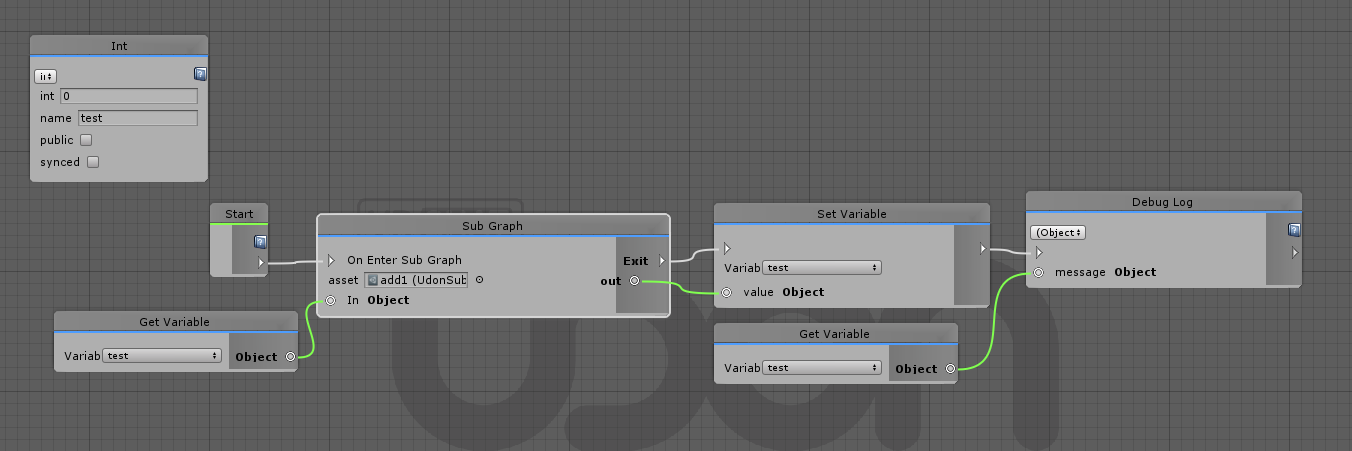
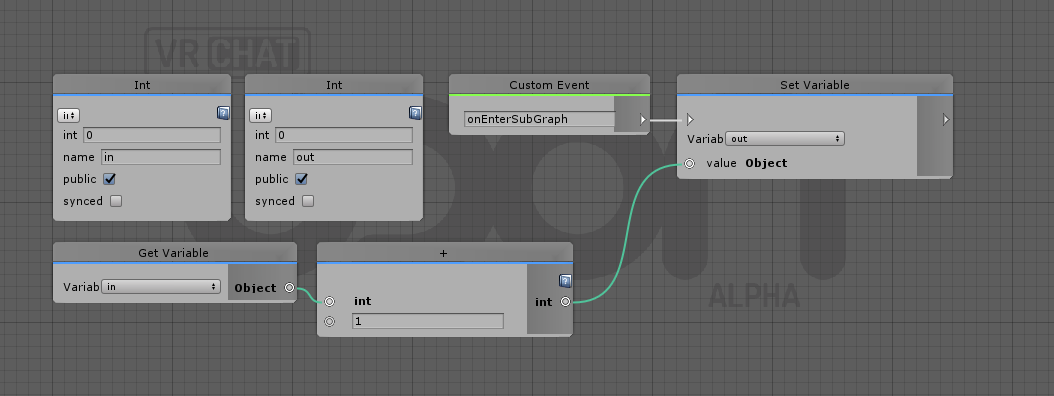
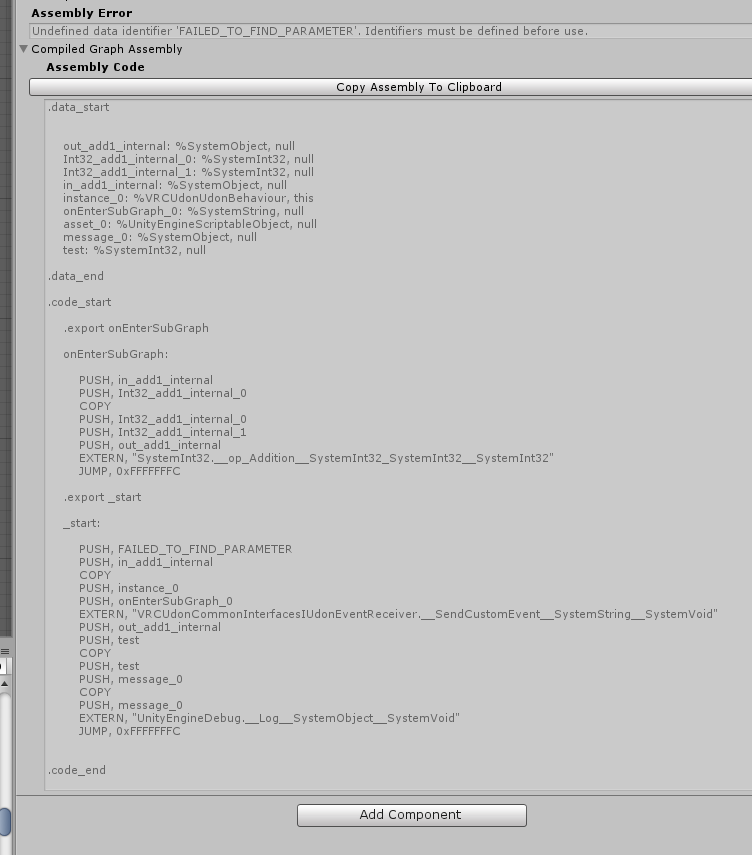
has anyone tried using subgraphs in the new update?
Just testing a simple subgraph that adds 1 to an input
https://nyanpa.su/i/FL3h1AMq.png
https://nyanpa.su/i/UXXG1AOF.png
https://nyanpa.su/i/LIu01AN2.png
Results in an error:

AssemblyException: Undefined data identifier 'FAILED_TO_FIND_PARAMETER'. Identifiers must be defined before use.
Unless i'm doing something wrong it looks like the graph compiler can't find the input variable for the subgraph node even though its there
and the line "PUSH, FAILED_TO_FIND_PARAMETER" should be "PUSH, test"

scarlet lake
#

@viscid reef
I have tried it now. The result is as shown in the image.
I think the new SDK has problems with public variables. Old UDON public variables are not displayed in the inspector in my environment.

viscid reef
fallen prawn
#

I have a problem.

After update SDK3 and Udon

I reload and recompile like what announcement says.
But Udon script still don't work.

Can't figure out why?
So I ask that does anyone have this problem too? or how to slove this problem?

flint urchin
#

You get any exceptions?

fallen prawn
#

no

flint urchin
#

I guess this is using the graph, you got code or pictures to share?

fallen prawn
#

picture of graph?

flint urchin
#

Yeah, though would prefer code/copy paste

fallen prawn
#

AN1Wy27jNhT9FYNr0eCbVIAsmqQoMtPODCatuygCg4/LjBpZMvTI1PDky7roJ/UXSsdxglqBoQDjTWDAEC2Tuudxz9W/f/+zRne27AGd/LFGsS/LD3aRFujHO6i6+cfqU2lX0LyriwoCylBfhHSTW+W8FxwHYjgW1FJsdUxfMRLiGdO5ounPy7otuqKu0Mka/YVOsCJkSjK0SpeMmSm5z1BVB/jt8qJNj7/OUCzrr48rZCEdZbzAwVOBBUSCLaMWu5iujY9aK4eutyfMNggezrjP/odi9vn86uL9mW0hXW2h/LAspvP5FXS/2/L2agkQ0mrVdrC4KqqbEnarWV08A1ZMB62iwzLXHovgDDYKOIbcMuMkiT6IIeA8V094BdnHi6yzEmwCl0OQWEjhce6pxl55MISb6HT4RtKxaI8aw0IQQA3mMk/0515h65nEzjPIAyOaGhhQs0Z9VXSrj+5P8N1sK/kaFVXb2crD5QU62dTXdk1i4fE2Qhs6X79tS+B0y2c2WbS+bsrCZZMZNG2i51RMyeaTTc77susbOK2g7xpbZpNPvSsL/x5Wv9a3UJ06ra30UtGcCyAm/8bQ/b7GZ02q5MuTVKN8M/Qm5we1Ul7SXDmHuUpmF4EEnFSIGKQLTErnjVZJqz2hAEA7mTY4mQMWhBHsuAZsjCPOapkTTr6TUKOdfwPdvGh/rr0td1Y/q+sSbPXs9hFgX6BQKLOjkAoxoHBMaAwoPA45Z2Xtb5/gjlJpCNeIA4bZM4L3PoLgFnsCNnWsTPkhqMJc5ykCEsNA2WOjH8yz83qxSLn8VLpTudZSUKxoigMhGMeGMopp9DHZ33pn7LB0mrNd6Q+23xPqCBLsEuHhx++bCCnJJ1t/T36pQxELaF7RDWn3T429S3hSbVDddF9GTINR+TtknTNyjHHwNoOevk7Ez301dpYHkxo+gMZOmIiFp6lnnCaJdmKE0VbzGIfqKc2OMstHvVm8TYnVIYk/QPe1bm7TYx9n1sPE2qo+n79shed3gBFqvNCgUh2YX4eb7jVefdcvlpeLZV+2MMKuI0fHHhYuzFHsOqp53qZd+cau1/f/AQ==

flint urchin
#

A tip, before I go check this, is use Start instead to set the player properties for the local user.
That might even be the issue itself.

#

OnPlayer{Event} is events that are meant to be used as a way to do something in the world when a player join/leave.
Local user properties should be set in Start, before any other events are fired

fallen prawn
#

I use this method on previous version ...

And it work.

fickle stirrup
#

it's just better to set it once than call this each time someone join or leave, but it's not meant that it shouldn't work

fallen prawn
#

IDK that "Start" is trigger everythime that Player "NetworkReady"? or just local player?

flint urchin
#

The Start method is local only and what's in there will only trigger for the local player

fallen prawn
#

After update, do send custom network event work?

flint urchin
#

what?

fallen prawn
#

You are fan of S3RL too?

#

Wow!

OK my udon is back again!

But I can't set jump impulse?! Anyone can?

torpid patrol
#

S3RL is great

wheat rover
#

Is there anywhere with a changelog for updates in Udon?

flint urchin
wheat rover
#

Oh, thank you

fallen prawn
#

I have saw what Altcentauri post on #udon-showoff .

But I can't figure out how "Damage" work

I can't see any node that damage or heal, but it have respawn.

So right now, I have to create my own variable for health? or is there any node that about health?

pseudo marsh
#

To my knowledge you have to track such things yourself, VRChat itself doesn't have a concept of "health" or similar

fallen prawn
#

@pseudo marsh There are VRC Combat system but the exposed node doesn't have health or something similar like what you said.

fiery yoke
#

I also wanted to work on a Combat System somewhat similar to Blades&Sorcery but theres a lot of things that Udon is still missing to actually make some of the mechanics possible :/

#

Is it possible to explicitly cast in Udon?

fair bough
#

UI Button still not work?

flint urchin
#

They work

fair bough
#

hah? how use with udon?

#

I use On Click()
UdonBehaviour.SendCustomEvent

#

what wrong

#

Umm i think..... found mistake point

flint urchin
#

You need to add the UiShape component to the Ui you want to interact with

fiery yoke
fair bough
#

I use UIShape now but...

#

I put udon in root ui it not work... but now i put in button... it work yet.... thanks

flint urchin
#

UI buttons will still have to use their event functions in the inspector.

You can reference a Udon behaviour and send a custom event to it

fair bough
#

i know it not different trigger version... I just forget it sorry

#

🐿️

peak brook
#

@fallen prawn I didnt use the built in combat system at all, I created my own from scratch (The built in one is super basic and not really worth the effort to try to use)

fair bough
#

Date convert timezone not work

torpid patrol
#

Is VRC.Instantiate meant to instantiate for everyone or just locally? It is behaving local currently.

fickle stirrup
#

@torpid patrol i think we should send a custom network event to instantiate an object specified by sender and sync it; sometimes we need a local instantiated object so yes it should be local/or network and local instantiating method variants instead of one 🤔 hm

flint urchin
#

VRCInstantiate, behind the scenes has broadcast in it.

#

The question is for if it will be local only, everyone, or a option

stuck mountain
#

Network synced objects need to be assigned a random but shared identifier across all clients. For this reason, having each player spawn a local object at the same time wouldn't automatically cause them to be matched up

torpid patrol
#

I know photon does give an ID automagically so it really should already be doing that

fair bough
#

What is onInteract broardcase type? All or Local?

torpid patrol
#

Interact is local, if you want to do anything networked you gotta use SendCustomNetworkEvent (this May or May not be buggy)

fair bough
#

Thanks... And one more.... How sync object transform with use Udon.... (I don't see vrc_object sync script in list)

flint urchin
#

UdonBehaviours has a sync position checkbox on them now

fair bough
#

oh this thing i forgot it Thanks so much

dark glen
#

are there any plans for some kind of GET/SET Json node. i would like to save simple string/int text client side on users and i think a node that saves and gets that data from X file would be really great!

fair bough
#

oh

acoustic delta
#

We are very limited what we have access to in terms of extra libraries, but there is in theory nothing stopping someone from writing a JSON implementation in Udon... vrcThinking

dark glen
#

yeah, iv tried using StreamWriter/StreamReader but does not seem like i can implement those haha

acoustic delta
#

Ah no we don't have any generic IO capabilities right now, and are probably unlikely to get it. Only thing I can think of right now is declaring a TextAsset variable, which you can assign a txt file in the Inspector, and then read the contents via the "TextAsset.get text" node.

#

The .text variable is read-only so you can only fetch the contents and not save it.

dark glen
#

yeah

#

well there goes my idea for something haha

torpid patrol
#

Generic IO is a pretty big security hole so they absolutely will not give us access to that

fair bough
#

...nice idea for storage config

dark glen
#

@torpid patrol Oh yeah i know this. but a get/set json node would be handy to have

grand temple
pearl mantle
#

My question is fairly simple

#

What is this?

silent mortar
#

What is Udon you mean?

pearl mantle
#

Yea, and why does it have such a weird name

clever eagle
#

World scripting

#

Also cute outfit

#

@pearl mantle i can elaborate if you want

raven peak
#

Quick description its vrchats solution to custom scripting and is named udon cause the node graph resembles noodles.

torpid patrol
#

udon is fat noodles though

dark glen
#

Is there a mode for checking if a user is a desktop or vr user?

flint urchin
#

Yes, it was added last update, IsUserInVR

dark glen
#

Great. Thanks!

dark glen
flint urchin
#

@dark glen Udon in-game is a bit buggy at the moment. So some/many things may not work properly

#

We got to wait for update

dark glen
#

yeah thought that could be the case as i don't think there are any errors in what i have done. thats a shame though. thanks!

flint urchin
#

But if it works in the editor it will/should work in app too

dark glen
#

yea

#

im getting no errors. iv even done a few debug things in game like checking to see if it writes to a UI string. but it seems when ever i try to mix interact and update the script breaks

misty parrot
#

will render texture eventually be usable (spawned and set by script)?

I know you can manually set the render textures and cameras to target them, but as of now it cannot be done by udon.

fallen prawn
#

Do anyone have description or documentation of VRCPlayerAPI Combat?

I don't understand any node.
Setup? Damage?

pseudo marsh
dark glen
#

does anyone know if there is a node to get the current players position in node graph? or like left/right arm?

grand temple
fallen prawn
#

@pseudo marsh I mean the built in one.

I don't understand the node set up

dark glen
#

@grand temple fantastic worked great. With the get tracking data node I know the left and right hands would relate to vr but what about the head tracking data can that be used for both vr and desktop?

heady sun
#

anyone made cod zombies type thing with udon yet ?

dark glen
#

Haha vr hat will have reached its peak once we have zombies

heady sun
#

if im right with udon fully working map shooting / wave based system with all should be possible

grand temple
#

@dark glen yes, head works fine for desktop. Even hands work for desktop, they're like bottom right and bottom left of the camera fixed in place

fiery yoke
#

Is there a way to populate an array with a range (starting at a and ending at b) of elements from another array?
I know this would be possible with Array.Copy, but unfortunately we currently only have access to Array.CopyTo...

grand temple
#

are you asking how to do it period or are you asking how to do it without a for loop?

fiery yoke
#

without a for loop. Trying to avoid having a O(n) problem (O(1) instead)

grand temple
#

then yeah I think you answered your own question. Can't do it without copy

fiery yoke
#

Well there is an interesting way using Shaders, but you can only truncate the end and only up to like 2000 elements

grand temple
#

the one possibility might be just doing set variable and plugging in the array you want to copy from

grand temple
#

not sure if that would work or not, but it's worth a shot

fiery yoke
#

And then Phase?

grand temple
fiery yoke
#

Yeah but how would you control which range gets copied into the new array?

grand temple
#

oh, definitely wouldn't be able to do that

fiery yoke
#

Well that was what I was asking for :P
I think what you showed could also just simply be done with CopyTo

#

I think the reason why CopyTo is accessible and not Copy is because CopyTo is an instance-method and not a class-method like Copy

I think the reason why CopyTo is accessible and not Copy is because CopyTo only modifies an object, while Copy returns a new object.

grand temple
#

how does copyto work anyway? it only has a single input and no options

fiery yoke
grand temple
#

seems like it should be able to do what you want if it was fully functional

fiery yoke
#

Well again you could only truncate the end. Not the start.

EDIT: Not even that since the destinationArray needs to have enough space to store the sourceArray so yeah...

grand temple
#

oh gotcha

fiery yoke
#

But yeah lol youre right CopyTo is missing its second parameter

#

But still Im curious, do we generally not have access to any class-methods?

acoustic delta
#

What do you mean with class-methods?

fiery yoke
#

Static functions

EDIT: Yeah we do have access to static functions...I was confused.

grand temple
fiery yoke
#

Interestingly enough CopyTo should be functional, its just the node that is broken.

acoustic delta
#

Is that canny still present or has it been fixed?

flint urchin
#

still present afaik

fiery yoke
#

Yeah I think so

fiery yoke
#

I think methods that modify an object, by returning a new altered object are not accessible/implemented, unlike methods that modify an object in-place. Which is unfortunate.

worn kestrel
#

Neither Copy() nor CopyTo() return anything, so I don't think that's the issue

#

Also Copy() is still O(n), although it will still be faster than a Udon implantation

fiery yoke
#

Well yes youre right, however O(n) in C# is significantly less problematic than O(n) in Udon.
And yeah I got myself a bit confused there. Then I really dont know why Array.Clone is not a thing...

torpid patrol
#

The one I've been feeling I need most is Array.Resize(), for now I've had to use for loops for every resize operation I do, not very computationally efficient

worn kestrel
#

I feel like if you are needing to resize alot, than lists would be a better option

#

If only udon supported lists

fiery yoke
#

Working with arrays in Udon is not fun right now.

torpid patrol
#

Yeah lists would be great but that doesn’t excuse the need for resizing arrays

acoustic delta
#

Working in U# right now, and I've just redefined those as normal functions ArrayResize, ArrayCopy, Contains, IndexOf, etc. It's not as efficient as if we had those natively of course, but at least makes it fun to work with it again.

dark glen
#

@fiery yoke if you use a List in C# you can do something like List.AddRange. But iv not tried that with the node editor

acoustic delta
#

We don't have access to Lists

dark glen
#

Ahh ok

fiery yoke
#

Also redefining the function wont get rid of the huge O(n) problem at which Udon is very bad :P

acoustic delta
#

No as I said, not as efficient, but definitely a QOL improvement. If you need performance improvements then there are other more impactful things such as avoiding cross-behaviour communcation with GetProgramVariable.

tame matrix
#

ideally you’re not going to be resizing that often for speed to matter

#

otherwise you’re better off making one huge array

torpid patrol
#

Airgamer is correct here, what I want is lists but in the absence of those I need to resize arrays a lot, which is unfortunate since it’s not very optimal

dark glen
#

is it possible to set a avatar position in the world. like have a portal to a new location on the map?

grand temple
#

yes of course, just teleport the player

dark glen
#

oh yes just found it

#

haha

#

cheers!

dark glen
#

ok sorry another question. is it possible to get the camera object from the player? i need it to use the world space ui events

stuck mountain
#

@dark glen VRC_UI Shape sets the camera slot on the canvas component for getting events

#

They seem to not even give udon access to this field...That's probably intentional

dark glen
#

Ah ok thanks.

undone panther
#

Will the official integration of udon break the scripts of current worlds?

stuck mountain
#

no. VRChat is going to maintain two systems in parallel:

  • SDK1 and SDK2 worlds (triggers)
  • SDK3 world (udon)
#

I believe the way it works is the game will pick an assembly for triggers, or an assembly for udon, and load one or the other when you join a world based on which SDK it used

dark blade
#

So i read the udon page but i still don’t get what udon is. Is it like an animator thing for unity or like a thing on how to interact with things or what

dark glen
#

@dark blade It is a visual scripting language that allows to to create vrchat world logic that exceeds the current live sdk capabilities

dark blade
#

So for worlds to do more complex things than unity?

dark glen
#

yes. just look in the #udon-showoff to see some examples of what people have made

dark blade
#

What about avatars

dark glen
#

as of right now UDON is only for worlds and as far as i know avatars are not being given access to udon for a very long time if at all

dark blade
#

Is it pretty simple to use for even a special ed to use

dark glen
#

i mean it's all drag and drop stuff so it's pretty easy once you learn what the nodes do

dark blade
#

Ok thanks

misty parrot
#

Is there a base way to setup a "singleton" like udonbehavior to act like a world manager? for like gamemodes.

fiery yoke
#

@misty parrot Dont quite understand exactly what you mean. AFAIK there currently is no way to share information directly between UdonBehaviours. You can only set&get Variables between UdonBehaviours. I already made a event subscription system, that could probably be expanded to share data.
Is there a concrete example to explain what behaviour you want?

grand temple
#

You can get variables from other behaviours too

#

So if you want to store a bunch of data in one behaviour you can totally do that

#

What more would you need?

fiery yoke
#

Yeah, sorry. Usually if you have a setter you also have a getter and vice versa, so I implied that in my head.

#

Well @grand temple it would be neat to just say GameManager.playerCount or something like that, where GameManager is a UdonBehaviour that has a ProgramVariable called playerCount
Without having to assign the UdonBehaviour (dependencies)

grand temple
#

You can get gameobject by name if that helps

fiery yoke
#

Dependency management is a huge thing in OOP and its handled pretty bad in Udon as of right now

grand temple
#

Establish the reference at start, use the variable privarely

misty parrot
#

I want to have one object to exist in the world, that may have at least one behavior attached to it. this behavior is responsible to managing score, teams, etc.

My main problem is how to get this one object without having to manually plug in the object into the value or when it was a spawned object to can refer to it. I'm afraid that find object with tag would be the only way.

I'm also worried that sync var/authority may cause some issues when many external behavior refer to it and modify score/call events. But i don't know how safe/stable it is to attempt this.

grand temple
#

Yeah get gameobject by name is exactly what you want then

fiery yoke
#

Networking is definitely a problem with Udon

grand temple
#

There's been some progress lately but it's still not finished. I wouldn't rely on it at all yet

fiery yoke
#

Also GameObject.Find is neat, but its not that scalable. Especially since you have to remember that you may not rename a GameObject you require by this method (without changing the code)

grand temple
#

Just do single player stuff for now

misty parrot
#

okay

grand temple
#

For general usage absolutely, but as a Singleton it's always going to be named the same

misty parrot
#

but i guess i hope they have a proper way to know what is a singleton is when a world is loaded in a later update

#

without the jank methods of finding objects by string

grand temple
#

Nah you can do stuff at start immediately very reliably

#

Oh that's not what you mean

misty parrot
#

sorry, i didn't finish

#

but now i am

grand temple
#

Yeah it's definitely not perfect but it's not that janky either

fiery yoke
#

Hmm that got me thinking... maybe you could actually do a Singleton and combine that with dependency injection?

grand temple
#

What do you mean by that?

fiery yoke
#

In normal C# you could have a Singleton class and when you have a class that needs a reference to that singleton instance, you attempt to create a new Singleton, however that will give you the already existing singleton, meaning that you now have a reference, without directly referencing the instance.

#

Maybe something similar could be done with UdonBehaviours

misty parrot
#

But usualy that part is easy because of the static keyword

Udon doesn't have afaik, similar to that. Unless you mean something else

fiery yoke
#

Hmm...maybe a call and repsonse approach?

#

The requesting instance broadcasts, then you have a system that catches that broadcast and sends back a reference to some other instance.

#

None of that is possible tho I think, because you cannot send parameters with Messages

misty parrot
#

sadly

grand temple
#

Sounds like something that could be done for you in a custom compiler. Merlin's been doing stuff like that in udon#

misty parrot
#

I have udon#, but that is usually limited by udon anyways

#

udon# isn't true C#

grand temple
#

For example he plans to implement sending events with arguments and getting returns by just setting and getting variables, but you never interact with those, it's just behind the scenes and in the compiler

fiery yoke
#

I wish there was a global marker. So you could set/get variables that are marked as global in any Behaviour

raven peak
#

@misty parrot if its not already added you can make a canny request asking for those features. I would also suggest adding how it would be useful and how it might look in udon.

misty parrot
#

I was just wondering currently if someone had made a "singleton like" behavior so far with the current udon. But i will go check canny rn.

raven peak
misty parrot
dark glen
#

heya all. just wanted to know if its possible to make a button to copy all text for a user in vr and a button to paste that text?

fickle stirrup
#

@dark glen i think udon is not supporting win key pressing or clipboard control, at least there's no TextEditor access, so only ctrl+c/v into selected input field 🤔

grand temple
#

that is correct, though at the very least udon can detect pressing ctrl and then it can select input fields, so you don't have to worry about the player manually selecting them. All they have to do is ctrl c/v

undone light
#

is it true that udon will allow me to force nametags off in my world? that's something I'd really like to be able to do...

grand temple
#

it's a requested feature but I don't think it's going to happen

dark glen
#

@fickle stirrup ah that's lame. Just because I have a save /load system in place that gives a user some text to copy. While on desktop that's easy doing it in vr is quite the challenge

#

But on another note I have 2 objects that follow the users left and right hand. Iv tried using the on collision enter event but it seems udon is missing the .tag so I can't figure out how I can tell what is colliding with the game Object.

grand temple
#

Check by name, layer, or some other identifying feature like whether or not it has an udon behaviour on it

upper kelp
#

So is udon like a seperate client or can u upload to main vrchat with it?

stuck mountain
#

@upper kelp Please read #udon-info - it requires switching VRChat to open-beta in Steam, and you also need a new unity project with a special SDK just for UDON and the current unity version on 2018.

#

So to answer your question, it's not exactly a separate client, but it requires the beta client to play udon worlds.

torpid patrol
#

It will be in live eventually

delicate hazel
#

How did i add like if some key down and then rotate the cube

grand temple
#

make a branch which takes the bool from the input

#

you'll probably want to do "input get mouse button" rather than "input get mouse button down" because input down only fires on the first frame that you have pressed the button, it does not stay active continuously

delicate hazel
#

Yah . I know it. I m a unity programmer. But i didnt know how to use udon.

#

Just trying to figure it out.

#

Like there isnt have Keycode Thing.

grand temple
#

if you're already familiar with C# you might want to try udonsharp, it's a C# compiler for udon

delicate hazel
#

Yah? Where can i get it

grand temple
delicate hazel
#

OK . That s very helpful.

#

Is very nice and easy to use. Only compile take a liitle bit longer than the unity compile.

flint urchin
#

That's to be expected, as it needs to convert everything into uasm.

misty parrot
#

Just be aware that it is bounded by the limitations Udon put upon. Not everything is available to use. Just check the errors/warnings in the console often.

delicate hazel
#

So coroutine is not allow in udon?

flint urchin
#

No

delicate hazel
#

OK Then

delicate hazel
#

Is has any to get local player camera or avatar top parent?

#

I try to use Camera.Main Or Gameobject.FindGameobjectwithTag. Both doesnt work.

rose arrow
#

@delicate hazel No, Udon is intentionally prohibited from accessing VRChat internal GameObjects and Components.

#

If it's not part of your world assume Udon can't access it. Some systems have APIs that expose specific functionality for example VRCPlayerApi has methods for getting the controller positions but if there isn't an API for it you'll need to make a feature request on Canny.

delicate hazel
#

Yah. I figure it out. But if i try to make something bigger without the unity internal components is kinda a hard to do.☹️

novel saddle
#

Hey I was wanting to find out if any of you more experienced persons know what programming language (if any) Udon closest resembles. I'm not a programmer but the development of Udon has had me interested in learning, so I want to start with the language which would help me understand Udon's system the best.
Many thanks for any replies! I hope you're all having a good day/night

fiery yoke
#

@novel saddle Udon is built ontop of C# (in Unity) which is an Object Oriented Programming language inside the .NET Framework by Microsoft.
If you want to learn how to make things with Udon start simple and work your way up. "The Cube" tutorial on the official Udon post (in the info channel) is a pretty good point to start. I also recommend watching basic tutorials on Unity development ( I recommend Brackeys, as they have a wide variety of tutorials and are relatively beginner friendly) and try to understand the general concepts, not necessarily the exact execution of code. The C# documentation on microsofts official site also helps understanding design principles and concepts in the beginning and when you're a bit more advanced.

novel saddle
#

Thanks a lot!

fair bough
#

ummm how rotate face to player when player get in area

scarlet lake
#

no more breaking changes?

#

can we start now

#

Will the new udon have bone rotation for the avatars to make fullbody look more natural?

pearl mantle
#

can i programm avatars with udon aswell? Or just worlds?

acoustic delta
#

Udon for now is only available when making worlds.

pearl mantle
#

But what if i want to send RPC when someone boops my nose? Do i have to use shader for that?

grand temple
#

avatars can't do any kind of send RPC, that's a trigger/networking thing

pearl mantle
#

Yeah

grand temple
#

if you mean you want some kind of event to happen, then it would depend what you want to happen but the most versatile type of event is a stop action particle. They're pretty involved to set up though

scarlet lake
#

Is there any way to teleport players locally without sync

fiery yoke
#

Thats not how that works.
However maybe putting them in a station and moving that station has the effect you want. Dunno

scarlet lake
#

No the players are always synced I think theres no way to do it

#

I wanna do a floating origin but i guess its not possible with udon

raven peak
#

cyan laser has done some stuff to locally change other players positions in a room. so maybe with that system you could do it in udon.

scarlet lake
#

Do you know where I can find it?

raven peak
#

its a thing he put together so you would have to ask him on how he put it together. if you want to see it here are the two place. https://twitter.com/CyanLaser/status/1180655212568043520?s=20 https://twitter.com/CyanLaser/status/1238918516490690560?s=20

Testing the gravity changing system with @LakuzaVR and @jendaviswilson. Even with this simple environment it is still a lot fun. #VRChat https://t.co/6KNZ2yahDS

Retweets

159

Likes

419

▶ Play video

Tired of all the box clones in VRChat? Well, it's now time for The Sphere! The only place where you can explore the contents of a sphere! Available now on PC and #OculusQuest for #VRChat. #VRChat_world紹介 https://t.co/eQUJQ9SbEa

Likes

235

▶ Play video
#

he uses it more to make it look like gravity is changing.

#

it would have to be remade in udon and then converted into your idea.

scarlet lake
#

I guess I could have an object that the player is teleported to in each frame but it would be just much easier if I could do one local player teleport that isn't synced so I dont have to fight the server

fiery yoke
#

@scarlet lake As I already said: Pretty sure that Cyan used Stations that are local to manipulate the player positions locally. From what I remember essentially in Cyans system everyone is in a station, and when you move, you dont actually move, but everyone around you moves.

hidden mirage
#

So, if I use Unity Engine 2018.4.19f1 [LTS] and VRC-SDK3 (without Udon), will I be allowed to publish avatars on the current Live build and use these avatars on the Live build?

raven peak
#

no

hidden mirage
#

ok, so i would need to switch to beta to use the avatars made in 2018?

#

what about if i use the actual sdk2?

#

and completely forget about udon

scarlet lake
#

@fiery yoke Thanks it seems to work with stations, now i just have to create a custom player controller & animations I guess

raven peak
#

this is a newer engine so 2018 assets packages cant be loaded in 2017.

hidden mirage
#

oh ok

raven peak
#

you can use the sdk2 or sdk3 for avatars.

hidden mirage
#

so if i use 2018, gotta use beta build. if i want to release to Live build, gotta use 2017.4.28f1. is this correct?

raven peak
#

it is suggested to use sdk3 for avatars now. and due to how the files are it will complain if you dont also have the udon files.

#

yes

#

also this would probably fit better in #open-beta-discussion since this channel has to do more with specificly udon.

hidden mirage
#

oh ok. sorry about that!

raven peak
#

its fine.

#

wanted to make sure people didnt get upset about off topic conversations.

hidden mirage
#

gotchya

scarlet lake
#

Does the combat system work in udon

rain pendant
#

are raycasts completely broken in udon right now?

#

trying to use either of the outputs (the RaycastHit or the return value) makes my graphs fail to compile

dark glen
#

@rain pendant i get that error all the time, honestly not sure what causes it. some times having the same node connect to multiple inputs will break a graph. iv had luck fixing the error by starting a new graph and making sure no nodes are used more then once when they are being used in a input

rain pendant
#

i got raycasts working in udonsharp pretty much fine but consistently get compilation errors trying to read off the outputs in an udon graph

#

so there's nothing wrong in the udon VM with it, the graph nodes for raycasts just seem to be broken

storm dove
#

Assembly:

.data_start

    
    instance_0: %VRCSDKBaseVRCPlayerApi, null
    strength_0: %SystemSingle, null
    instance_1: %VRCSDKBaseVRCPlayerApi, null
    speed_0: %SystemSingle, null
    instance_2: %VRCSDKBaseVRCPlayerApi, null
    speed_1: %SystemSingle, null
    instance_3: %VRCSDKBaseVRCPlayerApi, null
    impulse_0: %SystemSingle, null

.data_end

.code_start

    .export _start
    
    _start:
    
        PUSH, instance_0
        PUSH, strength_0
        EXTERN, "VRCSDKBaseVRCPlayerApi.__SetGravityStrength__SystemSingle__SystemVoid"
        PUSH, instance_1
        EXTERN, "VRCSDKBaseNetworking.__get_LocalPlayer__VRCSDKBaseVRCPlayerApi"
        PUSH, instance_1
        PUSH, speed_0
        EXTERN, "VRCSDKBaseVRCPlayerApi.__SetRunSpeed__SystemSingle__SystemVoid"
        PUSH, instance_2
        EXTERN, "VRCSDKBaseNetworking.__get_LocalPlayer__VRCSDKBaseVRCPlayerApi"
        PUSH, instance_2
        PUSH, speed_1
        EXTERN, "VRCSDKBaseVRCPlayerApi.__SetWalkSpeed__SystemSingle__SystemVoid"
        PUSH, instance_3
        PUSH, impulse_0
        EXTERN, "VRCSDKBaseVRCPlayerApi.__SetJumpImpulse__SystemSingle__SystemVoid"
        JUMP, 0xFFFFFFFC
    

.code_end
flint urchin
#

You aren’t doing anything wrong. There is a bug currently where if you connect one node to multiple it will break

storm dove
#

Even using a block? How am I supposed to do multiple playermods then? When I chained them together it totally broke the assembly

flint urchin
#

By using a single vrc player api node that is

#

If you use one for each of the mods then that will work

#

But as I said, it's a bug

storm dove
#

Alright, I'll give that a shot. Thanks

cunning mist
#

@storm dove If you're still having the issue, I believe only the first option from a Block actually fires with this issue. If the first one is setting gravity strength to 1, you're probably unable to notice a difference. Try putting the run speed as the first option out of the block.

west plover
#

Anyone seen an error like this when trying to sync a string var

outer hull
#

how do i make it so that something like a cube will grow with each onpickupuseup?

#

im kinda new to udon

grand temple
#

Onpickupuseup > transform get local scale > multiply by 1.1 or something > transform set local scale

outer hull
#

vector3 multiply?

#

wait i cant connect onpickupuseup with transform get local scale

#

do i need to place something else down?

#

wait i got it

grand temple
#

Transform get local scale doesn't require input because transform, gameobject, and udon behaviour will all self reference. It will automatically put to itself

#

If you wanted to specify another object that's where you would do it

outer hull
#

do i need to specify the pickupable if im doing it on an object other than the pickupable?

grand temple
#

Setting scale has nothing to do with the pickup

outer hull
#

wait how do i put the trigger on an object

#

there seems to be no vrc_trigger

grand temple
#

Oh, I think I misunderstood you. If you put onpickupuseup in an udon script, that needs to be put on the same object that has the pickup

outer hull
#

but wouldnt that make the pickupable grow?

grand temple
#

Only if you leave the transform slot blank and let it self reference

outer hull
#

sell reference?

grand temple
#

If you want to affect a different object, you need to make a public transform variable and then use get variable in the graph to plug into the get transform and set transform. When it is a public variable, it will show up as a slot in the inspector for the udon behaviour component

outer hull
#

so i gotta make 2 udon scripts?

grand temple
#

No

#

Make a public transform variable in the udon graph

#

Use get variable to plug that into the get transform and set transform

#

Then on the object that has the udon script, you can drop the object you want to affect in the transform slot

outer hull
#

on the object i wanna scale or on the pickupable?

grand temple
#

The pickupable needs to have the udon script in order to receive the onpickupuseup. It needs to know what object you want to affect, this is how you do it

outer hull
#

does there need to be an update node?

grand temple
#

No

#

That's if you want something to happen over and over every single frame

outer hull
#

what about the string?

grand temple
#

What string?

outer hull
#

it came with the variable

#

when i put it in

grand temple
#

That's the name of the variable

outer hull
#

does that need to be plugged in to anything?

grand temple
#

If you have the bug where it just says string, bool, bool, then you need to activate the first bool because that refers to it being piblic

#

Variables stand on their own and don't need to be plugged anywhere. If you want to get and set them, you have to use get variable and set variable nodes

outer hull
#

what do i set the string to?

grand temple
#

Anything, it's just a name

outer hull
#

so do i set the set variable to the bool or the string?

grand temple
#

Huh?

#

For one you don't need a set variable since you will be setting it in the inspector. All you need is a get variable, which you will plug into the get transform scale and set transform scale

outer hull
#

okay so i do i put in the get variable

grand temple
#

It should just be a drop-down with all your variables

outer hull
#

the get variable has a variable parameter

#

and its either my bool or my string

grand temple
#

Can you take a picture?

outer hull
grand temple
#

Oh you literally have a string variable

#

You need a transform variable if you want to target another object

outer hull
#

so delete the string variable?

grand temple
#

As long as you're not using it for something else idk

outer hull
#

ok i removed the string variable and added the transform variable

#

do i set is as bool?

grand temple
#

No it needs to be a transform

outer hull
#

oh it says public now

#

idk why it said bool before

#

ok so do i put the transform in the get variable?

grand temple
#

Yes

outer hull
#

ok what about the bool?

grand temple
#

You don't need a bool either

#

Just a transform

outer hull
#

so how do i set up the pickupable

grand temple
#

Add component vrc pickup

outer hull
#

how do i make the pickup interactable

grand temple
#

Put a collider on the same object as the pickup

outer hull
#

do i set the "is trigger"?

grand temple
#

Is trigger means it will not collide physically, so it would fall through the floor

#

Unless you have other physical colliders involved

outer hull
#

so how do i make it do the script?

grand temple
#

Can you be more specific?

outer hull
#

when i pick it up it acts like a normal pickup object, how do i make it so that it can stick in my hand and use it when i left click?

stuck mountain
#

That's called Auto Hold. It should be an option on the VRC Pickup component @outer hull

outer hull
#

yeah i got it

#

thanks

#

but its now scaling 1 frame at a time

#

how do i make it so that when i hold left click itll continue updating?

#

also the pickup is scaling up instead of the object i wanna scale up

grand temple
#

If you want it to happen continuously them you'll need a bool. Set it to true on down, false on up. Then have an update loop with a branch. If the bool is true, the branch will go and scale the object

#

As for scaling the wrong object, have you assigned it in the inspector of the object?

outer hull
#

how do i set the bool up?

grand temple
#

I'm not sure what part of that isn't clear. Make a bool. Set it to true onpickupusedown. Set it to false onpickupuseup.

outer hull
#

how do i connect the onpickupusedown and onpickupuseup to the bool?

grand temple
#

Set variable

#

Set and get variable is how you interact with variables. You never interact with the variable node directly

outer hull
#

okay and how do i get that set up

#

i put it in

#

i set up onpickupuseup with the set variable

#

but where do i connect the set variable

grand temple
#

You need a bool constant

#

Which is just something you can set to a constant unchanging value and then plug it into somewhere like set variable

outer hull
#

so onpickupuseup > set variable > const bool > get variable?

grand temple
#

No just set variable

#

Use up and use down don't need to get the variable at all

outer hull
#

just set variable?

grand temple
#

Get variable will be used in the update loop

outer hull
#

how do i set up an update loop?

grand temple
#

Add an update node

#

Plug it into a branch node

#

Plug your bool into the branch node

#

When the bool is true, it will send flow out the true side of the branch. When it is false it will send flow out the false side

outer hull
#

theres a blank check box that says nothing

#

whats that?

grand temple
#

That's the bool input

outer hull
#

oh

#

wait how do i put the onpickupuseup in the update loop?

grand temple
#

You dont

#

That's what the bool is for

outer hull
#

oh

#

wait then how will the pickup interaction work?

grand temple
#

????

#

You set the bool with the usedown and useup. The bool is then used in the update loop

outer hull
#

how do i use the bool with usedown and useup? the bools have no connectors

grand temple
#

That's what set variable is for. You never interact with the variable node directly

outer hull
#

so how do i set the setvariable to the branch?

grand temple
#

You don't. set variable sets the bool. The branch uses get variable to get the bool

outer hull
grand temple
#

You need a bool constant to plug into the set variable

cunning mist
#

Tucker have you gone through the spinning cube tutorial? I feel that might help you out in a few places with understanding the different parts of Udon's systems.

outer hull
#

i did

cunning mist
#

Alright, tell me exactly what you're trying to do with this system. Start to finish.

outer hull
#

basically make it so a room scales up when you hold left click and stop when you stop holding

#

i got the pickup and the auto hold function done

#

I also put it on an update, worked as it should, the problem is I don't know how to link the pickup to the udon script

grand temple
#

They just need to be on the same object for the pickup to send it's events to udon

outer hull
#

and how do i do that

grand temple
#

Add the component

outer hull
#

on the pickup

#

im just starting clean

#

what do i put in first

#

a useup and a usedown?

grand temple
#

Yes, plug both into a set variable

#

Then make a bool and select that in both set variables

outer hull
#

got that

#

now what @grand temple

grand temple
#

Now the bool constants so that you can define what you're setting them to

#

Set it to true for down and false for up

outer hull
#

what do i connect the bool consts too

grand temple
#

The input of the set variable

#

The input is what you're setting it to. The bool const is just a way for you to check a box and be a bool that you can plug in somewhere

outer hull
#

theres nothing on set variable that has an input parameter

grand temple
#

Yes there is, it's the little gray circle. Plug the noodle into that

outer hull
#

2 bools?

grand temple
#

You need to set it to true on use down and false on use up, so yes two book constants but they are both setting the same one bool variable

outer hull
#

then what?

grand temple
#

Coould you send a picture?

outer hull
#

@grand temple

grand temple
#

Set the second to false

#

Right now you're just turning it on without turning it off

#

Also the default state should be off

outer hull
#

how do i set the second to false??

grand temple
#

uncheck the box

outer hull
#

ok

#

so whats after set variable?

grand temple
#

you don't need anything else in those chains, that's it

#

now make a new update event and add a branch to it

#

plug the bool into the branch using get variable

outer hull
grand temple
#

yes

#

then on the true part of that do the exact same thing you had earlier where you get the scale, multiply, and set the scale

outer hull
#

get scale, multiply, and set scale?

grand temple
#

yes, you did that earlier when it was just on a click

outer hull
#

do i need a transform variable?

grand temple
#

yes

outer hull
#

where do i connect that to?

grand temple
#

it's the exact same way you did it last time

outer hull
#

did i show you in a picture?

grand temple
#

no but you apparently had it working

outer hull
#

i dont remember how i did it last time

grand temple
#

then read the messages from the last time you asked

outer hull
#

i cant connect the get scale to true

grand temple
#

get scale is purely involved with variables, it doesn't have any flow

outer hull
#

so how do i connect the true and false parameters?

grand temple
#

set scale has flow, you connect it to that

outer hull
#

"get scale is purely involved with variables, it doesn't have any flow"

"set scale has flow, you connect it to that"

grand temple
#

yes?

outer hull
#

does it or does it not

grand temple
#

those are two different things

outer hull
#

oh didnt see there

#

im sorry

grand temple
#

yes

#

and then set scale requires variables, so that's where you plug in the transform get variable and the scale you want to set it to, which is multiplied from the get scale

outer hull
#

what if i want the scale to be never ending?

grand temple
#

every time it will get the scale fresh and then multiply it so it will be never ending, yes

outer hull
#

do i use delta time?

grand temple
#

you could but only if the accuracy matters. That's also a whole other layer of complication and it would probably be best to stick to the basics

outer hull
grand temple
#

yep

#

now you need to specify the transform that you want to affect

outer hull
#

using....?

grand temple
#

get variable transform

outer hull
#

...where's that in the list of nodes?

grand temple
#

it's just get variable

#

but you use the dropdown to pick your transform variable

outer hull
grand temple
#

roomsize is your bool, not your transform

#

if you don't have a transform variable, make one

outer hull
#

it gave me a string node

#

should i use that?

grand temple
#

what?

#

no you need a transform

outer hull
grand temple
#

yes

#

and also in the set scale

outer hull
#

connect that to the set scale?

cunning mist
#

Use a GetVariable node and connect that instead

grand temple
#

yes

#

?

outer hull
#

got it

cunning mist
#

👍

outer hull
#

is that all for the true parameter?

grand temple
#

yes that should do it

outer hull
#

cool what about the false

cunning mist
#

You shouldnt need anything in the false parameter, you should be good.

outer hull
#

i tested the world

#

nothing happens when i use the pickup

grand temple
#

what does the object's components look like

outer hull
#

the gameobject is a test cube to see if the script works

grand temple
#

a picture please

outer hull
#

are these correct?

grand temple
#

is that the same object that has the pickup on it?

outer hull
#

no

#

i mean

grand temple
#

then it won't work

outer hull
#

the pickup has the script

grand temple
#

it needs to be on the same object in order to detect onpickupuseup/down

#

????

#

picture of the entire thing

cunning mist
#

Give us a full screenshot plz

outer hull
#

of the scene?

#

or the nodes

grand temple
#

of the components on the object

outer hull
cunning mist
#

The full inspector

#

Like just press Print Screen and give us that

outer hull
grand temple
#

ok that's good

#

and the object that you dropped into the room variable, is that something with a mesh that you would see if it changes size?

outer hull
#

yes

grand temple
#

you changed it recently, have you tried again since then?

outer hull
#

i think i messed up the nodes

cunning mist
#

Any chance we could get a screenshot with the whole node graph?

outer hull
#

i cant zoom out

grand temple
#

you can do shift space to full screen it

cunning mist
#

There's a shortcut for that??
I've always rightclicked on the tab

outer hull
grand temple
#

it might not have compiled correctly. Could you try adding a new public variable and see if it shows up in the inspector?

outer hull
#

it shows up

grand temple
#

oh boy

#

so you're absolutely sure it's not working?

#

I mean aside from the fact that it should be stuck on when you first start, which you still haven't fixed

outer hull
#

yeah i tested it again, nothing happens

#

maybe its just scaling really really slowly

#

so im setting the multiply to 2

grand temple
#

it's 1.01 every frame, which should mean as much as double every second

cunning mist
#

If that doesn't work, try changing out the transform thats being scaled for the pickup object itself, as in place itself in the room variable.