#quest-general
1 messages · Page 111 of 1
 steep crescent
 haughty coyote
Is the Oculus Quest 2 good? Ping me and answer, I want to know.
 deft plinth
haughty coyote
Is the Oculus Quest 2 good? Ping me and answer, I want to know.
deft plinth
haughty coyote
Is the Oculus Quest 2 good? Ping me and answer, I want to know.
i think its made to NEVER be laggy, and have good quality, so yeah its better/good
ive also heard that it is like 100/200 dollars cheaper from someone i know who bought it
but that mightve just been the black friday sale
 blissful burrow
haughty coyote
Is the Oculus Quest 2 good? Ping me and answer, I want to know.
blissful burrow
haughty coyote
Is the Oculus Quest 2 good? Ping me and answer, I want to know.
it is but not on VRCHat
wheres the anime avatar's for quest?
haughty coyote
Maps
 stuck tiger
anybody trinna play?
 woeful cypress
blissful burrow
it is but not on VRCHat
woeful cypress
blissful burrow
it is but not on VRCHat
it's also okay on VRChat, it's just a difference you gotta adapt to... or you use a link cable and the quest 2 becomes a standart PC VR headset. 
Quest2 got both sides covered. Standalone and with PC
steep crescent
deft plinth
i think its made to NEVER be laggy, and have good quality, so yeah its better/go...
Until you go to the Among Us world
haughty coyote
Anyone know where to get a plague doctor avatar (not SCP-049) an actual plague doctor
 crisp ether
steep crescent
Until you go to the Among Us world
crisp ether
steep crescent
Until you go to the Among Us world
Granted i haven't played it, but I've not experienced issues in the lobby of it.
crisp ether
haughty coyote
Is the Oculus Quest 2 good? Ping me and answer, I want to know.
It's good as a games console. Got a good selection of games which are fun. VRChat is alright, but more limited. But more creators are bringing content to it all the time.
steep crescent
It runs on 15fps max on Quest
crisp ether
steep crescent
It runs on 15fps max on Quest
Huh. I'll have to test that sometime.
 visual yacht
guys, for some reasons whenever I open steam vr on my quest through oculus link, it lags a lot and I can't play. It does it either when I open steam vr or VRChat. it's been doing it only today for the first time and I have no idea why. Any tips?
 acoustic parrot
Among us runs bad on quest 2 also which is really weird
Last time I played it ran worse in most cases then quest 1
 shut flame
I have a quest 1 and it runs pretty good to me
acoustic parrot
20 frames or under makes me sick
steep crescent
shut flame
I have a quest 1 and it runs pretty good to me
I wouldn't call 15fps good while everyones avatar is blocked.
But UDON worlds with lots of players need a good gaming PC and won't work well on mobile devices or weak PCs.

 dreamy quartz
Pog
haughty coyote
wish I had one-
blissful burrow
tomorrow's christmas so im excited
shut flame
steep crescent
I wouldn't call 15fps good while everyones avatar is blocked.
I mean, sure it has a few frame chunks but other than those it runs like 30fps
shut flame
haughty coyote
HAPPY XMAS yall
Merry Christmas!!! (Even though it's not Christmas for me)
steep crescent
shut flame
I mean, sure it has a few frame chunks but other than those it runs like 30fps
For me i never get above 20 there
 little rose
Hi, this question has probably been asked 100500 times before, but I am completely new at this. Is it possible to use avatars 3.0 on Oculus Quest 2? I'm able to evoke emotions with gestures on some, but I just went into one world where one user could use a bunch of different faces on an avatar (which is optimized for Oculus), but I couldn't show a single emotion. Maybe I'm doing something wrong?
Also, is everyone's picture blurry on Quest 2? I already tried adjusting the lenses to different distances, but it didn't help.
 gloomy mirage
how do i connect my headset to my vr?
blissful burrow
use an app to set it up if your new
shut flame
little rose
Hi, this question has probably been asked 100500 times before, but I am complete...
Is it blurry because it's too high or too low on your face?
haughty coyote
Why is the Jump Button [A] not working?
And the Button works yes I changed in Bindings A to Gestures worked
Why is jumping not working
 gray walrus
@haughty coyote some worlds don't allow jumping
visual yacht
guys, for some reasons whenever I open steam vr on my quest through oculus link, it lags a lot and I can't play. It does it either when I open steam vr or VRChat. it's been doing it only today for the first time and I have no idea why. Any tips?
 terse surge
 fading wraith
Idk where to put this but my quest won't link to my phone, it keeps saying I need to allow access to my loction when it already has access, I tried to reinstall the app and everything but it doesn't work please help
 burnt ocean
so when i launch up vrchat it's all good until a few minutes later, the game freezes and i can no longer access the menu and oculus menu??
 blazing sparrow
burnt ocean
so when i launch up vrchat it's all good until a few minutes later, the game fre...
blazing sparrow
burnt ocean
so when i launch up vrchat it's all good until a few minutes later, the game fre...
That's likely a crash due to the quest being overwhelmed.
Best thing to do is pick a more optimised avatar and don't manually show very poor avatars.
haughty coyote
@cedar python same
 high cosmos
lmao, what for lol?
steep crescent
blazing sparrow
Best thing to do is pick a more optimised avatar and don't manually show very po...
You can show 1-3 very poors but if you're gonna show everyone you'll have a bad time of course
 frank merlin
 worldly rapids
haughty coyote
Questionnn is anyone here ?
worldly rapids
haughty coyote
Questionnn is anyone here ?
Not I
shut flame
haughty coyote
Questionnn is anyone here ?
I think I am but I don't entirely know
haughty coyote
Um hi I just got oculus quest 2 why does it take so long when I boot up vr chat
shut flame
haughty coyote
Um hi I just got oculus quest 2 why does it take so long when I boot up vr chat
How long is "so long"?
Like, does it load at all or not?
gloomy mirage
anyone ablre to help? keep getting an error message when trying to set up minecraft from vr
idk if this is the right place to ask, byut i am using quest 2
 somber ridge
Merry Christmas, Lads!
shut flame
Lmao, the bot caught ya there
shut flame
somber ridge
Merry Christmas, Lads!
Merry Christmas though!
shut flame
gloomy mirage
anyone ablre to help? keep getting an error message when trying to set up minecr...
Is that when you try to download it or when you try to play it?
gloomy mirage
when i try to play it
shut flame
I'm guessing you're using oculus app
 junior egret
Ima go work at McDonald's
shut flame
Now that's a good job
junior egret
In VR chat
shut flame
😑 you disapoint me
junior egret
Lol
haughty coyote
Yo guys how do i use shaders on the Quest 2?
shut flame
gloomy mirage
when i try to play it
Do you know what the error code is?
shut flame
haughty coyote
Yo guys how do i use shaders on the Quest 2?
For VRChat?
haughty coyote
ye
junior egret
U cant
shut flame
I don't think you can
haughty coyote
damn
shut flame
Not on the quest anyway unless you use link
haughty coyote
i have a problem that when i am using an avatar that does have shaders they sometimes randomly turn on
oh, how do i use the shaders when i use link?
Like in the VR
not by doing Shift + F(number)
junior egret
Do u have gaming pc?
gloomy mirage
shut flame
Do you know what the error code is?
Not really
haughty coyote
i am asking how do i use shaders on the VR
shut flame
gloomy mirage
Not really
It doesn't say like "error 0597533" or something?
haughty coyote
but how do i use my shaders?
gloomy mirage
Yeah
burnt ocean
Anyone else unable to get into vrchat without it crashing in 5 seconds on quest 2?
haughty coyote
i know what to do if i want to see shaders
shut flame
gloomy mirage
Yeah
So what is the number?
shut flame
burnt ocean
Anyone else unable to get into vrchat without it crashing in 5 seconds on quest ...
I dunno, I haven't been on for a few days here
But a lot of people are getting that problem
burnt ocean
i'm thinking i may just be the servers as its xmas day
but then it's wierd because that's happening with all the other games apart from beatsaber and superhot
shut flame
You have every game? 😱
burnt ocean
no
i'm just saying i got it today as an xmas gift with a few games, and the only game that isnt crashing in the first 2 seconds of opening it is beat saber and superhot.
burnt ocean
all of the other ones i got, rec room, first steps (not a game but still) and the climb
so i'm confused, like why is it only 2 games that work
shut flame
First steps crashes?
burnt ocean
yep!!
 lapis reef
Is there a tool or mod or "secret code" or dev mode to further unlock settings for the Quest version, at the cost of performance? Just wondering if anyone's bothered to mess with that (or if im even allowed to ask here? Don't kill me lol)
shut flame
Uhhhh, don't ask me
burnt ocean
shut flame
It's the tutorial though
i know, you see i think it's the sertvers but at the same time, 2 of my games don't crash
gloomy mirage
shut flame
So what is the number?
I cant remember off my head, i could try again once I get home and tell you the code
shut flame
burnt ocean
i know, you see i think it's the sertvers but at the same time, 2 of my games do...
Hmmmm, I don't see why it would be the servers because you're playing offline games
shut flame
gloomy mirage
I cant remember off my head, i could try again once I get home and tell you the ...
Yea sure
burnt ocean
shut flame
Hmmmm, I don't see why it would be the servers because you're playing offline ga...
yea i know
shut flame
Well, I can look into for you Hiro if you want
 wise crown
just got the quest 2 today, someone wanna hang out?
 fleet cloak
I’m down
 wintry tendon
how good is the quest for running vrchat
 tall remnant
as long as you run optimized avatars and worlds, good
if you try to push it with poorly optimized verypoor/poor avatars... depends on your definition of playable
q2 has better average perf (just from feeling) but it still runs into the same problems... because people's avatars hasn't changed :v
shut flame
Any questers use the 30% off code?
lapis reef
There's a code?
tall remnant
there was a 30% code for the oculus store that ran like early december i think
blissful burrow
i got my quest 2
 unique swallow
the quest 2 is sold out in my area :/
 wet pawn
rest in peace
 quick smelt
Hah it's been forever and still haven't recieved v23 for quest 2
blissful burrow
i got the 256 gb one
tall remnant
wait it does?? oh time to treat myself
shut flame
Lmao, you didn't see it?
tall remnant
i did, and then i didnt see the message again on the oculus store so i assumed it expired
i think i tried it at checkout and didnt work either (most likely mistyped tho), it was kind of a mix of all three of those things
shut flame
Good job mate
You did what no person could possible be bad enough to do
The triple threat
blissful burrow
when i turned it on during charibg by holding the power button something came up then i pressed the volume buttons and it wasnt there
it had options and and thing named usb
haughty coyote
Why on Quest 2 there is no Camera?
steep crescent
Because there is no display it could show content on
And probably because of performance
haughty coyote
kk
 shell canyon
And the limited storage
haughty coyote
shell canyon
And the limited storage
You can record Videos on Quest 2
shell canyon

shut flame
I think it's a performance thing (I'm guessing you mean the VRChat camera) because it adds another screen which is kinda like mirrors on the quest where it can really lag sometimes
fleet cloak
shut flame
I think it's a performance thing (I'm guessing you mean the VRChat camera) becau...
How do you do it? Take it out
fleet cloak
Oh
haughty coyote
hey rats
 still jackal
any1 with the quest 2 can u guys help me plz i need help setting up my vr games
idk how
 outer dove
I need help as well, vrchat is so laggy on the quest 2, how do i fix this? I also heard there's a way to use your steam games?
 pastel agate
If you have a VR-ready computer, you can link your Quest up to it to use it as a PCVR headset, including steam
outer dove
yeah i need like some sorta cord for that
I JUST got it today for a christmas/sweet 16 gift so I have no idea what I am doing
pastel agate
Yeah, any USB 3.0 cable will do the trick, then just install the Oculus app on PC and plug it in
outer dove
ok
pastel agate
https://smile.amazon.com/gp/product/B01MZIPYPY/ref=ppx_yo_dt_b_search_asin_title?ie=UTF8&psc=1 this is the one they mention in the docs on Oculus
gloomy mirage
shut flame
Yea sure
sorry for the wait
kept getting the error code: 0x803f8001 though
gloomy mirage
Might as well go sleep in the meantime
 golden lion
I'm having that avatar glitch when I can't unfavorite. Avatars. Anyone else having this problem?
haughty coyote
Ree
 wide blade
I just got my quest today anything I should know
wide blade
What games do you have
 fallow pine
lots of quest 2 users along with me lol, will quest get further support? also how far can i push the quest (in avatar pixels or other perfomance) before i might crash or get major lag?
wide blade
Oh
 jagged trench
fallow pine
lots of quest 2 users along with me lol, will quest get further support? also ho...
jagged trench
fallow pine
lots of quest 2 users along with me lol, will quest get further support? also ho...
yes the quest version isn't going to go anywhere considering the quest 2 is selling like hotcakes https://docs.vrchat.com/docs/quest-content-limitations
VRChat
This page will describe various limits in place for the Oculus Quest version of VRChat. These limitations are in place in the interest of performance, user safety, and discouraging malicious behavior. Find more information about limited components on our Quest Content Optimization page.Although the ...
fallow pine
whats the best things to do in quest 2, i wanna see more pcvr avatars, what overlimit of polys can the quest 2 handle?
jagged trench
there is no way to see pc only avatars on the quest client as they haven't been compiled for Android
fallow pine
ah, but like those avatars that are blocked due to poor performance
it says the limit of polys or whatever is 8k,
but allows me to show their avatars if i want to risk it
jagged trench
yep but those aren't PC avatars just folks who didn't optimize their Quest avatars enough
 short wasp
Hey is anyone making avatars for free? I would like one
 leaden trench
@everyone
shut flame
Mate, you know that command doesn't work right?
Aww man, I'm sorry. I guess I just missed your text cuz I was playing VRChat then
 lime fox
Any of you play onward
 raw oyster
I'm new to VRchat and it wont let my invite my friends, is that normal or is it a bug?
haughty coyote
who watches drumsy
gloomy mirage
Anyone able to help with minecraft on vr? keep getting the same error code
 vale pier
same here
steep crescent
gloomy mirage
Anyone able to help with minecraft on vr? keep getting the same error code
Which version of Minecraft?
raw oyster
what platform are you on? if your on quest 2 try resetting the device, if that doesnt work idk
by resetting i mean turning it off and on, dont clear your data or anything
haughty coyote
Hey you should get five nights at Freddys and journey of the gods
 knotty hill
Hay there people, I need help . I’m stuck on the blue loading circle after putting my account name and password loop , were it complete the circle , does an error sound again and again for more than a Day now , I tried to reset it , to delete it then download it , tried logging in on my vr chat account , on the quest account , it stays doing the same thing ,does any one had this problem to ? If so how did you solve it ?
knotty hill
I was having an different logging problem for the last week, but it came back to normal 2 days ago e now this is happening
gloomy mirage
steep crescent
Which version of Minecraft?
the only one available on vr
steep crescent
There are multiple
steep crescent
There is Minecraft Java which you can play in VR, Bedrock on PC and some other mobile version
gloomy mirage
The only one i could download and the only one i found was the windows 10 edition
haughty coyote
yeah and #vrchat-support seems to not notice or have any solutions????
steep crescent
I play Minecraft Java in VR. Win10 Edition didn't work for me in VR.
knotty hill
That is what piss me of the most
gloomy mirage
Then how do i get the java one?
steep crescent
Vivecraft Mod
gloomy mirage
And how do i get that
steep crescent
You can easily Google that, easy to find
knotty hill
I want to play the game man , is that asking to much
 heavy mica
 heady bobcat
Hey ive got a question
does anyone know why my quest 2 lags so much when i enter a world like black cat even tho i got it yesterday
haughty coyote
heady bobcat
does anyone know why my quest 2 lags so much when i enter a world like black cat...
Is ur wifi ever slow?
Cuz it might not be the quest if so
heady bobcat
My wifi is rarely slow tbh
shut flame
It's probably just the servers
haughty coyote
Yah
 gentle wedge
Anyone here who plays beatsaber know how to play custom songs on the quest 2. Like hamilton songs or something?
shut flame
You can't play custom songs on the quest or quest 2
gentle wedge
Ok good. Thank you. Hope they do an update that allows you to. I only just got the quest 2
Its my first actual vr headset
 quasi path
Does anyone wanna play VrChat? ^^ user is HelCelextia
raw oyster
I would but quest just died :(
quasi path
Understandable, mine is currently charging lol
steep crescent
@shut flame @gentle wedge you can. Install BMBF for Beat Saber. It's a mod. It's also a mod loader for other Beat Saber mods. You can Google how to mod Beat Saber Quest.
 scenic yoke
how to get custom avatars on quest
 fathom lantern
What do u mean as custom
scenic yoke
pc avatars
fathom lantern
So let’s say like erm a video game or like a cartoon character that custom
haughty coyote
Does anybody know why i cannot friend people or favorite avatars on VRChat? i recently switched to the oculus quest 2. When i tried to log onto my VRChat account, (My oculus account) it stopped letting me unfriend people, and when i try to favorite an avatar, it shows it was favorited, but when i close out of the menu it unfavorites it. Then i cannot favorite it again. Now when i try to friend people, they do not get the friend requests. Why is this?
scenic yoke
@fathom lantern check dm
shut flame
haughty coyote
Does anybody know why i cannot friend people or favorite avatars on VRChat? i re...
So, you logged into what? Your oculus account or your VRChat account?
haughty coyote
hey i have a problem and i wondered if i could find help here
how do i use these kind of files?
fathom lantern
haughty coyote
Does anybody know why i cannot friend people or favorite avatars on VRChat? i re...
I have the same problems with the favouriting skins
haughty coyote
shut flame
So, you logged into what? Your oculus account or your VRChat account?
I am logged onto VRChat with my oculus account.
shut flame
haughty coyote
how do i use these kind of files?
What files? All I see is unity open
haughty coyote
it sais grove street in the asset
haughty coyote
shut flame
What files? All I see is unity open
in assets it sais grove street
shut flame
What kind of file is it though?
haughty coyote
obj
shell canyon
Unity should read obj but you can always try popping it into blender and exporting as an fbx
haughty coyote
oh is there any other way rthen blender my pc cant take it
shell canyon
Blender can be ran on a potato
haughty coyote
hey
short wasp
Can anyone make me an avatar free? DM
 limber cobalt
Does anyone know how to get Full body on the Quest 2? If its hard to explain just send a link to a video?
shut flame
If you go to #full-body-tracking the lads know everything about that
haughty coyote
It's super easy just look up how to I got it working for my rift same steps
 drowsy scarab
im sorry but this game is awful on the quest 2
 fast moss
I got the last available oculus quest 2 in my whole city just before Christmas, pretty lucky right?
outer dove
Can someone on quest maybe get me job sim?
 olive sand
hello
 worthy hedge
Hi
 smoky snow
actually, its not all that bad on quest 2, the game just freaks out when you disable mike acess
Trust me i have one.
 indigo forge
i am new to this game how do i do quests
 ruby kelp
Is there any club scene on the Quest side like the PC version? Just got a Quest 2 and well...kinda odd not going clubbing
 quaint badger
A bit unrelated to VRChat but what's the best headphones for the Q2 with an elite strap?
shut flame
Any good headphones really
Or you can use earphones
Just probably don't use wireless ones
ruby kelp
like places to chill and listen to a DJ play their mix. Club Rapture hosts their stuff on the PC version. Carbon has a Quest version but idk if they host things on quest. Volt and AU are only PC tho
quaint badger
shut flame
Any good headphones really
All the one's I've tried rest on the elite strap and don't get a good seal
and earbuds are a literal hell in VR
shut flame
Well, I dunno then I usually just don't use anything
 cold vapor
This is a weird off topic question but does anyone else have problems with the walking dead on quest 2
It deleted my whole save
short wasp
Will anyone make me a free avatar? Please. Dm
drowsy scarab
short wasp
Will anyone make me a free avatar? Please. Dm
thats not gonna happen
quaint badger
short wasp
Will anyone make me a free avatar? Please. Dm
Imagine thinking someone would give a stranger $800 worth of effort
lmao
jagged trench

VRoid Studio is an application to create 3D models of humanoid avatars (characters). The app runs on Windows and Mac and can be used for free by anyone. 3D models created with VRoid Studio can be used as avatars on various VR/AR contents, both for commercial and non-commercial use.

GitHub
:smiley_cat: A tool designed to shorten steps needed to import and optimize models into VRChat. Compatible models are: MMD, XNALara, Mixamo, DAZ/Poser, Blender Rigify, Sims 2, Motion Builder, 3DS M...
this is probably the best combo you're going to get for freebie
short wasp
I mean im not asking for anything crazy
 tidal bluff
I keep on trying to go into my home when i login and im switching placews when i load in and ima try looking at the oculus thing i have a pc
it seems to be fine on the pc version ima try again
 verbal gyro
ZASLJF
 night reef
seething rage
i wish there was a poly limit you could adjust
so i wouldnt see everyone as robots
jagged trench
that wouldn't help as you still need to compile all of the avatars for Android
night reef
oh yeah
 fathom delta
is there a chat for Requesting avatar commissions?
night reef

fathom delta
because i Really want Himouto Umaru-Chan as an avatar
hmu if you can make that happen
Imao
jagged trench
the community server section on the top has a link for VRC Traders
 onyx thunder
Isn't it also possible to get avatars from places like fiverr and Virtual market?
jagged trench

バーチャルマーケット
来場者が会場に展示された3Dアバターや3Dモデルなどを自由に試着、鑑賞、購入できる、VR空間上の展示即売会です。
バーチャルマーケットは、その開催を通じて「仮想現実空間を発展させ、豊かにする」ことを目指します。
haughty coyote
Anyone wanna play
jagged trench

BOOTH(ブース)とは、pixivと連携した、創作物の総合マーケットです。無料で簡単にショップを作成でき、商品の保管・発送代行サービスも提供しています!
haughty coyote
Hey everyone, new to VRChat here, looking for an avatar that even somewhat resembles me IRL, but i can’t seem to find anything on any avatar world that I found. I’m also not skilled enough to even attempt 3D modeling. Should I give up and just be a banana or can someone send me in the right direction? Any help would be appreciated!
jagged trench
question how much do you tolerate the anime art style as there is a character creator tool that spits out vrchat avatars
https://xmas.readyplayer.me/avatar and if you don't mind the clothing being stuck Christmas this generates full body avatars that western style but requires a little more blender work to get behaving

Personal 3D avatars for games and VR from a single selfie.
haughty coyote
jagged trench
question how much do you tolerate the anime art style as there is a character c...
I don’t mind an anime style, I just don’t want to be Ed from Ed Edd and Eddy anymore 😂 and cool I’ll check that one out thank you!
jagged trench
GitHub
:smiley_cat: A tool designed to shorten steps needed to import and optimize models into VRChat. Compatible models are: MMD, XNALara, Mixamo, DAZ/Poser, Blender Rigify, Sims 2, Motion Builder, 3DS M...
this will helps automate a lot of stuff for making Quest avatars

The VRoid Project follows the concept of "using the power of technology to take on challenging 3D creation". Easily build 3D models to use in 3DCG anime and games or on VR/AR platforms with VRoid Studio. You can publish and share your 3D characters with VRoid Hub, or dress them up and take their photos with the VRoid Mobile app.
and here's the anime style character creator that has a lot more potential options for clothing as a decent amount of folks making clothing textures for it
but yeah It should be doable to make an avatar that looks like you
haughty coyote
jagged trench
but yeah It should be doable to make an avatar that looks like you
Cool that helps a bunch! I guess I have a lot to learn about al this stuff, I’m not very computer savvy as it is😂 thanks again!
jagged trench
then I probably recommend the anime one as there's a lot more YouTube tutorials about it

A long-awaited video I decided to sit down and make on how to get started on VRoid! VRoid is a magical avatar-creation program that is free to use. Anyone can use this to become a Vtuber or make a custom VR avatar :D I go over all the basics and include some tips and tricks on how to take your model from basic to the stylized. I want to make mor...
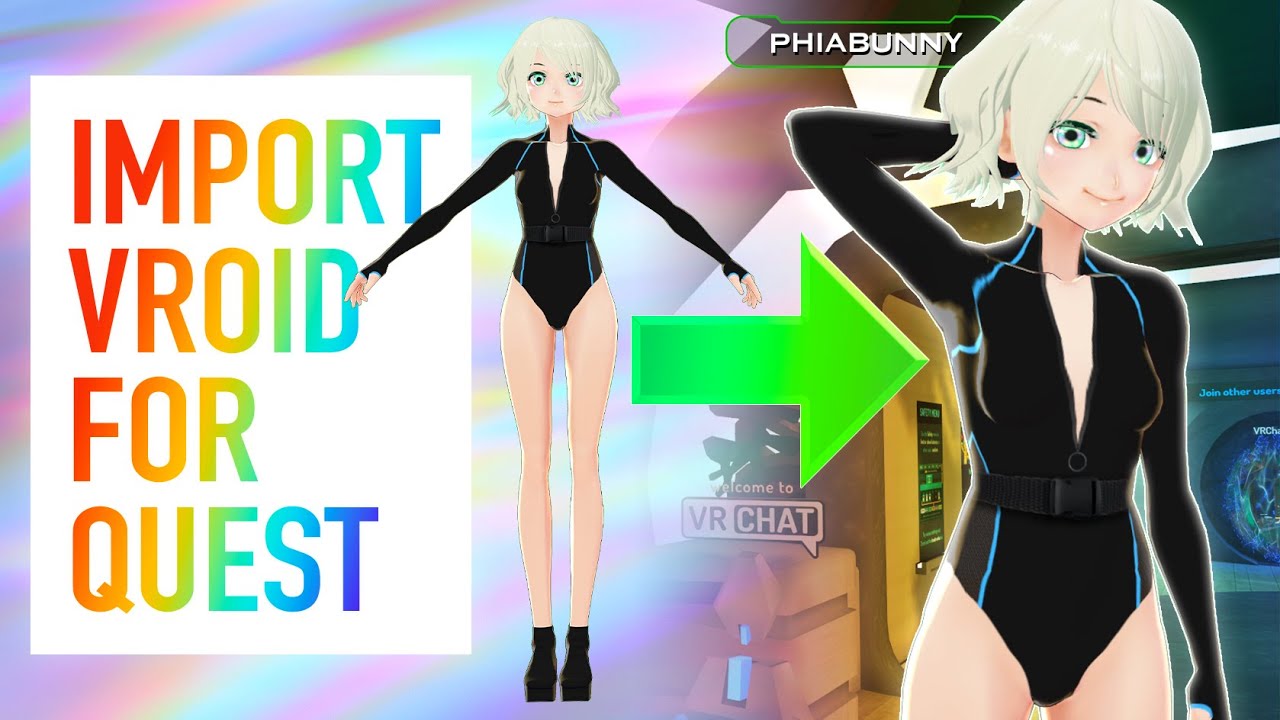
A highly requested tutorial video on how to make VRoid Quest compatible!! Even though the model looks a bit trashy, it IS possible! I’m sure there are better methods that exist that take a lot more effort, but this is what I’ve found works for me. And don’t forget that we finally have MERCH!!! This has been long awaited, and I’m so excited to ha...
haughty coyote
jagged trench
then I probably recommend the anime one as there's a lot more YouTube tutorials ...
You’re the GOAT, I appreciate it!
jagged trench
VRChat
Creating content for VRChat Quest is a challenge-- you have to create attractive, compelling content all the while keeping the content optimized for a mobile device. These are the same challenges that game developers must deal with while building for mobile. Here, we'll give you some general guidel...
here's a page that lists the Avatar limits for a quest Avatar
https://booth.pm/en/search/VRoid?max_price=0 also here's a page that lists free to download Avatar clothing for that software
BOOTH(ブース)とは、pixivと連携した、創作物の総合マーケットです。無料で簡単にショップを作成でき、商品の保管・発送代行サービスも提供しています!
haughty coyote
jagged trench
https://booth.pm/en/search/VRoid?max_price=0 also here's a page that lists free ...
awesome thanks again, its definitely going to be a challenge for me so all the links will be a big help
jagged trench
if it helps the Avatar software is now on Steam
haughty coyote
jagged trench
if it helps the Avatar software is now on Steam
that being Vroid?
jagged trench
yup
also if you know how to use image editing software you can probably transfer the designs from your shirt into the avatar
haughty coyote
jagged trench
yup
awesome thank you
 honest vapor
jagged trench
haughty coyote
awesome thank you
honest vapor
jagged trench
haughty coyote
awesome thank you
hope that goes okay playing around with the software
haughty coyote
jagged trench
hope that goes okay playing around with the software
thanks! if i have any issues, cool if i contact you for help?
jagged trench
yes
night reef
jagged trench
yes
this man
ruby kelp
https://twitter.com/resonark_x/status/1341602571618697223
Hey so this is a lot of fun...got my first full clear with wrist weights on... difficulty 5 chart (like 280 perfects, 16 goods)


【RESONARK XがVRoid Hubに正式対応!】
本日、VRoid Hubトップページに本アプリを「連携アプリ」として掲載していただけることになりました。
本アプリをVRoid Hubと連携することで、VRで遊んでいる自分の姿をデスクトップ画面に映すことができるなど、遊びの幅が広がります! #VRoid https://t.co/wORJmOE105
Retweets
147
Likes
268
 Twitter
·
Twitter
·
now im gonna let my arms fall off
still jackal
Is the quest look good and is it smooth?
haughty coyote
Does anybody know why my quest 2 wont connect to my pc? It keeps saying this device has malfunctioned and windows does not recognize it.
 thin osprey
haughty coyote
Does anybody know why my quest 2 wont connect to my pc? It keeps saying this dev...
thin osprey
haughty coyote
Does anybody know why my quest 2 wont connect to my pc? It keeps saying this dev...
possibly not good cable or not vr ready pc
 civic crater
still jackal
Is the quest look good and is it smooth?
civic crater
still jackal
Is the quest look good and is it smooth?
yes pretty good and its a bit laggy at times but generally its smooth
at least im my experience
 sharp void
Hello fellow Quest Users
 half vault
short wasp
half vault
short wasp
Anyone willing to make me a simple free avatar? Dm
haughty coyote
Yo who wanna talk and just chill I have no friends just got this
shut flame
Got what?
 empty wing
so my friend just got a quest and just got into vrchat. he wants to uprade the account, but the option isnt there
woeful cypress
by upgrade they mean merge it?
empty wing
yeah
woeful cypress
And they are definitely logged into their Oculus Account? 
empty wing
they created a vrchat account, and they want to merge their oculus and vrchat account, but the option isnt there
woeful cypress
The question was if they made sure that they logged in with their Oculus account to the game, and not accidentally already with the VRChat one.
empty wing
im pretty sure they loged in with vrchat
woeful cypress
Then that is the issue, they need to login with their oculus account to the game and go to the settings page to get the token.
empty wing
oooh okay thank you
 keen egret
I have a question
I don't really follow the world uploading process. I've duplicated my project, but how do I tell VRChat to link the PC version and the Quest version together?
I see this in the doc,
You'll want to upload your world or avatar to the same ID as you have for the VRChat PC version of the content.
But I don't see what that means. When I go to upload a second version, I don't see a place to define the ID
I uploaded the Android/Quest version first, and am now, later, trying to upload the PC version. Is that my problem?
 verbal tendon
So I sent a friend request to someone but then they left. Is there any way I can tell if they actually got it? Or tell who I’ve sent requests to?
(Oculus quest 2)
shut flame
I don't think so, you just have to wait for them to accept it
verbal tendon
Ok
shut flame
That is, if they do
shut flame
You can check your offline list of friends once and a while to see if they're there
shut flame
keen egret
I uploaded the Android/Quest version first, and am now, later, trying to upload ...
I can look into it
keen egret
?
How was it supposed to work? I guess that's my main question
Assuming I'd uploaded PC first, is there some kind of prompt when I'm uploading Quest version, where it asks?
shell canyon
keen egret
?
Your scene descriptor should have the pipeline manager attached which contains the world's blueprint ID. It doesn't matter which one you upload first
As long as one is uploaded for Quest and one for PC and have the same blueprint ID
keen egret
this boi?
shell canyon
Yeah
keen egret
It still prompted me to name my world 🤔 should I just name it the same thing? Or is that a mistake? Does that mean the IDs are different?
shell canyon
That means the IDs are different
keen egret
What caused that to happen?
shell canyon
You can open your content manager, find your uploaded world, copy the ID from there, and paste it into the PC one to make sure they're the same
keen egret
I don't think I can modify that component directly
shell canyon
It's just copying and pasting lol
Detach the ID then paste the one you copy from the content manager
keen egret
Oh I see, that's what 'detach' means, thanks
But I'm still curious what made this happen. As a test to see how easy it is to screw up builds, I included a collider in the PC version that didn't exist in the Quest version. Is that what did it?
shell canyon
No
keen egret
Or am I understanding wrong. Do you just always have to match blueprint IDs as a necessary step for this?
shell canyon
Yes matching is necessary
keen egret
Hrmph, OK. They probably ought to say so in the Docs 😕
shell canyon
You can upload something completely different between Quest and PC and it'll be cross platform as long as they have the same ID. Quest and PC with just see different stuff
 upbeat kiln
wait i should probably talk here cause im having problems but
keen egret
Yeah, that's what I figured. That seems terrible, but that's what I figured 😛
upbeat kiln
singing in was a pain but im in finally and now now its showing me a blank box that has that yellow early access sign next to it.. i dont know if its the world list or what but nothings showing up
signing*
shell canyon
They say it in the documents btw joker
Unless you meant they should say it the other way around
keen egret
Right, they say that much but they don't define "ID" as "blueprint ID" or even what blueprint ID is and where you find it. They could easily have linked this page: https://docs.vrchat.com/docs/vrcpipelinemanager but didn't 😕
Thank you very much for helping me with this, though
keen egret
Gonna suggest that as an edit to the page, though.
keen egret
upbeat kiln
singing in was a pain but im in finally and now now its showing me a blank box t...
Bumping roro since I steamrolled over their question
shell canyon
Yeah, should of probably talked in the world's channel but too late lol
keen egret
my fault
upbeat kiln
ty ^^ also to add to my question, im having trouble logging in
since its not working im just doing oculus link rn
short wasp
Can anyone make me a simple avatar for free? Message me
haughty coyote
can anyone help with me quest 2? for some reason on vr chat all my controls are on one hand and its like my right controller wont work on vrchat
also my mic wont connect idk
haughty coyote
if i have vrchat on the quest the free one can i play with people on pc?
 pine dome
yes
haughty coyote
really?
pine dome
wait what "free one"
haughty coyote
on the quest store you can get vr chat for free
haughty coyote
vrchat is a free game anyway lol
oh lol
you can play with pc players but im pretty sure you have to join someone from your friends list
pine dome
what rank do I need in VRChat to be able to publish avatars to unity
haughty coyote
new user im pretty sure
pine dome
how do I get that
haughty coyote
not sure
haughty coyote
yeah
shut flame
haughty coyote
you can play with pc players but im pretty sure you have to join someone from yo...
If you just join a quest and PC approved world then there will be PC players
If you can see their skin or not is another story
haughty coyote
ohh
guess i've just been unlucky
all the worlds i've been in today have only had quest players and i could only find 3 people using vrchat accounts
 wintry delta
quest people must stick togetehr
 odd hemlock
I bought VR chat plus on my computer and I’m playing with it on quest but the problem is I think I’m busted because it says I still have VR chat plus and I do but now I can’t access my user icons and things have really been weird on VR chat recently
shut flame
Well, VRChat plus isn't something you can get on the quest but what's "weird" that's happening?
odd hemlock
A few seconds ago the portal started acting up for me
Portals*
And when I got back on I lost my home world immediately
shut flame
By "lost your home world" you mean like it's back to the default?
shut flame
So what is wrong then? From what I'm getting at you lost your home world (but you got it back now) and the portals are doing something (I'm guessing not letting you in them)
odd hemlock
Mhm
They started working again but only after I restarted the game fully
This isn’t the first time something weird has happened either
shut flame
So is it still weird or is it fixed now?
odd hemlock
Some thing called SAO synthesis started popping up randomly but then disappeared only when the menu fully loaded, and yes it fixed...
The SAO thing didn’t only happened to me either
shut flame
Sword Art online synthesis?
odd hemlock
I think....I have no clue
shut flame
Were you in a public room when that happened?
shut flame
odd hemlock
I think....I have no clue
I just searched it up is all
odd hemlock
Oh ok
shut flame
shut flame
Were you in a public room when that happened?
But this?
odd hemlock
I think I was but it happened to a friend
shut flame
Wait, so this didn't happen to you?
shut flame
At the same time?
It could've been another player if it was in a public room and since it's not something that seems to be a returning newcense
odd hemlock
It was a world category not just the world
shut flame
Lemme re-read what you sent real quick
shut flame
odd hemlock
It was a world category not just the world
Now I'm a lil confused. So is this like an image or a bit of text that is in the menu while it loads itself?
shut flame
Sorry, I had to do something there but
So from what I can find, I think the SAO synthesis is just an event that was being hosted yesterday
shut flame
odd hemlock
On the worlds tab
Heres a link to a Reddit page if you want what I was looking at:
https://amp-reddit-com.cdn.ampproject.org/v/s/amp.reddit.com/r/swordartonline/comments/kk6g3t/oh_my_god_how_is_this_not_in_here_vrchat_is/?amp_js_v=a6&_gsa=1&usqp=mq331AQHKAFQArABIA%3D%3D#aoh=16091180196036&referrer=https%3A%2F%2Fwww.google.com&_tf=From %251%24s&share=https%3A%2F%2Fwww.reddit.com%2Fr%2Fswordartonline%2Fcomments%2Fkk6g3t%2Foh_my_god_how_is_this_not_in_here_vrchat_is%2F
reddit
r/swordartonline: The official subreddit to discuss the Sword Art Online series, as well as the other series (Accel World, The Isolator) written by Reki Kawahara.
But I'm not too sure why it was a whole category
Maybe it was added for the day
I dunno
 dusky hazel
Anyone know if the finger gestures on Oculus Touch controller (Oculus Quest 2) have an avatar effect it can do (just like with the PC version)?
(ex: holding an object in hand with finger gesture, or having particle effect, etc.)
shut flame
Yea
If you find the right avatar it can. I have one with a gun when I make shooting fingers with my hand
 chilly ravine
my game is soo laggy
 quiet spindle
idk if this is the appropriate channel for my issue because the problem stems from oculus link, but regardless the game crashes about 20 minutes in every session
more of a freeze because the game continues to run but breaks input
happens in steam vr and oculus store
shut flame
i dunno how to make it work but there are models that work with it
 crisp fractal
hey bois does it worth it buy oculus rifts cv1 for 250 bucks?
haughty coyote
Hi
crisp fractal
hi
 fleet nexus
Hi, new to the world of VR. I've got the quest 2 and while chatting to others in VR chat I couldn't see their avatars. Does anyone know why? Complete newbie to it all 😅
 unborn grotto
Quest 2 can only see avatars that was uploaded for it, most pc users probably don't have any cross-platform avatars, and only ones that work on PC.
Also, quest/2 will by default performance block very poor rated avatars, so if they look like a robot with what looks like performance blocked on their chest or something
you'll have to manually show their avatars by pointing at them with your menu open and clicking show avatar
fleet nexus
Ok, thank you for the info 😊
haughty coyote
you can check the performance rating if you open your quick menu and look above their name
next to their trust rank it will say something like "Excellent" or "Poor"
if it has good performance but still isn't showing up, the file size is over your limit, default is 8mb iirc
 junior ice
Has anybody else's game on vr chat crashed recently? Everytime I go into a world it works for a few seconds and then everyone freezes and vanishes and I get sent back to my own world but when I go on the oculus homepage it never said I played vr chat recently it always says a week ago even though I've been on it these past few days 🤷🏽♂️?
haughty coyote
depends what world you're going in to
its either a performance issue, a quest issue, or an internet issue
junior ice
Just normal places like vr hub, my quest does need a system update so I'll do that and see if it fixes anything
 sturdy ore
Hello
 harsh river
hi
haughty coyote
Hi
haughty coyote
Hey. Does anyone know where i can find a cheap AF Oculus quest 2 i really wanna play VRChat with in well... VR
Helooo
shell canyon
The only cheap Quest 2 you're gonna get is a broken one
haughty coyote
Oh Damn it
haughty coyote
How do i take pics on quest
 rose linden
Double tap the Oculus button and say take a picture
 rapid frost
is there a way to fix the .3 avatars sliding with fullbody
 worn belfry
Idks
 queen dust
I finally got a link cable
 rigid geyser
so ive was searching every where and didnt find answer
is it possible to crouch and squat in quest 2 or not possible
just heard there is no body tracking and wanted to ask
 dapper charm
Hello
harsh river
yes its possible you just have to actually crouch irl
steep crescent
Rip quest for no playspace mover
harsh river
yea
sad thing is that I got a pc and a quest 2 but my pc isnt powerful ennough to run like payday 2 vr or sumthin in that sense
rigid geyser
what about this
quasi path
does anyone wanna play echo vr? lmao its my first time ever playing it 👀 wanted to give it a try
haughty coyote
if its your first time trying it then you wont be in an online lobby
shut flame
haughty coyote
if its your first time trying it then you wont be in an online lobby
Really?
I guess I should play it then
shut flame
haughty coyote
I might get echo VR. I only have 3 games
Did you just get the quest?
haughty coyote
Yea lmao
shut flame
I see I see
haughty coyote
echovr starts with an offline tutorial
I bought onward beatsaber
i think its like 10 minutes long
And got vr chat
shut flame
:°
haughty coyote
Ightt
shut flame
Good choices
Is it sad that I have like 30 games on my quest but haven't gotten onward?
shut flame
Lmao
haughty coyote
I gotta turn around and find that shit
shut flame
I've played Arizona sunshine and it has it where you can't drop the gun unless you hold down like the "a" button I think
I honestly hated it at first
haughty coyote
I'd rather want that
shut flame
It's a good game but I don't think it's worth it unless you get it for a sale price
I've tried all the dlc's for the game too and I had fun with them all
shut flame
haughty coyote
I'd rather want that
If you ever want an opinion on a game (on the quest) then you can always ask me. I might've played it or looked into it
pastel agate
Got a couple screenshots of auto-generated Quest feilen in action
Like, the topology isn't the greatest, but you can't really tell in VR on the quest unless you look super close?
shut flame
pastel agate
Got a couple screenshots of auto-generated Quest feilen in action
Oh my god😂 wtf is that line
pastel agate
line?
shut flame
Sorry sorry, don't mind me
pastel agate
that's a table
 past quartz
Okay so simple question, is the quest worth getting? Or is it worth waiting
shut flame
try reading this conversation first
shut flame
past quartz
Okay so simple question, is the quest worth getting? Or is it worth waiting
bring bring
gloomy mirage
I'm confused
shut flame
gloomy mirage
I'm confused
sorry
didnt mean to ping you
i only meant to show them the conversation
gloomy mirage
OOh
Aight
Btw, got any news on the error code on minecraft? Still can't seem to figure it out myself
shut flame
gloomy mirage
Btw, got any news on the error code on minecraft? Still can't seem to figure it ...
i thought you figured that out
shut flame
oh, weren't you talking about it with someone on here before though?
haughty coyote
Hey chat, are there any nightclub/nightlife scenes? Found and tried one but it seemed like no one was there to listen to music or vibe, as well as being filled with screaming 10 year olds so I’m hoping to find something more serious . Anyone have any suggestions or know of any worlds like that?
jagged trench
they're all probably hiding in discords and private instances
Artifex in the community server section might be a good place to start as that has some focus on Dancing
haughty coyote
jagged trench
Artifex in the community server section might be a good place to start as that ...
Thanks for heads up, I’ll try there
 agile shoal
Hey I'm new here
 late compass
Hi there
agile shoal
Hey!
haughty coyote
@shut flame thanks
 lavish harbor

haughty coyote
hi whats a quest ?
shell canyon
haughty coyote
hi whats a quest ?
A standalone VR headset. So it doesn't require a PC to run
shut flame
haughty coyote
<@454743505701699605> thanks
For what?
haughty coyote
Idk
 vestal junco
Is the quest 2 oculus link microphone issue still a thing? I can’t seem to get the oculus headset mic to work (the mic input levels seem to be stuck at 50% as if some noise is going on) but when I use the quest 2 wirelessly linked to my PC through virtual desktop, the virtual desktop device setting seem to work. I hope that makes sense.
 hidden sedge
help
haughty coyote
FINALLY, finally oculus quest 2 went back in stock in my country
haughty coyote
on the quest 2 can i can i change my default mic?
shut flame
vestal junco
Is the quest 2 oculus link microphone issue still a thing? I can’t seem to get ...
Is this a question or did you just answer it for yourself?
shut flame
hidden sedge
help
What do you need help with?
shut flame
haughty coyote
on the quest 2 can i can i change my default mic?
I'm guessing you mean when you use link or is your mic not working in standalone?
 gleaming dust
I ooga booga man
steep crescent
You can't change your mic on Quest
If you play via Link you can within VRChat change to another device, yes. But plugging in a headset into the Quest will still make it use the default Quest mic.
odd hemlock
It’s doing that unfavorite glitch again where it won’t let me unfavorite any avatar
odd hemlock
Is no one else having this problem?
shut flame
There has been quite a few actually
I can't help you rn though as I've got do something
odd hemlock
Oh ok
 grave ravine
can someone help me with this?https://media.discordapp.net/attachments/770353472024477727/793593741545570324/com.vrchat.oculus.quest-20201229-133531.jpg?width=676&height=676 this isn't right
 shut flame
Oh reeeeeeaaaaaaally?
shut flame
But in general you're the smarter one
shut flame
Am I?
haughty coyote
LMAOOOO
shut flame
But yes I am
haughty coyote
Ok so I have a somewhat idea hahah
shut flame
What? Are you saying that since I'm a guy I'm legally obligated to be less smart?
(I mean, I won't say no but C'mon)
shut flame
Am I that obvious?
haughty coyote
I mean I didn't know
I was curious at first
But then you called me a mate and I basically knew LMAOO
haughty coyote
No
shut flame
It's the heart mate, it threw me off
shut flame
LMAO
haughty coyote
One of these days imma go with it LOL
shut flame
Since my name has "chick" in it people sometimes assume I'm a girl and I'll just roll with it
 torpid ferry
Hello...🥲🥲🥲
vestal junco
shut flame
Is this a question or did you just answer it for yourself?
I guess it’s a question if other people are still having issues getting the quest 2 mic working, even after switching the audio on the PC to the oculus headset as well as switching the input and output on the headset itself
 untold lintel
Welp im a quest 2 player lol :p
 dull remnant
Quest 1 Performance
shut flame
dull remnant
Quest 1 Performance
#Quest1gang
dull remnant
ayy lol
drowsy scarab
wait until you get in a public room lol
 steady elbow
Calling all Quest users:
I need you to slide into my DM's and recommend me your favorite Quest compatible worlds.
My best friend is getting a Quest 2 and it'll be his first true VR experience, and I want to have a list of good worlds to take him to when he gets into VRC.
They need to be cross platform worlds though since I am on a PC.
Even better, if you like, we can even friend on VRC and you can show me your favorite worlds personally and give me the grand tour if you want, otherwise just let me know the world name so I can look it up and add it to my list after I check it out.
 smoky hemlock
Does anyone want to hangout in vrchat today?
steep crescent
@dull remnant how did you record in 16:9? My videos are always 4:3 for some reason.
Ah nvm. It's 4:3 or something. Looked like 16:9 on Smartphone preview
shut flame
 dreamy seal
about oculus?
dreamy seal
about oculus?
what are your questions?
haughty coyote
not 100% sure if this is just my controllers but i cant pull out any items that my avatars have like for example i have "kirito the swordsman" and i cant pull out either of the swords that is supposed to pull out
 nimble jackal

haughty coyote
If I were able to get virtual desktop running so I could play VRChat through steam, would I be able to use pc avatars?
 orchid tapir
Well, yeah. It's not running on the quest, its just being projected to it.
Anywho, does anyone have a quest compatible tiny avatar? Not that Kon one though, don't want that one.
odd hemlock
The avatars that I unfavorited are still there and they won’t go away even though it shows that they’re unfavorited
shut flame
orchid tapir
Anywho, does anyone have a quest compatible tiny avatar? Not that Kon one though...
I dunno if you've seen it but there's like a one pixel high goose
orchid tapir
Where can it be found, or do I have to clone it off someone?
shut flame
I don't know which world it came from but my friend has it
I have also seen a lego brick
orchid tapir
I've seen the lego one, but I didn't really like it
shut flame
10/10 among us game
blazing sparrow
wait what
odd hemlock
On PC it shows that they’re gone and I can see the other two avatars that I favorited are there. But on quest it shows The unfavorited avatars we’re still there
I don’t know why
...
shut flame
hmmmm
i can't remember how people fixed this but i'll quickly check and get back to you
haughty coyote
When I use Virtual Desktop to run VRChat via Steam, when I enter a world VRC crashes
It was running fine before
shut flame
odd hemlock
On PC it shows that they’re gone and I can see the other two avatars that I favo...
i dunno what the symbols or emojis or whatever you adding to your texts are (as all i see is ) but i get the gist of it
shut flame
I have looked around for a bit and i can't really find anything that's necessarily a fix to your problem. So, do the usual first (ex. reset your cache, restart the game). I have seen it where it says that it'll fix itself after a few days but i highly doubt it as they are also saying that they are unsure if it is actually true but it is worth a try to wait a bit and if it persists then continue. I'm not sure how much redownloading the game will do but since you said (or at least i interpreted it this way) that the unfavorited avatars only show up when you play on the quest it is worth a try.
 livid lark
im buying the oculus quest 2 any flaws or any settings i should use ???
haughty coyote
Hi guys so I wanna upload my avatar to be Quest compatible as well. How do I do it? I watched some tutorials in youtube but the ones that're shown in the video is not the same as the one being shown on my screen. Help
dreamy seal
shut flame
what are your questions?
How do you link your oculus and Facebook account together ?
 rich mica
hi I would like to know if I can use virtual desktop on quest 2
steep crescent
Yes
shut flame
livid lark
im buying the oculus quest 2 any flaws or any settings i should use ???
There can be flaws with anything but It should work fine right out the box
shut flame
Whys that? Did you not create one yet?
shut flame
dreamy seal
How do you link your oculus and Facebook account together ?
It should be with the oculus app. I'm not sure where as I've signed in a long time ago but you should be able to connect them through there if you haven't yet
shut flame
haughty coyote
Hi guys so I wanna upload my avatar to be Quest compatible as well. How do I do ...
Are you watching a recent tutorial or an older one? It might be out of date and uploading might be different now
haughty coyote
@shut flame I did but I had to merge
shut flame
Ah
shut flame
On your quest only?
haughty coyote
Yes
shut flame
What happens? Can you put in a username and password but it never accepts it or does VRChat not load or what?
haughty coyote
I put in the userbame and password and it says invalid
shut flame
And if you put in the same username and password in desktop mode it works?
haughty coyote
I dont have it on desktop mode just quest
I was able to link my oculus account to my VR Account
But it won't take my shit when I try to login
shut flame
Are you logging in with a VRChat account? (As in did you click that button)
haughty coyote
Yes
shut flame
And you tried both your oculus and VRChat username and passwords?
haughty coyote
Ok
I'll try that ^@steep crescent
I got it to log in through oculus and ir workeddd@steep crescent @shut flame
 ivory plinth
I need help I'd like to know whether I should buy the Oculus link or the virtual desktop, considering I don't have the best pc and if I buy the wire it will be a cheap knock off
shut flame
ivory plinth
I need help I'd like to know whether I should buy the Oculus link or the virtual...
Did you test to see if you can run VR on your PC?
ivory plinth
How would one do that
shut flame
Lemme grab you the link
ivory plinth
Ty ty
shut flame
Do you have steam?
Because it'll probably be easiest to use steam vr's performance test
The SteamVR Performance Test measures your system's rendering power using a 2-minute sequence from Valves Aperture Robot Repair VR demo. After collecting the data it determines whether your system is capable of running VR content at 90fps and whether VR content can tune the visual fidelity up to the recommended level. For machines that are not V...

Here's the minimum requirements if you want a list of items instead:
https://support.oculus.com/248749509016567/
ivory plinth
oh okay okay i'll check them out hold on
 tidal sandal
Anyone want to play VrChat please have a mic (I play on quest 2 no pc) My username on oculus and vrchat is TheKillerManya
 magic plinth
shut flame
magic plinth
shut flame
why?
dusky hazel
So how do I take a "selfie" using the VRChat's camera (without selecting screen record nor take photo in the Oculus Menu bar)?
shut flame
i dont think the quest has a selfie camera
dusky hazel
I see.
 tame pelican
Ig:)
haughty coyote
Lol
Just wanna say I got a quest 2 recently and I've been enjoying it despite it being very stutter happy
It really could use the camera tho from the pcvr version I've had some great moments that I wish I could take a pic of which the screenshot thing built into the quest can't do
haughty coyote
rich mica
hi I would like to know if I can use virtual desktop on quest 2
Yes
haughty coyote
shut flame
Are you watching a recent tutorial or an older one? It might be out of date and ...
Not sure if it's old but I just followed the step when the VRC control panel comes out press the convert to android there after that it converts to android but the option to upload isn't there
 hardy mountain
I'm this in VRchat rn
orchid tapir
Me Yesterday: I'm gonna ask people if they have small avatars on VRChat in the official discord!
My Quest Controller Today: You know, I feel like breaking today.
 stone patio
I have small avatars btw -.-
orchid tapir
I found a decently small one
but thanks though
Won't be able to use it again (havent upgraded to vrchat account yet fsr, I tried but it didnt work) until January 8th when I get a new controller
empty wing
hehe ive got miniscule goose
orchid tapir
Someone told me about that yesterday when I asked
shut flame
I try
stone patio
empty wing
hehe ive got miniscule goose
I saw that today also i saw u in my roon earlier i think, where u in the blackcat anytume today
 grizzled ruin
Is there a Mario model for quest? The one I have is only for pc and doesn’t have quest
 winged hawk
Bruh these vr virtual party's seem weird I only been to one and like even tho I tried to join in convo no one responded
 vernal ember
i use a rift s and i get quest users who half cant see my avatars so im sad
 scarlet sable
Hi yes please help:Hello, I am here because I just got an Oculus Quest 2, and when I open VR chat and get to the tutorial, it flickers in-between loading and the game, swapping at half second intervals. I am unable to move or hear anything.
 dry kindle
Anyone taking avatar commissions or know someone who is?
shut flame
honestly, i don't know who helps out in that chat
 brisk vault
Does anyone know where I could find some good dragonball, one piece, and gorillaz avatars on quest
shell canyon
dry kindle
Anyone taking avatar commissions or know someone who is?
VRCTraders is a commission server. Scroll all the way up in #community-servers-old
blissful burrow
i keep crashing on VRChat
 scarlet stream
Hey has anyone on here tried sleeping in game? I got a quick question.
haughty coyote
i have
shut flame
scarlet stream
Hey has anyone on here tried sleeping in game? I got a quick question.
whats the question?
shut flame
haughty coyote
i have
and how was it Rosie? was it everything you were hoping it was?
empty wing
i havent been in the black cat for a while. just send a friend request to me. its RebelliousRed @stone patio , and ill give you da GOOSE
 subtle quartz
the most random thing happened to me today, i was playing murder 4 as usual and this boy in a anime girl costume says "hey guess what" i say what as i was trying to look for clues and when i turn around his fucking clothes dissapear and he starts flying around
scarlet stream
@shut flame I’m basically just wondering if I have to worry about burn in and my headset turning off
 inner fjord
does baked lighting work for quest worlds?
blazing sparrow
inner fjord
does baked lighting work for quest worlds?
It's recommended for Quest worlds.
And worlds in general.
Because of performance.
inner fjord
ok good to know. im trying to create my first Quest world with actual good lighting lel
stone patio
empty wing
i havent been in the black cat for a while. just send a friend request to me. it...
K later
empty wing
ya you dont have to do it now. any old time works lol
quick smelt
Hey guys have you got the v23 on your quests?
 violet osprey
is it common to have ur oculus quest to have some marks?
 fair locust
Hey guys is there someone who maybe can help out my friend he just got his quest 2 but he got problems starting it up so if anyone can help pls dm me so we can hopp in a call and help him out
fallow pine
jesus tried vrchat with a poop pc
constant lag, like 1 second delay per move
any settings to lower vrchats performance to like mega ultra low?
 potent epoch
How is it that some avatars are not quest compatible when I click show avatar?
blazing sparrow
@potent epoch Avatars have to be built for Quest and must be under 10mb in build size to show up for others.
It's one of those two.
haughty coyote
shut flame
and how was it Rosie? was it everything you were hoping it was?
yeah it was good. i have a cover for the cushion where you put ur face while wearing the vr, so it made it a lot more comfortable. it did feel weird to wake up, but after that, your fine. if you do sleep in vr, go to a dark room to do it. i tried sleeping in the hub and it wasn’t fun.
empty wing
virtual desktop is the right way
shut flame
haughty coyote
yeah it was good. i have a cover for the cushion where you put ur face while wea...
Hmmmm, alright. Thanks for the advice master Rosie. I shall start my training at some point
haughty coyote
haha. good luck!
little rose
Hey ppl, I know it's VRchat server but there is definitely someone who's playing BeatSaber as well. Starting from 2-3 days ago almost no songs are available for download on Beast Saber (Beast Saver host) for me. The server is down or am I the only one who has an issue about this?
 drifting arrow
anyone trying to play population one or something i need friends on vr
 remote plinth
One sec i just got the quest 2 and it needs to charge :/
empty wing
hey, so im trying to learn japanese right now, and i was wondering if there was anyone else out there that might be interested learning through vrchat with me? im kinda bored of just looking through pages and websites. im level 5 by the way (beginner) so dont expect a lot from me. anyways, thanks for listening to my ramblings, and if you are interested, please do dm me. Arigatou!
drifting arrow
@remote plinth lmk when you wanna play
remote plinth
Ok!
 safe pawn
Hello
shut flame
empty wing
hey, so im *trying* to learn japanese right now, and i was wondering if there wa...
ooooo, we got a cultured one. I wish you good luck with your learning as i know nothing of japanese.
 frail vault
How does Oculus Quest 2 change its expression?
shut flame
Are you talking about character expressions on models?
shut flame
frail vault
How does Oculus Quest 2 change its expression?
bring bring
frail vault
This is an avatar for Quest 2
steep crescent
Servers have issues right now. If your problem doesn't go away it's probably something on your end. Playing VRChat on PCVR is definitely 100 times better than on Quest itself.
 silver crescent
quest 2 is poo poo
 fickle crane
the quest is shit
shut flame
frail vault
This is an avatar for Quest 2
sorry, vrchat's notifications been going ham so i didnt see you answer
If the avatar you're using has expressions then they are generally controlled by hand gestures (ex. point, thumbs up, fist, etc)
golden lion
Happy new year everyone, hope you all stay safe and see you ingame ❤️
acoustic parrot
Happy new year
 vague dirge
I can't access vrchat, it says check the internet even though my network is strong
 amber umbra
check announcement
 waxen basin
they posted in #server-status
 obsidian pasture
Hey can I put a voice changer on my headset and have it work for Vrchat
 reef pewter
Anybody got some scp avatars? (preferably MTF soldiers/chaos insurgency)
 strong widget
reef pewter
Anybody got some scp avatars? (preferably MTF soldiers/chaos insurgency)
strong widget
reef pewter
Anybody got some scp avatars? (preferably MTF soldiers/chaos insurgency)
i know someone who has a few of those
reef pewter
strong widget
i know someone who has a few of those
Do they have an avatar world?
strong widget
im pretty sure he does, yeah
 strong mango
@edgy gulch
 edgy gulch
How the fuck
edgy gulch
No
strong mango
yes
 supple berry
Hey guys do you know were i can find a scary avatar with screamers that would works on oculus quest 2?
haughty coyote
supple berry
Hey guys do you know were i can find a scary avatar with screamers that would wo...
Sadly audios do not work on the quest standalone version
potent epoch
I am looking for a user I met in a daycare world but I can't seem to find them when I search for them in social.
 nova garnet
Yo Vrchat servers died yesterday
shut flame
nova garnet
Yo Vrchat servers died yesterday
You shouldn't repost messages in multiple channels
 sharp nimbus
is it okay if i put Ø in my vr chat username?
 safe falcon
What games of vrchat I should play w. Ma friends
haughty coyote
hey, is vrchat messing up for anyone else? last night it was down but before actually finding that out i uninstalled and reinstalled the app on my quest. it’s acting kind of strange now but i hope i didn’t mess up my whole game with doing so
i’m kind of nervous like, i even uninstalled and reinstalled a few minutes ago cause it’s so choppy but even after that, it’s still acting up
crisp ether
safe falcon
What games of vrchat I should play w. Ma friends
They have ones like Murder Party & Among Us. Those ought to be fun.
crisp ether
haughty coyote
hey, is vrchat messing up for anyone else? last night it was down but before act...
If it's misbehaving and you're alone, try changing your avatar.
If you're in a public lobby with few people, you can enter safe mode by holding all face and trigger/grip buttons, which should hide avatars and disable effects.
Otherwise, if you're in a large public lobby that's just VRC on Quest. The way its audio system currently works causes it to lag out when a lot of people are talking.
I was at a party last night and any time a bunch of people were talking it lagged me out.
haughty coyote
crisp ether
If it's misbehaving and you're alone, try changing your avatar.
If you're in a ...
i can’t even get as far as to change my avatar unfortunately cause as it’s loading on the launchpad at home it keeps blinking this blank black screen 😰 earlier today i got to open my menu at least but i haven’t been able to again after that
haughty coyote
crisp ether
I was at a party last night and any time a bunch of people were talking it lagge...
oh man! yeah it’s definitely been doing a lot of crashing it sucks
haughty coyote
Does anyone know where I can get an avatar of dis boi
 steel granite

 strong widget
why do i always come to quest general when its dead, im always a few minutes late
 worthy sparrow
🅱️
haughty coyote
anyone know the cons of the quest 2 vs the rift s? both on sale rn and thinking of buying either one but want opininons before buying
oh, lmao
if you want to play steam vr as well rift s but quest 2 is much better
crisp ether
haughty coyote
anyone know the cons of the quest 2 vs the rift s? both on sale rn and thinking ...
Quest 2 works as a Rift and can play stand alone games like a console.
With Virtual Desktop & a sideloaded patch you can also use it with a PC wirelessly.
So Quest 2 you get the best of both worlds, and then some.
crisp ether
haughty coyote
i can’t even get as far as to change my avatar unfortunately cause as it’s loadi...
I would try uninstalling again. VRC had an upstream issue last night that kicked everyone off, and it may still be recovering in some areas.
Also see if you can log in to https://vrchat.com and reset your avatar there.
haughty coyote
crisp ether
I would try uninstalling again. VRC had an upstream issue last night that kicked...
okay i try once again, and i did so hopefully it will work thank you!
 wide briar
Hello
 vital plume
silver crescent
quest 2 is poo poo
vital plume
silver crescent
quest 2 is poo poo
i have quest 1 its even more poo poo than quest 2
crisp ether
Quest & Quest 2 are both alright for what they are. VRChat just wasn't design with them in mind, so there's a lot of limitations and some lacking optimization.
You can use them as a Rift via Oculus Link, or as a wireless OVR headset via Virtual Desktop + a VR add-on, though. So if you have a VR capable PC and you're considering a Quest or a Rift, you might as well use the Quest.
@shut flame It's because i looked up a lot of this stuff in advanced, played around with things, figured out what did and didn't work.
I'm also very tech savvy, which helps. E.G. knowing the difference between USB-C and USB 3 generally helps me to know that not any USB-C cable works with Oculus Link, and know how to look for ones that do.
(Moving in here to keep dev channels clean.)
crisp ether
shut flame
how did you know i just got on?
I didn't. I just saw the reply in #avatar-quest and decided to reply here to honor the channel design, just in case we talked further lol.
Coincidental timing is all.
 cyan notch
Oculus quest 2 has some limitations with vr chat right? so do the limitations go away when you hook it up to a tower pc or is it the headset itself?
blazing sparrow
cyan notch
Oculus quest 2 has some limitations with vr chat right? so do the limitations go...
Connecting it to a PC means it is not running off the headset, meaning there are no limitations (except your computer).
cyan notch
ok thx
shut flame
so, i've got a bit of a problem and i think i'm either an idiot or there's actually something wrong
so heres a screenshot of what i get in the oculus app
It says im not getting any audio and my mics not working but when i go to the link it just says to make sure you got the quest selected in the audio dropdown but the problem is there isn't a drop down. What you see in the screenshot is all i get
if you got a solution, ping me
 fast rivet
does anyone know about any avatars for sale that can be edited and are quest compatible, or maybe if theres a server i can find some actually cool/interesting ones for furries or otherwise
 winged iris
hello
crisp ether
shut flame
so heres a screenshot of what i get in the oculus app
If you are using Oculus Link this has been a common issue, as well as an issue with Rift as well. I was talking to some people at a VRC party last night and apparently the Rifts (and Quest in Rift mode) are drawing more power than they should and it can cause the audio to cut out.
To be sure this is happening though:
1.) Click the volume icon in the taskbar.
2.) Next to the name of the current sound device should be an upward chevron ( ︿ ). Click it.
3.) Select the Oculus Quest from the list that appears.
If the Oculus Quest is not in the list:
1.) Right click the volume icon in the taskbar.
2.) Click "Open Sound settings"
3.) Maximize the window.
4.) Select "Manage Sound Devices" from the right side of the window.
5.) In the list of playback devices find the Oculus or Oculus Quest sound device.
6A.) If it is greyed out, right-click it and select enable.
6B.) Right-click it and select "Set as Default Device."
7.) Select the "Recording" tab.
8.) Repeat steps 6A & 6B from this list.
The "audio dropdown" it is referring to is your system settings audio, but this looks different depending on the version of Windows 10 you use. (See the first set of steps for current versions.)
winged iris
dang that probably took a year to type
crisp ether
Not really. Im a somewhat fast typer. — It's why I can't type with a physical keyboard in VR; I type so fast my hands sometimes get lost and I have to look at the keyboard.
winged iris
wow
crisp ether
Formatting is the slowest part.
winged iris
yeah
 timber glade
If there is anyone here who could hook me up with a fairy tail avatar created or just like visit me in game so I could clone I will be very thankful dm me if you can hook me up thanks
shut flame
crisp ether
If you are using Oculus Link this has been a common issue, as well as an issue w...
im sorry mate, i was going at it for a while so i guess i was kinda done with it. I just reinstalled the oculus app on my computer. The audio seems to be working but i haven't tried vrchat yet but i'll try it tomorrow as its late for me and i need to study
crisp ether
shut flame
im sorry mate, i was going at it for a while so i guess i was kinda done with it...
Reinstalling the Oculus management software basically has the same effect as the instructions I listed, but if it ever happens again, try those tips if it loses audio.
crisp ether
At irregular hours, yes.
shut flame
must be nice
crisp ether
I have sleep issues and unchecked depression and anxiety. Comes with the territory.
So, no, not really.
But hey, I can catch late night streams.
Also I finally hit New User rank after last night so I can upload stuff!
🥳
shut flame
woow
you have depression? sad times mate, i hope it doesn't chill at your place for long
if you need mwa to text then i'll be chilling somewhere in the server. just ping me
crisp ether
Nah, it's alright. I don't feel like diving into my life history or current situation, but let's just say it can't be helped. But I'm working on it and have someone who supports me so it's not all bad.
 digital hemlock
ok
crisp ether
I think whilst I figure out if snouts are actually possible in VRoid Studio, Ima work on trying to port some game locations into VRChat as quest compatible.
Wuhu Island is in my sights. I just want to chill in the plaza by the water fountain. (It's currently my Quest home environment.)
Also, I'm starting to think the lag issues and freezing on VRC for Quest is directly a result of its audio engine.
Not only does it lag out when a lot of people are talking (something most have noticed), but I get lag or freezes with menu noises too. It's like anything that generates sound runs risk of freezing or lagging the game.
I wonder if VRC devs are aware of this?
shut flame
i dunno mate but i kinda doubt it
i have no idea how someone could design a game that drops in frames based on the amount of sound
I would shoot myself trying to code that (i mean, i haven't done a lot of coding with sound waves but my point still stands)
I'm gunna hop to bed mate. i'll see you in the morn
crisp ether
shut flame
i have no idea how someone could design a game that drops in frames based on the...
I mean yeah, but they are using spacial sound; it's not as simple as just playing it through the earphones, so if they way they're handling it is poorly optimized, it could freeze up whilst it tries to calculate the sound.
And it already lags out with speech in larger groups. I was at a party with 15, 20 people and 90% were "robots" (the incompatible/poor performance placeholders). Yet if everyone started talking at once quest would lag like nuts. Even cause weird audio glitches with a robotic/stuttery voice.
The more I use it the more it seems there's at least a bug of some sort with their audio engine, if not outright an optimization issue.
Anyhoo, goodnight. I might try and get some rest myself. Feeling kinda down. Some rest should do me good.
shut flame
crisp ether
I mean yeah, but they are using spacial sound; it's not as simple as just playin...
what a wise man you are mate. Do yourself right before its too late, don't let the end come faster than the beginning
haughty coyote
Question. so I hear that the new quest doesn’t run vrc the best. I have a somewhat high end pc (2060 Super), if I use a link cable how much better can I expect it to run and perform rather than if it was standalone
steep crescent
@crisp ether how do you have Wuhu island as your home environment?
crisp ether
steep crescent
<@261384026114228226> how do you have Wuhu island as your home environment?
There's a discord with modified home packages. Quest lets you sideload modified environment packages if developer mode is enabled. It'll warn you that it's not proper, but it works.
Only downside is currently it has to replace an existing environment (no one has figured out how to add environments; just replace them).
crisp ether
haughty coyote
Question. so I hear that the new quest doesn’t run vrc the best. I have a somewh...
Way better. There's some bugs with the Quest version, combined with limitations, that make it limited and unstable compared to the PC version. You get the core experience, but it's not as smooth. Expect turbulence.
It's also designed for the Quest 1 so it really isn't going to take any advantage of the Quest 2 hardware, from what i can tell. Limitations are not expected to change either.
Just make sure you get a USB 3.0 or higher USB-C cable. It needs to have a minimum of 5Gbps max throughput to qualify as such (if it says "480Mbps" do not buy).
You can also use Virtual Desktop ($20) & a patch from SideQuest, an alternative store/sideload utility, to use SteamVR wirelessly from your PC, and avoid having to futz with Oculus & their purportedly buggy software. It's completely wireless too, _just make sure you're connected to a low latency 5Ghz access point, and that your PC is hardwired if possible. — It doesn't use internet, but being wireless it's reliant on both the bandwidth and the latency of your router using LAN.
In all if you don't own a VR headset and want a quality budget unit with relatively decent features and a 0 tracker setup, get the Quest. It works as a PC headset with either method mentioned. Only downside is needing a Facebook account but it's not as bad as it could be on that front.
VRC on Desktop is the superior experience however.
 potent moth
Hey
When you get logged in on VRchat via quest is that a Vr chat account or is it a quest account?
crisp ether
potent moth
When you get logged in on VRchat via quest is that a Vr chat account or is it a ...
You have the option to log in via Oculus or VRChat. They're both VRChat accounts but one can only be logged in via Quest, the other works with both.
You can also link your Oculus account to your VRChat account, which makes logging in easier (instead of having to type your user name and password on the atrocious input, it just uses the Oculus APIs and logs you in automatically.)
haughty coyote
@crisp ether thank you so much, you are a living god. I’ve been asking around so much and haven’t been able to get a concise answer from anyone and this clears everything up a lot. I really appreciate it
potent moth
@crisp ether So i have to make a separate VRchat account to be able to log into both?
And then link
crisp ether
haughty coyote
<@261384026114228226> thank you so much, you are a living god. I’ve been asking ...
That's honestly funny, because I've yet to hear anyone say the Quest is better.
But yeah. Quest is just core experience, but buggy and in need of work, and limited. PC is the full experience, and there's multiple methods to use the Quest as a PC headset.
unborn grotto
I wouldn't say its not really taking advantage of quest 2 hardware. limitations are the same between quest 1 and 2 so the quest 1 can continue being supported for the time being, but you'll most definitely get a much better experience playing on the quest 2. Of course, VRC on pc is still the best.
haughty coyote
@crisp ether question regarding Virtual Desktop, let’s say I average a 100ms latency from my pc, what can I expect that too feel like in game? I can imagine a game like Beat Saber would be harder to play, but would it be as jarring for something like VRC?
crisp ether
haughty coyote
<@261384026114228226> question regarding Virtual Desktop, let’s say I average a ...
That i can't say. I do not have the equipment myself to do this, i just know enough on how it works to share said information.
In general, you'd probably want somewhere around 40 - 60ms or less, I think, but I don't know.
However, latency to internet servers and latency between devices on your network are two different things.
crisp ether
potent moth
<@261384026114228226> So i have to make a separate VRchat account to be able to ...
If you already have a standalone VRChat account, you can log in via the website (https://vrchat.com/home), and on the settings page at the bottom are instructions to link.
You'd just choose "Oculus" on sign in, then go through the steps of getting a code and following the instructions.
haughty coyote
crisp ether
That's honestly funny, because I've yet to hear anyone say the Quest is better.
...
I don’t really care for it being stand alone or not, I just want a cheap headset that I can run good on a PC.
unborn grotto
Unless you have a very old router, poor wifi, crowded wifi channels, etc, your network latency is not going to be the primary factor for the total latency you experience using virtual desktop.
using virtual desktop on my quest, the network latency is around 8-10ms, where as video encoding and decoding latency accounts for 20ms
crisp ether
haughty coyote
I don’t really care for it being stand alone or not, I just want a cheap headset...
I'd say get the Quest then. You at least have the option of taking it with you. With $20 and a little setup it's also fully wireless, and Oculus is the only one really targeting the affordable end of the market.
unborn grotto
30-40ms is honestly fine for things like vrchat, there is a slight perceptible delay, but it doesn't really matter. if you're playing other games like vrfps though, then it matters a bit more, its not game breaking, but its there.
haughty coyote
crisp ether
I'd say get the Quest then. You at least have the option of taking it with you. ...
Yeah I agree. I don’t have the money for something more high end and I can’t really see many pros of the Rift S over the quest 2 (on pc)
potent moth
With my quest only account can i link it to a vrchat account thays avalible on both?
crisp ether
@haughty coyote rule of thumb is its best to have the computer and Quest near the router, the Quest connected to a 5Ghz wireless connection (most modern routers from the past few years and beyond can do both 2.4Ghz & 5Ghz), and little wireless interference. It's over LAN, not internet, so your latency will be lower than it is with speed tests.
crisp ether
potent moth
With my quest only account can i link it to a vrchat account thays avalible on b...
Yes. If you don't have one, create a VRChat account on the website and then follow the steps to link the two on the settings page of the website.
haughty coyote
unborn grotto
30-40ms is honestly fine for things like vrchat, there is a slight perceptible d...
Would you say that it’s worth it over buying a cheaper link cable
unborn grotto
link has been horrible for me but your mileage may vary
potent moth
Ta
unborn grotto
if you have a decent able, the quality and latency is better but, I chose not to use it because of other reasons
it seems to hit performance a lot harder, some times refuses to work properly depending on applications, etc
potent moth
When they are linked will avatars and friends transfer from the account?
haughty coyote
crisp ether
<@456226577798135808> rule of thumb is its best to have the computer and Quest n...
I’ll be in college in a couple weeks, so if my pc is connected using Ethernet would I still need my headset near the router? I’m not really sure how this stuff works
unborn grotto
i also have quest 1, so maybe its better on quest 2
crisp ether
I would say yes. I don't have it, @haughty coyote, but everything I've researched about Link suggests it's considerably more unstable and frustrating to use, with constant issues. That and USB-C ≠ USB 3 so finding a compatible cable that's long is difficult and can be costly. The only benefit is that it may run a little higher quality, and you can use the Oculus store as well to play Rift games.
unborn grotto
ideally you want a line of sight between router and headset
crisp ether
haughty coyote
I’ll be in college in a couple weeks, so if my pc is connected using Ethernet wo...
And as far as "near the router" i mean "not on a completely separate floor rooms away through multiple walls".
It's okay if it's in the next room, but you'll want to be sure it's not too far.
steep crescent
crisp ether
I would say yes. I don't have it, <@456226577798135808>, but everything I've res...
You can play Rift games with Virtual Desktop too
potent moth
Also i want to use the same username will it let me?
steep crescent
I use Virtual Desktop. Never bothered with Link.
crisp ether
potent moth
When they are linked will avatars and friends transfer from the account?
It depends. Here is the help document with more information: https://help.vrchat.com/kb/article/24-i-want-to-turn-my-steam-oculus-account-into-a-vrchat-account/
crisp ether
potent moth
Also i want to use the same username will it let me?
It should Yes.
steep crescent
Unless it's not available anymore
crisp ether
steep crescent
You can play Rift games with Virtual Desktop too
Oh i didn't know that. More you know 🌈⭐️
haughty coyote
@crisp ether so overall if you’re able to have a good/stable connection you would recommend virtual desktop?
crisp ether
haughty coyote
<@261384026114228226> so overall if you’re able to have a good/stable connection...
From everything i have read, the people I've talked to, and even the fact that major streamers and YouTubers use it? Yes.
steep crescent
Virtual Desktop is also better for weaker hardware that doesn't necessarily meets the basic requirements for Link.
Since it doesn't need the Oculus software to run while using SteamVR
crisp ether
haughty coyote
I’ll be in college in a couple weeks, so if my pc is connected using Ethernet wo...
If you're using WiFi provided by a dorm or some other public source, but have an Ethernet connection available, buy a cheap 802.11 N or AC (5Ghz) compatible router, and connect that to the Ethernet and then your PC into the new router. Then set it up to only broadcast on 5Ghz with password. That way you have a private network just for the Quest and it's right next to the PC.
unborn grotto
you do need to install the oculus software though, as virtual desktop relies on some drivers for it
steep crescent
Yeah installing is fine
crisp ether
steep crescent
Since it doesn't need the Oculus software to run while using SteamVR
This is true. I've heard of people here using GTX 750s with it. OVR & SteamVR are a lot more forgiving on their minimum requirements.
steep crescent
There will be process called Oculus Servers or something like that but they'll constantly use less than 1% of CPU
steep crescent
crisp ether
This is true. I've heard of people here using GTX 750s with it. OVR & SteamVR ar...
Yeah me lol
crisp ether
Same with drivers. Apparently the latest AMD drivers broke Link compatibility for instance. Virtual Desktop shouldn't have much of an issue like that.
unborn grotto
I don't know why they didnt just give quest 2 a direct hdmi/dp passthrough
not like they make pc headsets anymore
haughty coyote
crisp ether
If you're using WiFi provided by a dorm or some other public source, but have an...
Okay that’s good to know definitely. How come the link cable is so bad compared to virtual desktop?