#quest-optimization
1 messages · Page 5 of 1
 green oriole
Best way: Dragging it all into Blender.
Lesser best way: D4rk's avatar optimizer to merge meshed in Unity and blender to merge the materials and reduce the triangle count.
Easiest solution, Polytool, a paid tool for Unity, has a test version you can use to see how well it handles your avatar, it will automatically optimize all that.
 peak falcon
green oriole
Best way: Dragging it all into Blender.
Lesser best way: D4rk's avatar optimize...
peak falcon
green oriole
Best way: Dragging it all into Blender.
Lesser best way: D4rk's avatar optimize...
polytool will do ALL of it?
green oriole
peak falcon
polytool will do ALL of it?
I never got it since doing it manually provides better results, but yeah.
Not sure if it handles toggles though, doesn't say and I didn't try.
peak falcon
green oriole
I never got it since doing it manually provides better results, but yeah.
Not ...
ill make a copy of my project and try it
While id really wanna optimize it as good as possible i cant spend ages on a vrchat avatar on a platform I barely use, lmao
ill report back once i try the trial/demo
green oriole
peak falcon
ill make a copy of my project and try it
?
No need to make a copy, it doesn't touch the base files.
Although is good to have a backup, VCC can make a backup for you if you weren't aware.
 vagrant sparrow
peak falcon
polytool will do ALL of it?
vagrant sparrow
peak falcon
polytool will do ALL of it?
careful. you do not want it decimating your mouth, eyes, or joints (knees, elbows). you want it to decimate areas that do not bend or change shape. before using it, watch some videos on proper topology so that you know what to look for when decimating or retopologizing.
also learn about vertex groups, which will help with using these tools.
peak falcon
green oriole
?
No need to make a copy, it doesn't touch the base files.
Although is good to ...
I know, but i'd rather be a little extra safe than not
peak falcon
vagrant sparrow
careful. you do not want it decimating your mouth, eyes, or joints (knees, elbow...
Makes sense, straight non less bendy parts wont need defined bends rather than parts that are supposed to bend
Why learn about vertex groups though?
green oriole
vagrant sparrow
careful. you do not want it decimating your mouth, eyes, or joints (knees, elbow...
I wasn't even aware Polytool cared for any of that, thought it was just entirely automatic to the point that it lacks any real control.
It is supposed to be the dumb way to optimize.
peak falcon
"It is supposed to" is crazy
vagrant sparrow
peak falcon
Makes sense, straight non less bendy parts wont need defined bends rather than p...
right the bendy parts use their topology for mesh redirection or to control the flow of faces. vertex groups to group areas that it should or should not touch
peak falcon
vagrant sparrow
right the bendy parts use their topology for mesh redirection or to control the ...
I see
I have a relatively fine grasp on the idea of vertex groups so im fine abt that i think
vagrant sparrow
just like with fabric, you can target a vertex group
peak falcon
Fabric?
green oriole
That's a terrible name for searchabillity.
vagrant sparrow
right so if i was making clothes or a blanket in blender, i make a plain and add the cloth modifier. if i want to wrinkle it or deform it i can vertex group the top and take the vertex group and give it weight. the rest of the mesh doesn't have that weight. you can do a lot of cool stuff with vertex grouping
peak falcon
why are we talking about minecraft modding 🗣️
peak falcon
vagrant sparrow
right so if i was making clothes or a blanket in blender, i make a plain and add...
oh yea i know i thought you meant fabric was another tool
im versed in blender vertex groups
green oriole
peak falcon
oh yea i know i thought you meant fabric was another tool
Same
vagrant sparrow
i should have said cloth modifier but i always seem to call it fabric (CUASE LEATHER IS NOT A CLOTH) lmao
green oriole
Heh
peak falcon
vagrant sparrow
i should have said cloth modifier but i always seem to call it fabric (CUASE LEA...
Is leather a fabric??
vagrant sparrow
peak falcon
Is leather a fabric??
cotton, leather, rubber, silk, and denim are presets blender knows

In this lecture, we'll go over the decimate modifier.This modifiers is used to reduce face and vertex count on your meshes.There are 3 modes in the decimate modifier.
- Collapse
- Ratio, Symmetry, Triangulate, Vertex Group Options.
2)Un-Subdivide ,Iterations
3)Planar
-Angle Limit, Delimit, Normal,Material,Seam,Sharp,UVs options #decimatemodifie...
there is a chapter in here for using vertex groups
this is essentially what both d4rk and polytool are doing but with more showmanship
vagrant sparrow
for mesh merging though use one of those tools cause you can get in trouble quick if you try to do it with pure blender
green oriole
peak falcon
how so
Not entirely sure what they are thinking about, but I use D4rk's avatar optimizer because it makes it easier to edit specific meshes, since it only merges the meshes when you click the upload button (it is non-destructive, the changes it makes only persist during upload, then it reverts), for attaching stuff to my avi I use VRCFury's armature linking component.
While I generally merge my Quest versions more than my PC versions (easier to see what part of a mesh I can remove when the avatar is in blender too), there is always something small I add to my avatars that is just way easier done in Unity, instead of in blender for every single version.
Merging armatures (for merging clothing to a base model) in Blender isn't hard, but just more finicky.
With CATS (and the unofficial one for newer blender versions) it gets a lot easier though.
Still, not often there is a reason to merge in Blender.
vagrant sparrow
cause you can't just merge meshes. the topology has to match. so if i have a face that has is subdivided as a 4x4 and want to merge the same size face that is a 6x4, i can't without having a flow control to have a redirect... made an example for topology, sorry it took so long
here i have two meshes (planes). one is 2x2 the other is 2x3

if i straight up merge the meshes, i have broken flow and created an ngon. see that the 2nd square on the top has 5 vertices. this can't be properly cut into a triangle by a game engine and we don't know what the result will be. so i have to create a redirection flow, so that mesh A has the same number of edges that B has where the merge will take place.

now we have proper topology. this is simple on a small plain here... but with a large model like an avatar it can get nightmarish. this is why i say that the 3rd party tools are easier than if you try to do it vanilla and are new at modelling

everything is now a quad or a triangle (all quads are two triangles anyways)
sorry its my beddy bye time and hope i am explaining this where it easy to understand where mesh merging can go wrong
oh just to close this out... that merged mesh would have been seen as this by unity. unity only renders triangles
 green oriole
vagrant sparrow
cause you can't just merge meshes. the topology has to match. so if i have a fac...
green oriole
vagrant sparrow
cause you can't just merge meshes. the topology has to match. so if i have a fac...
I see what you mean, but does this matter in this context?
Presumably they'll be primarily merging clothing and accessories, most base avatars to my knowledge are one combined mesh and therefore it shouldn't matter what the topology is, none of it is being directly connected.
vagrant sparrow
green oriole
I see what you mean, but does this matter in this context?
Presumably they'll be...
i thought they were merging the clothing to the avatar. like following the one avatar per outfit method of optimization.
either way its something they should learn. the concept is simple once you can see it
i’m really sleepy at this point though, i just hope i dont wale up and read that and be like… noooo! i explained that badly. brain dead now
green oriole
vagrant sparrow
i thought they were merging the clothing to the avatar. like following the one a...
But you don't merge topology then, the meshes are combined, but unconnected.
I suppose it is more efficient to merge them together entirely, but that is needlessly complicated and to my knowledge you get most of the benefit there if you just remove any mesh that is being covered up.
 vagrant sparrow
yeah joined not merged. but it still renders what is behind. the things you don’t directly see still matter. so all those hidden vertexes still count against your rating
but if the tool you use will dissolve the unseen vertexes then join is as good as merge, but thats a whole other blender plugin conversation.
green oriole
Ok then I get you.
I disagree that most people should need to think about that, just manually removing unseen vertices should be enough (like the upper arms below a shirt), but if you are going for excellent then yeah, merging everything is probably necessary for an avatar that is more complex.
vagrant sparrow
delete not dissolve. uh brain dead.
green oriole
vagrant sparrow
but if the tool you use will dissolve the unseen vertexes then join is as good a...
Yeah, it doesn't do that, been trying to find something like that, but everything I've found just leaves visible holes in the mesh, so just done it manually.
My Quest versions usually have a lot of floating geometry, probably got some viewing angles where you can see holes, but it is good enough for me.
vagrant sparrow
havent tried it yet but i hear this one does it well https://blendermarket.com/products/combine

its in my group of next purchases, so ill let you know how well it works if you remind me
sucky part of blender market is you dont know if something is any good until you shell out money for it
green oriole
oh wow, 1 buck.
Yeah, that is interesting, might shell out for that myself to try.
Good question is if it can handle weight painting though.
vagrant sparrow
green oriole
oh wow, 1 buck.
Yeah, that is interesting, might shell out for that myself to tr...
oh dang! i missed that it was on sale for $1. thanks for telling me!!! grabbing it now
 gusty flame
ok was really skeptical, in the "why do I need this?" way but that looks quite good
 thin pollen
yo i need help i want to buy new router cause my sucks and i need to have wifi 6 also with something named like this EuroDOCSIS 3.0 and i wanted to finde router with it but i could not find one did anyone have it?
 pure cape
Might be better to put your original one into modem mode and just put a standard router in after it
 thorn cobalt
hey do any of yall know if thee is any genuine wat to fix stick drift
green oriole
thorn cobalt
hey do any of yall know if thee is any genuine wat to fix stick drift
Replacing the joysticks
 ionic wasp
Try WD-40 Contact Cleaner or yea, replace joysticks
Had to replace mine bc the drift was too bad
thorn cobalt
yeah im getting close
ionic wasp
If you wanna take a shot at replacing them, I think I got my kit for $20
 severe herald
Hello, I’m looking for a help for my issue. My current experiences using the Quest 3s using VRCHAT:
⦁ Glitchy Motion
⦁ Nothing is still
⦁ Everything is shakey
⦁ Looks like an earthquake in my eyes
I’m not sure what to do and how to fix this. Looking for people who have similar experience or knows how to resolve, thanks!

 oblique ember

 fluid arch
why does it say security checks failed when try to play on quest?
 inland canopy
how do i fix this?

i switched to toon lit and this happened, was using poyomi before
green oriole
inland canopy
how do i fix this?
Looks like vertex colors, which are good when you want them, but all the Quest shaders force them to be visible which causes a lot of people issues, you either remove them in blender (Color attribute) or use https://github.com/kurotu/VRCQuestTools
GitHub
Unity editor extension to support uploading VRChat avatars for Oculus Quest - kurotu/VRCQuestTools
 calm sequoia

 minor raven
have less physbones
gusty flame
you look in the hierarchy for objects with physbone components, then decide which ones you want to remove.
They'd either be on a very obviously named object, or on whatever bone they affect.
You can probably take some educated guesses as to which bones: ears, tails, chains, hair, etc.
 sonic flame
What is the best compression mode for Quest? I don't need Alpha for obvious reasons

I wanna keep texture size as down as possible
Going with ASTC 8x8 block seems good lol
 tepid pasture
Hey it's been a while since i made a quest avatar, but I remember the limit for polygons being 20k? did they lower it to 10k?
sonic flame
tepid pasture
Hey it's been a while since i made a quest avatar, but I remember the limit for ...
The Avatar Performance Ranking System allows you to see how much a user's avatar is affecting performance via analysis of the components on that user's avatar. You can also use it on yourself to see how performant your avatar is.
20k+ Very Poor, 20k for poor, 15k for medium 10k for Good
tepid pasture
ah ok
so I'm still under the limit then
On a side note, I have some clothes and accessories that can be toggled on and off at my clients request, but I have them as separate objects and unity doesn't like that. How do I keep them and still be able to upload the avatar?
I have 4 skinned mesh renderers
sonic flame
Make the clothes as a prefab with VRCFury to help with this using armature link, and upload them as separate avatars
You can even make the toggles using vrcfury built into the clothes prefab so you wont have to do extra work too!
green oriole
sonic flame
Going with ASTC 8x8 block seems good lol
Yeah, ASTC is the best choice for both Android and IOS.
sonic flame
I wish Quest download size was increased by 5MB 😢
 waxen prism
Sometimes I wish that too. But I lowered my textures from 2048 to 1024, and crunch compress to 50%. Still learning more on Unity, and will learn more on Blender. Still need to relearn that.
 heady wing
sonic flame
I wish Quest download size was increased by 5MB 😢
heady wing
sonic flame
I wish Quest download size was increased by 5MB 😢
50% less avatars being able to be shown, or 10mb limit
That’s basically your options with that
waxen prism
Don't forget the 40 mb uncompressed size limit too
 arctic elk
is this something i have to worry about? i just enterd play mode on gesture manager

 long venture
if its just gesture manager it shouldnt matter but like the warning says make sure to upload the PC version before any mobile versions
 real geode
My blush for my avis on quest look like bricks on the face i want to fix it but no transparent shaders for quest exist rn
So what do i do..
 lunar crypt
im wondering what to do too because my avatar uses a bunch of transparent textures (for example, the laces on the boots)
lunar crypt
real geode
So what do i do..
as for your issue, does the blush use the same mesh as the face? if so, you can just put them together in a program like firealpaca (first free example i could think of)
real geode
lunar crypt
as for your issue, does the blush use the same mesh as the face? if so, you can ...
I make booth avis
Its for the expressions
lunar crypt
ahhhhh then im not sure
crossing my fingers that somehow quest/android/ios gets a fix for this eventually. would be late asf but
long venture
when it comes to transparent stuff generally people take the model to blender and use the knife tool on those meshes to give it a cut-out effect
 humble canyon
lunar crypt
crossing my fingers that somehow quest/android/ios gets a fix for this eventuall...
humble canyon
lunar crypt
crossing my fingers that somehow quest/android/ios gets a fix for this eventuall...
\that's functionally never happening because of the way transparency rendering is handled on mobile Hardware makes it suck a lot more compared to PC
lunar crypt
ahhhhh
lunar crypt
would 22-23k tris be too much for oculus? and is 2048 too high of a texture resolution?
edit: down to 18k tris
gusty flame
the suggestion is 10k, but "too much" is kinda arbitrary
lunar crypt
im tri-ing (lol) to get my tri count down as low as i can without completely butchering my avi o7
waxen prism
It would be Poor performance under 20k tris
 maiden schooner
alr so, i never knew questies could even see particle effects on avis.. and i just found out they are basically optimized particle effects or sum. Could someone tell me how it works??
waxen prism
The particles like shaders use the exclusive VRChat/Mobile shaders. Particles is selective. Additive and Multiply work for it. Previously, they would show up as squares unless someone who was more talented was able to use texture to give it a shape.
 echo wagon
idk if this is exactly the place to go but i was just wondering if anyone knows why the 10MB thing became even more strict with the whole security checks? i unfortunately cannot use avatars ive paid a lot of money for on quest and sadly im 99% quest user. so im just curious.
long venture
echo wagon
idk if this is exactly the place to go but i was just wondering if anyone knows ...
the 10mb hasnt changed its the uncompressed size iirc
you could try contacting your model creator about them making an actual quest supported version as the current limits arent that strict unless you're majorly unoptimized
theres also scripts like VRCQuesttools or polytool that can help with lowering your model's stats if the creator you purchased from is too lazy
 honest fern
echo wagon
idk if this is exactly the place to go but i was just wondering if anyone knows ...
honest fern
echo wagon
idk if this is exactly the place to go but i was just wondering if anyone knows ...
10mb has been here for a long while
echo wagon
long venture
the 10mb hasnt changed its the uncompressed size iirc
Oh ok I just thought it was the 10MB bc that's the only time it would say "failed security check" is if it was over 10MB but I used to be able to use avatars over 10MB whether I uploaded the avatar or if it was a public upload by someone else
So I just assumed that's what it was bc I had to remove things from an avatar myself to make it less than 10MB then the "failed security check" immediately went away
long venture
unless you were using modified clients i doubt you actually were uploading over the 10MB limit 
echo wagon
I was using modified clients bc for some reason the actual vrchat companion stopped working for me after a while and I had to resort to other sdks
No matter how much I tried troubleshooting or fixing it the vcc just wouldn't work for me 😓
So I had to use other ones
Or get someone else to upload for me
But at the same time unity and me aren't bestfriends 😭🙏
long venture
wow.. surprised you didnt get banned yet then
both the options you were using break TOS so just dont do that from now on
if you're struggling with your VCC you can ask for help with it in here
echo wagon
Oh mb I don't remember seeing that in the TOS but it also has been a minute
And my memory sucks
But I have been trying to fix it
I almost got it to work one time recently so I've been making some progress on my own
I don't really upload anymore though and also I've only used the modified client only more cently bc it's more recent that my vcc stopped working but it's stopped working in the past then randomly fixed itself
But I will stop using that now
I genuinely don't remember it in the TOS so that's my apologies but thank you for giving the reminder 😓🙏
It's just my main issue is getting the vcc to actually open in unity like the sdk. The tab where you like upload it and stuff won't open no matter what I do but it shows the little options on the top bar saying it's in the Unity project and gives me the option to open or reload the sdk but doesn't work
lunar crypt
How do quest avis have multiple props? Mostly asking about the 4 material limit
gusty flame
merge meshes / materials
lunar crypt
does that work with toggleable props? and props with multiple swappable textures?
 ashen valve
with this avi there is NOTHING i can do to make her quest / optimize her more atp, I've deleted 80% of her toggles, her textures r all low, and if i take anymore assets off her she will be naked 😭
is there any tips?? is this a bug of sorts? because this issue has never happened in the past
 lunar crypt
what specific upload errors are you getting?
lunar crypt
thats so so close, hmm
ashen valve

 lunar crypt
idk how much help ill be here but have you reduced her texture resolution?
lunar crypt
then have you taken her into blender and decimated her? im in the process of doing that with one of my models and while i cant help (still learning blender), it might help
ashen valve
im using the manuka base model from booth so I haven't done that,
i've been making booth models for some years now and this hasn't been an issue until lately, which is odd
lunar crypt
how recent? because iirc the quest size limit was changed relatively recently due to the android port of vrchat going live for open beta testing or smthn
ashen valve
like, ~a month
lunar crypt
huh. weird 🤔
i think decimating in blender will help a LOT, and you can probably do it without messing with her appearance too much
ashen valve
do you have a tutorial for that? im a blender newbie LOL
if anyone has any unity tips pls lmk bcs this cannot be right LOL
lunar crypt
i dont lol 😭 im still looking for a good one myself LOL
pure cape
ashen valve
shes too big, 44.05 / 40
That's oddly high for a quest avatar, have you checked what's actually using the space?
ashen valve
pure cape
That's oddly high for a quest avatar, have you checked what's actually using the...
how do you do that?
pure cape
ashen valve
how do you do that?
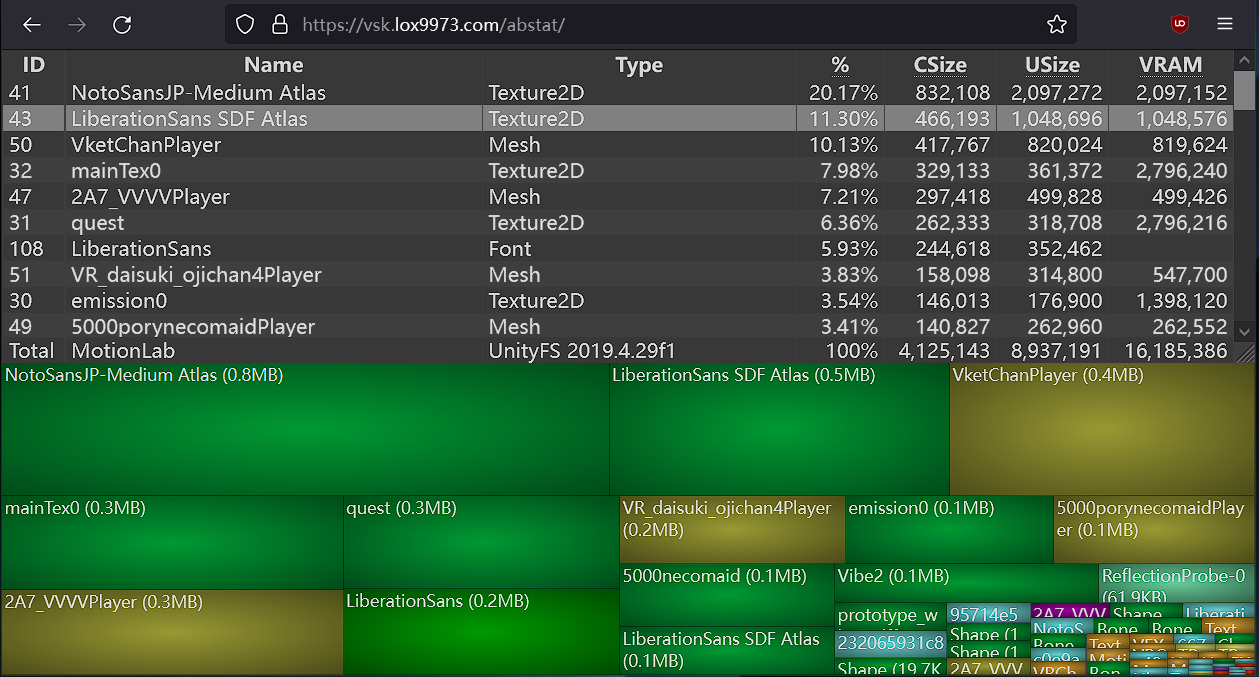
A WinDirStat-like online Unity asset bundle inspector
ashen valve
eek im not sure how to use this
pure cape
Run a build in unity for android, then on the site press the button and enter %APPDATA%\..\LocalLow\VRChat\VRChat\Avatars into the explorer box and press enter, you should then see your avatars for selection
Any luck?
lunar crypt
Oooooooo omg, thats awesome (i use windirstat so im familiar with how it works/looks)
ashen valve
pure cape
Any luck?
uhh not with that in particular, but when i upload the quest vers seperately, it reads as 6mb, the second i attach it to the pc version it reads 45

gulp
quest version 4 comparison
 pure cape
that really doesn't make sense..
ashen valve
it doesnt like at all
makes me curious, im going to try to upload like.. in reverse
see if it works
stupid problems stupid solutions, i suppose
ashen valve
update: i made her quest joyous day
 nocturne chasm
💀 reading that chat with ame as I'm here to type out I have the same problem with a booth avatar of my own.
It says 10.12 MB but if I try to delete anything or lower anything it jumps to 44mb , 45mb 😭 I don't know why or what to do it doesn't make any sense instead of lowering when deleting a item it goes up does anyone know what I should do-?
heady wing
nocturne chasm
💀 reading that chat with ame as I'm here to type out I have the same problem wi...
Is the ~45mb value the uncompressed size?
Because that needs to be below 40mb for quest too
waxen prism
Lower the resolution on the textures
long venture
and/or delete un-used blendshapes, atlas textures, merge material slots, lower tris count
lots of pretty easy ways to lower the model size
nocturne chasm
heady wing
Is the ~45mb value the *uncompressed* size?
Because that needs to be below 40mb ...
i was not aware of this ty i got her uploaded 😭
 grim whale
Gosh, I hate how strict Quest avatar restrictions have become recently- all of the avatar bases I have bought or had gifted to me that had Quest compatible prefabs before can no longer be used to make a Quest compatible avatar, and it aggravates me to no end... At this point, I am just better off having those crummy looking Imposters for my avis done instead...
green oriole
grim whale
Gosh, I hate how strict Quest avatar restrictions have become recently- all of t...
Aside from plugging holes that allowed modded SDKs to completely ignore the limitations (a bannable offence) I don't remember anything even remotely recently having been changed.
Last thing that got tightened was PC avatars. (200mb download, 500mb uncompressed)
waxen prism
@grim whale Have you reduced the textures for the ones you uploaded yourself?
grim whale
waxen prism
<@468500169319776278> Have you reduced the textures for the ones you uploaded yo...
All the way down to levels like 32 and it always tells me it is still too big, even when the model is sub-20k tris
heady wing
green oriole
Last thing that got tightened was PC avatars. (200mb download, 500mb uncompresse...
feels like the only thing tightened in the last at least 5 years
long venture
grim whale
Gosh, I hate how strict Quest avatar restrictions have become recently- all of t...
alot of creators are lazy and only made their content work just barely within limits that'd allow uploads, alot of them have also started making people pay for uploads to their accounts rather then updating the packages to properly work, overall quest "supported" content is generally crummy
you could try optimizers like Polytool or VRCQuesttools though the outcomes can vary quality wise
Thry's avatar performance tool is also good for figuring out what's actually taking up all that space on the model for you to fix it
grim whale
@long venture Well, I don't have the kind of money to fork over for Polytool at the moment so I can't try that, but I have tried VRCQuestTools and Thry's Avatar Performance tool, and neither seem to really help- QuestTools doesn't really do much for most of my bases and Thry's performance tool doesn't really provide me information I can really decipher or work with.
I guess at this point I just give up trying to make my avis Quest compatible and just rely on impostors so that my Quest friends aren't just seeing my fallback...
gusty flame
are you trying to reduce the size of a mesh object?
if so, blendshapes take up a lot of space.
grim whale
Oh, I didn't know that about that about blendshapes. I'll have to double check.
grim whale
OK, so double checking my avatar bases I have been triyng to use recently, all of them for god knows what reason have over 100 something blendshapes...
green oriole
grim whale
OK, so double checking my avatar bases I have been triyng to use recently, all o...
I recommend VRCFury's blendshape optimizer for that, means you don't permanently remove any blendshapes.
And any blendshapes set to a specific value but aren't animated are baked in, which removes those too.
grim whale
Not sure how to use that because at best, all I have ever used VRCFury for has been easier installation of premade toggles and GogoLoco
And not sure about automatic removal because I do visit MMD worlds and afraid automatic removal would remove the ones MMD worlds look for
gusty flame
Yeah that'd be a problem:
Automatically bakes all non-animated blendshapes into your avatar's meshes. Reduces your VRAM usage for free, no configuration required!
Advanced Visemes
that'll handle it.
grim whale
Ah, I do use that already to make sure that all my prop toggles don't insta-turn on during MMD worlds
gusty flame
Then adding the Blendshape Optimizer probably will work for you
grim whale
Yeah, I guess. Also, for the main base I have been struggling with and the main one I have been wanting to use for copies of the same avatar but with different outfits, I am probably better off optimizing the shape keys for it by hand in Blender so I don't have to redo it every single time I want to work with that base
gusty flame
usually what I do if I have a custom version of a base is combine all the shapekeys I want into a single "me" shapekey on the base model. Then I make the "me" version by just copying it, deleting unused shape keys, and applying the "me" one to basis so it's the default.
Thus I preserve the original one in case I need it.
I have a one model with several of these shapekeys 'cause I did work for multiple people
grim whale
Ah. But at least I know the culprit now of why some of my Quest bases can go through and the others struggle- looks like unused blendshapes were bloating up the file size.
gusty flame
yep, makes sense
grim whale
Now I just need to go an redo the ones I have been working on (not that I mind going back in from scratch- I found other issues that I can fix with them while I was in-game anyway while at it)
grim whale
green oriole
I recommend VRCFury's blendshape optimizer for that, means you don't permanently...
OK, yeah, that didn't help whatsoever... I guess my favorite base will never be able to be Quest compatible at this point... Ugh....

Cleaned up the model's blendshapes until only the visemes and MMD keys were left, decimated the living heck out of the model, shrank the texture resolution as far down as I could without them looking like blobs of color, and still zero luck.
 covert sundial
I found your issue lmao how do you even do this

There's no way that's accurate
They're making a Michael Bay transformer lmao
gusty flame
that doesn't seem like a lot of triangles though
covert sundial
I don't do Avatar stuff very often nor do I use blend shapes that much so maybe I'm just reading this wrong but to me that looks like it's saying there's well over 6,000 blend shapes
Never mind okay I get it it's the amount of affected tris not the amount of blend shapes lol
 shy prairie

Avatar Dynamics (PhysBones and Contacts) performance rating will be "Very Poor", so you will not able to upload for Android. Please keep "Poor" rating in avatar dynamics categories.
guys how do i fix this?
long venture
not sure if you've already fixed this but you'd need to remove some phybone components (likely the hair based off the screenshot) but this would mean that it wont move, if you want it to move but keep the phybone count down then you'd need to take it into blender and merge + reweightpaint the bones

 tiny prairie
@mortal kernel Ik we don’t get along but can you try to help them
Your good with this stuff
 mortal kernel
 lone grove
If your trying to make quest Avis fast I recommend questools but yes it’s gotta be the hair physbones
lone grove
Can you help me disable those?
tiny prairie
I would have helped if I knew how
lone grove
Idc if the hair moves or not,
mortal kernel
Look in the hierarchy and search hair root
Or tail root
And the physbones will be right there 👍🏻
lone grove
Hold on I'll ss
tiny prairie
Kk
lone grove

 tiny prairie
Holy sweat mother of Jesus
lone grove
I think he didn't name it root or something
tiny prairie
That’s a lot help😭
tiny prairie
Ah
lone grove
 tiny prairie
Makes sense
mortal kernel
If you click on any of them do you see your physbones on right ?
tiny prairie
I might get unity and start making avatars
lone grove
I clicked the lowercase "hair" and jt shows psybones
gusty flame
wow, what the heck is that mess
mortal kernel
lone grove
I clicked the lowercase "hair" and jt shows psybones
Ss?
gusty flame
oh that's a search, it might be more reasonably arranged
lone grove
 tiny prairie
mortal kernel
Ss?
tiny prairie
mortal kernel
Ss?
Thank you for helping
mortal kernel
Ok click on the physbones and hit remove component
mortal kernel
tiny prairie
Thank you for helping
Np
mortal kernel
Now do that to where it says physbones and u should be good
 mortal kernel
🫶🏼
tiny prairie
mortal kernel
Np<a:vrcAevSlap:608452275656196176>
Like ik we aren’t friends and I think you hate me but seriously thank you
And I’m sorry
mortal kernel
lone grove
For the physbones colliders there where you would get rid of the physbones
mortal kernel
tiny prairie
And I’m sorry
Dw it’s good
mortal kernel
Mhm
tiny prairie
mortal kernel
Dw it’s good
You sure I feel like a piece of shit
tiny prairie
If you say so
lone grove
I forgot to click to have it be for android aka meta, and tried canceling
tiny prairie
mortal kernel
Nah it good
If you need anything or anyone to talk to your always welcome to add me and vent
lone grove
I think i can select it to be android afterwards?
mortal kernel
lone grove
I think i can select it to be android afterwards?
Mhm
lone grove
Alright
I removed phsybones from hair, chest, skirt, and stuff
Annd it failed, too large by 5mb
tiny prairie
Oh god
lone grove
I removed the particle system
Gonna try again
It only removed .50 mb

This is what im working with
tiny prairie
Hmm
lone grove
For some reason, it had audio for sword slashes
I removed em, quest cant hear anyway
Only removed another .50 mb
Idk how to reduce the size more
tiny prairie
Erm I think chubzu passed away 0.0
lone grove
It gave me an option for offline test
tiny prairie
I don’t even have unity or anything like that
I’m just here to be that annoying unwanted support person😂
Anyways, where should we have her funeral?😢
lone grove
mortal kernel
Mhm
Could you recommend how to lower the size?
mortal kernel
Compress the textures
lone grove
How so
tiny prairie
:/
mortal kernel
Click on the material and then you’ll see the materials image click there and you’ll see like compress something
lone grove
Lmao
mortal kernel
😔
lone grove
Wheres the material
mortal kernel
Click on something on the avatar on the right side you you’ll see the material then you can hit the down arrow and you’ll see the image texture
 lone grove
Hmm, i can always readd the sword later,
It barely removed any
Ok i removed the sword model completely, and it took off 3mb
Only 1.75 to go
Removed more stuff, i hope its enough
Tried the downscale beta thing
Still not enough
lone grove
mortal kernel
That should help you
I took everything off that was an accessory, im short 1.32 mb
gusty flame
remove unused blendshapes?
lone grove
Im only .50 mb away from allowance
I think i did it
Nope
Deleting unused materials didnt work
Annnd fuck
I deleted accessory material, and now parts of my avatar are purple
Gonna have to find those fucking pieces to either delete or change the texture
Finally got it
Although i need to see if i can re add my mask
It says uploaded, i transfer into it, but now says ingame it has no mb, nothing
Its as if i downloaded a broken model, meaning i broke something
lone grove
I have found the problem with the android version, It does not like the poiyomi toon shader,
had to unlock every single model for it to find the correct one since they were locked
but now, i need to figure out how tf to remove that shader properly
Anyone know how to properly do that?

first Poiyomi there is toon, and so is the last one but it has S_ behind it
lone grove
annnnd its handled now,
My avatar is finally done, although i lost the sword and barrier, I'm sure i can find a work around tomorrow, I am pissed it took so long for this,
waxen prism
Usually best for 1 avatar per project
 flat pond
I cant furnish my quest 2.
Stuck at where im suppossed to connect it with a device with a logged in account but nothing happens when attempting to connect to my phone or with pc linking cable
Any help?
gusty flame
I just connected mine to wifi
 tame willow
hey do u guys have any tips to work with uncompressed size
even when i take stuff off, make the textures smaller etc etc
it still doesnt work sometimes to the point it would be bald or have no outfit :C
if yall know any ways to make this easier PLEASE LET ME KNOW
 forest ivy
tame willow
hey do u guys have any tips to work with uncompressed size
even when i take st...
forest ivy
tame willow
hey do u guys have any tips to work with uncompressed size
even when i take st...
have you tried removing unnecessary blendshapes with optimizer tools?
 earnest osprey
hey does anyone know which bones to delete on the novabeast and how to do it
honest fern
earnest osprey
hey does anyone know which bones to delete on the novabeast and how to do it
You delete bones in blender
earnest osprey
ah great
 lone oasis
any way to make materials with transparent textures quest compatible yet?
green oriole
lone oasis
any way to make materials with transparent textures quest compatible yet?
There has always been additive and multiply, they do allow you to make transparent things, just not cutout things.
And don't expect anything better for a long while, it isn't an arbitrary decision to not allow this, mobile phone GPUs (like all standalone headsets use) just don't handle transparency as well as PC hardware.
lone oasis
i see, thank you
forest ivy
earnest osprey
hey does anyone know which bones to delete on the novabeast and how to do it
Depends on what you don't want to have physbones. I would delete the cheek bones, tongue bones, toe bones, and (if necessary) mane bones. keep the tail and ears
 trim verge
Remember to dissolve bones and not delete them! It will transfer the weights to the bones remaining.
trim verge
Here is some crazy Math.
The atlas Im using for my Pyramid Head Model is 931mb
The normal is 700mb
That should be the like 1.6gb in total, however.
Through the power of compression, downscaling and I think a bit of luck, the total Texture memory is only 4.5mb and
The model still has a ton of detail. This is using the Remakes model btw. I think I may have just gotten lucky, or perhaps Im missing something, but so far in game I haven't seen anyone encounter any issues. and it loads fine on my Android and Quest. What do you guys think, was I crazy to get everything down to just a single texture?


for anyone wondering, thats a 99.72% reduction in file size
lone grove
lone grove
My avatar is finally done, although i lost the sword and barrier, I'm sure i can...
Update, got PCVR, so this problem is now solved temporarily due to pc freezing after awhile until i can find a good way to keep it cool,
trim verge
lone grove
Update, got PCVR, so this problem is now solved temporarily due to pc freezing a...
I there there is a way for you to keep your weapons on quest. I managed to do it with pyramid head.
lone grove
Oh, i know i could have kept the weapons
Im just not doing too much with it rn because my heads hurting from it all
trim verge
Gotcha
 hollow remnant
So. I've spent 10 hours today trying to quest optify a pc only avatar. I got it down to 12.3 mbs. But If I delete anymore of the avi it will be nude, and if I compress anymore, it will be blurry. Is there anyone here who may be able to help me with this? I was trying to have a good handful of toggles, but I'm not being left with the option to. I have the Texture download size down to 7mbs with all the toggles I wanted on it. But it's 8mbs for the download size too much for quest.
I can pay for assistance
gusty flame
blendshapes take up lots of space, consider removing unused ones
hollow remnant
is that possible in unity? it doesn't seem to work for me. I'm not knowledged on blender at all, so I'm stuck at the moment
So far I've compressed textures, deleted unused animations and toggles that I didn't need, deleted all the parameters unused and vrc menu toggles. So everything there has gotten the avatar to 12.3 mbs. Still too much for quest sadly and that's after deleting toggles I did want
gusty flame
I'd do it in Blender but I guess the VRC Quest Tools package can probably? Also possibly VRC Fury.
hollow remnant
I couldn't find anything on VRC Quest Tools
I have no clue how to use Fury, but I could try
I'm not seeing anything to do with optimizing
hollow remnant
I opened blender. I'm going to lose my mind
 gilded steppe
hollow remnant
is that possible in unity? it doesn't seem to work for me. I'm not knowledged on...
gilded steppe
hollow remnant
is that possible in unity? it doesn't seem to work for me. I'm not knowledged on...
use d4rks optimizer, it can remove unused blendshapes and merge any possible meshes
hollow remnant
where do I find that?
 stark dome
hollow remnant
where do I find that?
stark dome
hollow remnant
where do I find that?
github iirc
hollow remnant
thank you
sadly I'm not seeing a difference with the optimizer
thank you though
correction, I do see a difference, but sadly it's not a large one
if anyone is willing to maybe hop in a call with me to help me. I could pay you a bit for your time. I just need to figure out the main problem. Though I'm sure it's a poly situation with the body of the model itself since I have another quest avatar with like 3 times the toggles and blendshapes and uploaded just fine to quest
I just have no knowledge of blender, so I'm stuck
or if I could just send what I have done to someone and they can finish it. I can pay if needed
stark dome
You could get scammed so better ask at #1204506421631393913
hollow remnant
thank you
forest ivy
hollow remnant
So. I've spent 10 hours today trying to quest optify a pc only avatar. I got it ...
Sounds like you could probably delete any triangles under the clothes that won't be seen and just make it so you can't take the clothes off
And you could decimate/dissolve edge loops if the model is too high poly
 livid flicker
Imagine taking a picture and getting memory crashed from it. I'm not happy
 vernal badger
Not surprising that quest optimization is dead 💀
but i think thats quest in general 😆
long venture
its more because theres channels called #avatar-optimization and #world-optimization so people tend to message in there instead
 slate cradle
Is there an easy way to see the quest rank of your own avatars, without a quest, and without individually opening each project? I want to get a list of which ones need optimizing, but I have a lot.
waxen prism
You can check it on the vrchat website
 rose parrot
if i wanna make an avi pc and quest compatible, do i need any software other than blender or unity?
waxen prism
You can do it within Unity alone, but upto a point
 cyan ether
Does anyone know how to Lower mesh's?
gusty flame
mesh what, count? size?
 green drift
tryna put my avi on quest and for some reason my pants are doing this? im not finding any bones responsible for it if thats a possibility

 tough warren
green drift
tryna put my avi on quest and for some reason my pants are doing this? im not fi...
tough warren
green drift
tryna put my avi on quest and for some reason my pants are doing this? im not fi...
That’s a blend shape issue I think. If you enable more blendshapes, does that shape grow bigger??
green drift
i forgot to update it yesterday it was cuz i deleted the bones for the pants strings cuz that worked on the pc end but i just "fixed" it by shoving them into the avatars torso and attatching it to my hip armature 💀
green drift
cant hurt anybody if you cant see it
 lilac sequoia
how do you uncompress
gusty flame
uncompress what?
 cyan wave
lilac sequoia
how do you uncompress
cyan wave
lilac sequoia
how do you uncompress
Personally I like binging a good streaming show with snacks! 😆
what about you? @gusty flame
minor raven
-# i don't think he liked to be randomly pinged
gusty flame
Haha, no, but it's funny
lilac sequoia
lmfao i meant in unity when it comes to making an avi quest compatable
minor raven
lilac sequoia
lmfao i meant in unity when it comes to making an avi quest compatable
"uncompress" would kind of do the opposite of that
long venture
lilac sequoia
lmfao i meant in unity when it comes to making an avi quest compatable
this goes over the limits for each ranking, with quest you should realistically be aiming for medium at the worst for most categories: https://creators.vrchat.com/avatars/avatar-performance-ranking-system/ id suggest showing your model's stats for more specific help but the upload process is the same as it is for PC just with harsher limits mainly
The Avatar Performance Ranking System allows you to see how much a user's avatar is affecting performance via analysis of the components on that user's avatar. You can also use it on yourself to see how performant your avatar is.
lilac sequoia
ok
lilac sequoia
this avi has nothing on and it still says stuff about the compress size
 gusty flame
Textures are something. Mesh itself has a size too, especially with a lot of shape keys.
slate cradle
textures, animations, and mesh size are the biggest contributor.
if it's not your mesh or textures,
it's your animations
green oriole
lilac sequoia
this avi has nothing on and it still says stuff about the compress size
Just in case, did you attempt reuploading between removing stuff?
Those value only update on build/attempted upload of avatar.
lilac sequoia
yeah
lilac sequoia
anyone in here ever converted a minase into questie?
 simple cliff
Any suggestions for vr ready pcs
gusty flame
simple cliff
Any suggestions for vr ready pcs

tupper's notion on Notion
A guide on building a PC to maximize performance in VRChat, written by Tupper, a VRChat developer.
 gleaming ruin
Yo guys, what is up with all of the avatars saying "security checks failed" none of the ones I had where laggy, I can't use my commission, and the game seems to get more baggy with each update.
long venture
if you think its an accidental flag you can make a ticket at :https://vrch.at/support
but your model may be outside the max perf limits on something
gleaming ruin
long venture
but your model may be outside the max perf limits on something
its not my model, i got it commissioned
long venture
is it not uploaded on your account?
also most commissioners offer the files of the model unless its an edit of a model they're mass selling usually
 viscid drum
Whats up with my avatar showing security checks failed? its not my model, i just editted it. its not that its laggy, low poly model n all
 viscid drum
i fixed it, all i had to do is reupload it lmao
 hybrid echo
all textures down to 256 & compressed by 50%, 113k polys, 11 mats, 10 skin mesh renderers... still not enough to upload to quest..
 halcyon sail
viscid drum
i fixed it, all i had to do is reupload it lmao
halcyon sail
viscid drum
i fixed it, all i had to do is reupload it lmao
yeah, sometimes youll need to upload again. sometimes youll even get errors from the sdk and it will still upload successfully hahaha.
halcyon sail
hybrid echo
all textures down to 256 & compressed by 50%, 113k polys, 11 mats, 10 skin mesh ...
what errors are you receiving? memory, compressed memory? imo, take a look at your physbones & transforms. see if that helps in anyway. i’ve had to strip a lot away sometimes to make it quest compatible.
hybrid echo
halcyon sail
what errors are you receiving? memory, compressed memory? imo, take a look at yo...
at first it was compressed memory, then after that it was uncompressed memory. not a single physbone or transform
I don't play on quest but when creating a quest version for my avatar and having to remove a whole bunch of things even though there is only one outfit with nothing special feels kinda crazy
I understand quest has limits but surely not that much?
long venture
you've gotta remember that quests are just mediocre phones strapped to your face and that vrchat is VERY performance heavy
check for unused blendshapes aswell when trying to get the size down since that's something people overlook alot on PC models and it takes up quite a bit of space depending on the number
theres also the option of using Thry's avatar performance tool to figure out what part of the model is making the avatar still be so big
hybrid echo
long venture
check for unused blendshapes aswell when trying to get the size down since that'...
Unused blend shapes? I don’t understand how a blendshape could be unused, could you explain please?
And I’ll check out thry avatar performance tool. I’ve been needing something to help me with that sorta stuff
humble canyon
hybrid echo
Unused blend shapes? I don’t understand how a blendshape could be unused, could ...
a unused blend shape is a blend shape that doesn't have any animation to activate it
green oriole
And since it doesn't have an animation activating it and changing it then there is no point to having it exist as a blendshape, you either remove it or bake it in, depending on if the blendshape is set to above 0 or not.
hybrid echo
humble canyon
a unused blend shape is a blend shape that doesn't have any animation to activat...
gotcha, so I've got a bunch of those how can I optimise them?
green oriole
hybrid echo
gotcha, so I've got a bunch of those how can I optimise them?
Easiest and least destructive, either d4rk's avatar optimizer or VRCFury's blendshape optimizer component.
hybrid echo
gotcha I'll go with vrc furys one. thanks
green oriole
Then the blendshapes are only removed when you upload, lets you still mess around with them and animate them at a later date.
hybrid echo
green oriole
Then the blendshapes are only removed when you upload, lets you still mess aroun...
I was able to upload the quest version without having to remove anything... thank you so much!
 still otter
Does anyone know why I keep getting an alert alarm when I have my PCVR cable connected to my Oculus3s.. It's fine for the first 15 mins or so and then i keep getting this repeated audible alarm over and over again. Any help? Thanks!
green oriole
still otter
Does anyone know why I keep getting an alert alarm when I have my PCVR cable con...
Is it the same noise you get when you plug in the Quest to charge while it is on?
still otter
green oriole
Is it the same noise you get when you plug in the Quest to charge while it is on...
while its on.. i always start at 100% charge and it starts at like it doesn't lose much charge with it plugged in
green oriole
still otter
while its on.. i always start at 100% charge and it starts at like it doesn't lo...
So probably the charging noise then.
It means the headset doesn't have a solid connection to the power source, be it that it that the usb port on the headset is dirty (got lint in it or something) or that the power source is simply unable to provide a good enough source of power.
If I use my power brick to power my Quest 2 then I'll hear that noise constantly, but if I use my power bank then it is fine.
I think cable length also has something to do with it, it is harder to provide a good amount of stable power over a long cable.
You can supposedly turn the noise off (assuming it still works) https://www.youtube.com/watch?v=WOCAkoQWYHk.
still otter
green oriole
So probably the charging noise then.
It means the headset doesn't have a solid c...
ah it's not that noise
green oriole
still otter
ah it's not that noise
There are at least two noises, one really annoying bing and a gentler one.
And you just sort of get one of them
Quest 2 has annoying bing, Quest Pro has the gentle sound, it is silly.
From what I have read you could have different sounds on the same model of headset.
 torpid bane
What is the best texture format to compress to fit on quest
green oriole
torpid bane
What is the best texture format to compress to fit on quest
ASTC
ASTC 12x12 being the most compressed one.
It lowers both uncompressed and compressed usage so it is way better to use than crunch compression too.
torpid bane
green oriole
It lowers both uncompressed and compressed usage so it is way better to use than...
perfect ty
 urban mica
Hello all! ✌🏻 Just puchased a quest 3s, all tips and tricks are welcome. Im familiar with sidequest stuff but dont really know what levels I should use w gpu/cpu, textures and what framerate I should pick to get allaround good performance and looks... Other tips? 🤔 Ive got a 20k mah additional battery but dont rly know how long its gonna last if i tweak with sidequest. If this is the wrong place for this feel free to send dm ✌🏻 tyyyy
(performance for vrchat in particular)
 opaque raven
https://discord.com/channels/189511567539306508/1334168809052962876
Can someone assist me with my Quest 3, and PC, I'm cable linked directly to my pc and hardwired to a Dedicated router, trying to play through VRDesktop so i can play both pc worlds and quest worlds so i can also see both types of avatars too.
 pliant forge
okay so weird issue... I can remove all I want on this avatar, and compress everything to the a dot, but the build size doesn't change

deleted everything, still same size

sdk doesn't update
green oriole
pliant forge
deleted everything, still same size
That only updates when you build the avatar, ie try to upload or build and test.
If you tried doing that then check animations, any referenced materials are still included even if there is no place for them.
 native crystal
there has to be a better way to get this to work 1, other than this 2. im so tired 😭


im taking a nap before i die inside
long venture
native crystal
there has to be a better way to get this to work 1, other than this 2. im so ti...
you could try automatic tools like VRCQuesttools or Polytool but taking it into blender and manually optimizing it is realistically your best bet
(also suggest using Thry's avatar performance tool to see what parts of the model are taking up the most space)
native crystal
👍
waxen prism
Majority of the time it is texture resolution.
 long venture
could always use Thry's avatar performance to check whats taking up the most space, im guessing the model has either a ton of toggles which could be seperated into multiple models or tons of unused blendshapes
 summer rover
yea def does
ill go install that thanks for the rec
hm


lowered some res
we got there
now i sleep good night
 lunar onyx
yeah, none of that needs to be rgba32 or 24
 real leaf
summer rover
hm
real leaf
summer rover
hm
You should probably use ASTC compression here, either ASTC 6x6 or 8x8 will do fine. (Lower = better quality but more memory usage).
Also you can probably up the resolution back on some of those textures to 1024 after switching to ASTC.
RGBA32 and RGB24 uses significantly more memory and it's likely why you had to lower the resolution.
summer rover
real leaf
You should probably use ASTC compression here, either ASTC 6x6 or 8x8 will do fi...
I’ll switch them over. Thanks
Would that be the case for pc also?
real leaf
summer rover
Would that be the case for pc also?
Not ASTC no, for PC use BC5 for Normal Maps. BC7 for regular textures with alpha, (can also be used on textures without alpha).
DXT1 can be used to save on memory for textures without alpha, but DXT compression can be more noticeable especially on any textures with color gradients, BC7 in comparison has no notable issues with color gradients.
So DXT1 should really only be used on simpler textures, unless you're ok with the quality hit.
Crunched compression should generally be avoided. It's primarily what causes avatars to cause a stutter when they are loaded and only results in the download / compressed size being lowered slightly, it does not affect the uncompressed size or VRAM usage.
summer rover
hm the thry thing doesn't seem to be letting me change the compressor off of rgba32
on the pc one that is
nvm i just did it manually
 stoic epoch
The avatar im working on wont show up on quest despite letting me upload to android and the validations looking like this


 open sparrow
One of your toggles is not functioning correctly. Or out of sync with its pc counter part . I got this the other day I removed it and put a fresh one on pc side at first it refused to correct so save close Unity reopen for it to recompile and sort it’s self out then press upload sorted issue for me .
honest fern
 nocturne silo
Thats just the error saying it failed to build
Not an actual error
vagrant sparrow
stoic epoch
The avatar im working on wont show up on quest despite letting me upload to andr...
check settings on the quest app. by default it is set to not show anything below a poor rating. make sure it says very poor
stoic epoch
Ive already fixed it
The sdk wouldn't tell me that i was using a shader it doesnt allow even though its one of VRChats mobile shaders
honest fern
fuck off scammer
 dawn cobalt
Hi, I´m trying to convert my avatar to quest and i know i can make some materials completely transparent/cutout like the blush so it doesn´t show during gestures, but this time it doesn´t seem to work.
 gusty flame
you can't use transparent or cutout on quest
 long venture
if you're swapping through the SDK then it might've bugged out, try swapping from the build settings File>Build Settings>and either install or swap to it iirc
lunar onyx
 sharp zinc
can someone help me please? idk what to do
sharp zinc
can someone help me please? idk what to do
install the android unity module
 severe meadow
Did something change as of late? I am uploading an avatar to android rn and it's letting me upload even though I have more than the allowed requirement.
My phys bone transform count is 63 (1 below the cap) but the components are 17 even though 8 should be the max, but it's not giving me that error that stops you from uploading
honest fern
are you sure you are even uploading to android?
long venture
i thought it just removes all the phybones if theres too many of them rather then preventing upload?
severe meadow
I am not r*****ed, ofc I am uploading to android.
And yeah, I tested it now, it's letting me see the model perfectly despite being over the 40 mb limit too though which is weird, but all the phys bones are inactive.
Weird that it lets me upload to begin with though
honest fern
what sdk are you even using
gusty flame
buggy unity, but it should work
 faint current
this is really sad that this option do not work anymore=/

 proper garden
Hey yall, I have a question about hand tracking with the Quest 3 on PCVR in VRChat. I have an HP Victus NVIDIA GeForce 4050 (8GB vram) with 16gb ram. When I go thru steamVR and activate hand tracking in VRC, it’s pretty glitchy, stuttering. Is that an issue with my VRAM? Or should I just beef up the RAM?
 ivory bough
why are you asking that question in this channel?
This channel is for quest avatar optimization.
honest fern
ivory bough
This channel is for quest avatar optimization.
This is quest optimization in general not specifically avatars
proper garden
ivory bough
This channel is for quest avatar optimization.
thanks for your help
 drowsy otter
Tried using VRCQuestTools to swap textures and now the eyes are white not black. how would i fix this?

 gusty flame
depends on why they're white
 sweet karma
gusty flame
depends on why they're white
sweet karma
gusty flame
depends on why they're white
Idk
long venture
drowsy otter
Tried using VRCQuestTools to swap textures and now the eyes are white not black....
either that part of the mesh has vertex colours or the way it's setup for PC material/shader wise isnt supported and you'd need to find a diff method
forest ivy
Looks to me like it's a glassy lens, so you'd need to delete that part of the mesh in blender. Or you could try using the multiply shader under VRC Mobile
 wide agate
severe meadow
Did something change as of late? I am uploading an avatar to android rn and it's...
wide agate
severe meadow
Did something change as of late? I am uploading an avatar to android rn and it's...
Been happening to me too lol. When physbones are over the limit it doesn't load them, but they still show in the info. Also it shows the wrong info for download size and uncompressed size in the SDK.
 bold oyster
will they bring back avitar audios for quest?
there were some avis that were cool to listento when dancing
waxen prism
They won't because of limitation on Quest.
You can give a pc player the avi, and have them play the audio over their mic
humble canyon
bold oyster
will they bring back avitar audios for quest?
that was never an official feature
bold oyster
waxen prism
They won't because of limitation on Quest.
they should tho
waxen prism
bold oyster
they should tho
you can leave feedback in the canny
it took 17th months for very poor avatars to be usable on android mobile after the removal from the first 10 days of vrc mobile launch
it did happen once for a few days in 2022, but people had been crashing on Quest 2
long venture
bold oyster
they should tho
until the actual headsets themselves become beefier (since a quest is like a shitty phone strapped to your head) its really not safely possible because of how unity handles audio
id imagine they still have issues with the current limits on quest because users dont optimize their content well enough
 drowsy otter
How would i go about making glowing parts on my avatar? I've seen it done on quest before but not sure how it was done
gusty flame
emission properties in your materials
drowsy otter
that's not on my material part, keep in mind i used VRCQuest Tools aswell
gusty flame
it may not be available in whatever shader you are using
drowsy otter
well, thanks anyways, just gonna take this as a sign to leave it alone
long venture
you could easily swap whatever shader your materials currently use to one that has emission support
theres several shaders iirc that do and are quest compatible, i havent worked with VRCQuesttools but i assume it just chooses a specific shader every time when it converts stuff rather then giving you the different available options (cause its meant as just a quick quest conversion not actual full quest support)
 dense flax
drowsy otter
well, thanks anyways, just gonna take this as a sign to leave it alone
dense flax
drowsy otter
well, thanks anyways, just gonna take this as a sign to leave it alone
Use standard lite as Android shader manually, its the shader used for emissions on quest avatars
drowsy otter
dense flax
Use standard lite as Android shader manually, its the shader used for emissions...
i'll check it out in a bit
 rugged cedar
Is this the place I can ask for help if someone having trouble with quest?
Specifically logging on the game?
A friend of mine can't get on vrc bc they are stuck on the loading screen when they launch the game. They tried reinstalling and making sure both quest and vrchat are updated. Checked if wifi was the issue too
long venture
this is for optimization not like technical support, you could make a post in #1138891887374237706 (and have a look in https://discord.com/channels/189511567539306508/1264591811456794724 if anything there can help with their issue) or have them make a ticket at https://vrch.at/support about it
though based off what you've said so far theres likely a thread made in user support already with a solution you'd just have to scroll through the posts (also maybe get your friend to post their issues themselves? having a middle man can get stuff confusing and take longer communication-wise for all parties involved)
 near fiber
hi how can i decrease the size of my avatar

i tried to lower the textures but still the same
i deleted some stuff but still
long venture
near fiber
hi how can i decrease the size of my avatar
use Thry's avatar performance tool and find out what's taking up the most space
near fiber
long venture
use Thry's avatar performance tool and find out what's taking up the most space
okay i'll try thank you
near fiber
long venture
use Thry's avatar performance tool and find out what's taking up the most space
how to use it
ok i saw a video about that
Mindpoint Summit (MPSM) (c) 2023
This tutorial is a simple way to install Thry's performance tools using the creator companion. Then how you can quickly open it up in Unity with the top toolbar and quickly get stated using it.
@long venture
every thing is low
what should i do

i delet some stuff too
only 0.25 left
what should i do
more
 echo shore
Hi! Did you purchase this model, the creator does support for issues like this
echo shore

stoic epoch
anyone have an answer to how many parent constraints and parent constraint sources quest is limited to?
gusty flame
all of that is on vrchat's docs site:
https://creators.vrchat.com/avatars/avatar-performance-ranking-system#mobile-limits
The Avatar Performance Ranking System allows you to see how much a user's avatar is affecting performance via analysis of the components on that user's avatar. You can also use it on yourself to see how performant your avatar is.
stoic epoch
i didnt see it
wait ive seen it now
thank you
vrc fury scripts wont make a quest avatar fail security checks will it?
long venture
thats a bit broad, it depends on what you're actually adding but as long as its stuff supported under the mobile limitations then it shouldnt throw security check fails
 glad dome
Guys just a small question, when im playing vr chat on steamvr the game on my quest looks like it has downgraded resolution but when i look at the cast on the pc it looks amazing, any idea how to fix this?****
dense flax
glad dome
Guys just a small question, when im playing vr chat on steamvr the game on my qu...
Quest graphic is limited sadly so on pc cast Its normal to see it like that
The only thing you could do to improve graphics on vr Its to buy the last brand vr headset😔
green oriole
glad dome
Guys just a small question, when im playing vr chat on steamvr the game on my qu...
How are you connecting your Quest to your computer?
 potent wadi
real quick
whats the max particle emitters an avatar can have before vrc starts hiding the first particles you placed?
aka: how many particles am i able to add before vrc starts breaking and deleting some of them
 pure leaf
potent wadi
real quick
whats the max particle emitters an avatar can have before vrc starts ...
pure leaf
potent wadi
real quick
whats the max particle emitters an avatar can have before vrc starts ...
The Avatar Performance Ranking System allows you to see how much a user's avatar is affecting performance via analysis of the components on that user's avatar. You can also use it on yourself to see how performant your avatar is.
pure leaf
potent wadi
real quick
whats the max particle emitters an avatar can have before vrc starts ...
Per the documentation it states a Max of 2 Particle Systems and 200 Active particles but at that threshold, it's Poor.
potent wadi
pure leaf
Per the documentation it states a Max of 2 Particle Systems and 200 Active parti...
200 active particles, hmmmm
potent wadi
pure leaf
Per the documentation it states a Max of 2 Particle Systems and 200 Active parti...
And dw the avatar I’m making is super poor (due to most of his abillities)
Aslong as it doesn’t crash quest or pc and works that’s all I care about
💔 💔 💔 💔
pure leaf
potent wadi
Aslong as it doesn’t crash quest or pc and works that’s all I care about
They have safeguards for all that stuff now. People can set the limits in their settings now too.
potent wadi
pure leaf
They have safeguards for all that stuff now. People can set the limits in their ...
W
 sterile pine
How can I show that I am playing vrchat in the Discord in my profile?
 sacred crow
sterile pine
How can I show that I am playing vrchat in the Discord in my profile?
sacred crow
sterile pine
How can I show that I am playing vrchat in the Discord in my profile?
are you on quest or pc?
sterile pine
@sacred crow quest
 paper haven
i dont think you can on quest
sacred crow
sterile pine
<@768462197630042122> quest
you can try sideloading a Discord RPC/Rich Presence app
if not, just find a program to run on your pc and rename it in discords Game Activity tab to “VRChat” and run it whenever you play the game, then it’ll show that you’re technically playing a game called VRChat
sterile pine
sacred crow
if not, just find a program to run on your pc and rename it in discords Game Act...
I don't have a computer.
sacred crow
oh.
sacred crow
sterile pine
I don't have a computer.
then yeah you’re kinda screwed unless you download a discord RPC app for sidequest
sterile pine
sacred crow
then yeah you’re kinda screwed unless you download a discord RPC app for sideque...
I'll do that.
sacred crow
🙂↕️
 cobalt hound
Any recommendations for this stupid "low system memory" thing? My system memory isn't even half way full and even if clear all my cash,texture,and avi memory it still says I have low memory and either won't load avis or sends me to my home world it's so stupid
gusty flame
how much memory do you have?
green oriole
cobalt hound
Any recommendations for this stupid "low system memory" thing? My system memory ...
Memory is not storage, on Quest 3 you only have 8GB of memory (Which is RAM, not storage), on the Quest 2 you only have 6GB, VRChat can only use those amounts minus 2GB, because that's what the Quest OS eats up.
VRChat did make it worse recently, but most recent update should have fixed it or at least made it better.
Basically all you can do when that happens is hide avatars and be in smaller worlds, in terms of MB, generally a small world will have a small uncompressed size.
humble canyon
cobalt hound
Any recommendations for this stupid "low system memory" thing? My system memory ...
system memory refers to Ram there's nothing you can do about that
honest fern
cobalt hound
Any recommendations for this stupid "low system memory" thing? My system memory ...
Ram isnt storage
cobalt hound
green oriole
Memory is not storage, on Quest 3 you only have 8GB of memory (Which is RAM, not...
Oh okay thank you, it's just super annoying when I'm trying to turn on someone's avi when they are talking to me and it always says "too many avatars" 🥲
humble canyon
cobalt hound
Oh okay thank you, it's just super annoying when I'm trying to turn on someone's...
Yeah there's not much you can do about that because the quest headsets basically has a very small amount of ram compared to PCS
cobalt hound
humble canyon
Yeah there's not much you can do about that because the quest headsets basically...
It didn't used to be like that though :(( a few months ago it was completely fine and then I updated and I can't see anyone's avi it's stupid with each update it just gets worse and worse for quest users and I don't have the money or space in my apartment to get a pc
heady wing
It wasn’t really fine because back then you’d still run out of RAM, just you’d just either be sent to your home world or outright crash the quest
It’s a lesser of two evils situation
honest fern
cobalt hound
It didn't used to be like that though :(( a few months ago it was completely fin...
Would you rather crash the headset or have it disable avatars so you dont crash
cobalt hound
honest fern
Would you rather crash the headset or have it disable avatars so you dont crash
I didn't used to crash alot I would be careful with who I turned avis on but now I can't see avis AND I crash more than I used to
Like crashing was a rarity for me unless I had everyone avis turned on
On quest you have to manually turn on everyone's avi it's how its always been otherwise you just see an imposter or a fall back people just needed to not turn on everyone's avi and it would be smooth and fine but now I can't even see imposter's it's so stupid
honest fern
Well sorry if you dont have enough ram to show avatars
cobalt hound
Is there a way I can get more? Idek what ram is I'm not very techy I just wanted to know if there was a way to make my game run smoother without a pc that I can't afford
cobalt hound
Is ther a way I can clear space so not alot of ram is being taken up?
honest fern
Smoother is using more optimized avatars yourself and going to more optimized worlds
honest fern
cobalt hound
Is ther a way I can clear space so not alot of ram is being taken up?
Ram is always being used and available
Its random access memory for a reason
cobalt hound
All I really go on in vr is games like murder 4 and stuff are those worlds not optimized enough?
honest fern
🤷♂️
cobalt hound
Okay :/
It's stupid that they changed it each update just gets worse and worse for quest
honest fern
Idk its perfectly fine for me
sacred crow
cobalt hound
I didn't used to crash alot I would be careful with who I turned avis on but now...
ik they’re not really listening to you, but you’re not alone in this. i’ve been on quest for 3 years and have never had the issues i’m having now. so i understand, in my experience, even in an world of 2 people in green rated avatars they still don’t show, and the game is constantly freaking out. so i get what you’re experiencing, and im also waiting for some kind of fix for the new issues
cobalt hound
sacred crow
ik they’re not really listening to you, but you’re not alone in this. i’ve been ...
Tysm I knew I wasn't the only one 🙏
cobalt hound
sacred crow
ik they’re not really listening to you, but you’re not alone in this. i’ve been ...
I kid you not I just got online and got sent to my homeworld... I was already in my homewold...
sacred crow
cobalt hound
I kid you not I just got online and got sent to my homeworld... I was already in...
oh my god that’s happened to me before too! even when i had the vrchat home as my home world 😧
waxen prism
It does that when a friend changes avis
Usually for those on Quest 2, or 6GB Ram phones
It takes awhile longer with 8GB phones and Quest 3
 vale sandal
I wasn't able to play for a month, today I got some time and wanted to try vrchat again, but my headset keeps crashing and won't let me access meta library inside my headset (I'm using quest 3 and link cable). Even after reinstalling meta app, factory resetting headset and updating all of my drivers, nothing seems to help.
 vague dock
vale sandal
I wasn't able to play for a month, today I got some time and wanted to try vrcha...
vague dock
vale sandal
I wasn't able to play for a month, today I got some time and wanted to try vrcha...
Get better lol
 half kettle
I have an unsupported shader alert
I have tried to convert all the materials to Quest, but it seems I'm missing one material slot
When I try to "select" the alert in the SDK, it just highlights the top-level of the avatar
How do I find the exact object that has the unsupported material?
 waxen prism
half kettle
I have an unsupported shader alert
I have tried to convert all the materials to...
waxen prism
half kettle
I have an unsupported shader alert
I have tried to convert all the materials to...
Android/Quest avatars you need to select VRChat, Mobile, and select the appropriate shader. some of the shaders there are for worlds only like Alpha Blended
half kettle
I already converted most of my materials to a vrchat shader.
Check above
I need to find whichever object that still has a PC shader.
sacred crow
half kettle
I already converted most of my materials to a vrchat shader.
Check above
I nee...
hey! there’s a really good tool for this that i use called “material replacer”
you put your gameobjects into it and it lets you replace the materials on it
but you can also use it to find where a certain material is, if you just click on it in the material replacer menu :)
 twin dirge
I’m curious about something. If we open up the Quest 2 headset, can the RAM be upgraded on it? If yes, what’s the DDR number and what can I upgrade it to?
humble canyon
twin dirge
I’m curious about something. If we open up the Quest 2 headset, can the RAM be u...
the ram is not upgradable as its soldered to the motherboard like this is the entirety of the Quest 2 motherboard
 twin dirge
What about an external socket? Is that possible?
Mine is already off warranty so I want to do small upgrades if I can
green oriole
twin dirge
What about an external socket? Is that possible?
There is no external socket, there is no room for one as you can see and phones aren't built to be upgradable so even replacing the chip might not work, firmware and software are likely to have problems with it.
green oriole
twin dirge
Mine is already off warranty so I want to do small upgrades if I can
The only upgrades you can do, aside from comfort and Quest Pro controllers, is getting a PC.
 timber cliff
you can connect pro to the q2?
gusty flame
Yes
green oriole
timber cliff
you can connect pro to the q2?
The Quest Pro controllers work on all Quest headsets.
As long as you don't update your Quest headset early or often then they are generally a nice upgrade (Meta almost literally every update make the controllers worse at first, have to wait for hotfixes or yet another large update for them to fix the issues they put in), it is very freeing to not have to care about if your hands are tracked.
timber cliff
i might get some then, aparrently the quest pro controllers can track fine out of headsets camera view
green oriole
timber cliff
i might get some then, aparrently the quest pro controllers can track fine out o...
They have their own tracking cameras, if your headset can track its place in your room then so can they.
gusty flame
most meta updates make things worse
timber cliff
gusty flame
most meta updates make things worse
they added a neat feature for devs where you could share your screen on meta calls, then they removed it
timber cliff
green oriole
They have their own tracking cameras, if your headset can track its place in you...
oh damn, im definately getting some
gusty flame
I've been tempted but reports of their reliability have made me hesitate. Also you can't swap batteries and they can't be used while charging.
timber cliff
can use q2 controllers while they charge
gusty flame
yup, that's true
green oriole
gusty flame
I've been tempted but reports of their reliability have made me hesitate. Also ...
Generally it is fine as long as you just don't update for the first few weeks and never use the PTC.
The battery life on the other hand, yeah annoyingly not swappable and tearing it apart to replace the battery is an ordeal, but they last pretty consistently for 8-10 hours.
And can't use while charging, even with the charging cable.
gusty flame
PTC?
green oriole
Public Test Channel
gusty flame
oh, of course 🙂
green oriole
"You want Quest updates that are even less stable?"
Yeah, using PTC is insane
Especially with a Quest Pro.
gusty flame
yeah no, I tried that to fix issues with my floor height at one point, ended up factory resetting
it pisses me off that despite how bad this is, there's still not an upgrade worth getting yet
timber cliff
i just reset my floor height every couple hours
gusty flame
I do it at the beginning of each session now, seems to stay these days
timber cliff
i tend to turn physical space features off since i move a lot and boundaries suck to set up
gusty flame
ah I kinda need one, got some stuff I don't want to bump into, and a staircase down
timber cliff
i just put pillows in front of things
sacred crow
gusty flame
ah I kinda need one, got some stuff I don't want to bump into, and a staircase d...
and i thought me punching my TV at full force was bad
 fathom cypress
Mid quest avatar creation game is tanking due to rules on top of rules for avatar creating on quest.
gusty flame
it's not like they've changed significantly in a while
fathom cypress
taking out legacy shaders for quest was just a bad move
they say its to fix performance however the performance is still dog ass
tough warren
Oh god please do not start this war back up again 😭
sacred crow
LMAOOO
gusty flame
tough warren
Oh god please do not start this war back up again 😭
what do you mean? It never ended 🙂
 solemn flint
fathom cypress
they say its to fix performance however the performance is still dog ass
solemn flint
fathom cypress
they say its to fix performance however the performance is still dog ass
Dawg playing on a quest 2
 gentle kindle
So looks like it doesn't matter how much you optimize your world or avatar because it will automatically show "low memory"
On Quest 2 its almost unplayable and its not like it was like a month ago. I can't see other's people avi and not even the impostors and all my friends just became blue polygons wih "too many avatars" above their heads
long venture
On some Q2s, its still a case of not everyone experiencing that issue just a select few from what ive seen
 vapid snow
long venture
On *some* Q2s, its still a case of not everyone experiencing that issue just a s...
vapid snow
long venture
On *some* Q2s, its still a case of not everyone experiencing that issue just a s...
Is there any fix for it or?
vapid snow
Yeah, I read that somewhere. Do you know any way to free up ram? Or is there not a way
humble canyon
vapid snow
Yeah, I read that somewhere. Do you know any way to free up ram? Or is there not...
the RAM usage with entirely be dependent on what avatars and world you're loading so there's not really any user action available besides for not showing very poor avatars at all
vapid snow
humble canyon
the RAM usage with entirely be dependent on what avatars and world you're loadin...
Thing is, one day it was working, I refreshed my cashe and then this started. And it’s literally just me and my friend who’s in it. as well as, if I leave and re-join the world it then works
vapid snow
vapid snow
Thing is, one day it was working, I refreshed my cashe and then this started. An...
I’ve also factory reset my quest to see if that was an issue but nada
gentle kindle
I'm starting to believe the "too many avatars" is actually broken. I turned off everyone's avatar and the loading bar keeps glitching and never finishing loading and sometimes it looks it's not even trying to load
waxen prism
It happens when someone changes avatars too fast.
 uneven basalt
gentle kindle
I'm starting to believe the "too many avatars" is actually broken. I turned off ...
uneven basalt
gentle kindle
I'm starting to believe the "too many avatars" is actually broken. I turned off ...
It's actually deeper than that
The content is not being pushed, i can't see thumbnails.
Lemme switch to the beta version
 analog kernel
gentle kindle
I'm starting to believe the "too many avatars" is actually broken. I turned off ...
analog kernel
gentle kindle
I'm starting to believe the "too many avatars" is actually broken. I turned off ...
yeah i feel like it might be tbh
i've been having the same issue
i'm not loading anyone's avatars at all
no matter how many times i clear cache, restart headset, go to small worlds with a small population, i still can't see anyone's avatars except my own
they all say "too many avatars"
and this didn't used to be the case
it's just frustrating that i have to manually force showing people's imposters 🤦
like it literally won't even load imposters and fallbacks
if anyone is wondering, the temporary fix is to select someone, click on them to open their profile in the big menu, scroll down and click "show avatar details" then select either the imposter or regular avatar (whichever you're trying to load) and wait for the 3D thumbnail to load. Then their avatar should load. If you would see an imposter due to performance blocking, load the imposter. If you have their avatar force shown, load the main avatar
this trick doesn't work with fallbacks though, your only option to see them is to force show the avatar and then force load it
if they're using a PC only avi with no imposter then you can either leave them as a blue diamond, cull their avatar with avatar culling settings to make them a gray diamond, or block their avatar to make them an error robot. Whatever your preference is lol
 peak flicker
Bruh can we ever fix the low memory thing
Deadass delete everything and it just shows up for quest 2
Then lags me back to home world when low mem shows or begins not loading avis and just having a blue diamond
 analog berry
peak flicker
Bruh can we ever fix the low memory thing
Deadass delete everything and it just ...
analog berry
peak flicker
Bruh can we ever fix the low memory thing
Deadass delete everything and it just ...
SAME
peak flicker
analog berry
SAME
Been like it for ages.
Sometimes is that bad ill join a world and can't even show myself in the mirror lol have to clear cache and then choose diff avi then place same avi back on again
It's actually just so bad
Due to the many upgrades it's made vrc unplayable on quest 2 pretty much
analog berry
Yeah, like half of my favourite worlds are just laggy messes now
humble canyon

UploadVR
Meta's frequent Horizon OS updates are coming at the cost of performance issues and bugs for Quest developers, with users often blaming them.
Basically the VR headset maker is making things worse with bloating the OS
gentle kindle
I remember when it was just "fine" when the game wouldn't take you back to home world.
analog berry
analog berry
Yeah, like half of my favourite worlds are just laggy messes now
Example: UA High, lags at about 5 people joining
And it’s an extremely simple world
peak flicker
gentle kindle
I remember when it was just "fine" when the game wouldn't take you back to home ...
I remember when it wouldn't come up with that bs sign and actually let you just get to know people in worlds
But nah can't anymore
analog berry
peak flicker
I remember when it wouldn't come up with that bs sign and actually let you just ...
Same
peak flicker
Can't even play alone you'll have issues loading one world
analog berry
Pc vr sounds good right now….
peak flicker
Fr I never thought I'd say it
analog berry
Can someone like actually get people to fix it? I crashed like 5 times today trying to join UDON SABER when it NEVER CRASHED ME BEFORE
gentle kindle
And the ram limiter is annoying sometimes because sometimes avatars do stuffs that glitch the game but I remember that most of the time the game didn't crash and returned to normal in a few seconds
analog berry
gentle kindle
And the ram limiter is annoying sometimes because sometimes avatars do stuffs th...
I’m literally over here in an avatar that’s not even hard to handle (because it’s so basic that anyone could recreate it in an hour) and even that makes it struggle
gentle kindle
analog berry
I’m literally over here in an avatar that’s not even hard to handle (because it’...
I know right
I remember when I had to look away from some avatars because the game started to glitch but today "oh the headset is getting 4gb ram for 0.1 seconds? send him back to home immediately!"
gentle kindle
humble canyon
Basically the VR headset maker is making things worse with bloating the OS
The developers of Quest OS should make things more simple. I know a project can become complex but dude c'mon
 latent holly
hello i think vrchat or something is capping my fps at 40, here's why:
When im alone in max graphic setting with 100% resolution on steamvr, in an heavy world like, Project aincrad. I get 80 fps constant
When i join a chess world lobby with 25 peoples, i get around 60 fps (with shield setting to max everything hidden)
But... When i join project aincrad, with 15 people im stable at 40, (with shield setting to max)
so then, i thought about lowering my resolution to 20% and lowering all graphic setting to low/disabled) and my fps stays at 40, and , that's why
i believe something is wrong, any help ?
My specs :
AMD Ryzen 7 7800X3D 8-Core
RAM 32.0 GB
NVIDIA GeForce RTX 3090 (24 GB), AMD Radeon(TM) Graphics (486 MB)
Headset : oculus rift s
(also i disabled ASW , asynchronous spacewarp in debug tool , which was capping fps to 40, and that's why i can higher now)
gusty flame
FYI per the topic, this channel is for content optimization, you might mean #quest-general
 tropic forge
im still using the quest 2 and it runs so bad 😭
 hardy socket
latent holly
hello i think vrchat or something is capping my fps at 40, here's why:
When im ...
hardy socket
latent holly
hello i think vrchat or something is capping my fps at 40, here's why:
When im ...
I have a Intel 7 14700
Nvidia GeForce 4070
Ram 32GB and its runs bad too
I have a lot of crashes
latent holly
hardy socket
I have a Intel 7 14700
Nvidia GeForce 4070
Ram 32GB and its runs bad too
have you disabled spacewrap?
it increased my fps by a lot
i'd suggest to use msi afterburner
and
increase your resolution to max, on steamvr and vrchat
and then restart the game and lower your res to what you normally use
now i get 80 fps more constantly and lower
instead of 45 constant and lower
huge improvement
hardy socket
No its enable
 charred sentinel
idk why but vrchat cant add a cutout option to help us make things more optimized because i could make a very basic plane and then do all my designing in my textures making things look higher resolution
like example: im making a Minecraft skin but it uses alpha but due to not having it for quest im just not making a very optimized skin quest compatible because i would have to model in every little square and that's stupid for something a texture could easily fix
like half of my issues making things quest optimized is the fact i dont have cutout

 green oriole
charred sentinel
idk why but vrchat cant add a cutout option to help us make things more optimize...
green oriole
charred sentinel
idk why but vrchat cant add a cutout option to help us make things more optimize...
Quest GPU architecture put simply, when encountering any kind of transparency or cutout, has to go and redo the rendering again. (If I remember the technicals correctly)
It is really not optimized to handle these kinds of things like a normal graphics card does.
Just making them into their own meshes is better.
long venture
instead of modeling in every square you could just do a rough cutout with the knife tool in blender if you're not mainly a quest user P:
honest fern
charred sentinel
idk why but vrchat cant add a cutout option to help us make things more optimize...
thats literally only 100 vertices or 28 squares
for the whiskers
 unkempt condor
I heard today a new term called "tile based rendering" which seems to be something about how quest renders things, and why it can't do transparency very easily as compared to regular gpu's
sonic flame
whats the easiest way to have 2 shaders for your world? One for pc (Like mochie standard) and one for quest when it's platform is switched? Both supporting monoSH baking
gusty flame
you can use Mochie standard on quest. But otherwise, different scene?
sonic flame
gusty flame
you can use Mochie standard on quest. But otherwise, different scene?
wouldn't it run like dog? lol
gusty flame
Haven't tried yet, personally
 noble spire
Someone have a problem with pass thru ?? Before update the passtheu works with the game, and now if i use pass thru the game get stop
 solemn yoke
I have gotten completely stumped, while creating an avatar I was met with this problem. the vrchat SDK said that the avatar size was too big however I had this issue previously on another avi I did, so I started playing around, took the tutorial bot and put a descripter on it and it also said the exact same number 17.71 mb, this revealed that a bigger issue was at play and I began deleting and reinstalling unity and the SDK, this issue however still persisted. after this I knew no where to turn so I'm hoping that someone here can help me


 snow pendant
solemn yoke
I have gotten completely stumped, while creating an avatar I was met with this p...
snow pendant
solemn yoke
I have gotten completely stumped, while creating an avatar I was met with this p...
its talking about the "last build" which measn the last time you tried to upload it, it shows that size. it wont reveal any changes afterwards, even if you swap avis. you'll have to try and build again to find out the effects of your changes
severe meadow
Hey, why isn't the toon shader outline shader available to quest?
Isn't it immensely more unoptimized to copy an entire mesh (like a hoodie), flip the normals and join it with the base hoodie and thus doubling the entire thing for each piece you might have to do this on?
gusty flame
iirc outline shaders do a grabpass, which is much worse
green oriole
gusty flame
iirc outline shaders do a grabpass, which is much worse
You either have the shader duplicate the mesh or use depth, the latter isn't even avaliable on mobile (neither are grab passes), the former approach is doable, but think only marginally better than just duplicating the mesh.
gusty flame
oh true, I didn't think of the shader duplicating mesh too
waxen prism
severe meadow
Hey, why isn't the toon shader outline shader available to quest?
Isn't it im...
In the Creator Companion, switch the base to 3.8.1
And the one next to it
severe meadow
waxen prism
In the Creator Companion, switch the base to 3.8.1
Did they make it available to quest? Edit: I'm already on 3.8.1. The outline version is not available to quest.
waxen prism
severe meadow
Did they make it available to quest? Edit: I'm already on 3.8.1. The outline...
oh. the outline itself is removed from the android side
honest fern
severe meadow
Did they make it available to quest? Edit: I'm already on 3.8.1. The outline...
Outlines in all forms will be either entirely unable to be done or not optimized
severe meadow
Ahh so I just gotta keep doubling the mesh and flipping it then.
Such a pain when it would be so nice to have outline on the quest shader, cuz doubling something like a hoodie takes up a lot of space
honest fern
severe meadow
Such a pain when it would be so nice to have outline on the quest shader, cuz do...
The only method that would actually work would still double the mesh
 royal sparrow
SO I have been trying to figure out what causes lag issues between quest 2 and quest 3 individuals. My world is heavily optimized and quest 3 have no complaints but I occasionally hear quest 2 ppl are getting like 9 frames 😭 Is this a local issue with the 2 or is there something I can do to help them, like a quest 2 toggle that turns off specific things. Still not sure what those things would be, my guess is shaders?
green oriole
Sounds similar to an issue a friend had, their terrain shader was doing triplanar mapping which meant a lot of texture samplers in the shader and turns out the Q2 GPU falls over at a specific point if too many are used, I don't know the specific point, but any kind of mapping like that will probably be too much.
@royal sparrow
Friend's shader had 17 texture samplers (tex2d used in shader code)
So like, you could open up the shaders in a text editor and just ctrl+f and count all tex2d, assuming you aren't using a shader like poiyomi which removes parts of itself when being locked.
green oriole
green oriole
So like, you could open up the shaders in a text editor and just ctrl+f and coun...
Although then you should just need to check the locked shader
royal sparrow
green oriole
So like, you could open up the shaders in a text editor and just ctrl+f and coun...
thank you! I'm, not using many fancy shaders but I did wonder if that contributes to it
green oriole
royal sparrow
thank you! I'm, not using many fancy shaders but I did wonder if that contribute...
All depends on how the shader was made, some features can be more expensive than expected and the shader coder could also just have made it unoptimized.
 next pagoda
Hi
 inner eagle
ADD ai estamtion to quest Plss
 digital violet
Why when I join any map with my headset and everyone avatars still loading and in top in their avatar there is something like 1.0 GB / 1.0 GB something like that but no because for me it shows ( To Many Avatars) is there anything can fix that ?
honest fern
digital violet
Why when I join any map with my headset and everyone avatars still loading and i...
stop trying to show everyone's avatars
use more optimized avatars
 jovial cypress
inner eagle
ADD ai estamtion to quest Plss
jovial cypress
inner eagle
ADD ai estamtion to quest Plss
huh
jovial cypress
digital violet
Why when I join any map with my headset and everyone avatars still loading and i...
show less avatars. quests don't have enough ram to show a whole instances avatars at once
inner eagle
jovial cypress
huh
Like yk the estamtion fbt on pc the should add that to quest and you can pay for it maybe?
gusty flame
I usually select a parent bone and 'e' to extrude a new one from that point. You can just 'a' to add one too if you want.
 random blade
i don't want to bother, but does anyone know what i could do for my issue in #avatar-optimization
waxen prism
random blade
i don't want to bother, but does anyone know what i could do for my issue in <#5...
Go to the shader for the material, and select VRChat,then Mobile, and a compatible shader. It can be located the avatar body itself, an asset, or particle. Check thru the hierarchy.
sacred crow
 covert sail
bones*
covert sail
bones*
youtube and blender discord server is your friend 💗
 glossy ice
Does the number of skinned mesh renderers make a significant difference in performance? Debating adding a second outfit or keeping them as seperate avatars
For Quest specifically
gusty flame
Each one adds at least one draw call, so yeah, it does add performance problems
sacred crow
gusty flame
Each one adds at least one draw call, so yeah, it does add performance problems
toggle off ?
still bad?
gusty flame
off won't be rendering, of course
iirc though more than 1-2 will kick you into poor on an android avatar
sacred crow
sorry 💦
doing a thing for better performance,
but vrchat says is more bad performance
gusty flame
Yes, more mesh renderers active is worse performance
(this is a very general statement, specific cases may disagree, test yourself, etc.)
humble canyon
sacred crow
it’s funny, performance use toggle off = vrchat say bad performance…
VRchat basically makes its assumptions on performance from worst case scenario everything is on
sacred crow
yes
 warped sandal
glossy ice
Does the number of skinned mesh renderers make a significant difference in perfo...
warped sandal
glossy ice
Does the number of skinned mesh renderers make a significant difference in perfo...
id try to keep it all on one mesh and use other tricks to toggle outfits
draw calls are very expensive!!
 jagged raven
Idk the purpose of this channel but it seems right for my problem
Every time i try to join a world on my quest it just freezes and sometimes bricks my headset and sometimes i get in the world for 1 second and then reloads the world again and does it until the headset bricks itself
jagged raven
jagged raven
Idk the purpose of this channel but it seems right for my problem
Every time i t...
Idk is it vrc related issue or is it my headset that simply cant run vrc
waxen prism
jagged raven
Idk is it vrc related issue or is it my headset that simply cant run vrc
If you haven't yet, update your headset, and game to the latest version. Also, reset your modem.
jagged raven
How do i reset it
 willow cedar
Every time I login on VR chat on my PC it does not let me because it’s asking for an easy anticheat thing I deleted vrchat and added it back but it would not let me still this has been going on for about a month now and it still doesn’t work I even looked on YouTube for tutorials and it still doesn’t let me open the file as another thing. (Sorry if this doesn’t make sense )
)
 waxen prism
Uninstall vrchat, and reinstall
Easy anti cheat will be added
Look up Easy Anti-Cheat with the same symbol, and install. Sometimes I have to update that way though rare.
 blazing zenith
So you know the max mesh material for quest is 2, which im questioning if i can technically pass it without the avi getting taken down.
Cause i have a base with separate clothes that are vrcfury compatible and idk if i can upload it bc of max material and max mesh renderers
 loud ibex
blazing zenith
So you know the max mesh material for quest is 2, which im questioning if i can ...
loud ibex
blazing zenith
So you know the max mesh material for quest is 2, which im questioning if i can ...
There’s a way but I don’t know how too I have an avatar that goes way over the limit
I can assure you there’s a way but I don’t know how too
gusty flame
there have been ways in the past, but those involve unofficial SDKs or hacking things, all of which is not allowed. The limits are the limits, work with them.
blazing zenith
gusty flame
there have been ways in the past, but those involve unofficial SDKs or hacking t...
Well thats also why im asking, for help- guidance etc.
gusty flame
blazing zenith
Well thats also why im asking, for help- guidance etc.
here is not the place to find help to circumvent the rules.
But here you can find help to optimize your avatar so it fits within the limits
 sacred acorn
i think maybe it's cause you're using wireless
link cables are usually always better (even though they're like $109 usd from oculus..)
long venture
highly suggest getting an off-brand cord from somewhere like amazon, they're really no different if you make sure to check what your buying before hand and far cheaper
 wispy torrent
My quest is barely hanging on by a thread lol, the strap for it broke about two years ago and my ex tied it in a knot and has still been in that knot since😭 not to mention I lost the back covers for my controllers like a month after it actually arrived lol
sacred acorn
wispy torrent
My quest is barely hanging on by a thread lol, the strap for it broke about two ...
im saving up like 750 for a quest 3 and also quest pro controllers
and then i wanna get like 200 dollar fbt too 😭
 clever briar
How much is quest 3?
 tawdry coyote
clever briar
How much is quest 3?
tawdry coyote
clever briar
How much is quest 3?
Depends on whether you get a new or refurbished one, if you get a new one, it’s like 500/600 , a refurbished one is like 300/400, and if you get it through Amazon, you can do a payment plan using affirm, and for the new it’s about 33/34 dollars a month
 narrow hill
Anyone else experiencing high temps in the quest 3
unkempt condor
blazing zenith
So you know the max mesh material for quest is 2, which im questioning if i can ...
In absence of bypassing the limits you can bake your models onto the same material via either manually doing so in blender or using perhaps cats plug-in if your blender version is old enough, UVPackmaster and SimpleBake are good plugins but they are paid, with the bake one really being the only one that saves you real repeat hours. Also I'm not familiar that the material limit for quest is 2? Are you talking about a specific performance ranking?
Your specs seem more than fine to me, I'm not sure it's hardware related, perhaps you may need to wonder about software causes? If it's consistent that might be something to do with memory dumping the RAM to your hard drive causing freezes due to excessive garbage collection but that would effect everyone and not just you, try cleaning up background processes via task manager?
 sick needle
unkempt condor
Your specs seem more than fine to me, I'm not sure it's hardware related, perhap...
sick needle
unkempt condor
Your specs seem more than fine to me, I'm not sure it's hardware related, perhap...
Hey sorry, should’ve deleted it lol. We figured it out, Steam overlay was causing some weird stutters. Works perfect after turning it off.
unkempt condor
sick needle
Hey sorry, should’ve deleted it lol. We figured it out, Steam overlay was causin...
Awesome you got it fixed!
 proven plank
hi, i keep forgetting, im not getting conclusive answers online and i cant figure out where to look. can quest users not see very poor avatars at all even if they forcefully turn them on?
i felt like vrc changed it at one point but i cant recall
honest fern
proven plank
hi, i keep forgetting, im not getting conclusive answers online and i cant figur...
you need to force enable them but there is a hard limit of if you run out of ram it wont load avatars entirely
 shell wadi
bro i dont understand why do some avatar creators add too many physic bones for every single part
like (right breast, left breast, right butt, left butt, right earring, left earring* i mean instead of adding right and left into 1 physic bone why do they make a physic bone for everything
cryptiacurves's new tasque avi has fricking 4 physic bones only for butt
bottom and top
is it really necessary or i am wrong? or they just dont want their avatars to be made quest
gentle kindle
shell wadi
is it really necessary or i am wrong? or they just dont want their avatars to be...
In theory you can make only one bone to right and left breast but I don't know the avi creator's intentions. It can be for the randomness of the jiggles movements or maybe he doesn't care to quest and optimization
 sleek wing
They dont rly aim for quest or quest conversion if there isnt a separate one already, one bone each lets it be more fluid and accurate to whatever bodypart its on, with less hassle
Ideally you can get the same result with one bone for both but it takes alot longer which, yeah u can figure why
shell wadi
gentle kindle
In theory you can make only one bone to right and left breast but I don't know t...
is there any way i can replace the armature of avi with the armature i edit in blender?
gusty flame
shell wadi
is there any way i can replace the armature of avi with the armature i edit in b...
of course, just overwrite the .fbx file with whatever updates you want. Make sure your avatar is not unpacked in the scene.
 jolly mortar
Can someone help me please I'm trying to build and test my avatar so I can see how to optimize it and it's being stupid sayings something about adb. Exe that I don't have it or whatever
gusty flame
"build and test" requires the android debug bridge and an android device. maybe you mean to just build and publish?
jolly mortar
gusty flame
"build and test" requires the android debug bridge and an android device. maybe ...
No I mean build and test cus ik trying to optimize my model and they way a video is telling me to do it is that way
So I can see what I need to optimize
gusty flame
ok well then you need adb from the android dev stuff and an android device hooked up
I'd probably just test in Unity in play mode, or in the game.
jolly mortar
Okay then can you send me a easy way to optimize a model video wise ;-;
For quest like I have never optimize a model before
gusty flame
there's some stuff pinned, but I don't personally have any links for this, sorry
jolly mortar
Okay let me check thank you tho
 rancid jacinth
So guys, pretty new here, why is it when I go somewhere like freeze tag everyone is in imposter avatars? Are all of them really just that poorly optimized?
gusty flame
probably, yep
 mortal socket
That or they're on PC avatars and don't have a quest version uploaded
 spare falcon
Or just reason to make more money, but I doubt if they do it just to charge more
 molten zealot
ey yall! learned about te debug tool ansd in evry world, even my home, it has insne amounts of dropoed frames and caps me at 45

 narrow hill
Uhh guys my quest 3's facial interface broke, should I get the silicone one or the standard one to replace it?
 deep vector
.
 edgy sedge
idk
gusty flame
narrow hill
Uhh guys my quest 3's facial interface broke, should I get the silicone one or t...
silicone, the standard one is awful and itchy
narrow hill
gusty flame
silicone, the standard one is awful and itchy
someone said kiwi design
tbh looks solid
gusty flame
I like Kiwi's stuff in general, I use their head strap.
Though I just realized this isn't an optimization topic at all so I'll stop here 🙂
narrow hill
tho idk if the interface is broken or the quest three itself
narrow hill
gusty flame
I like Kiwi's stuff in general, I use their head strap.
Though I just realized t...
huh
can we not stop here?
really need the help
gusty flame
#quest-general probably.
 devout wave
molten zealot
devout wave
molten zealot
how do you get that?
molten zealot
devout wave
how do you get that?
Quest debug tool
devout wave
It was kinda cool to see what caused my shaking problem in quest link
The cable I have is unofficial and not official with meta at all so I am planning on getting the official cable from meta
 jolly valve
dude can someone help me out wit optimizing an avi for quest i cant get this lower than 11mb for the lfe of me
devout wave
jolly valve
dude can someone help me out wit optimizing an avi for quest i cant get this low...
Just compress the textures on the avi
thats what i do
gusty flame
generally worse for performance and quality
 cursive phoenix
does anyone know the best settings for airlink ❤️ i bought a kiwi headstrap and didn't notice i had to choose between link and charging
 twin igloo
you can also try one of these cables if you want to stick to a wired connection. it works fine for me.

The Syntech Link Cable 16FT, the ultimate accessories compatible with Meta Quest 3 accessories. It Compatible with Meta Quest 3S link cable. This high-quality VR link cable is designed to enhance your virtual reality experience. In addition to its exceptional charging capabilities, this cable is ...
green oriole
twin igloo
you can also try one of these cables if you want to stick to a wired connection....
Next time remove the tracking part of the url, it is sooooo much shorter without it https://www.amazon.com/Syntech-Charging-Compatible-Accessories-Extended/dp/B0DDBFZJZH
cursive phoenix
twin igloo
you can also try one of these cables if you want to stick to a wired connection....
i bought a kiwi link but ty! I don't mind using it, but sometimes i just wanna using steamvr or airlink
gusty flame
cursive phoenix
does anyone know the best settings for airlink ❤️ i bought a kiwi headstrap and ...
IMO none, airlink sucks. Use SteamLink or Virtual Desktop.
cursive phoenix
gusty flame
IMO none, airlink sucks. Use SteamLink or Virtual Desktop.
oh alr ty do you happen to know the best settings for steamvr?
the hand tracking for steamvr is pretty nice
gusty flame
not offhand and I'm not running Windows at the moment, but I'm sure there are lots of posts on the internet about this
cursive phoenix
gusty flame
not offhand and I'm not running Windows at the moment, but I'm sure there are lo...
oh alr ty though!!
 rose sierra
Can someone tell me if ur kiwi head strap also takes like 3-5 hours to charge?
gusty flame
probably #quest-general
 pallid relic
rose sierra
Can someone tell me if ur kiwi head strap also takes like 3-5 hours to charge?
pallid relic
rose sierra
Can someone tell me if ur kiwi head strap also takes like 3-5 hours to charge?
the longer youve had and used it the longer it takes to charger and the faster it runs out
rose sierra
Ive had it since December and it's been the same
 tall nebula
So my toon standard avi is running like crap on my quest 2. I can be in a world where I otherwise get something like 30+ fps on my q2 and when I'm using this avi the headset will drop to roughly 10fps and just behave weirdly. I suppose it could be my headset, it's old and I've beat the crap out of it. For context I usually run pc, I'm just on quest standalone for avi testing. Maybe I've just overestimated what can be done on quest? The same basic avi(it's foxipaws sleepy echo avi, unchanged from the quest package for the most part) runs ok-ish with standard lite shaders.
Update-ish: I tried other avis that have quest compatible versions available(public ones, they have a ton of materials/meshes/toggles etc, more than are on my avi, so if perf is gonna be bad you'd think it would be something like that) and these avis on their quest versions seem to give me 30-40 fps in this particular world. I know there is some effect that is probably causing performance issues. I'd really rather not have to try going back and forth doing a bunch of toggling features on and off if this is some well known issue with toon standard. but if I have to do it the hard way I suppose I will.
 meager moth
pleaase please help, im trying to do a simple quest convert, of a model i bought, however the numbers are absurd. 22mib equals 17.78 mb over the limit?? i dont get it.. this is my second quest convert this has happened to, can someone explain what im doing wrong?

 honest fern
meager moth
pleaase **please** help, im trying to do a simple quest convert, of a model i bo...
honest fern
meager moth
pleaase **please** help, im trying to do a simple quest convert, of a model i bo...
why is the blendshapes so dense
meager moth
honest fern
why is the blendshapes so dense
I’m using blendshape optimizer
 terse frigate
meager moth
pleaase **please** help, im trying to do a simple quest convert, of a model i bo...
terse frigate
meager moth
pleaase **please** help, im trying to do a simple quest convert, of a model i bo...
The total is 17.78mb, which is 7.78mb over the limit
Have you tried texture compression and reduced resolution? Mesh compression?
meager moth
His mesh is tiny, and his textures are too
I learned he had to have everything down to 256
honest fern
meager moth
I learned he had to have everything down to 256
Must have had several textures
jolly mortar
Hello how do I lower the phybones transforms count on quest with out useing this phybones I'm useing VRfury I tried the other optimizer that does that for you but it doesn't work because I have VRfury components any idea how to do this?
green oriole
jolly mortar
Hello how do I lower the phybones transforms count on quest with out useing this...
Depends on how many transforms we are talking
jolly mortar
green oriole
Depends on how many transforms we are talking
560 something for 8 quest phybones -
I need it down to like 64-
I think
I think its mostly the hair -
I'm trying something to see f it fixes it
If*
green oriole
jolly mortar
560 something for 8 quest phybones -
That's rough, you won't be fixing that.
Either go into blender and merge bones or remove physbone components and just deal with that part being static, because it is most likely one thing taking up all that.
jolly mortar
green oriole
That's rough, you won't be fixing that.
Either go into blender and merge bones o...
Yeah that's what I'm doing now merging the bones useing cats blender thing with opti thing -
 vital sorrel
Hello
jolly mortar
green oriole
That's rough, you won't be fixing that.
Either go into blender and merge bones o...
okay i optimized the thing but its still over 64. is anything like phybones to keep the hair and other things moveing? with out actually adding physbones -_- becuse i have an avatar the barly has any phone bones and the hair moves like it has phybones
gusty flame
nope, physbones are the way you do that
jolly mortar
gusty flame
nope, physbones are the way you do that
werid becuse it move with out that it says it has na animions on what ever that is
gusty flame
what?
jolly mortar
here let me send a screen shot it the hair moves in game
and the hair has no phy bones let me send you a screen shot of that

but i can swear it moves in game
 gusty flame
physbone components don't have to be on the bone itself, they can be anywhere.
jolly mortar
thats the thing they have no phybones even when i click the full avatar
terse frigate
jolly mortar
I need it down to like 64-
Use the ignore transform list in the physbone component settings, and use endpoints. Sometimes you can just have one or two bones with physics for each strand, and the hair will still move fine. It won't be all flowy like pc, but it won't be static either.
honest fern
jolly mortar
thats the thing they have no phybones even when i click the full avatar
theres definitely physbones somewhere
 plucky frost
I don't understand why vrchat doesn't allow cutout in the materials
green oriole
plucky frost
I don't understand why vrchat doesn't allow cutout in the materials
Mobile GPUs, like the one on Quest, only achieve their great power efficiency (which is necessary for battery life and cooling capacity) because of their differing architecture from how GPUs are made on PC where efficiency is generally an after thought.
Put simply, the architects sacrificed stuff like efficient transparency and cutout to make normal (opaque) rendering more efficient, so Quest straight up doesn't handle it well.
And before you say it seems fine, it isn't fine when you can see several meshes with transparency/cutout at the same time overlapping, which would happen if cutout and transparency was allowed on Quest avatars, on worlds it is more fine because it is on the world creator to make sure that they never stack transparency or cutout, their level of control makes that possible.
 static terrace
How come VRchat won't let me click on text boxes anymore?
 sterile wigeon
Is there a way to stop quest from loading horizons and running it in the background
Heard that eats up performance
stark dome
?tag scam
 tiny fiberBOT
Hey ho 👋 I see you're looking for commissions.
You will probably receive DM's or friend requests from scammers now (or later) that will try to offer you their services. 😖
🚫 Absolutely DO NOT engage with those, regardless of how competent they might seem or their excuse to why they contact you.
This is unsafe practice used by scammers, and also breaks this Discord's rules. 👮
If you seek a creator, check out VRCTraders and follow their protocols strictly 🥺
(You will get DM from bot to verify your account upon join.)
🌠 It's extremely important to always DEEPLY investigate the account and social media of the person you plan to commission.
Is their social media linked in Discord? Is it legitimate? Are the references stolen? (Try to reverse image search posts to check.) 👀
The quality of fake profiles out there can be crazy good, be aware of that and NEVER engage with DM or friend requests that originate from the artist.
When in the slightest doubt, do not commission them and contact the moderators of the involved communities. 😱
 split grove
does anyone have any tips for optimizing the kitty cafe? alot of quest users are laggin in my world and im not sure how to optimize it
 ashen crest
split grove
does anyone have any tips for optimizing the kitty cafe? alot of quest users are...
ashen crest
split grove
does anyone have any tips for optimizing the kitty cafe? alot of quest users are...
Not heard of that one before, what kinda batches/tris does it have in the editor?
Does it use any realtime lighting / expensive shaders?
split grove
it uses a mixture of some lights and baked lightmaps
ashen crest
split grove
it uses a mixture of some lights and baked lightmaps
For quest realtime lighting, the most you should be using is a single directional light with no shadows. The performance cost of any other lights, or even shadows on the directional light will cause signfiicant performance issues on mobile hardware
The first directional light is built into the base pass of your shaders (if they use the standard unity surface setup) so it incurs no additional cost to have in the scene. But that is if the shadows are off, shadows require the geometry of everything the light can see to be rendered again, once per light.