
#world-quest
1 messages · Page 6 of 1
 shy phoenix
 mystic heath
what a shame, Bakery went off sale only like a few days ago
 hardy bluff
yup. It happens regularly like 2-3 times a year though
 fickle cairn
is there any builder for hire I need a builder for a plane world
hardy bluff
VRCTraders discord - link is in #1204490664637890580
you'll get scammers DMing you around here.
 sour slate
does anybody have a IT world with the storm drain on the curb for quest and pc because all the good ones are on pc
shy phoenix
what do you all think about my world so far every advice i welcome
 lyric locust
Personally too bright/orange but thats a personal thing, looks nice
Without knowing how you have your stuff set up you should be able to put the teleporter on the actual door instead of that cube(?)
shy phoenix
lyric locust
Personally too bright/orange but thats a personal thing, looks nice
Without kno...
The cube is temporary i will make a custom door for the cinema
hardy bluff
shy phoenix
what do you all think about my world so far every advice i welcome
Instead of using a mesh collider for stairs, use a box to turn it into a ramp. It's kind of annoying to bounce on every step.
shy phoenix
i wanted to add something like this but i want it to slide does any one have a good tutorial i cant find any https://www.youtube.com/watch?v=V3NGBo2M1Ps

Make a secret door/bookcase with a book latch!
For more info and a list of everything you'll need
visit http://www.iliketomakestuff.com/secret-door-bookcase/
This project was partially supported by Nicholas Gomez on Patreon! Thanks to Nicholas for all of his awesome support!
You can help support my videos, get a free month of service and a fre...
 rugged yoke
Treat it like a button, make it play animation?
shy phoenix
rugged yoke
Treat it like a button, make it play animation?
i dont really know how to do that do you have any tutorial
 hollow hornet
shy phoenix
i dont really know how to do that do you have any tutorial
hollow hornet
shy phoenix
i dont really know how to do that do you have any tutorial
Look up PlayerBush00 or something like that. He has a ton of tutorials for newbies
shy phoenix
hollow hornet
Look up PlayerBush00 or something like that. He has a ton of tutorials for newbi...
Thank you I will look into it
mystic heath
shy phoenix
Thank you I will look into it
this should be exactly what you need
https://www.youtube.com/watch?v=M7pN8QYTGBQ
Here's a tutorial on how to make an animation play when you click an object. This particular example covers firing a trigger on an animator, but hopefully this covers enough to help those wanting to change a int/ float/ bool on an animator as well.
So hopefully this is helpful. As always, if you have any questions, feel free to ask in the comme...
 tidal island
Is there like a channel to post images from a world you need help finding
mystic heath
not really
shy phoenix
i was trying to make a script to change the skybox with a button but it does not work i did the same thing that the tutorial says
 rugged yoke
The two change needs to have “send change” ticked
shy phoenix
rugged yoke
The two change needs to have “send change” ticked
still nothing
rugged yoke
What does console say?
shy phoenix
rugged yoke
What does console say?
so i restarted
and it works but the reflection on the water is still the first skybox
 shy phoenix
rugged yoke
Maybe you need to change to reflection probe
shy phoenix
rugged yoke
Maybe you need to change to reflection probe
i just found a much worst problem the water look really bad on quest
shy phoenix
now when i try to bake the lights this error apears and the timer starts going up

 light tendon
Does anyone know how to turn off de quest vision while mapping ?
and only see the PC version
hollow hornet
Wdym? You can change your build from the VRChat tool thing, just change your build back to PC
light tendon
hollow hornet
Wdym? You can change your build from the VRChat tool thing, just change your bui...
Idk why but when im like mapping the first build i see it's the quest build
cause i ve manage to reduce the quality of the material
to be unless than 100mb
but i see always the quest than the pc version that have better quality material
 vale comet
light tendon
but i see always the quest than the pc version that have better quality materia...
vale comet
light tendon
but i see always the quest than the pc version that have better quality materia...
In the unity editor there is no Quest view/PC view
Its the same view for both.
light tendon
vale comet
In the unity editor there is no Quest view/PC view
Its the same view for both.
so there is no way to see the nicest quality when im mapping ?
cause when i set a texture for quest
it decrease the quality on the scene
vale comet
light tendon
cause when i set a texture for quest
no
 atomic merlin
light tendon
but i see always the quest than the pc version that have better quality materia...
atomic merlin
light tendon
but i see always the quest than the pc version that have better quality materia...
That is because you are in android build mode, the thing you do to swap what you upload for in the SDK. (the SDK has gotten a less bit intuitive but if you only choose one platform to build for it will swap to that platform when you exit that window.
Should be no other cases when you see lower quality textures.
light tendon
atomic merlin
That is because you are in android build mode, the thing you do to swap what you...
So if i just want to see the nicest quality i have to upload the quest first then the PC version
Not both of them at the same time ?
atomic merlin
light tendon
So if i just want to see the nicest quality i have to upload the quest first the...
No, just only select PC in the little menu in the SDK, you don't need to upload, with only one selected it will immediately swap platform.
You can upload both at the same time when you need to do an upload
Otherwise keep it on one platform.
Generally the more complicated worlds have enough differences where unless you have automated the changes with EasyQuestSwitch you generally will be uploading both individually as you might keep two difference scenes.
atomic merlin
light tendon
I don’t really anderstand

The menu where you select platforms
Only select one and it will swap to the selected build platform
Clicking that does not remove versions on your world
It is completely harmless to touch
 shell lagoon
Hey so real quick question. im making a horror game and the jumpscare plays an animation for the monster when he jumpscares you. pc it works fine it plays the animation and all good but on quest the animation just wont show up and now the ai dosent do its wander animation or nothing. how do i fix this for quest. also im just using an animation clip looping idk if thats my problem idk
 manic ginkgo
So like... How do we do transparency on quest?

 icy lance
manic ginkgo
So like... How do we do transparency on quest?
icy lance
manic ginkgo
So like... How do we do transparency on quest?
Are you asking abt worlds or avatars?
manic ginkgo
I know its generally unsupported but how do we get around that for avatars/
icy lance
I heard there's a particle one that does basic transparrency but idk if that's still a thing
manic ginkgo
manic ginkgo
So like... How do we do transparency on quest?
Im using apha blended. ill try the other ones
Ok yeah... you have to use Multiply or Addative for avatars. You cant use Alpha Based
manic ginkgo
manic ginkgo
So like... How do we do transparency on quest?
I gotta say this error message is super funny XD
How do you do audio sorces on quest?
mystic heath
Transparency and audio are both not supported on avatars for Android
manic ginkgo
mystic heath
Transparency and audio are both not supported on avatars for Android
I got transparency to work ¯_(ツ)_/¯
mystic heath
There's no guarantee it will work forever is the thing
Audio sources are a definite no though
manic ginkgo
Fair enough. Ive gabled with deprcated stuff before :P
manic ginkgo
mystic heath
There's no guarantee it will work forever is the thing
Im using the particle multiply shader
mystic heath
I know. There's no guarantee it'll work forever. They've patched out many methods of getting transparency on Android before
Hence why, officially, transparency is not supported
 manic sluice
What's generally considered acceptable Quest performance? I'm not too sure how my world performs on Quest but it performs quite well on PCVR. On Desktop it's a constant 240 locked on a 3060 TI.
 sudden flicker
I think that as long as your lights are baked, you got occlusion culling, and meshes don't have a high poly count, it should be fine, I haven't played on standalone much but I've always gotten around 30-40 fps on quest 2 in most worlds I've been to (even with avatars hidden)
 steel raft
Hey anyone can help? I imported a world (quest version)and it imported successfully. However, when I get on my oculus (quest) I spawn in and I keep falling even the plush toys are falling. How do I fix that?
Also, why is this part of the project this highlighted blue? How do I fix that? Is that the cause of me falling through the world?

Thank you for any feedback or tips in advance 🩵
icy lance
steel raft
Hey anyone can help? I imported a world (quest version)and it imported successfu...
Do you have colliders on all the objects underneath 'Colliders' and not just the parent object itself?
steel raft
icy lance
Do you have colliders on all the objects underneath 'Colliders' and not just the...
Not sure, I purchased this world. It was suppose to be a quick upload and it works, but 😏
Is that the highlighted blue areas?
mystic heath
the blue highlighted areas are the navmesh
steel raft
mystic heath
the blue highlighted areas are the navmesh
What is that and how do I fix it
mystic heath
it's not really "broken". it has nothing to do with collision for the player
you seemed to have generated it, since you have the "Navigation" tab pinned
it's used for things like NPCs so they can move around
steel raft
Ok gotcha. So how do I stop falling? Even the plush toys are falling
Thank everyone for your help 😩
mystic heath
make sure your world has collision to stand on
steel raft
I raised the spawn point and still falling
mystic heath
create a default plane and put it underneath the spawnpoint, see if that works
steel raft
Ok thank you
 median cliff
steel raft
Ok thank you
median cliff
steel raft
Ok thank you
One thing that helped me out when I made my Forest World was adding a mesh collider on floors and things that was in like a shelf or the shelf itself to stop me from falling thru the world
steel raft
Thank you. Everyone helped and it now works 💛
median cliff
That’s Good!! Nice to hear you got it working
 cedar anchor
manic sluice
What's generally considered acceptable Quest performance? I'm not too sure how m...
cedar anchor
manic sluice
What's generally considered acceptable Quest performance? I'm not too sure how m...
Get the ovr metrics tool it gives you a very detailed overview of your performance. But i would shoot for the max 72 fps on quest 3 it's definitely doable but lowest I would go is stable 50 to 60 range, try too get your CPU and GPU levels under 4 rarely spiking to 5 for battery life and don't max out your utilization, lastly try to keep that max fov to 2, 3 and 4 is a terrible experience.
The stats I'm talking about as well are quest 3 stats I don't have a quest 2 but shooting for what I said should be good for the quest 2 as well
 cold owl
Hey guys i got my vr for almost 3+ years and i think ive played vrchat for a long time but i wanna ask why my rank is still a visitor? Or i need to change it myself?
 hollow hornet
add people, buy VRC+
cold owl
Okkk tq
cedar anchor
cold owl
Hey guys i got my vr for almost 3+ years and i think ive played vrchat for a lon...
Make a vrchat account bruh
Then insta trusted
 ashen burrow
Could I get some help I’m quite new to doing worlds and I’m not quite sure how to solve this problem
 hardy bluff
ashen burrow
Could I get some help I’m quite new to doing worlds and I’m not quite sure how t...
hardy bluff
ashen burrow
Could I get some help I’m quite new to doing worlds and I’m not quite sure how t...
this tool is great for this problem: https://github.com/BobyStar/OpenNID

GitHub
An open source utility tool to easily manage Network IDs for VRChat worlds. - BobyStar/OpenNID
cold owl
cedar anchor
Then insta trusted
ima just use my friend for now
anyone know how do i fix this 😔
 hardy bluff
did you try to logout and in again?
hardy bluff
always actually read the error message 🙂
cold owl
i was in desperate timing but thank youu
 merry pumice
Question, I already made a animation for the fan to spin, but I'm not sure how to get it to just play Idly in the world, I've used a Animator an a Animation Component, but sadly nothing, so I'm sure I'm missing something?
 hardy bluff
merry pumice
Question, I already made a animation for the fan to spin, but I'm not sure how t...
hardy bluff
merry pumice
Question, I already made a animation for the fan to spin, but I'm not sure how t...
don't use the Animation component, use an animator, put the animation as the only thing in the base layer, with looping on, and it'll just work.
 slow garden
Yall I'm about to play VRC any recommendation for private worlds
 half walrus
Hello what is the collar's asset for worlds?
 hardy bluff
 sacred hazel
well called help
sacred hazel
well called help
This tool can help here: https://github.com/BobyStar/OpenNID
GitHub
An open source utility tool to easily manage Network IDs for VRChat worlds. - BobyStar/OpenNID
half walrus
Who has the collar script?
 hybrid geyser
https://www.tiktok.com/t/ZP899G1Tq/ question what vrc world is that in?

TikTok
27 likes, 2 comments. “#vrchat #artcommissionsopen #furryfandom #vrchatcommission #FurryArtistForHire”
 south coral
hybrid geyser
https://www.tiktok.com/t/ZP899G1Tq/ question what vrc world is that in?
south coral
hybrid geyser
https://www.tiktok.com/t/ZP899G1Tq/ question what vrc world is that in?

Play around with firearm mechanics and take on challenges to beat your friends' scoreǃ
hybrid geyser
Ok
 raven cave
does anybody know what world is used for the vrchat thumbnail? it looks like a futuristic city and i need to go there💯
 crude gorge
raven cave
does anybody know what world is used for the vrchat thumbnail? it looks like a f...
crude gorge
raven cave
does anybody know what world is used for the vrchat thumbnail? it looks like a f...
Which VRChat thumbnail?
raven cave
crude gorge
Which VRChat thumbnail?
the one with two computer head robots on a bench together
hardy bluff
computer head robots makes me think it's going to be Complex 7 from Fins
or District Roboto
raven cave
 raven cave
alrighty, thank you very much
hardy bluff
er.. I think that's District Roboto - it's one of those for sure.
I haven't been to either in a while
raven cave
ah, its pc only aswell i assume
hardy bluff
almost certainly
mystic heath
ironic being the thumbnail in Quest.... but no way to visit it on standalone lol
both worlds are PC only
 cunning citrus
hey yall, i was wondering how to fix the shininess for quest users but still keeping the world paint? Thank you

 restive mural
Does anyone know of any worlds that have blanket physics that work on quest? And maybe a video player?
manic sluice
restive mural
Does anyone know of any worlds that have blanket physics that work on quest? And...
"Blanket Physics" is a shader that uses a camera.
Which would be very heavy on Quest.
Can't think of any worlds that'd ship it.
hardy bluff
it could totally be done with physbones now though
atomic merlin
Well, sort of, it would only react to the gobal colliders though, unless the world also assigned each bone on your avatar and others colliders too.
hardy bluff
hmm yeah true, that wouldn't work too well.
 vapid tusk
Status: Closed
Hello! I lead a VRChat SCP roleplay community called The SCP Collective, and we’re looking for an experienced world creator to continue development of a custom SCP Foundation facility (Site-33).
Project Includes:
• Full SCP facility layout (floor plans complete)
• Built for immersive roleplay
• Quest compatible
We’re Looking For:
• Unity + VRChat SDK experience
• Ability to build from detailed floor plans
• Strong optimization knowledge
• Clear communication & milestone updates
Compensation: Paid commission (budget discussed based on scope + portfolio).
If interested, please DM with:
• Portfolio / world links
• VRChat SDK experience
Serious inquiries only. Seeking reliability and potential long-term collaboration.
 astral fossil
vapid tusk
Status: Closed
Hello! I lead a VRChat SCP roleplay community called The SCP Col...
astral fossil
vapid tusk
Status: Closed
Hello! I lead a VRChat SCP roleplay community called The SCP Col...
I've heard that it's not best to do this here since you're only going to get bots.
hardy bluff
100%
vapid tusk
astral fossil
I've heard that it's not best to do this here since you're only going to get bot...
Good looking out, worth a shot though. Know a better place?
astral fossil
vapid tusk
Good looking out, worth a shot though. Know a better place?
vrc traders probably, I think it's linked somewhere
hardy bluff
it is, in #1204490664637890580
vapid tusk
I found it thanks guys
 uncut siren
They want a dm with estimated timeline for only listing the project includes...
 umbral quiver
i have problem with bakery lightmapper, on pc looks fine but on android build looks too bright

 fading plover
Hello, my friend cant figure out why, but the android button is greyed out, and he cant convert his world. If theres a verbal or video tutorial, that would be helpful
 cosmic warren
Hey everyone. I have a long, but burning question about an android build I'm trying to get working for my world.
I have everything properly scaled down to meet the under 100mb and shaders changed to mobile, and when testing, there's lots of flickering on anything on a surface when viewing from a distance (specifically photos that are in frames), and read that it could've been z-fighting, so I moved things away from walls and they still do it, but from a further distance back now.
I'm wondering if I'm missing something. Could it be because the photo frames I'm using have the photo built into them as a separate material?
Thank you for any insight you're able to give.
The video is what it looks like on my phone, but it's much more pronounced on quest standalone
atomic merlin
cosmic warren
Yup, that's z-fighting.
Mobile platforms have half the render precision (which is less than even half render distance) so issues like this appear way earlier than they do on PC.
Don't have a great solution, know there are shader settings that can offset and help but not used those personally.
But really you would just want the paintings even further off the wall, without backing or something that blocks the view of the paintings or made them out at a distance.
Anyone playing with the dynamic or forced near clip will also make this issue worse just fyi.
rugged yoke
Lower the farclip to just far enough for your world. Default is 1000. Your world looks like you don't need more than100 or even 50
And increase the near clip to 0.05 (it is capped to this I think)
cosmic warren
I'll give these ideas a shot, thank you both for the input!
 sterile shadow
is there a way for me to get post processing to work on quest, or would it be a bad idea to force it on?

 zinc bridge
sterile shadow
is there a way for me to get post processing to work on quest, or would it be a ...
zinc bridge
sterile shadow
is there a way for me to get post processing to work on quest, or would it be a ...
no, the mobile platform does not support post processing period
fading plover
rugged yoke
anyway it would be helpful if your friend tried googling first
He has
He cant chat here as he doesnt wanna put his phone nymber in discord
sterile shadow
zinc bridge
no, the mobile platform does not support post processing period
Noted, but a friend of mine told me on how I could do it, just like the older games did back then
zinc bridge
you cannot use post processing on mobile in vrchat, if you ever were able to, it was not intended
sterile shadow
It’s a different method then using post processing..
astral fossil
Maybe if you use a screen space shader that modifies the data behind it…
atomic merlin
Grabpasses don't work either on Quest, so you don't have a large amount of options, you can really only play around with blendmodes in a shader.
 hard sorrel
Dear experts, I have a small question. What methods and techniques are used to make the fishing rod in the fishing game map. How does it achieve the operation of holding the fishing rod with one hand and rotating the fishing wheel joystick with the other hand in VR

Is there a ready-made project like this? Can you send me a link to learn
hybrid geyser
Hay its me Daniel im having a difficult time finding the pointless creation avatar world and whan I tried to type it in it was no where to be seen did his world name change if so please let me know what his new world name is
 past flame
i love that intro
 rocky dagger
Guys
 buoyant schooner
Yo ppl
Whats that one world name where u can change the sky to setting it to sunset and midnight?
it had um a seat a beanbag one as well and fire on the ground
Wait no wrong one, basically it was shed on a short grass place and inside u can add bubble effect outside
buoyant schooner
it shows it outside and u can arrange the sky basically and screen appearance to see on ur vr headset basically
hardy bluff
seems like a whole lot of worlds
buoyant schooner
Okay but within shed u can arrange the screen making it look like some VHS playing tape as well
Idk name of world btw
U can add a few bubbles like there is effects in the shed of the world
By adding 2 or 3 effects
and then changing sky colour completely from um toner bar
cedar anchor
sterile shadow
is there a way for me to get post processing to work on quest, or would it be a ...
If you use moocies standard shader there's a filers option for aces color grading
Moocies also has a dedicated quest shader with these options
But when it comes to bloom vrchat blacklisted grabpass so majority of bloom shaders no bueno
 whole sonnet
does toon standard pick up baked lightmaps? Or only standard lite?
cedar anchor
whole sonnet
does toon standard pick up baked lightmaps? Or only standard lite?
Yea it should
But on quest worlds your not restricted to vrchats mobile shaders you can pretty much put any shader on a quest world I would use moocies standard unless u need the toon look or something
Moocies has a dedicated quest shader that removes things like parallax to optimize it for quest
hardy bluff
"Mochie" in case you wanted to search for this ^
cedar anchor
Yea oops lol
whole sonnet
ye but the mobile shaders are super fast
buoyant schooner
Guys it wont let me go into 👇🏻 btw and idk why

it’s incompatible but wont let me go into it with my vrc meta quest 3 headset either
How can i go into that world w/ my meta quest 3 headset? Is there a way at all? Pls suggest to me how i can go into that world with my meta quest 3 headset pls
 bleak marten
buoyant schooner
How can i go into that world w/ my meta quest 3 headset? Is there a way at all? ...
bleak marten
buoyant schooner
How can i go into that world w/ my meta quest 3 headset? Is there a way at all? ...
the world is likely not Android/Quest compatible, or maybe it is broken 🤷
post a link to it if you want us to check... but otherwise that is my assumption
bleak marten
buoyant schooner
Guys it wont let me go into 👇🏻 btw and idk why
but also, this isn't a general help channel... this channel is for getting help with creating Android/Quest compatible worlds... so if you just need general help, it is better if you just make a thread in #1138891887374237706 😟
buoyant schooner
bleak marten
the world is likely not Android/Quest compatible, or maybe it is broken 🤷
post ...
okay I'll send a link then
buoyant schooner
bleak marten
but also, this isn't a general help channel... this channel is for getting help ...
okee
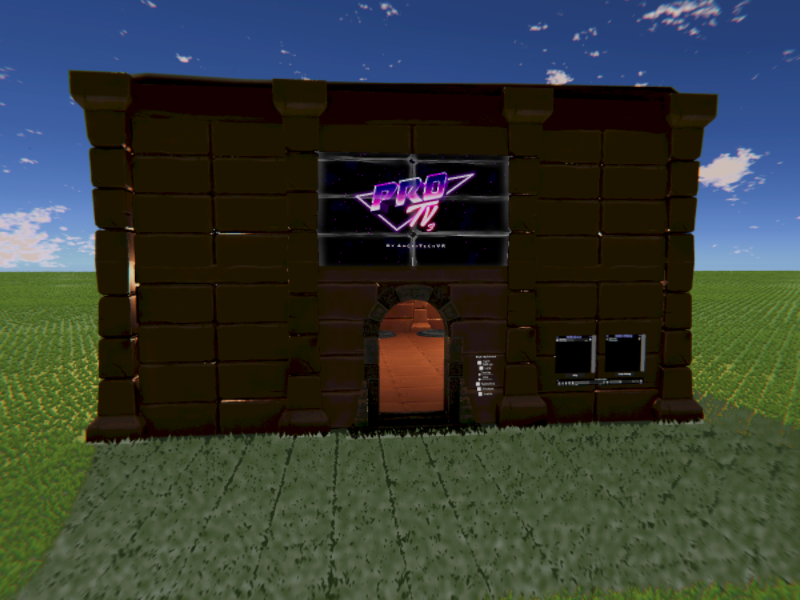
Cozy and Calm
i may have found solution, its only compatible for pc users now mb thats why i can't get into it on mobile and on my meta quest 3 headset as well
bc it has windows symbol on the site world link too
 bleak marten
buoyant schooner
bleak marten
buoyant schooner
that means the world is only PC compatible... Android/Quest users cannot go there
buoyant schooner
aghhh okay
 pliant horizon
i have seen worlds that is over 100mb and being quest friendly, how is that even possible?
mystic heath
how far over 100mb are we talkin' here
pliant horizon
my world is on 167mb and is already optimized as much as i can
but i have seen worlds thatr has been above 200mb and be quest friendly
icy lance
pliant horizon
but i have seen worlds thatr has been above 200mb and be quest friendly
It's a bug if worlds over 200mb can be uploaded to quest, there's no official way of bypassing the 100mb limit.
Have you used tools like vrworldtoolkit to see what's taking up space in your build?
pliant horizon
yeah
mystic heath
this channel is for help with worlds, you'll want to go to #avatar-help or #avatar-quest
 merry python
fail
 nocturne aurora
pliant horizon
i have seen worlds that is over 100mb and being quest friendly, how is that even...
nocturne aurora
pliant horizon
i have seen worlds that is over 100mb and being quest friendly, how is that even...
note that it may be the case that on pc you saw bigger than 100 mb, but the questies often have their own trimmed down versions of worlds that are smaller
for my avatar i uploaded i spent a good amount of time making the quest version and axing clothes and compressing textures until i barely fit in the limit
 analog pollen
I have a question how much would it cost for someone to make me a demon kingdom
hardy bluff
$0 - many thousands. that's exceptionally vague - you might want to more clearly define the project scope and ask in a place where you can commission artists, such as the VRC Traders discord.
beware of scammers around here. Likely about to DM you now.
mystic heath
that question is more concerning if you remove the context
analog pollen
I will hope on a call with who ever is up for helping me so I can tell them everything
nocturne aurora
analog pollen
I will hope on a call with who ever is up for helping me so I can tell them ever...
i recommend setting up a game design document with the full scope of what you are aiming to accomplish if you havent already
 stone bear
Can one of u world creators please make a decent Quest compatible world for the board game Snakes And Ladders? All the actual board versions of it are in PC only worlds and the only Quest one is that stupid 3D climbing one I hate. There used to be a couple worlds that had the board game in them, but, I think they either all got deleted or I just can't find them anymore. Ugh, I just wanna play Snakes And Ladders with my friends. Someone please help me out!
 mint plinth
n vr chat world call Popcorn Palace please take the help me thing out of the lobby
💯
Click to react
👍
Click to react
👎
Click to react
Add Reaction
Edit
Forward
More
[9:30 PM]Saturday, March 21, 2026 9:30 PM
does anyone know how to contact the one who made Popcorn Palace ?
rugged yoke
why?
icy lance
how does one mangle a message so bad?
 wind isle
If you try to highlight multiple messages to copy paste, it copies all that extra info
 fair lark
does anyone know if a shader exist for quest that can do distortion or a fisheye effect or something?
fair lark
or anything close to that and not uv scrolling
zinc bridge
fair lark
does anyone know if a shader exist for quest that can do distortion or a fisheye...
you can’t use any shaders on quest that distort the image, like glass refraction, because the mobile hardware does not support grabpass
atomic merlin
fair lark
does anyone know if a shader exist for quest that can do distortion or a fisheye...
Shaders can't but if you are up for the task then a grabpass can kind of be replicated by adding extra cameras for the eyes, assigning those render textures and then using those render textures in place of where a shader (in code) would want a grabpass, it isn't that easy, but close enough.
fair lark
zinc bridge
you can’t use any shaders on quest that distort the image, like glass refraction...
i see.. then it is what it is 🤷♂️
fair lark
atomic merlin
Shaders can't but if you are up for the task then a grabpass can kind of be repl...
hmm.. i might try if i can't do it i just use uv scrolling 🥲
fair lark
hmm i actually did the camera thing and it works.. but it doubles everything.. like batches verts etc.. so i dont think that i can do it.. because.. my world is already on the edge of performance.. quest 3 is fine but quest 2 lags already ;-;
 pseudo sapphire
fair lark
does anyone know if a shader exist for quest that can do distortion or a fisheye...
pseudo sapphire
fair lark
does anyone know if a shader exist for quest that can do distortion or a fisheye...
If you're looking for a glass shader, I once released a glass shader that uses the scene's reflection probe to fake transparency, it's compatible quest and it can also simulate refraction without grab pass https://github.com/MyroG/MyroP-shader-dump/tree/master/Frosted glass
fair lark
pseudo sapphire
If you're looking for a glass shader, I once released a glass shader that uses t...
nice i will check it out hopefully it can so what i want
fair lark
love the shader sadly it can't do what i want but will definetily be using it on other stuff
 plucky urchin
Can anyone make a world for the movie labyrinth 1986
cedar anchor
plucky urchin
Can anyone make a world for the movie labyrinth 1986
Why don't you, like world dev is fun I think you enjoy it
And it's good to have a goal world in mind too
plucky urchin
I have no pc
I wanna try but i have no pc i wanna try make avatars and world but i have no pc
cedar anchor
plucky urchin
I have no pc
Yea well if you get one I would really recommend it
 hoary dust
any worlds for good quest photography?
 smoky sapphire
 robust gyro
My friend looking for this world can anyone help
I didn't know what channel to really ask this at so sorry
hardy bluff
That last one is a great photo
 low bolt
robust gyro
low bolt
robust gyro
Can you DM
I think I have an I deal 🤝
 vivid gull
Good morning, sorry if it's the wrong channel for that (but I think it's the right place?) I'm looking to explore some worlds compatible with Quest devices that would show what kind of game worlds it is possible to create in VRChat, would anyone have some suggestions for me of the most well made VRChat games?
Basically, I'm from a group on Rec Room, we're looking for a new platform where we could port some projects since RR is shutting down, and for VR, VRChat seems pretty much the only other option.
hollow hornet
vivid gull
Good morning, sorry if it's the wrong channel for that (but I think it's the rig...
Check out some of the top worlds. The in-game browser shows what platforms the worlds are available on.
Prison Escape, Slash Co, Fish
 coarse grail
https://vrchat.com/home/world/wrld_ae001ea3-ed05-42f0-adf2-3d47efd10a77/info currently one of the most popular Quest compatible game worlds on vrchat is this fishing world

[Enjoy a full progression system and catch over 20000+ unique fishǃ ]·[ CATCH ≻ SELL ≻ UPGRADEǃ ]·[Start Fishing and become the strongest Anglerǃ]FISH FISHING
hollow hornet
I am not sure of good eye candy quest worlds (pc here)
Also, I am unfamiliar with how the Rec Room world pipeline works... But you can def port stuff over 👍
vivid gull
Creating in RR is widely different. Basically the main way is to use the maker pen, an in-game tool, to create objects out of various shapes and ribbons. Then you code your in-game functionnality using a graph system (called CV2) that kind of get translated to C# functions. I assume it is similar to Udon Graph. There is no text code over there.
They also have a Unity plugin that let you import custom 3D models and do a little bit more stuff, but 90%+ of the creation was done in-game, with Unity games often viewed as low-effort (mainly because it was commonly used to import unoptomized models from Sketchfab or stuff like that...)
I have yet to properly compare both platforms, but from what I understand, VRChat is a social platform first with tools that let you create games, while Rec Room was a game platform first, with a lot of social stuff on the side. So Rec Room effectively has pre-built weapons (guns, swords, bows, grenades, etc), pre-built holster system, and most importantly, standardized hit boxes
I feel like VRChat offers much more possibilities, but my biggest worry is for things like hit boxes. I used to come around to play the Among US clone years ago, and avatars were sometimes an issue (people would cheat by using super small or nearly invisible avatars, or giant avatars that would let them see imposters hiding in the ventilation ducts).
On RR, all avatars were nearly the same size (you could adjust the body weight a little bit, but the hit box would remain the same)
atomic merlin
vivid gull
On RR, all avatars were nearly the same size (you could adjust the body weight a...
With the scaling system we were given control over the size of avatars, you could add a toggle to the game settings to force everyone to be the same size (with some avatars you might need to enforce size whenever the user changes avatar though, I know some avatars can go below the platform minimum size, not sure if they always bypass it).
Since worlds have no access to the avatars of people you are forced to use a standardized collider, some worlds make it transparent around the player (only for other players) or just settle for an invisible one.
It is also possible to force swap someone to an avatar, but I would highly recommend not doing that by default, makes sense for serious games, but VRChat is a very avatar focused platform and stripping people of that will make people not want to be in your world.
The only real issue VRChat has when it comes to games is honestly latency, people come from all over the world and with there being no matchmaking or dedicated servers that the game logic runs on you either have to make things client side or designate a player as server side, but with the latter it would mean a noticeable delay between actions and them being carried out.
vivid gull
Very interesting, that might work better than I expected. And it's not about doing a super competitive and fair game either, just something so we can have a little bit of fun. RR itself wasn't build in a super competitive and stable and fair platform either, so that's fine.
Thank you, really, that's a much more in depth answer than I was hoping!
hollow hornet
Latency and also persistence data (I am happy we have this data layer, it is just easily abusable by bad actors)
Also, in regards to the avatar scaling, hit boxes etc
Hitboxes you'll need to make for whatever purpose, and I do believe we will eventually be getting deeper controls to limit what players can and can't do.
Fish currently is "splitting" the community over them getting the ability to disable flying avatars. I just believe VRChat is testing it with Fish first before rolling it, in a more refined form to us. So hopefully we will be getting easier ways to control what players can and can't do.
Interesting, thank you for sharing about RR and welcome to VRC. This information will help us help more RR refugees
And also great point. VRC is a social game first so messing with ppls avatars may ruin their experience
Only games that I see with avatar changes are things like among us and that world that's like crowd sources mad libs (I feel so bad not remembering the name cause its a great world), but it's like an optional feature. Same thing with murder 4. Jar has a ton of avis made to fit the vibe of the world but doesn't force the player to use them
I think it's audience anarchy
vivid gull
Yeah, I don't want to force an avatar change either. Maybe some kind of min and max size would be it, and a uniform capsule size for the body + a sphere for the head (headshot detection!) if that's how it has to be done. I don't know much about that, RR handled all that stuff. Got a bit of learning/trial and error to do.
Latency was also an issue on RR. We played with people from all around the world. Mostly the USA, but I'm in Canada, we have friends in New Zealand, some players are from Europe, others from Australia and Japan... so yeah it caused all kind of weird issues sometimes! But it's fine really, again it was never meant as a competitive thing.
The host leaving also caused issues, that's something we had to deal with as well. Typically the game would automatically select an host depending on latency between players or something. PC players were also more likely to become host automatically.
Really, a lot of the logic seems similar.
hollow hornet
Yeah you will run into similar issues here so you'll feel right at home 😎
 buoyant hill
vivid gull
Good morning, sorry if it's the wrong channel for that (but I think it's the rig...
buoyant hill
vivid gull
Good morning, sorry if it's the wrong channel for that (but I think it's the rig...
I'm not too familiar with the limitations of RR, but afaik VRC allows far more customizability/possibilities, just at the cost of not having as many pre-built or standardized systems. To make interactive systems like you talked about in another message (holsters, weapons, etc) you often have to create your own systems from scratch, so it's a lot more work to get the foundation of it set up, but you get a lot more creative control. My guess is that nearly anything that's possible in RR is likely possible in VRC as well.
buoyant hill
vivid gull
Good morning, sorry if it's the wrong channel for that (but I think it's the rig...
Here are a bunch of VRC game worlds that I think showcase the variety of what can be done:
https://vrchat.com/home/world/wrld_14750dd6-26a1-4edb-ae67-cac5bcd9ed6a/info
https://vrchat.com/home/world/wrld_f557959f-6fde-4164-be36-31f1d40bb9a5/info
https://vrchat.com/home/world/wrld_c16e4dee-d149-4116-adbc-16bc30b664b0/info
https://vrchat.com/home/world/wrld_83f5544b-66ba-4baf-a5aa-4fecc5b6b780/info
https://vrchat.com/home/world/wrld_c101c803-7d1a-42d8-9a5e-00a0ccfb2b2f/info
https://vrchat.com/home/world/wrld_42b399f6-08c2-4155-a293-9b26bd337e4e/info
https://vrchat.com/home/world/wrld_f059e174-249c-4aa9-b1f2-3873ed9dfd89/info
https://vrchat.com/home/world/wrld_df2776a3-8c84-45e3-bbf1-30ac8422911b/info
zombie survival definitely feels like a very RecRoom style game (2nd link)
you (and your friends if you choose) make your way through your chosen level by killing zombies and unlocking new areas, weapons, power ups, and getting ammo. Each wave of zombies gets harder + there are a few boss waves, so the goal is to last as many rounds as possible! Pretty fun with a group of friends :D
you can also repair the barricades to keep zombies out and earn money to unlock things around the map
 final cypress
Does anyone know a good world with a pool table I’m struggling due to the YouTube world not having one (am I aloud to ask that here-)
hollow hornet
final cypress
Does anyone know a good world with a pool table I’m struggling due to the YouTub...
Pool Parlor. The pool table asset is also public so... Most popular social hangout spots have at least one table
final cypress
Alr thank you I mostly play games or watch stuff with friends on there so I don’t know many hangout spots lol
hollow hornet
Yeah browse some of the most popular worlds. If you are a big worried about the big lobbies, you can open a private world to just see.
IK in particular with the pool table community, there are a few variants of table prefabs
plucky urchin
cedar anchor
Yea well if you get one I would really recommend it
Same here man i want to make avatars and worlds but i cant sadly
hollow hornet
Maybe a public library? Not sure
mystic heath
That would take some dedication
Just keep your world project on a flash drive and keep it with you, load it up into Unity on whatever PC you can get ahold of
 lyric void
I live big yahu
 shrewd furnace

 whole olive
lyric void
I live big yahu
whole olive
lyric void
I live big yahu
I love you little yahu
mystic heath
You can disable scaling completely; if you can still match eye height, then scaling isn't completely disabled
And at least in Udon they do specify it's eye height, not avatar height.
zinc bridge
you have to enable “always enforce height” to make sure that any time a player changes their height, it gets reset to the max that you set
in the default udon graph that comes with the VRCWorld prefab, what it does is sets the user’s height back to the maximum eye height, if it’s above the maximum height, in the OnAvatarEyeHeightChanged method
 lyric pine
are normal people getting the quest limit increase for worlds that fish! is claiming they are getting
mystic heath
what limit increase? Fish! is currently sitting at 97.76 MB
hollow hornet
Fish is also like ☠️ using some of the most pixelated graphics (it fits it, I personally like them) to milk as much space as they can
atomic merlin
mystic heath
what limit increase? Fish! is currently sitting at 97.76 MB
#quest-development message
They got a screenshot, doesn't mean much, but I guess if true VRChat is testing whether 150MB is doable on mobile.
hollow hornet
Sounds like VRC is limit testing with the most pop game world rn. We will eventually get it I imagine
unless they find out quests are burning directly to the users face and they cant remove them or something idk
 tranquil tangle
Does anyone have any good mmd quest worlds
Idc bout no audio link i jus wanna do mmd
 sweet glen
is this normal?
 rugged yoke
no it is not
hardy bluff
hahaha I love that
sweet glen
it
wont let me upload the gotdame world????
either way, windows

or quest
or the secret third option
it's
"slow down"
ok
"slow downer"
rugged yoke
click and see the details
sweet glen
completely empty world with 2 particle systems, a plushy, and a video player, btw.
 rugged yoke
does it show more details when you double click the error message?
 rugged yoke
try restart unity

 rugged yoke
sweet glen
naur
rugged yoke
sweet glen
naur
can you post the full message of this?
 rugged yoke
what does the full message say here?
 sweet glen
 rugged yoke
in the SDK panel try log out and log in again
have you uploaded another world in the last 7 days?
sweet glen
"ahaha.. again" aah message
 sweet glen
rugged yoke
have you uploaded another world in the last 7 days?
sweet glen
rugged yoke
have you uploaded another world in the last 7 days?
nope. just this one.
rugged yoke
in the VRC World Descriptor object does it have a blueprint id?
sweet glen
yeah it does
sweet glen
i dont have any red errors on my alerts page btw. just the base console
somehow it was that???
huhh???
thank youu
 kind lark
Hello
 scenic crescent
helloo
Is there a list of shaders that work for quest users in worlds ?
i know that standard and particle shaders (built in ones at least) work on quest, im wondering what else does
rugged yoke
I think quest worlds can use normal shaders and it will run, just a matter of performance
Btw if you go to vrc light volume github there is a list of good shaders
scenic crescent
I dont think all of them work 🤔
I havent tested in forever but i remember autodesk interactive and vrchat panosphere shaders not working, idk i could be wrong
And i cant find a list of quest compatible shaders on the light volume github-
Theres only light volume compatible shaders, which makes sense
rugged yoke
I mean most of the listed ones are the better ones with good enough performance for quest. I dont think a comprehensive list of shaders exist let alone a list of quest compatible ones
hardy bluff
You don't get grabpass on mobile. Otherwise, no, no official list (that I have seen)
zinc bridge
scenic crescent
I dont think all of them work 🤔
I havent tested in forever but i remember auto...
any shaders work in quest worlds as long as they dont use a grabpass/depth pass
the ones you mentioned not working sounds like shaders you cant use on quest avatars
the rules for worlds is different
atomic merlin
zinc bridge
any shaders work in quest worlds as long as they dont use a grabpass/depth pass
Depth actually works now if you force enable depth using the udon method, depth is inverted though I believe.
scenic crescent
zinc bridge
any shaders work in quest worlds as long as they dont use a grabpass/depth pass
Does that mean i can make something in shadergraph and quest users can see it ? Or is it still limited to built in shaders?
Also is there a way to know what uses grabpass/depthpass ?
Thanks for helping btw, i would have never found that out myself xwx
atomic merlin
scenic crescent
Does that mean i can make something in shadergraph and quest users can see it ? ...
Shadergraph is usable, you just need this different shader build target https://github.com/z3y/ShaderGraphVRC
And worlds have never been limited to just the built in shaders.
Grabpass shaders are commonly identified by being see-through and blurring or morphing the image behind it, if you see something morphing the shape of an image or blur in general it is very likely grabpasses.
Depth shaders are a bit harder to know just from looking at them, but if they change behavior based on distance then it is most likely using depth (but as said, you can use depth in Quest worlds nowadays, you just need the simplest Udon graph script to enable it on start)
GitHub
Shader Graph target for the Unity built-in pipeline - z3y/ShaderGraphVRC
scenic crescent
Thank you guys so so much
 narrow juniper
Hello, I need help with VRChat world upload permissions.
I created a VRChat account and logged into the VRChat SDK in Unity, but when I try to upload my world, I get this
error:
"Current User does not have permissions to build and upload worlds"
I usually played through Steam before, but now I am using a VRChat account in the SDK. I have already logged into the
game with this account as well.
Could you please tell me:
- How I can check my current Trust Rank
- What exact rank I need to upload a private world
- What exact rank I need to publish a world publicly
- If there is anything specific I need to do to enable upload permissions on this account
Thank you.
 mystic heath
- you can see your current Trust Rank on your own user profile
- you need at least New User (blue) to upload private worlds, and
- you need User (green) rank to publish worlds to public
- otherwise, you don't need anything else account-wise

 hardy bluff
those are warnings. As for that error, it's pretty useless alone. Are there others in the console? Investigate the first 1-3.
 errant moon
anyone know how to make flashlights that dont lag too much?
buoyant hill
errant moon
anyone know how to make flashlights that dont lag too much?
depends what your goal with them is. If you need a realtime light, I'm not totally sure what the best way to go about it would be, BUT if you don't actually need the effects of a realtime light, there are ways to fake it, like an additive shader on a cone mesh
also if you do opt for a light, I suggest using a cookie texture to make it look more realistic
errant moon
buoyant hill
depends what your goal with them is. If you need a realtime light, I'm not total...
making a pvp map thats in the dark
i am using fake lights for the muzzle flashes but they dont effect players
buoyant hill
errant moon
making a pvp map thats in the dark
well I guess the question is how realistic do you need the effect of the flashlight to be? A light source is the most realistic option, but if your world is more cartoon-styled, an additive shader could work as well
I'm not sure if this is possible or not also, but if there will be a lot of players with flashlights, see if you can cull the flashlights with occlusion culling, so you aren't renderering too many at once
there are worlds that pull this off very well, like haunted asylum
buoyant hill
errant moon
anyone know how to make flashlights that dont lag too much?
oh definitely don't have a lot of shadow casters in your world
that will help with performance

 buoyant hill
oh okay, so the world itself doesn't have a lot of objects?
errant moon
every room/tunnel is seprate because i was having baking problems erlier with lighting
also entire map is only 9k vert
buoyant hill
I would turn off shadows actually on the flashlights entirely
buoyant hill
that way avatars won't cast shadows
errant moon
buoyant hill
that way avatars won't cast shadows
ok
buoyant hill
also like i said earlier, not a performance thing, but you should add a cookie texture
that's a texture that blocks out some parts of the light (like the bat signal) and can make it appear realistic
it's REALLY good for making realistic flashlights
errant moon
buoyant hill
also like i said earlier, not a performance thing, but you should add a cookie t...
you have one?
buoyant hill

to give you an example, here's the google image results for flashlight cookie texture
buoyant hill
errant moon
you have one?
i do not, but you can always make your own or find one that has a free license
errant moon
k
buoyant hill
 errant moon
buoyant hill
i do not, but you can always make your own or find one that has a free license
errant moon
buoyant hill
i do not, but you can always make your own or find one that has a free license
tf2 works because its opensourse now right?
buoyant hill
this is how it looks when applied to the light. It really feels like a realy flashlight imo :D
buoyant hill
errant moon
tf2 works because its opensourse now right?
afaik tf2 is fine for non-commercial purposes
errant moon
ok
this is what i used and got box lighting


do i need to invert for unity?
got it fixed needed to set alfa from grey scale
thx btw
 tall sapphire
ok, so i ported my world to quest. I have no idea what im doing lol. that was the glitchiest way to view my world i have ever seen. Does anybody have any suggestions? Specifically i think its the leaves messing with it bc i used shader graph for them but idk. ive also got some weird LOD visual where i can see everything focusing in a weird patch in my face.

 crimson glacier
hardy bluff
those are warnings. As for that error, it's pretty useless alone. Are there ot...
crimson glacier
hardy bluff
those are warnings. As for that error, it's pretty useless alone. Are there ot...
These console messages?

it looks like it's the first 2 errors that cascade into the last 4
hardy bluff
crimson glacier
These console messages?
yep, no idea what "SimpleLightProbePlacer" is, but that's where the problem is
crimson glacier
hardy bluff
yep, no idea what "SimpleLightProbePlacer" is, but that's where the problem is
yeah, deleted it and stuff works, apparently its deprecated
hardy bluff
makes sense
 cedar plover
Hey listen can you unban my account you recently banned somebody named Bob which was my account
hardy bluff
surely this is the wrong channel for that
cedar plover
What channel do I go to
hardy bluff
#discord-tickets if you're talking about discord, otherwise vrchat support
click on "server guide" at the top, it's got stuff like this listed. not sure what that looks like on mobile though.
 hardy bluff
be aware that can be considered ban evasion
cedar plover
Ok? Mind if I add you
hardy bluff
yes
 ashen summit
does anyone know how to make/use a glass texture? im trying to make some cups that are see through but i dont really know how to do so, or get it to work, and looking it up hasnt helped me much. im using Blender for my model making and such if that helps
hardy bluff
alpha channel for see-through, IOR for refractions, decrease roughness for shiny, increase metallic for a surface shine. or use a glass shader.
ashen summit
thanks
 fallow coral
what things do i need to add to creator companion for mp making
assuming im making the map mesh in blender and carrying it over to unity
scenic crescent
VRWorld toolkit is handy for a bunch of stuff
i dont think there is anything specifically needed
hollow hornet
fallow coral
assuming im making the map mesh in blender and carrying it over to unity
I dont use anything special. I just get my blender files setup and get used to the hotkeys. Dont use the raw .blend file in your world. Export as .fbx.
I am not sure if its just me doing something wrong but I often also export it with
- Visible Objects
- Apply Transform (this is the one I am iffy if I truly need)
Visible objects so you can keep copies of your a collection of disables meshes incase you royally screw up. (or ur maps blueprint etc)
 hardy bluff
Apply Scalings = FBX All
hollow hornet
But I guess let me think...
You can dip your toes into shaders.
Mochies or Orels (?)
VRC Shader Graph
VRC Chips for easy points (great thing you should add to your worlds https://xtlcdn.github.io/vpm/
Really depends on how far you wanna dig your hole to headaches 💀
hollow hornet
hardy bluff
Apply Scalings = FBX All
Idk what that means?
hardy bluff
makes your objects in Unity the same scale as in blender, rather than 100x
hardy bluff
Also if you have an armature, you may wish to uncheck the option for adding leaf bones, unless you actually use those.
hardy bluff
wait, should I be getting paid?
hollow hornet
 fallow coral
hardy bluff
wait, should I be getting paid?
fallow coral
hardy bluff
wait, should I be getting paid?
Exposure is the greatest compensation uwu
Got a 5 tweet raid last month and a shout out ij a YouTube video even. Now I'll never have to worry bout bills again
 narrow oriole
Nothing loading pictures Avis or worlds
 livid granite
Chat I've got some problems and one of them is I have no idea what thses mean
 icy lance
livid granite
Chat I've got some problems and one of them is I have no idea what thses mean
icy lance
livid granite
Chat I've got some problems and one of them is I have no idea what thses mean
Is this a prefab world you bought & have you uploaded it before?
livid granite
icy lance
Is this a prefab world you bought & have you uploaded it before?
No but I did upload a test yesterday
icy lance
livid granite
No but I did upload a test yesterday
I'd recommend signing in and out of the SDK, if that doesn't work, go to your vrcworld object, detach the ID, and attach the right one in the worlds tab of the sdk
livid granite
icy lance
I'd recommend signing in and out of the SDK, if that doesn't work, go to your vr...
I did do that, and it solved that error. I am now concerned about the other two.
 sly flax
livid granite
icy lance
you should be good
sly flax
livid granite
icy lance
you should be good
I was in fact not good. I'll give a shot to re-installing the sdk maybe?

 rare carbon
livid granite
I was in fact not good. I'll give a shot to re-installing the sdk maybe?
rare carbon
livid granite
I was in fact not good. I'll give a shot to re-installing the sdk maybe?
maybe try "fetching" the data from the vrchat server and try uploading again.
another thing is making sure that your Vrchat world's blueprint id matches the world that you're trying to update.

 livid granite
rare carbon
maybe try "fetching" the data from the vrchat server and try uploading again.
a...
livid granite
rare carbon
maybe try "fetching" the data from the vrchat server and try uploading again.
a...
Thanks I’ll take a look when I can
 gusty elk
There's a world I'm trying to remember. It was a hangout world, and the primary factors I remember about the world is that:
- it had a modern-esque design (kind of a chill abstract modern like Sovren)
- it had 2 lockable "hotel rooms," and the theme of the two rooms was blue and orange
- there was a panel that allowed users to mark themselves according to their mood for chat
- there were 4 floors to the place (technically 3 since the bottom one was just a small "entrance" to the place)
- there was a large pool on the second floor of the floors.
Anyone know the world I'm talking about? I really want to find it again.
mystic heath
 gusty elk
I can provide more details on it. If I knew the name, I wouldn't be asking 😭😭😭
it also has tablets all over the place like Sovren
 fossil temple
Goals 🏋:
 merry wraith
That's still pretty sweet. Still able to chill with some close friends in a comfy space on the go.
 lime moss
I kinda like it. pico 8 of vrchat :P
merry wraith
XD
lime moss
(I like it as long as we always have the unlimited power PC version that is!)
 slim linden

 hexed hill
If I optimized everything else like crazy, do you think it would be possible to get 1 real time spotlight with hard shadows? My entire horror map is based around shadow monsters.
 zenith ember
Maybe so? That sounds like something you'd need to test.
We don't restrict lights in worlds aside from the Unity quality settings stuff.
hexed hill
interesting, alright
slim linden
I think this may work on Quest despite being a barely optimized world for PC.
https://vrchat.com/home/launch?worldId=wrld_c97766a2-62fb-4310-949e-c92310b9200b

World's first VR arm wrestling arena (kind of)․ Please read the instructions firstǃ
 wooden lichen
what will happen to mirrors in quest?
 brave abyss
Glad I make my worlds a certain way... I won't have to much trouble
 static rose
@wooden lichen what if there no mirrors lol
 pearl nimbus
Any way to make the build automatic for both platforms at once? You can choose the platform for the asset bundles afaik. Switching the build target to android and back gonna be quote a hassle as you need to wait for all the assets to be reimported
 idle mantle
We need a mirror. I need to see my cute avatar 😉
pearl nimbus
@idle mantle your cute low poly avatar 😉
idle mantle
5k poly is a quite challenging for me, but I’ll do it!
static rose
@idle mantle going be stiff hair lol
 shrewd anvil
Everyone will get a haircut
idle mantle
I like short hair, so it’s ok not having DBs
idle mantle
Sad thing is that I can’t use my custom Shader. My Shader is quite common in Japanese Community, so I’m really sorry to them.
 crimson canopy
You can bake a lot of physics into animations, particularly tail stuff
 warped dagger
@pearl nimbus one work around right now is to duplicate your Unity project once your art / layout is finalized and switch one platform to Android. then you can sync prefabs with version control or just by exporting unity pacakges (so you don't pay the reimport time cost every time)
warped dagger
as long as you're just updating SDK components and building to the same ID, you should be fine
pearl nimbus
I see but it's still far from being easy for the average world creator imo. I totally understand that but I'd really love to see it as a more automatic process
 raven dagger
Yeah I agree
The other option is setting up a Caching Server for the assets to lessen the burden of asset reimport
 timber vault
the current answer is no
 chrome cedar
so with the limits of VRChat worlds for Oculus Quest. (file size, 3 audio sources or less) i guess that means that there might not be MMD dance worlds for Quest, right?
 alpine kernel
Just so you're aware, 3 audio sources does not equal 3 audio clips. You can use a button to call audio.playoneshot on an audio source, and play any sound you want. One audio source can play many different overlapping sounds at once.
 plain moth
the file size recommendations (20mb) will make it hard to have high quality music. you will probably need to mess with ogg settings and use mono and a low sample rate to optimize music for quest but it might not be as fun as the desktop version of mmd dance stage. Or deal with sync video players (do those work on quest?)
Also the dance animations themselves take some space
 cinder isle
Will video players be supported?
 nocturne hare
the current specs say that in-world cameras are disabled, but nothing about videos....
I would just try it tbh
cinder isle
Will have to wait until I get a quest lol
nocturne hare
you could give me a world id and I can test on go
cinder isle
It'll take a while for me to fix the map for mobile anyway
Fortunately I meet most of the requirements already. Just gotta disable video emissions cause that will tank quest for sure.
nocturne hare
Any way for translucent shaders?
cinder isle
No post processing or custom shaders means I can't dim the map though, oh well
nocturne hare
I really need transparency
cinder isle
wouldnt standard transparent work?
nocturne hare
Im trying to use only mobile shaders
I want dat perf
using alpha blend particle shaders hacked up seems to work
oh, oh god, OH GOD
I clicked switch platform
but get this, I made this world in the same project as my avatar imports.......
time to wait 6 hours I guess...
 civic jetty
f

 maiden flower
Wooo! I shrunk my gun/sword dungeon world from 120MB to 17MB! Now I need to figure out how to combine all the audio sources
maiden flower
I just didn't realize how much bloat was in my world
merry wraith
My good friend @keen valve has been kicking ass on doing a "HD" remake of Subcom, which with great coincidence sets us up nicely to optimize for quest. Excited to test this on the Go build. Jariath is an absolute champ when it comes to this stuff.
nocturne hare
I need to find a better way to take and post screenshots here, anyway, you can barely see it through all the layers of conversion technology, but there's a weird glitchy seam, and the texture for the skybox shader is clamped.
https://utau.needs-to-s.top/7yeNfmj.png oh actually, it shows in the editor if I click play.

 dry crag
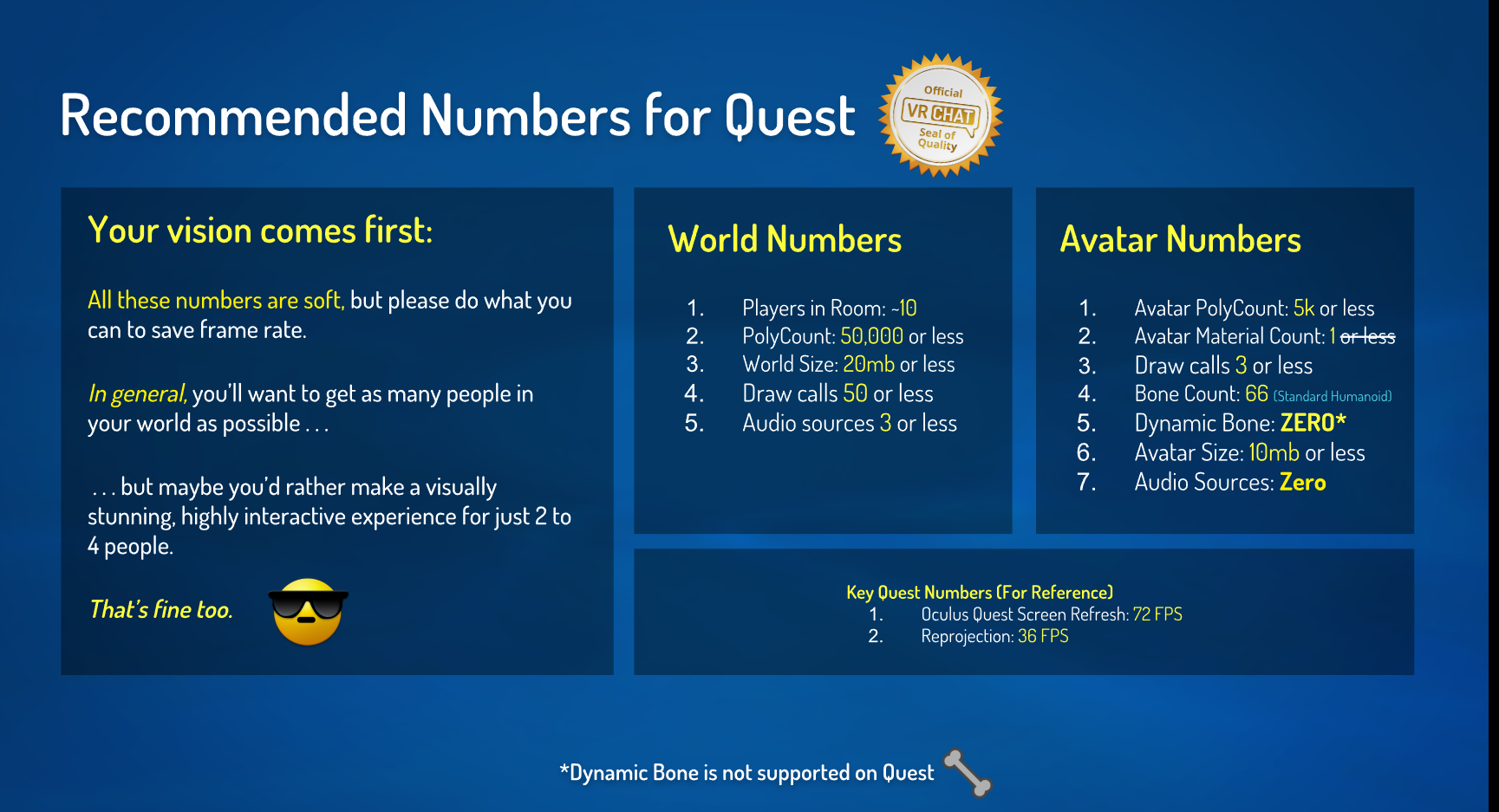
so what exactly is the limit to worlds for the quest now
like the size of the world to become accessible to quest


 brave abyss
Got it! And works in game 😄
plain moth
Wait is no mirrors a real restriction? What about allowing mirrors but only local players? The mirror is probably the main thing that got me excited as a new vrchat player and it's important to see your own character at least
If you're worried about worlds forgetting to uncheck layers and not testing, you can enforce only having the MirrorReflection layer enabled on quest and only one mirror allowed. But basic mirror support is well worth whatever you can do to allow it.
brave abyss
i have mirrors working but go has them limited
plain moth
ah ok I'm sorry I misunderstood the limits. So mirrors are a thing yay!
static rose
yea mirror would bog down snapdragon
them processor compare to window xp
pc
or less
maiden flower
So the world requirements in the quest info, are they hard limits? Like i cannot upload a world over 20 mb? Or are they suggestions based on the specs of the quest?
crimson canopy
They're only suggestions for now
brave abyss
There is only so much RAM they aren't PCs not to mention harddrive space for caching assets. I'd try to go as low as you can
maiden flower
I am at 17mb right now from 120mb lol. I was worried how much more I can put in and thought I would be stopped with 20.01 mb
Also, any idea why audio sources are an issue? People can work with 3 sources but i wonder how it burdens the quest
Like i have to make sound effects global than localize it to the weapon
hexed hill
I made my quest world, it works on the Go build
The material count is the hardest to meet, my map ended up being 5, 6 if you count the skybox.

GitHub
Texture atlas creator for Unity. Contribute to maxartz15/MA_TextureAtlasser development by creating an account on GitHub.
I just found this open source texture atlas generator
gunna try it tonight on my map
nocturne hare
you could try https://vrcat.club/threads/material-combiner-blender-addon-2-0-3-2.2255/ on a world

VRCat: Community-Run VRChat Forums
An addon that allows to get lower draw calls by combining textures without quality loss and avoiding the problem of uv larger 0-1 bounds.
If you like...
hexed hill
I don't use blender, I'm a Maya user
nocturne hare
oh
hexed hill
I'd rather let unity handle all of this anyways, I like my workflow of texturing each asset individually.
with this asset it seems you can be more flexible with the atlas, going back and adding more, adjusting old ones
i hope it works good, itll make things so much easier.
 mint egret
How small will most worlds be for the quest for 20mb
coarse grail
considering there's only 10 people and 20 megabytes probably not terribly big unless you're making a GameCube game fidelity
 lapis rapids
It would be nice to see some plugins made for maya but it seems very few people use maya. In my opinion maya is easier to use and better in some ways
brave abyss
The timing on that Announcement LOL
i was about to upload the Quest version of this map and submit it...
crimson canopy
Rip
brave abyss
it's been on labs for weeks so maybe it'll get auto public
crimson canopy
With how hard it is to actually browse labs right now, a lot of worlds will probably just get forgotten tbh
brave abyss
part of why it got released i'd imagine.
and cause with quest on the door they gotta focus on that atm
crimson canopy
I hope to see more different worlds become popular rather than the ones that are currently topping the charts 24/7
Yeah
 sleek silo
so i take it the best shader to be using in worlds for the quest is gonna be mobile> unlit(supports lightmap)?
sleek silo
unlit(supports lightmap) does what it says, it supports lightmaps
so in a world where you don't anticipate having specular highlights on anything it would seem like the logical choice for optimization
right?
i guess i'd have to see just how much shenanigans the quest can handle, i have a world on pc that has no realtime lights at all and uses reflection probes to fake it all
sleek silo
how many physics pickups would be okay for the quest?
sleek silo
alright my first oculus quest world has been uploaded. wew
sleek silo
 vital lance
direct advertising company burger king? https://www.bk.com/
BURGER KING®
sleek silo
lol
anyway, i don't have access to the oculus go build yet but it sure does run well on the pc version when it has no realtime lights and only 1 material
also a massive achievement for me, only 1 draw call apparently
ah nvm, 26 draw calls
still noice
vital lance
Are you sure you can use a registered trademark TM & Copyright 2018 Burger King Corporation ?
sleek silo
i guess i'll change the texture then mr. burger king ceo
vital lance
change one letter
mint egret
Burger ing
sleek silo
i'll do you one better
mint egret
Ha
vital lance
👍
sleek silo
"Borgar Joint, have stuff some way"
 untold tulip
@sleek silo will that be on desktop as well?
untold tulip
Ah awesome, whats the name? Ive been waiting for fast food maps
sleek silo
burger joint
untold tulip
Tysm
 hexed moss
Burger Joint. Perfect.
sleek silo
got another world made today, too bad i can't put it in community labs for another week.
this one sits at 34 drawcalls, still within the limits.
https://vrchat.com/home/launch?worldId=wrld_d08a1404-43ee-4efd-b622-49e49dc42dc8 link if anyone wants to check it out on their oculus go or what have you

The Lounge
 timber plover
how can people with oculus go open links?
sleek silo
i guess they can't, well, it is crossplat so somebody could follow the link on pc and invite a go user
mint egret
Will the Great Pug be on quest or does no one know yet
sleek silo
owlboy has been posting in here so i would assume he's at least gonna try
mint egret
Ok thanks
crimson canopy
From his messages in here I think he's definitely trying to port it to Quest
For a somewhat large world like the Pug that's gonna be a challenge
Probably has to use opaque glasses and bottles too, if he even wants to keep the pickups
sleek silo
i haven't even bothered with pickups in my worlds so far because i'm not sure how many the quest can handle
and i don't think the physical size of the pug will be a big issue because i think i recall him saying he had the whole map using one material
nocturne hare
best way to check worlds on go
as long as theyre crossplat, join alone on your own acc and add to your favorites
brave abyss
Is there a good way to see what asset in a scene is causing it to be so bloated?
I'm getting 50FPs on oculus go in my world but thing is the world was 20mb. yet is much smaller than my 8mb airship. I might be missing a texture somewhere that needs compressed or is to high res but wondering if there was a faster way to find it
 storm matrix
after uploading/testing you can go to the console vie w in unity and there will be a menu button that lets you open the editor log
then after it's open search for "customscene.vrcw" and it'll show a breakdown of the file size
it won't show what specific files are how big, but it'll show how much a specific category is taking up (textures, meshes, audio, etc.)
lightmaps can take up a decent amount of space so be wary of that
hexed hill
Seems like the Go is forcibly downrezzing textures? Is that a unity thing or a VRChat thing? Any way to bypass it?
crimson canopy
That may be a build settings thing in Unity
You may be able to override it per-platform by clicking on the texture and clicking on the Android icon
 fleet condor
Still working on getting Seurat meshes to work in VRChat without using custom shaders-- good progress so far! I took Unity's The Blacksmith tech demo outdoor scene and brought it from from 10.1M tris and 1832 draw calls, down to just 48.2k tris, 3 draw calls, and one material. I've still got a bit of work to do-- it's a bit stretchier than I'd like because I set the capture box on this one too large-- but overall I think I can have a playable world within the next few days.
Admittedly, Seurat is cheating a little bit because the whole world isn't playable-- for this one, there's a small 1.5m x 3m "safe zone" in the middle where the capture was taken. Exit that area and things kind of explode.
plain moth
I wonder if you are going to get PC users escaping the quest-safe part of the world with quest users unable to follow, or will you be forced to confine everyone to a safe area of the world.
fleet condor
Right now, my focus is just trying to see how far I can stretch that "safe zone". Seurat was designed for stationary VR where a user really can't move more than 1m in any direction. I'd like to stretch that safe zone to 5m x 5m, where you can reasonably start to fit a group of people in without anyone being too crowded. If I can get there, I think I'll use the Seurat mesh and bounds for both Quest and PC, with PC maybe getting a higher resolution atlas and more detailed mesh, plus post processing. If I can't get things there, then I might do just that-- have the Quest version of the world be a Seurat mesh with a smaller playable space, while the PC version gets the original scene.
sleek silo
I wonder how well seurat handles indoor scenes
fleet condor
I tried it with the Adam Interior Environment with pretty decent results, but I wasn't happy with the final output. I think if I gave it another try, though, after what I've learned with the Blacksmith demo, I could get something that looks really nice.
The big issue with interior environments and Seurat is that the capture volume, which is the "centre" of the mesh and where players will be, can't contain any geometry, so you need an interior environment with a large area that has nothing in it.
hexed hill
For some reason nobody can access the desktop version of my world, only the quest version works
I don't know why.
chrome cedar
@hexed hill i think you made it Quest-Only
chrome cedar
oh
hexed hill
and I had a PC version working until I updated it
Is some bug? I'm confused
It seems to download the world, but then it stops and fails
and the download size is the exact same as the quest version, so i think its downloading the quest version and trying to load it
my world is "The Duck Pond"
nobody else is able to access it, my friends tried
sleek silo
can you post a playable link?
hexed hill

Made for the Quest․
sleek silo
well i tried
it acted like it was gonna load and then instantly booted me back to home
hexed hill
yep, same here
 main verge
hey😃
hexed hill
Wow, I can't even test the map
oh shit, might have been something on my end. the texture atlasing i was doing might have been messing with things
and it was!
got it working! great
plain moth
Are you using the same project for both? I think the crunch compression formats are different on quest (ETC2) and windows which can use DXT5 or BC7 texture compression
hexed hill
it was totally a texture atlasing issue, i don't know why
this texture atlas addon i got was failing for some reason and it affected vrc
plain moth
If you install any .cs scripts not in the Editor folder, it can affect upload
cinder isle
has anyone checked if video players are supported?
 serene lintel
@fleet condor You should be able to bake the seurat capture with HDR, generate the seurat atlas and then apply tonemapping and exposure in photo-editing software.
@plain moth You can set the compression settings for Standalone and Android separately, there are little icons in the texture import window for each.
 foggy glen
how can I fix that?
 silver shard
probably some scripts of assets and so on in some folders you have to delete
fleet condor
Anyone have any idea why a mesh won't render at all in Unity on a camera that uses the forward rendering mode? I'm trying to take a seurat capture of the Adam Exterior Environment, but the camera that renders the depth pass uses a forward rendering mode, and from what I've tested the ground in that scene gets culled completely on cameras that use forward rendering, so I'm not getting depth data for it and my capture doesn't work out. Feels like I'm missing something obvious, but I can't figure out what's causing it.
 cerulean bane
My Worlds are not showing up in the VRC Counter in unity anymore and i reinported the vrcsdk already, anyone an idea?
 primal nimbus
I've just uploaded an Android build for Karaoke Central (nothing works because triggers don't work until videos download in the recent update, and videos don't work)
foggy glen
i tried to upload a world but for some reason the whole thing with where you have to put the name and description in it isnt showing up. Is there a way to fix that?
serene lintel
@fleet condor The Adam exterior uses some custom shaders that don't seem to have proper forward rendering passes. I tried doing seurat captures in it as well a while ago and ran into similar issues.
sleek silo
@primal nimbus cool i'm gonna check it out right now
primal nimbus
@sleek silo awesome, let me know how you find it. i'm only getting around ~35fps
sleek silo
same, did you atlas your materials?
sleek silo
nice
primal nimbus
mobile shaders, vertexlit
sleek silo
file size is pretty large though
primal nimbus
still reasonable
sleek silo
i mean your world is like a third the size of the base game
primal nimbus
44mb
sleek silo
anyway, now that i have access to the go build i'm happy to see that both of my new worlds get a solid 60 fps on the go
sleek silo
so physics pickups seem to cause a pretty decent performance drop. now i just need to find out exactly how many is too many.
seems like you can have about 5-7 without too much trouble
fleet condor
@serene lintel Cheers-- thanks for the tip. This is going to sound dumb, but I just kind of assumed that the terrain was going to be using the Standard shader like everything else in the scene, and hadn't even thought about that. I was expecting it to be an obscure Occlusion Culling bug or something.
I managed to get a capture of the scene by removing the shader on the terrain entirely and re-taking the capture, then merging the color data from my first pass with the depth data from my second.
 zealous epoch
Does anyone know how to make, when someone Press a button the sounds plays and everyone Can hear it
merry wraith
Has anyone had any success visiting a Quest world on PC using the beta? Every time I try to visit my world or invite someone it just boots us back to Home?
untold tulip
@merry wraith from what ive heard you cant view worlds that only have mobile versions on a pc proccessor
fleet condor
The world has to be published twice-- once for Quest, once for PC. If you check the world's page on the VRChat website, you should see both platforms available.
If you only see "android", you can only visit the world on a Quest. If you only see "standalonewindows", you can only visit the world on PC. If you see both, you can visit on both.
merry wraith
Gotcha.
Yeah, I didn't realize they were in the same space. ❤ Worked fine once I published to the ID that already had the PC build. ❤
merry wraith
Tested out with some people on the PC beta and noticed in mirrors their avatars were reflected normally, but the one I was in was in a default standing animation. I'm guessing this is a known issue with the Go build?
untold tulip
@merry wraith ive heard youll see yourself standing in default, but everyone else moving and they can see you move
vital lance
Just noticed it says “standalonewindows”, does this also mean that if VRChat ever targeted Mac or Linux that we’d have to have separate world and avatar builds for those platforms? I remember VRC having a Mac client back in the day that seemed to work just fine but worth asking.
fleet condor
Given it's a list of platforms instead of just checks for Windows and Android specifically, I think the framework is in place for VRChat to serve more platforms. Hopefully we end up with clients for other VR devices like the Vive Cosmos or whatever Qualcomm's been cooking up.
If anyone's particularly itching for a Linux client, though, VRChat works great through Steam Proton, even in the headset. Not sure if that's compatible with Mac, though.
As to platform cross compatibility, we probably would have to republish, because texture formats and the like vary across platforms. In the specific case of MacOS, easy cross compatibility used to be possible with OpenGL, but that's recently been deprecated in favor of Apple's own Metal.
vital lance
@fleet condor That is true, in regards to Proton! The only thing that does suck is that since the version of YTDL that VRC uses (video panels) depends on MediaFoundation, video panel rooms crash the game under Proton- unless the YouTubeDL.exe is renamed, which disables panels entirely. If that is fixed then I’d say Proton is a 100% viable option for sure
Sadly, while Proton used to have Mac support, they’ve since abandoned it due to the OpenGL deprecation you’ve mentioned. Apple is really pushing for apps to use Metal, sadly. As it stands any VR app made for Mac has to be native.
sleek silo
Anyone wanna hop on the oculus go and help me stress test my worlds with multiple users?
serene lintel
@vital lance Also Metal doesn't support Geometry shaders which means some shaders like Cubed's just won't work.
vital lance
Ooof ok that’s a major issue
fleet condor
Are UI shaders valid on Quest? If not, is there any way to make UI canvases work on Quest?
warped dagger
UI canvases should work: I've tested UI panels functioning in Quest worlds. They're built into Unity so just leave the default UI shaders on your panels and sprites.
hexed hill
Quick tip to those trying to get their draw calls down, even if your shader doesn't use reflection probes, if a mesh has separate reflection probes assigned to them (which they are automatically) it won't batch the draw calls.
If you go into the Mesh Renderer and change "Blend Probes" to "Off" it fixes the issue
i had this issue with static batching a bunch of rocks with the Unlit Lightmap mobile shader. since there were different reflection probes, it didn't batch many of them. but after turning off reflection probes in the mesh renderer, theyre all batched.
sleek silo
Interesting
@hexed hill dang i just tried that out and it cut my world's drawcalls in half
vital lance
Does anyone know of a decent way to do water? Switched a world I'm working on to all mobile shaders and tbh it still looks great, but the water depends on a custom shader as it stands.
crimson canopy
@vital lance Standard with a scrolling normal map, possibly a Detail Normal scrolling the other way. Quite high metallic and smoothness.
Not sure if the mobile shaders have something with a bump map/normal map on it, otherwise you could use that too. Use an animator to animate the offset on the normal map texture.
Standard is a little overkill for mobile, use a mobile shader if at all possible.
You will also want to keep the water opaque
vital lance
Oh man ok 😮 I wonder if maybe the Bumped Diffuse mobile shader would work
primal nimbus
I've updated my world Karaoke Central now and it gets around ~50 but after a while settles around ~60, if anyone wants to check it out let me know and i'll come on too
crimson canopy
Bumped Diffuse probably works @vital lance but I'm not sure if it supports reflections or metallic of any kind
hexed hill
How's standards performance if you turn off specular but keep on reflections? I tried making a water (or goo) look with that, but I dunno how much of a performance hit it is.
Given that my map is 9 draw calls and mostly mobile unlit lightmap I imagine I can afford to do it.
fleet condor
I'm pretty sure for reflections you can use Bumped Specular, which packs the gloss map into the A channel of the source image
also, aren't non-mobile shaders disabled entirely in game?
hexed hill
Standard works, my avatar/world uses it when needed
my avatar for emission and cutout, and my world for the trees needing cutout
nocturne hare
"- VRChat Go will not have the same components disabled as the Quest to start, although future builds will introduce the reduced avatar component whitelist. Be careful enabling expensive stuff on your avatars when testing on Go, you might lag yourself out."
they could be removed in later builds
hexed hill
I really doubt standard will be removed, it has features that other shaders don't have.
The only other shaders with the features standard has is in the legacy shaders, and when I tried those out they didn't even work.
nocturne hare
yo btw, is it possible to bake bloom into the lighting?
crimson canopy
I don't think so. Bloom needs Post FX to be used, which just doesn't work on mobile right now
And "baking" it properly would require a special shader which I don't believe can be used yet?
nocturne hare
big rip
crimson canopy
Maybe with a transparent shader of sorts
Transparency is expensive but apparently if used very sparingly could work
fleet condor
While it's not exactly great, I know if you're sticking to only Mobile shaders you can abuse the mobile particle Alpha Blended shader if you need a shader that supports Alpha Blending
The big issue with that is performance (use with caution) and that it's completely unlit
I'm... now kind of confused as to what shaders are valid for release on Quest, because I thought it was just Mobile and UI shaders. Hopefully we get more info on that before people develop their worlds with shaders that'll be unavailable when the Quest client releases for real
hexed hill
they better provide me a cutout shader then, because my trees need it
crimson canopy
Cutout is very expensive on mobile @hexed hill
It should not be used
Apparently it's even more expensive than transparency
hexed hill
how are leaves and grass done on mobile then?
crimson canopy
I'm not sure. I think keeping it very low poly and just directly using polys is preferred, or using an alpha blended shader
hexed hill
interesting. @crimson canopy How bad is it? You can scroll up a little bit and see a picture of my world with the trees, which are batched and a single draw call. Would the performance hit be bad enough to avoid what I'm doing right now?
crimson canopy
Well a big issue is "overdraw", you'd have to profile it for yourself
hexed hill
i might be able to convert it to all mesh, i think maya had a feature which can slice a mesh using its transparency
I wanna keep my place pretty lightweight
I didn't know cutout was so bad for mobile, thanks
I'll make sure to remove all of the cutout stuff from my avatar too, hopefully the added polygons still keeps me under 5000
crimson canopy
I literally can't find how they do mobile vegetation usually
 tired zephyr
Video player running on Quest?
hexed hill
The examples I've seen don't really delve into the shader but it looks like cutout
Unity's website says "Some GPUs, particularly ones found in mobile devices, incur a high performance overhead for alpha-testing (or use of the discard and clip operations in pixel shaders). You should replace alpha-test shaders with alpha-blended ones if possible. Where alpha-testing cannot be avoided, you should keep the overall number of visible alpha-tested pixels to a minimum."
I'll just try to convert it to polys, I don't think it will cost too many polygons.
sleek silo
@vital lance try mobile bumped specular for water perhaps
@nocturne hare you can fake bloom with transparent billboards
serene lintel
I recommend avoiding transparency on Quest, alpha blending is quite expensive on mobile GPUs.
sleek silo
yeah, but it might be okay if used very sparingly and only in small areas that you won't get close to
hexed hill
I'll keep that in mind while making my maps and avatars, i'll try to get rid of as much as I can
vital lance
<@&378256373701410817> VRChat is down.
zenith ember
Thanks, we're aware and looking into it.
vital lance
Oki no problem
 silk hemlock
Is limiting custom shaders usage for Quest worlds really needed? People who will develop Quest worlds will try to optimize these worlds anyways and custom shaders can be much more effective and useful than standard Unity shaders. For example I wanted to use custom Mobile Cutout and Mobile Cutout Emission shaders for my world but right now I'm forced to use Standard shader because I need cutout and emission at the same time and mobile version of this shader does not exists.
crimson canopy
@silk hemlock cutout is very expensive on mobile
That's why built-in mobile cutout shaders don't exist
I do hope they'll get rid of the custom shader limitations at least for worlds, but before that happens they definitely need to put out a list of do's and don'ts.
primal nimbus
@crimson canopy So I shouldn't use Transparent Cutout on some of my textures?
crimson canopy
Cutout and transparency should apparently be avoided whenever possible, even if that means you need to add some polys to your geometry.
silk hemlock
IDK, I built my world for Google cardboard and my old phone with Snapdragon 801 and Adreno 330 GPU handles it just fine, around 50 fps with standard cutout shaders on flowers ¯_(ツ)_/¯
storm matrix
Cutout (and discard) is more expensive on mobile GPUs because of how they handle textures from what I remember reading
if you need to use transparency be careful b/c of overdraw
plain moth
Most efficient for an arbitrary shape would probably be add some polygons to roughly match the shape and then use cutout?
I mean alphatest should still be more efficient than blending
crimson canopy
@plain moth apparently alphatest/cutout is more expensive on mobile than alpha blending.

Unity Forum
So several years ago when there was the first iphones and PowerVR gpu, alpha testing was to be avoided because it had a huge performance hit.
Is this...
Something about clip/discard being a lot slower
It's the other way around on desktop
plain moth
I have a really hard time believing that. Alphatest was definitely faster back in the opengl fixed pipeline days and my understanding is mobile is like a decade old desktop gpu
crimson canopy
Well, bgolus generally knows his stuff, and Unity doesn't seem to include any Mobile cutout shaders (even though Alpha Blended is provided)
Apparently, alphatest prevents some mobile optimizations from working
plain moth
That forum post is about writing depth with alpha testinh
But alpha blend doesn't even have that option. I assume you would choose not to write depth or put it on the transparent queue to avoid that issue
Alpha test without depth write should be fast, and use a reasonably tight fitting mesh
Instead of like a huge quad with a sprite in the middle
They say unity sprites do that for you so maybe that is why
silk hemlock
It really depends on screen percentage and overdraw amount of such shaders. Should not be issue for small amount of screen covered.
plain moth
My issue is alpha blending probably pays the price for every pixel even fully opaque ones while alpha testing/cutout should only pay for hidden pixels
crimson canopy
Yeah, a dev in here said transparent was fine for stuff like distant clouds
From what I've read, alpha testing is fine as long as you don't write depth
So you're right
I wonder why that hasn't been done in the builtin shaders yet then
plain moth
So cutout shader would be useful to have. I wish unity would explain their thought process here... might be that devs are expected to write shaders and vrchat instead defers to whatever unity implements by default
silk hemlock
Maybe there is some improvements for LWRP shaders. Unity kind of shifted efforts to this direction
plain moth
That too, if it supports vr in 2018
silk hemlock
All LWRP shaders have Alpha Clipping checkbox
 royal flame
The Alpha issues on mobile have to do with tile based rendering that a lot of mobile GPUs use. Here's a good article on it: http://mainroach.blogspot.com/2014/04/dont-alpha-that-pixel.html

In my travels , I’ve started seeing more texture atlases that waste hordes of texture space. The dominant waste comes from alpha textures ...
 steep ocean
This is a bit off topic, but from what I've heard the Quest will only have a storage of 64 to 128 giga bytes, is this a problem?
fleet condor
Given worlds are only supposed to be around 20mb each, and and avatars will probably be less, I'd guess not. At worst, VRChat can set a limit on cache size (say, 5GB), and start deleting the least used cached content to stay within that bound. At worst, you'd have to redownload worlds or avatars that you haven't visited or seen in a while.
steep ocean
Oh my bad, I somehow thought map sizes were in the Gigabytes not Megabytes
fleet condor
No problem! It's a valid concern-- worlds are only supposed to be about 20mb, but "supposed to" doesn't cover every case. I'm sure at some point someone will try to publish a world that's GBs large, and I wonder how that'll be handled-- if 20mb is the recommended size, and then I wonder if there'll be a hard cutoff higher up, maybe at 200mb or so.
crimson canopy
Oh, that's a good article. Thanks.
Actually, that also clears up some questions I had about why Cutout/Alpha Test objects should be rendered on the "AlphaTest" queue.
royal flame
Another good discussion on the subject, goes into why clip is worse than blend: https://www.gamedev.net/forums/topic/656826-why-the-alphablend-is-a-better-choice-than-alphatest-to-implement-transparent-on-mobile-device/
GameDev.net
i have notice that unreal engine have a transparent mask slot on its material root expression, and it implement this mask by discard instruction. is this discard instruction or clip function equal to alpha test? but in unity engine documents, it recommend use alphablend to im...
vital lance
more in depth tips on discard/clip or blend on mobile devices (iphone glsl doc but relevant) https://developer.apple.com/library/archive/documentation/3DDrawing/Conceptual/OpenGLES_ProgrammingGuide/Performance/Performance.html
Describes how to use OpenGL ES to create high performance graphics in iOS and tvOS apps.
under Use Hidden Surface Removal Effectively
hexed hill
if my world is only 9 draw calls, will doing 1 draw call with transparency be that bad?
Also I encountered a bug, Fog behaves very strangely for some reason, where if you walk off and turn your head around the fog changes in depth
you can reproduce this at my map, the duck pond
the fog works fine on desktop though
sleek silo
@hexed hill as long as transparency takes uo only a small ammount of screen space it shouldnt hurt much
brave abyss
35 FPS 13mb world of my palace bath is finished. Gonna see what other improvements i can do
Am I allowed to post screens from the Oculus Go Test of it?
plain moth
How are you doing the water? Just a transparent scrolling texture?
 pliant summit
Can I submit again after I update my world? cuz after I updated my world my world became lab'd even though before I updated, it was public
fleet condor
Does Unity's in-built occlusion culling work on the Quest platform? If so, how much of an overhead would it create?
crimson canopy
It works, and the overhead isn't too bad. The main thing you want to be concerned about is the OC data size. If your settings are too tight, it may add a few megabytes to your world size
It depends on whether your world would benefit from occlusion culling. If it helps reduce drawcalls significantly, it's probably far better than not having it
fleet condor
Yeah-- a lot of the worlds I've been developing and playing around with have been using the idea of having the entire world be under 50k tris, as few draw calls, etc, but something I'd like to play around with is a large world with a lot of occluders (blind corners, probably) so that I can make sure that nothing over those limits is ever being rendered at once while creating a world that's much larger in scope and richer in detail. The issue there would be filesize, though...
crimson canopy
Biggest killer is textures. Make sure you don't have textures embedded into your FBX files, and make sure that your textures are super small
Crunch compressed preferably. That won't help with VRAM usage, but it will help RAM usage.
Turn off the alpha channel on any textures that don't explicitly need it and set their size as low as possible
Lightmaps are also fairly large, so you will probably want to scale down the lightmap textures after generation, or set the lightmap scale and resolution low
silk hemlock
From Oculus Go developer guidelines
Texture Compression: Texture compression offers a significant performance benefit. Favor ASTC compressed texture formats.
Texture Sizes: Favor texture detail over geometric detail, e.g., use high-resolution textures over more triangles. We have a lot of texture memory, and it is pretty much free from a performance standpoint. That said, textures from the Asset Store often come at resolutions which are wasteful for mobile. You can often reduce the size of these textures with no appreciable difference.
crimson canopy
Hmm, interesting
hexed hill
my world performs really poorly after the latest oculus go update, not sure whats wrong
usually is at 30-60 fps but now its 15-25 fps
primal nimbus
same with me I was getting 50-60fps and now i'm getting 25-30fps
hexed hill
none of the worlds i went to were getting good performance either
coarse grail
I'm not quite sure this is the right channel to be asking for commission
chrome cedar
@coarse grail you mean avatars? or worlds?
sleek silo
@hexed hill perhaps the update activated power save mode on your headset?
 naive zenith
Also experiencing the same thing. My world was a constant 60+ fps on the go, now jumps between 50-60. @sleek silo it's possible maybe? Found that performance jumped back up when the headset was plugged in. Don't know if that's a thing controlled by the app though, or if the update added some overhead, and the Go always boosts when plugged in.
brave abyss
i'm about to upload another Quest world and my GO was running the game fine hmmm
just updated the game 20min ago
naive zenith
Oh, was the update from today/last night? Haven't tried that build yet.
brave abyss
haven't used it forever so 0 idea
i load into Tutorial and locomotion works now
and mirrors locally work seems way better than before
naive zenith
Ahh, probably the same one we're already on then.
brave abyss
You in game atm?
naive zenith
Nah I'm on break at work xD
brave abyss
5mb with working fireworks and everything aw yiss.
brave abyss
60 FPS when no recording.
 stoic pasture
Guys i need help
Like trere's a trigger to TP into the Shower
But, it works only for VR users wtf
I just cant click it
Everything seems ok in unity
Have any idea wtf its not working?
vital lance
Been looking through all the worlds submitted on Go and really love what I'm seeing so far. 😃
Trying to see if any of my worlds can be Quest/Go compatible.
crimson canopy
So, what's the best course of action here?
Does it even matter which one of the two I do?
And should I enable or disable GPU Skinning?
hexed hill
I'd think those settings get overwritten by VRChat anyways, but i could be wrong.
vital lance
am I Quest™ ready?
idk what the render textures are but i deleted all the cameras (except Main) in the scene, along with the render textures i had been using
 autumn pendant
you might wanna hammer down on drawcalls as much as posssible
vital lance
i have no idea how
honestly, it was about the same number of drawcalls even when i'd deleted all materials
and everything in the scene had missing materials
crimson canopy
Deleting materials from assets won't lower the drawcalls or setpass calls
autumn pendant
you should look in the frame debugger
vital lance
crimson canopy
I see in the frame debugger that you're trying to use Transparency, too.
Avoid that at all costs
And avoid cutout too
vital lance
i have
crimson canopy
Ah, it appears to be some UI shader
Good to know
If you have a UI/canvas somewhere in your world, make sure their Z pos is all completely identical
Or it'll be split up like that too
vital lance
the only transparency in the scene would be (yes, the ui) steam particles and some other particles
ree
uh
i set the z position on all the elements within my canvases, and the draw calls went up
is there a way to save on the skybox?
i used the standard 6 sided skybox shader with a 32px black square for each side
crimson canopy
Set the main camera's clear flags to Solid Color - Black
That should essentially render the skybox irrelevant, what you're doing now is fine then
If you leave the clear flag on "Skybox", it will still incur just an extra few draw calls, I think(?)
vital lance
oo
vital lance
i don't fucking know
why do i suddenly have 19 more draw calls
i just added one more material and a pickup cube with it on
and replaced one of the materials on a single face on a probuilder object
vital lance
why does GPU instancing increase the draw calls?
like, these are the same mesh
and it takes 2 drawcalls because 'Rendering different meshes or submeshes with GPU instancing'
i guess i'm ultimately more bothered that after the hours of work to optimise, the drawcalls have only increased
raven dagger
you gotta measure as you go sadly
Here are all the reasons Batching (not instancing) can be broken (I think the vast majority of them are true in 2017):
https://blogs.unity3d.com/en/2017/04/03/how-to-see-why-your-draw-calls-are-not-batched-in-5-6/

Unity Technologies Blog
I am sure that you know about Unity’s built-in Dynamic and Static Batching, which help reduce the number of draw calls in your game.
You can see Batching ...
You can batch two different meshes with the same material. But instancing needs same material and same mesh.
crimson canopy
If I put the "Mobile/Bumped Specular" shader on a material, it seems to become black without a realtime directional light. Is there a way to avoid this? It seems very counter productive, I want to keep my world baked only.
The mobile shaders seem very limited in that regard
hexed hill
@vital lance don't forget about reflection probes. If a mesh has different reflection probes itll render as a different draw call
vital lance
i cut them at the start
hexed hill
dont delete the reflection probes, disable refection probes on the mesh renderers
avatars will still need them
vital lance
much too late desu
literally one of the first things i culled
quest quest optimised
which lighting mode is best for draw call minimization?
 livid ivy
Lighting mode?
vital lance
In Mixed Lighting
'Objects have different materials' seems to be the big problem for me right now
i have literally 22 materials in the scene
and when it gives that as the reason, i still have no idea why this particular object has a different material from the 'last'
i have static batches, why can't this object be part of the static batch?
why aren't my mesh photos combined?
many questions, much ignorance
raven dagger
Because they have to render in a specific order based on viewpoint, their position from the camera, and layering
The order they are drawn in has a big impact on if they can be batched, because two things that batch need to be able to be rendered at the same time, and that is not always possible depending on the view.
Try measuring your draw calls from multiple distinct POVs
You will see they vary
Also, the fastest lighting mode is purely baked. Nothing realtime. No Mixed lighting.
vital lance
(i didn't have any mixed lights, just thought it might make some difference for some hidden reason)
i'm throwing the towel in on this quest business
optimisation stripped anything interesting out of the world and somehow resulted in more draw calls
there's no meme value to it either so it would HAVE to be really optimised, which is plainly isn't, and it seems like a bit of a dark art which isn't worth any more time pursuing
beh
raven dagger
Meme Value?
crimson canopy
Don't forget to change your skybox material to use the Mobile/Skybox shader
Can be easily overlooked, but is quite important because the sky can often take up a large amount of screen real estate
hexed hill
I use a cubemap for my skybox though, while the shader seems to demand 6 images
is it really cheaper to use 6 images over 1?
storm matrix
I could be wrong but I think that it’s pretty much the same thing since a cubemap is just 6 images, rokk might be talking about the default procedural one which I’m not too sure about
crimson canopy
I'm not too sure about what to do with cubemaps
crimson canopy
I pretty much assumed that because they went through the effort of making a dedicated "mobile" skybox shader, that you should use it whenever possible
hexed hill
but a cubemap image is still 1 image file, while the mobile shader deals with 6 image files
i could be totally wrong but that seems more expensive to handle, unless it combines the images or something
crimson canopy
Well from what Dafirex said, I think a cubemap would still be 6 drawcalls
storm matrix
It's not 6 drawcalls but it samples 6 images because from my understanding a cubemap is just 6 images packed into one file
 errant hamlet
the good thing about having it separately is that you can save space by eliminating, for example, the bottom part (if you do not see it)
livid ivy
Mobile Skybox is surprisingly bad for mobile yeah
storm matrix
huh guess it is
https://github.com/TwoTailsGames/Unity-Built-in-Shaders/blob/master/DefaultResourcesExtra/Mobile/Mobile-Skybox.shader

GitHub
Unity Built in Shaders. Contribute to TwoTailsGames/Unity-Built-in-Shaders development by creating an account on GitHub.
livid ivy
It's likely a remnant from the olden days of pre Unity 5 days. It's better than the old standard skybox but worse than todays normal cubemap skybox
errant hamlet
I have several doubts about triggers and their synchronization between different platforms.
Suppose I have a trigger in an object that only exists in one version, the trigger is not local, this would generate some error?
also, the hierarchy of objects to be the same in the 2 versions?
in the affirmative case to the first question, was there a way to make a trigger only be used by users of a version?
vital lance
Are LODs/LOD Groups useful in mobile optimization, or are they worse/negligible?
silk hemlock
Is it possible to delete Quest version of the published world but keep PC version?
 mental jacinth
You might have to reupload a PC-Only version and take down the old one
silk hemlock
Well, I don't want to delete and reupload PC-only version or world will disappear from peoples Favorites lists and from Popular row
mental jacinth
oof
can you just update it to not be quest supported?
why exactly do you want to remove the quest version anyway?
silk hemlock
Decided not to make Quest version of my world. Way too complex for Quest in future updates with all triggers and stuff.
nocturne hare
this so much
I really hope the content manager will let us delete specific platforms off a blueprint
vital lance
^^^It really has to
vital lance
so i am trying to get a premade visualiser to work in my world it works when i preview it in unity but not when i upload
crimson canopy
If it uses scripts it won't work
Is this actually an Oculus Quest-specific question? @vital lance
If not, try #world-development
vital lance
no i didnt realise the channel i was in
brave abyss
@silk hemlock If you don't plan to change the maps Geometry at al updating for quest and just removing the the features like triggers will work just fine. Just means only PC can experience it. The biggest things that matter are the location and colliders all be the same so Quest and PC can stand in the same spot and talk. you even even remove all the flowers, particles, etc.
For an example I have Lara Croft avatar for Quest. Quest users see the Ps2 version and PC sees Lara Croft from the new games. The height and everything is exactly the same only different is the model.
serene lintel
@vital lance Those are billboards, they align themselves to the camera which in VR includes tilting your head side-to-side
You'll need to use non-billboarded trees and grass meshes.
For the water chunks, if they're particles you can try adjusting the particle billboarding mode to "facing".
 dark mauve
Hi all! I need help, So I had my world public for a while in VRChat and had it published through the website and all that for a few weeks.. However, I wanted just to experiment and unpublish it and Publish it again but whenever I click the Publish button on the second screen, Nothing is happening now.. Is this a bug or does anyone knows the issue?
chrome cedar
@dark mauve that's not the place to post issues for your world. it's a channel for discussing developing VRChat worlds for Oculus Quest
 rain pollen
Are we allowed to use Unity Standard shaders? Or do we have to stick specifically to the mobile ones?
And if so, how far can I go with reflections in terms of resolution?
rain pollen
Just looked into it myself, Will test reflection probes later. Carry on. ^^
vital lance
lol the questions in this chat bring back memories
 tropic mulch
Question, what about materials with scrolling textures on Quest worlds? There are fountains there that I would like to animate with a scrolling texture rather than particles
I usually make scripts for this kind of stuff but on Quest scripts are disabled
silk hemlock
@tropic mulch You can animate texture offset in material with simple animation. Works for mobile shaders too.
tropic mulch
Good to know! Thanks!
crimson canopy
Ironically I think doing it in the shader would be slightly cheaper, even on Quest.
It's one extra addition operation, that can be done in the vertex shader
And by not using the tiling and offset transformations you also get rid of an operation or two
tropic mulch
Yeah it would be faster indeed, by some degree
I hope Udon will bring some more capabilities to Quest version when it comes to shaders, animations, sound... They said Udon will be compatible on day 1 with Quest too
Also they will have a Twitch stream about it in roughly two days, I’m pretty interested
lime moss
seems like im having issues getting render textures to work when set to android build 🤔
tropic mulch
Try with different formats, these are tricky to run on Android
It’s been years last time I tried, still, ARGB32 might not work on some devices so try to change that
Also keep it small!
lime moss
oh, my issue was that clearing on skybox was causing some really weird issues on the skybox I was using