#quest-development
1 messages · Page 1 of 1 (latest)
 autumn radish
Are you only putting the physbones on the root bones in each chain or on additional bones?
I remember during the beta some people were putting a physbone on each bone individually, which is not what you are supposed to do outside of select circumstances.
 warm tinsel
autumn radish
I remember during the beta some people were putting a physbone on each bone indi...
warm tinsel
autumn radish
I remember during the beta some people were putting a physbone on each bone indi...
Apparently, they did fix this. Turns out blender was adding Leaf bones on export and that was causing it to skyrocket in count. Figured I'd let you know.
I responded to them as well in the Quest Avatars server.
autumn radish
warm tinsel
Apparently, they did fix this. Turns out blender was adding Leaf bones on export...
Ah yeah that'll do it. I had that happen when I imported an FBX to work on. Blender added leaf bones to the leaf bones. It was as frustrating as it was hilarious.
warm tinsel
What's wild is how quickly they add up...
autumn radish
Yup
 raven jackal
So I'm workin on a bowling world and god the bowling prefabs uv map for textures is. God why
 quick marlin
@teal canyon @lusty rapids @lethal junco can one of you please for the love of God give just a simple yes or no on this im so sick hear different things from so many no drama no flaming no spamming am I going to lose my ability to use my full body since I use open space calibration though steamVR just a simple yes or no pls
 lucid holly
raven jackal
quick marlin
<@95574602150850560> <@96710170624659456> <@104791031479820288> can one of you p...
lucid holly
raven jackal
quick marlin
<@95574602150850560> <@96710170624659456> <@104791031479820288> can one of you p...
You should be fine
 wraith jewel
Is it a glitch if you cant block someone's avatar but can block everyone elses
 bronze viper
I don't think this is the right place to ask but I'mma ask because there doesn't seem to be a proper channel for it. I play VRC on my Vive Focus Plus on standalone, i assume its in the same vein as the Quest build. Yesterday it asked me to use the latest version. No updates are available. Is Vive Focus Plus still be supported?
 karmic girder
Probably not. Vrc isnt into supporting its users
 raw arch
quick marlin
<@95574602150850560> <@96710170624659456> <@104791031479820288> can one of you p...
raw arch
quick marlin
<@95574602150850560> <@96710170624659456> <@104791031479820288> can one of you p...
Anything through Steam should still work on VR, if it doesn't then it might be a glitch and they are working on it
 brazen oyster
What happened?

 lofty sand
Quick question, I've just updated my SDK and everything
I thought audio sources were allowed on quest but my SDK is saying it's not allowed
Is Audio actually allowed now or?
I also thought that light sources work now as well but it also says it doesn't
This is all for an avatar upload btw
 fair tinsel
neither of those are allowed on avatar quest because they're to performance expensive
lofty sand
Huhhh????
Lots of avatars that I've seen on quest have had both of them on it
Guess there's a new modified SDK then
fair tinsel
VRChat
This page will describe various limits in place for the Oculus Quest version of VRChat. These limitations are in place in the interest of performance, user safety, and discouraging malicious behavior. Find more information about limited components on our Quest Content Optimization page. Although the...
 lofty sand
Again, I've seen it on multiple avatars on quest
I'm just assuming there's a modified SDK people have been using for that
I appreciate your help tho
fair tinsel
would be against terms of service and could get you banned using a modded SDK
lofty sand
Never even said that I'm using it, simply making an observation
I don't like nodded SDKs for that reason alone
fair tinsel
and if it's helpful reference to many audio sources have outright crashed the quest 2 which is why no audio sources on avatars officially
lofty sand
Gotcha
fair tinsel
and real-time lights are very expensive for the mobile processor as it would basically like make the Avatar like two times or more expensive
autumn radish
lofty sand
Again, I've seen it on multiple avatars on quest
I'm just assuming there's a m...
I've heard that audio sources used to be allowed in the early days of Quest, but audio-source abuse, and the fact that audio in general has regularly been a performance issue on [VRChat for] Quest, historically, it was removed.
You can still see the remnants of it in the safety options, as there's a toggle for avatar audio even though modern avatars cannot use it on Quest.
 sweet tundra
Also some audio compression formats just flat out crash the quest… so…
Yeah I think this is for the best.
autumn radish
Are VRC Unity Players suddenly broken for anyone else?
I feel like I'm going mad; was messing with things that did break them time to time, but I removed all the objects and reverted my world to an earlier state. Yet video still doesn't play.
And ADB spits out a cryptic error periodically as if its trying to play but the video isnt decoding?
autumn radish
HAHAHA nevermind I just wasted an entire day because Jinnai at some point broke whilst I had also broken my player, so I was under the impression it was something I did still.
Just tested with a direct MP4 URL and... it's fine. RIP.
 tepid canyon
does audio link work for quest worlds?
 frozen canopy
tepid canyon
does audio link work for quest worlds?
frozen canopy
tepid canyon
does audio link work for quest worlds?
no
 frigid vortex
Does anyone know how to do hue on quest avatars? I know how to do the animation but it doesn't seem to work for me
 hexed estuary
Am I the only one having issues with loading portals and my avatars bugging out?

 half pier
 zinc epoch
its in unity after i import the avatar sdk
zinc epoch
its in unity after i import the avatar sdk
Wrong Unity version

 glossy flicker
Question on Youtube in Unity/AVPro Players on Quest:
(And please let me know if it is allowed to bring up the topic here (Bare with me))
I understood that Quest does need direct file link to play. Some players seem to have worked around this restriction by relaying through external server (it running youtube-dl with either -g or local download).
That server seemed to have broken down. So no chance to watch in VRChat on Quest.
Anyone around or anyone to discuss this and go into details to make this work again? I actually tried to rebuild that functionality on a server (youtube-dl/scripting) however I ran into problems I cant solve at the moment. Love to exchange with others interested and engaged in that matter too. Is this the place here or can anyone forward me?
frigid vortex
Would anyone have any idea why the avatar is appearing white in game? This is on quest - the shaders used are standard lite/toon lit


Only some are as you can see the shoes/body is fine but the rest is losing it's texture and turning white
 dull chasm
glossy flicker
Question on Youtube in Unity/AVPro Players on Quest:
(And please let me know if ...
dull chasm
glossy flicker
Question on Youtube in Unity/AVPro Players on Quest:
(And please let me know if ...
I too would like to know of any current work arounds for this.
autumn radish
Huh. So the reason XR plugins seem to break worlds is because the XR plugin defaults to Multi-pass.
I just did a test out of curiosity with it set to "Multiview" (Single-Pass) and it worked.
Which... makes sense. Multi-pass renders the objects for each eye, whereas they are duplicated from the left eye in Single Pass.
...which means anyone who upgrades to XR and doesn't select multi-view is compiling shaders which will fail to render the right eye in-client.
autumn radish
Being said there's no OpenVR XR plugin so I have not the slightest clue if it'd work for PC builds (then again, people uploading these broken XR worlds have to been playing it successfully somehow?)
glossy flicker
dull chasm
I too would like to know of any current work arounds for this.
Hey there. My conclusions so far. The players in VRChat on Quest native(!) do not allow youtube-links. Only direct links to video files. + Copy/Pasting something in on Quest natively is cumbersome.
What worked in the past was that users running on VRChat PCVR (Quest or not) were able to enter a youtube-link into the player. This worked as VRChat on PC has a component Quest has not: youtube-dl. A library that talks to youtube in the background and retrieves a direct link. (Keyword: Link Resolver).
That link then is passed to the VRChat Player and works. .. on PC as on Quest (as the RESOLVED LINK is synced to the native Quest users). So all can enjoy the party.
Why cant we just enter the Resolved Link, or store it permanently. Well, the resolves links are dynamic. This means they are only valid a certain time and expire. So you have to fetch it quite close in time you want to watch the Video.
So though the above allows for Quest users to (also) enjoy a video. There is little way to them to initiate a new video. (As a www.youtube.com/watch?v=....) is not a direct video link and cant be resolved on Quest anyway.
Some folks have build a workaround by setting up a kind of relay web server that retrieves the desired youtube-link, does the link resolution and return the direct video file link.
I dont have the web server name at hand, but its something like https://www.t-nx.net/?url=https://www.youtube.com/watch?v=.......
So by entering that address into the Quest VRChat video player it returns back the direct link for that moment to play.
This is - as far as my knowledge - the way almost all video players that work on quest act. Especially when you walk into a room and there is a video directly playing or you have a set of presets.
......
glossy flicker
dull chasm
I too would like to know of any current work arounds for this.
..... This gets you to another (new) situation: Quest VRChat now has Copy+Paste buttons on Keyboard. So what you can do is copy+paste a URL in, from a list or so.. HOWEVER: You have to enter a resolved link (resolved shortly before, see Expiration note above) OR a link to a dynamic link resolver in the format similar to the above example.
Think back: I guess you never had entered a youtube like directly into a Quest native VRChat video player, correct? It was always via PCVR and then the resolved link worked. 😉
The world I am working on (Disclaimer: buggy, premature!!!) has it working with presets that call the external link resolver. Check out 'My World Club'
Next step is to have a textbox to enter the URL (I lately broke it)
Hope this helps?!
 mental parrot
So sounds work on quest now right? Do I just upload an avatar normally for them to work?
fair tinsel
Avatar sounds are not available on Quest avatars because too many of them crashes the headset
mental parrot
fair tinsel
Avatar sounds are not available on Quest avatars because too many of them crashe...
alright thanks
 wintry tendon
Whenever I switch to an avatar, I am not in first person and looking above the avatar, and I cannot move their hands, then if I switch to another it’s normal, is there a way to fix this?
raven jackal
frigid vortex
Would anyone have any idea why the avatar is appearing white in game? This is on...
So you have this models blend files? It may be vertex painted white, which in standard lite shaders overrides the colors..try toonlit to see if that's the problem
frigid vortex
raven jackal
So you have this models blend files? It may be vertex painted white, which in st...
No sorry, the issue was my animation was forcing the material back to poiyomi
All fixed now :)
raven jackal
Yea poiyomi can be finicky sometimes, glad you figured it out tho 
 barren thunder
Since the quest 2 can handle more then the quest why not just stop making VRChat for the Q1. and just add more performance updates to the Q2 instead, it can handle more then the Q1, so this is only a suggestion, I think it is good if you stop making Vrc for the Q1 and only for Q2 so you can add more functionality and optimisation
 gusty ember
barren thunder
Since the quest 2 can handle more then the quest why not just stop making VRChat...
gusty ember
barren thunder
Since the quest 2 can handle more then the quest why not just stop making VRChat...
The Q1's performance in VRChat was only tolerated because it was the only way to play it standalone.
The experience was very laggy and poor, pretty much unusable.
The Q2 made the performance and experience good enough, but it still isn't great.
Removing support for the Q1 isn't going to make performance better for the Q2, the limiter for performance is, and always will be, the avatar and world creators.
Which means there is essentially no way for the VRC devs to optimize specifically for the Q2, or higher performance headsets.
Honestly better if faster standalone headsets just mean that the experience gets smoother, because Quest does not have a very smooth experience.
 forest viper
Why is there sound for quest but its also not actually
And just asking can you fix the mirrors when I’m a big avatar I can’t see myself in a mirror
fair tinsel
forest viper
Why is there sound for quest but its also not actually
are you referring to sound effects on avatars
forest viper
fair tinsel
are you referring to sound effects on avatars
Yes its weird
fair tinsel
basically some people were using illegal sdks to upload sound effects on their avatars even though they're not supposed to
forest viper
fair tinsel
basically some people were using illegal sdks to upload sound effects on their a...
K
wraith jewel
fair tinsel
basically some people were using illegal sdks to upload sound effects on their a...
you can't call it illegal
there is a better term for that
 random shore
wraith jewel
you can't call it illegal
random shore
wraith jewel
you can't call it illegal
It's not ilegal sdks due. You have the wrong info. Idk how to do it myself and my avatars dont have sounds so no interested someone told me more less. Its all about knowing basic game development in unity and using that to make audio thats not on mp3
wraith jewel
random shore
It's not ilegal sdks due. You have the wrong info. Idk how to do it myself and m...
as i said
those sdks are not illegal
ur mentioning the wrong person
random shore
oh sorry i didnt noticed
fair tinsel

VRChat
This page will describe various limits in place for the Oculus Quest version of VRChat. These limitations are in place in the interest of performance, user safety, and discouraging malicious behavior. Find more information about limited components on our Quest Content Optimization page. Although the...
random shore
fair tinsel
https://docs.vrchat.com/docs/quest-content-limitations#components
rainwolf you dont need to tell me the limitations. i make quest avatars
but currently there is a way on unity 2019 that lets you make audios that are not as a audio source
which allows the SDK to upload them
im saying this trying to remember what my friend explained to me i honestly didnt care cuz i dont use audio on avatars eitherway i find them even on pc avatar annoying sometimes and not necessary
 balmy blaze
Could anyone provide me some guidance on what size materials are optimal for quest? I'll be doing atlasing and I'm not sure what resolution to pack things to.
wraith jewel
balmy blaze
Could anyone provide me some guidance on what size materials are optimal for que...
2048x2048 is the highest you should really go
balmy blaze
wraith jewel
2048x2048 is the highest you should really go
Would you consider that a goal? Should I pack four 1024 textures into one 2048 or just use the four individually
wraith jewel
balmy blaze
Would you consider that a goal? Should I pack four 1024 textures into one 2048 o...
you should combine them, yes
 opal jewel
balmy blaze
Would you consider that a goal? Should I pack four 1024 textures into one 2048 o...
opal jewel
balmy blaze
Would you consider that a goal? Should I pack four 1024 textures into one 2048 o...
I would play around with the texture size for optimization! Anything past 2048 honestly looks the same, I would stick to 1024 and lower but switch debating on details and how blurry they end up looking!
balmy blaze
opal jewel
I would play around with the texture size for optimization! Anything past 2048 h...
I've got my textures on say 1024 already. The question is if it's cheaper to combine them into one larger images that's the material for more objects or send more materials in smaller sizes.
opal jewel
I would definitely recommend combining
balmy blaze
Yeah, I'm just curious where I stop. Does quest get inefficient at handling textures over 2k? Or should I mash every object in a scene into an 8k for instance
gusty ember
balmy blaze
Yeah, I'm just curious where I stop. Does quest get inefficient at handling text...
Textures take up VRAM, 8k textures takes up a ton of it.
However the more individual textures you have, the more draw calls you get, with each separate texture/material and mesh being its own draw call, draw calls are extremely expensive and you want as few as possible, especially on Quest.
raven jackal
random shore
but currently there is a way on unity 2019 that lets you make audios that are no...
Yea the way got patched ages ago, but a modded sdk is needed now
 lament owl
IIRC the client won't load textures over 2k, it'll load (at most) the 2k version
 raw ledge
 small heart
Same
 coral goblet
Anyone else having trouble with oculus software update?
Like when I load up my oculus app on pc it only brings up a grey screen and nothing else
I tried calling to login on the app but it seems to not be working for me either
 fossil sorrel
Anyone else having issues when changing avatars where it makes you walk around like a PC user, and the camera is messed up?
wraith jewel
Considering quest players can take pics with the vrc camera provided when do you think we will get the chance to record with it. After all the images get straight sent to our file viewer on meta quest. I feel vids would be to.
 tired matrix
fossil sorrel
Anyone else having issues when changing avatars where it makes you walk around l...
tired matrix
fossil sorrel
Anyone else having issues when changing avatars where it makes you walk around l...
Uninstal and re install ur game should fix it
fossil sorrel
tired matrix
Uninstal and re install ur game should fix it
I did that, it went right back within half an hour of playing the game
tired matrix
fossil sorrel
I did that, it went right back within half an hour of playing the game
srry then idk cause mine hasnt done hat
ull just have to keep installing uninstalling
wraith jewel
So I just updated my game and I can’t do anything in the game without getting a the oculus loading screen (black with 3 dots).
When I first opened the game after the update, I logged in and was told I had to do a tutorial. Once the tutorial world loaded, I got the black screen so I tried relaunching the game, reinstalling it, restarting my wifi and nothing worked. So I just waited on the black screen and it finally worked. But then I tried changing avatars and got the black screen again
?
wraith jewel
I literally can’t play the game can someone help me
coral goblet
im having a similar issue but this time anytiem i launch oculus pc app it just loads a grey screen
 ripe marlin
Does anyone else have photos in portrait mode not showing up. When I take a picture in portrait mode it just shows all black in the photo. I can take pics. Just not portrait ones.
 brazen olive
I think the keyboard for me is bugged out for the request invite and invite buttons because when I was trying to backspace it wouldn’t delete.
 sinful lily
ripe marlin
Does anyone else have photos in portrait mode not showing up. When I take a pict...
sinful lily
ripe marlin
Does anyone else have photos in portrait mode not showing up. When I take a pict...
I fond an issue report that is possibly identical of yours. https://feedback.vrchat.com/open-beta/p/1222quest-rotated-picture-is-broken
wraith jewel
its saying android is not supported how do i fix it
 safe abyss
wraith jewel
its saying android is not supported how do i fix it
safe abyss
wraith jewel
its saying android is not supported how do i fix it
make it android supported
wraith jewel
I fixed it
 tardy widget
brazen olive
I think the keyboard for me is bugged out for the request invite and invite butt...
tardy widget
brazen olive
I think the keyboard for me is bugged out for the request invite and invite butt...
I’ve been having the same problem with every keyboard except the chat box
wraith jewel
Making quest world for the first time. Does object count matter much if they're all static? Does quest hangle post processing at all?
gusty ember
wraith jewel
Making quest world for the first time. Does object count matter much if they're ...
Static isn't the same thing as if they were all the same mesh, so yes, it does matter.
So, it is just a good idea to make everything that is meant to be static in Blender, or other 3d modelling program.
And Quest cannot do post processing.
wraith jewel
So if i upload a quest world with post proc will it crash the quest or something? Or will the sdk just not let me upload.
gusty ember
wraith jewel
So if i upload a quest world with post proc will it crash the quest or something...
It won't let you upload, here is the list https://docs.vrchat.com/docs/quest-content-limitations#components
VRChat
This page will describe various limits in place for the Oculus Quest version of VRChat. These limitations are in place in the interest of performance, user safety, and discouraging malicious behavior. Find more information about limited components on our Quest Content Optimization page. Although the...
wraith jewel
understandable have a nice day
wraith jewel
Hello am I allowed to ask very noobish questions in here? I will try my chance!
I am creating a world with Unity, and I can not figure out how to test it locally on my Oculust Quest 2, I tried many different ways, but it always end up opening VRchat on my Desktop. I have the Oculus app on my machine, and my Oculus is linked via USB-C cable.
Thanks before hand for the answer

 grand horizon
wraith jewel
Hello am I allowed to ask very noobish questions in here? I will try my chance!
...
grand horizon
wraith jewel
Hello am I allowed to ask very noobish questions in here? I will try my chance!
...
It's not possible sadly, you'd have to push an update to test any android exports
wraith jewel
grand horizon
It's not possible sadly, you'd have to push an update to test any android export...
Thank you for your answer.
I guess I can just try it on my Desktop then.
Have a nice day
warm tinsel
You could always run a beta version that's private. Upload to that and test. When it's ready to go, swap BP ID's, push update.
warm tinsel
wraith jewel
Thank you for your answer.
I guess I can just try it on my Desktop then.
Have a...
This is what I do, anyway.
 muted garden
can anyone help me with an avatar thing you can see my post in #avatar-help
 dire pawn
Sometimes my character gets stuck and i cant open my oculus menu
 teal shoal
warm tinsel
You could always run a beta version that's private. Upload to that and test. Whe...
teal shoal
warm tinsel
You could always run a beta version that's private. Upload to that and test. Whe...
I recommend this too. This will always be my go-to since you get to test the android point of view(if you have quest).
 vapid lotus
When will vrchat also support the pico-vr as standalone?
 tough valley
I'm getting this error when publishing for android which doesnt seem to make sense, anybody have a fix/work around?

The build/test button is greyed out obvs
 grand horizon
does changing a directional lights' in runtime color cause it to stop working?
it works fine in the editor but in quest it's pitch-black
grand horizon
I'm absolutely clueless on this one, even a regular non-changing realtime directional light isn't working here
It has worked before in every other world I did this in
Unity development I guess :(
World's gonna be removed im done with this lksdfj
9/24/2022 EDIT::: The skybox was like, negative brightness. doing max(0.0, col) fixed it
 spiral jacinth
wasnt sure where else to put this so im putting it here until i get yelled at
so im a questie and a lot of avatars have been showing up as errors. i try to wear them and they're errors. others wear them and they're errors. what do
grand horizon
@spiral jacinth It might be that they're pc-only avatars
Check the little blue+green icon when you select them, green means it's quest compatible
spiral jacinth
they’re all quest compatible. hell half of them are avatars i used to use fairly often @grand horizon
then again vrc is kinda breaking again. i can’t go to certain worlds that are quest compatible that my quest friends go to and i cant edit invite messages
 peak abyss
does anyone know why specifically the vrchat shaders are showing up pink on the teeth here? all my other textures are working fine, but specifically on the teeth, it seems to continuously tint whatever applied to this specific part of the mesh, this is how it looks with toon lit

and how the texture is supposed to look while on the pc shader i use

 night path
Check if your avatar has any vertex colors. IIRC all the mobile shaders use the vertex colors as a color input.
 heavy linden
But why.?!.
Can it just not.?.
I’m just putting grab Prop and putting the prop back on my back. But why is Android wanting to remove my Receiver? That’s literally going to brake it.
I’ve already seen a bunch of other avatars with prop grabbing fetters, so unless I missed something, or there doing something different, that I don’t now about?


 silent lance
Does anyone know how to make it so I can swap between 3 different avatar skins via the little wheel thing
gusty ember
heavy linden
But why.?!.
Can it just not.?.
I’m just putting grab Prop and putting the prop...
Shouldn't be removing the reciever, but sounds like you are using contraints, which it is complaining about.
Which Quest avatars aren't allowed to have.
heavy linden
gusty ember
Shouldn't be removing the reciever, but sounds like you are using contraints, wh...
night path
Quest avatars don't support Unity constraints
wraith jewel
Please give us world constraints and screenspace shader access
 night sigil
if by screenspace you mean these avatar distortion shaders that some people use to annoy others, it's likely that will not be supported for android since grabpass is a performance heavy function and it will probably be used to annoy players in the lobby too
 knotty schooner
Hello I’m trying to make my world compatible with the quest, but when I switch to android build it gets hung up at 99 percent, even if I leave it for 12+ hours. I tried restalls of unity, and have all the android SDK stuff, also I’ve already compressed my textures and lightmaps and removed all real-time lights. What could be causing this?
 knotty schooner
 knotty schooner
I have tried freeing up hard drive space and compressed more textures in the assets folder maybe it was too large and ran out of memory, it’s about half way now
wraith jewel
Any tips why quest blocking links from youtube in vrchat video player in quest version. Is there any way to fix that ?
gusty ember
wraith jewel
Any tips why quest blocking links from youtube in vrchat video player in quest v...
Quest isn't blocking, VRChat just can't include the thing, yt-dlp, that is the reason you can watch it on PC.
That is why you need a direct link to the video.
The solution is to use a resolver, like Nextnex https://nextnex.com/
Extension that simplifies things -> https://chrome.google.com/webstore/detail/vrchat-jinnai/jfgmcnhhlcebpcnpghfoeippgpaadanm?hl=en
Or hosting your own using https://github.com/techanon/vroxy.

Helps getting better video links for USharpVideo to make them work with for standalone VRChat players. Thanks T-NEX (@ckptkb).
wraith jewel
@gusty ember thanks a lot 🙂
wraith jewel
My vrchat is broken I can't log in becaus3 it ways that I can't go there when I log in I press ok and it pops up agian
 lethal socket
need help

 umbral socket
lethal socket
need help
umbral socket
lethal socket
need help
Which version of Unity are you using? It should be 2019.4.31f1
 tame jacinth
https://cdn.discordapp.com/attachments/629852835261186099/1027035802259165255/unknown.png I've been spending a while trying to figure out what this error message means. It won't let me upload quest content. What am I missing?

 bronze tide
tame jacinth
https://cdn.discordapp.com/attachments/629852835261186099/1027035802259165255/un...
bronze tide
tame jacinth
https://cdn.discordapp.com/attachments/629852835261186099/1027035802259165255/un...
still stuck?
tame jacinth
bronze tide
still stuck?
Reloading the SDK seemed to do the trick in getting it uploaded. I also didn't have the android module installed for unity. All better now!
bronze tide
ah, nice!
wraith jewel
gusty ember
Quest isn't blocking, VRChat just can't include the thing, yt-dlp, that is the r...
I check that and still is blocking videos from youtube 😦
gusty ember
wraith jewel
I check that and still is blocking videos from youtube 😦
Do you have untrusted URLs turned on in settings?
wraith jewel
In menu there is no option to check about untrusted urls
gusty ember
wraith jewel
In menu there is no option to check about untrusted urls
In non-beta it is in the big menu in settings on the left side.
In the beta I haven't checked
And here it is in the beta
 wraith jewel
I check and is allowed but still blocking 😛
gusty ember
wraith jewel
I check and is allowed but still blocking 😛
Well then it is either jinnai or a problem on your side.
 timber summit
@gusty ember help me
wraith jewel
gusty ember
Well then it is either jinnai or a problem on your side.
Is there any other way ?
gusty ember
wraith jewel
I check and is allowed but still blocking 😛
Just to rule out if it Jinnai or not I am going to DM you the Vroxy instance I run.
wraith jewel
👍
gusty ember
timber summit
<@212336574321524736> help me
What do you need help with?
timber summit
bro evrything
gusty ember
Can't be much of help unless you can specify
timber summit
cani dm call u buddy
gusty ember
timber summit
cani dm call u buddy
Not got time to do step by step walkthroughs.
Just ask in #quest-general or something, people usually pop in to help.
wraith jewel
Does anyone know how to add particles and sound to a Quest avatar?
I’m trying to make an avatar that has working guns and plays music.
sweet tundra
wraith jewel
Does anyone know how to add particles and sound to a Quest avatar?
You can't add sound to Quest avatars.
As for particles, you can do so via just adding a particle system. There are heavy limits to those btw, including no transparency, and going over any of the limits will remove all particle systems for everyone on quest no matter their settings (more info: https://docs.vrchat.com/docs/avatar-performance-ranking-system#quest-limits, https://docs.vrchat.com/docs/avatar-performance-ranking-system#minimum-displayed-performance-rank).
VRChat
The Avatar Performance Ranking System allows you to see how much a user's avatar is affecting performance via analysis of the components on that user's avatar. You can also use it on yourself to see how performant your avatar is. This system is provided to inform users what is likely the most perfor...
wraith jewel
sweet tundra
You can't add sound to Quest avatars.
As for particles, you can do so via just a...
Then, why have I seen multiple avatars with cross platform audio?
sweet tundra
wraith jewel
Then, why have I seen multiple avatars with cross platform audio?
Likely breaking tos
It's not officially supported due to some audio formats crashing the quest
wraith jewel
I don’t really care about breaking tos, I just wanna know how I can add cross platform audio.
Also, I have avatars with quest audio that perform fine.
 wraith jewel
Wdym?
sweet tundra
You know how the game slows down a lot with many people in a single instance?
That's mainly because of audio
(and other networking stuff but audio has a major impact)
wraith jewel
I generally avoid instances that have more than 20 people unless one of my friends is there.
sweet tundra
Okay, but 20 people means 20 audio sources, each create a lot of computational expense on what is essentially a phone, and if you let each person have avatar audio, even just one source per person, we're back down at Quest 1 limits
Which is ~10 people at 40fps tops
wraith jewel
Are you gonna tell how I can do it, or did you only reply to say that I can’t?
wraith jewel
If I can’t have cross platform audio without breaking tos, then maybe it should be changed.
sweet tundra
It's a miracle the game even runs on the quest, and they're already stretching Meta guidelines about framerates
wraith jewel
Ok, but I don’t think VRChat had guidelines in mind when they added something that nobody wanted or needed.
And yes, I’m talking about EAC
sweet tundra
I'm not.
That's completely irrelevant in this conversation.
Anyway, if you really want avatar audio on quest
This server is not the place to find that information
wraith jewel
Well, I assumed I would find someone who knows how since I’ve seen about ten avatars with working quest audio, and only one of them got removed.
sweet tundra
The only way to get quest avatar audio is modding your sdk, which I can't help you with because tos and rule 9 of this server
wraith jewel
You don’t have to tell me in server chat.
sweet tundra
I don't know how to do it anyway
sweet tundra
sweet tundra
I don't know how to do it anyway
I did say this before btw
wraith jewel
wraith jewel
You know
This could’ve been avoided if you had just ignored the message altogether
sweet tundra
I answered your original question, and then we went from there ¯_(ツ)_/¯
wraith jewel
I didn’t ask if I could, I asked how I could
I never said anything about tos
And I never said anything about not wanting to break tos
sweet tundra
Usually people here don't break tos
wraith jewel
I haven’t either
sweet tundra
nor do they want to
I gave the answer that, from my experience, would fit most what most people ask
wraith jewel
What would working quest audio even fall under in tos?
sweet tundra
wraith jewel
What would working quest audio even fall under in tos?
As I said, you need a modded sdk, so the modding part
Wherever that is... I just know it's in there.
fair tinsel
the vrchat terms of service does not allow you to modify the client or the SDK in anyway
wraith jewel
fair tinsel
the vrchat terms of service does not allow you to modify the client or the SDK i...
Did I fucking ask about tos??
fair tinsel
yes you are literally asking what was being broke by using Quest audio
wraith jewel
If you use the feature known commonly as “scroll up,” you will se that this was originally about how I can get quest audio. My original question never said anything about tos or getting banned.
And if one more person mentions tos, I will fire my M32 into oncoming traffic.
I shouldn’t have to fear getting banned just because VRChat can’t be bothered to add cross platform audio.
I just want to make a Hotline Miami avatar. Is that too much to FUCKING ASK?
wraith jewel
fair tinsel
yes you are literally asking what was being broke by using Quest audio
I know several fucking avatars I know of with working cross platform audio and I will list them all right now if I have to.
fair tinsel
that doesn't really change anything listing them out nobody here can tell you how to do Quest audio
wraith jewel
fair tinsel
that doesn't really change anything listing them out nobody here can tell you h...
They exist, and only one of them has been removed.
fair tinsel
yes because vrc can only remove stuff that's been reported
wraith jewel
So you’re saying that it’s only a problem for VRChat if it’s a problem for players?
fair tinsel
well they can't actively check every single Avatar
wraith jewel
Exactly
fair tinsel
so honestly listing your avatars would do the opposite of what you would want
wraith jewel
fair tinsel
well they can't actively check every single Avatar
So the odds of me being successful are pretty high
fair tinsel
well you are lowering your odds by talking about it
wraith jewel
Does it sound like I care?
fair tinsel
well the point being nobody is going to tell you
wraith jewel
I just want a good Hotline Miami avatar and if I have to break tos to get it, I fucking will.
wraith jewel
fair tinsel
well the point being nobody is going to tell you
Nobody here
fair tinsel
wraith jewel
I just want a good Hotline Miami avatar and if I have to break tos to get it, I ...
well you can't enjoy your avatar if you're banned from the game
wraith jewel
I can’t enjoy the game if it’s not worth enjoying
When was the last time people agreed to an update that removed things?
EAC was titled the “security update” and it ironically made things worse
They threw a temper tantrum over something that only a handful of mods did and responded by doing something nobody wanted, needed, or agreed with
VRChat is literally putting avatar audio on the same level as avatars that intentionally crash people.
fair tinsel
wraith jewel
VRChat is literally putting avatar audio on the same level as avatars that inten...
well they can crash the quest out right
and you run into problems of like okay one more person joins the room suddenly put putting your audio Source into crashing territory which was fine previously
wraith jewel
fair tinsel
and you run into problems of like okay one more person joins the room suddenly p...
That’s why there’s fucking SAFETY SETTINGS
fair tinsel
you cannot disable very poor with the safety settings on Quest
wraith jewel
fair tinsel
you cannot disable very poor with the safety settings on Quest
I still end up turning avatars on even on the lowest safety settings.
fair tinsel
and like vrchat has pretty much hit the ceiling as far as what they can safely do with Quest avatars with Avatar Dynamics so I don't see them allowing audio source anytime soon
fair tinsel
wraith jewel
I still end up turning avatars on even on the lowest safety settings.
yes and that's a good way to crash yourself showing very poor avatars
wraith jewel
fair tinsel
yes and that's a good way to crash yourself showing very poor avatars
Most of the very poor ones I’ve seen have that rank because optimizing them would require what makes them good
Quest audio has been done in avatars without causing problems before.
If they wanted to allow Quest audio, they would let the community decide how it’s done to avoid pissing people off.
fair tinsel
wraith jewel
Most of the very poor ones I’ve seen have that rank because optimizing them woul...
personally I don't consider avatars that like put on 50 toggles to be a good thing even on PC
fair tinsel
wraith jewel
If they wanted to allow Quest audio, they would let the community decide how it’...
well for sure they couldn't allow uncapped amount of audio sources
wraith jewel
That’s the thing
They don’t care about what the players want anymore.
That’s why VRChat is dying in the first place
fair tinsel
I also wouldn't surprise me if vrchat has harsher what constitutes run well compared to most of the community
fair tinsel
wraith jewel
That’s why VRChat is dying in the first place
vrchat isn't dying school is starting up so a lot of the quest kids can't be on as much as they have been during the summer
wraith jewel
Look at steam reviews for VRChat in 2020 and compare to reviews in 2022
With one update, it went from mostly positive to overwhelmingly negative
fair tinsel
that's not the same thing as it dying it's not like bleeding users left and right
and honestly easyanticheat conversation 11 kajillion doesn't have much to do with Quest development
 tight grove
Can we get like something that allows avatar audio all the time
Where like we don’t have to rejoin to hear avatar audio
fair tinsel
do you mean the voice audio or sound effects on avatars
tight grove
Avatars
 primal gazelle
I don't think quest avatars having audio is actually supported as far as I'm aware, so any quest audio in terms of avatars is going to be buggy, in general
sweet tundra
primal gazelle
I don't think quest avatars having audio is actually supported as far as I'm awa...
It’s not due to some formats crashing the quest, and the fact that audio is very cpu intensive
 rare basin
I just want quest audio again
sweet tundra
rare basin
I just want quest audio again
wasn’t officially there to begin with
 mint charm
tight grove
Can we get like something that allows avatar audio all the time
mint charm
tight grove
Can we get like something that allows avatar audio all the time
avatars w audio for quest use a modded sdk
which is against tos, so probably not happening anytime soon tbh
wraith jewel
Is it true what I’ve heard about the higher avatar upload limit for quest?
gusty ember
wraith jewel
Is it true what I’ve heard about the higher avatar upload limit for quest?
That it was a mistake in a beta build, yes.
Quest is not getting a higher avatar upload limit, it is not something many people think of, but Quest has a tiny amount of RAM and loading in a ton of avatars (and an often unoptimized world) fills that up really quickly, it is one of the major causes behind crashing.
wraith jewel
I’d think it would be good to at least have a 10mb increase
gusty ember
wraith jewel
I’d think it would be good to at least have a 10mb increase
They would have to make crunch compression disallowed before they could do that.
In that 10MB extra size you could fit half a GB of texture memory (at worst actually more like 1 GB) and once again Quest only has 6GB RAM in total.
vapid lotus
When will VRChat also supports more than just Quest Standalone Headsets?
For example, why they not just reuse all the Quest Assets and their ranking System, also for alternative Platforms, like the Pico 4?
It even has the same: "Qualcomm Snapdragon XR2" Processor like the Quest, so I think it should have a good compatibility already...
So I think, they don't even have to make a third Platform, just rank every other XR2 Headset in the same category like the Quest is already.
(Especially where Meta makes so many bad decisions and the alternatives mop up the bad implementations that Meta can't get right.)
gusty ember
vapid lotus
When will VRChat also supports more than just Quest Standalone Headsets?
For exa...
VRChat doesn't share much about their plans so for all we know they could already be working on it, assuming Pico wants VRChat on their store.
But what makes it much harder is that VRChat isn't using OpenXR, so they would need to spend dev time converting the Quest version to Pico and then supporting it as a semi-separate branch.
vapid lotus
gusty ember
VRChat doesn't share much about their plans so for all we know they could alread...
how hard is that, if 2 different headseads, shares the same CPU?
gusty ember
vapid lotus
how hard is that, if 2 different headseads, shares the same CPU?
The CPU isn't the problem, it is the operating system.
Sure, both Quest and Pico use Android as a base (I think Pico does anyway), but the things built on top won't be implemented similarly, things that need to be tested with each version of VRChat to make sure nothing breaks.
And seems like Pico might require apps to use OpenXR, which is a huge task since it requires rewriting a ton of things, OpenXR is basically a compatibility layer, but that means everything goes into it and that requires a ton of work and testing.
 vapid lotus
gusty ember
The CPU isn't the problem, it is the operating system.
Sure, both Quest and Pico...
vapid lotus
gusty ember
The CPU isn't the problem, it is the operating system.
Sure, both Quest and Pico...
What I can say is, I would love to see Pico Standalone in VRChat and maybe the could rename "Quest Avatar" to "Android Avatar" or something that tells that not only Quest would be the only possible Headset without a PC. especially like I told in a time where meta is having a really bad reputation and even the Quest 3 leaks does not look good at all... Hardware Developers gets lazy, if they don't have to fear a congruence that can mean Intel VS AMD or also Meta VS Pico...
I think the move to OpenXR was long overdue and the longer we wait the harder the move will be in the future when at some point the work should become too cumbersome and expensive to work without this simplified compatibility layer.
vapid lotus
gusty ember
The CPU isn't the problem, it is the operating system.
Sure, both Quest and Pico...
I think at the latest when the Pico is not only sold in Europe, but also in the USA, it will be a very, very tough conguration for Meta Quest and many will eventually switch entirely where they are not forced to connect their accounts and where the gaming experience can also be longer than max. only 1.5 - 2 hours... (because of the batteries)
I don't think it's more a question of a "if", but much more a question of when.
gusty ember
vapid lotus
I think the move to OpenXR was long overdue and the longer we wait the harder th...
Obviously.
They have to do it eventually, just because VRChat is older than OpenXR doesn't mean they can sleep on it.
And personally, I think they should rename the platform from "Quest" to "Standalone".
gusty ember
vapid lotus
I don't think it's more a question of a "if", but much more a question of when.
As said, the only road block would be Pico/Bytedance, if they are fine with VRChat then it doesn't make any sense why VRC wouldn't come to the Pico store.
 forest owl
getting these errors while trying to convert my world to quest any suggestions?

 forest hollow
anyonde know why urls wont load on quest native
[1:46 AM]
allowing untrusted links and cleared cache
 vale sierra
forest owl
getting these errors while trying to convert my world to quest any suggestions?
vale sierra
forest owl
getting these errors while trying to convert my world to quest any suggestions?
just remove the standard assets folder, you can't use them in sdk3 worlds anyway, and the error is from one of the scripts, probably not compatible on android
vale sierra
forest hollow
anyonde know why urls wont load on quest native
[1:46 AM]
allowing untrusted lin...
what kind of url link is it? quest native cannot load youtube by itself and needs a 3rd party resolver
forest hollow
vale sierra
what kind of url link is it? quest native cannot load youtube by itself and need...
it is youtube
how do i get a resolver
vale sierra
the publicly available one is https://nextnex.com/
or you can self host with https://github.com/techanon/vroxy
 hushed portal
would be nice if yall add stuff in accessibility for blind and deaf like close caption or see to text chat and also transcribe which basically help a blind person see things while theyre pointing their avatar head in a specific direction.
we need more disbility assistance since we cant use mod now since it against vrchat tos
tight grove
I agree
 tidal bridge
hi guys, is there any plan to include facial tracking for Meta Quest Pro?, also, there will be a mode for Meta Quest Pro to use that extra power/ram and allow to use better avatars and not too restricted?
fair tinsel
they're unlikely to change the Avatar restrictions because the majority of the user base would be on Quest 2
and the power boost is not enough to overcome what mobile Hardware is bad at
gusty ember
tidal bridge
hi guys, is there any plan to include facial tracking for Meta Quest Pro?, also,...
More power means VRC won't run as awfully on Quest, content rankings are very unlikely to change, because both not enough of a difference in power (and architectural capability) and that they would need to make a new, more complicated, ranking system to handle it, which I don't think they are going to do for this headset.
The RAM will probably be useful though, the 6GB on the Q2 is very much not enough for user unoptimized content.
And facial tracking is a big we have no idea and the VRC team doesn't often mention their plans, except for dev logs, which they relatively recently started doing. There hasn't been any mentions about facial tracking in them in a long time, if at all.
fair tinsel
well for one they can't start making plans for the quest Pro until they have one
gusty ember
Very true.
And probably no SDK support for it either I'd guess, unless they were sent one by "Meta".
 olive moss
Does anyone know what setup the colour buffer for the main camera is on quest?
Main things I want to know are, does the colour buffer support HDR and does it have an alpha channel?
 minor moth
Hey, um so my mic keeps saying that I have an android mic and I couldn't find any other mics (for example headset mic or just any mic) on the oculus maybe someone can help me?
 safe copper
20 second rant
I don't mind quest avatars have to be lower poly. But I am very sad that shaders and transparency are completely disabled
rant over
fair tinsel
allowing arbitrary shaders could melt the quest
safe copper
Yeah. There's just no way to tell how much performance impact a shader can have, so I understand their choice to disable them
fair tinsel
yes somebody could load a avatar Shader that does software Ray tracing
 tough egret
does the "contacts" feature work on Quest?
fair tinsel
yes all of Avatar Dynamics works on Quest
you just have a hard cap on how much you can use
wraith jewel
hi
 nimble egret
Hello
 round valve
how i disable quality limit for map skybox
 dusk flicker
i was wondering if anyone has an updated version of quest tools and if this is the correct space to ask for it ?
 vestal mantle
Quick question guys. I would like to know a little bit of importing movies into vrchat. There is many worlds that have this type of feature, and I would like to know more about it. Thinking about putting it into my world, but I want to first know how do they even host these movies, where do they find them, and most importantly is it not money heavy.
gusty ember
Would you be willing to give up being able to use crunch compression?
Because they have to keep memory usage down, to keep the Quest from crashing.
wraith jewel
Does anyone know how to properly program a TV for vr chat I been following tutorials and it won't play in world on pc or quest
gusty ember
wraith jewel
Does anyone know how to properly program a TV for vr chat I been following tutor...
It is pretty much drag and drop assuming it doesn't say that scripts are missing if you click on it.
Otherwise I have had problems myself with video players if they are turned off by default, my fix is instead having its toggle udon script run whenever the local player joins as well.
wraith jewel
gusty ember
It is pretty much drag and drop assuming it doesn't say that scripts are missing...
How do I do that
wraith jewel
gusty ember
It is pretty much drag and drop assuming it doesn't say that scripts are missing...
I did drag and drop it then I went to play and test the video worked fine then I uploaded and the video simply doesn't play
gusty ember
wraith jewel
I did drag and drop it then I went to play and test the video worked fine then I...
After upload did you try it in Quest VRChat?
Because pretty much no links work by default on Quest, you need a direct link to the video or the use of a resolver like http://nextnex.com/.
What a resolver does is convert a youtube video link into a link pointing directly to the video.
wraith jewel
So I use that then I can use the resulting url as the url for the video in the player?
wraith jewel
gusty ember
After upload did you try it in Quest VRChat?
Because pretty much no links work ...
It still didn't work
wraith jewel
Just realized that if I want to use finger controls, I need to go to settings and turn it on
Also, go to settings in comfort and the finger turning is off
 faint cypress
I have two friends who both play on a quest one, I play on a quest 2. One of my friends who play on a quest one keep crashing for certain worlds but work fine on other words(EX:movie & chill) while my other friend can join it with no problems. Is there a way to fix that?
wraith jewel
Does anyone know when the hand tracking will enter the live vrc?
 winter phoenix
Once they got everything working and it is clear to use after beta work. It’s still in testing to ensure things are okay with it and have no faults. So when that is done, should be good to go. I don’t believe there is a timeframe.
wraith jewel
I hope its soon
My vr controllers broke like 6 months ago and im super hyped for it
fair tinsel
honestly considering this is experimental feature potentially a month or two
 zenith bear
The youtube thing needs an external tool. Looking at that now.
Hand tracking wasn't done at integration, also researching that.
Hey VRCHAT, need an employee? Student running Unity, c#, c++, java, css, etc. Have a headset, and just a playthough see so many quick fixes.
 gaunt breach
fair tinsel
they're unlikely to change the Avatar restrictions because the majority of the ...
gaunt breach
fair tinsel
they're unlikely to change the Avatar restrictions because the majority of the ...
I wonder about this, though. Of course Quest Pro isn't that much more powerful - but on the other hand VRChat has seen some performance improvements since those limits were set originally. Especially the option to hide other avatars based on distance. I don't think the Quest Pro would run into performance issues rendering 2-3 typical PC avatars. I probably wouldn't want to use it as a replacement for my gaming PC setup, but it would help a great deal while travelling. Also the Quest 3 will come at one time, so arbitrary forcing limits onto the users without giving them any choice doesn't seem like the most future proof idea to me...
fair tinsel
most users aren't going to be using the quest Pro so doesn't make too much sense for vrchat to up the limit now
gaunt breach
the question is: couldn't Quest 1 for example handle talking to one friend in a simple world with a complex PC avatar? I do see an added value there...
fair tinsel
problem is Windows and Android run on completely different processors so Android vrchat is not capable of running a PC Avatar at all regardless of the performance concerns
as it hasn't been compiled for Android
gaunt breach
I see. I wasn't aware that the format of the avatars was this close to the actual hardware. I would have expected the format to be more like an FBX with some additional stuff thrown in. If you have to compile it for a specific platform anyways, it does indeed make sense to have different limits. Still a very unfortunate situation though :/
 proper mauve
Hey, just a suggestion for the devs, could you set the hand tracking soo instead of your hands just disappearing and going to the character’s side that instead it keeps the hand in it’s last known position? I find the disappearing hand thing quite annoying
 next gale
I agree, though it’d be nice to have it as a setting option for people to choose.
I also wanted to ask, in regards to the hand tracking, if it’d be possible for the motion to grab things be touching like the thumb to the middle, ring, and pinky while the pointer, whether down or up, could be used for trigger applications like with pens and guns. Rn there’s no way to shoot a gun or toggle the pen to write or not, and it’d be nice to not need to keep switching back and forth between hands and controllers for things like that
 stiff spindle
While we’re on the subject, PLEASE add a way for the wheel to come up. It’s so inaccessible to people like me who need to use the chat box to communicate (I’m nonverbal).
proper mauve
next gale
I agree, though it’d be nice to have it as a setting option for people to choose...
It’s hard to do two actions at once per hand, simple actions are already less reliable enough
wraith jewel
how is the new quest going to change things?
proper mauve
wraith jewel
how is the new quest going to change things?
Only for developers, but it changes nothing really
proper mauve
stiff spindle
While we’re on the subject, PLEASE add a way for the wheel to come up. It’s so i...
I would love a way to use the chat box with hand tracking somhow
wraith jewel
proper mauve
Only for developers, but it changes nothing really
presumably the new quest will have significantly higher power and abilities. Will this mean that worlds/avatars will have 3 targets? PC, quest, new quest?
fair tinsel
wraith jewel
presumably the new quest will have significantly higher power and abilities. Wil...
we already know how that went with the quest to it's just going to stay PC and Quest as even when the quest 3 comes out there still going to be a long while while most people are still on the Quest 2
 sage zealot
If I design an avatar for Quest, will it automatically be compatible with PC as well?
fair tinsel
you'll have to manually upload for both platforms
 silk thistle
Hello, does anyone know why my avatar material appear differently than it does on Unity (for quest). I have a black jacket on my avatar it's black on unity as well but all my quest friends sees it in a bunch of weird white textures on it
 outer raptor
is the material on the quest version the VRChat Standard Lite material?
silk thistle
outer raptor
is the material on the quest version the VRChat Standard Lite material?
Yea, it shows up as black on unity but white on quest
outer raptor
do you have vertex colors on the source mesh? the standard lite shader will automatically use those while the standard shader will not
sage zealot
fair tinsel
you'll have to manually upload for both platforms
I can’t just generate both at once? Or can I just make it for Quest, then build and export it twice with different settings without making any changes to the avatar?
fair tinsel
Unity can only be in one bill Target at a time so you would still need to quickly upload button for PC and Quest separately but yes you could reuse the quest quality avatar for PC
silk thistle
outer raptor
do you have vertex colors on the source mesh? the standard lite shader will auto...
idk, it was working well at first
outer raptor
that doesn't really tell me much, obviously something changed
check to see if you have vertex colors on the jacket in blender; that'd be the most common reason why things would go wrong. then double check the material on the android version of the avatar and make sure the material is standard lite
silk thistle
outer raptor
check to see if you have vertex colors on the jacket in blender; that'd be the m...
Alright I'll give it a shot, thanks bro
grand horizon
what's the recommended max render texture size?
my paintable area is currently 2048x2048 but I want to know if making it higher could cause issues
wraith jewel
grand horizon
my paintable area is currently 2048x2048 but I want to know if making it higher ...
did u end up figuring it out
 tribal sphinx
so i recently got an avatar and i’m learning on how to upload menus and toggles to the avatar that she came with and idk how it works can someone show me ? i only know how to add gogo and i use quest
stiff spindle
so like. everyone before me that has put a small amount of thought into it has requested this, but,
PLEASE for the love of god can we get the action menu / wheel for hand tracking? it’s more than just ease of access for expressions and emojis, it’s actually an accessibility flaw. i assume, like many, we know of mute players. a good portion of those players have disabilities (like myself) who make it either very difficult or not an option to talk. either adding the chat box to the wing menus or adding a button on the wing menus to open the action wheel (similar to PC where its on the UI, and can be controlled like it. also would request QOL with that system, but get what i get i suppose.)
https://feedback.vrchat.com/open-beta/p/add-chat-for-hand-tracking-and-qol

 uneven spear
stiff spindle
so like. everyone before me that has put a small amount of thought into it has r...
uneven spear
stiff spindle
so like. everyone before me that has put a small amount of thought into it has r...
you can just set one of your wings to Expression
and it's the same as the action menu
stiff spindle
chat.
if you read the thing you would know this isn’t about expressions, it’s about chat and accessibility flaws
 ocean dagger
I 100% agree
 fluid gull
Teaser for the new Castle Town update!

 olive summit
Hello! I'm thinking about purchasing an asset from the unity asset store. Though I don't know which ones work with quest or just actual assets that are useful. Anyone have any recommendations?
 torn river
olive summit
Hello! I'm thinking about purchasing an asset from the unity asset store. Though...
torn river
olive summit
Hello! I'm thinking about purchasing an asset from the unity asset store. Though...
Very Vague
olive summit
torn river
Very Vague
Oh it’s already taken care of XD I went into details with someone else.
 minor pumice
the finger tracking on quest sucks for vechat
 abstract viper
minor pumice
the finger tracking on quest sucks for vechat
abstract viper
minor pumice
the finger tracking on quest sucks for vechat
Has everything to do with the quest
 wary oar
minor pumice
the finger tracking on quest sucks for vechat
wary oar
minor pumice
the finger tracking on quest sucks for vechat
It does not
It's awesome :3
If you do it right that is :3
I DO understand on how it can be a pain
minor pumice
wary oar
It does not
it did when i tryed
wary oar
minor pumice
it did when i tryed
hmmm
wraith jewel
i guess this would go under quest devolpement but. Since we have hand tracking theoretically speaking couldnt we use the controllers as the feet for fbt on the quest alone? im not too educated in this but it sounds like it could work but youd need a third “tracking device” for the hip and a way for the controllers to have a mode for feet tracking
fair tinsel
the hand tracking and the controllers cannot be active at the same time
wraith jewel
welp theres the first flaw out of many
 fossil lynx
so i have a friend who's trying to make an object trigger for world music on a quest world, problem is the music doesn't play, it seems to only work on pc
gusty ember
fossil lynx
so i have a friend who's trying to make an object trigger for world music on a q...
Youtube links only work on PC unless you use a resolver like https://nextnex.com/. (The most commonly used one)
Or find one hosted based on this github project https://github.com/techanon/vroxy
PC has yt-dlp which extracts a direct link to the video to play, Quest does not.
Think the official reason was that yt-dlp didn't have a version supported for Quest, but at the same time "Meta" would probably not have been all too happy with it.
Resolvers use yt-dlp to do the link extraction off device.
fossil lynx
interesting stuff.. I wouldn't know how to do most of this but its a start, thanks
 upper whale
is there youtube video player support for Quest yet?
gusty ember
gusty ember
Youtube links only work on PC unless you use a resolver like https://nextnex.com...
@upper whale
Read my message above.
And as it hasn't happened yet, it is unlikely to happen anytime soon because of the reasons also stated above.
gusty ember
fossil lynx
interesting stuff.. I wouldn't know how to do most of this but its a start, tha...
Simple, just input youtube link into that website, it will give you a link that should work for Quest (nextnex, being the most popular one, seems to have issues with some people).
All the website does though is add the youtube link after the equals https://nextnex.com/?url=.
upper whale
gusty ember
<@215064644933386240>
Read my message above.
And as it hasn't happened yet, it...
and it still displays for PC simultaneously?
thx for taking the time to reply btw
gusty ember
upper whale
and it still displays for PC simultaneously?
I haven't checked, but video player seems to sync based on playtime, so as long as the videos are the same length (which they obviously are since they are the same video) it syncs correctly.
upper whale
that sounds like there would still be 2 video players
gusty ember
You might want to use networked IDs if you project isn't using it already, if the video payer doesn't load correctly then I am not sure what happens (it seems smarter than that, but networked IDs are smart to use anyhow)
upper whale
i mean to ask, could i throw an URL like that in UdonSharpVideoplayer and have it display correctly on PC and Quest with one and the same player?
gusty ember
upper whale
i mean to ask, could i throw an URL like that in UdonSharpVideoplayer and have i...
Yes, it is synced.
upper whale
sweet, thanks for the info! I'll try this out soon
gusty ember
Quest and PC exist in different realities, kinda, which is why I refer to them like that.
upper whale
i think i understand what you mean
 dusk sigil
Just wanted to ask if the tri limit for the excellent rating is 7500 tris or 5000 tris?
 fair tinsel
the vrchat documentation would be more up-to-date than the medium article
dusk sigil
I reckon so, I guess I'll only know when I pass it (if I ever do, currently at a drought of ideas as I've done most of what I planned to do)
thanks!
fair tinsel
VRChat
The Avatar Performance Ranking System allows you to see how much a user's avatar is affecting performance via analysis of the components on that user's avatar. You can also use it on yourself to see how performant your avatar is. This system is provided to inform users what is likely the most perfor...
wraith jewel
fair tinsel
https://docs.vrchat.com/docs/avatar-performance-ranking-system#quest-limits

 granite cypress
how do i fix this
 wraith jewel
third person
wraith jewel
i try to connected my oculus to pc bc it keep saying that the graphic doesn't support
vrchat
or oculus
outer raptor
if your pc is a laptop, it likely uses nvidia optimus to switch between the built-in gpu and discrete gpu and can't support VR. if not, sounds like you might need a driver update unless your hardware is truly ancient
wraith jewel
outer raptor
if your pc is a laptop, it likely uses nvidia optimus to switch between the buil...
oh i will fixed it tmw
wraith jewel
are you taking about this
 upper whale
is transperancy possible on quest yet or is it still huge performance hit?
 feral marlin
Afaik no :/ bc vrc limits all quest models to use /mobile shaders
I think you can use /mobile/particles/ for "transparency" (more like translucent) but not on models (it wont let you upload)
 alpine dome
All my windows do be holes tho
gusty ember
upper whale
is transperancy possible on quest yet or is it still huge performance hit?
Is a hardware architecture problem, so not going to be efficient unless Qualcomm redesigns how the GPU works.
All the Quest can do right now is brute force it, which is why it is so intensive on the Quest.
It is allowed on worlds, but it isn't recommended and you shouldn't have a lot of it.
 copper orbit
I originally asked on quest-general but I think it's better suited for here.
How nicely would OSC fbt and the quest's hand-tracking work together if you had trackers on the arms? Would the hands just reset to the default gesture when you put them behind your head and have the tracking work normally, or would there be some strange behaviour?
 turbid cairn
when i make a pc and quest world Pick ups would be platform sided any way to fix?
outer raptor
turbid cairn
when i make a pc and quest world Pick ups would be platform sided any way to fix...
what does "platform sided" mean and what does this have to do with cross-platform development
outer raptor
this happens because your scene hierarchy doesn't match between quest and pc. the scene hierarchy needs to be exactly the same for object sync to work.
 red briar
outer raptor
this happens because your scene hierarchy doesn't match between quest and pc. th...
red briar
outer raptor
this happens because your scene hierarchy doesn't match between quest and pc. th...
Unless they don’t have the object sync on the object
🤷🏻♀️
 delicate folio
Heyho!
Do I have to upload separate Windows world when I'm creating an Oculus-first world and both versions should be the same? Does Windows fallback to the Oculus version?
outer raptor
there's no such thing as an oculus-first world... pc can only run worlds built for pc, quest can only run worlds built for android. you can upload a world only for quest if you want, but windows users won't be able to use it
delicate folio
Ok. Thanks for the answer!
 hallow cloak
Why are the face mirrors broken
vapid lotus
Why is my build sise just 7.9MB, if the Assets alone already have 10.3MB ?

And how did I got 8 animations from the left folder in my quest avatar with a final size of the avatar itself + 8 animations of the folder with just 7.9MB ?
fair tinsel
from what I recall it does some compression at upload time on quest?
vapid lotus
fair tinsel
from what I recall it does some compression at upload time on quest?
it feels like I have compress 1/4 Gigabyte of animations into 6MB.
If I had to guess, I would assume that VRChat knows which keynotes are unnecessary fillers and can get out and just only taking the most important transformation that tells where to start and end what bone in what moment... Am I possibly correct?
fair tinsel
I have no clue
vapid lotus
so, how the Hell did they compressed 1/4 gigabyte of animations into just 6MB that can fit without issues in my quest avatar ?
 pallid shell
Ur hand tracking sucks, no offense, I can’t open my menu
fair tinsel
how weld a hand tracking system behaves would be entirely on meta
gusty ember
pallid shell
Ur hand tracking sucks, no offense, I can’t open my menu
Think that is the bug a Quest firmware update introduced.
 dense cargo
Will it ever be possible to use the hand tracking on Quest 2/Quest Pro on the PCVR version of VRChat via link?
gusty ember
dense cargo
Will it ever be possible to use the hand tracking on Quest 2/Quest Pro on the PC...
Maybe.
Depends on "Meta" I think, because there is "hand tracking over link" available to developers, but that to developers, is probably what might be a problem, no game on the PC Oculus store has hand tracking.
pallid shell
gusty ember
Think that is the bug a Quest firmware update introduced.
What does that mean
gusty ember
pallid shell
What does that mean
Quest update broke a thing. Literally every Quest update breaks something semi-major (like developer mode).
But VRChat just fixed what "Meta" broke in the most recent update today.
 gusty ember
pallid shell
Is it the same gesture?
gusty ember
pallid shell
Is it the same gesture?
Fixed usually means they fixed it, not changed it from before.
 dark flint
I'm new to Quest dev for worlds, did VRChat ever resolve the video player compatibility for Quest players? Can we still not add video players to Quest worlds?
fair tinsel
you can use video players on Quest just the videos need to be direct MP4 links not YouTube videos
 dark flint
ok, I read that but it does not have to be AV Pro right? that cost 500
fair tinsel
the AVPro video players are already provided in the SDK
 zinc umbra
I thought the Quest 2 Hand Tracking update was cool ever since I first tried it, but I unfortunately have to play standalone, and would like to ask if it would ever be possible to use the feature while being Linked via Cable?
Or maybe even a future update to allow that if you play the game through the Desktop Oculus App over the Steam Version?
Ah, well I'll be damned. Looks like I am slow to the question.
Disregard last
 mental galleon
zinc umbra
Or maybe even a future update to allow that if you play the game through the Des...
mental galleon
zinc umbra
Or maybe even a future update to allow that if you play the game through the Des...
On virtual desktop there is something like it but not as accurate you can’t really move or turn more of just clicking the bottoms and stuff and grabbing things
But yeah hopefully in the future
zinc umbra
ill pass on network based connections, as wifi here is garbo.
 wary mist
Can we please have a studio in vrchat quest like rec room just without kids😭😭🙏🏽
fair tinsel
vrchat is unlikely to ever do in app World building
 trim hawk
My oculus quest mic is not working in VR chat anymore, it says I’m not muted but nobody can hear me
ocean dagger
trim hawk
My oculus quest mic is not working in VR chat anymore, it says I’m not muted but...
if you didn't try this yet try messing around with the mic sensitive
sensitivity (
trim hawk
I got it working
ocean dagger
awsome!
trim hawk
Yea
 vague maple
idk if this is where i ask but i need help w unity im tryna upload a quest avi and i have the right unity, but i cant put it to android, i dont have the add modules option

 stark jolt
been making throwable objects for quest avatars and have made tons of progress so far
 white hatch
Trying to make my world quest-compatible, but keep getting this error. I have the latest U# packages from Creator Companion. And the only U# code in my project is the video player, which I already understand doesn't function on Quest. Any help on this?
 umbral socket
Check your console! Some of your U# scripts have errors.
white hatch
The only thing I did was click "Switch Build Target to Android." Everything worked fine before I clicked that button. After clicking it, nothing builds. And I can't compile USharp, these are assets I've downloaded from others, like USharp video player. And the references listed in the error are pointing to the SDK Control Panel. I tried switching back to Windows, but it still won't build.
umbral socket
Hmmm, that error definitely indicates that UdonSharp had something to complain about. UdonSharp scripts can compile differently, based on your platform.
I'd still check the console to make sure there aren't any other errors preceeding this one.
gusty ember
white hatch
Trying to make my world quest-compatible, but keep getting this error. I have th...
Video players do work on Quest, you just need a resolver to make youtube links to work.
white hatch
umbral socket
Hmmm, that error definitely indicates that UdonSharp had something to complain a...
Well, the conversion alone is what ruined my original project. I had to resort to the backup I'd saved, and everything worked fine in there. If there are any instructions for how to recompile U# code for a third party asset in order to make a switch from Windows to Quest work smoothly, that would be great. As well as common issues switching PC to Quest (I already know ASTC 4x4 fixes all the issues of ETC texture compression for lightmaps). Otherwise, any attempt to port a Windows project to Quest definitely risks all code in the entire project, preventing it from ever building again.
There's nothing wrong with the code from my project. The conversion alone did this. Perhaps a bug related to the latest version of Creator Companion? I did update it prior to attempting this conversion.
 gaunt quest
It needs to be better
umbral socket
You may have been affected by one of the breaking changes in UdonSharp 1.0. Check out this page to see what's affected: https://udonsharp.docs.vrchat.com/migration/
UdonSharp 0.x (the .unitypackage version) is deprecated and no longer supported. This new version is easy to get through the Creator Companion, which will help you keep it up-to-date as well.
dark flint
I made a world with chairs and when I finally tested it in Quest I can see the invisible trigger locations. One is the pickup cube on a flashlight and the other is the chairs. It looks like I am sitting in a green transparent box. Any way to fix this? Do I need to scale the chair box surrounding the seat?
 charred mortar
Can someone help me out trying to make her quest hut this showed up!
 dark flint
Are there any resolutions to video players in Quest 2 World creation? I heard using Jirrai works to format a youtube link and Merlin is good but I also heard you might need local videos playing instead of Youtube.
gusty ember
dark flint
Are there any resolutions to video players in Quest 2 World creation? I heard us...
https://nextnex.com/
Yes, you input the youtube link you want to work on Quest on this website, it will give you a link that you input into the video player.
And when people have talked about local videos, they do not actually mean "local videos", you cannot play videos that aren't on a server.
Playing a video that is on your computer is therefore not possible unless you upload them to a server.
Easiest is uploading to youtube and making the video unlisted.
dark flint
Ok thank you, advice on which video player to go with?
dark flint
@gusty ember
gusty ember
dark flint
<@212336574321524736>
Usharpvideoplayer is simple and fine.
Too many are just needlessly complex.
 quartz nebula
Hey I’m having problems with people joining me or me trying to join them, if anyone can help me with this issue, that would be amazing
dark flint
@gusty ember I am getting tons of errors for adding the USharp Video Master, I thought this was not complicated?

Ignoring the errors I tried to test and I get this Export Exception - System.IO.FileNotFoundException: C:/Users/digyv/AppData/Local/Temp/DefaultCompany/HereNOW Help/scene-StandaloneWindows64-HereNOW Help World 2.vrcw does not exist
gusty ember
dark flint
<@212336574321524736> I am getting tons of errors for adding the USharp Video Ma...
Do you have UdonSharp installed?
gusty ember
Yeah, almost every third-party video player requires UdonSharp to be imported.
USharp Video player is just the baseline pretty much.
dark flint
Well that explains a lot lol
gusty ember
dark flint
Well that explains a lot lol
You will probably need to right click the UsharpVideoplayer folder and "reimport" after you've imported UdonSharp.
Worst case, right click and do a "reimport all", it works as a fix all solution most of the time.
dark flint
So import UDON Sharp and then UDONSharp video and it should fix the prefab?
gusty ember
Assuming you didn't unpack it, yeah, it should.
dark flint
I downloaded both from Github, unzipped it, and extracted it to the assets folder
gusty ember
dark flint
I downloaded both from Github, unzipped it, and extracted it to the assets folde...
That explains why it said master at the end.
It is probably fine most of the time with these things since the files are in such a raw form, but there is a releases section that puts everything into Unity packages. https://github.com/MerlinVR/USharpVideo/releases/tag/v1.0.0


GitHub
USharpVideo 1.0
This release is largely a rewrite of many parts of the video player to be more extendable, more clean, and more robust. 1.0 makes use of the new manual sync that VRC recently added...
Also if you are going to keep updating this project past January then you should probably migrate to creator companion, SDK updates can only be gotten from it past that.
gusty ember
Also keeps easy access to some of the useful Unity packages, like UdonSharp, worldtoolkit, questswap etc, not super useful, but does mean you won't have to find the github for them and should be able to trust VRChat that they have been vetted.
dark flint
Do you have the link for the most updated UDON Sharp? I think I got the old one
I tried adding UDON Sharp and I get this You are trying to import an asset which contains a global game manager. This is not allowed.
lol wtf
What the hell am I doing wrong? I got the right SDK3 and the right 2019 Unity and this one package prefab keeps crashing and dropping tons of errors
gusty ember
dark flint
Do you have the link for the most updated UDON Sharp? I think I got the old one
The new version is apparently only available on VCC
 gusty ember
dark flint
I tried adding UDON Sharp and I get this You are trying to import an asset which...
gusty ember
dark flint
I tried adding UDON Sharp and I get this You are trying to import an asset which...
Never seen that message before.
gusty ember
dark flint
What the hell am I doing wrong? I got the right SDK3 and the right 2019 Unity an...
Dependencies are easy to break, which is why reimport all fixes so many things.
dark flint
Maybe I need to open it in explorer and purge everything I just added again
How the hell do I update that and access the files?

I'm migrating right now
dark flint
I think I get it now, I have to have a fresh github UDONSharp package and open it through Creator Companion and it should update does that seem right @gusty ember
dark flint
 gusty ember
dark flint
I think I get it now, I have to have a fresh github UDONSharp package and open i...
gusty ember
dark flint
I think I get it now, I have to have a fresh github UDONSharp package and open i...
It should actually just be there in the list of packages.
gusty ember
dark flint
"Reimport all" if you haven't tried that.
gusty ember
dark flint
All of the chairs in vrchat are gone lol
?
Huh.
Check Luminescent Ledge, it annoyingly has tons of chair turned on by default.
dark flint
I just checked pug, default home, one of my worlds and the new one and nada
lol
I thought I messed up my world, can anyone confirm?
broken on desktop lol
Nevermind, Quest avatars on PC testing can't sit
I feel dumb
dark flint
I figured it out, I gotta to work on PC because I did not go to the VR chat communities download for udon sharp I went to the original one and that works fine I knew that if I went back 1 I knew that I would be able to find a stable version
dark flint
Gotta find whitelisted videos with HTTPS to play, at least I know the video is up but blocked
delicate folio
Heyho! I'm having trouble with Standard Lite Shader. I have some kind of White-ish reflections which doesn't look right in comparison to Unity's Standard Shader. Can anyone explain me the reason? Can we fix that or is it just the way the Quest shader is working?


The material preview doesn't have this shine. Tho, it also doesn't look the same either. (First pic Standard Lite, second pic Standard)

 wraith jewel
Anybody wanna hang and watch a horror movie add me
fair tinsel
delicate folio
Heyho! I'm having trouble with Standard Lite Shader. I have some kind of White-i...
from what I recall the standard light Shader doesn't use reflection probes
delicate folio
fair tinsel
from what I recall the standard light Shader doesn't use reflection probes
Oh, ok. Damn
delicate folio
We could use Unity's Standard shader for worlds on Quest, right? Just not on Avatars and without any kind of transparency, right?
fair tinsel
yes you can use the standard Shader on worlds for the quest it's just more expensive
delicate folio
It's a PoC anyway. Highly probably it won't get published. So, performance shouldn't matter that much in this case.
Thanks for the answers!
delicate folio
Question about transparency for the Oculus Quest: When and how are they possible?
I noticed that transparencies in UI elements will be displayed without any issues. However, I've read multiple times, that transparency should be possible. Even VRC mobile shaders don't have transparency.
Can you use the transparency of Unity's Standard Shader in worlds? I don't care about avatars
fair tinsel
yes you can use transparencies on the unity standard Shader in worlds it's just very expensive to render
delicate folio
Ah, ok. Shouldn't matter that much for our PoC, but do you have by any chance an experience on the amount of materials/objects with transparency when it will get noticable?
fair tinsel
from what I can recall it has more to do with how much the transparencies overlap with each other
delicate folio
By overlapping you mean multiple objects behind each other which each have some kind of transparency?
fair tinsel
yes
delicate folio
Ok, gotcha. Thanks for the answers again! 🙂
fair tinsel
and just make sure to test stuff actually in the headset for checking the performance
delicate folio
Yeah, I just don't have a Quest on my own and always have to ask a colleague 😄
 burnt island
Its not letting me import the sdk3 it greys out the boxes in unity
also this error message

anyone know how to fix?
 past kindle
head to creator companion channel
 placid egret
Anyone have any ideas as to why the fps on quest in my world starts high but progressively goes down till it stabilizes at about 11 fps? There is nothing new spawning or anything. The only thing I can think is that the udon sync gets overloaded the longer your in the world
wraith jewel
I released my horror game for vrc, and I want to know how to put it in quest.
gusty ember
wraith jewel
I released my horror game for vrc, and I want to know how to put it in quest.
Assuming android build support was ticked when installing unity, then you just click the button in the upload window that changes the build target to android (Quest) and then you could just upload (assuming world is below 100MB and you aren't relying on post processing).
However you should really upload a test version and get someone with a Quest to test it because some shaders turn black or pink because of hardware incompatability but also to test performance.
Unless you put focus on optimizing it from the beginning, then it is likely going to run too badly for Quest, it is only a phone processor.
And if it runs terribly then you shouldn't upload it without optimizing.
wraith jewel
Thanks
 wary stream
So im either slow or my unity isnt working. i have the correct unity version. but when i go to add android build support the add modules button isnt there. what do i do. 
 kind prism
Im getting some errors when trying to upload my vrchat world, everytime i publish i get 2 errors. “Error building player because scripts have compile errors in the editor” and “Export Exception - System.IO.FileNotFoundException (pathway) - scene-android-world.vrcw does not exist” any help?
kind prism
placid egret
Anyone have any ideas as to why the fps on quest in my world starts high but pro...
It happens in a lot of worlds. Even in blackcat for me amd stuff. Its likely a quest issue, there isnt a fix as far as im aware, there might be as alot of worlds dont do this though
 glass tiger
Does anyone know how to fix the terrain billboards rendering issue? It was fine the other night but now they’ve completely stopped rendering , the parts where you can see the skybox are supposed to be filled with the billboards.

 wise copper
I am seeking Help, Questies are crashing Randomly in my world and i dunno how i can fix it cause i dont know the problem, Everything is fine, this world me and friends spent nights in and notting but for some reason questies are suddenly crashing and idk why
wraith jewel
glass tiger
Does anyone know how to fix the terrain billboards rendering issue? It was fine ...
I got to say, those trees are beautifully rendered! I have never seen them in 3D like this before, nor trees with so much girth lol. Really nice stylistic choice and the only downside is what, some excess distortion in the grain of the wood? Reguardless its really pretty good job m8
glass tiger
wraith jewel
I got to say, those trees are beautifully rendered! I have never seen them in 3...
Sadly I won’t take credit as these were ripped from AoT 2 lol
I’m just using them to create a map
wraith jewel
glass tiger
Sadly I won’t take credit as these were ripped from AoT 2 lol
Ahhh mka
Supreme choice reguardless
glass tiger
Thanks
 delicate matrix
I’m having an issue with avatars. On PC, I can see my own avatars clothing just fine but when I try to play it on just the Oculus Quest itself, no clothing spawns. Is there any way to fix this?
 pseudo night
How do I fix the shaders issue?
 muted salmon
Hey, does anyone know how to fix the issue with quest crashing after like 5 min of play? Even with avatars hidden and stuff. Like sending u back to oculus home crash
wraith jewel
my video player works but i cant enter url in game how do i fix that
 cobalt wren
why can i not uplode my avitar ? (Someone ask also asked if I had a quest friendly avatar but idk how to make 1 plz help)

 fierce osprey
You'll want to fix most of those big red errors.
see #quest-optimization of course.
 hollow blaze
hello, ive tried loading unity and it says my license isn't valid. why would that be?
alpine dome

 terse mauve
Are there plans on removing some limitations for the quest 2 for vrchat?
Or have a settings for quest 1 and quest 2
Cause like
It would be nice
fierce osprey
If anything there is talk of making them more strict
 azure dew
Wish there were constraints on quest. Even with a strict/hard limit would be fine.
gusty ember
terse mauve
Are there plans on removing some limitations for the quest 2 for vrchat?
Or have...
Quest 1 can't really run VRChat anymore, so if anything VRChat is already on that Quest 2 setting, if there was one.
Even with the Quest 3's hardware upgrade it wouldn't surprise me if they barely lessened the limitation because that is how badly Quest VRChat runs, for the sake of Quest standalone users I seriously hope they do not lessen them because then the game could actually run with some stability.
gusty ember
azure dew
Wish there were constraints on quest. Even with a strict/hard limit would be fin...
Unlikely to happen until VRChat makes their own constraints, the cost of Unity constraint grow linearly, while physbones for example grow logarithmically.
Constraints are expensive. https://twitter.com/hfcRedddd/status/1547958650899009546

#VRChat
Some quick graphs I slapped together to show the impact of Constraint Components and Sources, since a lot of people dont seem to know about this.
Likes
136
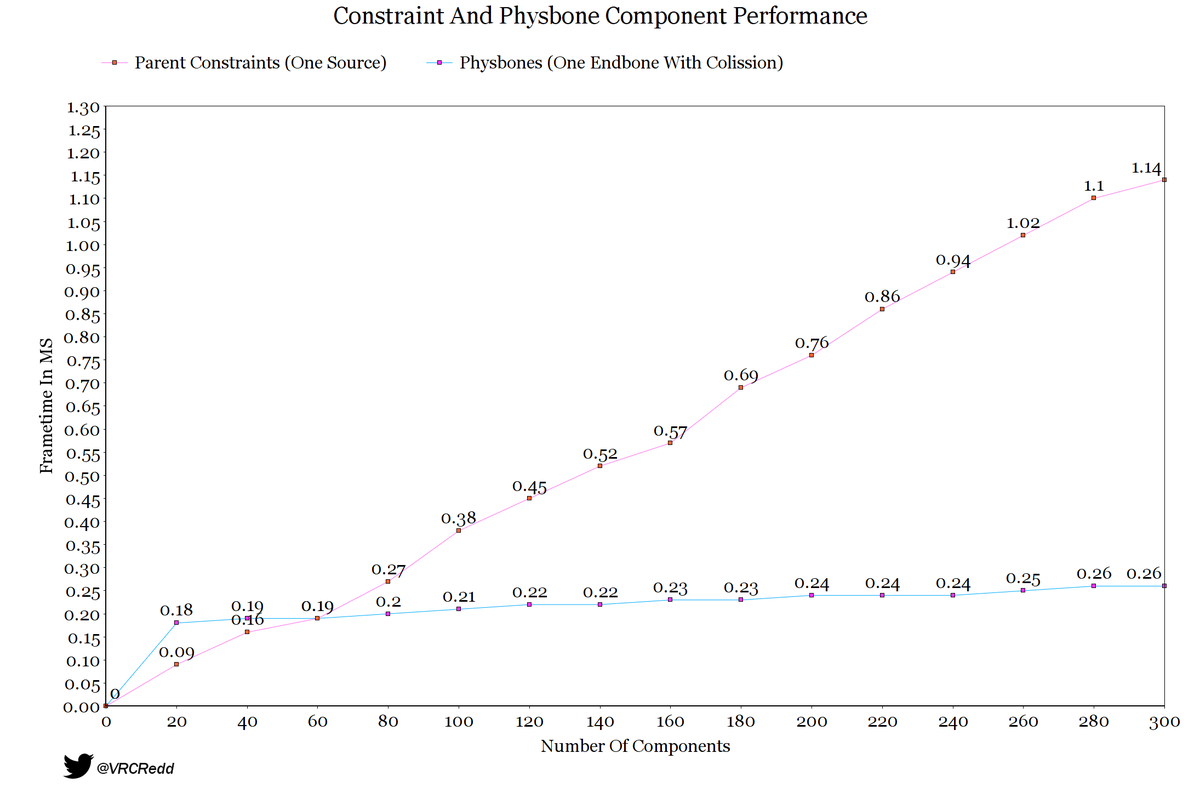
 Twitter
·
Twitter
·

 raven crag
Will there eventually be custom shaders available for the quest?
autumn radish
Hey, uh, has anyone experienced an issue of the Quest client somehow pulling an older upload of a world, even if a newer upload was submitted?
I tried clearing my content cache but somehow the world update isn't, well, updating, despite there being no errors in Unity.
fair tinsel
raven crag
Will there eventually be custom shaders available for the quest?
highly unlikely
autumn radish
gusty ember
Quest 1 can't really run VRChat anymore, so if anything VRChat is already on tha...
The only thing I'd like is to allow showing avatars for users in my friends list and that's about it, with the current state of the ranking system. Other than that, it's mostly fine where its at for Q2 usage. World devs could stand to have a little bit of restriction placed on them.
autumn radish
autumn radish
I tried clearing my content cache but somehow the world update isn't, well, upda...
Yeah no. The SDK says its uploaded, but the site still shows an old update date. PC builds upload perfectly fine however.
NVM figured it out.
autumn radish
autumn radish
The only thing I'd like is to allow showing <:vrcPerfVeryPoor:608446622321344531...
I take that back, I'd also like them to allow audio sources, albeit with some kind of limitation like the particle limiter (Maybe 1 audio source actively playing at a time?)
 teal python
autumn radish
I take that back, I'd also like them to allow audio sources, albeit with some ki...
teal python
autumn radish
I take that back, I'd also like them to allow audio sources, albeit with some ki...
Sounds aren’t allowed due to a CPU and especially a RAM problem. Even if the audio is not currently playing, it would be loaded into RAM
autumn radish
teal python
Sounds aren’t allowed due to a CPU and especially a RAM problem. Even if the aud...
Yes but this limitation wouldn't be as much of an issue on Quest 2 would it? And isn't there an option for audio sources to load the audio instead of keeping it in RAM?
teal python
autumn radish
Yes but this limitation wouldn't be as much of an issue on Quest 2 would it? And...
I don’t know where else it would load it besides RAM and the Quest limitations in place might as well be the Quest 2 limits since quest 1 cannot even run VRChat anymore at this point and the Quest 2 is already at its limits, for example the most common cause of crashes is most certainly the Quest 2 running out of RAM
autumn radish
teal python
I don’t know where else it would load it besides RAM and the Quest limitations i...
...storage.
It'd be slower, e.g. audio wouldn't play instantly, but it could stream from the disk, yes?
teal python
autumn radish
It'd be slower, e.g. audio wouldn't play instantly, but it could stream from the...
I personally doubt that would work, but they would need to make a custom audio source because unity’s cannot stream from the disk. And if the audio cannot play at a second’s notice then the only thing people would really wanna put on their avatars would be music which would by itself take up the 10 MB avatar size limit
autumn radish
teal python
I personally doubt that would work, but they would need to make a custom audio s...
Streaming: Decode sounds on the fly. This method uses a minimal amount of memory to buffer compressed data that is incrementally read from the disk and decoded on the fly. Note that decompression happens on the separate streaming thread whose CPU usage can be monitored in the “Streaming CPU” section in the audio pane of the profiler window. Note: Streaming clips has an overload of approximately 200KB, even if none of the audio data is loaded.
teal python
autumn radish
> **Streaming**: Decode sounds on the fly. This method uses a minimal amount of ...
Dang, I knew unity could do that but I didn’t think that was in the 2019 version
But that still runs into the CPU usage problem and audio is very CPU heavy with the Quest’s already at basically it’s max utilization
But still it’s cool to know that 2019 unity can stream audio
autumn radish
teal python
But that still runs into the CPU usage problem and audio is very CPU heavy with ...
It says it does it on a separate thread. The Quest has sorely underutilized multi-threading, but supposedly it wouldn't bog down the main thread.
fair tinsel
basically assume any Quest limitations at this point is limitations of the Quest 2
autumn radish
If they enforced active source counts, shorter range limits, and forced all audio assets to streaming, in theory they could reduce the perf hit and bottleneck.
If they wanted to go further they could have a performance-tied limiter that disables avi audio if the sustained performance drops below X frames.
After all, people said dynamic bones would be impossible, and we have physbones now.
autumn radish
fair tinsel
basically assume any Quest limitations at this point is limitations of the Quest...
Im not saying it'd be great. It'd be like particles or physbones where there's strict hard limits.
And it'd have to err on the side of caution in terms of dropping audio vs. dropping frames.
But I genuinely think it could be doable. At least for smaller instances (they'd probably have to disable audio on large instances, but I personally wouldn't mind that tradeoff).
There's room for things to be a bit more dynamic.
fair tinsel
like Avatar audio is not allowed at all because too many audio sources outright crashes The Quest 2
autumn radish
fair tinsel
like Avatar audio is not allowed at all because too many audio sources outright ...
Yeah but that doesn't stop world devs?
fair tinsel
yes but that means the same problem can happen if you put too many of them in
autumn radish
They have maximum capacity instances that allow up to 40 people.
If they can do that, surely they could allow avatar audio for instances of 10.
fair tinsel
then that would leave no budget for world sound effects
autumn radish
fair tinsel
then that would leave no budget for world sound effects
Which is why I said they could put a sort of "watchdog" that disables avatar audio and notifies the user if performance drops below an immutable threshold.
fair tinsel
and I really doubt vrchat would be interested in having features be enabled / disabled based off of Maximum user count
autumn radish
fair tinsel
and I really doubt vrchat would be interested in having features be enabled / ...
Isn't that sorta what all the new features do, like earmuffs and avatar distance hider?
there's even an option to hide all but X avatars near you
fair tinsel
those literally aren't based on how many people are allowed in a world
like those features are going to work identically whether you're in the great pug or black cats
but Oopsy Daisy your chill bedroom allows 12 people now your audio is going to be cut off is kind of weird
autumn radish
Eh. I'm just saying you are being a bit defensive about the idea?
It's not impossible.
Like, if they:
- Limit it to small - medium instances
- Prioritize world audio
- Cut audio off in large capacity (say... 16, before overflow?) instances
- Stream from disk (uses separate thread)
- Enforce 1 active source per avatar (other sources allowed but inactive)
I think it could work within their framework.
People were defensive about dynamic bone before physbones was a thing.
Saying bone physics could never be done.
And VRChat could stand to start being more dynamic with performance anyhow. Disabling features that hit performance is way better than the headset crashing or freezing and this applies to things already in game — They should start doing this where they haven't.
fair tinsel
that would probably get frustrating as the Avatar user to have their audio cutoff seemingly randomly
autumn radish
fair tinsel
that would probably get frustrating as the Avatar user to have their audio cutof...
Hence using that fancy hud for notifications (pretty sure I posited that earlier above but oh well)
fair tinsel
and people would still probably complain if they were hard-capped to only one sound effect
autumn radish
fair tinsel
and people would still probably complain if they were hard-capped to only one so...
They already do about the physbone limits.
fair tinsel
and like vrchat has mentioned Avatar Dynamics has pushed the quest avatars to the Limit as far as what can be safely handled
autumn radish
And VRChat is constantly hovering over the big read button that says "nuke " so they're clearly considering more limits.
autumn radish
fair tinsel
and like vrchat has mentioned Avatar Dynamics has pushed the quest avatars to th...
Yes but in what context.
Is it always pushing the limits? In 40 capacity worlds? 10 capacity? details details.
Like, when they say this stuff it is boiled down for us commoners.
They're not exactly posting VRC internals, debug info, test results, etc. for our viewing pleasure.
fair tinsel
autumn radish
*They're not exactly posting VRC internals, debug info, test results, etc. for o...
well why would they considering they're already saying no we're not going to do this so what good is posting that info
autumn radish
fair tinsel
well why would they considering they're already saying no we're not going to do ...
No = no for now. They've already changed course on other things in the past, and technology is improving, as is the software itself.
fair tinsel
the quest 2 isn't going to magically get more CPU
autumn radish
VRC on my Quest 2 runs considerably better today than it did when I first got it.
Software technology.
Not hardware.
—
Once again, I'm kinda tired of people treating me like any time I suggest an idea that it is bad and wrong and never going to happen, when things that were never going to happen ended up happening in the past.
They even have the beta for all this kind of stuff now — They could throw it in beta, restrictions and all, and gauge user feedback.
If it's too problematic, pull it. If it turns out everyone is mostly chill about it (save for those who complain about any limits), leave it.
—
But just saying "no" to features which to this day give Quest a "mark" in the public consciousness, drive creators to make worlds and avatars PC only, and generally make the Quest experience worse is a copout.
fair tinsel
like the Quest 2 is fixed Hardware so vrchat already knows the answer to this and don't need to waste their time doing a open beta to re-establish what they already know
autumn radish
fair tinsel
like the Quest 2 is fixed Hardware so vrchat already knows the answer to this a...
Do you work for VRChat.
fair tinsel
no but literally everybody Quest 2 is identical in performance metrics
autumn radish
Like seriously. No one is infallible so unless you have inside information I don't, it's possible theres some things they don't know.
fair tinsel
so vrchat can already test themselves does 10 Quest avatars with a audiosource each work okay
autumn radish
Like, for instance: Originally on Quest 2 VRChat wasn't requesting the maximum performance level from the CPU and GPU, so it was being rate limited to that of a lightweight experience.
Now it does this, and they did it with so little fanfare I made a fool of myself by opening a canny after they had already done this.
They didn't know, then they did.
fair tinsel
they're not going to get that magic free performance again to suddenly change their current benchmarking
autumn radish
¯\_(・–・)_/¯ Never say never
fair tinsel
how are they going to magically get more CPU if they're already running at the maximum
autumn radish
fair tinsel
how are they going to magically get more CPU if they're already running at the m...
Meta introduces new performance reduction technology, they improve code performance of the base application, better multithreading for the Quest's big.LITTLE architecture, etc.
Like, the things the Quest 2 client does today it couldn't do before.
They could also start clamping down on world developers; start limiting real time lights, require light probing, limit texture size via the SDK, etc.
Part of VRChat's problem is unoptimized content, so they have to make major concessions. Avatars are the easiest because they are everywhere in every world and always present, so their features are the first to go.
fair tinsel
autumn radish
They could also start clamping down on world developers; start limiting real tim...
wouldn't all of those mostly be just affecting the gpu
autumn radish
fair tinsel
wouldn't all of those mostly be just affecting the gpu
Not entirely. the CPU still has to prepare data for the GPU, and the more complex the data, the more it has to process.
Otherwise poorly optimized worlds (through lights/models/textures) wouldn't crash the entire headset, just the client and/or force it to eject the user from the world.
And those were just tangential examples anyways.
But in a game like this, everything is connected. The less the CPU has to do, the better. But same for GPU too.
And down the road, they'll eventually have to move on from Unity 2019.
If they ever embrace the URP, there's a slew of new features available to them for performance optimization from Meta, AFAIK.
But that'll be some years off.
fair tinsel
they're unlikely to do URP as that would result in literally everything in the game breaking
autumn radish
fair tinsel
they're unlikely to do URP as that would result in literally everything in the...
So they're just going to stay on 2019 and the BIRP forever?
Like I know they ain't doin it now lmao
fair tinsel
yes everybody's custom shaders makes it completely impractical to change rendering Pipelines
autumn radish
fair tinsel
yes everybody's custom shaders makes it completely impractical to change render...
AFAIK Unity lets you convert BIRP projects to URP projects. If they did a migration period before releasing a big SDK 4-oh they could give developers time to migrate worlds.
fair tinsel
that's still going to probably break most people's shaders the auto converter
autumn radish
Run a beta alongside it to test shaders and let devs work with it hands on.
It'd probably be a year or two long process (just look at the deprecation of SDK2) but it'd be worth it.
fair tinsel
autumn radish
AFAIK Unity lets you convert BIRP projects to URP projects. If they did a migrat...
there are lots of people who no longer play vrchat or who are dead so there's inevitably going to be a large backlog of content that completely breaks with no hope of repair
alpine dome
Tbh, if the game doesn't update to URP it'd stagnate and so would the playerbase imo
autumn radish
fair tinsel
there are lots of people who no longer play vrchat or who are dead so there's i...
Does SDK 1.0 content still exist on VRChat?
I literally never hear about SDK 1.0 content. Only SDK 2, and they're only promising to support it as long as they can. They're cutting off uploads for it.
fair tinsel
alpine dome
Tbh, if the game doesn't update to URP it'd stagnate and so would the playerbase...
I doubt the user base would be happy with having the completely re-upload every single Avatar they have as there is no way to Auto convert all of the shaders
alpine dome
If the upgrade was done instantly then yeah it'd be a problem but if it was phased in over a year or so the community would have time to develop, and a lot of older content would be left behind. It'd cause the game to grow and evolve, allowing for more opportunities creatively in the long term
fair tinsel
custom shaders are also the reason why dlss & AMD FidelityFX can't be implemented in vrchat correctly
autumn radish
Like, they have two options, or even 3, realistically:
- Stay on BIRP forever. As OSes update, and time moves on, the game becomes more problematic and difficult to work with, and feature additions stagnate, pushing users to competitors.
– Put the effort in, do a one to two year migratory process, then release a URP client. - Maintain a legacy client and build it into the new client — Switch between clients under the hood, with an extended load time as it warms up and swaps.
Third one is most compatible but the most work and least performant arguably.
fair tinsel
question what can't be visually done at the moment with the built-in render pipeline but could be done in URP
alpine dome
frosted glass
autumn radish
fair tinsel
question what can't be visually done at the moment with the built-in render pipe...
As far as shaders? A bunch. Heck, a lot of performant liquid shaders on Quest require the URP.
And all the BIRP shaders Ive found that are similar just do not work on quest.
The BIRP on Quest is basically a hijack of the BIRP on Android, and there's a lot of flaws with it.
There's a bunch of things that are purportedly easy with the URP, but complex and non-performant on the BIRP due to the Quest's API limitations.
If they move to the URP, they can also start enforcing certain shader requirements which are needed for AMD FidelityFX and modern DLSS, as well as AppSW and other performance enhancements on Quest (and even FSR since thats platform agnostic).
Like, there are a ton of benefits in terms of making VRChat exist the next 10 - 20 years in moving to the URP.
Here and now, not as much. But the clock ticks, time moves on, and VRChat is quickly getting more and more difficult to improve without such a change.
alpine dome
It also allows for the shadergraph to be used which lowers the barrier of entry for making shaders, for better or worse
autumn radish
If they move to the URP they could also potentially re-evaluate things like avatar shaders,. A lot of VRChat systems arguably are the way they are because VRChat content is already in place.
Starting fresh means they can "Do it right the second time", maybe have a little more intelligent design in their checks and balances. Better benchmarking, better design, better rules, better limits, better features, etc.
Like, the writing is on the wall. Unity 2019 LTS is no longer, well, LTS. It's unsupported, and 2019.4.40f1 is the last version. A lot of new performance and shader features VRChat could benefit from are URP exclusive, and there's great benefit to them being able to rework the underpinnings of the platform to be more capable of expanding and improving in the future in ways the BIRP has unfortunately restricted them.
alpine dome
It's a shame we're not in the year 2027 bc I'd be totally advocating for the vrchat HDRP update
autumn radish
alpine dome
It's a shame we're not in the year 2027 bc I'd be totally advocating for the vrc...
Isn't HDRP PC only?
alpine dome
Probably
fair tinsel
well those new features would need to be really good features to make up to the user having to do stupid amounts of uncompensated labor for fixing their stuff that from the user bases perspective vrchat broke
autumn radish
fair tinsel
well those new features would need to be really good features to make up to the...
Users already do uncompensated labor just to update things.
VRChat regularly breaks or has issues. It comes with the territory.
alpine dome
I mean, passionate avatar creators will put in the work and some creators might not, it'd certainly cull a lot of bad avatars
fair tinsel
autumn radish
Users already do uncompensated labor just to update things.
yes but that is a bit of an order of magnitude difference
autumn radish
Realistically, a legacy BIRP client, whether built in to a URP client, or provided separately, would be the easiest way to numb teething pains. — New uploads could be prevented, a la SDK 2.0, forcing new creators to the URP. Maintenance uploads would be allowed for existing worlds to maintain content, with a push for them to update to URP and support the new platform.
fair tinsel
honestly I don't see vrchat trying this until like built-in render pipeline is completely removed from a future Unity version
autumn radish
fair tinsel
honestly I don't see vrchat trying this until like built-in render pipeline is ...
Considering how long "Write Defaults" has been around there's a "fat chance" of that.
As the expression goes.
The only thing they have really removed is the old XR system and that's because they moved to a plugin system.
In terms of things that effect VRC.
fair tinsel
also apparently Unity 2020 changes how the VR rendering Works which would also break a bunch of people's shaders in VR
which is probably why they haven't been in a huge hurry for Unity 2020
autumn radish
fair tinsel
also apparently Unity 2020 changes how the VR rendering Works which would also ...
They removed the VR packages in favor of Unity XR Plugin System.
But I've done a test build of a world on 2019.4.31f1 with the XR system and it worked, after some setup.
fair tinsel
it also removed Single Pass Stereo rendering which is what vrchat currently uses for the VR rendering
autumn radish
Nope.
They just renamed it.
It confused the hell out of me but you can still do single pass basically but it's not called single pass anymore.
Unless the same XR plugins 2019 can use are different than 2020?
Since the plugins work across multiple versions of Unity
fair tinsel
yes but It still going to require the shaders to be updated which is why vrchat is when they added Avatar Dynamics started Auto compiling it
 autumn radish

They call it "Multiview" now, per Meta's documentation.
I.E. "Single Pass" = One pass, for all views; multiple views (stereo) > "Multiview"
vs. "Multi Pass" = One pass, per view
I think they just didn't enforce it before on shaders; I've encountered VRChat worlds on Quest where the shaders were clearly multipass because everything only rendered in the left eye. — This same thing happens if you build a world using the XR plugins at their default, or switch to multipass in the deprecated VR options.
Now that their quest userbase is building, it makes sense to start enforcing single pass as otherwise people are going to just be porting multipass shaders that worked on PC over without checking, causing more occurrences of "why is everything only showing in my left eye? support PLZ HLP"
It's An Issue™︎
autumn radish
fair tinsel
it also removed Single Pass Stereo rendering which is what vrchat currently us...
Unity 2023 even still has Single-Pass: https://docs.unity3d.com/2023.1/Documentation/Manual/Android-SinglePassStereoRendering.html
It just went through a confusingly-similar terminology change, and multipass never worked on VRC Quest to begin with.
 mental bough
Hey so, I was making a world for quest and pc, but I've been experiencing an issue where the world crashes the quest, what's weird is that it used to work completely fine on an older version of VRC. With the latest version it seems to always crash though, and I'm wondering why.
No changes were made to the world during that time.
autumn radish
Enable logging in the handheld menu (Launchpad > Gear icon in bottom row > Scroll to the bottom > Debug > Logging) then visit the world. It should save logs somewhere which you can view by hooking your quest to a PC and pulling the log off of it
It'll give you an idea of what's going on, hopefully.
 sturdy palm
I seem to be having an interesting object synch issue that I was wondering if people have dealt with before. The object is cleanly synched for desktop users, but quest users seem to have unsynched versions of the items. This is the case for both the pen prefab as well as other pickup items I have made
dark flint
Does anybody know if there's any nature prefabs for quest? Trying to find one for a project and it's either that or make it with terrain toolkit
fair tinsel

Fionna's Low Poly Plants A set of models for making low poly forest environments. Included are FBX files and textures, as well as a Unity Package with prefabs and demo scene. Includes the following models: 9 types of leafy trees 6 types of bushes 3 types of bare bushes 3 types of grass Flowers (many
dark flint
Thank you @fair tinsel What about less cartoony?
fair tinsel
realistic foliage and Quest isn't going to go to terribly well as the quest doesn't handle transparency well
dark flint
Damn good point, I used terrain builder and painted trees with fog and it messed it up big time lol
I found one world in VRC that is cross-platform that looks great called nature.
I think it's a furry hangout lol
Keywords are nature peaceful calm furry
I did find full fbx modeled trees maybe I can try that out tomorrow with terrain builder
 rotund osprey
Can I create maps through my oculus (I’m new to development anything would help)
outer raptor
no. you need a PC.
 candid crystal
Will a Vroid made avatar work as fall back?
outer raptor
potentially, but you'd need to make sure that it's within the polygon and joint limitation, and with only a single material.
 modern whale
Developing my first Quest-specific world and of course I've run into the issue of my meshes being single-sided. Is there any way to remediate this?
fair tinsel
make them double-sided in blender
if you need both sides rendered for whatever reason
modern whale
ah okay
candid crystal
I am simply trying to spread the legs apart

But the knee is not following the bone?
outer raptor
the skin weights on the thigh aren't bound to the correct joint
you'll need to paint weights so that the thigh is primarily following the right leg joint at the hip
modern whale
Are there any particular settings recommended for generating world lightmaps for quest?
 fair gulch
how do i make a avatar quest and pc compatible together
see their seperate i want the quest one to be pc compatible as well
 fair gulch
oh
 vestal tendon
anyone got any quest eyebrows i can use for this model
 umbral socket
This page might help: https://docs.vrchat.com/docs/creating-content-for-the-oculus-quest
VRChat
Want to get started making some content for VRChat on the Oculus Quest? You've come to the right place! This page will consist of navigation to various other pages concerning content creation for Quest, cross-platform setup, and other related guides. Our documentation on creating content for the Ocu...
Yep!
You're basically uploading your world twice, once for PC, once for Quest. Both with the same world ID.
rotund osprey
Uhhh idk if this is a place to ask but where could I find people to make some avatars for me?
 devout flax
Hey.
So im making my first World ever (and also using unity for the first Time..i have 3 day of développement) and often test my Map whit a few people for me to test if everything is alright.
BUT..
Im on quest 2 standalone. And they are on PC.
And i dont know why. But my lightning i not like what they see (light passing through texture, asset and walls for me but not for them)
Music and ambiance sound not playing for me but playing properly for them.
Big texture bug for me (like color brightness goes up and down depending on my movement etc..
Where i failed ? I use only free asset for everything, so i dont have to code yet. Or create anything yet. Im not yet confident for that.
trim hawk
How do you fix the AFK animation because whenever I go AFK in VR chat, my avatars arms go straight to her side and not into a crisscross animation is that normal?
gusty ember
devout flax
Hey.
So im making my first World ever (and also using unity for the first Time....
Don't know about the lighting and texture bug, but if you used a video player to play your music and ambience then they only work on Quest if you use a resolver like nextnex.com, or use a self-hosted one based on https://github.com/techanon/vroxy.
devout flax
No i dont use a vidéo player, i only drop song and sound on my asset and World.
gusty ember
Well that is very weird then, an audio source is almost as simple as you can get.
 cunning linden
Anyone familiar with Udon sharp and Udon video player (Merlin) can't seem to connect the scripts..
 zinc sleet
devout flax
No i dont use a vidéo player, i only drop song and sound on my asset and World.
zinc sleet
devout flax
No i dont use a vidéo player, i only drop song and sound on my asset and World.
The VRChat docs site for "Quest Content Limitations" says "Audio sources are restricted in worlds in VRChat Quest". It does not expand on that saying what they mean by restricted though. Other components either say explicitly say disabled or permitted.
devout flax
Hum...my music and sound work now for quest..dont know why but when i reload the Map, its stop working..i think im gonna make whit this.
teal python
zinc sleet
The VRChat docs site for "Quest Content Limitations" says "Audio sources are res...
on avatars, audio sources are completely disabled. On worlds they may be used, but audio is cpu intensive with the already stretched to its limit quest cpu, so you need to keep that in mind and use sound sparingly
 loud spade
I want to let my avatar be able to toggle a weapon to appear (left hand holding a sheathed sword), then when I use the "fist" gesture, the sword would appear on another hand(while the left-hand only has the sheathe without the sword).
Using the Open-hand gesture would return to original state of left hand holding sheathed sword.
I was able to create the animation for them all, and was able to create a toggle to make the weapon(in its sheathed state) appear on my left hand.
I am able to make them work separately but I don't know how to make it so that only when the toggle is on, that my right hand gesture will make the sword appear on my right hand, while only the sheathe remain on my left hand?
I was doing this by having 2 of the same asset in the scene and making one appear while the other disappear
What should I do in the Animator layers?
teal python
loud spade
I want to let my avatar be able to toggle a weapon to appear (left hand holding ...
you could make it so to move on to the animation where the sheath is in one hand and the sword is in the other, make the transition require both the left hand to be in the fist gesture as well as the toggle to be activated
if you make multiple conditions for a transition, it acts like an "AND" statement, so "condition 1" and "condition 2" must be true at the same time
loud spade
teal python
you could make it so to move on to the animation where the sheath is in one hand...
This worked. I literally did not know you can add more than 1 condition on the transition. Thanks
forest owl
Sorry to bother yall anyone know a quest compatible video player for vrchat?
gusty ember
forest owl
Sorry to bother yall anyone know a quest compatible video player for vrchat?
They all are, just needs a resolver server for Quest, because it doesn't have the software that PC uses.
The most popular one is http://nextnex.com/
A self-hosted alternative can be spun up with https://github.com/techanon/vroxy
Someone also made an app, at least on android, that can make it easier, if you as a Quest user, wants to input a video. https://play.google.com/store/apps/details?id=tk.megamonkey.vrccb (Have not tried, so be wary installing random apps to your phone)
For PC users there are extensions to web browsers to quickly get links.

GitHub
Self-hosted YoutubeDL proxy. Contribute to techanon/vroxy development by creating an account on GitHub.

No more slow typing on VR Keyboards in VRChat chatbox
forest owl
@gusty ember Thanks for the help bro
 fervent siren
VRChat doesn't seem to be using FFR on Quest 2. Anyone know why?
gusty ember
fervent siren
VRChat doesn't seem to be using FFR on Quest 2. Anyone know why?
You sure?
Last time I checked it was using it quite heavily.
You can also just force it on or off using Sidequest.
fervent siren
@gusty emberI was wrong actually. It's dynamic. I had to go and find a world that killed my frame rate to see it kick in. I'm used to it being a fixed user-exposed setting in AltspaceVR.
gusty ember
Didn't actually know it was dynamic, huh.
 rustic adder
Can someone make me a police station for role-plays for YouTube?
 oblique field
Is it possible to have video embedded in the unity project or do you have to use a streaming service (e.g. youtube, vimeo, etc).
fair tinsel
oblique field
Is it possible to have video embedded in the unity project or do you have to use...
you have to use a streaming service
 noble axle
Hey, just had an idea that it'd be cool to have a game world in VRChat based on the Netflix movie "Circle" (not to be confused with the reality show of the same name)
I've never commissioned a world before, wondering about how much a project like this would cost? Probably not ready to commission it right away though.
 sturdy nacelle
please how do i change my dominant hand in vrc- i changed the quest settings but it doesnt do anything for vrc
sturdy nacelle
@umbral socket sorry for the @ but can u pls help?
umbral socket
#quest-development is for the discussion developing VRChat content for the Quest! 😄
... But to answer your question: I don't think VRChat has that setting
rustic adder
Can somebody make me a prison DM me
 candid skiff
rustic adder
Can somebody make me a prison DM me
candid skiff
rustic adder
Can somebody make me a prison DM me
can you make this clearer ?
 late zodiac
candid skiff
can you make this clearer ?
late zodiac
candid skiff
can you make this clearer ?
They just want someone to make them a prison map
(World)
 novel timber
I was trying to download the android/oculus version for unity and when I go to download it it says that failed to locate Unity exe anyone know how to fix it
 deft osprey
Does anyone know why my quest might be crashing the entire game when I open up my menu?
 balmy mist
try reinstalling the game
terse mauve
Can there be more shaders allowed for quest?
fair tinsel
not really as the amount of Hardware available in the quest to to render all of your shaders hasn't changed
 young plinth
Hiya, newbie here!
odd question, and maybe this is the wrong chat but i work with young people learning about VR and I want to upload a world and have them explore it without giving them the option to leave the world (They'll just join worlds they shouldnt and miss the point of the lesson). Is there any way to lock a user in a world? Or have it so they can only join worlds in a favourite list/worlds that i have approved? Thanks so much
fair tinsel
young plinth
Hiya, newbie here!
odd question, and maybe this is the wrong chat but i work w...
there's not really any way to trap a user inside a world or make it to where they can only visit worlds in a favorite list
young plinth
Ah okay thank you for letting me know
fair tinsel
no problem glad to be of help
young plinth
Oh thats so smart thank you so much!
wraith jewel
can i show off my stuff in the discord
 raven carbon
Why do the QV pens I added only work on PC (as in they only write on PC but quest can pick them up as well)? Its the latest version and everything
 oblique kiln
Considering this is a topic on development and the visual lack thereof, I thought id make a point here. Lets focus on this so it can be solved
raw arch
raven carbon
Why do the QV pens I added only work on PC (as in they only write on PC but ques...
It might be because of how they are set up. There aer default pens in the SDK in CC
 celest nexus
are u able to switch betwen android and windows mode with out breaking anything?
gusty ember
celest nexus
are u able to switch betwen android and windows mode with out breaking anything?
Not had anything break for me, but some things do not work on Quest.
celest nexus
oh :p
idk
Am converting 4 quest as a test
But also so it doesn’t take forever the next time me do it
 polar oak
I've been battling this for 6 hours now among other optimizations, can anyone tell me why this is happening, tried render queue, tried using Temporal's Players Only Shader with opacity at 0. I'm just really lost as to why this is happening here specifically because I've used the default mirror for quest before and it did no such thing!
The cutout mirrors work flawlessly for some reason
 lavish breach
Does anyone know any c# or c++ discord
 toxic zinc
someone help me I made an avi quest compatible and it worked but questies can only see naked with no clothes. how do i fix it pls??!
oblique kiln
from my experience, you need the radial menu's expressions to be 1:1
 left thistle
working on the quest version of my av and I've always been curious, what do these do exactly? Turning them on and off I can't really notice a difference (but that being said I can't test it exactly either, I only have PCVR to test it on)

checking documentation says to always keep GPU instancing on, but doesn't really elaborate on why
celest nexus
i think its to keep unity from making dupelcet textures in Vram
fair tinsel
left thistle
checking documentation says to always keep GPU instancing on, but doesn't really...
basically if it's duplicate objects in the scene it can render them in one draw call
celest nexus
oh
fair tinsel
so like if you're in a warehouse with lots of crates it can draw the crates together
celest nexus
but is also doesnt do it if its using baked lighting tho
fair tinsel
they can be render together if they're in the same lightmap texture
celest nexus
oh oki
i thought it was more inefficent for it to be using baked cuz of it not being able to use instanced
fair tinsel
so basically you static batching when you have different geometry that shares the same material and use GPU instancing for literally identical objects
celest nexus
ah oki
wait so like wdym by litterly indentical
these baked fileing cabnets are allso completelty identical
 fair tinsel
if you have like a table and chairs the chairs could be GPU instanced as they're the same but the table could not be instanced with them as it's a different shape even though they're both using the wood texture
fair tinsel
celest nexus
these baked fileing cabnets are allso completelty identical
yes that is somewhere you could use GPU instancing
celest nexus
fair tinsel
yes that is somewhere you could use GPU instancing
oh
but is says i cant do that cuz its baked
fair tinsel
I suppose it wouldn't hurt to use static batching then
celest nexus
cuz im not very good at using the light probes so they look wonky with out having baked lighting
fair tinsel
then yeah you would be fine with static batching
but if you have like any pick up objects those would be great to GPU instance as those would be on light probes
celest nexus
fair tinsel
but if you have like any pick up objects those would be great to GPU instance a...
oh
theres like 4 interactable objects in the world rn
and only 1 moves
that being a switch
there will be doors
fair tinsel
then you don't need to worry about that right now but good to know in future
celest nexus
celest nexus
there will be doors
but am trying figure out how do that

 celest nexus
wat me supposed to be taking away from this link/ screen shot?
fair tinsel
it would probably do that after the visibility calculation
fair tinsel
GPU instancing is just reusing mesh data that's already on the graphics card at different positions
 river breach
Anyone familiar with using Bakery and quest worlds? I'm getting pretty crazy low bit-depth and banding. First time developing for a Quest world instead of full PC.
edit: (Solution: Under Player Settings, set lightmap quality to High, and under Project Settings set compression to ASTC)

 thorny swan
Hey all, does anyone else have a problem with render textures on quest?? I just have a camera that renders on a render texture and it works fine on pc but on quest is just rendering the ui layer and apparently everything that has a render queue value grater than 3000.
 serene totem
Would i need any android modules when i am trying to import my unity world?? i convert the game settings to android but then it says no module found. please help
outer raptor
yes. install the android module from unity hub
serene totem
which one?
outer raptor
serene totem
which one?


 primal storm
any unity plugin to show what is making an avatar so large?
maybe it offers tips on what to do
vrcsdk does that a little but it's not very good
I've seen some insane quest compatible avatars that have three times the assets that mine has
fair tinsel
technically this plugin is intended for worlds but will tell you what's taking up file size on an avatar https://github.com/oneVR/VRWorldToolkit
GitHub
Unity Editor extension for making VRChat worlds. Contribute to oneVR/VRWorldToolkit development by creating an account on GitHub.
 vague grove
how i solve the problem of constantly crashing...? I have a oculus quest 1 but is always crashing entering a world and is so annoying
gusty ember
vague grove
how i solve the problem of constantly crashing...? I have a oculus quest 1 but i...
From what I have heard the Quest 1 is basically unusable in modern day VRChat, the 2GB less RAM it has compared to the Quest 2 really screws it over. You'll have to keep clear of any worlds above 50MB (the limit back when the Quest 1 was relevant).
If it happens regardless of how small the world is and you are alone then all I can really recommend is doing a factory reset, not much more you can do with a Quest to solve its software problems.
vague grove
Damm thanks
 lunar flume
is there anything similar to a post processing volume for Quest? with special regards to Exposure.. It would ave a ton of time bcause I dont want to redo all the shaders???
fair tinsel
Basically there is no post processing available at all on quest
 plucky sandal
why is this grayed out
 gusty ember
plucky sandal
why is this grayed out
gusty ember
plucky sandal
why is this grayed out
Can happen with multiple avatars enabled, not sure why.
plucky sandal
why can't i upload help
 plucky sandal
gusty ember
Can happen with multiple avatars enabled, not sure why.
plucky sandal
gusty ember
Can happen with multiple avatars enabled, not sure why.
how do i disable other ones
fair tinsel
Turn off the is active checkbox on the top right of the inspector when you click on the avatar
plucky sandal
fair tinsel
Turn off the is active checkbox on the top right of the inspector when you click...
where's that at

 plucky sandal
i see
 gusty ember
plucky sandal
gusty ember
plucky sandal
You can't and it is very weird that it is even showing up at an apparent 0 colliders.
But if you do have any then you need to remove a few. Why it isn't properly counting is something I can't help with, except ask if you are on the newest SDK release.
 fallen sierra
primal storm
any unity plugin to show what is making an avatar so large?
fallen sierra
primal storm
any unity plugin to show what is making an avatar so large?
Image sizes greatly impact an avatar size while uploading. You can lower the image sizes and compress them in Unity 
 near sand
Are input fields supported in quest worlds?
gusty ember
near sand
Are input fields supported in quest worlds?
Yes.
Clicking one will bring up the VRC keyboard.
near sand
Thanks.
fierce osprey
plucky sandal
When you click 'select' does it select some object? 'Cause it should, that should be where the issue is
 buoyant void
Hey there I'm building a team or in other words an organization ✓ Iooking for active/loyal (1v3) comrades who play vr ✅️and other games stats rq a place to grow and learn we are also looking for chatters for daily discord interactions come grow with us. We also have a map team who are well known for most played maps.
If interested- check my Bio or DM.
near sand
The docs mention that when uploading Quest content, duplicating the project isn't necessary anymore. So assuming the Quest version of the world doesn't require any changes, is the workflow now just:
- Switch project build target to Android
- Upload world
- Switch project build target back to Windows
?
gusty ember
near sand
The docs mention that when uploading Quest content, duplicating the project isn'...
Yes.
But usually you want to change materials/shaders for the Quest version.
near sand
Thanks.
 half shell
Does anyone know where I can get my hands on a panorama shader? Got one that works great for PC but not so much for quest.
The pano shader that's included in the VRCSDK doesn't work at all before anyone suggests it.
 drowsy monolith
Whats the deal with quest menu melting on my world?
Its like shaking weirdly. Fps is high but its shaking
gusty ember
drowsy monolith
Its like shaking weirdly. Fps is high but its shaking
You are too far away from 0,0,0, the origin of the world.
drowsy monolith
Oh
gusty ember
Floating point errors.
Not fixable without some custom solutions.
drowsy monolith
Damn so i have to make my world smaller
gusty ember
If it is an open world, you either need to put in fake teleports, or something, section it off.
drowsy monolith
Cuz im creating the whole solar system basically with each planet moving. Andd.... I think the Scale oi just to big
Is*
gusty ember
Depends at what scale, but generally 1000-1500 Unity units is too far in any directions
drowsy monolith
Welp. My objects are even somewhere around 3000
Lol
My second world ever so i didnt knew thats an issue
 ionic socket
Anyone take Commisions for maps
 tender aspen
drowsy monolith
Welp. My objects are even somewhere around 3000
tender aspen
drowsy monolith
Welp. My objects are even somewhere around 3000
create an empty game object thats centered above all your stuff
parent everything to the game object
move that game object back to 0,0,0
everything should follow along and still be in their correct spaces
cuz im assuming you just built your word far from 0,0,0
 short dawn
tender aspen
create an empty game object thats centered above all your stuff
parent everythin...
short dawn
tender aspen
create an empty game object thats centered above all your stuff
parent everythin...
hey man do you know anything about music toggles?
tender aspen
short dawn
hey man do you know anything about music toggles?
yes

 tender aspen
short dawn
tender aspen
short dawn
ill be honest i thought you meant on an avatar because udon is completely out of my knowledge but that audio source looks fine to me
short dawn
oh ok ill look inudon
drowsy monolith
tender aspen
create an empty game object thats centered above all your stuff
parent everythin...
Yeah my objects are a bit far from 0.0.0
Then if i małe them Child of node thats on 0.0.0 it will lag more or....?
oblique kiln
Hey @buoyant void I don't think this is the place to advertise. Seems kind of sketchy
 primal grail
oblique kiln
Hey <@742542475020992515> I don't think this is the place to advertise. Seems k...
primal grail
oblique kiln
Hey <@742542475020992515> I don't think this is the place to advertise. Seems k...
the fact that they just joined thiss year is also sketch to me
tender aspen
primal grail
the fact that they just joined thiss year is also sketch to me
message does look sus, but the date they joined the server isnt really a good indicator on its own, for example i leave and rejoin this server all the time
but that message is sketch
sweet tundra
tender aspen
but that message is sketch
Self promo is against the server rules tbh you could just report it
Actually imma do that now
 safe quartz
hello, any ideas why that leggings is invisible please?

 twin bolt
so i’m making my world available for quest, and i’m using the mobile standard shader vrchat gives. When i use it though, tons of meshes turn pure black in game when they don’t look that way at all in unity. Is there any reason for this?
gusty ember
twin bolt
so i’m making my world available for quest, and i’m using the mobile standard sh...
I am the reason for the ping and missed that it looked fine in Unity.
Only idea I have is ask if you are using baked lights or not, if it is realtime maybe the objects are out of range of the lights.
twin bolt
They’re baked
I’m thinking of maybe trying Toon Lit instead of standard, maybe that’ll change it
gusty ember
twin bolt
They’re baked
Did you bake the ones with the standard lit shader, because it doesn't support lightmaps, that is what the lightmapped shader is for (might have gotten the name slightly wrong)
twin bolt
Nah, didn’t bake them yet
gusty ember
twin bolt
Nah, didn’t bake them yet
How are they getting lit then?
Lights set to baked in unity only emit light in the editor.
Assuming nothing has been baked.
twin bolt
Directional light is doing most of the work. The other lights guys are mostly from the pc version of the world. Though I might try messing around with the lights to see if that’s it. I didn’t think much of them because it was only some parts of the world having the problem, not most
 indigo topaz
Hello, I’m having a problem with my jetpack prefab in one of my worlds. When the player reaches high speed but has a high framerate, the jetpack works well and doesn’t cause any player tracking issues. However, when the framerate drops and the player is flying at high speed, their movement freezes. The game still runs and updates frames, but the player can’t move their hands to steer the jetpack for exemple, as if the game does not track it anymore. Slowing down gives the tracking back. Could this be due to a limitation of VRChat on the Quest platform?
I'm using "Udon Jetpack" by Synqark/Ostinyo
 grave rose
is it just me on quest where all the characters are shown as “unsupported” when joining a game until you show it yourself regardless of privacy settings? i literally turned it completely off and it still didn’t work
fair tinsel
there's no way to Auto turn on very poor avatars and PC only avatars here only ever going to see the fall back
grave rose
no like it was other quest users avatars as well