#shaders
2 messages · Page 24 of 1
 indigo frigate
 stiff berry
saves you a bunch of triangles too lol
planes are like a 10x10 or something of quads
indigo frigate
Oh damn, yeah that's a nice bonus
I just never noticed 'quad' in the list of meshes you can add or considered what it might be, probably been a lot of places I could have saved those polys that way lol
Well, progress
The orientation is correct in unity, and just rotated 180 degrees in game (facing away from me), which I can clearly see because of the cull line now
I wonder if I should just try the original shader now that doesn't respect transform, might solve the problem
stiff berry
it might
indigo frigate
Oh wait a second
As I turn in game the rotation of the object is changing, that's why
I happened to be looking in the direction that made it face away, and if I drop it in world space it works fine
So yeah I'll just use the original one to avoid that
Yup, works like a charm. Thanks again!
 balmy birch
Does anyone know of a shader for an 8 sided billboard like the sprites in DOOM?
 bitter bane
There is this but I don't know if it is still working with Unity 2019 or not https://vrcat.club/threads/retro-sprite-shader-v2.2222/

VRCat: Community-Run VRChat Forums
Simple shader that emulates the behavior of directional sprites from many mid-90's pseudo-3d games (Wolfenstein, Doom, Hexen, Duke Nukem, Daggerfall,...
balmy birch
thanks, I'll check it out
 clear raven
Is there a shader to make emissions super bright?
Im using loli eye shader to subsitute the bright emissions which kinda works well but Its not very consistent
 brittle plinth
Emission in shaders is really just not putting shadows or lighting on the area. You need the bloom post-processing effect to make it actually look like it's bright, and that's a world thing.
Not Unity, but this is the same there: the cube on the left has an emission strength of 5, the one on the right has a strength of 50. As you can see, they look identical. This is with no bloom.

But when bloom is turned on, you can see that the one on the right is way brighter.

No matter how bright your emissions are in the shader, it won't make much difference unless you have bloom. Again, that's a world thing, so you really just have to rely on world creators to have that turned on.
 hardy dagger
i would like to reference that certain geometry shaders have been used before to fake bloom. and you can possibly do the same on quest via something else
 orchid epoch
Hello? I have a question. I'm making a Quest-compatible avatar (just in case, because all my other avatars aren't Quest-compatible) and I've learned on a different channel that Quest automatically disables custom shaders. I wonder what can I pull off with default shaders? (Technically, my avatar only needs emission and a little shine of the armor, but I still wonder how much I can get away with)
 shy vault
Does anyone know how could this be done ? Probably shader with particle system ? 🤔
 pine venture
It looks like a particle system attached via some sort of... physics object? Dynamic bone?
 fringe perch
shy vault
Does anyone know how could this be done ? Probably shader with particle system ?...
fringe perch
shy vault
Does anyone know how could this be done ? Probably shader with particle system ?...

^ dude who made the avatar
I could recognize a mystical avatar from a mile away lol
 winged pagoda
Anyone got poiyomi toon shaders for quest?
fringe perch
winged pagoda
Anyone got poiyomi toon shaders for quest?
you can't do custom shaders on quest at all
shy vault
fringe perch
um yea I have no idea how to do particle systems  😆
😆
shy vault
fringe perch
you can't do custom shaders on quest at all
I've seen some people accomplish it but it is janky
@low night if you have a prefab for the cube I am very gladly willing to pay for it 😅 Its fing amazing xD I wanna change the color and put it on mine AVI xD Found myself stuck to it for over half an hour just standing alone staring into mirror and playing with it
 uneven loom
there are some basic toon shaders in the provided vrchat shaders for Quest
 rocky lion
anyone know why silent's water shader doesnt show up upon building the world? pic of the example shader in the editor

pic of it in game

 little cape
You might have better luck asking in Silent's Discord. @rocky lion
 signal bough
Can someone help me with this WACOTV shader? I'm not sure what these instructions mean... https://sites.google.com/view/wacomaltvrchat/
This was made specifically to work with VRChat's VRCVideoSync script, so you can point that to your mesh that has this shader, and tell it to override "_MainTex". It displays a NTSC Color bar test pattern when not overridden.
I got the VRC Unity Video Player to work with the RealtimeEmissiveGamma shader for both Material Override and Render Texutre
but when I switch the shader to this one, I just get a black screen
 agile totem
clear raven
Is there a shader to make emissions super bright?
agile totem
clear raven
Is there a shader to make emissions super bright?
Mobile toon lit lol
winged pagoda
After figuring those out
 toxic wolf
So I have this problem as you can see here, where the texture gets stretched or squished depending on the object scale. I have heard that a "World space shader" would be the way to fix this, but I am not sure how to create one that can handle transparency / normals / reflection

 sharp dagger
Anyone know of a good black hole shader?
 rare quest
In a custom render texture shader, is it possible to get light information for the coordinates of the object that the custom render texture is applied?
 sharp pike
rare quest
In a custom render texture shader, is it possible to get light information for t...
sharp pike
rare quest
In a custom render texture shader, is it possible to get light information for t...
A custom render texture may as well be considered no different from any other texture in most cases, a shader using one doesn't need to do anything different so has the same access to light information as any other shader does.
rare quest
sharp pike
A custom render texture may as well be considered no different from any other te...
Thank you fore reply. Does this mean that if I add a shader pass for update render texture to the simple surface shader, It will work fine.
 tired token
Wait, since it's a texture it doesn't have a renderer attached to it which means no (lighting) data is sent to it.
sharp pike
Oh, we're talking custom render texture, I need to be more awake when reading things
rare quest
Then If I want to get lighting information in a custom render texture, I still need to use the camera.
 ebon holly
Hello guys, how are you today? So i am playing around with shaders for the first time. Are they quest compatible?
 nimble vector
ebon holly
Hello guys, how are you today? So i am playing around with shaders for the first...
nimble vector
ebon holly
Hello guys, how are you today? So i am playing around with shaders for the first...
There are certain shaders that are quest friendly.
fringe perch
@ebon holly for quest, you cannot use any custom shader. only the ones provided by the SDK under vrchat/mobile
uneven loom
technically for world you can use more shaders but yeah that is correct for avatars
 tiny wave
Are there any overlay shaders that dont follow eye-camera movement, or rather angle itself to be automatically level?
I want to do cool effects but it comes out like epilepsy because it just tracks eye angles.
Please @ me if you got any names
 soft mantle
Is there a way to mask the render queue? I need a object to always render over only specific parts of a mesh. I'd like to avoid having to make two materials for the mesh, but it seems likely.
fringe perch
@soft mantle should be able to do that with stencils in Poiyomi
that does require having separate materials though
soft mantle
Yeah, that's my issue. I'm reaching my mat limit as it is.
I'm at 6 of 8, I think. (Hard to tell with all the whatsit)
Body, clothes, cbar, cbar particle, void particle, fightmove particle, HUD. Then an additional for the masking/over-render will basically be 8.
agile totem
sharp pike
Oh, we're talking *custom* render texture, I need to be more awake when reading ...
What does a custom rendertexture even get you over the default one tho
Theyre both black for nonfriends on avatars
sharp pike
Normal render texture lets you update a texture with a camera, custom render texture lets you update a texture with a shader, often used with water simulations for ripples and similar.
agile totem
And work the same if you attach a camera
agile totem
sharp pike
Normal render texture lets you update a texture with a camera, custom render tex...
Oh thats cool thx
 pure raven
Does anybody know where I could find a good stormy sky shader? Preferably with rain & animated clouds? Just curious.
tiny wave
tiny wave
Are there any overlay shaders that dont follow eye-camera movement, or rather an...
Bump
 lofty dragon
toxic wolf
So I have this problem as you can see here, where the texture gets stretched or ...
lofty dragon
toxic wolf
So I have this problem as you can see here, where the texture gets stretched or ...
Does the shader have any options for tiling?
toxic wolf
yes, ( it's the standard shader) but changing it to make one segment look good will mess up the other. I'd rather not create a new material instance for each one.
lofty dragon
Are you any good at blender?
lofty dragon
toxic wolf
yes, ( it's the standard shader) but changing it to make one segment look good w...
If you know how, try remaking those walls in blender and doing the UVs yourself
shouldn't be hard, it's just some cubes scaled around
toxic wolf
I could do that, but I already have a world space shader for opaque stuff, and wanted to add to my shaders, instead of treating the symptoms only
tiny wave
Are there any overlay shaders that dont follow eye-camera movement, or rather angle itself to be automatically level?
 ornate tide
I have a big mesh, I need a shader that will cover everything within the mesh, only the avatar being visible, any idea
 wicked grotto
rocky lion
anyone know why silent's water shader doesnt show up upon building the world? pi...
wicked grotto
rocky lion
anyone know why silent's water shader doesnt show up upon building the world? pi...
Had a similar issue pop up myself recently. The shader requires there to be an active light in the scene, and for some reason all my lights became a child of my main camera randomly. The main camera is disabled on play, so all lights disappeared, but only in game. Even after fixing that, it doesn't look entirely right... as the distance the foam appears is shorter than it use to be... let me know if this helps, and I'm all ears if you find anything else
wicked grotto
rocky lion
anyone know why silent's water shader doesnt show up upon building the world? pi...
also, pic on shows a grey background (an object?) but pic 2 shows a typical skybox. If it is an object, do you want it to be visible? If so, is your VRCworld referencing a camera? Would recommend doing so if not and changing it's 'far' distance to a larger number if you want to show the object instead
rocky lion
wicked grotto
also, pic on shows a grey background (an object?) but pic 2 shows a typical skyb...
the 2nd pic is in game. but thanks for helping me with this. i'll implement these changes asap
 past pewter

Hiya, I have been looking around for a similar shader for a pair of glasses like in this gif/image. I've found similar ones like a burning effect but they are not similar to this one. I don't know if this would be something I would have to make myself, if one someone has one would do the trick or if I have been looking in the wrong place for something similar to this.
fringe perch
past pewter
Hiya, I have been looking around for a similar shader for a pair of glasses like...
could most likely be done with Poiyomi
seems like could be a few things, namely using Stencil, or maybe using Parallax
 sharp venture
Hi, is anyone here using Silent's shader? Particularly the Lightramp variant instead of the Crosstone one
I've been trying to use a toon ramp texture but there's this weird warping going on in the shoulders

 past pewter
fringe perch
seems like could be a few things, namely using Stencil, or maybe using Parallax
past pewter
fringe perch
seems like could be a few things, namely using Stencil, or maybe using Parallax
Thanks for the help. I’ll try that out once I get back from work <3
 lethal nacelle
sharp venture
I've been trying to use a toon ramp texture but there's this weird warping going...
lethal nacelle
sharp venture
I've been trying to use a toon ramp texture but there's this weird warping going...
could be screwy normals?
 tired cliff
lethal nacelle
could be screwy normals?
tired cliff
lethal nacelle
could be screwy normals?
Looks more like UV seams to me.
But no clue why that would cause a problem since most shaders like that don't use the UV map for those effects. So you are probably right.
sharp venture
Oh yeah, I found the problem. Sorry for the late reply
Apparently the toon ramp I was using had multiple ramps for day/night cycles in-game
had to use one ramp and crop it to 1 pixel tall
 sturdy tree
So, I’m having trouble setting up a roughness map because it wants to be mirrored
Nevermind
 kindred cradle
do you have outline shaders for quest ?
fringe perch
kindred cradle
do you have outline shaders for quest ?
no, the only way you can really do outlines (and this will only work if your mesh is low poly enough) is to duplicate most of the model, expand it a little bit, flip the normals (turning it inside out), assigning it a new material, and joining the mesh
it's really jank
 last token
vrchat please add albedo color to toon lit shader im begging you
sharp venture
aight so I managed to port this URP face shader to Built-In somehow. but my problem now is that while it does work, I have to use a script so it technically parents the vector of my character to the bone, so whenever the head bone rotates, the vectors do so as well. without this Custom Component because of vrchat not allowing them, then even if the head rotates, the vectors stay in place, so the shader is only good for facing forward or the magic becomes broken kek

any shader wizards here? i'm lost 😭
bitter bane
This looks like something you could set up using Poiyomi, with possibly a lot of tweaking needed https://github.com/poiyomi/PoiyomiToonShader

GitHub
A feature rich toon shader for unity and VR Chat. Contribute to poiyomi/PoiyomiToonShader development by creating an account on GitHub.
sharp venture
bitter bane
This looks like something you could set up using Poiyomi, with possibly a lot of...
Thanks. May I ask in what way can this help? As in can I set up constraints for vectors to a bone with it?
bitter bane
You would use it as a replacement of the shader you are using
sharp venture
Oh, does it actually support face lightmaps? I'm honestly unsure, I'll check it out once more though thanks.
bitter bane
I'm not sure all of what it has, there is a lot. Suggest duplicating any material you use on that model with the shader you have and modify the duplicates after assigning them to the model, so you don't undo what you currently have.
 crude trellis
Cab anyone suggest a shader to me? I'm trying to create a glowing sphere. Think like this-- You have a ball, and the ball is glowing from the inside. If you rotate the ball, it's always glowing from that same point in the center, but the surface (from the perspective of the viewer, edges) aren't glowing. Think like this image-- the light being the center of the mesh from the viewer's perspective, and the gradient to darkness going to the edges of the mesh.

Any ideas?
Feel free to ping.
 subtle timber
This miiiight be something substance painter could help you accomplish? I think that would be the route I'd go. Edit: actually scratch that I don't think that would be a great solution... Hm.
 lyric coral
hello people :D, does anyone knows how to make like animated spiral textues? I currently have one for blender but I have no idea how I could make a procedural texture into an animated file to use in unity.
Would I need to make like, a mp4 file and then put on the albedo? I have no idea what im doing if you can help me thanks :'D
 past dirge
Anyone know a Blur shader? 🤔
 lapis raven
Hey, neat coincidence: I'm also in here looking for a Blur shader. I've been looking for one to use on a UI Image, but all the examples I can find assume that you want a transparent blur, which for me is not the case. Ideally, something that replicates the blur() filter in CSS; sharp image in, blurry image out, still totally opaque. Anyone have something like this on hand, or can you point me in the right direction?
lapis raven
past dirge
Anyone know a Blur shader? 🤔
I was successfully able to convert this ShaderToy Gaussian Blur shader (https://www.shadertoy.com/view/Xltfzj) to Unity. Not sure how performant it is, but it's exactly what I was looking for for my use case, so I hope it'll help you out too.
 lethal nacelle
question, if i store a texture as transparent but set my shader of choice to opaque, will it treat the texture as opaque and not bring with i thte lag of transparency? asking because i want to put alpha on my atlas but still want to have two separate materials to handle alpha and opaque textures separately
fringe perch
lethal nacelle
question, if i store a texture as transparent but set my shader of choice to opa...
the alpha channel is literally like any other color channel
 brisk gull
crude trellis
Cab anyone suggest a shader to me? I'm trying to create a glowing sphere. Think ...
brisk gull
crude trellis
Cab anyone suggest a shader to me? I'm trying to create a glowing sphere. Think ...
Much less a shader question than a "how to model this" question.
The inner sphere, make a sphere in unity/Blender
The outer sphere, same thing except turn normals inside out
the lightning that bounces around use particle system (search "lightning particle system unity" on youtube) and you're done!
As for the shader, poiyomi works well enough, you could even then use the same shader for both and just change the culling method if you don't want to optimize it in blender and make one mesh for the spheres
Alternatively you'd need alpha to do the same wherein you have an outer hull that's transparent and then the inner sphere + the lightning particle system.
ebon holly
Heyy guys! I am looking for some vintage shaders. Also some with some nice glows like in some daft Punk videos. Like in get lucky
soft mantle
tiny wave
Are there any overlay shaders that dont follow eye-camera movement, or rather an...
Might be panosphere?
past pewter
sharp venture
aight so I managed to port this URP face shader to Built-In somehow. but my prob...
how to download
 bronze hedge
somesone know a good glitch shader that don't bug?
like i wanna see nice glitch effects
rbg
Video da parte di Alessandro
like this one
as you can see when i sneak my face disapear
soft mantle
bronze hedge
as you can see when i sneak my face disapear
Chromatic aberration is the word you're looking for.
bronze hedge
?
 agile cedar
Hello! I was wonder if it’s possible to create some sort of buffer in a shader without the use of scripts. I’m trying to keep the position of a virtual object in the shader and it’s velocity (reposted from #avatar-help cause I’m a dumbass)
fringe perch
agile cedar
Hello! I was wonder if it’s possible to create some sort of buffer in a shader w...
Cnlohr's vrc ballbit might be the type of thing you're looking for
there is also this https://github.com/pema99/shader-knowledge

GitHub
Trying to document obscure technical VRChat knowledge - GitHub - pema99/shader-knowledge: Trying to document obscure technical VRChat knowledge
agile cedar
Ah thank you! This will help tons
 glacial abyss
I'm also working on this project https://github.com/cnlohr/flexcrt

GitHub
A header for CRTs to allow for scattered writes. Contribute to cnlohr/flexcrt development by creating an account on GitHub.
 thorn moon
My shader knowledge is zero but I'm hoping this might be a quick fix; I've got a few shaders that use refractions and decal overlaying that work fine in 2018 but seem to have vertically inverted their rendering in Unity 2019 worlds due to the engine changes (ie; stuff comes out upside-down within it). I don't suppose there's a guide or something to updating shaders between the Unity versions?
 chilly pasture
so, i have this shader i got off booth, and if i give the colors a increased intensity, everywhere it glows properly. in unity with post processing, in the avatar menu when loading in the avatar preview.
but the second i use the avatar in any world. it doesn't glow. and this is in worlds where other avatars of mine are blindingly bright, so i know bloom is enabled.
any ideas? i've tried messing with the shader. linking the output to the emission and such, but all that seems to do is make the whole thing black. any ideas/suggestions of the direction i should be looking in to fix an issue like this?
 vital jacinth
Yop ! I've been trying to make some cool shader stuff for years with unity, but shadergraph isn't compatible with VR at all. I reported the issue to unity and it's in their bug trackers. We don't know if vrchat will get to an unity version able to use shadergraph in the futur so it could help for vrchat too at some point too.
But in any case I would really appreciate if you could upvote the bug report so it get fixed ! ❤️
https://issuetracker.unity3d.com/issues/xr-sdk-shadergraph-screenposition-node-does-not-work-when-xr-is-active
Reproduction steps: 1. Open the attached project ("1358229R.zip") 2. Open the "PortalVR" scene 3. Open the XR Plug-in Management set...
lethal nacelle
so im thinking about writing my own shaders for vrchat because i heard that both shadergraph and vfxgraph arent really compatible with VRChat's rendering pipeline, and wouldnt even be possible to implement until like 2020 LTS or so. but i really want to write my own special shaders, the problem is that i only know python (i can learn another language but ive just never used a language in any other context than for sorting things in the windows file system), and if the VRChat rendering piepline is special, are there any equally special considerations I should know about before i begin?
less a questiona bout "how do i write a custom shader in unity" since i can find that out myself, but more "how do i write a custom shader in unity that actually works with vrchat"
for both avatars and worlds
chilly pasture
vital jacinth
Yop ! I've been trying to make some cool shader stuff for years with unity, but ...
it's not shadergraph, it's amplify, amplify just generates generic unity shadercode. it's existed for years before shadergraph, and i've got plenty of friends who use amplify shaders that work fine. hell the shader itself works perfectly. it's just the emission that doesn't.
brittle plinth
lethal nacelle
less a questiona bout "how do i write a custom shader in unity" since i can find...
VRChat doesn’t use a special rendering pipeline. Any Unity ShaderLab shader will work in it. ShaderLab is a derivative of HLSL, so you should be able to Unity’s ShaderLab docs and Microsoft’s HLSL docs to figure out how it all works.
CatLikeCoding also has a series of ShaderLab tutorials that go a bit more in-depth about how the system works and how to create a physically accurate lighting model.
glacial abyss
It's a good idea to look at all the rich examples out there of other vrc shaders. I've also stared my own shadertrixx repo with all my notes and resources. https://github.com/cnlohr/shadertrixx
It's all super generic stuff and much simpler than all the crazy weird stuff happening in newer render pipelines.
That said if you want node based. Yeah. Amplify. There's amplify nodes for just about everything. Heck all the audiolink features have amplify nodes too!
GitHub
CNLohr's repo for his Unity assets and other shader notes. - GitHub - cnlohr/shadertrixx: CNLohr's repo for his Unity assets and other shader notes.
 ancient wigeon
What shader makes things visible through walls and avatars. Like some avatars have beating hearts
chilly pasture
that's not a shader. just a really high render queue
glacial abyss
And ignoring Z. Alternatively, you can play with the Z distance and make them appear a little in front.
past pewter
Does anyone knows any portal shaders I can use for an entrance?
 austere tendon
Does any one know about a good window rain shader ? or something like that? xD
past pewter
austere tendon
Does any one know about a good window rain shader ? or something like that? xD
I think Doppelganger sells a rain shader on Booth, it's hella good
There's also a youtube tutorial on how to make a rain shader
austere tendon
past pewter
I think Doppelganger sells a rain shader on Booth, it's hella good
There's also ...
ty 😄
past pewter
austere tendon
Does any one know about a good window rain shader ? or something like that? xD

Twitter: @The_ArtOfCode
Facebook: https://www.facebook.com/groups/theartofcode/
Patreon: https://www.patreon.com/TheArtOfCode
PayPal Donation: https://paypal.me/theartofcode
I did an effect a little while ago that shows rain dripping down a window. I figured it could be good to use in a game perhaps but since it was made in ShaderToy, and Shade...
austere tendon
past pewter
https://www.youtube.com/watch?v=EBrAdahFtuo&t=76s
can you link me the doppelganger on booth 😄
past pewter
austere tendon
can you link me the doppelganger on booth 😄

VRChat Frozen Iris Eyes(¥ 2,300), VRChat July Cyber Eye Shader(¥ 2,300), VRChat Abyss Eye Shader(¥ 2,300), VRChat Abstraction Eye Shader(¥ 2,300), VRChat Honkai Kiana Eyes(¥ 2,300), VRChat Stormy Sky Eye Shader(¥ 2,300), VRChat Itachi Sharingan Eyes(¥ 2,300), VRChat Snowflakes 2021 Eyes(¥ 2,300),
austere tendon
past pewter
https://dopestaff.booth.pm
sadly dont see any rain shaders xD
past pewter
Damn 
uneven loom
austere tendon
Does any one know about a good window rain shader ? or something like that? xD
https://gitlab.com/s-ilent/fake-glass this one is made for vrchat in particularly so it should probably run faster

GitLab
A shader for Unity that (ab)uses some Unity features to produce glass-like glass.
austere tendon
uneven loom
https://gitlab.com/s-ilent/fake-glass this one is made for vrchat in particularl...
ty mate 😄
uneven loom
hope you have fun with your rainy days
austere tendon
uneven loom
hope you have fun with your rainy days
i will 😄 .
 real maple
Hello, I'm looking for a person that would help me with writing shader that uses audio link, to be more specific would make it for me.
past pewter
Does anyone know any portal shaders?
I'm interested in making my own shaders, I don't want to use a shader graph though.
Would I need to learn HLSL or anything else?
 vivid juniper
does anybody know how to make the trim opaque while leaving the rest of the tanktop transparent
 soft mantle
Trying to use shader stencils in poi, but I need to animate/toggle the stencil in question. the issue I'm having is, since this is all on one mesh, I can't address the second material of the mesh individually. If I animate any of the properties, it animated them for all three materials.
fringe perch
soft mantle
Trying to use shader stencils in poi, but I need to animate/toggle the stencil i...
ctrl + right click a property to mark it with a red clock so that it creates a unique property when locked
note that when animating it, do it after it's locked
soft mantle
King shit. Thank you.
 lethal tapir
How do you get Blender to delete those [Name].png.001 pieces of garbage?
And how do you get Blender to freaking render an overlay texture with transparency?
fringe perch
lethal tapir
How do you get Blender to delete those [Name].png.001 pieces of garbage?
File > Clean up > Delete unused data blocks
fringe perch
lethal tapir
And how do you get Blender to freaking render an overlay texture with transparen...
be in material preview mode or rendered, and set the material's blending mode under Setting to "Alpha cutout"
 scenic fox
Is there a public (I'd even pay $100 for Christ's sake) Screen Space Reflection shader available yet, or do like the 3 people who have managed to pull it off in VRC still keep it hush hush?
I was told on twitter by the creator of Volt Dance Club that the special ""RTX"" shader option that adds non-static realtime reflection to materials was created by error.mdl, which does not help me at all if i can't reach the dude.
scenic fox
Alternatively, is there a way to just like, sync a reflection probe to player head?
tired token
scenic fox
Is there a public (I'd even pay $100 for Christ's sake) Screen Space Reflection ...
https://github.com/MochiesCode/Mochies-Unity-Shaders Has (Error's) SSR.
scenic fox
Thank you!
 sinful sleet
screen space reflection? is that like, true reflection on avatars rather than a weird little static reflection cube that you don't actually see anywhere?
tired token
sinful sleet
screen space reflection? is that like, true reflection on avatars rather than a ...
It's not "true" reflection since it only reflects what's on your screen.
 glacial abyss
tired token
It's not "true" reflection since it only reflects what's on your screen.
glacial abyss
tired token
It's not "true" reflection since it only reflects what's on your screen.
But, boy howdy does it trick your brain most of the time.
tired token
glacial abyss
But, boy howdy does it trick your brain most of the time.
Sure does!
uneven loom
especially since most avatars aren't Chrome balls
tired token
scenic fox
You have errors elsewhere that are causing the UI to not render
scenic fox
I'll start over in a fresh 2019 unity scene tomorrow
 golden zinc
anyone got a good fur shader
agile cedar
Hi I’m back, figured out how to use GPU instancing, but can’t find a way to order them so that one always renders last. Anyone have any ideas?
 proven flare
anyone know where I can get a eye tracking shader?
bitter bane
Wouldn't you just recess the eyes like they do on the fake moving eye statues
scenic fox
https://cdn.discordapp.com/attachments/783911254565060609/885357219548373052/unknown.png https://cdn.discordapp.com/attachments/783911254565060609/885357227836342282/unknown.png


SSR testing
It's a little rough, but I think it can be useable
tired cliff
I could have swore the default post-processing stack VRC uses had a SSR effect...
But it having one that works in VR is another thing entirely...
uneven loom
tired cliff
I could have swore the default post-processing stack VRC uses had a SSR effect.....
doing a quick Google that requires a deferred renderer which vrchat doesn't use
uneven loom
I don't think folks are going to notice too much if you use reflection probes
 past kiln
so I don't know what I don't know, but I want to render some vector paths (SVG or Ai) at full fidelity in a map.
I'm looking into whether it's somehow possible to convert them into shaders, and the best I've found is something involving converting into signed distance fields and rendering those with a shader - but I don't have the faintest idea where to start on this. Can anyone else offer any clarity on this?
 hasty raven
based on my experience on seeing accuracy of Five Nights at Freddy's I was thinking about putting edge gradients over the animatronics's suits because they look accurate in blender and better that way for unity too
that's just my theory tho
past pewter
Does IntelliSense not work when creating shaders in Unity?
brisk gull
https://github.com/wudixiaop/ShaderlabVS not by default. Look at the page and go to the microsoft market and you can get the free version.
The reason it's not by default is because it's a mishmash of languages

GitHub
ShaderlabVS is a Visual Studio plugin for Unity Shaderlab programming - GitHub - wudixiaop/ShaderlabVS: ShaderlabVS is a Visual Studio plugin for Unity Shaderlab programming
past pewter
ahh
Okay, I was super confused as to why it wasn't working
I spend hours of an entire day reinstalling, and trying to troubleshoot and fix it
past pewter
For some reason with ShaderlabVS it messes up when I press enter go onto a new line, it starts at the start instead of underneath my code
brisk gull
It might be somewhere on their discord or smth, I don't know how it's setup. I do everything by hand without intellisense.
past pewter
Damn
past pewter
I'm just gonna deal with that one broken thing and space things out manually
It's been almost 2 days trying to startup stuff xd
 half moss
I'm trying to update the facial texture of my playermodel to be more accurate (Less horrifying) to the average user.
https://cdn.discordapp.com/attachments/509045661841489944/886813331804008479/unknown.png
The original texture references its own alpha textures as a subsurface in blender, and uses an RGB to determine skin tone, as it is in game.
However, in unity, I have no clue how to get that to work.
As such, I wear the gas mask shown and hid the horridness that is the texture you see.
https://cdn.discordapp.com/attachments/509045661841489944/886813393678397550/unknown.png

 fringe perch
the alpha channel in the base texture contains a map controls how much light scatters across the model
@half moss
if you connect the alpha channel to the base color, you should be able to see that
you would want to split the alpha channel of the image into its own separate image, and use that as a subsurface scattering map
I don't think the Standard shader supports that, but quite sure Poiyomi does.
half moss
not quite sure I understood any of that but I'll switch to a lower gear and hope I can.
fringe perch
half moss
not quite sure I understood any of that but I'll switch to a lower gear and hope...
textures have 4 channels: red, green, blue, alpha. as a whole, you could consider it as a colored image with transparency. but, that's not all you can do
each channel can be considered its own grayscale image
in computer graphics, it's common practice to store other texture data like metallics, roughness, emission, or ambient occlusion within different color channels in a single image. that's called packed textures
this entire workflow is called PBR, (physically based rendering).
for a material, you will typically find 3 (or more) textures. the Base color (albedo), a Normal map, and packed metallics, roughness, and AO
however, it doesn't have to always be exactly like that
take your case, for example. the alpha channel in the base color actually isn't really used for anything typically. here though, they decided to use it as a subsurface scattering map, to avoid having to use an extra image for it
brittle plinth
fringe perch
this entire workflow is called PBR, (physically based rendering).
PBR and channel packing are completely unrelated. PBR is a rendering style that focuses on the use of realistic lighting approximations to create a realistic result, and is not dependent on the textures used. In fact, a PBR shader doesn’t need to accept any inputs at all, texture or otherwise, so long as it is accurate to a real-world lighting approximation.
fringe perch
while that's true, it's not often I run into game assets that are not using packed textures. it's just standard practice
 scenic wolf
not to mention standard shader is dependent on the environment actually having lighting setup properly, many vrchat worlds have 100% baked lighting and often forget to even add reflection probes. Rerostandard gets around this problem using a fake light direction and fallback reflection cubemaps
rero's shader is basically just standard+
hardy dagger
i love rero standard. but it returns invisible for quest users for some reason
uneven loom
custom shaders are not permitted on the quest
hardy dagger
oh i ment for worlds
ye avatars for quest use a very strong shader restriction system as well
uneven loom
the Shader might be using something that Android doesn't support?
also not quite sure why you'd want to use it on worlds
hardy dagger
was an old expierement to see what worked and what wouldnt work in a world
 ivory warren
yo so where do i get screenspace shaders?
because i wanna have a king crimson effect
half moss
yeah i still dont understand what to do and if it means installing extra junk then I'll just stick to the old face
 warped tartan
Who can I ask about hue shaders? I've finished the model but I don't want to texture unless I absolutely know what to do.
 potent talon
warped tartan
Who can I ask about hue shaders? I've finished the model but I don't want to tex...
potent talon
warped tartan
Who can I ask about hue shaders? I've finished the model but I don't want to tex...
Use mochi or poyomi for hue
warped tartan
@potent talon Would you mind elaborating please? Sorry, I'm not very good when it comes to Unity or game dev
potent talon
warped tartan
<@!397089770947477505> Would you mind elaborating please? Sorry, I'm not very go...
If you go on gethub I believe and just search for poyomi or mochi shaders
Just look it up online and you’ll find some
I can even send you the ones I use later
 median bay
Hey hey, does anyone have any particular good tutorials for cel/toon shaders from scratch?
Looking to do some experimentation in Unity
fringe perch
warped tartan
Who can I ask about hue shaders? I've finished the model but I don't want to tex...
you're looking for a shader that supports hue shift, correct?
if so, use Poiyomi toon.
 charred glen
Hello. I am looking for an Ultra Glow shader from a Cutie Cube. Unfortunately, this shader has not been available in the asset store for a long time. Anyone have this Shader?

 azure pike
Does anybody know the shader that creates blindness as used on some avatars (typically while using the avi your view its pitch black, except for your hands which illuminate anything theyre near)?
potent talon
im going to ask this in two channels because it falls under two categories but, what is a good shader to use for a vrchat world? My world is a lab so its mainly metal material
 leaden tartan
azure pike
Does anybody know the shader that creates blindness as used on some avatars (typ...
leaden tartan
azure pike
Does anybody know the shader that creates blindness as used on some avatars (typ...
Mochi's blind shader. Available through their Patreon for tier 2 subs.
leaden tartan
charred glen
https://m.youtube.com/watch?v=ZZKM8qJypFk
From what I could see from that short video, that look can be done using the free version of Poiyomi Toon. The effect you'd want is Rim Lighting.
past pewter
anyone have a glitch shader like this but it doesnt overrender walls
 agile totem
#avatar-help message halp
 frozen plank
How to use billboard shader? Shall I just download the script and copy paste the code to a new shader file and apply to a quad?
austere tendon
Any one know where to find a good Rain shader or make one. not rain in general just want it to look like its raining on a window
little cape
austere tendon
Any one know where to find a good Rain shader or make one. not rain in general j...

A glass shader for Unity/VRchat that (ab)uses some Unity features to get nice, clean looking glass without a heavy performance impact. Unlike many other glass shaders, it does not use a Grab Pass, saving a lot of performance.
austere tendon
little cape
https://s-ilent.booth.pm/items/2336731
ty mate
 wary niche
Can anyone point me in the direction of this shader? I've seen it on multiple avatars before but I can never find the name or the asset of it
 leaden tartan
Just looking at that pic, could be one of like a dozen different shaders. The rim lighting kinda narrows it down, but hardly. You can do the exact same style with shaders like Poiyomi Toon or Mochi's Uber. Like I said tho, there's a whole heap of shaders that can create that exact style now a days.
wary niche
That genuinely helps, I've been searching through dozens of shaders with no leads, thanks!
leaden tartan
Yea, I'd def recommend Poiyomi Toon. It's one of the more feature rich free shaders and is pretty performant within reason now a days.
wary niche
Alright! Now I just need to figure out how to achieve it on my own time, I'm still fairly new to avatar creation
leaden tartan
The main effect you'd want is Rim Lighting. Each section of poi has a link to a tut video as well if you don't understand a shader effect. Good luck
wary niche
Thanks!
 astral tangle
anyone have a good eye shader for 2d eyes?
 safe geyser
Can anyone help me set up transparency with poyomi? I have a png texture with transparency in the alpha channel and I want the mesh to be transparent where alpha is 0 and to display the texture RGB where the alpha is 1 (cutout is fine). Seems straightforward from the tutorial but in my case all I get is a solid black square, no matter how much I fiddle with the settings.
I can get the cutout to work with the standard shader using the same texture
safe geyser
It started working and I'm not entirely sure why. I think it liked it when I changed some settings in the texture import
little cape
I thought most shaders prefer black and white monochrome texture, where darker = more transparency.
Ohhh... alpha transparency with albedo texture.
nvm then
 lean laurel
I am using unitychan toon shader for my avatar. and this expression is messed up

i know you can fix this with poiyomi shader if you change the render option to opaque. but i dont know how to change the render option in unity chan
i dont want to use poiyomi
leaden tartan
Transparent, not opaque. It looks like that because you're using opaque. You need to use something like trans clipping for UTS or whatever transparent shader they provide.
hasty raven
guys I have a question
is it possible to make the uvs of each model align by world in Unity? because I'm trying to do something like that for accuracy in VRChat for Five Nights at Freddy's

like this
 low kernel
lean laurel
low kernel
lean laurel
i will send u my settings, but in exchange can you tell me name of that world


 hasty raven
I still need help please
hasty raven
hasty raven
I'm talking about this btw
little cape
low kernel
i will send u my settings, but in exchange can you tell me name of that world

A small apartment overlooking Tokyo with Video Player‚ Pens and Mirrors - Updated 150521 ~Sam#1000
low kernel
little cape
https://vrchat.com/home/world/wrld_58b24425-a355-45d0-be76-9483c4f6fbae
Thanks

hasty raven
I have another question
does anybody have a Star Wars Battlefront 2 Shader for VRChat?
leaden tartan
What, like you want an old game style looking shader?
hasty raven
no, I'm talking about the 2017 remake of it
uneven loom
Battlefront 2 2017 just uses PBR shaders
leaden tartan
You'd just use normal shaders to replicate the look. Many of the main shaders could probably be used such as Poiyomi, Mochi, Xs Toon, etc.
uneven loom
so literally the unity standard Shader would do the trick
leaden tartan
yea or just that xD
hasty raven
but that's the problem
it's got multiple textures with different values and I'll find it frustrating to replicate those effects correctly because of how different each texture is
leaden tartan
There's no one shader to do it. That's not how modern games are developed.
uneven loom
that's probably going to be the same texture Unity uses just reshuffled
leaden tartan
They most likely used one shader, what I mean is there isn't a "battlefield" shader
hasty raven
fair point
leaden tartan
You just have to put in work to match the look using any PBR shader like pointed out. Nothing to really speed that up.
uneven loom
if you could show us what like the different textures the models use we might could tell you how to repack them
hasty raven
gotcha
I'll dm ya Rainwolf the files for each of the characters so you can better understand the situation
winged pagoda
Send me all shader files of all kind
Want to try out different shader looks for the character lol
winged pagoda
low kernel
i will send u my settings, but in exchange can you tell me name of that world
May i have the settings too
 plucky bobcat
I always use standard mainly cause I like having it look pretty similar between Quest and PC
But I've thought of using different ones
 robust thistle
my avatar shader material gone in pink
so anyone knows a good substitute alternative for cube paradox shader
because i think the vrchat doesn't support that shader anymore
as you can see:
 frozen plank
Sorry to bother you but I found the github page and download this .cginc file and .shader files, but how can I use it in Unity?
stiff berry
drag it into the assets folder, right click on one of the .shader files and click create material

 uneven loom
the Avatar probably has vertex paint on it as Quest shaders show vertex paint
https://github.com/kurotu/VRCQuestTools this tool has a button for removing vertex colors in unity@past pewter

GitHub
Unity editor extension to support uploading VRChat avatars for Oculus Quest - GitHub - kurotu/VRCQuestTools: Unity editor extension to support uploading VRChat avatars for Oculus Quest
fringe perch
really wish the quest shaders would be updated to add a couple more options
like a simple "use vertex colors" checkbox
brittle plinth
Is there any way to get the project color space in a shader? I’ve got some textures and vertex properties that have to be sampled in specific color spaces or things will break due to the way the data is packed, and I’ve found that switching color spaces for the project causes issues with that that I need to correct for.
If it isn’t possible, I can use a boolean input, but I wanted to check just in case to minimize user confusion.
Oh, and this shader isn’t necessarily going to only be used for VRChat, so I can’t just assume the color space for the project will be linear.
agile totem
i need a shader that only shows my bones, is that possible?
agile totem
past pewter
why is my avatar fucked with vrchat quest shader
Standard:
be careful that avatar uses ripped assets
tired token
agile totem
i need a shader that only shows my bones, is that possible?

GitHub
Xiexe and Scruffy bone your avatars. Contribute to Xiexe/XSBones development by creating an account on GitHub.
sharp pike
brittle plinth
Is there any way to get the project color space in a shader? I’ve got some textu...
The built in Luminance function probably has to take colour space into account? If so, it likely has how to get the colour space in its source code.
 trail cape
agile totem
google didnt really help me
trail cape
agile totem
google didnt really help me
Never did
brittle plinth
sharp pike
The built in Luminance function probably has to take colour space into account? ...
Yep, looks like there’s a color space def being used to determine which luminance values get used. Thanks!

 hollow tusk
Can principled BSDF shader be used in unity? Or is there an equivalent?
uneven loom
the unity standard Shader would be the equivalent
hollow tusk
Ok. I'll have to check it out.
hollow tusk
Does anyone know how i would get this bump map knit texture on Unity. I have the bump map but what i've tried in unity doesn't seem to work for me.
 uneven loom
you would probably want to convert that bump map into a normal map to put into the detail texture slot in the the standard Shader
 hollow tusk
Ok. thanks for letting me know i'll check this out


 tough ore
Hello, I'm using Tilt Brush assets in VRChat, by default Tilt Brush uses the Gamma color space, however VRChat uses Linear.
In the documentation for the Tilt Brush - Unity SDK Tookit it says both are supported, and "If you wish to use Linear, add this call somewhere in your program.
Shader.EnableKeyword("TBT_LINEAR_TARGET");"
Is there a way I can call this and if so where do I do that? I know VRChat doesn't support MonoBehaviours
uneven loom
probably not as you can only use udon so you probably have to modify your Shader to have it being Linear color space
tough ore
Thank you, I figured something like that is the case. I looked through the shader(s) code and couldn't see an obvious way to change it (not a programmer,coder) so I'll dig more into that and see if I can figure something out.
uneven loom
myself I haven't done any programming or Shader code so don't have any suggestions unfortunately
 scarlet meadow
Would a shader be the best way to limit vision? like make it so you can only see so far in a certain area?
lean laurel
low kernel
i will send u my settings, but in exchange can you tell me name of that world
Oh yes! i will sorry for not responding i didnt know someone @ me haha
@low kernel the worlds name is called cozy apartment and is published by " -Sam "
 lavish prism
im assuming there are no shaders that work with transparent textures on quest
bitter bane
lavish prism
im assuming there are no shaders that work with transparent textures on quest
Correct
lavish prism
wack
uneven loom
transparencies are expensive for mobile Hardware to handle
 rose haven
I have a question for anyone that knows the lighting section of poiyomi. A lot of the current poiyomi tutorials don't have the new lighting options. Can someone help me with good lighting values? Something that doesn't make my model look like a plastic face.
 alpine wasp
is it possible to use shadergraph for vrchat? I've been looking into it but haven't found anything
 mental mango
hey are there any shaders that give what they're on an outline?
bitter bane
mental mango
hey are there any shaders that give what they're on an outline?
Poiyomi does, but you can't use it for Quest, if you want to do it on quest you have to do a not performant way https://github.com/poiyomi/PoiyomiToonShader
GitHub
A feature rich toon shader for unity and VR Chat. Contribute to poiyomi/PoiyomiToonShader development by creating an account on GitHub.
mental mango
work on worlds?
bitter bane
Should work on Worlds, not sure it would be the best way to do it though. Won't be for Quest though, those still require the quest only Shaders that VRChat provides I think. There are world specific channels on this discord
 astral plover
alpine wasp
is it possible to use shadergraph for vrchat? I've been looking into it but have...
astral plover
alpine wasp
is it possible to use shadergraph for vrchat? I've been looking into it but have...
As stated, no, but you CAN use Amplify. Which is another graph based shader editor that DOES work with vrchat.
Only downside is its price
alpine wasp
astral plover
As stated, no, but you CAN use Amplify. Which is another graph based shader edit...
How is it compared to shader graph?
astral plover
alpine wasp
How is it compared to shader graph?
I'm not entirely sure, as I haven't really used either extensively. But if you need the customizability that graph based shaders offer, it's pretty much the best option.
Unity Forum
Hello !
The title is pretty obvious : why would I pay for the Amplify Shader Editor ? I saw a few posts that say it's more powerful, but they're both...
alpine wasp
ty
astral plover
Np np
past pewter
I need a quest outline shader
uneven loom
not possible as you cannot use custom shaders on the quest
 hard thunder
Soo i'm guessing this is a shader issue basically no teeth here in unity buut

teeth in blenderrr I'm not sure how to fix this, I'd appreciate the help though thank you!
 fringe perch
hard thunder
teeth in blenderrr I'm not sure how to fix this, I'd appreciate the help though ...
fringe perch
hard thunder
teeth in blenderrr I'm not sure how to fix this, I'd appreciate the help though ...
first thing I would check for is flipped normals
do you know how to show the face orientation in blender
fringe perch
every face has a "Normal". the direction the normal is facing determines both how the angle which light will bounce off of it, but also which side is the outside and which is the inside
when you're rendering something, you typically will never need to render both sides of every polygon
that would be a waste
hard thunder
oh okay so if i select them and flip normals? that should fix it?
fringe perch
well first you need to check if that is the issue
by visualizing the direction of the normals
 hard thunder
oh yeah... oh I don't know how to do that
fringe perch
do this in edit mode
hard thunder
i'm getting an assortment of colors the teeth appear pink
annd that means their facing the wrong direction. From what i'm seeing! Okay that should fix it then thank you!
fringe perch
👍
astral plover
past pewter
I need a quest outline shader
You can make outlines on the mesh itself in blender by basically adding thickness and then inverting the faces so that the normals are backwards.
plucky bobcat
Note that it will basically double your polycount
 little turtle
I'm sure someone has answered before, but what would be the best shader to use for fur?
For reference, I wanted to make this character

I already have a model I made ages ago but I was wondering what's the best (In terms of appearance and optimisation balance) shader for the fur effect.
past pewter
I was just looking and apparently XSFur by Xiexe is good and optimized but I can't guarentee
I actually came to ask how heavy is it on performance? If anyone knows
Is it still very heavy like every other fur shader or is it quite a bit faster? Being only one pass and supposedly VR optimized
hasty raven
are there any shaders where the texture of the mouth moves with each key frame?
 modest smelt
Is there a simple shader that's literally just the Standard shader, but with worldspace/tri-planar rendering?
toxic wolf
is there any way to fix this (still only using particle shaders)?
 fringe perch
toxic wolf
is there any way to fix this (still only using particle shaders)?
fringe perch
toxic wolf
is there any way to fix this (still only using particle shaders)?
change the render queue value maybe?
 cloud plover
Does anyone have a good blushie matcap?
past pewter
any good world shaders out there?
uneven loom
what are you wanting to do in particular that the standard Shader is not doing
past pewter
i just wanna make my world look nicer on pcs side
uneven loom
then you don't necessarily need custom shaders to do that just a nice set of textures and models and nice lighting
past pewter
ok i didnt know that as this is my first world and dont know much
uneven loom
no biggie with being a first-time World creator
past pewter
i just need to figure out how to properly bake the lights lol
fringe perch
past pewter
ok i didnt know that as this is my first world and dont know much
proper baked lighting is what will make your world look real nice
uneven loom
and this is not to say there aren't cool world shaders just you might want to work on the basics before trying to pile on a bunch of custom shaders you not quite sure how works
past pewter
alright.
uneven loom
might suggest checking out some of the pinned messages in the World Lighting section of the Discord as far as how you would set up a nice baked lighting
past pewter
ok, thank you
uneven loom
https://steamcommunity.com/sharedfiles/filedetails/?id=2507157026 a recent text guide I found that was pretty decent for vrchat World building

Video version: https://youtube.com/playlist?list=PLPdWkxUSZ65Fp6ICrU7mIq1znAfPwMhNZ
This is the script of a work in progress video tutorial series about how to create your first VRChat World using
thorn moon
Can anyone tell me what the shader used for the big cushion-thing in the Just B Club and the giant toast world is? It's similar to the snow shader in that it deforms with player interaction, but has a soft/spongy reaction.
@past pewter @little turtle I can personally confirm that XSFur is very optimized and looks fantastic.
little cape
thorn moon
Can anyone tell me what the shader used for the big cushion-thing in the Just B ...

画像をふわふわもちもちにするシェーダーです 【使い方】 VRCSDKをインポートしてからMochiMochiBread.prefabを配置してください。 いまのところ正方形のみをサポートしています。それ以外の形にする場合はMask(白黒画像)で設定してください。 MaskはMochiMochiMainMatとMochiMochiDynamicMatの両方のマテリアルで設定する必要があります。 このシェーダーを適応したオブジェクトに作用させたい物体はPickupレイヤーに設定してください。(Prefab内のCameraのCulling
thorn moon
Thank you very much!
brittle plinth
Vertex-fragment shader, one mesh, one material. Transparent faces closer to the camera mask out opaque ones farther from the camera. Is there any fix for this?

I've got a depth prepass in there already and it happens with both alpha blend and alpha clipping.
past pewter
thorn moon
<@456226577798135808> <@!297396702665637888> I can personally confirm that XSFur...
@thorn moon thank you a ton!
Definitely gonna try it out
thorn moon
Go check out my world, The Whaddatoy Store, if you want to see some examples of it in use. Everything fuzzy there uses it.
astral plover
modest smelt
Is there a simple shader that's literally just the Standard shader, but with wor...
Do you mean for projecting things on surfaces like bullet holes, burn marks etc?
modest smelt
astral plover
Do you mean for projecting things on surfaces like bullet holes, burn marks etc?
No. I mean a version of the Standard Shader with tri-planar, worldspace UV mapping. I'm working on a simple water plane and I'd like to be able to have the plane be as large, or as small as I want without having to make separate materials.
astral plover
modest smelt
No. I mean a version of the Standard Shader with tri-planar, worldspace UV mappi...
Ahh, my bad. Then no, sadly
frozen plank
Not sure if this question goes here, but how can I render a world object before player model in vrchat? I changed render queue to 5000 but it didn't make any difference, do I need to edit the render mode/render queue of custom shader to achieve that?

 astral plover
Try 4000, or 3999
I don't know why but I've had difficulty with render queues over 4000
Also, try changing the zwrite/ztest settings it you can
frozen plank
Thanks, I tried 4000 before without luck, I will set to 3999 to see if it works.
frozen plank
I still wanna it to be blocked by the wall and door though...
 steep swift
@frozen plank oh my god. I just chanced upon this and no no no this and the above advice is very wrong
Ok, so render queues aren't a war where you need to have the highest number and kill everything that doesn't, followed by just ignoring the depth buffer. that's not how things work, at least if you want proper rendering
there are two types of objects in unity:
Geometry type queues / AlphaTest for opaque objects (Render Queue <= 2500)
Transparent type queues for transparent or grabpasses (Render Queue >= 2501)
Geometry type queues are sorted using painter's algorithm: nearest object first, and it is assumed you write to depth, and are fully opaque or use transparency methods which preserve sorting, such as AlphaToCoverage or cutout
Usually you should just stay on the default queue (2000) if you are opaque. There's no reason to pick different queue numbers, since the depth buffer will sort you correctly anyway.
For the transparent objects, you want things to sort correctly. This is where things get a bit confusing. Anyone who has done gamedev or noticed games doing dithering and so on will recognize that alpha blend sorting is hard
The recommendation is once again, to use the default Transparent queue (3000).
Why is that? Well, as it turns out, once again, Unity has a pretty good sorting algorithm for transparent objects: it will draw the ones in the back first, then layer them on top of each other one by one until it gets to the frontmost object.
but anyway, you shouldn't need to do this if you have most of your avatar opaque, since it will properlty write to the depth buffer, and transparent objects will now just work.
ZTest, please leave at the default (LEqual). ZWrite should be On for opaque objects, and either On or Off for transparent, depending on what you prefer
TL;DR: use the depth buffer, and transparency makes correct depth sorting difficult or impossible. And to render an opaque object, your render queue should be 2000 to tell Unity that it is not transparent.
@astral plover that goes for you, too. Why do you use high render queues? you're going to have the same problems.
astral plover
steep swift
<@!206163542187966464> that goes for you, too. Why do you use high render queues...
i only use it to draw over everything.
I mistakenly thought thats what they wanted
steep swift
ah ok
I think that's what they did and they were complaining that it covered up something :-p
leaden tartan
steep swift
ZTest, please leave at the default (LEqual). ZWrite should be On for opaque obje...
Eh I just misunderstood what they were trying to do & thought they wanted to render the object over everything. Didn't notice their avatar wasn't writing to depth because I didn't really look at the pic while out for a walk. I was speaking about the object not the avatar. Lol 🤷♂️ no biggie. Cheers
You were spot on for catching that in the pic, pretty obvious looking at it and rereading what they posted again. xP
steep swift
Yeah it is a common misunderstanding i have seen
People think higher render queue fixes everything
When in reality it has very specific cases where it is used (covering the screen with a transparent effect ) and is usually the wrong answer
leaden tartan
Yeah I see it all the time with my world (the outlines) and have to go over why they aren't writing to depth so I'm surprised I missed that in the pic/post. I was just fixated on the object and misunderstood what they wrote xP
steep swift
It's ok
leaden tartan
Just didn't want ya thinking I was going around telling people to set their avatars to Always xD lol
steep swift
Hehe i always give people a warning if i tell people that
For an avatar, usually Always is only appropriate when combined with a stencil
 drifting roost
i want to make galaxy shader but i cant even find shader graph even after loading a new unity version
leaden tartan
drifting roost
i want to make galaxy shader but i cant even find shader graph even after loadin...
VRChat uses the Built In Render Pipeline which does not support shader graph.
 silver owl
poiyomi toon how do you make yourself 2d I was talking with someone and they were able to make their character 2d on a toggle with qoiyomi
little cape
silver owl
poiyomi toon how do you make yourself 2d I was talking with someone and they wer...
GitHub
A collection of Unity shaders and scripts for VRChat. - GitHub - lyuma/LyumaShader: A collection of Unity shaders and scripts for VRChat.
silver owl
All right I figured out what I was looking for was the vertex offset basically got a put the Z access at 0.2 in for anything that supposed to be on top of it 0.3
lofty dragon
How does VRChat decide what shader to show if another user has shaders blocked?
I have a shader and I've set the fallback to Unlit/Transparent inside, but in-game it uses the opaque version.
little cape
VRChat
This page serves as a description of the Shader Blocking System, how it operates, and how shader authors can work with it so that their shader falls back gracefully when a user has Shaders blocked on an avatar using a given shader. When a shader is blocked by the Safety System, it is first checked f...
There is a bug related to that system though: https://feedback.vrchat.com/bug-reports/p/standard-cutout-does-not-appear-to-ever-be-a-chosen-fallback-shader
 sharp pike
A more technical look at the shader fallbacks, I don't know who wrote all this down or how old the info is, but it seems accurate from where I've tried getting shaders to fallback as I want https://pastebin.com/raw/92gwQqCM
little cape
That paste is for VRChat 2019.2.1p1, so it is over 2 years old. Might be out of date.
lofty dragon
It turns out Unlit Transparent isn't on the list, so I changed it to mobile/particles/additive because it has the effect I'm after
but even then, it uses unlit opaque.
I'll try editing the name to include the word Transparent
 unique drift
I have feeling new 2019.4.31 + last SDK broke particle shaders when upload it, or broken in VRChat.
I tried all particle shaders, still all blank.
normal and mobile particle shaders both not showing anything. Who can confirm it?
older .30 and sdks are fine.
drifting roost
leaden tartan
VRChat uses the Built In Render Pipeline which does not support shader graph.
how do i make a shader that has a image.
basically example like, if you had glasses and the glasses had a image of a house behind the glasses and depending of the location who is looking at them, the house image views different perspectives
brittle plinth
brittle plinth
Vertex-fragment shader, one mesh, one material. Transparent faces closer to the ...
Bumping this because I still haven’t figured out how to fix it.
sharp pike
brittle plinth
Vertex-fragment shader, one mesh, one material. Transparent faces closer to the ...
It looks like the fully transparent parts of the mesh are writing to the depth buffer in the depth pre-pass, then when clothing goes to get drawn after the pre-pass, it doesn't even try to render because the depth buffer says it is completely hidden by the leaves (including their transparent parts). If you have the same issue with alpha clipping, then I would guess your depth pre-pass is writing everything to the depth buffer as if everything was opaque.
brittle plinth
Ah, that makes sense. Simple solution would be to manually control which pixels write to the depth buffer then, right?
Like, have pixels that are discarded in the main pass also be discarded in the depth prepass
steep swift
brittle plinth
Like, have pixels that are discarded in the main pass also be discarded in the d...
^ yeah, basically this.
If you're really stuck, you can copy and paste the main pass, and add ColorMask 0 ZWrite On inside the pass block,
 main oriole
Im having a bit of an issue. I moved some files in my project and ended up breaking a shader, deleted all the shaders files, then readded the shader still getting errors on it. Any clues?

Also that source file is located there
All within the same folder
 brittle plinth
Trying to add shadow receiving using the information from here, but the shadow map is coming out blank white. https://docs.unity3d.com/2018.4/Documentation/Manual/SL-VertexFragmentShaderExamples.html
UsePass "Legacy Shaders/VertexLit/SHADOWCASTER" is placed after my main pass, and the main pass has all of the stuff for receiving shadows, so I'm not really sure what's wrong. Other objects are receiving shadows from the same light.
frozen plank
steep swift
<@!258730455304503297> oh my god. I just chanced upon this and no no no this and...
I read all that but then which is the correct way if I want to render a gameobject above player's avatar?
steep swift
ok, so you want the sprite to appear in front of your avatar.
but not to appear in front of other player's models or walls?
frozen plank
I want to set the gameobject position to players' hip bone but render above that players' model
like the kill icon in among us map.
frozen plank
No
steep swift
one way to do this is using stencils, combined with ZTest Always.
let's say your avatar's material would set a stencil value of 137
then you could make the kill icon have two passes. one renders normally the way you have it. the other has "Stencil { Ref 137 Comp Equal } ZTest Always"
frozen plank
I'm making a world map not avatar
steep swift
oh wait a sec, that's very different
frozen plank
So it should work for most player avatar.
steep swift
I'm sorry then I guess I misunderstood the question
one of the techniques I do I call depth shifting... so basically you move objects a little closer to the camera than they really are, and render them opaque with depth
if you want it partially transparent, the technique will work fine with Cutout or AlphaToCoverage modes
this method is nice because it doesn't need stencils. only a small change to the shader
@frozen plank So here's the technique I tend to use. First add a new property called _DepthShiftMeters, and a uniform float _DepthShiftMeters; in the CGPROGRAM.
Then, to use it, you would add this extra code near the end of the vert function for your sprite shader:
float3 world_vertex_pos = mul(unity_ObjectToWorld, v.vertex).xyz;
float4 z_shifted_pos = UnityWorldToClipPos(world_vertex_pos + _DepthShiftMeters * normalize(_WorldSpaceCameraPos - world_vertex_pos));
o.pos.z = z_shifted_pos.z * o.pos.w / z_shifted_pos.w;
some shaders will be o.vertex instead of o.pos
one reason I like it is because it avoids the whole transparency sorting issue since it's opaque: Geometry or AlphaTest queues
steep swift
brittle plinth
`UsePass "Legacy Shaders/VertexLit/SHADOWCASTER"` is placed after my main pass, ...
UsePass has been buggy since a few unity versions.
Fallback VertexLit
might work.
or you can use Fallback Standard
not sure if it's still required in 2019, but at least in Unity 2018 and Unity 2017, there used to be problems importing SHADOWCASTER from certain shaders, and Fallback tended to be more reliable
Don't use Fallback Diffuse because VRChat broke that one specifically because it's in project settings in the SDK but not in game.
steep swift
main oriole
Im having a bit of an issue. I moved some files in my project and ended up break...
try doing right click reimport on the FurShader file there. You sure you don't have another copy somewhere else in your project?
frozen plank
If only shift a bit, would it still look the same if player has bigger avatar?
steep swift
that's true... but you could shift several meters. at some point, the players' avatars are too big to play the game properly
I'll also describe the stencil technique
and you can also combine them if you want: render one copy opaque using depth shifting, and overlap another copy with stencils
so here's what I'm thinking if you want to cover a lot of weird cases...
Render the whole level at the usual queue (Geometry). Also render the depth-shifted sprite if you want.
let all player avatars render.
At a very high queue like 3999, render another copy of the level with ZTest Equal Stencil { Ref 137 Comp Always Pass Replace }
So basically painting a stencil over all places where avatars didn't draw over level geometry.
Then, render two more copies of the sprite at queue 4000 or whatever.
ZTest LEqual Stencil { Ref 137 Comp Equal } again using the depth shifting code, to cover up transparent avatars that do not write to depth.
and
ZTest Always Stencil { Ref 137 Comp Equal } to cover up avatars that do write to depth... since if there's someone in front of it, then you're not painting it through a wall
brittle plinth
steep swift
UsePass has been buggy since a few unity versions.
```
Fallback VertexLit
```
m...
Thank you!
steep swift
also, some games might just show a sprite based on distance, not whether it's occluded by a wall. that might be a bit easier to do ("Distance Fade"). Or you could combine this and the other stencil and depth offset techniques
 hexed harness
not sure if this is the right channel for this, but how do you use masks that are usually included with the textures you get from booth etc?
fringe perch
hexed harness
not sure if this is the right channel for this, but how do you use masks that ar...
you mean like normal maps, metallics, roughness, etc?
(PBR textures)
hexed harness
stuff like these

but i think i kinda figured them out maybe? or at least, i just import the original unity project & copy the component settings from there lol
sharp pike
A mask texture is used alongside some sort of shader effect or property. When painting IRL, you might tape over an area so that none of the paint gets on it, you are "masking" off an area where there shouldn't be paint. These textures are used to do the same thing where pure white is usually 100% shader effect (paint) and pure black is 0% shader effect (no paint), though, as this isn't real life, you could also have a light grey for something like 66% shader effect for example. Note that these textures usually should be imported without sRGB ticked as the data of the image is being used directly instead of the colour of the image (If you have an existing unity package made by someone else, they may have incorrectly authored their mask textures and thus require you to keep sRGB ticked).
fringe perch
some of these, like the first one, seem to be alpha maps
they essentially control which parts of the texture are transparent or not
brittle plinth
steep swift
UsePass has been buggy since a few unity versions.
```
Fallback VertexLit
```
m...
Alright, finally tested this and it didn't work. Using LIGHT_COORDS(), TRANSFER_VERTEX_TO_FRAGMENT(o);, and LIGHT_ATTENUATION(i); also didn't work, nor did copying the shadowcaster pass code used in the vertex lit shader. I'm a bit lost on this now.
steep swift
@brittle plinth Unity is very bad about reporting errors with the shadowcaster pass, so anything erong or any typo might still let you upload but no shadows
About what I said, did Fallback VertexLit not work in game?
Did you try Fallback Standard?
brittle plinth
Oh, does it not appear properly in the editor?
I've been doing all my testing just looking at it in Unity, I figured it would look the same in VRC.
Or, mostly the same
 cloud stirrup
Hey so im using Unity Chan toon shader, and it looks fine in the unity preview, but in most worlds the avatar appears completely black,
Other shaders look fine, its just Unity chan toon shaders
sharp pike
brittle plinth
Oh, does it not appear properly in the editor?
Umm, didn't you say you were trying to add shadow receiving, not casting? Shadowcaster pass is only for casting shadows, not receiving, though it would of course add any self-shadows to the received shadows.
Even if you don't have a shadowcaster pass, you should still be able to receive shadows from other objects with shaders that do.
- Do other objects (with standard or another shader you know works) cast shadows on meshes with your shader?
- Do objects with your shader cast shadows on other objects (with standard or another shader you know works)?
Make sure objects with your shader haveReceive Shadowsticked andCast Shadowsset toOnorTwo Sidedin their Mesh Renderers/Skinned Mesh Renderers
 glad nexus
Yo guys how do we use alembic file VRChat? any work around?
fringe perch
glad nexus
Yo guys how do we use alembic file VRChat? any work around?
seems like Blender is compatible with that format. consider importing your files into blender, doing any required fixes, and then exporting it as an FBX
FBX is the most commonly used format for avatars
brittle plinth
sharp pike
Umm, didn't you say you were trying to add shadow __receiving__, not casting? Sh...
Objects with the shader do cast shadows, but they seem to do that regardless of whether or not there’s a shadow caster pass. For receiving shadows, I’m getting a blank white shadow map even if there are other objects in front that should shadow it.
brittle plinth
Found a fix. Apparently the TRANSFER_SHADOW() macro requires vertex position to be stored in the variable pos, I had a different name for it. For some reason Unity had to be left sitting for a while before it would show an error for that.
steep swift
yeah, Unity really doesn't like to show you errors with shadow passes
and it's really frustrating because it will look fine but shadows just won't work ingame
I think you can sometimes see the error by clicking on the shader itself and looking at the little panel it shows in the inspector
 broken remnant
Is there any way to use an AO map with the VRM/MToon shader? I managed to make something work with poiyumi earlier but it kept producing these weird circles around the eyes https://gyazo.com/6eb151ee8ca39ad65e7e253cda06d59b and it doesn't do this in MToon.

 civic whale
Hello! I need a little help with a shader. So I've made my first avatar, and I'm so proud of it. I'm trying to improve it now, namely by adding some shininess on the character's scales; something prominent on the belly scales, and a subtle sheen on the rest of the body. Unfortunately it doesn't seem to render properly in the world, and I have no idea why. This is how the character looks in the mirror and in the avatar menu


I used the standard shader for the body and bumped mapped specular for the belly scales, if it helps. From what I saw, these should be supported by vrc
Also nevermind the weird texturing haha, I'm still working on that
Basically I have no idea if it's something with my Unity file, or is it not supported or something?
brittle plinth
That world might not have realtime lights. The glossy effect you're looking for comes from those.
civic whale
Ah I see, so it's a world-specific thing. Thanks
 fringe sand
You might be able to work around the issue by using a Matcap texture.
pure raven
Soooo, I'm working on a greenhouse (pic below). Currently using Silent's Rain Shader. It's performant & looks great on vertical windows, but the rain effect dissapears completely on horizontal planes.

Any suggestions on how to fix this or for an alternative "rainy window" shader with low performance overhead?
@civic whale You can fake real-time reflections with a matcap. You could use Matcap Lit for Quest; or Poyomi Toon to achieve a nicer effect for PC.
 white pollen
i need help
I am trying to make a 2d video my avatar
I have the sprite sheet and i have been told to make a shader idk what do do
pure raven
Update: It turns out Silents Rain Shader is predictably awesome; I was just using it all wrong. 👏 😆
@white pollen You can do that with Poiyomi Shader

Patreon
Become a patron of Poiyomi today: Get access to exclusive content and experiences on the world’s largest membership platform for artists and creators.
steep swift
broken remnant
Is there any way to use an AO map with the VRM/MToon shader? I managed to make s...
I believe you can use the "Shade Texture" in MToon as a sort of AO map
But you might need to pre-compose them like in gimp, so the shade texture is just a darkened version of the ordinary texure, but only darkened in the dark parts of the ao map
 low root
I'm trying to upload an avatar with particle effects and it looks fine in unity/when i upload it, however in vrchat the particles are big, bulky, wrong color etc. I assume this is a shader issue? are there any particle shaders that work with quest? Thanks in advance
ancient wigeon
Is there a shader that can make a cutout texture 3d. Example being a text texture being pulled back to the end of a cube
 tardy quiver
can i use menu wheal as a shader input? like the colour wheal?
pure raven
Yes; you can modify most shader properties using the animation timeline in Unity and then trigger those animations like you would any toggle or shape-key based anims.
tardy quiver
how so
pure raven

READ THE DOCUMENTATION: https://docs.vrchat.com/docs/avatars-30
This video goes over how to make a color changing slider with the radial puppet menu in Avatar 3.0! This will also work for things other than changing color, like with blendshapes. You know exactly what I'm thinking of.
Poiyomi Toon Shader: https://github.com/poiyomi/PoiyomiToonSh...
low root
are there really no particle shaders that work on quest
 velvet sorrel
pure raven
Soooo, I'm working on a greenhouse (pic below). Currently using Silent's Rain Sh...
velvet sorrel
pure raven
Soooo, I'm working on a greenhouse (pic below). Currently using Silent's Rain Sh...
How horizontal are we talking?
It should transition from streaking raindrops to splashing raindrops on flat surfaces
 shell fox
Quick yes or no: is it possible to implement decals compatible with VRChat? (via a shader)
(for worlds, not for avatars)
sinful sleet
low root
are there really no particle shaders that work on quest
quick answer : no
Long answer, there could be, but vrchat has them blacklisted
they blacklist a lot in the name of performance
 lofty oar
Just curious question. Would it make sense to rework the dynamic bone script to use compute shaders? I know there's the physics bones update coming soon, but from the limited information on that, it seems like the calculations are still being performed on the cpu. I feel like verlet integration and collision checks for thousands of bones could be handled by the gpu much faster.
 weary snow
sinful sleet
quick answer : no
weary snow
sinful sleet
quick answer : no
XD, sorry
stiff berry
lofty oar
Just curious question. Would it make sense to rework the dynamic bone script to ...
The problem with doing things on the GPU is that the transfer of data between the CPU and the GPU is very slow.
So for example to do the calculations on the GPU you need to upload all the current bone data from the CPU to the GPU, do some calculations in compute, and send the data back to the CPU which can take a few milliseconds.
If you wanted to use dynamic bones in a compute shader you'd need to put in a bit of work to get rid of the round trip
It's going to be much easier to just multithread them on the CPU
which i believe is a thing that was shown off in a Q&A a few months ago? Idr
ah yeah the physics bones thing you mentioned is that I think
 balmy star

 pure raven
velvet sorrel
How horizontal are we talking?
pure raven
velvet sorrel
How horizontal are we talking?
@velvet sorrel Thanks for the response. I think I've just set it up wrong. If you have 5 minutes, I could show you. Alternatively, if you have any documentation or tutorials, I'd appreciate it. Here are some screenshots:
pure raven

This image seems to capture the problem pretty well; I'm getting streaks on the vertical planes, criss-crossing on the angled ones & nothing on the top. All of these panels are seperate planes; one prefab object imported from Blender. Any advice?
 brittle plinth
Is there any way to run shader-based vertex displacement before skinning deforms the mesh?
lofty oar
stiff berry
The problem with doing things on the GPU is that the transfer of data between th...
That would make sense. It would probably be best to have it part of whatever shader your using. Let the cpu handle any normal animations then do all your dynamic bone calculations in the vertex shader before interpolation happens.
All the verlet integration and collision checks could be handled independently of any parenting so I feel like you could have a thousand bones with a thousand collisions no problem it would be really easy to spread that workload over a few dozen compute cores
brittle plinth
That’s not really a great solution though. At best you’re running the entire bone transform chain for every vertex, rather than running the chain once and transforming only the affected vertices.
So a bone at the end of a chain of 5 would need to have 6 transforms calculated per vertex it affects, rather than the first 5 transforms being calculated a single time and only the final one being per-vertex
Anything that involves transform chains like that should be calculated at least in part as a separate process from shading, otherwise you end up with a bunch of extra per-frame calculations slowing things down.
stiff berry
yea if you get rid of the constraint of wanting the actual transforms to be modified, then doing things like a compute pass before rending starts to make sense
but I think vrc wants transforms to actually be modified? Unsure. Either way throwing it on worker threads is going to get you most of the way there
lofty oar
From what I understand, and I'm pretty new to this, bones will be modified by animations and controllers, then the skinned mesh renderer goes through whatever material properties you have applied to your mesh. I guess I'm not really sure which part of that applies the actual bone transforms to deform the mesh. I'm assuming the skinned mesh renderer, but if you could sneak in your dynamic bone data alongside the bone data the skinned mesh render is sending, you could do a few quick calculations before you apply the deforms to the mesh.
stiff berry
I think the problem is that mesh skinning stuff is a black box in unity
meaning you have no control over it
brittle plinth
Skinned mesh renderer is Unity’s built-in mesh bone deform process, yes.
Hard-coded into the engine
stiff berry
if you can modify engine source that would be possible
brittle plinth
You could in theory write your own skinning algorithms to replace it, since Unity supports custom modifiers, but tbh the issue with dynamic bones isn’t even the skinning.
The problem is running physics on bone chains
If you can run the physics, it’s just a matter of animating the skeleton based on that and letting the skinned mesh renderer do its job, but as you increase the number of simultaneous (bones the same number of parents away from the root of the physics modifier) and sequential (chain length) transforms, it gets more and more expensive. It’s especially bad if the operation is single-threaded, since real-time operations need to run so fast.
Dynamic Bone isn’t exactly the most efficient addon in the first place, and the script isn’t meant to be running as multiple instances across several dozen bones on lower-end machines.
lofty oar
I think you could make the calculations independent of hierarchy. The whole point of verlet integration is to use positional information from the last frame. You wouldn't need to calculate the current position of the parent, you could just use last frames data. That way you wouldn't have to wait for parents to finish. You could just apply parent transforms after everything is done calculating.
It wouldn't be hard to make every bone calculate in parallel.
 crystal solar
lofty oar
It wouldn't be hard to make every bone calculate in parallel.
crystal solar
lofty oar
It wouldn't be hard to make every bone calculate in parallel.
Unity is not very kind with multi-threading.
lofty oar
I know the intent of dynamic bones is different from how it's been used today. But most worlds I join have at least a few people with over a hundred dynamic bones in their hair and who knows how many collisions.
crystal solar
It would be possible to have then calculate on separate threads, but it would be difficult.
stiff berry
It's fairly easy with the newer versions of unity. Look into the unity job system if you're curious
brittle plinth
Here’s the issue with multithreading: you can’t calculate the rotation of the second bone in a chain until the first is done
stiff berry
i'd bet that's what physics bone uses
lofty oar
brittle plinth
Here’s the issue with multithreading: you can’t calculate the rotation of the se...
I think you can
brittle plinth
Not if you want physics
crystal solar
brittle plinth
Here’s the issue with multithreading: you can’t calculate the rotation of the se...
That, and you can't read or write to most Unity classes in a different thread.
stiff berry
You can write to transforms with the latest unity jobs stuff
from off the main thread
crystal solar
Which still would require a re-write of dynamic bones to use jobs, or an alternative
crystal solar
I know they're working on avatar dynamics, but they're not out yet.
stiff berry
(in case anyone else reading hasn't seen that Q&A https://www.twitch.tv/videos/994684387?t=1h1m34s)
 brittle plinth
Here’s the issue with multithreading: you can’t calculate the rotation of the se...
brittle plinth
brittle plinth
Here’s the issue with multithreading: you can’t calculate the rotation of the se...
It’s “easy” to calculate five single bone chains in, say, a skirt at the same time with multithreading, since those five chains don’t interact with each other. But if I want a ribbon, where the next bone down in the chain inherits some motion from its parent, it can’t be multithreaded because it’s impossible to know how much motion passes into a bone until the one before it has finished calculating.
lofty oar
I think you could figure out time staggered method.
Use the positional data from the parent from the last frame. Things could maybe get wonky, but I think you could make it work.
The ability to then make everything calculate in parallel would be worth it I think.
crystal solar
Things could maybe get wonky
Would get wonky. Very wonky.
stiff berry
stiff berry
(in case anyone else reading hasn't seen that Q&A https://www.twitch.tv/videos/9...
also they do mention here they are using the unity jobs system

™️
crystal solar
Soon™️™️
brittle plinth
The objective here isn’t just to make something that runs, it needs to be reasonably easy to use too. If your physical bones addon has a tendency to turn into a ball of spikes when you move too fast or set things wrong, nobody will use it.
lofty oar
This is the code that keeps the child bone next to the parent.

I think having a frame of delay between that update would still work ok.
The longer your bone chain, the worse the approximation would be, but idk it would be worth testing.
I might play around with it. It'd be easy to just do a case study and see what actually happens.
p0 or the parent bone is used elsewhere in the code, but this is the only one you have to have if you're not using other settings.
brittle plinth
If I’m reading that correctly, that code keeps a bone from being disconnected from its parent internally.
lofty oar
I'm just taking a glance at it. I think I'm just going to try to change some variables to use the parent data from the previous frame. Just see what happens.
brittle plinth
Externally, the bone can still do whatever the heck it wants, and more importantly it continues to be affected by the current state of the parent bone.
Unless all of the bone transforms are handled in world space, using the last-frame parent transform will likely do the exact same thing as the current code.
lofty oar
Wow ok actually no it already kinda does that.
So the script does most of the physics then looks at the parent bone when it applies the calculated transforms.
That would be a bottleneck step, but not a bad way of doing it.
I cut out the parent data and any calculations that use it except for at the end when everything is done calculating.
It basically works just fine.
interestings
IDK I'm just having fun lol
From what I can tell, it uses what they're calling particles to see how everything should move, then they just apply the particles to the bone transforms after all the physics and collision is done. Which is pretty much what I was suggesting earlier. I definitely think this could be spread out to a gpu really effectively.
There are a bunch of if statements that they put there to avoid doing un needed math, but with how unoptimized lookups usually are, it's would probably be cheaper to just do the math even if the result doesn't change the position. Such as if the stiffness or elasticity are set to 0.
brittle plinth
GPU would do the math anyway, since cores are linked differently in them than in CPUs.
 twin socket
i just can't make this work, and nobody seems to understand what's wrong, so ig ill shoot my shot here
i have this chain which is gonna appear from some particles, so i made a cylinder and added stencillnvis, it works fine and everything, but it's mirroring my particles / objects, why is it doing this?


(Poiyomi stencillinvis shader)
here's current settings

 rough imp
is there an option for Shadow Terminator Offset in Blender 2.83 like there is in 2.9?
rough imp
never mind! x3 I messed up my PBR inputs and didn't convert my normal map to a normal map :p
brittle plinth
brittle plinth
Is there any way to run shader-based vertex displacement *before* skinning defor...
Still looking for an answer to this, if there is one.
glacial abyss
brittle plinth
Still looking for an answer to this, if there is one.
I honestly have not seen anywhere you could do this. What are you trying to actually do?
brittle plinth
I’ve got a model from a game, trying to copy how the vertex animation is applied there. https://cdn.discordapp.com/attachments/592622294988357645/884170267272806440/unknown.png

Jaws and legs both move, using vertex color for specific properties of the movement, and it’s done before skinning is applied so the jaws always move in/out regardless of arm orientation.
glacial abyss
Hmm... all the solutions I am thinking of are really bad.
sharp pike
From looking for something like this before, the only 'solution' I found was writing your own skeletal animation system for Unity.
I would either add bones for the moving parts or create shape keys for the movements of those parts and then animate those bones/shape keys to achieve your desired movements.
Though if you're dead set on using a vertex shader based animation, maybe you could separate the jaws and legs into their own mesh and attach that to your model in unity onto the bone it would've originally been weight painted to? That way there's no skinning happening in the first place.
main oriole
Hey im trying to find a decent sparkle shader, anyone know one?
 rough pelican
I see a lot of avatars that use a shader that displays an image in the same screen space no matter how you look at it. What's it called?
 bitter bane
rough pelican
I see a lot of avatars that use a shader that displays an image in the same scre...
bitter bane
rough pelican
I see a lot of avatars that use a shader that displays an image in the same scre...
Poiyomi Toon Shaders, using the parallax mode I think? Probably other shaders that use it but I only know about Poiyomi
rough pelican
Thanks, I'll search that up
bitter bane
rough pelican
Thanks, I'll search that up

GitHub
A feature rich toon shader for unity and VR Chat. Contribute to poiyomi/PoiyomiToonShader development by creating an account on GitHub.
 naive orbit
Guys I cannot get Audiolink to function properly using other shaders. Both Poiyomi and Mochie shaders that use Audiolink are not functioning.. The default audiolink shaders are working though but those don't have the desired effect I need.
Anyone know what could be causing the problem?
glacial abyss
How are you testing this?
brittle plinth
sharp pike
From looking for something like this before, the only 'solution' I found was wri...
It’s not that I’m set on using vertex animation, it’s that that’s the method used in the game the asset is from and there’s some degree of expectation that the assets may be extracted by users who don’t know how to convert the existing vertex colors into a blendshape or other similar system that could be used for animation.
agile totem
has anyone experiences with adding an overlay shader to the vrchat fbt tracking balls?
ik theyre in the default layer, so filtering should be possible right
 sharp marsh
anyone know a good water shader other than silent and red_sim?
I'm looking for something really nice that will work in vrc even if I have to pay for it
sharp pike
It might be useful if you could say what you're after that those shaders don't offer.
sharp marsh
volumetrics and 3d waves
ik vrchat uses the forward renderer so I am aware that I need shaders that are made for that or can be modified to use it
sharp marsh
I was looking at aquas and lux shaders but I'm not 100% sure if they work in vrc
glacial abyss
Ugh Error's and Mochie's water are both SOOO good. I've gone with them over red_sim's after fiddling with it in two separate cases. Though S-ilent's water is really good, too.
sharp marsh
I can already tell looking for errors shaders is going to be annoying
google is going to give me everything but what I'm looking for xD
glacial abyss
I don't know if they ever released it.
and it's ERROR.mdl... I think they didn't release 😕 I've been bugging them to release. We use their's on Poe's nightclub.
bitter bane
The only quest compatible shaders are the ones provided by vrchat
 undone hound
bitter bane
The only quest compatible shaders are the ones provided by vrchat
undone hound
bitter bane
The only quest compatible shaders are the ones provided by vrchat
for quest avatars, yes, only vrc mobile shaders are allowed.
for worlds, you can use any vr ready shader, does not mean it's a good idea however
especially fancy water shaders often use grab-pass or require the depth pass, which are very hard for mobile gpus
@hasty raven
uneven loom
like you might want to use some of the water shaders that's quest on the name from the vrchat prefab database for Quest water
tired token
undone hound
for quest avatars, yes, only vrc mobile shaders are allowed.
for worlds, you ca...
Not any vr ready shader, most shaders aren't designed with Android(Quest) in mind.
undone hound
tired token
Not *any* vr ready shader, most shaders aren't designed with Android(Quest) in m...
you mean they won't compile?
tired token
Some times
undone hound
never encountered that
most shaders should not be used anyway cus they will decimate frames 
tired token
Correct
little cape
Shaders with grabpasses will literally turn right eye black on Quest.
hasty raven
Thanks Cake
 fickle osprey
Hey guys. Looking for a good water shader that doesn't have a see-through option?
 gray elk
What shaders are commonly used nowadays? Last time I did avatar stuff, toon lit shader was like the standard one I guess
 true kernel
silent or poiyomi for toon stuff are like the go-to's. standard or rero standard for realistic. however from my testing lately i would honestly recommend one called mochies uber shader, does a bit of both which has gotten me more interested in it.
pure raven
Mochie standard is also craaaaacked if you're looking to do PBR pipeline work.
Just check out their demo worlds...

Patreon․com⁄MochieShaders
past pewter
Mochie water shader looks pog
lofty dragon
glacial abyss
Ugh Error's and Mochie's water are both SOOO good. I've gone with them over red...
I've never been able to get Silent's new water shader to work, only the really old version that doesn't support displacement
glacial abyss
Actually, same 😦
lofty dragon
glacial abyss
Actually, same 😦
Weirdly enough it works perfectly in Unity
...As long as you're in ortho view
glacial abyss
weird
past pewter
I can’t find a working quest outline shader
bitter bane
past pewter
I can’t find a working quest outline shader
Because there aren't any for avatars, Quest Avatars are only allowed to use the shaders that VRChat provides, which means no outline, no disabling backface culling, and no transparencies.
brittle plinth
There’s a hacky way to make outlines on Quest though
Duplicate the avatar’s mesh, move all of the faces on the duplicate outward along normals, and then invert the face normals.
tired token
brittle plinth
There’s a hacky way to make outlines on Quest though
That's not hacky at all, it's how it was done back in the day.
If anything, the shader method is hackier
pure raven
It’s hacky in the sense that you’re doubling your vertex count, which will likely push you into the poor or very poor range.
brittle plinth
^
glacial abyss
Simplify mesh for outline.
But, it is frustrating that the performance system is punitive towards the better ways of doing things.
pure raven
Negligible difference for a PC build, but you're right, definately better for mobile.
But yeah, the performance system is whack.
Better than it used to be. But Whack.
 coarse slate
Does anyone know of a shader that can make an avatar look very anime-like?
Like sort of a scarlet nexus/code vein type look if you know what I mean.
uneven loom
like he was one of the most popular toon shaders on vrchat https://github.com/poiyomi/PoiyomiToonShader

GitHub
A feature rich toon shader for unity and VR Chat. Contribute to poiyomi/PoiyomiToonShader development by creating an account on GitHub.
velvet sorrel
coarse slate
Does anyone know of a shader that can make an avatar look very anime-like?
Try my shader! https://gitlab.com/s-ilent/SCSS

GitLab
A surface shader for Unity providing cel-shading. (Forward rendering only)
clear raven
coarse slate
Does anyone know of a shader that can make an avatar look very anime-like?
try unity toon shader its one of my favourite and its free
 knotty monolith
Anybody in here that could possibly assist me with a shader? I'm attempting to add emissions to a custom shader I've made. Having trouble.
kindred cradle
velvet sorrel
Try my shader! https://gitlab.com/s-ilent/SCSS
Ayo Silent do you have a quest compatible version of that shader ?
bitter bane
kindred cradle
Ayo Silent do you have a quest compatible version of that shader ?
If you need it for an avatar, you won't get one, no custom shaders are allowed for avatars on Quest, you can only use the VRChat provided shaders
kindred cradle
so how do peoples manage to make avatar look like they have a cel shader on quest ?
little cape
Matcaps most likely
kindred cradle
velvet sorrel
Try my shader! https://gitlab.com/s-ilent/SCSS
Silent i don't know why but your shader don't wanna work with me xd
 tired token
kindred cradle
Silent i don't know why but your shader don't wanna work with me xd
tired token
kindred cradle
Silent i don't know why but your shader don't wanna work with me xd
What Unity version?
kindred cradle
2019.4.30
 restive badge
Has anyone else had an issue where a bunch of custom shaders just stopped working when you upgraded Unity from v30 to v31?
I have a terrain with a bunch of trees that have special shaders and they all disappeared, but if I set the shader to standard, those parts reappear. The shaders show a warning, but the console doesn't show any compilation errors:
"Automatically setting target of LOD_FADE_CROSSFADE to 3.0"
kindred cradle
tired token
What Unity version?
help
velvet sorrel
kindred cradle
Ayo Silent do you have a quest compatible version of that shader ?
There aren't any Quest-compatible avatar shaders
If we could make them I'd do it
 unkempt crown
ok silly question as im very new to messing around with shaders but
is there any way to create a sort of distortion look? not like with the textures but with the model itself. i think the best example i could give is snatcher from a hat in time, something like that. :O
was planning on using poiyomi for this, if its possible to do this with that
lethal nacelle
i need some craazy and waaacky shaders
any and all shaders accepted but id prefer stuff liek starfield shaders or stuff with depth
 rose pewter
bitter bane
Because there aren't any for avatars, Quest Avatars are only allowed to use the ...
rose pewter
bitter bane
Because there aren't any for avatars, Quest Avatars are only allowed to use the ...
You can kinda do an outline using matcap lit
kinda
bitter bane
why are you responding to that now, it was from 5 days ago and others have already pointed out other ways to do outlines
rose pewter
Fair, apologies
I clicked on the channel and was higher than I thought I was
also didn't see anyone mention that you can use matcap for it
bitter bane
Not sure if someone did, how do you use matcap to do outlines
 silk sierra
Dunno if I'm not settin' up Poiyomi's toon shader right or not but usin' the outline option is gettin' some real funky results in any case.

No outline
With outline, .5 and no fixed size
 bitter bane
I personally always do fixed size with a .05 to .1 size depending on avatar type
silk sierra
Fixed size.
 bitter bane
the nails being weird is possibly because they might have their normals flipped, but I don't know, they seem normal in the first image
silk sierra
The fixed size distance helps with one issue I initially had, the outlines consumin' the avatar + obscurin' features at beyond up-close, but yeah, some parts don't look right still.
silk sierra
bitter bane
I personally always do fixed size with a .05 to .1 size depending on avatar type
The look I'm ultimately aimin' for may be best described as "living drawing".
Not anime, per see, but more hand-painted.
bitter bane
I have 0 idea how to do that, way out of scope of my knowledge
silk sierra
Not askin' ya for help about that, just give ya an idea about what I'm tryin' to do with the outlines.
bitter bane
Just saying I can't help. Do you have an image of something to give an idea of the look you want to achieve?

 rose pewter
bitter bane
Not sure if someone did, how do you use matcap to do outlines
rose pewter
bitter bane
Not sure if someone did, how do you use matcap to do outlines
Use a matcap with what color you want the outline to be around the sphere/circle afaik anyway

It's not great if I remember right
but I don't think it's awful
steep swift
clear raven
try unity toon shader its one of my favourite and its free
if you like unity chan, you'll like Silent's shader "Crosstone". it is designed to be compatible with the unity chan's shade system but also has features like audio link and responds better to world lighting.
steep swift
lethal nacelle
any and all shaders accepted but id prefer stuff liek starfield shaders or stuff...
tried my version of starnest? https://raw.githubusercontent.com/lyuma/LyumaShader/master/LyumaShader/StarNestAvatar.shader
 raw echo
Hey Guys, I had a newbie question about shaders
As i understand it a lot of users have custom shaders disabled, is there a way to set a "fallback" shader in that case?
 shrewd geyser
raw echo
As i understand it a lot of users have custom shaders disabled, is there a way t...
shrewd geyser
raw echo
As i understand it a lot of users have custom shaders disabled, is there a way t...
it defaults to standard
so make whatever effect you wsnt change it to standard and thats what it will look like
you cant change the fallback shader
raw echo
I see, so as long as the parameter names don't change it should at least half work?
like the maps will be in the right place there just won't be any dynamic effects?
past pewter
does anyone know how i can get my water to look like this and not just like plain textures running over each other? https://cdn.discordapp.com/attachments/361741445352259584/901732201673158686/unknown.png

(i cant use this coz it uses scripts)
shrewd geyser
shaders
rose pewter
I presume they know that Sophia
I presume they want to know what shader?


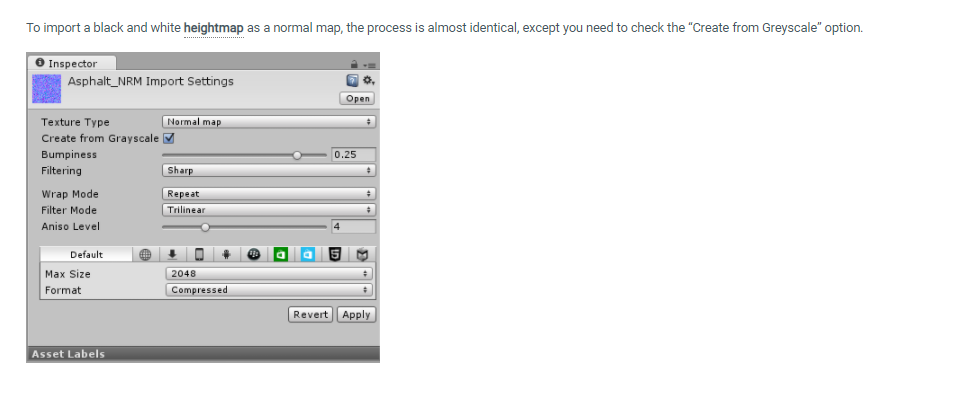


 alpine rover
 vivid lagoon
i'm assuming the head and body use different materials? If so, check that they're using the same shader (guessing poiyomi?) with the same emission properties. I had an avatar where the head's emission was a flat color, but the body used its own texture to determine emission strength/color.
little cape
Another reason for this is not having anchor overrides setup on head and other meshes to the same gameobject/bone (most often spine, chest or neck bone).
sharp pike
raw echo
As i understand it a lot of users have custom shaders disabled, is there a way t...
Docs: https://docs.vrchat.com/docs/shader-fallback-system More in depth explanation (from April 2019, so may be out of date): https://pastebin.com/raw/92gwQqCM
VRChat
This page serves as a description of the Shader Blocking System, how it operates, and how shader authors can work with it so that their shader falls back gracefully when a user has Shaders blocked on an avatar using a given shader. When a shader is blocked by the Safety System, it is first checked f...
raw echo
sharp pike
Docs: https://docs.vrchat.com/docs/shader-fallback-system More in depth explanat...
Much appreciated!
 cursive dirge
Hello, Unity noob here. I'm trying to make simple eye reflections using the Standard Unity shader (Specular setup). What I'm looking for is like Blender's Principled shader with Roughness set to nearly zero. I put inverted roughness map into the specular texture's alpha, but I can't figure what to put in the RGB channels to get what I want. Just simple white turns the whole eye white and using the diffuse texture makes it just weirdly metallic looking. I'm assuming RGB affects the actual colors of the reflections (that's specularity I think). Can anyone help please?
cursive dirge
Okay I got there by using Autodesk Interactive shader by feeding it a modified roughness texture but I'd like to know if there is a way of doing just roughness in the standard shader.
sharp pike
cursive dirge
Okay I got there by using Autodesk Interactive shader by feeding it a modified r...
Blender's Principled BSDF shader is closest to Autodesk Interactive shader, since both of them use Metallic and Roughness. Remember to untick sRGB in the import settings of your Roughness texture in Unity since it's not a colour texture and its values should be interpreted linearly. You shouldn't need to modify your Roughness texture in any way from the one used in Blender. Of course, this assumes your Roughness texture's Color Space in Blender has also been set to Non-Color instead of sRGB.
Standard shader uses only Metallic and Smoothness (Glossiness). Normally, it is very easy to convert Roughness to Smoothness, all you need to do is invert it, though this will only work if your roughness texture had sRGB unticked in the import settings (equivalent to specifying Non-Color in blender).
Standard (Specular setup) shader is a different PBR workflow (metallic vs specular), you would have to convert your textures to use this shader https://marmoset.co/posts/pbr-texture-conversion/. This is a different 'specular' to the one in Blender's Principles BSDF shader. Blender does have its own Specular shader, though it is only supported by the Eevee render engine.
cursive dirge
sharp pike
Blender's Principled BSDF shader is closest to Autodesk Interactive shader, sinc...
Nice, very informative, thank you.
 prisma sequoia

 west jay
is there any transparent shaders that work for quest?
little cape
On avatars, nope. In worlds you can use those, but you should be careful with it.
west jay
little cape
On avatars, nope. In worlds you can use those, but you should be careful with it...
do you know how people make transparent avatars then? seen a couple going around
 sick cargo
So I cant confirm, Ive been told Standard transparent works, it's just heavy. The SDK points out that you shouldn't use it so I don't. But, Particles work, and they are/can be transparent.
cursive dirge
So Cutout materials are a no go?
 lucid spindle
cursive dirge
So Cutout materials are a no go?
lucid spindle
cursive dirge
So Cutout materials are a no go?
if i remember right the quest gpu literally doesn't support alpha test at all so no unfortunately
that or its so perf heavy unity just wont even let you use it
little cape
Cutout is worse on mobile systems than actual transparency apparently.
lucid spindle
little cape
Cutout is worse on mobile systems than actual transparency apparently.
i think it was something about either stencils or pixel culling, not to sure. been a while since i looked into it
tired token
@lucid spindle @little cape It's because the Quest uses Tile Based rendering and that's slow af for alphatest/cutout
vivid lagoon
little cape
Another reason for this is not having anchor overrides setup on head and other m...
do u think u could dm me maybe?
lucid spindle
tired token
<@!257719403028807680> <@!263052208172564481> It's because the Quest uses Tile B...
ah got it
lucid spindle
so I'm trying to make a custom shader that uses bakery's vertex lighting and I've managed to get color out just fine (its just in rgbm format) but I'm having a hell of a time trying to figure out how to get the directonal component out. would anyone know how to go about doing that?
lucid spindle
lucid spindle
so I'm trying to make a custom shader that uses bakery's vertex lighting and I'v...
 hasty raven
any subsurface scattering shaders I should be aware about?
because I think this is a good example
Add depth to your next project with Alloy Physical Shader Framework from RUST LTD.. Find this & more VFX Shaders on the Unity Asset Store.
proven flare
hasty raven
https://assetstore.unity.com/packages/vfx/shaders/alloy-physical-shader-framewor...
the specular on this shader is buggy
hasty raven
what do you suggest then?
proven flare
hasty raven
what do you suggest then?
GitLab
A simple subsurface scattering shader for Unity/VRchat that implements an approximation of a subsurface scattering effect.
hasty raven
thanks Travis
hasty raven
also another thing
is there any way to replicate sheen and sheen tint?
you know, like cloth?
wait a sec
springtrap doesn't have that
safe geyser
My knowledge of what shaders can do is very limited, so here's what might be a stupid question. Please help me out o experts.
Assuming that player avatars are always rendered on layer 9 - Player (which might not even be true, I don't know), would it be possible for a shader on a PC avatar to shade all pixels of a material through which any player avatar is visible to a flat color and leave all other pixels transparent? (And does anything like this already exist?)
I'm trying to come up with a method for marking players on my minimap
little cape
Usually cameras are used for that afaik
safe geyser
Well, the minimap uses a camera
Without scripting/udon, can I mark the players on it?
toxic wolf
I'm actually wondering about this too. The way it is done in scripting/udon is through assigning a camera "replacement shader", but I have yet to come across any information with how to do this within Avatar 3.0
EDIT: you can cull out everything but the player with a method shown here, but pixelating it is still through replacement shaders. The method here can be summarized as using the VRCworld sdk to set up layers (same project, different scene), then setting the cull mask of the camera back in your main avatar scene to use the new layers
https://vrcat.club/threads/errors-hud-shader.2210/
VRCat: Community-Run VRChat Forums
%--------------------------------------------------------------------------
%
% Error's Heads Up Display (EHUD) Shader Version 1.01
% 2018-08-05...
you can find the layer setup in the section regarding the face cam, but instead of pointing it at your face, you make it an orthographic top-down camera
safe geyser
I already do all of that, and am using a modified version of this shader for my minimap, but I think I'm missing a step in my head; how do I colorize the players?
I can remove non-players after the fact using the camera settings
toxic wolf
I guess that if replacement shaders prove to be impossible, you could colorize the players with post processing. You could blur, and then hue shift to make them into dots. The main trouble is pixelization
oh wait, I just read your goal again, you don't want to pixelize the end result... You should be fine with post processing
safe geyser
Ok, I think I vaguely get it
Use two cameras, two render textures, one for the world, one for the players
Pass them separately to the hud shader, let the hud shader process the shit out of the player one
I'll look more closely into how to do that ASAP
little cape
toxic wolf
I'm actually wondering about this too. The way it is done in scripting/udon is t...
I had an SDK2 avatar favourited that had a camera which only showed players tinted in green. Not as minimap though.
wicked grotto
Sorry if this is the wrong place to ask, but does anyone know of where I can find the 'raindrops falling down window' shader seen on many worlds with rain? Thanks
agile totem
sick cargo
So I cant confirm, Ive been told Standard transparent works, it's just heavy. Th...
not without sdk modifications, which are forbidden by the tos
@west jay
agile totem
little cape
I had an SDK2 avatar favourited that had a camera which only showed players tint...
OH now i got another feature i need to add to my avas, a minimap, thx
sick cargo
agile totem
not without sdk modifications, which are forbidden by the tos
Are you talking about the standard shaders? Because you can upload standard on an android build with zero modifications. The SDK wont tell you its going to break anything, it will tell you that it might, or might be really heavy. Hence why I don't bother.
agile totem
sick cargo
Are you talking about the standard shaders? Because you can upload standard on a...

(your sentence is true for worlds tho)
sick cargo
rgr that, yea I only do worlds 🙂
safe geyser
Anyone here actually experienced writing cgprograms? Anything higher than zero will probably do. Trying to figure out what's the proper way to operate over only the xyz channels of a texture but preserve the alpha unmodified (or just add the alpha back in after operating on only .xyz)
Unity's saying something about cannot convert half3 to half4
safe geyser
Actually, since I really need to sleep and I know what I need to accomplish but just don't know the syntax for anything I'm going to try to explain what I'm trying to do in the hope that someone can help at some point, and I'll hopefully learn from whatever is said.
I have two texture data matrices "a" and "b" (fixed4) and a color "color" (also fixed4). I want to:
- Modify every pixel in a such that:
1a. Its color becomes a blend of its original color and "color", controlled by the alpha value of "color" [a * (1-color.a) + color * color.a]
1b. Its alpha channel is preserved unmodified - Then modify each pixel in b such that:
a is alpha blended/overlaid onto b using the alpha channel from a [b * (1-a.a) + a * a.a]
past pewter
bababoey
steep swift
safe geyser
Actually, since I really need to sleep and I know what I need to accomplish but ...
a.rgb = lerp(a.rgb, color.rgb, color.a);
b = lerp(b, a, a.a);
lerp(X,Y,Z) means (X*(1-Z)+Y*Z)
safe geyser
ooo, you can put a.rgb on the left side of the assignment?
(just woke up)
I'll give that a try soon, thanks a lot
safe geyser
Success!

Green for me, red for other players
The butchered version of error's hud shader

 visual wing
where can i get or buy a shader that simulates the effect of a disco floor?
 silk sierra
Any tips on how to make parts of the same mesh have an outline when they're separate/have depth? This is what I'm currently lookin' at and usin' Poiyomi's tune shader with outlines enabled.

The eyebrows (the small, bean-lookin' thin's) lack one entirely while the lashes are only partially outlined.
The hair also lacks an outline on the inside which weakens the contrast between it and the face..
agile totem
safe geyser
3 rendertextures tho? I found the error hud extremely annoying to setup with its constraints and cameras
safe geyser
Annoying? It does its job
Three rendertextures for the three layers with different culling masks
 devout hemlock
If I write a custom shader for a material on an avatar, and a user has the "shaders" safety setting disabled for the user wearing that avatar, will it affect that material? And in what way
nevermind, I have found this page in the SDK answering my question https://docs.vrchat.com/docs/vrchat-safety-and-trust-system#what-does-the-safety-system-do
VRChat
The VRChat Trust and Safety system is a new extension of the currently-implemented VRChat Trust system. It is designed to keep users safe from nuisance users using things like screen-space shaders, loud sounds or microphones, visually noisy or malicious particle effects, and other methods that someo...
 fallen condor
Trying to make my avali quets compatible but With every Quest shader one Side of the Wings is invisble any ideas how i can make both Sides visible for Quest Players?
 hexed stone
fallen condor
Trying to make my avali quets compatible but With every Quest shader one Side of...
hexed stone
fallen condor
Trying to make my avali quets compatible but With every Quest shader one Side of...
Copy paste the wings and slightly offset them toward the invisible part. Then flip the normals.
fallen condor
hexed stone
Copy paste the wings and slightly offset them toward the invisible part. Then fl...
I.... Don't Know how to do that
Learned unity Not even a Week ago
Actully now it May be excactly a week
brittle plinth
hexed stone
Copy paste the wings and slightly offset them toward the invisible part. Then fl...
Shouldn’t even need to offset, I’m pretty sure
brittle plinth
fallen condor
Learned unity Not even a Week ago
It would need to be done in Blender, not Unity.
 outer sphinx
Having an issue with one of my animations, specifically on PC

A blush gesture won't appear in game
Yet it appears in Unity (and in Quest VRC) just fine!

The shader and material is Standard too
 outer sphinx
I've even adjusted the texture a bunch but to no avail
 jade oriole
Might be rendering queue, doesnt know wich one to do first in vrchat, try a random shader see it i appear then 🤷
outer sphinx
Found the issue, it was a blend shape oversight
past pewter
is there an easy way to edit shader code so that it is mirrored in a mirror? but when not looking at it in a mirror it will be normal
steep swift
@past pewter start with this function:
bool IsInMirror()
{
    return unity_CameraProjection[2][0] != 0.f || unity_CameraProjection[2][1] != 0.f;
}
you could negate vertex.x if IsInMirror() or else negate uv.x
uv.x might be simpler if it's a quad (like flipping a video player)
however, if you flip vertex.x, you may need to add Cull Off as that will invert the vertex positions leading to backfaces
past pewter
Thank you!
proven flare
is there a shader that can support alpha textures
 steel kiln
Is there a way I can add more definition to my avatar’s face using Poiyomi? This happens in some worlds that have a lot of flashing lights.

 left orbit
Does anybody here know anything about dissolve effects combined with particles?
There are two different dissolve + particle shader effects I need to do and I'm a strugglin lol
 queen cedar
what's the best options for outputting textures from Substance to Unity for VRchat, both avatars and worlds
left orbit
Why does VRC not support geometry shaders??
leaden tartan
left orbit
Why does VRC not support geometry shaders??
wym? maybe explain what you're trying to do. Geometry shaders work in VRC unless you're referring to something else. But geometry shaders are used for a lot of things in many popular shaders, such as outlines, fur, various forms of vertex displacement, etc.
Are you talking about the Quest? Because the quest Doesn't support Geometry shaders, but that's not because of VRC.

GitHub
Trying to document obscure technical VRChat knowledge - shader-knowledge/geometry-shaders.md at main · pema99/shader-knowledge
glacial abyss
Yeah! Dude. So glad we get those bad boys to make cool stuff with. Ball pit would have been 2x harder to write without them.
leaden tartan
A life without ballpit wouldn't be a life worth living xP
glacial abyss
The ballpit was an inescapable future. Just glad it wasn't made more difficult.
leaden tartan
The hero we need
glacial abyss
Me? Or the ball pit? I am just a vessel. The ball pit could have chosen anyone to manifest itself.
queen cedar
hey guys, I need some help with textures, I'm making them in Substance then putting them into Blender so that the FBX file that is outputted has the textures on it already
I need some help working out what shader to use in blender what setting to export the textures as in Substance, and if I should just skip blender for the textures and just go straight to Unity with them
should this question be in #avatar-help ?
 tribal flame
I'm looking for a carpet shader
 limber vine
Anyone know how to use the render pipeline that is actually usable in the new 2019 version? I've never managed to figure it out so I'm just resorting to a stylized mesh and textures with standard shaders.
bitter bane
Unity just uses the Standard Pipeline, what are you having issues with
limber vine
just the way to set it up.
like theres the new one that allows for better pbr usage and subsurf, etc.
unless vrc doesnt have the capability of it.
bitter bane
Yeah, you can't use HDRP or URP. There are shaders that use PBR and subsurface for the standard render pipeline though
limber vine
aw.
id rather not take the risk. i've seen alloy and i dont like the look. i'mma stick with ue4.
and just make stylized stuff for vrc instead.
uneven loom
the unity standard Shader output PBR results
glacial abyss
What are you trying to accomplish? There's several shaders for VRC which accomplish all manner of apearance.
uneven loom
like there's nothing particularly magic about how Unreal Engine handles its PBR rendering
limber vine
glacial abyss
What are you trying to accomplish? There's several shaders for VRC which accomp...
from what ive seen. a majority dont do subsurface very well. and i dont mean stylized. i mean actually good at bouncing the light through the surface. i've done it before but its very buggy with worlds so i thought the 2019 update would make it easier because of the HDRP.
uneven loom
GitLab
A simple subsurface scattering shader for Unity/VRchat that implements an approximation of a subsurface scattering effect.
limber vine
imma test it. i'll compare it to my render then to ue4. thanks for the help though.
bitter bane
HDRP probably would have broken a lot of stuff in older content, they might have tested it, but we don't know
limber vine
sorry if it came across as rude. i was just wondering since i put a bunch of effort into the model.
limber vine
bitter bane
HDRP probably would have broken a lot of stuff in older content, they might have...
thats why i was sorta hesitant at first. ended up asking anyway just because i wanted to find out either way.
uneven loom
and I suppose the questions to be had of if the unreal implementation would be fast enough to do in VR as far as it looking like any prettier than stuff do on VRC
limber vine
can you explain a bit further? im a bit confused on wym.
uneven loom
performance trade-offs to be had as far as graphical fidelity as vrchat needs to run a lot faster then a 30 FPS console game
limber vine
ohhhh.
ive tested it b4. just need some optimizing with the textures and meshes. it's not that much different from my experience honestly. frame rates dont drop too much for me when i test in ue4 in vr. idk about ue5 tho.
using a quest 2 with link cable for it so i dont know if that has anything to do with it but there you go
uneven loom
not familiar enough with Unreal Engine to check the performance metrics and hopefully the Shader I posted does the trick
limber vine
the model imma be testing for subsurf is this hylian ear thing.
the screenshot is in ue4 but im also gonna compare rendered to ue4 to the unity shader you gave and see which one imma stick with.
 glacial abyss
Another big issues is with VRChat is it needs to be very versatile. People want their sparkle and outlines with grab passed diffusion effect on their poi shaded avatar. It's a lot easier to bring the PBR features into the versatile VRC pipeline than it is to bring wildly varying stylization into more physically-based pipelines.
limber vine
thats what i was thinking.
glacial abyss
That said, there's a lot of shaders and tech in VRC shaders now. S-ilent's subsurf shader is a great place to start.
limber vine
well you saw the ear. i'mma see if it holds up.
its an old model but imma still test.
glacial abyss
It won't look exactly the same, but it can probably get reasonably close.
Though, your super zoomed in view, looks fairly contrived with things like shadowmaps, etc. because of the scale of VRC Worlds and avatars, it's unlikely you would ever get the same fidelity.
limber vine
oh
it was just to show the subsurf lol
thats why i took out the hair and didnt show the whole
glacial abyss
Right, I'm just saying, because of the sheer amount of stuff that happens in VRC Worlds, you won't be able to have quite the same quality. Regardless, I recommend exploring what we have now. Just trying not to set expectations unattainably high.
limber vine
yeah. sorry lol.
i mean im fine with what im doing now. i was just asking because i always had the option open since rn im doing a stylized take.
to compensate.
glacial abyss
aah gotcha. ok.
yeah, def explore s-ilent's stuff.
Most other people take a toon-esque slant to things :-p
limber vine
i like realism because of all the imperfections. toon sorta has an unrealistic standard at least imo. so i wanted to show more. but i was kind of naive back then. i was just asking because i wanted to see if i could import for fun.
i could incorporate that into my style.
 brazen jackal
Would anyone be able to point me to resources related to making cubemap shaders? I'm just trying to get it to render a cubemap on an object, so if I were to, for example, put the skybox cubemap on it, it would look like the skybox but would block objects behind it.
glacial abyss
Look at the skyData spots mentioned here: https://docs.unity3d.com/Manual/SL-VertexFragmentShaderExamples.html - you can use UNITY_SAMPLE_TEXCUBE(unity_SpecCube0, ...);
brazen jackal
That unfortunately doesn't seem to have enough detail on its own. Removing the reflect function from the provided shader does get me something similar to what I want, but its mirrored, low res, and doesn't seem to accept a texcube to read from.
I'm sure the solution is similar, but that page doesn't include much detail about what the functions its using do, or how to use them.
glacial abyss
Is your bigger issue using a cubemap or figuring out what vector to use when sampling? If the cube map is low res, that would likely be within the unity settings. It does discuss a fair bit.

alternatively you can look at what's going on under the hood, https://github.com/TwoTailsGames/Unity-Built-in-Shaders/blob/master/CGIncludes/HLSLSupport.cginc#L327 that is sometimes helpful for getting an idea what's going on.

GitHub
Unity Built in Shaders. Contribute to TwoTailsGames/Unity-Built-in-Shaders development by creating an account on GitHub.
brazen jackal
I think its more a matter of understanding what the different functions are, and what their parameters are. For example, I just realized that I should be imputing my texture and not unity_SpecCube0. I thought unity_SpecCube0 was a buffer I was trying to add it to or something. I'm learning shaders as I go with this project. I'm used to stuff like Source engine where it does 99% of the work for you. I think what I am now stuck on is how to use DecodeHDR(). The main problem is that the one intro tutorial page is all I could find for related documentation/examples so I'm pretty much learning by pure trial and error
That last link you sent seems like it'll help. I'll try looking through that and see what I can figure out.
glacial abyss
Well, one of the reasons shaders reload in under a second is to make it easy to iterate very quickly and explore. That said, a lot of it is a matter of finding examples of what other people have done and go from there. I wish I had examples with cubemaps, but at the moment I don't have any clear examples except this one: Which is originally from d4rkpl4y3r. https://github.com/cnlohr/cnballpit-vrc/blob/main/Assets/cnballpit/shader_billboardout_SV_Coverage_New.shader#L496-L520

GitHub
Contribute to cnlohr/cnballpit-vrc development by creating an account on GitHub.
 sleek hinge
anyone know how to use shaders to make an object appear/disappear as a flat plane passes through it?
 livid gulch
I’m planning on making myself an avatar as a test to see if I can make it. Does anyone know how the glowing cell-shading works?
devout hemlock
How can I go about creating a screen space shader that only shows when the player's view is nearby a certain point
as an example, being able to cover someone's vision by bringing my hand over their eyes
sleek hinge
livid gulch
I’m planning on making myself an avatar as a test to see if I can make it. Does ...
only heard of using hdr with high intensity with noise to make it shiny
past pewter
how can i make a shader visible to friends only?
glacial abyss
You can use a camera. Cameras are visible to friends only, otherwise the render texture is not updated. This is especially cursed though. Please don't do this.
past pewter
I am gonna do it im sorry  i want only friends to see this specific thing on my avatar
glacial abyss
Just be aware it will slow you and your friends down just a tiny bit.
But if you use a camera component, and read from the specific rendertexture, it will be different if it's being viewed by a friend. I don't recall what the default behavior is, but you could always make the camera clear to a specific color and see if the rendertexture has that specific color. Also, note: if VRChat decides to change the way camera security works, this behavior will change , too.

They will not add an option for spacebar heating if this breaks.