#shaders
2 messages · Page 23 of 1
 uneven loom
 lime parrot
But will it look good and preform well...
You can't ever seem to get both with vrc or unity in general.
But I want both
Not expecting it to look like unreal but it should still look good.
uneven loom
they're not going to render any differently if it's on vrchat versus unity in general if it's in the same rendering pipeline
uneven loom
that's probably not because of special shaders more just the architectural design & the post-processing
wouldn't surprise me if it's just the standard Shader or standard Shader light on most of the surfaces
lime parrot
Still not getting an answer other than maybe "fake it till you make it"
Gotcha
Really just working with unity for vrc so I probably shouldn't worry about hlsl.
uneven loom
there's no magic make it look prettier Shader
uneven loom
lime parrot
Still not getting an answer other than maybe "fake it till you make it"
yeah pretty much you just need to get more good at mapmaker
and mostly it's good baked lighting that makes things look pretty on vrchat
lime parrot
But then there's the issue of Avatar shaders
uneven loom
yeah that's a bit of a different question
are you going toon shaded avatars or no and how much special effects are you looking for
lime parrot
Dynamic lights are too heavy in vrc for whatever reason. So that limits things.
And I'm just talking basic shaders for skin and clothing
uneven loom
Dynamic lights are heavy in general is just vrchat has a much higher frame rate requirement compared to Grand Theft Auto V
uneven loom
lime parrot
And I'm just talking basic shaders for skin and clothing
then you should probably be fine with just the standard Shader
lime parrot
That looks terrible
uneven loom
so what particular rendering affect are you missing
uneven loom
of course the standard Shader is not a toon Shader
lime parrot
I'm talking on these models that go for 100+ too
uneven loom
100+ what
lime parrot
$
uneven loom
that wouldn't have much bearing on what shaders are used
lime parrot
You're not following...
uneven loom
okay so clarify how those two are correlated in any way
lime parrot
Nevermind I'll just do my best to make it look decent by playing around with it 🤦
uneven loom
yeah that's probably for the best as there's not some magic makes it look ten times nicer
lime parrot
uneven loom
yeah that's probably for the best as there's not some magic makes it look ten ti...
Not really what I was looking for.
uneven loom
well you haven't really listed a set of rendering characteristics of the shaders you're looking for
lime parrot
Just something that compares to good looking unity games which nothing in vrc really has.
Shader wise not just the actual map, texture, and lighting
uneven loom
that doesn't have much to do with shaders that's mostly going to be the lighting
as most of those Unity games are probably just using the standard Shader if they have a realistic art style
as physically based rendering is pretty much the same in unity and Unreal Engine as far as how the math works
lime parrot
You're throwing what I'm saying out the window.
uneven loom
well you're just saying make it look like pretty Unity games without giving any particular examples of the the rendering characteristics you were looking for
like sure I could work with it it was like oh I want subsurface scattering
lime parrot
Good shaders at decent cost is easy enough to understand
uneven loom
that is not helpful as you haven't answered how the regular shaders are inadequate
lime parrot
Subsurface scattering should be a given
uneven loom
that is entirely on the lighting and the models and stuff for looking like a AAA video game not some secret Shader everyone is hiding from you
lime parrot
You keep talking down 🤦
I'm not expecting it to look like a AAA and I don't think it's being hidden.
uneven loom
okay sorry I just haven't heard a thing that would have to point me towards a Shader other than looks prettier than the standard Shader
lime parrot
Fine let's just say looks like base unreal shader.
Unity can't do that (unless it is AAA lmao) and it's not what I was looking for but I'll give you something more to work with
uneven loom
okay do you have some pictures to demonstrate what characteristics are looking for as they're both pbr shaders so they should have pretty close to identical results given the same textures
like give me 5 minutes and I'll load up a identical texture in both
lime parrot
Ah figured it out
That is my original question not whatever you where trying to answer due to miscommunication between us.
Well and part of that
uneven loom
so what did you figure out
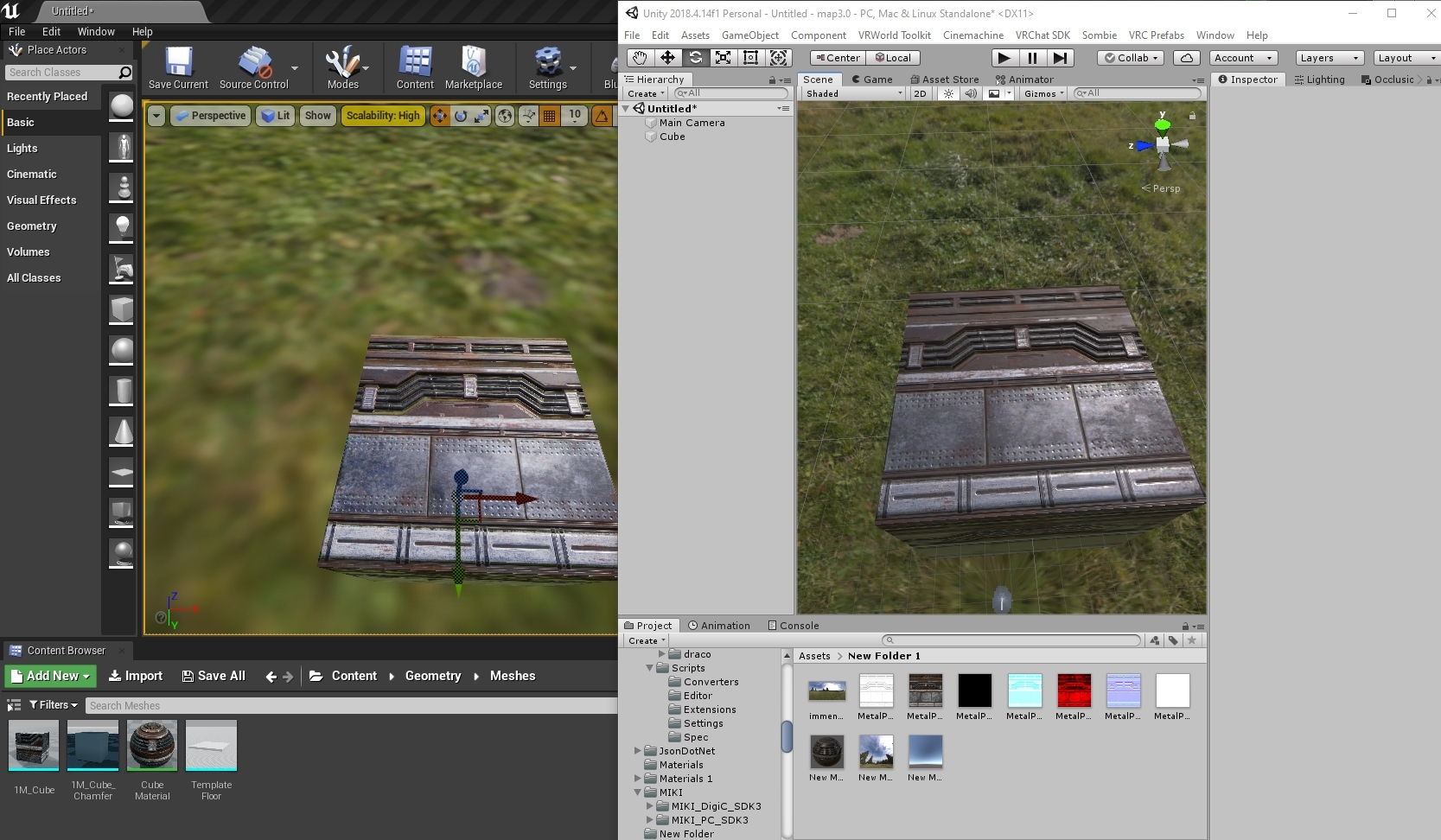
https://i.gyazo.com/85709765339578debba6bd8569218f48.jpg here's an example showing the same material in both engines with a HDR Skybox providing the lighting on both so they have basically the same lighting setup no fancy Unreal Engine special effects piled on
 uneven loom
basically you need to image edit to transfer the detail from the transparent textures onto the base mesh
uneven loom
https://ziston.booth.pm/items/2792005 this tool can handle the automatic conversion@lavish hare

VRoidの眉毛とアイラインのテクスチャを不透明にして、Quest版VRChat用に変換するプログラムです。 眉毛とアイラインのテクスチャに基本色とかげ色を使用している場合、選択する前にGIMPやCLIP STUDIOのようなペイントソフトで色変更が必要です。 変換後のテクスチャはVRoidで顔の肌レイヤーに重ねてください。 テクスチャの白色背景の透明化はペイントソフトの方で行った方がきれいにできます。
 agile totem
Vrm?
uneven loom
no problem figured that would be easier than manually doing that
you export them from VRoid

in which tool
default settings should probably be fine I haven't played with it extensively?
looking at the pictures English text you probably don't need to change any of those settings at the moment
 sage cargo
i need help
it with shaders and being purple in game but not purple in unity
 lofty saddle
Is there a shader for quest that has outlines
sage cargo
no
uneven loom
you pretty much have to do geometry outlines on the quest but that involves like doubling your triangle count
sage cargo
im on pc
the shader that is purple is the polycolorwave made by snail
its ok in unity but not in game
are you still there
are you talking about MMS3_Outline
game mean vrchat
pc
 toxic egret
Hmmmm
sage cargo
.
 tribal flame
anyone know a nice stars for sky shader?
 elfin sky
Is it possible to do the following?
1: wrap a texture onto a mesh
2: for each pixel, take the texture's color and modify by some value (for ex, increase the Red value for all pixels on the top half of the screen)
3: unwrap the pixels back into a modified (and incomplete) texture
4: save the modified texture to use in step 1 on the next frame
As far as I can tell, step 4 is impossible. If I use a Custom Render Texture to store data between frames, I will be unable to wrap/unwrap the texture that I'm working with. So, am I right and this idea is impossible, or is there some other solution?
uneven loom
question what is the end visual results supposed to be
elfin sky
the idea is to have a 3d model with a dynamic texture, where the texture changes based on its data from the previous frame plus modifications made this frame, where the modifications are based on where each part of the texture gets rendered. so for example, I could have each pixel become the average of itself and the 4 adjacent pixels for a sort of color-bleed effect based on whatever is next to the model at the time it is rendered
saving the data from frame to frame also would cause a weird effect, where if the viewer and the object are both completely still, the object would eventually lose all visible edges, until it moves and you see it from a different angle
elfin sky
the issue here is that I can save data between frames OR do pixel modifications based on how the object is rendered, but not both at once
afaik
 sharp pike
Sounds similar to what the cameras are doing in worlds with water ripples and similar and that fluid simulation test world. But similarly I think https://github.com/SCRN-VRC/Raymarched-GPU-Particles-with-Screenspace-Physics does some of what you're after whereby in its case, it stores and updates particle positions and velocities in the bottom left of the screen using multiple grab passes. SSPQueue0.shader has a comment that says it grabs stuff from the last frame.
I swear I keep coming back to that shader over and over again...
 carmine jewel
There is the double buffer option on a custom render texture that's supposed to be for that kind of thing
GitHub
Shallow Water Equation created using CustomRenderTexture in Unity3d - akauper/Shallow-Water
 vale epoch
Is it possible/ easy enough to do a frosted plastic like material similar to this mask for a vrchat avatar?
 carmine jewel
You'd need a grab pass for the refraction, but I think it'd look good enough if you just used the standard transparent shader and texture it.
 brittle plinth
Refraction might not even be necessary, a cheap specular over transparent shader would probably work fine.
 agile terrace
idk where else to ask this but for rero standard do you need a cube map for it to do its thing where it still has shine in baked lighting worlds
lofty saddle
im trying to put an outline shader on my avatar but when i do this it does not stretch over the whole model and looks like this with gaps between it
 sharp pike
Hull based outline shaders will do that if the model is flat shaded or wherever there are non-smooth normals in blender.
I simulated what happens, in blender, with two spheres, one smooth shaded and the other flat shaded:

 shut robin
I need a shader for pokemon-style battle text in screen space
 modern seal
anyone know of any good shaders similar to the ones being used in this game? i tired Poiyomi and Sunao and neither of them truly suit what im going for.

 lofty dragon
lofty saddle
im trying to put an outline shader on my avatar but when i do this it does not s...
lofty dragon
lofty saddle
im trying to put an outline shader on my avatar but when i do this it does not s...
Reimport the model into blender, are the edges marked sharp?
I had this issue before
lofty saddle
yeah i fixed it
but now im just having issues with the legs

it only appears on the leg if it set it to a stupidly high number
 lofty dragon
lofty saddle
it only appears on the leg if it set it to a stupidly high number
lofty dragon
lofty saddle
it only appears on the leg if it set it to a stupidly high number
try editing the normals in the inspector
 sage wasp
Would it be possible to create an audio responsive shader that can mimic echolocation?
 neon herald
if any one have VHS shader?
 wary junco
Can someone confirm how some of the vrchat/mobile shaders use the fbx’s vertex colors? They always come in much lighter than I have them set in blender. Like, orange comes in as teal.
 steep swift
Probably a gamma space issue
You might need to raise the color by a power of 2.2
Note that it may be different on the quest itself in that case
If your color is 0.8, 0.6, 0.4 then you'd run pow(0.8, 2.2) in your favorite calculator program and end up with something like 0.6, 0.35, 0.16
 velvet sorrel
modern seal
anyone know of any good shaders similar to the ones being used in this game? i t...
velvet sorrel
modern seal
anyone know of any good shaders similar to the ones being used in this game? i t...
Try mine, it should look pretty close
https://gitlab.com/s-ilent/SCSS
 slate viper
 sharp pike
I'm not sure what you're asking, are you asking how you can get a gui control like that in your own shader gui?
modern seal
velvet sorrel
Try mine, it should look pretty close
<https://gitlab.com/s-ilent/SCSS>
any prerequisits i should worry about? for example, my models dont have any normal mapping just due to how the exporter works
 pine venture
Odd question, I wanted to use the VRChat-Sprites Shaders for maximum efficiency but it appears they don't support "Text Color", is there a way to add that manually?

Looking at the code a lot is autogenerated, so I'm not sure

 modern seal
velvet sorrel
Try mine, it should look pretty close
<https://gitlab.com/s-ilent/SCSS>
modern seal
velvet sorrel
Try mine, it should look pretty close
<https://gitlab.com/s-ilent/SCSS>
wait is it not set up as a unity package?
because i wont lie, i have zero clue how to create a shader
velvet sorrel
modern seal
wait is it not set up as a unity package?
Unity packages are just fancy archives, you can drag and drop the shader folder into the Assets folder
 south thunder
Heyo! Does anyone by chance have a transparency shader or something that can help me? im currently using the poyomi transparent shader on an avatar but rather than just making the shawl slightly transparent to show the clothes underneath its now showing straight through the character. Im not really sure what im doing wrong @_@
heres what its doing

and here are my settings for the shader

 sturdy mural
I just made a shader, and I'm wondering if anyone knows/has links to guides for making it have a fallback default shader
please dm me if you do
the kind of stuff where it will just look very plain, or sometimes have a texture saying 'please enable shaders!' if they don't already
 fierce vine
south thunder
Heyo! Does anyone by chance have a transparency shader or something that can hel...
fierce vine
south thunder
Heyo! Does anyone by chance have a transparency shader or something that can hel...
The simple answer is transparent materials don't play nice with one another. Whatever material is on the mesh underneath should be either cutout or opaque. If it's also transparent, then they won't play nice together. If it's one mesh using one material, you'll need to assign a different material to the transparent part and make only that material transparent.
Also why you using such an outdated Poiyomi? That's a super old version. You can download 7.1.60 free from Poiyomi's discord.
south thunder
This is actually my first time working on a model for at least a year, so theres a lot not updated 😭 ill get onto that thought, thankyou. But huh! Thats interesting - ill try and work that out then. Thanks for your help! :]
sharp pike
sturdy mural
I just made a shader, and I'm wondering if anyone knows/has links to guides for ...
VRChat
This page serves as a description of the Shader Blocking System, how it operates, and how shader authors can work with it so that their shader falls back gracefully when a user has Shaders blocked on an avatar using a given shader. When a shader is blocked by the Safety System, it is first checked f...
fierce vine
south thunder
This is actually my first time working on a model for at least a year, so theres...
Ah, that’s fair lol hope you get it sorted out 🙂 transparent materials can be a real pain sometimes even if you do everything right so I know the struggle lol
lofty dragon
What would a good shader be to replicate this look? I don't just mean a grey shiny material, I want to have the lighting on each sphere look the same at any angle.

I'm using a matcap right now, but at high/low angles the lighting freaks out a little.
For context, this is the matcap I've been using.
 sharp pike
I had a look through the shaders in my unity project and all the vrc shaders that I have are using that alternative matcap method where the matcap doesn't rotate with the camera's roll and can have odd artifacting when seen from above or below. The only shaders I found with what I would consider the normal way to do matcaps (like matcaps in Blender) were MToon, the shader you use when exporting VRMs, and UnityChanToonShader.
 indigo echo
south thunder
heres what its doing
indigo echo
south thunder
heres what its doing
That usually means the material behind it also has some level of transparency
It has to be opaque because transparent things don't like eachother
Oh someone already helped you. My bad lol
But yeah that would be why that happened as they also said
 quaint fjord
how do I fix this non transparent thing. I am trying to make My avatar quest compatible and this is a nightmare

This is toon lit shaders, btw
uneven loom
transparencies are unavailable on the quest on avatars because it's too expensive to render for the mobile phone Hardware that runs the quest
if those are an important part of your look you would want to open up your model in blender and use the knife tool to cut out the shape so it doesn't use any transparency
 balmy star
Working on a working scope shader. Its hard to find good reference so i had to kind of guess how scopes work. any scope owners in the us please send me sum good reference with movements like in the video 
 prisma delta
im tryna use ToonM but it says its unsupported and im useing andriod
will that affect much?
or will it impoload on me?
sharp pike
You can't use custom shaders on quest avatars
 flint moat
quaint fjord
how do I fix this non transparent thing. I am trying to make My avatar quest com...
flint moat
quaint fjord
how do I fix this non transparent thing. I am trying to make My avatar quest com...
There is a way to do it that’s all I’ll say. Look for the right people and they’ll help you.
flint moat
prisma delta
im tryna use ToonM but it says its unsupported and im useing andriod
will that a...
You can only use shaders that exist already, nothing custom.
velvet sorrel
Doing that would violate the ToS
flint moat
Which part part of the ToS is it violating?
brittle plinth
Editing the SDK
The only way to upload Quest avatars with custom shaders would be to edit the SDK and either add your shaders to the whitelist or remove the whitelist entirely, both of which break ToS.
flint moat
There’s a way to do it without editting the SDK
It uses only the already provided shaders such as legacy or mobile
brittle plinth
If you mean overwriting Unity or the SDK's built-in shaders, that likely also breaks ToS.
It does. Any action taken to circumvent the SDK's upload restrictions is against ToS.
 flint moat
It doesn’t do any of that.
brittle plinth
Unless you've misunderstood the original question and are suggesting they use cutout/alpha clip shaders to apply transparency, you've implied there is a way to enable alpha blend on Quest avatars, a feature forcibly disabled through the SDK's upload restrictions.
flint moat
Oh my apologies, that must be the confusion. Didn’t mean to imply something like that. 
 daring lichen
Hey, is there a quick shader i could grab that puts a rendertexture onto the desktop screen? i dont want it to show up in vr, just on the desktop window
 hardy dagger
if youre using UDON for worlds. you can check for "isvr" and make it turn off and on if "isvr"
daring lichen
I'm trying to make a camera on an avatar display as ui to the desktop screen
i do want it to display on the desktop when i am in vr, i just dont want to have part of my vision obscured by a plane that is displaying the texture in front of my face in vr
hardy dagger
oh, then im not sure
brittle plinth
You might need to write a custom shader for it, but since VRC uses single pass stereo rendering for VR, I think you could check if UNITY_SINGLE_PASS_STEREO is defined, and then only write the rendertexture if it isn't.
Something along the lines of
ifdef UNITY_SINGLE_PASS_STEREO
  clip();

// write rendertexture
 sacred gyro
what is that shader that lets you control lights colors from a video source or a stream the one that works by scanning a specific point of the screen
sacred gyro
sacred gyro
what is that shader that lets you control lights colors from a video source or a...
Please help me
sacred gyro
.
 acoustic oak
You can do that with any shader by just changing the uvs it samples the texture with to a static value like tex2D(_MainTex, float2(0.2,0.4));
 pure raven
@quaint fjord So if an object is black or white, you can fake transparencies on Quest by using VRChat > Mobile > Particles > Additive or Subtractive.
It’s not real transparency though, just blending modes.
Works well for a translucent ghostlike effect too if you’re in a pinch.
 broken remnant
https://gyazo.com/7da6c1a767ca2208c9d4f772f9ab38cb would anyone have any idea on how to recreate this shader for the transparent shadow on the eyes that I have in Blender into Unity? The separate RGB was just me experimenting by colorpicking the color of the shadow to put in Unity but it's not giving me the same results. I'm trying to fiddle with VRM/MToon settings but I'm still new to the entire thing.
 pure raven
The grey shadow? I think Poiyomi toon shader could give you this effect, no? Just download it and follow the tutorial links included in the tool.
broken remnant
I'll look into it, thanks!
 lost dirge
What can I do to make the default DepthMask Shader work with vrc? It works in the scene view but has a weird multiplicative effect when viewed from a camera. I'm quite stumped
SubShader{
// Render the mask after regular geometry, but before masked geometry and
// transparent things.
Tags {"Queue" = "Geometry-10" }
// Don't draw in the RGBA channels; just the depth buffer
ColorMask 0
ZWrite On
// Do nothing specific in the pass:
Pass {}
}
}```
this is the depth mask Im using, am I doing something wrong? strange quest
Does anyone know how to get the “unmoving plaid” effect in poiyomi?
The unmoving plaid effect is like the chowder animation for clothes
Where the texture scrolls kinda when the characters move

Like this?
I think its pano sphere
lost dirge
Panosphere is what you're looking for ye
 cedar mango
i need a shader to create a slashed object. like in metalgear rising revengeance. I already found one but it's not made to be faded out. so do you guys know of one like this


 uneven loom
cedar mango
i need a shader to create a slashed object. like in metalgear rising revengeance...
uneven loom
cedar mango
i need a shader to create a slashed object. like in metalgear rising revengeance...
that's going to be very tricky as the implementation in the game is doing code stuff to accomplish it
cedar mango
well....not exactly. i already found one shader that works... it just doesn't fade. I'm looking for one that can
uneven loom
I suppose I should have asked as a follow-up question do you mean slice in half or just like leaving slashes in the object
 worn moss
does anyone know if its possible to have a shader only appear from the inside? so say from the outside a cube is invisible but once you step inside of the cube you see the texture inside
im trying to make it work with Poiyomi but im not having any luck with what I know
cedar mango
use stencils on a 2 sided bubble
worn moss
by two sided you mean the mesh has 2 sides? so like an outside and an inside?
cedar mango
yup
poi has a 2 sided sphere in there docs if i remember
you'll have to mess with stencils and render queues
worn moss
gotcha, thank you at least now I know its possible lol
cedar mango
yeah it's just a good amount of tweeking.
worn moss
got it working! thanks!
velvet sorrel
broken remnant
https://gyazo.com/7da6c1a767ca2208c9d4f772f9ab38cb would anyone have any idea on...
If that's a seperate material, you could use a really simple multiply blend mode shader for it (i.e. Mobile/Particle/Multiply)
modern seal
anyone able to tell what shader this model is using? i'd love to use it on my own models as well but have no clue what the shader is

 knotty iris
Anybody know of a shader capable of both billboard and flipbook-style render?
 spiral cosmos
Why throwing so much shade?
knotty iris
any of the ones I can find all use the whole image without allowing for UV manip to get a portion of a texture
 keen jay
I require some help regarding a shader please!
So, I'm using a wireframe overlay shader for a world I'm currently working on, but the shader doesn't have a property to set the "wireframe color", does anybody know where I can get the right shader for this?
Example image :

(I need this in a setable color)
The original shader was made by Bender

 vague temple
I am looking for a shader that can accomplish a colored but transparent plasticky feel. Is UTS2 capable or if there is a shader that is more specific for this? Thank you in advance. Something like this:

 frank isle
modern seal
anyone able to tell what shader this model is using? i'd love to use it on my ow...
frank isle
modern seal
anyone able to tell what shader this model is using? i'd love to use it on my ow...
It's probably Poiyomi's Toon Shader. If not then you can no doubt get the same look with it.
velvet sorrel
modern seal
anyone able to tell what shader this model is using? i'd love to use it on my ow...
Try my shader!
https://gitlab.com/s-ilent/SCSS
It's designed for perfect anime-style shading.
lime parrot
 smoky plaza
for toonlit shaders
smoky plaza
for toonlit shaders
You could just use Poyomi 👀
lime parrot
Poiyomi not silents shader right
modern seal
velvet sorrel
Try my shader!
<https://gitlab.com/s-ilent/SCSS>
It's designed for perfect anim...
I did and it didnt work for what i was trying to get. Sorry
modern seal
smoky plaza
if its in my list it worked right
As long as you imported it
pine venture
So I'm attempting to try to create a Parallax effect

Ideally I want it to look kinda like an infinite mirror

But I'm not quite having as much luck on it as I hoped
Any ideas/tutorials I could try?

Nevermind I figured it out
 past pewter
oh sweet thanks for the script
 north condor
Not sure were to ask but where can I get a sparkly shader, like to make textures sparkly
 coral carbon
I've seen some avatars have little audio spectrum graphs that react when the person speaks, but I can't find much with regards to how this is achieved on avatars. Anyone have any pointers?
 steady hamlet
anyone knows why outlines look weird like this?

 tired token
steady hamlet
anyone knows why outlines look weird like this?
tired token
steady hamlet
anyone knows why outlines look weird like this?
Usually caused by bad vertex normals
sharp pike
coral carbon
I've seen some avatars have little audio spectrum graphs that react when the per...
This has been done for a long time by having the audio spectrum graph as a mesh that gets moved with the various viseme blend shapes. Avatars 3.0 gives you further animation capabilities based on the active viseme too.
tired token
coral carbon
I've seen some avatars have little audio spectrum graphs that react when the per...
Make mesh that has blendshapes for all the visemes like a spectrum graph, place on avatar and combine onto face
tired token
sharp pike
This has been done for a long time by having the audio spectrum graph as a mesh ...
Kinda, AV3 only returns the highest viseme which is kinda stinky but it works
lofty dragon
I'm trying to remember the name of a type of shader
It's a shader that applies a texture to a model but without UVS
tired token
Triplanar?
lofty dragon
tired token
Triplanar?
That I think that's it
Do you know any good ones for VRChat?
I want to make a world with a bunch of rocks
tired token
GitHub
Templates for shaders with lighting, built for Unity. - Xiexe/Unity-Lit-Shader-Templates
Made for VRChat by a VRChatter
lofty dragon
compatible with bakery?
tired token
Define compatible
tired token
Yes, the Author uses Bakery too.
lofty dragon
tired token
Yes, the Author uses Bakery too.
Did I download the wrong thing? I can't seem to get it working
lofty dragon
Ah, got it
steady hamlet
tired token
Usually caused by bad vertex normals
Thanks i got it fixed
knotty iris
So im looking to instance UV animations to merge objects into one billboard flipbook animation
it turns 5 individual meshes into one skinned mesh, but thats the only way i can think to reduce the material count on my av
i guess my question is this: ive got 5 models with 1 shader each that has 1 of 10 sprites displayed on each, and i want to merge them into 1 skinned mesh with 1 material
I dont know how to instantiate each individual object as a UV island tho, only influence the entire UV as a whole
 keen forge
quaint fjord
how do I fix this non transparent thing. I am trying to make My avatar quest com...
keen forge
quaint fjord
how do I fix this non transparent thing. I am trying to make My avatar quest com...
toon shaders have a cutout feature i belive
that might work
tho idk
 burnt rivet
is anyone aware of any shaders with a good SSS model?
sharp pike
burnt rivet
is anyone aware of any shaders with a good SSS model?
Silent has SSS in their shader https://gitlab.com/s-ilent/SCSS They also have a version of the Standard shader with the addition of SSS https://gitlab.com/s-ilent/standard-subsurface-scattering

GitLab
A surface shader for Unity providing cel-shading. (Forward rendering only)

GitLab
A simple subsurface scattering shader for Unity/VRchat that implements an approximation of a subsurface scattering effect.
 meager plover
Any tutorials on how to make rainy windows, or any rainy window shaders? I've been trying to look on how to make one, but can't find any working shaders/ good tutorials
meager plover
Welp right when I ask this I find one lol
 proven flare
meager plover
Welp right when I ask this I find one lol
proven flare
meager plover
Welp right when I ask this I find one lol
About to say you could use this https://gitlab.com/s-ilent/fake-glass

GitLab
A shader for Unity that (ab)uses some Unity features to produce glass-like glass.
 proven wren
Hi, weird question. I got permission to port a game's world to VRChat, and I've been having problems recreating this one shader. In game there are these objects that are around light sources making fake lighting, and anything entering the objects gets a bit brighter, as does the ground the lighting touches, but it does not render against anything it doesn't touch. Is this something I'd need to break out custom shader writing for?

 dawn seal
Aight so I got a quick question about stencil shading, I'm trying to make a little sequence fit on a screen, and I used a stencil shader to make sure that if things go off screen they get derendered.
only problem is, I can't seem to control which object is rendered in front, any way you can control it?
sharp pike
Write your stencil on a lower render queue than the thing that is going to check the stencil value
dawn seal
that unfortunately doesn't work for some reason
basically trying to get the tall guy to not constantly overrender lucas

lucas, the guy, and the background are all separate planes, the object that's writing the stencil's a radius around the screen so I can have the background move around freely
... aight so nevermind cuz it randomly decided to work
we take those
only problem now it overrenders my avatar
alright so for now I substituted that by having my avatar's material write the stencil to zero
 crude trellis
Someone help me out? I'm using Poiyomi's toon shaders. My texture for skin is white, but for some reason it just comes out... Well, skin colored

vs the pure white on the texture

 chilly vine
I think that is due to the lighting. A couple of ideas is to adjust any RGB options in the lights and shadows or turn on monochrome lighting. Whichever looks better to your eyes.

 ocean ocean
Does anyone know if there is a shader that can "cover" the world with a texture?
 trim heath
Is there a way to animate the texture reference in a material or do we have to swap the material itself to animate texture changes?
(picture me scrolling through Poiyomi's massive list of keys without being sure what to look for)
sharp pike
Changing a texture property of a material by animation will affect all other materials on that same mesh too, changing the same texture property of those materials too if such a texture property exists.
trim heath
So it's really only viable for accessory objects with one material?
sharp pike
Yeah, or if you have a special shader on one of the materials.
Poiyomi shader also has something special where it can rename the properties you leave unlocked so each baked material has a different name for that property and you can animated them separately.
 bleak abyss
Hey everyone, just a little question over here, is there a way to do shader transparency, with whitelisted shaders (Still viewable by others, even if shaders are blocked by safety settings) while it being non-emissive? I'm trying to make it so that most player can see my avatar blush for example. I've tried some of the pre-compiled shader like Unlit/Transparant, but this one, for example, make my blush glow in the dark. I also tried mobile/particule/multiply, which give me a good result, but doesn't seem to work for people who deactivate shaders in safety settings.
 steep aspen
wanting to know how i am able to remove these orange borders from my particles when editing them, new to particles and teaching myself but now sure how to remove these orange outlines, anyone know?
https://gyazo.com/3b0f5b32e43f4a9af8b899ccc57d8ac8

 little cape
You can: #user-support-old message
knotty iris
Anyone know a shader that overrides vision of people inside the radius?
I want to override my own vision with a visual effect, but can only do that with planes that can get stuff in front of them, and is probably less efficient since i render the other things anyway even thru opacity 1
 simple shadow
@knotty iris You mean just a screen space shader that effects the user and all those in a radius around them? Or like a hud that you want anyone around you to have?
Been playing with modifying errors HUD shader with some success to do something more like the Cherub bot HUD. Finally think I understand how it works to get the HUD to always follow your view within the radius.
Though that HUD is done via a mesh that's attached to the avatar and the shader on it transforming the verts to your viewspace instead of worldspace from what I can tell so far.
knotty iris
Looking for screenspace moreso
Unless you can apply a HUD to the full screen at full opacity
simple shadow
Not sure about that. I mean, the HUD seems to apply to the full screen regardless of view orientation by when the HUD mesh is rendered it just transforms the vertices in the vertex shader to take up the full viewport, and then renders the image over that in the fragment shader. I haven't gotten to try it with someone else but I'm assuming it's like any other shader where if someone looks at it you could render in their viewport.
Though that would mean if they look away from it then I guess it wouldn't render in their display. Not sure how they've done the ones that change your view regardless of where you're looking.
Unless there's a GIANT sphere attached to the avatar so no matter where you look you're viewing that mesh while inside it.
If that's the case I imagine it's a sphere with the normals pointing in so it's only visible once you step inside it?
knotty iris
Another element ive been looking for is eye discrimination, but only found cancerspace to fit almost all the boxes
An option to have the UI only be visible to the viewport and not mirrors/cams'd be handy too
I'd mashed together a billboard flipbook shader before but thats about all the experience i got- screenspace seems doable enough if i figure out that stretch-to-screen method, but selecting only the specific viewport cam's probably a little over my head
simple shadow
I'm still looking at that part of code myself to understand why the mesh has to be oriented in a specific direction in the .fbx file for errors hud to work.
sharp pike
I would guess that the vertex shader doesn't rotate the mesh at all, going straight from object-space to 'in-front-of-your-face-space'
simple shadow
Yeah. That's what this section in there is doing but I don't fully follow justyet.
Doh..
No code posting.
Transform the verticies to the players camera. Consider the fact that the positions of the vertices are referenced with respect to the center of the object. We want to move them to be centered on the camera. If we assume that the vertices are in fact referenced with respect to the camera, our job is already done. We just need to transform them from camera space to clip space instead of object to clip. In most cases, you can assume the coordinates are directly in clip space and you do not even need to convert anything. However, that doesn't seem to work in this case for some reason. I transform from camera to world to object to clip, which is extremely round-about and ideally you shouldn't do it this way for screen-space shaders. I'm too lazy to figure out what's wrong though, so I'm keeping it.
The process makes sense(ish).. but 2 large glasses of wine at 1AM and reading this and the code didn't help understand it last night.
Oh durp. If we assume that the vertices are in fact referenced with respect to the camera. That's probably why it had to be in the specific orientation inside the FBX file.
simple shadow
That was it. But they're adjusting by some stereo convergence factor that needs some tweaking. Otherwise the HUD appears always on your screen but has this unnatural feeling of being really far away even when shown on top of things that are close which is really unnerrving.
elfin sky
is there an easy way to have a shader do something once every X frames? because _Time is in seconds and fps can be wildly inconsistent in this game, the only way I can think of is to store some sort of counter value in a pixel on the edge of your screen and then use a grab pass to get it, which is not an ideal solution.
Alternative bad solution would be to have a 1-pixel render texture and a second shader for that texture whose only job is to count frames
 harsh violet
Quick question how would I go about making my own shader?
pine venture
harsh violet
Quick question how would I go about making my own shader?
Well you can develop them in unity, by creating a shader asset, and editing the shader code in Visual studio
As for how to make something workable, unity tutorials are your best bet
pine venture
elfin sky
is there an easy way to have a shader do something once every X frames? because ...
Probably not if you want it precise
elfin sky
pine venture
Probably not if you want it precise
turns out you can do this by taking advantage of the animation state machine, each transition with exit time of 0 takes exactly one frame
pine venture
Neat
 quick loom
anyone know where I can find a water shader/material/texture whatever. I need to add water to my hot tub. I added a plane at the surface, think I just need a water material now
velvet sorrel
quick loom
anyone know where I can find a water shader/material/texture whatever. I need to...
Try mine:
https://s-ilent.booth.pm/items/2577099

A water shader for Unity/VRchat that (ab)uses some Unity features to get nice, clean looking water without a heavy performance impact. To install, place the Shader/ folder with the shader into your Assets/ directory.
 zenith cairn
poiyomi isnt showing advanced options anymore how can I fix this?
I only have two options now poiyomi toon and extras
quick loom
velvet sorrel
Try mine:
https://s-ilent.booth.pm/items/2577099
Oooh pretty! How to I apply it to my world?
uneven loom
you put it in your Unity asset folder and then the drop-down menu for shaders in your material will have it available
lofty dragon
What was the name of that interactive water shader again?
the one that splashes when you touch it
 long marlin
Anyone know a shader that supports wireframe, emission and hue shift?
smoky plaza
how do i get PoiToon Shader
 grim plinth
GitHub
Patreon: https://patreon.com/poiyomi
Discord: https://discord.gg/Ays52PY
Watch the lock in tutorial: https://www.youtube.com/watch?v=asWeDJb5LAo
 hexed garden
lofty dragon
What was the name of that interactive water shader again?
hexed garden
lofty dragon
What was the name of that interactive water shader again?

GitHub
Interactive Water Rig for VRChat and Unity. Contribute to Blake447/SilVR-Water development by creating an account on GitHub.
 upper wagon
Is anyone aware of any easy tools to convert from shatertoy to unity? All I find on google is shaderman, which no longer works
past pewter
does anyone know some good fire shaders to maybe replicate this look?

 safe geyser
Hey all. I made some very simple modifications to error's hud shader's default mesh (deleted some stuff, moved some stuff around), imported it into my project, added it to my avatar using the documented procedure and assigned the default material to it, but it doesn't seem to render anything (as long as the shader is in use). The mesh that comes with the shader renders just fine. What are my options here? How can I figure out what's going wrong?
safe geyser
Hmm. Simply importing and exporting the default mesh to and from blender, with no other changes, breaks the hud. Still trying to figure out why
Ok, this is leaving the realm of shaders, but regardless of whether I enable or disable apply unit when exporting, the object in the fbx is set as scaled to 100,100,100 in unity. In blender it always shows 1,1,1 everywhere
Fixed the scaling issues by scaling up to 100x, applying scale and exporting with better fbx exporter with a scale of 1. Now the mesh has the correct size with the scale set to 1,1,1. Unfortunately, still not rendering!
Fully fixed, not quite sure why but there we go 😄 The shader was innocent
 storm raft
Anyone know how to get shader that aren’t based on the lighting of the world, for example most shaders don’t show shadows in among us while some avatars do, mainly the shadows

 sick cargo
storm raft
Anyone know how to get shader that aren’t based on the lighting of the world, fo...
sick cargo
storm raft
Anyone know how to get shader that aren’t based on the lighting of the world, fo...
the shadows your character receives can be disabled on your mesh renderer; there is a button to cast shadows, and one to receive them. As for shaders with lighting; poiyomi pro.
 wild juniper
I'm sorry for the stupid question! I was wondering if I could get help with backup shaders, though. I'm aware of the shader blocking system - it seems to default me to using the standard shader as opposed to toon when the avatars shaders are turned off. How exactly do you set the parameters defined here?
https://docs.vrchat.com/docs/shader-fallback-system
VRChat
This page serves as a description of the Shader Blocking System, how it operates, and how shader authors can work with it so that their shader falls back gracefully when a user has Shaders blocked on an avatar using a given shader. When a shader is blocked by the Safety System, it is first checked f...
sharp pike
wild juniper
I'm sorry for the stupid question! I was wondering if I could get help with back...
It seems to work as written here, it's a mess https://pastebin.com/raw/92gwQqCM
wild juniper
sharp pike
It seems to work as written here, it's a mess https://pastebin.com/raw/92gwQqCM
Ooo, thank you Mystery! If I'm reading that right is it simply a matter of renaming the shader? Sorry for that really stupid question - this is the first time not using poiyomi toon shaders for an avatar so I think before it was just automatically working for me without knowing it!
sharp pike
That can be enough depending on what you're trying to get. Sticking in 'Toon' should be enough for a toon fallback. Note that if you need culling off, you'll need to get it to fall back to Toon/Lit (Double) instead.
(or Toon/Lit Cutout (Double) if you're using cutout rather than opaque)
wild juniper
Awesome, thank you! To be perfectly honest I'm still kind of bumbling my way through things when it comes to shaders so it'll probably be a little bit trial and error for me, but this should be enough to at least get started. I really appreciate the help again!
storm raft
sick cargo
the shadows your character receives can be disabled on your mesh renderer; there...
I know you can disable casted shadows, but I’m referring to shadows that aren’t dependent on the lighting, I know you can do it with xiexe, but I don’t know how too, and I will give poiyomi pro if it’s free, if not I have to think about it I want to pay for this
sharp pike
A lot of shaders will add fake 'shadows' based on the lighting in the world, probably like you're seeing here. A lot of toon-like shaders use a light ramp texture to achieve the toon effect by mapping the lighting in the world to that ramp texture instead of having the lighting be smooth like real light. For those shaders, you can usually replace the light ramp texture with one that is completely white (or set the texture to 'none' as there's a good chance it'll default to white), this will usually make the fake 'shadows' on the avatar just as bright as the well lit areas of the avatar. There's no way you need poiyomi pro for something like that, it's pretty standard in toon-like shaders.
Another way some shaders do the toon lighting is by letting you specify a 'shade' colour or texture, in that case you would set the shade texture/colour to be the same as the normal texture/colour.
acoustic oak
If you don't want shadows pretty much every toon shader supports toggling them off. That's always going to get you better results than using a fake ramp.
But it sounds like he wants shadows that use a static light direction, ignoring the world values
Which most toon shaders also support
sharp pike
I don't think toggling lighting (or static light direction) based shading off entirely is a common option, since it's usually unnecessary outside of making the shader easier to use since the same effect can be achieved using the ramp. I think it'd be odd to have a shader that acts different when using a ramp with no effect and with the ramp option disabled, there shouldn't be 'better results', they should be the same. But, if there is such an option to disable the lighting, then yeah, use it, it's simpler.
sharp pike
storm raft
I know you can disable casted shadows, but I’m referring to shadows that aren’t ...
You mean like this with setting the shadow ramp to 'none'? (the other shadows are drawn onto the texture of the avatar)

 night plaza
Hey, I'm looking for a shader which I could use to make this "gem"

 hasty raven
I need help
so basically, I import the Mochie Shader into unity and for some reason the menus appear differently

what do I do?
it's the display that concerns me
oof the UI is fucked up
how do I fix it?

help me out with this please guys
I don't know what else to do
I could really use some help
safe geyser
You could try asking the author of the shader
pure raven
night plaza
Hey, I'm looking for a shader which I could use to make this "gem"
That’s just texture painted; no? I mean, if you want shine, then standard lite or Poyomi with reflections cranked; low-tech solution: matcap.
night plaza
I could just make it as is and give it some shine or crystal transparrency. But I wondered if there was a shader which could give me more of a swirling colours or something
safe geyser
Stumped trying to figure out why there are missing "rectangles" in the hud shader output (it should display four :D all alike)

I can't find any difference in the four meshes

Still looking I guess
 cloud gate
I need help with my quest avatar, the texture in unity is set to "vrchat mobile toon" but the textures in the game are flickering light to dark
hasty raven
dammit guys
safe geyser
You have errors that appear specific to your shader, so if the shader author won't help you have to wait until someone who has used it in the past drops by, or be willing to dig into the shader yourself
hasty raven
good point
cloud gate
Idk why the avatar is doing this
simple shadow
@safe geyser Did you attach the HUD mesh to the head bone or the neck bone? I often forget to attach it to the neck bone instead and it just doesn't show up in game due to the way it seems to be scaling that bone.
I also found there was some import options on the mesh that needed to be switched in terms of units for it to work. If you want DM me and I can let you know if I've figured out whatever issue you're having. Currently cleaning up and rewriting that shader.
The biggest PITA so far has been trying to get the depth and stereo convergence dialed in but finally set up a way to tweak it in game and pull out the settings I need for it to look correct.
safe geyser
It was in the neck, it was mesh troubles
 vestal thorn
requesting shader backup. I've been checking out a lot of models from sketchfab and they all seem to have the shaders locked. Is there a way to fix this? Also whats a good source for world models/assets?
 vestal thorn
figured it out
pure raven
@cloud gate I struggle to understand how one would do this; let alone by accident…
 lucid spindle
currently trying to figure out how to make a transparency shader that still receives direct specular light at 0% opacity like standard, but the only way i can think of uses a grab pass and id like to avoid that if possible. would anyone happen to know how to accomplish this? (diffuse is controlled by opacity but specular isn't)
sharp pike
lucid spindle
currently trying to figure out how to make a transparency shader that still rece...
Isn't this what Standard shader does in Transparent mode? The reflections and specular highlights remain visible like on real transparent materials like glass.
lucid spindle
it is and im trying to replicate the behavior in a custom shader for a protect im working on
sharp pike
All of the standard shader code is available for download if that's something you think you'd be able to look through. Though I'm trying to remember the tutorial series I've used for unity shaders that probably has a section for transparent materials, I think it would be a lot easier.
lucid spindle
right i forgot about that, ill see if i can reverse engineer standards transparent blend mode
strong feeling it might be a multipass mode though
sharp pike
https://catlikecoding.com/unity/tutorials/rendering/part-11/ Section 3 goes over Fade vs Transparent. The whole site is a goldmine of tutorials.

A Unity Rendering tutorial about adding support for multiple transparency modes. Part 11 of 20.
lucid spindle
ah thanks
sharp pike
I can tell you that Unity 2018.4's Standard shader uses a PreMultiplyAlpha function defined in UnityStandardUtils.cginc, which Silent uses in SCSS here https://gitlab.com/s-ilent/SCSS/-/blob/crosstone-testing/Assets/Silent's Cel Shading Shader/Shaders/SCSS_Forward.cginc#L293 I find their SCSS well commented and organised and good to learn from.

GitLab
A surface shader for Unity providing cel-shading. (Forward rendering only)
cloud gate
@pure raven idk why it is doing it, I put it correctly and use toon lite but anytime I movey hands it's acting like there a light source on the hands
velvet sorrel
lucid spindle
currently trying to figure out how to make a transparency shader that still rece...
The key is the blend mode One OneMinusSrcAlpha which lets the opacity control how solid a colour is without influencing how bright it is. Then premultiply the output like above
lucid spindle
velvet sorrel
The key is the blend mode One OneMinusSrcAlpha which lets the opacity control ho...
so i did that and couldn't figure out why it wasn't working. turns out One SrcAlpha with one minus on the final alpha does work though for some reason despite being functionally identical.
velvet sorrel
Are you using Amplify?
It has a bug where using One OneMinusSrcAlpha will set the mode to "premultiplied" and it will insert col.rgb *= col.a at the end of your code and ruin it, so you must set it to Custom
lucid spindle
velvet sorrel
It has a bug where using One OneMinusSrcAlpha will set the mode to "premultiplie...
i am and i knew it had to be a bug, thanks

 uneven loom
yeah that's a world only Shader
past pewter
hello im just wondering why my emissions on my poiyomi shaders arent showing up in vrchat they lock but do not show up am i missing a step?
wary junco
What is the best way to disable a material? Ideally not render it at all, and fallback to a invisible cutout in case shaders are blocked?
wary junco
 left orbit
https://i.imgur.com/9RZt0oP.png
left orbit
https://i.imgur.com/9RZt0oP.png
If you need unlit. use Standard Lite's emissive and make it fully emissive
would be nice to get an actual Mobile/Unlit, not sure why it's missing
it's more optimized than emission
left orbit
I need a Quest supported unlit
left orbit
ohhhh
wary junco
Though toon will just give you flat ambient-lit which is preferable in most situations
left orbit
toon screws up the UVs somehow
A certain part of the avatar has the UVs darkened, even when the texture is removed
wary junco
Standard Lite will probably do the same, it's not UV's, your model has some vertex colors that need to be removed
most quest shaders check vertex color and actually use that data and multiply it with the diffuse texture
in blender go to vertex colors and delete the entery
it's in the same location as the uvmaps/shapekeys/vertgroups
wary junco

I'm trying to make a shader that is always invisible and has a fallback that is also invisible, but VRChat is falling this back to a white standard shader
cloud gate
Anyway I can fix my quest avatar? In so.e worlds her textures go dark, she's set with vrc/mobile/toon lite
 tawdry girder
anyone know how i can get/make a working night vision shader? i found one on Booth which looks like night vision, but it doesnt actually work in the dark when i get in VRC
left orbit
wary junco
What exactly is the point of making a shader that's invisible? Why not just disable the mesh renderer so the object is invisible?
wary junco
left orbit
What exactly is the point of making a shader that's invisible? Why not just disa...
props part of same skinned mesh render
to avoid extra mesh renders
uneven loom
yeah but you're still need to process all those triangles even if they are invisible so I'm not sure if that's actually better from a actual performance standpoint not trying to cheese the upload system
uneven loom
yeah but if they are sharing a skinned mesh render with something that you can see it would still need to process it some to go okay don't render these particular triangles?
wary junco
i swap to a shader that does render
uneven loom
okay but how does that work for a toggling on-and-off prop as would either be rendering all of them or none of them because it only be one Shader active at any given time
wary junco
prop is its own material slot
left orbit
If it's its own material, what gains do you have for keeping it on the same object?
uneven loom
other than cheesing the uploader which is a simplification of performance
wary junco
1 less mesh render and 1 less total material slot
 last nexus
You can skin the prop to an extra bone. When you want to hide the prop, just set the bone scale to zero
wary junco
last nexus
You can skin the prop to an extra bone. When you want to hide the prop, just set...
It’s skinned to all the bones.
“Making it a separate mesh render” means making like 5 separate skinned mesh renders instead of just being the 5 mats
I eventually got it working. Turns out my shader needed “Toon” in its name or it would not fallback to a cutout-enabled shader
Apparently the logic to fall back to standard cutout does not work, it falls back to standard opaque instead. So you have to make it fall back to toon cutout
Wonder if that’s a bug
safe geyser
Question: I have some shaders with properties defined like this: [Toggle(_)] _Name ...etc
The SDK says they're using the shader keyword "_", but as far as I can tell the _ isn't actually being used for anything. Can I delete the keyword without breaking the shader?
wary junco
safe geyser
Question: I have some shaders with properties defined like this: [Toggle(\_)] \_...
You should be able to define properties without them being keywords. Are you depending on them being keywords for something?
 wild heart
these 2 shaders at the top got huge out of no where and i dont understand why is there a way to reduce the size or am i stuck with this issue

please @ me or dm me if u know how to fix this
little cape
wild heart
these 2 shaders at the top got huge out of no where and i dont understand why is...
Unity is the ultimate game development platform. Use Unity to build high-quality 3D and 2D games, deploy them across mobile, desktop, VR/AR, consoles or the Web, and connect with loyal and enthusiastic players and customers.
wild heart
that doesnt really help honestly
 tiny wave
is there any shader that is vrchat compatible that can help me achieve this effect?

all of my meshes are seperated ATM, im just testing my avatars
 potent talon
is there any free slime shaders?
pure raven
@tiny wave A cutout shader
 mental mango
poiyomi shader's not showing the toon shader option when i try to change a shader to it
nvm i was on android build settings
velvet sorrel
safe geyser
Can I just put [Toggle] then?
No, use [ToggleUI]
If you use [Toggle] it will add more keywords. Toggle(_) is a workaround to avoid that.
safe geyser
Ooo, thanks
sharp pike
wary junco
Doesn't this still result in a draw call though?
wary junco
tiny wave
is there any shader that is vrchat compatible that can help me achieve this effe...
That seems like good ol render queue fiddling
wary junco
sharp pike
Doesn't this still result in a draw call though?
Probably. My understanding is an extra draw call is better than an extra draw call plus an extra skinned mesh render.
I combine all my skinned mesh renders so they become separate materials on a single skinned mesh instead. When I want them hidden I give them a no render shader that falls back to invisible cutout if blocked
sharp pike
I heard people talk about shaders that have no draw calls, but couldn't find examples. I found that I could add these these SubShader Tags and Pass Tags to get rid of the draw call entirely, but I don't know if there's any negative consequences from doing this.
        Tags {"IgnoreProjector" = "True" "ForceNoShadowCasting" = "True"}
        Pass {
            Tags {"LightMode" = "ShadowCaster"}
        }
}```IgnoreProjector isn't needed, but I guess it's probably a good thing to leave there.
wary junco
I’ll try it out. Thank you
I do need some cutout parameters so that they get passed down to a cutout fallback shader (need a maintex, and a cutoff value, and be flagged as alpha test)
Otherwise it will fall back to opaque when shader blocked
sharp pike
The full shader I've been using is
Shader "Em/NoPass_ToonCutoutFallback" {
    Properties {
      // _Color property must be present
      [HideInInspector] _Color ("Fallback Color", Color) = (0,0,0,0)
      // Above 1 to ensure it's always cutout
      _Cutoff("Fallback Alpha Cutoff (ensure above 1)", Range(2.0, 3.0)) = 2
    }

    SubShader {
        Tags {"IgnoreProjector" = "True" "ForceNoShadowCasting" = "True"}
        Pass {
            Tags {"LightMode" = "ShadowCaster"}
        }
    }
}```Yeah, tried everything I could think of to get standard cutout fallback to work
sharp pike
The toon cutout fallback casts and receives shadows for me, not sure if it's my setup or just an issue in general.
wary junco
I’ll have to check that one myself. Never took notice. Should make a shadow testing world
Not sure if the fallback inherits those parameters or not you could try creating them
Or try giving maintex an actual transparent texture since it will default to white opaque
sharp pike
Yeah, I didn't try anything with maintex.
wary junco
If you don’t provide one I think the shadow rendering is just going to default
Unity shadows tend to not have any knowledge of shaders
sharp pike
Wouldn't it be entirely down to the shadowcaster pass of the fallback shader?
wary junco
I’ve never used _color for alpha before so it’s new to me. I’ve always used alpha from texture
sharp pike
I need to look into shadowcaster passes at some point, I'm still using the one shaderforge made from when I was still using that.
lofty dragon
What happened to mirror reflections in silvr water?
I've been trying to set up the newest version and I can't seem to find the mirror stuff
hasty raven
does anybody have a TF2 shader that is accurate to the game?
 subtle timber
Does anyone know the name of the slime shader that warps when touched? It uses CameraDepthTexture. It might be AkaiMage's Collision Shader, but I'm not sure.
tired token
subtle timber
Does anyone know the name of the slime shader that warps when touched? It uses C...
Probably Poiyomi's Patreon version of his shader.
hasty raven
I might have a theory about the Team Fortress 2 shader......they used an exponent texture for the lightwarp and the rimlight from what I've seen in the movies an in the games as well. it's difficult to replicate because I don't have an expert who can help me out on that, which is why I was dming many members of this channel here to get a good idea as to what is going on
hasty raven
are there any shaders that show speculars that look like SFM speculars?
Source Filmmaker
anybody got that?
 sharp pike
hasty raven
does anybody have a TF2 shader that is accurate to the game?
sharp pike
hasty raven
does anybody have a TF2 shader that is accurate to the game?
Search this channel for "tf2", someone who has since deleted their account made one, scroll down a little for the 2018 version of the shader instead of 2017 version that appears in the search results. They showed off some pictures of it in action too.
hasty raven
alright
thanks
there's only the 2019 parts tho
oh wait I see it
Who here knows how to code?
hasty raven
To make it models look like it came out of 3ds max
lofty dragon
what do you mean?
hasty raven
Like the Five Nights at Freddy's models
hasty raven
Springtrap
hasty raven
Alright
lofty dragon
the only issue is that it might be hard finding a good model
I'm guessing the models in-game are pre-rendered
hasty raven
Allow me to prove you wrong. Allow me to show you the future
 fringe sand
Does anyone have the Super Smash Bros. Ultimate Shader? I found that one existed on the Google Docs page, but the link has been deleted.
sharp pike
You could try politely asking the creator of it, which appears to be Magic Monkey#1234 from the sites I can see talking about the shader.
harsh violet
Does anyone know what shader I can use to get this level of detail I wanna make it look as close to the game as possible this is a screenshot from the game it’s very anime like so I just need a shader that’ll do the trick so I can use it on all the avatars I do.
 velvet sorrel
A lot of that comes down to the model used, but try my shader! It's in the pins
harsh violet
velvet sorrel
A lot of that comes down to the model used, but try my shader! It's in the pins
I saw it earlier I’m definitely giving it a shot
potent talon
what does the audio link do on the mochie shader?
hardy dagger
most likely makes it glow
 devout lily
I think this is the right chat for this? How do I get these eyes to render over the visor in Unity? I tried Googling it, but everything I came across was way too complicated, so I'm gonna try my luck and see if anyone can dumb it down for me.

Like, I want them to shine through the visor, you know?
past pewter
Are the visor and the eyes separate meshes?
hasty raven
question guys, anyone know what an Emissive Multiplier is?
you know, for unreal engine?
 lethal rock
probably multiplies the emission output to make it brighter or dimmer
devout lily
@past pewter Yeah, they’re separate. Someone once suggested baking them into the visor, but I don’t think it’d look the same.
I got it in Blender, but only because I used a pre-existing polygon I got online that had whatever setting it needed to go over the visor like that.
 past pewter
devout lily
<@456226577798135808> Yeah, they’re separate. Someone once suggested baking them...
past pewter
devout lily
<@456226577798135808> Yeah, they’re separate. Someone once suggested baking them...
Make the texture an emission
past pewter

devout lily
What’s an emission btw?
brittle plinth
Makes it glow
There are also ways to make the eyes render over the visor though, that might be what you want instead.
devout lily
I do want a slight glow, but yes, I mostly just want it rendered over the visor.
 tired cliff
Do the eyes have any movement? If not you could just move them very slightly in front of the visor.
Assuming those are 2D eyes and aren't directly textured onto the face anyways...
brittle plinth
devout lily
I do want a slight glow, but yes, I mostly just want it rendered over the visor.
I believe the effect you’re looking for is a stencil, then.
brittle plinth
tiny wave
https://forum.unity.com/proxy.php?image=https%3A%2F%2Fi.ibb.co%2FVx8f3bq%2FStenc...
Like this
devout lily
@tired cliff The eyes don't have movement, but they are white squares I placed between these eye holes. I was going to just make the eyehole mesh green and bring it up front, but something about it didn't look right.

 devout lily
brittle plinth
Like this
devout lily
brittle plinth
Like this
Yes! Exactly that!
brittle plinth
I’m not exactly sure how to do a stencil, since I’ve never used it before, but you could probably find a public shader that supports it.
devout lily
I DID IT! Thanks so much, everyone!

I ended up copying code from a shader I found and just turned on ZTest and ZWrite.
hexed garden
safe geyser
Can I just put [Toggle] then?
I know this is a bit of a necro, but you should use [ToggleUI] if you don't need a keyword (which you usually don't). [Toggle] will generate keywords implicitly
safe geyser
I've already been told, and I did make that change, thanks!
hexed garden
my bad 😅
safe geyser
tiny wave
I keep on seeing that you can have Shaders react inside a Sphere, making a shader affect everyone's vision, but is it possible to just limit it to the avatar's body?
potent talon
what shader can keep the metallic texture on a model? the shaders i find doesnt seem to make it metallic at all :/
tiny wave
Is it possible to have an overlay shader that DOESNT move with the camera?
I keep getting really nautious looking at my overlays follow the orientation of my VR Headset
 obtuse heron
Anyone ever have an issue where Rim Lighting just... doesn't go away?
potent talon
Anyone have a dissolve shader? Kind of like Lokis Magic if that makes sense

Almost like this
 fierce swallow
potent talon
Anyone have a dissolve shader? Kind of like Lokis Magic if that makes sense
fierce swallow
potent talon
Anyone have a dissolve shader? Kind of like Lokis Magic if that makes sense
poiyomi and lots other ones have it
 vocal osprey
a question, in a dissolve shader, could it be possible to say, your avatar's shader all turns to gold color?
 modest galleon
anyone know how to change shaders for this? I've imported it from roblox, and I can't change the shader option

 bitter bane
on the model import tab on the Inspector when selecting the model, change material location to External, or possibly just drag the material out of the model
modest galleon
bitter bane
on the model import tab on the Inspector when selecting the model, change materi...
how can I drag it out
bitter bane
click and drag, same as you would do moving a file in windows between folders
modest galleon
all it did was just drag the whole thing
bitter bane
did you drag the material, not the avatar?
bitter bane
You need to extract the material https://docs.unity3d.com/Manual/FBXImporter-Materials.html
 bitter bane
Sorry I didn't just send you that first, would have saved you time
modest galleon
its ok
im still new to this thing so im trying to explore how do this avatar stuff
I should read the manual but I can't focuse on that
 hollow sierra
Does anyone can help me, i cant use the unity package of audio link because this message keep appearing
Assets\AudioLink\Scripts\AudioLink.cs(184,28): error CS0117: 'Networking' does not contain a definition for 'IsInstanceOwner'
brittle plinth
First guess would be that it's using stuff that got deprecated and removed from newer versions of Unity. This is really more of a scripting issue btw, not shaders.
 glacial abyss
Hmm. I was just using AudioLink in a newer version. What SDK and version are you using?
But @hollow sierra if you'd like, you can comment that out. It was informational to shaders, and I don't believe anyone uses that feature yet.
Also, because https://feedback.vrchat.com/bug-reports/p/networkingisinstanceowner-true-for-all-users
 hollow sierra
It was fixed by the sdk being updated thanks
glacial abyss
Ah, gotcha.
hasty raven
Question everybody
How do I get this effect in unity?
Hold on a sec
Once the official models arrive, I'm planning on re creating the FNAF3 building called Fazbear's Fright

How do I get the look?
The screen space reflection
 chrome dawn
hasty raven
Anyone got anything?
chrome dawn
hasty raven
Anyone got anything?
You can do that with a Reflection Probe. For the Flor use a Standard Shader with AlbedoTexture, NormalMap,MetalicMap and maybe a RoughnesMap (NOTE: Please bake the ReflectionProbe for better Performance)((The RoughnesMap can be used in the Shader Autodesk Interactive))
 azure pike
I want to change the render queue on some shaders (poiyomi) however I cant, (it just resets back to 2000); how can i override this?
 fair night
azure pike
I want to change the render queue on some shaders (poiyomi) however I cant, (it ...
fair night
azure pike
I want to change the render queue on some shaders (poiyomi) however I cant, (it ...
I think it'll always reset to the respective queue if you switch it to fade, opaque, clip, etc... you just need to be mindful of that if you change the value, then change the type afterwards.
So... I'm trying to do something to allow a single material to be animated without affecting other parts of a single object. I figured I'd ask the question here...

On a single object... If I animate (for example) the emission, it'll effect every shader in the list that happens to use _Emission
can I do something like this to make them unique while still only using one shader?
_Hue+_ID ("Hue Offset", Range(0,360)) = 0
_Saturation+_ID ("Saturation", Range(0,1)) = 1
_Brightness+_ID ("Brightness", Range(0,2)) = .5```
That code isn't valid, but I'm wondering if there's a correct syntax for appending an "ID" to a property name.
 lone scarab
Does anyone know a good way (or asset) to make good looking volumetric spotlights that are VRChat compatible?
I tried this asset but I discovered it doesn't work in VRChat out of the box.
https://assetstore.unity.com/packages/vfx/shaders/volumetric-light-beam-99888

Add depth to your next project with Volumetric Light Beam from Tech Salad. Find this & more VFX Shaders on the Unity Asset Store.
 proven idol
so i know its no big deal and its easily bypassed, but when i import this model into unity after some blender editing, all the materials are transparent. unity says theyre all "standard" shaders but ive never seen this before. all the materials are standard shaders with no texture. i thought that if that were the case, shouldnt they be a solid white or gray? weird.... im only curious

 foggy mauve
So I keep seeing it said that Additive is the most dangerous shader - why exactly is that?
proven idol
proven idol
so i know its no big deal and its easily bypassed, but when i import this model ...
wait nvm i found out why... >.<
still dont know why it was like that by default tho...
lone scarab
🤔
 keen kite
So I'm trying to upload but one shader is screwed up and there's an error shader and I cant find them
brittle plinth
lone scarab
I tried this asset but I discovered it doesn't work in VRChat out of the box.
ht...
They're pretty easy to fake with two crossed planes, you could try that.

At its core that light decal shader is really just using the texture as both emission and transparency, but I could send it over if you want.
And this is what the planes look like on the main eye, I hid the other ones
 lone scarab
brittle plinth
At its core that light decal shader is really just using the texture as both emi...
lone scarab
brittle plinth
At its core that light decal shader is really just using the texture as both emi...
Yeah sure I'd like that 👍🏼
brittle plinth
Google Docs
lone scarab
Thank you so much
lone scarab
This is essentially what I'm using the spotlight effect for @brittle plinth
 brittle plinth
Ooh, nice
lone scarab
But unfortunately those spotlights don't work in VRChat.
Which was why I was looking for alternative ways of achieving that same look that would be compatible with the game.
last nexus
@lone scarab noriben’s shader is widely used in vrchat:
https://booth.pm/en/items/1637978
lone scarab
Y'know, I actually just bought that a couple of hours ago cause I saw that it was made for VRChat usage and thought it was perfect.
 past pewter
lone scarab
past pewter
lone scarab
r u using line renders for any of those spotlights by chance
lone scarab
No I'm using the prefab that lox linked above
indigo echo
saw an avatar with a really good fur shader but i dont think it was poiyomis, anyone got any good fur shaders?
little cape
There is XSFur by Xiexe, it can be bought on Booth.
lofty dragon
Is there a good shader for fake fog?
I want to have a tall building that fades out at the top
citadel-style
ideally, a shader I can apply to a cube or something and then position manually
sharp pike
Looks like whoever made that jacket mirrored one side and then didn't flip the normals of the mirrored side. I guess this quest shader has backface culling on. Basically, one side of your jacket is inside out, it's a problem with the jacket.
 candid gulch
thanks
past pewter
sharp pike
Looks like whoever made that jacket mirrored one side and then didn't flip the n...
I hate how it has backface culling on and no way to turn it off as far as I know, ive seen it break hair before and cause really weird looking artifacts
 next gull
Hey I'm looking for a shader i saw on several avatars that looks like it animates the surface of a mesh look kind of like fire, or like something is on fire, its really wavy and can be edited for any color?
sharp pike
next gull
Hey I'm looking for a shader i saw on several avatars that looks like it animate...

Fire Lite is a VRChat shader that uses an outline with displacement to simulate 3D fire effects on an avatar! Fire Lite supports Audio Link! Join the Discord server for more prefabs and support: discord.gg/24W435s
next gull
sharp pike
This one? https://rollthered.booth.pm/items/2431616
yes that looks like it!
ty ty
 cloud plover
Is there/this a shader that you can do 3D effects based off of the same map you would use for emissions
Tag me plz!
cloud plover
@sharp pike
sharp pike
No idea, I haven't used the shader
 versed onyx
Do you know where I can find a RainShader like this
 uneven loom

GitLab
A shader for Unity that (ab)uses some Unity features to produce glass-like glass.
 fast crow

a raindrop shader you can use in Unity Unityで使用できるレインドロップシェーダー
i think you looking for that one
tired token
Yeah but that ain't free nor performant 
past pewter
tired token
Yeah but that ain't free nor performant <a:smart:416477383227342858>
Well then you can make your own shader/effect then
tired token
Somebody has already made a pretty decent one
brittle plinth
Is there any way to have a shader on an avatar react to the user's voice? I want to have a piece in the avatar's mouth that glows when speaking.
glacial abyss
Unfortunately, no. We've wanted this for a long time and VRC keeps saying it's a deeper, legal-ish / policy-ish issue.
You can react to visemes, though.
 crystal solar
You probably could set something up with lip-sync, but not much else.
brittle plinth
Hm. That sucks.
 light urchin
brittle plinth
Is there any way to have a shader on an avatar react to the user's voice? I want...
light urchin
brittle plinth
Is there any way to have a shader on an avatar react to the user's voice? I want...
If you just want a basic glow whenever you talk that can be easily done with AV 3.0 Animator Parameters and having a animations that animates the material
https://docs.vrchat.com/docs/animator-parameters
VRChat
This is a list of Parameters (case-sensitive) that can be added to any Playable Layer (animation controller) and change across all Playable Layers that include this parameter. User created parameters that are not in this list will exist only locally within that animation controller and are not curre...
 wicked grotto
I'm looking for a shader that I saw a while ago, though I can't for the life of me figure out what to search to find it. The shader shows a 3d projection of the players inside the globe. Any pointers would be appreciated
In case it helps, here a link to the world: https://vrchat.com/home/launch?worldId=wrld_4363b0e8-6fa3-48da-aa71-0d66b5a6f375

You can see your friends in the Snow Globe
agile totem
wicked grotto
I'm looking for a shader that I saw a while ago, though I can't for the life of ...
Ask the world creator? @grave crag
 grave crag
agile totem
Ask the world creator? <@418996306430918656>
grave crag
agile totem
Ask the world creator? <@418996306430918656>
Not a Shader, but here is the gimmick
https://virtual-boys.booth.pm/items/2059157

VRChatワールドで使えるドッペルゲンガーシステムのPrefabです。VRCSDK2想定ですが将来的にVRCSDK3にも対応するかもしれません。以下のワールドで体験できます。 https://www.vrchat.com/home/world/wrld_da406b46-7f8b-4251-a2ec-e6e6e56a62ef ◇利用規約◇ 対象コンテンツの利用権利の販売となります。コンテンツを改変および任意メディアで利用することができます。 ただし下記を禁止します。 ・他人が利用できるようにし、著作者の販売を阻害すること。
agile totem
I was also always thinking it was something with a camera. Cant really read the language and my translator doesnt seem to be strong enough. Hope the asset helps you @wicked grotto
wicked grotto
grave crag
Not a Shader, but here is the gimmick
https://virtual-boys.booth.pm/items/205915...
Huh... No wonder I couldn't Google it. Thanks for the link! I'll check it out
wicked grotto
agile totem
I was also always thinking it was something with a camera. Cant really read the ...
Yup! Thanks for the help :)
 jovial raven
water shader / asure sky isnt working with vrchat
cloud plover
jovial raven
water shader / asure sky isnt working with vrchat
Use diff water shader
Do that dog water shader
I use this on my world and it’s great
Realistic water and optimized (mostly)
 soft mantle
Anyone know of a sensible way to add crease/sharp edge highlights in Poi? I don't wanna have to add a buncha bevels and do weird stuff with the UV if I can avoid it.
This sort of "edge paint" look is what I'm aiming for.

 ebon holly
Where does this go in Unity?

 spring bronze
soft mantle
Anyone know of a sensible way to add crease/sharp edge highlights in Poi? I don'...
spring bronze
soft mantle
Anyone know of a sensible way to add crease/sharp edge highlights in Poi? I don'...
are you looking at the horizontal shading lines or the vertical lines? For the horizontal ones, in poi lighting you can adjust the lighting gradient to be sharp and not continuous and you'll get a similar effect if you play around with it.
the vertical ones look like they're built into the texture
hasty raven
ebon holly
Where does this go in Unity?
What is that?
soft mantle
spring bronze
are you looking at the horizontal shading lines or the vertical lines? For the h...
Yeah the vert lines are what I'm trying to emulate. Stoma be fun to unwrap this beast
*sgonna
spring bronze
poiyomi wireframe can do something similar but there's no way to differentiate between vertical lines and horizontal ones
 lilac pulsar
Would anyone mind helping me set up eHUD on my avatar?
jovial raven
cloud plover
Use diff water shader
ty
brittle plinth
ebon holly
Where does this go in Unity?
That’s a channel packed texture, you’ll need to either split up the individual textures it contains or use a shader that’s set up to take it.
At least, I think that’s what it is.
ebon holly
brittle plinth
At least, I think that’s what it is.
Thanks. But i don't really need this texture. I just wasn't sure what it was
hasty raven
Question guys
If I'm looking for making Five Nights at Freddy's shaders, what should be made to make this?
 uneven loom
you could probably just make that with the standard Shader and some proper PBR material Maps
hasty raven
what about this?
is it possible to make skin like this in unity?

it's a testing thing
 real maple
I'm looking for stylized grass shader
 vocal vine
Hello! I bake light in my world with Bakery GPU plugin.., but when i using any water shader (clear water, perfect water etc,,) I lose depth and fog in the water. what ideas to bake properly ?
soft mantle
Is there a reasonable way to add a sort of "brush stroke" look to the shadows in Poi Toon?
My plan is to have a brush-inked look for deep shadows.
uneven loom
hasty raven
is it possible to make skin like this in unity?
yes that's also just a PBR material map
hasty raven
which uses alloy shader
uneven loom
the standard Shader is also a PBR Shader
hasty raven
but it doesn't use subsurface scattering
uneven loom
GitLab
A simple subsurface scattering shader for Unity/VRchat that implements an approximation of a subsurface scattering effect.
here's a version that does
hasty raven
thanks
 graceful anchor
Is there a shader that’s quest compatible where I can use to lit it on and off gradually instead of on and off like a switch?
crystal solar
graceful anchor
Is there a shader that’s quest compatible where I can use to lit it on and off g...
The only shaders you can use on Quest (avatars, worlds don't have the restriction) are the ones supplied with the SDK.
So, if you're looking for a solution for avatars, not really.
uneven loom
graceful anchor
Is there a shader that’s quest compatible where I can use to lit it on and off g...
that would probably be the standard light Shader?
 graceful anchor
@crystal solar @uneven loom The shader will be use for world creation. From what I see it lacks the slider to gradually go from lit to unlit and vice versa.
 lost mantle
graceful anchor
<@!426465468144943115> <@!216145046347448320> The shader will be use for world c...
lost mantle
graceful anchor
<@!426465468144943115> <@!216145046347448320> The shader will be use for world c...
When talking about from lit to unlit, do you mean emissions? If so, you can have an animation that gradually sets the emission color to black, which effectively leaves no emission.
graceful anchor
lost mantle
When talking about from lit to unlit, do you mean emissions? If so, you can have...
Nope not the emission basically just lit and unlit without external light interacting with it.
lost mantle
In that case, I am no help. Sorry.
graceful anchor
No need to apologies, tis all good 👌
 unborn bridge
One message removed from a suspended account.
modest galleon
hey I need some help on some shaders, im using poiyomi and trying to add outfits to my avatar, but for some reason it just won't turn on, i've set the values correct, the animations seem fine, and other objects work when I turn it on in the animation, its just the shader in the animation won't turn on https://youtu.be/RtfUW_BqzLY
 vocal vine
Hi! is it possible to mix two or more materials through a mask? Maybe shader or smth? This is necessary to paint an polygon mesh object. According to the principle of how we color the terrain in unity, mixing for exmple, grass and dirt textures
 tulip flame
Idk if this is where I ask, but is there finally a cutout shader for quest?
Ping me when someone has answer.. o.o
little cape
Nope and probably will never be. Too expensive to mobile hardware.
brittle plinth
You’re thinking of alpha blend. Cutout for Quest is already a feature.
tulip flame
I tried lol
indigo echo
texture blending is gone from poiyomi, whats the equivalent setting now?
 fringe perch
@indigo echo texture blending in what way
indigo echo
fringe perch
<@384567121385881602> texture blending in what way
theres a setting/feature in old poiyomi 3 called texture blending and it allows a texture to seemingly "flow" and you can use a noise map as well to make it look randomized
like imagine a moving river
idk how to recreate that without that settings
fringe perch
just use the Detail texture section?
indigo echo
would that work? i will look
thank you yeah iw as just wondering what to use now that texture blending has been removed
fringe perch
expand the texture field and set a value for Panning if you want it to move
also, Poiyomi has a discord if you have questions about the shader
indigo echo
fringe perch
expand the texture field and set a value for Panning if you want it to move
i dont see an option for noise though
fringe perch
it's not specific to that
indigo echo
okay where can i put the noise
fringe perch
the shader comes with some noise textures, you can try just popping one in
indigo echo
yeah where
indigo echo
im using poyomi toon 6
i see a section called details but theres no option to make it move
its fine i just am using the panosphere section. it moves with your view which i dont like but thats the closest i could get to remaking it
i dont know if you understand what im trying to do but i appreciate your help
fringe perch
indigo echo
im using poyomi toon 6
i see a section called details but theres no option to ma...
the "Panning" option is hidden under the arrow next to the texture slot
it should be besides the tiling and offset options
hasty raven
I'm going to test out the 2019.4.29f1 version of Unity to see how the latest Mochie's shader would work out
from what I've heard, it should be good
 rotund widget
hi there, im trying to get a water flow effect for a flat fountain, ive seen the ones where the texture moves but its not the best :T i was hoping for a mesh sin with perlin noise to add a bit of randomness to it but i absolutely no idea how to do that :T i can barely get a color shift out of a shader :C
fringe perch
@rotund widget try silent's clear water shader
rotund widget
ok.
rotund widget
looks good, might need to edit my fountain model to hide it being more flat but looks like what i need :U thanks @fringe perch
rotund widget
does snail's lit poly shader no longer work?
cloud plover
@fringe perch @rotund widget nahhh you guys should try out the bad dog shader for water
Amazing shader
I love it a lot and it’s hella optimized
cloud plover
fringe perch
never heard of it
Water basically is like a flipbook sorta lol
but there are layers to it that move against eachother to make a water effect
agile totem
any good mirror shaders for desktop avatars?
 noble monolith
where can i go to make a report on the update breaking a water shader i been using for 3 years? it seems directional lights can cause this and not sure if its due to older uploads
worlds without directional lights than entering this new world the shader doesnt break
VRWaterShader
agile totem
noble monolith
VRWaterShader
Im using vrwatershader2 and it works fine
noble monolith
testing it again without probes
brittle plinth
A shader is a specific type of computer program that is used to render objects in an environment to the computer screen.
It's what makes that cube in your Unity scene appear on screen
They're made up of two parts usually: a vertex shader and a pixel or fragment shader. The vertex shader is what takes all the object's data and makes sure it's in the right format for the pixel/fragment shader. The fragment shader then takes that data and uses it to figure out what each pixel that object occupies looks like.
Most of the focus when talking about shaders is on the pixel/fragment shader, since the vertex shader usually just passes data along. The pixel/fragment shader takes an object's textures, material properties, and some blended vertex data, then uses all of that to figure out how much light hits each point on the object and how that point reflects the light that hits it.
Pulling it back to Minecraft shaders: even if you don't have any custom shaders installed, Minecraft uses a shader internally to make the blocks appear onscreen and figure out how brightly lit they should be. The shaders you usually think when talking about shaders for Minecraft are pretty much the same as Unity's shaders, but written in a different coding language and with some differences in format.
 gaunt garnet
okay cool. thank you
noble monolith
agile totem
Im using vrwatershader2 and it works fine
found the fix. shader isnt the issue it was something that changed in vrchat and the fix was to check on HDR on my ref camera to remove the mirror effect i was getting from the water.
agile totem
noble monolith
found the fix. shader isnt the issue it was something that changed in vrchat and...
noice 👍
noble monolith
spent hours trying to fix it lol
 warped stone
Do you guys know if vrc team has seen this PR? https://github.com/Unity-Technologies/Graphics/pull/4030
It is for shader-graph support of all render pipelines, including the built-in rp that vrc uses

GitHub
Checklist for PR maker
Have you updated the changelog? Each package has a CHANGELOG.md file.
Have you updated or added the documentation for your PR? When you add a new feature, change a propert...
Would be nice to get a shadergraph that is not $80 and third party 🙂
 faint mesa
 hushed raft
is there anything special VRC shaders need to do thats different from writing any shader for unity?
sharp pike
It's mostly that you can't make assumptions about worlds due to user generated content of varying degrees of quality. Worlds may or may not have realtime lights, light probes, reflection probes and/or a depth texture. Some worlds will have utterly garbage lighting in general. Some worlds will have postprocessing with various effects and effect strengths (notably bloom).
Some shaders you find won't work for VR, but that's not really a VRC specific thing.
For more special or complicated shaders you may have to make considerations for when the shader is being rendered in a mirror.
You should also avoid using custom shader_features due to there being a hard capped limit during any one game session (after which, more can't be used and shaders requiring those keywords can start to break). Unity 2019 supposedly alleviates this issue by letting you use local keywords.
hushed raft
huh ok thank you!!
 tulip gull
Is there a shader that can see through walls. Trying to make a hearbeat monitor or somthing simillioar
I guess like a ESP?
past pewter
tulip gull
I guess like a ESP?
Do you want it to completely see through walls or make the opacity of them significantly decreased? Also are you looking for something that only shows player's armature or you want to be able to see their entire avatar like normal?
tulip gull
Entire avatar like normal
tulip gull
@past pewter
past pewter
I dont have the said shader I just wanted to ask for more specifics so if anyone does know they can help
agile totem
anyone got the shaders that show stuff like the fps?
cloud plover
Any flame shaders good for worlds that wont kill frames
past pewter
cloud plover
Any flame shaders good for worlds that wont kill frames
This might work, haven't personally checked how performative it is though https://booth.pm/en/items/2799398

簡単な炎粒子です。 使用は無料です。 この商品の再販は禁止されています。 作成者は、この項目の使用によって発生した問題について責任を負いません。 https://www.youtube.com/watch?v=O_a7WfqaO5I
potent talon
where can i find lightning particals that work with 2019?
agile totem
Any quest compatible trail particle setups?
past pewter
Ok so i saw people with particle effects of fire how can i get that on quest without looking like fucking cubes
 ebon brook
hi! Where would i go about creating an expression with a shader
hushed raft
is there a way to use compute shaders in worlds to modify textures?
ebon brook
i actually figured it out, my friend taught me how to key it as an animation
fringe perch
@hushed raft you mean like Audio link?
hushed raft
I wanteed to try using a compute shader for rendering
glacial abyss
Compute shaders are not allowed, but considering we have the whole pipeline open I would be surprised if you actually would benefit from compute in a way you couldn't translate to other pipeline formulations.
hushed raft
hmmmm ok
I need to learn how to use the rest of the pipeline then...
cant even get a camera rendering to a texture in vrc working tho... just renders back texture
wary junco
This is a long shot but there is a glass shader I really like and I don’t know if it’s free or paid or where to find it as the only thing I have to go on is it’s called X/GlassReflector. Does anyone know if it is available for download or purchase?
 fringe perch
@wary junco try looking for the shader file and searching it up
wary junco
It's not on my PC, that screenshot's all I got, sadly
fringe perch
ahh I see
 proud widget
Double checking really quick but VRC doesn't support shader graph, right?
Double checking really quick but VRC doesn't support shader graph, right?
fierce vine
Iirc Shader Graph isn't supported by the standard/built-in renderer, only URP/SRP, and VRChat is using neither of those.
 mild grotto
No idea how to even start it so i might as well ask here, does anyone of You fellas know how to add a "zoom in" on an object? I would need it for a scope/binoculars
 sly light
How can I make a sgader that look like HDRP + VR (since its not supported)?
 vernal ibex
Has anyone found a decent way to make Amplify shaders support custom GUI additions(collapsible groups for example) in the material editor? Having everything in a long list just isn't cutting it for me anymore
hushed raft
how do you render a camera output? my attempts thus far keep resulting in objects being pure black in game
also is there a way to copy what the player sees to a rendertexture?
fringe perch
hushed raft
how do you render a camera output? my attempts thus far keep resulting in object...
you render the camera output by creating a render texture, assigning it to the camera, and assigning it to a material
 jovial urchin
animate camera.enabled when in game (if avatar), or enable it in udon/sdk after load
 thorn moon
There's a trick to it; The GameObject with the camera HAS to be enabled, you can only toggle the camera component in it.
Like this

Also be aware that RenderTextures are only visible to people on your Friend's List, regardless of safety settings. Any random onlookers will just see a black screen even if they enable your avatar.
agile totem
Any good shaders that show the fps or position in the world?
agile totem
thorn moon
Also be aware that RenderTextures are only visible to people on your Friend's Li...
Yeah how do i prevent that? Custom rendertexture didnt seem to work
thorn moon
You don't, it's a VRChat thing, not a shader thing.
tired cliff
agile totem
Yeah how do i prevent that? Custom rendertexture didnt seem to work
It's a safety thing you can't toggle like other safety settings. RenderTexture's are ONLY visible to friends with no way to change it.
fringe sand
I've got a question, what shader should I use for a ref texture?
obtuse heron
Been trying to figure out this error. After "upgrading" to 2019 unity I get this error when trying to unlock a shader.

 bitter solstice
on top of that i cant preview shader
agile totem
why does a rendertexture render over the selection pointer, thats dumb
sharp pike
A rendertexture is just a texture, how it's rendered is down to whatever shader you're using to render it
agile totem
true, that parallax shader on the mirror material did it. had to give up 3rd person mirrors bc it kept picking up my own mirror and also removed ma head ._.
 stoic meadow
Does anyone know if the current poiyomi pro shader has a fur option? I'm trying to find a fur shader that'll let me mask an area similar to how emissions work
fringe perch
stoic meadow
Does anyone know if the current poiyomi pro shader has a fur option? I'm trying ...
it does
stoic meadow
Neat!
fringe sand
I'm curious about something. Are Unity's default mobile shaders compatible with VRChat? I don't mean to use with Quest versions of avatars and worlds either. I mean for the PC versions.
uneven loom
fringe sand
I'm curious about something. Are Unity's default mobile shaders compatible with ...
yes if it renders in the unity editor it'll probably function in vrchat
fringe sand
Okay. I'll give it a try then.
agile totem
A lot of the legacy ones work gud on desktop, theres even one or more usable parallax ones in there :D
hushed raft
how do you guys go about making a shader when you know what the end result should look like? ive been trying to make something similar to the glass shader in the Aquarius world but have so far failed horribly
 sturdy tree
Is there a way I can commission someone for a very specific shader?
 alpine meadow
yo my shaders dont work i need help
glacial abyss
sturdy tree
Is there a way I can commission someone for a very specific shader?
If it's simple someone might just roll it for free.
sturdy tree
Unsure how simple it is
Im sure it probably wouldn’t need a new shader if it was simple
glacial abyss
I mean you'd need to explain / describe it.
Some things are hard some things are easy.
mental mango
so i'm using the poiyomi toon shader, but it keeps coming up glowing despite me not having any lighting effects active
agile totem
@fervent quest you reported something similar during the openbeta right?
 topaz thicket
does anybody know a shader that lets you create a mandelbulb? I've seen some avatars that have it but I couldn't find a shader that could create a similar effect
 hexed garden
The technique usually used for rendering stuff like this is called raymarching. Theres a bunch of shaders that implement it on https://www.shadertoy.com/ . You may be able to convert some of them using my tool https://pema99.github.io/glsl2hlsl/
hexed garden
sturdy tree
Im sure it probably wouldn’t need a new shader if it was simple
if you elaborate we can probably say :p
subtle timber
Hi everyone, I'm having an issue where my UI canvas clips until I face it at a certain angle or distance. Not related to occlusion culling (happens even with it off). I was able to fix it in Unity by using a custom material on the UI, but this showed a pink 'error' texture in VRC. Does anyone know what the problem might be?
** (EDIT: Fixed by changing the Canvas 'Order in Layer' to 1 instead of 0)**
 sturdy tree
hexed garden
if you elaborate we can probably say :p
sturdy tree
hexed garden
if you elaborate we can probably say :p
3 rgb control maps and a normal.
fringe perch
@sturdy tree pretty sure you can do that with Poiyomi
fringe perch
sturdy tree
I wouldn’t be asking if poiyomi was able to
what do you mean by "control maps"? Poiyomi has both 4 decal slots and RGBA masking
tired token
sturdy tree
ok so it's pbr control maps
sounds expensive (perf hit)
sturdy tree
Well, I’ve used a similar one, it’s not that bad
But it doesn’t work with these textures
Especially since it’s just 4 textures
Worst part is the amount of textures but that’s a bit of my own blunder
Easy fix
 brisk gull
Uh... by control maps, do you mean stuff like specular, AO, etc?
The term "Control map" doesn't explain anything about the texture itself, which doesn't clue anyone here into what you need.
sturdy tree
Oh color control
And honestly I don’t wanna use it for VRC but idk where else to look
brisk gull
Color control, so... are the HSV (hue, saturation, Value) + alpha or do you know before-hand?
Or are they independent maps to control where the texture blends between different colors?
brisk gull
Do you have a picture or anything you can send of how they're supposed to work with each other?
sturdy tree
Not at my pc rn, but it’s basically a base cc map, a non color base dirt map, a grimey dirt map mixed with some cc, and a normal
agile totem
Are there any good huds / fps indicators based on shaders for vrchat?
brisk gull
Color, Normal, a color mask, and a color texture, I have to assume. Poiyomi should be able to handle that
Base map (Color) into the main texture
Normal into normal
Then depending on whether it's supposed to multiply with the Color or replace (or additively apply) you should use Decal or Details.
The non-color goes into "mask" and then the colored one goes into decal/detail texture.
Detail texture will multiply in (without affecting brightness), but, can make it so colors are over 1 which will make them look the same as the rest (purple with blue, as an example will be blue) or zero depending on the detail texture, while decal will by default override both (as if you had no main texture).
Although, without actually either seeing how it should look once finished I can't give a straight answer, but, it sounds like it should be doable with Poiyomi
sturdy tree
I promise to you I’ve tried poiyomi lol
The thing is that there’s no “base map”
It’s very hard to explain
The base map is also the metallic map but it’s also red and yellow, but set as non-srgb
I think
brisk gull
uh
Oh
Ok
That sounds like you need either a custom shader or just splitting them into different channels in like photoshop or paintnet
Usually custom internal solutions where they use color masks they use grayscales and put them in the channels of 1 texture for optimisation, or other kinds of masks.
sturdy tree
That’s why I’m asking for a custom shader lol
brisk gull
Would be easier to split the channels tbh
Rather than sending someone documentation of the specific channels and having them set something up.
Since splitting the channels and setting them up to the shader you want to use make you able to choose what to do with it
a lot more flexibility
brisk gull
That has nothing to do with building a shader. That's image editing that I was recommending
fringe perch
^
Poi comes with a texture utility tool to unpack/pack textures
if I was able to take assets from Valorant and make them work in vrchat using Poi as the shader, there is a very good chance you can do the same
 hybrid skiff
I found a good shader for wireframes that was made to try and recreate the flashlights from the avatar testing world but it has this blue effect behind it from the shader that works really awkwardly so it only appears when it's in direct view and even then it kind of flickers on and off if you look around the scene a little. I want to try and get rid of it but I have literally no idea how to do shaders. I'll put the shader here in case someone can figure out how to get rid of it.
This is what I'm trying to get rid of.

If it's something with the projector then its something I haven't touched yet, the wireframe effect itself stays no matter what, but the back part just kinda glitches in and out.
Also if it's any help there is a shader for normals that has no issue, which I've been trying to use as a basis to see what I'd need to delete or replace to possibly make it work so here's that too.
sturdy tree
the issue with not having a shader is that there's so many textures which makes it way more work than it has to be
Especially if I wanna be able to use similar things elsewhere
I'd much rather commission someone just for ease of use
 lethal nacelle
may or may not be abusing silent's inventory system for every possible toggle


 split girder

 slim stag
https://media.discordapp.net/attachments/822150401373503569/876852684873949204/u...
slim stag
slim stag
https://media.discordapp.net/attachments/822150401373503569/876852684873949204/u...
but how do i bake all this
lethal nacelle
slim stag
but how do i bake all this
thats a pretty neat void termina shader did you make that yourself?
if i were you i would try pumping the entire shader into an emission and then bake said emission. if that doesnt get you the results you want, you would have to figure out how to replicate this shading in Unity
unlike textures and meshes and vertex data, material information is not one of those things that can be easily carried between tools since each program has its own unique rendering engine.
slim stag
lethal nacelle
thats a pretty neat void termina shader did you make that yourself?
if i were y...
so i make an emission node connect it as the last node and try to bake it?
lethal nacelle
writing shaders specifically for vrchat may be difficult since IIRC youre not allowed to use shadergraph
lethal nacelle
slim stag
so i make an emission node connect it as the last node and try to bake it?
yes, then uv unwrap your sphere (it should already be unwrapped) and point towards a new texture from an image texture node
slim stag
it wont let me
 slim stag
lethal nacelle
yes, then uv unwrap your sphere (it should already be unwrapped) and point towar...
slim stag
lethal nacelle
yes, then uv unwrap your sphere (it should already be unwrapped) and point towar...
do i have to make another node before making the emission node?
lethal nacelle
use another mix shader node

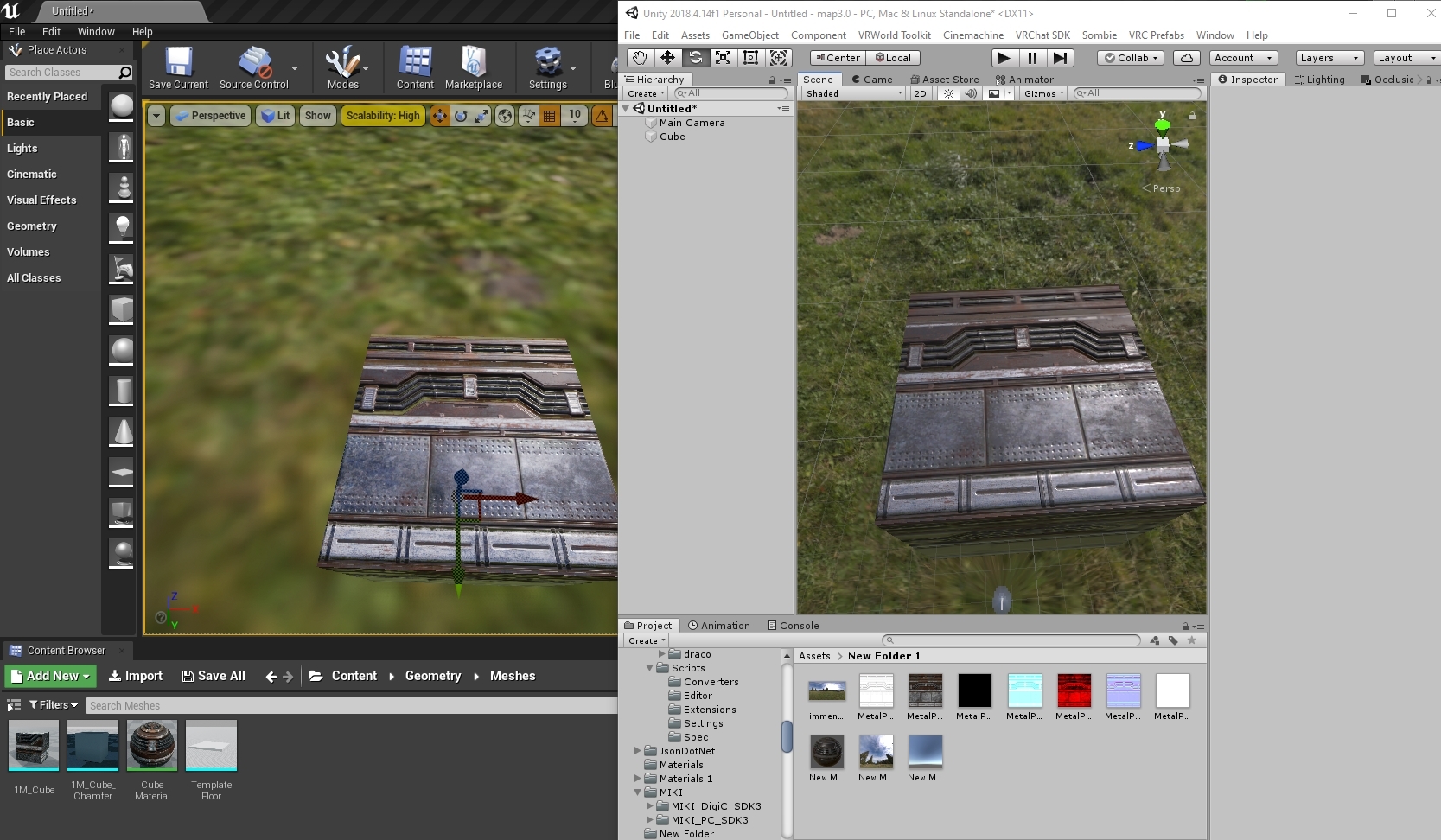
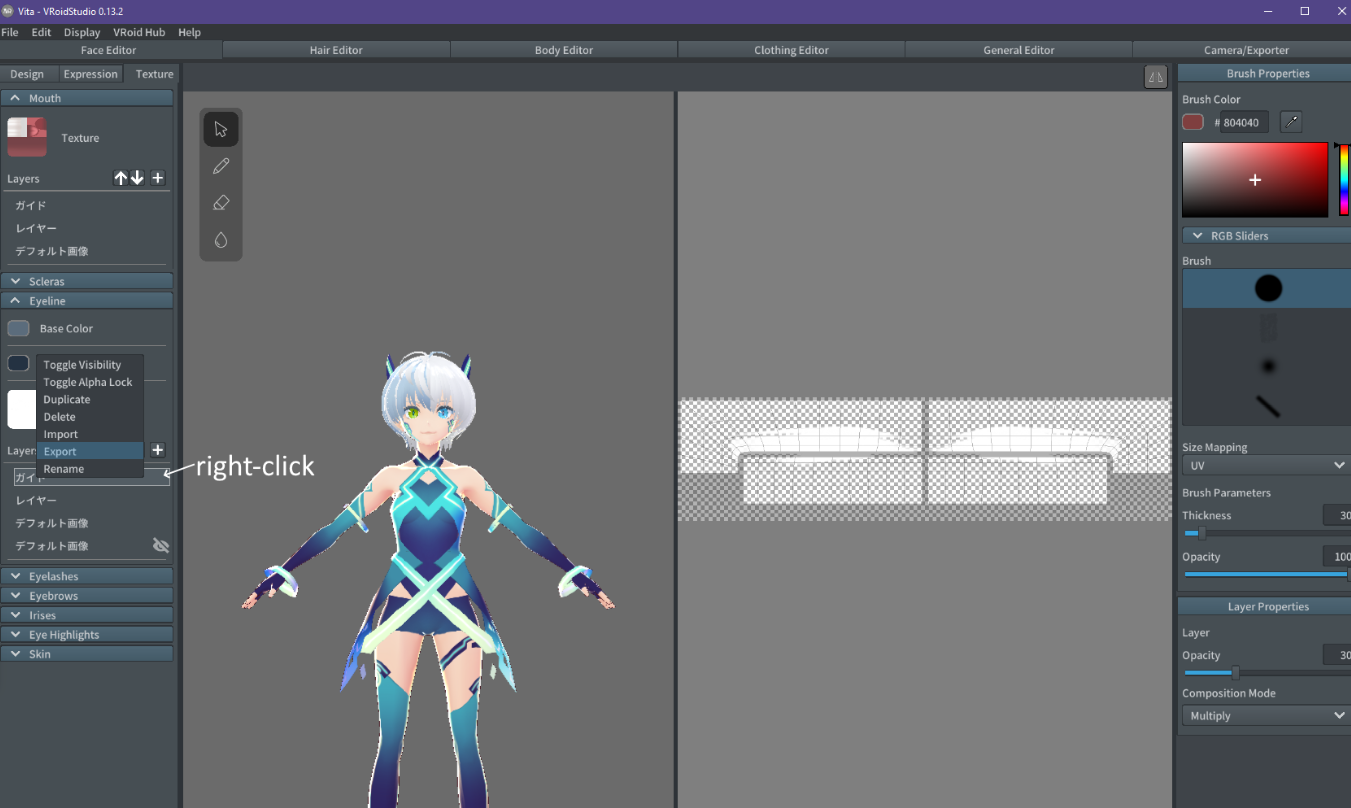

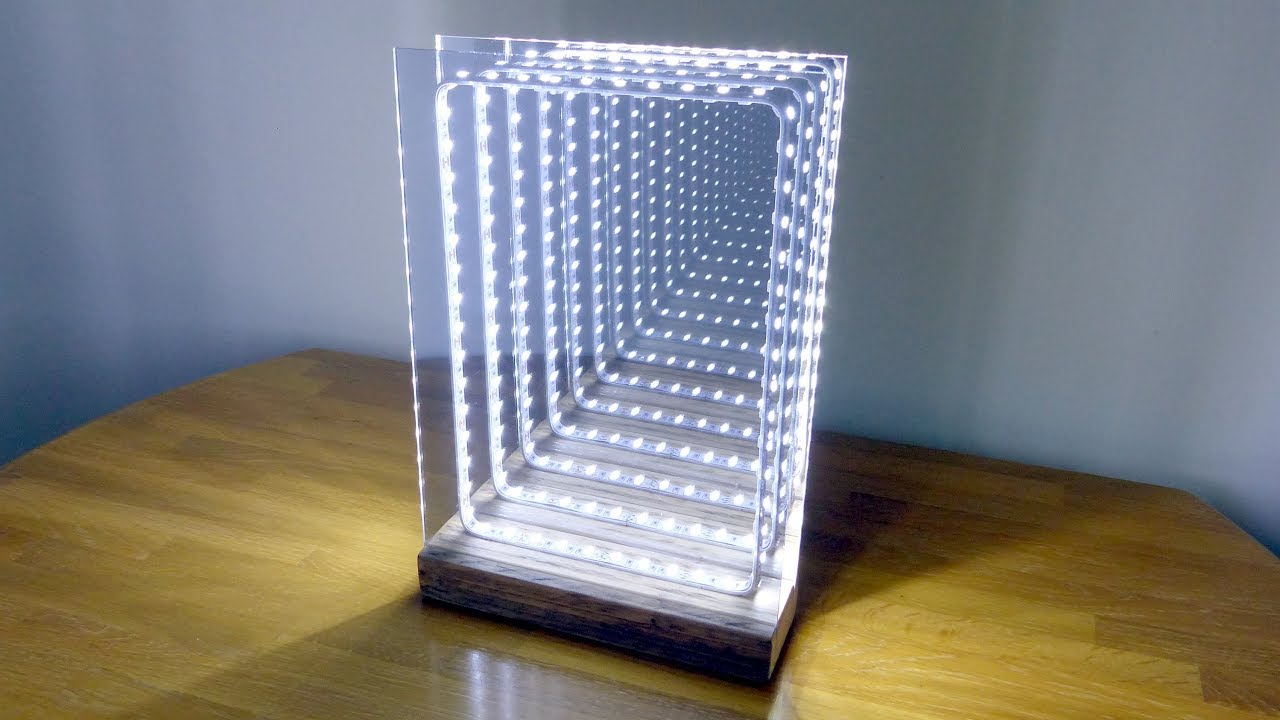


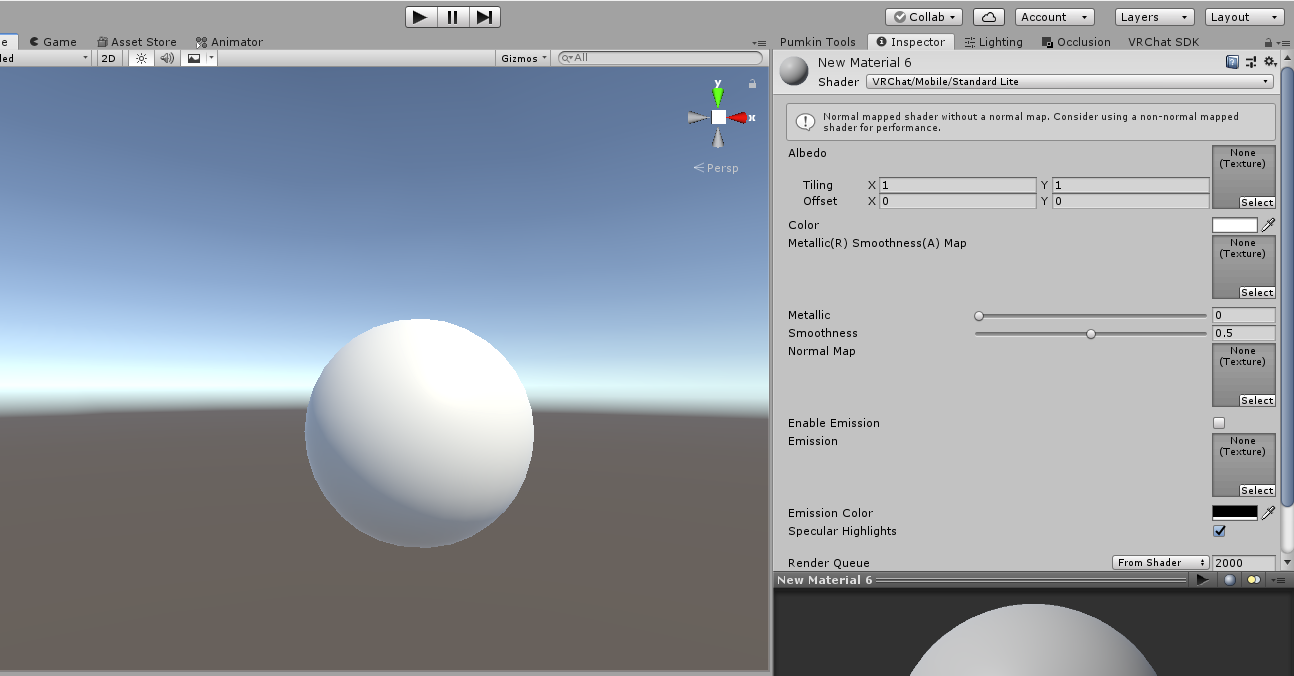

 lethal nacelle
im gonna be honest, it seems like you don't know how to use blender's material nodes and you should probably come to understand it yourself instead of accepting step-by-step instructions from me. and also, youre supposed to use the mix node to mix the output of your shader with the emission node you had previously.

Grant's Character Course discount link: https://www.gamedev.tv/p/blender-character-creator-2/?coupon_code=GRABBITT&affcode=45216_9b6dqwx2
Grant’s Drawing course discount link: https://www.gamedev.tv/p/complete-drawing/?coupon_code=GRABBITT&affcode=45216_9b6dqwx2
Beginners guide to baking for intermediate blender users. make sure you have a basi...
slim stag
alr
slim stag
i tried baking it, didn't seem to work
bitter bane
This isn't for Unreal Engine
hasty raven
oof
bitter bane
that's also a pretty easy google search to find as its the same in pretty much any engine
uneven loom
hasty raven
what is roughness Min and max used for in unreal engine?
probably a 0 to 1 value given that it uses grayscale textures to get that value
hasty raven
so the "roughness" would be a mask for both those channels, right?
uneven loom
yes
like functionally the only difference between the Unity PBR and unreal PBR is just how they tend to stack the textures
hasty raven
Jason has a complicated set up. his roughness is basically a mask for each other roughness applied
that is super weird
soft mantle
Does anyone know what my options are for split normals and outlines in Poi?
 indigo frigate
@stiff berry Hey there, hope you don't mind the ping - I found your vertical billboard shader by searching the discord, and I was hoping you could help me with something. I'm trying to use it to make some text always face the camera. I have the text on a plane, and the issue is that the text is facing upwards and rotated around the wrong way, but it does 'face' the camera (except it's the edge of the text facing the camera.) [Screenshot 1]
Weirdly if I duplicate the object, the two objects will respect changes to their transform (I know they are not supposed to) and still face the camera, so I can orient them correctly by setting the rotation to -270X, 0Y, 180Z. But if you get too close, depending on what side you approach from it'll either rotate around the Y axis and disappear, or simply disappear. [Screenshot 2]
The weirdness with two copies doesn't seem to occur in game though, and in-game the text is still oriented incorrectly/the same. I'm guessing there's something simple I can do to make this work, but I don't really have any shader knowledge


 stiff berry
try this. This version respects the transform properly so try rotating it to make it face properly
other than that i'm not sure
indigo frigate
That did the trick, thank you so much!
Dang, doesn't seem to be working in game, the text is not visible, presumably because it's facing some direction where I'm only seeing the culled back face. Might have to try random rotations and see if any of them work
stiff berry
you can try adding Cull Off to the actual .shader file
like so
    SubShader
    {
        Tags { "RenderType" = "Opaque" "Queue" = "Transparent"}
        ZWrite Off
        Blend SrcAlpha OneMinusSrcAlpha
        Pass
change to
    SubShader
    {
        Tags { "RenderType" = "Opaque" "Queue" = "Transparent"}
        Cull Off
        ZWrite Off
        Blend SrcAlpha OneMinusSrcAlpha
        Pass
that will disable backface culling, but i imagine it'll just be upside down then
indigo frigate
Could help to figure out what way I need to rotate it, if I can figure that out so it's correct in game it should be alright. Although it might be confusing for people using the package if they try to test it in unity and the text is oriented incorrectly
stiff berry
is this textmeshpro text? If there's some way to change the mesh so it's default rotation is the same as a default quad it should fix it
but idk if you can do that easily for textmeshpro stuff
indigo frigate
Nah it's an avatar package, so no textmeshpro allowed
It's just a texture on a plane mesh
stiff berry
ah use a quad mesh if you can
i think they start at different rotations
the billboard shader was made for a quad as the mesh
indigo frigate
Ahhhh yeah, looks like that's gonna solve my whole problem haha