#shaders
2 messages · Page 20 of 1

 steep swift
@velvet sorrel added it here to fake-glass https://gitlab.com/s-ilent/fake-glass
They have so much cool stuff, but the only way to find some of it is by typing in gitlab.com/s-ilent, click Personal Projects because gitlab is really bad at showing active projects in the main page, and then guessing based on which repo was updated recently.

GitLab
A shader for Unity that (ab)uses some Unity features to produce glass-like glass.
This page doesn't have Fake Glass on it yet http://s-ilent.gitlab.io/generic.html
And yeah it's good to link to stuff from the tweet. Twitter shortens the links so it only costs about 20 characters.
@past pewter
steep swift
yeah it's not there yet. @velvet sorrel 😉
 velvet sorrel
Yeah, I haven't had time to write a formal release so I haven't announced anything or updated it yet
 lofty dragon
Oh hey, @velvet sorrel while you're here
I tried using the new version of your water shader, but I can't get transparency working. I tried updating reflection probes since someone suggested it, but that didn't work.
lofty dragon
Let me show you, hang on
Here's the old one
Here's the new one off your gitlab
Oh that's weird, I just noticed that moving the camera changes the colour
velvet sorrel
I think there are some issues with the current version and fog
lofty dragon
I have the fog settings turned all the way down
It's specific to the refractive version
The normal version doesn't do it
 past pewter
looks like it doesn't have the effect i'm looking for
which is water droplets splashing on surface
or it does?
oh wow
lofty dragon
I'm going to guess that the refraction is too strong somehow
past pewter
it changes depending on the rotation of the object
wtf
v nice, thank you Silent-sama
 boreal parrot
Using VRChat 3 for building my PC World with Udon. I'm trying to use a VideoPlayer compent to send a 360 video to a renderTexture. The renderTexture is being used in a Panoramic skybox material that I'm placing in the scene sky under lighting settings. This works fine in a normal unity scene but wont work in the VRChat build. Is this not allowed by the SDK? IF not, does anyone know if its possible to set up an animated skybox in VRChat? IF yes, could someone direct me to a link for a tut etc. Thanks!
steep swift
@boreal parrot are you using the udon video player components
the way you set it up is possible in SDK2
but my understanding is Udon neglected to expose the RenderTexture option
so you need to do a little bit of a weird trick where you let it render to a material, and you copy the texture out of that material an put it where you need it
boreal parrot
steep swift
Video Player is not allowed in Udon worlds
boreal parrot
ah
steep swift
please read the documentation on how to do video playback in udon
there's a special component which allows you to access it via udon
boreal parrot
can video playback in udon be used to play an animated skybox?
steep swift
yes,
boreal parrot
great. I'll take a look at the docs
steep swift
but you might need to do a bit of a roundabout approach to it, getting one material in update, and copying it to the other material
if you're still stuck maybe come back with what you tried and ask here again
boreal parrot
ok thanks
steep swift
I don't personally have experience with this, but I know others have gotten it to work
boreal parrot
thank you
steep swift
it's explained some here
VRChat
Using the Prefabs The easiest way to put a Video Player in your Udon world is by using one of the Prefabs, which you can find in Assets/VRChat Examples/Prefabs/VideoPlayers.Both of these prefabs will play a video of your choosing, synchronized for everyone in your world. They ...
ah that's the one
explains the new udon stuff
boreal parrot
Thanks again!
 vital storm
a quick question. I uploaded my first avatar this morning, but for some reason all my friends can see the model as intended, but for me it shows up completely pink. Does anyone know how to fix that?
People told me to go to this channel with my question 🙂
this is how I see it
this is how other people see ne
boreal parrot
Is it possible to play a video file in the UdonSyncPlayer (Unity) instead of using a URL to play the video? I have a short video on my PC that I would like to play.
past pewter
Is it possible to play a video file in the UdonSyncPlayer (Unity) instead of using a URL to play the video? I have a short video on my PC that I would like to play.
@boreal parrot yes, i think is possible
boreal parrot
@past pewter Do you know where I can see documentation on how to do this?
 hardy dagger
@boreal parrot you should be able to if the video file is in the assets
boreal parrot
Thanks. So RE: UdonSyncPlayer (Unity), I placed the video in assets and used the Windows path in the Video URL field of the component. It does play on the UdonSyncPlayer (Unity) screen when I go into play mode but when I do a test Build for VRChat
there is nothing on the video screen
While in the test Build World I tried to enter the file URL into the text field of the video screen but still nothing happens. I'm not sure what I'm missing here?
hardy dagger
@boreal parrot ive never tried playing a google drive file, but maybe if you used a video file from google, it may run that during the game
since that will run a link from the web
boreal parrot
thanks!
 fresh grove
Is there a shader like Standard that looks good in any world? IDK like something that uses its own HDR if one is not present in the world and such?
boreal parrot
Maybe this discord is not the place to ask these questions. Does anyone know another forum where we have the opportunity to ask questions of the VRChat devs that are experts about the SDK? I have read every document on the web that I can find about the VRChat3 World SDK regarding the Udon Video player and I still can't solve this problem (which seems like it should be elementary). I am using an approved video format: webm. I have a file on my PC (in the assets folder of the Unity project I'm working in) that is in this format. I'm using the Windows path for this webm file in the URL field for the UdonSyncPlayer (Unity). It works perfectly when I go into play mode, i.e., I see it on the screen in the scene. However, when I do a Build and Test the video screen remains blank. I have the video player set to Loop and I disabled the Udon Behavior script as noted in the documentation. I'm using the correct version of unity and the VRChat ver 3 World SDK. Also, I'm using the UdonExampleScene that comes with the SDK. Someone, please help. I've been trying to get this to work for 2 days now (full 8 hour days). I'm a pretty experienced Unity dev and I don't believe I'm making any stupid mistakes. Here is a screen capture:
here is a screen capture of the setup
fresh grove
is this related to shaders?
boreal parrot
No, the screen shot is related to my Video Player Question above it.
fresh grove
why are you posting it the channel for shader help?
hardy dagger
@boreal parrot yea this isnt the best place for that query, but I've never heard of webm files ever working in unity in the first place, but I think if you put that video in a google drive file and copy that link, it might playback during vrchat gameplay since it is running it from the network and not on a device like your desktop
boreal parrot
@hardy dagger I used webm files all the time in Unity on professional projects and they work great and support transparency. The default file that is shown in the UdonSyncPlayer (Unity) URL field is itself a webm file and iterestingly works both in Play mode and in Build and Test mode. It looks like the URL for the default video file is being hosted somewhere on the VRChat servers. When I saw that VRChat was using the webm file format I thought maybe that is their preferred format. However, I also tried testing a video file as a mp4 and webm on my Google Drive. I used a shareable Google drive link for the URL and this did not work. It did not work in Play Mode and it did not work in Build and Test mode. I even made sure that "allow untrusted urls" was checked in VRChat Settings. I then tried URLs from Youtube and Vimeo and neither of these worked.
hardy dagger
hmm... have you use the vrchat video player prefab?
boreal parrot
That is what I am using
hardy dagger
also the link to the url must be the “download link” and not the shared link from google drive
well you said unity so i thought you ment the default unity one
have you also tried having the udon program ticked on?
boreal parrot
@hardy dagger >"also the link to the url must be the “download link” and not the shared link from google drive" Thank you! This did the trick. I converted the Shareable link to a download link and it works now 🙂
I guess local video files will not run in Build and Test mode.
Thanks again @hardy dagger
hardy dagger
no problem 😃
 errant moth
I'm having an issue with my avatar. It renders on top of every effect. I would like it to be affected by overlay effects. It also renders on top of some avatars. Someone told me it's because of the render queue? How do I change that?
 vale nebula
Queue is probably too high for what you're using it for then, so first check what value it has, and see if you can do anything to turn it down.
For opaque objects, like avatars, you want them to be within the geometry range (2000-2449).
https://docs.unity3d.com/Manual/SL-SubShaderTags.html

Depending on what shader you're using, it might be exposed somewhere near the bottom (usually) of the property list.
lofty dragon
Hey @velvet sorrel, did you figure out what was up with your water shader and refractions?
 proper depot
Is there a good way to make transparent glass for quest? I’m trying to make a sliding door that looks like this and I have little to no experience with blender
 timid lark
I've heard that transparency and quest don't go together but maybe someone's come up with a less-expensive workaround that I'm just not aware of
 knotty turret
Trying to get the hang of the poiyomi dissolve shader - Is there a way to change the local dissolve to be with respect to a certain bone?
 hexed stone
@proper depot the only way is to have a reversed normal
proper depot
I am an absolute noob and have no idea what a reversed normal is or means
@proper depot the only way is to have a reversed normal
@hexed stone
hexed stone
means the texture is backwards, and on quest that means its see through from one side
 pine crag
@proper depot https://www.youtube.com/watch?v=L3oCQEwtMLI

Learn more: http://www.digitaltutors.com/tutorial/712-CG101-Modeling
When creating 3d models, the computer needs to know which side of our polygons are facing out. In this lesson we will learn about Normals and how they relate to the display of our models.
-~--~-~~-~-
Di...
quest doesn't support transparency so either removing the faces or flipping the normal works
lofty dragon
If you want to be weird about it, you can use a mobile particle shader to kinda do transparency
no lighting if you do that though
 pure raven
@proper depot All this ^^^ is assuming that you’re working on an avatar and not a world. Transparencies work fine in worlds.
proper depot
No, I’m working on a world for quest
pure raven
Oh, then do whatever you want; transparencies should work fine, no?
 naive orbit
Yo can we get sound reactive particle effects and shaders on our avatars yet?
 chilly jacinth
has anyone got a material/material shader for rain on a window?
i've looked just about everywhere
 tired token
@chilly jacinth https://twitter.com/Silent0264/status/1322949467427856389


I've updated Fake Glass on Booth and GitLab! Now everyone can have cheap rainy glass!
https://t.co/Y3jtnQTBiv
https://t.co/HduN9Y8oZ8
#VRchat https://t.co/H1LijZLkRm
Likes
117
 Twitter
·
Twitter
·
 restive badge
Why do people say Grabpasses in shaders are bad for performance? I've been running some tests and I'm not seeing any difference in performance between @velvet sorrel's grabpass and non-grabpass water shaders.
Here's the non-grabpass. There are two lakes visible from this vantage point, each with a separate quad for the water surface. Silent's shader names the grabpass, so it presumably only has to do one grabpass here. Still I expected the grabpass to significantly impact performance from all the talk I've heard about them...
velvet sorrel
Grabpasses stop the entire rendering process to copy the rendering result into a temporary buffer, which takes 2-3ms
restive badge
And here is the grabpass version. Render time is unaffected at all.
@velvet sorrel I'm not seeing that in the profiler though. Am I doing something wrong with my profiling?
And 2-3ms on what card? I am running a 3080 now so that could impact what I'm seeing.
velvet sorrel
Your scene is CPU liimited according to those stats
restive badge
Even so, shouldn't I see 2-3 ms added to the render pass stats?
Or is that happening in parallel and so not reflected there? But then why doesn't that value read 0?
I guess it could be 10ms above and beyond the CPU? But that seems crazy...
velvet sorrel
Hmm, the problem is that the slower your scene is to render, the more amortized the cost becomes
restive badge
14 + 9ms = 23ms = only 43fps.
So surely they can't be being added unless the scene just renders really slowly in the Unity editor.
Which I think it might?
So I think what you're saying is my scene is already not performing great, so I'm not seeing the additional impact from the shader.
Oh wait there's an fps counter right there in the stats I didn't need to try to calculate that. 🙂
So yeah, 70fps in the unity editor.... Is like less than half what I actually see in game considering I'm rendering the scene twice, and at higher res to boot, in VR.
velvet sorrel
Yeah. If Unity is waiting on some other thing to complete the frame, then the impact of taking the grabpass won't hit the FPS as hard.
And the cost of taking it increases with resolution, so it's quite bad in VR
restive badge
Okay. well I guess I'll try it in VR without the grab pass and see how performance improves. Shame though, the original was so pretty:
Without the grabpass:
Strangely I can't seem to get fog vertical density to change the appearance at all, but fog density changes it as it recedes into the distance as expected.
Foam color is also not working as expected. I cranked up the start here so you can see that in spite of the foam color being greenish, it looks bluish, like it's reflecting the sky or something.
Hm... interestingly if I flip start and end around... Which I don't think I was able to do with the original shader... The result seems more as expected? Except I'd expect start to be the edges of the pond, and end be the distance towards the center...
And if I do that and reduce the foam density, the results are the opposite of what's expected too:
The center becomes darker as if it has more foam multiplied with the color, rather than the edges becoming lighter...
chilly jacinth
@tired token dude PERFECT thanks! 🙂
 hasty raven
okay guys, so I'm trying to make a five nights at freddy's avatar for myself on my birthday in the year 2021 cuz ya know. is there a good shader for springtrap's eyecase? cuz I'm trying to make him look accurate like he is in the game
 turbid zinc
i wish i could help but i dont know anything about avatars basically
 lethal island
you mean that transparent contact looking thing with the hole in the middle thats on top of his eyes?
 cunning aspen
I was wondering...I'm absolutely willing to learn more about shader, and I plan to do so. I know that there are some plug-ins that might make that easier, and I was wondering if there is anything anyone might reccomend?
hasty raven
you mean that transparent contact looking thing with the hole in the middle thats on top of his eyes?
But of course
I was wondering...I'm absolutely willing to learn more about shader, and I plan to do so. I know that there are some plug-ins that might make that easier, and I was wondering if there is anything anyone might reccomend?
Silent should help you out with that if they have the time
They've got a glass shader somewhere

GitLab
A surface shader for Unity providing cel-shading. (Forward rendering only)
Here's a link to something
Also this
 cobalt hamlet
Whats the best shader for a astronaut helmet glass?
or the best poiyomi option
Like its both see through but glassy
 ripe idol
transparent shader with multiplicative blending
multiplicative blending is what makes it look like glass
ripe idol
if you have shader specific questions about my shader I'd suggest asking in the official server
paid version has refractions and such
cobalt hamlet
i did but i asked here just in case, i do own an older paid version
havent been online in like a month lol
ripe idol
you probably don't want refractions for what you're doing though
cobalt hamlet
oh i see
 heavy schooner
Hey would I get mugged if I used Silent's cell shader for all the materials in my world
cunning aspen
@hasty raven ty! I'll check it out!
hasty raven
Good luck
 pliant nymph
Does anyone know a Mobile Shader that's really bright (Like Lightmapped)?
 timid patrol
Toon shader
 hollow wren
any shaders I can use that allows to reverse culling? (any toon ones can help too)
timid patrol
What do you mean "Reverse culling"? Do you mean like when you can see the backside of the model through the front? Reversed Normals?
velvet sorrel
Cull Front?
 turbid thistle
.
pliant nymph
@timid patrol I've tried toon shader, but it isn't as bright as I want it to be. In certain areas, it darkens. I want it to be bright in every direction-
Do I have to tweak it?
timid patrol
You could try Poiyomi Toon Shader, it's extremely tweakable but it seems a bit heavy for what you're looking for
timid patrol
I dunno, i just reccommend poiyomi toon to everyone because it's such a good shader
 spark rapids
I made light weight emissive shader but I didn't verify.
 deep valley
more of a systems question, but if i saw errors about too many shader keywords getting set in my VRChat logs from when i was just hanging out in a world, what kind of things might that indicate?
mainly want to know if it's evidence of malicious activity - i blocked non-friend avatars after a while bc i got sick of ppl doing view-affecting emotes
 sharp pike
It's a symptom of crappy/not made for vrchat shaders. Shader keywords lets a shader enable/disable certain features of itself for performance (unity compiles separate variants of the shader, ones with the keyword enabled and ones without and will pick the correct variant at runtime).
The issue comes from the fact that unity is hard capped at 256 keywords (about 60 are already used by unity internally) and the list of used keywords does not get cleaned up. As you spend time in vrchat and load peoples' avatars and shaders, the keywords used by their shaders get added to the list if they're not already present, until you hit the 256 limit and then shaders relying on keywords that could not be added to the list may display incorrectly. You can only clear the list by restarting your game.
Shaders designed for vrchat tend to keep to reusing a set of those keywords used by unity internally so they don't add any more keywords to the list when you're playing. Some older shaders meant for vrchat that weren't aware of this issue back then and shaderforge shaders that use toggles are notorious for using lots of their own keywords.
deep valley
ok so the effect of that is that some shaders just won't show up or work, but otherwise no problem?
sharp pike
Yes. I think it also applies to some post processing effects in worlds, they may not work/show up either.
 delicate plinth

https://gyazo.com/caf36e740563570e498a8cc5c8927671 in Unity Shader : Silent Clear Water (The Pink)
 past pewter
does anybody know if it is possible to get actual good realistic hair looking good in vrc? ive personally never seen any that are good enough to look like it would be in a good quality game/render. just wondering if i should make something realistic or slightly more stylized
deep valley
VRChat doesn't have the luxury of precalculated rendered hair, what kind of hair are we talking about?
straight hair? curly hair? short hair? long hair?
 tulip sky
Hair cards
 warm valve
when I'm looking at my avatar from avatar it's like the inner eyebrow(dunno how it's called) dissapears
it's a lot more noticeable in mirrors and it happens more noticeable for me in this avatar than others I have
does anyone know if there's any way to avoid this?
velvet sorrel
Are you sure that's not just because it's so small and coloured a similar tone to the skin?
In the picture it hasn't disappeared but it's nearly invisible. The eyebrow is harder to see too. That might just be because the resolution is low, so it's so small, thin, and low-contrast it's harder to see. So the only solution I can think of is making it 100% black to match the edges of the eyes.
warm valve
ah crap didn't notice reply sorry
yeah that helped thanks @velvet sorrel
also reduced alpha a bit
 opaque stone
So, I've seen a shader that's like little dots/stars that fade in and out in different times on a dark colored background, what shader could this be? It's like a galaxy glitter effect (not screen space texture)
 subtle timber
Does anyone know of a good free vertex displacement shader? Something that would allow me to animate an avatar "bursting into dust"? I found this, but I am trying to find a free solution. https://booth.pm/en/items/1590071
timid patrol
@opaque stone Probably Poiyomi's glitter feature
fresh grove
@solid grail Hi, Can I ask if youre still working on your hack of the standard shader? There are some issues with it that I wonder if they would be possible to fix
 solid grail
Such as?
fresh grove
In some worlds the materials appear completely black, While on standard shader they would appear normally just fully rough
@solid grail so I suspect it has to do something with the alternative reflection probe. In some worlds it looks fine, and 100 times better than standard but in some worlds it just breaks
left= poiyomi
center = standard
right = your standard hack
not sure if this was caused by an update some time ago
solid grail
What are the settings in the shader
fresh grove
fresh grove
I tried other cubemaps but I get the same result
maps that I found to have this issue: Single
Meroom
homebox
Open mic night
fresh grove
got any ideas?
hasty raven
I need help trying to make materials like springtrap work in unity
hasty raven
so tell me guys, what do you see when you look at this?
what material does it remind you of when you see it?
hasty raven
I still need a good glass shader
@velvet sorrel got a good suggestion?
your fake glass shader doesn't work on my springtrap for some reason
fresh grove
@solid grail Sorry to bug you with this, But do you plan on doing something about it or at least have an idea of what could cause it?
solid grail
Not sure. I've never encountered it and it's the first I'm hearing of it myself.
past pewter
Hey in unity i can't get my textures, but I got my materials.
how do i get the textures
hardy dagger
@past pewter put textures onto materials, then use the materials as if textures
hardy dagger
so like, if you select an object in the hierarchy and drag a texture image over it, it should make a material automatically, but if the object uses multiple, youll have to keep adding the texture images and set each material slot its own texture
past pewter
kk
hasty raven
can we ask any questions about shaders?
but of course
that's what this place is like
that's what it's for
hasty raven
and a perfect place to ask what the hell happened to this outline of my friend's shader?
I need help
hasty raven
nvm
velvet sorrel
I've released a new shader: Magic Particles! It's designed to let you make fancy particle effects simply! More info on Twitter:
https://twitter.com/Silent0264/status/1327072271316389888
I released a simple shader for seemingly complex particle effects.
Just by adding some distortion and a ramp, you can achieve a really cool effect! They're cheap too!
You can use SCSS's gradient editor to make ramps too!
#VRchat
 Twitter
·
Twitter
·
 lethal island
oohhhh cool
 tribal flame
I'm trying desperately to get a shader for transparent layers for terrains. Haven't found a way that works yet.
(the picture shows a terrain with a Nature/Terrain/Transparent shader on top of a mesh ground)
hasty raven
I'm going to test out something real quick
 peak carbon
I'm using Mochie's uber shader and I get these weird metallic-looking light blotches on my avatar when there is an environmental light shining on it, how do I change this?
hasty raven
You might want to ask him
 burnt rivet
any way to make virtual lens 2 work with stream cam?
 wind dirge
i keep getting an error that says too many shader keywords???
tired token
@burnt rivet You need to set your window's resolution to 1920x1080 (1080p)
steep swift
Does it happen if you restart your client? @wind dirge If it's happening in Unity, it can be caused by the shaders you used or have in your project. Which shaders do you use on your avatar?
Most modern VRChat-optimized shaders have been redesigned to run without keywords. If you're seeing this error, the most likely example is that you are using an old version of a shader, or a shader which is broken and no longer being maintained
One shader to look out for in your project is Poiyomi Master Shader (.poiyomi -> Master)
This shader is 2 years out of date and has lots of keyword issues, so please make sure you remove it from your project if you haven't already done so.
Poiyomi's new shader, Toon Shader, won't have any keyword issues.
past pewter
dose anyone know where i can get some cool shaders like for animations like shader that able to make your screen shake
 knotty rivet
Is this carpet made with a shader, or through another technique?
 green crane
Looks like another fur shader
knotty rivet
It's really good looking and can't notice any performance hit so would love to learn what it is.
hardy dagger
theres a bit of performance hit, but it should be managible
knotty rivet
What's the best free one?
fresh grove
theres a pretty big perforamce hit tbh
I remember the void club having parallax flooring and it would kill my frames
 fresh wigeon
working on a non camera based ray marched particle effect with multiple attractors.. getting it to show correctly in game is the main problem
pure raven
That’s wild. I don’t even know where I would start on something like that...
velvet sorrel
What problems are you having?
fresh wigeon
it only seems to work on a few maps for whatever reason
storing position/velocity information as pixels on screen
it's probably maps with post processing breaking the encoding
which happens to be pretty much all important maps..
using Overlay render queue or anything else doesn't seem to prevent this
even though it should
basically only works well in maps like this 😐 #avatar-showcase message
sharp pike
Did you base it off of https://github.com/SCRN-VRC/Raymarched-GPU-Particles-with-Screenspace-Physics ? I have no idea if the author solved the problem you're experiencing, I've never tried the shader.
GitHub
Using Grab Passes for VRChat. Contribute to SCRN-VRC/Raymarched-GPU-Particles-with-Screenspace-Physics development by creating an account on GitHub.
 near flax
i seem to recall people suggesting that mirrors screw up grabpass texture
this might help
Merlin07/20/2019
Write prior frame data at queue < 2000 -> grab pass that -> mirrors render at 2000 -> grab pass screen for restore -> read grab pass from first pass and update it, write to screen -> grab pass to save updated data for next frame -> write second grab pass back to restore the screen```@near flax Thanks i might have to do that
 runic stump
Man I wish I could write shader code since the only way to sync data between instances is via video screen so with avpro I could make a custom shader which can decide
Decode
But I can't write shader code 
tired token
If it's an SDK3 world you can sync it via Server Time
@knotty rivet There's a credits panel on the lower floor, instantly left as you enter it. You'll see a credit line for the fur.
 drifting shard
I'm having a weird issue with my current avatar shader.
Most of the times works fine, while in maps like Among Us or in Japan Shrine, the whole avatar is pitch black.
I'm currently using the Rero Shader, is there any setting I should follow up to fix this?
Thanks
hardy dagger
im not one for shaders, but usually some worlds have their lights set up to where certain shaders are not "absorbing" the lights, or enough light, which causes some avatars to go black and others to not
sharp pike
There was someone else that reported the same issue here a few days ago if you scroll up a bit
 dusk delta
I am absolutely in love with the shader that I linked. Is there any hope of ever seeing it in vrchat or do the game's limitations (specifically with custom scripts) make that impossible? I'm torn between continuing to try to implement it by struggling at scripting or shed a tear and pretend I never saw it
https://forum.unity.com/threads/spherical-fog-shader-shared-project.269771/

Unity Forum
Hi!
(Note, I'm posting this in my spare time as a regular Unity user, not representing Unity Technologies in this particular post.)
I wanted to...
fresh grove
arent there shaders that can already replicate that look?
that dont use custom scripts?
steep swift
The script does two things: enables depth texture (that can be done by adding a Directional Light on your avatar following the steps here:
) and secondly, sets a parameter "FogParam" to the object's world position in xyz, and the scale of the object in w.
what I would suggest, is a small edit to the included shader to use the world position of the object instead of FogParam:
To match what the script calculates, replace uniform float4 FogParam; on line 88 with
static float3 scale = sqrt(mul(transpose((float3x3)unity_WorldToObject), (float3x3)unity_WorldToObject)._11_22_33);
static float4 FogParam = float4(mul(unity_ObjectToWorld, float4(0,0,0,1)).xyz, dot(scale, float3(1,1,1))/6.0);
@dusk delta give this edit a try and set the directional light as above
fresh wigeon
If i have ' Fallback "VRChat/Mobile/Particles/Multiply" ' in my shader, will this work as expected? this page does not say it uses the thing specified by Fallback, it just says it looks up using the main shader name. https://docs.vrchat.com/docs/shader-fallback-system
VRChat
This page serves as a description of the Shader Blocking System, how it operates, and how shader authors can work with it so that their shader falls back gracefully when a user has Shaders blocked on an avatar using a given shader. When a shader is blocked by the Safety System...
 autumn egret
anyone have a good shattered glass shader
or just a glass shader
 frank isle
Tbh what I usually do for broken glass is use standard, set it to transparent, max out the smoothness and have a good broken glass normal map on it. I'm not sure what kind of performance impact this would have but if you want it to accurately reflect what is around it you could try attaching a real-time reflection probe parented to the glass shard. I'm not 100% sure how well this works so just saying it might be worth a try.
@autumn egret
Would anyone have any recommendations for a shader to use on roads with lines? I need to be able to switch it to UV1. The textures I'm using are basically broken up into asphalt (and normal map), a mask for the lines, a texture for the lines and a two color texture which gives the lines both white and yellow coloring.
Normally I would just swap the UVs in the model import settings instead of relying on the shader but I forgot to separate the roads from the rest of the map before exporting it.
 merry stratus
- Fixed an issue preventing the alpha transparency filters from working properly
- Fixed an issue preventing local test and local "fallback" avatars from working properly
Is this why despite my textures having an alpha and being transparent, they were still not showing transparent when my shaders were turned off for others?
Would anyone have any recommendations for a shader to use on roads with lines? I need to be able to switch it to UV1. The textures I'm using are basically broken up into asphalt (and normal map), a mask for the lines, a texture for the lines and a two color texture which gives the lines both white and yellow coloring.
@frank isle Poiyomis shader has a layer for detail, which lets you overlay a texture over another, and then you can repeat it
frank isle
Thanks egg! I'll give it a try
fresh wigeon
has anyone observed an issue where in some worlds, your transparent shaders would blend using additive blending instead of traditional transparency? (Blend One OneMinusSrcAlpha will look like Blend OneMinusDstColor One (additive) )
.. meaning your transparent effects are too bright
hardy dagger
yes, even on one of the worlds im working on
fresh wigeon
its fine in pretty much empty worlds
but no idea what causes it or how to workaround it
hardy dagger
i had 2 transparents, one of them is lighting up and being weird, while the other seems normal. the only difference is one had a normal map and the other just had a height map. the heightmap one is the one appearing bright/lit
fresh wigeon
so i only seem to have the problem with Blend One OneMinusSrcAlpha, Blend SrcAlpha OneMinusSrcAlpha seems to be fine
hardy dagger
mine were set to the default blending
fresh wigeon
well i can just do SrcAlpha OneMinusSrcAlpha with col.rgb + col.rgb * (1.0 - col.a) and it will look mostly the same as Blend One OneMinusSrcAlpha
fresh wigeon
Also is there a way i can make an invisible fallback shader?
i'd rather not be a big black box when i have certain particle effects playing for people with shaders off
steep swift
@fresh wigeon it is possibly because your shader is not on the Transparent Render Queue.
Setting it to queue 2501 or higher is necessary to have it render after the skybox. Otherwise it will blend with the previous frame
fresh wigeon
well, i had to rename my shader to the specific one i wanted to fallback to
so my complex multi pass raymarched particle shaders are now called ' Shader "Mobile/Particles/Multiply" '
because the Fallback specifier just does not work
 fathom wadi
Does anyone know of or have a good shader I could use for a pixel effect? I'd like to be able to put it on a sphere and everything within it appears pixel because of custom shaders I need to use for my avatar. I'd be using this avatar for vtubing through SUVA so I wouldnt be being obnoxious with it in publics. If anyone knows a shader like this please @ me! ❤️
dusk delta
@steep swift the fix you showed me worked really well, except for one problem. the scale of the sphere inversely affects the "w" variable so as i scale up the shpere the area affected by the color gets smaller. do you know what i could do to fix this and if you have time could you give me a solution as to what to do?
I also made a gif so you could visualize what i was describing to make things easier if you do have the time to take a look at it
steep swift
Maybe change where it says scale and do 1/scale
Or replace scale with simply 1 @dusk delta
Maybe i calculated the scale from ObjectToWorld when I should have just done WorldToObject (the inverse matrix will have scale 1/x)
dusk delta
visual studio intensifies
i'll play around with what you said and see what i can do
alright so both of those options did the same thing but now when an object is scaled up in unity it scales much fast then the color does, any other suggestions for that?
@steep swift
dusk delta
nah, because then i get "syntax error: unexpected token 'static' "
dusk delta
shhhhhh i definitely know what i'm doing
okay that just keeps the colors permanently at one size regardless of mesh size
i was thinking maybe an exponential increase or something would solve the problem possibly?
it doesn't really matter, if i want to use something really big i can just duplicate the shader and turn the 1 being divided into a 10. either way thank you so much for your help both yesterday and today. i'm really happy that i can use this shader finally and it's gonna make my life so much easier. i really appreciate you taking the time to go back and forth with me about this
 fringe cave
i have a question on avatar lighting for my avatar he's black out in alot of worlds is there anyway i can fix that?
 digital halo
anyone have a rain shader / falling rain particle that isn't ass?
steep swift
Window rain? Check out the rain shader at https://gitlab.com/s-ilent/fake-glass
GitLab
A shader for Unity that (ab)uses some Unity features to produce glass-like glass.
Or are you looking for Rain particles themselves / splash effect
knotty rivet
What shader does that dancing cow meme avatar use for the awesome ps1 look?
 wise pier
Does anyone know how i can have a simple billboard sprite effect for candle flames?
the unity script examples i am finding online don't seem to work with Udon
 astral plover
@knotty rivet It's using Poiyomi Toon
There's an option called rounding
basically it rounds the position data for every vertex so that they snap to a grid
 sharp narwhal
Shaders may not be the best way to appropriately achieve this effect, but does anybody know if there's a way to make an avatar only animate in 12 FPS as a way to simulate anime framerates?
knotty rivet
@astral plover Thanks!
astral plover
@knotty rivet np!
velvet sorrel
https://github.com/s-ilent/Retro3D
This version is fixed to work properly in VR
GitHub
A shader that imitates low grade 3D graphics. Contribute to s-ilent/Retro3D development by creating an account on GitHub.
 proven idol
hey can anyone tell me if the "quest compatible" particle shaders still come out completely gray or are still completely broken? i know that was an issue a while back but i havent tried it since so i havent gotten a chance to check.
past pewter
Is there a blur shader out there? 🤔
 sage elk
Hi, how do we add bloom to our worlds?
 pallid crow
Cameras and post processing effects
 azure pike
Anybody know a good shader to use for making a texture scroll?
 radiant shuttle
Poyomi toon does that
Apply
Poyomi/toon/advanced/opaque. Just apply the texture (mask is optional) and specify in the shader if you want it to scroll along the x or y.
azure pike
Thanks
radiant shuttle
Here's an example of something I was working with
Currently not at my pc will let you know when I get there
 rancid cypress
is there a good free shader I can use?
 lament stag
hey guys, does anybody know of a toon shader that supports tiling?
im trying to tile a texture, but no toon shader supports it
\
radiant shuttle
rancid cypress
is there a good free shader I can use?
Depends on what you're looking for but yes. If you want I can dm you a few discords that have shaders. There's a lot of shaders to choose from that are free. Poyomi, arktoon (free on booth), leviant. I've only paid for one shader and that was a shader by luka.moe which does screen distorting effects
velvet sorrel
@lament stag My shader supports detail maps like Standard
lament stag
@velvet sorrel oh, why so it does
does it support detail masks?
cuz like
yeah
for now im just gonna use a seperate material
velvet sorrel
@lament stag Yeah, detail masks are in the alpha channel of the "Tint Mask" texture
 drifting echo
Can someone help me troubleshoot an issue I'm having please? When I set the material shader to VRChat/Mobile/Diffuse it turns my model green and I can't seem to figure out why.
drifting echo
Problem solved, I had vertex colors applied by mistake. The solution was to paint the vertex colors to white.
 brisk junco
Does anyone know the name for that sphere capture all worlds seem to have
the reflection caaaaapture
not sure how to access it in a shader
hardy dagger
gimp
 spiral grove

The official download page for all things GIMP! Please only use the official binaries provided here unless you really, really know what you’re doing (it’s the only way to be safe). We try to provide binaries in-time with regular releases, but may occasionally be delayed as the packagers ...

Only promotional purposes. No copyright infringement intended of this song/video/perfomance. Sólo con intenciones promocionales. No se pretende la infracción de los derechos de autor de ésta canción/vídeo/actuación.
COPYRIGHT STATEMENT This video is property of UMG. This video is not being used to make money in any way
and is for entertainment...
I must warn you, it's got a bit of a learning curve
Go on youtube and look up "GIMP tutorial" in russian or "GIMP tutorial russian" or something
I would do that for you, but..
I think youtube has a bias because of my youtube being in japanese
spiral grove
👍
 buoyant heron
Ello folks! I'm using this kickass flipbook shader (https://github.com/thnewlands/unity-surfaceshader-flipbook) to make an animated sign for this rollercoaster I've made - the only downside is that it doesn't have any ability to show the texture sheet unlit, and as I'm going for a kind of funfair feel the sign blending in with the rest of the ride doesn't have the same effect - anyone know if there's an alternative out there or whether unlit/emission could be modded in to the shader?
 jade oriole
That one is abit old now, Poi can do the same without the metallic look
buoyant heron
Oooh! Is that Poiyomi toon shader?
buoyant heron
Great, I'll check that out, thanks a lot! 😄
green crane
Если у тебя такие проблемы с английским, почему бы не спросить тоже самое в канале #russian ?
Duplication in English:
If you having troubles with english, then why you didn't ask this question in russian channel?
velvet sorrel
@buoyant heron If you want something with better performance, I made a version of that shader a while back that has emission support
https://github.com/s-ilent/unity-surfaceshader-flipbook
GitHub
Surface shaders with flipbook / spritesheet animation functionality - s-ilent/unity-surfaceshader-flipbook
buoyant heron
@velvet sorrel Ooooh!! You absolute lad, thank you 😄
 worthy crater
Does anyone know of a good shader that creates a fire effect?
velvet sorrel
@worthy crater Try my Magic Particles shader!
https://s-ilent.booth.pm/items/2552439

A simple shader for Unity to create seemingly complex particle effects. To install, place the Shader/ folder with the shader into your Assets/ directory. Gradient ramps can be created using the editor tool included in SCSS. https://s-ilent.booth.pm/items/1894974 Licensed under the MIT license.
past pewter
actually does anyone need any shaders? i can write some.
worthy crater
Ohoho! @velvet sorrel looks very interesting. I'll definitely check it out. 😊
 tough ore
I'll start this by saying I have no experience with working with shaders and I don't really know what I'm doing ;)
Does anyone have any experience with using Tilt Brush pieces in VRChat? I've ran into an issue where any imported pieces using brushes that have an unlit shader (provided by the Google Poly Toolkit) are brighter than the original and a bit washed out. I found out switching the color space setting (in the build settings > player settings > other settings) from Linear to Gamma fixes this but resets after a build & test, I don't think VRC wants to use gamma color space and either do I. I'm wondering if there is maybe a fix I can add to the shader code or elsewhere to remedy this or if I'm out of luck.
 dawn seal
aight so I'mma put this here cuz it's technically a shader related issue
The gauntlets on my avatar both use the exact same texture, overlapping uv and all, but for some reason the normal map is flipped on one of them
importing tangents in the model's settings only flips which gauntlet it is
is this something with the normal map itself or am I in the wrong place for this?
 gilded garden
ok soo
i’ve had weird shader problems with unity for a while and it’s usually a weird mesh to mesh problem. the face is the desired look I’ve wanted, but the rest of the body just never follows suit despite the changes I make
I use unity-chan shaders, uhh no outline, i think double feathering(?)
It’s pretty noticeable with the mesh. I don’t know if I should do some mesh combining or not, or if there’s a little detail in the settings i’m missing
emissions in photo are unrelated btw
hexed stone
are all of your pieces anchor override to the same thing
sharp pike
If you have multiple meshes, they will sample light probes at different places in space unless you override where they do the sampling from
It's in unity when you select the mesh, beat the reflection probe settings
gilded garden
ohh so i need to do some manual changes
hexed stone
add an empty object to your avatar and use that
sharp pike
*near
gilded garden
Would you be able to send a photo of where that is, just for reference when I get back on unity later
i’m currently away from my computer
sharp pike
I usually stick chest bone in mine since it's close to the head
pine crag
doesn't really matter, just make sure they're all the same across meshes
yeah it should
gilded garden
so would i do kinda like a chest/hip anchor for my body?
and then what about things like my wings/tail
tail1 (first bone) in tail?
and the bone for the wings
pine crag
Nah just use chest/hip
gilded garden
so that will fix it across two other meshes as well?
pine crag
Yeah
gilded garden
ok cool. thank you
i’m a kinda person who slaps my shaders on, i do a little tuning and just leave it LOL
and then i go to a dark world and it’s like wtf happened LOL
gilded garden
i’m so bare minimum and I honestly despise blender so much I just... end up not optimizing my avatars
it’s because I don’t wanna break everything that’s already in place, which i’ve done in the past
hexed stone
you're lucky that booth models don't need any blender work 👀
gilded garden
yeah LOL but the optimization on this avatar... yikes
the two models i use are very poor quality
I use saki (succubus) and Glaze
 gilded garden
Saki is my first dabble into av3.0, I keep putting off av3.0 for a good reason
sharp pike
Some of the booth models meant for vrc come with anchor override and mesh bounding boxes set up already which is nice
gilded garden
I like Saki a lot but her expressions are just... bad
I need to finish replacing them.
hexed stone
ohh they're very lewd arent they :p
gilded garden
It’s nice to have a few of her toggles already there though, but I do wish by default I could remove her boots, and not her socks.
hexed stone
I always have to change my expressions.... esp since I change a lot abou the face qqq
gilded garden
She doesn’t have sock feet under the boots.. kinda sucks
Yeah her facial expressions are, they just.. look bad
hexed stone
oh noooo
gilded garden
There’s not even an eyes closed one which is bad LOL
I’ll be finally satisfied with saki if I could get her stupid tail puppeting to work again
hexed stone
next is wing puppeting 👀
gilded garden
I’ve done a lot of emissions work on her body, for some tattoos but I really can’t share that here.
Yeah i’ve thought about it honestly; it sounds fun
Av3.0 is just such a pain in the ass
I’ve never hated unity more after using it
It’s been like 5 hours of nonstop work trying to get that tail working lol. I posted in the other channel for help and hopefully someone can come to my rescue because everyone I know is stumped
velvet sorrel
I pushed a major update to Volumetric Fake Lights.
https://gitlab.com/s-ilent/fake-lights
I'd really appreciate it if someone could test it and tell me how things work for them.
GitLab
A shader for Unity that renders simple, cheap fake volumetric lights with instancing.
 indigo frigate
Can anyone recommend a screen overlay shader that can display a texture on-screen? I'm trying to implement a toggleable information menu that appears above the action menu on-screen
 queen hollow
@velvet sorrel Oh hey I was just messing with the old version of your shader yesterday! Neat to see the update. I think the 1.1 release files are still the old ones though. But cloning the repo directly things look good! The volumetric fog works great, but the fake light seems to be dependent on the view point distance from the center of the light if that makes sense. Is that how it's supposed to work?
Like the point of light is half way between the view point and where the icoshphere is placed
velvet sorrel
@queen hollow That's not normal, is there anything particular about the way it's set up?
steep swift
Can you make sure you have either a directional light with shadows somewhere in your scene, or have a light following these settings for extra performance:
hasty raven
Hey guys what's the best shader for Springbonnie?
Let me pull something up real quick
There we go
What does it look like to you guys?
timid lark
Looks like standard to me.
Anyone that's used Amplify about how closely does it resemble Unity Standard by default? Standard does right by my model but there are a few effects that I have in mind that require some kind of custom solution. I've used Shader Forge and unfortunately it really doesn't like my normal maps for some reason. However, Unity Standard shows it exactly how it's supposed to. Only asking because I'm familiar with shader graphs and can get the effect I want rather easily, however I need to know if it even comes close to Standard's quality like shaderforge seems to lack.
Mostly because I don't want to throw $30 at it for it to be more or less equal to shader forge.
 last token
anybody know enough shader magic to help with my concepts
i wanted to make a screen where it shows an image with little LEDs
it seems simple enough but the complicated part is that I want to be able to distort the image
im thinking i could do that by distorting the UV input
but im not sure how
 true mason
Does anyone know of a shader that allows vertex colors to appear as textures? like they commonly do to blend different textures in terrain? if it's a toon shader then even better!
I want to make a smooth transition between textures like in the image I found a shader that allows for that but it's very limited (it made the terrain too glossy, it stood out too much), does anyone know of a better alternative? I already know that I need to edit the vertex colors in the terrain but I cant do anything with them if the shader doesnt use them the way I need
pure raven
@true mason You could always just edit that shader to remove the gloss. 🙌
 gaunt spoke
Is there a visual, node-based shader editor for Unity that works with the basic 3D pipeline, or is there a way to actually get Shader Graph to behave and work with the regular 3D pipeline?
 brisk gull
Shaderforge or Amplify.
gaunt spoke
Ok; appears Shader Forge will not work in Unity 2018.4
 vivid spear
1st is there a way to make smth on Quest invisible? 2nd Why does it say that VRChat/Mobile/Lightmapped is not from VRChat/Mobile??
gaunt spoke
Is there are reason for VRChat's utter disregard for the color information in my specular map? I'm using the standard shader in Unity, which says it uses RGBA, and it does appear to use the specular colors correctly in Unity, but then the specular color in VRChat is just white. I've seen other avatars with metal parts that use specular coloring properly.
sharp pike
@gaunt spoke Are you in a world with a dynamic light in order to receive specular highlights and are you in a world with reflection probes in order to receive indirect specular light (environment reflections)? A lot of the more optimised worlds have only baked lights so you'll get no specular highlights and a lot of more amateur worlds won't have reflection probes since the world creators don't necessarily know about them. Hop into "Light Box | Lighting Test World" by Silent https://vrchat.com/i/fram-solluxsquat-e2621 and see if it's still not working.
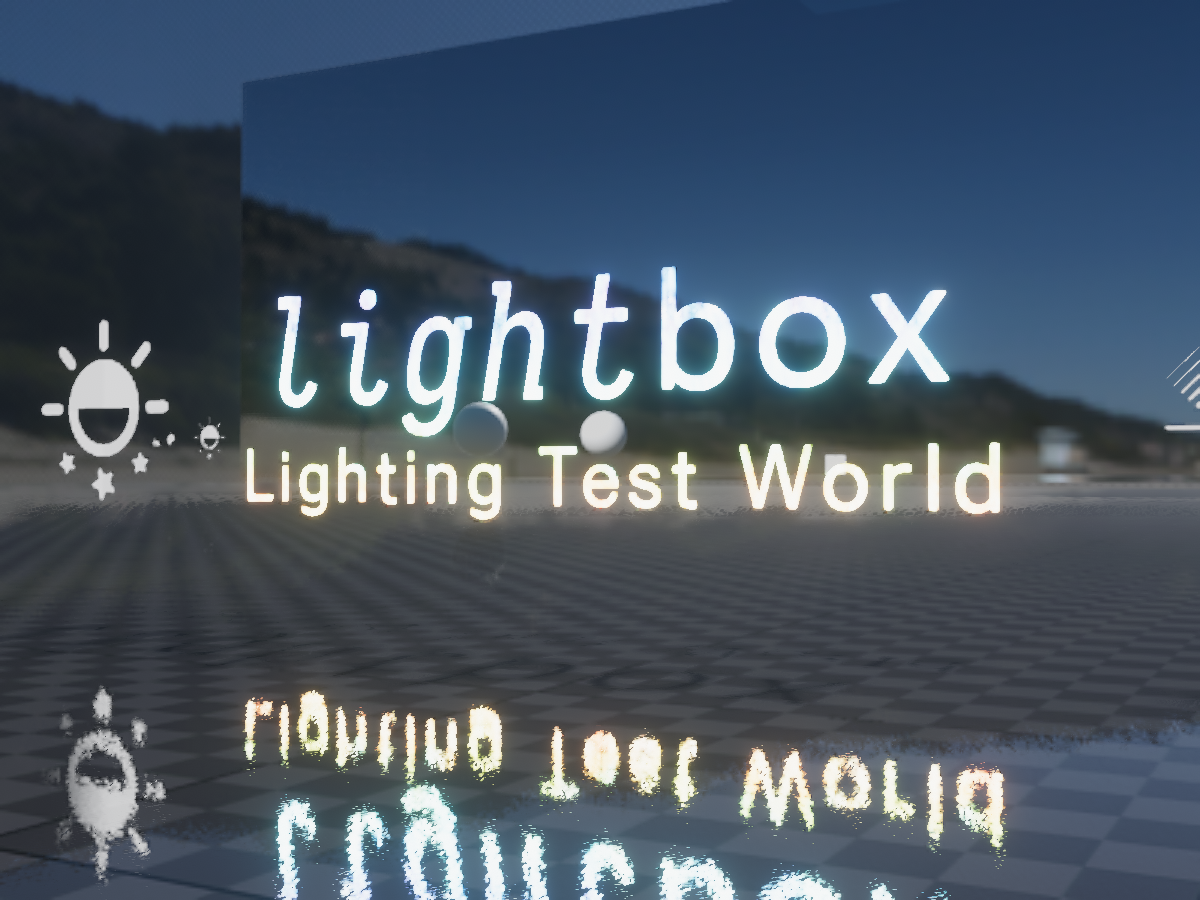
Designed for testing avatars and shaders in full‚ proper‚ lighting‚ with selectable lighting conditions‚ testing tools‚ high performance‚ and even aestheticsǃ
proper depot
Is the VRChat/Mobile/Particle/Additive shader broken for quest or something? Whenever I use it in-game all of my materials have a black border around them whenever they have the shader on the,.
I do have alpha transparency with a source from grayscale, so I can’t really think of anything being wrong on my end
 open hound
Anyone know about a shader that is used for holding leashes/chains across avatars? I was looking for something like this and I found Hai's Handholding Shader (https://github.com/hai-vr/handholding-shader-ik) but it doesnt really work for what I need. After contacting Hai they said it was a thing a little while ago, so I was just wondering if anyone remembers it?
sharp pike
@open hound https://github.com/konchannyan/LeadShader The only results if you search this channel for "leash" take you straight to it btw.

GitHub
Contribute to konchannyan/LeadShader development by creating an account on GitHub.
I can't see if the person who was trying to find it back then ever got back to whether or not it still worked with unity 2018
open hound
Thanks so much!
 jovial urchin
Is it possible to have an avatar shader that increases bloom post processing affect on other avatars that don’t use the same shader?
sharp pike
I guess a grabpass effect that increases the brightness of everything counts? Limit it to only increasing brightness where it is already above 1 or some other number of your choosing to prevent making everything look brighter?
 shell sentinel
does someone know how to use tresparent textures with VRCHAT mobile shaders?
i habve a problem where the textures look like this with any of the shaders i use of the mobile shaders, the problem is that i need to use them in order to use my avatar on quest
gaunt spoke
Could be that mobile can only do cutout and not graded transparency
steep swift
@sharp pike @open hound Instructions on how to use it here (in Japanese) https://mobile.twitter.com/konchannyan/status/1122847816202637313
It works in Unity 2018: I tested


「Lead Shader」 原理解説
~ 他のアバターの座標を取るシェーダー ~
Unityの挙動を完全に把握しているわけではないので、
確認できた挙動から可能な限りUnityの実装を推測しました。
その挙動を用い、#LeadShader を実装しています。
#VRChat #VRC #Shader https://t.co/cHRjzroUiO
Likes
140
Twitter
·
@gaunt spoke shader forge works in unity 2018. You can look around for a compatible version, or do what I did and remove all the lines of code which have errors (The errors are about Substance ProceduralMaterials which were removed from unity...so you can just remove any mention of those)
gaunt spoke
Ah; I found a few versions that claimed 2018 compatibility, but those errors are the ones that kept popping up
open hound
Wait @steep swift you helped Hai with the handholding shader right?
Thats a coincidence XD
steep swift
hehe, well the fact that I like shaders and monitor #shaders...
I'm not sure that tweet chain really explains the lead shader concisely. @open hound Here's the setup I made for it. I point out some of the important parts.
The way it works, is GPU Instancing runs on the beacon mesh. GPU Instancing stores the list of instanced objects into a "constant buffer".
Then, the chain mesh runs, also with instancing enabled. Because there is only one copy of it, Unity replaces the first element in the list of instanced objects with it, leaving the rest of the list intact
So you should pick render queues which other people are unlikely to use (not round numbers) and with chain set 1 higher than beacon so it is the next thing unity renders
open hound
Awesome thanks
 visual hawk
hey ummmm
im looking for Quantum's flat lit toon stars shader
im unable to find it anywhere
if anyone has a copy, or knows where i can get it
that'd be epic <3
 severe stirrup
how can i make it so my avatar isnt affected by a worlds lighting
 dim fern
I would like to make a transition that when crossing a teleport, the view turns completely black and that the view returns when you are at the other point. How could it be done? Someone told me about the Screenspace, and I wonder where I can find it
open hound
severe stirrup
how can i make it so my avatar isnt affected by a worlds lighting
If you have a shader that you can enable and disable lighting on, disabling lighting will make it so the world lighting does not affect the avatar.
For example, if you have Poiyomi's Toon Shader, unchecking that box (Which is checked by default) will make it so that material is not affected by the world lighting
subtle timber
Any recommendations for shaders with a 'painterly' look? (Unity)
I'm not sure if I should use a toon shader to achieve a look like this:
azure pike
Does VRChat not support "Skybox/Cubemap"?
open hound
azure pike
Does VRChat not support *"Skybox/Cubemap"*?
I believe it does, whats the problem?
.
@steep swift I believe I set this up properly based on your screenshot and it is working in one project but not another, not sure what the problem is here
Both materials are pretty much exactly the same so im not sure whats going on there
[12/02/20] Edit: I fixed the problem, apparently the scale of the beacon is very important. To anyone thats having the same problem, up the scale of the beacon and see if it works.
azure pike
open hound
I believe it does, whats the problem?
.
I'm using inverted spheres for the skybox. When using any kind of material they are fine in-game except for "Skybox/Cubemap", in which they appear completely black
velvet sorrel
subtle timber
I'm not sure if I should use a toon shader to achieve a look like this:
A lot of that really comes down to the model you use. I think a cel shader with the right options can give a look like that but the actual model needs to be authored in a style that allows it to work. For example, my shader supports sharp rimlights and three-tone shading, which are some key stylistic elements in that picture that stick out to me. But you'd also need to have a model with the detail to make them stand out like that.
velvet sorrel
azure pike
I'm using inverted spheres for the skybox. When using any kind of material they ...
The simple answer is that you're using it wrong. The Skybox/ materials are made for use with the Unity skybox. You assign them in the scene Lighting tab. Because the skybox mesh used by Unity has special properties to make it render after opaque objects and always sit at the clipping plane, the shader is optimised for that specification and will not work on a regular mesh.
subtle timber
@velvet sorrel What a coincidence that you say that -- your shader ended up being the one I went with before I even saw this message!
velvet sorrel
Oh, nice!
hasty raven
One of the lucky few. I remember last year and boy was it something
Anyone got shaders that mimick 3ds max materials?
azure pike
Alright thanks
 left orbit
I'm feeling pretty dumb but where can I find outline settings for poiyomi?
 light urchin
Switch to the version that has outline in it's name
brisk junco
does anyone know how frame ghosting shaders work
tryna find anything on it but it's all people trying to fix it, not get it on purpose lmfao
left orbit
Anybody know if Poiyomi's shader has the option to turn backface culling on? I've got a cape-type object that has a front and a back, and when the front gets too close to the back the inner face of the back is visible from the front
light urchin
Under rendering options
left orbit
I think backface culling would fix that since you wouldn't be able to see the back end of the cloth from the inside
Well, it says it's already set to "Back" but that doesn't appear to be true
Is poiyomi's backface culling only visible in-game and not in the editor's scene view?
light urchin
It would be visible in editor as well
light urchin
Though re reading your first message I'm not sure if you know what it actually does 😅
Or I'm not sure what you mean by your message
left orbit

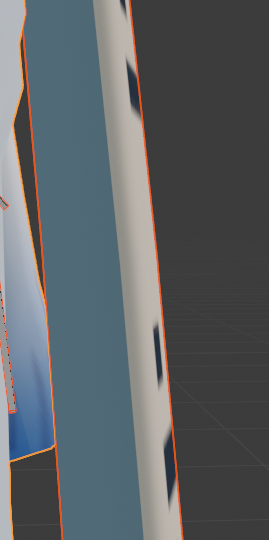
The cloth has a front and a back, and when the front gets too close to the back the inner face of the back is visible
So I'm trying to turn on backface culling so the above pic doesn't happen
I feel like it's an outline thing tbh
Aha, yeah
Outlines make the inside of sealed objects completely colored whatever the outline is
I saw that on a stickman character in-game today and this confirms it
No phasing after wiggling wildly here https://i.imgur.com/mdtUAot.png
With the outline disabled
So the real question is, why does enabling outlines on a mesh make it so the inside of that mesh and all of its backfaces are the color of the outline, and is there a way to backface cull the outline itself?
As in, make the outline detect that you're looking at the wrong end of the face and disable outlines on that end >.>
Oh, so I see how outlines work now
Their culling defaults to being "Front" so you can only see the edges that expand outside the faces
That simply means it won't work here unless I manually remove the actual back parts of the cloth
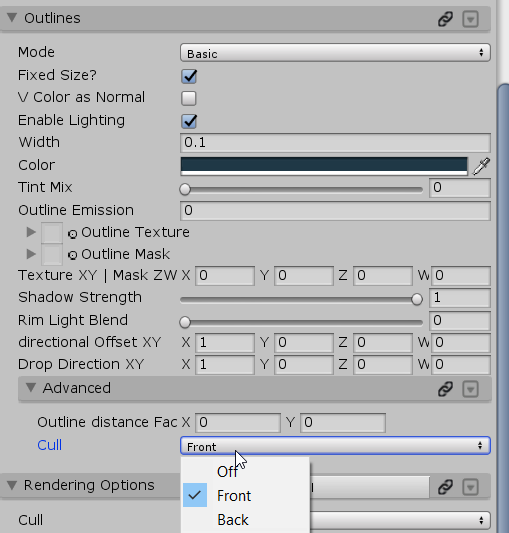
Where's my "both" xD
left orbit
Yeah so not both, I realized after explaining to a friend I'm sure doesn't care, that I want some sort of "adaptive" culling
That automatically detects which side of the normal you're viewing from, then culls that side so you see the opposite side's
But then if you rotate and look at those normals from the other side, it'll automatically switch culling to the other side so you see the original side's normals
That way you always get an outline from either side, and it just culls depending on the side of the normal you see
Idk how intense that would be if it did that calculation per-triangle, but I feel like it wouldn't be incredibly difficult to raycast from the camera, figure out which side of the normal you've hit, then cull that side of that specfic triangle for each triangle of the avatar your camera sees
Then again, shader code is caveman speech to me
past pewter
does Amplify Shader Editor work in vrchat im considering buying it
timid lark
@past pewter yes it does. I highly recommend it.
errant moth
left orbit
Yeah so not both, I realized after explaining to a friend I'm sure doesn't care,...
You could always use stincils but it's been a while since I've used them so I can't really recall how I set it up.
velvet sorrel
@left orbit I don't know about Poiyomi's, but my shader has some functions for that. You can remove outlines entirely from a section of the mesh with the outline width system. There's also a system to remove outlines facing the wrong way if the source direction was backfaciing but that might not be applicable here
 hushed raft
If I was interested into looking into making custom shaders for vrchat, where would be a good place to start?
tired token
@hushed raft https://catlikecoding.com/unity/tutorials/rendering/ have fun
A collection of tutorials that cover how to write your own shaders in Unity.
hushed raft
oooooo thank you!! I wanna see about porting shadertoy shaders to unity
 ornate minnow
does anyone know how to fix this issue :( I'm using the Poiyomi Toon Cutout shader / Same issue with the eyes too
 dense parcel
I have a question. On some avatars, there is this cool glowing outline effect on the avatar, how do I get that?
 jade canopy
What's some of the best shaders for vrchat new to avatars and looking for the best one for my model and also would like one that doesn't look bad with shaders off in safety
velvet sorrel
I'll recommend my shader because it's designed to look good with minimal effort and have proper lighting everywhere
https://gitlab.com/s-ilent/SCSS
GitLab
A surface shader for Unity providing cel-shading. (Forward rendering only)
jade canopy
I used the toon shader people use a lot but I'll test yours out
But since it's your shader do you have any good recommend settings?
velvet sorrel
Crosstone with purple or orange shadows works with just about anything
 bleak plume
what does dm mean
past pewter
Hi after I converted my PC avatar to Quest it looks ok in the project but when I upload it this what the in game avatar. The mouth and face are ok but everything is wrong. Could some please give me some help,
bleak plume
you look good
 bleak plume
what? you look good
past pewter
The avatar looks fine in the project what is going wrong? Anyone with any ideas or help would be greatly appreciated
bleak plume
im not even good at this thing so im just searching for help how to make a frickin avatar
 halcyon dove
Are you viewing this on Quest? Also those fingers look messed up too.
bleak plume
quest... dremin about it my whole life
past pewter
When I run my Quest 2 wireless through PC/steam its fine. When I test it on Quest VRChat app that is what it looks like.
halcyon dove
Is the screenshot you sent in Unity what it looks like for the android build?
Or is that the PC version of the avatar in Unity
past pewter
halcyon dove
Is the screenshot you sent in Unity what it looks like for the android build?
The project I posted is Android build in unity
halcyon dove
Using the mobile shaders? not too sure in that case
I could only assume vertex colors for why it looks off but that should show up in Unity as well
 halcyon dove
You tried a new project already yeah?
past pewter
I did and everything is update at least as far as I know. Used the latest VRChat SDK
halcyon dove
I can only guess a couple of things.
The world may not be great for testing, you could try setting your anchor overrride to the spine, or some issue with the texture settings in Unity that's making it not quite ideal for Quest.
past pewter
Okay, I removed 1 shader which didn't seem to do anything and the face, hair and chain on the waist is okay now but the clothes and arms are all still jet black
The avatar is over a year old if that means anything
halcyon dove
You could have textures which depend on transparency but again that would very likely show up in Unity when you swapped over to the mobile shaders, so not sure.
past pewter
I changed texture from .dds to .png and it fixed the issue
Even though some other materials are dds for some reason they work. I don't know
velvet sorrel
It's best to convert your textures from DDS to PNG or else Unity can't process them correctly
New and updated shaders!
Clear Water 2
https://t.co/TRya5Yc1Wj
SkyProbe Fog 1.1
https://t.co/dTeyQuU4rI
CW2 finally makes its Booth debut! Designed for cheap, pretty water that won't hurt FPS.
SkyProbe Fog now has a variant more suitable to big outdoor worlds!
#vrchat #unity
 Twitter
·
past pewter
Twitter
·
past pewter
@velvet sorrel thanks for the info
pure raven
@velvet sorrel What are the best water shaders you’ve found for Quest? I’m building a world & I keep running into the same issues (eye bug or poor quality). Would you mind sharing your top picks here?
velvet sorrel
Sorry, I don't develop for Quest! On Booth, noriben has a water shader made specifically for Quest you can try. But that's all I know of.
pure raven
You’re the best, thanks. 🙏
 brittle obsidian
Is this where recolouring and stuff happens lol
I would like some help recolouring a model
Ping me if you can help
past pewter
Hi, Does anyone know why the textures come out like this? And can you tell me how to solve it , My video card is : AMD Radeon RX 470
 old rover
i get that on my 580 all the time
its a shading issue to do with the way your pc handles graphics
brittle obsidian
can someone please help me recolour something
i'm very confused about the whole process
 fathom shale
can someone tell me why i cant get certain materials to be effected by the cutout option ? most models actually work and the cut out works fine but others i put the cutout option on the material and it does nothing and leaves the material looking boxy
 true kernel
does anyone know if there are any shaders out there that are like standard but have similar features to poiyomi? i need a few things like matcap and clear coat but i dont want toon lighting.
true kernel
closest thing i can even find is shaders for hyper real cars which cost upwards of like 100 bucks which is crazy for my needs
velvet sorrel
true kernel
does anyone know if there are any shaders out there that are like standard but h...
Try my shader!
https://s-ilent.booth.pm/items/1894974
It's designed around anime-style cel shading, buuuuut it's based on realistic lighting principles, so you can essentially set it to act just like Standard.
light urchin
Poiyomi also has the standardish lighting model which you can try
true kernel
it does? ive never noticed it before.
light urchin
Yep had it for a while
The latest free update also made metallics more in line with standard so make sure you are on the latest version
 sly badge
Anyone know what shader I can use that doesn’t look like it’s missing when people have shaders off in the safety settings?
@ me pls
hardy dagger
what do you mean?
green crane
sly badge
Anyone know what shader I can use that doesn’t look like it’s missing when peopl...
standard
every time that someone hide your shaders it changes to standard
true kernel
do you have alot of flipped normals? if so just select all everything in edit mode for your mesh in blender, and then press space and type in "recalculate normals" or "recalculate outside" depending on your blender version. if it somehow makes it worse then you may have to go in and flip some parts manually
 hardy island
What's the skinny on png and/or tga on avatars?
steep swift
They are both fine image formats
The only format that can cause trouble is dds because those are pre-compressed which means unity can't convert colorspace to sRGB
Which then means the colors will be wrong
 gritty stone
does anybody know the name of the shaders that give a rainbow like effect on an avatar
 gusty steppe
Are there any free proper looking PBR shaders?
velvet sorrel
gusty steppe
Are there any free proper looking PBR shaders?
Unity's Standard shader does PBR, you just need to set up the textures properly
You can also try an extension to it, like mine, which improves on it
https://gitlab.com/s-ilent/standard-subsurface-scattering
GitLab
A simple subsurface scattering shader for Unity/VRchat that implements an approximation of a subsurface scattering effect.
 cold latch
Question, do we have a good refractive shader WITH hue shift?
 ocean ocean
I've seen some people create some awesome looking hair from FFVII Remake models, I've heard that they use Alloy to do it, can anyone confirm this or have a tutorial on how to make hair look "realistic"? Thank you!
velvet sorrel
ocean ocean
I've seen some people create some awesome looking hair from FFVII Remake models,...
Try my hair shader: https://gitlab.com/s-ilent/hair-with-anisotropy
astral plover
ocean ocean
I've seen some people create some awesome looking hair from FFVII Remake models,...
Can confirm, Alloy is what you use for FFVII remake models
but there's a specific version that has support for Ambient Occlusion maps on different UV layers
Since FFVIIR models use different UVs for their AO Textures
ocean ocean
@astral plover I assume it's the latest version of Alloy? There's a TON of different shaders that it provides, do I use the hair one or do I use another shader? I feel like I need a good tutorial to figure that shader set out, it's so complex.
astral plover
the hair one yeah
gusty steppe
You can also try an extension to it, like mine, which improves on it
https://gitlab.com/s-ilent/standard-subsurface-scattering
@velvet sorrel This is the sort of thing I was looking for! Thanks!
GitLab
A simple subsurface scattering shader for Unity/VRchat that implements an approximation of a subsurface scattering effect.
 hollow plover
Hi! i wanted to know which shader is used for putting images on peoiple visions, i want to make little signs like "silence" or "Respawn" like cyan laser on the Vrchat meetups
past pewter
i have that shader but it can be used for evil means way to easy just stick with cancer space
hollow plover
i find out that the efect was called Screen overlay and i have dope shader FX and it has the efect too, also thanks Cancer spaces its a good alternative in case my solutions lags out
velvet sorrel
past pewter
i have that shader but it can be used for evil means way to easy just stick with...
It is the other way around, you should use simple overlays instead of cancerspace if you can because cancerspace takes a grabpass
 slate viper
So, I mentioned this yesterday in avatar help but maybe you guys might answer ;-; I still can't figure out what's going on, does anyone know how I can get the arm to be effected by the scrolling emmision, it does do it, but really faintly. Does anyone know how to fix it? Example Below
steep swift
You want the scrolling in UV space, not vertex space?
Would be easy to do if you're willing to edit the shader. There's some place where it looks at vertex.y and you would change that to use uv.y
past pewter
So, I'm trying to do a little bit of a screenshake (safely and only for a few seconds coz im doing a roar) how would I go about making the shaking show up on the entire screen rather than just on a sphere? coz i cant figure that out for the life of me
true kernel
poiyomi can do glitter
 lucid fog
yeah i just figured lmao thanks anyways
restive badge
I'm looking for a toon water shader which I can use to create a large ocean surrounding an island city. I want the water's surface to move, and I already have a directional light in my scene, so if it can take advantage of the depth buffer to render edges around objects in the water, all the better. I found this shader tutorial which has the sort of look I want (though I'd like the surface of the water to actually reflect some light to better show the changing geometry) but it doesn't seem to work well. I don't see any outlines where objects intersect with it, but more importantly, it can't dynamically tesselate the geometry in the shader, which means I'd need a very high resolution mesh to have even polygonal looking waves around my boats and beach. Polygonal waves would be perfectly fine though, as my city is stylized and polygonal to begin with. But without a geometry shader, the ocean would need millions of polygons, or at least would have to be carefully constructed to only have detailed geometry near the shore, and that's not something I want to do as the world's geometry itself is being updated daily with new stuff.
Here's the tutorial which kinda shows off the look I want:
https://lindenreid.wordpress.com/2017/12/15/simple-water-shader-in-unity/
I don't care if it's a free or a paid shader, so if there's something in the Unity store you know of which would do the job and work in VRChat which is always an issue without scripts, please let me know. I'll be heading there now to try to find something which might work. I know there are photorealistic water shaders some have made for VRChat but as far as I know they don't actually make waves and they don't tesselate the geometry.

A tutorial on how to create a water shader with a foam line and wave animation.
 fallen summit
I'm looking for the yukio fur shader could someone send me a download or a discord server?
 lime pine
Can someone make a draco
digital halo
anyone have a decent diamond shader?
 sullen egret
Im looking for a Shader that will work with Polybrush so I can the texture blending, anyone know were I can get one? need it for a world
velvet sorrel
sullen egret
Im looking for a Shader that will work with Polybrush so I can the texture blend...
I made this a while back
sullen egret
@velvet sorrel thank you very much!
 strange quest
does anyone know any good realistic shaders
strange quest
Also do 4K textures work on avatars?
 copper seal
strange quest
does anyone know any good realistic shaders
copper seal
strange quest
does anyone know any good realistic shaders
i like rero's standard shader
and yes ive seen up to 8k textures on avatars
also, is transparency in shaders always blocked if the avatar isnt being shown? i'm trying to get a transparent texture to work but it looks horrible when they arent showing the avatar
top is the avatar "use safety settings"
bottom is the avatar being shown
 tulip ferry
Depends on the shader, if you just have 'standard' transparency works fine
strange quest
@copper seal where can i find this shader?
 neat zodiac
Don't use 8k textures on avatars
true kernel
they ""work"" but the file size will be absolutely massive and i had someone crash me before because he had multiple 8k textures on his model
hasty raven
does somebody have an unreal engine shader for unity?
 abstract mason
Anyone know a good strobe light asset?
Mostly just lights.
Trying to make a club world anyone have a good shader too.
hasty raven
Mochie's Uber shader should help
I'll give it to you
Oh wait...... I don't think I can help you out with that yet
hasty raven
anybody got a unity scene with bloom lightings and realistic settings like post processing?
 eager quartz
For some odd reason, Mochie's Uber X shader causes me to go from 70FPS all the way down to 8FPS. My guess is that it's not compatible with my hardware, so it emulates it through software. I'll stick to Poiyomi.
 winged bane
i cant use any of the mobile shader besides the first one or the build section tells me i have shaders i cant use
hardy dagger
correct
winged bane
ok
tulip ferry
You should be able to use any vrchat/mobile/ mobile shaders for quest
 glossy storm
need some help here on a texture unity 2019 keeps its greyscale but if i use 2018 it turns blue
2019 ^
2018^
any one have an idea? i've tried other image formats, clearing color profiles, and changing the name
i've also messed with the setting on the image itself with no luck
problem child ^
glossy storm
solved !
 nocturne birch
does anyone have a glass shader that you can see thourg and its quest compatible
tryed searching it up but I had no luck
copper seal
tulip ferry
Depends on the shader, if you just have 'standard' transparency works fine
that's the thing, I used the standard shader and other players still didn't see transparency it seemed. the avatar is shown by friends anyway tho, not really a big deal
restive badge
I'm trying to modify a water shader that was written in shaderforge, and I'm having two issues. The first issue is that in VRChat and in the camera view, but not in the scene view, I get white pixels around the edges of objects and avatars. Normally I'd assume this was some issue with antialiasing producing partially transparent pixels around the edges, but clearly that isn't the case because VRChat doesn't have that, and Unity doesn't have it in scene either unless it's enabled on the main camera, which it's not here.
You can see the effect around the edge of the buoy, and the boat. I know it has something to do with the depth buffer, because the effect renders foam around objects using the depth blend node. I tried changing the depth test in shader forge's settings from <= to < but this had no effect. Pictured here are what I believe are the relevant nodes.
The other issue I'm having is when I look at the source, I can see it's doing a grabpass, and I've already removed the nodes that calculate underwater distortion, and there is no longer a screen color node, which I assumed was what created the need for a grabpass. Not sure if removing the name of the grabpass texture if what I need to do to get it to remove that code or not, but I guess I'll try that next.
 twilit isle
Fade causes me so much pain
It looks so good but man does it conflict with a lot of vrc stuff
restive badge
So I've figured out WHAT was causing the white outlines, though not WHY precisely... It turns out the WHAT was MSAA:
As for the WHY, well, I assume it has something to do with partially transparent pixels and the depth buffer perhaps not also being antialiased, and something akin to self-shadowing occurring. And I have no idea if it's possible to fix this within the shader, or how. Also, disabling MSAA means the edges of my objects won't be antialiased, which is unfortunate.
You can see here that everywhere the bright pixels were (which comes from the foam being rendered with depth blend) the edge pixels are opaque when rendered without antialiasing, and slightly transparent when rendered with it...
As for what this means... Well, I believe wherever a water pixel is drawn, it checks the difference in depth between that pixel, and whatever was previously drawn behind it, and if that distance is below some threshold value, it draws the foam. So I think maybe what's going on here is that there's some disconnect between the depth nodes depths and the z values being tested for antialised pixels? Cause the water is rendered after the opaque objects... So the antialiased bits can't be writng depth or the water wouldn't draw there. But the foam only draws where the distance between the water plane and the stuff it's drawing over is small... Hm... Nope, I'm still confused. Perhaps there is something going on with clamping the depth test value...
abstract mason
Anyone got a good portal shader out there?
steep swift
@nocturne birch Silent's fake glass should work on mobile, glass in general may be a little bit performance heavy on Quest, just from the transparency itself. https://gitlab.com/s-ilent/fake-glass
GitLab
A shader for Unity that (ab)uses some Unity features to produce glass-like glass.
steep swift
@restive badge ooh that's a tricky one. So one cause of weird artifacts with MSAA is because values can be extrapolated, at sharp polygon angles. This can be reduced by adding the centroid keyword to values which should not be extrapolated between vertex and fragment.
However, I don't think that is the case here. I think your speculation that it is depth buffer related is likely correct. However, let's be clear about one thing: There are actually two different depths. There is the graphics hardware's depth buffer, which you do not have access to, and that is done once per sample, so it is precise and not antialiased.
The other depth is the _CameraDepthTexture, the depths that your shader is able to read. In Unity, this is not rendered with MSAA, and has no access to the per-sample data, even though textures could be rendered with this option: This is still an issue even in the latest versions of Unity: https://twitter.com/SchaefferAustin/status/1200814748377534464

@unity3d it's almost 2020 and there's still no option for MSAA on the camera depth texture making MSAA borderline pointless at times when using realtime shadows. pls add as an option, I beg you
Twitter
·
So what to do about the fact that the water could see pixels in front, or with the wrong depth. Well, one option you could do is saturate or clamp the pixels to be no nearer than the surface of the water. But that could still cause your shader to show foam. Another option is to treat invalid pixels specially, basically don't show foam if the depth is in front of the water, because it's not in the water anyway, it's in front of it
it's not perfect, because let's say you took that picture of that tree in front of a part of water that had a rock and foam around it...
In that case, you'd see a 1 pixel border of no foam between the actual foam, and the tree
I think there's just no solution. The depth texture has the wrong data, and you can't render foam without the correct depth
restive badge
@steep swift I appreciate the help, though I have no idea how to implement either of those solutions. And while sure, they may not be perfect, a few pixels around a rock without foam because there's another object's edge in front of the foam, would be a lot less noticeable than either white outlines around everything causing aliasing, or aliasing because I have to disable MSAA. And your first solution, well we don't know how that will look, but that sounds promising as well.
steep swift
the problem with disabling MSAA, is you cannot control what graphics settings people use to play VRChat.
The default VRHigh setting is MSAA 8x
VRLow is MSAA 4x
DesktopLow is MSAA off
you can't guarantee that people will run DesktopLow, and most will not
restive badge
Are you saying VRChat won't obey my main camera's settings even though I set it as the reference for my world in the world descriptor? It supports post processing. I just assumed it would abide by the antialiasing setting as well.
steep swift
correct, only a limited selection of settings are used
for example, near and far plane
restive badge
Also how do you know what the settings are for VRHigh and Low? I was never able to find docs on that.
steep swift
Pinned messages #development-advanced
restive badge
Ah yes, the near plane, I set that in my world as well. I don't know why they don't enforce that one... It needs to be set to the minimum for near plane because small avatars arms get clipped otherwise.
Well, thanks for the info anyway. I guess that solution is out the window... So, any tips on how I might use shaderforge to correct this? Like the screenshot I posted shows part of the shader which I think is the relevant portion that does the blend wit the depth buffer. Anything I might be able to stick in the middle there to correct it somewhat? I'm kinda outta ideas myself.
steep swift
@restive badge basically, look where you access the value from the depth texture. if you can calculate the depth of the surface of the water, anything with depth nearer to the camera than the water surface, should not create foam
restive badge
Well these are the only values I seem to have access to with Shaderforge:
Scene Depth
The depth from the camera to the scene behind the current pixel. Note: You have to turn off depth buffer writing in the blend settings, and you need to use a camera that renders a depth texture
Depth Blend
This outputs a value between 0 and 1, depending on how close this pixel is to the background geometry, based on the distance input. Useful for fading out edges of water, or softening up lightshafts intersecting geometry. Note: You have to turn off depth buffer writing in the blend settings, and you need to use a camera that renders a depth texture
Depth
This is the distance from the camera's near plane to the object itself
But that's all the documentation they provide. I'm guessing Depth Blend is 1 when the transparent pixel is at the same depth as the background geometry, but I have no idea how it decides at what distance it becomes 0, nor what range of values I could expect for Scene Depth or Depth, and so I have no idea how to compare them. Unless maybe I should ignore Depth Blend here and compare Scene Depth and Depth? And then I don't need to know their ranges... Hm...
So I dunno, maybe you're suggesting if Depth > Scene Depth, don't write a pixel? Which I guess would mean setting that pixel to black since as the shader is written I don't know any other way to not write it. I don't know if shaderforge supports that even.
I guess I'll give that a shot tomorrow. I gotta go to bed now. 🙂
 hollow crescent
anyone familiar with poiyomi have an idea how to achieve this effect?
specifically a transparent body with a basic outline
the outline being emissive and brighter than the body
I'm mentioning poiyomi because the shader has the dissolve effect that I'll be using along with the effect that I'm asking for help
I tried the poiyomi module that mixes transparency and outlines, but the outline and body is rendering together, mixing the colors of the body and outline
I'm thinking some setup with the rendering settings is needed but I'm not familiar enough with the options
ripe idol
why not just ask in the official poiyomi server https://poiyomi.com

Discord
Check out the Poiyomi Shaders community on Discord - hang out with 10,673 other members and enjoy free voice and text chat.
ripe idol
hollow crescent
I tried the poiyomi module that mixes transparency and outlines, but the outline...
it might be possible with the patreon shader
let me try
@hollow crescent
something like that
hollow crescent
how the heck
ripe idol
I used the patreon shader
7.0
in grabpass mode
It's $10 but that's all I've got that'll work
@hollow crescent there's the material if you end up buying it
for anyone else asking poiyomi questions it's a lot easier for me to find and help you if you ask in the official server @ https://poiyomi.com
hollow crescent
I appreciate the effort, but I'm not in a position to be spending, yet
I'm just glad the effect is achievable with your shader
for now, I'll just put some glitter and scrolling emissions on my ghost soldiers to give it some depth
ripe idol
a tight rim light can help make it happen
hollow crescent
I'm watching the tutorial and rim light looks really good
thanks for the tip
hasty raven
I've learned that I can make low poly models look 10 times better
by just using Mochie's shader
how about that?
nocturne birch
nice thats cool
hasty raven
thanks
nocturne birch
@steep swift The shader you recomended me is not for quest/moblie do oyu have something else like a pic shader or something else
 small heath
So how do i do screenspace effects? I want to make a HUD but i have no idea how to do it.
steep swift
@restive badge i didn't mean set it to black, but instead treat it as infinitely far away. (instead of full foam, treat it as no foam)
restive badge
@steep swift Yes, but as far as I can tell, in this shader the places where foam doesn't exist, it doesn't exist because the color is black, not because it's transparent, or because it's really far away. There is no way I can see to not set the color of the pixel at all if its really far away.
Here for example is where it all ends up. At an output called main. I don't know of any way in shaderforge not to have main output SOMETHING, so nothing isn't an option.
And in regards to setting it to black, I tried disconnecting the noodle to Opacity for example and setting it to 1.0 always and it did not affect where the foam appears at all. It seemed if I remember correctly, to affect how transparent the water itself was, though things still rendered behind it in a way, with the depth texture so it kinda looked like they were being drawn underwater. There were bluish versions of the models underwater I mean. It looked kinda nice actually.
hasty raven
velvet sorrel
It is the other way around, you should use simple overlays instead of cancerspac...
your subsurface scattering shader has come a long way since the last year. can't wait to try it out
also, how do I make hair look real?
restive badge
@steep swift I got it working! I don't know how... I just guessed that the depth node would be the depth of the pixel even though the docs say its the depth of the object which could have been the transform, and that I needed to use scene uvs and not normalized uvs for the uv map for the scene depth, and I assumed the ranges of the two would be compatible. But it worked on the first try by setting the main foam color to black...
However, I wasn't sure what I was seeing was optimal, so I wanted to also hide the secondary foam color, and it occurred to me that what you'd suggested.... not rendering the foam... was in fact possible, because this shader doesn't just render foam, it renders the water and lighting on it as well, so not rendering the foam just means not blending it with the other stuff. At least I assume so. I can't actually tell from the frame rendering times if the shader is actually more optimal now. I'll have to look at the source and see if all that other stuff got stuck in my if statement... But here's what I ended up with. It didn't look any different than my first try, unless I directly compared the two images and then I could see an occasional edge pixel which was slightly darker where the lighter foam overlapped it, but that would never be noticed...
And here's the final result. This is what it used to look like with MSAA on:
And here's what it looks like with the new shader:
The final result isn't perfect of course. As you mentioned, there's a one pixel area in some place, like right where the foam touches the boats, where you'd expect foam to be, but its practically unnoticeable. I'm gonna try one more thing and see if allowing foam where A = B gives a slightly better result, but this is already an excellent result.
The only thing that bothers me is the shader is using a grabpass still and I don't know why and I assume that's hurting performance, but it may be necessary for the depth blend? I'm not sure.
steep swift
@restive badge can you show where it uses _GrabTexture?
Yes GrabPass is slow and bad, and might break in vr if done wrong
I'd honestly try disabling the GrabPass and replace anything using _GrabTexture with 0 / black
past pewter
Does anyone know why this happens and how to fix it ?
Some materials just show up like this i asked others about it tho they saw the avatar normally with the materials and textures how they are supposed to be.
reinstalling the game didn't work
brisk gull
What graphics card do you have @past pewter ?
past pewter
Radeon RX 570 Series
 haughty prairie
Greetings, I'm having some trouble with GPU Instancing with my PBR Metal/Rough shader. For some reason, non-static objects with GPU Instancing enabled on the material clip out at certain angles if there are multiple of said object on camera. https://gyazo.com/f3516b1b3ef97581718a9d88f2932e6e
I've been looking through the Unity documentation on Instancing but I'm not seeing what I'm missing. Can anyone look over this and see what I've tripped over?
The Shadowcaster Pass is generated by Amplify Shader Editor, so I assume it's okay, but I'm admittedly somewhat of a neophyte at shaders.
(also no idea why that gyazo link is refusing to embed)
haughty prairie
For clarity: this issue does also occur in Play Mode and in VRChat proper.
steep swift
@haughty prairie Why is your shader using tessellation?
I'd suggest turning that off to test if that's somehow responsible. It can be possible to have a mistake in the tessellation function and tesselate to 0 (hide the whole polygon) which might make the object disappear
haughty prairie
It's a multi compile, the material has it turned off.
ah, that might be an issue, Amplify only changed the return from tessFunction(), it didn't disable it outright and I never refactored that part of the shader
yeah that was it @steep swift, removing Tessellation option from the shader entirely fixed the clipping. I suppose my question now is how to go about fixing that option.
I've found like 5 different threads on the Unity forums about it, all without reply. Heck.
brisk gull
@past pewter seen that issue for other people with the same hardware, if on latest drivers I'd suggest a clean install or if you're not, to update eith a clean install to see if that is the issue
haughty prairie
How to reproduce: 1. Open attached project "repro_1111579" (OC link below) 2. Zoom towards terrain Expected result: Terrain is visib...
well, apparently you can't have Tessellation and Instancing at the same time on Built-In, only works in scriptable pipelines.
restive badge
@steep swift Here's all references to the grab pass that I see in the shader:
GrabPass{ "Refraction" }
uniform sampler2D Refraction;
float4 sceneColor = tex2D(Refraction, sceneUVs);
And then at the very end, sceneColor is used here:
fixed4 finalRGBA = fixed4(lerp(sceneColor.rgb, finalColor,saturate((FoamMask+_Opacity+saturate(saturate((sceneZ-partZ)/_OpacityDepth))+node_6874))),1);
I removed the nodes in Shaderforge which do the refraction, and I don't see any left referencing the scene color. I'm also not sure what scenecolor is being used for here, unless it's required to render transparency but I'm pretty sure not every shader that needs transparency has to do a grabpass, or if they do, there's probably some keyword for that grabpass to reference it that I don't know which could be used here instead since I believe every shader which uses the same name for a grab pass only requires it to be done once.
steep swift
Correct, using a common name like _GrabPass would reduce the overhead, but it's still not free.
If it's just a lerp, you could instead make the shader transparent blending and return this value "saturate((FoamMask+_Opacity+saturate(saturate((sceneZ-partZ)/_OpacityDepth))+node_6874)))" as the alpha blend factor
@haughty prairie i think you can, but it would require passing the instance id through the domain function, which your shader might not be doing (could be an amplify bug).
But why do you need tessellation in the first place? For terrain it could make sense but for your mesh, you could subdivide things as needed most likely and be ok
haughty prairie
It's intended as an omni shader for the project. Some of my assets do real well with tess on, but most of the time it's not needed, so I'm just going with a version that has it culled entirely.
restive badge
steep swift
Correct, using a common name like _GrabPass would reduce the overhead, but it's ...
I don't know how to make the shader "transparent blending" if it isn't already. I would assume it is because it's transparent water, but maybe that's simply due to it using the grabpass. The output of it has an opacity input however, and the blend mode setting on the left says alpha...
I don't understand what you're telling me to do however. You said:
"return this value "saturate((FoamMask+_Opacity+saturate(saturate((sceneZ-partZ)/_OpacityDepth))+node_6874)))" as the alpha blend factor"
But the water has to have a color... And if I'm reading this right:
fixed4 finalRGBA = fixed4(lerp(sceneColor.rgb, finalColor,saturate((FoamMask+_Opacity+saturate(saturate((sceneZ-partZ)/_OpacityDepth))+node_6874))),1);
...the 1 on the end is the alpha... So returning the above as the "alpha blend factor" would seem to imply replacing the 1 with that code you supplied. Except, that doesn't help get rid of the reference to sceneColor in the RGB part, which is what required the grabpass.
And I don't see anything in your code there that suggests a color, so how's the color of the water going to be blended with what's behind it?
restive badge
Hm, wait, I found this shader while looking for info on grabpass in shaderforge...
https://gitlab.eecs.umich.edu/kgingras/ZeroGravGuy/-/blob/74220f77207e7ec94d48c6247b6b6051abc632ee/Assets/ShaderForge/Example Assets/Shaders/Vegetation.shader
It's a vegetation shader but it caught my eye cause as such it probably has transparency, so I checked to see how they handled that at the end:
float3 finalColor = diffuse + specular;
fixed4 finalRGBA = fixed4(finalColor,1);
And then I noticed in my water shader, there's a finalColor as well, which is just set to the emissive output which is the final color of my water with the foam.
So I think I can just stick that code you suggested in like so:
fixed4 finalRGBA = fixed4(finalColor,saturate((FoamMask+_Opacity+saturate(saturate((sceneZ-partZ)/_OpacityDepth))+node_6874))));
And that should work? I guess I'll give it a shot now!

 rose star
does anyone know how to fix the shader issue in unity?
i changed all the shaders to standard from their preset but some are still white
restive badge
It seems to work! I put the alpha in its own variable for clarity because I was getting an error that made no sense.Turned out there was one too many closing parentheses.
float finalAlpha = saturate((FoamMask+_Opacity+saturate(saturate((sceneZ-partZ)/_OpacityDepth))+node_6874));
fixed4 finalRGBA = fixed4(finalColor, finalAlpha);
restive badge
How do I tell if this is doing anything significant for my performance though? I can't tell in the editor by looking at the fps or frame render time. It doesn't seem to change. And the profiler doesn't really enlighten me either. I don't see any obvious changes, aside from setpass calls going from 95 to 94 when I enable the newest shader.
steep swift
@restive badge Nice work!
it always makes me happy to see someone go through the extra work to optimize their shaders.
Yes, SetPass calls only goes down by 1, nice observation... but that 1 does a little bit more processing than your ordinary drawcall... Namely, it runs a MSAA resolve over the whole screen (you don't see this as a SetPass, but it's work that the graphics hardware must do), and then copies every pixel on the screen to another texture.
On your Unity preview, it might not look like much, but ask someone with a VR Headset with a per-eye resolution of 2160 x 2400 (with default supersampling) and they might tell you a different story. It can supposedly take upwards of 1ms on a VR headset. (might not sound like much, but it adds up quickly... a VR headset rendering at 120Hz might only be allowed 4.1ms per eye. Also note that this work must be done in the mirror, for each eye.
 wild oxide
some questions regarding UTS 2.0.7, thought I'm not entirely sure if it belongs here or in #world-lighting
I don't primarily use UTS but I recently noticed that on one of my maps, UTS materials seems to be tinted in certain areas, and i've deduced it to be from the ambient lighting in the world.
For the first case, where part of the transparent hair fringe is tinted, its a simple case of checking the Is_BlendBaseColor.
https://nyanpa.su/i/1cfR1Y39.png
However for the second case, it seems all outlines and backfaces are heavily tinted to the ambient lightings colour.
https://nyanpa.su/i/MsjI1Y46.png
I can't find any settings to change this behavior nor do I know if its just an inherent property of UTS.
My world in question has fully baked lighting with light probes and reflection probes, with no real time lights.
I guess my main question is this, is this a problem with the UTS shader? or should I be redoing the lighting in my world? I still use the ambient lighting for a few non-lightmapped objects not lit by light probes. I may be wrong but I don't think I've seen any similar behavior with other shaders i've used, and I'm not sure if its an issue with UTS in general, and if I should be removing the ambient light in my world instead.

 wild oxide
looks like its handled in UCTS_Outline.cginc
half3 ambientSkyColor = unity_AmbientSky.rgb>0.05 ? unity_AmbientSky.rgb*_Unlit_Intensity : half3(0.05,0.05,0.05)*_Unlit_Intensity;
float3 lightColor = _LightColor0.rgb >0.05 ? _LightColor0.rgb : ambientSkyColor.rgb;
I've modified it just take in the average rgb so as to discard any color tint but keep intensity for my own use, but it looks like i'll have to consider redoing my maps lighting if I want others using UTS who visit to look right, oh well.
steep swift
you shouldn't have to redo anything. just go to the lighting tab and change the ambient color there, I guess....
Any decent shader will be using the spherical harmonics (baked lighting) which I think will override the ambient sky color. I have no idea what the deal is with the above crappy code. Maybe file a bug on UTS and ask what the deal is.
your job as a world creator is to make sure Standard looks good. All shaders should conform to Standard based lighting. As a bonus, you can try a few toon shaders like you did, and make a few tweaks if you want... but don't do it at the expense of PBR, because that risks making lighting in your world boring.
Virtual Market sets up a low-intensity directional light, which provides a lighting direction for shaders such as Unity_Chan. It looks like that might also avoid the "ambientSkyColor" case
There is no performance cost to having a single realtime directional light. it is handled specially as part of the base rendering and can be used for light directionality as seen above. You can make it only target [Player], [PlayerLocal] and [MirrorReflection] layers if you desire to avoid messing with your world lighting... and as you see in the above code snippet,a ny intensity above 0.05 gets counted... so you can make it like 0.1
oh wait, this is a nighttime world.... yeah maybe don't add a directional light in that case, unless you want moonlight
wild oxide
Thanks for the insight.
I'll probably just fix the lighting to do without ambient, might have to re-bake because I was lazy and relied on it for some objects, or maybe I can just adjust the tint on the materials/emissions instead. I've already baked the lighting to account for moon light with bakery's skylight, so a real time directional light wouldn't work too well.
If it was just for myself, I would have just moved along with the a modified UTS that fixes the issue, but I'm mostly concerned about visitors using UTS.
It is what it is I suppose.
UTS seems a bit odd for that decision, the rest of it seems to be taking into account light probe data, just not the outline.
Once again thanks for the info.
wild oxide
Oh right, it affects backfaces too, so setting ambient light to dark would just cause people with UTS to have black backfaces.
Maybe I should consider having a real time directional light for players after all
true kernel
man i really wish poiyomi standard had a fallback for when there arent any reflection probes like rero does.. would be perfect
light urchin
true kernel
man i really wish poiyomi standard had a fallback for when there arent any refle...
This is the fallback
true kernel
i cant find it anywhere though?
hardy dagger
scroll down a bit
true kernel
i dont have the metallic tab
hardy dagger
use newer
light urchin
Yeah that's ancient then
true kernel
oof
light urchin
There's no separate standard shader anymore even
It's just an option to the main shader
light urchin
Hard to say from that picture looks like you bought the patreon shader at least over 4 months ago last
true kernel
yeah i dont get around to updating too often
bad habit of mine xD
im not terribly much of a shader guy to begin with
i almost always stick with just standard since i dont do anime style models too often
many thanks though
 inner obsidian
Does anyone know how to set the basic emission like in Poiyomi to have my shaders look lit the same in all worlds but on the unity chan toon shader?
past pewter
hay guyz help plz i think silents cel shading's interface is broken for me
past pewter
check the console for errors/warnings
 kind needle
is there a way to get any of the vrchat shaders to work with "cutout" textures?
hardy dagger
wdym?
kind needle
in the standard unity shader you can pick different rendering modes cutout, opaque, transparent and fade
if i use the vrchat shaders my textures break
wild oxide
is this for a quest avatar?
kind needle
yes
wild oxide
unfortunately there are no shaders supported on quest avatars with cutout
kind needle
ok
velvet sorrel
past pewter
hay guyz help plz i think silents cel shading's interface is broken for me
Can you show me what you see in the Console window when you open the materials?
past pewter
velvet sorrel
Can you show me what you see in the Console window when you open the materials?
apparently i forgot to update that net framework 3.5 shit in my own project so yeah, fixed it already
velvet sorrel
Nice
brisk junco
does anyone know off hand the highest renderqueue value vrc lets you set
im trying to make a shader that literally just turns the brightness down cuz my headset doesnt let me
tulip ferry
OpenVR advanced settings does that I believe
 indigo echo
@brisk junco my bf made an avatar that dims your screen just a tad since he's always blinded by brightness lmao , it's in MrBumBandit's avatar world, and the image is a pink haired girl with big round black glasses if you want it.
past pewter
hey i rlly need help with something
so i took a pic of kanye west and i made it 3D
i import in unity but then
the haircut looked like this
since im a quest player and i change the shader to vrchat mobile diffuse it still looks like this but when i do unlit transparent cutout it works but now i need to know how to do that for quest
so what im trying to say is
how do i use other shaders for quest
twilit isle
I don't think Quest has shaders with cutout, fade, etc. but I could be wrong @past pewter
tulip ferry
Transparency isn't supported on quest
pure raven
@past pewter You could always bake this in blender for the Quest version.
Here's a tutorial on texture baking (it's broken up into like 10 short videos, not everything is relevant).

This is the first part of the high poly to low poly workflow series. In this one I create the base mesh and the high poly model for a pillar game asset with Blender sculpting.
The brushes I used are from Blendswap (user: stkopp, https://www.blendswap.com/user/stkopp), the link to the brushes is: https://www.blendswap.com/blends/view/86419
The...
tulip ferry
(also the new bake panel in CATS uses a form of high-to-lowpoly baking)
 proven flare
Are there any good Hair shaders? I tried Alloy but it lags me, Also tried Silent's and it's not as good
 solid plover
does someone know which shader is used by the nutter butter who can puke?
tired token
Custom shader made by the avatars author's friend.
hasty raven
anybody got a Team Fortress 2 shader?
hardy dagger
what you mean?
 loud vale
the texture cutout instead of the black square
 timber maple
you might need to use something different i don't think you can't cut them out if was it would be hard
loud vale
like what?
hardy dagger
you mean like a ray of light?
loud vale
yeah
this is ripped from a game, and it uses some tricks for stuff like lights and skies
what should i use instead of those light textures?
hardy dagger
hmm, go to the object material right. and at the top, therell be a thing that says “type” (iirc) and set it to cut out
hardy dagger
well if theyre rays, they shouldnt be black, make them transparent and static. i assume theres a light over head of them to absorb light but idk
hardy dagger
yeh
loud vale
i'll just use direction lights instead
hardy dagger
ok lol
proven flare
hasty raven
anybody got a Team Fortress 2 shader?
Use silent's cell shader with the pyro lightwrap
hasty raven
thank you
velvet sorrel
loud vale
how do i make this light cutout?
Here, use this shader:
https://s-ilent.booth.pm/items/2552439
Set the "blend mode" settings both to One.
A simple shader for Unity to create seemingly complex particle effects. To install, place the Shader/ folder with the shader into your Assets/ directory. Gradient ramps can be created using the editor tool included in SCSS. https://s-ilent.booth.pm/items/1894974 Licensed under the MIT license.
You don't want the light to be cutout
It probably doesn't have any transparency, because it's just a glow. Glows don't need transparency because they can just be additive blended onto the scene.
loud vale
nah, we got it
proven flare
Does anyone drop to 20-10 fps while using mochie's shader
loud vale
maybe your gpu isn't good, what is your gpu?
proven flare
No My gpu is fine, It has the same results when I have others clone the avatar.
hardy dagger
well i have never heard of mochie. so its possibly a very performance heavy shader
proven flare
It's only when you're wearing the avatar, When others look at you it's fine
proven flare
Well since I tested it with friends with no safety settings on their friends
hardy dagger
sounds like a “sus” shader if you put it that way...
i would use something different if it causes that
proven flare

GitHub
Contribute to MochiesCode/Mochies-Unity-Shaders development by creating an account on GitHub.
hardy dagger
hmm, well i cant read there notes since the image is too small
wht version are you using?
proven flare
1.9, The latest
hardy dagger
well i cant read thos patch notes, so I don’t know wht to tell you, usually if a shader lags a certain player. usually its a “malicous” shader, and should never be used
but who knows
 hasty raven
proven flare
Well since I tested it with friends with no safety settings on their friends
hasty raven
proven flare
Well since I tested it with friends with no safety settings on their friends
are you saying that it's good for performance or is it undecided? cuz I only test the shader for fun I don't play vrchat, well, not yet
hardy dagger
@proven flare yea, i dont really think its optimized correctly for some reason
proven flare
hardy dagger
<@!655223715558195200> yea, i dont really think its optimized correctly for some...
I figured out my issue, I deleted my SDK and reimported it then it worked no more lag
hardy dagger
interesting
steep swift
Legacy blend shapes checkbox in model tab of import. The new sdk versions turn it on which helps performance?
hardy dagger
size
proven flare
I always check that box
 vivid pumice
Is it possible to use a mix map/channel packed map with the standard shader for assets?
 fair sedge
anyone got a recommendation for a shader for Spartan Armor from Halo?
 faint plaza
does anyone understand how error's hud shader works? im wanting to make a custom one with the tf2 hud elements
hasty raven
good news guys, turns out I got the model of springtrap and I'm testing him out in unity to see how it works
Mochie's shader is impressive indeed
 royal cypress
Okay so, i open discussion.... is there a possibility to add a viscous / slimy effect trough shading something that makes a char look "bloby" aka


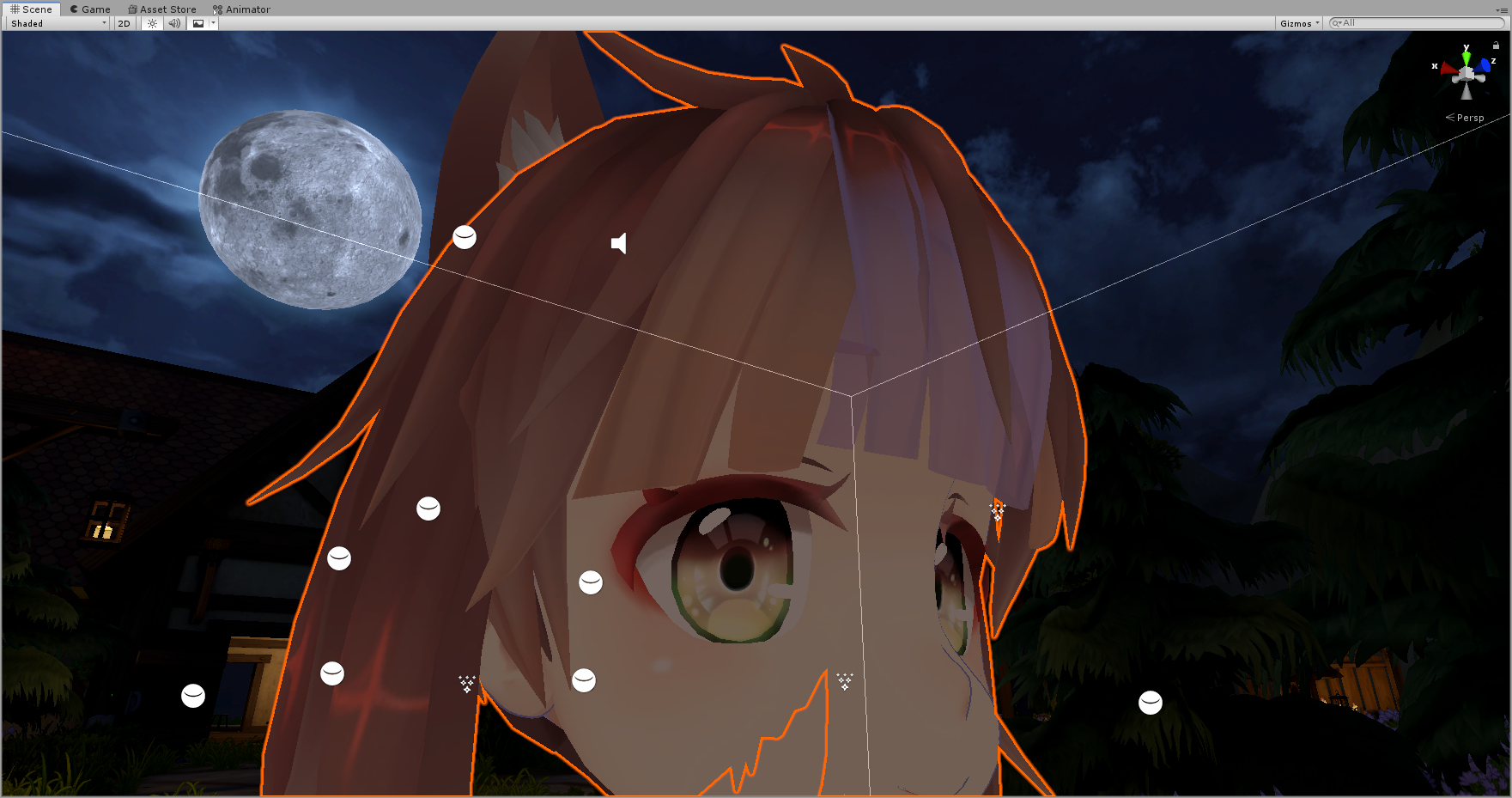
because i can go and make him shiny and that's close but he looks hell like a shiny rock rather than shiny goo
hardy dagger
have you tried a slow water shader?
royal cypress
slow water shader? never heard of it , ill go and take a look
hardy dagger
i would make it black and stuff, and make the speed of the water slow, very slow, and that might get the efect you want
royal cypress
wait is this slow water shader a unity one or is it a custom one
hardy dagger
it is an importible, not sure if its your difinatjon of “custom”
id send you mine, but ive been trapped in snow without my work station
royal cypress
custom means for me does not come with unity or vrchat sdk
hardy dagger
ah yes, then its custom
oh, you could also try and find a rain shader maybe, make the slime sort of sweaty I guess 🤔 ?
royal cypress
you are right tho i feels a rain shader is more performance intense than a water one
**i can also apply dynamic bones to every bone xd but that will make me go  **
**
hardy dagger
yea bones = perf block lol
i mean, these are suggestions, ive never seen a slime shader before, but it might exist somewhere online for unity
royal cypress
there are , is just i need to find a way that is not drooping texture but drooping goo
hardy dagger
hmm, are you able to mess woth the tiling?
royal cypress
noup
 broken moon
Do I have to unzip the poiyomitoonshader once downloaded? Or just import the zipped version into unity?
hardy dagger
@broken moon what did you do first exactly?
broken moon
Put in the sdk and dynamic bones into unity
But I never used poiyomi so not sure if I unzip it or not
hardy dagger
thats odd, if the ziped folder was imported, then the shaders wouldnt work? @broken moon how did you do so? and whats wrong with it currently?
broken moon
I got it figured out now!! I was grabbing the wrong file
 bitter ridge
is there any way to fix the standard shader looking like this in dimly lit worlds?
 normal pier
No, that just means the world is poorly lit
hardy dagger
@bitter ridge add very low emmisives