#avatar-optimization
1 messages · Page 60 of 1
 buoyant holly
and yeah that gets a little complicated as the vrchat ranking system and what's the most optimized don't exactly line up as it's a simplified system to quantify performance
 coarse vine
Yeah I've heard lol. Anywho, back to work for me!
 strong quarry
I have a question regarding retopologizing, I'm currently using retopoflow in Blender and finally finished the retopo but what would be a good way to get the higher poly texture back onto the low poly mesh?
buoyant holly
texture baking
strong quarry
alright thanks
 ripe eagle
would it be better to have a lot of skinned mesh renders with no shape keys or have 1 mesh with all the shape keys on that
buoyant holly
maybe one mesh without the shape keys and one with the vertices affected by the shape keys
 glad vault
Does material swapping affect performance?
glad vault
Also how would I go with toggling meshes on in a way that they won't disable each other, acting independently, but without costing performance? I'm currently making a lot of objects that I want on my avatar and this just crossed my mind...
 plush kestrel
glad vault
Does material swapping affect performance?
plush kestrel
glad vault
Does material swapping affect performance?
Yes but everything affects performance so I'm not sure what you mean. If you mean significantly maybe just for a split second?
Actually maybe not at all
Depends how heavy the material is I guess
 stray tangle
glad vault
Also how would I go with toggling meshes on in a way that they won't disable eac...
stray tangle
glad vault
Also how would I go with toggling meshes on in a way that they won't disable eac...
if you want toggles that are independant of each other, have a separate Bool for each one, and then set them up in separate layers in your FX controller
 zenith crown
glad vault
Also how would I go with toggling meshes on in a way that they won't disable eac...
zenith crown
glad vault
Also how would I go with toggling meshes on in a way that they won't disable eac...
(you can also use an int parameter for each type of toggle you use, for example one for props going on the right hand, one for props on your head, etc... this way you can have up to 255 different props for each toggle system, active one at a time)
glad vault
Thank you!
 iron crystal
how would i optimize dynamic bones? my count is super big and i want to minimize it
stray tangle
iron crystal
how would i optimize dynamic bones? my count is super big and i want to minimize...
can you show a screenshot of the SDK control panel
put it in #avatar-help or something
coarse vine
This may be a dumb question, but do maps count as materials? I haven't messed with them yet.
stray tangle
coarse vine
This may be a dumb question, but do maps count as materials? I haven't messed wi...
wym by maps
do you mean like normal maps, metallic maps, etc?
coarse vine
Yeh
stray tangle
if so, then no, those are simply images. you add those to a material
coarse vine
Oh thank goodness
stray tangle
you can't slap an image onto a model and expect it to work
you add the image to a material as the base color (albedo)
 calm spade
The textures have a cost
stray tangle
and then that gives it the color information
coarse vine
Yeh, I just didn't want my 2 mesh model to tell me it had 16 material slots because of math
stray tangle
no, material slots are per mesh
keep in mind that even though two meshes can share a common material, that counts as two slots
coarse vine
Yeah I knew that I think
I was just worried that Maps would be counted like textures. So 1 texture, 3 maps, 2 mesh would be 8 or something
Neato, thanks!
 unreal plover
iron crystal
how would i optimize dynamic bones? my count is super big and i want to minimize...
unreal plover
iron crystal
how would i optimize dynamic bones? my count is super big and i want to minimize...
https://github.com/Naraenda/NarasUnityTools/
Here's the tutorial on how to do it: https://github.com/Naraenda/NarasUnityTools/blob/main/dbc_tutorial.md
 marsh phoenix
Does anyone make custom avatars and if you do can you make one for me for quest please
stray tangle
wrong channel bud. for commissioned avatars, you can check out VRC Traders in #community-servers-old. you will need to make sure your discord account is verified with a phone number to get in.
also just a heads up, avatars aren't cheap. they take a lot of time to make, and people deserved to be paid for their work. depending on what you want, the price range can vary. avatars using a base model that require minor edits will always be cheaper than completely custom avatars made from scratch
buoyant holly
and if you just wanting a distinctive Avatar you can generate one using the website https://readyplayer.me/vrchat in like 5 minutes and have it run on the quest
 sick pelican
Anyone got some tips on optimizing particle systems? I've messed around with particles a bit but besides that idk where i'd start in terms of optimizing (such as unnecessary options etc)
unreal plover
Less is better
 sleek cargo
Mess around with emission rates and total particle count
sleek cargo
sick pelican
Anyone got some tips on optimizing particle systems? I've messed around with par...
I’d try that ^
 floral oxide
sick pelican
Anyone got some tips on optimizing particle systems? I've messed around with par...
floral oxide
sick pelican
Anyone got some tips on optimizing particle systems? I've messed around with par...
Realistically the less particles emitted the better. This is because most people in VRChat generally hang around mirrors or will interact with a mirror at one point and that will double the count of what you put in. Since we’re talking optimization, make sure the texture it uses is compressed. Trails will also eat up people. Limit your emission rates and limit your max particles. If you’re trying to achieve certain effects, it is far better to use a sprite sheet that actively moves to imitate details which can allow you to use less particles to still obtain the desired effect.
sleek cargo
sick pelican
so for the most part less particles on the screen at once = better
Oh and also you can try having the particles being recycled in a more optimal way such as a lower life time and have it’s end lifetime action do a call back or smth like that
sick pelican
alright, thank you for the tips
 slim beacon
So we all know that dynamic bones are a pretty heavy performance hog, which brings up the question: is it still a better idea to use dynamic bones over cloth for a skirt/lowpoly mesh?
The most recent stuff I can find about it is two years old
 solid smelt
Dynamic bones are bad, but cloth is usually worse. Following the guidelines in the avatar performance ranking system is a fair way to look at it.
Something to keep in mind is that cloth is locally done, so what you see might not match up with what other people see. Also, cloth needs its own skinned mesh to work, so you should think about that when thinking about performance.
 warped needle
While talking about Dynamic Bones, does lowering the update rate matter at all for the sake of improving performance?
For example: in a lobby of 30+ FBT people with plenty of dynamic bones, would changing the update rate on everyone from 60 to 30 give any noticeable performance impact at all?
 autumn furnace
No
 ashen spindle
warped needle
While talking about Dynamic Bones, does lowering the update rate matter at all f...
ashen spindle
warped needle
While talking about Dynamic Bones, does lowering the update rate matter at all f...
Changing the update rate wont make a difference because ingame the value just gets reset to the standard value. Even if you change it, the game will change it back.
 tender field
why does the android sdk still say 10k+ polys is very poor? they updated the game, didn't they?
calm spade
Did you update your SDK ?
 heady flint
can somebody help me export my avatar? im having difficulty optimising
calm spade
What are you having issues with exactly ?
heady flint
im super bad at this lol
dont know how to combine materials
sorry it took me a while to respond, been going ham at a ton of tutorials online @calm spade
calm spade
Which tutorial are you watching ? There's a few methods
heady flint
this one
i think theyre using a different version of blender, makes it all very confusing
calm spade
oh boy that's very old
heady flint
is there a new better way to do it?
calm spade

Join my Discord for help or meeting like-minded people: https://discord[dot GG]/uSEvuVw or scan my QR Code: https://media.discordapp.net/attachments/626502922120724480/626522415794618399/qr-code-Shanie-Discord.png

I honestly had enough of hearing that basic optimization of your avatar takes too long.
So I did it in five minutes. Let's work to ...
Blender version doesn't really matter
heady flint
thanks! ill follow this
 last radish
Should I use shapekeys or meshes for toggleable clothing and accessories? And what if the clothing pieces have dynamic bones on them?
calm spade
bones on duplicate bones
 heady smelt
last radish
Should I use shapekeys or meshes for toggleable clothing and accessories? And wh...
heady smelt
last radish
Should I use shapekeys or meshes for toggleable clothing and accessories? And wh...
Cloth physics exist too yk try using that instead of dynamic bones for clothes
last radish
heady smelt
Cloth physics exist too yk try using that instead of dynamic bones for clothes
The question was more along the lines of which would be more performant: shapekeys or separated meshes?
 languid quartz
last radish
The question was more along the lines of which would be more performant: shapeke...
languid quartz
last radish
The question was more along the lines of which would be more performant: shapeke...
Probably meshes. Because with meshes when they're disabled they are not being rendered at all, whereas with shape keys the clothing and accessories are being rendered all the time, they just become visible or not visible to the user.
Additionally there are some issues with having shapekeys constantly active.
last radish
languid quartz
Probably meshes. Because with meshes when they're disabled they are not being re...
Thank you. And I did encounter issues with shapekeys. Weight painted parts like long sleeves were causing stray polygons.
 glad beacon
So, some may cry at this but its the only way i could create something along the effect
is there any way to change a different parameter than the axes when using a 2 axis puppet?
rn im using animator flowcharts to create ranges to set a value, but that seems pretty clunky
 crisp willow
I'm at a stage where I had to go back to blender because I realized I have too many materials, material slots, and a lot of individual textures but no atlases.
Frustrated, for sure, but almost there. I could use some tips.
unreal plover
I personally find Cat's atlassing a bit lacking so I use PackMaster and SimpleBake to generate dense atlasses
You'd have 2 UV maps, one for the original textures which you can easily edit and another one which will be the final 1 material bake
crisp willow
Packmaster looks pretty good from a quick look
So I have finally come up against the paywall, eh?
Well, thanks for these. I'll keep it in mind when pay day rolls by.
unreal plover
You could always try atlassing yourself though it is quite tedious work
crisp willow
Incredibly tedious, yes! And I am very new to Blender and Unity both so this is all new ground to cover.
Admittedly, I did not handle the texturing and material work well enough for it to be easy later on.
I just wasn't expecting things like material limits and texture issues. In my head I was like "Oh, these are just pictures, it'll be fine."
unreal plover
Well with baking you don't really have to worry about material count since everything gets baked to 1 material in the end
crisp willow
Guess I have to say goodbye to my metallic bits?
unreal plover
Nope! It will bake it into a separate texture called metallics which describe how metallic something is
Same for smoothness and emission
calm spade
Packmaster is godlike
 tough warren
calm spade
Packmaster is godlike
tough warren
calm spade
Packmaster is godlike
For real. If you pay money for any blender plugin it should be this one
crisp willow
So I've gone and bought it
And I've run through the setup guide, but nothing seems any different.
calm spade
Do you have comparison images between blender packing and packamster ?
crisp willow
Lemme clarify- Blender itself isn't different. I'm not sure where or how, but I must've set it up wrong.
calm spade
Do you not see the side menu in your UV page ?
crisp willow
Aha- in the UV editor
calm spade

calm spade
Yeah, you'll have a lot more texel density with the higher quality packing
crisp willow
Well, I believe I'm in trouble. It does a great packing job, for sure, but now I need to rearrange and scale my textures into a single image to fit this new arrangement.
I'm blaming this oncoming nightmare on a big old list of rookie mistakes. In other words, time to climb out of the hole I dug.
calm spade
You can bake textures onto your atlas in blender as well, franada has a tutorial for that
crisp willow
I went digging
Found the tutorial
And a bunch of things clicked!
Damn, Ruuubick, super helpful
I should want to do this with every UV map I've got, correct?-- One whole atlas for all the textures.
unreal plover
Say you have UVMap with all the original UVs for the textures you are currently using. You want to make a second UV in the mesh properties and call it something like Atlas. Then with the Atlas layer active use Packmaster magic. Then you want to bake from UVMap to Atlas to generate the textures that will work with the Atlasmap.
After that I usually duplicate the mesh/armature and delete the old UVMap and create a new material that uses the baked textures
The SimpleBake addon I linked earlier simplifies a lot of this and puts in to ~8 clicks if you set it up from scratch
crisp willow
That sounds heavenly, honestly. I just ran out of mental energy to get started.
 amber hemlock
Is it possible to animate a new audio file into an audio source component, to avoid needing a separate audio source for every possible sound? I never need to play more than one SFX at a time.
Trying to use record mode on an animation does not work but I know there are many ways to get parameters animated that you normally can’t add
stray tangle
wish that was the case, but not possible
amber hemlock
So weird. Is it not even possible via mono behavior?
I know we can’t have those on avatars
You’d think audiosource.clip would be animatable
 proper grail
Is it possible to start/stop at certain points? One big streaming file would fit
amber hemlock
Good Point. With mono/udon your can, but I don’t think animations can trigger that
Pretty much only have play on wake
Anyways, thanks!
calm spade
unreal plover
After that I usually duplicate the mesh/armature and delete the old UVMap and cr...
Mind explaining the reason behind the duplicate of the mesh/armature ?
proper grail
Duplicate mesh and armature together and export that with selected only. Yeah leaves a nice backup incase a material needs an edit before atlasing
calm spade
Ah as a backup, i thought that was necessary to make changes stick through export or something
proper grail
I suppose on that side of things as well
crisp willow
Franada's tutorial is almost working for me
I have, admittedly, a lot more than four materials to bake into a single atlas, and I am getting some awesome results with the packmaster add-on alongside this tutorial. My only problem is that a lot of textures wind up black after the bake, and it doesn't all bake into one image, it just modifies the existing images with the new uv mapping.
I feel like I'm missing a step even if I replicate all of Franada's actions.
While I'm here, I should ask if there's a limit to texture resolutions?
crisp willow
Gonna try without packmaster, see what happens.
calm spade
You should be aiming for a 4K atlas
maybe two if you really need it, but doubtful unless you're going for very high detail
Also make sure to merge your meshes
crisp willow
I can have one of those?
I literally just successfully baked a 2k atlas after a bunch of trial and error and blender stackexchange answers *cough ahem*
Siiick
crisp willow
No-ted
Packmaster so good. Thanks for reccomending it, @unreal plover
G'morning
Alrighty, @calm spade when I baked, some of the textures baked to the new atlas, some of them modified the original texture. Is there a common cause for that?
Something, something Circular Dependency?
calm spade
I'm pretty sure franada's tutorial goes over that step ? Are they assigned to the same material, are they all merged and do they share the same UVMap ?
crisp willow
calm spade
I'm pretty sure franada's tutorial goes over that step ? Are they assigned to th...
If we're talking about the same tutorial, https://www.youtube.com/watch?v=lqe8JRiYuu0 (this video that is) then I haven't noticed if they did or didn't. As for the materials, that'd be a no- here I'll DM you my list of materials- the meshes are all merged, and my UVMap includes an unwrap of everything from that single mesh.
I suppose I can't DM you the materials
I'll post it in #avatar-help
proper grail
crisp willow
Alrighty, <@!97980768323633152> when I baked, some of the textures baked to the...
Bake button bakes to every material in a selected mesh, and in the material its the last selected image texture that it bakes to. Using the selected UVmap
and by last selected I mean in each material
lastest one that was clicked
crisp willow
So I would need to create a new material specifically for the atlas?
proper grail
nah Needs an target image texture in each material for bake to go to
crisp willow
I'm gonna be honest- I didn't quite understand your advice, so I tried what I gathered from it and got a different result, but it's still an incomplete atlas.
How can I set the target image?
proper grail
Its the last texture image node selected in each material
aaaaaa that sentence is 80% jargon
proper grail
Yeah, just angrily arrow key down through the list of materials and make sure they all have the correct image texture highlighted
crisp willow
I'm only angry when my work night is wasted. As long as I get my result before I sleep, we stay Super Chill
proper grail
AH youre 96% of the way there, no worries!
crisp willow
Then I need my visemes, and a quick process through Unity, and woohoo
Probably won't get that done tonight.
Gyahhh
Almost had it
proper grail
ha, blender things.. dont be afraid to restart blender after certain errors like circular dependency we overwritten your texture youre welcome. It likes to use textures in memory and never update them to what they are
proper grail
One of these bakes will be perfect
crisp willow
Realizing that I didn't unwrap the eyes or the eyebrows made some weird artifacts at the bottom of the UVMap
Take
23
The outline is also causing a small issue as it serves as more of a makeshift shader than a texture.
Inverted Hull wooooo
So including it in the texture atlas is kinda pointless
proper grail
Now to move onto only atlasting things that will use the same texture or material. And separating opaque and transparent shaders
fun fun
proper grail
Yeah diffuse color, metallics and specular'd are black and only reflect the color they are perceived as. In short, set them to 0 in blender for baking diffuse color unless you have a shader that does metallic color
crisp willow
OKAY- Got the bake I wanted.
Went from 16 to 3 materials.
Outline, gold, and the texture atlas
Side bonus
The texture I used for the face was a mirrored texture, but at some point it baked as a full unwrap of the head. Now I can do some image editing and put in some nice little asymmetrical bits.
stray tangle
stacked UV's bad
good for UV space, bad for creativity
not sure why a lot of models go for mirrored stuff
 neon token
I mean, it’s an easy doubling of texture size
if you want some asymmetric portions you could only mirror some parts and keep the rest separate
solid smelt
If something is symmetrical then you should stack the UVs, can always unstack later if you want to change something but your design should be final by the time you're baking
 raven badge
Does VRChat allow the line renderer component? I want to make a simple laser beam that's cheaper performance-wise than using a particle system.
 dry egret
I have an avatar with 93 materials on it, why does my friend keep saying that’s bad. They won’t give me a reason, it’s my first avatar but why does it matter?
crisp willow
In short, each material you use needs to be rendered by every other person sharing a world with you. That can be an issue because not everyone's systems are created equally.
The more materials, the worse it gets
buoyant holly
also if there's any real-time like basically it's twice as worse
and you do not need 93 materials ever on a avatar as that would potentially be Overkill even for a vrchat map
 minor charm
I'm pretty new at avatar creation, I followed some tutorials and got an avatar running, it has one mesh, one material, what I want are eyebrows that show up through the hair, can I do that with a single mesh? is this the right chat to be asking for help? I don't know what the best way to do this is, my plan is to make a second mesh and material, and just weight paint it together
floral oxide
@minor charm If they are a separate mesh and not just drawn on the face, you can do that with a single mesh, just literally move it forward pass the hair in Blender. But if you intend to make the hair move like with Dynamic Bones, then expect it to move in front of the eyebrows unless you really sit there and add in colliders for that. The overall work for it is relatively simple and a bit more than normal but easy to accomplish if you really want it that bad. No need for a second material and mesh.
minor charm
floral oxide
<@!224934348552404992> If they are a separate mesh and not just drawn on the fac...
I don't know what you mean by "move it forward", like in front of the face?, I was thinking of using a stencil shader as the hair has quite a bit of volume, but now thinking about this I think I'll need more than 2 meshes, so the eyebrows don't show up from the back of the head
unreal plover
You can use backface culling so it doesn't draw when you view the brows from behind :P
heady smelt
i'm scared to mess with this "custom shader keywords" stuff. if i upload an avatar it wont break if i use it right?
using the unity toon chan shader
stray tangle
should be fine
floral oxide
heady smelt
i'm scared to mess with this "custom shader keywords" stuff. if i upload an avat...
You can remove them do not worry.
last radish
Do Dynamic Bones cancel out Rotation Constraints when placed on the same bone/object? Both work when run in Editor (and with the SDK3 emulator) but in-game only Dynamic Bones work.
stray tangle
last radish
Do Dynamic Bones cancel out Rotation Constraints when placed on the same bone/ob...
should maybe put the rotation constraint on a parent object of the one with dynamic bones
 quaint venture
Is it more optimized to have an atlas for each material or one atlas that all materials use?
calm spade
the point of an atlas is to only have one material
If you have multiple materials you aren't making an atlas
or you might be, but that's against the point of an atlas
amber hemlock
last radish
Do Dynamic Bones cancel out Rotation Constraints when placed on the same bone/ob...
Component order (top to bottom) is how unity operates normally, except for LateUpdate events which also go top to bottom again. Never looked at dynamic bone code but unless it used late update, components below it should overwrite it
last radish
@amber hemlock Sadly it seems Dynamic Bones cancels out Constraints regardless of order. @stray tangle I put the rotation constraint on the parent with DB on child. Now the mesh gets rendered twice! One for just the Constraint and another for DB with Constraint! Buggy! The same happens when the DB is toggled off directly with an animation key. More insanity: When toggled off with an animation key, DB is still working when viewed from a mirror and off from first person.
solid smelt
last radish
<@!80755724644261888> Sadly it seems Dynamic Bones cancels out Constraints regar...
DB does not change the transforms of the bones it is effecting like FIK or constraints, you should not be trying to use DB and another source of transform manipulation on the same bone.
last radish
solid smelt
DB does not change the transforms of the bones it is effecting like FIK or const...
The problem being I can't toggle DB off, either. It still remains on to some effect.
quaint venture
calm spade
If you have multiple materials you aren't making an atlas
The point of an atlas is to reduce materials. I have like 30 materials unatlased. I need to use one slot for top, one slot for bottom, one for eye shader, one for fur shader and one slot for the head and jacket for a total of 5. I need them to be seperate materials for my toggles, which uses the dissolve shader in poiyomi to take clothes off with individual toggles. I'm already green stat with all my toggles, was just wondering if there was a best practice. My question is the material that is for the head and jacket can either be using the same atlas as the rest or using one just for it as there is no overlap. Is it better to have them as one image or two? I think 2 is better but not sure.
Eventually I'll move to one material slot that switches between 8 different materials for every combination of toggles but that's awhile off
floral oxide
quaint venture
The point of an atlas is to reduce materials. I have like 30 materials unatlased...
So what I've learned is that if you make a material for different shaders. This is far more the efficient way. For example if the head and jacket both share the same image, then you only need 1 material using that image for both of them. Even when you toggle them on and off it's still going to be there and you can still overlap it with some types of animations. Now let's say your eyeball uses the same image as the head and jacket, but you want a poiyomi sparkle shader on it when the head and jacket use a standard shader already, now it's a separate material on it's own that uses the same image. So now you're up 2 materials but 1 texture. Toggling clothing will unfortunately count as separate meshes. so you'll up your material count for every separated object. You can counter this by creating a Shape Key in blender to shrink the clothing. This will still give you the option to toggle clothing and still be considered 1 mesh. But you can't avoid it if you intend to use multiple types of shaders.
quaint venture
floral oxide
So what I've learned is that if you make a material for different shaders. This ...
There is a material for each shader and each toggle for a total of 5. To do the toggles I have the atlas with the skin removed and the atlas with the clothes removed as the dissolved texture in a poiyomi cutout shader, so I can do the toggles without needing any additional meshes.
Doing it the shapekey way is less optimized and more of a pain in the ass
floral oxide
quaint venture
Doing it the shapekey way is less optimized and more of a pain in the ass
You're not wrong but that's what I've seen others do. if you look at some of the older anime models that have like a bunch of face gestures in their head, that is what they are doing because they dont want to separate them and be flagged for multiple material and mesh count.
quaint venture
That's fine for things that don't deform, but for like skin you need the skin to fit into the clothes without clipping but still the same vague area or you will see your skin become weird claws around your arms if you just shrink it down
floral oxide
quaint venture
That's fine for things that don't deform, but for like skin you need the skin to...
That's understandable and I'm with you on that. I'm just letting you know what I do and also what others tend to do. I do the same thing you're doing so you're good. One thing I do differently though is I will cut up the body to hide certain parts of it to prevent any possible clipping. Like if the jacket covers a majority of the body, I will clip the body in the areas it covers in case the avatar will bend in a way that will come out out of the jacket. This is just my preference as I dont not care sometimes how many meshes i use. I will separate meshes for the sake of toggling.
quaint venture
floral oxide
That's understandable and I'm with you on that. I'm just letting you know what I...
If you're using a cutout shader and the part of the atlas its using is deleted no one can see it if they have your shaders shown. If there is anything that cannot be shown to people without your shader, those would need to be either shrank to 0 0 0 by default and changed with an animation, or separated into another mesh.
floral oxide
quaint venture
If you're using a cutout shader and the part of the atlas its using is deleted n...
For Quest purposes, you don't really get the option of using a cutout shader. (you do but thats another talk) But for the sake of optimization and friendly purposes, you dont get a cutout option. Anything transparent renders a solid color.
quaint venture
floral oxide
For Quest purposes, you don't really get the option of using a cutout shader. (y...
I dont think I've ever seen a quest avatar with toggles, but then again I don't play on quest. My quest fallback version is just the shirt on, pants on with the under skin and jacket deleted
floral oxide
quaint venture
I dont think I've ever seen a quest avatar with toggles, but then again I don't ...
My most iconic avatar i made specifically for showing off the possibility for Quest. It's a minecraft chicken that has 24 prop toggles , 6 sets of transparent particles , 8 skin change toggles , 1 pet and 8 custom dances and the overall size of the avatar was at 2MB.
quaint venture
Oh wow
quaint venture
floral oxide
My most iconic avatar i made specifically for showing off the possibility for Qu...
How many polys is that?
floral oxide
was less than 1000 if remember correctly. not that much
quaint venture
Damn
I guess being minecraft it took less to make it look good but still, I'm impressed
It was a struggle getting to 10k for me
floral oxide
quaint venture
It was a struggle getting to 10k for me
yeah they aren't kind with the amount of polys to be given for Quest for not very poor performance
it's a shame because I can run over a million polys with the Quest 2 and be fine with it , so being limited to now 20k is a bit ridiculous but i dont make the rules lol
quaint venture
I wish the fallback avatars could be 20k
Would make it look a lot better
Without the under skin and jacket I'm already at 36k, so doesn't take much to get it to 20k
floral oxide
yeah the fallback avatars are kind of weird, havent dived into them yet.
im assuming decimating it just makes it look like a PS1 character right ?
quaint venture
I had to remove a lot of details and then do targeted decimation so it still looks good, just less good
floral oxide
rip my guy, hopefully they realize the better potential quest has and bumps it up some more
quaint venture
Imagine if the limit was 40k that would be rad af
calm spade
We already just doubled the limit
But if you have two materials using the same atlas texture, you're doing it wrong
floral oxide
calm spade
But if you have two materials using the same atlas texture, you're doing it wron...
What's the right way to use 2 separate kinds of shader materials into a single material? I would like to know how to be able to use Standard Cutout and a Mobile Additive shader in a single material.
quaint venture
calm spade
But if you have two materials using the same atlas texture, you're doing it wron...
Thus avatar was originally a commission, the top and bottom are atlased to begin win and so was the skin. I've split out the skin but the clothes are much more mixed together so it's hard to split it out. It's on the list thought. But it sounds like the answer to my original question is have the head jacket be its own atlas. Thank you!
calm spade
floral oxide
What's the right way to use 2 separate kinds of shader materials into a single m...
You can't, that's why you have two different atlases of smaller size
Also additive wasn't even meant to be used outside of particles 
floral oxide
calm spade
You can't, that's why you have two different atlases of smaller size
That's what I'm more curious about. Like If were to use something else as an example, like i want the jacket to be a standard cutout but i want the eyes or something to be a matcap. How would I do that as a single material? Because from my understanding, i can't use multiple types of shaders without having to create more materials. Im forced to use a matcap separate from a standard cutout.
Because I would love to Atlas the entire model and then use specific sections as materials or something but still be counted as 1 material for the 1 atlas texture. That would be great.
quaint venture
floral oxide
Because I would love to Atlas the entire model and then use specific sections as...
Something I did was just make a generic material and then manually edit the textures until they looked correct in it, then atlased them all together. Only things I couldn't do it for were the eyes which have an animation and fur which I couldn't make look right.
So like my skin previously had its own shader because it made it more pink, so I edited the texture to be more pibk
floral oxide
quaint venture
Something I did was just make a generic material and then manually edit the text...
Yeah that's what I more or less want, I have no problem editting the textures and UV Mapping them in Blender. The problem I come across is that for Quest purposes if I want to use different types of shaders, even atlasing at it's best can only get me so far. Since PC gets 32 materials before it's considered poor where Quest only gets 4. That's not much to work with. 4 is what I can get if I optimized it into 1 texture and then 1 fancy texture like matcap, i could toggle it to change my outfit like once or twice to max it out to 4 and still be considered Poor. Or if i want to add props, i have to make sure i can fit that on my avatar ATLAS otherwise a sword would be enough to count as an additional material slot.
calm spade
floral oxide
That's what I'm more curious about. Like If were to use something else as an exa...
There's no solution for that kind of things, it's fine to use a couple materials on your avatar, i personally have 6 since my head is separated from my body
quaint venture
The material slot limit is how many slots you use not how many materials you use, you can have 50 outfits as long as they have the same shape and you're just changing the appearance
floral oxide
calm spade
There's no solution for that kind of things, it's fine to use a couple materials...
Yeah pretty much, it's definitely a challenge fitting within the realm of the Quest standards. But I feel that setting the material count from 4 to something like 8 wouldn't be any noticeable change in performance. 8 would be enough to give some kind of flexible capability for Quest and still be within the realm of safe.
calm spade
Not even the same shape since you can offset UVs with animations as well
quaint venture
Is there a good guide for that? I haven't heard of it before
calm spade
Quest is a mobile platform, and sadly any increase of what people can do results in lower performance for everyone, it's not a choice sadly
calm spade
quaint venture
Is there a good guide for that? I haven't heard of it before
in the material tab you have offset as an option, it slides your texture across your UV, so you could have an atlas of different outfits on the same texture, and change the offset on the material to be in the correct spot
quaint venture
Interesting
floral oxide
calm spade
Quest is a mobile platform, and sadly any increase of what people can do results...
Not even additional safety functions for Quest? like if any avatar walks around with more than X amount of Poly , X amount of material , X amount of whatever, set to hide and block the avatar? with that it's at least optional to change capabilities for different performances. Me being a Quest player from the start, i can say that Quest 1 definitely falls in the realm of needing to be limited to the current standards. But Quest 2 is more than capable of running higher standards. Not to what PC can do but somewhere in the middle.
floral oxide
calm spade
in the material tab you have offset as an option, it slides your texture across ...
never thought of that, thank you for that.
calm spade
Quest 2 is a lot more powerful, but the Quest 1 gets the same content, and the behavior for most is to show all avatars around, so gradual changes may happen if we find ways to solve those issues for users
quaint venture
What about changing the fallback system to allow poor? That would double the limit making it a lot easier for people to have a backup that isn't a default avatar
calm spade
The double in poly for very poor limit was a step in that direction, but it didn't really affect the 300k poly avatars running around
Fallback is supposed to be a quest optimized version of the model you're wearing, poor territory is already too far down the real of not quest compatible
Generally people need to stop treating Quest as a PC equivalent
It's a mobile headset, on mobile hardware
Air link changes that for a lot of people though
 normal nova
I spend all this time making a bake system and people wanna use 8 materials on cell phone hardware |D
quaint venture
The only limit that was annoying is the poly limit, I'm fine with the other limits
Just a few more thousand would be so nice
I'm fine with 1 mesh 1 material
calm spade
I personally really dislike the avatars with 16 different clothing types in one, it bloats file size, it is considered very poor by the perf system meaning i have to manually show people who tell me that's what they're using
20000 for the quest is already VERY generous
quaint venture
It's 10k for fallback, 20k would be amazing
floral oxide
calm spade
20000 for the quest is already VERY generous
That's the thing though, i've been in public black cat lobbies with over 8 people that totals out to over 1 million polys , particles and all that crazy unoptimized stuff and ran fine with it.
calm spade
"fine" is very debatable
quaint venture
Godfall avatars are evil. You don't need 590k polys haha
calm spade
When we did perf test, on quest 1, a single 300k very poor public avatar dropped me 20fps
floral oxide
calm spade
When we did perf test, on quest 1, a single 300k very poor public avatar dropped...
What about the 2?
normal nova
I've been eyeing a way to create props with scalable bones, which shouldn't make it more expensive like shape keys would
calm spade
The 2 does better, but it's generally not just poly, it's the materials, the particles
calm spade
normal nova
I've been eyeing a way to create props with scalable bones, which shouldn't make...
Definitely much much cheaper
normal nova
I can't profile anytning though :v
calm spade
Constant mesh skinning 
floral oxide
calm spade
The 2 does better, but it's generally not just poly, it's the materials, the par...
The biggest notices for me are when people run particles and trails, and of course intended crashers. But things like the transparency or 100k poly dont put a dent on me.
quaint venture
calm spade
When we did perf test, on quest 1, a single 300k very poor public avatar dropped...
What about a 50k avatar with 1 material and 1 mesh vs a 10k avatar with 1 material and one mesh
calm spade
multiply that by 30
floral oxide
Trails will eat your performance up its bad bad
calm spade
now you've got a public instance
floral oxide
For Quest the average is 8 players
quaint venture
I'm arguing for fallback avatars I'm unaffected by normal ones haha
normal nova
calm spade
Constant mesh skinning <:cuuursebick:776039607279943690>
Yeaaah I initially added that feature, and then scrapped it
calm spade
Sadly the first player experience on quest is large populated instances
floral oxide
going into a 30 player room all together does damper a Quest for sure even if everything was optimized, that I know for sure. But the average quest player is used to 8 because I guess when you make worlds, thats the default number no one changes for some reason
quaint venture
I agree 300k is way too much but I think 10k is too low. 20k would be nice and 40k would be godtier
calm spade
fallback is the same, they're meant to solve the issue of perf, doesn't work if we increase its limit
normal nova
I mean, if you CAN have a ton of people in one room, you should want that capability right? Over having one guy in a corner with an extremely subdivided sphere for a head
7.5k is plenty for most avatars if you do normal baking btw!
floral oxide
calm spade
Sadly the first player experience on quest is large populated instances
Would there be any kind of reconsideration for Quest if the sample was size was something more suited to the average Quest player? A lobby of 15 people tends to be what Quest players dive into in the Black Cat.
calm spade
We can't make choices based on what the analytics say the average is, because there could be as many people in 3 people instance as people in 20
If we increase it for the people who hang out with a few friends in a public instance, it's also for the new player joining a big black cat instance for the first time
quaint venture
Were there performance tests done against high poly but only 1 material and mesh? If not I don't think it's a fair test to set the poly limits against it. Maybe it would actually make sense to make the requirements something like poly count times material count
Isn't that the draw coubt?
calm spade
material and meshes suffer the same problem, it's drawcalls all the way down
normal nova
They affect different bottlenecks
quaint venture
Poly Count times mesh count times average material count?
floral oxide
calm spade
We can't make choices based on what the analytics say the average is, because th...
Make sense but if they joined a large lobby that can hold 20-30 people. But usually when a Quest player enters that they end up leaving of course do to performance. So the environment most of them experience is usually an 8 player lobby. a bit more if they do that Friends+ thing usually up to about 12. In a black cat, they'll hover around a 15 player lobby. Testing a 30 player lobby is a bit extreme for a Quest and isn't the average nor is it the most common scenario in their experience playing.
calm spade
We test things that are reliable and consistent anyway, so it's easy to tell what changed, visually and per the analytics
Things are much better now than they were
quaint venture
I think the taking down public worlds with the terrible very poor avatars is the correct path, killing the ceiling. I just feel like the floor is too low.
calm spade
Doesn't mean we get to be complacent and forget that the quest 1 is a thing
If the quest 1 were to be deprecated though 
floral oxide
calm spade
Doesn't mean we get to be complacent and forget that the quest 1 is a thing
Right and i thought about it for awhile but someone mentioned adding in additional safety functions much like you do with Dynamic Bones.
calm spade
The floor is low on purpose, because that's what people should aim for and learn to make content for, a mobile platform
quaint venture
That's fair I suppose
buoyant holly
and I said that's just a good skill set to learn in general how to make good avatars with a small budget
floral oxide
calm spade
The floor is low on purpose, because that's what people should aim for and learn...
I'm all for learning ways to optimize and make avatars as small they can be, it's been quite a journey at best and I'd like to say that it's helped out a lot because I'm able to teach people how to optimize their avatars as much as possible. Again with what I told Moderated, I used to have a Quest avatar that very well worked nicely that both Quest and PC players can see and it used a lot of specs that was considered very poor or things that no longer are available for Quest. But even at the time of it's creation, the avatar performed well without reducing really any performance in a Quest 1. This proves to me that the majority of the problem does lay with the Poly count. But does transparency for Quest really have to suffer that? As well as Audio?
buoyant holly
the documentation for all of the game engines mentions transparency is expensive for mobile Hardware
floral oxide
It mentions it yes, but playing it first hand and bench testing it show the results say otherwise.
But we're relying on documentation that never considered the Quest 2 in mind.
buoyant holly
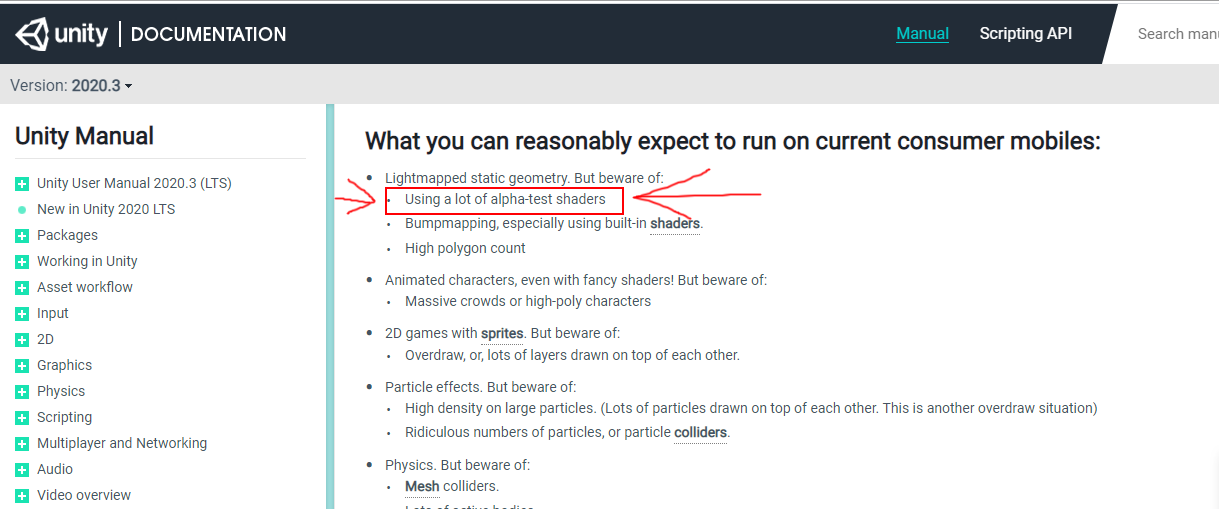
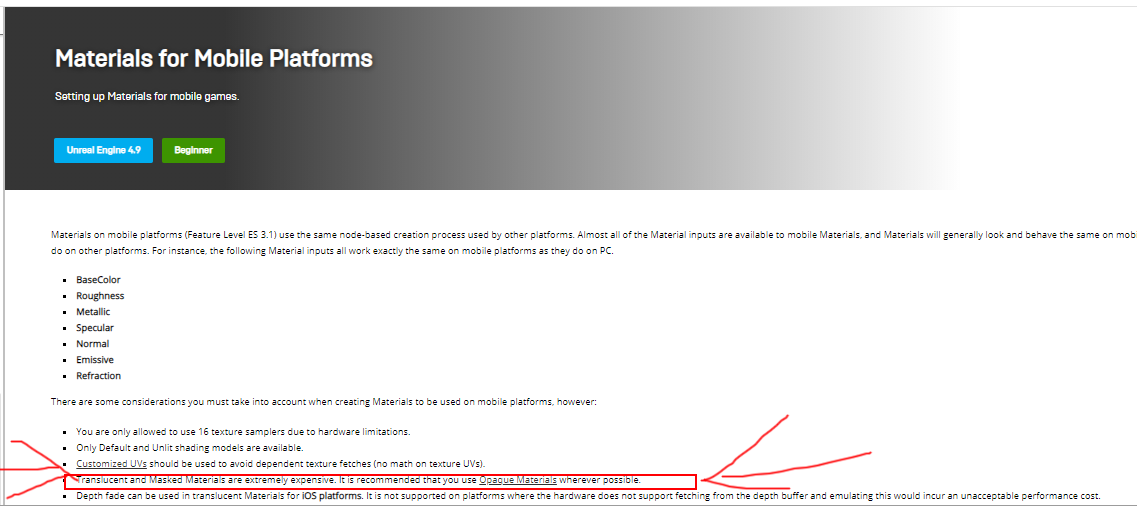
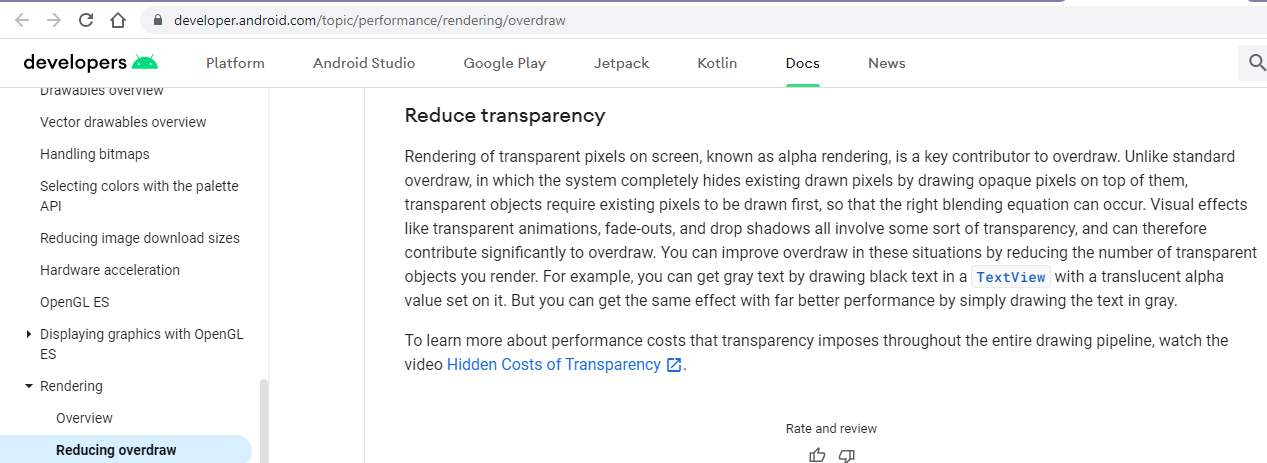
a quest 2 still has the same rendering characteristics as any other Android phone
floral oxide
Right again, the documentation says that. But the performance says otherwise. I'm willing to give my avatar to guys just to show you that it's possible , it works, despite the documenation. It's outdated with what's now new information. Sure it's mobile but guess what? this mobile device called the Quest 2 is pretty powerful. I have yet to see another mobile device that rivals it.
It's no different than if a Quest 3 were to come out and out perform the Index or Vive but yet you will still say "the documentation says its mobile so its too expensive for us to have it on Quest" but it still performs better. When will the line be crossed for this?
buoyant holly
question have you done your performance tests where there would be lots of overdraw generated because a single Avatar in a black void isn't a terribly useful test
calm spade
I think Oculus benchmarks are more reliable than random users one off tests
On top of that you're not taking IK and voice into account
- nameplate
and visemes
floral oxide
Do you guys even own a Quest 2? Have you guys ever tried one? Not a Quest 1. But a 2.
calm spade
I own three, so yes
buoyant holly
yes the development team has Quest 2
calm spade
You're not the first to go and say "but i tested and it ran fine" over the past two years, people were saying that on the quest 1 too, but analytics have always proven everyone wrong
floral oxide
No Quest 1 was bad
i can say that for sure
from the day i got it
to the day i canned it
But the Quest 2, although not perfect is much better than a 1.
calm spade
Yes, and much much worse than a pc
buoyant holly
probably buy a literal order of magnitude
calm spade

floral oxide
that's true, because it is indeed a mobile, its running everything on its own like a PC, but only vouching and fighting for the current limitations to just be raised a bit. Nothing to match the PC.
like materials from 4 to 8
buoyant holly
floral oxide
like materials from 4 to 8
doubling that would have disastrous results because then everybody would do that
calm spade
We raised the limits a few months ago 
floral oxide
buoyant holly
doubling that would have disastrous results because then everybody would do that
everybody CAN do it , not everybody will
buoyant holly
and also given the limited Shader set you don't need 8
calm spade
You don't need 8 materials on quest for anything
buoyant holly
floral oxide
everybody CAN do it , not everybody will
yes but they have to make your development decision as if everybody is making the most awful Avatar they can
calm spade
You shouldn't have multiple outfits on a quest avatar to begin with
floral oxide
calm spade
You don't need 8 materials on quest for anything
Not anymore after I found out about the whole UV offset thing yeah of course.
The example was just that though.
buoyant holly
calm spade
You shouldn't have multiple outfits on a quest avatar to begin with
yeah that's a waste of vram
calm spade
Sure it all comes down to knowledge on how to do better, that's what i'm arguing for
Learning how to make better avatars for a specific platform > VRChat raising the limits and making it worse across the board
buoyant holly
especially if kind of funny considering everybody is Anime avatars which are style that handle very well on mobile content limitations
floral oxide
So despite being able to run better than the Quest 1 and with the limitations given, Quest will always remain in the lower budget standards? Even if it were to one day out perform a known PC headset like the Vive or Index ?
If it gets to the point where it can outperfom an OLD index, a PC headset. Then shouldn't it be given thought that it can have even just slightly better standards?
buoyant holly
floral oxide
So despite being able to run better than the Quest 1 and with the limitations gi...
it is never going to beat a PC because the PC will always be getting better faster than the mobile
floral oxide
buoyant holly
especially if kind of funny considering everybody is Anime avatars which are sty...
Yeah looking like old PS2 avatars lmao
floral oxide
buoyant holly
it is never going to beat a PC because the PC will always be getting better fa...
I said a PC headset, an old one.
which is capable of running the PC current specs
if it beats that, it's still not allowed to have better limitations?
that's the issue with what im talking about, it can get to a point to where it easily handles more than 200k polys
but you will still keep it at the low 20k
quaint venture
Slipperslope go brrrr
buoyant holly
floral oxide
which is capable of running the PC current specs
that's probably going to be like 10 years before that happens so that's not terribly relevant at the moment
quaint venture
What if the quest 3 can time travel tho did you think of that
floral oxide
buoyant holly
that's probably going to be like 10 years before that happens so that's not terr...
Let's see what happens next year then when the Quest 2 Pro and the 3 come out. It doesnt take them long to make these things, the difference in performance between the 1 and 2 are major and they are only about a year or 2 apart. 10 years? That's a low blow and undermining Quest.
buoyant holly
I sincerely doubt a quest 3 can power match a GTX 1070
calm spade
They rely on existing mobile hardware
buoyant holly
considering a PC graphics card is the same size as a VR headset
floral oxide
buoyant holly
considering a PC graphics card is the same size as a VR headset
that can always change in the future, technology grows
that includes the hardware
quaint venture
And you can have this debate then, no point in making changes based off what ifs
buoyant holly
and even with a quest 3 the transparency is probably not going to change because the Baseline Android rendering stuff that makes transparency a bad idea wouldn't change
quaint venture
I dont see a reason why a quest avatar would have more than 2 materials, you don't have enough polys to do toggles in a normal anime avatar which is 99% of them
And no fancy shader either
Honestly more than 1 is unnecessary 90% of the time
buoyant holly
and given the way anime Hair Works you don't need transparency for that
quaint venture
Only reason I want a higher poly limit is to not have to do as much work decimating and removing details, the material limit makes sense to me as is
buoyant holly
heck even on PC you could could probably cut down on the amount of materials with proper mask textures
calm spade
Removing detail is necessary, it's a mobile platform
floral oxide
The transparency isn't really for the hair. It's for things like clothing designs or even particles. Nothing crazy.
buoyant holly
you don't need to see individual belt holes as geometry
calm spade
transparency is crazy
buoyant holly
floral oxide
The transparency isn't really for the hair. It's for things like clothing design...
most of those clothing designs you can use the blender knife tool to cut out and probably end up with less geometry
quaint venture
Does quest allow cut out transparency? (As in on or off, no blending)?
floral oxide
buoyant holly
most of those clothing designs you can use the blender knife tool to cut out and...
wouldnt that create more polys by cutting it into more? even though the poly limit is low, you want to give up a simple plan with some small transparency to increase an otherwise already low poly count limit ?
buoyant holly
quaint venture
Does quest allow cut out transparency? (As in on or off, no blending)?
no transparency whatsoever on the avatars
quaint venture
Ah
buoyant holly
floral oxide
wouldnt that create more polys by cutting it into more? even though the poly lim...
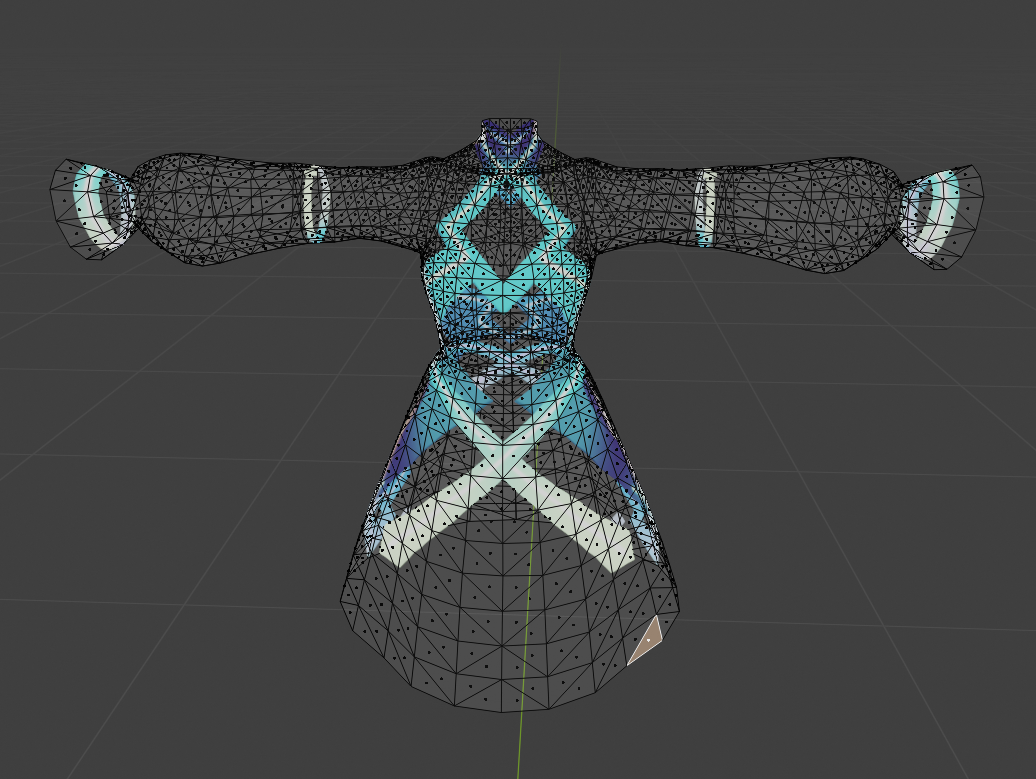
depends on the source transparent model has a lot of the anime clothing leaves large parts of the mesh transparent
floral oxide
buoyant holly
depends on the source transparent model has a lot of the anime clothing leaves ...
so it depends, that means there is a fine line at which you would agree to allow transparency? under what certain conditions?
buoyant holly
not anytime soon because of the way the Android renderer works
floral oxide
the idea is crazy to me seeing that I've never seen anyone crash because of a transparency issue. It's always been related to an overload of particles , meshes , materials, crashers , custom shaders
buoyant holly
transparency is not likely to make a crash but it's likely to make bad performance
because of overdraw
floral oxide
Again, i cant tell you the number of times ive seen someone drop 300 particles and crash me, but a small minecraft chicken with some of the soul particle spritesheets never hurt me or anyone anyhow. even if its just 1 particle Quest gets rendered as very poor.
quaint venture
That should only cause issue if there's blending right? If its fully transparent there should be no issue, unless I misunderstood what you linked earlier
buoyant holly
even a cut-off Shader would have to worry about overdraw
quaint venture
Ah, rip.
floral oxide
not sure what to tell you, i've seen the transparency in numerous quantities, never did anyone bad in performance despite the documentation
buoyant holly
https://i.gyazo.com/f71221ec49670dd145a7a1b9271eaa18.png an example of a anime dress that has most of the geometry transparent
 buoyant holly
floral oxide
not sure what to tell you, i've seen the transparency in numerous quantities, ne...
buoyant holly
floral oxide
not sure what to tell you, i've seen the transparency in numerous quantities, ne...
the developers have done more testing than you
floral oxide
okay but if someone comes up with new kind of information you just dismiss it ?
quaint venture
I use cut off on my pc one, dont see a point to partial transparency
buoyant holly
including probably making much more worst-case scenarios than you have
floral oxide
buoyant holly
including probably making much more worst-case scenarios than you have
not one to sell myself out but i dont quite agree with that
buoyant holly
floral oxide
okay but if someone comes up with new kind of information you just dismiss it ?
well yes when it's just a anecdote especially when you have to go against the literal developers of the engines
like the people who have made Unity definitely know more than you do
floral oxide
im not going against them, i want the same thing they want and that is to find the best solutions for everyone
buoyant holly
yeah but you're trade-offs that has potentially worse performance for folks because people will make avatars with terrible transparencies that like overlap considerably
floral oxide
i still have yet to see anyone crash or drop in performance due to transparency
if anything
why not make it optional
buoyant holly
that's because they're not allowed on Quest
buoyant holly
PC has considerably different rendering characteristics and power level
floral oxide
that doesnt answer my question on why you can include a safety setting
buoyant holly
because you don't want the avatars look bad for most folks because they have their safety settings on
like I'm not turning on transparency for a random stranger if I was on Quest
floral oxide
the avatars already look bad for quest because of the limitations
floral oxide
buoyant holly
like I'm not turning on transparency for a random stranger if I was on Quest
i would
buoyant holly
yeah but that's a different kind of bad seeing a transparent Avatar with the transparency turned off
floral oxide
what i wont do is turn on particles from a stranger which is more of the realistic problems
particles are an issue
trails are more of an issue than that
but transparency getting the bad wrap because its written in documentation that someone wrote most likely prior to the Quest 2.
buoyant holly
the vrchat team seems to disagree given that you've been told multiple times why they don't do transparency
buoyant holly
floral oxide
but transparency getting the bad wrap because its written in documentation that ...
yes because the quest 2 doesn't change the rendering characteristics of Android which leads to it being a problem
proper grail
Quest 1 does not have hardware depth testing, no transparency without overheating. 13.7 ms is not a lot of time given mobile hardware. Everybody has to be comfortable, not just people with newer hardware.
floral oxide
proper grail
Quest 1 does not have hardware depth testing, no transparency without overheatin...
thats why the safety setting was brought up
it literally gives you that option
so it works for both old and newer hardware
if you dont want to turn on transparency then fine be my guest
but if i want it, why stop me
buoyant holly
have you checked to see if the quest 2 has any hardware depth testing
normal nova
you've been talking about this for days...
buoyant holly
because if it doesn't it it's in the same problem ballpark as the quest 1
yeah I'm not quite sure why it's keep going cuz they're in the dev team have told you no ! ! Status
floral oxide
I can get back to you on that if you'd like, i'm not gonna randomly say yes and not know. again im just speaking from what im experiencing right? you tell me i cant handle transparency, but i go out in vrchat and play seeing it with no problem. you tell me 20k is generous but i go out and see over 800k just fine. i guess i'll just assume my experience is a lie because the books say so.
buoyant holly
you literally cannot get any data if you're playing on the PC version
proper grail
And with the standalone quest its not even the VRC team that makes the rules, if your game cant run at >72 fps at all times (reasonable times when it comes to vrc, given that its a upload your own content social game) than its not allowed on the oculus platform
buoyant holly
so it's going to have to deal with the quest 1 Hardware restrictions until Facebook literally stops allowing the quest-1 to run vrchat which is probably not anytime soon
 tired hearth
I'm looking for combine skinned mesh, so I check this video
But if my avatar want some toggle emote(swords, bats, guns, etc), is it possible to make animation with joined mesh?
 sick timber
tired hearth
But if my avatar want some toggle emote(swords, bats, guns, etc), is it possible...
sick timber
tired hearth
But if my avatar want some toggle emote(swords, bats, guns, etc), is it possible...
Yes, you’ll need to use blendshapes/shapekeys/whatever you call them where one state (using state because you can use either, although I would recommend using the fully active state) is the object in the correct place, and the other state is it hidden inside the mesh. After you save, export, and import it to Unity, you can set up some animations that have the shapekeys enabled or disabled, then either set up some 3.0 stuff (idk how to do that) or assign the animation to the 2.0 slots.
This should probably work if set up correctly, but in Unity you will need to enable legacy blend shape normals or set the blend shape normals to import or there will be buggy lighting, and a significantly larger upload size.
heady smelt
hey, can anyone speak to the performance benefits of this dynamic bone / constraints method?
https://twitter.com/bnuuy_vrc/status/1406644068977885188?s=21
a model i bought has a massive component count (39..) and im looking to reduce it while still maintaining quality the best i can
languid quartz
heady smelt
hey, can anyone speak to the performance benefits of this dynamic bone / constra...
Constraints are fairly efficient, and can run on multiple cores. Using them to copy the movements of a dynamic bone chain to improve performance is quite viable as a result.
In pinned messages you can find a tool by Nara, it allows you to easily set this type of thing up.
#avatar-optimization message
heady smelt
thanks, definitely gonna look into this then
 mild hemlock
Hey, is there anyone that can make me an emo goth girl? If not its fine :]
 candid onyx
Okay so im having this issue. Somehow I got a material atlas that came out to be 65536x16384 pixels, and its 90% empty space. This image is so large I cant even import it into unity properly, and so it wont work. The problem is if I crop the image, the UVs get messed up. What do I do?
 lunar kraken
Not sure if I ask here or not
I need help putting my pc avatar into quest
Idk how to do that stuff and a friend of mine who helped me with my avatar before really busy with stuff irl, so he csnt help me
If you're able to, pm me ok :3
unreal plover
candid onyx
Okay so im having this issue. Somehow I got a material atlas that came out to be...
You can edit the UVs in Blender :p
Make sure when using CATs to generate atlasses, to make sure your input textures/UVs don't have any extra space around them that could be trimmed
 lone tiger
Also don't use CATS built-in MatCombiner, use the one that is located in its own tab, which allows you to set size of gaps between images to 0.
quaint venture
candid onyx
Okay so im having this issue. Somehow I got a material atlas that came out to be...
Click material combiner tab set size of images to 8, set size to automatic and check crop by uv
Also if your textures themselves have a bunch of empty space this wont remove it
Now on to my question is there any world where I can see my avatar rendered like 1000 times so I can compare performance between different techniques?
proper grail
Theres a map called The Dodecahedron that has 12 mirrors all facing eachother, good multiply my avatar world
quaint venture
proper grail
Theres a map called The Dodecahedron that has 12 mirrors all facing eachother, g...
Thanks, ill have to try that. Might have to raise my resolution to drop my frames so I can actually tell the difference, 12 isn't that many.
proper grail
Mmm its more about getting as many draw calls as you can. Mirrors and realtime lighting are multiplicative with the amount of materials so thats the low hanging fruit
Resolution will just stress how many cores your gpu has
quaint venture
I want to test the difference between 4 materials and 2, because 2 is way more annoying to do. I've got like 10 animations and 5 materials to handle 3 toggles in one material slot
proper grail
Whats best and what the "worst case" avatar rating fall away from eachother in these odd cases
quaint venture
Oh it's already green stat I'm just pushing it to the extreme
quaint venture
Just reread one of the articles, there's something built into unity for performance testing will try that
unreal plover
Just duplicate your avatar 40 times and use the Unity Profiler
 white turret
Looking for someone who if i send u my vr chat model can change it to a quest + pc model rn its just a pc model and i cant use it what so ever on my quest i can pay any amount needed^^
 normal herald
does anybody know how to fix the CATS atlas from totally fvcking up the models textures? like black turns to white and the model suddenly got red eyes instead of blue
amber hemlock
normal herald
does anybody know how to fix the CATS atlas from totally fvcking up the models t...
Hard to say just based on the description what’s going off with it. Though you should expect after the atlas the joined textures must all use the same shader settings. If they need separate shader options, either group them by what shader they can have common and only atlas those together. Or atlas everything and then mark separate materials as needed again
 delicate cloud
Ive noticed most of the avatars i have been uploading to vr has had eyelids go past the blinking point i set in cats blender. Tried fixing it, set the value to from 1 to 0.5 as the blinking value is too large, pressed stop testing and fix afterwards, then upload, but the values get reset back once Ive uploaded it through unity to vrchat
quaint venture
normal herald
does anybody know how to fix the CATS atlas from totally fvcking up the models t...
Don't use the one under the cats menu, use the one under material combiner
normal nova
You can also try Bake if material combiner(s) have issues
quaint venture
Is it more optimized to use multiple images or multiple uv maps?
buoyant holly
depends what are you trying to do
quaint venture
Toggle clothing
Currently i have versions of the atlas with parts cut out
an alternative is having one version of the atlas with multiple uv maps with various parts shrunk down into the transparent parts
buoyant holly
quaint venture
an alternative is having one version of the atlas with multiple uv maps with var...
you would want to have multiple mesh renderers turning on and off as you're still having to render all of those transparent triangles on your second idea
quaint venture
buoyant holly
you would want to have multiple mesh renderers turning on and off as you're st...
Even in a cutout shader?
buoyant holly
yes as it still needs to process all of the transparent triangles
 opal stirrup
Any tips on trying to optimize a little over 300k tris? 😅
calm spade
What kind of meshes ?
opal stirrup
Really, it's for the whole model and the different clothings. I'm thinking I probably can't bring this down to less or equal to 70k.
The body itself with no clothing has...
74262 tris 
Time to go cry and be a Very Poor user 
calm spade
Why is it that high on its own ?
opal stirrup
No idea, I'm terrible (and new) at this stuff. 😛
I'm thinking I could probably decimate some of it
Decimating is odd
It's not my model by the way, that's why I don't know 😋
calm spade
Decimation is really not suggested
Dissolving edge loops is much better and a lot less destructive
opal stirrup
Sounds fancy. Time to find out how to do that
I'd like to not ruin my model while optimizing it haha 😋
Oooooh, I know how to do that, I think.
buoyant holly
just make sure you don't accidentally dissolve the edges required for the UV to work
opal stirrup
I'm doing it, wish me luck
opal stirrup
I managed to remove 22201 tris on the body, there's still work to be done though. I don't think it's possible to go from over 300k (for the whole thing with the clothing variations) to 70k though 😋
buoyant holly
that's like a whole Avatar you remove so that's a good start
opal stirrup
It would probably be best to have different avatars with the different clothings instead of having everything on one
And that way, achieving 70k might be possible
buoyant holly
yeah that way you're not unnecessarily filling up vram
opal stirrup
I feel so out of my paygrade here  Learning everything on the spot
buoyant holly
it's okay everybody has to start from somewhere
normal nova
Decimation is fine, most of the stuff in vrc lacks clean topology
heady smelt
so while the clearest answer is "neither" which is better:
1 8k texture
or 2 4k textures?
i am manually atlasing something and don't expect to go near that high cause i dont have or need to, but im wondering which would be better
buoyant holly
seeing if you could make your atlases better packed
but do not do the 8k texture that'll give everyone a bad time
heady smelt
alright, good, thats what i was assumin
buoyant holly
but yeah see if you can get it any smaller so you only need like one to 4K or less
unreal plover
Also if you don't need the transparency, make sure the texture is set as RGB and not RGBA. Saves some memory and helps reduce download size :P
heady smelt
yeah, i think i can get away with just a 4k texture, thats what im hoping
theres 5 textures in total, 3 are 2048, one is 1024, and the other is 4096
fortunately the 1024 one could literally be 1x1 and it doesnt matter lol
opal stirrup
Oh I just realized my avatar's accessories (jewelry, belly button piercing) add a little over 30000 tris by themselves. Oof.
amber hemlock
I’ve seen perfect coplanar triangles have subdivisions.
If only there was an easier way to draw triangle in 3D
proper grail
I do love me some single vertex group 120k tri 25 face brilliant cut diamonds
 worn vault
Question, what’s the recommended scale for an avatar
proper grail
In unity? Mess with the fbx import size to get it to whatcha want. Recommended in scene is 1:1:1 for animation humanoid retargeting purposes
opal stirrup
proper grail
I do love me some single vertex group 120k tri 25 face brilliant cut diamonds
I feel that. Gotta see them tris. Accessories like chains (my avatar has two) and fishnet clothing are terribly painful to optimize, dear god.
unreal plover
Fishnets should be done via texture/bumpmapping
Really easy if you have a shader that has access to detail mapping and masks
 rancid basalt
So.... I need help with my model scale in unity because it ends up being giant
 onyx harness
rancid basalt
So.... I need help with my model scale in unity because it ends up being giant
onyx harness
rancid basalt
So.... I need help with my model scale in unity because it ends up being giant
The default 3d object cube's size is 1m x 1m x 1m. It's a great tool to use as a point of reference for scaling
onyx harness
I do. I can't post an image here but I'll drop some settings in #avatar-help for a cube I use to measure 6 foot
 dark dragon
Just a quick question, is there any noticeable quality loss from crunch compressing textures? say if i were to turn it up to the maximum to save as much space on the textures as possible
calm spade
100 is the least amount of compression
and no, you won't see a difference
i suggest not doing it on normal maps however, but downscale them instead
dark dragon
I mean at max compression (0), if theres no diffrence though then thats good
calm spade
You could see some noticeable change, but that's the price, 50% compression is usually a very good middle ground
tough warren
heady smelt
1 8k texture
or 2 4k textures?
1 8k texture is actually equivalent to 4 4k textures
it's also really dumb considering the actual resolution of the screens it will be rendered on.
 regal glen
Are Quest avatars REQUIRED to be under 20k polys? It says it doesnt meet minimum requirements but I've uploaded several quest avatars with 30k polys before
My avatar atm has 39k
the only thing that isnt considered excellent quality is the poly count and 3 materials instead of 1
lone tiger
"Show Avatar" for Very Poor avatars functionality may be removed in the future, and Very Poor avatars may be removed from Quest entirely. Please keep this in mind when creating avatars for VRChat on the Oculus Quest.
https://docs.vrchat.com/docs/avatar-performance-ranking-system#quest-limits
regal glen
😔
amber hemlock
regal glen
Are Quest avatars REQUIRED to be under 20k polys? It says it doesnt meet minimum...
If it’s above 20K only you will see it unless people manually chose to force-show your avatar specifically - this is not a recommended action as there is no real limit to how many triangles the avatar could have in that case. It could be in the multi-millions and have a super high amount of materials instantly crash you.
Only force show avatars on people you trust to not change into a lag bomb
 scenic sierra
If I edit the mesh of my character to have less polygons, then I replace it in unity, does the rig stay in some way?
because you used to be able to do this with MantisLOD but it's not free anymore
stray tangle
scenic sierra
If I edit the mesh of my character to have less polygons, then I replace it in u...
as long as you never did "unpack prefab", you can just replace the FBX in the project from the file explorer and unity will update it in the scene aswell
 potent mirage
is 'load in background' a good thing to check on audio import settings? 🤔 the way its described when i look it up sounds like it might reduce avatar loading slowdown but im not sure if i understand it right
scenic sierra
is there a free alternative to Mantis LOD?
lone tiger
You can't have LOD levels on avatars
 leaden hamlet
why not just.. do it with blender. tons more control
scenic sierra
fine
amber hemlock
stray tangle
as long as you never did "unpack prefab", you can just replace the FBX in the pr...
Keeping in mind any values you turned to bold will not update. Right click them and revert to get the new values
heady smelt
lone tiger
You can't have LOD levels on avatars
only a phycopath would do that
scenic sierra
ok so
I have a "this avatar has mipmapped textures without 'streaming mip maps' enabled" warning on the builder tab when trying to build my model for Oculus Quest devices
problem is, when I go activate it, every fucking option in the tab just straight up disappears
when I uncheck it, it comes back, with the error still there
what the fuck do I do
It's on a texture I imported on the project because there's no transparency rendering in Oculus Quest apparently so I made a replacement
stray tangle
scenic sierra
I have a "this avatar has mipmapped textures without 'streaming mip maps' enable...
click on Auto fix?
scenic sierra
the exact same thing happens
it just does what I do manually, check the stream mip maps thing
man how I wished I could upload a video of this now
do I need a different Unity version?
I exported the pc version of the model just fine
turns out if I delete that texture itself, it still becomes blank
it's like it won't allow me build it once I've fixed everything, but it will still show me the errors that need fixing
I just wasted an entire afternoon!
stray tangle
@scenic sierra what unity version are you using?
scenic sierra
2018.4.20f1 Personal
stray tangle
good
scenic sierra
the one VRchat recommends, I used, and I exported with yes
stray tangle
not just recommends, absolutely required or it will not show up in game
check the unity console for any errors
shortcut is ctrl + shift + c
scenic sierra
there is indeed one error
"MissingComponentException: There is no 'Animator' attached to the "decimatedglorkon2" game object, but a script is trying to access it.
You probably need to add a Animator to the game object "decimatedglorkon2". Or your script needs to check if the component is attached before using it."
don't really know how to fix that
yep it was thad
I had to add the animator
fuck me
unity crashed when building it
I hate this
nevermind it worked on the second try lol
amber hemlock
Blender and Unity can be confusing before you understand their language but it gets easier with experience. It may not be intuitive, but it’s consistent.
It can only go wrong in so many ways before you’ve seen it all
sick pelican
Hey quick question out of curiosity:
For avatar toggles in general, is it more optimized to have separate meshes that are toggled, or swapping the material of an object into an invisible shader? And with mesh toggles, is it better to toggle the object in general or just the mesh render component
buoyant holly
the invisible Shader would still have you processing the triangles so probably better just to turn off the mesh render
 marble ledge
hey, on blender I have faces, tris, and verts. Which of these represent the number of polygons?
buoyant holly
faces but the triangle counted the number you should probably be paying attention to as all quads are just two triangles as far as the rendering is concerned
amber hemlock
sick pelican
Hey quick question out of curiosity:
For avatar toggles in general, is it more o...
The answer is it depends. If the object is usually going to be missing it’s better to just be a separate mesh render that’s not usually visible. But if it’s some thing that’s going to be visible most of the time you should probably make a material that just goes invisible sometimes
That way you have one less mesh render. Especially if it was a skinned mesh render. Always take an extra material over making a separate skinned mesh render.
quaint venture
marble ledge
hey, on blender I have faces, tris, and verts. Which of these represent the numb...
Add decimation modifier, see polygons, remove decimation modifier
amber hemlock
marble ledge
hey, on blender I have faces, tris, and verts. Which of these represent the numb...
When VRChat says polygons, it means triangles, or tris. If you give it 20000 quads, which is technically 20000 polygons, it’s going to say it’s 40000 polygons, because 1 quad is 2 tri.
So, use blender’s tri readout
marble ledge
Thanks!
 blazing ingot
So what does Unity consider as additional material slots (while using Poiyomi)? There's the obvious ones that are made in Blender for example, but there is often additional ones reported in the VRC SDK panel.
stray tangle
blazing ingot
So what does Unity consider as additional material slots (while using Poiyomi)? ...
any material slot on any mesh on the model counts. particle systems count as 2, since there is one material for the particle, and one for the trail, even if the trail is not used.
if you are using the same material on two different meshes, it still counts as 2.
since that is still two passes the GPU has to do
blazing ingot
Hm I can see how that could add up quick
onyx harness
stray tangle
any material slot on any mesh on the model counts. particle systems count as 2, ...
Particle systems count as 1 material slot unless you have the trail module enabled in which case it counts as 2.
proper grail
Oh, with my experience the trail module is added automatically and breaks the particle system when removed
onyx harness
proper grail
Oh, with my experience the trail module is added automatically and breaks the pa...
interesting, breaks it how?
proper grail
Stops existing. But if youve had luck with getting a particle system down to 1 material I believe you
onyx harness
99% of the time I'm using particle systems for triggering logic. Renderer disabled and whatnot so I can't be sure from a visual standpoint.
 grizzled compass
do the faces or the tris count for character optimization?
lone tiger
tris
grizzled compass
does poor still get shown without getting perf blocked?
lone tiger
On Quest by default no, but you can optionally show all Poor rated avatars. On PC tris count only limits you to Good (max 32k) or Very Poor (max 70k) rating.
grizzled compass
I'm making a character on quest, and poor limits seems to be at 20000 tris
guess i gotta aim for poor, because getting this model low is tricky
 frank silo
Okay so i dont like double posting but im finding similar discussion here so maybe i shoudl ask here instead of #avatars-mmd as people here have discussed this issue recently here.
I noticed this above suggestion #avatar-optimization message
Maybe this would help me with my issue im having as described here?: #avatars-mmd message
whats texture/material baking and how can i find resources about this?
stray tangle
@frank silo the number next to each material in the materialcombiner allows you to atlas materials with matching numbers together, while keeping those separate from those with different numbers
frank silo
strangely when i set three similar materials with a seperate layer number to test this it sitll combined it into one texture and didnt UV map some fo the pieces using the same texture source following the combining
im trying baking (instead?) hoping this works better than my tries at manual and materialcombiner atlassing
msaybe it did do what it suppsoed to but ..it ended up jsut deleting the uv map for the other ones rather than jsut keepign it as a seperate material
stray tangle
make sure all of your UV maps across all meshes have the same name
and make sure that all of your materials have textures, they cannot just be simple colors
frank silo
luckily all of my mats are textures. im importing an MMD so all the mats are MMDShaderDev which im guessing is the reason CATS bakign doesnt work.
thers a lot fo perameters that vary for the same texture source resultign in three similar materials that i cant combine but if 4 is the preferred limit, thsi suprisingly simple lookign character in terms of model compelxity..is gonna end up fairly unoptimised
heady smelt
can someone help me, when i upload my model to vr chat it makes it pc only, how do i make it all platforms
stray tangle
heady smelt
can someone help me, when i upload my model to vr chat it makes it pc only, how ...
you have to build and publish the model twice, one for each platform
it's like expecting that by uploading your game to steam, it will magically appear on the apple App store
the only thing that makes it "cross platform" is that you upload both to the same avatar ID
to make the quest version, make a new project, and switch the build target to Android
heady smelt
stray tangle
you have to build and publish the model twice, one for each platform
so how do i make it upload to vr and not pc
stray tangle
"to vr and not pc" what...?
heady smelt
stray tangle
"to vr and not pc" what...?
how do i make it not pc only
stray tangle
PC includes both desktop and PCVR
if you mean quest support then like I said, you need to upload another version of it made for quest
heady smelt
stray tangle
if you mean **quest** support then like I said, you need to upload another versi...
ok thanks, in unity is there a option to upload it to quest or what?
stray tangle
make a new project
switch the build target to Quest
import the VRChat SDK
then copy over the required files for your model
heady smelt
ok thanks
stray tangle
and switch over all of the materials to be using one of the shaders provided by the SDK under VRChat > Mobile
frank silo
stray tangle
if you mean **quest** support then like I said, you need to upload another versi...
im curious, does this allow you to have two different models or does that still mean it has ot have the same exact model? would be prety aweosme if you coudl have esentially a lower 'lod' model for quest
stray tangle
that's the whole point
frank silo
:O
stray tangle
the quest is a much weaker piece of a hardware than a gaming PC
thus the avatar needs to be optimized to run better for it
but it technically does not even need to be the same model
there is also the "fallback" system
heady smelt
yea
stray tangle
that allows you to upload a good rated Quest avatar to show to quest users when your PC avatar is not quest compatible
frank silo
but would that mean the higher one woudl show for PC and then the quest build would show? i literally thought this was jsut a missing feature on vrchat
omg thats so awesome
buoyant holly
frank silo
but would that mean the higher one woudl show for PC and then the quest build wo...
yes the models don't have to be identical
frank silo
mind blown. well now i reallly wanna get this working
woudl be awesome if vrchat implemented a LOD thats agnostic to paltform, that way a mdoel coudl have like 3-4 tiers isntead of jsut quest and desktop , but thats just a dream.
stray tangle
that would also be a ton more work
unless those LOD's could be generated on the fly
buoyant holly
and like no AAA Studio has figured out Auto LOD that of usable quality for avatars you're standing right next to
frank silo
maybe not LOD maybe more like jsut a setting that stic cks
buoyant holly
like typically they're Auto LOD systems are only used for avatars that are like half a football field away
frank silo
buoyant holly
like typically they're Auto LOD systems are only used for avatars that are like ...
that woudl be nice though, that way im not rendering someoens shimmery butterfly wings and hair swaying froma football field away
buoyant holly
also not sure how much help it would be would be most of the time as a lot of vrchat maps are too small for lod to be much help
frank silo
but rather than a distance-based LOD honestly jsuta static LOD selection, like game settings avatar quality set to highest woudl jsut be watever the user set as its highest, and if someones set to Draft, itll chose eveyrones quest avatar isntead. (repeat for levels between if they were to exist.)
buoyant holly
most folks don't even make Quest versions for their avatars so I don't think they would be inclined to make like 3 more of them
frank silo
in that case it jsut wouldnt render them like it does now, right?
it fallsback to default mannequin if someones on quest and thers no quest ava right?
buoyant holly
these days they typically see whatever someone's fallback Avatar is
so you're probably more likely to see one of the generic avatars from the Avatar menu if somebody is being lazy with their uploads
frank silo
well ididnt know that fallback existed until now lol so im sure all the avas i use jsut show up as the mannequin im guessing on quest
but once i figure out this texture atlassing shit maybe i can finally hav e awquest and desktop ava ;-;
is there a way ti poost n image in this channel?
trying to show an example of materials i cant merge without having issues, im not sure how to do this but it seems very unoptimal to ahve 3 materials and material combineer just makes the mesh turn white im some places after combining these mats
unreal plover
buoyant holly
and like no AAA Studio has figured out Auto LOD that of usable quality for avat...
Technically Unreal Engine 5's Nanite is auto LOD :P
buoyant holly
yes but the way that works involves having the triangles be so small the auto LOD problems aren't noticeable
and it also currently doesn't work for skinned mesh renderers
heady smelt
we made a LOD systems on avatars back then when we were messing with particles stop action systems, it can be ported easily to avatar 3, you have full control on the range, even make your mesh render turn off entirely if players are X units from you... stuff like that... animate on distance from other players basically (local to them only)
onyx harness
I'm glad I'm not the only one who did this. PC players 15m away get the quest version.
There were others but listing everything would be a long read let alone typing it all.
amber hemlock
It’s hard enough getting people to make two versions of their avatars, there’s no way you’re going to get people to make four.
Even when you have quest support the trend is to just upload the quest version to PC, instead of making a higher quality version
heady smelt
😔 if only if something like run-time LOD was possible for VRChat
buoyant holly
nobody has really done usable of runtime LOD generation not even the AAA Studios on character models
calm spade
Even if you could have them generated ahead of time, i can't imagine what multiple LODs on dozens of fast moving skinned meshes would feel like
buoyant holly
constant pop in
calm spade
I meant in term of performance but yeah, visually it'd be super disruptive
normal nova
I mean... At a big distance my auto generated quest avatars would be basically indistinguishable
Even at a medium distance on Quest its hard to notice any difference from the original
I could even pack it so only the normal map and mesh change
I'm this close to writing a Unity plugin that literally just calls Bake and reimports it to the scene
calm spade
With every headset it'll become a lot more noticeable
The difference between Quest 1 and 2 is already drastic
But it's most likely the best option yeah
unreal plover
LOD isn't going to do much anyway when the worst offenders are materials and dynamic bones
amber hemlock
I thought the worst offender was texture size
buoyant holly
yeah but it's easier to squish texture size down automatically then reduce materials
proper grail
Texture size really only stresses gpu memory size and gpu memory speed. Causes a lil stuttering if either of those two are maxed out but they rarely are. I guess avatar download size too
unreal plover
4k RGBA mipmapped textures are only 90 MB each (uncompressed). Then again those who use 8K textures also don't really care about material slots and dynamic bone counts 🤷♀️
Tho with streaming mipmaps even multiple 4K (and 8K probably) textures shouldn't be an issue
calm spade
Mirror sitters 
amber hemlock
unreal plover
Tho with streaming mipmaps even multiple 4K (and 8K probably) textures shouldn't...
I’ve always wondered: I enable “streaming mipmaps” to make the uploader happy, but I also disable “generate mipmaps” which means my textures don’t add or use mipmaps on the first place. Is this bad? I prefer how my textures look without mipmapping (they usually are mostly solid color blocks with hard edges, mipmapping just makes them blurry at a distance)
unreal plover
Mipmaps are basically lower resolution versions of your texture (which roughly increases download size by 33%). The streaming parts allows dynamically loading and unloading mipmaps according to distance and priority. So your 4K texture would only be using the 512x512 pixel version at a distance, saving VRAM
amber hemlock
I wish I could generate streaming mipmaps with nearest neighbor downscale so it’s the same as not having them
I hate that it blurs textures at a distance due to the interpolation from downscaling
unreal plover
If it's only flat color it might be better to have the different colored polygons on separate UV islands. Then you can get away with a non-mipmapped 32x32 texture 😂
Or vertex colors
amber hemlock
It’s got vector curve color boundaries but otherwise it’s flat color
To difficult to model it with topology, it would be too many triangles for quest
I’m already relying on not having mipmaps keeping the texture size down
Example of texturing i feel is better off without mipmaps: https://media.discordapp.net/attachments/861825848788254772/864601275886469120/image0.png
 unreal plover
Honestly I don't think it's worth trying to get it to look good with mip mapping. If you run out of VRAM there's probably something else taking up a majority of that
amber hemlock
My understanding was the main reason for mipmapping was to de-noise textures that would normally require multiple samples for an accurate reading when far away. By having smaller sizes you prevent static noise on high-detail textures when viewed from afar.
unreal plover
Yep, streaming mipmaps only allow you to reduce vram footprint on top of that
amber hemlock
So I disable it on textures when a single sample is good at any range
Wish I still had the benifit of smaller ram usage
unreal plover
with mipmaps textures are 33% larger on downloads :) so you're saving a bit there
normal nova
you aaabsolutely should have mipmapping
One area where you don't really think to look is shape keys: if you have every part of your model combined into one, the keys all multiply the size of the mesh
CATS Bake now splits every shapekey-affected tri into a second mesh while fixing the normals in place, so only they have the shapekey size multiplication. I've seen it reduces some uploads by a few MB
amber hemlock
normal nova
you aaabsolutely should have mipmapping
From a visual standpoint in many cases it looks far worse with mipmapping
Sometimes it looks better
Depends on the style of texture
If you use streaming mipmaps but don’t generate them it should be smart enough to make mipmaps using nearest neighbor downscale to still save on vram. But hey, it’s not my game engine
normal nova
Worse because of blur? You should probably use a non-box filter
amber hemlock
I’ll investigate
normal nova
(I'm of the opinion that Box should absolutely not be the default, hence why I outlined it on the Bake page x3)
amber hemlock
Yes I use textures with large flat color areas and sharp color transitions that mipmapping destroys
I suppose this box thing is what destroys it, I’ll check
Really I just need an option to not generate my smaller mipmaps using bilinear downsample
I’d prefer nearest neighbor downscale to keep the colors sharp
 sick relic
I found recectly that mipmaping will look worse because of UV island can breed into another island if margin is too close. Currently I have an avatar with 4k atlas texture, and have to have 32px margin between island to look decent enough at far range.
heady smelt
to the more shader literate: how performance heavy is double sided shaders / culling off? my model doesn't have any flipped normals so i could easily have culling turned off, but is the performance increase noticeable enough to warrant it?
stray tangle
@heady smelt you render twice the amount of polys
buoyant holly
it's better just to duplicate some of the faces of the stuff where you want to see the backside then double sided shaders / culling off on the whole Avatar
unreal plover
I'd say it doesn't really matter if you're <70k
 slate thunder
What is the best way to even start optimizing an avatar with almost 900k polygons and 64 material slots. I am at a total loss and not very skilled. It appears the reason is because there are a lot of clothing toggles and each asset is like 20-50k polys
I am doubting the answer is putting the fbx in blender and pressing decimate?
I bought this avi and I was like holy shit my avi has more polys than everyone else in this entire lobby
 grave folio
@slate thunder do u try to create a texture atlas. When ur using the same shader on difrent materials, than combine them and make one out of it. This will not effect the mesh or the funktionality of it (toggles as an example) pls make shure to take a save point before
buoyant holly
out of curiosity what's the triangle count of the Avatar without any clothing
slate thunder
I haven't tried anything, my blender skills are pressing the the import model button and a + del to start a new scene
D:
I just bought an avi from a creator and it's just absolutely terrible but willing to pay for someone to help
@buoyant holly do you want me to just click the mesh of the body and hair and tell you the count?
it's a few separate items in the list
buoyant holly
yes so I know if it's case of unoptimized Avatar or just too much accessories
because those are two slightly different problems as you can just upload a version with only like one set of clothing
slate thunder
The body was like 32k polys i think? and the accessories were each like 30-60k
buoyant holly
how much was the hair
slate thunder
dang I cant post pics, well for exmaple the jacket is 53k polygons
grave folio
I bet it have much doubles too
slate thunder
there are several hair toggles let me look
let me look at the hair styles for you
I'd really like to preserve some of these assets, I really like them. I just don't see why they have so many polygons
Some others can be removed
legs = 1900 poly face = 3200 poly torso = 16200 poly foot = 3700 poly
grave folio
Most 3d files have double sidet poligons. U can start to remove these doubles, on all points where there aren't necessary.
These are the inside of ur model as an example. Pls exclude ur hair mesh from this process
slate thunder
Would love to hire an optimization expert here for an hourly rate to teach me while we optimize it together
but like someone who actually knows what they're doing
buoyant holly
https://github.com/GiveMeAllYourCats/cats-blender-plugin/wiki/Bake this tool might could help out if you're wanting something quick
calm spade
You can commission people here too https://ask.vrchat.com/c/commissions/avatar-commissions/35

VRChat Ask Forum
Post about commissions for avatars in this category. Requests are not permitted, we only permit posts from those providing services.
buoyant holly
I would suggest like checking out a blender Basics tutorial so you know enough of the basic you are so folks could point you in the right direction
unreal plover
Might be easier to retopologise the the high poly assets
buoyant holly
could you take a screenshot of the wireframe of like the clothing to see how much of a mess it is @slate thunder
slate thunder
Let me open the fbx in blender
buoyant holly
because you might be able to just dissolve Edge Loops if it's proper topology just heavy
quaint venture
What size do you use for each texture before atlasing/what percentage do you fill with each part? Like I've got a face, upper clothes, lower clothes, upper skin, lower skin, hair. I had previously with less knowledge resized them, and I'm now going through and fixing them, but still not sure what size is recommended for each
slate thunder
like i am not dumb btw i am a computer scientist for a living lol, just no experience with 3d modeling. I only do programming
let me take a look
slate thunder
buoyant holly
could you take a screenshot of the wireframe of like the clothing to see how muc...
I can't send screenshots here apparently, okay if I DM you?
buoyant holly
go ahead
normal nova
@slate thunder if you don't wanna put in the effort Cats Bake can spit out both desktop and Quest versions, it might make the topology worse but it'll work
Its also just two button presses, can't go wrong
slate thunder
normal nova
<@765850224714842132> if you don't wanna put in the effort Cats Bake can spit ou...
currently trying to learn what topology means lol
I'm quite the beginner but eagerly learning
 fickle atlas
slate thunder
currently trying to learn what topology means lol
fickle atlas
slate thunder
currently trying to learn what topology means lol
topology refers to how the surface of a 3D model is structured, like where the vertices/polygons are and such
buoyant holly
 supple cedar
slate thunder
like i am not dumb btw i am a computer scientist for a living lol, just no exper...
supple cedar
slate thunder
like i am not dumb btw i am a computer scientist for a living lol, just no exper...
Yo that was me 6 months ago! Now I’m an obnoxious optimization snob who won’t shut up about drawcalls. Keep at it and give it time, the learning curve gets easier as you learn more dots to connect.
slate thunder
supple cedar
Yo that was me 6 months ago! Now I’m an obnoxious optimization snob who won’t sh...
I don’t even know what that is 🥴 I need to watch some more basic videos I guess on blender or any other suggested resources. I just want to make sure it’s good stuff to learn that can be applied to VRChat avis
slate thunder
From what I am reading an example of a draw call would be 4 materials = 4 draw calls.
Or in the case of this shitty avatar I bought, it has 64 material slots (the most I’ve ever seen in 2800 hours of VRChat) which is equal to 64 draw calls (how many objects are drawn to the screen)
With a caveat, small meshes using the same material and scale could potentially be batched using Unity’s Dynamic Batching
proper grail
Each mesh is a draw call, each material is a draw call, each material pass is a draw call (commonly fur shaders are multi pass) multiply that by how many times it has to be lit by light sources, multiply that by how many times its reflected.
Batchy no worky for skinned meshes.
a normal 4ghz within the past 6 years cpu can do like 600 draw calls on one thread before it starts to dip below 90 fps
slate thunder
Are you referring to the skinned mesh renderer
Or skinned mesh meaning it is a mesh that is weighted
lone tiger
slate thunder
With a caveat, small meshes using the same material and scale could potentially ...
Quoting from that document, unfortunately it has limited use on avatars:
Currently, only Mesh Renderers, Trail Renderers, Line Renderers, Particle Systems and Sprite Renderers are batched. This means that skinned Meshes, Cloth, and other types of rendering components are not batched.
slate thunder
That interesting I didn’t read that whole thing
And my main, or only use-case/interest at this time is modification of avatars.
Perhaps a small bit of sculpting of an existing avi if something is fucked but I have no desire to sculpt a body or pair of pants for example
I think unfucking this avatar with 900k polygons and 64 material slots that I bought would be an excellent learning opportunity
For example, a crown/tiara in this avi has about 1/10th the volume of the head, yet has 235k polygons…..? Why. I guess it’s just super unnecessarily detailed. I’ll have to take a look and see what I can do. It’s a bunch of small circular diamonds with multiple faces stitched together. Not quite sure how I can optimize that
I don’t think the easy hits like deleting edge loops in good spots is the answer here
stray tangle
is the lipsync on the rigged model done using bones or shape keys?
better yet, could you move to #avatar-rigging and post a pic of the rig
 jovial ibex
Oh i thought i postet it in the rigging channel. sorry 😅
supple cedar
slate thunder
For example, a crown/tiara in this avi has about 1/10th the volume of the head, ...
The next concept for you to look up would be “normal map baking”. That’s the way to capture fine details without needing tiny, intricate geometry. The baking system in the CATS blender plug-in seems to be able to do this automagically, but I’m not sure how it’ll handle an avatar with a bunch of accessory meshes
slate thunder
supple cedar
The next concept for you to look up would be “normal map baking”. That’s the way...
Thank you my friend! You are a wizard
buoyant holly
yeah definitely give the cats baking tool a go
and it automatically duplicate the model so you don't have to worry about the original getting damaged
slate thunder
ok let me google it
supple cedar
This is the nice thing about optimization, everyone who knows about it is sick of the 300k polygon 30 material hot messes that keep lagging our PCs so there’s a STRONG incentive to freely share the knowledge
slate thunder
laughs in 900k polygon 64 material slot avi that I bought
*without knowing beforehand
onyx harness
slate thunder
*laughs in 900k polygon 64 material slot avi that I bought*
With this avatar in particular, is it even possible to have everything showing at one time? Like if you have 4 different shoes only 1 can be active so the total number is higher but the actually performance would be better. Unless it's all on/off toggles and you actually could have it all on lmao.
slate thunder
Some of them logically turn things on and off, like pants to skirt
Others such as the tiara just put the tiara on the head
And putting on the pants turns off the legs
supple cedar
onyx harness
With this avatar in particular, is it even possible to have everything showing a...
The annoying part is, if you go further with optimization to make all the accessories blendshape-toggled sections of the same mesh to reduce drawcalls, that ends up meaning all the polygons have to be rendered at once anyway. I wonder if that means if used in conjunction with Silent's vertex masking shader toggle system, the avatar would perform better with the custom shader on...
normal nova
Toggling with blendshapes is actually super bad
slate thunder
I wish I knew what that even meant
unreal plover
If you want it pc only you can do multiple toggles with 1 material with some shader magic
But honestly, just have multiple versions. It's easier to manage and avatar loading has been improved significantly
fickle atlas
normal nova
Toggling with blendshapes is actually super bad
wait, for real? how do people usually handle it then, disabling individual meshes?
stray tangle
fickle atlas
wait, for real? how do people usually handle it then, disabling individual meshe...
typically
fickle atlas
ah ok that makes sense
proper grail
Might as well give a nice limit. Say active (not 0) blendshapes on meshes with over 32000 tris is super bad, per.
 bitter garnet
not sure if this is the place to ask but if I wanted to make my avatar compatible with both PC and Quest would I just have to open the old project and switch build target to android?
most of them are shitpost avatars, not very complex with bones and animations and etc
calm spade
The sdk will tell you how performant it is
bitter garnet
SDK2 and performance is poor, again, shitpost avatars I made quickly
there's nothing really to "break" if that's what you are hinting at
stray tangle
@bitter garnet performance restrictions for quest are much stricter
stray tangle
"poor" for PC will most likely be over the limit for quest
bitter garnet
ah damn
quaint venture
Is there any downside to removing doubles outside of making l to select connected less useful?
calm spade
If those edges we re disconnected for a reason then you might make the shading worse
quaint venture
Thanks
 jovial grail
You can keep the normals the same even after joining stuff
 marsh cairn
hey uuh
i tried the VRCSDK3 for like, one unity project
without loading the VRCSDK2 along with it at all
and i think it may have fucked up VRCSDK2 somehow cause now when i make a new project and load it it tells me to delete the fucking avatar descriptor when i try to make an avatar
y'know the thing thats kinda critical to the whole process?
so when you load a unitypackage, does it tend to seemingly permanently affect the unity client itself like that?
i always thought that whatever you loaded stayed in the one project you were working on
calm spade
These two are not interchangeable
If you want to make an SDK3 project, make a new one
calm spade
"and i think it may have fucked up VRCSDK2 somehow"
How does it fuck up the SDK2 if it's a new project with the SDK3
marsh cairn
i don't know but its happening somehow
look i'll try making a new project and see what happens
maybe i unwittingly loaded it onto a project that already had SDK3
okay its fine now
guess that might have been the case before
slate thunder
An avatar creator released an avatar named "optimized version" that went from 880k polygons and 64 material slots to 409k polygons and 69 material slots 🙂
Truly incredible
I guess I will optimize it myself
lone tiger
If their name starts with G and ends with l I wouldn't be surprised.
marsh cairn
okay now its happening again
i think its failing to connect to the VRC servers or something
okay i opened vrchat and its working now?
onyx harness
lone tiger
If their name starts with G and ends with l I wouldn't be surprised.<a:FelkyTrig...
I don’ think so. Their worst is like 450k because of the cloning/puppet things.
Plus the optimised versions are, well, actually pretty optimised. Like it’s no quest avatar but not sacrificing looks and getting down to orange and green, I’m glad someone is getting that style of model out that doesn’t one shot my cpu.
onyx harness
slate thunder
An avatar creator released an avatar named "optimized version" that went from 88...
How’d the material slots go up? Did they add features?
slate thunder
onyx harness
How’d the material slots go up? Did they add features?
Can I PM you and attempt to explain this witchcraft? I am just honestly speechless and it's going to take a lot more than one sentence or picture to even begin to explain this to you so I can figure just what in the flying fuck is going on with this avatar
onyx harness
slate thunder
Can I PM you and attempt to explain this witchcraft? I am just honestly speechle...
oh absolutely
slate thunder
Okay, just give me some time, I am working from home
 slate moat
For the past nine months since I started playing VRC heavily I've been uploading avatars with PC and Quest-compatible versions.
Recently, Questers have been telling me when I wear these avatars that they're only seeing a robot and no amount of showing, hiding, or adjustments of performance blocking tools seems to fix it.
I've had to resort to uploading a fallback and not uploading Quest versions of avatars I have been doing in order for people to see me.
I tried searching the chat history but I couldn't find a definitive answer. Is this a known bug or have the optimization requirements for Questers changed somehow?
Additional info, most of the avatars are in the Medium to Poor range for Quest, typically with regards to polygon count and number of materials which was recently increased.
onyx harness
okay, simple question first. Are you using the same ID's for the pc and quest versions?
slate moat
onyx harness
okay, simple question first. Are you using the same ID's for the pc and quest ve...
Yes. They're linked via the same Blueprint ID.
onyx harness
Which robot are they seeing? Error, performance, pc only?
slate moat
onyx harness
Which robot are they seeing? Error, performance, pc only?
It's hard to get a straight answer out of some folks. But several have said "the green one".
I'm really hoping I'm just doing something dumb and I just need to like re-compile with a new SDK and re-upload or something.
amber hemlock
slate moat
For the past nine months since I started playing VRC heavily I've been uploading...
Tldr: if at any point a quest user sees you wearing an avatar that is not quest supported, they will no longer be able to load any of your avatars even if you change into one that is quest supported
slate moat
amber hemlock
https://vrchat.canny.io/bug-reports/p/1110-quest-shows-pc-users-as-perf-blocked-...
Okay. Excellent. Thank you for linking to the Canny. I'm going to drag a friend into VRC to try and reproduce this issue.
 waxen violet
So I've just started trying to upload my first avatar. I'm running into all sorts of issues that I don't really understand, or know the solution to. Right now I'm trying to make my avatar compatible with quest. But I'm running into issues with the dynamic bones. Anybody wanna help a newbie?
onyx harness
waxen violet
So I've just started trying to upload my first avatar. I'm running into all sort...
Dynamic bones aren't allowed on quest models and all such components need to be removed from the avatar
waxen violet
onyx harness
Dynamic bones aren't allowed on quest models and all such components need to be ...
Okay, so how would I go about finding the files I need to get rid of? Do I just need to delete them, or replace them with something else?
Like what kind of things should I be looking for and where?
onyx harness
waxen violet
Like what kind of things should I be looking for and where?
Dynamic bones are a component you can add to objects just like the Avatar descriptor. You can search for them in the Hierarchy search bar. Using t:dynamicbone and t:dynamicbonecollider will show you all objects in the current seen with these components. Then it's just a case of selecting these objects and removing the component.
#avatar-help for an image example
waxen violet
onyx harness
Dynamic bones are a component you can add to objects just like the Avatar descri...
And would just deleting them be enough? Or do I need to replace them with something?
And thank you for your help!
onyx harness
You can't replace them with anything, there is currently no quest compatible replacement for simulating physics on bones.
waxen violet
Okay thankyou! You have helped me a lot!
stray tangle
onyx harness
You can't replace them with anything, there is currently no quest compatible rep...
can technically use velocity parameters + blend tree + animations
lot more work though
onyx harness
huh, hadn't considered doing it that way.
stray tangle
I've not tried to do it, but it seems perfectly plausible
moving forward => animate hair to go backwards
slate thunder
I bought a non-game ready set of Ray Bans from CGTrader with 98k faces 😦
buoyant holly
I would suggest stop buying stuff that doesn't show the triangle count up front
slate thunder
Yeah it was my first purchase before I even used Blender, I didn't know what I was doing
slate thunder
Oh, I lied so these glasses have 223k faces
but I guess I'll learn how to fix it myself, good practice
stray tangle
slate thunder
Oh, I lied so these glasses have 223k faces
might wanna learn Retopology
essentially constructing a new mesh on top of a high poly mesh
using the Shrinkwrap modifier helps with this
slate thunder
Holy crap
I did degenerate dissolve and it went from 527k edges, 214k faces, and 330k tris to 292k edges 97k face, and 97k tris
slate thunder
stray tangle
might wanna learn Retopology
Me too... I swear someone posted a good video of that and I can't find it anymore
But this degenerate dissolve worked really good here. But it's still absolutely horrific
Way better though
slate thunder
yeah it's insane im working on it, I just merged the vertices by distance and got another massive chunk off
Also removing all non-manifold geometry
quaint venture
stray tangle
can technically use velocity parameters + blend tree + animations
This sounds like exactly the dumb bs I wanna try, got a guide?
stray tangle
nope lol
proper grail
I tried some dumb stuff with spring joints and constraints, its hard to get the velocity to rotate with you..
unreal plover
Constraints don't work on quest (yet)
 zinc flint
What's with material slots?
it includes other skinned meshes with the material.
Say, you have 1 material and 8 different meshes that use the material which equates to 8 material slots.
stray tangle
zinc flint
Say, you have 1 material and 8 different meshes that use the material which equa...
yep, that's how it works
you should be joining your meshes
it's still a draw call for each material slot
zinc flint
Interesting, ill keep that in mind in the future.
thanks alot @stray tangle
Does it effect performance if it's disabled though?
onyx harness
zinc flint
Does it effect performance if it's disabled though?
I believe the answer is either yes, but so little that it's basically nothing or actually just none.
Everything has a cost when it comes down to it so I'm willing to bet on the first option. Basically the Engine has to render the material so when it's disabled, it's no longer rendering thus it's performance cost is minimal. This is why toggle for things like props/clothing (assuming they're using unique materials) are separate meshes over being hidden with bone scaling or blendshapes.
solid smelt
Yep, nothing is free but disabling it is your best bet for reducing load when not it use IIRC
amber hemlock
onyx harness
I believe the answer is either yes, but so little that it's basically nothing or...
The answer is effectively no. Disabled objects don’t do much of anything. That’s why originally, disabled objects weren’t counted at all.
But what everyone started doing is hiding their entire avatar by default so they would be rated excellent, then enabling everything via an animation. So now everything is counted, even if disabled.
This is why we can’t have nice things.
onyx harness
amber hemlock
The answer is effectively no. Disabled objects don’t do much of anything. That’s...
Oh yeah I'm guilty of trying this. I saw that particle systems don't count towards material slots when the max particles is set to 0. Thus I wanted to animate them back to 1 at runtime for my trigger particles instead of having them count as 1 material slot each even when the renderer is set to none and the module disabled. But that's not something you can animate apparently. Was annoyed at having 150 material slots when the model only actually had like 12 that were ever rendering.
amber hemlock
Merge your meshes to share draw calls with identical mateirals
Having an identical material on a separate mesh doesn’t optimize anything, it still has to be a separate call. That’s why it’s rated like it is
buoyant holly
https://twitter.com/Silent0264/status/1418129444074496007?s=20 apparently this Shader has a decent one draw call method for toggling objects on and off
onyx harness
amber hemlock
Merge your meshes to share draw calls with identical mateirals
Yeah my separate meshes all use unique materials. I don't let 1 material be on anymore than 1 mesh. The problem for that avatar was having particle systems for logic that have their Render Mode set to None with the Renderer module disabled inflating the performance rating causing individuals to believe their performance issues were due to my avatars.
amber hemlock
I just swap a material to a no-render shader. It’s still going to be one draw call no matter what, might as well be a quick one
normal nova
amber hemlock
Having an identical material on a separate mesh doesn’t optimize anything, it st...
It can in rare cases! But that's an extremely case by case basis :p
slate thunder
Why can't we post screenshots in the avatar-optimization channel :\
calm spade
You can
stray tangle
maybe?
calm spade
Just fixed it
stray tangle
ty
buoyant holly
 normal nova
Recently discovered denoising is possible via Blender compositing nodes, and it makes ambient occlusion/emissive bakes suuuuper good

 sturdy pollen
idk if this is the place to ask but is it possible to atlas normal maps and the effects will still be applied?
 acoustic latch
as long as they are the same layout as the diffuse texture
sturdy pollen
ohhh alright thank you!
calm spade
normal nova
Recently discovered denoising is possible via Blender compositing nodes, and it ...
Been using that for a year, it really does make an insane difference
normal nova
I'll have to integrate it into Bake
...I've started wondering if I should call CATS bake something else
cause calling it 'Bake' doesn't really help much
 strong rain
quick question! crunch compression yes or no?
i'm hearing very very mixed opinions on it lol
i had my skin texture at 2k size and it was 2.7mb uncrunched, i crunched it with 100 quality and it made it just 270kb with no visual difference, good right?
also, with that in mind, would it be ok to set that texture size at 4k with crunch if it's only .7mb? it's still smaller than original right?
the reason i'm asking is cus i'm sure theres some sciencey stuff i dont know about of why it's actually bad to use compression this way, so i'm asking
sick timber
strong rain
also, with that in mind, would it be ok to set that texture size at 4k with crun...
It's smaller in upload, file, and download size, but in VRAM it gets decompressed, so it would take up the original size in VRAM
strong rain
your name is crunch
do you... like crunch?
also thank you thats what i read a few times
sick timber
It's a nickname I got from the first D&D game I played.
 summer dragon
Do you know where I can find a casual avatar
strong rain
you just have to realize how comical it is to me that when asking about crunch compression, a person named crunch replies to me it's like you were searching for me xD
@summer dragon ask in #avatar-search-old
sick timber
strong rain
you just have to realize how comical it is to me that when asking about crunch c...
Yeah, it's pretty funny.
quaint venture
Is anyone familiar with cat's bake option? It just does not work for me and I want to make sure I'm not doing anything wrong. Whenever I do it it makes one model a single solid color and the other a bunch of random rainbow colors

The model is like 66k polys
acoustic latch
after it's done baking, switch your viewport shading to material view
 slate thunder
Howdy all
I’m currently in Blender working on the material slots for the meshes my avatar has (particularly the corresponding mesh selections for each material assigned to a mesh)
I know that later, I will be using a somewhat universal pink material that’s all set and ready to go for this specific avatar in Unity.
While still in a blender, should I just make one material placeholder slot with a very generic “pink name” and add it to every mesh I plan to apply that pink material to (in Unity later) for performance reasons? Does this reduce draw calls?
….Or, in Blender, is it better to create material slots with specific, targeted naming dependent upon the material vertex selection assignment in Blender for that somewhat universal pink material that will be applied to the material assignments (let’s say pink hair, pink shoelaces, portion of pink shirt, etc) frequently in Blender? Does this increase draw calls by simply having more logically named and easier to follow material slots that were made in Blender, but ultimately using the same material in Unity?
sick timber
slate thunder
I’m currently in Blender working on the material slots for the meshes my avatar ...
Every material you have will add a drawcall, per mesh the material is on. If you have two meshes, sharing a material, it will have two drawcalls. If you join those meshes, then it will use one draw call.