#avatar-optimization
1 messages · Page 56 of 1
 woven fable
It mean I have to patch it into the model. So it would be good to know when I will be making it
 calm spade
I have no clue if bone scaling can be done through an animation for meshes like that, but if so then that would be the most optimized option
calm spade
sweet, i don't think i know anyone who does it that way though
woven fable
Then I will mash everything into one FBX with shape keys. Lastly. If I swap a material in animation. Will it over ride it? Making vrc load other material in place of new one?
calm spade
as in undo the bone scaling ? If you use 3.0 no
woven fable
And I'm trying to push. vrc features of 3.0 as far as I can. So I suppose it's rare...
calm spade
You can always ask the folks in #avatar-general
woven fable
Thanks for help. The sdk 3.0 I will ask later since I'm in blender. but I got the most important part. Thanks and have a good day.
 jovial grail
You can replace materials with animations but there's a bug if you have replace more than 3-4 materials I believe
Which sets the material in slot 2 to slot 4, haven't found a fix for it
 patent mauve
@jovial grail I heard that, but I don't know how to force the bug or how you can get the bug on purpose. I did a few animation with mats swap, but never had issues or any bugs
jovial grail
replace 4 materials in 1 animation on 1 object
patent mauve
did that with more than 4 @jovial grail
 tawny folio
That's me looking straight, How do I make it so that I see through the models eyes
I have the model on unity
 wet hornet
@tawny folio If you haven't been helped yet you need to adjust the avatar's view ball to be right between the eyes of the model. It's on the avatar descriptor component when you select the whole avatar.
 lusty orbit
Good evening! I recently had a model made for me to import into VRchat however, i try to "Build and Publish" but it gives me this error.. Ive been trying to do this for about 7 hours uninstalling and reinstalling unity etc. If anyone knows what to do or could help me please let me know.
 heady smelt
help i dunno what to do
 sick timber
Probably
heady smelt
ok i got it nvm
lusty orbit
Hold on, I may have figured it out.
 hexed oar
Just curious, is their way to make one of your avatars have both icons, pc and quest? I’m planing on getting a quest and was curious if it actually mattered, if someone could dm me a Video, or explain what I need to do so the work I put into the model won’t just be a waist, it would be most appreciated
jovial grail
@tawny folio move the viewpoint to your eyes
 daring summit
@hexed oar In Unity Ctrl Shift B opens the target build and you can switch your project to Android. You need to upload your Quest version under the same blueprint ID as your PC version. I wouldn't recommend switching for a large Unity project though as it will take forever to convert and sometimes people run into errors. I personally have a project for PC and a project for Quest. Much faster to just open one or the other instead of converting lol.
 vernal sequoia
How do you safely decrease the poly count of an avatar?
calm spade
dissolve edge loops
heady smelt
I can't find the view control panel part of vrchatSDK
 strong atlas
Hello! I am "finished" with my first self-stitched-together model in Blender and now only have to reduce poly count for exporting but the CATS tool gets an error when i try to run decimation... can someone help me find out whats causing the problem? Can post a picture of error text here
strong atlas
Yes i am on 2.9 and updating to the development version fixed it, thank you very much!
 faint dragon
Hey all 👋
So when I import my model from Blender to Unity, some parts of the mesh are invisible
I know a little about normals and such, and I know I have to have them double sided or something, and I've ticked the Back Culling option in Blender (exporting as an .FBX)
I feel like it's a super easy fix and I'm just dumb or something, so apologies if that's the case lmao
 lethal ledge
@faint dragon You need to turn off backface culling in Unity, tho' you need a shader with that option
faint dragon
will Cubed's shaders work?
heady smelt
no
it's outdated
for years now
and should not be used anymore
poiyomi is the most used shader currently for toon avatars
 frigid wind
 dense wedge
um...is it possible to somehow combine materials in unity?
vrchat is showing me that I use 17 material slots but I actually use 9 at least that's what blender shows.
heady smelt
gotta combine in blender
heady smelt
How can I reduce the polygon count?
Also it's telling me I need to change the model shaders, how can I fix that?
 river citrus
does anyone know how to quickly upload a model to vrchat
calm spade
By quickly looking up any tutorial on youtube
 edgy cape
Any public shaders with backface culling options?
calm spade
the vast majority of them
calm spade
i don't think so no
edgy cape
OK, just wanted to make sure, thx.
dense wedge
I'm not entirely sure where to ask, but I'll try my luck. is there anyone who knows how to get blendshapes I created in blender to a VRM model using univrm?
 amber hemlock
none of them shipped with unity, right?
@edgy cape removing culling is a one line, two word addition to pretty much any shader. 
edgy cape
OK
woven fable
Question about VRC and performance.
i am trying to mash togheter multiple meshes that i will cycle through in blender
all that is to make it efficient and use one material
but if i would in unity have multiple meshes that i only cycle through (Never loaded more than 2 at them time) would that make it still efficent or less efficent
consider that the mashed togheter model has all polygons always loaded
and the cycling one has only those needed (Around 10k base skin body 5 k clothes)
that mean the model on the run has 15k top
but multiple meshes
jovial grail
stuff that's off doesn't really need any performance
but it will still count towards your performance rank
woven fable
that means if i turn off the skin mesh rendered it will act like it was the only one in gpu behaviour?
ignoring other materials and other heavy impact objets?
by heavy impact i imply something like a shader on a material that is innefficinet too much
jovial grail
if it's not rendered, it's basically not there
woven fable
are you sure about that.... VRC team said it is most efficient to have only one mesh,.....
if that is the case my wok got much light
jovial grail
supposedly it's also more efficient to split your head mesh from your body mesh due to visemes having less vertices to go through
but the performance raking system will make you think otherwise
woven fable
i know
i did that in my earlier version and i tried to follow the avatar optimization guidelines
but it semm they are not too well equiped to handle my case and the active performance load
they seem to take in "the worst case scenario"
jovial grail
If you want to really make sure, you can use the unity profiler and see which performs better
woven fable
Unity profiler?
jovial grail
Look into it, it'll let you test performance of your scene
and give you stats on everything
dense wedge
in blender I have shape keys limited to the head vertex group but unity uses the whole body. is there a way to limit it to the head instead in unity somehow?
calm spade
Two separate meshes
dense wedge
thank you you are a life saver
 sand ginkgo
can anyone tell me what this highlight means, it's from different textures but it is setup the same: resolved: appearantly it shows if its selected in node editor, but with copy pasting it shows the pasted node is selected while its not
 gloomy rapids
does anyone know why i cant use the material combiner to automatically combine textures i have edited outside of blender and put on my avatar?
 buoyant holly
because then the Avatar won't have the new UV Maps so you would still need to redo the UV layout to match the new Atlas
gloomy rapids
it look like this right now, what i did was replacing the old materiel with my new, in the same material slot and everything. Or are do you mean that i have to redo the uv completely
buoyant holly
yes you're going to have to change the UV layout to accommodate the atlas if you want your textures to show up correctly
I guess I should have asked are you making a texture Atlas or like combining some layers on top on Photoshop just to make sure I'm not sending you up the wrong tree
gloomy rapids
i have been exporting this to a png file, could that be it?
since there is more then one layers
i have this error if that helps
buoyant holly
so are you trying to make a texture Atlas or just getting that file to load
gloomy rapids
i am trying to make a atlas here
gloomy rapids
didnt work
 proper grail
not sure how exactly its programmed, but for some reason its expecting the .blend to be 10 folders deep
... when its only 9
 sweet mason
Material combiner is use here or baking using circle
proper grail
might get away with putting the .png in the same folder as the .blend for it wont try and do fancy things with the file location
buoyant holly
https://github.com/leukbaars/EasyBake I've also found this works okay for doing baking for new UV layouts

GitHub
Texture baking UI for Blender. Contribute to leukbaars/EasyBake development by creating an account on GitHub.
gloomy rapids
the file ting did not work
well thanks you guys for trying, i will keep testing and see if i can fix it
 pale wren
is this hard to fix? do i need blender to do that?
heady smelt
yes
pale wren
yes for both?
heady smelt
just the second one
pale wren
oo
jovial grail
it's one click
jovial grail
update to cats' development version in the update tab
calm spade
export the textures mentioned into any image editing software and add it back to blender
proper grail
Its saying that a 16k image is... large
calm spade
oh, yeah 16k may make your PC puke
If you're trying to atlas too much, or textures are too large to begin with then you'll have issues @neat loom
buoyant holly
also wondering if you might need to downscale your textures a bit if your atlases totaling 16k
 neat loom
I tried running them through software, but it still turned up the same unfortunately.
calm spade
And you exported them back out ?
neat loom
I figured it out
calm spade
If you use the actual mat combiner instead of the cats one, you can set each texture in the list to custom, you should cut the size in half
neat loom
For some reason one of my textures was atlased and that was causing problems lol
Sorry for the trouble and thanks for the help. ^^
calm spade
also pls use 4K max in Unity
 twilit peak
hey so i downloaded a model someone made in vroid because im new to modeling and am inspecting it to try and figure out what methods people tend to use in regards to certain things, and
i noticed that the faces of the body under the clothes still exist, their textures are just transparent? is that standard practice or should i be deleting all the hidden faces when i go to export my own finished model?
 solid smelt
Delete faces that are invisible (or are unable to see due to clothing) on your final model
twilit peak
so whoever made this model did it improperly then?
solid smelt
Not technically, making things invisible is a non destructive way to hide them
However, if you do not plan to use the vertices again, you should delete them
Have a save before, and after you delete them, incase you change your mind later
twilit peak
alrighty, thanks
 zealous adder
ISO Quest Compatible cute avatar creator :LOVE: prefabs or premades cool
 odd sentinel
I'm having a problem with an MMD Avatar. Most of the textures are fine, except for the shoes. The shoes glitch out
sweet mason
Maybe ask in mmd channel
heady smelt
Is there a way to combine my avatar materials into unity? I am more familiar with Unity than with blender
 drifting cypress
So I'm trying to save an atlas on a model I had commissioned, however the only material on the model is "Default OBJ" so when I try and save atlas it just says "No unique materials selected" and does nothing.
proper grail
... Youre trying to atlas one material?
daring summit
@heady smelt Gotta do it in blender
heady smelt
So what is the procedure to take my Unity avatar to Blender and vice versa without breaking anything?
edgy cape
I stumbled upon a roadblock, my client needs Quest compatibility and the only problem we have is no transparency on the VRChat shaders.
buoyant holly
cut it into geometry the stuff you would need the transparency Shader for
edgy cape
Eh... it wouldn't work that well in this avatar.
it is the eyelashes, among other things.
it is a cartoon character.
sick timber
You can still do that.
I have a VRoid avatar, I cut-out the eyebrows for quest.
I also cut-out other things.
Like some of the hair.
edgy cape
so there is no other way? I can't believe the android platform doesn't support transparency.
sick timber
It does, but the performance isn't good with it.
edgy cape
oh well
I was planning on trimming a lot of polygons, guess I'll just tell the client I will give him a quest version so he can switch them around.
 severe acorn
Does anyone know how to combine materials for a VRM model?
I'm trying to optomize my avatar for Quest, but the max number of materials it'll handle is 4 - my model is at 18.
When I export from VRoid studios, I CAN reduce the number of materials - but then I'm not able to attach the tail with some other unity plugins... since... I need the hair and material layers for that.
sick timber
@severe acorn The CATS blender plugin has a material atlaser.
severe acorn
Found it... I took that, made an atlas, and then exported it as a fbk model into unity.
Took a while, and I... don't think the shading carried over well.
This was the PC port I did.
sick timber
Make sure you disable "Import Lights" and "import Cameras" in the model import settings.
Also, the Quest doesn't support cut-out or transparency on VRChat.
So you'll have to blender knife tool it.
 manic egret
Is there a way to allow wind zones to be enabled for avatar uploads? Was wanting to have a light breeze to affect hair or light grass.
calm spade
nope
 rich fable
if an avatar comes up as unavailable, is there a way to fix the avatar myself?
solid smelt
If it isn't your avatar, no there's nothing you can do about it
 fast jackal
I need help with this avatar when I use blender it selects the whole model instead one part of what I am trying to delete I want to delete the dress but I don't know how to separate the material.
 calm spade
Click separate by material in cats
calm spade
@heady smelt #avatar-help
heady smelt
Ah I’m blind, thank you I’ll move the post. Sorry lol
amber hemlock
The techniques to model for 3D printing is the same strategy to avoid needing transparent textures as well. Make all the parts out of air-tight solid volumes. Avoid all non-manifold geometry. They translate to quest avatars very well.
You can do some nice hair effects without transparency
daring summit
@fast jackal Rotate the arms down in pose mode and apply as rest pose when they're lined up with the sleeves
Or if the dress has its own armature then rotate its sleeve bones up to line up with your characters arms
edgy cape
I wish shotariya's material combiner didn't leave so much room when making texture atlass.
no matter how even my texture sizes are, I want a 4096x4096 it always goes all the way to the right and leaves too many blank spaces at the bottom.
As for quest avatars, 5K is kind of limiting in some cases.
@fast jackal Did you get that after trying to apply as rest pose? sometimes it happens to me, I just do the "connect bones" from CATS before trying to make a new pose.
fast jackal
oh thx
 unreal plover
You can always cut up the atlas in something like Photoshop and move the UVs around @edgy cape
edgy cape
That's what I was thinking, still annoying.
unreal plover
It's what I usually use. Also makes it way easier to modify textures :P
 radiant zephyr
So do the blue lines mean anything bad optimizaion-wise?
calm spade
They're sharp edges
woven fable
how much do excess amount of bones impact optimazation
jovial grail
edges get marked sharp when joining meshes (i think) and when merging by distance
you might want to clear sharp if it's unintentional or the smoothing can look weird
 plain dagger
It worked yesterday but now it doesnt? I'm up to date on versions but its all darkened. Yes it did say I am allowed to publish stuff.
I'm new to this so I may have done something wrong?
It's all grayed out and I cant click
Wait I found my issue nvm!
woven fable
excuse me
tell me what is going on here
the size on disk and size in unity
like
what
proper grail
The mb in unity is the space taken in vram, uncompressed image useable by game engines
woven fable
in Vram
buoyant holly
keeping the file size down is mostly a download consideration
woven fable
not download size
yes i know but still it thrown me off a lot
how come a 1.2mb can be 21mb
buoyant holly

Unity is the ultimate game development platform. Use Unity to build high-quality 3D and 2D games, deploy them across mobile, desktop, VR/AR, consoles or the Web, and connect with loyal and enthusiastic players and customers.
proper grail
Its quite literally image x size* image y size * image bit accuracy * number of channels
buoyant holly
so basically all the compression is turned off when it actually gets to vram
proper grail
Yup, it has to. There is nothing to decompress an image on a GPU (in most cases)
buoyant holly
 proper grail
Yupyup, images are compressed to a gpu friendly format. You can see all the options with the override tab in the texture settings and compare quality vs size
woven fable
i need a short one word. Does it harm performance
i read and understand it doesn't
but i want to be sure
proper grail
Cant really answer in one word, its a tradeoff. Quality for download size
buoyant holly
but it doesn't really make any difference as far as like FPS
proper grail
Id guess not, it has one extra step it has to do once.. and thats decompress from crunch
woven fable
just texture quality
that is all
then i will use it in lowest setting
i prefer for it to be smaller
i will see in game how it will look
buoyant holly

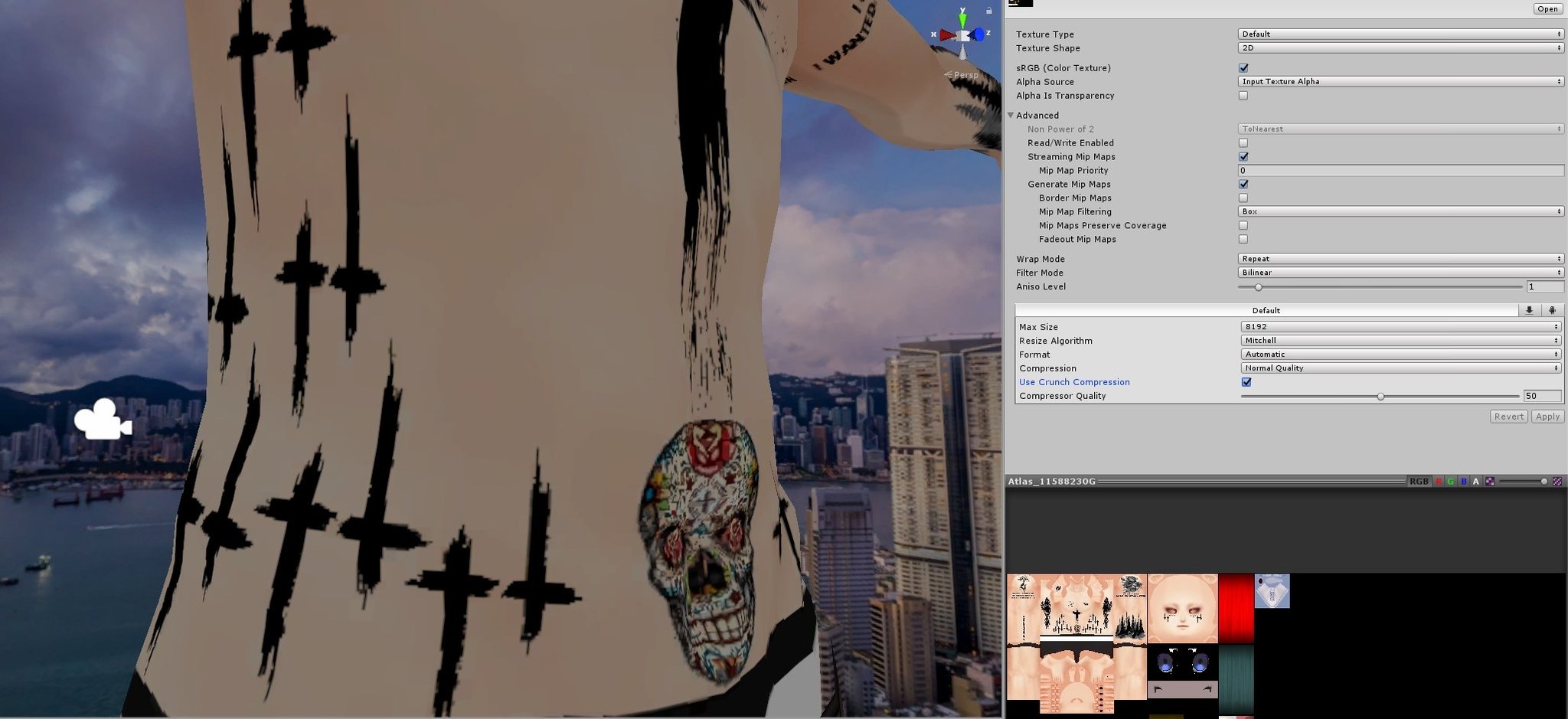
@RealMadvicius Left is with Crunch compression. Right is without.
 Twitter
·
Twitter
·
 woven fable
if it will look too bad in action
i see no issues
bruh
then it will be better
i have it set to 100
and textures already are tiny
i don't need more
then that is what i needed
proper grail
Yeah it works great with a few select colors. It has problems when you add in AO shading and other gradients
woven fable
i have my png texture hue compressed
so it seem like perfect case for me
all stars lined up
buoyant holly
glad we could be of help
woven fable
thank you a lot
sweet mason
I use one 2k BC7 texture. Look good
amber hemlock
Crunch lets you load faster but it doesn’t improve memory. If don’t care about load times you can just not crunch and look a bit better in exchange for taking a bit longer to load but not using up any additional memory, so it’s not any more laggy.
 rotund spire
is there a tool that can repack UVs on a model that is already textured and move/warp the textures around as well
proper grail
If there isnt, there is always blenders Make a second UV map, a texture target in the models materials, and bake a diffuse color!
rotund spire
woah, smart
proper grail
That general idea is how I melt down like shaders too, put them all on the same texture and make some maps. Good good 1 material 1 mesh
rotund spire
for now, my model has a slightly wasteful 2048x2048 atlas, I wish I could make it 1024x1024 and I know I defo can
but this is really good to know
I was kitbashing, and one of the parts I'm using was already atlased
I think an even better question would be
is there a way to crop a texture to the UV bounds?
proper grail
If its atlased with one of the popular tools its easier to translate/move things like that in.. i need to think of words for this.. powers of 8??
rotund spire
it isn't
it looks like it was done in substaincepainter (lots of blurry stuff inbetween UV islands)
and all neatly packed together
proper grail
blurry stuff is margin, prevents white seams when mipmapped from a distance!
rotund spire
but yeah, ik, if it was matcombiner I could easily do this, because I did it for another part in the avatar
jovial grail
you gotta bake an alpha map as well as baking transparency doesn't work
if you have any transparency in your textures
use an emission shader and stick the alpha of your atlas into the base color to get an alpha map that you then combine with your texture in photoshop or something
amber hemlock
is there a tool that can repack UVs on a model that is already textured and move/warp the textures around as well
@rotund spire That’s more of a general blender thing. Make a secondary UV and pack that one, keeping the original one in it’s original format, then just bake one UV to the other using normal texture baking
proper grail
Ive noticed that blender will eat or compress the alpha channel of things too if they arent saved as linear alpha. One of the alpha options thats not default
rotund spire
I haven't used transparency since Quest was released.
proper grail
Same, its a pain and the non transparent methods look better imo
fast jackal
anyone know why its purple
jovial grail
it can't find the textures
go to file > external files > find missing files and pick the folder where the files are
if the files are japanese names with broken symbols as names then you'll need to rename and reasign them
 green arrow
so I finished an avatar and textured it using the texture paint tab and didn't do anything in the UV Editing tab which I think is causing some issues with exporting it into unity. When I unwrap it, all the textures aren't where they're supposed to be. Is there a quick way to fix this or do I need to redo all the textures?
proper grail
When I unwrap it, all the textures aren't where they're supposed to be
Why are you unwrapping after texturing? The uvs are.. points on a image where the color is applied to the mesh.
green arrow
I didn't know I was supposed to unwrap it first. I was asking if there's a way to fix it or do I need to unwrap it and redo the textures?
 upper yacht
Make another UVMap, unwrap on that map and bake the textures to a new texture.
This, if you use blender 2.8+, that is.
Just make sure the camera is on the original UVMap, and not the new one. But, select the new one.
So that it looks like this. Also, remember to use emission materials to make it not be affected by lighting
And in the shading tab select the texture you want to bake to, and not the original texture, that way you can edit the UVs further to what you want
green arrow
thanks a million
 cursive elm
how to fix this
its not missing polygons
its they are facing the opposite direction
when i use shader with cull off its normal
help pls
 cerulean holly
Recalculate normals in Blender
heady smelt
uhhh what is this black thing
in the back
lmao
i have no actual idea
nevermind i turned on backface culling
and fixed it
heady smelt
hi all, I'm using CATS to create an atlas, I do it often, but for whatever reason, a mesh I had to create through symmetrize (and which was separated as a separate mesh, only to be rejoined later) just flat out disappears (appears transparent) after creating an atlas. When I check the UV mapping for it, it looks correct on the atlas. Is there something I need to do, maybe with transparency, to bring back the mesh's appearance?
I don't want it to be transparent
my only solution has been to just leave the material for that one mesh as separate and not create an atlas for it, but that's less than ideal
okay, it still is missing in Unity even when keeping it as a separate material
heady smelt
I figured it out
had to flip normals
now it's fine
backface culling was applied
just needed to flip it
 tight solar
 harsh silo
i just imported a model that was 9 MB big. now that i removes some materials, bones and unnecessary meshes and exported it it got up to over 80 Mb. Is that something that can affect performance?
i tried reducing the polygon count a bit but it didnt affect the size that much.
upper yacht
It's because of shapekeys. You probably attached a vertex from the face to the body. Causing each shapekey to contain the transform data for EACH single vertex on the mesh (in the FBX format). When uploading this information is then translated to only store valid vertex data (the moving vertices), and will only upload that. So, it won't affect the uploaded variant in terms of file size. @harsh silo
Do mind, that even though it only stores valid vertex data it still has to translate all vertices on the corresponding mesh to properly translate.
At least that's what I've noticed.
harsh silo
Any way to downsize it?
upper yacht
Just separate the head from the body, if you don't like having multiple skinned meshes... fuse them together afterward, it'll have a seam for shadows due to conflicting normal data, unless you turn off auto smooth, and even then it might, so you might need to bake a normal map. But, that's the way.
sick timber
Or you could change the Unity import settings to "Import" instead of "calculate" on shapekey normals
woven fable
i am searching for a good and light shaders
i tried using poiuomi toon
but seem like it is still too heavy
i try to test it but
one material
from them
uses 6 draw calls
i need a cell shade plus glitter
any shaders like this
calm spade
turn off directional light too
woven fable
enviorment light from sky box too?
gpu usage "Other"
it is the highest part...
how should i treat it
jovial grail
can just ask poiyomi directly
 zenith plaza
Other will most likely be editor stuff itself
jovial grail
could be worth turning off your mesh and turn it on while the profiler is already running and compare the difference
woven fable
i did
and i am a dummy
advance vs simple
simple is... 1 draw call doing only mesh
advance does allow more functions
but uses more gpu
that was why
but still the other part remain
even without the mesh
although the fps jumps up and down oddly
from 200fps down to 100
nvm
it is due to editor loop taking that time
so i suppose it should do much better job in compiled state
gpu reports 2.2ms in render time
i guess that is good
woven fable
so a tip for people
woven fable
a question...
i peaked in rendering que and it report over 200k verts even though my model has less
woven fable
i think i gotta go back into blender
upper yacht
@sick timber I'm pretty sure they meant physical filesize on the drive, and not the upload size. But, I could be wrong.
sick timber
Good point
 hollow heath
is there any way to get a translucent material on a quest compatible avatar?
woven fable
Should I worry if my polygon are not connected together
calm spade
Yes
woven fable
Then I apparently have tons of them....
I don't know how it torn apart in few spots.
But whatever. Time to fix it
woven fable
a rather strange question
how does unity handle texture alignment
example
i could have a large texture and with animation making it swap to change the look of the object
how would that impact performance
woven fable
a actuall question
how does light affect draw calls
also main part
what should i read to evaluate performance
actuall performance to vrc matter
like it is obvious i should not read GPU usage because it changes gpu to gpu
should i check the verts and draw calls in the rendering?
or maybe other metric report's to me that better
proper grail
Its pretty much in unitys game tab, in the top right theres a stats button that displays Batches (draw calls) and Tris. Have only a cube and a camera in the scene and play around with unity lighting settings until you get down to 2 batches, than hide the cube and show your model. Now for quest avatars limited to 1 mesh 1 material, this will only go up to 3 and 3 is entirely possible on pc avatars. And do note that the final number is something like Batches * (1+Shadows on?+Number of reflections+Number of realtime lights+ a bunch of things i cant quite recall) and it can get out of hand rather quickly
upper yacht
Batches and set passes
Batches are priority, then set passes.
(mostly because set passes usually go down with batches)
woven fable
i think i did much better job no matter how good it is
the old model pulled the fps to 100
the new one is 125
so i guess no matter how good it is
it is better than what i had before
proper grail
Were talking 125, just you empty in the scene? Sometimes vsync if its on locks a max fps so just split the game and scene window and angrily spin around in the scene window while reading stats
woven fable
no no..
in vrc
default home
in mirror
vsync off
i think that is good
draw the model 125 times a sec is good i think...
solid smelt
I mean if any single avatar has a tangible effect on fps when alone that's a red flag imo
woven fable
you mean compared to old one.. or the new one
maybe a good test would be just.
copy it 30 times
and see how unity run with it
30 - how a full world with that avatar would run
or just go as far till i hit 90
32 avatars... and still all 170 fps in editor
cpu is slowly higher bottle neck
at 64 avatars i reached 90 fps
proper grail
Make them play a dance animation so they count as a skinned mesh
I mean, more accurately measure this
woven fable
bruh that will look funny at this amount
proper grail
Theyre overlapped, should only "see" one lol
proper grail
Ohh thats gonna look neat
woven fable
i try to force it to spread so the poly would not be covered but actually shown
i gotta record this...
i found a animation and it will look just...
wacky
64 models in 90 fps in editor.
here
enjoy this...
oof
my dragon maid when i wastching came through
and when i turned it off it jumped back up to 120fps
Oof power went out
woven fable
Then I guess this model is very good in performance wise?
i think i will push as far as i can to see how much do i have to add to get 30fps
bruh
256 models 40fps
if that doesn't make someone sure the model perform well i don't know what does
jovial grail
i think they get instanced
So it's not the same as if they were all different avatars
try duplicating your fbx and materials a few times and drag those into the scene
woven fable
Huh
Seems like even more work.... Damm
I will test to see this but geez
I don't think so...
In unit documentation there is a setting that would allow instancing
But only if enabled
I never turned it on
So gpu instancing is off
zenith plaza
GPU Instancing doesn't work with avatars to begin with since it doesn't support skinned meshes
heady smelt
wha?
zenith plaza
GPU Instancing doesn't support skinned meshes which avatars are mostly made of
proper grail
Yup yup, gpu instance checkbox is for static meshes that you have like 8 of, in the same view, material on the exact same mesh, under 7000 tris each. Like a ball pit!
amber hemlock
I was told GPU instancing works with avatars as long as they have all blendshapes set to zero
Was that incorrect?
zenith plaza
proper grail
The viseme system is blendshape based anyways, silly. Whats the point
calm spade
Well, also bone based with 3.0, but that's also skinned meshes
woven fable
what about dynamic bones.
for example does toggling them on or off changes performance or keep them loaded
i have japanese type fan with 5 bones.
i wished to be abel to wave them but not have them always loaded
it does unload.. right?
just making sure
amber hemlock
When the script is off, or the game object the script is on is off, the dynamic bone code does not run. In both cases the lag is temporarily removed
woven fable
"in both cases the lag is temporarily removed"
i am not sure how to understand that
the lag when it is removed.
the lag when it is on
and temporarily?
plase if you could redefine that it would be nice
solid smelt
Active dynamic bones require CPU calculations to run, disabling them reduces that CPU load since they no longer need to calculate. However there is still a non zero cost of them existing, even when disabled.
woven fable
i get this much. but it is much better than let it run even if it is not needed.
as i understand that
i suppose that is better result
Hold on
what if i use the same bone scrypt for other part
example hair
then if i understood the first part
if the objeact that the scrypt affects
it will reduce the load.
 torpid lagoon
what is some things you can do to reduce tris that i might be missing? im currently trying to reduce my body tri count heavily and im running out of headroom for everything else on the model (clothes, hair, etc)
my current plan was to just merge everything that has little visual impact (like extra edge loops around the legs, etc) but im quickly running out of things to reduce, without resorting to hurting some essential parts of the model like the hands or the head
the goal is 10k (quest min limit) and im sitting around ~11-12k
woven fable
quest is extremly thin case
i bearly fit in defualt VRC so you have to sometimes sacrifice tiny details
try to search for something that is not really visible and see if you can reduce poly on it
worst case
you will have to delet that
you could also try to remove the edge loops on stragh parts of the models
torpid lagoon
yeah its getting very close now, its really a game of hide and seek like you said
idk if there's a better tool in blender, but i've been turning on wireframe and looking at the triangle density and that helps a lot
woven fable
like keep the joins having round loops but the long part where there is no bends you could toss out all the polys keeping a cylinder like shape
and not exactly. you gotta work manually
there are usefull things like remove doubles
that might improve the actuall performance
(by actuall i mean performance on the hardware)
because poly standard does underline the performance but does not describe it well
you can have a shity model within VRC standards
and other way around as well
being marked as poor but have well performing model even if
torpid lagoon
yeah, the only thing thats keeping me from verypoor is really the triangle count atm
woven fable
same
torpid lagoon
i still have complaints about the count of skinned renderers but i havent joined all my meshes together yet and created an atlas
but im almost there!
woven fable
important thing so you would not trip at the end
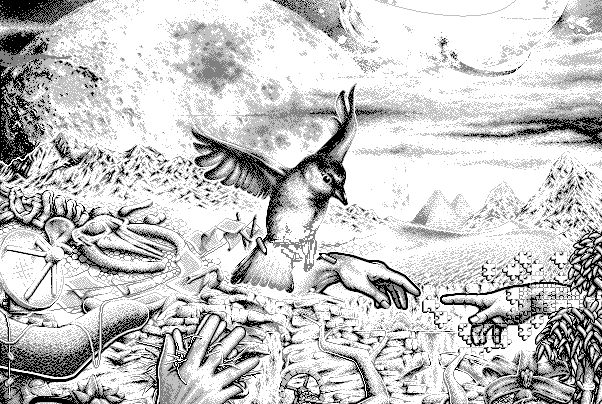
you could conver the textures on the model from RGB png to indexed PNG
torpid lagoon
its definitely a super low limit though, i didnt realize 10k is extremely tight
torpid lagoon
im not sure if i heard of a indexed png before
woven fable
 torpid lagoon
ah okay i looked it up, thats perfect actually since i only have flat colors
woven fable
exactly
with that you could save a lot of space
like 70% reduction
and in unity when you swap to crunch texture on 100 it will reduce it even more with little quality drop
torpid lagoon
ooh, thats nice
torpid lagoon
does the vrchat sdk warn you about filesize? i don't think ive seen a statistic on mine anywhere yet
torpid lagoon
oh dont worry i learned that long ago 😄 i backup everything automatically now
woven fable
few people tune it to 100 or 50
so if you mess your textures up your model will pass VRC standard...
but not show up for people because of the file size
it is mostly due to fear of crashers and spam
(music and heavy models are big in file sizes)
torpid lagoon
oh it really did, thank you 😄
woven fable
also if it is 3.0
if you have animations in mind
try to get a paper and note down all the values that should hold each of the change as well as plan out how it will function
torpid lagoon
oh its 3.0 but i havent even thought about animations yet, but whys that?
woven fable
I found my self getting lost in animatio and values.
If that should be float or int. What should be reset index or how should it function in the menu
Menu layout as well
It is on unity state but worth to be kept in mind
For me because I have 9 tails... I get a lot of flexibility to what to do with them
As well as toggling.
Then we have other animaitions and so on.. it can get out of control if not keept in order
Also a tiny hint. (You can use 2 values to select stuff that you want)
woven fable
Also a odd thing. I don't know if to report it as a bug or engine issue. Meshes render differently depending on what is disabled. If you disable the object it does not update lighting properly. But when you toggle the mesh or skinned mesh it works properly.
(we take a situation that the object is disabled from the start and activated by animation)
jovial grail
Set renderer anchors to the same bone for all renderers
Usually spine
I think it's called anchor override
woven fable
"render anchor"... Please send where it is?
 languid quartz
Click on your meshes, there should be a component called "Skinned Mesh Renderer" on them. Looks like this.
Basically ensure the anchor override for all of them is the same bone on your avatar ideally.
jovial grail
Or set the all automatically with pumkin tools
woven fable
this gentle self insert
Pumkin tool is compatible with 3.0? @jovial grail
(also did you use halloween to call it pumpkin tools?)
jovial grail
Yes, and no
I didn't do anything for halloween 
I don't shill much so I do offer alternative solutions, but honestly, if you have multiple mesh renderers, just use

because it's the easiest way
woven fable
Alright thanks for help. I will get it going and see how it function with it
 worldly bronze
im magic i tell ya'
 sturdy socket
1 skinned mesh, no good
woven fable
how does refresh rate on dyn bone affect the game
 still perch
The more transforms per second it has to calculate, the more performance impact from those calculations.
Usually 30 is more then fine for dynamic bones, some things even less.
I belive it's hard capped at 60 (gladly.)
amber hemlock
Disable distance is also capped, I don't know to what
 charred peak
What's the generally 'accepted' number of materials for an avatar? I'm new to making them and I'm trying to maintain 1 material slot but I find it a bit restrictive, and I notice a lot of avatars in game have more than 10!
jovial grail
Look at the performance ranking values
VRChat
The Avatar Performance Ranking System allows you to see how much a user's avatar is affecting performance via analysis of the components on that user's avatar. You can also use it on yourself to see how performant your avatar is. This system is provided to inform users what is...
4 is fine for excellent
charred peak
Thank you, I'd heard mixed things about the values assigned to the ranking system so I wasn't sure
amber hemlock
What's the generally 'accepted' number of materials for an avatar? I'm new to making them and I'm trying to maintain 1 material slot but I find it a bit restrictive, and I notice a lot of avatars in game have more than 10!
@charred peak ideally 1. No real legitimate reason to be higher than 4.
solid smelt
The legitimate reason is multiple shaders. Keep in mind that any particle system also counts as two materials inherently
charred peak
Part of the reason I'm asking is that I'm looking at adding accessories to my avatar which aren't attached to the body, so I think they'll need their own materials?
solid smelt
You can always do it in blender which will allow you to merge the meshes and atlas the textures
A mesh doesnt need to be actually connected to be considered one mesh
 undone harness
Does anyone know which would be the biggest performance hit?:
- Avatar with multiple meshes and a single material
- Avatar with a single mesh and multiple materials
buoyant holly
ideally you would want a single mesh with a single material
undone harness
I have an avatar where you can hide parts of it, and I wanna do that while have the lowest performance hit.
solid smelt
There is no such thing as an avatar with multiple meshes and a single material, even if meshes share the same material, it counts as separate since they are different meshes.
jovial grail
The thing that counts is material slots
Materials don't matter that much as even empty material slots will count towards performance rank afaik
undone harness
So a single mesh with multiple materials is the way to go.
amber hemlock
Does anyone know which would be the biggest performance hit?:
- Avatar with multiple meshes and a single material
- Avatar with a single mesh and multiple materials
@undone harness single mesh multiple materials. Skinned mesh renders are very expensive.
However it is the same draw calls either way. The same material on two different objects is still two draw calls
So the only benefit to one over the other is reducing the amount of meshes. They have the same amount of materials total
 hollow briar
Is there any way to view your avatar with saftey settings enabled? I was informed I look like a freak of nature
proper grail
Theres a method i know of, log in with steam client and oculus client desktop and put the windows side by side
twilit peak
uh, not sure what channel i should be putting this in since there isn't a unity specific one, but does anyone know why there's like a second set of each mesh shown in unity? (don't worry this is pre-optimization, the 4 will be merged before i put it ingame) https://i.imgur.com/sAdhACU.png

a second set that's untextured and flipped on its side
oh wait that's there even for the vrchat tutorial avatar example, guess it's just a thing unity does nevermind
worldly bronze
I'm going to start a revolution if I have to goddammit
 rocky tartan
png size does not matter, 2 or 64Mb. When texture imported into Unity it automatically compressed into DXT1 (without alpha channel) or DXT5 (with alpha channel) format. What really matters is texture resolution and presence of alpha channel.
worldly bronze
worldly bronze
im magic i tell ya'
look, epic gamer optimization. I will make others learn through means of kindness and violence /joke
If you don't believe, this is the kind of avatars I used to make like a year ago
calm spade
@rocky tartan Crunch compression is still necessary
rocky tartan
More talking about source file format
calm spade
Does alpha channel really add that much ?
languid quartz
I've seen just alpha channel double the size of textures before tbh.
 normal nova
It specifically does double the size
Dxt1 is 4bpp, dxt5 is 8bpp
So if there's alpha, it's twice as big
normal nova
Crunch compression helps download size, but once decompressed into GPU memory it's the same size
rocky tartan
^ this
normal nova
So... yes it's good, but I'd switch it on/off and look in the view port to see if it's worth it
It can range from unnoticeable to pretty bad
rocky tartan
Big textures takes time to stream from RAM to GPU memory since vrchat using texture streaming. In some cases it can cause freezes when turning head to group of people with lot of huge textures on their avatars.
Probably best idea is to have two atlases - one for transparent/cutout parts compressed with DXT5 and another for opaque DXT1. This way size will be minimized. And transparent atlas should be as small as possible.
But if everything fits into single 2k texture not a big deal really.
normal nova
Eh, I think one big texture is gonna be the better option overall
Less materials is better. More efficient packing will save you a lot of sad
 potent pulsar
Not with transparency, it will look better on paper sure
normal nova
Speaking of which, I guess I should bring this up in here too, since it works for desktop

GitHub
This is more or less a port of all the best parts of my avatar creation script I've been working on for some months.
Features:
Instantly duplicate and decimate any model, without affecting...
Not quite merged yet, but... better than material indexing cause it packs all UVs into the same texture space, not even counting the decimation with normal baking
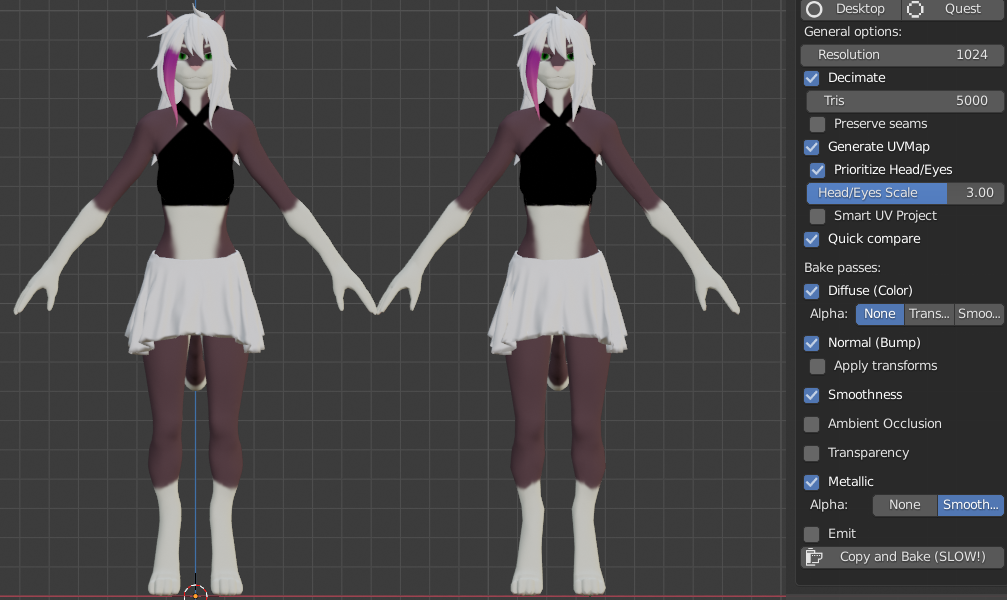
34k tris, 1 (extremely complicated, blender note based) material at 2048x2048, several meshes -> 5k tris, 1 material @ 1024x1024, one mesh
potent pulsar
That looks amazing
normal nova
Two button presses, one to detect passes and the other to start the bake
rocky tartan
One thing to mention, opaque and transparent parts will require different materials anyways only if you not planning to use cutout/transparent for entire model.
potent pulsar
Might use it for easy quest avatar because I can't be bothered otherwise lol
normal nova
Thaaat's the idea yeah xD Death to robots!
rocky tartan
Plugin looks cool, can't wait to try
normal nova
But uh, it can also bake desktop versions that are pretty difficult to tell from the original, without touching your original setup
So you can keep your 50 meshes and 45 materials on your working copy, and just click the button when you need the optimized version ready
@rocky tartan if you wanna test it early you can just download it from my development branch, it'll be merged soon ish though
rocky tartan
I'll give it a try!
unreal plover
So are people interested in a tool to automatically generate rotation constraints for multiple objects to a string of bones for better physics performance?
This is a total of 10 dynamic bone transformations 😄
It's not 100% similar as having dynamic bone transformation on all bones, but it should be pretty close. In turn you get way better performance because constraints can be resolved in multiple threads (instead of only on the main thread of Dynamic Bones).
normal nova
@unreal plover that looks awesome! I was trying earlier to hack something together that did similar with just weight painting, but it was even further from the desired result
Zigzag tail :P
unreal plover
Thanks, I'll need to record some tutorials and clean up the code a bit, still. But afterwards it should be good to make it public 🥳
 eternal vessel
whats the best worlds to find optimized avatars? since the last update my fps has decreased by alot.
calm spade
Really depends what kind of avatar you're looking for
 agile radish
@unreal plover thats very nice - i think many ppl would be interested
 stoic sonnet
Does anyone have a recommendation of what to buy in the unity offers?
agile radish
very animation is pretty nice / dynamic bones / bakery (if you want make maps) / umotion / some nice particle fx for spring balls and spawn in animations - there are so many to choose from
unreal plover
@normal nova https://github.com/Naraenda/NarasUnityTools 😄
GitHub
Contribute to Naraenda/NarasUnityTools development by creating an account on GitHub.
normal nova
Very neat! I'll give it a shot later
normal nova
Nooot sure I got this right
From original:
Oh! I think I got it
unchecked 'modify source constraint'
unreal plover
👍
normal nova
Would be good if it automatically set up exclusions in the dynamic bone script
 hoary juniper
Ooh, that's a neat tool
I wonder if it would make sense to have a tool to rotation constrain dynamic bones to other bones for fake gravity. It works really well for hair but I don't know if it would work for a skirt
unreal plover
Yea i could make a tool for fake constrain gravity for quest avatars. Just need to reduce the poly count on my main avatar by 30% first 😄
normal nova
@unreal plover should try my thing! https://github.com/GiveMeAllYourCats/cats-blender-plugin/pull/221
GitHub
This is more or less a port of all the best parts of my avatar creation script I've been working on for some months.
Features:
Instantly duplicate and decimate any model, without affecting...
worldly bronze
beware poor performancei am here
heady smelt
Alguien me ayuda no me deja publicarlo :”(
jovial grail
click auto fix
worldly bronze
They have 54 materials.
daring summit

 formal flare
has anyone had issues with material combiner?
it seems like it just ignores some textures and doesnt atlas them
 radiant shadow
If it cant find the path for the texture it does that, find wich one it is add the texture back on it then try atlas again.
formal flare
oh thanks, im not sure if it was that or it just doesnt like tgas
unreal plover
I usually just skip material combiner and just put everything in photoshop together instead, then move the UVs manually
Because a lot of assets come with a lot of blank space in the textures
amber hemlock
formal flare
oh thanks, im not sure if it was that or it just doesnt like tgas
There is a convert all to png button
 devout gyro
first day on blender, just trying to get the triangle counts to show up first and every tutorial just have them showing on the bottom, selected all, what am i missing?
proper grail
devout gyro
first day on blender, just trying to get the triangle counts to show up first an...
These buttons, theyre off by default in 2.9+
devout gyro
ahhhh, i just went with @calm spade advice and downgraded and its showing, thank you both
now the only problem is 80,000 triangles haha
devout gyro
Got it down to 20k triangles, guess rigging and shape keys next. Does decreasing bones help performance? this model came with a ton of bones in the face and i dont see a lot of tutorials that have bones looking like this
upper yacht
It has a facerig
You can remove it or not, depends on how you want to do the visemes.
Helps with making visemes tho
solid smelt
Yeah VRC can't use face rig so you should use it to make visemes and delete it after
upper yacht
3.0 can use it 🤔
solid smelt
Honestly true but fuck that lmao
heady smelt
Lol
unreal plover
@hoary juniper Turns out constraints for fake gravity are pretty easy. Cancel out the head rotation and then copy the y-rotation over. Don't really to need my tool for that since it's pretty easy to add constraints to multiple objects as long as they aren't nested (but I still wrote how to do it here: https://github.com/Naraenda/NarasUnityTools/blob/main/dbc_tutorial.md#extra-fake-gravity-for-quest.
normal nova
unreal plover
<@!61098843223109632> Turns out constraints for fake gravity are pretty easy. Ca...
Super neat!
sick timber
unreal plover
<@!61098843223109632> Turns out constraints for fake gravity are pretty easy. Ca...
That's a really good alternative to dynamic bones if you can't afford them or like optimisation! Thanks for the tip!
 coarse marten
So, i'm trying to use the Atlas Generator in CATS to combine all my materials but it's making an atlas out of exclusively my diffuse maps and not my normal maps
is there any way to make it use my normal maps as well?
or would I have to do it manually
normal nova
@coarse marten the new bake panel also does normal maps
(it's in cats devel version)
 ember venture
Hiya! Im not quite sure where to put this question, but seeing as it is about optimization, i thought i'd leave it here
I have a custom avatar iv been modeling and texturing from scratch for VRc, and iv modeled it so it only has 12,268 tri's, well bellow the recommended 70,000 cap. however i modeled it for smooth mode, which just smoothens out the mesh withought adding any new geometry.
im wondering if there's an option like this built into VrChat which would let me keep it smooth and at a low tri count, or if i'll have to add geometry to keep it smooth (hopefully this makes sense, Im still very new to game engines)
calm spade
Subdivision is more geometry but not shown when rendered afaik
Baking high to low might help achieve this for normals at least
ember venture
Alrtighty, thanks so much!!
jovial grail
Some shaders also have distance based tesselation
 quaint berry
guys, i need some help:
when i load the avatar it shows 6 materials even though there are only 3
is there any way to fix this?
jovial grail
do you have empty material slots
upper yacht
Do you have "keep quads" enabled
quaint berry
jovial grail
do you have empty material slots
no
quaint berry
jovial grail
do you have empty material slots
i'm put materials into material slots in import settings
 velvet flower
particles or other meshes? 
velvet flower
huh, i don't know, no other props either?
Perhaps you somehow accidently changed size value under materials or something i'm not sure exactly
but it doesn't make sense that it would count other materials if they are not even attached to the avatar itself
quaint berry
i have this problem in all of my avatars actually, all of it has x2 materials count
velvet flower
that's weird, don't think i've ever seen that type of behavior honestly
quaint berry
oh well, it's not that big problem after all, just annoying  sign
sign
velvet flower
huh, wait a second, how many meshes do you have?
velvet flower
huh yeah still weird, no idea really
quaint berry
yea, me too ;D
upper yacht
So you probably have "keep quads" enabled
If you have "keep quads" enabled all submesh instances (materials) are doubled.
quaint berry
upper yacht
So you probably have "keep quads" enabled
it's off, but thanks for advice anyway
 cyan mist
does anyone know a way to lower the poly count in unity????
I'm poor and don't have money so i would appreciate the help
heady smelt
@cyan mist blender is free
heady smelt
@cyan mist you could try making it an obj file
cyan mist
heady smelt
<@!707529425939595285> you could try making it an obj file
oh good idea ill try that
 robust relic
cyan mist
I tryed but blender wont let me import FBX
robust relic
cyan mist
I tryed but blender wont let me import FBX
You need to enable fbx import. Go to Preferences -> Add-ons -> Type 'fbx' in the search bar, then make sure Import-Export: FBX Format is selected
cyan mist
could you please that would be great
robust relic
Search something like "ascii fbx to binary"
cyan mist
then what???
robust relic
idk, you'll need to research that yourself. i'v never done it with rigged models
cyan mist
robust relic
idk, you'll need to research that yourself. i'v never done it with rigged models
Thanks you It worked
upper yacht
yes
And to answer your question. It's a combination of laziness, lack of knowledge on how to make it quest-compatible, and (for a minority of people) pure hatred for quest users.
buoyant holly

Mentioned before but, my 'instantly produce an optimized Quest avatar' changes for the CATS blender plugin now are in the dev version if you wanna try them out! May have some issues w/ blender 2.9x, still testing
 Twitter
·
Twitter
·


 normal nova
@oblique mesa when you upload an avatar, it updates whatever platform it's currently targeting, windows or Android
 quartz harness
ember venture
Hiya! Im not quite sure where to put this question, but seeing as it *is* about ...
quartz harness
ember venture
Hiya! Im not quite sure where to put this question, but seeing as it *is* about ...
nice
 junior brook
Hello, I have two versions of the same avatar (2.0) one with more materials and the other with less, but instead of deleting the materials parts to upload I just hide them in case I want to use them later, but even hidden they still show in my avatar stats, why's that and does it even impact performance?
Like, it shows me having 20 materials even tho in reality most are hidden, only 10 are active
upper yacht
The avatar stats don't care if you hide stuff. And depending on how you hide it, you might just be still using it. Setting a transparent material on an object still renders that object. Turning an object off doesn't do this. Avatar stats basically take the worst case scenario "what if everything is active?".
(Even though it has more of a nuance than that)
junior brook
It's weird, I'm literally just disabling every non used material mesh but it still shows on my avatar stats as if it was there
amber hemlock
The intent is that the rating represents how unoptimized the avatar could possibly be at any given time. Avatars shouldn’t change ratings depending on their current animation, since that animation could be playing all the time.
junior brook
But it’s literally not there, I disabled (not deleted) on unity the pieces(like wings for example) I’m using , why should it counts?
amber hemlock
Because an animation could re-enable them.
If no animation is enabling them, delete them.
junior brook
But it’s stuff that was carefully place, using wings as an example, I placed a version with it and a normal without, I don’t want to delete cuz I may change it later (like the color, shader etc)
amber hemlock
Then make a duplicate of it in your scene so that you have a version where you didn’t delete it
junior brook
Hmm, I supposed I could do that, ty for the advice
Altho it lowers my avatar rating, it doesn’t make it less optimized because I’m literally not using/showing the material but ok
amber hemlock
As I said it’s because you could be re-enabling them with animations and it’s not going to check all of your animations to see if you are or not
junior brook
It just bothers me because I got called out the other day for having 20 mats, even tho I was using only 10
I understand, ty for the help!
amber hemlock
If you know C# the uploader also has a hook to execute any code you want in play mode right before upload, if you want to run a script to delete stuff that would not be permanent when the upload is done and play mode exits
junior brook
Oh no idk that stuff >.<
 teal mica
Or just trick the SDK by creating an “optimized” version of your avatar ; then spamming undo while in the SDK upload panel (until your back to your original version). The SDK doesn’t do a second sweep to check your avatar stats before uploading.
This is frowned upon though.
amber hemlock
His goal was to upload an avatar that has a better rating. Doing that does not give your avatar a better rating.
Tricking the uploader won’t change your rating in game
zenith plaza
Yeah the avatar rating wouldn't matter at all if all you had to do was fake it in the sdk
 fading leaf
Yeah, tricking the SDK is not necessarily optimizing your avatar..
 manic trail
how much time do you need to wait until you can get a custom avatar ?
still perch
Becoming verified by the trust system is based on reaching a not time based trust score, which's exact algorithm is unknown to prevent exploitation.
You presumably need to play the game in a normal manner with your VRChat account, walking around, meeting people and also making some friends. Idling won't help.
According to many responses in this discord, a rough estimate would be ** 20-40 hours**, but big exceptions are possible.
Make sure you are not using a steam or oculus account and continue playing the game until you get a notification or e-mail.
http://help.vrchat.com/kb/article/27-why-cant-i-upload-avatars-or-worlds-yet
manic trail
ok ty
junior brook
What is worse, an avatar with lots of materials but low MB size, or an avatar with 1~2 materials and a huge file size?
Also how much of an impact it is to performance to just upgrade my materials quality, increasing the file size to 1mb to 5mb for example
amber hemlock
junior brook
What is worse, an avatar with lots of materials but low MB size, or an avatar wi...
Lower materials is better. There is not much that isn’t worth reducing a draw call. Draw calls are basically everything.
Especially on PC.
Trade more memory for less draws any time
If you can do it all in one draw, it’s just better.
junior brook
hmm, I ask because whenever I atlas stuff the quality of the material greatly decresses, so I have to unlock the highest quality possible (trillinear, max size 8k, high quality and remove mip map) to make it look normal, that increases the avatar size by double at least
languid quartz
That's with CATS Atlas right?
If you force the textures to all be the same size you may be able to get that to be better quality with lower texture resolutions or manually make an atlas
junior brook
How do I do that tho >.<
amber hemlock
junior brook
hmm, I ask because whenever I atlas stuff the quality of the material greatly de...
Atlasing materials does not need to degrade texture quality. I recommend manually stitching your textures together and offsetting the UV’s by the amount of pixels. Automatic atlasing tends to bake textures with fractional pixel offsets (or worse, rescale it) which leads to texture quality reduction
Blender can set the UV editor to whole pixel units
There should be zero visual change to the model if atlased that way
Aside from texture bleed just be mindful of what is right next to islands
Also only move parts of your images in powers of two pixels at a time so mipmaps remain the same
Someone really could make a better automatic atlas 🤔
junior brook
Yeah tbh I’m at beginner level of avatar making, I only know how to atlas through Cats
amber hemlock
Yeah cats atlas is kinda sloppy
Cats is a wonderful tool but it also stops you from learning blender proper
Tupper has made a good manual atlas tutorial
Is for old blender but it’s still valid
Just skip the part where he scales things, learning how to move UV’s around and bring the texture with you is all you need
potent pulsar
Never use 8k texture atlas
 hazy barn
post this in #udon-general they can help you
 nimble ingot
What's the best way to check your avatar's performance impact in Unity? I thought about using the Game view stats, but even when nothing is in the camera, it seems to say that there's 2 Batches for some reason. Am I going about this the right way or is there a better way to check?
calm spade
Did you disable the realtime light in scene ?
nimble ingot
I turned off all realtime light sources, if that's what you're asking.
This is what my stats look like with literally everything in the heirarchy turned off
calm spade
looks like you have V-Sync enabled
nimble ingot
Ah, will that do it? Thanks, I'll see how to disable it. So, Unity stats are a good performance metric then?
calm spade
Sure, that's one way to get stats
nimble ingot
Out of curiosity, Do dynamic bones not show their impact in the unity stat viewer? The framerate and CPU time seems identical whether they're enabled or not.
jovial grail
but are you moving
nimble ingot
And, I'm not turning off a small amount of them either, 8 components, each containing 4 bones and 4 colliders.
Hm, not through root motion, but I was playing an animation so it'd wiggle while staying in place.
I see, I had to shake it a fuckton to actually get a performance difference between the two options.
Alright, new question.
My avatar I'm working on is a nine-tailed fox. As a result, they have a decent amount of bones on them.
I've heard in the past, years ago, that it's bad practice to use exclusions in dynamic bone components. However, all the tails are parented to the hips, and I could do 1 dynamic bone component with 3 exclusions, or 9 dynamic bone components with no exclusions.
Am I just misremembering that thing about exclusions being bad to use, or is it sincerely better to have the 9 instead of the 1?
jovial grail
You should look into this https://github.com/Naraenda/NarasUnityTools
GitHub
Contribute to Naraenda/NarasUnityTools development by creating an account on GitHub.
You can have dynamic bones for one tail then have them all copy rotations off it with rotation constraints
worldly bronze
i win
zenith plaza
Too many polys
sick timber
How is the bounding box so big though?
worldly bronze
armature
sick timber
oh ok
amber hemlock
nimble ingot
Out of curiosity, Do dynamic bones not show their impact in the unity stat viewe...
The uploader will completely ignore non-legitimate versions of dynamic bone. It only looks for the version you can buy.
You can still upload it though and they will be replaced with VRChat’s unmodified versions
nimble ingot
Oh, no, I wasn't talking about the SDK builder. I have the asset store version of the dynamic bone script. I meant the Unity stat in the game window when you're in play mode.
 uncut apex
so i bought this avatar and i really love it, however it only works for PC. I want to make it so people with quest can see it too. I realized the poly limit for quest is 10k, and this model is 20k. Idk how to lower the poly count while keeping it rigged in unity. is it possible or can anyone help lol
calm spade
Mentioned before but, my 'instantly produce an optimized Quest avatar' changes for the CATS blender plugin now are in the dev version if you wanna try them out! May have some issues w/ blender 2.9x, still testing
Twitter
·
uncut apex
If I import the optimized model back into unity will I have to rig it? I’m not sure how to rig and do things like that.
buoyant holly
that tool will automatically spit out a copy of the model that's been Quest optimize including the rig
uncut apex
Dope! I’ll have to try it out in the morning. Thanks
 tribal ruin
Anybody know exactly what causes framerate drop when loading an avatar? Like is it the textures, meshes, or something else? Trying to reduce load lag on my avatar, but not sure what to look at.
tribal ruin
jovial grail
You can have dynamic bones for one tail then have them all copy rotations off it...
This is what I do with my hair. Since it's short it makes sense, and looks fine. Really saves on Dynamic Bones
uncut apex
when i use the cats plugin and export it back into unity, theres still no rigs/ animations. is there something else i need to do?
ah nvm i think i had to export it as a fbx, but i still need the descriptor which has all of the mouth movements
 broken relic
calm spade
<@!486322558933925898> https://twitter.com/feilen/status/1332437394260312065
broken relic
calm spade
<@!486322558933925898> https://twitter.com/feilen/status/1332437394260312065
hey i try to figure out what is this CATS plugin for really :?
why not jsut import blend to unity and work from there
uncut apex
hmm when i try to decimate it says The model already has less tris than given. but when i import it back into unity it still says it has too many polys. is there a tutorial specifically for decimation bc i cant seem to figure it out lol
broken relic
The model already has less tris than given
than set up amount of triss less than it already has
set it to 5k
uncut apex
okay! ill try that
ah it works! it says poor quality, so i'll reduce it till i get good or medium
idk if i can get it any better than poor... if its poor quality will it still show up or will it be auto-blocked like avatars that are very poor.
i feel annoying but, when i try to upload it says "this avatar uses visemes but the face mesh is not specified" ? how do i fix that
 rustic bough
calm spade
<@!486322558933925898> https://twitter.com/feilen/status/1332437394260312065
rustic bough
calm spade
<@!486322558933925898> https://twitter.com/feilen/status/1332437394260312065
The tweet says that it may have some issues with 2.9x, should I download a different version? The dev version button does not work.
rustic bough
uncut apex
i feel annoying but, when i try to upload it says "this avatar uses visemes but ...
Drag body into face mesh and that should fix it
calm spade
@broken relic Unity is not a creating/modifying asset software
@rustic bough You might have to yes
normal nova
rustic bough
The tweet says that it may have some issues with 2.9x, should I download a diffe...
hotox fixed it, it should work now?
@uncut apex if it's poor quality, it'll be blocked by default. Were you using the 'bake' panel?
uncut apex
i dont think i used the bake panel. But i think i managed to get it to excellent quality. Now im just not sure if i uploaded it correctly so that quest users can see my avatar lol
uncut apex
i think i am doing something wrong, i want to make my avatar both pc and quest compatible. when i go into my avatar menu it says that it supports both, but when i ask quest players it says they see my avatar is an error. why is this? the quest version is excellent quality, while the pc version is medium
normal nova
Odd, have any screenshots?
uncut apex
here are some screenshots. ignore the names ive been doing this for a while and i was getting frustrated
 leaden hamlet
wrong unity for 1
uncut apex
whats the most recent unity? i thought i downloaded this one from the website
normal nova
Not most recent, you want the specific version that vrchat uses
normal nova
uncut apex
whats the most recent unity? i thought i downloaded this one from the website
VRChat
This page lists the current Unity version you should use when creating content for VRChat, as well as links to the correct version for both Unity Hub and direct downloads. Current Unity Version The current Unity version in use by VRChat is Unity 2018.4.20f1. Unity Hub To install the currently suppo...
uncut apex
i cant add the 20f1 version to the hub to make it android compatible, only the 30
nvm i got it
 warm oxide
Hey, I'm thinking about commissioning a large avatar. There are some problems though which I've thought of and I'm wondering if you guys know any good answers. First is having a big avatar indicative of lag and strain on lower end PC's? And is there any way to make it easier to hear people and others to hear me since my viewmodel will be so high? And finally a question to more experienced players, Is VRC mostly played in indoor spaces/worlds?
languid quartz
warm oxide
Hey, I'm thinking about commissioning a large avatar. There are some problems th...
- A bit yes. Because your bounding box will likely be larger, meaning your avatar is more likely to be rendered in more situations as opposed to an avatar with a smaller one (frustum culling).
- Not that I know of other than adjusting volumes of voices and your mic volume.
- I've been playing since 2017 for reference and not too sure how to answer that, I'd say indoor if I had to say but I wouldn't doubt getting mixed answers on this one.
warm oxide
Thanks for the response. In regards to the first question is there any way to reduce the strain? And do most people make it so they can't see large avatars through settings?
languid quartz
warm oxide
Thanks for the response. In regards to the first question is there any way to re...
Other than making the bounding box smaller not really, but if you did that people may see the avatar suddenly go invisible even when in their vision.
As for the second one, if the avatar get's marked as very poor in performance ranking as a result of it's large bounding box you may experience some who block very poor avatars and won't see it.
solid smelt
Larger bounding box is more of a multiplier for bad performance, if your avatar runs well, then the large bounding box isn't that bad. If the avatar runs poorly in other regards, the large bounding box makes it harder to hide the avatar when people are not looking directly at you.
warm oxide
I see I see, thank you both
solid smelt
You will be marked very poor if the avatar is larger than 5mx6mx5m
languid quartz
That is true. If the avatar is well optimized in other aspects then the bounding box isn't as much of a problem.
warm oxide
Im still on the fence about the exact commission so Ill take all this into consideration
amber hemlock
warm oxide
Hey, I'm thinking about commissioning a large avatar. There are some problems th...
1.) size doesn’t really effect lag. Though if you are bigger you will be in frame more often which means you will need to be rendered more often.
2.) no. If your view position is way up in the air, your voice will be too, and you will not hear others and they will not hear you.
3.) most worlds I visit have ceilings yes
 lone tiger
To correct one statement in here. If the only reason that your avatar is marked as very poor because of bounds, then it will never be hidden when players set their minimum perf rating to poor or medium.
 heavy kindle
Hello, so I'm working on a project. What is like the best settings to use for importing avatars? These are my current settings and I'm just wondering if they should be changed.
sweet mason
Fine. If you scale you model scale it there instead
uncut apex
i still dont think quest ppl can see my avatar. im doing something wrong but i just dont know what it is
woven fable
is there any use of LOD in vrc for models?
calm spade
no
woven fable
At all?
Is lod useful in any point in vrc?
But can I use lod to enable / disable rendering?
I want users to see my stuff like weapons but only close up
It's useless detail afar
sick timber
woven fable
But can I use lod to enable / disable rendering?
no. Occlusion culling is available for world creators, which disables rendering if it is blocked but as Ruuubick(the vrchat dev) said LOD isn't available on avatars
 trim palm
Does anyone know how to make an avatar quest compatible? I heard that it should be below 10 mb... so if I lower the size of the avatar does it make it "quest compatible" automatically?
torpid lagoon
it's quest compatible if you upload a quest version of the avatar under the same id
theres several different soft and hard requirements for quest avatars listed under the docs
file size is one, and triangle count is another big concern
unfortunately because of unity, the process is not automatic and vrchat recommends a two project approach, one unity project for the pc version and one for the quest version (switching platforms under the same project is possible but time consuming, and is harder to make optimizations for each platform)
trim palm
So, how do I make a quest version of the avatar?
torpid lagoon
there's a button under the builder tab on the vrchat sdk window, called "switch platform to android" or something like that
and then, you can build & test your avatar like usual
trim palm
Oh alright, thank you.
buoyant holly
Mentioned before but, my 'instantly produce an optimized Quest avatar' changes for the CATS blender plugin now are in the dev version if you wanna try them out! May have some issues w/ blender 2.9x, still testing
Twitter
·

GitHub
:smiley_cat: A tool designed to shorten steps needed to import and optimize models into VRChat. Compatible models are: MMD, XNALara, Mixamo, DAZ/Poser, Blender Rigify, Sims 2, Motion Builder, 3DS M...
this blender tool can help if the model has too many triangles and materials for the quest
junior brook
idk why my sdk says I have 12 materials when I'm only using 8, I searched everywhere and these 4 materials are nowhere to be found
calm spade
particles ?
junior brook
nope
calm spade
A single mesh ?
junior brook
eh, not sure, I'm just checking all the material slots, and there's only 8 in total >.<
wait! I found it
For some reason I have 4 elements for the same material??
6 actually
I tried atlasing on cats the face before, it doesnt seem to work with my model since it makes the eyetracking stop working and sometimes the lipsync gets off


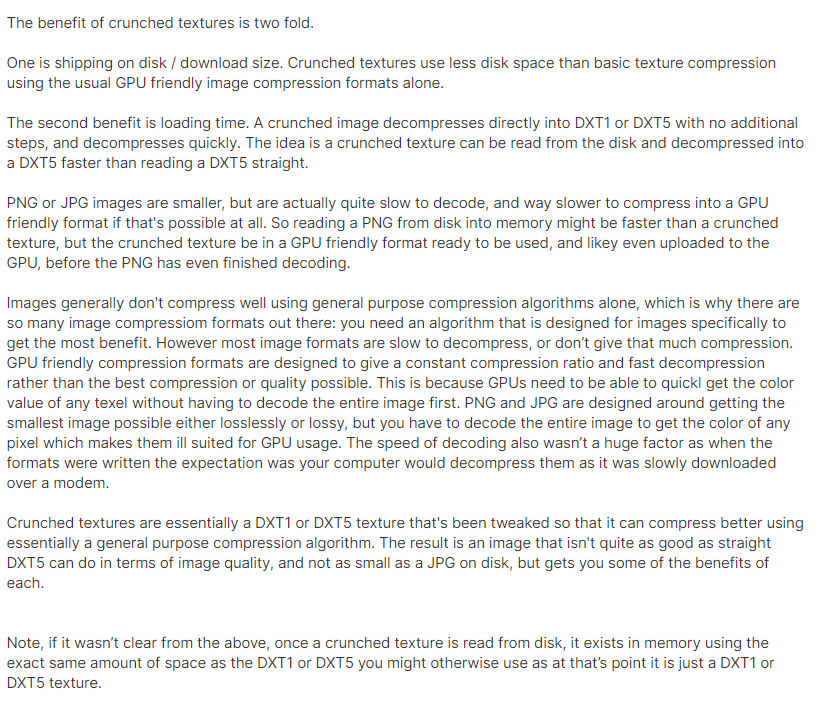


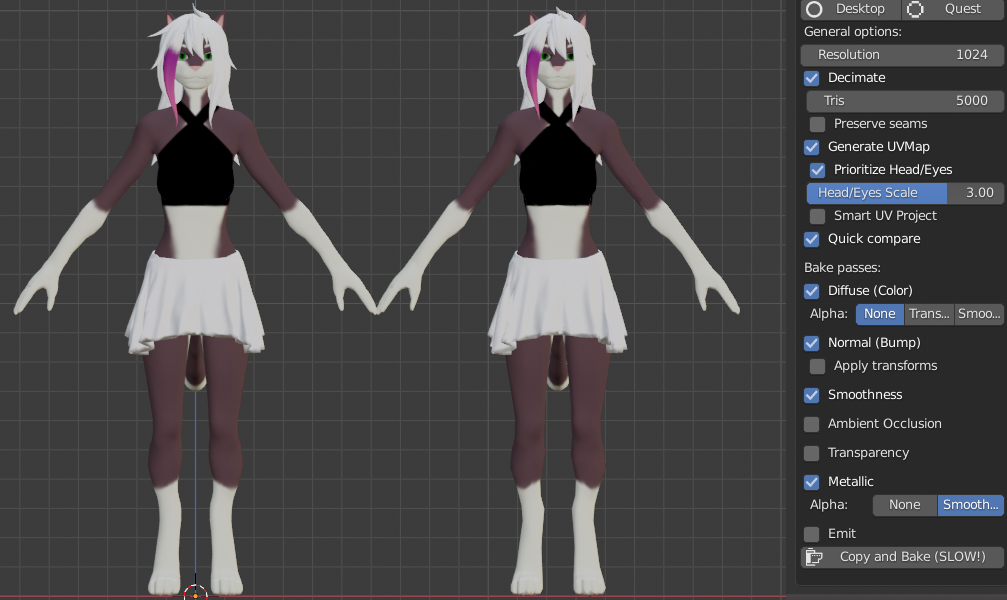 junior brook
It actually uses the same material for 4 different thing, iris, eyelid, mouth and eyebrows, if I merge any of them it gets broke, maybe not the eyebrows
Also a another question, does it impact optimization in this case? Like it uses only 1 material but for 5 meshes
calm spade
it's maybe not setup correctly in the first place then, materials don't work that way with eyetracking
It does impact optimization yes
it's not the worst
but having unnecessary materials is never a good thing
junior brook
hmm, its different from the usual model, if I try to set eyetracking on cats it completely breaks and cease functioning
well, I'll just try to atlasing everything else, but gonna always have to deal with 4 extra materials 
Ty for the answers!
It's a neptunia model, those were always very light but the visemes were done completely diferent than the average mmd
normal nova
@junior brook it's not 12 materials, it's 12 material slots (with some overlap)
You can combine the material slots in e.g. Blender
junior brook
normal nova
You can combine the material slots in e.g. Blender
Last time I tried the mouth out of nowhere becomes super big and the lipsync is desyncronised
 urban fable
Hm, is this possible to like
Optimize a pc avatar for quest with unity?
I bought a skin, it was for quest but its not woking for it, only for pc
So i'm a little bit upset :(
 loud frost
what model is it?
also, it should still work, people will just have to turn your avatar on, or have low safety
@urban fable
loud frost
urban fable
Wait it can still work, hm
I mean, link the model you bought
urban fable
Oh sure
This one : https://booth.pm/en/items/2309378

※この商品はVRoid向けテクスチャ素材とVRM・FBXモデルです。 男性キャラ向けのサイバー衣装です。 燕尾服をイメージして作りました。 2020/08/25 更新 改変向けのVRMモデルを追加しました。 もちろんそのままアバターとしてもお使いいただけます。 2020/11/07 追加更新 ・改変向けスキニング済みFBXを追加 (透過テクスチャ使用 Quest非対応) 「改変向けVRMモデル」内容物 VRMファイル ・avatar.vrm emission用テクスチャ ・jacket_e.png ・tai_e.png ・shoes_e.png 「改変向けFBX」内容物
(I used a link with specified research for quest and it was inside)
loud frost
ah, I see the issue. It states that a certain transparent component is not compatible with quest. That's why it came up.
it comes with an FBX, you can import it to blender and use CATS to optimize it further
otherwise, 30k is usable. Just not highly recommended
urban fable
Ohhhhhhh, f* D:
loud frost
I've had no problems using my own avatar on Quest 2 with a lot of polys
urban fable
loud frost
it comes with an FBX, you can import it to blender and use CATS to optimize it f...
Uh, do you have a video or something which can help me? xD
I'm a total newbie on this
Oh
uh
So, when I export it, I export it as Pc avatar, not quest, right?
loud frost
what do you mean export it
urban fable
From unity
loud frost
do you mean upload??
loud frost
all good!
loud frost
but no, you can upload to quest
you can also do it for PC if you want PC players to see you
urban fable
hm, I already tried, ended up with an error
loud frost
here, dm me and we can figure it out yeah?
loud frost
having lunch rn, so I got an hour or so haha
buoyant holly
GitHub
:smiley_cat: A tool designed to shorten steps needed to import and optimize models into VRChat. Compatible models are: MMD, XNALara, Mixamo, DAZ/Poser, Blender Rigify, Sims 2, Motion Builder, 3DS M...
urban fable
buoyant holly
https://github.com/feilen/cats-blender-plugin/wiki/Bake
Thanks, gonna look at that !
And I'm comming with another question !
quest do not have transparency at all, so, uh, I have to find a solution about that but I have no idea
Eyes looks very bad :/, any idea?
buoyant holly
basically you take the blender knife tool to all of the transparent bits
urban fable
Wait
I can use the blender to remove transparent things
So I can have a decent character for quest, that can work?
I mean, at least fix that
buoyant holly
yeah you probably want to remove the transparent bits before going through the quest Avatar making button
loud frost
that model comes with an FBX