#avatar-optimization
1 messages · Page 4 of 1
 stray tangle
 velvet crow
entire body mesh is something like 40k I think, so yeah
stray tangle
but if both combined is already lower than that, separating it might not make a big enough difference
 marble rain
eh. you need alooot. i have seen plenty of test in unity with 250-500k polygon with 200 + blendshapes. each randomized each frame. and he only lost 20-30 fps in unity. mind you that was in the editor. outside the editor your looking at a much lower value
marble rain
velvet crow
entire body mesh is something like 40k I think, so yeah
no worries if your total count is only 40k.
stray tangle
40k is quite good yea
 lone tiger
You can still use normal maps.
When I set Tangents to Import on a model that I use that was made in Blender there is no difference in visual appearance from setting Tangents to None.
Oh and memory size of meshes stays the same too.
Only once I set it to Calculate Mikktspace it goes up, but by not that much.
stray tangle
interesting. might need some more testing then
if disabling tangents has no adverse effects then it might be worthwhile to push VRC to add it as a warning with an auto fix button
lone tiger
My guess some shaders can depend on tangents being calculated instead of imported, especially something like Poiyomi.
velvet crow
Idk if tangents are the same thing, but I have worked with some models that have custom normals, and resetting them can cause problems on some models. So I'd imagine ignoring them would do the same. Unless that is a different thing
 ivory sluice
i don't think vertex data can be calculated during the cg shader, setting tangents to none might mean that it uses the model's built in data, because not providing any tangents will actually map the normals incorrectly since it needs the tangent and bitangent to guess the uv orientation on normal space
 rose sequoia
I want to try and optimize my fx animation controller a little bit, but i need some advice on likely performance costs:
Here is an example scenario to help explain my question
Layer 1 has two states: "Default" and "State1". There are 4 transitions from Default to State1: A=true or B=true or C=true or D=true
Layer 2 has two states: "Default" and "State1". 4 transitions from Default to State: C= true or D = true or E= true or F = true
(assume there are also logical transitions back to the "Default" state, I'm just not writing them out here)
So this means that, at all times, these two layers are playing an animation (either their Default or State1. The actual animation playing on Layer 1's "State1" is different to the animation being played on Layer 2's "State1", just to clarify).
I assume that having two layers playing an animation costs more performance than one layer player an animation (ignoring transition condition checks)- is that right?
I could merge these two layers, so that only one state would be playing, however I'd need to create some additional versions of the animations and a lot more conditions to change between them (in order to replicate the behavior each had when they were two layers)
I know the more transitions checking conditions you have at the same time, the more costly it is to performance...
So - If i merge these two layers (to have only 1 state playing instead of 2), how many extra transition condition checks can I add to the new merged layer before it starts to cost more than just having the two layers separate?
(This is just a simplified example, but I can use the logic of the answer to apply to the scenarios i have to solve)
marble rain
rose sequoia
I want to try and optimize my fx animation controller a little bit, but i need s...
you can do it all in one layer. and you only need one Transition having all those conditions. simply Default > State 1 Checks A,B,C;D if any of them are true do X animation. and the other state you just need to do the same. but call it state 2 instead. and that one checks for C,D,E,F on one transition
rose sequoia
The example was to suppose a situation where the merging would require multiple OR transitions to at least an additional 1 state. I'm looking for information on performance costs
stray tangle
rose sequoia
The example was to suppose a situation where the merging would require multiple ...
additional layers has a much more significant performance impact than slightly more complex logic within a layer
example, this nested direct blendtree bullshit runs significantly better than having toggles be on their own layers
 lone tiger
Direct blendtrees are pog, but I don't think it's possible to do with them for example fullfill 2 or more conditions at once to go to state 2 and then do "if condition 1 OR condition 2 are true" to go back to state 1.
Anything simple that needs one condition to change state and doesn't have anything like X or Y need to be this and this can be put into a direct blendtree.
stray tangle
lone tiger
Anything simple that needs one condition to change state and doesn't have anythi...
you actually could, since you can drive the value of parameters using animations

don't get me wrong, it's a lot more janky, but it would actually run better
lone tiger
Hmm, I haven't tried that, but it just reminds of how I tried to do direct blendtrees on a state with WD Off and it did some unwanted math on outputted values.
The particular logic that I wanted to add to my direct blendtree that didn't work out is this.

Ahoge Off has 2 transitions going to On, all of them are based off of physbones-generated parameters. Each one is "greater than value".
stray tangle
lone tiger
Hmm, I haven't tried that, but it just reminds of how I tried to do direct blend...
so fun fact about that, you can mix WD on/off with blendtrees
if your controller is entirely WD off, you should still always use WD on for direct blendtrees
lone tiger
While the other way it is both need to be less than value.
stray tangle
it won't break anything else, and fixes all weirdness with direct blendtrees
lone tiger
I know, I made even a rant about this on VRLabs Discord.
stray tangle
xD
lone tiger
I was like " why are blendtrees so tedious to expand".
Solution was do them WD On instead of Off.
rose sequoia
hmm, so is the general idea "you wont be able to realistically create a complicated enough set of transitions after merging a bunch of layers together to make it not worthwhile doing, performance-wise"
To exaggerate, having 1 layer with many many different possible combinations and transitions to control 10 independent, bool-controlled, toggles is probably going to still be more performant than having an extra 9 layers running... ?
How chonky would i need to make a layer before it would start to cause the same amount of performance impact that adding a brand new layer would?
lone tiger
 rose sequoia
hmmm alright this is good info. Many thanks for all the replies
 fringe portal
i dont have any physbone colliders yet its saying this what do i do to get rid of this pls

 buoyant holly
that's only a yellow so I wouldn't worry about it too much
 ruby isle
fringe portal
i dont have any physbone colliders yet its saying this what do i do to get rid o...
ruby isle
fringe portal
i dont have any physbone colliders yet its saying this what do i do to get rid o...
Click the Select button to the right and it'll show you all the objects that have colliders on it
 simple wagon
stray tangle
example, this nested direct blendtree bullshit runs significantly better than ha...
simple wagon
stray tangle
example, this nested direct blendtree bullshit runs significantly better than ha...
Tried this with one of my avis. Brought the number of layers down from 20 to 4. Seemed to make the performance worse in the Unity editor though.
I tested with 40 avatars in the scene and the Animators.Update took 4-5ms on the blendtree fx layer while the original fx layer took ~3ms. Even deleting the 3 non-blendtree layers left on the blendtree fx layer still resulted in 4-5ms times.
I'm not seeing the 6-7 times increase in speed, but my testing methodology may be flawed or something else is affecting the frametime on Animator.Update.
 sharp kiln
Fallbacks scale to your current avatar's size automatically. That is, unless your avatar is extremely big, in which case your fallback will keep it's original scale and just float in the air. Does anyone know off the top of their heads what size that cutoff point is? It's not in the docs. No need to lab it for me, I'll do the labbing if nobody knows
marble rain
simple wagon
Tried this with one of my avis. Brought the number of layers down from 20 to 4. ...
testing in the editor is also subject to performance loss btw. gotta do standalone testing. and 20 layers is alot. like aloot. but people are overestimating and thinking its going to increase your performance. while that is not the case. more layers does not always mean worse performance. it does however take up more ram. and longer build time.
buoyant holly


Holy cow.
I did not expect nearly unanimously 100 people asking for this tutorial.
Here you go! Its under 1 minute long!
As all tutorials should be.
Now go out there and optimize the heck out of stuff.😎
Likes
183
 Twitter
·
marble rain
Twitter
·
marble rain
Vertex color might be slightly faster and such but it has alot of limits. i do not recommend doing vertex colors over UV map. the difference in what it takes is neglectable. and working with vertex colors is well. not as easy as with textures. as you would have to go into blender or maya all the time to change it.
ontop of that if you have clothes and other things switching around it's even worse.
cause that is basically not possible with vertex colors unless you have multiple meshes. which is even worse as your just causing unnecessary draw calls
stray tangle
it's still possible to toggle stuff with vertex colors
just not as many options lol
marble rain
stray tangle
it's still possible to toggle stuff with vertex colors
yes. but it requires multiple meshes. which is not ideal. and not to mention you need to bake everything in blender which just takes alot longer.
stray tangle
1: bone scaling
2: blendshapes
3: if on PC, Poiyomi UV tile discard (doesn't require textures, but does require a UV map)
none of those require more than 1 mesh/1 material
marble rain
stray tangle
1: bone scaling
2: blendshapes
3: if on PC, Poiyomi UV tile discard (doesn't re...
eh, i am talking about different vertex colors. those things have nothing to do with vertex in general.
stray tangle
I know what vertex colors are lol, I'm the one who optimized Red's avatar to quest fallback, and even suggested doing vertex colors in the first place xD
realistically it's not that practical to use vertex colors in a lot of cases, there are other tricks to save on vram
marble rain
stray tangle
I know what vertex colors are lol, I'm the one who optimized Red's avatar to que...
lols 😄 but yea. it saves on vram for sure. but the other benefits i don 't believe applies to vrc sadly.
stray tangle
I mean, baking AO to vertex colors is a pretty smart idea
there's also cases where you could use the 4 vertex color channels to mask out different textures, Poiyomi can actually do this, and I've had to use it before
it allows for seamless transitions between stuff like grass/sand/stone with separate textures and normals
marble rain
well. you can do the same to a texture. might just be abit different. but like vertex colors do allow for fake shadows and such easily.
ivory sluice
one downside i find on vertex colors is that, at leat the last time i tried it, you can only have a single vertex color slot for your data input
marble rain
yep
 normal nova
it's technically possible in unity to use other UV channels as vertex colors, it's Just Data (though not a thing in VRC, at the moment)
ivory sluice
yee i tought about it but you'd need two slots for each vertex color and three slots for two, unless you have an elready set up color palette or use two of three hsv values
marble rain
honestly its not worth using it. just use textures
 heavy siren
buoyant holly
https://twitter.com/RolltheredDev/status/1596291434142892040?s=20&t=bTB3ji9eTuHr...
heavy siren
buoyant holly
https://twitter.com/RolltheredDev/status/1596291434142892040?s=20&t=bTB3ji9eTuHr...
dangit, i was just about to post that 
You beat me to my own self promo
stray tangle
kekw
heavy siren
Also I think people are discrediting what vertex colors are actually useful for.
Or, this tutorial specifically.
You would want to do this if you are looking for a quick and easy option to optimize your avatar (1 mesh 1 material), its not supposed to be an end all be all, but more a bandaid.
marble rain
heavy siren
Also I think people are discrediting what vertex colors are **actually** useful ...
the thing is . vertex colors are not useful for desktop. its mostly useful for quest etc. low end hardware. and even then its far eaiser to do materials. one material will out perform vertex colors at any moments.
heavy siren
marble rain
the thing is . vertex colors are not useful for desktop. its mostly useful for q...
I disagree, I use vertex colors on desktop. See this message: #avatar-optimization message
Its an alternative, not superior.
Still useful.
marble rain
i am not saying its not useful. but its less preferable.
i speak from experience.
barely anyone in the game development field uses it
 buoyant holly
vertex colors are used all the time as masks in Game Dev
heavy siren
marble rain
barely anyone in the game development field uses it
This isn't true. Vertex colors are used a loooot.
buoyant holly
and pretty much like Nintendo's entire catalog from the N64 to Wii
heavy siren
Especially for things like hair.
ivory sluice
it's not used a lot, but when t's needed it's useful
marble rain
buoyant holly
vertex colors are used all the time as masks in Game Dev
nope they are really not
buoyant holly
marble rain
nope they are really not
would you like me to pull up articles pointing out the use of vertex colors in Game Dev
marble rain
heavy siren
This isn't true. Vertex colors are used a loooot.
i disagree i seen my fair share and non of them does it.
heavy siren
Look at any Daz3D model and you will see the amount of vertex color used.
marble rain
buoyant holly
would you like me to pull up articles pointing out the use of vertex colors in G...
100% please do
i might have outdated info
buoyant holly
question if you're not extracting the model data how would you know if the vertex colors were used for masking purposes
marble rain
Textures.
if a game takes up 100s of gigs of data.
it does not use that.
it uses 8-16k texxtures.
or similar
buoyant holly
I'm talking about vertex colors for masking not the direct color
heavy siren
https://www.artstation.com/artwork/48nJD1 more than just masking

ArtStation
I authored a wind shader based on the SSM GoW4 implementation as well as the Maya tool used to author the vertex color used with it.
marble rain
anyhow we can disagree to agree 😄 i am not saying its not useful
ivory sluice
it can be used very low mesh lods or linear gradients
buoyant holly
marble rain
anyhow we can disagree to agree 😄 i am not saying its not useful
well you're down playing their usefulness by saying they're never used in games off of like no actual source
marble rain
for vrc textures are better.
marble rain
buoyant holly
well you're down playing their usefulness by saying they're never used in games ...
well. to be fair. its rare that they do.
like EA,ubisoft etc
even ehm path of exile
etc
uses materials
buoyant holly
marble rain
well. to be fair. its rare that they do.
how would you know you literally cannot see the vertex colors for masking
marble rain
or textures to say
marble rain
heavy siren
I just linked an example from a AAA company
100% there is
but its not wortth going into for vrc.
heavy siren
I don't see why you would dismiss that
heavy siren

marble rain
and is to complex for alot of people.
buoyant holly
the video is literally one minute long
buoyant holly
that's shorter than most video tutorials for vrchat
marble rain
anywhoo i am out. sorry. i did not mean to cause a spur here.
i just dislike vertex colors.
ivory sluice
it could also be used for color irregularities on terrains. Minecraft does this for grass dependkng on biomes
buoyant holly
ivory sluice
it could also be used for color irregularities on terrains. Minecraft does this ...
and pretty much most Nintendo games before the Wii U
marble rain
they do compression more than anything btw. finding similar textures etc.
ivory sluice
well at the end vertex colors is something as simple as its name says, everyone can use it however they want
marble rain
ivory sluice
well at the end vertex colors is something as simple as its name says, everyone ...
agreed
but simply said textures are eaiser to do
stray tangle
I once had to optimize the old bHaptics touch reactive vest from 3 materials down to 1, that was a challenge
marble rain
stray tangle
I once had to optimize the old bHaptics touch reactive vest from 3 materials dow...
how so
stray tangle
because it used render textures from cameras to color touch zones in a specified color
and the "nodes" on the vest were condensed to small UV islands in a 4x5 grid across the UV space, so that it would line up with the render textures, which were also 4x5 pixels


 stray tangle
so my solution was:
ivory sluice
it's not really easier nor harder to do them, but it's something more limited, it's not as advanced as textures in terms of directx (i think it is)
marble rain
buoyant holly
game?
ivory sluice
the game
buoyant holly
marble rain
game?
Legend of Zelda Skyward Sword
marble rain
ivory sluice
it's not really easier nor harder to do them, but it's something more limited, i...
its more effort to get to the same result'
stray tangle
- use UV1 and UV2 for the front/back motors
- Poiyomi's RGBA masking section, using the red and green channels for the 2 render textures, with the correct UV specified.
- since UV maps need to contain all verts, the rest of the vest was shoved in the bottom left corner. if you touched the bottom left area of the vest, the entire vest would line up red. to fix this, I used vertex colors as the masking method for RGBA masking. the vest was painted black, the front motors red, and the rear motors green
marble rain
buoyant holly
Legend of Zelda Skyward Sword
older game makes sense
buoyant holly

GAMA: https://www.gameartistsmastersacademy...
In this video we will be making a material to blend textures based on their surfaces. We will paint the vertices to blend the materials with the mesh paint tool in unreal engine.
Artstation:
https://www.artstation.com/dustomatic
here's a technique used by a lot of modern games involving vertex colors
marble rain
buoyant holly
https://www.youtube.com/watch?v=BV4cYQzsY30
they use textures.
buoyant holly
which are controlled by the vertex colors
ivory sluice
vertex colors are not made to replace texel sampling but to have less memory use or better interpolations at the cost of only being able to interpolate colors between vertex
marble rain
its debateable how much less.
like if u use 512-1024 sized textures the difference is minor,
and when your already in the low spectrum of below 30 mb of vram
it really does not matter.
but that said
optimization sucks.
cause
of the fact that its endless.
ivory sluice
idk for other creators but to be fair for me every bit of optimization matters
marble rain
legit i had no idea vertex used less memory.
for some things usre.
sure
but in this modern world
it matters less
that said
i still always work towards 1-4 materials top
and max 70k polygon
for a avatar
etc
and max 30 mb of vram
ivory sluice
now that a lot of people make extremely unoptimized content, optimizing my stuff and helping others to optimize is very important
marble rain
100%
thats what i do
i run around with a avatar that is good rated
close to excellent
and it looks great
and has collisions and other things
and 4k textures
texture sorry
and uses 30 mb of vram
well less actually
like i even go to the length of saying i can do it for you for free.
i dont care about money in that sense'
i just want to better the experience for people.
ivory sluice
it's frustrating when i find an avatar i like but i don't wear it because it's very poor
but standardizing very poor performance in this game is not very good tbf
i got crashed too many times because of memory overload and performance hits
marble rain
ivory sluice
it's frustrating when i find an avatar i like but i don't wear it because it's v...
agreed
but its so easy. like many avatars got to many materials
making a atlas is so fast and easy
and at no less quality
polygons is harder.
ivory sluice
just keeping a small percent of avatar making effort to exclude and reduce stuff is enough, but somehow people don't want to, and sometimes people don't understand that limits exist and they cannot put an entire closet of clothing in a single avatar
heavy siren
marble rain
and uses 30 mb of vram
I really want to stress this

If you adopted some vertex colors into your workflow
marble rain
heavy siren
I really want to stress this
nice.
ivory sluice
heavy siren
I really want to stress this
i win you w my 256kb 256 poly fox
marble rain
heavy siren
I really want to stress this
i am already low enough
heavy siren
By your standards, yes.
stray tangle
I'll be honest, my main avatar is VP due to the clothing options on it, but they are all casual clothing options that I will actually regularly switch to. individually, each piece of clothing is optimized as well as it can be (1mat/low poly, 2 mat if transparency is required). at any point, it should not be any worse than a good/medium rated avatar. for special occasions or costumes, I make separate avatars with no other clothing except the one made for the event
marble rain
heavy siren
By your standards, yes.
5.88 is enough low
stray tangle
I plan on making a quest fallback version the same I did for Red, but haven't gotten around to it yet
marble rain
going lower is fairly. pointless
heavy siren
stray tangle
I plan on making a quest fallback version the same I did for Red, but haven't go...
Its been extremely worth it
you should do that soon, a lot of people have been appreciating your work
😄
ivory sluice
what abt
my 16kb infinite tunnel world 8)
buoyant holly
might be more helpful for World optimization but potentially handy to reuse grayscale textures by using vertex colors to provide the color as far as reducing vram consumption
stray tangle
haha yea I should, that was the most twitter activity I've ever had lol
heavy siren
ivory sluice
what abt
my 16kb infinite tunnel world 8)
That's the kind of nerd shit i love to hear
stray tangle
haven't had anyone contact me about it yet though
which I'm perfectly fine with lol, I got other stuff to finish first
marble rain
how. at that point it becomes a question why
heavy siren
marble rain
how. at that point it becomes a question why
Id say for scalability's sake.
buoyant holly
stretching one's creative muscles working with technical constraints
heavy siren
The more people you cram into a lobby, the more it scales.
your 5mb isn't a lot sure, but it adds up.
ivory sluice
heavy siren
That's the kind of nerd shit i love to hear
i'll go next level and make a world that generates the mesh and texture via udon
jk that could get near the size
marble rain
heavy siren
Id say for scalability's sake.
at that point your looking at physics.
5mb will not add up before you are at 500 +.
heavy siren
marble rain
at that point your looking at physics.
No, you're looking at everything you can get.
buoyant holly
like heck what if you loaded everybody with just vertex color does first and then loaded their textures later so that you could see the basics of everyone's avatars faster
heavy siren
Its not about the biggest common denominator, its about everything.
marble rain
the amount of work to get that low is less desired?
buoyant holly
like cats can pretty much automate the vertex color idea down to one button press
marble rain
like if most devs wanted to they could reduce their game sizes usage and more to a really low amount
ivory sluice
buoyant holly
like heck what if you loaded everybody with just vertex color does first and the...
true an avatar level of detail system or lod group support would be cool
heavy siren
That's a problem of disinterest. This is an optimization channel. If you're in here, you likely care about that stuff.
marble rain
ido care about it alot.
i program with optimization by default
as in bit by bit.
but at some point the difference is just not worth it
ivory sluice
i don't care abt optimization
i live for it
i force it
i worship it
heavy siren
Its worth it for me. If its worth it for others, you are making content for an online game.
I will likely block your avatar automatically by size, and wont see it.
¯_(ツ)_/¯
buoyant holly
yeah I also block avatars by file size
heavy siren
hence the reason
marble rain
heavy siren
Its worth it for me. If its worth it for others, you are making content for an o...
good choice. but anything below 50 mb i consider fine for vrc
the reason is simple.
heavy siren
For me its anything under 20, since I go to a lot of large lobbies.
marble rain
at 100 people your at 5000 mb.
stray tangle
don't be like this guy


 marble rain
at that point its down to draw calls.
heavy siren
stray tangle
don't be like this guy
LOOOOL
marble rain
and overall time per frame
stray tangle
their bio
 buoyant holly

Here are some extra things you can do when baking vertex colors to optimize your avatar in VRChat!
Twitter
·
heavy siren
marble rain
at that point its down to draw calls.
Don't forget shadow pass calls and even overdraw for that matter.
When optimizing its a look overall, not just 1 thing.
ivory sluice
my max is 35mb because i assume most textures are crunch compressed and will x10 the mem size
i had to add and optimize assets for an avatar commission and low detail things such as collars had at least 5k polys and all, literally all textures were 4k, like, wtf is tiling?, it's so fed up this is the standard for texture size
marble rain
heavy siren
Don't forget shadow pass calls and even overdraw for that matter.
for sure. draw calls is a bitch t think about.
heavy siren
You have to consider the environments your avatar will be rendered in as well. some worlds are terrible and keep shadows enabled on the avatar culling layer.
 ashen hearth
Hi
marble rain
i believe atm by avatar is like 8 draw calls i think
buoyant holly
ivory sluice
my max is 35mb because i assume most textures are crunch compressed and will x10...
yeah they could have just used a detailed map for the collar
heavy siren
Your drawcalls are important sure, but so are your polys in that circumstance
marble rain
polygons < drawcalls.
heavy siren
Its like one big puzzle, we're all out here finding ways to figure it out together 😄
marble rain
for sure lol
heavy siren
marble rain
polygons < drawcalls.
In what context?
marble rain
and believe me i dont want to sound like a jerk here lol.
heavy siren
In what enviornment?
marble rain
heavy siren
In what context?
like in vrc context.,
ivory sluice
stray tangle
don't be like this guy
this is the reason why vrchat has to add back the avatar cap and yes-or-yes block any idiot that bypasses it
marble rain
every drawcall is another redraw of everything on the screen.
like 100 draw calls is gonna crap your pc out by quite abit.
versus 2 million polygons wont.
unless.
buoyant holly


Single material, 3.3k △, using RGBA masked 256px normals in @poiyomi's shader. 🧵👇
Likes
283
Twitter
·
heavy siren
marble rain
unless.
That's my point, the unless part of this.
marble rain
i always recommend below 70k for avatar.
heavy siren
Its why you cant single out 1 aspect of an avatar for performance
marble rain
heavy siren
That's my point, the *unless* part of this.
why i said optimization is hell lol.
heavy siren
Exactly
buoyant holly
ivory sluice
my max is 35mb because i assume most textures are crunch compressed and will x10...

Back to shader: Can use seamless tiled normal maps per RGB area - tiny (128/256px) normal maps, but tiled around 50-100 times in the shader, giving you a higher effective TD.
You can combine these with an base nrm map for creases and baked normal details etc: (Blend with Base)
Twitter
·
marble rain
taking every single point and understanding it
and such
is quite litterly to much.
there is a reason why so many games are buggy AF 😄
not possible to do the 100k + tests.
ivory sluice
poly count is mostly affected by the vertex shader and maybe the rasterizer jumping through vertices, sadly most non legacy shader in this game has a vertex program as long as the bible
heavy siren
Best advice I have is just to make a different avatar version for each occasion, in varying levels of optimized.
That's what I do.
marble rain
heavy siren
Best advice I have is just to make a different avatar version for each occasion,...
mhm. good job 😄 i appreciate that
keep going mate
really
we need more optimized content 😄
heavy siren
We do.
ivory sluice
y e s
heavy siren
Its kinda our job as a community to tell more people about it
marble rain
haha yea.
heavy siren
since its our experience
marble rain
believe me i tell everyone i know
marble rain
and i always try to do it for them.
i want a better experience.
no lag
no crash
nothing
buoyant holly
my main Avatar is 1 2k material and 11k triangles

 mint topaz
i have a meme for this
marble rain
buoyant holly
my main Avatar is 1 2k material and 11k triangles
well done mate 😄
heavy siren
buoyant holly
my main Avatar is 1 2k material and 11k triangles
Pogg
marble rain
maybe i should try to get my avatar to 30k polys 😄
ivory sluice
no need to have more
we need to force it on all existing content
unfortunately ppl like the one sacred had shown still exist
heavy siren
marble rain
maybe i should try to get my avatar to 30k polys 😄
Edge loop dissolves are the best thing Ive tried for that recently 😄
buoyant holly
marble rain
well done mate 😄
the Avatar base I used was already one material and 11k triangles
marble rain
just dont have the time sadly.
heavy siren
xD
marble rain
they were busy with some stuff.
18+
haha
anywhoo. keep doing great @heavy siren scared etc 😄
i apprecaite you guys for trying to optimize
hecking good job
heavy siren
I will one day somehow convince you of how cool vertex colors can be, i promise 
stray tangle
*sacred but ty 😄
ivory sluice
boo
 buoyant holly
heavy siren
I will one day somehow convince you of how cool vertex colors can be, i promise ...
buoyant holly
heavy siren
I will one day somehow convince you of how cool vertex colors can be, i promise ...
well it's kind of tricky when they discounted most of the uses of them in modern games
ivory sluice
i just want to not crash tbf
heavy siren
buoyant holly
well it's kind of tricky when they discounted most of the uses of them in moder...
I feel like they're warming up to it
marble rain
heavy siren
I will one day somehow convince you of how cool vertex colors can be, i promise ...
please do lol
i want to understand what you find
ivory sluice
i wish there were 16 vertex color slots like texture slots
marble rain
stray tangle
*sacred but ty 😄
yoo sorry
ivory sluice
well not 16 but 8 i think it was the max supported in bmesh
marble rain
tbh i am programmer more then anything so.
buoyant holly
cross my mind Vortex color ambient occlusion would probably be quite handy for world-building
heavy siren
marble rain
please do lol
Would a post from the iconic bgolus help? xDD
stray tangle

In this tutorial, I will teach you how to create your own 3 Layer Blendshader in Blender for Cycles and Evee. I'm giving you an in-depth breakdown of how to use the shader editor, expose values and easily control various material attributes from the material properties tab in Blender.
You will learn how to blend between different materials usin...
heavy siren
Unity Forum
I have models being created and am at the stage we either UV map them or go with solid colors, the artists want to do solid colors because it's faster,...
marble rain
heavy siren
Would a post from the iconic bgolus help? xDD
maybe haha
stray tangle
this is the kind of stuff that is neat with vertex colors
buoyant holly
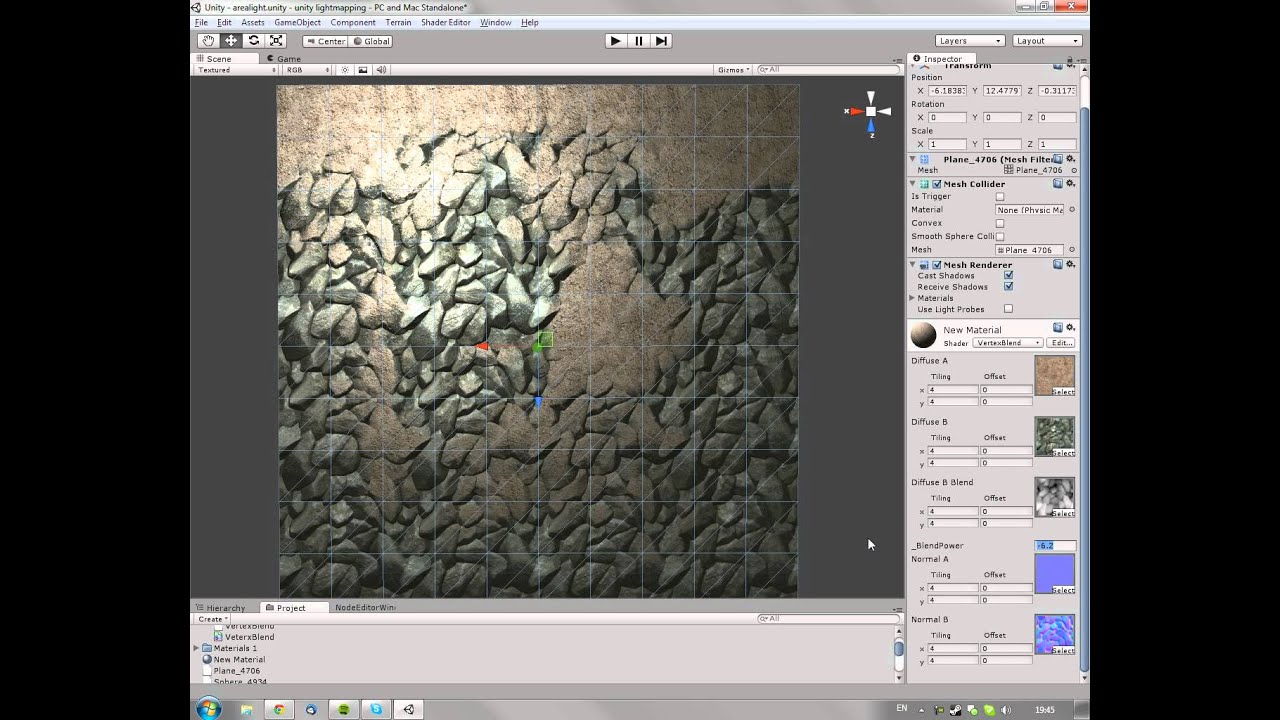
This is a material I made using the Strumpy Shader Editor for the Unity engine. It uses vertex color combined with a depth map to blend two sets of textures together.
Inspired by this UDK material, but the principles are the same and very simple to make:
http://udkc.info/index.php?title=Tutorials:Vertex_Color_Blending
Stumpy Shader Editor:
ht...
ivory sluice
heavy siren
Would a post from the iconic bgolus help? xDD
bgolus is evrywhere on unity forums fr
marble rain
it does not matter to much
stray tangle
buoyant holly
https://www.youtube.com/watch?v=HDXwSEUYrbI
yea exactly, Poiyomi has this
marble rain
etc
stray tangle
it's called RGBA color masking
heavy siren
ivory sluice
bgolus is evrywhere on unity forums fr
He is inhuman
some might even say he is a computer program
he has too much knowlege
its scary
stray tangle
 buoyant holly
RGBA masking requires an RGBA texture - this defines where the shader acts on the mesh. Left, map. Right, shader setup. The region in red can be changed in shader to display as yellow, etc.
 Twitter
·
Twitter
·
 buoyant holly
Back to shader: Can use seamless tiled normal maps per RGB area - tiny (128/256px) normal maps, but tiled around 50-100 times in the shader, giving you a higher effective TD.
You can combine these with an base nrm map for creases and baked normal details etc: (Blend with Base)
Twitter
·
heavy siren
marble rain
back to drinks
mfw he realizes that the virtual drink he might be holding is using vertex colors for the fluid dynamics to calculate foam from the baked movement of each vert. 
(joking xD)
that would be too many polys for vr
but still a good usecase ive seen a lot of recently
buoyant holly

A water shader I'm doing using Water Flow With Vertex Colors in Unreal Engine 4.
stray tangle
just remembered that Poiyomi has the option to bake averaged normals to vertex colors for smoother outlines
ivory sluice
i made a multi material shader for worlds and avatars recently (shader guis are hell btw) and it's as simple as making a structure for color, metallic, normal and emission, sampling and mixing their corresponding textures and then just treating it as any pbr shader, it also uses rgb masking
heavy siren
stray tangle
just remembered that Poiyomi has the option to bake averaged normals to vertex c...
Wait what
tell me more

 marble rain
heavy siren
mfw he realizes that the virtual drink he might be holding is using vertex color...
marble rain
heavy siren
mfw he realizes that the virtual drink he might be holding is using vertex color...
naaah
buoyant holly

In this tutorial I'll go over the basics of vertex color gradient based animation for Unreal Engine 4. Vertex color gradient animation is the practice of creating animation using vertex shader offsets with various math functions modulated by the vertex colors.
We'll start by creating a basic butterfly wing flapping animation, then we'll expand ...
stray tangle
Poi has a lot of options that can use vert colors
ivory sluice
ah aight like interpolated normals
heavy siren
buoyant holly
https://www.youtube.com/watch?v=LGg3Vh8RZN4
Oh yee, procedural animations 
best part about vertex color is you can write to it with less perf cost than a CRT
afaik
😄
buoyant holly
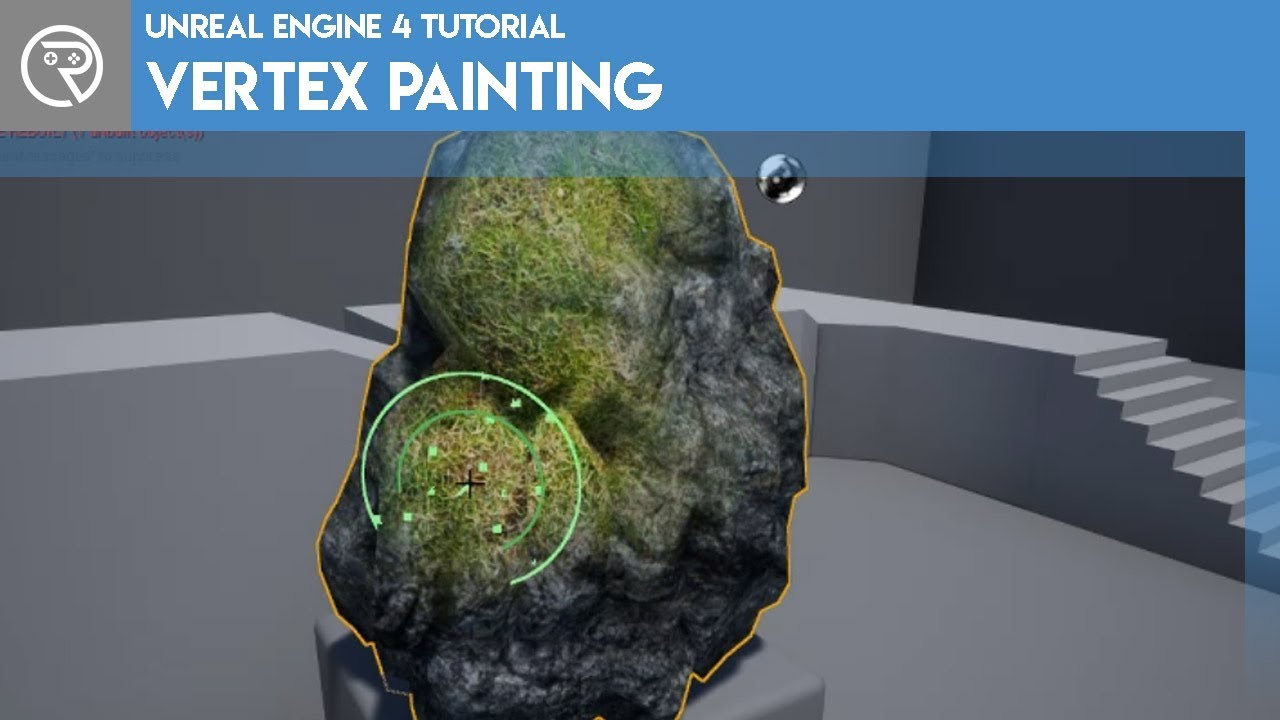
In this tutorial I go over how to use vertex painting to change textures and the appearance of meshes. This can add a lot of dynamic elements to a scene with very little work in comparison.
Support me on my Patreon and see episodes 2 weeks early: https://www.patreon.com/ryanlaley
In this episode I show the basics of material creation with vert...
ivory sluice
yee
well unless you have more vertices than all the pixels on the crt
anyways gpus (at least nvidia) have more cores dedicated to fragment shaders than vertex so it could handle some more
ashen hearth
Could someone please play with tonight
mint topaz
im sorry to say but i cant optimize your playing experience 
ashen hearth
What
 vale wagon
heavy siren
I really want to stress this
vale wagon
heavy siren
I really want to stress this
I can low mb than that! 🙂 256x256 matcap cost 0.04 mb texture memory and 4.3k polys. OR just use mobile diffuse shader 0.11 MB size and ZERO texture memory.
 buoyant holly
0.07mb with a single 64 by 64 texture and a 1000 triangles
 mint topaz
bouta just make a 100 polygon avatar
 craggy basalt
You know in blender you can make a really detailed model and save it as a texture for your low poly right, hell, there are even some people who just whip out the pen and pencil and scribble in the details. Just open up the texture for Krystal's mesh
 elfin karma
Can anyone tell me how many phys bone transforms are supported on quest avatars? I'm about to weight paint this hair but don't want to run into compatibility issues later 😵
I intend to set one phys bone for the head bone and then make exceptions for the eye bones so it just affects the hair. Just wondering how many bones I can add to the hair strands without it breaking...
 zealous wigeon
elfin karma
Can anyone tell me how many phys bone transforms are supported on quest avatars?...
zealous wigeon
elfin karma
Can anyone tell me how many phys bone transforms are supported on quest avatars?...
64 transforms (individual bones), 8 components.
zealous wigeon
elfin karma
Can anyone tell me how many phys bone transforms are supported on quest avatars?...
VRChat
The Avatar Performance Ranking System allows you to see how much a user's avatar is affecting performance via analysis of the components on that user's avatar. You can also use it on yourself to see how performant your avatar is. This system is provided to inform users what is likely the most perfor...
elfin karma
Ah! That's super helpful thank you. I need to bookmark this
 proper grail
Weird idea to phys bone humanoid defined bones, make a root bone thats parented to the head bone that all the hair bones connect to
zealous wigeon
elfin karma
Ah! That's super helpful thank you. I need to bookmark this
I've got it on my bookmark bar, just because of how much I refer to it.
elfin karma
proper grail
Weird idea to phys bone humanoid defined bones, make a root bone thats parented ...
What's the benefit of doing that over assigning the head bone? Serious question. I'm new to this
proper grail
Benefit? Things just break if phys bones are on any of the humanoid setup listed bones
elfin karma
Oh I see. Thanks, I didn't know that
 charred pawn
Anyone here able to assist me on optimization of a premade avatar? It has 245450 polys lmfao, that and the original creator is not of any help even though it was a purchased asset
 onyx harness
charred pawn
Anyone here able to assist me on optimization of a premade avatar? It has 245450...
onyx harness
charred pawn
Anyone here able to assist me on optimization of a premade avatar? It has 245450...
Yeah any avatar that doesn't specify the poly count and/or is advertised as  is 300k.
This is one of those times where you take the fbx into blender and remove everything you don't plan on using all the time. Plus just hope they didn't make it in Marvelous designer without retopo
buoyant holly
https://www.youtube.com/watch?v=8MkgXcidxg4 video tutorial that shows some basic optimization stuff and that is one thing I like about the Japanese models they're a lot more forthcoming about the triangle count

Did this video help you? Consider sending me a tip on Ko-fi! https://ko-fi.com/sippbox
Making optimized Quest models is hard. But it doesn't have to be! With recently updated polygon limits and fallback avatars, it's a better time than ever to create something that represents you to Quest users! Hopefully this tutorial will help you out!
0:00 ...
 heady smelt
buoyant holly
0.07mb with a single 64 by 64 texture and a 1000 triangles
heady smelt
buoyant holly
0.07mb with a single 64 by 64 texture and a 1000 triangles
This will be marked as very poor on quest
ivory sluice
Premade avatars on vrchat that are very poor or worse shouldn't be allowed to be sold imo
heady smelt
ivory sluice
Premade avatars on vrchat that are very poor or worse shouldn't be allowed to be...
True
Ejem.. most gumroad models.
ivory sluice
Just most in general
heady smelt
ivory sluice
Just most in general
Nah, most booth models are medium rated lmao
ivory sluice
Some advertise them with 82k poly or 120k poly as if it was something normal
heady smelt
ivory sluice
Some advertise them with 82k poly or 120k poly as if it was something normal
If it has toggles kinda makes sense to have so many polys, but if it doesnt its weird lmao
ivory sluice
Yee most booth creators work a lot of their content, or just keep it simple
On gumroad i usually see so many bases and avatars with a fton of credits, meaning that at least it goes over 100k polys
heady smelt
ivory sluice
Yee most booth creators work a lot of their content, or just keep it simple
On ...
Dont hate me for this but i dont care that much about optimization
Ofc if it crashes someone or makes the fps drop ill do something, but if it doesnt mess with someone then i dont care if its a very poor lol
ivory sluice
I gotta say, since i put my safety to not show very poor avatars now i have more stable fps and my gpu doesn't scream
It's because i was blocking 90% of the instance but also because there's no rank over very poor, so very poor can be a bit over poor or just extremely over poor
Most times it's the avatar with sketchy shaders that make the bloom shoot blinks randomly
heady smelt
ivory sluice
I gotta say, since i put my safety to not show very poor avatars now i have more...
My avatars are just poor, particles, workimg gun system, etc
ivory sluice
Yee
In any ways you can have whatevs you want
But that won't mean the avatar can get way over what vrchat considers you shouldn't upload.
I find too many ppl saying that the performance ranking system is outdated or broken or incorrect, that polygons don't matter or other bs.
I even found someone that said that vrchat is not a game but a game engine itself and that's why they should add some random bs they wanted whitelisted.
It's people like this why most times everyone is a robot with poker face
heady smelt
ivory sluice
Yee
In any ways you can have whatevs you want
But that won't mean the avatar can...
Polygons matter, just not as much as the ranking system considers it
ivory sluice
Polygons do matter
But their impact depends mostly on what vertex shader is being applied to them
And gpus have less cores dedicated to calculating vertices, limiting them to fewer calculations than pixels
Unfortunately there's no way on unity to guess the performance cost of shaders so vrchat has to stick with what's considered in terms of rasterizing and closely the 16 bit vertex index limit
heady smelt
ivory sluice
Polygons do matter
But their impact depends mostly on what vertex shader is bein...
True
marble rain
typically its Drawcalls > Materials > Phys bones > Polygons > Blendshapes. from left to right as to what affects it the most. from a general standpoint and a generally decent system. through that can change depending on your system. and materials and drawcalls go hand in hand so to speak.
heady smelt
marble rain
typically its Drawcalls > Materials > Phys bones > Polygons > Blendshapes. from ...
What are drawcalls?
marble rain
how many times your computer need to redraw something
ivory sluice
Imo draw calls, materials, shaders and polygons go together since they are kinda the same thing
marble rain
like if u got 10 drawcalls your asking it to draw it 10 times.
marble rain
ivory sluice
Imo draw calls, materials, shaders and polygons go together since they are kinda...
in a way yes. but also not really. its more in terms of what affects it
 radiant shadow
vram one thing that few check - too many avatars in one place and you can/will run out , some have theirs set to 'none' wich is terrible
heady smelt
I saw a 1,3 gb avatar
marble rain
jesus..
Vrchat should allow us to set a limit locally to how much vram we allow to show.
like it does with the download size.
heady smelt
marble rain
jesus..
The worse part is that it was just a car with many audio sources
stray tangle
that's also only texture vram usage, not including meshes
marble rain
yup
mint topaz
thats the sound of my computer burning
marble rain
imagine how many avatars will be poor ranked once the texture usage affects it
heady smelt
marble rain
imagine how many avatars will be poor ranked once the texture usage affects it
Mine already is poor lmao
Im too lazy to optimize it
marble rain
once you go Good its hard to go back lol 😄
heady smelt
I just try to keep it above very poor
mint topaz
ya
marble rain
you could easily make a material atlas. to reduce the total amount you have.
unless you already did
heady smelt
marble rain
you could easily make a material atlas. to reduce the total amount you have.
I do material atlas ln stuff i know i wont modify, like clothes from a single outfit
The hair or body i know i will change it anytime soon so i keep those separate to avoid headaches
ivory sluice
The order for what is say is
The renderer requests to draw x material on the screen
-The material uses some shader
--The renderer sends the vertex data of the mesh containing the material to the shader
---The vertex shader is executed for every vertex on the mesh using the material, in here the polygons take performance, can be unnoticeable or a lot
---All output vertex data is stored
---The rasterizer maps the triangles on the screen and tests the depth to guess if it should replace the current pixel on the buffer or not, this one kinda affects perf depending on the polygons but not that much
---If it does, then the fragment shader is executed for each pixel, interpolating the vertex data of the triangle between the three vertices
---When the triangle is finished rendering, then it goes back two steps on this list and keeps going until it finishes all triangles
-After writing it all on the buffer, it check the render queue priority and calls to draw the next material
And so that's why i think draw calls, materials, polys and shaders go under the same category
marble rain
ivory sluice
The order for what is say is
The renderer requests to draw x material on the sc...
to a degree yes. but the reason why i wont count polygons into it is more or less because of the fact that you can have a billion polygons and still only cause 1 drawcall. obviously that one drawcall will take alot longer to render due to the insane amount of polygons
heady smelt
marble rain
to a degree yes. but the reason why i wont count polygons into it is more or les...
You cant have more than the 32 bit limit, thats a computer's hard cap on everything
Lmao
If you have read/write disabled the poly count is literally that 32bit limit
charred pawn
What would be the best way at reducing the polygons of an avatar with 245450 polys 🥲 tryna make it pc/quest compatible or at least so quest users can choose to see
marble rain
all through it was a example. a billion polygons is obviously outright not possible in terms of computing in real time
marble rain
charred pawn
What would be the best way at reducing the polygons of an avatar with 245450 pol...
put it in blender. find out you can reduce
or use decimate
heady smelt
charred pawn
What would be the best way at reducing the polygons of an avatar with 245450 pol...
Use vrc quest tools and watch quest users crash when you enter an instanc3
marble rain
but it might not provide a desirable effect
heady smelt
(Im joking)
charred pawn
heady smelt
Use vrc quest tools and watch quest users crash when you enter an instanc3
Whats that 👀
marble rain
hence why i said dont lol.
unless you know what your doing 😄
reducing polygons is a lengthy process if you do it the proper way.
charred pawn
I have no idea what i am doing aside from my goal lmao
heady smelt
charred pawn
Whats that 👀
A plugin that converts an avatar for quest, but the poly count will be the same
charred pawn
heady smelt
A plugin that converts an avatar for quest, but the poly count will be the same
Hmmmm
Interdasting
marble rain
you might need to get some tutorials from youtube on how to do polygon reduction
ivory sluice
Decimation should be done for uniform meshes, you can try unsubdivide or removing edge loops manually
But at this point i accept anything that optimizes your avatar, i prefer a decimated avatar than a 200k polygon mesh cluster
marble rain
100% lol
majority of those avatars sadly just have to many polygons making a simple shape
charred pawn
Nods head yes and smiles
mint topaz
ill point out that angel doesn't have much unity knowledge, but i will point out that youtube will help
charred pawn
^^^^^
mint topaz
removing edge loops will take time, but its something you can 100% do
learn what they are, which isn't hard, then see what you can do in removing them manually
mint topaz
ivory sluice
Decimation should be done for uniform meshes, you can try unsubdivide or removin...
basically the first part of this sentence is very useful for your case, theyre both fairly simple - it just takes time
especially for your avi
heady smelt
marble rain
majority of those avatars sadly just have to many polygons making a simple shape
Like the time where a "D" letter avatar had 340000 polys
mint topaz
its a droning process
charred pawn
Waht
mint topaz
what
mint topaz
why would the letter D have 340k polys
mint topaz
how do you even get to that stagee
charred pawn
Makin me scared to look deeper into this avatar
mint topaz
itll be good practice for you
heady smelt
mint topaz
why would the letter D have 340k polys
I've seen avatars that would make the vrc devs themselves cry
charred pawn
🥲
mint topaz
charred pawn
Makin me scared to look deeper into this avatar
the more you do, the easier itll be to do it again in the future
afterwards you can look towards atlasing your materials for further optimization if need be
i say 'if need be' but in reality it will 100% help with performance
charred pawn
mint topaz
the more you do, the easier itll be to do it again in the future
But if the first project is a nightmare that is unsolvable by normal means
mint topaz
your project is more "oh theres a ton of shit" rather than unsolvable
its going to be very annoying to clean yours up purely because of how much crap your avi has on it
but if you want to get started, its a decent way to try
charred pawn
I'll buy you mcdonalds if you fix it with magic
Just snap your fingers and make it happen
heady smelt
I remember the time when a single shirt in my avatar had 30000 polys (Shirt rpped from a game)
mint topaz
i can decimate it for you if you want everything to look awful lol
i say that but id rather not xd
mint topaz
heady smelt
I remember the time when a single shirt in my avatar had 30000 polys (Shirt rppe...
oof for vrchat purposes lul
but yea
3D tech is interesting stuff to get into
charred pawn
I wish aiko could see the horrors of which we seen
heady smelt
mint topaz
oof for vrchat purposes lul
I like ripping stuff from games and then adding it to my avatar
mint topaz
and optimizing models via reducing subdivisions / removing edgeloops and cleaning up topology / retopology all falls under 3d shit
its a slippery slope if you like it
heady smelt
charred pawn
I wish aiko could see the horrors of which we seen
What did you see
charred pawn
Animations do not like this avatar
heady smelt
mint topaz
and optimizing models via reducing subdivisions / removing edgeloops and cleanin...
I never decimated something but i want to make a fallback version of my avatar
Ill look it up myself when i get back home
mint topaz
tldr:
its an easy way at reducing polygons
it will make your topology ugly
theres a good meme for this, let me look it up
heady smelt
mint topaz
tldr:
its an easy way at reducing polygons
it will make your topology *ugly*
Just dissolve vertices lmao
Ez
mint topaz
yea right?
charred pawn
I'd easily pay someone my last 6$ to optimize it for me ☠️ idk much and always have a 4 year old buggin me 😂
mint topaz
lol


@heady smelt behold
ivory sluice
I once saw a bloke flexing on how he has an avatar that can bluescreen your pc or brick it (i doubt it but just in case), he even said the avatar name, unfotunately you can't report individual avatars on the website so i just let it here
He has like 50 multi accs so bans don't work for that kid
heady smelt
mint topaz
<@456226577798135808> behold
Spheres should have the same topology as a Football/soccer ball
Change my mind
mint topaz
ivory sluice
I once saw a bloke flexing on how he has an avatar that can bluescreen your pc o...
b r u h
heady smelt
ivory sluice
I once saw a bloke flexing on how he has an avatar that can bluescreen your pc o...
Bruh
mint topaz
i hate that
mint topaz
heady smelt
Spheres should have the same topology as a Football/soccer ball

but yea- anyways
i personally enjoy 3d tech stuff, since i also do it for job stuff lol
charred pawn
ivory sluice
I once saw a bloke flexing on how he has an avatar that can bluescreen your pc o...
If i cant reduce my polys i shall increase them and create detriment for others!
heady smelt
ivory sluice
I once saw a bloke flexing on how he has an avatar that can bluescreen your pc o...
A friend made another friend of mine replace the whole coolingnsystem of his pc because the avatar made the fans of the pc spin so fast the fans broke and hit the water cooled tubes, causing leaking 💀
charred pawn
heady smelt
A friend made another friend of mine replace the whole coolingnsystem of his pc ...
Wth ☠️☠️☠️
I thought fans were set to fixed speeds
mint topaz
you can overclock some stuff
heady smelt
charred pawn
Wth ☠️☠️☠️
I wonder how the fuck the pc didnt shut off instead of making the fans spin so fast
charred pawn
mint topaz
you can overclock some stuff
All my stuff is overclocked
mint topaz
heady smelt
I wonder how the fuck the pc didnt shut off instead of making the fans spin so f...
yea i would be seriously concerned
charred pawn
All my fans are constantly at 100%
mint topaz
normally thatd force your computer to just stop but
heady smelt
He told me the fans were malfunctioning so that maybe explains it
mint topaz
even im impressed
ivory sluice
mint topaz
i *hate* that
Fr i really hate these kids, they download and promote sketchy apps and malicious stuff that is just made to f up other users in game, he even goes around like "yea if someone messes with me i'll have their whole dox leaked", idk if that's true but i can believe it knowing how many malicious apps he said to have
charred pawn
heady smelt
He told me the fans were malfunctioning so that maybe explains it
Mans got a helicopter pc
mint topaz
ivory sluice
Fr i really hate these kids, they download and promote sketchy apps and maliciou...
its stuff like this which makes me really just.. furious really
because i love seeing peoples process and creativity
especially when it works
from blender / maya -> unity / unreal, for vrchat or otherwise
charred pawn
ivory sluice
Fr i really hate these kids, they download and promote sketchy apps and maliciou...
Dox aint hard ngl
mint topaz
people can come up with outstanding things which is awesome
heady smelt
charred pawn
Mans got a helicopter pc
We all heard through his mic how the fans were spinning 💀
charred pawn
I can code and stuff better than modelling in 3d
charred pawn
heady smelt
We all heard through his mic how the fans were spinning 💀
Dammnnn
mint topaz
@hybrid mulch cease
heady smelt
charred pawn
I can code and stuff better than modelling in 3d
Im in the middle, im not the best but i kind of know a bit of everything
mint topaz
coding is a really useful tool
ivory sluice
mint topaz
its stuff like this which makes me really just.. furious really
If i told you how much me and many other users want this kid out of the internet
He got to the point that he can now crash and annoy other users on a specific world and not get kicked because he threatened the world creator with all this sh if he ever banned him from his discord server or vrchat world
mint topaz
can help with some rigging for like, maya and stuff, the initial setup
OR
you can make really nice shaders
do you use c# or what language?
mint topaz
ivory sluice
If i told you how much me and many other users want this kid out of the internet...
what the frick
im sorry but the lengths this child is going through to just be an annoynace is
mindblowing
charred pawn
ivory sluice
If i told you how much me and many other users want this kid out of the internet...
Who
heady smelt
ivory sluice
If i told you how much me and many other users want this kid out of the internet...
At that point call the authorities 💀
mint topaz
angel, have you ever been interested in shaders
heady smelt
I gtg, was nice talking to yall
mint topaz
until next time aiko
charred pawn
Byeee aiko
heady smelt
Yup, bye
charred pawn
And yea
Wdym interested
I like things that make objects look better at low cost of performance
mint topaz
you can unironically make some really nice shaders if you can code decently
charred pawn
I can take my coding knowledge to make shaders?
mint topaz
of course! 100%
charred pawn
I mean i guess that is possible
mint topaz
oh my god i need to introduce you to shaders
charred pawn
👀
ivory sluice
If you know c you are good w shaders
charred pawn
Ouu
ivory sluice
Unity shaders are codes in shaderlab, that is hlsl, that is c++, that is just c
mint topaz
if youve ever been to those shader showcase worlds, most of them are coded!
charred pawn
Oh so thats why i can open them in visual studio as code
ivory sluice
What you need to know mostly is vectors and maths in general
charred pawn
Well i do know those lol
mint topaz
excellent
charred pawn
I haven't done too much for about a year now but it wouldn't be hard to get back into lol
ivory sluice
You also have the source code of unity shader on github if you doubt something
charred pawn
So i could have been doing this through code the whole time with proper information ☠️
charred pawn
I figure coding is "harder" and thats why it wasnt spoke of much
mint topaz
this is something that @candid estuary showcased in #shaders for instance
you can make something beautiful
mint topaz
its mostly because theres a whole other chnanel just for shaders
whether they be node connections / coding
well
you get 60fps+ on quest so
🤷♀️
charred pawn
Do the people here sell their assets or give em out for free or just showcase?
And da helll
mint topaz
a mix of free / showcase. paid assets are normally purely through gumroad / booth / personal web stores
charred pawn
Gumroad is where i got greek avatar ☠️
mint topaz
lul
mint topaz
i always check the info of assets on gumroad before i buy 'em
 candid estuary
mint topaz
this is something that <@284433331515555840> showcased in <#534472629013315606> ...
candid estuary
mint topaz
this is something that <@284433331515555840> showcased in <#534472629013315606> ...
Note this is quest compatible and uses 0 textures :)
charred pawn
gasp pretty shader person
mint topaz
candid estuary
Note this is quest compatible and uses 0 textures :)
LIKE this is GREAT
and omg trix noticed me lol
candid estuary
Discord ping momento
But yeah with limitations comes creativity
Flip normals. Go ham
mint topaz
y e s
charred pawn
I'm about to throw this paid asset in the recycling bin 🙃
mint topaz
F
marble rain
lols
mint topaz
ill normally buy a base, but i prefer not to get premade avi's
with a base, i at least can control everything else that goes on it
and you know, optimize as need be if necessary
marble rain
just understand 99% of avatar bases are likely extreamly poorly made in terms of how optimized
charred pawn
Where does one aqquire a good base model then 🤔
mint topaz
model your ow-
marble rain
eh hard to get to.
most of the times you either need to pay someone to optimize it heavily.
or delve into it yourself
cause it can be a long process
candid estuary
become archeologist. throw some bones around make picture. model your avatar after that. creature 👍
marble rain
or you need to know people that know people etc that made a optimized version
mint topaz
candid estuary
become archeologist. throw some bones around make picture. model your avatar aft...
this is a solid plan
BAHA
marble rain
can u tell me how many materials the current avatar has Angel?
mint topaz
mans boutta say 100
charred pawn
Neither of you have seen an optimized base model paid or free that you would recommend?
mint topaz
idk, i have my own 🤷♀️
charred pawn
marble rain
can u tell me how many materials the current avatar has Angel?
Lets not talk about that, how about this weather eh 👀
Theres a lot lmao
marble rain
well just say it lol 😄
candid estuary
I mean, according to VRC everything is unoptimized (for good reasons though)
charred pawn
sigh lemme open the project 🙃🥲
candid estuary
Theres real good ones though
mint topaz
its good practice to optimize things for vrchat, but obviously not everyone will do that since not everything is vrchat
but saying that, it should be normal practice to at least ensure proper topology, verts are connected, subdivisions aren't bloody insane, etc
charred pawn
Rate the greek avatar from 1-10
mint topaz
and while i love adding edgeloops, you cant just leave it as is-
charred pawn
😂😂😂☠️☠️
mint topaz
charred pawn
Rate the greek avatar from 1-10
if i could see the wireframe, ill give you an answer
lul
charred pawn
Uhhhh can i see that properly in unity
Cuz remember the mesh was uhh
Fucked
To say the least
charred pawn
candid estuary
Theres real good ones though
Linkz 👀
charred pawn
Why there no vc in vrc dc
charred pawn
Tru
Is there anybody here we could add to a group to maybe look at how god awful greek is optimized? Figured other people could have different perspectives and im useless so 🤷♂️
charred pawn
Oh i know ☠️
Alright what all do yous need
A screenshot of the wiremesh
And texture count?
stray tangle
pro tip, use ShareX if you want to be able to record short videos/gifs of stuff
stray tangle
charred pawn
Alright what all do yous need
at least the full performance stats in the SDK for a start
mint topaz
i would prefer it in blender, but yes, wireframe and shaded wireframe
and the sdk stats
charred pawn
Okay give me a year to find them all 🥲
charred pawn
@mint topaz
Halp
Literally dont know where anything is
Idk why im being told keywords but not location when we know i am completely oblivious to unity
@stray tangle
Anyone?
This is why i refuse to learn any of this lmfao
stray tangle
the performance stats is the Builder tab in the SDK window in unity
if you've uploaded an avatar, same menu
charred pawn
...could've just said that
stray tangle
for the wireframe change your scene view from Shaded to Wireframe and Shaded wireframe


 stray tangle
christ the amount of polys lol
charred pawn
Yeaa
That's what im tryin to decrease
I want it to be able to be seen by quest users
stray tangle
...
that is not the only thing you'll need to fix to be visible on quest
there is a lot of stuff that needs to be done
if you were to pay someone to do it, depending on how much functionality you want to retain, that's a 100-200$ job easy
charred pawn
Lmao
stray tangle
for your quest version, you should start by removing every disabled accessory
any outfit toggles, props, etc
all gone
and then you can start thinking about optimizing the rest
mint topaz
good luck 💀
charred pawn
Gonna use quest tools and break everyone's lobby 🤷♂️
heady smelt
charred pawn
Gonna use quest tools and break everyone's lobby 🤷♂️
Good luck
Lets see how VRCQuestTools manages to make your avatar uploadable to quest
charred pawn
It probably wont lol im not actually gonna try
Quest users can just cry about seeing a fallback avatar
Get a good pc, not my problem anymore 🤷♂️
That's where im actually at
heady smelt
charred pawn
It probably wont lol im not actually gonna try
I mean its good to atleast try
charred pawn
It will either 1 be abysmally bad, 2 ruin others game or 3 most likely wont be able to transfer all the assets properly due to the way its staged
heady smelt
charred pawn
It will either 1 be abysmally bad, 2 ruin others game or 3 most likely wont be a...
Just try it
heady smelt
Welp
charred pawn
Too many physbones and i tried removing them all except my clothing, still too many assets
See 🤷♂️
At least my assumption was right, guess im learning something at least
Any quest user i see imma tell them to airlink or dont talk to me 🥲
So like 90% of vrc from my experience
candid estuary
stray tangle
pro tip, use ShareX if you want to be able to record short videos/gifs of stuff
100% recommend sharex. I have it set so it automatically puts images in my clipboard, opens recorded video folders and have a shortcut for scanning QR codes and picking screen colors
Its wild
craggy basalt
When I was making my avatar, the baked normal is very visible on the seams and I am wondering what I may be doing wrong to get this result

 proper grail
its just barely cut off, but is the idk image type set to non-color?
craggy basalt
thx, it was not I will test out now
proper grail
also feel free to use like a 512 margin to bleed the edges of the uv out
craggy basalt
my computer has 4gb of ram
buoyant holly
that's so low-poly it doesn't even have any joints
mint topaz
lol
craggy basalt
who needs joints when you have bump mapping
craggy basalt
proper grail
its just barely cut off, but is the idk image type set to non-color?
that fixed the issue
buoyant holly
craggy basalt
who needs joints when you have bump mapping
it's not going to animate well without any joints and probably not going to make your frame rate better making it even more low-poly than Quest fallback avatars
craggy basalt
im doing this for the meme
stray tangle
@craggy basalt make sure those edges are not marked as sharp
when and edge is both a seam and a sharp, it still shows up red like a seam
 high igloo
It can both be low poly and animate well, just know that you should put some priority on deforming areas when it comes to bone and edge placement :)
craggy basalt
Tbh I'll probably adjust the topology to make it semantical because all I did was spam the decimate to 0.02
craggy basalt
 onyx harness
open chrome with only 128KB of Ram, see how well it does 
buoyant holly
Star Fox certainly didn't run at 60 fps
onyx harness
plus one vrchat model from gumroad has more polygons than all of those games put together 
 silk elbow
Hiya people! I would love some help to upload a quest version of a pc avatar i have… im real bad at unity
craggy basalt
ive never actually finished a model before
but, i seemed to have made another mistake
 hybrid shale
people back then use every memory to their fullest
craggy basalt
When I mirrored the normal map there is a visible seam
(To get more detail in the texture)
 hollow root
All the materals are still there, they never combined to one, Look what it did to my model!?!, it ruined everything, I clicked to save atalas to, I followed the tutorial, I have nrever done flipping anything wrong, or did I forget something?
 hollow root
Liar!!!, because I have already changed generic to humanoid and it still say that?!!?!?!?!?
 stray tangle
@hollow root did you ever unpack your avatar at any point?
and can you check which unity version you're using? (top of the window)
hollow root
Ver 2019.4.31f1, and Vrchat Creator Companion
ivory sluice
hollow root
Liar!!!, because I have already changed generic to humanoid and it still say tha...
your avatar won't be used as humanoid if you don't put the animator avatar on the animator component, check if it's here
stray tangle
@ivory sluice it's automatic if the avatar was never unpacked
stray tangle
you should basically never unpack avatars to begin with, so if they did do that I was going to tell them to drag the FBX in again to keep that reference intact
ah good eye
hollow root
ivory sluice
yee but just in case
I swear to god I did add animator component, and did everything, and nothing happened, each time I leave rig, the avatar changes automaticlly to generic, and the repairs go in vein
stray tangle
did you click Apply after changing it to Humanoid
and are there any Import messages in the rig tab
you need to expand that section if there are
hollow root
I think I just clicked done
stray tangle
yea, that does NOT apply changes
hollow root
I clicked apply when I went to configure again, and the warning doesn't go nor anything changes, it's like some sort of hallucination/confusion
I just did everything😡 😡 😡 😡 😡
hollow root
stray tangle
<@941112551247347792> did you ever unpack your avatar at any point?
Wait, how to unpack avatar?, wait, I would try to figure out
stray tangle
no, DON'T
hollow root
There is a demon in the project, and he's on to me just, kidding cause there is nothing else I can do
stray tangle
don't unpack your avatar
hollow root
stray tangle
don't unpack your avatar
I actually unpacked the prefabs
stray tangle
well then, no wonder why nothing is updating properly
because by unpacking it you break the link to the original file
so changing import settings will have no effect
you'll need to drag the FBX from the assets into the hierarchy again to have the correct version
and then never unpack it
hollow root
It already never worked, even before I unpacked the prefabs, it never worked at the start
stray tangle
because you changed your import settingsafter unpacking
so you never actually fixed the model in the scene
hollow root
I am so sorry because I ask too much, but how to avoid and notice that you changed import setting?, I think I changed it without noticing, is the changing import setting in blender?
It says the Rig type: Non-Humanoid, even after I clicked enforce T-Pose and I clicked apply right before I clicked done, no matter what I do, nothing gets fixed, is there anyone online reply to me?
It's Okay I finally did it, thanks Scared
What the heck am I suppose to do now?, should I select the warning, it puts me in this below

 onyx harness
Your knee is below some other object in your hierarchy. That’s all it’s complaining about. You can move it up by dragging it if it’s unpacked but if your model is still packed, which it should be, you can use control ‘+’ to move it to the top of the list
onyx harness
These pings with np message. Just keep the message.
hollow root
onyx harness
Your knee is below some other object in your hierarchy. That’s all it’s complain...
Use control ‘+’ in keyboard?, cause I dunno how, click ctrl and +?, just tell me what I suppose to click
onyx harness
Yes, select the object in the hierarchy and then click ctrl then +
hollow root
The only way to click + is to click shift and then =
hollow root
I clicked and nothing happened
Should I select only one?
Yes it is, don't need to reply
I just pressed ctrl and + and this time nothing happened, my keyboard seems be glitched, even my laptop's keyboard is also glitched
onyx harness
If it’s packed, I don’t know another way to move it up. I use default unity keybinds, I checked the shortcuts and for me that moves objects
stray tangle
it's a non-issue, it won't stop you from uploading
hollow root
For me the objects sometimes moves and sometiomes not, now when I click nothing happens, but it works suddenly, and suddenly not, as if my keyboard has it's own personality, just kidding, no need to reply, don't need to say something
hollow root
onyx harness
If it’s packed, I don’t know another way to move it up. I use default unity keyb...
I finally put the knees on the top, thanks whever you're called
hollow root
onyx harness
Your knee is below some other object in your hierarchy. That’s all it’s complain...
I think I have to move the knees above the armature model itself
stray tangle
...what? no you don't
onyx harness
Huh
stray tangle
you also don't even need to really worry about that warning
it's a warning, not an error
craggy basalt
 proper grail
unassigned verts behaving as expected
craggy basalt
Probably going to redo the entire thing starting with the high poly model
craggy basalt
proper grail
unassigned verts behaving as expected
BTW, where is the sauce?
proper grail
in blender, edit mode, select -> by trait -> unassigned verts. it should highlight most of the head and itll be easy to just assign 1.0 head vertex group to it
craggy basalt
Oh OK thx
craggy basalt
im so sad, because the new model i made isnt able to parent to an armature
with automatic weights
proper grail
Sometimes if its a buncha smaller pieces itll fail. Separate by loose parts, do all of the parent by auto weight at once, and rejoin all the mesh bits
craggy basalt
i exited blender so when it would run faster, but when I came back the textures were gone : (
ivory sluice
Always save your textures from blender, these can be deleted from the memory at any moment on the project
 velvet pike
What would be a good or acceptable amount total triangles for a mesh that is paws with fur covering arms and legs? Havent done much optimising yet so the total is about 30k now..
buoyant holly
for a pc Avatar that's pretty good
craggy basalt
VRChat
The Avatar Performance Ranking System allows you to see how much a user's avatar is affecting performance via analysis of the components on that user's avatar. You can also use it on yourself to see how performant your avatar is. This system is provided to inform users what is likely the most perfor...
 amber hemlock
This user puts crappy minecraft models on all his quest versions. I feel like this is mean spirited. I didn’t even know I was sending this message to quest users when I was wearing it. Shouldn’t this be against the rules?
 mint topaz
youre kidding right
this is probably as tame as they get
honestly for interpretations sake i doubt people would actually get insulted from something like that
and if they did they'd voice it
i wont condone insulting quest users but this is more satire than anything
 empty viper
mint topaz
i wont condone insulting quest users but this is more satire than anything
empty viper
mint topaz
i wont condone insulting quest users but this is more satire than anything
caugh u should condone insulting anyone caugh
ivory sluice
Doesn't sound very unoptimized
But imo this would kinda count as hateful messages, just not very hateful compared to what is considered an actually hateful message
Tho it would be cool if there was a report option for avatars that use malicious content on different platforms like with crasher avatars to crash the other platform users and things like that (but more hateful)
For me it sounds like someone dislikes quest users and wanted the world to know
empty viper
ivory sluice
Doesn't sound very unoptimized
But imo this would kinda count as hateful message...
or maybe it's simply someone that dont have the required skill to do good things with low poly and thats he's way to present he's excuses to the people who cant see he's work :))
mint topaz
fair
ivory sluice
Sounds like a good reason too
ivory sluice
Perhaps these "just get a better pc lol" people
mint topaz
its really not an excuse to make PC avi's unoptimized af lol
like
i was debugging someones avi that they claimed had an optimized, quest version
but
it wasen't even a mesh at that point
it was so deformed from decimation that
i dont even know
it was just some stuff in the scene view
the original avi was 1.2 million poly's with like 60 material slots amongst most things
ivory sluice
When physbones got announced as 10x more performant they tought that meant they could put 10 times more physbones on their 300 dyn bones avatar
mint topaz
lmao
amber hemlock
mint topaz
i wont condone insulting quest users but this is more satire than anything
I think blocking people’s fallbacks for your insult is crossing the line. If you don’t want to make an accurate quest version let people show their fallback. It’s what they are for
Going out of your way to do extra work just to insult someone like, why?
Everyone uploads very poor to quest. That PC version would have been good rated on quest, he did extra work just to NOT do it
amber hemlock
Condone: “to accept and allow morally wrong or offensive behavior to continue”
mint topaz
ahh i hate english 💀
craggy basalt
A lmao. I was wondering if I could make minecraft steve in vrchat
onyx harness
amber hemlock
This user puts crappy minecraft models on all his quest versions. I feel like th...
The worst ones are the public models that are perfectly wholesome on Pc and then straight up crashers on Quest. They're set up like that on purpose to reduce the Quest population in the lobbies.
There's also always more Quest users on vrc than Pc users so this Pc elitist mentality thing some older vrchat users have is just laughable.
 pseudo obsidian
onyx harness
There's also always more Quest users on vrc than Pc users so this Pc elitist men...
pseudo obsidian
onyx harness
There's also always more Quest users on vrc than Pc users so this Pc elitist men...
Had that on pc once. For me, it was essentially nothing; no bones, no tris, no nothing.
Meanwhile, the few quest players were getting pissed asking them to stop. I still don't know what the avatar was, or what it's contents were.
"what I'm not even doing anything! laughs meniacally." - dude doing it.
onyx harness
pseudo obsidian
Had that on pc once. For me, it was essentially *nothing*; no bones, no tris, no...
"If you had a pc you wouldn't be having this problem"
pseudo obsidian
onyx harness
"If you had a pc you wouldn't be having this problem"
Ah, a staple. It takes me back.
 mossy pike
Just finished sculpting and now the worst part, retopology ;-; anyone know any easy tutorials for good retopo? Cause doing it vert by vert is so tiresome (And no I haven’t found anything good on yt )
 stray tangle
mossy pike
Just finished sculpting and now the worst part, retopology ;-; anyone know any e...
stray tangle
mossy pike
Just finished sculpting and now the worst part, retopology ;-; anyone know any e...
you can use these modifiers in order to help:
- mirror (enable clipping)
- shrinkwrap (target normal project, outside surface)
- subdivision (1 level)
- shrink wrap (target normal project, outside surface, small offset)
start with a simple quad and position it on the face to start
you should also enable snapping (top middle of viewport) and set it to Face, with Project individual elements enabled
mossy pike
stray tangle
you can use these modifiers in order to help:
- mirror (enable clipping)
- shrin...
what does shrink wrap do
i got a plugin to help retopo with blender
it automatically added shrink wrap but i didnt know what it did so i removed it
stray tangle
essentially projects the mesh onto the base mesh
you should probably be using it lol
mossy pike
ah nvm
its active
then its on the right track
im not very good at it, all i do is look at tutorials
but thanks for the help man
stray tangle
I would start by creating the loops around the important areas, like the eyes, nose, mouth, ears, etc
and then slowly building out the contours of shapes, eventually connecting them together
mossy pike
took me a milion fucking years but this should be good enough to make blendshapes without any weirds clippings right? i have no idea how to do good facial topology and just went with google and tutorials

 hybrid shale
mossy pike
took me a milion fucking years but this should be good enough to make blendshape...
hybrid shale
mossy pike
took me a milion fucking years but this should be good enough to make blendshape...
damn fine work,nice topology
mint topaz
youve followed those tutorials well 
 calm spade
Could use a bit of smoothing, but the flow seems great!
hybrid shale
the only issue i see is some of the loop arnt too nessary(around the face mask)
and the nose loop didnt flow nicely to the side of the face
stray tangle
mossy pike
took me a milion fucking years but this should be good enough to make blendshape...
looks great! as some others mentioned, you could probably dissolve a few loops
and smooth out some other areas
mint topaz
by using a mobile shader, quite literally
youre going to need to switch your shaders to mobile/lite
quest cannot use any other shader @heady smelt
huh
uh
you dont need blender?

just do this
youre in the wrong place
click your avatar in your scene
youll then see the materials on the right
do you see those
right now theyre vrm, correct?
alright
first though
show everything
you have more errors
yes
alright
once you do that to everything, youre good to go
👍
screenshots please
you can adjust shader settings
expand the arrow next to the shaders
adjust as needed
possibly? i dunno
you wont be able to match mobile/lite shaders 1-1 with pc shaders
nope
black emission = nothing lights up
youll need to make your own emission mask
if you download or have any digital art software, its very easy for your case
easy then
you can just grab your eye material:
- create a new layer justincase
- paint everything except what you want to light up, black
- paint what you want to light up wight
wight?
wite?
you get it xd
your eye tex ye
yea just incase
i like layers incase i do something stupid
yea
its an emission mask so dont worry
yea
now plop it in as your emission mask
wdym
no as in why are they pink
stray tangle
@heady smelt set your emission color to white, and then put your main texture (albedo) into the Emission slot. it's an emission map, not an emission mask. the difference is that a map determines the color of the emission at every pixel, while a mask determines if it should glow, and if so how brightly
note: if the color is dark, like black, it has the same effect as a lower emission value
by putting your main color in the Emission slot, you're effectively saying that you want the red eye to emit red light, and the blue eye to emit blue light
mint topaz
nice
stray tangle
you can control the emission brightness by the emission color field
you should keep it a grayscale value so that you don't change the emission color
for example, white for full bright, gray for less bright
mint topaz
i dont really dable with quest shaders so im not sure atm
stray tangle
you can't do any transparency on quest
you'll need to delete that part of the mesh in blender
yes, you can do that
but you'll still need to delete that part of the mesh
 warped apex
I'm trying to optimize my avatar to be at least a Good rating for quest.
One of the requirements is 2 or less material slots.
My avatar has 3 material slots, I think because my avatar uses 1 and I have 2 toggleable objects that each have their own slot.
Unity shows that all 3 meshes have their own material, even though the textures are all shared.
Is it possible to have only 1 material that all 3 objects use?
buoyant holly
you're going to have to combine the objects into your main mesh and use like bone scaling to toggle them if you wanted it only be one material slot
warped apex
buoyant holly
you're going to have to combine the objects into your main mesh and use like bo...
Thank you 😁