#3d-modeling
1 messages · Page 126 of 1


 spiral sigil
monke polygon


 thin shadow
spiral sigil
still an improvement
thin shadow
spiral sigil
still an improvement
harambe will forever lives in the virtual metaverse
spiral sigil
i promised my self by my next birthday in february 20th. id be able to fully 3d model my own thing from scratch. do you guys think ill be able to hit that goal?
errr thats pretty soon and you have school presumably so id go with smaller goals first
more finite and specific goals
goals you know for sure you completed and its not a guess ehh i think i did enough
but monke polygon.

 primal narwhal
Modifiers -> Decimate -> Unsubdivide is the easiest method to remove that without destroying the topology too badly.
What do you mean your "own thing" because that's pretty generic. Model a photo-realistic frying pan, that'll teach you bevels, extrude, loop cuts, probably more that's just off the top of my head.
If you want to learn the skills, model a donut. Blender Guru's Donut tutorial is still the ideal tutorial for learning essential modelling tools in Blender. Bite the bullet, make the donut, and then take those skills to something else. It's not the fastest way to learn, but if you keep trying to brute force something like you are, then it'll take longer than making the donut and the next thing.
Besides all that, trying to learn it all yourself without learning the proper methods will give you bad habits that'll just hurt your models later down the line. It's best to learn how to do it right the first time and go from there.
 icy jungle
^ what they said. But also figure out what you want to do. Create avatars? then you may need to look into modeling characters for animation. these character models have specific edge loops for proper deformation. that will also go into rigging and texturing. I can understand its hard to learn from people, are you referring to video tutorials? maybe you need good written tutorials?
spiral sigil
another new psychotic sculpt
 spiral sigil
icy jungle
^ what they said. But also figure out what you want to do. Create avatars? then ...
spiral sigil
icy jungle
^ what they said. But also figure out what you want to do. Create avatars? then ...
i dont know what the problem is. i just cant learn from people. apperantly my dad has this problem so yknow
 devout scroll
there's a lot of different styles of teaching
if you're just gonna sculpt spheres into random disfigured shapes you're not gonna get very far
just gotta find the right teaching style for you
 livid torrent
what are some good things to model to start out with
(already doing the tutorials)
devout scroll
small accessories that you can put on your avatar
glasses are a fun and easy one
knives and other simple weapons like baseball bats are pretty simple
rings, earrings, piercings and so on
livid torrent
i gotchu
 near totem
spiral sigil
another new psychotic sculpt
near totem
spiral sigil
another new psychotic sculpt
POV:0 bobuc
 dense tundra
spiral sigil
another new psychotic sculpt
dense tundra
spiral sigil
another new psychotic sculpt
Is that ghostface
 craggy lintel
WEIRD SHIT
My blender
uhhh
weird
so
basically I reverted a shapekey to enable something but also disable the other, but then when I did the operation, some mesh after being edited in shapekey is still registering my edits even not in edit mode.. wTF?
Is it a bad idea to play with revert keys?
Does merging keys even if some are revert keys, to optimize, confuse the mesh?
spiral sigil
i made another creature


 celest sierra
that is looking amazing
spiral sigil
celest sierra
that is looking amazing
thanks
celest sierra
np cant wait to see your other work!
spiral sigil
i wonder what an edgar the bug model would look like from me

 wintry gyro
spiral sigil
wintry gyro
spiral sigil

 weak ermine
So I need some help
I'm making hands for my first ever model with hands but they aren't excactly conventional and wanted to ask if these would even work


 true summit
here we go taking the dive
 spiral sigil
weak ermine
I'm making hands for my first ever model with hands but they aren't excactly con...
spiral sigil
weak ermine
I'm making hands for my first ever model with hands but they aren't excactly con...
i dont imagine why they wouldnt work but the fingers are just boring cones but it might look good with your model
whats the full picture of the model? you going for some kind of furry animal species right?
 gloomy pawn
weak ermine
I'm making hands for my first ever model with hands but they aren't excactly con...
gloomy pawn
weak ermine
I'm making hands for my first ever model with hands but they aren't excactly con...
They should as long as the bones are placed correctly! You can always quick and dirty test the rig with mixamo
weak ermine
spiral sigil
whats the full picture of the model? you going for some kind of furry animal sp...
It's an anthro latios from Pokemon, so the cones are actually just claws that will bend like fingers
 spiral sigil
ohh I see the resemblance okay
the fingers should probably be wider at the base and more pointy at the end from what im seeing of the pokemon i think that would look nicer
I also think you should stay with 3 fingers/claws since the pokemon has 3 claws and u have 3 toes so why not
so you can have fewer, but more clawlike thicker fingers
my take anyway
weak ermine
I just want to at least have a thumb because I usually tie expressions to all hand gestures so thumbs have to exist for thumbs up and finger gun
spiral sigil
ahh okay
maybe 1 thumb claw and 2 normal fingies
i made my own version of the devil
 spiral sigil
 lucid ibex
is anyone here open to design work? will pay
lucid ibex
is anyone here open to design work? will pay
if the design work could be an avatar world or prop commission you can find some reputable artists in VRC Traders Discord #community-servers-old
lucid ibex
oh cool, yeah i need a 3D model made @spiral sigil one that I can use in VR chat and other places
spiral sigil
it would be ideal if you could be more specific on what you want made, unless u dont want to disclose that here for some reason
craggy lintel
Quick question
is using visemes to make new shapekeys ok
or will this confuse data
spiral sigil
craggy lintel
or will this confuse data
idk what u mean by confuse data, at the end of the day Visemies are just blendshapes with names that Unity reads
spiral sigil
np i havent had problems using them to make others
 desert pine
is anyone available to call with me real quick? im trying to get model from blender to unity and after hitting a wall for the past week and 2 breakdowns, im at my limit, its likely a simple solution with no documentation
spiral sigil
desert pine
is anyone available to call with me real quick? im trying to get model from blen...
export the fbx put it in unity
desert pine
i keep loosing textures when converting from blender to unity. embed textures is checked, but the button to import textures is greyed out.
spiral sigil
desert pine
i keep loosing textures when converting from blender to unity. embed textures is...
then
assign the textures
in unity
create a new mat
apply the tex to the abledo
desert pine
HOW??? how do that????? dumb it down because you have to be more specific. i sont see the documentation anywhere HOW???? id be happy to follow instructions
spiral sigil
desert pine
HOW??? how do that????? dumb it down because you have to be more specific. i son...
firsty what version of unity u usin
desert pine
2014.4.31f1. blender is 3.0
desert pine
i am in 2019, i mistyped. Im tired soz
spiral sigil
desert pine
i am in 2019, i mistyped. Im tired soz

 dusty heron
spiral sigil
2019.4.29
dusty heron
spiral sigil
2019.4.29
Also you can use any version between 2019.4.29f1 to 2019.4.31f1
spiral sigil
i know i just said the version im using atm
desert pine
im trying my best to not be angry. Ive read over that. That didnt help
spiral sigil
desert pine
im trying my best to not be angry. Ive read over that. That didnt help
screenshot your problem
desert pine
texture button no worky! exported right! problem hard, so i wanted to screenshare!!
 spiral sigil
is the textures in the project?
dusty heron
Try exporting the textures from Blender separately of the model
spiral sigil
what
dusty heron
spiral sigil
what
Their problem is that the texture aren't being carried over with the model, so bringing the textures over separately might work
desert pine
dusty heron
Their problem is that the texture aren't being carried over with the model, so b...
how do i apply them?
spiral sigil
2 hours later
dusty heron
desert pine
how do i apply them?
Select a material in the project tab, and drag the texture over to the appropriate slot. Depending on the shader, it may have a different name such as Albedo, Base Colour or similar
I have to go have dinner now so if you have any other issues, I won't be able to help for a while, but I'll try be back quickly.
spiral sigil
desert pine
how do i apply them?
ask this in avatars-3-help
dusty heron
Nice
 solar fossil
spiral sigil
but monke polygon.
solar fossil
spiral sigil
but monke polygon.
Please use the multires modifier instead of subdivide for sculpting, it's an absolute godsend
spiral sigil
another shitty sculpt of mine


 languid fog
 cinder cradle
this tail look so unnatural in this body hah
cinder cradle
this tail look so unnatural in this body hah
thats the idea! haha
cinder cradle
dk why reminds me of alien isolation
 spiral sigil
another monster i made
 spiral sigil
i tried to make momo ignore the top of the head on the side view

 spiral sigil
i use to think 3d modelling was impossible. but ive been sculpting for 5 days making one or two things each day. now i see how easy this really was
 gritty gull
ok i massively fucked up somewhere please send help
 spiral sigil
shit
 tepid olive
Your model has ascended beyond the mortal realm and has become god
spiral sigil
gritty gull
ok i massively fucked up somewhere please send help
check the rig
tepid olive
Genuinely tho holy shit
gritty gull
spiral sigil
check the rig
i tried
spiral sigil
gritty gull
i tried
is it normal in blnder
tepid olive
What did you export the model to?
spiral sigil
unity
tepid olive
No the file type
spiral sigil
o
gritty gull
tepid olive
No the file type
fbx
gritty gull
spiral sigil
is it normal in blnder
ye
spiral sigil
gritty gull
ye
have you tried reconfiguring the rig in the model properties?
gritty gull
yup
tepid olive
Unity let's you directly import the blend file into it try that?
gritty gull
tepid olive
Unity let's you directly import the blend file into it try that?
you cant import blend files, has to be fbx
tepid olive
?
gritty gull
for some reason it doesnt like when i do that
tepid olive
I've done so before that's weird
cinder cradle
it could be metter of wrong option while saving in blender
tepid olive
Oh is that specific to vrchat?
cinder cradle
you can open fbx file in preview
gritty gull
bruh moment
 tepid olive
Bruh
gritty gull
that would take so much time
tepid olive
That rig looks sus
 tepid olive
How in the hell
spiral sigil
sus
cinder cradle
bruh when you save in blender you can set option that sets all bones to same direction
maybe that is problem
gritty gull
cinder cradle
bruh when you save in blender you can set option that sets all bones to same dir...
?
tepid olive
That makes sense
But this feels way too chaotic to be that
@gritty gull what happens when you move one of the bones
spiral sigil
death
spiral sigil


 cinder cradle
leaf bones are useless
gritty gull
ok thanks that doesnt quite solve the problem tho mate
cinder cradle
-z forward i think should be z forward
gritty gull
yea that fucked it more
cinder cradle
it means it is rig problem
tepid olive
I'm just imagining that every time you import it into unity it just gets worse and worse until it just fills your screen with furry coloured static
gritty gull
i mean, pretty much. it just keeps getting bigger and the bones keep going inside themselves
cinder cradle
your head bones have weird connection to hand
tepid olive
Move the bones around in pose mode in blender do they move properly
gritty gull
ehehehehe
spiral sigil
anyone got any recommendations for me to try to make thats horror related?
tepid olive
spiral sigil
anyone got any recommendations for me to try to make thats horror related?
Sexy legs
Well I looked at ur profile picture maybe you could make a really demonic cat
cinder cradle
cursed cat
cinder cradle
when i see screenshoot from your unity i can't understand what are bones that are comming from head
spiral sigil
its a start ig

 spiral sigil
so far
 cinder cradle
make like big mouth with bent teeth
 spiral sigil
i use to think 3d modelling was impossible. but ive been sculpting for 5 days ma...
spiral sigil
spiral sigil
i use to think 3d modelling was impossible. but ive been sculpting for 5 days ma...
dont get too full of yourself yet heh
its good to be proud but you never want to overdue it at such an early stage
yeah i cant sculpt a cat im too stupid
lol
then this problem happens then you feel like garbadge yeah?
nah. my dad keeps saying you have to fail to succeed
oh good then
1 less problem
 naive vortex
hey i have a gesture pack that changed my face when i move my hands so if i do middle finger its angry face etc (this pack came with legoshi which is the model i am using) how do i enable it?
devout scroll
You want #avatar-help
naive vortex
oh yeah sorry, thanks

 spiral sigil
yessir. getting better and better made this mf in like 15 mins prolly 5-7 if i didnt stop working on it to watch youtube
 thin shadow
in blender, in uv editing tab, how do i make the face selection in the 3d viewport window changes the texture in uv editor automatically according to the face that i clicked?
devout scroll
should be automatic if you don't have your current texture pinned at the top of the uv widow
thin shadow
devout scroll
should be automatic if you don't have your current texture pinned at the top of ...
ahh alright I got it. Such a small trivial setting that I can easily miss. Thank you.
 devout scroll

spiral sigil
How do you guys animate your 3d work for like a video presentation? Like what software do you do it in
if you wanted to showcase physics quickly or something
just in unity?
cinder cradle
you can do that in blender
devout scroll
yea, blender physics simulations are pretty easy to setup for simple things
spiral sigil
oh okay thanks
 edgy lily
sorry if wrong channel. I found this really nice model , its textures are inside the zip file but idk how to add them

 median pike
spiral sigil
i use to think 3d modelling was impossible. but ive been sculpting for 5 days ma...
median pike
spiral sigil
i use to think 3d modelling was impossible. but ive been sculpting for 5 days ma...
Keep in mind, sculpting the high poly is only if the of stages of asset creation. You have to do retopology, rigging, unwrapping, baking and so on
median pike
edgy lily
sorry if wrong channel. I found this really nice model , its textures are inside...
In the shading tab. Add a image texture node, open the texture with it and plug it in to the right channel. Do that for every material. If you don't know what any of what I just said means you should watch some basics blender tutorials first
edgy lily
alright thanks!
edgy lily
median pike
In the shading tab. Add a image texture node, open the texture with it and plug ...
just one question. Wheres the shading tab
devout scroll
at the top
median pike
^^
 median pike
Than watch a tutorial
devout scroll
it's probably easier to use the panel on the right than to manually do nodes
but Google it yeah
devout scroll
right side material panel under base color you can pick image texture and then assign it
it creates the node for you, you just don't need to do it yourself
spiral sigil
very ez ye
 wicked osprey
I have a mesh that I want to retopo, as it has too many tris, yet I've noticed that, when I look at it in edit mode in blender, it has non flat faces and an unapplied subdivision modifier (first image). When I do apply the modifier, I can see the 'true' flat faces (that are a lot more than what was shown before applying it, second image). My question is, why is it done like this, and can this setup be used to make an easy retopo? Thanks


 rain fjord
can i export 2 objects from blender as one into substance painter?
median pike
wicked osprey
I have a mesh that I want to retopo, as it has too many tris, yet I've noticed t...
No it cant
It's just displayed like that to make it easier to view. If you turn off "optimal display" in the subdiv modifier you will see the real topo
Faces can't bend like that. It's impossible for them
I mean technically you could use a lower subdiv level as your low poly and a higher subdiv level as your high poly
But idk if that's what you're looking for
wicked osprey
ahh ok got it, at least I guess I can use the mesh with the unapplied modifier as a 'guide' for the actual retopo in a duplicate? not sure if that's a thing
median pike
I mean
When I retopo
I use my high poly and use a shrinkwrap modifier on my low poly to copy the shape
wicked osprey
ahh alright I see
I'll have to review a couple tricks on how to do this efficiently
thanks a lot @median pike
languid fog
First time doing smth Low poly + sci-fi

 median pike
Looks cool. What's the polycount?
cinder cradle
Yes it looks cool
tepid olive
almost done with the base model
 devout scroll
@median pike all the stuff in the material panel is the same as in nodes
I usually don't use it but maybe I should as it's faster
median pike
I knew that, I just didnt know you can add nodes by clicking the circles
thats cool tho
rain fjord
how do i fix these shading issues? i already have auto smooth on before u ask


 languid fog
median pike
Looks cool. What's the polycount?
languid fog
median pike
Looks cool. What's the polycount?
15k tri
thats the basic shape

52 tris + mirror X and Z
languid fog
you dont need high poly to look good tbh
and well that's for vrc, so i try my best to use the less poly that i can for optimization
i dont think ppl like to play vrc in 15fps 
rain fjord
rain fjord
how do i fix these shading issues? i already have auto smooth on before u ask
anyone?
languid fog
rain fjord
anyone?
can you show me the wireframe view?
rain fjord
@languid fog same areas?
languid fog
yep
rain fjord
languid fog
yep


 rain fjord
i literally just said i already have autosmooth on in my first post
but what should i have checked under geometry data?
languid fog
rain fjord
i literally just said i already have autosmooth on in my first post
did you tried changing the angle ?
rain fjord
@languid fog yup
devout scroll
you should save yourself the trouble and just don't connect the edges
unless you have quads you'll probably lways get shading issues like that
you can try selecting the underside and calculating normals from faces
but i dunno if that's gonna help
rain fjord
@devout scroll can u be more specific than "underside"
rain fjord
devout scroll
underside of the desk or whatever it is
and how do i calculate the normals from those faces?
 rich scarab
guys, if i want to start in the 3d omodeling, should i start in blender?
devout scroll
press f3 and search for it, it should tell you where it is as well
devout scroll
rich scarab
guys, if i want to start in the 3d omodeling, should i start in blender?
yes, and find tutorials on youtube
rich scarab
devout scroll
yes, and find tutorials on youtube
okey, thanks
is difficult?
i know that is, but if i want to create one avatar in less of 2 months, can i?
rain fjord
devout scroll
press f3 and search for it, it should tell you where it is as well
oh are u talking about recalculating inside/outside?
devout scroll
rain fjord
oh are u talking about recalculating inside/outside?
no, you can calculate from a few things, you want from faces in this case
recalculating is pretty much only useful when some of your face normals are flipped
should be in the same menu somewhere
rain fjord
in the f3 menu? what's it actually called
devout scroll
f3 is just search, just type from faces and find it, should say normals on the right
but it will probably tell you it's in the normals menu which is alt+N i think
rain fjord
set from faces?
devout scroll
yes
tepid olive
baby man

god i put this in mixamo and it looks like an alien lmao
aight looks normal lets look at the skeleton

what in the actual fuck

i mean it works perfectly fine
only problem i've seen is that the hands clip into the ground
i think its expecting shorter arms
tbh the arms do look really long
tepid olive
thank u ☺️
biggest problems i can see is that his legs and arms are too long compared to his torso
arms are way too thin too
cinder cradle
yes you need shorten them
spiral sigil
tepid olive
god i put this in mixamo and it looks like an alien lmao
probably because the arms are for the most part tubes and no like muscular contours
and also since its not textured at all its like grey alien
👽
 celest gate
Hey, is there a good website or a specific term for seeing an anime character (or similar) from all perspectives (you know, front, side, back etc) as reference material? wanna try model an avatar 1:1 first time in blender .-.
spiral sigil
I second that question because I havent found an abudant source of that only like that scattered across random corners of the internet
would be nicer to have a wider selection
tepid olive
spiral sigil
probably because the arms are for the most part tubes and no like muscular conto...
He's just a young boy ☹️
He ain't got any muscle
spiral sigil
put him in the gym
 gusty bloom
when rigging/modelling avatars, is there a certain distance i should have betweeen the eyes or would it not matter
cinder cradle
doesn't matter
gusty bloom
ty
spiral sigil
made an alien

 calm goblet
rich scarab
guys, if i want to start in the 3d omodeling, should i start in blender?
calm goblet
rich scarab
guys, if i want to start in the 3d omodeling, should i start in blender?

Grants Learn Blender fast short course: https://www.gamedev.tv/p/low-poly-landscapes/?coupon_code=GRANT&affcode=45216_9b6dqwx2
Grants Create low poly characters course: https://www.gamedev.tv/p/low-poly-characters/?coupon_code=GRANT&affcode=45216_9b6dqwx2
This video is part 1 in a series of videos that takes you through learning blender in a si...
 thorny ivy
Alright, got a weird issue with CATS.
Basically, it's causin' Blender to freeze up whenever I use the "apply as rest pose" feature. No idea why.
Ya'll ever have a similar issue?
spiral sigil
thorny ivy
Alright, got a weird issue with CATS.
Basically, it's causin' Blender to freez...
what blender version u in
u might be in a version too new for it but idk if they updated to 3.0 yet
it says 2.83 on most recent git post
thorny ivy
spiral sigil
what blender version u in
2.93
thorny ivy
Well, that's the version I'm usin', actually.
But I probably should be checkin' up for updates more regularly.
Alright, looks like purgin' orpahn assets helps.
I also deleted the lineart shaders (relatively new feature) an' think that was causin' an the hang-up.
Think it was still renderin' 'em even though they were technically disabled.
spiral sigil
silly goose
spiral sigil
no problem
 exotic parrot
How do I paint in blender
languid fog
exotic parrot
How do I paint in blender
texture paint

Learn how to easily paint your 3D models directly in Blender using Texture Painting!
Want to support me? 😃 http://patreon.com/surfacedstudio
TIME STAMPS
00:00 Introduction
01:15 Tutorial Start
01:56 Texture Paint Mode
02:28 Creating a UV Map with Smart UV Project
04:16 Creating Textures for Painting
05:34 Previewing the Painted Texture
06:10 Cr...
exotic parrot
But what if I'm using a model like this

Where I'm trying to paint specific parts
 quaint jasper
That's what texture painting is for
spiral sigil
are you asking how to temporarily isolate specific parts to paint on
idk if old blender has it or wit the same hotkey but if u go to Edit mode and select faces u want to paint on only do that, and then go to Texture paint mode and hit "m" for mask
 hushed gyro
exotic parrot
hushed gyro
exotic parrot
do you need to use such an old version of blender to do something specific? because in the newer versions you can select an area, hit the mask button in the top left and paint what you selected.
 lament pond
A large group photo of many models I've made
 quaint jasper
Impressive work 
 exotic obsidian
I hope to get on your level some day lol
On that note, where did you learn how to model?
 magic stirrup
Hey @quaint jasper, I found your Froggy Car avatar on vrc and I've been using it a lot. I wanted to customize it a bit, add some custom emotes or something, is there anyway you could direct me to where i could find the model/animations for the avatar?
spiral sigil
ima start naming these things. "The Smiler"

 tepid olive
what ya think of this ol fucker?


 quaint jasper
magic stirrup
Hey <@!97980768323633152>, I found your Froggy Car avatar on vrc and I've been u...
quaint jasper
magic stirrup
Hey <@!97980768323633152>, I found your Froggy Car avatar on vrc and I've been u...
Made all of it myself, but have no plan on distributing it, I'm open to ideas/requests however
 wet ingot
spiral sigil
wet ingot
spiral sigil
kinda looks like fortnite zombie not bad
tepid olive
a fuckin what now
spiral sigil
they had some halloween event with like zombies and crystals and killing them
like 2 years ago
tepid olive
e
spiral sigil
My creations are getting ugly now. I should step up my sculpting
 nimble glade
Hey, Gotten this error again, Tried going back to 2.93 but it hasn't worked 💦
 thorny ivy
Ya'll got any tips for thinnin' necks/flattenin' shoulders? Overhaulin' a model an' the new version is a lot thicker in those areas, not all that fond of it.


Actually, now that I've got a decent comparison, doesn't look too bad...
exotic parrot

I cant see the color on my avatar
I colored it before
But when I attached a piece to the model now it's like focused on it
I don't know how to look at my colors now
quaint jasper
You're in the object panel on the right side
exotic parrot
What am I supposed to be in
?
To be more specific I cant see the textures on the body anymore
@quaint jasper
quaint jasper
Did you switch the shading mode in the bottom left corner ?
tepid olive
U gotta go to textured mode to see ur textures
exotic parrot
How do I do that
exotic parrot
tepid olive
U gotta go to textured mode to see ur textures
?

Figured it out
But now the textures on the headpiece are not showing

Supposed to show like this
 formal bridge
I have a thing that I'm trying to fix for past few days - eyes are in this position only for me (other people see them normally) and only in vr mode (I see them ok in desktop). Someone has any idea what it can be? Eye bones are set up correctly, but tryed to change their position too - same result, in eye look setup they turn in a weird way
 spiral sigil
formal bridge
I have a thing that I'm trying to fix for past few days - eyes are in this posit...
spiral sigil
formal bridge
I have a thing that I'm trying to fix for past few days - eyes are in this posit...
shot it the dark but do you happen to use any mods for vrchat?
formal bridge
spiral sigil
shot it the dark but do you happen to use any mods for vrchat?
This isn't happening with any other avatar I have saved/uploaded so it's not the thing
 rich tendon
🤭
spiral sigil
That may be true but for troubleshooting sake its best you completely delete your vrchat game files (manually, if you do it with steam it wont remove the mods), restart ur pc, reinstall vrchat back and try again
important you do it that way and that way procedurally
oh and might as well delete the cache too after the game files are deleted
formal bridge
Eh, might give it a shot tomorrow
formal bridge
Will do if I fail, could be a bug. Thanks and gn
spiral sigil
gn
rich tendon
exotic parrot
How do I upload my model to vrchat
What part are you on?
exotic parrot
The model is ready and rigged
rich tendon
Go to #avatar-help
exotic parrot
I wanted to test it
spiral sigil
Ive got a model i want to port from blender
rich tendon
spiral sigil
Ive got a model i want to port from blender
Export or import
spiral sigil
i have model in blender that a friend textured for me but when i open the blend file it is untextured
so i guess export


 spiral sigil
le troll
 spiral sigil

 limber walrus
there are some models in blender that when using the grab in sculpt tool wont move until you go into edit mode like your trying to grab it nothing happens but then go on to edit mode and then you can see where you been grabbing it, just so you know in this pic ive actually moved it but its not moved on screen well to appear to of moved when i click it

here is some examples when i click on edit mode and is showing it actually moved


so how do i make it so i can see what im doing when using the sculpt tool
 dull pier
limber walrus
there are some models in blender that when using the grab in sculpt tool wont mo...
dull pier
limber walrus
there are some models in blender that when using the grab in sculpt tool wont mo...
first of all, why blender 2.7  . make sure you don't have a shape key selected in edit mode (make sure basis is selected.)
spiral sigil
I cant send a photo because apparently the arm of my model is deemed explicit so uh. I have a ball joint that refuses to rig properly I want it to stay still while the arm remains attached to it if anyone can help me with this please send me a message. I'm working with the nardoragon base.
median pike
I am having an issue with data transfer, I am trying to transfer normals from one mesh to another but whenever I apply the modifier all my shape keys stop working, they are still there, they just dont move any verticies anymore. I dont remember this being an issue on older blender versions
spiral sigil
in the modifier settings is there things about shapekeys?
if there is then trial and error with that and see if it works
median pike
yeah turns out its a bug in 3.0
spiral sigil
rollback to 2.93 or something then
spiral sigil
how do I make a keyframe for a ColorRamp Key? Trying to make the emission pulse and waver in intensity

its not recording the change when i do it
with the record button on
rich scarab
how can i add a shader to blender?
spiral sigil
rich scarab
how can i add a shader to blender?
goto the Shader tab at the top, and select the material u want to edit shaders with in the shader graph

your materials should come with just a Princibled BSDF shader feeding into the Surface of a Material Output node
similar to how you can call up the menu to add primitives in the 3d viewport, u can do Shift+A to cal up a menu to get shader ndoes
make sure u mouse is inside the shader area thing it matters
I have animation stuff on the left it wont be there

Grants New LowPoly Short Course: Learn Blender fast: https://www.gamedev.tv/p/low-poly-landscapes/?coupon_code=GRANT&affcode=45216_9b6dqwx2
Grant's Character Course discount link: https://www.gamedev.tv/p/blender-character-creator-2/?coupon_code=GRABBITT&affcode=45216_9b6dqwx2
Grant’s Drawing course discount link: https://www.gamedev.tv/p/compl...
rich scarab
spiral sigil
https://www.youtube.com/watch?v=moKFSMJwpmE
thanks
i started doing my first 3d avatar
only the 3d base
i want to practice and do some 3d models, like cars, donuts (reference), etc
should i practice only avatars? or do all type of 3d models?
spiral sigil
i would ask anyone else that since im not exactly excelling
ive been all over the place in what I make
 toxic shuttle
Is there a specific way hand bones need to be set up? I couldn't find anything official on either VRChat or Unity and if I look up example images I see lots of different ways to do it. The way I have it set up now is with the proximals starting at the point in the middle, but only the inters and distals actually deform. In game, the thumb deforms okay but the rest get pretty screwed up.
 spiral sigil
made a screaming guy
 spiral sigil
going to finally start using the steam version of blender so it can track my hours and see how high the numbers get
 simple zodiac
spiral sigil
made a screaming guy
simple zodiac
spiral sigil
made a screaming guy
Congrats but that’s scary
spiral sigil
simple zodiac
Congrats but that’s scary
everything i make is supposed to be scary. so thanks for confirming it is 🙂
cinder cradle
spiral sigil
hey so i rigged a robotic arm i thought in vrchat it was just going to revolve around a point like it did when i rotated it in blender
but Vrchat is actually moving it
anyway i can fix this
cinder cradle
moving it like, object is moving from other location to other or moving just arm
you need to add position to animation file
spiral sigil
yeah long story short i had enough dedication to this thing to redraw almost the whole head

 obsidian nova
Jesus, why…
craggy lintel
hey guys
just so you can save my anxiety
i can remap something that has shapekeys and is on an avatar right
craggy lintel
Are we forced to do the adobe version of substance
quaint jasper
nope
craggy lintel
quaint jasper
nope
Hey Ruubick, honestly, could you tell me which version of substance is best? Adobe or Non Adobe, I just want best experience and nothing bad haha
 vivid crater
they still have perpetual with 1 year of updates on steam
if anything, after the adobe update the shelf loads your assets faster and other qol improvements like being able to save color swatches
 sonic basin
when i make my model blink in unity it goes from this
 craggy lintel
sigh
sonic basin
to this
 craggy lintel
this is a sad day. i hate monopolies
sonic basin
does anybody know what might be causing it?
cinder cradle
you do blinking as animation?
sonic basin
shape key
cinder cradle
you created shape key in blender?
sonic basin
yes, and it worked fine for a while untill suddenly it started doing whatever the hell that is
cinder cradle
it seems like it removes everything besides eye lids
sonic basin
it doesn't have any problems in blender so idk what is up
cinder cradle
if it worked before did you done anything before it stopped working?
sonic basin
i really don't know what could have caused it, all i did was over time slowly adjust the arms and legs to make them more realistic
erm i kept deleting and re importing it and now it's somewhat working?
cinder cradle
hmm tbh i have no clue i have some theory but dk if it could be true
craggy lintel
we still use unity render pipeline for substance, right?
sonic basin
pardon me what? why and hell does the blink make the model have this many!? the model has never once even been above 90k
 sonic basin
2,147,483,647 is like wtf
 carmine dove
 carmine dove
open the vrc sdk settings and go to build, i did it from there
sonic basin
carmine dove
it needs an autofix applied!
also thanks, it shot back down to 26k
carmine dove

sonic basin
dayum that number was insaine tho
sonic basin
i was thinkin "did i make this model with rabbits instead of vertices?"
 copper oak
sonic basin
dayum that number was insaine tho
copper oak
sonic basin
dayum that number was insaine tho
probably assumes the worst since it can't be sure what it is without read/write enabled.
 warm plank
I have a question: my avatar has a material on the body that I want to change color when I speak. I have two shape keys in blender, one for each color (basis is 1 color, Speak is second color). I'm trying to make this work in unity now, and I'm getting lost trying to figure it out.
I've heard to use animator states, but I'm not sure where to start
am I on the right track?
(Edit: Posting in a couple channels, not sure what category this falls under and who can help me)
quaint jasper
craggy lintel
Hey Ruubick, honestly, could you tell me which version of substance is best? Ado...
I'm just using the latest version before the adobe update still, but that's a personal choice
spiral sigil
trying to make rtx squidward
 spiral sigil
made it like this in 15 minutes
 spiral sigil
i wanted to make my own
 spiral sigil
 tepid olive
ralsei
 quaint jasper
You need to use the autodesk fbx converter
Blender doesn't read ASCII format, it's only Binary
rich tendon
quaint jasper
You need to use the autodesk fbx converter
how can i get that?
quaint jasper
The internet 
rich tendon
lmao ight thanks smh
craggy lintel
rich tendon
Deviantart assets are a pain
spiral sigil
what program do I need to start creating avatars?
cinder cradle
Blender
spiral sigil
I'm well versed in Adobe CC suite but want to get into 3d modelling
thanks. Can I assign animations in blender as well? or do I need a seperate app for that?
cinder cradle
Hmm you can make animations in blender as well as assign them
spiral sigil
A different person mentioned Unity. Is that a crucial app for building avatars?
cinder cradle
Yup
spiral sigil
Unity is a paid app right?
languid fog
no
cinder cradle
no for personal use
cinder cradle
Unity is used to upload and customize avatar not make one
spiral sigil
Is this the correct channel to discuss these topics? or should I be in the Avatars sections
cinder cradle
It is fine channel since you asked where to model avatar
spiral sigil
Thanks. I plan to deep dive into youtube and skillshare later on
cinder cradle
Skillshare is good thing to learn
spiral sigil
How long have u guys been 3d modelling
I use photoshop/illustrator/aftereffects daily so I'm hoping the learning curve wont be too steep
cinder cradle
personally 7 years ago started for fun and it is my hobby
spiral sigil
Thats awesome
I just got introduced to VR and im quite inspired...
I think its going to absolute game changer
in terms of retail experiences, digital marketing, and just social communication/experiences.
cinder cradle
It will be if meta gonna progress more and give epic vr devices for cheap
spiral sigil
Its inevitable
cinder cradle
Other company will follow them up and it gonna be common to use
spiral sigil
Yes, I think this is just the beginning
Really inspiring stuff. Excited to be part of it
cinder cradle
Remember that at beginning you gonna be often frustrated bcs something doesn't work but don't give up
spiral sigil
Agreed, thats why Im happy to find channels here for support
 azure rain
yeah this is definitely a good place to ask questions
and I might suggest for your first model you try a prop as character modeling is quite complicated
spiral sigil
I was hoping blender would have M1 support by now
cinder cradle
spiral sigil
I was hoping blender would have M1 support by now
Home of the Blender project - Free and Open 3D Creation Software
celest gate
I don't know why but somehow this looks so wrong... looks like I gonna need to take a whole "model an anime girl/boy in blender" tutorial .-.
 spiral sigil
Thanks Whiren
calm goblet
celest gate
I don't know why but somehow this looks so wrong... looks like I gonna need to t...
polymodelling is an awkward way to make organic shapes as well, i find it helps to have some references of actual people as well so you can see what the anime is simplifying

where i've marked anatomy parts that's where you need photos of people so you can see what's being simplified and actually add it
like it or not anime does obey anatomy
probably help to get some references of anime figurines as well, statues, things like that
they do a good job of showing anime in 3d
 cinder cradle
you can fix it with sculpting
languid fog
thats what i doing
 true horizon
Where do i find where to apply a hair_substancepainter file?
spiral sigil
celest gate
I don't know why but somehow this looks so wrong... looks like I gonna need to t...
face is not neutral dont try to copy the one ref exactly you will copy the expression in the ref
calm goblet
languid fog
i hate male anatomy
are you trying to polymodel accurate anatomy?
if you are....you're completely insane
languid fog
calm goblet
if you are....you're completely insane
ofc not accurate but similar
spiral sigil
wish i could do something like that
calm goblet
languid fog
ofc not accurate but similar
still completely insane
why wouldn't you just sculpt and retopo?
languid fog
bc idk how to sculpt
calm goblet
perfect time to learn 😛
cinder cradle
Couldn't be more perfect
it isn't super hard if you just learn what tools do
and how to control them
calm goblet
the hard part is learning the anatomy and stuff, learning the tools is easy
cinder cradle
i always 2d draw something i want make haha
cinder cradle
in my case making
calm goblet
you'd be better off using proper refs 😛
cinder cradle
you are saying i can't draw >:|
calm goblet
yes
cinder cradle
well excuse me princess
calm goblet
i'm saying our squishy imperfect human brains will never be as reliable as having real images of real things to draw from
cinder cradle
true 😐
calm goblet
can't beat having pureref up one one monitor with all your refs and inspirations for a particular piece there while you're working
spiral sigil
yes. im the guy that attempted to redraw the hair by scratch. and half of the beard thank for asking 🥲
 celest gate
calm goblet
like it or not anime does obey anatomy
celest gate
calm goblet
like it or not anime does obey anatomy
fake news! JK, thanks for your markers, its my first "human shape" model, gonna try to fix it and still gonna do a complete head/body model tutorial, just to get the feeling and practice for it! But tbh it still kinda fucks my brain up because I worked for more then 15 years only with 2D/photoshop/drawings etc and somehow is my brain not handling a dimension more really well 😂
 native wharf
Yo, is there anyone that does modelling for commissions in here? Or anyone that can help me with my project? I have an issue with a character that has something incredibly specific about his jaw but I also suck at modelling and idk how to use the sculpting tools.
calm goblet
celest gate
fake news! JK, thanks for your markers, its my first "human shape" model, gonna ...
if you've been drawing for that long try sculpting rather than modelling, it'll feel more natural i think
sculpt your shapes then retopo over them, that way you don't have to figure out the topology at the same time as figuring out the shapes, gives you way more freedom
 merry cedar
will it be a problem when rigging if i already have the head attached to the body
quaint jasper
native wharf
Yo, is there anyone that does modelling for commissions in here? Or anyone that ...

VRChat Ask
Post about commissions for avatars in this category. Requests are not permitted, we only permit posts from those providing services.
 celest thistle
So im wanting to get a building model (building club) done for a new FBT club Im designing. Problem is I hate blender. Where can I find someone that would be up for this job for a reasonable price?
native wharf
quaint jasper
https://ask.vrchat.com/c/commissions/avatar-commissions/35
Ooo, thanks! It's just been hard to find someone that doesn't do exclusively furry avatars or eboy lookin avatars
native wharf
I also just had like five scammers dm me from here so uh... Yeah. ._.


 tardy elm
I'm not sure why, but every time I try to edit the one VRoid model (yes, to resemble my profile pic) using sculpt, it causes the model to break in unusual ways. I know this is a bit of an odd question to ask here, but are there any character creation programs similar to VRoid that allow you to make plus size characters? (I'm going to regret asking this here, aren't I?)
I just want to have avatars that aren't 2 models bashed into 1, and also have them be compatible with Craftopia because supposedly that's possible.
calm goblet
merry cedar
will it be a problem when rigging if i already have the head attached to the bod...
nah it'll be fine, absolutely no issues with your mesh being a single thing or multiple things
calm goblet
tardy elm
I just want to have avatars that aren't 2 models bashed into 1, and also have th...
vroid topology and setup is horrible for editing yourself in anything other than vroid, i'd recommend daz if you're gonna do that and then you retopo the model when you're done
cause you can't use genesis meshes in something like vrchat
as for craftopia....never heard of it so can't say
tardy elm
I use CATS which makes VRoid compatible with VRC, CVR, and NVR.
Or somewhat compatible...
calm goblet
as long as you rig it with a compatible skeleton then you should be good
you could just edit the skeleton from a vroid model if it export with it
 oak hatch
tardy elm
I'm not sure why, but every time I try to edit the one VRoid model (yes, to rese...
oak hatch
tardy elm
I'm not sure why, but every time I try to edit the one VRoid model (yes, to rese...
Design Doll, but that program is rudimentary and doesn't include rigging.
tardy elm
I guess I could give it a Mixamo rig, then just clean up the weight paints.
languid fog
celest thistle
So im wanting to get a building model (building club) done for a new FBT club Im...
VRChat Ask
Post about commissions for avatars in this category. Requests are not permitted, we only permit posts from those providing services.
You have a lot in fiverr, Gumroad, booth, etc, etc
languid fog
oak hatch
Designing Hegao P10-R for VRC. MOI3D is so fecking useful...
This is look like solidworks for some reason hahaha
Cool model btw
oak hatch
Ye, it's like an inbetwen of Solidworks and blender, it's really a weird program
oak hatch
Yeah, same here; I'm actually more comfortable in ACAD and Inventor than in Blender tbh.
spiral sigil
trying to do a remake of snotty boy
 spiral sigil
 cinder cradle
now eyes and hair
spiral sigil
i made that in 15 mins
i made the other head
in like 30 minutes
possibly 5 tbh
 cinder cradle
wow it's him
 shell sentinel
Hey guys, I'd like to add this facial markings to my model, my only problem is the face texture of my model is not setup to where I'm able to easily edit the face the UV is really weird and as I'm on quest I can't use any alpha blending shaders to use pngs is there an easy way for me to cut this out and then shape it around my models face without using transparency
 spiral sigil
ive improved from this

 soft hornet
Is anyone here a maker avatar?
I want to have my own avatar for ouctlets quest 2.
 surreal flame
shell sentinel
Hey guys, I'd like to add this facial markings to my model, my only problem is t...
surreal flame
shell sentinel
Hey guys, I'd like to add this facial markings to my model, my only problem is t...
You can either paint it directly onto the face texture using the image as a stencil, or you can model it as actual geometry and transfer it onto the face using shrinkwrap modifier.
shell sentinel
Yeah I've already tried shrink-wrap and it looked pretty scuffed ill try the other method though, thank you
spiral sigil
i just watched barnyard. and i dont think i regret modelling this
calm goblet
shell sentinel
Hey guys, I'd like to add this facial markings to my model, my only problem is t...
you can get your textures into photoshop or something, then use your mesh transform to bend those markings onto your face
or you can do some projection painting in blender
use that as a stencil to paint on your model
there's a lot of ways to make it work
 nimble cape
My new Series... I lost my account from a hacker... and starting my Mortimer Series..

Gonna make 100 Mortimers
Or Cursed Mickeys*
shell sentinel
calm goblet
you can get your textures into photoshop or something, then use your mesh transf...
The thing a out that is the textures UV is one square is super weird, im going to try something today
spiral sigil
 calm goblet
shell sentinel
The thing a out that is the textures UV is one square is super weird, im going t...
calm goblet
shell sentinel
The thing a out that is the textures UV is one square is super weird, im going t...
use the albedo to get your landmarks, you hsould have some colour variations that tell you where everything is
shell sentinel
If I show you the texture ot might help understand, this isn't a normal face texture

It uses that box on the top right as the entire face so I can't put the facial markings on this because there's no real shape of a face to work on theres an eye brow but underneath that is not where the texture for the eye is its super weird
I get what you mean though but that would only really work for something like this right? And i can't make a UV that looks like this
 spiral sigil
real

 untold schooner
anybody see smiling friends yet
 spiral sigil
y e s
calm goblet
shell sentinel
It uses that box on the top right as the entire face so I can't put the facial m...
oh it's one of those models, yeah just use projection painting
get your model in blender, use the pattern as a stencil paint it on, enjoy the way some parts look nice and clean and others will probably look pixelly
untold schooner
spiral sigil
y e s
 shell sentinel
I'm currently just cutting it out instead n the I can go into sculpt mode and shape it around my avatars face, bot the best way I could've done this as far as optimisation goes but atleast it'll look alot better
 shell sentinel

Not the prettiest result but it works for me
The sides don't matter too much as my hair blocks it

 flat aspen
Can someone explain to me how in this video at 3:44 he's able to rotate the bone and edit the weight paint. I know how to rotate bones. But if i leave the bone in a different position it stays like that and doesn't go back to normal. https://youtu.be/4fICQmBEt4Y?t=224

I've been meaning to update this video for a very VERY long time. But, we're finally here. Everything you need to know in order to start painting weight layers onto your character!!! Hope it helps :)
Female Body Model Link:
https://www.youtube.com/watch?v=_XfvLpLyulI
If you enjoyed this video, please don't forget to like and subscribe!
You ca...
lament pond
Wip

 hollow terrace
Im working on learning how to bring one of my characters to life for VRC and I was wondering if anyone knows if the youtube tutorials by Mako Ray ( https://www.youtube.com/watch?v=VV8WgcwqCzY&t ) are a good starting point. If not, could anyone recommend me a playlist or video class? Im looking to make my character from scratch, I have a lot of experience in digital art, but pretty much nothing when it comes to Blender.

Part 2 of a series in which I guide you through the overall process of creating a 3D virtual avatar starting from nothing for use in VRM applications and VRChat, using Blender and Unity. In this video we address the task of actually modeling the thing, and I try my best to give as many tips and pieces of advice as I can to help you on your arduo...
quaint jasper
lament pond
Wip
I love the silhouette !
 round niche
@hollow terrace well blender has a shortcut heavy workflow, so you should learn boxmodeling & tools first. for a good start the donut tutorial by blender guru is always a good start to learn.
Blender tutorial series showing you how to use the most common features, like modelling, lighting, materials, geometry nodes and rendering - whilst making a donut.
Download the Blender Shortcut Hotkey PDF: https://www.dropbox.com/s/jg4fs4i8zw5bxt7/Blender 3.0 Shortcuts v1.2.pdf?dl=0
Google Doc version: https://docs.google.com/document/d/1...
hollow terrace
Alrighty, thanks much! I'll probably be here asking way to many questions over the next few months. Hopefully I don't get too annoying haha
round niche
oh dont worry! question are there for to be asked 🙂
hollow terrace
Im blazing through this tutorial series. I'ts so exciting to be trying a new medium. I've got all these ideas in my head for what I want to do with my avi, I cant friggin wait
round niche
awesome! but dont over do it, most creative people like myself tend to burn out, do step by step and keep care of yourself! happy blender noise
hollow terrace
Yeah, I've been there before a few times with drawing. But I make sure to take breaks and pace it all out. Plus, now that I'm learning this, if I need to take a break from it, I can just go draw. I kind of go crazy if I go more than a day or two without drawing, but if I draw too much I get burnt out, so I think having these two things to swap between will really help my workflow and depresso at the same time =3=
I appreciate you suggesting this guy, I'm about halfway through part 6, and so far I've only had a couple hiccups, which were things that he mentioned might happen. He's really good at laying it all out. I remember seeing his tutorials when I was younger and wanting to try 3D and scoffing at the donut idea. I ended up trying to follow another person's lesson and it was just too fast and confusing. Wish I had just watched the dang thing all those years ago.
round niche
yeah! and the best thing is, he always redo the tutorial serie with new blender versions! amazing person for real.~!
hollow terrace
So I remember seeing an avatar that pressed a button on its physical model, and then they got some cool gundam style armor and a gunsword, with an animation of it deploying and everything
Is that kind of thing still possible in game? It was a long time ago.
Even as an amateur, I already know that kind of thing would be hella advanced, but Im just curious.
round niche
well i guess should be, im still a bit new in unity, but a master in unreal, so in the end it would be some mask map and one float value to control the effect
but yeah, if i have the time i can learn some shader stuff in unity
but first i have to master the damn unity ui, drives me still crazy 😄
hollow terrace
No like I used it and it was literally a little gauntlet that you pressed a button on
could have been gesture, but like you put your index finger out, and the button lit up, and then did the thing when you pressed it
cinder cradle
Tbh it could be done with many methods
i think some are now impossible in new sdk
sadly
hollow terrace
Well as long as theres a way, thats all I need to know haha.
I know its going to take at least a few months before I'm close to pulling this off, but man Im so excited
cinder cradle
easiest way in my opinion is play animation when someone click the button now
you can be creative with that
hollow terrace
I DJ a lot in Vrc, for friends and events alike, and my idea was to model my main OC, and then have him pull like a ripper cord from his wristband that plays the animation and changes him into a sort of floating post-cyberpunk style DJ with a hovering turntable. The dream would to have it be audio responsive to my input, but who knows if thats even possible.
 cinder cradle
It is possible but as i see it's not easy to set up but it's possible
First focus on making model than focus on sdk
hollow terrace
yeah for sure
just satisfying my curiosity. Knowing that its possible now makes me want to keep going even more haha
cinder cradle
The hardest part would be setting it in sdk i see you already have idea in your head so making 3d model won't take you long
hollow terrace
what do you mean by setting it? Like importing it from Blender, or setting up the actual functions after importing the model/animations to sdk?
cinder cradle
Yes when you gonna make model and animations setting them in sdk could be hard, sometimes there are no specific tutorials for what you want
hollow terrace
gotcha, well Im glad Im here then, because I'll surely need help
spiral sigil
hollow terrace
I DJ a lot in Vrc, for friends and events alike, and my idea was to model my mai...
You might want to take a look at blendshapes for any simple smooth transformations you want to make with the mesh. And also have a look at poiyomi's shader which has an audio link module reactive with any worlds that have audio link.
hollow terrace
So Im learning modeling in blender right, but should I also do animations there or will it be easier to move it to unity and make the animations there? A lot of the stuff I've seen about vtuber and vrc avis mentions moving models over to unity but im not sure if thats pre or post animation.
Im just gonna focus on modeling for now, just want to ask before I hit that bridge
spiral sigil
Personally I'd animate everything in unity
hollow terrace
Alright, does that include rigging and stuff as well?
Like the only thing I should be doing in Blender is making the actual model I gather?
spiral sigil
No rigging should be done in blender
Your model should be imported into unity when everything is set up
Uv's, blendshapes, weightpainting etc.
hollow terrace
Alrighty, sounds good. Ill look into it. Thanks a bunch, I'm sure ill be back with more questions.
Just gonna focus on learning the actual modeling process for now
surreal flame
flat aspen
Can someone explain to me how in this video at 3:44 he's able to rotate the bone...
The bone stays like that because it's effectively pose mode. To reset the bone to its default position you need to reset rotation/scale/translation, whatever you did, with Alt+R/S/G.
 cerulean shoal
the emoji man 😜
 spiral sigil
tryna make a body

 gritty quarry
norman interpol evil
 calm goblet
round niche
<@!193877014019571713> well blender has a shortcut heavy workflow, so you should...
calm goblet
round niche
<@!193877014019571713> well blender has a shortcut heavy workflow, so you should...
you mean the donut tutorial that tells you absolutely nothing about absolutely everything and takes a year to finish, only to find you didn't actually learn anything?
grant's complete beginner series is a much better bet for newbies
 delicate wagon
Where would one go to find someone to give (voice chat) assistance to a friend of mine who's trying to use blender to do vr chat avatar stuff
spiral sigil


 obsidian nova
calm goblet
you mean the donut tutorial that tells you absolutely nothing about absolutely e...
obsidian nova
calm goblet
you mean the donut tutorial that tells you absolutely nothing about absolutely e...
I sped run the whole series over 2 days…lmao. It’s not that long. 🤷♂️ It’s a really good series for familiarizing yourself with the UI and all of the tools (which is what overwhelms most beginners).
In the interest of brevity, he leaves out A LOT regarding HOW to use the tools though…That we can agree on. 🙌
calm goblet
it's good for someone coming from another software to just learn where stuff is
useless for actually learning the fundamentals or how things actually work
spiral sigil
calm goblet
it's good for someone coming from another software to just learn where stuff is
remember when you said im not a 3d artist at all? welp look what i made in avatar showcase.
calm goblet
spiral sigil
remember when you said im not a 3d artist at all? welp look what i made in avata...
i said just using a generator doesn't mean you're a 3d artist, making your own shit means you are 😛
flat aspen
What would be the best wait to join these meshed at the seams. It's all one object. But there's seams everywhere How would i join them?
 quaint jasper
flat aspen
What would be the best wait to join these meshed at the seams. It's all one obje...
quaint jasper
flat aspen
What would be the best wait to join these meshed at the seams. It's all one obje...
If the mesh is disconnected, then doing a bridge edge loops between the two edges might work well enough
flat aspen
Ok. That worked for like the wrist. but for some stuff it didn't what worked was selecting the mesh in edit mode and selecting merge by distance. it worked for the shoulder seams and most of the other parts i had a problem with.
quaint jasper
flat aspen
How would this be fixed. All the textures are off the same model. And the seams are fixed where they're actually joined. But i get this weird skin tone effect when i put the normals for each part. I was able to make the face that looks extra shiny the same as the chest area but for the normal i had to really lower the strength.

Since this is just in blender would this be fixed in unity when i used one of the vrchat shaders?
quaint jasper
Your normals are likely flipped, in edit mode, select everything and do Alt + N > Recalculate Outside
flat aspen
That didn't fix it.
quaint jasper
Try Alt + N > Flip but only on the arm vertices
flat aspen
Nope. it just gives it a weird 3d ish tone.
quaint jasper
Not sure then, could be your node setup
flat aspen
probably. all the nodes are setup correctly. but if it's just the nodes i assume in unity they might get fixed when i add a different shader
quaint jasper
It might, could also be another mesh issue but hard to know without being able to look at it further
flat aspen
Maybe. If i adjust the normals strength for the face it looks more in line with the chest area. But the arm I couldn't get close enough.

I was hoping that alt+N would of fixed it because i saw it while i was looking up how to fix a different issue but forgot until you told me. Because it's like every mesh is receiving light from a different area.

Oh well. I'll see what the outcome is in unity eventually
lament pond
Wip. Placeholder colors.

 modest shell
When i export my model from a blend to fbx the whole thing looks exploded instead of normal
 cinder cradle
modest shell
When i export my model from a blend to fbx the whole thing looks exploded instea...
cinder cradle
modest shell
When i export my model from a blend to fbx the whole thing looks exploded instea...
Go back to blender and hit ctr+a and apply scales and also check if you have right settings in export
modest shell
what are the right settings
cinder cradle
for example this

also someone had messed avatar because of blend shapes maybe it could be it
modest shell
the blend shapes are all good i verified
ty that fixed it , was scared for a second there
cinder cradle
ok nice
craggy lintel
can you weightpaint through a single line of verticies
more like
is there a way to
i want to
spiral sigil
sosig
 calm goblet
flat aspen
How would this be fixed. All the textures are off the same model. And the seams ...
calm goblet
flat aspen
How would this be fixed. All the textures are off the same model. And the seams ...
set the normal map image texture node to non-color
common problem, any time i use cycles or eevee i forget as well and have to fix it cause i'm used to working with octane and unreal
craggy lintel
Could someone send me something on auto normalizing your weights
I want to see and know everything it Does
Down to the code tbh
calm goblet
download blender's source code and look at it
flat aspen
calm goblet
set the normal map image texture node to non-color
Thank you so much that worked.
spiral sigil
Hey folks, any idea why a rigged hand will not close completely when using valve index controllers? I was wondering whether this is related to the rig
and whether I can do something about it within Blender
surreal flame
I believe the controllers need some finger movement to calibrate properly and sometimes it takes a bit. Perhaps that's it?
spiral sigil
i asked in another chanell already but got no solutions i think this is a modelling problem i did so ima ask here

what causes this and how do i fix it
cinder cradle
spiral sigil
check this post maybe it's same thing #3d-modeling message
spiral sigil
wheres the apply scaling bit?
cinder cradle
when you click ctr+a there should be scaling in menu
before you do that click on avatar mesh
spiral sigil
oh in object mode
cinder cradle
yes
cinder cradle
also remember about fbx all
cinder cradle
when exporting there is apply scaling window and there you need set fbx all
spiral sigil
 cinder cradle
for example this
cinder cradle
cinder cradle
for example this
this
spiral sigil
wait settings in export
cinder cradle
yes when you click export and as fbx it's there
spiral sigil
tbh i didnt even realise there were export settings
cinder cradle
mostly you don't need to do there anything
spiral sigil
i think thats a visual bug
ok it didnt work i dont think leme try again
this is driving me nuts because the hand WAS working
cinder cradle
You edited something with hand? maybe the uv map broke and now something is overlapping with hand
cinder cradle
Check the uv map of the avatar
 cinder cradle
ok can you make copy of project i want to try something
cinder cradle
yes
wicked osprey
so I have a particle system that consists of a bunch of trails with noise, the problem is that when I go into play mode, the trails have sharp edges when I open the noise module of the particle system, but they become smooth when I close it (I want them to be sharp), why would this be? I'm uploading 2 pictures to show what I mean (left: sharp edges, right: smooth)

 flat kayak
So trying to learn how to add clothes

Can't get this to fit to save my life ;-;
very new to this
spiral sigil
@flat kayak idk if this is effective but!
id dupe the armature
assign the clothes to said armature
and then pose it
delete 1 half
then mirror
 flat kayak
spiral sigil
id dupe the armature
flat kayak
spiral sigil
id dupe the armature
that armature?
spiral sigil
no like the bone system

 muted raven
celest gate
I don't know why but somehow this looks so wrong... looks like I gonna need to t...
muted raven
celest gate
I don't know why but somehow this looks so wrong... looks like I gonna need to t...
I know its been almost a week but yes you need to start with a side view outline and front view outline, from there as you model make sure you follow the outline and before you know it

It Takes so much time finding every little imperfection, Take your time! this isn't something that can be rushed
learning sucks
but it's worth it
languid fog
^^
And the most important, enjoy your ride, most of the ppl that i know (included me) tried to rush the 3d learning process so bad that when they achieve smth, they didn't feel the "i did smth good" they only looked for the bad parts of what they achieve, take your time m8.

 ripe night
spiral sigil
ripe night
spiral sigil
Does this mesh have blendshapes attached to it? It looks like you did something that changed the vertex order (adding UV seams could do that) and corrupted the blendshapes
 proven zodiac
i can make Minecraft mob type models, if anyone wants to use one, or make one lemme know!
solar fossil
Time for infinite™️ energy 
 still wadi
i don't have fdx i got fgx would that work ?
 warped linden
still wadi
i don't have fdx i got fgx would that work ?
warped linden
still wadi
i don't have fdx i got fgx would that work ?
sure
 native slate
Looking for criticism on mouth shapekeys. If you see something that looks off, please point it out

 keen tulip
So this question is more for those that have used Blender animation part and are familiar with it but does anyone here know how to put two animation files together on the same rig model? If so I have a task if you could do it.
I have some animations I want to put on my avatar but some of the animations are split into two files, one for arms, legs, and hips, and one for upper body head, and face. I want to get both files work at once at the same time, then once that’s done it needs to be exported as an FBX file and I can take it from there.
Let me know if any of you can help out and I can explain more in DMs.
quaint jasper
keen tulip
So this question is more for those that have used Blender animation part and are...
Copy the keyframes ?
keen tulip
quaint jasper
Copy the keyframes ?
I don’t think I can do that, the animations aren’t FBX files so I can’t put them on unity, plus they aren’t humanoid which is why I need the animation with the model that’s for the rigging to work so that way I can turn that model into humanoid which then I can take the animation from that model on unity.
quaint jasper
What are the animations then ?
keen tulip
PSA files, that’s why it needs to go into Blender, hook those animations up on the rig, turn them into FBX files so that unity can accept it
The reason why some of the animation files are not together with the other body parts is because it’s to do with transitions.
quaint jasper
What kind of transitions ? Any screenshot ?
keen tulip
quaint jasper
What kind of transitions ? Any screenshot ?
I’ll get back to you, doing something else atm
 dusty heron
A screenshot doesn't convey that very well
obsidian nova
Trying to make the ReadyPlayer.me avatars more expressive & stylistically unique.
Starting by giving them wider, more expressive eyes (with recessed pupils) and altering the facial structure slightly to make them more stylised

Also finessing the topology, since a lot of it could be better.
azure rain
spiral sigil
prolly gonna compress. but ultra 8K textures
a 8K head texture like that is a colossal waste of vram as even with a VR headset it's never going to render at the full resolution a Oculus Quest 2 has a screen resolution of 1832 x 1920 so even if you were to position yourself so the head takes up the full screen It could only render about like 2K amount of details
calm goblet
azure rain
a 8K head texture like that is a colossal waste of vram as even with a VR headse...
you lose less when you downres than when you upres though, creating at a higher res then downscaling to fit is generally better
i generally create everything at 4k then scale down as needed
azure rain
good point I just was more meaning displaying the 8K in game
keen tulip
quaint jasper
What kind of transitions ? Any screenshot ?
So I’m not home at the moment but the main reason why the animation are broken into parts is for fluid transitions. Just to make things look more fluid.
Wait
Can I take the key frames from one animation file to paste into the other animation file on unity when putting them on there?
round niche
you can copy stuff directly from one blend file to another blend file, if both are open, if thats helps~


 sullen zinc
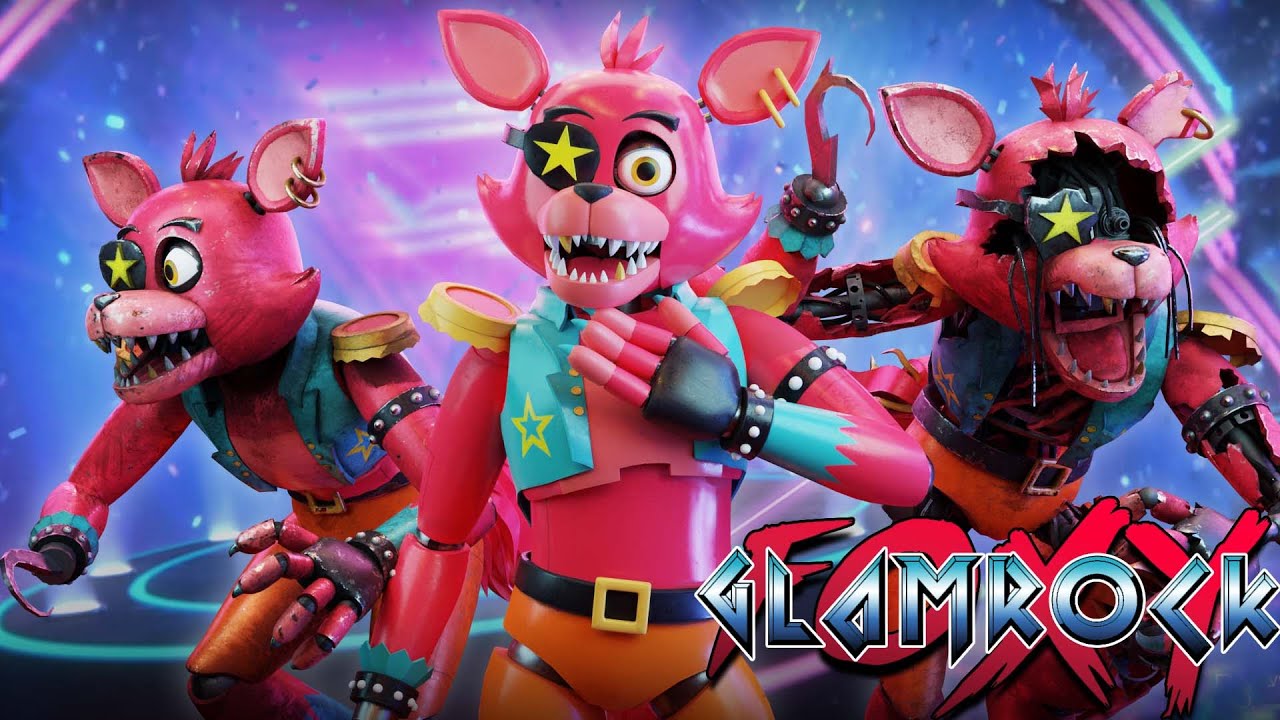
This is for my new fnaf security breach mod thaat replaces Roxanne with Glamrock Foxy
download mod: https://www.nexusmods.com/fnafsecuritybreach/mods/19
#fnaf
#securityBreachmod

 rain fjord
should i add a bevel segment or 2 to my low poly since my high poly has bevels?
 subtle jackal
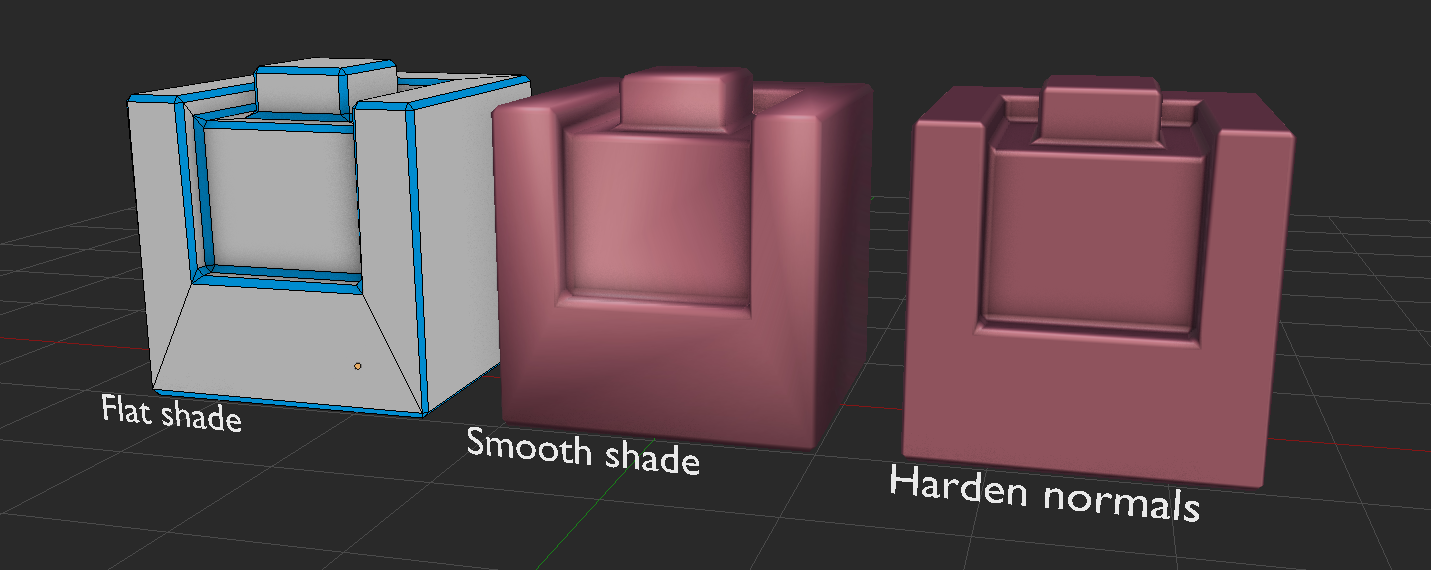
one segment + adjusted normals can give you the appearance of more bevel without the cost of doing so
 keen tulip
round niche
you can copy stuff directly from one blend file to another blend file, if both a...
keen tulip
round niche
you can copy stuff directly from one blend file to another blend file, if both a...
I’ll give that a shot, so have both of those files open on blender, copy the key frames from one animation and then past it to the other correct?
rain fjord
can i snap the size of a part of one object to another?
spiral sigil
If I divide my world into separate meshes for each room/hallway, how can I ensure that the textures remain seamless/contiguous? How can I ensure that the UVs are in the correct scale and position?
quaint jasper
Make your UVs before the cuts
assuming seamless textures and potentially triplanar mapping
azure rain
subtle jackal
one segment + adjusted normals can give you the appearance of more bevel without...
very nicely done
thorny ivy
subtle jackal
one segment + adjusted normals can give you the appearance of more bevel without...
How do ya harden normals?
Nevermind, just looked it up.
Got a genuine question though, not sure how many here'll actually be able to help with it.
Basically, my avatar's got some clippin' issues in her chest an' backside. She's definitely on the thicker side an' don't plan to change that so need a way to make thin's look natural in-game.
 azure rain
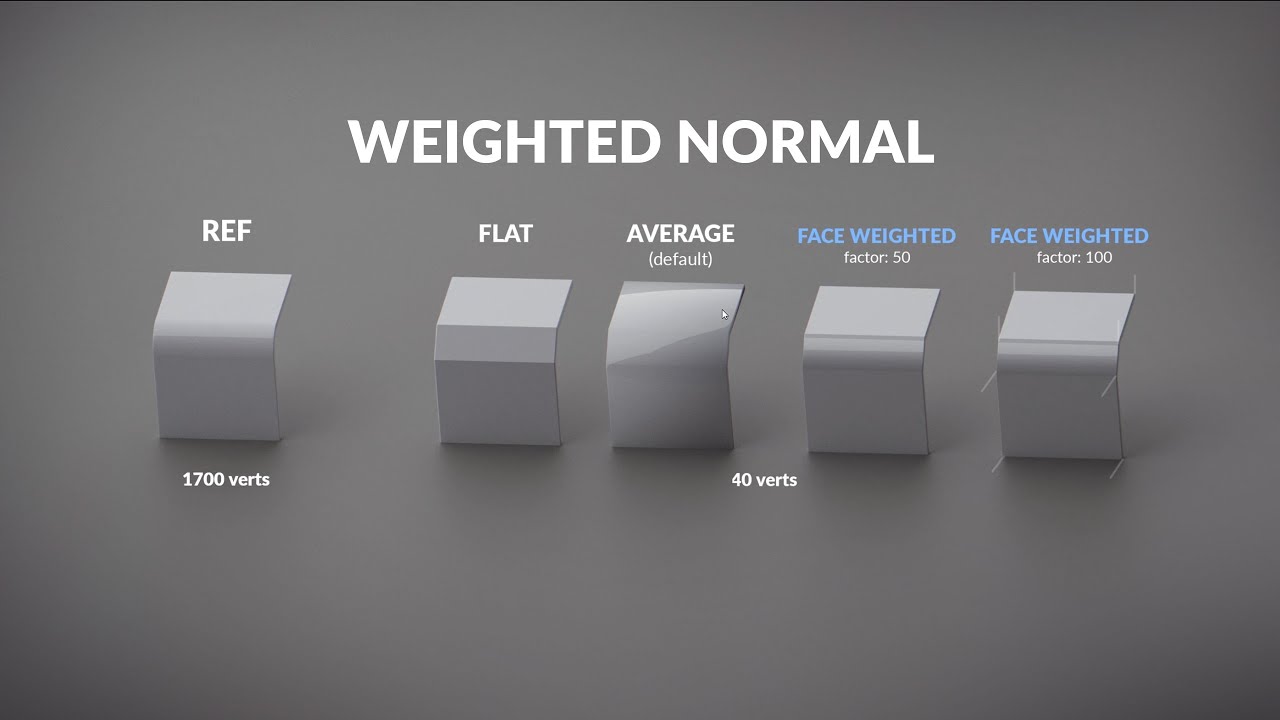
https://creativeshrimp.com - Learn more!
Weighted Normal is one of those Blender 2.8x modifiers that are game-changers for hardsurface modeling. Watch to learn how it can fit your 3D modeling workflow.
2.8x Free HSM Update | Youtube playlist: https://www.youtube.com/watch?v=16f4RwxP9n0&list=PL2aDImegRwZHQsA5_N4DpaOQmUXaIsBdN
Hard-surface Model...
thorny ivy
thorny ivy
Current geo I'm workin' with. Not real sure how to to make the middle-ground an' not have it come out weird regardin' movement/weight paint.
thorny ivy
azure rain
https://www.youtube.com/watch?v=sqGFhiP-2mc
Thanks, I'll definitely be usin' this to spiff up some other models I've got.
azure rain
yeah it's quite handy and also can be quite useful on vram usage to you have your edges like that so that you can use a tiling texture instead of having to bake the edges onto a normal map
rain fjord
rain fjord
can i snap the size of a part of one object to another?
anyone?
spiral sigil
might look like an old man. i might give up making this. but im tryna make tighten this time from megamind

 oak sapphire
good job
obsidian nova
Instantly what I thought of…
spiral sigil
redid the style of the clothes and made it low poly. use to have 100k polys now it has like 35000

or 32450

and redid the weight paint. now its bussin.
carmine dove
how tf do yall make clothes
quaint jasper
Duplicate body vertices, Alt + S
carmine dove
unfortunately the boobies get in the way of that but i found a tutorial that should work perfectly!!

Want to catch me on stream? https://www.twitch.tv/yiemorx
In this VRCHAT / Blender video i will teach you how we can use blender cloth simulation for us to create some clothing. In this video i will show you how to create a basic top and basic skirt using this method how ever the possibility are endless :)
untold schooner
marvelous designer is good but for quick and dirty stuff the blender cloth brush is great
calm goblet
untold schooner
marvelous designer is good but for quick and dirty stuff the blender cloth brush...
emphasis on dirty, since it doesn't actually account for any of the things that you need for a cloth sim on clothing to look natural
you'd be better off just looking up a reference and using draw sharp and flatten to get some nice folds
untold schooner
calm goblet
emphasis on dirty, since it doesn't actually account for any of the things that ...
well if you just want wrinkles for normal baking or something it’s fine
calm goblet
untold schooner
well if you just want wrinkles for normal baking or something it’s fine
yeah, if you don't want them to look like they actually belong there it's fine
if you want them to look natural you have 2 options, simulate the whole piece of cloth or sculpt them in with draw sharp then refine with flatten
cloth brushes are not particularly good for it
untold schooner
a few version ago blender added collisions and gravity to the sculpt brush but i dont know if its still there
either way as i said, for stuff that needs to look proper i use marvelous
carmine dove
calm goblet
emphasis on dirty, since it doesn't actually account for any of the things that ...
i don't need a realistic cloth sim so it should work well for me. i only create things for vrchat (at the moment)
maybe i misunderstood what u were saying
(i just woke up)
calm goblet
carmine dove
maybe i misunderstood what u were saying
yeah i'm saying the cloth brush folds don't actually look like the folds you'd expect on clothing at all, better to very quickly pop up a reference of similar clothing then make the folds yourself with draw sharp and refine with flatten
spiral sigil
How do you make a blender file into a unity file? I don't know which channel to put this in but I made an object but don't want it to be a .blend file. Want it as a unity package.
cinder cradle
spiral sigil
How do you make a blender file into a unity file? I don't know which channel to ...
FBX
spiral sigil
Just covert it into an FBX? Sorry I am new to technology like this. :)
cinder cradle
yes that simple
spiral sigil
Bruh. Thank you so much!
obsidian nova
@calm goblet if you have the time, then sure…But for a quick and dirty pass, it’s fine.
calm goblet
obsidian nova
<@184415967223349248> if you have the time, then sure…But for a quick and dirty ...
it's actually quicker to get a natural look sculpting them yourself than using the cloth brush
cloth brush you gotta sit there fiddling with it pull ind pushing and pulling and pushing and tweaking things for ages
the draw sharp method it's literally just draw the lines based on your ref, use scrape or flatten to smooth the transition, done in no time
 quick hawk
 dire oasis
How do I use it
dire oasis
How do I use it
You open it, say fuck this and delete it 🤣 Blender sucks ass

 dire oasis
Ya know what I give up
spiral sigil
dire oasis
Ya know what I give up
i wanted to give up too. but if i did. i wouldnt have made this. from scratch
 dire oasis
spiral sigil
i wanted to give up too. but if i did. i wouldnt have made this. from scratch
dire oasis
spiral sigil
i wanted to give up too. but if i did. i wouldnt have made this. from scratch
lol I like that
I had no idea what I was doing
spiral sigil
tutorials
spiral sigil
dire oasis
I had no idea what I was doing
use a few tutorials
dire oasis
spiral sigil
use a few tutorials
oh ok
spiral sigil
dire oasis
oh ok
or you could just learn without any like my dumbass. but i dont recommend that. use some tutorials. make something simple rn
dire oasis
spiral sigil
or you could just learn without any like my dumbass. but i dont recommend that. ...
like what?
azure rain
like some sort of rigid body accessory that you can attach to a avatar would be a good first project
spiral sigil
dire oasis
like what?
make some random scary heads like me
azure rain
like a hat or a backpack or a bracelet


