#avatar-rigging
1 messages · Page 204 of 1
 strong urchin
you use cats?
lol it looks like something pysboned your legs
are the bones set right in unity?
skirt should be fine on hips
when you do the muscle movment in unity test does it look weird there too?
anyone else got any ideas Its definitely weird
Normally it should be okay if its fine in unity
strong urchin
glad it worked out
 sonic valve
hey needed to ask can someone help me? i am having trouble with rigging in blender
 low coral
say I have a custom skeleton with very few bones, can this still work or does it have to have all the bones
 fervent hornet
low coral
say I have a custom skeleton with very few bones, can this still work or does it...
fervent hornet
low coral
say I have a custom skeleton with very few bones, can this still work or does it...
You need all vital humanoid bones for the avatar to be a humanoid. Some things are optional like fingers and ankles
 boreal oasis
having some weird neck issues when i only rotate my upperchest bone but not my chest bone. Cant figure out why

 boreal oasis
Ive selected every single bone and did not notice any weird weight paints on the neck
 crisp tendon
Select a vertex in edit mode on the neck, and check the item panel on the right side to see which vertex groups they're part of
boreal oasis
ah ok. I had 2 vertex groups for my chest bone. Thanks for the help!
 wheat crane
I made & rigged an avatar from scratch and it looks pretty ok, but when I crouch, etc, in desktop mode the animation feels like its centering from the middle of the body?
instead of like having the feet planted on the floor
but her walks and stuff are fine I’m not sure why it does that
i am having a similar problem to this? how did you fix it?
it feels like a vrchat thing since my avatar works fine in blender and all but i’m not sure
well i guess like my body and stuff moves it’s just crouching/switching animations weird
wheat crane
Ahh I don’t have any bones or anything on mine yet so I think I have a different problem then
 turbid venture
If I make a custom animation for a centaur, how do the arms work in vrchat? does it automatically just know to move the arms with the controllers based on the bones? I don't need to change anything do I? it'll just work?
 remote barn
Anyone have any idea as to why this happens on only the hands for blendshapes?

I've seen it happen in game before but I thought it was just corrupt shapekey data but I've remade the shapekey 3 times and it always does this
This is only when it's using an animator the actual blendshape itself is completely fine
This is what it's supposed to look like

ah I do scale it up in unity a little let me try resetting that back and see if it fixes it
nah it doesn't fix it still goes spider mode
all of it's scaled to 1
checked in blender as well
Just to make sure nothing was slightly scaled off
Well that's the thing none of the other animations are misbehaving at all
Just checked all the anims and doesn't looks like there's any extra zeros or anything
remote barn
It only happens when an animation messes with the hands shapekey specifically
Also I should probably mention I use an AV3 emulator that simulates VRChat so I don't have to constantly upload it to see results
Which really doesn't change anything; it's the same exact issue within VRC as it is in unity
Correct; the shape key is fine when testing it within Blender and within unity
only when I enter play mode the blend shape breaks
nope
 void canyon
remote barn
Anyone have any idea as to why this happens on only the hands for blendshapes?
void canyon
remote barn
Anyone have any idea as to why this happens on only the hands for blendshapes?
lol
void canyon
remote barn
nope
iirc unity kinda treats blendshapes a bit different than blender
so the mesh gets dragged to the bone when you make it tiny like that
 warm pendant
remote barn
nope
warm pendant
remote barn
nope
blendshapes will deform the mesh relative to any bone transform animations
a better way to hide the hand via blendshapes is to shrink the mesh along the bone secondary axes while keeping the length along the fwd axis intact
i.e. for the fingers, shrink it so it keeps the length but has no volume
remote barn
warm pendant
blendshapes will deform the mesh relative to any bone transform animations
a bet...
Would there be a quick way about doing this in blender or would I have to individually select each line of vertices and shrink them?
 broken swallow
I cant do weight painting
fervent hornet
Never too late to learn :)
 bronze plinth
yeah heh, i mean i admet i gate weight panting as much as the next preson. im here doing hair and slowly losing my mind XD
broken swallow
bronze plinth
yeah heh, i mean i admet i gate weight panting as much as the next preson. im he...
Im doing the backrooms ASYNC hazmat suit and the people who made it did no weight paining at all and charged me $40 bucks
bronze plinth
wow thats bs
broken swallow
bronze plinth
wow thats bs
ikr
I dont even know how to weight paint
I feel like the second i load this into pose mode it will start doing some of this
 broken swallow
If anyone is willing to do this for me dm me
warm pendant
remote barn
Would there be a quick way about doing this in blender or would I have to indivi...
couple ways:
- sculpt mode -> mesh filter -> inflate (automask by topology or facesets for more control)
- select faces -> scale -> shift+x to constrain by x axis
you just want to make sure the length is maintained, whichever you do that is fine
 dense vale
broken swallow
If anyone is willing to do this for me dm me
dense vale
broken swallow
If anyone is willing to do this for me dm me
Did you get anybody to do it?
I also have a question: is it better to have the butt bones connected to the hips or to the thighs?
 sage patio
depends on the shape of the butt and how it's weight painted
I prefer them parented to the hips tho
broken swallow
dense vale
Did you get anybody to do it?
no
 white solstice
I am wondering about some rigging issues with certain character designs. I read about characters with long legs having issues with FBT, but there are other kinds of designs. Do these proportions work with humanoid rigging without issues?
• long necks
• big heads, small bodies
• long arms, short legs
 past wave
white solstice
I am wondering about some rigging issues with certain character designs. I read ...
past wave
white solstice
I am wondering about some rigging issues with certain character designs. I read ...
the closer the rig is to your actual proportion the better. wrong arm length is super annoying ime. most avatars have okay length necks. anime styled avatars have bigger heads but that's to be expected and doesn't throw off fbt too much
white solstice
past wave
the closer the rig is to your actual proportion the better. wrong arm length is ...
I read about some math for calculating the IK and tracking of arms and legs. What if the character has long, dangly sleeves (like some anime girls with oversized sweatshirts)?
Another thing is, how does the game determine where the highest point of the character is? What if there are horns or long rabbit ears?
past wave
white solstice
I read about some math for calculating the IK and tracking of arms and legs. Wha...
The IK can determine which parts of the armature are "humanoid". Humanoid bones are the ones shown in this pic. So long sweaters or ears, etc wouldn't mess anything up
 white solstice
past wave
The IK can determine which parts of the armature are "humanoid". Humanoid bones ...
white solstice
past wave
The IK can determine which parts of the armature are "humanoid". Humanoid bones ...
I tried adding long sleeves to an avatar with some physbones past the hand. The arms were bent almost 90 deg. when in-game.
past wave
white solstice
I tried adding long sleeves to an avatar with some physbones past the hand. The ...
make sure you exclude the humanoid bones. better yet, avoid placing physbones on them at all if possible
sage patio
@white solstice doesn't matter, the rig is what matters
woops forgot to scroll
that comment was about the long sleeves thing
white solstice
well, it cant be dangly sleeves without physbones 😁
I am going to test a few things. I have them parallel to the forearm, so maybe bending them back will work
 tardy oxide
im making an avatar and im trying to add a shirt to it but the avatar is doing this pose and the shirt is doing a tpose anyone know how i can easily make it do the same pose and the add it to the body? (original pic was blocked cuz lewd i guess)

 hasty shell
ok so here's the deal. I've been looking for tutorials on how to fix this but i can't find anything online. in the "scene" tab of unity, it looks fine. In the "configure" tab it looks horrible. In game it's monstrous (my eyes are right next to the camera). how the heck can i fix this? kinda desperate here~


why does it elongate like this 
hasty shell
not weight paint. things don'T scale when i move around. it's just, long for some reason~. and it was like that before i import the physbones
hasty shell
and also, the avatar looks that weird even in the avatar selection menu. it's like if importing it to vrchat just crashed it
 lime tiger
hasty shell
ok so here's the deal. I've been looking for tutorials on how to fix this but i ...
lime tiger
hasty shell
ok so here's the deal. I've been looking for tutorials on how to fix this but i ...
have you applied scale in blender? ctrl + a and scale
Is this on a new import or importing over an existing version?
hasty shell
i do not have access to the blend file since it's a unity package, but countless people downloaded it and they it's got a good rating so i doubt there is a problem there
i have the good version of unity
last sdk too
 minor wolf
Is there a setting within Unity or the VRChat controller I can change to fix the rest pose of my hands? IRL when my arms and hands are at a complete rest, my hands sort of open out to the side like this
The weight paints and bone positions make every hand gesture and positioning look accurate otherwise, it just looks goofy when my arms are at a complete rest and my hands dangle to the side

 fading verge
whodo i go to for animations
 timid warren
hasty shell
ok so here's the deal. I've been looking for tutorials on how to fix this but i ...
timid warren
hasty shell
ok so here's the deal. I've been looking for tutorials on how to fix this but i ...
skinny queen
hasty shell
timid warren
skinny queen
Ikr
 topaz violet
I've got an issue where the top half of the avatar is facing backwards in the rig for some reason
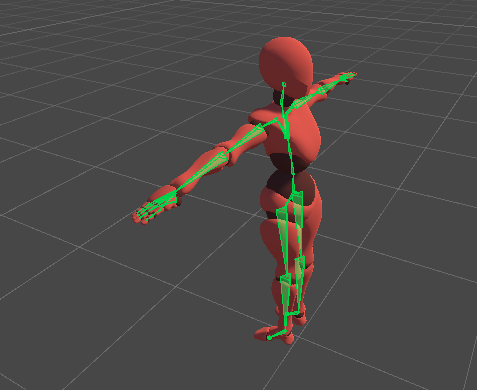
Anyone know any reason that could be or how to fix it?
sage patio
topaz violet
https://i.imgur.com/AUBv3o0.png
is it fine on the FBX itself?
topaz violet
For the record, it was, but I figured it out
topaz violet
I was doing a workaround for something that, when it came time to put it into unity, messed things up
 hexed birch
I have this fully rigged spawn but the pinky and ring fingers are attached towards the wrist. How would I fix that?

 vital dove
hey i imported my ready player me avi to vrc im wondering will i be able to use the avi on quest?
 hasty shell
hexed birch
I have this fully rigged spawn but the pinky and ring fingers are attached towar...
hasty shell
hexed birch
I have this fully rigged spawn but the pinky and ring fingers are attached towar...
Probably a problem with the weight paint. Go in weight paint mode in blender and check the bones around the waist to see if your finger is linked to it
hasty shell
vital dove
hey i imported my ready player me avi to vrc im wondering will i be able to use ...
There is a few tutorials online on how to setup an avatar to make it quest compatible. The process is done in unity, but yes it should be able.
hasty shell
hasty shell
ok so here's the deal. I've been looking for tutorials on how to fix this but i ...
For the record, resetting the rig from humanoid to none and back to humanoid managed to fix the problem. After years of searching I found a warning telling me that the leg bone had an error with the animation. So yeah, idk if there was another way of solving it, but I managed
 azure bluff
yeyyyy new skirt bones
 azure bluff
 vital dove
hasty shell
There is a few tutorials online on how to setup an avatar to make it quest compa...
vital dove
hasty shell
There is a few tutorials online on how to setup an avatar to make it quest compa...
I don’t have a pc I used a iPad
hexed birch
hasty shell
Probably a problem with the weight paint. Go in weight paint mode in blender and...
Waist or wrist? And thanks for helping
hasty shell
hexed birch
Waist or wrist? And thanks for helping
oh woops sorry, yes wrist. if fact just check all the bones that could interfere with it. there could be another bone aside from the wrist
hasty shell
vital dove
I don’t have a pc I used a iPad
you need unity to upload your own avatar using the vrchat unity sdk.
 twin halo
First time creating an avatar- so I'm following a tutorial and I can't find the componenent avatar descriptor at all- anybody know where to find that?
void canyon
twin halo
First time creating an avatar- so I'm following a tutorial and I can't find the ...
You make it
Click the avatar in your scene
Go to the inspector, add component
Vrc descriptor
twin halo
Nothing pops up for it-
void canyon
Did you install the sdk in the first place?
twin halo
Yep
twin halo
New script that's it
void canyon
If you look at the top bar, do you see the dropdown button "VRChat SDK"?
 twin halo
I did tho-
twin halo
 whole valve
twin halo
whole valve
twin halo
Yep I'm using that version
Wait
Nvm
It switched it
Even though I downloaded the right one
 tardy oxide
im having an issue where the mash of this mask wont move correctly in unity but it moves fine in blender

 twin halo
Trying to get into vrchat and this is what's happening- anybody know what's up with it? Tag me if reply

 void canyon
 obsidian lantern
Why is this happening?
obsidian lantern
Why is this happening?
You can rotate the bone when configuring the rig to stay in the right place, but that doesnt fix the root of the issue
How's the armature looking like in blender?
Especially the chest/neck/head bit
 spiral moon

 crisp tendon
 dapper moon
a way to symmetrize weight painting?
dapper moon
a way to symmetrize weight painting?
Mirror modifier or symmetrize groups, but I've had more luck with the modifier
dapper moon
mirror for the armature itself or the model?
crisp tendon
The mesh
 indigo nacelle
Is there a way to make the end of a bone chain follow another object? Like say I want to make a jump rope or num-chuks and be able to hold both ends
indigo nacelle
I guess what im asking is can I set up invers kinematics for bones that aren't just the limbs
sage patio
indigo nacelle
I guess what im asking is can I set up invers kinematics for bones that aren't j...
if you have FinalIK yes
but that's a 90$ add on, goes on sale for 45$ often though
in which case you could use a FABRIK chain
wouldn't really have "physics" though
you could try using multiple rigidbodies with joints?
sage patio
there's also the super hacky way of using a physbone collider set to "Inside" on the end of the chain to try to keep it stuck in there
but if it clips out you're kinda fucked
indigo nacelle
hmm, knowing my luck it would
thank you for telling me about those addons though!
 high rampart
what does it want me to do? the hand/head maps have no (apparent) issues either


 tawny pond
I'm having a little bit of trouble with model warping when I move the head bone? the entire head is completely fully weight painted red so I really don't know what's causing the issue
 lime tiger
you can manually select the vertices that are warping improperly and assign them to the head bone with a weight of 1, or just do that to the entire head should work. If it doesn't, then select the head (or broken verts) and remove them from every vertex group except the head
@tawny pond ^
tawny pond
Oh awesome!! Thank you so much!
fading verge
I'm working on this avi rn and it's saying the feet head and hands are unmapped, and that the feet are unspecified.. any ideas?
 fading verge
high rampart
what does it want me to do? the hand/head maps have no (apparent) issues either
fading verge
high rampart
what does it want me to do? the hand/head maps have no (apparent) issues either
I'm having the exact same problem lol
 lethal chasm
Check the naming conventions or hierarchy in your rig? It seems @high rampart upper arms have trouble identifying upper arms because of an issue with something connecting to them. I don’t know what the finger bones are named as. The legs Ave a totally different naming convention than the rest of the body so it kind of makes sense as to why it might struggle to sense the legs and feet perhaps.
Make sure they are under direct children of each other
fading verge
im having problems with the fact that my humanoid rig is bending the wrong way around... so when i add it from blender, into unity with fbx and go to rig set it to humanoid and adjust it gets most bones right but when i do stuf with the muscles sliders it bends the wrong way around, chest is its back and back is its chest, arms bend backwards instead of forwards, just everything is flipped how do i fix this?
high rampart
lethal chasm
Check the naming conventions or hierarchy in your rig? It seems <@20292709659770...
i'll try again when i get home, thank you!
lethal chasm
fading verge
im having problems with the fact that my humanoid rig is bending the wrong way a...
Remap the bones manually, if that still doesn’t work, go back into blender and fix “roll” on bones, if that doesn’t work go into edit mode and perhaps find the right rotations or positions of bones. It’s trial and error
fading verge
Thought it might be a button or the rotation of the hip bone but just try and see if it works... ok thx
Also what are the naming conventions of the bones? Just so i can name them in a way that the sdk will recognize them
lethal chasm
Copy the same ones you're using for the arms etc. Left xxx Right xxx
Example: Left leg, Right knee, Left toe, don't forget first word capital, second, lower case. Naming matters a lot in most programs
Mostly in the 3d software idk about the engines
 brisk terrace
Im running into a weird leg behavior, My legs gets kinda pushed up and forward once im in vrchat.
wanted to know how i should place my legs / hip bones so that it supports full body and that this issue doesn't happen

 lime tiger
brisk terrace
Im running into a weird leg behavior, My legs gets kinda pushed up and forward o...
lime tiger
brisk terrace
Im running into a weird leg behavior, My legs gets kinda pushed up and forward o...
have you tried using the IK-2 beta? From the pictures, it either looks like the hip bone is too low (only for regular IK, IK-2 is fine with a low hip bone) or that the fbx was re-imported into unity and the pose has not been reset. Sacred had a quick way to reset the pose, couldn't find where it was located at, so I just go into the import settings on the fbx, change rig to none, apply, change to humanoid, apply.
But try with IK-2 first because it is way better and it is live compatible
 weak oar
My avatars arms are too short when reaching out sideways (t-pose) or forward, but seem too long when reaching straight down by my side. What do I need to change to fix this?
broken swallow
broken swallow
If anyone is willing to do this for me dm me
.
 smoky niche
yo i been having this issue with all the new updates this is a fresh avatar the head just doesnt want to move at all any ideas?
https://cdn.discordapp.com/attachments/547688501194522633/974104288689278976/unknown.png

this is how should look
 lime tiger
weak oar
My avatars arms are too short when reaching out sideways (t-pose) or forward, bu...
lime tiger
weak oar
My avatars arms are too short when reaching out sideways (t-pose) or forward, bu...
depends, first check out the IK-2 beta as the arms are much better there than in the regular version (IK-2 is live compatable). Depending on if you have additional trackers will set a limit on how good you will be able to get it, but the gist is you need to line up the shoulder, elbow, and wrist joint with your own. I am guessing the shoulder joint is not matching up properly.
Hold out your arm, then lower it. You see where the pivot is for the shoulder. Imagine if the shoulder joint would be closer to your chest. At that pivot, your arms would reach down further, which is what I assume is wrong with your avatar.
Finally, without a chest tracker and elbow trackers, you will have limit to how close you can make it because as you rotate your chest/ move your elbows/shoulders up and down, that will move your real position away from where the IK thinks you are, still, you should be able to eliminate your current problems
This is a drawing similar to what I was explaining:
#ik-2 message
weak oar
lime tiger
depends, first check out the IK-2 beta as the arms are much better there than in...
Unfortunately it's almost margin of error difference between normal IK and the beta in regards to this.
lime tiger
broken swallow
.
jump on your favorite search engine
type "weight paint in blender"
hit enter
find relevant resource (youtube videos are good)
watch video/read relevant source
go to www.blender.org/
download blender
open blender
open your model in blender
weight paint model
export to unity
????
Profit
lime tiger
weak oar
Unfortunately it's almost margin of error difference between normal IK and the b...
then you will have to fix the armature in blender, nothing else you can do
weak oar
That's what I was expecting, but the question is what needs to change. Does the shoulder need to be further out? Further in? etc.
lime tiger
weak oar
That's what I was expecting, but the question is what needs to change. Does the ...
further out I believe, although you will have to play with it. If you are not setting to scale by height, you might try that as then if you change the arm length, it will not change how your model is scaled
weak oar
I tried both, hoping one would work better than the other, they were much of a muchness.
lime tiger
weak oar
I tried both, hoping one would work better than the other, they were much of a m...
even using scale by height?
weak oar
Yup, it didn't really change anything. I was also surprised.
lime tiger
weak oar
Yup, it didn't really change anything. I was also surprised.
you have to tweak it while in height mode, as it changes the scaling. Generally height mode sacrifices arm fidelity on avatars unless they are amazingly proportioned. If you try to use an avatar for scale by arm mode on height mode, the chances are that it needs a bit of work to get fixed
also, make sure you are regnerating the rig every time you reimport the fbx, or even better, don't reimport the fbx and just use a new one
if you don't, the armature does not change
weak oar
It hasn't so that should be fine. I'll play with the bone positions in Blender and see what happens. Thanks for the advice.
lime tiger
mmhm
smoky niche
alright figured it out cant have physbones in the head lol
 humble sequoia
yo does my avatars clothes need to be rigged?
cause i have to rigged things the cloths and the bodys rigging
lime tiger
humble sequoia
yo does my avatars clothes need to be rigged?
they do not; however, if you would like them to follow the armature like the rest of the model, then yes they do need to be rigged.
You can use a data transfer modifier for vertex groups set to interpolate from nearest face to get 90% of the work done for you though
high rampart
high rampart
what does it want me to do? the hand/head maps have no (apparent) issues either
i think i found the problem, but now i'm having another one, when i make edits to the rig/hierarchy outside of the bone mapping screen it doesn't appear in the bone mapping screen
and vice versa
also when i'm configuring the rig and whatnot the model has "(Clone)" next to its name, but i never cloned it, and i can't find the original until i finish configuring
lethal chasm
it usually says clone for me. if the hierarchy fixing is what it needs, then go into blender to fix it and export and re import as fbx
fading verge
i have tried so many things but its still doing this
 fading verge
oh i figured it out, i had the names of my bones flipped, left was right and right was left, and unity uses this to determine the front of the model
also how does vr chat want me to name the fingers? do i just use the same naming convention as unity?
fading verge
but its still bending the fingers 90 degrees to where the're supposed to go, think i need to twist the wrist or something
fading verge
yep i needed to rotate the hands
 thorn stirrup
I’m making an avatar and there is a piece that needs to be parented to the bone. But whenever I parent it, it jumps far away and get huge. Anyone know what to do?
 carmine dock
Hey guys can I maybe hire someone to put certain animations and effects on my avatar? I made my avatar on ready player me. I honestly don't have much to spare but is anyone available to help me?
sage patio
carmine dock
Hey guys can I maybe hire someone to put certain animations and effects on my av...
it would certainly help your case if you could be specific as to what it is exactly you want
any image references, links, etc
in any case, you'll most likely be redirected to the VRC Traders server to actually look for someone to commission, but maybe we can help you figure out what you want
carmine dock
sage patio
it would certainly help your case if you could be specific as to what it is exac...
So I perform daily on world's with my music and I want to capture more attention to get the audience attention! I want to have my avatar have 3 singing emote animations or guitar playing. And something to catch eyes like a little smoke in the background or maybe a little bit of lights.
I have my avatar made
sage patio
do you play in VR or in desktop?
carmine dock
Both
And I've been going to YouTube and I followed directions it just won't work for me like whyyyyy aren't you working
sage patio
okay, so:
- 3 singing animation toggles
- guitar prop (since you'll be playing in desktop and VR, you'll probably want extra logic to make the avatar look like it's holding the guitar when playing in desktop, and a different setup to make it more interactive when playing in VR)
- background effects like smoke and lights, maybe even a stage
carmine dock
sage patio
okay, so:
- 3 singing animation toggles
- guitar prop (since you'll be playing i...
Do you think you could help me out? Set it all up. I don't have much to spend but I can surely give you like 5 or 10 dollars
sage patio
all of that is definitely going to cost you more than that lol
depends how much needs to be done from scratch
for the guitar, you'll need to either find a free to use model, or purchase one
I found one singing animation on Mixamo https://www.mixamo.com/#/?page=1&query=singing&type=Motion%2CMotionPack
first result when you search for "singing"
carmine dock
What if I have most of everything downloaded for the animations part? I have like 4 downloaded from mixamo
sage patio
ah cool
that would definitely help you yes
so then you would need to find a guitar model
look around Sketchfab or CGTrader
carmine dock
Okay let check that out
sage patio
same for things like smoke machines or lights
carmine dock
But even if I have those downloaded you still think it'll cost a lot?
To hire anyone to do it just getting a idea
sage patio
if you have all of the assets ready to be set up, it would basically just be a bunch of Unity work at that point. a super broad range would be like 15$ - 50$
from scratch assets will add a lot to the price, since 3d modeling is very time consuming
carmine dock
Yeah I'll definitely use downloaded stuff
But let me look around online see what other props I can use
sage patio
@fading verge it's definitely doable, constraints would help a lot with that
can't do that for quest tho
 marsh widget
any idea why is this happening and how to fix it? i export it from a unity project long time ago, and now it gets like this, im new to blender pls make the explanation easier, thx
 crisp tendon
marsh widget
any idea why is this happening and how to fix it? i export it from a unity proje...
crisp tendon
marsh widget
any idea why is this happening and how to fix it? i export it from a unity proje...
Does it come with an animation ?
marsh widget
no idea, i dont remember if I was exported it with animation or not
fading verge
so the highlighted bones were part of a different armature but i joined them to the main and i need them to move with the head bone, how would i do that? i tried parenting and they didn't move with it
 fading verge
they're already weight painted, i just need those bones to also move with the head bone lol
 pale creek
You’re trying to link bones or somnethin
fading verge
yeah
fading verge
parenting works in edit mode but like, it breaks the bones i'm trying to parent. the eyes stop functioning
and it straight up doesnt have any effect if done in pose mode
i couldn't for the life of me find an mmd model of this outfit so i had to download the fbx from models resource lmao
well i found one, but it wasn't available for download so. pbbbbblt.
 zealous barn
fading verge
wjat
zealous barn
fading verge
wjat
"Reddit mode" Lol
fading verge
fading verge
how is parenting in Reddit mode breaking anything
idk when i parent the bones to the head they stop moving in pose mode
what
what blender version
that's really weird
Idek why I'm asking version i can't imagine why that would happen
2.92
are you sure you know how to parent bones
i mean im hitting ctrl+p and parent bone
wtf is happening then
i fixed it, i guess i never applied the transforms on the bones before i tried parenting. had to reimport the whole thing but it's good now
oh my god
joining the meshes, not even anything to do with the bones, breaks the entire rig.
why god.

 narrow heath
could someone explain me how to merge armatures without cats? i forgot how to^^
 vocal flower
Anyone know how to rig a non humanoid avatar to look wherever you look?

I want this little dude to move his entire body according to the front
crisp tendon
vocal flower
Anyone know how to rig a non humanoid avatar to look wherever you look?
Generic avatars do that by default 
vocal flower
crisp tendon
Generic avatars do that by default <:thumbsup:700823916322619422>
It says that I need it to be humanoid
crisp tendon
Where ?
 late lichen
Hi, I'm having a bit of trouble getting the default crouch animation working for my avatar. It looks good in the preview in unity, but the legs turn into a pretzel in game. This happens for all crouch animations, but not for any others including low crawl as far as I can tell. I am not 100% sure this is a rigging issue either, so sorry if it's in the wrong channel, just hoping someone who knows the issue might see it.

 obsidian cape
hey can anyone rig and texture a charracter i wanted to make, willing to pay with paypal
 distant heath
obsidian cape
hey can anyone rig and texture a charracter i wanted to make, willing to pay wit...
distant heath
obsidian cape
hey can anyone rig and texture a charracter i wanted to make, willing to pay wit...
hey dude messege me !
 red python
Hey I need help adding rig bones to my model

But like seriously I have been stuck for three hours
Please for fuck sake help me
lime tiger
red python

How to take a screenshot on your smartphone, tablet, notebook or desktop computer
red python
Bruh I know
lime tiger
red python
well, it is hard to see, but I don't see bones so start with something like this and watch more tutorials if you don't understand https://yewtu.be/watch?v=A1EIoprnrMg

Invidious
Part 4 of a series in which I guide you through the overall process of creating a 3D virtual avatar starting from nothing for use in VRM applications and VRChat, using Blender and Unity. Here we experience rigging, weight painting, and all the pain associated with them.
Dikko's rigging videos:
https://www.youtube.com/watch?v=NOmO3sBFNDU
https:/...
lime tiger
red python
why don't you give this a read and send a properly viewable video, or instead of frustratingly posting in this channel, watch the video that probably explains everything you want to know about rigging and weight painting.
https://projectobs.com/en/tutorials/how-to-setup-obs-studio-for-streaming/
OBS Studio
In this tutorial we’ll tell you about OBS settings and features, which are you need to know to perform your live streams. This streaming guide is about general OBS settings. We also recommend you read tutorials with specific instructions for your live streaming video platform: Twitch YouTube (streaming guide about this platform coming soon) Face...
dense vale
@red python basically, you need to do this

(Normal rig that rigify gives on the Left VS My custom rig that i created using the standard rigify rig on the right)
If you need anymore help don't hesitate to DM me
Make sure all of the bones are inside your mesh and no really complex geometry is present
 lime tiger
🤦
dense vale
Brilliant! now you probably can delete all of those small face bones near the head as you wont need those considering your model has no facial features
lime tiger
if you don't know, watch a tutorial. They are going to be better for conveying information than us. We can help with specific problems a lot better\
red python
Wait how do o do that
dense vale
Delete bones?
red python
@dense vale I will friend request you and we should dm
dense vale
Alright
 lethal fable
hello guys, i have a question, ive built a full model useing vroid studio, then imported it to blender and changed everything and added things and got the bones set up right but everytime i try to export it im told that the bones are named wrong, any reason why blender wouldent pick up on the names of bones ?

 lime tiger
lethal fable
hello guys, i have a question, ive built a full model useing vroid studio, then ...
lime tiger
lethal fable
hello guys, i have a question, ive built a full model useing vroid studio, then ...
maybe because you have more than one armature? I don't do vroids though
lethal fable
i just used it because it was a good and easy way to start, and now ive gotten this far and am haveing a few issues xD
lime tiger
if you are in blender, can't you just export it as a fbx?
 deft zealot
What's a good rig for a skirt
i was thinking about doing a circular armature because I want to add colliders that actually interact with the mesh itself
have the skirt itself be entirely movable by the leg colliders intersecting
 proud trellis
I'm at my wits end haha... whenever I calibrate my fullbody avatar - the hips calibrate at a rotation, sinking one leg into the ground
Blender says my rig is perfectly symmetrical - weight paint too
it broke after I made visemes with CATS
sage patio
proud trellis
I'm at my wits end haha... whenever I calibrate my fullbody avatar - the hips ca...
are you using the IK 2.0 beta?
proud trellis
rotating my hip tracker fixes it until I calibrate again, and it breaks in the exact same way. Avatar behaves as normal when not in FBT

nope, no IK beta
sage patio
that's your problem
that issue is fixed in the beta
there's basically no reason to not be using the IK beta lol, it's such a huge improvement
proud trellis
All my friends are on live sadly
sage patio
it's live compatible
proud trellis
oh huh
sage patio
IK 2.0 has its own beta
which is live compatible
there is another open beta going on, which has a bunch of other changes + the IK 2.0 stuff built in, but that one is not compatible
proud trellis
I see...
Otherwise, I'm just really confused as to what could make an avatar calibrate this wrong
sage patio
everyone else will see the new IK even if they're not on the ik beta
what does your rig look like?
proud trellis
 sage patio
yea there are a few issues with that
proud trellis
The exact same as the rig that worked

the pelvic bones are just parented to the hip bone. Merging them doesn't change anything
sage patio

in that case, pelvic ones should be fine, but they are still not needed
unless you have them weight painted in such a way to preserve the shape of the hips more
proud trellis
I'm aware. They're a remnant from an attempt at using Rigify which I scrapped
I mean... it shouldn't change how it animates to merge them to the hip bone, they're already parented to

Besides, these were there with the version that worked

Unless
there are unapplied transforms somewhere
I don't see any
sage patio
could be bone roll
 raw jackal
is anyone familiar with this issue? the upper legs are bending the wrong way, but i don't think i've done anything unusual with the rigging. the upper legs are stuck in a way that they always rotate with the hip and can't rotate themselves
EDIT: Ended up being a physbones thing. don't put physbones on direct human armature bones... i forgot lol
 proud trellis
sage patio
could be bone roll
proud trellis
sage patio
could be bone roll
It could be to be honest... how would I check for it
sage patio
@proud trellis in armature edit mode, select all the bones and click Clear roll
proud trellis
worth a shot
I checked that all the bones are connected and it seems the ones I want to be, are
The odd part is that if I calibrate and then rotate my hip tracker, it fixes the pose
huh they all have 180 degrees roll
I guess my avatar was turned around at some point
Alright time to test the changes
proud trellis
sage patio
<@95519500257988608> in armature edit mode, select all the bones and click Clear...
Found a hotkey for clearing bone roll - alt+R
proud trellis
Update:
Ok, between swapping to IK beta, resetting roll on all my bones (except eyes because it's a needed transform) - and applying all transformations to the armature and mesh, I now calibrate normally.
So it was one of those things that fixed it.
proud trellis
sage patio
<@95519500257988608> in armature edit mode, select all the bones and click Clear...
Thank you so much for the input
low coral
So I'm following a digi leg tutorial and this happens. What do I do?

 worn arch
Would anyone here be able to smooth out some rigs for me
lime tiger
worn arch
Would anyone here be able to smooth out some rigs for me
for free? no, but you might be able to commision someone to do it on the vrctraders discord
lime tiger
proud trellis
low coral
So I'm following a digi leg tutorial and this happens. What do I do?
It seems the bones at the end got rotated 180 degrees - are your constraints correct? As in, the right foot constrains to the right leg and not accidentally the opposite one.
 gloomy rapids
Hi, I want to change the idle animation after not moving for a few seconds, I noticed there was an kind of animation that looks like footsteps . but as far as I have searched was all about changing the standing pose in Locomotion layer. that not what I mean. I think it's something related to IK setup. But there are very few tutorials about IK layers
fading verge
raw jackal
is anyone familiar with this issue? the upper legs are bending the wrong way, bu...
does your character go into motorcycle pose properly?
fading verge
oh nice 
 kindred berry
I need help, so I made an avatar a bit quest compatible with decimation and stuff but didn't touch the bones at all besides merging different hair armatures, head moves fine in blender and unity and it's assigned properly in the configure rig menu as well, but in game the avatar head does not move at all when you tilt your head
and this is the PC build of the avatar


 amber mantle
so I have this model comprised of multiple meshes which are directly parented to the bones. I want to merge these models together and use vertex groups to replace the rigging, but I also don't want to create a hundred vertex groups by hand. Is there any way I can automatically convert this bone parenting to a series of vertex groups?
 primal prism
hello, im not sure if this relates to blender OR unity, but when i export my model the white behind the eyes just disappear in unity, and so do some other parts become transparent.

pretty sure its flipped normals.
 static horizon
primal prism
hello, im not sure if this relates to blender OR unity, but when i export my mod...
static horizon
primal prism
hello, im not sure if this relates to blender OR unity, but when i export my mod...
If you use poi, go to rendering at the bottom and turn it off
See if that works
 blissful scaffold
primal prism
blissful scaffold
primal prism
if its flipped normals you can zoom into it and see the correct textures behind it.
primal prism
I just flipped all the normals, but when I exported my unity avatar now all the blend shapes or the eye bones are messed up
So I need to redo them
blissful scaffold
rip
primal prism
And when I use pumkin avatar tools to copy everything I think the hair bones are messed up too
Fun
blissful scaffold
god bless

 nocturne canyon
Could I realistically rig all of the tentacles like this or would it be way too resource intensive? If not, how would I go about rigging them so the avatar performs well?
 sage patio
nocturne canyon
Could I realistically rig all of the tentacles like this or would it be way too ...
sage patio
nocturne canyon
Could I realistically rig all of the tentacles like this or would it be way too ...
you could rig them in a similar way to what you have right now, and then use physbones to make them dangle
you might want to use less bones though
nocturne canyon
Yah I figured. Vrchat performance page has seemingly low numbers for bones for good avatars.
Do you think 4-5 per tentacle would still be too much?
sage patio
should be good
if you wanted to get really fancy, it's also possible to make them all walk lol
using Final IK
nocturne canyon
Lol I would go insane putting ik on all of em.
Think I'll see how long it takes to rig them and test it out.
Will this work fairly well with the harsh angles between bones?
 sage patio
should work fine
nocturne canyon
awesome
thorn stirrup
Sorry if this is the incorrect channel to ask. I would like to make an avatar that switches its camera to a different location with an animation in the gestures menu, is that possible? If so would it be easier to just create a copy of the model and move the vrc descriptor and then just make an animation switching the models? If that would even work
nocturne canyon
All of the chains have to be parented to a shared bone right?
 zealous barn
Mhm
fading verge
i just need someone to rigg
thorn stirrup
I’m slightly new to avatar making, I was just wondering how to switch bones? Like I have an avatar with 6 arms, I want to be able to switch my bones to one of those arms. Like I don’t want them all to mimic my main arm, I want to be able to control them. Is that possible?
crisp tendon
Rotation constraints on all the arms that target the real invisible arms, disable the components of the Arma you don't want to move
 iron trench
guys why is quest avatars doest allow any physbone?
or you need higher rank (mine new use)
strong urchin
If I wanted to have my hair bones attached to a seperate bone not the head bone how would I go about this, The Cats plugin does not see these bones using the parenting tool already in there
Honestly not sure how the parenting tool decides what group of bones to use for it
 spring crescent
Can anyone point me in the right direction for rigging/setting up kimono sleeves with PhysBones? There was an example shown with the PhysBones announcement that was perfect, but I'm not sure how they set that up. LookAt Constraints perhaps?
 inner cedar
Just a general question, how do you animate UVs in Unity?
I've got this texture map and I want the uv island around the eyes to move in order to animate the eyes
 sage patio
inner cedar
Just a general question, how do you animate UVs in Unity?
sage patio
inner cedar
Just a general question, how do you animate UVs in Unity?
depending on which shader you're using, you should just be able to animate the texture offset
inner cedar
Same thing for the mouth, but for lip flaps.
sage patio
you can just make a new animation, hit record, and change the offset values
inner cedar
Problem is I don't want this to affect the entire texture set. I've set up the UVs so that the mouth and eyes are separate islands and can moved independently, at least in Blender. I was hoping there's a way to animate them in a similar fashion in Unity.
@sage patio
Just a test with the technique I did in Blender
sage patio
you can't move individual UV islands
it would either have to be separate materials, or if you're using Poiyomi, you can have the eyes and mouth set up as Decals on the same material as the face
inner cedar
Poiyomi?
sage patio
arguably the most commonly used shader for VRC avatars
inner cedar
I'm developing the avatar for the Quest, so separate materials wouldn't be ideal
sage patio
oh, then you cannot use any custom shaders at all
your only option is separate materials
either that, or have separate parts of the texture for every permuation of different eyes and mouth
so for example, every combination of the mouth for when the eyes are open, every combination of the mouth when the eyes are closed
and animations for every single one
inner cedar
Dang, I was really hoping there would be an easier way to handle it.
sage patio
depending on how you did the model, you could also have the mouth and eyes as mesh and use shape keys to move them around
inner cedar
Main gripe with doing it that way with the whole face on UVs is that I'd probably be able to use less UV space and might require a higher resolution texture.
I'll have to think about the mouth and eyes as models thing.
Just a brief pic of the wireframe

 snow dust
Does anyone do bone rigging commissions?
tardy oxide
i have an issue where when i join 2 armatures after positioning it the bones stay where positioned but the mesh goes back to where it was when i first imported it
iron trench
guys how do you change the talking animation on an avatar?
 minor osprey
snow dust
Does anyone do bone rigging commissions?
minor osprey
snow dust
Does anyone do bone rigging commissions?
Hit me up I do
 tender flame
hello! I am using Blender 3.0 with CATS 0.19. It seems Blender sometimes "forgets" that my mesh is mirrored when rigging. If I weight paint the left side, the right side is also assigned the left side weight. Sometimes selecting a right-side bone and clicking the mesh solves the issue, but it's not working for me right now.
 formal oriole
Hey! I just made armature for my avatar but I can not figure out how to connect it to the body. Does anyone know easy to understand tutorial on rigging?
 sage patio
formal oriole
Hey! I just made armature for my avatar but I can not figure out how to connect ...
sage patio
formal oriole
Hey! I just made armature for my avatar but I can not figure out how to connect ...
why do you have 2 shoulder bones? should only be one
the way you get parts of a mesh to move with an armature is by assigning vertices in that mesh to Vertex groups. if a bone shares a name with a vertex group, then moving said bone will have the effect of displacing every vertex in that group, proportional to the weight given to each vertex
weight painting is just the process of mass-assigning vertices to vertex groups using brushes
 toxic moat
how do i reuse the same arm on the right for the arm on the left?
 sage patio
the CATS plugin has an option to either merge a bone (and associated weights) to the parent bone, or to merge one (or more) bones to a specific one

 leaden slate
toxic moat
how do i reuse the same arm on the right for the arm on the left?
leaden slate
toxic moat
how do i reuse the same arm on the right for the arm on the left?
all i can say is copying the mesh and there might be a flip option to flip it around
not too sure if there's an easy way to transfer weights though
fading verge
how do I rig the feet? do I put the feet above the cable or inside of the cable
 fading verge
figured it out
thorn stirrup
Im new to making avatars and I have doc ock avatar , how would I get the hands of the claws to move with mine, like open and close, the hands look like this
 white solstice
thorn stirrup
Im new to making avatars and I have doc ock avatar , how would I get the hands ...
white solstice
thorn stirrup
Im new to making avatars and I have doc ock avatar , how would I get the hands ...
I would guess by using constraints to copy the rotation of the fingers. There's probably another way
fading verge
So Ive' Been Trying to Make a Avatar That Has The Ability To Move 4 Arms At the Same time Instead Of the Bottom Ones always T-Posing however i have no idea How to, Such as example, A Spider Avatar That The Bottom Arms Mirrors the Same Movements At the Top Arms. Can anyone help out?
fading verge

How do I make this? the little line between bones.
And what's the name of this process. Link? Because so far, each try to connect other bones like this, just creates a new one in between
sage patio
fading verge
those lines represent which bone is parented to which one
in this case, the two upper leg bones are parented to the hip bone
however, they both have Connected disabled
when you have Connected enabled, the head of the bone will be put where the tail of the parent bone is
fading verge
That explains it, thank you. I earlier googled, but the images I got showed the difference between connected/disconnected as ''one's solid, the other's bendy'' so moved on from it


 fading verge
If you have a .fbx file, you can go to it in the assets place of Unity where all the stuff is. Select Rig. Select Configure. And you'll see if the spine is mapped or not.
If not, you just have to add it. If there is no spine, you could take it to blender, and merge it with another avatar that already has everything you need.
In the Cats Plugin's ''create custom model'' section
 kind kindle
fading verge
If you have a .fbx file, you can go to it in the assets place of Unity where all...
kind kindle
fading verge
If you have a .fbx file, you can go to it in the assets place of Unity where all...
It has a spine. I’m just trying to figure out what exactly is wrong since someone else made this avatar for me
 terse comet
Is there gravity in vrchat?
 gilded ibex
Yes
 grim isle
high rampart
what does it want me to do? the hand/head maps have no (apparent) issues either
grim isle
high rampart
what does it want me to do? the hand/head maps have no (apparent) issues either
I'm not sure if you ever fixed your issue, but I had the same exact issue and I found a solution for my problem, and I never would have figured it out if it weren't for someone asking the question in here so I'll go ahead and drop what I did to fix it in case anyone else had a similar issue.
Like I said before, I had the same problem where unity would tell me several parts of the armature weren't mapped despite them being mapped with no issues in the configuration window. What solved my problem was that the root of the model in blender was named "Armature.001", and not just "Armature". Changing it back to "Armature" and re-exporting it solved the issue. I have no idea if this will help but that's what fixed it for me.
 dense vale
Is there any way to shift movement authority towards a certain bone?
 leaden urchin
I have 2 quick questions. Do eyes need to be parented to the head? Also Do eyes need to have the same parent? Not really important, If no one knows I already have a work around planned anyway but would be nice to know.
fading verge
 sage patio
leaden urchin
I have 2 quick questions. Do eyes need to be parented to the head? Also Do eyes ...
sage patio
leaden urchin
I have 2 quick questions. Do eyes need to be parented to the head? Also Do eyes ...
they do, yes
otherwise unity's rig config will be mad at you
if you need to have the avatar eyes somewhere else (like for example, if your avatar has a really long neck, requiring proxy bones for the neck and head), you can make proxy bones for the eyes parented to the proxy head, and put that in your rig config/avatar descriptor
then you can add rotation constraint on the real eye bones that copy the rotation from the proxy bones
 rotund kraken
im having a mild brain fart - when you make a dummy root bone for something you want to have phys bones on it, that dummy bone doesn't have any weight painting right?
or would i copy the weight paint of the bone its dummying for onto the dummy
leaden urchin
sage patio
then you can add rotation constraint on the real eye bones that copy the rotatio...
Yeah i'm making a robot so it doesn't have eyes, but it was 2 drones, thought it'd be cool if they turned to look at things. Figured it'd have to use constraints, but hoped I could just pretend they where eyes
sage patio
leaden urchin
Yeah i'm making a robot so it doesn't have eyes, but it was 2 drones, thought it...
parent an empty object to one of the eye bones (parented to the head), and move it a couple meters in front of the avatar. then, add an Aim constraint to the drones that are looking at the empty object
sage patio
rotund kraken
im having a mild brain fart - when you make a dummy root bone for something you ...
you don't need any weights for the root
rotund kraken
sage patio
you don't need any weights for the root
ah alright, thank ya kindly!
 turbid spear
fading verge
turbid spear
fading verge
i think you can ignore that
 spark snow
screaming crying that the armature is attaching to random meshes for some reason OTL

 wraith turtle
is it possible to rig an already made model for vrc? namely, an inkling or something?
(cough cough splatoon fan)
so like, make the model by attaching the clothes and stuff then import to vrc?
 ornate cairn
if u have it's file then why not.
wraith turtle
..true
just my main problem is
how
because i've just been modeling a jelly-filled donut for what
an hour and a half??
and i have NOT learned how to rig
ornate cairn
if u know nothing about rigging u need to watch tutorials on youtube
wraith turtle
my brain feels it can't handle 1. more. tutorial. one i feel is enough from just learning how to model 😭
but here goes anyways
uh
what tutorial do you recommend, @ornate cairn
ornate cairn
haven't seen many that focus on vrchat so maybe this one https://www.youtube.com/watch?v=6WqCUdilzS8&t=121s&ab_channel=RainhetChaneru

Hoi there, Rain sensei here, this video is a recap of my 3D modelling series Parts 12 to 13, covering rigging your model.
if at any point you feel as if you need a more thorough explaination, seek out the relevant episode and scrub through it to find what you are looking for, I will slowly explain things in those videos, so please check the ori...
u need just to look for them till u understand basics
spark snow
ornate cairn
haven't seen many that focus on vrchat so maybe this one https://www.youtube.com...
thats the exact tutorial im using xD and I have accessories floating on mine
ornate cairn
spark snow
thats the exact tutorial im using xD and I have accessories floating on mine
it happens you just fix weight paints so its assigned to right bone
spark snow
ornate cairn
it happens you just fix weight paints so its assigned to right bone
It seems to still be happening even when the belt are is completely blue ;_;
 ashen seal
Hi hi, quick concept check- physbones will only apply to bone chains that are children of the root bone, right? I have a model with a root bone for the hair, and below that are three individual children bones for the bangs and two bones for sidelocks with their own children. testing with phsybone only seems to transform the two with children of their own, is that how it's meant to work?
 lethal anvil
ornate cairn
haven't seen many that focus on vrchat so maybe this one https://www.youtube.com...
lethal anvil
ornate cairn
haven't seen many that focus on vrchat so maybe this one https://www.youtube.com...
rain has a video missing that explains setting up the armature
it might have been re-added, but i once followed the tutorial to a T
and between two videos something happens, and they're just like 'if you did it all right, it'll move with the mesh'
lethal anvil
what's up with this, why's it going all weird
 sage patio
lethal anvil
what's up with this, why's it going all weird
sage patio
lethal anvil
what's up with this, why's it going all weird
first off, that is a very cursed model lol. that issue looks like bad weight painting/un-normalized weights
lethal anvil
thanks, and thanks
sage patio
normalized weights means that for every vertex, the sum of all of the weights for the groups it belongs to add up to 1
rotund kraken
what is that lol
 sage patio
so for a vertex at the elbow, it's pretty much going to be weighed 50% to the upper arm, and 50% to the lower arm
lethal anvil
that's a lil' elbow that has no weight and is there for my sanity
also thanks, that makes sense and is probably what i'm missing, i'm helping someone else in #avatar-help and basically built their avatar to see what problems they'd encounter
sage patio
lethal anvil
that's a lil' elbow that has no weight and is there for my sanity
you don't want that extra bone, it fucks up your bone hierarchy
Unity's rig config will warn you that the lower arm is not a child of the upperarm
because that bone is between them
lethal anvil
yep, i'll fix it up before moving it to unity, just need to get it deforming correctly
 magic solstice
Does unity/vrchat prefer the rigs to have shoulders and hip/thighs a certain relative distance wide?
Like shoulders are 1 unit apart, therefor hips should be 1 unit apart?
Things were happening in vrchat that I didn't expect; It almost looked like vrc or unity moved the start of the thighs closer together because it thought the legs were too wide set?
lethal anvil
i wish i were better at weight painting
lethal anvil
yeah my bones are still broken


 lethal anvil
check the options for head, and the hands to see if that bone is slotted elsewhere, and make sure that bone is also slotted somewhere in the rig settings
red usually means missing or used multiple times
sage patio
 foggy hull
does anyone know why this happens?
foggy hull
does anyone know why this happens?
your hip bone should never be below the legs
it should be above the legs
foggy hull
it is above
 sage patio
no
 sage patio
better
lethal anvil
changing the bone rotation mode to Quaternion WXYZ went a long way to keeping the bones inside the arms @foggy hull
 foggy hull
alr
lethal anvil
gonna give it a test
lethal anvil
h e l l y e a h
lime tiger
foggy hull
removing upper chest fixed everything
Upperchest works just fine in vrchat. If removing it fixed stuff, it was likely a parenting issue or something else that was causing you harm. Also, NAME YOUR BONES PROPERLY!
lethal anvil
100% this
thorn stirrup
I think I can ask this here, I am making a doc ock avatar and I’m wanting the arms to move and get longer with an animation, but the easiest way I can think of doing it is with an array modifier that follows a curve and a curve modifier in blender. But when I add it to unity it doesn’t work. Anyone know if I can do that or not? I ask here because I’m not sure if this question would go under #animation channel or this one, sorry if this is the wrong channel to ask
lime tiger
thorn stirrup
I think I can ask this here, I am making a doc ock avatar and I’m wanting the ar...
most modifiers only work in blender. The array modifier in this example is converted to a mesh when you export it or it is destroyed, depending on your export options
 eager moat
I keep trying to use the Symmetrize tool in blender, but it never works. it's in the same position every time. I have setup the .L names but nothing is happening
ornate cairn
eager moat
I keep trying to use the Symmetrize tool in blender, but it never works. it's in...
name it _L not .L
but sometimes it needs to be on right axis
ornate cairn
rotate them to x axis
 eager moat
By what amount?
ornate cairn
try going to object mode click on armature press r then z and type -90 and enter
ornate cairn
where is your origin point when u look at front of avi
 cursive goblet
I'm having issues getting a rig to work with my model and I have no idea what I'm doing wrong
I made a model, I made an armature, I made the model the parent of the armature, but moving bones in pose mode doesnt work
sage patio
"the parent of the armature"
you have it the wrong way around buddy
your meshes should be parented to the armature
every mesh also needs an Armature modifier, with the Object field set to your armature
cursive goblet
sage patio
your meshes should be parented to the armature
So select the armature, then the object and click parent or otherway around?
sage patio
in the viewport, select your mesh, shift click the armature, Ctrl P > Object
sage patio
you need to enable "In front" under the viewport display options
cursive goblet
sage patio
you need to enable "In front" under the viewport display options
Here? it's already on

 sharp lynx
Have you tried using the Outliner menu to select the stuff.
 sharp lynx
Is the Armature set to visible?
it'll be the eye next to the camera to the right of the name.
or are you saying the armature doesn't show up in the outliner menu?
Cause if it's the latter the armature will be inside the the model you parented it to.
Like so
 sage patio
that's wrong
it should be the mesh parented to the armature, not the other way around
sharp lynx
yea. it is wrong.
also there's a property that can make the Armature invisible
here

make sure that is checked
or the armature will be invisible.
 white solstice
fading verge
white solstice
fading verge
is that in Blender?
 silk cloud
dapper moon
silk cloud
dapper moon
does anyone know a good way to fix broken shading when making visemes?
this to be exact

 south junco
 copper halo
hey i need some help! im trying to rig the pants to the avatar but when doing the automatic weightpaint it complains about something at the bottom

okay i managed to get it to work but it does not move as much as the body itself.....
 copper halo
fading verge
problem is fixed
copper halo
fading verge
problem is fixed
then uh.... could you help me out with this issue?
rotund kraken
copper halo
okay i managed to get it to work but it does not move as much as the body itself...
https://www.youtube.com/watch?v=yr5KRYz5ybs& auto weight is a good start but transfer mesh data is better imo

In this tutorial I explain how to use the Transfer mesh data control in blender, this is especially useful for skin tight clothing and getting separate meshes to share vertex group data, making it super easy to weight paint new meshes to a pre-existing rig.
This one is a bit more advanced but if you understand the fundermentals of rigging, this...
copper halo
rotund kraken
https://www.youtube.com/watch?v=yr5KRYz5ybs& auto weight is a good start but tra...
mostly worked.... except for the thigs and i have no clue whats up with them
 rotund kraken
time to suffer with manual painting 😰
copper halo
rotund kraken
time to suffer with manual painting 😰
the painting does look correct.... i cannot find whats wonky about ti
rotund kraken
try uh
did you do nearest face interpolated
nearest face int seems to be more accurate. its worth a shot but if it doesn't help youll have to check every weight paint
usually the transfer mesh data thing gets it good enough so i can tweak minor clipping
copper halo
rotund kraken
did you do nearest face interpolated
just did.... no diffrence at all
copper halo
rotund kraken
nearest face int seems to be more accurate. its worth a shot but if it doesn't h...
kill me now
its following the leg as intended.... just uh... does not move enough... even tho its as heavily weightpainted as possible
yea no i cant find anything wrong with the weightpaint
copper halo
tried some diffrent pants and it now works just fine
rotund kraken
weight painting is my passion :')

there has to be some hidden thing to see weights down to the smallest amount or something similar, please god
fervent hornet
rotund kraken
there has to be some hidden thing to see weights down to the smallest amount or ...
If you use auto normalize you wont need to search for random weighting from unrelated bones
fervent hornet
Yeah the main thing with rigging is knowing your tools and when to use them
copper halo
okay! last blender related question..... how the hell do i connect the hair to the rest of the bodys armature? or do i even do that?
 copper halo
allr. still cant find anything on it
rotund kraken
fervent hornet
Yeah the main thing with rigging is knowing your tools and when to use them
lol
thank you for being condescending xd
copper halo
if i do try to join them the hair ends up on the floor even if i use the correct armature in modifiers..... and the thing ends up with 2 head bones
 fervent hornet
rotund kraken
thank you for being condescending xd
fervent hornet
rotund kraken
thank you for being condescending xd
Being condescending is one of my main social gifts :)
But I meant just in general, when people struggle with weight painting it's usually because they are doing it in a difficult manner
fervent hornet
copper halo
if i do try to join them the hair ends up on the floor even if i use the correct...
Before you join armatures, make sure that their transforms are the same
fervent hornet
You've applied transform, rotation, and scale for both armatures?
copper halo
yes
fervent hornet
How exactly are you joining them?
copper halo
ctrl + j... is there other ways to join them?
fervent hornet
Are the meshes for the hair and body also at 0?
There are other fucked up ways yeah but ctrl j is the best
copper halo
fervent hornet
Are the meshes for the hair and body also at 0?
yes
well the hair was not but i dont understand why it was moving down
i just uh... how do i get rid of one of the head bones when i merge them and how to i connect the hair bones to the rest of the armature if i do that?
fervent hornet
Well we need to get past step 1, does the hair move when you join now that it's transforms are applied?
copper halo
fervent hornet
Well we need to get past step 1, does the hair move when you join now that it's ...
no it no longer does
fervent hornet
So now that it's one armature, you can merge bones using CATS or change parents using ctrl+p
copper halo
what is CATS?
and change parent of what? the hair bones or the extra head bone? i assume the hair bones
wait i figured out how to change the parent
fervent hornet
Cats is a blender plug in that has a bunch of useful features. Usually all hair bones would be children of the head or a child of the head
If I have a lot of independent hair bones I usually make a "Hair parent" bone for hierarchical organizational reasons
copper halo
lets goo thanks alot i got it connected
dont ahve that many hair bones

i will figure out the unity part soon. gotta get some sustinance
copper halo
@fervent hornet if you dont mind me asking again.... do you need a special sdk for dynamic bones... and if yes... were does one find it?
rotund kraken
comes with the avatar sdk :)
rotund kraken
fervent hornet
Being condescending is one of my main social gifts :)
But I meant just in gener...
shrug. if you didn't have anything helpful to say then keep it to yourself? its not that hard when someone has a legitimate issue, thanks!
fervent hornet
Not sure how my initial statement was unhelpful as auto normalize helps avoid the scenario you were in. Regardless you should be able to see a list of all vertex groups a single vertex is part of in the same menu where the transforms are listed
copper halo
rotund kraken
shrug. if you didn't have anything helpful to say then keep it to yourself? its ...
alr! then ill go and find a decent shader thing cause i have legit 0 clue how they work
any reccomendadtions?
rotund kraken
copper halo
alr! then ill go and find a decent shader thing cause i have legit 0 clue how th...
oh like, shader for your avatar? :o i use poiyomi toon. its free and has a lot of cool stuff you can do with it. they have a discord server too that ive heard is helpful! https://github.com/poiyomi/PoiyomiToonShader

GitHub
A feature rich toon shader for unity and VR Chat. Contribute to poiyomi/PoiyomiToonShader development by creating an account on GitHub.
copper halo
rotund kraken
oh like, shader for your avatar? :o i use poiyomi toon. its free and has a lot o...
TYSM!!!! now uh stupid question.... but how does one install it`? can one use the new creator companion?
rotund kraken
copper halo
TYSM!!!! now uh stupid question.... but how does one install it`? can one use th...
mm i haven't used the creator companion yet, but you can drag and drop the unitypackage into your assets folder ^^
copper halo
rotund kraken
mm i haven't used the creator companion yet, but you can drag and drop the unity...
oh its that easy?
rotund kraken
copper halo
oh its that easy?
yeah pretty much. youll have to change the shader on your material but thats only a few clicks
copper halo
rotund kraken
yeah pretty much. youll have to change the shader on your material but thats onl...
this sounds like an incredibly stupid question... but what is the best fileformat to export the blend file into unity?
fervent hornet
copper halo
this sounds like an incredibly stupid question... but what is the best fileforma...
FBX
copper halo
allright i have returned cause uh... were do i find the thing that i turn the rig humanoid thing? is it this thing?

okay it was correct but uh..... it decided to make the hair the jaw... how do i unselect this

and is the jaw needed for the mouth moving when talking?
i assume its in this menu you also do dynamic bones?
i am soo incredibly confused
how do i save the stuff?
 dawn torrent
Anyone know how to fix this? The legs just slides backward every time the avatar is in idle. I've tried to fix it by moving the rig a bit and adjusting different bones, but nothing seems to help
copper halo
ayo got the stuff working.... now i only kinda need some decent animations and maby locomotion would be nice
magic solstice
Quick question: Can you reposition bones through the animation controller? Like, changing the base position for hairstyles
 livid gulch
Howdy, I painted my weights before applying automatic weights with CTRL-P. Do I have to do it all again?
Basically my weights and bones aren't synced.
sage patio
livid gulch
Howdy, I painted my weights before applying automatic weights with CTRL-P. Do I...
if you manually weight painted your mesh, why are you using automatic weights? that's just going to undo what you've already done
the prerequisites for making a mesh move with an armature are:
- mesh parented to armature
- Armature modifier on mesh with "object" set to your armature
- vertices assigned to vertex groups that match the names of bones in the armature
livid gulch
Yep! That fixed it @sage patio . Cheers!
 storm kestrel
any suggestions on how to rig this

its head is also its torso so no autorigger is not gonna get a good result with this
crisp tendon
I don't think that's something that should be humanoid 
storm kestrel
crisp tendon
I don't think that's something that should be humanoid <:sweat:66831466205963878...
yeah i dont think it should
if i just rigged the arms would it work
cause if i do head it its gonna get real ugly real fast.
storm kestrel
crisp tendon
I don't think that's something that should be humanoid <:sweat:66831466205963878...
so how do i rig this?
crisp tendon
I don't think it's something I could explain easily, since it'd most likely have to make use of rotation constraints
storm kestrel
crisp tendon
I don't think it's something I could explain easily, since it'd most likely have...
oh darn, and i thought i was saving time modeling by using my dead simple robot characters
if i painted the whole body blue in the weights do ya think it would work
crisp tendon
The less humanoid something is, the harder it is to rig it as a humanoid 
sage patio
storm kestrel
oh darn, and i thought i was saving time modeling by using my dead simple robot ...
this is VRChat after all, so avatars are expected to be humanoid if you want to be able to have head/hand tracking. you can make something non humanoid, but at its core it still needs a humanoid rig to drive things
storm kestrel
so i cant rig 2 floating arms and have the rest of the model be static?
well darn
that was basically my plan, rig 2 arms, and have the legs have some premade walking animation
storm kestrel
sage patio
this is **VR**Chat after all, so avatars are expected to be humanoid if you want...
if i weight paint the whole torso section of this thing blue and did a normal humanoid rig, will that allow it to not fold in on itself
sage patio
you can have a humanoid rig inside of it, and weight paint the whole torso to the hips if you want.
100% influence is red, blue is 0%
storm kestrel
yeah cause the body/head is supposed to be a solid object
the arms are able to do whatever
I mean ppl managed to get tanks to work
So it must be possible somehow
iron trench
storm kestrel
yeah cause the body/head is supposed to be a solid object
yes true but all the things on blender/maya is just a bunch of dots moving at the same time
thats explains how you can bend any part of your body (as long as you have enough vertecies)
storm kestrel
but yeah i can weight paint the cone to being a solid object right?
storm kestrel
although i dont even know how to rig that
because i just learnt all this stuff today
and i cant edit an autogened one because the first frame of animation is
 iron trench
did u parent auto weight?
hmm...
https://www.youtube.com/watch?v=f3fn6JK0VrY&t=594s
i think you need to watch this to learn how to weight paint

In this Blender 2.92 Tutorial I'll show you how to use Rigify to easily rig your 3D characters!
This is Part 2/2 of this video. In this video I explain what weight painting is and how you can adjust skin weights for good deformation. In part 1 I showed you how to set up and generate a rig as well as how to attach your model to the rig. So if yo...
storm kestrel
iron trench
https://www.youtube.com/watch?v=f3fn6JK0VrY&t=594s
i think you need to watch thi...
oh i dont even know how to set up a unity humanoid bone structure
iron trench
use this
storm kestrel
iron trench
use this
that template armature has the names all set up that it will autoconfig in unity right?
iron trench
storm kestrel
that template armature has the names all set up that it will autoconfig in unity...
yup
but you do need to rename a couple of bones (so you can mirror them)
 iron trench
storm kestrel
man i just realised how huge this character is
iron trench
storm kestrel
man i just realised how huge this character is
you can resize it in unity
dont worry
1 unity cube = 1 meter
sage patio
orrr you could just scale it down in blender and apply that scale
copper halo
okay soo uhm..... how does one make the colliders round for the physbones?

cant grab or interact with the bones
okay i got the thing i wanted to work but one of the breasts dont move when grabbing the bone... only move when its moving around... nad yes the bone is grabable. i can see the grabbed bone moving while the rest does not
it is weightpainted propperly
when i grab the bone to move it... the mesh does not follow
but it does move when the avatar is normaly moving around

these are the setting for the bone... they are identical to the one that does follow the mesh and yes i can interact with the bone... the mesh just does not follow it when grabbed
there is a bone called Boob_root, should i use that or the bone its connected to? or itself?
ooh allright? but if i only want the collider thing of the boob bone itself?
am not, got it to work with the transform thing. thx
copper halo
okay now only facial expressions tied to the gestures left and then i might be done for now
copper halo

soo am i doing something wrong?
it does change facial expressions but it does not turn them off... so in the end i just stack all of them
is it cause i dont have an animation for theidle one? does there need to be one? when does that occur?
 wispy coral
copper halo
is it cause i dont have an animation for theidle one? does there need to be one?...
wispy coral
copper halo
is it cause i dont have an animation for theidle one? does there need to be one?...
You are using write defaults off so you need to turn everything off when back to idle yes
copper halo
wispy coral
You are using write defaults off so you need to turn everything off when back to...
so if i activate write defaults it fixes the thing?
wispy coral
copper halo
so if i activate write defaults it fixes the thing?
It's not recommended, instead create a new animation with all the blendshapes that can be modified by your animations set to 0 and put it in idle
copper halo
wispy coral
It's not recommended, instead create a new animation with all the blendshapes th...
allright ill try that! just gonna make all the other animations first
sage patio
wispy coral
It's not recommended, instead create a new animation with all the blendshapes th...
putting it in idle won't work
since switching from one gesture to another won't cause a reset
instead, you would need another layer above the 2 hand layers in the FX controller
and in that layer you would put the animation that resets all of the blendshapes to 0
cursive goblet
sharp lynx
or the armature will be invisible.
Still can't see it (Sorry for late reply, been busy)
sharp lynx
Try pressing Alt-H
cursive goblet
Wait, made a new workspace and now it shows
sharp lynx
if you press H it hides what you have selected Alt-H unhides whatever is hidden.
cursive goblet
Thanks, but I guess it wasnt showing cause I was in the sculpting view
sharp lynx
The default settings in the sculpting view do hide bones.
storm kestrel
iron trench
you can resize it in unity
dont worry
yeah that is working so far, is there any way that i can project a 3d shape onto another shape as a 2d image
i am trying to get the pupil to work and its a sphere connected to the neck
sharp lynx
Is there a way to parent/child a pair of bones in such a way that the child will inherit the parents rotation without inheriting its other transformations? I'm looking for a way to keep two bones parallel without the second bone changing position.
cursive goblet
Could this be why my rig only works on part of my model and if so how do I fix it?

wait nvm, turned on bone envelopes and it started working
 tight musk
Not too sure on the avatar dynamics capabilities but would they be better to use over cloth physics?
sage patio
tight musk
Not too sure on the avatar dynamics capabilities but would they be better to use...
yes, by far
tight musk
sage patio
yes, by far
lol alright ty ty
 edgy bear
dawn torrent
Anyone know how to fix this? The legs just slides backward every time the avatar...
edgy bear
dawn torrent
Anyone know how to fix this? The legs just slides backward every time the avatar...
Hi I just wanted to let you know I have the same kind of problem on my avatar (Tosca Fox Redux) since the new patch, pretty sure it has something to do with that and not your rig. It seems to want to go back to default IK as far as I can tell.
 maiden ivy
i need help with rigging a avatar for face and eye tracking
sage patio
maiden ivy
i need help with rigging a avatar for face and eye tracking
should ask in the VRC Face tracking discord
dawn torrent
edgy bear
Hi I just wanted to let you know I have the same kind of problem on my avatar (T...
I’m pretty sure it’s my rig. It’s been like that ever since I made it last year :’(
edgy bear
dawn torrent
I’m pretty sure it’s my rig. It’s been like that ever since I made it last year ...
Okay, well if I find anything out that may be helpful to you, I will let you know! :3
dawn torrent
edgy bear
Okay, well if I find anything out that may be helpful to you, I will let you kno...
Thank you, I really appreciate ^^
edgy bear
Of course! Furries with avatar problems have to look out for each other!
 dense robin
With the new IK system, It make my avatar's chest and hips pop out, Is there a way to fix this if anyone knows (I will display some images)


Its fine for full body users but half-body people's chest stick out
 robust crescent
Spine really wierd, straighten it, also flipped hip
copper halo
soo uh.. trying to set up my eyes, they used to work but randoly stopped working ingame.... yes they are weightpainted.... i cannot find a single issue with this in unity.....

and yes the rotation states show up propperly in unity
and the correct bones are selected
i have no clue what the issue is
nvm
was missing eyelids
white solstice
dense robin
With the new IK system, It make my avatar's chest and hips pop out, Is there a w...
your leg bones and hip bones should make a straight line on the side view. Also rotate the hip bone 180 deg
 wind onyx
I'm having an issue building my avatar. I was able to build and upload it once but then I added some stuff and got these errors:

I've tried undoing my changes but still get the errors so I'm a bit stuck. Any help is appreciated.
 digital night
i have a model with a very simple rig(pelvis, stomach, torso, head, upper arm, lower arm, hand, thigh, lowerleg, foot) and only 16 bones.
the SDK requires about 19 due to shoulder bones and neck bones being a requirement. otherwise it doesn't get recognized as humanoid
should i just make fake bones to make up the difference and parent them to the real ones?
parenting the head to the neck bone for example ended up with the head glitching around if my head was bent too far in a specific direction
 reef venture
i need help rigging hair for an avatar can anyone help?\
 stable nymph
ive got this fella, would anyone be willing to lmk how to rig him? ive tried looking at videos but none of them are specific enough for this

 acoustic sleet
wind onyx
I'm having an issue building my avatar. I was able to build and upload it once b...
acoustic sleet
wind onyx
I'm having an issue building my avatar. I was able to build and upload it once b...
go to where your model is stored in your unity project. then go to the rig tab and press configure. check if unity decided to unmap all of your bones on that model. if it has no bones attached, youll have to reattach it yourself
inner cedar
How do I add and edit FX controllers? I've got a character where their entire face is a texture and I have different face states on the texture sheet. I'm looking to offset these textures and animate them as part of the viseme parameter. I'm making this as a commission, so I'm trying to find a way to get it to work.
 karmic plank
Hi. Does anyone know why my avatar is giving me this error? Or what I should be checking on Blender to find the problem? When I export using CATS, it doesnt give me any errors. Any help would be appreciated.
 karmic plank
I got it fixed! The Shape Keys were all messed up. Separating the head from the Body, then deleting all shape keys from the Body fixed all shape keys, which got rid of the problem of very far away vertices on Unity.
 agile basalt
Hi guys, suppose I set up a model for my friend in unity, with extra toggles, gestures and everything. Now how do I send the entire unity thing to the friend without them having to set anything up or mess around with stuff?
reef venture
could anyone help add and connect bones to the hair?
 crisp tendon
agile basalt
Hi guys, suppose I set up a model for my friend in unity, with extra toggles, ge...
crisp tendon
agile basalt
Hi guys, suppose I set up a model for my friend in unity, with extra toggles, ge...
You can zip the unity folder
crisp tendon
The whole project yes
 sage aspen
Alright in short my VRC component looks like first image and i need it like 2 image. How do i do this


god help me my freetime has dissapear because of this
acoustic sleet
sage aspen
Alright in short my VRC component looks like first image and i need it like 2 im...
turn off debug mode on unity
you can find it here
 sage aspen
no its good i figured out what happened after alot of tinkering
 orchid halo
An avatar I purchased has a skirt. The bones of the skirt are rotated in random directions, not even the top bones match the bottom children in terms of rotation.
This makes creating an optimized skirt difficult. Can I rotate bones in a model (via Unity or Blender) without affecting the mesh?
acoustic sleet
yes. doing it in edit mode on blender will not affect the mesh
orchid halo
Ok! In terms of unpacked prefabs in Unity, is there a way to upload the new model without starting over? My attempts to do so cause the model to stretch in eldritch ways
acoustic sleet
thats something i personally never found out about, but i do know that messing with bones in blender and then overwriting the old model in the unity project with the new model will not make the model go wonky
sage patio
orchid halo
Ok! In terms of unpacked prefabs in Unity, is there a way to upload the new mode...
you're not supposed to unpack the avatar because of that exact reason
when you export from blender, export directly to your folder where you keep your model in Unity. ensure to either always use the CATS export button, or make your own export preset which has "Apply scalings" set to FBX All, and "Add leaf bones" disabled.
drag the new FBX into your scene, and use Pumkin's avatar tools to copy the components from your existing avatar to the new one you just dragged in
now, whenever you want to make changes to the FBX, do so in blender, and re-export to the same location in order to override the FBX. Unity will recognize the change (might need to alt tab back and forth) and will update your model in the scene
if you did armature changes, you will need to go to the rig config in Unity and click Pose > Reset pose, then Apply, then Done
the model in the scene should update aswell. in the event it does not, use Pumkin's avatar tools and click Reset pose
orchid halo
sage patio
you're not supposed to unpack the avatar *because of that exact reason*
I understand. Is there a way to move objects/armatures into another prefab without unpacking?
orchid halo
And once it is inside the prefab, is it ok to add the object/armature to the original armature?
 viral portal
Hey I've been having this issue with a pair of bunny legs I've added onto on avatar, I had to take off the old legs to put them on and now I'm stuck with this issue
https://gyazo.com/8fcbed2104b6927d8123867bfa018de6
I tried to figure it out but I have pretty limited blender knowledge, any help would be appreciated.
 ornate cairn
viral portal
Hey I've been having this issue with a pair of bunny legs I've added onto on ava...
ornate cairn
viral portal
Hey I've been having this issue with a pair of bunny legs I've added onto on ava...
check if your armature modifier have your rig in object
viral portal
ornate cairn
check if your armature modifier have your rig in `object`
I uh... don't know where that is im so sorry
 wind star
im a blender noob myself but you could try and select both the model and the armature, hit ctrl p and then click armature deform with automatic weight paints

make sure you are in object mode
viral portal
wind star
im a blender noob myself but you could try and select both the model and the arm...
This fix didnt work
ahhhh
Thankyou though
wind star
aw rip sorrry:/
viral portal
ah its okay its okay
ornate cairn
viral portal
I uh... don't know where that is im so sorry
click on mesh and blue wrench.
viral portal
both the body and the bunny legs are set to the same armature underobject
if thats what you mean
 indigo forge
Can anyone point me at any good documentation of generic non-humanoid "rig" examples, including tying custom controller inputs to animations? All VRC docs seem to say about it is "it exists - look at this [also not super-documented] example for more information." 🙂
 devout lantern
Hey guys! sorry for the super newby question but is it possible to attach an object to another characters head with the new avatar dynamics system?
without latency, for a hat for example
 pastel bough
Hi, I have a rigged base model that I received from the Unity asset store. It looks great and works great in Unity, but I want to edit the model slightly in blender. Can anyone tell me what magic combo of import settings will get a Unity compatible rigged humanoid FBX into blender without totally mangling the bone orientations and twisting the model into a friggin pretzel like this?? I know about using CATS to fix things up, but that usually seems to change the rig and resting pose slightly, which I do not want to do because the rig is perfect as is. I just want to get it imported correctly 😦

 sage patio
pastel bough
Hi, I have a rigged base model that I received from the Unity asset store. It lo...
sage patio
pastel bough
Hi, I have a rigged base model that I received from the Unity asset store. It lo...
try enabling "Automatic bone Orientations" in your FBX import settings when you go to import it in blender
pastel bough
sage patio
try enabling "Automatic bone Orientations" in your FBX import settings when you ...
That indeed gets me pretty close- but the default pose is still wonky, that upper spine bone is not aligned with the rest of the spine, and the hands have bones sticking out in different directions

While in unity it's perfect

 ornate cairn
if u want good physbones don't make any root bone that is part of humanoid rig a root in component
so try making root bone that is apart from humanoid rig for every bones that gonna be part of physbones
and u should be good
pastel bough
pastel bough
That indeed gets me pretty close- but the default pose is still wonky, that uppe...
Kind of a weird and maybe hacky solution, but I used the Unity FBX Exporter to create a new fbx out of the original, and imported that into blender. Which so far seems like it was successful lol
 pastel bough
Nope never mind! Imported blender version on the left has more relaxed hands than the original on the right for some reason?! I just want the same. friggin. rig... gah
 pastel bough
Well I managed to get them closer. But if I put both models in the same positions it's still not 1:1 the same rig/pose?!?!?!? No idea wtf is going on. I hate this lol

 brittle jewel
 pastel bough
Yup looks like it, those black lines are all the bones.
 paper pawn
Does anyone have a list of what bones VRchat forces to be straight? I remember someone mentioning it.
for example
if i rig my model like this

will VRC force the foot forward to be in line with the thigh?
robust crescent
The upper leg isn't straight on that pic but it need to be 🔨
 inner cedar
How do I add and edit FX controllers? I've got a character where their entire face is a texture and I have different face states on the texture sheet. I'm looking to offset these textures and animate them as part of the viseme parameter. I'm making this as a commission, so I'm trying to find a way to get it to work.
sage patio
inner cedar
How do I add and edit FX controllers? I've got a character where their entire f...
an FX controller is just a regular animation controller that you place in the FX slot of your avatar descriptor
most people choose to make one by first duplicating the default Gesture controller, in order to get the two layers for hand gestures
thorn stirrup
Does anyone know how to make the tentacle move like this? I’m trying to make an avatar and would like to do that or something similar. I know how to make something similar in blender but it involves array modifiers and curves which can’t be imported into unity i don’t think, anyone got any ideas? https://youtu.be/C2MKWLOSxxM

Doctor Octopus makes his return, but this time in VRChat!
-Friends in this video-
CyberChimp (https://www.youtube.com/user/ZeCyberChimp)
Sally_VR (https://www.twitch.tv/sally_vr)
OreoLivesOn (https://www.youtube.com/user/OreoLivesOn)
MeloettaAria77 (https://www.twitch.tv/meloettaaria77)
ANGELIEL_ (https://www.twitch.tv/angeliel_)
Symko (https...
 sleek isle
robust crescent
The upper leg isn't straight on that pic but it need to be 🔨
sleek isle
robust crescent
The upper leg isn't straight on that pic but it need to be 🔨
I don't think it need to be. But constraints like them straight.
I guess you could use that setup and add hip bone bellow. You end up an upper chest. Better for IK 2.0. idk.
I didn't really personally test what setup work best for the new IK. I should delete that old post probably.
 devout quarry
How much would somebody charge to rig an avatar?
rotund kraken
depends on complexity
devout quarry
Just like the basic body parts, nothing fancy, like head, elbow, wrist, hands and all that jazz
rotund kraken
hrm you could try putting it through mixamo if its super basic
devout quarry
That’s what I tried first but then it made it all grey and I didn’t know how to make it color again
rotund kraken
normal for mixamo
it doesn't matter if you have your texture in mixamo or not, you just reapply it in blender
crisp tendon
devout quarry
How much would somebody charge to rig an avatar?
If it's only those parts, anyone with basic blender knowledge could do it. It only becomes complex when you have to do hair and clothing
 lilac cloak
hey all, im going insane here. i have a model when imported into unity, the leg sinks in on itself like this. however this doesnt happen in blender, and i went over every single vertex group to see if it was a weighting issue so thats not it, and even went over my shapekeys so thats not somehow affecting the leg. anyone know what could be causing this?

the model has two seperate body models (the default and a suit version) and it happens on both so i dont think its a weight paint issue
crisp tendon
How many bones do the legs have ?
 magic sonnet
not sure if this falls under rigging or av3 help but does anyone know if theres a way to invert a rotation constraint in unity? like rotate one bone and then the constrained one will rotate in the other direction?
 digital willow
I wont repeat the question here but, I posted about my bones in #avatar-help trying to figure out what's optimal for using physbones which I didn't add yet
crisp tendon
magic sonnet
not sure if this falls under rigging or av3 help but does anyone know if theres ...
Why not invert the bone in blender ?
reef venture
when i import my avatar from blender to unity it becomes massive in unity from some reason can any one help?
ornate cairn
reef venture
when i import my avatar from blender to unity it becomes massive in unity from s...
do you export with cats plugin or regular export ?
reef venture
ornate cairn
do you export with cats plugin or regular export ?
cats export
ornate cairn
resize it in blender then
reef venture
select everuthing then i do a and s?
reef venture
ornate cairn
use it as reference
sure
reef venture
ah ok
crisp tendon
reef venture
ah ok
Before exporting, select everything and do Ctrl + A > All Transforms
reef venture
crisp tendon
Before exporting, select everything and do Ctrl + A > All Transforms
i'll try that too
ornate cairn
crisp tendon
Before exporting, select everything and do Ctrl + A > All Transforms
cat's does it for u when exporting tho
but it is good practice
ornate cairn
might be ima check quick
well ur right i thought it was there by default
guess only fbx all is by default
crisp tendon
Thanks for checking, I wasn't 100% sure on it either
ornate cairn
i just never export with cats i always like to do it with default blender
so i forgot completely
paper pawn
robust crescent
The upper leg isn't straight on that pic but it need to be 🔨
Thanks, so the thigh bone needs to be straight? in your reference image its tilted slight backwards so I'm a little confused. I see the hips, head, and mid spine are straight which I was pretty sure on
robust crescent
yeh the image is abit odd cause it not straight on it, but your bone should be
paper pawn
robust crescent
yeh the image is abit odd cause it not straight on it, but your bone should be
thanks dude, how about the rest of the leg? I obviously don't think i should follow the entire digitigrade shape, but I was going to at least line the head up with the ankle joint which would put it at a slight angle
lilac cloak
crisp tendon
How many bones do the legs have ?
sorry just saw this, my leg bones are like this

weird naming i know, but its all mapped properly in the rigging menu

heres how it looks in blender. ive gone over all my vertex groups multiple times, nothing is affecting the leg weights to cause it to collapse like that in unity

and like i said, my model has two outfits, and the leg issue happens on both. exact same sinking of the leg, so i dont think its a weighting issue.
okay nvm.... i reimported multiple times and just randomly it decided to fix itself 🙃
 winter heart
how do I fix the leg clipping when I bend his leg?
 inner cedar
sage patio
an FX controller is just a regular animation controller that you place in the FX...
inner cedar
sage patio
an FX controller is just a regular animation controller that you place in the FX...
May be a stupid question, but which one is the gesture controller? I haven't done this in a while.
 inner cedar
Ah gotcha
sleek isle
VRChat use 4 vertex weight maximum on one vertex.
More then that and the lowest will get ignore
 unborn nebula
would anyone help me in here with a vertex group problem? im trying to change the object from one to another and i dont remember how to add vertex groups
 fading verge
where do i enable the better view for weight painf mode in blenda
i remember someone mentioning this like twice
ornate cairn
fading verge
where do i enable the better view for weight painf mode in blenda
maybe u mean holding z and going to wireframe view?
it is more bright and looks clearer
unborn nebula
would anyone be willing to help me?
digital willow
anyone know what this means? I think I asked before and was told it doesnt matter, is that true? clicking on select selects the ankles... I dont know what's up with that. really wanna make sure since I have FBT
 lime tiger
digital willow
anyone know what this means? I think I asked before and was told it doesnt matte...
lime tiger
digital willow
anyone know what this means? I think I asked before and was told it doesnt matte...
This needs to be removed from the sdk because IK2 fixed this issue I believe.
Basically, it used to be that if you hip was to low the IK would break by flipping the hip, now that doesn't happen
digital willow
lime tiger
This needs to be removed from the sdk because IK2 fixed this issue I believe.
Ba...
you mean this should be fixed?
or
sorry
lime tiger
digital willow
you mean this should be fixed?
like, it is not a problem any more
digital willow
from the SDK, so u mean it's an irrelevant error that they should make not appear
lime tiger
digital willow
from the SDK, so u mean it's an irrelevant error that they should make not appea...
correct
digital willow
ok I see. that's what I remember being told but wasn't sure. thanks for confirming. Im very forgetful orz
unborn nebula
ok i did it you think it will work on unity? also it only seem to have 1 vertex group when my last one had 95
digital willow
if anyone ever would be so kind to look through all my bones sometime then I'd appreciate that. Im not sure what's optimal and I have a few things Im wondering about
but maybe because of this I can at least ask about my ankles
lime tiger
just post it in this chat or something
digital willow
lime tiger
just post it in this chat or something
I got distracted
unborn nebula
ok ill test it in unity rn


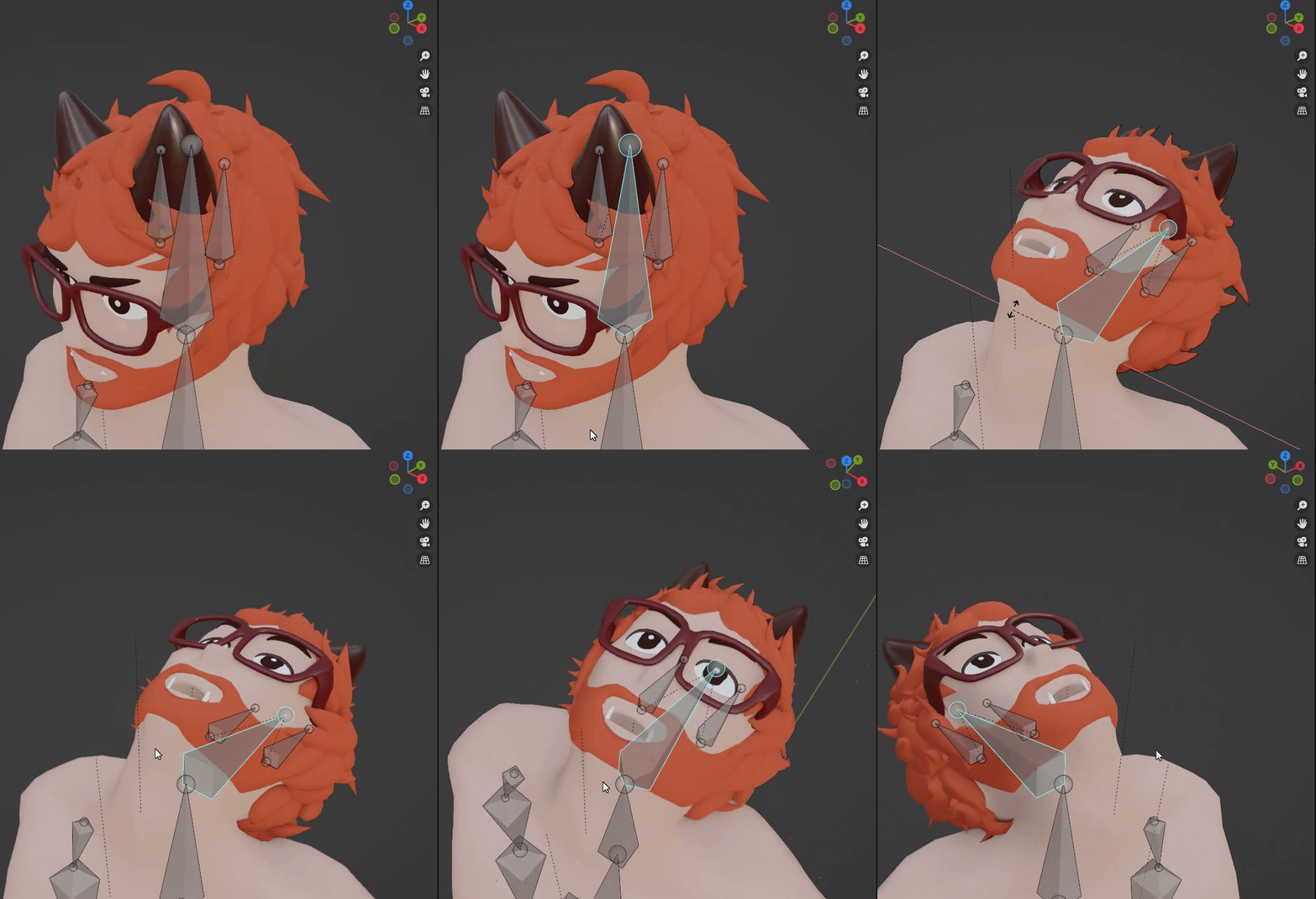

 unborn nebula
yes
lime tiger
digital willow
this looks good?
should be fine
digital willow
ok thanks
on rigging the armature?
in Blender
I dont know what Gueba was saying though... seemed random
lime tiger
be careful though.
Everything labeled as a "Rig Hack" is not functional in the new IK
The head of the hip should be level with the head of the thighs.
unborn nebula
its invisible
digital willow
oh... yeah I should. I had opened it before but didnt watch it
digital willow
ok mine are already like that
