#avatar-rigging
1 messages · Page 195 of 1
 languid ermine
but do the armature bones in the awwter and the ones in the socks' armature match?


 fading verge
idk where this wierd ass bone came from any ideas?

also would it interupt with the rig of the avatar in any major capacity


 knotty hinge
https://blender.stackexchange.com/questions/194821/how-to-delete-unused-vertex-groups I tried following this to delete unused vertex groups but it doesn't seem to work right with selecting stuff?

Blender Stack Exchange
I downloaded a model and found that there were way more vertex groups than bones in the armature. Is there a way to delete all vertex groups that are not assigned to a bone?
see it's selecting the added bits
 fading verge
If its not the animator or the config causing the tpose what is it
 crisp tendon
knotty hinge
see it's selecting the added bits
crisp tendon
knotty hinge
see it's selecting the added bits
You're in weight paint mode
knotty hinge
the guide was telling me to ;v;' that's why I got muddled
crisp tendon
Have you tried merging your mesh into the other one ?
knotty hinge
thank you I just tried that the control j thingy yayay :D
will that make the armature weight stuff mad if I have the added stuff and the old model?
when I follow the thing and do delete all unlocked groups it just leaves the tail base? https://blender.stackexchange.com/questions/194821/how-to-delete-unused-vertex-groups

Blender Stack Exchange
I downloaded a model and found that there were way more vertex groups than bones in the armature. Is there a way to delete all vertex groups that are not assigned to a bone?
crisp tendon
I think that's fine, you can always fix the head weight paint if it turns out to be an issue
and remember to delete the armatures that you don't need !
knotty hinge
do you know why there are armatures like inside of the head? should I keep those
these thingies

some are on the outside others on the inside. I get why the outside ones were there because there was fluff but not why the inside ones are there is it to do with the eyes?
crisp tendon
What are the bone names ?
 knotty hinge
forgive me if this is a dumb question but what's the difference between bones and armature? ;v;' I feel dumb not knowing this and aaa I wish I understood more
knotty hinge
oooh thank you
when I click the armatures nothing seems to glow except for the last armature listed which says armature.0003
crisp tendon
In that case delete armature 002 and 003
knotty hinge
thank you for the help you've been a lifesaver
huh why are there shape keys for vowels (it's all in japanese)
there is literally a shape key called shiitake what the beep does this mean
I asked my girlfriend about the ones that deepL and google won't translate she says they are romanji?
crisp tendon
Romanji should be non English words, in our alphabet but as japanese vocabulary
It's up to you to keep those shapekeys or not, you don't have to
knotty hinge
shapekeys are like animations, right?
I managed to translate everything but those phew

so I have to make new weight vertex group thingies for the new crest and tail?
knotty hinge
hmm so things have the right name now like all the bones but when I move stuff in pose mode it still doesn't move the model?
I'm super sedated from my medication I'm going to bed now but thank you for the help again today Ruuubick I'm learning so much from you ^O^)/ I hope I'm not causing trouble thank you for your help
 tired viper
I finally got to a point to where I exported my model to unity. But I looked and the armature isn't showing up. I act like I'm gonna upload it to vrc to see what's wrong but it says I didn't import as a humanoid or something like that
 quaint beacon
Does anyone know how to fix the issue where your view point will sink into your chest/neck and your vision will be blocked when you sit down in fullbody?
crisp tendon
knotty hinge
hmm so things have the right name now like all the bones but when I move stuff i...
When you import the model in a new project from the default files, does the armature move the mesh in pose mode ?
 subtle cove
hi! not sure if this is the right channel to ask but im vaguely new to avatar creation and have a problem with setting up eye tracking using CATS
whenever I set up eye tracking the pupils move back and forth instead of up and down, they move left and right just fine though

any way I can fix this?
knotty hinge
crisp tendon
When you import the model in a new project from the default files, does the arma...
the only way I found to import it was to make it an fbx and then the posing still doesn't work
crisp tendon
Does it move in unity ?
crisp tendon
subtle cove
hi! not sure if this is the right channel to ask but im vaguely new to avatar cr...
Are your eye bones straight up ?
subtle cove
crisp tendon
Are your eye bones straight up ?
yeah, i repositioned the bones a few times to see if anything works but either way they still break when moving up and down
crisp tendon
What do they look like before eye tracking generation ?
subtle cove
 crisp tendon
Try doing Alt + R in edit mode and then try again
subtle cove
just tried it, didnt fix the eyes :(
ah wait
theres eye bones way near the feet i didn't see before, ill see if thats the problem
fixed it, thank you anyways!
knotty hinge
crisp tendon
Does it move in unity ?
for some reason the bones don't show up in unity?
 crisp tendon
They do, they just have odd names
If you lat click the tiny triangle next to that bone it'll expand the list
knotty hinge
ohh is it because the model is opaque
the grey stuff looks way smoother than the yellow too
should I make it kinda jagged as well? I want to be able to use this in quest
crisp tendon
You may need to apply shade smooth in blender
But if you move the bones in unity and it's fine, then i'm not too sure what the issue could be
knotty hinge
when I move the bones in unity it doesn't do anything
knotty hinge
crisp tendon
You may need to apply shade smooth in blender
yay thank you now they all have the retro-y look

quest likes that more, right? having less vertices?
is it possible to do it the other way where I make the yellow stuff smoother instead of the pink stuff harsher?
crisp tendon
That changes nothing for the polygon count, it's just a shading method
I would suggest turning it all to shade smooth though, as that's how the model was meant to be seen
It's called shade smooth
knotty hinge
I did object shade smooth and it's still all square
nevermind it works now :D
thank you you're so smart at this aaa when my model is done I wanna draw your avatar

it's a lil lumpy but when I try to fix it in sculpt mode with smooth or flatten it doesn't really do anything?
 crisp tendon
Up to you, if you think you can fix it without messing with the geometry too much, give it a try !
 river berry
okay when adding new clothes.. do they HAVE TO have an armature? ive see youtube tutorials where they didnt use/need them but those are outdated.. also i somehow misaligned my armature for my dress. YET there doesnt seem to be any armature/ bones??? i uploaded the dress by itself separately to check and theres nothing visible... how screwed am i ?
 crisp tendon
you can clear parent and keep transports with alt + P
and then delete the empty that you're left with
river berry
crisp tendon
you can clear parent and keep transports with alt + P
uh huh.. can you say that again but as if im a child and also very dumb? lol im still learning, and ive only got like 2-3 months experience tinkering with blender and unity.
also why cant i SEE any armature?
crisp tendon
the bones are in the mesh, you'd need to select your armature/bones and enable the "In Front" display option
Select your three outfit pieces, do this
 river berry
crisp tendon
the bones are in the mesh, you'd need to select your armature/bones and enable t...
river berry
crisp tendon
the bones are in the mesh, you'd need to select your armature/bones and enable t...
"In front" display option??
crisp tendon
 river berry
crisp tendon
river berry
crisp tendon
Welp it would seem that this dress isn't rigged and i didnt notice til now.. how could i make it move with the avatar properly? Someone said to "try to join the mesh with the avatars bones with automatic weights" but they dont know much about it..
crisp tendon
Join my Discord for help or meeting like-minded people: https://discord[dot GG]/uSEvuVw or scan my QR Code: https://media.discordapp.net/attachments/626502922120724480/626522415794618399/qr-code-Shanie-Discord.png
This is a Bob Ross-style video where you work alongside me to make your skirt better.
Your skirt is awful, it has too many dynamic b...
river berry
Hey @crisp tendon i believe i have followed as you said above, but this avatar never had legs from the thigh down.. and this outfit has stockings and shoes i refitted.. but as i said none of this outfit is rigged.. how can i attach the "new legs" to the body armature? i cant seem to get it to work.. ive been at this for 3 full nights now x.x also im thinking that the outfit needs to be assigned it parts of the body instead of the ENTIRE body to avoid the weird stretching im getting.. how can i do this?

 crisp tendon
You'd want to remove that weight paint specifically, but if you look at more weight paint tutorials you'll get the hang out of it quickly
river berry
OH! also i managed to separate the dress into sections.. i figure that would be easier to do. like the bottom of the dress follows legs, top of dress follows torso etc.
.
okay thank ya
knotty hinge
ruuuu is it too late to ask for help about why my bones aren't working and for help with the next step it's totally fine if it is
knotty hinge
why's the texture painting looking so much worse this time around

is it the smooth thingy?
 teal mantle
Hey. Got a question. I have a vroid. I did all of the changes I need to do for the armature but still getting the peepee stance when I’m kneeling. I don’t have fbt yet so was wondering if it would change when I get it or what else am I missing guys?
 wintry thicket
knotty hinge
why's the texture painting looking so much worse this time around
wintry thicket
knotty hinge
why's the texture painting looking so much worse this time around
pro tip, dont use blender to texture your stuff
it tends to do things like that
crisp tendon
Blender is fine for texturing
 tight musk
soooo animation in blender tracks hips, animations transferred to unity don't?
 brittle hill
might be a rookie question but i want to connect 1 and 2 to 3 and still have the weight that 1 and 2 have in them, is that possible? if so how?, i have tried to parent them, joined them and such but it loses it weights which im trying to avoid.

 glass pelican
brittle hill
might be a rookie question but i want to connect 1 and 2 to 3 and still have the...
glass pelican
brittle hill
might be a rookie question but i want to connect 1 and 2 to 3 and still have the...
Select 1 then 2 then 3 and then under model options in cats press to active
 brittle hill
for that to be active, i would need to join all of them correct? since otherwise it is greyed out
since right now the tail bone, head bones and body bones are seperate
brittle hill
glass pelican
Select 1 then 2 then 3 and then under model options in cats press to active
what you said there only deletes the bones which is the wrong move as for my case
glass pelican
It merges them and weightpaint
 sand jasper
So, I got an already rigged model from someone, but the bones are twisted so that when I try to straighten the spine...

I have 0 experience with rigs, so some in-depth help might be needed.
 inland badge
Does anyone know how i would go rigging a sliding avatar with no legs and floating hands??
 crisp tendon
sand jasper
So, I got an already rigged model from someone, but the bones are twisted so tha...
crisp tendon
sand jasper
So, I got an already rigged model from someone, but the bones are twisted so tha...
Shift + S > Cursor to world origin, set your rotation space to 3D cursor at the top, select all the bone from hips to head > S + X + 0
 cerulean temple
For the hands, you can just hand the balls as the "wrist" and have invisible arms
 bitter sky
Would anyone be able to tell me the best way I can add new shoes to my avatar? I have used blender before, trying to add skates to my current avatar for the new skating world coming out tmrw and no matter what I do when I try walking with it or testing a animation in unity the shoes just go off the feet
 sand jasper
There's 2 bones in the neck, and I have to get rid of one of them. How do I do that without breaking things? I assume I have to readjust the hierarchy somehow. Don't know how to do that.
 sand jasper
I tried deleting the second neck bone and parenting the head to the neck like a tutorial said to...

And the mesh thing is something I have no clue what's going on there
 tired idol
How do I name bones in blender?
fading verge
I'm not really at the stage yet but how does rigging work?
sand jasper
fading verge
I'm not really at the stage yet but how does rigging work?
If you're going to ask a question that baseline: don't. Look up a tutorial first. When that inevitably doesn't pan out, come here for specific problems.
fading verge
Alright
I watched a video. Think I understand the basics now
It doesn't seem that difficult
 brisk terrace
My legs get crossed as soon as i crouch a bit....any idea how i can fix
bitter sky
so if I have my current avatar with a armature and I am trying to add shoes that don't come with a armature what would be the easiest way to do so?
 tranquil pilot
what does bone collider do?
 kind mortar
bitter sky
so if I have my current avatar with a armature and I am trying to add shoes that...
kind mortar
bitter sky
so if I have my current avatar with a armature and I am trying to add shoes that...
Go into Blender, parent them to the bones, then weight paint them, easy! 😄
 oblique night
I need help with some blender weightpainting and stuff. dm me please
 undone veldt
This. It won't blur, It only draws, Eraser doesn't work either.
 errant tartan
I have been editting an avatar, But when I now go into pose mode I cannot select and bones and when I move bones around the mesh doesn't move with it. If I select the vertex group in the right side it will show the weight paint on the mesh like normal?
 tired canopy
Hey any tips on how I should rig this for animation? I was thinking of doing several IKs but I'm not sure if that's a good way to do it anymore.

 brave edge
heyo, I'm having issues with unity rigging. I've gone in and tried to configure, but even after that I still get a notification that "has an invalid Avatar Rig Configuration. Missing or invalid transform:
Found duplicate transform 'LeftEye' for human bone 'Jaw' and 'LeftEye'"
 hearty thunder
tired canopy
Hey any tips on how I should rig this for animation? I was thinking of doing sev...
hearty thunder
tired canopy
Hey any tips on how I should rig this for animation? I was thinking of doing sev...
It's a tube, you just rig it like you would any tube.
The hard part comes in with the fact there's no default snake animations to build off of for VRChat, so you're gonna have to animate that out yourself.
tired canopy
I've actually never rigged a tube but the animation part is totally fine and I knew going in to the project.
fading verge

 halcyon plank

help. I tried selected the hip bone and the right left bone and used Ctrl+P to parent it and set it to keep offset but the black dotted line is connected to the wrong circle thing
tired canopy
halcyon plank
help. I tried selected the hip bone and the right left bone and used Ctrl+P to p...
Oh you've selected it in the wrong order! You select the child then the parent. I always remember it like this "many children can have one parent"
halcyon plank

that looks wrong too
now it's connected to the upper circle thing
shouldn't it be connected to the bottom circle?
or is this actually correct?
tired canopy
No with how the bones are oriented that's how it would connect I think. You should be fine
halcyon plank
oriented? but this is how they should be orientated, right? idk because this is how they were orientated in a video I was following
tired canopy
Yeah no worries you're totally fine. The line is mostly just there to represent which bones are parented to who.
halcyon plank

the legs still doesn't seem to be connected to the bones. hmm
I check the head and it works there but not for the leg bones
tired canopy
Have you done your weight paints yet?

 tired canopy
Click ok your bones, then the mesh, go into weight paint mode and alt click the thigh bone, it probably doesn't have it's weight paints done yet
halcyon plank
what?
why click the bones and then click the mesh? why not just click the mesh right away?
so in object mode I click the mesh
sorry I don't understand your instructions
tired canopy
Here's what I mean, sorry if I explained poorly
 halcyon plank
I can't select both the bones and the mesh
it won't allow me
also you're painting onto the mesh? that doesn't look like what I want?
but anyway I can only select either the bones or the body/mesh
god I wish there was a clear tutorial explaining all of this
tired canopy
Weight paints is exactly what you want to do! It basically tells which bones controlls what verticies when they move! But that's odd. What mode are you in currently?
halcyon plank
Object mode
it's just weird how it works for the head and the main spine and bones and stuff
it's only the legs and such that don't work
maybe they aren't connected correctly?
tired canopy
Did you do you automatic weights already?
halcyon plank
what?
um? idk?

Hoi there, Rain sensei here, this video is a recap of my 3D modelling series Parts 12 to 13, covering rigging your model.
if at any point you feel as if you need a more thorough explaination, seek out the relevant episode and scrub through it to find what you are looking for, I will slowly explain things in those videos, so please check the ori...
I've been trying to follow this video which has been a pain so far
at 4:48 the person does the weight paint stuff
honestly idk why people compliment the creator of the video so much when it's incredibly hard to follow along and many things aren't explain or downright ignored
tired canopy
Yeah that is the funkiest way I've ever seen anyone assign weights...
The easier way is to select the mesh, then the bones, press ctrl+p and choose "With Automatic Weights"
halcyon plank
wait what's vertex groups? I noticed it in the project. weird
halcyon plank
tired canopy
Yeah that is the funkiest way I've ever seen anyone assign weights...
The easie...
I still don't know how to select both the mesh and the bones
wait nvm I can select them in the inspector
bruh
there
tired canopy
Oooh okay yeah it does that sometimes it's super funky
 tired canopy
No, the basic setting should do just fine
But now go into pose mode and try it out!
halcyon plank
nice
it seems to work
oh god... I still need to rig the tail and the ears
btw

I clicked on the weird grey shape on the Body and these vertex groups came up
is it anything I need to concern myself with?
cause some of the names seems to be the same as the names I gave the bones but some of them are different
tired canopy
Don't worry it's not too bad, just create the bones (you have no naming conventions to worry about) and do another automatic weights again!
And no! The vertex groups is just a selection of verts created when you weight paint!
halcyon plank
well if you say so
god... trying to do rigging for the first time has been such a pain. but at least it's gotten a little easier as I'm starting to understand it more
and to think... all this simply because unity was complaining about missing the damn left foot or something
wait... I named my bone Left Ankle so would I have to rename it to Left Foot instead?
tired canopy
There are naming conventions to follow for everything that let's unity immediately slot it in the right spot but you can do it manually later
halcyon plank
I wish I could've just used the original rigging of the model
question. how many bones does the tail and ears need to have?
and how should I name them?
tired canopy
Can you show me the wireframe of the tail and ears?

 tired canopy
Ah not the mesh the wireframe!
halcyon plank
uh...
tired canopy
Just hold down z and go to wireframe!


 tired canopy
I assume you plan to put dynamic bones there?
halcyon plank
wait maybe I can import the old model and look at the old rigging and just kinda copy it over
halcyon plank
tired canopy
I assume you plan to put dynamic bones there?
possibly yea
I mean I definitely need bones for movement
cause right now if I rotate the head the ears are still in place
tired canopy
Got it! I would personally say two for the years and maybe four for the tail?
halcyon plank
the old rigging is kinda weird lol. but maybe I can try and copy how the ears were done

hmm I wonder if my bones should be different in size
 tired canopy
And a very important thing! After you've done your automatic weight paint again, make a super tiny bone for both ears and the tail, parent the ears and tail to their tiny bone, then the tiny bone to the head for the ears and the hips for the tail, this helps the dynamic bones
halcyon plank
I mean looking size to side they're kinda different in some places
tired canopy
And yeah, try to scale them so they're rougly inside the body and in places the body naturally bends
Which you have which is good!
halcyon plank
also I just noticed the old rigging has 4 bones for each arm but mine only has 3. do you think that'll be a problem?
halcyon plank
tired canopy
And yeah, try to scale them so they're rougly inside the body and in places the ...
tbh I've tried to make them fit but it's weird. there's not a lot of body features to size and scale and rotate based of
tired canopy
Your model doesn't have hands so after you've done you automatic weight just put on an extra one. It won't do anything to the model but it will make unity happy with the rig. They don't have to have a good size really
 fierce grail
Your model doesn't fullfill requirements to work properly with full body looking at those screenshots.
https://cdn.discordapp.com/attachments/390924372782612480/857200376842027028/Humanoid_Rig_VRChat.png

Should be as close as possible to this
Finger and toe bones are optional and their absence doesn't break full body, aside from lack of toe bones causing your legs to go off the ground in certain situations where you would normally tip-toe.
halcyon plank
tired canopy
Your model doesn't have hands so after you've done you automatic weight just put...
so I can just make a bone that extends beyond the arm/hand? cause I don't think I want my avatar to have actual hands. it would probably just look weird
halcyon plank
tired canopy
Your model doesn't have hands so after you've done you automatic weight just put...
is this enough? just that single small bone as the hand?
 tired canopy
Yeah that works!
It won't do anything so just as long as it exists it should be good
halcyon plank
tired canopy
And a very important thing! After you've done your automatic weight paint again,...
is this what you mean?


 halcyon plank
okay so I kinda fixed it but it's still looking a bit weird

so the model itself has the legs bend but I think if I try to match the model too much the legs will bend too much in game (or at least that's what I'm worried about). but should I try and make the bones fit the model more or less?
 silver walrus
does anyone know how to add clothes to parts of avatars with dynamic bones like ears / breasts? The issue I have is that the weights are correct, but the bones jitter wildly when I parent armatures.
 unique mason
would it break the vrc side to use ik controls on your rig? animating fully FK is such a pain lol
fading verge
Hello, I need a hero who can help me a bit understanding how importing animations from blender to unity work because sometimes it works and sometimes it doesn't :/
halcyon plank
fading verge
Hello, I need a hero who can help me a bit understanding how importing animation...
I think when you try to export your model, in the bottom right corner of the popup window you can click "Animations" or "Bake Animations" or something. idk if that's actually what you want. if you mean face expressions it's usually done using blendshapes which you'll have to create an animation clip for in unity
 normal field
hey, no matter how I weight this joint it seems to corrupt (?) when I import it into unity. In blender its fine. Ive cleaned my weights, normalized them. the only thing that seems to get rid of it is ONLY assigning 1 bone per vertex.
 crisp tendon
normal field
hey, no matter how I weight this joint it seems to corrupt (?) when I import it ...
crisp tendon
normal field
hey, no matter how I weight this joint it seems to corrupt (?) when I import it ...
Make sure it's not a shapekey issue !
normal field
crisp tendon
Make sure it's not a shapekey issue !
Its not, its strictly a weight issue because changing the weights for those two bones (foot and shin) only seems to effect it, but never good
crisp tendon
Did you select any of those vertices in edit mode to see which vertex groups they're part of ?
normal field
crisp tendon
Did you select any of those vertices in edit mode to see which vertex groups the...
yes, they only belong to the shin and foot groups on that side, it seems like when I normalize it they refuse to add up to 1, Im going to see having more weight then 1 total will fix it?
crisp tendon
I don't think unity will like that generally
 sour timber
Does anyone know where to get a free rig for a humanoid avatar?
 bleak rover
do you want a humanoid rig for a specific model, or would any humanoid bone armature suffice?
 ornate stone
Bought a new avatar, is this something I should bother fixing?
 crisp tendon
most likely not, only worth fixing if you actually encounter any issue
 robust crescent
https://gitlab.com/s-ilent/silenttools 1 click reorder bones in unity

never really had much issue with that error, even in fbt
sour timber
bleak rover
do you want a humanoid rig for a specific model, or would any humanoid bone arma...
Any humanoid armature
crisp tendon
Rigify in Blender or Mixamo in web browser
 wind halo
so when i was gonna add this model as an avatar
i saw that the chest bone is missing and idk how im gonna add one

 stuck oxide

 runic blaze
i have this really simple avatar set up (only about 500 tris and 4 bones) but i'm not sure how to properly rig it

(first avatar btw)
fading verge
runic blaze
i have this really simple avatar set up (only about 500 tris and 4 bones) but i'...
That’s a really cool unique style, I hope to see more of it in the future
 hardy pollen
how do I make this rig work in vrchat? One model had this and it lagged unity a ton
 robust crescent
cats can auto remove all the stuff vrchat dont need, but likely the bone names are all wrong
hardy pollen
robust crescent
cats can auto remove all the stuff vrchat dont need, but likely the bone names a...
id have to change settings because cats deletes everything but the spine and shoulders
 hexed breach
are there ways to animate extra bones on a model that is humanoid. I have imported a model with an animation of the chest bursting open and the preview window shows the animation working as it should but because of the humanoid constraints i cannot have the animation play is there a workaround to this problem?
 sleek isle
Humanoid constraints? Never heard of that one.
 near grove
(continuing from #avatar-help message)
Yeh @runic blaze that rig looks good to me

Discord
Discord is the easiest way to communicate over voice, video, and text. Chat, hang out, and stay close with your friends and communities.
Can't remove enbeds on mobile lul
runic blaze
atleast this means i'll be able to use it as a fallback too
(i think?)
anyways yeah you've been a huge help thank u
 near grove
runic blaze
atleast this means i'll be able to use it as a fallback too
near grove
runic blaze
atleast this means i'll be able to use it as a fallback too
What's the Tri count?
And have you kept to 1 mesh 1 mat
runic blaze
it's 1 mesh 1 mat, around 400 tris (i optimized it since last time)
not even any transparent shaders :D
(or alphaclipping anyways)
near grove
Yeh that's Def fine for a fallback
Just use mobile snaderd or toon then
runic blaze
ye
near grove
Btw quest doesn't even support cutout
runic blaze
oh lol
near grove
So may want to cut those out with a knife
runic blaze
do i need shoulders? the control panel is saying i need shoulders
near grove
runic blaze
do i need shoulders? the control panel is saying i need shoulders
Add them if it's asking for it
runic blaze
right ok
hardy pollen
Is there a tutorial on how to extrude bones to create shoulder and hip bones? Mainly Fnaf models are missing those
knotty hinge
since my avatar's uvs were a complete mess because of merging stuff I'm going to have to start the uv part from scratch
trouble is the edited model doesn't really smoothly join with the neck and also because it's got these funky lil square things which aren't as regular as the body and original mesh the uvs are always really weird and jagged?
 hearty thunder
near grove
hearty thunder
near grove
But why the screenshot though?
https://discordapp.com/channels/189511567539306508/390924372782612480/404301402878246912
near grove
hearty thunder
But why the screenshot though?
https://discordapp.com/channels/18951156753930650...
cus message links on mobile is pain
if on pc i would have linked
 storm sundial
How to
Edit weigh paint?
languid ermine
storm sundial
How to
Edit weigh paint?

Weight painting avatars in blender for VRChat can be super time consuming and very tricky, but in this video I show you how to do it very fast and easy! It only takes a few clicks and you're done, so don't worry about weight painting ever again! You can do it!
Thank you for watching!
Website downloads: https://www.ask-amber.com/downloads
Join...
storm sundial
languid ermine
https://www.youtube.com/watch?v=9rW-TeCYjro
Thank u
 stable yoke
I have been having a problem with my FBT avatar. Whenever I am in VRChat in FBT my avatars chest rotates almost 90 degrees to the right side of the avatar. The avatar doesn't do this when I am not in full body tracking though so I am stumped as to what is wrong. I have a screenshot of what happens what it is supposed to look like (T-posed) and a few screenshots of my rigging in blender. If anyone knows how to fix this please let me know! Thank you


 shadow fern
stable yoke
I have been having a problem with my FBT avatar. Whenever I am in VRChat in FBT ...
shadow fern
stable yoke
I have been having a problem with my FBT avatar. Whenever I am in VRChat in FBT ...
Check that each bones in the spine has the same roll value.
stable yoke
shadow fern
Check that each bones in the spine has the same roll value.
Some of them were different so I fixed that now and I am gonna go test it now
Thanks
Sadly that didn't fix it
stable yoke
I fixed it somehow! What I did was I turned off Inherit rotation in blender and that worked. Idk why but it id
knotty hinge
why does the cockatiel model look like this when imported


VRCArena
It's like the second bird tribe, the cockatiel. Various textures are now available! Along with that, the contents of the package have been renewed. Please check the update details for details. You can get a glimpse of the actual appearance at the booth ...
ornate stone
So I have this new hair piece, how do I merge the bones from that one into my already existing armature?
I know it's from CATS right?
New hair

My existing Armature
 fading verge
Hey is anyone willing to explain to me like im 5 the process of taking an avatar from unity, importing it to blender to fix the full body tracking, then taking that and putting it back into unity to upload? I feel like im missing something major and I cant seem to figure it out. (first day trying all this so please be patient with me) I have the FBX converter file thing but when I put it into blender its just a white blank model no textures or shaders anything like that and i figure its alright so I re arrange my bones and whatnot and try to put it back into unity but cant find a way to re apply all the coloring and stuff
I got 2 avatars from commissions and just trying to fine adjust the fbt
If you are willing to chat with me through it send me a DM please
fading verge
good morning sirs i have come to you with yet another terrible news i am afraid to tell you that i have ran into huge troubles with my avatar showing gaps in the arm pits and as well as in the back of the neck i have no idea what i did wrong and i must add that i would be eternaly grateful if any of you lovely saussages help through this

here is what it looks like in game the vest is all messed
 fading verge

 signal pagoda

 fallen bronze
Will vrchat complain if the leg bones are spread out wider? Or if the arms are very big?
fading verge
I believe errors regarding angles are displayed in the builder tab
 fallow mango
does anyone know how to fix a model whose rig is entirely backwards when ported to unity? tried google but the only suggestion i found was to flip it 180 in blender and that didnt seem to help
a screenshot with the default swim test pose
 crisp tendon
You also need to apply those rotations with Ctrl + A > All transforms
In object mode
 mild stratus
You should also make sure the rig is in a (applied) t-pose on export, as that can sometimes solve the issue.
fallow mango
ive followed your steps and seems to still be broken...
its as if the mesh and rig are offset somehow so that they flip
crisp tendon
Did you apply transforms on both ?
fallow mango
yes
crisp tendon
Make sure the bones of the armature have the correct name on each side
make sure it's facing the correct way in blender in the first place
Or use cats to apply your rest pose if you're sure of the above
fallow mango
to check, what is the correct direction?
crisp tendon
Press 1 on numpad
fallow mango
ah it's good on that front then
i think the issue may possibly be the hip bones, in the unity bone view they seem to be real out of wack
fallow mango
crisp tendon
Make sure the bones of the armature have the correct name on each side
ah! this seemed to have been most of the problem
earlier i must have thought they were broken, swapped them, and by doing so broken them again
many thanks for the help, i think i need to un-ruin a couple bones but other than that thanks very much
crisp tendon

 amber scroll
Okay. I'm having a fat issue with dynamic bones glitching out when the orientation changes. And I can't think of anything that I did to change any sort of value.
https://gyazo.com/cfaa47754d8b203affc83d06aabf151c
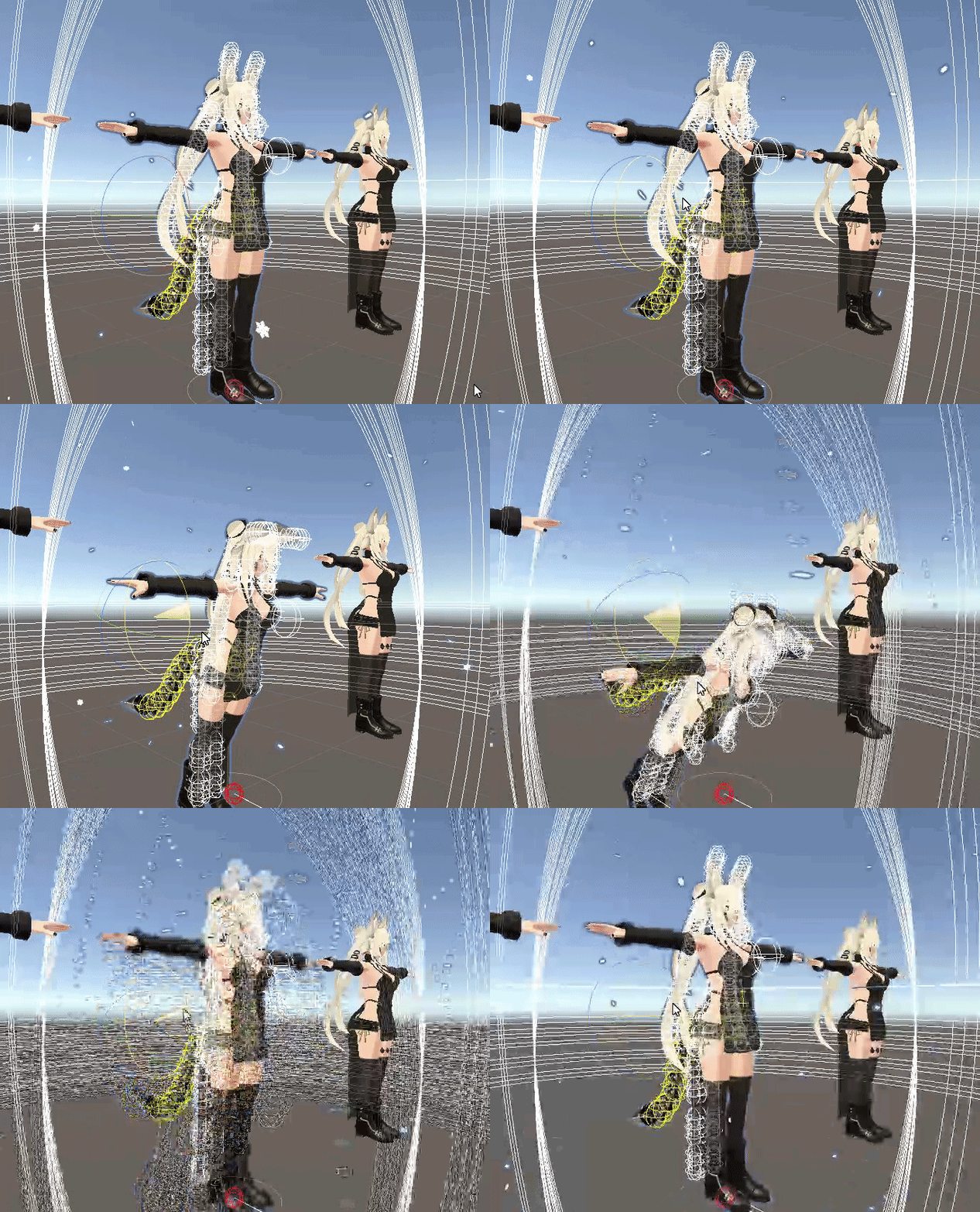
That's the current issue

This is how it should be
It happened when I added ears to my avatar in blender and imported it to unity, added mesh, added bones yadda yadda.
The only difference I see in Unity between the two models that bothers me is that if I have the same Radius values in the Dynamic bones, the old one is fine, but the new one's abnormally large

This one showing normal radius size

This one showing a large size, despite having the same radius value (And no, decreasing the radius size on the new one Does not band-aid nor fix the problem)
 remote narwhal
amber scroll
Okay. I'm having a fat issue with dynamic bones glitching out when the orientati...
remote narwhal
amber scroll
Okay. I'm having a fat issue with dynamic bones glitching out when the orientati...
Probably because it looks ridiculously unoptimized and your unity is going brr
That’s also an issue that happens when some of your scripts are broken
hardy pollen
how do I fix this from happening when in edit mode?

 vocal sentinel
Which avatar is that?
 flint yarrow
genuinely dunno whats causing this, i think it might be a rigging issue but i cant pinpoint it. i know my bone roll is at 0 for all my bones, and that my armature is symmetrical

my arms are supposed to be straight out in this image
this is what my rig looks like
 sleek isle
Have it in t-pose by default maybe
 still oriole
hardy pollen
how do I fix this from happening when in edit mode?
still oriole
hardy pollen
how do I fix this from happening when in edit mode?
Maybe you didn't reset the armature in Pose mode before going into Edit mode?
 blazing urchin
Where's a great place to get avis? I want one recolored but the package is broken


 civic elm
Could someone help me please? I'm trying to make a fallback avatar with a sign. But I got to take the sign texture and join it with the atles of the model, so it has 1 material and will work as a fallback. Does anyone know how to do this in blender & cats plugin?


 vivid carbon
civic elm
vivid carbon
civic elm
Do you have Cats Blender Plugin? You can use it's custom model tool to parent the 2d plane to the hip bone
civic elm
vivid carbon
Do you have Cats Blender Plugin? You can use it's custom model tool to parent th...
Really?!
How?!
Please tell!
vivid carbon

 vivid carbon
that is probably part of the problem
vivid carbon
You should make a 2d plane and attach the image that way, but I'm not one to help with that
civic elm
vivid carbon
You should make a 2d plane and attach the image that way, but I'm not one to hel...
Okay. I think I know how to do that.
civic elm
vivid carbon
Do you have Cats Blender Plugin? You can use it's custom model tool to parent th...
Okay now what?

It's joined with the hips
 minor shore
i have a model with a hood who's hair was sticking through so i kinda lowered them but now whenever she blinks or smth that part keeps moving up and down. I even did the shape propagate thing on blender but it's still doing it even though when i move the shape keys in blender its not doing that.. how do i fix this?
minor shore
 crisp tendon
You would need to edit the basis shapekey and shape propagate those changes
 sleek radish
minor shore
i have a model with a hood who's hair was sticking through so i kinda lowered th...
sleek radish
minor shore
i have a model with a hood who's hair was sticking through so i kinda lowered th...
Use the Blend to Shape function in blender.
You can apply the vetex data from.any shape key, additively or directly, using that tool. Definitely worth it.
minor shore
i got it. it wasnt the hair it was the forehead sticking through. all good now... 
amber scroll
remote narwhal
Probably because it looks ridiculously unoptimized and your unity is going brr
This had got to be the worst comment Ive ever gotten and was not useful at all. Optimization does not cause script issues, let alone adding ears. Unity does not go "burrrr" from ears, and if it was a script issue then me deleting and redoing scripts would fix it. In this case, no. And a fresh new project did not solve anything either.
 sturdy belfry
whenever i go in game / test the rotation states on my eyes in the avatar descriptor, my eyes completely disappear. anyone know how to fix?

 summer hawk
are the bones pointing upward
sturdy belfry
Yes

 humble lake
amber scroll
This one showing a large size, despite having the same radius value (And no, dec...
humble lake
amber scroll
This one showing a large size, despite having the same radius value (And no, dec...
I'm not 100% sure where in blender causes that radius issue but when you experted the model the scale of it was changed from 1 to 100.
It won't harm anything on the model it just makes the radius of dynamic bone components whacky. It is fixable when you export it I'm just not sure where. Hope that gives some direction.
amber scroll
I'll see if something is somehow scaled largely or if something is far away. But i can guarantee the general model is the same size as my older version.
humble lake
amber scroll
I'll see if something is somehow scaled largely or if something is far away. But...
It 100% is. This is a problem I face regularly as well but I just don't bother to fix it. I already have my radiuses fixed for my dynamics. It's specifically the armature that's scaled to 100, not the size of any of the meshes.
amber scroll
humble lake
It 100% is. This is a problem I face regularly as well but I just don't bother t...
Thanks I'll be sure to look into that later since I'm not on the PC atm
humble lake
Mhm no worries~
 frail skiff
hey guys what if my model doesnt use the standard IK rig is that still cool?
 tough robin
frail skiff
hey guys what if my model doesnt use the standard IK rig is that still cool?
tough robin
frail skiff
hey guys what if my model doesnt use the standard IK rig is that still cool?
You can use final IK to make your own IK
frail skiff
Ah thx
remote narwhal
amber scroll
This had got to be the worst comment Ive ever gotten and was not useful at all. ...
Then it’s probably a ripped avatar
remote narwhal
amber scroll
This had got to be the worst comment Ive ever gotten and was not useful at all. ...
By unoptimized I mean you have way too many db scripts
robust crescent
4000 collision checks / fine 
 fervent hornet
Radius of the dynamic bones is relative to the armature scale, default export of fbx from blender results in an armature scale of 100
fervent hornet
It being horribly optimized should not break the scripts like they already stated, it only makes it more difficult to figure out what is actually wrong
remote narwhal
fervent hornet
It being horribly optimized should not break the scripts like they already state...
Ah ok
humble lake
remote narwhal
Then it’s probably a ripped avatar
Not gonna lie, that's a really bold claim when the comment is literally asking why the radius of their bones is large.
amber scroll
remote narwhal
Then it’s probably a ripped avatar
It's not even ripped, I rigged it myself. Sorry it's not optimizedtoyourpotatoPCliking
I've seen octopus avatars with twice as many db scripts that works just fine.
crisp tendon
"works just fine" isn't an optimization benchmark 
still oriole
Oh so these are the avatars that make my headset lose tracking every five seconds.
amber scroll
Okay, I didn't say that "works just fine" is an optimization benchmark, it's still Functional. In this case, the avatar isn't functional as expected. And this other guy wants to say it's "unoptimized" which makes it magically not-functional, even though. There's other avatars that has more intense unoptimization, but still remain functional. If you can't understand that, or didn't read the context, then I don't know what to say for you.
tired canopy
Can an avatar that has a generic rig still have full body tracking? I remember reading it somewhere it can't but now that I think back on it I can't remember where I read it
fervent hornet
For an avatar to follow VR, it needs to be humanoid. However, you can have a humanoid armature for VRC to use for your VR, then using constraints you can have a sort of puppet system with a generic armature
tired canopy
Wait, so if I do two rigs, the generic rig with animations on the generic parts and another humanoid rig that works? I'm trying to make a naga model so I have to animate the tail for all of the walk animations, but that seriously works?
crisp tendon
That wouldn't work with full body sadly
tired canopy
Okay, is there any way to add the non humanoid parts of an animation to it then? I tried making an idle animation but it just ignored the non humanoid parts and tutorials haven't gotten me anywhere realky
Because that's really the last hurdle that I haven't been able to solve, how to get unity to notice the parts that aren't humanoid
robust crescent
You can detect velocity and do things to other parts , how i wobble the car i made ages ago
crisp tendon
tired canopy
Because that's really the last hurdle that I haven't been able to solve, how to ...
You would have to use two different armature parts then, the lower body would need to be weight painted and animated as they are in the game while the upper body is just regular humanoir
tired canopy
Okay, so seperate them like so in blender before exporting?

I'm sorry if I'm not understanding it correctly, I'm not the best at this phase yet, but the model is already weight painted properly within blender
fervent hornet
I had a Naga model where the snake part slithered when I moved but the whole thing was an overengineered nightmare because I wanted it grounded
In blender it's still all one rig, the Naga part is basically just a tail like you would do a dog tail or the like
Animate the tail with a blend tree so it does the right movements based on velocity, toss some dynamic bones on it and you should be good to go
tired canopy
Yeah I've already planned out the dynamic bones part what I can't figure out how to do is to animate the blend tree.
The tail can be manually posed but it will not animate. All it will let me do is keyframes transforms, which VRChat won't pick up on for me
fervent hornet
What layer are you animating on?
tired canopy
I think straigth on the bones? There are no muscle groups for the tail
fervent hornet
No, the playable layer, locomotion, additive, gesture, ect
tired canopy
Oh the locomotion, for now inside the standing blend tree
fervent hornet
Did you see up a correctly defined avatar mask?
tired canopy
I actually can't find the avatar mask, it's supposed to be under animation right?
fervent hornet
 tired canopy
Oh right, yeah sorry forgot, but there's none for the avatar no
fervent hornet
Well it wont work without one so maybe do that first
tired canopy
Okay there done. I should have one there now
What's next? Sorry that I'm not good at this. I wanted to do a sort of trial by fire situation to see how far I could push myself with this model and I've kind of run dry on how to do things
fervent hornet
Have you not animated the snake part? Its tedious but not too bad
tired canopy
I was planning on trying to figure out how it works in unity before doing the animations so I know what limitations unity puts on me. I do have an idle pose prepared atleast
fervent hornet
Here's the overengineered mess I was talking about, its actually doing all the slithering in the FX layer
The part that is actually being animated are the white boxes, the actual snake tail is a mix of the white, green, red, and yellow
I just copied the vrc_standinglocomotion for the blend tree and replaced the respective humanoid animations with the slithering counterparts
tired canopy
Oh wow okay. Was that the only way you figured out how? Because the plan I had was to put dynamic bones on most of the tail, create the animations in blender, put it in unity then afterwards animate the parts of the tail that do not have dynamic bones on them to cut down on time and allow it to turn naturally
Which as said, stumbled when I couldn't figure out how to animate the tail parts that don't have dynamic bones
fervent hornet
Dynamic bones by themselves will not give you any sort of slithering effect, youll just drag the tail behind you
tired canopy
Which is why I want to animate some of the tail, that way it can act as a driver and allow the rest of the tail to follow through. The tail isn't super long so I thought it might work then
fervent hornet
Yeah can probably just animate on the FX even though you arnt supposed to if the avatar mask is still giving you trouble 🤷♂️
The slithering wasnt a main point for my snake so I honestly havent tried many methods
I've put a pause on most lamia as dynamic bones is fucking trash so I'm gonna get back into it when physics bones comes out 👍
tired canopy
Got it but I just need to know if it's something I'm supposed to be able to do and I'm just messing up somewhere, can I animate using these or do I need to rig something for it to work?
 fervent hornet
Since these are not humanoid bones, the transform component is all you can really use, you should be taking advantage of the recording feature though
tired canopy
Oh yeah of course, but I will experiment some more and see if putting on the mask solved it. Either way thank you so much so far
fervent hornet
Good luck!
tired canopy
Okay no that didn't solve it, my idle animation is for some reason looks a lot better now though so thanks for that atleast? Oh well I'm gonna get back to it and figure it out later. Thank you anyway!
 wary nest
crisp tendon
That wouldn't work with full body sadly
wary nest
crisp tendon
That wouldn't work with full body sadly
Avatars that are weighted to a secondary armature which is then constrained to the Humanoid armature don't work with full body?
crisp tendon
If your lower body is a snake, yeah, that won't work with full body
wary nest
Gotcha. Thanks! 😁
bleak rover
I mean, you can make the constraints move the snake bones based on your leg movements, but it obviously won't be analogous to legs
 crude bone
hi i started to have fun creating the avatar but i got a issue , for fit this dress to the model correct (head) the hands will stay upside
have any idea what i have to do for fit it correct?

 wheat night
Not sure if this is the right discord channel for this kind of question but, can anyone tell me how to have in my radial menu, the option to switch materials on the fly? I got a Michael Myers model I've been working on as a Halloween project of sorts and had a bunch of weapons for him. I have two of each textures. A clean and a bloody for each weapon. Was just wondering if anyone knew how to switch the materials in the radial menu quick? Thanks!


 unreal apex
Without making any changes, I import my .fbx to blender, then export the .fbx without making changes, and it completely breaks the model.
What am I doing wrong when either importing or exporting? There must be another step but I don't see one mentioned in any of the tutorials.
fading verge
unreal apex
Without making any changes, I import my .fbx to blender, then export the .fbx wi...
what breaks?
does the entire model turn into sticks or look like it gets scrabled
i think that would have to do with the export settings being off, in the scale part so make sure thats normal
unreal apex
The model disappears and I have to redo everything in Unity
Like I would have to reimport the fbx, re-add all the dynamic bones, redo all the mats
because the model isn't "hooked up" to what I have done in unity despite the file being exactly the same
Before

After

model just goes poof, none of the settings are different, the file is identical as far as I can tell. I'm baffled
tired canopy
What do you export settings look like in blender?
unreal apex


Now it's giving me these errors in Unity

To clarify, I can click and drag the fbx into the scene in unity and it shows up, the issue is that the model in the existing scene with all the effects/dynamic bones/hours of work is non-functional
mild stratus
Did you make a separate prefab to add the effects onto the model, or just add them straight onto the model?
unreal apex
I made a seperate prefab
unreal apex
Taking the .fbx from the backup that I made is now also breaking it
so it looks like some issue with Unity
unreal apex
comparing the backup with the broken one, it looks like the descriptor is jacked up; any idea how to hook it back up corectly?
 mild stratus
According to the error, I think the blendshapes might have corrupted.
The animator is missing too
unreal apex
The animator got un-hooked but it's blank anyway. I tried hooking it up just now and it didn't fix anything 😦
im not sure how to fix the blendshapes
mild stratus
Is there anything on the dropdown menus to select them?
Because importing a new model may have removed the blendshapes during import, messing up the SDK
unreal apex
ahhh ok I think I figured it out, all of the "Skinned Mesh Renderer" Meshes are un-hooked
 unreal apex
ok so then the issue isn't with the .fbx not importing/exporting from blender correctly, it's just the Unity unhooks all the meshes when I do that. Thanks for helping me work that out!
mild stratus
No problem! Unity can mess things up a lot
unreal apex
When weight painting in blender I'm getting these splotchy grey areas, is that normal? This is my first time using the weight painting tool
 mild stratus
Blender's not my main point of expertise, but that looks a little like z-fighting
Make sure you aren't zoomed in a lot, and have other overlapping meshes disabled
unreal apex
ohhhh I see this fbx has 2 models that overlap, it was z-fighting
unreal apex
When you do Weight Painting how does it know which bone the painting is for? o_O
The guide I'm looking at shows the guy clicking the bone and it outlines it in blue but I'm using the newer version of Blender and it won't let me do it
mild stratus
I think you have to ctrl + click
unreal apex
It's not working D:
it's frustrating because I specifically uninstalled my old version of blender because this other guide said I had to install the new version
and now this guys using the old version and what he's doing doesn't work in the new version
unreal apex
Ok so I found out that the weight painting is saved in these "Vertex Groups" so I made a new one for what I wanted, but now I can't figure out how to hook it up to the new bones : /
 unreal apex
after re-importing the fbx, the armature is in the right place but the model is at a 90 degree angle : / what the heck

 cedar ice
Im trying to have my model use Viseme Blend Shape for the lipsync but its all in Japanese and idk which one is which


This is happening for two models


And this is from the second one
unreal apex
I really have no idea wtf Blender is doing to this poor model
I'm at a loss for words, I've learned tons and tons of software as per my career but Blender is by far the most ass backwards program I've ever had the displeasure of dealing with
I import the model into Blender, then immediately export it, so NOTHING SHOULD BE DIFFERENT
and the whole thing is busted, again
and then putting in the backup I made fixes it, so clearly Blender did something to the model it wasn't supposed to that no one can tell me what it is
And Unity has no indication of what's being changed that's causing the 1 of 5 different mistakes it randomly picks to screw up the whole model
Can anyone walk me through how I can import and FBX into Blender, Export it out without making any changes, and have it still work in the Unity project I took it from, since I literally cannot figure it out.
I will literally pay someone $20 to help me figure this out
fading verge
okay so i ALWAYS have this problem with mixamo rigging, the head is always broken

like when the IK enables ingame it deforms the mouth

area like this, anyone know how to fix it?

its the one thing preventing me from uploading my avatars i make
cedar ice
unreal apex
Can anyone walk me through how I can import and FBX into Blender, Export it out ...
What are you using to import and export them?
 hexed sparrow
fading verge
like when the IK enables ingame it deforms the mouth
hexed sparrow
fading verge
like when the IK enables ingame it deforms the mouth
select the entire head and map it to the bone manually
do you know how?
you just select it in edit mode and on the right side window select the head vertex group and click assign
hexed sparrow
unreal apex
Can anyone walk me through how I can import and FBX into Blender, Export it out ...
Uncheck "add leaf bones" on the export menu, uncheck "bake animayion", double-check the shape keys, and run us down whatever other issues you're running into
it could also be possible your body mesh was renamed which broke things in Unity
you also have to make sure you aren't changing the scale
or anything of the sort
also materials made in unity tend to be a bit funky in blender
so if you're getting weird faces, ignore that and remake the material in blender
also if you're using ASCII .FBX files that can be another issue
Just be careful
I noticed you seem new to blender so that could be another reason you're having issues lol, it's probably something very simple you're missing
hexed sparrow
unreal apex
after re-importing the fbx, the armature is in the right place but the model is ...
select eveything including the armature and mesh in object mode and hit apply transforms in blender before proceeding with the export next time
hexed sparrow
crude bone
have any idea what i have to do for fit it correct?
resculpt the sleeves to cover the wrists
 near star
Does anyone know how to make an avatar grip the forward part of a gun as well as the pistol grip?
On a rifle, for example?
still oriole
crude bone
you mean scale it ?
Use proportional editing to move the sleeves where you need them.
 iron hill
Hello ! Is there a way to emulate how vrchat rotates the shoulder bone when raising the arm , in blender ? Like some contraints or a ik chain ? I'm working on shoulders weight painting and I have to guess what the rotations of the arm and shoulder are, so it is not optimal and I think I'l wasting a lot of time with trial and error
still oriole
You can set up an IK chain in Blender but I have no idea if it works the same as in VRC (I would guess not). Last time I did that it was through an extra IK bone at the wrist and an IK constraint.
fading verge
hexed sparrow
you just select it in edit mode and on the right side window select the head ver...
that didnt work
 still oriole
Check your weights in Weight Paint mode.
fading verge
still oriole
Check your weights in Weight Paint mode.
i don't know how to weight paint
still oriole
Look up some tutorials then. The basic thing is, select the armature, shift-select the mesh, switch from Object mode to Weight paint. Ctrl-click a bone and you should see the mesh change color depending on the bone's weights. Solid or wireframe mode is best for that.
If you only have one bone for the head the whole head should be red.
crude bone
still oriole
Use proportional editing to move the sleeves where you need them.
Okie will try
still oriole
If it isn't, there's your problem.
 fluid flame
Hi, I'm new to weight painting and I was wondering why the foot scrunches up when I move the bone back?
 hexed sparrow
it might be assigned to the foot incorrectly
 hexed sparrow
fading verge
that didnt work
hexed sparrow
fading verge
that didnt work
it's weighted to your neck, remove the head weights from the neck and it'll stop
hexed sparrow
fluid flame
https://gyazo.com/1d2be716b12e30eb0744aadff7bf991b
not so hard
smooth that thing out
it shouldnt be full red
use Mixamo
🤦♂️
Google is free
Just search mixamo
It rigs models for you for free
everyone uses it
iron hill
still oriole
You can set up an IK chain in Blender but I have no idea if it works the same as...
thank you , I will try that, even if it is not perfect it should at least get me closer to what happens in vrc
fluid flame
hexed sparrow
use Mixamo
I know this wasn't directed towards me but this worked perfectly thank you
 chilly dock
I have a rigged avatar, how would I import it to VRChat?
chilly dock
chilly dock
I have a rigged avatar, how would I import it to VRChat?
By rigged I mean that I've set up bones and that stuff
Anything else I need to do before I go on with your steps? @fluid flame
May I ask if there is a triangle limit?
For vrcaht
Chat
fluid flame
I recommend finding a YouTube tutorial if this is your first time as I am not the best at explaining things.
also PC is somewhere like 70K tris, and quest is 7K i believe
 fluid flame
79 objects?
crisp tendon
depending on what the model is, it doesn't need to be
fluid flame
why did you make it high poly, to hide sharp edges or something else?
crisp tendon
I doubt they did anything lol
chilly dock
fluid flame
why did you make it high poly, to hide sharp edges or something else?
I made it high poly? I imported it to put it in vrchat for my personal use
 proven forge
fading verge
that didnt work
proven forge
fading verge
that didnt work
H
hardy pollen
what is a good way to add shoulder bones to models? Im having a hard time getting it to work
crisp tendon
add or weight paint ? If it's just adding, extruding from the arm bone
 pearl hound
Turns out I'm not ready to export to Unity quite yet.
I'm about as new as possible to this (first ever character model)...
Um... The blue armature is the hair armature and the orange one is the main body armature. (the main body armature is properly named for CATS' formatting but I don't see any easy "merge armature" compatible formatting for hair, unless I'm missing how the plugin works, and I'll ask in the plugin's server too in that case)
Anyway, there's a little neck bone in the orange armature too right where the blue neck bone is, and clearly there's a blue and an orange head bone too (the smaller blue one inside of the orange one)
How would I go about merging the neck and head bones along with keeping the weights of each bone from the hair armature into the body armature? (again, CATS' merge armatures doesn't seem work for this since it's a hair armature)
 crisp tendon
If the meshes have the vertex groups then ctrl + J should do fine
pearl hound
crisp tendon
If the meshes have the vertex groups then ctrl + J should do fine
It doesn't. That screws up the weights from the hair mesh instantly and doesn't actually combine them properly. (They both have proper vertex group weighting on their individual respective meshes)
crisp tendon
You're trying to combine two hair mesh pieces that share the same vertex group names ?
pearl hound
No, the hair armature and the body armature.
They just... they share the neck and head bone.
Those specifically are like the ones I'm trying to merge into the main armature so that when the neck and head move on the main armature it deforms all the hair bones connected to the head along with it.
crisp tendon
In that case i'm unsure why the hair mesh would have issues when merged. Are you sure there aren't already vertex groups that have the same names ?
You can clear out unused vertex groups from both meshes first
pearl hound
Yeah, those specific bones for the neck and head in the hair have the same name as those same neck and head bones from the main armature. Do I need to change those?
crisp tendon
Not the bones names, just the vertex groups that are unused for the meshes that will be joined

Gumroad
Doing exactly what it says. Can be found trough search or in vertex group menu. in archive 2 versions for 2.7x and 2.8xOriginal author: avePort to 2.7x: CoDEmanXPort to 2.8x: Don'tKnow original page: https://blenderartists.org/t/batch-delete-vertex-groups-script/449881/2
pearl hound
Using that changed nothing for either mesh. :T
crisp tendon
Did you apply your transforms before merging ?
pearl hound
Yup.
crisp tendon
Can you show how the hair is messed up after joining the meshes and armatures ?
pearl hound
😶 I... I have no idea what you saying it that way got it to change, but now I just did it the way I've otherwise been trying to do it and it works.
I guess it just took like "the fifth time" for it to finally stick.
Okay yeah that works. :T I just hit "apply transforms" on the meshes after joining them into one mesh and the same on the armatures after joining them and... Now it just works the way I needed.
Damn, thanku.
crisp tendon
pearl hound
Okay, cool. Think I'm ready for Exporting to Unity now. Thanks so much. I'mma do that tomorrow morning. ^.^
pearl hound
crisp tendon
Can you show how the hair is messed up after joining the meshes and armatures ?
Ohh, so, also um... Didn't show on the screenshot I sent (idk why they went wire-y instead of full octahedrals) but the head and neck bones of that hair armature (they're joined properly it looks like) were copy transforms constrained to the main armature head and neck bones. Now they still are, and the hair armature head and neck bones still exist and copy transforms properly of the main mesh, but they're just named "neck.001 and head.001" where the main armature has the normal neck and head namings. As long as those hair armature bones are copy transform constrained, that should still work right? I'm guessing there's a way to have that constraint apply in Unity..?
crisp tendon
They don't need to be constrained if they're children of the respective bones
But if you don't want to set that up normally then yeah you can use constraints for these bones
shouldn't be necessary though
 lofty wraith
I think this is right place, my knees criss cross and the documentation is super iffy and doesn't explain it in an easy way.
 sleek isle
The IK bend the leg in the direction they point. So by having them exactly strait from the front, you will have them bend forward.
If not, they go in other direction.
lofty wraith
have them point STRAIGHT down?
(heres the first model)

they are a little weird in the front view
i see a slight inward-outward bend
 chilly dock
Does bump maps work with vrchat avatars?
Without doing the complicated process of making it a part of the actual geometry
crisp tendon
What do your normal maps look like ?
 chilly dock
crisp tendon
What do your normal maps look like ?
chilly dock
crisp tendon
What do your normal maps look like ?
I ain’t on my computer atm, I’ll show it later
May I also ask, does the size in blender matter before I import it to unity?
For the avatar size
Or is it something I can adjust in that cat tool thing
mild stratus
chilly dock
For the avatar size
Size as in scale, no, that can be changed in Unity. Size as in filesize, sorta. On PC no, on Quest you have 10mb
chilly dock
I meant scale
crisp tendon
You can adjust scale in unity, but it's better to do it in blender and apply it before exporting
chilly dock
Is there a fbx model that I can import to blender to compare for scale?
crisp tendon
You can make a cube of the size you want
or use the ruler tool
or grab a vertex at the top of the mesh and see it's Z coordinate
 fleet heath
Hey, I'm trying to import an avatar into vrchat but, when I imported the avatar into unity from blender the rigging got messed up and I don't know why, also this is my first avatar.
 still oriole
Maybe you don't have transforms applied to the mesh object.
pearl hound
Is this a weight painting issue? The shoes completely deformed entirely. 
 crisp tendon
That means the feet are weight painted to something else
pearl hound
I've been playing around with the weight painting for the past hour with this now and it's still doing this. I'm so damn confused. :T
Like...
I went ahead and did the right leg exactly the same way I did the left leg to try to fix it, and somehow ended up with two different results, both still janky. I'm so confused. .-.
And like, I actually selected every vertex in the vertex group straight from edit mode too and fully weighted every one of those and it's just... that. :T
I might be approaching this the wrong way.
crisp tendon
Did you scroll down the list of vertex groups to make sure nothing else was affecting it ?
You can use the arrow keys to go faster
pearl hound
I think it might be the leg... I think I'll have to manually somehow re-weight paint all these... Just... my god this is hard to do after having already merged all my meshes.
 bitter iron
When I walk sideways in FBT-mode and my arms are hanging down in rest position, some of my avatars bends the chest slightly forward (looks like a walking ape). When I raise my hands a little bit, my avatars walks upright again. I have set the user height a little bit lower than my real size, so the arm length fits better when they are streched in T-pose. When I set it to my real height, the problem gets much worser.
Does anyone know, what could be wrong?
crisp tendon
Probably should post a picture f your armature

 robust crescent

spine all wacked
arms could do with a bone merge and adjusted so they touch
ect
 bitter iron
Ok, so I have to remove this twist bones for arms and this one between hips and spine and also align the spine/chest bones?
Also, in your example, the chest bone looks longer 🤔
So thanks - will try to fix this.
 pulsar rain
I need some major rigging help, may even pay someone to do it for me
fierce grail
Twist bones are okay if they are properly setup.
pulsar rain
also for those of use with Anthro avatars with Digi legs here's something a friend pointed out to me https://www.furaffinity.net/view/44035707/

 jovial delta
for some reason my characters rig wont apply to the mesh. any fixes?
 gloomy ether
Anyone know how to export textures from zbrush?
still oriole
jovial delta
for some reason my characters rig wont apply to the mesh. any fixes?
Mesh is not parented to the armature or armature modifier is not active.
pulsar rain
gloomy ether
Anyone know how to export textures from zbrush?
Wrong channel
gloomy ether
pulsar rain
Wrong channel
sorry. whats the right channel for that?
pulsar rain
gloomy ether
sorry. whats the right channel for that?
Either #avatars-2-general or #avatar-general
This is specifically for rigging for animation
gloomy ether
ty
pulsar rain
Quick question, does VRchat support control bones?
 steel halo
I have never rigged from scratch before, how do you assign a bone to a vertex group?
fading verge
you can assign bones to vertex groups?
steel halo
Well I mean the other way around
I made vertex groups for the head and eyes thus far, but when I move the bones in pose mode the model does not move at all
fervent hornet
If the vertex group matches the name of the bone, and the mesh is connected to the armature via the modifier, it should work
fervent hornet
I usually just parent the mesh to the armature so that its the child and the modifier is created automatically
 fervent hornet
You're welcome /s
I usually just weight paint though. Really only use vertex groups when the weighting for something is binary
steel halo
I'm very bad at weight painting and feel I have more control when vertex grouping
Also I've never rigged eyes before and they seem to act weird here, would you mind helping me with that?
fervent hornet
Well how you have your eyes set up atm is wrong, the bones should be pointed upwards with no rolls for VRC to use them effectively
Otherwise was there something specific about how they acted that you did not like?
steel halo
They seem to bend and rotate weirdly
fervent hornet
You sure that the eyes are only weighted to the eyes? Make sure they arnt weighted to the head or something
steel halo
Ohh if the eyes are weighted to the head it causes issues?
Got it thank you
I'm very new to rigging from scratch
In fact this is my first fully original model
fervent hornet
Well just think about it, if the eyes are weighted to the eye bone and the head with a weight of 1, then if the eye bone moves the eye mesh will try to be at the middle point of the head and eye
another way of wording it is that the eye mesh will do 50% of the movement since the head bone did not move
steel halo
That makes sense
There is still much I just fundamentally do not understand about parenting and weighting faces to various groups
still oriole
I would recommend using weight painting because it also has the auto normalize function which makes sure all weights of a vertex add up to 1. Larger values may result in unexpected behavior.
steel halo
See but I can't hide parts of the mesh while weight painting
still oriole
Yes you can.
fervent hornet
Does pressing "m" still go into the edit mode for weight painting in the newer blender versions?
still oriole
It does. Didn't know that.
steel halo
WHAAAAT
Brooo this is amazing
I had no idea edit mode could be accessed from... well... another mode!
fervent hornet
Also with weight painting you should be able to hold Alt and drag to do a gradient
So like if I'm painting an arm, I paint red really far up the arm, then gradient 0 backwards to give it a smooth transition
steel halo
I can't seem to draw while things are hidden though
fervent hornet
If you are in that edit mode, you can only paint on selected faces
If you've already hidden something, you can just press A to select everything else
crisp tendon
also tab
pearl hound
Speaking of weight painting... I'm very new to this. To make a long story short I backtracked to my most stable backup from not quite understanding how to weight paint and then join meshes with the weights applied as much a bit ago...
And my base model pretty much looks to have all other weights applied correctly just by looking at it, except with the upper and forearms there are zTwist bones and... well...... does this look right? :T (these are just what the automatic weighting did)
 steel halo
How do you deselect in the edit mode of weight paint mode?
steel halo
Didn't work
crisp tendon
probably because you're trying to left click
pearl hound
shift-click for me, usually. If you're deselecting from a group vertex selection gotta do ctrl + shift + click
pearl hound
Wait, it's not just always been like that? O.o Selecting with right click sounds like pain.
still oriole
I think pre-2.8 used right click.
pearl hound
Sounds like more pain than it is to control Unity.
steel halo
Yep my friend who uses 2.79 was laughing at me when I tried 2.79
fervent hornet
2.79 gang 😔 ✊
fervent hornet
pearl hound
Speaking of weight painting... I'm very new to this. To make a long story short ...
That would probably be fine if you just blurred the red a bit
pearl hound
That's what I was thinking... Why did it do that one like that automatically though? Is it 'cause of the zTwist bone? Like that doesn't make sense 'cause the forearm has a zTwist too but it looks...... normal... as far as someone who's not actually ever finished her first 3D character model yet can tell.
fervent hornet
Was there a seam at all at that point? Two different meshes?
pearl hound
Unless the original modeler for this base mesh made the arms as a separate mesh and then just shoved 'em onto the model... not that I know of. But could be the case.
steel halo
Can't wait to figure out UV mapping from scratch
pearl hound
Maybe...? There's no actual "seam" seam as far as the software's mesh edits are concerned, but visually like, this is what the arms look like if you get super close
 crisp tendon
fervent hornet
2.79 gang 😔 ✊
crisp tendon
fervent hornet
2.79 gang 😔 ✊
2.9x with 2.79 keyset gang 
fervent hornet
crisp tendon
2.9x with 2.79 keyset gang <a:smart:453865176249401346>
That will be me eventually
pearl hound
Still pain
fervent hornet
pearl hound
Maybe...? There's no actual "*seam*" seam as far as the software's mesh edits ar...
If you go into edit mode, are the vertices connected at that point?
Auto weight paint struggles with non watertight models
pearl hound
😳 Holy crud, no, they're not. The heck? I swear I merged all duped vertices. :T
Thanks for catching that
Same with the hands O.o
Er, um... wrists, rather
fervent hornet
I've been working on darkest dungeon 2 models and nothing is connected lmao
crisp tendon
Seems to be the AAA way
fervent hornet
Yeah is there a specific reason for this kind of modeling? I feel like every game asset I use has seams everywhere
pearl hound
ohhh crud, that's right. I didn't actually end up going with the fixed one with the anti-duped vertexes 'cause the last time I fixed those, they ended up screwing up my shape keys completely.
fervent hornet
And all my models are smooth
crisp tendon
I'm still unsure myself, there might be a pipeline reason, maybe individual normal baking for each meshes with cages or texturing reasons
jovial delta
still oriole
Mesh is not parented to the armature or armature modifier is not active.
first thing was the problem lol i figured it out
steel halo
Finished my first model's rig!
 fading verge
How do I properly mirror the weight paints so that it copys the weights to the bone on the opposite side as the one I have selected?
it also adds like an inverse of the weight to the opposite side with the mirror the way im doing it
so whehn I remove weight to the left bone, it shows weight added on the left bone when I select the right bone


It will also add weight to the opposite side when I remove one side's weight

 crisp tendon
Mirror Modifier
 crisp tendon
Well you kinda have to delete one side first
all this is assuming that your bones names are correct btw
fading verge
Theres a way to do it without the mirror modifier its just acting strange
Theres a mirror option in the brush settings in weight paint mode but as I said its creating weird inverses and weights on the same spot when I select the opposite side bone
 crisp tendon
mirror doesn't mean it mirrors on the opposite side bone afaik
but yeah you should use the mirror modifier for stuff like this
fading verge
Ive mainly been going off of the beginning part of this tutorial
how to attatch an armature to a mesh/model this is so it'll move with the bones properly, don't be lazy and try to get blender to automatically assign weight paint. cus you'll have to go over each part and fix it anyway, trust me i learned this the hard way.
Red means go blue means no
Download Cat's Blender plugin please:
https://youtu.be/UNS...
hardy pollen
how can I make a avatar without legs work in vrchat and still be able to move the arms
 rain kindle
include leg bones but no mesh
hardy pollen
what if I need the bottom mesh 😦
rain kindle
whats the model?
hardy pollen
 rain kindle
weight paint it to the root
so that everything still moves but doesnt deform with the avatar
rain kindle
Still try! If you go object mode and click on that mesh then you can switch to weightpaint. im pretty sure you can also just unassign leg bones in vrchat. just as long as the bottom is controlled by the root it will work
hardy pollen
i hope so :/
 void surge
Is it matter that the bones be rotated to a certain position locally? Or should the roll of all bones be zero? If not, what axis does the bone rotate around so that you can control where the thumb will move in the humanoid rig in unity
 pearl hound
fading verge
pearl hound
fading verge
Don't know if this is still an issue for you or not, but if so I had this same struggle just last night. This video might help: https://youtu.be/oI_TX5qblSQ

Blender offers a way to paint weights for just one side of a symmetrical mesh. The other side will be painted automatically if you use the correct settings. However, this symmetry setting has been moved around the interface in the last couple of Blender versions. The naming has been changing as well.
Here is an overview of the naming.
2.83 LTS ...
sleek radish
Does anyone know the logic or reaosning behind the humanoid animator? for thumbs, hands, etc. I have some understanding of the wrist and how it does stuff (badly), and some ways to work around it, but hands are just always -wrong-
And I cannot find any kind of logic behind how it's interpolating the given armature, or any real documentation beyond "hey! make sure your bones are neamed correcly! or it'll mistake bones! orz!"
fervent hornet
Are you asking specifically about the automatic filling of the humanoid configuration?
sleek radish
The actual poses and muscle animators, their extent, and their logic.
They do a lot of stuff I'm not expecting, splaying hands that shouldn't be splayed, having bend limits that are not consistent across similar armatures, adding weird twists to finger bends, etc.
It's doing stuff in the background, and I am trying to suss out what it is and how much of it I can forcibly disable.
Since there isn't a tracking option for non-humanoid models. Otherwise I'd make my own and suffer thru that, lmao.
fervent hornet
Have you noticed issues specifically only in the editor? In game the unpredictability may be a result of humanoid+FBBIK
You could "easily" make your own IK by just having a base humanoid for VRC and using the tracking points for your own FBBIK with your own settings
sleek radish
Yeah, but bone count limits
I'm already going to be touching those as it is
Not to mention, I seem to have some really unusual lag with some constraints, for whatever reason.
I suspect that's due to hierarchy lag, but I'll break those bones when I get to them.
fervent hornet
🤷♂️ I dont mess with humanoid issues because if I come across them I just replace the limb
Unless you have a ton of accessory bones I dont see how youd go over 256 with an extra +50-60 for a humanoid dummy
 uneven dust
does anyone know why when in VRchat the fingers go sideways even though I have them in the correct direction?? It was working earlier but I had to fix something else and messed it up
 proven forge
hardy pollen
proven forge
hardy pollen
i juste create leg bones with no weight then add them in unity
 uncut loom
Wondering about bone rotation constraints. I'd like to lock the leg rotation to the x axis, is there any pointers anyone could give me/is this possible within vrchat?
 hearty thunder
Assuming we want this to be tracked by VR hardware,
- Have a humanoid skeleton that has the humanoid stuff set up to, and has the VRC descriptor on.
- Have the actual robot avatar completely separate as far as skeleton and mesh goes, the robot needs to be in the same hierarchy as the humanoid skeleton.
- Rotation and parent constrain basically every axis of movement you want to be translated from the humanoid skeleton to the robot.
- Set up your rotation constraints such they only effect single axis of movement as applicable.
still oriole
How would you suggest rigging a character that is very hunched? Rigging it the exact way makes unity complain about the model not being in T pose. Setting the descriptor where the eyes are results in arms being always put forward, putting it back inside the head makes the head mesh to show in my view. Would the solution be to create a second armature and constraining the movement from the real one to the deform one? Or is there a better way?
crisp tendon
is it humanoid ?
crisp tendon
What does it look like ?
Well that's still pretty humanoid, but extremely short legs
you can still try to rig it like a humanoid, plenty of rigging tutorials on youtube for beginners'
 potent ermine
wow that's a very cute bird
inland badge
Not really sure on how i'd like to go about this rigging phase as this is my first rig ever, i would like the head to move around and originally I would want the body to slide when moving but i want to add a walking animation to it, any tips??
 crisp tendon
It won't be humanoid, but avatar 3.0 allows you to control bones with the puppet radial menu, so you will be able to rotate the head that way
As for walking animations, there are tutorials for beginners on youtube, but if you have specific questions on the workflow feel free to ask in #animation
inland badge
crisp tendon
It won't be humanoid, but avatar 3.0 allows you to control bones with the puppet...
I guess i shouldve specified, i was refering to moving the head as in actual head movements in vr instead of puppet menu
fierce grail
Just saying, but moving the head bone won't move your viewpoint in-game.
crisp tendon
inland badge
I guess i shouldve specified, i was refering to moving the head as in actual hea...
For that you would need a very tiny skeleton that starts below the head bone, or have a humanoid rig inside the whole model and constraint the frog's head to the real rig's head bone
 still oriole
 keen oar
how do i move (l_thigh and r_thight) to joint2
keen oar
how do i move (l_thigh and r_thight) to joint2
Parent them to joint2 as either connected or keep offset.
keen oar
still oriole
Parent them to joint2 as either *connected* or *keep offset*.
and how do i do that
still oriole
keen oar
and how do i do that
Select the one you want to parent, then the one you want to parent TO, ctrl-P and select one of the parenting options. Connected physically connects it, Keep Offset keeps it in place but moves it under the parent bone in the hierarchy.
keen oar
still oriole
Select the one you want to parent, then the one you want to parent TO, ctrl-P an...
i dus nothing hen i do ctrl-p
still oriole
Oh yeah and you have to do it in the armature edit mode.
keen oar
still oriole
Oh yeah and you have to do it in the armature edit mode.
i know how to go in edit mode but how do i go in armature edit mode
still oriole
Select the armature in object mode then Tab into edit mode.
keen oar
still oriole
Select the armature in object mode then Tab into edit mode.
mind if i call
still oriole
keen oar
mind if i call
No calling please.
 still oriole
Okay I have to ask, do you have a reason why you want to parent those bones to joint2?
keen oar
yes, vrchat sdk is saying i need it in joint2
still oriole
Which bone is "cog"?
 still oriole
Yes, this is looks correctly parented already as I thought.
keen oar
 keen oar
still oriole
Yes, this is looks correctly parented already as I thought.
keen oar
still oriole
Yes, this is looks correctly parented already as I thought.
but riging says its not
still oriole
That's because this rig is more complex than what Unity expects. "joint2" isn't a parent of thighs, "cog" is. You need to understand which bone does what so you can set up the rig in Unity correctly. If you aren't sure what you're doing you may have to go and learn some things about rigging before you dive into this one.
keen oar
still oriole
That's because this rig is more complex than what Unity expects. "joint2" isn't ...
 still oriole
I don't know why Unity makes a fuss but I think it's the complex rig.
still oriole
Anybody has an idea why my thumbs look like this? This sort of weird pose like it never got out of Unity T pose? I'm pretty sure I tried adjusting bone roll but it did nothing.
 still oriole
I suspect it's something to do with the Index that I use? A friend tried another avatar that does this for me on WMR and it's fine. Some avatars have it worse than others.
 rapid arrow
keen oar
rapid arrow
keen oar
Try switching to generic and the back to humanoid yo reset the import settings.
keen oar
i got it working
rapid arrow
You bones are not named right. That causes issues for unity
 frail blaze
i want to create a spider-like creature, using as few bones as possible, and i need a walk cycle for it.
is there a way in blender to bind a bone's inverse movement to a vertex collection?
since i want diagonal legs to move at the same time, while only moving one bone in unity
or is this a unity joint constraint i need to use
 solid tusk
Hey, I'm modeling a model for VRChat in Blender and was wondering what are the required bones and what they need to be named for VRChat to properly recognize them?
crisp tendon
VRChat
Export Settings When exporting your rig from your 3D editor of choice, ensure your coordinate settings are correct. Most of the time, the defaults are correct. For Blender, ensure that your rest X rotation is 90 degrees. Unity will flag your humanoid rig configuration if it does not meet the Mecanim...
fierce grail
crisp tendon
https://docs.vrchat.com/docs/rig-requirements
That guide should be updated, since finger bones aren't required for humanoid SDK3 avatars to work properly with full body tracking. What is described in there is correct in its entirety for SDK2 avatars though. Also another less mentioned fact is that Hips bone is optional, you can have Armature (not a bone) > Chest > Spine > Neck > Head chain work just fine with full body as well. Good example of that are older Vket-chan avatars.
 devout lantern
Hi all, I'm having trouble with volume retention on my model, especially with the arms I'm finding they collapse in on themselved bentong at the elbow kr twisting at the wrist, whats the best method to retain volume with VRchat?
 warm pendant
devout lantern
Hi all, I'm having trouble with volume retention on my model, especially with th...
warm pendant
devout lantern
Hi all, I'm having trouble with volume retention on my model, especially with th...
twist bones! here's a good guide on how to add them to your model: https://vrcat.club/threads/tutorial-guide-twist-bones-what-are-they-and-how-do-you-use-them.3622/
equally important and often overlooked is having proper joint topology for animation
wrists are pretty simple as far as joints go; joints like knees and elbows have specific ways they should be modeled for optimal deformation

VRCat: Community-Run VRChat Forums
Greetings all, been awhile since I've posted a guide, but now I have good reason to, as lots of people have been asking me about this in the past day...
devout lantern
warm pendant
twist bones! here's a good guide on how to add them to your model: https://vrcat...
Much appreciated!
 supple copper
so my avatar im in the process of creating, has a head thats basically a projection, how can i go about adding a projection shader in blender?
 mortal oak
What is usually the error when fbt feet- and hand trackers get automatically mixed up when calibrating? I made a not too humanoid avatar (Fumo) and calibrating always makes my hip my feet and vice versa, while keeping the offset. Changing into a human avatar fixes it. Any clues?
 night spear
Hair/cape rigging is Extremely tedious lol
night spear
Major problem. In edit mode, the character isn’t in the middle, how do i fix that?
The bones I set up for the hair, aren’t attached to the characters as well

This is in object mode
crisp tendon
are the hair bones separated ?
night spear
they're connected
but i dont see a way to connect them to the head if they're disconnected, i pressed E to extrude a bone from the head into the hair
and the only option currently when i press ctrl P is to "disconnect parent" not add one
crisp tendon
Delete the bones you made, apply your transform to everything in your scene with Ctrl + A then make new bones from extrusion in edit mode
night spear
rip lol took all day to add them to the correct spots
crisp tendon
i mean, if you want to keep them you can do alt + P
night spear
also, the body bones were rigged via mixamo, is there a way to combine these so that theres only One spine?
 crisp tendon
X dissolve the middle spine bone
or second
can't remember if it uses parent or child for merge
night spear
dissolve worked
it uses child for merge apparently, because i accidently almost dissolved neck but it didnt do anything
night spear
For some reason
When I removed spine one

And go back into pose mode/object mode, the character turns out like this
I probably will have to just rerig everything
 lethal anvil
just gotta repaint the area being stretched, and make sure it's all painted to the correct bones
that right there is bone-itis
night spear
control p to pick automatic weights isnt an option ?
lethal anvil
if you're having a problem with stretching, going to the vertex group the parts of the model should be attached to and making sure they're properly weighted is the only option
basically it looks like all that'd be your chest bone, and the auto weighting missed the bits sticking out under the arms, which is why they're floating out there


 lethal anvil
you gotta do a thing, what which i'll tell you how to do once i remember how to do it.
edit, uncheck 'lock object modes'
and you should be able to swap between pose and weight with a bone selected
night spear
i hate to ask but where is lock object modes option lol
ui is not user friendly. if it was the same as the 2018 video it would be easier
lethal anvil
under the edit menu, up top
night spear
Stuff like this gets me angry. Does anyone know why the flipping hell the mesh isn’t registering to the rig when i specifically rigged all these bones INSIDE of the mesh the entire time?

Since 8 other characters have the same body type, I will need to somehow save this bone pattern to save time
After I figure out how to setup blendshapes that is
crisp tendon
None of them are parented
You have a lot of individual meshes
but you didn't weight paint any of it ?
night spear
Couldn't figure out how so I just reimported the entire fbx as a new model
and rerigged it
crisp tendon
What do you mean by "rigged it"
creating bones isn't rigging
Weight painting is rigging
And for that you need to parent the mesh
mesh + armature > ctrl + P
night spear
I can go back and combine the meshes but I kept parts separated because I wasn't sure if parts needed to be separated or not, such as the eyes
crisp tendon
I'd suggest watching any basic tutorial for that on youtube, and you'll get it working fast
Nothing needs to be separated
night spear
I did watch a tutorial for rigging, that's the only thing he didnt show
crisp tendon
Probably should watch a different one 
night spear
I got it to work, hopefully it goes as it should
but of course every video is outdated so im not surprised
night spear
the eyes are a completely different mesh, and the bones are connected to the eye. when i move the bone within eye test for some reason the entire head moves too, why is that?

I wouldnt care since theres meme avatars in vrchat and this prolly wouldnt matter but i want to at least make it look decent lol
the eyes itself is red in weigh paint and the face is blue, so i dont get it even more
i would expect this to happen to an avatar that has eyes that is PART of the entire body and not a separate mesh, such as my demoncon avatar
still oriole
night spear
the eyes are a completely different mesh, and the bones are connected to the eye...
Check your weights. even if it's blue there may be some weight left.
 void turret
if i add bone constraints to a bone in blender, will it transport over to unity, and work in vrchat?
fervent hornet
void turret
if i add bone constraints to a bone in blender, will it transport over to unity,...
No, constraints in blender do not export over to unity constraints in any way
night spear
this odd mesh is inside of the mouth, how do i weigh paint it because when i constantly click on it, it wont paint at all
 still oriole
night spear
this odd mesh is inside of the mouth, how do i weigh paint it because when i con...
still oriole
night spear
this odd mesh is inside of the mouth, how do i weigh paint it because when i con...
You may have the "Front Faces Only" turned on. It should paint without it.
void turret
fervent hornet
No, constraints in blender do not export over to unity constraints in any way
ah. if i add constraints in unity however, will they work in vrchat?
 lethal knoll
fervent hornet
No, constraints in blender do not export over to unity constraints in any way
lethal knoll
fervent hornet
No, constraints in blender do not export over to unity constraints in any way
Does changing the default pose in blender carry over in unity ;-; or is that the same as a constraint
Ok, goodie, checked my blender file, it doesn't have any constraints on 👍🏼
fervent hornet
void turret
ah. if i add constraints in unity however, will they work in vrchat?
Yes as those are unity constraints, not blender constraints
fervent hornet
lethal knoll
Does changing the default pose in blender carry over in unity ;-; or is that the...
Default pose, or "Rest pose" is transferred
lethal knoll
Good
lethal knoll
fervent hornet
Default pose, or "Rest pose" is transferred
Good sir you have lied to me, I place a curse apon thee, three generations, for every lie thee and thy kin tell, great misfortune shall be cast apon you!!!
night spear
avatar has been perfectly weight painted and such, however when i export, the sleeve edges does this lol
 olive bobcat
i did armature deform auto weights but my mesh still isn't connect heh
my bone heat weighting failed to find solution for bones...
olive bobcat
cats can't find my head lol
scaling it up does make the armature and mesh have no errors when weighting, but it shrinks the mesh smaller than the arm
now I get Loop in parents after merging vertices
ok so I fixed the loop by removing parenting and now no errors appear when weighting, but mesh still doesn't move in pose mode
ah, instead of doing it myself i removed parenting again and used cats, so its all fixed, thanks anyways~~
 junior condor
I am very new to this stuff, but I made a VRoid model and there are a handful of bits that have the bones going in the opposite direction than they should. Is it possible to make those go in the other direction in Blender or Unity?
junior condor
Like his tail's bones are kinda goofy
 crisp tendon
what software is that in ?
junior condor
The image there's just from VRoid to see if there was a means to do it in the program now that it updated, but I couldn't find one
crisp tendon
isn't that auto generated ?
junior condor
It was, yeah. I don't know where things went wrong, but his tail and a few chunks of hair act like the tips are where they connect to the body instead, though. I figured it was just something funky that happened with VRoid and wondered if it could be corrected anywhere else.
I just want to move that axis point to the base of the tail rather than the end of it
 crisp tendon
You'll have to weight paint it again yourself though
Might be easier to rotate all those bones on their local X axis by 180 degrees
and then switch their parent bone
junior condor
Oh goodness... I don't know the first step to doing all that but at least there's a game plan, then!! Thank you!
crisp tendon
junior condor
Oh goodness... I don't know the first step to doing all that but at least there'...
Have you used blender before ?
junior condor
Only a little
crisp tendon
Here's a quick video for the steps
Assuming you know how to assign bone parents
If not it's in this tab in edit mode

and then you'll have to weight paint it
junior condor
Oh gosh, thank you for all this!!
junior condor
Blargh, I don't think I can stick this VRM in Blender after everything I did to it. I can still import it in Unity, but I'm having a hard time finding the equivalents of this
 low coral
does anyone know why the fbt orbs would be showing up in the knees?
 karmic plank
low coral
does anyone know why the fbt orbs would be showing up in the knees?
karmic plank
low coral
does anyone know why the fbt orbs would be showing up in the knees?
#full-body-tracking On your knees or the avatar´s knees? If on the avatar´s it means the avatar is not proportional to a human body. example, the legs are longer than a human´s legs
low coral
the foot tracking is in the avatars knees. and I already shrunk the legs before