#avatar-rigging
1 messages · Page 188 of 1
 celest bridge
 jolly hollow
How do I merge the meshes togheter again?

I made everything loose due to I needed to fix some stuff on the avatar.

Ping me please!
 crisp tendon
ctrl + J
 crisp tendon
Blender is Free and Open Source Software
The character Rig will be freely available next week on https://cloud.blender.org
Download: https://blender.org/download
Support core Blender development - https://fund.blender.org
--
This tutorial is part of the Blender Fundamentals series, produced by Dillon Gu.
Find more free tutorials on: https://b...
 crisp tendon
only need three bones per finger
 crisp tendon
sure
jolly hollow
I tried doing "parent with automatic weight" and got this message.

And its not following with it. 🤔

 fading verge
my avatar's knees buckle towards each other when i bend down, even though i have the leg bones slightly forward. what else could cause it?
 quiet nova
i'm having the same bone heat problem.
quiet nova
no
i have reinstall blender. no extra apps. impotent the models and built the skeleton for scratch.
jolly hollow
:C
quiet nova
i plan on sending it to a frend for them to click "parrent" to see if it is my system.
jolly hollow
dont think it would be your system
quiet nova
i have ruled out every other option.
jolly hollow
What did you do before?
quiet nova
i loaded my old model, unparented, tried to reparint, and it did not work.
 sage patio
@jolly hollow @quiet nova scale the model up and try again
just do like 10x
then scale it back down
quiet nova
did that.
jolly hollow
I will try @sage patio
sage patio
@jolly hollow where did you get that model btw
jolly hollow
Friend gave it
sage patio
it should almost definitely have come with an armature
jolly hollow
It does but idk
sage patio
you probably deleted it unknowingly
jolly hollow
I converted it to OBJ and it f*%ked it up. 🤔
jolly hollow
It didnt find the file :C
sage patio
the obj format doesn't support bones
jolly hollow
Ooh
sage patio
its primary use is for simple 3d objects
jolly hollow
Wish I knew that xd
jolly hollow
Oh well thx for telling me. :3
sage patio
you should go back to an earlier version
jolly hollow
Its a Unitypackage tho. 🤔
jolly hollow
I know
sage patio
essentially zip folders for importing a bunch of assets into unity
 sage patio
good
jolly hollow
Ty. :3
quiet nova
i went 100 time larger than normal ant it somewhat worked. now i have this problem.
 quiet nova
found someone to help me fix it. needed to merge by distance, but chang distand to 0.01
 vestal condor
How can I fix my avatar from tippy toeing. and knees bending inward
 south breach
vestal condor
How can I fix my avatar from tippy toeing. and knees bending inward
south breach
vestal condor
How can I fix my avatar from tippy toeing. and knees bending inward
knees forwarding bending on crouch is most likely because u put animations as male rather than female, dont ask me why but it should remain on female so ur knees wont bend, assuming u using kinda same method as mine running into the same issues .. Tippy toeing u can fix ingame by changing ur ingame height or lower it so ur character wont be standing on tippy toes, another fix for this is deleting the toe bone so that it is not possible for ur avatar in the first place to stand on tippy toe, i personally prefer fixing this with changing my height ingame, i might be 1,78cm in real life but my height ingame is set to around 1,50 which somehow fixed my tippy toe issue .
vestal condor
Do they still do animation sets M or F. Not seeing an option like with old sdks
 solemn flint
For some reason
When I try to connect the rig with the body via modifier, the modifier doesn't apply
I click apply and then it goes poof
 spring birch
So I have a weird problem. I rigged the fingers of a model which was not originally supposed to have moving fingers. It worked out fine in Blender, and continued to look good in Unity. But once I got it into VRChat, closing the fingers(like when making a fist) caused them to shrink. How do I fix this?
spring birch
solemn flint
I click apply and then it goes poof
You don't click apply for an armature modifier, assuming this is Blender. It is normal for modifiers to disappear once applied, as the changes have been made directly to the model at that point, however the armature modifier does not make direct changes like that and has to stay in place to keep the connection between the armature and your model(at least as I understand it thus far, the only other modifier I've used is Subdivision Surface so that is a small pool of experience). So just don't click apply and you're good.
south breach
vestal condor
Do they still do animation sets M or F. Not seeing an option like with old sdks
im only using 2.0 not 3.0 so if u are using 3.0 im not sure sadly, for me tho under 2.0 its under the avatar descriptor

even my model is a male i had to keep it female under this one in order for the knees not to bend over eachother and look weird when i crouch
vestal condor
Its not in 3.0 but thanks anyway
 cinder merlin
So I had my avatar for the last year, and it's been working great in full-body. However, after one of the most recent updates (I think May 3rd?), my legs are severely broken in full body and I can't figure out why. Keep in mind, I never touched it, and haven't touched the unity project in months. I tried to re-upload the avatar, nothing works. This is a 2.0.
 kindred pollen
cinder merlin
So I had my avatar for the last year, and it's been working great in full-body. ...
kindred pollen
cinder merlin
So I had my avatar for the last year, and it's been working great in full-body. ...
Sounds like this issue: https://feedback.vrchat.com/bug-reports/p/update-202121-broke-avatar-locomotion - might want to include an avatar ID in the comments of the post? o:
Also, make sure that you aren't using any rig 'fixes' like a flipped hip, zero-length bones, etc
cinder merlin
kindred pollen
Sounds like this issue: <https://feedback.vrchat.com/bug-reports/p/update-202121...
Thank you for sending me that! As far as I know, there aren't any zero-length bones. It seems like my issues are exactly the same as the people in that thread's
This is a bit annoying
 wild sundial
Does anyone know how far back I should bend the shin bone on my avatar to fix the leg twisting?
 winter matrix
What can I do to stop the legs raising up off the ground on an avatar when I look down in VR?
 verbal veldt
Anyone here knowledgable enough in animation to help me figure this out? I am trying to rip Link's animations from botw and put them on my avatar. The animations I pulled are in smd format, but they look like gibberish in blender and aren't correctly animating the game model, let alone the one I'm trying to use for VRChat.
 upper yoke
Is there a animation pack for digitigrade characters? The default anims work okay, but I'd rather not try to animate my own if they exist already.
kindred pollen
not sure, but def keep DragonSkyRunner's guide on digitigrade legs in mind o: <#avatar-rigging message>
That setup'll work with fullbody, default animation sets, etc
upper yoke
kindred pollen
not sure, but def keep DragonSkyRunner's guide on digitigrade legs in mind o: <h...
Oh sweet, and it looks like this guide doesn't make me have to maintain two different rigs for models I use outside of VRC! Thanks!
kindred pollen
yw! c:
upper yoke
Wait, it requires FinalIK... which is $90. that's more expensive than CPU, motherboard, and keyboard combined.
kindred pollen
I..did not realise that lol, sorry o:
upper yoke
Np, I'll just remake the animations, soon™️. I really surprises me the Unity doesn't have a simple IK system (or jiggle bones) in a way that's easy to get at without scripting. There's also no copy and paste in the file manager...
sage patio
@upper yoke no copy and paste...? Ctrl C and Ctrl V exist
and Ctrl D to duplicate something
also, finalik goes on sale from time to time
50% off
 fervent hornet
How the hell would you buy a CPU, motherboard, and keyboard for $90
kindred pollen
 silver wind
Can anyone do 2d character avatar design and rigging?to me now
silver wind
Can anyone do 2d character avatar design and rigging?to me now
If you're looking for a commission, check out the #community-servers-old, VRCTraders, and/or https://ask.vrchat.com/c/commissions/avatar-commissions/35 c:
 fierce shard
anyone good at rigging models? pls dm me cause i have a request
wild sundial
Hi! I hear a good way to fix legs twisting up is to bend the shin back a little bit behind the origin point in Blender. Are there any other ways? How far back should I have the shin rotate?
It seems with this most recent update it was made a little bit worse, but thankfully nothing else broke on the avatar.
 hearty thunder
@willow knoll Went and did some more brief R&D, and I think I have a solution for the leg movement not doing a ton / the 'scissor' look being borderline non-existent when lifting the leg up, though it comes at a cost of tracking accuracy when at extreme compression. (Crouching and things of that nature.)
I'm gonna make a new version of the tutorial sheet with a addendum, but the short and skinny of it is on the hip rotation constraint, instead of just the one rotation constraint you put on both a rotation and parent constraint (Ideally it would be two rotation constraints, but Unity won't let you do that, so the parent constraint is only being used as a secondary rotation constraint), set one of them up so it under-rotates only the leg up/down axis of your avatar (I had it set to 50% on mine), then set the other one up to only effect the other two axis with 1:1 motion, while making sure the parent constraint only has the rotation effected.
The closer to 1:1 you go for the up/down axis, the better the tracking stays but the less ankle rotation you have. The farther away from 1:1 on that axis, the less the tracking performance is because it gives the IK less opportunity to solve to get to the foot position.
hearty thunder
upper yoke
Wait, it requires FinalIK... which is $90. *that's more expensive than CPU, moth...
I really wish it didn't require FinalIK, if there's a way to do IK that's VRChat compatible that is free/native to Unity then please let me know. I know other people have figured FinalIK out despite the $90, but I wouldn't be privy to how exactly they came about that.
 willow knoll
omg I just dreamed about you making new plans last night this is some psychic wizardry 😅
fervent hornet
hearty thunder
I really wish it didn't require FinalIK, if there's a way to do IK that's VRChat...
There is no other way to do IK, VRChat even uses Final IK for their own IK system. You could look into the IK Unity added in 2019 as VRC might jump to that when we update, no promises though.
hearty thunder
The IK in use for making digitigrade work isn't really that mind bending, as long as you can set up hinge constraints and can have multiple IK systems set up on the same bones, it should be perfectly portable to a Unity native IK system.
Here's to hoping whenever VRChat updates to 2019.
fervent hornet
AFAIK the 2019 native IK was experimental, I havent looked much into though. It really depends on if VRC will hop to it and ditch FIK or just stick with FIK since it does the job
They want to replace FIK at some point like how they are replacing dynamic bones, but dont have a time frame
hearty thunder
I'd imagine VRChat's full body solution would continue to use FinalIK, given it ""works"" well enough already. Though a dedicated solution would be preferable. Though assuming you do have the proper things like hinge limits and ability to tweak the way it handles IK in place.
fervent hornet
I think it would be interesting if they kept FIK for FBBIK and VRIK but used the native IK for simple stuff like FABRIK, CCDIK, and LimbIK
hearty thunder
Keeping everything to the same system makes internals cleaner, no reason to split things off when you can keep everything to one system that works. Keeping IK working over a network I can only imagine being a non-trivial task.
 upper wyvern
man i have been struggling all day
hitting a wall

my model has been rigged in blender
put into unity
all green
but when i go into Vr chat the legs work fine
the arms are pointed backwards
kindred pollen
Bend the arms slightly forwards in Blender o:
hearty thunder
Why are the forearms so long?
upper wyvern
should i shorten em?
upper wyvern
kindred pollen
Bend the arms slightly forwards in Blender o:
ill try it
kindred pollen
also keep this in mind:
 wild sundial
I'm having some issues with my legs. Should the thigh bone be bent forward a tiny bit or straight up and down? Trying to fix leg twisting.

I've been following Kung's most recent tutorial for fixing the legs, but the twisting hasn't really stopped. Any advice?
upper yoke
hearty thunder
I really wish it didn't require FinalIK, if there's a way to do IK that's VRChat...
I'll try making a dummy script and see if I can get VRC to see it as FinalIK proper after it loads it in game. Also, maybe there's a way to do it with constraints?
upper yoke
Hmm, biggest problem is figuring out how they're storing this in the script

And if the scripts inherit from anything
upper wyvern
ive been struggling with rigging all day
and i just plop it into mixamo and it just works .w.
it kinda hurts
hearty thunder
upper yoke
I'll try making a dummy script and see if I can get VRC to see it as FinalIK pro...
"Also, maybe there's a way to do it with constraints?"
Unfortunately no. You can get somewhat close screwing around with tuning the amount of under-rotation you get with a set of rotation constraints, but the planti-foot and the digi-foot will never actually be in the same place as each other.
If it were possible to do it with pure constraints, I can guarantee you someone would have figured it out long before I came along.
upper yoke
hearty thunder
"Also, maybe there's a way to do it with constraints?"
Unfortunately no. You can...
I see what you mean, this is just with Track To constraints in Blender, but this does looks like a better route than trying to reverse engineer how the SDK detects FinalIK components lol.
kindred pollen
that final frame is terrifying lmao
upper yoke
Oh, that's my wallpaper, it looks pretty dumb so I never posted it online, until now appearently.
kindred pollen
I think it's cool, I just didn't expect it lmao
 rough remnant
hello
anyone have any tips on eyes
do drivers and shape keys work in VRC from blender?

Im not sure if constraints will work . I dont know if anything will work outside the blender environment for armetures - need help
sage patio
rough remnant
do drivers and shape keys work in VRC from blender?
shape keys yes, anything else no
 short junco
how do I move bones inside the armature?
like if i wanted Bone.006 to be above the rest
This is in blender, outliner
 fierce shard
anyone know how to rig quadrupeds?
sage patio
short junco
how do I move bones inside the armature?
like if i wanted Bone.006 to be above t...
you have to set the Parent to be the correct bone
in edit mode, click on the bone, and go to the Bone properties tab
under the Relations section, set the Parent correctly
you can also select the two bones in sequence and do Ctrl + P
short junco
it is parented
i meant to move it above "Bone.004"
so i want the new order to be
Bone.006
Bone.004
Bone.005
the outliner doesnt let me to just drag stuff around
short junco
it does cuz i have the its not the first child issue
fierce shard
anyone else crashed?
short junco
i did like 2 times
sage patio
you don't know about crasher gifs?
short junco
nope, this is the first time for me
short junco
yeez
its sad
people need to grew up
but anyway
so i need this for the its not first child issue
and if i break the prefab i cant update the fbx
so id like to do this in blender
but the outliner wont let me
sage patio
why do you need to change it?
sage patio
also, you should really have proper bone names...
the bones are sorted by alphabetical order
short junco
that was just an example
sage patio
and numerical
short junco
i do have proper names
sage patio
001 will be above 002
 sage patio
I see
short junco
oki i fixed it
the picture is wrong cuz those bones are actually fine
cuz unity re arranges them alphabetically
but i did have a bone just under this one
next to the wrist bone
and the way i fixed was adding letter "z" to it
so when unity re arranges it will be in the correct order
sage patio
you can also try putting underscores in the front of the names
afaik those will show up on top
just an idea
fierce shard
anyone done quadruped avatars?
fading verge
Some reason my dynamic bone colliders aren't working<pasted from #avatar-help
hearty thunder
v1.1 of the digitigrade leg tutorial. Only thing that changed was the hip rotation constraint section, along with the example image at the end of course.
 hearty thunder
fierce shard
anyone done quadruped avatars?
hearty thunder
fierce shard
anyone done quadruped avatars?

HELLO,
In this video, I sit down & make a four-legged critter from scratch... which I then rig to be Unity-"Humanoid" and bring into VRChat! I don't have full-body tracking, so I can't demonstrate that aspect of this rigging style... but anything YOU rig this way, people will be able to step into with both feet and their hip tracker! \o/
((Edit...
fierce shard
hearty thunder
https://www.youtube.com/watch?v=1Pt78aPk0ns
preciate it but it'd be difficult for me to understand
 acoustic roost
Hello. Im working on an avatar, and in full body tracking when i sit on the ground i find it'll sit in the ground up to my chest. Does anyone have any ideas what i should be looking at in order to fix this?
fading verge
Anyone know a good dynamic bone values for hair, skirts, and chest?
 vagrant rapids
My new avatar's arms can go straight when pointing out from my side, but pointing forward they're always reaching short, bending, despite me locking my arms straight as far as they can go
I imagine it's not an arm-length issue, but.. what, in that case?
vagrant rapids
Ah, mostly fixed. Deals mostly with view position having been too far forward..?
 small bronze
help what the hell happened here

 grand junco
Whadda hip doing?
 grand junco
Everything seems ok there
small bronze
idk man the hips look odd
grand junco
U havent changed Any of The animations i assume
Ye The hip looks like its upside Down or something idk
small bronze
not only that
but when i move the spine the main hip bone appears

so its like
very small
and idk why
grand junco
Wait whats that root bone
small bronze
oh trust me thats not the problem
i uploaded another version without the root and it still did the same
grand junco
Okay
small bronze
but srly i need help with this
small bronze
nvm solved it
grand junco
What was The issue im curious
wild sundial
yeah i'm pretty curious as to how it was fixed
small bronze
... i had to remade the entire rig ;w;
grand junco
oof
wild sundial
Interesting. What specifically does a flipped hip bone do?
kindred pollen
It was an old rig 'fix' to work around an old IK issue from what I can tell, but then that IK issue got fixed and broke avatars with the flipped hip 'fix' which they were told not to do
fervent hornet
It was an effective and simple workaround, the devs gave us about a half a year warning to revert it before it started really causing problems
small bronze
crisp tendon
Their hip bone was flipped
uh?
crisp tendon
Your armature was most likely fine, but the hip bone was upside down, hence why it looked like it did
small bronze
you mean like this?
 crisp tendon
yep, like that
small bronze
ohhhh
 modest holly
Anyone knows how to fix this issue because Im trying to get the pupils and nose on the head but Idk how

 fallow halo
hi, i kinda want to make these constrain to fix the forearm twist in unity, but i dont know how to do it, the idea is for the smaller bone to follow only the Y axis of the hand bone but still rotate with the forearm bone
 crisp tendon

VRCat: Community-Run VRChat Forums
Greetings all, been awhile since I've posted a guide, but now I have good reason to, as lots of people have been asking me about this in the past day...
fallow halo
crisp tendon
https://vrcat.club/threads/tutorial-guide-twist-bones-what-are-they-and-how-do-y...
you are a god THANK YOU!


 IGNORE
 rustic needle
Can anyone help me fix a spine hierarchy problem?
crisp tendon
Yep
rustic needle
cool, so I have a message when trying to upload an avatar that says "Spine hierarchy incorrect. Make sure that the parent of both Shoulders and the Neck is the Chest"
And I have pretty much everything except UpperChest set cause my models skeleton does not have an upper chest
and I don't know what else to do
sage patio
can you show what your bone hierarchy looks like, and how the bones are mapped in the unity rig config?
 sage patio
ah, bad bone names I see.
rustic needle
yep
sage patio
seems like there are a lot of facial bones aswell
seems like there are too many spine bones aswell
there's also 2 neck bones...
rustic needle
well they arent being used cause the avatar has a helmet on so i could remove them
sage patio
you don't want to remove them outright
that will cause any vertices that were influenced by the bone to no longer follow any bone
what you want to do is merge the bones to another one, including the associated weights
which you can easily do using the CATS blender plugin
rustic needle
oh yea i forgot about cats...
man I gotta go back into blender again
😔
I guess before I go do that I do have another problem, I have 2 separate textures for the helmet part of the model, one texture being the helmet material and one texture being the visor, and I can't put the 2 of them together
 supple knot
That means the materials got combined in CATS
sage patio
you might not actually want to combine them together
supple knot
Always uncheck "Combine same materials"
sage patio
if the visor is transparent, it should be its own material
otherwise you might run into issues
rustic needle
supple knot
That means the materials got combined in CATS
I dont have CATS install cause I just reinstalled blender
supple knot
Oh then rip
sage patio
then install it lol
rustic needle
yea im about to
rustic needle
sage patio
if the visor is transparent, it should be its own material
the visor is solid

 rustic needle
ah
sage patio
since each material has its own texture, you need to put the textures into one, side by side
which CATS can do for you
then, it will correctly align the UV's to each texture
and combine the materials
at the click of a button
rustic needle
sick
appreciate the help im gonna go fix all my stuff in blender i'll be back if i need anything else
fading verge
rustic needle
just curios did you 3d modal it yourself or did you take it from the game files not hating or anything just curios
rustic needle
I took it from Apex Legends
cause I wanted the model for VRC
CATS atlas maker is so weird, I select all the materials and it like fucks up the meshes
 eager moat
Ok so by the looks of it the model is fine by default. But it doesn't have a chest bone
 sage patio
eager moat
Ok so by the looks of it the model is fine by default. But it doesn't have a che...
sage patio
eager moat
Ok so by the looks of it the model is fine by default. But it doesn't have a che...
that does not mean the model does not contain a chest bone
that just means that it was not assigned in that rig config
look at the Hierarchy window to see the full list of bones
you should be able to see a chest bone
if there is one
 coarse pilot
Hi is this the correct place to ask how to thoroughly custom make an avatar?
sage patio
coarse pilot
Hi is this the correct place to ask how to thoroughly custom make an avatar?
there are 3 channels for different parts of the avatar making process. #3d-modeling , for when actually creating the model, #avatar-rigging, for the process of creating the armature, and weight painting. and finally, #avatar-help for setting up the descriptor, and general help for 3.0 stuff
coarse pilot
ic ty
eager moat
sage patio
that does not mean the model does not contain a chest bone
I know that and i checked it. But when i map it it doesn't work
sage patio
eager moat
I know that and i checked it. But when i map it it doesn't work
did you click "Apply"?

 sage patio
can you send a screenshot of the bone hierarchy
eager moat
Well that's a Problem. I kinda gave up on it and deleted the model from the unity project
So yeah
:|
sage patio
not sure how you expect me to help with that then lol
eager moat
I dunno either
sage patio
you should also follow this when rigging models

even if it doesn't look humanoid, still rig it as a humanoid
sage patio
then you probably want to hop into Blender and modify it to work better
or, if you can't be bothered to do it (I still recommend trying, this channel is intended for that) pay someone else to do it
eager moat
Like it's weird. It shows the hands as the feet
Weird man.
Well it doesn't help it is a N3DS model ripped straight from a game.
But that does mean i have it's animations. But they are in .smd format
Is there a way to use them?
 sleek isle
@sage patio with build 1088. Better have the leg in the front 💯% align on the X. Or you may get issue in fbt.
Until the IK pose controller work again. The leg will bend forward.
 prime rampart
I imported a model I had commissioned from Unity into Blender to make some changes. Imported the FBX, used cats to "Fix Model" everything looks good except the skeleton, is there a way to fix this?
 eager moat
Try to scale it down to the size that the model is
prime rampart
Ah that is true, I did scale down the model in unity
hmm, even importing a version before I scaled it down still does the same thing, and when I try to scale it down in blender it scales the mesh with it.
 naive tree
can some1 explain small & high hip? from what I remember I've had issues with small hip or large chest
 prime rampart
Had to stop earlier and come back to this issue, though I wanted to make sure there wasn't something else going on. I could scale down the Armature, though I feel like something else is going on as it appears some of the bones are also oddly proportioned. And this is what the model looks like when I first import it:

any ideas?
sleek isle
naive tree
can some1 explain small & high hip? from what I remember I've had issues with sm...
Making the hip higher will fix the side tilt when using FBT
sleek isle
prime rampart
Had to stop earlier and come back to this issue, though I wanted to make sure th...
Better have someone checking the file for you. Since your issues is not that clear.
 round falcon
So when exporting something from blender, it gets 'flattened' and I'm not sure what to do about it. Google fu is turning up nothing

and how it appears in blender

 sturdy belfry
Random question, but I have an avatar where the sleeves are covering the hands so I completely removed the hands. Do the fingers have to be mapped in the avatar itself in unity for gestures to be able to be used?
 still fossil
sturdy belfry
Random question, but I have an avatar where the sleeves are covering the hands s...
still fossil
sturdy belfry
Random question, but I have an avatar where the sleeves are covering the hands s...
They have to be mapped for a humanoid rig. The bones don't have to be weight painted to anything, they just need to be there and detected by Unity. You need at least 3 (1 index, 1 middle, and 1 thumb)
sturdy belfry
cool, thank you!
sturdy belfry
Whenever I go to click the body in Unity, it's at an angle and I noticed that in Blender, the hip bone is pretty wonky. How would I go about fixing this? https://i.imgur.com/OTEZRyW.jpeg
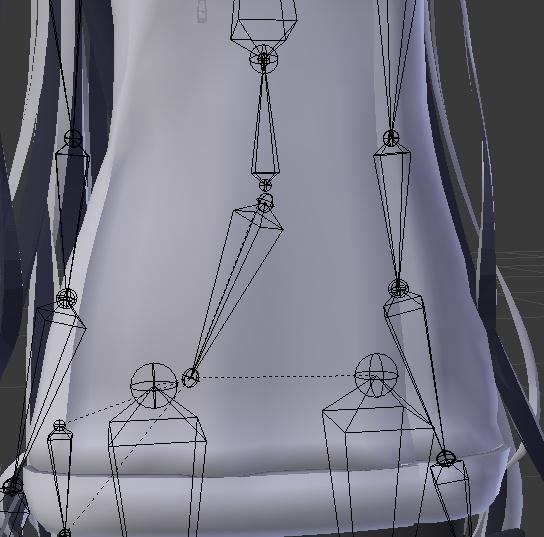
 fierce grail
prime rampart
Had to stop earlier and come back to this issue, though I wanted to make sure th...
fierce grail
prime rampart
Had to stop earlier and come back to this issue, though I wanted to make sure th...
Check this option when importing the model.
 naive tree
@sleek islefrom my experience small hip was exactly the reason for side-tilt, though it was just small not high, so now i just keep everything around even proportions (hip/spine/chest)
 errant elk
does anyone know how to change the material slot order for unity?
 fading warren
anyone have tips for weight painting shoulders??
 prime rampart
fierce grail
Check this option when importing the model.
prime rampart
fierce grail
Check this option when importing the model.
I did try that and also the force connect child option and it came out much better looking except it still being larger then the mesh, as well as some of the bones being oddly sized
prime rampart
Trying to fix it, not sure if this is normal, though it seems that none of the bones are connected at the joints? all the bones that are connected are all offset with the lines connecting them, I'm having to manually parent all the bones for the joints etc
as an example, the tail structure, it looks like its correct though when i go to move a bone it moves it individually and has lines instead of addjusting the connected bones to follow suit
 sage patio
@fading warren the bone should not be directly connected to the chest bone
set it to not be Connected in the bone properties tab
 fading warren
sage patio
<@111504492893077504> the bone should not be directly connected to the chest bon...
fading warren
sage patio
<@111504492893077504> the bone should not be directly connected to the chest bon...
this is maya. I've already brought the rig in for testing in vrc and it works fine. I just need to tweak weight painting and fix arm length
 olive forge

can somebody tell me what this means and how to fix it?
im trying to auto weightpaint
and it does that
errant elk
is there any way that i can fix my avatar from being submerged into the ground when going prone or crouching
 kindred pollen
Make sure that you have at least three finger bones mapped on each hand o:
index, middle and thumb iirc
They don't need to be weight-painted to anything, they just need to be there
fading warren
in maya/unity, the upper arm appears fine, but in game the right upper arm goes berserk
 wild sundial
fading warren
in maya/unity, the upper arm appears fine, but in game the right upper arm goes ...
wild sundial
fading warren
in maya/unity, the upper arm appears fine, but in game the right upper arm goes ...
In the blender pic is that the resting pose?
fading warren
wild sundial
In the blender pic is that the resting pose?
that's unity in the muscle bit. resting pose is t/a pose
wild sundial
I see. Perhaps the elbow bone is bent a bit forward.
I don't really know myself but might wanna check out the orientation of the arm bones in Blender.
fading warren
here is top down
 wild sundial
Interesting.
fading warren
ok I think I've fixed the spinning upper arm issue, now I have crunchy ...whatever this is to fix 😔
 wild sundial
fading warren
ok I think I've fixed the spinning upper arm issue, now I have crunchy ...whatev...
wild sundial
fading warren
ok I think I've fixed the spinning upper arm issue, now I have crunchy ...whatev...

that do be pretty weird
Did you wipe the old rig before you uploaded the new one?
I would be careful about moving the bones to far from where they originally were.
fading warren
yeah, I wipe the old one every time I upload a new one. haven't moved the bones, been trying to weight paint stuff
wild sundial
yeah weight painting is a pain
fading warren
gotta figure out the elbow
wild sundial
fading warren
yeah, I wipe the old one every time I upload a new one. haven't moved the bones,...
why not try auto weight painting?
fading warren
wild sundial
why not try auto weight painting?
this has auto weights on xD
wild sundial
Got it
errant elk
how do i update my rig in unity after i added a few more bones?
do i import the model again and delete the old one?
or is there something simpler than that
crisp tendon
You have to reimport the whole thing
errant elk
so when i crouch or go prone my avatar goes through the ground

I added fingers to it thinking it would fix it but hes still going through the ground
fading warren
Have you made sure the feet are on top of the grid in unity and not through it?
sage patio
you know that ripping content is not only immoral, but highly against TOS and will get you banned?
 craggy knoll
cats is deleting twist bones when fixing model even after i checked off to keep them, how do i fix this?
 odd tapir
Is this problem of weight painting or the model itself ?

the elbow joint area deforms like that or worse depending on the angle
crisp tendon
Weight painting most likely
 odd tapir
Yeah that pretty much fixed it. Thx
celest bridge
could I ask, why is it that my cloth seems to shrink?
I can't seem to find any reference to this anywhere. But when active, the cloth shrinks ridiculously. (to say nothing of how it snaps up)
why is that?
 astral warren
If it’s cloth make sure it is not rigged
celest bridge
it isnt. outside of being weight painted to the legs
gotta be painted to something
astral warren
In my experience all my cloths are never skinned.
I just make the mesh a child of the one gameobject bone it should follow in unity
No armature of its own
celest bridge
having no skinned mesh renderer, adding cloth will automatically add one
astral warren
I couldn’t tell you why it’s popping I can only offer how I set them up and I don’t get that
celest bridge
well, making it a separate mesh parented to the hips definitely stopped the shrinking. though it still adds a skinned mesh renderer
so thanks on that
 iron hill
Hello ! What do oyu think would be the best route to have an avatar wear an evening dress ? Upper part is straightforward, but I want the lower part to be relatively close to the legs, while retaining movement and avoiding leg clipping . I imagine options would be : 1 ) no legs inside the dress, only lower legs and feet - 2 ) colliders on the knees , dynamic bones dress 3 ) cloth physics
sage patio
iron hill
Hello ! What do oyu think would be the best route to have an avatar wear an even...
could use a combination of weight painting and dynamic bones + colliders https://www.youtube.com/watch?v=SimRLR_lRcA
Join my Discord for help or meeting like-minded people: https://discord[dot GG]/uSEvuVw or scan my QR Code: https://media.discordapp.net/attachments/626502922120724480/626522415794618399/qr-code-Shanie-Discord.png
This is a Bob Ross-style video where you work alongside me to make your skirt better.
Your skirt is awful, it has too many dynamic b...
iron hill
sage patio
could use a combination of weight painting and dynamic bones + colliders https:/...
will watch that, thank you !
fading verge
https://cdn.discordapp.com/attachments/739600826066272297/844643892073594910/unknown.png does the position of the hand/fingers matter much in the t pose for upload? should i rotate the hand a little so the fingers are more lined up flat?
 wild sundial
fading verge
https://cdn.discordapp.com/attachments/739600826066272297/844643892073594910/unk...
wild sundial
fading verge
https://cdn.discordapp.com/attachments/739600826066272297/844643892073594910/unk...
It looks pretty good as it is. I would be more tempted to move the elbow bone back a very tiny amount, that's to fix possible arm flipping.
 naive perch
errant elk
so when i crouch or go prone my avatar goes through the ground
naive perch
errant elk
so when i crouch or go prone my avatar goes through the ground
thats is soo cute and cool
 foggy elm
when the model is in a T-pose the finger looks fine but when i test it in muscles it goes all wonky

 stable fern
Could someone rig a model for me? It doesn't have an armature, and I tried to follow tutorials but they are too complicated for me to follow.
 hot plaza
You could commission someone to do it for you
stable fern
You could probably buy a full avatar for cheaper...
That, and I have no money.
 ripe flower
foggy elm
when the model is in a T-pose the finger looks fine but when i test it in muscle...
ripe flower
foggy elm
when the model is in a T-pose the finger looks fine but when i test it in muscle...
looks like weightpainting or bone orientation jank
fading verge
https://cdn.discordapp.com/attachments/390924372782612480/843547967104352267/VRChat_avatr_Rig.png for the arms and legs that should be slightly bent, should that be the armature thats bent in edit mode with the mesh of the arms/legs still straight. OR keep the armature straight and slightly bend the arms/legs in pose mode, also bending the mesh of the arms/legs?
 sleek isle
You want the leg to be the same x value from upper to ankle now.
fading verge
i mean the bend of the knee forward
sleek isle
Yes or you will get floppy leg when walking
still fossil
Edit mode
round falcon
Blender folks:
Transferring shape keys to clothes. Need to trim a bunch of extraneous ones.
Not clear how to select multiple keys for deletion
fading verge
i think hold down shift button and click the ones you want to slect?? that's how I do it for multiple objects so maybe it will work for those too not sure
 broken haven
fading verge
i think hold down shift button and click the ones you want to slect?? that's how...
broken haven
fading verge
i think hold down shift button and click the ones you want to slect?? that's how...
Can't select multiple shape keys, unfortunately. You have to delete them one by one.
fading verge
ohhhh okay, yea that makes sense why it works only that way
 grizzled latch
I am curious. Index finger tracking on the right hand is very smooth, and you need to squeeze to make a fist, but on the left hand your fingers snap into a fist quite soon automatically on all avatars. Is there a way around this? I'm not sure where to ask about this tbh.
 maiden kiln
I got a shoulder problem.

Tho it only shows client sided... Still anyway to fix it?
maiden kiln
One sec.

I will send a full view sorry this is the only one I had avaiable on my phone. Please standby.
maiden kiln
Sorry for the delay
@crisp tendon

I just don't understand cuz others sees me correctly, it is a problem that is client sided.

 valid stratus
I’m currently trying to make mine from scratch.
It’s nothing special
So do I need to have my arm at an exact straight out T-Pose

Need to make this before starting to rig
 heavy tinsel
Not necessarily, using an A-pose for easier rigging is fine. You can manually configure the humanoid rig into a T-pose in Unity once you get to that part.
valid stratus
Ahh thanks man.
sleek isle
did you disable auto footsteps
maiden kiln
I wonder if my case has any solution.
Or does anyone have Kung's discord?
sleek isle
lift the hip head a little
fading verge
ik this is for rigging, but u have to have a avatar descriptor to upload an avatar, i added the component, but it just says avatar descriptor and nothing else
kindred pollen
Is this an SDK2 or SDK3 avatar? o:
fading verge
SDK2
kindred pollen
#avatars-2-general would be a better place to ask c:
fading verge
thank u
maiden kiln
sleek isle
lift the hip head a little
me?
maiden kiln
I think I've got this now

one of the shoulders seems fixed! the right one that is.
and I haven't did anything with the hips
I'm pretty sure it is bone missalignement that causes limb twists
tho it is weird that only my shouder is having it so I thought it was a Brocken shoulder issue (the one you fix by moving your hips bones higher.
 kindred pollen
Make sure that you have at least the index, middle and thumb bones mapped on each hand? they don't have to be weight-painted to anything, the bones just need to be there
 next loom
where is that
 next loom
kk thx
 unreal shoal
so when did they say physics bones are coming?
kindred pollen
In the summer updates o:
bottom of https://medium.com/vrchat/vrchat-april-2021-dev-stream-recap-8502bb8c9163
maiden kiln
update! my cat's shoulder problem is fixed. but my arms are bending, what can I do to fix this issue? they bend when I stretch my arm.
 valid stratus
First time rigging.
Without the Subdivision Surface it’s the messiest thing ever

A result of 5 hour of Youtube Tutorial
 modern pasture
I don't see the bones.
valid stratus
I’m either not there yet or not knowing what it is at all
modern pasture
valid stratus
I’m either not there yet or not knowing what it is at all
Rigging is closely associated with objects known as "Bones". They decide the way rigs deform the mesh.
valid stratus
I’ll have to look that up TMR
modern pasture
valid stratus
I’ll have to look that up TMR
If you don't want to do rigging manually check out mixamo.
valid stratus
Does it have a Rig of a heavily deform Chibi
grand junco
Mixamo basically autorigs Ur character after u have given IT reference points
valid stratus
Ok so i learn how to Add bone
grand junco
yes rigging urself is always better
valid stratus
bad news i dont know how to or if there's even a way to merge layer
Like i made part in diffrent layer lik ethe cloth and even head
is there a way to merge layer
grand junco
🤔 tbh idk google that maybe
valid stratus
alright found it
it's ctrl + J
but if you havent applied the Modification it'll all be gone
grand junco
well thats how u usually join stuff
valid stratus
im new to modeling so i dont remember or know hotkey and function
grand junco
ull learn shortcuts with time
fading verge
so im trying to rig this avatar that has 4 arms, and I want the second pair of arms to move with the first pair in the same way, how would I do something such as that? I already know how to make a basic rig etc, but I just can't figure out how to do the extra arms correctly.
oh i should also metion the last time i tried doing it, the second pair of arms would deform and stretch weirdly when moved even though i had weight painted stuff..
crisp tendon
Rotation Constraints
fading verge
ohh, i hadnt thought of that, i will try that, thank you
 graceful hollow
Hello! So i'm planning on doing a dragon avatar in the likes of Bahamut from final fantasy and i'm trying to find information on how to make custom rigs and generic rigs so that there is an extra bone in the leg to make the feet, and have something like a custom IK in 3.0 and i'm struggling to find information on that. The only information i could find was looking at sketchfab models and people seem to simply take the tibia and feet and weigh it all on the lowerleg bone but i would like to have the tibia and feet move independently from one another. Here's an image of the feets i'm trying to recreate, and a pic of the type of rig i'd like to recreate. Would anyone have information on forums or tutorials for this kind of thing?

 kindred pollen
might want to look at DragonSkyRunner's post on digitigrade legs for bipeds! #avatar-rigging message
It'll work with VRChat's default animation set and IK, though it requires FinalIK to work
graceful hollow
Oh frick that’s awesome thank you!
kindred pollen
yw!
 ionic tinsel
So um... After messing with my model a bit, a weird blob appears at my feet in unity, but not in blender. I have no idea what it is or how to deal with it?
hearty thunder
kindred pollen
might want to look at DragonSkyRunner's post on digitigrade legs for bipeds! htt...
I mean technically if you were really super into the fullbody experience you could make a full on quadruped work, though it would require IRL arm stilts and a way to move the view to a new location with virtual cameras streaming to in front of your view. Basically doing what quadsuit costumes do, but transposed to virtual reality.
It would be as absurd to do as it sounds.
kindred pollen
That..could work actually lmao, I could see how but that def doesn't sound super comfortable
hearty thunder
About as comfortable as wearing a quadsuit, though without the bulk of the "Actually wearing the costume" part.
 proud surge
So, I've run into a bit of a weight painting issue. My avatar's thighs clip through one another and this has botched the weight painting which I already had an issue with a while back.

This was taken from inside the leg with the bright parts being the weight painting from the other.
Interior of the right leg with same weight paint group selected


Exterior view of the thighs.
Oh, I think I might've merged some vertices by accident at some point while doing clean-up...
rustic needle
have some problems with my model after i imported it, the arms are just weirdly stretched out and the head is constantly looking up if anyone knows the fix please reply :>
 modern pasture
rustic needle
have some problems with my model after i imported it, the arms are just weirdly ...
modern pasture
rustic needle
have some problems with my model after i imported it, the arms are just weirdly ...
This sometimes happens to existing avatars too I recommend checking the rig c:
rustic needle
what am i looking for exactely?
modern pasture
Save the current rig and make a new one is the best option I think.
Just autorig with mixamo
And it will automatically tell you if somethings wrong with the mesh itself
rustic needle
alright
eager moat
How do i make my own hand puppet model?
 lime hill
been trying to ctrl + f if ppl have talked about this yet and i didnt really find anything, is anyone else having full body screw up on some avatars since like... 2 updates ago?
some of my models have their legs bend in ways they arent supposed to like a bird or somethin
and the shins are sideways when standing up
walking looks terrifying
rustic needle
modern pasture
Just autorig with mixamo
I just tried to upload the .fbx to mixamo and it says unable to map the existing skeleton
rustic needle
i got it working :)
 grand sinew
hey, how do you guys deal with non-human models? digitigrade legs, quadrupeds, etc
kindred pollen
For digitigrades specifically, I'd recommend taking a look at DragonSkyRunner's guide o: #avatar-rigging message
do note that it requires FinalIK, though it'll work with VRChat's default animation set and FBT
grand sinew
thanks!
 torpid wagon
How do you fix avatars that don't work correctly with full body?....
 valid stratus
Sexy walking
 sterile vine
torpid wagon
How do you fix avatars that don't work correctly with full body?....
sterile vine
torpid wagon
How do you fix avatars that don't work correctly with full body?....
So you have the blender file? If so you need to move the hips up just above the leg bones to fix that hip issue.
 hallow maple
Do eye bones need to be vertical or horizontal? I'm following a tutorial for my first model that has them horizontal but I swear I see them vertical usually
Nevermind, I used the search function. Vertical bones it is!
torpid wagon
sterile vine
So you have the blender file? If so you need to move the hips up just above the ...
Like that?
 fading verge
in which bone do i connect the tail?
 fading verge
from the last few models i have seen that have tails, you could connect it to the hips
the middle bone?
valid stratus
How do I get rid of these.
 hallow maple
valid stratus
How do I get rid of these.
hallow maple
valid stratus
How do I get rid of these.
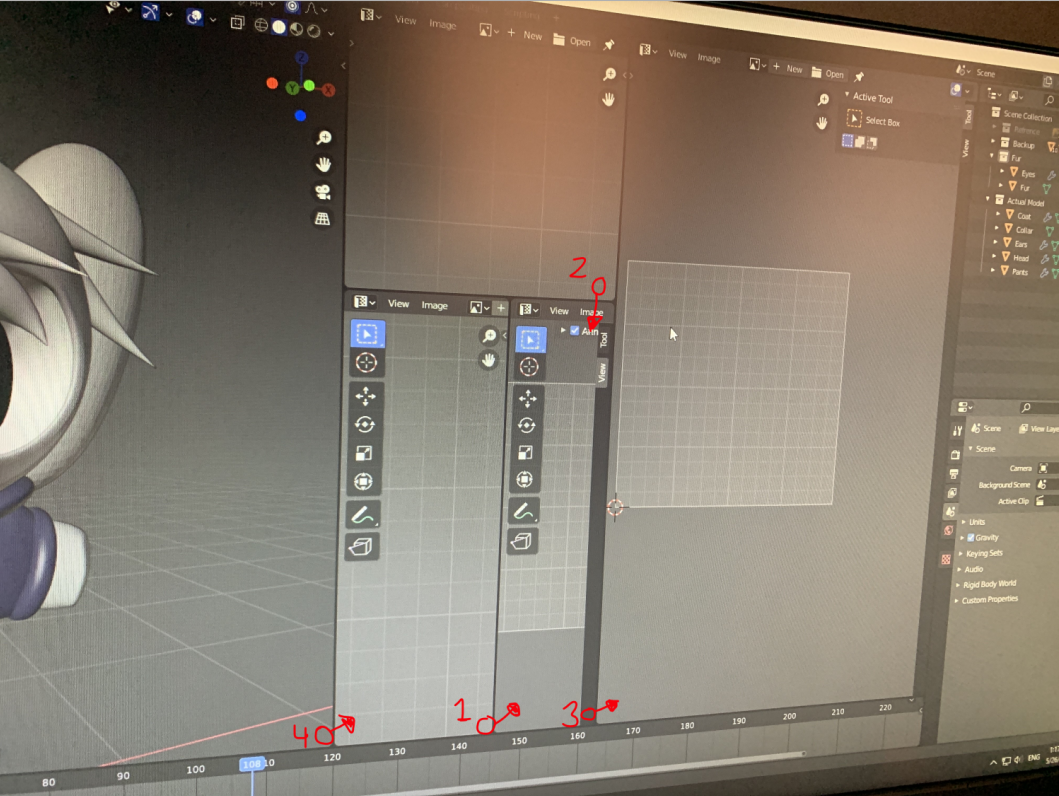
click and drag from the corner of each window in that order
into the neighboring window
torpid wagon
sterile vine
That should fix your issue
Its seems that me and blender just don't mix or I don't know what the hell I am doing. When I export the new FBX it adds an extra bone to all bones at the end labeled "end", and also moves the spine bone away from where I placed it. Also viewing the new FBX in unity basically shows no difference... I feel defeated..
sage patio
torpid wagon
Its seems that me and blender just don't mix or I don't know what the hell I am ...
that is because of the "Add leaf bones" option when you export
the reason for them is that in programs like unity, the length of the bone is lost
having a _end bone tells you where the end of the last bone is
it's not always useful though
and you should probably disable it
fading verge
is it possible to weight paint the head bone but the actual head to stay where it is now?

because if i weight paint it the head goes around the head bone
 sage patio
fading verge
is it possible to weight paint the head bone but the actual head to stay where i...
sage patio
fading verge
is it possible to weight paint the head bone but the actual head to stay where i...
it's moving because you moved the model in pose mode
so to fix it, either reset the pose, or apply the pose as the rest pose
fading verge
How do i apply it as the rest pose?
valid stratus
I’m having problem with merging bones with the model.
So I try only merging bone with the Body so Head, Torso, Legs, Arms, ETC, and it work
But after I merge the clothing
Merge the clothing with the body
And then Merge the bone
The bone didn’t connect
I went into pose to test it out but sure enough it’s like I’ve never even merge them.
sage patio
fading verge
How do i apply it as the rest pose?
the easy way is using the CATS plugin
valid stratus
If my PC is bad does it take long to load in my model to Mixamo
fading verge
ok so i have the head in that position now

why it goes like this?

here is how i have the spine
 crisp tendon
Because the mesh will move when the idle animation is in
fading verge
can i change the idle?
crisp tendon
If you know how to make custom animations sure yeah
fading verge
yeah i think i will have to find another way
fading verge
Why might VRC's IK (in FBT only) be adjusting my chest bone ever so slightly backwards? Not rotating, but moving it.
iron hill
Hi ! So I need to make a mask for my gestures - Need to have a tail and hands animated. Are the "humanoid" and "transform" sections additive ? I mean, if I set hands only green on "humanoid" and then I check my tail bones in "transform" , but not the hands in "transform" , am I good ? Or do I need to specify everything in "transform" ?
I hope this makes sense...
 fringe fog
So, this model from booth.pm seems to do this; how complicated is it to fix it? I don't know much about rigging, so I don't know how easy it would be... Also, why is it set up like this to begin with?
 crisp tendon
Because they use very outdated standard
select the bottom of the bone above in edit mode, Shift + S > Cursor to Selection, then select the bottom of the hip bone, Shift + S > Selection to cursor
fringe fog
Like this?
 crisp tendon
yep that's perfect !
fringe fog
Does this not fuck up with the current weight paints or anything?
crisp tendon
It's based on the bottom of the bone for rotation, so nope
 crisp tendon
Well, that's how they made their model 
I assume they tested it and it looked satisfactory from their perspective
If it doesn't look right when you use it then you can change that
fringe fog
Well, it was fine with the flipped hip bone, but if it'll work exactly the same after this then it doesn't matter
I only grew suspicious when I read this

As an aside, is this a problem?

with the fix we just did I mean
 dapper hare
 crisp tendon
fringe fog
with the fix we just did I mean
crisp tendon
fringe fog
with the fix we just did I mean
it'll most likely be fine
 lyric quail
I don't know if it has to do with avatar rig, but even tho I'm looking straight, my avatar head is pointing down like this, can't find the reason.
 sage patio
lyric quail
I don't know if it has to do with avatar rig, but even tho I'm looking straight,...
sage patio
lyric quail
I don't know if it has to do with avatar rig, but even tho I'm looking straight,...
what does the rig look like in blender
lyric quail
Normal, but inside Unity, he is stuck in the middle of a cripwalk dance animation, when I say stuck, it's like his T-pose/bike pose is like that, and I think it has something to do with that because the head is looking the in the SAME direction as ingame
sage patio
lyric quail
Normal, but inside Unity, he is stuck in the middle of a cripwalk dance animatio...
go grab Pumkin's Avatar tools on github, then import the unity package
after that's done, Pumkin > Avatar tools
there should be a T pose button
lyric quail
Exported again from blender and it fixed itself, but now the shaders are weird
why god why
sage patio
lyric quail
Exported again from blender and it fixed itself, but now the shaders are weird
materials can't carried over from blender, as they are set up completely differently
lyric quail
yeah I forgot to change in unity, thank you for your help!!! really!
sage patio
👍
 iron frost
hi
hi
can anyone help me with rigging lmao
my chest bone magically disappeared
idk how to make bones or anything bout them x3
 umbral lichen

 celest bridge
what's the best way to constrain buttons going down a shirt so they move more naturally with the boobs? ive tried a few things but it never quite seems too natural
lyric quail
@sage patio Sorry for metion, but you're the only who helped me yesterday.... so, the neck fixed itself in desktop, but in VR, the character head is still looking slighty to the left....
 winter crypt
Anyone ever experienced this? In Unity when I try to modify bones for a rig and apply/save, it just reverts it back to how it was before...
sage patio
lyric quail
<@!93092275638251520> Sorry for metion, but you're the only who helped me yester...
what does the rig look like
check in blender
sage patio
can you just send a picture
lyric quail
Idk why, just in VR the head is looking left
sage patio
...
winter crypt
So I found a model I want to import into Unity for VRchat but I wanted to mess with the mesh a bit in Blender. Now when I try to open it after saving the mesh, it just crashes Unity or anything else I try to use it on. Any idea what could be causing this??
sage patio
winter crypt
So I found a model I want to import into Unity for VRchat but I wanted to mess w...
are you exporting it as FBX?
winter crypt
Yeah
sage patio
which version of blender
winter crypt
I think I was just being impatient and for some reason it was using up 100% CPU and making it seem as if it was crashing but it finally seemingly imported, I'm not sure why it would do that
Should be a relatively recent version
 near tree
How can I fix it? all bones positions are right but still doesn't work on vrc

 sweet grail
how much does it cost for people to rig models
kindred pollen
sweet grail
how much does it cost for people to rig models
v likely depends on the complexity of what you want rigged - check #community-servers-old, VRCTraders and/or https://ask.vrchat.com/c/commissions/avatar-commissions/35 for commissions though c:
sweet grail
thanks
sleek isle
celest bridge
what's the best way to constrain buttons going down a shirt so they move more na...
Nothing really. The design make it move natural or not.
sleek isle
near tree
How can I fix it? all bones positions are right but still doesn't work on vrc
Have the x value the same from the upper leg to the ankle for the bone
celest bridge
in the end I settled on a combination rotation constraint and parent constraint. it works well enough, gotta accept that nothing can be perfect with vrc.
second question though, I have rotation constraints sort of locking y axis movement on the boobs, is there any more effective way to constrain them so they don't yknow, fly outward when moving forwards?
sleek isle
near tree
How can I fix it? all bones positions are right but still doesn't work on vrc
Move the leg to be as straight as possible in pose mode and apply it as rest pose. Then in edit mode copy the x value of the head bone of the upper leg and past it to all the other bone in the chain
sleek isle
celest bridge
in the end I settled on a combination rotation constraint and parent constraint....
To have the bone end offset tail be the same x value as the head would help. With a locking axe, they won't rotate side to side when twisting your chest
winter crypt
Anyone have a recommendation for how I can actually make shaders in a decent node editor in a version of Unity that's compatible with VRchat? I was trying the built in graph editor in 2020 but the URP pipeline isn't compatible with Unity 2018, and ShaderForge has dropped compatibility...
sleek isle
celest bridge
in the end I settled on a combination rotation constraint and parent constraint....
You could have a system base on rotation constraints. When you use velocity. The constraint only copy the axe wanted and re enable the 3 when stand still.
sleek isle
sleek isle
You could have a system base on rotation constraints. When you use velocity. The...
You could animate the weights to be less floppy that way as well
celest bridge
interesting idea
 bold locust
Could someone give me an idea as to why I had to move my viewpoint from here:

To here following update VRChat 2021.2.1?

Side rig:

Front rig:

No rig hacks. No extra bones.
Other than the ones for the props that are a part of her mesh and armature.
Again, it worked for 6 months prior to updating to VRChat 2021.2.1
 crisp tendon
They're very wrong in both images 
Also what does the armature look like in Blender ?
bold locust
If you could explain how, as they're not wrong at all compared to every other working rig from the past 3 years, including CATS fixed ones from back when I trusted CATS with anything.
Again, worked perfectly in FBT and in every other scenario prior to that update. Which, btw, fixed nothing it set out to fix and broke more models than just my own.
bold locust
The first one is where you set your Viewpoint if you don't want your fingers clipping into your face 6 inches before your face begins. You should try it out.
The second is how far I had to set it to fix it after the update.
crisp tendon
Fix what ? Your fingers clipping in your head ?
bold locust
So, if you stand in front of a mirror and hold your fingers in front of your face, how far away from your face do your fingers start clipping into your viewpoint's camera?
crisp tendon
Yeah, that's per world settings on the reference camera
bold locust
If it's way before your face mesh, then that's not very immersive, is it?
Not true.
If world setting could even be 0, then maybe.
In every instance, my fingers clip at the tip of my avatar's nose mesh.
Not as if I had an invisible headset on.
ANYWAY
Every other model is set up that way and had no issues. But my two most used and oldest/longest working models got broken with that update and I haven't been motivate to try and correct them. That model needed its Y shifted 13 cm, and Z shift -3 cm.
I can't figure out why.
crisp tendon
The camera clipping plane is clamped to a minimum, but the default is 0.03
Did you try in a world that had a camera set to 0.01 ?
bold locust
crisp tendon
Did you try in a world that had a camera set to 0.01 ?
Is that to my old viewpoint settings or that specific broken model?
crisp tendon
You don't happen to have a video/screenshot comparison ?
Could be both
People had very incorrect rigs that broke with 2.1, the next update will fix that, but yeah, flipped hips ftw
bold locust
bold locust
To here following update VRChat 2021.2.1?
this puts the viewpoint back to its previous position, but does a mess of the IK, forcing my model to constantly look slightly down.
crisp tendon
Not surprised, how does it look with the viewpoint where it should be, in a world with a 0.01 camera clipping plane ?
And by "where it should be" i mean between the edge, clipping in the head mesh
bold locust
I could upload and take a screenshot, but it sets my viewpoint to behind my neck, so I can see my locally shrunken head stump.
And it messes up my arm length.
 bold locust
Can I ping you after a bit with the extra references?
bold locust
bold locust
Could someone give me an idea as to why I had to move my viewpoint from here:
The amount of things I would have to fix if I took her back to blender may be an extra weeks work is why I'm resistant to the idea. Not to mention I have no idea what even caused it.
crisp tendon
Yeah feel free to ping me whenever
Lots of people weren't aware of what broke with their armatures, but when we got the screenshots back, we could tell instantly


 crisp tendon
What needs to be corrected ?
bold locust
They're bent inward ever so slightly, messing with the twist/bend.
So I corrected it in Unity rig config instead of going back to blender.
She was slightly knock-kneed in 3-point VR.
sleek isle
Chest bone need to be higher or something as that. Idk
bold locust
sleek isle
Chest bone need to be higher or something as that. Idk
Yeah, her chest is the one part of her that I want to mess with, but she's pretty high-poly and she was from before I felt confident with blender. So messing with her weights felt daunting.
sleek isle
For knee touching. Have the x value the same from upper leg to ankle.
bold locust
sleek isle
For knee touching. Have the x value the same from upper leg to ankle.
Yeah, that was something I could easily fix in Unity in less time than re-importing.
sleek isle
F
bold locust
@crisp tendon The first is after I "corrected" the viewpoint. The second is what it was like just after the update.
bold locust
bold locust
Could someone give me an idea as to why I had to move my viewpoint from here:
Pos measurements before.
 bold locust
To here following update VRChat 2021.2.1?
bold locust
bold locust
To here following update VRChat 2021.2.1?
Pos measurements after.
 crisp tendon
Your hip tracker is also inside the body entirely ?
bold locust
Seems like it. It wasn't always like that.
Only after the update. It shifted my entire viewpoint back 13 cm.
crisp tendon
Did you check with the image i posted earlier ?
bold locust
Well yeah, but 13 cm back and 3 cm up?
That much?
Lemme try play mode.
No change from where I set it.
Which I think means my rig is where it should be.
Pre update with Tpose controller in play:

Post update with Tpose controller in play:

Sorry about the typo.
I mean. If you guys were willing to share the details of what was actually changed in 2021.2.1, maybe I would be like "aha"
Because having no idea why it just suddenly broke is the frustrating part.
Tup asked me to make a canny post, but I was kind of burnt out on VRC at the time and decided to just use every other model. I miss these ones though.
¯_(ツ)_/¯
crisp tendon
I'd suggest you wait and see with the next update, and see if that doesn't fix it, in which case i'd suggest reaching out with more info
bold locust
Aaaaaaalright.
 open anvil
Pardon me. Does anyone have an idea where I messed up? I had combined all the separate meshes for the model and created a new skeleton by hand. But now it seems that they dont combine even when I had parented the mesh to the armature. What do?
 sage patio
open anvil
Pardon me. Does anyone have an idea where I messed up? I had combined all the se...
sage patio
open anvil
Pardon me. Does anyone have an idea where I messed up? I had combined all the se...
meshes do not just automatically follow bones if bones are present, that would suck. you need to tell each vertex which bone they should follow, and how much
that is done through Weight painting
did the model have bones before?
 slow garnet
I guess I can ask this here, but I can't get custom hand gestures to work on my model? I have no idea what to do or what to ask bc I've never imported custom hand gestures before. (I want the hand gesture to make the tongue stick out)
sage patio
slow garnet
I guess I can ask this here, but I can't get custom hand gestures to work on my ...
is the tongue sticking out simply a blendshape you need to activate?
slow garnet
No, the tongue is rigged. I have an animation for it sticking out
I can send the .unity file if that helps?
sage patio
that would be something to do on your Gesture controller then
you also need to make sure that your FX controller has an empty avatar mask on the top layer
there is a bug where non humanoid bones will not animate on the gesture layer if the FX controller does not have a mask on its top layer
slow garnet
Oh whats the FX controller? I have a gesture controller already attached to it
sage patio
I suggest giving this page a read https://docs.vrchat.com/docs/playable-layers
VRChat
In the Avatars 3.0 Avatar Descriptor, there are five buttons labeled: BaseAdditiveGestureActionFX These are Playable Layers. Each of them takes a Unity Animator, and they layer on top of each other. In other words, you've got five root animators to play with, and each of them can have a huge amount...
slow garnet
Oh ok, so do I need to set up the hand emotes to the FX instead of Gesture? I've really never used Unity before so I'm not sure what all the stuff on that page means


thats my setup rn
The tongue has bones, not blend shapes
sage patio
I know, and because you're animating the position/rotation of something, that animation has to go on the Gesture controller, which you've been doing correctly
however like i said, there is a bug that will make it so that stuff won't work if you dont have an empty mask on the FX layer
 sage patio
an avatar mask dictates which parts of the model can be controlled by that layer/controller
not exactly
those ones are required
however, you should edit the "AllParts" mask (or make a copy and edit that one, preffered) that not only has the bones for both hands selected, but also the tongue
then, you should make a controller for the FX layer, and put an empty mask on its first layer
slow garnet
I see, so like this then?
 sage patio
not quite
leave it like it was before
keep Allparts at the top
but click the gear icon to see what mask is on that layer
 slow garnet
Oh these?
 sage patio
ye
sage patio
don't delete it, make a copy of the third one, rename it to "GestureAll" or something that is relevant, and then put that one on the Allparts layer
that one already has the bones for both hands selected
all you need to do is add the bones for the tongue in that one
slow garnet
How do I do that?
sage patio
do you prefer if I just call you lol
slow garnet
My headset is broken rn, I wouldnt be able to hear ya
at least not if I need to share my screen
sage patio
I mean I kinda need to be able to tell you what to do if I called you lol
slow garnet
Yea lol
sage patio
in that case I guess I can keep trying to explain it
anyways so

make a copy of this by clicking it and hitting CTRL + D
rename the copy to something like "Gesture_Mask"
because that is more relevant here
slow garnet
Oh wait is it this thing?
 slow garnet
and I just check the ones I need?
slow garnet
right
sage patio
if you ever want to animate other bones, like a tail, add it to that list
once that is done, select that new mask on the AllParts layer in your Gesture controller
lemme know when you have that
sage patio
almost
next, right click somewhere else in your Project window in an empty spot, and click Create > Avatar mask
call it something like "FX_Mask"
then, right click somewhere again, click Create > Animation controller
call this one "FX"
slow garnet
what tab is the avatar mask in? I don't see it
sage patio
click on this new controller, and add the newly created mask on the first layer of this controller
 slow garnet
o wait nvm found it
sage patio
anywhere in the empty space
slow garnet
Ok I have the fx things
sage patio
alright, so once you have your FX controller with the new empty mask on its first layer, go ahead and add this controller to your Avatar descriptor under FX
once that is done, your tongue animation should work
I also noticed something
 slow garnet
like this?

 sage patio
the AllParts layer should be empty
if you want to add functionality, you should create new layers
slow garnet
Oh oh ok I did delete those
slow garnet
alright lemme see if the model works now 👍
sage patio
send a screenshot to confirm you did it correctly
also, may I ask where you put your animation for the tongue
 sage patio
keep in mind that this controller is literally the one responsible for moving the fingers on your avatar when a certain gesture is done
slow garnet
yep
sage patio
you should not touch that layer unless you want to do stuff like flipping off animations
slow garnet
I'll keep that in mind for the future 👍
sage patio
or modify the default finger movement animations
did you replace the animation in that node with your own?
slow garnet
yes
sage patio
did you make sure to also copy the keyframes from the original animation into your new one then? since you're doing it this way rather than making a new layer
sage patio
because if you didn't, your fingers will no longer move when you do that gesture
slow garnet
thats fine, I didn't want them to
sage patio
so you're fine with your hand staying flat open?
slow garnet
Yep
sage patio
okay
in that case, you should be good
in theory lol
if you want to test it out in unity, you can
using the Lyuma emulator
GitHub
Emulator for VRChat's Avatars 3.0 system, built on the Unity PlayableGraph API - lyuma/Av3Emulator
slow garnet
👀 I'll take a look at that
sage patio
when you have the unitypackage imported in your project, go to Tools > Enable emulator
then, hit Play in unity, click on your model in the Hierarchy panel, and then look at the inspector to see the controls
you can adjust the GestureLeft parameter there
and see if it does your gesture when it's set to the correct value
slow garnet
I uploaded it to Unity and the only thing its doing is just making the fingers wiggle nonstop until I use another gesture
the other bones still don't move
sage patio
so you mean that the gesture you made is causing the fingers to spaz out?
slow garnet
Sorta? It looks like they're just waving almost
Like the emote I replaced is Fist, it just opens and closes but not all the way
sage patio
alright, what I would suggest is making a fresh copy of the default controller provided in the SDK, and then leaving those two hand layers alone
then, add a new layer for your tongue animation
don't forget to add the new mask to the top layer
the one where you added the tongue bones
slow garnet
Mk, I'll try that
I'll have to try it later tho, its really late for me lol
Do you mind if I ping you again if it doesn't work tomorrow?
sage patio
sure
slow garnet
thank ya!
open anvil
sage patio
did the model have bones before?
It did but I had to redo them by hand.
sage patio
why?
sage patio
CATS is mainly used to import models from MMD or VRoid, not other games
CATS is simply a set of shortcuts and tools that do stuff automatically rather than having you do it manually
you could totally have used the existing rig and modified it to work for vrchat
open anvil
Fair enough. I'm still new to this so I don't know exactly what I'm doing yet.
Thanks for the tip though.
sage patio
np
using stuff that's already done is easier than doing it yourself (typically)
I don't know what source rigs look like, so I can't really be sure for your case
open anvil
source rigs look like this.
 sage patio
first thing I'm seeing is that the way those bones are displayed in a different way

click Viewport display
and set it to Octahedral
open anvil
no can do, chief.
 sage patio
make sure you click on the armature first
open anvil
I did as such.
sage patio
switch to edit mode?


 sage patio
I see
open anvil
so i figured it was easier to redo it
sage patio
might be yea
next step after making the bones is Weight painting
to tell each part of the mesh which bones to follow
 open anvil
understood. many thanks Sacred.
sage patio
np
 gritty crane
Can anyone assist, why my Visemes aren’t working on my avatar. It’s all exported from unity and had worked previously
 steel spire
how would i convert a minecraft blender guy to something that'd work with vrchat?
armature is like this
 fading verge
random question, when im in blender and im gonna weight paint on a tail, does it need to be conected to the hip or body?
grand junco
i think hip makes sense here
fading verge
ah ok, ty for answer
what about like little wolf ears, hair or head when weight painting?
@grand junco
grand junco
attach them to head
fading verge
ah alright
rustic needle
anyone know if theres a way to make it so the helmet part of my avatar isnt out of sync with the rest of the model?

 golden kernel
rustic needle
anyone know if theres a way to make it so the helmet part of my avatar isnt out ...
golden kernel
rustic needle
anyone know if theres a way to make it so the helmet part of my avatar isnt out ...
You can either parent it onto the head bone in unity or weight paint it to the head in blender, which would be the better way to do it.
I'm making a night-stalker bow and am at the part where I'm not sure how I would rig it. I've created a bone for each string segment, a handle bone, and a bone for where the player pulls the string. Is this a good setup or should I do it a different way?
 rustic needle
golden kernel
You can either parent it onto the head bone in unity or weight paint it to the h...
rustic needle
golden kernel
You can either parent it onto the head bone in unity or weight paint it to the h...
thanks
golden kernel
np
fading verge
made from blender to unity my avi is all the way over there when im on the other side. why and how to fix

 unreal sparrow
rustic needle
anyone know if theres a way to make it so the helmet part of my avatar isnt out ...
unreal sparrow
rustic needle
anyone know if theres a way to make it so the helmet part of my avatar isnt out ...
off topic nice abayat
rustic needle
abayat?
rustic needle
i have this thing happening where i switched the build target to android but it says it does not have android support so im kinda confused as to how to make it have android support, any help would be awesome

 fallen temple
Does anyone have the photo with the humanoid rig requirements/fixes?
 pine sapphire
@rustic needle You need to download the Android SDK; click on this...

 vital mason
it looks like they're already on android
the status there reflects the uploaded avatar's status, and will only show android support after you've uploaded the avatar
pine sapphire
Oh, damn, right...
Time for bed for me. Wow.
@rustic needle You should fix those bones though.
rustic needle
i did download the SDK already otherwise it doesnt let me switch target modes
Also yea bones are a WIP
rustic needle
vital mason
the status there reflects the uploaded avatar's status, and will only show andro...
The problem is i cannot upload the android avatar :P
vital mason
the button gets grayed out if any of the avatars in the scene have an error
disable the other avatar
rustic needle
ah
how would i make the main one be the one that non quest users see then?
(the one on the left)
vital mason
didnt you already uploaded it to PC?
rustic needle
yes
 brisk terrace
Im getting a small issue where my model looks off balance in VRC. if i stand straight or slightly backwards, my feet are not moving and it's making the model look off balance.
everything looks fine in the armature though

but you can see here that the feet are way in front and it feels like im tilting backwards.
 crisp tendon
Wtf is that giant bone ? Is that your hip ?
 sudden coral
ok i have a model that I'm ready to rig, does anyone have the list of required bones? i remember last time I made a model, I was missing some torso bone or something, and it was kinda annoying to go back and fix
steel spire
sudden coral
ok i have a model that I'm ready to rig, does anyone have the list of required b...
would also like to know, i'm just gonna try re-rigging john from scratch
sudden coral
steel spire
would also like to know, i'm just gonna try re-rigging john from scratch
just checked my other model and it seems like it's
hip, torso1, torso2, neck, head
(left&right arms) shoulder, forearm, arm, hand, (i think fingers are optional)
(left&right legs) thigh, leg, foot, toe
i haven't verified this yet, but this is what I'll use for my model
 gentle veldt
so i play with FBT but when calibrating with my main avatar, my white feet ball things are at my avatar's shins. meanwhile on other avatars, the balls are actually right on top of the feet. the correct spot.
can anyone tell me how to rig the avatar so that i can fix this for all my future avatars? is it something on the rigging in Unity? or is that a blender thing?
currently, in unity, i have the ankle bones as the foot and toes as the toes. i do not have any bones titled "right/left foot".

 quaint schooner
How does one fix this issue?
 fierce grail
gentle veldt
so i play with FBT but when calibrating with my main avatar, my white feet ball ...
fierce grail
gentle veldt
so i play with FBT but when calibrating with my main avatar, my white feet ball ...
In Blender, that happens because your avatar has too long legs. https://youtu.be/2sfTEBAl8sA 5:54

[Update 8/6/2020] (Avatars 3.0 info / current state of "RIG HACK" fixes):
*With the new FBT head-locked binding method the "Shoulder Flop Fix" of lowering the viewball is no longer recommended (However if you need it you can still use this fix with VRChat's launch commandline option --legacy-fbt-calibrate)
*The zigzag neck problem is less pre...
sudden coral
does anyone know why my weight painting is not applying to both left and right bones?
i have X symmetry on, but this only mirrors wieght painting on one bone
hallow maple
Today I learned to do shapekeys absolutely last. Now I get to copy/paste roughly 3k verts.
sage patio
hallow maple
Today I learned to do shapekeys absolutely last. Now I get to copy/paste roughly...
kek
what did you change exactly
there are tools like "Blend from shape" and "Propagate to shapes" that can help dealing with shape keys
hallow maple
I'm not exactly sure what I changed or where, but I suspect it was an auto-merge at some point because the number of faces changed at some point
I did try several tricks I found as well as a few plugins but none of them worked, assuming because I altered the face count
Learned a lot though! lol
maiden kiln
fierce grail
In Blender, that happens because your avatar has too long legs. https://youtu.be...
props to they, best tutorial I ever seen
maiden kiln
sudden coral
does anyone know why my weight painting is not applying to both left and right b...
you might want to transfer weight from one vertex group to another. or turn symetry on
 small harness
so im having this weird issue with my dynamic bones were the second wing bone isnt moving the mesh part it should be in unity but only on the dynamic bone .
the bone marked moves the right places in blender and unity in other places
basiclly the 3 wing bones are moving with out it making with clipping like this. if anyone has any idea what this could be please @ me
 hallow maple
5 hours, lessons learned.
steel spire
how much 'effort' do i have to put in for a humanoid model that's non-standard?
my man's looks like this, can i just place bones where they should be and be alright? will the things next to his head and feet affect it in any way? (can't remove their bones)
 crisp tendon
You will need very specific weight paint and bone placement for this to work correctly, but it's definitely doable
steel spire
i have no clue what weight painting is so i can tell i'm way out of my depth with this
crisp tendon
We all start somewhere !