#avatar-rigging
1 messages · Page 179 of 1
 gloomy ether
 fervent hornet
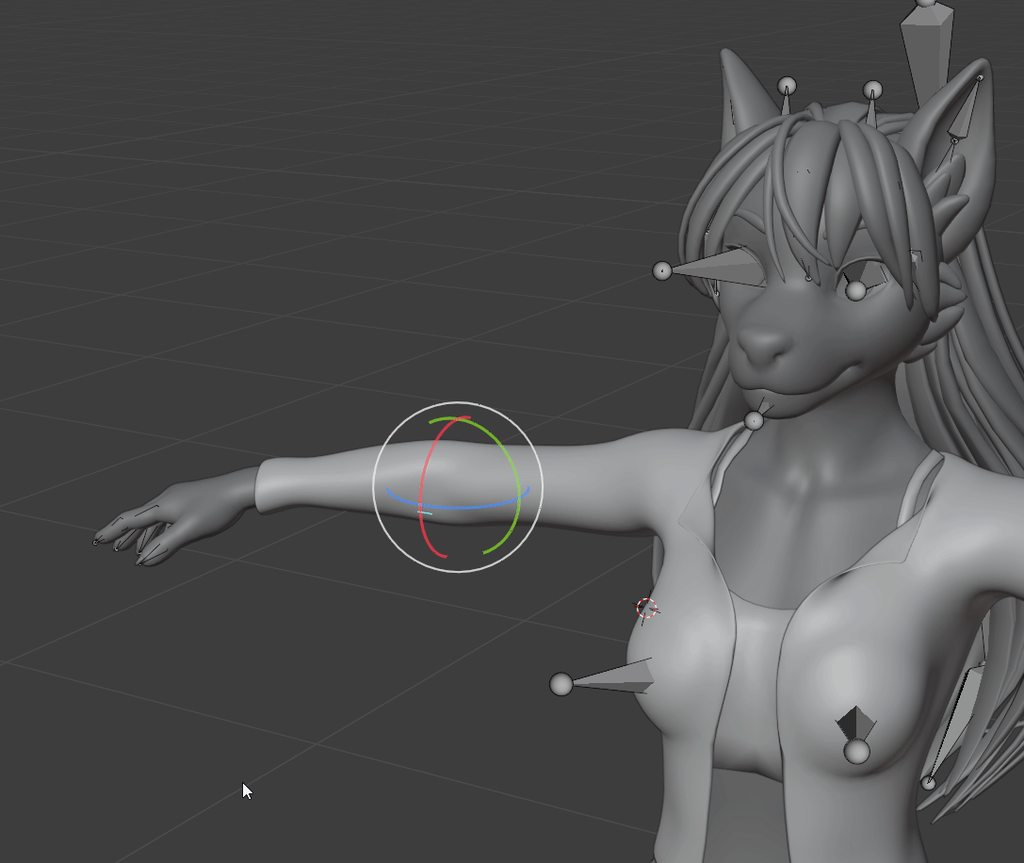
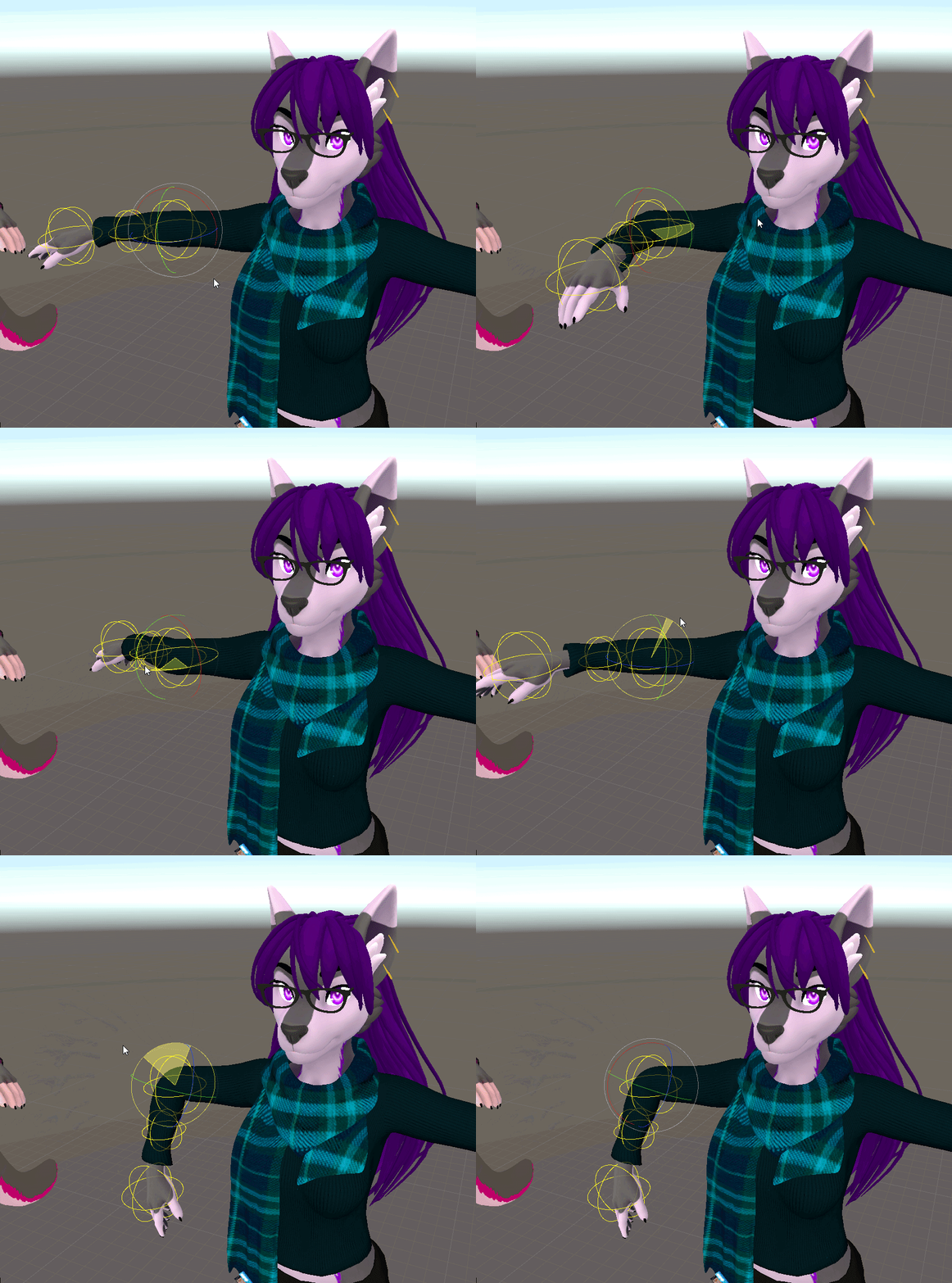
@fading verge Your arms are tilted upwards but the bones are straight, it should look more like this
The bones should be at the center of the arm for its entire length
 fading verge
oh i didnt even see that thanks for the tip! @fervent hornet !
how did i even miss that
does that have to do with the mentioned issue though?
 long bridge
ugh im having issues w unity again, i set my avatar as humanoid and it tells me theres a bone missing in the left hand so i go and select the proper hand bone, it says everything is working, i click apply and then click done and then it goes back to saying theres a bone missing. Everything is working fine but the sdk keeps telling me that the head, hands, and feet bones mapped as well as having upper arms specified but they are and its not letting me upload. someone help pls
fervent hornet
fading verge
does that have to do with the mentioned issue though?
I'm not sure it will fix the problem entirely, but it is a problem so it should help out with it hopefully
long bridge
ok great now none of the bones are mapped
 median oxide
 spiral shard
whats going on?
hmm wait i figured something lemmie check if it works
k got it! the arm just wasnt set assumingely cause i symmetrized afterwards
 crisp tendon
I see you're still using your phone to record 
spiral shard
😔
annd this..
hmm i fixed its appearance but its still offcentered
my tpose is off 
crisp tendon
off how
spiral shard
i messed with it in pose mode before it crashed and i forgot to go back so its offcentered by an inch or so
or before i exited out of blender isk
idk
spiral shard
i think i found a fix for it :)!
 fringe bronze
Any good tutorials on dynamic bones rigging?
 golden hull
is this a rigging problem
crisp tendon
weight painting issue
golden hull
Oof im kinda bad with blender how would i fix that
could i just remove all the weight painting stuff on it or will that cause more issues?
ill open the model in blender and see
fringe bronze
I think you might've painted weight to the bone on the other arm
golden hull
umm yea... im doo doo at blender
fringe bronze
Check vertex groups
golden hull
i was watching a video and guy was like ok do this so i did it
fringe bronze
Weight painting is actually the most annoying thing in blender for me
golden hull
blender is the most annoying thing for me
if i just removed all the weight painting there would that be bad?
golden hull
ty
idc if it looks good or not i just dont want it to look like what ever it is now lol
ok what now?
fringe bronze
Try watching this thing

I've been meaning to update this video for a very VERY long time. But, we're finally here. Everything you need to know in order to start painting weight layers onto your character!!! Hope it helps :)
Female Body Model Link:
https://www.youtube.com/watch?v=_XfvLpLyulI
If you enjoyed this video, please don't forget to like and subscribe!
You ca...
Just to get the idea what is happening
Don't really follow it
golden hull
ok
golden hull
ok watched it
golden hull
fringe bronze
Because you already have weight
umm he doesnt show how to enable the wieght painting stuff
fringe bronze
Upper left corner
Where object mode
And edit mode
There is Weight paint mode
Go to object mode
Click your Armature
Then shift click the model
And go to Weight paint mode
golden hull
oh gawd
fringe bronze
You dont have the bone selected
golden hull
fringe bronze
Then go to this tab
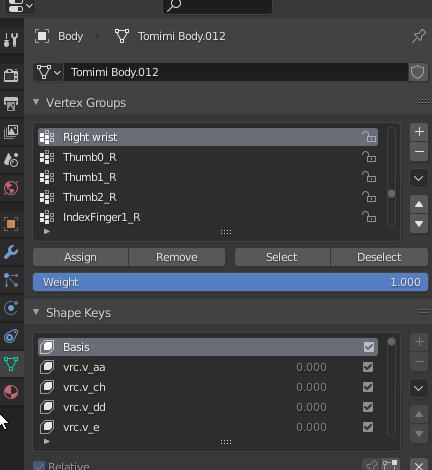
And in vertex groups find the one you need
Something like shoulder.R
Also
Is your problem on one arm or on both?
fringe bronze
Check the weight on those 3
fringe bronze
Yea
You need to get rid of it
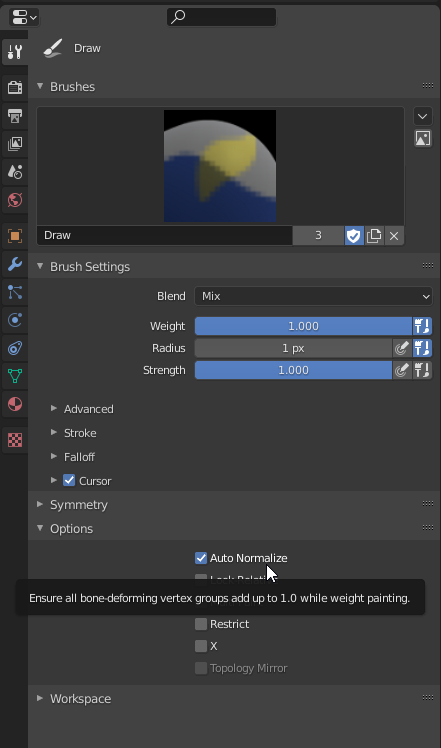
Dont forget to normalize
"auto-normalize"
In brush settings
golden hull
uhh ok
should i screen share this bit lol
where is brush settings for this
nvm found it
cant find auto normalize
fringe bronze
 golden hull
oh ok
ok so the problem is with the wrist
right?
so i remove the paint on the elbow for the wrist?
golden hull
ok but how do i make it remove
fringe bronze
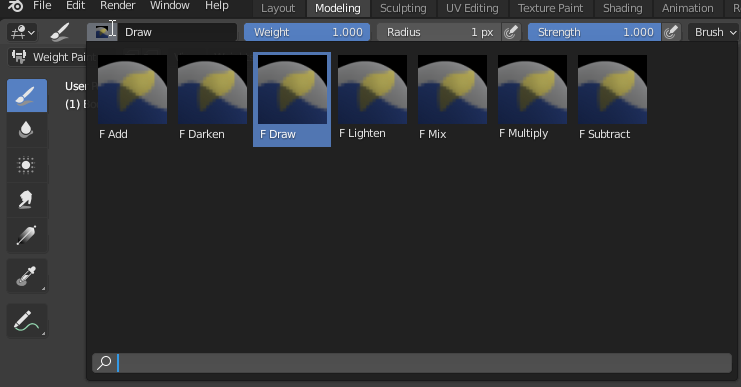
There is substract brush
You can also paint it over with the right weight
But getting the right weight is hard
golden hull
i checked the other side and its same but nothing on the elbow
rip there isnt a dropper tool to match the weight
where is the subtract brush?
fringe bronze
 golden hull
the value of the wieght is 0 around that whole area
fringe bronze
And move the arm around
fringe bronze
Nah
golden hull
this?
fringe bronze
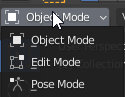
Go to object mode
Click your armature
And change object mode to pose mode
And you should be able to move your bones around
The model is supposed to follow them
golden hull
click the running dude?
 golden hull
now move the joint?
fringe bronze
You are not in pose mode
golden hull
ohh
fringe bronze
To pose mode
golden hull
using what tool?
golden hull
elbow no move
fringe bronze
Yea, that sucks
golden hull
golden hull
sure
fringe bronze

 vocal pier
looking for someone to rig an avatar for me
willing to pay up to $100 usd
dm for more info
 kindred trout
in 2.8.2 its not letting me select the individual bones for weight painting
 wind osprey
kindred trout
in 2.8.2 its not letting me select the individual bones for weight painting
wind osprey
kindred trout
in 2.8.2 its not letting me select the individual bones for weight painting
Disable lock object modes (in the edit menu)
Why it's a default makes no goddamn sense
kindred trout
wind osprey
Disable lock object modes (in the edit menu)
if i do, then every time i select a bone it sets me back to "object mode"
wind osprey
Is your rig in pose mode?
wind osprey
Yeah, pose position and mode are different. Working now?
kindred trout
no should i reparent the mesh and rig together
in pose mode
wait now its working!
fading verge
sometimes the clothes that i put on avatars attach to the bones in a weird way, is there any way to prevent that ? hard to explain but : avatar i made had a big collar on her neck and the collar doesnt stick to her neck, it like moves weird as she walks. not sure how to fix it :/
crisp tendon
In blender, weight painting
fading verge
ty ty <3
 zenith cloak
I dont play vr chat, but i figured to come here for help cause im pretty sure the rigging and stuff is that same for my purposes. but ive been trying make a little worm guy i can use in discord calls and ive gotten a pretty rough base, but the arms were limp. so I tried to fix it and now the mouth is too far open and the arms are twisted. I am wondering if anyone can help me learn how to rig properly and stuff like that. here is what it looked like at first https://gyazo.com/81719d0cd4b4270d88fd14950b0124f4
https://gyazo.com/599642d92ecbd4b3f64ee4363122d038
and heres it now after i played with it and ruined it, the mouth is too far open and the arm is stretched


heres my rig in blender
this is the current state of it, heres a gif instead of a stillframe
https://gyazo.com/b189a62ea19e22cac23967713825820c
tag me or dm me if u can help me learn to rig better, and hopefully help me fix my rigging mistakes
fading verge
Seeking general help with rigging a Roblox avatar and using the action menu / controller binds for actions
(i.e. holding secondary trigger and thumbstick to hold a prop in your hand)
I currently don't have anything rigged on blender and it's ONLY a full-mesh import if I'm not wrong. I have 0 experience using Blender and need assistance from someone who can help me. Tutorials simply do not provide me effective information which is why I'm reaching out here.
Please DM me / @ me if you're willing to assist me, particularly with the controller binds and SDK.
 brave juniper
Hello! This may be a bit of an odd question/problem, but I found a Demogorgon avatar in some random avatar room and really like it. Problem is, its very sloppily implemented and wonky.
So I spent the last 5 days trying to learn how to create and modify avatars for VRChat. I'm currently struggling with the characters pose and movement. I'm not sure how the bone/rig setup has to be in order to get the characters slightly hunched pose and bent legs, without breaking IK and tracking.
The major issues in game right now are wrong floor level, the arms are tracked too far forward and when I tilt my head in any way, the entire shifts up and down or rotates left or right
 fringe otter
vocal pier
looking for someone to rig an avatar for me
willing to pay up to $100 usd
dm for...
fringe otter
vocal pier
looking for someone to rig an avatar for me
willing to pay up to $100 usd
dm for...
Mixamo is an auto rigger. Search it up. Your gonna need an file of the model then you import it to mixamo then tell mixamo where the wrist. Elbow. Chin. Groin. And knees of the model are then 2 minutes later boom midel done. It works pretty well but sometimes there are issues
vocal pier
fringe otter
Mixamo is an auto rigger. Search it up. Your gonna need an file of the model the...
tryed, that wont work for the model i have
fringe otter
Oh
vocal pier
its my xbox avatar, they give you the model
it glitches every time i use mixamo
 wary nest
zenith cloak
I dont play vr chat, but i figured to come here for help cause im pretty sure th...
wary nest
zenith cloak
I dont play vr chat, but i figured to come here for help cause im pretty sure th...
I love him! 😍
 quartz pond
Hello! I don't use Blender a whole entire lot so I don't know much about this one, but while importing this into vrchat there seemed to be an issue with it's legs? So I'm taking a guess that it has something to do with the bones, and because I'm not as knowledgeable with Blender how would I be able to fix this?
This is just another example of what it looks like when in game
 kindred pollen
That looks like a weight painting issue, the calf bone doesn't look like it's actually painted to the calf verts
 opaque jackal
quartz pond
This is just another example of what it looks like when in game
opaque jackal
quartz pond
This is just another example of what it looks like when in game
Spaghetti legs
Anyone in here?
@kindred pollen boop
 covert dome
apparently this is a weight paint issue or something? how do i fix this?
crisp tendon
in blender
covert dome
well yes, but i dont know what to do
crisp tendon
select those shoelace vertices in edit mode (L on a vertex to select all connected) then go to the vertex group menu on the right panel, and assign 100 to the left foot group
 sturdy belfry
how would I go about making the neck / torso shorter on an avatar without messing up the body movement?
/ is it possible to do in unity without causing issues in game?
 alpine eagle
I'm making a og nanachi model, and I'm wondering whether you can disable dynamic bones in an animation to save performance when you disable the helmet
here's a pic since it's more likely for people to answer that way XD
brave juniper
Can anyone tell me what I have to do to my rig in blender to avoid the humanoid rig configuration in unity breaking any animations I made?
Is that part of what CATS is supposed to do? And if so, which options are required?
 rancid moon
brave juniper
Can anyone tell me what I have to do to my rig in blender to avoid the humanoid ...
rancid moon
brave juniper
Can anyone tell me what I have to do to my rig in blender to avoid the humanoid ...
the fix avatar option
brave juniper
I mean which of these options are required. 🙂
Unity's humanoid rig configuration appears to connect all unconnected bones, so would that be it? Or is it more than just that?
rancid moon
brave juniper
Unity's humanoid rig configuration appears to connect all unconnected bones, so ...
idk
never messed with that shit for 3 years
 half void
@alpine eagle did you sculp it by your own? it looks really goooood 💙✨
alpine eagle
@half void I polymodeled it, if u want It, it'll be available on my gumroad soon
 turbid spear
alpine eagle
I'm making a og nanachi model, and I'm wondering whether you can disable dynami...
turbid spear
alpine eagle
I'm making a og nanachi model, and I'm wondering whether you can disable dynami...
you can!
alpine eagle
I tried it already though it didn't work correctly
turbid spear
Kinda does, kinda doesn't
alpine eagle
I'm guessing it's similar to spring joints where it has to start out on and then be deactivated
turbid spear
You can only enable/disable them and nothing else
You can use rotation constraints that copy the rotation of a chain of invisible dynamic bones
Then mess with that
alpine eagle
well i'm just trying to save performance by disabling them
turbid spear
Or put all your db onto a empty game object and enable/disable that object
It doesn't matter where dbs are, only their assigned root matters
fading verge
how'd I fix empty blendshapes? bought a model and it does have blendshapes name in Blender but Unity wasn't be able to read it somehow.. I can't have some expression set up :/
fading verge
I did even rename them but it's still not showing up, which is very weird
turbid spear
well as long as they do something they should be getting exported
fading verge
yeah, I'll triple check that 🤔
turbid spear
if you want to export an empty one you can just move a vertex slightly somewhere where it's not visible
so it doesn't get removed on export
fading verge
turbid spear
if you want to export an empty one you can just move a vertex slightly somewhere...
I guess that worked, thanks :)
 sleek lintel
Hi, I've been looking around for some male bases, and quite a few of them had the same weird issue
Many avatars take a step to readjust..something, once you stand still after moving around
Usually i just ignore it, however whenever i stop moving with any of these bases, anything that has a dynamic bone script starts to twitch/vibrate until they have taken that one step
I take it this is a somewhat common issue given how many bases seem to do it, tho i couldn't find any fixes by looking for some keywords. Any help would be appreciated ^^
 signal tapir
Hey guys I parented an armature on each leg bone. Any clue why it’s not working?
My legs are frozen
rancid moon
it's not rigged properly
 iron roost
Just reposting this here since I should have put it here instead of avatar 3 help
Heyo everyone. Got an avatar commission of a Pokemon trainer, but having an issue with full body where every time I finish calibrating it, the knees stay bent and the hip tilts a bit. Avatar maker said he tried the usual fixes but he doesn't have fbt himself so it's difficult for him. Anyone deal with this issue before? Any help would be greatly appreciated!
 meager ether
by the way, same answer here: can you open this model in blender and show to us your armature?
iron roost
asking the maker to grab it, if it takes too long I'll just grab it myself
meager ether
anyway, it must be looks like this
brave juniper
I may be completely wrong on this but it looks to me like its a proportion issue where the ratio of the avatar‘s leg and arm length differs from your real life proportions.

[Update 8/6/2020] (Avatars 3.0 info / current state of "RIG HACK" fixes):
*With the new FBT head-locked binding method the "Shoulder Flop Fix" of lowering the viewball is no longer recommended (However if you need it you can still use this fix with VRChat's launch commandline option --legacy-fbt-calibrate)
*The zigzag neck problem is less pre...
Skip to 5:54 and see if this is what youre experiencing.
You may also have to adjust your „user real height“ ingame.
brave juniper
iron roost
Just reposting this here since I should have put it here instead of avatar 3 hel...
Actually, play around with the ‚real user height‘ setting first if you havent yet. Maybe that is actually the issue.
iron roost
brave juniper
Actually, play around with the ‚real user height‘ setting first if you havent ye...
Welp. Guess I shrunk and am 5'1 now as a temp fix. Still need to fix the hip and a few things. But thank you @brave juniper
brave juniper
The video i linked goes into a lot of detail on different problems with FB avatars, have a look through it and see if any of it can help. NP. 🙂
I dont have FB myself so i cant definitively tell you what issue or combinations of issues it light be in your particular case.
 deft snow
I've been having an issue where my avatar sinks partially in the ground when I sit in FBT. Would adjusting the hip bone placement resolve this?
iron roost
brave juniper
The video i linked goes into a lot of detail on different problems with FB avata...
ye watched that vid before, but seeing as how I am dumb, most of the info flew over my head
brave juniper
I know the feeling. 😄
iron roost
P much the process I have to do is start calibration, use playspace mover to put myself in the ground a bit, finish calibrating, and then in settings lower my height to raise where it detects my head is so that it straightens out the legs
That'll take a bit of getting used to
Gonna especially suck when it decalibrates when swapping worlds
spiral shard
is it possible to delete and re apply shape keys to a part? i uh.. completely forgot to apply my subdivide modifier to my mesh and now i cant add it, if i cant its okay i'll figure out a way but it would be nice haha
or how do you guys go about teeth? im really confused about teeth in lip sync, are they seperate? joined?
brave juniper
spiral shard
or how do you guys go about teeth? im really confused about teeth in lip sync, a...
From what ive seen in a few tutorial videos on lip sync, i think many use a seperate mesh for teeth that doesnt move, just behind the lips. And the lower jaw teeth move with the lower jaw obviously. But i imagine it depends on the model detail and art style. Maybe you could download a sample model from deviantart or something to see how they did it?
The one in working on myself doesnt have a humanoid face so i dont have personal experience with the matter unfortunately.
turbid spear
Doesn't matter. If it's a blendshape you just move the teeth as well
Blendshapes just move verticies around
spiral shard
ooh blendshapes huh, i havent heard of that yet and maybe thats a bad thing
oh i might have come across it a little but not enough
brave juniper
You kinda need them for lipsync. If youre lucky the model you downloaded comes with them, if not you have to create at least 3, then CATS can auto generate the rest.
spiral shard
yea i made some and realized my jaw wasnt sub divided and i also realized i can make a better result doing something different so im remaking them and making the teeth static (because theres actually not that many videos i can go by right now :(_ _)
some people can edit the vertices on the head and jaw for the same shape key when they're seperate and idk how they do that
fading verge
yo
can someone help me realquick
so i rigged my model
and it comes in like a white file that i cant open
how do i fix that
turbid spear
where
fading verge
look
the ones on the top
how do i fix that
wait imma send the file
how do i open these kinda files
turbid spear
you import them
if it's unity you just drag and drop it into your project
if it's blender you go file > import > fbx
fading verge
thanks
fading verge
so when i rig with mixamo it always sais this is not humanoid how do i fix that
turbid spear
watch a tutorial
you gotta select the fbx file in unity and change the rig to humanoid
and also change the shader as it says
fading verge
thanks again lol
 wanton dove
so does anyone know a good/quick way to make the model not do this? Basically I want the coat to stick to the body instead of clip through whenever the chest bone moves. And I would rather avoid having to repaint weights if possible.
crisp tendon
Well that's how weight painting works, so you can't fix that without paint
wanton dove
well since there are already bones on the coat, is there a way for me to just transfer the weights and stuff instead of repainting?
crisp tendon
transfer from what ?
wanton dove
the bones in the coat
crisp tendon
are they painted to anything ?
These bones still need to be influenced by something
Not sure why there's bones in the first place tbh
wanton dove
it is a MMD model. so im working on re-rigging it for VRchat use.
Those were there because the coat has physics
which isnt really needed/good for use in vrchat
crisp tendon
You should delete all unnecessary bones and drop it in mixamo
wanton dove
mixamo?
fading verge
Okay friends I'm stumped.
So when I initially crested my visemes on my model my shirt was higher up, I then later on I ended up dragging it down some. Now my "basics" in the blend shapes still has the shirt at its higher position when I move it to 1.0 on the slider and all the other blend shapes that make up my visemes are using the basics tab as reference. Is there any way to change out the basics for a new blend shape that isn't using the basics as a reference?
 swift tide
can someone help me with this avatar rig? i'm having trouble getting it working with vrchat
 tulip ravine
what’s the issue?
swift tide
it says it is missing bones but i'm pretty sure it has them already
crisp tendon
 swift tide
how do i do that
tulip ravine
it looks like you’re missing quite a few
swift tide
it is from a game
I'll show you the original bone thing before exporting it
hold on
it has quite a few more
CATS might be messing with them
tulip ravine
yeah that’s weird, I would stop cats from merging them
swift tide
k
tulip ravine
iirc unity definitely needs more leg bones for the default humanoid setup
swift tide
i would be fine with having this model rigged again if possible
although i have no experience in doing that
tulip ravine
yh unity requires three per leg, upper - lower - and foot
why not use the original rig?
swift tide
hold on
so it has all of the bones but it maps them in a way that vrchat doesn't like
what should i do
tulip ravine
wdym "vrchat doesn't like"?
tulip ravine
ah okay, that was out of view of the screenshot
just reassign them in that window, i think it has those bones?
swift tide
i'll try
it keeps giving errors when i attempt to remap it in a way vrchat would like
tulip ravine
make sure there arent duplicate entries, that might be what it's complaining about
swift tide
no duplicates
tulip ravine
also post a screenshot of the bone hierarchy too, i can take a look
tulip ravine
what do you have set to neck and head rn?
swift tide
tulip ravine
and whats the error? it looks all green here
tulip ravine
ahh okay
crisp tendon
you kinda need a neck bone
swift tide
i mapped one
tulip ravine
i would just cheat for right now, and set the head as the neck, and the end bone as the head
swift tide
tulip ravine
hrmm i think we might have to modify the rig after all
swift tide
yeah
tulip ravine
we definitely need shoulders at least
tulip ravine
it should be really simple to add the bones though at least
tulip ravine
yh send it over, and we'll walk through it
tulip ravine
doesn't matter, prefer fbx though
swift tide
alright
 eager badger
When a world makes your avatar play an animation ( e.g. VKet showcase catwalk ), my own uploaded avatars do not animate the head, instead leaving it controllable, and the avatar center does not seem to move around with the animation properly either. I am unable to reproduce this with other people's avatars.
My uploaded avatars otherwise work fine playing expression animations, with the only other problem being a hip that is pushed away from the center when using 3+ point tracking, which I am hoping is related somehow.
I have only been able to find one or two mentions of the animation playback issue, and was hoping someone might be familiar with it.
Controllable head ref: https://streamable.com/5y94h5

 vestal dirge
eager badger
When a world makes your avatar play an animation ( e.g. VKet showcase catwalk ),...
vestal dirge
eager badger
When a world makes your avatar play an animation ( e.g. VKet showcase catwalk ),...
That looks like the vket catwalk is using and old method of using Stations to override animations. They leave the “Seated” option checked. This now forces seated IK on your avatar which tracks your head. They need to uncheck the seated option if their animations affect the head and hands.
 sinful hill
So when I import my FBX into blender with a know good rig this is how the bones show up help!
 knotty grotto
I used to seperate bases on this, and the bones look kinda weird. Does it think I have a seperate set of bones for the face? If so, how do I fix it?
knotty grotto
ok but
Why are there to spine rod things there
like the mouth
is attached to what appears to be a second head bone
knotty grotto
named?
turbid spear
select armature, go into edit mode and select the bone
knotty grotto
You'll have to explain how to check that; I've literally never used belnder bfore
turbid spear
time for hit up youtube for some tutorials
knotty grotto
armature?
turbid spear
yep, tutorial time
knotty grotto
ooooohhhhh no I messed up significantly didn't I
knotty grotto
I didn't start with a base I started with an empty project and imported to body
so it's not organized by "armature"
is that doing to be a problem?
@turbid spear
turbid spear
armature is the just the name for the bone skeleton thing
but i don't know what's up with your model
knotty grotto
ok
 balmy prawn
good gravy, trying to pick up Blender is giving me a damn heart attack.
brave juniper
Going to ask here again since I'm not sure if it's actually a rigging thing or not, but I'm currently working on an avatar that has disproportionately long arms. From what I understand, this is what causes the in-game floor to be too high (just below real life knee level).
Does anyone know any tricks to alleviate this problem somewhat, without making the arms smaller/legs longer than what I've already done? Would repositioning the viewball help?
knotty grotto
balmy prawn
good gravy, trying to pick up Blender is giving me a damn heart attack.
same
balmy prawn
yeah, I probably need to contract some rigging services again, this is too much XD
knotty grotto
balmy prawn
yeah, I probably need to contract some rigging services again, this is too much ...
I'm having trouble with not jsut rigging but everything
The base model I want to use doesn't have a head
So I have to take a head-less face model
and make a head, put a face on it, put them together, and get the model to work
It's a massive pain
balmy prawn
Yeah Blender scares me lol
I've tried so hard to work through the fear but it's just so frustrating
opaque jackal
how do ypu inport a model in unity?
fading verge
you drag it into ur scene
fading verge
can someone send me a humanoid rig
meager ether
fading verge
can someone send me a humanoid rig
what do you mean?
you can use armature from blue guy in examples for sdk2 i guess (if it's still there)
fading verge
in blender
meager ether
so, export him on blender, it's .fbx if i remember correctly
fading verge
ok
fading verge
when i import fbx models into blender sometimes their bones are weird
can i do something about this?
 uneven stump
balmy prawn
I've tried so hard to work through the fear but it's just so frustrating
uneven stump
balmy prawn
I've tried so hard to work through the fear but it's just so frustrating
Don't try to do so much at one time. Learn one thing at a time I would suggest. I've just started teaching myself about two days ago and I just learned how to select a texture and change it using the shader editor in blender.
Look for a simple rigging video, someone that's easy to listen to on youtube and follow them.
gloomy ether
can anyone help me figure out why my shoulders are too far apart. Also, why does one of my legs bend sideways?
 tough rivet
you good there headphone boi
i honestly have no idea how to fix this
his torso and left ear wont rotate
gloomy ether
its probably not weight painted to anything
 finite jackal
hey! is anyone around that can help me out with soemthing?
finite jackal
ok so, by the advice of someone else i am reformatting my question
give my a sex while i type it out
ty btw
 finite jackal
ok so here we go:
I am trying to use this video as a basic guide and a jumping off point
its my first attempt at something like this

Tools used and Timestamps are in the description
Help Desk Discord: https://discord.gg/EdDV4VU (The quickest way to reach me with any questions)
Tools
FFXIV TexTools: https://textools.dualwield.net/
Paint.net: https://www.getpaint.net/download.html
Blender Version 2.79: ht...
the part im stuck on is at about 6:38
fading verge
okay let me check
finite jackal
changing the parent bone j_sebo_b to be parented to j_kosi
my attempt to do so is met with this!
and thats where im stuck, i promise ive tried my best to figure it out on my own, but i am simply out of my depth
finite jackal
im not sure if we are there yet
fading verge
6:58?
finite jackal
38
fading verge
OH
finite jackal
bad miya! too many caps! youve upset out robot overlord
fading verge
😭 sorry
finite jackal
lol
finite jackal
ok restroom real quick brb, ive been sitting here for hours i jsut relaized
fading verge
okay
finite jackal
realized*
also we can hop into voice if you want as well
if thats easier
omg thank you for waiting im back
@fading verge i have returned to you!
finite jackal
i followed along perfectly
fading verge
i totally know what im doing 💯😇
finite jackal
and if you see the pic above thats what im dealing with
finite jackal
im wondering if i did something wrong
like tried tom parent the bone using the wrong menu
ummmm
idk
finite jackal
im out of my depth
fading verge
small let me just screenshot the video and zoom
finite jackal
ah!
fading verge
hold on im so confused cause the video
it looks different from the thing you have
or like what place your doing blender / if you are
finite jackal
yeha, i saw him click an icon that looks like a bone, couldnt find it. however! when i selected the other option "Object Properties" I found a menu that looked......similar, in that it had the "Relations" tab and a drop ddown menu from there
fading verge
so in the picture right
fading verge
i mean
i think you
i think you probably saw that
the bone
haha
so
basically um
this is so confusing oh my god
im so sorry im really confused rn too
😭
fading verge
ofc sorry
finite jackal
@fading verge omg i figured it out! There was an add-on that I was missing!
This whole time I’ve been struggling for hours with it!
gloomy ether
i have a problem with my shoulder positioning when i apply vr chats animations to my model. her shoulders appear so close together and up too high. what went wrong in my blender scene to cause this issue?
 covert orbit
Does anyone know how to rig this kind of model?
 cold coral
hello, when i export my model from blender the rig from the legs rotate slightly making me look strange in vrchat. can anyone help with this problem?
this is in unity btw ^
 mortal lotus
cold coral
hello, when i export my model from blender the rig from the legs rotate slightl...
mortal lotus
cold coral
hello, when i export my model from blender the rig from the legs rotate slightl...
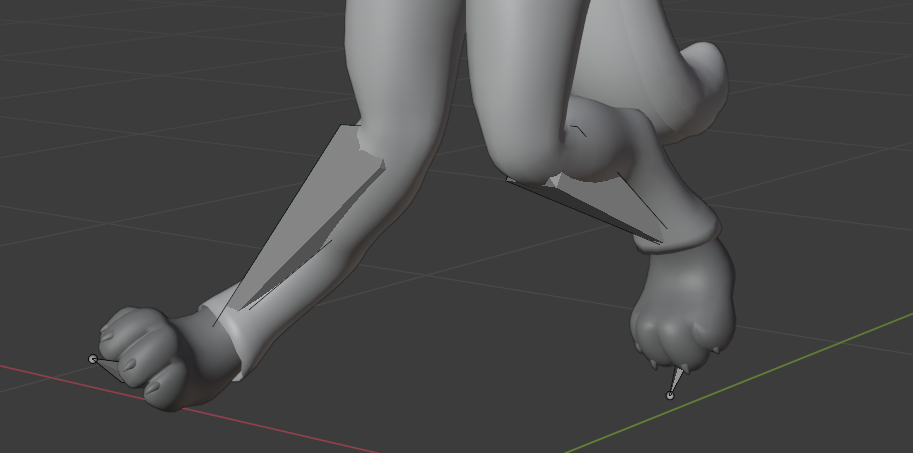
The leg bones have to be straight and not at a diagonal
cold coral
is this a problem i have to fix in unity or in blender?
cold coral
because the armature look fine in blender
kindred pollen
That's something to fix in Blender, the leg bones shouldn't be tilted whatsoever
cold coral
i made sure they are straight but it is still messing up.
 still fossil
cold coral
hello, when i export my model from blender the rig from the legs rotate slightl...
still fossil
cold coral
hello, when i export my model from blender the rig from the legs rotate slightl...
Clear bone rolls
cold coral
ok ill try that
cold coral
k the bone rig is still a mess. ( the best i can describe is "walking it off" when you have snapped both legs in have)
but it works fine in vrchat so im just not going to touch anything
fading verge
anyone have a chart with all of the visemes shapes and names
 stray schooner
Does anyone know how to fix this issue where the legs IK inwards?
my leg rig is pretty standard
kindred pollen
Leg bones look like they go out slightly, try moving them to be as close to vertical as possible
 candid iris
imported a models fbx into blender but his jaw mesh is gone
lower half below eyes tbe
stray schooner
can someone help me in a call with my legs bending inwards issue? no matter what I do it keeps happening
golden hull
how do i connect an avatar with a shirt
golden hull
how to connect bone to mesh
fading verge
having same issue here lol
turbid spear
use CATS custom model creation tab and join them
fading verge
Or just click them both in object mode and ctrl+j?
Maybe I'm wrong, it's 6am and I'm pretty tanked
fading verge
anyone able help me rig the clothes to my body using already made avatar just changing outfit everything is fitted together just cant get the clothes to work
fading verge
@fading verge didja weight paint it? 😊
 rose wagon
why rooting dynamic bones is sometimes bad https://cdn.discordapp.com/attachments/703578838642327563/792874698512924682/unknown.png

 green coral
Hello! What was the Adobe website that did something to avatars?
fading verge
you already asked that in #avatar-help 
green coral
I know but no one answered my question
fading verge
@fading verge yeah when I do it the clothes just mess up watched a YouTube video what’s 3 months old and did what he did but didn’t work
Did you hit ctrl+j with the clothes and avatars to join them?
And are you independently weight painting each part of the clothing to the corresponding bone it needs to be attached too
@green coral what was it supposed to do to the avatars lol
green coral
I dont even know
 tardy gorge
im having an issue where the head of my model is dragging the body with it when i look up or down, this is what the head of my skeleton currently looks like
this is my first rig ever so i assume i screwed something up
ok so i realized i clearly know nil to nothing about skeletons and your neck bone shouldnt be in your throat lol
tardy gorge
ok the issue still exists
rose wagon
Maybe it's a weight paint problem?
 urban plover
when i import a unity fbx file and fix using cats, it just shows up black
 astral warren
golden hull
how to connect bone to mesh
astral warren
golden hull
how to connect bone to mesh
Shift select both, control P for parent
 burnt goblet
Are you able to have a humanoid avatar without shoulder bones?
 mild stratus
burnt goblet
Are you able to have a humanoid avatar without shoulder bones?
mild stratus
burnt goblet
Are you able to have a humanoid avatar without shoulder bones?
Not really, you could just have 0 weight shoulder bones instead.
burnt goblet
Ok just making sure, for some reason it was allowing me to configure the avatar with no errors without shoulders hooked up
mild stratus
Huh, normally without shoulders, the SDK gives an error.
 bitter birch
tmw you're trying to use the short route but still fails 😔
 urban mango
Hope the x-post isn't a problem.
Hi all, I'm having a bit of an issue with my avatar when using FBT and lying on my side.
The chest portion seems to stay oriented facing upwards despite my hips and headset being on their side.
Moving my arms seems to have an effect, if I outstretch in front of me entirely, or down towards my knees then the chest will rotate, but if I keep my hands in front of my chest or by my head the chest doesn't rotate.
Please see the attached video, does anyone have any ideas?
https://cdn.discordapp.com/attachments/337801456415539200/793319632060678194/unknown.png
Chest bone as seen within Unity

 stable tulip
Hey there. So I am doing the rig proportion and have one problem. Here is my reference and as you can see I really need to squish the body to fit the body proportion.
Maybe it's better to scale the head or some how fit the body?
It looks so scuffed
I think I just need to scale other axis
Yep - just scale all axis
 hollow mist
Hey, I have a super stupid question. I'm trying to get am armature to bind to clothing I just finished modeling, and I've been fighting with this for 3 hours. No matter what I do, I can't get these to move together in either Unity or Blender, even though I've attempted to bind it multiple times. I've also verified that the armature is selected in the modifier section in Blender, as well. Is there something stupid/silly I'm missing here? I'm way too new to anything with 3D, if I'm being honest.
oh. I can't send images.
there
What's weird to me is that I rigged it the same way I did this sweater, but it just isn't having it. https://imgur.com/j2zk3yA
 crisp tendon
are the meshes joined ?
hollow mist
They were not, because when they are, it starts doing stuff like this. https://imgur.com/a/UOee5pw

Unity also doesn't accept the mesh when they're joined
hollow mist
If I follow something like this video, as well.. https://www.youtube.com/watch?v=FMsfW3EVubU

#b3d #blender #secrets #tutorial
Visit my website: https://www.blendersecrets.org/book
e-Book bundle (20% Discount) : https://gumroad.com/l/IxofeY
I get a result like this in Unity
And the exact same mesh doesn't even show the armature bound in Blender.
crisp tendon
Apply transforms to the mesh before joining
Also from the third gif it looks like the weight paint is incorrect
hollow mist
Does that include the armature transform as well?
I also haven't actually tried weight painting before. I didn't end up having to use it for the last avatar I worked on. (This is only my second go at modeling clothing, admittedly)
crisp tendon
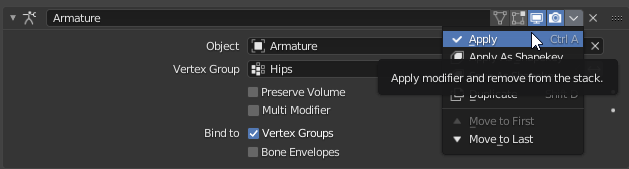
You're not meant to apply this modifier
Only apply transforms on the meshes you have, then join the clothing onto the body mesh
hollow mist
Then yeah, everything's applied.
The legs seem to move fine, oddly enough. https://imgur.com/aETexF3
I think I may just need to restat making the mesh, I must've broken something along the way.
which'll probably be a project for another day. 7 hours is enough time for the day. >.>;
kindred pollen
It looks like a weight painting issue to me, yeah
hollow mist
I'll need to look up some tutorials on it, then
It's all weight 0 right now, because I've never touched it before
lol
The base itself is rigged with all 0's
sinful hill
Hey everyone,
So I just made a avatar and all is going well until I turn a sharp left or right then my legs fly out like I am superman. I have been trying to fix this for a an hour now without any luck. Can anyone point me in the right direction?
crisp tendon
pictures of your armature/model in blender would help
sinful hill
crisp tendon
pictures of your armature/model in blender would help
Here is what it's doing. Let me get a SS sec.
sinful hill
crisp tendon
pictures of your armature/model in blender would help
That's the armature / rigging being used
crisp tendon
Did you check the names of your bones ?
sinful hill
crisp tendon
Did you check the names of your bones ?
The bones are all numbered
Do they need a specific name? Still a bit new to VRChat SDK
crisp tendon
numbered ? Do they have left and right in their names at least ?
Also the hip bone looks a bit odd
sinful hill
crisp tendon
Yeaaah that wouldn't work, you'll need to fix that in blender
Or it might be doable in Unity
sinful hill
So do I need to rename everything?
I mean I can I have a google sheet with all the bones on it
Just a PIA
crisp tendon
Correct
sinful hill
What is it looking for so the naming convention I use this time does not cause an issue lol
crisp tendon
Not sure, i think it's anything with L/R at least
Having your own naming convention that follows that is good practice
LeftX or X.L
X being the bone name
crisp tendon
Sure, then you can guess that in that case you don't need to add X
Pinned items in channel
 cyan adder
has anyone tried this fix before? https://mobile.twitter.com/ANDE0919/status/1314168173826981889
this looks so wrong compared to a regular armature for FBT perfection
https://cdn.discordapp.com/attachments/676922803781500938/793767371038654474/unknown.png
https://cdn.discordapp.com/attachments/676922803781500938/793767440286482452/unknown.png

VRCで腰が横に曲がるやつはhipと足の付け根の間が短いと起こる(モデル作るたびに忘れる)
右の感じにすると直った
Retweets
367
Likes
1072

 Twitter
·
Twitter
·


(KUNG's tutorial didnt solve the issue, same with his 'hacks')
hollow mist
HEY Just wanted to follow up from my posts yesterday. Learned some weight painting and spent a few hours, it actually moves proper now.
astral warren
Blender modifiers look for L and R at the end of a bone name and vertex groups. If the bone names are the same aside from ending with L and R, mirror operations will apply
All vertex groups and bone names must already exist, modifiers don’t create them
 tight musk
So i took a mesh and split it to see certain part and when I joined it back it made these lines...
turbid spear
do you have any sharps in edit mode? cyan lines
tight musk
no
 rocky atlas
hello everyone. I've a little issue, in Blender, I don't exactly know how I did this, but I separated my Body mesh from my armature in my hierarchy. Is there a way to fix this? I did not notice this error earlier and I save many times after the mistake. Once on VRChat, my avatar still work, but I have now some weird issues especially regarding material rendering which I didn't change at all on my avatar after my modifications (mainly Shape keys).
turbid spear
tight musk
no
then it's probably your normals, try clearing custom split normals data
turbid spear
rocky atlas
hello everyone. I've a little issue, in Blender, I don't exactly know how I did ...
drag and drop the body onto the armature in the hierarchy
tight musk
turbid spear
then it's probably your normals, try clearing custom split normals data
okayyy ty, I will try
 wicked jungle
Hey guys. I have a small problem. When I put my hands on my shoulders, my elbows move behind my back. Any idea what might be causing that? I've tried moving the shoulder bone around but I can't figure out where to put it. Thanks
rocky atlas
turbid spear
drag and drop the body onto the armature in the hierarchy
😐 well, I tried that but I was trying to drag and drop by it name. It worked with the icons. Feel stupid now 🙃. Thanks!
 stray chasm
Anyone had issue where one avatar arm turns a bit outwards/inwards? Looks normal in blender/unity but when I upload it rotates a bit and then it just looks weird
burnt goblet
Check your bone roll
 safe sedge
Is there a way to anchor a small mesh to a vertex on another? I wanted to make some body jewelry but the place I want to put it is right in the weight paint transition zone between two bones... I'd want it to stay at the same location on the surface of my body but idk if that's possible if it's not in a "red" weight paint zone...
 rough coral
Can someone help me everytime is et my bones up in blender everything is there but when i go to unity ny shoulders and neck are gone. Its a spongebob model idk what im doing wrong
safe sedge
rough coral
Can someone help me everytime is et my bones up in blender everything is there ...
Sometimes Unity doesn't recognize bones. If the bones are there in Blender you should be able to just click the dot to the right and select the bone from the list.
safe sedge
wicked jungle
Hey guys. I have a small problem. When I put my hands on my shoulders, my elbows...
You have to have at least a small amount of bend in the elbow in the "correct direction" in your rest pose in Blender so the game knows which way your arms face. So with your avatar in T-pose in Blender looking from top down your elbows should be bent slightly forward, like they would in real life. If they are perfectly straight or bent backwards then they can flip in game. Also, clear all bone rolls before exporting. (Edit mode on armature, A to select all, Alt+R to clear bone rolls). I'm assuming you mean they're completely backwards from where they should be, like in an impossible position.
meager ether
safe sedge
Sometimes Unity doesn't recognize bones. If the bones are there in Blender you ...
it's doesn't recognised because there's no parent between bones owo
 sleek isle
@safe sedge transfer the weight to that jewelry mesh from the body
safe sedge
sleek isle
<@760624814041464863> transfer the weight to that jewelry mesh from the body
ohhh of course! lol thanks
sleek isle
You can use the modifier for it so its easier to edit it
That what they usually do for game. Thats why what would be an hard armor will strech a little to prevent clipping
 meager matrix
anyone know how i can fix this bs?
turbid spear
rotate bones in edit mode to match your arms
fading verge
So I'm an idiot.
How do I add textures to this if this was originally an .obj?
Right now, there's nothing but meshes, and the armature is already made. Would I have to import the textures INDIVIDUALLY if I need to revert to pre-armature?? If I have to, I don't think it's possible to do so as all the textures are 1 single image, and these are multiple meshes.
 dusky jackal
If my avatar's knees go behind them when crouching, what do I need to adjust?
still fossil
dusky jackal
If my avatar's knees go behind them when crouching, what do I need to adjust?
Add a slight bend to the leg bones
dusky jackal
The character is unguligrade and the knees are bent a fair bit different than standard standing pose
But it is bent in the 'right' direction
still fossil
🤔
dusky jackal
I fear the 'shin' bone may be a bit too long
Actually now that I look at it, that is probably the case
the IK can't solve for the knee position without shoving it through the character
still fossil
If there's still issues after shortening it try getting rid of this bone
Wait that's the foot right?
dusky jackal
Yes it's named and applied as the foot
still fossil
And the one after that is labeled toe?
dusky jackal
Yeah there's a single toe
 untold ingot
Hey, can anyone rig a model to be vr ready? For the quest?
 tender summit
anyone know a tutorial video to start learning how to import and make avatars?
completely new to all of it
fading verge
can someone tell me why this happened when I port it to unity?
its completely fine in blender but once its in unity it dies
crisp tendon
Clear bone rolls and apply pose with cats
fading verge
that worked thanks
 twilit urchin
crisp tendon
twilit urchin
crisp tendon
Check the automatic bone orientation on import
 supple egret
hey so i got a quick question and im sorry if im in the wrong chat but is it possible to get the model for one of the avatars i have favorited so i can change it in unity?
crisp tendon
Nope
 mint magnet
Hello everyone!! I had a quick question in regards to Rigging a character for VRchat. My character is a humanoid, but with digitigrade legs. (He's a satyr). The bone structure will be different from that of a humanoid. I'm fairly familliar with Rigging/Modeling, but ive never done so for VR chat. Is there a specific skeleton that I should branch off of, or can I just make my own skeleton and use that with no issues?
kindred pollen
You could probably get away with using a standard humanoid rig, unless you want the digitigrade leg bits™ to bend
mint magnet
yeah, I would want that! I tried using a standard one and it looks a bit silly hehe
kindred pollen
kk lol
You could try making the actual foot be the toe bone, and the ankle/bend above that the foot bone? def not sure if that'll work though
mint magnet
is making a custom rig something that one can do? Because I can easily do that on Maya. I just wasnt sure if it was an option since all the tutorials online just use a premade one.
Yeah, I was thinking that too
kindred pollen
You can, but I don't think it'll work with VRChat's IK
mint magnet
Agh ree
Well, if I just animate the walk cycle myself it shouldnt be that bad? Maybe?
kindred pollen
I'd prob recommend the foot/toe and anke/foot thing first lol
mint magnet
yeah you right
Imma try that, thanks!
And to get the skeleton, yall just go to Mixamo right?
kindred pollen
i'unno, I just used Blender's standard humanoid rig for a recent thing lmao
can't comment on it since I haven't used it but it'll prob work!
mint magnet
Ah. Im not used to blender since I've used maya in college lol, but Im sure I can get back into it!! last time I used Blender it was 2012 and I was doing minecraft animations lol
mint magnet
Trying to mirror his skeleton so the right side mirrors to the left. but for some reason in 'edit mode' he goes off center. if I go to 'pose mode' he resets back to 0. how come?
sorry. new to blender. used to maya.
 austere rain
How do i add stuff like shirts and pants to my model?
fading verge
how do i fix this?
 amber kestrel
Are there defined measurements used for avatar scaling and determining the avatar floor? I know it uses "armspan", but what is the exact measurement used there? Distance between wrists in t-pose? And I'm also assuming the floor is displaced down from the viewpoint?
wind osprey
amber kestrel
Are there defined measurements used for avatar scaling and determining the avata...
In T-Pose, let x = distance from head bone to wrist bone.
To make the VRC floor and VR (steam or Oculus) floor to match, the viewpoint height (y value) should be
x/0.4537
So if head-hand distance = 0.8420450009105473
then view y value = 1.8559510709952554 to make floors match (within 1cm)
turbid spear
Jamie explained it in this video https://www.youtube.com/watch?v=vVJ88VGUqV4

Quickly covering the reason a lot of vrchat avatars make the game floor too low and prevent you from picking things up off the ground
Kung's tutorial to fix proportions: https://www.youtube.com/watch?v=2sfTEBAl8sA
VRChat Discord Server: https://discord.gg/vrchat
amber kestrel
wind osprey
In T-Pose, let `x` = distance from head bone to wrist bone.
To make the VRC floo...
Is there a source for this calculation somewhere that I can reference?
wind osprey
amber kestrel
Is there a source for this calculation somewhere that I can reference?
Not that I know of. These kinds of super-specific small essentials never seem to get documented for some reason.
However I have been using this method for a few years now and it has been consistently good enough.
amber kestrel
wind osprey
Not that I know of. These kinds of super-specific small essentials never seem to...
That calculation alone is pin-worthy here tbh. And just to be sure, you're talking Euclidean distance right? Or just lateral distance?
 tender light
I was wondering if someone could rig my avatar. I already have the model itself just need someone to rig it
amber kestrel
wind osprey
In T-Pose, let `x` = distance from head bone to wrist bone.
To make the VRC floo...
Trying to get a handle on what you referenced. I've got a few measurements here, some restricted to the XZ plane, some dependent on an example viewpoint. Based on what you said, my best guess is that the head-wrist distance (here, 0.332458) is supposed to at least approximately proportionally match the viewpoint height (here, 0.653493). Are any of these other measurements relevant specifically for height scaling, or do I have it right?
turbid spear
amber kestrel
That calculation alone is pin-worthy here tbh. And just to be sure, you're talki...
to me it looks like a shitpost lol
amber kestrel
turbid spear
to me it looks like a shitpost lol
It's a mathematically concise and specific measurement, which is exactly what I asked for. In what way is that a shitpost?
wind osprey
turbid spear
to me it looks like a shitpost lol
Instead of being so dismissive why not try what I posted and decide if it's full of shit or not.
wind osprey
turbid spear
in what world does a 16 decimal number make sense
Also the calculator I had on hand for this was literally python 3.7 which explains the precision.
wind osprey
amber kestrel
Trying to get a handle on what you referenced. I've got a few measurements here,...
That looks right to me. I don't think I mentioned it but it's the distances from the root of the bones , that's pretty important.
amber kestrel
wind osprey
That looks right to me. I don't think I mentioned it but it's the distances from...
Right, Unity just represents the IK as rotated, scaled objects at the roots of the bones. I figured the calculation was done in a Unity environment at runtime
amber kestrel
Where is your viewpoint?
What exactly did you change about the bounding box?
scaled up the whole avatar by 10
From where?
I don't recommend messing with the bounding box
You literally just sent me a cropped screenshot of a transform component
What object?
Oh lord
I'm not even religious
Nah. My suggestion is to create another instance of your model asset, only scale down the root object if needed, and set the viewpoint accordingly
What you are defining as "the prefab" is an entire hierarchy of objects that define a 3D model. The body mesh and IK are included within this prefab.
I figure you scaled something you shouldn't have. Sometimes it's better to start from scratch and limit yourself to what you know works on its own, isolate some things from each other
mint magnet
Anyone know how to fix these random rips that are occuring within my test rig?
mint magnet
I’m thinking it may be lack of polygons and it’s just ripping. He sits at around 27K.
(Btw I’m using maya AutoRigger! Sorry I know it’s different from the norm of blender )
turbid spear
wind osprey
Instead of being so dismissive why not _try_ what I posted and decide if it's fu...
I didn't claim it was, I just said it looked like it.
As you confirmed it's not joke, I apologise
It's just that the seemingly needless precision and the obscurity of the calculation really made it seem like a joke
turbid spear
mint magnet
I’m thinking it may be lack of polygons and it’s just ripping. He sits at around...
Looks fine to me polygon wise. The vertices should just be connected
Does maya rip vertices when it deforms stuff?
gloomy ether
Anyone here use the cats bake tool yet in blender. How do I find my textures once my model is done baking?
 tough robin
I have an object parented to my arm with a Aim IK script, thats targeting a world object. Everything works correctly but moving my head changes the angle of the object for some reason, I even tested this in full body with moving ONLY my head and the IK was still changing just my shaking my head, Why is this and how can I fix it?
 spark hearth
mint magnet
Anyone know how to fix these random rips that are occuring within my test rig?
spark hearth
mint magnet
Anyone know how to fix these random rips that are occuring within my test rig?
try merging the models vertices by distance?
turbid spear
they're using maya
dunno how it's called in maya but yes, in 3ds max it's called weld
 rare flame
trying to figure out which bone does which, obviously using another sergal skeleton cause fuck trying to make one myself lol, but organising it and confused on what goes where for face
spark hearth
the bones have names
rare flame
oh? w8heres that?
rare flame
ah fuck its the hair bones, that explains it
ty
should i remove these 2 since ear is too small?
turbid spear
don't delete bones, always merge their weights to parent
so you don't end up with unweighted bits
but if you don't want stuff to move independently, like with dynamic bones, just get rid of the bone
rare flame
i deleted hair
cause my character doesnt have hair so bones do nothing
that ok?
so should i delete these 2 ear bones? or resize them to ear?
 gleaming tangle
Imagine being able to make a 3D model
mint magnet
spark hearth
try merging the models vertices by distance?
That was it!! Thank you so much.
Of course, Now I see a glaring issue on my model and I have to go back and re-model his chest. FmL!
 sweet rain
alight hey guys I have a VERY strange issue with an avatar re-upload of mine
I have NEVER seen this issue before but, my hair bone appears to be whipping back whenever the character is used in VR. it's doesn't show in unity OR the avatar preview in my menu. turned off all colliders and got nothin, also the hair bone isn't assigned to anything in the config settings. anyone have any ideas?
for reference, here are the normal bangs
crisp tendon
try resetting bone rolls in blender if not already done
sweet rain
yeah that's what I'm gonna do rn haha, it 100% isn't dynamic bones or colliders cause it does it with neither
omg it's still busted
crisp tendon

sweet rain
might have to start from scratch and manually input all my descriptors etc
I'm wondering if it's like, copying bone transforms or something
okay nope putting it in from scracth also doesn't work
looks like my original model had assigned one hair bone to the eye but the new one doesn't do it. maybe that was holding everything together LOL
 digital gorge
Can anyone give me a lead on how to fix this tilt on the hip when in fbt? This is how my armature looks like, also as a note adding an opposite tilt to the hip bone as reccomended in the mega tut didnt work so dunno what is it
crisp tendon
Try raising the head of the hip bone up a bit
digital gorge
Is this better?
 peak sparrow
im not entirely sure what happened or what caused it, i just want a way to fix this if anyone knows how
when i turn the head, some stuff stays frozen
amber kestrel
Full body is stupid and sometimes tilts the hip to a leg. That just be how it do
amber kestrel
peak sparrow
Those vertices are unweighted
peak sparrow
i tried putting weight paint on it but it makes the problem worse
or maybe i just did it wrong
when adding the weight paint, they just stick out even more
 craggy kettle
anyone know why this happen after i import the model into unity ?
model in blender
the bones has no rotation already cleared those
0 rig fixes
amber kestrel
craggy kettle
model in blender
Looks like either a hidden mesh or something that gets moved by blendshapes. Otherwise remove the extra bones
crisp tendon
digital gorge
Is this better?
Yeah it'll most likely help, and make sure to clear rolls !
crisp tendon
craggy kettle
Clear bone rolls
fading verge
I am trying to make dynamic bones but it seems that one of the bones ends opposite of where I want it to. I try to change its offset, but no matter what value I enter in x y or z nothing changes. Please help as I think I am missing something here.
craggy kettle
found the issue and the fix if anyone else has this issue in the future
issue
fix
hips bone was in the wrong direction
amber kestrel
craggy kettle
Oh I didn't even notice the actual issue. Huh
crisp tendon
What does it look like in your uv map ?
amber kestrel
Not too hard to blend that out in free illustration software if you don't like the crease. Wet brush in krita has been a godsend for me
Well, my suggestion just modifies the texture that the UV's reference. If overlapping UV's is a problem by any means, then address that independently. Not sure how you expect me to answer that otherwise.
amber kestrel
Oh I thought that was your texture.
 tough apex
does anyone know how to fix this? My fingers came out weird and dont bend properly in game
amber kestrel
tough apex
does anyone know how to fix this? My fingers came out weird and dont bend proper...
Do some posing in blender, see if there are stray weights on fingers that shouldn't be there. Can't tell you much more with this amount of info
sleek isle
@hasty scarab smear the texture in blender or other software manually after bake
They have to be the same anount and vertex order
If you have issue that could be it
If not dont think about it
mild stratus
No. They mean the count and order of the vertices. Each vertex has a number associated with it that is used for saving positional data, blendshapes, etc. Blendshapes are saved ( i think ) with a vertex number, and where the vertex is moved.
If the vertex numbers change, the blendshape doesn't know that, and will move the vertex with that number, causing garbled mess.
Or something like that.
tough apex
amber kestrel
Do some posing in blender, see if there are stray weights on fingers that should...
I should probably mention it was made by someone else and this is what they gave me for the fbx to import to blender
amber kestrel
tough apex
I should probably mention it was made by someone else and this is what they gave...
Then ask them to fix it?
tough apex
i did but they said thats the best they could do
amber kestrel
Code for "tough shit, bud"
tough apex
yep, was told maybe someone could help here but guess not
tough apex
well I have no idea how blender works so if anyone can help I would love for you to reach out to me about my avatar finger issue
safe sedge
tough apex
well I have no idea how blender works so if anyone can help I would love for you...
It's most likely a weight painting issue, but as others have said it's hard to tell without more info. This video will show you how to use pose mode in blender and how to fix weight paints. Probably all you need to do is blur the weights with the blur tool... https://www.youtube.com/watch?v=zVIFbqQAykk

This tutorial first goes over my method for weight painting in Blender 2.8 (relevant to everyone, not just VRChat users) using a simple example of tweaking an arm's weights to leave a sharper elbow when it bends. It then proceeds to apply these techniques to create the weights between the head and neck bone (more advanced 3 rotation axis joint)....
tough apex
Thanks, but wouldnt i still need to stitch up this fbx if the head and hair are all over the place? I am not an experienced blender user
safe sedge
Yes. I didn't scroll back to see your entire question. Install Cats tool for blender and hit the "auto fix" button and it will join all the meshes for you.
tough apex
Lets just say that made everything bigger and tilted 90° flat on its face
 short tundra
Hi everyone, my character models legs end up moving up and infront of the character when i walk, like im laying down. The legs reset after walking, i don't have a custom walking animation either. If i walk in none vr mode, the legs don't do it. Can anyone help me?
 static sparrow
Okay so like...I have a model... my friend said he would help me upload it, but he said it had no bones, and me being kinda new to Vrchat doesn’t know who to go to, because all i really have is a quest I don’t have a computer...can someone help me?
 lapis bloom
There's a problem I've seen with a lot of models in full body tracking where rotating the feet results in a big leg movement instead of just the feet, do you know what I am talking about? Does this mean something in the rig is wrong? Like the size of a bone maybe?
astral warren
lapis bloom
There's a problem I've seen with a lot of models in full body tracking where rot...
This happens if the tracker’s real life location is very far away from the virtual foot’s location when binding into the t pose
In most cases, the virtual feet are far below your real life floor, which in vr looks like the trackers are at your shins
lapis bloom
I see, in that case it might be fixable just adjusting the real feet when calibrating I guess... I'll have to experiment with that
Thanks
astral warren
It’s sort of trying to fit a rectangle in a square hole. You can’t get height and wingspan to line up at the same time without making the model for your proportions
Otherwise you will have a discrepancy somewhere
astral warren
It is old and was made improperly back when everyone used to turn the hip bone upside down to try and fix full body. Those old avatars now break in fullbody
Didn’t run an old version of cats plug-in on it or anything ?
Hm. Well yes just about anything will work in nfbt
 vivid temple
What does it look like in front view
Yeah
Strange that it doesn't work
Maybe trackers themselves?
Toe bones are just toe bones
Doubt they do anything to the hips
Yeah check parenting
They should be the root
So only children
astral warren
Unless the tail is confusing me the hip is upside down? Can I see side view
astral warren
Ok hip is fine legs are bad
astral warren
vivid temple
Dont legs also need to be parented to hips?
Yes
The knee is fine. The foot however is far above the toes
That is not really expected and may have issues in fullbody
Just to be clear: you have bound the bones on the floor there as toes right? Not feet? The feet are the diagnol ones.
I’m astounded if that works on nfbt
However my guess is that if you stood next to your avatar, and scaled it to be your height, it’s hip would be at your chest
vivid temple
You are reimporting the armature correctly into unity?
astral warren
I believe that is the cause
The issue here is the hip tracker’s real life location is too far from the avatar’s hip bone
vivid temple
If you change the armature when overwriting a file, it can get messed up in unity
astral warren
Yeah after changing armature in blender I always set from humanoid to none, none to generic, and generic to humanoid. Probably overkill but it reliably flushes out the previous cached skeleton data from unity and pulls it directly from the fbx again
vivid temple
That works?
astral warren
Yes
vivid temple
I've been copying a second models definition and creating from model
astral warren
Going through all three probably isn’t actually necessary but I just found what works and kept doing it from that point
vivid temple
Sounds easier though, so epic
astral warren
It ONLY binds to hip. Feet will bind to feet or shins, whichever are closer at bind time
I believe there is a maximum offset the hip tractor can set itself to be from the hip bone. If it is any longer it binds too high, and then the avatar is pulled down to match 
As far as proportions go I feel like that hip is way too tiny
I would say the legs are insanely long yes
I understand what it’s probably going for (digigrade legs?) but for fullbody the height-to-wingspan ratio needs to be human-like
vivid temple
If you have an older save of the model you can copy the mesh from it
Bake uvs?
Don't think it's possible
I think you can copy it
It's bound to the bone name I think
I think you just need to parent the armature to the mesh
Not sure which option it was
Try all the options
astral warren
For what it’s worth my backbone is made of four equal length bones: hip, spine, chest, and upper chest.
Compare this to yours: the hip is almost zero length, so your entire backbone is basically only 2 bones
If you don’t solve the issue by the evening and you don’t mind making a public/cloneable blueprint I would like to wear it and see what’s going on
 hushed moth
Blender won't let me move specific bones, is there a key i'm missing?
astral warren
hushed moth
Blender won't let me move specific bones, is there a key i'm missing?
Did you make the blend file yourself? If not it’s common to lock bones to prevent accidental movement. This can be done on the bone itself or with bone constraints
hushed moth
i grabbed the 3d model from a game and put it through mixamo cause it had completely broken bones before, and it's in an fpx format
astral warren
Can’t imagine any reason you shouldn’t be able to move the bones around
Are you a trying to pose it (model moves with bones) or move the bones (model stays put)
hushed moth
i got the bones to move i was in the wrong mode, thank you
mint magnet
So I began to do my rigging using Mixamo for my digitigrade character. After I have the FBX file, is there anyway I can go in and edit the leg joints so that way it is digitigrade instead of plantigrade without removing the skinning? Or should I just cut my losses and skin it myself?
turbid spear
you can edit the weights yes
mint magnet
Thank you!
Also, one more problem. Sorry. But as you can see here it seems as though my origin point is in the middle of his head. How do I put it at his feet without ruining the skeleton? This is a direct import FBX from mixamo just to test stuff out.
(It does not look like this in the mixamo viewer)
Nevermind! Solved! If anyone else if having this issue, you need to go up to the top left and hit "Pivot" next to the movement controls.
hushed moth
How would i get the gas cloud around the model to only move with the chest and not stretch or fold if i move an arm
If it absolutely comes down to it i can remove the gas but i'd much rather keep it
kindred pollen
Cloud's weight-painted to the arms, remove the cloud's weight painting from them and paint it only to the chest/spine bones instead
hushed moth
how would i go about doing that? I'm super inexperienced with blender and unity so i've been attempting to follow guides
kindred pollen
I personally couldn't help you too much lmao, but I'd recommend looking up tutorials on weight painting
barely understand it myself lmao
hushed moth
alright, thanks
mint magnet
Just trying to test out my first model and I notice he doesnt have animations. Why? His rig has been configured to a humanoid with no issues. He was also imported from Mixamo.
oh! nevermind? Somehow I just refreshed it and it worked lol
short tundra
Hi everyone, my character models legs end up moving up and infront of the character when i walk, like im laying down. The legs reset after walking, i don't have a custom walking animation either. If i walk in none vr mode, the legs don't do it. Can anyone help me?
astral warren
I don't know what a "regular seam" is, but a UV seam is where part of a model has a discontinuity in the texture - one triangle uses one part of a texture and the triangle next to it uses an entirely different part of the texture. Nearly all models have some kind of UV seam somewhere, unless they they can layed flat onto the texture without cutting.
astral warren
Oh well that’s a baking thing I am not up on substance painter, sorry!
mint magnet
Id like to make this pose his default T pose. Is that possible? Im looking to override the natural T pose which breaks his lower limbs since he has goat legs. Thanks!
still fossil
mint magnet
Id like to make this pose his default T pose. Is that possible? Im looking to ov...
That little tab under your bones that says "pose". Click on that and you can enforce t-pose
mint magnet
When I click that it just makes his body stretch out all strange.
What I did to make him go into that pose to begin with was I went into Maya and I adjusted the leg positioning without altering the skin weights
mint magnet
still fossil
^ sorry forgot to hit reply button
amber kestrel
The T-pose in rigging configuration is just for rigging purposes. If you want to change the avatar's T-pose, you can, but be mindful it might mess with the IK a bit
hushed moth
Mixamo won't create bones for my hands correctly so is there a different program that can handle that or can I do it manually
sleek isle
Manually
 azure gate
astral warren
azure gate
astral warren
Yeah. Chosen because they are the ones usually the ones available via MMD models
The in-betweens aren’t great though and should be edited after being generated
 quartz kayak
Hello! I am planning on vstreaming soon & have a couple avatars from a creator (with permission) I am about to purchase. I'm not sure if this is a silly question, but is it possible to take this avatar and use it on a program that I can use for streaming? Also, if anyone has knowledge on how to upload an avatar package to Unity, please DM me I am willing to pay for your help T~T Thank you so much!
lapis bloom
quartz kayak
Hello! I am planning on vstreaming soon & have a couple avatars from a creator (...
I believe that is possible yes, I've seen streamers do similar things
astral warren
quartz kayak
Hello! I am planning on vstreaming soon & have a couple avatars from a creator (...
The avatar should come with a list of restrictions on what you are and aren’t allowed to do with it. If it’s not specifically stated as disallowed then by default you can. But be careful to read all available information as licensing terms can be included anywhere. Not finding or reading them is not an excuse. 
quartz kayak
Ooh okie dokie!! Thank you so much for your responses! ^^
tender summit
hey when im doing rig on the unity thing , it shows my chest is set to none and i dont know how to asign it
fervent hornet
Click the small circle at the right of the text box or drag the correct bone into the slot
tender summit
the circle doesnt click and idk what you mean by drag the bone
only bone that isint green on the model is a trident bone on the chest
no idea which is upper or just chest
kindred pollen
on the box that says None (Transform), there should be a circle to the right of that text
not the circle next to the "Chest" text
tender summit
oh yeah thats what i was clicking but i didnt notice the menu popping in the corner
im too blind
tender summit
i have a unity avatar that i like ,however the hand has no movement , anyway to fix it and animate the hand or is it a fundamental model issue?
 glass pulsar
What do I need to do to stop the chest on my avatar popping out?
wind osprey
A complete table of visemes detected by Oculus Lipsync, with reference images.
 unreal socket
amber kestrel
unreal socket
amber kestrel
Couple questions. Is there a usual cause for side hip tilt on a perfectly symmetric armature? If so, and it's not completely obvious from the cause, is there a fix that isn't a shitty workaround?
For example, I've got a model with hip tilt so bad it shoves the entire model to the left. And several others that push the right leg down
turbid spear
how do your leg bones look like
amber kestrel
In all cases, vertical upper leg, slightly bent back lower leg. I'll send a few screenshots
Example #1, Ori. Legs are a bit far apart so I guess it leaves a lot of room for tilt, but no reason to have it.
Example #2, Fjal. Had a pretty severe hip tilt before, I forget what I did to the hip bone (either shortening or lengthening it) but apparently it lessened the tilt?
Example #3, Kale (Nekomata from Nioh). This is the one with the obscene hip tilt. The leg armature is a bit weird, but nothing asymmetric
Selected the hip bone in both for visibility because there's a bit of clutter there
fading verge
Hey there, is there any way to override VRChat's IK system by the one of your choice?
hello could someone help me fixing the weightpainting issue im having? it basically does not applies weight values correctly and i am attempting to replace hands on an avatar for actually better looking hands. I will hand over the blend/fbx file so you can take a look. Thank you in advance.
astral warren
amber kestrel
In all cases, vertical upper leg, slightly bent back lower leg. I'll send a few ...
Recommend disconnecting the toe bone from the foot and have the foot pointing perfectly forward forward
Also recommend attempting to upload a version without the toe bones bound in at all and see if the problem still exists
In general the “feet” bones should point directly forward, in your most recent one, they are pointing almost straight down
It’s OK to have a digigrade leg but you want to bone pointing directions to be as if they are humanoid
Unless you actually want to walk on its toes in which case you should bind it’s toe bones as the humanoid feet, and just merge its foot bone to its lower leg
Unity Humanoids walk on their feet bone, not their toes
 runic lance


