#animation
1 messages · Page 134 of 1
 half minnow
 clear yew
does anyone know how to make images come on your screen when you join a lobby along with music
 violet moss
clear yew
does anyone know how to make images come on your screen when you join a lobby al...
violet moss
clear yew
does anyone know how to make images come on your screen when you join a lobby al...
Just ask everyone to block you. Same effect without any unity work
 tacit sapphire
why doesn't the action layer aka emotes not play sounds with animation
 noble shell
enabling objects ect goes on FX
 steel belfry
hey yo does anyone have access to the Eves Motion Empire discord?
 atomic bay
how would i set a gun slide anim to a 3.0 avatar ive made all the anims and t5he gun toggles on and has a face gesture to shoot how do i add the additive animation on top of the particles and stuff
 woeful solar
I’ve been looking for an animation file that works on humanoid rigs.
I’ve seen some avatars with it, it’s basically a wolf run animation that can be applied to human models to run on all fours.
Does anyone have it? Would greatly appreciate it ❤️
clear yew
violet moss
Just ask everyone to block you. Same effect without any unity work
blocking cuz of how an avatar looks or an intro is such a weak mindset to have
violet moss
Nah man, block my screen, get blocked. Lol
It's usually desktop users that don't know how bad that is in VR
clear yew
its not even bad in vr kid use safety settings or stay in ur private worlds if your that sensitive to block someone over an avi
violet moss
I'm not using safety
Blocking inconsiderable people works just fine
Not going to let a few people being spammy with shaders prevent me from seeing decent peopel's avatars and animations correctly
clear yew
blocking someone has the same weight to it as a report in terms or ranking if your gonna cry over an avi hide the person. thats whats wrong with the blocking system in vrc you get snow flakes like you thatll block anyone for any reason when theres other things you could do besides block
violet moss
Nah, I just block. I don't like seeing grey robots
clear yew
probably some cringe trusted user who sits in mirrors all day aswell huh with that mindset you gotta be
violet moss
You seem upset
clear yew
not upset just disappointed because its people like you that ruin the experience for new users weather it be having them banned or holding a trust rank over newer players like it makes you any better than them
violet moss
That's pretty much why the system was designed like it was
violet moss
It's meant to be delayed until you learn how to behave.
 verbal tundra
can someone tell me how to do an afk aniamtion ?
verbal tundra
:/
verbal tundra
verbal tundra
can someone tell me how to do an afk aniamtion ?
Help
violet moss
Does anyone know if root motion works on action emotes? Using motion.t.x instead of root.t.x ?
Like what is the difference between the two
violet moss
verbal tundra
can someone tell me how to do an afk aniamtion ?
Replace proxy_afk with a different animation file in the example action layer controller and put it on the descriptor
verbal tundra
Thank for your response man :D but I asked how to make one
Like when I do an animation and move the arms and add a keyframe unity act like he don't understand that and doesn't care about my keyframe
violet moss
Oh, just generally how to make any unity animation? Marie sure record mode is on, go to the place on the timeline you want to edit (the white line) and then you edit things. All your edits get added at that location on the timeline
 compact marten
verbal tundra
Like when I do an animation and move the arms and add a keyframe unity act like ...
compact marten
verbal tundra
Like when I do an animation and move the arms and add a keyframe unity act like ...
that's not how you animate humanoid bones
you have to animate the "Muscles", as defined in the rig config
you can either do that through the "Add property button", which is kinda tedious
or, you can use the Muscle animator unity addon
violet moss
Oh, humanoids. Yeah, unity doesn’t have good humanoid animation tools, better to make those in blender. But you can also animate in unity as a generic and there are some paid tools on the asset store to convert it to humanoid for you
But really you are better off learning to animate humanoid motion in blender
compact marten
^
verbal tundra
compact marten
that's not how you animate humanoid bones
well how do I animate then import my animation to Unity xd
 molten mirage
Everytime I try to convert a mmd motion the fingers are broken. Has anyone thats done this know how to fix?
 slim barn
Hey everyone, my avatars don't lip sync with the songs in the MMD worlds but the lips move when I talk, even during songs. Is there something that I'm missing when exporting from blender to unity? or something in Unity?
 shy drift
slim barn
Hey everyone, my avatars don't lip sync with the songs in the MMD worlds but the...
shy drift
slim barn
Hey everyone, my avatars don't lip sync with the songs in the MMD worlds but the...
You previously said you converted a PMX to fbx through blender, did you translate the blendshapes, are you using the JP named blendshapes as the visemes in Unity? If the MMD worlds require JP named blendshapes and you are using them for the visemes, that is most likely the problem. You should duplicate all of them in Blender and use the new ones as the visemes
or at the very least, try this to see if that fixes it
slim barn
Oh you mean having BOTH the EN and JP blendshapes? I translated the visemes with CATS. can I get them back by importing the pmx model and merging?
shy drift
If you did any editing of the model then the vertex order would be different and I don't know if you could or how to fix, you could just rename them yourself by matching them up, more time probably to do it that way, maybe less time than starting over with editing model
slim barn
shy drift
If you did any editing of the model then the vertex order would be different and...
at this point I'll try anything, thanks so much!
slim barn
The face animations in MMD still won't work after both EN and JP translations of the blendshapes. I've noticed most 3.0 avatars can't lip sync as well. I've talked to a creator who did make avatars that are comparable but they don't know what they did. Maybe something about the new SDK vs an old one?
 soft hatch
Hey what framerate should you animate in? Or should I just animate it and then adjust the timing in unity?
 muted prairie
30/60 is alright from my experience
soft hatch
Alright thanks!
violet moss
Can we please get this one looked into? On Index, hip translation doesn't show up remotely. Animations are locked in space when they should be walking around https://vrchat.canny.io/avatar-30/p/bugbuild-1004-avatars-30-emotes-on-index-do-not-have-root-transform-applied-prop

Action emotes as well
 hybrid merlin
is it possible to make a poiyomi dissolve animation on a 2.0 avatar?
 potent grotto
Sort of an animator/animation question;
Is there a variable I can tap into for how hard someone squeezes their grip on the Oculus Touch controllers?
I noticed on a lot of avatars it goes nice and smoothly if you go slow on the grip.
Was thinking if that was a parameter on the SDK already, if I could tap into it as an extra point of control in my locomotion
half minnow
Question which is the official way to convert mmd to animation? Actually I am using a Chinese converter on unity but I wanna ask if there are better methods now
 hollow gyro
Hello there~ is this the right place to ask questions about dynamic bones? I'am looking for a similar method in UE4.. I read sth about PhAT, but there are so less tutorials (o x o). Does anyone know anything about it or has tips?
violet moss
Since Unreal has no use for VRChat I wouldn’t expect too many here to have any experience with it.
violet moss
Blend trees were one of the elements of the blend tree is an entirely different blend tree!
Similarly layers on a controller can have a node that represents an entirely different controller. Sort of like a box in a box
If you don’t know why you would want to make one, you probably don’t need one! :p
half minnow
hi i got a issue with a animation basically is a mmd converted
but the animation include also a "fall" where character go down of 10 yard
i wanna delete this "fall" and prevent character go down
 half minnow
 fierce terrace
and this......
fierce terrace
and this......
that is a gun, not a mp4
 short tusk
I’m making a quadruped avatar and I am thinking of using a generic rig rather that trying to use a humanoid one. Of course, I will have to use entirely self-made animations. Is this feasible?
clear yew
Here's an animation i is working for the hell of it still a heavily wip :3
 radiant ore
Hello everyone! Not so long ago I faced the problem of choosing a theme for 3D motion video for my portfolio, after a long search I came across Oculus. I found it interesting to create a video for them, starting from the very beginning, from the very bottom, by polling the audience and talking with the fans of these devices in person.
Three weeks ago I started thinking about ideas, scenes and environments. Now I have a couple of sketches that I want to share with you and get your opinion on this. At this stage, everything still looks very damp, there are few details and elaboration, there is still a lot of work to be done! But I'm really very interested to hear your opinion!
In the first video (Gif 1 See below), I want to show that Oculus 2 has won the hearts of true fans of certain games and the gaming industry in general.
In the second draft (Gif 2, see below) I want to convey the idea that while at home you can be anywhere with the help of a virtual reality headset from Oculus, in this case I decided to show VRChat, a place where you can meet friends in virtual reality and have fun from the heart!
Your opinion is very interesting! This will give me an incentive to go further and develop the idea from other angles. Thanks to everyone who responded!

 muted prairie
Very cool WIP !
half minnow
Supercoool
 plucky chasm
radiant ore
plucky chasm
radiant ore
looks amazing dude!
radiant ore
Thanksssss🥰
 blissful oak
Anyone seen an issue where when on layer moves to another state, all the other current animations on that controller run again?
 nocturne osprey
can anyone help me with my problem. am trying to make a toggle animation for 3.0 but when ever i try to toggle in game nothing happens?
 fallen thistle
someone know grounded animation or particle like if touch the ground=play
half minnow
i would like to animate the "guy" inside the body, there is a tutorial for how do it?

 analog bronze
🅱️ ictor
 grizzled plinth
short tusk
grizzled plinth
short tusk
How am I ever going to get any animation done when simply wiggling my rigged model around to play with inverse kinematics is so much fun?
 sterile sentinel
the curse of the animation wigglies
 onyx copper
Hi ! Is it possible to add some shapekeys to an avatar fbx without breaking existing animations ?
 proper carbon
Hi I'm fairly new to making avatar animations but i was wondering if there was any documentation for doing something like summoning a persona or another character model and having it do its own animations
 frozen slate
onyx copper
Hi ! Is it possible to add some shapekeys to an avatar fbx without breaking exis...
frozen slate
onyx copper
Hi ! Is it possible to add some shapekeys to an avatar fbx without breaking exis...
yes, all of that is by name. so if you add a shape with a new name you'll be fine. if you have any "reset" animations (to turn off all shape keys) you'd have to add it there, of course
onyx copper
frozen slate
yes, all of that is by name. so if you add a shape with a new name you'll be fin...
thank you Ben. It makes sense
 near garnet
how do you make a entrance animation? i tried to make one where i come in on a broom but when i played the animation in game my character was stood still but the broom was still doing what is supposed to
frozen slate
near garnet
how do you make a entrance animation? i tried to make one where i come in on a b...
to take over your character's animation you either need to use (and fade up) the action layer, or you need to use the "animator tracking control" behavior to disable tracking (turn on animation) for the affected body partsa
violet moss
(Semi-biweekly whining that hips locked at origin in dance worlds when you have index controllers)
short tusk
So I have some animations baked in Blender, every transform for every bone keyed on every frame, etc. but in Unity and VRchat the bones twist and rotate haphazardly on certain frames and overall it looks a bit glitchy and terrible. Does it for both baked and unbaked animations.
short tusk
Why are the back legs doing that

Here it is at 1x speed

And this is what it looks like in Blender, how it is meant to look

I know the head movement difference is because Unity refuses to acknowledge the second neck bone.
But I don't know why the back legs go brbrbrbr
 tired veldt
Does any1 have an animated Stand Idle pack they could send me?
muted prairie
short tusk
And this is what it looks like in Blender, how it is meant to look
When exporting/importing, make sure you're paying attention to the settings, a few of them remove keyframes and you end up weight this kind of issues
 twilit topaz
whenever I deselect a gesture, the facial expression doesn't go away

this is how all my nodes and transitions are set up
 short tusk
muted prairie
When exporting/importing, make sure you're paying attention to the settings, a f...
short tusk
muted prairie
When exporting/importing, make sure you're paying attention to the settings, a f...
Yep I have made sure to look out for that too, I thought the simplification setting might’ve done it but disabling that didn’t seem to fix the issue.
twilit topaz
I fixed the expresion stacking thing (idk how), but now the gestures don't work on the left hand, even though it's set up exactly the same as the right hand
 teal cave
I’m trying to make an animation in unity, but whenever I play it in vrchat, the sound comes on but the jaw doesn’t move?


 pearl quartz
Is there anyway to get a facial animation from one character to another? i made an animation with software but the character doesnt have the blendshapes the software generated
 random nebula
no particularly it's highly unlikely the two avatars share identical typology
which is a bit of a requirement for the blendshape transfer
pearl quartz
ffs
violet moss
Can I make a gameobject go invisible for myself, but not for others, and not for myself in a mirror?
frozen slate
possibly parent it to your head
might have to have a tiny amount of bone weight on the head?
 wary basin
violet moss
Can I make a gameobject go invisible for myself, but not for others, and not for...
wary basin
violet moss
Can I make a gameobject go invisible for myself, but not for others, and not for...
IsLocal parameter for 3.0 might help
violet moss
Yeah but it’s still invisible in mirrors. Wondering if you can get something that only appears in mirrors without a special shader
slim barn
I want to have a rotating halo on top of my avatars head but the transform values don't move the object. I've tried making a gameobject and moving the halo out of the avatar hierarchy into it but it still won't move. Is there something that I'm doing wrong? The values change but the object stays in place
 warm sleet
slim barn
I want to have a rotating halo on top of my avatars head but the transform value...
warm sleet
slim barn
I want to have a rotating halo on top of my avatars head but the transform value...
How are you recording the movements in the animation tab for this object?
slim barn
warm sleet
How are you recording the movements in the animation tab for this object?
I add the rotate transform parameters of the halo, start at 0, move the keyframe to 30 and z(or y or x) to 180 add a keyframe. I just never see any part of halo move...
warm sleet
slim barn
I add the rotate transform parameters of the halo, start at 0, move the keyframe...
If you go in the keyframes, does the changes you make reflect there?
slim barn
the numbers change in the panel but the object itself doesn't move.
 hasty spoke
Saw an idle animation on an avatar where they curled up and did little front roll's in a circle. Can't find it on any sites sadly, any ideas? Or should I just try and make it myself (seems a little complicated for me though)
 twin epoch
You can't move an avatar out of position with an animation while tracking is enabled, so it may be more difficult to get this to work the way you want than you might think
I have this forward rolling animation
Which I got from somewhere public, don't remember where
You can turn the avatar by 360/n degrees in the same direction between rolls n times and theoretically they should go back to the starting position, ignoring other difficulties
 sullen lance
Unless by idle animation they meant AFK animation.
Then yeah, I have a public Rusk avatar fav'd that uses that kind of animation.
 ivory laurel
Hi folks, I prepared a button with animation in blender, I'm trying to use them, but the button is now in my main avatar's armature:

So now I'm trying to change the "path" in the animation file

damn it's small as heck
but I changed it to what i think is the proper path, yet the animation doesn't play
Anyone got any clues on what could it possibly be?
I also changed the path for every "path" i could find in the .anim file
frozen slate
ivory laurel
from the hierarchy it doesn't look like Button is in Bone.001, it's in Hand.L. But the easiest way to figure it out is to just animate any property on button in a new animation and check that file to see what the path should be
 pallid radish
Hey, I've been trying to animate an object on my avatar so it rotates 180 degrees but no matter what I try, I keep getting unexpected results.
So far I've used rotation & position constraints with various configurations as well as animating the rotation properties and transforms of the object with both euler angle and quaternion interpolation.
A bit stumped as to what approach to take to accomplish this....
Made a couple clips of my settings and how it behaves in-game:
the victory gesture is supposed to turn on the flip animation, but in this case it just moves down a bit
frozen slate
pallid radish
Hey, I've been trying to animate an object on my avatar so it rotates 180 degree...
parent constraint would do what you want. then make sure your flipper empty is facing the desired way. (if there's nothing to see because nothing is drawn, just mind the axis arrows).
also you don't need multiple constraints enabled/disabled. you can set multiple sources and then change (or even cross-fade) the sources with the animation
 mighty willow
ivory laurel
Hi folks, I prepared a button with animation in blender, I'm trying to use them,...
mighty willow
ivory laurel
Hi folks, I prepared a button with animation in blender, I'm trying to use them,...
i have hierarchy editor if you still need help
 sturdy jay
i been trying to work on animation and i put write defaults but it not turning off when the i change the parameters value
 median knoll

 chrome marten
Hey guys does anyone know a good Patreon to buy crazy particle animations? I learn about things via dissection, would love some leads!
PLZ LMK!
 eternal nimbus
yo, sorry to bother y'all, i don't like askin for help, but i cannot figure out how to make my custom prone animation stop breaking when it's idle.
when i move (as shown in the gif) the legs extend and the body rises out of the ground,(which is what it's supposed to always be) but when not moving it just sinks into the floor and breaks. avatar is 3.0.
(the preview in unity does not show it sinking in any animation, only in game)

 eager jetty
Hey, I have a simple question - Is there a way in unity to make an animation's auto lerping between two keyframes roll over to the beginning of the animation again?
Right now I'm doing basically the following:
value: 0 -> 1 -> 0
while the first two keyframes move correctly (and curve over the 1 basically) the return to 0 does not take this curve into account to go back up to 1 afterwards.
Visual: (as you see at the end there's an abrupt motion, I want to get rid of that)

(Note: I'd like to avoid curve editing >< but worst case I guess that's the way to go..)
compact marten
eager jetty
(Note: I'd like to avoid curve editing >< but worst case I guess that's the way ...
if you right click a keyframe, you can change these
 half minnow
any idea how to make a "toy" laser effect?
without using trails and performance friend
mighty willow
eager jetty
Hey, I have a simple question - Is there a way in unity to make an animation's a...
if you loop it properly i dont think there will be that abrupt motion https://i.imgur.com/RRGUHPx.gif
idk look at mine
eager jetty
I wonder.. I think one way would be to loop it in a state where linear translation is good enough. Might be a bit cheaty, but that's how you get perfect loops for music and seamless transitions for repeating textures, too so.. I might try that next time I get to work on it.
Thanks for the advice!
mighty willow
eager jetty
I wonder.. I think one way would be to loop it in a state where linear translati...
this is how it looks

its a perfect loop
eager jetty
Maybe I'll have to force it to recalculate somehow.. Worst case I'll have to look into the curves a little more.
mighty willow
eager jetty
Maybe I'll have to force it to recalculate somehow.. Worst case I'll have to loo...
why you make it sound so complicated xd
you just place funny boxes on the timeline animation in right order
eager jetty
If it worked out of the box I'd not have that much of an issue xd
some parts of the animation actually work smoothly as wanted, just really one part doesn't so I needa look into that.
mighty willow
eager jetty
If it worked out of the box I'd not have that much of an issue xd
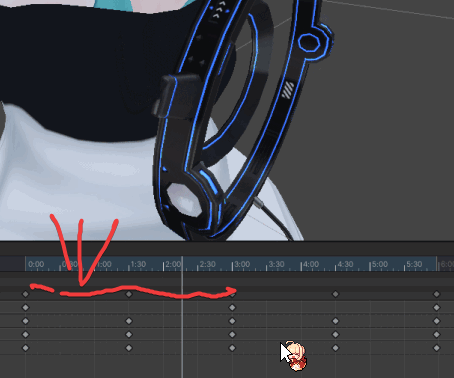
move your frames like this
so that where is the red line is empty space
its choppy because it moves too fast
if it moves slower it shouldnt
hmm i think i drew it poorly
basically instead of small space in the beginning

u do this
 half minnow
questions. i make 4 character but i wanna add a dance animation where all 4 character will appaer, and dance, how i do it?

 sly quiver
anyone know why when i preview an empty animation, it teleports the avatar hundreds of feet away?

 sturdy smelt
which of these are the strafe and which on is left or right @muted prairie was told ya might now
 muted prairie
R is right and L is left
sturdy smelt
thanks good sir also is there a turning animation
muted prairie
nope, it blends between the strafes
 storm moon
how do I animate my hand such that it always stays at the side of my head?

like this, but where if I look straight up or down, the hand doesn't lag behind
muted prairie
You'd probably need to constraint a dummy arm bone to your head
teal cave
sturdy smelt
which of these are the strafe and which on is left or right <@!97980768323633152...
oh god
storm moon
muted prairie
You'd probably need to constraint a dummy arm bone to your head
By 'constraint' do you mean parent constraint? And where would the dummy bone be on the arm?
muted prairie
rotation constraints
they would be on the dummy bone that has the arm weight paint
your real arm bone wouldn't do anything
 merry cedar
im having a problem where my animation works, it switches materials and objects in the animations in unity just fine but when i toggle it in vrchat it wont switch the materials, im working on 2019.4.31 and it worked just fine when it was uploaded on 2018 but now it wont work
 flint hatch
so when i animate in unity my body tighens up, how do i stop this as thats fairly annoying
like i dont want my body to crunch together but still be able to have my preview
muted prairie
make a duplicate and animate on that instead
flint hatch
ah great, toggles wont work and im clueless to why
muted prairie
You should get Lyuma's avatar 3.0 emulator, it helps for that a lot
flint hatch
Interesting
flint hatch
so the buttons work its just im guessing the transition or the animations themselves, i feel like i should of learnt this stuff awhile ago but laziness tends to defeat me
 storm seal
how do i do character animations on pc
flint hatch
You can try making an animation in unity, YouTube is your friend
storm seal
dont some charatcers have pre set ones?
flint hatch
If you import them, yes
storm seal
i got a character from a character world how do i check if it has any
but what is the keybind for it anyway
on pc
@flint hatch
storm seal
really why?
flint hatch
I’m a noob at custom animations
flint hatch
Nope sadly
 quartz root
Trying to use 4 dissolve animations to toggle 2 colors and 2 states using 2 bools each on a toggle. I can't figure out a method to have the color toggle only trigger when changing and my attempts at a solution are getting ridiculous.
Another version of the same problem is having an avatar spawn into a state and only play a related animation when the toggle is then changed

For example the first 2 would be single frame color changes where the second two would be the animation

 dawn verge
I've tried so many things, I have 1 of two choices... the Return Doors animation remains aniamted on it's last frame as it should but if so I cannot enable any other animations here.
Or, I can have the Return door in an infinite loop and enable other animations.. Anyone know a fix?

 raw dune
Some progress on anims.
compact marten
:thonk:
I can show you how to do it with bones, like how every shooter game does it
raw dune
No, yeah, it's set up for it, and I'll have to do it that way
 compact marten
kek
raw dune
Especially since this is all going to be joined to the main model, and shapekeys are ass for that.
[Realization that I have to make hand poses and constraint setups]
 raw dune
Im tempted to try to learn finalIK, and set up a proper two hand grip controlled by the main hand.
compact marten
don't even need final IK for that, but perhaps you could use it
raw dune
Oh?
compact marten
you typically use an Aim constraint
well, a parent constraint + aim constraint
setup consists of 3 empty objects as targets:
- back
- right hand
- left hand
gun by default is at 0,0,0
gun is parented to an empty of its own
(so that you can adjust its position)
parent constraint on the gun empty is set to weight 1 for the "back" target by default
when you want to grab it with one hand, you change it to be weighed to the right hand
to do a 2 handed grip, you enable an Aim constraint on the gun so that it points towards the target on the left hand
raw dune
Right, but I want the pistol grip hand to not control the gun position; irl, you mostly drive the rifle with shoulder and front hand.
So, it'd be parented to front hand, aimed at shoulder.
And back hand has animation/ik overrideen to IK to the pistol grip.
compact marten
the position can be controlled by both hands
but if your right hand is steady, it's controlled by the left hand
when the aim constraint is active, it's always pointing to the left hand anyways, so the left hand controls where you're aiming
the downside is that the left hand can slide
and ruins the effect a little
so in that case, you'd need finalIK to fix that
raw dune
Here, video demo. When you run a rifle, the actual main points of control are your shoulder and offhand, your dominant hand only really does minor stuff and runs the trigger. I wanna set up that the main hand is IK driven, when the offhand is gripping (gesture) and then transition to a more standard constraint setup when held only in main hand.
Yes, this is absolutely not necessary. Lmao
 opal wadi
Yo guys how do we use alembic file VRChat? any work around?
muted prairie
opal wadi
Yo guys how do we use alembic file VRChat? any work around?
Convert them to VAT
File size will be insane FYI
opal wadi
muted prairie
Convert them to VAT
thank @muted prairie it would be amazing if u could share how to convert alembic to VAT.
muted prairie
GitHub
Alembic to VAT (Vertex Animation Texture) mini tool - GitHub - Gaxil/Unity-AlembicToVAT: Alembic to VAT (Vertex Animation Texture) mini tool
opal wadi
@muted prairie thanks!
 granite vector
Hello! This bug has been driving me crazy. Found your post while looking for a workaround. Before I rope some friends into testing yet again, does your workaround work if I leave "eyes & eyelids" as tracked in VRC Animator Control? Or does it need to be a body part that's tracked with a controller/tracker?
violet moss
granite vector
Hello! This bug has been driving me crazy. Found your post while looking for a w...
No.
It needs a body part that would actually effect its appearance in network ik
It is not an a useful workaround in nearly any situation except AFK poses which shut off tracking anyway
violet moss
I did post a test avatar showing the problem at Ruuubik’s request, hope it gets internally verified as a bug. It’s one of my biggest nags. I’m considering getting a headset other than index just so people see my dances correctly
If only it was not remote only, everyone would be complaining
People just don’t know they look broken
granite vector
Hm, I guess I could try leaving only fingers tracked.. but that still wouldn't be ideal.
Yes, I observed the problem in my sdk2 world sometime last year I think. In a station with sitting animation overrides. I had the dances working fine initially, and then the bug appeared in some update, but no idea which one it was. I was hoping the issue would be gone when I switched to sdk3, but nope.
violet moss
granite vector
Hm, I guess I could try leaving only fingers tracked.. but that still wouldn't b...
Enabling finger tracking won’t do anything
It has to be head or hands, or if Fullbody, hips and legs also work
violet moss
Like I said it’s a useless workaround. I was just pointing it out to try and sluth what the cause is
My best theory is that there’s just a different IK state when you have all IK sources set to animation that has the bug
granite vector
yeah not useable for us, but it's a starting point for them to identify the cause at least
violet moss
Maybe @muted prairie would have insight.
Gonna risk the ping 
muted prairie
We're aware of the bug, but doesn't have a very high priority at all, so can't give an ETA on a fix
violet moss
Hey! Aware of it is more than I assumed so that’s good by me
granite vector
yes, glad you are aware at least
violet moss
@granite vector horizontal motion doesn’t seem play remotely at all. Vertical (Z) root movement does seem to play remotely but it is scaled by some amount. I have been trying to figure out the exact amount, just so the animation can be “fixed” by playing a different animation for only remote users that is of a different height. Of course that will all break when the bug gets fixed
And it only works in the case of animations that only need to modify Z height
Walkaround dances are unfixable
opal wadi
muted prairie
https://github.com/Gaxil/Unity-AlembicToVAT
I keep getting this error @muted prairie
 granite vector
hmm, I hadn't noticed the vertical height being wrong myself, just the horizontal motion. I suppose the vertical could also be fixed by changing the root motion offset instead of a different animation altogether. But yeah, my dances have walkaround and similar stuff
muted prairie
opal wadi
I keep getting this error <@!97980768323633152>
follow the steps in the github repo
violet moss
granite vector
hmm, I hadn't noticed the vertical height being wrong myself, just the horizonta...
Tried it, no difference
granite vector
oh, that's really weird
opal wadi
@muted prairie Turns out its the VRC SDK3 causing issues. If I remove the sdk it works fine... I guess I will jz have to import the converted file?
opal wadi
opal wadi
<@!97980768323633152> Turns out its the VRC SDK3 causing issues. If I remove th...
 muted prairie
You should do this in your project yeah, you only need the shader and texture in your actual project
opal wadi
muted prairie
You should do this in your project yeah, you only need the shader and texture in...
Got it thanks again
opal wadi
How do you destroy game object using button in world SDK-3 ?
opal wadi
Send help plz : (
sterile sentinel
opal wadi
Send help plz : (
#world-development message - don't need to post in multiple channels o:
opal wadi
sterile sentinel
https://discord.com/channels/189511567539306508/361741445352259584/8957018442764...
didnt find solution yet :''(
 shadow knot
Can someone help me with a tail wag animation using 2.0?
opal wadi
opal wadi
How do you destroy game object using button in world SDK-3 ?
@muted prairie cud u help with this plz?
muted prairie
That would be a question for #udon-general
 haughty mesa
Can anyone help me figure out how to make it so that when I hold the trigger down my avatar is animated? I'm looking to do like a human torch type flame hands thing thanks
dawn verge
My avatars default blinking animation on the animator doesn't work in VRchat but works in Unity, whats up with it?
 chilly kernel
how would i go about making animation thats speed is based on your locomotion speed?
basically how fast you move would set the animation an sound speed. being able to rewind/forward it
i mean maybe even just the speed of the animation
actually lemme rephrase this. how do i make animation with sound thats speed is controlled by speed youre moving
muted prairie
#avatar-help would have more answers
chilly kernel
alright ill ask there thankies
 ebon heron
I got a weird question, its more of an audio question but there isnt a channel for that.
I am trying to time an animation to very precise frames to match an audio clip I put together in Audacity... The unity animation editor does 60fps but Audacity doesnt seem to have the ability to display timecodes in anything but 24, 25, 75fps... Does anyone know a way to see a wave form, click on a specific spot and see what frame that would be in 60fps?
 lament light
ebon heron
I got a weird question, its more of an audio question but there isnt a channel f...
lament light
ebon heron
I got a weird question, its more of an audio question but there isnt a channel f...
custom script to add a audio waveform under your animation window
makes it easier for hand animations
i use it all the time 😉
ebon heron
oh god brilliant thank you
I ended up slowing the audio down in audacity to match the 60fps but this looks much better
 ebon heron
oh boy that much more complicated than my simple reload animation 
lament light
lol
ebon heron
omg this is amazing
thank you so much lol
banging my head against google trying to find the best way to do this for like 3 hours
 quick oasis
I've set a custom objects mesh for my particle systems renderer while set to mesh mode and it doesn't render anything, i've tried scaling and everything nothing shows up. However it does show the mesh when i set it as a shape. Any ideas?
apparently having any object with any sort of insets is the cause, or it could be the seam i marked maybe, unsure but i've removed both and it now renders
 ivory atlas
im having trouble with the outfit toggle i have
i would like them to not fade in from start
right now im using dissolve

is there a way to have the animation run from 0 > 1
and not 1 > 0
i tried -1 in the value but it makes it get stuck
o wait
ya im lost
ivory atlas
for some reason just testing an animation is breaking it for the model when its toggles worked before
im about to lose my mind
so animation decided it wanted to be normal again now the toggle is not working
no changes made other than entering and exiting play mode
 tulip vale
anyone have this idle?

 echo wraith
My 3.0 toggles are acting like an old 2.0 inventory system on my avatar. If someone looks away it won't untoggle the previous prop. Anyone know what could cause this? It works if they're looking at me.
 agile fulcrum
Hey all. Would anyone know if it’s possible to use the pens to write on objects instead of air and if there’s a tutorial for it? I’d like to have a sketchbook obj for my avatar and a white board for my world
echo wraith
echo wraith
My 3.0 toggles are acting like an old 2.0 inventory system on my avatar. If some...
I fixed it, simply had to make all the toggle on animations toggle everything else off. I usually do that but I guess it was just late.
 digital lichen
agile fulcrum
Hey all. Would anyone know if it’s possible to use the pens to write on objects ...
digital lichen
agile fulcrum
Hey all. Would anyone know if it’s possible to use the pens to write on objects ...
I've seen a model in some worlds that has a Magnetic Drawing board. It's pretty cool, but I have no idea how it's done. Possibly look in that direction to see how that creator did it?
agile fulcrum
digital lichen
I've seen a model in some worlds that has a Magnetic Drawing board. It's pretty ...
Thanks
chrome marten
How many particles is too many?
I heard stay under 1 Million by someone
but thats all I know rn
idk anything about optimization of particles but I know how to use and make them well
 fiery pulsar
anyone know where to find a certain animation...? I dont know where to find it nor its name but i know its a standing idle. Its cute and give a shy appearance. sometimes the hans goes in front of the face


this one? TuT
clear yew
tulip vale
anyone have this idle?
It’s on YouTube on a downloadable list of packages in a tutorial
tulip vale
clear yew
It’s on YouTube on a downloadable list of packages in a tutorial
wow thanks, time to search all of youtube! got any specific videos?
clear yew
tulip vale
wow thanks, time to search all of youtube! got any specific videos?
Yes actually you probably came across something like this before but it’s in the 60+ one that you can install for free the link—> https://www.ask-amber.com/downloads
Askamber
tulip vale
kk thanks
clear yew
No problem and good luck
violet moss
tulip vale
anyone have this idle?
bone break sounds
 slate silo
So every time i add the fx layer, the gesture layer just disappears and I'm extremally confused
 quick geyser
Hello I have been working on a project, I finished the modeling and rigging, I also managed to make quite a few animations already, however I have been having a really hard time getting the controllers to work how I intend them too. If anyone could dm me if they think they could help it would be greatly appreciated.
 lavish scaffold
You can post your issue/problem here. People who know about it will help you with it. I dont think many are comfortable with DMs.
quick geyser
Its somewhat difficult to explain without showing. Basically the vr sdk3 controllers are not working, I can get a basic animator controller to work though, but for some reason the base layer and action layers will just straight up not work. I made an expression, and it literally showed up in the menu, but when I hit play it wouldn't play, despite the animation working in unity.
The controllers themselves are not working for some reason, but if I just use a basic blend. to control my animations they work just fine in vr chat. I can't understand what im doing wrong, but I must of tried over 30 times to get this thing to work.
half minnow
question what is the official way to convert a mmd to anim?
violet moss
Is there a work-around to temporarily disable blinking on AV3 without disabling eye tracking?
 flat wolf
anyone know Japanese and know how to setup toggle menus and setup finger/facial gestures?
animation and other languages is not my best so i wanted to ask if anyone can help me on a screen share
noble shell
I dont use cats blinking, only blendshapes so thats easy to stop, just detect something turn off the animation
violet moss
noble shell
I dont use cats blinking, only blendshapes so thats easy to stop, just detect so...
All right that’s a good point so my next question is is there a way to detect when the avatar would have system blinked and then choose to play your own or not?
 tardy oasis
When i enter a submenu on my 3.0 radial menu, an animation activates and doesnt turn off till i leave the menu
any idea on what causes this?
tardy oasis
nvm i give up, 3.0 is dogshit lmfao
 hardy bolt
Is it possible to make a toggle sitting animation for an avatar and still be able to move the hands? i just want to sit on the grounds and still be able to move the arms like i was standing
 violet moss
hardy bolt
Is it possible to make a toggle sitting animation for an avatar and still be abl...
violet moss
hardy bolt
Is it possible to make a toggle sitting animation for an avatar and still be abl...
Yes. you'd use animation tracking control to disable the IK on your lower body, play a sitting animation, and also activate temporary pose space so the camera moves down to your new head position.
(there is currently a long-standing bug where temporary pose space won't activate if you have fullbody - so these features only work with non-fullbody)
molten mirage
Tried creating an animation a few months back, couldn't get the timing right for it to repeat. Anyone know what I can use to see exact time on a video to time in unity? Because unity does by 60 frames while videos go by 100ms.
 graceful wave
Got a question, does anyone have a link to an easy 3.0 animator tutorial to make a pistol/firearm for an avatar? At the moment I have some issues where the sound is a bit less than desirable and non interruptible, and the slide on the pistol is messy.
 earnest lagoon
So I’m creating an avatar with toggleable wings that, when the wings are toggled on, are supposed to have an idle animation.
When I put the idle on a gesture layer with a full mask out and put aanother full mask out on the FX layer, everything works fine.
When I set up the toggle on the FX layer, it doesn’t work unless I remove the mask out. However when I remove the mask, the toggle works, but the idle animation is broken
Is there a way to both get the toggle and the idle to work?
 violet bramble
im having a serious issue with an audio toggling animation
basically because animators dont update off screen the running sound of my avatar never gets toggled off if i run behind someone
even if i stop running it will not stop playing on their end untill i get back into their view
nobody has notably complained about this before now so i do not know when it started being a problem
needless to say this could be a genuine bother and i really need to find a fix or workaround for this
any help would be seriously appreciated as im on a bit of a deadline on this one
 gilded trout
Anyone know how to fix this?
 muted prairie
You add an animator component to the top object
 night crown
anyone with the gun hold idle animation pls?
 molten blaze
Any idea why the animator doesn't play when the player enters the trigger collider?
molten blaze
Never mind, I got it, but the animator sort of loop back once when it was played. The loop is checked off. It's only played once, but it would loop back once when it was played. How do I fix this?
dawn verge
So I put a blendshape on a pedestal to raise up the player via animation but the collider and mesh just raise inside the player rather than raising them up.
What's the trick to this?
 arctic kernel
I need help, I literally cannot figure out how to make two animations combined in blender whilst having the second animation not snap back to its original location
It’s really frustrating and I have no idea why it’s doing it
soft hatch
Hey how many animations are needed to replace every animation (Not counting emotes)? I'm working on a character that doesn't have completly humanoid anatomy so I need to animate everything by myself.
 pseudo crystal
I'm trying to use FinalIK with a spider avatar and I'm trying to get auto foot stepping to work, but I can't seem to get the feet to step along the plane. I have a grounder set to the default layer and tested on a plane and it does ground itself properly, but no auto foot stepping. What components do I need to use for auto stepping?
guess I can just animate some IK followers
half minnow
question, which is the correct way to convert a mmd dance?
i am using a tool on unity but it don't convert mouth and eyes
 ionic wren
slim barn
The face animations in MMD still won't work after both EN and JP translations of...
ionic wren
slim barn
The face animations in MMD still won't work after both EN and JP translations of...
@slim barn did you ever fix this? My MMD blendshapes only work in dance worlds with my custom FX layer removed, but I...NEED my custom FX layer.
 soft hatch
 thick crypt
https://cdn.discordapp.com/attachments/730948173379535022/901213599119339591/unk...
thick crypt
https://cdn.discordapp.com/attachments/730948173379535022/901213599119339591/unk...
Oh never scale any animation! I know it would make things easier but the issue is that you only scale the model, not the other animations, meaning all your movements would either smush or stretch out.
I know it sucks, trust me I study this and I want to so bad sometimes but if you could you would mess up the entire animation
thick crypt
No no I'm trying to use it to make sliders for models in VRChat.
Like, scaling specific parts.
soft hatch
What types of parts are we talking about here?
soft hatch
thick crypt
Like, scaling specific parts.
Because depending on what you want to scale you might be able to rig it so that part doesn't have to be a humanoid rig
thick crypt
I feel like if it's diving into NSFW territory I should take this to DM's.
soft hatch
It's fine. Hop into my DMs and we can figure it out
 clever plover
thick crypt
https://cdn.discordapp.com/attachments/730948173379535022/901213599119339591/unk...
clever plover
thick crypt
https://cdn.discordapp.com/attachments/730948173379535022/901213599119339591/unk...
You can't directly animate any bones used in a humanoid rig in Unity. You have to animate the muscle groups. You would also get that warning if you tried to manually rotate, or move a humanoid bone.
thick crypt
How do I animate the muscle groups instead...? Is there a way to do that?
clever plover
Under the animator component when you add a property, there'll be a lot of options to animate a humanoid rig (if the rig is set as humanoid)
clear yew
how to add a custom animation in sdk 3 i am totally lost all the tutorials i found are outdated and use CustomOverrideEmpty which doesn't exist anymore
thick crypt
Right.
soft hatch
Hey I'm trying to get an animation into unity but something screwed up along the way? The top part of the character moves just fine but not the bottom half. Here's what it look like in blender

And this is how it looks in unity

 tardy sedge
are animations (such as custom gestures) not able to be made in unity? i get the keyframe warning
clever plover
tardy sedge
are animations (such as custom gestures) not able to be made in unity? i get the...
You cannot directly animate bones used in a humanoid rig in Unity. Instead, you have to animate the muscles group properties under the animator component.
tardy sedge
clever plover
You cannot directly animate bones used in a humanoid rig in Unity. Instead, you ...
How do I go about doing that? If there is a helpful video or link, please tell me~
clever plover
tardy sedge
How do I go about doing that? If there is a helpful video or link, please tell m...
When you go to add a property to an animation, expand the main animator component, and then select the appropriate property (for hand gestures, the finger groups (yes there are a lot of them))
tardy sedge
Oh, so you add a property instead of manually moving the body
Too bad I can't just modify the proxy_hands, even a duplicate is all grayed out
tardy sedge
so i tried that, but after i hit record and move the finger manually on a different frame, it resets once i stop recording, undoing all the work I did
still says the same keyframe error after following those steps

 clever plover
tardy sedge
so i tried that, but after i hit record and move the finger manually on a differ...
clever plover
tardy sedge
so i tried that, but after i hit record and move the finger manually on a differ...
You can’t move the bones at all, you have to adjust the values under the animator’s properties
tardy sedge
Yeah I went under armature in the animator properties, unless there was "muscle group" I didn't see it.
clever plover
tardy sedge
Yeah I went under armature in the animator properties, unless there was "muscle ...
The muscle groups are more theoretical collections of the movements that a person can do.
Here's some examples of the names of them.
 tardy sedge
clever plover
The muscle groups are more theoretical collections of the movements that a perso...
tardy sedge
clever plover
The muscle groups are more theoretical collections of the movements that a perso...
ohhh it's named animator. I was only grabbing armature in there based off of youtube tutorials
raw dune
Can additive layers effect tracked limbs? I want to add some recoil/secondary motion without adding fakebones.
 hollow bobcat
Is it possible to have my avatar's chin bone mapped only during an animation? his face is connected to his chin bone and I want use it only for animations. Problem is that I can't have his chin bone mapped otherwise I'd have an avatar who has his mouth always open. Is there a way when I toggle the animation it'll use his face animations that I have on the animation file?

Without the chin mapped I would have a face that isn't doing anything and is just using his default face, this is with his face animations and I want to use them.
 night crown
does anyone have like a dj performing animation file?
i couldnt find one in maximo
 proven talon
night crown
does anyone have like a dj performing animation file?
i couldnt find one in maxi...
proven talon
night crown
does anyone have like a dj performing animation file?
i couldnt find one in maxi...
???
soft hatch
Is it possible to have two animation clips going at the same time? I'm trying to animate a non humanoid part of my character and I can't figure out how to do it
Nevermind I'm dumb
No okay I'm not dumb in that way is there any way to edit animation in unity?
pseudo crystal
Is it possible to override the entire IK system used for a humanoid rig so that local defined takes precedence over VRChat's?
tardy sedge
Is there a list of parameters for the animator for muscle groups depicting generic things (like fingers straight, or the default gestures?)
violet moss
pseudo crystal
Is it possible to override the entire IK system used for a humanoid rig so that ...
Yes. If you provide your own finalIK components.
I believe that is not a free asset
But it is whitelisted
hollow bobcat
Okay so to make my question a bit easier to understand, can you have the chin bone mapped on animations only, is that possible?
violet moss
If you want to manually animate a bone don’t bind it as Humanoid
Keep the chin bone unbound and then you can animate it
hollow bobcat
@violet moss Well actually the animations are already done, body animation does it’s job but face animation with that body animation doesn’t work.
Face doesn’t do anything and it isn’t a facial expression either, but when I bounded the chin bone it does work with the animation hence when I’m asking if there’s a way to have that chin bone bounded only when I toggle an animation.
hollow bobcat
@violet moss What can I do from here? The animations for body and face are already in but the face animations uses face bones to make them work.
Isn’t there a way to only have the chin bone bound to the avatar when that animation plays?
violet moss
I assume you want this for viseme’s with voice chat or do you want it for something else
If so you said the viseme mode to “viseme parameter only”
Make a controller paramter called int Viseme
It will be 0 when not speaking and 1 to 14 for the various vowels and consonants sounds, so make a condition to play different animations for a few or all of those values
hollow bobcat
violet moss
I assume you want this for viseme’s with voice chat or do you want it for someth...
Oh it’s just for an animation toggle, that goes with that body animation. So here’s the animation I’m putting on my avatar from 0:23 to 0:37 https://youtu.be/d1_T37_iIks
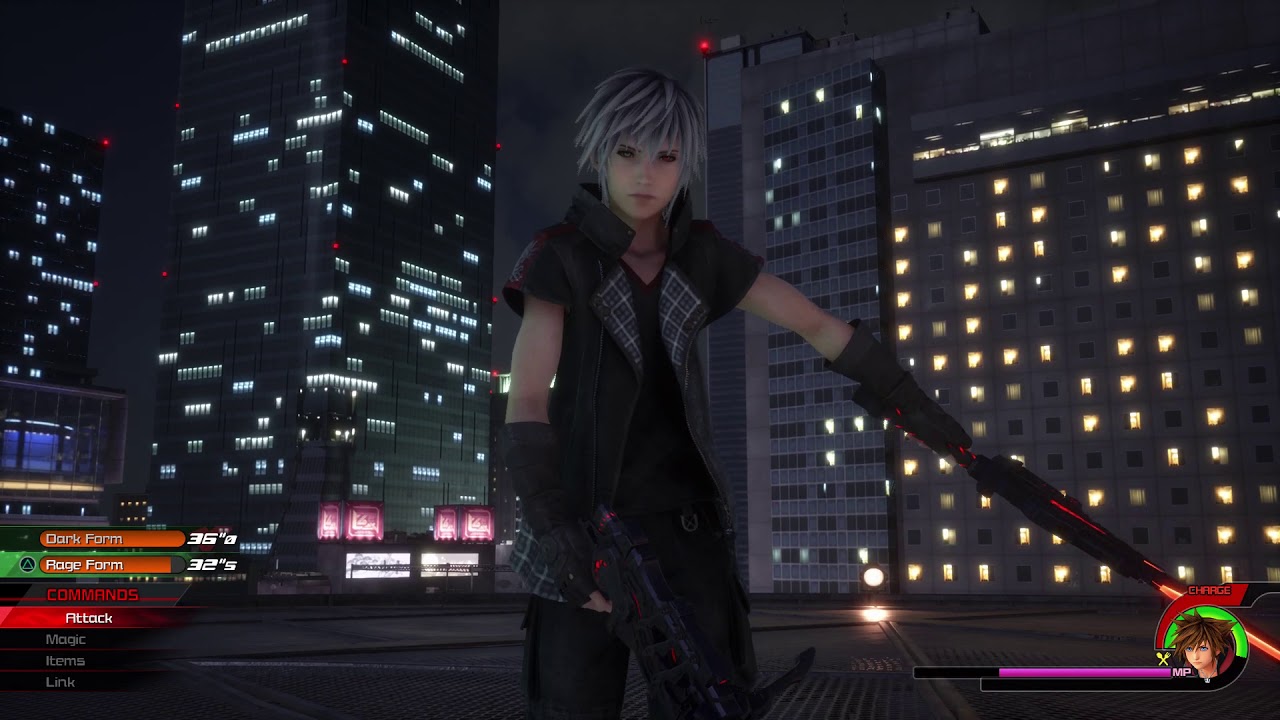
Please Subscribe to help my channel grow
That’s the body animation with the facial animation which is the result I want. Not for when I’m talking
Already got visemes taken care of for my avatar. This facial animation is going to be something completely different.
Pretty much just for show for when I trigger that animation toggle.
@violet moss So as you can see here, it’s possible for the face animation to work because this is what it would look like with the chin bone bounded on the avatar which is part of the whole animation.

(I hope this makes a bit more sense😅)
Without that chin bone bounded, his mouth would close and his face would just be blank haha
tardy sedge
So I made animations, followed tutorials to add it to gestures, yet it either does nothing or does half of what it shows in unity preview
 upper bone
how does one go about an animation where i want to lets say, hold a lolipop in my hand by doing a gesture. do i just add that to the gesture animation?
 silver tendon
is there a converter somewhere that adds the basic animations for you? Not sure if I ask here but I cant find a video on how to make an avatar ready for vrchat basic animation wise
 main moth
For some reason, after I import animation from blender, there are some rotation problem
muted prairie
what import settings do you have ?
main moth
Foot is what I have issue rn

I'm tring to figure out how can I record gif
I tried mess with every setting in the import setting


 muted prairie
Open "Import messages" in the first window
main moth
I tried turn on translation DOF. didn't help
 muted prairie
wtf is that clip name lol
Did you bake the animation in blender before exporting ?
main moth
Yes I did
Most animation works fine
But a few is having issues
I'm pretty sure unity tried to convert rotation system
muted prairie
What were your bake settings ?
main moth

 main moth
Oh I have apply transform on
muted prairie
once you've baked the action correctly, you can move sampling rate and simplify all the way down on export
main moth
Where can I bake action?
muted prairie
typing bake action in search
main moth
k thx
I think I might know why it's having this issues now
The original animation is 30 fps but exported fbx retargeted it for 25

 main moth
Yes but it doesn't actually fix it. it interpolate 25 to 30 for me I think
I just manually scale the animation
muted prairie
Should probably reimport with the correct frame rate then, otherwise it's asking for artifacts
main moth
Yea
Well, time to re process all animation
This is what I got from import

Change it to 30 doesn't realign the keys
 muted prairie
Where is the animation from ?
If it's mixamo it should be 30, and can be imported in Unity directly
muted prairie
Welp, might get away with it by setting the framerate back at 25 in unity as well ?
main moth
I will just process them in blender. I had to do them anyways
For some reason unity is still getting 14 frames
Is the correct export setting?
 main moth
I'm so confused lol. Something is majorly wrong
My code reading the raw animation told me there are 16 frames
I got 15 in blender
And unity got 14
👍
muted prairie
might be due to the simplify and sampling rate defaults
 main moth
I fixed the framerate issue but the problem remains
I tried to bake action but it seems just removes my animation completely
Actually I think I got it to bake
But unity still has weird rotation issues
chrome marten
Does anyone offer a controller cleanup and modernization comissions?
I have a jungle
main moth
oof
muted prairie
main moth
But unity still has weird rotation issues
Is it very visible in the curve view ? As in if it's something you can manually fix or if there would be too much to do

 muted prairie
If it's a few keyframes, might be faster manually fixing tbh

 muted prairie
what do the Q and T for the foot mean ?
main moth
muted prairie
what do the Q and T for the foot mean ?
Quaternion and Translation I think
I tried to set up constraints in blender, no luck
I think just delete twist works but I need to compare the animation
muted prairie
If it has its own quaternion that might be problematic since it's supposed to be converted to euler ?
main moth
How unity animation works is beyond me now. I’m gonna give up for now and work on other parts
 celest plover
Hey question What Animation Formats can VRChat use? (SMD, FBX or another i don't know)
muted prairie
whatever can be imported by unity
clear yew
Does anyone know like a specific site or seller for already animated guns? (I'm looking for guns that already have a shooting animation but I have no clue where to even look for them)
raw dune
Is there a way for bone rotation to drive a parameter?
I've looked, seems unlikely, but I'm double checking
raw dune
clear yew
Does anyone know like a specific site or seller for already animated guns? (I'm ...
I'm actually just about to clean up my Hegao P10R as a standalone with animations.
 charred inlet
 clear yew
is there away to fix this i have an emote for my model that makes the main model dance and then makes other models also apear doing the same dance but the other models are always frozen locally and im not sure how to fix it
pseudo crystal
If the animation is affecting humanoid bones, they have to have their muscles affected and not affecting bones in the humanoid rig
 summer spruce
I really want to join the animation squad lol. I think we need more animators in the VRChat community.
Yall's animations look amazing. 👍
 lone venture
I started talking about this in #shaders but I think it fits here better. Shift + F8 animation shows up fine on Unity and VRC Quest, but not VRC PC


It's not the FX file since debug says it's working

Never mind there was a blend shape oversight
muted prairie
I'd recommend Lyuma's AV3 emulator to test things more easily in editor 
clear yew
does anyone know how to fix this only my middle avi starts dancing for me but for anyone else they can see everything moving and then i can only see the front side avis moving when i move my veiw in game either up or down just right

everything else seems to stay frozen locally unless like i said if i move my head up or down just right then the front two on the side will move
muted prairie
@hollow fjord This channel is meant for character animation, not 2D  You can ask for feedback in #shameless-self-promotion
 hollow fjord
Well I wouldn't exactly put it that way. But Ok.
violet moss
main moth
How unity animation works is beyond me now. I’m gonna give up for now and work o...
Unity animations are pretty straightforward it’s only the humanoid muscles that are confusing
Humanoid is like one level abstracted from it all
summer spruce
How do I create an animation? No good tutorials online-

Do I really got to go in and change EVERY NUMBER, just to make an animation?
Or is there a way to basically click and move body parts, then put it on the time frame.
muted prairie
You enable recording and then move things around on the bones directly
tardy sedge
anyone know how to use shaders to make an object appear/disappear as a flat plane passes through it?
tardy sedge
im blind xD
clear yew
How can I but animation on my avatar?.
flat wolf
Anyone know how the ghostly mamagen animations work? im having a hard time trying to change the idle crouch and prone
flat wolf
or rather any animation work related to the 3 aside from the model
tardy sedge
Is it possible to make an object play animation on awake?
muted prairie
what kind of on awake are you referring to
tardy sedge
like my avatar hides itself in an animation, then unhides another rigged humanoid to dance
muted prairie
Well if you toggle a gameobject with an animator then it'll play its animation
tardy sedge
I've tried pasting the keyframes from the pre-made animation into my avatar's animation, but it moves the musculature of the main avatar, not the 2nd one
it has an animator and animation, but in the main animation, it is frozen on the first frame
is there a setting in the controller for that
oh nevermind it works fine, the preview doesn't allow for full-body animation previews
tardy sedge
is there a way to make the blendshape lipsync to audio source?
muted prairie
You would have to set that up in unity yourself afaik
tardy sedge
ah, so either manually via animator+blenshapes or via a self-made script that would export keyframes in an anim file. Oof. I will scour for pre-made scripts. Thanks for your help!
clear yew
Is it possible to animate dynamic bone?
 sour gust
dynamic bone is a script. You can animate bones, cheanging materials , particle system, rotation, scale, position, toogle some objects and manny more.
sour gust
Another question i am trying to fit already existing particle system in my avatar, but the particle (2D shield) is too big for him. Is there an option to resize or make the rendered shield smaller?????
plis ping me
lament light
sour gust
Another question i am trying to fit already existing particle system in my avata...
particle system has a "Start Size"
raw dune
Do we have a good guide on importing animations from blender to unity humanoid?
muted prairie


You'll have to remove all scale channels from unity manually though
and this in unity

Then you can duplicate the anim out of the model
 sick loom
I am having animation problems as well
I made some idle animations for my tail and I am trying to export them to unity
I export them on the same model that I intend to use in game
In this window the animation plays fine and looks correct

but If I actually look at the keyframes of the animation none of the bone transforms are there
and if I put the animation on a model in my scene it doesnt animate the tail like it should
 mellow lava
Without like, really reading over what you posted because I'm tired and lazy. Why not just do the animation in Unity? A tail wag animation is exceedingly easy to do. Just create a new animation, enter record mode, and move the tail left then right and set the animation to loop.
muted prairie
sick loom
In this window the animation plays fine and looks correct
Make sure to disable the compression and keyframe resampling
sick loom
@muted prairie where is keyframe resampling located?
muted prairie
Should be above, unsure why it isn't for you
 sick loom
@muted prairieTurns out it was because the animation was on the same FBX that I was using for my avatar
I think the fact that its rig was set to humanoid ignored those bones in the animation because they werent part of the humanoid configuration
once I set it to generic it works
muted prairie
That makes sense
sick loom
kinda upsets me that I have to import the same fbx twice just to use an animation with it
thank you ❤️
yea seems to be working well now

 cursive spear
Damn, I have a super similar question... I can't get my 3.0 tail wag animation to work. The animation plays fine in the animator; but not when I try to "run" my avi. Trying everything, I'm probably making a simple mistake, but I'm not sure where I've gone wrong.
I posted my question in Avatar Rigging...
 cosmic timber
yo been having a problem with my animations on my model that i havent been able to figure out for like 2 days straight, most of the animation plays correctly in vrchat but the limbs wont pose correctly. Kinda fairly new on this stuff
clear yew
Alright question - is there some sort of rule I should follow when using animations from online on my personal model?
I don't want to break my model with animations that are incompatible, so would I just have to rework them or should they work out of the box?
tardy sedge
clear yew
Alright question - is there some sort of rule I should follow when using animati...
inside unity, if you click on the .anim file in the assets, you can then click and drag your avatar over to preview the animation to see if it works with it.
If you are afraid of breaking your model, only use the animation on a duplicate of your model.
 agile coral
Does anyone w]know of a way to have an object with its own animation controller work on your avatars animation controller. I got an object with an idle-> active-> idle_2 animation loop. I would like to know if there's a way to toggle the animation loop on the other model from my own (Edit: I forgot to set the weight to one in the layers tab it works now)
 gloomy valve
does anyone have the free time to explain the process of making a custom animation for vrchat?like mixamo i dont think i can import them anymore
muted prairie
why can't you ?
 wanton haven
So blender question. If I want a specific animation frame to be where the model parts are even after the skeleton is removed, how would I do that? I have a door that is animated, but I don't need the animation and apparently skinned mesh renders do not like lighting, because I'm getting this after baking, even with generate UV on
 clear yew
i imported a .anim i made and unity just says its corrupted and i click it and i cant change the rig type or anything any ideas how to import a .anim correctly?
muted prairie
imported from ?
muted prairie
Did you bake the action into the fbx in blender before exporting ?
clear yew
not using an fbx trying to put an animation in to a chair in a weorld
so just the .anim file
 muted prairie
Can you screenshot that ?
 muted prairie
Ok that's a completely different system that has nothing with object animation
It's for image animation
To export an object animation from blender it needs to be exported with an object
clear yew
a .anim works in secondlife as a 3d animaiton why not unity?
and the vrc aniamtions that come in the sdk are .anim
just not understanding why mine wont work
muted prairie
Because they're entirely different programs ?
Select the object you're animating, export it, there's an animation export option in the bottom right corner
clear yew
the one in blender?
muted prairie
Yes
clear yew
ok thank you
 ember surge
Hi all, I created an avatar using Ready Play Me and imported the FBX directly into Unity. In the inspect window I switched it to humanoid. I then applied a Mixamo animation to it (Orc Idle), however, the animation looks like the avatar's foot are sliding/floating, is there a way to fix this? Thanks for your time!
 opal wadi
I have a prefab (exported form Houdini) that needs Houdini engine for unity to animate. Will the prefab work in VRChat ? 🤔
lone venture
Trying to animate with a sound clip, but I don't know how to turn on audio scrubbing in Unity 2019
 timid coral
Idk what chat to post this on I have one in avatar help but this also is a animation help so is it okay I ask a question here and maybe someone can help?
muted prairie
lone venture
Trying to animate with a sound clip, but I don't know how to turn on audio scrub...

An unplanned tutorial that someone in my twitch chat requested
Resources: https://github.com/keijiro/AudioPreviewTrack/
Twitch Channel: https://www.twitch.tv/rantisvr
muted prairie
timid coral
Idk what chat to post this on I have one in avatar help but this also is a anima...
yes
timid coral
So I have this avi that works as a generic rig but does not animate when I switch it to humanoid it tells my the hirarchy of my spine is missing an element and I need to rig my chest, the model was made exactly from a humanoid Avi just modified and it has everything to be humanoid like feet, chest, head, spine bones, but I can't figure out how to "map" the chest or to get the avitar to work in either humanoid or generic, hopefully maybe one of you can help me :<
lone venture
muted prairie
https://youtu.be/1yLgICxIEYw
I don't see a timeline tab tho
 muted prairie
Did you download the asset ??
timid coral
What do you mean asset 🤔
muted prairie
That's for the person above
timid coral
Oh
muted prairie
For your spine problem you just need to click the configure button in the rig tab
timid coral
Let me try
lone venture
muted prairie
Did you download the asset ??
What asset?
muted prairie
the one mentioned in the video and the video description ?
lone venture
Oh that one
timid coral
@muted prairie omg that's the page I was trying to get too thank you so much I'll let you know if it worked :)
muted prairie
lone venture
Oh that one
also you're not right clicking the correct button, animation tab isn't the cog
lone venture
muted prairie
also you're not right clicking the correct button, animation tab isn't the cog
How am I supposed to find a cog with no timeline?
muted prairie
I'm pretty sure that's what the triple dot button is
lone venture
muted prairie
I'm pretty sure that's what the triple dot button is
The picture was me clicking the three dots
timid coral
@muted prairie it worked thank you so much I was working on that for like 5 hours last night :) ❤️
lone venture
I'm still completely lost. I added the assets and nothing
muted prairie
lone venture
I'm still completely lost. I added the assets and nothing

It's in timeline, not animation window
lone venture
muted prairie
It's in timeline, not animation window
I still can't hear anything
 muted prairie
Maybe requires to be in play mode ?
lone venture
Wait I forgot to add the Klak Audio Preview
I managed to get scrubbing in the animation tab, but now I can't see my model

Wait nvm

 nocturne knot
Hi! Nice to see there's an official place where I can get some help. I'm having some problems to make my animations work
I have two animations that I want to run on entry state. Both show perfectly in Unity when I preview them, but not on VRChat. Would anyone know why is this or where could I search for the solution? (I'm new into Unity)
 pastel gazelle
How would i be able to set the swords child to the chest only while GestureRightFist is false

And then back to the wrist when GestureRightFist is true ofc
 hot mica
 inland cypress
nocturne knot
I have two animations that I want to run on entry state. Both show perfectly in ...
inland cypress
nocturne knot
I have two animations that I want to run on entry state. Both show perfectly in ...
instead of placing your animation controller directly on the animator in the inspector, place the controller in the FX layer in the avatar descriptor
nocturne knot
inland cypress
instead of placing your animation controller directly on the animator in the ins...
Oh yeah! It was exactly that!

@sour gust helped me with that! I'm gonna share the solution on the vrchat forum post
Thank you! ^^
sour gust
The simpliest way to do IT . Record 2 animatorom on 1 sword on back on the second sword in the hand and make the transition. @pastel gazelle
clear yew
i think i asked for help in wrong place oop but the shader only works in mirrow anyone know a fix

 wintry wasp
 hybrid storm
new to this, how do i change my hand gestures, i want to put my own prefab
 flint bison
What do I have to do to get my feet from trying to plant themselves on the ground?
raw dune
hybrid storm
new to this, how do i change my hand gestures, i want to put my own prefab
You generally need a plugin called muscle animator. There's a workaround, but I have had very little luck with it.
raw dune
wintry wasp
I'm digging it.
wintry wasp
raw dune
I'm digging it.
Wym?
 deep lake
Tell the people please. I just can't figure out what parameters to set in the Unity animator to make Avatar 3.0. he opened his mouth on dance cards. Give a guide please.
 hybrid wagon
im having trouble with unity 2019 just not loading my avatar animations? its stuck in t-pose in the inspector and when i look at the animation tab its just a constant with random floats but no curves :\ worked when i was in 2018
 rich wharf
muted prairie
rich wharf
muted prairie
Looks great ! Could be a bit more fluid around the pose transitions but other than that it's super nice
muted prairie
Nice, but do you animate your IK control bones ? The ones for the elbows might be relevant for things like that
rich wharf
I do but I need to go in and animate them more.
muted prairie
It's looking super good already !
Also i'd suggest you look into adding some noise modifiers to your curves, it helps a lot making it all look more lifelike !
nocturne knot
sour gust
The simpliest way to do IT . Record 2 animatorom on 1 sword on back on the secon...
I did that! But I still having some troubles to make the toggles work
Luckily I found this pretty usefull tool for unity that makes toggles automatically for VRChat
sour gust
y know y can dm me any time XD
nocturne knot
I did the toggle with that and now it works. Now I'm making reverse engineering to notice what I did wrong
I highly recomend it. It is also easier and quicker
nocturne knot
sour gust
y know y can dm me any time XD
I know Soul. Thak you🤗
 dusty sorrel
How do i setup animations for my sdk3 avatar?
im trying to toggle a game object on and off
dusty sorrel
Nevermind
noble shell
@nocturne knot That script doesnt unselect 'can transition to self' so you it hammers the toggle constantly, really recommend turning that off

any state bit pointless with off/on (easier)
 clear yew
What uses is can transition to self useful for? I can't think of any of the top of my head
sullen lance
Self transitions.
literally
Having can transition to self disabled on a transition that connects to same state will act like muted.
clear yew
No I just read that and I understand that it does that, I'm asking for a use case practical example.
Because I can't think of any practical examples so I have a less than ideal understanding of the concept.
Like, to rapidly fire a gun? I guess?
 lilac carbon
So I'm trying to have a submenu with sounds that play when I select them. One of which plays automatically when I load the avatar and doesn't play again even when selected. The other sound plays just fine when selected. I'm very confused and stuck because they both seem to have the exact same settings


I had the parameter as a bool before, but trigger seems to be the same here
when I start witht he audio source disabled in the hierarchy, it doesn't play when selected
the other sound does, however
Both audio sources are parented to the pelvis, and they both have the name audio source, within their differently named objects
when referred to in their animations the hierarchy seems to refer to the same thing Pelvis/Audio Source
would that be an issue?
 high spade
so your pelvis has 2 "audio source" children, and each of them has an audio source component? just name them differently. the game needs to know what it's supposed to modify. it won't read your mind.
lilac carbon

can you rename components?
Regardless, I moved the other audio source off the pelvis and I get the same issue.
This audio source or audio clip is not playing with what seem to be the exact same settings as an audio source that works
it plays in unity, so the clip itself seems fine
high spade
lilac carbon
when referred to in their animations the hierarchy seems to refer to the same th...
how is it "Pelvis/Audio Source", if the game object is called Binaural Knock?
lilac carbon
it's the same for the audio clip that does play
do your animations have the game object name in the hierarchy?
high spade
yes
tbh i only recently added my first song/actual animation to one of my avatars, and i did it as the song/animation creator prepared, that i enable/disable the entire gameobject that has an audio source component, and not enable/disable the component itself, but that should give the same effect afaik
lilac carbon
maybe that will differentiate it here
high spade
but in my animations the path says, for example, Music/BrainPowerIntro and the animated property is called BrainPowerIntro : Game Object.Is Active
if i decide to enable/disable the component the path is the same, but the property is called BrainPowerIntro : Audio Source.Enabled then
i have no idea how did you end up with Pelvis/Audio Source, unless some child of the pelvis is called so. or was called so, but then it should tell you that there's no such object anymore
lilac carbon
fuck, I see what happened now, I made the animation when I only had one audio source and must have renamed it when I made the second and didn't fix the animation path. And when I went to check the name of the other animation path I must have still been on the same animation. I just needed to rename the path to match the game object
thinking it was pointing to the component, since that was disabled and the game object was enabled.
thanks for your help
lilac carbon
I'm trying to animate my finger pulling the trigger, but the finger positions are already animated into a grip position when I toggle my gun on. Adding a finger animation to my gun animation didn't do anything as I guess the animations aren't additive like that. How can I do this?
violet moss
Is there a unity way to make a 'one size fits all' sit-on-floor animation? Different heights make it float or sink, is there a proper way to define offset from the floor in an animation?
dusty sorrel
Uh i am setting up an idle animation for my avatar, but the legs arent working like they should
This is ingame


this is what it should be
The arms follow the animation, its just the legs that are the issue.
I cant seem to figure it out, so any help would be appreciated
sullen lance
dusty sorrel
Uh i am setting up an idle animation for my avatar, but the legs arent working l...
You would need to disable Use Auto-Footsteps for 3 and 4 point tracking option in VRC Avatar Descriptor, read this section: https://docs.vrchat.com/docs/avatars-30#use-auto-footstep
VRChat
What is Avatars 3.0? Avatars 3.0 is a huge collection of features for avatars in VRChat. You can think of it as a new version of our avatar feature framework. Previously, you've been using Avatars 2.0 (in SDK2). Avatars 3.0 will be usable with VRCSDK3. Both can exist side-by-side in VRChat at the sa...
dusty sorrel
sullen lance
You would need to disable `Use Auto-Footsteps for 3 and 4 point tracking` option...
thanks a lot!! it worked perfectly
 zenith belfry
 zenith lynx
So I’m not the only one with a random ping
 languid wyvern
zenith lynx
So I’m not the only one with a random ping
languid wyvern
zenith lynx
So I’m not the only one with a random ping
It was a bunch of spam bots.
 proper flare
Hey so I've been making my own model for vrchat and I'm just adding my own custom animations, but I have run into a bit of a problem. I wanna add a tail wag animation to my model but when I try to rotate the tail to where I want in the animation timeline it keeps snapping back to its default pose, not letting me move it. I'd really appreciate some help TvT
noble shell
Got dynamic bone on it? remove that then try again
proper flare
Ah, that seems to have been the problem. Thanks!
pseudo crystal
I'm trying to make single keyframe animations blend from 1 source in an animator to another based on the gesture weight, but the gestures immediately go full weight and idk how vrc default does it considering I think I have the exact same settings in terms of animations and transitions as I changed anims from the handslayer
nocturne knot
noble shell
any state bit pointless with off/on (easier)
Oh yeah! I made it that way the first time but the toggle wasn't working for some reason. Now I fixed it I don't know how and I made it again like you got there and it works perfectlyyyy! Thank you! ^v^
night crown
any video tutorial how to use two/four axis puppet
 analog falcon
I've been searching for a way for my avatar yo create a clone of itself that imitates my movements does anyone know the name
 woven nest
i think this is right?
 dusty sorrel
Is there anyway to automate particle animations that can be synced to music?
sullen lance
analog falcon
I've been searching for a way for my avatar yo create a clone of itself that imi...

VRChatのためのDextroのクローンシステム デキストロによる Dextroのクローンシステムは、Vrchatアバターのインタラクティブで制御可能なクローンを自動 的に生成するように設計されたUnity資産です。 特徴: アバターの動きを任意の場所、向き、またはサイズで完全にコピーします 短い一定期間にわたるあなたの動きを記録し、プレーバック 再生の動きを一時停止するか、スローモーション、早送り、または逆に表示します アバターのジェスチャーや顔をコピーして、よりリアルに見えるようにします クローンのアニメーション状態をロックするためのトグルを使用して、アバターのすべてのFX
Gumroad
Dextro's Clone System is a Unity asset designed to automatically generate an interactive, controllable clone of your VRChat avatar.Features:Fully copy your avatar's movements in any location, orientation, or sizeRecord and playback your movements over a short period of timePause playback movements or view them in slow motion, fast forward, or re...
analog falcon
sullen lance
https://dextro.booth.pm/items/3210176
https://dextrovr.gumroad.com/l/DexClone
Thank uiu so much :D
lament light
dusty sorrel
Is there anyway to automate particle animations that can be synced to music?
keyframe by hand to get best results 🙂
but if not you could use this
https://youtu.be/jVhI5N9TomA
no realtime audio reactivity though, it just spits out a animation clip
lilac carbon
Why do people always say not to animate on your main avatar but to make a copy for animating on?
noble shell
You can end up 'stuck' in bicycle pose, (just reset or exit preview to go back really) , im still doing a duplicate if im moving anything that has dynamic bones its on a model thats stripped of it
sour gust
Teoretical question. Three is a way in unity to play first detect od Avatar is standing or crouching and then Play na animatorom depending of the first state? For context i wanna create some afk animation but i dont like when Avatar is swichingn to it without some smooth some transition and IT woud be different od IT IS standing , crouching or laying down. Plis dm or ping me if you know the anwser.
 fringe pulsar
Alright so im no mastermind in unity animating so i need a bit of assistance for a somewhat simple thing. How would i make my avatar descend from the sky while spinning in an animation? I have zero clue on how to do it and nothing i find online is helping so
clear yew
okay i have an issue... everytime my character 'resets itself' with every jump, movement and everything else, i am stuck with this issue for a long asf time, if anyone is willing to take a look at it with me i'd REALLY appriciate it!
this is the issue in question, so bloody annoying
sullen lance
If you mean feet moving around without your input, then you could just disable this option in Avatar Descriptor: https://docs.vrchat.com/docs/avatars-30#use-auto-footstep
VRChat
What is Avatars 3.0? Avatars 3.0 is a huge collection of features for avatars in VRChat. You can think of it as a new version of our avatar feature framework. Previously, you've been using Avatars 2.0 (in SDK2). Avatars 3.0 will be usable with VRCSDK3. Both can exist side-by-side in VRChat at the sa...
clear yew
sullen lance
If you mean feet moving around without your input, then you could just disable t...
Thank you so much! Unbelievable 1 bloody option was the issue for at least a year
 rain remnant
what should i use to make my own animations from scratch blander or is there some way to use another 3d software where i can use that and import it into unity
 split flower
You can make your own animations in unity if you want @rain remnant
Blender animations are really only useful for overly complicated animations or instances where you want to use Inverse Kinematics
or to do stuff like this

Here's my Oc riding a hoverbike for a little film
 split flower
Ok , well you can create animations in Unity, this one might take you a while though. Good luck
You will need to learn to animate and then all of the work of making the correct custom layers to put the emote on, If you haven't done this before this will be a large learning curve for you.
rain remnant
time to learn then lol
violet moss
clear yew
this is the issue in question, so bloody annoying
Your knee joints are rotated badly on the FBX
clear yew
violet moss
Your knee joints are rotated badly on the FBX
No, its the option they mentioned, its auto calibrating each time
violet moss
That’s just a workaround, and it has side effects
I can fix the problem at the source and not lose your footsteps
clear yew
violet moss
I can fix the problem at the source and not lose your footsteps
Ah thank you! Would you like to dm or?
 olive remnant
How do I re edit a animation in unity? It wouldn't allow me to add new property
lavish scaffold
olive remnant
How do I re edit a animation in unity? It wouldn't allow me to add new property
You need to add it to a gameobject (on its animator) So unity knows what properties can be added based on the gameobject the animator is on and its child objects.
olive remnant
lavish scaffold
You need to add it to a gameobject (on its animator) So unity knows what propert...
Thanks for the help, I try to test it on a avatar, should I add the animator to the avatar itself? Can I edit it inside vrchat animation layer?
lavish scaffold
Yes you can add the controller to the avatar. I would recommend doing it on a clone (duplicate avatar). And what do you mean by "vrchat animation layer"?
 abstract wing
so the avatar i'm making has a facerig with eyebones that deform the face appropriate to a realistic-ish eye movement, if i import that will those deformations still happen with the moving eye bones?
violet moss
abstract wing
so the avatar i'm making has a facerig with eyebones that deform the face approp...
Humanoid-bound bones can’t actually have their transforms manipulated directly anymore; but you can get around this by making the eye geometry a child bone of the bone that gets humanoid bound, so you can mess with the transforms under it
Disregard the above if it’s entirely driven by weight painting, it will just work automatically with no changes on your part
 placid tide
ok so i created a weapon in blender and animated it there, then i exported it to unity where the animation worked fine until i made the weapon a child of my avatar. i dont know how or if its fixable, i literally have no clue why this is happening so if anyone could help me with that

 dull bough
anyone know how i can run a custom animation from the avatar3 expressions menu
night crown
i couldnt find a good laying animation that isnt broken
can anyone send me a good one to use?
 kindred prairie
I'm currently messing around with setting dissolve alpha toggles. I was wondering if there was anyway I can keep it secluded to just 1 material within the mesh and not all materials on the mesh?
kindred prairie
locking said material/shader doesnt exlude it from getting keyframed with all the other ones aswell
slim barn
Is there a way to toggle the animator on a spawn object from my FXlayer so I can have an "Entrance" animation, switch to the animator on the spawn object for its cycle animation, then when toggle is off, interrupt the object animation so I can have an "Exit" animation?
I'm trying to spawn a world object with constraints while having its own animations and allowing for people to sit.
 pliant viper
kindred prairie
I'm currently messing around with setting dissolve alpha toggles. I was wonderin...
pliant viper
kindred prairie
I'm currently messing around with setting dissolve alpha toggles. I was wonderin...
I ran into this problem too and from what I understand there's no way to index a renderer's material array through the editor UI - you have to do it through code, and unfortunately VRC doesn't allow custom scripts. I had to just separate the mesh so that it could have it's own independent material to reference.
But if anyone has figured out a way around that, I'd love to know as well.
kindred prairie
pliant viper
But if anyone *has* figured out a way around that, I'd love to know as well.
i figured it out
violet moss
Is there any way to have a sync layer between the base playable layer and gesture playable layer?
Or any way to duplicate the effect of having one?
analog falcon
an Issue I am having right now it with a material change animation I have changed the face material numerous times it continues to go back the original face texture does anyone know where i messed up.


here are pics for reference
violet moss
Is there an easy way to rotate an entire generic animation ( That uses positions and rotation) 90° around the world origin?
I have an animation that is perfectly set up except that it’s all sideways
And I don’t want to have to change all the positions and rotation keyframes for every GameObject one by one
Without adding a parent bone because that would break every other animation
muted prairie
rotate the root ?
violet moss
muted prairie
rotate the root ?
The animations only animate the root, is the issue. It’s a bunch of position and rotation key frames but it’s 90 degrees on Y off.
Adding and rotating a parent bone means I have the problem for the other animations that animate it
And it’s not just the rotations, the positions would also need to be swung around on the Y axis. Oof
muted prairie
Parent that to another object that is rotated 90 degree by default ?
 proper knoll
I don't think you would have to adjust the positions or rotations of any bone below the root since it's all local space anyways
I'm a newbie to avatar creation for VRChat, but it looked interesting, so I wanted to have a look into it.
I came across the "Playable Layers" in the descriptor script and I wanted to ask, if anyone here knows which animation controllers the defaults for each layer are. There are also two controllers for sitting animations so which one is used in the "Special" section? I wanted to have a look at them to get an idea of which animations are in each layer. (I have read the documentation about it)

There are also two hand layers I just noticed
 unreal gorge
Anyone know why my expressions are resetting back to default and layering on top of each other? I.e if I have 2 animations one where an eyebrow raises (anim1) and another where pupils get small (anim2) if I change state from anim1 to anim2 my avatar will have both a raised eyebrow and a small pupil? Do I have to reset all modifications that I'll make on every blendshape/transform on every animation or is there another way?
noble shell
You copied the gesture controller and used it on fx?, that comes with write default off, you must reset whatever you change or they will stack ( or just enable write default )
unreal gorge
noble shell
You copied the gesture controller and used it on fx?, that comes with write defa...
Not sure I understand you correctly. There's a difference between the gesture controller and the fx controller apart from what they're used for and the avatar mask?
Think I understand now. Ty 🙂

The tutorial I'm watching shows the WriteDefaults turned on in the vrc_AvatarV3HandController. Just got spun around when they could use their old animations but I couldn't.
 coarse dagger
Why does my avatar not animate to its original position? I have keyframes for the hip that reset its location and rotation in this standing pose in the state I blend to.

 dull ridge
I am new too animation so I have a video file for the animation for the model but is there a way too add the video file into animation?
dull ridge
Does it apply the animation into the model or no?

 muted copper
 muted prairie
Bake Action
 knotty dirge
https://gyazo.com/ebb05ae61603c012cc34e47c64357bc4
I'm trying to create an animation toggle where mesh renders make the body invisible except for the head and then replaces the body with a world constraint that has an idle animation. Only problem is that nothing is working. Not the mesh renders, the constraint, nothing. Any ideas on what might be wrong?

 obtuse oar
Hey there, I was wondering something. When you're animating an avatar, and you have a property defined in the FX AnimatorController, it just pulls the property from its controller, the avatar; can you do the same thing with the Locomotion AnimatorController?
knotty dirge
https://youtu.be/lhTCOXvlSW4
I followed this tutorial, but the constraints are acting as though they’re not there…
The only deviation from the tutorial I can thing of is toggling the lock option, but that should lock the object in place right?

VRLabs: https://vrlabs.dev/item/world-constraint
Patreon: https://www.patreon.com/nullmoon
Feel free to message me on the official VRChat Discord! M.O.O.N#8008
Music used: "THX Thing", "Dr Peacock ft. angernoizer - Trip to Colombia"
chrome marten
What do you guys do when a parameter isnt showing up as an option in the menu
night crown
any help?
 unreal gorge
Anyone got any idea why my animations cause my model to crumple up into a ball? I changed the fbx file of the model to an updated version and now it does this.

Fixed it. It had the wrong "avatar" in the animator.
unreal gorge
night crown
any help?
Did you set up you model as Humanoid? I think you'll only get that issue you have your fbx file set up as generic.
 night crown
unreal gorge
Did you set up you model as Humanoid? I think you'll only get that issue you ha...
night crown
unreal gorge
Did you set up you model as Humanoid? I think you'll only get that issue you ha...
I did
unreal gorge
Did you create the idle animation before changing it to humanoid?
night crown
It doesnt record the movement of the bones for some reason
unreal gorge
Do you have your avatar masks set up correctly?
dull ridge

Wondering about the animation video file and is there something I need too put in order too process the animation?

 sullen hull
Does anyone know how to make an NPC follow you in VR chat?
just like follow player? no animation to their walking motion or anything
 lofty crest
Honestly looking for someome that knows alot about bools and stuff, i have some animations from the avatar cloning software that clones your avi and makes it 2. Need to change some of the animations to get my desired result, ive tried so much on this stuff but i cant get a grasp of simple parameter drivers and stuff so im looking for someome to walk me through it/ i can pay to change the animations
sullen hull
Just to clarify, you believe it has something to do with bools?
I just want even an object to follow my avatar when I get into a close enough range to the object
I cant figure it out lol
 lean wadi
how would i go about adding a sound being played to an animation?
noble shell
Use the same parameter you are using to trigger the animation in FX to enable the sound
radiant ore
Guys, hello everyone, I made a 3D motion style fan video for Quest 2 glasses here, please rate it!
- not advertising. I'm really interested to hear the opinion🙋♂️
https://www.instagram.com/ne.motion/tv/CXlwCpalzzk/?utm_medium=copy_link
 light coral
Looks awesome, but doesn't really belong here.. ^^'
 deep pelican
Hi, trying to get a path working for vrc. Does someone know how to make a bezier path to an animation? It works fine in unity but its not vrchat compatible, so I need to make an animation out of it.. but how?
https://assetstore.unity.com/packages/tools/utilities/b-zier-path-creator-136082
Using this^

Use the Bézier Path Creator from Sebastian Lague on your next project. Find this utility tool & more on the Unity Asset Store.
 vague bronze
if the tool doesn’t have an option for baking the movement into an animation automatically, i suppose you could look at the coordinates of the path-driven object and use those to manually make keyframes on a second, animation-driven object every 2 frames or so? less than ideal of course lol
im not super experienced so that likely all sounds stupid
muted prairie
deep pelican
Hi, trying to get a path working for vrc. Does someone know how to make a bezier...
You can use Unity runtime recorder for it https://github.com/newyellow/Unity-Runtime-Animation-Recorder
GitHub
Record animations in Unity runtime. Can save to .anim, maya, or FBX ASCII format. - GitHub - newyellow/Unity-Runtime-Animation-Recorder: Record animations in Unity runtime. Can save to .anim, maya,...
vague bronze
ahh there we go hahahah
deep pelican
Thanks, i appreciate it
 violet abyss
for context im trying to make the ears go down for when i make a fist in game
pliant viper
It looks like you're trying to animate the transform of the mesh object itself, not its corresponding child bones in the armature. When you go to Add Property, expand the armature until you find the ear bones (likely children of the head). If you do want to animate the mesh itself for some reason, you'll need to use a blendshape.
 smoky brook
im trying to get my animation to work on my avatar in game
ive tried vidoes and everything i cant seem to get it to work
 strange shard
@restive nymph
 restive nymph
Does anyone know how to make an emote loop ive made my emote toggles before but they just get stuck on the last frame until I untoggled it
chrome marten
Hello, I need to know where to put objects I want to spawn from avatar that don't move (e.g. Couch or rock, sound)
Hips is where I do it now and I hate it
where can I parent the constraint
 graceful canyon
chrome marten
Hello, I need to know where to put objects I want to spawn from avatar that don'...
graceful canyon
chrome marten
Hello, I need to know where to put objects I want to spawn from avatar that don'...
You need to put onto the model in the hierarchy, not under any armature bones in the hierarchy. Then you put a fixed joint on the object you want to be stationary.
noble shell
vrlabs - world constraint , just move ResetTarget to root of avatar, disable the World Constraint / Container > parent constraint < component with a toggle, object stay in world,, fixed joint is a old thing

A world fixed object, held in place with a constraint. Constraintを使ってオブジェクトをワールド固定。
dawn verge
Anyone know why my animations are playing faster on my avatar than they are in the animation itself?
pliant viper
You're sure you didn't accidentally adjust the Speed field or enable the parameter-based Multiplier in the associated layer states?
The only other thing I can think of is that you may be viewing the animations with an altered Samples rate.
 turbid crag
guys i made an animation which has a toggle part
but when i got into the game
use the animation thing
i cant see it
the body does move
but i cant see any parts
the part is extremely huge
Image
the part
when i test anim it works but when i go into vr chat i cant see it

 dreamy skiff
It won't work.
Only the part where the descriptor is located, and all nested objects are filled in.
The structure of an avatar cannot be arbitrary
chilly kernel
so uh heres a question. i want to make bow for vrc but i have no idea how would i go about the animations? i want the arrow to release particle system when i release my grip but i dont know how to make animations that do stuff on release
hardy bolt
Can someone link me to a good tutorial about how to import an animation made in blender into unity?
 mint sun
@hardy bolt you can save model with animation in it and already have it in assets i think this vid shows it https://www.youtube.com/watch?v=ysl0qYq5p9w&ab_channel=RoyalSkies

In the next 60 seconds, you'll learn everything you need to know about exporting FBX animations to Unity 3D with Blender 2.8!
If you enjoyed this video, please don't forget to like and subscribe for more content!
You can find my entire Blender 2.8 Speed Tutorial series playlist here:
https://www.youtube.com/watch?v=f6vgICNCVxQ&list=PLZpDYt0cyi...
violet moss
What's the best way to get a animation that contains both humanoid and non-humanoid transforms (so they need to be split on base and gesture/fx layers) to perfectly sync up? I'm having cycle offset issues.
 fierce bane
any transform animations should be in gesture, not just humanoid ones
From docs:
FX: Same as Gestures, but for everything that isn't a Transform position, rotation, or scale animation.```you'll see them fine, but they won't sync to others if they're in fx instead of gesture
violet moss
Sorry for confusion, my animation needs to animate humanoid musciles + a non-humanoid transform in tandem, prefectly syched. it's a skateboard root animation + humanoid skating anim.
it looks fine and synced in unity, but in-game the skateboard cycle gets offset randomly
since i had to split it into two different layers
fierce bane
Ah I understand now, it still doesn't go into FX though if it's a transform (position/rotation/scale) as it won't sync over net.
violet moss
yeah, my setup is Base (for the humanoid muscles) and Gesture (for the skateboard, ears, and tail)
not using fx at all
fierce bane
so is this for normal motion or just enabling it temporarily?
violet moss
it's my walking/running animation
fierce bane
I'm...fairly certain you can animate it fully in base then (as long as it's a transform)
violet moss
so non-humanoid tranasforms are allowed in base? if so i can just fuse the two animations
docs said it's for humanoid only?
fierce bane
as long as it is a transform it should be fine in there
violet moss
ho boy if this works you just delievered me from hours of pain
fierce bane
I'm not sure where you saw that, I double checked to make sure I didn't skip over it in either of them there
Animations in Base should only affect transforms, and all layers should be using Avatar Masks to ensure you're only affecting the appropriate transforms.```additive is specifically for humanoid, but I'm fairly certain base has no such restriction
violet moss
I just looked it over, and you are right. Wow.
I was bashing my head over splitting animations up and syncing them for absolutely nothing
now i need to join like 20 animations xD
fierce bane
I was still questioning myself and checking it over again to make sure too, but was fairly certain
violet moss
Thank you very much
fierce bane
if you have masks set up you could technically just leave them as is with their own layers, though one combined would probably be more reliable
violet moss
yeah i could use a sync layer once they're on the same playable, hm.
fierce bane
and it keeps them separated with masked parts so you can have some overridden and not others
assuming this is mostly for desktop since it's moving the arms too?
that animation looks pretty smooth btw, it's nice
violet moss
fierce bane
assuming this is mostly for desktop since it's moving the arms too?
You are free to animate arms for desktop users - when a VR user plays it their arm and head IK overrides it. But it's useful as a backup
 versed karma
When animation is on its on animation controller https://streamable.com/622wxq
when i add it to my avis animation controller and toggle https://streamable.com/3ibw3m
you can see in the controller its going through all the steps yet no animation happens why is that?

 muted prairie
clear yew
muted prairie
clear yew
how do i make hand animations unity wont let me
 analog wyvern
clear yew
how do i make hand animations unity wont let me
analog wyvern
clear yew
how do i make hand animations unity wont let me
You can try using the muscle animator in the unity asset store but the cost money but may be worth it
 viscid kayak
I am able to swap materials using animations on every part on my avatar except the main body, is this a known thing?
It works perfectly fine within Unity, but in VRchat the body is the only material that doesnt swap
analog wyvern
viscid kayak
I am able to swap materials using animations on every part on my avatar except t...
Last time I tried that it made me make a material for each part that i wanted changed and i would then make the animation of just me putting those on the avatar
viscid kayak
I did exactly that yes
and it works...
except on 1 part
its super weird
it works in Unity but not in vrchat
analog wyvern
Try checking the base layer in your fx animator. If theres a animation playing by default then thats most likely why
analog wyvern
Can you possibly Screenshot

 analog wyvern
So whats not toggling on?
viscid kayak
This happens when I run the animation within within Unity

looks fine
exactly what I wanted
but in Vrchat
analog wyvern
Ya
viscid kayak

Things are not included
no other animations are on or overlapping
so confused...
analog wyvern
That make no sense lol ig remake the animation but try a different order and see if that changes anything
viscid kayak
Yea it really does not make sense...
The only thing I can think of is VRchat just not being able to handle 4 materials being swapped out at the same time?
but that would not explain the crazy stuff I have seen others do
I'll remake the animation
mint sun
Does other animation use the materials?
viscid kayak
I have in total two different animations that swap out materials yes
I have already tested if they maybe overlap
but thats not an issue
mint sun
ah ok
viscid kayak
Plus, the other animation only swaps out the head materials, it leaves everything else alone

So confusing lmao
it just doesn't want to touch the other things, only swaps out the materials on the gear
The other animation works just fine


 mint sun
so what is the difference in animation that fixed it