#world-development
39 messages · Page 113 of 1
 civic cloak
 green lagoon
cool
 royal vessel
changes spawns from 1 to as many as you want and make sure all the cubes or whatever you use are each different i guess and i think it does a random spawn in by itself
 median briar
I'm curious....
for performance, would an aim/position/rotation constraint be any different than doing an 'on update' udon script with the same behavior?
civic cloak
hey Im just testing my world in VR for the first time, but I couldnt move around - is that an issue with something in the world setup?
been able to move fine in non-vr testing
 sullen fiber
royal vessel
changes spawns from 1 to as many as you want and make sure all the cubes or what...
sullen fiber
royal vessel
changes spawns from 1 to as many as you want and make sure all the cubes or what...
So I would choose more then 1, then place multiple vrcworlds?
royal vessel
no there should be a thing under the vrcworld options on the right where it says Spawns 1 and if you add more it should make more lists to add more game objects
sullen fiber
royal vessel
no there should be a thing under the vrcworld options on the right where it says...
👍
civic cloak
Anybody have any input/experience building worlds with more of a low-poly style? Working on my first world and so far it does feel a bit 'lifeless' because the textures are all mostly flat colors + lighting - any tips appreciated!
green lagoon
have you put any clutter objects into add some liveliness as so far your screenshots I've seen was sci-fi metal hallways not knickknacks that imply people who live in the space
civic cloak
yeah slowly trying to fill it with props, etc just feels like its missing something cant put my finger on it

this is what im basing it off of

 bold ibex
the bed looks really hard and flat and uniform
civic cloak
yeah its from an asset pack i need to work on that
still figuring out textures - need to work on how to make it look cozy lol
bold ibex
subdivision surface that bby and it should curve up at the cost of ALOT of polygons
subdivision surface in blender as a modifer
green lagoon
or bevel modifier would work if you want to keep the relatively square-shaped but not look so sharp
 civic cloak
is it pretty unavoidable to do this outside of Unity? or can i do that with Probuilder
I subdivided with Probuilder - is this going to tank performance?
 green lagoon
it's not going to destroy performance but it doesn't look that much nicer like that
bold ibex
bevel would be the more performant choice by far creating geometry at the edges rather than everywhere
oh that doesnt have much geometry
green lagoon
and the subdivide modifier just seems to be adding Edge Loops not actually making it more smooth
and you might want to put in a reflection probe so that your metal surfaces look more properly reflective
civic cloak
newbie question, how do I hide the icons?
 bold ibex
civic cloak
newbie question, how do I hide the icons?
bold ibex
civic cloak
newbie question, how do I hide the icons?
gizmos button
so above ur viewport u got bunch of buttons
one of them on the more right side is gizmos
u can also make them smaller with a slider so u still see them but not in ur face
bold ibex
it is annoying for sure
civic cloak
this has been a lot of fun building
bold ibex
very fun to make worlds
i can suggest you a link to a bunch of links with 3d world assets if u wsnt
majority is free
bold ibex
civic cloak
this has been a lot of fun building
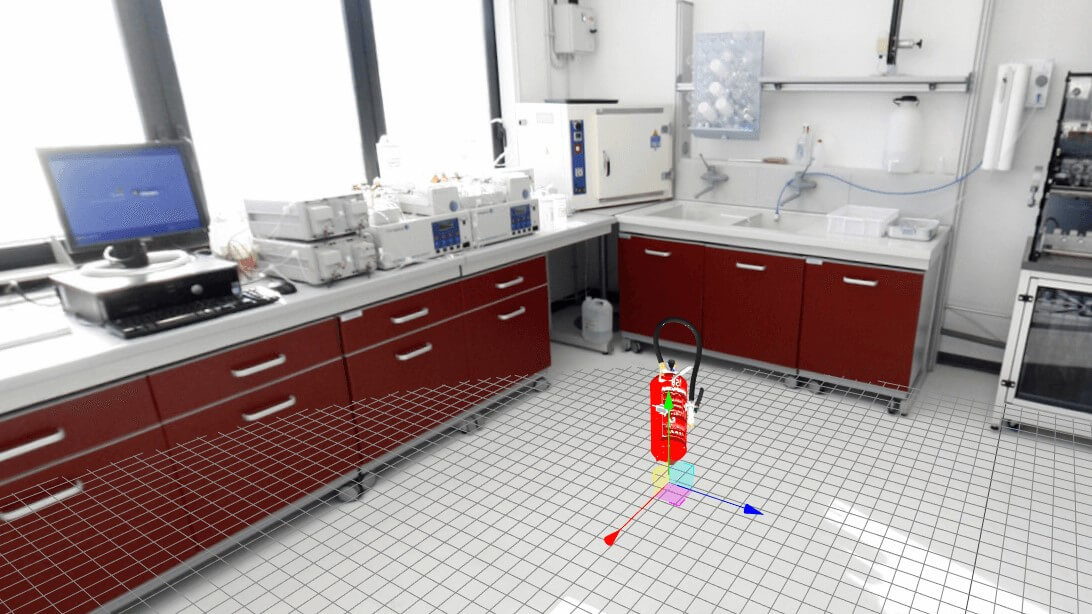
For educators looking for 3D models to create their VR training experiences, hunting down the perfect models can be a hassle.
bold ibex
thats going to be VERY very limited in comparison
some of these websites have an absurd amout of models but they arent quality for the most part
green lagoon
if you're looking for some more low-poly flat shaded models this is a good place to grab some https://kenney.nl/assets?q=3d

We've created over 40,000 images, audio files and 3D models for you to use in your projects. Thanks to our public domain license you're even allowed to use them in commercial projects!
bold ibex
bruh 40k ?!?
green lagoon
yes he's been at it a long time
civic cloak
wow
 glacial jay
hi, I was hoping you guys wouldn't mind lending me a small hand. I'm new to VR chat but I have the basics down, I'm wondering if there are some prebuilt lofts I can tinker with and make them into my own so I can get the basics down with it.
 near escarp
glacial jay
hi, I was hoping you guys wouldn't mind lending me a small hand. I'm new to VR c...
near escarp
glacial jay
hi, I was hoping you guys wouldn't mind lending me a small hand. I'm new to VR c...
Spookyghostboo has a few on her booth/gumroad page
near escarp
Screenshot your screen ?
I assume you're tried restarting unity since ?
Console doesn't seem to be throwing errors so it's slightly odd
Might wanna give a window layout reset if nothing shows up still
Open up the console tab first just in case
near escarp
Try clicking on Default in top right corner and then revert to factory settings
If that doesn't do it i'm out of guesses 
bold ibex
I'd like to know how to make interactive meshes (like the jelly in just-b club or waterbed in dream waves) Is it just a constrained cloth simulation?
 quasi portal
When will SDK2 worlds no longer be supported?
 sleek swift
my stupid world won't let anyone into it on VRC, how do i see with objects have the pipline manager on it cause thats what caused it in my last world
 frank shadow
anyone knows of a good way how to hide a separate room in a world? its like a whole separate area you can teleport to, I would like to hide its visibility when people are not in the general area, but not disable it completely, as there are also scripts and pickupable objects in there
tried doing it using a depth mask shader, but it results in really bad visual artifacts

I basically need a way to selectively cull it
 native laurel
Hello everyone, idk how to activate that menu in the corner, cant find trigger to put it on

 robust sparrow
native laurel
Hello everyone, idk how to activate that menu in the corner, cant find trigger t...
robust sparrow
native laurel
Hello everyone, idk how to activate that menu in the corner, cant find trigger t...
That is an editor extension (not sure which one)
It's not part of base unity
green lagoon
that is from progrid
native laurel
thank you so much :3
green lagoon
glad to be of help
 lyric acorn
was there any solution to batching/instancing unity grass? I can vertex paint the ground and display a quad using a shader but what about the vertex displacement of the wind movement? there's got to be some out-of-the-box alternative that allows similar swaying movement with batching/instancing options. It's like 400 draw calls in my scene alone. I'm worried about quest cutout layering as well
 sudden hedge

Dooka Cinema‚ Bar‚ Nightclub and Arcade
 rustic cove
I got a problem with testing my world. It does not work, and when "Build & Publish for Windows" is issued, it prints that the scene is missing.

I am on Linux.
rustic cove
Got an error


So I am assuming it's trying to pull an avatar when testing and building, but because the directory is not there it fails?
 storm scarab
is your vrcworld spawn setup with your camera and descriptor?
also if you arent already, use this https://github.com/oneVR/VRWorldToolkit
GitHub
Unity Editor extension for making VRChat worlds. Contribute to oneVR/VRWorldToolkit development by creating an account on GitHub.
rustic cove
Performance is not an issue here. I tried with the default udon example scene, same exact error.
 plush canyon
frank shadow
anyone knows of a good way how to hide a separate room in a world? its like a wh...
plush canyon
frank shadow
anyone knows of a good way how to hide a separate room in a world? its like a wh...
You can shrink your skybox and move the room outside of your skybox. Ex: use a sphere as a skybox and move the room above or below
plush canyon
rustic cove
I got a problem with testing my world. It does not work, and when "Build & Publi...
Are you using the right sdk?
It says “sdkavatars” so I assumed it means the avatar sdk. And there is a separate sdk for worlds
rustic cove
plush canyon
It says “sdkavatars” so I assumed it means the avatar sdk. And there is a separa...
First screenshot I posted shows I am using the Sdk world. All settings are correctly set.
plush canyon
Huh
bold ibex
Newbie question. When should I use Blender, and when should I use Unity and import the Blender asset? What are the decisions as to why someone's workflow merits importing from Blender, rather than just working in Unity?
( Right now I'm doing Iconoclass's world-building, it's entirely Unity3D-focused, including modeling, texturing, postprocressing, etc.)
near escarp
Unity isn't a modelling program
green lagoon
they are some add-ons that add some basic modeling but there are a lot more cumbersome than like blender
if you want to do anything terribly complicated
bold ibex
Ahhh okay. This tutorial uses ProBuilder and ProGrid for the modeling (add-on tools).
So beyond getting down the basics down in Unity, I should really just be focusing on learning the modeling and texturing in Blender? Just trying to figure out how to allocate my learning energy. My goal is to start making some fairly detailed worlds (city scenes, nature scenes, indoor, etc.)
green lagoon
yes definitely good to learn blender as ProBuilder would bump into stuff it couldn't do too well pretty quickly if you wanted to like model plants as an example
but definitely nothing wrong with like following to tutorial to learn the basics of probuilder as basic modeling concept apply both in blender and pro Builder
bold ibex
Okay, good to know!
When people design a whole world, do they work on sections and individual components, and import them into Unity? Or do they do the whole scene in Blender, and then bring the whole thing into Unity and add colliders + scripting + etc?
green lagoon
would depend on the project as far as how much of the level design is done in blender
but there's definitely some advantages to working somewhat module
like if you have 100 trash cans in your city it's a lot easier if it's one prefab repeated a bunch do you only need to do setup once and if you want to modify the trash cans you only modify it once and all the other trash cans get modified

 distant hearth
is there a way i can pay to have a world uploaded to my account
green lagoon
not really because that's a good way to get your account hacked
 white gulch
Anyone had an issue fix for pink shaders when importing audiolink for world
 misty wave
Is there a straightforward way to add Zero Gravity to a certain area in the map?

 bold ibex
frank shadow
anyone knows of a good way how to hide a separate room in a world? its like a wh...
bold ibex
frank shadow
anyone knows of a good way how to hide a separate room in a world? its like a wh...
have you tried looking at profiling?
you can pick and choose what gets turned off, it will also help with optimisation.
frank shadow
bold ibex
have you tried looking at profiling?
Profiling?
misty wave
It looks fine in the editor
Anyone experienced TextMeshPro text doing... whatever this is?


It could be associated with scaling? I recently scaled the entire building down so it may be related to that??
sullen fiber
Anyone tell me why my main unity camera is slanted?
 mild spade
misty wave
Anyone experienced TextMeshPro text doing... whatever this is?
mild spade
misty wave
Anyone experienced TextMeshPro text doing... whatever this is?
Could it be z fighting?
 flint lance
Hey having a issue where Mirror's all went to white screen. Anyone know a work around? I referenced online with no result.
 flint lance
Hey having a issue where Mirror's all went to white screen. Anyone know a work a...
flint lance
flint lance
Hey having a issue where Mirror's all went to white screen. Anyone know a work a...
Figured it out. Delete SDK and re- import
 kindred remnant
if ever my world is published what's the way of updating the world, i haven't tried it yet and i don't want to do a publish and update testing. giving me idea would be a big help.
flint lance
kindred remnant
if ever my world is published what's the way of updating the world, i haven't tr...
Are you asking how to publish and upload then do changes and apply them?
 candid mica
https://juliosillet.gumroad.com/?recommended_by=library&sort=page_layout just to help peoples this guy does 100s of materials i love it

Gumroad
Making Free 3d and Blender content for everyone. Follow me on Twitter, Instagram, Reddit or Facebook to see what I'm creating next!Other stores:
Artstation | Blender Market | Flipped Normals | Itch.oi | UE4 Marketplace
Timelapse and Videos on YouTube | Twitch
You can support me on Patreon and get access to my 350+ Textures!
flint lance
candid mica
https://juliosillet.gumroad.com/?recommended_by=library&sort=page_layout just to...
Wow, thats awesome. Thank you
bold ibex
candid mica
https://juliosillet.gumroad.com/?recommended_by=library&sort=page_layout just to...
thank you this resource is amazing and obv thank the person making all of this!
candid mica
thats what i wanted to hear this is the ressource i searched for days ❤️ ❤️ ❤️ ❤️ ❤️ ❤️ ❤️
 sullen turret
Need help. Minor issue, but my VRC SDK screen freezes up, and it takes me a few minutes just to click the Publish button.
I can still update my world, but it just takes a while to do it
flint lance
Are you referring to build and publish button or final publish?
sullen turret
flint lance
Are you referring to build and publish button or final publish?
This screen. Can't click anything on it. It's frozen
 flint lance
sullen turret
This screen. Can't click anything on it. It's frozen
flint lance
sullen turret
This screen. Can't click anything on it. It's frozen
Two things i have done, Is restart PC or program. I have also removed the sdk and reimported it. <- Last option.
Last is sketchy
Unity just doing unity things....
sullen turret
flint lance
Two things i have done, Is restart PC or program. I have also removed the sdk an...
I should prob restart my PC anyways. It's been on for 2 days straight now lmao
flint lance
sullen turret
I should prob restart my PC anyways. It's been on for 2 days straight now lmao
LMAO, been there done that haha
 timid ermine
I downloaded the most recent version of Unity but the sdk i downloaded is for a version that is one thing before the one I have
Is that an issue?
the versioni have is 2021.2
the sdk is 2021.1
is this an issue?
flint lance
How do i get mirrors to default off instead of on apon spawn
flint lance
timid ermine
I downloaded the most recent version of Unity but the sdk i downloaded is for a ...
Can i DM you?
timid ermine
flint lance
Can i DM you?
sure!
timid ermine
Can I do the vrchat coding in c#?
green lagoon

GitHub
An experimental compiler for compiling C# to Udon assembly - GitHub - MerlinVR/UdonSharp: An experimental compiler for compiling C# to Udon assembly
timid ermine
green lagoon
https://github.com/MerlinVR/UdonSharp
its not exact c# tho right?
is it a wrapper?
green lagoon
yeah you're not giving vrc the unprocessed c#
green lagoon
c# goes in udon comes out
timid ermine
green lagoon
c# goes in udon comes out
so its a compiler? not a wrapper?
green lagoon
yes it is a compiler and it says as much on the description
timid ermine
green lagoon
yes it is a compiler and it says as much on the description
oh lol where did the person get the c# code
like get the c# syntax
is it exactly the same?
green lagoon
there are notes in the GitHub page on the differences
 worldly hull
does anyone know why network synced pickups are so laggy? it seems like it teleports and its very hard to maneuver
 chilly hawk
flint lance
How do i get mirrors to default off instead of on apon spawn
chilly hawk
flint lance
How do i get mirrors to default off instead of on apon spawn
https://youtu.be/zUALbgztU5Y?t=135
Following this tutorial will have mirrors off when you join. Try disabling both mirrors in the inspector window (2:15).

In this tutorial I will show you how to add a high-quality and low-quality mirror with toggles to your VRChat world with the new VRChat SDK3 and the Udon programming system!
Timestamps:
- Intro 00:00
- Set up scene and mirrors 01:16
- Add mirror toggles 02:24
- Programming with Udon 03:20
- Interaction text 05:27
- Test in VRChat 05:52
🌸 3D Mo...
flint lance
chilly hawk
https://youtu.be/zUALbgztU5Y?t=135
Following this tutorial will have mirrors off...
Thank Iwatched that maybe i overlooked that bit
misty wave
mild spade
Could it be z fighting?
I'm not sure why that would be occurring only in the rendered game, and I hadn't changed the z layer of any elements so I'm very confused
 raven hare
i think this is the right place for this question. ive been working on a vrc world for some time now and come back to it today to work on it some more but the vrc window is missing and i cant seem to get it back. ive tried reimporting the vrc sdk3 into a copy of the project but to success. any ideas on how i can get that window back?
bold ibex
raven hare
i think this is the right place for this question. ive been working on a vrc wor...
what unity version r u in?
take a screnshot of where it says it at the top of the open unity project so we are sure its right
 raven hare
bold ibex
what unity version r u in?
raven hare
bold ibex
what unity version r u in?
2019.4.31f1
bold ibex
oh hm
make sure the other assets you have in your project are up to date
check their github for new releases
if they dont do releases then dl it again and reimport it
raven hare
that can affect the unity window? interesting, i will try that
ah ok so that did work, i had to reimport the udonsharp sdk. twice
so now the vrc sdk window is back but now its not loading the world when i go to test it. its repeating the loading screen.
 late wigeon
I'm not sure if this is the right place or if this has been covered before but I can't find anything on it. I'm new to unity and am currently building a world, but when I click "build and test" for my headset, (the best way I can explain it) my left eye sees everything perfectly except for the skybox, which is supposed to be stars but instead is everything in the world, including avatars, copied and smeared across where the skybox should be. My right eye is the same but everything is offset from the left eye and when I turn my head, it looks like I'm looking through a glass of water. Here's a picture to help my very long and strange explanation.

 harsh wagon
If a world's lighting is set to gradient instead of skybox, is it possible to change the gradient in-game?
near escarp
I don't think that's exposed to Udon
 chrome iron
Heyo! I'm looking for experienced world creators for a project, feel free to hmu if you're interested!
 faint geyser
how can i have a USharpVideo screen auto play a video when player joins a new instance
 unkempt mauve
Is it possible to make animated laser lights?
misty wave
unkempt mauve
Is it possible to make animated laser lights?
You going for stage lighting or?
 brisk onyx
Does anyone know how to sync spawned in objects globally so everyone in the map can see it? I've checked the box to sync objects that already exist on my world, but I'm not sure how to do this for objects that we push a button to spawn in.
unkempt mauve
misty wave
You going for stage lighting or?
Lights like this
 mild spade
brisk onyx
Does anyone know how to sync spawned in objects globally so everyone in the map ...
mild spade
brisk onyx
Does anyone know how to sync spawned in objects globally so everyone in the map ...
On Udon? (SDK3)
brisk onyx
Yes
mild spade
You cant sync spawned objects sadly, you will have to use object pooling
brisk onyx
Is that literally just putting objects in a bin/pool and manually syncing each one? 
mild spade
I have personally never used that before, but basically the objects will need to be on the scene already when you upload, and you just call them one by one as you need them with each one having an object sync component, since Object Sync will not sync when you instantiate. There is a object pool example on the SDK on examples if you want to take a look
brisk onyx
ah oki ill have a look at that. Thank you.
unkempt mauve
@misty wave #world-development message
faint geyser
how can i have a USharpVideo screen auto play a video when player joins a new instance
 leaden sphinx
What's the deal with world initialization being so long?
I've been working on an update to one of my worlds and I've noticed the newer version usually takes >2x longer to start up after downloading (even with everything baked).
What happens during initialization that could cause the slowdown? Or is it just the increase in complexity?
(also for context, old world was sdk2 2018. New world is sdk3 2019)
Any pointers are appreciated.
Here are some comparisons:
near escarp

These aren't errors, also if they're the default Unity shaders for each, then it should be fine
 earnest ferry
i added an spawn in my vrc world but i still get send to my home world did i do something wrong?
 molten void
Did you add the spawn to your vrcSceneDescriptor on the VRCworld prefab?
earnest ferry
 molten void
Where is says element 0, VRCWorld, drag and drop your created spawn there
earnest ferry
i tough that was the spawn
how do i make a spawn than ? im so confused with worlds this is why i dont make worlds xD
molten void
Create an empty game object. Name it spawn, face the blue arrow in the direction you want players to spawn looking toward
molten void
Are you using build test?
 molten void
Yes
earnest ferry
still sends me home
molten void
What process are you doing to test?
earnest ferry
wdym?
molten void
You close vrchat, and press build test, and it takes you to your vrchome world? O.o
earnest ferry
no i close vrchat than click on built test, it take sme to loading screen i click on the go button, and than it shows go to deafualt home on button i click on go i get send to home world
cuz it reloads from that world to my home world
molten void
Do you get any errors in your console when you test?
earnest ferry
not really red errors
 molten void
This is beyond me, I'm sorry, not sure what it could be, uhhhh
earnest ferry
i always had the problem never could fix it
when i make a fully own world it kept on crashing on me 5 hours of project gone so i gave up on that
molten void
Do you have any weird unity tools on your projects?
 molten void
And you're using vrcsdk udon?
molten void
Uhmm, I feel like it's sdk2 related then
earnest ferry
cuz i got this world from a close friend an they said it was sdk2
molten void
What about it is sdk2, which world package is it?
molten void
What all did you edit, any scripts or such?
molten void
That shouldn't have broke it then aaahhh
earnest ferry
i have no idea anyymore cuz youtube doesnt really help much
earnest ferry
molten void
That shouldn't have broke it then aaahhh
i just wait until someone else knows how to fix it that i cant enter or else i ask another time
 tepid trellis
Is it possible to edit your world while inside your world in VR. Add art work, delete walls ,copy objects etc?
near escarp
You'll have to update every time you want the change to go through, and then make a new instance of your world
So i guess it means no
tepid trellis
Has anyone used microsoft maquette to build their world in VR?
plush canyon
earnest ferry
not really red errors
Just hit clear in the console and you should be fine, yellow errors aren’t much of a problem
 upper obsidian
@earnest ferry If there are no red errors, you need to check it.
 bold ibex
where do i go to download unity for this
green lagoon
VRChat
This page lists the current Unity version you should use when creating content for VRChat, as well as links to the correct version for both Unity Hub and direct downloads. Current Unity Version The current Unity version in use by VRChat is Unity 2019.4.31f1. Ensure you are using this exact version! ...
bold ibex

 pallid jolt
Soooo... my build tab is always empty. Until I reimport the plugins folder as specified here https://docs.vrchat.com/docs/migrating-from-2018-lts-to-2019-lts#empty-control-panel-or-missing-vrcurlinputfield
I have to do this every time I load the project. This is not acceptable.
VRChat
Migrating your project from Unity 2018 to 2019 LTS isn't as difficult as you might think! Here's a guide providing each step in detail.

 green lagoon
I would say the second one because I like purple and it makes it look less like you're in outer space
earnest ferry
upper obsidian
<@!560530206100815873> If there are no red errors, you need to check it.
i was at work imma check that now
earnest ferry
upper obsidian
<@!560530206100815873> If there are no red errors, you need to check it.

 brisk spear
does any one know how to get and array of an object type
var doors = FindObjectsOfType(typeof(PermissionDoor));
flint lance
Anyone else have a issue when suddenly files go missing? Can things just go corrupt ocasionally?
brisk spear
flint lance
Anyone else have a issue when suddenly files go missing? Can things just go corr...
sometimes when unity crashes but it's not common tbh
flint lance
brisk spear
sometimes when unity crashes but it's not common tbh
I'm an unfortunate casualty Lmao. F
misty wave
unkempt mauve
Lights like this
Ah I see, I've not seen something exactly like that done in VR before, but it likely could be done with a clever combination of animations and a normal laser system like the VR Stage Lighting setup
unkempt mauve
misty wave
Ah I see, I've not seen something exactly like that done in VR before, but it li...
Its something I would be interested in making, just wasn’t sure how I could pull it off
bold ibex
I need help putting my avatar in my world can someone help me please
upper obsidian
@bold ibex VRChat Examples\Prefabs\AvatarPedestal
bold ibex
But just the model like I have a bar in my word and I want one of my avi’s to be the bartender but I put the avi in the word but she won’t stop t-posing
upper obsidian
You need to add animation, or statically expose the bones of the model.
bold ibex
How tho
misty wave
unkempt mauve
Its something I would be interested in making, just wasn’t sure how I could pull...
I'm also not really sure ;~;
 random sphinx
I'd like to make a cutout mirror. I thought it would be as simple as changing the reflect layers, but that didn't work for me. Maybe I did it wrong? Or is there something else I should do?
upper obsidian
Custom shader, or make a mesh of the desired shape for the mirror.

GitHub
A simple mirror prefab for mirrors that show players only without any background in VRChat - acertainbluecat/VRCPlayersOnlyMirror
 random sphinx
faint geyser
how can i fix seeing text thro walls
random sphinx
faint geyser
how can i fix seeing text thro walls
if it's part of a UI canvas you will see it through the walls in the editor, but you shouldn't see it through the walls in-game
 willow lark
Hello! I tried uploading my first world and the upload process goes smoothly it even shows the world in the Content Manager tab with the release Status private. But when I try to join the world in game it will load black screen and i get booted out back to my home world. The world works no problem when I try it using the Build & Test button and there are no errors in console. Am I missing something?
upper obsidian
You need to check the version of the unity, and check the world is upload for quest or under the pс
Perhaps there was just an error while upload
willow lark
@upper obsidian Thx for responding! Active Build Target is StandaloneWindows64 and the only output in console is this:

(While uploading)
upper obsidian
I meant a file transfer error. The file might not be completely uploaded. Try to repeat.
willow lark
I tried making a different project with only the prefab scene and that works fine (Managed to upload it and joined it no problem) so it is something in this specific project I think 🤔 (But again if I try using the Build & test buttot it loads and works)
Ok will try
upper obsidian
If the world works in a local test, then the chance that after uploading everything will suddenly break is almost zero. Somewhere there was an error while upload.
Version Unity 2019.4.31f1 ?
willow lark
yep

Hmm there is something wrong with my models i think. When I hide the props etc. then it works 🤷♂️ Thank you for the help anyway! 😆 👍
 lapis void
ok need some help first time making a world. i made a material and applied it to the objects but for some reason this is what it looks like . its all black i cant get it to change what am i doing wrong?
 unkempt mauve
misty wave
I'm also not really sure ;~;
unkempt mauve
misty wave
I'm also not really sure ;~;
Im not sure if this would be something to do with simple animations or the use of U#
leaden sphinx
leaden sphinx
What's the deal with world initialization being so long?
I've been working on an...
I figured out a workaround, just the simple activate gameobjects when you join deal, dunno how I forgot to test this. But yeah, init time is back down around the old SDK2 standard. Wild
unkempt mauve
@misty wave Just a thought, Do you think its somehow possible to use the same laser light animations made from a laser light animation software?
 silent adder
Can I use UDON to change the properties of a set material? Say, for instance, using a slider to set a transparency between 0 and 100?
Or am I still limited by animations to do that?
 weary osprey
I can't join my OWN world
I made it super simple for a test world and it shoves me back home WTF???
mild spade
weary osprey
I can't join my OWN world
I made it super simple for a test world and it shoves ...
Do you have a spawn point?
weary osprey
mild spade
Do you have a spawn point?
Yes
weary osprey
mild spade
Do you have a spawn point?
I know how that stuff work. The issues is spawning into my map
mild spade
Something is happening to your world. Some error, on #udon-general someone gave you some tips to follow. Checking the log file is the best way to find the problem.
weary osprey
I wanna make this map a test map to improve my map editing skills.
weary osprey
mild spade
Something is happening to your world. Some error, on <#657394772603830360> someo...
I know, but I don't do well at code
mild spade
can you post a picture of your scene descriptor and where it is on the world? like this.. (open the "spawn" tabs too)
 bold ibex
Hey, where is the assets folder to put assets into unity manually?
 slow oar
Well the info tab says this is for world creation discussion?
Not in game yet but I though someone might appreciate my spawn render?
Having wayy too much fun ruining this poor Blender Project 

 urban epoch
Shiny ✨
slow oar
urban epoch
Shiny ✨
Would you believe me if I said this was the slightly tame shiny part of the map?
urban epoch
fear
slow oar
also macaroni tree

I would post the cleaned up render but I realized it's got my discord invite link dead center..
 nocturne jungle
Does anyone have just the detailed shell to a world prefab? Id love to make my world from scratch but its just so annoying and i get really jumpy and irritated
Like a little house or something
 leaden hare
anyone know how to fix this render issue? I have an object with a transparent material behind that white light but it is showing in front of the white light, when it is far behind
 misty wave
unkempt mauve
<@!204663911457357824> Just a thought, Do you think its somehow possible to use ...
misty wave
unkempt mauve
<@!204663911457357824> Just a thought, Do you think its somehow possible to use ...
Theoretically it would be - I really wanted to develop a lighting system that uses the same types of commands as Neopixels so they could be ported over to VRChat. It would be simple programming theoretically, I don't know exactly how those laser systems work but I assume it's similar to GCode on a 3D printer
 heady rover
I got this problem where i wanted to add a Youtube Preview Id to my world info but for some reason the Update World link doesn't work.

 lapis willow
Hello, I've got a post processing issue that I have no clue how to resolve. Color grading effect doesn't seem to be working, but other effects, such as Vignette, do work. I've set some extreme settings in color grading to show that there's nothing here, but this second screenshot shows vignette working just fine. Any ideas?

 bold ibex
oh geez the lighting between the blocks is horrendous
lapis willow
what do you mean? They aren't separate blocks, its a single imported object
bold ibex
the lighting on them acts as if they are seperate blocks
on the brick block its the worst
looks like there is a topdown gradient of shadow
you sure they arent individual objects with their own anchor ovverides?
if you make the blocks override the same for a given cluster it should look nicer
lapis willow
ahh i see now after changing the light. Might have to turn shadows off on the texture or something. I'm very new to this, all I can tell is each different texture is grouped together, even though you can tell they were build as separate blockes
so like, all the bricks are shows as a single game object
bold ibex
its okay you dont see it at first
lapis willow
It doesn't look as bad in game
and if I can figure out why only half of my post processing effects work, and the other half don't, that might help it a bit
bold ibex
ive never worked with mch of those so idk
i think some of them just dont like VR
do you test your worlds in VR or on Desktop mode
and if VR, PCVR or standalone Quest VR
lapis willow
I do a basic test using cyanemu to make sure everything works, but when i want to truly see how the lighting and things have turned out, I will go into pcvr because its so much different. I don't have any plans to make it quest compatible
regardless, that's a very minor issue that me and many other friends didn't even notice, or at least it wasn't pointed out to me. I really at this point in time just want to figure out the post processing issue
shadows are the least of my worries atm
bold ibex
try testing in Dekstop mode and see if those effects that wernt there in PCVR
 vale bloom
What do I need to hide nameplates in a world? If you answer please reply or @ me ty <3
green lagoon
lapis willow
and if I can figure out why only half of my post processing effects work, and th...

GitLab
A surface shader for Unity providing cel-shading. (Forward rendering only)
nocturne jungle
Anyone have a HQ % LQ mirror toggle prefab?
worldly hull
anyoyne have issues with pickup objects lagging arouind?
or know how to solve the issues
lapis willow
green lagoon
https://gitlab.com/s-ilent/SCSS/-/wikis/Other/Post-Processing
thank you for replying, but I have already done this, which is how I was able to get even the Vignet and Depth of Field to work. I just don't understand why Color Grading specifically won't work.
green lagoon
I'm not too knowledgeable on post-processing so don't have any suggestions on color grading
random sphinx
looking for a quest video player; anyone know of one?
chilly hawk
nocturne jungle
Anyone have a HQ % LQ mirror toggle prefab?
In this tutorial I will show you how to add a high-quality and low-quality mirror with toggles to your VRChat world with the new VRChat SDK3 and the Udon programming system!
Timestamps:
- Intro 00:00
- Set up scene and mirrors 01:16
- Add mirror toggles 02:24
- Programming with Udon 03:20
- Interaction text 05:27
- Test in VRChat 05:52
🌸 3D Mo...
nocturne jungle
chilly hawk
https://www.youtube.com/watch?v=zUALbgztU5Y
Ill give it a try, although when i tried before i ate shit while doing so lol
nocturne jungle
chilly hawk
https://www.youtube.com/watch?v=zUALbgztU5Y
yeah nah i fucked it again


Idk
When i click the toggles, 1 the mirrors dont turn on or off, 2 the mirror toggles disappear


Its so odd lol just showing literally everything i can to try to figure this out
unkempt mauve
misty wave
Theoretically it would be - I really wanted to develop a lighting system that us...
I wonder how that would work? 🤔 Also, how would you port things to VRChat?
 cloud latch
@heady rover there's a few issues with the youtube preview id already might be related to this too https://feedback.vrchat.com/website-bug-reports/p/youtube-preview-id-cannot-be-removed
 chilly hawk
nocturne jungle
Its so odd lol just showing literally everything i can to try to figure this out
chilly hawk
nocturne jungle
Its so odd lol just showing literally everything i can to try to figure this out
Go step by step and copy EVERYTHING. It will work if you copy it perfectly.
Even do the stuff that you may think is optional.
nocturne jungle
I did everything she did and double checked everything so idek
chilly hawk
High and low cube, plus 2 mirrors (which should be disabled)

Udon graph stuff should be on the cubes, not the mirrors.
Low cube's graph

High cube's graph
 nocturne jungle
Yeah thats how mine looks, look at my screenshots of the graphs above
chilly hawk
Are your graphs on the buttons or the mirrors? Should be the buttons.
 chilly hawk
Problem may be because you set the buttons as children.
That's one obvious difference to the tutorial
chilly hawk
Yes you do. Your buttons are under the mirrors.
 worldly hull
if u put a gameobject inside of another one, you make it a child
chilly hawk
Should be like this, with the mirrors disabled.

Uncheck this box to disable. Otherwise both mirrors will be on initially.
 nocturne jungle
Yeah i did that
nocturne jungle
chilly hawk
Yes you do. Your buttons are under the mirrors.
i had changed that
Its not like that anymore
 chilly hawk
Your mirror's aren't blue in the list, so something must be different.
nocturne jungle
I unpacked them

When you unpack it unticks blue
This is under the HQ toggle

'
Ooo wait, i see something that shouldnt be there
Lemme see if removing that will fix it
nope
I have the issue of the toggles disappearing still though, when i click the toggle it just poofs
chilly hawk
If the toggle disappears, then your script is disabling the buttons instead of the mirrors.
Sounds like the same mistake I made when setting up mine.
nocturne jungle
And it doesnt toggle the mirror
How would that happen though? Cause in the scripts i only have the HQ and LQ mirrors, not the toggles
misty wave
unkempt mauve
I wonder how that would work? 🤔 Also, how would you port things to VRChat?
I want to look into the format, I'm not sure how it's stored but you could do it programmatically without too much issue I think, maybe even with particles ?
You could use Udon# and code it in essentially C#
nocturne jungle
nocturne jungle
How would that happen though? Cause in the scripts i only have the HQ and LQ mir...
The udon scripts are also on the toggle buttons
chilly hawk
nocturne jungle
How would that happen though? Cause in the scripts i only have the HQ and LQ mir...
Maybe these are set wrong. I can't remember exactly what was wrong when I made the same mistake.
 nocturne jungle
This is the LQ toggle, i only have the two Public Variable
 chilly hawk
Aha! Notice that they are set to 'self'. That's why it's disabling itself.
chilly hawk
Drag and drop.
 chilly hawk
I remember that you have to drag and drop stuff into the graph at some point as well.
nocturne jungle
Yeah thats the beginning when you drag the two mirrors in
Loading test player now
If i could pay you i would, it works omg
you
so
much
chilly hawk
No problem :)
I'm just a beginner, but I happened to set up mirrors a few weeks ago.
nocturne jungle
Wooooo im glad thats over lol tysmmm
chilly hawk
Oh yeah, if you haven't got CyanEmu then you should get it. Makes testing so much faster.
There's a few 'essential' prefabs to make life easier.
nocturne jungle
Ill check it out
chilly hawk
CyanEmu lets you test in Unity, UdonSharp is needed for a lot of prefabs, VRWorld Toolkit finds problems, etc.
nocturne jungle
Alright cool ill check it out 🙂 Thank you so much
random sphinx
Quest video player? Anyone?
chilly hawk
random sphinx
Quest video player? Anyone?
 rain zodiac

so i have a wall in unity which i would like to add a window to, how can i cut out a square in this wall for a window
 graceful totem
Drinking night needs to fix their world, causes crash upon instantly joining it
nocturne jungle
How do i make it so i can jump in my world?
rain zodiac
how do i get a working pool table in my world?
also my control pannel says this

and i wasnt to test the world
unkempt mauve
misty wave
I want to look into the format, I'm not sure how it's stored but you could do it...
Talking about porting, I just found this ➡️ https://portforward.com/vrchat/

Port Forward
Opening ports is easy for VRChat. Simply follow our instructions for your router.
 errant junco
am i the only one who is having a lot of issues uploading world with sdk 2.0?
the builder section is empty when i wanna upload it, and if i end up uploading it making some stuffs when i join the world it kicks me
worldly hull
Can someone explain how I can use a canvas that renders in VR? I have a slider than changes the transparency of a panel but it only shows on the desktop, not in VR.
 worldly hull
errant junco
the builder section is empty when i wanna upload it, and if i end up uploading i...
worldly hull
errant junco
the builder section is empty when i wanna upload it, and if i end up uploading i...
U gotta make sure u have the right unity vversion
u must be using 2019.4.31f1 exactly
rain zodiac
so i have a wall in unity which i would like to add a window to, how can i cut out a square in this wall for a window
 worldly hull
errant junco
the builder section is empty when i wanna upload it, and if i end up uploading i...
worldly hull
errant junco
the builder section is empty when i wanna upload it, and if i end up uploading i...
 worldly hull
the project is on the right version tho?
 errant junco
yes
rain zodiac
i want to test my world
worldly hull
so when you uplaod the world and try to join it, does it instantly kick the player out, or download the contents first, then kick them out?
worldly hull
rain zodiac
i want to test my world
create a gameobject and attach the SceneDescriptor component
so that means that your world might not be setup correctly like the spawns and scene descriptor
you could try to delete them and redo them
also make sure they are in there own gameobjects
errant junco
it's weird, if i delete for example a random file like the csc (default in assets) it lets me to upload but it don't even make the build, it load super fast and then i can upload it
idk what's going on with it tbh
worldly hull
rain zodiac
also how do i cut out a hole in a wall
I am not sure you can do that in unity, it doenst have great modeling features. however you can use external software or just shape out a hole using other cubes
rain zodiac
shape out a hole?
worldly hull
are you talking about something like a union and negate
you'd probably haev to do something like this, but less worse
misty wave
unkempt mauve
Talking about porting, I just found this ➡️ https://portforward.com/vrchat/
Hmmm I'm pretty sure that's a totally different thing, that's used to allow remote connections to your router for hosting servers, I'm not sure why that would be necessary either
worldly hull
any1 know how to get a canvas overlay to work in VR?
unkempt mauve
misty wave
Hmmm I'm pretty sure that's a totally different thing, that's used to allow remo...
Ok, wasn't sure if that was the same or not. I don't think I've ported things before to VRC. Doesn't that mean to take assets from other games and putting them in VRC?
nocturne jungle
rain zodiac
Put a world descriptor in the inspect tab on id say maybe your floor
rain zodiac

so ive added a wooden floor texture but the floorboards are hude
huge*
how would i make the texture smaller
so they actually look like floor boards
worldly hull
find the material (probably in Materials folder)
click on it and change the X and Y tiling
 misty wave
unkempt mauve
Ok, wasn't sure if that was the same or not. I don't think I've ported things be...
misty wave
unkempt mauve
Ok, wasn't sure if that was the same or not. I don't think I've ported things be...
Well, I suppose what I meant by that is reprogramming and replicating but used the word "porting". Essentially the code to control those systems is likely basically a big file with "turn right 1cm, turn left 1cm, change to red" one after another, so theoretically it would be very easy to logically convert it to VRChat's Udon Sharp nwn
I may give it a shot
 exotic flicker
heya anyone with experience building UI's here 😄
Got a quick question in regards to toggling charis, so i've set the chair, i've enabled toggle in the system, now its greyed out, but i cant find how to link it to the UI
udonsendcustomevent _Toggle?
yep that was it, figured it out
exotic flicker
Trying to setup protv im having trouble using the playlist feature ( rather setting it up ), idea is to have two , one with playlist, recast on multiple tv's thus music across the map, then another zone where its a movie theater style thus its own independent feed. This however requires sadly for me to figure out whats going on... if someone who's already set ProTv on their world can dm me or ping, that would be appreciated.
 true phoenix
Hiya!
Everytime I try hitting the Build & Test button when developing my world, nothing happens.
What gives?
near escarp
true phoenix
Hiya!
Everytime I try hitting the Build & Test button when developing my world...
Anything in the unity console ?
chilly hawk
How do I set a reference camera? Will dragging and dropping my building object do?
What should I change "Unlit/Glass_Shader" to?
How do I set the height for VRC Stations?

The building object from outside

Hopefully the last 3 questions I need to ask
near escarp
If you're not using post processing then don't worry about the camera, for the glass shader you should try Silent's shader on her booth page and for the station height it's within the station prefab i think, there's a transform object
chilly hawk
Thanks, I'll see if I can find those
weary osprey
I can't make a spawn point, I've looked on YouTube and Copied and still nothin, keep spawning back home... Any Ideas?
chilly hawk
weary osprey
I can't make a spawn point, I've looked on YouTube and Copied and still nothin, ...
By default, VRCWorld is used as the spawn point
weary osprey
chilly hawk
By default, *VRCWorld* is used as the spawn point
But like I'm using a game obj, for the spwn point.
green lagoon
then put the VRCWorld object next to a game obj
weary osprey
chilly hawk
By default, *VRCWorld* is used as the spawn point
ALso, I don't see a VRCWorld when importing the discriptor
weary osprey
I found VRchat world
green lagoon
cool so drag that in somewhere interior scene where you want the spawn point to be
weary osprey
green lagoon
cool so drag that in somewhere interior scene where you want the spawn point to...
Thanks, finally got to my world!
weary osprey
green lagoon
cool so drag that in somewhere interior scene where you want the spawn point to...
Now got one more question, Why can't I publish the world to public?
green lagoon
glad to be of help I'm surprised the SDK didn't yell at you for not having a spawn point
green lagoon
weary osprey
Now got one more question, Why can't I publish the world to public?
it needs to go through Community Lab First and if you don't even have that option you might not have hit the rank required to upload public worlds
weary osprey
green lagoon
glad to be of help I'm surprised the SDK didn't yell at you for not having a sp...
Probly did, but I'm new to making worlds, i've only made avatars, REALLY crappy ones
green lagoon
welcome to vrchat World building
weary osprey
green lagoon
it needs to go through Community Lab First and if you don't even have that opti...
With the back of the head missing lol
weary osprey
green lagoon
welcome to vrchat World building
THX
green lagoon
have you learned baked lighting yet
weary osprey
I heard about it for Unreal Engine 5 but don't know how to do it myself. @green lagoon
green lagoon

You can support me on my pateron
https://www.patreon.com/mcphersonsound
This is a longer tutorial than normal and there is a lot to cover so here are time stamps for your convivence.
00:00 what is baked lighting
00:35 setting up lights
1:23 preparing meshes to bake
2:30 generate lightmap UV
3:28 light probes
5:10 reflection probes
6:00 emissive ...
weary osprey
green lagoon
https://www.youtube.com/watch?v=dKgUJccjWRU
Thank you
green lagoon
having your light be baked will make the framerate a lot nicer
weary osprey
green lagoon
https://www.youtube.com/watch?v=dKgUJccjWRU
I'm keeping this!
weary osprey
green lagoon
having your light be baked will make the framerate a lot nicer
Badazz
green lagoon
definitely recommend checking the pin messages of the world related channels as there are lots of helpful stuff pin
true phoenix
near escarp
Anything in the unity console ?
Nope, nothing!
weary osprey
green lagoon
https://www.youtube.com/watch?v=dKgUJccjWRU
This is good for me to cause I wanna make a chill out world for my friends!
green lagoon
definitely a good type of map to start with as it's not big or a complicated game world
weary osprey
green lagoon
definitely a good type of map to start with as it's not big or a complicated ga...
Hey also, [off topic] Is the AMD Ryzen 5 1400 A pototo?
green lagoon
what's the rest of your setup
weary osprey
green lagoon
what's the rest of your setup
GTX 1060 16GB ram
green lagoon
your setup is fine
weary osprey
green lagoon
your setup is fine
ok
weary osprey
green lagoon
your setup is fine
Thx
near escarp
true phoenix
Nope, nothing!
Anything there when you restart unity ? How up to date is your vrc sdk ?
weary osprey
@green lagoon One more thing, I can't upload to Public.
green lagoon
what's your rank
weary osprey
green lagoon
what's your rank
Trusted
green lagoon
strange do you have a upload to community lab option
weary osprey
Yes, but publish limit is already 1 so I can't upload there, @green lagoon
green lagoon
then you'll just have to wait for the week to be done as there is no straight public upload function for worlds as everything must go through Community Lab First
 green lagoon
then you'll just have to wait for the week to be done
weary osprey
green lagoon
then you'll just have to wait for the week to be done
WHy?
green lagoon
spam prevention
weary osprey
I've never had this happen before?
weary osprey
green lagoon
spam prevention
o
green lagoon
weary osprey
I've never had this happen before?
that feature doesn't apply to avatars
weary osprey
green lagoon
spam prevention
Actually if I upload rn, after a week can I upload to Public from unity?
green lagoon
yes you would be able to submit it it to the community lab next week
and you probably want to get around to like baking your lighting before you would want it to be public-facing anyway
weary osprey
green lagoon
yes you would be able to submit it it to the community lab next week
I think next time I'm not publishing to Labs
green lagoon
all worlds have to be published using the lab if they're to be public
weary osprey
green lagoon
and you probably want to get around to like baking your lighting before you woul...
Cause I check my world before I publish it.
@green lagoon Make sure that it's not buggy.
green lagoon
there is a test World function and you can upload private worlds separately from the community lab stuff you just won't be able to have your world be searchable by other people
weary osprey
green lagoon
there is a test World function and you can upload private worlds separately fro...
I know about that
green lagoon
then what's the problem if you're just in the testing phases so there's no particular reason for your world to be public yet
weary osprey
@green lagoon Now I got that ti song in my head, what you know about that, lol
weary osprey
green lagoon
then what's the problem if you're just in the testing phases so there's no parti...
Na it's fine, ill just waite
green lagoon
well you would still want to test your world while you're optimizing and baking lighting so using the test function I just linked would be helpful
weary osprey
green lagoon
well you would still want to test your world while you're optimizing and baking ...
ye
weary osprey
green lagoon
well you would still want to test your world while you're optimizing and baking ...
Also thanks for your help and the YouTube videos and links, very helpful.
green lagoon
glad to be of help
https://www.youtube.com/watch?v=zUALbgztU5Y helpful for later when you're getting to mirrors
In this tutorial I will show you how to add a high-quality and low-quality mirror with toggles to your VRChat world with the new VRChat SDK3 and the Udon programming system!
Timestamps:
- Intro 00:00
- Set up scene and mirrors 01:16
- Add mirror toggles 02:24
- Programming with Udon 03:20
- Interaction text 05:27
- Test in VRChat 05:52
🌸 3D Mo...
weary osprey
green lagoon
https://www.youtube.com/watch?v=zUALbgztU5Y helpful for later when you're gettin...
I'm actually thing of removing mirrors, Need to stop being a mirror dweller as well with my friends lol!
weary osprey
green lagoon
https://www.youtube.com/watch?v=zUALbgztU5Y helpful for later when you're gettin...
But thanks
weary osprey
green lagoon
https://www.youtube.com/watch?v=zUALbgztU5Y helpful for later when you're gettin...
Get all the help I can
green lagoon
weary osprey
I'm actually thing of removing mirrors, Need to stop being a mirror dweller as w...
yeah but if you're making a world for other people to also use folks are going to be expecting mirrors
weary osprey
green lagoon
yeah but if you're making a world for other people to also use folks are going t...
Tru
weary osprey
green lagoon
yeah but if you're making a world for other people to also use folks are going t...
- this gonna be a chill world
 deep hamlet
Hey, how long does a world usually take to show up in the "Mine" tab once uploaded?
misty wave
@unkempt mauve This in combination with a normal glow effect might do what you're looking for? https://booth.pm/en/items/2141514

ライブ等で使われるレーザーの照明装置っぽい表現ができるシェーダーです。 UnityやVRChat、cluster等で使用できます。 シェーダーのプロパティで動きをつけることができます。 板ポリタイプと円錐形タイプの2種類が入ってます。 3Dノイズテクスチャの作成にMewNoiseGenを使用しています。 https://github.com/mewlist/MewNoiseGen Unity 2018.4.20fで動作確認してます。unitypackage形式。 ■解説動画 https://www.youtube.com/watch?v=aqYka48qcrE 質問などはツイッターで。
misty wave
deep hamlet
Hey, how long does a world usually take to show up in the "Mine" tab once upload...
Nearly instantly for me
unkempt mauve
misty wave
<@!477884210707955735> This in combination with a normal glow effect might do wh...
Cool! I’ll have to try it out
vale bloom
vale bloom
What do I need to hide nameplates in a world? If you answer please reply or @ me...
Anyone? 👉 👈
chilly hawk
It was fine earlier and now I'm getting this >:(

No idea why there's Amazon stuff in there
Can't clear the top 2 errors even if I delete everything in the scene
Probably one of the few assets I recently imported. Looks Like I'll have to remove each one and see if that fixes it :(
Apparently not. Deleting EVERYTHING got rid of it though, so it's in there somewhere.
Time to make another test copy then.
misty wave
Anyone used the attach-to-me package before?
heady rover
cloud latch
<@!393617698120269836> there's a few issues with the youtube preview id already ...
Zo that means that I need to wait until they fix it.
bold ibex
Isn't there a way to preview the avatar image? So it fits close to the wall.

otherwise I cannot position it correctly.

 surreal nebula
keep getting this. signs me out when I try to publish and detaching id doesn't work
 near escarp
surreal nebula
keep getting this. signs me out when I try to publish and detaching id doesn't w...
near escarp
surreal nebula
keep getting this. signs me out when I try to publish and detaching id doesn't w...
You'll have to reach out to the #vrchat-support so they can fix it for you
 covert hornet
Recreated a scene after unity bugged on a crash, quick question. Is it possible to mask a object so it doesn't receive a post progressing effect (such as with layers)?
frank shadow
anyone knows if there is a way to make a screen space shader which would affect everything except for the player's avatar? I want to make an effect that fades out the world around the player to black as a transition between areas on my world
 gaunt minnow
some quest users are sliding around in my world or get stuck in weird positions. Does anyone know how i can solve this?
 cinder violet
anyone have any tips for getting vrchat world creation working on an m1 mac? Away with family and trying to work on making a world but I keep getting sdk errors even when using the correct 2019.4.31 unity version and targeting android
random sphinx
I read in a thread that Quest cannot play youtube videos through a video player. Is this correct?
errant junco
when i wanna build and test world i get this, what is this?
 raven hare
anyone know how to solve this issue? my world repeats the vrc loading screen every time i try to test build it. when i try to publish it however, i get a pipline error. not sure how to fix it
bold ibex
random sphinx
I read in a thread that Quest cannot play youtube videos through a video player....
yup, if u want a video to play on quest you need to link it to a direct mp4
so like google drive mp4 link
random sphinx
lol wow that's weak. ok then I guess I don't have to worry about making my video players quest compatible. thanks.
rain zodiac

hi so i have windows and i would like to add a rain effect on them
how would i do that
like the animated ones you see on other worlds
also how do i add music
near escarp
You can ask about the rain glass in #shaders
For music it's an audio source you set to 2D
 bold ibex
 daring pond
3
daring pond
3
watch a vrchat avatar world making tutorial on youtube
daring pond
i am not making a avatar world would it be the same concept
bold ibex
daring pond
i am not making a avatar world would it be the same concept
EVERY world that anyone makes for VRChat needs a VRCSceneDescriptor
the error message you are getting says that too
daring pond
ok thanks it worked and now i published it thanks 😄
bold ibex
np
 fresh plinth
I know it's not super important, but would anyone happen to know why the "Last Update" hasn't updated for my world yet? Been doing almost daily updates for the past 9 days and it hasn't changed
bold ibex
i downloaded ProBuilder, when i go to use the vertex selection or edge selection, it will not allow me to select a vertex or edge/no vertices or edges highlight. help?
bold ibex
i figured it out.
 manic wharf
what is vrc scene descriptor
bold ibex
manic wharf
what is vrc scene descriptor
This tells you what it is and how to do it 🙂 https://docs.vrchat.com/docs/creating-your-first-world
VRChat
Before getting started, ensure you have a Unity project with the SDK set up. If you want a great intro to creating your first world with pre-created assets, a tutorial video, and detailed steps, check out the VRChat Home Kit! Step 1 - Setting up a scene The first thing you need is a scene. This can ...
manic wharf
thank you
bold ibex
manic wharf
thank you
Of course!
nocturne jungle
How could i add pens into my world?
I get all these errors when i import QV pens


 shadow sapphire
Just wanted to say thank you for this, it's exactly what I was looking for and works flawlessly.
fresh plinth
daring pond
Do you have anything calling the custom events?
daring pond
fresh plinth
Do you have anything calling the custom events?
Well i think so i made the custom event values by creating a onclick string
fresh plinth
Custom event values?
daring pond
Well you know when you go to the udon graph and you can make custom events i refered them to the onclick string for the button for example
fresh plinth
You mean this?

Honestly Idk anything about video players. If I were you I'd refer to the prefab that's built into the SDK as a starting step and maybe look around YouTube. I just wanted to make sure you were actually calling the custom events is all lol
Best of luck in figuring it out
mild spade
Also would help to do a test to make sure the UI is actually clicking the button (like on click, set a gameobject active visually) Since you have a large red X on your UI, it means it is flipped in some ways in the negative values, i am not sure if that makes it hard to interact on vrchat or not.
 pure rivet
How would I set the camera to fit the image perfectly?
 fresh plinth
That doesn't matter because the VRCCam has preset values that you're better off not changing. You should fit the image to the VRCCam instead. Here are the VRCCam's default values.

You can change these, but it does weird things to the image when it's actually in VRChat so that's why I say it's better to not change them
The most important thing to not change actually would be the aspect ratio. Field of view and clipping planes shouldn't cause any issues in theory. I also sometimes change mine to be orthographic instead of perspective, but just make sure the aspect ratio stays consistent.
fresh plinth
mild spade
Also would help to do a test to make sure the UI is actually clicking the button...
Common mistake is not changing the layer of the UI. It needs to be on something that is interactable. Default is a good layer to use. @daring pond
daring pond
fresh plinth
Common mistake is not changing the layer of the UI. It needs to be on something ...
I can interact but nothing happends norhing changes
fresh plinth
I'd setup some sort of debugging. You could use Debug.Log, or like Squall said just setting up a GameObject.SetActive for a random cube or something.
Just something to show that the custom events are being called
pure rivet
got it, looks a tiny stretched but thats ok
 ruby lava
for some reason, whenever i load into one of my uploaded VRC worlds, it spawns me in the void of unity, and then makes me force leave by showing the controllers as if i had went into a portal, and then sending me back to my home world.
any help/advice?
and when i say void of unity, i mean unity skybox, the basic one i have not changed for any world so far.
unkempt mauve
misty wave
<@!477884210707955735> This in combination with a normal glow effect might do wh...
Is there a free version of this by any chance?
 wraith pier
Quick question; how does VRChat handle instances if an update is pushed to a world?
Does the updated code only apply to newly-created instances?
fresh plinth
No, it'll apply to any instance for anyone who newly joins. It will cause desync issues if anything major is changed.
Anyone in an old instance will have to rejoin to see the changes, anyone who joins an old instance after the update will see the new changes.
Networked things are bugged for new joiners though from my personal experience, since the master of the instance owns the networked objects (or whoever actually owns the objects)
Depending of course on what exactly the networked objects are
wraith pier
ah
argh now unity is crashing when I try to build and publish
never did this earlier
 tiny temple
So... I do not really know how to use Unity, but I have the SDK set up and I have a 3D model of a world I wish to import, and I have it in Unity, but I am unsure of how to do anything else hah...
I was wondering if anyone could help?
The first issue I have ran into is that I do not know how to give the model of the world collision. I added a "Mesh Collider" to the model like someone suggested and it did not work. And the tutorial I watched didn't need to modify anything
 left rain
the most performant thing you can do is make simple collider shapes wherever possible instead of using mesh colliders, especially on complex meshes
 humble forge
I need to figure out how i can hide avatars/nameplates when a person teleports in a far room.
left rain
you can just place simple primitive shapes and then turn off the mesh renderers
humble forge
got the LOD for the room
tiny temple
Yeah but... I don't even know how to do that hah
And the terrain is bumpy, so simple shapes might not work
left rain
you might want to consider doing some simple unity tutorials then. terrain might need a more specialized collider, yes
box colliders are as easy as GameObject > 3D > Cube, then just disable the mesh renderer once you've positioned it
tiny temple
Yeah but then I'll end up watching a dozen tutorials looking for how to do what people would consider a few simple things so I thought maybe it'd be easier to just ask here
left rain
you're going to end up running into lots of strange problems in the future when trying to build worlds unless you have a grasp of the basics, it's time well spent
tiny temple
I suppose...
How would I look for "Specialized collider" tutorials that won't take an hour?
left rain
are you using an actual unity terrain object, or an imported model?
tiny temple
Imported model. It is a Wii game model that I have ripped so it should be fairly optimized
I figured there would be an option to have the collider match the model itself
left rain
well, if it's not terribly dense you can just add a mesh collider component, then select the terrain mesh itself as the collider source geometry
tiny temple
Oh yes I saw someone online suggest that, but that is where I became stuck
See... The model itself is made of many components, all of which Unity seems to treat as separate assets. Is there a way to select them all at once? I know I could just join them all in Blender and reimport them but that might be more effort than needed
left rain
that sounds like it's going to be too complicated to use as a collider by itself, then. what's this terrain look like?
tiny temple
 left rain
and that's all being imported as a single object? i think the best option is to just export the big ground chunk as its own mesh, then use that as the collider
if you need colliders for rocks and trees, build those separately into the rock and tree prefabs
left rain
well i mean, if you didn't make them then they're not there. but otherwise you have a lot of nearly-identical rocks and trees being read in as unique objects, when it would be more efficient to instance them as prefabs
tiny temple
It is not all a single object though, it is a Blender file, so the ground terrain is already a separate object
green lagoon
the trees and rocks you can probably just use box colliders
tiny temple
And I know that rocks and trees are duplicates, but this is how they were when I ripped them from the game, and I figured I'd mess it up if I tried touching it up
Oh box colliders is a good idea, thanks
left rain
well, maybe, yeah. but it's going to be more expensive to render this way. might not matter, depends on your performance targets.
tiny temple
My computer runs at like 10 FPS hah.
But this is still a Wii game model so I am sure it will run fine without having to optimize things.
...probably
left rain
if your computer is running that scene at 10 FPS in unity, it has no chance of running at all in VR
tiny temple
Oh I didn't mean it runs this scene at 10FPS.
I tried testing this scene already and even though I fell through the floor, I am pretty sure it was 60 FPS.
10 FPS is the usual for any other world
left rain
ah. yeah, lots of worlds are badly optimized, and avatars make it much worse
on PC i'd say the majority of avatars are absolute garbage when it comes to optimization
tiny temple
Yes unfortunately, but I suppose people do not care enough to change it.
I have had times where if I look away from someone, I gain 30 FPS, and then when I look back, I lose those frames again. Like some sort of monster hah
I can pinpoint who's avatar I need to disable by scanning my vision back and forth!
left rain
yeah, i mean i've seen your typical e-boy avatars with a polygon count of 750K, which is just outrageous for a game model. fucking nathan drake in close-ups doesn't have 750K
not much you can do except tweak your safety settings for that one
and then add in jiggle bones, particles, shaders, etc
anyways the more you can optimize the world the less you'll contribute to that problem
tiny temple
So the collision works then but...

I feel 2 feet tall because the world is so big and the trees lack transparency again
green lagoon
you need to setup your transparencies on the tree materials
tiny temple
Lemme check that then
green lagoon
and you could rescale the world to fit better
tiny temple
The material's settings seem to be grayed out
green lagoon
you need to click on the model file containing the world there is a setting in the materials tab to extract materials so you can edit them
tiny temple
Ohh right yeah I did do that didn't I
I turned on "Alpha is Transparency" and it seems to be confused
 green lagoon
you also need to set the material to use transparencies
tiny temple
Is that somewhere in the inspector tab...?
I feel as though I must change the setting for the material on the object to not be "Opaque", but that does not seem possible
 green lagoon
that's because you haven't extracted the materials
tiny temple
Oh?
Wait hold on...
green lagoon
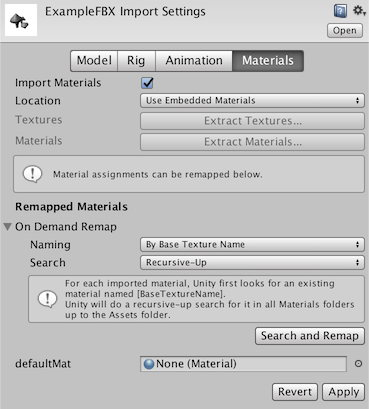 tiny temple
So I know I can extract the materials as an option, but I already have a folder imported with the model containing the textures
green lagoon
it's not going to misplace the textures extracted the materials
tiny temple
Ohhh wait I see.
I thought material meant texture for a moment hah...
green lagoon
a material tells it which textures to use and how to render those textures but are not the textures themselves
tiny temple
Yes you are right. I am just so used to seeing "Material" as "Slot to put textures" when I use Blender
green lagoon
Fair
tiny temple
It is better now, but now there is also a faint pale background to them.
Is this just a Unity editor thing?

Wait "Cutout" removes it
 left rain
make sure the text isn't on the "UI" layer or any other layer that draws on top
tiny temple
Cool...! So now the textures all work fine.
Now... Is there a shortcut to scaling, instead of using the Transform menu in the Inspector?
I must smallify everything
surreal nebula
can't build test world
 left rain
tiny temple
Cool...! So now the textures all work fine.
Now... Is there a shortcut to scalin...
left rain
tiny temple
Cool...! So now the textures all work fine.
Now... Is there a shortcut to scalin...
parent all objects to a single gameobject, then scale that down
surreal nebula
nvm, deleting that script fixed it, I could reimport if I need
tiny temple
I was more asking how to scale down. I figured it out though
left rain
yes, that is how you scale down
make a group, parent stuff to group, scale down. otherwise you can try adjusting your world scale in blender instead
left rain
R
left rain
W/E/R are translate, rotate, scale. it's a convention borrowed from maya
surreal nebula
well its still not loading the test world after it finishes
I can see the worlds in my appdata being created today but it doesn't load into them
 crimson holly
+first time builder+ When I hit build&test its's supposed to launch vrc but mine does not launch. it just does a refresh.
+in unity+
is there something i missed? or is that fine to just continue?
tiny temple
Oh I had that sort of issue a few minutes ago when I tried too
Go to your VRChat Steam Directory and try running the one I think called "Install.exe"?
It configures VRChat to open properly from things outside of Steam
crimson holly
here?
 crimson holly
it doesnt do anything
tiny temple
Oh? Darn, maybe it is something else then
surreal nebula
crimson holly
it doesnt do anything
had the same problem, what fixed for me just now. was going into settings on the vrc control panel and locating where my vrc was
civic cloak
Happy New Year! Anybody recommend a guide to have each of these buttons toggle a song?

 cinder crypt
how can i make it so that when i export a world model from blender it carrys over the materials to vrc
hmmm
tiny temple
Oh I figured that out earlier today
tiny temple
Here, lemme check the specific button I pressed
cinder crypt
ok
tiny temple
So in Blender, go to File > External Data > Pack all into Blend
And then go to File > External Data > Unpack All Into Files
This should create a "textures" folder where your blender file is
So put that textures folder into Unity first, and afterward put the blend file into Unity and it will know to use those textures
cinder crypt

 cinder crypt
tiny temple
Is your Blender different?
cinder crypt
tiny temple
Is your Blender different?
theres only pack resources yea
tiny temple
"Pack Linked Library" and "Unpack Linked Library" must be the same thing, but renamed.
Try them and see if it creates a textures folder
cinder crypt
tiny temple
Try them and see if it creates a textures folder
btw happy new year
civic cloak
im trying to make a simple coin that is pickup-able(?)
when I create a cylinder object and shrink it down, it maintains the capsule collider, which gives it weird physics when rolling, any ideas how to change that?
Ive got everything else figured out about it, I can pick it up and throw it around, it just rolls like a capsule, rather than falling flat like a coin would
tiny temple
Are you using a custom mesh for the collider?
 tiny temple
Well, since the capsule collider seems to be the issue, why not use the model as the collider? If it is just a coin it shouldn't cause any issues
tiny temple
Yes, and then select the coin's model as it's mesh

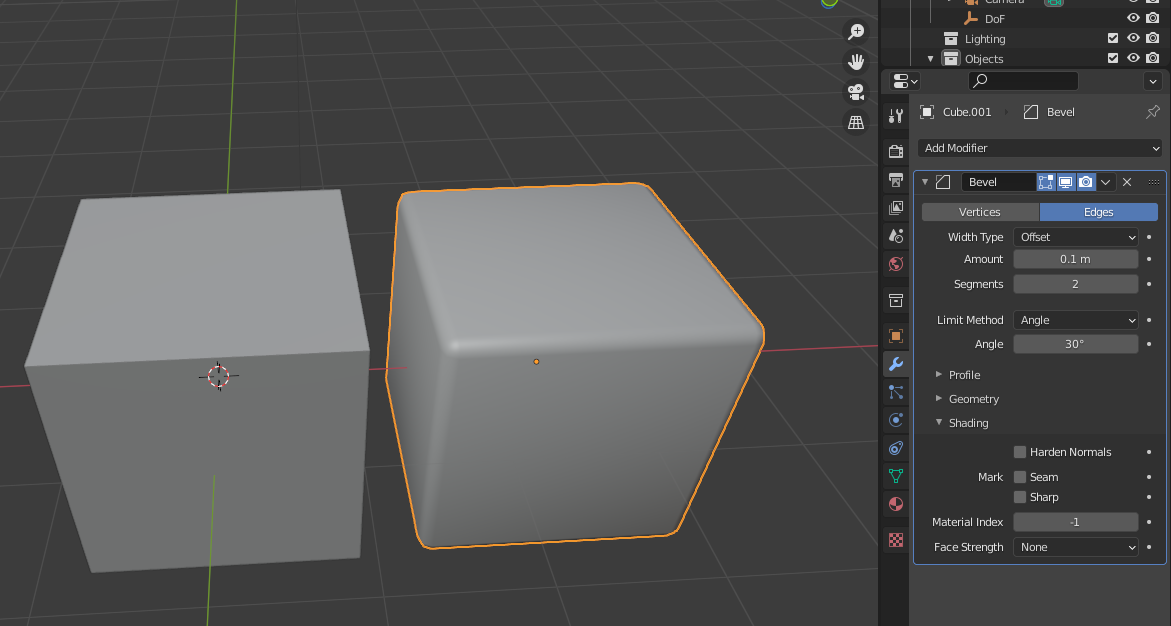
 tiny temple
Is "Cylinder" the name of the coin mesh?
Or is that a separate mesh made to be a collider?
civic cloak
Im honestly not sure, im new to this.
What I did to make the coin was create a 3D Object - Cylinder and shrank it to the size I needed
tiny temple
Darn, I am not so experienced either, but I figured that should have worked...
Mesh Collider is not much different from a capsule Collider, just a different shape
civic cloak
weird that it has that issue when using a Mesh vs Capsule collidor
Capsule works, it just rolls around which a coin shouldnt do lol
mild spade
civic cloak
Capsule works, it just rolls around which a coin shouldnt do lol
Try setting the mesh collider to Convex.
mild spade
Seems like if you have both a mesh collider and a rigid body, it must be set to convex to work with the physics engine. Pic taken from https://docs.unity3d.com/Manual/class-MeshCollider.html
 civic cloak
i was losing my mind over this xD
cinder crypt
so i got a map, but theres no collision whats the fastest way to add collision to it?
oof
tiny temple
Fastest way is probably adding mesh collision I think, but if it is a really detailed map, it might lag.
Otherwise, you can always add a bunch of box meshes to everything manually
cinder crypt

manual is not an option lmaooooo
im not indevidualy doing that
uh
illl find a way around thank u
i think i might have an idea actualy
civic cloak
one last question, I want to make this coin have a heads/tails side - how can I do that with textures?
tiny temple
I think with any detailed model editing, you would want to use another program like Blender, and then import the model
Even if Unity did somehow let you do something like that with a coin, it'd still probably be easier in Blender
civic cloak
gotcha
 proven heart
i have recently gotten one of these tags in my published world (published since 06/08/2021),
what does this mean? i assume it has to do with the world being reported?

 cerulean echo
Its a report but what mean hateful so what is in that map i dont get that lol
proven heart
it is in no way hateful lol 🙂 for reference, its called 'Pinkie Promise'
cerulean echo
I think ther ar ppl that only love to report maps for no reason
proven heart
do u know if there is any way to have the tag removed? or if it affects discoverability?
cerulean echo
I got no idea
 slow elm
I feel like asking this here might be fitting? Might need to go somewhere else... Anyway. How can I make it so that say, for example, a text box shows your username?
mild spade
slow elm
I feel like asking this here might be fitting? Might need to go somewhere else.....
I dont think you can do that with SDK2, but with SDK3 (udon) you can Get the player´s display name as a string and use that to Set a text component. But you will need an event (like clicking a button, or entering an area) The SDK3 example scene has an example of displaying the name of whoever enters a trigger collider on a text.
 ashen hazel
hello i have the same issue as this
 polar rock
is there anyone in here who knows how to fix this? i can upload a test version of my world, but when i try to upload the world to vrc, this message pops up, and i cant click upload. I cant for the life of me figure out what to do ;-;
 tiny temple
"Object reference not set to an instance of an object."
So... it sounds like maybe a parameter is empty somewhere?
And then it mentions a world creation script
I would guess that means that this supposed world creation script is looking for something.
Perhaps check the script?
 swift trench
is there a good place to get debth photos, becase only 3d camera i have is 3ds and that wont really look nice blown up as a window
 runic mural
Hello, I have a world published for more than half a year. I have people hanging out in it daily and it got favs, but it's been stuck in Labs for a long time. I've seen worlds with much fewer visits and favourites than mine. Just now I checked the new worlds and there was one empty world that was aproved.
Is there a way to tell what's stopping it from being published?
upper obsidian
Everything works automatically. There are only a few factors that affect this:
No complaints, the number of visits, and the number of people who added to favorites.
runic mural
I don't know what to do anymore. Everyone seems to publish within days with fewer visits and favorites.
 ruby jay
proven heart
do u know if there is any way to have the tag removed? or if it affects discover...
ruby jay
proven heart
do u know if there is any way to have the tag removed? or if it affects discover...
ignore the tag, it does not impact your world by any means and only you (and people with elevated permissions) can see it
proven heart
ruby jay
ignore the tag, it does not impact your world by any means and only you (and peo...
ah thats good to know, thanks so much!
ruby jay
people report worlds all day, especially if they just dislike the content a lot (hate it) 
civic cloak
hello all! anybody have a recommended guide to make each of the buttons trigger a different audio file?

 hollow hare
So I added mesh colliders to everything in my world but the player can still just walk through everything. What am I missing?
 stone jetty
i searched this question but couldn't find much specific -
way/ways to have scalable items in worlds with a slider?
someone said they did it with brokeredsync but i couldn't find that option using it
 final radish
is there a way to view your world upload cooldown? There's the limit on one world publication per week but I can't find a countdown or a timer for it
 rare flare
I just uploaded a world and when i go to load into it i just get kicked out of it and back to my home world is there a fix for it?
final radish
rare flare
I just uploaded a world and when i go to load into it i just get kicked out of i...
do you have a spawn point set?
rare flare
tbh im not 100% certain on if i do im still new to worlds especially Udon worlds
final radish
in your world descriptor, there should be a drop menu called "spawn point" or something. Just create an empty object (create>empty), then put it in yuor world where you want the spawn to be, an drop it in to the spawn thing in your world descriptor
rare flare
okok imma reupload and test to make sure it works
welp that worked now i have the issue of i just fall through the world cause nothing has colliders i guess lmao
 stone marsh
final radish
in your world descriptor, there should be a drop menu called "spawn point" or so...
stone marsh
final radish
in your world descriptor, there should be a drop menu called "spawn point" or so...
Just to clarify, you don't actually have to do this. There is no way to upload a world without a spawn point because if no spawns are set, the world descriptor acts as the spawn point, this only wouldn't work if the world descriptor is set in a highly erroneous location such as absurdly far from 0 or in a collider.
stone marsh
rare flare
welp that worked now i have the issue of i just fall through the world cause not...
you need to add colliders to your world meshes, such as your floor.
rare flare
do i add that through unity or blender cause this is a import from what i made in blender
stone marsh
In Unity. Click on the mesh that needs collision, and add a component, mesh collider
rare flare
okok ty i got it all to work now
faint geyser
hey im trying to play a movie using USharpVideo but its not working only youtube links are working for other player but if i put a link that is not youtube it will work only for me it is a direct link to a mp4 video
 hazy pebble
I'm generating an mp4 video with ffmpeg via node js (fluent-ffmpeg), but it crashes the video players in vrchat.
http://f.thetechnolus.com/@ps/tempshare/videos/test.mp4
https://www.metadata2go.com/result/4733f04d-e291-4ebf-8a26-816a345abe56
Any thoughts on what options to use to generate it so that it will play?


Online exif data viewer
This online metadata viewer will show you all hidden metadata info of audio, video, document, ebook & image files.
hollow hare
so if I want to make a connected room in vr chat (similar to the theater in movies and chill) can I just load a new scene in unity with that room or is there something else that needs to be done?
hollow hare
ok
thanks
is there a way to have variables persist across different vr chat rooms?
faint geyser
idk about that
tiny temple
I have found a Fireworks Launcher Prefab I want to use, but it says it is for SDK2 and I have SDK3. Will it still maybe work?
 fossil hull
tiny temple
I have found a Fireworks Launcher Prefab I want to use, but it says it is for SD...
fossil hull
tiny temple
I have found a Fireworks Launcher Prefab I want to use, but it says it is for SD...
If it doesn't rely on vrc components, then very likely.
tiny temple
Nice...!
near escarp
It very likely relies on sdk2 components
tiny temple
...Not nice!
Thanks for the answers though. My computer is super slow and it would take forever to test
fossil hull
tiny temple
Thanks for the answers though. My computer is super slow and it would take forev...
Can you link it?
tiny temple

[Unity 2018 Version Updated] Required assets: 1. Standard Assets 2. VRChat SDK 2 Usage: 1. Import the package into the project. 2. Drag the fireworks guns (prefab) into the scene. 3. Feel free to customize them. Contact: Discord - Hodges#3028 Discord Server - https://discord.gg/6RZgZGz VRChat -
Such a shame. I really wanted fireworks
fossil hull
tiny temple
https://booth.pm/ja/items/1773137
Yeah, it looks like the gun is exclusively for SDK2. However, you could take the Particle Effect and add it somewhere else if you wanted to.
tiny temple
Oh? How easy do you think it would be to make it work on like, a stick?
fossil hull
tiny temple
Oh? How easy do you think it would be to make it work on like, a stick?
Depends on how proficient you are with Unity.
tiny temple
I learned everything I know about Unity yesterday
fossil hull
Yeah, that might be a bit too much if you just want a quick solution.
tiny temple
Rat
Maybe I can find an SDK3 version somewhere...
Is there any specific place to look for this kind of stuff?
Actually you know what I am gonna try to figure it out anyways
tiny temple
So... What does it mean if Unity says "Failed to import package with error: Couldn't decompress package"?
I am trying to import something that should be compatible
humble forge
Good late afternoon! Can anyone help me real quick when it comes to hiding nameplates, avatar pedestals and avatars from a distance? I recently made my room with teleport locations, and hid the rooms with the LOD and didnt think it would still show nameplates/ avatar pedestals and avatars. I tried to to use VERY large mirror with everything off facing away from the location where you can see people. Only avatars and avatar pedestals seem to show. I feel like theirs a very simple thing and havent seen on online to fix this in.
lapis willow
Is there a way I can have one audio source override and mute another audio source? I have 2 music players, one for a large space (ie. house) and another for a specific area (ie. bedroom) with a different playlist on each player. I'd like to find a way to make the bedroom audio source completely cancel out and take priority over the whole house audio source. Either that or figure out how to link multiple players so that pressing Play on one, pauses all others. Thank you!
I thought i could control this by setting different priorities on the 2 different audio sources, but they still both play over top of each other
humble forge
cyantrigger where it will run as a SDK2 and convert it to work with SDK3
If you know SDK 2, most of us still remember the old method before sdk3 came around.
tiny temple
Does anyone understand this error? It will not let me build and test now
 humble forge
Sorry, I wish I knew.
tiny temple
Maybe it's because I added that "UdonSharp" thing...
I wish I knew how to remove it
 finite frigate
Has anyone used the SDK for unity on a MAC to upload a world? And if so how did it go, any issues?
humble forge
tiny temple
Maybe it's because I added that "UdonSharp" thing...
I wish I knew how to remove...
UdonSharp is very picky. I had to redo my room a few times till I got to build a better understanding what doesnt break it as I build. You would make a new project without SDK3/UdonSharp and redownload new ones and put them in. Make sure when putting anything in, the items or packages dont come with their own version
humble forge
finite frigate
Has anyone used the SDK for unity on a MAC to upload a world? And if so how did ...
My one friend of mine actually tried it and seemed to work okay.
tiny temple
Maybe I should try reimporting the VRC SDK...
humble forge
VRC SDK and UdonSharp
tiny temple
Udon sharp isn't doing anything though, I don't need it.
The thing I was trying to add that used it wasn't working
humble forge
I see, well then just SDK. The item didnt come with UdonSharp?
tiny temple
You know those drawing pencils that are in a bunch of worlds? I tried adding those
They would fail to decompress when adding them in though. Dunno why
humble forge
Oh? Weird, I recently put one into my world.
tiny temple
Yeah what I found online said it should be as easy as dragging them in
humble forge
One moment, I will send you a link of what worked for me just fine.
civic cloak
anybody have a guide recommendation -I want to make it so each of these buttons triggers a different song
 lapis willow
humble forge
If you know SDK 2, most of us still remember the old method before sdk3 came aro...
lapis willow
humble forge
If you know SDK 2, most of us still remember the old method before sdk3 came aro...
Unfortunately I'm very new to this so i don't know sdk2 and I don't know the method you're talking about. is there a tutorial somewhere that might explain it? Google isn't being very helpful atm.
humble forge
lapis willow
Unfortunately I'm very new to this so i don't know sdk2 and I don't know the met...
I haven't looked, you would have to find someone who has time to sit with you and show you. I could try to show you sometime within these few days if no one can get to you. I will use my world as an example.
lapis willow
humble forge
I haven't looked, you would have to find someone who has time to sit with you an...
I'd appreciate it very much, and no rush. I've currently got it set up where they just don't overlap each other, but I'd like to spread one of them out to cover more area
humble forge
lapis willow
I'd appreciate it very much, and no rush. I've currently got it set up where the...
Fair enough ^^ Hopefully someone gets to help you asap.
fossil hull
lapis willow
I'd appreciate it very much, and no rush. I've currently got it set up where the...
Not sure if I understood you correctly, but would it be enough to disable one sound source and enable another, basically toggle between them? You could try following a mirror toggle tutorial, the concept should be the same.
upper obsidian
Instead of two sound sources, you need to put one, and all issues with switching will be resolved by themselves.
lapis willow
fossil hull
Not sure if I understood you correctly, but would it be enough to disable one so...
The way it's set up now is I have 2 players, each with a different playlist, Main area and bedroom. The UI for each are in different spots of the house and I'd like the house player to play throughout. Ideally, either the sound bubble for the bedroom player would filter out all other audio sources, or if you pressed play on one UI, it would pause the other UI, and vice versa.
If its not do-able, then ok. Just wanted to know if there was a way
lapis willow
upper obsidian
Instead of two sound sources, you need to put one, and all issues with switching...
Could I link 2 different UI to 1 single audio source? That would be even better. They have different song playlists attached to them
fossil hull
lapis willow
The way it's set up now is I have 2 players, each with a different playlist, Mai...
Of course you can, but I thought they needed completely different ranges.
lapis willow
fossil hull
Of course you can, but I thought they needed completely different ranges.
Now that I think about it a bit more. since its local audio, it doesn't need to have 2 separate audio sources
fossil hull
Are you simply trying to switch soundtracks? Your explanation sounded like you want to do more advanced things, but I'm going to be honest, I'm not sure if I fully understood.
lapis willow
The idea is 2 different playlists. the UI for the whole house playlist has more upbeat and songs for hanging out and all that, bedroom UI has chill sleep music in it. Since its local audio and doesn't change for others, one audio source for the entire area will do just fine, as long as when I hit play on the bedroom player, it will pause the music playing on the whole house player
I'm sorry I'm not explaining well
fossil hull
So basically, you want to change global audio when people move between zones?
I guess what I want to know is, what happens after you change music in the bedroom but go outside again.
If it's okay to stay chill, then you only need to touch the buttons and switch the clip of the audio source whenever they are pressed.
lapis willow
Well, as of now I've scrapped the idea of 2 different audio sources. So the question becomes, can I have the play button of one UI, automatically pause the music of the other UI, and vice versa
just like mirror toggles
fossil hull
lapis willow
Well, as of now I've scrapped the idea of 2 different audio sources. So the ques...
Are we talking about the video player here?
Sorry, you were talking about playlists and stuff, so just making sure.
lapis willow
no, its an audio player prefab that allows you to add mp3 files to it
fossil hull
I see. If it's a prefab then I don't know what it can and can't do.
It definitely possible to just switch the mp3 of an audio source and it should just switch automatically, no idea if that prefab can handle that though.
lapis willow
I see, well if anything, I know I've solved one issue and that's a huge help. Thank you for your patience
upper obsidian
If these are two identical prefabs of players, add a couple of triggers to control each other, and output this to one audio source.
lapis willow
upper obsidian
If these are two identical prefabs of players, add a couple of triggers to contr...
That sounds exactly like what i'm looking for. I will try to figure that out. Thank you
upper obsidian
This can be added to the buttons, or you can put a trigger with colliders, where the player will be able to hook and switch them while passing them.
tiny temple
I think my world is permanently broken
tiny temple
Where did the control panel go?

This happened because I reimported them
I suppose if you zipped the files and sent them to someone maybe?
You can make your own backup, just copy and paste the unity folder
 patent wave
im trying to put logos/sticker .png's & .jpg's over a texture that I tile. i tried 'ui raw image' but it doesn't react with lighting it seems. is there a good way to put those images over the texture in unity, or do I have figure out the correct dimensions and pull it out of unity and place the images on the texture?
 north siren
How can I sync pickups between quest and PC? Im trying to sync QvPens for both quest and pc but it doesnt work. The pens work fine for people on the same platform
bold ibex
Where & how do I find the prefabs for items commonly seen in many world? For example, I see the same couch type, the same animated cats type, the same objects to pick up like the fluffy chicken stuffed animal, and the hanging lights that light up multiple colors.
north siren
bold ibex
Where & how do I find the prefabs for items commonly seen in many world? For exa...
https://docs.google.com/spreadsheets/d/e/2PACX-1vTP-eIkYLZh7pDhpO-untxy1zbuoiqdzVP2z5-vg_9ijBW7k8ZC9VP6cVL-ct5yKrySPBPJ6V2ymlWS/pubhtml#
dont know if this is exactly what your looking for but this is a list of popular prefabs
 limber panther
north siren
How can I sync pickups between quest and PC? Im trying to sync QvPens for both ...
limber panther
north siren
How can I sync pickups between quest and PC? Im trying to sync QvPens for both ...
Make sure your Hierarchy is exactly the same for both platforms (you can always delete all an objects components if its not compatible). If not, you may find users of the other platforms picking up wildly different things. Thats usually what does it for me, but you might also want to rebuild the quest version to sync it up
civic cloak
hey im trying to set these buttons to play a song when you click them does this look correct?


currently not working
- Ok this works if the music is set to Play on Wake, which I dont want because I have multiple songs for the different buttons
near escarp
misty wave
Is it possible to animate meshes for particle emission without having to use complicated shader animations? I'm interested in recreating some of the aquarium prefabs
north siren
limber panther
Make sure your Hierarchy is **exactly** the same for both platforms (you can alw...
I changed the materials for the pens in the quest version, should that affect it at all? I also removed some objects, instead of removing an object I just turn it into and empty gameobject?
limber panther
north siren
I changed the materials for the pens in the quest version, should that affect it...
Yea... don't remove any objects. You can always toggle them off or remove their components. Deleting objects will mess up the syncing
north siren
limber panther
Yea... don't remove any objects. You can always toggle them off or remove their ...
okay thanks, thats probably why
 nocturne crown
texturing this beast

 alpine spoke
Looking for an asset I've seen in a few worlds. Basically a minimap with live view of player locations, usually found in the lobby.
 river creek
Morning - I am working on a new scene and it is giving me the error VRCSceneDescripter is required to build a world. I was wondering if someone could help me?
pleease ♥
 minor veldt
any clue on why terrain grass disappears entirely when I uncheck billboard?
 sleek cloak
river creek
Morning - I am working on a new scene and it is giving me the error VRCSceneDesc...
sleek cloak
river creek
Morning - I am working on a new scene and it is giving me the error VRCSceneDesc...
Have you added the descriptor to your scene?
Needs adding as a component to one of the game objects in your scene.
 boreal elbow
i uploaded a world and it wont let me make it public. it also doesnt show up in my worlds and i cant launch it. I have the correct trust rank to be able to upload worlds so i dont understand whats wrong.
river creek
sleek cloak
Needs adding as a component to one of the game objects in your scene.
Thanks!
boreal elbow
boreal elbow
i uploaded a world and it wont let me make it public. it also doesnt show up in ...
i was able to fix everything except making it public.
 scarlet moon
whats the easiest way to make water?
green lagoon
apply a water Shader to a plane?
https://vrcprefabs.com/ this has a bunch of water shaders
scarlet moon
thanks rain
 severe patio
alpine spoke
Looking for an asset I've seen in a few worlds. Basically a minimap with live vi...
severe patio
alpine spoke
Looking for an asset I've seen in a few worlds. Basically a minimap with live vi...
Oh! I've been looking for that as well, lemme know if you find it!
alpine spoke
severe patio
Oh! I've been looking for that as well, lemme know if you find it!
Ditto ^^
 desert python
which worlds has it?
bold ibex
anyone know how to fix this? when i select an object a lot of the time the directional thingy to move it or adjust the size of it is way above the object and it makes it difficult to move the object into place or adjust it.
 near escarp
That's just how the object transforms is, but you might have more luck with vertex snapping
bold ibex
near escarp
That's just how the object transforms is, but you might have more luck with vert...
thank you sir. :)! also it's weird but everytime i see ur profile pic next to your name it looks like a KKK person to me without looking deeper lol it gets me everytime.
will try this vertex snapping 🙂
stone marsh
bold ibex
thank you sir. :)! also it's weird but everytime i see ur profile pic next to yo...
Basically, the Origin point is set wrong for the object. You can fix it in Blender extremely easily.
Import>Select all>Object Menu>Set Origin>Origin to geometry (or whatever option is best)
humble forge
Can anyone help me real quick when it comes to hiding nameplates, avatar pedestals and avatars from a distance? I recently made my room with teleport locations, and hid the rooms with the LOD and didnt think it would still show nameplates/ avatar pedestals and avatars.I feel like theirs a very simple thing and havent seen on online to fix this in. I want to avoid stacking rooms on each other
severe patio
Has anyone used the Udon Airtime prefab?
Im trying to add it to my world, but everytime i jump i get zero gravity.
Unsure what seeings to change on it.
 opaque flax
i put the latest version of vrc billiards community edition in my world. i can hear the ball collision audio any where in the world. ive checked all the audio sources in the prefab and all the spatialization settings seem to be correct. is there anything else i can check besides the prefab?
 lucid temple
how do you know how to scale your worlds so that the average player can actually fit in it?
green lagoon
if it's helpful one Unity cube is 1 meter
 modern ridge
When are we getting Fred back in the SDK to help with height *sob*
stone marsh
lucid temple
how do you know how to scale your worlds so that the average player can actually...
Player collision is just under 2m so that a player can walk under a 2m gap. A Unity capsule is 1x2m, the same size used for player collision. Spawn a unity capsule and stand it upright.
lucid temple
thank
 manic sonnet
Hello! I'm having some weird behaviour on my Unity UI Scroll Rect component. It starts scrolling when I move backwards! Any idea what it could be and how I could disable that?
I've set my scrollbar Navigation to None.

 keen haven
hey im new to building and Im having trouble with a collider, or at least i think there is a collider that is not supposed to be there, is there a way for me to see all the colliders?
 unique radish
keen haven
hey im new to building and Im having trouble with a collider, or at least i thin...
unique radish
keen haven
hey im new to building and Im having trouble with a collider, or at least i thin...
Idk if this helps but you can filter out all the objects in your scene by if they have a certain type of component attached. Lets say you are looking for a box collider, so typing "t:BoxCollider" in the scene search will filter only the box colliders for you to see
bold ibex
Hello, in a world is it possible for example to make a button active or inactive depending on the private or public session active ?
for example if the world is in a private session the button is active and if it is in a public session it is inactive?
stone marsh
bold ibex
Hello, in a world is it possible for example to make a button active or inactive...
That's not possible, no. You can hide things behind passwords, keys, username checks, all sorts of things. But there isn't a way to detect instance type.
bold ibex
stone marsh
That's not possible, no. You can hide things behind passwords, keys, username ch...
ok, it's a shame;) thank you very much for your answer.
unique radish
bold ibex
ok, it's a shame;) thank you very much for your answer.
Hmm.... what you could do is create a button that only shows up if a specific player is in the world and only they could use it
worldly hull
Anyone have a rain-glass shader?
errant junco
is there a way to in unity to see the size of my world while i'm working?
worldly hull
like scale or file size
bold ibex
unique radish
Hmm.... what you could do is create a button that only shows up if a specific pl...
thank you, yes but I really wanted to manage more by type of session than by people.for example if you create a private session of this world, you and the people you invite have access to a button
worldly hull
Anyone know how to have a canvas overlay in vrc?
 vestal oriole
I have a problem where I'm trying to update my world, but the previous music is playing alongside the one I'm trying to change it to when I'm at the screen where you type in the description. I've turned off the object with the old music and even deleted it. What should I do?
random sphinx
would anyone be able to tell me how to make animated objects globally synced?
i tried the object sync script but that didn't seem to work
 south orbit
im looking for spray paint / spray cans for vrc unity world creation, i cant seem to find any only few very outdated ones, anyone has any ideas ? i even looked up for guides towards making some from scratch but i cant seem to find any of that either, what i want / need is spray cans that can interact with walls as in u paint on the walls and not like 3D as with markers example .
 hollow swift
is it possible to setup a display that you can play livestreams on for your room
vestal oriole
vestal oriole
I have a problem where I'm trying to update my world, but the previous music is ...
nvm I figured it out. One of the other objects had an attached audio component that shouldn't have been there.
bold ibex
any technical able ppl able to help rn?
 south briar
Any idea's? Could use some help. I try to update my world but it never gives me the (New World Creation) Screen, it just stops.
 keen haven
unique radish
Idk if this helps but you can filter out all the objects in your scene by if the...
keen haven
unique radish
Idk if this helps but you can filter out all the objects in your scene by if the...
thanks for the help, it was an edge loop with a box collider
green lagoon
worldly hull
Anyone have a rain-glass shader?

GitLab
A shader for Unity that (ab)uses some Unity features to produce glass-like glass.
green lagoon
errant junco
is there a way to in unity to see the size of my world while i'm working?
https://github.com/oneVR/VRWorldToolkit this has a tool to tell you the size of your upload and what exactly is taking up how much file size
GitHub
Unity Editor extension for making VRChat worlds. Contribute to oneVR/VRWorldToolkit development by creating an account on GitHub.
worldly hull
gracias mamas
green lagoon
glad to be of help and that glass Shader is a lot more optimized than some of the other ones
 bitter silo
I'm using a distance fade cube volume shader to encapsulate the outside of my world but one side of it is exploding with light
