#world-development
39 messages · Page 111 of 1
 near escarp
 stone marsh
Indeed. It's not one or the other. Blender is for 3D modeling. Unity is required to actually build your world and upload it to VRChat.
If you wish to make your own 3D models from scratch, blender will be required. if you want to assemble your world using premade assets and parts, you can do it all in Unity. But they are not an either or kinda program, both have a very specific use and only Unity is absolutely required as you wouldn't be able to upload content at all otherwise.
 fossil hull
Check the scaling of the mirror parents. It's best to just set them to default and change the mirror scaling on the mesh.
stone marsh
Above post from Puppet is correct, but just to elaborate. If you have a pickup that is a child of a root gameobject and the scaling of the root object is not 1:1:1 (or at least all the same) on the xyz you will get distortion when the object is rotated. Your parent object needs to be 1:1:1 (or all values the same like 2:2:2 but 1:1:1 is best. You should be scaling your pickup, not the pickup's root container.
 nocturne isle
For some reason my world is 100mb, despite only being a single reasonably-sized room. Any tips on reducing size?
stone marsh
nocturne isle
For some reason my world is 100mb, despite only being a single reasonably-sized ...
Compress all your textures using Crunch Compression. If you are not leveraging MipMaps, disable generate mipmaps on the textures, ensure you apply at least Low or Medium compression on the FBX's in your scene by clicking on the FBX and in the inspector under "Compression" choose Medium. High will typically induce visual errors but Medium almost always is safe.
If you're baking your lights, use as low of settings as possible and work up till it's the visual quality you want. Baked lighting can take a lot of file size.

 green lagoon
https://github.com/oneVR/VRWorldToolkit this tool has a function to compress all of the textures in a scene and tell you what's taking up file size
GitHub
Unity Editor extension for making VRChat worlds. Contribute to oneVR/VRWorldToolkit development by creating an account on GitHub.
stone marsh
yea or use that. But it won't disable MipMaps. Odds are you're not properly leveraging them or even need them so that can save a mb or two depending on the number of textures.
Also, baking occlusion culling can take up space so if using occlusion culling, try and use as large of values as possible
green lagoon
and not that it would be a Panacea to your problems but silence released a standard Shader replacement that has a feature that makes lightmaps not as pixelated so you could use lower values https://twitter.com/Silent0264/status/1468116296176832522?s=20

New release!
My Standard shader replacement, Filamented, is now available on Booth. A high performance PBR shader with the featureset of Unity Standard with many enhancements suited to VR applications!
https://t.co/90WNtqu8Hb
https://t.co/nBHvcPnBVK
#vrchat #unity
Likes
168

 Twitter
·
Twitter
·

 nocturne isle
Don't know what MipMaps are, so I'm assuming I'm not using them. Where could I disable em at?
stone marsh
On the textures
If you see the screenshot I attached there is an option that says "generate mipmaps"
And yea, Mesh compression is on the FBXs themselves, this can save quite a bit of space too.

 hazy pebble
stone marsh
Above post from Puppet is correct, but just to elaborate. If you have a pickup t...
hazy pebble
stone marsh
Above post from Puppet is correct, but just to elaborate. If you have a pickup t...
@fossil hull Alright, I've made the changes (there was a number of parents to check 😬 )
There's one other hiccup: can I have a pickup without it colliding with other objects?
(I've collapsed some components because they are pretty standard)
 fossil hull
hazy pebble
<@!106513983044898816> Alright, I've made the changes (there was a number of par...
fossil hull
hazy pebble
<@!106513983044898816> Alright, I've made the changes (there was a number of par...

This site tells you all about layers and how to open them. I don't remember all of them, but you can open the settings and decide for yourself what's best for your use case. You can find them at Edit > Project Settings, then select the Physics
hazy pebble
Thank you! got it!
stone marsh
hazy pebble
<@!106513983044898816> Alright, I've made the changes (there was a number of par...
Your issue isn't layer in that instance. Your issue is you have "IsTrigger" selected on the box collider in your screenshot
IsTrigger will prevent collision as you're telling it that you want that collider to act as a trigger. Uncheck IsTrigger and the object will collide as Normal. in your screenshot you can already see it's on the correct layer (pickup).
 pearl scarab
Anybody know a good asset for falling snow?
 ornate panther
heya, new to building worlds - currently made a small one, and am able to build and test and everything works fine, however in game it just loads a black screen and kicks me back home, I've tried countless things to try and fix, but no luck, if anyone here could possibly give me pointers or resources it'd be much much appreciated💕
stone marsh
ornate panther
heya, new to building worlds - currently made a small one, and am able to build ...
Are you using a quest?
ornate panther
stone marsh
Are you using a quest?
no, I tried loading it once using index, but since then I've just been on my pc
 stray tinsel
does the VRchat SDK not owrk with the newest version in unity?
I was on 2019.4 but bought an asset that needs the new one and now when i load the sdk-world i dont get the tab in the top anymore
stone marsh
stray tinsel
does the VRchat SDK not owrk with the newest version in unity?
VRChat ONLY supports the version that the docs list. We are currently on 2019.4.31f1. no other version can be used.
VRChat
This page lists the current Unity version you should use when creating content for VRChat, as well as links to the correct version for both Unity Hub and direct downloads. Current Unity Version The current Unity version in use by VRChat is Unity 2019.4.31f1. Ensure you are using this exact version! ...
stray tinsel
ty
 white bison
Anyone have like a spreadsheet of public prefabs/assets?
 ionic ledge
Yo anyone know where I can find a decent template for vrchat worlds on 2019.4.31f1?
 still prawn
working on my first VRChat world and just wanted to share the progress so far, its a nice lil room for me and my friends to hangout in and hopefully the rest of the community as well once im able to publish public worlds, i dont have much experience in unity but if any of you guys have any suggestions of what else i could add to fill up space or to be more entertaining im all ears, so far i got a , video player, pen system, mirror system, & a pool table


 scenic plaza
still prawn
working on my first VRChat world and just wanted to share the progress so far, i...
scenic plaza
still prawn
working on my first VRChat world and just wanted to share the progress so far, i...
Love the lighting you've got in there
 cerulean torrent
SDK says it updated, even the new picture got updated onto my world. but when i go visit it in VRChat, the world is not updated at all.
anyone ever have this issue ?
white bison
still prawn
working on my first VRChat world and just wanted to share the progress so far, i...
thats frickin beautiful
cerulean torrent
Anyone ?
white bison
cerulean torrent
SDK says it updated, even the new picture got updated onto my world. but when i ...
probably just delayed it takes a while sometimes..
stone marsh
cerulean torrent
Anyone ?
It can indeed take a min sometimes. Also ensure you're using the correct version of unity. 2019.4.31f1
 round arrow
do i have to uses these quest shaders or can i uses what ever i want cus i'm making a game world and do not want to have to do the shaders all over again
 stone marsh
round arrow
do i have to uses these quest shaders or can i uses what ever i want cus i'm mak...
stone marsh
round arrow
do i have to uses these quest shaders or can i uses what ever i want cus i'm mak...
You should use the shaders provided by VRChat for quest worlds. You can upload unsupported shaders but they may or may not work, and can cause bad performance issues for quest or may just straight up be broken outright. You'd have to test it yourself to ensure your world functions and performs well.
 chrome juniper
For some reason,when I change my build target to android. Unity crashes
Am I doing something wrong?
stone marsh
Is it a large project or you have a ton of stuff in your asset folder?
Are you using Unity's local cache setting?
chrome juniper
stone marsh
Is it a large project or you have a ton of stuff in your asset folder?
probably i have a ton of stuff in my assets folder.
chrome juniper
stone marsh
Are you using Unity's local cache setting?
how do I know If I'm using that?
stone marsh
You have a powerful computer with plenty of memory?
stone marsh
chrome juniper
how do I know If I'm using that?
You'd know so I'd assume you aren't.
chrome juniper
stone marsh
You have a powerful computer with plenty of memory?
Um.. no
stone marsh
You may want to duplicate your entire project asset folder, make a new project and start it in Android, then add your asset folder duplicate.
Also make sure you can actually make a new project with it set to Android from the get go
chrome juniper
stone marsh
You may want to duplicate your entire project asset folder, make a new project a...
Duplicating the whole projects folder meaning that i have to duplicate it from the folder that I saved my unity projects?
 dusty moth
Build & Test seems to go to the microsoft store and not to VR or a non-VR look, any reason for this to happen?
solved. Settings client was wrong path
nocturne isle
There seems to be a ton of worlds with pens in them, but I can't seem to find the prefab for those pens anywhere. I finally found the QV Pens, but they don't seem to actually draw at all when I try to use them.
round arrow
stone marsh
You *should* use the shaders provided by VRChat for quest worlds. You *can* uplo...
oki im only wanting to uses standard shaders
stone marsh
round arrow
oki im only wanting to uses standard shaders
Then use standard lite. It's the quest standard shader under VRchat>mobile>standardlite
still prawn
nocturne isle
There seems to be a ton of worlds with pens in them, but I can't seem to find th...
The way I got qv pens to work is you need to import UdonSharp into your project first and then qvpens and it should work
 bold ibex
Anyone know how to get the things where it allows you to pick people up after pressing a button or fly while in a winged avatar like an avali
 desert python
bold ibex
Anyone know how to get the things where it allows you to pick people up after pr...
desert python
bold ibex
Anyone know how to get the things where it allows you to pick people up after pr...
https://reimajo.booth.pm/ this, even tho someone lready sent you this

I'm selling UdonSharp scripts for SDK3 VRChat world makers under the following conditions: ・The person who bought the asset is allowed to use it in every VRChat world that they upload to their own VRChat account. When uploading to a different account, the account holder must also own the asset
stray tinsel
does anyone know how to link my NDI from within resolume to a screen in unity for my vrchat build
 odd wharf
I have a question
I'm doing a 3D interactive like album thing for a band I like. Do you think a estrogen pill would be rule breaking some how

I don't think it would tbh cause it's just an estrogen pill but I want to be careful
(also please ignore the textures I plan to redo alot of them later)
bold ibex
This bug is really curious and funny

 swift trench
bold ibex
This bug is really curious and funny
swift trench
bold ibex
This bug is really curious and funny
Just realised that's a mirror
And the gameobject are off
odd wharf
odd wharf
I'm doing a 3D interactive like album thing for a band I like. Do you think a es...
Still wondering if the estrogen pill would somehow be against rules
My worries are that it's a pill and not everyone knows what it is.
The mirror trick makes me want to use it to make a Mario 64 mirror room
 manic sonnet
How can I add text that a player can click that will open a link in their browser? I want to implement this for a Discord server
stone marsh
manic sonnet
How can I add text that a player can click that will open a link in their browse...
you can't. use a QR code or just put your Discord URL.
desert python
manic sonnet
How can I add text that a player can click that will open a link in their browse...
use the copy and paste prefab
manic sonnet
desert python
use the copy and paste prefab
where do i get that
desert python
 earnest yarrow
Is it possible to change the cover photo of your world after publishing?
manic sonnet
desert python
https://tinyurl.com/vrcprefabs
i must be blind, i cannot find it lol
stone marsh
Lmao. All that prefab is, is just a UI input field.
You can legit just add a canvas and put a InputField on it and you've made that prefab. It doesn't allow you to click the URL then it open in a browser, it's just a way to have it as text in an input field so you can copy it manually. The scaling is even funky on it so the Inputfield text is blurry which would require fixing to look good imo.
manic sonnet
well I think ill just put the invite without any sort of button for now
desert python
it literally is just an input field, its better than a qr code imo
 signal totem
The documentation is a little confusing. Is it:
New User > upload worlds
User > publish to community labs?
stone marsh
signal totem
The documentation is a little confusing. Is it:
New User > upload worlds
User > ...
New User > Upload avatars
User > Submit worlds to labs
 cerulean cloud
Anyone know how to make items that you can pick up and carry and have gravity?
 warm sparrow
Does anyone have a asset pack or something similar than I can put music into and it work as like a list and players just select the song they want
 random sphinx
I saw a world with an air hockey game; does anywhere know where i can get an air hockey game?
stone marsh
warm sparrow
Does anyone have a asset pack or something similar than I can put music into and...
ProTV has a playlist feature that works well and can be setup for music only or videos. https://booth.pm/en/items/2536209

Ready-made video player solution for VRChat w/ Udon. Requires SDK3.0[Udon] (last tested w/ v2021.09.30.16.18) and Udon Sharp [U#] (last tested w/ v0.20.3). Recommend Unity 2019, 2018 works but might have some issues during import (MAKE SURE YOU HAVE THE LATEST U# VERSION). View the README.md file in
stone marsh
random sphinx
I saw a world with an air hockey game; does anywhere know where i can get an air...

2021/07/03 現状バグが多いです。最低限遊べるとは思いますがResetしなくてはいけない場面が起こる可能性があります。 40時間以上開発にかけましたが、満足いく形でできなかったので無料で配布いたします。改造など可能です。 ※SDK3(Udon)でのみの対応です。旧来のSDK2のワールド製作方式には対応していません VRChatワールド上で,エアホッケーを遊ぶことができるゲーム機です。同期待ちのため中央付近で最大5秒ほど駒が止まることがあります。駒の得点はその陣地内のプレイヤ側での挙動で判定されます。(反対側のプレイヤから見て得点が入っていないように見える場合があります)
random sphinx
stone marsh
https://booth.pm/en/items/3093354
thanks
 manic current
Is there a way to put a url control panel for video's so that you can copy and paste links into them
 delicate grove
pretty sure the input fields support pasting already with ctrl+V, in vr you just need to have vrchat as ur main window and press it on the keyboard @manic current
manic current
In unity. I’m using the sdk2 so I was wonder if there is a way to get the control panel but I realized that without udon it’s pretty much impossible
@delicate grove
delicate grove
wasnt aware that urls worked in unity anyways, but all ive used was usharp video with sdk3
 manic current
URLs do work in unity. I can pre load videos into the player but I have no control panel
still prawn
i think im finished with my first world for the most part, just need to do some more optimization and get a android version made but any and all feedback is welcomed and hopefully you guys enjoy what ive made (also if i shouldnt be posting/sharing my community labs in this channel ill delete this) enjoy and happy VRChatting! (:
https://vrch.at/wrld_ee00187d-9f2e-47f9-aa0d-d021ec80e4c9

a nice cozy⁄chill space for you and your friends to enjoy each others company in
bold ibex
hi, im trying to update an SDK2 world of mine. but it comes up as an unpublished world no matter how many times i attach and deattach the blueprint id
stone marsh
bold ibex
hi, im trying to update an SDK2 world of mine. but it comes up as an unpublished...
I mean, have you submitted it to labs?
bold ibex
yeah, its out of labs actually
stone marsh
Attach the ID, save, then restart unity
bold ibex
nope
 stone marsh
Just click publish. Let it get to the upload screen and see if your info is populated. You can just cancel if not at that point
bold ibex
nope, i checked the blueprint is still there too

i checked its the same as the one as the one im trying to update so thats not the issue
maybe i should migrate projects
the sdk might be messed up
even if its a hassle
hitting upload doesnt even try to make a new world btw
it doesnt do anything
 wind pond
Whats the best way to make a collider for this?

and make the object in the back to spin around?
 toxic wraith
how to make object automatically snap to player's bone? (when the player presses a button) 🤔
 kind leaf
One method: You get the bones transform.positions and set the objects position to the same +- any offset. https://docs.unity3d.com/ScriptReference/Transform-position.html
stone marsh
toxic wraith
how to make object automatically snap to player's bone? (when the player presse...
There's a bone follower script that comes with UdonSharp, as well as one that comes in JetDogs Prefabs.
You can just add the bone follower script to the object you want to parent to a bone, select the bone you want to parent it to on the script and then disable the gameobject.
The button would simply toggle the game object on and off which would snap the object to the tracked bone when enabled.
If you want the object to be synced, you may need to use a Object Pool and issue objects out of it using pretty much the same setup, there's an example of an Object Pool in JetDogs Prefabs if that's needed.


GitHub
An experimental compiler for compiling C# to Udon assembly - GitHub - MerlinVR/UdonSharp: An experimental compiler for compiling C# to Udon assembly
toxic wraith
@stone marsh thanks for sharing! Quick question... The scrip will attach the object to any player that enters the map?
stone marsh
toxic wraith
<@485247584907034628> thanks for sharing! Quick question... The scrip will atta...
Depends on what you want it to do tbh. All the script does is take whatever gameobject it's attached to, and parents it to the bone of the local player that you select.
If the gameobject is disabled, it will not be parented to anything because the object is off. Once it is enabled, the script will snap the gameobject to the bone you have selected.
If you want it to be networked (all players can see the object) you will need to use an Object Pool so you can issue objects from a pool to everyone who presses the button.
If you want it to automatically attach to a player (locally) on join, just leave the gameobject enabled in your scene. When a player joins, the script will initialize and parent the object to the selected bone
toxic wraith
stone marsh
If you want it to automatically attach to a player (locally) on join, just leave...
Awesome ✨ this is what I am looking for 🙌 cheers
stone marsh
Good luck!
toxic wraith
Hey @stone marsh wanted to clarify, if I have one object and it snaps to the 1st player who enters the map. How do I continue snapping the copy of the object to the new players who join the map after? 🤔
stone marsh
toxic wraith
Hey <@485247584907034628> wanted to clarify, if I have one object and it snaps ...
Is the object Synced or not Synced in your case?
If it's not synced. You don't do anything, Because the parenting is all local. The position of the gameobject is local to every single player that joins.
An example of this:
I use a bone follower to parent a world menu to every player in my world. The menu doesn't need to be synced, because it's local settings for the player to set how they want. So there's only one menu in my scene that gets parented to the player on join.
Since it's all local, each player that joins, gets their own menu without doing anything other than parenting the object to them.
If it's synced you have to use an ObjectPool. Example of this would be:
When a player presses a button, an object is parented to one specific player and nobody else, but all players in the world can see the object attached to that player. Since it's synced, if you only have one object with a bone follower, only one player can have it at a time. So you would need a pool of objects, all with VRC Sync scripts and a bone follower script, and you'd have to have a script that gets the user who presses the button and then parents an object from the pool to that specific user.
If you need it to be Globally synced, or if it should all just be local, really will impact how you do things.
Attaching something to a player on join that they can see but nobody else can see, is however, very trivial. You wouldn't have to do anything past just adding the bone follower to an object and you're basically done.
toxic wraith
stone marsh
If you need it to be Globally synced, or if it should all just be local, really ...
It’s gonna be local so I think all I gotta do is Jz activate the game obj and let the script do it’s magic 🪄. Thank again @stone marsh appreciate it 🙌🏼 it was so helpful.
bold ibex
Another week ,another try
Still same problem with freezing motion of users clicking a button
bold ibex
Buttons: "Lunar Button"
 manic ermine
does anyone know where to get a lot of the prefabs that worlds use?
like the pens+erasers
or tablets with settings etc...
green lagoon
manic ermine
green lagoon
https://vrcprefabs.com/
thanks 👍

does anyone know why a lot of the prefabs have no color in the project folder?
when i insert them into the scene they're textured
hazy pebble
stone marsh
IsTrigger will prevent collision as you're telling it that you want that collide...
I didn't want it to collide, so, using isTrigger actually worked out perfectly! Thanks!
Old project, tried updating, quest version updated perfectly fine. Pc version had errors related to udon sharp.

In order to not break all references in my project, all I need to do is:
- save
- open a new scene - delete udonsharp folder
- reimport udonsharp
right?
dusty moth
Hey there, are there world you can recommend that utilize Amplify? and Utilize procedural shaders over image?
manic ermine
does vrchat support LOD?
green lagoon
yes you can use lods on worlds
manic ermine
👍
manic sonnet
its ETA-ing over 32 hours to bake my world, will it really take that long?
manic ermine
manic sonnet
its ETA-ing over 32 hours to bake my world, will it really take that long?
if the lightmap resolution is too high it can take a really long time
do you have bakery?
it's a lot faster at generating lightmaps than unity's default one
manic sonnet
no i dont have bakery i think i set the resolution to 20
green lagoon
and are you using CPU or GPU baking

 narrow adder
I'm Really hoping for better reflections in my world if possible but I understand the rendering systems are different so If there is away to have my world look like the image (Cycles from Blender) without super lag LMK!! I'm prepared to change my ideas
 bold ibex
someone has a answer for me?
 placid nacelle
SO
VRC_CombatSystem
Does it exist anymore
and if it doesnt
is there another option
bold ibex
how do i make mirrors higher quality than 1024 without using auto.
stone marsh
bold ibex
how do i make mirrors higher quality than 1024 without using auto.
Just set it to auto and set AA to max.
Auto will give up to a 2k mirror.
Auto+max AA is the highest quality you can set naturally. There's really not much of a reason to not just set it to Auto outside of intentionally offering a low quality option. Personally I use Auto with no AA and mirrors look great in my world but none the less.
 ionic coyote
Hey um...
So I've been working on my projects and opened it today and found that in the VRChat SDK menu doesn't have the open to open the window to upload/see my content/log in anymore.
And it's missing in my layout in Unity.
Any idea what happened?
bold ibex
ionic coyote
Hey um...
So I've been working on my projects and opened it today and found that...
are you getting any red errors at the bottom of unity (in the console)? What version of unity are ye using? how recently have you imported the VRCSDK? have you imported any new assets into your project or made other changes that may of caused it tobreak
ionic coyote
In order:
No errors just warnings from world backdrop music. Which I know how to fix.
The one VRChat currently says so use...pretty sure.
Not really. I just opened the project a day later and it was gone.
I actually recently reimported it to check if that'd fit it. Nothing else should have broke it, last I did was upload the world.
ionic coyote
2019.4.30.30f1
ionic coyote
On it
bold ibex
even a slight difference in version might cause problems, ive had a few ppl wit the vrcsdk just breaking for interesting reasons
 bold ibex
you should reimport the vrchat sdk again
do u hav packages like poiyomi or a videoplayer
ionic coyote
bold ibex
you should reimport the vrchat sdk again
I did. Deleted both the SDK + meta files.
Then reimported them.
ionic coyote
bold ibex
do u hav packages like poiyomi or a videoplayer
Nope. Nether in this world.
 tidal lichen
is there anyway, i can turn my 2.0 world into 3.0 without any issues? I did a backup test to try and do it, but ran into many problems like the vrchat control panel showing up.
I realize i have to remake all scripts with Udon.
but i don't want to remake my entire world.
am i supposed to do steps before switching over to 3.0? like deleting vrc files from the assests and so on?
the problem i ran into right now, is the console is yelling at me about namespace not matching up.
near escarp
tidal lichen
is there anyway, i can turn my 2.0 world into 3.0 without any issues? I did a ba...
I'd suggest looking into this https://mobile.twitter.com/cyanlaser/status/1425155263741444098


Do you have old SDK2 projects you wish were Udon? Soon you will be able to automatically convert them to CyanTriggers! Here is a video of me testing the conversion system on my first public world, "Lab Escape". #CyanTrigger #VRChat
https://t.co/DQXQtpXvvR https://t.co/JrPHezFvYB
Likes
209
Twitter
·
Cyantriggers being SDK3 equivalent
manic current
WHat are some suggestions for color grading for vrchat worlds? Sorry im kinda new to this
green lagoon

GitLab
A surface shader for Unity providing cel-shading. (Forward rendering only)
delicate grove
any way to smooth parent an object via script? currently using rigid body joints and would use dynamic bones if they didnt stop working at a certain distance
 opal sigil
So hello i have a little probleme with my vrc world
So all the quest after like 10min on the map cant pickup no more object all the object have their collider or their sync , pickup script
But like the only solution its them to re join the world
narrow adder
does anyone know where i can get a waterfall prefab?
 stable crater
does someone know a good way to make fishes swim in an aquarium?
narrow adder
stable crater
does someone know a good way to make fishes swim in an aquarium?
animations most likely
stable crater
narrow adder
animations most likely
yeah but I want to avopid that because it'll take a while and it will look very robotic
toxic wraith
Heyo, I was wondering if there is a way allow players in the map to select game objects and make a list out of it?
*list wud basically contain the name of the object and score in-front of it
swift trench
narrow adder
I'm Really hoping for better reflections in my world if possible but I understan...
try adding a few reflection probes
and idk any good glossy glass shaders but maby just increaseing glossyness may help
 soft tide
hi everyone i have some tech issues and i wonder if someone can help me, when i finished my world i wanted to try it before publish it and idk why it sends me everytime to the hub
swift trench
soft tide
hi everyone i have some tech issues and i wonder if someone can help me, when i ...
odd, to shouldnt send you to home, make sure your vrchat path is set up right in your sdk and make sure its the sdk launching vrc and not you
and if you want to do in editor testing use cyanemu
bold ibex
I used to have that issue and i couldnt figure it out, ive reinstaled vrchat and the whole thang and also made sure the vrcsdk knows the directory to my vrchat.exe
only fixed when I factory reset my computer on all drives, dont reccomend you to do this for something simple like that but yea
soft tide
okay i will try thanks
narrow adder
swift trench
try adding a few reflection probes
Thank you :))
still prawn
having this issue where my/others avatars are floating slighty above the floor even though the collider is lined up properly, ive tried lowering the collider to see if would fix it but to no avail
swift trench
still prawn
having this issue where my/others avatars are floating slighty above the floor e...
by other people do you mean on your device?
cus is so that could be your hight imporoperly calibrated
still prawn
one of my friends had joined the world while i was testing it, it was the same for him but could be something to do with the height
bold ibex
i can not update my world any more
it is always in unity a "configurate your world" message when uploading
what do i have to do ...
people waiting for the update
please help me 😦


this world was online 3 months now and had 200 favs and only 2 reports ( from idiots)
Anyone here? it is really urgent
bold ibex
bold ibex
it is always in unity a "configurate your world" message when uploading
i dont see the problem? thats the upload screen
just check the box to upload
 burnt kayak
Hey guys! Quick question. I am making a world for the first time. I am using maya and I am trying to find scale references. I usually make projects for UE4 and didnt realize the scale of Unity and UE4 are different. I oversized my world and I am trying to downscale. Does anyone know where I can find good reference assets?
bold ibex
burnt kayak
Hey guys! Quick question. I am making a world for the first time. I am using may...
you can spawn a cube in unity, and its scale in the y can be the height in cm
so u can make it like 1.8 for someone who is 180cm
burnt kayak
bold ibex
you can spawn a cube in unity, and its scale in the y can be the height in cm
Awesome thank you so much!
bold ibex
np
also make it less fat cuz ppl arent yknow that thic
@bold ibex
the problem is it is already out of labs
it is already published
there should be stand "update world" not "configure world"
it is not a new world
it is the same world, the same files, the same directory of my already public running world with daily visitors
i just wanted to publish the today update
ensure that the wrld id in the pipeline component is the same as the world that is already publoshed
do u know how to grab a wrld id from the website?
yes
burnt kayak
bold ibex
also make it less fat cuz ppl arent yknow that thic
fo sho
bold ibex
and where to put in the ID?
Pipeline Component
on the same gameobject w the scene descriptor
i would sugggest literally removing the pipeline component, sometimes detaching isnt enough for unity
and then attach the wrld id to it

remove the pipeline?
yeah so right click the name of the Pipeline manger, remove
it will make a new one instantly
should anyway
dont remove the scene descriptpr

thx
i insert it there
and then when the new Pipeline manager is back attach the wrld id
yup
holy that was close
poeple already waiting for events xD
you saved me
dont thank me until it works
u sure it works
(upload running)
@bold ibex you my friend are a real hero

ur welcome
It is a shame the limit now for quest is 50 MB
the world is that hard optimized it would never occur problems for quest users. you just had to be lucky to upload your world for quest sooner when limit was higher
and i am with baking, occlusion etc. way under 100 MB
 rancid osprey
So.. hey everyone ❤️ , I dont want to spam this channel but would like to see if anyone can work with me on my first world. its online.. but .. . when I add water it plays in unity but not in game. I figured wind would help.. so i tied that in and nothing happens still. (trees move at least)
bold ibex
@rancid osprey you can DM me
bold ibex
bold ibex
It is a shame the limit now for quest is 50 MB
im p sure they upped it to 100
fairly recently
last time i checked was 3 weeks ago
i make a android build and check again
@bold ibex i am happy if you pay me a visit 🙂
bold ibex
bold ibex
<@456226577798135808> i am happy if you pay me a visit 🙂
send world link
toxic wraith
toxic wraith
Heyo, I was wondering if there is a way allow players in the map to select game ...
Guys any idea ?
toxic wraith
toxic wraith
*list wud basically contain the name of the object and score in-front of it
bold ibex
@bold ibex it is quest compaible now xD
resizing the textures back to better look already. quest is still there for access of course
a good day so far xD
yeeee
noice
 gray sleet
When will be converting sdk2 worlds to sdk3 be free. And necessary
 regal gyro
Can we modify physics collision matrix?
 novel furnace
I'm trying to find where to download the SDK.
bold ibex
bold ibex
<@456226577798135808> are you still up?
yea why
you can just link the world
from the vrchat website
VR CHAT HOME seems like a very common name so
@bold ibex uploading, will be ready to go in the world with you in about max. 15 minutes
 final radish
if I upload a world but set it to private, can my friends view and enter it freely?
bold ibex
@final radish you have to invite them
final radish
bold ibex
<@757619909244092497> you have to invite them
is there a setting or something to have a world where your friends have access to the world but no one else?
bold ibex
No. It is private or public. And real public to All only after Pass Labs
@bold ibex ok done. putting link in
you can also add me and join me: MisakaChan

World made by Misaka Chan- You can chill out on a comfy space Dream Place with a lot of Games and Objects to use - Weekly Changing Maze in different levels - Fully Optimized big world with integrated…
oh ww there is a lot goin on cool
alr
i make a new upload cause i forgot to upscale skybox
xD
done 🙂
@bold ibex excited to see you 🙂
oh btw I have no mic and im on desktop
@bold ibex hope you joined the right one. there was the old lobby still open
i beleive so
you just ignored me xD
still rescale textures....he forgot some in directory
 idle jolt
I already asked in #3d-modeling but I might as well ask here to expand my range
I’m having a problem when it comes to double sided polygons. I downloaded a file from sketchfab to have in my world. The problem is that in unity all of the polys inside the model are missing while the polys on the outside are fine. How do I make it so that both sides are rendered?
I’m not sure if it matters but I tried using backface culling but it just shows where the polys are missing.
gray sleet
Please help. cant load my world in vrchat. only error i get is "Error building player because scripts have compile errors in the editor"
-Fixed
 serene pike
How do I set player movespeed?
serene pike
Ended up using udon
 frosty goblet
Is there a reason I can't change the view point from Left Eye to anything else? https://i.imgur.com/lcv4qO4.png

I noticed the depth post processing I'm working with for some reason looks like it works on the left half of both eyes but not the right half, so I wanted to set the main camera to both eyes and see if I get that bug in-editor
gray sleet
doing a little post processing. I want to have a ball glow. but when i make it glow the text in my world glows too
 steel badger
Is there a pre-made script or what have you to re-create gliding from 2.0 worlds?
 pliant hare
How can I make Audio Reverb Zone affects player's voice?
I tried putting it on different layers but it seem to be affecting only the UI/Menu sounds
Was able to figure it out, by using Audio Reverb Filter instead and adding a Audio Listener to the same GameObject
 south orbit
bold ibex
https://vrchat.com/home/launch?worldId=wrld_3dcf2d10-f111-4ea8-a312-34e24cff15cf
south orbit
bold ibex
https://vrchat.com/home/launch?worldId=wrld_3dcf2d10-f111-4ea8-a312-34e24cff15cf
nicely done so far, and nice to see u here on discord ^^ Xaint here (: been a while.
bold ibex
👍 ☺️
bold ibex
hello! ive been making a world for the past day or two now, and ive been having trouble with the sdk, Im on sdk2 (ye ye ik bad im sorry its just the one i prefer) , and every time i go up to the builder to try and upload, unity freezes/crashes everytime i click on builder. Ive noticed that if i wait long enough, maybe a minute or two, the builder screen will appear, but it takes a while to load everything so i cant do anything, 2 mins later, i can hit the buttons, and thats all i know now, ive never had this happen before, and its very annoying as im really excited to be able to test or play it. Heres a video i took of the problem if its easier to understand https://cdn.discordapp.com/attachments/593808428976046100/919340977477546044/2021-12-11_22-29-35.mp4 , if anyone knnows whats happening please lmk
hopefully the video will embed
I know its not my pc being slow as i can basically run anything, maybe somethings causing an issue?
bold ibex
another update
when i remove the vrc world
builder works fine
but as soon as i add it again
it freezes
 scarlet moon
Anyone have struggles when importing textures into unity as a begginer?
delicate grove
rendering a camera output to a render texture and have ui and uimenu unchecked yet still see my mic icon as well as all the radial menus on the render texture screen any ideas on what's going on?
 ashen bone
 stone marsh
Odd place for a pipeline manager
gray sleet
anyone know an easier way to make my world both quest and PC compat without having to copy and paste the world file and change it to quest?
final radish
if someone is in their private world (not a private instance of a public world) and if other people come in and then the host leaves, will the world instance keep working?
bold ibex
gray sleet
Please help. cant load my world in vrchat. only error i get is "Error building ...
how do you load your world into VRchat?
gray sleet
bold ibex
how do you load your world into VRchat?
i press build and test in the vrc sdk
bold ibex
interesting. im just starting and this program seems a bit overwhelming im just working on the landscape at the moment. seems like the interior/indoors will be the hardest part
bold ibex
gray sleet
i press build and test in the vrc sdk
did it give u a message to create a backup when you imported the SDK? mine gave me a message that said some of the files on the SDK are obsolete and to make a backup. i didn't make a back up tho. i was like huh, well if theyre obsolete wouldnt that mean they no longer work lol so why the need for a back up
gray sleet
bold ibex
did it give u a message to create a backup when you imported the SDK? mine gave ...
No. Make sure all your stuff is up to take
Up to date
rancid osprey
so.. media players.. any site to get the prefab?
final radish
are you able to have a portal to a private world in a public world and have it accessible to anyone?
 bold ibex
 deep parrot
anyone else having issues logging into the sdk?
deep parrot
anyone else having issues logging into the sdk?
what SDK version are u using 2 or 3
bold ibex
gray sleet
anyone know an easier way to make my world both quest and PC compat without havi...
VRChat
Setting up a cross-platform world or avatar is actually quite straightforward! In short, all you have to do is use a duplicate project to build an Android version of the asset, and upload it to the same content ID as the VRChat PC asset. The client will manage which version it needs to download. If ...
deep parrot
bold ibex
what SDK version are u using 2 or 3
3 and it just took like 10 minutes
It's fine now
Was probely just a hick up
bold ibex
oki
 urban epoch
The SDK may have issues logging in if your scene isn't saved. Try Control-S and see if that refreshes it.
bold ibex
so, im confused about the SDK pop up. do i build on the regular program and just ignore the SDK stuff or do i use the SDK stuff?
urban epoch
Popup?
bold ibex
 urban epoch
uhhhh
Well that's not supposed to look like that
You see those red words on the bottom left? Click that
urban epoch
Hit "Clear" in your console and see if there's still any red words
Yeah it's supposed to look like this lol
 urban epoch
What do they say? Screenshot/copy?
bold ibex
its one of the assets i downloaded is conflicting with something. i could uninstall or whatever that asset if i can figure out how ha
 urban epoch
Oh yeah, delete "Assets\Flooded_Grounds\PostProcessing\Editor" folder. We could theorectically fix that issue easily, but that only works if you have a scripting program like Visual Studio installed.
bold ibex
alright
urban epoch
You may still have errors that were blocked behind this one, so lets see if anything pops up.
bold ibex
thanks man. damn i can already tell this is gonna be hard asf to create this world lmao
urban epoch
Not all the assets on the store, uh, work, so it sometimes becomes a bit of a minefield when trusting other people's assets.
bold ibex
True I learned that last night when I tried to buy 2 assets and it double charged me and didn't give me any assets. Thank god my cc got refunded
Still loading the undoing of that folder.
gray sleet
bold ibex
https://docs.vrchat.com/docs/cross-platform-setup 🙂
That’s what I said wasn’t it? Make a copy of the world and change it to quest
bold ibex
gray sleet
That’s what I said wasn’t it? Make a copy of the world and change it to quest
Ur right. Sorry.
Do u know vowgan? Cause I'll need to know that too. Most likely
urban epoch
Realistically you don't need to make a separate project, those docs could use some updating and the current version makes it really easy to swap back and forth between Android and PC building.
bold ibex
Ur saying that it will work for both platforms from the jump and you don't need to do copy anything or?
And my console is all clear now! :)
urban epoch
You can do it all in the same project, you just need to hit the button in your VRChat SDK window's Builder tab labeled "Switch Build Target to Android"
There's a lot of little things to make it easier and faster, but I don't know of any videos or write-ups on it at the moment.
gray sleet
urban epoch
Realistically you don't need to make a separate project, those docs could use so...
What what? Is there an users way to swap between pc and quest? Making a copy of my pc world takes like 10 mins and then more time to change it to quest
urban epoch
urban epoch
You can do it all in the same project, you just need to hit the button in your V...
@gray sleet
gray sleet
urban epoch
You can do it all in the same project, you just need to hit the button in your V...
Yeah there is that. But then if you make any changes you have to undo thoes changes if you go back to pc
urban epoch
Things you can do to speed it up include setting up a Cache Server in your Preferences, it's just a stored location of what the project files were on the previous platform version so it can remember and not have to regenerate them. To make your textures look better on Android, go to File/Build Settings and select Android. The first dropdown on the right is Texture Compression, and change that to ASTC.
If you want to be an "absolute gamer" you can set up a file junction so that two Unity projects use the same Assets folder, one for PC and the other for Android, but that requires console nonsense and is generally unnecessary, though theoretically optimal.
gray sleet
so if i switch platform to quest. Remove stuff or add stuff. Then switch back to pc the stuff I removed or changed will be back the way I left the pc version? And same thing if I switch to quest again
bold ibex
gray sleet
so if i switch platform to quest. Remove stuff or add stuff. Then switch back ...
it just switches the build target, nothin else
gray sleet
rip. is there a way to do that though? make it so if i switch build target i can make changes freely and it not effect the other build?
bold ibex
i feel like im tryna learn german. this seems hard as fuck lmao mannnnnn
i just wanna build a pretty cabin by a river in the mountains cries
round arrow
are fast paste pvp maps do able on udon or am i going to run into network problems
scarlet moon
uploaded my first world from blender to unity. All my reflections on surfaces are showing clouds, even the ones inside. Anyone know what this could be from?
 stone marsh
Looks like you have no reflection probes, so the only thing reflecting is the skybox. Your materials must have reflectivity or Metallics turned up and since there's no probes, it's using the settings in the lighting tab.
Least that's my guess.
If you want the reflectivity, you need to add refection probes and bake them
scarlet moon
ok that could the problem. have not set up reflection probes. thanks bud
gray sleet
does it work to make a duplicate scene and use that as my quest version? so i can just copy and pate things. one scene for pc and another scene for quest
green lagoon
yeah that probably work as long as the hierarchies matchup on both of them
gray sleet
green lagoon
yeah that probably work as long as the hierarchies matchup on both of them
what if i want to edit the quest version? like remove some stuff from it
green lagoon
remove them in a way where it doesn't actually change the hierarchy like chopping off the mesh renderer not the object
gray sleet
so turn off render? not toggle off the object or delete it? why? if iwanted to delete an object do i need to have it in a seperate project?
green lagoon
turning the object off would still keep it in like your file size
bold ibex
help
gray sleet
green lagoon
turning the object off would still keep it in like your file size
so would it be better if they were seperate projects?
bold ibex
i legit dont know how to use unity at all and im just crying because ive spent 3h trying to figure out files and now im just stuck in world creation
green lagoon
gray sleet
so would it be better if they were seperate projects?
that aspect isn't going to make a big difference as it only uploads what's in the scene
bold ibex
im utterly fricked
green lagoon
could you describe a little more in detail what your problem is Nezzuko
bold ibex
idk what vrcscene descriptor is at all
and im just trying to put a frickin avatar somewhere
green lagoon
just dragged a vrchat world prefab into your map that's all you need to do to get that set up
bold ibex
but with 0 knowledge im not getting far
gray sleet
green lagoon
that aspect isn't going to make a big difference as it only uploads what's in t...
what is the best way? Or quickest way. It takes about 15 mins for me to get another project copy for quest.
Would i tbe better to just use another scene and tweak it there?
bold ibex
its not workingg
green lagoon
gray sleet
what is the best way? Or quickest way. It takes about 15 mins for me to get an...
https://github.com/JordoVR/EasyQuestSwitch this tool can help out
GitHub
EasyQuestSwitch is a Unity editor tool developed for VRChat world creators, it can automate changes to components within a scene as soon as the build platform is changed from PC to Android (for Ocu...
green lagoon
bold ibex
its not workingg
unfortunately that doesn't give me enough to diagnose
gray sleet
green lagoon
https://github.com/JordoVR/EasyQuestSwitch this tool can help out
i tried that but its so confusing. does itonly work for new projects? like idk how to work it
green lagoon
gray sleet
i tried that but its so confusing. does itonly work for new projects? like idk...
it only uses one project for its workflow
gray sleet
green lagoon
it only uses one project for its workflow
but does it need to be a new project? like how does it work? If i install it on my current world on pc. what do i do
green lagoon
gray sleet
but does it need to be a new project? like how does it work? If i install it o...
basically you use the tool to tell it how to change the map when you swap over to Android
bold ibex
to put into words how fricked i am
green lagoon
question are you getting any errors
gray sleet
green lagoon
basically you use the tool to tell it how to change the map when you swap over t...
ill download it. but i may ping you later when i try to use it
green lagoon
something that might suggest for a first-time Quest project is basically build Quest first
bold ibex

it doesnt let me do anything in "builder" in vrchat sdk
and i dont understand how to activate the vrc scene descriptor
i just wanna use the damn avatar ffs xd
green lagoon
question are you trying to build a world or uploading Avatar as we're currently in the world development section
and would you mind sharing a a screenshot of what's going on in unity
bold ibex
build a world so i can upload an avatar
or if theres a magic way to upload ur avatar pls tell me
green lagoon
like you're trying to make a public Avatar?
green lagoon
like you don't use Worlds at all to have a avatar you use personally
green lagoon
https://www.youtube.com/watch?v=IWKXbMQe3x4&list=PLRUlfYGZBxVeEAVXkaG1uydyzFZAMOuMd&index=3&t=3s here's a officially made vrchat Avatar uploading tutorial

0:00 - Intro
0:16 - Unity
0:23 - Project
0:30 - Scene
0:44 - Hierarchy
1:07 - Inspector
1:16 - Armature
1:31 - Mesh
1:39 - Blend shapes / Shape keys
1:53 - Viseme
2:13 - Texture
2:24 - Shader
2:32 - Material
2:50 - SDK
3:10 - Wrap up
====
Thanks for Watching!
If you'd like to give feedback on our guides, visit our forums here: https://ask.vrch...
bold ibex
like the avatar is already done i just need to get it into the game ahhh
should i go to the other channel?
green lagoon
the other parts of the tutorial cover the actual upload process
and yeah Avatar 3 help would probably be more relevant
bold ibex
ty
green lagoon
but yeah first I would try watching all of those videos and see if it clears it up
bold ibex
why does my udon menu thing still look like this? also rain, you mentioned building a quest world first how do u build it for quest?

windows 11 mayb
idk what is different for some@ppl on w11 but it do weird things i cant begin to understand why
it looks like its showing ye the splash screen and the image is gone
try to open the VRCSDK control panel and see if thats recognizable
is this how u build a quest world?
 bold ibex
windows 11 mayb
bold ibex
bold ibex
windows 11 mayb
i got win10
bro im bout to say f this shit and not build this world this is sooo much crazy
gray sleet
green lagoon
but yeah first I would try watching all of those videos and see if it clears it ...
does this look normal for a text button thing? for some reason the the bot collider is expanding ferther out so users cant walk near it
 green lagoon
you could click the edit collider button to make it not as sticking out as much ?
gray sleet
green lagoon
you could click the edit collider button to make it not as sticking out as much ...
its not sticking out at all. but yet when testing it makes it seam like it is
 green lagoon
weird
then I have no clue
odd wharf
Is it set as a trigger?
 mild spade
gray sleet
does this look normal for a text button thing? for some reason the the bot coll...
mild spade
gray sleet
does this look normal for a text button thing? for some reason the the bot coll...
Try setting the Z axis to the same as the others (.002) If that fails, check "is trigger" on the collider (green arrow) Maybe the problem is that your collider has weird proportions
 gray sleet
mild spade
Try setting the Z axis to the same as the others (.002) If that fails, check "is...
gray sleet
mild spade
Try setting the Z axis to the same as the others (.002) If that fails, check "is...
that... somehow worked. hmmmmm
dusty moth
So when i was working with the last SDK, I remember there being a standard human tpose, I wanted to use that for height, any idea where it would be?
or any good units to think about for world scale?
near escarp
dusty moth
near escarp
thank you
 vestal oriole
So I'm testing my world and I can't click on the avatar pedestals. I was able to earlier today, but now it's not working. They highlight when I scroll over them, but when I click nothing happens. Is this a known issue? Google gave me nothing...
On a second look, this might just be a problem with VRC's servers. It's not showing me any of my own avatars in the menu, nor my favorites. I'll give it another try tomorrow.
gray sleet
what is the best settings for android?

 tight tulip
how do i fix
this

 ruby jay
tight tulip
how do i fix
this
ruby jay
tight tulip
how do i fix
this
check your disk space, you may be running out
toxic wraith
How do we allow users to scale game objects in our map?
stone marsh
toxic wraith
How do we allow users to scale game objects in our map?
I personally use Brokered Sync as you can resize objects using it, but may require changing some of your pickups to work with it.
You can also have a button that triggers an animation to increase or decrease the size of an object. Youd create a UI button and when said button is interacted with, it can trigger an animator to either increase or decrease the size of an object using a float value.
You can also do this entirely using UDON by getting the game object and resizing it either on a button press, or when the user interacts with the object while holding it. I'm not able to open unity to show an example of this. But making an udon script to resize depending on what custom event you send it would be easy enough, then the UI button would just send a custom event to your script depending on if the user wanted to make it bigger or smaller.
toxic wraith
ok so... I gotta animate the "scale size" of the game object and then hook slider on animation via float?
script wud have been amazing, cud ur Unity work 😢
stone marsh
Yea that would work.
You don't need to like, actually script, you can make an udon behavior pretty easy to control this too. If it's local, an animation might just be quicker but there's always a dozen ways to do the same task. Whatever works
toxic wraith
stone marsh
Yea that would work.
You don't need to like, actually script, you can make an ...
I see, thanks for ur help 🙌🏼
 mild radish
Banging my head against a brick wall trying to figure this one out

Only scripts i have in (im mostly sure) are udon behaviours to hide and show a unity vid player, HQ and LQ mirrors and some UDON Chairs
Im not sure when or why the .vrcw file decided to up and vanish but its nowhere :>
mild spade
Scroll up, you must have other errors besides those
mild radish
I think I found it...
I deleted the UDON Pool table bc I knew I did it wrong but I guess the scripts stayed around?
I'll figure that out shortly
HA GOT IT
I was just being stupid haha
 short gulch
Just looking for opinions real quick, which one of these night skies do you think would be better for VR users?

 mild radish
IMO 2nd one probably
short gulch
I was leaning towards that one too. The first one is how it looks right now, but I kinda like the 2nd one more. More colorful and probably easier on the eyes
green lagoon
yeah I do like the second one but I'm biased because purple
short gulch
Fair enough haha
The first one looks a little too washed out to me too. Might have to tackle that in the color grading though
 harsh wagon
What would the best approach be for turning GIFs into animated billboard sprites?
short gulch
I think Poiyomi's shader has a flip book feature
I don't know if straight up gifs work or if it needs to be an image sequence though
harsh wagon
Yeah, that's the step I need to work out
There are sites to convert gifs to image sequences, but they only work one image at a time
which is a problem because I'm working with dozens of gifs
short gulch
Ah ok, yeah I'm not sure. Might have to ask someone who is more experienced with that shader
stone marsh
harsh wagon
Yeah, that's the step I need to work out
Poi comes with a conversion tool, right clicking the gif should show a poi option to convert to flipbook. You can also convert a folder full of single frame images, for that you can use a batch process in Photoshop to automatically open all your gifs and save them all as compressed single frame images. Photoshop has a batch processing tool that can do this. Youd then use the poi tool to convert from an image source instead of a gif and u give it the folder
Iirc if you just put the gif into the flipbook spot in poi it will auto convert it now too.
harsh wagon
stone marsh
Poi comes with a conversion tool, right clicking the gif should show a poi optio...
Would I be able to use that as a billboard texture?
I plan to have them floating in the air as opposed to on a surface
stone marsh
Don't see why not. Just use the poi material on your particle. Can put it on a mesh too if that's more desired. Or just use a quad and no billboard. Whatever works. But yea. I've seen quite a few people do exactly that, animated gifs that float just off their avatar to make it look like a hologram or something using poi
 cerulean echo
@short gulch do you stil working on the same map you tellet me long ago?
short gulch
lol yup, it's still this one
 cerulean echo
Wow i remeber long ago you tellet me mast be alot of work
short gulch
Been a lot of waiting though, taking breaks, etc. Mostly waiting on Varneon to finish up his vehicle system before I convert this to sdk 3.
cerulean echo
I see
 west niche
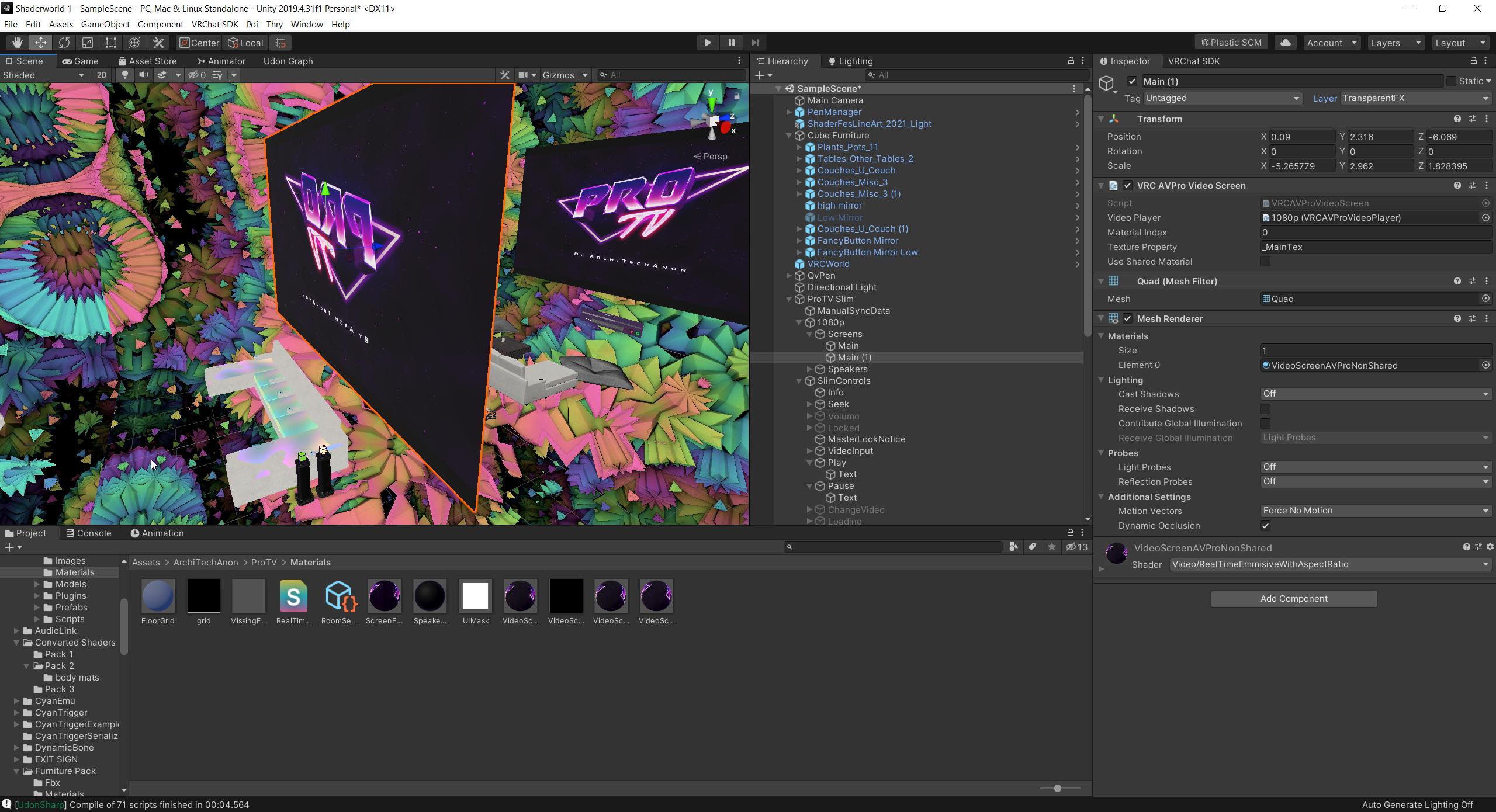
I'm trying to get a video player to be shown in a mirror behind a couch, so it's easier to watch. but how can I make it invisible to players?
/ How can I make it only visible in the mirror
what layer would that require?
stone marsh
If you want it to only show in the mirror and not be physically visible to the player at all, you can always swap the material on the screen to something like Poi since it has the option to render in mirror only. Tho, not sure how something behind a user would be easier to watch lol. But regardless, you don't have to use the material that comes with the screen, you can create any number of screens or swap the material on the screen though some other tweaking may be required and need to make sure it uses the correct render texture.
Could also just put a transparent mirror in front of the video player itself.
west niche
stone marsh
Could also just put a transparent mirror in front of the video player itself.
This is looking like an easier option
stone marsh
pretty much what I did in my 11foot8 world
west niche
THough, whole idea is that the video is visible, but also has a full mirror, and having it behind & flipped correctly looks nice
I've seen a few worlds do it, like Fancy Cat Theatre
 mystic leaf
I want the 2 buttons on the side to scroll, how do I do this?
 west niche
stone marsh
pretty much what I did in my 11foot8 world
west niche
stone marsh
pretty much what I did in my 11foot8 world
Like this
you have a mirror

You can see the video player behind it

but it's invisible to players
 stone marsh
west niche
but it's invisible to players
stone marsh
west niche
but it's invisible to players
Yea. Just use a shader that supports mirror only rendering like poi. I don't know of many shaders that do. But you can do exactly that with poi just fine.
 placid bear
So im trying to test a new world im making, but when i test and run from the control panel, vrchat doesnt launch. Im not getting any errors in my console, and im using the correct version of unity
placid bear
placid bear
So im trying to test a new world im making, but when i test and run from the con...
NVM im dumb lol forgot i moved VRchat to a new drive and it was still trying to pull the old filepath
tight tulip
ruby jay
check your disk space, you may be running out
Thx it worked
 left rain
what exactly do i need to do to earn enough trust to upload a world to labs? i've put >66 hrs into the game but i still can only upload private worlds.
 near escarp
What are the asset requirements ?
manic ermine

Elevate your workflow with the Pure Nature asset from BK. Find this & other Environments options on the Unity Asset Store.
here's a link to the page
one of the reviews mentioned the poly count being too high for how "simple" it looks
having some performance issues
near escarp
No LoD is pretty rough yeah
manic ermine

it says that there should be LODs
so maybe the guy forgot to enable it?

i would assume all the larger prefabs have LOD and the smaller ones don't?
since it says "most"
 upper pumice
any tips for a beginner
fossil hull
upper pumice
any tips for a beginner
Start small and enjoy the process.
near escarp
upper pumice
any tips for a beginner
tutorials, tutorials and tutorials
fossil hull
manic ermine
https://assetstore.unity.com/packages/3d/environments/pure-nature-188246#reviews
That asset is so nice. The environment looks like a painting in some ways. Wish I could test it out in VR without buying it though.
bold ibex
fossil hull
That asset is so nice. The environment looks like a painting in some ways. Wish ...
thanks for posting this its such a cool environment, I wonder how ppl make it like this
mayb the creator has tutorials 👀
 alpine idol
Does anyone know where i can get those bubble blowers you find in certain worlds?
bold ibex
So, do I have to buy assets for every single component of the world? Wouldn't that get expensive? Where/how can I find a building pack to build a ranch/rustic/modern log cabin type deal?
green lagoon
sketchfab has plenty of free to download assets
green lagoon
but I would note not all of them would be well optimized for running in vrchat performance-wise but certainly better than starting from scratch
bold ibex
Hmm u still have to pay for them
What do I search for to create a cabin? Like to build it myself? For the outside entire structure?
green lagoon
it has a filter for only showing free to download objects
green lagoon
you don't have to buy anything

Medieval / Fantasy Log Cabin. THE MODEL I QUITE LOW POLY. Created in blender and textured in substance painter. Feel free to use it for any purpose ^^ . Any kind of feedback would be apreciated! - Log Cabin - Download Free 3D model by Danciu Cristian-Alexa (@DanciuCristianAlexa) [526b1eb]
a free to download Log Cabin model
green lagoon

and this icon means it's free to download https://i.gyazo.com/f99e976fc9c73faa3bae54decdeeb7e6.png
 bold ibex
meh but theres no good free ones
green lagoon
what don't you like about the free ones out of curiosity
south orbit
sketchfab actually has insanely good free models in comparison to be free and quality
scarlet moon
Do you guys make your glass materials in blender or unity?
green lagoon
unity
scarlet moon
green lagoon
what don't you like about the free ones out of curiosity
always trying to save people the $$$ haha
green lagoon
material properties don't really carry over from blender other than like the diffuse color
green lagoon
scarlet moon
always trying to save people the $$$ haha
not a good idea anyway to jump into paid assets until you have more of an idea how the system works
green lagoon
like if you're very new you have no way of knowing what not optimized assets look like
like oh no I download a million triangle chair
green lagoon
do you have a screenshot of what you would like as far as a house
bold ibex
Yeah halp please haha I send u
green lagoon
feel free to post it in the chat the like kind of house you're going for a picture of it
bold ibex
This is what I want

this is the closest i found so far but theres no option to download or buy it so im confused
 green lagoon
not everything on sketchfab is downloadable
bold ibex
ohh
green lagoon
though honestly I might suggest starting with like a smaller cabin for your first world so you don't get overwhelmed trying to decorate a big thing
because you have to worry about optimization on vrchat
bold ibex
damn u right
i had such big plans tho ahah
small isnt the issue tho its finding a modern one
i wish i could just build it myself in the editor but thats not possible eh
scenic plaza
Skerchup has a really nice learning curve, and if architectural work is all you’ll be doing it’s not so bad…
Would be really nice to be a blender wizard though
The 3Dwarehouse on sketchup has a lot of modern cabins that can be easily adapted
bold ibex
got any links to em?
scenic plaza
Like this one


Kinda has the look you’re after, but there are lots so you’ll have to poke around
scenic plaza
lol it’s not a bad start… but to get it optimized will take some doing I think
And only 13 people have downloaded it :p
green lagoon
yeah SketchUp models tend to be very messy
bold ibex
Yeah I literally have no idea what I'm doing it's kinda a bitch but if I can just get a house like that on my land it will be all groovy
Ah. Hmm.
I will download it and see if it works 😮 if it does that would make my day
Got the link for the first one? Second one is dope but that first one is bangin
 silk crow
does anyone have a prefab for rain or a tutorial for it?
scenic plaza
bold ibex
Got the link for the first one? Second one is dope but that first one is bangin
The link is for the colored one, check the author for their other works
green lagoon
that's the same building just from different angles
bold ibex
green lagoon
that's the same building just from different angles
Ohhh I get it! That's the basement. Worddf
green lagoon
but yeah feel free to try that model and see if it works okay
bold ibex
question, after i downloaded it - where do i put the file?
green lagoon
you should be able to just drag it into like your Unity assets at the bottom of Unity
bold ibex
Okee
so i downloaded it and got it in there BUT its not like a whole cabin its in these pieces. how do i make it the whole house?

omg nevermind i got it
im dumb haha
how do i rotate the cabin? im changing the values of x y and z and its just moving it around haha
 bold ibex
omg yas thanks lmao
now how do i upload it to VRchat? i log into SDK and hit upload but i dont see the upload button
green lagoon
VRChat
Before getting started, ensure you have a Unity project with the SDK set up. If you want a great intro to creating your first world with pre-created assets, a tutorial video, and detailed steps, check out the VRChat Home Kit! Step 1 - Setting up a scene The first thing you need is a scene. This can ...
bold ibex
 green lagoon
that's because you don't have a vrchat world prefab in the world
bold ibex
oh shiz
green lagoon
I would suggest reading the entirety of the link
bold ibex
gotcha thanks :DDD
green lagoon
and the house probably doesn't have any collision at the moment
 misty wave
Is it possible to have multiple YouTube live streams playing at once? Or multiple videos if not?
green lagoon
that's because the house doesn't have any Collision detection yet
bold ibex
How do I fix that?
green lagoon
https://www.youtube.com/watch?v=dpolR6NjNhw a video that shows the basics of making a vrchat world as I need to go off to bed

In this tutorial I will show you how to get started with making your own VRChat world with the new VRChat SDK3 and the Udon programming system!
High-Quality and Low-Quality Mirror Tutorial: https://youtu.be/zUALbgztU5Y
Timestamps:
- Intro 00:00
- Download Unity and the VRChat SDK 00:38
- Make a Unity project 01:23
- Add a floor 01:56
- Add the...
bold ibex
Thanks rain
pearl scarab
I installed Udon Sharp so I'm not really sure why this is happening. Any ideas?

 fresh quarry
when your only have a qwest
 silent plinth
dont know the right place to ask this but i was wondering if anyone has had any experience with the jetdogs ui keypad?
manic ermine

do u guys think there's too much "foam"
at the waterfall
or does it look like a decent amount
 proven basalt
i think that looks nice, can i get a side angle
manic ermine

 zenith solstice
just a quick question but how to upload an existing map
manic ermine
zenith solstice
just a quick question but how to upload an existing map
making a 2nd version of one?
zenith solstice
just updating an existing one
proven basalt
manic ermine
looks great! if youre having water effects off the shoulders make sure to have it go to the edges, and if the water would be hitting the head also have some effects there.
thats just an idea. im not a designer by any means
manic ermine
i initially had foam on the head but the waterfall looked like it had a bit too much foam, i could probably add like a really tiny amount to the head
zenith solstice
manic ermine
and upload with that ID
sry i don't know where XD it's my first time
proven basalt
id probably look at a lot of pictures of real waterfalls and analyze how they behave in similar situations.
the closer to reality it is the more pleasing it is even on an unconscious level because its "what you'd expect" it to look like
manic ermine
was looking at some concept art of waterfalls

similar to this one
i still have to improve on it a lot more
bold ibex
manic ermine
keep posting pictutes 4 ur progress it seems like a cool idea
bold ibex
Do u know how to fix my collision on my world or mesh or whatever? When I get into my world i fall thru the map
desert python
bold ibex
Do u know how to fix my collision on my world or mesh or whatever? When I get in...
go to mesh in scene, add component in inspector tab, add mesh collider, and reupload
bold ibex
Hmm okay I just did that. Still falling thru map
There's something in doing wrong cold man?
@desert python
Oh I did it for the house only not for the scene ummm hmm
I clicked on terrain and put mesh collider on that too maybe that will fix it
Nooooo :( still falling thru map
Issue is I'm not putting it in scene because I don't see a scene option. It just says sample scene
 cerulean echo
@bold ibex first of all where is yor spawn point?.and got yor terrain a colision on it ?.you showing nothink of yor spawn point or if the terrain got an colision on it i mean where do you spawn add ?is on yor spawn point eny colision so you stayng ther and not falling down.
 azure summit
Hey guys i was wondering what the best way to make a toggle switch for items you can pickup would be, the only way ive be able to do it at the moment also turns the item itself off, is there anyway around that or not really?
bold ibex
cerulean echo
<@456226577798135808> first of all where is yor spawn point?.and got yor terrain...
The game object is the spawn point and I could add a collision to it if it will let me
I have collision on my terrain and on the house. I can't send any screenshots rn as I'm at work. But you're saying adding collision to my spawn point will fix this issue?
cerulean echo
on the spawn point you dont need a colision its the spawn point i mean under it is ther eny colision so you stay ther
and where is the spawn point maybe its to low ?
if you spawn in the collider you gona fall down
bold ibex
How do I add collision to below the spawn point? And the spawn point says it's outside. And yeah it must be too low. I tried to find it but I can't see it anywheres
cerulean echo
you need to find yor spawn point and look where it is and how low or up it is from the terrain if you spawn inside the terrain you gona fall down
bold ibex
That must be my problem
I don't get why the spawn point doesn't spawn right in front of me like it's hiding somewhere on the big map
It's like underground somewhere in oblivion
cerulean echo
or you make new one and add it to the vrcworld and delete the old one why you cant find it
would maybe faster
bold ibex
Ok will try when I'm off work. Thank you.
cerulean echo
np
 bold ibex
Can I access my world I'm building in the editor on my PC on my laptop? Or can I only access it on my PC?
 queen fox
Does anybody know why particles are flying through building? I do have particle collision on. The weird thing is it works in unity editor but not in Vrchat
scarlet moon
What is the best way to resize a material after it has already been imported into Unity?

 lapis willow
Ok, I'm pretty new and trying to do some things as were taught to me by a friend, but as of now, I'm trying to learn on my own without bothering him, so hopefully you all can help.
I was taught to start with a flat plane, then create edge loops to lay out what I'd like, then choose the faces and extrude faces and edges to create the walls. The problem I have is, after created all the edge loops for the walls, and doors of just this first room, I have a ton of edge lines, so I thought I could click all the faces, use "Merge Faces" to get rid of the edges in places I didn't want them, such as the floor of this room, but once i do that, the next edge loop I create, edges up not straight, and I get the pattern you see in the next picture. Am I going about this all wrong?

 lapis willow
scarlet moon
What is the best way to resize a material after it has already been imported int...
lapis willow
scarlet moon
What is the best way to resize a material after it has already been imported int...
If i'm understanding properly, the only way I'm aware of is using Probuilder, you choose the face where the material is placed, then open (In probuilder menu) "UV Editor", and you can resize the material on that face.
When you bring up the UV Editor menu, you will need to scroll out a bunch to show the full picture, and then you can edit the way the texture fits on that object, resizing or moving it with R,W the way you'd do with any other object.

 bold ibex
lapis willow
Ok, I'm pretty new and trying to do some things as were taught to me by a friend...
bold ibex
lapis willow
Ok, I'm pretty new and trying to do some things as were taught to me by a friend...
You can build your own walls and stuff?
lapis willow
Not sure what you mean, but yea. This is the layout I've got so far. Started with just a flat plane, then added edge loops to layout the walls, and then choose the faces and used "Extrude faces" in probuilder, to pull those sections of the plane up to form walls.

but as you can see, it leaves a lot of extra edges across the whole plane, so when doing other things, it becomes annoying to have to select every single edge or face that was created.
 errant shell
I do not know how to make a world but paying attention to all this scares me
 spare bridge
From the video i watched, there should be a button to bulid&test and publish. But my unity doesn't have it. Anyone knows how to fix it?
 lapis willow
koochie house lol
desert python
spare bridge
From the video i watched, there should be a button to bulid&test and publish. Bu...
what version of unity is this?
spare bridge
desert python
what version of unity is this?
i forgot the exact number but it is the 2019 one recommended for avatar creation
 worldly hull
when im building my world, should all of these be missing or is that normal?

also, why does this happen when i join my world after uploading it?
the spawn and vrc scene descriptor are all setup right i think,
 mild spade
worldly hull
the spawn and vrc scene descriptor are all setup right i think,
mild spade
worldly hull
the spawn and vrc scene descriptor are all setup right i think,
maybe because you are using the wrong unity version?
worldly hull
Which one should I be using them?
mild spade
VRChat
This page lists the current Unity version you should use when creating content for VRChat, as well as links to the correct version for both Unity Hub and direct downloads. Current Unity Version The current Unity version in use by VRChat is Unity 2019.4.31f1. Ensure you are using this exact version! ...
 bold ibex
lapis willow
Not sure what you mean, but yea. This is the layout I've got so far. Started wi...
bold ibex
lapis willow
Not sure what you mean, but yea. This is the layout I've got so far. Started wi...
I mean yeah I didn't know u could build ur own interior I have a kitchen I bought idk
lapis willow
Yea, you can build tons of things. I made these cabinets just messing around, using cubes with a wood grain material, and another cube shaped up and placed in front of them with just an off-white paint material for the doors
 bold ibex
So much work it is to scroll thru to find the free individual pieces
lapis willow
the range and fridge were imported though
lapis willow
also, I couldn't find a good vanity fixture for the bathroom, so I make a cube into a long rectangle, then made a cylinder with the inside hollowed out, duplicated it a bunch and placed them on the rectangle, imported a lightbulb, and added a metallic material to it

sketchfab is a good place to pick up 3D models to import
bold ibex
Yeah that's what I been using is sketchfab. And shit ur good at that lmao
lapis willow
I just started, I barely know anything. Just need to find creative ways to get what you want I guess.
bold ibex
I have no idea what I'm doing and how to use this program but I'm doing it. I watch tutorials but yeah. I got my landscape I need to fix it tho and I got a house on it. Gonna work on building the inside next
True
The stuff that confuses me is like adding mesh and shit so shit doesn't fall thru the map and like idk everything's all weird. Like it can't just be simple
lapis willow
I think i know an easy way to add mesh collider to imported objects, i can show you
bold ibex
Yeah? World that'd be amazing!
bold ibex
Okay I need help please.
I put colliders on everything and I'm still falling thru the map
Got it. I put box and mesh colliders on everything and finally that worked.
 faint cosmos
was just makeing a window for one of my walls annd noticed this. juust wondering what i did wrong doesnt seem to be anything connected to it

 kindred remnant
My virtual office
toxic wraith
When I Build and run my world, the avatar gets frozen to spawn position and doesn't move/rotate..... PLZ SEND HELP
 toxic wraith
 timber fable
not sure, maybe ask Bob the Builder XP
toxic wraith
timber fable
Why is the Builder is not working?
Maybe reinstall/update VRC SDK
timber fable
toxic wraith
Maybe reinstall/update VRC SDK
Did this it damage all udon things I did.
toxic wraith
timber fable
Did this it damage all udon things I did.
I don’t think so, I have done it in the past and it Jz works fine. Although, if u wanna be safe Jz make a copy and then update the sdk
 unkempt mauve
I uploaded a world and I would get stuck at spawn and unable to move. I'm not sure how to fix this problem.
mild spade
unkempt mauve
> I uploaded a world and I would get stuck at spawn and unable to move. I'm not ...
Maybe you are spawning inside a collider. (Avatar's colliders are about 2m tall, no matter the size of your avatar)
unkempt mauve
I’m not sure 🤔
bold ibex
mild spade
Maybe you are spawning inside a collider. (Avatar's colliders are about 2m tall,...
thats an important thing to know
odd wharf
Currently making probably my most ambitious world and I keep procrastinating 💀
bold ibex
odd wharf
Currently making probably my most ambitious world and I keep procrastinating 💀
do yr work
whats distracting ye
unkempt mauve
mild spade
Maybe you are spawning inside a collider. (Avatar's colliders are about 2m tall,...
I don’t know how to know what the problem actually is. It’s hard for me to tell what’s actually causing it.
odd wharf
Eh well I had to format my PC cause I was having issues after cloning my old harddrive to my new one
And so that took like 3 days of backing up, then formatting, then putting everything back onto my internal.
odd wharf
bold ibex
whats distracting ye
I suck at modeling and I need to make custom models for it
That's my main reason tbh
mild spade
unkempt mauve
I don’t know how to know what the problem actually is. It’s hard for me to tell ...
You can start by small steps. First you can check where the spawn point is located. If it is inside an object then try to move it a little above ground. You can also create 2 unity cubes and put them one above the other. That is how tall avatars are. Make sure there are no colliders (walls, roofs etc) on at least 2m(2 unity cubes) above the spawn point. The easiest way to test if that is the problem is just move the spawn point somewhere open temporarily where there are no objects (only a floor)
odd wharf
Here's my current progress on my world. I plan to probably redo most textures and edit some models but I haven't even really started on the main part.
It's meant to be based off some album art and I'm putting some little things that are references to songs.
unkempt mauve
mild spade
You can start by small steps. First you can check where the spawn point is locat...
Thanks! I’ll look into it
odd wharf
odd wharf
Here's my current progress on my world. I plan to probably redo most textures an...
Here's the reference.

I made some concept art of the left of the tree but it's really bad cause I'm not good at drawing lol
odd wharf
odd wharf
Here's the reference.
(this is not my art BTW)
 quaint patio
Hello I have uploaded a world and whenever I try joining it, I get kicked out and sent back to my home world
Could somebody tell me how to fix this issue please?
 nova locust
where can i find the flare lens in unity for the camera effect?
 main osprey
Does anyone know if there's a way to add Links to a world. Kind of like Vket where you can click on an UI and it will take you to the website?
bold ibex
is anyone free to chat so i can screen share? i keep not being able to stay on floors in my house
bold ibex
quaint patio
Hello I have uploaded a world and whenever I try joining it, I get kicked out an...
have you added a spawn point?
quaint patio
bold ibex
have you added a spawn point?
yes i have
i spawn in fine if i build and test
bold ibex
quaint patio
yes i have
what websites do u use to get houses and materials and objects?
quaint patio
i made the building myself and materials but i got some assets from booth too
bold ibex
okay. im tryna find a house. umm. how do u build ur own house?
also have u tried dropping a portal of ur world and joining it that way?
quaint patio
i made it with cubes in unity and resized them and put materials on of course
and yea i tried that already
bold ibex
does anyone know of any home kits? i know theres the tutorial one but is there any more?
Where do I find the VRchat world prefab to put into my project?
 sturdy lynx
bold ibex
Where do I find the VRchat world prefab to put into my project?
sturdy lynx
bold ibex
Where do I find the VRchat world prefab to put into my project?
What kinds of prefabs?
VRCprefabs exist that gets updated quite often and then on Booth you can find almost anything (Free and paid)
 drifting otter
Hello everyone!
Just found out about this program today and it’s amazing! We want to build a world for our friends to hang out in, but we don’t really have the experience (or time) to build it the way we want in unity. I hope this isn’t against the rules, but can we commission someone to help us build a small world?
scarlet moon
Can you open unity prefabs in blender?
near escarp
drifting otter
Hello everyone!
Just found out about this program today and it’s amazing! We wa...

VRChat Ask
Post about commissions for worlds in this category. Requests are not permitted, we only permit posts from those providing services.
near escarp
scarlet moon
Can you open unity prefabs in blender?
no
gray sleet
is it good to use the GPU render? i got a 2080Ti and my cpu would take about anhour to render a large scene while my gpu takes 5 minx max.
i ask because it says preview and im not sure if its vrchat ready or if i should or such
near escarp
It has nothing to do with VRChat
scenic plaza
Hey everyone, I'm trying to make an animation and while it works fine in preview once I'm in game the mesh/mesh renderer doesn't move but colliders, materials, and children do... Anyone seen this before that could offer some advice?
it is not a rigidbody
mild spade
scenic plaza
Hey everyone, I'm trying to make an animation and while it works fine in preview...
Have you tried it in Play mode? If the same thing happens (not moving) make sure the gameobject is not set to static
scenic plaza
mild spade
Have you tried it in Play mode? If the same thing happens (not moving) make sure...
that was 100% it thanks!
mild spade
You are welcome! Glad it was that simple to fix
scarlet moon
Anyone know why two objects with the same assigned materials would display different surfaces? The crystal on the right is a glass crystal with a smaller emmisive crystal inside. On the right is a cluster of crystals also with smaller emmisive crystrals inside. Both are assigned the same materials but one is not showing glass?

 high jacinth
I think it might be because the transparency is set to 3000, just a thought
scarlet moon
I have the rendering mode on the material set to transparent do you know where the setting is to check for 3000?
high jacinth
It says 3000 next to transparent in the right panel, try and change that to a number below 100
scarlet moon
hm it doesnt want to change
its fresh from blender do you think its something on that end?
high jacinth
I don’t really know
stone marsh
scarlet moon
Anyone know why two objects with the same assigned materials would display diffe...
The above advice is very.... incorrect. Transparent should be 3000, you can't change this on Standard shader.
The crystal on the left looks to have it's normals flipped. The Standard Shader has back face culling enabled by default, you can't change this in the editor. The crystal on the left is only showing it's front faces, but since the normals are flipped, you are looking inside of it because the back faces are facing you. You need to go into blender, select all the faces of that crystal, go to Mesh>Normals>Flip
Showing difference between front face culling and back face culling. Looking at a cube. video starts showing culling the front face, so you can see inside of the cube, replicating what is happening with your crystal when it's faces are flipped. I then change it to back face culling and you can see the cube from the outside, but from the inside it's culled. This is how it should look with correct facing normals. You can always try clicking on your FBX and in the inspector choose "calculate" instead of Import for Normals but it may or may not fix that and it should just be fixed in blender since it's stupid easy.
toxic wraith
cloth component attached to my object works fine in Unity runtime but disappears when I build and test on VRC 😦
toxic wraith
toxic wraith
cloth component attached to my object works fine in Unity runtime but disappears...
 toxic wraith
cloth component attached to my object works fine in Unity runtime but disappears...
toxic wraith
toxic wraith
cloth component attached to my object works fine in Unity runtime but disappears...
@near escarp cud u plz help me with this?
near escarp
no idea how you set it up
toxic wraith
near escarp
no idea how you set it up
does this help?
near escarp
probably sent flying due to the colliders
toxic wraith
near escarp
probably sent flying due to the colliders
it works fine when i play in Unity
near escarp
I'd still suggest trying to disable the colliders and try again, if that's not the cause then i have no clue
toxic wraith
near escarp
I'd still suggest trying to disable the colliders and try again, if that's not t...
I did, still not working :~(
near escarp

I only used cloth once and it worked as expected, so i'm not the best person to ask lol
 near escarp
Start with a default component and change the settings one by one and you'll figure out what breaks it
toxic wraith
near escarp
Start with a default component and change the settings one by one and you'll fig...
i did its the cloth component
this is the mesh/object that isn't working with cloth component
 acoustic vapor
Hi, I'm building a museum and I was wondering if I could grab the art pieces through the museum's API to show in game on run time.
I dont want to download and upload their entire collection and i could add some triggers for the user to view the pieces.
all are flat textures, no 3d models or something
 unkempt turtle
no, thats not possible unfortunately
lapis willow
Is there a way I can permanently group faces or edges on a plane so I can, for example, choose all my floor planes without having to click them all? I know you can click/drag to highlight multiples, but with all the edges I have, that is still very time consuming. I tried to merge the faces, but if I add another edge after that, it goes all wonky.
unkempt turtle
lapis willow
Is there a way I can permanently group faces or edges on a plane so I can, for e...
select em and add em to a vertex group in blender if you are looking for that, just make sure to deselect em again before you select the next ones
lapis willow
unkempt turtle
select em and add em to a vertex group in blender if you are looking for that, j...
Thank you, I'm asking about unity. Does Unity have the same option?
unkempt turtle
unity doesnt have a mesh edit, if you want to group together meshes, id suggest to pack em in game objecta
 stone jetty
this question but a year later are there any prefabs that would let u scroll through images/books like a book or even as simple as next page only being the one button for manga reading or whatever or how would i do that in SDK3
 lyric acorn
Reimajo’s book can do that on their booth page
stone jetty
thankyouu, its really really nice and i didn't know about it but sure is expensive id love to know if theres also something more basic/cheaper x.x
fossil hull
stone jetty
thankyouu, its really really nice and i didn't know about it but sure is expensi...
There is an ebook reader asset. No idea if it works with images.
toxic wraith
I have been trying to make cloth property work on this mode but for some strange reason the cloth property/simulation works in unity runtime but when i build/test the model jz disappears like wtf . Had been banging ma head on this for 3 Days.
stone jetty
fossil hull
There is an ebook reader asset. No idea if it works with images.
where is this i'd like to check it out?
fossil hull
stone jetty
where is this i'd like to check it out?

Update (9/19/2021): Candle V2 Prefab uploaded. Includes better optimization, sound effects, and options menu. Author: Ryan Kruse VRChat: Clearly Discord: Clearly#3238 GitHub: https://github.com/RyanKruse/Candle ------------ Introduction VRChat is a virtual reality social platform that has introduced
stone jetty
thankyouverymuch
toxic wraith
toxic wraith
I have been trying to make cloth property work on this mode but for some strange...
help me plz
 devout prairie
Where is public world button? Why I can not make it public?
 bold ibex
devout prairie
Where is public world button? Why I can not make it public?
bold ibex
devout prairie
Where is public world button? Why I can not make it public?
you need to be User to upload worlds to labs
You are New User rn
just play more vrchat ull get it in notime
manic sonnet
I am using ProBuilder for the first time and I have a wall with 2 vertical edge loops and I want to create a horizontal one as well. When I attempt to do so I get the error "Object reference not set to an instance of an object". I am following a tutorial on YouTube and it works fine for the person in the video, but I get an error. The only thing I have done differently from said tutorial is make the room larger.
Works fine on another wall as well..
gray sleet
what should i do to compress audio files for my world? I already compressed them once myself. then compressed them more in unity. should i use vorbis? decompress on load?


 unique radish
@thick jacinth#5139 you looking for a programmer to help with after dark arcade? I have some ideas for how to make each game in the arcade interactable / playable like an actual arcade cabinet
unique radish
manic ermine
https://cdn.discordapp.com/attachments/918885875658670130/921129187895554078/unk...
Holy crap I can only imagine how good that will look if you bake the lighting and AO
unique radish
gray sleet
what should i do to compress audio files for my world? I already compressed the...
I usually let unity importer do the compressing so the source files stay un-touched. Vorbis is amazing for compressing files and you probably wont notice any quality drop unless you're testing the sound in a sound studio
near escarp
You should be using streaming decompression for sound files that aren't short
 wary token
unique radish
<@!360409609858711553>#5139 you looking for a programmer to help with after dark...
wary token
unique radish
<@!360409609858711553>#5139 you looking for a programmer to help with after dark...
You tagged the wrong account
its @thick jacinth#5139
Discord why
He is literally here
wait what, how the heck
Its showing as a totally different account in my DM's
The @ system is cursed..
bold ibex
@system
narrow adder
hey yall, its me again 😭 Im stuck on trying to add flowing water to my VRC world, can anyone help me?
Also do PBR shader graphs work with VRC? im guessing no
I knw about SilVR's water shader, but thats still water
unique radish
wary token
wait what, how the heck
hahaha it got us both 😂 it might be a privacy setting they have set, which is understandable
gray sleet
unique radish
I usually let unity importer do the compressing so the source files stay un-touc...
Unity importer?
unique radish
gray sleet
Unity importer?
Unity has a built-in import menu that should automatically show up in the inspector when you select one of the source files from the project tab
And idk anything about streaming but what Rubik said definitely sounds right for the case of if you're trying to have like full-lengths songs
gray sleet
unique radish
Unity has a built-in import menu that should automatically show up in the inspec...
So it’s just the drag and drop in? Or what
unique radish
Do you mind if we continue in DM? Not sure if we're thinking about the same step in the process, lol

 chilly hawk
gray sleet
debugger says its 8.8 mb
chilly hawk
gray sleet
debugger says its 8.8 mb
Instead of importing fonts, I think you're supposed to use images with text on them because fonts are bulky.
Could be wrong though. I'm no expert.
bold ibex
anyone know how to resolve this error? its not letting me build and test

any body?
my sdsk options are gone as well....

sdk*
mild spade
bold ibex
sdk*
You have to enable the red errors. On the console tab click the little red icon on the top right corner of the console tab. Those are errors that you have to fix.
bold ibex
mild spade
You have to enable the red errors. On the console tab click the little red icon ...
Yes I know that. I tried to fix them and it didn't work. It's ok I'm just gonna start over and use someone else's house for mine cause this program is dumb asf. I've had to start over a ton of times already
Shizz ridiculous
bold ibex
I googled the error and did what it said to fix it and to no avail so it's fine thank you anyways I'm done messing with it I'm just going to do somebody else's
I'm just wasting time at this point
Messing with it
mild spade
Ah ok. Good luck. People here see a lot of errors so is likely that the same error you get someone here knows how to fix it. Like a bad script, outdated sharer, incompatible assets with the SDK etc.
gray sleet
is there a way to make an avatar have less polys in unity?
 coral magnet
gray sleet
is there a way to make an avatar have less polys in unity?
coral magnet
gray sleet
is there a way to make an avatar have less polys in unity?
Keep in mind that this is #world-development , not #avatar-help
But this is the closest I could find: https://github.com/Whinarn/UnityMeshSimplifier
I would recommend simplifying the mesh in your modeling software instead.

GitHub
Mesh simplification for Unity. Contribute to Whinarn/UnityMeshSimplifier development by creating an account on GitHub.
 covert hornet
Since upgrading to 2019 unity, has anyone else had issues with UI?
ionic coyote
ionic coyote
Nope. Nether in this world.
So I thought I'd say what fixed it since I did figure out the issue.
For some reason, I did have something recently imported...from another project which went into the VRCworld one I was working in.
Some kinda shader came with Unity 5 files that was bricking the menu. Deleted that whole item's file and restored the world I was working in back to normal and I could continue development.
Think I should more widely seperate these projects for school and personal stuff. xD
coral magnet
covert hornet
Since upgrading to 2019 unity, has anyone else had issues with UI?
No, haven't really noticed anything... The only issue I've had is with cameras / layer 100. That can cause UI issues under very specific circumstances
manic ermine
unique radish
Holy crap I can only imagine how good that will look if you bake the lighting an...
once i finish the map, baking the light will take like 4h lol
unique radish
Well at least that gives you time to bake while the map does if ur into that 😎 😂
 winged quest
I'm working on my first world, whenever I click "set collision matrix" unity freezes can anyone help me out that would be appreciated frfr lol
 bold ibex
winged quest
I'm working on my first world, whenever I click "set collision matrix" unity fre...
bold ibex
winged quest
I'm working on my first world, whenever I click "set collision matrix" unity fre...
yo are in the wrong unity version
if you use the VRCSDK off the website now, with an older previously supported version of vrchat, it wil break
winged quest
oh alr thank you so much imma try that out
bold ibex
tutorials might be using some old version but its becuz they are old
let me get you a link that auto dles the right version
VRChat
This page lists the current Unity version you should use when creating content for VRChat, as well as links to the correct version for both Unity Hub and direct downloads. Current Unity Version The current Unity version in use by VRChat is Unity 2019.4.31f1. Ensure you are using this exact version! ...
one is for dling unity hub
one is for dling the current unity version via unity hub
make sure you check the Android Target Module from the list of Square Checkboxes when you get that option in the Unity version installation
Android ---> Quest uploads
you can switch between android or windows build in unity, and depending on which one you are in at that moment, the VRCSDK will upload to the corresponding platform when u hit upload
 ebon kayak
made a little christmass light generator

maye anyone will find it usefull, link in descrption
 rich chasm
does anyone know the cause of this error? never mind, fixed it!
 wary token
gray sleet
this file seams to be very large. but i cant compress it
wary token
gray sleet
this file seams to be very large. but i cant compress it
VR World Toolkit will only report filesize after an upload as far as I'm aware.
I had a similar thing happen
 wicked pecan
could be mip maps
 tall hound
Hey, I'm new to world development in unity, and I've seen aton of worlds with this rain texture/material that moves on windows and I was wondering does anyone have experience with this or know anything about it?
 green lagoon
tall hound
Hey, I'm new to world development in unity, and I've seen aton of worlds with th...
green lagoon
tall hound
Hey, I'm new to world development in unity, and I've seen aton of worlds with th...
https://gitlab.com/s-ilent/fake-glass here's a very commonly used Shader for that

GitLab
A shader for Unity that (ab)uses some Unity features to produce glass-like glass.
tall hound
@green lagoon Thanks!
left rain
the particular shader you're looking at is based on a Shadertoy implementation. a guy who goes by doppelganger translated it to HLSL
i'd recommend using silent's shader if you care about performance, though. that first shader uses grabpasses so it won't work on mobile, and it's also got built-in blurred sampling so it's really hard on the GPU
this is the original shadertoy shader btw. it's pretty awesome to learn from... he explains the whole thing in a free youtube tutorial. https://www.shadertoy.com/view/ltffzl





 timid knoll
Hello, I'm running into an issue: I have a photogrammetry mesh (high poly count but split into many meshes for cuiling) that looks fine in Unity (First image). But as soon as I test it in local inside VRChat the quality of it falls appart (Second image). I have disabled "Mesh compression" and "Keep Quads" is enabled, what is the issue, any idea?


Edit: Fixed the issue, just had to uncheck "Weld Vertices"!
scarlet moon
Does VRchat support Universal Rendered Pipeline
burnt kayak
Hello I have probably a simple question. I am trying to make a trigger for a mirror and I cant drag the object into the toggle. Anyone know the reason why? When I compile it looks fine. this is what it looks like as a public variable.
 mild spade
burnt kayak
Hello I have probably a simple question. I am trying to make a trigger for a mir...
mild spade
burnt kayak
Hello I have probably a simple question. I am trying to make a trigger for a mir...
Is it on a gameobject? (the script has to be on a Udon Behaviour component on a gameobject to add those public variables)
burnt kayak
mild spade
Is it on a gameobject? (the script has to be on a Udon Behaviour component on a ...
yes its the game object without []
 mild spade
I meant to say if the script is on a GameObject, like you added that script to a game object, and not directly trying to add a gameobject from the Asset folders
 burnt kayak
mild spade
I meant to say if the script is on a GameObject, like you added that script to a...
burnt kayak
mild spade
I meant to say if the script is on a GameObject, like you added that script to a...
Ohhhh oh! I see now! Sorry I'm still a newb at this. Im used to UE4 not unity. Thanks so much for the pics and explanation!
I got it
 static epoch
how do i add bgm to my world
please help, because i have been trying to find a video telling me how to, but i cant find one
queen fox
Quick question I am seing Vrchat quest worlds that are larger than 50mb. Have they raised the limit?
bold ibex
Do you know how I go back to my previous scene? I accidently opened a new scene and don't know how to go back to my previous one
bold ibex
Am I in the right place if I'm looking for someone to create a world for me?
queen fox
have you tried baking them? if you dont know how to bake you can look it up at the world-lighting thread.
bold ibex
can anyone help me resolve these errors please? wont let me upload my world without resolving them


nvm i think i figured it out. its this cat model that wont work
ruby jay
scarlet moon
Does VRchat support Universal Rendered Pipeline
no, vrchat uses the built-in/legacy render pipeline
timid knoll
I have "Read Write enabled" turned on and "Optimize Mesh" on Everything, and everything else is the same. Maybe it is the textures?I have disabled crunch compress and instead used "Low" as the compression quality. Also make sure you have your mesh marked as static, that's what I did
timid knoll
Oh nice! Glad I could help!
cerulean echo
@queen fox yea the limit of quest worlds ar now 100mb
toxic wraith
its really annoying when u have to pickup objects that are close to each other, for example when I wanna pick up object-A but the "auto select" pointer selects object-B. Is there a work around to pickup objects without having to deal with VRC's default "auto select' pointer specially when the pickup objects are close to each other ?
 jovial sorrel
Anyone know why when i try to launch my room it reloads twice and it brings me back to vrchat hub?
scarlet moon
Woke up to my VRchat SDK Control Panel gone from my Unity Project. Im using the correct version of Unity, any ideas?
ruby jay
check your console for errors and fix them
scarlet moon
ruby jay
check your console for errors and fix them
Thats def it just realized I have 38 errors on a project I just started. On well back to the drawing board, thanks!
ruby jay
you are welcome
static epoch
can somebody tell me how to add bgm to my world
 quasi tusk
What are some good recommendations for landscaping tools on unity, planning to add land to my world

Im pretty much a noob lol. But still like to use my own creativity
static epoch
static epoch
can somebody tell me how to add bgm to my world
please i cant find where to anywhere else
mild spade
static epoch
please i cant find where to anywhere else
Add an "audio source" component with your music as the clip. Then add the VRC_SpatialAudioSource component to the same object and the rest is up to you (volume, range, 2D, 3D)
static epoch
mild spade
Add an "audio source" component with your music as the clip. Then add the VRC_Sp...
thanks soo much
static epoch
mild spade
Add an "audio source" component with your music as the clip. Then add the VRC_Sp...
so wait, how do i make it so it plays 2D audio instead of 3D
scarlet moon
quasi tusk
Im pretty much a noob lol. But still like to use my own creativity
Interested to know this too
mild spade
static epoch
so wait, how do i make it so it plays 2D audio instead of 3D
Disable " use spatialized audio" and set the audio to 2D https://docs.vrchat.com/docs/vrc_spatialaudiosource#using-2d-audio
 frosty silo
Guys do you know how to make water on Unity ?
on every tutorial than I see I need to use PBR graph but I don't have it in my Unity
static epoch
every time i try uploading it keeps giving me this screen, how do i fix this
 green lagoon
you need to detach the blueprint id
green lagoon
weird
static epoch
look at the error in the bottom left
green lagoon
yeah you need to be logged in?
static epoch
after i get out of that screen, i have to log back in, i do, i try again, and this keeps happening
green lagoon
any other errors popping up?
green lagoon
then I'm out of suggestions unfortunately
static epoch
okay
static epoch
green lagoon
then I'm out of suggestions unfortunately
im now pretty sure because i was trying to upload to android first
queen fox
cerulean echo
<@815271986204770325> yea the limit of quest worlds ar now 100mb
Do you know if its SDK 2 and SDK 3? I have an SDK 2 world with limited features I would like to update.
cerulean echo
i think should be for all would be little weard if would be only for sdk3 xD
queen fox
I'm about to try it
cerulean echo
the only think i dotn know if you need the newest sdk version if its old no idea try it out
queen fox
Does anybody know when they are going to discontinue SDK2
cerulean echo
i dont think that gona haben fast i hope thay never gona do it but who knows
but it not meter to me also i allready changet to sdk3
bold ibex
Hey, I am looking to get into making a world for VRChat, specifically for the quest version.