#world-development
39 messages · Page 105 of 1
 south orbit
 delicate glen
uhhh... so my unity crashed with the world I was working on and when I went to go open it back up the world was gone. I open the project and all the assets and everything are still there but the scene is blank. Can I recover any of this or am I just screwed?

the temp folder is empty too
 near escarp
open your scene file ?
south orbit
if temp is empty and there is no scenesample to be found in asset, then it is probably sadly lost
delicate glen
this is the best I could find
 south orbit
delicate glen
this is the best I could find
south orbit
delicate glen
this is the best I could find
the samplescene.unity should be it, tho it seems very low in size so it seems like its a clean one / the one u sent screen of above, try open the folders and look for another file similar to that with perhaps bigger size, open and see, if not then its prob a rip
delicate glen
my world size was 58ish megabytes... idk if that helps, and there isnt any other sample scenes
should I just accept its borked?
NO
that was it!
tytyt
 river musk
so how do I make it when I press my HQ mirror and my LQ mirror it swaps between instead of both being turned on
near escarp
when you press one it disables the other
delicate glen
It's all done in udon. There is a really good tutorial on how to do this

In this tutorial I will show you how to add a high-quality and low-quality mirror with toggles to your VRChat world with the new VRChat SDK3 and the Udon programming system!
Timestamps:
- Intro 00:00
- Set up scene and mirrors 01:16
- Add mirror toggles 02:24
- Programming with Udon 03:20
- Interaction text 05:27
- Test in VRChat 05:52
🌸 3D Mo...
I watched this one
river musk
does it show Udon sharp?
delicate glen
You probably can but I did it through the ui in unity
 atomic patio
It's been over two hours. I know that if I force close unity, it's going to delete all the changes I've made to the model. What do I do?
 delicate glen
It's possible... but there is a backup in your temp folder just in case.. idk when the last time you saved it though
delicate glen
It's in the temp folder
Just make sure to not open unity until you put that unity package into assets
atomic patio
delicate glen
It's in the temp folder
but where's the temp folder located?
delicate glen
Otherwise the backup will be overridden... that's the lesson I just learned
If you open up the folder that your project is located in.. there should be a folder called temp within
atomic patio
ty
delicate glen
Yep 👍
atomic patio
using this tutorial, I do not see a __Backupscenes folder
https://www.youtube.com/watch?v=hBDflmDFAxI
welp, looks like I'm restarting
How would I save backups of projects in the future, to save myself this issue?
river musk
How Do I do this in the current version of udon

 mild spade
river musk
How Do I do this in the current version of udon
mild spade
river musk
How Do I do this in the current version of udon
Do you still need help with that? Or you already figured it out?
river musk
I Still need help with it
near escarp
 kind leaf
That warning is usually followed by a wall of red errors. If you have any, that is what you want to share. If that warning was not followed by red, you can try deleting the asset you tried importing, and reimport it.
atomic patio
No red errors, just that message ;;
kind leaf
Yeah, then all you can do is try reimporting the asset that failed to import properly. If you get the warning again, restart and retry. If it fails after that I would take the help request to the Unity discord.
atomic patio
Alright so I removed all instances of it from the project
And deleted it off of my computer entirely. Downloaded it under a different name. I know it's the same model. But unity is getting stuck on importing for like, forever
 native cobalt
Anyone know how to control a 2nd spawn made by Cyan emulator?
 old crow
Working on a world

Ignore unbaked lighting
Didn't care to let it run that far
Still populating the scene, needed an idea of how it'll look in the app


Spent a good bit on simply populating the outside
I get tired of the standard HDRI lowres buildings

:>
 tardy ridge
🤪 Is there any way to make quest user see youtube videos?

 bold ibex
 lethal lagoon
add a scene descriptor onto the gameobject you want and it should fix
even if you already have one try it
 faint geyser
vrchat chat/log assets
im trying to look for a asset that will show when players join/leave and a chat via log
im trying to get one that like the one in The Room Of The Rain
kind leaf
faint geyser
vrchat chat/log assets
im trying to look for a asset that will show when players...
faint geyser
What do I do now
river musk
read and find the prefab that logs the players
 fierce otter
Hey, guys I have a problem: the PC I use for work and the PC I use for VR is different. My VR headset is connected to the computer in the bedroom, because that's the only room large enough to play VR, and my Unity project is on a PC in a different room, because that PC already had all the utility programs installed. I want to test my VRChat world on the headset, but I don't want to copy my entire project to another PC. Is there a way to build my project and test it separately?
kind leaf
Just build and upload but upload WITHOUT clicking the community labs option. Keep it private, then you can go to the other room and test from within vrchat under the "Mine" row.
You wouldn't be getting into any bad habits doing it this way, or hurting VRC any. This is the only method for testing Networked events and Video players so we are already testing via private worlds all day long.
 wild vapor
tryna make a simple hangout world, but idk how to do it. i want a fair amount of things though..
kind leaf
You start by making a list of every thing you want and then you can find guides or help for specific steps of your build. Most of the features are already made for you at https://vrcprefabs.com/ and just require a bit of reading and maybe installing dependencies. This is the VRC walkthrough for starting the world https://docs.vrchat.com/docs/creating-your-first-world
VRChat
Before getting started, ensure you have a Unity project with the SDK set up. If you want a great intro to creating your first world with pre-created assets, a tutorial video, and detailed steps, check out the VRChat Home Kit! Step 1 - Setting up a scene The first thing you need is a scene. This can ...
wild vapor
i see..
cause at the moment i just want a world with a TV, a bed, some place to store all my avatars, and a bunch of gravity effected plushies.
preferably hide those avatars behind a button.
fierce otter
kind leaf
Just build and upload but upload WITHOUT clicking the community labs option. Kee...
Thank you! This worked!
lethal lagoon
@bold ibexI do not understand
lethal lagoon
i create a new VRCWorld and spawn but is always empy
 worn shadow
@lethal lagoon look if there are any errors in the console or maybe reimport the project that often fixed it for me
lethal lagoon
@worn shadowNo errors in console ^^
worn shadow
@lethal lagoon Than go to the Assets Tab and click reimport all maybe this would work
lethal lagoon
ok wait
worn shadow
@lethal lagoon also make shure that you use the Unity 2019.4.31f1 version
worn shadow
@lethal lagoon thats great 😄
 void mauve
Alright I need a bit of help
a couple of times i came on here for help because I am trying to do procedural generation through udon
but right now I am running into a texturing problem
I want to change color based on the height
but udon says Texture2D constructor is not exposed
is there a workaround for this?
I tried working off of a texture placeholder, but all that did is have all the terrain chunks have the same texture
alright my workaround: use the static properties to generate a texture (using texture2d.blacktexture) and then edit it. Resize doesn't work either, so all i can do is make the chunks 4x4 only
disgusting but it'll work
thanks
 terse bison
Is there a way I can move the mesh colliders?

 median briar
might need to edit/save the orientation in the fbx file you're importing
suppose you could also just rotate the game object that you put the collider on
terse bison
rotating the object also rotated the colliders
median briar
I'm not certain, but I see you have a root bone set -- is the bone rotation applied in blender?
(if the model and collider use the same mesh, then it should be matching rotation)
mild spade
The mesh seems to be a single mesh total, wouldnt it be better performance to change it to Mesh renderer instead of using Skinned mesh renderer?
 vivid belfry
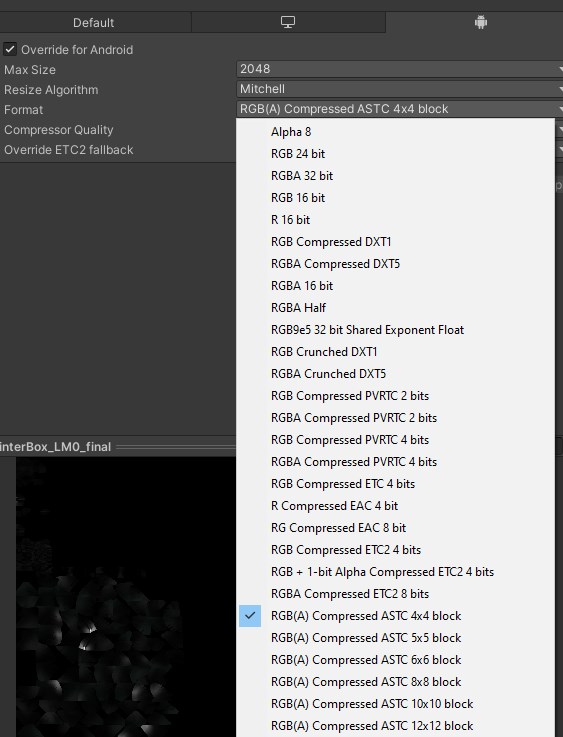
Heyo. When I change build target to android the lightmap seems to have gone super compress it became pixelated so I tested a new scene and the problem still presist

Is there any setting that I miss out or it has gone whack during the conversion?
Posting the same question on the quest-development just in case.
 dusk sapphire
change your lightmap compression to ASTC, lower blocksize has higher quality with larger file size
vivid belfry
ASTC and lower blocksize as in the lightmap resolution? Gotcha, will try try a bit later. Thanks!
dusk sapphire
no, as in the ASTC compression has different setting of block sizes, ASTC 4x4, ASTC 6x6 etc
 vivid belfry
Ah ok, which panel in the project setting is it? I've change it in the build setting and that seems to make it much better
 kind leaf
That works as well, the spot Temporal was talking about shows in the inspector when you select the asset (the lightmap in your case).
vivid belfry
I've check the inspector for the lightmaps but shows less options than what Temporal has though. Perhaps I may have miss the option to enable it somewhere.
kind leaf
Yeah if you are defining import behaviors from the project settings it changes what you have available. On a clean Unity install without any modifications prior you typically have those option in the inspector(unless I'm backwards lol). It only takes a second to change the import settings tho. So whatever works
south orbit
world in progress (: my second actual world from scratch made entirely from cubes in unity only .
 near escarp
Did you let cyan know about it ?
kind leaf
No, C# scripts from the asset store do not work in VRChat. They need to be converted to Udon or UdonSharp, neither of which support Generics(or anything else that makes C# a fun), which no one codes without, so converting means rewriting.
void mauve
kind leaf
No, C# scripts from the asset store do not work in VRChat. They need to be conve...
Oh good, that explains why I feel like torture the entire time
in the mean time
Anyone run into issues with their mirror toggle button? I followed ssami's tutorial and I am wondering if I forgot something
kind leaf
graph or script?
void mauve
graph this time
uhh wait hold on
so I put my graph component on the parent gameobject, of which the actual game object(the button) is a child of
would that change anything?
kind leaf
A single toggle doesnt need to be complex. just assign a toggle graph to a cube and shrink to size. then apply a unaryNegation toggle graph to it. Where it asks for the GameObject in the inspector, add the plane the mirror is on.

now when you click the cube the mirror will toggle
the Interact can be replaced with a custom event and then you can use it on a UI as well
void mauve
yep so hahah dummy me, I did accidentally put the graph component on the parent
yep it works now
fyi, if you're working with prefabs, ya gotta go all the way to the gameobject you want
 left raven
can some one help me with a mirror issue that I'm having i dragged the one on the home kit but the mirror is not reflecting anything and is purple like its missing the texture ( p.s you can ping me if you have an answer for me )
near escarp
Apply the mirror shader on it
left raven
it wont let me i do not know why
kind leaf
If it wont let you, did you verify with the console that there are no shader compile issues?
 rustic mantle
anyone have an issue with bakery and map turning black?
I duplicated my project to test some stuff, tried re-baking the lighting and my map ends of super dark
not sure wtf happened
idk if its a problem if its an android only project , i remember putting it back to windows and it still ended up all black
 odd spruce
I'm trying to find assets like the popular chip bowl in b club that you can eat from by the hot tub or those black rectangle toggle buttons with different icons like in Sovrens Chill Home but I can't find them for the life of me. I've gone through the vrc prefabs site and I just can't find them. Does anyone know where I can find these assets?
 green lagoon

VRChat向けにデザインしたスイッチの3Dモデルと、簡易的な機能を内蔵したPrefab集です。SDK2/SDK3、両方に対応しています。 1マテリアルでまとまっているので軽量です。 ・Mirrorスイッチ ・AvatarDirectionalLightスイッチ(5段階) ・PostEffectスイッチ(5段階) ・照明スイッチ ・ビデオプレーヤー用スイッチ ・ベッド用スイッチ ・椅子用スイッチ ・汎用オブジェクトスイッチ ・ボイスチェックスイッチ ---------------------- Lura'sSwitchがSDK3に対応しました!
odd spruce
Omg thank you
green lagoon
glad to be of help
left raven
kind leaf
If it wont let you, did you verify with the console that there are no shader com...
no but now on all the prefabs its telling me that its missing mono scripts
green lagoon
did you grab a prefab for a incorrect SDK
left raven
not that im aware of i can send the thing i downloaded
that seems to be right its the one for sdk 2 where can i find the one for sdk 3?
green lagoon
well what is the prefab you are trying to use
green lagoon
the vrchat SDK normally already comes with prefabs for mirrors
left raven
yea but its not working that's the problem that I'm currently having it was working yesterday but when i loaded it up it looks like the texture is missing and its missing a script
green lagoon
so what's changed between now and yesterday as far as stuff you've done
left raven
nothing i added a package for a set of modular prefab walls thats it
green lagoon
odd
left raven
yea thats why im buggin about it
green lagoon
have you tried removing the wall prefab or reinstalling the SDK?
left raven
yea still nothing
green lagoon
question what happens if you try to import the SDK into a new project
 rustic compass
Heya! Real quick has anyone used the billiard ball table in there world?
left raven
no but i plan to
rustic compass
I'm trying to place the prefab and test it though it's scripts are missing them on it. SAo hoping somone knows whats up with it or if i have to add them by hand.
green lagoon
did you make sure to install all the prerequisites
"Requirements:
A project with the latest VRChat SDK3 Release installed in it
The project also has the latest UdonSharp
The project also has TextMeshPro installed in it."

GitHub
VRCBilliards: Community Edition. Contribute to VRCBilliards/vrcbce development by creating an account on GitHub.
rustic compass
Yeah i did, i even reinstalled the sdk's and the udon sharp to ensure it wasnt an issue
Text mesh pro was also re added, though the actual scripts are in the packet though they are not being added in automatically when I palce the prefab
left raven
@green lagoon same thing on a new project
green lagoon
maybe try re-downloading the SDK?
rustic compass
I tried it still didnt work
left raven
is there a sdk kit for 3?
rustic compass
Spin the bottle and the beer pong are woking just not that
green lagoon
you just download the SDK 3 for worlds
rustic compass
I'm not sure
left raven
VRChat
Resource Links Download Unity - Find the correct version at Current Unity VersionVRChat SDK - http://vrchat.com/download/sdkHome Kit - https://assets.vrchat.com/kits/VRChat_HomeKit_v1.unitypackage Description Home Kit is a Unity Package with the assets you’ll need to customize and upload your own ho...
 tired igloo
any reason why items in my hand that i pick up, move staticly??
like it doesnt move smoothly
im talking about items in my world that i create btw
left raven
this is what i have but its for sdk2
green lagoon
left raven
https://docs.vrchat.com/docs/vrchat-home-kit
the regular SDK 3 already has mirror prefab so you don't need that
rustic compass
The sdk 2 doesnt support it from what im aware
Also yeah mirrors are in the sdk when downloaded
left raven
oh where at what cuz i spent like 20 min looking for it till i saw a video saying to use this from like last month
green lagoon
might have gotten a old video
rustic compass
Imma join in vc with screen share if you wanna see where it is
left raven
where is there a vc
rustic compass
Nevermind too new of a role to see the vc
left raven
yea
green lagoon
there is no voice chat on the VR chat server
left raven
call?
rustic compass
You can join my discord if ya wanna talk about it tho, were currently working on multiple worlds
left raven
yea just dm it to me
green lagoon
https://steamcommunity.com/sharedfiles/filedetails/?id=2507157026 if it helps I found this a pretty handy text guide to SDK 3 World building

Video version: https://youtube.com/playlist?list=PLPdWkxUSZ65Fp6ICrU7mIq1znAfPwMhNZ
This is the script of a work in progress video tutorial series about how to create your first VRChat World using
 velvet sparrow
Anyone know why this skybox isn't rendering a video when I launch VRChat?
dusk sapphire
is this sdk3?
you can't use default unity video player components on sdk3, they are removed at run time
you need to use vrchat's wrappers for the unity video player or avpro
they also do not support videos directly embedded into the world at the moment, and will have to be loaded from a url

 desert python
faint geyser
desert python
faint geyser
needs be static or press “T” i believe in game to see it
itll be bolted to your arm in vr
desert python
static button in the inspector
faint geyser
thx
velvet sparrow
@dusk sapphire So it's basically not possible with an embedded video?
dusk sapphire
yeah
velvet sparrow
Rip, thanks for your help though.
 desert python
hit T or any key until the keyboard pops up, if it doesnt, something is broken
 vast sun
any decent way to upgrade a world from the old sdk to the new sdk3 ?
like without having to redo buttons, triggers etc
 unkempt turtle
use cyantrigger
lets you almost copy the triggers
vast sun
thank you
 royal jay
hecc, i forgot to switch build to android when i started the RSL, now, many many hours into building it i need to. time to grab a snack
bold ibex
Hello everyone! when udon is used to make elevators, so that the player moves along with the platform ... Can it also be done moving in X and Y axis, or does it destabilize the player?
I have to make a train that people can enter, is it feasible?
kind leaf
https://github.com/Superbstingray/UdonPlayerPlatformHook works well for moving objects, just don't try jumping (it doesnt break anything, you just don't jump as expected).
GitHub
Prefab to make players follow moving colliders correctly. Effectively parents players to objects. - GitHub - Superbstingray/UdonPlayerPlatformHook: Prefab to make players follow moving colliders co...
bold ibex
kind leaf
https://github.com/Superbstingray/UdonPlayerPlatformHook works well for moving o...
So ... if I were to move players onto a train via animation and put the UdonPlayerPlatformHook on top of it, wouldn't the players break or snap?
kind leaf
you place the hook prefab in the scene and then just assign the train floor as layer 11. No need to attach anything. The prefab will handle player positioning while on the layer.
they can walk around, sort of jump everything they would normally do

 lyric acorn
Do they need to get on and off the train ? If they are always on the train you could make the train static and move the world in a direction in a loop
bold ibex
lyric acorn
Do they need to get on and off the train ? If they are always on the train you ...
they go down and up, through a trigger they activate the animation
 cloud meteor
So i just tried to update my unity project, but the whole thing keeps crashing all the time. Is there anything I can do to fix this?
 sage idol
Hi, I'm totally new to world creation, and I'm looking to make a object contentiously rotate. I think I have an idea how it would work on an avi, but is there a better way using Udon or something? I also want to make the same object scale-able by users. Any help is much appreciated!
kind leaf
Simplest method would be to use animations and toggle rotate/scale with bools. Udon is gameobject > transform > rotate and transform >localScale.
 latent iris
Alright! Looking for some help once again, finally in the world's section of the server x3
Does anyone know how to setup a portal like effect? I've seen it done.. I just don't understand how it works.
I have a room that is held up with fake walls, I have some windows in the room that I want to make it look like you're seeing out into a vast area beyond it.. but when you walk around the wall, you find out it's just a 2D flat plane.
The "vast area" I actually have modeled and I can put a camera in it... or whatever is necessary... I just don't know how to give the "portal" like effect to the wall. I've seen a lot of stuff done around using shaders and cameras.. but idk how that translates into VR and specifically VRChat.
kind leaf
Easy mode: take your portal model, add a particle effect around it, drop a custom plane cut to size in the middle with a material that has a Renderer Texture for the albedo, then assign that texture to a camera in the room you are teleporting to. Can use any shader that supports Rederer Textures like Standard.
Best to setup another trigger collider around it so the camera doesnt activate until the player is close enough. You can even scale(solid color black, physical camera, scale field of view over time. Max is blank, default is visible and open) the camera over time to give it the effect of it opening as the player approaches the portal
that will keep the camera off until needed
 upbeat zinc
Heyo!!! Question, does anyone know if you can connect a video player to twitch streams and maybe if anyone has good resources lmk, thank you!!
 final radish
hey are you able to use a .anim file to animate an NPC in a world? the only tutorial I could find required some motion capture and video tools..? I just have a .anim file and I'm curious if that will work
kind leaf
upbeat zinc
Heyo!!! Question, does anyone know if you can connect a video player to twitch s...
every video play here should support twitch streams. https://vrcprefabs.com/
 solemn garden
quick question.
Can you upload worlds/avatars from mac?
 pearl compass
Hallo y'all! I'm looking into making a world for the first time. Got a question that I would be grateful for clarification on!
The world I'm wanting to make has arches and caves, can this be done in the unity terrain system without expensive assets or can I use meshes made in blender instead without being more performance intensive?
kind leaf
Bender or you will be dropping a few large bucks on terrain editors and splat maps.
 digital viper
Does anyone know of any good grass and trees that would be compatible with quest 2 environments?
 sterile grove
Hey does anyone here know how in the Japanese worlds they have practically dynamic calendars and images pulled down? How does one implement that given I have all the requisite resources?
green lagoon

【 更新履歴 】 ※ 2020/09/18 v0.0.4 Quest向けにVideoPlayerタイプのPrefabを追加しました。(QuestでVRC_Panoramaの読み込みが不安定な場合がある為) ※ 2020/02/28 v0.0.3 【Quest専用】VRChatイベントカレンダー 版を追加しました。 Quest向けイベントのみのカレンダーです。「VRChatEventCalendarPrefab_forQuest.prefab」を使用して下さい。 ※ 2019/10/02 v0.0.2 GoogleDocsのアクセス制限に達したので、ミラーリングURLへ更新しました。
 earnest frigate
sterile grove
Hey does anyone here know how in the Japanese worlds they have practically dynam...
earnest frigate
sterile grove
Hey does anyone here know how in the Japanese worlds they have practically dynam...
They generate a video clip based on the text and images, load that video using a video player, and pause the video straight away
 junior idol
Hey guys I'm about to try building my first VRC world in unity I know about the file size and SDK stuff but is there anything else you guys think I should know before getting started or anything that you guys struggled with on your first time that I should know about?
kind leaf
baked lighting is standard practice with very few exceptions. <- also means light probes are absolutely required. Without light probes all dynamic objects will be dark (Dynamic is anything not baked including you and your friends).
bold ibex
make backups
use udonsharp instead of the visual graph if u know how to code
never trust vrc deadlines
 robust gorge
Hey guys I'm trying to add QVPens in my world and in unity the pens are working and I can see the colors but when I upload the world the colors just don't work in quest
I've used all the tips but nothing changes even on quest and on pc the issues are the same
pls somebody help me in this
bold ibex
pen shader not supported 4 quest maybe
robust gorge
it is
There is worlds using this shader(I think its the same) and I've found old messages here teaching how to add the pens but somehow they are working fine in unity but in the game just don't work
royal jay
bold ibex
So ... if I were to move players onto a train via animation and put the UdonPlay...
Use a hat
:3
The train is a hat 😊
 royal jay
In fallout 3 the train you were able to ride was literally an NPC wearing a hat that looked like a train
Because fallout doesn't have vehicle physics or any framework for it

:3
The train is a hat
royal jay
robust gorge
Hey guys I'm trying to add QVPens in my world and in unity the pens are working ...
I found a video describing this issue and how to solve it a while ago. I'll try and find it again

Hope you guys enjoy the vid.
QvPens:https://booth.pm/en/items/1555789
Twitter:https://twitter.com/PureAQW
robust gorge
royal jay
I found a video describing this issue and how to solve it a while ago. I'll try ...
I got it
So the issue was one thing
i hadn't installed the standard assets
somehow this package made some magic for me
royal jay
yee
robust gorge
thanks for the help!
digital viper
Anyone know any good grass shaders and grass for VRChat. Im still new to this and not sure what would be compatible with quest.
near escarp
I don't think there's any solution for quest that would be performant enough to run well enough
 woeful junco
Why would my login screen from the SDK disappear suddenly when I open my project? It's not showing the option anymore. Just an option for Utilities and Udon Graph.
near escarp
console errors
woeful junco
Thanks. I will look at those
digital viper

Im getting this error and it will not let me reupload the world
Does anyone know what this means and how I can fix it?
digital viper
near escarp
I don't think there's any solution for quest that would be performant enough to ...
https://vrch.at/wrld_4904dbe3-2b37-4452-ab23-4506f84ea884 This world seems to have grass that looks good for quest. I am wanting something that will show like this.

Small cottage for relax and maybe sleeping․ There are some interesting little features․
near escarp
The grass can have potentially been placed on the ground manually or with an asset, but i'm unaware of any shader that could do this
digital viper
near escarp
The grass can have potentially been placed on the ground manually or with an ass...
Oh okay! Thank you! There was a question I just posted above about errors Im getting that will not allow me to reupload my world. It said something about poiyomi shaders but i dont think i used those shaders on anything in my scene... arent those shaders for avatars and not worlds? Im making a world. Do you know how to fix this?
near escarp
You can delete the whole folder if you're not using them, but yes they're meant for avatars
bold ibex
digital viper
Anyone know any good grass shaders and grass for VRChat. Im still new to this an...
I reckon the lite version of this should be okay on quest but im not certain https://assetstore.unity.com/packages/vfx/shaders/brute-force-grass-shader-192388

Add depth to your next project with Brute Force - Grass Shader from BRUTE FORCE STUDIO. Find this & more VFX Shaders on the Unity Asset Store.
if you do end up buying it do tell
 hearty escarp
Hi, I am trying to prepare and test my first vrchat world. I was able to build and publish an SDK3 Avatar on this install, but now I am having issues with the build and publish button in this project

please advise
near escarp
You're trying to publish an avatar in a world project ?
Or did you merge the SDK3 for worlds and avatars
near escarp
I'm assuming the latest version of the SDK and udon sharp ?
hearty escarp
near escarp
I'm assuming the latest version of the SDK and udon sharp ?
yes
near escarp
what's the first error in the console ? also trying clicking the clear button, and reuploading while removing the stage object/video player
 hearty escarp
near escarp
what's the first error in the console ? also trying clicking the clear button, a...
hearty escarp
near escarp
what's the first error in the console ? also trying clicking the clear button, a...
is this what you wanted me to do?
near escarp
Yeah thank you, that's a very specific error and not sure what causes it, might be a project specific error, since you managed to upload content earlier, i'd suggest making another project and trying the same thing and try to upload as you add things so you can find the cause, if it happens with a blank project and default vrchat example scene then it might require more investigating
left raven
any one have the prefab for the video player
 misty wave
yo homies
I was wanting to ask you all more experienced VRC devs
Do you recommend I start learning Udon graph editor or U#?
I have been programming in C like languages for like 10 years and am a COSC major, but very new to graph based programming
It seems like resources for U# is limited... but it seems more familiar. I haven't done anything meaningful with either yet
left raven
misty wave
Do you recommend I start learning Udon graph editor or U#?
the udon graph editor is pretty ez to use that's coming from some one who had minimal coding skill
 frosty prairie
why does my world kick me back to home why i try going there
it works fine if i do build & test
misty wave
left raven
the udon graph editor is pretty ez to use that's coming from some one who had mi...
Hmmm... But as someone with a decade of traditional coding, would it be a limitation or helpful do you think? Is overcoming the hurdle worth it?
left raven
its realy up to you if you want to
left raven
frosty prairie
why does my world kick me back to home why i try going there
some thing in the world made it not want to work you just have to copy the scene over to a new project I had the same issue and that how i fixed it
misty wave
hmm i may have to try
left raven
yea i wish you luck my good sir
misty wave
sankyuuuu
frosty prairie
left raven
some thing in the world made it not want to work you just have to copy the scene...
ill try that
left raven
misty wave
sankyuuuu

GitHub
An experimental compiler for compiling C# to Udon assembly - GitHub - MerlinVR/UdonSharp: An experimental compiler for compiling C# to Udon assembly
i think you should be fine
 sacred pelican
 green lagoon

VRChatのワールド用UDONギミックです。
 knotty basalt
I am a total noob when it comes to world development. How do I add an avatar and a world spawn?
fierce otter
Assets/VRChat Exmples/Prefabs/VRCWorld
You can add spawnpoints there, also the VRWorld itself also acts as a spawn point.
knotty basalt
Where did the room go? It despawned the test room i had.
fierce otter
Could you post a screenshot here?
dusk sapphire
sounds like they doubled clicked the prefab and opened it
click back on the top of the hierarchy to go back to your scene
you want to drag the vrcworld prefab onto the scene
knotty basalt
I wasn't lying when i said I'm a noob.
left raven
how do you make a world cross play ?
dusk sapphire
VRChat
Setting up a cross-platform world or avatar is actually quite straightforward! In short, all you have to do is use a duplicate project to build an Android version of the asset, and upload it to the same content ID as the VRChat PC asset. The client will manage which version it needs to download. If ...
left raven
thanks
fierce otter
Hi, I have a problem with the VRC Chair. It works just fine when I use large avatars on it, but when I use smaller avatars, they just clip through the seat. Neither of the avatars are mine. What should I do, so both large and small avatars could sit in the chair?
dusk sapphire
theres a couple of chair prefabs in https://vrcprefabs.com/browse that can auto adjust the seating position based on avatar size
left raven
any one willing to help me out on call with a cupple things i want to get a pool table and a video player in my world but when i used the prefab it wouldnt let me upload the world
knotty basalt
I go to upload the test room (not publishing) and it failed. Windows comes up saying I need something to open the VRChat link.
I can record a video with what is happening.
mild spade
knotty basalt
I go to upload the test room (not publishing) and it failed. Windows comes up sa...
What does it says here? it must show the direct link to the exe file
 knotty basalt
mild spade
What does it says here? it must show the direct link to the exe file
knotty basalt
mild spade
What does it says here? it must show the direct link to the exe file
It's set to where VRC is installed.
Never touched it.
mild spade
hmm can you post a picture? what happens if you press "revert to default"?
 pearl atlas
After uploading my world and put it into the Community labs I cant update the world anymore. The upload works fine theres just no change in VRChat. Someone has any idea why?
bold ibex
pearl atlas
After uploading my world and put it into the Community labs I cant update the wo...
As long as you are on Unity ver 2019.4.31 and using the latest official vrcsdk, uploads should make changes to your worlds in minutes if the blueprint id in the pipeline component is the same as the wrld/avtr id of the thing u want to update
fierce otter
dusk sapphire
theres a couple of chair prefabs in https://vrcprefabs.com/browse that can auto ...
Thanks!
pearl atlas
I have the right blueprint-ID (Copied it from the world URL) I used VRCSDK3-WORLD-2021.09.30.16.18_Public and Unity Version 2019.4.31 also it says after the upload that it was successful. Private updates working fine.
 fallen crescent
Guys I wanna make my own world but I know nobody will join ;-;
 ruby jay
don't make worlds for others, make worlds cus you want to make worlds
bold ibex
whats a good ammount of polygons for a world
kind leaf
The least required to get the job done while maintaining the look you want. Batching and occlusion culling, and baked lighting will take care of the rest.
royal jay
ruby jay
don't make worlds for others, make worlds cus you want to make worlds
this
i recently made a world i spent nearly 30 hours working on public and it has a total of 33 visits. thats fine, i made it because its fun
its a great learning experience ||its called "The RSL" tho if youre curious||
In other news, would anyone want to team up and work on a world together? It would be a very relaxed project, work on it when you have time and want to kind of thing
 midnight flame
how can i make chair do MMD Emote when they sit on it like how MMD World works?
 latent vector
how do i make my carpet fuzzy it doesnt look anything like it does in blender
i tried putting a fur shader on it and it didnt work

 kind leaf
midnight flame
how can i make chair do MMD Emote when they sit on it like how MMD World works?
kind leaf
midnight flame
how can i make chair do MMD Emote when they sit on it like how MMD World works?
The station has an Animator Controller that is blank (none), throw your override there.
kind leaf
latent vector
how do i make my carpet fuzzy it doesnt look anything like it does in blender
i...
Blender sharders don't translate to unity. Did you apply your heightmap?
midnight flame
kind leaf
The station has an Animator Controller that is blank (none), throw your override...
how make MMD atual work because got dancing working but head is locked as not MMD and hands in VR able move but not dancing?
some people say need do VRChat Station but i have no clue how force emote full work.
and did that too but wont work then emote just run on body only
you see i mean about emote, legit not doing it correctly and able move head while on it
kind leaf
That looks like the full body minus the head moving,
which is typical when using stations and an attached controller nothing more
midnight flame
thign is its in SDK2 but not in SDK3
but world is in SDK3 in IK but yeh idk
sounds like SDK3 issue my view
kind leaf
You can force head movements, I just don't know how. Never bothered. It's kind of only a desktop request 😛
latent vector
kind leaf
Blender sharders don't translate to unity. Did you apply your heightmap?
heck hat make sense it didnt come with a height map
kind leaf
latent vector
heck hat make sense it didnt come with a height map
good luck, if you have a texture you can try converting that to grey scale and change the brightness/shadows until you have an accurate representation.
or just find a noise generator and use that to get a decent heighmap.
frosty prairie
left raven
some thing in the world made it not want to work you just have to copy the scene...
i tried that and it didnt work
it still kicks me back to my home
left raven
@frosty prairie idk man do you have an old save you could try it with
 onyx lynx
I'm having trouble with mesh colliders, I have no clue what is happening


the one that is working properly, the top one on the right is the blend file being plopped into the world with a mesh collider
and the bottom one is exactly the same but exported from the blend file as an fbx
It even used to work, at some point it just stopped making the collider properly
near escarp
Di you apply transforms before exporting the fbx ?
bold ibex
Ive had that problem with objects where the mesh colliders do some really weird stuff that is much less logical than whats going on with your bottle
I don't recall applying transforms so that might of been why ig
pearl atlas
pearl atlas
After uploading my world and put it into the Community labs I cant update the wo...
I am still unable to update my world. I am using Unity version 2019.4.31 and the latest VRCSDK for worlds. I checked my info page from the world the Version number goes ahead also the last update. A friend and me tested stuff like favourites. Theyre actually the same and dont change.
near escarp
Check your console in unity before and after export
bold ibex
Hi, can I make the player in my world bigger, or should I just scale the whole map down? (He's an adult sized character btw)
 near escarp
Should scale the world around players 
Worth making a 1.5m tall cube and place it in your scene
near escarp
always apply your transforms
bold ibex
near escarp
Should scale the world around players <:thumbsup:700823916322619422>
would it affect the video players, mirrors etc. ? My friend is a little worried about it
onyx lynx
my transforms were applied
something to do with import
i think
I had applied them before, I'll try again
pearl atlas
Theres no error just some warnings.
onyx lynx
temporary fix I've just told it to import with different scaling but I feel like something is wrong and I'm not sure what
near escarp
bold ibex
would it affect the video players, mirrors etc. ? My friend is a little worried ...
You can put your whole world in a new gameobject and scale that object instead
left raven
dose any one have a free modular bar that i can use
near escarp
Spookyghostboo has some assets on her patreon/gumroad page
left raven
thanks
 steel gate
So out of nowhere I noticed this tag on one of my worlds. What does this mean?
 near escarp
Means at least one person reported your world for this reason, means they might have found something not working as expected, or they just pressed the buttons for no reason
steel gate
Got it. Thank you! Any way to clear it or should I even worry about it?
near escarp
No way to clear it, probably not worth worrying about it if it just showed up though
steel gate
Out of 56k visits, I'm pretty okay with the six reports, but this one just seemed out of place. Thank you for giving me feedback.
knotty basalt
How do I select what the Avatar Pedestal shows?
I'm hoping I don't need to code that in.
near escarp
that would be the avatar ID
knotty basalt
near escarp
that would be the avatar ID
Thanks.
 odd summit
yo idk where to put this but im making a world with audiolink. my problem is i dont know how to switch the audio source of audiolink. ive tried animations and it doesnt seem to work. any help? i didnt see any help online and i dont think audiolink has a discord.
kind leaf
Honestly, I would just modify AL to include more than one audiosource and use and if/else or a for loop to check if one is not enabled, try the next. Why would you need to switch audio sources?
bold ibex
how to create ragdoll
kind leaf
like for players?
bold ibex
just get a avatar and plop it into a world with a single dynamic bone script on the hip bone and add a VRCPickup to the entire thing
i think that should work
not the most performant though
 olive shuttle
Hey peeps 😄 quick question course it a pain in the butt - so in my world when making door frames - and when i test it ingame its like there is some sort of invisible "wall/field" that likes breaks you when trying to enter trough it. also have a door wich wont let you enter even tho i removes the box collider
any help?
desert python
olive shuttle
Hey peeps 😄 quick question course it a pain in the butt - so in my world when m...
make sure door frame is taller than 2 unity cubes
or test in OB. i heard theyre shortening players
olive shuttle
desert python
make sure door frame is taller than 2 unity cubes
sheesh it has to O.o thats weird xD
olive shuttle
well it even happens when i try smaller avatars -
desert python
small avatars are 2 unity cubes tall
and i think theyre 1.6 in OB but dont quote ne
olive shuttle
well true makes sense. still weird tho xD thanks 😄
desert python
it takes a bit of effort to change heights of avatars in this game since any avatar can be any height
just dont have a roof collider or any collider above the door and itll be fine
 civic cloak
good morning! does anybody know of a creator that does commissions and works in a similar art style to this?
 bold ibex
civic cloak
good morning! does anybody know of a creator that does commissions and works in ...
bold ibex
civic cloak
good morning! does anybody know of a creator that does commissions and works in ...
would have a much easier time finding someone in VRC Traders since its a server dedicated to vrchat creators anf commissions
server is listed in #community-servers-old
civic cloak
thank you!
bold ibex
np
 junior frigate
Don't forget to delete the default scene if you have your own scene or your world may crash. Don't ask me how I know this.
🤦♂️
kind leaf
If you drag n drop scene's absolutely. VRC doesnt support multiple scenes, unity however does, and having as many scenes as you want in a project isnt going to hurt anything, just not wise for load times or security of your unity project.
 nova locust
Why does VRC crash every time I open the test client? I can open VRC fine with steamvr and play normally.
kind leaf
did you check your console for errors?
nova locust
no error
wait, there are errors.
something related to empty udon behaviors for pens
Yeah, all 90 errors are related to the pens
kind leaf
do they remain when you press clear?
nova locust
no
kind leaf
then they shouldnt be the cause. Ied suggest installing onevr toolkit and see what the debugger says.
nova locust
alright
 sturdy lynx
near escarp
No way to clear it, probably not worth worrying about it if it just showed up th...
sturdy lynx
near escarp
No way to clear it, probably not worth worrying about it if it just showed up th...
Sorry if this pings you, I'm not too knowledgeable about discord ping system.
I kinda wish that in the future, The report tags would go away after a month or so the system is more "Useful" than it is today so you can identify if there is any issues,
My world has so many random reports I can't even use the report tag system to see if there is any issues
near escarp
The whole system needs a well deserved rework, but there's no plan in the near future for it
 chilly grove
Especially for troll reports that don't sense like worlds with the avatars-nudity report tag when the world has no avatar pedastals
bold ibex
Worlds can't get taken down purely from user reports right? Isn't it always up to a moderator to snoop the world if it gets a lot of reports to see if it needs to get taken down or not?
Or if enough people report it in a short amount of time can it get temporarily shut down?
desert python
when my world got rushed randomly. it went back into community labs and then got out and now it has 2 approved tags. so im pretty sure if the world is sage. itll be put back up if it gets privated or something
bold ibex
oh ok noted
 stone marsh
The world report system is truly, utterly, useless in its current state. Creators have absolutely no meaningful way of discerning what reports actually mean, and they don't go away which makes determining the point of the tag even harder. Why even expose that information to world creators when they can't see what the report was even for, and the tags placed on the world are often ambiguous or outright inapplicable? The system is vastly too easy to abuse by groups of people as well making the entire validity of the system even more questionable.
I too hope it's overhauled eventually because right now, it almost better off not even being in the game at all, or not exposed to world authors considering how useless and misleading it is to them.
sturdy lynx
desert python
when my world got rushed randomly. it went back into community labs and then got...
Interesting, How many reports did you get for this to happen?
 final rapids
Hey, I'm trying to make a gallery for my art, and I'm almost done, but when i try to Build and Test, I get the following error:
Export Exception - System.IO.FileNotFoundException: C:/Users/Hyperion/AppData/Local/Temp/DefaultCompany/Kayrosis Gallery A/scene-StandaloneWindows64-SampleScene.vrcw does not exist

I was able to build and test earlier in the project, but now that I've added and baked the lights, I get this error
final rapids
there's a whole bunch of errors that pop up, but they're gibberish to me
bold ibex
show
final rapids
 bold ibex
Unity 2019.4.31, most recent official VRCSDK? no mixing multiple sdks in one project either?
final rapids
2019.4.29f1
bold ibex
for the sake of this to rule out any possible causes id update
if that isnt enough then id make a support ticket #vrchat-support or email vrchat at "hello@vrchat.com"
i think the Amazon server errors is something else that vrchat support needs to workout i forgot
final rapids
Ok, updated to 4.31
Now the vrchat SDK menu just shows the utilities option, and doesn't show the "Show control panel" option to even build the world now
final rapids
 final rapids
what would i google?
bold ibex
to see others with similar errors
you could replace all instances of GUItexy to UI.text in the code
hopefully that would work
final rapids
how would i do that?
desert python
sturdy lynx
Interesting, How many reports did you get for this to happen?
50ish
final rapids
I'm not gonan have to rebuild the world from scratch, am i?
bold ibex
final rapids
I'm not gonan have to rebuild the world from scratch, am i?
no
are you able to delete the script its refencing without affecting other things
id make a backup of the world
odd summit
kind leaf
Honestly, I would just modify AL to include more than one audiosource and use an...
I want multiple songs to have the audio link in one world. Where players would activate.
kind leaf
So you want multiple video players, each with their own audiolink? Sounds like performance suicide.
Without rewriting AL, there is no way to have 1 or multiple audio players tell AL which lights to activate depending on which room/audio source the lights are in. You will need 1 AL per Audio Player per room you need AL in and I don't even know that it works with multiple instances.
odd summit
kind leaf
Without rewriting AL, there is no way to have 1 or multiple audio players tell A...
Then is there a way to link audio reactive objects to more than one AL. Only one song is playing at a time.
kind leaf
If only one song is playing at a time you could just create groups. Put each set of lights in an empty to organize them. Write a toggle script/graph for the Light component. You cannot toggle a Light gameoobject, but you can toggle the light component. In each room have a toggle button for turning on or off the array of lights. in script its like:
public Lights[] _lights;
public void Toggle()
{
for(var i = 0; i < _lights.Length; i++){_lights[i].enabled=!_lights[i].enabled;}
}
frosty prairie
frosty prairie
it still kicks me back to my home
still cant fix
bold ibex
frosty prairie
still cant fix
are you using the VRCSpawn prefab or did you make your own spawnpoint
 solid folio

Anyone have any ideas on why this gets SO much louder the further away you are from it!? driving me nuts haha
final rapids
ok, i started a completely new project, and before i really did too much more work, i tried to build and test, and i got the same issue. I am now using unity 4.31 as well
 bold ibex
From now on, Synty Studios assets can no longer be used legally in VRChat.

 bold ibex
near escarp
bold ibex
near escarp
Wait where are you reading that can you send me the link please?
near escarp

Synty Store
Frequently Asked Questions Synty Store Questions How do I download my purchased assets? You can download your files on your My Account page. There is a "My downloadable files" button, this now holds all the packs you own. Let us know if you have any issues support@syntystudios.com How will I receive updates to the asse
bold ibex
Oh ok I see so it affects the platform owner but not the players. Makes sense.
near escarp
final rapids
ok, i started a completely new project, and before i really did too much more wo...
Clear the console and make sure to include all the errors in your console if you can
ruby jay
near escarp
not so sure, vrchat takes the right to sublicense as it wants
so i do not think vrchat is really allowed (obviously not legal advice)
bold ibex
Anything you upload is supposed to be your responsibility 100% I thought?
 sudden lily
Got a bit of a math question; Is there a Unity function I can use to adjust something according to a ratio? What I want to do is make it so the turning sensitivity on my RC cars can be adjustable, so if say "Sensitivity = 0.5" the car's wheels are turning half the rate of the controller steering wheel. That part's easy on its own, but what I'm not sure math-wise would be how to adjust the upper-limits of the steering wheel's steering radius on the controller to adapt so it's not just capping at like half the potential turning axis.
Eg; Sensitivity = 1, turning limits are +/- 45 degrees on the steering wheel,
Sensitivity = 0.5, turning limits are +/- 90 degrees on the steering wheel.
dusk sapphire
you're probably looking for Lerp? https://docs.unity3d.com/ScriptReference/Mathf.Lerp.html
sudden lily
That actually might be a much better way of doing it, thanks.
dusk sapphire
theres also LerpAngle and LerpUnclamped in case those suit your needs better
 rich granite
hey, can anyone maybe help me? i want to upload a world ive worked on a lot. as i uploaded it, it wasnt in vrc and i cant join the world at all. its probably because ive used the wrong unity version, but when i want to import the latest sdk 3 version into a project on the latest recommended version of unity i have no control pannel and cant do anything. is there a way i can fix the sdk3 issue?
kind leaf
rich granite
hey, can anyone maybe help me? i want to upload a world ive worked on a lot. as ...
- Make sure your unity version is current with VRChats requirements
- Make sure your SDK is current
- You cannot combine sdk2 and sdk3 in the same project
- When the control panel is blank it is because you have compile errors usually associated with scripts that should not be in the project. See the console for errors. Any error directed at a script not associated with VRChat or a VRChat asset needs purged. After removing the problematic scripts Unity will recompile and the control panel will be available again.
rich granite
okay thanks a lot, ill check all of that.
rich granite
okay so, vrc sdk 3 is running normal now but when i want to build & test the world isnt loading im getting ported back to my home world. in the console there are no errors at all
same happens if i upload the world. it shows up in "mine" but i cant visit the world, after download im getting ported back to the old world
[637717255917084289] W [HTTPRequest]: Null/empty value for header: Content-Type
UnityEngine.Debug:LogWarning (object)
thats one error that appeared now
 forest elm
is it OnInteract()?
kind leaf
rich granite
[637717255917084289] W [HTTPRequest]: Null/empty value for header: Content-Type
...
That's in yellow right? Not an error just a warning and typical. If you never leave the black screen and get kicked to your home when trying to test or load in from vrc, it usually means your spawnpoint isnt setup right. inspect that, make sure it is setup, and it has a collider under it. When you use the VRCWorld prefab you literally just have to drag n drop it on a surface with a collider.
kind leaf
forest elm
is it OnInteract()?
public override void OnPickupUseDown()
public override void Interact()
there is no mouse or button crap anymore, it was rewritten for simpler development. < universal
rich granite
kind leaf
That's in yellow right? Not an error just a warning and typical. If you never le...
So basically all I have to do is set my spawn point right and put a collide under it?
kind leaf
yeah, a successful upload just needs a collider to stand on and a spawn point(scene descriptor). That's a world. Anything after is all you.
rich granite
Thanks I'll try that out later
kind leaf
rich granite
Thanks I'll try that out later
You should look into OneVR toolkit. There are a lot of silly mistakes you can make when developing, especially when new and OneVR will tell you about most of them in the debugger. It wont help with errors, but mostly everything else it has your back, including reducing your world size, and pointing you in the right direction for optimization https://github.com/oneVR/VRWorldToolkit
forest elm
kind leaf
public override void OnPickupUseDown()
public override void Interact()
OK, thank you
 kind forge
Heya, first time world maker here, im trying to get background audio to play in my world, it plays in unity, but not in vrchat? plz help
mild spade
kind forge
Heya, first time world maker here, im trying to get background audio to play in ...
Can you post pictures of all the components used on the same object where the Audio Source is?
kind forge
mild spade
Can you post pictures of all the components used on the same object where the Au...
here ya go

ill be perfecly honest i have no idea what im doing
mild spade
I see, either set your Spatial Blend to 3D if you want spatial audio (a point in 3D space) or disable "Enable Spatialization" on the script if you want 2D audio (where the audio is always the same no matter where you are on the world)
kind leaf
^if that doesnt solve it look at your audio format. Not all work in VRC. Wave and MP3 do for sure.
 winged stump
Hi, sorry if this isnt the right chat to ask in but was wondering if anyone has the link to the VRChat pool table/where i can buy it for my own worlds
dusk sapphire
GitHub
VRCBilliards: Community Edition. Contribute to VRCBilliards/vrcbce development by creating an account on GitHub.
winged stump
dusk sapphire
https://github.com/VRCBilliards/vrcbce
Thank you!!
kind forge
mild spade
I see, either set your Spatial Blend to 3D if you want spatial audio (a point in...
IT WORKIN
WEEEE
 harsh valve
hey guys, I'm new to world development. I just had a quick question, is it possible for avatars to interact with rigidbody objects in the world? ie push them around by walking into them etc ?
kind leaf
yep, you use bone tracking, assign a collider to follow the body part and let the magic happen. There are prefabs for aiding in that @ https://vrcprefabs.com/ but if the project is going to take a while, ied wait. VRC is making that a thing by default.
harsh valve
ok thanks 🙂
winged stump
Im getting udonsharp errors 😦
nevermind?
it just started building the package randomly
much to learn this one has
upbeat zinc
can anyone help me with making a tv that plays twitch streams T-T pls I can pay you ❤️
kind leaf
Why pay for something that is free 🙂 https://vrcprefabs.com/ several tv's are already stream ready.
bold ibex
near escarp
https://syntystore.com/pages/frequently-asked-questions
Apparently the Synty assets on the Unity Asset store have a different licence than what you purchase on the website. Based on what people said on the Synty discord server when asked.
It seems assets purchased on Synty website are much more permissive, while the asset store license simply strictly forbids anything related to NFT or metaverse games.
final rapids
Ok, so I got my previous issues solved, I am now able to build and test my world, but about 15-18 minutes in the build/test vrchat freezes. I'm not sure why as nothing special is happening, but it's frozen 3 times now during testing. The only thing happening in my world is that the wolfe video player is playing a youtube video from the moment you enter the world, and its finishing up the first track. I wouldnt think that would make a difference, but I really have no idea what is going on
there are no errors in the unity console for this issue either
kind leaf
Yeah video player shouldn't be doing that but just incase make sure auto sync is disabled. It's useless until the avpro bugs get sorted. Causes a lot of audio lag
autosynce for video is only effective with small, low res streams. Anything that is not going to buffer more than once lol < currently
 zenith solstice
hi, i got a question, when i'm putting pickup-able objects (SDK3) everything works except the mesh itself stays frozen in the original place and only the collider moves? i pretty much seen all tutorials avaiable but this issue doesnt seem to be happening
is this a common issue?


 rain shadow
zenith solstice
hi, i got a question, when i'm putting pickup-able objects (SDK3) everything wor...
rain shadow
zenith solstice
hi, i got a question, when i'm putting pickup-able objects (SDK3) everything wor...
You have the object set as static
zenith solstice
rain shadow
You have the object set as static
ah thank you, i'm new to this
bold ibex
Hi! Is there any way in unity to automatically get rid of 1 pixel holes between two objects (like 2 walls or floor tiles)?
 modern ridge
Does anyone know how often Bakery goes on sale for? I've been meaning to buy it but the price feels a little steep in my opinion since I don't often make worlds.
Or at least if anyone has it and has used it, how's the difference compared to the built in light mapping?
near escarp
modern ridge
Does anyone know how often Bakery goes on sale for? I've been meaning to buy it ...
Once or twice a year, but it's incredibly worth it
You shouldn't wait tbh, it'll pay for itself instantly
And the majority if not all knowledgeable/skilled world creators use it, it's almost a necessity
modern ridge
Unity propaganda to sell more bakeries /j
Hnggh I'll have to splurge then. When I'm finally done with this avatar commission.
bold ibex
Hi! I've seen custom sitting animations on a map. Can I make a lying animation as well?
 sacred magnet
need some help, sdk says i have an avatar descriptor at the same time as a world descriptor, but i dont.
 near escarp
You most likely do if a prefab, show the rest of your screen maybe ?
 modern ridge
sacred magnet
i already checked everything and theres no avatar descriptors
modern ridge
sacred magnet
i already checked everything and theres no avatar descriptors

Did you know that besides searching your Hierarchy window by object name you can actually filter your scene objects by component names they have?
Maybe try this?
You have to type the exact name of the component though
sacred magnet
not there
final rapids
kind leaf
Yeah video player shouldn't be doing that but just incase make sure auto sync is...
I dont know why, but that seemed to work
kind leaf
Great! I havent heard of the audio lag causing actual in game freezing but now I know haha. AVPro Auto Sync needs fixed asap. 😦
sacred magnet
tried restarting, nothing changed
kind leaf
modern ridge
~~Unity propaganda to sell more bakeries~~ /j
Hnggh I'll have to splurge then. W...
worthless ping but you just missed a humble bundle sale. Keep an eye on that as well. Could have got bakery for 25$ with about 2k$ worth of other unity assets.
near escarp
converted how ?
kind leaf
The method you used to update matters in determining how you changed from 2-3 and got errors. Thats why they asked.
misty wave
Hi friends, I was curious - I am making a themed world, and I would like visitors to be able to wear a hat, and potentially a nametag and apron in the world. I was planning on just making an avatar but is there a way to create hat/clothing like items applied on a world basis?
kind leaf
It looks like the other post processing is conflicting with the sdk3 one. If you purged all sdk2 elements, be sure to just import the scene + dependencies(anything in the scene) without post processing.
so scene, models, prefab ,textures, materials, shaders, fonts, lights, anything else you need to recreate.
sdk3 has post processing but if the sdk2 project had it as well in a different structure you get conflicts
easy to replicate if you ever try importing a master from git and then update it with a .unitproject\
easy? hunting down every trace of post processing and removing it, and then reinstalling from the asset manager, or reimport sdk3 after post processing has been expunged.
near escarp
close unity, delete your library folder in your project, reopen unity
kind leaf
that should do it ^ lol whole lot easier
closing unity is important, failure to do so before deleting the library will result in your entire project getting erased.
 frosty goblet
Is there any way to destroy VRChat's giant y = 0 collision plane it puts across the world?
 ebon linden
misty wave
Hi friends, I was curious - I am making a themed world, and I would like visitor...
ebon linden
misty wave
Hi friends, I was curious - I am making a themed world, and I would like visitor...
https://reimajo.booth.pm/items/2487214 Reimajo made a script for attachments like that, might be other variations on vrcprefabs.com, can't recall.

This script enables users in your VRChat SDK3 world to attach any pickup to their avatar and even to other avatars. A pickup will stick to their nearest bone when being dropped close to a bone (range can be defined). It only uses a single update loop in total no matter how many pickups you have, so
misty wave
ebon linden
https://reimajo.booth.pm/items/2487214 Reimajo made a script for attachments lik...
perfect!!! tysmmm
 lilac elbow
Hi there I'm running into an error I'm not sure how to fix it I've tried everything. what is there that I could do?
how do I make it exist again?
 wraith cipher
i have the SDK3 and i cant find the 'Collision' feature, does anyone know where it is? otherwise i fall through floor
kind leaf
select the object in the hierarchy (your floor for example), in the inspector you will see a mesh filter and a mesh renderer, at the bottom you will see add Component, click it and type collider, select box if you are adding a collider to a floor
if you floor and walls are all one object use Mesh Collider
or you can add multiple box colliders and just place them with the scale and offset of the collider
 ionic reef
are we not allowed to use Event Handlers anymore for mirror buttons?
I came back to my SDK2 world that I updated about 3-4 months ago and now it won't let me update because or red error in the SDK regarding event handlers not allowed
And if not, what do I do now then?
kind leaf
Can't help you there but SDK2 support is ending in the future. If you are coming back to development now, might as well look up udon buttons and work on migrating your project to sdk3.
dusk sapphire
show a screenshot of the error?
event handlers are usually paired with vrc_triggers, and you might have removed a trigger without removing the associated event handler
 ionic reef
I'll go check to make sure
ionic reef
dusk sapphire
do you have any console errors?


sec now sdk is broken let me re import
dusk sapphire
have you updated vrworldtoolkit?
GitHub
Unity Editor extension for making VRChat worlds. Contribute to oneVR/VRWorldToolkit development by creating an account on GitHub.
you need version 2 for unity 2019
dusk sapphire
make sure that, the sdk and anything else you're using are up to date
...you have it in your project?
ionic reef
uh
ah maybe long time ago i just used it to check what is taking highest mb
i can get rid of it i don't really use it
dusk sapphire
well, its really useful for pointing out common issues with your world
ionic reef
okay so getting rid of the toolkit and re importing newest SDK seems to have the red error gone from the SDK, but now when I hit publish this comes up

tho i do have one
 ionic reef
hmm wdym
 ionic reef
spawns size is 0
dusk sapphire
set it to 1 and set a spawn point
ionic reef
drag the same object to the element?
dusk sapphire
yes
ionic reef
alright
 summer junco
Hi i Problm With my Avatar , i transformed to Giant
ionic reef
seems it's building so far, tyvm ❤️ appreciate it
dusk sapphire
ionic reef
@dusk sapphire gonna try the toolkit at the same time, but I'm getting these and instead of upload screen I get sent to game view of the camera
 dusk sapphire
you can ignore those errors
but the toolkit would be a good start to spot common issues
ionic reef
not getting anything special in the toolkit but I get this when hitting publish

so when I hit reload it sends me to the game view with camera and not the upload page
ionic reef
and if I hit ignore I get to the upload page but it seems to not be running the same world ID, I'm forced to take a new picture, name and everything
although the blueprint ID of the previously uploaded world is attached
dusk sapphire
can you screenshot the toolkit?
ionic reef
the debugger?
dusk sapphire
yeah
 dusk sapphire
that build report doesn't look quite right
ignoring the errors with triggers, are there any other errors in your console?
kind leaf
1.2kb is some serious optimization 😛
ionic reef
yea that's definitely not right lol
it's supposed to be 40+ mb
and 1 sec checking some stuff
nova locust
A question for y'all. How long would it take for your world to get out of the Labs and become public? My oldest world entered the Labs on June 4. It's still in the Labs as of today. I'm really frustrated with it because I spent many hours creating it, and I still update the world weekly and I make sure nothing is broken. It's also quest-compatible. It has everything you need.
ionic reef
dusk sapphire
ignoring the errors with triggers, are there any other errors in your console?
hmm found a missing script error and some other yellow ones with an old shader, deleted everything and did some sdk re imported SDK and seems it worked, thank you for the help
forest elm
I'm using both methods "public void OnMouseDown()" and "public override void Interact()" on the object.
When I approach the object on the PC and interaction text appears, I click the left mouse button, the code in the OnMouseDown() method is not executed.
How can I solve this problem?
 quick lintel
Is there a way to change the reach of the voices of the players ?

 bold ibex
 sour scaffold
any errors or warnings in the unity console that might give a clue?
sour scaffold
 bold ibex
also make sure you are looking at the VRCCAM
sour scaffold
this is it
 vivid brook
Why the hell would you guys design SDK3 and UDON not to be transferrable betweeen computers
bold ibex
not another camera u have
vivid brook
???
sour scaffold
 bold ibex
where is the VRCCAM located in the scene
sour scaffold
 vivid brook
I just spent $130 on a world and I want my world to work. I cant because the terrible WorldsSDK3 doesn't let people transfer between computers.
This is terrible.
sour scaffold
 bold ibex
let me try comparing your settings to my world and see if there are any discrepencies that might be causing this
sour scaffold
it was the fog lmfao
bold ibex
o
thats odd
good to know thats a fun unity quirk
is it a public world because id love to visit that
vivid brook
VRC team is so messed up for this
they think we have unlimited storage and money
i dont have the money and storage to have another unity version JUST FOR WORLDS...
smfh
bold ibex
vivid brook
i dont have the money and storage to have another unity version JUST FOR WORLDS....
wym im confused
vivid brook
You guys moved unity versions for no reason
4.29.f1 isnt for worlds anymore
why.
Because of this I am not able to get my world back.
bold ibex
how are you transfering the world
bold ibex
Transfer the world via like the entire project folder
unitypackages sometimes are wonk for some unknown reason
vivid brook
Unity version?
bold ibex
Well ok so
Their world is in 2019.4.29 rn right?
So my project isn’t showing the splash screen and I have everything done I just want to upload it what do I do? It’s the right version
 vivid brook
bold ibex
Their world is in 2019.4.29 rn right?
vivid brook
bold ibex
Their world is in 2019.4.29 rn right?
yes
ruby jay
bold ibex
So my project isn’t showing the splash screen and I have everything done I just ...
check your console log, fix the errors there
bold ibex
ruby jay
check your console log, fix the errors there
Ok
kind leaf
vivid brook
yes
Shame on them for sending you a world that is in a dated version. No worries, just install the correct unity version, and have the newest sdk downloaded. if its a .unityproject, import it into a new 29. close unity, convert it to 31 and reopen, then install the newest sdk and make sure if it is using the newest additions like usharp. Dont load the wold scene until the sdk has been imported!
If its a zip with the entire project not in a package, add using the hub, and change the version before you click to open. After it opens then import the new sdk.
bold ibex
ruby jay
check your console log, fix the errors there
Idk how to fix them
I’ve barely used unity
ruby jay
bold ibex
Idk how to fix them
you will need to share them
 tropic cedar
i can't create a new post processing profile for some reason

 fast python
How do you make a portal that sends you to your home world?
I've seen a few worlds with them but don't know how they're made
near escarp
Pretty sure that's part of the portal settings
near escarp
tropic cedar
i can't create a new post processing profile for some reason
Might want to try using the vrworld toolkit
 trim dawn
Hello, I'm having an issue with adding custom animations to stations, basically what I'm doing is when someone sits on a station it plays a skating animation it works in game but when the player leaves the station they get stuck and can't move. I replaced the proxy_sit animations for the V2Seated, PoseSpace, and UpperBody Tracked states in the animator. Maybe there's something I'm doing wrong?

 topaz bridge
how

 torpid stratus
how do I switch to quest world without starting my project over or anything..
topaz bridge
torpid stratus
how do I switch to quest world without starting my project over or anything..
switch the project type in the sdk pannel
torpid stratus
 ty
ty
stone marsh
topaz bridge
how
How what, elaborate please
1: you should use vrc spacial audio component on audio.
2: you cant use standard on quest. You have to use quest mobile shaders included with the sdk.
topaz bridge
stone marsh
How what, elaborate please
1: you should use vrc spacial audio component on aud...
the audio is not the issues, the issues is that it is not supported on windows but all the shadders that i am using are mobile diffuse, all I have is a bunch of pedestals a floor with a mobile diffiuse shader and a mirror
stone marsh
topaz bridge
the audio is not the issues, the issues is that it is not supported on windows b...
You need to use the VRC Mobile shaders, not the Unity Mobile shaders. If it says there is standard somewhere, then there is indeed a standard shader somewhere. If this is for a quest world however, it should still allow you to upload. It would only prevent upload if it was an avatar. If you're unable to find the item that is using the unsupported shader, use VRWorld Toolkit or a Resource Checker. https://github.com/oneVR/VRWorldToolkit
GitHub
Unity Editor extension for making VRChat worlds. Contribute to oneVR/VRWorldToolkit development by creating an account on GitHub.
topaz bridge
stone marsh
You need to use the VRC Mobile shaders, not the Unity Mobile shaders. If it says...
im standing in the world RIGHT NOW on my quest, i cant get it supported for windows
stone marsh
You're question isn't worded very well I guess. I don't know what you're trying to do.
You want to upload it for PC? There's a reason I asked to elaborate.
If you want to upload it to Windows, you need to switch the build target to Windows under Build Settings and reupload it again. I can see you're still set to Android.
Everything for quest is supported on Windows.
topaz bridge
stone marsh
You're question isn't worded very well I guess. I don't know what you're trying ...
My target in which I am trying to upload the world is quest or android but the world say it is not compatible for when does that is my issue I am trying to upload it to quest which I have done but it says it is not compatible for windows
kind leaf
topaz bridge
My target in which I am trying to upload the world is quest or android but the w...
The screenshot you shared is talking about android. Nothing in your Android build is incompatible with Windows I assure you. If you want to build for windows as well just click "Switch Build Target..." and you should be able to just upload and then your info will read Windows Support: Yes / Android Support: Yes. If you are unable to switch then something is broken in your current project. If you do not want a Windows build then do nothing and just know that it is indeed compatible 🙂
To the person that deleted their post above, yes you can stream to a skybox. Best to join the ProTV (ArchiTechAnon) discord as those cats are serious with their video features and gimmics. I know there are a few people in there using video feeds for their skyboxs
 floral roost
I am trying to make my first world, and all was going well, but now I can't test it anymore and I don't know how to fix the error it gives me... Anyone know what do to now?

Basically it says: scene-StandaloneWindows64-SampleScene.vrcw does not exist
bold ibex
floral roost
I am trying to make my first world, and all was going well, but now I can't test...
click that to open the unity error console, should be other errors that actually tell u whats going on
floral roost
Then it says "Error building player because scripts have compile errors in the editor"
And the other error is the same basically. It does have extra info with it, but I don't see any logic in it
topaz bridge
kind leaf
The screenshot you shared is talking about android. Nothing in your Android buil...
if it was android supported and i uploaded it threw my target being windows would quest be able to see it?
kind leaf
topaz bridge
if it was android supported and i uploaded it threw my target being windows woul...
yes, when you upload for one target and switch to another and upload again vrc stores the two uploads as separate targets that are linked. So quest and pc will both use the same link to access your world and be equally supported
You have to make the same conversions and uploads every time you make a change to one platform target btw. Its best practice to clone one project so you can have one that is always in Windows and another always in Android for simplicity. The is an asset (something like easy Quest switcher or something) that makes it simpler to switch builds in the same project but if you are already using Android shaders, no need for that. Just switch each time.
 dry raven
Do I have to build/upload for both Android and PC platforms if I plan to only host Quest users (myself)
kind leaf
nope, if you only want quest you only need to build and upload for quest
Make sure to install cyanemu so you can test in unity though as you cannot build & test for android builds. Android requires a full build and publish for testing. So cyanemu will save you an embarrassment.
dry raven
CyanEmu's github says it requires "Unity 2018.4.20f1", I assume that's not true?
kind leaf
at least. It works fine in 2019 🙂
dry raven
Can I upload private worlds before getting to User trust rank?
In other words, is New User enough to upload private worlds
bold ibex
heya im just curious is there a way to have 2 skyboxes?
the idea for the world I have has an area above the ocean and then under theres an underwater area. but idk
kind leaf
bold ibex
heya im just curious is there a way to have 2 skyboxes?
Yes, just don't assign the skybox to the sky. Create an inverted shape surrounding the area and apply the skybox to it.
bold ibex
ooh ok!
fast python
So the most recent open beta broke my world and made some collision issues where people would get stuck and because of that people reported my world and it got the broken environment tag
How do I get rid of that now that the issue is solved
dry raven
Unity noob here. VRC SDK is giving me the warning "World uses unsupportd shader 'Standard'", where do I change that?
Ugh, I'm using a Mac. See this when I build and test for Windows: "Export Exception - System.DllNotFoundException: shell32.dll." I guess I can't use a Mac for world development?
 dim vault
anyone knows how to fix this error, it happens when trying to build & test. It started happening after I applied some textures. I have tried, restarting pc and unity, uninstall and reinstall the sdk, making a file with the same name and extension (which result in the game launching but not in the correct world). My last build seem to work. I think the problems is that it can't or just doesn't create the vrcw file when building and so it can't launch.

ping me if you find a solution, thx!
 candid pumice
The upload button in Unity isn't doing anything for me. It's not greyed out, it just does nothing when I click it. I've reinstalled and upgraded the SDK, reinstalled UdonSharp, restarted Unity, restarted my computer, all to no avail. I definitely have upload ability. Any ideas what might be wrong?
near escarp
Anything in your console ?
candid pumice
Deleted my last message because I don't think I was showing the right thing. These are the errors I'm getting:

My lighting on Build for Windows is also much darker than when I Build & Test, which is probably a different issue entirely (I was trying to avoid baked lighting but I may have to use it).
 pure rivet
How would I get leaves to look good on Quest? Leaves typically use cutout and Quest doesn't have it, knife tool would take forever
 sullen turret
pure rivet
How would I get leaves to look good on Quest? Leaves typically use cutout and Qu...
sullen turret
pure rivet
How would I get leaves to look good on Quest? Leaves typically use cutout and Qu...
Why not just use the Standard shader for it?
All of my Quest words use unity Standard shaders
Works just fine
 viscid belfry
Does anyone know how to enable jumping in a world being uploaded? Currently find myself not being able to jump on a new upload
sullen turret
pure rivet
and quest users see it?
Yes they do
Most, if not all, built in Unity shaders work on Quest
Just not for avatars
pure rivet
WOW
kind leaf
They work its just taxing so as long as you are smart about it. An entire forest wouldnt be ideal.
 pearl scarab
Kind of a longshot here, but is there any way to force unity to do a save while it's in the middle of a crash, or did I just lose all my progress for the last several hours?
green lagoon
it would not be capable of saving while it's crashing
earnest frigate
pearl scarab
Kind of a longshot here, but is there any way to force unity to do a save while ...
if you did not open unity after a crash (yes, this is important), in your project folder there will be a Temp/__Backupscenes folder where you will find a 0.backup file. Put that 0.backup file and rename it to something.scene
the 0.backup file is the scene where the last "Play" button is clicked, so all progress after that is lost
if you did not do that nor compile the world... yes it is lost sadly
also, opening unity after the crash deletes that temp file automatically, so it is a mistake to open unity after a crash for general game development.
as a general guide you should be saving your scene periodically, or make new scene files if you dont want to overwrite your old scene. Unity IS prone to crashing at the worst timing.
green lagoon
https://github.com/aniruddhahar/Unity-Autosave and if it helps in future found a autosaver plugin
GitHub
A simple autosave plugin package for Unity using Editor Coroutines - GitHub - aniruddhahar/Unity-Autosave: A simple autosave plugin package for Unity using Editor Coroutines
 glacial yew
Is there a working collab mode for our version of unity? Id like to start a new world with a friend in realtime… possible?
misty wave
Any recs for a material/shader to simulate an old quality CRT screen? Seen similar stuff before but
mild spade
Posting a picture of the code will help others find the issue. Also for Udon (sdk3) world questions there is a channel for it #udon-general
 worthy dirge
im really new at making worlds, im using the probiulder and i am trying to make a vertial edge loop and im not sure how
i want it to go this way

but making a regular edge loop only goes up and down
glacial yew
It should make one with the “edge” you have selected right now. It will always make on 90° to you current selection
worthy dirge
i tried making one wwhile having it selected but its not inserting anything
glacial yew
Try the far edges of that cube
misty wave
So I've just noticed my mesh is having its texture applied very strangely, what's the best way to go about repairing the UV manually?
 near escarp
blender 
bold ibex
that would be some weird wall topo if those breaks in the texture mean edges
misty wave
importing a sketchfab model has been the downfall of me lol
ill export it as an fbx and try to repair it i guess rip
wish Unity had a UV mapper
 misty wave
bold ibex
maek wall
misty wave
bold ibex
maek wall
i didnt model this
misty wave
does unity not export to a type of FBX compatible with Blender? it says it can't import ASCII type FBXes
Well there's a number of bits that are problematic so I probably should repair, I'm p ok with Blender but the workflow is what's throwing me off but tysm for offering friend
bold ibex
ah oke
misty wave
if only i could actually import this to blender lol
bold ibex
the fbx off the sketchfab website does not work?
misty wave
The original file is a Collada .dae file
ah okay I can export as a binary FBX
wow this mesh is cursed lol

 red urchin
Anyone know how to make post processing show up in a world upload vrccam?
i remember doing it once a long time ago but i cant seem to figure it out again

so that the camera capture shows what the rest of the scene does?
pure rivet
i think you make camera layers show post processing
pure rivet
Yeah, I was about to send screenshot of it but nevermind since you have it set to everything, that's all i thought would help.
red urchin
heck thank u anyway
kind leaf
Typically to show Post Processing in Unity, the camera needs to be on the Post processing layer. So if your layer is Environment, the camera and the post processing is also on Environment, so you would want to set the vrc cam to the same layer. You are telling it to read each layer but it's not on the post processing layer itself. Unity has always performed this way for me, worth a shot.
 worldly hull
Can someone help me with my udon code?

This is supposed to change the Z axis rotation of a cube from a slider
kind leaf
#udon-general it's missing a loop back not an actual loop but the noodle going back to the object and i cant tell you where because its fkin noodles lol. ask in that channel for a quicker response from people that play with noodles 🙂
worldly hull
o ok
 mint steeple
any idea why the mirror is broken?

 ebon wharf
when i press auto fix, i get this error,, how do i fix thsi ?

 rapid minnow
ayo so like
i bet a lot of bozos ask this
hello i am bozo
how do i get verified to post public worlds?
 cerulean echo
@worthy dirge seleckt all 4 edges like here and press connect edges to get a line
 rapid minnow
misty wave
wow this mesh is *cursed* lol
rapid minnow
misty wave
wow this mesh is *cursed* lol
HOLY MOLY, honey, at that point, it's such an easy model, just make it yourself, and save yourself the trouble
misty wave
rapid minnow
HOLY MOLY, honey, at that point, it's such an easy model, just make it yourself,...
I just repaired it and made a new material, lol
Tip: do not ever even think of using .dae files in Unity lol
any idea why a Poiyomi scrolling emission would be opposite in CyanEmu and the editor?
 kind leaf
rapid minnow
how do i get verified to post public worlds?
kind leaf
rapid minnow
how do i get verified to post public worlds?
by socializing and playing the game.
glacial yew
misty wave
wow this mesh is *cursed* lol
Have you tried using probuilder in unity to replace the wall with a fresh one? Very easy
misty wave
glacial yew
Have you tried using probuilder in unity to replace the wall with a fresh one? V...
I just fixed the mesh in Blender, I was hoping to not have to mess with their model but shikata nai ne
I want to get used to ProBuilder, I'm more familiar with Blender tbhj
glacial yew
Youll pick it up in no time, built my whole world exclusively with probuilder.
wraith cipher
are worlds more Polygon_count oriented or File_size?
misty wave
I may give it a shot!!
How do I make a pickup trigger an event? Right now it's triggering on pickup but I want it to trigger on action...
pearl scarab
Help! I deleted the VRC World from my unity scene and I don't know how to get it back???
 unkempt mauve
How do I add push and pull physics to an object?


 kind garden
desert python
wraith cipher
are worlds more Polygon_count oriented or File_size?
kind garden
desert python
wraith cipher
are worlds more Polygon_count oriented or File_size?
depends on what you mean by oriented
desert python
unkempt mauve
How do I add push and pull physics to an object?
what do you mean exactly?
dry raven
Do I have to code Udon visually or can I do it directly in C#
dusk sapphire
dry raven
Do I have to code Udon visually or can I do it directly in C#
you can use udonsharp for that, which compiles C# to udon assembly
https://github.com/MerlinVR/UdonSharp
has some caveats, as listed in the repo
GitHub
An experimental compiler for compiling C# to Udon assembly - GitHub - MerlinVR/UdonSharp: An experimental compiler for compiling C# to Udon assembly
worldly hull
When I’m uploading my world, how can I make it public for other people to see?
stone marsh
worldly hull
When I’m uploading my world, how can I make it public for other people to see?
you will have to check the "Publish to labs" or whatever it says button when you are uploading the world, on the screen where you set the world name, tags, description, etc. I believe you can also do it on the website when you log into your account, go to the world in your worlds tab, then there should be a publish option in the top right.
?upload
 odd roverBOT
You must obtain at least "New User" Trust Rank in our Trust and Safety system in order to upload content. You can get this by just spending a few hours in VRChat, hop some worlds, and make some friends. Give it some time and you'll be able to upload content in no time.
As an aside, you must have a VRChat account to upload content. That means you can't use a Steam account, Oculus account, or Viveport account to upload content like worlds or avatars.
Source: https://docs.vrchat.com/docs/frequently-asked-questions
worldly hull

I have this error message but my user rank is new user
Am I supposed to have trusted or something
kind leaf
New User = private User = public
worldly hull
What’s a private user how do I make it public
kind leaf
Your rank is New User right? That means you can only upload private
worldly hull
Oh, can I at least invite people to the world?
worldly hull
Ah yes thank you
stone marsh
Yes, per linked documentation you need to be a user to submit to labs, but a new user to upload avatars and private worlds. Good luck making your world
unkempt mauve
desert python
what do you mean exactly?
Like physics like this
https://youtu.be/5iF-8aPeQEc (1:50)
 desert python
unkempt mauve
Like physics like this
https://youtu.be/5iF-8aPeQEc (1:50)
desert python
unkempt mauve
Like physics like this
https://youtu.be/5iF-8aPeQEc (1:50)
like the doors? im pretty sure its a skinnedmesh armatature and some constraints but i could be wrong cus therws a few ways of doing that sort of stuff
that joystick tho.... def has to be animated
unkempt mauve
desert python
like the doors? im pretty sure its a skinnedmesh armatature and some constraints...
Yea, the doors. I want to do something similar with one of my worlds but I’m not sure how or what they did.
I’m not sure what the best way to do that would be.
desert python
um. i would look up tutorials on how to use constraints and use that knowledge to create these doors
unkempt mauve
I already have a door that I’m using 😅, I’m just looking for how to create the physics.
lyric acorn
What would be the proper method to replicate the effect of moving a small object that is constrained with a larger object, like a small representative box pickup that moves a very large box. Parent constraints are accurate but don’t scale movement as far I know
Like if you wanted to move a representative object 1 meter but have the constrained large object move 10 meters due to scale
misty wave
Probably doing it with Udon is the most straightforward, I think there's an example script either in U# or JetDog'a prefabs
 hard pasture
Hey, hey, I just started today working on my world (My house Saloon 😄 ) and now when i'm ready when i click Build and test im getting info from windows that i need some app but its doing nothing. My profile is not yet allowed to send worlds, but i wanned just test it.
I'm sure im on good unity version.
hard pasture
I realized that my problem was wrong location of vrchat.exe location i fix it and its working
stone marsh
lyric acorn
What would be the proper method to replicate the effect of moving a small object...
Jetdog has an example of exactly this in his prefab pack on github
lyric acorn
Thanks. Worried about sync though, syncing of a kinematic object should be on the reference target object of the constraint, just fear the lag that sometimes happens with object sync and the extra layer of a parent constraint calc
stone marsh
Only one way to find out. But yea, I think he called it local mover or something. But it moves a smaller object or vise versa depending on the transform of the other object within a local space.
Forget how he did it. Pretty sure it's just constraints tho
Maybe a script. Forget
lyric acorn
I’ll peek at it tonight thanks
hard pasture
Is here someone who can help me with really basic stuff? I want to add mesh colider to not fall under floor all the time, but whatever i do with meshes it's dosn't working, and i guesse is so simply to fix, that no toturial mention this
stone marsh
hard pasture
Is here someone who can help me with really basic stuff? I want to add mesh coli...
Click on the floor mesh and in the inspector click add component and search for a mesh collider.
 hard pasture
still not working. I adding this to my floor and set convex and "Its trigered" on yes, cooking options I'm doing evrything. Material none (physic material) and mesh is just my floor, and after this i still falling down
stone marsh
Might want to read the documentation.
Setting it to istigger disables collision and is used for trigger detection
Convex is used in specific instances to help lower collision checks, you don't need that for a floor and depending on the object, it may make it not work for your use case.
IsTrigger is what you set your collider to if you want to setup an area to trigger a mirror on when a player enters, or turn off something or do some effect or whatever form of triggering on enter/exit you need.
IsTrigger is also used when you need to Interact with something without needing to collide with it as well, like a button on a wall
hard pasture
Ohh. Thanks! I just started with it today, and i want to finish with projecting my Saloon and show it ready to my friend. Thanks you one more time with it. Today i started in without knowing anything and allready 10 hourse working on it
stone marsh
In this case, you'd simply add a mesh collider and change none of the settings.
Lol np. Good luck
If you still fall through, make sure your spawn height is high enough, needs to obviously be above the floor.
hard pasture
Yes. I just figuered this out. It wasn't on begining problem with mesh, just with high of my avatar. I made evrything 1,5x bigger and it's working allright!
stone marsh
Unity default cube is 1m, a common avatar height in vrc. Default capsule is height of player collision capsule.
 lunar sonnet
Hey I got a question, so I made my first world like a day or 2 ago (its still private) and I wanna make my sky big rotate in game. Is that possible or not?
stone marsh
Depends on the skybox shader and how you have your skybox setup. Some skyboxes have movement built in, or realtime light support for the sun. Some don't. Some worlds have fake skyboxes on inverted spheres around the map, which can be rotated with an animation. is it possible? absolutely, but depends on your setup and use case.
lunar sonnet
Ah okay
I'm not sure exactly which one it is
I put my skybox in through lighting settings I think
 umbral belfry
Im trying to figure out if its possible to add water in a vrc world that im trying to make?
lilac elbow
Hi there I ran into an error. my VRCW file is gone? how can I fix that ?
final rapids
where would I find prefabs for chess, billiards, and other activities to place in my world?
green lagoon
stone marsh

GitHub
One-stop shop for people interested in developing content for VRchat - GitHub - madjin/awesome-vrchat: One-stop shop for people interested in developing content for VRchat
Community pool table direct link is here https://github.com/VRCBilliards/vrcbce but is also in above list of links.
GitHub
VRCBilliards: Community Edition. Contribute to VRCBilliards/vrcbce development by creating an account on GitHub.
 marsh sierra
Hi guys, I just downloaded the VRCHAT sdk3 for Unity 2019.4.31f1 but I cannot find the prefabs folder with the VRCWorld file on it.
am I missing something here?
stone marsh
Simply search in your asset folder for "world" and it should show up. It's located in Assets\VRChat Examples\Prefabs
If you do not see this. You may have an issue with how your sdk was installed and may want to reinstall it
You could also have errors in your console.
lilac elbow
my VRCW file is gone? how can I fix that? is there a fix?
vast sun
ive updated my world and its cover art and description is new but it keeps loading into the previous version from ingame. it works perfectly when i press "build and test"
any ideas?
no errors while publishing either
umbral belfry
anyone know if theres a way to add "Islands"
hard pasture
any idea how to save my world? i downloaded few assets and i'm not able to run my world

And i see on bottom that my trying to do backup made everything worse
near escarp
hard pasture
any idea how to save my world? i downloaded few assets and i'm not able to run m...
Can you clear the console and show the top errors
hard pasture
@near escarp Yes, here:
 near escarp
that is the bottom of your console
hard pasture
Im using unity for just a day
near escarp
there's a scroll bar, bring it to the top
hard pasture
@near escarp
 near escarp
You might want to try and close your project, open the folder for that project and delete the library folder, then open the unity project again
hard pasture
hmm.. i will check. i turned it off ogain and deleted libery
i have backup of first libery

whitch choose?
hard pasture
Worst case scenario i can do it from scratch now in the hour, but this with all tuturials and setups took me all day from 10 AM today.
Never did it before. my friend bought oculus, so i did also and i hope make him creazy when he loogs to my living room
@near escarp

@near escarp
 near escarp
Can you delete the Demo Build folder from that asset pack ?

 near escarp
Nice, try reimporting the vrchat sdk3
 umbral belfry
Is there anyone willing to help? been trying to figure out how to add sea water without vrchat freaking out with errors
 wanton radish
Are quest world able to be uploaded past the 50 mb limit now with the new sdk?
near escarp
Yep !