#world-development
39 messages · Page 93 of 1
 near escarp
 wanton badger
How do I create a videoplayer, that I can insert Youtube URL's into?
 shell pumice
Might just be my VRChat, then.
 kind leaf
near escarp
I've loaded into this world fine ?
kind leaf
near escarp
I've loaded into this world fine ?
I got an api error in the logs, but that is common with links so nothing to be learned there.
wanton badger
Kev, can you walk me trough it?
kind leaf
wanton badger
How do I create a videoplayer, that I can insert Youtube URL's into?
naw, I don't remake whats already been done splendidly. That is a list of prefabs, should be 2-3 video players in there for sdk3 both are drag n drop capable of playing youtube links.
kind leaf
sheee lol well there are players in sdk2 section
wanton badger
Man this is my first player, idk where to find em
kind leaf
wouldnt have the first clue with sdk2 you can try this https://drive.google.com/file/d/16_St7_IHfSo0D6TbtXePmTUVouHIet_u/view
Google Docs
kind leaf
press the download button and you will have the .unitypackage
top right
then you just import it into your project and look for the video prefab
here is an sdk2 tutorial for building your own i guess.... https://www.youtube.com/watch?v=eHZSKD_gWDc cant verify it, its almost 2hrs long lol

This is a recap of the livestream I did on Twitch. In this live stream I show and explain how to make a Video World for VRChat in SDK2 and Unity.
Follow me on Twitch! It's FREE! https://www.twitch.tv/yimiki
wanton badger
wtf now the SDK is broken
shell pumice
So Kav, does changing your homeworld to something other then the default one cause the same issues with the screen turning black before opening the homeworld?
 river musk
Does anyone know where i can find Player pick up
kind leaf
shell pumice
So Kav, does changing your homeworld to something other then the default one cau...
nope
shell pumice
river musk
Does anyone know where i can find Player pick up
I do, but apparently it costs money to have the pre-made one.
river musk
is there a link to the pre made one
shell pumice
Yes, let me grab it and dm you it.
river musk
thanks again
wanton badger
My sdk just says clear cache
shell pumice
Ah, the VRCSDK bug. After opening unity up with it after the second time it usually breaks like that
 uncut schooner
https://i.gyazo.com/1cbaeeff28d2c1c1d9ed4573b208af76.png
Anyone got an Idea how i can let everyone reset the cards ? Because ive got a but so only you can reset your own cards
 wanton badger
fcking piece of shit
I just created all of this and now I can't upload
How do I fix it
near escarp
uncut schooner
https://i.gyazo.com/1cbaeeff28d2c1c1d9ed4573b208af76.png
Anyone got an Idea how ...
near escarp
wanton badger
How do I fix it
GitHub
Unity Editor extension for making VRChat worlds. Contribute to oneVR/VRWorldToolkit development by creating an account on GitHub.
wanton badger
Why is this shit so fcked
shell pumice
Now, all I need to figure out is where my bug is coming from, or at least find a way around it to test the world.
• Everything but the build testing is working within Unity.
• Once the world loads, the screen goes black for me and takes me to my homeworld.
• Everyone else can go to it just fine.
kind leaf
shell pumice
Now, all I need to figure out is where my bug is coming from, or at least find a...
if the issue is truly client side on your end, try clearing the cache. if that fails repair from steam maybe
How do I clear the VRChat cache?
Simply open your Settings menu, click the button in the top right labeled "Advanced Settings", and click "Clear Downloaded Content Cache"!
shell pumice
Alright, thanks for the help again. I'll give that a try and respond once I get the results back.
 bold ibex
hey could someone help me with something? Im new to making worlds and i added some furniture prefabs to my world, but none of them seem to actually have colliders and im not sure why
kind leaf
bold ibex
hey could someone help me with something? Im new to making worlds and i added so...
easy mode? Find the part of the object that contains the mesh filter component. at the bottom click add component and search mesh collider and add.
the performance friendly method is to add box colliders and position them to fit correctly
bold ibex
ah okay
lemme see if i can figure that out real quick
any settings i should change?
 shell pumice
Clearing 19 Gb in the Cache didn't fix it. Repairing from steam, now.
kind leaf
not for mesh collider on furniture no
bold ibex
alright, ill see if that works, thanks
shell pumice
All files are validated with no errors within then. Should I uninstall and reinstall VRC?
kind leaf
shell pumice
_All files are validated with no errors within then. Should I uninstall and rein...
naw, something else is up. sorry that didnt work
shell pumice
It's alright, although it's one interesting bug for sure.
I'm just surprised that clearing 19 Gb didn't fix it.
 visual shore
Yup nope,no matter how many times I change the pipeline,or make a new scene,I keep getting the same issue
wanton badger
Wth does this mean

 random owl
wanton badger
Wth does this mean
random owl
wanton badger
Wth does this mean
If you've verified that the blueprint ID is correct, please contact #vrchat-support
 random owl
Please contact #vrchat-support
visual shore
Alredy raised a ticket
bold ibex
hey, im trying to add a mirror and a button for it, but when i search for the VRC trigger component nothing shows up
 waxen cargo
bold ibex
hey, im trying to add a mirror and a button for it, but when i search for the VR...
waxen cargo
bold ibex
hey, im trying to add a mirror and a button for it, but when i search for the VR...
are you using sdk3?
bold ibex
yes
waxen cargo
bold ibex
yes
thats why, sdk 3 uses udon which has different scripts, i use sdk 2 and everything works
 green lagoon

Looking for a download link? Check out my Patreon.
Patreon: https://www.patreon.com/vrcakira
VRCHAT world building with the VRCSDK3 Udon kit. This series will be designed for beginners. I will try to cover every step from start to finish of each vrchat world creation tutorial. The goal of the videos is to allow users to follow and recreate the ...
bold ibex
oh thanks
 polar dawn

 bold ibex

i keep getting this error screen
im signed in and i have the correct blueprint ID
i detached the ID and tried
it keeps signing me out whenever i try to upload
 lost breach
So, if my world is crashing me and other people who join... what's my first course of action to find out why?
near escarp
bold ibex
You'll have to contact the #vrchat-support
near escarp
lost breach
So, if my world is crashing me and other people who join... what's my first cour...
Your outputlog !
lost breach
how do I find that?
nm found it
I do see these errors
2021.08.11 18:30:49 Error      -  [Behaviour] UdonSyncPlayer (Unity) has no data to send to a new player!
2021.08.11 18:30:49 Error - [Behaviour] TVScreenBright has no data to send to a new player!```blanked out the user name
near escarp
Is the world toolkit telling you anything in the SDK ?
 viscid belfry
bold ibex
viscid belfry
bold ibex
Thank god I see this. I am also having the same issues. Thought it was me a problem. Might be on the VR chat server side?
near escarp
bold ibex
okay its literally not even letting me sign in anymore
i changed my password and its saying its wrong
okay now im just annoyed, i got in a video call with my friend to help me and it instantly worked fine

lost breach
near escarp
Is the world toolkit telling you anything in the SDK ?
What's "The World Toolkit"?
Testing again, I think it may have been something with the fact that I disabled the URL Input Field
near escarp
GitHub
Unity Editor extension for making VRChat worlds. Contribute to oneVR/VRWorldToolkit development by creating an account on GitHub.
lost breach
ah
Also just got another crash, looks like its caused by youtube-dl
2021.08.11 19:50:50 Log        -  NativeProcess.Start: started process id [11124]: C:/Users/WACOMalt/AppData/LocalLow/VRChat/VRChat\Tools/youtube-dl.exe (...)
2021.08.11 19:50:51 Log        -  NativeProcess.HasExited: process exited with code 0, took 1395 ms. Command line: C:/Users/WACOMalt/AppData/LocalLow/VRChat/VRChat\Tools/youtube-dl.exe (...)
2021.08.11 19:50:51 Log - [Video Playback] URL 'http://marker.report/api/1/video/138?ref=wacomalt.com&s=https://obsoletecinemalist-default-rtdb.firebaseio.com/.json' resolved to 'https://marker.report/api/1/video/138?ref=wacomalt.com&s=https://obsoletecinemalist-default-rtdb.firebaseio.com/.json'```anyways, checking with WorldToolkit I see nothing out of the oridinary, aside from some optimization I could do
bold ibex
anyone knows why i cant test my build? this keeps popping up. it doesnt let me publish it either

this was the only error when i click play
 lost breach
click ignore and it "should" continue to the next step
if it doesnt then you have it worse than I do
bold ibex
lost breach
click ignore and it "should" continue to the next step
it just goes back to the scene and nothing happens
lost breach
dang... No idea then sorry
bold ibex
it is ok
so another thing i realised. everytime i do a trigger that is enabled in the scene, it pops that error in
any trigger even empty ones
 thorn berry
I had the blueprint error, so i submitted a ticket and got an email from vrchat support saying they fixed the error. though now im getting another error, where I enter the blueprint ID of the world into the pipeline manager and sign in, but when I build the world it apparently signs me out and removes the blueprint id again?
 random owl
thorn berry
I had the blueprint error, so i submitted a ticket and got an email from vrchat ...
random owl
thorn berry
I had the blueprint error, so i submitted a ticket and got an email from vrchat ...
Can you restart unity and try again?
thorn berry
aye aye
random owl
bold ibex
any trigger even empty ones
The not initialised in time is normal with SDK2 and they should be just ignored.
thorn berry
no luck. still thinks its a new world

i've got the blueprint in every time before hitting upload
random owl
Can you give me the blueprint id you are trying?
Oh actually
That's a different issue now that I look closely
Can you import this and check VRWorld Toolkit > World Debugger from the top bar?
https://toolkit.onevr.dev

GitHub
Unity Editor extension for making VRChat worlds. Contribute to oneVR/VRWorldToolkit development by creating an account on GitHub.
thorn berry
will do
i installed it and messed around with it for a bit, and it removed the issue. Thank you!!
random owl
Nice
lost breach
Hey does anyone else have a problem with the right channel not playing in Stereo videos? in SDK3?
 formal sequoia
@rain shadow Hey, so I figured out what the issue was that was very small and was an easy fix to my buttons not working, we went through every avenue except one big one that I didn't even know mattered... So I have my buttons on a wall structure I built using ProBuilder, and... lets just say that the way I had my control panel on that wall put it behind the probuilder walls collider... and that was messing with my buttons.... So, mystery solved, and man do I feel really stupid, But I do appreciate your help before, and I am glad I can continue work on my world lol
 glad ferry
Some reason, I can no longer launch test builds in VRC for worlds after upgrading to Unity 2019. I click, "Build & Test" It builds the world, asks me if I want to reload the scene and nothing happens after that. VRC doesn't launch at all.
random owl
glad ferry
Some reason, I can no longer launch test builds in VRC for worlds after upgradin...
You need to select ignore
bold ibex
Hey yea I have that problem as well. i also don't know how to change the path of downloading modules for unity, it says i need more space on my C drive but i wanna use my D drive for it. does anyone know about this?
glad ferry
I've clicked ignore, and still nothing.
And this is a world I had uploaded with Unity 2018 originally.
random owl
Works fine for me in my 2018 worlds with ignore, are you getting anything in your console?
random owl
bold ibex
Hey yea I have that problem as well. i also don't know how to change the path of...
Asset store packages are always downloaded to C you would need to google if it can be chanced or not
glad ferry
Here's one of the messages I get, "Getting control 0's position in a group with only 0 controls when doing KeyDown"
random owl
When pressing the button?
 tired sandal
Does anyone know how to fix the problem where unity freezes whenever you click on the sdk?
random owl
Try with a empty scene to see if something in it causing the slowdown
glad ferry
Okay. I cleared the console to see if it would give me any error when I click ignore, and nothing pops up, and VRChat doesn't show up running in the background for task manager.
random owl
Do you have 0 set in the box?
random owl
Yeah
 mild cliff
Hi
 random owl
Check the second last pin
 white mauve
i'm completely confused on why there's nothing on the "Builder" tab
 bold ibex
random owl
Check the second last pin
bold ibex
random owl
Check the second last pin
where is that
With making maps in blender and importing them to unity, would it be better to make the world into just one whole map- Or can you get around with importing multiple fbx/obj and put them together as you need within Unity?
near escarp
white mauve
i'm completely confused on why there's nothing on the "Builder" tab
Check your console for any errors first
near escarp
bold ibex
With making maps in blender and importing them to unity, would it be better to m...
It's better to join objects that are in the same view/room, for optimization's sake
white mauve
near escarp
Check your console for any errors first
yeah i got no errors in there
bold ibex
near escarp
It's better to join objects that are in the same view/room, for optimization's s...
gotcha :)
green lagoon
how far away should objects be from each other before it makes sense to separate
near escarp
white mauve
yeah i got no errors in there
Is that after upgrading or 2019 ?
white mauve
yeah, i did follow the instructions on how to migrate to 2019 tho
even though i didn't really miss any step, now it feels like it
random owl
Can you find VRCSDKWorld prefab in your assets and screenshot the inspector for it?
white mauve
near escarp
Is that after upgrading or 2019 ?
ok nvm, i've found the fix. even tho i had no errors in the console, there was one warning that "i was stronly encouraged to update Visual Studio Editor Package to version 2.0.11" so i did it and it fixed the problem
near escarp
Uh, that's not what I would have expected 
white mauve
🤷♂️
random owl
Might have caused things to reload clearing the problem
bold ibex
Got another question for anyone that want's to try to answer it <:
I'm creating a world with lots of water in-between two islands. What would be the best idea to make the water not "end" and fall off the map?
Essentially, what can I do to trick the player into thinking the water goes and stretches out farther then it actually does?
ie. like this is my current world at the moment
 near escarp
bigger plane, skybox fog from silent's prefabs
bold ibex
👍
glad ferry
I have the clients in world test set to 1.
bold ibex
near escarp
bigger plane, skybox fog from silent's prefabs
Where would I go to find Silent's Prefabs? :0
near escarp

Unity • VRchat Shaders • Utilities • ??? Welcome to Starlit Wanderings! We provide resources to enrich your Unity life. Most items are free and open-source! Please check the product page for more details. You can join our community at the Secret Shader Facility Discord! •
bold ibex
near escarp
https://s-ilent.booth.pm/
<3333
 red urchin
near escarp
bigger plane, skybox fog from silent's prefabs
red urchin
near escarp
bigger plane, skybox fog from silent's prefabs
about that skybox fog, any idea how performance intensive it is? i'd like to put it in my world but i'm trying to keep it running smooth
oh he has a volumetric fog and a skyprobe song?
near escarp
SkyboxProbe shouldn't be too expensive
red urchin
oki oki thank u
random owl
glad ferry
I have the clients in world test set to 1.
Sadly I don't have enough time to do more debugging right now but please ping me if you find out what was happening
glad ferry
Okay.
bold ibex
whenever i go to build and publish the world it doesnt show anything in the game section?
near escarp
Make sure to check the console after upload
 vernal dome
Hello! I am interested in participating in the World Jam next week, but have a very introductory skill set around world building. Could anyone suggest certain topics you think I should focus/ramp up on to be better prepared for the Jam next week? I dont expect to make anything of substance, but would still like to see what I can end up making after 1.5 weeks! Thanks ahead of time 🙂
kind leaf
vernal dome
Hello! I am interested in participating in the World Jam next week, but have a v...
as long as you have the basics down (lighting(baked/mixed), Interactions, teleport, etc) that's about it until you have the theme of the jam. You really wont know what to educate yourself on until the jam starts.
vernal dome
kind leaf
as long as you have the basics down (lighting(baked/mixed), Interactions, telepo...
Perfect, and makes sense! I can definitely make sure I have that refreshed by next week. Thank you, @kind leaf !
 deep nymph
quick question: how to get rid of player nameplate in the camera render.
 sullen fiber
I pressed Space in unity? How do I get out of full screen mode?
deep nymph
shift+space
sullen fiber
Thank you
 raw vessel
(in UDON desktop user)
i add an weapon to my world
in first try ... i add an component to my weapon vrc_pickup
and in there i set drag and drop my weapon in exact gun , orientation=gun and autohold=yes
--but when i hold it my weapon are facing upwards.
and on second try i set to:
drag and drop my weapon in exact grip , orientation=grip and autohold=yes
but this time weapon hold is correct but the gun pipe are facing toards me
is there any way to configure how weapon can be auto hold gun or grip idk
how i can solve this problem please help me
btw
my weapon model in blender , gizmo and origin are fine,position,rotation and animation are fine
like in blender and in unity too
but when i hold it that's another story
kind leaf
raw vessel
(in UDON desktop user)
i add an weapon to my world
in first try ... i add an ...
can't really walk you through it because I've never had to do it; but afaik blenders orientations are opposite of unity. So it would make sense to put an empty gameobject centered on and attached to the firearm, and rotate it in the direction you want the firearm to face. Then use that as your orientation.
probably easiest to just duplicate the firearm, make it a child, flip it 180, deleted everything attached including the mesh renderer/filter and rename it to orientation and use that.
raw vessel
@kind leaf
so you where saying that all i have to do is to...
create game objet put my weapon in there rotate that weapon that is inside of GameObject for 180" and that's it?
kind leaf
if your grip is fine then the rotation of the orientation is the only thing off, so yes.
but i would use the second approach I wrote because it will be easier to visualize
raw vessel
yes the grip is fine
but the pipe are facing on me so i guess i need to use your first suggestion thank you
kind leaf
yep, its a visual thing. You see method 1 and 2 are identical except for the fact that you cant tell what the orientation is on method 1 until you test. With method 2 if the barrel faces you when you hold it then you want the child used for an orientation to face you when you are not holding it. Then when its all setup you remove the filter/ renderer and you no longer have a barrel facing you and you dont have to play with anything. But whatever works is all that matters.
raw vessel
thank you for this 😉
 unkempt turtle
i think the game object has an isActive method
otherwise you could do a simple canvas menu with toggle groups
unkempt turtle
the basic idea of a toggle is checking (or saving) the current state of an object
for a mirror toggle you could check if Mirror_1 is enabled, and if it is -> disable Mirror_1
- enable Mirror_2
if Mirror_1 is not enabled -> Enable Mirror_1 + Disable Mirror_2
i personally think Udon# should be the go-to Udon version, it makes explaining how it works a lot easier
 ember mica
One message removed from a suspended account.
unkempt turtle
👀
ember mica
One message removed from a suspended account.
One message removed from a suspended account.
unkempt turtle
do you have the project open a second time maybe?
ember mica
One message removed from a suspended account.
One message removed from a suspended account.
kind leaf
if nothing is happening something should be happening in the console, check for errors
ember mica
One message removed from a suspended account.
 kind leaf
ember mica
One message removed from a suspended account.
kind leaf
ember mica
One message removed from a suspended account.
It's not very helpful but your questions has been asked 3+ times a day since the 2019 update; All of which started with just a screenshot making searching harder but if you scroll up you might find a solution. who knows. 😦
 thick flint
after the Unity upgrade, my AVPro video player completely ignores the world volume slider and the master volume slider, it plays the audio at full blast all the time. I've tried setting the audio source to spatialized and non-spatialized. Anyone experiencing this or know of a fix? Tried YouTube and Twitch sources
Avatar audio isn't playing either, so I'm wondering if the audio system is somehow getting into a bad place
ember mica
kind leaf
It's not very helpful but your questions has been asked 3+ times a day since the...
One message removed from a suspended account.
kind leaf
ember mica
One message removed from a suspended account.
rofl, not my intention; just thought it might help to know 🙂
hell i dont even know if there was ever a solution, never paid attention
 unreal rain
anyone know what this is? happens when i'm trying to build and test world, reloading and trying gives the same error
 near escarp
Ignore
unreal rain
still won't build and test
near escarp
What's in your console ?

 near escarp
What's the error ?
unreal rain
this thing
 near escarp
That's not an error
If there's no console error then i'd suggest getting in touch with the #vrchat-support
ember mica
unreal rain
this thing
One message removed from a suspended account.

 sharp heron
I'm getting errors that say scene-StandaloneWindows-SampleScene.vrcw does not exist. Thought it was a problem with the scene descriptor, but nothing seems off. Anyone know a fix to this?
 simple nimbus
Been trying to upgrade to 2019 and my VRChat SDK tab isn't showing everything. These are the errors i'm seeing in the console.
 bold ibex
I love how every world I've viewed on the website has an environment broken tag. Wouldn't the plurality make the brokenness a normal occurrence making the meaning of the tag irrelevant? But on a serious, less philosophical, note, as a world creator, does the tag negatively affect my world at all?
random owl
If there is nothing wrong with your world, no
bold ibex
Can i get into a call with someone and get some help publishing a world?
river musk
What shaders are good for Text that are quest compatiable
lost breach
Can anyone humor me and add a UdonSyncPlayer (Unity) to their world with a stereo Video url in it and see if they hear the right audio channel? It seems somehow mine is stuck only playing the left.
but it works in the editor
ember mica
bold ibex
Can i get into a call with someone and get some help publishing a world?
One message removed from a suspended account.
 red trout
use vrchat mobil toon lite or vrchat mobile standard lite for quest
anyone else having issue with missing scene descriptor scripts?
 forest fractal
Hello, I'm trying to upload my first world, just to see how it works. I'm trying to do the local "Build & Test", but the world immediately boots me out and takes me to my homeworld.
I'm pretty sure I have a spawn point set.
 remote vigil
Alright, I have a bizarre issue. I'm using the usharp player prefab without any edits, and the audio curve looks like this. But in the world, when I get further away from the video player it gets way louder

Reversing the curve doesn't fix it either
 quartz valve
a world a used to go to that was really useful that had a pop cat avatar has completely disappeared it had two floors and a third one that was unfinished does anyone remember the name
i*
 errant beacon
forest fractal
Hello, I'm trying to upload my first world, just to see how it works. I'm trying...
errant beacon
forest fractal
Hello, I'm trying to upload my first world, just to see how it works. I'm trying...
Import https://github.com/oneVR/VRWorldToolkit/wiki/Fixing-Build-Problems https://github.com/oneVR/VRWorldToolkit/releases and see what it's world debugger says? o:
 vapid stratus
[Question] I followed a mirror toggle tutorial for Udon beat for beat, but upon actually testing the map no such toggle prompt appears on the object. I've attached some pictures of the editor below.


 rain shadow
vapid stratus
[Question] I followed a mirror toggle tutorial for Udon beat for beat, but upon ...
rain shadow
vapid stratus
[Question] I followed a mirror toggle tutorial for Udon beat for beat, but upon ...
Do you have a collider on that game object?
vapid stratus
rain shadow
Do you have a collider on that game object?
This was it, thank you!
polar dawn
Sneak peak!

 unreal eagle
 proven glade
audio sources playing on the opposite ear of where they are how do I fix
proven glade
audio sources playing on the opposite ear of where they are how do I fix
Changing the Spread value to 0 should fix it
 cedar horizon
Hey, does anyone know how to make you're pointer interact with a button, not by clicking it?
Also, I'm making a quest and pc world, but how do I test it for quest?
 prime ginkgo
Broooo
forest fractal
errant beacon
Import ~~<https://github.com/oneVR/VRWorldToolkit/wiki/Fixing-Build-Problems>~~ ...
I'm not too sure if that'll help, I don't have any errors from Unity or the SDK that I can see. I'm able to upload the world, but I get kicked out everytime I join it.
It's not a very complicated world either. As of right now the file size is 109.7 KB. It's pretty much just a .fbx I made in Blender put into Unity. So I must just be missing something.
random owl
forest fractal
I'm not too sure if that'll help, I don't have any errors from Unity or the SDK ...
I think they linked the wrong thing by accident
https://github.com/oneVR/VRWorldToolkit/releases/tag/V2.0.0
Import this and check VRWorld Toolkit > World Debugger from the top
GitHub
After successfully importing the release unity package the toolkit menu will appear in the Unity top bar as VRWorld Toolkit - If it does not, check Troubleshooting for common problems and solutions...
errant beacon
whoop, definitely sent the wrong thing, sorry!
forest fractal
errant beacon
whoop, definitely sent the wrong thing, sorry!
I appreciate the help regardless!
forest fractal
random owl
I think they linked the wrong thing by accident
https://github.com/oneVR/VRWorld...
So what sort of things should I be looking for?
And just to be clear on how barebones this world is:
 random owl
Can you show a screenshot of the debugger?
 forest fractal
random owl
Can you give me the wrld id?
forest fractal
random owl
Can you give me the wrld id?
Where would that be?
random owl
VRCWorld
forest fractal
Okay, thank you for the help!
I seemingly have a knack for finding the weird problems when it comes to these things.
random owl
forest fractal
I seemingly have a knack for finding the weird problems when it comes to these t...
Was the not able to load in only in build & test?
forest fractal
It is not loading in build & test, nor is it loading in the published version.
Well, it does load, but then the screen turns black and I get kicked back to home.
Almost immediately.
Before it initializes.
random owl
Not happening for me would need to look at your output logs to see whats happening
!outputlog
 tawny lilyBOT
You can find your output log at C:\Users\%Username%\AppData\LocalLow\VRChat\vrchat named output_log.txt
random owl
It does have stuff like your specs and username so feel free to just DM it
forest fractal
I see several output logs. Should I just DM the latest one?
random owl
Preferably one where you only tried to load into the world and not much else
forest fractal
I believe that's all of tried recently.
But if I need to do that again real quick let me know.
 torpid stratus
ah ye .. oki I thought I figured it out but no..
I have 3 shriekbats that I want to play a sound at intervals between 12 and 30 seconds

idk how to do it
red urchin

newest SDK is giving me a ton of these errors when coming out of play mode
but they still let me go into play mode and they go away, so is it ok?
bold ibex
looking for some help here, this is a teleporter to downstairs. now it works fine for the most part. except that once a player goes through it once it no longer functions for them anymore. (so like if I go downstairs then back upstairs I get stuck upstairs because it wont tp me back down) this happens per player btw.


any advice would be great
rain shadow
bold ibex
any advice would be great
There is a mirror object field that is empty
It says its referencing none so that's probably crashing the udon behavior
bold ibex
so how would I fix that? (sorry i'm brand new to this)
rain shadow
You could just assign an empty game object to that slot
bold ibex
oh okie
rain shadow
Where is that script from?
bold ibex
just says u# scripts
i'm using stuff my friend sent me
should i be using a different one?
red urchin
i can give you a teleport script
works much the same, drag your location you want to teleport to in the variable
TP stands for teleport by the way

so you'll need the box collider you already have, and you'll need to drag an empty game object with the location you want to go into "TPRecieve1" the same way you have with your current one
this one shouldnt break because of that extra variable you have though
 hollow fjord
just making sure, but is the 2019 update already live or is it still in alpha? been meaning to migrate my world to it when it dropped
 cold hound
Is it easy to change to 2019?
i have a world that's stuck and not updating stuff from 2018 to 2019
 frosty flicker
cold hound
i have a world that's stuck and not updating stuff from 2018 to 2019
frosty flicker
cold hound
i have a world that's stuck and not updating stuff from 2018 to 2019
What's actually happening? What's the indication that it won't change?
cold hound
I'm just getting a Blueprint error
frosty flicker
cold hound
I'm just getting a Blueprint error
When you upload?
cold hound
Yep
frosty flicker
Try signing out from sdk and sign in again
cold hound
frosty flicker
Try signing out from sdk and sign in again
That's not working
The only thing it will be getting the SDK agin
buttt
frosty flicker
cold hound
That's not working
If the issue persists then you may need to contact #vrchat-support since the issue related to uploading api on their side.
 vestal garden
I'm trying out on my first ever world, and been seeing light baking mentioned everywhere. Is it that necessary? I tried to 'build and test' as it is, and seems alright. Is there any way for me to tell if it is not optimized enough for release? Thanks guys!
red urchin
it's not "necessary" but it's highly recommended
having a world with realtime lights can be extremely laggy and not good at all
might look nice and its way easier to just upload it, but its a lot harder on computers
baking lights and light probes makes it much much more optimized though
vestal garden
alright then ill take my time to study what baking does tonight. will focus on modelling for now. thanks @red urchin
 harsh wagon
I've been having a weird issue with custom seat animations in a world I'm making
There are seats which use the default settings, and some seats which use a custom animation
For some reason, sitting in a normal seat will break the custom seats until you reset your avatar. Any ideas?
cold hound
frosty flicker
If the issue persists then you may need to contact <#372142854430261258> since t...
i did still waiting a response
frosty flicker
Support usually doesn't response in matter of hour though.
cold hound
i did that 1 week ago ahah
frosty flicker
Oh I see.
You could still try detaching the world blueprint ID and upload as anew if you don't need to care about previous world stat.
kind leaf
small staff, mostly free game, and loads of tickets. Just have to be patient 🙂
hollow fjord
cold hound
i did still waiting a response
ask on the ask forums, ask.vrchat.com with a screenshot of your console log. most likely you didn't clear the vrcsdk folder properly when migrating
cold hound
hollow fjord
ask on the ask forums, ask.vrchat.com with a screenshot of your console log. mos...
i'm just trying to upload from 2018 not from 2019 that's the thing
hollow fjord
it's by players but usually we can help with issues like these
and thay should work, since I don't think they deprecated the 2018 api
at least I'm still able to upload using 2018
hollow fjord
i could but I'm at work right now
cold hound
Because i can't download the 2018 version
hollow fjord
remind me in 4 ish hours from now
cold hound
Take your time ^^
hollow fjord
udon or sdk2?
cold hound
SDK3
hollow fjord
so udon
cold hound
Yep
hollow fjord
sec I'll check if I have it on my phone
harsh wagon
Is it possible to make it so that one spawn is exclusive to the first person to join?
cold hound
i think
harsh wagon
I'm making a boat map, and I think it'd be cool for the first person to spawn at the controls and then have the rest spawn at random points around the deck
 calm plinth
Haiai
Is it possible to get Crash logs on quest? Like vrchat debug but for quest?
hollow fjord
@calm plinth I think you can only access them with a link cable
@harsh wagon you can do a teleport after the first person joins and then disable the script after successful use
calm plinth
hollow fjord
<@241981252440293378> I think you can only access them with a link cable
If they link it doesn't that make it a pcvr?
I need to check why some quest users (Random) crashes at join world
hollow fjord
calm plinth
If they link it doesn't that make it a pcvr?
I need to check why some quest use...
well, you'll need to access adb to get the logs but idk if you can connect to adb remotely
I don't think the android (quest) version creates logs by default, but I could be wrong
calm plinth
It's just that it's so hard to find what the issue is, some quest users crash and join, some can join but they crash after a while, for some it works no issues, so hard to narrow down what actually happens 🥺
kind leaf
calm plinth
If they link it doesn't that make it a pcvr?
I need to check why some quest use...
its usually not random. some things to look up:
-ask which version of Quest the users who crash are using.
-ask what their settings are.
-ask for the version of quest the users who have no issues are using
-make sure all your shaders are mobile friendly, you have no poly spikes in any view.
I'm not sure if quest can toggle who they see or can't see, but if they have everything visible on load then they may crash instantly or soon after.
I like to have everything worth wild turned off by default on my quest branches and let them turn it on if they want.
can't really ask that stuff with random people but if you get a group together to test you can
calm plinth
kind leaf
its usually not random. some things to look up:
-ask which version of Quest the ...
Will try!
Some also repost that they only crash if they start a new world, works fine if they join a world started by someone else, any idea about that?
Does it initialize something on a new world compared to when you join someone else?
kind leaf
only if you have something special setup for the master
kind leaf
maybe 😛 maybe not, whats up?
calm plinth
kind leaf
only if you have something special setup for the master
I don't 🥺
 latent shuttle
well im running into some glitch and cant seem to get passed it, mind if you can take a look with me real quick and see if you can help me with my problem?
kind leaf
latent shuttle
well im running into some glitch and cant seem to get passed it, mind if you can...
whats the glitch?
latent shuttle
hmmmmm how do i explain it
well basically, when i test my world to see how it feels it usually works. but i had my power go out for like 5 minutes. i ran everything back up and ended up losing all my work, which is fine since it wasnt much but now its being glitvhy
ill test my world and it wouldn't even open up. chat would work and want to load it but once i press go it would lag and just put me into my normal home not my world im working on
mind if i call you and screen share it and show you?
it might make it easier
kind leaf
latent shuttle
well basically, when i test my world to see how it feels it usually works. but i...
its 11:31 right now; Ill be sending my kids to grandmas soon. I'll be available after 1pm hopefully for something more demanding like that.
latent shuttle
ok understandable
kind leaf
make sure you dont have any errors in console.
latent shuttle
ok ill look into that
kind leaf
power outages are also notorious for sector corruption so if the issue came up after the outage might be a good idea to check your drive for errors as well.
 stone vault
i try to make my world, but it have a error...
Can you tell me the solution?
i cant go my world...

unity ver. :2019.4.29f1
SDK3
kind leaf
post a screenshot of the errors in the unity console maybe someone can help.
 kind leaf
only the red ones are errors, one is listed but it is not being displayed. you can uncheck the white and yellows
 kind leaf
That be the one. Im unfamiliar as to why an avatar directory is being requested in a world build, maybe somebody can clear that up. You can try installing the toolkit , build again and then check the toolkit's debugger up in the toolbar to see if it has any errors https://github.com/oneVR/VRWorldToolkit/releases
bold ibex
does anyone know how to fix scene-StandaloneWindows64-SampleScene.vrcw does not exist?
nvm
does anyone know how to get certain animations playing for rigs in the world?
stone vault
Thank youuuuuuu!!! @kind leaf
I knew the best tool !
 torpid stratus
can someone help me using vrc sdk2 making a simple timer thing to make a bat make a sound every 12-30 seconds
unkempt turtle
why not use an animation?
kind leaf
torpid stratus
can someone help me using vrc sdk2 making a simple timer thing to make a bat mak...
VRChat
Used to activate triggers after a certain random amount of time has passed. Define the range of time with "Low Period Time" and "High Period Time".
torpid stratus
kind leaf
https://docs.vrchat.com/docs/ontimer
that doesn't help me
kind leaf
damn, fits the bill 100%. Try trigger tutorials for how to use it.
torpid stratus
I mean I am aware it exists, I've been trying to use it and it doesn't seem to work.
I don't like coming here to ask before googling and I tried googling before
I know how to use triggers for normal things like clicking objects
kind leaf
torpid stratus
I know how to use triggers for normal things like clicking objects
Try looking at some of the timer prefabs in the sdk2 section; if you see how they are put together maybe something will click. https://docs.google.com/spreadsheets/d/e/2PACX-1vTP-eIkYLZh7pDhpO-untxy1zbuoiqdzVP2z5-vg_9ijBW7k8ZC9VP6cVL-ct5yKrySPBPJ6V2ymlWS/pubhtml#
 nova locust
So I just found out that the global trigger for the pickups in my worlds don't work. I think the 2019 update broke them. But it seems that I can't get them to be global again.
unkempt turtle
sync position doesnt work anymore?
nova locust
I'm trying, but it seems that it's different now
unkempt turtle
it used to be a checkbox on the UdonBehaviour
nova locust
yeah but it's gone
unkempt turtle
huh
kind leaf
obj sync
nova locust
 kind leaf
just type in sync and look for object sync or something like that. Its its own component now
nova locust
oh? ok let me check
kind leaf
it was auto added to everything of mine that was synced the old way...
nova locust
That's it? Just add 'VRC Object Sync'?
 kind leaf
yep
 kind leaf
ied untick ownership unless its needed
nova locust
so i have to do to many other objects lol
nova locust
kind leaf
ied untick ownership unless its needed
oh? what does it do?
kind leaf
its the same as before. if you want collision transfers enable it, if not disable it. not sure if collision transfers were ever fixed.
kind leaf
tbh, havent done anything that needed it yet. your guess is as good as mine.
nova locust
they work now. Thank you
torpid stratus

oki I'm gonna keep trying with the timer thing and hopefully figure something out or find another way to do it~
remote vigil
Anyone know how to fix an issue where audio from a video player gets louder the further away you get? My audio curves for both L and R channels look like this

Which makes sense, louder as you're closer, quieter as you move further away. But for some reason it gets louder as you move away and quieter as you get closer
kind leaf
remote vigil
Which makes sense, louder as you're closer, quieter as you move further away. Bu...
Dont' want you messing anything up so what you can try is duplicate the audiosource, disable it (as a backup). Reset the active one top right corner of the component , make sure its on 3D, try linear rolloff , set your max distance and make sure spatialization is enabled. Try that. If it doesnt work just delete the version with the changes and enable the other.
 gritty tinsel
I'm not sure if this is the right place to ask but anytime I try to Build & Test my world on the 2.0 SDK it uploads but it never opens my client.
Is that a common issue or is there any idea on how to fix it? I havent uploaded much to the world but if there is some sort of requirement list for it to work does anyone know where it is
kind leaf
gritty tinsel
I'm not sure if this is the right place to ask but anytime I try to Build & Test...
Make sure in the sdk settings that it is correctly linked to the vrchat.exe and make sure your unity console doesnt have any errors
gritty tinsel
double checked and no luck
errant beacon
import https://github.com/oneVR/VRWorldToolkit/releases and check it's world debugger? o:
 analog parcel
Anyone know if the new 2019 terrain toolbox works with vrchat? I am getting a compile error for it that states:
"Library\PackageCache\com.unity.terrain-tools@3.0.2-preview.3\Editor\TerrainToolbox\ToolboxHelper.cs(221,15): error CS0433: The type 'InvalidDataException' exists in both 'AWSSDK.Core, Version=3.3.0.0, Culture=neutral, PublicKeyToken=null' and 'System, Version=4.0.0.0, Culture=neutral, PublicKeyToken=b77a5c561934e089'"
Seems to be a naming conflict
with further research it seems to be a .net issue or conflict with the fact that vrchat has to support the android environment.
ya I just removed the tools and it compiles now, still wish I could use those tools to make terrain easier to work with.
 oblique bear
hello! how would i go about checking to see if a player is in desktop, and then making it so if they are, they can press E to interact with something?
 tight tulip

 sour coral
oblique bear
hello! how would i go about checking to see if a player is in desktop, and then ...
sour coral
oblique bear
hello! how would i go about checking to see if a player is in desktop, and then ...
There is a node checking player is in vr so you can use this, and to get keyboard input you can use getkeydown with update event

 median egret
what do I do if this script is missing? trying to use a video player and the input doesn't have it :/

the vrc url input field is missing and I was told it's a vrchat script
tried to reimport the sdk and all
the input_url just looks like this

 bleak sparrow
so now the limit for a PC world is 50 MB ?!?!
 random owl
bleak sparrow
so now the limit for a PC world is 50 MB ?!?!
random owl
bleak sparrow
so now the limit for a PC world is 50 MB ?!?!
Nope just Unity being Unity, should clear it by going to the platform switch menu and clicking back and forth Android and PC just make sure it's left at PC otherwise unity reports your platform as Android even if you didn't switch to it
bleak sparrow
ok....0_0 thanks ~
 sleek swift
so i'm having trouble importing my world into the new unity, all the assets show up but there is nothing in the game scene, i did make a back up can anyone help me?
 stone marsh
Did you reopen the correct scene or are you still in an empty scene? Sounds like you just are in the wrong scene. Search your asset folder for other scene files
sleek swift
oh i'll try that
@stone marsh you magnificent human being! i found it! now to make my world even more cursed!
 polar quail
why does water shaders not work on vr chat
i tried the map but it turns my water into a black plane
how to fix that
stone marsh
Depends on the shader. There are quite a few water shaders made for VR/Forward rendering. But there are plenty out there not made for VR and will break. Many, not all, require a depth light as well to function. Check the documentation for your shader and ensure it works in VR and with forward rendering.
 olive shuttle
any good Turt? on how to make water?
kind leaf

Video show how to set up a cool demonstration for exothermic reactions or stochiometry. A bottle is filled with water, then the water is displaced with 1/3 oxygen and 2/3 hydrogen. The oxygen and hydrogen are made with household products.
olive shuttle
kind leaf
https://www.youtube.com/watch?v=VmTZcNVzp7A 😉
dear lord Kev xD
kind leaf
olive shuttle
dear lord Kev xD
you can find some decent water shaders here in the shaders tab. just use a plane or quad as the surface and apply the material included in the package https://docs.google.com/spreadsheets/d/e/2PACX-1vTP-eIkYLZh7pDhpO-untxy1zbuoiqdzVP2z5-vg_9ijBW7k8ZC9VP6cVL-ct5yKrySPBPJ6V2ymlWS/pubhtml#
 small idol
fast question not 100% sure where to ask this but it's a world problem.
So did VRC break the mirrors with the new update because it looks like they have render problems with object pooping in and out and same goes for the avatars. (helping a friend because he updated his world)
i haven't seen this problem in other worlds but that might be because they haven't been updated to the last SDK and Untiy that VRC is using.
olive shuttle
kind leaf
you can find some decent water shaders here in the shaders tab. just use a plane...
Thanks 😄
stone marsh
small idol
fast question not 100% sure where to ask this but it's a world problem.
So did ...
The world author toggled the "turn off mirror occlusion" option to off on the VRC mirror script.
You're seeing objects and avatars flicker or flash because they are being culled and you're still trying to render those layers in the mirror. Occlusion should be disabled in mirrors that are rendering layers culled by occlusion culling.
 hidden osprey
Hm, but does occlusion culling actually also cull avatars?
stone marsh
Yes
hidden osprey
Oh thats cool, I thought it would only work on static objects, which is why you need to bake it.
 wraith field
Hi everyone, I'm having an issue where my UI canvas sometimes clips until I move a little closer to it. This doesn't seem to be related to Occlusion Culling because everything else looks fine...I was able to fix it in Unity by using a custom material on the UI, but this showed a pink 'error' texture in VRC. Does anyone know what the problem might be? (EDIT: Fixed by changing the Canvas 'Order in Layer' to 1 instead of 0)
 small idol
stone marsh
The world author toggled the "turn off mirror occlusion" option to off on the VR...
small idol
stone marsh
The world author toggled the "turn off mirror occlusion" option to off on the VR...
well he showed me the mirror settings but he haven't touched them.
but occlusion was ticked on, i told him to tick it off (disable it) to see if that fixes the problem.
stone marsh
The box should be checked
small idol
stone marsh
The box should be checked
well that's the thing enabled or disabled it breaks
i haven't seen this problem before and i haven't had problems like this without VRC breaking stuff
so idk what the problem could be
and the same goes for my friend
stone marsh
Probably something related to his world specifically that's setup incorrectly that would be fairly hard to troubleshoot via chat then.
small idol
could be but everything worked fine before so might be some outdated stuff that breaks on the new SDK or unity 🤔
well troubleshoot time.
Thanks for the help tho 👍
kind leaf
when all else fails, install the starterkit and use the advanced mirror prefab without changing anything but scales.
stone marsh
🤷♂️ all 80+ mirrors in my world had no issue with the update, but, this game can be very finniky. Can't think of many things that would cause that issue that aren't culling related. Could try just deleting all baked culling data just to test but doubt it would do anything.
small idol
yeah but as you said it could be that something in the world is breaking it so could be because something broke
stone marsh
Indeed. I just can't think of anything that would cause rendering issues like that past culling was all. Good luck
river musk
What are good glass textures
stone marsh
Glass texture? Like stained glass?
river musk
yea something like that
stone marsh
Poi has a glass normal included. Otherwise I'd prob head to duckduckgo and search for "stained glass texture" and use one of those combined with a grab pass refraction shader like Mochi or Poiyomi.
river musk
do you have any links
stone marsh
To what?
stone marsh
Just type Poiyomi into Google. Would be harder for me to link it lol. He has a free version on his GitHub and a paid version (required for grabpass) on Patreon.
kind leaf
GitHub
Patreon: https://patreon.com/poiyomi
Discord: https://discord.gg/Ays52PY
Watch the lock in tutorial: https://www.youtube.com/watch?v=asWeDJb5LAo
stone marsh
Thanks. I'm on my phone so it's a pain
However, like I mentioned, gotta go to his Patreon to use refractions as grabpass is pro only. Good shader tho. Worth it.
stone marsh
Huh? Only textures I mentioned was looking for some on duckduckgo, I prefer duckduckgo over google when looking for textures as DDG will let you open the full image rather than take u to some website to try and sell you crap.
If you meant the normal map I mentioned, one comes with poi if you just search for "glass" in your assets after importing it.
 stone marsh
Ah, u just downloaded the free one?
river musk
yea
stone marsh
Well I did say that grabpass was pro xP
stone marsh
Nah. You can still do a shit ton. If you just find a cool texture of glass on DDG you can use it with poi to do a lot of nice effects and can still make it look like glass without refraction. Set the material to transparent or fade, add the texture and enable the metallic layer and give it a small bit of shine. Can even give it some emissions using your texture as an emission map or mask to make the glass look like it's lit or glowing.
Poi has tutorial links on each main section in the shader as well.
olive shuttle
any turt on how to add shader xD ?
river musk
@spice egret (Post it here)
 spice egret
i would but the thing i tried last actually fixed it 😂

 violet wagon
Is it necessary to use the new SDK3? Bc my Builder isn't working with the new one even though I did everything the docs told me and this didn't help either
#world-development message
violet wagon
No I want to use it but I mean do I have to use the new sdk3 version or can I still use the older sdk3 one?
unkempt turtle
oh, no idea about that then
chances are older SDKs break when imported into Unity 2019
violet wagon
I already updated to Unity 2019
I will try to use the older sdk3
And hope I can skip this current version
spice egret
aight since im getting this stupid error again, so anyone has an idea how to fix it? yes, i do have the new sdk, etc etc,
 errant beacon
violet wagon
And hope I can skip this current version
errant beacon
violet wagon
And hope I can skip this current version
older SDKs will not work with Unity 2019
bold ibex
Hey there, I'm using SDK 2 and I'm trying to have multiple spawn points in my world, which change depending on where you are. For example, if you're in Area 1, you respawn in Area 1. If you're in Area 2, you respawn in Area 2. How would you go about doing that? I see the 'Spawns' array in the VRCWorld component and have all my spawns set up, I'm just not sure how to go about swapping between them. Do I just use a trigger?
 mild spade
You could use a single spawn point and change its position depending where you are. When the player enters area 1, (with button or OnTriggerEnter) teleport the spawn point to that location. The easiest way is with animations.
vestal garden
spice egret
aight since im getting this stupid error again, so anyone has an idea how to fix...
Got that when building? Cos you also get that if you cancel build/test build
 fluid lotus
Hi all, trying to do my first world in SDK 3 and I keep getting this error.
[Always] Could not authenticate - Not logged in
UnityEngine.Debug:LogError (object,UnityEngine.Object)
VRC.Core.Logger:LogError (string,VRC.Core.DebugLevel,UnityEngine.Object)
VRCSDK2.RuntimeWorldCreation/<>c__DisplayClass35_0:<Start>b__0 (string) (at Assets/VRCSDK/Dependencies/VRChat/Scripts/RuntimeWorldCreation.cs:96)
VRCSDK2.RuntimeWorldCreation:Start () (at Assets/VRCSDK/Dependencies/VRChat/Scripts/RuntimeWorldCreation.cs:102)
I am logged in, but during the build process it logs me out
spice egret
vestal garden
Got that when building? Cos you also get that if you cancel build/test build
ye i tried to build it and that's when it happened
fluid lotus
fluid lotus
Hi all, trying to do my first world in SDK 3 and I keep getting this error.
[Al...
I can open the world in build and test
violet wagon
errant beacon
older SDKs will not work with Unity 2019
But this works "VRCSDK3-WORLD-2021.08.04.15.07_Public"
 scarlet geyser
fluid lotus
I am logged in, but during the build process it logs me out
scarlet geyser
fluid lotus
I am logged in, but during the build process it logs me out
It happened to me earlier after I updated, you gotta log back in, but before you try the build 'n publish, you gotta log out then relog
fluid lotus
scarlet geyser
It happened to me earlier after I updated, you gotta log back in, but before you...
Cheers. I'll give that a go later.
river musk
sometimes I try and join my world this happens randomly

The world doesn't load properly
and kicks me to the default vrchat home
 pliant flicker
Kind of a random question but if I had an on/off for a vrcbe table would it effect performance/have a negative effect?
 slow leaf
I need some help, I installed the vrchat sdk correctly but the control panel will not show up. I'm using the current version of unity
errant beacon
river musk
sometimes I try and join my world this happens randomly
Import https://github.com/oneVR/VRWorldToolkit/releases and see what it's wold debugger repots? o:
errant beacon
slow leaf
I need some help, I installed the vrchat sdk correctly but the control panel wil...
to verify, make sure you're on Unity 2019.4.29f1 and no other version? also, check the console for errors o:
past that, try restarting your computer and optionally reinstalling Unity?
errant beacon
river musk
It loads for other people
In that case, try clearing your cache?
river musk
slow leaf
I need some help, I installed the vrchat sdk correctly but the control panel wil...
or remake a project
slow leaf
Oh I need to use the 2019 version, oops.
river musk
errant beacon
In that case, try clearing your cache?
I'l try that
proven glade
how do I fix weird pink splog on light maps
 proven glade
is there somewhere I can see world size before uploading
near escarp
Nope
river musk
errant beacon
In that case, try clearing your cache?
Nope
issue still happends
ok weird
public lobbys
don't load but friends+ and above do load the world
 subtle relic
Anybody tried the udon google analytics script?
subtle relic
proven glade
is there somewhere I can see world size before uploading
Inside your temporary unity folder there should be the built vrcw, you can check the size there
C:\Users\User\AppData\Local\Temp\DefaultCompany\VRC_Test_Quest\scene-android-samplescene.vrcw would be such an example
So whenever you build an avatar or world (or build and public, but didnt hit public yet), you can see its "compiled" vrcw or vrca file there and then check its compressed size
Note that avatars should have a custom.vrca name or are otherwise in appdatalocal when you hit "build and test"
slow leaf
I need help, When I try to build and test my world it says: The following open scenes have been changed on disk; assets/scenes/samplescene.unity. idk what to do
kind leaf
proven glade
is there somewhere I can see world size before uploading
If you use the toolkit you can see the World size in the debugreport after build & test or by starting the upload and canceling out after you get to the game mode UI.
proven glade
Ah not what I needed but thanks
 desert python
unity has a report somewhere in 2019 that predicts the size of the build. but i cannot remember where it is anymore
actually. i think world toolkit utilizes it now(?)

 sand pumice
Could someone help me? Today I loaded up my unity and on the control panel it tells me to use unity 2017.4.28f1. Did anyone else get the same thing?
near escarp
sand pumice
Could someone help me? Today I loaded up my unity and on the control panel it te...
How outdated is your project/sdk
bold ibex
im using SDK 3 rn
sand pumice
Project was made today and the most recent sdk
bold ibex
near escarp
You have console errors
do you know how to fix?
near escarp
Well, i can't guess what's going on in your console
bold ibex
how do i open the consol
near escarp
sand pumice
Project was made today and the most recent sdk
SDK from the website ?
sand pumice
Yup
near escarp
bold ibex
how do i open the consol
By clicking on the console button
near escarp
sand pumice
Yup
Can you show your whole unity screen and the sdk panel ?
sand pumice
Sure I’ll just quickly update my world
sand pumice
near escarp
Can you show your whole unity screen and the sdk panel ?
Oh I think it was just a glitch it’s gone now. Sorry about that
harsh wagon
How would I go about making a sound sync for everyone?
I have a horn button for a boat map I'm working on and I can't figure out what I need to do to make it sync
never mind, I used sendcustomevent instead of sendcustomnetworkevent
 graceful solar
has anyone had any experience working with ui canvases? i set up a canvas with a tmp text and a tmp button, hooked the button up with some script but nothing happens when i click on it (no pointer glow when i hover over it either). here's the hierarchy
 proven glade
how do I fix weird pink splog on light maps
proven glade
proven glade
how do I fix weird pink splog on light maps
anyone know what to do
kind leaf
graceful solar
has anyone had any experience working with ui canvases? i set up a canvas with a...
attach the VRC UI Shape to the canvas
 kind leaf

Interacting with modeled buttons is fine, but when you have a lot of buttons and such all in one place, you may want to integrate them with Unity's UI system. Here's how you go about doing a basic UI setup with custom events!
00:00 - Intro
00:35 - UI Canvas Setup
05:40 - U# Slider Script
10:24 - Slider in VRChat
12:30 - U# Button Script
15:27 ...
make sure you are using the correct Unity version and sdk as well.
graceful solar
actually that's another problem i'm having
the sdk control panel says i'm using the wrong version

 kind leaf
not the same version

VRChat
This page lists the current Unity version you should use when creating content for VRChat, as well as links to the correct version for both Unity Hub and direct downloads. Current Unity Version The current Unity version in use by VRChat is Unity 2019.4.29f1. Ensure you are using this precise versio...
kind leaf
np, once you get that sorted ui should work just fine as long as you didnt do anything weird. Canvas gets set to world space, scale to .001 in xyz position it and then scale it to the size you need. Attach the UI shape and then add the button. From there all intractables must remain within the bounds of the canvas. thats it.
scarlet geyser
proven glade
how do I fix weird pink splog on light maps
Lightmapping issues are always really difficult to address. The main thing I could suggest is to check the object's lightmap texture in the light map bake, and see if you should adjust the minimum size the light bake is giving it. (If the light bake on it is too small, other colors will bleed into the lightmap texture). Besides that, I have no clue
I think it is this option on your gameobject
 cedar horizon
How do I set up a UI system so I can change the volume of music in game?
red urchin
pliant flicker
Kind of a random question but if I had an on/off for a vrcbe table would it effe...
as far as i can tell theres no bad side
it even stays synced
pliant flicker
red urchin
it even stays synced
thank you! that sounds perfect
bold ibex
every god damn time

how do i fix this?
pls help
its for every single udon behavior
 stark void
So updated my world to 2019 unity, however the pickups are not picking up. Using SDK2. like the opjects are staying put but the coliders are being picked up.
 dusk sapphire
you might have set them as static by accident
bold ibex
any1?

 hybrid umbra
Hi, I just published my world and it's immediately kicking all users out of it. The Build & Test works perfectly fine though. Am I missing something?
near escarp

GitHub
Unity Editor extension for making VRChat worlds. Contribute to oneVR/VRWorldToolkit development by creating an account on GitHub.
hybrid umbra
Lifesaver!! Thank you!
 opal sigil
hey somoene know how to remove this bug i cant start my world and local and publish it please help
 vestal garden
What values should I change it to, to be good?
I know I have lots to do about the lights, but this camera clipping in the toolkit return is annoying me.
TIA
 unkempt turtle
lights baked?
and please dont set near clipping plane to 0.3
its gonna make small avatars disappear almost entirely
set it to 0.01
vestal garden
unkempt turtle
and please dont set near clipping plane to 0.3
Oh sweet. So that was it. I've set it to .01 and it's all good now.
Yeah as for the lights, I have not baked them yet. I am watching videos to know what exactly I need to do to bake.
This is my first ever world and first time working with Unity, so everything is fresh to me.
opal sigil
why the show control pannel not showing ?

 lofty rover
how does one disable player collision with a UI canvas?
nvm, think I figured it out
just put it on the "Walkthrough" layer
"UI" and "UIMenu" didn't allow any interaction afterwards for some reason...
vestal garden
I'm new to creating worlds and am now learning about lights and baking. Stumped now, cos I have no idea why this Pikachu is not being receiving shadows as the others in the room are. Tried other downloaded pokemon FBX and it's behaving the same.
Set to static, and Generate Lightmap Uvs checked.
Please send help! Thanks!

 glacial pond
Is it possible to parent a player to a different gameobject without a station, so that they can still walk around relative to the new gameobject (standing on and walking around large moving vehicles/ships without sitting)
red urchin
vestal garden
I'm new to creating worlds and am now learning about lights and baking. Stumped ...
it could be a few things, could be material has emission or doesnt support shading (you should be using standard), or on the mesh options when you click it make sure recieve shadows is set on?
 minor sail
Does anyone know how to remove the VRCSDK3 completely
vestal garden
glacial pond
Is it possible to parent a player to a different gameobject without a station, s...
It doesn't have a parent 😦
minor sail
I delete the files and re-import it but i keep getting an error and the VRCSDK dosnt even show up at the top
vestal garden
red urchin
it could be a few things, could be material has emission or doesnt support shadi...
I think this is most probably it. May I know what you mean by standard? Thanks
red urchin
so the types of shader that you use in your world, the material basically
so they shouldnt be using something like poiyomi or Unitychan unless you absolutely need a feature from that shader, otherwise objects in your world should be using unity standard shading
vestal garden
red urchin
so they shouldnt be using something like poiyomi or Unitychan unless you absolut...
That's very clear. Thank you so much
red urchin
yisyiss
glacial pond
vestal garden
It doesn't have a parent 😦
ability to set one, then?
vestal garden
glacial pond
ability to set one, then?
Drag the whole thing into a parent I create? I am so sorry. Totally new to this. Someone on fb suggested light probes and it works, and the model reacted to the light source now. You reckon it was the shaders reacting and causing it to not respond to the lights without the probes?
glacial pond
Sorry I think you might be confused I was just asking my own question here
vestal garden
Oh no lol sorry
 silent night
I have a world I'm making that is gonna have a day and night cycle. The pool itself will have pool lights around it that are off during the day cycle, and turned on during the night cycle. How would I accomplish this using baked lighting specifically? I know you can use realtime lights, but what about with the baking? Or would it be easier to just do a toggle using post-processing?
 short gulch
I was planning on doing something like this as well. What I was going to try doing was setting the directional light intensity to 0 when it's time to bake the night time lights, and then during the day set it to a higher intensity than the night time lights. Not sure how well it'll work, it's just how I worked it out in my head.
I have the day night cycle animated so far, didn't get around to baking the night lights though.
 candid yoke
 near escarp
you have console errors
kind leaf
glacial pond
Is it possible to parent a player to a different gameobject without a station, s...
try UdonPlatformHook https://docs.google.com/spreadsheets/d/e/2PACX-1vTP-eIkYLZh7pDhpO-untxy1zbuoiqdzVP2z5-vg_9ijBW7k8ZC9VP6cVL-ct5yKrySPBPJ6V2ymlWS/pubhtml# its what you want for walking on moving objects. I don't think it uses stations, you can use that prefab or study it for making your own.
glacial pond
Thank you very much!
kind leaf
silent night
I have a world I'm making that is gonna have a day and night cycle. The pool its...
The realistic day/night cycle I made used RTL (not on the playerused probes for that); Using a procedural skybox, when you move the directional light the skybox moves with it; so I just had a simple rotation script on the directional. Having that you can trigger a bool at specific values to turn on lights or turn them off.
You can replace lightmaps during runtime. see google for examples here is one link that has some hints https://forum.unity.com/threads/solved-changing-lightmap-at-runtime.492830/ . Doing it this way you are still using a timer so just like in my RTL example, just set the lights to only come on if their bool is true.
 trim bolt
Does anyone know how to fix avatar boxes? I added 5 avatars and when I did the Build and test I could not select the avatar and change into them. and the blue box dosent appear
 wicked forge
Wheres all the stuff?

 night dawn
so with making this world a few hiccups have occurred but none as weird as this. I haven't encountered this problem before so I don't how to fix it. within unity is show the wall and the floor. however in Vrchat those to things are missing where as the rest of it is perfectly fine.

vrchat for comparison
 kind leaf
night dawn
vrchat for comparison
kind leaf
night dawn
vrchat for comparison
probuilder parts? Try exporting them to fbx/obj. You can export and replace or just export and then manually add them back to the scene.
night dawn
okay
night dawn
that worked thanks
 near escarp
console errors
bold ibex
 near escarp
Is that a new project ?
bold ibex
no
it was working after i updated to 2019
then i closed it for the night, working fine. and i open it again today and its just broke
and this is broken. prob for same reason i dont know

 potent mason
no fatal errors in the console, anyone else get this?

 hardy remnant
so so... im trying to upload a world... but when i get to the upload screen where i put a name/description/tags, i can put all those and check what i want, but i cant press the upload button, it shows as if im clicking it by graying out every time i click, but nothing happens ><
anyone know how i can fix this?
hardy remnant
potent mason
no fatal errors in the console, anyone else get this?
you have descriptor in right? (ive only got that when i forget to add descriptor ><)
im sure maybe not that tho ><
hardy remnant
hardy remnant
so so... im trying to upload a world... but when i get to the upload screen wher...
idk what these mean ><
i added 15 songs to the player... maybe should try less? but id like someone's input to help since i dont wanna break more ><
 potent mason
of course I do.
 hardy remnant
potent mason
of course I do.
hardy remnant
potent mason
of course I do.
ya.. thought so... it just slips my mind sometimes ><
potent mason
it's alright. I'll probably just wait, its a bit weird though
hardy remnant
i hid the music player and now my only error is this

says sdk2... but i dont have that in there at all... i even re-imported ><
im assuming it isnt actually sdk2 and just called that...
but it directs me here

and i have no idea what to do with this ><
kind leaf
hardy remnant
and i have no idea what to do with this ><
Try this and see what its debugger says https://github.com/oneVR/VRWorldToolkit/releases
GitHub
Unity Editor extension for making VRChat worlds. Contribute to oneVR/VRWorldToolkit development by creating an account on GitHub.
hardy remnant
kind leaf
Try this and see what its debugger says https://github.com/oneVR/VRWorldToolkit/...
gasps
thank you so much >< it finally uploaded ><
tyty ><
bold ibex
near escarp
Is that a new project ?
i decided to just do it in unity 2018 where it works fine 100% 🙂
 lethal silo
I'm trying to upload a world that was created in an older version of unity. I'm using SDK2 and every time I try to upload i get this pop up.
 near escarp
Did you follow the migration guide ?
random owl
You need to press ignore
 bold ibex
pls help
bold ibex
okay
vestal garden
just dropping by to say bakery is godsent ❤️
minor sail
Does anyone know why my world isnt uploading even know it says uploaded successfully!
kind leaf
minor sail
Does anyone know why my world isnt uploading even know it says uploaded successf...
That Unity popup after completing an upload means nothing. Try this and see what the debugger says https://github.com/oneVR/VRWorldToolkit/releases

GitHub
Unity Editor extension for making VRChat worlds. Contribute to oneVR/VRWorldToolkit development by creating an account on GitHub.
wicked forge
potent mason
no fatal errors in the console, anyone else get this?
Did you manage to find a fix for this?
potent mason
wicked forge
Did you manage to find a fix for this?
Yeah, udonsharp + udontoolkit was breaking it. Removed all of that and decided to code the old fashioned way, it worked.
minor sail
@kind leaf What do i do once I have it installed and added?

Apparently I have a blueprint but and it says Succeeded so Im confused
 final vessel
I can't upload my world to VR chat thru unity or maybe I'm not doing it right (new to unity). Is there another VR chat program I need. I'm just a user in vrchat at this time
kind leaf
minor sail
Apparently I have a blueprint but and it says Succeeded so Im confused
you start by addressing the 498 errors :/ yikes
minor sail
Nothing bad Ive just build and tested and it worked
kind leaf
typically, in the toolkit debugger, the "Errors during build" are mission critical. Meaning if you have one something is broken. Silly stuff like player api that error out outside of vrchat dont make that list of build errors.
wouldnt bother until the world is playable but that portion under optimization where it says 67% of your textures have not been crunched, you can use the autofix to resize the resolution to 512-1024 and curch compress all assets in the project or just the scene. your world will go from about 380mb to 80-150 if not less.
lethal silo
Where is the migration guide?
kind leaf
VRChat
Migrating your project from Unity 2018 to 2019 LTS isn't as difficult as you might think! Here's a guide providing each step in detail.
 quick lintel
I want to use AudioLink for my map and I'm trying to add reactive light but it does not work when I add reactive light prefab.
kind leaf
quick lintel
I want to use AudioLink for my map and I'm trying to add reactive light but it d...
see the readme for proper setup and check issues/file your own if you have one https://github.com/llealloo/vrc-udon-audio-link

GitHub
Audio reactive prefabs for VRChat. Contribute to llealloo/vrc-udon-audio-link development by creating an account on GitHub.
quick lintel
Oh yeah, forgot to enable Audio Data Toggle 😅
river musk
does anyone know how to make a lock on a object like the doors in Just B Club
kind leaf
river musk
does anyone know how to make a lock on a object like the doors in Just B Club
if you need keypad entry try the prefabs here. But for a simple lock you just need a button or interactable on the inside room that toggles a sync'ed bool. For the door usage, use an if statement to check if the bool is active or not. Thats as simple as it gets. You can add other checks to unlock if player leaves or timers.https://docs.google.com/spreadsheets/d/e/2PACX-1vTP-eIkYLZh7pDhpO-untxy1zbuoiqdzVP2z5-vg_9ijBW7k8ZC9VP6cVL-ct5yKrySPBPJ6V2ymlWS/pubhtml#
wicked forge
potent mason
Yeah, udonsharp + udontoolkit was breaking it. Removed all of that and decided t...
Turned out VRWorldToolkit was the issue. Removed it and all good now. :>
potent mason
Yupp
random owl
wicked forge
Turned out *VRWorldToolkit* was the issue. Removed it and all good now. :>
Can you elaborate on how VRWorld Toolkit was the issue? The issue in the screenshot posted usually happens when a specific Prefab in the SDK loses references which can sometimes be fixed by causing scripts to recompile which removing VRWorld Toolkit would cause.
wicked forge
random owl
Can you elaborate on how VRWorld Toolkit was the issue? The issue in the screens...
I simply removed the imported assets of the toolkit and I could instantly see the options in the vrc sdk again
idk what else to say ^^
random owl
Was there any errors in the console beforehand? Were you running a old version?
random owl
In that case most likely right clicking the VRCSDK folder and pressing reimport would have also solved the issue
wicked forge
I had a previous issue where I updated everything I could and reimported before I imported the toolkit and then my sdk option were gone. removed them again and was all good
wicked forge
random owl
In that case most likely right clicking the VRCSDK folder and pressing reimport ...
Didnt cross my mind as I had just reimported everything and reimported the sdk and other packages right before I imported the toolkit. I had very little patience when the builder options first disappeared ^^ I might try out the toolkit again later on
random owl
If you are able to repro it happening every time I can look into it, but without errors it's usually just Unity deciding not to compile things properly
wicked forge
I just want to be able to upload my world rn and fix stuff that now broke when I was on my reimport rampage
random owl
Yeah I understand
kind leaf
random owl
Can you elaborate on how VRWorld Toolkit was the issue? The issue in the screens...
I wouldn't even bother creating content if the toolkit and U# didnt exist. Huge time savers. ty soo much for the toolkit 😛
cedar horizon
Does anyone know where I can get a rain loop sound affect (One that loops without notice)
cause I've been looking for one for a while and they all are noticeable loops.
kind leaf
Download Scroll down to access Free Sound Effects section in the left hand menu. If you need better quality sound effects and a legal license to use in your project then search for royalty free sound effects in the Paid Sound Effects section. A one-time fee gives you a lifetime license for use in as many of your projects as you need. Only the Pa...
you can also trim the audio with audacity as most sound effects come in clusters meant to be trimmed.
 warm cargo
quick lintel
Oh yeah, forgot to enable Audio Data Toggle 😅
warm cargo
quick lintel
Oh yeah, forgot to enable Audio Data Toggle 😅
We officially discourage the use of that toggle, and recommend using shader-based effects whenever possible for performance reasons.

 green lagoon
which SDK did you install
opal sigil
SDK 3
green lagoon
SDK 3 uses a different system for handling its interactive objects than SDK 2
opal sigil
and what is the name of that ?
green lagoon
udon
and there is an add-on that emulates the style of SDK 2 triggers for udon https://twitter.com/CyanLaser/status/1426615492958212096?s=20

CyanTrigger is now available to everyone for Free! You can download it from my booth page. CyanTrigger is a new way to write logic for SDK3 worlds in VRChat. It has full access to Udon and an interface that resembles VRChat’s SDK2.
#CyanTrigger #VRChat
https://t.co/VBbKqQlaYq
Retweets
263
Likes
519

 Twitter
·
Twitter
·

 red urchin
you have a little bit of learning to do
but if you need, i have a few udon scripts you can use, but i only have ones for toggle, 2 toggle, and teleport
they're basically just plug and plug and play
but if you learn cyan triggers you're probably better off
 mighty vortex
opal sigil
mighty vortex
opal sigil
thank you !
green lagoon
With the recent Udon updates, some of the basics have changed, so here's my most basic tutorial redone with the new editor, and not recorded at 2am! If I get enough requests, I'll redo my "Contextual Buttons" video as well, which will give me an excuse to just rename them "Event Buttons" which actually makes sense.
00:00 - Intro
00:20 - Udon Gr...
 torpid stratus
is my world so unoptimized I can't upload it? It seems every time I try it freezes unity
I just updated my sdk and unity version so it's all up to date..
 torpid stratus
I'ma try restarting my pc cuz i have no idea what's wrong.. vrcsdk just freezes unity completely..
 rain shadow
oblique bear
this isn't working for me
rain shadow
oblique bear
this isn't working for me
You need to create a bool constant and plug it into the value input
oblique bear
rain shadow
You need to create a bool constant and plug it into the value input
i'm pretty sure i tried that but i'll try again and let you know if it works
oblique bear
rain shadow
You need to create a bool constant and plug it into the value input
yep, unfortunately didn't work
 kind leaf
bold ibex
pain
kind leaf
bold ibex
pain
what sdk version are you using?
bold ibex
idk because i can't check

and i forgot, this is an old project that i started on my old pc.
kind leaf
did you try reimporting the sdk? You are using an outdated Unity and sdk, support and upload ability is limited to luck.
bold ibex
yea i tried using unity 2019 and it still breaks
i reimported sdk a couple times, am i doing it wrong or something?
kind leaf
normally you just go to assets > import and choose the sdk.unityproject or drag n drop it into the active projects/asset directory inside of the unity window. both methods work.
bold ibex
yea it just says that everything is imported
oblique bear
oblique bear
how do i set a bool using udon?
still trying to figure this one out, any help would be greatly appreciated
kind leaf
bold ibex
i reimported sdk a couple times, am i doing it wrong or something?
how long have you been messing with this project in its current state? It might be easier to just remove all VRC assets from the scene, keeping only the house and lighting, then export the package, excluding dependencies, make sure no vrc crap is selected and export just the build with all your lighting information. Then you can create a new 2019, import the sdk any other addons you'll need and then the house you exported. It's not a complete loss. Ied backup the broken project first just to be safe. Its better than wasting a ton of time.
bold ibex
i mean i have a backup, but i think it is way too late to just remove stuff
theres too much stuff

would take at least 20 hours to put it all back
kind leaf
only vrchat stuff would go bye bye. any scripts that sort of stuff. the entire house minus that stuff would be good to go. so the tv, mirrors, any scripted doors, any scripted seating, thats it
kind leaf
"the tv, mirrors, any scripted doors, any scripted seating, "
kind leaf
the house itself, all the textures and lighting is pure unity
bold ibex
it's a lot more than just the house
i do have a working backup tho
its just that whenever i try add too many things it just dies
maybe i should try updating the sdk and unity before anything else
might minimize damage
kind leaf
There isnt a limit to how much you can add to a unity project before stuff breaks; I bet there is an asset that contains outdated vrc scripts that might be the cause. It was common for me to run into that issue using older prefabs when I started here. maybe not thou..
torpid stratus
restarting my pc fixed it..
bold ibex
im pretty noob to vrchat unity stuff
 severe pier
Does anyone know why the VRCSDK Control Panel is not showing up? I followed the Migration steps closely, I can't figure out what the problem is.
 torpid stratus
actually now it's messed up again uwu;; When I click build n publish it doesn't pop the menu up
severe pier
I did not start with an empty scene because the steps said to only do that if I had UdonSharp in my project, which I do not.
kind leaf
severe pier
Does anyone know why the VRCSDK Control Panel is not showing up? I followed the ...
remove simpleActivatorMenu.cs
severe pier
kind leaf
remove simpleActivatorMenu.cs
wow, that fixed it instantly!
thanks so much dude
torpid stratus
and it's.. frozen again..
bold ibex
check for missing scripts
rain shadow
oblique bear
yep, unfortunately didn't work
How are you actually using it though?
oblique bear
rain shadow
How are you actually using it though?
well i kinda figured out a workaround. i put all the bools i need into an animator
torpid stratus
 my brain hurts
oblique bear
however the particular issue is still happening so i suspect its the getkeydown block
rain shadow
Can you show the entire graph
oblique bear
sure thing

to break it down, i'm making a dialogue system
the string variables are bits of text i want the character to say
and theres a canvas attached to the text box that i set to be at 0.8 scale (because of a pop-up animation it does) as well as disable
the keydown function not working probably has something to do with the fact that its being called from onrenderobject
ill try attaching everything from the first branch onward to an update to see if that fixes the problem
yep... that was it
well thanks for the help i guess
rain shadow
Yeah OnRenderObject behaves pretty strangely
oblique bear
i looked at the wiki and it said it was called after the camera rendered so
i figured that the e key just wasnt registered because of that
rain shadow
Or at least the behavior was different in game than it was in editor when I was trying to use it
oblique bear
very odd function
rain shadow
Yeah but having that function on update makes a lot more sense anyway
 torpid stratus
angry noises
night dawn
trying to get the qv pens into my world and they won't draw
torpid stratus
Is there a way I can send my whole project to someone so they can try to fix this issue I'm having
I updated everything the correct way and it's doing the same thing it was doing before. I restarted my pc same thing. It just freezes every time I open the vrc control panel
Is it possible some script I added is broken ..
bold ibex
Help My builder tab showes nothing
 kind leaf
bold ibex
Help My builder tab showes nothing
kind leaf
bold ibex
Help My builder tab showes nothing
check console for errors?
bold ibex
 green lagoon
that message doesn't look like it should be causing you the issues
bold ibex
Idk why its doing this
near escarp
Restart unity
night dawn
So I'm trying to add the qv pens in the world and they won't draw for some reason
bold ibex
near escarp
Restart unity
Already have
bold ibex
how do i fix this? the pickup part is not moving with the mesh
 desert python
bold ibex
how do i fix this? the pickup part is not moving with the mesh
desert python
bold ibex
how do i fix this? the pickup part is not moving with the mesh
is the pick up set to static by accident?

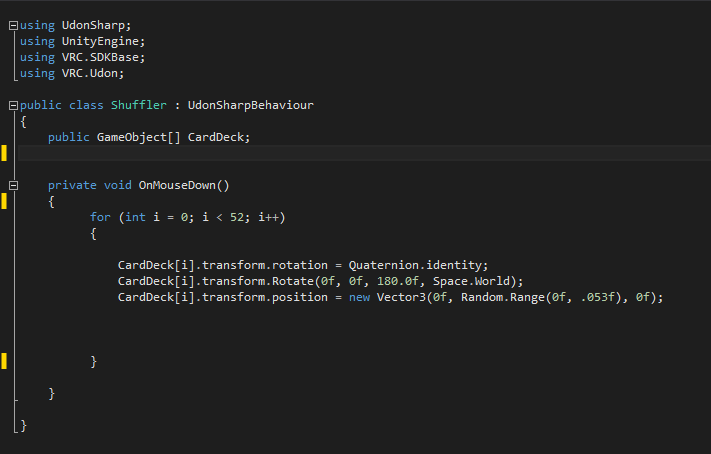 bold ibex
i dont know
 desert python
top right
bold ibex
... am i blind?
desert python
youre not screenshoting it, but its right next to the inspector tab
desert python
👍
severe pier
Hey! Does anyone have this asset still? After I updated Unity to 2019, the author deprecated it, it was a free asset though
hardy remnant
so... my pens are pickup-able/move-able...
but..
- buttons look weird...
- they dont draw at all...
im using the prefab.. but it says no >.>
(gonna keep workin at it, just in case anyone knows how fix before i figure out)

 raven sonnet

I put QvPen and usharp videoplayer on my world and I got this message
how can i fix it
latent shuttle
Question, how does one go about and add rain to there own world
ive looked everywhere and couldnt find it anywhere
night dawn
WHyyyyyy
 night dawn
yep
latent shuttle
can someone please help me🥺
bold ibex
latent shuttle
can someone please help me🥺
https://www.youtube.com/watch?v=cDHJuRV5Ays then add rain sfx manually
Creating some realistic rain using just Unity's own "Shuriken" particle system and Ultimate VFX. Lots of opportunity for tweaking!
Get Ultimate VFX: https://assetstore.unity.com/packages/vfx/particles/ultimate-vfx-26701?_aid=1100l3rZp.
Twitter: https://twitter.com/TheMirzaBeig/.
latent shuttle
ok ill look into it
kind leaf
So, playing around with sdk2 to check out a potential bug and I found the Control panel is very unresponsive. The only vrc components in scene are the stuff in the two included prefabs (vrcworld/vcmirror), with minimal objects in scene. The control panel eventually switches tabs after a 30+second delay. And then I get toying with the new functions of the sdk... An update feature?! Why is the update feature telling me an update is available and that update is a 2020 version of the sdk? I'm not posting a canny for an sdk I don't use, so hopefully someone else has.
Unity 2019.4.29f1
VRCSDK2-2021.08.04.11.23_Public
Any staff that would like a link to the existing project for verification/recreation can DM me.
bold ibex
Would love to have some help if possible!

Trying to see about playing a video across these computer screens within VRChat.
What would be the best way to achieve something like this while still looking good?
bold ibex
desert python
uv mapping
I'm not sure quire the process of that, what would UV mapping do exactly that would allow video to be played?
I kinda understand the basics of UV Mapping, but I'm unsure on what would be needed to be down to accomplish that
desert python
like multiple screens or a single screen
bold ibex
I'd like it to be a single screen at one point, and possibly multiple different screens outputting different videos at another- However, biggest need is to just output video
All the complicated shit and trying to make shit work comes second
Just trying to learn the process of figuring out to transmit a video/or possible livestream to the screens of these monitors
desert python
are you using udonsharp and sdk3
bold ibex
I'll be more then likely using Udonsharp/SDK3, I'm currently in the process of modelling things out in Blender before importing into Unity- Just want to know what would be the process of doing this, that way I don't fuck up anything in the modelling process prior to importing
:D
For context, I'm hosting a private secret event withing VRC for those who found some 'hidden things' about a week ago
Mostly the content will come from the video being played, and thought that multiple monitors "matrix-style" would be a cool way to display said video/information
The monitors are duplicated via two array modifiers and decimated with just the built in blender tool
:)
kind leaf
video broadcasts onto a material shader or a texture shader your choice; ied suggest looking at prefabs for an example. ProTv/ Wolfe or Merlin. You'll want to uv map your matrix display so all the screens share the same texture setup to cover all the monitors in chunks. Then when you import the blender file to unity and assign the appropriate material it will tile as you expect.
bold ibex
kind leaf
video broadcasts onto a material shader or a texture shader your choice; ied sug...
Gotcha, gotcha! So, essentially, you are attaching the 'video player' to a certain material which will in turn play on said material correct?
kind leaf
not attaching the player to the material, you tell the player to broadcast to a specific material. Other than that, yes.
and you can broadcast to just about any material, so if your uv is setup correctly in blender you are golden.
bold ibex
Alright alright, that makes some sense- So I should be having separate materials for the computer screen and then the rest of the computer, that way when it comes time to set up the video player the player just plays on the selected monitor material? Right?
I will be honest, this is only my second world I've made and the first including a video player- So I'm still a hella noob when it comes to shit like this lmao
kind leaf
all monitors can share a material. less draw calls, the magic is in the UV as @desert python explained sorry for the ping
wicked forge
Ever since the new unity version update Ive tried uploading a new version of my world but failed with the same type of error.. Ive reset and reimported everything more than once but yet I am met with "... Error: Failed to upload file" Failed to start part upload: Cannot start an uplaod against anything but the latest version of this file.."
And this pops up at the very end of the progression bar that is visible when uploading.
Anyone have Any idea about this? Its driving me insane and Im wasting so many hours on just waiting for my failed uploads..
kind leaf
do you have future proof enabled?
wicked forge
Yes
kind leaf
try without
wicked forge
okay
Might be some sort of file path error since I made a new project folder for the new unity version at the same time as I made a github backup with SourceTree for the world.
Unity wants to upload the files with the previous name I gave the project but It still wouldnt make sense since it keeps creating the files with that name if I delete them from the temp folder, which it is accessing during the upload process. Unless theres something else that aborts the upload because of the different names of between the files and the unity project.
kind leaf
using collab? Just disable collab or whatever git sync you have. But future proofing also causes issues so keep that off.
wicked forge
I dont sync I just push commits when I do updates to the world for backup
kind leaf
I wont tell you how to backup, but it's so much faster for me to just archive the project folder.
wicked forge
Im trying now without the future proof option
archive as in just make a copy on the harddrive?
That would fill the drive real fast
kind leaf
i zip it but yeah, I store my backups on another drive
4tb so ive got no issues in the foreseeable future.
wicked forge
I tried that.. got messy imo :>
pushing commits would pretty much work the same way I think
oh my goodness
"Content Successfully Uploaded"
and it didnt take half a day to do it
kind leaf
🙂 people have been ranting about future proofing for a long time.... glad it worked for you 🙂
fluid lotus
Hi all, still getting the following error when trying to make an SDK 3 world. I am logged in and so it seems during the publish process it logs me out. Anyone able to help me please?
 cedar horizon
Why is my fur dark but the objects around it are light?

 strange mesa
okay so basically I found these

Idk what these do and I don't know if I can find more of them
in the avatar world I'm currently in
cedar horizon
You have to be more specific.
strange mesa
okay then
I was searching for the small metallic parts on the back of the end
and I'm looking all over the map to find them
for some reason it's harder than it looks because I already found 5
and I don't know if there's more
cedar horizon
So, you went to a random world and want those parts in you'res?
strange mesa
I thought at the time it would bring in something or spawn something into the place, like an easter egg or something
cedar horizon
Oh well, this isn't the right channel for that, try #general-media.
 fast python
Anyone know of any good water shaders that are Quest compatible?
kind leaf
fast python
Anyone know of any good water shaders that are Quest compatible?
https://docs.google.com/spreadsheets/d/e/2PACX-1vTP-eIkYLZh7pDhpO-untxy1zbuoiqdzVP2z5-vg_9ijBW7k8ZC9VP6cVL-ct5yKrySPBPJ6V2ymlWS/pubhtml# check the shaders tab. There is at least one.
oblique bear
how would i go about checking if the player has pressed right trigger on their controller? similar to this
 near escarp
opal sigil
near escarp
opal sigil
when i switch for android i see that everywhere why ?
 fluid lotus
Hi all, still getting the following error when trying to make an SDK 3 world. I ...
fluid lotus
fluid lotus
Hi all, still getting the following error when trying to make an SDK 3 world. I ...
Anyone able to help? I tried to create a support ticket, but I kept getting an error.
 zenith widget
opal sigil
when i switch for android i see that everywhere why ?
zenith widget
opal sigil
when i switch for android i see that everywhere why ?
the light maps for the world have been compressed for android causing polarisation of the texture, it is why you see it everywhere
opal sigil
do you knwo how to fix it ?
zenith widget
Rebake lightmaps
opal sigil
okay ;-;
zenith widget
opal sigil
okay ;-;
#world-lighting message this might help
vestal garden
Can someone guide me to the steps to get background music playing as soon as you run world?
Mine was doing fine, but just stopped working yesterday.
desert python
vestal garden
Can someone guide me to the steps to get background music playing as soon as you...
in the audiosource. it should have “play on enable” on i believe and it should just play
vestal garden
desert python
in the audiosource. it should have “play on enable” on i believe and it should j...
Play on awake? Its already checked 😦
Also loop is checked as well.
It plays music just fine if I run the game through Unity's Play button, but not when I test build.
desert python
hmm. is it a 2d audio source?
is the bubble covering where you want it to be heard?
is your world volume turned up
vestal garden
desert python
hmm. is it a 2d audio source?
Just checked, and yes it's all the way left, 2D
vestal garden
desert python
is the bubble covering where you want it to be heard?
Oh it wasn't, but I have not enlarged the bubble to cover the whole world, but still nothing
vestal garden
desert python
is your world volume turned up
All the way to "1"