
#world-development
39 messages · Page 90 of 1
 kind leaf
future proofing enabled in the sdk settings menu?
kind leaf
whats your sdk version?
 polar quail
sdk 3
kind leaf
sdk3 but what release version
polar quail
how i know ?
kind leaf
because you downloaded it? "VRCSDK3-WORLD-2021.07.12.18.53_Public"
polar quail
i downloaded from vrchat website 3 days ago
in the error it mentions sdk 2 but i did not download sdk 2

here is the version i have
 kind leaf
whats up with the bouncyCastle.crypto error?
polar quail
??
im lost i dont know what to do this error came out of nowhere the only update i was gonna do today is add qvpens wich i did it works on testing but since then i cant upload
kind leaf
is there an error at the top of the list, you are only showing the bottom 3.
polar quail
Yes video player error that's all
kind leaf
if the only thing you added was the pens, then remove the pens and try
polar quail
Yes but I need the pens to be there
Also I duplicated the project to make another version for quest
kind leaf
its called diagnosing a problem. If its the pens or the version of pens you downloaded then they need setup or replaced.
polar quail
ok
kind leaf
if completely removing the pens (delete from scene and folder) doesnt solve your issue try submitting a ticket but follow the steps here https://help.vrchat.com/hc/en-us/articles/1500002378982-My-upload-failed

VRChat
The SDK may give a variety of errors depending on how your upload failed. Here's some steps to try.
First, ensure your SDK is up to date.
Updating your SDK with a fresh install is important. It sol...
If you still have issues, find your Unity editor log and attach it in a new Support Ticket. You can find your Editor.log file at this location:

C:\Users\username\AppData\Local\Unity\Editor\Editor.log

You can also find the file by pasting this into the address bar of a File Explorer window:

%AppData%..\Local\Unity\Editor\

Please attach the Editor.log file to your ticket.
you can also try the toolkit. it will produce user friendly report in its debugger to help find issues https://github.com/oneVR/VRWorldToolkit, use this before submitting a ticket.
https://github.com/oneVR/VRWorldToolkit#readme if you need help with the toolkit
polar quail
Can it be because I duplicated the project?
polar quail
Then how suddenly out of nowhere I get errors
It was working fine for the past 3 days
Now it says failed to upload signature so it's not the pens the issue
kind leaf
is that your only error?
polar quail
Yes
kind leaf
then it was the pens and now you have a new error.
polar quail
No before when the pens were here it also give me that error
It's alternating between failed to upload signature and asset bundle
actually it gives me that as well

 fast python
Got a quick question about view clipping
How do you keep stuff like hands from clipping super close to your face?
I know it's a world thing because when using small avatars in my world, you sse through the arms a lot
But in Murder 4 I don't see through the arms
How did they achieve that
kind leaf
near on the reference camera needs set to .001.
kind leaf
VRChat
Before getting started, ensure you have a Unity project with the SDK set up. If you want a great intro to creating your first world with pre-created assets, a tutorial video, and detailed steps, check out the VRChat Home Kit! Step 1 - Setting up a scene The first thing you need is a scene. This can ...
fast python
Ohh there's a cam in the scene descriptor?
I didn't really mess much with that, just placed the VRC_World prefab and went from there
kind leaf
no, there isnt a camera in the scene descriptor. you attach the main camera to the scene descriptor where it asks for a reference camera. Then in the main camera you set the correct near settings.
fast python
Wait but
Theres no camera in my world
Whats this about a reference and main camera
kind leaf
there is a camera in every project unless you delete it
fast python
Which I did
kind leaf
well there ya go, now you know what to do 🙂
fast python
If I spawn a new camera will it have the default settings?
kind leaf
the default unity settings
doesnt matter where its placed, just set the near to .001 and attached it in the descriptor where it asks for it
fast python
Right
I was just asking if I spawn a new one will it have the settings of a camera created upon making a scene
kind leaf
"10:09 AM] KevBal: the default unity settings"
polar quail
now i did what they ask now i have another error

even more than before
i removed the sdk then put it back
like they asked
plz whats this error i do not understand
they say go to the plugin folder but i cant find a plugin folder
 kind leaf
you need the newest version of udonsharp installed, just import over the other. no need to delete it
polar quail
ok where is the plugin
cant find the plugin file they talking about

where is that
kind leaf
I highlighted the part of the documentation were were supposed to follow. You did the stuff for fixing your sdk and the sdk wasnt the issue. So 🤷♂️
I also said to try the toolkit before that
polar quail
where is the plugin plz tell me
i cant stop the process midway
hey tell me where is the plugin cmon its been more than 3 hours im that its pissing me off
plz help me it does not want to work nomore i did a clean install and all
plz someone help me
hello is anyone here
i need help plz
its important plz help me
allo plz someone help
kind leaf
stop spamming discord, you refuse to follow instructions and went ahead and mutilated your project. If you cloned it for a quest version just delete the pc, clone the quest and use the cloned quest as your new pc version.
polar quail
ok now i deleted now what
kind leaf
do you only read one sentence and then move on?
kind leaf
what do you mean now what? You should have a working pc version prior to your mutilation.
polar quail
well lets see if it uploads this time
kind leaf
did the quest version also have the pens?
polar quail
no i was about to add to both but now ill have to do that again
kind leaf
dont do it until you know your world works
 kind leaf
install the vrchat toolkit that i liked way above and try again. then check the toolkits debugger and see if it has any red flags
 kind leaf
lol interesting. just hit autofix
after you apply autofix, reupload. if it fails again, check the debugger again. If it has the same message submit a ticket on the website.
make sure to include the the editor log "C:\Users\username\AppData\Local\Unity\Editor\Editor.log" and any screenshots of the issue.
kind leaf
Looked through the Search bar on the top right of discord, every one of the identical issues to yours had the same suggestion. Use the toolkit to fix it. You did that, so submit a ticket on the vrchat website with the information I told you to gather.
It wont be a quick reply, you are just going to have to be patient. Takes me on average 3 days for a vrchat email.
polar quail
ok damn so much time wasted lol but if it can be fixed then why not
sent the ticket with the log lets see what they can do
thanks for your time and help
 native cobalt
Anyone know how to temporarily take control of player camera for cinematic effect like in some horror maps? For none abusive immersion.
 viscid belfry
is there a way to access the highlight shader used when you hover over objects?
Would like to implement on other scripts that use collision detection
 daring sigil
hi im trying to upload a world using SDK3, however when i build an publish it i get this error message, i have no idea why and when i look at the console it says error building player because scrips had compiler errors, i'm pretty sure im not using any scrips other than the base vrchat ones so i really dont know how to fix this

 near escarp
screenshot your console errors
daring sigil
 daring sigil
near escarp
screenshot your console errors
daring sigil
near escarp
screenshot your console errors
i cleared the console and then pressed build and publish
daring sigil
ah ok
near escarp
Or at least prevents building worlds
daring sigil
is there a way to keep the light probes
near escarp
They should remain if they were created iirc, but i could be wrong
There's other free solutions on github though that do the same thing
daring sigil
ah ok thanks so much for your help :)
 fallen wren
is there a way to test a world in VR inside unity? like using Cyan but using my vr kit?
 late ruin
how can i remove this line?
 late ruin
 late ruin
near escarp
wrap mode
late ruin
near escarp
wrap mode
thankyou"
 weary portal
can somebody make a iron man simulator plz
near escarp
You can commission someone for that https://ask.vrchat.com/c/commissions/world-commissions/34

VRChat Ask Forum
Post about commissions for worlds in this category. Requests are not permitted, we only permit posts from those providing services.
 maiden mesa

trying to make my world quest compatible... idk how to fix this

im new when it comes to making worlds.. help me ;-;
 silent night
Wait does this mean that I have to update all my old worlds? ;w; ;w; ;w
Can I just update the version of the world on the Unity hub?
fast python
Um I'm a little worried and confused about the whole upgrading effecting u#
Can someone help me and make sure I don't corrupt my NPC ai?
I read the guide but wanna make sure I'm doing everything correctly
@near escarp I am sure you are running crazy busy right now but my issue is your status for once lmao
 mellow talon
does vrc support URP projects? URP uses shaders optimized for mobile/vr...
fast python
No
mellow talon
F
kind leaf
fast python
No
Clone your project and follow the instructions. Can't destroy your shit if you have a backup.
fast python
kind leaf
Clone your project and follow the instructions. Can't destroy your shit if you h...
you underestimate my incompetence
kind leaf
Then save your backup to a flash and send it to a friend and put another copy in Dropbox lol
near escarp
How can i help ?
Much better Unity interface, much better GPU lightmapper, much much faster upload speed !
fast python
near escarp
How can i help ?
My project uses U# for AI and I'm worried I'll lose my code
near escarp

fast python
I'm backing up my world files right now but may need your guidance on not losing my code
near escarp
Well, upgrading unity version doesn't delete files so ?
Your udon behaviors aren't going to get wiped if you follow the guide
fast python
There were special instructions that said U# code will go corrupt unless you do it just so
 near escarp
Yep, hence the follow the instruction part 
fast python
I'm just kinda confused on that
I just make an empty scene, save, then upgrade, open, then test to see if it all works?
near escarp
Yeah, it'll open on the new brand new empty scene, then you can switch back to the real scene
near escarp
If you duplicated your project there's no real reason to be scared
 near escarp
uh oh
fast python
(avatars includes my worlds too i just never renamed the directory lol)
 green lagoon
maybe start with whatever you're actively working on
fast python
Which would be my world and the avatars it has in it
@near escarp

Is this right?
 idle jolt
I’m confused about the new SDK
How do I import the 2019 sdk without opening the project in unity hub?
near escarp
fast python
Yep, save, close and upgrade !
near escarp
idle jolt
I’m confused about the new SDK
How do I import the 2019 sdk without opening the ...
VRChat
Migrating your project from Unity 2018 to 2019 LTS isn't as difficult as you might think! Here's a guide providing each step in detail.
fast python
And since it's SDK3 I import it LATER right?
near escarp
after 2019 upgrade yes
fast python
Alright
idle jolt
That does not help. How do I import the new sdk onto the old world without opening the old project in unity hub?
My brain…
near escarp
That's not part of the steps
fast python
So question
When do I import the new SDK3
I have updated the project
Do I import the SDK before I open the original scene?
@near escarp
 empty fog
I can't open the Udon Graph
fast python
Well good news!
My world seems to have made a seamless transition to 2019
Man Unity 2019 has the equivalent of new car smell. It all feels so fresh and professional now
near escarp

 glacial pond
So I can upgrade all my avatar projects to 2019 just fine but my worlds projects refuse to have a control panel after all the steps. Backups made, 3 attempts now.
near escarp
Did you delete the library folder ?
glacial pond
Yep, after upgrade and import
glacial pond
That would be it
Thanks
Should I delete that before upgrade or can I delete it now and reimport
fast python
Time for avatar upgrading
@near escarp now all I do for this is just import the new sdk, close project, upgrade, then upload?
Using SDK 3 for avatars
glacial pond
Still no control panel. Wondering if cyan emu has to go
near escarp
fast python
<@!97980768323633152> now all I do for this is just import the new sdk, close pr...
ye
wait no
wait actually yes
got scared for a second
near escarp
glacial pond
Still no control panel. Wondering if cyan emu has to go
It would have too yeah
fast python
So my world updated seamlessly for PC and Quest
And as an added bonus
Actually went down in file size
My rival however did not have such luck and all of his udon broke ;w;
near escarp

idle jolt
Okay I’m confused
Do I just add the new sdk, close out, switch to 2019, open unity, and delete the old SDK??
idle jolt
The newest one. When I heard there was 2019 I downloaded the new sdk via the website
fast python
idle jolt
Udon is cursed
Lies and slander
Anyway
Yeah
Import your new SDK (don't delete the old one)
idle jolt
Every time I used udon it has corrupted my file
But yeah anyways
idle jolt
As in switch to 2019?
fast python
Yes
idle jolt
Ok…
Now what?
glacial pond
Wondering if udon sharp needed to upgrade to 2019 support before the unity project is upgraded
idle jolt
Do I just…
Open it?
fast python
The build and test doesn't seem to work?
fast python
idle jolt
Do I just…
Open it?
Yeah
idle jolt
Oh god it’s downloading stuff
I’m scared
fast python
Yeah things seem to be starting to break for me
maiden mesa
i has a issue.. i fixed the other on.. sooo how do i fix the avatar validation..
idle jolt
Oh god…
fast python
Avatars are not transitioning to 2019 as well as my world
maiden mesa
 glacial pond
It appears that the issue is the empty scene did not stop udon sharp scripts from breaking :(
Unless I wasn’t supposed to open the good scene before upgrading the SDK
idle jolt
Oh god everything is different
glacial pond
Haha the new layout is wonderful. Give it a week
idle jolt
The scene looks fine, but I can’t get rid of the grid…
glacial pond
Grid options are on top near lights
idle jolt
Also, the sdk tab is missing
glacial pond
Not having a SDK tab - join the club. It’s bug fixing time
Check console for errors
idle jolt
Where are the lights? I don’t see anything for the grid…
idle jolt
Oh I see now. The Y
 idle jolt
Sorry for bad quality, don’t have Gyazo installed on new laptop yet
 empty fog
everytime I try to build and test my world it just instantly loads my home world like there was a problem with mine. I have the Scene descriptor and spawn location. im not sure whats happening
glacial pond
Wooo! All good. Just had a ton of 2018 helper tools, as soon as I deleted them all, SDK panel appeared
green lagoon
hopefully they get updated to 2019 soon
idle jolt
I don’t have any tools…
Should I just delete the sdk and reimport?
I’m gonna delete the sdk and see what happens…
HERE WE GOOOOOOOO
Ok that didn’t fix the control panel…
 willow kayak
I can't seem to add a VRC Scene descriptor in Unity 2019, using the latest SDK. Brand new project in Unity 2019.4.29f1
Can't even find it, apart from as an editor script
glacial pond
idle jolt
Ok that didn’t fix the control panel…
You won’t get the control panel until your console has no errors. Check console errors for what to fix next
 glacial pond
Sorry was talking to someone else
willow kayak
My bad
glacial pond
willow kayak
I can't seem to add a VRC Scene descriptor in Unity 2019, using the latest SDK. ...
2019.2.29f1 is the wrong version of unity. You need 2019.4.29f1
willow kayak
That was a typo
idle jolt
idle jolt
Sorry for bad quality, don’t have Gyazo installed on new laptop yet
@glacial pond
willow kayak

 tacit sapphire
Does anyone have a sample avatar good for reference for scaling within unity?
 past wave
im trying to migrate over a project, but no matter what i do the sdk always breaks
ive tried just importing with the old one there, removing the old one then reimporting new one. neither works
ive followed the documentation exactly
cyan triggers also seems to freak out but im less concerned about that
empty fog
When I build and test my world it just loads my home world after failing to load the build. Nothing changed except for the sdk and new unity version. Tried making a new project to see if it was just a corruption but no I can't even build test on a new project
 vast nacelle
Panel isn't showing up for me and this is what I'm getting. Any ideas?
 willow kayak
Perhaps a better question is how to I set up a VRC Scene descriptor in Unity 2019? it seems different to 2018
idle jolt
Okay now I only have one error showing up
It says that GUIText is obsolete: ‘GUIText has been removed. Use UI.Text instead’
What do I do?
willow kayak
Turns out I was a bloody idiot and was using the avatar SDK to upload a world
tacit sapphire
Is there any sort of test avatar for testing scale in the new sdk? I cant find one.
 red urchin

only issues i'm getting is errors with some post processing stuff
already tried reimporting the folder but nothing changed so i'm not really sure what it's asking me to do
red urchin
i also somehow read, and immediately forgot to follow instructions for if you had udonSharp in the scene so i'm gonna redo the whole thing anyway
maybe that'll also fix my postprocessing issue

this is where i went wrong, instructions had me go down to the migration process, therefore skipping the part where it tells me about udonsharp
heck
 karmic shore
I am trying to update a 2.0 map to 3.0. I followed the instruction here: https://docs.vrchat.com/docs/updating-the-sdk and after importing the VRCSDK3.0, even after saving, exiting, and re-opening the project, the VRCSDK is not working right. The drop down for the builder/uploader panel isn't there and the usual UDON popup doesn't appear (see picture below):
VRChat
If you need to update your SDK, it is important that you follow these steps to ensure the update proceeds properly and you don't have any old/conflicting files. Version Control If you know how to use it, you may find it beneficial to use version control software like Git to manage your project. You ...

I followed the instructions to a T. Deleted the meta files, and the VRCSDK folder and the Udon folder and VRC Examples folder.
fast python
@near escarp hey need help fast
Someone is threatening to rip my world to steal assets
How do I pass this on to VRChat staff and prevent this
This is the username and these are the threats
 near escarp
fast python
near escarp
fast python
Roger
idle jolt
Is there an issue with Standard Assets? It says that GUIText needs to replaced with UI.Text but the issue is that it doesn’t recognize UI.Text. Help?
fast python
How long do these moderation reports take generally?
I'm really hoping his account is locked before he can upload my stolen assets
I worked my ass off on coding that AI and even got help from a friend
tacit sapphire
How would I go about making a cube map with 6 textures to make a skybox work with vrchat skybox?
 fluid forge
Has anyone heard any real life reports of people ripping someone’s world and using it as their own? I personally have never heard of it happening.
fast python
I haven't but I've dealt with this user before and he is mentally unstable
fluid forge
Mentally unstable yet is capable of ripping worlds?
idle jolt
fluid forge
Has anyone heard any real life reports of people ripping someone’s world and usi...
The Star Wars community has had this happen plenty of times. It’s toxic, but I’m hoping I can do something to make it peaceful.
fluid forge
Hopefully it gets taken care of if it’s a real issue.
I just didn’t think it was something that happens much if at all.
idle jolt
Oh trust me. It’s a common occurrence.
fluid forge
Damn
fast python
This guy is, as I mentioned earlier, mentally unstable lol
He claimed that he helped put tupper in prison(????)
idle jolt
Especially in the Star Wars side of VRChat. There are some lunatics. Necromance, north Skirata, etc.
fluid forge
I don’t know what those things mean lol
fast python
Yes so the person who posts in the announcement channels and holds dev streams is an impostor
idle jolt
fluid forge
I don’t know what those things mean lol
They’re users
fast python
He also tried to get the Furality VRChat event sued by claiming the moderation of that event was engaging in criminal activity
idle jolt
I just hope that a update gets pumped out fast to get standard assets working again.
 leaden hazel
fast python
He also tried to get the Furality VRChat event sued by claiming the moderation o...
leaden hazel
fast python
He also tried to get the Furality VRChat event sued by claiming the moderation o...
....pardon?
idle jolt
Standard assets isn’t working at the moment. There’s an error in the code. It says that GUIText is obsolete and to use UI.Text instead. The issue there is that UI.Text isn’t recognized.
I tried to change it using visual studio. But nothing.
fast python
leaden hazel
....pardon?
Yep. He got banned from the event (for what I don't know) and claimed the staff did some acts that I will not explicitly state here in an attempt to shut them down
leaden hazel
wow
late ruin

 leaden hazel
I'm sure that VRC will listen to the rants of a single user kicked for misbehaviour rather than the semi-professional event runners who they probably have a cordial business relationship with. /s :V
fast python
I reported him to the staff then and the moderators of the event were utterly baffled
leaden hazel
late ruin
<:vrcThinking:585749770547757086>
Gotta love those verbose and straight forward error messages
late ruin
leaden hazel
Gotta love those verbose and straight forward error messages
yeahhh but how do i fix it
fast python
He seriously needs help though because his behavior seems very schizophrenic
leaden hazel
late ruin
yeahhh but how do i fix it
Obvious things are check you have enough hard drive space. After that, you may want to put that vague unhelpful error message in to your search engine of choice and see if there are some troublshooting guides to follow. That's what I'd do
late ruin
leaden hazel
Obvious things are check you have enough hard drive space. After that, you may w...
okay thanks
i have plenty of space 😅
leaden hazel
Good luck though, that sorta error message drives me mad because you're left with no idea what to do about it
late ruin
leaden hazel
Good luck though, that sorta error message drives me mad because you're left wit...
can i upload the world on 2018 though?
 desert python
yep
late ruin
is nott uploadinggg
silent night
So I get this error with Standard assets after updating to the 2019 Unity. Any ideas here?
https://gyazo.com/69d6cd1d646930ec1d5be8daab4df52b
 late ruin

 random owl
Search for "t:pipelinemanager" in the hierarchy and remove any that aren't in the VRCWorld with the scene descriptor
late ruin
random owl
Search for "t:pipelinemanager" in the hierarchy and remove any that aren't in th...
oki thanks
random owl
silent night
So I get this error with Standard assets after updating to the 2019 Unity. Any i...
Standard assets was deprecated back in 2018, you will most likely need to remove some files or manually fix them
silent night
Literally just removed the specific file it references.
LMAO
Good old Unity
@idle jolt
...Oh, well, it put me in the default world. RIP
LMAO
Time to tinker.
Nope...World is broken, sadface.
late ruin
random owl
Search for "t:pipelinemanager" in the hierarchy and remove any that aren't in th...
silent night
Well this is gonna be fun hahahaha.
...Is there not supposed to be an udon script attached to the VRCWorld prefab?
 bold ibex
anyone happen to know why particles wouldnt be rendering in a mirror?
random owl
silent night
...Is there not supposed to be an udon script attached to the VRCWorld prefab?
By default there is supposed to be one
silent night
Hm.
 alpine spoke
Is anything weird with the lighting now? In unity my lighting is normal, but in-game my lighting is much brighter.
bold ibex
hello, do you know how to fix standard assets to fit 2019 ver?
silent night
I test the world and it immediately jumps me into my homeworld.
As if there's not even a spawn.
random owl
bold ibex
anyone happen to know why particles wouldnt be rendering in a mirror?
Usually happens with single sided particles that are facing your player camera causing them to be facing the wrong way to be visible in mirrors, not a issue with the mirror itself
late ruin
random owl
By default there is supposed to be one
Thammks for the halppp 
leaden hazel
alpine spoke
Is anything weird with the lighting now? In unity my lighting is normal, but in-...
Some people have noticed lighting changes in worlds that may need redoing
silent night
This is gonna make my head hurt lmao x'3
alpine spoke
leaden hazel
Some people have noticed lighting changes in worlds that may need redoing
It's really weird because no matter how I bake my lighting, it just doesn't look the same once uploaded
bold ibex
random owl
Usually happens with single sided particles that are facing your player camera c...
how would one fix this? sorry im super new to unity ;-; also thank you so much for the response!
random owl
You would need to change the particles on the avatar to use a double sided shader
late ruin
😙
 bold ibex
random owl
You would need to change the particles on the avatar to use a double sided shade...
bold ibex
random owl
You would need to change the particles on the avatar to use a double sided shade...
this is for a world but i think i understand what youre saying thanks again for the help i couldnt find a solution anywhere lel
glacial pond
 random owl
bold ibex
this is for a world but i think i understand what youre saying thanks again for ...
random owl
bold ibex
this is for a world but i think i understand what youre saying thanks again for ...
Same solution in that case but for the particles in the world, I don't really have any shader to recommend
leaden hazel
alpine spoke
It's really weird because no matter how I bake my lighting, it just doesn't look...
Are you baking in 2018 or 2019?
silent night
Well...Ran out of ideas. No idea why I can't spawn into this world. Loads for a second and then kicks me to my homeworld q.q
 slim hull
alpine spoke
It's really weird because no matter how I bake my lighting, it just doesn't look...
slim hull
alpine spoke
It's really weird because no matter how I bake my lighting, it just doesn't look...
That's oddly familiar... post processing?
also Bakery?
leaden hazel
silent night
Well...Ran out of ideas. No idea why I can't spawn into this world. Loads for a ...
Try deleting and re-creating the spawns?
alpine spoke
leaden hazel
Are you baking in 2018 or 2019?
2019
leaden hazel
Hmm
alpine spoke
slim hull
That's oddly familiar... post processing?
No bakery. I'll look into post processing. That may be it.
silent night
leaden hazel
Try deleting and re-creating the spawns?
Well, there's already a default spawn set to the "VRCWorld" prefab technically.
alpine spoke
slim hull
also Bakery?
Also, Bakery completely messed up my lighting last time I tried it xD
leaden hazel
maybe delete and re-create the World Descriptor? (after saving needed data from it)
silent night
Tried. Didn't do anything :c
silent night
leaden hazel
maybe delete and re-create the World Descriptor? (after saving needed data from ...
At least from what I can tell. I have no errors in my console either.
 primal onyx
 silent night
^This
leaden hazel
that's.. odd o_O
bold ibex
random owl
Same solution in that case but for the particles in the world, I don't really ha...
fixed it :) thanks again again
silent night
leaden hazel
that's.. odd o_O
Yeah I know...It loads for a sec, says "325 kb" or something for download size, then kicks me into homeworld.
I know the world is 10 MB or so.
leaden hazel
maybe there's something else wrong then that's not that
 silk coral
updated my game. my quest only world that I made for myself is pitch black now.
leaden hazel
Have you cleared you entire cache?
silk coral
All I can see is the skybox and certain objects everything else is just black and the point lights are gone
leaden hazel
following the guide on the support channel
leaden hazel
Halvy how does it look in the editor?
silk coral
I haven't bothered looking
This is in-game
This wasn't an issue until
Literally just now
when I updated my game
leaden hazel
Did you test it in the beta?
silk coral
no?
was I supposed to
its probably because there's a standard shader somewhere, I couldn't find it at all before I uploaded it though
I don't want to completely remake my world damn it
leaden hazel
It was recommended if you are a world or avatar creator, you tested during the open beta that ran over the last month
leaden hazel
You probably want to follow the instructions
upgrade your world to Unity 2019
and then see how it looks in that editor
It could be something simple to fix
silk coral
mmh
Soon.
I make avatars for commissions
If I don't learn those instructions I'm not going to survive
leaden hazel
You'll want to start new projects or upgrade work-in-progress ones ones to 2019
Its a one time thing
silk coral
Hghfhsbbf
I had avatars I needed to update..!
leaden hazel
after that new projects you can just start in 2019
silent night
@leaden hazel Clearing the library once and seeing if it fixes it.
leaden hazel
Most content should continue to work fine
silk coral
I'll have to set aside time to do that soon
my Avatars work fine but my world is absolutely fucked
leaden hazel
all my content with I think one small lighting thing is working correctly in the new build
alpine spoke
Most of my lighting seems the same. It's mostly just this one spot in my world that's being weird.
silent night
I'm just having spawn issues...Tch.
 tardy ridge
🤔 Is it normal when I hit test locally it send me into the home world instead? I'm using Unity 2019.4.29f1 and also imported the latest SDK3
silk coral
tardy ridge
🤔 Is it normal when I hit test locally it send me into the home world instead? ...
this happens to me too, I have no idea where to check build and test worlds
tardy ridge
Now I'm just really not sure if I can upload this caz I don't want people un-able to access the world.
 silent night
@tardy ridge You're having the same problem I am.
I can't figure it out, and the VRCWorld prefab is set up appropriately.
I cleared my library and am gonna see what happens, I have to reimport.
tardy ridge
silent night
<@!165647465918234625> You're having the same problem I am.
Does it work though? Have you tried uploading a world with Unity 2019 and see if people can join?
silent night
Not going to yet.
silent night
tardy ridge
Does it work though? Have you tried uploading a world with Unity 2019 and see if...
Last time I did that nobody could access the world, sooo~
silk coral
tardy ridge
Now I'm just really not sure if I can upload this caz I don't want people un-abl...
Nothing looks wrong here?
bold ibex
Is this only work in test server or we can upload and use in live server ? im so confuse ;_;
 full spire
Assets\Udon-VRC\Udon\Editor\ProgramSources\UdonGraphProgram\UI\GraphView\GraphElements\UdonNode.cs(88,37): error CS0246: The type or namespace name 'SetVariableNode' could not be found (are you missing a using directive or an assembly reference?) anyone get this after updating the sdk. I also only have the utilities tab in the SDK dropdown menu.
tardy ridge
silk coral
Nothing looks wrong here?
nope, nothing looks wrong, it's just I couldn't test locally.
silent night
I couldn't either, wasn't working.
slim hull
full spire
``Assets\Udon-VRC\Udon\Editor\ProgramSources\UdonGraphProgram\UI\GraphView\Graph...
I'm getting one that's very similar to it
tardy ridge
I mean I can still test with CyanEmu, but I don't know if the world can be loaded by other players if I upload now.
 silent night
If it can't be loaded into test, it can't be loaded into main VRC.
I've learned this the hard way before.
tardy ridge
It could be just because the SDK is not setup to load a 2019 version package, this is the first time they migrate VRChat into a new version Unity .
🤔
green lagoon
actually this is like the 3 time they've migrated Unity versions
green lagoon
5.4 2017 2018 2019
tardy ridge
🤪
slim hull
full spire
``Assets\Udon-VRC\Udon\Editor\ProgramSources\UdonGraphProgram\UI\GraphView\Graph...
I'm deleting the Library folder to see if that helps...
green lagoon
actually Unity 5.4 is 2015
full spire
slim hull
I'm deleting the Library folder to see if that helps...
keep me updated.
tardy ridge
I guess no more updates until they fix it then?
silent night
Yeah, I'm doing the same, it's taking forever to reimport again.
I'm super sadface.
:c
I just wanna update my worlds so I don't have to tear my hair out.
tardy ridge
🥲 Should've keep it in Unity 2018, fk.
 silent night
Nope, reimporting didn't fix anything after updating Library. @leaden hazel
full spire
Have many people had success with migrating or is this something i should wait to do?
tardy ridge
full spire
Have many people had success with migrating or is this something i should wait t...
Not recommend to migrate 2019 until it's stable and proven working. 😔
silent night
Sadly it seems to be very spotty.
I would assume so, they said that 2019 and 2018 are separate.
leaden hazel
silent night
Nope, reimporting didn't fix anything after updating Library. <@!905319421009264...
Not sure what to recommend at this point, I'll be doing a 2019 conversion tomorrow and seeing how it goes myself
for now I gotta head to bed o.z
silent night
....I
My VRChat wasn't updated.
Let's see if this fixes it LMAO
That was the problem! LOL
@leaden hazel
@tardy ridge
tardy ridge
🤪
silent night
Have you updated your actual VRC game?
tardy ridge
oh well
silent night
I feel like a moron.
tardy ridge
me too
tardy ridge
🤣 Well thanks for sharing the solution then, that's quite helpful
silk coral
Sometimes it's the simplest solutions you know?
silent night
And it struck me.
Because I was going to load up VRC because someone else said "I can't join worlds"
So I'm like "Let's go play VRChat!"
silk coral
I was having a pain in the ass trying to figure out why my menu toggles weren't doing anything only to realize I hadn't plugged the fuckin animation controller into the FX layer
silk coral
everything was set up but I forgot to do the easiest part
 halcyon flicker
how do i know if its updated or not?
silent night
It would tell you in Steam if it's on steam.
halcyon flicker
steam never said i had an update or even showed the update icon
and im havin difficulty loading worlds and half the player models
silent night
@halcyon flicker Are you having the spawn thing that we were having?
halcyon flicker
i cant leave the home world
silent night
Oh, we were having problems with world testing.
silk coral
halcyon flicker
and im havin difficulty loading worlds and half the player models
Check if your game is properly updated
And clear your cache
green lagoon
and make sure you clear your cache
halcyon flicker
im on pc and i cant join anything, it says loading then goes black, then the ok button pops up and makes me go back to home
ive tried clearing, uninstalled, dns all of it and i just got out of the error world. ive tried asking people in user support but no one really helped
 rain shadow
halcyon flicker
steam never said i had an update or even showed the update icon
rain shadow
halcyon flicker
steam never said i had an update or even showed the update icon
If the update never showed restarting steam should fix it and queue the update
silent night
^
rain shadow
Though if you uninstalled surely you would have restarted steam also?
slim hull
full spire
keep me updated.
no dice, same 7 errors
halcyon flicker
rain shadow
Though if you uninstalled surely you would have restarted steam also?
yea no luck
im stuck in the home world
silent night
@halcyon flicker Can you try something for me?
near escarp
Check #vrchat-support
tardy ridge
Seems this no longer works though
 halcyon flicker
silent night
<@!267058186647896064> Can you try something for me?
halcyon flicker
silent night
<@!267058186647896064> Can you try something for me?
yea i can
 silent night
tardy ridge
make sure to double check behaviors if you don't want them do continues sync.
silent night
tardy ridge
make sure to double check behaviors if you don't want them do continues sync.
What if I don't want my Unity project to sing?
tardy ridge
setting it to manual and never call the RequestSerialization() function will make them never sync.
silent night
tardy ridge
setting it to manual and never call the RequestSerialization() function will mak...
But what if I don't want them to sing?
tardy ridge
sing?
 neat flower
how do you make a unity project sign?
 halcyon snow
I am trying to upload a world and upload button shows but i cant click it. unity is building the content but i just cant hit the upload button.
😰
all other things are working
 winter stump
Damn dude, Hats off to the vrchat team for making the migration so smooth, I have a pretty large world and there was only 1 error with a standard assets script which was easy to solve! Truly well done! 👏 🍻
desert python
you are one of the most luckiest here
silent night
neat flower
how do you make a unity project sign?
Mine sing all the damn time it gets annoying at night.
winter stump
desert python
you are one of the most luckiest here
seriously? I didn't realize 0_0
silent night
You quite seriously are lucky.
desert python
dude, im still trying to upgrade my other worlds since beta first came out for 2019 lol. it released so early 😓
desert python
good luck, you have my salute lol
 desert python
ye, thats one lol
winter stump
the one thing im good at is keeping my projects clean and not cluttered
probs why it went so smooth for me
desert python
probably
i mean, i have like 2-4 worlds per project, so they naturally get cluttered.
desert python
i do a lot of unity lol
idk, i think its easier/ saves drive space
and semi faster to switch "projects" since theyre all in the same project
winter stump
true
I wouldn't recommend it but it is doable
and you're right about smaller file sizes
damn uploading files is way faster now
tardy ridge
silent night
Yes, sing.
 You cute, but I don't think they sing lol
silent night
tardy ridge
<:vrcTupCheers:845071981018873897> You cute, but I don't think they sing lol
I'll shank you.
tardy ridge
desert python
you are one of the most luckiest here
 Wait we were supposed to receive error? I didn't get any error after the migration of my chess world...
desert python
some might be easier than others
if you use 50+ udon scripts or a lot of sdk 2 switches. it gets funkier
specifically. step 2.5
and: missing udon behaviours - the behaviours
tardy ridge
silent night
I'll shank you.
 awww, didn't know you are into this kind of play~
tardy ridge
desert python
if you use 50+ udon scripts or a lot of sdk 2 switches. it gets funkier
oh yes, SDK2 switchers could be causing a lot of conflicts.
silent night
tardy ridge
<:vrcCatLove:784818590700142612> awww, didn't know you are into this kind of pla...
I swear to god--
 median egret
any idea why after upgrading all my doors and such with udon stuff looks like this?
desert python
i dont even think sdk 2 was touched. so..... lets see what happens
 desert python
tardy ridge
<:vrcCatThink:784264661410381835> Wait we were supposed to receive error? I didn...
desert python
tardy ridge
<:vrcCatThink:784264661410381835> Wait we were supposed to receive error? I didn...
thats what i ment by missing behaviors
tardy ridge
median egret
aka empty
oh that's just a reference disconnection, you can either re-attach the script or make a very slight change to the prefab and save it, it shall auto link them up for you.
median egret
hm
desert python
median egret
ok so what i did to fix this was go open the 2018 project. and basically drag the whole scene under one parent and then prefab it all and move it into the 2019 project
median egret
well it's a door I put a udon thing on to tp people on interact
tardy ridge
desert python
this will reenter reference disconnect components
winter stump
desert python
thats what i ment by missing behaviors
lucky my world was sdk3 but I did have udonsharp
tardy ridge
that definitely works lol
silent night
tardy ridge
<:vrcCatLove:784818590700142612> awww, didn't know you are into this kind of pla...
I was gonna add you earlier to brainstorm on 2019 Unity but now I don't even wanna-- rrr.
desert python
omg, i really hope teleports were fixed before the 2019 release. when i was testing it, it did not work, it would teleport you to spawn
median egret
desert python
ok so what i did to fix this was go open the 2018 project. and basically drag th...
wdym?
desert python
silent night
I was gonna add you earlier to brainstorm on 2019 Unity but now I don't even wan...
aw naw
desert python
median egret
wdym?
so like, wait, did you understand any of that?
median egret
uh not really?
desert python
you want to basically put everything in the 2018 scene into one game object so you can prefab/drag and drop that game object into the assets folder
winter stump
@desert python welp my world uploaded perfectly
desert python
then send that prefab from the 2018 assets folder to 2019 assets folder
silent night
Redoes literally everything including textures and modeling just to avoid having to migrate
K dad I did it.
tardy ridge
I'm definitely not a top programmer, but I trust my capability to implement most of the features I needed for making a decent world. So I coded everything in my world manually, even for the scripts from some prefabs I will take a look and modify it to fits my optimization. (And I admit I wasn't doing this until I found a horrible performance bug in the Moon Join/Leave notification system prefab)
silent night
tardy ridge
<:vrcTupCheers:845071981018873897> I'm definitely not a top programmer, but I tr...
I can't script to save my life.
I wanna learn C+ buuuut.
tardy ridge
silent night
I was gonna add you earlier to brainstorm on 2019 Unity but now I don't even wan...
hehe, cutie
desert python
tardy ridge
<:vrcTupCheers:845071981018873897> I'm definitely not a top programmer, but I tr...
oh what was the bug, ir seeing people talk about the performance on that thing but no one told me nothin
silent night
Permission to punch Hao into next year.
desert python
silent night
Permission to punch Hao into next year.
no, theyre already at 2019 finally!
silent night
What about 2020
desert python
thats the future
silent night
We need 2020 VRChat.
desert python
thats for microsot developpers to use
silent night
Wait Microsoft uses Unity? No wonder why their OS is trash.
tardy ridge
desert python
microsoft uses unity for their games, and they have a feature where if you upload only thing on pc, its automatically android/quest supported by default lol
silent night
Damn.
Microsoft Flight Simulator built on Unity huh.
There's a reason why 3090's can't run it.
tardy ridge
silent night
I wanna learn C+ buuuut.
But you are an artist aren't you? I can provide my technical support in exchange of your modeling/designing skills maybe. It's better to master one skill rather than knowing everything but not good at any of them. uwu
desert python
silent night
There's a reason why 3090's can't run it.
engines go brr sometimes lol. sometimes literally
red urchin
 median egret
desert python
you want to basically put everything in the 2018 scene into one game object so y...
median egret
desert python
you want to basically put everything in the 2018 scene into one game object so y...
so when I drag in the 2018 stuff do I keep the original scene or brand new scene?
silent night
tardy ridge
But you are an artist aren't you? I can provide my technical support in exchange...
Very fair, yes. I do a ton of modeling right now. I used to draw but I found a talent for modeling not too long ago especially with hard surface stuff. Most of my worlds now are entirely Blender-made, so if you're needing stuff it's definitely something I could help with.
desert python
median egret
so when I drag in the 2018 stuff do I keep the original scene or brand new scene...
put the prefabed scene into the 2019 scene
desert python
red urchin
my terrain is pitch black in game
i would not do that as terrain has been remade in 2019. but you can try as you get free dark mode
median egret
desert python
put the prefabed scene into the 2019 scene
ok ok so I make a game object in a scene, drag everything under that and then save the scene and drag that scene over to 2019?
silent night
Bakery does miracles for terrain.
 dusk sapphire
Updating your project to 2019 should fix most terrain issues, just back up your project first.
desert python
drag the game object into the assets folder/tab
winter stump
^
dusk sapphire
terrain has most certainly not been "remade" i have no idea where you got that idea from
desert python
dusk sapphire
Updating your project to 2019 should fix most terrain issues, just back up your ...
good to know
dusk sapphire
also microsoft doesnt use unity for it games, name me one
winter stump
more notable actually is ori and the blind forest
dusk sapphire
Ok, there are some small examples looking it up, i'll concede that
desert python
i guess we could bring xbox into this
silent night
Xbox = cube
dusk sapphire
but they definitely don't have a magic thing that automatically converts games to android/quest
desert python
they do
winter stump
Ori and the blind forest is small? 0_0
desert python
they are actually magical
you should see their management pack for unity
and the MRE packages
(not the food)
desert python
yay. i totally did not have to help 2 people yesterday with the 2018 version of the pol table lol
winter stump
rip
kind leaf
fun fact. just learned the elder scrolls legends was done on unity. didnt think bethesda had it in them to use anything but their engine. https://en.wikipedia.org/wiki/List_of_Unity_games
This is a list of notable games using a version of the Unity engine. The main article on the Unity engine gives further details on the engine itself and its versions.
All games listed here have an article linked to them.
desert python
kind leaf
fun fact. just learned the elder scrolls legends was done on unity. didnt think ...
wow. we now know it can fit in vrchat lol
winter stump
lol
desert python
actually, isnt theres a super world thats literally just skyrim
like a 1.2 GB world
winter stump
oh also pubg mobile is in unity
median egret
is there another way to fix all of these scripts?
hard for me to do the whole moving a object over
all my udon scripts are none rn
winter stump
did you follow the migration guide?
median egret
yep
tardy ridge
median egret
is there another way to fix all of these scripts?
You don't need to move the whole project. Just export your scene in 2018, EXCLUDE DEPENDENCY, and import it into your 2019, it shall fix most of them.
And for the rest if it's a prefab just do what I mentioned earlier, it worked for me.
just this little thing.
 winter stump
all I did was back it up, make the blank scene and changed versions in the hub and it worked flawlessly
tardy ridge
I have to admit that I went a bit over-confident and didn't even backup any files when migrating, but don't do the same as I did. it's terrible and super risky.
winter stump
^
kind leaf
hmmm, did they change the migration docs? there is no exporting to upgrade. for sdk3 worlds you just create a new blank scene, load it, close unity, clone the projects, reload the project with unity 2019, yes to all and then reimport the new sdk+sharp. Upgraded last night with zero issues
dusk sapphire
Yeah, just follow the migration docs, worked well for me with no issues at all
median egret
tardy ridge
You don't need to move the whole project. Just export your scene in 2018, EXCLUD...
problem with that is if I try to put all of my stuff under one parent object, a good amount of my objects have missing scripts i never deleted like a ton so it won't let me
dusk sapphire
this is the most painless unity upgrade so far
 dusk sapphire
the step with creating the blank scene is really important, don't miss that as it prevents issues with udon behaviours in your scene losing references.
kind leaf
"Do not export your old project as a UnityPackage, that can take forever and have other errors."
tardy ridge
median egret
problem with that is if I try to put all of my stuff under one parent object, a ...
You don't need to put stuff under one parent object,
red urchin
dusk sapphire
Updating your project to 2019 should fix most terrain issues, just back up your ...
alright will do tomorrow, tyank you!
median egret
dusk sapphire
the step with creating the blank scene is really important, don't miss that as i...
I mean I made a copy so I can try again, I made a brand new scene, saved the project
 nova locust
I updated all of my worlds to 2019. All but one have sdk3 and menu options such as control panel. However, one world doesn't have the menu options. I already tried to import the latest sdk3 package, but it says it's already installed.
dusk sapphire
You may want to check what other assets you have and update them as well, such as udonsharp, as they may need to be updated to work with unity 2019 as well.
nova locust
oh? Alright, I'll check
Ok, i updated the udonsharp and other stuff. I tried to import the sdk3 and still no menu options
damn this world lol
this certain world always gives me issues.
dusk sapphire
console errors?
nova locust
dusk sapphire
console errors?
 dusk sapphire
oh yeah I came across that issue as well, just delete that script if you're not using it
standard assets is depreciated in unity 2019, so issues with it are to be expected
nova locust
now, another issue bruh
halcyon snow
?
nova locust
I tried to detach the ID and i followed what it said. It won't work.

 obtuse sierra
median egret
obtuse sierra
median egret
reimport .prefab sometimes fix this. (I don't know why)
dusk sapphire
might need to make a ticket, theres a server side issue going around as of late that causes this to happen
assuming you really dont have a pipeline manager with another id of course
near escarp
Yeah you'll have to email the support for now
nova locust
rip. thanks guys
 strange lava
i updated my vrchat udon world. now i have to install then new 2019 sdk. how do i do this? do i just download the sdk from the webside import it and it figures itself out?
red urchin
i've had a few other friends say the same thing UP
i'm personally having a problem where i absolutely cant bake any lights
it just gets stuck at like 95% preparing bake, and will never start
i've tried with different lightmap sizes, i've tried with cpu and gpu, even cleared my GI cache, and it just doesnt start
been sitting here for about 15 minutes waiting for it to do anything and it wont move

it's definitely TRYING to do something i think. No errors in the console either
strange lava
red urchin
i've had a few other friends say the same thing UP
so like did you follow the first rule of repairing?
red urchin
hm?
 red urchin
i sure did tman
yea my friends world went from 42 to 63mb and nothing about it changed
this whole update has been an absolute mess for me
i've followed everything that i possibly could and i'm still getting more issues lolol
yeah i had to delete that, it doesnt work yet
random owl
If you clone the repo instead of downloading the release it will work, I'm unable to make a new release as of yet
red urchin
i'll wait XD
i'm gonna wait for qvpen, vrcbilliards, and probably the next sdk update til i continue anything
but my terrain is broken and i really want to fix my world for at LEAST the terrain but i cant even bake the lights
near escarp
 dusk elk
Please contact the #vrchat-support
red urchin
shout out to the mods for dealing with all our shit XD
 unkempt turtle
being a mod here is probably pretty stressfull
strange lava
i have background music in my world set to 2d with no dropper that way you can hear it everywhere. this worked before the upgrade but since i upgraded it sounds just like a 3d sound again.
any clue?
near escarp
Did you add the spatialization component ?
dusk elk
near escarp
Please contact the <#372142854430261258>
Do I need to write the feedback email through that address?
near escarp
Yes please !
dusk elk
OK
strange lava
near escarp
Did you add the spatialization component ?
if you mean the setting in the spatial audio script then yes. should i turn it off?
strange lava
ahh yes thanks im stupid
and do you perhaps know why all my seats stopped working after the update?
 frank shadow
looks like this thing is gone from the vrc sdk, breaking USharpVideo players, and probably anything else that used it

how the hell am I supposed to go around this
 sonic oriole
I'm constantly getting this error whenever I'm trying to test build my world, how do I get rid of this

 spark sleet
Hello, I am ameteur sound engineer and wanna help world creators using my sound. But i don't know nothing about vrchat world creation and ask you, is the vrchat support opus codec? And what kind of format and quality is most proper for vrchat? Thank you
frank shadow
you use wav and let unity do the compressing
spark sleet
Unity will do compressing when map baked?
It will not affect map size even i gave them as 44.1k wav?
frank shadow
my 1 minute wav file is less than 1 MB when used as such in unity
WTF is wrong with this shit
everything is totally fine
I rebake lighting
and I get this:

yeah, I cant get lighting to look good after the first bake any more
it was totally fine until I baked the 2nd time
 red urchin
@frank shadow edit > preferences > GI Cache, clear it
Get used to it it might happen alot
Well I hope that helps at least
frank shadow
I see, will try that, thanks
bold ibex
After upgrading to unity 2019 the sky looks like this with post processing. Tried reimporting and getting the latest version. Still same issue
 frank shadow
red urchin
<@81244981343297536> edit > preferences > GI Cache, clear it
frank shadow
red urchin
<@81244981343297536> edit > preferences > GI Cache, clear it
didnt help :(
I tried deleting all lightmap data from the scene and bakery folder, rebaking, then deleting GI cache anda gain rebaking etc
im out of options
its like there is no brightness data, only color data

its totally fine in unity

it breaks only after running it in vrc
frank shadow
this might actually be better for #world-lighting

 calm latch
I still haven't gotten my mirror buttons to work would someone please be kind and help me out
frank shadow
oh perfect, vrc sdk doesnt let me upload a windows world that is larger than 50 MB
the frustrations never end with the 2019 update
 north python
I had a similar lighting bug in my world after upgrading. Everything fine in editor, lighting data unusable ingame. Fixed it by going into the lighting options and disabling realtime global illumination. After that it was all back to normal ingame
north python
frank shadow
it breaks only after running it in vrc
^
north python
Might do the same thing, but nice :3
polar quail
how to have the android support for unity i dont remember
 mighty steppe
calm latch
I still haven't gotten my mirror buttons to work would someone please be kind an...
mighty steppe
calm latch
I still haven't gotten my mirror buttons to work would someone please be kind an...
by mirror button do you mean like, turning a mirror off and on? Vowgan has some good video on that on youtube.
calm latch
yes I mean that I tired and nothing happens when I press the buttons
mighty steppe
off the top of my head, did you remember to set the public game object variable to the mirror? I forget that a lot
some screen shots of the graph, and the udon behavior on the object in the inspector would help diagnose the issue.
daring sigil
Hi, im having issues importing the vrchat sdk to unity as it says that it uses obselete APIs and then doesnt have the vrchat window pop up at all, im using sdk3 and unity 2019.4.29f1 like it says on the website but im not sure why it wont import correctly

 mighty steppe
hanging chair mirror is listed twice on the variables of that object, is that intended?
you might be turning in on and off again in 1 interact if it is happening twice.
but your variables and you graph don't match up so I'm not sure what is going on there.
 woven anvil
Just gonna put this idea out into the void before I nod off: a world that looks like a typical hangout world on a surface level, but has a secret boss you and the other players can fight.
silent night
This conversion stuff is quite easy to do, just time consuming.
silent night
calm latch
Hit the “Reload” button on your Udon graph to fix the inconsistency on the second HangingChair variable.
silent night
daring sigil
Hi, im having issues importing the vrchat sdk to unity as it says that it uses o...
Did you follow the guide?
silent night
polar quail
how to have the android support for unity i dont remember
If you are using the Unity Hub you just have to go to the “Installs” section on the Unity Hub, click on the three dots and select Advanced Options, then do the add on for Android build support.
silent night
frank shadow
oh perfect, vrc sdk doesnt let me upload a windows world that is larger than 50 ...
Do you have the error that is showing up as a picture? I updated a world last night that was about 78 MB.
silent night
 runic epoch
There was a fix in the guide for SDK2 stuff that was pretty common and that was going directly to the directory of your project and deleting the “Library” folder. Follow the guide. If you delete the Library folder it’ll just have to reimport when you reopen the project but it’s a supposedly common fix for the 2019 migration.
silent night
frank shadow
its like there is no brightness data, only color data
Did you check which layer you are looking at in the Unity viewport? Upper left, make sure it’s set to “shaded” and make sure the “Lighting” button is also ticked to the right of it.
frank shadow
silent night
Do you have the error that is showing up as a picture? I updated a world last ni...
closing and opening unity fixed it lol
silent night
Roger dodger.
frank shadow
silent night
Did you check which layer you are looking at in the Unity viewport? Upper left, ...
absolutely unrelated, check #world-lighting for my fix
silent night
Neato burrito.
 tropic ferry
hi ! I followed the 2019 migration documentation to the letter for my home world. Once I import the 2019 sdk, the vrc control panel is not available anymore. I tried to reimport it, but it says everything is already imported. Any hint ?
silent night
@tropic ferry What errors are in the compiler?
tropic ferry
a lot
tropic ferry
the only one that stays is : Assets\Standard Assets\Utility\SimpleActivatorMenu.cs(11,16): error CS0619: 'GUIText' is obsolete: 'GUIText has been removed. Use UI.Text instead.'
silent night
Remove the file specified.
I figured it would be as much.
That’ll fix your problem.
nova locust
Um, why are the walls and floors disappeared from my world? I checked the hierarchy and they aren't hidden or anything. They are still there, but I can't see them for some reason.
 tropic ferry
silent night
That’ll fix your problem.
tropic ferry
silent night
That’ll fix your problem.
it did fix the problem, indeed. Thank you so much !!
silent night
Yep!
daring sigil
i was trying to upload a world and it wasnt working so i tried in a new project and im getting these errors in both

 torn leaf
Has anyone seen the issue where you log in to upload your world and then when you build & publish it logs you out when you get to the publish screen
daring sigil
torn leaf
Has anyone seen the issue where you log in to upload your world and then when yo...
yes this is the exact problem im getting
nova locust
It's an issue that is happening everywhere right now
torn leaf
Ahhhh glad I'm not alone on this
nova locust
but it seems that i'm the only one who got another issue. The walls and floors are gone, but they are still in hierarchy
silent night
@nova locust Did you make a backup?
torn leaf
I'm gonna take a guess and say you used probuilder
nova locust
silent night
<@330171450222706689> Did you make a backup?
of course i did. they were there when i opened it up. then they disappeared later
nova locust
torn leaf
I'm gonna take a guess and say you used probuilder
i use probuilder. but i already had it before they disappeared
silent night
I’d recommend doing what you would do if you had U# in it (Whether you use it or not) and make a new scene, save, then migrate.
nova locust
i already did it
torn leaf
I had the same thing happen to me with my walls
torn leaf
Reimported it and made sure to use the same version of probuilder
nova locust
ok
torn leaf
The issue stems from the editor losing access to probuilder and it loses the data for your shapes along with it
So all your shapes lost their mesh and uv data
silent night
I’ll always recommend people to learn Blender ❤️
torn leaf
I know it pretty well just the speed of probuilder is insane
silent night
torn leaf
I know it pretty well just the speed of probuilder is insane
There’s an add-on for Archipack in Blender that does something similar
Ehehe~
This is actually what I’m working on right now in Blender,
torn leaf
The biggest problem i have with doing the whole blender route is i break the prefab
silent night
 silent night
torn leaf
The biggest problem i have with doing the whole blender route is i break the pre...
silent night
torn leaf
The biggest problem i have with doing the whole blender route is i break the pre...
What do you mean by the prefab?
The only thing you gotta remember is to apply rotation and scale on everything if it appears stretched in Unity
torn leaf
The main problem is i do lots of re-edits so i add things to the original imported fbx
So on the re-export to unity the fbx in my scene breaks
silent night
torn leaf
So on the re-export to unity the fbx in my scene breaks
I’ve had it happen only once with a specific world actually. But that one also had 40 MB of ivy in it 🤣
torn leaf
Geez
runic epoch
silent night
There was a fix in the guide for SDK2 stuff that was pretty common and that was ...
worth a shot
same issue though
torn leaf
I mean it only breaks when you do this

And that's an fbx
it also depends on how much you mess with the original hierarchy
nova locust
it still won't work. I guess I'll rebuild it. Lucky, they were just walls and floor.
silent night
torn leaf
I mean it only breaks when you do this
Wait why do you unpack the prefab? 🤣
That will break the import
torn leaf
I know this lol but i did it for animations
 lone birch
https://i.imgur.com/c77ykzG.png hi im trying to add jumping to my world, so i added the vrcworld prefab but now i get this issue
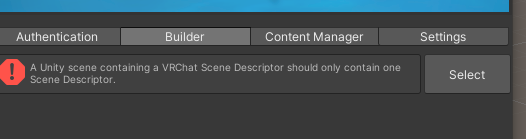


i dont understand it
bold ibex
im trying to get my world to upload but even after adding the scene descriptor its not showing any info in the control panel when i go to upload
lone birch
did you sign in?
bold ibex
yea im signed in and everything
i have just the scene descriptor, do i need something else too?
lone birch
restart unity
silent night
torn leaf
I know this lol but i did it for animations
What do you unpack the prefab with animations for? Just make the objects separate in the blender file and import them separately~ they’ll appear in the same spot if you just drag and drop the FBX into the hierarchy~
I just make the object, export the FBX and animation, and then hide it so that when I export it doesn’t go along with it ^^
silent night
bold ibex
im trying to get my world to upload but even after adding the scene descriptor i...
Easy fix
Hang on
bold ibex
silent night
Easy fix
yea cause im trying to upload an avatar world but its kinda hard when its not showing anything in the control panel
silent night
 bold ibex
its specifically the section where i would go to upload that doesn't appear
silent night
@bold ibex
bold ibex
bruh i just had to reimport dlls?
ive never had to do that before so i guess thats why i didn't think about that
silent night
There’s a fix for everything~
bold ibex
 its trying to import data when i haven't added anything to the project
unity in a nutshell
silent night
Yep. That’s how Unity works
silent night
Restart the project and reopen it
bold ibex
i just did that
silent night
Any errors?
silent night
And you for sure followed the steps to a t?
bold ibex
i just got an api update prompt
bold ibex
unity didn't say anything bout this before
so why it complainin now?
oh god its updating my toolbox
thats not gonna go well
ugh its still not fixed
just gonna reimport the sdk
lone birch
hi i just have one question, it wont let me make the world public cause i already made a public world this week, can i just update it to be public later on or do i need to reupload it?
bold ibex
yea u can update to public later from the website
lone birch
ok thanks, idk why they made that limit
bold ibex
ah i fixed it, i was missing a dll lmao
silent night
If anyone has questions on migrating please feel free to DM me!
bold ibex
oh god i have to redo my buttons
silent night
Rip
 rustic mantle
tropic ferry
the only one that stays is : ```Assets\Standard Assets\Utility\SimpleActivatorMe...
rustic mantle
tropic ferry
the only one that stays is : ```Assets\Standard Assets\Utility\SimpleActivatorMe...

Unity Forum
This proves that the devs are lazy af when it comes to making quality stuff =))
The two scripts. You have to edit the code line
rustic mantle
bold ibex
hello, do you know how to fix standard assets to fit 2019 ver?
Not sure if u fixed ur issue
but this was fixed for me
but from what other ppl telling me removing the files fixes it
🤷♂️ lol
 shell juniper
Hey so, is there any way to link my oculus account to a pc account?
I'm trying to make worlds but I can't upload any because I can't sign in to my oculus account, which can upload worlds, and the account I CAN sign into has never even logged into vrchat. So I'd have to sign in and start using it on my pc for god knows how long JUST to upload worlds
bold ibex
so my mirror is just pure white and i dont know why
kind leaf
shell juniper
Hey so, is there any way to link my oculus account to a pc account?
I'm trying ...
VRChat
Sure! This is actually pretty easy to do. You'll gain the benefits of a full VRChat account, such as the ability to gain Trust Ranks and upload content, whilst keeping the simplicity of being able ...
bold ibex
nevermind i foudn it
shell juniper
kind leaf
https://help.vrchat.com/hc/en-us/articles/360062659053-I-want-to-turn-my-Steam-O...
Thank you!
median egret
so updated to 2018 from 2019, followed all the steps and my stuff still works but it shows as empty?

anyway to fix that?
kind leaf
median egret
anyway to fix that?
reattach the the undon programs. I'm on my 6th upgrade, had one do that already. Upgraded them all the same. It seems to only effect "some" of the scripts at least with me. I had to fix about 4-7.
kind leaf
you could try upgrading again. Use your backup. Make a new backup and upgrade
kind leaf
yeah that sucks... no there is no quick fix. you'll have to re attach them all then
bold ibex
so uh, how do i make buttons in my world interactive again? they're setup but i cant click them in game
kind leaf
vrc ui shape attached to the canvas?
median egret
kind leaf
yeah that sucks... no there is no quick fix. you'll have to re attach them all t...
darn no other way? :/
kind leaf
median egret
darn no other way? :/
dude if there was... 😦
kind leaf
bold ibex
so i just add that to the buttons?
no, you attach the ui shape to the canvas, not the buttons
kind leaf
yeah, ui shape is what makes it work in game. also need to make sure you dont have any colliders blocking it. Real easy to have intercepting colliders when placing a menu against a wall.
bold ibex
yea its right in front of the wall lol
oh ffs i broke the button to disable the main activator
xD
now i gotta remember how to make the main activator disappear on click
cause for some reason it stayed
 spark hollow
I keep getting this message when trying to upload my world to vrchat. "ignore" lets me continue but when I try to upload unity crashes. "reload" just reloads the scene and then I can't open the control panel anymore and I get an error for each trigger saying "(trigger name) was not initialized in time."
 bold ibex
i just ignore
spark hollow
Unity crashes after that
bold ibex
hmm
mine doesn't
also i cant figure out why tf i cant make the master button disappear when it toggles the other ones, never had this issue before
kind leaf
spark hollow
I keep getting this message when trying to upload my world to vrchat. "ignore" l...
external changes? Just save the scene and restart Unity.
spark hollow
Same thing, unity crashes after I try to upload my world
frank shadow
so, my world is now unplayable how bad it lags on quest, but it was fine before unity 2019
WTF changed???
kind leaf
spark hollow
Same thing, unity crashes after I try to upload my world
can try deleting your library folder. It will force a reimport/serialization of assets. You'll close unity, navigate to the project and just delete the folder labeled library and then reload. (always backup before doing major changes)
neat flower
yeah i'm not even able to create a new unity project :/ with 2019. probly my own mistake. still debugging
kind leaf
neat flower
yeah i'm not even able to create a new unity project :/ with 2019. probly my own...
yeah if you cant create a unity project, its local. probably best to uninstall, and make sure you install again using the hub.
neat flower
kind leaf
yeah if you cant create a unity project, its local. probably best to uninstall, ...
is there a specific way to uninstall? i just uninstalled 2019 via the hub, then reinstalled. and this is where im at.
kind leaf
neat flower
is there a specific way to uninstall? i just uninstalled 2019 via the hub, then ...
That should work, or add/remove on windows.
neat flower
kind leaf
That should work, or add/remove on windows.
what if im on mac 🤫
kind leaf
just a heads up, I started a 2019 project last night and it looked like nothing happened for 45 mins. I was baffled. I hit create, set the name, launched, no splash and then desktop. 45 mins later it popped up. weirdest shit ever. only happened once
near escarp
What's in your world ?
frank shadow
uh, the world is called Luminescent Ledge
it worked fine on quest without any lag at all before 2019 update
now after 2019, it lags so bad that people have to power cycle their quest
and I did reupload it with new SDK etc
ill need to do something with it to totally disable access for quest people or just diusable all objects and put some under construction message
kind leaf
frank shadow
ill need to do something with it to totally disable access for quest people or j...
"under construction" is a good idea. to remove quest you need to contact vrc and have them take it out.