#world-development
39 messages · Page 85 of 1
 urban epoch
 unborn niche
all my objects keep falling though my world even though i have colliders on everything

 charred grail
Yeah, that was the first thing I attempted to do, it just gives me a pipeline error instead of uploading.
 kind leaf
charred grail
Yeah, that was the first thing I attempted to do, it just gives me a pipeline er...
kind leaf
charred grail
Yeah, that was the first thing I attempted to do, it just gives me a pipeline er...
pipeline error? you sure you have the correct world id?
if it's a new world check the pipeline manager and detach any ID if one is present. If it is your world you are updating copy the ID from the manager, detach, past and attach in the pipeline manager. You also cannot update someone else' world using their ID from your account.
 charred grail
kind leaf
pipeline error? you sure you have the correct world id?
charred grail
kind leaf
pipeline error? you sure you have the correct world id?
I think I might've fixed it. I deleted my VRCWorld and made a new one and suddenly it's allowing me to get to the world configuration. (where pipeline would cancel me last time)
Never uploaded a cross-platform world, essentially I'll have to swap back and forth and upload PC and Quest for every update?
Thanks for the assistance everyone 
kind leaf
charred grail
Never uploaded a cross-platform world, essentially I'll have to swap back and fo...
Yep. Some people clone the pc copy and convert the clone to quest. Just make sure to make identical changes to each.
charred grail
Wait, am I misunderstanding or am I able to use Poiyomi for PC and what I'm using for quest?
 desert python
wait, youre using poi on your world?
desert python
ok so poi pro and toon and master return "null" on android, so you may need to try xeixe or just stay safe and go standard
charred grail
Ahhh. I gotcha. I was thrown for a loop because I assumed that both PC and Quest had to be the exact same.
desert python
oh then ye, i would never recommend using poi on world unless you understand exactly what you are trying to do with poi
it doesnt have to "exact-exact" like ofc you want them to be synched and not offset or something weird. but of course you can make the quest version a entirely different world if you needed to
charred grail
:thonk: Well then. I would assume that we would probably want to get 1:1 if both quest and pc users are in the same instance.
desert python
but it follows a pretty generic rule
hierchy:
PC-QC stuff
PC only stuff
and vise versa for a quest enriched world
itd be
PCQC stuff
QC only stuff
but ye totally. everyone wants to see the same deal
however, in this game, we have assets that can crash pc but not QC. and a lot more assets can crash QC but not PC
charred grail
I gotcha, would be pretty funny if I just rotated everything 180 for each version so everyone's looking at everything backwards from the other platform 😂
Yeah, I gotcha. That's helpful info. I appreciate all of that.
urban epoch
unborn niche
all my objects keep falling though my world even though i have colliders on ever...
Normal mesh colliders don't correctly follow physics. Instead, either check the box on the Mesh Collider that says "Convex" or instead use a box collider.
desert python
charred grail
I gotcha, would be pretty funny if I just rotated everything 180 for each versio...
ye thatd be pretty funny, and its not too unheard of
 scenic citrus
okay, im stumped, i have little to no unity and 3D modeling knowledge but im at my wits end. i have a very ambitious project id love to work on. anyways, problem is, when i want to build and test world, i would go through the loading screen twice before being ejected from my work into my homeworld. whats going on?
 bold ibex
how would a fast strobe be in vr? would it just be as uncomfortable as a real strobe ? or worse?
im putting in strobe lights either way buy i would just like to know
desert python
i would assume worse/ok depending on frame rate
i would still put a strobe light warning in the world just in case
desert python
scenic citrus
okay, im stumped, i have little to no unity and 3D modeling knowledge but im at ...
any errors in the console? have you tried build and published? have you consulted the unity manual?
desert python
if things continue going south: i highly suggest this = https://github.com/oneVR/VRWorldToolkit/releases

GitHub
Unity Editor extension for making VRChat worlds. Contribute to oneVR/VRWorldToolkit development by creating an account on GitHub.
 tardy ridge

🤔 I setup my audio like this, but for some reason I never heard anything from it. Did I set it up wrong or it's just the parameters are not proper.
(I can hear the sound after removing the Spacial Audio Source script)
tardy ridge
nvm, found the issue, need to set it to 3D audio in audio source setting.
 cold hound
When i change the setting for something on the Unity project the changes are changing back when i run the world, i need to change the Rendering Path to Deferred
 normal lintel
I've got a card object with rigidbody (using gravity and not using Kinematic) & mesh collider (set to convex), the object it's placed on is a table where the mesh collider is just default. When i spawn in the card just falls through both the desk and the floor ignoring collision? not a clue why though everything is setup? Does the cards mesh being extremely thin have anything to do with that (i did model this manually in blender with 0.1 being the normal thickness, in unity i scaled it down to the correct size and reduced the thickness of the model by half within unity)?
normal lintel
normal lintel
I've got a card object with rigidbody (using gravity and not using Kinematic) & ...
So turns out at least in unity play mode having box collider instead of convex mesh collider fixes the issues. Will test in vrc as well, high hopes
bold ibex
How would I be able to use Jumping in a world using VRCSDK3 udon???
cold hound
bold ibex
How would I be able to use Jumping in a world using VRCSDK3 udon???
How to enable it?
bold ibex
Yeah?

 cold hound
have you Build and test the world?
bold ibex
I realized that I had the program source wrong
Yes it was my girlfriends world and she was using SDK 3 so I didn't know how to sort the jumping thing
Thank you SO MUCH for the help!!!
bold ibex
I have 2 sliders that control 1 object each to move it. When I hit play in unity, each one will control their object as desired. But in build and test neither object moves. (Edit cause I originally thought they moved one of them).
 subtle relic
my pickups not respawning halp
bold ibex
I just put vrc pick up script, vrc object sync script, a box collider and there you go. Pickups that respawn. Well, then thrown out of the world. Respawning from still within the world. I dunno.
 harsh wagon
How does JumpImpulse translate to jump height?
I want to get a specific jump height to match a certain game
urban epoch
JumpImpuse adds an Upward velocity to the player via impulse, so it's relative to the gravity scaling of your world, though that is presumably -9.81 m/s.
If you want to know how that directly translates, it's going to be an absolutely hot mess of math. I recommend trying out different values until you find what you like.
 vale plume
trying to add the video player to my world but im getting (not just) these errors

using SDK2 with unity version 2018.4.20f1
cold hound
Witch Video player are you using?
 oak apex
How do you add in a voice amplifier for a DJ booth?
vale plume
cold hound
Witch Video player are you using?
cold hound
vale plume
the one in here:
https://docs.google.com/spreadsheets/d/e/2PACX-1vTP-eIkYLZh7pDh...
What is the name sorry
vale plume
of the prefab? it's just called VideoPlayer
cold hound
When i was using 2.0, i was using this Video player
GitHub
Basically the video player in Hangout House for VRChat - MunifiSense/Hangout-Player
Try with it
vale plume
I've deleted the old files but the errors are still there
cold hound
m... my last idea try running the unity project
vale plume
I can't as there are errors
cold hound
then i don't know maybe wait a bit more maybe a dev can give you a better hand than me
i tried i'm sorry
vale plume
I can try that player next but I gotto get rid of the errors first
cold hound
You could you start from scratch if not
vale plume
I already have a lot of stuff in this project
cold hound
i recommend you changing to 3.0
vale plume
doesn't work, that just gives me 250 errors
I am using the correct version of everything
cold hound
Then i'm sorry i don't know how to fix it 😅
vale plume
cold hound
When i was using 2.0, i was using this Video player
is there a download link for the HangoutPlayerAll? I only se HangoutPlayer
cold hound
They are on the Prefab i think
 latent perch
NullReferenceException: Object reference not set to an instance of an object
VRCSDK2.RuntimeWorldCreation.Start () (at Assets/VRCSDK/Dependencies/VRChat/Scripts/RuntimeWorldCreation.cs:82)
any ideas how this happens
nothing chnaged in the assets it just started doing this
it mentioned the SDK2 but i am running the SDK3
 wild knoll
umm?

 near escarp
I'll need to log you out manually to fix this issue, if you can give me your vrc username
 random owl
latent perch
NullReferenceException: Object reference not set to an instance of an object
VRC...
random owl
latent perch
NullReferenceException: Object reference not set to an instance of an object
VRC...
Import this and check VRWorld Toolkit > World Debugger from the top bar and look for any any red errors
http://toolkit.onevr.dev/

GitHub
Unity Editor extension for making VRChat worlds. Contribute to oneVR/VRWorldToolkit development by creating an account on GitHub.
wild knoll
near escarp
I'll need to log you out manually to fix this issue, if you can give me your vrc...
Fenic112
wild knoll
near escarp
I'll need to log you out manually to fix this issue, if you can give me your vrc...
TY! your amazing!
near escarp
wild knoll
Fenic112
Restart Unity and it should now work
wild knoll
yep all working thank!!
 dull island
Hello. Is there a good free video player for maps?
dull island
Thanks
latent perch
random owl
Import this and check VRWorld Toolkit > World Debugger from the top bar and look...
thank you for that information
bold ibex
I had to use 4 toggles for 4 different invisible floors because I couldn't get the sliders to work inside build/test even though they worked perfectly in unity. Oh well. haha.
kind leaf
bold ibex
I had to use 4 toggles for 4 different invisible floors because I couldn't get t...
vrc uishape attached to the canvas of the sliders? Sliders custom event set to check for value changed and update accordingly?
bold ibex
Yeah, they sliders are interact-able and work in vrchat, they just don't move the floors. When you hit play inside unity, the sliders will move the objects as intended. There might be more to do to get it to work in vrchat. I Would need to spend more time investigating, but in order not to halt building for another week I made toggles for now.
kind leaf
bold ibex
Yeah, they sliders are interact-able and work in vrchat, they just don't move th...
move instantly or over time?
bold ibex
I'm doing unity+c# course but I am just trying to finish this world before completing that. Instead of ping ponging in between.
They move instantly with the sliders movement. Up and down, no problem in unity.
 idle jolt
I tried to follow this tutorial, but the collider is preventing me from entering the area. Is there a way to fix this and keep the trigger?
https://youtu.be/A70dtbfZeK0
Forgot link sorry
First actual tutorial on VRChat triggers. Goes over creating an object to act as a door, animating the object, adding triggers to make the object open on player enter area, and close on player leaving area.
In the next tutorial, I will go over how to make a lockable door and show how to use an object to unlock it, similar to how my world "Lab E...
bold ibex
I drink too much to watch it and see what's up. I know the tutorial for sdk3 from momo works and when it is trigger it doesn't block you. Hopefully someone can help for now.
kind leaf
the collider should be on the moving door not the wall so if your collider is stopping you from moving the door is probably set as a static.
if you want to see where your colliders are at runtime. open both scene and game side by side, select the wall+door with the colliders expanded and they will highlight, run the game and watch to see if the door collider moves
you wont see the colliders in game view but you can watch that hidden stuff in scene view as the game is running
 timid hawk
latent perch
NullReferenceException: Object reference not set to an instance of an object
VRC...
timid hawk
latent perch
NullReferenceException: Object reference not set to an instance of an object
VRC...
same here
idle jolt
kind leaf
if you want to see where your colliders are at runtime. open both scene and game...
My problem is that I don’t have a door being animated. I have two droids activating when a player enters an area, and then deactivating when the player leaves the area.
Is there a better way to accomplish this?
 untold pewter
Sometimes when im close to a wall in a specific point, I can see through it, how do i fix this?
 mild spade
idle jolt
I tried to follow this tutorial, but the collider is preventing me from entering...
mild spade
idle jolt
I tried to follow this tutorial, but the collider is preventing me from entering...
Did you check/enable "Is Trigger" on the collider?
idle jolt
I did not. I always assumed that meant that you can click on it
Is that a common misconception at least?
mild spade
is Trigger means that it will not collide with other objects, but they can overlap other colliders and still detect other colliders interactions without affecting the physics engine. Good for detecting things entering an area, but you dont want that object to interact or move other objects. Hard to explain in words, this might help you understand. https://www.youtube.com/watch?v=m0fjrQkaES4

Watch this video in context on Unity's learning pages here -
http://unity3d.com/learn/tutorials/modules/beginner/physics/colliders-as-triggers
How to use a Collider as a Trigger (also known as a Trigger Zone), in order to detect when an object is within a particular space in the game world.
Help us caption & translate this video!
http://amara...
idle jolt
So for my case it will let objects pass through but for player and player local layers it will activate the animation bool
mild spade
If you have a trigger event "OnEnterTrigger" then the collider needs to have IsTrigger checked for it to work. (the collider where the trigger is) If you are still having trouble, could you post a picture of the problem ?
idle jolt
Will do. I’ll scroll back up and reply to your message if the error continues to occur. Otherwise I’ll continue making my world. It’s pretty huge, but only has 26MB thanks to compressing textures and making them 512x512. Compressing meshes also helps immensely.
 mellow isle
Any one knows how to fix the problem with VrChat Sdk
 bold ibex
What's in the console?
 timid hawk
An unimaginable halt to world progress, around a week I've been figuring this out on my own, The first one I truly need help with, the other three are optional. Using VRChat SDK3.0 and Unity version 2018.4.20f1 personal aswell with VRWorld Toolkit

Thank you honestly if I can have someone help me with this
Usually Happens upon every project
kind leaf
timid hawk
Thank you honestly if I can have someone help me with this
Object reference missing means just that. You are telling a script to look for an object but not giving it a name. Probably used "public GameObject objName;" but never drag n dropped the object into the inspector.
But those other 2 errors look like you have sdk2 installed. If you are using SDK3 and you installed sdk2 ontop of that, you cant rely on any errors to point in the correct direction until that is sorted.
To fix the sdk2 errors you need to remove everything vrc+udon and u# related and then reinport.
kind leaf
mellow isle
I had it working yesterday but when i opened it toady it quit working right
If Unity crashes this can happen, if Unity burps on startup this can happen. Sometimes it just requires a Unity restart; other times you need to re import the SDK3.
 fiery creek
hey i wanna make some seats but in game they look like a chair, i just want an invisible seatin the ground is it possible to delete the chair texture?
near escarp
Yeah delete the mesh renderer component
timid hawk
kind leaf
Object reference missing means just that. You are telling a script to look for a...
Question should I remove it from inside unity or file explorer route
idle jolt
There’s a lot of empty space in my world and I don’t know what to do with it…
The world is going to be Kashyyyk, from Star Wars
 kind leaf
sry wrong rply bud
idle jolt
Ah, you’re good
kind leaf
was talking to the guy above hahah
idle jolt
Lol
Yeah, I just need ideas for objects to put in the area I showed in the image. The world has a lot but is only at 26MB thanks to optimizing
kind leaf
timid hawk
Question should I remove it from inside unity or file explorer route
If you have custom C# scripts written or Nodes Ied remove it all live and import without restarting. If its just statics then either way works. Removing live will give a ton of errors but they will rectify on re-importing the sdk3.
start with foliage
maybe some rocks, more trees
terrain displacement helps break up an empty map as well. Big ass mountains arnt added to worlds for their aw factor; its a huge chunk of space you dont need to play with.
idle jolt
Hmm. Maybe. I do have one section with bushes though that have berries and NPCs collecting said berries
kind leaf
also looks like you are using one terrain texture, break up the green with gravel, dirt, trampled grass paths, dying grass; more textures also takes away from the empty feeling
idle jolt
Well, the problem with that is that the ground isn’t a terrain. It’s a mesh that I downloaded alongside some buildings.
The texture itself does break up by having some green but also a little bit of dirt and sand
That, and the texture does repeat smoothly
kind leaf
easy enough. open the land obj's texture in an editor like gimp and you can paint it the same way you would in unity's terrain editor.
just clone the original texture in gimp or w/e so you arnt being destructive
idle jolt
It’s an fbx
I don’t use obj as transferring from blender to unity is a pain with objs. The materials don’t get assigned, leaving it with a default material
Anyways, that’s not my greatest issue at the moment
kind leaf
it still has a texture, i just said obj in general. obj is also just short for object, which is a general term for anything "physical" in the world.
confusing when our two model files types are obj or fbx lol
idle jolt
Yeah, I just prefer fbx more.
But yeah, I just need objects in the area.
I did have an idea for campfires and roasting fishes above them, but not being able to use spotlights sucks as they really eat up on the MB
kind leaf
no way, really? Ive built clubs with many spotlights. Biggest club is 30MB? but point lights work good for fires
idle jolt
Really? Did you make them all important?
kind leaf
I dont change anything on the light except for the color, range and intensity. Spotlights are default settings and always realtime because its a spotlight. All other lights get baked.
idle jolt
Huh. I thought multiple spotlights in a world will only have one spotlight activated at a time…
kind leaf
oh noo, that would make dance floors look silly
maybe on quest, but not for general usage
idle jolt
Ah
You said point lights work well for torches?
Wait. Is spot light the one where it’s a circle or did I mix spot and point light?
kind leaf
yes, thats all i use for light sources. you can achieve flicker with realtime emissions on moving flames or a script on the light that expands and contracts the range.
 kind leaf
ty
idle jolt
Ah I see now. Yeah, I meant that point lights eat up my world when I try to set all of them to important
kind leaf
if point lights are eating up space make sure you are baking your lights.
 green lagoon
any lighting that would be static you would want to bake
idle jolt
I mostly use real-time lighting as it’s just nicer looking. If I do want to bake the point lights how would I bake only them?
green lagoon
you set the lighting type to baked and the real-time lighting is a performance killer
kind leaf
realtime light only looks nicer if you have the wrong bake settings. You can have a 12mb world that gets 5 fps with poor lighting choices. Always bake static lights.
near escarp
idle jolt
I mostly use real-time lighting as it’s just nicer looking. If I do want to bake...
Nicer looking than baked ?
What kind of world are you making 
green lagoon
like pretty much all of the lighting in Half-Life alyx is baked
and that game has some of the nicest Lighting in VR
idle jolt
At least to me. I haven’t baked any lighting, and I don’t have any performance issues and I own a preordered quest 1. I got Vader immortal for free.
near escarp
Ah so you didn't compare
idle jolt
?
near escarp
Did you bake the lighting in your world previously ?
green lagoon
you can't know the real time lighting looks nicer baked lighting than if you never do a proper baked to test
idle jolt
Nope. No baking whatsoever. Whenever I make a new world I turn auto bake off, or whatever it’s called.
near escarp
Alright, in that case it's not nicer 
kind leaf
idle jolt
?
Do us a favor, build the world the in the direction you think is best; and when you are done, clone it and play with baking. Baking is essential to VRC performance and when you say you don't want to everyone reading has a moment lol. But its important that you start with whats easiest for you and then improve as you go 🙂
green lagoon
idle jolt
Nope. No baking whatsoever. Whenever I make a new world I turn auto bake off, or...
you don't have any comparison point in that case
idle jolt
If someone could take two screenshots with a before and after baking scene that would be greatly appreciated.
near escarp
If the world is fairly simple then a directional light won't cause much perf issue, but the more you add then the worse it gets
green lagoon
also if you have any active mirrors it gets much more perf issue
idle jolt
Actually, I just updated the world privately.
If one of you guys have the time to you could send me a friend request and here in say an hour I can get on and show you the world.
green lagoon
I doubt any of us are going to want to spend an hour just to check your role to point out what we already have said baked all of your lighting
kind leaf
So each light source multiplies the world vertis count of each object. a cube that has 48 verts has 96 with two lights in range. Those numbers add up fast. A baked world would have 48.
idle jolt
Ah. In that case I can just take a screenshot in game, and let you guys see what I see and post it here.
green lagoon
that number gets even worse if it's a shadow casting light source
kind leaf
oh gawd yes lol
near escarp
Just take a screenshot of the game tab with the game stats panel open
green lagoon
and double all of those numbers if there's a mirror
idle jolt
Alright, that’s good to hear. Give me an hour and I’ll post a screenshot. Might post several with different light sources and possible light sources such as torches without a light object.
green lagoon
so poorly done real-time lighting can turn like a 50,000 Triangle map into several million
and that's even before the Avatar show up
bold ibex
I have like 200 lights. If I didn't bake em, people would spontaneously combust.
Thats bc people use potatoes
And have the audacity to play games on it and complain
near escarp
That would kill any computer
green lagoon
open World sandbox games tend to use a different rendering style that makes it less likely to explode having lots of light sources
but we're a forward renderer so yeah 200 would make anybody explode
bold ibex
They baked though. So my quest fps still 90.
Don't actually know if it's 200, but it's a lot. Didn't count them actually. Just making joke for the real time lights.
kind leaf
yeah thats not a potato issue. Multiplying total verts adds up to astronomical numbers. I have a world that was 10k in any direction but 8mil with 5 directional lights. and no shadows.
green lagoon
kind leaf
yeah thats not a potato issue. Multiplying total verts adds up to astronomical n...
that number would be even more insane once you put in a average rooms amount of avatars
kind leaf
oh yeah, i test on a very optimized avatar lol
bold ibex
I wonder if we can create a lighting black hole that could even suck up the IRL
I mean it took about 300m polygons of duplicated models to lag my computer
kind leaf
Thats impressive but that isnt a developer mindset. You develop for the masses not the 5 people with a quantum computer. 😛
green lagoon
okay but what's your frames per second in 100m polygons because of its lower than 90 still having it be too much
green lagoon
bold ibex
I mean it took about 300m polygons of duplicated models to lag my computer
and that also exceeds like any AAA video game ever
bold ibex
If it lags my science kit powered pc powered by probes and an apple. It sucks.
green lagoon
like even Unreal Engine 5 with its magic nanite stuff is only pushing like 20 million on screen so 300m complete and utter Overkill
near escarp
That's why photogrammetry worlds suck ass
green lagoon
like even if you did triangle reduction it still every square inch is uniquely textured which is bad for vram
near escarp
and people just put a mesh collider on it 
green lagoon
oh no
bold ibex
Probuilder automatically put mesh colliders on my cubes etc. Should I switch all for box or something?
near escarp
I don't know if it technically makes a difference in that case
bold ibex
In the end I merge all 500 cubes together via probuilder into one object anyway
The framework anyway
green lagoon
you know I honestly wonder how much of a photo-realistic map you could get for the vram budget of one photogrammetry map using proper trim sheet and tiling textures and overlapping detail on top
idle jolt
Finally got those pictures of my world! Let me patch them through
First photo shows a few buildings, and the second photo is a point light that isn’t marked important as it’s the only point light and because it’s high up and you need to get right next to it to see it


These photos show possible spots to put point lights


The problem here was discussing whether real time or baked lighting would look better in these scenes and whether I should put them a lot of point lights or not (I think I’m correct on the last one?)
green lagoon
yeah honestly a baked lighting setup would look better because currently it looks like you don't really have any lighting other than a vague color temperature
idle jolt
I guess the only reason I’ve never baked anything is due to how much trouble I had with it in the past. I tried to make a small apartment room but due to baking lighting messing up everything I ended up scrapping the entire thing. That was when I was younger and less experienced, so kind of glad that wasn’t my first world. Instead it was a Tatooine world with working speeders.
green lagoon
like your lighting doesn't really have any blue from the blue fire
and also everything is too evenly lit


and probably the amount of real-time lighting to need to get that lighting to look nice would probably be way too expensive on the performance
idle jolt
Maybe I shouldn’t bake lighting, it would just take literal hours to get done. Yeah, I probably won’t unless there’s an easier way for it to take like 10 minutes.
green lagoon
maybe try GPU baking it instead of CPU and maybe play around with your settings
bold ibex
I never knew it took long. I started this like 2 weeks ago. Mine bakes in like 10 seconds.
green lagoon
either that's a very slow computer or you set your settings to make it like way too big DrFluff?
near escarp
If they bake in 10 seconds then there's not much to bake
timid hawk
Curious If I can use an older version of unity for vrchat
May fix some errors
Like 2017
 ancient timber
im having a small issue
 timid hawk
KevBal, it did not seem to work so I just erased everything was nothing much anyways
rip, that issue is more medium then small
near escarp
ancient timber
im having a small issue

GitHub
Unity Editor extension for making VRChat worlds. Contribute to oneVR/VRWorldToolkit development by creating an account on GitHub.
ancient timber
near escarp
https://github.com/oneVR/VRWorldToolkit/wiki/Fixing-Build-Problems
thank you
timid hawk
Hopefully that can fix your issues, did not for me so I just gave up on it, I'm going to install unity 2017 now and see if it works
ancient timber
near escarp
https://github.com/oneVR/VRWorldToolkit/wiki/Fixing-Build-Problems
fixed the issue, thank you so much!
timid hawk
Ok so I made a whole brand new project and only imported VRSDK3 and VRWorld Toolkit and added a floor with prefabs from VRChat
Now with over 21 lines of errors

I'm going to restart it a couple times and see if it works
No errors with VR Toolkit

Just tips and info
So I restarted it once so far now
Those errors listed are now gone although now my infamous error usually 52-74 but this one is 52

I just really want to upload my first world and put a hall of memories
random owl
Remove the VRCSDKWorld from your scene that's the upload UI, if you have it in your scene it's gonna break things
random owl
When you build & publish the SDK manages adding it to the scene when needed
timid hawk
So all I should do is make spawn points, and what about scene descriptor
random owl
The VRCWorld you have has the scene descriptor and the spawn points
timid hawk
I see now
If this really fixes it all, dear lord I should of asked earlier
I've been working to try and upload for so long you have no idea lol
So I decided to join the vrchat discord to ask for questions
There should be like tutorials on this stuff
Where I never found anything about it
But I'm going to test now
xd
Thank you 1
random owl
No problem
timid hawk
I've actually been working on this more than a week
I even went far to learn C#
Now I can make that dream I had
Wish there was a tip jar lol
I feel weird now, all that work and was that simple
green lagoon
that's being added in a future update in vrchat economy
green lagoon

reddit
396 votes and 77 comments so far on Reddit
timid hawk
mhm
I look forward more to listening to everyone's stuff and now I can help some friends who may encounter the same issue
timid hawk
I literally note everything down :P


 bitter idol
hey anyone find that ever since the "server throttle" times, worlds just take 7 times as long to upload now?
 deft geode
so I have a ship model in my world and I keep falling through it when I spawn, I have a mesh collider on the body
 ornate turret
make sure the spawn location isn't inside the body, have you tried moving it above the ship a little so you drop onto it?
also make sure the mesh collider has a mesh chosen inside its component too
there's a chance it could have applied an empty mesh collider (it should be the same mesh as the ship itself)
also make sure the layer of the ship isn't set to something that doesn't collide with the player (if in doubt, just set it to default)
idle jolt
bold ibex
I never knew it took long. I started this like 2 weeks ago. Mine bakes in like 1...
What settings do you use for baking worlds?
bold ibex
i just uploaded a privat world to test it out, but im not seeing a mine tab in the worlds
kind leaf
 silent night
Managed to find this shot while finishing up world design on my latest commissio...
silent night
Managed to find this shot while finishing up world design on my latest commissio...
looks like pirate island which is a beautiful asset.
idle jolt
I have decided to not bake my world, and to never bake any worlds in the future.
bold ibex
@idle jolt I was at work, but I used whatever spookyghostboo used in their start to finish video. So something like, turned off real time lighting all together. Set every light to baked. Then changed their individual settings to whatever for range and etc. I have like 100+ point/area lights in the scene.
not able to check at the moment
idle jolt
As soon i I clicked bake in the lighting settings my unity crashes.
It’s not worth my time to get upset over, so I’m done with it.
silent night
@idle jolt Just be careful with that, because Real-time lighting is STUPID expensive in Unity. Baked lights are the best way to go for performance. For reference, I have a 3070, and on my very first world I have only real-time lights because I was dumb. I get maybe 30-50 FPS in VR on it, in an empty world. That’s with at best, 15 real-time lights
idle jolt
Okay and?
I don’t have any performance issues whatsoever, and I have a preorder quest 1.
 silent night
Just making sure you’re aware. That’s with a strong card. Not everyone is going to have the same performance; I’m forewarning because I can try to help here fix stuff
bold ibex
It pretty much default, I think.
idle jolt
I essentially had the default settings too, and my unity still crashed.
To me, baked lighting is pointless.
silent night
Baked lighting is essential in worlds
I use Bakery personally
Don’t use Progressive CPU
Use the other one in the drop down
Hang on
bold ibex
I didn't hear about it before I started a couple of weeks ago.
I heard about the bakery after
bold ibex
oh my god yeah, f that auto generate hahaha
idle jolt
Another thing, what do reflection probes even do? They’re so small it makes me think they serve no purpose in an open world that trees and grass
silent night
Oh oh that’s a good question actually
bold ibex
I think I originally had it on enlighten but it wouldn't do anything. I'll try it again.
bold ibex
In the video I watched they explained reflection probes but said they didn't really use them. Then put in the light probes.

 bold ibex
my world is a more of a without kinda world
silent night
If you don't have "Reflective" surfaces, they aren't that required,
idle jolt
I must be blind or something because I don’t see a significant change.
Also, PC world?
idle jolt
Shocking.
bold ibex
The change in those 2 photos is enormous
silent night
Although,
In Quest you can't use box projection probes.
So it looks kind of doodoo.
idle jolt
The only reflective surface in my world is the water, and even maybe some vehicles.
Either way, I don’t see it as a must have.
bold ibex
I might do it in my next work, I kinda just want to get this one done.
as crude as it will be
I just tried to bake it with enlighten but it doesn't look anything like I want after. It looks how I want with the progressive cpu. Probably because I build everything using that setting. I will try enlighten next time.
silent night
I’ll DM you @idle jolt
bold ibex
Here's a question I have though. If you have a guide/video send it to me. If I want to make a UI canvas to control one or multiple things, like post processing on/off, chairs on off etc. I put a button in there but I Can't add the same udon behaviour to it that I can to a cube to toggle it. So I dunno what to do there really. It is interactable in build/test but doesn't do anything. So I need to figure out how to do that so I Don't have like a UI canvas with half a dozen thin cubes stuck on it. haha.
bold ibex
hello everyone!, hopefully you guys can help me...... soo i apload my second world but with some reason my second world its my first world when i join it, more confusing is that the profile pic of the world is the new world but inside is my first world...... if you think "try to delete the first map" i did but now when i join the world i crash and send back to my home.... have any suggestions how to fix it?
desert python
bold ibex
hello everyone!, hopefully you guys can help me...... soo i apload my second wor...
checks errors and try this out: https://github.com/oneVR/VRWorldToolkit/releases
GitHub
Unity Editor extension for making VRChat worlds. Contribute to oneVR/VRWorldToolkit development by creating an account on GitHub.
bitter idol
help! i force quit my unity yesterday and now im getting a blueprint error saying my account doesnt have access too it. is my sdk broken? i was able to upload it last night a few minutes before the force quit. i made sure its using the right blueprint ID i have no idea whats wrong
also i force quit it when it was compiling shaders, not when it was uploading if that helps
near escarp
What's your vrc username ? I have to manually log you out to fix this issue
bitter idol
actually hold on i think my SDK some how broke when i force quit it. im getting more and more overflowexception console errors by the second
kind leaf
Re import the sdk and u# if u used it.
Doesn't pay to force quit unity. Not unless you enjoy passing away your time.
bitter idol
i have no idea how it broke my sdk though
kind leaf
You would put a stick in the spokes of a bike to stop. Force quitting unity breaks shit the same way the stick would.
Wouldnt
bitter idol
ah okay
@near escarp ok I reimported my SDK and it's still doing it. So my vrchat name is Digi The Robot
The blueprint error. Not the console errors
near escarp
Restart unity now and try again
bitter idol
Ok
It's building, unfortunately it's a massive world
Might have to make a new "world" and put the same ID on it to get to the upload screen faster if I'm still having issues
But we'll see! Hopefully there's no issues this time. Thank you
Yes!!! It worked. Thank you so much @near escarp
untold pewter
with the VRC_Sync Video Player (Script)
does the max quality only affect the videos set to autoplay, or all future videos played via the standard Video Player Component
idle jolt
Trying to bake my world, but the progress has completely halted. Is there any way to speed it up?
untold pewter
it can take a while depending on how many light sources you have
like my world takes almost 20 minuites to bake
because I have 120 point lights
idle jolt
I only have 8 and one directional and it’s been over an hour
untold pewter
that doesnt seem right lol
does it take just as long if you cancel and retry?
is your bake map absurdly high res aswell
my settings, probably not the "best" but seems to work

oh yeah, also make sure your mirrors arnt static objects
idle jolt
Basically everything is the same except for light map size and resolution
idle jolt
I accidentally had the mirrors be static…
Hopefully this makes it quicker
Reflection probes shouldn’t be static either yeah?
untold pewter
none of my probes are
idle jolt
Okay, tried that and it didn’t seem to do anything. Still stuck at the same number…
untold pewter
dunno how it would even try but you probably dont want to be calulating shadows on something that is calculating a reflection of a surface that is having its shadows caluclated
idle jolt
The only things different is that the lightmap size is 512 while the resolution is 10
idle jolt
That and I’m using enlighten instead of progressive cpu as that crashed my unity every time
It’s not even terrain. It’s a model that came with the buildings and trees
near escarp
If you have an Nvidia GPU, bakery asset is a great option
Welp, it's still a giant terrain
idle jolt
I have an old windows 7 Lenovo laptop.
near escarp
Yikes, yeah that'll take a while
idle jolt
I have a windows 10 laptop, but I don’t know how to transfer project files
near escarp
You just copy the folder
green lagoon
you just copy the project over to the new computer and then open it
idle jolt
How do I transfer the copied folder, and will it keep the same blueprint ID?
green lagoon
yes it'll keep the same build ID because it's the same folder
USB flash drive or SD card to put the project on
untold pewter
I was gonna be like, I can render it, but then Id be signing up to doing it for every single change, so ill pass, even if you agreed xD
green lagoon
https://i.gyazo.com/269f33fbe57a0bdfa0dc15aff01bed97.png Unity you can click the open button to open the the project wherever you transferred to DrFluff
 vale plume
any feedback?
 near escarp
Are the lights baked ?
vale plume
no they're realtime
near escarp
Are you changing their intensity in the world ?
vale plume
yeah im upping them a little bit
near escarp
I'd suggest not making the walls and ground reflective them, unless you want it to look like plastic
you might just need to remove the smoothness from your materials
vale plume
I wanted to sort of create the sides you see at cinemas
 errant beacon
If you're just using the realtime lighting to make those wall sconces change intensity, you could probably do that much cheaper with a textured quad
unless I'm reading that wrong o:
green lagoon


#VRC #VRChat
各光源が環境に与える影響を個別にベイクしておく事により、リアルタイムライトを使わずに複数光源を個別に調整出来るようにする手法。(加えてベイクなので間接光表現もできる)
単純だが意外と使ってるワールド見たことが無い気がするので一応
Likes
149

 Twitter
·
Twitter
·
a world showing off that kind of thing
@ben_rainwolf well It's simple, I'm just mixing multiple lightmaps baked in blender
 Twitter
·
Twitter
·
but it can be even more simple as you don't have them overlapping on top of each other
 late ruin
can someone help its my first world and im tryna upload so i can show some friends.
 desert python
wait, is this an avatar or a world?
if its a world. go into the vrcworld prefab and detach the blueprint ID
errant beacon
late ruin
can someone help its my first world and im tryna upload so i can show some frien...
This is a known issue, but try detaching the blueprint ID like literally menioned? otherwise afaik you'll have to be signed out by a dev for it to be fixed
late ruin
errant beacon
This is a known issue, but try detaching the blueprint ID like literally menione...
okay
 gray sleet
Is there a way to prevent videos from restarting for everyone if someone toggles the video off for themself?
late ruin
desert python
if its a world. go into the vrcworld prefab and detach the blueprint ID
there is no id there if this is what you mean

i have detached it as mentioned and it is still saying this yet i have built and tested the world and it worked???

literally in the test now
 gray sleet
Is there a way to prevent videos from restarting if someone toggles the video off for themself?
So far I found out when I turn it off and back on it restarts. But for some people it plays where it left off. Why?
near escarp
@late ruinI have to manually log you out to fix this bug currently, what's your vrc username ?
 raw siren
yo can anyone help me figure out how to reduce this unity_builtin_extra shader size its like 20 mbs
plz @ me
late ruin
near escarp
<@!456426131315228672>I have to manually log you out to fix this bug currently, ...
i'll get it for you
late ruin
near escarp
<@!456426131315228672>I have to manually log you out to fix this bug currently, ...
SQUASHYYVR
@near escarp could you let me know when it is done? thank you.
near escarp
late ruin
SQUASHYYVR
Restart Unity and it should be fixed
late ruin
near escarp
Restart Unity and it should be fixed
thank you!
late ruin
near escarp
Restart Unity and it should be fixed
my unity is crashing when it comes to naming the world. well basically just shutting down.??
near escarp
That sounds like an actual unity problem rather than vrc sdk
late ruin
near escarp
That sounds like an actual unity problem rather than vrc sdk
well thats not good
raw siren
rubik u know any about unity shader being huge for no reason

like these 2 shaders are taking up more space then anything else in my world
near escarp
I think those get compressed a lot ?
raw siren
well when these got bigger it went from 15 to 22mb world size

like my stuff is pretty compressed
raw siren
ok thanks ruuubick
bold ibex
desert python
checks errors and try this out: https://github.com/oneVR/VRWorldToolkit/releases
what this gonna do? or what is this?
desert python
its a error detector/world build helper in one
it may lead you in a direction that might fix the issue
errant beacon
It's 1's VR World Toolkit, a Unity plugin that's vv helpful for world building
detects errors, gives tips on things to be optimized, etc
near escarp
by reading the documentation on the github page
GitHub
Unity Editor extension for making VRChat worlds. Contribute to oneVR/VRWorldToolkit development by creating an account on GitHub.
bold ibex
k
errant beacon
Import the .unitypackage and look for the VRWorld Toolkit tab at the top, and open the world debugger from there - would also def recommend checcking out the docs c:
late ruin
my unity is randomly closes when i am about to publish a vr chat world any thoughts? or if i play the scene?
kind leaf
for ctd check the unity logs https://docs.unity3d.com/Manual/LogFiles.html
 bold ibex
can some explain deeper plz my english is bad

 arctic herald
Heyo! I'm in the process of uploading a world and when i log into the menu and hit upload it does the start of it where it compiles blah blah blah and then in the area where i usually write info about the world it says that im not logged in. my console also says im not logged in. when i literally just logged in
near escarp
arctic herald
Heyo! I'm in the process of uploading a world and when i log into the menu and h...
I'll need to manually log you out to fix this issue, what's your vrc username ?
arctic herald
i log in as LachyTV but my ingame name is Brooklyn?
near escarp
Done, restart Unity and it should work
arctic herald
worked, thanks!
bold ibex
I'm really new to working with stations. I've used the VRCChair example to apply everything it has (the box collider, Udon script, and VRC Station component) to a mesh and every time my avatar sits in the station, the avatar is always perpendicular to the axis the mesh is in (it's a horizontal flat surface, but the avatar is like laying down on the surface). I assume I need to change a transform to fix this somewhere, but does anyone know where?

 rain shadow
@bold ibex The player enter location transform is the position that the player gets set to
You have it set as the cushion itself
Using the included chair prefab should give you an idea how it should be setup
bold ibex
and can that be somewhere else or a different mesh? like something underneath
I'll try
rain shadow
You can just make an empty gameobject and use that to set the sitting position
bold ibex
ah a good idea
rain shadow
If you search for VRCChair in your assets you should find a prefab reference if you need it
bold ibex
rain shadow
If you search for VRCChair in your assets you should find a prefab reference if ...
thank you for the help, I've got something that looks a lot better now 🙂
bold ibex
near escarp
https://github.com/oneVR/VRWorldToolkit/wiki/Fixing-Build-Problems
this doesnt help... it doesnt tell me the problem sigh
near escarp
The problem is in your unity console
which is what the documentation makes you check
bold ibex
i dont understand single word my english is bad
what is unity console
what document
😵
 timid hawk
Find the root cause which Ruuubick was trying to help with
timid hawk
root is like the main cause of something
timid hawk
I can't help you much at all sadly but help you understand
bold ibex
 timid hawk
I'm new too
timid hawk
Oh Compiler errors
Normally toolkit would help with that
Sometimes reloading your project can help
bold ibex
 timid hawk
I recommend you click collapse on your console by the way
timid hawk
Easier to see errors and more organized
I know, just we can't help much if you can't understand
bold ibex
;~;
timid hawk
What language btw do you normally speak if your ok with telling
bold ibex
indonesia
timid hawk
Ah
Hard to learn english as a secondary really so I understand that one
I sadly can't help with solving the errors but helping you understand is something I can do
bold ibex
i mean like im good at english but not like very diffecult words if you know what i meant
timid hawk
Mhm
bold ibex
uhhh so how do i upload any world like how do i put in the sdk or something cuz it says to do that and im new and dont know how
timid hawk
That is something I can help with a bit but solving errors nope
I'm still learning the ropes, never even got far as putting down furniture lol
bold ibex
i just need to know how to upload it
cuz it says i need a scene sdk or something like that
timid hawk
Ok what is in your project so far?
timid hawk
mhm
bold ibex
ok so do i need to add collisions to it?
timid hawk
There should be a prefab section in your project folder area
bold ibex
mk
timid hawk
If you don't use probuilder then yes, you need to manually add collisions
bold ibex
sure?
on\ the left side you can find create button then you can put cube,circle,tube, and BEANSSS - dani -
timid hawk
Sure
bold ibex
what do you want me do
timid hawk
Earlier I was trying to fix something unrelated to unity on my PC with a missing registry I fixed
bold ibex
neat?
 timid hawk
It won't really affect trust that much
bold ibex
yea but it does something right
timid hawk
Literally you can just buy VRC+ at known rank or +250 hours and get trusted
bold ibex
o
timid hawk
Yeah
But still making a world is pretty fun
having others join and compliment you
Do you even got a VRCDSK?
Since you said you just got a floor
or ground
 fast python
Question about the heat system
My world went from 5 flames to displaying the number 0 just randomly
timid hawk
That sounds weird
 lunar nimbus
It is a bug that will fix itself
 random owl
bold ibex
random owl
bold ibex
If you'd scroll down the page you were linked there would be a solution just for this case with the broken asset you have
 vestal wharf
so i made a world, still a WIP but i upload it, and it doesnt have all the stuff that i put. its missing a few walls and furniture for some reason. how do i fix this? they show up in unity but not the game
rain shadow
Possibly accidentally marked them as editor only or the build is failing
vestal wharf
rain shadow
Possibly accidentally marked them as editor only or the build is failing
how do i fix or check that?
sorta new to it
rain shadow
Are the things not appearing in game things you added recently or did they stop appearing at some point?
vestal wharf
rain shadow
Are the things not appearing in game things you added recently or did they stop ...
i did build and test the other day and a few walls didnt show up but i didnt think anything of it. when i published, everything added after that point doesnt appear in game
 rain shadow
In the console where it says clear on play disable that and try build
vestal wharf
still doesnt show up
rain shadow
check the console for errors
vestal wharf
its empty
rain shadow
Move something in the scene that does show up and see if it moves
vestal wharf
nope it doesnt
rain shadow
So the build is failing and you have some sort of error
vestal wharf
would i be better off starting over? i cant find any errors
rain shadow
Whats in your console
vestal wharf
 tardy ridge

 tardy ridge
just hit F5 to refresh the page, it should direct your browser to the vrchat home page
vestal wharf
rain shadow
Delete the all free sky asset
That fixed it, thanks
 real knoll
tardy ridge
just hit F5 to refresh the page, it should direct your browser to the vrchat hom...
real knoll
tardy ridge
just hit F5 to refresh the page, it should direct your browser to the vrchat hom...
still says the same thing
tardy ridge
🤔 what's the url in your browser rn?
tardy ridge
Seems like the world id you referenced doesn't exist?

 tardy ridge
🤔 I have no experience with private world, but based on its description, you should be able to see it when you logged in with the account you uploaded this world.
real knoll
i pressed upload to labs
 toxic plover
After baking the lights in my world the terrain suddenly became really glossy even though all the materials are set to have to zero smoothness. Clearing the baked lights didn't help and removing all the layers and re-doing them didn't help either. Anyone have any idea how to fix this?

 minor nexus
doing a attempt of making a spoopy map got some texturing done in substance
 vestal wharf
minor nexus
doing a attempt of making a spoopy map got some texturing done in substance
vestal wharf
minor nexus
doing a attempt of making a spoopy map got some texturing done in substance
Scp 087?
minor nexus
maybe 
vestal wharf
Nice
minor nexus
working on the textures for the deeper layers ignore the strawberry jam
 lunar nimbus
My identical projects do not have proper object syncing for pens, but work fine for toggleable firework. I cannot see people on quest using pens and they cannot see me, but we can all see each other use the fireworks. Does anybody know what this is
Some things are spawning where others should be spawning
 cunning nest
anyone have any idea how that one world was able to play youtube to quest user?
minor nexus
cunning nest
anyone have any idea how that one world was able to play youtube to quest user?
you probably just use the stock vrc vid player
cunning nest
na the stock player doesn't play youtube on quest, that world is using some black magic fuckery
minor nexus
try to contact the creator
cunning nest
yeah was planning to do that
 unique wing
Does anyone know why in SDK 3.0 standard unity video player setup doesn't work? It displays a still image of the video in-game, but the video plays fine in editor. (video is not a stream its a video that is part of the map) (Webm VP8 format)
random owl
The default unity player is blacklisted in SDK3 because of security concerns sadly
unique wing
random owl
The default unity player is blacklisted in SDK3 because of security concerns sad...
I see, so I have to use the VRC Unity Video Player right? I hope this actually works on Quest as well. Reason I switched to 3.0 is because a quest user told me he just sees a black screen in the level
random owl
It works on quest as long as you aren't trying to play anything that requires youtube-dl
But sadly no support for local videos
random owl
Yeah can't do local videos in SDK3 at the moment
unique wing
That sucks
Thanks for the help though I appreciate it, I'll just delete the map for quest
random owl
No problem
unique wing
Wait sorry, one last question - if I want to take down the quest version of the map I just delete it while I'm on Android build, right? It won't fully delete the map? It seems like it might...
random owl
You will need to contact #vrchat-support if it's a public world where you want to just take down the quest side
unique wing
Its on labs right now
random owl
Yeah your two options are either delete the world and upload to a new id or contact support
But deleting the world will not give you another labs submission for the week so support might be better
unique wing
Yeah, I wonder if I can just have the quest version be different from desktop and not have a video player. Seems like it might cause problems
random owl
You can but having a different hierarchy can cause syncing problems between the platforms, easiest thing would be to just disable the gameobject for quest
unique wing
Sounds good, thank you :)
minor nexus
got it in unity now doing testing to see how it all looks
late ruin
0 errors yet i got to publish then unity closes..

do i need this?

literally gets to the naming of the world then unity dies
usings 2018.4
 unkempt turtle
disable error pause
late ruin
unkempt turtle
disable error pause
bro thank you so much!


 winter trail
hello, so im making a world in unity but i dont like the name of it. how do i rename it?
winter trail
okay
 glacial pond
 solid atlas
https://gyazo.com/83395afea1efd8ecf2088bdf8ddf1207
solid atlas
https://gyazo.com/83395afea1efd8ecf2088bdf8ddf1207
This will be done in 20 years. Nevermind it will take longer than the heat death of the universe. Nevermind, it’s already done.
winter trail
ok so, im trying to upload my world to vrchat but when i do it, then an error came and says "The signed in account does not have acces to the blueprint associated with your VRC_Avatar (Or Scene) Descriptor please sign in with the correct account or detach the blueprint ID (accessible on VRC_Pipelinemanager) associated with the descriptor.
Any help? xD
lunar nimbus
Your blueprint is the code that is associated with your world that you set in your avatar descriptor, this happens if you are trying to publish under the account that did not publish that world
Make sure you are signed in with the correct account, and if you are ripping an avatar or world for some reason then you would have to make a new descriptor, but try not to do that
You can go to the content manager tab and copy the blueprint of the avatar you want to publish to and paste it in your descriptor
near escarp
winter trail
ok so, im trying to upload my world to vrchat but when i do it, then an error ca...
I have to logout your account manually to fix this issue, what's your vrc username ?
winter trail
Its Viperz
near escarp
There's quite a few, can you post your user ID, it's the one in the URL when you're on your profile page
winter trail
sure
near escarp
starts with usr_
winter trail
https://vrchat.com/home/profile maybe this? idk xD
random owl
Click on the profile picture on that page and then copy the url
winter trail
random owl
Guess it wasn't the bug that has been happening lately then
Did you have the world uploaded already to an id or is this the first time you are uploading it to vrchat?
winter trail
this is the first time i think.....
near escarp
Did you have to log back in ?
winter trail
no
near escarp
After restarting unity ?
winter trail
no i didnt have to log back in when i restarted it
near escarp
ok, close unity and i'll log you out again
winter trail
ok
bold ibex
Hi . I have a quest 2
Can i play my music in vrchat ?
I have no pc tho
winter trail
near escarp
ok, close unity and i'll log you out again
still get that error... xD
near escarp
You'll have to contact the support then
winter trail
hm okay
random owl
Might be worth trying to detach the blueprint once first
Go to the VRCWorld gameobject you should have dragged into your scene and press detach on the pipeline manager and then try to upload again
winter trail
random owl
Might be worth trying to detach the blueprint once first
ey lets go, it actually works to upload now
 brisk spear
can we use shader graph
rain shadow
brisk spear
can we use shader graph
You can't but there are alternatives such as Shaderforge and Amplify that will work
harsh wagon
Is there a way to make moving platforms that people can stick to?
something someone could stand on while it moves
rain shadow
It is possible but it involves teleporting the player every frame with an offset of how much the platform moved
harsh wagon
That doesn't sound very good for networking
rain shadow
That's not really an issue
Though there is a bug with teleporting the player every frame in udon at the moment which is under review
harsh wagon
Hmm
While I'm at it, how would I go about making an object follow a path?
I was going to animate the object in question moving in a loop, but it'd look better if it could follow a path instead.
rain shadow
Depends on the exact setup and what you are actually doing
What is the object and what is the path
harsh wagon
I'm porting an old TF2 map called Mario_Kart
as the name suggests there are vehicles moving around
in TF2 there's a map tool called func_tracktrain that makes an object follow a path at a predetermined speed
I don't need any controls, just a gameobject moving around the track
I was going to keyframe all the cars as they go around the track, but that means the speeds vary a lot depending on how the key frames are placed.
rain shadow
Using nav mesh agents might work for that
You can give them points on the track to move to and they will follow the mesh to that point
harsh wagon
Any guides I can look further into?
rain shadow
There should be quite a few if you google for it
harsh wagon
They all seem to be fairly basic, I'm not sure how I'd force an agent to loop around
rain shadow
When an agent reaches one point you change its target to the next point along
You would probably need at least three points where it changes
OnEnterTrigger > Change to next target
Doing that you could also do something like randomize its speed slightly to create variance at each point if you wanted
harsh wagon
Oh no, these cars are extremely basic
move to point, instantly rotate to face new point, go straight to next point
they don't even turn smoothly
rain shadow
It should work pretty well with a very basic agent setup then
 tired herald
question new to uploading when i enter my world i can only see out of 1 eye any tips on fixing this
harsh wagon
rain shadow
It should work pretty well with a very basic agent setup then
Turns out it's really easy to do with scripting, so I wrote a thing that moves objects to a sequence of empties
every time the object touches the next empty, it uses LookAt to point to the next one
rain shadow
harsh wagon
Turns out it's really easy to do with scripting, so I wrote a thing that moves o...
Oh if you are using udon you should be asking in udon questions I answered assuming you were using SDK2
bold ibex
When i go to publish it wont let me type or check any of the boxes can someone help me figure out why?
tired herald
now when i try to enter my wold it kicks me out is that a polygon issue
tired herald
bold ibex
When i go to publish it wont let me type or check any of the boxes can someone h...
TheVoice at the top your pause button might be on
the ll
bold ibex
tired herald
TheVoice at the top your pause button might be on
When i do that i can check mark it as a community world but i still can rename or anything
bold ibex
tired herald
the ll
any other suggestions
tired herald
no im sorry i had somthing similar happen to me but thats how i fixed it im sorry
kind leaf
You can easily rename a world by logging in at the vrchat website, going to worlds, my worlds and selecting your world. No need to hold up the servers on a full upload if you are just changing names, descriptions, size, or tags.
Also, at no point should you have to press the pause button to upload or change information. In fact, it is required to stay in play mode the entire time. Pause breaks; that fancy VRC SDK UI is running in play mode so pausing it breaks the UI.
harsh wagon
rain shadow
Oh if you are using udon you should be asking in udon questions I answered assum...
Oh, I didn't use udon to do it
It's a C# thing
so I guess it's technically udon since it needs udonsharp
 short gulch
Unless you want the glass to have some dirt, I usually just go without a texture, make it transparent set the color to black or grey and max the smoothness, and increase the Metallic slightly
late ruin
short gulch
Unless you want the glass to have some dirt, I usually just go without a texture...
thanks
harsh wagon
late ruin
thanks
I tend to use 0.25 metallic and full smoothness, with the colour set to a teal colour like actual glass

 dusky crystal
Hey, this is probably a frequently asked question but in unity the VRChat SDK only has one other option when i click on it meaning i cant upload my world or anything, what should i do to solve this?
glacial pond
tired herald
question new to uploading when i enter my world i can only see out of 1 eye any ...
You can only use shaders that support single pass stereoscopic
Most of the unity defaults do, as do all the popular VRChat user-made shaders
glacial pond
dusky crystal
Hey, this is probably a frequently asked question but in unity the VRChat SDK on...
This is a sign that your set up is incorrect either the SDK was installed incorrectly or perhaps you were using the wrong version of unity (must be 2018.4.20f1, no exceptions)
dusky crystal
i am using version 2018.4.20f1 and ive reinstalled the SDKs so idk whats wrong
but when i put in the same SDK into a different project it works fine
bold ibex
anyone know where I can get a water shader that can run on quest worlds
 alpine flare
I keep getting an error about "Asset bundle upload failed" when I try to upload my world. I've tried uploading it with and without Future Proofing ticked but neither way fixed it. I'm not sure what else to try? I'm using the most up-to-date version of SDK2
near escarp

GitHub
Unity Editor extension for making VRChat worlds. Contribute to oneVR/VRWorldToolkit development by creating an account on GitHub.
 wraith ruin
Hey, does anyone here know how to cast camera/render texture to desktop view when in vr? Without using shader cubes and stream cameras. I've seen it done in couple worlds so i know it can be done but i have no idea how
urban epoch
wraith ruin
Hey, does anyone here know how to cast camera/render texture to desktop view whe...
Just have the camera you want to use have a depth greater than 0, I usually use 10. ALSO make sure that the last option "Target Eye" is set to None, otherwise sadness can occur.
Cameras default to being disabled in VRC, so you will need a way to turn on the Camera component, either via script, triggers, or animations.
wraith ruin
cameras do work by default for a render texture, you mean i have to toggle it off and on to it to work in the desktop window?
urban epoch
Correct. Cameras that render to the screen need to be manually enabled, since VRChat disables their component to avoid people running into this accidentally.
wraith ruin
Ok. Should i assing the camera as main camera in the vrcworld object or does it work without it?
Meaning that i have the main camera where i have set clipping planes etc like i want, but for the cast camera i want different settings, does it matter what camera is in the vrcworld? Do i need animate the camera change?
urban epoch
If you want to use a special camera for stuff then don't assign it to be the reference camera in the VRCWorld. Simply giving the camera a higher priority will make it render over the other one in your scene.
wraith ruin
Hmm okay. Was just wondering how the clipping plane settings change for the vr view then, since they are controlled by the reference camera.
But thanks a lot! 🙂 Im sure i can figure out rest of it myself
tired herald
glacial pond
You can only use shaders that support single pass stereoscopic
Hi thank you for pointing out what is wrong appreciate it. But im sorry in not sure how to fix it do you may have a video you know of i could watch or if its not to much trubble if you could help me fix it.
vale plume
too much glow?
 vale plume
ight ty
tired herald
yep


 timid hawk
Pretty nice
 hard lance
so i have bakery set up handling all my baked lighting, but the player model is very dark. do i still need to have realtime unity lights enabled? bakery keeps turning off realtime...
near escarp
you need lightprobes

You can support me on my pateron
https://www.patreon.com/mcphersonsound
This is a longer tutorial than normal and there is a lot to cover so here are time stamps for your convivence.
00:00 what is baked lighting
00:35 setting up lights
1:23 preparing meshes to bake
2:30 generate lightmap UV
3:28 light probes
5:10 reflection probes
6:00 emissive ...
 velvet pebble
anyone know of any working strobe light prefabs?
kind leaf
velvet pebble
anyone know of any working strobe light prefabs?
No, but its not hard; get yourself a cluster of lights, give each a different color, deactivate every other one, and declare them individually or as an array in a script set a toggle bool and set their active state !active state and repeat until the bool is false. Thought it be a brilliant Idea to add a strobe to my first world. 100% disapproved (Strobes piss a lot of people off). Looked bad ass though.
bold ibex
How do I fix please remove excess tags before uploading when trying to upload world
unkempt turtle
bold ibex
How do I fix please remove excess tags before uploading when trying to upload wo...
you cannot have more than 5 tags (i think) per world. make sure you dont have more than that
bold ibex
How do I remove them
unkempt turtle
by deleting some entries in the tags list i assume?
you cant have more than 5 tags
rain shadow
You can't change post processing profiles directly you would need to make a post processing volume for bloom and change its weight value
Also for udon specific questions you would want to ask in #udon-general
 random arch
hey question im trying to create a giant sphere around my world with a texture on it does anyone know how to like invert the texture so its facing the inside?
rain shadow
You can do that on the mesh itself or with a shader
random arch
is there any shader you can recommend that make it easy i am poop with meshes
rain shadow
What shader are you currently using?
random arch
pyomi pro and a few others for random objects around the world
rain shadow
poiyomi should have the option to change the culling which is what you want
 cunning wolf
Hello there. Would this be the right channel to ask for assistance with worldbuilding issues?
Specifically, getting a video player working.
idle jolt
How do I make animations become global? I’m not talking about via a trigger, I’m talking about a controller.
In my world I have a moving chair but it is not synced up to the world. Because of this different people will see the chair in different positions.
cunning wolf
I've been making an 80s/90s retro arcade world for the past month or so in SDK2, learning how to world build as I go from Yotube tutorials etc. It's finally up and out of the labs and I have pretty much everything working - lights baked, probes and occlusion working, decent framerate, mirrors toggling off when you exit the trigger range for them etc etc.
One thing remains out of reach though, and that's a working video player. Scripting a video player myself with a working UI is way out of my league at present, so I'm using the Munifisense Hangout Player (2020).
The problem is, the player works fine if it's just me in the world, but as soon as other people join it turns into a jerky desynched slideshow, as you can see in the attached screen recording:
https://youtu.be/YeOKohNlkzQ
The video I have playing on the screen is an unlisted showreel of my own work. I used the compression settings that this post said to use for VRChat video players ( https://thegreatpug.com/vrchat-making-a-theater/ ), so I don't think it's the video that's causing the playback to fail..? https://www.youtube.com/watch?v=iMhaQhKcono
Here are my video player settings, if it helps.

 leaden hazel
velvet pebble
anyone know of any working strobe light prefabs?
leaden hazel
velvet pebble
anyone know of any working strobe light prefabs?
Remember to place a warning at your spawn point before any bright effects take place and if possible, allow them to be disabled to protect those with various light sensitivities.
leaden hazel
cunning wolf
I've been making an 80s/90s retro arcade world for the past month or so in SDK2,...
Oh hey is that the world where you start outside in the rainy alley before you go in? :)
errant beacon
leaden hazel
Remember to place a warning at your spawn point before any bright effects take p...
^ checking out https://www.epilepsy.org.uk/info/photosensitive-epilepsy/web-design might be helpful too if you have strobing in your world/avatar! o:
leaden hazel
As a thing, it might be good if there was SDK / system support to mark things as devs like this and automatically deactivate certain effects if a player enables an option to do so. And let people report if a world contains flashing lights but isn't tagged as such.
errant beacon
def might be a good post for https://feedback.vrchat.com/feature-requests actually
leaden hazel
cunning wolf
I've been making an 80s/90s retro arcade world for the past month or so in SDK2,...
I was visiting your world last night with myself (very cool BTW, I love the atmosphere) and at least one other person and I didn't experience any poor video playback. Unless this is something not happening in the current released version and only your next version?

Hmm?
I'm afraid you've confused me a bit!
cunning wolf
@leaden hazel Yes, that's the world, with the rainy alleyway. I'm glad you liked it!
That's very odd about the video player. I seem to be having nothing but problems with it.
leaden hazel
cunning wolf
<@!90531942100926464> Yes, that's the world, with the rainy alleyway. I'm glad y...
Brought me right back to the sort early 2000s student haunts during my university years.
And you have a mirror in the bathroom that actually works. Infuriates me so much people putting mirrors in bathrooms in their worlds that for some reason aren't also actually mirrors for no good reason! XD
I'm afraid I can't offer too much help with your issue as I've only worked with SDK3. How many people have you tested with? And with different avatars and things? Like I said I didn't experience the issue myself. So it could be something that's not actually wrong with the world but something else entirely.
cunning wolf
Hmm, I wonder...
When it's just me it's fine but if I spawn into a version that already has people in it the player is just frozen. It seems to break if it's anything above just one person in the world. But if nobody else is actually seeing the problem and it's just me, then I can certainly live with it.
leaden hazel
Spoke to my friend who visited with me, they didn't see any issues too. Ah.. Could it be something to do with the player trying to sync its position and getting stuck?
I believe we restarted the video player so we're were in sync on it.
So it could be a networking related issue as it tries to say 'play and skip to ten seconds in' and then that bit goes wrong...?
 stiff yoke
Hello, I just started to learn how Unity work. I'm trying to understand how to create a world with unity, and I find this video ( https://www.youtube.com/watch?v=ynQRg4LhNjE&ab_channel=VRChat ) with a "VRChat Home Kit", a project with a prefab home, where I'm learning how to change colours, ect.
I'm having an issues with the upload of the world, when I try to upload it it show this.


Home Kit is a Unity Package with the assets you’ll need to customize and upload your own home. The tutorial is aimed at beginners, so it’s a perfect starting point for building your first VRChat world.
We’ll create a Unity Project, import the VRChat SDK and Home Kit packages, and customize your home with furniture, materials, and lighting. Afte...
leaden hazel
Again, I'm in SDK and Udon and syncing and networking is trouble there too. I don't know how players sync in sdk2.
stiff yoke
If anyone could help me to understand what's the problem and how to fix it it would be really helpful!
leaden hazel
stiff yoke
If anyone could help me to understand what's the problem and how to fix it it wo...
It looks like you've deactivated your main camera?
Or well, that's happening on upload. Hmm
 leaden hazel
See if it behaves then. Items on the scene hierc... Heirc... Tree list thing on the left, will be light grey if they are turned off for reference.
I can't spell that word. XD
stiff yoke
It's still not working for some reason

I could maybe know why but not how to fix it, one second I'll recreate the project
 near escarp
those errors aren't a problem
 near escarp
You never added your layers ?
stiff yoke
No, it's my first time
I downloaded the VRChat Home Kit from the official VRChat youtube channel
Collision Matrix it's not a problem as well?
stiff yoke
The strange thing is that the "build and test" work but for some reason it can't publish
leaden hazel
On the authentication tab, does it say you're allowed to publish?
 leaden hazel
Basically hit auto fix and follow the instructions whenever that panel reports a problem. Only very rarely is it okay to ignore kt.
It*
 leaden hazel
Sometimes you do just get things like that during the build process that you can ignore.
What does the VRC panel say now?
stiff yoke

When I hit "publish", this appear on the vrc panel, while the unity application stay like this:

If I play "pause" on the top-middle, the vrc panel reset
And I have to click again on "publish", but it does the same thing
leaden hazel
That is a bit odd, what should happen when you hit publish is it goes to a special publishing screen in the game view.
stiff yoke
Yeah, I know, I'm following the official VRChat video with this unity kit, but for some reason I don't get the publishing screen
leaden hazel
I'd have to get the kit myself. Have you made many changes or were just trying to do a 'build it as it comes' thing?
stiff yoke
At first I did some changes, but since it didnt work I created a new project without doing any changes at all
And it still doesn't work
I got it from here: https://docs.vrchat.com/docs/vrchat-home-kit
VRChat
Resource Links Download Unity - Find the correct version at Current Unity VersionVRChat SDK - http://vrchat.com/download/sdkHome Kit - https://assets.vrchat.com/kits/VRChat_HomeKit_v1.unitypackage Description Home Kit is a Unity Package with the assets you’ll need to customize and upload your own ...
leaden hazel
Question, with the kit, was the vrchat panel and that already there when you opened it up?
leaden hazel
No, it won't work. I was just wanting to check the kit didn't come with an SDK that was out of date.
What is the version of the SDK just to check anyway? It's on the last tab of the sdk
leaden hazel
Sdk is up to date. Hmm.
peers wait, is this world expecting... SDK 2 or sdk 3?
And which one did you load in...?
stiff yoke
I did load the SDK 2
Oh
Wait
I tried to ctrl+f in this channel to see if someone had the same problem that I have
There is someone who had the same issues
And he said he fixed it by delete the "sample scene"
leaden hazel
Try it?

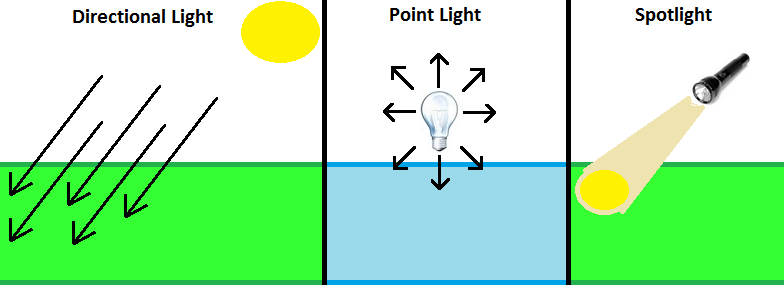
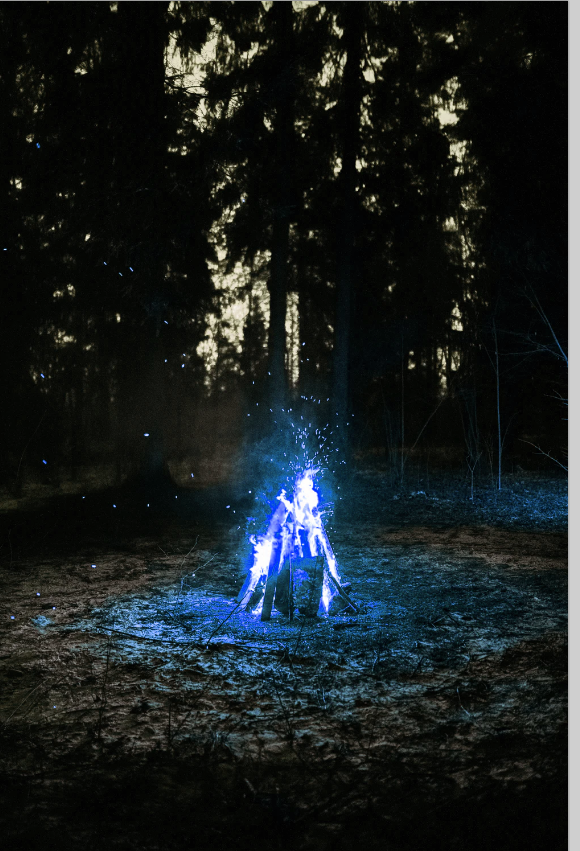



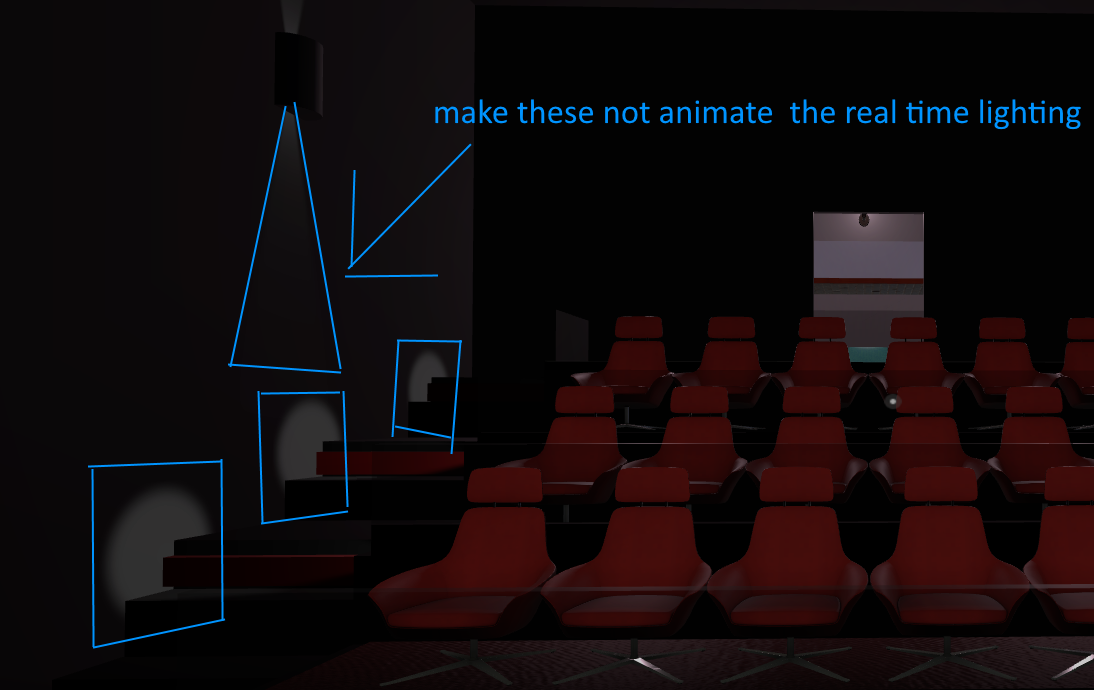 kind leaf
yeah, its not publishing because of the errors shown to you in red font.
deleting the sample scene isnt going to change that. Deleting the kit scene would lol. but you dont want to do that. The errors need fixed.
the 3 visible errors are because of the chair being used. remove the chairs from the scene or fix them? I don't touch sdk2, if it isnt C# I dont have any clue.
For something more "learning mode" friendly, you can try Youtube https://www.youtube.com/results?search_query=vrchat+sdk2+chair there are plenty of beginner quality tutorials for every object you might want in your scene.
stiff yoke
I tried by removing the chairs but nothing changed
I guess I'll try to use the kit and not the already assembled kit, maybe it will fix that

Maybe this is the error?
But it shows up when i load the SDK
leaden hazel
Hmm. That does sound like there is something wrong with the kit but I have no idea what. I'm not free at the moment to check this out or I'd help further. :/
stiff yoke
Thank you so much Nidonocu
Yeah, the issue is probably the kit itself
When I load it it shows up the 2 visible red errors
alpine flare
I keep getting this error whenever I try to upload my world. "Error updating content. Asset bundle upload failed. Failed to upload file."
I've already tried uploading with and without future proofing but to no avail. I'm using the most recent version of SDK2. The only thing in the console that stands out is "Cannot start an upload against anything but the latest version of this file: 2, 1" but I'm not sure what this is referring to?
dusky crystal
how can i update my world if i change something in unity?
dusky crystal
in unity in the SDK at the botton it says build and publish world
unkempt turtle
yes, you press that again
in the upload screen it says update rather than upload new
unkempt turtle
then make sure to attach the world id of the world you want to update
kind leaf
stiff yoke
The error is telling you exactly what is wrong. A missing script in a public prefab is not common; it wouldn't have made it to the public list if it was broken. So something was imported wrong. Starting a new project by opening the "kit" is sloppy. You start a new 3d project, import the sdk, then import anything else like the kit. Scripts references are broken when the order of operations is not performed correctly.
dusky crystal
unkempt turtle
then make sure to attach the world id of the world you want to update
What do you mean?
unkempt turtle
make sure the pipeline manager component on your vrcworld prefab has the same id attached to as the world you want to update
dusky crystal
huh?
kind leaf
Ive never seen the update/upload difference. The fact is that you just do exactly what you did for the first upload
dusky crystal
so just upload it again?
kind leaf
nope
it will only make a clone if you removed the ID. If you dont know what the ID is then you didnt remove it
dusky crystal
no idea about the ID or anything
unkempt turtle
if the id is the same, it will upload and replace the current world with that id
if the id is empty or different, it will either create a new world or replace another world that has that id (if its one of your ids)
unkempt turtle
either in the pipeline manager or on the website
dusky crystal
which website? the vrc home or a different one?
unkempt turtle
dusky crystal
yeah but where do you find the Id there?
unkempt turtle
in the URL
 harsh egret
does poly count matter when uploading worlds?
unkempt turtle
harsh egret
does poly count matter when uploading worlds?
only performance wise
dusky crystal
ok so then how do i make sure that the ids are the same?
unkempt turtle
by comparing them?
its literally a string like wrld_ac86cf71-a362-4856-b7f7-2218d1974fab
harsh egret
because i want to import some statutes that are high poly
unkempt turtle
harsh egret
because i want to import some statutes that are high poly
as long as its not too crazy and optimization is alright, it shouldnt really matter
harsh egret
its over 100k poly but it uses only one material
kind leaf
@dusky crystal you can clone the id from the sdk content tab as shown here. The pipeline is shown on the right(2).
 harsh egret
some of them are more higher like 400k
dusky crystal
ah ok thanks
kind leaf
if the pipeline isnt empty just leave it alone and upload as normal. You cannot accidentally change the id because to change it you would have had to hit detach.
harsh egret
is that a issue
unkempt turtle
you should probably decimate it
dusky crystal
whats the pipeline?
unkempt turtle
that thing
 kind leaf
image with the 2 label shows where the pipeline is if you are using the VRCWorld prefab.
You will find the VRCWorld object in the Hierarchy. Usually labeled as that. If you or whoever built the world used the starter kit it might be inside WorldInfo (also in the Hierarchy).
glacial pond
harsh egret
does poly count matter when uploading worlds?
Polycount does not matter much, the important things are making sure you enabled and baked object occlusion, and baked your lighting instead of leaving it real-time. (Unless it’s very optimized and can do real-time well) and done light/reflection probes so avatars are shaded properly
kind leaf
OC isnt going to save performance with the statue when it is rendered. You wont have an issue on PC but Quest is going to lag or CTD as soon as the statue renders or tries to. 100k is 2x higher than is permitted.
harsh egret
i decimate the statues to like 10k poly
 scenic hare
kind leaf
OC isnt going to save performance with the statue when it is rendered. You wont ...
scenic hare
kind leaf
OC isnt going to save performance with the statue when it is rendered. You wont ...
no, actually
i have no issues with 500k polycounts on quest
yes, no issues means a locked 72hz
if you make sure you aren't using expensive shaders and bake your stuff properly you will be fine
kind leaf
"
Worlds
While building worlds, you should try to keep polygon count low. You want to leave room for the user's avatars as well. We recommend that you budget approximately 50,000 triangles for your world in total."https://docs.vrchat.com/docs/quest-content-optimization
500k on a single object? kk
VRChat
Creating content for VRChat Quest is a challenge-- you have to create attractive, compelling content all the while keeping the content optimized for a mobile device. These are the same challenges that game developers must deal with while building for mobile. Here, we'll give you some general guidel...
scenic hare
no, thats 500k for the entire world
what i'm saying is that its not all polycount
if you have a world with a bunch of cameras in it, you are going to get a low framerate on quest even with n64 level polycounts
meanwhile, if you only use vertex lit 3d models without textures you will probably be fine with 2-3M tris
glacial pond
scenic hare
i have no issues with 500k polycounts on quest
Of course one avatar is not going to be a problem, you’re using up all of the polygons for an entire room. You need to test everyone using a different, unique, avatar that each uses 500k tris in a different object. Then you have a fair estimate.
All you’ve proven is one person in the instance can be a performance hog.
scenic hare
oh no definitely don't do that with avatars
glacial pond
Worlds I find can go up to 2 million and not have an issue as long as everything is being occluded when you’re not looking at it
glacial pond
It’s more of make sure you can’t see everything at once
scenic hare
using 500k on an avatar is just bad
scenic hare
glacial pond
It’s more of make sure you can’t see everything at once
i mean, even when rendering 500k tris at once i don't really run into issues in the world i'm working on right now
yes that is on quest
glacial pond
Is it filled with Avatars though
glacial pond
Fair enough then!
scenic hare
its designed to only accommodate up to 8 players tho
glacial pond
It’s easy to make a world that squeaks by on full frame rate when it’s empty but people forget it needs to get filled with Avatars as well
scenic hare
so i don't think avatars will be that much of a problem (but yesterday i was testing with 12 people)
scenic hare
glacial pond
It’s easy to make a world that squeaks by on full frame rate when it’s empty but...
yeah more people makes everything worse
kind leaf
Your point disregarded what I was telling the OP. Culling doesnt eliminate the 100k object. The moment you render it you are rendering the full 100K.
So no matter how much you bake or cull the moment that camera turns to the statue you get hit with a 100k poly obj.
unless you divide the statue up by faces so each angle can be culled separate
 copper compass
anyone know where i can get some good button textures? UI button i mean lol
mild spade
copper compass
anyone know where i can get some good button textures? UI button i mean lol
 copper compass
no, i mean this is good to have too, but lemme get an example or 2
more like UI styling
cosmetic
untold pewter
Im only getting udon graph and utlilities in the sdk menu, tried removing and reimporting and its the same
random owl
Check your console for errors
untold pewter
107 errors all refering to udon stuff not being found, UdonSynced, UdonSharpBehaviour, UdonSynchedAttribute, ect
bitter idol
i have a realtime reflection probe set to bake on awake. i have triggers that when the player enters the room the probe will wake. it doesnt work. why? yes ive made sure the component starts off and is enabled by the trigger and ive made sure the trigger is on the right layer because ive used the same trigger collider for something else
btw i can see the reflection in unity if i turn on the probe
untold pewter
Guess I'll just stick to sdk2, at least I can actually use thst without the console dissappearing
 eager garnet
im trying to put background music in a certain part of my map, but if i set the audio source to 2d it will be heard even outside of the set range, but if i set it to 3d it will sound like its coming from a set spot and wont sound right as background music