#world-development
39 messages · Page 79 of 1
 ornate turret
let me know once you find it
you'll want to adjust some things on it
to make sure it doesn't look shiny in the wrong way
 stable frigate
this?

 coral magnet
that's the shader lakuza meant, yeah 🙂
ornate turret
🙂
now turn smoothness down in that shader too
a lot of people make the mistake of leaving it at 0.5
coral magnet
wouldn't the mobile diffuse shader also be an option here?
ornate turret
and it ends up looking weird
mobile diffuse isn't that important here since its pc world
standard shader is what I use for all my worlds pretty much
coral magnet
true. and I've seen it cause some bugs with layered transparency
stable frigate
how i configure the shader?
ornate turret
you're looking at the material settings right?
I would recommend looking up tutorials on unity
on youtube
ornate turret
its gonna be hard to get someone to walk you through everything
yeah turn smoothness low
something like 0.1/0.2
will avoid it being glossy
coral magnet
do the standard shaders get compiled into simpler variants if you don't use all the parameters?
I'd assume that helps with optimization on PC.
otherwise I think i'll just keep using mobile shaders where I can 😄
ornate turret
never thought about it so no idea 👀
but standard shaders aren't performance heavy or anything
but if you're using mobile ones thats fine
but for Nogma, I'd recommend sticking with the default standard anyways
since you're starting out with world building
stable frigate
thankkssss
coral magnet
Well, I wouldn't say that the standard shader is unoptimized. but is certainly one of the most expensive built-in shaders. you're right, definitely isn't relevant for Nogma 😛
 stable frigate
its my first world and conctact with unity
coral magnet
there's a lot of resources for learning unity online, especially outside the vrchat community. so don't hesitate to google stuff you're unfamiliar with
what the VRChat community can be good for is... tailoring your content for VR. getting it (somewhat) optimized, being able to interact with it in VRChat, et cetera
stable frigate
now works great, im very glaaadddd
 coral magnet
yeehaw!
stable frigate
im of the people how learn doing it
coral magnet
I'd go against lakuza's advice and recommend trying the mobile -> diffuse shader too, see what you prefer 😄
that might be closer to that sm64 look.
ornate turret
yeah, for future, remember sprites are good for stuff like icons, ui
or simple things like posters
ornate turret
coral magnet
Well, I wouldn't say that the standard shader is unoptimized. but is certainly o...
in regards to that image, a shader won't be doing any drawcalls if a map slot isn't used
so not sure why you're insisting on mobile diffuse over standard here 👀
stable frigate
coral magnet
that might be closer to that sm64 look.
true : o
 frozen glade
is there any way to let a AI move on colliders without having to bake the navigation area? Its not baking it properly and i have no clue how to make it work better
frozen glade
yea i tried it many times but it just gets worse
it doesnt detect all areas somehow
coral magnet
ornate turret
so not sure why you're insisting on mobile diffuse over standard here 👀
oh in this case I just saw that the screenshot looks somewhat odd. sm64 definitely didn't use PBR materials, so I think the diffuse shaders might yield better results.
nogma also seems unfamiliar with configuring materials, and the mobile diffuse shader is what they're looking for (I think)
nothing wrong with using the standard shader, just don't think it has many advantages in this case
coral magnet
ornate turret
in regards to that image, a shader won't be doing any drawcalls if a map slot is...
that's useful to know though, thank you. though that depends on the shader you use -
many shaders display warnings when certain slots aren't used, suggesting a simpler shader instead
ornate turret
yeah for custom shaders that depend on those extra slots I can see that
for the past 3-4 years of world making, I've just stuck mainly with standard shader for objects using lighting and its something that should be unlit I just regular unlit shader
coral magnet
and I think that works well for your worlds. the standard pbr stuff makes 'em look great
I guess I'm overly concerned about compatibility and optimization
ornate turret
👍
 bold ibex
i hate how uploader things everything is ok
but while compile errors upload happens only version changes but world nope
that should just prevent uploading world if errors
 sinful laurel
Can someone help me with fixing this teleport script please

 mild spade
sinful laurel
Can someone help me with fixing this teleport script please
mild spade
sinful laurel
Can someone help me with fixing this teleport script please
What is the problem? Cant click, teleports to a random place, gives errors in the console tab while play mode?
mild spade
If it is a child, i believe you have to use "GetPosition" instead of GetLocalPosition
bold ibex
first is video from youtube, other mp4 7.1 audio, idk if its really big diffrence https://cdn.discordapp.com/attachments/742563440199204879/846819227453095986/surround.mp4
 rancid stump
Hello! Not sure if this is the right channel. I'm trying to learn more about the capabilities of custom VRChat worlds. Is there anyway to sell real-life things in VR Chat? Has anyone built or have an example of how they've integrated an outside retail link? For example if I sell things on Etsy and I have a digital version of the item you can try on or view in VRChat is there some way I can link out or have them purchase from my etsy shop...
 errant beacon
You can't do that currently, no
rancid stump
How do the big avatar marketplaces work? are they selling directly through VRChat?
errant beacon
That's also against TOS since it's advertising for an outside service, you'd have to get into a business deal with VRChat
VKet is a virtual market where you can buy avatars and such, but they're in business deals with VRChat and they're special events
errant beacon
There's also the Creator Economy stuff that's coming out sometime this year, which'll let people buy avatars/directly support creators ingame with real money as well o:
and yw!
sinful laurel
mild spade
If it is a child, i believe you have to use "GetPosition" instead of GetLocalPos...
 frozen glade
im crying i finally got it to work, found a script that baked all colliders so it works perfect and she wont go crazy anymore when jumping yay
 near escarp
baked colliders 
 desert python
navmesh colliders^
near escarp
you hadn't baked them before ?
frozen glade
i did bake the whole map but the script im using could choose between mesh renderers and physical colliders

 barren juniper
yo, I go to build my world but it spits out an SDK2 issue despite me using SDK3/Udon
Project settings with scripting define symbols doesnt have anything SDK2 related in it

 random owl
What is the issue?
barren juniper

this gets spit out when I try to upload the world
this is the latest SDK3, on a fresh project that hasn't loaded any other SDK previously
random owl
I mean that's just because of the shared code base import this and check VRWorld Toolkit > World Debugger from the top bar and it'll show you the issue
https://toolkit.onevr.dev/
GitHub
Unity Editor extension for making VRChat worlds. Contribute to oneVR/VRWorldToolkit development by creating an account on GitHub.
barren juniper
Worked! Thank you
near escarp
When it is published in community labs
 serene sable
Won't it get public instances at all if it's not published in community labs?
near escarp
Correct
 red urchin
i have 2 questions about that vrcbillards prefab for pool
How performance intensive is it in a world? i'm looking to put it in mine but i'm trying to keep the world as lag free as possible
also, If i had a toggle for it and had it off by default in a world, could anybody enable it at anytime and see an ongoing game even if they had it hidden for most of it?
desert python
depends which varient you use
red urchin
was probably going to use the latest one put on on the vrcprefabs website
desert python
i think the latest is very networked and should work if its enabled or disabled
red urchin
that's good to know
 velvet pebble
Does anyone know how to set up music and sounds for specific rooms in a world?
frozen glade
serene sable
Won't it get public instances at all if it's not published in community labs?
you can aswell launch private world's in public but not rly useful as you won't be able to create new instances but staying in the same one works
velvet pebble
Oh and also when I imported udon sharp I got this error
The type or namespace name 'SerializationResult' does not exist in the namespace 'VRC.Udon.Common'
bold ibex
if world is in community labs then can be just after that as normal world? or how that works
red urchin
@bold ibex if you submit a world to community labs it'll be in there for a while, then once the system determines it, it will be changed to a normal world and then show up on the new worlds list for everybody else to see
frozen glade
does anyone remember which script people use in worlds to make certain objects or npcs look at your viewpoint
 dusk sapphire
On sdk2 it would be a combination of the LookAt script from standard assets with player tracking
 frozen charm
Wanted to make a video to show off the issue before making the canny, so I did. Here's the link to the canny I created: https://feedback.vrchat.com/bug-reports/p/all-held-pickups-always-phase-glitch-out-when-colliding
frozen glade
dusk sapphire
On sdk2 it would be a combination of the LookAt script from standard assets with...
doesn't work for me
 rapid basin
Still not even close to beeing done and all walls need to be better texture mapped and even more rooms and shit but the first screenshot/gif of the world im working on

I have a whole list of ideas and a list that is double the length of stuff i need to fix/figure out

 dull island
How do I prevent the trigger from being visible with the right mouse button?
rancid stump
Hello again! I know I have seen a camera tool in Udon but is it possible to take those pictures and have them be networked in the world somewhere?
Also can we create a button that goes to a web page? Or is that a special feature?
And finally, I found the pool mini-game but are there any other casual arcade style games that the community has you can add to a world?
Thank you!
rancid stump
Thanks @ornate turret that's what I thought
ornate turret
👍
thats just as a basic open link thing, there could be workarounds with other methods that could allow a web page to store saved screenshots maybe
but I have no idea how that'd be done
rancid stump
The networked pictures thing is to see if we could build a selfie wall or something like that of people's pictures from the world party
ornate turret
dont write that idea off just yet, wait till someone more experienced with udon replies 🙂
there might be some way to do that
 leaden hazel
In theory you could use a series of scripts to automatically create a video of photos and then use multiple video players to display them.... Not sure how much overhead that would be.
rancid stump
sounds like a lot haha
leaden hazel
Well, you depends really. I've not tried performance testing have multiple video players all running at once. Though if you wanted, they wouldn't be running, they all start, jump to a frame and then pause.
dusk sapphire
loading remote images is planned for udon so you're probably better off waiting for that rather than hooking into video players which is a bit of a hassle just for images
on sdk2 you can load remote images via the vrc_panorama component but. well sdk2
leaden hazel
That said, I like the idea of creating an electronic picture frame using a video now. X3
rancid stump
Thanks!
dusk sapphire
writing a webserver to dynamically generate a video based on images sounds like a pain lol
leaden hazel
Having a nice couple of video players in my home world with art or in game photos rotating slowly that I've uploaded to my YouTube.
dusk sapphire
though if its a static video then its not so bad i guess
but if you have multiple video players gotta remember to keep the 5 second rate limit in mind
leaden hazel
dusk sapphire
writing a webserver to dynamically generate a video based on images sounds like ...
Well, I'm somewhat familiar with Blender scripting so... :D
leaden hazel
dusk sapphire
but if you have multiple video players gotta remember to keep the 5 second rate ...
5 second rate limit?
dusk sapphire
you can only load 1 video url every 5 seconds
this is a global rate limit
its probably better to have all your images together in a high resolution image video then split it up accordingly to the different picture frames etc
rancid stump
Any shared mini-games besides the pool one available to world developers?
leaden hazel
Ah! Makes sense. Guessing this is why the TLX world took a while to start as I think it used Multiple players...?
leaden hazel
rancid stump
Any shared mini-games besides the pool one available to world developers?
Have you checked the prefabs database?
dusk sapphire
theres a couple of udon mini games on booth as well but most are paid
darts, mahjong etc
rancid stump
Gotcha I am pretty new to this - where do paid assets like that live?
I thought only avatars were really for sale on gumroad
leaden hazel
rancid stump
Gotcha I am pretty new to this - where do paid assets like that live?
Booth and gumroad are both popular stores for various VRC content.
dusk sapphire
you can find a lot of vrchat related digital goods on booth.pm and its very popular among the jp community
rancid stump
ok so there's a bit of everything on there
leaden hazel
Gumroad is a generic platform for digital content sales. I've bought 2D art assets from there before as well
dusk sapphire
vrchat world stuff: https://booth.pm/en/search/VRChatワールド
theres also a fair bit of free stuff on booth too
rancid stump
Awesome I'm digging in
 sonic pebble
Hey, I have a question :3 I'll probably get bad rep by asking that, but is there a way I can rip my own vrc world ? I formatted my windows recently and lost one of my work in progress :c But I uploaded it to vrchat last time I modified it... so I can join into my wip world, but that is pretty much about it :|
I know there was a way with the Library file in locallow before, but It was fixed recently
Basically, I would like to get the .vrcw file of my world :3
frozen glade
dm
 ocean glacier
I saw someone was able to port a map from a Wii game (Specifically Pokepark 2) and I've been trying to figure out how to do that for some while. I have the BRRES files, (as well as some PSA, PSK, AND TGA files from converting them) but I'm not sure how I can get them to work with VRchat or unity or whatever it is.
 lethal moss
ocean glacier
I saw someone was able to port a map from a Wii game (Specifically Pokepark 2) a...
lethal moss
ocean glacier
I saw someone was able to port a map from a Wii game (Specifically Pokepark 2) a...
you would need models in OBJ or FBX format. http://wiki.tockdom.com/wiki/Ripping_Models_with_Textures this link might help.
ocean glacier
Thanks, I'll keepworking on it. Though, when I used BRRESviewer, it wouldn't show the option to convert it to OBJ, I'm hoping it was just the version I was using.
lethal moss
ya on that page it says only the older version allows to export/convert. That could be it.
velvet pebble
Anyone know how to solve this compiler error The type or namespace name 'SerializationResult' does not exist in the namespace 'VRC.Udon.Common'
 polar palm
How do I add music buttons? I can add music, I just don’t know how to make it so pressing a button turns it on
I’m on sdk 3
ocean glacier
I'll find and older version that shows OBJ.
leaden hazel
polar palm
How do I add music buttons? I can add music, I just don’t know how to make it so...
Simple Udon script that calls the 'Play' method on your AudioSource object on Interact would do it.
 verbal patrol
Hey, so i accidentally downloaded an sdk2 unity package into my sdk3 world, and it seems to have lost everything... am i screwed?
it downloaded the sdk2 in to my project and i now have nothing in the world
 grand jewel
so im making a world with my best friend on sdk2 and the only issue we have seemed to run into is the audio player or the songs we try adding onto it like it adds and the mp3 files do work just for some reason they wont play or come out of the audio source ( and yes we do have a cube triggered up to it and the trigger works just for some reason which i dont know why it wont play the actual song(s) )
andd we have no clue how to fix it
ocean glacier
Hell yeah! I got the OBJ files, but no MTL file. Do I export and override all of the OBJ files to get that texture map?
 summer thicket
Question is there any SDK 2 weapons that i can use, I wanna make a halo map that has working guns and stuff and idk how to code or understand how to make them, what I want to do is download a unity package that has a auto rifle and a pistol and sniper rifle then use the halo weapon prefabs as the body of the gun and be able to change the shooting and reloading noise for the gun, I doubt theres a package or if there is it will probably cost me money but id figured id ask as this is a world project I really want to do
 surreal nebula
Is there a prefab to calibrate seat height and put avatars into a certain pose
 snow pawn
Yo
Is it normal for my world to be on community labs for 6 months!
Is their a specific total player count I need to reach or some shit?
 hazy pebble
I'm getting some big uhm... spheres in unity, whenever I click on an object, and it makes it hard to see what I'm doing. is tehre a setting I can enable/disable to this go away?
 random owl
It shows the lightprobe influence on the selected object you can change it from the scene views gizmo dropdown
 ocean glacier
I also exported the textures as PNGs so I could know what I was looking at. I'm liking how this is coming along. My main concern so far is how I'm gonna get the right textures onto the models before/when I get this into Unity.
 bold ibex
Does anyone know any good ways to make a vrc maps?
Like, I'm not sure how to plan a map or anything, with the scale either.
i have a basic idea, and a map of it, but im not sure how to make it a thing
leaden hazel
@bold ibex You're basically asking 'how so I make a video game level in unity'. You need to learn how to 3D model and then how to bring those models in to Unity.
bold ibex
its tough
i only know how to model objects
:(
last time i did a level it didn't end well 💀
leaden hazel
What trouble specifically did you run in to?
 burnt pilot
anyone know why cutout isnt working out for me ?

plants show this black around still
 frosty flicker
burnt pilot
plants show this black around still
frosty flicker
burnt pilot
plants show this black around still
Does the texture has alpha channel?
burnt pilot
I'm not sure what a alpha channel is
frosty flicker
burnt pilot
I'm not sure what a alpha channel is
It's usually used for indicating opacity of an image.
frosty flicker
If you open your texture in image viewer and still see black background then the texture doesn't have alpha channel.
Spec textures?
burnt pilot
Is there a way i can fix this issue?
frosty flicker
Do you actually have that issue? That's what we're checking
burnt pilot
I see the black background in the image when i open it
frosty flicker
Ok just to make it more sure, open the image in web browser too.
burnt pilot
On browser to
frosty flicker
So you'd need to manually erase the background yourself in image editor app
serene sable
Anyone have any good guides for creating a NPC for your world?
Like a pet or a bartender is kinda what I'm looking for
summer thicket
burnt pilot
anyone know why cutout isnt working out for me ?
Go to the material and change the format to cutout or transparent
frosty flicker
summer thicket
Go to the material and change the format to cutout or transparent
Literally they said Cutout didn't work. The texture didn't have transparency.
 silk terrace
since there is no channel to ask this i wanna know why my world when i update it it dosent change on the website and it dosent get hte recently updatet tag i updated it yesterday and it still says last update in april
 quasi tusk
Spent a few days trying to make a miniature sun for display in my world
Only problem is in the project, the solar flares looks like its on the outside like normal, but in vr, its on the inside of the surface
Im not good with actual shaders so Im mostly playing with poimoi shaders
quasi tusk
 glacial dawn
Here's a small bit of a world I've been working on for the past week now. If you know what game this is based on, then you're amazing
 trail nebula
So I made a world and I uploaded it, When I get into the game and try to load it up I just get kicked out to my home world. I joined other worlds okay, so i'm not sure if it's the map or a vrchat bug?
near escarp
GitHub
Unity Editor extension for making VRChat worlds. Contribute to oneVR/VRWorldToolkit development by creating an account on GitHub.
Add this to your project
trail nebula
Hmm still the same issue, might be the sdk
errant beacon
did the world debugger in that tool report anything? o:
trail nebula
Alright so Im using a simple light probe generator, and I think that's what's conflicting with it
 latent perch
any one know where there is instruction on how to make a resync button for video players
or a player that would have the resync button already on it
desert python
@latent perch highly suggest checking out techanon’s videoplayer
dull island
How do I prevent the trigger from being visible with the right mouse button?
desert python
@dull islandwhat?
 wary birch
One message removed from a suspended account.
dull island
@desert python Now, if I create an invisible box collider and make an enter trigger, then hovering over it and holding down the right mouse button, then it is highlighted not in blue, as usual, but in green, which indicates that there is some kind of trigger.
 sand tiger
i've been wrestling with the same issue recently, triggers block the player's interaction raycast, unfortunately
changing the trigger's layer doesn't seem to fix it, and if the layer it's on bypasses the interact raycast, i don't think the PlayerTriggerStay etc. event procs
 left marlin
sand tiger
i've been wrestling with the same issue recently, triggers block the player's in...
left marlin
sand tiger
i've been wrestling with the same issue recently, triggers block the player's in...
Set the layer to mirror reflection if you don’t want it to block interacts and pickups.
sand tiger
left marlin
Set the layer to mirror reflection if you don’t want it to block interacts and p...
oh. what do you know. that totally worked
i could have sworn that didn't work last time, thanks!
 thorn latch
glacial dawn
Here's a small bit of a world I've been working on for the past week now. If you...
thorn latch
glacial dawn
Here's a small bit of a world I've been working on for the past week now. If you...
Is that based on Oblivion?
Also I made the mistake of clicking on the flower pot on your avatar world and was deaf for 5 minutes
glacial dawn
yeah, sorry about that haha. but yeah! it is based on oblivion
glacial dawn
huh, I remember how my world looked back then
thorn latch
When I was making my first avatars. Back then it was just a few rooms
glacial dawn
heh, yeah. its changed a lot since then
thorn latch
I was either working on an ODST or H3 Marine then
Now I have managed to port the first section of New Mombasa from ODST
Though I'm admittedly having some issues with lighting
glacial dawn
woah! seriously?? i've always wanted to port halo maps. specifically ones from reach. but I never could figure out how to do it properly
I could get the mesh, but the textures were either missing, or just broken
thorn latch
Yeah, its a bit of a pain. I had to redo all the materials
It breaks the scaling and such when you import it to Unity
I'm working on a big update now where I cleaned up the mesh, added occlusion culling for the hallways, more lighting, and add the textures for the various signs throughout the city
Unfortunately, the light baking is leaving weird artifacts
 hollow condor
Hello, trying to recreate a room in VR so it is lined up with it in real life but it appears VRChat sizing is different. Would anybody know if this is the case?
glacial dawn
thorn latch
Unfortunately, the light baking is leaving weird artifacts
I know how to fix that, you just gotta check the generate lightmap uv box under the fbx
thorn latch
each unit in unity is 1m, that also applies to VRChat
thorn latch
glacial dawn
I know how to fix that, you just gotta check the generate lightmap uv box under ...
I've done that, still seems to have some
hollow condor
yeah but my wall is 9 feet apart which is 2.7 metersish but in game its way bigger
dont know why this is
thorn latch
was it an imported model?
hollow condor
no, made
 green lagoon
did you make sure to export the model at the correct scale
thorn latch
Huh. I'd try adding the VRC avatar example to the scene and scaling it based on that
 green lagoon
a cube 1.7 M tall would also work as far as a human reference scale height
you would put 1.7 in the scale for the cube to get that
 green lagoon
that's because you have your stuff way too tall
what did you put in the height for the walls
green lagoon
they're definitely not given the size of the cube relative to them
like what did you literally do to make the walls to make sure you didn't put in a too-big number
 green lagoon
that's probably because your 2.7 times in the original size of the plane
I would recommend making your walls out of cubes instead
green lagoon
as those planes use up more triangles than the cubes
hollow condor
got it
errant beacon
quads would take less tris than planes/cubes o:
hollow condor
good to know thanks fellas
 stone edge
So this started happening when o build and test…. Any ideas? I tried replacing the descriptior already…. I double and triples checked the position of the spawner… everything’s out of wack.
errant beacon
import https://github.com/oneVR/VRWorldToolkit/releases and see what it says maybe? o:
also definitely check your Unity console for errors/warnings
left marlin
stone edge
So this started happening when o build and test…. Any ideas? I tried replacing t...
Looks like you are infinitely falling. Did you set a collider under your spawn point?
stone edge
Yeah, should be..
On my screen I’m standing still but every time I press escape the menus closes
It’s like as if all my objects in the scene disappeared
left marlin
The menu doesn't close on its own, but if you are falling, it also doesn't move with you.
Download this, press play in unity, and see what happens to the player.
https://github.com/CyanLaser/CyanEmu
GitHub
CyanEmu is a VRChat client emulator in Unity. Includes a player controller with interact system. Works with SDK2 and SDK3. - CyanLaser/CyanEmu
 carmine stump
How do I have a gameobject always face a player via Udon Sharp?
 zenith flame
On the VRC_Pickup script, does anyone know what numerical type Throw Velocity Boost Scale is? Float maybe?
So I set a cube to have the boost scale at the maximum for a float to see if that was the limit, but if I throw the cube at all it instantly respawns. I'll try setting it one digit lower, then if it's still respawning, I'll try the integer max to find out. I'm curious now
More news, throwing the object slightly below float max still instantly respawns it, but if it makes contact with a different object, like being dropped on a different cube, it flies away at light speed which is more what I expected
Weird. I dont see a point in continuing this I just think it's interesting
stone edge
@left marlin does the emu work for video players?
left marlin
stone edge
<@!80868230259806208> does the emu work for video players?
No, it does not sadly.
stone edge
ah well it help solve my issue for some reason it was spawning me on a random spear
no idea why
deleted it and boom back to normal
leaden hazel
Having issues again with the Interact triggers and colliders again, but this time the collider is in the Mirror Reflection layer and its still messing with inputs.
 vital geyser
Is it possible to back port a SDK3 world to SDK2? SDK3 doesn't work for worlds on Linux, but I think SDK2 did. It's a pretty simple world, so remaking it shouldn't be too hard I'm just a bit strapped for time.
I just need a way to verify that a person is a specific user, a keypad is how I have it set up currently
green lagoon
basically that would involve stripping out all of the vrchat components from the map leaving you with the map data and having to redo all the vrchat components
vital geyser
I figured, I guess there's no other option really
Unless there's a fix for uploading on Linux
Unity is a crash fest in Proton as far as can tell.
green lagoon
no clue as I haven't played with Linux have you tried making a new project with a fresh SDK 3 to see if it persists
vital geyser
I'll try that
vital geyser
green lagoon
no clue as I haven't played with Linux have you tried making a new project with ...
I get the same error in a new project

None of the errors in the console seem related
 green lagoon
no clue as I haven't dealt with Linux
vital geyser
Maybe I've done something else wrong, is there anything I should have done before hitting Build and Publish
green lagoon
no clue as I've never gotten that kind of error message before
vital geyser
Alright, thanks for trying
bold ibex
Hello everyone! So I've been working on creating this world for VRC Quest users and So far I have a link to share, but I'm not sure how others would be able to find my world through this invite link. Example, if i send them the link through discord and they are using the headset how do they click the link on the quest? Thank you all and I'm always happy to make new friends 🙂 sorry to repeat myself again..
vital geyser
Is there any other way to upload the world? Like a REST API or something?
green lagoon
nope you have to use Unity
as you are uploading Unity packages to their servers
honestly you might want to dual boot Windows to World build on vrchat as you're going to have a much more stable time
dusk sapphire
bold ibex
Hello everyone! So I've been working on creating this world for VRC Quest users ...
you can use the website to create an instance and it'll have an "invite me" button which will send an invite in game to themselves
vital geyser
green lagoon
honestly you might want to dual boot Windows to World build on vrchat as you're...
I broke my windows install a few weeks ago. I was thinking I could try uploading unitypackages manually using cURL.
green lagoon
nope it's the only the editor or no world for you so you might want to see if you can fix your windows install or make a new one
as you're very much outside the intended use case at the moment
leaden hazel
Ugh.. tried everything to get this button working outside the editor and it just isn't. :/ Not sure what else I could have missed at this point.
vital geyser
I know what's wrong with it, I just don't want to take any risks right now by fixing it. I'm trying to finish a commission and do a game jam at the same time. I'll just send the client the unitypackage for the avatar, I don't really care if I don't get paid. This isn't outside of the intended use, it's just not officially supported, but both the game and avatar SDK have absolutely no issues on Linux.
 unreal sleet
anybody know why this wont upload when it works just fine in build and test???
 dusk sapphire
go grab https://github.com/oneVR/VRWorldToolkit/releases which can check for common issues that cause this among other things
vital geyser
Thanks ^ That's very useful. Now I know for sure the world is getting built properly :3
velvet pebble
So basically I did some occlusion Culling and it worked perfectly everywhere but this one room where it seems to have an opposite effect where when you look in a direction everything dissapears. Any Ideas?
 stiff imp
Hey, is it possible to display a website page within a room users can interact with?
 cold lake
stiff imp
Hey, is it possible to display a website page within a room users can interact w...
cold lake
stiff imp
Hey, is it possible to display a website page within a room users can interact w...
Web Panels are not available anymore but may be brought back at some point in the future https://docs.vrchat.com/docs/vrc_webpanel
VRChat
Used to display a website on a mesh. Requires: Audio Source Optionally: Mesh Render with material of some kindONSP Audio SourceVRC_EventHandlerRPC's are available via the SendRPC action
stiff imp
Ah that's unfortunate
leaden hazel
I'm giving up the trigger volume thing for now, going to have to make this thing a manual open close, but this is quite annoying and hope I can get a resolution at some point. x.x;
 crimson valley
Since 2021.2.2 Synced objects in my world will sometimes slowly creep into place for players. Anyone else had that issue?
 green sedge
any idea why my world wants to upload as a brand new one? i've tried detaching the Blueprint ID and attaching the one it should be updating but that doesn't work
did SDK update recently?
bold ibex
green sedge
did SDK update recently?
Not within these past weeks the last update I had was in April I think
green sedge
i don't remember when the last version i uploaded was. might have been April
how do I know it's the right/wrong SDK?
errant beacon
the big Udon networking update came out on the 17th for SDK3, have you updated to the newest SDK? o:
green sedge
i dont know. if i download a new version will it do anything to my build?
errant beacon
I'd recommend making a copy of the project beforehand, but otherwise this might help: https://docs.vrchat.com/docs/updating-the-sdk#sdk3---world
green sedge
thank you!
errant beacon
yw!
 thorny skiff
hello there, iv'e got a problem with my map, i don't know what it cursing but when im on Destop mode there,s no lagging but when i going in to Vr mode its lagging for no reason, i reduced the Shadow,Lighting and Texture stuff and used Occulusion. What could it be ?
ocean glacier
Sooo , I don't know much about Unity, but I did manage to open one of the OBJ files in it.

Now, I'm sure the other files should also work, but I'll have to do more research on how the fuck textures work. If I go back and export the files again for the MTL files, will the mtl files work in Unity?
ocean glacier
When I saw two different people port Pokepark maps, I really do wish I could ask them how they did it since I never even uploaded an avatar. But I'll figure it out myself.
 severe pier
what resolution of skyboxes do you guys recommend for vr?
Is 2048 high enough?
I'm creating a forest scene, where you're basically going to be looking up at the stars, so the skybox is going to be pretty important
near escarp
4K for an interesting skybox is alright
green sedge
errant beacon
the big Udon networking update came out on the 17th for SDK3, have you updated t...
This is late but I uploaded a new world in May so my SDK should be up to date
green lagoon
they released a new version of the SDK like 7 days ago
green sedge
i uploaded my new world on 5/20, so I'll try that
this is where i get the updated version right?

VRChat lets you create, publish, and explore virtual worlds with other people from around the world.
green lagoon
yes
 glacial pond
Are there any unity tools to let you actually see the avatar pedestal holograms in the editor? it would make my life so much easier.
severe pier
How do I create terrain in unity? The terrain tool isn't available in the 2018 version of unity, is there some sort of workaround?
random owl
glacial pond
Are there any unity tools to let you actually see the avatar pedestal holograms ...
My toolkit shows where the outlines will end up in game when you select a pedestal
https://toolkit.onevr.dev

GitHub
Unity Editor extension for making VRChat worlds. Contribute to oneVR/VRWorldToolkit development by creating an account on GitHub.
green sedge
green lagoon
yes
i deleted the old vrcsdk folder and .meta file as instructed here https://vrcat.club/threads/updating-the-sdk-in-an-existing-project.962/ and am importing the new one. is that all i do?

VRCat: Community-Run VRChat Forums
It was brought up in another thread that 2018-1-26 of the sdk is out. Was wondering what the best practice in Unity is to update that in an existing...
green lagoon
yes
green sedge
thank you v much
"all compiler errors have to be fixed"
????
did i just fuck it up by deleting the old sdk?
green lagoon
hopefully not would you mind taking a screenshot to see what the errors are
green sedge
there are 207 red ones
green sedge
i don't know? i haven't uploaded a world with udon sharp since before 5/20
near escarp
Need to do that then
green sedge
reloading did not fix
ok where do i do that and do i do the same thing i just did with the sdk?
green lagoon

GitHub
An experimental compiler for compiling C# to Udon assembly - MerlinVR/UdonSharp
green sedge
0.19.11 right
green lagoon
yes
green sedge
well the red errors went down to 4 that's a good sign
green lagoon
would you mind taking a screenshot so we can see the last four
green sedge
it works! thank you
green lagoon
no problem glad to be of help and yeah it was a major update like 11 days ago so that's probably why things are going bad not having everything up-to-date
green sedge
mb there are 6. 4 about non-convex mesh colliders which isn't an issue, but will my tv work with these errors?
 green lagoon
I suppose you could hit play and test if you have the add-on for testing in the editor
green sedge
it always takes me a while to play videos, but there doesn't seem to be any errors
green lagoon
so you should probably be good to go
green sedge
all the lock buttons work
alright. i'll come back if there's any more issues
it still wants to upload as a new world
 green lagoon
that would be completely unrelated to your SDK stuff
green sedge
attaching the id of the updated world in pipeline manager worked this time 👍
severe pier
Hey guys, I'm not sure if anyone's already found this place, but I found a website with some of the best textures, hdri's, and nature objects, and their pretty cheap

Growing library with at least 4K seamless PBR ready textures for 3D artists and game developers for any 3D application, render and game engine.
I found them when looking for a forest floor texture and they had one that I was looking for
 vast tide
If anyone is interested in building a rather large map for me and for a fee, please feel free to DM me. I'm looking for someone rather experienced that also specialize in interior design (Neon Genre).
 tardy ridge
Hello everyone. I just noticed the 8 ball pool project repository has been fully deleted from the github. I really want to add a harry_t's pool table in my world but I couldn't find it from anywhere. If anyone is kind enough to share me an old version of the 8 ball pool package, can I use it in the world I'm creating? Or because it's deleted so I can no longer use it? I'm not sure how the licence works so here's my question. 😅
tardy ridge
Thank you for the information. Yes I did check this new pool table. The physics on this one feels a bit different than Harry's version and many of 8 ball pool players including me prefer Harry's version. If it's possible. 😔
Would anyone share me a copy package of Xiexe's VRCBilliard or Harry_t's 8 ball pool?
ocean glacier
Right, so I was working on porting a Wii map to Vrchat. I finally got all the MTL files and OBJ files into unity.
Uhhh, now what?
How do I even use the mtl files?
 marsh dragon
Hey guys! I just started making worlds and I always run into the same problem with the world preview. I positioned the VRCam in the right place where it clearly sees my world and it seems to work in the SDK configuration pannel, but it always goes back to a weird view in the ground when I upload it.


this is the last thing I need to fix for it to be somewhat complete but I can't figure out how to make the preview work and it's killing me right now
does anyone know how to fix this ?
I have the same problem in another world I'm making too... Has anyone else had this problem happen to them before?
I tried asking for solutions in another discord server but Never got an answer, If you guys don't know how to fix this either could you tell me where else I could ask?
bold ibex
so im wanting to make a fire effect, but i cant seem to find any documentation?
i only found ones people already made that id have to buy
bold ibex
marsh dragon
Hey guys! I just started making worlds and I always run into the same problem wi...
@marsh dragon i dmed you how to move vrccam
bold ibex
so i am wanting to be able to switch music tracks depending on where the player is , but have flat 2 audio
is there a flat version of spacial audio?
 kind leaf
Anyone else having an issue with Build & test not logging you in? Then if I launch the actual client Im prompted at that login screen as well. Over and over again.
 hardy nest
"Nobody likes using swords, fighting close range is too risky"
Me:
 lucid parrot
yo
first time trying to make a world (using SDK3) and it wont build and I can't for the life of me figure out why it's not working.
Normally it just looks like this

As you can see, I have a scene descriptor made and a cube for a floor. Yet when I build, everything turns like this and disappears
 lucid parrot
console doesn't show anything
 dusk sapphire
you may need to go back to your original scene
and see if you can go into play mode
lucid parrot
alright
there's only 1 scene btw
dusk sapphire
your scene is temporarily unloaded during the building process and if it gets interrupted like you did you end up with an empty untitled scene in your second screenshot
lucid parrot
weird
because I never added an empty untitled scene
only thing I did was add the sdk, a cube, and an empty for the scene descriptor

 mental echo
The sdk creates the empty scene during the build process
lucid parrot
ah
I figured out my problem:
Apparently the sdk wasn't pointing to any vrc exe, so nothing would start up :v
Thanks for the help regardless
 graceful vector
does anyone know how to fix this, when you switch to android and all of the triggers become "unformatted"?? like this??

All of my triggers look like that and they revert back to normal when I switch back to pc.
dusk sapphire
you've got console errors
usually compile issues breaking other scripts in the project, like the sdk
graceful vector
Theres actually none at all
Wait
Yeah, theres none. all of them look like this and I get the same ones on the pc side and they dont really affect anything
 dusk sapphire
hit collapse, and try to go into play mode
graceful vector
I can play the project I just cant publish it and all of the triggers are unformatted
I also get this error message when trying to publish

And when i click select it selects like 50% of the triggers and also the VRCWorld component.
Even though all of the triggers are unformatted
dusk sapphire
its not unformatted, its just the custom inspector ui can get broken if there are compilation issues somewhere
graceful vector
That would make sense, Im just not sure what error could be causing it to break
dusk sapphire
though make sure you're not in debug view in inspector https://nyanpa.su/i/ouL01qrs.png
 graceful vector
Yep, its on normal
dusk sapphire
also scroll all the way to the top of the errors
is there anything other than those trigger errors?
graceful vector
Nope. all of them are the same error
dusk sapphire
try restarting the unity editor
graceful vector
Did that already
And this isnt the first time this has happened.. last time I tried deleting and redownloading the sdk. That fixed the triggers, but it also reset every single one of them to default and I had to remake every single one. Luckily this one is on a duplicate so if that happens I can fix it but, you know, i would rather it not do that lol
dusk sapphire
try doing a reimport all
graceful vector
hm alright, how would I go about that?
dusk sapphire
right click anywhere in the asset viewer and click reimport all
this will take a while depending on how big your project is
graceful vector
Ah I see it, alright. I will try that and hope its a fix, thank you
 junior cloak
still no eta about loading pictures from the web trough udon/the sdk ? sadge
 past fern
I keep getting "The referenced script (Unknown) on this Behaviour is missing!" and "The referenced script on this Behaviour (Game Object 'VRC_PlayerVisualDamage') is missing!" when trying to build my world, which halts the build process. I tried adding a VRC Visual Damage component to my map but that didn't help. When I click the warnings they don't highlight anything. I don't know what's causing this.
graceful vector
@dusk sapphire So I did what you said, it just finished and unfortunately it didn't seem to fix anything, the triggers still look the same, got any other ideas?

 frank garden
Is there any way to unpublish the quest version of a world to revert it to PC only?
random owl
Contact #vrchat-support
frank garden
is that really how a person removes a quest version of their world? by opening a support ticket?
graceful vector
frank garden
Is there any way to unpublish the quest version of a world to revert it to PC on...
No, rn it is impossible to remove the Quest version after you've already published it, the best you can do is delete that world and publish the pc only version of it on a new blueprint id.
random owl
No
frank garden
graceful vector
No, rn it is impossible to remove the Quest version after you've already publish...
Oof. That's lame. Surely world creators end up making their worlds expand enough be over the quest size cap all the time. Going through the community labs again and hoping everyone who favorited it before finds it again seems like a pretty harsh punishment for expanding a world.
random owl
You contact support and ask them to remove it
frank garden
Yeah I'll try that.
graceful vector
Never heard of that solution, didnt know they could do that. Glad you could find a solution
dusk sapphire
graceful vector
<@!57330469510840320> So I did what you said, it just finished and unfortunately...
aside from the usual making sure your sdk is update to date etc, i'd go through what 3rd party assets you have in your project to see if any are causing issues, though you'd think they would show up in console.
 pure cloud
I rechecked the world portals in my world and some of them (seems like PC only world) has those red cross icon on them. what does it mean? only quest can enter world? but im on desktop pc.
 graceful vector
dusk sapphire
aside from the usual making sure your sdk is update to date etc, i'd go through ...
graceful vector
dusk sapphire
aside from the usual making sure your sdk is update to date etc, i'd go through ...
Well get this... I decided to say F it and re imported the sdk with the newest version and it fixes everything within seconds. I originally did not want to re import because like I said it deleted all of my triggers but this time it decided to work miraculously out of nowhere. Huge waste of about 3 hours of my time and a waste of time for the people I asked for help but at least I got it working again.. XD thank you for the help, and I will keep that reimport feature in mind for next time, it seems like a useful feature.
graceful vector
pure cloud
I rechecked the world portals in my world and some of them (seems like PC only w...
Usually when you're on Quest it looks like that, but you're not on quest, so its probably some sort of bug, maybe try re-entering the world? if that doesn't work then maybe try re-uploading, and also checking if any of the portal settings have been altered
pure cloud
re-enter the world doesnt work. Im gonna try restart vrchat.
restarting vrchat fixed it. such a weird bug.
 somber surge
Yo, does anyone have a clue if players are referenced as a layer or tag for VRC?
Looking to write a small OnTriggerEnter script and Udon is giving me more sass than I'd like.
near escarp
PLayerLocal layer for themselves and Player layer for others
somber surge
thk yah
 pure kraken
I don't suppose anyone knows where I can get a working game of jenga at, do you? I've just seen a new world that has it
 lilac wing
I'm looking for Udon Beta, but couldn't see it in Udon section? I'm sure there was an udon beta or something that allowed video players controllable by all instead of just the owner? Any ideas?
 silent night
how would one recover a future proofed project that you no longer have the files for?
 lucid crow
hey guys how can i make mirrors work for quest users ?
near escarp
pure kraken
I don't suppose anyone knows where I can get a working game of jenga at, do you?...
Booth is most likely the place to find that
near escarp
lilac wing
I'm looking for Udon Beta, but couldn't see it in Udon section? I'm sure there w...
There is no udon beta anymore, it's been pushed live, check #announcements
near escarp
silent night
how would one recover a future proofed project that you no longer have the files...
There isn't any official supported way for users to do that
near escarp
lucid crow
hey guys how can i make mirrors work for quest users ?
What isn't working for you ?
lilac wing
near escarp
Booth is most likely the place to find that
thanks
severe pier
How do you guys put a moon in your world? I tried putting a sphere in the sky with a moon texture on it but since it’s so far up it gets culled out...
silent night
@severe pier I believe you can turn off the “Occludee” check box in the little drop down beside “Static”
That will cut it out of the occlusion process.
severe pier
@silent night Hmm, do you mean turn it on? It isn't checked right now
 near escarp
Occlusion and render distance are two different things
silent night
Ah yeah, that’s fair.
near escarp
If it's too far you need to adjust the clipping plane on your reference camera
Or make the object closer
 main bronze
 near escarp
severe pier
near escarp
If it's too far you need to adjust the clipping plane on your reference camera
near escarp
severe pier
near escarp
If it's too far you need to adjust the clipping plane on your reference camera
er, which object is that?
I don't see reference camera in my world
near escarp
your camera
severe pier
like just the default camera in unity?
near escarp
which should also be set as the reference camera in your vrcworld but yes
severe pier
near escarp
which should also be set as the reference camera in your vrcworld but yes
ah ok, I see. Do you think setting it to 50,000 will cause any problems? 👀
severe pier
Hmmm okay. Maybe I'll photoshop the moon into my skybox, that should save me some space anyway I guess
severe pier
Anyone know how to add flashlights to my world?
 red tree
what did i do wrong if my world sends users home upon joining?
 polar tree
near escarp
polar tree
near escarp
@polar treehttps://docs.vrchat.com/docs/creating-your-first-world
VRChat
Before getting started, ensure you have a Unity project with the SDK set up. If you want a great intro to creating your first world with pre-created assets, a tutorial video, and detailed steps, check out the VRChat Home Kit! Step 1 - Setting up a scene The first thing you need is a scene. This can ...
 spark grotto
so i wanna make a world, and i know maya very well, can i just make the enviorment and import it into unity?
near escarp
yep
spark grotto
or does everything have to be unity?
near escarp
Make sure the export scale is correct for unity though
carmine stump
Hey I'm having trouble with occlusion culling. I have everything checked as static but for some reason rooms that are far behind walls obscuring them are still being rendered. How do I fix this?
velvet pebble
anyone good with haptic sliders like the yodo prefabs?
bold ibex
anyone know how to migrate from sdk2 to sdk3 ? is it just delete the sdk2 folder and import sdk3 folder into project folder ? > open project > and delete every sdk2 script ?
green lagoon
I would note all of your objects with vrchat scripts would stopped working because all of your scripts are gone
bold ibex
yes but the way to migrate that i mentioned about is correct ?
red tree
by the way...my problem was that i had two instances of the same script on two different objects thats why players would get sent home upon joining
graceful vector
how do i delete all of the lighting in my world back to normal for quest? my original project was at 50 mb before i added lighting for pc and it went to 100, now when i make an attempt to take it off for the quest version it only goes down to 80 mb
 earnest hearth
regarding collisions, I plan on using a mesh collider (Convex disabled) for the world mesh. is this a good idea (for both windows and android) or should I use multiple box colliders?
 median egret
out of curiosity if I upload a world and it's still in labs, can ppl make it their home world?
bc I had a friend that could not so just wondering why
carmine stump
How do you disable respawning in your world?
desert python
carmine stump
How do you disable respawning in your world?
what do you mean?
carmine stump
You know how some game worlds like horror worlds would prevent you from respawning back at spawn.
desert python
ive never seen a map do that. could you go into depth? does hitting respawn respawn you in the same exact spot?
carmine stump
Yep. Either that or you'd respawn in the same room.
desert python
i think what they do is move the spawn point to where you last were. and if yiu fall off a certain y value. the spawn point freezes so you respawn on land
carmine stump
Can that be local?
desert python
howrver. i could be wrong, as i have not seen many maps do such a thing
yes. this should all be done lically
there is also a prefab called “checkpoints” and what it does is move the spawn points in different areas. but i have also not used this prefab so not sure how viable it will be for your use case
 primal root
How do I disable player collision but leave the box collider on it?
Do I need to put a different component on it to make it still clickable but you still walk through it?
 small canopy
I'm only a game developer so I don't know if that's the same for VRChat but
In theory if you disable player collision, the player will fall through the ground
Can we customize the gameobject spawned for the player?
If yes, you can setup a new collision layer that only collide with the world but don't collide with other players and you put that on the collision of the player
And put another collider for the clicks
Else maybe there is a way to disable body block
Question: Can I create a c# script to do some logic or should I do an UDON Behavior each time?
errant beacon
C# scripts aren't permitted, but Udon behaviors are fine - you might want to look into UdonSharp though, it's a C# to Udon compiler made for VRChat o:
https://github.com/MerlinVR/UdonSharp
also afaik you can't customize the player gameobject
errant beacon
yw!
graceful vector
I'm trying to put occlusion culling in one of my worlds, but its seeming to do the opposite effect where when I move my camera at something it disappears, any fix?
small canopy
Omg UDON is cool that's almost like Unreal blueprints but in Unity !!
BUT I can't even make the Destroy working and I don't know why 🤔
errant beacon
I have issues with that too lol, but might be a question for #udon-general c:
 frozen vessel
any 1 know abit on setn up audio visualisers
 sweet current
I'm making my first world and I've set up a trigger to spawn an object, but it's missing a limiter on how many objects the trigger can spawn. How do I set a limit?
near escarp
Sdk2 or 3 ?
sweet current
sdk2
near escarp
You need to create an animator, and as many animations as you want objects, in one of those animation you'd create an animation event for a custom trigger (that will be used for the last transition). Every time an object is spawned, you basically want to trigger an animation parameter that goes from one state to another, you'd need as many states as spawned objects
And at the end, your animation with the animation event would basically trigger a custom event that disables the spawner or the trigger component on it
CustomTrigger > SetComponentActive to target the trigger responsible for spawning objects
sweet current
Ah, okay. I'll look into it. Thanks so much!
small canopy
Is there any breakout world existing ^^ ?
I looked for breakout but I didn't find anything
carmine stump
Hi. I'm using UdonSharp. I have a script to teleport an object but it's always sync even though I want it to be local. How do I make scripts work local in UdonSharp?
 sullen meadow
carmine stump
Hi. I'm using UdonSharp. I have a script to teleport an object but it's always s...
sullen meadow
carmine stump
Hi. I'm using UdonSharp. I have a script to teleport an object but it's always s...
Everything is local by default. Do you have an vrc_ObjectSync component attached by mistake?
 junior sleet
question i made a terrain but it wont load once i press build and test
if needed i can provide screenshots
errant beacon
Import https://github.com/oneVR/VRWorldToolkit/releases and see what it's world debugger reports? o:
carmine stump
sullen meadow
Everything is local by default. Do you have an vrc_ObjectSync component attache...
No.
Is there something that it could be on that makes everything else sync? I don't think I have it on anything but maybe there's one thing I put it on by mistake.
sullen meadow
There was some strange behaviour in sdk2 at one point where triggers sent to everyone if it was from a pickup object, but I don't think that's the case here. Are you instigating this with a sendcustomnetworkevent?
carmine stump
I'm using SDK3. I don't get it. The only thing that seems to work locally is teleporting the player which in UdonSharp specifies local player anyways.
sullen meadow
How are you teleporting? Just modifying the position?
carmine stump
I basically just copied a tutorial being this one: https://youtu.be/vPPpFokmS-Y

Here I've done a tutorial on creating a simple teleportation system for VRChat using both Udon and UdonSharp. This video was recorded and edited in a different manner, so if you have any thoughts, recommendations, or requests, I'm game to listen! Hope you can find this useful!
VRChat Udon SDK:
https://vrchat.com/home/download
UdonSharp:
https:...
junior sleet
errant beacon
Import <https://github.com/oneVR/VRWorldToolkit/releases> and see what it's worl...

 errant beacon
Import VRWorldToolkit and see what it's world debugger reports, there might be something preventing your world from compiling, so you're getting the last build
carmine stump
sullen meadow
How are you teleporting? Just modifying the position?
Wait did you mean the object? In that case yes.
sullen meadow
like that tutorial might be overcomplicating things depending on what you're trying to do. If you just want to move an object to a position to another position OnInteract, you just need one line of code to set the position of your target object to the position of its destination. Expose their Transforms as public fields for good measure.
If all else fails, throw in a bunch of debug lines to see what's happening and open the debug console in a test build with rightshift+tilde+3
carmine stump
respawnPoint.transform.position = new Vector3(transform.position.x, transform.position.y, transform.position.z);
sullen meadow
that should work
if it were a synced object you'd want to take ownership first
wait I read that too quick
why are you moving the respawn point?
don't you want to move an object to a respawn point?
carmine stump
I test using CyanEmu by spawning another player since I'm moving the spawn point. When I do that the 2nd player spawns at the Spawn's new location.
sullen meadow
oh okay, I didn't understand what you're trying to do
can you launch a test build just to make sure it's not an issue with the emulator? I've never used it.
carmine stump
The problem with that is that I need a 2nd player to test.
sullen meadow
You can increase the number and it'll launch multiple vrc windows
carmine stump
You can?
sullen meadow
yeah
carmine stump
Oh lol.
sullen meadow
I do that and just tile them on my screen
carmine stump
I never noticed that before.
sullen meadow
if it's not issue with the occlusion area baking you're having and you're referring to the render distance, you can set the main camera as a reference camera and it'll copy the near and far clip properties
yay. I actually use it for the opposite and lower the render distance then avoid some of the occlusion culling overhead
also you can increase the near clip distance slightly to prevent people from making out in your world lol
crimson valley
I added an asset to my world which increased the world size. I've come back and removed the asset and the world size has stayed the same. I'm very confused
 sullen iris
Why is my map's UV getting messed up when importing it in Unity? it looks fine in Blender, but when I export to .fbx and import it in Unity, it looks different
Unity

Blender

I'm using a single UV Map with multiple materials
sullen iris
sullen iris
Why is my map's UV getting messed up when importing it in Unity? it looks fine i...
Fixed, for future reference if anyone has this kind of issue remove all vector modifiers from your materials
stiff imp
Hmm, I want to make a very simple world to showcase avatars for a University project I'm doing, should I pick SDK2 or SDK3 for this?
near escarp
stiff imp
Hmm, I want to make a very simple world to showcase avatars for a University pro...
SDK2 would be simpler
stiff imp
Ah, thank you!
Is it also possible to implement some kind of questionnaire within that room?
near escarp
That would be more for SDK3, but the easiest way generally would be to have the link displayed in the world and for participants to do that on their web browser
stiff imp
Alright, I thought so, I just hope it won't be too much of a hassle for anyone I invite ;s
Because I specifically need to ask people with VRHeadsets
But what would the method be with SDK3?
near escarp
Something more complex that I don't know the specifics of, but users can probably help you in #udon-general
Don't expect much at this time of the day however
 sudden patio
This issue facing me from hour now i tryed every soultion,I am using SDK2 and i wanted to try the udon so I download it and add it to assest, I did not like it so i delete it and this problem came up, I tried every soultion reimport reset packges every thing, please if someone can help!!
 random owl
Well you need to check your console for what the actual problem is, most likely that you didn't remove the scripting define symbol for sdk3 and udon from File > Project Settings > Player > Other Settings > Scripting Define Symbols
sudden patio
random owl
Well you need to check your console for what the actual problem is, most likely ...
Thank you so much it worked
 gaunt minnow
does anyone know where to get tree assets that work well with VRChat?
tardy ridge
Is there some kind of event triggered when there's a player left? Or do we just have to do a sort of delayed constant check to check if that player is no longer in the lobby?
tardy ridge
gaunt minnow
does anyone know where to get tree assets that work well with VRChat?
I think there are plenty of free different trees you can find in Unity Asset Store. Just to make sure optimize the texture if needed for performance good. 👍
 gaunt minnow
they are plenty indeed @tardy ridge but i haven't found any of reasonable quality
ive looked at all the free tree assets in unity asset store
this is a screenshot from the one you linked

it is the best looking from all of them... and looking quite horrible
i was trying to use unity default speedtree asset but this did not work? apearantly it has problems with UV but nobody can tell me what the problem is exactly
tardy ridge
gaunt minnow
they are plenty indeed <@!165647465918234625> but i haven't found any of reasona...
hmmm I'm not sure what kind of tree you are looking for, but i don't think I have any other better resource for them. I haven't seen tree asset on booth
🤔
gaunt minnow
thanks for the help hao, i dont know where to find this either, but i know ive seen in VRChat some worlds with very good looking trees
these are standard assets unity trees

they are perfect, but light baking doesn't work on them
its always something... 😦
tardy ridge
Ya it's not easy to find decent assets. Personally I found many good assets From certain bundle, for example some good light lamp from a furniture bundle, i didn't searched for light specifically. Maybe you can try search something similar that contains trees and see if it works?
tardy ridge
gaunt minnow
its always something... 😦
What's the baking error says?
 tardy ridge
🤔 hmmm, I have no experience with unity tree. But could it be the light map bleeding? What's the lighting setting?
gaunt minnow
 tardy ridge
🤔 I'm sorry i probably can't help you on this one, your lightning setting seems alright. I hope you can find someone with more experience help you fixed it.
gaunt minnow
well what do you know @tardy ridge
i slightly roated the trees that were affected
and the problem disappeared
seems like it was just unity being unity again ??
hahahahah
thanks for your time
 carmine meadow
Is there a way to give certain syncs priority on a network, or otherwise break a current serialization?
small canopy
Hey!
I got a question about pickup physics
I create a wall that block the players but I'm unable to grab pickups as soon as they are behind the wall

Lol I did a slope to solve this issue
small canopy
carmine meadow
Is there a way to give certain syncs priority on a network, or otherwise break a...
What is your problem?
carmine meadow
I have a sync that i only try to update when someone joins the world, after they're firmly in the world.
I use syncs on other udons throughout regular course of the world, Manual syncs
The manual syncs all fall behind the world-sync when it happens, and is apparent when it's happening as there's long delays
World sync can be a big one, depending on how much is added to it
 near escarp
Using latest SDK version and latest Udon# ?
pure kraken
Just updated U#, thats when I got these errors
glacial pond
@near escarp Oh god, I think I trashed my project. I selected every .fbx file and checked Gnerate Lightmap UV's all at once, but for some reason it also made every single model huge . any ideas how to revert or is my project gone? :(
 glacial pond
I'm not sure, they allo have different values
 versed forge
hi everyone! im new to udon and im trying to make a simple door with a button.
near escarp
technically if you close unity without saving it should go back
 glacial pond
I did close unity without saving, it didn't revert. mass-checked read/write, didn't change
import scale is a hyphen indicating it is different for every model
near escarp
versed forge
I used this string but instead of the door disapearing the button does
#udon-general Would be more fitting
You tried Reimport on the asset ?
 near escarp
glacial pond
I did close unity without saving, it didn't revert. mass-checked read/write, did...
near escarp
glacial pond
I did close unity without saving, it didn't revert. mass-checked read/write, did...
For reference these are my objects
 glacial pond
near escarp
For reference these are my objects
glacial pond
near escarp
For reference these are my objects
You just stopped a grown man from crying
near escarp

 spring temple
Does anyone know of any resources to get assets I can use for making a world?
near escarp
spring temple
Does anyone know of any resources to get assets I can use for making a world?
What kind ?
spring temple
near escarp
What kind ?
I wanna make a world kinda like Just B club if you know that one it’s like futuristic kinda like cyberpunk ish
near escarp
Well afaik Blue kun made all those assets
It's just simple hard surface modelling at least for the environment
He just made it pretty with nice materials and baked lighting
spring temple
Ooo well ok I might have to try something more simple then I never made worlds before
crimson valley
Opened my 35MB world to this I've seen for the first time ever. https://gyazo.com/c3773acbe3337ee3385ae0ecea24f5da

seems to be 66MB even an assest I added to test, then removed after I saw how large it was. So world was 35 went to 66 now is stuck at 66.
versed forge
does anyone know how to essentially clip a polygon into a wall to create a hole?
i want to clip this object into a wall to create a tunnel
 pure kraken
is there a way to control unity's fog system? instead of having it over the entire world, what about in just a specific region?
errant beacon
You might want to look into volumetric fog shaders o:
green lagoon
versed forge
does anyone know how to essentially clip a polygon into a wall to create a hole?
you would want to do that in modeling software
sullen meadow
could you do something where you enable/disable the shader keyword for fog?
pure kraken
errant beacon
You might want to look into volumetric fog shaders o:
I haven't found any that achieve the same effect. There is one made by Silent, but it's fake fog. Hard to explain, but whenever you walk into the fog, it's gone and you can't see it. whenever you are outside of it you can see it and thats it
errant beacon
ah, odd o:
there's a couple tutorials for shadergraph fog shaders that I'm finding, and a shader that uses a script, but not much else unfortunately, sorry o:
versed forge
green lagoon
you would want to do that in modeling software
do you know any?
green lagoon
typically everyone does their modeling in blender
glacial pond
I have a animator in is in every copy of a duplicated prefab. What's the easiest way to make sure they all aren't playing in sync, like offset their cycles randomly?
dusk sapphire
pure kraken
I haven't found any that achieve the same effect. There is one made by Silent, b...
that shader requires the depth buffer for the effect to work properly, make sure you have a directional light with shadows, or a disabled depth of field for it to work
 simple arrow
@near escarp Are webhooks still disabled? Or are they back with udon?
near escarp
No clue, would be a question for momo in the udon channels
simple arrow
👍 thanks
tardy ridge
About sliderbar in vrc, do I need any other setup to make it intractable other than making them valid raycast target?
nvm, forgot about this.
 random owl
<@&397642795457970181>
sudden patio
I have published my world yesterday but it dose not appear in the search?
small canopy
Did you submit it to the community labs?
sudden patio
yes
small canopy
Hmm not sure how it behave from this point then, would love to know too
crimson valley
Does building with VRCSDK create any sort of log that shows sizes of assets used in the build? Stock Unity Building creates editor.log with a chart but anything built with VRC just lists assests pulled.
dusk sapphire
the unity editor log should also show that information for building worlds with the vrcsdk
would recommend getting 1's vrworldtoolkit which shows a build report with that information among many other things though https://github.com/oneVR/VRWorldToolkit

GitHub
Unity Editor extension for making VRChat worlds. Contribute to oneVR/VRWorldToolkit development by creating an account on GitHub.
cold lake
sudden patio
I have published my world yesterday but it dose not appear in the search?
currently you can't search for worlds in community labs, however the Open Beta branch has this feature so it should be available soon
crimson valley
dusk sapphire
would recommend getting 1's vrworldtoolkit which shows a build report with that ...
pinnable material honestly. This has been monumental!
cold lake
it is indeed pinned on this channel
near escarp
sudden patio
I have published my world yesterday but it dose not appear in the search?
Community labs worlds only show up in search in open beta for now
 rocky vapor
Is it possible to record input data, such as, if someone wanted to leave a message for the world owner, it would stay they when going to a new instance?
 short gulch
small canopy
Data persistence is coming. I read something like this yesterday
short gulch
small canopy
Data persistence is coming. I read something like this yesterday
So if we were to make a world and players can make ingame money for buying items within that world for example, it can keep track of that based on their account? That would be awesome tbh.
small canopy
Yeah could be but we still have some way to go I guess
For now, I'm focusing on a one session gameplay so it should be ok but it will interest me too 😄
small canopy
🤣
sullen meadow
the whales will keep rolling for that trusted rank wolfboy
ocean glacier
How do I open mtl files?
sullen meadow
It's a material file. If exported correctly, the unity model importer should just create the materials for you on import. Otherwise you might just want to recreate materials yourself.
severe pier
mtl is the material file made for 3DS max. If you have it installed on your computer, then it will be able to read the material file, usually. Except if you’re me. Then it never works.
near escarp
Sure, make sure that the export settings are made for unity though
versed forge
Does anyone know how to enable snapping in unity? Im so used to source sdk to create maps and its snapping

 clear sentinel
 random owl
Going by the name I would assume it configures the projects player settings to match what vrchat uses
small canopy
@versed forge ctrl while moving and you will have snappings (you can modify the amount in Edit/Snap Settings)
Also you can hold F then move an object to another one using vertex snapping
versed forge
small canopy
<@!204497396305100800> ctrl while moving and you will have snappings (you can mo...
oh perfect thank you!
small canopy
You're welcome 🙂
versed forge
another quick question but does anyone know if its possible to export 3d cubes from unity into blender?
near escarp
Sure, just get the fbx exporter experimental package from the package manager @versed forge
Needs to go from ASCII to Binary
versed forge
ah okay perfect thank you!
 red perch
I’m new to world making and I keep getting this error
 random owl
Well first of all that doesn't look like the right unity version
red perch
It’s the newest one
random owl
Well yeah you are supposed to use the one vrchat is running on
VRChat
This page lists the current Unity version you should use when creating content for VRChat, as well as links to the correct version for both Unity Hub and direct downloads. Current Unity Version The current Unity version in use by VRChat is Unity 2018.4.20f1. Ensure you are using this precise versio...
near escarp
It's going to be harder to tell from random screenshots once we move to 2019 
 thorn knot
I noticed one of public worlds from Japanese community has a quiz at the entrance and you have to pick the right answer two times in a row to enter the main room.
The quiz is written in japanese and it's all about he ability to speak(more like to read?) Japanese.
For example, one of the quiz I had to answer was like "ごみをしゅうしゅうするを漢字で書くと?"
1,拾集2,収集 3,修集 4, 採取
basically it's impossible to answer unless you're extremely good at reading japanese or you're a native japanese speaker.
The world used to detect user's local time zone and show the quiz only to people outside of Japan(UTC+9).
It's really controversial in japanese community right now.
some says it's pretty xenophobic and some says it's a great idea bc some of japanese users are scared of non-japanese speakers
the creator said that is for someone like them. They're pretty annoyed by non-Japanese speakers in Japanese community and they claimed even some of them quit playing VRChat because of it.
Personally I don't like the idea of excluding anyone from public worlds since i believe public worlds are for everyone.
Here's my question, is this ok to do this? I mean if it's ok, I don't really care. I just want to make sure.
near escarp
If you want an official response, you can email the vrchat moderation team !
thorn knot
would this be support request ? or moderation report/appeal?
near escarp
report, and they'll get back to you that way
thorn knot
I already sent it but they said "Hello,
Thanks for reaching out. We have started an investigation based on the information you have provided. Please note that due to privacy reasons we cannot discuss the result of the investigation."
Does this mean there is no way to know if it's ok or not for me?
rocky vapor

near escarp
thorn knot
I already sent it but they said "Hello,
Thanks for reaching out. We have start...
If no action is taken then it's most likely that the moderation team didn't find anything that would go against our existing rules
thorn knot
@near escarp ok, thank you for your time!
green lagoon
considering the fact that they're going to be doing in World purchasing stuff and a examples was like VIP areas that's not too far off having to solve a puzzle before you can go in
bold ibex
does it go against the rules to have random public avatars in my world?
desert python
as long as the creators dont get mad
bold ibex
but if they get mad can they report me and get me penalized?
Note I'm not targeting a creator or anything, and I'm not claiming as my own.
green lagoon
still probably considered rude
as you are redistributing other people's content without permission
bold ibex
hmm I'll try and think of a way to make it less rude, maybe give some credits or something.
and if anyone is mad, I'm willing to remove their avatars.
I see your point, but it's public content, and people can see the avatar author from the menu.
hmm I'll consider it carefully. thanks for the input
sweet current
Is there a way to add audio an an animation or do I have to set that up separately?
 tired horizon
My trees that were painted on my terrain are disappearing when looking at particular angles. Could this be a mesh bound problem or a camera clipping problem?
Not sure how to fix either since the mesh cannot be edited unless as a prefab, and for cameras I'm not sure since the editor camera doesn't seem to be fixing it either when adjusting the clipping distance
hazy pebble
can be quite fast (a few days, 5 in my case)
or never (also has happened to me)
It depends on how many people visit, and favorite your world, how long they stay...
aim to surpass 1000 visits
near escarp
tired horizon
Not sure how to fix either since the mesh cannot be edited unless as a prefab, a...
Make sure to set the main camera as your reference camera in the vrcworld prefab
Then you can keep the camera clipping plane distance
 potent onyx
literally first thing i notice after following a tutorial that should be good. infinitely falling through the floor
how do i make floors have collision so that the player isn't falling through
 near escarp
Collider component
potent onyx
not sure how to add that, tutorial skipped it
small canopy
Select the big floor in the hierarchy top left panel (that's already the case in your screenshot)
On the inspect right panel -> Add component and look for box collider (then you can change the size of this box as you want)
potent onyx
 potent onyx
small canopy
Select the big floor in the hierarchy **top left panel** (that's already the cas...
potent onyx
small canopy
Select the big floor in the hierarchy **top left panel** (that's already the cas...
like this?
small canopy
Yes now you can tweak the size as you prefer
Note: your bigfloor has a child that contain the meshes. if you add a box collider here, it will automatically resize it.
Omg do you plan to make a yu gi oh arena 🙀 ?
Don't hesitate to follow Unity courses, they are free. At least to know a bit more about all the options. I'll send you the link @potent onyx
 shut lichen
So i add vrchair But i put physics. Why leg keep move round?
 mystic leaf
So I have all these LightBeam object that i want to toggle all at once, is there a fast way of doing this?

they are children of other objects that move around so I cant just cluster them into a game object and toggle that since I want their parents not to be toggled
small canopy
Create a public array of component and call SetEnabled
Or just an array of Gameobjects and SetActive(true)
I suggest to put them on a pool (From what I know, that's the most easiest way to access all the gameobjects easily from any script if you need a way to reference in many places)
You reference the VRCPool in your udon graph, then you get the Pool and do a for loop to do what ever you want 🙂
Bonus, the pool disable every objects at start
But you can achieve the same thing without a pool of course
mystic leaf
small canopy
I suggest to put them on a pool (From what I know, that's the most easiest way t...
Wait whats a pool, or how do I do that?
small canopy
The pool will manage and synchronize the active state of the object (for everyone)
But if you just need a local manager, just create something similar
public array of GameObjects : GameObjects[] and use a for loop to iterate on all your objects
mystic leaf
small canopy
<https://docs.vrchat.com/docs/network-components#vrc-object-pool>
hmmmm I still dont fully understand, what i can see this is just to toggle them for everybody?
small canopy
Yes
You can do whatever toggle logic with that (everything at one, one by one (with a delay), on demand, ...)
mystic leaf
okay gonna try
small canopy
But what do you need, local only activation or for the whole server?
small canopy
Yep
mystic leaf
its my question how I get all these 100 objects without selecting them all one by one
small canopy
If you put the VRC pool in your gameobject, you can reference the gameobjects by dragging them all (lock the inspector on the pool to easily do that)
Select your object with the VRC Pool -> Lock the inspector -> Select all objects -> drag and drop them inside the variable "Objects"
mystic leaf
where do I find the pool, I cant find it in udon or add component
small canopy
That's a component yes
mystic leaf
?
 small canopy
Do you have SDK 3 😦 ?
small canopy
Let me open Unity quickly
I got Unreal, VisualStudio in debug mode and Unity opened, my computer will explode
mystic leaf
xD
 fathom pike
Trying to make a simple world that plays a variety of different music videos globally. Like the karaoke room. Are there prefabs to do this? Pretty new to unity. Any tutorials you would recommend?
mystic leaf
yes there are prefabs if you have SDK 3 installed
the video screen / videoplayers

these are good tutorials: https://www.youtube.com/watch?v=CQdjyHFxwK4&t=499s

Check out Universe for VR development courses in VR! Use code "VOWGAN" to get $25 off any course when you enroll.
https://tryuniverse.com/
While there's no actual programming in this tutorial, there's still plenty to cover with the new Video Players being released! More tutorials will come soon with specifics on playlists, in-world URL changing...
JOIN MY DISCORD! https://discord.gg/nS3x5Pr
Time to get some control over your video players! This one took a bit more time for me to figure out the simplest way to convey everything and condense it down, plus the time of moving back to college. The recording for this started at 45 minutes, so this is by far my most edited video.
All in all, th...
small canopy
@mystic leaf 😦
 small canopy
Latest
mystic leaf
wait where do I actually see this
small canopy
Add Component in the inspector on any gameobject
mystic leaf
I mean my version xD
 mystic leaf
I updated it like 2 weeks ago


 small canopy
I installed it sunday If I'm not wrong
mystic leaf
let me try to update it
mystic leaf
ah explains alot
so do I add the pool to my toggle button or to one of the objects I want to toggle?
small canopy
Definitely worth cause it improves the network a lot
mystic leaf
I have it now
small canopy
That can be anything, the pool is just a container
I suggest an empty gameobject for easy tracking
mystic leaf
okay
small canopy
Then your button will reference the UdonBehaviour that permits to toggle all objects
With an event
small canopy
Yup
mystic leaf
but I still have to put in all objects manually
I dont want to put like 100 objects in one by one 😞
mystic leaf
wait that works?
mystic leaf
dang
got it
thanks, that saved me a lot of work
and now I can just toggle the pool on and off using a toggle in udon?
small canopy
You need to iterate on all your objects with a loop
There is not a function that do it sadly 😦
Only a function that find the first inactivate and activate it (TrySpawn)
 small canopy
Nah, you need to get the pool array and iterate on all objects
And you track your state on/off inside a boolean
But yeah the customnetworkevent is right
mystic leaf
I am really confused right now xD

 small canopy
get Pool*
 small canopy
Sorry (are you ok with the concept of get/set ?)
Yes exactly
And you need to iterate on all Gameobjects now
mystic leaf
small canopy
Sorry (are you ok with the concept of get/set ?)
how do you mean exactly?
mystic leaf
small canopy
And you need to iterate on all Gameobjects now
and what does that mean xD, sorry never worked with this before
small canopy
get a variable = read it, set a variable = write it
It's something that you will find in a lot of place
mystic leaf
I understand what the get and set do yes
small canopy
Ok so the loop is a node that can go from a starting index (0 for instance) and go to an end (length of your pool in your case)
The loop provides you the current index and you can use it to access one specific object of your pool -> Get from your pool 🙂
small canopy
I mean x)
The loop is in charge to do all the objects
mystic leaf
so the loop selects everything and passes that on for the toggle?
small canopy
yes
mystic leaf
and where is the loop under?
small canopy
Look for the node Loop or For
 mystic leaf
mystic leaf
mystic leaf
in here?
small canopy
No from the pool itself
mystic leaf
huh
 viral badge
mystic leaf
so should I make the end 68?
viral badge
mystic leaf
so should I make the end 68?
Make it 69
viral badge
I know
mystic leaf
small canopy
No from the pool itself
like as a node or just get the value out of the inspector?
 small canopy
Yes as a node
Trusses->GetPool->Get (you should have something that give you a gameobject thanks to an index)
mystic leaf
small canopy
Trusses->GetPool->Get (you should have something that give you a gameobject than...
Like this?
 small canopy
Yes
small canopy
Yes
 small canopy

 small canopy
You miss a link
But yes
You also miss the boolean value, could be true or false
So you need to rely on either a private boolean or you could rely on the **first **pool gameobject active state
mystic leaf
wait huh
small canopy

On the left you need to decide if you should toggle everything on or off (so SET a boolean)
and on the right you need to read this boolean
mystic leaf
isnt there a getbool?
small canopy
You need that on the left and get ActiveState and store it inside a boolean

To get a bool, you need to create a variable
mystic leaf
I have that
small canopy
Ok simplest is to do that then

active -> not (don't remember the exact name) -> SetActive

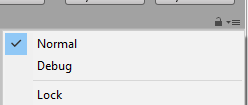 small canopy
Yes! Not 100% about the node on the top (what are the other options for target ?)
You could just put "Me or self" if available
mystic leaf
the node on top is so it sends it to all players
mystic leaf
yeah but that only toggles them for me right?
small canopy
It does all the logic for you
mystic leaf
so this should work technically